WO2021193276A1 - 端末装置、購入管理方法、及び、プログラム - Google Patents
端末装置、購入管理方法、及び、プログラム Download PDFInfo
- Publication number
- WO2021193276A1 WO2021193276A1 PCT/JP2021/010763 JP2021010763W WO2021193276A1 WO 2021193276 A1 WO2021193276 A1 WO 2021193276A1 JP 2021010763 W JP2021010763 W JP 2021010763W WO 2021193276 A1 WO2021193276 A1 WO 2021193276A1
- Authority
- WO
- WIPO (PCT)
- Prior art keywords
- terminal device
- product
- cart
- information
- linked
- Prior art date
- Legal status (The legal status is an assumption and is not a legal conclusion. Google has not performed a legal analysis and makes no representation as to the accuracy of the status listed.)
- Ceased
Links
Images








Classifications
-
- G—PHYSICS
- G06—COMPUTING OR CALCULATING; COUNTING
- G06Q—INFORMATION AND COMMUNICATION TECHNOLOGY [ICT] SPECIALLY ADAPTED FOR ADMINISTRATIVE, COMMERCIAL, FINANCIAL, MANAGERIAL OR SUPERVISORY PURPOSES; SYSTEMS OR METHODS SPECIALLY ADAPTED FOR ADMINISTRATIVE, COMMERCIAL, FINANCIAL, MANAGERIAL OR SUPERVISORY PURPOSES, NOT OTHERWISE PROVIDED FOR
- G06Q20/00—Payment architectures, schemes or protocols
- G06Q20/08—Payment architectures
- G06Q20/20—Point-of-sale [POS] network systems
- G06Q20/208—Input by product or record sensing, e.g. weighing or scanner processing
-
- G—PHYSICS
- G07—CHECKING-DEVICES
- G07G—REGISTERING THE RECEIPT OF CASH, VALUABLES, OR TOKENS
- G07G1/00—Cash registers
-
- G—PHYSICS
- G06—COMPUTING OR CALCULATING; COUNTING
- G06Q—INFORMATION AND COMMUNICATION TECHNOLOGY [ICT] SPECIALLY ADAPTED FOR ADMINISTRATIVE, COMMERCIAL, FINANCIAL, MANAGERIAL OR SUPERVISORY PURPOSES; SYSTEMS OR METHODS SPECIALLY ADAPTED FOR ADMINISTRATIVE, COMMERCIAL, FINANCIAL, MANAGERIAL OR SUPERVISORY PURPOSES, NOT OTHERWISE PROVIDED FOR
- G06Q20/00—Payment architectures, schemes or protocols
- G06Q20/08—Payment architectures
- G06Q20/20—Point-of-sale [POS] network systems
- G06Q20/202—Interconnection or interaction of plural electronic cash registers [ECR] or to host computer, e.g. network details, transfer of information from host to ECR or from ECR to ECR
-
- G—PHYSICS
- G06—COMPUTING OR CALCULATING; COUNTING
- G06Q—INFORMATION AND COMMUNICATION TECHNOLOGY [ICT] SPECIALLY ADAPTED FOR ADMINISTRATIVE, COMMERCIAL, FINANCIAL, MANAGERIAL OR SUPERVISORY PURPOSES; SYSTEMS OR METHODS SPECIALLY ADAPTED FOR ADMINISTRATIVE, COMMERCIAL, FINANCIAL, MANAGERIAL OR SUPERVISORY PURPOSES, NOT OTHERWISE PROVIDED FOR
- G06Q30/00—Commerce
- G06Q30/02—Marketing; Price estimation or determination; Fundraising
- G06Q30/0283—Price estimation or determination
-
- G—PHYSICS
- G06—COMPUTING OR CALCULATING; COUNTING
- G06Q—INFORMATION AND COMMUNICATION TECHNOLOGY [ICT] SPECIALLY ADAPTED FOR ADMINISTRATIVE, COMMERCIAL, FINANCIAL, MANAGERIAL OR SUPERVISORY PURPOSES; SYSTEMS OR METHODS SPECIALLY ADAPTED FOR ADMINISTRATIVE, COMMERCIAL, FINANCIAL, MANAGERIAL OR SUPERVISORY PURPOSES, NOT OTHERWISE PROVIDED FOR
- G06Q30/00—Commerce
- G06Q30/06—Buying, selling or leasing transactions
-
- G—PHYSICS
- G07—CHECKING-DEVICES
- G07G—REGISTERING THE RECEIPT OF CASH, VALUABLES, OR TOKENS
- G07G1/00—Cash registers
- G07G1/0036—Checkout procedures
-
- G—PHYSICS
- G07—CHECKING-DEVICES
- G07G—REGISTERING THE RECEIPT OF CASH, VALUABLES, OR TOKENS
- G07G1/00—Cash registers
- G07G1/12—Cash registers electronically operated
Definitions
- the present invention relates to the technical field of a product sales system using self-registration.
- Patent Document 1 describes that a shopping cart reads product information using a bar code reader or the like, stores the product picked up by the customer in the store, and transmits the product information to the sales system.
- An object of the present invention is to share information about products registered by different terminal devices among a plurality of customers in a purchase management system using self-registration.
- the cooperation ID acquisition unit that acquires the cooperation ID and It is a terminal device different from the terminal device, and includes a linked terminal device having the same cooperation ID, and a sharing unit that shares information about the terminal device and the linked terminal device.
- the purchase management method executed by the terminal device capable of acquiring the product identification information of the product to be purchased is Get the link ID and It is a terminal device different from the terminal device, and shares information about the terminal device and the linked terminal device with the linked terminal device having the same cooperation ID.
- the program Obtain the product identification information of the product to be purchased, Get the link ID and A terminal device different from the terminal device, and the computer is made to execute a process of sharing information about the terminal device and the linked terminal device with the linked terminal device having the same cooperation ID.
- the configuration of the purchase management system is shown.
- the schematic configuration of the POS server is shown.
- the outline configuration of the management server is shown.
- the outline configuration of the mobile terminal is shown.
- the outline structure of the cart is shown.
- the outline structure of the accounting machine is shown. This is a display example of the cooperation ID screen. It is a flowchart of a linked purchase process. It is a flowchart of a product selection process. This is a display example of the product selection screen. It is a flowchart of sum processing.
- It is a flowchart of accounting processing This is a display example of the payment method selection screen. This is a display example of the accounting end screen.
- FIG. 1 shows the configuration of the purchase management system 100 according to the present embodiment.
- the purchase management system 100 mainly includes a POS server 1, a management server 2, a mobile terminal 3, a high-performance cart (hereinafter, also referred to as a “cart”) 4, and an accounting machine 5.
- the customer reads the product barcode 7 attached to the product displayed on the product shelf 6 with the cart 4 in the store 8 where the product is sold, and the customer plans to purchase the product (“Purchase”). Also called "product”).
- the registered purchased product is settled by credit card payment or the like using the accounting machine 5 in the store 8.
- the mobile terminal 3 is a terminal such as a smartphone used by the customer.
- the POS server 1 is a server that manages various sales information such as product information including prices, inventory status, etc. of products sold at store 8, and sales information of store 8.
- the POS server 1 can communicate with the management server 2 and the accounting machine 5 via a network or the like.
- the POS server 1 may collectively manage the sales information of a plurality of affiliated stores, or may exist for each store and manage only the sales information of that store.
- the management server 2 is a server device that controls the mobile terminal 3 and the accounting machine 5, and can communicate with the POS server 1, the mobile terminal 3, the cart 4, and the accounting machine 5 via a network or the like.
- the management server 2 acquires and stores information necessary for display control of the mobile terminal 3 from the POS server 1.
- the management server 2 transmits display information for the mobile terminal 3 to display various screens to the mobile terminal 3.
- the above-mentioned various screens include a cooperation ID screen for displaying a cooperation ID for a plurality of carts 4 to share information in real time.
- real-time means that the processing is performed almost at the same time as the input.
- the information input by the predetermined cart is transmitted to a plurality of carts having the same cooperation ID almost at the same time as the input, and the plurality of carts share the information.
- the management server 2 may be composed of a plurality of server devices.
- the management server 2 is composed of a server device that mainly performs an interface operation with the mobile terminal 3 such as data exchange with the mobile terminal 3, and a server device that stores and manages various information acquired from the POS server 1. May be done.
- the former server device functions as a so-called application server
- the latter server device functions as a so-called database server.
- each of these server devices exchanges information necessary for executing the assigned process via a network or the like.
- the mobile terminal 3 is a mobile terminal used by customers who shop at the store 8, and has a function of acquiring and displaying various screens such as a cooperation ID screen by communicating with the management server 2.
- FIG. 1 for convenience of explanation, only one mobile terminal 3 is displayed, but there are actually as many customers as the number of customers who use the cooperation ID in the store 8.
- the cart 4 is used when a customer who makes a purchase puts in a purchased product and moves it in the store 8, and includes a display unit 41 such as a display. For example, when a customer visits a store 8 as a parent and child, any cart 4a in the cart storage area of the store 8 can be used as a parent's cart, and another cart 4b can be used as a child's cart.
- the cart 4 includes a function of reading a product barcode 7 attached to a product, a function of generating a list of purchased products (also referred to as a "product list") registered by reading the product barcode 7, and a product list. It has a function to display various screens such as a product selection screen, a function to share information in real time among a plurality of carts 4, and the like.
- the cart 4 reads the product barcode 7 as a method of identifying the purchased product, but the present invention is not limited to this, and various methods can be applied. ..
- the cart 4 has an image recognition function, and the products put in the cart 4 may be identified by image recognition.
- the accounting machine 5 is a payment machine (so-called self-payment machine) for customers to make payments using the cart 4.
- the accounting machine 5 can communicate with the management server 2, the mobile terminal 3, and the cart 4, and exchanges various information necessary for settlement with the management server 2, the mobile terminal 3, the cart 4, and the POS server as needed. Do with 1.
- FIG. 2 shows a schematic configuration of the POS server 1.
- the POS server 1 mainly includes a storage unit 13, a communication unit 14 that performs data communication, and a control unit 15. These elements are connected to each other by a bus line 10.
- the storage unit 13 is composed of a memory such as a hard disk or a flash memory.
- the storage unit 13 stores a program executed by the control unit 15 and information necessary for the control unit 15 to execute a predetermined process by executing the program.
- the storage unit 13 includes the selling price change information 17, the product information DB (Database) 18, and the sales information 19 which is information on the sales of the product.
- the storage unit 13 may store various sales-related information other than the selling price change information 17, the product information DB 18, and the sales information 19.
- the product information DB 18 is a database of information about products handled by the store 8 or affiliated stores including the store 8.
- the product information DB 18 includes various information such as a product price, information for identifying a product such as a JAN (Japanese Article Number) code (also referred to as "product identification information"), product classification information, and product inventory status. Contains information.
- the selling price change information 17 is information related to the change in the selling price. Specifically, the selling price change information 17 includes classification discount information, bundle discount information, set discount information, total discount information, classification discount information, bundle discount information, set discount information, and total discount information. Contains at least one of any discount or discount information, such as.
- the control unit 15 includes a CPU (Central Processing Unit), a ROM (Read Only Memory), a RAM (Random Access Memory), and the like (not shown), and performs various controls on each component in the POS server 1. For example, the control unit 15 updates the sales information 19 by communicating with the accounting machine 5 via the communication unit 14. Further, the control unit 15 transmits information regarding the selling price change information 17 and the product information DB 18 to the management server 2 by communicating with the management server 2 via the communication unit 14.
- a CPU Central Processing Unit
- ROM Read Only Memory
- RAM Random Access Memory
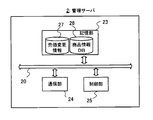
- FIG. 3 shows a schematic configuration of the management server 2.
- the management server 2 mainly includes a storage unit 23, a communication unit 24, and a control unit 25. Each of these elements is connected to each other via a bus line 20.
- the storage unit 23 is composed of a memory such as a hard disk or a flash memory.
- the storage unit 23 stores a program executed by the control unit 25 and information necessary for the control unit 25 to execute a predetermined process by executing the program.
- the storage unit 23 stores the selling price change information 27 and the product information DB 28.
- the selling price change information 27 is information related to a change in the selling price due to a discount or discount.
- the selling price change information 27 is updated periodically or irregularly so as to be synchronized with the selling price change information 17 stored in the POS server 1 based on the control of the control unit 25.
- the product information DB 28 is a database of information about the product.
- the product information DB 28 is updated periodically or irregularly so as to be synchronized with the product information DB 18 stored in the POS server 1 based on the control of the control unit 25.
- the communication unit 24 communicates with the POS server 1, the mobile terminal 3, the cart 4, and the accounting machine 5 by wire or wireless communication.
- the control unit 25 includes a CPU, ROM, RAM, and the like (not shown), and performs various controls on each component in the management server 2. The process executed by the control unit 25 will be described later.
- FIG. 4 shows a schematic configuration of the mobile terminal 3.
- the mobile terminal 3 mainly includes a display unit 31, an input unit 32, a storage unit 33, a communication unit 34, a control unit 35, and a reading unit 36. Each of these elements is connected to each other via a bus line 30.
- the display unit 31 displays various information such as the cooperation ID based on the control of the control unit 35.
- the input unit 32 is an interface that accepts user input, and corresponds to, for example, a touch panel, a button, a voice input device, and the like.
- the storage unit 33 is composed of a memory such as a hard disk or a flash memory.
- the storage unit 33 stores a program executed by the control unit 35 and information necessary for the control unit 35 to execute a predetermined process by executing the program.
- the storage unit 33 stores a dedicated application program that is activated when shopping at the store 8 and controls the display of various screens such as the cooperation ID screen.
- the communication unit 34 communicates with the management server 2 by wireless communication.
- the control unit 35 includes a CPU, ROM, RAM, and the like (not shown), and performs various controls on each component in the mobile terminal 3. The control executed by the control unit 35 will be described later.
- the reading unit 36 is an optical device such as a camera, and supplies the read information to the control unit 35.
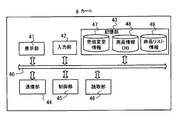
- FIG. 5 shows a schematic configuration of the cart 4.
- the cart 4 mainly includes a display unit 41, an input unit 42, a storage unit 43, a communication unit 44, a control unit 45, and a reading unit 46. Each of these elements is connected to each other via a bus line 40.
- the display unit 41 displays various information such as a product selection screen and a total confirmation screen based on the control of the control unit 45.
- the input unit 42 is an interface that accepts user input, and corresponds to, for example, a touch panel, a button, a voice input device, and the like.
- the storage unit 43 is composed of a memory such as a hard disk or a flash memory.
- the storage unit 43 stores a program executed by the control unit 45 and information necessary for the control unit 45 to execute a predetermined process by executing the program.
- the storage unit 43 stores a dedicated application program that operates when a plurality of carts 4 in the store 8 share information based on the cooperation ID described later, and performs product selection processing and total processing. Has been done.
- the storage unit 43 stores the selling price change information 47, the product information DB 48, and the product list information 49.
- the selling price change information 47 is information related to a change in the selling price due to a discount or discount.
- the selling price change information 47 is updated periodically or irregularly so as to be synchronized with the selling price change information 17 stored in the POS server 1 based on the control of the control unit 45.
- the product information DB 48 is a database of information about the product.
- the product information DB 48 is updated periodically or irregularly so as to be synchronized with the product information DB 18 stored in the POS server 1 based on the control of the control unit 45.
- Product list information 49 is information related to a product list in which purchased products are registered using the cart 4.
- the product list is, for example, a list including product identification information indicating a purchased product and a planned purchase quantity of the product.
- the product list information 49 is a cart (hereinafter, referred to as a “linkage cart”) that is linked by having the same link ID with the product list registered by the cart 4 in its own cart, although details will be described later. ) Memorizes the registered product list (also called "linked product list").
- the product list stored in the product list information 49 is updated every time an addition, deletion, or quantity change of purchased products is performed based on the operation of the cart 4.
- the communication unit 44 communicates with the POS server 1, the management server 2, the mobile terminal 3, another cart 4, and the accounting machine 5 by wireless communication.
- communication for sharing information in real time is performed by wireless communication such as Wi-Fi (registered trademark) or Bluetooth (registered trademark) with another cart 4 linked by a linking ID described later. conduct.
- the control unit 45 includes a CPU, ROM, RAM, and the like (not shown), and performs various controls on each component in the cart 4. The process executed by the control unit 25 will be described later.
- the communication unit 24 is an example of the shared unit of the present invention
- the control unit 25 is an example of the cooperation ID acquisition unit and the aggregation unit of the present invention.
- the reading unit 46 is an optical device such as a camera, reads the product barcode 7 attached to the product, and supplies the read information to the control unit 45.
- the control unit 45 acquires product identification information such as a JAN code from the product barcode 7 attached to the product based on the information output by the reading unit 46.
- the cart 4 When the customer enters the store 8, the cart 4 is initialized and placed in the cart storage area with the battery charged.
- the initialization is a state in which the cooperation ID used by the previous customer and the product list related to the purchased product of the previous customer are deleted from the storage unit 43.
- a high-performance cart such as the cart 4 is applied, but instead of the cart 4, a shopping cart or a container having the same function as the cart 4 may be used.
- FIG. 6 shows a schematic configuration of the accounting machine 5.
- the accounting machine 5 mainly includes a display unit 51, an input unit 52, a storage unit 53, a communication unit 54, a control unit 55, a light 57, and a speaker 58. Each of these elements is connected to each other via a bus line 50.
- the display unit 51 displays various information such as a payment method selection screen and an accounting end screen based on the control of the control unit 55.
- the input unit 52 is an interface that accepts customer input, and corresponds to, for example, a touch panel, a button, or the like.
- the storage unit 53 is composed of a memory such as a hard disk or a flash memory.
- the storage unit 53 stores a program executed by the control unit 55 and information necessary for the control unit 55 to execute a predetermined process by executing the program.
- the storage unit 53 stores a dedicated application program that operates when a customer makes a payment and performs accounting processing.
- the control unit 55 includes a CPU, ROM, RAM, etc. (not shown), and performs various controls on each component in the accounting machine 5. The control executed by the control unit 55 will be described later.
- the light 57 is turned on when a problem occurs in the accounting machine 5 or when a clerk is called.
- the speaker 58 outputs an operation sound, a voice message, or the like for calling attention as needed.
- shopping may be done with multiple carts 4 instead of one cart 4.
- the parent pays for the products in the cart 4 used by the parent, and the child is the child. You will have to pay for the products in the cart 4 you are using.
- the payment source is usually the parent, so it takes time and effort to hand over the money to the child in advance.
- the carts share information in real time while the cart 4 is used for purchasing a product at the store 8 based on the cooperation ID for the plurality of carts 4 to cooperate with each other.
- the carts can share information at any time, such as while registering a product or searching for a product.
- the information of the plurality of carts 4 is aggregated in one arbitrarily determined cart 4 based on the cooperation ID.
- the linkage ID is identification information for identifying the cart 4 to share information, and a two-dimensional bar code, RFID (Radio Frequency Identification Identifier), PIN (Personal Identification Number) code, password, etc. can be arbitrarily applied.
- the cooperation ID may be used as a password and directly input to the cart 4, or a medium such as RFID has information indicating the cooperation ID and the cart 4 is the medium.
- the cooperation ID may be obtained from.
- the cooperation ID is issued by the management server 2 via a dedicated application by operating the mobile terminal 3 used by the customer, for example.
- the cooperation ID is not limited to being issued by the management server 2, and it is sufficient if it is possible to specify the cart 4 that shares information.
- the mobile terminal 3 stores the cooperation ID in the storage unit 33, and displays the cooperation ID screen indicating the cooperation ID received from the management server 2 on the display unit 31.
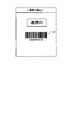
- FIG. 7 shows a display example of the cooperation ID screen displayed on the mobile terminal 3.
- the link ID screen has a code 67 indicating the link ID.
- the code 67 may be any code as long as it can identify the linkage ID, such as a barcode or a QR (Quick Response) code (registered trademark).
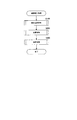
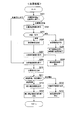
- FIG. 8 is a flowchart showing an outline of the linked purchase process.
- the linked purchase process is roughly classified into a product selection process S100, a total process S200, and an accounting process S300.
- the linked purchase process is mainly realized by the cart 4 and the accounting machine 5 executing programs prepared in advance.
- FIG. 9 is a flowchart of the product selection process. This process is executed by the cart 4.
- the link ID screen is displayed on the mobile terminal 3 and the cart 4 to be linked reads the code 67.
- the cart 4 acquires the cooperation ID and stores it in the storage unit 43.
- the cart 4 can identify another cart 4 having the same cooperation ID, and information can be shared and aggregated by wireless communication among a plurality of carts having the same cooperation ID.
- the customer displays the cooperation ID screen on the mobile terminal 3 and causes the reading unit 46 of the cart 4a and the cart 4b to read the code 67.
- the cart 4a used by the parent and the cart 4b used by the child are linked based on the link ID.
- the cart 4b used by the child having the same cooperation ID is a cooperation cart that shares information.
- the cart 4a used by the parent associated with the link ID is a linked cart that shares information.
- the cart 4a used by the parent is used as a reference, and the cart 4b used by the child is used as the cooperative cart.
- the number of linked carts may be one or a plurality.
- the reference cart and the linked cart may be set, for example, the cart in which the code 67 is read first may be used as the reference cart, and the cart in which the code 67 is read in the second and subsequent times may be used as the linked cart.
- a message such as "Do you want to use this cart as a reference cart or a linked cart?" Is displayed on the initial screen of the cart, and the customer may be able to select which cart to use as the reference cart. ..
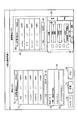
- FIG. 10 is a display example of the product selection screen.
- it has a product list registered by the cart 4, a linked product list registered by the linked cart, a message button 76, a total button 77, a cancel button 78, a message field 79, and an in-store map 85.
- the product list is composed of a list display column 71, a subtotal display column 72, and a total amount display column 73.
- the linked product list is composed of a list display column 81, a subtotal display column 82, and a total amount display column 83.
- the message field 79 is composed of a received message display field 74 and a message input field 75.
- the in-store map 85 includes a used cart icon 86 indicating the position of the used cart and a linked cart icon 87 indicating the position of the linked cart.
- the name, quantity, and price of the purchased product are displayed for each purchased product. Specifically, in the list display column 71, the name, quantity, and price of the purchased product registered in the cart 4a used by the parent are displayed. On the other hand, in the list display column 81, the name, quantity, and price of the purchased products registered in the linked cart 4b used by the child are displayed.
- the subtotal display column 72 and the subtotal display column 82 display the subtotal of the selling price excluding tax for all the products in the product list and the linked product list.
- the total amount display column 73 and the total amount display column 83 display the total amount of the selling price including tax for all the products in the product list and the linked product list. Specifically, in the subtotal display column 72 and the total amount display column 73, the subtotal and the total amount of the product list registered in the cart 4a used by the parent are displayed. On the other hand, in the subtotal display column 82 and the total amount display column 83, the subtotal and the total amount of the linked product list are displayed.
- the cart 4 generates a list based on the product identification information acquired by reading the product barcode 7, and uses the subtotal or total amount of the list as the price and selling price change information 47 of the purchased product registered in the product information DB 48. Calculated based on. As a result, the cart 4 generates a product list registered in its own cart.
- the linked product list is received by communication from the linked cart.
- the product list and the linked product list are stored in the product list information 49 and updated.
- the cart 4a used by the parent generates a product list based on the acquired product identification information.
- the cart 4a receives the linked product list from the linked cart 4b used by the child.
- Information about purchased products such as product identification information acquired by each cart is also called product acquisition information.
- the product list is composed of a list display column, a subtotal display column, and a total amount display column, but the present invention is not limited to this, and the product name is not limited to this. If you know the price and the price, you can set the configuration arbitrarily.
- the linked product list is received from the linked cart, but the present invention is not limited to this, and the product identification information of the product registered in the linked cart is obtained from the linked cart.
- the cart 4 may generate or update the linked product list based on the received product identification information.
- the message button 76 is a button to be pressed when sending a message to the linked cart. Specifically, when the customer inputs a message in the message input field 75 and presses the message button 76, the message is transmitted to the cooperation cart. The message sent from the linked cart is displayed in the received message display field 74 in real time.
- the parent sees the linked product list on the product selection screen and the linked cart 4b has registered a product that he / she does not plan to purchase, he / she operates the cart 4a and displays "Ice is not good" in the message input field 75. By inputting "! And pressing the message button 76, a message can be sent to the linked cart 4b.
- the parent cart 4a displays the message in the received message display field 74. According to this, messages can be exchanged in real time between the linked carts 4.
- the message field 79 may be used to select which linked cart the message is sent to. Further, in the present embodiment, the message is written, but the present invention is not limited to this, and the message may be a call such as a videophone.
- the total button 77 is a button to be pressed when making a total request to the linked cart in order to add the products, subtotals and total amount of the product list to the products, subtotals and total amount of the linked product list.
- the cart 4 can aggregate the product acquisition information regarding the purchased products, subtotals, and total amount of its own cart and the linked cart before accounting, and can add up the number of products, subtotals, total amount, and the like. That is, the total button 77 is a button that is pressed in the cart 4 that aggregates the product acquisition information among the plurality of carts 4 that are linked based on the linkage ID.
- the cart 4 that has transmitted the summation request by pressing the summation button 77 can aggregate the product acquisition information in its own cart if the approval of the linked cart that has received the summation request is obtained.
- the customer can collect the information of all the purchased products as the purchased product information in one cart 4, and the accounting process can be performed smoothly.
- the cancel button 78 is a button to be pressed when shopping is stopped and the linked purchase process is stopped. Specifically, when the customer presses the cancel button 78, the cart 4 sends a message to the link cart to cancel the shopping, and the link ID and the product list and the link list stored in the product list information 49 are stored. Delete and initialize the information about.
- the in-store map 85 is a simple sketch of the store 8, and the current position of the cart 4 used by the customer is displayed by the used cart icon 86, and the current position of the linked cart is displayed by the linked cart icon 87.
- the position information of the cart 4 can be acquired, for example, by wirelessly communicating with the product shelf 6 installed in the store 8 via Wi-Fi or the like.
- the cart 4 constantly transmits its own position information to the linked cart, and constantly receives the position information of the linked cart from the linked cart. In other words, the linked carts share location information in real time.
- parents can send a message such as "Can you buy an apple?" When they see the in-store map 85 and find that the linked cart 4b is near the fruit and vegetable section. According to this, it is convenient for parents to have their children register products in the sales floor away from the cart 4a they are using in the linked cart 4b used by their children.
- the cart 4 determines whether the product identification information has been acquired by reading the product barcode 7 or whether the linked product list has been received from the linked cart (step S102).
- the cart 4 When the product identification information is acquired (step S103), the cart 4 generates a product list based on the product identification information and transmits it to the linked cart (step S104). Further, the cart 4 stores the generated product list in the product list information 49 for the first time, and updates the product list information 49 based on the generated product list for the second and subsequent times. Then, the cart 4 displays the product list on the product selection screen based on the latest product list, and proceeds to the process of step S108 (step S105).
- the cart 4 stores the received linked product list in the product list information 49 for the first time. If it is the second time or later, the product list information 49 is updated based on the received linked product list. Then, the cart 4 displays the linked product list on the product selection screen based on the latest linked product list (step S107).
- the cart 4 determines whether or not to send and receive the total request (step S108). Specifically, when the summation button 77 is pressed by the customer, the cart 4 transmits a summation request to the linked cart. Therefore, the cart 4 determines that the summation request is transmitted / received (step S108; Yes), and proceeds to the summation process. Further, when the total button 77 is pressed in the linked cart, the cart 4 receives the total request from the linked cart. Therefore, the cart 4 determines that the summation request is transmitted / received (step S108; Yes), and proceeds to the summation process.
- step S108 when the product identification information is acquired by reading the product barcode 7, the cart 4 determines that the total request is not transmitted / received (step S108; No), and returns to the process of step S102. Further, even when the linked product list is received from the linked cart, the cart 4 determines that the total request is not transmitted / received (step S108; No), and returns to the process of step S102.
- the summation process Next, the summation process will be described.
- the product acquisition information of all the linked carts 4 is aggregated in one of the plurality of linked carts 4 based on the linked ID, and the number of products, subtotals, total amount, etc. are totaled. It is a process to do.
- the summation process is performed by one cart 4 that aggregates the product acquisition information among the plurality of carts 4 that are linked based on the link ID, and sends a summation request to the other linked carts.
- the cart 4 that has transmitted the summation request by pressing the summation button 77 can aggregate the product acquisition information in its own cart if the approval of the linked cart that has received the summation request is obtained.
- FIG. 11 is a flowchart of the total processing. This process is executed by the cart 4.
- the cart 4 determines whether the total request is received from the linked cart or whether the cart 4 sends the total request to the linked cart by pressing the total button 77 (step S201).
- the cart 4 displays the total approval screen on the display unit 41.
- FIG. 12 is a display example of the total approval screen. This example has a message asking whether or not to approve the summation request from the linked cart, a warning that the product cannot be added after the summation, an approval button 88, and a rejection button 89.
- the approval button 88 is pressed by the customer
- the cart 4 transmits the approval information to the linked cart.
- the refusal button 89 is pressed by the customer, the cart 4 transmits the refusal information to the linked cart.
- the cart 4 determines whether the approval information or the refusal information has been transmitted to the linked cart (step S203).
- the cart 4 displays an end screen including a message to the effect that the shopping is completed by adding up with the linked cart.
- the cart 4 erases and initializes the cooperation ID and the information related to the product list and the cooperation list stored in the product list information 49, and ends the cooperation purchase process (step S205). By initializing in this way, the cart 4 cannot additionally register products in the product list so far.
- the present invention is not limited to this, and the addition, deletion, and quantity of products can be added or deleted by operating the display unit 41. If the cart 4 can be changed, all of them cannot be added together.
- the method is not limited to initialization, and is arbitrary, such as limiting the display unit 41 and the reading unit 46.
- the present invention it is determined that the addition of products cannot be performed in both the used cart and the linked cart when the total is added, but the present invention is not limited to this, and the totaled cart 4, that is, the total request. It may be possible that the product cannot be added only to the cart 4 that has received the message and sent the approval information. In other words, the added cart 4 may be able to add products even after the addition. In the above example, if the parent's cart 4a sends a summation request to the child's cart 4b and the child approves the summation, the child's cart 4b cannot add products. However, the cart 4a used by the parent may be able to continue to add products even after the summation.
- the cart 4 displays the total refusal screen on the display unit 41 (step S207).
- FIG. 13 is a display example of the total refusal screen. In this example, there is a message to return to the product selection screen because the sum cannot be added.
- the cart 4 returns to the product selection process (step S208) and displays the product selection screen (step S101).
- step S201 when the cart 4 sends a total request to the linked cart by pressing the total button 77, the cart 4 displays a total confirmation screen on the display unit 41 (step S209).
- FIG. 14 is a display example of the total confirmation screen.
- a message asking whether or not to add up, a warning that the product cannot be added after the addition, a YES button 68, and a NO button 69 are provided.
- the cart 4 transmits a total request to the linked cart.
- the NO button 69 when the NO button 69 is pressed by the customer, the cart 4 returns to the product selection process and displays the product selection screen.
- the cart 4 sends a total request to the linked cart (step S210). Then, the cart 4 determines which of the approval information and the refusal information is received from the linked cart (step S211). When the refusal information is received from the linked cart, the cart 4 displays the total refusal screen on the display unit 41 (step S212). FIG. 13 is a display example of the total refusal screen, and the description thereof will be omitted. Then, the cart 4 returns to the product selection process (step S213) and displays the product selection screen (step S101).
- the cart 4 aggregates the product list generated based on the product acquisition information and the linked product list, and purchases the purchased product list based on the purchased product information related to all the purchased products. To generate. Then, the cart 4 displays the purchased product screen including the purchased product list on the display unit 41 (step S214). When the purchased product list is generated, the cart 4 is controlled so that products cannot be added.
- FIG. 15 is a display example of the purchased product screen. In this example, the purchased product screen has a purchased product list display field 61, a subtotal display field 62, a total amount display field 63, a payment button 65, and a cancel button 66.
- the purchased product list display column 61 displays the purchased product list, and the name, quantity, and price of the purchased product are displayed for each purchased product. Specifically, in the purchased product list display column 61, the names, quantities, and prices of all the purchased products registered in the cart 4a used by the parent and the cart 4b used by the child are displayed.
- the subtotal display column 62 displays a subtotal of the selling price excluding tax for all purchased products including the product list and the linked product list.
- the total amount display column 63 displays the total amount of the selling price including tax for all the purchased products including the product list and the linked product list.
- the payment button 65 is a button to be pressed when transmitting the purchased product information regarding the purchased product list to the accounting machine 5.
- the cancel button 66 is a button to be pressed when shopping is stopped and the linked purchase process is stopped. Specifically, when the customer presses the stop button 66, the cart 4 erases and initializes the cooperation ID and the information related to the product list and the cooperation list stored in the product list information 49.
- the cart 4 transmits the purchased product information to the accounting machine 5 (step S215).
- the customer presses the start button displayed on the display unit 51 on the accounting machine 5 installed in the store 8, brings the cart 4 to be used closer to the accounting machine 5, and purchases the product screen. Press the payment button 65 at. Then, the cart 4 transmits the purchased product information to the accounting machine 5.
- the accounting process is a process of paying for the purchased product registered by the customer based on the purchased product information received from the cart 4 in the total processing.
- FIG. 16 is a flowchart of accounting processing. This process is mainly executed by the accounting machine 5.
- FIG. 17 is a display example of the payment method selection screen.
- the payment method selection screen includes a purchased product list display field 91, a subtotal display field 92, a total amount display field 93, a credit button 94, and a cash button 95.
- the purchased product list display column 91 the name, quantity, and price of the purchased product are displayed.
- the subtotal display column 92 displays the subtotal of the selling price excluding tax for all purchased products displayed in the purchased product list display column 91, and the total amount display column 93 displays the total amount of the selling price including tax for all purchased products. ..
- the payment method selection screen includes the purchased product list display field 91 and the subtotal display field 92, but the present invention is not limited to this, and if the payment amount can be confirmed and the payment method can be selected. good.
- the customer confirms the payment amount by looking at the payment method selection screen, and presses either the credit button 94 or the cash button 95 to make the payment.
- the purchase price is settled (step S303).
- the accounting machine 5 prompts the customer to insert a card and, if necessary, input a personal identification number or the like, and makes a credit card payment.
- the accounting machine 5 prompts the customer to insert cash into the cash slot, and when the cash is inserted, pays change as needed.
- the payment method is not limited to credit card payment and cash, and various methods such as electronic money can be set.
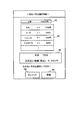
- FIG. 18 shows a display example of the accounting end screen.
- the accounting end screen includes a payment information field 97, a receipt button 98, and an end button 99.
- the payment information column 97 displays the payment amount.
- the receipt button 98 is a button for printing out a receipt.
- the end button 99 is a button for confirming that the customer has completed the accounting process.
- the accounting machine 5 returns the display of the display unit 51 to the main menu.
- only the payment amount is displayed in the payment information column 97, but the present invention is not limited to this, and information such as the payment method and the card company may be displayed. good.
- a plurality of carts 4 can share information in real time based on the linked ID. Specifically, since the cart 4 can share the registered products, their prices, messages, current positions, etc. with the linked cart in real time, it is convenient for parents and children, friends, etc. to shop with a plurality of carts 4. be. Further, the information of a plurality of carts 4 can be aggregated in one arbitrarily determined cart 4 based on the cooperation ID. Specifically, the cart 4 can add up the prices of the linked cart and the product by a simple operation such as pressing the total button 77. Therefore, even if a parent and child or friends make a purchase in a plurality of carts 4, the payment source can be easily set to one, and the waiting time can be shortened.
- Modification example 1 (Modification example 1)
- the customer has the plurality of carts 4 acquire the cooperation ID by reading the code 67 as soon as the customer visits the store 8.
- the present invention is not limited to this, and the cart 4 can be made to acquire the cooperation ID at any timing before the accounting treatment is performed.
- the cart 4 starts the linked purchase process at the timing when the linked ID is acquired.
- the product acquisition information of a plurality of linked carts is aggregated as purchased product information in one cart 4 arbitrarily determined based on the linkage ID, but the cart 4 is not used. It may be integrated in the mobile terminal 3 or the accounting machine 5. Specifically, the product acquisition information may be aggregated in the mobile terminal 3 that displays the cooperation ID screen, and the mobile terminal 3 may transmit the purchased product information to the accounting machine 5. Further, the accounting machine 5 reads the code 67 of the cooperation ID screen displayed by the mobile terminal 3, aggregates the product acquisition information in the accounting machine 5 that has acquired the cooperation ID, and the accounting machine 5 generates the purchased product information. Accounting may be performed.
- a plurality of carts 4 for registering products share information based on the cooperation ID and one cart 4 aggregates the product acquisition information and collects the purchased product information by performing the total processing before the settlement.
- the accounting machine 5 performs accounting processing based on the purchased product information generated by the cart 4.
- the mobile terminal 3 may be used instead of the cart 4 as long as the mobile terminal 3 can acquire the product identification information by reading the product barcode 7. .. That is, a plurality of mobile terminals 3 for registering products share information based on the cooperation ID, and one mobile terminal 3 aggregates the product acquisition information to generate the purchased product information by performing the total processing before the settlement. It may be that.
- the mobile terminal 3 may send the purchase information to the accounting machine 5, and the accounting machine 5 may perform the accounting process, or the mobile terminal 3 may perform the accounting process by credit settlement or the like based on the purchase information. .. That is, in the above embodiment, the mobile terminal 3 may perform the linked purchase process performed by the cart 4 and the accounting machine 5.
- Modification example 4 when the customer sees the product selection screen and an unnecessary product or a duplicate product is registered in the linked cart, the customer operates the cart 4 to call attention by a message or add up. Even if a request is received, it can be rejected. In addition to this, the cart 4 flags unnecessary products among the products registered in the linked cart by the customer's operation, and if the flagged product exists at the time of payment, the relevant product is concerned. Return processing may be performed for the flagged product without payment.
- the cart 4 registers the product, and the registered purchased product is settled using the accounting machine 5.
- the cart 4 may perform the settlement without using the accounting machine 5.
- a payment method using the cart 4 for example, various methods such as credit payment by having the cart 4 read a credit card and electronic money payment by holding an IC (Integrated Circuit) card or a smartphone over the cart 4 can be applied.
- the cart 4 may register the product, and the registered purchased product may be settled using the mobile terminal 3.
- the display unit 41 of the cart 4 displays a QR code indicating purchased product information or information on the payment amount, and the mobile terminal 3 acquires the information by reading the QR code, and makes a credit payment or electronically. Settle by money settlement.
- the cart 4 that aggregates the product acquisition information transmits the purchased product information regarding the purchased product to the accounting machine 5, and the accounting machine 5 performs accounting processing based on the received purchased product information.
- the cart 4 that aggregates the product acquisition information displays a code indicating information about the purchased product on the display unit 41, and the accounting machine 5 performs accounting processing based on the code. May be done.
- the code is, for example, a QR code or a bar code.
- the mobile terminal 3 may display a code indicating information on the purchased product, and the accounting machine 5 may perform accounting processing based on the code.
- the cooperation ID acquisition unit that acquires the cooperation ID and A terminal device different from the terminal device, a linked terminal device having the same cooperation ID, and a sharing unit that shares information about the terminal device and the linked terminal device.
- a terminal device comprising.
- Appendix 2 The terminal device according to Appendix 1, wherein the terminal device is a mobile terminal used by a customer who purchases the product.
- Appendix 3 The terminal device according to Appendix 1 or 2, wherein the terminal device is a cart used by a customer who purchases the product.
- Appendix 4 The terminal device according to Appendix 1 to 3, wherein the terminal device is a shopping cart used by a customer who purchases the product.
- Appendix 5 Any one of Appendix 1 to 4, wherein the information about the terminal device and the linked terminal device is shared in real time by the shared unit and includes the position information of the terminal device and the linked terminal device in the store.
- the information regarding the terminal device and the linked terminal device is shared in real time by the sharing unit, and includes product acquisition information related to the product identification information acquired by the terminal device and the linked terminal device.
- the terminal device according to any one of the above.
- Appendix 7 An aggregation unit that aggregates product acquisition information acquired by each of the terminal device and the linked terminal device in one terminal device in the terminal device and the linked terminal device.
- a price calculation unit for calculating the price of the product based on the product information regarding the price of the product and the product acquisition information is provided.
- Appendix 8 The terminal device according to Appendix 7, wherein when the product acquisition information is aggregated in one terminal device by the aggregation unit, the terminal device and the linked terminal device cannot acquire the product identification information. ..
- Appendix 9 It is a purchase management method executed by a terminal device that can acquire product identification information of the product to be purchased. Get the link ID and A purchase management method for sharing information about the terminal device and the linked terminal device with the linked terminal device which is a terminal device different from the terminal device and has the same cooperation ID.
Landscapes
- Business, Economics & Management (AREA)
- Accounting & Taxation (AREA)
- General Physics & Mathematics (AREA)
- Physics & Mathematics (AREA)
- Finance (AREA)
- Engineering & Computer Science (AREA)
- Strategic Management (AREA)
- General Business, Economics & Management (AREA)
- Development Economics (AREA)
- Theoretical Computer Science (AREA)
- Economics (AREA)
- Marketing (AREA)
- Game Theory and Decision Science (AREA)
- Entrepreneurship & Innovation (AREA)
- Cash Registers Or Receiving Machines (AREA)
- Management, Administration, Business Operations System, And Electronic Commerce (AREA)
Priority Applications (2)
| Application Number | Priority Date | Filing Date | Title |
|---|---|---|---|
| US17/911,210 US12354075B2 (en) | 2020-03-27 | 2021-03-17 | Terminal device, purchase management method, and program |
| JP2022510002A JP7632454B2 (ja) | 2020-03-27 | 2021-03-17 | 端末装置、購入管理方法、及び、プログラム |
Applications Claiming Priority (2)
| Application Number | Priority Date | Filing Date | Title |
|---|---|---|---|
| JP2020-058225 | 2020-03-27 | ||
| JP2020058225 | 2020-03-27 |
Publications (1)
| Publication Number | Publication Date |
|---|---|
| WO2021193276A1 true WO2021193276A1 (ja) | 2021-09-30 |
Family
ID=77892541
Family Applications (1)
| Application Number | Title | Priority Date | Filing Date |
|---|---|---|---|
| PCT/JP2021/010763 Ceased WO2021193276A1 (ja) | 2020-03-27 | 2021-03-17 | 端末装置、購入管理方法、及び、プログラム |
Country Status (3)
| Country | Link |
|---|---|
| US (1) | US12354075B2 (https=) |
| JP (1) | JP7632454B2 (https=) |
| WO (1) | WO2021193276A1 (https=) |
Cited By (2)
| Publication number | Priority date | Publication date | Assignee | Title |
|---|---|---|---|---|
| JP2023157571A (ja) * | 2022-04-15 | 2023-10-26 | 東芝テック株式会社 | 情報処理端末 |
| JP2023175284A (ja) * | 2022-05-30 | 2023-12-12 | サクサ株式会社 | データ処理装置及びプログラム |
Families Citing this family (2)
| Publication number | Priority date | Publication date | Assignee | Title |
|---|---|---|---|---|
| JP2024089399A (ja) * | 2022-12-21 | 2024-07-03 | 東芝テック株式会社 | 商品情報登録装置およびプログラム |
| JP2024132232A (ja) * | 2023-03-17 | 2024-09-30 | 東芝テック株式会社 | 情報処理装置及びプログラム |
Citations (3)
| Publication number | Priority date | Publication date | Assignee | Title |
|---|---|---|---|---|
| JP2005173842A (ja) * | 2003-12-09 | 2005-06-30 | Nec Corp | 買物支援システム及び買物支援方法 |
| JP2010176230A (ja) * | 2009-01-27 | 2010-08-12 | Ntt Communications Kk | 端末間連携方法、端末装置、端末間連携制御装置、及びプログラム |
| JP2014215772A (ja) * | 2013-04-24 | 2014-11-17 | 株式会社タカマツヤ | システム及び顧客管理サーバ |
Family Cites Families (9)
| Publication number | Priority date | Publication date | Assignee | Title |
|---|---|---|---|---|
| EA201101552A1 (ru) * | 2009-04-24 | 2012-06-29 | Шарп Кабусики Кайся | Система беспроводной связи, устройство беспроводной связи и способ беспроводной связи |
| US9053473B2 (en) * | 2010-05-28 | 2015-06-09 | Ncr Corporation | Techniques for assisted self checkout |
| US9305312B2 (en) * | 2011-10-25 | 2016-04-05 | Theodosios Kountotsis | Express easy-pass checkout at grocery stores and retail establishments for preferred members |
| WO2017221723A1 (ja) * | 2016-06-20 | 2017-12-28 | 日本電信電話株式会社 | 端末装置、鍵配送管理装置、サーバ・クライアントシステム、通信方法、プログラム |
| JP2018090295A (ja) | 2016-12-02 | 2018-06-14 | パナソニックIpマネジメント株式会社 | 袋収納ケース、及び袋供給装置 |
| JP2019057086A (ja) * | 2017-09-20 | 2019-04-11 | 株式会社寺岡精工 | 商品販売データ管理装置、商品販売データ管理システム及びプログラム |
| CN108921540A (zh) * | 2018-07-09 | 2018-11-30 | 南宁市安普康商贸有限公司 | 基于购买者位置定位的开放式自助销售方法及系统 |
| EP3779659B1 (en) * | 2019-08-14 | 2026-04-01 | Diebold Nixdorf Systems GmbH | Self-checkout terminal, method and non-transitory computer-readable medium |
| JP7411364B2 (ja) * | 2019-09-20 | 2024-01-11 | 東芝テック株式会社 | チェックアウトシステム |
-
2021
- 2021-03-17 JP JP2022510002A patent/JP7632454B2/ja active Active
- 2021-03-17 US US17/911,210 patent/US12354075B2/en active Active
- 2021-03-17 WO PCT/JP2021/010763 patent/WO2021193276A1/ja not_active Ceased
Patent Citations (3)
| Publication number | Priority date | Publication date | Assignee | Title |
|---|---|---|---|---|
| JP2005173842A (ja) * | 2003-12-09 | 2005-06-30 | Nec Corp | 買物支援システム及び買物支援方法 |
| JP2010176230A (ja) * | 2009-01-27 | 2010-08-12 | Ntt Communications Kk | 端末間連携方法、端末装置、端末間連携制御装置、及びプログラム |
| JP2014215772A (ja) * | 2013-04-24 | 2014-11-17 | 株式会社タカマツヤ | システム及び顧客管理サーバ |
Cited By (2)
| Publication number | Priority date | Publication date | Assignee | Title |
|---|---|---|---|---|
| JP2023157571A (ja) * | 2022-04-15 | 2023-10-26 | 東芝テック株式会社 | 情報処理端末 |
| JP2023175284A (ja) * | 2022-05-30 | 2023-12-12 | サクサ株式会社 | データ処理装置及びプログラム |
Also Published As
| Publication number | Publication date |
|---|---|
| JPWO2021193276A1 (https=) | 2021-09-30 |
| US12354075B2 (en) | 2025-07-08 |
| US20230098475A1 (en) | 2023-03-30 |
| JP7632454B2 (ja) | 2025-02-19 |
Similar Documents
| Publication | Publication Date | Title |
|---|---|---|
| JP7632454B2 (ja) | 端末装置、購入管理方法、及び、プログラム | |
| JP7561958B2 (ja) | チェックアウトシステム | |
| JP6322383B2 (ja) | 決済支援システム、決済支援装置、決済支援プログラム、決済支援方法 | |
| JP7387860B2 (ja) | 商品データ処理装置及び制御プログラム、商品販売システム | |
| JP7571813B2 (ja) | 購入管理システム、サーバ装置、購入管理方法、及び、プログラム | |
| JP7302636B2 (ja) | 情報処理システム、情報処理方法および情報処理プログラム | |
| JP7605270B2 (ja) | 購入管理システム、サーバ装置、購入管理方法、及び、プログラム | |
| JP7796911B2 (ja) | ユーザ端末及び買物支援プログラム | |
| JP7632573B2 (ja) | サーバ装置、購入管理方法、情報処理システム、及び、プログラム | |
| JP7662071B2 (ja) | 精算装置、精算方法、及び、プログラム | |
| JP7711779B2 (ja) | 購入管理システム、サーバ装置、購入管理方法、及び、プログラム | |
| JP2025106575A (ja) | モバイル端末及びプログラム | |
| JP2026042976A (ja) | 管理サーバ、管理システム、制御方法及び記憶媒体 | |
| JP2026026372A (ja) | サーバ装置、購入管理方法、及び、プログラム | |
| JP2025004266A (ja) | 精算装置、精算方法、およびプログラム | |
| KR102138175B1 (ko) | 쿠폰 서비스 제공 시스템, 서버 및 방법 | |
| JP7747073B2 (ja) | コンピュータ、特典付与方法、及び、プログラム | |
| JP7571372B2 (ja) | 購入管理システム、会計装置、購入管理方法、及び、プログラム | |
| JP7099893B2 (ja) | 決済システム、決済情報管理方法 | |
| WO2022269855A1 (ja) | 販売支援システム、方法、及び、記録媒体 | |
| JP2026031830A (ja) | 管理サーバ、管理システム、制御方法及び記憶媒体 | |
| KR20080008438A (ko) | 상품 고유코드를 이용한 구매 대상 재화 리스트 처리방법 |
Legal Events
| Date | Code | Title | Description |
|---|---|---|---|
| 121 | Ep: the epo has been informed by wipo that ep was designated in this application |
Ref document number: 21774306 Country of ref document: EP Kind code of ref document: A1 |
|
| ENP | Entry into the national phase |
Ref document number: 2022510002 Country of ref document: JP Kind code of ref document: A |
|
| NENP | Non-entry into the national phase |
Ref country code: DE |
|
| 122 | Ep: pct application non-entry in european phase |
Ref document number: 21774306 Country of ref document: EP Kind code of ref document: A1 |
|
| WWG | Wipo information: grant in national office |
Ref document number: 17911210 Country of ref document: US |