WO2021181794A1 - 画像処理装置、制御方法およびプログラム - Google Patents
画像処理装置、制御方法およびプログラム Download PDFInfo
- Publication number
- WO2021181794A1 WO2021181794A1 PCT/JP2020/047031 JP2020047031W WO2021181794A1 WO 2021181794 A1 WO2021181794 A1 WO 2021181794A1 JP 2020047031 W JP2020047031 W JP 2020047031W WO 2021181794 A1 WO2021181794 A1 WO 2021181794A1
- Authority
- WO
- WIPO (PCT)
- Prior art keywords
- processing
- custom
- item
- data
- processing item
- Prior art date
- Legal status (The legal status is an assumption and is not a legal conclusion. Google has not performed a legal analysis and makes no representation as to the accuracy of the status listed.)
- Ceased
Links
Images




Classifications
-
- G—PHYSICS
- G06—COMPUTING OR CALCULATING; COUNTING
- G06F—ELECTRIC DIGITAL DATA PROCESSING
- G06F3/00—Input arrangements for transferring data to be processed into a form capable of being handled by the computer; Output arrangements for transferring data from processing unit to output unit, e.g. interface arrangements
- G06F3/01—Input arrangements or combined input and output arrangements for interaction between user and computer
- G06F3/048—Interaction techniques based on graphical user interfaces [GUI]
- G06F3/0481—Interaction techniques based on graphical user interfaces [GUI] based on specific properties of the displayed interaction object or a metaphor-based environment, e.g. interaction with desktop elements like windows or icons, or assisted by a cursor's changing behaviour or appearance
- G06F3/0482—Interaction with lists of selectable items, e.g. menus
-
- G—PHYSICS
- G06—COMPUTING OR CALCULATING; COUNTING
- G06F—ELECTRIC DIGITAL DATA PROCESSING
- G06F8/00—Arrangements for software engineering
- G06F8/30—Creation or generation of source code
-
- G—PHYSICS
- G06—COMPUTING OR CALCULATING; COUNTING
- G06F—ELECTRIC DIGITAL DATA PROCESSING
- G06F8/00—Arrangements for software engineering
- G06F8/30—Creation or generation of source code
- G06F8/34—Graphical or visual programming
-
- G—PHYSICS
- G06—COMPUTING OR CALCULATING; COUNTING
- G06T—IMAGE DATA PROCESSING OR GENERATION, IN GENERAL
- G06T1/00—General purpose image data processing
-
- G—PHYSICS
- G06—COMPUTING OR CALCULATING; COUNTING
- G06T—IMAGE DATA PROCESSING OR GENERATION, IN GENERAL
- G06T7/00—Image analysis
Definitions
- the present disclosure relates to image processing devices, control methods and programs.
- Patent Document 1 discloses an information processing device for creating a program for performing image processing.
- the information processing device has a function of registering the created program as a new processing item that can be used when creating another program.
- Patent Document 1 According to the technique disclosed in Patent Document 1, an image processing program can be created using new registered processing items.
- Patent Document 1 does not consider changing the value of the parameter used when executing a new processing item. Therefore, the user who wants to change the value of the parameter cannot use the new registered processing item. As a result, it takes time and effort to create an image processing program.
- the present disclosure has been made in view of the above problems, and an object of the present disclosure is to provide an image processing device, a control method, and a program capable of reducing the trouble of creating an image processing program.
- the image processing device includes an execution unit, a creation unit, and a setting unit that execute image processing according to an image processing program.
- the creation unit is a user that accepts the selection of one or more processing items to be included in the image processing program from a plurality of processing items included in the processing item group, and the specification of the execution order of the selected one or more processing items.
- the creation unit creates first data indicating one or more processing items and an execution order in response to input to the user interface.
- the setting unit sets a custom processing item composed of one or more designated processing items designated from a plurality of processing items in the processing item group as a new processing item.
- the creation unit accepts each setting value of one or more parameters used to execute the custom processing item via the user interface according to the selection of the custom processing item, and indicates the accepted setting value.
- the execution unit executes the custom processing item by using the set value indicated by the second data according to the fact that the custom processing item is included in one or more processing items indicated by the first data.
- the user can use the custom processing item even when he / she wants to execute the custom processing item using a value different from the value specified at the time of registration. This makes it possible to reduce the time and effort required to create an image processing program.
- the setting unit creates custom definition data that defines custom processing items.
- the execution unit creates an image processing program using the custom definition data and the first data according to the fact that the custom processing item is included in one or more processing items indicated by the first data.
- the execution unit updates the image processing program according to the editing of the custom definition data by the setting unit.
- the edited contents can be reflected in the image processing program created by using the first data indicating the custom processing items only by editing the custom definition data.
- the setting unit can edit the custom definition data after the second data is created.
- the custom-defined data contains the initial value of each of the one or more parameters.
- the execution unit uses the set value for the parameter for which the second data is created among the one or more parameters according to the fact that the custom processing item is included in the one or more processing items indicated by the first data. 2 Execute a custom processing item using the initial value for the parameter for which data has not been created.
- the custom processing item is executed using the initial value for the new parameter. That is, the custom processing item can be executed without editing the second data.
- the one or more parameters include the first parameter for executing the designated processing item for each of the one or more designated processing items constituting the custom processing item.
- Editing is a process of adding a new designated processing item to one or more designated processing items that constitute a custom processing item.
- the execution unit uses the initial value as the value of the first parameter corresponding to the new specified processing item according to the fact that the custom processing item is included in one or more processing items indicated by the first data. Executes the specified processing item.
- the execution unit executes the remaining designated processing items by using the set value as the value of the first parameter corresponding to the remaining designated processing items among the one or more designated processing items constituting the custom processing item.
- the initial value is used even if the setting value is not set for the new designated processing item.
- Custom processing items are executed.
- the one or more parameters include a second parameter indicating valid or invalid for each of the one or more designated processing items constituting the custom processing item.
- the execution unit executes the designated processing item for which the second parameter is valid among one or more specified processing items constituting the custom processing item according to the image processing program including the custom processing item. 2 Do not execute the specified processing item that indicates that the parameter is invalid.
- the user can switch whether or not to execute the designated processing item for each of the one or more designated processing items constituting the custom processing item. This enhances the convenience of custom processing items.
- the control method of the image processing device includes a first step and a second step.
- the first step is to select one or more processing items to be included in the image processing program from a plurality of processing items included in the processing item group, and to specify the execution order of the selected one or more processing items.
- This is a step of providing a user interface to be accepted and creating first data indicating one or more processing items and an execution order in response to input to the user interface.
- the second step is a step of executing image processing according to an image processing program.
- the control method further includes a third step of setting a custom processing item composed of one or more designated processing items designated from a plurality of processing items in the processing item group as a new processing item.
- the first step is to accept the setting value of each of one or more parameters used when executing the custom processing item via the user interface, depending on the selection of the custom processing item. It includes a step of creating a second data indicating the received set value. The second step is to execute the custom processing item using the setting value indicated by the second data in response to the fact that one or more processing items indicated by the first data include the custom processing item. include.
- the program causes a computer to execute the above control method.
- These disclosures also reduce the time and effort required to create an image processing program.
- FIG. 1 is a schematic view showing an overall configuration of an image processing system including an image processing device according to the present embodiment.
- the image processing system 1 communicates with the image processing device 100, which is also called a visual sensor, the image pickup unit 8 connected to the image processing device 100, and the image processing device 100 as main components. Includes possible PLC (Programmable Logic Controller) 5.
- PLC Protein Logic Controller
- an image processing device 100 integrally configured with the display unit 102 is shown.
- the image processing device 100 is incorporated in a production line, inspects for defects and stains on an object (hereinafter, also referred to as "work W"), measures the size and arrangement orientation of the work W, and on the surface of the work W. Performs image processing such as recognition of characters and figures. That is, the image processing device 100 executes image processing on the image data generated by imaging the work W.
- the work W is conveyed by a conveying mechanism 6 such as a belt conveyor, and is sequentially imaged by an imaging unit 8.
- the PLC 5 cooperates with the image processing device 100 to control the transport mechanism 6 and the like.
- the image pickup unit 8 includes an image sensor divided into a plurality of pixels, such as a CCD (Coupled Charged Device) and a CMOS (Complementary Metal Oxide Semiconductor) sensor, in addition to an optical system such as a lens.
- the image data (hereinafter, also referred to as “camera image”) acquired by the image pickup by the image pickup unit 8 is transmitted to the image processing device 100.
- the image processing device 100 performs image processing on the camera image captured by the image capturing unit 8.
- An illumination device that irradiates the work W imaged by the image capturing unit 8 with light may be further provided.
- the image processing device 100 provides a user interface that supports the creation of an image processing program according to the work W and the inspection purpose.
- the user interface accepts the selection of one or more processing items to be included in the image processing program from the plurality of processing items included in the processing item group, and the specification of the execution order of the selected one or more processing items.
- the image processing device 100 creates flow data indicating one or more processing items included in the image processing program and their execution order in response to input to the user interface.
- each of the plurality of processing items included in the processing item group at the time of shipment of the image processing apparatus 100 will be referred to as a "general-purpose processing item".
- general-purpose processing items processing items related to image capture, processing items related to image correction, processing items related to inspection or measurement of feature parts appearing in images, processing items related to the above inspection or measurement assistance, and processing items related to output of processing results.
- the image processing device 100 has a function of setting a custom processing item composed of one or more designated processing items designated from the processing item group in the processing item group as a new processing item.
- the user can easily create an image processing program including the above-mentioned one or more designated processing items by selecting a custom processing item without selecting the above-mentioned one or more designated processing items from the processing item group. can.
- a general-purpose processing item may be specified, or another custom processing item already registered may be specified.
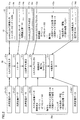
- FIG. 2 is a diagram showing an example of a procedure for creating an image processing program including custom processing items.
- FIG. 2 shows a procedure for creating an image processing program 30 that executes the general-purpose processing item 31a, the general-purpose processing item 31b, the general-purpose processing item 31c, the custom processing item 32a, and the general-purpose processing item 31d in this order.
- the image processing device 100 stores definition data corresponding to each of a plurality of processing items included in the processing item group. Specifically, the image processing apparatus 100 stores general-purpose definition data 21 that defines each general-purpose processing item and custom definition data 22 that defines each custom processing item.
- the general-purpose definition data 21 includes a program of the corresponding general-purpose processing item and initial values of one or more parameters used for executing the corresponding general-purpose processing item.
- Custom definition data 22 is created when a custom processing item is newly registered in the processing item group.
- the custom definition data 22 includes a program of custom processing items and initial values of one or more parameters used to execute the custom processing items.
- the program of the custom processing item may include each program itself of one or more designated processing items constituting the custom processing item, or a code for calling the program included in the general-purpose definition data 21 corresponding to the designated processing item. It may be included.
- the custom definition data 22a includes information on the program of the custom processing item 32a, information on the execution order of the three designated processing items "brightness correction", “scratch stain”, and “labeling” constituting the custom processing item 32a, and three. Includes initial values 25a of parameters used to execute the designated processing items “brightness correction”, “scratch stain", and "labeling".
- the initial value 25a is specified by the user when the custom processing item 32a is newly registered in the processing item group.
- the user inputs the selection of the general-purpose processing items 31a to 31d and the custom processing item 32a from the processing item group, and the specification of the execution order of the selected general-purpose processing items 31a to 31d and the custom processing item 32a into the user interface.
- the image processing device 100 creates the flow data 10 in response to the input to the user interface.
- the flow data 10 includes processing item names 11a to 11d and 12a that identify general-purpose processing items 31a to 31d and custom processing items 32a, respectively. Further, the flow data 10 includes the unit number 13 associated with each of the processing item names 11a to 11d and 12a. The unit number 13 is assigned according to the arrangement order of the processing items. By confirming the unit number 13, the execution order of the corresponding processing items can be grasped. As described above, as a general-purpose processing item, there is a processing item related to branching of an image processing program. In the image processing program that does not include the processing items related to the branching of the image processing program, the unit number 13 indicates the execution order of the corresponding processing items.
- the processing items of a certain unit number may be skipped depending on the branching conditions, so that the unit numbers do not always indicate the execution order. However, by checking the unit number, the execution order of the corresponding processing items can be grasped.
- the image processing device 100 receives setting values of one or more parameters used for executing the general-purpose processing items for each of the general-purpose processing items 31a to 31d via the user interface.
- the image processing device 100 creates setting data indicating the received setting value.
- the image processing apparatus 100 creates setting data 14a to 14d for the general-purpose processing items 31a to 31d, respectively.
- the image processing apparatus 100 has one or more parameters used when executing the custom processing item 32a via the user interface in response to the selection of the custom processing item 32a. Accepts each setting value of.
- the image processing device 100 creates setting data 15a indicating the received set value.
- the setting data 15a illustrated in FIG. 2 shows the setting values of the parameters used for executing the three designated processing items "brightness correction”, “scratch stain”, and “labeling" that constitute the custom processing item 32a.
- the image processing device 100 creates an image processing program 30 using the flow data 10, the setting data 14a to 14d, 15a, and the definition data (general-purpose definition data 21 and custom definition data 22).
- the image processing device 100 includes the general-purpose processing item 31a, the general-purpose processing item 31b, and the general-purpose processing item 31a, based on the processing item names 11a to 11d, 12a and the unit number 13 associated with each processing item name included in the flow data 10.
- An image processing program 30 that executes the general-purpose processing item 31c, the custom processing item 32a, and the general-purpose processing item 31d in this order is created.
- the image processing device 100 reads the general-purpose definition data 21a to 21d and the custom definition data 22a corresponding to the processing item names 11a to 11d and 12a, respectively.
- the image processing device 100 creates the image processing program 30 by combining the read general-purpose definition data 21a to 21d and the custom definition data 22a according to the unit number 13.
- the general-purpose definition data 21a to 21d include initial values of one or more parameters used for executing the corresponding general-purpose processing item.
- the custom definition data 22a also includes an initial value 25a of one or more parameters used to execute the corresponding custom processing item.
- the image processing apparatus 100 temporarily sets the initial values indicated by the general-purpose definition data 21a to 21d and the custom definition data 22a as the values of each parameter.
- the image processing device 100 reads the setting data 14a to 14d and changes the value of each parameter used for executing the general-purpose processing items 31a to 31d to the setting value indicated by the setting data 14a to 14d.
- the image processing apparatus 100 reads the setting data 15a and changes the value of each parameter used for executing the custom processing item 32a to the setting value indicated by the setting data 15a.
- the value of the parameter "offset" of the designated processing item "brightness correction” is changed from “140” to "150”, and the value of the parameter "defect size upper limit" of the designated processing item "scratch stain".
- the image processing apparatus 100 executes the image processing program 30 in response to a trigger signal or an external command that is an execution instruction of the image processing program 30.
- the image processing apparatus 100 executes the image processing program 30 using the set values indicated by the set data 14a to 14d and 15a as the parameter values.
- the image processing apparatus 100 receives the setting values of each of the one or more parameters used when executing the custom processing item 32a, and customizes using the received setting values.
- the processing item 32a is executed. Therefore, the user can use the custom processing item 32a even when he / she wants to execute the custom processing item 32a using a value different from the initial value 25a specified at the time of registration. This makes it possible to reduce the time and effort required to create the image processing program 30.
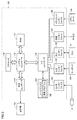
- FIG. 3 is a schematic diagram showing the hardware configuration of the image processing device.
- the image processing device 100 typically has a structure that follows a general-purpose computer architecture, and a processor executes a pre-installed program to perform various types as described later. Realize the processing.
- the image processing device 100 includes a processor 110 such as a CPU (Central Processing Unit) and an MPU (Micro-Processing Unit), a RAM (Random Access Memory) 112, a display controller 114, and a system controller 116. It includes an I / O (Input Output) controller 118, a hard disk 120, a camera interface 122, an input interface 124, a PLC interface 126, a communication interface 128, and a memory card interface 130. Each of these parts is connected to each other so as to be capable of data communication, centering on the system controller 116.
- a processor 110 such as a CPU (Central Processing Unit) and an MPU (Micro-Processing Unit), a RAM (Random Access Memory) 112, a display controller 114, and a system controller 116. It includes an I / O (Input Output) controller 118, a hard disk 120, a camera interface 122, an input interface 124, a PLC interface 126, a communication interface 12
- the processor 110 realizes the desired arithmetic processing by exchanging programs (codes) and the like with the system controller 116 and executing them in a predetermined order.
- the system controller 116 is connected to the processor 110, the RAM 112, the display controller 114, and the I / O controller 118 via a bus, and exchanges data with each unit and processes the entire image processing device 100. To control.
- the RAM 112 is typically a volatile storage device such as a DRAM (Dynamic Random Access Memory), and is a program read from the hard disk 120, a camera image (image data) acquired by the imaging unit 8, and a camera. Holds processing results for images, work data, and so on.
- DRAM Dynamic Random Access Memory
- the display controller 114 is connected to the display unit 102, and outputs signals for displaying various information to the display unit 102 according to an internal command from the system controller 116.
- the display unit 102 includes a liquid crystal display, an organic EL (Electro Luminescence) display, an organic EL, and the like.
- the I / O controller 118 controls data exchange between a recording medium and an external device connected to the image processing device 100. More specifically, the I / O controller 118 is connected to the hard disk 120, the camera interface 122, the input interface 124, the PLC interface 126, the communication interface 128, and the memory card interface 130.
- the hard disk 120 is typically a non-volatile magnetic storage device that stores the control program 150 executed by the processor 110.
- the control program 150 installed on the hard disk 120 is distributed in a state of being stored in a memory card 106 or the like. Further, a camera image is stored in the hard disk 120.
- a semiconductor storage device such as a flash memory or an optical storage device such as a DVD-RAM (Digital Versatile Disk Random Access Memory) may be adopted.
- the camera interface 122 corresponds to an input unit that receives image data generated by imaging the work W, and mediates data transmission between the processor 110 and the imaging unit 8. More specifically, the camera interface 122 can be connected to one or more imaging units 8, and an imaging instruction is output from the processor 110 to the imaging unit 8 via the camera interface 122. As a result, the image pickup unit 8 takes an image of the subject and outputs the generated image to the processor 110 via the camera interface 122.
- the input interface 124 mediates data transmission between the processor 110 and an input device such as a keyboard 104, a mouse, a touch panel, and a dedicated console. That is, the input interface 124 receives an operation command given by the user operating the input device.
- the PLC interface 126 mediates data transmission between the processor 110 and the PLC 5. More specifically, the PLC interface 126 transmits information related to the state of the production line controlled by the PLC 5, information related to the work W, and the like to the processor 110.
- the communication interface 128 mediates data transmission between the processor 110 and another personal computer, server device, or the like (not shown).
- the communication interface 128 typically comprises Ethernet (registered trademark), USB (Universal Serial Bus), or the like.
- Ethernet registered trademark
- USB Universal Serial Bus
- the communication interface 128 receives a signal indicating the state of the imaging unit 8 from the imaging unit 8, the PLC 5, and the like. The signal indicates whether or not the imaging unit 8 is in the process of imaging.
- the memory card interface 130 mediates data transmission between the processor 110 and the memory card 106, which is a recording medium. That is, the memory card 106 is distributed in a state in which the control program 150 or the like executed by the image processing device 100 is stored, and the memory card interface 130 reads the control program 150 from the memory card 106. Further, the memory card interface 130 writes the camera image acquired by the imaging unit 8 and / or the processing result in the image processing device 100 to the memory card 106 in response to the internal command of the processor 110.
- the memory card 106 is a general-purpose semiconductor storage device such as SD (Secure Digital), a magnetic recording medium such as a flexible disk (Flexible Disk), or an optical recording medium such as a CD-ROM (Compact Disk Read Only Memory). Etc.
- an OS for providing the basic functions of the computer in addition to the application for providing the functions according to the present embodiment. may be installed.
- the program according to the present embodiment may call the necessary modules in a predetermined order and / or timing among the program modules provided as a part of the OS to execute the process. good. That is, the program itself according to the present embodiment does not include the module as described above, and the process may be executed in cooperation with the OS.
- control program 150 according to the present embodiment may be provided by being incorporated into a part of another program. Even in that case, the program itself does not include the modules included in the other programs to be combined as described above, and the processing is executed in cooperation with the other programs. That is, the control program 150 according to the present embodiment may be a form incorporated in such another program.
- control program 150 may be implemented as a dedicated hardware circuit.
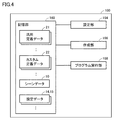
- FIG. 4 is a schematic diagram showing a functional configuration of the image processing apparatus according to the present embodiment. As shown in FIG. 4, it includes a storage unit 160, a setting unit 164, a creation unit 166, and a program execution unit 168.
- the storage unit 160 is composed of a hard disk 120 and a RAM 112.
- the setting unit 164, the creating unit 166, and the program execution unit 168 are realized by the processor 110 executing the control program 150.
- the storage unit 160 is set with general-purpose definition data 21 corresponding to each general-purpose processing item included in the processing item group, custom definition data 22 corresponding to each custom processing item included in the processing item group, and flow data 10. Data 14 and 15 are stored.
- the setting unit 164 sets a custom processing item composed of one or more designated processing items specified from the processing item group in the processing item group as a new processing item.
- the setting unit 164 creates the custom definition data 22 that defines the custom processing item set in the processing item group, and saves the created custom definition data 22 in the storage unit 160.
- the setting unit 164 can edit the custom definition data 22 corresponding to the already registered custom processing items. Note that editing includes adding and deleting specified processing items to custom processing items.
- the creation unit 166 accepts selection of one or more processing items to be included in the image processing program from a plurality of processing items included in the processing item group, and designation of the execution order of the selected one or more processing items. Provides a user interface. The creation unit 166 creates the flow data 10 in response to the input to the user interface.
- the creation unit 166 receives the setting value of each of one or more parameters used when executing the general-purpose processing item via the user interface according to the selection of the general-purpose processing item.
- the creation unit 166 creates the setting data 14 indicating the received setting value.
- the creation unit 166 accepts each setting value of one or more parameters used when executing the custom processing item via the user interface according to the selection of the custom processing item.
- the creation unit 166 creates the setting data 15 indicating the received setting value.
- the creation unit 166 stores the created flow data 10 and setting data 14 and 15 in the storage unit 160.
- the program execution unit 168 creates an image processing program using the flow data 10, the setting data 14 and 15, the general-purpose definition data 21, and the custom definition data 22.
- the program execution unit 168 executes the created image processing program in response to an execution instruction (trigger signal, external command, etc.).
- FIG. 5 is a diagram showing an example of custom-defined data.
- the custom definition data 22 illustrated in FIG. 5 includes a function unit 221, a macro unit 222, and changeability data 225.
- the function unit 221 indicates information (for example, a processing item name) that identifies each of one or more designated processing items constituting the custom processing item.
- the macro unit 222 includes a macro code 223 and initial value data 224.
- the macro code 223 defines the execution order of one or more designated processing items indicated by the function unit 221, the passing of variables between one or more designated processing items, the drawing process to the display unit 102, and the like.
- the initial value data 224 indicates the initial value of one or more parameters used to execute the custom processing item.
- Changeability data 225 indicates whether or not each of one or more parameters used for executing the custom processing item can be changed from the initial value.
- the changeability data 225 may indicate a list of parameters that can be changed from the initial value, or may indicate a list of parameters that cannot be changed from the initial value.
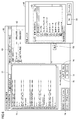
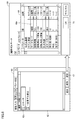
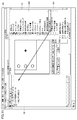
- FIG. 6 is a diagram showing an example of a setting screen for custom processing items.
- the setting screen 60 illustrated in FIG. 6 is displayed on the display unit 102 by the processor 110 operating as the setting unit 164.
- the setting screen 60 includes a tab 61 for selecting one or more designated processing items constituting the custom processing item.
- FIG. 6 shows a setting screen 60 when the tab 61 is operated.
- the setting screen 60 includes a work area 62 for arranging an object corresponding to the designated processing item, and a button 63 for adding an object to the work area 62.
- the processor 110 causes the window 64 to be displayed on the display unit 102.
- the window 64 includes a list 65 of a plurality of processing items included in the processing item group.
- a cursor 65a for designating one processing item is displayed. By moving the cursor 65a, the user designates one processing item constituting the custom processing item from the list 65 as a designated processing item.
- Window 64 further includes a button 66 for performing additions to the work area 62.
- the processor 110 causes the work area 62 to display the object 300 corresponding to the designated processing item designated by the cursor 65a.
- An object 300a corresponding to the designated processing item "search” and an object 300b corresponding to the designated processing item "positional deviation correction” are added to the work area 62 illustrated in FIG.
- the designated processing item "search” and the designated processing item "positional deviation correction” are general-purpose processing items. However, as described above, the already registered custom processing item may be specified as the designated processing item.
- the processor 110 creates the function unit 221 of the custom definition data 22 according to one or more objects 300 arranged in the work area 62.
- FIG. 7 is a diagram for explaining the processing contents of the designated processing item “search” and the designated processing item “positional deviation correction”.
- FIG. 7A shows the processing content of the designated processing item “search”
- FIG. 7B shows the processing content of the designated processing item “positional deviation correction”.
- the designated processing item "search” is a process of searching for the feature portion 50 from the input image.
- the feature portion 50 is searched from the input image by template matching using the model image in which the feature portion 50 is captured.
- the processing item "correction of misalignment” is a process of converting the coordinates of the input image.
- the coordinates of the input image are converted so that the feature portion 50 is located at the center of the image.
- FIG. 8 is a diagram showing an example of a method of setting initial values of one or more parameters used for executing a designated processing item.
- the setting screen 60 includes a button 67 for inputting initial values of parameters. Further, in the work area 62, a cursor 62a for selecting one designated processing item is displayed.
- the processor 110 In response to the operation of the button 67, the processor 110 reads out the definition data (here, general-purpose definition data 21) corresponding to the designated processing item selected by the cursor 62a from the storage unit 160. Further, the processor 110 causes the display unit 102 to display a window 68 prompting the input of initial values of one or more parameters used for executing the designated processing item selected by the cursor 62a.
- the definition data here, general-purpose definition data 21
- Window 68 includes a list 69 of one or more parameters used to execute the specified processing item.
- the processor 110 may create the list 69 based on the general-purpose definition data 21 corresponding to the designated processing item.
- Listing 69 includes an input field 69a for inputting an initial value of each parameter. The user inputs a desired initial value in the input field 69a.
- Window 68 includes a button 70 for instructing the completion of input of the initial value.
- the processor 110 creates the initial value data 224 indicating the information for identifying the designated processing item (for example, the processing item name) and the initial value of each parameter input to the window 68. Close window 68. In this way, the processor 110 creates initial value data 224 for each of the one or more designated processing items constituting the custom processing item.
- FIG. 9 is a diagram showing an example of a method of setting whether or not the value of each parameter can be changed.
- the setting screen 60 includes a tab 71 for setting changeability.
- the processor 110 displays a list 72 of parameters used to execute the custom processing item in the setting screen 60.
- List 72 includes a check box 72a for setting whether or not each parameter can be changed. For example, the user checks the check box 72a corresponding to the modifiable parameter and does not check the check box 72a corresponding to the non-modifiable parameter.
- the processor 110 creates changeability data 225 (see FIG. 5) according to the input to the check box 72a.
- the setting screen 60 includes a work area 73 for inputting an instruction code related to a custom processing item.
- the user inputs an instruction code in the work area 73.
- the setting screen 60 includes a button group 74 for assisting the input of the instruction code.
- the setting screen 60 includes a button 75 for temporarily saving the input instruction code in the work area 73, and a button 76 for reading the saved instruction code.
- the user inputs the instruction code into the work area 73 by operating the button group 74 and the buttons 75 and 76.
- the processor 110 creates the macro code 223 according to the instruction code input to the work area 73.
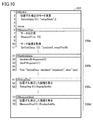
- FIG. 10 is a diagram showing an example of macro code.
- the macro code 223 exemplified in FIG. 10 includes subroutine codes 230a to 230d.
- Subroutine codes 230a to 230d define a process to be called at a specific timing.
- the subroutine code 230a defines an image process that is called when a custom process item is executed.
- Subroutine code 230a defines the execution order of one or more specified processing items that make up the custom processing item.
- Subroutine code 230b defines a setting process that is called when a setting value is set for one or more parameters used to execute a custom processing item.
- Subroutine code 230c defines the screen drawing process that is read when the custom process item is executed.
- Subroutine code 230d defines a screen drawing process that is called when setting values for one or more parameters used to execute a custom process item.
- the macro code 223 is not limited to that illustrated in FIG.
- the setting screen 60 includes an input field 77 for inputting the processing item name corresponding to the custom processing item.
- the processor 110 sets the processing item name corresponding to the custom processing item according to the input to the input field 77.
- the setting screen 60 includes a button 78 instructing the creation of the custom definition data 22 corresponding to the custom processing item.
- the processor 110 creates the custom definition data 22 including the function unit 221 created as described above, the macro code 223, the initial value data 224, and the changeability data 225.
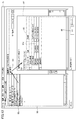
- FIG. 11 is a diagram showing an example of a screen (flow creation screen) for creating flow data.
- the flow creation screen 80 illustrated in FIG. 11 is displayed on the display unit 102 by the processor 110 operating as the creation unit 166.
- the flow creation screen 80 includes a list 81 of a plurality of processing items included in the processing item group.
- Listing 81 includes an object 400 corresponding to each general-purpose processing item and an object 401 corresponding to each custom processing item.
- Listing 81 includes four objects 401.
- the flow creation screen 80 includes a work area 82 for arranging objects 400 and 401 corresponding to processing items to be added to the image processing program.
- the user selects objects 400 and 401 corresponding to the processing items to be included in the image processing program from the list 81 and arranges them in the work area 82.
- the object 400 corresponding to the custom processing item “Position deviation correction II” is arranged in the work area 82.
- the user may arrange a plurality of the same objects in the work area 82.
- the processor 110 creates the flow data 10 according to the objects 400 and 401 arranged in the work area 82 and the arrangement order thereof.
- FIG. 12 is a diagram showing an example of a setting screen when inputting parameter setting values. As shown in FIG. 12, in the work area 82, a cursor 82a for selecting one object arranged in the work area 82 is displayed. Further, the flow creation screen 80 includes a button 83 for setting a set value of one or more parameters used for executing the processing item.
- the processor 110 displays a window 84 on the display 102 for inputting a set value of one or more parameters used to execute the processing item corresponding to the object selected by the cursor 82a. Display it.
- FIG. 12 shows a window 84 when the object 401 corresponding to the custom processing item is selected.
- Window 84 contains a list 85 of one or more parameters used to execute the selected custom processing item.
- the processor 110 may create the list 85 based on the initial value data 224 included in the custom definition data 22 corresponding to the selected custom processing item. However, the processor 110 excludes from the list 85 the parameters that cannot be changed by the changeability data 225 included in the custom definition data 22.
- List 85 includes an input field 85a for inputting a set value of each parameter. The user inputs a desired setting value in the input field 85a.
- the window 84 includes a button 86 for instructing the completion of input of the set value.
- the processor 110 creates the setting data 15 indicating the setting value input to the window 84, and closes the window 84.
- the processor 110 creates the setting data 15 with the initial value indicated by the initial value data 224 as the setting value for the parameter indicating that the parameter cannot be changed by the changeability data 225 included in the custom definition data 22.
- the processor 110 accepts the input of the setting value of one or more parameters used for executing the general-purpose processing item corresponding to the object 400 arranged in the work area 82, and the setting data indicating the setting value. 14 may be created.
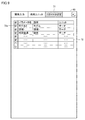
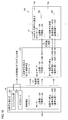
- FIG. 13 is a diagram showing an example of flow data and setting data.
- FIG. 13A shows flow data 10a showing a flow in which the general-purpose processing item “image input”, the custom processing item “positional deviation correction II”, and the general-purpose processing item “character inspection” are executed in this order.
- FIG. 13B a general-purpose processing item “image input”, a custom processing item “positional deviation correction II”, a general-purpose processing item “character inspection”, a general-purpose processing item “measurement image switching”, and a custom processing item “positional deviation correction” are shown.
- II flow data 10b showing a flow in which the general-purpose processing item“ scratch stain ”is executed in this order is shown.
- the flow data 10a includes processing item names 11e, 12b, and 11f corresponding to the general-purpose processing item "image input”, the custom processing item “positional deviation correction II", and the general-purpose processing item “character inspection”, respectively.
- the flow data 10b includes a general-purpose processing item “image input”, a custom processing item “positional deviation correction II", a general-purpose processing item “character inspection”, a general-purpose processing item “measurement image switching”, and a custom processing item "positional deviation correction”.
- the processing item names 12b and 12c identify the same custom processing item.
- a unit number 13 according to the execution order is assigned to each processing item name.
- the flow data 10a includes "No. 0", “No. 1”, and “No. 2” associated with the processing item names 11e, 12b, and 11f, respectively, as the unit number 13.
- the flow data 10b includes "No. 0", “No. 1”, “No. 2", “No. 3”, and “No. 3” associated with the processing item names 11e, 12b, 11f, 11g, 12b, and 11h, respectively. "No. 4" and "No. 5" are included as the unit number 13.
- the processing items 11 and 12 included in the flow data 10a and 10b and the unit number 13 define the processing items included in the image processing program and their execution order.
- setting data 14e, 15b, 14f indicating parameter setting values are created for the processing items identified by the processing item names 11e, 12b, 11f included in the flow data 10a, respectively.
- the setting data 14e, 15b, 14f, 14g, 15c indicating the parameter setting values. , 14h are created respectively.
- Each of the setting data 15b and 15c indicating the setting value of one or more parameters used for executing the custom processing item is the designated processing item "search” and the designated processing item "positional deviation correction" that constitute the custom processing item, respectively.
- the set values 16b and 16c of are shown.
- the processor 110 uniquely assigns an ID to each designated processing item constituting the one or more custom processing items so that the flow data 10 includes the processing item name 12 that identifies one or more custom processing items. Give to.
- FIG. 14 is a diagram showing an operation example 1 of the procedure for creating an image processing program.
- the creation procedure illustrated in FIG. 14 is based on the premise that the custom definition data 22 has not been updated after the flow data 10a shown in FIG. 13A is created.
- the processor 110 operating as the program execution unit 168 reads the custom definition data 22 corresponding to the processing item name 12b included in the flow data 10a.
- the processor 110 uses the read custom definition data 22 to create an execution program 33b of the custom processing item identified by the processing item name 12b in the image processing program ((1) The portion corresponding to the custom processing item. Create a program). That is, the processor 110 creates an execution program 33b that sequentially calls one or more designated processing items indicated by the function unit 221 according to the macro code 223 of the custom definition data 22.
- an execution program 33b that calls the designated processing item "search” and the designated processing item "positional deviation correction” in this order is created.
- the processor 110 temporarily sets the initial value indicated by the initial value data 224 included in the custom-defined data 22 as the value of the parameter used for executing the execution program 33b ((2) the value of the parameter. Set the initial value as).
- the processor 110 reads the setting data 15b and changes the value of the parameter used for executing the execution program 33b to the setting value indicated by the setting data 15b ((3) changes the value of the parameter to the setting value). ..
- the processor 110 executes the image processing program.
- the execution program 33b included in the image processing program is executed by using a set value different from the initial value specified at the time of registration as the parameter value.
- the processor 110 can execute the custom processing item by using the setting values 16a and 16b different from the initial values specified at the time of registration.
- the user can use the custom processing item even when he / she wants to execute the custom processing item using a value different from the initial value specified at the time of registration. This makes it possible to reduce the time and effort required to create an image processing program.
- FIG. 15 is a diagram showing an operation example 2 of the procedure for creating an image processing program.
- the creation procedure illustrated in FIG. 15 is based on the premise that the custom definition data 22 has not been updated after the flow data 10b shown in FIG. 13 (b) has been created.
- the processor 110 operating as the program execution unit 168 reads the custom-defined data 22 corresponding to the processing item names 12b and 12c included in the flow data 10b.
- the processor 110 uses the read custom definition data 22 to create execution programs 33b and 33c of the custom processing item identified by the processing item names 12b and 12c among the image processing programs ((1) custom processing item). Create a program for the part corresponding to). That is, the processor 110 creates execution programs 33b and 33c that sequentially call one or more designated processing items indicated by the function unit 221 according to the macro code 223 of the custom definition data 22.
- the processing item names 12b and 12c identify a custom processing item composed of the designated processing item "search” and the designated processing item "positional deviation correction". Therefore, the execution programs 33b and 33c call the designated processing item "search” and the designated processing item "positional deviation correction” in this order.
- the processor 110 temporarily sets the initial value indicated by the initial value data 224 included in the custom definition data 22 as the value of the parameter used for executing the custom processing item ((2) the value of the parameter. Set the initial value as).
- the processor 110 reads the setting data 15b and 15c and changes the value of the parameter used for executing the custom processing item to the setting value indicated by the setting data 15b and 15c ((3) Set the parameter value. Change to value). At this time, the processor 110 changes the set value by using the ID assigned to each designated processing item.
- the set value 16a is set.
- the set value 16b is set.
- Set the value 16b
- the processor 110 includes each designated processing item constituting each custom processing item even when the flow data 10b includes the processing item names 12b and 12c corresponding to the same plurality of custom processing items.
- the set value can be appropriately set by using the ID assigned to the designated processing item.
- FIG. 16 is a diagram showing an operation example 3 of the procedure for creating an image processing program.
- the creation procedure illustrated in FIG. 16 is based on the premise that the custom definition data 22 is updated after the flow data 10a shown in FIG. 13A is created.
- the custom definition data 22 includes initial value data 224 including initial values of parameters used for executing the designated processing item “brightness correction”.
- the processor 110 operating as the program execution unit 168 reads the custom definition data 22 corresponding to the processing item name 12b included in the flow data 10a.
- the processor 110 uses the read custom definition data 22 to create an execution program 33d of the custom processing item identified by the processing item name 12b in the image processing program ((1) The portion corresponding to the custom processing item. Create a program). That is, the processor 110 creates an execution program 33d that sequentially calls one or more designated processing items indicated by the function unit 221 according to the macro code 223 of the custom definition data 22.
- the execution program 33d calls the designated processing item “brightness correction”, the designated processing item “search”, and the designated processing item “positional deviation correction” in this order.
- the processor 110 temporarily sets the initial value indicated by the initial value data 224 included in the custom definition data 22 as the value of the parameter used for executing the custom processing item ((2) the value of the parameter. Set the initial value as).
- the processor 110 reads the setting data 15b and changes the value of the parameter used for executing the custom processing item to the setting value indicated by the setting data 15b ((3) changes the value of the parameter to the setting value). .. At this time, the processor 110 changes the set value by using the ID assigned to each designated processing item.
- the set value 16a is set.
- the set value 16b is set.
- the processor 110 executes the image processing program.
- the designated processing item "brightness correction filter" added to the custom processing item after the flow data 10a is created is executed using the initial value indicated by the initial value data 224 of the custom definition data 22. In this way, even if the custom processing item is edited after the flow data 10a is created, the editing of the custom processing item can be reflected in the image processing program without editing the flow data 10a.
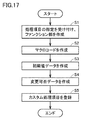
- FIG. 17 is a flowchart showing the flow of registration processing of custom processing items.
- the processor 110 accepts the designation of one or more designated processing items constituting the custom processing item, and creates the function unit 221 indicating the received one or more designated processing items (step S1).
- the processor 110 creates the macro code 223 of the custom processing item (step S2).
- the macro code 223 defines the calling order of one or more designated processing items, the assignment of variables to each designated processing item, the drawing of the setting screen and the execution screen related to the custom processing item, and the like.
- the processor 110 may accept the input of the macro code 223 itself, or may display a screen for supporting the creation of the macro code 223 on the display unit 102 and create the macro code 223 based on the input information. good.
- the processor 110 creates initial value data 224 indicating initial values of one or more parameters used for executing the custom processing item (step S3). Specifically, the processor 110 causes the display unit 102 to display a window for inputting the initial value, and creates the initial value data 224 according to the input.
- the processor 110 creates changeability data 225 indicating changeability for each of the one or more parameters used for executing the custom processing item (step S4). Specifically, the processor 110 displays a window for inputting changeability on the display unit 102, and creates changeability data 225 according to the input.
- the processor 110 stores the custom definition data 22 including the function unit 221 and the macro code 223, the initial value data 224, and the changeability data 225.
- the custom processing item defined by the custom definition data 22 is registered in the processing item group (step S5).
- the processor 110 ends the registration process of the custom process item.
- steps S2 to S4 are not limited to this, and may be replaced as appropriate. Further, if all of one or more parameters used for executing the custom processing item can be changed, step S4 may be omitted. Further, steps S1 to S5 shown in FIG. 17 are also applied to editing registered custom processing items.
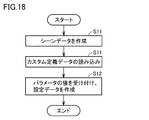
- FIG. 18 is a flowchart showing a processing flow when a custom processing item is selected as a processing item constituting the image processing program.
- the processor 110 creates flow data 10 including a processing item name that identifies the selected custom processing item and a unit number corresponding to the custom processing item (step S11).
- the processor 110 reads the custom definition data 22 corresponding to the selected custom processing item (step S12).
- the processor 110 accepts the setting values of one or more parameters used for executing the selected custom processing item, and creates the setting data 15 indicating the accepted setting values (step S13).
- the type of one or more parameters used to execute the custom processing item is defined by the initial value data 224 of the custom definition data 22. Further, when the custom-defined data 22 includes the changeability data 225, the processor 110 only needs to accept the set value of the changeable parameter.
- step S13 the processor 110 ends the process. Note that step S11 may be executed after step S13.
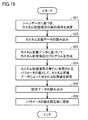
- FIG. 19 is a flowchart showing a flow of creation processing of an image processing program including custom processing items.
- the processor 110 determines the execution order of the custom processing items identified by the processing item name 12 based on the processing item name 12 included in the flow data 10 and its unit number (step S21).
- the processor 110 reads the custom definition data 22 corresponding to the processing item name 12 included in the flow data 10 (step S22).
- the processor 110 creates a program for executing a custom processing item based on the custom definition data 22 (step S23). Further, the processor 110 temporarily sets the value of the parameter used for executing the custom processing item to the initial value indicated by the initial value data 224 of the custom definition data 22 (step S24).
- the processor 110 reads the setting data 15 corresponding to the processing item name 12 included in the flow data 10 (step S25).
- the processor 110 changes the value of the parameter used for executing the custom processing item from the initial value to the setting value indicated by the setting data 15 (step S26). After step S26, the processor 110 ends the process.
- the image processing apparatus 100 includes a program execution unit 168, a creation unit 166, and a setting unit 164 that execute image processing according to the image processing program.
- the creation unit 166 accepts selection of one or more processing items to be included in the image processing program from a plurality of processing items included in the processing item group, and designation of the execution order of the selected one or more processing items.
- the creation unit 166 creates the flow data 10 indicating one or more processing items and the execution order in response to the input to the user interface.
- the setting unit 164 sets a custom processing item composed of one or more designated processing items specified from a plurality of processing items included in the processing item group in the processing item group as a new processing item.
- the creation unit 166 accepts the setting value of each of the one or more parameters used for executing the custom processing item via the user interface according to the selection of the custom processing item, and receives the set value.
- the setting data 15 shown is created.
- the program execution unit 168 executes the custom processing item by using the setting value indicated by the setting data 15 according to the fact that the custom processing item is included in one or more processing items indicated by the flow data 10.
- the user can use the custom processing item even when he / she wants to execute the custom processing item using a value different from the initial value specified at the time of registration. This makes it possible to reduce the time and effort required to create an image processing program.
- the setting unit 164 creates custom definition data 22 that defines custom processing items.
- the program execution unit 168 creates an image processing program using the custom definition data 22 and the flow data 10 according to the fact that the custom processing item is included in one or more processing items indicated by the flow data 10.
- the program execution unit 168 updates the image processing program according to the editing of the custom definition data 22 by the setting unit 164.
- the edited contents can be reflected in the image processing program created by using the flow data 10 indicating the custom processing items only by editing the custom definition data 22.
- the setting unit 164 can edit the custom definition data 22 after the setting data 15 is created.
- the custom definition data 22 includes the initial value of each of the one or more parameters used to execute the custom processing item.
- the program execution unit 168 uses the set value for the parameter for which the setting data 15 is created among the one or more parameters according to the fact that the custom processing item is included in the one or more processing items indicated by the flow data 10. , Custom processing items are executed using the initial values for the parameters for which the setting data 15 has not been created.
- the custom processing item is executed using the initial value for the new parameter. .. That is, the custom processing item can be executed without editing the setting data 15.
- One or more parameters used to execute the custom processing item include parameters for executing the designated processing item for each of the one or more designated processing items constituting the custom processing item.
- Editing is a process of adding a new designated processing item to one or more designated processing items that constitute a custom processing item.
- the program execution unit 168 uses the initial value as the value of the parameter corresponding to the above-mentioned new designated processing item according to the fact that the custom processing item is included in one or more processing items indicated by the flow data 10. Execute the above new specified processing item.
- the program execution unit 168 executes the remaining designated processing items by using the set values as the values of the parameters corresponding to the remaining designated processing items among the one or more designated processing items constituting the custom processing item.
- the parameter used to execute the custom processing item may include a switching flag for switching whether or not to execute one or more specified processing items constituting the custom processing item.
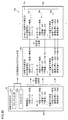
- FIG. 20 is a diagram showing an operation example 4 of the procedure for creating an image processing program.
- the initial value data 224 of the custom definition data 22 includes the designated processing items “brightness correction”, “search”, and “positional deviation correction” that constitute the custom processing item “positional deviation correction II”, respectively. Includes a switching flag.
- the flow data 10a includes a processing item name 12b that identifies the custom processing item “positional deviation correction II”.
- setting data 15b indicating the parameter setting value is created.
- the setting data 15b includes a switching flag for each of the designated processing items "brightness correction”, "search”, and "positional deviation correction” constituting the custom processing item "positional deviation correction II”. The user may enter the value of the switching flag (“enabled” or “disabled”) in the window 84 illustrated in FIG.
- the processor 110 operating as the program execution unit 168 reads the custom definition data 22 corresponding to the processing item name 12b included in the flow data 10a.
- the processor 110 uses the read custom definition data 22 to create an execution program 33b of the custom processing item identified by the processing item name 12b in the image processing program ((1) The portion corresponding to the custom processing item. Create a program).
- the processor 110 temporarily sets the initial value indicated by the initial value data 224 included in the custom-defined data 22 as the value of the parameter used for executing the execution program 33b ((2) the value of the parameter. Set the initial value as).
- the processor 110 reads the setting data 15b and changes the value of the parameter used for executing the execution program 33b to the setting value indicated by the setting data 15b ((3) changes the value of the parameter to the setting value). ..
- the processor 110 executes the designated processing item whose switching flag is "valid", and does not execute the designated processing item whose switching flag is "invalid". Therefore, according to the image processing program created by the creation procedure illustrated in FIG. 20, the processor 110 omits the execution of the designated processing item "brightness correction" when executing the custom processing item.
- the user can switch whether or not to execute the designated processing item for each of the one or more designated processing items constituting the custom processing item. This enhances the convenience of custom processing items.
- this embodiment includes the following disclosures.
- Image processing device 100
- Execution units 110,168
- a user interface that accepts the selection of one or more processing items to be included in the image processing program from a plurality of processing items included in the processing item group, and the specification of the execution order of the selected one or more processing items.
- a creation unit 110,166
- a setting unit 110, 164 for setting a custom processing item composed of one or more designated processing items designated from the plurality of processing items as a new processing item in the processing item group.
- the creation unit (110, 166) Depending on the selection of the custom processing item, each setting of one or more parameters used to execute the custom processing item is accepted via the user interface. Create setting data (15, 15a to 15c) indicating the received setting value, and create The execution unit (110,168) determines the setting data (15, 168) in response to the custom processing item being included in the one or more processing items indicated by the first data (10, 10a, 10b). An image processing apparatus (100) that executes the custom processing item using the set values indicated by 15a to 15c).
- the setting unit (110, 164) is Create custom definition data (22, 22a) that defines the custom processing item,
- the execution unit (110,168) The custom-defined data (22, 22a) and the first data (10), depending on whether the one or more processing items indicated by the first data (10, 10a, 10b) include the custom processing item. , 10a, 10b) to create the image processing program.
- the image processing apparatus (100) according to configuration 1, which updates the image processing program according to the editing of the custom definition data (22, 22a) by the setting unit (110, 164).
- the setting unit (110,164) can edit the custom definition data (22,22a) after the setting data (15,15a to 15c) is created.
- the custom-defined data contains initial values for each of the one or more parameters.
- the execution unit (110,168) has one or more parameters depending on that the one or more processing items indicated by the first data (10, 10a, 10b) include the custom processing item.
- the one or more parameters include a first parameter for executing the designated processing item for each of the one or more designated processing items constituting the custom processing item.
- the editing is a process of adding a new designated processing item to the one or more designated processing items constituting the custom processing item.
- the execution unit (110,168) determines the new designated processing item in response to the fact that the custom processing item is included in the one or more processing items indicated by the first data (10, 10a, 10b). Using the initial value as the value of the first parameter corresponding to, the new designated processing item is executed, and the remaining designated processing items among the one or more designated processing items constituting the custom processing item are selected.
- the image processing apparatus (100) according to configuration 3, which executes the remaining designated processing items by using the set value as the corresponding value of the first parameter.
- the one or more parameters include a second parameter indicating valid or invalid for each of the one or more designated processing items constituting the custom processing item.
- the second parameter of the one or more designated processing items constituting the custom processing item is set according to the inclusion of the custom processing item in the image processing program.
- (Structure 6) It is a control method of the image processing apparatus (100). Provides a user interface that accepts selection of one or more processing items to be included in an image processing program from a plurality of processing items included in a processing item group, and specification of an execution order of the selected one or more processing items. Then, in response to the input to the user interface, the step of creating the first data (10, 10a, 10b) indicating the one or more processing items and the execution order, and the step of creating the first data (10, 10a, 10b). A step of executing image processing according to the image processing program is provided. The control method further A step of setting a custom processing item composed of one or more designated processing items designated from the plurality of processing items as a new processing item in the processing item group is provided.
- the step of creating the first data (10, 10a, 10b) is A step of accepting each setting of one or more parameters used when executing the custom processing item via the user interface, depending on the selection of the custom processing item. Including the step of creating setting data (15, 15a to 15c) indicating the received setting value.
- the step to be executed is the setting data (15, 15a to 15c) according to the fact that the custom processing item is included in the one or more processing items indicated by the first data (10, 10a, 10b).
- a control method comprising the step of executing the custom processing item using the setting value indicated by.
- 1 Image processing system 5 PLC, 6 Conveyance mechanism, 8 Imaging unit, 10, 10a, 10b Flow data, 11, 11a to 11h, 12, 12a to 12c Processing item name, 13 Unit number, 14, 14a to 14h, 15 , 15a to 15c setting data, 16a, 16b, 16c setting value, 21,21a to 21d general-purpose definition data, 22,22a custom definition data, 25a initial value, 30 image processing program, 31a to 31d general-purpose processing item, 32a custom processing Items, 33b to 33d execution programs, 50 feature parts, 60 setting screens, 61,71 tabs, 62,73,82 work areas, 62a, 65a, 82a cursors, 63,66,67,70,75,76,78, 83,86 buttons, 64,68,84 windows, 65,69,72,81,85 list, 69a, 77,85a input field, 72a check box, 74 button group, 80 flow creation screen, 100 image processing device, 102 Display, 104 keyboard, 106 memory card
Landscapes
- Engineering & Computer Science (AREA)
- Theoretical Computer Science (AREA)
- General Engineering & Computer Science (AREA)
- Physics & Mathematics (AREA)
- General Physics & Mathematics (AREA)
- Software Systems (AREA)
- Computer Vision & Pattern Recognition (AREA)
- Human Computer Interaction (AREA)
- Stored Programmes (AREA)
- Image Processing (AREA)
- User Interface Of Digital Computer (AREA)
- Image Analysis (AREA)
Abstract
設定部は、複数の処理項目から指定された1つ以上の指定処理項目によって構成されるカスタム理項目を新たな処理項目として処理項目グループに設定する。作成部は、カスタム処理項目が選択されたことに応じて、カスタム処理項目の実行に使用される1つ以上のパラメータの各々の設定値を受け付け、受け付けた設定値を示す第2データを作成する。実行部は、第1データによって示される1つ以上の処理項目にカスタム処理項目が含まれることに応じて、第2データによって示される設定値を用いて、カスタム処理項目を実行する。これにより、画像処理プログラムの作成の手間が低減される。
Description
本開示は、画像処理装置、制御方法およびプログラムに関する。
FA(Factory Automation)分野において、ワークなどの対象物を自動で検査するための技術が普及している。ワークの検査処理は、様々な処理項目の組み合わせからなる画像処理プログラムによって実現される。このような画像処理プログラムをユーザ自身で作成するためのユーザインターフェイスを提供するアプリケーションが開発されている。
例えば、特開2011-118467号公報(特許文献1)は、画像処理を行うためのプログラムを作成する情報処理装置を開示している。情報処理装置は、作成したプログラムを他のプログラムを作成する際に使用可能な新たな処理項目として登録する機能を有する。
特許文献1に開示の技術によれば、登録された新たな処理項目を用いて画像処理プログラムを作成できる。ただし、特許文献1では、新たな処理項目を実行するときに使用されるパラメータの値の変更について考慮されていない。そのため、パラメータの値の変更を希望するユーザは、登録された新たな処理項目を利用することができない。その結果、画像処理プログラムの作成に手間がかかる。
本開示は、上記の問題に鑑みてなされたものであり、その目的は、画像処理プログラムの作成の手間を低減可能な画像処理装置、制御方法およびプログラムを提供することである。
本開示の一例によれば、画像処理装置は、画像処理プログラムに従って画像処理を実行する実行部と、作成部と、設定部とを備える。作成部は、処理項目グループに含まれる複数の処理項目からの画像処理プログラムに含ませる1つ以上の処理項目の選択、および、選択された1つ以上の処理項目の実行順序の指定を受け付けるユーザインターフェイスを提供する。作成部は、ユーザインターフェイスへの入力に応じて、1つ以上の処理項目と実行順序とを示す第1データを作成する。設定部は、複数の処理項目から指定された1つ以上の指定処理項目によって構成されるカスタム理項目を新たな処理項目として処理項目グループに設定する。作成部は、カスタム処理項目が選択されたことに応じて、ユーザインターフェイスを介して、カスタム処理項目の実行に使用される1つ以上のパラメータの各々の設定値を受け付け、受け付けた設定値を示す第2データを作成する。実行部は、第1データによって示される1つ以上の処理項目にカスタム処理項目が含まれることに応じて、第2データによって示される設定値を用いて、カスタム処理項目を実行する。
この開示によれば、ユーザは、登録するときに指定された値とは異なる値を用いてカスタム処理項目を実行したい場合であっても、当該カスタム処理項目を利用することができる。これにより、画像処理プログラムの作成の手間を低減できる。
上述の開示において、設定部は、カスタム処理項目を定義するカスタム定義データを作成する。実行部は、第1データによって示される1つ以上の処理項目にカスタム処理項目が含まれることに応じて、カスタム定義データと第1データとを用いて、画像処理プログラムを作成する。実行部は、設定部によるカスタム定義データの編集に応じて、画像処理プログラムを更新する。
この開示によれば、カスタム定義データを編集するだけで、カスタム処理項目を示す第1データを用いて作成される画像処理プログラムに編集内容を反映させることができる。
上述の開示において、設定部は、第2データが作成された後に、カスタム定義データの編集を実行可能である。カスタム定義データは、1つ以上のパラメータの各々の初期値を含む。実行部は、第1データによって示される1つ以上の処理項目にカスタム処理項目が含まれることに応じて、1つ以上のパラメータのうち第2データが作成されたパラメータについて設定値を用い、第2データが作成されていないパラメータについて初期値を用いて、カスタム処理項目を実行する。
この開示によれば、第2データの作成後に、カスタム定義データが編集され、新たなパラメータが必要になったとしても、当該新たなパラメータについて初期値を用いてカスタム処理項目が実行される。すなわち、第2データを編集しなくても、カスタム処理項目の実行が可能である。
上述の開示において、1つ以上のパラメータは、カスタム処理項目を構成する1つ以上の指定処理項目の各々について、当該指定処理項目を実行するための第1パラメータを含む。編集は、カスタム処理項目を構成する1つ以上の指定処理項目に新たな指定処理項目を追加する処理である。実行部は、第1データによって示される1つ以上の処理項目にカスタム処理項目が含まれることに応じて、新たな指定処理項目に対応する第1パラメータの値として初期値を用いて、新たな指定処理項目を実行する。実行部は、カスタム処理項目を構成する1つ以上の指定処理項目のうち残りの指定処理項目に対応する第1パラメータの値として設定値を用いて、残りの指定処理項目を実行する。
この開示によれば、第2データの作成後に、カスタム処理項目に新たな指定処理項目が追加されたとしても、当該新たな指定処理項目について設定値を設定しなくても、初期値を用いてカスタム処理項目が実行される。
上述の開示において、1つ以上のパラメータは、カスタム処理項目を構成する1つ以上の指定処理項目の各々について、有効または無効を示す第2パラメータを含む。実行部は、画像処理プログラムにカスタム処理項目が含まれることに応じて、カスタム処理項目を構成する1つ以上の指定処理項目のうち、第2パラメータが有効を示す指定処理項目を実行し、第2パラメータが無効を示す指定処理項目を実行しない。
この開示によれば、ユーザは、カスタム処理項目を構成する1つ以上の指定処理項目の各々について、当該指定処理項目の実行の有無を切り替えることができる。これにより、カスタム処理項目の利便性が高まる。
本開示の一例によれば、画像処理装置の制御方法は、第1のステップと、第2のステップとを備える。第1のステップは、処理項目グループに含まれる複数の処理項目からの画像処理プログラムに含ませる1つ以上の処理項目の選択、および、選択された1つ以上の処理項目の実行順序の指定を受け付けるユーザインターフェイスを提供し、ユーザインターフェイスへの入力に応じて、1つ以上の処理項目と実行順序とを示す第1データを作成するステップである。第2のステップは、画像処理プログラムに従って画像処理を実行するステップである。制御方法は、さらに、複数の処理項目から指定された1つ以上の指定処理項目によって構成されるカスタム処理項目を新たな処理項目として処理項目グループに設定する第3のステップを備える。
第1のステップは、カスタム処理項目が選択されたことに応じて、ユーザインターフェイスを介して、カスタム処理項目を実行するときに使用される1つ以上のパラメータの各々の設定値を受け付けるステップと、受け付けた設定値を示す第2データを作成するステップとを含む。第2のステップは、第1データによって示される1つ以上の処理項目にカスタム処理項目が含まれることに応じて、第2データによって示される設定値を用いて、カスタム処理項目を実行するステップを含む。
本開示の一例によれば、プログラムは、上記の制御方法をコンピュータに実行させる。これらの開示によっても、画像処理プログラムの作成の手間を低減できる。
本開示によれば、画像処理プログラムの作成の手間を低減できる。
本発明の実施の形態について、図面を参照しながら詳細に説明する。なお、図中の同一または相当部分については、同一符号を付してその説明は繰返さない。以下で説明される各変形例は、適宜選択的に組み合わされてもよい。
§1 適用例
図1および図2を参照して、本発明の適用例について説明する。本適用例では、ワークを検査するための画像処理プログラムを実行する画像処理装置を説明する。
図1および図2を参照して、本発明の適用例について説明する。本適用例では、ワークを検査するための画像処理プログラムを実行する画像処理装置を説明する。
図1は、本実施の形態に係る画像処理装置を含む画像処理システムの全体構成を示す概略図である。図1に示されるように、画像処理システム1は、主要なコンポーネントとして、視覚センサとも称される画像処理装置100と、画像処理装置100に接続された撮像部8と、画像処理装置100と通信可能なPLC(Programmable Logic Controller)5とを含む。一例として、表示部102と一体的に構成された画像処理装置100を示す。
画像処理装置100は、生産ラインに組み込まれ、対象物(以下、「ワークW」ともいう。)上の欠陥や汚れの有無の検査、ワークWの大きさや配置向きなどの計測、ワークW表面上の文字や図形などの認識といった画像処理を実行する。すなわち、画像処理装置100は、ワークWを撮像することで生成された画像データに対する画像処理を実行する。ワークWは、ベルトコンベヤなどの搬送機構6によって搬送され、撮像部8によって順次撮像される。PLC5は、画像処理装置100と連係して、搬送機構6などの制御を実行する。
撮像部8は、一例として、レンズなどの光学系に加えて、CCD(Coupled Charged Device)やCMOS(Complementary Metal Oxide Semiconductor)センサといった、複数の画素に区画された撮像素子を含んで構成される。撮像部8による撮像によって取得された画像データ(以下、「カメラ画像」ともいう。)は、画像処理装置100へ伝送される。そして、画像処理装置100は、撮像部8により撮像されたカメラ画像に対して画像処理を行なう。撮像部8によって撮像されるワークWに対して光を照射する照明装置をさらに設けてもよい。
画像処理装置100は、ワークWおよび検査目的に応じた画像処理プログラムの作成を支援するユーザインターフェイスを提供する。ユーザインターフェイスは、処理項目グループに含まれる複数の処理項目からの画像処理プログラムに含ませる1つ以上の処理項目の選択、および、選択された1つ以上の処理項目の実行順序の指定を受け付ける。画像処理装置100は、ユーザインターフェイスへの入力に応じて、画像処理プログラムに含まれる1つ以上の処理項目とその実行順序とを示すフローデータを作成する。
以下、画像処理装置100の出荷時点において処理項目グループに含まれる複数の処理項目の各々を「汎用処理項目」と称する。汎用処理項目として、画像の取り込みに関する処理項目、画像の補正に関する処理項目、画像に写る特徴部分に対する検査または計測に関する処理項目、上記の検査または計測の補助に関する処理項目、処理結果の出力に関する処理項目、処理結果の表示に関する処理項目、画像処理プログラムの分岐に関する処理項目などが挙げられる。
画像処理装置100は、処理項目グループから指定された1つ以上の指定処理項目によって構成されるカスタム処理項目を新たな処理項目として処理項目グループに設定する機能を有する。これにより、ユーザは、処理項目グループから上記1つ以上の指定処理項目を選択することなく、カスタム処理項目を選択することにより、上記1つ以上の指定処理項目を含む画像処理プログラムを容易に作成できる。
指定処理項目として、汎用処理項目が指定されてもよいし、既に登録された別のカスタム処理項目が指定されてもよい。
図2は、カスタム処理項目を含む画像処理プログラムの作成手順の一例を示す図である。図2には、汎用処理項目31a、汎用処理項目31b、汎用処理項目31c、カスタム処理項目32a、汎用処理項目31dをこの順に実行する画像処理プログラム30の作成手順が示される。
画像処理装置100は、処理項目グループに含まれる複数の処理項目の各々に対応する定義データを記憶している。具体的には、画像処理装置100には、各汎用処理項目を定義する汎用定義データ21と、各カスタム処理項目を定義するカスタム定義データ22とを記憶する。
汎用定義データ21は、対応する汎用処理項目のプログラムと、対応する汎用処理項目の実行に使用される1つ以上のパラメータの初期値とを含む。
カスタム定義データ22は、カスタム処理項目を処理項目グループに新規登録するときに作成される。カスタム定義データ22は、カスタム処理項目のプログラムと、カスタム処理項目の実行に使用される1つ以上のパラメータの初期値とを含む。なお、カスタム処理項目のプログラムは、カスタム処理項目を構成する1以上の指定処理項目の各々のプログラム自体を含んでもよいし、指定処理項目に対応する汎用定義データ21に含まれるプログラムを呼び出すコードを含んでもよい。
例えば、カスタム定義データ22aは、カスタム処理項目32aのプログラムと、カスタム処理項目32aを構成する3つの指定処理項目「明度補正」,「傷汚れ」および「ラベリング」の実行順序に関する情報と、3つの指定処理項目「明度補正」,「傷汚れ」および「ラベリング」の実行に使用されるパラメータの初期値25aとを含む。初期値25aは、カスタム処理項目32aを処理項目グループに新規登録するときにユーザによって指定される。
ユーザは、処理項目グループからの汎用処理項目31a~31dおよびカスタム処理項目32aの選択、および、選択された汎用処理項目31a~31dおよびカスタム処理項目32aの実行順序の指定をユーザインターフェイスに入力する。画像処理装置100は、ユーザインターフェイスへの入力に応じてフローデータ10を作成する。
フローデータ10は、汎用処理項目31a~31dおよびカスタム処理項目32aをそれぞれ識別する処理項目名11a~11d,12aを含む。さらに、フローデータ10は、処理項目名11a~11d,12aの各々に対応付けられたユニット番号13を含む。ユニット番号13は、処理項目の配列順序に応じて付与される。ユニット番号13を確認することにより、対応する処理項目の実行順序を把握できる。上述したように、汎用処理項目として、画像処理プログラムの分岐に関する処理項目がある。画像処理プログラムの分岐に関する処理項目を含まない画像処理プログラムでは、ユニット番号13は、対応する処理項目の実行順序を示す。画像処理プログラムの分岐に関する処理項目を含む画像処理プログラムでは、分岐の条件に応じて、あるユニット番号の処理項目が飛ばされることがあるため、ユニット番号が実行順序を示すとは限らない。ただし、ユニット番号を確認することにより、対応する処理項目の実行順序を把握できる。
画像処理装置100は、ユーザインターフェイスを介して、汎用処理項目31a~31dの各々について、当該汎用処理項目の実行に使用される1つ以上のパラメータの設定値を受け付ける。画像処理装置100は、受け付けた設定値を示す設定データを作成する。図2に示す例では、画像処理装置100は、汎用処理項目31a~31dに対して設定データ14a~14dをそれぞれ作成している。
さらに、本実施の形態に係る画像処理装置100は、カスタム処理項目32aが選択されたことに応じて、ユーザインターフェイスを介して、カスタム処理項目32aを実行するときに使用される1つ以上のパラメータの各々の設定値を受け付ける。画像処理装置100は、受け付けた設定値を示す設定データ15aを作成する。
図2に例示される設定データ15aは、カスタム処理項目32aを構成する3つの指定処理項目「明度補正」,「傷汚れ」および「ラベリング」の実行に使用されるパラメータの設定値を示す。
画像処理装置100は、フローデータ10と、設定データ14a~14d,15aと、定義データ(汎用定義データ21およびカスタム定義データ22)とを用いて、画像処理プログラム30を作成する。
まず、画像処理装置100は、フローデータ10に含まれる、処理項目名11a~11d,12aおよび各処理項目名に対応付けられたユニット番号13に基づいて、汎用処理項目31a、汎用処理項目31b、汎用処理項目31c、カスタム処理項目32a、汎用処理項目31dをこの順に実行する画像処理プログラム30を作成する。
具体的には、画像処理装置100は、処理項目名11a~11d,12aにそれぞれ対応する汎用定義データ21a~21d,カスタム定義データ22aを読み込む。画像処理装置100は、読み込んだ汎用定義データ21a~21dおよびカスタム定義データ22aをユニット番号13に従って組み合わせることにより、画像処理プログラム30を作成する。
上述したように、汎用定義データ21a~21dは、対応する汎用処理項目の実行に使用される1つ以上のパラメータの初期値を含む。同様に、カスタム定義データ22aも、対応するカスタム処理項目の実行に使用される1つ以上のパラメータの初期値25aを含む。画像処理装置100は、各パラメータの値として、汎用定義データ21a~21dおよびカスタム定義データ22aによって示される初期値を一時的に設定する。
次に、画像処理装置100は、設定データ14a~14dを読み込み、汎用処理項目31a~31dの実行に使用される各パラメータの値を、設定データ14a~14dによって示される設定値に変更する。同様に、画像処理装置100は、設定データ15aを読み込み、カスタム処理項目32aの実行に使用される各パラメータの値を、設定データ15aによって示される設定値に変更する。図2に示す例では、指定処理項目「明度補正」のパラメータ「オフセット」の値が「140」から「150」に変更され、指定処理項目「傷汚れ」のパラメータ「欠陥サイズ上限値」の値が「64」から「60」に変更され、指定処理項目「ラベリング」のパラメータ「穴埋め処理」の値が「する」から「しない」に変更される。その後、画像処理プログラム30の実行指示であるトリガ信号または外部コマンドを受けて、画像処理装置100は、画像処理プログラム30を実行する。これにより、画像処理装置100は、パラメータの値として設定データ14a~14d,15aによって示される設定値を用いて、画像処理プログラム30を実行する。
以上のように、本実施の形態に係る画像処理装置100は、カスタム処理項目32aを実行するときに使用される1つ以上のパラメータの各々の設定値を受け付け、受け付けた設定値を用いてカスタム処理項目32aを実行する。そのため、ユーザは、登録するときに指定された初期値25aとは異なる値を用いてカスタム処理項目32aを実行したい場合であっても、当該カスタム処理項目32aを利用することができる。これにより、画像処理プログラム30の作成の手間を低減できる。
§2 具体例
<A.画像処理装置のハードウェア構成>
図3は、画像処理装置のハードウェア構成を示す模式図である。図3に示すように、画像処理装置100は、典型的には、汎用的なコンピュータアーキテクチャに従う構造を有しており、予めインストールされたプログラムをプロセッサが実行することで、後述するような各種の処理を実現する。
<A.画像処理装置のハードウェア構成>
図3は、画像処理装置のハードウェア構成を示す模式図である。図3に示すように、画像処理装置100は、典型的には、汎用的なコンピュータアーキテクチャに従う構造を有しており、予めインストールされたプログラムをプロセッサが実行することで、後述するような各種の処理を実現する。
より具体的には、画像処理装置100は、CPU(Central Processing Unit)やMP U(Micro-Processing Unit)などのプロセッサ110と、RAM(Random Access Memory)112と、表示コントローラ114と、システムコントローラ116と、I/O(Input Output)コントローラ118と、ハードディスク120と、カメラインターフェイス122と、入力インターフェイス124と、PLCインターフェイス126と、通信インターフェイス128と、メモリカードインターフェイス130とを含む。これらの各部は、システムコントローラ116を中心として、互いにデータ通信可能に接続される。
プロセッサ110は、システムコントローラ116との間でプログラム(コード)などを交換して、これらを所定順序で実行することで、目的の演算処理を実現する。
システムコントローラ116は、プロセッサ110、RAM112、表示コントローラ114、およびI/Oコントローラ118とそれぞれバスを介して接続されており、各部との間でデータ交換などを行うとともに、画像処理装置100全体の処理を司る。
RAM112は、典型的には、DRAM(Dynamic Random Access Memory)などの揮発性の記憶装置であり、ハードディスク120から読み出されたプログラムや、撮像部8によって取得されたカメラ画像(画像データ)、カメラ画像に対する処理結果、およびワークデータなどを保持する。
表示コントローラ114は、表示部102と接続されており、システムコントローラ116からの内部コマンドに従って、各種の情報を表示するための信号を表示部102へ出力する。表示部102は、一例として、液晶ディスプレイや有機EL(Electro Luminescence)ディスプレイや有機ELなどを含む。
I/Oコントローラ118は、画像処理装置100に接続される記録媒体や外部機器との間のデータ交換を制御する。より具体的には、I/Oコントローラ118は、ハードディスク120と、カメラインターフェイス122と、入力インターフェイス124と、PLCインターフェイス126と、通信インターフェイス128と、メモリカードインターフェイス130と接続される。
ハードディスク120は、典型的には、不揮発性の磁気記憶装置であり、プロセッサ110で実行される制御プログラム150を記憶する。このハードディスク120にインストールされる制御プログラム150は、メモリカード106などに格納された状態で流通する。さらに、ハードディスク120には、カメラ画像が格納される。なお、ハードディスク120に代えて、フラッシュメモリなどの半導体記憶装置やDVD-RAM(Digital Versatile Disk Random Access Memory)などの光学記憶装置を採用してもよい。
カメラインターフェイス122は、ワークWを撮像することで生成された画像データを受け付ける入力部に相当し、プロセッサ110と撮像部8との間のデータ伝送を仲介する。より具体的には、カメラインターフェイス122は、1つ以上の撮像部8と接続が可能であり、プロセッサ110からカメラインターフェイス122を介して撮像部8に撮像指示が出力される。これにより、撮像部8は、被写体を撮像し、カメラインターフェイス122を介して、生成された画像をプロセッサ110に出力する。
入力インターフェイス124は、プロセッサ110とキーボード104、マウス、タッチパネル、専用コンソールなどの入力装置との間のデータ伝送を仲介する。すなわち、入力インターフェイス124は、ユーザが入力装置を操作することで与えられる操作指令を受け付ける。
PLCインターフェイス126は、プロセッサ110とPLC5との間のデータ伝送を仲介する。より具体的には、PLCインターフェイス126は、PLC5によって制御される生産ラインの状態に係る情報やワークWに係る情報などをプロセッサ110へ伝送する。
通信インターフェイス128は、プロセッサ110と図示しない他のパーソナルコンピュータやサーバ装置などとの間のデータ伝送を仲介する。通信インターフェイス128は、典型的には、イーサネット(登録商標)やUSB(Universal Serial Bus)などからなる。なお、後述するように、メモリカード106に格納されたプログラムを画像処理装置100にインストールする形態に代えて、通信インターフェイス128を介して、配信サーバなどからダウンロードしたプログラムを画像処理装置100にインストールしてもよい。一例として、通信インターフェイス128は、撮像部8の状態を表わす信号を撮像部8やPLC5などから受信する。当該信号は、撮像部8が撮像中であるか否かを示す。
メモリカードインターフェイス130は、プロセッサ110と記録媒体であるメモリカード106との間のデータ伝送を仲介する。すなわち、メモリカード106には、画像処理装置100で実行される制御プログラム150などが格納された状態で流通し、メモリカードインターフェイス130は、このメモリカード106から制御プログラム150を読み出す。また、メモリカードインターフェイス130は、プロセッサ110の内部指令に応答して、撮像部8によって取得されたカメラ画像および/または画像処理装置100における処理結果などをメモリカード106へ書き込む。なお、メモリカード106は、SD(Secure Digital)などの汎用的な半導体記憶デバイスや、フレキシブルディスク(Flexible Disk)などの磁気記録媒体や、CD-ROM(Compact Disk Read Only Memory)などの光学記録媒体等からなる。
上述のような汎用的なコンピュータアーキテクチャに従う構造を有するコンピュータを利用する場合には、本実施の形態に係る機能を提供するためのアプリケーションに加えて、コンピュータの基本的な機能を提供するためのOS(Operating System)がインストールされていてもよい。この場合には、本実施の形態に係るプログラムは、OSの一部として提供されるプログラムモジュールのうち、必要なモジュールを所定の順序および/またはタイミングで呼出して処理を実行するものであってもよい。すなわち、本実施の形態に係るプログラム自体は、上記のようなモジュールを含んでおらず、OSと協働して処理が実行される場合もある。
さらに、本実施の形態に係る制御プログラム150は、他のプログラムの一部に組み込まれて提供されるものであってもよい。その場合にも、プログラム自体には、上記のような組み合わせられる他のプログラムに含まれるモジュールを含んでおらず、当該他のプログラムと協働して処理が実行される。すなわち、本実施の形態に係る制御プログラム150としては、このような他のプログラムに組み込まれた形態であってもよい。
なお、代替的に、制御プログラム150の実行により提供される機能の一部もしくは全部を専用のハードウェア回路として実装してもよい。
<B.画像処理装置の機能構成>
図4は、本実施の形態に係る画像処理装置の機能構成を示す模式図である。図4に示されるように、記憶部160と、設定部164と、作成部166と、プログラム実行部168とを備える。記憶部160は、ハードディスク120およびRAM112によって構成される。設定部164、作成部166およびプログラム実行部168は、プロセッサ110が制御プログラム150を実行することにより実現される。
図4は、本実施の形態に係る画像処理装置の機能構成を示す模式図である。図4に示されるように、記憶部160と、設定部164と、作成部166と、プログラム実行部168とを備える。記憶部160は、ハードディスク120およびRAM112によって構成される。設定部164、作成部166およびプログラム実行部168は、プロセッサ110が制御プログラム150を実行することにより実現される。
記憶部160には、処理項目グループに含まれる各汎用処理項目に対応する汎用定義データ21と、処理項目グループに含まれる各カスタム処理項目に対応するカスタム定義データ22と、フローデータ10と、設定データ14,15とが保存される。
設定部164は、処理項目グループから指定された1つ以上の指定処理項目によって構成されるカスタム処理項目を新たな処理項目として処理項目グループに設定する。設定部164は、処理項目グループに設定したカスタム処理項目を定義するカスタム定義データ22を作成し、作成したカスタム定義データ22を記憶部160に保存する。
設定部164は、既に登録されているカスタム処理項目に対応するカスタム定義データ22の編集を実行可能である。なお、編集には、カスタム処理項目に対する指定処理項目の追加および削除が含まれる。
作成部166は、処理項目グループに含まれる複数の処理項目からの画像処理プログラムに含ませる1つ以上の処理項目の選択、および、選択された1つ以上の処理項目の実行順序の指定を受け付けるユーザインターフェイスを提供する。作成部166は、ユーザインターフェイスへの入力に応じてフローデータ10を作成する。
作成部166は、汎用処理項目が選択されたことに応じて、ユーザインターフェイスを介して、汎用処理項目を実行するときに使用される1つ以上のパラメータの各々の設定値を受け付ける。作成部166は、受け付けた設定値を示す設定データ14を作成する。
さらに、作成部166は、カスタム処理項目が選択されたことに応じて、ユーザインターフェイスを介して、カスタム処理項目を実行するときに使用される1つ以上のパラメータの各々の設定値を受け付ける。作成部166は、受け付けた設定値を示す設定データ15を作成する。
作成部166は、作成したフローデータ10および設定データ14,15を記憶部160に保存する。
プログラム実行部168は、フローデータ10と、設定データ14,15と、汎用定義データ21と、カスタム定義データ22とを用いて、画像処理プログラムを作成する。プログラム実行部168は、実行指示(トリガ信号や外部コマンドなど)に応じて、作成した画像処理プログラムを実行する。
<C.カスタム定義データ>
図5は、カスタム定義データの一例を示す図である。図5に例示されるカスタム定義データ22は、ファンクション部221と、マクロ部222と、変更可否データ225とを含む。
図5は、カスタム定義データの一例を示す図である。図5に例示されるカスタム定義データ22は、ファンクション部221と、マクロ部222と、変更可否データ225とを含む。
ファンクション部221は、カスタム処理項目を構成する1つ以上の指定処理項目の各々を識別する情報(例えば、処理項目名)を示す。
マクロ部222は、マクロコード223と、初期値データ224とを含む。マクロコード223は、ファンクション部221によって示される1つ以上の指定処理項目の実行順序、1つ以上の指定処理項目間の変数の受け渡し、表示部102への描画処理などを定義する。初期値データ224は、カスタム処理項目の実行に使用される1つ以上のパラメータの初期値を示す。
変更可否データ225は、カスタム処理項目の実行に使用される1つ以上のパラメータの各々について、初期値からの変更の可否を示す。なお、変更可否データ225は、初期値からの変更可であるパラメータの一覧を示してもよいし、初期値からの変更不可であるパラメータの一覧を示してもよい。
<D.カスタム処理項目の設定手順>
図6~図9を参照して、カスタム処理項目の設定手順を説明する。図6は、カスタム処理項目の設定画面の一例を示す図である。図6に例示される設定画面60は、設定部164として動作するプロセッサ110によって、表示部102に表示される。
図6~図9を参照して、カスタム処理項目の設定手順を説明する。図6は、カスタム処理項目の設定画面の一例を示す図である。図6に例示される設定画面60は、設定部164として動作するプロセッサ110によって、表示部102に表示される。
設定画面60は、カスタム処理項目を構成する1つ以上の指定処理項目を選択するためのタブ61を含む。図6には、タブ61が操作されたときの設定画面60が示される。設定画面60は、指定処理項目に対応するオブジェクトを配置するための作業領域62と、作業領域62にオブジェクトを追加するためのボタン63とを含む。
ボタン63の操作に応じて、プロセッサ110は、ウィンドウ64を表示部102に表示させる。ウィンドウ64は、処理項目グループに含まれる複数の処理項目のリスト65を含む。リスト65には、1つの処理項目を指定するためのカーソル65aが表示される。ユーザは、カーソル65aを移動させることにより、カスタム処理項目を構成する1つの処理項目を指定処理項目としてリスト65から指定する。
ウィンドウ64は、作業領域62への追加を実行するためのボタン66をさらに含む。ボタン66の操作に応じて、プロセッサ110は、カーソル65aによって指定された指定処理項目に対応するオブジェクト300を作業領域62に表示させる。
図6に例示される作業領域62には、指定処理項目「サーチ」に対応するオブジェクト300aと、指定処理項目「位置ずれ修正」に対応するオブジェクト300bとが追加されている。なお、指定処理項目「サーチ」および指定処理項目「位置ずれ修正」は、汎用処理項目である。ただし、上述したように、既に登録済みのカスタム処理項目が指定処理項目として指定されてもよい。
プロセッサ110は、作業領域62に配置された1つ以上のオブジェクト300に従って、カスタム定義データ22のファンクション部221を作成する。
図7は、指定処理項目「サーチ」および指定処理項目「位置ずれ修正」の処理内容を説明する図である。図7(a)には、指定処理項目「サーチ」の処理内容が示され、図7(b)には、指定処理項目「位置ずれ修正」の処理内容が示される。
図7(a)に示されるように、指定処理項目「サーチ」は、入力された画像の中から特徴部分50を探索する処理である。例えば、特徴部分50の写るモデル画像を用いたテンプレートマッチングにより、入力された画像から特徴部分50が探索される。
図7(a)および図7(b)に示されるように、処理項目「位置ずれ修正」は、入力された画像の座標を変換する処理である。図7では、特徴部分50が画像の中心に位置するように、入力された画像の座標が変換されている。
図8は、指定処理項目の実行に使用される1つ以上のパラメータの初期値の設定方法の一例を示す図である。図8に示されるように、設定画面60は、パラメータの初期値を入力するためのボタン67を含む。さらに、作業領域62には、1つの指定処理項目を選択するためのカーソル62aが表示されている。
ボタン67の操作に応じて、プロセッサ110は、カーソル62aによって選択されている指定処理項目に対応する定義データ(ここでは汎用定義データ21)を記憶部160から読み出す。さらに、プロセッサ110は、カーソル62aによって選択されている指定処理項目の実行に使用される1つ以上のパラメータの初期値の入力を促すウィンドウ68を表示部102に表示させる。
ウィンドウ68は、指定処理項目の実行に使用される1つ以上のパラメータのリスト69を含む。プロセッサ110は、指定処理項目に対応する汎用定義データ21に基づいて、リスト69を作成すればよい。リスト69は、各パラメータの初期値を入力するための入力欄69aを含む。ユーザは、入力欄69aに所望の初期値を入力する。
ウィンドウ68は、初期値の入力の完了を指示するためのボタン70を含む。ボタン70の操作に応じて、プロセッサ110は、指定処理項目を識別する情報(例えば処理項目名)と、ウィンドウ68に入力された、各パラメータの初期値とを示す初期値データ224を作成し、ウィンドウ68を閉じる。このようにして、プロセッサ110は、カスタム処理項目を構成する1つ以上の指定処理項目の各々について初期値データ224を作成する。
図9は、各パラメータの値の変更可否の設定方法の一例を示す図である。図9に示されるように、設定画面60は、変更可否を設定するためのタブ71を含む。タブ71の操作に応じて、プロセッサ110は、カスタム処理項目の実行に使用されるパラメータのリスト72を設定画面60内に表示させる。
リスト72は、各パラメータについて、変更可否を設定するためのチェックボックス72aを含む。例えば、ユーザは、変更可のパラメータに対応するチェックボックス72aをチェックし、変更不可のパラメータに対応するチェックボックス72aをチェックしない。プロセッサ110は、チェックボックス72aへの入力に従って、変更可否データ225(図5参照)を作成する。
図6に戻って、設定画面60は、カスタム処理項目に関する命令コードを入力するための作業領域73を含む。ユーザは、作業領域73に命令コードを入力する。設定画面60は、命令コードの入力を支援するためのボタン群74を含む。さらに、設定画面60は、作業領域73の入力された命令コードを一時保存するためのボタン75と、保存済の命令コードを読み込むためのボタン76とを含む。ユーザは、ボタン群74およびボタン75,76を操作することにより、命令コードを作業領域73に入力する。プロセッサ110は、作業領域73へ入力された命令コードに従って、マクロコード223を作成する。
図10は、マクロコードの一例を示す図である。図10に例示されるマクロコード223は、サブルーチンコード230a~230dを含む。サブルーチンコード230a~230dは、特定のタイミングで呼び出される処理を定義する。例えば、サブルーチンコード230aは、カスタム処理項目の実行時に呼び出される画像処理を定義する。サブルーチンコード230aによって、カスタム処理項目を構成する1つ以上の指定処理項目の実行順序が定義される。サブルーチンコード230bは、カスタム処理項目の実行に使用される1つ以上のパラメータに対して設定値が設定されたときに呼び出される設定処理を定義する。サブルーチンコード230cは、カスタム処理項目の実行時に読み出される画面描画処理を定義する。サブルーチンコード230dは、カスタム処理項目の実行に使用される1つ以上のパラメータの設定値を設定するときに呼び出される画面描画処理を定義する。なお、マクロコード223は、図10に例示されるものに限定されない。
図6に戻って、設定画面60は、カスタム処理項目に対応する処理項目名を入力するための入力欄77を含む。プロセッサ110は、入力欄77への入力に従って、カスタム処理項目に対応する処理項目名を設定する。
設定画面60は、カスタム処理項目に対応するカスタム定義データ22の作成を指示するボタン78を含む。ボタン78の操作に応じて、プロセッサ110は、上記のようにして作成されたファンクション部221、マクロコード223、初期値データ224および変更可否データ225を含むカスタム定義データ22を作成する。
なお、上記説明した設定手順は、カスタム処理項目を新規登録する際に限らず、登録済のカスタム処理項目の編集の際にも適用される。
<E.フローデータおよび設定データの作成手順>
図11は、フローデータを作成するための画面(フロー作成画面)の一例を示す図である。図11に例示されるフロー作成画面80は、作成部166として動作するプロセッサ110によって、表示部102に表示される。
図11は、フローデータを作成するための画面(フロー作成画面)の一例を示す図である。図11に例示されるフロー作成画面80は、作成部166として動作するプロセッサ110によって、表示部102に表示される。
フロー作成画面80は、処理項目グループに含まれる複数の処理項目のリスト81を含む。リスト81は、各汎用処理項目に対応するオブジェクト400と、各カスタム処理項目に対応するオブジェクト401とを含む。リスト81は、4つのオブジェクト401を含む。
フロー作成画面80は、画像処理プログラムに追加すべき処理項目に対応するオブジェクト400,401を配置するための作業領域82を含む。ユーザは、リスト81の中から、画像処理プログラムに含めたい処理項目に対応するオブジェクト400,401を選択し、作業領域82に配置する。図11に例示されるフロー作成画面80では、カスタム処理項目「位置ずれ修正II」に対応するオブジェクト400が作業領域82に配置されている。ユーザは、同一の処理項目を複数回実行させたい場合、複数の同一オブジェクトを作業領域82に配置すればよい。
プロセッサ110は、作業領域82に配置されたオブジェクト400,401とその配置順序とに従って、フローデータ10を作成する。
図12は、パラメータの設定値を入力するときの設定画面の一例を示す図である。図12に示されるように、作業領域82には、作業領域82に配置された1つのオブジェクトを選択するためのカーソル82aが表示される。さらに、フロー作成画面80は、処理項目の実行に使用される1つ以上のパラメータの設定値を設定するためのボタン83を含む。
ボタン83の操作に応じて、プロセッサ110は、カーソル82aによって選択されたオブジェクトに対応する処理項目の実行に使用される1つ以上のパラメータの設定値を入力するためのウィンドウ84を表示部102に表示させる。図12には、カスタム処理項目に対応するオブジェクト401が選択されたときのウィンドウ84が示される。
ウィンドウ84は、選択されたカスタム処理項目の実行に使用される1つ以上のパラメータのリスト85を含む。プロセッサ110は、選択されたカスタム処理項目に対応するカスタム定義データ22に含まれる初期値データ224に基づいて、リスト85を作成すればよい。ただし、プロセッサ110は、カスタム定義データ22に含まれる変更可否データ225によって変更不可が示されるパラメータをリスト85から除く。
リスト85は、各パラメータの設定値を入力するための入力欄85aを含む。ユーザは、入力欄85aに所望の設定値を入力する。
ウィンドウ84は、設定値の入力の完了を指示するためのボタン86を含む。ボタン86の操作に応じて、プロセッサ110は、ウィンドウ84に入力された設定値を示す設定データ15を作成し、ウィンドウ84を閉じる。なお、プロセッサ110は、カスタム定義データ22に含まれる変更可否データ225によって変更不可を示すパラメータについて、初期値データ224によって示される初期値を設定値として設定データ15を作成する。
同様の方法に従って、プロセッサ110は、作業領域82に配置されたオブジェクト400に対応する汎用処理項目の実行に使用される1つ以上のパラメータの設定値の入力を受け付け、当該設定値を示す設定データ14を作成すればよい。
図13は、フローデータおよび設定データの一例を示す図である。図13(a)には、汎用処理項目「画像入力」、カスタム処理項目「位置ずれ修正II」、汎用処理項目「文字検査」がこの順に実行されるフローを示すフローデータ10aが示される。図13(b)には、汎用処理項目「画像入力」、カスタム処理項目「位置ずれ修正II」、汎用処理項目「文字検査」、汎用処理項目「計測画像切替」、カスタム処理項目「位置ずれ修正II」、汎用処理項目「キズ汚れ」がこの順に実行されるフローを示すフローデータ10bが示される。
フローデータ10aは、汎用処理項目「画像入力」、カスタム処理項目「位置ずれ修正II」および汎用処理項目「文字検査」にそれぞれ対応する処理項目名11e,12b,11fを含む。同様に、フローデータ10bは、汎用処理項目「画像入力」、カスタム処理項目「位置ずれ修正II」、汎用処理項目「文字検査」、汎用処理項目「計測画像切替」、カスタム処理項目「位置ずれ修正II」および汎用処理項目「キズ汚れ」にそれぞれ対応する処理項目名11e,12b,11f,11g,12c,11hを含む。処理項目名12b,12cは、同一のカスタム処理項目を識別している。
各処理項目名には、実行順序に応じたユニット番号13が付与される。フローデータ10aは、処理項目名11e,12b,11fにそれぞれ対応付けられた「No.0」,「No.1」,「No.2」をユニット番号13として含む。フローデータ10bは、処理項目名11e,12b,11f,11g,12b,11hにそれぞれ対応付けられた「No.0」,「No.1」,「No.2」,「No.3」,「No.4」,「No.5」をユニット番号13として含む。
フローデータ10a,10bに含まれる処理項目名11,12およびユニット番号13により、画像処理プログラムに含まれる処理項目とその実行順序とが定義される。
さらに、フローデータ10aに含まれる処理項目名11e,12b,11fによって識別される処理項目に対して、パラメータの設定値を示す設定データ14e,15b,14fがそれぞれ作成される。同様に、フローデータ10bに含まれる処理項目名11e,12b,11f,11g,12c,11hによって識別される処理項目に対して、パラメータの設定値を示す設定データ14e,15b,14f,14g,15c,14hがそれぞれ作成される。
カスタム処理項目の実行に使用される1つ以上のパラメータの設定値を示す設定データ15b,15cの各々は、カスタム処理項目を構成する指定処理項目「サーチ」および指定処理項目「位置ずれ修正」それぞれの設定値16b,16cを示す。
プロセッサ110は、フローデータ10が1つ以上のカスタム処理項目を識別する処理項目名12を含むことに応じて、当該1つ以上のカスタム処理項目を構成する各指定処理項目に対してIDをユニークに付与する。
例えば、フローデータ10aに含まれる処理項目名12bによって識別されるカスタム処理項目を構成する指定処理項目「サーチ」および指定処理項目「位置ずれ修正」に対して、「ID=0」および「ID=1」が付与されている。
フローデータ10bに含まれる処理項目名12bによって識別されるカスタム処理項目を構成する指定処理項目「サーチ」および指定処理項目「位置ずれ修正」に対して、「ID=0」および「ID=1」が付与されている。さらに、フローデータ10bに含まれる処理項目名12cによって識別されるカスタム処理項目を構成する指定処理項目「サーチ」および指定処理項目「位置ずれ修正」に対して、「ID=2」および「ID=3」が付与されている。
<F.画像処理プログラムの作成手順>
次に、画像処理プログラムの作成手順について説明する。画像処理プログラムのうち汎用処理項目に対応する部分の作成手順は、公知であるため、その説明を省略する。以下、画像処理プログラムのうちカスタム処理項目に対応する部分の作成手順の動作例を説明する。
次に、画像処理プログラムの作成手順について説明する。画像処理プログラムのうち汎用処理項目に対応する部分の作成手順は、公知であるため、その説明を省略する。以下、画像処理プログラムのうちカスタム処理項目に対応する部分の作成手順の動作例を説明する。
(F-1.動作例1)
図14は、画像処理プログラムの作成手順の動作例1を示す図である。図14に例示される作成手順は、図13(a)に示すフローデータ10aを作成した後、カスタム定義データ22が更新されていないことを前提としている。
図14は、画像処理プログラムの作成手順の動作例1を示す図である。図14に例示される作成手順は、図13(a)に示すフローデータ10aを作成した後、カスタム定義データ22が更新されていないことを前提としている。
プログラム実行部168として動作するプロセッサ110は、フローデータ10aに含まれる処理項目名12bに対応するカスタム定義データ22を読み込む。プロセッサ110は、読み込んだカスタム定義データ22を用いて、画像処理プログラムのうち、処理項目名12bによって識別されるカスタム処理項目の実行プログラム33bを作成する((1)カスタム処理項目に対応する部分のプログラムを作成)。すなわち、プロセッサ110は、カスタム定義データ22のマクロコード223に従って、ファンクション部221によって示される1つ以上の指定処理項目を順次呼び出す実行プログラム33bを作成する。
図14に例示される作成手順では、指定処理項目「サーチ」および指定処理項目「位置ずれ修正」をこの順に呼び出す実行プログラム33bが作成される。プロセッサ110は、実行プログラム33bにおいて、指定処理項目「サーチ」および指定処理項目「位置ずれ修正」に対して、フローデータ10aに従って、「ID=0」および「ID=1」をそれぞれ付与する。
次に、プロセッサ110は、実行プログラム33bの実行に使用されるパラメータの値として、カスタム定義データ22に含まれる初期値データ224によって示される初期値を一時的に設定する((2)パラメータの値として初期値を設定)。
その後、プロセッサ110は、設定データ15bを読み込み、実行プログラム33bの実行に使用されるパラメータの値を、設定データ15bによって示される設定値に変更する((3)パラメータの値を設定値に変更)。このとき、プロセッサ110は、指定処理項目ごとに付与されたIDを用いて、設定値を変更する。すなわち、プロセッサ110は、「ID=0」が付与された指定処理項目「サーチ」の実行に使用されるパラメータの値として、設定データ15bに含まれる、「ID=0」と対応付けられた設定値16aを設定する。同様に、プロセッサ110は、「ID=1」が付与された指定処理項目「位置ずれ修正」の実行に使用されるパラメータの値として、設定データ15bに含まれる、「ID=1」と対応付けられた設定値16bを設定する。
その後、プロセッサ110は、作成した画像処理プログラムの実行指示を受けると、当該画像処理プログラムを実行する。このとき、画像処理プログラムに含まれる実行プログラム33bは、登録するときに指定された初期値とは異なる設定値をパラメータの値として用いて実行される。
動作例1によれば、プロセッサ110は、登録するときに指定された初期値とは異なる設定値16a,16bを用いてカスタム処理項目を実行することができる。これにより、ユーザは、登録するときに指定された初期値とは異なる値を用いてカスタム処理項目を実行したい場合であっても、カスタム処理項目を利用することができる。これにより、画像処理プログラムの作成の手間を低減できる。
(F-2.動作例2)
図15は、画像処理プログラムの作成手順の動作例2を示す図である。図15に例示される作成手順は、図13(b)に示すフローデータ10bを作成した後、カスタム定義データ22が更新されていないことを前提としている。
図15は、画像処理プログラムの作成手順の動作例2を示す図である。図15に例示される作成手順は、図13(b)に示すフローデータ10bを作成した後、カスタム定義データ22が更新されていないことを前提としている。
プログラム実行部168として動作するプロセッサ110は、フローデータ10bに含まれる処理項目名12b,12cに対応するカスタム定義データ22を読み込む。プロセッサ110は、読み込んだカスタム定義データ22を用いて、画像処理プログラムのうち、処理項目名12b,12cによって識別されるカスタム処理項目の実行プログラム33b,33cをそれぞれ作成する((1)カスタム処理項目に対応する部分のプログラムを作成)。すなわち、プロセッサ110は、カスタム定義データ22のマクロコード223に従って、ファンクション部221によって示される1つ以上の指定処理項目を順次呼び出す実行プログラム33b,33cを作成する。
図15に例示される作成手順では、処理項目名12bに対応するユニット番号13が「No.1」を示すため、実行順序「1」に対応付けて、実行プログラム33bが作成される。同様に、処理項目名12cに対応するユニット番号13が「No.4」を示すため、実行順序「4」に対応付けて、実行プログラム33cが作成される。
図15に例示される作成手順では、処理項目名12b,12cは、指定処理項目「サーチ」および指定処理項目「位置ずれ修正」によって構成されるカスタム処理項目を識別する。そのため、実行プログラム33b,33cは、指定処理項目「サーチ」および指定処理項目「位置ずれ修正」をこの順に呼び出す。
上述したように、フローデータ10bにおいて、処理項目名12bによって識別されるカスタム処理項目を構成する指定処理項目「サーチ」および指定処理項目「位置ずれ修正」に対して、「ID=0」および「ID=1」が付与されている。そのため、プロセッサ110は、実行プログラム33bにおいて、指定処理項目「サーチ」および指定処理項目「位置ずれ修正」に対して、フローデータ10bに従って、「ID=0」および「ID=1」をそれぞれ付与する。
同様に、フローデータ10bにおいて、処理項目名12cによって識別されるカスタム処理項目を構成する指定処理項目「サーチ」および指定処理項目「位置ずれ修正」に対して、「ID=2」および「ID=3」が付与されている。そのため、プロセッサ110は、実行プログラム33cにおいて、指定処理項目「サーチ」および指定処理項目「位置ずれ修正」に対して、フローデータ10bに従って、「ID=2」および「ID=3」をそれぞれ付与する。
次に、プロセッサ110は、カスタム処理項目の実行に使用されるパラメータの値として、カスタム定義データ22に含まれる初期値データ224によって示される初期値を一時的に設定する((2)パラメータの値として初期値を設定)。
その後、プロセッサ110は、設定データ15b,15cを読み込み、カスタム処理項目の実行に使用されるパラメータの値を、設定データ15b,15cによって示される設定値に変更する((3)パラメータの値を設定値に変更)。このとき、プロセッサ110は、指定処理項目ごとに付与されたIDを用いて、設定値を変更する。
具体的には、プロセッサ110は、「ID=0」が付与された指定処理項目「サーチ」の実行に使用されるパラメータの値として、設定データ15bに含まれる、「ID=0」と対応付けられた設定値16aを設定する。同様に、プロセッサ110は、「ID=1」が付与された指定処理項目「位置ずれ修正」の実行に使用されるパラメータの値として、設定データ15bに含まれる、「ID=1」と対応付けられた設定値16bを設定する。プロセッサ110は、「ID=2」が付与された指定処理項目「サーチ」の実行に使用されるパラメータの値として、設定データ15cに含まれる、「ID=2」と対応付けられた設定値16aを設定する。プロセッサ110は、「ID=3」が付与された指定処理項目「位置ずれ修正」の実行に使用されるパラメータの値として、設定データ15cに含まれる、「ID=3」と対応付けられた設定値16bを設定する。
動作例2によれば、プロセッサ110は、フローデータ10bが同一の複数のカスタム処理項目に対応する処理項目名12b、12cを含む場合であっても、各カスタム処理項目を構成する各指定処理項目に対して、当該指定処理項目に付与されたIDを用いて設定値を適切に設定できる。
(F-3.動作例3)
図16は、画像処理プログラムの作成手順の動作例3を示す図である。図16に例示される作成手順は、図13(a)に示すフローデータ10aを作成した後、カスタム定義データ22が更新されたことを前提としている。
図16は、画像処理プログラムの作成手順の動作例3を示す図である。図16に例示される作成手順は、図13(a)に示すフローデータ10aを作成した後、カスタム定義データ22が更新されたことを前提としている。
図16に例示される作成手順では、カスタム処理項目に新たな指定処理項目「明度補正」が追加されている。そのため、カスタム定義データ22は、指定処理項目「明度補正」の実行に使用されるパラメータの初期値を含む初期値データ224を含む。
プログラム実行部168として動作するプロセッサ110は、フローデータ10aに含まれる処理項目名12bに対応するカスタム定義データ22を読み込む。プロセッサ110は、読み込んだカスタム定義データ22を用いて、画像処理プログラムのうち、処理項目名12bによって識別されるカスタム処理項目の実行プログラム33dを作成する((1)カスタム処理項目に対応する部分のプログラムを作成)。すなわち、プロセッサ110は、カスタム定義データ22のマクロコード223に従って、ファンクション部221によって示される1つ以上の指定処理項目を順次呼び出す実行プログラム33dを作成する。
図16に示されるように、実行プログラム33dは、指定処理項目「明度補正」、指定処理項目「サーチ」および指定処理項目「位置ずれ修正」をこの順に呼び出す。プロセッサ110は、実行プログラム33dにおいて、指定処理項目「サーチ」および指定処理項目「位置ずれ修正」に対して、フローデータ10aに従って、「ID=0」および「ID=1」をそれぞれ付与する。さらに、プロセッサ110は、フローデータ10aが指定処理項目「明度補正フィルタ」に対するIDを含まないため、指定処理項目「明度補正」に対してユニークなID(図では「ID=2」)を付与する。
次に、プロセッサ110は、カスタム処理項目の実行に使用されるパラメータの値として、カスタム定義データ22に含まれる初期値データ224によって示される初期値を一時的に設定する((2)パラメータの値として初期値を設定)。
その後、プロセッサ110は、設定データ15bを読み込み、カスタム処理項目の実行に使用されるパラメータの値を、設定データ15bによって示される設定値に変更する((3)パラメータの値を設定値に変更)。このとき、プロセッサ110は、指定処理項目ごとに付与されたIDを用いて、設定値を変更する。
具体的には、プロセッサ110は、「ID=0」が付与された指定処理項目「サーチ」の実行に使用されるパラメータの値として、設定データ15bに含まれる、「ID=0」と対応付けられた設定値16aを設定する。同様に、プロセッサ110は、「ID=1」が付与された指定処理項目「位置ずれ修正」の実行に使用されるパラメータの値として、設定データ15bに含まれる、「ID=1」と対応付けられた設定値16bを設定する。
プロセッサ110は、「ID=2」が付与された指定処理項目「明度補正フィルタ」の実行に使用されるパラメータの設定値が設定データ15bに含まれないことを認識し、当該パラメータの値を変更しない。すなわち、指定処理項目「明度補正フィルタ」の実行に使用されるパラメータの値として、カスタム定義データ22に含まれる初期値データ224によって示される初期値が維持される。
その後、プロセッサ110は、作成した画像処理プログラムの実行指示を受けると、当該画像処理プログラムを実行する。このとき、フローデータ10aの作成後にカスタム処理項目に追加された指定処理項目「明度補正フィルタ」は、カスタム定義データ22の初期値データ224によって示される初期値を用いて実行される。このように、フローデータ10aを作成した後にカスタム処理項目が編集されたとしても、フローデータ10aの編集を行なうことなく、カスタム処理項目の編集を画像処理プログラムに反映させることができる。
<G.画像処理装置の制御方法>
図17~図19を参照して、画像処理装置の制御方法について説明する。
図17~図19を参照して、画像処理装置の制御方法について説明する。
(G-1.カスタム処理項目の登録)
図17は、カスタム処理項目の登録処理の流れを示すフローチャートである。
図17は、カスタム処理項目の登録処理の流れを示すフローチャートである。
まず、プロセッサ110は、カスタム処理項目を構成する1つ以上の指定処理項目の指定を受け付け、受け付けた1つ以上の指定処理項目を示すファンクション部221を作成する(ステップS1)。
次に、プロセッサ110は、カスタム処理項目のマクロコード223を作成する(ステップS2)。マクロコード223は、1つ以上の指定処理項目の呼び出し順序、各指定処理項目への変数の割り当て、カスタム処理項目に関する設定画面および実行画面の描画などを定義する。プロセッサ110は、マクロコード223自体の入力を受け付けてもよいし、マクロコード223の作成を支援する画面を表示部102に表示させ、入力された情報に基づいて、マクロコード223を作成してもよい。
次に、プロセッサ110は、カスタム処理項目の実行に使用される1つ以上のパラメータの初期値を示す初期値データ224を作成する(ステップS3)。具体的には、プロセッサ110は、初期値を入力するためのウィンドウを表示部102に表示させ、入力に従って初期値データ224を作成する。
次に、プロセッサ110は、カスタム処理項目の実行に使用される1つ以上のパラメータの各々について、変更可否を示す変更可否データ225を作成する(ステップS4)。具体的には、プロセッサ110は、変更可否を入力するためのウィンドウを表示部102に表示させ、入力に従って変更可否データ225を作成する。
最後に、プロセッサ110は、ファンクション部221、マクロコード223、初期値データ224および変更可否データ225を含むカスタム定義データ22を保存する。これにより、カスタム定義データ22によって定義されるカスタム処理項目が処理項目グループに登録される(ステップS5)。ステップS5の完了後、プロセッサ110は、カスタム処理項目の登録処理を終了する。
ステップS2~S4の処理順序はこれに限定されず、適宜入れ替えてもよい。また、カスタム処理項目の実行に使用される1つ以上のパラメータの全てを変更可とする場合には、ステップS4は省略されてもよい。また、図17に示すステップS1~S5は、登録済のカスタム処理項目の編集にも適用される。
(G-2.画像処理プログラムを構成する処理項目としてカスタム処理項目が選択されたときの処理)
図18は、画像処理プログラムを構成する処理項目としてカスタム処理項目が選択されたときの処理の流れを示すフローチャートである。
図18は、画像処理プログラムを構成する処理項目としてカスタム処理項目が選択されたときの処理の流れを示すフローチャートである。
まず、プロセッサ110は、選択されたカスタム処理項目を識別する処理項目名と、当該カスタム処理項目に対応するユニット番号とを含むフローデータ10を作成する(ステップS11)。
次に、プロセッサ110は、選択されたカスタム処理項目に対応するカスタム定義データ22を読み込む(ステップS12)。
次に、プロセッサ110は、選択されたカスタム処理項目の実行に使用される1つ以上のパラメータの設定値を受け付け、受け付けた設定値を示す設定データ15を作成する(ステップS13)。カスタム処理項目の実行に使用される1つ以上のパラメータの種類は、カスタム定義データ22の初期値データ224によって定義される。また、カスタム定義データ22が変更可否データ225を含む場合、プロセッサ110は、変更可であるパラメータのみ設定値を受け付ければよい。
ステップS13の後、プロセッサ110は、処理を終了する。なお、ステップS11は、ステップS13の後に実行されてもよい。
(G-3.カスタム処理項目を含む画像処理プログラムの作成処理)
図19は、カスタム処理項目を含む画像処理プログラムの作成処理の流れを示すフローチャートである。
図19は、カスタム処理項目を含む画像処理プログラムの作成処理の流れを示すフローチャートである。
まず、プロセッサ110は、フローデータ10に含まれる処理項目名12とそのユニット番号とに基づいて、当該処理項目名12によって識別されるカスタム処理項目の実行順序を決定する(ステップS21)。
次に、プロセッサ110は、フローデータ10に含まれる処理項目名12に対応するカスタム定義データ22を読み込む(ステップS22)。
プロセッサ110は、カスタム定義データ22に基づいて、カスタム処理項目を実行するためのプログラムを作成する(ステップS23)。さらに、プロセッサ110は、カスタム処理項目の実行に使用されるパラメータの値を、カスタム定義データ22の初期値データ224によって示される初期値に一時的に設定する(ステップS24)。
次に、プロセッサ110は、フローデータ10に含まれる処理項目名12に対応する設定データ15を読み込む(ステップS25)。プロセッサ110は、カスタム処理項目の実行に使用されるパラメータの値を、初期値から設定データ15によって示される設定値に変更する(ステップS26)。ステップS26の後、プロセッサ110は、処理を終了する。
<H.作用・効果>
以上のように、本実施の形態に係る画像処理装置100は、画像処理プログラムに従って画像処理を実行するプログラム実行部168と、作成部166と、設定部164とを備える。作成部166は、処理項目グループに含まれる複数の処理項目からの画像処理プログラムに含ませる1つ以上の処理項目の選択、および、選択された1つ以上の処理項目の実行順序の指定を受け付けるユーザインターフェイスを提供する。作成部166は、ユーザインターフェイスへの入力に応じて、1つ以上の処理項目と実行順序とを示すフローデータ10を作成する。設定部164は、処理項目グループに含まれる複数の処理項目から指定された1つ以上の指定処理項目によって構成されるカスタム処理項目を新たな処理項目として処理項目グループに設定する。作成部166は、カスタム処理項目が選択されたことに応じて、ユーザインターフェイスを介して、カスタム処理項目の実行に使用される1つ以上のパラメータの各々の設定値を受け付け、受け付けた設定値を示す設定データ15を作成する。プログラム実行部168は、フローデータ10によって示される1つ以上の処理項目にカスタム処理項目が含まれることに応じて、設定データ15によって示される設定値を用いて、カスタム処理項目を実行する。
以上のように、本実施の形態に係る画像処理装置100は、画像処理プログラムに従って画像処理を実行するプログラム実行部168と、作成部166と、設定部164とを備える。作成部166は、処理項目グループに含まれる複数の処理項目からの画像処理プログラムに含ませる1つ以上の処理項目の選択、および、選択された1つ以上の処理項目の実行順序の指定を受け付けるユーザインターフェイスを提供する。作成部166は、ユーザインターフェイスへの入力に応じて、1つ以上の処理項目と実行順序とを示すフローデータ10を作成する。設定部164は、処理項目グループに含まれる複数の処理項目から指定された1つ以上の指定処理項目によって構成されるカスタム処理項目を新たな処理項目として処理項目グループに設定する。作成部166は、カスタム処理項目が選択されたことに応じて、ユーザインターフェイスを介して、カスタム処理項目の実行に使用される1つ以上のパラメータの各々の設定値を受け付け、受け付けた設定値を示す設定データ15を作成する。プログラム実行部168は、フローデータ10によって示される1つ以上の処理項目にカスタム処理項目が含まれることに応じて、設定データ15によって示される設定値を用いて、カスタム処理項目を実行する。
上記の構成によれば、ユーザは、登録するときに指定された初期値とは異なる値を用いてカスタム処理項目を実行したい場合であっても、当該カスタム処理項目を利用することができる。これにより、画像処理プログラムの作成の手間を低減できる。
設定部164は、カスタム処理項目を定義するカスタム定義データ22を作成する。プログラム実行部168は、フローデータ10によって示される1つ以上の処理項目にカスタム処理項目が含まれることに応じて、カスタム定義データ22とフローデータ10とを用いて、画像処理プログラムを作成する。プログラム実行部168は、設定部164によるカスタム定義データ22の編集に応じて、画像処理プログラムを更新する。
上記の構成によれば、カスタム定義データ22を編集するだけで、カスタム処理項目を示すフローデータ10を用いて作成される画像処理プログラムに編集内容を反映させることができる。
例えば、設定部164は、設定データ15が作成された後に、カスタム定義データ22の編集を実行可能である。カスタム定義データ22は、カスタム処理項目の実行に使用される1つ以上のパラメータの各々の初期値を含む。プログラム実行部168は、フローデータ10によって示される1つ以上の処理項目にカスタム処理項目が含まれることに応じて、1つ以上のパラメータのうち設定データ15が作成されたパラメータについて設定値を用い、設定データ15が作成されていないパラメータについて初期値を用いて、カスタム処理項目を実行する。
上記の構成によれば、設定データ15の作成後に、カスタム定義データ22が編集され、新たなパラメータが必要になったとしても、当該新たなパラメータについて初期値を用いてカスタム処理項目が実行される。すなわち、設定データ15を編集しなくても、カスタム処理項目の実行が可能である。
カスタム処理項目の実行に使用される1つ以上のパラメータは、カスタム処理項目を構成する1つ以上の指定処理項目の各々について、指定処理項目を実行するためのパラメータを含む。編集は、カスタム処理項目を構成する1つ以上の指定処理項目に新たな指定処理項目を追加する処理である。プログラム実行部168は、フローデータ10によって示される1つ以上の処理項目にカスタム処理項目が含まれることに応じて、上記の新たな指定処理項目に対応するパラメータの値として初期値を用いて、上記の新たな指定処理項目を実行する。プログラム実行部168は、カスタム処理項目を構成する1つ以上の指定処理項目のうち残りの指定処理項目に対応するパラメータの値として設定値を用いて、当該残りの指定処理項目を実行する。
上記の構成によれば、設定データ15の作成後に、カスタム処理項目に新たな指定処理項目が追加されたとしても、当該新たな指定処理項目について設定値を設定しなくても、初期値を用いてカスタム処理項目が実行される。
<I.変形例>
カスタム処理項目の実行に使用されるパラメータは、カスタム処理項目を構成する1つ以上の指定処理項目の実行の有無を切り替えるための切替フラグを含んでもよい。
カスタム処理項目の実行に使用されるパラメータは、カスタム処理項目を構成する1つ以上の指定処理項目の実行の有無を切り替えるための切替フラグを含んでもよい。
図20は、画像処理プログラムの作成手順の動作例4を示す図である。図20に示されるように、カスタム定義データ22の初期値データ224は、カスタム処理項目「位置ずれ修正II」を構成する指定処理項目「明度補正」、「サーチ」および「位置ずれ修正」の各々について、切替フラグを含む。
フローデータ10aは、カスタム処理項目「位置ずれ修正II」を識別する処理項目名12bを含む。処理項目名12bによって識別される処理項目に対して、パラメータの設定値を示す設定データ15bがそれぞれ作成される。設定データ15bは、カスタム処理項目「位置ずれ修正II」を構成する指定処理項目「明度補正」、「サーチ」および「位置ずれ修正」の各々について、切替フラグを含む。ユーザは、図12に例示されるウィンドウ84において、切替フラグの値(「有効」または「無効」)を入力すればよい。
プログラム実行部168として動作するプロセッサ110は、フローデータ10aに含まれる処理項目名12bに対応するカスタム定義データ22を読み込む。プロセッサ110は、読み込んだカスタム定義データ22を用いて、画像処理プログラムのうち、処理項目名12bによって識別されるカスタム処理項目の実行プログラム33bを作成する((1)カスタム処理項目に対応する部分のプログラムを作成)。
次に、プロセッサ110は、実行プログラム33bの実行に使用されるパラメータの値として、カスタム定義データ22に含まれる初期値データ224によって示される初期値を一時的に設定する((2)パラメータの値として初期値を設定)。
その後、プロセッサ110は、設定データ15bを読み込み、実行プログラム33bの実行に使用されるパラメータの値を、設定データ15bによって示される設定値に変更する((3)パラメータの値を設定値に変更)。
図20に例示される作成手順では、カスタム処理項目「位置ずれ修正II」を構成する指定処理項目「明度補正」の切替フラグが、初期値「有効」から設定値「無効」に変更されている。
プロセッサ110は、切替フラグが「有効」である指定処理項目を実行し、切替フラグが「無効」である指定処理項目を実行しない。そのため、図20に例示される作成手順によって作成された画像処理プログラムに従って、プロセッサ110は、カスタム処理項目を実行する際に、指定処理項目「明度補正」の実行を省略する。
変形例によれば、ユーザは、カスタム処理項目を構成する1つ以上の指定処理項目の各々について、当該指定処理項目の実行の有無を切り替えることができる。これにより、カスタム処理項目の利便性が高まる。
§3 付記
以上のように、本実施の形態は以下のような開示を含む。
以上のように、本実施の形態は以下のような開示を含む。
(構成1)
画像処理装置(100)であって、
画像処理プログラムに従って画像処理を実行する実行部(110,168)と、
処理項目グループに含まれる複数の処理項目からの前記画像処理プログラムに含ませる1つ以上の処理項目の選択、および、選択された前記1つ以上の処理項目の実行順序の指定を受け付けるユーザインターフェイスを提供し、前記ユーザインターフェイスへの入力に応じて、前記1つ以上の処理項目と前記実行順序とを示す第1データ(10,10a,10b)を作成する作成部(110,166)と、
前記複数の処理項目から指定された1つ以上の指定処理項目によって構成されるカスタム処理項目を新たな処理項目として前記処理項目グループに設定する設定部(110,164)とを備え、
前記作成部(110,166)は、
前記カスタム処理項目が選択されたことに応じて、前記ユーザインターフェイスを介して、前記カスタム処理項目の実行に使用される1つ以上のパラメータの各々の設定値を受け付け、
受け付けた設定値を示す設定データ(15,15a~15c)を作成し、
前記実行部(110,168)は、前記第1データ(10,10a,10b)によって示される前記1つ以上の処理項目に前記カスタム処理項目が含まれることに応じて、前記設定データ(15,15a~15c)によって示される設定値を用いて、前記カスタム処理項目を実行する、画像処理装置(100)。
画像処理装置(100)であって、
画像処理プログラムに従って画像処理を実行する実行部(110,168)と、
処理項目グループに含まれる複数の処理項目からの前記画像処理プログラムに含ませる1つ以上の処理項目の選択、および、選択された前記1つ以上の処理項目の実行順序の指定を受け付けるユーザインターフェイスを提供し、前記ユーザインターフェイスへの入力に応じて、前記1つ以上の処理項目と前記実行順序とを示す第1データ(10,10a,10b)を作成する作成部(110,166)と、
前記複数の処理項目から指定された1つ以上の指定処理項目によって構成されるカスタム処理項目を新たな処理項目として前記処理項目グループに設定する設定部(110,164)とを備え、
前記作成部(110,166)は、
前記カスタム処理項目が選択されたことに応じて、前記ユーザインターフェイスを介して、前記カスタム処理項目の実行に使用される1つ以上のパラメータの各々の設定値を受け付け、
受け付けた設定値を示す設定データ(15,15a~15c)を作成し、
前記実行部(110,168)は、前記第1データ(10,10a,10b)によって示される前記1つ以上の処理項目に前記カスタム処理項目が含まれることに応じて、前記設定データ(15,15a~15c)によって示される設定値を用いて、前記カスタム処理項目を実行する、画像処理装置(100)。
(構成2)
前記設定部(110,164)は、
前記カスタム処理項目を定義するカスタム定義データ(22,22a)を作成し、
前記実行部(110,168)は、
前記第1データ(10,10a,10b)によって示される前記1つ以上の処理項目に前記カスタム処理項目が含まれることに応じて、前記カスタム定義データ(22,22a)と前記第1データ(10,10a,10b)とを用いて、前記画像処理プログラムを作成し、
前記設定部(110,164)による前記カスタム定義データ(22,22a)の編集に応じて、前記画像処理プログラムを更新する、構成1に記載の画像処理装置(100)。
前記設定部(110,164)は、
前記カスタム処理項目を定義するカスタム定義データ(22,22a)を作成し、
前記実行部(110,168)は、
前記第1データ(10,10a,10b)によって示される前記1つ以上の処理項目に前記カスタム処理項目が含まれることに応じて、前記カスタム定義データ(22,22a)と前記第1データ(10,10a,10b)とを用いて、前記画像処理プログラムを作成し、
前記設定部(110,164)による前記カスタム定義データ(22,22a)の編集に応じて、前記画像処理プログラムを更新する、構成1に記載の画像処理装置(100)。
(構成3)
前記設定部(110,164)は、前記設定データ(15,15a~15c)が作成された後に、前記カスタム定義データ(22,22a)の編集を実行可能であり、
前記カスタム定義データは、前記1つ以上のパラメータの各々の初期値を含み、
前記実行部(110,168)は、前記第1データ(10,10a,10b)によって示される前記1つ以上の処理項目に前記カスタム処理項目が含まれることに応じて、前記1つ以上のパラメータのうち前記設定データが作成されたパラメータについて前記設定値を用い、前記設定データが作成されていないパラメータについて前記初期値を用いて、前記カスタム処理項目を実行する、構成2に記載の画像処理装置(100)。
前記設定部(110,164)は、前記設定データ(15,15a~15c)が作成された後に、前記カスタム定義データ(22,22a)の編集を実行可能であり、
前記カスタム定義データは、前記1つ以上のパラメータの各々の初期値を含み、
前記実行部(110,168)は、前記第1データ(10,10a,10b)によって示される前記1つ以上の処理項目に前記カスタム処理項目が含まれることに応じて、前記1つ以上のパラメータのうち前記設定データが作成されたパラメータについて前記設定値を用い、前記設定データが作成されていないパラメータについて前記初期値を用いて、前記カスタム処理項目を実行する、構成2に記載の画像処理装置(100)。
(構成4)
前記1つ以上のパラメータは、前記カスタム処理項目を構成する前記1つ以上の指定処理項目の各々について、当該指定処理項目を実行するための第1パラメータを含み、
前記編集は、前記カスタム処理項目を構成する前記1つ以上の指定処理項目に新たな指定処理項目を追加する処理であり、
前記実行部(110,168)は、前記第1データ(10,10a,10b)によって示される前記1つ以上の処理項目に前記カスタム処理項目が含まれることに応じて、前記新たな指定処理項目に対応する前記第1パラメータの値として前記初期値を用いて、前記新たな指定処理項目を実行し、前記カスタム処理項目を構成する前記1つ以上の指定処理項目のうち残りの指定処理項目に対応する前記第1パラメータの値として前記設定値を用いて、前記残りの指定処理項目を実行する、構成3に記載の画像処理装置(100)。
前記1つ以上のパラメータは、前記カスタム処理項目を構成する前記1つ以上の指定処理項目の各々について、当該指定処理項目を実行するための第1パラメータを含み、
前記編集は、前記カスタム処理項目を構成する前記1つ以上の指定処理項目に新たな指定処理項目を追加する処理であり、
前記実行部(110,168)は、前記第1データ(10,10a,10b)によって示される前記1つ以上の処理項目に前記カスタム処理項目が含まれることに応じて、前記新たな指定処理項目に対応する前記第1パラメータの値として前記初期値を用いて、前記新たな指定処理項目を実行し、前記カスタム処理項目を構成する前記1つ以上の指定処理項目のうち残りの指定処理項目に対応する前記第1パラメータの値として前記設定値を用いて、前記残りの指定処理項目を実行する、構成3に記載の画像処理装置(100)。
(構成5)
前記1つ以上のパラメータは、前記カスタム処理項目を構成する前記1つ以上の指定処理項目の各々について、有効または無効を示す第2パラメータを含み、
前記実行部(110,168)は、前記画像処理プログラムに前記カスタム処理項目が含まれることに応じて、前記カスタム処理項目を構成する前記1つ以上の指定処理項目のうち、前記第2パラメータが有効を示す指定処理項目を実行し、前記第2パラメータが無効を示す指定処理項目を実行しない、構成1に記載の画像処理装置(100)。
前記1つ以上のパラメータは、前記カスタム処理項目を構成する前記1つ以上の指定処理項目の各々について、有効または無効を示す第2パラメータを含み、
前記実行部(110,168)は、前記画像処理プログラムに前記カスタム処理項目が含まれることに応じて、前記カスタム処理項目を構成する前記1つ以上の指定処理項目のうち、前記第2パラメータが有効を示す指定処理項目を実行し、前記第2パラメータが無効を示す指定処理項目を実行しない、構成1に記載の画像処理装置(100)。
(構成6)
画像処理装置(100)の制御方法であって、
処理項目グループに含まれる複数の処理項目からの画像処理プログラムに含ませる1つ以上の処理項目の選択、および、選択された前記1つ以上の処理項目の実行順序の指定を受け付けるユーザインターフェイスを提供し、前記ユーザインターフェイスへの入力に応じて、前記1つ以上の処理項目と前記実行順序とを示す第1データ(10,10a,10b)を作成するステップと、
前記画像処理プログラムに従って画像処理を実行するステップとを備え、
前記制御方法は、さらに、
前記複数の処理項目から指定された1つ以上の指定処理項目によって構成されるカスタム処理項目を新たな処理項目として前記処理項目グループに設定するステップを備え、
前記第1データ(10,10a,10b)を作成するステップは、
前記カスタム処理項目が選択されたことに応じて、前記ユーザインターフェイスを介して、前記カスタム処理項目を実行するときに使用される1つ以上のパラメータの各々の設定値を受け付けるステップと、
受け付けた設定値を示す設定データ(15,15a~15c)を作成するステップとを含み、
前記実行するステップは、前記第1データ(10,10a,10b)によって示される前記1つ以上の処理項目に前記カスタム処理項目が含まれることに応じて、前記設定データ(15,15a~15c)によって示される設定値を用いて、前記カスタム処理項目を実行するステップを含む、制御方法。
画像処理装置(100)の制御方法であって、
処理項目グループに含まれる複数の処理項目からの画像処理プログラムに含ませる1つ以上の処理項目の選択、および、選択された前記1つ以上の処理項目の実行順序の指定を受け付けるユーザインターフェイスを提供し、前記ユーザインターフェイスへの入力に応じて、前記1つ以上の処理項目と前記実行順序とを示す第1データ(10,10a,10b)を作成するステップと、
前記画像処理プログラムに従って画像処理を実行するステップとを備え、
前記制御方法は、さらに、
前記複数の処理項目から指定された1つ以上の指定処理項目によって構成されるカスタム処理項目を新たな処理項目として前記処理項目グループに設定するステップを備え、
前記第1データ(10,10a,10b)を作成するステップは、
前記カスタム処理項目が選択されたことに応じて、前記ユーザインターフェイスを介して、前記カスタム処理項目を実行するときに使用される1つ以上のパラメータの各々の設定値を受け付けるステップと、
受け付けた設定値を示す設定データ(15,15a~15c)を作成するステップとを含み、
前記実行するステップは、前記第1データ(10,10a,10b)によって示される前記1つ以上の処理項目に前記カスタム処理項目が含まれることに応じて、前記設定データ(15,15a~15c)によって示される設定値を用いて、前記カスタム処理項目を実行するステップを含む、制御方法。
(構成7)
構成6に記載の制御方法をコンピュータに実行させるプログラム。
構成6に記載の制御方法をコンピュータに実行させるプログラム。
本発明の実施の形態について説明したが、今回開示された実施の形態はすべての点で例示であって制限的なものではないと考えられるべきである。本発明の範囲は請求の範囲によって示され、請求の範囲と均等の意味および範囲内でのすべての変更が含まれることが意図される。
1 画像処理システム、5 PLC、6 搬送機構、8 撮像部、10,10a,10b フローデータ、11,11a~11h,12,12a~12c 処理項目名、13 ユニット番号、14,14a~14h,15,15a~15c 設定データ、16a,16b,16c 設定値、21,21a~21d 汎用定義データ、22,22a カスタム定義データ、25a 初期値、30 画像処理プログラム、31a~31d 汎用処理項目、32a カスタム処理項目、33b~33d 実行プログラム、50 特徴部分、60 設定画面、61,71 タブ、62,73,82 作業領域、62a,65a,82a カーソル、63,66,67,70,75,76,78,83,86 ボタン、64,68,84 ウィンドウ、65,69,72,81,85 リスト、69a,77,85a 入力欄、72a チェックボックス、74 ボタン群、80 フロー作成画面、100 画像処理装置、102 表示部、104 キーボード、106 メモリカード、110 プロセッサ、112 RAM、114 表示コントローラ、116 システムコントローラ、118 I/Oコントローラ、120 ハードディスク、122 カメラインターフェイス、124 入力インターフェイス、126 PLCインターフェイス、128 通信インターフェイス、130 メモリカードインターフェイス、150 制御プログラム、160 記憶部、164 設定部、166 作成部、168 プログラム実行部、221 ファンクション部、222 マクロ部、223 マクロコード、224 初期値データ、225 変更可否データ、230a~230d サブルーチンコード、300,300a,300b,400,401 オブジェクト、W ワーク。
Claims (7)
- 画像処理装置であって、
画像処理プログラムに従って画像処理を実行する実行部と、
処理項目グループに含まれる複数の処理項目からの前記画像処理プログラムに含ませる1つ以上の処理項目の選択、および、選択された前記1つ以上の処理項目の実行順序の指定を受け付けるユーザインターフェイスを提供し、前記ユーザインターフェイスへの入力に応じて、前記1つ以上の処理項目と前記実行順序とを示す第1データを作成する作成部と、
前記複数の処理項目から指定された1つ以上の指定処理項目によって構成されるカスタム処理項目を新たな処理項目として前記処理項目グループに設定する設定部とを備え、
前記作成部は、
前記カスタム処理項目が選択されたことに応じて、前記ユーザインターフェイスを介して、前記カスタム処理項目の実行に使用される1つ以上のパラメータの各々の設定値を受け付け、
受け付けた設定値を示す第2データを作成し、
前記実行部は、前記第1データによって示される前記1つ以上の処理項目に前記カスタム処理項目が含まれることに応じて、前記第2データによって示される設定値を用いて、前記カスタム処理項目を実行する、画像処理装置。 - 前記設定部は、
前記カスタム処理項目を定義するカスタム定義データを作成し、
前記実行部は、
前記第1データによって示される前記1つ以上の処理項目に前記カスタム処理項目が含まれることに応じて、前記カスタム定義データと前記第1データとを用いて、前記画像処理プログラムを作成し、
前記設定部による前記カスタム定義データの編集に応じて、前記画像処理プログラムを更新する、請求項1に記載の画像処理装置。 - 前記設定部は、前記第2データが作成された後に、前記カスタム定義データの編集を実行可能であり、
前記カスタム定義データは、前記1つ以上のパラメータの各々の初期値を含み、
前記実行部は、前記第1データによって示される前記1つ以上の処理項目に前記カスタム処理項目が含まれることに応じて、前記1つ以上のパラメータのうち前記第2データが作成されたパラメータについて前記設定値を用い、前記第2データが作成されていないパラメータについて前記初期値を用いて、前記カスタム処理項目を実行する、請求項2に記載の画像処理装置。 - 前記1つ以上のパラメータは、前記カスタム処理項目を構成する前記1つ以上の指定処理項目の各々について、当該指定処理項目を実行するための第1パラメータを含み、
前記編集は、前記カスタム処理項目を構成する前記1つ以上の指定処理項目に新たな指定処理項目を追加する処理であり、
前記実行部は、前記第1データによって示される前記1つ以上の処理項目に前記カスタム処理項目が含まれることに応じて、前記新たな指定処理項目に対応する前記第1パラメータの値として前記初期値を用いて、前記新たな指定処理項目を実行し、前記カスタム処理項目を構成する前記1つ以上の指定処理項目のうち残りの指定処理項目に対応する前記第1パラメータの値として前記設定値を用いて、前記残りの指定処理項目を実行する、請求項3に記載の画像処理装置。 - 前記1つ以上のパラメータは、前記カスタム処理項目を構成する前記1つ以上の指定処理項目の各々について、有効または無効を示す第2パラメータを含み、
前記実行部は、前記画像処理プログラムに前記カスタム処理項目が含まれることに応じて、前記カスタム処理項目を構成する前記1つ以上の指定処理項目のうち、前記第2パラメータが有効を示す指定処理項目を実行し、前記第2パラメータが無効を示す指定処理項目を実行しない、請求項1に記載の画像処理装置。 - 画像処理装置の制御方法であって、
処理項目グループに含まれる複数の処理項目からの画像処理プログラムに含ませる1つ以上の処理項目の選択、および、選択された前記1つ以上の処理項目の実行順序の指定を受け付けるユーザインターフェイスを提供し、前記ユーザインターフェイスへの入力に応じて、前記1つ以上の処理項目と前記実行順序とを示す第1データを作成するステップと、
前記画像処理プログラムに従って画像処理を実行するステップとを備え、
前記制御方法は、さらに、
前記複数の処理項目から指定された1つ以上の指定処理項目によって構成されるカスタム処理項目を新たな処理項目として前記処理項目グループに設定するステップを備え、
前記第1データを作成するステップは、
前記カスタム処理項目が選択されたことに応じて、前記ユーザインターフェイスを介して、前記カスタム処理項目を実行するときに使用される1つ以上のパラメータの各々の設定値を受け付けるステップと、
受け付けた設定値を示す第2データを作成するステップとを含み、
前記実行するステップは、前記第1データによって示される前記1つ以上の処理項目に前記カスタム処理項目が含まれることに応じて、前記第2データによって示される設定値を用いて、前記カスタム処理項目を実行するステップを含む、制御方法。 - 請求項6に記載の制御方法をコンピュータに実行させるプログラム。
Applications Claiming Priority (2)
| Application Number | Priority Date | Filing Date | Title |
|---|---|---|---|
| JP2020041865A JP7363601B2 (ja) | 2020-03-11 | 2020-03-11 | 画像処理装置、制御方法およびプログラム |
| JP2020-041865 | 2020-03-11 |
Publications (1)
| Publication Number | Publication Date |
|---|---|
| WO2021181794A1 true WO2021181794A1 (ja) | 2021-09-16 |
Family
ID=77671568
Family Applications (1)
| Application Number | Title | Priority Date | Filing Date |
|---|---|---|---|
| PCT/JP2020/047031 Ceased WO2021181794A1 (ja) | 2020-03-11 | 2020-12-16 | 画像処理装置、制御方法およびプログラム |
Country Status (2)
| Country | Link |
|---|---|
| JP (1) | JP7363601B2 (ja) |
| WO (1) | WO2021181794A1 (ja) |
Families Citing this family (2)
| Publication number | Priority date | Publication date | Assignee | Title |
|---|---|---|---|---|
| DE112023005785T5 (de) * | 2023-04-21 | 2025-12-24 | Fanuc Corporation | Programmiervorrichtung, Einstellungsanpassungsverfahren und Programm |
| JP2025031162A (ja) * | 2023-08-25 | 2025-03-07 | 横河電機株式会社 | 情報処理装置、情報処理方法、および情報処理プログラム |
Citations (3)
| Publication number | Priority date | Publication date | Assignee | Title |
|---|---|---|---|---|
| JP2002229783A (ja) * | 2001-01-31 | 2002-08-16 | Toshiba Corp | ソフトウェア構築支援システム、その方法およびソフトウェア構築支援プログラム |
| JP2009059203A (ja) * | 2007-08-31 | 2009-03-19 | Omron Corp | 画像処理機能のカスタマイズ装置、画像処理機能のカスタマイズ方法、および画像処理機能のカスタマイズのためのプログラム |
| JP2011118467A (ja) * | 2009-11-30 | 2011-06-16 | Canon It Solutions Inc | 情報処理装置情報処理方法、及び、コンピュータプログラム |
-
2020
- 2020-03-11 JP JP2020041865A patent/JP7363601B2/ja active Active
- 2020-12-16 WO PCT/JP2020/047031 patent/WO2021181794A1/ja not_active Ceased
Patent Citations (3)
| Publication number | Priority date | Publication date | Assignee | Title |
|---|---|---|---|---|
| JP2002229783A (ja) * | 2001-01-31 | 2002-08-16 | Toshiba Corp | ソフトウェア構築支援システム、その方法およびソフトウェア構築支援プログラム |
| JP2009059203A (ja) * | 2007-08-31 | 2009-03-19 | Omron Corp | 画像処理機能のカスタマイズ装置、画像処理機能のカスタマイズ方法、および画像処理機能のカスタマイズのためのプログラム |
| JP2011118467A (ja) * | 2009-11-30 | 2011-06-16 | Canon It Solutions Inc | 情報処理装置情報処理方法、及び、コンピュータプログラム |
Also Published As
| Publication number | Publication date |
|---|---|
| JP7363601B2 (ja) | 2023-10-18 |
| JP2021144404A (ja) | 2021-09-24 |
Similar Documents
| Publication | Publication Date | Title |
|---|---|---|
| JP5411049B2 (ja) | 画像処理装置 | |
| KR102430090B1 (ko) | 사용자 입력에 기반하여 생성된 인공지능 모델을 이용하여 가상 결함 이미지를 생성하기 위한 컴퓨터 프로그램, 방법, 및 장치 | |
| EP2787483A2 (en) | Image processing device, control method, and program | |
| GB2384869A (en) | A graphical user interface system for monitoring a process | |
| JP7363601B2 (ja) | 画像処理装置、制御方法およびプログラム | |
| KR100705520B1 (ko) | 광빔을 사용하여 정보를 입력할 수 있는 표시 장치 | |
| CN104057455A (zh) | 机器人系统 | |
| EP3846121A1 (en) | Inspection system, information processing apparatus, and carrier means | |
| JP2021033869A (ja) | 電子機器、その制御方法、プログラム、および記憶媒体 | |
| JP5056263B2 (ja) | 画像検査装置、画像検査方法、コンピュータを画像検査装置として機能させるためのプログラム、およびコンピュータ読み取り可能な記録媒体 | |
| JP5182121B2 (ja) | 基板外観検査用のライブラリデータの作成方法および検査データ作成方法 | |
| JP4041042B2 (ja) | 欠陥確認装置および欠陥確認方法 | |
| KR100486410B1 (ko) | 회로기판 검사장치용 자동티칭방법 | |
| WO2022045066A1 (ja) | 検査支援装置、検査支援システム、検査支援ネットワークシステム、検査支援方法、及びプログラム | |
| KR20080050344A (ko) | 노광 장치, 조작 장치, 컴퓨터 판독가능한 매체 및디바이스 제조방법 | |
| CN101398462B (zh) | 贴片焊线自动检测系统 | |
| WO2021131531A1 (ja) | プログラム実行装置、プログラム実行方法およびプログラム | |
| WO2020141808A1 (ko) | 외부 장치의 콘텐트를 편집하는 전자 장치 및 방법 | |
| JP7571627B2 (ja) | 画像処理装置、編集方法およびプログラム | |
| JP2021140270A (ja) | 画像処理装置、画像処理装置の制御方法およびプログラム | |
| JP3264020B2 (ja) | 検査用データ作成方法および実装部品検査装置 | |
| JPH09127007A (ja) | 実装基板検査装置 | |
| JP4053442B2 (ja) | 照明系および撮像系のシステム設計装置 | |
| CN118435622A (zh) | 信息处理装置、控制系统、信息处理方法及程序 | |
| JP2025083481A (ja) | 情報処理装置、文字認識システム、情報処理方法及びプログラム |
Legal Events
| Date | Code | Title | Description |
|---|---|---|---|
| 121 | Ep: the epo has been informed by wipo that ep was designated in this application |
Ref document number: 20924593 Country of ref document: EP Kind code of ref document: A1 |
|
| NENP | Non-entry into the national phase |
Ref country code: DE |
|
| 122 | Ep: pct application non-entry in european phase |
Ref document number: 20924593 Country of ref document: EP Kind code of ref document: A1 |