WO2020246208A1 - 設定管理システム、設定管理方法、及びプログラム - Google Patents
設定管理システム、設定管理方法、及びプログラム Download PDFInfo
- Publication number
- WO2020246208A1 WO2020246208A1 PCT/JP2020/019208 JP2020019208W WO2020246208A1 WO 2020246208 A1 WO2020246208 A1 WO 2020246208A1 JP 2020019208 W JP2020019208 W JP 2020019208W WO 2020246208 A1 WO2020246208 A1 WO 2020246208A1
- Authority
- WO
- WIPO (PCT)
- Prior art keywords
- setting
- work
- terminal
- unit
- identification information
- Prior art date
- Legal status (The legal status is an assumption and is not a legal conclusion. Google has not performed a legal analysis and makes no representation as to the accuracy of the status listed.)
- Ceased
Links
Images




Classifications
-
- G—PHYSICS
- G06—COMPUTING OR CALCULATING; COUNTING
- G06F—ELECTRIC DIGITAL DATA PROCESSING
- G06F9/00—Arrangements for program control, e.g. control units
- G06F9/06—Arrangements for program control, e.g. control units using stored programs, i.e. using an internal store of processing equipment to receive or retain programs
- G06F9/44—Arrangements for executing specific programs
- G06F9/445—Program loading or initiating
- G06F9/44505—Configuring for program initiating, e.g. using registry, configuration files
-
- G—PHYSICS
- G05—CONTROLLING; REGULATING
- G05B—CONTROL OR REGULATING SYSTEMS IN GENERAL; FUNCTIONAL ELEMENTS OF SUCH SYSTEMS; MONITORING OR TESTING ARRANGEMENTS FOR SUCH SYSTEMS OR ELEMENTS
- G05B19/00—Program-control systems
- G05B19/02—Program-control systems electric
- G05B19/418—Total factory control, i.e. centrally controlling a plurality of machines, e.g. direct or distributed numerical control [DNC], flexible manufacturing systems [FMS], integrated manufacturing systems [IMS] or computer integrated manufacturing [CIM]
-
- G—PHYSICS
- G06—COMPUTING OR CALCULATING; COUNTING
- G06F—ELECTRIC DIGITAL DATA PROCESSING
- G06F13/00—Interconnection of, or transfer of information or other signals between, memories, input/output devices or central processing units
-
- G—PHYSICS
- G06—COMPUTING OR CALCULATING; COUNTING
- G06K—GRAPHICAL DATA READING; PRESENTATION OF DATA; RECORD CARRIERS; HANDLING RECORD CARRIERS
- G06K15/00—Arrangements for producing a permanent visual presentation of the output data, e.g. computer output printers
- G06K15/02—Arrangements for producing a permanent visual presentation of the output data, e.g. computer output printers using printers
- G06K15/021—Adaptations for printing on specific media
- G06K15/024—Adaptations for printing on specific media for printing on segmented surfaces, e.g. sticker sheets, label rolls
-
- Y—GENERAL TAGGING OF NEW TECHNOLOGICAL DEVELOPMENTS; GENERAL TAGGING OF CROSS-SECTIONAL TECHNOLOGIES SPANNING OVER SEVERAL SECTIONS OF THE IPC; TECHNICAL SUBJECTS COVERED BY FORMER USPC CROSS-REFERENCE ART COLLECTIONS [XRACs] AND DIGESTS
- Y02—TECHNOLOGIES OR APPLICATIONS FOR MITIGATION OR ADAPTATION AGAINST CLIMATE CHANGE
- Y02P—CLIMATE CHANGE MITIGATION TECHNOLOGIES IN THE PRODUCTION OR PROCESSING OF GOODS
- Y02P90/00—Enabling technologies with a potential contribution to greenhouse gas [GHG] emissions mitigation
- Y02P90/02—Total factory control, e.g. smart factories, flexible manufacturing systems [FMS] or integrated manufacturing systems [IMS]
Definitions
- the present invention relates to a setting management system, a setting management method, and a program.
- Patent Document 1 includes an individual information acquisition unit 21 which is connected to an information communication device 4 via a communication cable 5 and can acquire individual information individually assigned to the information communication device 4, and individual information.
- the setting item display unit 22 displays the setting target items selected from the plurality of setting items related to network information in a state of being divided into items, and the setting target items displayed by the setting item display unit 22.
- the setting file generation unit 23 that can freely generate a setting file that associates the input input information with the individual information and the input information included in the setting file generated by the setting file generation unit 23 are specified from the individual information.
- a computer terminal 2 provided with a writable setting file writing unit 24 in an information communication device to be written is disclosed.
- the operation manager can set each device with a common command format, convert the common format into a command for each device, and then input the command to each device to set each device.
- the operation management integrated node 19 that performs the above and also checks the consistency of the setting definition of the common format is disclosed.
- the purpose is to provide a setting management system that streamlines the setting work of equipment.
- the setting management system manages a trolley on which a setting target device is loaded, a setting terminal that performs setting work on the setting target device loaded on the trolley, and a setting work by the setting terminal.
- the setting terminal includes a management device, and the setting terminal has an identification information acquisition unit that acquires device identification information for identifying each setting target device from the setting target device loaded on the trolley, and the management device has the identification.
- the setting information providing unit that provides the setting information unique to the setting target device to the setting terminal in association with the device identification information acquired by the information acquisition unit, and the device identification information acquired by the identification information acquisition unit. It also has a ledger creation unit that creates a device ledger in which unique setting information provided by the setting information providing unit is associated with each other.
- each of the plurality of setting terminals has a setting working unit that performs setting work on a plurality of setting target devices loaded on the trolley based on the setting information provided by the setting information providing unit.
- the management device or the setting terminal further has a progress management unit that manages the progress of the setting work of the setting target device by each of the setting terminals, and the ledger creation unit normally completes the setting work.
- the device ledger is finalized on the condition that the above is performed.
- the setting working unit confirms whether or not at least one version of the setting information provided by the setting information providing unit and the firmware of the device to be set is the default version, and the default version.
- the setting work is started on the condition that
- the trolley is provided with an input device or a console cable that emulates input by a keyboard, and a setting working unit of the setting terminal is unique via the input device or the console cable.
- the setting information of is input to the setting target device, and the unique information is deleted from the management device or the setting terminal on condition that the setting work is completed.
- the setting work unit sequentially inputs the setting information to the setting target device according to the scenario via the input device or the console cable.
- the printing device is further included, and when the management device receives the device identification information in association with the printing device, the printing device is subjected to this setting target based on the device identification information. It also has a print data providing unit that transmits print data including information indicating the user or installation location of the device.
- a plurality of setting target devices are loaded on the trolley, the setting terminal performs setting work on these setting target devices in parallel, and the setting terminals are performed in parallel. It further has a progress management unit that transmits the progress of the setting work to the management device.
- the setting working unit inputs setting information unique to each of the plurality of setting target devices by the USB cable or the console cable of the input device, and the setting working unit receives from the management device in common. Distribute the data file to multiple setting target devices with a LAN cable.
- the entire process for the device to be set is at least an unpacking process for removing the device to be set from the package, a setting process for performing setting work for the device to be set, and printing a label to be attached to the device to be set.
- the management device includes a label printing process and an inspection process for inspecting the setting target device for which the setting work has been completed, and the management device is a process of the setting target device loaded on each trolley in association with the setting target device and the trolley.
- the setting work unit further has a process control unit that manages the above, and the setting work unit starts the setting work on condition that the previous process of the setting process is completed by the process control unit, and the ledger creation unit is described.
- the device ledger is finalized on condition that all processes are normally completed by the process control unit.
- a trolley on which the setting target device is loaded a setting terminal for performing setting work on the setting target device loaded on the trolley, and a setting work by the setting terminal.
- the setting management system including the management device for management, the printing device for printing the label, and the inspection terminal for inputting the inspection result of the setting target device, the setting target device is loaded on the trolley.
- the identification information acquisition step for acquiring the device identification information for identifying the device, and the setting information provision in which the management device provides the setting information unique to the setting target device to the setting terminal in association with the acquired device identification information.
- the program according to the present invention manages a trolley on which the setting target device is loaded, a setting terminal that performs setting work on the setting target device loaded on the trolley, and a setting work by the setting terminal.
- a computer system including a management device, an identification information acquisition step of acquiring device identification information for identifying each of the setting target devices from the setting target device loaded on the trolley, and a device acquired by the identification information acquisition step.
- the setting information unique to the setting target device is provided to the setting terminal in association with the identification information by the setting information providing step, the device identification information acquired by the identification information acquisition step, and the setting information providing step. Let the computer perform the ledger creation step to create the device ledger that associates the unique setting information with each other.
- the device setting work can be streamlined.
- FIG. 1 is a diagram illustrating the overall configuration of the setting management system 1.
- the setting management system 1 includes a management server 2, a setting terminal 3, a trolley 4, a print control personal computer (print control PC) 50, a printing device 52, a handy terminal 54, and the like. It has a tablet terminal 56, which are connected to each other via a network.
- the network is composed of, for example, a LAN cable, a hub 60, and a wireless access point (wireless AP) 62.
- the management server 2 is a computer terminal on which the setting management program 22 (described later) operates. For example, the management server 2 manages the entire process including the setting work by the setting terminal 3 and the printing work by the printing device 52.
- the setting terminal 3 is a computer terminal, and in response to an instruction from the management server 2, setting work for a plurality of setting target devices 9 loaded on the trolley 4 is performed in parallel.
- the trolley 4 is a trolley on which a plurality of setting target devices 9 are loaded.
- the trolley 4 is a trolley with casters, and can be moved in a state where a plurality of setting target devices 9 are loaded.
- the trolley 4 can load eight setting target devices 9, and moves to at least the unpacking place, the vicinity of the setting terminal 3, the vicinity of the printing device 52, the inspection place, and the packing place.
- the carriage 4 is provided with a plurality of console cables 42.
- the setting terminal 3 connects to a plurality of setting target devices 9 via the console cable 42.
- the print control PC 50 is a computer terminal that controls the print process by the print device 52, and causes the print device 52 to execute the print process based on the print data provided from the management server 2.
- the printing device 52A prints a label to be attached to the outer box for packing the setting target device 9 according to the control of the print control PC 50.
- the printing device 52B prints a label to be attached to the housing of the device 9 to be set according to the control of the print control PC 50.
- the handy terminal 54 is a portable computer terminal for inputting identification information (manufacturing machine) of the device 9 to be set. For example, the handy terminal 54 reads the manufacturing machine of the device 9 to be set in the receiving process, the unpacking / allocation process, the printing process, the inspection process, and the packing process.
- the tablet terminal 56 is a tablet-type computer terminal that inputs the result of the inspection performed by the person in charge of inspection in the inspection process of inspecting the device 9 to be set.
- a line production method is known as a method for mass-producing the same product.
- processing is performed while the object to be processed is flown by a belt conveyor or the like, so that it is not suitable for individual correspondence.
- the setting information becomes various and cannot be distinguished from the appearance, so that it is difficult to take individual measures in the assembly line work.
- the console cable 42 uses a USB console cable to connect the setting terminal 3 and the setting target device 9 (network device).
- a USB hub is used to connect up to 8 ports of the USB console cable to one setting terminal 3.
- Eight set target devices 9 (network devices) are all loaded on one trolley 4.
- the setting terminal 3 individually identifies and controls each of the USB-connected console cables 42.
- the setting terminal 3 acquires the manufacturing machine from the output code from the setting target device 9 (network device) and performs individual identification.
- the management server 2 assigns a process ID (identification information for identifying a process) to each device in order to grasp the progress status of each process, and automatically receives the process ID information from each process when the process is changed. I made a mechanism.
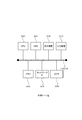
- FIG. 2 is a diagram illustrating a hardware configuration of the management server 2.
- the management server 2 has a CPU 200, a memory 202, an HDD 204, a network interface 206 (network IF206), a display device 208, and an input device 210, and these configurations are configured with each other via a bus 212. You are connected.
- the CPU 200 is, for example, a central arithmetic unit.
- the memory 202 is, for example, a volatile memory and functions as a main storage device.
- the HDD 204 is, for example, a hard disk drive device, and stores a computer program (for example, the setting management program 22 in FIG. 3) and other data files as a non-volatile recording device.
- the network IF206 is an interface for wired or wireless communication.
- the display device 208 is, for example, a liquid crystal display.
- the input device 210 is, for example, a mouse and keyboard touch panel.
- FIG. 3 is a diagram illustrating the functional configuration of the management server 2.
- the setting management program 22 is installed on the management server 2, and the setting work database 260 (setting work DB 260) and the work reference folder 270 are configured.
- the setting management program 22 is stored in a recording medium such as a CD-ROM, and is installed in the management server 2 via the recording medium.
- a part or all of the setting management program 22 may be realized by hardware such as an ASIC, or may be realized by borrowing a part of the functions of the OS (Operating System).
- the setting work DB 260 stores the setting information of each of the setting target devices 9 and the ledger of the setting target devices 9.
- the work reference folder 270 is a folder that can be referred to by the setting terminal 3, the print control PC 50, and the like, and data files necessary for the setting work and the like are placed therein.
- the setting management program 22 includes a work instruction input unit 220, a work plan formulation unit 222, a setting file registration unit 224, an arrival inspection unit 226, an allocation processing unit 228, a printing processing unit 230, a check sheet processing unit 232, and a process management unit 234. It also has a ledger management unit 236.
- the work instruction input unit 220 takes in the setting information from the customer and registers it in the setting work DB 260.
- the work plan formulation unit 222 creates a mass production plan for the setting work and registers it in the setting work DB 260.
- the setting file registration unit 224 takes in the update date and file size of the setting file registered in the setting work DB 260, and stores the registered setting file (setting file provided by the customer) in the work reference folder 270.
- the arrival inspection unit 226 inputs the result of the arrival inspection of the set target device 9 (network device) that has arrived. Specifically, the arrival inspection unit 226 acquires the manufacturing machine (device identification information) of the device 9 to be set via the handy terminal 54, and registers the acquired manufacturing machine in the device ledger.
- the arrival inspection unit 226 is an example of the identification information acquisition unit according to the present invention.
- the allocation processing unit 228 allocates the set target device 9 for which the arrival inspection has been completed and the provided setting file. Specifically, the allocation processing unit 228 allocates the setting files matching the models to the setting target device 9 in the order in which the arrival inspection is completed, and associates the manufacturing machine of the device ledger with the individual setting files.
- the combination of the setting file registration unit 224 and the allocation processing unit 228 is an example of the setting information providing unit according to the present invention.
- the print processing unit 230 uses the setting target device 9 for the printing device 52 based on the device identification information.
- Send print data that includes information indicating the person or installation location.
- the print processing unit 230 is an example of a print data providing unit according to the present invention. Specifically, the print processing unit 230 transmits the print data of the label for the outer box on which the individual identification information associated with the manufacturing machine is displayed to the printing device 52A, and manufactures the printing device 52B. The print data of the label for the device housing on which the individual identification information associated with the unit is displayed is transmitted.
- the check sheet processing unit 232 When the check sheet processing unit 232 receives the device identification information (specifically, the manufacturing machine), the check sheet processing unit 232 is an electronic check sheet for inspecting the set target device 9 for which the setting work has been completed, based on the received device identification information. Is read, and the read electronic check sheet is transmitted to the tablet terminal 56.
- the device identification information specifically, the manufacturing machine
- the process control unit 234 manages the process of each setting target device 9 based on the process ID.
- the process ID is updated every time the process is completed.
- the ledger management unit 236 creates a device ledger in which the device identification information acquired by the handy terminal 54 and the unique setting file assigned by the allocation processing unit 228 are associated with each other. More specifically, the ledger management unit 236 includes the manufacturing unit of the setting target device 9 acquired by the handy terminal 54, a unique setting file assigned to the setting target device 9 by the allocation processing unit 228, and this setting.
- a device ledger that is associated with the process ID of the target device 9 is created and updated. The equipment ledger is confirmed as a ledger when all processes are completed.
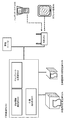
- FIG. 4 is a diagram for explaining the relationship between the functional configuration of the setting terminal 3 and the setting target device 9 loaded on the carriage 4.
- the setting terminal 3 includes a progress management unit 320 that manages the progress of the setting work of the setting target device 9 (network device) and a setting work unit 330 that executes the setting work of the setting target device 9.
- the progress management unit 320 manages and displays the progress of the setting work for the plurality of setting target devices 9 connected via the USB hub 420 and the console cable 42.
- the setting work unit 330 sequentially inputs individual setting information in parallel to each of the plurality of setting target devices 9 connected via the USB hub 420 and the console cable 42 according to the scenario.
- the scenario includes the order of information to be entered and the waiting time after entry.
- the trolley 4 is provided with an OA tap 422, and supplies electric power to a plurality of setting target devices 9 via a power cable.
- the console cable 42 is a USB-serial conversion cable.
- FIG. 5 is a diagram illustrating the relationship between the functional configuration of the print control PC 50 and the printing device 52.
- the print control PC 50 has a print information receiving unit 500 that receives print data transmitted from the handy terminal 54 via the web application of the management server 2, and a printing device that prints according to the received print data. It has a print instruction unit 504 that controls 52, and a check sheet generation unit 502 that generates an electronic check sheet.
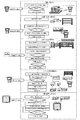
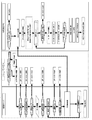
- FIG. 6 is a flowchart illustrating the entire process in the setting management system 1.
- the whole process includes an arrival process S10, an unpacking / allocation process S20, a setting work process S30, a label printing process S40, and a packing inspection process S50.
- the unpacking / allocation process S20, the setting work process S30, the label printing process S40, and the packing inspection process S50 are carried out at different locations, and the trolley 4 is moved to carry out these steps.
- the arrival process S10 when the setting target device 9 arrives, the handy terminal 54 is used to acquire the manufacturing number and the pallet number of the setting target device 9 and transmit them to the management server 2.
- the arrival inspection unit 226 of the management server 2 saves the device information (manufacturing machine) received from the handy terminal 54 as a device list in the device ledger in the setting work DB 260, and at the same time, the process control unit 234 stores the process ID as "1". Record as. When the already registered manufacturing machine is read, the arrival inspection unit 226 displays an arrival error on the screen of the handy terminal 54.
- the setting target device 9 for performing the setting work is unpacked, mounted on the trolley 4, and the target trolley bar code and the manufacturing machine of the mounted device are read by the handy terminal 54.
- the manufacturing machine confirms that the receipt processing is performed by this system and the process ID is "1", and if there is no problem, the allocation processing unit 228 of the management server 2 reads the setting file into the setting target device 9
- the process control unit 234 changes the process ID of the target machine to "2". If the process ID is not "1", an allocation error is displayed on the screen of the handy terminal 54.
- the setting target device 9 loaded on the carriage 4 is connected to the setting terminal 3 with the console cable 42.
- the setting terminal 3 acquires the manufacturing number of the setting target device 9 via the console cable 42, confirms that the process ID is "2", and if there is no problem, the manufacturing number is changed to the manufacturing number. Based on the assigned individual setting information, the individual automatic setting of the device is started. If the process ID is not "2", a process error is displayed on the progress screen of the setting terminal 3.
- the printing device 52B prints the device housing label and the printing device 52A prints the outer box label as individual identification labels on the set target device 9 for which the setting work S30 has been completed. Attach these labels.
- the handy terminal 54 read the manufacturing machine of the device 9 to be set, confirm that the process ID of the target machine is "4", and if there is no problem, the print processing unit of the management server 2.
- the 230 provides print data of a label on which individual identification information associated with the manufacturing machine is described in the setting work DB 260 to the printing device 52A and the printing device 52B, and one label is printed for each. If the process ID is not "4", a process error is displayed on the screen of the handy terminal 54.
- the check sheet generation unit 502 generates the data of the electronic check sheet to be used in the next process and makes it available for download, and the management server 2 (process management unit 234) sets the process ID of the device 9 to be set to ". Change to "5".
- the device 9 to be set with the label attached is moved to the packing work place to carry out the packing work.
- the tablet terminal 56 reads the manufacturing machine of the device 9 to be set, confirms that the process ID of the device 9 to be set is "5", and if there is no problem, checks the electronic check sheet generated in the previous process.
- the sheet generation unit 502 downloads from the management server 2. According to the procedure described in the electronic check sheet, check the package, take a picture of the final package state and the state of the attached label with the camera of the tablet terminal 56, obtain the evidence, and after the work is completed, go to the management server 2. Perform the upload process. At this time, the check sheet generation unit 502 confirms whether all the items are checked, and if there is any omission, uploading is not possible. After the upload is completed, the process control unit 234 changes the process ID of the device 9 to be set to "6".
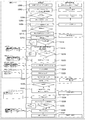
- FIG. 7 is a flowchart illustrating the setting work process S30 in more detail.
- the setting work unit 330 (automation control program in the figure) is started on the setting terminal 3 (S300), it waits for data reception from the COM port to which the console cable 42 is connected (S302). ..
- the power of the device 9 to be set is turned on, data transmission is started via the COM port.
- the setting work unit 330 (automation control program) detects data reception (S304: Yes), sets the progress display of the target COM port to "starting" (S306), and waits for the firmware of the setting target device 9 to start. (S308).
- the setting work unit 330 When the setting work unit 330 receives the specific character string and confirms that the firmware has started (S310: Yes), the setting work unit 330 transmits a device information acquisition command to the setting target device 9 (S312), and the setting target device Receive device information from 9.
- the device information includes the manufacturing machine, and the setting work unit 330 in this case is an example of the identification information acquisition unit according to the present invention.
- the setting work unit 330 extracts the firmware version information from the received device information (S313), confirms whether the version is correct (S314), and if there is a problem with the version, the progress management unit 320 is notified of the firmware version. Display an error and stop the setting work.
- the manufacturing machine is extracted from the acquired device information (S316), and it is confirmed that the process ID for the manufacturing machine of the device 9 to be set is "2" (S318). , The process ID is changed to "3" (S320), the device / setting allocation information of the management server 2 is referred to (S322), and the individual setting value (host name) is acquired (S324). If the process ID is not "2", a process error is displayed on the progress screen of the setting terminal 3 and the work is stopped.
- the setting work unit 330 acquires an individual setting file corresponding to the acquired host name from the work reference folder 270 of the management server 2 (S326), and inputs the individual setting information to the setting target device 9 via the COM port. (S328).
- the setting target device 9 waits for the restart of the setting target device 9 after inputting the individual setting information, and after the restart is completed (S330: Yes), the setting terminal 3 acquires a log from the setting target device 9 via the COM port. Send a command (S332).
- the setting terminal 3 saves the log transmitted from the setting target device 9 in the device ledger of the management server 2 (S334).
- the setting terminal 3 compares the input individual setting information with the log file acquired after the setting, and confirms that there is no contradiction in the setting contents (S336). If there is no problem (S338: Yes), the process ID of the device to be set is changed to "4" (S340), and the progress management unit 320 displays that the setting is completed in the progress display (S342). The operator turns off the power of the device 9 to be set, and the setting work is completed. If there is a contradiction in the setting contents, a comparison error is displayed on the progress screen of the setting terminal 3 and the work is stopped.
- FIG. 8 is a flowchart illustrating the label printing step S40 in more detail.
- the input state of the trolley 4 is confirmed at the handy terminal 54, and if there is no problem, the manufacturing machine is input on the input screen of the manufacturing machine. If the identification information of the trolley 4 is not input, the input screen of the workbench identification information is displayed, and after the input, the input screen of the manufacturing machine is displayed.
- the management server 2 executes the input value check, the extraction of the manufacturing machine, and the worker check, and searches the data.
- the process ID is confirmed from the searched development data, a CSV file containing items to be printed is created, and the process control unit 234 changes the process ID of the device 9 to be set to "5".
- the print control PC 50 detects the CSV file, detects the model name from the file name, confirms whether the model name matches the model name set in the print instruction unit 504, imports the CSV file into the work table, and counts the number of data items. To confirm. When the number of data items is 0, the print control PC 50 imports the CSV three times, and when the number of data items is three or more, an error message is displayed. When the number of data items is other than 0, the print control PC 50 causes the printing device 52A and the printing device 52B to print the label for the outer box and the label for the device housing, outputs an electronic check sheet as a PDF file, and imports the data. Store the printed CSV file in the OK folder.
- FIG. 9 is a flowchart illustrating the packing inspection step S50 in more detail.
- the employee number and the manufacturing machine are input to the tablet terminal 56.
- the management server 2 searches the electronic check sheet from the input employee number and the manufacturing machine, and confirms the presence or absence. If there is no electronic check sheet, an error message will be displayed. If there is a check sheet, search the device data from the entered manufacturing machine and confirm the existence. If there is no device data, an error message is displayed. If there is device data, the worker data is searched from the entered employee number. If there is no worker data, an error message will be displayed. If there is worker data, the device data is searched and the process ID of the device 9 to be set is changed to "6". Search if the check sheet is in use, and if it is in use, display a guidance message. If it can be used, the tablet terminal 56 downloads the target electronic check sheet from the management server 2.
- the "upload" button is pressed on the tablet terminal 56.
- the tablet terminal 56 searches for a user in use, acquires a user ID, and uploads an electronic check sheet to the management server 2. If the user ID cannot be obtained, an error log is output and processing is stopped.
- the check sheet processing unit 232 of the management server 2 confirms that the electronic check sheet has been uploaded successfully, and if there is no problem, moves the file to the download folder so that the checked state can be downloaded. When an upload failure or a move failure to the download folder occurs, the check sheet processing unit 232 outputs an error log and stops.
- the process control unit 234 changes the process ID to "7" when the check status of the electronic check sheet for which the movement is completed is analyzed and all the movements are completed.
- the tablet terminal 56 deletes the electronic check sheet data on its own device.
- the settings of a plurality of network devices can be set at the same time. Further, by mounting all the setting terminals 3 and the setting target devices 9 on the trolley 4, the work space can be compressed. Further, according to the setting management system 1, the administrator can grasp in real time how many machines are working in which process.
Landscapes
- Engineering & Computer Science (AREA)
- Theoretical Computer Science (AREA)
- Software Systems (AREA)
- Physics & Mathematics (AREA)
- General Engineering & Computer Science (AREA)
- General Physics & Mathematics (AREA)
- Manufacturing & Machinery (AREA)
- Quality & Reliability (AREA)
- Automation & Control Theory (AREA)
- General Factory Administration (AREA)
Abstract
機器の設定作業を効率化する設定管理システムを提供する。 設定管理システムは、設定対象機器を積載する台車と、前記台車に積載された前記設定対象機器に対して、設定作業を実施する設定端末と、前記設定端末による設定作業を管理する管理装置と含み、前記設定端末は、前記台車に積載された前記設定対象機器から、設定対象機器それぞれを識別する機器識別情報を取得する識別情報取得部を有し、前記管理装置は、前記識別情報取得部により取得された機器識別情報に関連付けて、前記設定対象機器に固有の設定情報を、前記設定端末に提供する設定情報提供部と、前記識別情報取得部により取得された機器識別情報と、前記設定情報提供部により提供された固有の設定情報とを互いに関連付けた機器台帳を作成する台帳作成部とを有する。
Description
本発明は、設定管理システム、設定管理方法、及びプログラムに関する。
例えば、特許文献1には、情報通信装置4に対して通信ケーブル5を介して接続され、情報通信装置4に対して個別に割り当てられる個別情報を取得自在な個別情報取得部21と、個別情報に対して、ネットワーク情報に関する複数の設定項目から選択される設定対象項目を項目分けする状態で表示させる設定項目表示部22と、その設定項目表示部22にて表示される設定対象項目に対して入力される入力情報と個別情報とを関連付けた設定ファイルを生成自在な設定ファイル生成部23と、設定ファイル生成部23にて生成される設定ファイルに含まれる入力情報を、個別情報から特定される書込対象の情報通信装置に書込自在な設定ファイル書込部24とが備えられているコンピュータ端末2が開示されている。
また、特許文献2には、運用管理者が共通のコマンドフォーマットで各装置の設定を可能とし、共通フォーマットを各装置用のコマンドに変換してから、各装置に投入して、各装置の設定をおこない、共通フォーマットの設定定義の整合性チェックも行う運用管理統合ノード19が開示されている。
また、特許文献2には、運用管理者が共通のコマンドフォーマットで各装置の設定を可能とし、共通フォーマットを各装置用のコマンドに変換してから、各装置に投入して、各装置の設定をおこない、共通フォーマットの設定定義の整合性チェックも行う運用管理統合ノード19が開示されている。
機器の設定作業を効率化する設定管理システムを提供することを目的とする。
本発明に係る設定管理システムは、設定対象機器を積載する台車と、前記台車に積載された前記設定対象機器に対して、設定作業を実施する設定端末と、前記設定端末による設定作業を管理する管理装置と含み、前記設定端末は、前記台車に積載された前記設定対象機器から、設定対象機器それぞれを識別する機器識別情報を取得する識別情報取得部を有し、前記管理装置は、前記識別情報取得部により取得された機器識別情報に関連付けて、前記設定対象機器に固有の設定情報を、前記設定端末に提供する設定情報提供部と、前記識別情報取得部により取得された機器識別情報と、前記設定情報提供部により提供された固有の設定情報とを互いに関連付けた機器台帳を作成する台帳作成部とを有する。
好適には、複数の前記設定端末それぞれは、前記設定情報提供部から提供される設定情報に基づいて、前記台車に積載された複数の設定対象機器に対して、設定作業を行う設定作業部をさらに有し、前記管理装置又は前記設定端末は、前記設定端末それぞれによる設定対象機器の設定作業の進捗を管理する進捗管理部をさらに有し、前記台帳作成部は、前記設定作業が正常に完了したことを条件として、前記機器台帳を確定させる。
好適には、前記設定作業部は、前記設定情報提供部から提供される設定情報、及び、設定対象機器のファームウェアの少なくとも一方のバージョンが既定のバージョンであるか否かを確認し、既定のバージョンであることを条件として設定作業を開始する。
好適には、前記台車には、キーボードによる入力をエミュレートする入力機器、又は、コンソールケーブルが設置されており、前記設定端末の設定作業部は、前記入力機器又は前記コンソールケーブルを介して、固有の設定情報を前記設定対象機器に入力し、設定作業が完了したことを条件として、固有の情報を前記管理装置又は前記設定端末から消去する。
好適には、前記設定作業部は、前記入力機器又は前記コンソールケーブルを介して、シナリオに従って、設定情報を設定対象機器に順次入力する。
好適には、印刷装置をさらに含み、前記管理装置は、前記管理装置が、前記印刷装置に関連付けて機器識別情報を受信すると、この印刷装置に対して、機器識別情報に基づいて、この設定対象機器の使用者又は設置場所を示す情報が含まれた印刷データを送信する印刷データ提供部をさらに有する。
好適には、前記台車には、複数の設定対象機器が積載され、前記設定端末は、これらの設定対象機器に対して並行して設定作業を行い、前記設定端末は、並行して実施される設定作業の進捗を前記管理装置に送信する進捗管理部をさらに有する。
好適には、前記設定作業部は、前記入力装置のUSBケーブル又はコンソールケーブルで、複数の設定対象機器それぞれに固有の設定情報を入力し、前記設定作業部は、前記管理装置から受信した共通のデータファイルを、LANケーブルで、複数の設定対象機器に配布する。
好適には、設定対象機器に対する全体工程は、少なくとも、設定対象機器を梱包から取り出す開梱工程、取り出された設定対象機器に対して設定作業を行う設定工程、設定対象機器に貼付するラベルを印刷するラベル印刷工程、及び、設定作業が完了した設定対象機器を検査する検査工程を含み、前記管理装置は、前記設定対象機器及び前記台車に関連付けて、各台車に積載される設定対象機器の工程を管理する工程管理部をさらに有し、前記設定作業部は、前記工程管理部により設定工程の前工程が完了していることを条件として、設定作業を開始し、前記台帳作成部は、前記工程管理部により全工程が正常に完了したことを条件として、前記機器台帳を確定させる。
また、本発明に係る設定管理方法は、設定対象機器を積載する台車と、前記台車に積載された前記設定対象機器に対して、設定作業を実施する設定端末と、前記設定端末による設定作業を管理する管理装置と、ラベルを印刷する印刷装置と、前記設定対象機器の検査結果を入力する検査端末とを含む設定管理システムにおいて、前記台車に積載された前記設定対象機器から、設定対象機器それぞれを識別する機器識別情報を取得する識別情報取得ステップと、前記管理装置が、取得された機器識別情報に関連付けて、前記設定対象機器に固有の設定情報を、前記設定端末に提供する設定情報提供ステップと、前記設定端末が、提供された設定情報に基づいて、前記設定対象機器に設定作業を行う設定ステップと、前記印刷装置が、設定作業が完了した設定対象機器に貼付するためのラベルを印刷する印刷ステップと、前記検査端末が、設定対象機器に貼付されたラベルに基づいて、設定対象機器の検査結果の入力を受け付ける検査ステップとを有する。
また、本発明に係るプログラムは、設定対象機器を積載する台車と、前記台車に積載された前記設定対象機器に対して、設定作業を実施する設定端末と、前記設定端末による設定作業を管理する管理装置とを含むコンピュータシステムにおいて、前記台車に積載された前記設定対象機器から、設定対象機器それぞれを識別する機器識別情報を取得する識別情報取得ステップと、前記識別情報取得ステップにより取得された機器識別情報に関連付けて、前記設定対象機器に固有の設定情報を、前記設定端末に提供する設定情報提供ステップと、前記識別情報取得ステップにより取得された機器識別情報と、前記設定情報提供ステップにより提供された固有の設定情報とを互いに関連付けた機器台帳を作成する台帳作成ステップとコンピュータに実行させる。
機器の設定作業を効率化することができる。
以下、本発明の実施形態を、図面を参照して説明する。
図1は、設定管理システム1の全体構成を例示する図である。
図1に例示するように、設定管理システム1は、管理サーバ2と、設定端末3と、台車4と、印刷制御パーソナルコンピュータ(印刷制御PC)50と、印刷装置52と、ハンディターミナル54と、タブレット端末56とを有し、これらがネットワークを介して互いに接続している。ネットワークは、例えば、LANケーブルと、ハブ60と、無線アクセスポイント(無線AP)62とで構成されている。
図1は、設定管理システム1の全体構成を例示する図である。
図1に例示するように、設定管理システム1は、管理サーバ2と、設定端末3と、台車4と、印刷制御パーソナルコンピュータ(印刷制御PC)50と、印刷装置52と、ハンディターミナル54と、タブレット端末56とを有し、これらがネットワークを介して互いに接続している。ネットワークは、例えば、LANケーブルと、ハブ60と、無線アクセスポイント(無線AP)62とで構成されている。
管理サーバ2は、設定管理プログラム22(後述)が動作するコンピュータ端末である。例えば、管理サーバ2は、設定端末3による設定作業と、印刷装置52による印刷作業とを含む全体工程を管理する。
設定端末3は、コンピュータ端末であり、管理サーバ2からの指示に応じて、台車4に積載された複数の設定対象機器9に対する設定作業を並行して実施する。
設定端末3は、コンピュータ端末であり、管理サーバ2からの指示に応じて、台車4に積載された複数の設定対象機器9に対する設定作業を並行して実施する。
台車4は、複数の設定対象機器9を積載する台車である。例えば、台車4は、キャスター付きの台車であり、複数の設定対象機器9を積載した状態で移動させることができる。本例では、台車4は、8台の設定対象機器9を積載可能であり、少なくとも、開梱場所、設定端末3の近傍、印刷装置52の近傍、検査場所、及び、梱包場所に移動する。
また、台車4には、複数のコンソールケーブル42が用意されている。コンソールケーブル42を介して、設定端末3が複数の設定対象機器9と接続する。
また、台車4には、複数のコンソールケーブル42が用意されている。コンソールケーブル42を介して、設定端末3が複数の設定対象機器9と接続する。
印刷制御PC50は、印刷装置52による印刷処理を制御するコンピュータ端末であり、管理サーバ2から提供される印刷データに基づいて、印刷装置52に印刷処理を実行させる。本例では、印刷装置52Aが、印刷制御PC50の制御に応じて、設定対象機器9を梱包する外箱に貼付するためのラベルを印刷する。印刷装置52Bが、印刷制御PC50の制御に応じて、設定対象機器9の筐体に貼付するためのラベルを印刷する。
ハンディターミナル54は、設定対象機器9の識別情報(製造号機)を入力する携帯型コンピュータ端末である。例えば、ハンディターミナル54は、入荷工程、開梱・引当工程、印刷工程、検査工程、及び梱包工程において、設定対象機器9の製造号機を読み取る。
タブレット端末56は、設定対象機器9の検査を行う検査工程において、検査担当者が検査を行った結果を入力するタブレット型コンピュータ端末である。
タブレット端末56は、設定対象機器9の検査を行う検査工程において、検査担当者が検査を行った結果を入力するタブレット型コンピュータ端末である。
上記設定管理システム1は、例えば、短納期かつ大規模のネットワーク機器設定作業が発生し、短期間で大量に (例えば、2~5か月間で数千台から数万台)の設定作業を実施する場合等に有効である。同一の物を大量生産する方法として、ライン生産方式が知られている。ライン生産方式では、ベルトコンベア等で加工対象物を流しながら、加工を行うため、個別対応に不向きであった。特に、ネットワーク機器やコンピュータの設定作業では、設定情報が多種となり、外観から区別できないため、流れ作業で個別対応を採ることが困難であった。
また、これまでのネットワーク機器の設定作業では、ネットワーク機器と設定用端末を1台ずつ接続する必要があり、大量に展開するためには相当数の設定用端末を準備する必要があった。業務遂行のため、作業スペースと設備準備費の削減を目的として、ネットワーク機器の設定作業を1台の設定用端末から複数台同時に作業できないか検討を行った。
また、短期展開の為、作業進捗をリアルタイムに把握し的確なコントロールを実施する必要があり、作業計画と連動し、各工程の進捗状況を把握できるしくみが必要になった。
また、これまでのネットワーク機器の設定作業では、ネットワーク機器と設定用端末を1台ずつ接続する必要があり、大量に展開するためには相当数の設定用端末を準備する必要があった。業務遂行のため、作業スペースと設備準備費の削減を目的として、ネットワーク機器の設定作業を1台の設定用端末から複数台同時に作業できないか検討を行った。
また、短期展開の為、作業進捗をリアルタイムに把握し的確なコントロールを実施する必要があり、作業計画と連動し、各工程の進捗状況を把握できるしくみが必要になった。
さらに、1台の設定用端末から複数台同時に設定作業するためには、以下の課題があった。コンソール接続であるため、多重接続するための物理的なポートがない。複数台接続時に、それぞれの設定状況を監視・コントロールする必要がある。個体識別を手動で設定(作業番号を手入力)する必要があった。
また、入荷から出荷までの各工程の作業進捗を把握しコントロールするためには、以下の課題があった。作業進捗が工程毎の管理になっているため、各工程で連動させ全体を把握する必要がある。進捗状況の確認を手動で行っており、実際の状況とのタイムラグが発生し、リアルタイムに状況を把握するのが難しい。
また、入荷から出荷までの各工程の作業進捗を把握しコントロールするためには、以下の課題があった。作業進捗が工程毎の管理になっているため、各工程で連動させ全体を把握する必要がある。進捗状況の確認を手動で行っており、実際の状況とのタイムラグが発生し、リアルタイムに状況を把握するのが難しい。
そこで、本実施形態の設定管理システム1では、1対多接続の方法と複数台同時接続の制御方法について、以下の対応を採った。コンソールケーブル42は、USBコンソールケーブルを用い、設定端末3と設定対象機器9(ネットワーク機器)を接続する。
コンソールケーブル42では、USBハブを活用し、1台の設定端末3に対し、8ポートまでUSBコンソールケーブルを接続する。
8台の設定対象機器9(ネットワーク機器)8台をすべて1台の台車4に積載する。
設定端末3が、USB接続のコンソールケーブル42ごとに個別識別し、コントロールする。
設定端末3が、設定対象機器9(ネットワーク機器)からの出力コードから製造号機を取得し、個体識別を行う。
管理サーバ2が、各工程の進捗状況を把握するために、機器単位に工程ID(工程を識別する識別情報)を付与し、工程変更時に各工程から、自動的に、工程ID情報を受信するしくみを作った。
コンソールケーブル42では、USBハブを活用し、1台の設定端末3に対し、8ポートまでUSBコンソールケーブルを接続する。
8台の設定対象機器9(ネットワーク機器)8台をすべて1台の台車4に積載する。
設定端末3が、USB接続のコンソールケーブル42ごとに個別識別し、コントロールする。
設定端末3が、設定対象機器9(ネットワーク機器)からの出力コードから製造号機を取得し、個体識別を行う。
管理サーバ2が、各工程の進捗状況を把握するために、機器単位に工程ID(工程を識別する識別情報)を付与し、工程変更時に各工程から、自動的に、工程ID情報を受信するしくみを作った。
図2は、管理サーバ2のハードウェア構成を例示する図である。
図2に例示するように、管理サーバ2は、CPU200、メモリ202、HDD204、ネットワークインタフェース206(ネットワークIF206)、表示装置208、及び入力装置210を有し、これらの構成はバス212を介して互いに接続している。
CPU200は、例えば、中央演算装置である。
メモリ202は、例えば、揮発性メモリであり、主記憶装置として機能する。
HDD204は、例えば、ハードディスクドライブ装置であり、不揮発性の記録装置としてコンピュータプログラム(例えば、図3の設定管理プログラム22)やその他のデータファイルを格納する。
ネットワークIF206は、有線又は無線で通信するためのインタフェースである。
表示装置208は、例えば、液晶ディスプレイである。
入力装置210は、例えば、マウス及びキーボードタッチパネルである。
図2に例示するように、管理サーバ2は、CPU200、メモリ202、HDD204、ネットワークインタフェース206(ネットワークIF206)、表示装置208、及び入力装置210を有し、これらの構成はバス212を介して互いに接続している。
CPU200は、例えば、中央演算装置である。
メモリ202は、例えば、揮発性メモリであり、主記憶装置として機能する。
HDD204は、例えば、ハードディスクドライブ装置であり、不揮発性の記録装置としてコンピュータプログラム(例えば、図3の設定管理プログラム22)やその他のデータファイルを格納する。
ネットワークIF206は、有線又は無線で通信するためのインタフェースである。
表示装置208は、例えば、液晶ディスプレイである。
入力装置210は、例えば、マウス及びキーボードタッチパネルである。
図3は、管理サーバ2の機能構成を例示する図である。
図3に例示するように、管理サーバ2には、設定管理プログラム22がインストールされ、設定作業データベース260(設定作業DB260)及び作業参照フォルダ270が構成されている。設定管理プログラム22は、例えば、CD-ROM等の記録媒体に格納されており、この記録媒体を介して、管理サーバ2にインストールされる。
なお、設定管理プログラム22の一部又は全部は、ASICなどのハードウェアにより実現されてもよく、また、OS(Operating System)の機能を一部借用して実現されてもよい。
設定作業DB260は、設定対象機器9それぞれの設定情報、及び、設定対象機器9の台帳を格納する。
作業参照フォルダ270は、設定端末3及び印刷制御PC50等が参照できるフォルダであり、設定作業等で必要なデータファイルが置かれる。
図3に例示するように、管理サーバ2には、設定管理プログラム22がインストールされ、設定作業データベース260(設定作業DB260)及び作業参照フォルダ270が構成されている。設定管理プログラム22は、例えば、CD-ROM等の記録媒体に格納されており、この記録媒体を介して、管理サーバ2にインストールされる。
なお、設定管理プログラム22の一部又は全部は、ASICなどのハードウェアにより実現されてもよく、また、OS(Operating System)の機能を一部借用して実現されてもよい。
設定作業DB260は、設定対象機器9それぞれの設定情報、及び、設定対象機器9の台帳を格納する。
作業参照フォルダ270は、設定端末3及び印刷制御PC50等が参照できるフォルダであり、設定作業等で必要なデータファイルが置かれる。
設定管理プログラム22は、作業指示入力部220、作業計画策定部222、設定ファイル登録部224、入荷検品部226、引当処理部228、印刷処理部230、チェックシート処理部232、工程管理部234、及び台帳管理部236を有する。
設定管理プログラム22において、作業指示入力部220は、顧客からの設定情報を取り込み、設定作業DB260に登録する。
作業計画策定部222は、設定作業の量産計画を作成し、設定作業DB260に登録する。
設定ファイル登録部224は、設定作業DB260に登録された設定ファイルの更新日とファイルサイズを取り込み、登録された設定ファイル(顧客から提供された設定ファイル)を作業参照フォルダ270に保管する。
設定管理プログラム22において、作業指示入力部220は、顧客からの設定情報を取り込み、設定作業DB260に登録する。
作業計画策定部222は、設定作業の量産計画を作成し、設定作業DB260に登録する。
設定ファイル登録部224は、設定作業DB260に登録された設定ファイルの更新日とファイルサイズを取り込み、登録された設定ファイル(顧客から提供された設定ファイル)を作業参照フォルダ270に保管する。
入荷検品部226は、入荷した設定対象機器9(ネットワーク機器)の入荷検品の結果を入力する。具体的には、入荷検品部226は、ハンディターミナル54を介して、設定対象機器9の製造号機(機器識別情報)を取得し、取得された製造号機を機器台帳に登録する。入荷検品部226は、本発明に係る識別情報取得部の一例である。
引当処理部228は、入荷検品が完了した設定対象機器9と、提供された設定ファイルとを引き当てる。具体的には、引当処理部228は、入荷検品が完了した順に、機種が一致する設定ファイルを設定対象機器9に割り当て、機器台帳の製造号機と、個別の設定ファイルとを関連付ける。なお、設定ファイル登録部224と引当処理部228の組合せが、本発明に係る設定情報提供部の一例である。
引当処理部228は、入荷検品が完了した設定対象機器9と、提供された設定ファイルとを引き当てる。具体的には、引当処理部228は、入荷検品が完了した順に、機種が一致する設定ファイルを設定対象機器9に割り当て、機器台帳の製造号機と、個別の設定ファイルとを関連付ける。なお、設定ファイル登録部224と引当処理部228の組合せが、本発明に係る設定情報提供部の一例である。
印刷処理部230は、印刷装置52に関連付けて機器識別情報(具体的には、製造号機)を受信すると、この印刷装置52に対して、機器識別情報に基づいて、この設定対象機器9の使用者又は設置場所を示す情報が含まれた印刷データを送信する。印刷処理部230は、本発明に係る印刷データ提供部の一例である。具体的には、印刷処理部230は、印刷装置52Aに対して、製造号機に関連付けられた個体識別情報が表示された外箱用ラベルの印刷データを送信し、印刷装置52Bに対して、製造号機に関連付けられた個体識別情報が表示された装置筐体用ラベルの印刷データを送信する。
チェックシート処理部232は、機器識別情報(具体的には、製造号機)を受信すると、受信した機器識別情報に基づいて、設定作業が完了した設定対象機器9の検査を行うための電子チェックシートを読み出し、読み出された電子チェックシートをタブレット端末56に送信する。
工程管理部234は、工程IDに基づいて、各設定対象機器9の工程を管理する。工程IDは、工程が完了する度毎に更新される。
台帳管理部236は、ハンディターミナル54により取得された機器識別情報と、引当処理部228により引き当てられた固有の設定ファイルとを互いに関連付けた機器台帳を作成する。より具体的には、台帳管理部236は、ハンディターミナル54により取得された設定対象機器9の製造号機と、この設定対象機器9に引当処理部228により引き当てられた固有の設定ファイルと、この設定対象機器9の工程IDとを互いに関連付けた機器台帳を作成し更新する。機器台帳は、全ての工程が完了した時に、台帳として確定する。
台帳管理部236は、ハンディターミナル54により取得された機器識別情報と、引当処理部228により引き当てられた固有の設定ファイルとを互いに関連付けた機器台帳を作成する。より具体的には、台帳管理部236は、ハンディターミナル54により取得された設定対象機器9の製造号機と、この設定対象機器9に引当処理部228により引き当てられた固有の設定ファイルと、この設定対象機器9の工程IDとを互いに関連付けた機器台帳を作成し更新する。機器台帳は、全ての工程が完了した時に、台帳として確定する。
図4は、設定端末3の機能構成と、台車4に積載された設定対象機器9との関係を説明する図である。
図4に示すように、設定端末3は、設定対象機器9(ネットワーク機器)の設定作業の進捗を管理する進捗管理部320と、設定対象機器9の設定作業を実行する設定作業部330とを有する。
進捗管理部320は、USBハブ420及びコンソールケーブル42を介して接続した複数の設定対象機器9に対する設定作業の進捗を管理し、表示する。
設定作業部330は、USBハブ420及びコンソールケーブル42を介して接続した複数の設定対象機器9それぞれに対して、シナリオに従って、順に個別の設定情報を並行して入力する。シナリオには、入力すべき情報の順序と、入力後の待機時間とが含まれている。
台車4には、OAタップ422が設けられており、電源ケーブルを介して、複数の設定対象機器9に電力を供給する。
コンソールケーブル42は、具体的には、USB-シリアル変換ケーブルである。
図4に示すように、設定端末3は、設定対象機器9(ネットワーク機器)の設定作業の進捗を管理する進捗管理部320と、設定対象機器9の設定作業を実行する設定作業部330とを有する。
進捗管理部320は、USBハブ420及びコンソールケーブル42を介して接続した複数の設定対象機器9に対する設定作業の進捗を管理し、表示する。
設定作業部330は、USBハブ420及びコンソールケーブル42を介して接続した複数の設定対象機器9それぞれに対して、シナリオに従って、順に個別の設定情報を並行して入力する。シナリオには、入力すべき情報の順序と、入力後の待機時間とが含まれている。
台車4には、OAタップ422が設けられており、電源ケーブルを介して、複数の設定対象機器9に電力を供給する。
コンソールケーブル42は、具体的には、USB-シリアル変換ケーブルである。
図5は、印刷制御PC50の機能構成と、印刷装置52との関係を説明する図である。
図5に示すように、印刷制御PC50は、ハンディターミナル54から管理サーバ2のウェブアプリ経由で送信されてくる印刷データを受信する印刷情報受信部500と、受信した印刷データに従って印刷するよう印刷装置52を制御する印刷指示部504と、電子チェックシートを生成するチェックシート生成部502とを有する。
図5に示すように、印刷制御PC50は、ハンディターミナル54から管理サーバ2のウェブアプリ経由で送信されてくる印刷データを受信する印刷情報受信部500と、受信した印刷データに従って印刷するよう印刷装置52を制御する印刷指示部504と、電子チェックシートを生成するチェックシート生成部502とを有する。
図6は、設定管理システム1における全体工程を説明するフローチャートである。
図6に示すように、全体工程は、入荷工程S10と、開梱・引当工程S20と、設定作業工程S30と、ラベル印刷工程S40と、梱包検査工程S50とを含む。例えば、開梱・引当工程S20、設定作業工程S30、ラベル印刷工程S40、及び、梱包検査工程S50は、それぞれ異なる場所で実施され、台車4を移動させて、これらの工程を実施する。
入荷工程S10において、設定対象機器9の入荷時に、ハンディターミナル54を使用し、設定対象機器9の製造号機と、パレット番号を取得し、管理サーバ2に送信する。管理サーバ2の入荷検品部226は、ハンディターミナル54から受信した機器情報(製造号機)を設定作業DB260内の機器台帳に装置一覧として保存し、同時に、工程管理部234は、工程IDを「1」 として記録する。すでに登録済みの製造号機を読み込んだ場合は、入荷検品部226は、ハンディターミナル54の画面に入荷エラーを表示させる。
図6に示すように、全体工程は、入荷工程S10と、開梱・引当工程S20と、設定作業工程S30と、ラベル印刷工程S40と、梱包検査工程S50とを含む。例えば、開梱・引当工程S20、設定作業工程S30、ラベル印刷工程S40、及び、梱包検査工程S50は、それぞれ異なる場所で実施され、台車4を移動させて、これらの工程を実施する。
入荷工程S10において、設定対象機器9の入荷時に、ハンディターミナル54を使用し、設定対象機器9の製造号機と、パレット番号を取得し、管理サーバ2に送信する。管理サーバ2の入荷検品部226は、ハンディターミナル54から受信した機器情報(製造号機)を設定作業DB260内の機器台帳に装置一覧として保存し、同時に、工程管理部234は、工程IDを「1」 として記録する。すでに登録済みの製造号機を読み込んだ場合は、入荷検品部226は、ハンディターミナル54の画面に入荷エラーを表示させる。
開梱・引当工程S20において、設定作業を実施する設定対象機器9を開梱し、台車4に搭載し、専用台車バーコード及び搭載した機器の製造号機をハンディターミナル54で読み取る事により、対象の製造号機が、本システムにより、入荷処理され工程IDが「1」になっている事を確認し、問題なければ、管理サーバ2の引当処理部228は、設定ファイルを、読み込んだ設定対象機器9の製造号機に引き当て、工程管理部234は、この対象号機の工程IDを「2」に変更する。 工程IDが「1」でない場合は、ハンディターミナル54の画面に引き当てエラーを表示する。
設定作業工程S30において、台車4に積載された設定対象機器9を設定端末3にコンソールケーブル42で接続する。設定対象機器9の電源を投入すると、設定端末3は、コンソールケーブル42経由で設定対象機器9の製造号機を取得し、工程IDが「2」である事を確認し、問題なければ製造号機に引き当てられた個別設定情報を元に、機器の個別自動設定を開始する。工程IDが「2」でない場合は、設定端末3の進捗画面に工程エラーが表示される。管理サーバ2(工程管理部234)は、設定端末3から自動設定の開始を通知されると、自動設定の開始時に工程IDを「3」に変更し、自動設定の正常終了時に工程IDを「4」に変更する。
ラベル印刷工程S40において、設定作業S30が完了した設定対象機器9に対して、個別識別ラベルとして、印刷装置52Bが装置筐体用ラベルを印刷し、印刷装置52Aが外箱用ラベルを印刷し、これらのラベルを貼付する。具体的には、ハンディターミナル54にて、設定対象機器9の製造号機の読み取り、対象機の工程IDが「4」になっている事を確認し、問題なければ、管理サーバ2の印刷処理部230は、設定作業DB260にて製造号機に関連付けられた個別識別情報が記載されたラベルの印刷データを印刷装置52A及び印刷装置52Bに提供し、ラベルが各1枚印刷される。工程IDが「4」でない場合は、ハンディターミナル54の画面にて工程エラーが表示される。印刷後、チェックシート生成部502は、次工程で使用する電子チェックシートのデータを生成し、ダウンロード可能な状態にし、管理サーバ2(工程管理部234)は、設定対象機器9の工程IDを「5」に変更する。
梱包検査工程S50において、ラベルを貼付した設定対象機器9を、梱包作業場に移動させ梱包作業を実施する。タブレット端末56により、設定対象機器9の製造号機を読み取り、設定対象機器9の工程IDが「5」になっている事を確認し、問題なければ前工程で生成された、電子チェックシートをチェックシート生成部502が管理サーバ2からダウンロードする。電子チェックシートに記載された手順に従い、梱包物のチェックと、最終梱包状態・貼付されたラベルの状態をタブレット端末56のカメラで撮影し、エビデンスを取得し、作業完了後、管理サーバ2へのアップロード処理を実施する。この時、全ての項目にレ点チェックが入っているかをチェックシート生成部502が確認し、漏れがある場合は、アップロードできない設定となっている。アップロード完了後、工程管理部234は設定対象機器9の工程IDを「6」に変更する。
図7は、設定作業工程S30をより詳細に説明するフローチャートである。
図7に示すように、設定端末3上で設定作業部330(図中の自動化制御プログラム)を起動すると(S300)、コンソールケーブル42が接続されたCOMポートからのデータ受信待ちとなる(S302)。
設定対象機器9の電源を投入すると、COMポート経由でデータ送信が開始される。設定作業部330(自動化制御プログラム)は、データ受信を検知すると(S304:Yes)、対象COMポートの進捗表示を「起動中」にし(S306)、設定対象機器9のファームウェアが起動するのを待つ(S308)。
設定作業部330は、特定の文字列を受信することにより、ファームウェアの起動が確認できた時点で(S310:Yes)、機器情報取得コマンドを設定対象機器9に送信し(S312)、設定対象機器9から装置情報を受信する。装置情報には、製造号機が含まれており、この場合の設定作業部330は本発明に係る識別情報取得部の一例となる。
設定作業部330は、受信した装置情報より、ファームウェアのバージョン情報を抽出し(S313)、問題ないバージョンか確認を実施し(S314)、バージョンに問題がある場合は、進捗管理部320にファームバージョンエラーを表示させ、設定作業を停止する。バージョンに問題がなければ、取得した機器情報より、製造号機を抽出し(S316)、設定対象機器9の製造号機に対する工程IDが「2」である事を確認し(S318)、問題がなければ、工程IDを「3」に変更し(S320)、管理サーバ2の機器・設定引き当て情報を参照し(S322)、個別設定値(ホスト名)を取得する(S324)。工程IDが「2」でない場合は、設定端末3の進捗画面に工程エラーを表示し、作業を停止する。
設定作業部330は、取得したホスト名に該当する、個別の設定ファイルを管理サーバ2の作業参照フォルダ270から取得し(S326)、設定対象機器9にCOMポート経由で、個別の設定情報を投入する(S328)。個別設定情報の投入後の設定対象機器9の再起動を、設定端末3側で待ち、再起動完了後(S330:Yes)、設定端末3は、設定対象機器9にCOMポート経由で、ログ取得コマンドを送信する(S332)。設定端末3は、設定対象機器9から送信されてきたログを管理サーバ2の機器台帳に保存する(S334)。設定端末3は、投入した個別の設定情報と、設定後取得したログファイルとを比較し、設定内容に矛盾がないか確認する(S336)。問題ない場合(S338:Yes)、設定対象機器の工程IDを「4」に変更し(S340)、進捗管理部320は、進捗表示に設定完了と表示する(S342)。作業者は、設定対象機器9の電源を切断し、設定作業完了となる。設定内容に矛盾がある場合は、設定端末3の進捗画面に比較エラーを表示し、作業を停止する。
図7に示すように、設定端末3上で設定作業部330(図中の自動化制御プログラム)を起動すると(S300)、コンソールケーブル42が接続されたCOMポートからのデータ受信待ちとなる(S302)。
設定対象機器9の電源を投入すると、COMポート経由でデータ送信が開始される。設定作業部330(自動化制御プログラム)は、データ受信を検知すると(S304:Yes)、対象COMポートの進捗表示を「起動中」にし(S306)、設定対象機器9のファームウェアが起動するのを待つ(S308)。
設定作業部330は、特定の文字列を受信することにより、ファームウェアの起動が確認できた時点で(S310:Yes)、機器情報取得コマンドを設定対象機器9に送信し(S312)、設定対象機器9から装置情報を受信する。装置情報には、製造号機が含まれており、この場合の設定作業部330は本発明に係る識別情報取得部の一例となる。
設定作業部330は、受信した装置情報より、ファームウェアのバージョン情報を抽出し(S313)、問題ないバージョンか確認を実施し(S314)、バージョンに問題がある場合は、進捗管理部320にファームバージョンエラーを表示させ、設定作業を停止する。バージョンに問題がなければ、取得した機器情報より、製造号機を抽出し(S316)、設定対象機器9の製造号機に対する工程IDが「2」である事を確認し(S318)、問題がなければ、工程IDを「3」に変更し(S320)、管理サーバ2の機器・設定引き当て情報を参照し(S322)、個別設定値(ホスト名)を取得する(S324)。工程IDが「2」でない場合は、設定端末3の進捗画面に工程エラーを表示し、作業を停止する。
設定作業部330は、取得したホスト名に該当する、個別の設定ファイルを管理サーバ2の作業参照フォルダ270から取得し(S326)、設定対象機器9にCOMポート経由で、個別の設定情報を投入する(S328)。個別設定情報の投入後の設定対象機器9の再起動を、設定端末3側で待ち、再起動完了後(S330:Yes)、設定端末3は、設定対象機器9にCOMポート経由で、ログ取得コマンドを送信する(S332)。設定端末3は、設定対象機器9から送信されてきたログを管理サーバ2の機器台帳に保存する(S334)。設定端末3は、投入した個別の設定情報と、設定後取得したログファイルとを比較し、設定内容に矛盾がないか確認する(S336)。問題ない場合(S338:Yes)、設定対象機器の工程IDを「4」に変更し(S340)、進捗管理部320は、進捗表示に設定完了と表示する(S342)。作業者は、設定対象機器9の電源を切断し、設定作業完了となる。設定内容に矛盾がある場合は、設定端末3の進捗画面に比較エラーを表示し、作業を停止する。
図8は、ラベル印刷工程S40をより詳細に説明するフローチャートである。
図8に示すように、ハンディターミナル54にて、台車4の入力状態を確認し、問題なければ、製造号機の入力画面で製造号機を入力する。台車4の識別情報が入力されてない場合は、作業台識別情報の入力画面が表示され、入力後に製造号機の入力画面が表示される。
製造号機の入力後、管理サーバ2が、入力値チェックと製造号機の抽出と作業者チェックを実行し、データ検索する。検索された展開データから工程IDを確認し、印刷すべき事項が含まれたCSVファイルを作成し、工程管理部234が、設定対象機器9の工程IDを「5」に変更する。
印刷制御PC50は、CSVファイルを検知し、ファイル名から型名を検出し、印刷指示部504に設定されている型名と一致しているか確認し、ワークテーブルへCSVファイルをインポートし、データ件数を確認する。
データ件数が0件である場合は、印刷制御PC50は、CSVのインポートを3回実施し、3回以上の場合にエラーメッセージを表示する。
データ件数が0件以外である場合に、印刷制御PC50は、印刷装置52A及び印刷装置52Bに、外箱用ラベルと装置筐体用ラベルを印刷させ、電子チェックシートをPDFファイルとして出力し、インポートしたCSVファイルをOKフォルダへ格納する。
図8に示すように、ハンディターミナル54にて、台車4の入力状態を確認し、問題なければ、製造号機の入力画面で製造号機を入力する。台車4の識別情報が入力されてない場合は、作業台識別情報の入力画面が表示され、入力後に製造号機の入力画面が表示される。
製造号機の入力後、管理サーバ2が、入力値チェックと製造号機の抽出と作業者チェックを実行し、データ検索する。検索された展開データから工程IDを確認し、印刷すべき事項が含まれたCSVファイルを作成し、工程管理部234が、設定対象機器9の工程IDを「5」に変更する。
印刷制御PC50は、CSVファイルを検知し、ファイル名から型名を検出し、印刷指示部504に設定されている型名と一致しているか確認し、ワークテーブルへCSVファイルをインポートし、データ件数を確認する。
データ件数が0件である場合は、印刷制御PC50は、CSVのインポートを3回実施し、3回以上の場合にエラーメッセージを表示する。
データ件数が0件以外である場合に、印刷制御PC50は、印刷装置52A及び印刷装置52Bに、外箱用ラベルと装置筐体用ラベルを印刷させ、電子チェックシートをPDFファイルとして出力し、インポートしたCSVファイルをOKフォルダへ格納する。
図9は、梱包検査工程S50をより詳細に説明するフローチャートである。
図9に示すように、電子チェックシートをダウンロードする場面において、タブレット端末56に社員番号と製造号機を入力する。管理サーバ2は、入力された社員番号と製造号機から電子チェックシートを検索し、有無を確認する。電子チェックシートがない場合は、エラーメッセージを表示する。
チェックシートがある場合は、入力された製造号機から装置データを検索し、有無を確認する。装置データがない場合は、エラーメッセージを表示する。
装置データがある場合は、入力された社員番号から作業者データを検索する。作業者データがない場合は、エラーメッセージを表示する。
作業者データがある場合は、装置データを検索し、設定対象機器9の工程IDを「6」に変更する。
チェックシート使用中か検索し、使用中の場合は、案内メッセージを表示する。使用可能な場合、対象の電子チェックシートをタブレット端末56が管理サーバ2からダウンロードする。
図9に示すように、電子チェックシートをダウンロードする場面において、タブレット端末56に社員番号と製造号機を入力する。管理サーバ2は、入力された社員番号と製造号機から電子チェックシートを検索し、有無を確認する。電子チェックシートがない場合は、エラーメッセージを表示する。
チェックシートがある場合は、入力された製造号機から装置データを検索し、有無を確認する。装置データがない場合は、エラーメッセージを表示する。
装置データがある場合は、入力された社員番号から作業者データを検索する。作業者データがない場合は、エラーメッセージを表示する。
作業者データがある場合は、装置データを検索し、設定対象機器9の工程IDを「6」に変更する。
チェックシート使用中か検索し、使用中の場合は、案内メッセージを表示する。使用可能な場合、対象の電子チェックシートをタブレット端末56が管理サーバ2からダウンロードする。
電子チェックシートをアップロードする場面において、電子チェックシートによる、チェック作業が完了後、タブレット端末56上で「アップロード」ボタンを押す。タブレット端末56は、使用中のユーザを検索し、ユーザIDを取得し、管理サーバ2に対して、電子チェックシートのアップロード処理を実施する。ユーザIDが取得できない場合は、エラーログを出力し処理を停止する。
管理サーバ2のチェックシート処理部232は、電子チェックシートのアップロードに成功した事を確認し、問題なければ、ダウンロードフォルダへファイルを移動し、チェック済みの状態をダウンロードできる様にする。アップロード失敗又はダウンロードフォルダへの移動失敗が発生した時は、チェックシート処理部232は、エラーログを出力し停止する。移動が完了した電子チェックシートのチェック状況を解析し、全て完了している場合、工程管理部234は工程IDを「7」に変更する。タブレット端末56は、自機上の電子チェックシートデータを削除する。
管理サーバ2のチェックシート処理部232は、電子チェックシートのアップロードに成功した事を確認し、問題なければ、ダウンロードフォルダへファイルを移動し、チェック済みの状態をダウンロードできる様にする。アップロード失敗又はダウンロードフォルダへの移動失敗が発生した時は、チェックシート処理部232は、エラーログを出力し停止する。移動が完了した電子チェックシートのチェック状況を解析し、全て完了している場合、工程管理部234は工程IDを「7」に変更する。タブレット端末56は、自機上の電子チェックシートデータを削除する。
以上説明したように、本実施形態の設定管理システム1によれば、複数台のネットワーク機器の設定を、同時に設定することができる。さらに、台車4上に設定端末3及び設定対象機器9をすべて搭載することで、作業スペースを圧縮することができる。
また、本設定管理システム1によれば、管理者がどの工程で何台作業中かをリアルタイムに把握できる。
また、本設定管理システム1によれば、管理者がどの工程で何台作業中かをリアルタイムに把握できる。
1…設定管理システム
2…管理サーバ
3…設定端末
4…台車
52…印刷装置
54…ハンディターミナル
56…タブレット端末
2…管理サーバ
3…設定端末
4…台車
52…印刷装置
54…ハンディターミナル
56…タブレット端末
Claims (12)
- 設定対象機器を積載する台車と、
前記台車に積載された前記設定対象機器に対して、設定作業を実施する設定端末と、
前記設定端末による設定作業を管理する管理装置と
含み、
前記設定端末は、
前記台車に積載された前記設定対象機器から、設定対象機器それぞれを識別する機器識別情報を取得する識別情報取得部
を有し、
前記管理装置は、
前記識別情報取得部により取得された機器識別情報に関連付けて、前記設定対象機器に固有の設定情報を、前記設定端末に提供する設定情報提供部と、
前記識別情報取得部により取得された機器識別情報と、前記設定情報提供部により提供された固有の設定情報とを互いに関連付けた機器台帳を作成する台帳作成部と
を有する
設定管理システム。 - 複数の前記設定端末それぞれは、
前記設定情報提供部から提供される設定情報に基づいて、前記台車に積載された複数の設定対象機器に対して、設定作業を行う設定作業部
をさらに有し、
前記管理装置又は前記設定端末は、
前記設定端末それぞれによる設定対象機器の設定作業の進捗を管理する進捗管理部
をさらに有し、
前記台帳作成部は、前記設定作業が正常に完了したことを条件として、前記機器台帳を確定させる
請求項1に記載の設定管理システム。 - 前記設定作業部は、前記設定情報提供部から提供される設定情報、及び、設定対象機器のファームウェアの少なくとも一方のバージョンが既定のバージョンであるか否かを確認し、既定のバージョンであることを条件として設定作業を開始する
請求項2に記載の設定管理システム。 - 前記台車には、キーボードによる入力をエミュレートする入力機器、又は、コンソールケーブルが設置されており、
前記設定端末の設定作業部は、前記入力機器又は前記コンソールケーブルを介して、固有の設定情報を前記設定対象機器に入力し、設定作業が完了したことを条件として、固有の情報を前記管理装置又は前記設定端末から消去する
請求項3に記載の設定管理システム。 - 前記設定作業部は、前記入力機器又は前記コンソールケーブルを介して、シナリオに従って、設定情報を設定対象機器に順次入力する
請求項4に記載の設定管理システム。 - 印刷装置
をさらに含み、
前記管理装置は、
前記管理装置が、前記印刷装置に関連付けて機器識別情報を受信すると、この印刷装置に対して、機器識別情報に基づいて、この設定対象機器の使用者又は設置場所を示す情報が含まれた印刷データを送信する印刷データ提供部
をさらに有する
請求項5に記載の設定管理システム。 - 前記台車には、複数の設定対象機器が積載され、
前記設定端末は、これらの設定対象機器に対して並行して設定作業を行い、
前記設定端末は、
並行して実施される設定作業の進捗を前記管理装置に送信する進捗管理部
をさらに有する
請求項1に記載の設定管理システム。 - 前記設定作業部は、前記入力装置のUSBケーブル又はコンソールケーブルで、複数の設定対象機器それぞれに固有の設定情報を入力し、
前記設定作業部は、前記管理装置から受信した共通のデータファイルを、LANケーブルで、複数の設定対象機器に配布する
請求項4に記載の設定管理システム。 - 設定対象機器に対する全体工程は、少なくとも、設定対象機器を梱包から取り出す開梱工程、取り出された設定対象機器に対して設定作業を行う設定工程、設定対象機器に貼付するラベルを印刷するラベル印刷工程、及び、設定作業が完了した設定対象機器を検査する検査工程を含み、
前記管理装置は、
前記設定対象機器及び前記台車に関連付けて、各台車に積載される設定対象機器の工程を管理する工程管理部
をさらに有し、
前記設定作業部は、前記工程管理部により設定工程の前工程が完了していることを条件として、設定作業を開始し、
前記台帳作成部は、前記工程管理部により全工程が正常に完了したことを条件として、前記機器台帳を確定させる
請求項2に記載の設定管理システム。 - 設定対象機器を積載する台車と、前記台車に積載された前記設定対象機器に対して、設定作業を実施する設定端末と、前記設定端末による設定作業を管理する管理装置と、ラベルを印刷する印刷装置と、前記設定対象機器の検査結果を入力する検査端末とを含む設定管理システムにおいて、
前記台車に積載された前記設定対象機器から、設定対象機器それぞれを識別する機器識別情報を取得する識別情報取得ステップと、
前記管理装置が、取得された機器識別情報に関連付けて、前記設定対象機器に固有の設定情報を、前記設定端末に提供する設定情報提供ステップと、
前記設定端末が、提供された設定情報に基づいて、前記設定対象機器に設定作業を行う設定ステップと、
前記印刷装置が、設定作業が完了した設定対象機器に貼付するためのラベルを印刷する印刷ステップと、
前記検査端末が、設定対象機器に貼付されたラベルに基づいて、設定対象機器の検査結果の入力を受け付ける検査ステップと
を有する設定管理方法。 - 設定対象機器が積載された前記台車は、前記設定ステップの前後、前記印刷ステップの前後、及び、前記検査ステップの前後で、移動させる
請求項10に記載の設定管理方法。 - 設定対象機器を積載する台車と、前記台車に積載された前記設定対象機器に対して、設定作業を実施する設定端末と、前記設定端末による設定作業を管理する管理装置とを含むコンピュータシステムにおいて、
前記台車に積載された前記設定対象機器から、設定対象機器それぞれを識別する機器識別情報を取得する識別情報取得ステップと、
前記識別情報取得ステップにより取得された機器識別情報に関連付けて、前記設定対象機器に固有の設定情報を、前記設定端末に提供する設定情報提供ステップと、
前記識別情報取得ステップにより取得された機器識別情報と、前記設定情報提供ステップにより提供された固有の設定情報とを互いに関連付けた機器台帳を作成する台帳作成ステップと
コンピュータに実行させるプログラム。
Priority Applications (2)
| Application Number | Priority Date | Filing Date | Title |
|---|---|---|---|
| JP2021524727A JP7198990B2 (ja) | 2019-06-03 | 2020-05-14 | 設定管理システム、設定管理方法、及びプログラム |
| US17/616,028 US20220318030A1 (en) | 2019-06-03 | 2020-05-14 | Settings management system, settings management method, and program |
Applications Claiming Priority (2)
| Application Number | Priority Date | Filing Date | Title |
|---|---|---|---|
| JP2019-103478 | 2019-06-03 | ||
| JP2019103478 | 2019-06-03 |
Publications (1)
| Publication Number | Publication Date |
|---|---|
| WO2020246208A1 true WO2020246208A1 (ja) | 2020-12-10 |
Family
ID=73653112
Family Applications (1)
| Application Number | Title | Priority Date | Filing Date |
|---|---|---|---|
| PCT/JP2020/019208 Ceased WO2020246208A1 (ja) | 2019-06-03 | 2020-05-14 | 設定管理システム、設定管理方法、及びプログラム |
Country Status (3)
| Country | Link |
|---|---|
| US (1) | US20220318030A1 (ja) |
| JP (1) | JP7198990B2 (ja) |
| WO (1) | WO2020246208A1 (ja) |
Cited By (1)
| Publication number | Priority date | Publication date | Assignee | Title |
|---|---|---|---|---|
| JP2023028924A (ja) * | 2021-08-20 | 2023-03-03 | Necソリューションイノベータ株式会社 | 情報処理装置の設定準備支援装置、設定準備支援端末、製造者端末、自動構築支援装置、設定準備支援方法、自動構築支援方法、及びプログラム |
Citations (5)
| Publication number | Priority date | Publication date | Assignee | Title |
|---|---|---|---|---|
| JP2004209165A (ja) * | 2003-01-09 | 2004-07-29 | Sansei R & D:Kk | 遊技機製造 |
| JP2009037382A (ja) * | 2007-08-01 | 2009-02-19 | Atsumi Tec:Kk | 製造ラインの監視システム |
| JP2010092090A (ja) * | 2008-10-03 | 2010-04-22 | Yokogawa Electric Corp | 機器管理プログラム及び機器管理システム |
| JP2010170195A (ja) * | 2009-01-20 | 2010-08-05 | Hitachi Ltd | 部品配膳台車を用いた部品配膳システム及び部品配膳方法 |
| JP2017028422A (ja) * | 2015-07-21 | 2017-02-02 | セイコーエプソン株式会社 | プリンター、通信端末およびプログラム |
Family Cites Families (4)
| Publication number | Priority date | Publication date | Assignee | Title |
|---|---|---|---|---|
| JP3580083B2 (ja) * | 1997-04-30 | 2004-10-20 | セイコーエプソン株式会社 | 画像処理装置 |
| JP2004020916A (ja) | 2002-06-17 | 2004-01-22 | Dainippon Ink & Chem Inc | 2色回転粒子の製造方法 |
| JP4858271B2 (ja) * | 2007-03-30 | 2012-01-18 | ブラザー工業株式会社 | ネットワークシステムとネットワークデバイス |
| US8645511B2 (en) * | 2009-10-13 | 2014-02-04 | Google Inc. | Pre-configuration of a cloud-based computer |
-
2020
- 2020-05-14 US US17/616,028 patent/US20220318030A1/en not_active Abandoned
- 2020-05-14 JP JP2021524727A patent/JP7198990B2/ja active Active
- 2020-05-14 WO PCT/JP2020/019208 patent/WO2020246208A1/ja not_active Ceased
Patent Citations (5)
| Publication number | Priority date | Publication date | Assignee | Title |
|---|---|---|---|---|
| JP2004209165A (ja) * | 2003-01-09 | 2004-07-29 | Sansei R & D:Kk | 遊技機製造 |
| JP2009037382A (ja) * | 2007-08-01 | 2009-02-19 | Atsumi Tec:Kk | 製造ラインの監視システム |
| JP2010092090A (ja) * | 2008-10-03 | 2010-04-22 | Yokogawa Electric Corp | 機器管理プログラム及び機器管理システム |
| JP2010170195A (ja) * | 2009-01-20 | 2010-08-05 | Hitachi Ltd | 部品配膳台車を用いた部品配膳システム及び部品配膳方法 |
| JP2017028422A (ja) * | 2015-07-21 | 2017-02-02 | セイコーエプソン株式会社 | プリンター、通信端末およびプログラム |
Cited By (2)
| Publication number | Priority date | Publication date | Assignee | Title |
|---|---|---|---|---|
| JP2023028924A (ja) * | 2021-08-20 | 2023-03-03 | Necソリューションイノベータ株式会社 | 情報処理装置の設定準備支援装置、設定準備支援端末、製造者端末、自動構築支援装置、設定準備支援方法、自動構築支援方法、及びプログラム |
| JP7761336B2 (ja) | 2021-08-20 | 2025-10-28 | Necソリューションイノベータ株式会社 | 情報処理装置の設定準備支援装置、設定準備支援端末、製造者端末、自動構築支援装置、設定準備支援方法、自動構築支援方法、及びプログラム |
Also Published As
| Publication number | Publication date |
|---|---|
| US20220318030A1 (en) | 2022-10-06 |
| JPWO2020246208A1 (ja) | 2020-12-10 |
| JP7198990B2 (ja) | 2023-01-05 |
Similar Documents
| Publication | Publication Date | Title |
|---|---|---|
| CN105009010B (zh) | 控制系统、控制装置、图像处理装置及控制方法 | |
| CN110489161B (zh) | 一种版本文件的管理方法及相关装置 | |
| JP2008171186A (ja) | ケーブル施工支援・管理システム | |
| US10846212B2 (en) | Evidence gathering system and method | |
| WO2012053293A1 (ja) | ケーブル施工支援・管理システム | |
| JP2014032631A (ja) | 点検支援システム | |
| JP5740634B2 (ja) | 自動操作システム及び操作自動化方法 | |
| JP7283541B2 (ja) | ケーブル接続作業支援システム、ケーブル接続作業支援方法、およびケーブル接続作業支援プログラム | |
| WO2020246209A1 (ja) | 設定端末、設定方法、及びプログラム | |
| CN104520716A (zh) | 使用平板终端的分析装置 | |
| US8363247B2 (en) | Printer control method | |
| JP2021051044A (ja) | 検査装置及びラベル貼付装置 | |
| CN114610327A (zh) | 一种自动化发布和部署方法、装置、介质及计算机设备 | |
| JP7198990B2 (ja) | 設定管理システム、設定管理方法、及びプログラム | |
| CN112433783A (zh) | 一种配置方法及相关设备 | |
| CN113052457A (zh) | 智能产品的制造管理方法、系统及可读存储介质 | |
| CN113434246A (zh) | 一种多层依赖部署方法、工具、设备及介质 | |
| JP4562799B2 (ja) | 現場状況検査システム、これに用いる携帯情報端末・印刷装置、及び印刷装置 | |
| CN114127646B (zh) | 支持装置、支持程序的记录介质及设定方法 | |
| CN114675930A (zh) | 一种主机模拟通信工具 | |
| JP6659605B2 (ja) | 管理サーバ、管理システム、管理方法および管理プログラム | |
| JP7769563B2 (ja) | 作業管理支援装置、作業管理支援システム、及び作業管理支援方法 | |
| JP6952928B1 (ja) | データ分析システム | |
| JP6984120B2 (ja) | ロードコンペア装置、ロードコンペアプログラムおよびロードコンペア方法 | |
| JP7535926B2 (ja) | サーバ装置、機器組み付け場所指示システムおよび機器組み付け場所指示方法 |
Legal Events
| Date | Code | Title | Description |
|---|---|---|---|
| 121 | Ep: the epo has been informed by wipo that ep was designated in this application |
Ref document number: 20819357 Country of ref document: EP Kind code of ref document: A1 |
|
| ENP | Entry into the national phase |
Ref document number: 2021524727 Country of ref document: JP Kind code of ref document: A |
|
| NENP | Non-entry into the national phase |
Ref country code: DE |
|
| 122 | Ep: pct application non-entry in european phase |
Ref document number: 20819357 Country of ref document: EP Kind code of ref document: A1 |