WO2020196385A1 - 画像処理装置、画像処理方法及びプログラム、撮影装置 - Google Patents
画像処理装置、画像処理方法及びプログラム、撮影装置 Download PDFInfo
- Publication number
- WO2020196385A1 WO2020196385A1 PCT/JP2020/012669 JP2020012669W WO2020196385A1 WO 2020196385 A1 WO2020196385 A1 WO 2020196385A1 JP 2020012669 W JP2020012669 W JP 2020012669W WO 2020196385 A1 WO2020196385 A1 WO 2020196385A1
- Authority
- WO
- WIPO (PCT)
- Prior art keywords
- image
- character
- unit
- image processing
- layout
- Prior art date
- Legal status (The legal status is an assumption and is not a legal conclusion. Google has not performed a legal analysis and makes no representation as to the accuracy of the status listed.)
- Ceased
Links
Images







Classifications
-
- G—PHYSICS
- G06—COMPUTING OR CALCULATING; COUNTING
- G06T—IMAGE DATA PROCESSING OR GENERATION, IN GENERAL
- G06T11/00—Two-dimensional [2D] image generation
- G06T11/60—Creating or editing images; Combining images with text
-
- G—PHYSICS
- G06—COMPUTING OR CALCULATING; COUNTING
- G06V—IMAGE OR VIDEO RECOGNITION OR UNDERSTANDING
- G06V20/00—Scenes; Scene-specific elements
-
- G—PHYSICS
- G06—COMPUTING OR CALCULATING; COUNTING
- G06V—IMAGE OR VIDEO RECOGNITION OR UNDERSTANDING
- G06V20/00—Scenes; Scene-specific elements
- G06V20/20—Scenes; Scene-specific elements in augmented reality scenes
-
- G—PHYSICS
- G06—COMPUTING OR CALCULATING; COUNTING
- G06V—IMAGE OR VIDEO RECOGNITION OR UNDERSTANDING
- G06V30/00—Character recognition; Recognising digital ink; Document-oriented image-based pattern recognition
- G06V30/10—Character recognition
-
- H—ELECTRICITY
- H04—ELECTRIC COMMUNICATION TECHNIQUE
- H04N—PICTORIAL COMMUNICATION, e.g. TELEVISION
- H04N1/00—Scanning, transmission or reproduction of documents or the like, e.g. facsimile transmission; Details thereof
- H04N1/387—Composing, repositioning or otherwise geometrically modifying originals
-
- H—ELECTRICITY
- H04—ELECTRIC COMMUNICATION TECHNIQUE
- H04N—PICTORIAL COMMUNICATION, e.g. TELEVISION
- H04N23/00—Cameras or camera modules comprising electronic image sensors; Control thereof
- H04N23/80—Camera processing pipelines; Components thereof
-
- H—ELECTRICITY
- H04—ELECTRIC COMMUNICATION TECHNIQUE
- H04N—PICTORIAL COMMUNICATION, e.g. TELEVISION
- H04N23/00—Cameras or camera modules comprising electronic image sensors; Control thereof
- H04N23/60—Control of cameras or camera modules
- H04N23/63—Control of cameras or camera modules by using electronic viewfinders
-
- H—ELECTRICITY
- H04—ELECTRIC COMMUNICATION TECHNIQUE
- H04W—WIRELESS COMMUNICATION NETWORKS
- H04W88/00—Devices specially adapted for wireless communication networks, e.g. terminals, base stations or access point devices
- H04W88/02—Terminal devices
- H04W88/06—Terminal devices adapted for operation in multiple networks or having at least two operational modes, e.g. multi-mode terminals
Definitions
- the present invention relates to an image processing device, an image processing method and program, and a photographing device, and particularly relates to a technique for synthesizing characters or character strings with an image.
- Patent Document 1 describes a technique for generating text having good consistency with human sensibilities when viewing image data from the image data, and generating new image data by synthesizing the image data and the text. Is disclosed. For example, when it is determined that the target image data is a portrait, text is generated according to the smile level of the person who is the subject image.
- the image data described in Patent Document 1 corresponds to an image, and the text corresponds to a character or a character string.
- Patent Document 1 In the technique described in Patent Document 1, a single image is analyzed to generate a text. Therefore, it may be difficult to generate the most suitable text for some images.
- the present invention has been made in view of such circumstances, and an object of the present invention is to provide an image processing device, an image processing method and program, and a photographing device that synthesize an appropriate character or character string into an image.
- One aspect of the image processing device for achieving the above object is an image acquisition unit that acquires a time-series image group, a character selection unit that selects a character or a character string from the image group, and a character or character from the image group.
- An image selection unit that selects the target image for synthesizing columns, a layout determination unit that determines the layout of characters or character strings in the image of the target image, and a composition unit that synthesizes characters or character strings with the target image based on the layout. It is an image processing apparatus including.
- characters or character strings are selected from the image group, appropriate characters or character strings can be combined with the image.
- the recognition unit for recognizing the objects included in the image group is provided, and the character selection unit selects a character or a character string according to the recognized object. This makes it possible to select a character or a character string according to the object included in the image group.
- the score calculation unit calculates the score for each object of each image of the image group, and the recognition unit recognizes the objects included in the image group from the average or the sum of the scores of each image for each object. This makes it possible to properly recognize the object.
- the image selection unit preferably selects an image having a relatively high score of the recognized object as the target image. Thereby, the target image can be appropriately selected.
- each object is provided with a storage unit that stores a plurality of candidates for a character or a character string, and the character selection unit selects a character or a character string from a plurality of candidates corresponding to the recognized object. This makes it possible to appropriately select a character or a character string.
- the layout determination unit determines the layout according to the meaning of the character or the character string. Thereby, the character or the character string can be laid out according to the meaning of the character or the character string.
- the layout determination unit includes a table in which the position to be arranged in the image is specified for each character or character string. As a result, the character or the character string can be laid out at the position where it should be arranged.
- a memory control unit that stores the synthesized image in the storage unit can be provided. As a result, the combined image can be stored in the storage unit.
- the character selection unit selects one kanji character. As a result, one kanji character can be combined with the image.
- the time-series image group may be an image group taken within a certain period of time.
- One aspect of the photographing device for achieving the above object is a photographing device including the image processing device described above and a photographing unit for photographing a time-series image group.
- characters or character strings are selected from the image group, appropriate characters or character strings can be combined with the image.
- One aspect of the image processing method for achieving the above object is an image acquisition step of acquiring a time-series image group, a character selection step of selecting a character or a character string from the image group, and a character or character from the image group.
- Image selection process for selecting the target image to synthesize columns layout determination process for determining the layout of characters or character strings in the image of the target image, and composition process for synthesizing characters or character strings with the target image based on the layout. It is an image processing method including.
- an appropriate character or character string can be combined with an image.
- FIG. 1 is a front perspective view of the smartphone 10.
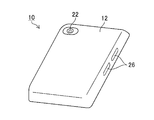
- FIG. 2 is a rear perspective view of the smartphone 10.
- FIG. 3 is a block diagram showing an electrical configuration of the smartphone 10.
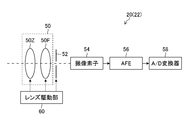
- FIG. 4 is a block diagram showing an internal configuration of the camera 20.
- FIG. 5 is a block diagram showing an example of the functional configuration of the image processing device 100.
- FIG. 6 is a flowchart showing each process of the image processing method.
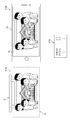
- FIG. 7 is a diagram for explaining an example of score calculation by the score calculation unit 106.
- FIG. 8 is a diagram for explaining an example of score calculation by the score calculation unit 106.
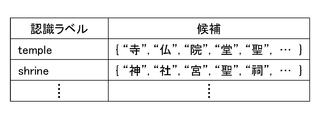
- FIG. 9 is a diagram showing an example of a correspondence table of kanji candidates corresponding to the recognition label stored in the candidate storage unit 110.
- FIG. 10 is a diagram showing an example of the composite image GS1.
- FIG. 11 is a front perspective view of the digital camera 130.
- FIG. 12 is a rear perspective view of the digital camera 130.
- the image processing device is mounted on, for example, a photographing device.
- the mobile terminal device according to the embodiment of the photographing device is, for example, a mobile phone, a PHS (Personal Handyphone System), a smartphone, a PDA (Personal Digital Assistant), a tablet computer terminal, a notebook personal computer terminal, and a portable game machine. is there.
- a smartphone will be taken as an example and will be described in detail with reference to the drawings.
- FIG. 1 is a front perspective view of the smartphone 10 according to the present embodiment.
- the smartphone 10 has a flat-plate housing 12.
- the smartphone 10 is provided with a touch panel display 14, a speaker 16, a microphone 18, and a camera 20 in front of the housing 12.
- the touch panel display 14 includes a display unit (an example of a display unit) such as a color LCD (Liquid Crystal Display) panel for displaying an image or the like, and a touch panel unit such as a transparent electrode arranged in front of the display unit and accepting touch input. ..
- a display unit an example of a display unit
- a color LCD Liquid Crystal Display
- a touch panel unit such as a transparent electrode arranged in front of the display unit and accepting touch input. ..
- the touch panel unit has a light-transmitting substrate body, a position detection electrode provided on the substrate body in a planar shape, and a capacitance having an insulating layer provided on the position detection electrode. It is a type touch panel.
- the touch panel unit generates and outputs two-dimensional position coordinate information corresponding to the user's touch operation.
- the speaker 16 is an audio output unit that outputs audio.
- the microphone 18 is a voice input unit into which voice is input.
- the camera 20 is a shooting unit that shoots moving images and still images.
- FIG. 2 is a rear perspective view of the smartphone 10. As shown in FIG. 2, the smartphone 10 includes a camera 22 on the back surface of the housing 12. The camera 22 is a shooting unit that shoots moving images and still images.
- the smartphone 10 is provided with switches 26 on the front surface and the side surface of the housing 12, respectively.
- the switch 26 is an input unit that receives an instruction from the user.
- the switch 26 is a push button type switch that is turned on when pressed with a finger or the like and turned off by a restoring force such as a spring when the finger is released.
- the configuration of the housing 12 is not limited to this, and a configuration having a folding structure or a sliding mechanism may be adopted.
- FIG. 3 is a block diagram showing an electrical configuration of the smartphone 10.
- the smartphone 10 includes the above-mentioned touch panel display 14, speaker 16, microphone 18, camera 20, camera 22, switch 26, CPU (Central Processing Unit) 28, wireless communication unit 30, and communication unit. 32, a storage unit 34, an external input / output unit 40, a GPS (Global Positioning System) receiving unit 42, and a power supply unit 44 are provided. Further, as a main function of the smartphone 10, it is provided with a wireless communication function for performing mobile wireless communication via a base station device and a mobile communication network.
- a wireless communication function for performing mobile wireless communication via a base station device and a mobile communication network.
- the CPU 28 operates according to the control program and control data stored in the storage unit 34, and controls each part of the smartphone 10 in an integrated manner.
- the CPU 28 includes a mobile communication control function that controls each part of the communication system and an application processing function in order to perform voice communication and data communication through the wireless communication unit 30.
- the CPU 28 also has an image processing function for displaying moving images, still images, characters, and the like on the touch panel display 14. With this image processing function, information such as still images, moving images, and characters is visually transmitted to the user. Further, the CPU 28 acquires two-dimensional position coordinate information corresponding to the user's touch operation from the touch panel unit of the touch panel display 14. Further, the CPU 28 acquires an input signal from the switch 26.
- the hardware structure of the CPU 28 is various processors as shown below.
- the various processors include a CPU (Central Processing Unit), which is a general-purpose processor that executes software (programs) and acts as various functional parts, and a GPU (Graphics Processing Unit), which is a processor specialized in image processing.
- a circuit specially designed to execute specific processing such as PLD (Programmable Logic Device), ASIC (Application Specific Integrated Circuit), which is a processor whose circuit configuration can be changed after manufacturing FPGA (Field Programmable Gate Array), etc.
- a dedicated electric circuit or the like which is a processor having a configuration is included.
- One processing unit may be composed of one of these various processors, or two or more processors of the same type or different types (for example, a plurality of FPGAs, or a combination of a CPU and an FPGA, or a CPU and a CPU. It may be composed of a combination of GPUs).
- a plurality of functional units may be configured by one processor.
- one processor is configured by a combination of one or more CPUs and software, as represented by a computer such as a client or a server. There is a form in which the processor acts as a plurality of functional parts.
- SoC System On Chip
- a processor that realizes the functions of the entire system including a plurality of functional units with one IC (Integrated Circuit) chip is used.
- the various functional units are configured by using one or more of the above-mentioned various processors as a hardware-like structure.
- FIG. 4 is a block diagram showing an internal configuration of the camera 20.
- the internal configuration of the camera 22 is the same as that of the camera 20.
- the camera 20 includes a photographing lens 50, an aperture 52, an image sensor 54, an AFE (Analog Front End) 56, an A / D (Analog to Digital) converter 58, and a lens driving unit 60.
- AFE Analog Front End
- a / D Analog to Digital
- the photographing lens 50 is composed of a zoom lens 50Z and a focus lens 50F.
- the lens driving unit 60 drives the zoom lens 50Z and the focus lens 50F forward and backward in response to a command from the CPU 28 to perform zoom (optical zoom) adjustment and focus adjustment. Further, the lens driving unit 60 controls the aperture 52 in response to a command from the CPU 28 to adjust the exposure. Information such as the positions of the zoom lens 50Z and the focus lens 50F and the degree of opening of the aperture 52 is input to the CPU 28.
- the image sensor 54 includes a light receiving surface in which a large number of light receiving elements are arranged in a matrix.
- the subject light transmitted through the zoom lens 50Z, the focus lens 50F, and the aperture 52 is imaged on the light receiving surface of the image sensor 54.
- An R (red), G (green), or B (blue) color filter is provided on the light receiving surface of the image sensor 54.
- Each light receiving element of the image pickup element 54 converts the subject light imaged on the light receiving surface into an electric signal based on the signals of each color of R, G, and B. As a result, the image sensor 54 acquires a color image of the subject.
- a photoelectric conversion element such as CMOS (Complementary Metal-Oxide Semiconductor) or CCD (Charge-Coupled Device) can be used.
- the AFE 56 removes noise from the analog image signal output from the image sensor 54, amplifies the signal, and the like.
- the A / D converter 58 converts the analog image signal input from the AFE 56 into a digital image signal having a gradation width.
- An electronic shutter is used as the shutter for controlling the exposure time of the incident light on the image sensor 54. In the case of an electronic shutter, the exposure time (shutter speed) can be adjusted by controlling the charge accumulation period of the image sensor 54 by the CPU 28.
- the camera 20 may convert the captured moving image and still image image data into compressed image data such as MPEG (Moving Picture Experts Group) or JPEG (Joint Photographic Experts Group).
- MPEG Motion Picture Experts Group
- JPEG Joint Photographic Experts Group
- the CPU 28 stores the moving image and the still image taken by the camera 20 and the camera 22 in the storage unit 34. Further, the CPU 28 may output the moving images and still images taken by the camera 20 and the camera 22 to the outside of the smartphone 10 through the wireless communication unit 30 or the external input / output unit 40.
- the CPU 28 displays the moving image and the still image taken by the camera 20 and the camera 22 on the touch panel display 14.
- the CPU 28 may use the moving images and still images taken by the camera 20 and the camera 22 in the application software.
- the wireless communication unit 30 performs wireless communication with the base station device accommodated in the mobile communication network according to the instruction of the CPU 28.
- the smartphone 10 uses this wireless communication to send and receive various file data such as voice data and image data, e-mail data and the like, and receive Web (abbreviation of World Wide Web) data and streaming data.
- file data such as voice data and image data, e-mail data and the like
- Web abbreviation of World Wide Web
- the speaker 16 and the microphone 18 are connected to the call unit 32.
- the call unit 32 decodes the voice data received by the wireless communication unit 30 and outputs it from the speaker 16.
- the call unit 32 converts the user's voice input through the microphone 18 into voice data that can be processed by the CPU 28 and outputs the voice data to the CPU 28.
- the storage unit 34 is composed of an internal storage unit 36 built in the smartphone 10 and an external storage unit 38 that can be attached to and detached from the smartphone 10.
- the internal storage unit 36 and the external storage unit 38 are realized by using a known storage medium.
- the storage unit 34 downloaded the control program of the CPU 28, the control data, the application software, the address data associated with the name and telephone number of the communication partner, the transmitted / received e-mail data, the Web data downloaded by Web browsing, and the downloaded. Store content data, etc. Further, the storage unit 34 may temporarily store streaming data and the like.
- the external input / output unit 40 serves as an interface with an external device connected to the smartphone 10.
- the smartphone 10 is directly or indirectly connected to another external device by communication or the like via the external input / output unit 40.
- the external input / output unit 40 transmits the data received from the external device to each component inside the smartphone 10 and transmits the data inside the smartphone 10 to the external device.
- Means such as communication include, for example, Universal Serial Bus (USB: Universal Serial Bus), IEEE (Institute of Electrical and Electronics Engineers) 1394, Internet, Wireless LAN (Local Area Network), Bluetooth (registered trademark), RFID (Radio Frequency Identification). ), And infrared communication.
- the external devices are, for example, headsets, external chargers, data ports, audio devices, video devices, smartphones, PDAs, personal computers, and earphones.
- the GPS receiving unit 42 detects the position of the smartphone 10 based on the positioning information from the GPS satellites ST1, ST2, ..., STn.
- the power supply unit 44 is a power supply source that supplies electric power to each unit of the smartphone 10 via a power supply circuit (not shown).
- the power supply unit 44 includes a lithium ion secondary battery.
- the power supply unit 44 may include an A / D conversion unit that generates a DC voltage from an external AC power supply.
- the smartphone 10 configured in this way is set to the shooting mode by inputting an instruction from the user using the touch panel display 14 or the like, and the camera 20 and the camera 22 can shoot a moving image and a still image.
- the shooting standby state is set, a moving image is shot by the camera 20 or the camera 22, and the shot moving image is displayed on the touch panel display 14 as a live view image.
- the user can visually recognize the live view image displayed on the touch panel display 14, determine the composition, confirm the subject to be photographed, and set the shooting conditions.
- the smartphone 10 When the smartphone 10 is instructed to shoot by inputting an instruction from the user using the touch panel display 14 or the like in the shooting standby state, the smartphone 10 performs AF (Autofocus) and AE (Auto Exposure) control to shoot and store a moving image or a still image. I do.
- AF Autofocus
- AE Automatic Exposure
- FIG. 5 is a block diagram showing an example of the functional configuration of the image processing device 100.
- the image processing device 100 includes an image acquisition unit 102, a recognition unit 104, a character selection unit 108, an image selection unit 112, a layout determination unit 114, a composition unit 118, a display control unit 120, and a storage control unit 122.
- the image processing device 100 is mounted on the smartphone 10.
- the image processing device 100 is realized by, for example, a CPU 28.
- the image acquisition unit 102 acquires a time-series image group.
- the image acquisition unit 102 acquires a moving image composed of a plurality of images taken at a constant frame rate output from the camera 20.
- the image acquisition unit 102 may acquire a time-series image group by reading the image group stored in the storage unit 34, or may acquire a time-series image via the wireless communication unit 30 or the external input / output unit 40. You may get a group.
- the recognition unit 104 recognizes the objects included in the image group acquired by the image acquisition unit 102.
- objects include living things (people, fish, dogs, etc.), food and drink (sushi, meat, noodles, etc.), structures (towers, temples, buildings, etc.), and nature (sky, mountains, trees, etc.).
- the object is not limited to these, and any object that can be photographed by the smartphone 10 may be used.
- the recognition unit 104 includes a score calculation unit 106.
- the score calculation unit 106 calculates the score for each object included in the image group.
- the score calculation unit 106 includes a convolutional neural network (CNN) that calculates the feature amount of each image of the image group and performs the recognition processing of the object in the image. CNN calculates a score that becomes a relatively high value as the probability that an object is included for each object is high.
- CNN calculates a score that becomes a relatively high value as the probability that an object is included for each object is high.
- the recognition unit 104 recognizes the object having the highest score calculated by the score calculation unit 106 as an object included in the image group.
- the recognition unit 104 may calculate feature amounts such as contour information and color information of objects in each image of the image group, and recognize the objects in the image using the calculated feature amounts. Further, a priority may be given to each object in advance, and the recognition unit 104 may recognize the object having the highest priority among the recognized plurality of objects as an object included in the image group.
- the character selection unit 108 selects a character or a character string from at least two images in the image group acquired by the image acquisition unit 102.
- the character selection unit 108 may select a character or a character string including a Chinese character corresponding to the object recognized by the recognition unit 104.
- Kanji are logograms used to describe Japanese, Chinese, and Korean.
- the character selection unit 108 includes a candidate storage unit 110.
- the candidate storage unit 110 stores a plurality of candidates of characters or character strings corresponding to the objects for each object.
- the character selection unit 108 selects one character or a character string from a plurality of candidates corresponding to the objects recognized by the recognition unit 104 among the candidates stored in the candidate storage unit 110.
- the candidate storage unit 110 may be provided in the storage unit 34 (see FIG. 3).
- the character selection unit 108 a CNN that calculates the feature amount of each image of the input image group and selects a character or a character string that symbolizes the image group may be used.
- the image selection unit 112 selects a target image for synthesizing characters or character strings from the image group acquired by the image acquisition unit 102.
- the image selection unit 112 may select an image having a relatively high score of the object recognized by the recognition unit 104 as the target image.
- the layout determination unit 114 determines the layout of characters or character strings in the image of the target image selected by the image selection unit 112.
- the layout determination unit 114 may determine the layout according to the meaning of the character or the character string.
- the layout determination unit 114 includes a table storage unit 116.
- the table storage unit 116 stores a table in which a position to be arranged in the image is specified for each character or character string. That is, in the table stored in the table storage unit 116, arrangement positions corresponding to the meanings of the characters or character strings are associated with each character or character string.
- the layout determination unit 114 reads from the table storage unit 116 the arrangement position corresponding to the character or character string selected by the character selection unit 108 from the table storage unit 116, and arranges the character or character string at the read arrangement position in the target image. Decide on the layout to be used.
- the table storage unit 116 may be provided by the storage unit 34 (see FIG. 3).
- the composition unit 118 synthesizes a character or a character string with the target image based on the layout determined by the layout determination unit 114, and generates a composition image.
- the display control unit 120 displays the composite image synthesized by the synthesis unit 118 on the touch panel display 14. Further, the storage control unit 122 stores the composite image synthesized by the synthesis unit 118 in the storage unit 34. The storage control unit 122 replaces the composite image or together with the composite image, the target image selected by the image selection unit 112, the character or character string selected by the character selection unit 108, and the layout information determined by the layout determination unit 114. May be associated and stored in the storage unit 34.
- Image processing method An image processing method using the image processing device 100 will be described.
- the CPU 28 reads out the image processing program stored in the storage unit 34 and executes the image processing program in response to an instruction input from the user using the touch panel display 14 or the like. As a result, the image processing method is implemented.
- characters corresponding to a plurality of images taken by the smartphone 10 are selected and combined with the images.
- FIG. 6 is a flowchart showing each process of the image processing method according to the present embodiment.
- the image processing method includes an image acquisition step (step S1), a character selection step (step S2), an image selection step (step S3), a layout determination step (step S4), and a composition step (step S5).
- step S1 the image acquisition unit 102 acquires a time-series image group.
- the touch panel display 14 displays a live view image taken by the user.
- the image acquisition unit 102 acquires a moving image for a live view image taken at a constant frame rate output from the camera 22.
- the image acquisition unit 102 does not acquire an image group consisting of all the images constituting the moving image for the live view image as a time-series image group, but obtains an image group taken within the latest fixed time. It may be acquired, or an image group sampled coarser than the frame rate of the live view image may be acquired.
- the image acquisition unit 102 may acquire an image group taken within a certain period of time as a time-series image group.
- the image group taken within a certain period of time is, for example, an image group consisting of a plurality of images including the date data attached to the image within a certain time period, or a plurality of images in which the date data attached to the image is continuous. It may be an image group consisting of.
- the image acquisition unit 102 may acquire a time-series image group read from the storage unit 34, or obtains a time-series image group from an external server via the wireless communication unit 30 or the external input / output unit 40. You may get it.
- step S2 the character selection unit 108 selects a character or a character string from the image group acquired in step S1.
- the character selection unit 108 selects a single (single) kanji character used in Japanese, which is a kanji character corresponding to the object recognized by the recognition unit 104.
- the score calculation unit 106 calculates the score for each object included in the image group acquired in step S1.
- the score calculated by the score calculation unit 106 is also referred to as conviction or reliability, and the higher the possibility that an object is included, the larger the value.
- FIG. 7 is a diagram for explaining an example of score calculation by the score calculation unit 106.
- F7A shown in FIG. 7 shows the subject S at a certain timing in the shooting of the live view image and the angle of view A of the camera 22.
- Subject S is the torii gate of the shrine, the main shrine at the back of the torii gate, and four people.
- the angle of view A is the area inside the broken line rectangle.
- F7B shown in FIG. 7 indicates a smartphone 10 in which an image taken at the timing of F7A is displayed on the touch panel display 14. Further, F7C shown in FIG. 7 shows a pair of the recognition label of the recognition result of the image taken at the timing of F7A and the score of the recognition result.
- the score calculation unit 106 calculates the score of the recognition label "temple” as "0.7)" and the score of the recognition label "shrine” as "0.3” as shown in F7C.
- the score of each object calculated by the score calculation unit 106 is 1 in total.
- FIG. 8 is a diagram for explaining another example of score calculation by the score calculation unit 106.
- F8A shown in FIG. 8 shows the subject S and the angle of view A of the camera 22 at different timings from those in FIG. 7 in the shooting of the live view image.
- Subject S is the torii gate of the shrine, the main shrine at the back of the torii gate, and four people, but the arrangement of the people is different from the timing shown in FIG. 7A.
- F8B shown in FIG. 8 indicates a smartphone 10 in which an image taken at the timing of F8A is displayed on the touch panel display 14. Further, F8C shown in FIG. 8 shows a pair of the recognition label of the recognition result of the image taken at the timing of F8A and the score of the recognition result.
- the image taken at the timing of F8A includes most of the torii of the subject S. Also, the main shrine in the back of the subject S is not included because it is hidden by a person. Therefore, the image taken at this timing has a relatively large score of the recognition label "shrine” indicating the shrine because the torii is included. In addition, since the shrines and temples are not included, the score of the recognition label "temple" indicating the temple is relatively small.
- the score calculation unit 106 calculates the score of the recognition label “temple” as “0.1” and the score of the recognition label “shrine” as “0.8” as shown in F8C.
- the recognition unit 104 derives the final recognition label for the object of the image group from the score for each object calculated by the score calculation unit 106 for each image of the image group acquired in step S1.
- the score calculation unit 106 may calculate the score for each object of each image of the image group, and the recognition unit 104 may recognize the object included in the image group from the average or the sum of the scores of each image for each object.
- the recognition unit 104 determines that the recognition label "shrine" having the largest average of each image of the score is most suitable as an object.
- the character selection unit 108 selects one character or a character string from a plurality of candidates corresponding to the objects recognized by the recognition unit 104 among the candidates stored in the candidate storage unit 110. That is, one kanji is selected from a plurality of candidates corresponding to the recognition label "shrine".
- FIG. 9 is a diagram showing an example of a correspondence table of kanji candidates corresponding to the recognition label stored in the candidate storage unit 110.
- the candidate storage unit 110 stores kanji candidates for each recognition result label in descending order of recommended order.
- kanji candidates for the recognition label “temple” kanji such as “temple”, “buddha”, “in”, “do”, “holy”, and so on are stored correspondingly.
- kanji candidates for the recognition label “shrine” kanji such as “god”, “sha”, “miya”, “holy”, “shrine”, etc. are stored correspondingly.
- the character selection unit 108 selects one kanji from candidates such as “god”, “sha”, “miya”, “holy”, “shrine”, and so on. ..
- the character selection unit 108 selects the first "God” having the highest recommended order.
- the character selection unit 108 may adopt a mode of selecting a kanji having a large number of strokes, a mode of selecting a kanji having a small number of strokes, and a mode of preferentially selecting the left-right symmetry of the kanji.
- the recognition unit 104 may determine from the image group acquired in step S1 that a plurality of recognition labels are suitable as objects. For example, if the average of the scores of the images with the highest score is close to the average of the scores of the second largest recognition label, both recognition labels may be judged to be the most suitable objects. Good.
- the recognition unit 104 can determine that the averages are close to each other when the difference between the averages of the images of the scores is within a predetermined threshold value. As long as the difference between the averages of the averages of the images of the scores is within a predetermined threshold value, a recognition label having a third or higher average score may be included.
- the case where the average scores are close to each other has been described, but the same applies when the sum of the scores is used.
- the character selection unit 108 selects one kanji even when the recognition unit 104 determines that a plurality of recognition labels are suitable as objects.
- the character selection unit 108 selects the kanji that each recognition label has in common among the kanji stored in the candidate storage unit 110 for the plurality of recognition labels. You may.
- the average of each image of the score calculated by the score calculation unit 106 is 0.52 for the largest recognition label "thrine” and 0.48 for the second largest recognition label “temple”, and the averages are mutual. It is assumed that the threshold value for determining that the values are close is 0.05. In this case, the recognition unit 104 determines that the average of the scores of the recognition label "shrine” and the average of the scores of the recognition label "temple” are close to each other, and recognizes the two "shrine” and "temple” as objects. Recognize as a label.
- the character selection unit 108 has two recognition labels in common: the kanji stored in the candidate storage unit 110 for "shrine” and the kanji stored in the candidate storage unit 110 for "temple". Select the kanji you have, "holy”.
- the character selection unit 108 can select an appropriate one-character Chinese character according to the image group.
- the image selection unit 112 selects a target image for synthesizing the character or character string selected in step S2 from the image group acquired in step S1.
- the image selection unit 112 selects an image having the highest score (an example of an image having a relatively high score) of the object recognized by the recognition unit 104 as the target image.
- the final recognition label recognized by the recognition unit 104 was "shrine". Therefore, the image selection unit 112 selects the image having the highest score of the recognition label “shrine” among the image groups acquired in step S1 as the target image.
- the image selection unit 112 targets an image in which many people are shown, an image in which there are many front faces of people, an image in which camera shake does not occur, or an image in which there is an area (for example, sky) in which characters can be easily arranged. It may be an image.
- step S4 the layout determination unit 114 determines the layout of characters or character strings in the image of the target image selected by the image selection unit 112.
- the layout is determined based on the table stored in the table storage unit 116.
- the layout determination unit 114 reads from the table storage unit 116 the position to be arranged corresponding to the one-character Chinese character “God” selected by the character selection unit 108 from the table storage unit 116.
- the position where the "god” should be placed is the central part of the torii gate.
- the position to be arranged may be, for example, a position for avoiding an object such as a person, a position for overlapping the object, or the like, depending on the object recognized by the recognition unit 104.
- the layout determination unit 114 may determine not only the arrangement of characters or character strings but also the color of characters or character strings.
- the layout determination unit 114 selects the base reference color by examining the background color from the peripheral pixels on the arrangement position of the target image or the representative color from the entire target image, and sets the character or character string as the reference color. It may be made to stand out as a complementary color (opposite color). Further, the layout determination unit 114 may make the character or the character string a color similar to the reference color and blend it into the image, or may simply set the character or the character string as white and adjust the transparency.
- the layout determination unit 114 may determine the font of characters or character strings. As the font, if it is Kanji, Mincho font or text font is preferable. Further, the layout determination unit 114 may add a shadow to emphasize the character or the character string.
- the layout determination unit 114 may determine a character or a character string, or a transformation of a character constituting the character string. Deformations include at least one of size, thickness, tilt, and aspect ratio. Further, the layout determination unit 114 may determine the number of characters.
- the layout determination unit 114 may determine the color, font, transformation, and number according to the object recognized by the recognition unit 104. Further, the layout determination unit 114 may determine the color, font, transformation, and number according to the meaning of the character or the character string.
- the table storage unit 116 may store a table in which colors, fonts, modifications, and numbers are associated with each character or character string according to the meaning of the character or character string. In addition, colors, fonts, transformations, and numbers may be configured so that the user can select them before shooting.
- step S5 the compositing unit 118 synthesizes the character or character string selected in step S2 with the target image selected in step S3 based on the layout determined in step S4 to generate a composite image.
- FIG. 10 is a diagram showing an example of the composite image GS1 generated by the composite unit 118.
- a character C1 which is a one-character Chinese character “God” is arranged on the central portion of the torii gate of the subject. This one-character kanji "God” is processed into a character with a blurred border.
- the display control unit 120 may display the composite image GS1 on the touch panel display 14. Further, the storage control unit 122 may store the composite image GS1 in the storage unit 34.
- the photographing apparatus on which the image processing apparatus according to the present embodiment is mounted may be a digital camera.
- a digital camera is a photographing device that receives light that has passed through a lens by an image sensor, converts it into a digital signal, and stores it in a storage medium as image data of a moving image or a still image.
- FIG. 11 is a front perspective view of the digital camera 130.
- FIG. 12 is a rear perspective view of the digital camera 130.
- the digital camera 130 has a photographing lens 132 and a strobe 134 arranged on the front surface, and a shutter button 136, a power supply / mode switch 138, and a mode dial 140 arranged on the upper surface thereof.
- the digital camera 130 is provided with a monitor (LCD) 142, a zoom button 144, a cross button 146, a MENU / OK button 148, a play button 150, and a BACK button 152 on the back surface.
- LCD monitor
- the photographing lens 132 is composed of a retractable zoom lens.
- the photographing lens 132 is extended from the camera body when the operation mode of the camera is set to the photographing mode by the power / mode switch 138.
- the strobe 134 is an illumination unit that irradiates a main subject with strobe light.
- the shutter button 136 is composed of a two-stage stroke type switch consisting of so-called “half-press” and "full-press".
- the shutter button 136 functions as a shooting preparation instruction unit and an image shooting instruction unit.
- the digital camera 130 enters the shooting standby state.
- the shooting standby state a moving image is shot, and the shot moving image is displayed on the monitor 142 as a live view image.
- the user can visually check the live view image displayed on the monitor 142, determine the composition, check the subject to be shot, and set the shooting conditions.
- the digital camera 130 When the shutter button 136 is "half-pressed" in the shooting standby state of the still image shooting mode, the digital camera 130 performs a shooting preparation operation for performing AF and AE control. Further, the digital camera 130 captures and stores a still image when the shutter button 136 is "fully pressed”.
- the digital camera 130 starts the main shooting (recording) of the moving image when the shutter button 136 is “fully pressed” in the shooting standby state of the moving image shooting mode. Further, when the shutter button 136 is "fully pressed” again, the digital camera 130 stops recording and goes into a standby state.
- the power / mode switch 138 is slidably arranged between the "OFF position", the "playback position", and the "shooting position".
- the digital camera 130 turns off the power when the power / mode switch 138 is operated to the "OFF position”. Further, the digital camera 130 is set to the "reproduction mode” when the power / mode switch 138 is operated to the "reproduction position”. Further, the digital camera 130 is set to the "shooting mode” when the power / mode switch 138 is operated to the "shooting position".
- the mode dial 140 is a mode switching unit for setting the shooting mode of the digital camera 130.
- the digital camera 130 is set to various shooting modes according to the setting position of the mode dial 140.
- the digital camera 130 can be set to a "still image shooting mode” for shooting a still image and a "moving image shooting mode” for shooting a moving image by using the mode dial 140.
- the monitor 142 is a display unit that displays a live view image in the shooting mode and a moving image and a still image in the playback mode. Further, the monitor 142 functions as a part of the graphical user interface by displaying a menu screen or the like.
- the zoom button 144 is a zoom indicator.
- the zoom button 144 includes a telebutton 144T instructing the zoom to the telephoto side and a wide button 144W instructing the zoom to the wide-angle side.
- the digital camera 130 changes the focal length of the photographing lens 132 to the telephoto side and the wide-angle side by operating the telebutton 144T and the wide button 144W in the photographing mode.
- the digital camera 130 enlarges and reduces the image being reproduced by operating the telebutton 144T and the wide button 144W in the reproduction mode.
- the cross-shaped button 146 is an operation unit for the user to input instructions in four directions of up, down, left, and right.
- the cross-shaped button 146 functions as a cursor movement operation unit for the user to select an item from the menu screen or instruct the selection of various setting items from each menu.
- the left key and the right key of the cross button 146 function as a frame advance operation unit in which the user performs frame advance in the forward direction and the reverse direction, respectively, in the playback mode.
- the MENU / OK button 148 is an operation unit that has both a function as a menu button for issuing a command to display a menu on the screen of the monitor 142 and a function as an OK button for instructing confirmation and execution of selected contents. Is.
- the play button 150 is an operation unit for switching to a play mode in which the stored moving image or still image is displayed on the monitor 142.
- the BACK button 152 is an operation unit that instructs to cancel the input operation or return to the previous operation state.
- the digital camera 130 may be provided with a touch panel and the button / switch function may be realized by operating the touch panel, instead of providing a member unique to the button and the switch.
- the block diagram showing the internal configuration is the same as FIG. 4 in which the photographing lens 132 is used instead of the photographing lens 50.
- the digital camera 130 can be equipped with the image processing device shown in FIG. Further, the digital camera 130 can execute the image processing program and carry out the image processing method shown in FIG.
- the image processing device is not limited to the mode mounted on the photographing device, and may have the functional configuration shown in FIG. For example, it may be mounted on a personal computer terminal that does not have a shooting function.
- the image processing program that causes the computer to execute the image processing method may be provided by storing it in a non-temporary storage medium that can be read by the computer. Further, the image processing program may be provided as an application that can be downloaded from an external server via the wireless communication unit 30 or the external input / output unit 40. In this case, the smartphone 10 stores the downloaded image processing program in the storage unit 34. The contents of the candidate storage unit 110 and the table storage unit 116 may be included in the image processing program.
- candidate storage unit 110 and the table storage unit 116 may be provided in an external server.
- a part of the processing of the image processing program may be performed by the smartphone 10 or the digital camera 130, and other processing may be performed by an external server.
- Synthesis unit 120 ... Display control unit 122 ... Storage control unit 130 ... Digital camera 132 ... Shooting lens 134 ... Strobe 136 ... Shutter button 138 ... Mode switch 140 ... Mode dial 142 ... Monitor 144 ... Zoom button 144T ... Tele button 144W ... Wide button 148 ... MENU / OK button 150 ... Play button 152 ... BACK button A ... Angle of view C1 ... Character GS1 ... Composite image S ... Subject S1 to S5 ... Each step of the image processing method
Landscapes
- Engineering & Computer Science (AREA)
- Multimedia (AREA)
- Physics & Mathematics (AREA)
- General Physics & Mathematics (AREA)
- Theoretical Computer Science (AREA)
- Signal Processing (AREA)
- Computer Vision & Pattern Recognition (AREA)
- Studio Devices (AREA)
- Editing Of Facsimile Originals (AREA)
Abstract
適切な文字又は文字列を画像に合成する画像処理装置、画像処理方法及びプログラム、撮影装置を提供する。時系列の画像群を取得する画像取得部と、画像群から文字又は文字列を選択する文字選択部と、画像群から文字又は文字列を合成する対象画像を選択する画像選択部と、対象画像の画像内における文字又は文字列のレイアウトを決定するレイアウト決定部と、レイアウトに基づいて対象画像に文字又は文字列を合成する合成部と、を備える画像処理装置によって上記課題を解決する。
Description
本発明は画像処理装置、画像処理方法及びプログラム、撮影装置に係り、特に画像に文字又は文字列を合成する技術に関する。
画像の撮影シーンや被写体に整合する文字等を画像に合成して、ユーザの感性に合った創造的なデザインの画像を得ることが要望されている。
特許文献1には、画像データを見た際に人間が生じる感性に対して良好な整合性を有するテキストを画像データから生成し、画像データとテキストとを合成した新たな画像データを生成する技術が開示されている。例えば、対象となる画像データが人物写真であると判断されると、被写体像である人物の笑顔レベルに応じたテキストが生成される。特許文献1に記載の画像データは画像に相当し、テキストは、文字又は文字列に相当する。
特許文献1に記載の技術では、単一の画像を解析してテキストを生成している。したがって、画像によっては最もふさわしいテキストを生成することが困難な場合があった。
本発明はこのような事情に鑑みてなされたもので、適切な文字又は文字列を画像に合成する画像処理装置、画像処理方法及びプログラム、撮影装置を提供することを目的とする。
上記目的を達成するための画像処理装置の一の態様は、時系列の画像群を取得する画像取得部と、画像群から文字又は文字列を選択する文字選択部と、画像群から文字又は文字列を合成する対象画像を選択する画像選択部と、対象画像の画像内における文字又は文字列のレイアウトを決定するレイアウト決定部と、レイアウトに基づいて対象画像に文字又は文字列を合成する合成部と、を備える画像処理装置である。
本態様によれば、画像群から文字又は文字列を選択するようにしたので、適切な文字又は文字列を画像に合成することができる。
画像群に含まれるオブジェクトを認識する認識部を備え、文字選択部は、認識したオブジェクトに応じた文字又は文字列を選択することが好ましい。これにより、画像群に含まれるオブジェクトに応じた文字又は文字列を選択することができる。
画像群に含まれるオブジェクト毎のスコアを算出するスコア算出部を備え、認識部は、画像群のスコアからオブジェクトを認識することが好ましい。これにより、オブジェクトを適切に認識することができる。
スコア算出部は、画像群の各画像のオブジェクト毎のスコアを算出し、認識部は、オブジェクト毎のスコアの各画像の平均又は総和から画像群に含まれるオブジェクトを認識することが好ましい。これにより、オブジェクトを適切に認識することができる。
画像選択部は、認識したオブジェクトのスコアが相対的に高い画像を対象画像として選択することが好ましい。これにより、対象画像を適切に選択することができる。
オブジェクト毎に文字又は文字列の複数の候補を記憶する記憶部を備え、文字選択部は、認識したオブジェクトに対応する複数の候補から文字又は文字列を選択することが好ましい。これにより、文字又は文字列を適切に選択することができる。
レイアウト決定部は、文字又は文字列の意味に応じてレイアウトを決定することが好ましい。これにより、文字又は文字列の意味に応じて文字又は文字列をレイアウトすることができる。
レイアウト決定部は、文字又は文字列毎に画像内で配置すべき位置が特定されたテーブルを備えることが好ましい。これにより、文字又は文字列を配置すべき位置にレイアウトすることができる。
合成した画像を表示部に表示させる表示制御部を備えることが好ましい。これにより、合成した画像を表示部に表示させることができる。
合成した画像を記憶部に記憶させる記憶制御部を備えることができる。これにより、合成した画像を記憶部に記憶させることができる。
文字選択部は、1文字の漢字を選択することが好ましい。これにより、1文字の漢字を画像に合成することができる。
時系列の画像群は、一定時間内に撮影された画像群であってもよい。
上記目的を達成するための撮影装置の一の態様は、上記に記載の画像処理装置と、時系列の画像群を撮影する撮影部と、を備える撮影装置である。
本態様によれば、画像群から文字又は文字列を選択するようにしたので、適切な文字又は文字列を画像に合成することができる。
上記目的を達成するための画像処理方法の一の態様は、時系列の画像群を取得する画像取得工程と、画像群から文字又は文字列を選択する文字選択工程と、画像群から文字又は文字列を合成する対象画像を選択する画像選択工程と、対象画像の画像内における文字又は文字列のレイアウトを決定するレイアウト決定工程と、レイアウトに基づいて対象画像に文字又は文字列を合成する合成工程と、を備える画像処理方法である。
本態様によれば、画像群から文字又は文字列を選択するようにしたので、適切な文字又は文字列を画像に合成することができる。上記の画像処理方法をコンピュータに実行させるためのプログラムも本態様に含まれる。
本発明によれば、適切な文字又は文字列を画像に合成することができる。
以下、添付図面に従って本発明の好ましい実施形態について詳説する。
<携帯端末装置>
本実施形態に係る画像処理装置は、例えば撮影装置に搭載される。撮影装置の一実施形態である携帯端末装置は、例えば携帯電話機、PHS(Personal Handyphone System)、スマートフォン、PDA(Personal Digital Assistant)、タブレット型コンピュータ端末、ノート型パーソナルコンピュータ端末、及び携帯型ゲーム機である。以下、スマートフォンを例に挙げ、図面を参照しつつ、詳細に説明する。
本実施形態に係る画像処理装置は、例えば撮影装置に搭載される。撮影装置の一実施形態である携帯端末装置は、例えば携帯電話機、PHS(Personal Handyphone System)、スマートフォン、PDA(Personal Digital Assistant)、タブレット型コンピュータ端末、ノート型パーソナルコンピュータ端末、及び携帯型ゲーム機である。以下、スマートフォンを例に挙げ、図面を参照しつつ、詳細に説明する。
〔スマートフォンの外観〕
図1は、本実施形態に係るスマートフォン10の正面斜視図である。図1に示すように、スマートフォン10は、平板状の筐体12を有する。スマートフォン10は、筐体12の正面にタッチパネルディスプレイ14、スピーカ16、マイクロフォン18、及びカメラ20を備えている。
図1は、本実施形態に係るスマートフォン10の正面斜視図である。図1に示すように、スマートフォン10は、平板状の筐体12を有する。スマートフォン10は、筐体12の正面にタッチパネルディスプレイ14、スピーカ16、マイクロフォン18、及びカメラ20を備えている。
タッチパネルディスプレイ14は、画像等を表示するカラーLCD(Liquid Crystal Display)パネル等のディスプレイ部(表示部の一例)、及びディスプレイ部の前面に配置され、タッチ入力を受け付ける透明電極等のタッチパネル部を備える。
タッチパネル部は、光透過性を有する基板本体、基板本体の上に面状に設けられ、光透過性を有する位置検出用電極、及び位置検出用電極上に設けられた絶縁層を有する静電容量式タッチパネルである。タッチパネル部は、ユーザのタッチ操作に対応した2次元の位置座標情報を生成して出力する。
スピーカ16は、音声を出力する音声出力部である。マイクロフォン18は、音声が入力される音声入力部である。カメラ20は、動画及び静止画を撮影する撮影部である。
図2は、スマートフォン10の背面斜視図である。図2に示すように、スマートフォン10は、筐体12の背面にカメラ22を備えている。カメラ22は、動画及び静止画を撮影する撮影部である。
さらに、図1及び図2に示すように、スマートフォン10は、筐体12の正面及び側面に、それぞれスイッチ26を備えている。スイッチ26は、ユーザからの指示を受け付ける入力部である。スイッチ26は、指等で押下されるとオンとなり、指を離すとバネ等の復元力によってオフ状態となる押しボタン式のスイッチである。
なお、筐体12の構成はこれに限定されず、折り畳み構造又はスライド機構を有する構成を採用してもよい。
〔スマートフォンの電気的構成〕
図3は、スマートフォン10の電気的構成を示すブロック図である。図3に示すように、スマートフォン10は、前述のタッチパネルディスプレイ14、スピーカ16、マイクロフォン18、カメラ20、カメラ22、及びスイッチ26の他、CPU(Central Processing Unit)28、無線通信部30、通話部32、記憶部34、外部入出力部40、GPS(Global Positioning System)受信部42、及び電源部44を備える。また、スマートフォン10の主たる機能として、基地局装置と移動通信網とを介した移動無線通信を行う無線通信機能を備える。
図3は、スマートフォン10の電気的構成を示すブロック図である。図3に示すように、スマートフォン10は、前述のタッチパネルディスプレイ14、スピーカ16、マイクロフォン18、カメラ20、カメラ22、及びスイッチ26の他、CPU(Central Processing Unit)28、無線通信部30、通話部32、記憶部34、外部入出力部40、GPS(Global Positioning System)受信部42、及び電源部44を備える。また、スマートフォン10の主たる機能として、基地局装置と移動通信網とを介した移動無線通信を行う無線通信機能を備える。
CPU28は、記憶部34が記憶する制御プログラム及び制御データに従って動作し、スマートフォン10の各部を統括して制御する。CPU28は、無線通信部30を通じて音声通信及びデータ通信を行うために、通信系の各部を制御する移動通信制御機能と、アプリケーション処理機能を備える。
また、CPU28は、動画、静止画、及び文字等をタッチパネルディスプレイ14に表示する画像処理機能を備える。この画像処理機能により、静止画、動画、及び文字等の情報が視覚的にユーザに伝達される。また、CPU28は、タッチパネルディスプレイ14のタッチパネル部からユーザのタッチ操作に対応した2次元の位置座標情報を取得する。さらに、CPU28は、スイッチ26からの入力信号を取得する。
CPU28のハードウェア的な構造は、次に示すような各種のプロセッサ(processor)である。各種のプロセッサには、ソフトウェア(プログラム)を実行して各種の機能部として作用する汎用的なプロセッサであるCPU(Central Processing Unit)、画像処理に特化したプロセッサであるGPU(Graphics Processing Unit)、FPGA(Field Programmable Gate Array)等の製造後に回路構成を変更可能なプロセッサであるPLD(Programmable Logic Device)、ASIC(Application Specific Integrated Circuit)等の特定の処理を実行させるために専用に設計された回路構成を有するプロセッサである専用電気回路等が含まれる。
1つの処理部は、これら各種のプロセッサのうちの1つで構成されていてもよいし、同種又は異種の2つ以上のプロセッサ(例えば、複数のFPGA、又はCPUとFPGAの組み合わせ、あるいはCPUとGPUの組み合わせ)で構成されてもよい。また、複数の機能部を1つのプロセッサで構成してもよい。複数の機能部を1つのプロセッサで構成する例としては、第1に、クライアント又はサーバ等のコンピュータに代表されるように、1つ以上のCPUとソフトウェアの組合せで1つのプロセッサを構成し、このプロセッサが複数の機能部として作用させる形態がある。第2に、SoC(System On Chip)等に代表されるように、複数の機能部を含むシステム全体の機能を1つのIC(Integrated Circuit)チップで実現するプロセッサを使用する形態がある。このように、各種の機能部は、ハードウェア的な構造として、上記各種のプロセッサを1つ以上用いて構成される。
さらに、これらの各種のプロセッサのハードウェア的な構造は、より具体的には、半導体素子等の回路素子を組み合わせた電気回路(circuitry)である。
カメラ20及びカメラ22は、CPU28の指示に従って、動画及び静止画を撮影する。図4は、カメラ20の内部構成を示すブロック図である。なお、カメラ22の内部構成は、カメラ20と共通している。図4に示すように、カメラ20は、撮影レンズ50、絞り52、撮像素子54、AFE(Analog Front End)56、A/D(Analog to Digital)変換器58、及びレンズ駆動部60を備える。
撮影レンズ50は、ズームレンズ50Z及びフォーカスレンズ50Fから構成される。レンズ駆動部60は、CPU28からの指令に応じて、ズームレンズ50Z及びフォーカスレンズ50Fを進退駆動してズーム(光学ズーム)調整及びフォーカス調整を行う。また、レンズ駆動部60は、CPU28からの指令に応じて絞り52を制御し、露出を調整する。ズームレンズ50Z及びフォーカスレンズ50Fの位置、絞り52の開放度等の情報は、CPU28に入力される。
撮像素子54は、多数の受光素子がマトリクス状に配列された受光面を備える。ズームレンズ50Z、フォーカスレンズ50F、及び絞り52を透過した被写体光は、撮像素子54の受光面上に結像される。撮像素子54の受光面上には、R(赤)、G(緑)、又はB(青)のカラーフィルタが設けられている。撮像素子54の各受光素子は、受光面上に結像された被写体光をR、G、及びBの各色の信号に基づいて電気信号に変換する。これにより、撮像素子54は被写体のカラー画像を取得する。撮像素子54としては、CMOS(Complementary Metal-Oxide Semiconductor)、CCD(Charge-Coupled Device)等の光電変換素子を用いることができる。
AFE56は、撮像素子54から出力されるアナログ画像信号のノイズ除去、及び増幅等を行う。A/D変換器58は、AFE56から入力されるアナログ画像信号を階調幅があるデジタル画像信号に変換する。なお、撮像素子54への入射光の露光時間を制御するシャッターは、電子シャッターが用いられる。電子シャッターの場合、CPU28によって撮像素子54の電荷蓄積期間を制御することで、露光時間(シャッタースピード)を調節することができる。
カメラ20は、撮影した動画及び静止画の画像データをMPEG(Moving Picture Experts Group)又はJPEG(Joint Photographic Experts Group)等の圧縮した画像データに変換してもよい。
図3の説明に戻り、CPU28は、カメラ20及びカメラ22が撮影した動画及び静止画を記憶部34に記憶させる。また、CPU28は、カメラ20及びカメラ22が撮影した動画及び静止画を無線通信部30又は外部入出力部40を通じてスマートフォン10の外部に出力してもよい。
さらに、CPU28は、カメラ20及びカメラ22が撮影した動画及び静止画をタッチパネルディスプレイ14に表示する。CPU28は、カメラ20及びカメラ22が撮影した動画及び静止画をアプリケーションソフトウェア内で利用してもよい。
無線通信部30は、CPU28の指示に従って、移動通信網に収容された基地局装置に対し無線通信を行う。スマートフォン10は、この無線通信を使用して、音声データ及び画像データ等の各種ファイルデータ、電子メールデータ等の送受信、Web(World Wide Webの略称)データ及びストリーミングデータ等の受信を行う。
通話部32は、スピーカ16及びマイクロフォン18が接続される。通話部32は、無線通信部30により受信された音声データを復号してスピーカ16から出力する。通話部32は、マイクロフォン18を通じて入力されたユーザの音声をCPU28が処理可能な音声データに変換してCPU28に出力する。
記憶部34は、スマートフォン10に内蔵される内部記憶部36、及びスマートフォン10に着脱自在な外部記憶部38により構成される。内部記憶部36及び外部記憶部38は、公知の格納媒体を用いて実現される。
記憶部34は、CPU28の制御プログラム、制御データ、アプリケーションソフトウェア、通信相手の名称及び電話番号等が対応付けられたアドレスデータ、送受信した電子メールのデータ、WebブラウジングによりダウンロードしたWebデータ、及びダウンロードしたコンテンツデータ等を記憶する。また、記憶部34は、ストリーミングデータ等を一時的に記憶してもよい。
外部入出力部40は、スマートフォン10に連結される外部機器とのインターフェースの役割を果たす。スマートフォン10は、外部入出力部40を介して通信等により直接的又は間接的に他の外部機器に接続される。外部入出力部40は、外部機器から受信したデータをスマートフォン10の内部の各構成要素に伝達し、かつスマートフォン10の内部のデータを外部機器に送信する。
通信等の手段は、例えばユニバーサルシリアルバス(USB:Universal Serial Bus)、IEEE(Institute of Electrical and Electronics Engineers)1394、インターネット、無線LAN(Local Area Network)、Bluetooth(登録商標)、RFID(Radio Frequency Identification)、及び赤外線通信である。また、外部機器は、例えばヘッドセット、外部充電器、データポート、オーディオ機器、ビデオ機器、スマートフォン、PDA、パーソナルコンピュータ、及びイヤホンである。
GPS受信部42は、GPS衛星ST1,ST2,…,STnからの測位情報に基づいて、スマートフォン10の位置を検出する。
電源部44は、不図示の電源回路を介してスマートフォン10の各部に電力を供給する電力供給源である。電源部44は、リチウムイオン二次電池を含む。電源部44は、外部のAC電源からDC電圧を生成するA/D変換部を含んでもよい。
このように構成されたスマートフォン10は、タッチパネルディスプレイ14等を用いたユーザからの指示入力により撮影モードに設定され、カメラ20及びカメラ22によって動画及び静止画を撮影することができる。
スマートフォン10が撮影モードに設定されると、撮影スタンバイ状態となり、カメラ20又はカメラ22によって動画が撮影され、撮影された動画がライブビュー画像としてタッチパネルディスプレイ14に表示される。
ユーザは、タッチパネルディスプレイ14に表示されるライブビュー画像を視認して、構図を決定したり、撮影したい被写体を確認したり、撮影条件を設定したりすることができる。
スマートフォン10は、撮影スタンバイ状態においてタッチパネルディスプレイ14等を用いたユーザからの指示入力により撮影が指示されると、AF(Autofocus)及びAE(Auto Exposure)制御を行い、動画又は静止画の撮影及び記憶を行う。
<画像処理装置>
本実施形態に係る画像処理装置は、適切な文字又は文字列を画像に合成する。図5は、画像処理装置100の機能構成の一例を示すブロック図である。画像処理装置100は、画像取得部102、認識部104、文字選択部108、画像選択部112、レイアウト決定部114、合成部118、表示制御部120、及び記憶制御部122を備える。画像処理装置100は、スマートフォン10に搭載される。画像処理装置100は、例えばCPU28によって実現される。
本実施形態に係る画像処理装置は、適切な文字又は文字列を画像に合成する。図5は、画像処理装置100の機能構成の一例を示すブロック図である。画像処理装置100は、画像取得部102、認識部104、文字選択部108、画像選択部112、レイアウト決定部114、合成部118、表示制御部120、及び記憶制御部122を備える。画像処理装置100は、スマートフォン10に搭載される。画像処理装置100は、例えばCPU28によって実現される。
画像取得部102は、時系列の画像群を取得する。例えば、画像取得部102は、カメラ20から出力される一定のフレームレートで撮影された複数の画像で構成された動画を取得する。画像取得部102は、記憶部34に記憶された画像群を読み出すことで、時系列の画像群を取得してもよいし、無線通信部30又は外部入出力部40を介して時系列の画像群を取得してもよい。
認識部104は、画像取得部102が取得した画像群に含まれるオブジェクトを認識する。オブジェクトの例としては、生物(人、魚、犬等)、飲食物(鮨、肉、麺等)、建造物(塔、寺、ビル等)、自然(空、山、木等)があるが、これらに限定されず、スマートフォン10で撮影可能なオブジェクトであれば何でもよい。
認識部104は、スコア算出部106を備えている。スコア算出部106は、画像群に含まれるオブジェクト毎のスコアを算出する。スコア算出部106は、画像群の各画像の特徴量を算出し、画像内のオブジェクトの認識処理を行う畳み込みニューラルネットワーク(CNN:Convolutional Neural Network)を含む。CNNは、オブジェクト毎にオブジェクトが含まれる確率が高いほど相対的に高い値となるスコアを算出する。認識部104は、スコア算出部106が算出したスコアが最も高いオブジェクトを、画像群に含まれるオブジェクトとして認識する。
なお、認識部104は、画像群の各画像のオブジェクトの輪郭情報及び色情報等の特徴量を算出し、算出された特徴量を用いて画像内のオブジェクトを認識してもよい。また、オブジェクト毎に予め優先順位を付与しておき、認識部104は、認識された複数のオブジェクトのうち最も優先順位の高いオブジェクトを画像群に含まれるオブジェクトとして認識してもよい。
文字選択部108は、画像取得部102が取得した画像群のうち少なくとも2つの画像から文字又は文字列を選択する。文字選択部108は、認識部104が認識したオブジェクトに対応する漢字を含む文字又は文字列を選択してもよい。漢字とは、日本語、中国語、及び朝鮮語の記述に使用される表語文字である。
文字選択部108は、候補記憶部110を備える。候補記憶部110は、オブジェクト毎にオブジェクトに対応する文字又は文字列の複数の候補が記憶されている。文字選択部108は、候補記憶部110に記憶された候補のうち、認識部104が認識したオブジェクトに対応する複数の候補から1つの文字又は文字列を選択する。なお、候補記憶部110は、記憶部34(図3参照)が備えていてもよい。
なお、文字選択部108として、入力された画像群の各画像の特徴量を算出し、画像群を象徴する文字又は文字列の選択処理を行うCNNを用いてもよい。
画像選択部112は、画像取得部102が取得した画像群から文字又は文字列を合成する対象画像を選択する。画像選択部112は、認識部104が認識したオブジェクトのスコアが相対的に高い画像を対象画像として選択してもよい。
レイアウト決定部114は、画像選択部112が選択した対象画像の画像内における文字又は文字列のレイアウトを決定する。レイアウト決定部114は、文字又は文字列の意味に応じてレイアウトを決定してもよい。
レイアウト決定部114は、テーブル記憶部116を備える。テーブル記憶部116には、文字又は文字列毎に画像内で配置すべき位置が特定されたテーブルが記憶されている。即ち、テーブル記憶部116に記憶されたテーブルには、文字又は文字列毎に、文字又は文字列の意味に応じた配置位置が対応付けられている。レイアウト決定部114は、テーブル記憶部116から、文字選択部108が選択した文字又は文字列に対応する配置位置をテーブル記憶部116から読み出し、対象画像における読み出した配置位置に文字又は文字列を配置するレイアウトに決定する。なお、テーブル記憶部116は、記憶部34(図3参照)が備えていてもよい。
合成部118は、レイアウト決定部114が決定したレイアウトに基づいて対象画像に文字又は文字列を合成し、合成画像を生成する。
表示制御部120は、合成部118が合成した合成画像をタッチパネルディスプレイ14に表示させる。また、記憶制御部122は、合成部118が合成した合成画像を記憶部34に記憶させる。記憶制御部122は、合成画像に代えて、又は合成画像と共に、画像選択部112が選択した対象画像、文字選択部108が選択した文字又は文字列、及びレイアウト決定部114が決定したレイアウトの情報を関連付けて記憶部34に記憶させてもよい。
〔画像処理方法〕
画像処理装置100を用いた画像処理方法について説明する。スマートフォン10は、タッチパネルディスプレイ14等を用いたユーザからの指示入力により、CPU28が記憶部34に記憶されている画像処理プログラムを読み出し、画像処理プログラムを実行する。これにより、画像処理方法が実施される。本実施形態に係る画像処理方法は、スマートフォン10によって撮影された複数の画像に応じた文字を選択して画像に合成する。
画像処理装置100を用いた画像処理方法について説明する。スマートフォン10は、タッチパネルディスプレイ14等を用いたユーザからの指示入力により、CPU28が記憶部34に記憶されている画像処理プログラムを読み出し、画像処理プログラムを実行する。これにより、画像処理方法が実施される。本実施形態に係る画像処理方法は、スマートフォン10によって撮影された複数の画像に応じた文字を選択して画像に合成する。
図6は、本実施形態に係る画像処理方法の各処理を示すフローチャートである。画像処理方法は、画像取得工程(ステップS1)、文字選択工程(ステップS2)、画像選択工程(ステップS3)、レイアウト決定工程(ステップS4)、及び合成工程(ステップS5)を含む。
ステップS1では、画像取得部102は、時系列の画像群を取得する。ここでは、ユーザがカメラ22の撮影スタンバイ状態においてライブビュー画像を撮影しているものとする。したがって、タッチパネルディスプレイ14には、ユーザが撮影したライブビュー画像が表示されている。画像取得部102は、カメラ22から出力される一定のフレームレートで撮影されたライブビュー画像用の動画を取得する。
なお、画像取得部102は、時系列の画像群として、ライブビュー画像用の動画を構成する全ての画像からなる画像群を取得するのではなく、最新の一定時間内に撮影された画像群を取得してもよいし、ライブビュー画像のフレームレートよりも粗くサンプリングした画像群を取得してもよい。また、画像取得部102は、一定時間内に撮影された画像群を時系列の画像群として取得してもよい。一定時間内に撮影された画像群とは、例えば、画像に付された日付データが一定時間内に含まれる複数の画像からなる画像群や、画像に付された日付データが連続する複数の画像からなる画像群であってもよい。更に、画像取得部102は、記憶部34から読み出した時系列の画像群を取得してもよいし、外部のサーバから無線通信部30又は外部入出力部40を介して時系列の画像群を取得してもよい。
ステップS2では、文字選択部108は、ステップS1で取得した画像群から文字又は文字列を選択する。ここでは、文字選択部108は、認識部104が認識したオブジェクトに応じた漢字であって、日本語で使用される1文字の(単一の)漢字を選択する。
このために、スコア算出部106は、ステップS1で取得した画像群に含まれるオブジェクト毎のスコアを算出する。スコア算出部106が算出するスコアは、確信度又は信頼度ともいい、オブジェクトが含まれる可能性が高いほど大きい値となる。
図7は、スコア算出部106によるスコアの算出の一例を説明するための図である。図7に示すF7Aは、ライブビュー画像の撮影のうちのあるタイミングの被写体Sとカメラ22の画角Aとを示している。被写体Sは、神社の鳥居、鳥居の奥の本殿、及び4人の人物である。画角Aは、破線の矩形の内側の領域である。
図7に示すF7Bは、F7Aのタイミングで撮影された画像がタッチパネルディスプレイ14に表示されたスマートフォン10を示している。また、図7に示すF7Cは、F7Aのタイミングで撮影された画像の認識結果の認識ラベルと、認識結果のスコアとのペアを示している。
F7A及びF7Bに示すように、F7Aのタイミングで撮影された画像には、被写体Sのうち鳥居の上部が画角Aに含まれていない。また、奥の本殿は隠れずに画角Aに含まれている。したがって、このタイミングで撮影される画像は、鳥居が含まれないことにより、神社を示す認識ラベル「shrine」のスコアが相対的に小さい値となる。また、鳥居のない神社仏閣の建造物が含まれることにより、寺を示す認識ラベル「temple」のスコアが相対的に大きい値となる。
ここでは、スコア算出部106は、F7Cに示すように、認識ラベル「temple」のスコアを「0.7)」、認識ラベル「shrine」のスコアを「0.3」と算出している。なお、スコア算出部106が算出する各オブジェクトのスコアは、合計で1となる。
図8は、スコア算出部106によるスコアの算出の他の例を説明するための図である。図8に示すF8Aは、ライブビュー画像の撮影のうちの図7とは異なるタイミングの被写体Sとカメラ22の画角Aとを示している。被写体Sは、神社の鳥居、鳥居の奥の本殿、及び4人の人物であるが、図7Aに示すタイミングとは人物の配置が異なっている。
図8に示すF8Bは、F8Aのタイミングで撮影された画像がタッチパネルディスプレイ14に表示されたスマートフォン10を示している。また、図8に示すF8Cは、F8Aのタイミングで撮影された画像の認識結果の認識ラベルと、認識結果のスコアとのペアを示している。
F8A及びF8Bに示すように、F8Aのタイミングで撮影された画像には、被写体Sの鳥居の大部分が含まれている。また、被写体Sのうち奥の本殿が人物によって隠れているために含まれていない。したがって、このタイミングで撮影される画像は、鳥居が含まれることにより、神社を示す認識ラベル「shrine」のスコアが相対的に大きい値となる。また、神社仏閣の建造物が含まれないことにより、寺を示す認識ラベル「temple」のスコアが相対的に小さい値となる。
ここでは、スコア算出部106は、F8Cに示すように、認識ラベル「temple」のスコアを「0.1」、認識ラベル「shrine」のスコアを「0.8」と算出している。
認識部104は、ステップS1で取得した画像群の各画像に対してスコア算出部106がそれぞれ算出したオブジェクト毎のスコアから、画像群のオブジェクトに対する最終的な認識ラベルを導き出す。スコア算出部106は、画像群の各画像のオブジェクト毎のスコアを算出し、認識部104は、オブジェクト毎のスコアの各画像の平均又は総和から画像群に含まれるオブジェクトを認識してもよい。ここでは、認識部104は、スコアの各画像の平均が最も大きい認識ラベル「shrine」がオブジェクトとして最もふさわしいと判断したものとする。
次に、文字選択部108は、候補記憶部110に記憶された候補のうち、認識部104が認識したオブジェクトに対応する複数の候補から1つの文字又は文字列を選択する。即ち、認識ラベル「shrine」に対応する複数の候補から1つの漢字を選択する。
図9は、候補記憶部110に記憶された認識ラベルに対応する漢字候補の対応表の一例を示す図である。候補記憶部110には、認識結果ラベル毎に漢字候補が推奨順位の高い順に記憶されている。図9に示すように、認識ラベル「temple」の漢字候補として、「寺」、「仏」、「院」、「堂」、「聖」、…等の漢字が対応して記憶されている。また、認識ラベル「shrine」の漢字候補として、「神」、「社」、「宮」、「聖」、「祠」、…等の漢字が対応して記憶されている。
ここでは、認識ラベルが「shrine」であるので、文字選択部108は、「神」、「社」、「宮」、「聖」、「祠」、…等の候補から1つの漢字を選択する。ここでは、文字選択部108は、推奨順位が最も高い先頭の「神」を選択したものとする。なお、文字選択部108は、画数の多い漢字を選択する態様、画数の少ない漢字を選択する態様、漢字の左右対称性を優先して選択する態様を採用してもよい。
なお、認識部104は、ステップS1で取得した画像群から複数の認識ラベルがオブジェクトとしてふさわしいと判断してもよい。例えば、スコアの各画像の平均が最も大きい認識ラベルのスコアの平均に対して、2番目に大きい認識ラベルのスコアの平均が近い場合に、双方の認識ラベルをオブジェクトとして最もふさわしいと判断してもよい。認識部104は、スコアの各画像の平均の差分が所定の閾値以内である場合に、平均が近いと判断することができる。スコアの各画像の平均の差分が所定の閾値以内であれば、スコアの平均が3番目以降に大きい認識ラベルを含めてもよい。ここではスコアの平均が互いに近い場合について説明したが、スコアの総和を用いる場合も同様である。
また、文字選択部108は、認識部104によって複数の認識ラベルがオブジェクトとしてふさわしいと判断された場合であっても、1つの漢字を選択する。複数の認識ラベルから1つの漢字を選択する場合、文字選択部108は、複数の認識ラベルについて候補記憶部110にそれぞれ記憶されている漢字のうち、それぞれの認識ラベルが共通に持つ漢字を選択してもよい。
例えば、スコア算出部106が算出したスコアの各画像の平均が、最も大きい認識ラベル「shrine」では0.52であり、2番目に大きい認識ラベル「temple」では0.48であり、平均が互いに近いと判断する閾値が0.05であったとする。この場合、認識部104は、認識ラベル「shrine」のスコアの平均と認識ラベル「temple」のスコアの平均とが近いと判断し、「shrine」と「temple」との2つをオブジェクトとしてふさわしい認識ラベルと認識する。
これに応じて、文字選択部108は、「shrine」について候補記憶部110が記憶している漢字と「temple」について候補記憶部110が記憶している漢字のうち、2つの認識ラベルが共通に持つ漢字である「聖」を選択する。
このように、認識部104が認識したオブジェクトが複数の場合であっても、文字選択部108は、画像群に応じた適切な1文字の漢字を選択することができる。
図6の説明に戻り、ステップS3では、画像選択部112は、ステップS1で取得した画像群からステップS2で選択した文字又は文字列を合成する対象画像を選択する。ここでは、画像選択部112は、認識部104が認識したオブジェクトのスコアが最も高い画像(スコアが相対的に高い画像の一例)を対象画像として選択する。この例では、認識部104が認識した最終的な認識ラベルは、「shrine」であった。したがって、画像選択部112は、ステップS1で取得した画像群のうち認識ラベル「shrine」のスコアが最も高い画像を対象画像として選択する。
なお、画像選択部112は、人物が多く写っている画像、人物の正面顔が多い画像、手振れが発生していない画像、又は文字を配置しやすい領域(例えば、空等)がある画像を対象画像としてもよい。
ステップS4では、レイアウト決定部114は、画像選択部112が選択した対象画像の画像内における文字又は文字列のレイアウトを決定する。ここでは、テーブル記憶部116に記憶されたテーブルに基づいてレイアウトを決定する。レイアウト決定部114は、テーブル記憶部116から、文字選択部108が選択した1文字の漢字「神」に対応する配置すべき位置をテーブル記憶部116から読み出す。「神」を配置すべき位置は、鳥居の笠木の中央部であるとする。
配置すべき位置としては、例えば、認識部104が認識したオブジェクトに応じて、人物等のオブジェクトを避ける位置、あるいは、オブジェクトに重ねる位置等であってもよい。
また、レイアウト決定部114は、文字又は文字列の配置だけでなく、文字又は文字列の色を決定してもよい。レイアウト決定部114は、対象画像の配置位置上の周辺画素から背景色を調べたり、対象画像全体から代表色を調べたりしてベースとなる基準色を選択し、文字又は文字列を基準色の補色(反対色)として目立たせてもよい。また、レイアウト決定部114は、文字又は文字列を基準色と類似色にして画像になじませてもよいし、文字又は文字列を白として透過度を調整するだけでもよい。
レイアウト決定部114は、文字又は文字列のフォントを決定してもよい。フォントとしては、漢字であれば明朝体又は教科書体が好ましい。また、レイアウト決定部114は、影付きにして文字又は文字列を強調させてもよい。
レイアウト決定部114は、文字又は文字列、又は文字列を構成する文字の変形を決定してもよい。変形は、大きさ、太さ、傾き、及び縦横比のうち少なくとも1つを含む。また、レイアウト決定部114は、文字の数を決定してもよい。
レイアウト決定部114は、色、フォント、変形、及び数を、認識部104が認識したオブジェクトに応じて決定してもよい。また、レイアウト決定部114は、色、フォント、変形、及び数を、文字又は文字列の意味に応じて決定してもよい。この場合、文字又は文字列毎に、文字又は文字列の意味に応じた色、フォント、変形、及び数を対応付けたテーブルをテーブル記憶部116に記憶させてもよい。また、色、フォント、変形、及び数を、撮影前にユーザが選択可能に構成してもよい。
ステップS5では、合成部118は、ステップS4で決定したレイアウトに基づいてステップS3で選択した対象画像にステップS2で選択した文字又は文字列を合成して合成画像を生成する。図10は、合成部118によって生成された合成画像GS1の一例を示す図である。図10に示すように、合成画像GS1には、被写体の鳥居の笠木の中央部に重ねて1文字の漢字「神」である文字C1が配置されている。この1文字の漢字「神」は、境界をぼかした縁取り付き文字に加工されている。
表示制御部120は、合成画像GS1をタッチパネルディスプレイ14に表示させてもよい。また、記憶制御部122は、合成画像GS1を記憶部34に記憶させてもよい。
<デジタルカメラ>
本実施形態に係る画像処理装置が搭載される撮影装置は、デジタルカメラであってもよい。デジタルカメラは、レンズを通った光を撮像素子で受け、デジタル信号に変換して動画又は静止画の画像データとして記憶メディアに記憶する撮影装置である。
本実施形態に係る画像処理装置が搭載される撮影装置は、デジタルカメラであってもよい。デジタルカメラは、レンズを通った光を撮像素子で受け、デジタル信号に変換して動画又は静止画の画像データとして記憶メディアに記憶する撮影装置である。
図11は、デジタルカメラ130の正面斜視図である。また、図12は、デジタルカメラ130の背面斜視図である。図11に示すように、デジタルカメラ130は、正面に撮影レンズ132、ストロボ134が配設され、上面にはシャッタボタン136、電源/モードスイッチ138、及びモードダイヤル140が配設される。また、図12に示すように、デジタルカメラ130は、背面にモニタ(LCD)142、ズームボタン144、十字ボタン146、MENU/OKボタン148、再生ボタン150、及びBACKボタン152が配設される。
撮影レンズ132は、沈胴式のズームレンズで構成されている。撮影レンズ132は、電源/モードスイッチ138によってカメラの動作モードが撮影モードに設定されると、カメラ本体から繰り出される。ストロボ134は、主要被写体にストロボ光を照射する照明部である。
シャッタボタン136は、いわゆる「半押し」と「全押し」とからなる2段ストローク式のスイッチで構成される。シャッタボタン136は、撮影準備指示部、及び画像の撮影指示部として機能する。
デジタルカメラ130は、撮影モードとして静止画撮影モード又は動画撮影モードが選択されると、撮影スタンバイ状態になる。撮影スタンバイ状態では動画が撮影され、撮影された動画がライブビュー画像としてモニタ142に表示される。
ユーザは、モニタ142に表示されるライブビュー画像を視認して、構図を決定したり、撮影したい被写体を確認したり、撮影条件を設定したりすることができる。
デジタルカメラ130は、静止画撮影モードの撮影スタンバイ状態においてシャッタボタン136が「半押し」されると、AF及びAE制御を行う撮影準備動作を行う。また、デジタルカメラ130は、シャッタボタン136が「全押し」されると、静止画の撮影及び記憶を行う。
一方、デジタルカメラ130は、動画撮影モードの撮影スタンバイ状態においてシャッタボタン136が「全押し」されると、動画の本撮影(録画)を開始する。また、デジタルカメラ130は、シャッタボタン136が再度「全押し」されると、録画を停止して待機状態になる。
電源/モードスイッチ138は、「OFF位置」、「再生位置」、及び「撮影位置」の間をスライド自在に配設されている。デジタルカメラ130は、電源/モードスイッチ138が「OFF位置」に操作されると、電源をOFFにする。また、デジタルカメラ130は、電源/モードスイッチ138が「再生位置」に操作されると、「再生モード」に設定する。さらに、デジタルカメラ130は、電源/モードスイッチ138が「撮影位置」に操作されると、「撮影モード」に設定する。
モードダイヤル140は、デジタルカメラ130の撮影モードを設定するモード切替部である。デジタルカメラ130は、モードダイヤル140の設定位置に応じて様々な撮影モードに設定される。例えば、デジタルカメラ130は、モードダイヤル140によって、静止画撮影を行う「静止画撮影モード」、及び動画撮影を行う「動画撮影モード」に設定可能である。
モニタ142は、撮影モード時のライブビュー画像の表示、再生モード時の動画及び静止画の表示を行う表示部である。また、モニタ142は、メニュー画面の表示等を行うことでグラフィカルユーザーインターフェースの一部として機能する。
ズームボタン144は、ズーム指示部である。ズームボタン144は、望遠側へのズームを指示するテレボタン144T、及び広角側へのズームを指示するワイドボタン144Wを備える。デジタルカメラ130は、撮影モード時にテレボタン144T及びワイドボタン144Wが操作されることにより、撮影レンズ132の焦点距離を望遠側及び広角側に変更する。また、デジタルカメラ130は、再生モード時にテレボタン144T及びワイドボタン144Wが操作されることにより、再生中の画像を拡大及び縮小する。
十字ボタン146は、ユーザが上下左右の4方向の指示を入力する操作部である。十字ボタン146は、ユーザがメニュー画面から項目を選択したり、各メニューから各種設定項目の選択を指示したりするカーソル移動操作部として機能する。また、十字ボタン146の左キー及び右キーは、再生モード時にユーザがそれぞれ順方向及び逆方向のコマ送りを行うコマ送り操作部として機能する。
MENU/OKボタン148は、モニタ142の画面上にメニューを表示させる指令を行うためのメニューボタンとしての機能と、選択内容の確定及び実行などを指令するOKボタンとしての機能とを兼備した操作部である。
再生ボタン150は、記憶された動画又は静止画をモニタ142に表示させる再生モードに切り替えるための操作部である。
BACKボタン152は、入力操作のキャンセル又は一つ前の操作状態に戻すことを指示する操作部である。
なお、デジタルカメラ130において、ボタン及びスイッチに対して固有の部材を設けるのではなく、タッチパネルを設け、タッチパネルを操作することでボタン/スイッチの機能を実現してもよい。
このように構成されたデジタルカメラ130において、内部構成を示すブロック図は、撮影レンズ50に代えて撮影レンズ132とした図4と同様である。デジタルカメラ130は、図5に示す画像処理装置を搭載することができる。また、デジタルカメラ130は、画像処理プログラムを実行し、図6に示す画像処理方法を実施することができる。
<その他>
本実施形態に係る画像処理装置は、撮影装置に搭載される態様に限定されず、図5に示した機能構成を備えていればよい。例えば、撮影機能を有さないパーソナルコンピュータ端末に搭載されてもよい。
本実施形態に係る画像処理装置は、撮影装置に搭載される態様に限定されず、図5に示した機能構成を備えていればよい。例えば、撮影機能を有さないパーソナルコンピュータ端末に搭載されてもよい。
画像処理方法をコンピュータに実行させる画像処理プログラムは、コンピュータの読取可能な非一時的な記憶媒体に記憶させて提供されてもよい。また、画像処理プログラムは、外部のサーバから無線通信部30又は外部入出力部40を介してダウンロード可能なアプリケーションとして提供されてもよい。この場合、スマートフォン10は、ダウンロードした画像処理プログラムを記憶部34に記憶させる。候補記憶部110及びテーブル記憶部116の内容を、画像処理プログラムに含めてもよい。
また、候補記憶部110及びテーブル記憶部116は、外部のサーバに備えられていてもよい。画像処理プログラムの一部の処理をスマートフォン10又はデジタルカメラ130で行い、その他の処理を外部のサーバで行ってもよい。
本発明の技術的範囲は、上記の実施形態に記載の範囲には限定されない。各実施形態における構成等は、本発明の趣旨を逸脱しない範囲で、各実施形態間で適宜組み合わせることができる。
10…スマートフォン
12…筐体
14…タッチパネルディスプレイ
16…スピーカ
18…マイクロフォン
20…カメラ
22…カメラ
26…スイッチ
30…無線通信部
32…通話部
34…記憶部
36…内部記憶部
38…外部記憶部
40…外部入出力部
42…GPS受信部
44…電源部
50…撮影レンズ
50F…フォーカスレンズ
50Z…ズームレンズ
54…撮像素子
58…A/D変換器
60…レンズ駆動部
100…画像処理装置
102…画像取得部
104…認識部
106…スコア算出部
108…文字選択部
110…候補記憶部
112…画像選択部
114…レイアウト決定部
116…テーブル記憶部
118…合成部
120…表示制御部
122…記憶制御部
130…デジタルカメラ
132…撮影レンズ
134…ストロボ
136…シャッタボタン
138…モードスイッチ
140…モードダイヤル
142…モニタ
144…ズームボタン
144T…テレボタン
144W…ワイドボタン
148…MENU/OKボタン
150…再生ボタン
152…BACKボタン
A…画角
C1…文字
GS1…合成画像
S…被写体
S1~S5…画像処理方法の各ステップ
12…筐体
14…タッチパネルディスプレイ
16…スピーカ
18…マイクロフォン
20…カメラ
22…カメラ
26…スイッチ
30…無線通信部
32…通話部
34…記憶部
36…内部記憶部
38…外部記憶部
40…外部入出力部
42…GPS受信部
44…電源部
50…撮影レンズ
50F…フォーカスレンズ
50Z…ズームレンズ
54…撮像素子
58…A/D変換器
60…レンズ駆動部
100…画像処理装置
102…画像取得部
104…認識部
106…スコア算出部
108…文字選択部
110…候補記憶部
112…画像選択部
114…レイアウト決定部
116…テーブル記憶部
118…合成部
120…表示制御部
122…記憶制御部
130…デジタルカメラ
132…撮影レンズ
134…ストロボ
136…シャッタボタン
138…モードスイッチ
140…モードダイヤル
142…モニタ
144…ズームボタン
144T…テレボタン
144W…ワイドボタン
148…MENU/OKボタン
150…再生ボタン
152…BACKボタン
A…画角
C1…文字
GS1…合成画像
S…被写体
S1~S5…画像処理方法の各ステップ
Claims (16)
- 時系列の画像群を取得する画像取得部と、
前記画像群から文字又は文字列を選択する文字選択部と、
前記画像群から前記文字又は文字列を合成する対象画像を選択する画像選択部と、
前記対象画像の画像内における前記文字又は文字列のレイアウトを決定するレイアウト決定部と、
前記レイアウトに基づいて前記対象画像に前記文字又は文字列を合成する合成部と、
を備える画像処理装置。 - 前記画像群に含まれるオブジェクトを認識する認識部を備え、
前記文字選択部は、前記認識したオブジェクトに応じた前記文字又は文字列を選択する請求項1に記載の画像処理装置。 - 前記画像群に含まれるオブジェクト毎のスコアを算出するスコア算出部を備え、
前記認識部は、前記画像群の前記スコアから前記オブジェクトを認識する請求項2に記載の画像処理装置。 - 前記スコア算出部は、前記画像群の各画像のオブジェクト毎のスコアを算出し、
前記認識部は、前記オブジェクト毎のスコアの前記各画像の平均又は総和から前記画像群に含まれるオブジェクトを認識する請求項3に記載の画像処理装置。 - 前記画像選択部は、前記認識したオブジェクトの前記スコアが相対的に高い画像を前記対象画像として選択する請求項3又は4に記載の画像処理装置。
- オブジェクト毎に文字又は文字列の複数の候補を記憶する記憶部を備え、
前記文字選択部は、前記認識したオブジェクトに対応する前記複数の候補から前記文字又は文字列を選択する請求項2から5のいずれか1項に記載の画像処理装置。 - 前記レイアウト決定部は、前記文字又は文字列の意味に応じて前記レイアウトを決定する請求項1から6のいずれか1項に記載の画像処理装置。
- 前記レイアウト決定部は、文字又は文字列毎に画像内で配置すべき位置が特定されたテーブルを備える請求項1から7のいずれか1項に記載の画像処理装置。
- 前記合成した画像を表示部に表示させる表示制御部を備える請求項1から8のいずれか1項に記載の画像処理装置。
- 前記合成した画像を記憶部に記憶させる記憶制御部を備える請求項1から9のいずれか1項に記載の画像処理装置。
- 前記文字選択部は、1文字の漢字を選択する請求項1から10のいずれか1項に記載の画像処理装置。
- 前記時系列の画像群は、一定時間内に撮影された画像群である、請求項1から11のいずれか1項に記載の画像処理装置。
- 請求項1から12のいずれか1項に記載の画像処理装置と、
時系列の画像群を撮影する撮影部と、
を備える撮影装置。 - 時系列の画像群を取得する画像取得工程と、
前記画像群から文字又は文字列を選択する文字選択工程と、
前記画像群から前記文字又は文字列を合成する対象画像を選択する画像選択工程と、
前記対象画像の画像内における前記文字又は文字列のレイアウトを決定するレイアウト決定工程と、
前記レイアウトに基づいて前記対象画像に前記文字又は文字列を合成する合成工程と、
を備える画像処理方法。 - 請求項14に記載の画像処理方法をコンピュータに実行させるためのプログラム。
- 請求項15に記載のプログラムが記録された非一時的かつコンピュータ読取可能な記録媒体。
Priority Applications (2)
| Application Number | Priority Date | Filing Date | Title |
|---|---|---|---|
| JP2021509379A JP7169431B2 (ja) | 2019-03-25 | 2020-03-23 | 画像処理装置、画像処理方法及びプログラム、撮影装置 |
| US17/479,630 US20220005245A1 (en) | 2019-03-25 | 2021-09-20 | Image processing device, image processing methods and programs, and imaging apparatus |
Applications Claiming Priority (2)
| Application Number | Priority Date | Filing Date | Title |
|---|---|---|---|
| JP2019056588 | 2019-03-25 | ||
| JP2019-056588 | 2019-03-25 |
Related Child Applications (1)
| Application Number | Title | Priority Date | Filing Date |
|---|---|---|---|
| US17/479,630 Continuation US20220005245A1 (en) | 2019-03-25 | 2021-09-20 | Image processing device, image processing methods and programs, and imaging apparatus |
Publications (1)
| Publication Number | Publication Date |
|---|---|
| WO2020196385A1 true WO2020196385A1 (ja) | 2020-10-01 |
Family
ID=72610980
Family Applications (1)
| Application Number | Title | Priority Date | Filing Date |
|---|---|---|---|
| PCT/JP2020/012669 Ceased WO2020196385A1 (ja) | 2019-03-25 | 2020-03-23 | 画像処理装置、画像処理方法及びプログラム、撮影装置 |
Country Status (3)
| Country | Link |
|---|---|
| US (1) | US20220005245A1 (ja) |
| JP (1) | JP7169431B2 (ja) |
| WO (1) | WO2020196385A1 (ja) |
Citations (3)
| Publication number | Priority date | Publication date | Assignee | Title |
|---|---|---|---|---|
| JP2007266793A (ja) * | 2006-03-28 | 2007-10-11 | Casio Comput Co Ltd | 画像加工装置 |
| JP2010103651A (ja) * | 2008-10-22 | 2010-05-06 | Casio Computer Co Ltd | 画像処理装置、並びに、プログラム |
| JP2015032133A (ja) * | 2013-08-02 | 2015-02-16 | 株式会社日立国際電気 | 物体検索システム |
Family Cites Families (21)
| Publication number | Priority date | Publication date | Assignee | Title |
|---|---|---|---|---|
| JPH09286093A (ja) * | 1996-04-23 | 1997-11-04 | Seiko Epson Corp | 地模様印刷画像作成方法およびその装置 |
| US20060195858A1 (en) * | 2004-04-15 | 2006-08-31 | Yusuke Takahashi | Video object recognition device and recognition method, video annotation giving device and giving method, and program |
| US20080147730A1 (en) * | 2006-12-18 | 2008-06-19 | Motorola, Inc. | Method and system for providing location-specific image information |
| US8723888B2 (en) * | 2010-10-29 | 2014-05-13 | Core Wireless Licensing, S.a.r.l. | Method and apparatus for determining location offset information |
| JP5776255B2 (ja) * | 2011-03-25 | 2015-09-09 | ソニー株式会社 | 端末装置、物体識別方法、プログラム及び物体識別システム |
| US8891907B2 (en) * | 2011-12-06 | 2014-11-18 | Google Inc. | System and method of identifying visual objects |
| JP2013207357A (ja) * | 2012-03-27 | 2013-10-07 | Sony Corp | サーバ、クライアント端末、システムおよびプログラム |
| US9256983B2 (en) * | 2012-06-28 | 2016-02-09 | Here Global B.V. | On demand image overlay |
| KR102098058B1 (ko) * | 2013-06-07 | 2020-04-07 | 삼성전자 주식회사 | 뷰 모드에서 정보 제공 방법 및 장치 |
| US9547644B2 (en) * | 2013-11-08 | 2017-01-17 | Google Inc. | Presenting translations of text depicted in images |
| US9798143B2 (en) * | 2014-08-11 | 2017-10-24 | Seiko Epson Corporation | Head mounted display, information system, control method for head mounted display, and computer program |
| JP6501501B2 (ja) * | 2014-11-12 | 2019-04-17 | キヤノン株式会社 | 情報処理装置、情報処理方法、情報処理システム及びプログラム |
| US20160259488A1 (en) * | 2015-03-06 | 2016-09-08 | Alibaba Group Holding Limited | Navigation user interface for compact mobile devices |
| US10963651B2 (en) * | 2015-06-05 | 2021-03-30 | International Business Machines Corporation | Reformatting of context sensitive data |
| JP6615847B2 (ja) * | 2017-11-08 | 2019-12-04 | 株式会社東芝 | 画像処理装置、画像処理システム、画像処理方法、およびプログラム |
| KR102014261B1 (ko) * | 2017-12-12 | 2019-08-26 | 엘지전자 주식회사 | 차량에 구비된 차량 제어 장치 및 차량의 제어방법 |
| CN108304067A (zh) * | 2018-01-26 | 2018-07-20 | 百度在线网络技术(北京)有限公司 | 用于展示信息的系统、方法和装置 |
| US10964110B2 (en) * | 2018-05-07 | 2021-03-30 | Vmware, Inc. | Managed actions using augmented reality |
| CN110210624A (zh) * | 2018-07-05 | 2019-09-06 | 第四范式(北京)技术有限公司 | 执行机器学习过程的方法、装置、设备以及存储介质 |
| CN111316333B (zh) * | 2018-09-30 | 2023-03-24 | 华为技术有限公司 | 一种信息提示方法及电子设备 |
| JP7105210B2 (ja) * | 2019-03-26 | 2022-07-22 | 富士フイルム株式会社 | 画像処理方法、プログラム、及び画像処理システム |
-
2020
- 2020-03-23 JP JP2021509379A patent/JP7169431B2/ja active Active
- 2020-03-23 WO PCT/JP2020/012669 patent/WO2020196385A1/ja not_active Ceased
-
2021
- 2021-09-20 US US17/479,630 patent/US20220005245A1/en not_active Abandoned
Patent Citations (3)
| Publication number | Priority date | Publication date | Assignee | Title |
|---|---|---|---|---|
| JP2007266793A (ja) * | 2006-03-28 | 2007-10-11 | Casio Comput Co Ltd | 画像加工装置 |
| JP2010103651A (ja) * | 2008-10-22 | 2010-05-06 | Casio Computer Co Ltd | 画像処理装置、並びに、プログラム |
| JP2015032133A (ja) * | 2013-08-02 | 2015-02-16 | 株式会社日立国際電気 | 物体検索システム |
Also Published As
| Publication number | Publication date |
|---|---|
| JP7169431B2 (ja) | 2022-11-10 |
| US20220005245A1 (en) | 2022-01-06 |
| JPWO2020196385A1 (ja) | 2020-10-01 |
Similar Documents
| Publication | Publication Date | Title |
|---|---|---|
| KR102381713B1 (ko) | 촬영 방법, 촬영 장치, 및 이동 단말 | |
| CN109417592B (zh) | 拍摄装置、拍摄方法及拍摄程序 | |
| CN115706850B (zh) | 图像拍摄的方法、设备和存储介质 | |
| US20090227283A1 (en) | Electronic device | |
| CN113596316A (zh) | 拍照方法、图形用户界面及电子设备 | |
| CN111050062B (zh) | 一种拍摄方法及电子设备 | |
| CN116530090B (zh) | 使用多个相机拍摄照片的方法及其装置 | |
| US11438521B2 (en) | Image capturing device, image capturing method, and program | |
| WO2021185374A1 (zh) | 一种拍摄图像的方法及电子设备 | |
| CN116711316A (zh) | 电子装置及其操作方法 | |
| CN105744170A (zh) | 一种照片拍摄装置和方法 | |
| US20220385814A1 (en) | Method for generating plurality of content items and electronic device therefor | |
| CN115278043A (zh) | 一种目标追踪方法及相关装置 | |
| JP6569015B2 (ja) | 撮像装置、撮像方法、及び、撮像プログラム | |
| US10863095B2 (en) | Imaging apparatus, imaging method, and imaging program | |
| US11956562B2 (en) | Image processing device, image processing methods and programs, and imaging apparatus | |
| KR20060014228A (ko) | 다수의 카메라를 구비하고 있는 이동통신 단말기의 멀티초점 촬영 방법 및 장치 | |
| CN117177052B (zh) | 图像获取方法、电子设备及计算机可读存储介质 | |
| JP7169431B2 (ja) | 画像処理装置、画像処理方法及びプログラム、撮影装置 | |
| CN114979458B (zh) | 一种图像的拍摄方法及电子设备 | |
| WO2020209097A1 (ja) | 画像表示装置、画像表示方法、及びプログラム | |
| JP7825689B2 (ja) | 画像表示装置、画像表示方法、及びプログラム | |
| JP6840903B2 (ja) | 撮像装置、撮像方法、及びプログラム | |
| JP5678546B2 (ja) | 撮像装置、撮像方法及びプログラム | |
| CN118450268A (zh) | 拍摄方法、电子设备及可读存储介质 |
Legal Events
| Date | Code | Title | Description |
|---|---|---|---|
| 121 | Ep: the epo has been informed by wipo that ep was designated in this application |
Ref document number: 20777460 Country of ref document: EP Kind code of ref document: A1 |
|
| ENP | Entry into the national phase |
Ref document number: 2021509379 Country of ref document: JP Kind code of ref document: A |
|
| NENP | Non-entry into the national phase |
Ref country code: DE |
|
| 122 | Ep: pct application non-entry in european phase |
Ref document number: 20777460 Country of ref document: EP Kind code of ref document: A1 |