WO2020144906A1 - 数値入力装置およびこれを備えた工作機械 - Google Patents
数値入力装置およびこれを備えた工作機械 Download PDFInfo
- Publication number
- WO2020144906A1 WO2020144906A1 PCT/JP2019/039996 JP2019039996W WO2020144906A1 WO 2020144906 A1 WO2020144906 A1 WO 2020144906A1 JP 2019039996 W JP2019039996 W JP 2019039996W WO 2020144906 A1 WO2020144906 A1 WO 2020144906A1
- Authority
- WO
- WIPO (PCT)
- Prior art keywords
- input
- numerical value
- numerical
- cell
- touch panel
- Prior art date
- Legal status (The legal status is an assumption and is not a legal conclusion. Google has not performed a legal analysis and makes no representation as to the accuracy of the status listed.)
- Ceased
Links
Images




Classifications
-
- G—PHYSICS
- G05—CONTROLLING; REGULATING
- G05B—CONTROL OR REGULATING SYSTEMS IN GENERAL; FUNCTIONAL ELEMENTS OF SUCH SYSTEMS; MONITORING OR TESTING ARRANGEMENTS FOR SUCH SYSTEMS OR ELEMENTS
- G05B19/00—Program-control systems
- G05B19/02—Program-control systems electric
- G05B19/18—Numerical control [NC], i.e. automatically operating machines, in particular machine tools, e.g. in a manufacturing environment, so as to execute positioning, movement or co-ordinated operations by means of program data in numerical form
- G05B19/409—Numerical control [NC], i.e. automatically operating machines, in particular machine tools, e.g. in a manufacturing environment, so as to execute positioning, movement or co-ordinated operations by means of program data in numerical form characterised by using manual data input [MDI] or by using control panel, e.g. controlling functions with the panel; characterised by control panel details or by setting parameters
-
- G—PHYSICS
- G06—COMPUTING OR CALCULATING; COUNTING
- G06F—ELECTRIC DIGITAL DATA PROCESSING
- G06F3/00—Input arrangements for transferring data to be processed into a form capable of being handled by the computer; Output arrangements for transferring data from processing unit to output unit, e.g. interface arrangements
- G06F3/01—Input arrangements or combined input and output arrangements for interaction between user and computer
- G06F3/048—Interaction techniques based on graphical user interfaces [GUI]
- G06F3/0487—Interaction techniques based on graphical user interfaces [GUI] using specific features provided by the input device, e.g. functions controlled by the rotation of a mouse with dual sensing arrangements, or of the nature of the input device, e.g. tap gestures based on pressure sensed by a digitiser
- G06F3/0488—Interaction techniques based on graphical user interfaces [GUI] using specific features provided by the input device, e.g. functions controlled by the rotation of a mouse with dual sensing arrangements, or of the nature of the input device, e.g. tap gestures based on pressure sensed by a digitiser using a touch-screen or digitiser, e.g. input of commands through traced gestures
-
- G—PHYSICS
- G06—COMPUTING OR CALCULATING; COUNTING
- G06F—ELECTRIC DIGITAL DATA PROCESSING
- G06F3/00—Input arrangements for transferring data to be processed into a form capable of being handled by the computer; Output arrangements for transferring data from processing unit to output unit, e.g. interface arrangements
- G06F3/01—Input arrangements or combined input and output arrangements for interaction between user and computer
- G06F3/048—Interaction techniques based on graphical user interfaces [GUI]
- G06F3/0487—Interaction techniques based on graphical user interfaces [GUI] using specific features provided by the input device, e.g. functions controlled by the rotation of a mouse with dual sensing arrangements, or of the nature of the input device, e.g. tap gestures based on pressure sensed by a digitiser
- G06F3/0489—Interaction techniques based on graphical user interfaces [GUI] using specific features provided by the input device, e.g. functions controlled by the rotation of a mouse with dual sensing arrangements, or of the nature of the input device, e.g. tap gestures based on pressure sensed by a digitiser using dedicated keyboard keys or combinations thereof
Definitions
- the present invention relates to a numerical input device having a touch panel and a keyboard for inputting numerical values used in a machine tool, and a machine tool equipped with the same.
- Patent Document 1 discloses a device for editing a machining program in a machine tool, which mainly uses touch input.
- the numerical input device mainly for touch input does not accept the input from the keyboard. For this reason, when inputting numerical values continuously in the numerical value input area in which multiple cells are arranged one-dimensionally or two-dimensionally, you must touch each number one by one, especially by key input. Some users who are familiar with are frustrated.
- the present invention has been made to solve such a problem, and a numerical value input device capable of seamlessly inputting a numerical value used in a machine tool from a touch panel or a keyboard, and a machine provided with the same.
- the purpose is to provide a machine.
- a numerical value input device has at least a touch panel and a keyboard in order to solve the problem of seamlessly inputting numerical values used in a machine tool from a touch panel or a keyboard, and inputs numerical values used in a machine tool.
- Cell information that stores selection value information indicating whether or not the cell is active and adjacent cell information that identifies each cell adjacent to the cell, in association with each of a plurality of cells
- the selection information of the touch-selected cell is set to active, and when any direction key is pressed on the keyboard, the pressing is performed.
- the mobile input processing unit that acquires the neighboring cell information of the cell that was active when the selected cell was activated and sets the selection information of the cell that is neighboring in the direction corresponding to the direction key to be active.
- both the touch-input numerical value and the key-input numerical value are displayed in a unified graphical user interface, and the movement of the user's eyes is reduced to reduce the work efficiency related to the numerical value input.
- the display control unit includes a numeric input pad having a numeric button for touch-inputting a numeric value and a numeric display field for displaying the input numeric value.
- the numerical value entered on the touch panel is temporarily entered regardless of whether the numerical value is entered using the numeric keys on the keyboard. It may have a numerical value input processing section for storing the numerical value in the numerical value buffer and displaying the numerical value in the numerical value buffer in the numerical value display field.
- the display control unit is selected from the following (i) to (iii): Displaying the numerical input pad having a confirmation input button for selecting one of the input methods on the touch panel; (i) Edit input for overwriting the numerical value in the numerical value storage unit with the numerical value in the numerical value buffer; (ii) A plus input for inputting the numerical value in the numerical value buffer as a difference with respect to the numerical value in the numerical value storage unit; (iii) A measurement input for inputting a numerical value in the numerical value buffer as a difference with respect to a designated machine coordinate; When any one of the input methods (i) to (iii) is selected by using the confirmation input button on the touch panel or a predetermined key on the keyboard, a numerical value is input to the numerical value storage unit according to the input method. You may have a definite input process part.
- the movement input processing unit is provided on the touch panel.
- the display control unit hides the numerical input pad and the numerical input pad is displayed on the touch panel.
- the numerical value input pad may be displayed on the display control unit.
- the numeric input pad is automatically hidden while the cell is being moved by the keyboard, and the numeric input pad is automatically displayed after the cell movement is completed.
- the movement input processing unit when the movement of the cell is instructed by the keyboard in a state where the numerical value input pad is displayed on the touch panel, the numerical value is displayed on the display control unit.
- the input pad may be hidden and the numerical input pad may be displayed after a predetermined time has elapsed.
- an external input unit capable of inputting a numerical value is further provided.
- the numerical value input processing unit temporarily stores the input numerical value in the numerical value buffer even when a numerical value is input using the external input means, and the numerical value in the numerical value buffer is displayed in the numerical value display column. May be displayed on the screen.
- a machine tool according to the present invention includes the numerical value input device according to any one of the aspects described above.
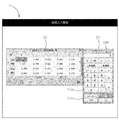
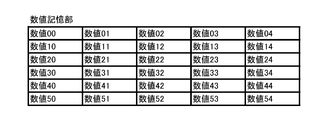
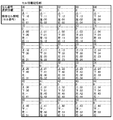
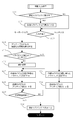
- FIG. 1 is a block diagram showing an embodiment of a numerical input device according to the present invention and a machine tool provided with the same. It is a figure which shows an example of the numerical value input screen and numerical value input pad of this embodiment. It is an example of data stored in the numerical value storage unit of the present embodiment. It is an example of data stored in the cell information storage unit of the present embodiment. It is a flow chart which shows a numerical value input method performed by a numerical value input device and a numerical value input program of this embodiment. It is a flow chart which shows fixed input processing in this embodiment. It is a flow chart which shows movement input processing in this embodiment. It is a flow chart which shows numerical value input processing in this embodiment.
- the numerical value input device 1 of the present embodiment is for inputting numerical values used for the machine tool 10, such as a tool offset value, and is configured by a computer such as a numerical control device. Then, the machine tool 10 is controlled on the basis of the input numerical values to perform various machining on the workpiece to be machined.
- a computer such as a numerical control device.
- the machine tool 10 such as a lathe, a drilling machine, a boring machine, a milling machine, a gear cutting machine, and a grinding machine, cuts, punches, grinds, polishes, and rolls a workpiece such as metal, wood, stone, and resin. It is a machine for performing various processes such as forging and bending.
- the machine tool 10 is numerically controlled according to a drive signal output from the numerical value input device 1 based on a machining program.
- the machine tool 10 may be of an additional manufacturing system such as a 3D printer.
- the numerical input device 1 is composed of a computer such as a numerical control device for controlling the machine tool 10. As shown in FIG. 1, the numerical input device 1 mainly includes a touch-input touch panel 2, a key-input keyboard 3, and a touch panel. 2 and an external input means 6 other than the keyboard 3, a storage means 4 for storing various data and functioning as a working area, and an arithmetic processing means 5 for executing various arithmetic processing and functioning as each component described later.
- a computer such as a numerical control device for controlling the machine tool 10.
- the numerical input device 1 mainly includes a touch-input touch panel 2, a key-input keyboard 3, and a touch panel. 2 and an external input means 6 other than the keyboard 3, a storage means 4 for storing various data and functioning as a working area, and an arithmetic processing means 5 for executing various arithmetic processing and functioning as each component described later.
- arithmetic processing means 5 for executing various arithmetic processing and functioning as each component described
- the touch panel 2 has both a function as an input unit that receives a touch input on the display screen and a function as a display unit that displays various user interfaces and the like.
- the touch panel 2 is configured to display various graphical user interfaces (GUI) by a display control unit 51 described later and a software keyboard such as a numerical input pad 23 described later.
- GUI graphical user interfaces
- the keyboard 3 is a hardware keyboard, and is used to enter numerical values, direction keys for inputting up/down/left/right directions, symbol keys for inputting various symbols, and enter numerical values. And an enter key, a function key for executing a predetermined function, an alphabet key for inputting an alphabet, and the like.
- the external input means 6 is an input device capable of inputting numerical values in addition to the touch panel 2 and the keyboard 3.
- the external input means 6 is composed of a bar code reader that does not require manual input of numerical values, and reads a bar code for numerical value input, converts it into a numerical value, and outputs it.
- the external input means 6 is not limited to the bar code reader, and a microphone capable of inputting numerical values by voice, a scanner capable of inputting numerical values as an image, or the like may be used.
- the storage means 4 is composed of a hard disk, a ROM (Read Only Memory), a RAM (Random Access Memory), a flash memory, etc., and stores various data, and a working when the arithmetic processing means 5 performs arithmetic processing. It functions as an area.
- the storage means 4 has a program storage unit 41, a GUI data storage unit 42, a numerical value storage unit 43, a cell information storage unit 44, and a numerical value buffer 45. ing.
- a program storage unit 41 a GUI data storage unit 42
- a numerical value storage unit 43 a cell information storage unit 44
- a numerical value buffer 45 a numerical value buffer 45.
- a numerical input program 1a for controlling the numerical input device 1 of this embodiment is installed. Then, the arithmetic processing means 5 executes the numerical value input program 1a to cause the computer as the numerical value input device 1 to function as each component described later.
- the usage form of the numerical value input program 1a is not limited to the above configuration.
- the numerical value input program 1a may be stored in a computer-readable non-transitory recording medium such as a CD-ROM or a USB memory, and may be directly read from the recording medium and executed. Also, it may be used from an external server or the like by a cloud computing method, an ASP (Application Service Provider) method, or the like.
- the GUI data storage unit 42 stores GUI data for displaying various graphical user interfaces (GUIs) on the touch panel 2.
- GUIs graphical user interfaces
- the GUI data includes data for displaying the numerical value input screen 21 and the like as shown in FIG. 2, and is read by the display control unit 51 described later and displayed on the touch panel 2. It is like this.
- the numerical value input screen 21 is provided with a numerical value input area 22 in which a plurality of cells are arranged in a grid as shown in FIG. Then, a numerical value used for the machine tool 10 is input to each of the plurality of cells.
- the layout of the numerical value input area 22 is not limited to the grid shape, and a plurality of cells may be arranged one-dimensionally or two-dimensionally.
- the numerical value input pad 23 includes a numerical button 23a for touch-inputting a numerical value, a numerical value display field 23b for displaying the input numerical value, and a numerical value input method. It has a confirmation input button 23c for selection. Further, as the confirmation input button 23c, an “edit” button, a “+input” button, a “measurement” button, and a “cancel” button are prepared. The input method selected by each button will be described later.
- the numerical value storage unit 43 stores the numerical values input to each of a plurality of cells. Specifically, as shown in FIG. 3, the numerical value input to the cell is stored in association with each cell forming the numerical value input area 22.
- the cell information storage unit 44 stores information about each cell in the numerical value input area 22.
- the selection information indicating whether or not the cell is active and the cells adjacent to the cell are associated with each of the plurality of cells. And adjacent cell information for identifying
- a cell number for identifying a cell is assigned to each cell.
- selection information a flag that holds “1” for active cells and “0” for inactive cells is held.
- adjacent cell information the cell numbers of the adjacent cells in the upper, lower, left, and right are stored, and if there is no adjacent cell, it is left blank.
- the numerical value buffer 45 temporarily stores the input numerical value.
- a numerical value is input using the numerical buttons 23a on the touch panel 2
- a numerical value is input using the numerical keys on the keyboard 3
- the external input means 6 is used.
- the input numerical value is temporarily stored.
- the arithmetic processing means 5 is composed of a CPU (Central Processing Unit) and the like, and by executing the numerical value input program 1a installed in the storage means 4, as shown in FIG.
- CPU Central Processing Unit
- the display control unit 51 controls the display content of the touch panel 2.
- the display control unit 51 reads out GUI data stored in the GUI data storage unit 42 based on a command from the movement input processing unit 53, the numerical value input processing unit 54, or the confirmed input processing unit 55, It is designed to be displayed or not displayed on the touch panel 2.
- the display control unit 51 causes the touch panel 2 to display a numerical value input screen 21 having a numerical value input area 22, as shown in FIG.
- the display control unit 51 changes the background color of the active cell or performs active display with a frame-shaped cursor.
- the display control unit 51 is configured to display the numerical value input pad 23 including the numerical button 23a, the numerical value display field 23b, the confirmation input button 23c and the like on the touch panel 2 as described above.
- the input detection unit 52 detects information input using the touch panel 2, keyboard 3 or external input means 6.
- the input detection unit 52 detects information input from the touch panel 2, information input from the keyboard 3 or information input from the external input means 6, and the information is detected by the touch panel 2, the keyboard 3, and It is possible to identify from which of the external input means 6 the input is made.
- the movement input processing unit 53 executes processing when a cell movement instruction is input.
- the movement input processing unit 53 acquires the information from the input detection unit 52 and stores the information in the cell information storage unit 44.
- the selected information of the selected cell is set to be active.
- the movement input processing unit 53 acquires the information from the input detection unit 52, and obtains the adjacent cell information of the cell that was active when the directional key was pressed. It is acquired from the information storage unit 44. Then, based on the adjacent cell information, the selection information of the cell adjacent in the direction corresponding to the pressed direction key is set to active.
- the movement input processing unit 53 outputs the information from the input detection unit 52. Then, the display control unit 51 is made to hide the numerical value input pad 23.
- the display control unit 51 is made to hide the numerical value input pad 23.
- the movement input processing unit 53 outputs the information from the input detection unit 52.
- the numerical value input pad 23 is acquired and made to be hidden by the display control unit 51, and the numerical value input pad 23 is displayed after a predetermined time has elapsed.
- the numerical value input processing unit 54 executes processing when a numerical value is input.
- the numerical value input processing unit 54 uses the numerical buttons 23 a on the touch panel 2 to input a numerical value, the numerical keys on the keyboard 3 to input a numerical value, or the external input means 6.
- the information is acquired from the input detection unit 52, and the input numerical value is temporarily stored in the numerical value buffer 45. Then, the numerical value in the numerical value buffer 45 is notified to the display control section 51 and displayed in the numerical value display field 23b of the numerical value input pad 23.
- the finalized input processing unit 55 inputs a numerical value into the numerical value storage unit 43 according to a predetermined input method.
- the confirmed input processing unit 55 uses the confirmed input button 23c on the touch panel 2 or a predetermined key on the keyboard 3 to select one of the following input methods (i) to (iii).
- the numerical value of the currently active cell is acquired from the numerical value storage unit 43 and the temporarily stored numerical value is acquired from the numerical value buffer 45.
- the fixed input processing unit 55 inputs a numerical value into the numerical value storage unit 43 according to each acquired numerical value and the selected input method.
- the input method (i) when the “Edit” button is touched among the confirmation input buttons 23c displayed on the numerical value input pad 23, the input method (i) is selected, and when the “+input” button is touched, the When the input method (ii) is selected and the “measurement” button is touched, the input method (iii) is selected. Also, when selecting the input method (i) to (iii) from the keyboard 3, you may specify by using function keys or a combination of multiple keys. Prepare a special key to select each input method. Good.
- the input detection unit 52 monitors whether there is any input from the touch panel 2, the keyboard 3, or the external input means 6. To do. As a result of the monitoring, when the fixed input button 23c is touch-selected on the touch panel 2 or when the key for instructing the fixed input of a numerical value is pressed on the keyboard 3 (step S1: YES), the fixed input processing unit 55. Executes the fixed input process shown in FIG.
- step S2 when an arbitrary cell is touch-selected on the touch panel 2 or an arbitrary direction key is pressed on the keyboard 3 (step S2: YES), the movement input processing unit 53 causes the movement input processing shown in FIG. To execute. Furthermore, when the numeric button 23a is touch-selected on the touch panel 2, when the numeric key is pressed on the keyboard 3, or when the barcode for numeric input is read by the external input means 6 (step S3: YES). ), the numerical value input processing unit 54 executes the numerical value input processing shown in FIG. Hereinafter, each input process will be specifically described.
- step S1 If no input is performed (step S1: NO, step S2: NO, step S3: NO) and an instruction to end the numerical value input process is given (step S4: YES), this process is ended. ing.
- the fixed input processing unit 55 acquires the numerical value of the cell that is currently active from the numerical value storage unit 43 (step S11) and temporarily stores it from the numerical value buffer 45. The numerical value that has been read is acquired (step S12). Then, the fixed input processing unit 55 calculates a new numerical value according to the input method selected by the touch panel 2 or the keyboard 3 (step S13) and stores it in the numerical value storage unit 43 as the numerical value of the active cell (step S14). ..
- the input method for entering a numerical value in the cell is seamlessly selected from the touch panel 2 or the keyboard 3, and the numerical value is input according to the selected input method.
- the fixed input processing unit 55 commands the display control unit 51 to hide the numerical value input pad 23, and ends the fixed input process.
- the movement input processing unit 53 determines whether or not the numerical value input pad 23 is displayed on the touch panel 2 (step S21). As a result of the determination, when the numerical input pad 23 is displayed on the touch panel 2 (step S21: YES), the numerical input pad 23 is hidden (step S22). As a result, even while inputting a numerical value into the numerical value input pad 23, the numerical value input pad 23 is automatically hidden only by touching an arbitrary cell or pressing an arbitrary direction key. It becomes easier to select and move, improving operability.
- the movement input processing unit 53 determines whether it is a touch input from the touch panel 2 or a key input from the keyboard 3 (step S23). If the result of this determination is a key input from the keyboard 3, the movement input processing unit 53 acquires from the cell information storage unit 44 the adjacent cell information for the cell that was active when pressed (step S24), Based on the adjacent cell information, it is determined whether or not there is a cell in the moving direction corresponding to the pressed direction key (step S25).
- step S25: YES when there is a cell in the instructed movement direction (step S25: YES), the selection information of the cell of the movement destination is set to active (step S27), and active display is performed (step S28).
- step S25: NO when there is no cell in the instructed movement direction (step S25: NO), the movement input processing unit 53 executes a predetermined exception process (step S26). Examples of this exception processing include processing of not moving from the current cell and processing of moving to the first cell of the next row, but are not particularly limited.
- the movement input processing unit 53 monitors whether or not any input is made within a predetermined time (step S29). Then, when a predetermined time has elapsed without any input, the movement input processing unit 53 displays the numerical value input pad 23 (step S30).
- step S23 determines whether the result of determination in step S23 is touch input from the touch panel 2 or not. If the result of determination in step S23 is touch input from the touch panel 2, the movement input processing unit 53 sets the selection information of the touch-selected cell to active (step S31) and makes active display (step S31). S32). This makes it possible to move cells seamlessly from the touch panel 2 and the keyboard 3. After that, the movement input processing unit 53 automatically displays the numerical value input pad 23 (step S30), so that the numerical value input work can be immediately executed.
- the numerical value input processing unit 54 first determines whether or not the numerical value input pad 23 is displayed on the touch panel 2 (step S41). As a result of the determination, when the numerical value input pad 23 is already displayed on the touch panel 2 (step S41: YES), the numerical value input processing unit 54 temporarily stores the input numerical value in the numerical value buffer 45 ( In step S43), the numerical value in the numerical value buffer 45 is displayed in the numerical value display field 23b (step S44).
- both the numerical value input from the touch panel 2 and the numerical value input from the keyboard 3 are displayed on the numerical input pad 23 as a unified graphical user interface. For this reason, the movement of the user's line of sight is reduced, and the work efficiency and work speed related to numerical value input are improved.
- step S41 NO
- the numerical value input processing unit 54 causes the numerical value input pad 23 to be displayed (step S42).
- the numerical input pad 23 is automatically displayed only by inputting a numerical value from the keyboard 3, so that the operability is improved.
- Numerical values used for the machine tool 10 can be seamlessly input from the touch panel 2 or the keyboard 3. 2. By displaying both touch-input numerical values and key-input numerical values in a unified graphical user interface and reducing the movement of the user's eyes, it is possible to improve work efficiency and work speed related to numerical input. .. 3. Various input methods can be seamlessly selected from the touch panel 2 or the keyboard 3. 4. The operability can be improved by automatically displaying or hiding the numerical value input pad 23 as needed. 5. The numerical input pad 23 can be automatically hidden while the cell is being moved by the keyboard 3, and the numerical input pad 23 can be automatically displayed after the cell is moved. 6.
- the numerical input device 1 is realized as one function of the numerical control device, but the present invention is not limited to this configuration. That is, the numerical value input device 1 may be configured by a computer independent of the numerical control device.
- the numerical value input device 1 has the external input means 6 in addition to the touch panel 2 and the keyboard 3.
- the external input means 6 does not necessarily have to be provided, and may have at least the touch panel 2 and the keyboard 3.
Landscapes
- Engineering & Computer Science (AREA)
- General Engineering & Computer Science (AREA)
- Theoretical Computer Science (AREA)
- Human Computer Interaction (AREA)
- Physics & Mathematics (AREA)
- General Physics & Mathematics (AREA)
- Manufacturing & Machinery (AREA)
- Automation & Control Theory (AREA)
- Numerical Control (AREA)
- Input From Keyboards Or The Like (AREA)
- User Interface Of Digital Computer (AREA)
Abstract
【課題】 工作機械に用いられる数値をタッチパネルからでもキーボードからでもシームレスに入力することができる数値入力装置およびこれを備えた工作機械を提供する。 【解決手段】 タッチパネル2およびキーボード3を有し、工作機械10に用いられる数値を入力するための数値入力装置1であって、表示制御部51と、複数のセルに入力された数値を記憶する数値記憶部43と、複数のセルのそれぞれに対応付けて、アクティブか否かを示す選択情報および隣接セル情報を記憶するセル情報記憶部44と、任意のセルがタッチ選択された場合、当該セルの選択情報をアクティブに設定し、任意の方向キーが押下された場合、当該方向キーに対応するセルの選択情報をアクティブに設定する移動入力処理部53とを有する。
Description
本発明は、タッチパネルおよびキーボードを有し、工作機械に用いられる数値を入力するための数値入力装置およびこれを備えた工作機械に関するものである。
近年、工作機械に用いられる数値の入力方法としては、キーボードのみを想定したキー入力からタッチパネルを主体としたタッチ入力へと変わりつつある。例えば、特開2017-111516号公報には、工作機械における加工プログラムを編集するための装置であって、タッチ入力を主体としたものが開示されている(特許文献1)。
しかしながら、特許文献1に記載の装置を含め、従来の数値入力装置においては、キー入力とタッチ入力とが、全く異なる入力イベントとして処理されている。すなわち、タッチ入力には、拡大や縮小等を行う際のスワイプ操作が含まれるため、キー入力とは全く別の入力イベントとして、オペレーション・システムから各種アプリケーションに通知されるようになっている。
上記のような技術背景のもと、従来、タッチ入力を主体とした数値入力装置においては、キーボードによる入力を受け付けていない。このため、複数のセルが一次元的または二次元的に配置された数値入力エリアに対して数値を連続的に入力する場合、一つ一つ数字をタッチ入力しなければならず、特にキー入力に慣れ親しんだユーザの中には、もどかしさを感じているユーザも存在する。
一方、キー入力を主体とした従来の数値入力装置においては、タッチ入力を行うことが想定されていない。このため、複数のセルが一次元的または二次元的に配置された数値入力エリアにおいて、少数のセルにのみ数値を入力する場合、方向キーによって当該セルを選択しなければならず、タッチするだけで選択可能なタッチ入力と比較して使い勝手が悪いという問題もある。
本発明は、このような問題点を解決するためになされたものであって、工作機械に用いられる数値をタッチパネルからでもキーボードからでもシームレスに入力することができる数値入力装置およびこれを備えた工作機械を提供することを目的としている。
本発明に係る数値入力装置は、工作機械に用いられる数値をタッチパネルからでもキーボードからでもシームレスに入力するという課題を解決するために、少なくともタッチパネルおよびキーボードを有し、工作機械に用いられる数値を入力するための数値入力装置であって、前記タッチパネルに、複数のセルを一次元的または二次元的に並べてなる数値入力エリアを表示する表示制御部と、複数のセルのぞれぞれに入力された数値を記憶する数値記憶部と、複数のセルのそれぞれに対応付けて、前記セルがアクティブか否かを示す選択情報および前記セルに隣接する各セルを識別する隣接セル情報を記憶するセル情報記憶部と、前記タッチパネル上で任意のセルがタッチ選択された場合、当該タッチ選択されたセルの前記選択情報をアクティブに設定し、前記キーボード上で任意の方向キーが押下された場合、当該押下されたときにアクティブであったセルの前記隣接セル情報を取得し、前記方向キーに対応する方向に隣接するセルの前記選択情報をアクティブに設定する移動入力処理部と、を有する。
また、本発明の一態様として、タッチ入力された数値とキー入力された数値の双方を統一化されたグラフィカルユーザインタフェースに表示し、ユーザの目線の移動を低減することで数値入力に係る作業効率や作業速度を向上するという課題を解決するために、前記表示制御部は、数値をタッチ入力するための数字ボタンと、入力された数値を表示する数値表示欄とを有する数値入力パッドを前記タッチパネルに表示させるとともに、前記タッチパネル上の数字ボタンを用いて数値が入力された場合と、前記キーボード上の数字キーを用いて数値が入力された場合のいずれの場合でも、入力された数値を一時的に数値バッファに保存させるとともに、前記数値バッファ内の数値を前記数値表示欄に表示させる数値入力処理部を有してもよい。
さらに、本発明の一態様として、タッチパネルからでもキーボードからでも各種の入力方式をシームレスに選択するという課題を解決するために、前記表示制御部は、下記(i)~(iii)のうち、いずれかの入力方式を選択する確定入力ボタンを備えた前記数値入力パッドを前記タッチパネルに表示させるとともに;
(i)前記数値バッファ内の数値によって前記数値記憶部内の数値を上書きする編集入力;
(ii)前記数値記憶部内の数値に対する差分として、前記数値バッファ内の数値を入力するプラス入力;
(iii)指定した機械座標に対する差分として、前記数値バッファ内の数値を入力する計測入力;
前記タッチパネル上の確定入力ボタンまたは前記キーボード上の所定キーを用いて前記(i)~(iii)のいずれかの入力方式が選択された場合、当該入力方式に従って前記数値記憶部に数値を入力する確定入力処理部を有してもよい。
(i)前記数値バッファ内の数値によって前記数値記憶部内の数値を上書きする編集入力;
(ii)前記数値記憶部内の数値に対する差分として、前記数値バッファ内の数値を入力するプラス入力;
(iii)指定した機械座標に対する差分として、前記数値バッファ内の数値を入力する計測入力;
前記タッチパネル上の確定入力ボタンまたは前記キーボード上の所定キーを用いて前記(i)~(iii)のいずれかの入力方式が選択された場合、当該入力方式に従って前記数値記憶部に数値を入力する確定入力処理部を有してもよい。
また、本発明の一態様として、必要に応じて数値入力パッドを自動的に表示または非表示にして操作性を向上するという課題を解決するために、前記移動入力処理部は、前記タッチパネル上に前記数値入力パッドが表示されている状態で、前記キーボードによって前記セルの移動が指示された場合、前記表示制御部に前記数値入力パッドを非表示にさせるとともに、前記タッチパネル上に前記数値入力パッドが表示されていない状態で、前記キーボードによって前記数値が入力された場合、前記表示制御部に前記数値入力パッドを表示させてもよい。
さらに、本発明の一態様として、キーボードによってセルを移動させている間は、数値入力パッドを自動的に非表示とし、セルの移動が完了した後は、数値入力パッドを自動的に表示するという課題を解決するために、前記移動入力処理部は、前記タッチパネル上に前記数値入力パッドが表示されている状態で、前記キーボードによって前記セルの移動が指示された場合、前記表示制御部に前記数値入力パッドを非表示にさせるとともに、所定時間の経過後、前記数値入力パッドを表示させてもよい。
また、本発明の一態様として、タッチパネルやキーボードから入力された数値だけでなく、外部入力手段から入力された数値も統一化されたグラフィカルユーザインタフェースに表示し、タッチ操作やキー操作のような手入力を介さずに数値を入力することで、数値の誤入力を防止するという課題を解決するために、前記タッチパネルおよび前記キーボードの他に、数値を入力可能な外部入力手段をさらに有しており、前記数値入力処理部は、前記外部入力手段を用いて数値が入力された場合も、入力された数値を一時的に前記数値バッファに保存させるとともに、前記数値バッファ内の数値を前記数値表示欄に表示させてもよい。
本発明に係る工作機械は、上述したいずれかの態様の数値入力装置を備える。
本発明によれば、工作機械に用いられる数値をタッチパネルからでもキーボードからでもシームレスに入力することができる。
以下、本発明に係る数値入力装置およびこれを備えた工作機械の一実施形態について図面を用いて説明する。
本実施形態の数値入力装置1は、工具オフセット値等のように、工作機械10に用いられる数値を入力するためのものであり、数値制御装置等のコンピュータによって構成されている。そして、入力された数値に基づいて工作機械10を制御し、加工対象となるワークに対して様々な加工を行うようになっている。以下、各構成について詳細に説明する。
工作機械10は、旋盤、ボール盤、中ぐり盤、フライス盤、歯切り盤、研削盤等のように、金属、木材、石材、樹脂等のワークに対して、切断、穿孔、研削、研磨、圧延、鍛造、折り曲げ等の各種の加工を施すための機械である。本実施形態において、工作機械10は、加工プログラムに基づいて数値入力装置1から出力される駆動信号に従って数値制御されるようになっている。なお、工作機械10は、3Dプリンタ等のような付加製造方式のものであってもよい。
数値入力装置1は、工作機械10を制御する数値制御装置等のコンピュータによって構成されており、図1に示すように、主として、タッチ入力可能なタッチパネル2と、キー入力可能なキーボード3と、タッチパネル2およびキーボード3以外の外部入力手段6と、各種のデータを記憶するとともにワーキングエリアとして機能する記憶手段4と、各種の演算処理を実行し後述する各構成部として機能する演算処理手段5とを有している。以下、各構成手段について詳細に説明する。
タッチパネル2は、表示画面上でタッチ入力を受け付ける入力手段としての機能と、各種のユーザインターフェース等を表示する表示手段としての機能とを兼ね備えるものである。本実施形態において、タッチパネル2は、後述する表示制御部51によって各種のグラフィカルユーザインタフェース(Graphical User Interface:GUI)や、後述する数値入力パッド23等のソフトウェアキーボードを表示するようになっている。
キーボード3は、ハードウェアキーボードであって、数値を入力するための数字キー、上下左右の方向を入力するための方向キー、各種の記号を入力するための記号キー、入力した数値等を確定するためのエンターキー、所定の機能を実行するためのファンクションキー、アルファベットを入力するためのアルファベットキー等を有するものである。
外部入力手段6は、タッチパネル2およびキーボード3の他に、数値を入力可能な入力デバイスである。本実施形態において、外部入力手段6は、数値の手入力が不要なバーコードリーダによって構成されており、数値入力用のバーコードを読み取って数値に変換し、出力するようになっている。なお、外部入力手段6は、バーコードリーダに限られるものではなく、数値を音声入力可能なマイクや、数値を画像入力可能なスキャナー等を使用してもよい。
記憶手段4は、ハードディスク、ROM(Read Only Memory)、RAM(Random Access Memory)およびフラッシュメモリ等で構成されており、各種のデータを記憶するとともに、演算処理手段5が演算処理を行う際のワーキングエリアとして機能するものである。本実施形態において、記憶手段4は、図1に示すように、プログラム記憶部41と、GUIデータ記憶部42と、数値記憶部43と、セル情報記憶部44と、数値バッファ45とを有している。以下、各構成部について説明する。
プログラム記憶部41には、本実施形態の数値入力装置1を制御するための数値入力プログラム1aがインストールされている。そして、演算処理手段5が、当該数値入力プログラム1aを実行することにより、数値入力装置1としてのコンピュータを後述する各構成部として機能させるようになっている。
なお、数値入力プログラム1aの利用形態は、上記構成に限られるものではない。例えば、CD-ROMやUSBメモリ等のように、コンピュータで読み取り可能な非一時的な記録媒体に数値入力プログラム1aを記憶させておき、当該記録媒体から直接読み出して実行してもよい。また、外部サーバ等からクラウドコンピューティング方式やASP(Application Service Provider)方式等で利用してもよい。
GUIデータ記憶部42は、タッチパネル2上に各種のグラフィカルユーザインタフェース(Graphical User Interface:GUI)を表示するためのGUIデータを記憶するものである。本実施形態において、GUIデータとしては、図2に示すような数値入力画面21等を表示するためのデータが含まれており、後述する表示制御部51によって読み出されてタッチパネル2に表示されるようになっている。
本実施形態において、数値入力画面21には、図2に示すように、複数のセルを格子状に並べてなる数値入力エリア22が設けられている。そして、複数のセルのそれぞれに、工作機械10に用いられる数値が入力されるようになっている。なお、数値入力エリア22のレイアウトは格子状に限定されるものではなく、複数のセルが一次元的または二次元的に並べられていればよい。
また、本実施形態において、数値入力パッド23は、図2に示すように、数値をタッチ入力するための数字ボタン23aと、入力された数値を表示する数値表示欄23bと、数値の入力方式を選択する確定入力ボタン23c等を有している。また、確定入力ボタン23cとしては、「編集」ボタン、「+入力」ボタン、「計測」ボタン、および「キャンセル」ボタンが用意されている。各ボタンによって選択される入力方式については後述する。
数値記憶部43は、複数のセルのぞれぞれに入力された数値を記憶するものである。具体的には、図3に示すように、数値入力エリア22を構成する各セルに対応づけて、当該セルに入力された数値を記憶するようになっている。
セル情報記憶部44は、数値入力エリア22の各セルに関する情報を記憶するものである。本実施形態において、セル情報記憶部44には、図4に示すように、複数のセルのそれぞれに対応付けて、当該セルがアクティブか否かを示す選択情報と、当該セルに隣接する各セルを識別する隣接セル情報とを記憶するようになっている。
本実施形態では、図4に示すように、各セルごとにセルを識別するためのセル番号が付与されている。また、選択情報としては、アクティブなセルを「1」とし、非アクティブなセルを「0」とするフラグが保持されている。さらに、隣接セル情報としては、上下左右のそれぞれに隣接するセルのセル番号が格納され、隣接するセルがない場合には空欄とされる。
数値バッファ45は、入力された数値を一時的に記憶するものである。本実施形態において、数値バッファ45には、タッチパネル2上の数字ボタン23aを用いて数値が入力された場合と、キーボード3上の数字キーを用いて数値が入力された場合と、外部入力手段6を用いて数値が入力された場合のいずれの場合でも、入力された数値が一時的に保存されるようになっている。
つぎに、演算処理手段5は、CPU(Central Processing Unit)等によって構成されており、記憶手段4にインストールされた数値入力プログラム1aを実行することにより、図1に示すように、表示制御部51と、入力検知部52と、移動入力処理部53と、数値入力処理部54と、確定入力処理部55として機能するようになっている。以下、各構成部についてより詳細に説明する。
表示制御部51は、タッチパネル2の表示内容を制御するものである。本実施形態において、表示制御部51は、移動入力処理部53、数値入力処理部54または確定入力処理部55からの命令に基づいて、GUIデータ記憶部42に記憶されているGUIデータを読み出し、タッチパネル2上に表示したり、あるいは非表示とするようになっている。
本実施形態において、表示制御部51は、図2に示すように、数値入力エリア22を備えた数値入力画面21をタッチパネル2に表示させる。また、表示制御部51は、アクティブなセルについては背景色を異ならせたり、フレーム状のカーソルによってアクティブ表示を行う。さらに、表示制御部51は、上述した数字ボタン23a、数値表示欄23bおよび確定入力ボタン23c等を備えた数値入力パッド23をタッチパネル2に表示させるようになっている。
入力検知部52は、タッチパネル2、キーボード3または外部入力手段6を用いて入力された情報を検知するものである。本実施形態において、入力検知部52は、タッチパネル2から入力された情報、キーボード3から入力された情報または外部入力手段6から入力された情報を検知するとともに、当該情報がタッチパネル2、キーボード3および外部入力手段6のいずれから入力されたかを識別しうるようになっている。
移動入力処理部53は、セルの移動指示が入力された際の処理を実行するものである。本実施形態において、移動入力処理部53は、タッチパネル2上で任意のセルがタッチ選択された場合、その情報を入力検知部52から取得し、セル情報記憶部44に記憶されている、タッチ選択されたセルの選択情報をアクティブに設定するようになっている。
一方、移動入力処理部53は、キーボード3上で任意の方向キーが押下された場合、その情報を入力検知部52から取得し、押下されたときにアクティブであったセルの隣接セル情報をセル情報記憶部44から取得する。そして、当該隣接セル情報に基づいて、押下された方向キーに対応する方向に隣接するセルの選択情報をアクティブに設定するようになっている。
また、本実施形態において、移動入力処理部53は、タッチパネル2上に数値入力パッド23が表示されている状態で、キーボード3によってセルの移動が指示された場合、その情報を入力検知部52から取得し、表示制御部51に数値入力パッド23を非表示にさせる。また、タッチパネル2上に数値入力パッド23が表示されていない状態で、キーボード3によって数値が入力された場合、その情報を入力検知部52から取得し、表示制御部51に数値入力パッド23を表示させるようになっている。
さらに、本実施形態において、移動入力処理部53は、タッチパネル2上に数値入力パッド23が表示されている状態で、キーボード3によってセルの移動が指示された場合、その情報を入力検知部52から取得し、表示制御部51に数値入力パッド23を非表示にさせるとともに、所定時間の経過後、数値入力パッド23を表示させるようになっている。
数値入力処理部54は、数値が入力された際の処理を実行するものである。本実施形態において、数値入力処理部54は、タッチパネル2上の数字ボタン23aを用いて数値が入力された場合、キーボード3上の数字キーを用いて数値が入力された場合、または外部入力手段6を用いて数値が入力された場合のいずれの場合でも、その情報を入力検知部52から取得し、入力された数値を一時的に数値バッファ45に保存させる。そして、当該数値バッファ45内の数値を表示制御部51に通知し、数値入力パッド23の数値表示欄23bに表示させるようになっている。
確定入力処理部55は、所定の入力方式に従って数値記憶部43に数値を入力するものである。本実施形態において、確定入力処理部55は、タッチパネル2上の確定入力ボタン23cまたはキーボード3上の所定キーを用いて、下記(i)~(iii)のいずれかの入力方式が選択された場合、セル情報記憶部44内の選択情報を参照し、数値記憶部43から現在アクティブとなっているセルの数値を取得するとともに、数値バッファ45から一時的に保存されている数値を取得する。そして、確定入力処理部55は、取得した各数値と選択された入力方式とに従って数値記憶部43に数値を入力するようになっている。
(i)数値バッファ45内の数値によって数値記憶部43内の数値を上書きする編集入力
(ii)数値記憶部43内の数値に対する差分として、数値バッファ45内の数値を入力するプラス入力
(iii)指定した機械座標に対する差分として、数値バッファ45内の数値を入力する計測入力
(ii)数値記憶部43内の数値に対する差分として、数値バッファ45内の数値を入力するプラス入力
(iii)指定した機械座標に対する差分として、数値バッファ45内の数値を入力する計測入力
なお、本実施形態では、数値入力パッド23に表示される確定入力ボタン23cのうち、「編集」ボタンをタッチすると、上記入力方式(i)が選択され、「+入力」ボタンをタッチすると、上記入力方式(ii)が選択され、「計測」ボタンをタッチすると、上記入力方式(iii)が選択される。また、キーボード3から上記(i)~(iii)の入力方式を選択する場合は、ファンクションキーや複数キーの組み合わせによって指定してもよく、各入力方式を選択するための特殊キーを用意してもよい。
つぎに、本実施形態の数値入力装置1およびこれを備えた工作機械10の作用について、図5から図8を参照しつつ説明する。
本実施形態の数値入力装置1およびこれを備えた工作機械10を用いて、数値を入力する場合、入力検知部52が、タッチパネル2、キーボード3、または外部入力手段6から何らかの入力があったかを監視する。当該監視の結果、タッチパネル2上で確定入力ボタン23cがタッチ選択された場合、またはキーボード3上で数値の確定入力を指示するキーが押下された場合(ステップS1:YES)、確定入力処理部55が図6に示す確定入力処理を実行する。
また、タッチパネル2上で任意のセルがタッチ選択された場合、またはキーボード3上で任意の方向キーが押下された場合(ステップS2:YES)、移動入力処理部53が図7に示す移動入力処理を実行する。さらに、タッチパネル2上で数字ボタン23aがタッチ選択された場合、キーボード3上で数字キーが押下された場合、または外部入力手段6で数値入力用のバーコードが読み取られた場合(ステップS3:YES)、数値入力処理部54が図8に示す数値入力処理を実行するようになっている。以下、各入力処理について具体的に説明する。
なお、いずれの入力も行われず(ステップS1:NO、ステップS2:NO、ステップS3:NO)、数値入力処理の終了が指示された場合(ステップS4:YES)、本処理を終了するようになっている。
図6に示す確定入力処理においては、まず、確定入力処理部55が、数値記憶部43から現在アクティブとなっているセルの数値を取得するとともに(ステップS11)、数値バッファ45から一時的に保存されている数値を取得する(ステップS12)。そして、確定入力処理部55は、タッチパネル2またはキーボード3で選択された入力方式に従って、新たな数値を算出し(ステップS13)、アクティブなセルの数値として数値記憶部43に記憶する(ステップS14)。
これにより、セルに数値を入力する際の入力方式が、タッチパネル2からでもキーボード3からでもシームレスに選択され、当該選択された入力方式に従って数値が入力される。なお、ステップS14の実行後、確定入力処理部55は、数値入力パッド23を非表示にするよう表示制御部51に命令し、確定入力処理を終了する。
つぎに、図7に示す移動入力処理においては、まず、移動入力処理部53が、タッチパネル2上に数値入力パッド23が表示されているか否かを判定する(ステップS21)。当該判定の結果、タッチパネル2上に数値入力パッド23が表示されている場合(ステップS21:YES)、当該数値入力パッド23を非表示にする(ステップS22)。これにより、数値入力パッド23に数値を入力している途中でも、任意のセルをタッチしたり、任意の方向キーを押すだけで、自動的に数値入力パッド23が非表示となるため、セルを選択・移動させやすくなり操作性が向上する。
つづいて、移動入力処理部53は、タッチパネル2からのタッチ入力か、キーボード3からのキー入力かを判定する(ステップS23)。当該判定の結果、キーボード3からのキー入力であれば、移動入力処理部53は、押下されたときにアクティブであったセルの隣接セル情報をセル情報記憶部44から取得し(ステップS24)、当該隣接セル情報に基づいて、押下された方向キーに対応する移動方向にセルがあるか否かを判定する(ステップS25)。
そして、指示された移動方向にセルがある場合(ステップS25:YES)、その移動先のセルの選択情報をアクティブに設定するとともに(ステップS27)、アクティブ表示にする(ステップS28)。一方、指示された移動方向にセルがない場合(ステップS25:NO)、移動入力処理部53は所定の例外処理を実行する(ステップS26)。この例外処理としては、現在のセルから移動しないという処理や、次の行の先頭セルに移動するという処理等が挙げられるが、特に限定されるものではない。
つづいて、移動入力処理部53は、所定時間内に何らかの入力が行われるか否かを監視する(ステップS29)。そして、何も入力されない状態で所定時間経過した場合、移動入力処理部53は数値入力パッド23を表示させる(ステップS30)。
一方、ステップS23における判定の結果、タッチパネル2からのタッチ入力の場合、移動入力処理部53は、タッチ選択されたセルの選択情報をアクティブに設定するとともに(ステップS31)、アクティブ表示にする(ステップS32)。これにより、タッチパネル2からでもキーボード3からでもシームレスにセルを移動させることが可能となる。その後、移動入力処理部53は自動的に数値入力パッド23を表示させるため(ステップS30)、直ちに数値の入力作業が実行可能となる。
つぎに、図8に示す数値入力処理においては、まず、数値入力処理部54が、タッチパネル2上に数値入力パッド23が表示されているか否かを判定する(ステップS41)。当該判定の結果、既にタッチパネル2上に数値入力パッド23が表示されている場合(ステップS41:YES)、数値入力処理部54は、入力された数値を一時的に数値バッファ45に保存するとともに(ステップS43)、当該数値バッファ45内の数値を数値表示欄23bに表示させる(ステップS44)。
これにより、タッチパネル2から入力された数値と、キーボード3から入力された数値の双方が、統一化されたグラフィカルユーザインタフェースとしての数値入力パッド23に表示される。このため、ユーザの目線の移動が低減し、数値入力に係る作業効率や作業速度が向上する。
また、本実施形態では、タッチパネル2やキーボード3から入力された数値だけでなく、外部入力手段6から入力された数値も統一化されたグラフィカルユーザインタフェースに表示される。このため、タッチ操作やキー操作のような手入力を介さずに数値を入力できるため、数値の誤入力が防止される。
なお、ステップS41における判定の結果、タッチパネル2上に数値入力パッド23が表示されていない場合(ステップS41:NO)、数値入力処理部54が数値入力パッド23を表示させる(ステップS42)。これにより、タッチパネル2上に数値入力パッド23が表示されていない場合でも、キーボード3から数値を入力するだけで自動的に数値入力パッド23が表示されるため、操作性が向上する。
以上のような本実施形態の数値入力装置1およびこれを備えた工作機械10によれば、以下のような効果を奏する。
1.工作機械10に用いられる数値をタッチパネル2からでもキーボード3からでもシームレスに入力することができる。
2.タッチ入力された数値とキー入力された数値の双方を統一化されたグラフィカルユーザインタフェースに表示し、ユーザの目線の移動を低減することで数値入力に係る作業効率や作業速度を向上することができる。
3.タッチパネル2からでもキーボード3からでも各種の入力方式をシームレスに選択することができる。
4.必要に応じて数値入力パッド23を自動的に表示または非表示にして操作性を向上することができる。
5.キーボード3によってセルを移動させている間は、数値入力パッド23を自動的に非表示とし、セルの移動が完了した後は、数値入力パッド23を自動的に表示することができる。
6.タッチパネル2やキーボード3から入力された数値だけでなく、外部入力手段6から入力された数値も統一化されたグラフィカルユーザインタフェースに表示し、タッチ操作やキー操作のような手入力を介さずに数値を入力することで、数値の誤入力を防止することができる。
1.工作機械10に用いられる数値をタッチパネル2からでもキーボード3からでもシームレスに入力することができる。
2.タッチ入力された数値とキー入力された数値の双方を統一化されたグラフィカルユーザインタフェースに表示し、ユーザの目線の移動を低減することで数値入力に係る作業効率や作業速度を向上することができる。
3.タッチパネル2からでもキーボード3からでも各種の入力方式をシームレスに選択することができる。
4.必要に応じて数値入力パッド23を自動的に表示または非表示にして操作性を向上することができる。
5.キーボード3によってセルを移動させている間は、数値入力パッド23を自動的に非表示とし、セルの移動が完了した後は、数値入力パッド23を自動的に表示することができる。
6.タッチパネル2やキーボード3から入力された数値だけでなく、外部入力手段6から入力された数値も統一化されたグラフィカルユーザインタフェースに表示し、タッチ操作やキー操作のような手入力を介さずに数値を入力することで、数値の誤入力を防止することができる。
なお、本発明に係る数値入力装置1およびこれを備えた工作機械10は、上述した本実施形態や実施に限定されるものではなく、適宜変更することができる。
例えば、上述した本実施形態では、数値制御装置の一機能として数値入力装置1を実現させているが、この構成に限定されるものでない。すなわち、数値制御装置とは別個独立のコンピュータによって数値入力装置1を構成してもよい。
また、上述した本実施形態では、数値入力装置1が、タッチパネル2およびキーボード3の他に、外部入力手段6を有している。しかしながら、外部入力手段6は必ずしも設ける必要はなく、少なくともタッチパネル2およびキーボード3を有していればよい。
上述した実施形態の説明は、すべての点で例示であって、制限的なものではない。当業者にとって変形および変更が適宜可能である。本発明の範囲は、上述の実施形態に限定されるものではなく、特許請求の範囲によって示される。さらに、本発明の範囲には、特許請求の範囲内と均等の範囲内での実施形態からの変更が含まれる。
1 数値入力装置
1a 数値入力プログラム
2 タッチパネル
3 キーボード
4 記憶手段
5 演算処理手段
6 外部入力手段
10 工作機械
21 数値入力画面
22 数値入力エリア
23 数値入力パッド
23a 数字ボタン
23b 数値表示欄
23c 確定入力ボタン
41 プログラム記憶部
42 GUIデータ記憶部
43 数値記憶部
44 セル情報記憶部
45 数値バッファ
51 表示制御部
52 入力検知部
53 移動入力処理部
54 数値入力処理部
55 確定入力処理部
1a 数値入力プログラム
2 タッチパネル
3 キーボード
4 記憶手段
5 演算処理手段
6 外部入力手段
10 工作機械
21 数値入力画面
22 数値入力エリア
23 数値入力パッド
23a 数字ボタン
23b 数値表示欄
23c 確定入力ボタン
41 プログラム記憶部
42 GUIデータ記憶部
43 数値記憶部
44 セル情報記憶部
45 数値バッファ
51 表示制御部
52 入力検知部
53 移動入力処理部
54 数値入力処理部
55 確定入力処理部
Claims (7)
- 少なくともタッチパネルおよびキーボードを有し、工作機械に用いられる数値を入力するための数値入力装置であって、
前記タッチパネルに、複数のセルを一次元的または二次元的に並べてなる数値入力エリアを表示する表示制御部と、
複数のセルのぞれぞれに入力された数値を記憶する数値記憶部と、
複数のセルのそれぞれに対応付けて、前記セルがアクティブか否かを示す選択情報および前記セルに隣接する各セルを識別する隣接セル情報を記憶するセル情報記憶部と、
前記タッチパネル上で任意のセルがタッチ選択された場合、当該タッチ選択されたセルの前記選択情報をアクティブに設定し、
前記キーボード上で任意の方向キーが押下された場合、当該押下されたときにアクティブであったセルの前記隣接セル情報を取得し、前記方向キーに対応する方向に隣接するセルの前記選択情報をアクティブに設定する移動入力処理部と、
を有する、数値入力装置。 - 前記表示制御部は、数値をタッチ入力するための数字ボタンと、入力された数値を表示する数値表示欄とを有する数値入力パッドを前記タッチパネルに表示させるとともに、
前記タッチパネル上の数字ボタンを用いて数値が入力された場合と、前記キーボード上の数字キーを用いて数値が入力された場合のいずれの場合でも、入力された数値を一時的に数値バッファに保存させるとともに、前記数値バッファ内の数値を前記数値表示欄に表示させる数値入力処理部を有する、請求項1に記載の数値入力装置。 - 前記表示制御部は、下記(i)~(iii)のうち、いずれかの入力方式を選択する確定入力ボタンを備えた前記数値入力パッドを前記タッチパネルに表示させるとともに;
(i)前記数値バッファ内の数値によって前記数値記憶部内の数値を上書きする編集入力;
(ii)前記数値記憶部内の数値に対する差分として、前記数値バッファ内の数値を入力するプラス入力;
(iii)指定した機械座標に対する差分として、前記数値バッファ内の数値を入力する計測入力;
前記タッチパネル上の確定入力ボタンまたは前記キーボード上の所定キーを用いて前記(i)~(iii)のいずれかの入力方式が選択された場合、当該入力方式に従って前記数値記憶部に数値を入力する確定入力処理部を有する、請求項2に記載の数値入力装置。 - 前記移動入力処理部は、
前記タッチパネル上に前記数値入力パッドが表示されている状態で、前記キーボードによって前記セルの移動が指示された場合、前記表示制御部に前記数値入力パッドを非表示にさせるとともに、
前記タッチパネル上に前記数値入力パッドが表示されていない状態で、前記キーボードによって前記数値が入力された場合、前記表示制御部に前記数値入力パッドを表示させる、請求項2または請求項3に記載の数値入力装置。 - 前記移動入力処理部は、
前記タッチパネル上に前記数値入力パッドが表示されている状態で、前記キーボードによって前記セルの移動が指示された場合、前記表示制御部に前記数値入力パッドを非表示にさせるとともに、所定時間の経過後、前記数値入力パッドを表示させる、請求項2から請求項4のいずれかに記載の数値入力装置。 - 前記タッチパネルおよび前記キーボードの他に、数値を入力可能な外部入力手段をさらに有しており、
前記数値入力処理部は、前記外部入力手段を用いて数値が入力された場合も、入力された数値を一時的に前記数値バッファに保存させるとともに、前記数値バッファ内の数値を前記数値表示欄に表示させる、請求項2から請求項5のいずれかに記載の数値入力装置。 - 請求項1から請求項6のいずれかに記載の数値入力装置を備えてなる工作機械。
Applications Claiming Priority (2)
| Application Number | Priority Date | Filing Date | Title |
|---|---|---|---|
| JP2019-001385 | 2019-01-08 | ||
| JP2019001385A JP6774509B2 (ja) | 2019-01-08 | 2019-01-08 | 数値入力装置およびこれを備えた工作機械 |
Publications (1)
| Publication Number | Publication Date |
|---|---|
| WO2020144906A1 true WO2020144906A1 (ja) | 2020-07-16 |
Family
ID=71521229
Family Applications (1)
| Application Number | Title | Priority Date | Filing Date |
|---|---|---|---|
| PCT/JP2019/039996 Ceased WO2020144906A1 (ja) | 2019-01-08 | 2019-10-10 | 数値入力装置およびこれを備えた工作機械 |
Country Status (2)
| Country | Link |
|---|---|
| JP (1) | JP6774509B2 (ja) |
| WO (1) | WO2020144906A1 (ja) |
Families Citing this family (4)
| Publication number | Priority date | Publication date | Assignee | Title |
|---|---|---|---|---|
| KR102148100B1 (ko) | 2019-08-26 | 2020-08-25 | (주)네온테크 | 하이브리드 다이싱 장치 및 이를 사용한 커팅 방법 |
| KR102148117B1 (ko) | 2020-03-26 | 2020-08-26 | (주)네온테크 | 멀티 라우터 스핀들을 구비한 장치 및 이를 사용한 가공 방법 |
| KR102550583B1 (ko) | 2022-06-17 | 2023-07-03 | (주)네온테크 | 피삭재의 로딩 후 자동 얼라인을 통하여 가공하고 확인하는 방법 |
| JP2024008013A (ja) * | 2022-07-07 | 2024-01-19 | 株式会社ディスコ | 装置 |
Citations (3)
| Publication number | Priority date | Publication date | Assignee | Title |
|---|---|---|---|---|
| WO2015097828A1 (ja) * | 2013-12-26 | 2015-07-02 | 株式会社牧野フライス製作所 | 工作機械の制御装置 |
| JP2017111516A (ja) * | 2015-12-14 | 2017-06-22 | Dmg森精機株式会社 | 加工プログラム編集装置、およびこれを備えた工作機械 |
| JP2018206240A (ja) * | 2017-06-08 | 2018-12-27 | 株式会社ディスコ | 加工装置 |
-
2019
- 2019-01-08 JP JP2019001385A patent/JP6774509B2/ja not_active Expired - Fee Related
- 2019-10-10 WO PCT/JP2019/039996 patent/WO2020144906A1/ja not_active Ceased
Patent Citations (3)
| Publication number | Priority date | Publication date | Assignee | Title |
|---|---|---|---|---|
| WO2015097828A1 (ja) * | 2013-12-26 | 2015-07-02 | 株式会社牧野フライス製作所 | 工作機械の制御装置 |
| JP2017111516A (ja) * | 2015-12-14 | 2017-06-22 | Dmg森精機株式会社 | 加工プログラム編集装置、およびこれを備えた工作機械 |
| JP2018206240A (ja) * | 2017-06-08 | 2018-12-27 | 株式会社ディスコ | 加工装置 |
Non-Patent Citations (2)
| Title |
|---|
| HIROYA, MIKI: "Non-official translation: Gakken Woman Editorial Dept. 87 Recipers for Using Excel Enjoyably", WOMAN, 22 July 2014 (2014-07-22), pages 26 - 29 * |
| NON-OFFICIAL TRANSLATION: FANUC SERIES 30I-MODEL B FANUC SERIES 31I-MODEL B FANUC SERIE S 3 2 I -MODEL B, 12 January 2016 (2016-01-12), pages 442 * |
Also Published As
| Publication number | Publication date |
|---|---|
| JP2020112884A (ja) | 2020-07-27 |
| JP6774509B2 (ja) | 2020-10-28 |
Similar Documents
| Publication | Publication Date | Title |
|---|---|---|
| JP6774509B2 (ja) | 数値入力装置およびこれを備えた工作機械 | |
| JP6616173B2 (ja) | 加工プログラム編集装置、およびこれを備えた工作機械 | |
| JP5188132B2 (ja) | データ処理装置の表示方法 | |
| US11243676B2 (en) | Numerical control system for machine tool | |
| US20110320978A1 (en) | Method and apparatus for touchscreen gesture recognition overlay | |
| CN103238124A (zh) | 数控装置 | |
| JP6867457B2 (ja) | 情報処理装置 | |
| JPWO2008001771A1 (ja) | 表示オブジェクトの形状を変更するための方法、プログラム、およびデータ処理システム | |
| WO1989006004A1 (fr) | Procede d'introduction des donnees relatives au profil d'une piece | |
| JP7053974B1 (ja) | 画面作成装置、画面作成システム、及びコンピュータが読み取り可能な記憶媒体 | |
| JP6687582B2 (ja) | 情報処理装置 | |
| JP6638979B2 (ja) | 加工工程管理機能付き数値制御装置および加工工程管理プログラム | |
| EP3985464B1 (en) | Display control device | |
| US9727222B2 (en) | Device having menu display function | |
| CN108700867B (zh) | 机床管理装置 | |
| JP6713042B2 (ja) | 工作機械管理システム | |
| JP2015176270A (ja) | コンピュータの操作方法およびコンピュータ | |
| US11340782B2 (en) | Control device and control method | |
| JP2010160655A (ja) | 情報処理装置およびオブジェクト設定方法 | |
| JP4143529B2 (ja) | 情報入力装置、情報入力方法、コンピュータプログラム及びコンピュータ読み取り可能な記憶媒体 | |
| JP2008293392A (ja) | ラダープログラミングエディタ | |
| US20240094706A1 (en) | Operation panel and machine tool | |
| KR101050671B1 (ko) | 터치스크린을 이용한 한글 입력 장치, 그 방법 | |
| JPS605320A (ja) | メニユ−指示方法とその装置 | |
| JP2000112607A (ja) | マルチウィンドウインタフェース制御方法 |
Legal Events
| Date | Code | Title | Description |
|---|---|---|---|
| 121 | Ep: the epo has been informed by wipo that ep was designated in this application |
Ref document number: 19908912 Country of ref document: EP Kind code of ref document: A1 |
|
| NENP | Non-entry into the national phase |
Ref country code: DE |
|
| 122 | Ep: pct application non-entry in european phase |
Ref document number: 19908912 Country of ref document: EP Kind code of ref document: A1 |