WO2016104084A1 - タッチパネルユニット - Google Patents
タッチパネルユニット Download PDFInfo
- Publication number
- WO2016104084A1 WO2016104084A1 PCT/JP2015/083881 JP2015083881W WO2016104084A1 WO 2016104084 A1 WO2016104084 A1 WO 2016104084A1 JP 2015083881 W JP2015083881 W JP 2015083881W WO 2016104084 A1 WO2016104084 A1 WO 2016104084A1
- Authority
- WO
- WIPO (PCT)
- Prior art keywords
- touch panel
- panel unit
- information terminal
- bezel cover
- tablet terminal
- Prior art date
- Legal status (The legal status is an assumption and is not a legal conclusion. Google has not performed a legal analysis and makes no representation as to the accuracy of the status listed.)
- Ceased
Links
Images










Classifications
-
- G—PHYSICS
- G06—COMPUTING OR CALCULATING; COUNTING
- G06F—ELECTRIC DIGITAL DATA PROCESSING
- G06F1/00—Details not covered by groups G06F3/00 - G06F13/00 and G06F21/00
- G06F1/16—Constructional details or arrangements
- G06F1/1613—Constructional details or arrangements for portable computers
- G06F1/1626—Constructional details or arrangements for portable computers with a single-body enclosure integrating a flat display, e.g. Personal Digital Assistants [PDAs]
-
- G—PHYSICS
- G06—COMPUTING OR CALCULATING; COUNTING
- G06F—ELECTRIC DIGITAL DATA PROCESSING
- G06F1/00—Details not covered by groups G06F3/00 - G06F13/00 and G06F21/00
- G06F1/16—Constructional details or arrangements
- G06F1/1613—Constructional details or arrangements for portable computers
- G06F1/1632—External expansion units, e.g. docking stations
-
- G—PHYSICS
- G06—COMPUTING OR CALCULATING; COUNTING
- G06F—ELECTRIC DIGITAL DATA PROCESSING
- G06F1/00—Details not covered by groups G06F3/00 - G06F13/00 and G06F21/00
- G06F1/16—Constructional details or arrangements
- G06F1/1613—Constructional details or arrangements for portable computers
- G06F1/1633—Constructional details or arrangements of portable computers not specific to the type of enclosures covered by groups G06F1/1615 - G06F1/1626
- G06F1/1637—Details related to the display arrangement, including those related to the mounting of the display in the housing
- G06F1/1643—Details related to the display arrangement, including those related to the mounting of the display in the housing the display being associated to a digitizer, e.g. laptops that can be used as penpads
-
- G—PHYSICS
- G06—COMPUTING OR CALCULATING; COUNTING
- G06F—ELECTRIC DIGITAL DATA PROCESSING
- G06F2200/00—Indexing scheme relating to G06F1/04 - G06F1/32
- G06F2200/16—Indexing scheme relating to G06F1/16 - G06F1/18
- G06F2200/163—Indexing scheme relating to constructional details of the computer
- G06F2200/1633—Protecting arrangement for the entire housing of the computer
-
- G—PHYSICS
- G06—COMPUTING OR CALCULATING; COUNTING
- G06F—ELECTRIC DIGITAL DATA PROCESSING
- G06F2200/00—Indexing scheme relating to G06F1/04 - G06F1/32
- G06F2200/16—Indexing scheme relating to G06F1/16 - G06F1/18
- G06F2200/163—Indexing scheme relating to constructional details of the computer
- G06F2200/1634—Integrated protective display lid, e.g. for touch-sensitive display in handheld computer
-
- G—PHYSICS
- G06—COMPUTING OR CALCULATING; COUNTING
- G06F—ELECTRIC DIGITAL DATA PROCESSING
- G06F2203/00—Indexing scheme relating to G06F3/00 - G06F3/048
- G06F2203/041—Indexing scheme relating to G06F3/041 - G06F3/045
- G06F2203/04106—Multi-sensing digitiser, i.e. digitiser using at least two different sensing technologies simultaneously or alternatively, e.g. for detecting pen and finger, for saving power or for improving position detection
-
- G—PHYSICS
- G06—COMPUTING OR CALCULATING; COUNTING
- G06F—ELECTRIC DIGITAL DATA PROCESSING
- G06F3/00—Input arrangements for transferring data to be processed into a form capable of being handled by the computer; Output arrangements for transferring data from processing unit to output unit, e.g. interface arrangements
- G06F3/01—Input arrangements or combined input and output arrangements for interaction between user and computer
- G06F3/03—Arrangements for converting the position or the displacement of a member into a coded form
- G06F3/041—Digitisers, e.g. for touch screens or touch pads, characterised by the transducing means
- G06F3/044—Digitisers, e.g. for touch screens or touch pads, characterised by the transducing means by capacitive means
-
- G—PHYSICS
- G06—COMPUTING OR CALCULATING; COUNTING
- G06F—ELECTRIC DIGITAL DATA PROCESSING
- G06F3/00—Input arrangements for transferring data to be processed into a form capable of being handled by the computer; Output arrangements for transferring data from processing unit to output unit, e.g. interface arrangements
- G06F3/01—Input arrangements or combined input and output arrangements for interaction between user and computer
- G06F3/03—Arrangements for converting the position or the displacement of a member into a coded form
- G06F3/041—Digitisers, e.g. for touch screens or touch pads, characterised by the transducing means
- G06F3/045—Digitisers, e.g. for touch screens or touch pads, characterised by the transducing means using resistive elements, e.g. a single continuous surface or two parallel surfaces put in contact
Definitions
- One aspect of the present disclosure relates to a touch panel unit.
- a touch panel is an input device that is installed in front of a display of a device such as a tablet terminal and allows operation of the device and input of information through a user interface displayed on the display, and is used for various purposes. It has been.
- a resistive touch panel and a capacitive touch panel are widely known.
- the resistive film type touch panel is installed so that the upper electrode substrate and the lower electrode substrate on which the transparent conductive film is formed face each other, and by applying force to the upper electrode substrate, the respective transparent conductive films are in contact with each other, The position where the force is applied can be detected.
- Resistive touch panels can be roughly divided into 4-wire and 5-wire.
- an X-axis electrode is provided on one of the upper electrode substrate and the lower electrode substrate, and a Y-axis electrode is provided on the other (for example, Patent Document 1).
- a Y-axis electrode is provided on the other (for example, Patent Document 1).
- an X-axis electrode and a Y-axis electrode are provided on a lower electrode substrate, and the upper electrode substrate functions as a probe for detecting a voltage (for example, Patent Document 2).
- the position is detected by detecting the current flowing through the transparent electrode of the touch panel when a finger or the like approaches the touch panel.
- a touch panel having a structure in which a resistive film type touch panel and a capacitive type touch panel having different characteristics are laminated is disclosed (for example, Patent Documents 3 and 4).
- the capacitive touch panel detects the position by capacitive coupling
- the position can be detected simply by touching without touching the touch panel by the user, but it is touched by an insulator.
- the position cannot be detected.
- the position can be detected regardless of the material of the object that presses the touch panel, but the position where the transparent conductive film serving as the upper resistive film and the transparent conductive film serving as the lower resistive film are in contact with each other. In order to detect this, it is necessary to press the touch panel with a predetermined force.
- stacked the electrostatic capacitance type touch panel and the resistive film type touch panel described in patent document 3 and 4 is a special structure, it is mounted in the tablet terminal currently marketed. It is not easy to do.
- a touch panel unit that can be attached to an information terminal.
- the touch panel unit includes a bezel cover and a first touch panel provided on the bezel cover.
- the touch panel unit is configured to be attachable to the information terminal such that the first touch panel is positioned on the second touch panel of the information terminal, and the first touch panel and the second touch panel. Is different from the contact position detection method.
- a touch panel unit in which a commercially available tablet terminal can be provided with both a capacitive touch panel and a resistive touch panel.
- FIG. 1 Top view of tablet terminal Side view of tablet terminal
- the perspective view of the touch-panel unit in 1st Embodiment The perspective view of the touch panel unit and tablet terminal in a 1st embodiment
- the perspective view of the touch panel unit and tablet terminal in a 1st embodiment Structural diagram of touch panel unit according to second embodiment
- the perspective view of the touch panel unit in the modification of 3rd Embodiment The top view of the touch panel unit in the modification of 3rd Embodiment 21A-21B sectional view of FIG. 21A
- the perspective view of the touch-panel unit in 4th Embodiment Partial enlarged view of the touch panel unit of FIG. Top view of touch panel unit and tablet terminal in fourth embodiment 24A-24B sectional view of FIG. Partial enlarged view of the touch panel unit and tablet terminal of FIG. 24C-24D sectional view of FIG.
- the perspective view of the touch-panel unit in 5th Embodiment The perspective view of the touch-panel unit and tablet terminal in 5th Embodiment Top view of touch panel unit and tablet terminal in fifth embodiment
- the perspective view of the touch-panel unit in 6th Embodiment The perspective view of the touch panel unit and tablet terminal in 6th Embodiment Top view of touch panel unit and tablet terminal in sixth embodiment
- the perspective view of the touch-panel unit in 7th Embodiment The perspective view of the touch-panel unit in 7th Embodiment
- the perspective view of the touch panel unit and tablet terminal in 7th Embodiment The perspective view of the touch panel unit and tablet terminal in 7th Embodiment
- the flowchart which shows the operation procedure of the touch panel unit in 8th Embodiment.
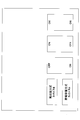
- the figure which shows an example of the selection screen in 8th Embodiment The flowchart which shows the operation procedure of the touchscreen unit in 9th Embod
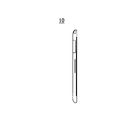
- FIG. 1A is a top view of the tablet terminal 10 to which the touch panel unit 100 according to the present embodiment is attached
- FIG. 1B is a side view
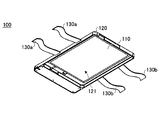
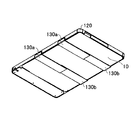
- FIG. 2 is a perspective view of touch panel unit 100 in the present embodiment
- FIG. 3 is a perspective view of the tablet terminal 10 and the touch panel unit 100 in a state before the touch panel unit 100 is attached to the tablet terminal 10
- FIG. 4 is a perspective view of a state in which the touch panel unit 100 is attached to the tablet terminal 10. It is.
- the touch panel unit 100 in this embodiment has a touch panel 110 and is attached to the tablet terminal 10 including the touch panel 20 shown in FIG. 1A.
- the touch panel 20 provided in the tablet terminal 10 is a capacitive touch panel that employs a capacitive contact position detection method.
- the touch panel unit 100 includes a touch panel 110, a bezel cover 120, and fixing tapes 130a and 130b, as shown in FIG.
- a recess 121 is formed in the bezel cover 120 so that the tablet terminal 10 can be inserted, and a touch panel 110 is installed in a central portion of the bezel cover 120.
- two fixing tapes 130 a and 130 b are connected to each side surface of the bezel cover 120.
- the fixing tapes 130a and 130b are, for example, hook-and-loop fasteners capable of attaching and detaching one and the other surface.
- the touch panel 110 is a resistive film type touch panel that employs a resistive film contact position detection method.
- the touch panel unit 100 in the present embodiment is attached to the tablet terminal 10 from the front side where the touch panel 20 of the tablet terminal 10 is installed, as shown in FIGS. 3 and 4. Specifically, by attaching the fixing tape 130a and the fixing tape 130b on the back side of the tablet terminal 10 in a state where the tablet terminal 10 is inserted into the concave portion 121 of the touch panel unit 100 in the present embodiment from the front side.
- the touch panel unit 100 is attached to the tablet terminal 10.
- the touch panel 20 may be a resistive touch panel
- the touch panel 110 of the touch panel unit 100 may be a capacitive touch panel. That is, in order to be able to use a plurality of types of touch panels with a single tablet terminal, the touch panel 20 mounted on the tablet terminal 10 and the touch panel 110 of the touch panel unit 100 have different detection methods. Good.
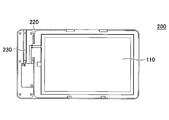
- FIG. 5 is an orthographic view of the touch panel unit 200 in the present embodiment
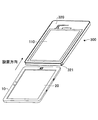
- FIG. 6 is a perspective view of the tablet terminal 10 and the touch panel unit 200 in a state before the touch panel unit 200 is attached to the tablet terminal 10.
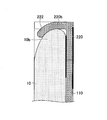
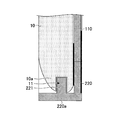
- FIG. 7 is a cross-sectional view taken along a dashed line 5A-5B in FIG. 5 in a state where the touch panel unit 200 is attached to the tablet terminal 10.
- 8A and 8B are partial enlarged views of FIG.
- the touch panel unit 200 in this embodiment includes a touch panel 110 and a bezel cover 220.
- the bezel cover 220 is formed with a recess so that the tablet terminal 10 can be inserted, and the touch panel 110 is installed at the center of the bezel cover 220.
- the mounting hole 11 is provided in one side surface 10 a of the side surfaces in the longitudinal direction of the tablet terminal 10, and the inside of the one side surface 220 a of the bezel cover 220 has the tablet terminal 10.
- Protrusions 221 that are inserted into the attachment holes 11 provided on the side surface 10a are provided.
- the other side surface 220b of the bezel cover 220 facing the side surface 220a on which the protruding portion 221 is formed is bent inward to form a lock portion 222.
- the touch panel unit 200 can be attached to the tablet terminal 10 by inserting 10b inside the lock portion 222 formed on the other side surface 220b of the bezel cover 220.
- the touch panel unit 200 is configured such that the operation pen 230 used for operating the touch panel 110 can be stored in the bezel cover 220. Good.
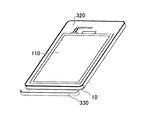
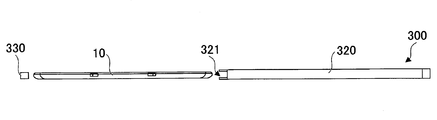
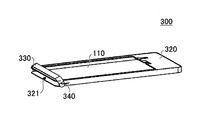
- FIGS. 10 is a perspective view of a state before the tablet terminal 10 is inserted into the touch panel unit 300 according to the present embodiment
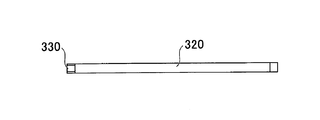
- FIG. 11 is a perspective view of a state where the tablet terminal 10 is inserted into the touch panel unit 300. is there.
- 12 is a side view of the state before the tablet terminal 10 is inserted into the touch panel unit 300
- FIG. 13 is a side view of the state where the tablet terminal 10 is inserted into the touch panel unit 300 and the lid 330 is closed. is there.
- the touch panel unit 300 in this embodiment includes a touch panel 110, a bezel cover 320, and a lid 330.
- the bezel cover 320 is formed in a box shape so that the tablet terminal 10 can be accommodated, and has an opening 321 into which the tablet terminal 10 can be inserted.
- the tablet terminal 10 is inserted into the bezel cover 320 through the opening 321 so that the side on which the touch panel 20 is provided faces the touch panel 110 of the touch panel unit 300, and the opening 321 is closed by the lid 330.
- the lid 330 may be formed of metal or the like, or may be formed of waterproof tape or rubber. When the lid 330 is formed of waterproof tape or rubber, the bezel cover 320 can be sealed, so that the touch panel unit 300 has a waterproof structure.
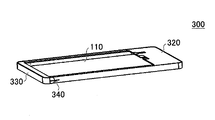
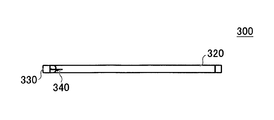
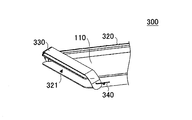
- the lid 330 may be connected to the bezel cover 320 by a spring 340 as shown in FIGS. 14 is a perspective view of a state in which the lid 330 is closed in the touch panel unit 300 in which the lid 330 is attached to the bezel cover 320 by a spring 340,
- FIG. 15 is a side view
- FIG. FIG. 15 is a partially enlarged view of FIG. 14.
- FIG. 17 is a perspective view showing a state in which the lid 330 is open
- FIG. 18 is a side view
- FIG. 19 is an enlarged perspective view of a main part.
- the tablet terminal 10 is inserted into the bezel cover 320 through the opening 321 with the lid 330 connected to the bezel cover 320 by the spring 340 open, and the lid 330 is closed, whereby the tablet terminal is placed inside the touch panel unit 300. 10 can be installed.
- a connector 350 that is connected to a connector (not shown) provided in the tablet terminal 10 can be It may be provided inside.
- 20 is a perspective view of the touch panel unit 300 in which a connector 350 is provided inside the bezel cover 320
- FIG. 21A is a top view
- FIG. 21B is a cross-sectional view taken along one-dot chain line 21A-21B in FIG. 21A. It is.
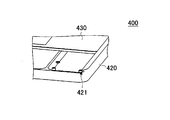
- FIGS. 22 is a perspective view of the touch panel unit 400 in the present embodiment
- FIG. 23 is a partially enlarged view of FIG. 22
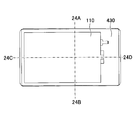
- FIG. 24 is a diagram illustrating the tablet terminal 10 installed in the touch panel unit 400 in the present embodiment.
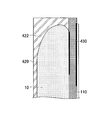
- 25 is a cross-sectional view taken along one-dot chain line 24A-24B in FIG. 24,
- FIG. 26 is a partially enlarged view of FIG. 25, and
- FIG. 27 is a one-dot chain line 24C- It is sectional drawing in 24D.
- the touch panel unit 400 in this embodiment includes a touch panel 110, a housing 420, and a bezel cover 430.
- the touch panel 110 is installed on the bezel cover 430.
- the case 420 is formed in a concave shape so that the tablet terminal 10 can be accommodated, and groove portions 421 are formed on both side surfaces inside the case 420 so that the bezel cover 430 can slide and move.
- a fixing portion 422 having a shape corresponding to the outer shape of the tablet terminal 10 is formed inside the housing 420 formed in a concave shape. Since the position of the tablet terminal 10 placed inside the housing 420 formed in a concave shape is determined by the fixing portion 422, the tablet terminal 10 can be installed at a desired position. In this state, the tablet terminal 10 can be installed in the touch panel unit 400 in the present embodiment by inserting the bezel cover 430 into the groove portions 421 on both sides of the housing 420 and sliding the bezel cover 430 to close the bezel cover 430. .
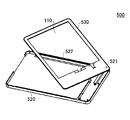
- FIG. 28 is a perspective view of the touch panel unit 500 in the present embodiment
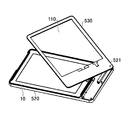
- FIG. 29 is a perspective view of a state in which the tablet terminal 10 is inserted into the touch panel unit 500 and the bezel cover 530 is partially opened.
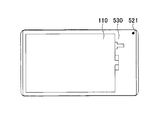
- FIG. 30 is a top view of a state in which the tablet terminal 10 is installed on the touch panel unit 500.
- the touch panel unit 500 in the present embodiment includes a touch panel 110, a housing 520, and a bezel cover 530.
- the touch panel 110 is installed on the bezel cover 530.
- the housing 520 is formed in a concave shape so that the tablet terminal 10 can be accommodated, and the bezel cover 530 is connected to the corner portion of the housing 520 in a state of being rotatable around the shaft portion 521.
- a fixed portion 522 having a shape corresponding to the outer shape of the tablet terminal 10 is formed inside the housing 520 formed in a concave shape.
- the tablet terminal 10 can be installed at a desired position by the fixing portion 522 inside the housing 520 formed in a concave shape. With the tablet terminal 10 in the housing 520, the bezel cover 530 is rotated around the shaft 521 and closed as shown in FIG. The tablet terminal 10 can be installed.
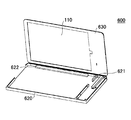
- FIG. 31 is a perspective view of the touch panel unit 600 in the present embodiment
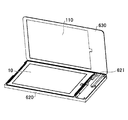
- FIG. 32 is a perspective view of a state in which the tablet terminal 10 is inserted into the touch panel unit 600 and the bezel cover 630 is opened.
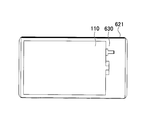
- FIG. 33 is a top view of a state in which the tablet terminal 10 is installed on the touch panel unit 600.
- the touch panel unit 600 in this embodiment includes a touch panel 110, a housing 620, and a bezel cover 630.
- the touch panel 110 is installed on the bezel cover 630.
- the housing 620 is formed in a concave shape so that the tablet terminal 10 can be accommodated, and the bezel cover 630 can be opened and closed around the shaft portion 621 along the side edge of the housing 620. It is connected to the.
- a fixing portion 622 having a shape corresponding to the outer shape of the tablet terminal 10 is formed inside the housing 620 formed in a concave shape.
- the tablet terminal 10 is placed in a desired position by the fixing portion 622 by being put inside the housing 620 formed in a concave shape. In this state, by closing the bezel cover 630 around the shaft portion 621, the tablet terminal 10 can be installed in the touch panel unit 600 in the present embodiment as shown in FIG.
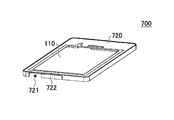
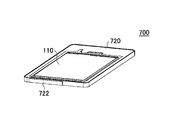
- FIGS. 34 and 35 are perspective views of the touch panel unit 700 in the present embodiment.
- FIG. 34 shows a state in which the slide cover 722 provided on the bezel cover 720 is open
- FIG. 35 shows the slide cover 722.
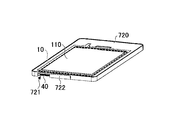
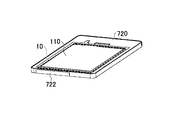
- 36 and 37 are perspective views of a state in which the tablet terminal 10 is put in the touch panel unit 700
- FIG. 36 shows a state in which a slide cover 722 provided on the bezel cover 720 is open
- FIG. The state where the slide cover 722 is closed is shown.
- the touch panel unit 700 in this embodiment includes a touch panel 110, a bezel cover 720, and a slide cover 722.
- the touch panel 110 is installed on the bezel cover 720, and the bezel cover 720 is formed so that the tablet terminal 10 can be accommodated.
- On the side surface of the bezel cover 720 an opening 721 is formed at a position corresponding to the position where the connection terminal 40 of the tablet terminal 10 is provided, and a slide cover 722 for opening and closing the opening 721 is provided.
- connection terminal 40 in the tablet terminal 10 can be exposed from the opening 721 by sliding the slide cover 722 to open. Thereby, even when the tablet terminal 10 is put in the touch panel unit 700, the connection terminal 40 in the tablet terminal 10 and a connector (not shown) outside the touch panel unit 700 can be connected.
- the touch panel to be used is manually switched in a state where the touch panel unit is attached to the tablet terminal and the connector of the touch panel unit (for example, the connector 350 in FIGS. 20 and 21B) and the connector of the tablet terminal are connected.
- the connector of the touch panel unit for example, the connector 350 in FIGS. 20 and 21B
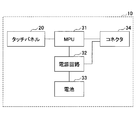
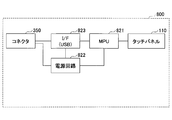
- the tablet terminal 10 includes an electrostatic membrane type touch panel 20, an MPU (Micro-processing unit) 31, a power supply circuit 32, a battery 33, and a connector 34.
- the touch panel unit 800 includes a resistive film type touch panel 110, an MPU 821, a power supply circuit 822, an I / F 823, and a connector 350.
- the connector 34 of the tablet terminal 10 and the connector 350 of the touch panel unit 800 are connected. Power may be supplied to the touch panel unit 800 from the battery 33 of the tablet terminal 10 by connecting the connectors 34 and 350.
- a battery may be mounted on the touch panel unit 800 and power may be supplied from the touch panel unit 800 to the tablet terminal 10.
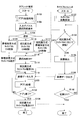
- step 102 an application activation process is performed in the tablet terminal 10. Specifically, the tablet terminal 10 is started up.
- step 104 an input device selection screen is displayed on the display of the tablet terminal 10 for selection of the touch panel.
- the capacitive touch panel 20 is used, the resistive touch panel 110 is used, or the capacitive touch panel 20 and the resistive touch panel 110 are used.
- a selection screen for selecting whether to use both is displayed.
- step 106 the operator touches the selection screen displayed on the tablet terminal 10, thereby causing the capacitive touch panel 20, the resistive touch panel 110, or the capacitive touch panel. 20 and the resistance film type touch panel 110 are used.
- the capacitive touch panel 20 is selected, the process proceeds to step 108. If the resistive touch panel 110 is selected, the process proceeds to step 110. If both the capacitive touch panel 20 and the resistive touch panel 110 are selected, the process proceeds to step 112.
- step 108 after the capacitive touch panel 20 is selected and the selection screen disappears, the on state of the capacitive touch panel 20 is continued. That is, the tablet terminal 10 can be operated as usual even after step 108.
- step 110 control for using the resistive touch panel 110 in the tablet terminal 10 is started. Specifically, in order to perform control to turn off the capacitive touch panel 20 and turn on the resistive touch panel 110, the process proceeds to step 114.
- step 112 the tablet terminal 10 performs control for using both the capacitive touch panel 20 and the resistive touch panel 110. Specifically, the process proceeds to step 114 in order to continue the ON state of the capacitive touch panel 20 and perform control to turn on the resistive touch panel 110.
- step 114 the display of the selection screen disappears in the tablet terminal 10.
- step 116 the resistive touch panel 110 is turned on.
- an instruction is issued from the tablet terminal 10 to the touch panel unit 800.
- step 132 the touch panel unit 800 performs a touch panel activation process, and turns on the resistive touch panel 110.
- step 134 it is determined whether or not there is a touch on the resistive touch panel 110. If there is contact with the resistive touch panel 110, the process proceeds to step 136. If contact with the resistive touch panel 110 is not detected, step 134 is repeated.
- the touch panel unit 800 detects the coordinates of the touched position on the resistive touch panel 110 in step 136 (S136). .
- step 138 position coordinate data detected by the resistive touch panel 110 is output from the touch panel unit 800 to the tablet terminal 10.
- touch panel unit 800 determines in step 140 (S140) whether to turn off the power. If it is determined that the power is to be turned off by the operation of the operator, the process is terminated.
- step 138 when the position coordinate data detected by the resistive touch panel 110 is output from the touch panel unit 800 to the tablet terminal 10, in step 118 (S118), the position coordinate data is output to the tablet terminal 10. Data is entered.
- step 120 processing by the application is performed based on the position coordinate data input to the tablet terminal 10.
- step 122 it is determined whether or not the application is to be ended. If it is determined that the application is to be ended, the process proceeds to step 124, and if it is determined that the application is not to be ended. , The process proceeds to step 118.
- step 124 the tablet terminal 10 performs control to turn off the resistive touch panel 110, and this instruction is transmitted to the touch panel unit 800. Thus, the power of the touch panel unit 800 is turned off.
- step S114 and the subsequent steps are executed, and as in the case of moving to step 108, the step is performed. From 112 onward, the on-state of the capacitive touch panel 20 is continued. When contact is detected by the capacitive touch panel 20, the tablet terminal 10 performs processing according to the detected content.
- the tablet terminal is attached to the touch panel unit, and the touch panel used is connected to the connector of the touch panel unit (for example, the connector 350 in FIGS. 20 and 21B) and the connector of the tablet terminal.
- the electrostatic film type touch panel 20 is automatically switched to the resistive film type touch panel 110 of the touch panel unit 800.
- the tablet terminal 10 and the touch panel unit 800 are the same as those in the eighth embodiment.
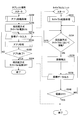
- step 202 an application activation process is performed in the tablet terminal 10. Specifically, the tablet terminal 10 is started up.
- step 216 control is performed to turn on the resistance film type touch panel 110.
- step 232 in response to an instruction from the tablet terminal 10, the touch panel unit 800 performs a touch panel activation process to turn on the resistive touch panel 110.
- the process of step 216 is performed when the tablet terminal 10 detects that the connector 350 of the touch panel unit 800 is connected to the connector 34 of the tablet terminal 10.
- step 234 it is determined whether or not there is a contact with the resistive touch panel 110. If there is contact with the resistive touch panel 110, the process proceeds to step 236. If there is no contact with the resistive touch panel 110, step 234 is repeated.
- step 234 if there is a contact with the resistive touch panel 110, the touch panel unit 800 detects the coordinates of the touched position on the resistive touch panel 110 in step 236 (S236).
- step 238 the detected coordinate data of the contact position of the resistive touch panel 110 is output from the touch panel unit 800 to the tablet terminal 10.
- touch panel unit 800 determines in step 240 (S240) whether or not to turn off the power. If it is determined that the power is to be turned off, the process ends, and if it is determined not to turn off the power. Then, the process proceeds to step 234.
- step 238 when the position coordinate data detected by the resistive touch panel 110 is output from the touch panel unit 800 to the tablet terminal 10, the position coordinate data is stored in the tablet terminal 10 in step 218 (S218). Entered.
- step 220 processing by the application is performed based on the input coordinate data.
- step 222 it is determined whether or not the application is to be ended. If it is determined that the application is to be ended, the process proceeds to step 224, and if it is determined that the application is not to be ended. The process proceeds to step 218.
- step 224 the tablet terminal 10 performs control to turn off the resistive touch panel 110. This instruction is transmitted to the touch panel unit 800, and the power of the touch panel unit 800 is turned off.
- the touch panel unit bezel cover, casing, and the like may be formed of a resin material, metal, rubber, or the like. Communication between the touch panel unit and the tablet terminal 10 may be performed wirelessly.
- the touch panel unit of the above embodiment can be applied to an information terminal other than a tablet terminal, such as a smartphone.
Landscapes
- Engineering & Computer Science (AREA)
- Theoretical Computer Science (AREA)
- General Engineering & Computer Science (AREA)
- Human Computer Interaction (AREA)
- Physics & Mathematics (AREA)
- General Physics & Mathematics (AREA)
- Computer Hardware Design (AREA)
- Position Input By Displaying (AREA)
Priority Applications (2)
| Application Number | Priority Date | Filing Date | Title |
|---|---|---|---|
| CN201580070132.4A CN107148606A (zh) | 2014-12-26 | 2015-12-02 | 触控面板单元 |
| US15/537,934 US20170344070A1 (en) | 2014-12-26 | 2015-12-02 | Touch panel unit |
Applications Claiming Priority (2)
| Application Number | Priority Date | Filing Date | Title |
|---|---|---|---|
| JP2014265724A JP6411210B2 (ja) | 2014-12-26 | 2014-12-26 | タッチパネルユニット |
| JP2014-265724 | 2014-12-26 |
Publications (1)
| Publication Number | Publication Date |
|---|---|
| WO2016104084A1 true WO2016104084A1 (ja) | 2016-06-30 |
Family
ID=56150116
Family Applications (1)
| Application Number | Title | Priority Date | Filing Date |
|---|---|---|---|
| PCT/JP2015/083881 Ceased WO2016104084A1 (ja) | 2014-12-26 | 2015-12-02 | タッチパネルユニット |
Country Status (4)
| Country | Link |
|---|---|
| US (1) | US20170344070A1 (enExample) |
| JP (1) | JP6411210B2 (enExample) |
| CN (1) | CN107148606A (enExample) |
| WO (1) | WO2016104084A1 (enExample) |
Families Citing this family (2)
| Publication number | Priority date | Publication date | Assignee | Title |
|---|---|---|---|---|
| US20200057549A1 (en) | 2017-03-30 | 2020-02-20 | Shimadzu Corporation | Analysis device equipped with touch panel device, method for display control thereof, and program |
| JP7800122B2 (ja) * | 2021-12-23 | 2026-01-16 | 株式会社リコー | 表示装置 |
Citations (6)
| Publication number | Priority date | Publication date | Assignee | Title |
|---|---|---|---|---|
| JPH04160427A (ja) * | 1990-10-23 | 1992-06-03 | Canon Inc | タッチパネル |
| JP2005056088A (ja) * | 2003-08-01 | 2005-03-03 | Ricoh Co Ltd | タッチパネル付きディスプレイ装置、タッチパネル付きディスプレイ装置の制御方法およびその方法をコンピュータに実行させるためのプログラム |
| JP2006309466A (ja) * | 2005-04-27 | 2006-11-09 | Pioneer Electronic Corp | タッチパネルのキャリブレーション制御方法、制御プログラム及び制御装置 |
| JP2010073071A (ja) * | 2008-09-19 | 2010-04-02 | Sony Computer Entertainment Inc | 入力装置及び入力操作補助パネル |
| JP2012043369A (ja) * | 2010-08-23 | 2012-03-01 | Toshiba Tec Corp | 表示装置用カバーおよびカバー付き表示装置 |
| JP2013093002A (ja) * | 2011-10-24 | 2013-05-16 | Patent Connections Co Ltd | カバーケースおよびカバーケースセット |
Family Cites Families (24)
| Publication number | Priority date | Publication date | Assignee | Title |
|---|---|---|---|---|
| US20030092468A1 (en) * | 2001-11-15 | 2003-05-15 | North Vaughn W. | Combination thinline phone and PDA |
| WO2005029705A2 (en) * | 2003-09-18 | 2005-03-31 | Bioarray Solutions, Ltd. | Number coding for identification of subtypes of coded types of solid phase carriers |
| US20060214871A1 (en) * | 2005-03-23 | 2006-09-28 | Ryuichi Iwamura | Additional thin display device for supplementing a primary display |
| CN101169694A (zh) * | 2006-10-26 | 2008-04-30 | 中强光电股份有限公司 | 面板固定装置 |
| WO2008115931A1 (en) * | 2007-03-19 | 2008-09-25 | James Burns | Attachable device accessory case cover with interchangeable components |
| US20080231605A1 (en) * | 2007-03-21 | 2008-09-25 | Kai-Ti Yang | Compound touch panel |
| TW200915820A (en) * | 2007-09-19 | 2009-04-01 | Giga Byte Tech Co Ltd | Touch panel structure having dual touch-modes, and signal processing method and device |
| CN101727223A (zh) * | 2008-10-14 | 2010-06-09 | 介面光电股份有限公司 | 双面复合式触控面板结构 |
| US7876288B1 (en) * | 2010-08-11 | 2011-01-25 | Chumby Industries, Inc. | Touchscreen with a light modulator |
| JP2012141690A (ja) * | 2010-12-28 | 2012-07-26 | Alps Electric Co Ltd | 入力装置 |
| CN102645954A (zh) * | 2011-02-16 | 2012-08-22 | 索尼爱立信移动通讯有限公司 | 便携式终端 |
| US8994686B2 (en) * | 2011-10-17 | 2015-03-31 | Topaz Systems, Inc. | Digitizer |
| US8743066B2 (en) * | 2011-12-09 | 2014-06-03 | Blackberry Limited | Electronic device with capacitive touch-sensitive display |
| CN104246665B (zh) * | 2012-04-27 | 2016-12-14 | 株式会社村田制作所 | 操作输入装置以及信息显示装置 |
| JP2013232033A (ja) * | 2012-04-27 | 2013-11-14 | Nec Casio Mobile Communications Ltd | 端末装置、及び端末装置の制御方法 |
| US9469469B2 (en) * | 2012-06-01 | 2016-10-18 | Treefrog Developments, Inc. | Housing for encasing an object having a thin profile |
| US8928623B2 (en) * | 2012-06-29 | 2015-01-06 | Harris Corporation | Auxiliary user input device |
| KR20140055703A (ko) * | 2012-11-01 | 2014-05-09 | 삼성전자주식회사 | 컨텐츠 공유 방법 및 시스템 |
| JP2014238701A (ja) * | 2013-06-07 | 2014-12-18 | 富士通株式会社 | 入力装置,情報処理装置,プログラム |
| KR20150004714A (ko) * | 2013-07-03 | 2015-01-13 | 삼성전자주식회사 | 입력장치 및 이를 구비한 휴대 단말기 |
| TWI492136B (zh) * | 2013-10-11 | 2015-07-11 | Aevoe Inc | 可攜式行動裝置之保護裝置 |
| KR102243652B1 (ko) * | 2014-02-17 | 2021-04-23 | 엘지전자 주식회사 | 디스플레이 디바이스 및 그 제어 방법 |
| US10222840B2 (en) * | 2014-10-15 | 2019-03-05 | Samsung Electronics Co., Ltd. | Display apparatus and controlling method thereof |
| KR102482398B1 (ko) * | 2016-04-29 | 2022-12-27 | 엘지디스플레이 주식회사 | 터치 스크린 장치 및 이를 포함하는 전자 기기 |
-
2014
- 2014-12-26 JP JP2014265724A patent/JP6411210B2/ja not_active Expired - Fee Related
-
2015
- 2015-12-02 WO PCT/JP2015/083881 patent/WO2016104084A1/ja not_active Ceased
- 2015-12-02 US US15/537,934 patent/US20170344070A1/en not_active Abandoned
- 2015-12-02 CN CN201580070132.4A patent/CN107148606A/zh active Pending
Patent Citations (6)
| Publication number | Priority date | Publication date | Assignee | Title |
|---|---|---|---|---|
| JPH04160427A (ja) * | 1990-10-23 | 1992-06-03 | Canon Inc | タッチパネル |
| JP2005056088A (ja) * | 2003-08-01 | 2005-03-03 | Ricoh Co Ltd | タッチパネル付きディスプレイ装置、タッチパネル付きディスプレイ装置の制御方法およびその方法をコンピュータに実行させるためのプログラム |
| JP2006309466A (ja) * | 2005-04-27 | 2006-11-09 | Pioneer Electronic Corp | タッチパネルのキャリブレーション制御方法、制御プログラム及び制御装置 |
| JP2010073071A (ja) * | 2008-09-19 | 2010-04-02 | Sony Computer Entertainment Inc | 入力装置及び入力操作補助パネル |
| JP2012043369A (ja) * | 2010-08-23 | 2012-03-01 | Toshiba Tec Corp | 表示装置用カバーおよびカバー付き表示装置 |
| JP2013093002A (ja) * | 2011-10-24 | 2013-05-16 | Patent Connections Co Ltd | カバーケースおよびカバーケースセット |
Also Published As
| Publication number | Publication date |
|---|---|
| US20170344070A1 (en) | 2017-11-30 |
| JP6411210B2 (ja) | 2018-10-24 |
| CN107148606A (zh) | 2017-09-08 |
| JP2016126455A (ja) | 2016-07-11 |
Similar Documents
| Publication | Publication Date | Title |
|---|---|---|
| US11294494B2 (en) | Electronic device with protective case and operating method thereof | |
| US10684659B2 (en) | Electronic device comprising display with switch | |
| EP2645681B1 (en) | Adapter for Connecting Mobile Terminals | |
| US10129376B2 (en) | Mobile terminal | |
| EP3117298B1 (en) | Conductive trace routing for display and bezel sensors | |
| CN104615374B (zh) | 终端输入操作指令的方法及装置 | |
| EP2804070B1 (en) | Portable terminal having cover device | |
| JP2020500362A (ja) | 誤タッチ防止のための方法、及び端末 | |
| EP4060471B1 (en) | Electronic device comprising touch sensor | |
| US20180109132A1 (en) | Electronic device with wireless charging structure | |
| CN209017257U (zh) | Tws耳机充电盒 | |
| CN104146469A (zh) | 电子设备的保护套以及使用该保护套的输入方法 | |
| CN106055204B (zh) | 一种信息显示方法及装置 | |
| JP6411210B2 (ja) | タッチパネルユニット | |
| JP7495507B2 (ja) | 電子機器及び制御方法 | |
| CN104423829B (zh) | 一种信息处理方法及电子设备 | |
| KR102501527B1 (ko) | 터치키를 포함하는 전자 장치 | |
| CN207339942U (zh) | 一种智能终端 | |
| CN105843432A (zh) | 一种触摸屏保护面板 | |
| JP2010074701A (ja) | タッチパネル | |
| US20140240276A1 (en) | Portable terminal | |
| CN210666738U (zh) | 用于智能家居的触控显示组件及电子触控装置 | |
| CN203691455U (zh) | 移动终端 | |
| CN102081456A (zh) | 配置有手写板的鼠标器 | |
| CN204009800U (zh) | 一种触控显示面板 |
Legal Events
| Date | Code | Title | Description |
|---|---|---|---|
| 121 | Ep: the epo has been informed by wipo that ep was designated in this application |
Ref document number: 15872653 Country of ref document: EP Kind code of ref document: A1 |
|
| WWE | Wipo information: entry into national phase |
Ref document number: 15537934 Country of ref document: US |
|
| NENP | Non-entry into the national phase |
Ref country code: DE |
|
| 122 | Ep: pct application non-entry in european phase |
Ref document number: 15872653 Country of ref document: EP Kind code of ref document: A1 |