WO2015155892A1 - 情報端末装置及び画像表示方法 - Google Patents
情報端末装置及び画像表示方法 Download PDFInfo
- Publication number
- WO2015155892A1 WO2015155892A1 PCT/JP2014/060513 JP2014060513W WO2015155892A1 WO 2015155892 A1 WO2015155892 A1 WO 2015155892A1 JP 2014060513 W JP2014060513 W JP 2014060513W WO 2015155892 A1 WO2015155892 A1 WO 2015155892A1
- Authority
- WO
- WIPO (PCT)
- Prior art keywords
- page
- image display
- display
- displayed
- information terminal
- Prior art date
- Legal status (The legal status is an assumption and is not a legal conclusion. Google has not performed a legal analysis and makes no representation as to the accuracy of the status listed.)
- Ceased
Links
Images




Classifications
-
- G—PHYSICS
- G06—COMPUTING OR CALCULATING; COUNTING
- G06F—ELECTRIC DIGITAL DATA PROCESSING
- G06F3/00—Input arrangements for transferring data to be processed into a form capable of being handled by the computer; Output arrangements for transferring data from processing unit to output unit, e.g. interface arrangements
- G06F3/01—Input arrangements or combined input and output arrangements for interaction between user and computer
- G06F3/048—Interaction techniques based on graphical user interfaces [GUI]
- G06F3/0484—Interaction techniques based on graphical user interfaces [GUI] for the control of specific functions or operations, e.g. selecting or manipulating an object, an image or a displayed text element, setting a parameter value or selecting a range
- G06F3/0485—Scrolling or panning
-
- G—PHYSICS
- G06—COMPUTING OR CALCULATING; COUNTING
- G06F—ELECTRIC DIGITAL DATA PROCESSING
- G06F3/00—Input arrangements for transferring data to be processed into a form capable of being handled by the computer; Output arrangements for transferring data from processing unit to output unit, e.g. interface arrangements
- G06F3/01—Input arrangements or combined input and output arrangements for interaction between user and computer
- G06F3/048—Interaction techniques based on graphical user interfaces [GUI]
- G06F3/0481—Interaction techniques based on graphical user interfaces [GUI] based on specific properties of the displayed interaction object or a metaphor-based environment, e.g. interaction with desktop elements like windows or icons, or assisted by a cursor's changing behaviour or appearance
- G06F3/0482—Interaction with lists of selectable items, e.g. menus
-
- G—PHYSICS
- G06—COMPUTING OR CALCULATING; COUNTING
- G06F—ELECTRIC DIGITAL DATA PROCESSING
- G06F3/00—Input arrangements for transferring data to be processed into a form capable of being handled by the computer; Output arrangements for transferring data from processing unit to output unit, e.g. interface arrangements
- G06F3/01—Input arrangements or combined input and output arrangements for interaction between user and computer
- G06F3/048—Interaction techniques based on graphical user interfaces [GUI]
- G06F3/0487—Interaction techniques based on graphical user interfaces [GUI] using specific features provided by the input device, e.g. functions controlled by the rotation of a mouse with dual sensing arrangements, or of the nature of the input device, e.g. tap gestures based on pressure sensed by a digitiser
- G06F3/0488—Interaction techniques based on graphical user interfaces [GUI] using specific features provided by the input device, e.g. functions controlled by the rotation of a mouse with dual sensing arrangements, or of the nature of the input device, e.g. tap gestures based on pressure sensed by a digitiser using a touch-screen or digitiser, e.g. input of commands through traced gestures
Definitions
- the present invention relates to an information terminal device and an image display method.
- Patent Document 1 discloses a system that includes an information terminal that displays a plurality of application windows, and at least one image display device that is connected to the information terminal and displays the contents of any one of the application windows.
- the information terminal includes a display destination of the contents of the application window and a display state instruction unit.
- the image display apparatus instructed by the instruction unit displays the application window of the information terminal according to the display state instructed by the instruction unit. Display the contents in the same state or in different states.
- Patent Document 1 an image display device that displays the contents of each application window is fixed and set for a plurality of application windows displayed on the information terminal. For this reason, since the content of the application to be displayed and the image display device are linked one-to-one, the user prepares the number of applications or documents corresponding to the number of image display devices to be used, and for each application window. It is necessary to perform operations such as page turning. Therefore, when a presentation is performed using a plurality of image display devices, there is a problem that the display operation for each window displayed on the information terminal takes time and is not easy to use.
- an object of the present invention is to provide an information terminal device and an image display method that are easy to use at the time of presentation in consideration of the above problems.
- the present invention is an information terminal device connected to at least one or more image display devices, wherein a display unit that displays one or more pages of a document, and any document page displayed on the display unit A communication unit that transmits display data corresponding to the selected page to at least one of the image display devices; It can implement
- the present invention can be realized as a method for executing the function of each unit of the information terminal device.
- FIG. 1 is a configuration diagram of an image display system according to Embodiment 1.
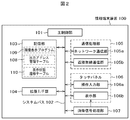
- FIG. 1 is a block diagram of an information terminal device according to Embodiment 1.
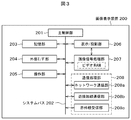
- FIG. 1 is a block diagram of an image display device according to Embodiment 1.
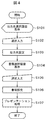
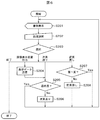
- FIG. 3 is a flowchart illustrating image display processing according to the first embodiment.
- FIG. 3 is an image display device selection screen display diagram according to the first embodiment.
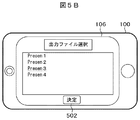
- FIG. 6 is a document selection screen display diagram according to the first embodiment.
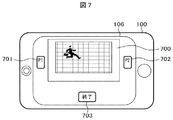
- FIG. 3 is a screen display diagram of an information terminal device and an image display device in a presentation process according to Embodiment 1.
- FIG. 10 is a flowchart illustrating presentation processing according to the second embodiment.
- FIG. 10 is a screen display diagram of the information terminal device in the presentation process according to the second embodiment.
- 10 is a flowchart illustrating presentation processing according to the third embodiment.
- FIG. 10 is a screen display diagram of an information terminal device in presentation processing according to a third embodiment.
- 10 is a flowchart illustrating presentation processing according to a fourth embodiment.
- FIG. 10 is a screen display diagram of an information terminal device in presentation processing according to a fourth embodiment.
- Example 1 is an example in which a document composed of a plurality of pages is transmitted to an image display device selected from a plurality of image display devices for each page.
- FIG. 1 is a configuration diagram of an image display system according to the first embodiment.
- the information terminal device 100 is connected to the network 300 by the network communication unit 105a, and the image display devices 200A and 200B are connected to the network 300 by the network communication unit 208a.
- the main control unit 101 is constituted by a CPU (Central Processing Unit) or the like, and controls each component by executing an image display program 109 stored in the storage unit 103 to perform various processes.
- a system bus 102 is a data communication path for transmitting and receiving data between the main control unit 101 and each operation block in the information terminal device 100.
- the extended I / F unit 104 is, for example, a USB (Universal Serial Bus) or the like, and is an interface that transmits / receives data to / from an external device.
- USB Universal Serial Bus
- the communication processing unit 105 includes a network communication unit 105a and a proximity wireless communication unit 105b.
- the network communication unit 105a connects to the network by wired or wireless communication, and transmits and receives information.
- the proximity wireless communication unit 105b performs wireless communication when in proximity to a device equipped with, for example, an NFC (Near Field Communication) function.
- NFC Near Field Communication
- the touch panel 106 includes an operation input unit 106a and a display unit 106b.
- the display unit 106b displays images and images such as an LCD, and has an operation input unit 106a on the display surface of the display unit 106b.
- the operation input unit 106a is, for example, an input unit of a touch pad type such as a capacitance type, and inputs a touch operation with a finger or a touch pen.
- a gesture called swipe that moves the finger in a specific direction while touching the touch panel after touching the finger
- a flick that moves the finger at a speed equal to or higher than a predetermined value after touching the touch panel with the finger
- releases the finger Operation input to the information terminal device 100 can be performed by a gesture called, a gesture called a tap that is quickly released after touching the touch panel with a finger.
- the image signal processing unit 107 includes a video RAM (not shown), and realizes screen display by inputting image data to the video RAM.
- the image display program 109 stored in the storage unit 103 can be updated and added as needed by downloading from the server 400 or the like connected to the network 300 by the network communication unit 105a. It is also possible to connect to an external device such as a personal computer via the extended I / F unit 104 to update or add data or application software.
- the information terminal apparatus 100 may be a smart phone, a PDA (Personal Digital Assistant), or a notebook PC.
- FIG. 3 is a block diagram of the image display apparatus according to the first embodiment.
- the image display apparatus 200 includes a main control unit 201, a system bus 202, a storage unit 203, an external I / F unit 204, an operation unit 205, a display / projection unit 206, an image signal processing unit 207, and a communication processing unit 208.
- the image display apparatus 200 includes a main control unit 201, a system bus 202, a storage unit 203, an external I / F unit 204, an operation unit 205, a display / projection unit 206, an image signal processing unit 207, and a communication processing unit 208.
- the image display device 200 may be a projector device that enlarges and projects an image displayed on a small liquid crystal panel or the like onto a screen with an optical lens or the like, or a direct-view type monitor device such as a plasma display or an organic EL (Electro-Luminescence) display. It may be. Further, it may be a television having a digital broadcast receiving function. In the present embodiment, the image display device 200 will be described as a projector device.
- the main control unit 201 controls each component and performs various processes.
- the system bus 202 is a data communication path for transmitting and receiving data between the main control unit 201 and each unit in the image display apparatus 200.
- the storage unit 103 stores the output address management table 108 in which the output destination address of the image is recorded, and stores each operation setting value of the image display device 200, an adjustment image of the image display device 200, and the like. It is also assumed that the user of the image display device 200 can store a still image or a moving image according to his / her preference.
- the external I / F unit 204 is an interface for extending the functions of the image display device 200, and connects a USB device or a memory card.
- the operation unit 205 is an instruction input unit that inputs an instruction based on an operation of the user of the image display apparatus 200, and is used for operations such as selection of an input signal and image adjustment. It may be realized by a multi key in which button switches are arranged, or may be realized by a touch panel. Further, the operation unit 205 may be replaced by operating the external I / F unit 204 by connecting a mouse, a keyboard, or the like. Alternatively, the operation unit 205 may be replaced by receiving an infrared remote control signal from a remote controller (not shown) by the infrared reception unit 208c and operating the remote control.
- the display / projection unit 208 is a display device such as a liquid crystal panel, for example, displays the image information processed in the image signal processing unit 207, and projects the image information on an external screen by a light source and an optical lens (not shown).
- the image signal processing unit 207 includes a video RAM, and screen display is realized by inputting image data to the video RAM.
- the communication processing unit 208 includes a network communication unit 208a, a close proximity wireless communication unit 208b, and an infrared reception unit 208c.
- the network communication unit 208a connects to the network by wired or wireless communication, and transmits and receives information.
- the proximity wireless communication unit 210b performs wireless communication when approaching, for example, a device equipped with an NFC function.
- the infrared receiving unit 208c is a light receiving unit that receives an infrared remote control signal.
- FIG. 4 is a flowchart showing an image display process of the information terminal device 100 in the image display system of the first embodiment.
- a screen for selecting an image display device for displaying a presentation document is first displayed on the display unit 106b of the information terminal device 100 (S101).
- the display screen for selecting the image display device displays a list of image display devices connected to the network as shown in FIG. 5A, for example. In this example, the name of the image display device and the address in the connected network 300 are displayed.
- the user selects and inputs an image display device that transmits display data (S102), and sets an image display device that transmits display data based on the selection result (S103).
- a method of selecting an image display device that transmits display data for example, a number is input to the input portion 500 of the output destination No. in FIG. 5A and the portion where the decision button 501 is displayed on the touch panel 106 of the information terminal device 100 Decide by tapping.
- the projector 1 is set as the output destination NO.1, and the projector 3 is set as the output destination NO.2.
- This setting content is stored in the output address management table 108 of the storage unit 103.
- a screen for selecting a document to be used for the presentation is displayed on the display unit 106b of the information terminal device 100 (S104).
- the display screen for selecting a document is a list of documents stored in the storage unit 103 or saved on the server 400 connected to the network 300 as shown in FIG. 5B, for example.
- the user selects and inputs a document (S105), and sets a document to be used in the presentation based on the selection result (S106).
- a document for example, the touch panel 106 of the information terminal device 100 is selected by tapping the portion where the name of the document displayed in FIG. 5B is displayed, and the portion where the decision button 502 is displayed is tapped. To decide. In this example, the document “Presen3” is selected.
- presentation process S107 for displaying the selected document on the selected image display device is performed, and the process ends.
- the presentation process S107 will be described in detail with reference to FIGS.
- FIG. 6 is a flowchart of the presentation process S107.
- the page of the selected document is displayed on the display unit 106b of the information terminal device 100 (S201).
- the user performs the following four types ((1) to (4) by flicking or swiping somewhere in the document display portion 700 of the screen display example of FIG. 7 or by tapping the portion where the end button 703 is displayed. )) Is selected (S202), and branch processing (S203) is performed according to the selection result.
- branch processing S205 it is determined whether the last page of the document is displayed on the display unit 106b of the information terminal device 100, and branch processing is performed.
- the process returns to the document display process S201. If the last page is not displayed (No), the next page feed process (S206) for displaying the next page of the currently displayed page is performed, and the process returns to the document display process S201. As a result, the display in the document display process S201 is updated, and the page next to the currently displayed page is displayed on the display unit 106b of the information terminal device 100.
- Display data can be transmitted to the image display device selected by the above processing, and the next page can be displayed on the display unit 106b of the information terminal device 100.
- Next page feed selection The user branches to the next page feed selection by swiping somewhere in the document display portion 700 in the screen display example of FIG. 7 to execute the branch processing S205.
- the process in the branch process S205 is the same as the process in S205 in the above (2).
- Previous page return selection The user branches to the previous page return selection by swiping somewhere in the document display portion 700 of the screen display example of FIG. 7 to execute branch processing S207.
- branch process S207 it is determined whether the first page (first page) of the document is displayed on the display unit 106b of the information terminal device 100, and the branch process is performed.
- the process returns to the document display process 201. If the first page is displayed (Yes), the process returns to the document display process 201. If the first page is not displayed (No), the previous page return process (S208) for displaying the page before the currently displayed page is performed, and the process returns to the document display process S201. Thereby, the display of S201 is updated, and the page before the page currently displayed is displayed on the display unit 106b of the information terminal device 100.
- FIG. 8 shows an example of the relationship between the display on the display unit 106b of the information terminal device 100 and the projection image of the image display device.
- the first image display device 200 ⁇ / b> A and the second image display device 200 ⁇ / b> B are connected to the information terminal device 100 via the network 300 via a wireless LAN.
- the first page of the presentation document is projected as a projected image 800Pa by the first image display device 200A
- the second page of the presentation document is projected as a projected image 800Pb by the second image display device 200B. Yes.
- the information terminal device 100 displays the third page of the presentation document.
- the third page of the presentation document displayed on the information terminal device 100 is displayed.
- the display data is transmitted to the image display device 200b, and the state shown in FIG.
- the projection image of the second image display device 200B is updated, and the third page of the presentation document is projected as the projection image 800Pb.
- the information terminal device 100 displays the next page (fourth page) of the presentation document.
- an application window for the first image display device 200 ⁇ / b> A and the second image display device are displayed on the screen of the information terminal 100. Since an application window for 200B is provided and the display operation on each image display apparatus needs to be operated for each window, the display operation for each of the plurality of windows is troublesome.
- images displayed on the information terminal device 100 and the image display devices 200A and 200B are managed as follows by the display state transition table 110 (FIG. 8B) stored in the storage unit 103. That is, the table of FIG. 8B shows the number of pages displayed on each of the information terminal 100, the first image display device 200A, and the second image display device 200B, and is accompanied with the page transmission and page turning operations in FIG. 8A. This shows how the number of pages displayed on each device changes. This table manages the number of pages to be displayed on each device at each time point.
- FIG. 9 shows an example in which selection of output of the image display device and selection of page feed / page return of the presentation document displayed on the information terminal device 100 is performed by a user gesture in the operation input unit 106a of the touch panel 106.
- columns (a1) to (a5) are for two image display devices, and columns (b1) to (b5) are for three image display devices.
- the present Example can raise a still higher effect for the following reasons.
- FIGS. 7 and 8 correspond to the gestures shown in (a1) to (a5).
- Reference numeral 1 denotes an example of a gesture when the image display device 1 is selected as a display data transmission destination.
- A1 shows that after the user's finger 900 touches at approximately the center position A1 of the document display portion 700, flick, swipe or drag the icon 701 indicating the image display device 1 to the position where the icon 701 is displayed. -Shows the gesture to drop and drop.
- B1 shows that after the user's finger 900 touches the substantially center position C1 of the document display portion 700, flick, swipe or drag the icon 701 indicating the image display device 1 to the position where the icon 701 is displayed. -Shows the gesture to drop and drop.
- NO. 2 is an example of a gesture when the image display device 2 is selected as a display data transmission destination.
- A2 shows that after the user's finger 900 touches at approximately the center position A2 of the document display portion 700, flick, swipe or drag the icon 702 indicating the image display device 2 to the position where the icon 702 is displayed. -Shows the gesture to drop and drop.
- B2 shows that after the user's finger 900 touches the substantially center position B2 of the document display portion 700, flick, swipe or drag the icon 702 indicating the image display device 2 to the position where the icon 702 is displayed. -Shows the gesture to drop and drop.
- No. in FIG. 3 is an example of a gesture when the image display device 3 is selected as a display data transmission destination. After the user's finger 900 touches substantially the center position B3 of the document display portion 700, flick, swipe, or drag and drop to the position where the icon 704 indicating the image display device 3 is displayed is displayed. Shows gestures to do.
- FIG. 4 No. in FIG. 4 is an example of a gesture for selecting the next page of the presentation document.
- A4 is a gesture of flicking or swiping in the upper direction of the document display portion 700 after the user's finger 900 touches the lower position A4b of the document display portion 700, or the user's finger at a position A4a on the left side of 700.
- a gesture of flicking or swiping in the direction of the right side of the document display portion 700 after 900 is touched is shown.
- (b4) is a gesture of flicking or swiping in the upper direction of the document display portion 700 after the user's finger 900 touches at the lower position B4b of the document display portion 700, or a position B4a on the left side of 700.
- a gesture of flicking or swiping in the right direction of the document display portion 700 after the user's finger 900 touches is shown.
- NO. 5 is an example of a gesture for selecting the previous page return of the presentation document.
- A5 indicates that the user's finger 900 touches at the upper position A5b of the document display portion 700 and then flicks or swipes in the lower direction of the document display portion 700, or the user's finger at the right position A5a of 700.
- B5 is a gesture of flicking or swiping in the lower direction of the document display portion 700 after the user's finger 900 touches at the upper position B5b of the document display portion 700, or the user's finger at the right position B5a of 700.
- a gesture flicking or swiping in the direction of the left side of the document display portion 700 after 900 is touched is shown.
- NO. Is used as the gesture for selecting the next page feed. 4 is used as the gesture for selecting the previous page return when using the gesture of flicking or swiping from left to right. 5. Use a right-to-left flick or swipe gesture.
- NO. 4 when using a gesture for flicking or swiping upward from the bottom, NO. 5.
- the display unit 106b of the information terminal apparatus 100 performs the following.
- the display unit 106b of the information terminal apparatus 100 performs the following.
- a page for transmitting display data to the image display apparatus and a page not to be transmitted can be selected by using (image display apparatus output selection) and (next page feed selection) in combination. If the presentation time is insufficient, the page for transmitting display data to the image display device can be skipped and the time can be adjusted.
- Example 2 will be described in detail with reference to FIGS. 10 and 11. 10 and 11, the same processing parts and the same functional parts as those in FIGS. 6 and 7 are denoted by the same reference numerals, and description thereof is omitted.
- the page of the selected document is displayed on the display unit 112b of the information terminal device 100 (S201).
- branch processing S210 is executed with a comment display flag indicating the comment display ON / OFF setting state.
- the comment display flag is ON
- the comment of the page displayed on the display unit 106b is displayed (S211).
- FIG. 11A shows a display example when the comment display flag is OFF, and no comment is displayed.
- FIG. 11B shows a display example when the comment display flag is ON, and the page comment 706 displayed on the display unit 106b is displayed together.
- the display of the comment display button 705 is switched depending on the ON / OFF setting of the comment display flag.
- the comment part is displayed only on the display unit 106b without transmitting display data to the image display device.
- Comment display selection When the user taps a portion where the comment display button 705 of FIG. 11 is displayed, the process branches to comment display selection, and a branch process S212 based on the comment display flag is executed. If the comment display flag is OFF, the comment display flag is set to ON (S213), and the process returns to the process S201 for displaying the document. If the comment display flag is ON, the comment display flag is set to OFF (S214), and the process returns to the process S201 for displaying the document. Thereby, ON / OFF of the comment display can be alternately switched every time the portion where the comment display button 705 is displayed is tapped.
- the number of the image display device that transmits the display data corresponding to the displayed page is displayed as shown in FIG. 11B, so that the display is displayed in the comment field 706 of the display unit 106b. It is possible to confirm an image display device (here, “output 2”) that transmits display data corresponding to the page being operated. Further, an image display device that transmits display data for each page as an additional information is stored in advance so that an image display device that transmits display data when performing a presentation is automatically selected for each page. Good.
- the display unit 106b of the information terminal device 100 is used. Before sending display data to the image display device for the displayed page, it is possible to confirm comments such as the contents spoken in the presentation or additional information such as the destination of the display data, so that an accurate presentation can be performed. is there.
- Example 3 will be described in detail with reference to FIGS. 12 and 13, the same processing portions and the same functional portions as those in FIGS. 6 and 7 are denoted by the same reference numerals, and description thereof is omitted.
- FIG. 12 adds the processing of S220 to S231 to the flowchart of FIG. 6 and adds the function of displaying a plurality of pages of the document in a list on the display unit 106b of the information terminal device 100.
- the page was turned page by page, and the destination image display device was designated for each page.
- this embodiment is suitable.
- branch processing is performed according to the setting status of a list display flag for switching a mode of displaying a plurality of pages of a document as a list or displaying each page (S220).
- FIG. 13A shows a display example when the list display flag is OFF, and one page of the document (here, the fourth page) is displayed.
- Branch processing is performed according to the selection result.
- branch processing S204 to S208 by end selection, image display device output selection, next page advance selection, and previous page return selection are the same as those in FIG.
- branch processing S220 when the list display flag is ON, a plurality of pages are displayed in a list on the display unit 106b of the touch panel 106 (S221).
- FIG. 13B shows a display example when the list display mode flag is ON, and a plurality of pages (here, pages 5 to 16) constituting the document are displayed. Further, the display of the list mode button 707 is switched according to the setting of the list mode flag ON / OFF.
- a user flicks or swipes the document display portion 700 in the screen display example of FIG. 13B, or a gesture that taps the portion where the end button 703 and the list display button 707 are displayed, and the following five types (( One of the processes 1) to (5)) is selected (S222), and a branch process (S223) is performed according to the selection result.
- Image display device output selection After the user touches the page displayed on the document display portion 700 in FIG. 13B and flicks in the direction in which the icon 701 or 702 is displayed, the image display device output selection is performed.
- the display data of the page that branches and touches the selected image display device is transmitted (S227). For example, in FIG. 13B, when the position 13A at which the sixth page is displayed is touched and then flicked in the direction of the icon 701, the first image display device 200A set as the output destination No. 1 Six pages of display data are transmitted, and an image corresponding to the display data is projected from the first image display device 200A.
- the display data of the 13th page is transmitted to the image display device 200B set as the output destination No. 2, An image corresponding to the display data is projected from the second image display device 200B. After the display data is transmitted, the process returns to the branch process S220.
- the list display of S221 is updated, and the page group next to the page group currently displayed is displayed on the display unit 106b of the information terminal device 100.
- the last page is 24 pages
- pages 9 to 20 can be displayed by selecting the down scroll.
- Up scroll selection The user branches to the up scroll selection by touching the document display portion 700 of FIG. 13B and then swiping down to execute the branch processing S230.
- the branch process S230 it is determined whether the first page group of the document is displayed on the display unit 106b of the touch panel, and the branch process is performed. If the first page is displayed (Yes), the process returns to the branch process S220. When the first page is not displayed (No), scrolling up by one line and performing an up scroll process (S231) for displaying the page group before the currently displayed page group is performed, and the branch process S220 is performed. Return. Thereby, the list display of S221 is updated and the page group before the page group currently displayed on the display part 106b of the information terminal device 100 is displayed. For example, in FIG. 13B, pages 1 to 12 can be displayed by selecting up scroll.
- a plurality of pages are displayed in a list on the display unit 106b of the information terminal device 100 and confirmed, and then display data is transmitted to the image display device that has selected the selected page from the displayed pages.
- the list display is performed only by the information terminal device 100. For example, after touching the portion displaying the list display button 707, flicking is performed in the direction in which the icon 701 or 702 is displayed.
- the display data may be transmitted to the image display device that has selected the data on the list display screen, and the image display device may display the list.
- Example 4 will be described in detail with reference to FIGS. 14 and 15.
- 14 and 15 the same processing parts and the same functional parts as those in FIGS. 6 and 7 are denoted by the same reference numerals, and description thereof is omitted.
- FIG. 14 corresponds to the case where the processing of S240 to S242 is added to the flowchart of FIG. 6 and a button is arranged on the page to be displayed and animation display is performed by the user operating the button. .
- the page of the selected document is displayed on the display unit 106b of the information terminal device 100 (S201).
- the user selects a process by a gesture of flicking or swiping the document display portion 700 in the screen display example of FIG. 15 or a gesture of tapping the portion where the end button 703 and the operation button 708 are displayed (S202), and the selection result
- the branch process (S203) is performed according to the above.
- Image display device output selection After the user touches somewhere on the document display portion 700 in the screen display example of FIG. 15, the image is displayed by flicking in the direction in which the icon 701 or 702 indicating the image display device is displayed. The process branches to apparatus output selection, and the display data of the page displayed on the display unit 112b is transmitted to the selected image display apparatus (S204).
- branch processing S240 is performed depending on whether or not an operation button is arranged on the page displayed on the display unit 106b of FIG.
- FIG. 15 shows an example of a screen display when operation buttons are arranged.
- An operation button 708 is arranged on the document display portion 700.
- the process returns to the document display process S201.
- the operation button is not arranged (No)
- it is determined whether or not the last page of the document is displayed on the display unit 112b of the information terminal device 100 in the branch process S205, and the branch process is performed. If the last page is displayed (Yes), the process returns to the document display process S201. If the last page is not displayed (No), the next page feed process (S206) for displaying the next page of the currently displayed page is performed, and the process returns to the document display process S201.
- Operation Button Selection The user branches to operation button selection by tapping the portion where the operation button 708 in FIG. 15 is displayed, and an animation corresponding to the button is displayed on the display unit 106b of the information terminal device 100 ( S241).
- data corresponding to the display on the display unit 106b is transmitted to the image display device that has output the display data of the page on which the operation button is arranged (S24 2). Thereby, it is possible to display an animation or the like corresponding to the operation button on the selected image display device.
- the display data of the page displayed on the display unit 106b is transmitted to the selected image display device.
- the next page is not fed, and the page on which the operation buttons are arranged remains displayed on the display unit 106b. Accordingly, an operation for displaying an animation or the like can be performed by tapping the operation button displayed on the display unit 106b of the information terminal device 100.
- an animation image can be accurately displayed on the selected image display device.
- each page of one selected document can be displayed on a plurality of image display devices, and it is not necessary to prepare a document for each of the plurality of image display devices. It becomes easy to manage the documents to do.
- the image display device that transmits the display data is selected by the operation to be performed.
- the present invention is not limited to this, and the image display device may be selected by another gesture such as selecting by touching an icon indicating the image display device.
- gestures for selecting page feed, page back, up scroll, and down scroll are displayed by displaying the page feed button, page back button, up scroll button, down scroll button, and touching the button display part. It may be.
- a keyboard or mouse may be connected to the extended I / F unit 104, and a button or icon displayed on the display unit 106b may be selected.
- a button for selecting a process for moving to the first page or the last page of the document or a gesture may be added as appropriate.
- the proximity wireless communication unit 105 b in which the process (S 102 and S 103) for selecting and setting the image display device to which the user transmits display data is mounted on the information terminal device 100 is replaced with the proximity wireless communication unit of the image display device 200. Communication may be performed and set by approaching 208b.
- display data is transmitted from the information terminal device 100 to the image display device 200 via the network 300.
- the present invention is not limited to this, and the image display device 200 having the function of a wireless LAN access point is provided. It may be specified by SSID (Service ⁇ ⁇ ⁇ Set Identifier) and display data may be directly transmitted.
- SSID Service ⁇ ⁇ ⁇ Set Identifier
- DESCRIPTION OF SYMBOLS 100 Information terminal device, 101: Main control part, 103: Storage part, 105: Communication processing part, 105a: Network communication part, 105b, Proximity wireless communication part, 106: Touch panel, 106a: Operation input part, 106b: Display part 200: Image display device 201: Main control unit 206: Display / projection unit 208a: Network communication unit 208b: Proximity wireless communication unit 300: Network
Landscapes
- Engineering & Computer Science (AREA)
- General Engineering & Computer Science (AREA)
- Theoretical Computer Science (AREA)
- Human Computer Interaction (AREA)
- Physics & Mathematics (AREA)
- General Physics & Mathematics (AREA)
- User Interface Of Digital Computer (AREA)
Abstract
プレゼンテーション実施時の使い勝手の良い情報端末装置及び画像表示方法を提供する。 少なくとも一つ以上の画像表示装置に接続される情報端末装置であって、書類の一頁或いは複数頁を表示する表示部を備え、表示部に表示した書類の中から任意に選択された頁に対応する表示データを画像表示装置の中の少なくとも一つの画像表示装置に送信する。
Description
本発明は、情報端末装置及び画像表示方法に関する。
近年、学会での論文発表や商品説明や事業計画などのプレゼンテーション等を行う場合に、パーソナルコンピュータ等の情報端末装置の出力画像を液晶プロジェクタ等の画像表示装置で表示することにより、多数の聴衆者に資料を提示することが一般化してきている。この際に提示資料の数が多い場合には、複数台の液晶プロジェクタを用いて同時に複数の資料(画像)を表示させる場合もある。この場合、通常は複数台の液晶プロジェクタのそれぞれに制御用のパーソナルコンピュータを用意することが多いが、操作性や利便性を考慮した場合、前記複数台の液晶プロジェクタを一台のパーソナルコンピュータで制御可能とすることが望ましい。
例えば、特許文献1には、複数のアプリケーションウィンドウを表示する情報端末と、情報端末に接続され、アプリケーションウィンドウのいずれかひとつのアプリケーションウィンドウの内容を表示する少なくとも一つの画像表示装置から構成されるシステムが開示されている。情報端末はアプリケーションウィンドウの内容の表示先と表示状態の指示手段を有し、指示手段により指示された画像表示装置は、指示手段により指示された表示状態に応じて、情報端末のアプリケーションウィンドウの表示内容を同じ状態で表示するか、又は異なる状態で表示する。
上記の特許文献1では、情報端末に表示した複数のアプリケーションウィンドウに対して、各アプリケーションウィンドウ毎にその内容を表示する画像表示装置を固定して設定するようになっている。このため、表示するアプリケーションの内容と画像表示装置が1対1に紐づけされてしまうため、ユーザは使用する画像表示装置の台数に対応した数のアプリケーション或いは書類を用意し、各アプリケーションウィンドウ毎に頁送り等の操作を行う必要がある。従って、複数の画像表示装置を利用してプレゼンテーションを行う場合、情報端末に表示した各ウィンドウ毎の表示操作に手間取り、使い勝手が悪いという問題を有している。
よって、本発明の目的は、前記課題を考慮し、プレゼンテーション実施時の使い勝手が良い情報端末装置及び画像表示方法を提供することである。
本発明は、少なくとも一つ以上の画像表示装置に接続される情報端末装置であって、書類の一又は複数の頁を表示する表示部と、表示部に表示した書類の頁の中から任意に選択された頁に対応する表示データを、画像表示装置の中の少なくとも一つの画像表示装置に送信する通信部と、
を備える情報端末装置として実現することができる。
を備える情報端末装置として実現することができる。
また、本発明は、上記情報端末装置の各部の機能を実行する方法として実現することができる。
本発明によれば、プレゼンテーション実施時の使い勝手が良い情報端末装置及び画像表示方法を提供することができる。
以下、本発明の実施形態を、図面を用いて説明する。
実施例1は、複数の頁から構成される書類を頁毎に複数の画像表示装置の中から選択した画像表示装置に送信する場合の実施例である。
図1は、実施例1の画像表示システムの構成図である。一台の情報端末装置100とn台(本実施例では、n=2)の画像表示装置200とがネットワーク300を介して接続されている。
情報端末装置100は、ネットワーク通信部105aによりネットワーク300と接続され、画像表示装置200Aと200Bは、ネットワーク通信部208aによりネットワーク300と接続される。
主制御部101はCPU(Central Processing Unit)等で構成され、記憶部103に格納された画像表示プログラム109を実行することによって、各構成部を制御し、各種の処理を行っている。システムバス102は主制御部101と情報端末装置100内の各動作ブロックとの間でデータ送受信を行うためのデータ通信路である。
拡張I/F部104は、例えばUSB(Universal Serial Bus)などであり、外部機器とデータの送受信を行うインターフェースである。
通信処理部105は、ネットワーク通信部105a、近接無線通信部105bで構成される。ネットワーク通信部105aは有線或いは無線通信によりネットワークに接続し、情報の送受信を行う。近接無線通信部105bは、例えばNFC(Near Field Communication)機能を搭載した機器との近接時に無線通信を行う。
タッチパネル106は操作入力部106aと表示部106bで構成されている。表示部106bはLCDなど映像や画像を表示するものであり、表示部106bの表示面に操作入力部106aを有する。操作入力部106aは例えば静電容量式などのタッチパッド方式の入力部であり、指やタッチペンなどによる接触操作を入力とするものである。例えば、指でタッチパネルにタッチした後にタッチしたまま指を特定の方向に移動させるスワイプと呼ばれるジェスチャー、指でタッチパネルにタッチした後に所定値以上の速度で指を移動させてから指をリリースさせるフリックと呼ばれるジェスチャー、指でタッチパネルにタッチした後に素早くリリースするタップと呼ばれるジェスチャー等により、情報端末装置100への操作入力が可能となる。
画像信号処理部107は図示を省略したビデオRAMを備え、ビデオRAMに画像データを入力することにより画面表示を実現する。記憶部103に格納される画像表示プログラム109は、ネットワーク通信部105aによりネットワーク300に接続されたサーバ400などからダウンロードすることにより、随時更新・追加することが可能である。また、拡張I/F部104を介してパソコン等の外部機器と接続し、データやアプリケーションソフトウェアを更新、追加することも可能である。
なお、情報端末装置100は、スマートホン、PDA(Personal Digital Assistants)やノート型PCであっても良い。
図3は、実施例1の画像表示装置のブロック図である。画像表示装置200は、主制御部201、システムバス202、記憶部203、外部I/F部204、操作部205、表示/投影)部206、画像信号処理部207、通信処理部208で構成される。
画像表示装置200は、小型液晶パネル等に表示した画像を光学レンズ等でスクリーンに拡大投影するプロジェクタ装置であっても良いし、プラズマディスプレイや有機EL(Electro-Luminescence)ディスプレイ等の直視型モニタ装置であっても良い。また、デジタル放送の受信機能を有したテレビであっても良い。本実施例では、画像表示装置200はプロジェクタ装置であるとして説明する。
図3において、主制御部201は、各構成部を制御し、各種の処理を行っている。
システムバス202は主制御部201と画像表示装置200内の各部との間でデータ送受信を行うためのデータ通信路である。
記憶部103は、画像の出力先アドレスを記録した出力アドレス管理テーブル108を格納し、画像表示装置200の各動作設定値や、画像表示装置200の調整用画像、等も記憶する。また、画像表示装置200の使用者が、好みに応じて静止画像や動画映像を記憶させることも可能であるものとする。外部I/F部204は、画像表示装置200の機能を拡張するためのインターフェースであり、USB機器、若しくはメモリカードの接続等を行う。
操作部205は、画像表示装置200の使用者の操作に基づいて指示の入力を行う指示入力部であり、入力信号の選択や画像の調整等の操作に用いる。ボタンスイッチを並べたマルチキーにより実現しても良いし、タッチパネルにより実現しても良い。また、外部I/F部204にマウスやキーボード等を接続して操作することにより、操作部205の代替としても良い。或いは図示を省略したリモコンからの赤外線リモコン信号を赤外線受信部208cで受信し、前記リモコンを操作することにより、操作部205の代替としても良い。
表示/投影部208は例えば液晶パネルのような表示デバイスであり、画像信号処理部207において処理した画像情報を表示し、図示を省略した光源及び光学レンズによりその画像情報を外部スクリーンに投影する。画像信号処理部207はビデオRAMを備え、このビデオRAMに画像データを入力することにより画面表示を実現する。
通信処理部208は、ネットワーク通信部208a、近接無線通信部208b、赤外線受信部208cで構成される。ネットワーク通信部208aは有線或いは無線通信によりネットワークに接続し、情報の送受信を行う。近接無線通信部210bは、例えばNFC機能を搭載した機器との近接時に無線通信を行う。赤外線受信部208cは、赤外線リモコン信号を受信する受光部である。
図4及び図5を用いて、図1に示したシステム構成において、情報端末装置100上でプレゼンテーション書類をそれぞれ異なる画像表示装置に表示させる場合の処理に関して説明する。
図4は、実施例1の画像表示システムにおける情報端末装置100の画像表示処理を示すフローチャートである。
図4において、まずプレゼンテーション書類を表示する画像表示装置を選択するための画面を情報端末装置100の表示部106bに表示する(S101)。画像表示装置を選択する表示画面は、例えば図5Aに示すようにネットワークに接続された画像表示装置の一覧を表示する。この例では画像表示装置の名称、接続されたネットワーク300におけるアドレスを表示している。
次に、ユーザが表示データを送信する画像表示装置を選択・入力し(S102)、選択結果に基づいて表示データを送信する画像表示装置を設定する(S103)。表示データを送信する画像表示装置を選択する方法としては、例えば図5Aの出力先NO.の入力部分500に数字を入力し、情報端末装置100のタッチパネル106により決定ボタン501が表示された部分をタップすることにより決定する。この例ではプロジェクタ1が出力先NO.1に、プロジェクタ3が出力先NO.2に設定される。この設定内容を記憶部103の出力アドレス管理テーブル108に格納する。これにより、プレゼンテーションを行う場所によってプロジェクタの配置が異なる場合にも、配置に応じて出力先NO.を変えることで対応が可能となる。
次にプレゼンテーションに使用する書類を選択するための画面を情報端末装置100の表示部106bに表示する(S104)。書類を選択するための表示画面は、例えば図5Bに示すように、記憶部103に格納された、或いはネットワーク300に接続されたサーバ400上に保存された書類の一覧である。
次に、ユーザが書類を選択・入力し(S105)、選択結果に基づいてプレゼンテーションで使用する書類を設定する(S106)。書類を選択する方法としては、例えば情報端末装置100のタッチパネル106により、図5Bに表示された書類の名称が表示された部分をタップすることで選択し、決定ボタン502が表示された部分をタップすることにより決定する。この例では「Presen3」の書類が選択される。
次に選択した画像表示装置に選択した書類を表示するプレゼンテーション処理S107を行い、終了する。プレゼンテーション処理S107について、図6及び図7を用いて詳細に説明する。
図6はプレゼンテーション処理S107のフローチャートである。
図6において、まず情報端末装置100の表示部106bに選択した書類の頁を表示する(S201)。
次にユーザが図7の画面表示例の書類表示部分700のどこかをフリック或いはスワイプするジェスチャー、或いは終了ボタン703が表示された部分をタップするジェスチャーにより、下記4種類((1)~(4))の処理のうちからどれか一つが選択され(S202),選択結果に応じて分岐処理(S203)を行う。
(1)終了選択
ユーザが図7の画面表示例の終了ボタン703が表示された部分をタップした場合には、終了選択に分岐し、プレゼンテーション処理を終了する。
ユーザが図7の画面表示例の終了ボタン703が表示された部分をタップした場合には、終了選択に分岐し、プレゼンテーション処理を終了する。
(2)画像表示装置出力選択
ユーザが図7の画面表示例の書類表示部分700のどこかをタッチした後に画像表示装置を示すアイコン701或いは702が表示された方向にフリックすることにより、画像表示装置出力選択に分岐し、表示部106bに表示された頁の表示データを選択した画像表示装置に送信する(S204)。例えば、アイコン701の方向にフリックした場合には、出力先NO.1に設定された第1画像表示装置200Aに表示データを送信し、第1画像表示装置200Aから表示データに対応した画像が投影される。また、アイコン702の方向にフリックした場合には、出力先番号2に設定された第2画像表示装置200Bに表示データを送信し、第2画像表示装置200Bから表示データに対応した画像が投影される。
ユーザが図7の画面表示例の書類表示部分700のどこかをタッチした後に画像表示装置を示すアイコン701或いは702が表示された方向にフリックすることにより、画像表示装置出力選択に分岐し、表示部106bに表示された頁の表示データを選択した画像表示装置に送信する(S204)。例えば、アイコン701の方向にフリックした場合には、出力先NO.1に設定された第1画像表示装置200Aに表示データを送信し、第1画像表示装置200Aから表示データに対応した画像が投影される。また、アイコン702の方向にフリックした場合には、出力先番号2に設定された第2画像表示装置200Bに表示データを送信し、第2画像表示装置200Bから表示データに対応した画像が投影される。
次に分岐処理S205では情報端末装置100の表示部106bに書類の最終頁を表示しているかを判断し、分岐処理を行う。
最終頁を表示している場合(Yes)には、書類表示処理S201に戻る。最終頁を表示していない場合(No)には、現在表示している頁の次の頁を表示する次頁送り処理(S206)を行い、書類表示処理S201に戻る。これにより、書類表示処理S201での表示が更新され、情報端末装置100の表示部106bに現在表示している頁の次の頁が表示される。
以上の処理により選択した画像表示装置に表示データを送信するとともに、情報端末装置100の表示部106bに次の頁を表示することができる。
(3)次頁送り選択
ユーザが図7の画面表示例の書類表示部分700のどこかを下から上にスワイプすることにより、次頁送り選択に分岐し、分岐処理S205を実行する。分岐処理S205における処理は上述(2)におけるS205の処理と同じである。
(3)次頁送り選択
ユーザが図7の画面表示例の書類表示部分700のどこかを下から上にスワイプすることにより、次頁送り選択に分岐し、分岐処理S205を実行する。分岐処理S205における処理は上述(2)におけるS205の処理と同じである。
(4)前頁戻し選択
ユーザが図7の画面表示例の書類表示部分700のどこかを上から下にスワイプすることにより、前頁戻し選択に分岐し、分岐処理S207を実行する。分岐処理S207では情報端末装置100の表示部106bに書類の最初の頁(第1頁)を表示しているかを判断し、分岐処理を行う。
ユーザが図7の画面表示例の書類表示部分700のどこかを上から下にスワイプすることにより、前頁戻し選択に分岐し、分岐処理S207を実行する。分岐処理S207では情報端末装置100の表示部106bに書類の最初の頁(第1頁)を表示しているかを判断し、分岐処理を行う。
第1頁を表示している場合(Yes)には、書類表示処理201に戻る。第1頁を表示していない場合(No)には、現在表示している頁の前の頁を表示する前頁戻し処理(S208)を行い、書類表示処理S201に戻る。これにより、S201の表示が更新され、情報端末装置100の表示部106bに現在表示している頁の前の頁が表示される。
図8に情報端末装置100の表示部106bの表示と画像表示装置の投影画像の関係の一例を示す。
図8において、第1画像表示装置200Aと第2画像表示装置200Bはそれぞれネットワーク300を介して情報端末装置100と無線LANにより接続されている。
図8(a)では第1画像表示装置200Aによりプレゼンテーション書類の第1頁が投影画像800Paとして投影されており、第2画像表示装置200Bによりプレゼンテーション書類の第2頁が投影画像800Pbとして投影されている。また、情報端末装置100にはプレゼンテーション書類の第3頁が表示されている。
ここで、ユーザが図8のタッチパネル106の書類表示部分700で画像表示装置200bを示すアイコン702が表示された方向にフリックすることにより、情報端末装置100に表示されたプレゼンテーション書類の第3頁の表示データが画像表示装置200bに送信され、図8(b)に示す状態となる。
図8(b)では第2画像表示装置200Bの投影画像が更新され、プレゼンテーション書類の第3頁が投影画像800Pbとして投影される。また、情報端末装置100にはプレゼンテーション書類の次の頁(第4頁)が表示される。
従来の特許文献1に開示される技術によれば、図8Aのような画像表示を行う場合には、情報端末100の画面に、第1画像表示装置200A用のアプリケーションウィンドウと第2画像表示装置200B用のアプリケーションウィンドウを設けて、各画像表示装置への表示操作は各ウィンドウ毎に操作する必要があるため、複数のウィンドウ毎の表示操作に手間取っていた。
本実施例によれば、画像送信先の画面表示装置が複数であっても、一つの画面のみで一つの書類に対して表示操作を行えばよいため、表示操作に手間取ることなく、プレゼンテーション実施時に使い勝手が良い操作が可能となる。
なお、図8Aにおいて、情報端末装置100、画像表示装置200A及び200Bに表示される画像は、記憶部103に格納された表示状態遷移テーブル110(図8B)によって、以下の通り管理される。即ち、図8Bのテーブルは、情報端末100、第1画像表示装置200A、第2画像表示装置200Bの各装置に表示されている頁数を示し、図8Aにおける頁送信、頁送りの動作に伴って各装置に表示される頁数がどう遷移するかを表している。この表によって、各時点で各装置に表示すべき頁数を管理している。
次に画像表示装置出力選択及び情報端末装置100に表示されたプレゼンテーション書類の頁送り/頁戻りの選択をタッチパネル106の操作入力部106aにおけるユーザのジェスチャーにより行う例を図9に示す。
図9において、(a1)~(a5)の列は画像表示装置が2台の場合であり、(b1)~(b5)の列は画像表示装置が3台の場合である。
なお、2台の場合よりも更に多い3台によりプレゼンテーション効果を上げようとする場合に、以下の理由により、本実施例は更に高い効果を上げることができる。
その理由は、従来の特許文献1によれば、台数が多くなると必要なアプリケーションウィンドウが一つふえるため、3つのアプリケーションウィンドウに対する画面表示操作が必要となり、2台の場合よりも、更に表示操作に手間取るためである。本実施例によれば、台数がふえても表示する画面は一つで対象書類も一つであるため、プレゼンテーション実施時により使い勝手が良い操作が可能となる。
画像表示装置図7及び図8で説明したジェスチャーは(a1)から(a5)に示すジェスチャーに対応している。
図9のNO.1は表示データの送信先として画像表示装置1を選択する場合のジェスチャーの例である。(a1)は書類表示部分700のほぼ中心位置A1でユーザの指900がタッチした後、画像表示装置1を示すアイコン701が表示された方向にフリック、スワイプ又はアイコン701が表示された位置までドラック・アンド・ドロップするジェスチャーを示している。(b1)は書類表示部分700のほぼ中心位置C1にユーザの指900がタッチした後、画像表示装置1を示すアイコン701が表示された方向にフリック、スワイプ又はアイコン701が表示された位置までドラック・アンド・ドロップするジェスチャーを示している。
次に、図9のNO.2は表示データの送信先として画像表示装置2を選択する場合のジェスチャーの例である。(a2)は書類表示部分700のほぼ中心位置A2でユーザの指900がタッチした後、画像表示装置2を示すアイコン702が表示された方向にフリック、スワイプ又はアイコン702が表示された位置までドラック・アンド・ドロップするジェスチャーを示している。(b2)は書類表示部分700のほぼ中心位置B2にユーザの指900がタッチした後、画像表示装置2を示すアイコン702が表示された方向にフリック、スワイプ又はアイコン702が表示された位置までドラック・アンド・ドロップするジェスチャーを示している。
図9のNO.3は表示データの送信先として画像表示装置3を選択する場合のジェスチャーの例である。書類表示部分700のほぼ中心位置B3にユーザの指900がタッチした後、画像表示装置3を示すアイコン704が表示された方向にフリック、スワイプ又はアイコン704が表示された位置までドラック・アンド・ドロップするジェスチャーを示している。
図9のNO.4はプレゼンテーション書類の次頁送りを選択する場合のジェスチャーの例である。(a4)は書類表示部分700の下側の位置A4bでユーザの指900がタッチした後、書類表示部分700の上側の方向にフリック又はスワイプするジェスチャー、又は700の左側の位置A4aでユーザの指900がタッチした後、書類表示部分700の右側の方向にフリック又はスワイプするジェスチャーを示している。続いて、(b4)は書類表示部分700の下側の位置B4bでユーザの指900がタッチした後、書類表示部分700の上側の方向にフリック又はスワイプするジェスチャー、又は700の左側の位置B4aでユーザの指900がタッチした後、書類表示部分700の右側の方向にフリック又はスワイプするジェスチャーを示している。
次に、図9のNO.5はプレゼンテーション書類の前頁戻しを選択する場合のジェスチャーの例である。(a5)は書類表示部分700の上側の位置A5bでユーザの指900がタッチした後、書類表示部分700の下側の方向にフリック又はスワイプするか、又は700の右側の位置A5aでユーザの指900がタッチした後、書類表示部分700の左側の方向にフリック又はスワイプするジェスチャーを示している。(b5)は書類表示部分700の上側の位置B5bでユーザの指900がタッチした後、書類表示部分700の下側の方向にフリック又はスワイプするジェスチャー、又は700の右側の位置B5aでユーザの指900がタッチした後、書類表示部分700の左側の方向にフリック又はスワイプするジェスチャーを示している。
ここで、次頁送りを選択するジェスチャーとしてNO.4の左から右方向にフリック又はスワイプするジェスチャーを用いる場合には、前頁戻しを選択するジェスチャーとしてNO.5の右から左方向のフリック又はスワイプするジェスチャーを用いる。また、次頁送りを選択するジェスチャーとしてNO.4の下から上方向にフリック又はスワイプするジェスチャーを用いる場合には、前頁戻しを選択するジェスチャーとしてNO.5の上から下方向のフリック又はスワイプするジェスチャーを用いる。
上記の実施例では複数台の画像表示装置に表示データを送信する場合について説明したが、1台の画像表示装置に表示データを送信する場合においても、情報端末装置100の表示部106bで次の頁を表示してから画像表示装置に表示データを送信するようにすることで、画像表示装置に表示データを送信する前に次の頁を確認することができるという利点がある。また、S202のユーザの処理選択入力において、(画像表示装置出力選択)と(次頁送り選択)を併用することにより、画像表示装置に表示データを送信する頁と送信しない頁を選択することができ、プレゼンテーションの時間が足りなくなった場合に画像表示装置に表示データを送信する頁を飛ばして時間調整すること等を行うことができる。
実施例2について、図10及び図11を用いて詳細に説明する。図10及び図11において図6及び図7と同じ処理部分、同じ機能部分については同一の符号を付し、説明を省略する。
図10は図6のフローチャートに対してS210からS214の処理を付加しており、書類の各頁に記載したコメント等の付加情報を情報端末装置100の表示部106bでユーザが確認できる機能を付加したものである。
図10において、まず情報端末装置100の表示部112bに選択した書類の頁を表示する(S201)。
次にコメント表示ON/OFFの設定状態を示すコメント表示フラグによる分岐処理S210を実行する。コメント表示フラグがONの場合は表示部106bに表示している頁のコメントを表示する(S211)。図11(a)はコメント表示フラグがOFFの場合の表示例であり、コメントが表示されない。図11(b)はコメント表示フラグがONの場合の表示例であり、表示部106bに表示している頁のコメント706が一緒に表示される。また、コメント表示フラグのON/OFFの設定によりコメント表示ボタン705の表示が切り替わる。ただし、コメント部分については画像表示装置に表示データを送信せず、表示部106bにのみ表示するものとする。
次にユーザが図11の書類表示部分700をフリック或いはスワイプするジェスチャー、或いは終了ボタン703、コメント表示ボタン705が表示された部分をタップするジェスチャーにより、処理を選択し(S202),選択結果に応じて分岐処理(S203)を行う。
(1)コメント表示選択
ユーザが図11のコメント表示ボタン705が表示された部分をタップした場合には、コメント表示選択に分岐し、コメント表示フラグによる分岐処理S212を実行する。コメント表示フラグがOFFの場合はコメント表示フラグをONに設定し(S213)、書類を表示する処理S201に戻る。コメント表示フラグがONの場合はコメント表示フラグをOFFに設定し(S214)、書類を表示する処理S201に戻る。これにより、コメント表示ボタン705が表示された部分をタップする毎にコメント表示のON/OFFを交互に切り替えることができる。
ユーザが図11のコメント表示ボタン705が表示された部分をタップした場合には、コメント表示選択に分岐し、コメント表示フラグによる分岐処理S212を実行する。コメント表示フラグがOFFの場合はコメント表示フラグをONに設定し(S213)、書類を表示する処理S201に戻る。コメント表示フラグがONの場合はコメント表示フラグをOFFに設定し(S214)、書類を表示する処理S201に戻る。これにより、コメント表示ボタン705が表示された部分をタップする毎にコメント表示のON/OFFを交互に切り替えることができる。
(2)終了選択、画像表示装置出力選択、次頁送り選択、前頁戻し選択については図6と同じであり、説明を省略する。
本実施例では情報端末装置100の表示部106bに表示している頁のコメントを表示することが可能であり、表示している頁を画像表示装置に表示データを送信する前にプレゼンテーションで話す内容などを確認することができる。また、表示部112bに表示している頁の前頁のコメント、すなわち画像表示装置により投影されている頁のコメントを表示し、内容を確認できるようにしてもよい。
また、コメントの表示とともに、図11(b)に示すように表示している頁に対応する表示データを送信する画像表示装置の番号を表示することで、表示部106bのコメント欄706に、表示している頁に対応する表示データを送信する画像表示装置(ここでは「出力2」)を確認することが可能となる。更に、付加情報として頁毎に表示データを送信する画像表示装置を予め記憶しておき、プレゼンテーションを行うときに表示データを送信する画像表示装置が頁毎に自動的に選択されるようにしてもよい。
また、上記の実施例では複数台の画像表示装置に表示データを送信する場合について説明したが、1台の画像表示装置に表示データを送信する場合においても、情報端末装置100の表示部106bに表示している頁を画像表示装置に表示データを送信する前にプレゼンテーションで話す内容などのコメント或いは表示データの送信先等の付加情報を確認することができるため、的確なプレゼンテーションを行えるという利点がある。
実施例3について、図12及び図13を用いて詳細に説明する。図12及び図13において図6及び図7と同じ処理部分、同じ機能部分については同一の符号を付し、説明を省略する。
図12は図6のフローチャートに対してS220からS231の処理を付加しており、書類の複数の頁を情報端末装置100の表示部106bに一覧で表示する機能を付加したものである。 実施例1では、1頁ずつ頁送りをして、頁毎に送信先の画像表示装置を指定した。しかし、プレゼンテーション中に視聴者から質問が出て、離れた頁に移動する必要が出てくる場合がある。こういった場合に本実施例は適する。
図12において、まず書類の複数の頁を一覧で表示するか一頁毎に表示するかのモードを切り替える一覧表示フラグの設定状況により分岐処理を行う(S220)。
分岐処理S220において、一覧表示フラグがOFFの場合は情報端末装置100の表示部106bに書類を一頁毎に表示する(S201)。図13(a)は一覧表示フラグがOFFの場合の表示例であり、書類の一頁(ここでは第4頁)が表示される。
次にユーザが図13(a)の画面表示例の書類表示部分700をフリック或いはスワイプするジェスチャー、或いは終了ボタン703、一覧表示ボタン707が表示された部分をタップするジェスチャーにより処理を選択し(S202),選択結果に応じて分岐処理(S203)を行う。以下、終了選択、画像表示装置出力選択、次頁送り選択、前頁戻し選択による分岐処理S204~S208については図6と同じであり、説明を省略する。
分岐処理S220において、一覧表示フラグがONの場合はタッチパネル106の表示部106bに複数頁を一覧で表示する(S221)。図13(b)は一覧表示モードフラグがONの場合の表示例であり、書類を構成する複数の頁(ここでは第5頁から第16頁)が表示される。また、一覧モードフラグのON/OFFの設定により一覧モードボタン707の表示が切り替わる。
次にユーザが図13(b)の画面表示例の書類表示部分700をフリック或いはスワイプするジェスチャー、或いは終了ボタン703、一覧表示ボタン707が表示された部分をタップするジェスチャーにより、下記5種類((1)~(5))の処理のうちからどれか一つの処理を選択し(S222),選択結果に応じて分岐処理(S223)を行う。
(1)終了選択
ユーザが処理選択S202或いはS222において、図13の画面表示例の終了ボタン703が表示された部分をタップした場合には、終了選択に分岐し、プレゼンテーション処理を終了する。
ユーザが処理選択S202或いはS222において、図13の画面表示例の終了ボタン703が表示された部分をタップした場合には、終了選択に分岐し、プレゼンテーション処理を終了する。
(2)一覧表示選択
ユーザが処理選択S202或いはS222において、図13の画面表示例の一覧表示ボタン707が表示された部分をタップした場合には、一覧表示選択に分岐し、一覧表示フラグによる分岐処理(S224)を実行する。一覧表示フラグがOFFの場合は一覧表示フラグをONに設定し(S225)、分岐処理S220に戻る。一覧表示フラグがONの場合は一覧表示フラグをOFFに設定し(S226)、分岐処理S220に戻る。これにより、一覧表示ボタン707が表示された部分をタップする毎に一覧表示のON/OFFを交互に切り替えることができる。
ユーザが処理選択S202或いはS222において、図13の画面表示例の一覧表示ボタン707が表示された部分をタップした場合には、一覧表示選択に分岐し、一覧表示フラグによる分岐処理(S224)を実行する。一覧表示フラグがOFFの場合は一覧表示フラグをONに設定し(S225)、分岐処理S220に戻る。一覧表示フラグがONの場合は一覧表示フラグをOFFに設定し(S226)、分岐処理S220に戻る。これにより、一覧表示ボタン707が表示された部分をタップする毎に一覧表示のON/OFFを交互に切り替えることができる。
(3)画像表示装置出力選択
ユーザが図13(b)の書類表示部分700に表示された頁をタッチした後にアイコン701或いは702が表示された方向にフリックすることにより、画像表示装置出力選択に分岐し、選択した画像表示装置にタッチした頁の表示データを送信する(S227)。例えば、図13(b)において、第6頁が表示された位置13Aにタッチした後にアイコン701の方向にフリックした場合には、出力先NO.1に設定された第1画像表示装置200Aに第6頁の表示データを送信し、第1画像表示装置200Aから表示データに対応した画像が投影される。また、第13頁が表示された位置13Bにタッチした後にアイコン702の方向にフリックした場合には、出力先NO.2に設定された画像表示装置200Bに第13頁の表示データを送信し、第2画像表示装置200Bから表示データに対応した画像が投影される。表示データを送信した後、分岐処理S220に戻る。
ユーザが図13(b)の書類表示部分700に表示された頁をタッチした後にアイコン701或いは702が表示された方向にフリックすることにより、画像表示装置出力選択に分岐し、選択した画像表示装置にタッチした頁の表示データを送信する(S227)。例えば、図13(b)において、第6頁が表示された位置13Aにタッチした後にアイコン701の方向にフリックした場合には、出力先NO.1に設定された第1画像表示装置200Aに第6頁の表示データを送信し、第1画像表示装置200Aから表示データに対応した画像が投影される。また、第13頁が表示された位置13Bにタッチした後にアイコン702の方向にフリックした場合には、出力先NO.2に設定された画像表示装置200Bに第13頁の表示データを送信し、第2画像表示装置200Bから表示データに対応した画像が投影される。表示データを送信した後、分岐処理S220に戻る。
(4)下スクロール選択
ユーザが図13(b)の書類表示部分700の下の部分13Cにタッチした後に上側にスワイプすることにより、下スクロール選択に分岐し、分岐処理S228を実行する。分岐処理S228では情報端末装置100の表示部106bに書類の最終頁群を表示しているかを判断し、分岐処理を行う。最終頁群を表示している場合(Yes)には、分岐処理S220に戻る。最終頁を表示していない場合(No)には、一行下にスクロールして、現在表示している頁群の次の頁群を表示する下スクロール処理(S229)を行い、分岐処理S220に戻る。これにより、S221の一覧表示が更新され、情報端末装置100の表示部106bに現在表示している頁群の次の頁群が表示される。例えば図13(b)において、最終頁が24頁の場合には下スクロールを選択することで、9頁から20頁を表示することができる。
ユーザが図13(b)の書類表示部分700の下の部分13Cにタッチした後に上側にスワイプすることにより、下スクロール選択に分岐し、分岐処理S228を実行する。分岐処理S228では情報端末装置100の表示部106bに書類の最終頁群を表示しているかを判断し、分岐処理を行う。最終頁群を表示している場合(Yes)には、分岐処理S220に戻る。最終頁を表示していない場合(No)には、一行下にスクロールして、現在表示している頁群の次の頁群を表示する下スクロール処理(S229)を行い、分岐処理S220に戻る。これにより、S221の一覧表示が更新され、情報端末装置100の表示部106bに現在表示している頁群の次の頁群が表示される。例えば図13(b)において、最終頁が24頁の場合には下スクロールを選択することで、9頁から20頁を表示することができる。
(5)上スクロール選択
ユーザが図13(b)の書類表示部分700を上の部分13Dにタッチした後に下側にスワイプすることにより、上スクロール選択に分岐し、分岐処理S230を実行する。分岐処理S230ではタッチパネルの表示部106bに書類の第1頁群を表示しているかを判断し、分岐処理を行う。第1頁を表示している場合(Yes)には、分岐処理S220に戻る。第1頁を表示していない場合(No)には、一行上にスクロールして、現在表示している頁群の前の頁群を表示する上スクロール処理(S231)を行い、分岐処理S220に戻る。これにより、S221の一覧表示が更新され、情報端末装置100の表示部106bに現在表示している頁群の前の頁群が表示される。例えば図13(b)において、上スクロールを選択することで、1頁から12頁を表示することができる。
ユーザが図13(b)の書類表示部分700を上の部分13Dにタッチした後に下側にスワイプすることにより、上スクロール選択に分岐し、分岐処理S230を実行する。分岐処理S230ではタッチパネルの表示部106bに書類の第1頁群を表示しているかを判断し、分岐処理を行う。第1頁を表示している場合(Yes)には、分岐処理S220に戻る。第1頁を表示していない場合(No)には、一行上にスクロールして、現在表示している頁群の前の頁群を表示する上スクロール処理(S231)を行い、分岐処理S220に戻る。これにより、S221の一覧表示が更新され、情報端末装置100の表示部106bに現在表示している頁群の前の頁群が表示される。例えば図13(b)において、上スクロールを選択することで、1頁から12頁を表示することができる。
上記の実施例では情報端末装置100の表示部106bに複数の頁を一覧で表示して確認した後、表示した複数の頁の中から選択した頁を選択した画像表示装置に表示データを送信することができる。なお、上記の実施例は情報端末装置100のみで一覧表示を行うようにしているが、例えば一覧表示ボタン707を表示している部分にタッチした後にアイコン701或いは702が表示された方向にフリックすることにより、一覧表示画面のデータを選択した画像表示装置に表示データを送信し、画像表示装置で一覧表示を行うようにしてもよい。
本実施例によれば、現在表示している頁と離れた頁を表示したい場合でも、頁送りや頁戻しをする必要はなく、直接移動したい頁を選択することにより、迅速に所望の頁に移動することができる。
実施例4について、図14及び図15を用いて詳細に説明する。図14及び図15において図6及び図7と同じ処理部分、同じ機能部分については同一の符号を付し、説明を省略する。
図14は図6のフローチャートに対してS240からS242の処理を付加しており、表示する頁にボタンが配置され、ユーザがボタンを操作することでアニメーション表示等を行う場合に対応するものである。
図14において、まず情報端末装置100の表示部106bに選択した書類の頁を表示する(S201)。
次にユーザが図15の画面表示例の書類表示部分700をフリック或いはスワイプするジェスチャー、或いは終了ボタン703、操作ボタン708が表示された部分をタップするジェスチャーにより処理を選択し(S202),選択結果に応じて分岐処理(S203)を行う。
(1)画像表示装置出力選択
ユーザが図15の画面表示例の書類表示部分700のどこかをタッチした後に画像表示装置を示すアイコン701或いは702が表示された方向にフリックすることにより、画像表示装置出力選択に分岐し、表示部112bに表示された頁の表示データを選択した画像表示装置に送信する(S204)。
ユーザが図15の画面表示例の書類表示部分700のどこかをタッチした後に画像表示装置を示すアイコン701或いは702が表示された方向にフリックすることにより、画像表示装置出力選択に分岐し、表示部112bに表示された頁の表示データを選択した画像表示装置に送信する(S204)。
次に図15の表示部106bに表示された頁に操作ボタンが配置されているか否かにより分岐処理S240を行う。図15は操作ボタンが配置されている場合の画面表示例であり、書類表示部分700に操作ボタン708が配置されている。
分岐処理S240において、操作ボタンが配置されている場合(Yes)には、書類表示処理S201に戻る。操作ボタンが配置されていない場合(No)には、分岐処理S205で情報端末装置100の表示部112bに書類の最終頁を表示しているかを判断し、分岐処理を行う。最終頁を表示している場合(Yes)には、書類表示処理S201に戻る。最終頁を表示していない場合(No)には、現在表示している頁の次の頁を表示する次頁送り処理(S206)を行い、書類表示処理S201に戻る。
(2)操作ボタン選択
ユーザが図15の操作ボタン708が表示された部分をタップすることにより操作ボタン選択に分岐し、情報端末装置100の表示部106bにボタンに対応したアニメーション等を表示する(S241)。また、操作ボタンが配置された頁の表示データを出力した画像表示装置に、表示部106bの表示に対応したデータを送信する(S242)。これにより、選択した画像表示装置で操作ボタンに対応してアニメーション等の表示を行うことが可能となる。
ユーザが図15の操作ボタン708が表示された部分をタップすることにより操作ボタン選択に分岐し、情報端末装置100の表示部106bにボタンに対応したアニメーション等を表示する(S241)。また、操作ボタンが配置された頁の表示データを出力した画像表示装置に、表示部106bの表示に対応したデータを送信する(S242)。これにより、選択した画像表示装置で操作ボタンに対応してアニメーション等の表示を行うことが可能となる。
(3)終了選択、次頁送り選択、前頁戻し選択については図6と同じであり、説明を省略する。
上記の実施例では、表示部106bに表示された頁にユーザが操作するボタンが配置されている場合には、表示部106bに表示された頁の表示データを選択した画像表示装置に送信した後に次頁送りは行わず、操作ボタンが配置された頁が表示部106bに表示されたままの状態となる。これにより、情報端末装置100の表示部106bに表示された操作ボタンをタップすることでアニメーション等の表示を行う操作が可能となる。
本実施例によれば、表示する頁にボタンが配置され、ボタンを操作することでアニメーション表示等を行う場合であっても、選択した画像表示装置にアニメーション画像を的確に表示することができる。
以上の実施例1から実施例4では、選択した一つの書類の各頁を複数の画像表示装置で表示することが可能であり、複数の画像表示装置毎に書類を用意する必要がなく、プレゼンテーションを行うための書類を管理するのが容易となる。
また、画像表示装置で表示する前に情報端末装置の表示部で次の頁を確認することが可能となる。また、表示データを送信する画像表示装置の選択と情報端末装置で表示する頁送りの動作を一つのジェスチャーで行うことが可能となる。
なお、実施例1から実施例4におけるジェスチャーの例では、表示データを送信する画像表示装置のアイコンが表示された方向にフリック或いはスワイプする動作、画像表示装置を示すアイコンが表示された位置にドロップする動作により表示データを送信する画像表示装置を選択するようにしたが、これに限らず画像表示装置を示すアイコンをタッチすることにより選択する等、他のジェスチャーにより選択するようにしてもよい。
また、頁送り、頁戻し、上スクロール、下スクロールを選択するジェスチャーについても、頁送りボタン、頁戻しボタン、上スクロールボタン、下スクロールボタンを表示し、ボタン表示部分をタッチすることにより選択するようにしてもよい。
また、拡張I/F部104にキーボード或いはマウスを接続し、表示部106bに表示したボタン、或いはアイコンを選択するようにしてもよい。
更に、書類の第1頁或いは最終頁に移動するための処理を選択するボタンを表示、或いはジェスチャーを設ける等を適宜追加してもよい。
また、図4において、ユーザが表示データを送信する画像表示装置の選択・設定する処理(S102及びS103)を情報端末装置100に搭載した近接無線通信部105bを画像表示装置200の近接無線通信部208bに近づけることで互いに通信を行い、設定するようにしてもよい。
更に、本実施例ではネットワーク300を介して情報端末装置100から画像表示装置200に表示データを送信するようにしたが、これに限らず無線LANのアクセスポイントの機能を有した画像表示装置200をSSID(Service Set Identifier)により指定し、直接表示データを送信するようにしてもよい。
100:情報端末装置、101:主制御部、103:記憶部、105:通信処理部、105a:ネットワーク通信部、105b、近接無線通信部、106:タッチパネル、106a:操作入力部、106b:表示部、200:画像表示装置、201:主制御部、206:表示/投影部、208a:ネットワーク通信部、208b:近接無線通信部、300:ネットワーク
Claims (10)
- 少なくとも一つ以上の画像表示装置と通信可能な情報端末装置であって、
書類の一又は複数の頁を表示する表示部と、
該表示部に表示した書類の頁の中から選択された頁に対応する表示データを、該画像表示装置の中の少なくとも一つの画像表示装置に送信する通信部と、
を備える情報端末装置。 - 前記表示部に表示した書類の頁毎に表示データを送信する画像表示装置を選択し、
前記通信部は、前記選択された頁の表示データを、該選択された画像表示装置に送信することを特徴とする請求項1に記載の情報端末装置。 - 前記通信部は、予め定められた通りに、所定の頁の表示データを所定の順序で、前記画像表示装置の中の所定の画像表示装置に送信することを特徴とする請求項1又は2に記載の情報端末装置。
- ユーザのジェスチャーを検出する検出部を更に備え、
該検出部の検出結果により頁の選択を行うことを特徴とする請求項1に記載の情報端末装置。 - 前記検出部の検出結果により頁の選択と画像表示装置の選択を行うことを特徴とする請求項2に記載の情報端末装置。
- 前記通信部が前記表示データを前記画像表示装置に送信した後、
前記表示部は、前記表示部に表示した書類の次の頁を前記表示部に表示することを特徴とする請求項1ないし5のいずれかの項に記載の情報端末装置。 - 少なくとも一つ以上の画像表示装置に表示データを送信する画像表示方法であって、
一又は複数の頁を表示する表示工程と、
該表示した書類の頁の中から任意に選択された頁に対応する表示データを、該画像表示装置の中の少なくとも一つの画像表示装置に送信する表示データ送信工程と、
を有する画像表示方法。 - ユーザのジェスチャーを検出するジェスチャー検出工程を更に設け、該ジェスチャー検出工程の検出結果により頁の選択を行うことを特徴とする請求項7に記載の画像表示方法。
- 前記ジェスチャー検出工程の検出結果により頁の選択と画像表示装置の選択を行うことを特徴とする請求項7に記載の画像表示方法。
- 前記表示部に表示した頁に操作ボタンが配置されているかを判定する操作ボタン判定工程と、
前記表示部に表示した頁の次の頁を前記表示部に表示する頁送り工程と、
を更に有し、
該表示した頁に操作ボタンが配置されている場合には、前記表示データ送信工程を実行し、
該表示した頁に操作ボタンが配置されていない場合には、前記表示データ送信工程及び該頁送り工程とを実行することを特徴とする請求項7ないし9のいずれかの項に記載の画像表示方法。
Priority Applications (1)
| Application Number | Priority Date | Filing Date | Title |
|---|---|---|---|
| PCT/JP2014/060513 WO2015155892A1 (ja) | 2014-04-11 | 2014-04-11 | 情報端末装置及び画像表示方法 |
Applications Claiming Priority (1)
| Application Number | Priority Date | Filing Date | Title |
|---|---|---|---|
| PCT/JP2014/060513 WO2015155892A1 (ja) | 2014-04-11 | 2014-04-11 | 情報端末装置及び画像表示方法 |
Publications (1)
| Publication Number | Publication Date |
|---|---|
| WO2015155892A1 true WO2015155892A1 (ja) | 2015-10-15 |
Family
ID=54287492
Family Applications (1)
| Application Number | Title | Priority Date | Filing Date |
|---|---|---|---|
| PCT/JP2014/060513 Ceased WO2015155892A1 (ja) | 2014-04-11 | 2014-04-11 | 情報端末装置及び画像表示方法 |
Country Status (1)
| Country | Link |
|---|---|
| WO (1) | WO2015155892A1 (ja) |
Citations (4)
| Publication number | Priority date | Publication date | Assignee | Title |
|---|---|---|---|---|
| JP2001100716A (ja) * | 1999-09-30 | 2001-04-13 | Casio Comput Co Ltd | 表示制御装置、ネットワーク型教育管理システム、及び記憶媒体 |
| JP2003152615A (ja) * | 2001-11-09 | 2003-05-23 | Sony Corp | データ通信装置、データ通信方法、データ通信プログラム及びデータ通信プログラム媒体 |
| JP2007516505A (ja) * | 2003-05-27 | 2007-06-21 | ラーニング ツリー インターナショナル, インコーポレイテッド | 電子プレゼンテーションシステムおよび方法 |
| JP2009251867A (ja) * | 2008-04-04 | 2009-10-29 | Canon Inc | データ処理装置、データ処理方法、記憶媒体、プログラム |
-
2014
- 2014-04-11 WO PCT/JP2014/060513 patent/WO2015155892A1/ja not_active Ceased
Patent Citations (4)
| Publication number | Priority date | Publication date | Assignee | Title |
|---|---|---|---|---|
| JP2001100716A (ja) * | 1999-09-30 | 2001-04-13 | Casio Comput Co Ltd | 表示制御装置、ネットワーク型教育管理システム、及び記憶媒体 |
| JP2003152615A (ja) * | 2001-11-09 | 2003-05-23 | Sony Corp | データ通信装置、データ通信方法、データ通信プログラム及びデータ通信プログラム媒体 |
| JP2007516505A (ja) * | 2003-05-27 | 2007-06-21 | ラーニング ツリー インターナショナル, インコーポレイテッド | 電子プレゼンテーションシステムおよび方法 |
| JP2009251867A (ja) * | 2008-04-04 | 2009-10-29 | Canon Inc | データ処理装置、データ処理方法、記憶媒体、プログラム |
Similar Documents
| Publication | Publication Date | Title |
|---|---|---|
| US9582903B2 (en) | Display terminal device connectable to external display device and method therefor | |
| JP7342208B2 (ja) | 画像処理装置、画像処理装置の制御方法及びプログラム | |
| CN102301317B (zh) | 信息处理装置和信息处理方法 | |
| US20120194559A1 (en) | Apparatus and method for controlling screen displays in touch screen terminal | |
| US20080174562A1 (en) | Mobile electronic apparatus with touch input device and display method using the same | |
| EP2372514A1 (en) | Device and method to operate a window displayed on a screen via a corresponding thumbnail displayed on a touch sensitive screen. | |
| EP2400380A2 (en) | Display apparatus and control method thereof | |
| KR20140087727A (ko) | 듀얼 디스플레이 방법 및 장치 | |
| CN111309199B (zh) | 触摸显示装置的显示控制方法和触摸显示装置 | |
| CN111045627B (zh) | 用于显示对象的方法和设备 | |
| CN103593130A (zh) | 可携式装置 | |
| CN104133621A (zh) | 显示装置、输入控制方法以及输入控制程序 | |
| US20120120021A1 (en) | Input control apparatus | |
| US20140035816A1 (en) | Portable apparatus | |
| JP2010101977A (ja) | 画像表示装置、動作制御方法及びプログラム | |
| JP2015018300A (ja) | 表示装置、端末機器、表示システム、及び表示方法 | |
| US9066042B2 (en) | Terminal device and control method thereof | |
| KR20110066667A (ko) | 전자 장치 및 전자 장치의 제어 방법 | |
| CN108509138A (zh) | 一种任务栏按钮显示的方法及其终端 | |
| JP6253861B1 (ja) | タッチジェスチャ判定装置、タッチジェスチャ判定方法、タッチジェスチャ判定プログラム、及びタッチパネル入力装置 | |
| CN102012777A (zh) | 信息处理设备、信息处理方法、程序以及信息处理系统 | |
| WO2015155892A1 (ja) | 情報端末装置及び画像表示方法 | |
| KR101574752B1 (ko) | 스마트 기기용 터치 마우스 장치 | |
| JP2014203202A (ja) | 情報処理装置、情報処理装置の制御方法、およびプログラム | |
| JP2020013472A (ja) | 画像出力装置、制御方法及びプログラム |
Legal Events
| Date | Code | Title | Description |
|---|---|---|---|
| 121 | Ep: the epo has been informed by wipo that ep was designated in this application |
Ref document number: 14889119 Country of ref document: EP Kind code of ref document: A1 |
|
| NENP | Non-entry into the national phase |
Ref country code: DE |
|
| 122 | Ep: pct application non-entry in european phase |
Ref document number: 14889119 Country of ref document: EP Kind code of ref document: A1 |
|
| NENP | Non-entry into the national phase |
Ref country code: JP |