WO2015108155A1 - 入力操作装置、及び、デジタル放送受信機 - Google Patents
入力操作装置、及び、デジタル放送受信機 Download PDFInfo
- Publication number
- WO2015108155A1 WO2015108155A1 PCT/JP2015/051114 JP2015051114W WO2015108155A1 WO 2015108155 A1 WO2015108155 A1 WO 2015108155A1 JP 2015051114 W JP2015051114 W JP 2015051114W WO 2015108155 A1 WO2015108155 A1 WO 2015108155A1
- Authority
- WO
- WIPO (PCT)
- Prior art keywords
- cursor
- control unit
- touch panel
- processing unit
- touch
- Prior art date
- Legal status (The legal status is an assumption and is not a legal conclusion. Google has not performed a legal analysis and makes no representation as to the accuracy of the status listed.)
- Ceased
Links
Images








Classifications
-
- G—PHYSICS
- G06—COMPUTING OR CALCULATING; COUNTING
- G06F—ELECTRIC DIGITAL DATA PROCESSING
- G06F3/00—Input arrangements for transferring data to be processed into a form capable of being handled by the computer; Output arrangements for transferring data from processing unit to output unit, e.g. interface arrangements
- G06F3/01—Input arrangements or combined input and output arrangements for interaction between user and computer
- G06F3/048—Interaction techniques based on graphical user interfaces [GUI]
- G06F3/0484—Interaction techniques based on graphical user interfaces [GUI] for the control of specific functions or operations, e.g. selecting or manipulating an object, an image or a displayed text element, setting a parameter value or selecting a range
- G06F3/04842—Selection of displayed objects or displayed text elements
-
- G—PHYSICS
- G06—COMPUTING OR CALCULATING; COUNTING
- G06F—ELECTRIC DIGITAL DATA PROCESSING
- G06F3/00—Input arrangements for transferring data to be processed into a form capable of being handled by the computer; Output arrangements for transferring data from processing unit to output unit, e.g. interface arrangements
- G06F3/01—Input arrangements or combined input and output arrangements for interaction between user and computer
- G06F3/048—Interaction techniques based on graphical user interfaces [GUI]
- G06F3/0481—Interaction techniques based on graphical user interfaces [GUI] based on specific properties of the displayed interaction object or a metaphor-based environment, e.g. interaction with desktop elements like windows or icons, or assisted by a cursor's changing behaviour or appearance
- G06F3/0482—Interaction with lists of selectable items, e.g. menus
-
- G—PHYSICS
- G06—COMPUTING OR CALCULATING; COUNTING
- G06F—ELECTRIC DIGITAL DATA PROCESSING
- G06F3/00—Input arrangements for transferring data to be processed into a form capable of being handled by the computer; Output arrangements for transferring data from processing unit to output unit, e.g. interface arrangements
- G06F3/01—Input arrangements or combined input and output arrangements for interaction between user and computer
- G06F3/048—Interaction techniques based on graphical user interfaces [GUI]
- G06F3/0484—Interaction techniques based on graphical user interfaces [GUI] for the control of specific functions or operations, e.g. selecting or manipulating an object, an image or a displayed text element, setting a parameter value or selecting a range
- G06F3/0486—Drag-and-drop
-
- G—PHYSICS
- G06—COMPUTING OR CALCULATING; COUNTING
- G06F—ELECTRIC DIGITAL DATA PROCESSING
- G06F3/00—Input arrangements for transferring data to be processed into a form capable of being handled by the computer; Output arrangements for transferring data from processing unit to output unit, e.g. interface arrangements
- G06F3/01—Input arrangements or combined input and output arrangements for interaction between user and computer
- G06F3/048—Interaction techniques based on graphical user interfaces [GUI]
- G06F3/0487—Interaction techniques based on graphical user interfaces [GUI] using specific features provided by the input device, e.g. functions controlled by the rotation of a mouse with dual sensing arrangements, or of the nature of the input device, e.g. tap gestures based on pressure sensed by a digitiser
- G06F3/0488—Interaction techniques based on graphical user interfaces [GUI] using specific features provided by the input device, e.g. functions controlled by the rotation of a mouse with dual sensing arrangements, or of the nature of the input device, e.g. tap gestures based on pressure sensed by a digitiser using a touch-screen or digitiser, e.g. input of commands through traced gestures
Definitions
- the present invention relates to an input operation device that performs an input operation using a touch panel, and a digital broadcast receiver.
- Patent Document 1 discloses a broadcast receiver.
- the technique disclosed in Patent Literature 1 includes a receiving unit, a display unit, a presentation processing unit, and a touch panel.
- the touch panel is transparent and is provided on the screen of the display unit.
- the receiving unit receives a broadcast signal including data broadcast.
- the presentation processing unit displays image data representing the data broadcast received by the receiving unit on the display unit.
- the image data includes a plurality of objects that are targets of remote control operation.
- the plurality of objects are arranged in a display area for image data.
- the presentation processing unit displays the position of the currently selected object among the plurality of objects with a cursor.
- the technique disclosed in Patent Document 1 further includes a touch panel control unit and a pseudo remote control unit.
- the touch panel control unit outputs position information for designating a position (coordinates) when the user touches the touch panel.
- the pseudo remote controller control unit divides the display area of the image data into N parts in the vertical and horizontal directions (for example, N is 4), and other than the currently selected object Among the four objects, four divided display areas are assigned to each of the four objects. Therefore, when the position information output from the touch panel control unit designates one divided display area among the four divided display areas, the pseudo remote controller control unit outputs a key signal indicating that fact.
- the presentation processing unit selects an object assigned to the designated divided display area among the four objects as a transition destination object, and the position of the transition destination object is determined by the cursor. indicate.
- first to third, fourth, fourth, fifth, sixth to eighth objects are arranged from the left to the right in the order from the top, and are currently selected.
- the 0th object is the 0th object, and the display area of the image data is divided into four parts in the vertical and horizontal directions with the position of the 0th object as the reference point, the second, fourth, fifth, and seventh objects among the zeroth to eighth objects Are assigned to four divided display areas in the upper, left, right, and lower directions, respectively.
- the present invention has been made in view of the above points, and an input operation device that allows a user to select an object with a simple operation without being aware of a conventional object allocation area, and An object is to provide a digital broadcast receiver.
- the input operation device displays a display device and image data including a plurality of objects on the display device, and positions of any of the plurality of objects arranged in a display area of the image data Detecting the movement of the indicated position on the touch panel from the start to the end of the drag operation on the touch panel, based on the detected movement of the indicated position
- a control unit that determines and outputs a movement direction of the cursor, and the processing unit selects one of the plurality of objects based on the movement direction of the cursor output from the control unit. The position of the selected object is displayed with the cursor.
- a digital broadcast receiver includes the input operation device and a reception unit that receives a digital broadcast data broadcast or a broadcast communication cooperation application.
- the control unit is configured to control the cursor.
- An event of a direction key of a remote controller is output as a moving direction, and the processing unit displays the image data including the plurality of objects according to the data broadcast received by the receiving unit or a process determined by the broadcast communication cooperation application.
- the processing unit displays the image data including the plurality of objects according to the data broadcast received by the receiving unit or a process determined by the broadcast communication cooperation application. Based on the event of the direction key of the remote controller that is displayed on the device and output from the control unit, selects one of the plurality of objects arranged in the display area of the image data, and the selected The position of the selected object is displayed with the cursor. .
- the input operation method of the present invention includes an image display step for displaying image data including a plurality of objects on a display device, and a cursor at any position among the plurality of objects arranged in the display area of the image data.
- a cursor display step for displaying, a movement of the designated position on the touch panel from the start to the end of the drag operation on the touch panel, and a movement direction of the cursor based on the detected movement of the designated position A control step of determining and outputting; and selecting one of the plurality of objects based on the movement direction of the cursor output from the control step, and the position of the selected object is determined by the cursor And a cursor moving step for displaying.
- the computer program of the present invention causes a computer to execute each step of the input operation method.
- the user can select an object without being aware of the object allocation area as in the prior art.
- FIG. 1 Schematic diagram showing the configuration of the input operation device of the present invention
- the figure for demonstrating this invention (1st Embodiment) The figure for demonstrating this invention (1st Embodiment)
- the figure for demonstrating this invention (1st Embodiment) A flowchart showing the operation of the pseudo button control unit 32 (first embodiment).
- FIG. 1 The figure which shows the operation conversion table 33 of FIG. 1 (2nd Embodiment).
- the figure for demonstrating this invention (2nd Embodiment)
- FIG. 1 is a schematic block diagram showing the configuration of the input operation device according to the first embodiment of the present invention.
- the input operation device includes a processing unit 20, a control unit 30, a display device 51, a touch panel 52, a storage unit (not shown), and a CPU (Central Processing Unit) (not shown) for controlling them. is doing.
- the storage unit stores a computer program executable by the computer, and the CPU reads and executes the computer program.
- the control unit 30 includes a touch panel control unit 31 and a pseudo button control unit 32.
- the pseudo button control unit 32 includes an operation conversion table 33.
- the processing unit 20 displays the image data on the display device 51.
- the image data includes a plurality of objects to be operated.
- the plurality of objects are arranged in the image data display area.
- the processing unit 20 displays the image data on the display device 51 and displays the position of the currently selected object with a cursor among the plurality of objects.
- the touch panel control unit 31 detects an operation type when any of the touchdown operation “down”, the drag operation “move”, and the touchup operation “up” is performed.
- a detection method a method using a capacitance method is exemplified.
- the touchdown operation “down” represents an operation in which the pointing medium touches the touch panel 52 surface or comes close to a predetermined distance or less.
- the drag operation “move” represents an operation of moving while the pointing medium is in contact with the surface of the touch panel 52 or is kept close to a predetermined distance or less.
- the drag is detected by detecting a contact or proximity state to the touch panel 52 surface at predetermined time intervals.
- a plurality of drag operations “move” can be detected from the touchdown operation “down” to the touchup operation “up”.
- the detection time interval is desirably a sufficiently short time interval that allows continuous detection in a series of drags.
- the touch-up operation “up” represents an operation of shifting from a state in which the pointing medium is in contact with the touch panel 52 or close to a predetermined distance or less to a state in which the pointing medium is not in contact with or close to the touch panel 52.
- the instruction medium for the touch panel 52 is not limited to a finger, and a conductive stylus held by the user's hand may be used.
- the instruction medium is not particularly limited as long as it can detect the proximity and contact to the touch panel 52 according to the structure of the touch panel 52 and the detection method.
- the touch panel control unit 31 performs the operation type when any of the touchdown operation “down”, the drag operation “move”, and the touchup operation “up” is performed, and the position (coordinates) on the touch panel 52 at that time. ) Is output.
- the pseudo button control unit 32 receives the touch operation information 61 sequentially output from the touch panel control unit 31.
- the operation type of the touch operation information 61 that is sequentially output represents the touch-down operation “down” and the drag operation “move”
- the pseudo button control unit 32 stores the touch operation information 61 that is sequentially output. Based on the position, button operation information 62 representing the movement direction of the cursor is output.
- the processing unit 20 receives the touch operation information 61 sequentially output from the touch panel control unit 31 and the button operation information 62 output from the pseudo button control unit 32.
- the processing unit 20 performs the touch-down operation “down”.
- the position of the currently selected object is the position of the object other than the currently selected object, which is located in the cursor movement direction and exists at the position where the touch-up operation “up” has been performed. Is selected as the transition destination object, and the position of the transition destination object is displayed with the cursor.
- FIG. 2 is a diagram showing a display area of the display device 51.
- a plurality of objects on the image data displayed on the display device 51 are arranged with objects OBJ101 to OBJ103, OBJ104 to OBJ106, and OBJ107 to OBJ109 in order from the left to the right, and the currently selected object.
- the object OBJ 105 is displayed so that the difference between the objects OBJ 101 to OBJ 104 and OBJ 106 to OBJ 109 other than the object OBJ 105 can be discriminated by cursor display.
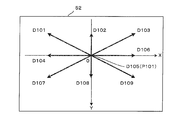
- FIG. 3 is a diagram showing vector types with respect to the drag movement amount in the drag operation “move”.
- D101 is a substantially left upward direction
- D102 is a substantially upward direction
- D103 is a substantially right upward direction
- D104 is In the left direction
- D106 is in the right direction
- D107 is in the left obliquely downward direction
- D108 is in the substantially downward direction
- D109 is in the substantially right obliquely downward direction.
- FIG. 4 is a diagram showing the relationship between the current cursor position and the position of the destination cursor for the button operation information 62 (cursor movement direction).
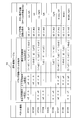
- FIG. 5 is a diagram illustrating the operation conversion table 33 of the pseudo button control unit 32. In the operation conversion table 33, conditions for the drag movement vector and the drag movement distance, and button operation information 62 (cursor movement direction) when the conditions are satisfied are set.
- the pseudo button control unit 32 calculates a drag movement vector (x, y) that is a drag movement amount from a detection point having the drag operation “move” to the next detection point, and a drag movement distance d that is the movement distance.
- the drag movement distance d is calculated based on the drag movement vector (x, y).
- the pseudo button control unit 32 determines the movement direction of the cursor based on the drag movement vector (x, y) and the drag movement distance d, and outputs button operation information 62 representing the movement direction.
- the pseudo button control unit 32 sets the detection point with the drag operation “move” as the origin P101 and the coordinates thereof as (xp, yp).
- a drag operation “move” is performed by the user, and coordinates representing the position of the next detection point are (xt, yt).
- (x, y) is a drag speed with the time interval of drag detection as a unit time.
- ⁇ in the expression represents a power operator.
- the condition of the drag movement distance is that when the drag operation “move” is performed from the coordinates (xp, yp) of the origin P101 to the coordinates (xt, yt), the drag movement distance d exceeds the threshold value dt of the drag movement distance. It is that you are.
- the threshold value dt By setting the threshold value dt to be equal to or greater than a predetermined value, it is possible to prevent occurrence of cursor movement that is not intended by the user, such as detecting a minute movement amount of drag movement due to fluctuation of the touch position during operation of the touch panel 52 or the like. .
- the drag movement vector condition includes a left-right direction condition, an up-down direction condition, and an oblique direction condition.
- the left-right direction condition indicates whether the x component in the left-right direction is larger or smaller than 0, and the up-down direction condition is the left-right direction.
- the left-right direction condition and the up-down direction condition are that the x component and the y component are smaller than 0, respectively, and the oblique direction condition is the y component
- the absolute value is larger than the absolute value of the value obtained by multiplying the boundary condition r1 and the x component, and smaller than the absolute value of the value obtained by multiplying the boundary condition r2 and the x component.
- button operation information 62 indicating the cursor movement direction “up, left” is output.
- the cursor can be limited not to move in an oblique direction.
- the limited button operation information 62 is output in either the upper, lower, left, or right directions. .
- the pseudo button control unit 32 receives (A) touch operation information 61 whose operation type indicates a touchdown operation “down” or (B) touch operation information 61 whose operation type indicates a drag operation “move”. Then, the setting of the origin P101 is updated with the position of the touch operation information 61.
- the button operation information 62 is output every time the condition is met in the continuous drag operation “move” from the touchdown operation “down” to the touchup operation “up”. In the continuous drag operation “move” from the touchdown operation “down” to the next touchup operation “up”, continuous cursor movement can be performed.
- objects OBJ111 to OBJ113 are arranged from the left to the right in the plurality of objects on the image data displayed on the display device 51, and the currently selected object is the object OBJ111.
- the object OBJ111 is displayed so that the difference from the objects OBJ112 and OBJ113 other than the object OBJ111 can be determined by cursor display.
- the user performs the touchdown operation “down” at the position of P111.
- the touch panel control unit 31 detects the touchdown operation “down” and outputs touch operation information 61 including the operation type and P111 (coordinates) on the touch panel 52.
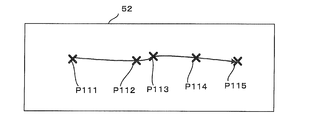
- the user performs a drag operation “move” along the path indicated by the curves P111 to P115.
- the touch panel control unit 31 detects the drag operation “move” at predetermined time intervals, and outputs touch operation information 61 including the operation type and P111 to P115 (coordinates) on the touch panel 52, respectively.
- the user performs the touch-up operation “up” in P115.
- the touch panel control unit 31 detects the touch-up operation “up” and outputs touch operation information 61 including the operation type and P115 (coordinates) on the touch panel 52.
- the pseudo button control unit 32 first receives the touch operation information 61 whose operation type is the touchdown operation “down” and whose position is P111. Next, the pseudo button control unit 32 receives touch operation information 61 whose operation type is the drag operation “move” and whose positions are P112, P113, P114, and P115. In this case, the pseudo button control unit 32 calculates the drag movement vector (x, y) and the drag movement distance d of P111 to P112, P112 to P113, P113 to P114, and P114 to P115, respectively.
- the pseudo button control unit 32 refers to the operation conversion table 33, determines the movement direction of the cursor that satisfies the conditions of the drag movement vector (x, y) and the drag movement distance d, and button operation information 62 representing the movement direction. Is output.
- the pseudo button control unit 32 determines the movement direction of the cursor as “right” when the conditions of the drag movement vector (x, y) and the drag movement distance d of P111 to P112 and P113 to P114 are satisfied. To do.
- the pseudo button control unit 32 does not determine the movement direction of the cursor because P112 to P113 do not satisfy the condition of the drag movement distance d.
- the cursor moves to the object OBJ 112 at the time point P112, does not move at the time point P113, moves to the object OBJ 113 at the time point P114, and does not move at the time point P115.
- continuous cursor movement can be performed by a continuous drag operation “move”. Further, even when the pointing medium is temporarily stopped in the middle of the drag and the drag is resumed, the cursor can be continuously moved.
- the number of times the button operation information 62 is input to the processing unit 20 may be increased according to the drag speed.
- the drag movement distance d is also the drag movement distance per unit time, that is, the drag speed. Therefore, when the pseudo button control unit 32 outputs the button operation information 62 based on the operation conversion table 33, the pseudo button control unit 32 outputs the button operation information 62 to the processing unit 20 by the number of times of the integer part of d / dt. Also good. In this way, the cursor can be moved a number of times in accordance with the drag speed, so that the cursor can be moved to the target object with a shorter drag.
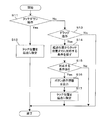
- FIG. 9 is a flowchart showing the operation of the pseudo button control unit 32.
- the pseudo button control unit 32 receives the touch operation information 61 from the touch panel control unit 31 and the operation type is the touchdown operation “down” (step S11—Yes)
- the pseudo button control unit 32 starts the position of the touch operation information 61. (Step S12).
- step S11-No, S13-Yes When the pseudo button control unit 32 receives the touch operation information 61 from the touch panel control unit 31 and the operation type is the drag operation “move” (step S11-No, S13-Yes), The drag movement vector (x, y) and the drag movement distance d from the position to the position of the touch operation information 61 are calculated, and the drag movement vector (x, y) and the drag movement distance d are calculated with reference to the operation conversion table 33.
- Search for a condition that satisfies the condition step S14). If there is a corresponding condition (step S15-Yes), button operation information 62 indicating the movement direction of the cursor corresponding to the condition is output to the processing unit 20 (step S16), and the position of the touch operation information 61 is set as the starting point.
- Step S17 If there is no corresponding condition (step S15-Yes), the button operation information 62 is not output.
- the operation type of the touch operation information 61 is neither the touchdown operation “down” nor the drag operation “move” (steps S11-No, S13-No)
- the operation type is a touch-up operation “up”.
- the touch panel control unit 31 includes the touch operation information 61 representing the position on the touch panel 52 from the start to the end of the drag operation “move”. Is output.
- the pseudo button control unit 32 outputs button operation information 62 representing the movement direction of the cursor based on the start and end positions represented by the touch operation information 61.
- the processing unit 20 selects a transition destination object from among a plurality of objects based on the button operation information 62, and displays the position of the transition destination object with a cursor. For this reason, according to the input operation device according to the first embodiment of the present invention, the user can select an object with a simple operation without being aware of the conventional object allocation area.
- the pseudo button control unit 32 performs the continuous drag operation “move” from the touchdown operation “down” to the touchup operation “up”.
- the button operation information 62 is output to the processing unit 20 every time the condition is met, so that a continuous cursor movement can be performed in a series of drag operations “move”.
- the touch operation since there is no restriction condition between the object arrangement position on the screen and the touch position, the touch operation does not depend on the object arrangement position.
- Object selection can be performed.
- the origin, coordinate axis direction, and unit length in the screen coordinate system of the display device 51 and the coordinate system of the touch panel 52 are substantially the same, and the display range of each object and the touch detection range of the object are substantially the same.
- the arrangement of the objects is dense, the selection of the objects can be easily performed as compared with the selection method depending on the arrangement position of the objects.
- the cursor can be moved a number of times according to the drag speed, the cursor can be moved to the target object with a shorter drag. It becomes possible.
- the hover operation is performed by the hover operation (the operation in the proximity state of the predetermined distance or less without touching the above-described indication medium on the touch panel 52 surface)
- the hover operation the position of the object according to the present invention
- the horizontal length and the vertical length of the display area of the display device 51 that is the cursor movement target, and the drag movement vector (x, y) indicating the drag movement amount, and The threshold value dt of the drag movement distance is changed according to the ratio.
- the second embodiment only the changes from the first embodiment will be described.
- FIG. 10 is a diagram showing the operation conversion table 33 of the pseudo button control unit 32.
- a drag movement vector (x2, y2) described later is used instead of the drag movement vector (x, y) in the first embodiment.
- a drag movement distance d2 described later is used instead of the drag movement distance d.
- the origin of the drag operation to be converted into the button operation information is set as the origin, and the coordinates are set to (xp, yp).
- the coordinates representing the position where the user has performed the drag operation “move” are (xt, yt).
- the horizontal direction length of the rectangle of the object arrangement target range on the display device 51 to be the cursor movement target is W
- the vertical direction of the rectangle of the object arrangement target range on the display device 51 to be the cursor movement target is set.
- the drag movement vector (x2, y2) (x1 / W, y1 / H)
- the drag movement distance d2 (x2 ⁇ 2 + y2 ⁇ ). 2) It is represented by ⁇ (1/2).
- the horizontal direction and the vertical direction of the screen viewed from the user after the rotation are determined by the acceleration sensor, and pdx , Pdy, W, and H may be reset, and the touch operation information 61 may be converted into button operation information 62 based on the reset values.
- the cursor movement suitable for the horizontal / vertical direction length of the object arrangement target range can be performed. Is possible.
- the touch panel 52 is a transmissive type and is arranged on the screen of the display device 51, and the coordinate system of the touch panel 52. And the origin of the coordinate system of the screen, the direction of the coordinate axis, and the unit length are almost the same, only when a touch operation is detected in the area of the touch panel 52 corresponding to the object placement area 53 that is the target of the cursor movement.
- the touch operation information 61 may be converted into button operation information 62 and the cursor may be moved.
- the amount of drag movement necessary for cursor movement changes according to the horizontal length and vertical length of the display area. In a narrower direction, the cursor can be moved with a smaller drag movement amount. Further, by limiting the conversion from the touch operation information 61 to the button operation information 62 within the object arrangement area 53, it is possible to operate the object arrangement area 53 and other areas by using different operation methods suitable for each. it can.
- the cursor can be moved and the object can be selected by a continuous drag operation.
- a touch-up operation “up” is performed after a set time has been stopped in the touch state
- the object with the cursor is selected. More specifically, when the operation is not performed until the set time elapses after the touchdown operation “down” is performed, the state shifts to the selection preparation state, and the drag operation “move” is performed in the selection preparation state. If it is, the selection preparation state is canceled.
- FIG. 12 is a flowchart showing the operation of the pseudo button control unit 32.
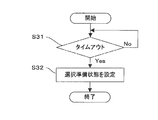
- FIG. 13 is a flowchart showing the selection preparation state setting process. If the above-described step S12 is performed after the touchdown operation “down” is performed, the pseudo button control unit 32 sets a timer (step S21). The time until the timeout is a time at which the drag operation “move” for moving the cursor and the object selection operation can be easily distinguished from the user's senses, for example, about 1 second. Here, when the operation is not performed until time-out (step S31—Yes), the pseudo button control unit 32 sets the selection preparation state (step S32).
- the pseudo button control unit 32 stops the timer (step S22).
- the pseudo button control unit 32 cancels the selection preparation state (step S23) and sets a timer (step S24).
- the pseudo button control unit 32 sets the selection preparation state (step S32).
- the pseudo button control unit 32 selects the object with the cursor.
- the object selection information is output to the processing unit 20 (step S27).
- the processing unit 20 selects a transition destination object (an object with a cursor) according to the object selection information.
- the pseudo button control unit 32 stops the timer (step S28). If it is not in the selection preparation state (step S26-No), step S27 is not executed but step S28 is executed.
- both the cursor movement operation and the object selection operation can be determined in the process of a continuous drag operation.
- the cursor can be moved and the object can be selected.
- the pseudo button control unit 32 detects that the position on the screen corresponding to the detection position in the drag operation “move” is an object touch detection. If it is not included in the range, the button operation information 62 is output to the processing unit 20, and the position on the screen corresponding to the detection position by the touch-up operation “up” is included in the touch detection range of the object. Object selection information for selecting the object is output to the processing unit 20. In the fourth embodiment, only the changes from the first to third embodiments will be described.
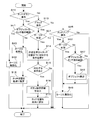
- FIG. 14 is a flowchart showing the operation of the pseudo button control unit 32.
- the pseudo button control unit 32 invalidates the cursor.
- a cursor invalidation instruction signal is output to the processing unit 20 (step S42).
- the processing unit 20 does not display the cursor in response to the cursor validation instruction signal. For example, if the object on which the cursor is placed is indicated by a line of a predetermined color along the outline of the object, an image from which the line has been deleted is displayed on the display device 51.
- step S41—No when the position is not within the object touch detection range (step S41—No), the pseudo button control unit 32 outputs a cursor validation instruction signal for validating the cursor to the processing unit 20 (step S43). ).
- the processing unit 20 displays a cursor in response to the cursor validation instruction signal. For example, an image indicated by a line of a predetermined color along the outline of the object on which the cursor is placed is displayed on the display device 51. Thereafter, step S12 described above is performed.
- step S11-No When the drag operation “move” is performed (steps S11-No, S13-Yes), when the above-described position is within the touch detection range of the object (step S44-Yes), the pseudo button control unit 32 The cursor invalidation instruction signal is output to the processing unit 20 (step S45). On the other hand, when the above-described position is not within the object touch detection range (step S44-No), the pseudo button control unit 32 outputs the above-described cursor validation instruction signal to the processing unit 20 (step S46). Thereafter, step S14 described above is performed.
- step S11-No, S13-No, S25-Yes if the above-described position is within the touch detection range of the object (step S47-Yes), pseudo button control
- the unit 32 outputs the above-described object selection information to the processing unit 20 (step S48), and outputs the above-described cursor invalidation instruction signal to the processing unit 20 (step S49).
- step S49 is executed without executing step S48.
- FIG. 15 is a flowchart showing another operation of the pseudo button control unit 32. Only the changes from FIG. 14 will be described here.
- the drag operation “move” is performed (steps S11-No, S13-Yes)
- the above-described step S14 is performed. Done.
- the touch-up operation “up” is performed (steps S11-No, S13-No, S25-Yes)
- Step S49 described above is performed.
- the cursor validation instruction signal is not output to the processing unit 20 (step S52—No)
- the above-described step S47 is executed.
- the continuous cursor movement can be performed by the continuous drag operation “move” from the touchdown operation “down” to the touchup operation “up”.
- an object can be selected according to the touch position.
- the origin, the direction of the coordinate axes, and the unit length in the coordinate system of the screen of the display device 51 and the coordinate system of the touch panel 52 are substantially the same, and the display range of each object and the touch detection range of the object are substantially the same.
- the user can select an object by touching the display range of the object.
- the object display positions are dense, and the touch panel 52 is displayed for a plurality of object display ranges.
- the cursor can be moved by dragging to specify an object independent of the touch position.
- the display position is discrete and it is easy to specify an object by touch position Is, such as performing the specified object by the touch position, it is properly used.
- the input operation device can be applied to a digital broadcast receiver that presents digital broadcast data broadcast content and broadcast communication cooperation content. Let it be an embodiment.
- the above-described operation on the touch panel is an operation on a remote controller (hereinafter referred to as a remote controller) defined for data broadcasting or a broadcasting / communication cooperation application.
- a remote controller hereinafter referred to as a remote controller
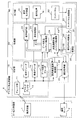
- FIG. 16 is a schematic block diagram showing a configuration of a broadcasting / communication cooperation system to which a digital broadcasting receiver according to a fifth embodiment of the present invention is applied.
- the broadcasting / communication cooperation system is used by users for broadcasting equipment 1 for broadcasting companies to provide broadcasting services, a communication server 2 for services companies to provide communications services via a communication network such as the Internet, and the like.
- the digital broadcast receiver 3 includes a receiving unit 10, a processing unit 20, a control unit 30, an output unit 40, and the touch panel 52 described above.
- the receiving unit 10 includes a tuner unit 11, a demultiplexer 12, an audio decoder 13, a video decoder 14, and a data broadcast decoder 15.
- the processing unit 20 includes a data broadcast content processing unit 21, a broadcast communication cooperation processing unit 22, a communication processing unit 23, a broadcast communication cooperation content processing unit 24, an audio processing unit 25, and a display processing unit 26.
- the control unit 30 includes the touch panel control unit 31 and the pseudo button control unit 32 described above.
- the output unit 40 includes an audio output device 41 and the display device 51 described above.
- the tuner unit 11 receives a digital broadcast signal by an antenna, demodulates the digital broadcast signal, and outputs a TS (MPEG2 Transport Stream) to the demultiplexer 12.
- the demultiplexer 12 separates audio data, video data, data broadcasting data, and broadcast communication cooperation application control information from the TS, and sends them to the audio decoder 13, the video decoder 14, the data broadcast decoder 15, and the broadcast communication cooperation processing unit 22, respectively.
- the audio decoder 13 processes the audio data, converts it into a data format that can be synthesized with other audio, for example, PCM data, and outputs the data to the audio processing unit 25.
- the video decoder 14 converts the video data into a data format that can be combined with other images, for example, a bitmap representing the RGB gradation values of each pixel, and outputs the bitmap to the display processing unit 26.
- the data broadcast decoder 15 extracts data broadcast contents and event messages described in BML (Broadcast Markup Language) from the data for data broadcasting and outputs them to the data broadcast content processing unit 21.
- BML Broadcast Markup Language
- the data broadcast content processing unit 21 analyzes the data broadcast content, and outputs audio data and image data to the audio processing unit 25 and the display processing unit 26 based on the content instruction content, respectively. Further, in response to instructions from the control unit 30 (the touch operation information 61, the button operation information 62, the object selection information, the cursor validation instruction signal, the cursor invalidation instruction signal, etc.) described above, based on the instruction content of the data broadcasting content. As a result, audio data and image data are output to the audio processing unit 25 and the display processing unit 26, respectively.
- the broadcasting / communication cooperation processing unit 22 is requested to download and execute the broadcasting / communication cooperation application.
- the communication processing unit 23 is a communication interface.
- the broadcast / communication cooperation processing unit 22 downloads the broadcast / communication cooperation content from the communication server 2 via the communication processing unit 23 based on the broadcast / communication cooperation application control information, and outputs it to the broadcast / communication cooperation content processing unit 24.
- the broadcasting / communication cooperation content processing unit 24 analyzes the broadcasting / communication cooperation content, and outputs audio data and image data to the audio processing unit 25 and the display processing unit 26, respectively, based on the content instruction content. Further, the above-mentioned instruction from the pseudo button control unit 32 is processed based on the instruction content of the data broadcast content, and as a result, the audio data and the image data are output to the audio processing unit 25 and the display processing unit 26, respectively. To do.
- the voice processing unit 25 synthesizes the input voice data to generate a voice signal and outputs it to the voice output device 41.
- the display processing unit 26 synthesizes the input image data to generate an image signal and outputs it to the display device 51.
- the touch panel control unit 31 outputs the touch operation information 61 described above to the broadcast communication cooperative content processing unit 21 and the data broadcast content processing unit 24.
- the pseudo button control unit 32 outputs the above button operation information 62 to the broadcast communication cooperative content processing unit 21 and the data broadcast content processing unit 24.
- the data broadcasting content has an interface corresponding to an interrupt event, and direction keys “ ⁇ ”, “ ⁇ ”, “ ⁇ ”, “ In response to an interrupt event corresponding to any input of “ ⁇ ”, the cursor is moved to switch the object to be selected.
- “keyCode” is a direction key “ ⁇ ” “ Data broadcasting content processing for any key code of ⁇ , “ ⁇ ”, “ ⁇ ”, first “type” is “keydown” interrupt event, and “type” is “keyup” interrupt event To the unit 21.
- 1.8 of Non-Patent Document 1 is that the key code of the direction key “ ⁇ ” of the remote control is “up” and the remote control is “down”.
- step S48 in FIG. 15 “keyCode” is the key code of the direction key “decision” of the remote controller, “type” is “keydown”, and then “type” is “keyup”. Is output to the data broadcast content processing unit 21.
- the broadcasting / communication cooperation content includes an application operation interface on the premise of the input of the TV remote controller, and the direction key “ ⁇ ” of the TV remote controller remote control is provided.
- the cursor is moved to switch the object to be selected.
- the “keyCode” property is any one of “VK_UP”, “VK_DOWN”, “VK_LEFT”, and “VK_RIGHT”, and the event is started first.
- the keyboard event with the type “keydown” and the keyboard event with the event type “keyup” are output to the broadcasting / communication cooperation content processing unit 24.
- the correspondence between the button type information 62 in FIG. 5 and the value of the “keyCode” property is “VK_UP” for “up”, “VK_DOWN” for “down”, “VK_LEFT” for “left”, In the case of “right”, it is “VK_RIGHT”.
- the pseudo button control unit 32 starts the keyboard event with the “keyCode” property being “VK_ENTER” and the event type “keydown”, and subsequently the event type is “keyup”. This keyboard event is output to the broadcasting / communication cooperation content processing unit 24.
- the digital broadcast receiver 3 selects an object by operating the touch panel 52 when the remote control operation is premised on the data broadcast content and the broadcast communication cooperative content.
- the event of the direction key of the remote controller can be continuously generated and the cursor can be moved continuously.
- an object selection method according to the present invention and other selection methods are automatically performed. It may be switched.
- the object selection method according to the present invention can be validated only when the data broadcasting content and the broadcasting / communication cooperation content do not correspond to the operation of the touch panel 52.
- the broadcasting / communication cooperation content processing unit analyzes a document (such as an HTML document) and a script (such as JavaScript (registered trademark)) included in the content, and in response to a touch event defined in the following W3C Recommendation, If there is no description for registering a listener for a touch event in the content, more specifically, addEventListener for which any of the HTML elements included in the content specifies one of touchstart, touchend, touchmove, touchcancel. In the case where the operation is not performed, it is determined that the content does not correspond to the operation of the touch panel 52.
- a document such as an HTML document
- a script such as JavaScript (registered trademark)
- the broadcasting / communication cooperation content processing unit 24 when the content does not correspond to the operation of the touch panel 52, the broadcasting / communication cooperation content processing unit 24 generates a button event based on the button operation information 62 from the pseudo button control unit 32 and corresponds to the content.
- a touch event is generated based on the touch operation information from the touch panel control unit 31 and is made to correspond to the content.
Landscapes
- Engineering & Computer Science (AREA)
- General Engineering & Computer Science (AREA)
- Theoretical Computer Science (AREA)
- Human Computer Interaction (AREA)
- Physics & Mathematics (AREA)
- General Physics & Mathematics (AREA)
- User Interface Of Digital Computer (AREA)
- Position Input By Displaying (AREA)
Abstract
入力操作装置において、処理部(20)は、画像データを表示装置(51)に表示し、画像データの表示領域に配置された複数のオブジェクトのうちの、いずれかの位置にカーソルを表示する。制御部(30)は、タッチパネル(52)に対してドラッグ操作が開始されてから終了するまでのタッチパネル(52)上の指示位置の移動を検出し、検出した指示位置の移動に基づいてカーソルの移動方向を決定して出力する。処理部(20)は、制御部(30)から出力されたカーソルの移動方向に基づいて複数のオブジェクトのうちのいずれかを選択して、選択されたオブジェクトの位置をカーソルにて表示する。これにより、ユーザが、従来のようなオブジェクトの割り当て領域を意識することなく、簡単な操作でオブジェクトを選択することができる。
Description
本発明は、タッチパネルを用いて入力操作を行なう入力操作装置、及び、デジタル放送受信機に関する。
タッチパネルを用いて入力操作を行なう技術として、特許文献1には放送受信機が開示されている。特許文献1に開示された技術では、受信部と、表示部と、提示処理部と、タッチパネルとを具備している。タッチパネルは、透明であり、表示部の画面上に設けられている。受信部は、データ放送を含む放送信号を受信する。提示処理部は、受信部に受信されたデータ放送を表す画像データを表示部に表示する。その画像データは、リモコン操作の対象となる複数のオブジェクトを含む。複数のオブジェクトは、画像データの表示領域に配置される。提示処理部は、複数のオブジェクトのうちの、現在選択されているオブジェクトの位置をカーソルにて表示する。
特許文献1に開示された技術では、更に、タッチパネル制御部と、擬似リモコン制御部とを具備している。タッチパネル制御部は、ユーザがタッチパネルにタッチしたときの位置(座標)を指定するための位置情報を出力する。擬似リモコン制御部は、現在選択されているオブジェクトの位置を基準点とした場合、画像データの表示領域を上下左右方向にN分割し(例えばNは4とする)、現在選択されているオブジェクト以外のオブジェクトのうちの、4個のオブジェクトのそれぞれに対して4個の分割表示領域を割り当てる。そこで、擬似リモコン制御部は、タッチパネル制御部から出力される位置情報が、4個の分割表示領域のうちの1つの分割表示領域を指定している場合、その旨を表すキー信号を出力する。この場合、提示処理部は、キー信号に従って、4個のオブジェクトのうちの、指定された分割表示領域に割り当てられたオブジェクトを遷移先のオブジェクトとして選択し、遷移先のオブジェクトの位置をカーソルにて表示する。
特許文献1の図2に開示された例では、複数のオブジェクトは、左から右方向に向かって上から順に第1~3、4、0、5、6~8オブジェクトが配置され、現在選択されているオブジェクトを第0オブジェクトとし、第0オブジェクトの位置を基準点として画像データの表示領域を上下左右方向に4分割した場合、第0~8オブジェクトのうちの第2、4、5、7オブジェクトは、それぞれ上、左、右、下方向の4個の分割表示領域に割り当てられている。
ARIB STD B-24 第二編 付属2
IPTV規定 放送通信連携システム仕様 IPTVFJ STD-0010 1.0版
特許文献1の図2に開示された例では、ユーザがタッチパネルを通じて、第0オブジェクトの左方向に配置されている第4オブジェクトを選択したい場合、ユーザがタッチパネルを通じて左方向の分割表示領域を指定することにより、第4オブジェクトが遷移先のオブジェクトとして選択され、カーソルが第0オブジェクトから第4オブジェクトに移動する。しかしながら、ユーザは、現在選択されているオブジェクトの位置に応じて分割表示領域を指定する際に、9個のオブジェクトのうちの4個のオブジェクトが4個の分割表示領域に割り当てられていることを意識しなければならない。仮に分割表示領域を5以上に増やした場合でも、ユーザは、更に、オブジェクトの割り当て領域を意識しなければならない上に、操作が煩雑になる。
また、特許文献1の図2に開示された例では、ユーザがタッチパネルを通じて、第0オブジェクトの左上方向に配置されている第1オブジェクトを選択したい場合でも、操作が煩雑になる。まず、ユーザがタッチパネルを通じて左方向の分割表示領域を指定することにより、第4オブジェクトが遷移先のオブジェクトとなり、カーソルが第0オブジェクトから第4オブジェクトに移動する。このとき、現在選択されているオブジェクトが第4オブジェクトとなるため、第4オブジェクトの位置を基準点として画像データの表示領域が上下左右方向に4分割される。次に、ユーザがタッチパネルを通じて上方向の分割表示領域を指定することにより、第1オブジェクトが遷移先のオブジェクトとなり、カーソルが第4オブジェクトから第1オブジェクトに移動する。このように、ユーザは、タッチパネルを通じて、第0オブジェクトの左上方向に配置されている第1オブジェクトを選択したい場合、2段階で分割表示領域を指定しなければならないため、更に操作が煩雑である。
本発明は、上記の点に鑑みてなされたものであり、ユーザが、従来のようなオブジェクトの割り当て領域を意識することなく、簡単な操作でオブジェクトを選択することができる入力操作装置、及び、デジタル放送受信機を提供することを目的とする。
本発明の入力操作装置は、表示装置と、複数のオブジェクトを含む画像データを前記表示装置に表示すると共に、前記画像データの表示領域に配置された前記複数のオブジェクトのうちの、いずれかの位置にカーソルを表示する処理部と、タッチパネルと、前記タッチパネルに対してドラッグ操作が開始されてから終了するまでの前記タッチパネル上の指示位置の移動を検出し、検出した指示位置の移動に基づいて前記カーソルの移動方向を決定して出力する制御部と、を具備し、前記処理部は、前記制御部から出力された前記カーソルの移動方向に基づいて前記複数のオブジェクトのうちのいずれかを選択して、前記選択されたオブジェクトの位置を前記カーソルにて表示することを特徴とする。
本発明のデジタル放送受信機は、上記入力操作装置と、デジタル放送のデータ放送もしくは放送通信連携アプリケーションを受信する受信部と、を具備し、前記入力操作装置において、前記制御部は、前記カーソルの移動方向としてリモートコントローラの方向キーのイベントを出力し、前記処理部は、前記受信部が受信した前記データ放送もしくは前記放送通信連携アプリケーションが定める処理に従って、前記複数のオブジェクトを含む画像データを前記表示装置に表示し、前記制御部から出力されたリモートコントローラの方向キーのイベントに基づいて、前記画像データの表示領域に配置された前記複数のオブジェクトのうちのいずれかを選択して、前記選択されたオブジェクトの位置を前記カーソルにて表示することを特徴とする。
本発明の入力操作方法は、複数のオブジェクトを含む画像データを表示装置に表示する画像表示ステップと、前記画像データの表示領域に配置された前記複数のオブジェクトのうちの、いずれかの位置にカーソルを表示するカーソル表示ステップと、タッチパネルに対してドラッグ操作が開始されてから終了するまでの前記タッチパネル上の指示位置の移動を検出し、検出した指示位置の移動に基づいて前記カーソルの移動方向を決定して出力する制御ステップと、前記制御ステップから出力された前記カーソルの移動方向に基づいて前記複数のオブジェクトのうちのいずれかを選択して、前記選択されたオブジェクトの位置を前記カーソルにて表示するカーソル移動ステップと、を具備することを特徴とする。
本発明のコンピュータプログラムは、上記入力操作方法の各ステップをコンピュータに実行させる。
本発明に係る入力操作装置、及び、デジタル放送機によれば、ユーザが、従来のようにオブジェクトの割り当て領域を意識することなくオブジェクトを選択することができる。また、一続きのドラッグ操作の中で連続して選択するオブジェクトを切り替えることができる。
以下、図面を参照しながら本発明の実施形態について説明する。
図1は、本発明の第1実施形態に係る入力操作装置の構成を示す概略ブロック図である。その入力操作装置は、処理部20と、制御部30と、表示装置51と、タッチパネル52と、記憶部(図示しない)と、これらを制御するCPU(Central Processing Unit)(図示しない)とを具備している。記憶部には、コンピュータが実行可能なコンピュータプログラムが格納されていて、CPUは、そのコンピュータプログラムを読み出して実行する。制御部30は、タッチパネル制御部31と、擬似ボタン制御部32とを備えている。疑似ボタン制御部32は、操作変換テーブル33を備えている。
表示装置51としては、LCD(Liquid Crystal Display)が例示される。処理部20は、画像データを表示装置51に表示する。画像データは、操作の対象となる複数のオブジェクトを含む。複数のオブジェクトは、画像データの表示領域に配置されている。処理部20は、画像データを表示装置51に表示すると共に、複数のオブジェクトのうちの、現在選択されているオブジェクトの位置をカーソルにて表示する。
タッチパネル制御部31は、タッチダウン操作「down」、ドラッグ操作「move」、及び、タッチアップ操作「up」のいずれかが行なわれたときの操作種別を検出する。検出方法としては、静電容量方式を利用したものが例示される。タッチダウン操作「down」は、指示媒体がタッチパネル52面に接触又は所定距離以下に近接した操作を表している。ドラッグ操作「move」は、指示媒体がタッチパネル52面に接触又は所定距離以下に近接した状態を保持しながら移動する操作を表している。ドラッグの検出は、所定の時間間隔で、タッチパネル52面への接触又は近接状態を検出することにより行う。従って、タッチダウン操作「down」からタッチアップ操作「up」に至るまでの間に、複数回のドラッグ操作「move」を検出し得る。検出の時間間隔は、一続きのドラッグにおいて連続した検出が行える十分に短い時間間隔で行うことが望ましい。タッチアップ操作「up」は、指示媒体がタッチパネル52面に接触又は所定距離以下に近接している状態から、接触又は近接しない状態へ移行する操作を表している。
タッチパネル52への指示媒体は、指に限らず、ユーザの手に把持された導電性のスタイラスを用いてもよい。指示媒体は、タッチパネル52の構造及び検知方式に応じて、タッチパネル52への近接及び接触が検出可能なものであれば特に限定されない。
タッチパネル制御部31は、タッチダウン操作「down」、ドラッグ操作「move」、及び、タッチアップ操作「up」のいずれかが行なわれたときの操作種別と、そのときのタッチパネル52上の位置(座標)とを含むタッチ操作情報61を出力する。
疑似ボタン制御部32は、タッチパネル制御部31から順次に出力されたタッチ操作情報61を受け取る。疑似ボタン制御部32は、上記順次に出力されたタッチ操作情報61の操作種別がタッチダウン操作「down」、ドラッグ操作「move」を表している場合、上記順次に出力されたタッチ操作情報61の位置に基づいてカーソルの移動方向を表すボタン操作情報62を出力する。
処理部20は、タッチパネル制御部31から順次に出力されたタッチ操作情報61と、疑似ボタン制御部32から出力されたボタン操作情報62とを受け取る。処理部20は、上記順次に出力されたタッチ操作情報61の操作種別が更にドラッグ操作「move」の後のタッチアップ操作「up」を表している場合、タッチダウン操作「down」が行なわれた位置を現在選択されているオブジェクトの位置とし、現在選択されているオブジェクト以外のオブジェクトのうちの、カーソルの移動方向に配置され、かつ、タッチアップ操作「up」が行なわれた位置に存在するオブジェクトを遷移先のオブジェクトとして選択して、遷移先のオブジェクトの位置をカーソルにて表示する。
図2は、表示装置51の表示領域を示す図である。例えば、表示装置51に表示された画像データ上の複数のオブジェクトは、左から右方向に向かって上から順にオブジェクトOBJ101~OBJ103、OBJ104~OBJ106、OBJ107~OBJ109が配置され、現在選択されているオブジェクトをオブジェクトOBJ105とする。オブジェクトOBJ105は、カーソル表示により、オブジェクトOBJ105以外のオブジェクトOBJ101~OBJ104、OBJ106~OBJ109との差異が判別できるように表示されている。
図3は、ドラッグ操作「move」におけるドラッグ移動量に対するベクトル種別を示す図である。ボタン操作情報62へ変換するドラッグ操作「move」の起点P101を示す座標D105を原点としたときに、D101は略左斜め上方向、D102は略上方向、D103は略右斜め上方向、D104は略左方向、D106は略右方向、D107は略左斜め下方向、D108は略下方向、D109は略右斜め下方向を表す。
図4は、現在のカーソルの位置と、ボタン操作情報62(カーソルの移動方向)に対する遷移先のカーソルの位置との関係を示す図である。図5は、疑似ボタン制御部32の操作変換テーブル33を示す図である。操作変換テーブル33には、ドラッグ移動ベクトル及びドラッグ移動距離の条件と、その条件を満たした場合のボタン操作情報62(カーソルの移動方向)とが設定されている。
疑似ボタン制御部32は、ドラッグ操作「move」のある検出点から次の検出点までのドラッグ移動量であるドラッグ移動ベクトル(x、y)、及び、その移動距離であるドラッグ移動距離dを算出し、そのドラッグ移動ベクトル(x、y)に基づいてドラッグ移動距離dを算出する。疑似ボタン制御部32は、ドラッグ移動ベクトル(x、y)及びドラッグ移動距離dに基づいてカーソルの移動方向を決定し、その移動方向を表すボタン操作情報62を出力する。
今、擬似ボタン制御部32は、ドラッグ操作「move」のある検出点を原点P101とし、その座標を(xp、yp)に設定しているものとする。ここで、ユーザによりドラッグ操作「move」が行なわれ、次の検出点の位置を表す座標を(xt、yt)とする。この場合、ドラッグ移動ベクトル(x、y)は、(x、y)=(xt-xp、yt-yp)により表され、ドラッグ移動距離dは、d=(x^2+y^2)^(1/2)により表される。(x、y)はドラッグ検出の時間間隔を単位時間とした、ドラッグの速度であるともいえる。ここで、式中の^は、べき乗の演算子を表している。
ドラッグ移動距離の条件は、原点P101の座標(xp、yp)から座標(xt、yt)にドラッグ操作「move」が行なわれたときに、ドラッグ移動距離dがドラッグ移動距離の閾値dtを超えていることである。閾値dtを所定値以上に設定することにより、タッチパネル52の操作中のタッチ位置のぶれ等に伴う微小移動量のドラッグ移動を検出する等、ユーザの意図しないカーソル移動の発生を防止することができる。
ドラッグ移動ベクトルの条件は、左右方向条件、上下方向条件、斜め方向条件を含んでいる。原点P101の座標(xp、yp)を(0、0)としたときに、左右方向条件は、左右方向であるx成分が0より大きいか小さいかを表し、上下方向条件は、左右方向であるy成分が0より大きいか小さいかを表す。斜め方向条件は、斜め方向を判定するための、xとyの比率に対する境界条件r1、r2を含み、例えば、r1=tan(π/6)、r2=tan(2π/6)により表される。一例として、カーソルが略左斜め上のオブジェクトに移動する条件については、左右方向条件、上下方向条件は、それぞれ、x成分、y成分が0より小さいことであり、斜め方向条件は、y成分の絶対値が、境界条件r1とx成分とを乗算した値の絶対値よりも大きく、境界条件r2とx成分とを乗算した値の絶対値よりも小さいことである。この場合、カーソルの移動方向「up、left」を表すボタン操作情報62が出力されることになる。
なお、斜め方向へのカーソルの移動をしないように限定することも可能である。ドラッグ移動ベクトルの条件において、例えば、r1=r2=tan(π/4)のように、r1とr2を同値にした場合は、上下左右いずれか限定のボタン操作情報62が出力されることになる。
擬似ボタン制御部32は、(A)その操作種別がタッチダウン操作「down」を表すタッチ操作情報61や、(B)その操作種別がドラッグ操作「move」を表すタッチ操作情報61を受け取る度に、そのタッチ操作情報61の位置を原点P101の設定を更新する。上記(B)により、タッチダウン操作「down」からタッチアップ操作「up」に至るまでの一続きのドラッグ操作「move」の中で、条件に一致した都度、ボタン操作情報62が出力されるので、タッチダウン操作「down」から次のタッチアップ操作「up」までの一続きのドラッグ操作「move」の中で、連続したカーソル移動を行うことができる。
連続したカーソル移動の操作について、図6~8を用いて具体的に説明する。
例えば、図6に示されるように、表示装置51に表示された画像データ上の複数のオブジェクトは、左から右方向に向かってオブジェクトOBJ111~OBJ113が配置され、現在選択されているオブジェクトをオブジェクトOBJ111とする。オブジェクトOBJ111は、カーソル表示により、オブジェクトOBJ111以外のオブジェクトOBJ112、OBJ113との差異が判別できるように表示されている。
図7に示されるように、ユーザは、P111の位置でタッチダウン操作「down」を行なう。このとき、タッチパネル制御部31は、タッチダウン操作「down」を検出し、その操作種別とタッチパネル52上のP111(座標)とを含むタッチ操作情報61を出力する。次に、ユーザは、P111~P115の曲線で示される経路で、ドラッグ操作「move」を行なう。このとき、タッチパネル制御部31は、所定の時間間隔でドラッグ操作「move」を検出し、それぞれ、その操作種別とタッチパネル52上のP111~P115(座標)とを含むタッチ操作情報61を出力する。最後に、ユーザは、P115において、タッチアップ操作「up」を行なう。このとき、タッチパネル制御部31は、タッチアップ操作「up」を検出し、その操作種別とタッチパネル52上のP115(座標)とを含むタッチ操作情報61を出力する。
擬似ボタン制御部32は、最初に、その操作種別がタッチダウン操作「down」であり、かつ、その位置がP111であるタッチ操作情報61を受け取る。次に、擬似ボタン制御部32は、その操作種別がドラッグ操作「move」であり、かつ、その位置がP112、P113、P114、P115であるタッチ操作情報61を受け取る。この場合、擬似ボタン制御部32は、P111~P112、P112~P113、P113~P114、P114~P115それぞれのドラッグ移動ベクトル(x、y)及びドラッグ移動距離dを算出する。疑似ボタン制御部32は、操作変換テーブル33を参照して、ドラッグ移動ベクトル(x、y)及びドラッグ移動距離dの条件を満たすカーソルの移動方向を決定し、その移動方向を表すボタン操作情報62を出力する。
例えば、擬似ボタン制御部32は、P111~P112、P113~P114のドラッグ移動ベクトル(x、y)及びドラッグ移動距離dの条件を満たしている場合、それぞれ、カーソルの移動方向を「right」に決定する。擬似ボタン制御部32は、P112~P113については、ドラッグ移動距離dの条件を満たしていないため、カーソルの移動方向を決定しない。その結果、カーソルは、P112の時点でオブジェクトOBJ112に移動し、P113の時点では移動せず、P114の時点でオブジェクトOBJ113に移動し、P115の時点では移動しない、という動作となる。
このように、本発明では、一続きのドラッグ操作「move」で、連続的なカーソル移動を行うことができる。また、ドラッグの途中で一旦、指示媒体を静止し、ドラッグを再開した場合でも、継続してカーソル移動を行うことができる。
なお、ドラッグの速度に応じて、処理部20へのボタン操作情報62の入力回数を増やしてもよい。例えば、本実施形態においては、所定の時間間隔でドラッグが検出されるため、ドラッグ移動距離dについても単位時間当たりのドラッグの移動距離、すなわちドラッグの速度となる。そこで、擬似ボタン制御部32は、操作変換テーブル33に基づいてボタン操作情報62を出力する際に、d/dtの整数部分の回数だけ、ボタン操作情報62を処理部20に出力するようにしてもよい。このようにすることで、ドラッグ速度に応じた回数のカーソル移動ができるので、より短時間のドラッグで、目的のオブジェクトへカーソルを移動することが可能となる。
図9は、疑似ボタン制御部32の動作を示すフローチャートである。疑似ボタン制御部32は、タッチパネル制御部31からタッチ操作情報61を受け取ったときに、その操作種別がタッチダウン操作「down」である場合(ステップS11-Yes)、タッチ操作情報61の位置を起点に設定する(ステップS12)。次に、疑似ボタン制御部32は、タッチパネル制御部31からタッチ操作情報61を受け取ったときに、その操作種別がドラッグ操作「move」である場合(ステップS11-No、S13-Yes)、起点の位置からタッチ操作情報61の位置までのドラッグ移動ベクトル(x、y)及びドラッグ移動距離dを算出し、操作変換テーブル33を参照して、ドラッグ移動ベクトル(x、y)及びドラッグ移動距離dの条件を満たすものを探す(ステップS14)。対応する条件がある場合(ステップS15-Yes)、その条件に対応するカーソルの移動方向を表すボタン操作情報62を処理部20に出力し(ステップS16)、タッチ操作情報61の位置を起点に設定する(ステップS17)。対応する条件がない場合(ステップS15-Yes)、ボタン操作情報62は出力されない。なお、タッチ操作情報61の操作種別がタッチダウン操作「down」でもドラッグ操作「move」でもない場合(ステップS11-No、S13-No)、その操作種別はタッチアップ操作「up」である。
以上の説明により、本発明の第1実施形態に係る入力操作装置では、タッチパネル制御部31は、ドラッグ操作「move」が開始されてから終了するまでのタッチパネル52上の位置を表すタッチ操作情報61を出力する。擬似ボタン制御部32は、タッチ操作情報61が表す開始及び終了の位置に基づいてカーソルの移動方向を表すボタン操作情報62を出力する。処理部20は、ボタン操作情報62に基づいて複数のオブジェクトの中から遷移先のオブジェクトを選択して、遷移先のオブジェクトの位置をカーソルにて表示する。このため、本発明の第1実施形態に係る入力操作装置によれば、ユーザが、従来のようなオブジェクトの割り当て領域を意識することなく、簡単な操作でオブジェクトを選択することができる。
また、本発明の第1実施形態に係る入力操作装置によれば、擬似ボタン制御部32は、タッチダウン操作「down」からタッチアップ操作「up」に至るまでの一続きのドラッグ操作「move」の中で、条件に一致した都度、ボタン操作情報62を処理部20に出力するので、一続きのドラッグ操作「move」の中で、連続したカーソル移動を行うことができる。
また、本発明の第1実施形態に係る入力操作装置によれば、画面上のオブジェクトの配置位置と、タッチ位置との間に制約条件がないため、オブジェクトの配置位置に依らないタッチ操作にてオブジェクトの選択を行うことができる。特に、表示装置51の画面の座標系と、タッチパネル52の座標系における原点、座標軸の方向、単位長さがほぼ同じであり、それぞれのオブジェクトの表示範囲と、オブジェクトのタッチ検知範囲がほぼ同じである場合であって、オブジェクトの配置が密集している場合においては、オブジェクトの配置位置に依存した選択方法と比較して、オブジェクトの選択が容易に行える。
更に、本発明の第1実施形態に係る入力操作装置によれば、ドラッグ速度に応じた回数のカーソル移動が可能であるため、より短時間のドラッグで、目的のオブジェクトへカーソルを移動することが可能となる。
また、ホバー操作(前述の指示媒体をタッチパネル52面に接触しない、所定距離以下の近接状態での操作)によって、実施する場合においては、例えば、ホバー操作においては、本発明にかかる、オブジェクトの位置に依らないオブジェクトの選択を行ない、タッチ操作においては、オブジェクトの位置に依るオブジェクトの選択を行うことにより、別の操作方法との併用が可能である。
[第2実施形態]
本発明の第2実施形態に係る入力操作装置では、カーソル移動対象となる表示装置51の表示領域の水平方向長さ、垂直方向長さと、ドラッグ移動量を示すドラッグ移動ベクトル(x、y)との比率に応じて、ドラッグ移動距離の閾値dtを変更する。第2実施形態では第1実施形態からの変更点のみ説明する。
本発明の第2実施形態に係る入力操作装置では、カーソル移動対象となる表示装置51の表示領域の水平方向長さ、垂直方向長さと、ドラッグ移動量を示すドラッグ移動ベクトル(x、y)との比率に応じて、ドラッグ移動距離の閾値dtを変更する。第2実施形態では第1実施形態からの変更点のみ説明する。
図10は、疑似ボタン制御部32の操作変換テーブル33を示す図である。第2実施形態では、第1実施形態におけるドラッグ移動ベクトル(x、y)に替えて、後述のドラッグ移動ベクトル(x2、y2)が用いられる。また、ドラッグ移動距離dに替えて、後述のドラッグ移動距離d2が用いられる。
前述のように、ボタン操作情報へ変換するドラッグ操作の起点を原点とし、その座標は(xp、yp)に設定されている。ユーザによりドラッグ操作「move」が行なわれた位置を表す座標を(xt、yt)とする。この場合、ドラッグ移動ベクトル(x、y)は、(x、y)=(xt-xp、yt-yp)により表される。ここで、pdxを表示装置51の画面水平方向の単位長さ当りの画素数とし、pdyを表示装置51の画面垂直方向の単位長さ当りの画素数とした場合、ドラッグ移動ベクトル(x1、y1)は、(x1、y1)=(x/pdx、y/pdy)により表され、ドラッグ移動距離d1は、d1=(x1^2+y1^2)^(1/2)により表される。
更に、カーソル移動対象となる、表示装置51上のオブジェクトの配置対象範囲の矩形の水平方向長さをWとし、カーソル移動対象となる、表示装置51上のオブジェクトの配置対象範囲の矩形の垂直方向長さをHとした場合、ドラッグ移動ベクトル(x2、y2)は、(x2、y2)=(x1/W、y1/H)により表され、ドラッグ移動距離d2は、d2=(x2^2+y2^2)^(1/2)により表される。
ここで、本発明の第2実施形態に係る入力操作装置では、表示装置51の画面をユーザが回転させると、回転後にユーザから見た画面の水平方向、垂直方向を加速度センサによって判定し、pdx、pdy、W、Hの値を再設定し、それに基づいてタッチ操作情報61をボタン操作情報62に変換するようにしてもよい。このようにすることで、画面の回転にともなって、水平/垂直方向の画素密度、オブジェクトの配置範囲が変わった場合でも、オブジェクトの配置対象範囲の水平/垂直方向長さに適したカーソル移動が可能である。
また、本発明の第2実施形態に係る入力操作装置では、図11に示されるように、タッチパネル52が透過型であり、表示装置51の画面の上に配置されており、タッチパネル52の座標系と、画面の座標系との原点、座標軸の方向、単位長さがほぼ一致する場合は、カーソル移動の対象となるオブジェクト配置領域53に対応する、タッチパネル52の領域でタッチ操作を検出した場合のみ、タッチ操作情報61をボタン操作情報62に変換し、カーソル移動を行なうようにしてもよい。
以上の説明により、本発明の第2実施形態に係る入力操作装置では、表示領域の水平方向長さ、垂直方向長さに応じて、カーソル移動に必要なドラッグ移動量が変わるため、表示領域のより狭い方向については、より少ないドラッグ移動量でカーソル移動を行なうことができる。更に、タッチ操作情報61からボタン操作情報62への変換をオブジェクト配置領域53内に限定することにより、オブジェクト配置領域53内とそれ以外とで、それぞれに適した別の操作方法により操作することができる。
[第3実施形態]
本発明の第3実施形態に係る入力操作装置では、一続きのドラッグ操作で、カーソルの移動とオブジェクトの選択ができるようにする。タッチ状態で設定時間だけ静止した後にタッチアップ操作「up」が行なわれた場合は、カーソルのあるオブジェクトを選択する。より詳細には、タッチダウン操作「down」が行なわれてから設定時間を経過するまで操作が行なわれない場合は、選択準備状態に移行し、選択準備状態において、ドラッグ操作「move」が行なわれた場合は、選択準備状態を解除する。更に、ドラッグ操作「move」が行なわれてから設定時間を経過するまで操作が行なわれない場合は、選択準備状態に移行し、選択準備状態において、タッチアップ操作「up」が行なわれた場合は、カーソルのあるオブジェクトを選択する。第3実施形態では第1、2実施形態からの変更点のみ説明する。
本発明の第3実施形態に係る入力操作装置では、一続きのドラッグ操作で、カーソルの移動とオブジェクトの選択ができるようにする。タッチ状態で設定時間だけ静止した後にタッチアップ操作「up」が行なわれた場合は、カーソルのあるオブジェクトを選択する。より詳細には、タッチダウン操作「down」が行なわれてから設定時間を経過するまで操作が行なわれない場合は、選択準備状態に移行し、選択準備状態において、ドラッグ操作「move」が行なわれた場合は、選択準備状態を解除する。更に、ドラッグ操作「move」が行なわれてから設定時間を経過するまで操作が行なわれない場合は、選択準備状態に移行し、選択準備状態において、タッチアップ操作「up」が行なわれた場合は、カーソルのあるオブジェクトを選択する。第3実施形態では第1、2実施形態からの変更点のみ説明する。
図12は、疑似ボタン制御部32の動作を示すフローチャートである。図13は、選択準備状態設定処理を示すフローチャートである。いま、タッチダウン操作「down」が行なわれてから前述のステップS12が行なわれた場合、疑似ボタン制御部32は、タイマを設定する(ステップS21)。タイムアウトまでの時間としては、カーソル移動のためのドラッグ操作「move」と、オブジェクトの選択操作と、がユーザの感覚的に区別し易い時間とし、例えば1秒程度とする。ここで、タイムアウトになるまで操作が行なわれない場合(ステップS31-Yes)、疑似ボタン制御部32は、選択準備状態を設定する(ステップS32)。選択準備状態において、ドラッグ操作「move」が行なわれてから前述のステップS15が行なわれた場合、疑似ボタン制御部32は、タイマを停止する(ステップS22)。次に、前述のステップS16、S17が行なわれた場合、疑似ボタン制御部32は、選択準備状態を解除し(ステップS23)、タイマを設定する(ステップS24)。ここで、タイムアウトになるまで操作が行なわれない場合(ステップS31-Yes)、疑似ボタン制御部32は、選択準備状態を設定する(ステップS32)。選択準備状態において、タッチアップ操作「up」が行なわれた場合(ステップS11-No、S13-No、S25-Yes、S26-Yes)、疑似ボタン制御部32は、カーソルのあるオブジェクトを選択するためのオブジェクト選択情報を処理部20に出力する(ステップS27)。この場合、処理部20は、オブジェクト選択情報に応じて、遷移先のオブジェクト(カーソルのあるオブジェクト)を選択する。疑似ボタン制御部32は、タイマを停止する(ステップS28)。なお、選択準備状態ではない場合(ステップS26-No)、ステップS27は実行されずに、ステップS28が実行される。
以上の説明により、本発明の第3実施形態に係る入力操作装置では、一続きのドラッグ操作の過程において、カーソル移動操作と、オブジェクトの選択操作の両方を判別することができるので、一続きのドラッグ操作の過程で、カーソル移動と、オブジェクトの選択を行うことができる。オブジェクトの選択を行うにあたり、一旦、タッチアップして、タッチダウンする必要がないので、操作を効率的に行うことができる。
[第4実施形態]
本発明の第4実施形態に係る入力操作装置では、第1~3実施形態において、疑似ボタン制御部32は、ドラッグ操作「move」で検出位置に対応する画面上の位置が、オブジェクトのタッチ検知範囲に含まれていない場合は、ボタン操作情報62を処理部20に出力し、タッチアップ操作「up」で検出位置に対応する画面上の位置が、オブジェクトのタッチ検知範囲に含まれる場合は、そのオブジェクトを選択するためのオブジェクト選択情報を処理部20に出力する。第4実施形態では第1~3実施形態からの変更点のみ説明する。
本発明の第4実施形態に係る入力操作装置では、第1~3実施形態において、疑似ボタン制御部32は、ドラッグ操作「move」で検出位置に対応する画面上の位置が、オブジェクトのタッチ検知範囲に含まれていない場合は、ボタン操作情報62を処理部20に出力し、タッチアップ操作「up」で検出位置に対応する画面上の位置が、オブジェクトのタッチ検知範囲に含まれる場合は、そのオブジェクトを選択するためのオブジェクト選択情報を処理部20に出力する。第4実施形態では第1~3実施形態からの変更点のみ説明する。
図14は、疑似ボタン制御部32の動作を示すフローチャートである。タッチダウン操作「down」が行なわれたときに(ステップS11-Yes)、その位置がオブジェクトのタッチ検知範囲内にある場合(ステップS41-Yes)、疑似ボタン制御部32は、カーソルを無効にするためのカーソル無効化指示信号を処理部20に出力する(ステップS42)。この場合、処理部20は、カーソル有効化指示信号に応じて、カーソルを表示しない。例えば、カーソルの当っているオブジェクトを、オブジェクトの外郭に沿った所定の色の線で示しているとすれば、その線を消去した画像を表示装置51に表示する。一方、その位置がオブジェクトのタッチ検知範囲内にない場合(ステップS41-No)、疑似ボタン制御部32は、カーソルを有効にするためのカーソル有効化指示信号を処理部20に出力する(ステップS43)。この場合、処理部20は、カーソル有効化指示信号に応じて、カーソルを表示する。例えば、カーソルの当っているオブジェクトの外郭に沿った所定の色の線で示した画像を、表示装置51に表示する。その後、前述のステップS12が行なわれる。ドラッグ操作「move」が行なわれたときに(ステップS11-No、S13-Yes)、上述の位置がオブジェクトのタッチ検知範囲内にある場合(ステップS44-Yes)、疑似ボタン制御部32は、上述のカーソル無効化指示信号を処理部20に出力する(ステップS45)。一方、上述の位置がオブジェクトのタッチ検知範囲内にない場合(ステップS44-No)、疑似ボタン制御部32は、上述のカーソル有効化指示信号を処理部20に出力する(ステップS46)。その後、前述のステップS14が行なわれる。タッチアップ操作「up」が行なわれたときに(ステップS11-No、S13-No、S25-Yes)、上述の位置がオブジェクトのタッチ検知範囲内にある場合(ステップS47-Yes)、疑似ボタン制御部32は、前述のオブジェクト選択情報を処理部20に出力し(ステップS48)、上述のカーソル無効化指示信号を処理部20に出力する(ステップS49)。一方、上述の位置がオブジェクトのタッチ検知範囲内にない場合(ステップS47-No)、ステップS48は実行されずにステップS49が実行される。
図15は、疑似ボタン制御部32の他の動作を示すフローチャートである。ここでは、図14からの変更点のみ説明する。ドラッグ操作「move」が行なわれたときに(ステップS11-No、S13-Yes)、既にカーソル有効化指示信号を処理部20に出力していた場合(ステップS51-Yes)、前述のステップS14が行なわれる。タッチアップ操作「up」が行なわれたときに(ステップS11-No、S13-No、S25-Yes)、既にカーソル有効化指示信号を処理部20に出力していた場合(ステップS52-Yes)、上述のステップS49が行なわれる。一方、カーソル有効化指示信号を処理部20に出力していない場合(ステップS52-No)、上述のステップS47が実行される。
以上の説明により、本発明の第4実施形態に係る入力操作装置では、タッチダウン操作「down」からタッチアップ操作「up」に至る一続きのドラッグ操作「move」で、連続したカーソル移動ができるとともに、タッチ位置に応じたオブジェクトの選択が可能である。
また、表示装置51の画面の座標系と、タッチパネル52の座標系における原点、座標軸の方向、単位長さがほぼ同じであり、それぞれのオブジェクトの表示範囲と、オブジェクトのタッチ検知範囲がほぼ同じである場合は、ユーザがオブジェクトの表示範囲をタッチすることで、オブジェクトの選択が可能であるが、この実装において、オブジェクト表示位置が密集しており、複数のオブジェクトの表示範囲に対して、タッチパネル52上でユーザの指が接触する範囲が重なってしまうなど、タッチ位置によるオブジェクトの指定が困難である場合には、ドラッグ操作でカーソルを移動してタッチ位置によらないオブジェクトの指定ができ、オブジェクトの表示位置が離散しており、タッチ位置によるオブジェクトの指定が容易である場合は、タッチ位置によるオブジェクトの指定を行うといった、使い分けができる。
[第5実施形態]
本発明の第1~4実施形態に係る入力操作装置は、デジタル放送のデータ放送コンテンツ、および、放送通信連携コンテンツを提示するデジタル放送受信機に適用することができ、以下の実施形態を第5実施形態とする。前述のタッチパネルに対する操作は、データ放送、又は、放送通信連携アプリケーションに定められたリモートコントローラ(以下、リモコンと表記する)に対する操作となる。第5実施形態では第1~4実施形態からの変更点のみ説明する。
本発明の第1~4実施形態に係る入力操作装置は、デジタル放送のデータ放送コンテンツ、および、放送通信連携コンテンツを提示するデジタル放送受信機に適用することができ、以下の実施形態を第5実施形態とする。前述のタッチパネルに対する操作は、データ放送、又は、放送通信連携アプリケーションに定められたリモートコントローラ(以下、リモコンと表記する)に対する操作となる。第5実施形態では第1~4実施形態からの変更点のみ説明する。
図16は、本発明の第5実施形態に係るデジタル放送受信機が適用される放送通信連携システムの構成を示す概略ブロック図である。放送通信連携システムは、放送事業者が放送サービスを提供するための放送設備1と、サービス事業者がインターネット等の通信ネットワークを介して通信サービスを提供するための通信サーバ2と、ユーザに利用されるデジタル放送受信機3と、を具備している。
デジタル放送受信機3は、受信部10と、処理部20と、制御部30と、出力部40と、前述のタッチパネル52とを具備している。受信部10は、チューナ部11、デマルチプレクサ12、音声デコーダ13、映像デコーダ14、データ放送デコーダ15を備えている。処理部20は、データ放送コンテンツ処理部21、放送通信連携処理部22、通信処理部23、放送通信連携コンテンツ処理部24、音声処理部25、表示処理部26を備えている。制御部30は、前述のタッチパネル制御部31、疑似ボタン制御部32を備えている。出力部40は、音声出力装置41と、前述の表示装置51とを備えている。
チューナ部11は、デジタル放送信号をアンテナにより受信し、そのデジタル放送信号を復調し、TS(MPEG2 Transport Stream)をデマルチプレクサ12に出力する。デマルチプレクサ12は、TSから音声データ、映像データ、データ放送用データ、放送通信連携アプリケーション制御情報を分離し、それぞれ、音声デコーダ13、映像デコーダ14、データ放送デコーダ15、放送通信連携処理部22に出力する。音声デコーダ13は、音声データを処理し、他の音声と合成可能なデータ形式、例えばPCMデータに変換して、音声処理部25に出力する。映像デコーダ14は、映像データを、他の画像と合成可能なデータ形式、例えば各画素のRGBの階調値を表したビットマップに変換して表示処理部26に出力する。データ放送デコーダ15は、データ放送用データから、BML(Broadcast Markup Language)で記述されたデータ放送コンテンツ、及び、イベントメッセージを抽出し、データ放送コンテンツ処理部21に出力する。
データ放送コンテンツ処理部21は、データ放送コンテンツの解析を行ない、コンテンツの指示内容に基づいて音声データ、画像データをそれぞれ音声処理部25、表示処理部26に出力する。また、制御部30からの指示(前述のタッチ操作情報61、ボタン操作情報62、オブジェクト選択情報、カーソル有効化指示信号、カーソル無効化指示信号など)に対して、データ放送コンテンツの指示内容に基づいた処理を行ない、その結果として音声データ、画像データをそれぞれ音声処理部25、表示処理部26に出力する。データ放送コンテンツに、放送通信連携アプリケーションの取得、実行の指示が記述されている場合は、放送通信連携処理部22に対して放送通信連携アプリケーションのダウンロード及び実行を要求する。
通信処理部23は通信インタフェースである。放送通信連携処理部22は、放送通信連携アプリケーション制御情報に基づいて、通信処理部23を介して通信サーバ2から放送通信連携コンテンツをダウンロードし、放送通信連携コンテンツ処理部24に出力する。放送通信連携コンテンツ処理部24は、放送通信連携コンテンツの解析を行ない、コンテンツの指示内容に基づいて、音声データ、画像データをそれぞれ音声処理部25、表示処理部26に出力する。また、擬似ボタン制御部32からの上述の指示に対して、データ放送コンテンツの指示内容に基づいた処理を行ない、その結果として音声データ、画像データをそれぞれ音声処理部25、表示処理部26に出力する。
音声処理部25は、入力される音声データの合成を行なって音声信号を生成し、音声出力装置41に出力する。表示処理部26は、入力される画像データの合成を行なって画像信号を生成し、表示装置51に出力する。
タッチパネル制御部31は、前述のタッチ操作情報61を、放送通信連携コンテンツ処理部21、データ放送コンテンツ処理部24に出力する。擬似ボタン制御部32は、前述のボタン操作情報62を放送通信連携コンテンツ処理部21、データ放送コンテンツ処理部24に出力する。
データ放送コンテンツは、非特許文献1の4.5.1.4に記載されているように、割込み事象に対応したインタフェースを備えており、リモコンの方向キー「↑」「↓」「←」「→」のいずれかの入力に応じた割込み事象を受け、カーソルを移動して選択対象のオブジェクトを切り替えるものとする。
擬似ボタン制御部32は、タッチパネル52の操作から、ボタン操作への変換を行なうと、非特許文献1の5.1.8で示されるように、「keyCode」がリモコンの方向キー「↑」「↓」「←」「→」のいずれかのキーコードであって、始めに「type」が「keydown」の割込み事象を、続けて「type」が「keyup」の割込み事象を、データ放送コンテンツ処理部21に出力する。図5におけるボタン種別情報62と非特許文献1の5.1.8のキーコードの対応は、「up」の場合はリモコンの方向キー「↑」のキーコード、「down」の場合はリモコンの方向キー「↓」のキーコード、「left」の場合はリモコンの方向キー「←」のキーコード、「right」の場合はリモコンの方向キー「→」のキーコードとなる。なお、図15のステップS48については、「keyCode」がリモコンの方向キー「決定」のキーコードであって、「type」が「keydown」の割込み事象を始めに、続けて「type」が「keyup」の割込み事象を、データ放送コンテンツ処理部21に出力する。
放送通信連携コンテンツは、非特許文献2の3.1.14に記載されているように、テレビリモコンの入力を前提としたアプリケーション操作インタフェースを備えており、テレビリモコンのリモコンの方向キー「↑」「↓」「←」「→」いずれかの入力に応じたキーボードイベントを受け、カーソルを移動して選択対象のオブジェクトを切り替えるものとする。
擬似ボタン制御部32は、タッチパネル52の操作から、ボタン操作への変換を行なうと、「keyCode」プロパティが、「VK_UP」「VK_DOWN」「VK_LEFT」「VK_RIGHT」のいずれかであって、始めにイベントタイプが「keydown」のキーボードイベントを、続けてイベントタイプが「keyup」のキーボードイベントを、放送通信連携コンテンツ処理部24に出力する。図5におけるボタン種別情報62と、「keyCode」プロパティの値との対応は、「up」の場合は「VK_UP」、「down」の場合は「VK_DOWN」、「left」の場合は「VK_LEFT」、「right」の場合は「VK_RIGHT」となる。なお、図15のステップS48については、擬似ボタン制御部32が、「keyCode」プロパティが「VK_ENTER」であって、イベントタイプが「keydown」のキーボードイベントを始めに、続けてイベントタイプが「keyup」のキーボードイベントを、放送通信連携コンテンツ処理部24に出力することによって実現する。
以上の説明により、本発明の第5実施形態に係るデジタル放送受信機3では、データ放送コンテンツ、放送通信連携コンテンツに対してリモコン操作を前提とした場合、タッチパネル52の操作によってオブジェクトを選択することができ、かつ、一続きのドラッグ操作において、連続してリモコンの方向キーのイベントを発生させ、連続してカーソルを移動することができる。
また、本発明に係るオブジェクトの選択方法と、それ以外の選択方法(例えば、タッチ位置とオブジェクトのタッチ検出範囲との間の所定条件を満たす場合にオブジェクトを選択する方法)とを、自動的に切替えてもよい。例えば、データ放送コンテンツ、放送通信連携コンテンツが、タッチパネル52の操作に対応していない場合にのみ、本発明に係るオブジェクトの選択方法を有効とすることが可能である。具体例としては、放送通信連携コンテンツ処理部は、コンテンツに含まれるドキュメント(HTMLドキュメントなど)、スクリプト(JavaScript(登録商標)など)を解析し、下記の W3C Recommendation で規定されるタッチイベントに対し、コンテンツ中に、タッチイベントのリスナを登録する記述がない場合、より詳細には、コンテンツに含まるHTML要素のいずれに対しても、typeがtouchstart、touchend、touchmove、touchcancelのいずれかを指定したaddEventListenerが行われない場合に、コンテンツがタッチパネル52の操作に対応していないと判定する。
[タッチイベント]
http://www.w3.org/TR/touch-events/#the-touchstart-event
[addEventListener]
http://www.w3.org/2003/01/dom2-javadoc/org/w3c/dom/events/EventTarget.html
[タッチイベント]
http://www.w3.org/TR/touch-events/#the-touchstart-event
[addEventListener]
http://www.w3.org/2003/01/dom2-javadoc/org/w3c/dom/events/EventTarget.html
この場合、放送通信連携コンテンツ処理部24は、コンテンツがタッチパネル52の操作に対応していない場合は、擬似ボタン制御部32からのボタン操作情報62に基づいて、ボタンイベントを生成し、コンテンツに対応させ、コンテンツがタッチパネル52の操作に対応している場合は、タッチパネル制御部31からのタッチ操作情報に基づいて、タッチイベントを生成し、コンテンツに対応させる。このようにすることで、タッチパネル52による操作に対応したコンテンツの場合には、タッチパネル52の操作にてオブジェクト行うことができ、そうでない場合は、タッチパネル52の操作をボタン操作に置き換えることで、オブジェクトを選択することができる。すなわち、コンテンツの操作仕様に適したオブジェクト選択方法に、自動的に切り換えることができる。
以上、この発明の実施形態について図面を参照して詳述してきたが、具体的な構成は実施形態に限られるものではなく、この発明の要旨を逸脱しない範囲の設計等も特許請求の範囲に含まれる。
20 … 処理部
30 … 制御部
31 … タッチパネル制御部
32 … 擬似ボタン制御部
51 … 表示装置
52 … タッチパネル
61 … タッチ操作情報
62 … ボタン操作情報
30 … 制御部
31 … タッチパネル制御部
32 … 擬似ボタン制御部
51 … 表示装置
52 … タッチパネル
61 … タッチ操作情報
62 … ボタン操作情報
Claims (5)
- 表示装置と、
複数のオブジェクトを含む画像データを前記表示装置に表示すると共に、前記画像データの表示領域に配置された前記複数のオブジェクトのうちの、いずれかの位置にカーソルを表示する処理部と、
タッチパネルと、
前記タッチパネルに対してドラッグ操作が開始されてから終了するまでの前記タッチパネル上の指示位置の移動を検出し、検出した指示位置の移動に基づいて前記カーソルの移動方向を決定して出力する制御部と、
を具備し、
前記処理部は、前記制御部から出力された前記カーソルの移動方向に基づいて前記複数のオブジェクトのうちのいずれかを選択して、前記選択されたオブジェクトの位置を前記カーソルにて表示することを特徴とする入力操作装置。 - 前記制御部は、前記タッチパネル上の指示位置の移動の方向及び距離に基づいて前記カーソルの移動方向を決定することを特徴とする請求項1に記載の入力操作装置。
- 前記制御部は、前記タッチパネルに対して前記ドラッグ操作が開始されてから終了するまでに、前記カーソルの移動方向を出力してから設定時間が経過した後に、前記タッチパネルに対してタッチアップ操作が行なわれた場合、選択情報を出力し、
前記処理部は、前記制御部から出力された前記選択情報に基づいて、前記選択されたオブジェクトに応じた処理を行なうことを特徴とする請求項1又は2に記載の入力操作装置。 - 前記制御部は、前記タッチパネル上の指示位置が前記オブジェクトのタッチ検知範囲にない場合、前記カーソルの移動方向を出力することを特徴とする請求項1から3のいずれかに記載の入力操作装置。
- 請求項1から4のいずれかに記載の入力操作装置と、
デジタル放送のデータ放送もしくは放送通信連携アプリケーションを受信する受信部と、
を具備し、
前記入力操作装置において、
前記制御部は、前記カーソルの移動方向としてリモートコントローラの方向キーのイベントを出力し、
前記処理部は、前記受信部が受信した前記データ放送もしくは前記放送通信連携アプリケーションが定める処理に従って、前記複数のオブジェクトを含む画像データを前記表示装置に表示し、前記制御部から出力されたリモートコントローラの方向キーのイベントに基づいて、前記画像データの表示領域に配置された前記複数のオブジェクトのうちのいずれかを選択して、前記選択されたオブジェクトの位置を前記カーソルにて表示することを特徴とするデジタル放送受信機。
Applications Claiming Priority (2)
| Application Number | Priority Date | Filing Date | Title |
|---|---|---|---|
| JP2014-007483 | 2014-01-20 | ||
| JP2014007483A JP2015135648A (ja) | 2014-01-20 | 2014-01-20 | 入力操作装置、及び、デジタル放送受信機 |
Publications (1)
| Publication Number | Publication Date |
|---|---|
| WO2015108155A1 true WO2015108155A1 (ja) | 2015-07-23 |
Family
ID=53543038
Family Applications (1)
| Application Number | Title | Priority Date | Filing Date |
|---|---|---|---|
| PCT/JP2015/051114 Ceased WO2015108155A1 (ja) | 2014-01-20 | 2015-01-16 | 入力操作装置、及び、デジタル放送受信機 |
Country Status (2)
| Country | Link |
|---|---|
| JP (1) | JP2015135648A (ja) |
| WO (1) | WO2015108155A1 (ja) |
Families Citing this family (1)
| Publication number | Priority date | Publication date | Assignee | Title |
|---|---|---|---|---|
| JP2018200494A (ja) * | 2017-05-25 | 2018-12-20 | シナプティクス・ジャパン合同会社 | タッチコントローラ、表示システム及びホスト装置 |
Citations (3)
| Publication number | Priority date | Publication date | Assignee | Title |
|---|---|---|---|---|
| JP2006221568A (ja) * | 2005-02-14 | 2006-08-24 | Canon Inc | 情報入力装置、情報入力方法及び情報入力プログラム |
| JP2010108118A (ja) * | 2008-10-29 | 2010-05-13 | Kyocera Corp | 携帯端末および文字表示プログラム |
| JP2011119937A (ja) * | 2009-12-02 | 2011-06-16 | Sony Corp | 遠隔操作装置、遠隔操作システム、遠隔操作方法およびプログラム |
-
2014
- 2014-01-20 JP JP2014007483A patent/JP2015135648A/ja active Pending
-
2015
- 2015-01-16 WO PCT/JP2015/051114 patent/WO2015108155A1/ja not_active Ceased
Patent Citations (3)
| Publication number | Priority date | Publication date | Assignee | Title |
|---|---|---|---|---|
| JP2006221568A (ja) * | 2005-02-14 | 2006-08-24 | Canon Inc | 情報入力装置、情報入力方法及び情報入力プログラム |
| JP2010108118A (ja) * | 2008-10-29 | 2010-05-13 | Kyocera Corp | 携帯端末および文字表示プログラム |
| JP2011119937A (ja) * | 2009-12-02 | 2011-06-16 | Sony Corp | 遠隔操作装置、遠隔操作システム、遠隔操作方法およびプログラム |
Also Published As
| Publication number | Publication date |
|---|---|
| JP2015135648A (ja) | 2015-07-27 |
Similar Documents
| Publication | Publication Date | Title |
|---|---|---|
| JP4956216B2 (ja) | デジタル放送番組表示装置およびデジタル放送番組表示プログラム | |
| US20150205495A1 (en) | Information processing device, selection operation detection method, and program | |
| US8819588B2 (en) | Display apparatus and method of displaying user interface thereof | |
| JP4626703B2 (ja) | 情報処理装置、情報処理方法および情報処理プログラム | |
| US9285967B2 (en) | Computing device with improved function selection and method | |
| KR102252321B1 (ko) | 디스플레이 장치 및 디스플레이 방법 | |
| KR101234158B1 (ko) | 정보창 디스플레이 방법 및 그 디스플레이 장치 | |
| KR20130081580A (ko) | 표시 장치 및 그 제어 방법 | |
| CN102279720B (zh) | 屏幕显示内容更新的方法及系统 | |
| AU2014269244A1 (en) | Method and apparatus for displaying picture on portable device | |
| EP2343632A1 (en) | Touch panel device operating as if in the equivalent mode even when detected region is smaller than display region of display device | |
| US20170212670A1 (en) | Display control device, display control method, and storage medium | |
| JP2011159190A (ja) | 情報処理装置及びプログラム | |
| JP2017016004A (ja) | 画像表示装置、画像表示制御方法、および、画像表示システム | |
| US20160231917A1 (en) | Display apparatus and display method | |
| JP2015525927A (ja) | 表示装置を制御するための方法及び装置 | |
| WO2015108155A1 (ja) | 入力操作装置、及び、デジタル放送受信機 | |
| CN102385467A (zh) | 影像式控制方法、处理方法及其系统 | |
| KR20160147578A (ko) | 디스플레이 장치 및 그의 동작 방법 | |
| EP1777950A2 (en) | Display apparatus | |
| JP6051183B2 (ja) | 表示制御装置及び電子機器 | |
| JP5323367B2 (ja) | 画像表示装置、画像送信サーバ、画像表示システム、画像表示方法、画像表示プログラム、および、記録媒体 | |
| JP5242274B2 (ja) | 情報処理装置及び方法、並びにコンピュータプログラム | |
| JP2006259161A (ja) | 映像表示装置 | |
| JP5441639B2 (ja) | 映像処理装置及び映像処理方法 |
Legal Events
| Date | Code | Title | Description |
|---|---|---|---|
| 121 | Ep: the epo has been informed by wipo that ep was designated in this application |
Ref document number: 15736921 Country of ref document: EP Kind code of ref document: A1 |
|
| DPE2 | Request for preliminary examination filed before expiration of 19th month from priority date (pct application filed from 20040101) | ||
| NENP | Non-entry into the national phase |
Ref country code: DE |
|
| 122 | Ep: pct application non-entry in european phase |
Ref document number: 15736921 Country of ref document: EP Kind code of ref document: A1 |