WO2015016227A1 - 携帯端末、新着情報表示プログラムおよび新着情報表示方法 - Google Patents
携帯端末、新着情報表示プログラムおよび新着情報表示方法 Download PDFInfo
- Publication number
- WO2015016227A1 WO2015016227A1 PCT/JP2014/069963 JP2014069963W WO2015016227A1 WO 2015016227 A1 WO2015016227 A1 WO 2015016227A1 JP 2014069963 W JP2014069963 W JP 2014069963W WO 2015016227 A1 WO2015016227 A1 WO 2015016227A1
- Authority
- WO
- WIPO (PCT)
- Prior art keywords
- new arrival
- arrival information
- display
- function
- tile
- Prior art date
- Legal status (The legal status is an assumption and is not a legal conclusion. Google has not performed a legal analysis and makes no representation as to the accuracy of the status listed.)
- Ceased
Links
Images

















Classifications
-
- G—PHYSICS
- G06—COMPUTING OR CALCULATING; COUNTING
- G06F—ELECTRIC DIGITAL DATA PROCESSING
- G06F3/00—Input arrangements for transferring data to be processed into a form capable of being handled by the computer; Output arrangements for transferring data from processing unit to output unit, e.g. interface arrangements
- G06F3/01—Input arrangements or combined input and output arrangements for interaction between user and computer
- G06F3/017—Gesture based interaction, e.g. based on a set of recognized hand gestures
-
- G—PHYSICS
- G06—COMPUTING OR CALCULATING; COUNTING
- G06F—ELECTRIC DIGITAL DATA PROCESSING
- G06F3/00—Input arrangements for transferring data to be processed into a form capable of being handled by the computer; Output arrangements for transferring data from processing unit to output unit, e.g. interface arrangements
- G06F3/01—Input arrangements or combined input and output arrangements for interaction between user and computer
- G06F3/048—Interaction techniques based on graphical user interfaces [GUI]
- G06F3/0481—Interaction techniques based on graphical user interfaces [GUI] based on specific properties of the displayed interaction object or a metaphor-based environment, e.g. interaction with desktop elements like windows or icons, or assisted by a cursor's changing behaviour or appearance
- G06F3/0482—Interaction with lists of selectable items, e.g. menus
-
- G—PHYSICS
- G06—COMPUTING OR CALCULATING; COUNTING
- G06F—ELECTRIC DIGITAL DATA PROCESSING
- G06F1/00—Details not covered by groups G06F3/00 - G06F13/00 and G06F21/00
- G06F1/16—Constructional details or arrangements
- G06F1/1613—Constructional details or arrangements for portable computers
- G06F1/1633—Constructional details or arrangements of portable computers not specific to the type of enclosures covered by groups G06F1/1615 - G06F1/1626
- G06F1/1684—Constructional details or arrangements related to integrated I/O peripherals not covered by groups G06F1/1635 - G06F1/1675
- G06F1/1694—Constructional details or arrangements related to integrated I/O peripherals not covered by groups G06F1/1635 - G06F1/1675 the I/O peripheral being a single or a set of motion sensors for pointer control or gesture input obtained by sensing movements of the portable computer
-
- G—PHYSICS
- G06—COMPUTING OR CALCULATING; COUNTING
- G06F—ELECTRIC DIGITAL DATA PROCESSING
- G06F3/00—Input arrangements for transferring data to be processed into a form capable of being handled by the computer; Output arrangements for transferring data from processing unit to output unit, e.g. interface arrangements
- G06F3/01—Input arrangements or combined input and output arrangements for interaction between user and computer
- G06F3/03—Arrangements for converting the position or the displacement of a member into a coded form
- G06F3/033—Pointing devices displaced or positioned by the user, e.g. mice, trackballs, pens or joysticks; Accessories therefor
- G06F3/0346—Pointing devices displaced or positioned by the user, e.g. mice, trackballs, pens or joysticks; Accessories therefor with detection of the device orientation or free movement in a three-dimensional [3D] space, e.g. 3D mice, 6-DOF [six degrees of freedom] pointers using gyroscopes, accelerometers or tilt-sensors
-
- G—PHYSICS
- G06—COMPUTING OR CALCULATING; COUNTING
- G06F—ELECTRIC DIGITAL DATA PROCESSING
- G06F3/00—Input arrangements for transferring data to be processed into a form capable of being handled by the computer; Output arrangements for transferring data from processing unit to output unit, e.g. interface arrangements
- G06F3/01—Input arrangements or combined input and output arrangements for interaction between user and computer
- G06F3/048—Interaction techniques based on graphical user interfaces [GUI]
- G06F3/0481—Interaction techniques based on graphical user interfaces [GUI] based on specific properties of the displayed interaction object or a metaphor-based environment, e.g. interaction with desktop elements like windows or icons, or assisted by a cursor's changing behaviour or appearance
- G06F3/04817—Interaction techniques based on graphical user interfaces [GUI] based on specific properties of the displayed interaction object or a metaphor-based environment, e.g. interaction with desktop elements like windows or icons, or assisted by a cursor's changing behaviour or appearance using icons
-
- G—PHYSICS
- G06—COMPUTING OR CALCULATING; COUNTING
- G06F—ELECTRIC DIGITAL DATA PROCESSING
- G06F3/00—Input arrangements for transferring data to be processed into a form capable of being handled by the computer; Output arrangements for transferring data from processing unit to output unit, e.g. interface arrangements
- G06F3/01—Input arrangements or combined input and output arrangements for interaction between user and computer
- G06F3/048—Interaction techniques based on graphical user interfaces [GUI]
- G06F3/0484—Interaction techniques based on graphical user interfaces [GUI] for the control of specific functions or operations, e.g. selecting or manipulating an object, an image or a displayed text element, setting a parameter value or selecting a range
- G06F3/04842—Selection of displayed objects or displayed text elements
-
- G—PHYSICS
- G06—COMPUTING OR CALCULATING; COUNTING
- G06F—ELECTRIC DIGITAL DATA PROCESSING
- G06F3/00—Input arrangements for transferring data to be processed into a form capable of being handled by the computer; Output arrangements for transferring data from processing unit to output unit, e.g. interface arrangements
- G06F3/01—Input arrangements or combined input and output arrangements for interaction between user and computer
- G06F3/048—Interaction techniques based on graphical user interfaces [GUI]
- G06F3/0487—Interaction techniques based on graphical user interfaces [GUI] using specific features provided by the input device, e.g. functions controlled by the rotation of a mouse with dual sensing arrangements, or of the nature of the input device, e.g. tap gestures based on pressure sensed by a digitiser
- G06F3/0488—Interaction techniques based on graphical user interfaces [GUI] using specific features provided by the input device, e.g. functions controlled by the rotation of a mouse with dual sensing arrangements, or of the nature of the input device, e.g. tap gestures based on pressure sensed by a digitiser using a touch-screen or digitiser, e.g. input of commands through traced gestures
- G06F3/04883—Interaction techniques based on graphical user interfaces [GUI] using specific features provided by the input device, e.g. functions controlled by the rotation of a mouse with dual sensing arrangements, or of the nature of the input device, e.g. tap gestures based on pressure sensed by a digitiser using a touch-screen or digitiser, e.g. input of commands through traced gestures for inputting data by handwriting, e.g. gesture or text
-
- G—PHYSICS
- G06—COMPUTING OR CALCULATING; COUNTING
- G06F—ELECTRIC DIGITAL DATA PROCESSING
- G06F3/00—Input arrangements for transferring data to be processed into a form capable of being handled by the computer; Output arrangements for transferring data from processing unit to output unit, e.g. interface arrangements
- G06F3/01—Input arrangements or combined input and output arrangements for interaction between user and computer
- G06F3/048—Interaction techniques based on graphical user interfaces [GUI]
- G06F3/0487—Interaction techniques based on graphical user interfaces [GUI] using specific features provided by the input device, e.g. functions controlled by the rotation of a mouse with dual sensing arrangements, or of the nature of the input device, e.g. tap gestures based on pressure sensed by a digitiser
- G06F3/0488—Interaction techniques based on graphical user interfaces [GUI] using specific features provided by the input device, e.g. functions controlled by the rotation of a mouse with dual sensing arrangements, or of the nature of the input device, e.g. tap gestures based on pressure sensed by a digitiser using a touch-screen or digitiser, e.g. input of commands through traced gestures
- G06F3/04886—Interaction techniques based on graphical user interfaces [GUI] using specific features provided by the input device, e.g. functions controlled by the rotation of a mouse with dual sensing arrangements, or of the nature of the input device, e.g. tap gestures based on pressure sensed by a digitiser using a touch-screen or digitiser, e.g. input of commands through traced gestures by partitioning the display area of the touch-screen or the surface of the digitising tablet into independently controllable areas, e.g. virtual keyboards or menus
-
- G—PHYSICS
- G06—COMPUTING OR CALCULATING; COUNTING
- G06Q—INFORMATION AND COMMUNICATION TECHNOLOGY [ICT] SPECIALLY ADAPTED FOR ADMINISTRATIVE, COMMERCIAL, FINANCIAL, MANAGERIAL OR SUPERVISORY PURPOSES; SYSTEMS OR METHODS SPECIALLY ADAPTED FOR ADMINISTRATIVE, COMMERCIAL, FINANCIAL, MANAGERIAL OR SUPERVISORY PURPOSES, NOT OTHERWISE PROVIDED FOR
- G06Q10/00—Administration; Management
- G06Q10/10—Office automation; Time management
- G06Q10/107—Computer-aided management of electronic mailing [e-mailing]
-
- H—ELECTRICITY
- H04—ELECTRIC COMMUNICATION TECHNIQUE
- H04M—TELEPHONIC COMMUNICATION
- H04M1/00—Substation equipment, e.g. for use by subscribers
- H04M1/72—Mobile telephones; Cordless telephones, i.e. devices for establishing wireless links to base stations without route selection
- H04M1/724—User interfaces specially adapted for cordless or mobile telephones
-
- H—ELECTRICITY
- H04—ELECTRIC COMMUNICATION TECHNIQUE
- H04W—WIRELESS COMMUNICATION NETWORKS
- H04W4/00—Services specially adapted for wireless communication networks; Facilities therefor
- H04W4/02—Services making use of location information
- H04W4/025—Services making use of location information using location based information parameters
- H04W4/026—Services making use of location information using location based information parameters using orientation information, e.g. compass
-
- G—PHYSICS
- G06—COMPUTING OR CALCULATING; COUNTING
- G06F—ELECTRIC DIGITAL DATA PROCESSING
- G06F2200/00—Indexing scheme relating to G06F1/04 - G06F1/32
- G06F2200/16—Indexing scheme relating to G06F1/16 - G06F1/18
- G06F2200/161—Indexing scheme relating to constructional details of the monitor
- G06F2200/1614—Image rotation following screen orientation, e.g. switching from landscape to portrait mode
Definitions
- the present invention relates to a mobile terminal that displays new arrival information of an event that has occurred.
- multiple icons may be displayed in an array on the touch panel display.
- notification of an event generated by a function corresponding to an icon may be performed using the icon.
- a large number of icons for notifying the occurrence of an event are displayed in an array, it becomes difficult for the user to grasp all the events that have occurred.
- a main object of the present invention is to provide a new portable terminal, a new arrival information display program, and a new arrival information display method.
- Another object of the present invention is to provide a portable terminal, a new arrival information display program, and a new arrival information display method, which can easily check new arrival information.
- a mobile terminal includes a display device, a detection unit that detects an attitude of the mobile terminal, a storage unit that stores new arrival information of the event when an event occurs, and a first attitude that is determined by the detection unit.
- a first display control unit that causes the display device to display a tiled first object associated with the newly arrived information and a tiled second object not associated with the newly arrived information when detected;
- a second display control unit configured to display new arrival information stored in the storage unit on the display device when two orientations are detected.
- a new arrival information display program includes a storage unit, a display device, and a detection unit that detects a posture of the portable terminal.
- a new arrival information of the event is stored in the storage unit.
- the first posture is detected by the storage control unit and the detection unit to be stored, the tile-shaped first object related to the new arrival information and the tile-shaped second object not related to the new arrival information are displayed on the display device.
- a new arrival information display method is a new arrival information display method in a mobile terminal having a storage unit, a display device, and a detection unit that detects the attitude of the mobile terminal, and the processor of the mobile terminal generates an event.
- a storage step of storing the new arrival information of the event in the storage unit, and when the first posture is detected by the detection unit, the tile-shaped first object related to the new arrival information and the new arrival information A first display step for displaying a second tile-shaped object on the display device, and when the detection unit detects a second posture, the new arrival information stored in the storage step is displayed on the display device.
- the new information display step is executed.
- FIG. 1 is an external view of a mobile phone according to an embodiment. It is a figure which shows an example of the electrical constitution of the mobile telephone which concerns on an Example. It is a figure which shows the functional structure formed in the processor which concerns on an Example. It is a figure which shows an example of the attitude
- the mobile terminal is a mobile phone 10 such as a smartphone.
- the mobile phone 10 includes a vertically long flat rectangular housing 12.
- the mobile terminal is not limited to the mobile phone 10 illustrated in FIG. 1, and may be a tablet terminal, a tablet PC, a notebook PC, a PDA, or the like having a touch panel.
- a display 14 such as a liquid crystal panel or an organic EL panel is provided on one main surface (front surface) of the housing 12.
- the display 14 is also called a display device.
- a touch panel 16 is provided on the display 14.
- a speaker 18 is built in the main surface side of one end of the housing 12 in the vertical direction, and a microphone 20 is built in the main surface side of the other end in the vertical direction.
- a plurality of hard keys 22 constituting input operation means together with the touch panel 16 are provided on one main surface of the housing 12.
- the hard keys 22 include a call key 22a, an end call key 22b, and a home key 22c.
- the user can input a telephone number by performing a touch operation on the dial pad displayed on the display 14, and can start a voice call by operating the call key 22a.
- the user can end the voice call by operating the call end key 22b.
- the user can turn on / off the power of the mobile phone 10 by pressing and holding the end call key 22b.
- the home screen is displayed on the display 14. In this state, the user can select an object by performing a touch operation on the GUI displayed on the display 14, and can confirm the selection.
- the mobile phone 10 can execute a mail function and a browser function in addition to the telephone function.
- GUIs such as keys and icons displayed on the display 14 may be collectively referred to as objects.
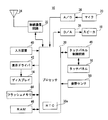
- the cellular phone 10 includes a processor 30 called a computer or a CPU.
- a processor 30 called a computer or a CPU.
- Connected to the processor 30 are a wireless communication circuit 32, an A / D converter 36, a D / A converter 38, an input device 40, a display driver 42, a flash memory 44, a RAM 46, a touch panel control circuit 48, an attitude sensor 50, and the like.
- the processor 30 connected to the processor 30 are a wireless communication circuit 32, an A / D converter 36, a D / A converter 38, an input device 40, a display driver 42, a flash memory 44, a RAM 46, a touch panel control circuit 48, an attitude sensor 50, and the like.
- the processor 30 is responsible for overall control of the mobile phone 10 and includes an RTC (real time clock) 30a that outputs date and time information.
- RTC real time clock
- the processor 30 operates according to the program on the RAM 46, thereby realizing a plurality of functional blocks related to the mobile phone 10. More specifically, as shown in FIG. 3, the processor 30 executes a program on the RAM 46 to execute a display control unit 100, a storage control unit 105, a switching unit 106, a predetermined process execution unit 107, A unit 110 and a notification unit 111 are formed.
- the display control unit 100 includes a first display control unit 101 and a second display control unit 102.
- the second display control unit 102 includes a first new arrival information display control unit 103 and a second new arrival information display control unit 104.
- the predetermined process execution unit 107 includes a setting unit 108 and a deletion unit 109. Each functional block will be described in an embodiment described later.
- the RAM 46 is further used as a working area or a buffer area of the processor 30. In this embodiment, the RAM 46 and the flash memory 44 may be referred to as a storage unit.
- the input device 40 includes a plurality of hard keys 22 shown in FIG.
- the input device 40 constitutes an operation receiving unit that receives key operations from the user for the hard keys 22.
- Information on the hard key operated by the user is input from the input device 40 to the processor 30.
- the wireless communication circuit 32 is a circuit for transmitting and receiving radio waves for voice calls and mails through the antenna 34.
- the wireless communication circuit 32 is a circuit for performing wireless communication using the CDMA method. For example, when the user operates the touch panel 16 to instruct a call (voice transmission), the wireless communication circuit 32 executes a voice transmission process under the instruction of the processor 30 and outputs a voice transmission signal via the antenna 34. To do. The voice transmission signal is transmitted to the other party's telephone through the base station and the communication network. When a voice incoming call process is performed at the other party's telephone, a communicable state is established and the processor 30 executes a call process.
- the processor 30 adjusts the volume of the sound output from the speaker 18 by controlling the amplification factor of the amplifier connected to the D / A converter 38, for example, in response to a volume adjustment operation by the user. I can do it.
- the display driver 42 is connected to the display 14 shown in FIG.
- the display 14 displays a video or an image according to video or image data output from a functional block such as the display control unit 100 formed in the processor 30.
- the display driver 42 includes a video memory that temporarily stores image data to be displayed on the display 14. Data output from the processor 30 is stored in this video memory. Then, the display driver 42 displays an image on the display 14 according to the contents of the video memory. That is, the display driver 42 controls display on the display 14 connected to the display driver 42 under the instruction of the processor 30.
- the display 14 is provided with a backlight.
- the display driver 42 controls the brightness of the backlight and lighting / extinguishing in accordance with instructions from the processor 30.
- the touch panel 16 shown in FIG. 1 is connected to the touch panel control circuit 48.
- the touch panel control circuit 48 applies necessary voltage to the touch panel 16.
- the touch panel control circuit 48 also inputs to the processor 30 a touch start signal indicating the start of touch by the user on the touch panel 16, an end signal indicating the end of touch by the user, and coordinate data indicating the touch position touched by the user. Therefore, the processor 30 can determine which object the user has touched based on the coordinate data.
- the touch operation of this embodiment includes a tap operation, a long tap operation, a flick operation, a slide operation, and the like.
- the tap operation is an operation of releasing (releasing) the finger from the surface of the touch panel 16 in a short time after the finger touches (touches) the surface of the touch panel 16.
- the long tap operation is an operation in which the finger is kept in contact with the surface of the touch panel 16 for a predetermined time or longer and then the finger is released from the surface of the touch panel 16.
- the flick operation is an operation of bringing a finger into contact with the surface of the touch panel 16 and flipping the finger in an arbitrary direction at a predetermined speed or higher.
- the slide operation is an operation of moving the finger in any direction while keeping the finger in contact with the surface of the touch panel 16 and then releasing the finger from the surface of the touch panel 16.
- the above slide operation includes a so-called drag operation in which a finger touches the display object displayed on the surface of the display 14 to move the display object.
- a drop operation an operation of releasing a finger from the surface of the touch panel 16 after the drag operation is referred to as a drop operation.
- a tap operation a long tap operation, a flick operation, a slide operation, a drag operation, and a drop operation may be described by omitting “operation”.
- the touch operation is not limited to the user's finger, and may be performed with a stylus pen or the like.
- the attitude sensor 50 functions as a detection unit and detects the attitude and movement of the mobile phone 10.
- the attitude sensor 50 detects a gyro sensor that detects rotation (angular velocity) of three axes (X, Y, Z) in the mobile phone 10 and an acceleration in the three axes (X, Y, Z) direction of the mobile phone 10.
- An acceleration sensor is integrally formed by MEMS (Micro Electro Mechanical Systems) technology.
- the attitude sensor 50 is sometimes called a six-axis motion sensor.
- the processor 30 detects the posture (tilt) and movement of the mobile phone 10 based on the triaxial angular velocity and the triaxial acceleration output from the posture sensor 50.
- an acceleration sensor and a gyro sensor may be provided separately.
- FIG. 4 to 7 are diagrams showing an example of the posture of the mobile phone 10.
- the posture of the mobile phone 10 with respect to the output of the posture sensor 50 is as follows.
- FIG. 4 is a diagram illustrating a state in which the output of the attitude sensor 50 is 0 degrees and the mobile phone 10 is in a portrait orientation.
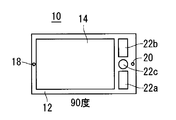
- FIG. 5 is a diagram illustrating a state in which the output of the attitude sensor 50 is 90 degrees and the mobile phone 10 is in the left lateral direction.
- FIG. 6 is a diagram illustrating the state in which the output of the attitude sensor 50 is 180 degrees and the mobile phone 10 is in the reverse direction.
- FIG. 4 is a diagram illustrating a state in which the output of the attitude sensor 50 is 0 degrees and the mobile phone 10 is in a portrait orientation.
- FIG. 5 is a diagram illustrating a state in which the output of the attitude sensor 50 is 90 degrees and the mobile phone 10 is in the left lateral direction.
- FIG. 6 is a diagram illustrating the state in which the output of the attitude
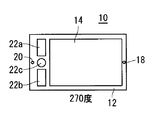
- FIG. 7 is a diagram illustrating a state in which the output of the attitude sensor 50 is 270 degrees and the mobile phone 10 is in the right sideways state.
- the angle output by the attitude sensor 50 increases.
- the display content of the display 14 changes according to the attitude of the mobile phone 10.
- it is only called "landscape.”
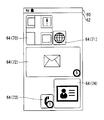
- FIG. 8 is a diagram showing an example of a home screen displayed on the display 14.
- the display range of the display 14 includes a status display area 60 and a function display area 62.
- a pictograph indicating the radio wave reception status by the antenna 34 a pictograph indicating the remaining battery capacity of the secondary battery, and a time are displayed.
- a home screen including a tile-like object 64 hereinafter simply referred to as a tile 64
- the home screen is displayed on the display 14 by the processor 30 (first display control unit 101).
- Tile 64 is a function shortcut. By tapping the tile 64, the user can cause the mobile phone 10 to execute a function corresponding to the tapped tile 64.
- the display state of the tile 64 that is, the display position and the display size can be arbitrarily changed. Further, the user can cause the mobile phone 10 to add a tile 64 having an arbitrary function to the home screen.
- the functions of this embodiment include an application installed in the mobile phone 10 and a function of changing the settings of the mobile phone 10.
- the home screen shown in FIG. 8 corresponds to the map tile 70 corresponding to the map function, the browser tile 71 corresponding to the browser function, the mail tile 72 corresponding to the mail function, the telephone tile 73 corresponding to the telephone function, and the address book function.
- the address book tile 74 to be displayed is displayed by the first display control unit 101.
- the storage controller 105 stores the new arrival information in the RAM 46.
- the number of new arrival information is indicated in the display range of the tile 64 corresponding to the function. For example, reception of five new mails is stored as new arrival information in the RAM 46 by the mail function, and one incoming call (missed call) is stored as new arrival information in the RAM 46 in the telephone function. A number icon with “5” written as the number of new arrival information is displayed in the display range, and a number icon with “1” written as new arrival information is displayed in the display range of the telephone tile 73.
- a function corresponding to the tile 64 is executed. Further, when the number icon is displayed in the display range of the tile 64, when the function corresponding to the tile 64 is executed, the function corresponding to the tile 64 so that a screen related to newly arrived information is displayed. Is executed. For example, when a tap operation is performed on the mail tile 72, the mail function is executed so that the latest new mail is displayed.
- the tile 64 becomes editable. In this state, the display size and display position of the tile 64 can be changed, and the tile 64 can be deleted. However, even if the tile 64 is deleted, the application is not uninstalled. As described above, the user can cause the mobile phone 10 to execute an arbitrary function based on the tile 64 displayed on the home screen.
- an event is generated by a corresponding function, and new arrival information is stored in the RAM 46.
- new arrival information is stored in the RAM 46.
- the SNS function since 50 comments are posted for the uploaded article, 50 new arrival information is stored in the RAM 46.
- the schedule function since the notification process is executed in the two registered schedules, the two new arrival information is stored in the RAM 46.
- the alarm function since it is notified that the registered alarm time has been reached, one piece of new arrival information is stored in the RAM 46.
- the number icon with “50” written is displayed in the display range of the SNS tile 75, the number icon with “2” written in the display range of the schedule tile 76, and the alarm tile 77 has “ The number icon with “1” written therein is displayed.
- the second display control unit 102 displays the new arrival information on the display 14. This makes it easier for the user to check new arrival information.
- the first new arrival information display that the second display control unit 102 has.
- the control unit 103 displays the function tile 66 corresponding to the new arrival information for each function on the display 14. For example, as shown in FIGS.
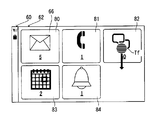
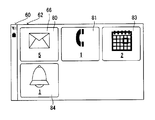
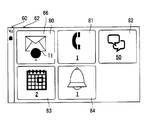
- the second display control unit 102 displays a mail function function tile 80, a telephone function function tile 81, an SNS function function tile 82, a schedule function function tile 83, and an alarm function function tile 84 on the display 14.
- Each function tile corresponds to new arrival information of the function and indicates the number of corresponding new arrival information. For example, “5” is written in the function tile 80 of the mail function as the number of new arrival information, “1” is written in the function tile 81 of the telephone function as the number of new arrival information, and the function tile 82 of the SNS function.
- the user can cause the mobile phone 10 to execute a corresponding function by performing a predetermined touch operation on the function tile 66. That is, the user can determine the function to be executed by the mobile phone 10 after grasping the number of newly arrived information for each function.
- each function tile 66 When displaying seven or more function tiles 66, the display size of each function tile 66 is adjusted so that all the function tiles 66 are displayed on one screen. However, in another embodiment, when seven or more function tiles 66 are displayed, six function tiles 66 are displayed on one screen, and when the screen is scrolled by a scroll operation, the remaining function tiles 66 are displayed. May be displayed. Since the touch operation on the functional tile 66 will be described later, detailed description thereof is omitted here.
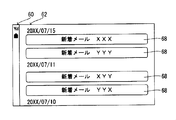
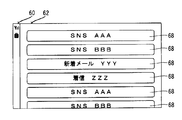
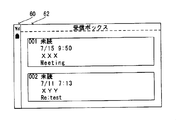
- the second new arrival information display control unit 104 of the second display control unit 102 As shown in FIG. 12, new arrival tiles 68 corresponding to new arrival information are displayed on the display 14 in time series.
- the new arrival tiles 68 are displayed on the display 14 by the second display control unit 102 (second new arrival information display control unit 104) in the order in which the new arrival information is recorded. More specifically, the new arrival tile 68 is displayed on the display 14 so that the new arrival tile 68 corresponding to the latest new arrival information is displayed on the top of the display 14.
- a character string indicating the function and information indicating the contents of the new arrival information are displayed in the display range of the new arrival tile 68 to be displayed.
- SNS as a character string indicating a function
- AAA segment contributor
- the user can cause the mobile phone 10 to execute a function corresponding to the new arrival information by performing a touch operation on the new arrival tile 68. That is, the user can determine the function to be executed by the mobile phone 10 after confirming the order in which the new arrival information is stored.
- the tap operation on the function tile 66 will be described with reference to FIGS.
- a tap operation Tt is performed on the function tile 80 of the mail function
- new arrival tiles 68 of new arrival information corresponding to the mail function are displayed in chronological order as shown in FIG. Is done. That is, the user can display the new arrivals tile 68 of new arrival information corresponding to a specific function on the display 14.
- the new arrival tile 68 of the new arrival information corresponding to the function is displayed in time series as shown in FIG. 14, when the slide operation is performed from the upper end to the lower end of the display 14, the state returns to the state of FIG. .
- a slide operation from the left end (right end) to the right end (left end) may be performed, or the slide direction may be reversed.
- not a slide operation but a key operation may be used.
- the predetermined process execution unit 107 performs a predetermined operation based on the function corresponding to the newly arrived information on which the touch operation has been performed and the type of touch operation. Execute the process.
- the setting unit 108 included in the predetermined process execution unit 107 sets each new arrival information corresponding to the functional tile 66 for which the downward flick operation has been performed.
- Information obtained by the event corresponding to the new arrival information (incoming call history, new mail, posting of a new comment, etc.) is set to a confirmed state.
- the setting unit 108 stores 50 stored by posting a new comment as shown in FIG. All new comments corresponding to each of the new arrival information items are set in a confirmed state. Then, the function tile 82 is not displayed by the deletion unit 109 included in the predetermined process execution unit 107.
- the new mail is set to a read state.
- the incoming call history is set to the confirmed state for the new arrival information of the incoming call. Therefore, if the user determines that it is not necessary to check the details one by one although a plurality of newly arrived information is stored in a certain function, the newly arrived information of the function can be collectively confirmed. . Therefore, the user can check newly arrived information efficiently.
- each new arrival information corresponding to the functional tile 66 is classified based on a predetermined condition as shown in FIG. In this state, it is displayed on the display 14 by the predetermined process execution unit 107.
- the predetermined process execution unit 107 classifies the corresponding new arrival tile 68 of each new arrival information for each date and causes the display 14 to display it. .
- the predetermined processing execution unit 107 displays the new arrival information.
- the predetermined process execution unit 107 displays the new arrival tile 68 corresponding to the new arrival information on the display 14 for each sender.
- the predetermined processing execution unit 107 displays the new arrival tile 68 corresponding to the new arrival information on the display 14 for each caller. To do.
- the predetermined process execution unit 107 displays the address book.
- a tile indicating the number of newly arrived information registered in and a tile indicating the number of newly arrived information not registered in the address book are displayed on the display 14. For example, when a flick operation in the left direction is performed on the function tile 80 of the mail function, the sender of the new mail corresponding to the three new arrival information is registered in the address book, and it corresponds to the two new arrival information.
- a tile written as “3 registered” and a tile written as “2 unregistered” are displayed on the display. Note that the touch operation on these two tiles is substantially the same as the touch operation on the functional tile 66. For example, when a downward flick operation is performed on the tile of “2 unregistered” tiles, the predetermined processing execution unit 107 reads all 2 new mails whose sender is not registered in the address book.
- the user can cause the mobile phone 10 to execute various processes related to the new arrival information by performing a touch operation on the tile corresponding to the new arrival information. Therefore, user convenience is improved.
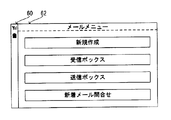
- the execution unit 110 executes the mail function. More specifically, the execution unit 110 executes the mail function, and displays the mail function mail menu screen (top screen) on the display 14 as shown in FIG. Thereby, when confirming a plurality of newly arrived information, the user can confirm each of the plurality of newly arrived information after causing the mobile phone 10 to execute a function corresponding thereto.
- the execution unit 110 executes a function corresponding to the new arrival tile 68.
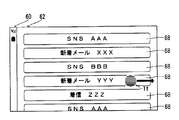
- the execution unit 110 executes the mail function, and new arrival as shown in FIG. New mail including the contents written on the tile 68 (the sender is “XXX”) is displayed on the display 14. That is, the user can select arbitrary new arrival information from a plurality of new arrival information and cause the mobile phone 10 to execute a function based on the new arrival information.
- the user can cause the mobile phone 10 to execute a function corresponding to the new arrival information by selecting the new arrival information (the function tile 66 or the new arrival tile 68) displayed on the display 14. As a result, the user can easily cause the mobile phone 10 to execute the function using the new arrival information.
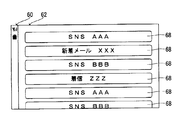
- the predetermined processing execution unit 107 deletes the new arrival information corresponding to the new arrival tile 68 from the RAM 46 and obtains it by an event of the new arrival information. Information is also deleted. Specifically, when a right flick operation Tf is performed on a new arrival tile 68 written as “New arrival mail YYY” as shown in FIG. 28, the new arrival tile 68 is displayed as shown in FIG. Disappears and the corresponding new arrival information is deleted from the RAM 46. Then, as shown in FIG. 30, the newly arrived mail corresponding to the deleted new arrival information is also deleted.
- an upward flick operation is performed on the function tile 66
- a function corresponding to the function tile 66 for which the upward flick operation has been performed can be responded.
- Response processing is executed by the processing execution unit 107.
- the predetermined process execution unit 107 executes a process of creating a reply mail to the new mail corresponding to the new arrival information.
- the predetermined process execution unit 107 displays a callable screen for the caller corresponding to the new arrival information. Is executed.
- processing for returning to the comment corresponding to the new arrival information is executed by the predetermined processing execution unit 107.
- a call is made without prior confirmation to the user only when the caller is registered in the address book. You may do it.
- the predetermined processing execution unit 107 displays information on the partner who generated the event corresponding to the new arrival information. Register in the mobile phone 10 (storage unit). For example, when a flick operation in the left direction is performed on the function tile 80 corresponding to the mail function, the predetermined process execution unit 107 registers the mail address of the sender of the new mail corresponding to the new arrival information in the address book. Is executed. Further, when a flick operation in the left direction is performed on the function tile 81 corresponding to the telephone function, the predetermined process execution unit 107 registers the caller's telephone number and the like corresponding to the new arrival information in the address book. Processing is executed.
- the function is based on the new arrival information instead of displaying the new arrival information. Is executed. For example, when one new arrival information of the mail function is stored in the RAM 46 and the posture of the mobile phone 10 changes from the vertical orientation to the horizontal orientation, as shown in FIG. 16, the new arrival email corresponding to the new arrival information is displayed.
- the mail function is executed as follows. When only one function tile 66 showing one new arrival information is displayed on the display 14, when a tap operation is performed on the function tile 66, a new arrival tile 68 is displayed as shown in FIG. Instead, the function may be executed based on one piece of new arrival information.
- the notification unit 111 notifies the user that no new arrival information is stored. For example, as illustrated in FIG. 31, the notification unit 111 causes the display 14 to display a message 90 “No new information”. Thereby, the user can grasp that the new arrival information is not stored. Therefore, when the user changes the mobile phone 10 sideways, even if the screen does not change, the user does not have to suspect a failure of the mobile phone 10.
- the home screen may be switched to the landscape display, or the home screen display may not change.
- FIG. 32 shows an example of a new arrival information table in which new arrival information is stored.
- the new arrival information table includes a time column in which the time when an event occurs is stored, a function column in which a function corresponding to the event is stored, and a column in which at least a part of information obtained by the generated event is stored. including.
- one new arrival information is memorize
- priorities may be set for the functions, and when displaying new arrival information, the new arrival information may be displayed according to the priority. For example, when new arrival information is displayed for each function in a state in which the priority order is set higher in the order of the telephone function, the mail function, and the SNS function, as shown in FIG. Displayed on the left, a function tile 80 for the mail function and a function tile 82 for the SNS function are displayed. Also, instead of the priority order of the functions, the items may be displayed in the descending order of the number of newly arrived information items. Further, the display size of the functional tile 66 may be changed based on the priority order.
- the user's usage frequency may be reflected in the display of new arrival information. For example, if the frequency of use is the order of the SNS function, the mail function, and the schedule function, the function tile 82 of the SNS function is displayed on the leftmost side, followed by the function tile 80 of the mail function and the function tile of the schedule function. 83 is displayed.
- the order of the new arrival information to be displayed may be set according to the time zone in which the new arrival information is displayed. For example, new arrival information for functions such as news is preferentially displayed in the morning time zone, and new arrival information for SNS function is preferentially displayed in the night time zone. Furthermore, the order in which the new arrival information is displayed may be arbitrarily set by the user.
- the new arrival tiles 68 corresponding to the new arrival information may be displayed in chronological order when the posture of the mobile phone 10 changes to the right sideways state. Furthermore, the user may arbitrarily set the state of newly arrived information displayed when the attitude of the mobile phone 10 changes to the horizontal direction.
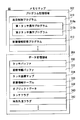
- the program storage area 302 is an area for reading and storing (developing) part or all of the program data set in advance in the flash memory 44 (FIG. 2).
- the program storage area 302 stores a display control program 310 for controlling the display of tiles and a new arrival information storage program 312 for storing new arrival information based on an event that has occurred. Further, the first touch operation program 310 a and the second touch operation program 310 b are also stored in the program storage area 302 as subroutines of the display control program 310.
- an application such as a mail function and a browser function and a program for executing the function are also stored.
- a touch buffer 330 and an attitude information buffer 332 are provided, and a touch coordinate map 334, a new arrival information table 336, object data 338, and the like are stored.
- the data storage area 304 is also provided with a touch flag 340, a time-series order flag 342, and the like.
- touch coordinate data output from the touch panel control circuit 48 is stored.
- the attitude information buffer 332 temporarily stores acceleration and angular velocity data output from the attitude sensor 50. Then, the processor 30 detects the attitude of the mobile phone 10 based on the information stored in the attitude information buffer 332.
- the touch flag 340 is a flag for determining whether or not the touch panel 16 is touched.
- the touch flag 340 is composed of a 1-bit register. When the touch flag 340 is turned on (established), a data value “1” is set in the register. On the other hand, when the touch flag 340 is turned off (not established), a data value “0” is set in the register. The touch flag 340 is switched on / off based on the output of the touch panel control circuit 48.
- the time series order flag 342 is a flag for determining whether to display newly arrived information in time series order.
- the time-series order flag 342 is turned on when the posture of the mobile phone 10 changes sideways while being touched on the touch panel 16.
- the time-series order flag 342 is turned off in the initial state, and is also turned off when the above-described conditions are not satisfied. Note that the configuration of the time-series order flag 342 is substantially the same as that of the touch flag 340, and thus a detailed description of the configuration is omitted.
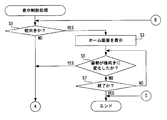
- step S1 the processor 30 determines whether or not the orientation of the mobile phone 10 is vertical. That is, the processor 30 determines whether the attitude of the mobile phone 10 is in the vertical orientation shown in FIG. 3 based on the attitude information in the attitude information buffer 332. If “NO” in the step S1, that is, if the posture of the mobile phone 10 is in the horizontal direction, the processor 30 executes the processing after the step S9 shown in FIG.
- step S1 determines whether or not the posture has changed sideways. That is, it is determined based on the posture information stored in the posture information buffer 332 whether the posture of the mobile phone 10 has changed from vertical to horizontal. If “NO” in the step S5, that is, if the orientation of the mobile phone 10 remains in the vertical orientation, the processor 30 determines whether or not the process is finished in a step S7. That is, it is determined whether an operation to end the display of the home screen has been performed. If “YES” in the step 7, for example, when a tap operation is performed on the tile 64 displayed on the home screen, the processor 30 ends the display control process in order to shift from the home screen to the function screen. .
- step S7 If “NO” in the step S7, for example, if an operation for changing from the home screen to another screen is not performed, the process returns to the process in the step S5. If “YES” in the step S5, for example, when the posture of the mobile phone 10 changes from the vertical direction to the left horizontal direction, the processor 30 reads the new arrival information table 336 in a step S9. That is, the new arrival information table 336 is read from the RAM 46.
- step S11 the processor 30 determines whether there is new arrival information. That is, the processor 30 determines whether or not new arrival information is stored in the read new arrival information table 336. If “NO” in the step S11, that is, if the new arrival information is not stored in the new arrival information table 336, the processor 30 (the notification unit 111) notifies that there is no new arrival information in a step S13. For example, as shown in FIG. 31, a message 90 “There is no new information” is displayed on the display 14. Then, when the process of step S13 ends, the processor 30 returns to the process of step S1.
- step S11 determines whether or not there is one new arrival information in a step S15. That is, the processor 30 determines whether there is only one new arrival information stored in the new arrival information table 336. If “YES” in the step S15, that is, if only one new arrival information is stored, the processor 30 executes a function corresponding to the new arrival information in a step S17. For example, when only new arrival information for the mail function is stored in the new arrival information table 336, as shown in FIG. 16, the mail function is executed so that new arrival mail corresponding to the new arrival information is displayed. When the process for executing the function is completed in step S17, the processor 30 ends the display control process.
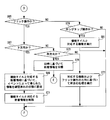
- the processor 30 determines whether or not the time-series order flag 342 is turned on in a step S19. To do. That is, it is determined whether or not the cellular phone 10 is in a landscape orientation while being touched and the time-series order flag 342 is switched on. If “NO” in the step S19, for example, if the orientation of the mobile phone 10 is set to the left lateral direction and the time-series order flag 342 is turned off, the processor 30 (second display control unit 102 (first new arrival information) in the step S21. The display control unit 103)) displays new arrival information on the display 14 for each function.
- step S23 the processor 30 executes a first touch operation process. That is, processing for responding to the touch operation on the functional tile 66 is executed.
- the first touch operation process will be described in detail with reference to the flowcharts of FIGS. 37 and 38, and the description thereof is omitted here.
- the processor 30 proceeds to the process of step S29.
- step S19 If “YES” in the step S19, for example, if the posture of the mobile phone 10 changes to the right side and the time-series order flag 342 is turned on, the processor 30 (the second display control unit 102) in a step S25. (Second new arrival information display control unit 104) displays the new arrival information on the display 14 in chronological order. For example, a new arrival tile 68 corresponding to the new arrival information stored in the new arrival information table 336 is displayed as shown in FIG. Subsequently, in step S27, the processor 30 executes a second touch operation process. That is, processing for responding to the touch operation on the new arrival tile 68 is executed. Further, since the second touch operation process will be described in detail with reference to the flowchart of FIG. 39, the description thereof is omitted here. Then, when the process of step S27 ends, the processor 30 proceeds to the process of step S29.
- the processor 30 determines whether or not the operation is a display switching operation in a step S31. For example, it is determined whether an operation of shaking the mobile phone 10 has been performed as an operation of switching between display for each function and display in time series order in the new arrival information. Specifically, the processor 30 (switching unit 106) determines whether or not the mobile phone 10 has been shaken based on the posture information stored in the posture information buffer 332.
- step S31 determines whether an operation of switching between display for each function and display in time series order is performed in the new arrival information. If “YES” in the step S31, that is, if an operation of switching between display for each function and display in time series order is performed in the new arrival information, the processor 30 (the switching unit 106), in step S33, the time series order flag 342. Invert the state of. That is, if new arrival information is displayed on the display 14 for each function and the time-series order flag 342 is off, the switching unit 106 turns on the time-series order flag 342. On the other hand, if new arrival information is displayed on the display 14 in time series order and the time series order flag 342 is on, the switching unit 106 turns off the time series order flag 342. Subsequently, in step S35, the processor 30 reads the new arrival information table 336.
- the processor 30 determines whether or not the posture is changed in a step S37. That is, it is determined whether the mobile phone 10 is moved and the amount of change in the value output from the attitude sensor 50 exceeds a threshold value. If “NO” in the step S37, for example, if the attitude of the mobile phone 10 is not changed, the processor 30 executes the process of the step S35 and returns to the process of the step S19. That is, the new arrival information table 336 is read again, and the display of new arrival information is updated. In another embodiment, the processor 30 may return to the process of step S9 after the process of step S37 is completed.
- step S37 if “YES” in the step S37, for example, when the mobile phone 10 is moved, the processor 30 returns to the process of the step S1. That is, since the mobile phone 10 is moved, the posture of the mobile phone 10 is determined again.
- FIG. 37 is a flowchart of the first touch operation process.
- the processor 30 determines whether or not a touch operation has been performed on the functional tile 66 in step S51. That is, it is determined whether the user has performed a touch operation on the function tile 66. If “NO” in the step S51, that is, if the touch operation is not performed on the function tile 66, the processor 30 ends the first touch operation process and returns to the display control process.
- step S51 determines whether or not a tap operation is performed in a step S53. That is, the processor 30 determines whether a tap operation has been performed on the functional tile 66. If “NO” in the step S53, that is, if the tap operation is not performed on the functional tile 66, the processor 30 proceeds to the process of step S65 shown in FIG.
- the processor 30 displays the new arrival information corresponding to the functional tile 66 in which the tap operation is performed in a step S55. . For example, when a tap operation is performed on the function tile 80 of the mail function, a new arrival tile 68 corresponding to the new arrival information of the mail function is displayed as shown in FIG.
- step S57 the processor 30 executes a second touch operation process. That is, since the new arrival tile 68 is displayed, the second touch operation process is executed to deal with the touch operation on the new arrival tile 68.
- step S59 the processor 30 determines whether or not the function has been executed. For example, in the second touch operation process, it is determined whether the function has been executed in response to the tap operation on the new arrival tile 68. If “YES” in the step S59, that is, if the function is executed, the processor 30 ends the first touch operation process and returns to the display control process.
- the processor 30 determines whether or not it is in the vertical orientation in a step S61. That is, it is determined whether the posture of the mobile phone 10 has changed from the horizontal direction to the vertical direction. If “YES” in the step S61, that is, if the orientation of the mobile phone 10 is in the portrait orientation, the processor 30 ends the first touch operation process and returns to the display control process. On the other hand, if “NO” in the step S61, that is, if the posture of the mobile phone 10 is landscape, the processor 30 determines whether or not the process is finished in a step S63. That is, the processor 30 determines whether an operation for ending or switching the display on the display 14 has been performed.
- step S63 If “YES” in the step S63, for example, when the end key 22b is operated and the display on the display 14 is erased, the processor 30 ends the first touch operation process and returns to the display control process. If “NO” in the step S63, for example, if the display 14 is not erased, the processor 30 returns to the process in the step S57 and executes the second touch operation process again. Since the second touch operation process will be described in detail with reference to the flowchart of FIG. 39, the description thereof is omitted here.
- the information obtained by the event based on the new arrival information corresponding to is set to a confirmed state. For example, as illustrated in FIGS. 17 and 18, when a downward flick operation Tf is performed on the function tile 82 of the SNS function, the setting unit 108 may post a comment based on the new arrival information of the SNS function. Are set to the confirmed state. Subsequently, in step S71, the processor 30 (predetermined processing execution unit 107 (deleting unit 109)) deletes the new arrival information corresponding to the function tile 66. For example, all 50 new arrival information corresponding to the SNS function is deleted. When the process of step S71 ends, the processor 30 ends the first touch operation process and returns to the display control process.
- the processor 30 determines whether or not the direction is the right direction in a step S73. That is, it is determined whether a right flick operation has been performed on the functional tile 66. If “YES” in the step S73, that is, if a flicking operation in the right direction is performed on the function tile 66, the processor 30 (predetermined processing execution unit 107) classifies the new arrival information based on the date and time in a step S75. . For example, as shown in FIGS.
- step S75 when the flick operation Tf in the right direction is performed on the function tile 80 of the mail function and the process of step S75 is executed, the new arrival tile 68 corresponding to the new arrival information of the mail function. Are displayed on the basis of the date and time. Then, when the process of step S75 ends, the processor 30 returns to the process of step S57. That is, since the new arrival tile 68 is displayed, the second touch operation process is executed.
- the processor 30 performs a predetermined operation based on the corresponding function and the flick operation direction in a step S77. Execute the process. For example, when an upward flick operation is performed on the function tile 66, if the function corresponding to the function tile 66 is a mail function and a telephone function, the predetermined processing execution unit 107 classifies the new arrival information by classifying it as a common caller. This is displayed on the display 14.
- the processor 30 determines whether or not the long tap operation is performed in a step S79. That is, it is determined whether a long tap operation has been performed on the function tile 66. If “NO” in the step S79, for example, if the touch operation performed on the function tile 66 cannot be determined, the processor 30 ends the first touch operation process and returns to the display control process. If “YES” in the step S79, the processor 30 (the execution unit 110) executes a function corresponding to the function tile 66 in a step S81. For example, as shown in FIG.
- FIG. 39 is a flowchart of the second touch operation process.
- the processor 30 touches the new arrivals tile 68 in step S101. It is determined whether or not an operation has been performed. That is, the processor 30 determines whether the touch position by the touch operation is included in the display range of the new arrival tile 68. If “NO” in the step S101, that is, if a position where the new arrival tile 68 is not displayed is touched, the processor 30 ends the second touch operation process and performs a higher-level routine (display control process or first touch operation process). )
- step S101 determines whether or not a tap operation is performed in a step S103. That is, it is determined whether a tap operation has been performed on the displayed new arrival tile 68. If “YES” in step S103, for example, as illustrated in FIG. 23, when a tap operation is performed on the new arrivals tile 68 of the mail function, the processor 30 (execution unit 110), based on the new arrivals tile 68, in step S105. Execute the function. For example, when the tap operation Tt is performed on the new arrival tile 68 of the mail function, the execution function 110 executes the mail function so that the new arrival mail corresponding to the new arrival information is displayed. When the process of step S105 ends, the processor 30 ends the second touch operation process and returns to the upper routine process.
- the processor 30 determines whether or not it is in a downward direction in a step S109. That is, it is determined whether a downward flick operation has been performed on the new arrival tile 68. If “YES” in the step S109, for example, when a downward flick operation Tf is performed on the new arrival tile 68 of the mail function as shown in FIG. 25, the processor 30 (the predetermined processing execution unit 107 (setting) is set in a step S111. The unit 108)) sets the information obtained by the event corresponding to the new arrival tile 68 to a confirmed state.
- step S113 the processor 30 (predetermined processing execution unit 107 (deletion unit 109)) deletes the new arrival information corresponding to the new arrival tile 68.
- the new arrival information corresponding to the new arrival tile 68 of the mail function for which the flick operation is performed is deleted from the new arrival information table 336.
- the processor 30 ends the second touch operation process and returns to the upper routine process.
- the processor 30 determines whether or not it is in the right direction in a step S115. That is, it is determined whether a right flick operation has been performed on the new arrival tile 68. If “YES” in the step S115, for example, as shown in FIG. 28, when the flick operation Tf in the right direction is performed on the new arrival tile 68 of the mail function, the processor 30 (the predetermined process executing unit 107) is performed in the step S117. The information obtained by the event corresponding to the new arrival information is deleted. For example, the new mail corresponding to the new arrival tile 68 of the mail function is deleted by the predetermined processing execution unit 107.
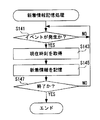
- FIG. 40 is a flowchart of the new arrival information storage process. For example, when the mobile phone 10 is turned on, the new arrival information storage process is started.
- the processor 30 determines whether an event has occurred. For example, it is determined whether a new mail has been received by the mail function. If “NO” in the step S141, that is, if no event has occurred, the processor 30 repeats the process of the step S141.
- the processor 30 acquires the current time in a step S143. That is, the processor 30 acquires date and time information output by the RTC 30a. Subsequently, the new arrival information is stored in the storage unit by the processor 30 (storage control unit 105) in step S145. For example, new arrival information is created based on the contents of the received new mail (addressee, title, part of the body text) and acquired date / time information, and the new arrival information is stored in the new arrival information table 336.
- step S147 the processor 30 determines whether or not the processing is finished. For example, it is determined whether an operation to turn off the power of the mobile phone 10 has been performed. If “NO” in the step S147, for example, if an operation of turning off the power is not performed, the processor 30 returns to the process of the step S141. On the other hand, if “YES” in the step S147, for example, when an operation of turning off the power is performed, the processor 30 ends the new arrival information storing process.
- the mobile phone 10 may include hard keys such as cursor keys instead of the touch panel 16.
- the function tile 66 and the new arrival tile 68 are not selected by a tap operation, but are selected by a key operation on a hard key.
- the word “greater than” is used for the threshold value, but “greater than the threshold value” includes the meaning of “greater than the threshold value”. Further, “smaller than a threshold” includes the meanings of “below the threshold” and “below the threshold”.
- the program used in this embodiment may be stored in the HDD of the data distribution server and distributed to the mobile phone 10 via the network.
- a storage medium may be sold or distributed in a state where a plurality of programs are stored in a storage medium such as an optical disk such as a CD, DVD, or BD (Blue-Ray Disk), a USB memory, or a memory card. Then, when the program downloaded through the above-described server or storage medium is installed in a mobile phone having the same configuration as that of this embodiment, the same effect as that of this embodiment can be obtained.
Landscapes
- Engineering & Computer Science (AREA)
- Theoretical Computer Science (AREA)
- General Engineering & Computer Science (AREA)
- Physics & Mathematics (AREA)
- General Physics & Mathematics (AREA)
- Human Computer Interaction (AREA)
- Business, Economics & Management (AREA)
- Computer Hardware Design (AREA)
- Human Resources & Organizations (AREA)
- Strategic Management (AREA)
- Entrepreneurship & Innovation (AREA)
- Computer Networks & Wireless Communication (AREA)
- Signal Processing (AREA)
- Marketing (AREA)
- Economics (AREA)
- Data Mining & Analysis (AREA)
- Operations Research (AREA)
- Quality & Reliability (AREA)
- Tourism & Hospitality (AREA)
- General Business, Economics & Management (AREA)
- User Interface Of Digital Computer (AREA)
- Telephone Function (AREA)
- Position Input By Displaying (AREA)
Abstract
携帯端末は、表示装置と、当該携帯端末の姿勢を検出する検出部と、イベントが発生したとき、そのイベントの新着情報を記憶する記憶部とを有する。また、携帯端末は、検出部によって第1姿勢が検出されているとき新着情報と関連するタイル状の第1オブジェクトおよび新着情報と関連しないタイル状の第2オブジェクトを表示装置に表示させる第1表示制御部と、検出部によって第2姿勢が検出されたとき、記憶部によって記憶された新着情報を表示装置に表示させる第2表示制御部とを備える。
Description
この発明は、発生したイベントの新着情報を表示する携帯端末に関する。
携帯端末では、複数のアイコンがタッチパネルディスプレイに配列表示されることがある。
携帯端末では、アイコンと対応する機能によって発生したイベントの通知を、アイコンを利用して行うことがある。ところが、イベントの発生を通知するアイコンが多数配列表示されると、ユーザは発生したイベントの全てを把握するのが難しくなる。
それゆえに、この発明の主たる目的は、新規な携帯端末、新着情報表示プログラムおよび新着情報表示方法を提供することである。
この発明の他の目的は、新着情報を容易に確認することが出来る、携帯端末、新着情報表示プログラムおよび新着情報表示方法を提供することである。
ある態様に係る携帯端末は、表示装置と、前記携帯端末の姿勢を検出する検出部と、イベントが発生したとき、そのイベントの新着情報を記憶する記憶部と、前記検出部によって第1姿勢が検出されているとき、前記新着情報と関連するタイル状の第1オブジェクトおよび前記新着情報と関連しないタイル状の第2オブジェクトを前記表示装置に表示させる第1表示制御部と、前記検出部によって第2姿勢が検出されたとき、前記記憶部によって記憶された新着情報を前記表示装置に表示させる第2表示制御部とを備える。
ある態様に係る新着情報表示プログラムは、記憶部、表示装置および携帯端末の姿勢を検出する検出部を有する、携帯端末のプロセッサを、イベントが発生したとき、そのイベントの新着情報を前記記憶部に記憶させる記憶制御部、前記検出部によって第1姿勢が検出されているとき、前記新着情報と関連するタイル状の第1オブジェクトおよび前記新着情報と関連しないタイル状の第2オブジェクトを前記表示装置に表示させる第1表示制御部、および前記検出部によって第2姿勢が検出されたとき、前記記憶部に記憶された前記新着情報を前記表示装置に表示させる第2表示制御部として機能させるためのものである。
ある態様に係る新着情報表示方法は、記憶部、表示装置および携帯端末の姿勢を検出する検出部を有する、携帯端末における新着情報表示方法であって、前記携帯端末のプロセッサが、イベントが発生したとき、そのイベントの新着情報を前記記憶部に記憶させる記憶ステップと、前記検出部によって第1姿勢が検出されているとき、前記新着情報と関連するタイル状の第1オブジェクトおよび前記新着情報と関連しないタイル状の第2オブジェクトを前記表示装置に表示させる第1表示ステップと、前記検出部によって第2姿勢が検出されたとき、前記記憶ステップによって記憶された前記新着情報を前記表示装置に表示させる新着情報表示ステップを実行する。
ある態様に係る携帯端末は、表示装置と、前記携帯端末の姿勢を検出する検出部と、イベントが発生したとき、そのイベントの新着情報を記憶する記憶部と、前記検出部によって第1姿勢から第2姿勢への変化が検出されたとき、前記記憶部によって記憶された前記新着情報を前記表示装置に表示させる表示制御部とを備える。
この発明によれば、新着情報を容易に確認することが出来る。
この発明の目的、特徴、局面、及び利点は、以下の詳細な説明と添付図面とによって、より明白となる。
図1に示されるように、本実施例に係る携帯端末は、例えばスマートフォン(smartphone)などの携帯電話機10である。携帯電話機10は縦長の扁平矩形のハウジング12を含む。ただし、携帯端末は、図1に例示されるような携帯電話機10に限られず、タッチパネルを有する、タブレット端末、タブレットPC、ノートPCおよびPDAなどであってもよい。
ハウジング12の一方主面(表面)には、たとえば液晶パネルや有機ELパネルなどのディスプレイ14が設けられる。ディスプレイ14は、表示装置とも呼ばれる。ディスプレイ14の上には、タッチパネル16が設けられる。
ハウジング12の縦方向一端の主面側にスピーカ18が内蔵され、縦方向他端の主面側にマイク20が内蔵される。
ハウジング12の一方主面には、タッチパネル16と共に入力操作手段を構成する複数のハードキー22が設けられる。本実施例では、複数のハードキー22には、通話キー22a、終話キー22bおよびホームキー22cが含まれる。
たとえば、ユーザは、ディスプレイ14に表示されたダイヤルパッドに対してタッチ操作を行うことで電話番号を入力でき、通話キー22aを操作して音声通話を開始することができる。そして、ユーザは終話キー22bを操作すれば、音声通話を終了することができる。なお、ユーザは終話キー22bを長押しすることによって、携帯電話機10の電源をオン/オフすることができる。
また、ユーザがホームキー22cを操作すれば、ディスプレイ14にホーム画面が表示される。その状態でユーザはディスプレイ14に表示されているGUIなどに対してタッチ操作を行うことによってオブジェクトを選択し、その選択を確定させることができる。
なお、携帯電話機10は、電話機能以外に、メール機能およびブラウザ機能などを実行可能である。また、以下の説明では、ディスプレイ14に表示されるキーなどのGUIおよびアイコンなどは、まとめてオブジェクトと言うことがある。
図2に示されるように、本実施例に係る携帯電話機10は、コンピュータまたはCPUと呼ばれるプロセッサ30などを含む。プロセッサ30には、無線通信回路32、A/D変換器36、D/A変換器38、入力装置40、表示ドライバ42、フラッシュメモリ44、RAM46、タッチパネル制御回路48および姿勢センサ50などが接続される。
プロセッサ30は、携帯電話機10の全体制御を司り、日時情報を出力するRTC(リアルタイムクロック)30aを含む。RAM46には、フラッシュメモリ44に予め設定されているプログラムの全部または一部が使用に際して展開される。プロセッサ30が、このRAM46上のプログラムに従って動作することで、携帯電話機10に係る複数の機能ブロックが実現される。より具体的には、図3に示されるように、プロセッサ30では、RAM46上のプログラムが実行されることによって、表示制御部100、記憶制御部105、切替部106、所定処理実行部107、実行部110および通知部111が形成される。表示制御部100は、第1表示制御部101および第2表示制御部102を有している。第2表示制御部102は、第1新着情報表示制御部103および第2新着情報表示制御部104を有している。所定処理実行部107は、設定部108および削除部109を有している。各機能ブロックについては、後述する実施例の中で説明する。また、RAM46はさらに、プロセッサ30のワーキング領域ないしバッファ領域として用いられる。また、本実施例では、RAM46およびフラッシュメモリ44を記憶部と呼ぶこともある。
図2に戻り、入力装置40は、図1に示す複数のハードキー22を含むものである。入力装置40は、ハードキー22に対するユーザからのキー操作を受け付ける操作受付部を構成する。ユーザが操作したハードキーの情報(キーデータ)は入力装置40からプロセッサ30に入力される。
無線通信回路32は、アンテナ34を通して、音声通話やメールなどのための電波を送受信するための回路である。本実施例では、無線通信回路32は、CDMA方式での無線通信を行うための回路である。たとえば、ユーザがタッチパネル16を操作して発呼(音声発信)を指示すると、無線通信回路32は、プロセッサ30の指示の下、音声発信処理を実行し、アンテナ34を介して音声発信信号を出力する。音声発信信号は、基地局および通信網を経て相手の電話機に送信される。そして、相手の電話機において音声着信処理が行われると、通信可能状態が確立され、プロセッサ30は通話処理を実行する。
A/D変換器36には図1に示すマイク20が接続される。マイク20からの音声信号はこのA/D変換器36でディジタルの音声データに変換され、プロセッサ30に入力される。一方、D/A変換器38にはスピーカ18が接続される。D/A変換器38は、ディジタルの音声データを音声信号に変換して、アンプを介してスピーカ18に与える。したがって、音声データに基づく音声がスピーカ18から出力される。そして、通話処理が実行されている状態では、マイク20によって集音された音声が相手の電話機に送信され、相手の電話機で集音された音声が、スピーカ18から出力される。
なお、プロセッサ30は、たとえばユーザによるボリューム調整操作に応答して、D/A変換器38に接続されるアンプの増幅率を制御することによって、スピーカ18から出力される音声の音量を調整することが出来る。
表示ドライバ42には図1に示すディスプレイ14が接続される。ディスプレイ14はプロセッサ30に形成される表示制御部100等の機能ブロックから出力される映像または画像データに従って映像または画像を表示する。表示ドライバ42は、ディスプレイ14に表示させる画像データを一時的に記憶するビデオメモリを含んでいる。プロセッサ30から出力されたデータはこのビデオメモリに記憶される。そして、表示ドライバ42は、ビデオメモリの内容に従って、ディスプレイ14に画像を表示させる。つまり、表示ドライバ42は、プロセッサ30の指示の下、当該表示ドライバ42に接続されたディスプレイ14の表示を制御する。なお、ディスプレイ14には、バックライトが設けられている。表示ドライバ42はプロセッサ30の指示に従って、バックライトの明るさおよび点灯/消灯を制御する。
タッチパネル制御回路48には、図1に示すタッチパネル16が接続される。タッチパネル制御回路48は、タッチパネル16に必要な電圧などを付与する。また、タッチパネル制御回路48は、タッチパネル16に対するユーザによるタッチの開始を示すタッチ開始信号、ユーザによるタッチの終了を示す終了信号、およびユーザがタッチしたタッチ位置を示す座標データをプロセッサ30に入力する。したがって、プロセッサ30はこの座標データに基づいて、ユーザがどのオブジェクトに対してタッチしたかを判断することが出来る。
本実施例では、タッチパネル16は、その表面と、指などの物体との間に生じる静電容量の変化を検出する静電容量方式のタッチパネルである。タッチパネル16は、たとえば1本または複数本の指がタッチパネル16に触れたことを検出する。そのため、タッチパネル16はポインティングデバイスとも呼ばれる。タッチパネル制御回路48は、タッチパネル16のタッチ有効範囲内でのタッチ操作を検出して、そのタッチ操作の位置を示す座標データをプロセッサ30に出力する。つまり、ユーザは、タッチパネル16の表面に対してタッチ操作を行うことによって、操作位置や、操作方向などを携帯電話機10に入力する。
なお、携帯電話機10は、RAM46およびフラッシュメモリ44以外の、プロセッサ30が読み取り可能な非一時的な記録媒体を備えていても良い。携帯電話機10は、例えば、ハードディスクドライブ、SSD(Solid State Drive)、USB(Universal Serial Bus)メモリ等を備えていても良い。
本実施例のタッチ操作には、タップ操作、ロングタップ操作、フリック操作、スライド操作などが含まれる。
タップ操作は、タッチパネル16の表面に指を接触(タッチ)させた後、短時間のうちにタッチパネル16の表面から指を離す(リリースする)操作である。ロングタップ操作は、所定時間以上、指をタッチパネル16の表面に接触させ続けた後、指をタッチパネル16の表面から離す操作である。フリック操作は、タッチパネル16の表面に指を接触させ、任意の方向へ所定速度以上で指を弾く操作である。スライド操作は、タッチパネル16の表面に指を接触させたまま任意の方向へ移動させた後、タッチパネル16の表面から指を離す操作である。
また、上記のスライド操作には、ディスプレイ14の表面に表示された表示オブジェクトに指を触れ、表示オブジェクトを移動させるスライド操作、いわゆるドラッグ操作も含まれる。また、ドラッグ操作の後、タッチパネル16の表面から指を離す操作をドロップ操作と呼ぶ。
なお、以下の説明では、タップ操作、ロングタップ操作、フリック操作、スライド操作、ドラッグ操作およびドロップ操作は、それぞれ「操作」を省略して記述されることがある。また、タッチ操作はユーザの指だけに限らず、スタイラスペンなどによって行われてもよい。
姿勢センサ50は検出部として機能し、携帯電話機10の姿勢および動きを検出する。たとえば、姿勢センサ50は、携帯電話機10における3軸(X,Y,Z)の回転(角速度)を検出するジャイロセンサと、携帯電話機10における3軸(X,Y,Z)方向の加速度を検出する加速度センサとを備えている。ジャイロセンサと加速度センサとは、MEMS(Micro Electro Mechanical Systems)技術によって一体に形成される。姿勢センサ50は、6軸のモーションセンサと呼ばれることもある。そして、プロセッサ30は、姿勢センサ50が出力する3軸の角速度および3軸方向の加速度に基づいて、携帯電話機10の姿勢(傾き)および動きを検出する。なお、姿勢センサ50に代えて、加速度センサおよびジャイロセンサを個別に設けてもよい。
図4~図7は、携帯電話機10の姿勢の一例を示す図である。ディスプレイ14の表示面を同一方向に向けた状態で携帯電話機10を回転させた場合、姿勢センサ50の出力に対する携帯電話機10の姿勢は以下のようになる。図4は姿勢センサ50の出力が0度であり、携帯電話機10は縦向きの状態を示す図である。図5は姿勢センサ50の出力が90度であり、携帯電話機10は左横向きの状態を示す図である。図6は姿勢センサ50の出力が180度であり、携帯電話機10は逆向きの状態を示す図である。図7は姿勢センサ50の出力が270度であり、携帯電話機10は右横向きの状態を示す図である。このように、ディスプレイ14の表示面が正面を向いた状態で、携帯電話機10が半時計方向に回転すると姿勢センサ50が出力する角度が大きくなる。そして、本実施例では、携帯電話機10の姿勢に応じて、ディスプレイ14の表示内容が変化する。なお、左横向きおよび右横向きを区別しない場合は、単に「横向き」と言う。
図8はディスプレイ14に表示されるホーム画面の一例を示す図である。ディスプレイ14の表示範囲は状態表示領域60および機能表示領域62を含む。状態表示領域60には、アンテナ34による電波受信状態を示すピクト、二次電池の残電池容量を示すピクトおよび時刻が表示される。機能表示領域62には、機能と対応するタイル状のオブジェクト64(以下、単にタイル64と言う。)を含むホーム画面が表示されている。ホーム画面は、プロセッサ30(第1表示制御部101)によってディスプレイ14に表示される。
タイル64は機能のショートカットである。ユーザはタイル64にタップすることで、タップしたタイル64と対応する機能を携帯電話機10に実行させることが出来る。また、タイル64の表示状態、つまり表示位置および表示サイズなどは任意に変更可能である。さらに、ユーザは、携帯電話機10に、任意の機能のタイル64をホーム画面に追加させることも出来る。なお、本実施例の機能には、携帯電話機10にインストールされているアプリケーションが含まれると共に、携帯電話機10の設定を変更する機能なども含まれる。
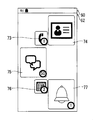
図8に示されるホーム画面では、地図機能と対応する地図タイル70、ブラウザ機能と対応するブラウザタイル71、メール機能と対応するメールタイル72、電話機能と対応する電話タイル73およびアドレス帳機能と対応するアドレス帳タイル74などが第1表示制御部101によって表示されている。
また、機能によってイベントが発生した場合には、記憶制御部105によってRAM46に新着情報が記憶される。RAM46に新着情報が記憶されている場合には、その機能と対応するタイル64の表示範囲に、新着情報の件数が示される。たとえば、メール機能によって5件の新着メールの受信がRAM46に新着情報として記憶され、電話機能において1件の着呼(不在着呼)がRAM46に新着情報として記憶されている場合、メールタイル72の表示範囲には新着情報の件数として「5」が書かれた件数アイコンが表示され、電話タイル73の表示範囲には新着情報として「1」が書かれた件数アイコンが表示される。
タイル64に対してタップ操作がされると、タイル64と対応する機能が実行される。また、タイル64の表示範囲に件数アイコンが表示されている場合において、当該タイル64と対応する機能が実行されるときには、新着情報に関連する画面が表示されるように当該タイル64と対応する機能が実行される。たとえば、メールタイル72にタップ操作された場合、最新の新着メールが表示されるように、メール機能が実行される。
また、タイル64に対してロングタップ操作がされると、タイル64を編集可能な状態になる。この状態では、タイル64の表示サイズおよび表示位置が変更可能になると共に、タイル64を削除することも出来る。ただし、タイル64が削除されたとしても、アプリケーションがアンインストールされるわけではない。このように、ユーザは、ホーム画面に表示されるタイル64に基づいて、任意の機能を携帯電話機10に実行させることが出来る。
なお、他の実施例では、機能がバックグラウンドで動作した結果が、その機能に対応するタイル64の表示範囲の中で、ライブ情報として表示されてもよい。たとえば、メールタイル72であれば、件数アイコンと共に、新着メールの題名が、ライブ情報としてメールタイル72の表示範囲に表示される。
図9,10を参照して、ホーム画面で行われるスライド操作について説明する。ユーザは、ホーム画面では上下方向にスクロールすることで、他のタイル64をホーム画面に表示させることが出来る。たとえば、図9に示されるように、ユーザによって上方向のスライド操作Tsが行われると、ホーム画面が上方向にスクロールする。ホーム画面が上方向にスクロールすると、図10に示されるように、地図タイル70、ブラウザタイル71およびメールタイル72が表示されなくなり、Twitter(登録商標)およびFacebook(登録商標)などのSNS(social networking service)のアプリケーションと対応するSNSタイル75、スケジュール機能と対応するスケジュールタイル76およびアラーム機能と対応するアラームタイル77が表示されるようになる。
また、スクロールによって新たに表示されたSNSタイル75、スケジュールタイル76およびアラームタイル77についても、対応する機能によってイベントが発生し、新着情報がRAM46に記憶されている。たとえば、SNS機能では、アップロードした記事に対して50件のコメントが投稿されたため、50件の新着情報がRAM46に記憶される。スケジュール機能では、登録してある2件のスケジュールにおいて通知処理が実行されたため、2件の新着情報がRAM46に記憶される。そして、アラーム機能では、登録したアラーム時刻に達したことが通知されたため、1件の新着情報がRAM46に記憶される。したがって、SNSタイル75の表示範囲には「50」が書かれた件数アイコンが表示され、スケジュールタイル76の表示範囲には「2」が書かれた件数アイコンが表示され、アラームタイル77には「1」が書かれた件数アイコンが表示される。
ここで、ホーム画面に多くのタイル64が追加された場合、ホーム画面の初期状態、つまりスクロールされていない状態では、全てのタイル64が表示されなくなる。そして、新着情報がRAM46に記憶されていれば件数アイコンがタイル64の表示範囲の中に表示されるが、ユーザは新着情報がRAM46(携帯電話機10)に記憶されているかを知るためには、ホーム画面をスクロールして全てのタイル64を確認しなければならない。
そこで、本実施例では、携帯電話機10の姿勢が縦方向から横方向に切り替えられたときに、第2表示制御部102によって、新着情報がディスプレイ14に表示される。これにより、ユーザは新着情報を確認しやすくなる。
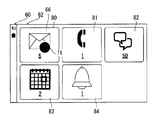
図11に示されるように、携帯電話機10の姿勢が縦向きの状態(図4参照)から左横向きの状態(図5参照)に変化すると、第2表示制御部102が有する第1新着情報表示制御部103によって、機能毎の新着情報と対応する機能タイル66がディスプレイ14に表示される。たとえば、図9,10に示すように、メール機能、電話機能、SNS機能、スケジュール機能およびアラーム機能の新着情報がRAM46に記憶されている場合には、第2表示制御部102(第1新着情報表示制御部103)によって、メール機能の機能タイル80、電話機能の機能タイル81、SNS機能の機能タイル82、スケジュール機能の機能タイル83およびアラーム機能の機能タイル84がディスプレイ14に表示される。また、各機能タイルは、その機能の新着情報と対応しており、対応する新着情報の件数を示す。たとえば、メール機能の機能タイル80には新着情報の件数として「5」が書かれ、電話機能の機能タイル81には新着情報の件数として「1」が書かれ、SNS機能の機能タイル82には新着情報として「50」が書かれ、スケジュール機能の機能タイル83には新着情報として「2」が書かれ、アラーム機能の機能タイル84には新着情報の件数として「1」が書かれる。そして、詳細な説明は後述するが、ユーザは機能タイル66に対して所定のタッチ操作を行うことで、対応する機能を携帯電話機10に実行させることが出来る。つまり、ユーザは、機能毎の新着情報の件数を把握したうえで、携帯電話機10に実行させる機能を決めることが出来る。
なお、7つ以上の機能タイル66を表示する場合、1画面に全ての機能タイル66が表示されるように、各機能タイル66の表示サイズが調整される。ただし、他の実施例では、7つ以上の機能タイル66を表示するときには、6個の機能タイル66を1画面に表示したうえで、スクロール操作によって画面がスクロールしたときに、残りの機能タイル66が表示されるようにしてもよい。また、機能タイル66に対するタッチ操作について後述するため、ここでの詳細な説明は省略する。
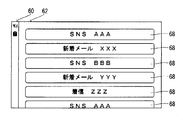
また、タッチパネル16に対してタッチされた状態で、携帯電話機10の姿勢が縦向きの状態から左横向きの状態に変化すると、第2表示制御部102が有する第2新着情報表示制御部104によって、図12に示されるように新着情報と対応する新着タイル68が時系列順にディスプレイ14に表示される。新着タイル68は、第2表示制御部102(第2新着情報表示制御部104)によって、新着情報が記録された順番に並べられてディスプレイ14に表示される。より具体的には、最新の新着情報と対応する新着タイル68がディスプレイ14の一番上に表示されるように、新着タイル68がディスプレイ14に表示される。また、表示される新着タイル68の表示範囲には、機能を示す文字列と新着情報の内容を示す情報とが表示される。たとえば、SNSの新着タイル68であれば、機能を示す文字列として「SNS」、新着情報の内容として「AAA」(コメントの投稿者)が表示範囲に表示される。そして、詳細な説明は後述するが、ユーザは新着タイル68に対してタッチ操作を行うことで、新着情報と対応する機能を携帯電話機10に実行させることができる。つまり、ユーザは、新着情報が記憶された順番を確認したうえで、携帯電話機10に実行させる機能を決めることが出来る。
このように、本実施例では、新着情報がまとめて表示されるため、ユーザはイベントの新着情報を容易に確認することが出来る。また、ユーザは、携帯電話機10を振る(特定の動作を行う)ことで、新着情報の機能毎の表示および時系列順の表示を任意に切り替えることが出来る。より具体的には、ユーザによる特定の動作が検出されると、切替部106が、第1新着情報表示制御部103によって新着情報をディスプレイ14に表示させるかと、第2新着情報表示制御部104によって新着情報をディスプレイ14に表示させるかとを切り替える。ユーザは、一方の表示状態において、実行する機能を決めることが出来ない場合は、他方の表示状態に切り替えて、実行する機能を検討することが出来る。なお、横向き状態から縦向き状態に戻された場合は、ホーム画面が再び表示される。
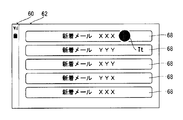
図13,14を参照して、機能タイル66へのタップ操作について説明する。たとえば、図13に示されるように、メール機能の機能タイル80に対してタップ操作Ttがされると、図14に示されるようにメール機能と対応する新着情報の新着タイル68が時系列順に表示される。つまり、ユーザは、特定の機能に対応する新着情報の新着タイル68をディスプレイ14に表示させることが出来る。
また、図14のように機能と対応する新着情報の新着タイル68が時系列順に表示されている状態で、ディスプレイ14の上端から下端に向けてスライド操作が行われると、図13の状態に戻る。なお、他の実施例では、左端(右端)から右端(左端)に向けてのスライド操作であってもよいし、スライドの方向が逆であってもよい。さらに、スライド操作ではなく、キー操作であってもよい。
続いて、図14に示されるように、特定の機能に対する新着情報の新着タイル68だけが表示されている状態で、任意の新着タイル68に対してタップ操作がされると、対応する新着情報に基づいて、特定の機能が実行される。たとえば、図15に示されるように「新着メール XXX」と書かれた新着タイル68に対してタップ操作Ttがされると、メール機能が実行され、図16に示されるように「XXX」から送信された新着メールがディスプレイ14に表示される。
このように、ユーザは、機能タイル66にタップして特定の機能に対応する新着情報を確認し、そのうえで必要な新着情報の新着タイル68にタッチ操作によって選択することで、その新着情報と対応する機能を携帯電話機10に実行させることが出来る。つまり、ユーザは、新着情報を利用して容易に携帯電話機10に機能を実行させることが出来る。
続いて、ディスプレイ14に表示されている新着情報(機能タイル66あるいは新着タイル68)に対してフリック操作、ロングタップ操作などのタッチ操作が行われた場合について説明する。ディスプレイ14に表示されている新着情報に対してタッチ操作が行われた場合には、所定処理実行部107が、タッチ操作が行われた新着情報と対応する機能およびタッチ操作の種類に基づいて所定の処理を実行する。
まず、図17,18を参照して、機能タイル66に対して下方向のフリック操作がされた場合について説明する。機能タイル66に対して下方向のフリック操作がされると、所定処理実行部107が有する設定部108によって、下方向のフリック操作が行われた機能タイル66と対応する全ての新着情報において、各新着情報と対応するイベントによって得られた情報(着呼履歴、新着メール、新規コメントの投稿など)が確認済みの状態に設定される。たとえば、図17に示されるようにSNS機能の機能タイル82に対して下方向のフリック操作Tfがされると、設定部108によって、図18に示されるように新規コメントの投稿によって記憶された50件の新着情報のそれぞれに対応する新規コメントが全て確認された状態に設定される。そして、所定処理実行部107が有する削除部109によって、機能タイル82が表示されなくなる。
また、図示は省略するが、新着メールの新着情報については、新着メールが既読の状態に設定される。また、着呼の新着情報については、着呼履歴が確認済みの状態に設定される。したがって、ユーザは、或る機能において複数の新着情報が記憶されたものの、その詳細を逐一確認する必要が無いと判断すれば、その機能の新着情報をまとめて確認済みの状態にすることが出来る。そのため、ユーザは、新着情報を効率よく確認することが出来る。
図19,20を参照して、機能タイル66に対してフリック操作がされた場合について説明する。図19に示されるように機能タイル66に対して右方向のフリック操作がされると、図20に示されるように、機能タイル66に対応する各新着情報が、所定の条件に基づいて分類された状態で、所定処理実行部107によってディスプレイ14に表示される。たとえば、メール機能の機能タイル80に対して右方向のフリック操作Tfがされると、所定処理実行部107は、対応する各新着情報の新着タイル68を日付毎に分類してディスプレイ14に表示させる。
また、図示は省略するが、メール機能に対応する機能タイル80および電話機能に対応する機能タイル81に対して上方向のフリック操作が行われた場合には、所定処理実行部107は、新着情報を共通の発信者(メールの差出人、発呼者)に分類して、ディスプレイ14に表示する。たとえば、メール機能に対応する機能タイル80に対して上方向のフリック操作が行われた場合には、所定処理実行部107は、新着情報と対応する新着タイル68を差出人毎にディスプレイ14に表示する。また、電話機能に対応する機能タイル81に対して上方向のフリック操作が行われた場合には、所定処理実行部107は新着情報と対応する新着タイル68を発呼者毎にディスプレイ14に表示する。
さらに、図示は省略するが、メール機能に対応する機能タイル80および電話機能に対応する機能タイル81に対して左方向のフリック操作が行われた場合には、所定処理実行部107は、アドレス帳に登録されている新着情報の件数を示すタイルと、アドレス帳に登録されていない新着情報の件数を示すタイルとをディスプレイ14に表示する。たとえば、メール機能の機能タイル80に対して左方向のフリック操作がされたときに、3件の新着情報と対応する新着メールの差出人がアドレス帳に登録されており、2件の新着情報と対応する新着メールの差出人がアドレス帳に登録されていなければ、「登録済み 3件」と書かれたタイルと、「未登録 2件」と書かれたタイルとがディスプレイ14に表示される。なお、これらの2つのタイルに対するタッチ操作は、機能タイル66に対するタッチ操作と略同じである。たとえば、「未登録 2件」のタイルに対して下方向のフリック操作がされた場合、所定処理実行部107によって、差出人がアドレス帳に登録されていない2件の新着メールが全て既読の状態に設定される。
このように、ユーザは、新着情報と対応するタイルに対してタッチ操作を行うことで、その新着情報に関連する様々な処理を携帯電話機10に実行させることが出来る。そのため、ユーザの利便性が向上する。
図21,22を参照して、機能タイル66に対してロングタップ操作がされた場合について説明する。機能タイル66に対してロングタップ操作がされると、対応する機能が新着情報に関係なく実行される。たとえば、図21に示されるようにメール機能の機能タイル80に対してロングタップ操作Tlがされると、実行部110はメール機能を実行する。より具体的には、実行部110はメール機能が実行し、図22に示されるようにメール機能のメールメニュー画面(トップ画面)をディスプレイ14に表示させる。これにより、ユーザは、複数の新着情報を確認する場合、それらと対応する機能を携帯電話機10に実行させてから、複数の新着情報のそれぞれを確認することが出来る。
続いて、図23,24を参照して、新着情報が時系列順に表示されている状態でのタップ操作について説明する。時系列順に並んでいる新着情報の新着タイル68のうち、1つにタップ操作がされると、実行部110はその新着タイル68と対応する機能を実行する。たとえば、図23に示されるように「新着メール XXX」と書かれた新着タイル68に対してタップ操作Ttがされると、実行部110はメール機能を実行し、図24に示されるように新着タイル68に書かれた内容(差出人が「XXX」)を含む新着メールをディスプレイ14に表示させる。つまり、ユーザは、複数の新着情報の中から任意の新着情報を選んで、その新着情報に基づいた機能を携帯電話機10に実行させることが出来る。
このように、ユーザはディスプレイ14に表示されている新着情報(機能タイル66あるいは新着タイル68)を選択することで、その新着情報と対応する機能を携帯電話機10に実行させることができる。その結果、ユーザは新着情報を利用して容易に携帯電話機10に機能を実行させることができる。
図25~27を参照して、新着タイル68に対してフリック操作がされた場合について説明する。まず、新着タイル68に対して下方向のフリック操作がされると、所定処理実行部107(設定部108)によって、その新着タイル68と対応する新着情報がRAM46から削除され、対応するイベントによって得られた情報が確認済みの状態にされる。そして、所定処理実行部107(削除部109)によって、ディスプレイ14に表示されている下方向のフリック操作がされた新着タイル68が削除される。たとえば、図25に示されるように「新着メール XXX」と書かれた新着タイル68に対して下方向のフリック操作Tfがされると、図26に示されるように、その新着タイル68の表示が消え、対応する新着情報がRAM46から削除される。また、図27に示されるように、RAM46から削除された新着情報と対応する新着メールは既読の状態にされる。
また、新着タイル68に対して右方向のフリック操作がされると、所定処理実行部107によって、その新着タイル68と対応する新着情報がRAM46から削除されると共に、その新着情報のイベントによって得られた情報も削除される。具体的には、図28に示されるように「新着メール YYY」と書かれた新着タイル68に対して右方向のフリック操作Tfがされると、図29に示されるように、その新着タイル68の表示が消え、対応する新着情報がRAM46から削除される。そして、図30に示されるように、削除された新着情報と対応する新着メールも併せて削除される。
このように、ユーザは、新着タイル68を確認した後、新着情報と対応するイベントによって得られた情報を確認済みの状態にしたり、削除したりすることが出来る。
また、図示は省略するが、機能タイル66に対して上方向のフリック操作がされた場合、上方向のフリック操作が行われた機能タイル66に対応する機能が応答可能な機能であれば、所定処理実行部107によって応答処理が実行される。たとえば、メール機能に対応する機能タイル80に対して上方向のフリック操作が行われた場合には、所定処理実行部107によって新着情報と対応する新着メールへの返信メールの作成処理が実行される。また、電話機能に対応する機能タイル81に対して上方向のフリック操作が行われた場合には、所定処理実行部107によって新着情報と対応する発呼者への発呼可能画面を表示する処理が実行される。さらに、SNS機能に対応する機能タイル82に対して上方向のフリック操作が行われた場合には、所定処理実行部107によって新着情報と対応するコメントに返信する処理が実行される。なお、他の実施例では、電話機能の機能タイル81にロングタップ操作がされた場合、発呼者がアドレス帳に登録されている場合に限り、ユーザへの事前確認をせず、発呼するようにしてもよい。
さらに、図示は省略するが、新着タイル68に対して左方向のフリック操作がされた場合、登録可能であれば、所定処理実行部107は新着情報と対応するイベントを発生させた相手の情報を携帯電話機10(記憶部)に登録する。たとえば、メール機能に対応する機能タイル80に対して左方向のフリック操作が行われた場合には、所定処理実行部107によって新着情報と対応する新着メールの差出人のメールアドレス等をアドレス帳に登録する処理が実行される。また、電話機能に対応する機能タイル81に対して左方向のフリック操作が行われた場合には、所定処理実行部107によって新着情報と対応する発呼者の電話番号等をアドレス帳に登録する処理が実行される。
ここで、RAM46に記憶される新着情報が1つだけの状態で、携帯電話機10の姿勢が縦向きから横向きに変化した場合、新着情報を表示するのに代えて、その新着情報に基づいて機能が実行される。たとえば、メール機能の新着情報がRAM46に1つ記憶されている状態で携帯電話機10の姿勢が縦向きから横向きに変化すると、図16に示すように、その新着情報と対応する新着メールが表示されるようにメール機能が実行される。なお、ディスプレイ14に1件の新着情報を示している機能タイル66が1つだけ表示されているときに、その機能タイル66にタップ操作されると、図14に示すように新着タイル68を表示せず、1件の新着情報に基づいて機能が実行されてもよい。
なお、RAM46に新着情報が記憶されていない状態で携帯電話機10の姿勢が横向き状態にされた場合は、通知部111は新着情報が記憶されていないことをユーザに通知する。例えば、図31に示されるように、通知部111は「新着情報はありません」というメッセージ90をディスプレイ14に表示させる。これにより、ユーザは新着情報が記憶されていない状態であることを把握できる。よって、ユーザは携帯電話機10を横向きにきりかえたときに、画面が切り替わらなくても、携帯電話機10の故障を疑わずに済む。ただし、他の実施例では、ホーム画面が横向き表示に切り替えられてもよいし、ホーム画面の表示が変化しなくてもよい。
図32は新着情報が記憶される新着情報テーブルの一例を示す。新着情報テーブルは、イベントが発生した時刻が記憶される時刻の列、イベントと対応する機能が記憶される機能の列および発生したイベントによって得られた情報の少なくとも一部が記憶される内容の列を含む。そして、1件の新着情報は、発生した時刻に対応して、1行毎に記憶される。たとえば、2013年7月15日の10時32分に、SNS機能によってコメントが投稿されたというイベント発生し、その投稿者が「AAA」であれば、時刻の欄に「2013/05/15 10:32:00」が記憶され、機能の欄に「SNS」が記憶され、内容の欄に「AAA」が記憶される。そして、新着情報を表示する際には、新着情報テーブルに基づいて新着情報が表示される。このように、新着情報を新着情報テーブルに記憶して管理することで、新着情報を利用した処理を実行しやすくすることが出来る。
なお、他の実施例では、機能に優先順位を設けておき、新着情報を表示する際にはその優先順位に従って新着情報が表示されてもよい。たとえば、電話機能、メール機能、SNS機能の順番で優先順位が高く設定されている状態で機能毎に新着情報が表示されると、図33に示すように、電話機能の機能タイル81が一番左に表示され、続けてメール機能の機能タイル80、SNS機能の機能タイル82が表示される。また、機能の優先順位ではなく、新着情報の件数が多い順に表示されてもよい。さらに、優先順位などに基づいて機能タイル66の表示サイズを変えるようにしてもよい。
また、その他の実施例では、ユーザの使用頻度が新着情報の表示に反映されてもよい。たとえば、使用頻度の高さがSNS機能、メール機能、スケジュール機能の順番であれば、SNS機能の機能タイル82が一番左側に表示され、続けてメール機能の機能タイル80、スケジュール機能の機能タイル83が表示される。
また、さらにその他の実施例では、新着情報が表示される時間帯によって、表示される新着情報の順番が設定されてもよい。たとえば、朝の時間帯では、ニュースなどの機能の新着情報が優先して表示され、夜の時間帯ではSNS機能の新着情報が優先して表示される。さらに、新着情報を表示する順番は、ユーザが任意に設定できてもよい。
また、他の実施例では、携帯電話機10の姿勢が右横向きの状態に変化したときに、新着情報と対応する新着タイル68が時系列順に表示されてもよい。さらに、ユーザは、携帯電話機10の姿勢が横向きに変化したときに表示される新着情報の状態を、任意に設定できてもよい。
上述では本実施例を概説した。以下では、図34に示すメモリマップおよび図35~40に示すフロー図を用いて本実施例を詳細に説明する。
図34に示されるように、RAM46には、プログラム記憶領域302とデータ記憶領域304とが形成される。プログラム記憶領域302は、先に説明したように、フラッシュメモリ44(図2)に予め設定しているプログラムデータの一部または全部を読み出して記憶(展開)しておくための領域である。
プログラム記憶領域302には、タイルの表示を制御するための表示制御プログラム310および発生したイベントに基づいて新着情報を記憶する新着情報記憶プログラム312が記憶される。また、表示制御プログラム310のサブルーチンとして、第1タッチ操作プログラム310aおよび第2タッチ操作プログラム310bもプログラム記憶領域302に記憶される。
なお、プログラム記憶領域302には、メール機能、ブラウザ機能などのアプリケーションおよび機能を実行するためのプログラムも記憶される。
続いて、RAM46のデータ記憶領域304には、タッチバッファ330および姿勢情報バッファ332が設けられると共に、タッチ座標マップ334、新着情報テーブル336およびオブジェクトデータ338などが記憶される。また、データ記憶領域304には、タッチフラグ340および時系列順フラグ342なども設けられる。
タッチバッファ330には、タッチパネル制御回路48が出力するタッチ座標のデータが記憶される。姿勢情報バッファ332には、姿勢センサ50から出力される加速度および角速度のデータが一時的に記憶される。そして、プロセッサ30は、姿勢情報バッファ332に記憶されている情報に基づいて携帯電話機10の姿勢などを検出する。
タッチ座標マップ334は、タッチ操作におけるタッチ座標とディスプレイ14の表示座標とを対応付けるためのデータである。つまり、タッチパネル16に対して行われたタッチ操作の結果が、タッチ座標マップ334に基づいてディスプレイ14の表示に反映される。新着情報テーブル336は、たとえば図32に示す構成のテーブルであり、新着情報が記憶される。オブジェクトデータ338は、ディスプレイ14に表示されるタイル64などのオブジェクトを表示するためのデータである。
タッチフラグ340は、タッチパネル16に対してタッチされているか否かを判断するためのフラグである。たとえば、タッチフラグ340は、1ビットのレジスタで構成される。タッチフラグ340がオン(成立)されると、レジスタにはデータ値「1」が設定される。一方、タッチフラグ340がオフ(不成立)されると、レジスタにはデータ値「0」が設定される。また、タッチフラグ340は、タッチパネル制御回路48の出力に基づいてオン/オフが切り換えられる。
時系列順フラグ342は、新着情報を時系列順に表示するかを判断するためのフラグである。たとえば、タッチパネル16にタッチされた状態で携帯電話機10の姿勢が横向きに変化したときに、時系列順フラグ342はオンにされる。また、時系列順フラグ342は、初期状態ではオフにされており、上述した条件を満たしていないときにもオフにされる。なお、時系列順フラグ342の構成は、タッチフラグ340と略同じであるため、構成についての詳細な説明は省略する。
なお、データ記憶領域304には、新着メールが記憶されたり、プログラムの実行に必要な、他のフラグやタイマ(カウンタ)が設けられたりする。
プロセッサ30は、Windows(登録商標)ベースのOS、Android(登録商標)およびiOS(登録商標)などのLinux(登録商標)ベースのOSなどのOSの制御下で、図35,36に示す表示制御処理、図37,38に示す第1タッチ操作処理、図39に示す第2タッチ操作処理および図40に示す新着情報記憶処理などを含む、複数のタスクを並列的に処理する。
図35,36に示される表示制御処理は、たとえばホームキー22cが押下されたときに開始される。ステップS1でプロセッサ30は、携帯電話機10の姿勢が縦向きか否かを判断する。つまり、プロセッサ30は、姿勢情報バッファ332の姿勢情報に基づいて、携帯電話機10の姿勢が図3に示す縦向きの状態であるかを判断する。ステップS1で“NO”であれば、つまり携帯電話機10の姿勢が横向きであれば、プロセッサ30は、図36に示すステップS9以降の処理を実行する。
一方、ステップS1で“YES”であれば、つまり携帯電話機10の姿勢が縦向きであれば、ステップS3でプロセッサ30(第1表示制御部101)は、ホーム画面を表示する。たとえば、図8に示すようなホーム画面がディスプレイ14に表示される。続いて、ステップS5でプロセッサ30は、姿勢が横向きに変化したか否かを判断する。つまり、携帯電話機10の姿勢が縦向きから横向きに変化したかが、姿勢情報バッファ332に記憶されている姿勢情報に基づいて判断される。ステップS5で“NO”であれば、つまり携帯電話機10の姿勢が縦向きのままであれば、ステップS7でプロセッサ30は、終了か否かを判断する。つまり、ホーム画面の表示を終了する操作がされたかが判断される。ステップ7で“YES”であれば、たとえばホーム画面に表示されているタイル64に対してタップ操作がされた場合、ホーム画面から機能の画面に遷移するため、プロセッサ30は表示制御処理を終了する。
また、ステップS7で“NO”であれば、たとえばホーム画面から他の画面に遷移する操作がされなければ、ステップS5の処理に戻る。ステップS5で“YES”であれば、たとえば携帯電話機10の姿勢が縦向きから左横向きに変化すると、ステップS9でプロセッサ30は、新着情報テーブル336を読み出す。つまり、新着情報テーブル336がRAM46から読み出される。
続いて、ステップS11でプロセッサ30は、新着情報があるか否かを判断する。つまり、プロセッサ30は読み出した新着情報テーブル336に新着情報が記憶されているかを判断する。ステップS11で“NO”であれば、つまり新着情報テーブル336に新着情報が記憶されていなければ、ステップS13でプロセッサ30(通知部111)は、新着情報が無いことを通知する。たとえば、ディスプレイ14には、図31に示されるように「新着情報はありません」のメッセージ90が表示される。そして、ステップS13の処理が終了すれば、プロセッサ30はステップS1の処理に戻る。また、ステップS11で“YES”であれば、つまり新着情報テーブル336に新着情報が記憶されていれば、ステップS15でプロセッサ30は、新着情報が1件か否かを判断する。つまり、プロセッサ30は、新着情報テーブル336に記憶されている新着情報が1件だけであるかを判断する。ステップS15で“YES”であれば、つまり記憶されている新着情報が1件だけであれば、ステップS17でプロセッサ30は、新着情報に対応する機能を実行する。たとえば、メール機能の新着情報だけが新着情報テーブル336に記憶されている場合、図16に示すように、その新着情報に対応する新着メールが表示されるようにメール機能が実行される。そして、ステップS17で機能を実行させる処理が終了すれば、プロセッサ30は表示制御処理を終了する。
また、ステップS15で“NO”であれば、つまり新着情報テーブル336に複数の新着情報が記憶されていれば、ステップS19でプロセッサ30は、時系列順フラグ342がオンであるか否かを判断する。つまり、タッチされた状態で携帯電話機10の姿勢が横向きにされ、時系列順フラグ342がオンに切り替わっている状態かが判断される。ステップS19で“NO”であれば、たとえば携帯電話機10の姿勢が左横向きにされ、時系列順フラグ342がオフであれば、ステップS21でプロセッサ30(第2表示制御部102(第1新着情報表示制御部103))は、新着情報を機能毎にディスプレイ14に表示する。たとえば、新着情報テーブル336に記憶されている新着情報が機能毎に分類され、分類された新着情報と対応する機能タイル66が図11に示すように表示される。続いて、ステップS23でプロセッサ30は、第1タッチ操作処理を実行する。つまり、機能タイル66に対するタッチ操作に対応するための処理が実行される。また、第1タッチ操作処理については図37,38のフロー図を用いて詳細に説明するため、ここでの説明は省略する。そして、ステップS23の処理が終了すれば、プロセッサ30はステップS29の処理に進む。
また、ステップS19で“YES”であれば、たとえば携帯電話機10の姿勢が右横向きに変化して時系列順フラグ342がオンにされていれば、ステップS25でプロセッサ30(第2表示制御部102(第2新着情報表示制御部104))は、新着情報を時系列順にディスプレイ14に表示する。たとえば、新着情報テーブル336に記憶されている新着情報と対応する新着タイル68が図12に示すように表示される。続いて、ステップS27でプロセッサ30は、第2タッチ操作処理を実行する。つまり、新着タイル68に対するタッチ操作に対応するための処理が実行される。また、第2タッチ操作処理については図39のフロー図を用いて詳細に説明するため、ここでの説明は省略する。そして、ステップS27の処理が終了すれば、プロセッサ30はステップS29の処理に進む。
第1タッチ操作処理または第2タッチ操作処理が終了すると、ステップS29でプロセッサ30は、終了か否かを判断する。つまり、ディスプレイ14の表示を消去または遷移させる操作がされたかが判断される。ステップS29で“YES”であれば、たとえば終話キー22bが操作され、ディスプレイ14の電源がオフにされると、プロセッサ30は表示制御処理を終了する。
また、ステップS29で“NO”であれば、たとえば終話キー22bが操作されなければ、ステップS31でプロセッサ30(切替部106)は、表示を切り替える操作か否かを判断する。たとえば、新着情報において機能毎の表示と時系列順の表示とを切り替える操作として、携帯電話機10を振る操作がされたかが判断される。また、具体的には、プロセッサ30(切替部106)は、姿勢情報バッファ332に記憶されている姿勢情報に基づいて、携帯電話機10が振られたかを判断する。ステップS31で“YES”であれば、つまり新着情報において機能毎の表示と時系列順の表示とを切り替える操作がされると、ステップS33でプロセッサ30(切替部106)は、時系列順フラグ342の状態を反転させる。つまり、新着情報が機能毎にディスプレイ14に表示されており時系列順フラグ342がオフであれば、切替部106は時系列順フラグ342をオンにする。一方、新着情報が時系列順にディスプレイ14に表示されており時系列順フラグ342がオンであれば、切替部106は時系列順フラグ342をオフにする。続いて、ステップS35でプロセッサ30は、新着情報テーブル336を読み出す。つまり、切り替え操作がされたため、新着情報の表示を切り替えるために新着情報テーブル336が再度読み出される。そして、ステップS35の処理が終了すれば、プロセッサ30はステップS19の処理に戻り、時系列順フラグ342の状態に応じて新着情報が表示される。
また、ステップS31で“NO”であれば、表示を切り替える操作がされていなければ、ステップS37でプロセッサ30は、姿勢が変化したか否かを判断する。つまり、携帯電話機10が動かされ、姿勢センサ50の出力する値の変化量が閾値を超えたかが判断される。ステップS37で“NO”であれば、たとえば携帯電話機10の姿勢が変化していなければ、プロセッサ30はステップS35の処理を実行して、ステップS19の処理に戻る。つまり、新着情報テーブル336が再び読み出され、新着情報の表示が更新される。なお、他の実施例では、ステップS37の処理が終了した後、プロセッサ30はステップS9の処理の戻ってもよい。
一方、ステップS37で“YES”であれば、たとえば携帯電話機10が動かされると、プロセッサ30はステップS1の処理に戻る。つまり、携帯電話機10が動かされため、携帯電話機10の姿勢が再び判断される。
図37は第1タッチ操作処理のフロー図である。図36に示す表示制御処理でステップS23の処理が実行されると、プロセッサ30はステップS51で、機能タイル66にタッチ操作がされたか否かを判断する。つまり、機能タイル66に対してユーザがタッチ操作を行ったかが判断される。ステップS51で“NO”であれば、つまり機能タイル66に対してタッチ操作がされていなければ、プロセッサ30は第1タッチ操作処理を終了して、表示制御処理に戻る。
また、ステップS51で“YES”であれば、つまり表示されている機能タイル66に対してタッチ操作がされると、ステップS53でプロセッサ30は、タップ操作がされたか否かを判断する。つまり、プロセッサ30は、機能タイル66に対してタップ操作がされたかを判断する。ステップS53で“NO”であれば、つまり機能タイル66に対してタップ操作がされていなければ、プロセッサ30は図38に示すステップS65の処理に進む。
また、ステップS53で“YES”であれば、つまり機能タイル66に対してタップ操作がされると、ステップS55でプロセッサ30は、タップ操作が行われた機能タイル66に対応する新着情報を表示する。たとえば、メール機能の機能タイル80に対してタップ操作がされた場合、図13に示すようにメール機能の新着情報と対応する新着タイル68が表示される。
続いて、ステップS57でプロセッサ30は、第2タッチ操作処理を実行する。つまり、新着タイル68が表示されたため、新着タイル68へのタッチ操作に対応するために第2タッチ操作処理が実行される。続いて、ステップS59でプロセッサ30は、機能が実行されたか否かを判断する。たとえば、第2タッチ操作処理において、新着タイル68に対するタップ操作に応答して機能が実行されたかが判断される。ステップS59で“YES”であれば、つまり機能が実行されていれば、プロセッサ30は第1タッチ操作処理を終了して、表示制御処理に戻る。また、ステップS59で“NO”であれば、つまり機能が実行されていなければ、ステップS61でプロセッサ30は、縦向きか否かを判断する。つまり、携帯電話機10の姿勢が横向きから縦向きに変化したかが判断される。ステップS61で“YES”であれば、つまり携帯電話機10の姿勢が縦向きになると、プロセッサ30は第1タッチ操作処理を終了して、表示制御処理に戻る。また、ステップS61で“NO”であれば、つまり携帯電話機10の姿勢が横向きであれば、ステップS63でプロセッサ30は、終了か否かを判断する。つまり、プロセッサ30は、ディスプレイ14の表示を終了または切り替える操作がされたかを判断する。ステップS63で“YES”であれば、たとえば終話キー22bが操作されてディスプレイ14の表示が消去されると、プロセッサ30は第1タッチ操作処理を終了して、表示制御処理に戻る。また、ステップS63で“NO”であれば、たとえばディスプレイ14の表示が消去されていなければ、プロセッサ30はステップS57の処理に戻り、第2タッチ操作処理を再度実行する。なお、第2タッチ操作処理については図39のフロー図を用いて詳細に説明するため、ここでの説明は省略する。
また、機能タイル66にタップ操作がされない場合、プロセッサ30はステップS65で、フリック操作か否かを判断する。つまり、機能タイル66に対してフリック操作がされたかが判断される。ステップS65で“YES”であれば、つまり機能タイル66に対してフリック操作がされていれば、ステップS67でプロセッサ30は、下方向か否かを判断する。つまり、機能タイル66に対して下方向のフリック操作がされたかが判断される。ステップS67で“YES”であれば、つまり機能タイル66に対して下方向のフリック操作がされていれば、ステップS69でプロセッサ30(所定処理実行部107(設定部108))は、機能タイル66と対応する新着情報に基づいてイベントによって得られた情報を確認済みの状態に設定する。たとえば、図17,18に示すように、SNS機能の機能タイル82に対して下方向のフリック操作Tfがされた場合、設定部108は、SNS機能の新着情報に基づいて、投稿されたコメントなどを全て確認済みの状態に設定する。続いて、ステップS71でプロセッサ30(所定処理実行部107(削除部109))は、機能タイル66と対応する新着情報を削除する。たとえば、SNS機能と対応する50件の新着情報が全て削除される。そして、ステップS71の処理が終了すると、プロセッサ30は、第1タッチ操作処理を終了して、表示制御処理に戻る。
また、ステップS67で“NO”であれば、つまりフリック操作の方向が下方向でなければ、ステップS73でプロセッサ30は、右方向か否かを判断する。つまり、機能タイル66に対して右方向のフリック操作がされたかが判断される。ステップS73で“YES”であれば、つまり機能タイル66に対して右方向のフリック操作がされると、ステップS75でプロセッサ30(所定処理実行部107)は、日時に基づいて新着情報を分類する。たとえば、図19,20に示すように、メール機能の機能タイル80に対して右方向のフリック操作TfがされてステップS75の処理が実行されると、メール機能の新着情報と対応する新着タイル68が、日時に基づいて分類された状態で表示される。そして、ステップS75の処理が終了すれば、プロセッサ30はステップS57の処理に戻る。つまり、新着タイル68が表示されている状態であるため、第2タッチ操作処理が実行される。
また、ステップS73で“NO”であれば、つまりフリック操作の方向が右方向でなければ、ステップS77でプロセッサ30(所定処理実行部107)は、対応する機能およびフリック操作の方向に基づいて所定の処理を実行する。たとえば、上方向のフリック操作が機能タイル66にされた場合、その機能タイル66に対応する機能がメール機能および電話機能であれば所定処理実行部107は共通の発信者に分類して新着情報をディスプレイ14に表示する。また、左方向のフリック操作が機能タイル66にされた場合、その機能タイル66に対応する機能がメール機能および電話機能であれば、所定処理実行部107はアドレス帳に登録されている新着情報の件数を示すタイルと登録されていない新着情報の件数を示すタイルとをディスプレイ14に表示する。そして、このようにタイルが表示された後には、各タイルに対応するタッチ操作を受け付ける処理が実行される。そして、ステップS77の処理が終了すれば、プロセッサ30は第1タッチ操作処理を終了して、表示制御処理に戻る。
また、ステップS65で“NO”であれば、つまり機能タイル66に対してフリック操作がされていなければ、ステップS79でプロセッサ30は、ロングタップ操作か否かを判断する。つまり、機能タイル66に対してロングタップ操作がされたかが判断される。ステップS79で“NO”であれば、たとえば機能タイル66に対してされたタッチ操作を判別できなければ、プロセッサ30は第1タッチ操作処理を終了して、表示制御処理に戻る。また、ステップS79で“YES”であれば、ステップS81でプロセッサ30(実行部110)は、機能タイル66と対応する機能を実行する。たとえば、図21に示すようにメール機能の機能タイル80に対してロングタップ操作がされた場合は、実行部110によって、メール機能が実行され、ディスプレイ14にはメールメニュー画面が表示される。そして、ステップS81の処理が終了すれば、プロセッサ30は第1タッチ操作処理を終了して、表示制御処理に戻る。
図39は第2タッチ操作処理のフロー図である。図36に示す表示制御処理でステップS27の処理が実行されるか、図37に示す第1タッチ操作処理でステップS57の処理が実行されると、プロセッサ30はステップS101で、新着タイル68にタッチ操作がされたか否かを判断する。つまり、プロセッサ30は、タッチ操作によるタッチ位置が新着タイル68の表示範囲に含まれているかを判断する。ステップS101で“NO”であれば、つまり新着タイル68が表示されていない位置にタッチされると、プロセッサ30は第2タッチ操作処理を終了して上位ルーチン(表示制御処理または第1タッチ操作処理)の処理に戻る。
また、ステップS101で“YES”であれば、つまり新着タイル68に対してタッチ操作がされていれば、ステップS103でプロセッサ30は、タップ操作がされたか否かを判断する。つまり、表示されている新着タイル68に対してタップ操作がされたかが判断される。ステップS103“YES”であれば、たとえば図23に示すように、メール機能の新着タイル68に対してタップ操作がされると、ステップS105でプロセッサ30(実行部110)は、新着タイル68に基づいて機能を実行する。たとえば、メール機能の新着タイル68に対してタップ操作Ttがされた場合、実行部110によって新着情報と対応する新着メールが表示されるようにメール機能が実行される。そして、ステップS105の処理が終了すれば、プロセッサ30は第2タッチ操作処理を終了すると共に、上位ルーチンの処理に戻る。
また、ステップS103で“NO”であれば、つまり新着タイル68に対してタップ操作がされていなければ、ステップS107でプロセッサ30は、フリック操作か否かを判断する。つまり、新着タイル68に対してフリック操作がされたかが判断される。ステップS107で“NO”であれば、つまり新着タイル68に対してフリック操作がされていなければ、プロセッサ30は第2タッチ操作処理を終了して、上位ルーチンの処理に戻る。
ステップS107で“YES”であれば、つまり新着タイル68に対してフリック操作がされると、ステップS109でプロセッサ30は、下方向か否かを判断する。つまり、新着タイル68に対して下方向のフリック操作がされたかが判断される。ステップS109で“YES”であれば、たとえば図25に示すようにメール機能の新着タイル68に対して下方向のフリック操作Tfがされると、ステップS111でプロセッサ30(所定処理実行部107(設定部108))は、新着タイル68と対応するイベントによって得られた情報を確認済みの状態に設定する。たとえば、メール機能の新着タイル68に対して下方向のフリック操作がされた場合は、新着タイル68と対応する新着メールを既読の状態に設定する。また、電話機能の新着タイル68に対して下方向のフリック操作がされた場合は、新着タイル68と対応する着呼(不在着呼)の履歴が確認済みの状態にされる。続いて、ステップS113でプロセッサ30(所定処理実行部107(削除部109))は、新着タイル68と対応する新着情報を削除する。たとえば、フリック操作がされたメール機能の新着タイル68と対応する新着情報が新着情報テーブル336から削除される。そして、ステップS113の処理が終了すれば、プロセッサ30は第2タッチ操作処理を終了して、上位ルーチンの処理に戻る。
また、ステップS109で“NO”であれば、つまり新着タイル68に対してされたフリック操作の方向が下方向でなければ、ステップS115でプロセッサ30は、右方向か否かを判断する。つまり、新着タイル68に対して右方向のフリック操作がされたかが判断される。ステップS115で“YES”であれば、たとえば図28に示すようにメール機能の新着タイル68に対して右方向のフリック操作Tfがされると、ステップS117でプロセッサ30(所定処理実行部107)は、新着情報と対応するイベントによって得られた情報を削除する。たとえば、所定処理実行部107によってメール機能の新着タイル68と対応する新着メールが削除される。また、右方向のフリック操作が電話機能の新着タイル68にされた場合は、所定処理実行部107によって、その新着タイル68と対応する新規着呼の履歴が削除される。続いて、ステップS119でプロセッサ30(所定処理実行部107)は、新着タイル68と対応する新着情報を削除する。たとえば、メール機能の新着タイル68に対して右方向のフリック操作がされた場合、所定処理実行部107は、その新着タイル68に対応する新着情報を新着情報テーブル336から削除する。そして、ステップS119の処理が終了すれば、プロセッサ30は第2タッチ操作処理を終了して、上位ルーチンの処理に戻る。
また、ステップS115で“NO”であれば、つまり新着タイル68に対してされたフリック操作の方向が上方向または左方向であれば、ステップS121でプロセッサ30(所定処理実行部107)は、機能およびフリック操作の方向に基づいて所定の処理を実行する。たとえば、機能タイル66に対して上方向のフリック操作がされた場合、応答可能な機能であれば、所定処理実行部107によって応答処理が実行される。また、機能タイル66に対して左方向のフリック操作がされた場合、登録可能であれば、所定処理実行部107によって新着情報と対応するイベントを発生させた相手の情報が記憶部に登録される。そして、ステップS121の処理が終了すれば、プロセッサ30は第2タッチ操作処理を終了し、上位ルーチンの処理に戻る。
図40は新着情報記憶処理のフロー図である。たとえば、携帯電話機10の電源がオンにされると、新着情報記憶処理が開始される。ステップS141でプロセッサ30は、イベントが発生したか否かを判断する。たとえば、メール機能によって新着メールが受信されたかが判断される。ステップS141で“NO”であれば、つまりイベントが発生していなければ、プロセッサ30はステップS141の処理を繰り返す。
一方、ステップS141で“YES”であれば、たとえば新着メールが受信されると、ステップS143でプロセッサ30は、現在時刻を取得する。つまり、プロセッサ30はRTC30aが出力する日時の情報を取得する。続いて、ステップS145でプロセッサ30(記憶制御部105)によって、記憶部に新着情報が記憶される。たとえば、受信した新着メールの内容(宛先人、題名、本文の一部)と取得した日時の情報とに基づいて新着情報が作成され、その新着情報が新着情報テーブル336に記憶される。
続いて、ステップS147でプロセッサ30は、終了か否かを判断する。たとえば、携帯電話機10の電源をオフにする操作がされたかが判断される。ステップS147で“NO”であれば、たとえば電源をオフにする操作がされていなければ、プロセッサ30はステップS141の処理に戻る。また、ステップS147で“YES”であれば、たとえば電源をオフにする操作がされると、プロセッサ30は新着情報記憶処理を終了する。
なお、新着情報に基づいて機能を実行したり、その新着情報を削除したりする場合、事前確認を行うポップアップが表示されてもよい。
また、さらにその他の実施例では、携帯電話機10はタッチパネル16に代えてカーソルキーなどのハードキーを備えていてもよい。この場合、機能タイル66および新着タイル68は、タップ操作で選択されるのではなく、ハードキーに対するキー操作によって選択される。
また、上述の実施例では、閾値に対して「より大きい」の言葉を用いたが「閾値より大きい」とは「閾値以上」の意味も含まれる。また、「閾値よりも小さい」とは「閾値以下」および「閾値未満」の意味も含まれる。
また、本実施例で用いられたプログラムは、データ配信用のサーバのHDDに記憶され、ネットワークを介して携帯電話機10に配信されてもよい。また、CD,DVD,BD(Blue-Ray Disk)などの光学ディスク、USBメモリおよびメモリカードなどの記憶媒体に複数のプログラムを記憶させた状態で、その記憶媒体が販売または配布されてもよい。そして、上記したサーバや記憶媒体などを通じてダウンロードされた、プログラムが本実施例と同等の構成の携帯電話機にインストールされた場合、本実施例と同等の効果が得られる。
そして、本明細書中で挙げた、具体的な数値は、いずれも単なる一例であり、製品の仕様変更などに応じて適宜変更可能である。
また、本発明は詳細に説明されたが、上記した説明は、すべての局面において、例示であって、本発明がそれに限定されるものではない。例示されていない無数の変形例が、本発明の範囲から外れることなく想定され得る。
10 携帯電話機
14 ディスプレイ
16 タッチパネル
30 プロセッサ
44 フラッシュメモリ
46 RAM
48 タッチパネル制御回路
14 ディスプレイ
16 タッチパネル
30 プロセッサ
44 フラッシュメモリ
46 RAM
48 タッチパネル制御回路
Claims (12)
- 携帯端末であって、
表示装置と、
前記携帯端末の姿勢を検出する検出部と、
イベントが発生したとき、そのイベントの新着情報を記憶する記憶部と、
前記検出部によって第1姿勢が検出されているとき、前記新着情報と関連するタイル状の第1オブジェクトおよび前記新着情報と関連しないタイル状の第2オブジェクトを前記表示装置に表示させる第1表示制御部と、
前記検出部によって第2姿勢が検出されたとき、前記記憶部によって記憶された前記新着情報を前記表示装置に表示させる第2表示制御部と
を備える、携帯端末。 - 請求項1に記載の携帯端末であって、
前記第2表示制御部によって前記表示装置に表示された前記イベントの前記新着情報は機能と対応し、
前記第2表示制御部によって前記表示装置に表示された前記新着情報が選択されたとき、当該新着情報と対応する機能を実行する実行部をさらに備える、携帯端末。 - 請求項1に記載の携帯端末であって、
前記表示装置に設けられるタッチパネルと、
前記表示装置に表示されている前記新着情報に対してタッチ操作がされたとき、所定の処理を実行する所定処理実行部と
をさらに備える、携帯端末。 - 請求項3に記載の携帯端末であって、
前記所定処理実行部は、
前記表示装置に表示されている前記新着情報に対して特定のタッチ操作がされたとき、当該新着情報と対応するイベントによって得られた情報を確認済みの状態に設定する設定部と、
前記表示装置に表示されている前記新着情報に対して前記特定のタッチ操作がされたとき、当該新着情報を削除する削除部と
を含む、携帯端末。 - 請求項2に記載の携帯端末であって、
前記第2表示制御部は、前記記憶部によって記憶された前記新着情報を機能毎に前記表示装置に表示させる第1新着情報表示制御部を含む、携帯端末。 - 請求項5に記載の携帯端末であって、
前記記憶部によって記憶された前記新着情報が機能毎に前記表示装置に表示されている状態で、任意の新着情報が選択されたとき、当該機能に対応する新着情報が前記表示装置に表示される、携帯端末。 - 請求項1に記載の携帯端末であって、
前記第2表示制御部は、前記記憶部によって記憶された前記新着情報を時系列順に前記表示装置に表示させる第2新着情報表示制御部を含む、請求項1記載の携帯端末。 - 請求項5に記載の携帯端末であって、
前記第2表示制御部は、前記記憶部によって記憶された前記新着情報を時系列順に前記表示装置に表示させる第2新着情報表示制御部をさらに含み、
前記検出部によって前記携帯端末の特定の動作が検出されたとき、前記記憶部によって記憶された前記新着情報における機能毎の表示と時系列順の表示とを切り替える切替部をさらに備える、携帯端末。 - 請求項1に記載の携帯端末であって、
前記記憶部によって前記新着情報が記憶されていない状態で、前記検出部によって前記第2姿勢が検出されたとき、前記記憶部に新着情報が記憶されていないことを通知する通知部をさらに備える、携帯端末。 - 記憶部、表示装置および携帯端末の姿勢を検出する検出部を有する携帯端末のプロセッサを、
イベントが発生したとき、そのイベントの新着情報を前記記憶部に記憶させる記憶制御部、
前記検出部によって第1姿勢が検出されているとき、前記新着情報と関連するタイル状の第1オブジェクトおよび前記新着情報と関連しないタイル状の第2オブジェクトを前記表示装置に表示させる第1表示制御部、および
前記検出部によって第2姿勢が検出されたとき、前記記憶部に記憶された前記新着情報を前記表示装置に表示させる第2表示制御部として機能させる、新着情報表示プログラム。 - 記憶部、表示装置および携帯端末の姿勢を検出する検出部を有する携帯端末における新着情報表示方法であって、
前記携帯端末のプロセッサが、
イベントが発生したとき、そのイベントの新着情報を前記記憶部に記憶させる記憶ステップと、
前記検出部によって第1姿勢が検出されているとき、前記新着情報と関連するタイル状の第1オブジェクトおよび前記新着情報と関連しないタイル状の第2オブジェクトを前記表示装置に表示させる第1表示ステップと、
前記検出部によって第2姿勢が検出されたとき、前記記憶ステップによって記憶された前記新着情報を前記表示装置に表示させる第2表示ステップと
を実行する、新着情報表示方法。 - 携帯端末であって、
表示装置と、
前記携帯端末の姿勢を検出する検出部と、
イベントが発生したとき、そのイベントの新着情報を記憶する記憶部と、
前記検出部によって第1姿勢から第2姿勢への変化が検出されたとき、前記記憶部によって記憶された前記新着情報を前記表示装置に表示させる表示制御部
とを備える、携帯端末。
Priority Applications (1)
| Application Number | Priority Date | Filing Date | Title |
|---|---|---|---|
| US15/005,711 US9535507B2 (en) | 2013-07-29 | 2016-01-25 | Mobile terminal and incoming information display method |
Applications Claiming Priority (2)
| Application Number | Priority Date | Filing Date | Title |
|---|---|---|---|
| JP2013156692A JP6023021B2 (ja) | 2013-07-29 | 2013-07-29 | 携帯端末、新着情報表示プログラムおよび新着情報表示方法 |
| JP2013-156692 | 2013-07-29 |
Related Child Applications (1)
| Application Number | Title | Priority Date | Filing Date |
|---|---|---|---|
| US15/005,711 Continuation US9535507B2 (en) | 2013-07-29 | 2016-01-25 | Mobile terminal and incoming information display method |
Publications (1)
| Publication Number | Publication Date |
|---|---|
| WO2015016227A1 true WO2015016227A1 (ja) | 2015-02-05 |
Family
ID=52431758
Family Applications (1)
| Application Number | Title | Priority Date | Filing Date |
|---|---|---|---|
| PCT/JP2014/069963 Ceased WO2015016227A1 (ja) | 2013-07-29 | 2014-07-29 | 携帯端末、新着情報表示プログラムおよび新着情報表示方法 |
Country Status (3)
| Country | Link |
|---|---|
| US (1) | US9535507B2 (ja) |
| JP (1) | JP6023021B2 (ja) |
| WO (1) | WO2015016227A1 (ja) |
Families Citing this family (4)
| Publication number | Priority date | Publication date | Assignee | Title |
|---|---|---|---|---|
| CN103616992B (zh) * | 2013-11-13 | 2017-10-17 | 华为技术有限公司 | 应用程序控制方法和装置 |
| WO2017146161A1 (ja) | 2016-02-26 | 2017-08-31 | 日本電気株式会社 | 顔照合システム、顔照合装置、顔照合方法、及び記録媒体 |
| KR102586424B1 (ko) | 2016-04-18 | 2023-10-11 | 삼성전자주식회사 | 이벤트 알림 처리 방법 및 이를 지원하는 전자 장치 |
| JP2020123368A (ja) * | 2020-04-02 | 2020-08-13 | 富士ゼロックス株式会社 | 情報処理装置およびプログラム |
Citations (3)
| Publication number | Priority date | Publication date | Assignee | Title |
|---|---|---|---|---|
| US20100023858A1 (en) * | 2008-07-22 | 2010-01-28 | Hye-Jin Ryu | Mobile terminal and method for displaying information list thereof |
| WO2012170446A2 (en) * | 2011-06-05 | 2012-12-13 | Apple Inc. | Systems and methods for displaying notifications received from multiple applications |
| JP2013020532A (ja) * | 2011-07-13 | 2013-01-31 | Jvc Kenwood Corp | タッチパネル操作装置、タッチパネル操作装置の制御方法およびプログラム |
Family Cites Families (2)
| Publication number | Priority date | Publication date | Assignee | Title |
|---|---|---|---|---|
| JP5449243B2 (ja) | 2011-03-29 | 2014-03-19 | 株式会社Nttドコモ | 携帯端末 |
| US20140337149A1 (en) * | 2013-03-12 | 2014-11-13 | Taco Bell Corp. | Systems, methods, and devices for a rotation-based order module |
-
2013
- 2013-07-29 JP JP2013156692A patent/JP6023021B2/ja active Active
-
2014
- 2014-07-29 WO PCT/JP2014/069963 patent/WO2015016227A1/ja not_active Ceased
-
2016
- 2016-01-25 US US15/005,711 patent/US9535507B2/en active Active
Patent Citations (3)
| Publication number | Priority date | Publication date | Assignee | Title |
|---|---|---|---|---|
| US20100023858A1 (en) * | 2008-07-22 | 2010-01-28 | Hye-Jin Ryu | Mobile terminal and method for displaying information list thereof |
| WO2012170446A2 (en) * | 2011-06-05 | 2012-12-13 | Apple Inc. | Systems and methods for displaying notifications received from multiple applications |
| JP2013020532A (ja) * | 2011-07-13 | 2013-01-31 | Jvc Kenwood Corp | タッチパネル操作装置、タッチパネル操作装置の制御方法およびプログラム |
Also Published As
| Publication number | Publication date |
|---|---|
| JP2015026318A (ja) | 2015-02-05 |
| US20160139677A1 (en) | 2016-05-19 |
| US9535507B2 (en) | 2017-01-03 |
| JP6023021B2 (ja) | 2016-11-09 |
Similar Documents
| Publication | Publication Date | Title |
|---|---|---|
| JP5905417B2 (ja) | 携帯端末および表示制御方法 | |
| US9703382B2 (en) | Device, method, and storage medium storing program with control for terminating a program | |
| JP6059114B2 (ja) | 携帯端末、結合制御プログラムおよび結合制御方法 | |
| US9013422B2 (en) | Device, method, and storage medium storing program | |
| JP6002012B2 (ja) | 装置、方法、及びプログラム | |
| JP5805588B2 (ja) | 電子機器、制御方法及び制御プログラム | |
| JP5805601B2 (ja) | 装置、方法、及びプログラム | |
| US10757245B2 (en) | Message display method, user terminal, and graphical user interface | |
| CN104969163A (zh) | 应用界面的展示方法、装置及电子设备 | |
| KR20160069286A (ko) | 이동 단말기 및 그 제어 방법 | |
| US10146401B2 (en) | Electronic device, control method, and control program | |
| WO2014034706A1 (ja) | 携帯端末およびカーソル位置制御方法 | |
| WO2012053516A1 (ja) | 電子機器、制御方法および制御プログラム | |
| JP6023021B2 (ja) | 携帯端末、新着情報表示プログラムおよび新着情報表示方法 | |
| US20140019895A1 (en) | Electronic device | |
| CN106775185A (zh) | 一种桌面显示方法及终端 | |
| JP2013084237A (ja) | 装置、方法、及びプログラム | |
| US20120274551A1 (en) | Electronic device, screen control method, and storage medium storing screen control program | |
| JP2013065290A (ja) | 装置、方法、及びプログラム | |
| JP5762885B2 (ja) | 装置、方法、及びプログラム | |
| JP6302029B2 (ja) | 携帯端末、新着情報表示プログラムおよび新着情報表示方法 | |
| JP6422553B2 (ja) | 携帯端末、フォルダ制御プログラムおよびフォルダ制御方法 | |
| JP5740366B2 (ja) | 装置、方法、及びプログラム | |
| JP6228948B2 (ja) | 携帯端末、フォルダ制御プログラムおよびフォルダ制御方法 |
Legal Events
| Date | Code | Title | Description |
|---|---|---|---|
| 121 | Ep: the epo has been informed by wipo that ep was designated in this application |
Ref document number: 14832927 Country of ref document: EP Kind code of ref document: A1 |
|
| NENP | Non-entry into the national phase |
Ref country code: DE |
|
| 122 | Ep: pct application non-entry in european phase |
Ref document number: 14832927 Country of ref document: EP Kind code of ref document: A1 |