WO2014192154A1 - 電子機器及びその制御方法 - Google Patents
電子機器及びその制御方法 Download PDFInfo
- Publication number
- WO2014192154A1 WO2014192154A1 PCT/JP2013/065278 JP2013065278W WO2014192154A1 WO 2014192154 A1 WO2014192154 A1 WO 2014192154A1 JP 2013065278 W JP2013065278 W JP 2013065278W WO 2014192154 A1 WO2014192154 A1 WO 2014192154A1
- Authority
- WO
- WIPO (PCT)
- Prior art keywords
- unit
- card
- application
- electronic device
- processing means
- Prior art date
- Legal status (The legal status is an assumption and is not a legal conclusion. Google has not performed a legal analysis and makes no representation as to the accuracy of the status listed.)
- Ceased
Links
Images



Classifications
-
- H—ELECTRICITY
- H04—ELECTRIC COMMUNICATION TECHNIQUE
- H04N—PICTORIAL COMMUNICATION, e.g. TELEVISION
- H04N21/00—Selective content distribution, e.g. interactive television or video on demand [VOD]
- H04N21/40—Client devices specifically adapted for the reception of or interaction with content, e.g. set-top-box [STB]; Operations thereof
- H04N21/41—Structure of client; Structure of client peripherals
- H04N21/418—External card to be used in combination with the client device, e.g. for conditional access
- H04N21/4183—External card to be used in combination with the client device, e.g. for conditional access providing its own processing capabilities, e.g. external module for video decoding
-
- H—ELECTRICITY
- H04—ELECTRIC COMMUNICATION TECHNIQUE
- H04N—PICTORIAL COMMUNICATION, e.g. TELEVISION
- H04N21/00—Selective content distribution, e.g. interactive television or video on demand [VOD]
- H04N21/20—Servers specifically adapted for the distribution of content, e.g. VOD servers; Operations thereof
- H04N21/25—Management operations performed by the server for facilitating the content distribution or administrating data related to end-users or client devices, e.g. end-user or client device authentication, learning user preferences for recommending movies
- H04N21/258—Client or end-user data management, e.g. managing client capabilities, user preferences or demographics, processing of multiple end-users preferences to derive collaborative data
- H04N21/25808—Management of client data
- H04N21/25816—Management of client data involving client authentication
-
- H—ELECTRICITY
- H04—ELECTRIC COMMUNICATION TECHNIQUE
- H04N—PICTORIAL COMMUNICATION, e.g. TELEVISION
- H04N21/00—Selective content distribution, e.g. interactive television or video on demand [VOD]
- H04N21/40—Client devices specifically adapted for the reception of or interaction with content, e.g. set-top-box [STB]; Operations thereof
- H04N21/41—Structure of client; Structure of client peripherals
- H04N21/418—External card to be used in combination with the client device, e.g. for conditional access
- H04N21/4181—External card to be used in combination with the client device, e.g. for conditional access for conditional access
-
- H—ELECTRICITY
- H04—ELECTRIC COMMUNICATION TECHNIQUE
- H04N—PICTORIAL COMMUNICATION, e.g. TELEVISION
- H04N21/00—Selective content distribution, e.g. interactive television or video on demand [VOD]
- H04N21/80—Generation or processing of content or additional data by content creator independently of the distribution process; Content per se
- H04N21/81—Monomedia components thereof
- H04N21/8166—Monomedia components thereof involving executable data, e.g. software
- H04N21/8173—End-user applications, e.g. Web browser, game
-
- H—ELECTRICITY
- H04—ELECTRIC COMMUNICATION TECHNIQUE
- H04N—PICTORIAL COMMUNICATION, e.g. TELEVISION
- H04N21/00—Selective content distribution, e.g. interactive television or video on demand [VOD]
- H04N21/80—Generation or processing of content or additional data by content creator independently of the distribution process; Content per se
- H04N21/85—Assembly of content; Generation of multimedia applications
- H04N21/854—Content authoring
- H04N21/8543—Content authoring using a description language, e.g. Multimedia and Hypermedia information coding Expert Group [MHEG], eXtensible Markup Language [XML]
-
- H—ELECTRICITY
- H04—ELECTRIC COMMUNICATION TECHNIQUE
- H04N—PICTORIAL COMMUNICATION, e.g. TELEVISION
- H04N21/00—Selective content distribution, e.g. interactive television or video on demand [VOD]
- H04N21/40—Client devices specifically adapted for the reception of or interaction with content, e.g. set-top-box [STB]; Operations thereof
- H04N21/43—Processing of content or additional data, e.g. demultiplexing additional data from a digital video stream; Elementary client operations, e.g. monitoring of home network or synchronising decoder's clock; Client middleware
- H04N21/431—Generation of visual interfaces for content selection or interaction; Content or additional data rendering
- H04N21/4312—Generation of visual interfaces for content selection or interaction; Content or additional data rendering involving specific graphical features, e.g. screen layout, special fonts or colors, blinking icons, highlights or animations
- H04N21/4316—Generation of visual interfaces for content selection or interaction; Content or additional data rendering involving specific graphical features, e.g. screen layout, special fonts or colors, blinking icons, highlights or animations for displaying supplemental content in a region of the screen, e.g. an advertisement in a separate window
-
- H—ELECTRICITY
- H04—ELECTRIC COMMUNICATION TECHNIQUE
- H04N—PICTORIAL COMMUNICATION, e.g. TELEVISION
- H04N21/00—Selective content distribution, e.g. interactive television or video on demand [VOD]
- H04N21/40—Client devices specifically adapted for the reception of or interaction with content, e.g. set-top-box [STB]; Operations thereof
- H04N21/43—Processing of content or additional data, e.g. demultiplexing additional data from a digital video stream; Elementary client operations, e.g. monitoring of home network or synchronising decoder's clock; Client middleware
- H04N21/443—OS processes, e.g. booting an STB, implementing a Java virtual machine in an STB or power management in an STB
- H04N21/4431—OS processes, e.g. booting an STB, implementing a Java virtual machine in an STB or power management in an STB characterized by the use of Application Program Interface [API] libraries
Definitions
- the present invention relates to an electronic device and a control method thereof.
- the size of the monitor device is getting larger, while the signal processing device for receiving the broadcast is getting smaller.
- network functions such as streaming video signal processing from a network, DLNA (Digital Living Network Alliance) standard, WiDi (Wireless Display-Distribution System) standard, etc. It is also required to support video transfer technology that uses.
- monitor device monitor unit
- card unit that is a signal processing unit that performs signal processing.
- GUI graphical user interface
- An object of the present invention is to provide an electronic device having an optimal system configuration and a control method thereof in an electronic device having a card unit which is a signal processing unit when function expansion is performed.
- the electronic device of the embodiment includes a card processing unit, a first application processing unit, a second application processing unit, a display unit, a video output control unit, and a control unit.
- the card processing means exchanges data with the card unit holding the signal processing unit.
- the first application processing unit executes a first application for starting and ending the operation of the signal processing unit of the card unit authenticated by the card processing unit or selecting the card unit.
- the second application processing means executes a second application that functions as a user interface for operating the signal processing unit of the card unit.
- the display means displays display and playback video corresponding to the operation of the first and second application processing means.
- the video output control means outputs a display corresponding to the operation of the first and second application processing means displayed by the display means and an output signal corresponding to the reproduced video.
- the control means controls operations of the first and second application processing means and the video output control means.
- An example of the electronic device to which the embodiment is applied is shown.
- An example of a display example of the display screen of the embodiment is shown.
- FIG. 1 shows an example of a video display system including an electronic device, for example, a monitor unit (video display unit) and a signal processing unit.
- the elements and configurations described below may be realized by software with a microcomputer (processing device, CPU (Central Processing Unit)), or may be realized by hardware.
- the content displayed on the monitor unit can be acquired by using spatial waves (radio waves), using networks (including optical fibers) and Internet protocol (IP) communication networks, and streaming video from the network.
- Signal processing and video transfer technology using network functions are optional.
- the content may be referred to as a stream, a program, or information, and includes video, audio, music, and the like.
- the video includes a moving image and a still image, or text (information represented by characters or symbols indicated by a coded code string), and any combination thereof.
- a monitor unit 10 includes a monitor unit 10, a GUI application unit 11, a web browser (file browsing process) unit 12, an application control unit 13, a server unit 14, a video output control unit 15, an input switching unit 16, and a card authentication unit. 17, a control unit (CPU, Central Processing Unit) 18, a card mounting unit 19, a remote control input unit 20, and the like.
- a control unit CPU, Central Processing Unit
- the monitor unit 10 displays the video (content) output by the video output control unit 15 in accordance with the function provided by the card mounted on the card mounting unit 19.
- a plurality of cards can be mounted on the card mounting unit 19.
- the GUI (Graphical User Interface) application unit 11 holds a GUI application described in, for example, HTML (Hypertext Markup Language) 5 / JavaScript (registered trademark).
- the web browser unit 12 executes a browser function under the control of the CPU 18 based on an arbitrary GUI application held by the GUI application unit 11.
- the application control unit 13 controls the application (focus) that is being operated (operated) among a plurality of applications under the control of the CPU 18.
- the application control unit 13 includes, for example, a Web server or a WebSocket server. Under the control of the CPU 18, authentication by the card authentication unit 17, network path setting for a card that can be authenticated by the input switching unit 16, and video by the video output control unit 15 Set the signal path.
- server unit 14 supports GUI display and GUI display corresponding to the control GUI application of the monitor unit 10 prepared in advance in the monitor unit 10 (GUI application unit 11) when the card is not attached.
- the display of the monitor unit 10 is controlled according to the control input.
- the card unit for example, the card A that can realize the first function, the card B that can realize the second function, and the card N (N is a positive integer) are the server units A10, B10 and N10, and the function control units A11 and B11, respectively. And N10.
- Card A is assumed to be able to execute function A-1 and function A-2. Further, it is assumed that the card B can execute the functions B-1 to B-3. Further, it is assumed that the card N can execute the function N-1.
- the server units A10, B10, and N10 include, for example, an HTTP server, a WebSocket server in HTML5, and the like, and can perform bidirectional communication using Internet server technology.
- Each card (card unit) conforms to a transmission standard such as HDMI (High-definition Digital Media Interface) standard or USB (Universal Serial Bus) standard as a video output (transmission) standard, and Ethernet (registration). (Trademark) / Ethenet (registered trademark).
- the monitor unit 10 communicates with the card authenticated by the card authentication unit 17 from the GUI application 11 operating on the Web browser 12 included in the monitor unit 10 and the input switching by the input switching unit 16 is completed. It is possible to realize the operation of A / card B / card N and the functions of individual cards.
- the CPU 18 may be integrated with, for example, the server unit 14 or the sub application control unit 13, or the server unit 14 or the sub application control unit 13 may be prepared as firmware for the CPU 18.
- a speaker (sound player) 21 that reproduces audio (Audio) output from the audio output control unit can be connected to the monitor unit 10.
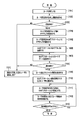
- FIG. 2 illustrates an example of the operation of the embodiment (hardware configuration) shown in FIG. 1 in the form of a flowchart.
- the card authentication unit 17 detects the insertion of the card and attempts authentication [102].
- the authentication method is arbitrary, and various methods (methods) put into practical use can be used.
- the card authentication unit 17 distributes an IP (Internet Protocol) address to the inserted card [104].
- IP Internet Protocol
- authentication failed authentication failed [103-NO]
- the user is notified that authentication has failed (a message or the like is displayed in a predetermined area of the monitor unit 10), and the process ends (returns to the standby state).
- the card authentication unit 17 notifies the GUI application unit 11 of the IP address distributed to the card [105]. It is assumed that the GUI application unit 11 has established a connection with the server unit 14 of the monitor unit 10 when the system is started. The card authentication unit 17 holds a list of authenticated cards and their IP addresses. When a newly authenticated card is added, the card authentication unit 17 notifies the GUI application unit 11 of the IP address.
- the GUI application unit 11 connects to the notified IP address of the card [106].
- GUI application unit 11 is downloaded from the GUI (Internet) server 100 as described later, it is possible to refuse connection from an unauthorized client.
- the card When the authentication between the GUI application unit 11 and the server unit of the card is successful [108-YES], the card returns profile information to the GUI application unit 11 [109].
- the profile information includes, for example, information such as a card name, a list of functions provided in the card, and the like.
- the profile information may also include a URL (address in GUI (Internet server) 100) where a GUI application to be downloaded is installed.
- the function provided by the card is, for example, a tuner card for digital television broadcasting.
- ⁇ Channel setting function such as channel scan
- Information acquisition function for configured channels ⁇
- Channel selection function ⁇ SI (Service Information) information acquisition function for the channel being viewed -Stream switching function for viewing channel Etc.
- SI Service Information
- the card is a tuner card for digital television broadcasting, for example, ⁇ Channel setting function such as channel scan ⁇ Contracted channel information acquisition function ⁇ SI (Service Information) information acquisition function for channels under contract ⁇ Channel selection function ⁇ Password management function for channel selection with viewing age restrictions Etc.
- ⁇ Channel setting function such as channel scan ⁇ Contracted channel information acquisition function ⁇ SI (Service Information) information acquisition function for channels under contract ⁇ Channel selection function ⁇ Password management function for channel selection with viewing age restrictions Etc.
- the GUI application unit 11 Upon receiving the profile information (card information) returned from the card, the GUI application unit 11 notifies the user that an arbitrary card has been connected. That is, in accordance with the notification that the card is inserted from the GUI application unit 11 to the application unit 13 and the server unit 14 and the notification that the card has been inserted, as a video output from the video output control unit 15, A GUI (video) that prompts the user to select a card is displayed to prompt the user to select [110]. That is, the user can select whether or not to activate the GUI application corresponding to the inserted card (execution of the card function), and the card enters a standby state waiting for an instruction input from the user.
- an appropriate GUI application selected according to the card
- the GUI application is attempted to be downloaded from the GUI (Internet) server 100 in accordance with the URL included in the card profile information.
- GUI application download fails due to network disconnection or the like, the GUI application built in the monitor unit 10 or the card is activated.
- a reduced function in which some functions are restricted as compared to the GUI application downloaded from the GUI (Internet) server 100 may be provided, but the basic functions can be used. To do.
- GUI Internet
- a new Web page is generated.
- the web browser unit 12 is requested to do so, and the generated web page is loaded.
- a function of simultaneously executing a plurality of applications in one display screen of the monitor unit 10 can be realized. Since the newly downloaded GUI application is not connected to the card server unit, the connection with the card server unit is started (established) in accordance with the above [109] to [110]. .
- the application control unit 13 manages the GUI application currently focused (one button display is specified in the display screen, for example, the display color is inverted), and is input from the remote control input unit 20. Control commands corresponding to remote controller key operation inputs are distributed appropriately. That is, the card function selected according to the user's remote control operation is performed [112].
- an unloading process of a Web page on which the GUI application is operating for example, a single display of a display screen belonging to a specific GUI application is performed according to a user instruction (remote control operation).
- a user instruction remote control operation
- GUI application download and display corresponding to the user's operation (input of a control command by operating the remote control key) and displayed
- the card function corresponding to the GUI application can be operated (repeating [111] to [112]).
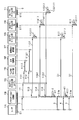
- FIG. 3 illustrates an example of the operation of the embodiment (hardware configuration) shown in FIG. 1 in a sequential chart format, taking as an example the case of one card (signal processing unit).
- the card-side server unit (corresponding to [A11] in FIG. 1) 1A, the card authentication unit (corresponding to [17] on the monitor unit 10 side) 1B, the user 1C, the GUI application unit (main (monitor) [11] on the unit 10 side)) 1D, application control unit ([13] on the monitor unit 10 side) 1E, GUI application unit # 1 (held by the GUI application storage unit of the GUI (Internet) server 100)
- An arbitrary GUI application) 1F and a GUI (Internet) server (corresponding to [100] in FIG. 1) 1G are defined.
- Card authentication processing is performed ⁇ 1.0.1>.
- the authentication method is arbitrary, and various methods (methods) put into practical use can be used.
- the IP address is distributed from the card authentication unit 1B to the card side server unit 1A ⁇ 1.1>.
- the card authentication unit 1B notifies the GUI application unit 1D of the IP address distributed to the card-side server unit 1A ⁇ 1.2>.
- the server operation is started ⁇ 1.1.1>.
- the client application that performs a connection request that is, a connection request is performed from the GUI application unit 1D to the card-side server unit 1A ⁇ 1.2.1>.
- the authentication method is arbitrary, and various methods (methods) put into practical use can be used.
- the card side server unit 1A If the authentication is successful, that is, if the connection in response to the connection request is successful in the card side server unit 1A, ⁇ 1.2.1a>, the card side server unit 1A notifies the GUI application unit 1D of the connection success ⁇ 1.2. 1.1>. Further, profile information is notified from the card-side server unit 1A to the GUI application unit 1D ⁇ 1.2.1.2>.
- the card information is displayed ⁇ 1.2.1.2.1>.
- the card information is continuously displayed until the application activation selection ⁇ 2> is input from the user 1C or for a predetermined time (period) ⁇ 1.2.1.2.1. 1>.
- the GUI application unit 1D transmits (issues) a new application activation request ⁇ 2.1> to the application control unit 1E.
- the application control unit 1E Upon receipt of the new application activation request, the application control unit 1E transmits (issues) a create command to the GUI application unit (# 1) 1F ⁇ 2.1.1>.
- the GUI application unit (# 1) 1F Upon receiving the create command, the GUI application unit (# 1) 1F transmits (issues) a download request ⁇ 3> to the GUI (Internet) server 1G.
- the GUI (Internet) server 1G that has received the download request transmits a response ⁇ 3.1> to the GUI application unit (# 1) 1F.
- the GUI application unit (# 1) 1F Upon receiving the response ⁇ 3.1>, the GUI application unit (# 1) 1F displays the application screen until the remote controller key input ⁇ 4> is input from the user 1C or for a predetermined time (period). Display continuously ⁇ 3.1.1>.
- the application control unit 1E follows the remote control key type, some types are in the GUI application unit (main) 1D, some types are in the GUI application unit (# 1) 1F, Transfer each one.
- the application control unit 13 manages the GUI application currently focused (one button display is specified in the display screen, for example, the display color is inverted), and is input from the remote control input unit 20. Control commands corresponding to remote controller key operation inputs are distributed appropriately. That is, the card function selected according to the user's remote control operation is performed.
- FIG. 4 illustrates an example of the operation of the embodiment (hardware configuration) illustrated in FIG. 1 in a sequential chart format, taking an example in which there are three cards (signal processing units).
- the card A and the card B have already been inserted and are authenticated ⁇ 0>, and the video (Video) display and the GUI application display image of the card A are displayed on the monitor unit 10 on the full screen.
- State ⁇ 0.1> being displayed and GUI application display screen according to GUI application part (# 2) 11H and GUI application part (# 3) 11I being in a non-display state ⁇ 0.1.1 >, ⁇ 0.1.2>
- the user 11A inputs a multiple application execution request ⁇ 1> from the remote control key.
- an instruction input (command) using the remote control key is transferred from the application control unit 11B to the GUI application unit (main) 11C ⁇ 1.1>.
- the GUI application unit (main) 11C that has received an instruction input (command) using the remote control key transmits (issues) an input acceptance request to the monitor-side server unit 11D ⁇ 1.1.1>.
- the monitor-side server unit 11D transmits (issues) a card B input acceptance (request) for accepting an input of the card B to the input switching unit 11E ⁇ 1.1.1.1>.
- the GUI application section (main) 11C that has received an instruction input (command) using the remote control key also transmits (issues) a video (Video) display position change request to the monitor-side server section 11D ⁇ 11.1.2>.
- the monitor-side server unit 11D that has received the video display position change request instructs the input switching unit 11E to request a video display position change request for the cards A and B ⁇ 1.1.2.1>. .
- the GUI application unit (main) 11C also transmits (issues) an application # 1 display position change request for requesting the application control unit 11B to change the display position of the application # 1 ⁇ 1.1.2>.
- the application control unit 11B transmits (issues) a Web page display position / size change (request) to the GUI application unit (# 1) 11G ⁇ 1.1.2. 1>.
- the GUI application unit (main) 11C also sends (issues) an application # 2 display position change request for requesting the application control unit 11B to change the display position of the application # 2 ⁇ 1.1.2>.
- the application control unit 11B transmits (issues) a Web page display position / size change (request) to the GUI application unit (# 2) 11H ⁇ 1.1.3. 1>.
- the updated GUI screen display is maintained ⁇ 1.1.3.1.1>.
- the GUI application unit (main) 11C further transmits (issues) an application # 3 display position change request for requesting the application control unit 11B to change the display position of the application # 3 ⁇ 1.1.4>.
- the application control unit 11B transmits (issues) a Web page display position / size change (request) to the GUI application unit (# 3) 11I ⁇ 1.1.4. 1>.
- the GUI application unit (# 3) 11I that received the Web page display position / size change (request) updates the GUI screen. Note that the display of the updated GUI screen is maintained ⁇ 1.1.5.1.1>.
- the application control unit 11B sets the GUI application (# 1) 11F as the focus state as the initial state in the application focus management ⁇ 2> ⁇ 2.1. >.
- the application control unit 11B transfers the remote control key (control input) to the GUI application (# 1) 11F ⁇ 3.1>.
- the GUI application (# 1) 11F that has received the remote control key (control input) updates the GUI screen display. At this time, the GUI application (# 1) 11F requests information acquisition and processing execution from the server of the corresponding card A as necessary ⁇ 3.1.1.1>.
- the application control unit 11B determines the focus target application based on the remote control key (control input). ⁇ 4.1>. If the remote control key (control input) is, for example, a control input that sets the application # 2 to the focus state, the application control unit 11B sets the GUI application (# 2) 11G to the focus state ⁇ 4.1.1>.
- the GUI application (# 2) 11G that has received the remote control key (control input) updates the GUI screen display. At this time, the GUI application (# 2) 11G requests the server of the corresponding card B for information acquisition and processing execution as necessary ⁇ 5.1.1.1>.
- the GUI application is executed in the Web browser unit 13 of the monitor unit 10, but an external Web browser different from the monitor unit 10 may be used.
- a web browser may be mounted on any or each of the card A, the card B,..., The card N, and a tablet having a certain OS (Operation System), for example, Android (registered trademark). It can also be executed on a web browser of a mobile terminal device represented by a terminal device or a smartphone equipped with, for example, iOS (registered trademark).
- the GUI application of the mobile terminal device can be connected to the server of the monitor unit (only connection with the server of the monitor unit is possible), but it is directly connected to the server of the card unit. Therefore, it is necessary to provide a TCP (Transmission Control Protocol) / IP (Internet Protocol) bridge function in the monitor unit.
- TCP Transmission Control Protocol
- IP Internet Protocol
- FIG. 5 shows a monitor unit in which two cards, the first card (card (signal processing unit) A) and the second card ((signal processing unit) card B) described with reference to FIGS. 1 to 4, are inserted.
- An example of the display example of a display screen is shown.
- the display example shown in FIG. 5 is an example in which a video (content) signal-processed by the card (signal processing unit) A and a video (content) signal-processed by the card (signal processing unit) B are displayed simultaneously.
- the video corresponding to the application A along the function of the card A is shown in the area 10-A
- the video corresponding to the application B along the function of the card B is shown in the area 10-B.
- the function of how to display the signal after being input to the monitor unit 10 is not a card but an input switching unit 16 and a video output control unit 15 of the monitor unit 10.
- the GUI application unit 11 can be connected to the server unit 14 of the monitor unit 10 and control the display of the monitor unit 10.
- application A shows an example (list) of services that can be provided by card A (first card / signal processing unit), and programs (contents) of channel # 1, channel # 2,. ) To display the video of individual channels.
- the application B shows an example of a service that can be provided by the card B (second card / signal processing unit).
- a service that can be provided by the card B (second card / signal processing unit).
- contents of an arbitrary website connected via the Internet server 100, a channel banner, and the like An example of displaying is shown.
- the weather forecast information of the region is acquired from the Internet server 100, It is also possible to execute in parallel with application A or B or both.
- the application C executes an application on the Web browser 12 specific to the monitor unit 10 regardless of the function of the inserted card (signal processing unit) (independent of the application A or B or both). Indicates.
- the case where the card has a signal processing unit has been introduced.
- the monitor unit has an antenna input and has a signal processing unit.
- the advantage of this video display system is that the functions of the monitor unit and card (unit) can be used like a server installed on the Internet, as seen from the GUI application. It is not directly related to whether it is realized.
- the function on the card side can be provided like an Internet server, the interface between the card (unit) and the main body (monitor unit) becomes much simpler. For this reason, it is very easy to make it public to a company (third vendor) that does not manufacture / design the main body (monitor unit).
- the function expansion by the signal processing unit that is a card can be easily realized.
- CSP content service provider
- a card (signal processing unit) can be equipped with a function capable of bidirectional communication using Internet server technology, and can communicate from a Web browser prepared in the monitor unit to realize the operation of the card unit.
- server technology HTTP or HTML5 WebSocket can be used, and WebSocket is preferably used in order to realize a high-speed response in both directions.
- the card (signal processing) unit can easily realize the functions of the embodiment by providing a communication interface conforming to Ethernet (Ethernet), DLNA, WiDi, etc. in addition to video output such as HDMI and USB.
- the monitor unit authenticates the installed card (signal processing) unit, distributes the IP address to the card, and notifies the GUI application of the monitor unit of the IP address information of the newly installed card. Connect to an address. Thereby, it is possible to refuse connection from an unauthorized client.
- GUI application using HTML / Java Script configured on a Web browser can be downloaded from the Internet.
- GUI application only needs to prepare a plurality of new connections such as WebSockets, and simultaneously use a plurality of cards and functions unique to the monitor unit such as video output control. Is possible.
Landscapes
- Engineering & Computer Science (AREA)
- Multimedia (AREA)
- Signal Processing (AREA)
- Computer Security & Cryptography (AREA)
- Databases & Information Systems (AREA)
- Software Systems (AREA)
- General Engineering & Computer Science (AREA)
- Computer Graphics (AREA)
- Two-Way Televisions, Distribution Of Moving Picture Or The Like (AREA)
- Business, Economics & Management (AREA)
- Marketing (AREA)
- Human Computer Interaction (AREA)
- Library & Information Science (AREA)
- Information Transfer Between Computers (AREA)
Abstract
信号処理部であるカード部を有する電子機器において、機能拡張を行う場合に、最適なシステム構成の電子機器およびその制御方法を提供する。 実施形態の電子機器は、カード処理手段と、第一のアプリケーション処理手段と、第二のアプリケーション処理手段と、表示手段と、映像出力制御手段と、制御手段と、を具備する。カード処理手段は、信号処理部を保持したカード部との間のデータの受け渡しを行う。第一のアプリケーション処理手段は、前記カード処理手段により認証したカード部の前記信号処理部の動作の起動と終了、あるいはカード部の選択を行うための第一のアプリケーションを実行する。第二のアプリケーション処理手段は、前記カード部の前記信号処理部を動作するためのユーザインターフェースとして機能する第二のアプリケーションを実行する。表示手段は、前記第一及び第二のアプリケーション処理手段の動作に対応する表示及び再生映像を表示する。映像出力制御手段は、前記表示手段が表示する前記第一及び第二のアプリケーション処理手段の動作に対応する表示及び前記再生映像に対応する出力信号を出力する。制御手段は、前記第一及び第二のアプリケーション処理手段及び前記映像出力制御手段の動作を制御する。
Description
この発明は、電子機器及びその制御方法に関する。
テレビジョン放送受信装置等のモニター装置を有する電子機器においては、近年、モニター装置はますます大型化する反面、放送を受信する信号処理装置はますます小型化している。また、例えばテレビジョン放送受信装置においても、放送の受信に限らず、ネットワークからのストリーミング映像の信号処理や、DLNA(Digital Living Network Alliance)規格やWiDi(Wireless Display-Distribution System)規格などのネットワーク機能を使用する映像転送技術にも対応することを求められている。
このため、モニター装置(モニター部)と、信号処理を行う信号処理部であるカード部とに分け、カード部を着脱可能にすることにより、様々な国のテレビ放送の規格への対応や、機能の拡張を容易とするハードウェア、ソフトウェア構成を実現する手法の提案が要望されている。
また、最近では、機能拡張の容易さ、後継機種や多機種に渡る流用性などを考慮して、映像表示システムのGUI(グラフィカルユーザインターフェース)をWebブラウザ上のHTML/JavaScript(登録商標)を用いて実現する手段が、検討、および実現されつつある。
着脱式カードを用いることで機能拡張が可能な映像表示システムは、既に存在しているが、信号伝送規格としてHDMI、USB、PCIexpressなどを用いることにより、モニター部とカード部との間の通信は、信号伝送規格に限定される。
このため、拡張して使用する場合は独自システムを構築する必要がある。
また、上述の独自なシステムでは、上記のようにHTML/JavaScript技術を用いた場合、モニター部、カード部ともに複雑なシステム構成を追加することとなる。
この発明の目的は、信号処理部であるカード部を有する電子機器において、機能拡張を行う場合に、最適なシステム構成の電子機器およびその制御方法を提供することである。
実施形態の電子機器は、カード処理手段と、第一のアプリケーション処理手段と、第二のアプリケーション処理手段と、表示手段と、映像出力制御手段と、制御手段と、を具備する。カード処理手段は、信号処理部を保持したカード部との間のデータの受け渡しを行う。第一のアプリケーション処理手段は、前記カード処理手段により認証したカード部の前記信号処理部の動作の起動と終了、あるいはカード部の選択を行うための第一のアプリケーションを実行する。第二のアプリケーション処理手段は、前記カード部の前記信号処理部を動作するためのユーザインターフェースとして機能する第二のアプリケーションを実行する。表示手段は、前記第一及び第二のアプリケーション処理手段の動作に対応する表示及び再生映像を表示する。映像出力制御手段は、前記表示手段が表示する前記第一及び第二のアプリケーション処理手段の動作に対応する表示及び前記再生映像に対応する出力信号を出力する。制御手段は、前記第一及び第二のアプリケーション処理手段及び前記映像出力制御手段の動作を制御する。
以下、図面を参照して、本発明の実施の一形態について説明する。
図1は、電子機器、例えばモニター部(映像表示部)と信号処理部とからなる映像表示システムの一例を示す。なお、以下に説明する要素や構成は、マイクロコンピュータ(処理装置、CPU(Central Processing Unit))によりソフトウェアで実現するものであってもよいし、ハードウェアで実現するものであってもよい。また、モニター部が表示するコンテンツの取得の方法としては、空間波(電波)の利用、ケーブル(光ファイバを含む)やインターネット・プロトコル(IP)通信網等のネットワークの利用、ネットワークからのストリーミング映像の信号処理や、ネットワーク機能を使用する映像転送技術等、任意である。なお、コンテンツは、ストリームや番組、もしくは情報と称する場合があり、映像及び音声あるいは音楽等を含む。また、映像は、動画と静止画、あるいはテキスト(コード化された符号列で示される文字や記号等で表される情報)、ならびにその任意の組み合わせを含む。
図1に示す電子機器は、モニター部10、GUIアプリケーション部11、Webブラウザ(ファイル閲覧処理)部12、アプリケーション制御部13、サーバ部14、映像出力制御部15、入力切換部16、カード認証部17、制御部(CPU,Central Processing Unit)18、カード装着部19及びリモコン入力部20等を備える。
モニター部10は、カード装着部19に装着されたカードが提供する機能に従い、映像出力制御部15が出力する映像(コンテンツ)を表示する。なお、カード装着部19には、複数のカードが装着可能である。
GUI(Graphical User Interface)アプリケーション部11は、例えばHTML(Hypertext Markup Language)5/JavaScript(登録商標)で記述されたGUIアプリケーションを保持する。
Webブラウザ部12は、CPU18の制御の下で、GUIアプリケーション部11が保持する任意のGUIアプリケーションに基づいて、ブラウザ機能を実行する。
アプリケーション制御部13は、CPU18の制御の下で、アプリケーションの起動と終了、あるいは複数のアプリケーションの中で操作(動作)中のアプリケーション(フォーカス)を制御する。
アプリケーション制御部13は、例えばWebサーバあるいはWebSocketサーバを含み、CPU18の制御の下で、カード認証部17による認証、入力切換部16による認証できたカードに対するネットワーク経路設定及び映像出力制御部15による映像信号経路の設定等を行う。
なお、サーバ部14は、カードが未装着である場合には、モニター部10(GUIアプリケーション部11)に予め用意されているモニター部10の制御用GUIアプリケーションに対応するGUI表示およびGUI表示に対応する制御入力に従うモニター部10の表示の制御を行う。
カード部、例えば第一の機能を実現できるカードA、第二の機能を実現できるカードB及びカードN(Nは正の整数)は、それぞれサーバ部A10、B10及びN10、機能制御部A11、B11及びN10を含む。なお、カードAは、機能A-1と機能A-2を実行できるものとする。また、カードBは、機能B-1~機能B-3を実行できるものとする。また、カードNは、機能N-1を実行できるものとする。
それぞれのカード(カード部)において、サーバ部A10、B10及びN10は、例えばHTTPサーバやHTML5におけるWebSocketサーバなどを含み、インターネットサーバ技術を用いた双方向通信が可能である。なお、それぞれのカード(カード部)は、映像出力(伝送)規格として、例えばHDMI(High-definition Digital Media Interface)規格やUSB(Universal Serial Bus)規格などの伝送規格に準拠するとともに、イーサネット(登録商標)/Ethenet(登録商標)に準拠する通信インターフェースを備える。
すなわち、モニター部10は、モニター部10が含むWebブラウザ12上で動作するGUIアプリケーション11からカード認証部17が認証し、入力切換部16による入力切り換えが終了したカードと通信し、カード部すなわちカードA/カードB/カードNの操作及び個々のカードが有する機能を実現することが可能である。
なお、CPU18は、例えばサーバ部14、あるいはサアプリケーション制御部13、と一体であってもよく、もしくはサーバ部14、あるいはサアプリケーション制御部13がCPU18のファームウェアとして用意されてもよい。
また、モニター部10には、詳述しないが音声出力制御部が出力する音声(Audio)を再生するスピーカ(音響再生器)21が接続可能である。
図2に、図1が示す実施形態(ハードウェア構成)の動作の一例をフローチャート形式で説明する。
モニター部10のカード装着部19に任意のカードが挿入される[101]と、カード認証部17においてカードの挿入を検出し、認証を試みる[102]。なお、認証方式は任意であり、実用化されているさまざまな方法(方式)が利用可能である。
認証が成功した場合[103-YES]、挿入されたカードにカード認証部17がIP(Internet Protocol)アドレスを配布する[104]。カードは、配布されたIPアドレスを使用し、自身のサーバ部を起動する。
認証ができなかった(認証失敗の)場合[103-NO]、認証に失敗した旨をユーザに通知(モニター部10の所定の領域にメッセージなどを表示)し、終了する(待機状態に戻る)。
また、カード認証部17は、カードに配布したIPアドレスをGUIアプリケーション部11に通知する[105]。なお、GUIアプリケーション部11は、システム起動時などにおいて、モニター部10のサーバ部14との間の接続が確立しているものとする。また、カード認証部17は、認証済みカードとそのIPアドレスの一覧を保持しており、新しく認証されたカードが追加された場合、GUIアプリケーション部11に、IPアドレスを通知する。
次に、GUIアプリケーション部11は、通知されたカードのIPアドレスに接続する[106]。
続いて、GUIアプリケーション部11とカードのサーバ部との間でクライアント認証を行う[107]。これにより、後述するようにGUIアプリケーションをGUI(インターネット)サーバ100からダウンロードする場合などにおいて、不正なクライアントからの接続を拒否することが可能となる。
GUIアプリケーション部11とカードのサーバ部との間の認証ができなかった(認証失敗の)場合[108-NO]、認証に失敗した旨をユーザに通知(モニター部10の所定の領域にメッセージなどを表示)し、終了する(待機状態に戻る)。
GUIアプリケーション部11とカードのサーバ部との間の認証が成功した場合[108-YES]、カードは、GUIアプリケーション部11に対して、プロファイル情報を返却する[109]。なお、プロファイル情報とは、例えばカードの名前などの情報や、カードが備える機能の一覧などを含む。また、プロファイル情報は、ダウンロードすべきGUIアプリケーションが設置されてあるURL(GUI(インターネットサーバ)100内のアドレス)などを含んでもよい。
ここで、カードが備える機能とは、カードが、例えばデジタルテレビジョン放送のためのチューナーカードであれば、
・チャンネルスキャンなどのチャンネル設定機能
・設定済みチャンネルの情報取得機能
・チャンネル選局機能
・視聴中チャンネルのSI(Service Information)情報取得機能
・視聴中チャンネルのストリーム切換え機能
などを含む。
・チャンネルスキャンなどのチャンネル設定機能
・設定済みチャンネルの情報取得機能
・チャンネル選局機能
・視聴中チャンネルのSI(Service Information)情報取得機能
・視聴中チャンネルのストリーム切換え機能
などを含む。
一方、カードが、例えば有料のデジタルテレビジョン放送のためのチューナーカードであれば、
・チャンネルスキャンなどのチャンネル設定機能
・契約済みチャンネルの情報取得機能
・契約中チャンネルのSI(Service Information)情報取得機能
・チャンネル選局機能
・視聴年齢制限のあるチャンネル選局のためのパスワード管理機能
などを含む。
・チャンネルスキャンなどのチャンネル設定機能
・契約済みチャンネルの情報取得機能
・契約中チャンネルのSI(Service Information)情報取得機能
・チャンネル選局機能
・視聴年齢制限のあるチャンネル選局のためのパスワード管理機能
などを含む。
なお、上述の機能は、本映像表示システムを構築するにあたり、予めスーパーセットとしての全機能リストが定義されており、そのリストのうちどの機能をサポートするか、を示すことで実現する。
カードからのプロファイル情報(カード情報)の返却を受けたGUIアプリケーション部11は、任意のカードが接続されたことを、ユーザに通知する。すなわち、GUIアプリケーション部11からアプリケーション部13及びサーバ部14へのカードの名前等とカードが挿入されたことの通知に従い、映像出力制御部15からの映像出力としてモニター部10の所定の領域に、カードの選択を促すGUI(映像)を表示させ、ユーザの選択を促す[110]。すなわち、ユーザは、挿入されたカードに対応するGUIアプリケーションを起動するかどうか(カードの機能の実行)を選択でき、カードは、ユーザからの指示入力を待つ待機状態となる。
以下、ユーザの操作(ユーザの選択指示入力)に応じて、適切な(カードに応じて選択される)GUIアプリケーションを表示する[111]。すなわち、選択されたカードにおいて、GUIアプリケーションが起動されると、カードのプロファイル情報に含まれたURLに従い、GUI(インターネット)サーバ100から、GUIアプリケーションのダウンロードを試みる。
なお、ネットワーク未接続などによりGUIアプリケーションのダウンロード失敗した場合は、モニター部10もしくはカードに予め内蔵されたGUIアプリケーションを起動する。この場合は、GUI(インターネット)サーバ100からダウンロードするGUIアプリケーションに比較して一部の機能が制限される縮退された機能が提供される場合があるが、基本的な機能については使用できるものとする。
一方、GUI(インターネット)サーバ100からのGUIアプリケーションのダウンロードができた場合は、モニター部10に固有の機能を実現するアプリケーション制御部13と通信するGUIアプリケーションに加え、新ら他にWebページを生成することをWebブラウザ部12に要求し、生成されたWebページにロードする。これにより、モニター部10の1つの表示画面内に複数のアプリケーションを同時に実行する機能が実現できる。なお、新しくダウンロードされたGUIアプリケーションは、カードのサーバ部とは未接続のため、上述の[109]~[110]に従い、カードのサーバ部との間の接続を開始する(接続を確立する)。
以下、カードのサーバ部との接続が確立のあと、ユーザ操作に従い、適切にカード部の機能を使用することが可能となる。なお、アプリケーション制御部13は、現在フォーカスしている(表示画面内において1つのボタン表示が特定され、例えば表示色が反転されている)GUIアプリケーションを管理しており、リモコン入力部20から入力されたリモコンキーの操作入力に対応する制御コマンドを、適切に配布する。すなわち、ユーザのリモコン操作に従って選択されるカード機能の操作を実施する[112]。
このとき、モニター部10の状態によっては、GUIアプリケーションが動作しているWebページのアンロード処理、例えばユーザの指示(リモコン操作)に従い、特定のGUIアプリケーションに属する表示画面の単独の表示などを行うこともある。
なお、カードに固有の他の機能の実施が選択された場合[113-YES]、ユーザの操作(リモコンキーの操作よる制御コマンドの入力)に対応するGUIアプリケーションのダウンロード及び表示と、表示されたGUIアプリケーションに対応するカード機能の操作を実施できる([111]~[112]の繰り返し)。
図3は、図1が示す実施形態(ハードウェア構成)の動作の一例を、カード(信号処理部)が1つの場合を例に、シーケンシャルチャート形式で説明する。
なお、図3においては、カード側サーバ部(図1における[A11]が対応)1A、カード認証部(モニター部10側における[17]が対応)1B、ユーザ1C、GUIアプリケーション部(メイン(モニター部10側における[11]が対応))1D、アプリケーション制御部(モニター部10側における[13]が対応)1E、GUIアプリケーション部#1(GUI(インターネット)サーバ100のGUIアプリケーション格納部が保持する任意のGUIアプリケーション)1F、及びGUI(インターネット)サーバ(図1における[100]が対応)1G、を規定する。
カード未挿入状態時<0>のモニター部10の制御用アプリケーションのみが動作している(待機)状態<0.1>において、カード認証部1Bにて、カードの挿入<1>を検出すると、カード認証処理が行われる<1.0.1>。なお、認証方法は、任意であり、実用化されているさまざまな方法(方式)が利用可能である。
カード認証処理<1.0.1>によりカードの認証が成功すると、カード認証部1Bからカード側サーバ部1Aに、IPアドレスが配布される<1.1>。また、カード認証部1BからGUIアプリケーション部1Dに、カード側サーバ部1Aに配布したIPアドレスが通知される<1.2>。
IPアドレスの配布を受けたカード側サーバ部1Aにおいては、サーバ動作を開始する<1.1.1>。
また、GUIアプリケーション部1Dからカード側サーバ部1Aに、接続要求すなわち接続要求を行うクライアントの認証処理が行われる<1.2.1>。なお、認証方法は、任意であり、実用化されているさまざまな方法(方式)が利用可能である。
認証成功すなわちカード側サーバ部1Aにおいて、接続要求に応答する接続が成功すると<1.2.1a>、カード側サーバ部1AからGUIアプリケーション部1Dに、接続成功が通知される<1.2.1.1>。また、カード側サーバ部1AからGUIアプリケーション部1Dに、プロファイル情報が通知される<1.2.1.2>。
プロファイル情報を受け取ったGUIアプリケーション部1Dにおいては、カード情報を表示する<1.2.1.2.1>。なお、カード情報は、ユーザ1Cからのアプリケーション起動選択<2>が入力されるまでの間、もしくは所定時間(期間)の間、継続して表示される<1.2.1.2.1.1>。
ユーザ1Cからのアプリケーション起動選択<2.>が入力されると、GUIアプリケーション部1Dは、アプリケーション制御部1Eに新規アプリケーション起動要求<2.1>を送信(発行)する。
新規アプリケーション起動要求を受け取ったアプリケーション制御部1Eは、GUIアプリケーション部(#1)1Fに、生成(create)コマンドを送信(発行)する<2.1.1>。
生成(create)コマンドを受け取ったGUIアプリケーション部(#1)1Fは、GUI(インターネット)サーバ1Gにダウンロード要求<3>を送信(発行)する。
ダウンロード要求を受け取ったGUI(インターネット)サーバ1Gは、GUIアプリケーション部(#1)1Fに返答<3.1>を送信する。
返答<3.1>を受け取ったGUIアプリケーション部(#1)1Fは、アプリケーション画面表示を、ユーザ1Cからのリモコンキー入力<4>が入力されるまでの間、もしくは所定時間(期間)の間、継続して表示する<3.1.1>。
ユーザ1Cからのリモコンキー入力<4>があると、アプリケーション制御部1Eは、リモコンキー種別に従い、ある種別はGUIアプリケーション部(メイン)1Dに、ある種別はGUIアプリケーション部(#1)1Fに、それぞれ、転送する。
以下、アプリケーション制御部13は、現在フォーカスしている(表示画面内において1つのボタン表示が特定され、例えば表示色が反転されている)GUIアプリケーションを管理しており、リモコン入力部20から入力されたリモコンキーの操作入力に対応する制御コマンドを、適切に配布する。すなわち、ユーザのリモコン操作に従って選択されるカード機能の操作を実施する。
図4は、図1が示す実施形態(ハードウェア構成)の動作の一例を、カード(信号処理部)が3つの場合を例に、シーケンシャルチャート形式で説明する。
なお、図4においては、ユーザ11A、アプリケーション制御部(モニター部10側における[13]が対応)11B、GUIアプリケーション部(メイン(モニター部10側における[11]が対応))11C、モニター側サーバ部(モニター部10側における[14]が対応)11D、入力切換部(モニター部10側における[16]が対応)11E、映像出力制御部(モニター部10側における[15]が対応)11F、GUIアプリケーション部#1(GUI(インターネット)サーバ100のGUIアプリケーション格納部が保持する任意のGUIアプリケーション#1)11G、GUIアプリケーション部#2(GUIアプリケーション格納部が保持する任意のGUIアプリケーション#2)11H、GUIアプリケーション部#3(GUIアプリケーション格納部が保持する任意のGUIアプリケーション#3)11I、を規定する。
なお、以下の説明は、カードAとカードBが既に挿入されており、かつ認証済みの状態であり<0>、カードAの映像(Video)表示及びGUIアプリケーション表示画像がモニター部10に全画面表示中である状態<0.1>であって、GUIアプリケーション部(#2)11H及びGUIアプリケーション部(#3)11Iに従うGUIアプリケーション表示画面が、非表示状態である状態<0.1.1>,<0.1.2>においてユーザ11Aが、リモコンキーから複数アプリケーション実行要求<1>を指示入力した場合を想定する。
ユーザ11Aが、リモコンキーから複数アプリケーション実行要求<1>を指示入力すると、アプリケーション制御部11BからGUIアプリケーション部(メイン)11Cにリモコンキーによる指示入力(コマンド)が転送される<1.1>。
リモコンキーによる指示入力(コマンド)を受けつけたGUIアプリケーション部(メイン)11Cは、モニター側サーバ部11Dに、入力受付要求を送信(発行)する<1.1.1>。
モニター側サーバ部11Dは、入力切換部11Eに、カードBの入力を受け付けるためのカードB入力受付(要求)を、送信(発行)する<1.1.1.1>。
リモコンキーによる指示入力(コマンド)を受けつけたGUIアプリケーション部(メイン)11Cはまた、モニター側サーバ部11Dに、映像(Video)表示位置変更要求を送信(発行)する<11.1.2>。
映像(Video)表示位置変更要求を受けつけたモニター側サーバ部11Dは、入力切換部11Eに、カードA,カードBの映像(Video)表示位置変更要求を指示する<1.1.2.1>。
GUIアプリケーション部(メイン)11Cはまた、アプリケーション制御部11Bにアプリケーション#1の表示位置の変更を要求するアプリケーション#1表示位置変更要求を、送信(発行)する<1.1.2>。
アプリケーション制御部11Bは、アプリケーション#1表示位置変更要求に対応し、GUIアプリケーション部(#1)11Gに、Webページ表示位置・サイズ変更(要求)を送信(発行)する<1.1.2.1>。
Webページ表示位置・サイズ変更(要求)を受けつけたGUIアプリケーション部(#1)11Gは、GUI画面を更新する<1.1.3.1.1>。
GUIアプリケーション部(メイン)11Cはまた、アプリケーション制御部11Bにアプリケーション#2の表示位置の変更を要求するアプリケーション#2表示位置変更要求を、送信(発行)する<1.1.2>。
アプリケーション制御部11Bは、アプリケーション#2表示位置変更要求に対応し、GUIアプリケーション部(#2)11Hに、Webページ表示位置・サイズ変更(要求)を送信(発行)する<1.1.3.1>。
Webページ表示位置・サイズ変更(要求)を受けつけたGUIアプリケーション部(#2)11Hは、GUI画面を更新する。なお、更新したGUI画面の表示を維持する<1.1.4.1.1>。
GUIアプリケーション部(メイン)11Cはさらに、アプリケーション制御部11Bにアプリケーション#3の表示位置の変更を要求するアプリケーション#3表示位置変更要求を、送信(発行)する<1.1.4>。
アプリケーション制御部11Bは、アプリケーション#3表示位置変更要求に対応し、GUIアプリケーション部(#3)11Iに、Webページ表示位置・サイズ変更(要求)を送信(発行)する<1.1.4.1>。
Webページ表示位置・サイズ変更(要求)を受けつけたGUIアプリケーション部(#3)11Iは、GUI画面を更新する。なお、更新したGUI画面の表示を維持する<1.1.5.1.1>。
このように、3つのGUI画面表示が表示された状態で、アプリケーション制御部11Bは、アプリケーションフォーカス管理<2>において、初期状態として、GUIアプリケーション(#1)11Fをフォーカス状態とする<2.1>。
この状態で、ユーザ11Aによるリモコンキー操作(制御入力)<3>が有った場合、リモコンキー種別に従い、ある種別はGUIアプリケーション部(メイン)11Cに、ある種別はGUIアプリケーション(#1)11Fすなわちフォーカス中アプリケーションに、転送する<3.1a>。
次に、アプリケーション制御部11Bは、GUIアプリケーション(#1)11Fに、リモコンキー(制御入力)を転送する<3.1>。
リモコンキー(制御入力)を受けつけたGUIアプリケーション(#1)11Fは、GUI画面表示を更新する。このとき、GUIアプリケーション(#1)11Fは、必要に応じ、対応するカードAのサーバに情報取得や処理実行を要求する<3.1.1.1>。
なお、ユーザ11Aによるリモコンキー操作(制御入力)によるフォーカス対象アプリケーションの変更が指示された場合<4>が有った場合、アプリケーション制御部11Bは、リモコンキー(制御入力)に基づいてフォーカス対象アプリケーションを変更する<4.1>。リモコンキー(制御入力)が、例えばアプリケーション#2をフォーカス状態とする制御入力である場合、アプリケーション制御部11Bは、GUIアプリケーション(#2)11Gをフォーカス状態とする<4.1.1>。
この状態で、ユーザ11Aによるリモコンキー操作(制御入力)<5>が有った場合、リモコンキー種別に従い、ある種別はGUIアプリケーション部(メイン)11Cに、ある種別はGUIアプリケーション(#2)11Gすなわちフォーカス中アプリケーションに、転送する<5.1a>。
リモコンキー(制御入力)を受けつけたGUIアプリケーション(#2)11Gは、GUI画面表示を更新する。このとき、GUIアプリケーション(#2)11Gは、必要に応じ、対応するカードBのサーバに情報取得や処理実行を要求する<5.1.1.1>。
なお、図2~図4が示す実施形態においては、モニター部10のWebブラウザ部13において、GUIアプリケーションを実行しているが、モニター部10とは異なる外部のWebブラウザであっても構わない。例えば、カードA,カードB,・・・,カードNのいずれかまたはそれぞれに、Webブラウザを搭載しても構わないし、ある種のOS(Operation System)、例えばAndroid(登録商標)を搭載したタブレット端末装置や、例えばiOS(登録商標)を搭載したスマートフォンなどに代表されるモバイル端末装置のWebブラウザ上で実行することも可能である。但し、その場合は、モバイル端末装置のGUIアプリケーションについて、モニター部のサーバには接続できる(モニター部のサーバとの間の接続のみ可能である)ものの、カード部のサーバとは直接的には接続できないため、モニター部にTCP(Transmission Control Protocol)/IP(Internet Protocol)のブリッジ機能を備える必要がある。
また、ここではWebブラウザ上のHTML/JavaScriptアプリケーションの実行を想定してしているが、サーバ部がクライアント機能を実行可能であれば、Webブラウザを必ずしも使用する必要はない。
図5は、図1~図4により説明した第一のカード(カード(信号処理部)A)及び第二のカード((信号処理部)カードB)の2つのカードが挿入されたモニター部の表示画面の表示例の一例を示す。
図5が示す表示例は、カード(信号処理部)Aで信号処理された映像(コンテンツ)及びカード(信号処理部)Bで信号処理された映像(コンテンツ)が同時に表示されている例であって、カードAの機能に沿ったアプリケーションAに対応する映像が領域10-Aに、カードBの機能に沿ったアプリケーションBに対応する映像が領域10-Bに、それぞれ示される例である。なお、図5に示すように、モニター部10に入力された後の信号をどのように表示するか、という機能については、カードではなく、モニター部10の入力切換部16及び映像出力制御部15による設定に従う。すなわち、図1において説明したように、GUIアプリケーション部11は、モニター部10のサーバ部14と接続し、モニター部10の表示を制御することができる。
例えば、アプリケーションAは、カードA(第一のカード/信号処理部)が提供可能なサービスの一例(一覧)を示し、チャンネル#1,チャンネル#2,・・・,チャンネル#5の番組(コンテンツ)を受信し、個々のチャンネルの映像を表示できることを示す。
また、例えば、アプリケーションBは、カードB(第二のカード/信号処理部)が提供可能なサービスの一例を示し、例えばインターネットサーバ100を経由して接続する任意のWebサイトのコンテンツ及びチャンネルバナーなどを表示する例を示す。
なお、アプリケーションCのように、例えばカードAにおいて、チャンネルスキャンに使用したリージョン(地域)情報を取得したあと、その(リージョン情報が特定する)地域の天気予報情報などをインターネットサーバ100から取得し、アプリケーションAまたはBもしくは両者と並列に実行することも可能である。すなわち、アプリケーションCは、挿入されているカード(信号処理部)の機能とは関係なく(アプリケーションAまたはBもしくは両者と独立に)、モニター部10に固有のWebブラウザ12上のアプリケーションを実行する例を示す。
なお、実施形態においては、カードに信号処理部があるケースを紹介したが、モニター部にアンテナ入力があり、信号処理部を保有していても問題はない。本映像表示システムの利点は、GUIアプリケーションから見て、インターネットに設置されているサーバのように、モニター部とカード(部)の機能が利用できることであり、機能が実際に、どのハードウェア上で実現されているかは、直接的には関係がない。
また、実施形態においては、カード側の機能をインターネットサーバのように提供することができるため、カード(部)と本体(モニター部)のインターフェースが格段に簡単になる。このため、本体(モニター部)を製造/設計しない会社(サードベンダー)に公開することも非常に容易である。
以上の説明した通り、実施形態により、HTML/JavaScript技術を用いたGUIアプリケーションを備える映像表示装置(映像表示システム)において、カードである信号処理部による機能拡張が容易に実現できる。
また、実施形態を活用することにより、カード(信号処理部)を差し替えることにより任意の国向けの映像システムを、容易に提供できる。すなわち、モニター部を全世界共通仕様とすることで、製品コストを低減することが可能になる。
さらに、カード(部)の機能制御部以下を、契約したカードベンダー(信号処理部作成会社)に情報公開し、カード(部)を外部で開発してもらうことが可能である。
またさらに、GUIアプリケーションをカードベンダーに用意してもらうことも、容易である。特に、例えばコンテンツのオンデマンド配信に特化した新しいコンテンツサービスプロバイダ(CSP)への対応において非常に有効である。
本発明のいくつかの実施形態を説明したが、これらの実施形態は、例として提示したものであり、発明の範囲を限定することは意図していない。これら新規な実施形態は、その他の様々な形態で実施されることが可能であり、発明の要旨を逸脱しない範囲で、種々の省略、置き換え、変更を行うことができる。これら実施形態やその変形は、発明の範囲や要旨に含まれるとともに、特許請求の範囲に記載された発明とその均等の範囲に含まれる。
例えば、カード(信号処理部)に、インターネットサーバ技術を用いた双方向通信可能な機能を搭載し、モニター部に用意されたWebブラウザ上から通信し、カード部の操作を実現することができる。サーバ技術とは、HTTPまたはHTML5におけるWebSocketなどを利用可能であり、双方向に高速なレスポンスを実現するためにはWebSocketの利用が好ましい。
また、カード(信号処理)部は、HDMIやUSBなどの映像出力の他、Ethenet(イーサネット)、DLNAやWiDiなどに準拠する通信インターフェースを備えることで、実施形態の機能を容易に実現できる。
また、モニター部は、装着されたカード(信号処理)部を認証したのち、カードにIPアドレスを配布し、モニター部のGUIアプリケーションに、新しく装着されたカードのIPアドレス情報を通知したのち、そのアドレスに対して接続する。これにより、不正なクライアントからの接続を拒否することが可能となる。
また、Webブラウザ上に構成されたHTML/JavaScriptを用いたGUIアプリケーションは、インターネットからダウンロード可能である。なお、ネットワークに接続していない場合は、モニター部、またはカード部に予め保存されたものを使用してもよい。
また、複数のカードが装着された場合においても、GUIアプリケーションは、新しくWebSocket等のコネクションを複数用意するだけでよく、複数のカードや、映像出力制御などのモニター部固有の機能を同時に使用することが可能である。
Claims (15)
- 信号処理部を保持したカード部との間のデータの受け渡しを行うカード処理手段と、
前記カード処理手段により認証したカード部の前記信号処理部の動作の起動と終了、あるいはカード部の選択を行うための第一のアプリケーションを実行する第一のアプリケーション処理手段と、
前記カード処理手段が認証したカード部の前記信号処理部を動作するためのユーザインターフェースとして機能する第二のアプリケーションを実行する第二のアプリケーション処理手段と、
前記第一及び第二のアプリケーション処理手段の動作に対応する表示及び再生映像を表示する表示手段と、
前記表示手段が表示する前記第一及び第二のアプリケーション処理手段の動作に対応する表示及び前記再生映像に対応する出力信号を出力する映像出力制御手段と、
前記第一及び第二のアプリケーション処理手段及び前記映像出力制御手段の動作を制御する制御手段と、
を具備する電子機器。 - 前記第二のアプリケーション処理手段は、前記カード部と通信し、前記カード部の前記信号処理部の前記機能を動作する請求項1の電子機器。
- 前記第二のアプリケーションは、HTML(Hypertext Markup Language)およびJavaScriptを含む請求項1の電子機器。
- 前記制御手段は、前記カード処理手段が認証したカード部のサーバ部との間で通信経路および映像信号経路を設定する請求項1の電子機器。
- 前記カード部は、複数の並列利用が可能である請求項1の電子機器。
- 前記カード部の前記サーバ部は、WebSocketを含む請求項4記載の電子機器。
- 前記第二のアプリケーションを外部から取得可能な通信手段をさらに具備する請求項1の電子機器。
- 第二のアプリケーション処理手段は、前記カード処理手段が認証したカード部の前記信号処理部の前記機能を用いて前記第一のアプリケーションを動作する請求項1の電子機器。
- 前記カード処理手段が認証したカード部は、前記制御手段からアドレスの配布を受け、前記第二のアプリケーション処理手段との間で通信を行うサーバとして機能する請求項8の電子機器。
- カード部の信号処理部の動作の起動と終了、あるいはカード部の選択を行うための第一のアプリケーションを実行し、
第一のアプリケーションにより特定するカード部の信号処理部を動作する第二のアプリケーションを実行し、
第一及び第二のアプリケーションの動作に対応する表示及び再生映像に対応する出力信号を出力する
電子機器の制御方法。 - 第二のアプリケーションは、ネットワークを通じて取得可能である請求項10の電子機器の制御方法。
- 第二のアプリケーションは、HTML(Hypertext Markup Language)およびJavaScriptに従い動作する請求項10の電子機器の制御方法。
- 第二のアプリケーションは、認証したカード部のサーバ部との間で通信経路および映像信号経路を設定する請求項10の電子機器の制御方法。
- 第二のアプリケーションは、認証したカード部の信号処理部を用いて第一のアプリケーションを動作する請求項10の電子機器の制御方法。
- 第二のアプリケーションは、認証したカード部の信号処理部の機能を実行する請求項10の電子機器の制御方法。
Priority Applications (3)
| Application Number | Priority Date | Filing Date | Title |
|---|---|---|---|
| PCT/JP2013/065278 WO2014192154A1 (ja) | 2013-05-31 | 2013-05-31 | 電子機器及びその制御方法 |
| JP2014541234A JPWO2014192154A1 (ja) | 2013-05-31 | 2013-05-31 | 電子機器及びその制御方法 |
| US14/468,220 US20140366054A1 (en) | 2013-05-31 | 2014-08-25 | Electronic apparatus and control method thereof |
Applications Claiming Priority (1)
| Application Number | Priority Date | Filing Date | Title |
|---|---|---|---|
| PCT/JP2013/065278 WO2014192154A1 (ja) | 2013-05-31 | 2013-05-31 | 電子機器及びその制御方法 |
Related Child Applications (1)
| Application Number | Title | Priority Date | Filing Date |
|---|---|---|---|
| US14/468,220 Continuation US20140366054A1 (en) | 2013-05-31 | 2014-08-25 | Electronic apparatus and control method thereof |
Publications (1)
| Publication Number | Publication Date |
|---|---|
| WO2014192154A1 true WO2014192154A1 (ja) | 2014-12-04 |
Family
ID=51988222
Family Applications (1)
| Application Number | Title | Priority Date | Filing Date |
|---|---|---|---|
| PCT/JP2013/065278 Ceased WO2014192154A1 (ja) | 2013-05-31 | 2013-05-31 | 電子機器及びその制御方法 |
Country Status (3)
| Country | Link |
|---|---|
| US (1) | US20140366054A1 (ja) |
| JP (1) | JPWO2014192154A1 (ja) |
| WO (1) | WO2014192154A1 (ja) |
Cited By (1)
| Publication number | Priority date | Publication date | Assignee | Title |
|---|---|---|---|---|
| JP2019213224A (ja) * | 2019-09-06 | 2019-12-12 | 日本放送協会 | 受信装置、端末装置、及びプログラム |
Citations (2)
| Publication number | Priority date | Publication date | Assignee | Title |
|---|---|---|---|---|
| JP2004056654A (ja) | 2002-07-23 | 2004-02-19 | Sharp Corp | カードチューナー対応デジタル放送受信装置 |
| JP2005286914A (ja) * | 2004-03-30 | 2005-10-13 | Lg Electronics Inc | ディスプレイシステム、ディスプレイ装置および機能モジュール |
-
2013
- 2013-05-31 WO PCT/JP2013/065278 patent/WO2014192154A1/ja not_active Ceased
- 2013-05-31 JP JP2014541234A patent/JPWO2014192154A1/ja active Pending
-
2014
- 2014-08-25 US US14/468,220 patent/US20140366054A1/en not_active Abandoned
Patent Citations (2)
| Publication number | Priority date | Publication date | Assignee | Title |
|---|---|---|---|---|
| JP2004056654A (ja) | 2002-07-23 | 2004-02-19 | Sharp Corp | カードチューナー対応デジタル放送受信装置 |
| JP2005286914A (ja) * | 2004-03-30 | 2005-10-13 | Lg Electronics Inc | ディスプレイシステム、ディスプレイ装置および機能モジュール |
Non-Patent Citations (1)
| Title |
|---|
| KAIBE ET AL.: "Platform Technologies Realizing 'TimeOn' Regza Cloud Service", TOSHIBA REVIEW, vol. 68, no. 5, 1 May 2013 (2013-05-01), pages 36 - 39, XP055163504 * |
Cited By (1)
| Publication number | Priority date | Publication date | Assignee | Title |
|---|---|---|---|---|
| JP2019213224A (ja) * | 2019-09-06 | 2019-12-12 | 日本放送協会 | 受信装置、端末装置、及びプログラム |
Also Published As
| Publication number | Publication date |
|---|---|
| US20140366054A1 (en) | 2014-12-11 |
| JPWO2014192154A1 (ja) | 2017-02-23 |
Similar Documents
| Publication | Publication Date | Title |
|---|---|---|
| JP5607095B2 (ja) | 情報生成装置および情報出力装置 | |
| KR20160019087A (ko) | 미디어 컨텐츠를 제시하기 위한 시스템들, 방법들 및 컴퓨터 판독 가능 매체들 | |
| JP5099887B2 (ja) | 情報表示システム | |
| EP2670115A2 (en) | Method and apparatus for acquiring media contents | |
| WO2015035742A1 (zh) | 一种数字电视的音视频共享方法、终端及系统 | |
| US8219083B2 (en) | Service roaming system and method | |
| JP6872662B2 (ja) | 受信装置およびプログラム | |
| JP2009141856A (ja) | 代理アクセス装置、代理アクセスシステム、映像装置 | |
| KR20220092830A (ko) | 방송 시스템에서 디바이스들 간에 정보를 송수신하는 방법 및 장치 | |
| CN103873896B (zh) | 一种互联网电视实现方法、系统及otv业务平台 | |
| WO2013185702A1 (zh) | 一种多设备环境下业务内容管理系统及方法 | |
| JPWO2014192154A1 (ja) | 電子機器及びその制御方法 | |
| US9900644B2 (en) | Device and method for processing an object which provides additional service in connection with a broadcast service in a broadcast receiving device | |
| KR20090123236A (ko) | 녹화파일 리스트를 외부로 제공하는 방송수신장치,녹화파일 제공방법 및 녹화파일 제공 시스템 | |
| JP6495477B2 (ja) | 情報処理方法、及び表示装置 | |
| US20130232526A1 (en) | Application client for a gateway system | |
| CN101536424A (zh) | 服务漫游系统和方法 | |
| CN104205864B (zh) | 信息处理方法、信息处理装置和信息处理系统 | |
| CN105163138A (zh) | 视频网关ca认证方法及系统 | |
| JP2015115793A (ja) | デジタル放送受信装置、実行方法及び記録媒体 | |
| JP2014006798A (ja) | 権限委譲システム、被制御端末、通信方法及びプログラム | |
| JP6595733B2 (ja) | 表示装置 | |
| CN107231562A (zh) | 基于浏览器的数字电视播放方法、系统和存储介质 | |
| KR100947315B1 (ko) | Dcas 기반 로밍 지원 방법 및 시스템 | |
| JP5377789B1 (ja) | 通信端末、コンテンツ再生方法、コンテンツ再生プログラム、モジュールプログラムおよびプレイヤープログラム |
Legal Events
| Date | Code | Title | Description |
|---|---|---|---|
| ENP | Entry into the national phase |
Ref document number: 2014541234 Country of ref document: JP Kind code of ref document: A |
|
| WWE | Wipo information: entry into national phase |
Ref document number: 2013875325 Country of ref document: EP |
|
| 121 | Ep: the epo has been informed by wipo that ep was designated in this application |
Ref document number: 13875325 Country of ref document: EP Kind code of ref document: A1 |
|
| WD | Withdrawal of designations after international publication | ||
| NENP | Non-entry into the national phase |
Ref country code: DE |