WO2014115291A1 - 画面カスタマイズ支援方法及び企業間ediシステム - Google Patents
画面カスタマイズ支援方法及び企業間ediシステム Download PDFInfo
- Publication number
- WO2014115291A1 WO2014115291A1 PCT/JP2013/051521 JP2013051521W WO2014115291A1 WO 2014115291 A1 WO2014115291 A1 WO 2014115291A1 JP 2013051521 W JP2013051521 W JP 2013051521W WO 2014115291 A1 WO2014115291 A1 WO 2014115291A1
- Authority
- WO
- WIPO (PCT)
- Prior art keywords
- information
- data
- screen
- data type
- registration
- Prior art date
- Legal status (The legal status is an assumption and is not a legal conclusion. Google has not performed a legal analysis and makes no representation as to the accuracy of the status listed.)
- Ceased
Links
Images












Classifications
-
- G—PHYSICS
- G06—COMPUTING OR CALCULATING; COUNTING
- G06Q—INFORMATION AND COMMUNICATION TECHNOLOGY [ICT] SPECIALLY ADAPTED FOR ADMINISTRATIVE, COMMERCIAL, FINANCIAL, MANAGERIAL OR SUPERVISORY PURPOSES; SYSTEMS OR METHODS SPECIALLY ADAPTED FOR ADMINISTRATIVE, COMMERCIAL, FINANCIAL, MANAGERIAL OR SUPERVISORY PURPOSES, NOT OTHERWISE PROVIDED FOR
- G06Q10/00—Administration; Management
- G06Q10/10—Office automation; Time management
Definitions
- the present invention relates to an inter-company EDI (electronic data interchange) system for exchanging information among a plurality of companies.
- EDI electronic data interchange
- Patent Document 1 As an invention related to such a technology, for example, a computer and an access management method (for example, patents) that provide a multi-tenant environment in which various transactions can be performed electronically n to m and a new service can be performed by a third party.
- Document 1 has been proposed.
- the technique described in Patent Document 1 cannot cope with individual requirements for users who want to customize and use application screens. Therefore, in order to meet the requirements for each user, it is necessary to develop a user-specific program as usual. Therefore, in a multi-tenant environment, a screen customization support system, a screen customization support method, and a screen customization support program (for example, patents) that enable flexible screen customization according to the user's usage scene without developing individual programs.
- Document 2 has been proposed.
- the present invention is a technology capable of flexibly performing addition of a data type and screen customization according to the type of added data according to a user's individual business without developing a new program in an inter-company EDI system. It is an issue to provide.
- the present invention is a screen customization support method in an inter-company EDI system.
- the inter-company EDI system includes a first storage unit that stores business relationship information and a second storage unit that stores data type information defined for each member information.
- the inter-company EDI system receives a request for a selection screen for registration or search including the first member information of the logged-in user, and stores the first member information and the first storage unit.
- the first member information and the first If there is the second member information as a result of the first determination process for determining the presence or absence of the second member information as a business partner and the first determination process, the first member information and the first If there is a data type information of the first member definition as a result of the second determination process for determining the presence / absence of the data type information of the first member definition based on the two storage units, and the second determination process, The first member definition data type and the first selection screen to be registered or searched for selecting the first member business partner are generated and transmitted to the request source of the selection screen. .
- an inter-company EDI system it is possible to flexibly add a data type and customize a screen according to the added data type according to a user's individual business without developing a new program. it can.
- FIG. 4 is a processing sequence diagram in which a service administrator registers a company-specific usable data type in a company-specific data type master DB 151 of the data definition DB server 15 using a user terminal 17.
- FIG. 10 is a processing sequence diagram in which a user administrator registers an available data type in the usage data master DB 152 of the data definition DB server 15 using the user terminal 18.
- FIG. 4 is a processing sequence diagram in which a user of a Web screen using company registers company transmission information in a data exchange DB 16 using a user terminal 18.
- FIG. 10 is a processing sequence diagram in which a user of a company using a Web screen uses a user terminal 18 to display a list of company transmission information on the screen.
- FIG. 4 is a processing sequence diagram in which a user of a command using company registers company transmission information in the data exchange DB server 16 using the user terminal 19.
- FIG. 11 is a processing sequence diagram in which a user of a command using company acquires company reception information using a user terminal 19; It is a figure which shows the data structural example of user management information DB141 and transaction relationship information DB142 which the user information DB server 14 comprises.
- FIG. 8 is a flowchart showing detailed processing (S705 to S707 in FIG. 7) for generating a registration target selection screen. 8 is a flowchart showing a detailed process (S708 to S710 in FIG. 7) for generating a registration screen.
- FIG. 8 is a flowchart showing registration data check and detailed processing (S711 to S717 in FIG. 7) for registering registration data in the common transaction table 161 of the data exchange DB server 16.
- FIG. 10 is a flowchart showing detailed processing (S811 to S814) for generating a search result list screen. It is a figure which shows the example of a login completion screen. It is a figure which shows the example of a data classification registration screen according to a company. It is a figure which shows the example of a registration object utilization data selection screen. It is a figure which shows the example of a detailed data registration screen. It is a figure which shows the example of a login completion screen. It is a figure which shows the example of a registration object selection screen. It is a figure which shows the example of a registration screen. It is a figure which shows the example of a search condition input screen. It is a figure which shows the example of a search result list screen.
- FIG. 1 is a diagram illustrating an example of the overall configuration of an inter-company EDI system 1 according to the present embodiment.
- the inter-enterprise EDI system 1 includes a service administrator user terminal 17 and user administrator user terminals 18 and 19, an administrator function Web server 11 to which the user terminals 17, 18 and 19 are connected via the Internet, and a Web screen.
- G / W Gateway
- DB user information database
- FIG. 2 is a diagram illustrating a hardware configuration example of the administrator function Web server 11.
- the administrator function Web server 11 includes a control unit 200, a storage unit 201, an input unit 202, a display unit 203, and a network interface unit 204. Each unit is connected by a bus (BUS).
- the storage unit 201 stores a program 210 including an authentication function 211, a company-specific data type definition registration function 212 for service managers, and a data usage definition registration function 213 for user managers.
- the storage unit 201 is loaded into a memory (not shown) by the control unit 200 and executed.
- FIG. 3 is a diagram illustrating a hardware configuration example of the user function Web server 12.
- the user function Web server 12 includes a control unit 300, a storage unit 301, an input unit 302, a display unit 303, and a network interface unit 304. Each part is connected by BUS.
- the storage unit 301 stores a program 310 including an authentication function 311, a transmission information registration function 312, a transmission information search function 313, a transmission information list display function 314, a reception information search function 315, and a reception information list display function 316.
- the storage unit 301 is loaded into a memory (not shown) by the control unit 300 and executed.
- FIG. 4 is a diagram illustrating a hardware configuration example of the G / W server 13.
- the G / W server 13 includes a control unit 400, a storage unit 401, an input unit 402, a display unit 403, and a network interface unit 404. Each part is connected by BUS.
- the storage unit 401 stores a program 410 including an authentication function 411, a transmission information upload file registration function 412, and a reception information download file acquisition function 413.
- the storage unit 401 is loaded into a memory (not shown) by the control unit 400 and executed.
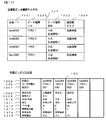
- FIG. 11 is a diagram illustrating a data configuration example of the user management information DB 141 and the transaction relation information DB 142 included in the user information DB server 14.
- the user management information DB 141 is a DB that stores authentication information, company information, and user authority information of users who use the company information exchange system 1. As illustrated in FIG. 11, the user management information DB 141 stores a user ID 1201, a password 1202, a member ID 1203, and a user authority 1204 in association with each other.
- the user ID 1201 and the password 1202 are authentication information necessary for authenticating the user.
- the member ID 1203 is information for uniquely identifying a member company.
- the user authority 1204 represents the type of authority that the user can use the inter-company EDI system 1 for each user ID, and the menus that can be used and the data items that can be referred to differ depending on the type of user authority.
- a user having “user administrator authority” can use the use data registration function 213 for the user administrator.
- the transaction relationship information DB 142 is a DB that stores information indicating a transaction relationship between user companies using the EDI system 1 between companies. As illustrated in FIG. 11, the transaction relation information DB 142 stores a transmission member ID 1205 and a reception member ID 1206 in association with each other.
- FIG. 12 is a diagram illustrating a data configuration example of the company-specific data type master DB 151 and the usage data master DB 152 included in the data definition DB server 15.
- the company-specific data type master DB 151 is a DB that stores data types that can be used for each company determined by the service manager. As shown in FIG. 12, the company-specific data type definition master DB 151 stores a member ID 1301, a data type ID 1302, a data type name 1303, and a transmission / reception type 1304 in association with each other.
- the member ID 1301 is the same as the member ID stored in the user management information DB 141.
- the data type ID 1302 is information for uniquely identifying the data type.
- the data type ID 1302 represents a data type that can be used by the member ID stored in the company-specific type master DB 151 in association with the data type ID 1302, and represents a data type that allows detailed usage definition.
- the data type name 1303 is information indicating the name of the data type corresponding to the data type ID.
- the usage data master DB 152 is a DB that stores detailed usage definitions for each member ID and data type ID determined by the user administrator. As shown in FIG. 12, the usage data master DB 152 includes a member ID 1305, a data type ID 1306, an item ID 1307, an item name 1308 corresponding to a combination thereof, a business key 1309, a required / optional 1310, an attribute 1311, The number of bytes 1312, the screen display order 1313, the search condition 1314, and the reference authority 1315 are stored.
- the member ID 1305 is the same as the member ID stored in the user management information DB 141.
- the data type ID 1306 is the same as the data type ID stored in the company-specific data type master 151.
- the item ID 1307 is information for uniquely identifying a free data item that can be defined by the user.
- the item name 1308 is item name information corresponding to the item ID.
- the business key 1309 is information indicating which item ID the business key for the corresponding data type ID is.
- Essential / optional 1310 is information indicating whether the corresponding item ID is an essential item or an optional item.
- the attribute 1311 is information indicating whether the corresponding item ID is a half-width attribute item, a full-width attribute item, a numerical attribute item, or a date attribute item.
- the number of bytes 1312 is information indicating the number of usable bytes of the corresponding item ID.
- the screen display order 1313 is information representing the display order when the corresponding item ID is displayed on the screen.
- the search condition 1314 is information indicating whether the corresponding item ID is a search condition or not.
- the reference authority 1315 is information indicating whether or not the corresponding item ID can be referred to by a specific authority user.
- the character and usable byte length is defined as 20, and the screen display order is defined as 1.
- the definition content is applied at the time of registration, search, list display, upload file registration by command, and download file acquisition on the Web screen.
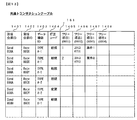
- FIG. 13 is a diagram illustrating a data configuration example of the common transaction DB 161 included in the data exchange DB server 16.
- the common transaction DB 161 stores a transmission member ID 1401, a reception member ID 1402, a data type ID 1403, a correction code 1404, and a plurality of free items (1405 to 1408) in association with each other.
- FIG. 5 is a processing sequence diagram in which the service manager registers the data type available for each company in the data type master DB 151 for each company of the data definition DB server 15 by using the user terminal 17.
- the user terminal 17 of the service administrator transmits an authentication request to the administrator function Web server 11 (S501).
- the administrator function Web server 11 that has received the authentication request extracts the user ID from the authentication request, searches the user management information DB 141 (FIG. 11) of the user information DB server 14 using the extracted user ID as a key, and A password 1202, a member ID 1203, and user authority 1204 corresponding to the ID 1201 are acquired (S502).
- the administrator function Web server 11 checks whether the password extracted from the authentication request matches the password acquired from the user management information DB 141 (authentication process) (S503). If they match, the administrator function Web server 11 uses the user management information DB 141.
- a login completion screen corresponding to the acquired user authority here, the service administrator
- An example of a login completion screen is shown in FIG. On the login completion screen, as shown in FIG. 18, a member ID, a user ID, information indicating a menu list, and the like are displayed.
- the user terminal 17 transmits a company-specific data type registration screen request to the Web server 11 for administrator functions (S505).
- the administrator function Web server 11 Upon receiving the company-specific data type registration screen request, the administrator function Web server 11 acquires all registered data from the company-specific data type master DB 151 (FIG. 12) of the data definition DB server 15 (S506). The administrator function Web server 11 generates a company-specific data type registration screen using the acquired data, and transmits it to the user terminal 17 (S507).
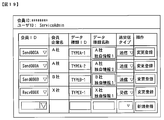
- An example of the data type registration screen for each company is shown in FIG. On the company-specific data type registration screen, as shown in FIG. 19, the contents of the registered company-specific data type master DB 151 and operation (change registration or new registration) buttons are displayed.
- the administrator function Web server 11 Upon receiving the company-specific data type registration request, the administrator function Web server 11 executes input data registration processing to the company-specific data type master DB 151 (S509).
- the administrator function Web server 11 uses the company-specific data type master DB 151 of the data definition DB server 15 with the member ID and data type ID extracted from the company-specific data type registration request as keys.
- the corresponding data type name 1303 and transmission / reception type 1304 are changed and registered to the data type name and transmission / reception type received in S508, respectively.
- the administrator function Web server 11 associates the member ID, data type ID, data type name, and transmission / reception type extracted from the company-specific data type registration request with the data definition DB server 15. Are newly registered in the company-specific data type master DB 151.
- the administrator function Web server 11 transmits the registration result to the user terminal 17 (S510).
- FIG. 6 is a processing sequence diagram in which the user administrator registers the available data types in the usage data master DB 152 of the data definition DB server 15 using the user terminal 18. First, the user terminal 18 transmits an authentication request to the administrator function Web server 11 (S601).
- the Web server 11 that has received the authentication request extracts a user ID from the authentication request, searches the user management information DB 141 (FIG. 11) of the user information DB server 14 using the extracted user ID as a key, and a password corresponding to the user ID.
- the member ID and the user authority are acquired (S602).
- the administrator function Web server 11 checks whether the password extracted from the authentication request matches the password acquired from the user management information DB 141 (S603). If they match, the user acquired from the user management information DB 141 is checked.
- a login completion screen corresponding to the authority is transmitted to the user terminal 18 (S604).
- the login completion screen is the same as in FIG.
- the user terminal 18 transmits a usage data registration target selection screen request to the administrator function Web server 11 (S605).
- the administrator function Web server 11 Upon receiving the usage data registration target selection screen request, the administrator function Web server 11 uses the member ID of the logged-in user extracted from the usage data registration target selection screen request as a key, and the company-specific data type master DB 151 ( 12) is retrieved, and the corresponding data type 1302, the data document name 1303, and the transmission / reception type 1304 are acquired (S606). The administrator function Web server 11 generates a registration target usage data selection screen using the acquired data, and transmits it to the user terminal 18 (S607).
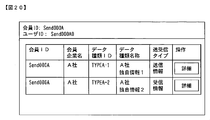
- FIG. 1 An example of the registration target usage data selection screen is shown in FIG.
- a list of data that can be defined in detail by the login user and operation (detail) buttons are displayed among the registered data of the company-specific data type master DB 151.
- the user terminal 18 includes a member ID, a data type ID, a data type name, and a transmission / reception type by performing an operation of pressing a detailed button for data that the user administrator wants to define in detail on the registration target usage data selection screen.
- the detailed data registration screen request is transmitted to the administrator function Web server 11 (S608).
- the administrator function Web server 11 that has received the detailed data registration screen request searches the usage data master DB 152 of the data definition DB server 15 using the member ID and data type ID extracted from the detailed data registration screen request as keys, and the corresponding record. Is acquired (S609).
- the administrator function Web server 11 generates a detailed data registration screen using the acquired data, and transmits it to the user terminal 18 (S610).
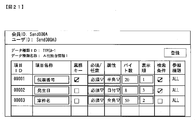
- An example of the detailed data registration screen is shown in FIG. On the detailed data registration screen, registration data of the usage data master DB 152 and a registration button are displayed.
- the user terminals 18 and 19 transmit a detailed data registration request including the member ID, data type ID and the input data to the administrator function Web server 11 (S611).
- the administrator function Web server 11 that has received the detailed data registration request associates the input data with the member ID, data type ID, and item ID extracted from the detailed data registration request as keys, and stores them in the data definition DB server 15. Registration is made in the usage data master DB 152 (S612). When the registration is completed, the administrator function Web server 11 transmits the registration result to the user terminals 18 and 19 (S613).
- FIG. 7 is a processing sequence diagram in which a user of a Web screen using company registers his company transmission information in the data exchange DB 16 using the user terminal 18.
- the user terminal 18 transmits an authentication request to the user function Web server 12 (S701).
- the user function Web server 12 that has received the authentication request extracts the user ID from the authentication request, searches the user management information DB 141 of the user information DB server 14 using the extracted user ID as a key, and searches for the password corresponding to the user ID.
- a member ID and user authority (user management information) are acquired (S702).
- the user function Web server 12 checks whether the password extracted from the authentication request matches the password acquired from the user management information DB 141 (S703). If they match, the user acquired from the user management information DB 141 is checked.
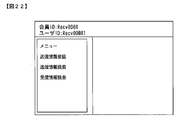
- a login completion screen corresponding to the authority is transmitted to the user terminal 18 (S704). An example of a login completion screen is shown in FIG. On the login completion screen, as shown in FIG. 22, information such as a member ID, a user ID, and a menu list is displayed.
- the user terminal 18 When the user performs an operation of pressing the transmission information registration menu from the login completion screen, the user terminal 18 sends a registration target selection screen request including data types and business partners that can be selected as transmission information to be registered to the Web server 12. Transmit (S705).
- the user function Web server 12 Upon receiving the registration target selection screen request, the user function Web server 12 executes the registration target selection screen display configuration acquisition process (S706), and transmits the registration target selection screen generated based on the execution result to the user terminal 18 ( S707).
- S705 to S707 Detailed processing of S705 to S707 will be described later with reference to FIG.
- An example of a registration target selection screen is shown in FIG.
- a pull-down menu and a selection button for selecting a data type that can be selected by the user as transmission information to be registered and a supplier company are displayed.
- a partner company pull-down can be selected for a partner company that has a transaction with the company.
- the client company can be selected.
- the user terminal 18 When the user selects and inputs the data type and business partner to be registered from the registration target selection screen and performs an operation of pressing the selection button, the user terminal 18 sends a transmission information registration screen request to the user function Web server 12. Transmit (S708).
- the user function Web server 12 Upon receiving the registration screen request, the user function Web server 12 executes a registration screen display configuration acquisition process (S709), and transmits a registration screen generated based on the execution result to the user terminal 18 (S710). Detailed processing of S708 to S710 will be described later with reference to FIG.
- An example of the registration screen is shown in FIG.
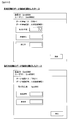
- the registration target selection screen shown in FIG. 23 the screen example when the company-defined data type is selected is shown in the upper part of FIG. 24, and the screen example when the customer-defined data type is selected is shown in the lower part of FIG. Show.
- screen items and registration buttons based on the definition data of the usage data master DB 152 are displayed on the registration screen.
- the user terminal 18 transmits a data registration request including the input data to the user function Web server 12 (S711).
- the user function Web server 12 Upon receiving the data registration request, the user function Web server 12 searches the usage data master DB 152 of the data definition DB server 15 using the member ID and data type ID extracted from the data registration request as keys, and acquires the corresponding data (S712). ), Based on the acquired data, input data content check processing (S713) is executed. If the data contents are correct, then the user function Web server 12 searches the data exchange DB server 16 based on the business key 1309 of the usage data master DB 152 to obtain registered data (S714), and the data order A sex check (S715) is executed. If the data order is correct, the user function Web server 12 registers the data in the data exchange DB server 16 (S716). When the registration is completed, the user function Web server 12 transmits the registration result to the user terminal 18 (S717). Detailed processing of S711 to S717 will be described later with reference to FIG.
- FIG. 8 is a processing sequence diagram in which a user of a company using a Web screen uses the user terminal 18 to display a list of company transmission information on the screen.
- the user terminal 18 using the Web screen transmits an authentication request to the user function Web server 12 (S801).
- the user function Web server 12 that has received the authentication request extracts the user ID from the authentication request, searches the user management information DB 141 of the user information DB server 14 using the extracted user ID as a key, and searches for the password corresponding to the user ID.
- the member ID and user authority are acquired (S802).
- the user function Web server 12 checks whether the password extracted from the authentication request matches the password acquired from the user management information DB 141 (S803). If they match, the user acquired from the user management information DB 141 is checked.
- a login completion screen (FIG. 22) corresponding to the authority is transmitted to the user terminal 18 (S804).
- the user terminal 18 transmits a search target (in-house transmission information) selection screen request to the user function Web server 12 (S805).
- the user function Web server 12 Upon receiving the search target selection screen request, the user function Web server 12 executes a search target selection screen display configuration acquisition process (S806), and transmits the search target selection screen generated based on the execution result to the user terminal 18 ( S807).
- the detailed processing of S805 to S807 is the same as that in FIG.
- the generation screen is not a registration target (in-house transmission information) selection screen but a search target (transmission information) selection screen.
- the user terminal 18 transmits a search condition input screen request to the user function Web server 12 (S808). ).
- the user function Web server 12 Upon receiving the search condition input screen request, the user function Web server 12 executes a search condition input screen display configuration acquisition process (S809), and transmits the search condition input screen generated based on the execution result to the user terminal 18 ( S810).
- Detailed processing in S808 to S810 is the same as that in FIG.
- the generation screen is not a transmission information registration screen but a transmission information search condition input screen.
- An example of the search condition input screen is shown in FIG.
- the search condition input screen shown in FIG. 25 the screen example when the company-defined data type is selected is shown in the upper part of FIG. 25, and the screen example when the customer-defined data type is selected is shown in the lower part of FIG. Show.
- items that can be entered as search conditions and search buttons based on the usage data master DB 152 are displayed on the search condition input screen.
- the user terminal 18 transmits a search result list screen request to the user function Web server 12 when the user inputs search conditions from the search condition input screen and performs an operation of pressing a search button (S811).
- the user function Web server 12 Upon receiving the search result list screen request, the user function Web server 12 executes the list screen display configuration acquisition process (S812) and the list screen display data acquisition process (S813), and the search result list screen generated based on the execution result Is transmitted to the user terminal 18 (S814).
- S811 to S814 Detailed processing of S811 to S814 will be described later with reference to FIG.
- An example of the search result list screen is shown in FIG.
- the process in which the user of the company using the Web screen uses the user terminal 18 to display a list of the company reception information on the screen is the same as the process shown in FIG.
- FIG. 9 is a processing sequence diagram in which the user of the command using company registers the company transmission information in the data exchange DB server 16 using the user terminal 19.
- the user terminal 19 using the command transmits an authentication request to the G / W server 13 (S1001).
- the G / W server 13 that has received the authentication request extracts the user ID from the authentication request, searches the user management information DB 141 (FIG. 11) of the user information DB server 14 from the extracted user ID, and searches for the password corresponding to the user ID.
- the member ID is acquired (S1002).
- the G / W server 13 checks whether or not the password extracted from the authentication request matches the password acquired from the user management information DB 141 (S1003). (S1004).
- the user terminal 19 that has received the authentication result transmits a data registration request to the G / W server 13 (S1005), and transmits data (transmission information upload file) to the G / W server 13 (S1006).
- the G / W server 13 executes transaction relation information acquisition processing (S1008), and uses the member ID extracted from the data registration request as the transmission member ID.
- the information DB 142 (FIG. 11) is searched, and the receiving member ID corresponding to the transmitting member ID is acquired.
- the G / W server 13 checks whether or not the received member ID extracted from the transmission information upload file matches the received member ID acquired from the transaction relation information DB 142 (S1009).
- the usage data master DB 152 of the data definition DB server 15 is searched to acquire the corresponding data item (S1010), and based on the acquired data item A data content check process of the transmission information upload file is executed (S1011). If the data contents are correct, then the G / W server 13 searches the data exchange DB server 16 based on the business key 1309 of the usage data master DB 152 to obtain registered data (S1012), and checks the data order (S1013) is executed. If the data order is correct, the G / W server 13 registers the data of the transmission information upload file in the data exchange DB server 16 (S1014). When the registration is completed, the G / W server 13 transmits the registration result to the user terminal 19 (S1015).
- FIG. 10 is a processing sequence diagram in which the user of the command using company acquires the company reception information using the user terminal 19.
- the command-use user terminal 19 transmits an authentication request to the G / W server 13 (S1101).
- the G / W server 13 receives the authentication request, extracts the user ID from the authentication request, searches the user management information DB 141 (FIG. 11) of the user information DB server 14 using the extracted user ID as a key, the corresponding password, member An ID is acquired (S1102).
- the G / W server 13 checks whether the password extracted from the authentication request matches the password acquired from the user management information DB 141 (S1103). If they match, the G / W server 13 sends an authentication result indicating a successful authentication to the user terminal 19. (S1104).
- the user terminal 19 that has received the authentication result transmits a data (reception information download file) acquisition request to the G / W server 13 (S1105).
- the G / W server 13 that has received the data acquisition request uses the member ID and data type ID extracted from the data acquisition request as keys, and is common to the usage data master DB 152 (FIG. 12) of the data definition DB server 15 and the data exchange DB server 16.
- the transaction table 161 (FIG. 13) is searched to obtain the corresponding data item and transaction data (S1106, S1107).
- the G / W server 13 generates user reception data (reception information download file) from the acquired data items and transaction data (S1108), and transmits the generated data to the user terminal 19 (S1109).
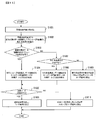
- FIG. 14 is a flowchart showing detailed processing (S705 to S707 in FIG. 7) for generating a registration target selection screen.
- the transmission information registration function 312 of the Web server 12 receives a request for a registration target selection screen from the user terminal 18 (S1501).
- the transmission information registration function 312 searches the transaction relation information DB 142 (FIG. 11) of the user information DB server 14 using the member ID of the login user extracted from the request for the registration target selection screen as the transmission member ID (S1502).
- the transmission information registration function 312Web uses the member ID ID of the login user as a key, and the data type master for each company of the data definition DB server 15
- the DB 151 (FIG. 12) is searched (S1504), and it is checked whether or not there is a data type ID 1302 that the transmission / reception type 1304 can use as transmission information (S1506).
- the transmission information registration function 312 determines that there is a company-defined data type that can be used as transmission information by the login user (YES in S1506).
- a registration target selection screen (FIG. 23) is generated and transmitted to the user terminal 18 (S1509).
- the supplier company pull-down can be selected from the supplier company that has been in business with the company searched in S1502. It becomes.
- the transmission information registration function 312 uses the supplier member ID as a key and the data type master DB 151 for each company of the data definition DB server 15 (FIG.
- a registration target selection screen (FIG. 23) is generated and transmitted to the user terminal 18 (S1509).
- the registration object selection screen shown in FIG. 23 when the data type of the supplier definition is selected by the data type pull-down, the supplier company searched in S1507 can be selected.
- step S1508 if there is no data type ID that can be used as reception information by the business partner, the transmission information registration function 312 transmits a message indicating that there is no usable data type to the user terminal 18. (S1510).
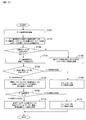
- FIG. 15 is a flowchart showing detailed processing (S708 to S710 in FIG. 7) for generating a registration screen.
- the transmission information registration function 312 of the Web server 12 receives a request for a transmission information registration screen (S1601).
- the transmission information registration function 312 extracts the data type ID to be registered, the member ID of the login user, and the supplier member ID from the request for the registration screen (S1602), and the data type master DB 151 for each company of the data definition DB server 15
- step S1603 it is checked whether the target data type ID is defined by the login user company.
- the transmission information registration function 312 defines data using the member ID of the logged-in user and the data type ID to be registered as a key.
- the usage data master DB 152 of the DB server 15 is searched (S1604). If the corresponding data item exists (YES in S1605), the transmission information registration function 312 generates a registration screen (upper diagram in FIG. 24) based on the data item and transmits it to the user terminal 18 (S1606).
- the transmission information registration function 312 refers to the company-specific data type master DB 151 of the data definition DB server 15, and the supplier member ID Is checked (S1607). If the supplier member ID exists, the transmission information registration function 312 searches the usage data master DB 152 of the data definition DB server 15 using the supplier member ID and the data type ID to be registered as a key (S1608). If the corresponding data item exists (YES in S1605), the transmission information registration function 312 generates a registration screen (lower diagram in FIG. 24) based on the data item and transmits it to the user terminal 18 (S1606).
- the transmission information registration function 312 transmits a message to the user terminal 18 indicating that the supplier member ID needs to be specified. If there is no usage data (NO in step S1605), the transmission information registration function 312 transmits a message indicating that usage data does not exist to the user terminal 18.
- FIG. 16 is a flowchart showing detailed processing (S711 to S717 in FIG. 7) for checking registration data and registering the registration data in the common transaction table 161 of the data exchange DB server 16.
- the transmission information registration function 312 of the Web Web server 12 receives the data registration request (S1701).
- the transmission information registration function 312 searches the usage data master DB 152 of the data definition DB server 15 using the data type ID of the registration target data extracted from the data registration request and the member ID ID of the login user as keys (S1702).
- the transmission information registration function 312 extracts registration data from the data registration request (S1704), and checks the data contents (attribute, number of bytes, required) based on the data item. It performs (S1706). If the data content is correct, the transmission information registration function 312 searches the common transaction table 161 of the data exchange DB server 16 using the business key of the data item as a key, and acquires the corresponding registration data (S1707). The order of data is checked by comparing the data with the registration data extracted in S1704 (S1709).
- the transmission information registration function 312 registers the registration data extracted in S1704 in the common transaction table 161 of the data exchange DB server 16, and transmits the registration result to the user terminal. (S1710). If the target data item does not exist in the processing of S1703, the transmission information registration function 312 transmits a message indicating that the corresponding data item does not exist to the user terminal 18 (S1705). If the data content is invalid in the processing of S1706, the transmission information registration function 312 transmits an error message indicating that the data content is invalid to the user terminal 18 (S1708). If the data order is invalid in the processing of S1709, the transmission information registration function 312 transmits an error message indicating that the data content is illegal to the user terminal 18 (S1711).
- FIG. 17 is a flowchart showing a detailed process (S811 to S814) for generating a search result list screen.
- the transmission information list display function 314 of the Web server 12 receives a request for a search result list screen (S2001).
- the transmission information list display function 314 searches the usage data master DB 152 of the data definition DB server 15 using the data type ID extracted from the request on the search result list screen and the member ID of the login user as keys (S2002). If there is a data item to be searched (YES in S2003), the transmission information list display function 314 extracts the search condition from the request on the search result list screen and searches the common transaction DB 161 of the data exchange DB server 16 (S2004). ).
- the transmission information list display function 314 If there is a search result (YES in S2006), the transmission information list display function 314 generates a search result list screen (FIG. 26) based on the search result and transmits it to the user terminal 18 (S2007). If there is no search target data item in the process of S2003, the transmission information list display function 314 transmits a message indicating that the search target data item does not exist to the user terminal 18 (S2005). If there is no search result in the process of S2006, the transmission information list display function 314 transmits a message indicating that there is no data matching the search condition to the user terminal 18 (S2008).
- SYMBOLS 11 Web server for administrator functions, 12 ... Web server for user functions, 13 ... G / W server, 14 ... User information DB server, 15 ... Data definition DB server, 16 ... Data exchange DB server, 17 ... Service manager User terminal, 18 ... Web-utilizing company user terminal, 18 ... Command-utilizing company user terminal, 200, 300, 400 ... Control unit, 201, 301, 401 ... Storage unit, 202, 302, 402 ... Input unit, 203, 303, 403: Display unit, 204, 304, 404 ... Network interface unit.
Landscapes
- Engineering & Computer Science (AREA)
- Business, Economics & Management (AREA)
- Strategic Management (AREA)
- Entrepreneurship & Innovation (AREA)
- Human Resources & Organizations (AREA)
- Operations Research (AREA)
- Economics (AREA)
- Marketing (AREA)
- Data Mining & Analysis (AREA)
- Quality & Reliability (AREA)
- Tourism & Hospitality (AREA)
- Physics & Mathematics (AREA)
- General Business, Economics & Management (AREA)
- General Physics & Mathematics (AREA)
- Theoretical Computer Science (AREA)
- Management, Administration, Business Operations System, And Electronic Commerce (AREA)
Abstract
企業間EDIシステムにおいて、新規プログラムを開発することなく、ユーザの個別業務に応じてデータの種類の追加と追加したデータの種類に応じた画面カスタマイズを柔軟に行う。 ログインユーザの第1の会員情報を含む、登録対象の選択画面の要求を受信し、前記第1の会員情報と取引関係情報に基づき取引先となる第2の会員情報の有無を判定し、該判定の結果、前記第2の会員情報が有る場合、前記第1の会員情報と会員情報別に定義されたデータ種類情報に基づき第1の会員定義のデータ種類情報の有無を判定し、該判定の結果、前記第1の会員定義のデータ種類情報がある場合、前記第1の会員定義のデータ種類と第1の会員の取引先を選択するための選択画面を生成し前記選択画面の要求元へ送信する。
Description
本発明は、複数の企業間で情報を交換する企業間EDI(electronic data interchange)システムに関する。
インターネットの爆発的な普及に伴い、BtoBの電子商取引が一般的に行われている。こうした電子商取引の利用環境を提供する各事業会社は、インターネット上でアプリケーションプラットフォーム機能をサービスとして提供する。このサービスを利用するユーザは、インターネットに接続する環境を準備するだけで、電子商取引を実現できる。このような導入の容易さから、前記サービスのユーザ数が急増する一方で、ユーザの利用シーンは多様化している。また、利用シーンがそれぞれ様々であるユーザらは、アプリケーション機能に求めるものも各々異なりがちで、アプリケーション機能のカスタマイズ要求が急増している。したがって、アプリケーション機能をサービスとして運用する中で、ユーザ個別カスタマイズへの対応が急務となっている。
こうした技術に関連した発明として、例えば、様々な取引をn対mで電子的に実施でき、かつ新たなサービスを第3者が実施できるマルチテナント環境を提供するコンピュータ及びアクセス管理方法(例えば、特許文献1参照)が提案されている。しかしながら、特許文献1に記載の技術では、アプリケーション画面をカスタマイズして利用したいユーザ個別の要件に対応できない。従って、ユーザ毎の要件に対応するためには、従来通りユーザ個別のプログラムを開発する必要がある。そこで、マルチテナント環境下において、個別のプログラム開発を行わずにユーザの利用シーンに合わせた柔軟な画面カスタマイズを可能とする画面カスタマイズ支援システム、画面カスタマイズ支援方法、および画面カスタマイズ支援プログラム(例えば、特許文献2参照)が提案されている。
上記従来技術では、複数のバイヤー/サプライヤーは、インターネット上でJEITA標準フォーマットに準拠した電子データを双方向交換できる。これにより、複数のバイヤー/サプライヤーは、複数の取引先のデータを一括で検索し、その結果を参照できる。標準フォーマットでは、データの種類とデータの種類毎のデータ項目の名称、属性(半角/全角、数字など)などが定義されている。しかし、昨今、ユーザ個別業務へのEDIサービス適用範囲拡大のニーズが増加しており、ユーザの個別業務に応じて、データの種類の追加とともに追加したデータの種類に応じて柔軟な画面カスタマイズを行うことができる技術が求められている。しかしながら、上記従来技術では、ユーザの個別業務に応じてデータの種類を追加したい場合、その都度、追加したいデータの種類を登録するためのテーブルの作成と、テーブル作成に応じて新規プログラムの開発が必要である。
本発明は、企業間EDIシステムにおいて、新規プログラムを開発することなく、ユーザの個別業務に応じて、データの種類の追加と追加したデータの種類に応じた画面カスタマイズを柔軟に行うことができる技術を提供することを課題とする。
本発明の代表的な一例は、以下の通りである。すなわち、本発明は、企業間EDIシステムにおける画面カスタマイズ支援方法である。前記企業間EDIシステムは、取引関係情報を記憶する第1の記憶部と、会員情報別に定義されたデータ種類情報を記憶する第2の記憶部と、を有する。そして、前記企業間EDIシステムは、ログインユーザの第1の会員情報を含む、登録対象又は検索対象の選択画面の要求を受信する処理と、前記第1の会員情報と前記第1の記憶部に基づき取引先となる第2の会員情報の有無を判定する第1の判定処理と、前記第1の判定処理の結果、前記第2の会員情報が有る場合、前記第1の会員情報と前記第2の記憶部に基づき第1の会員定義のデータ種類情報の有無を判定する第2の判定処理と、前記第2の判定処理の結果、前記第1の会員定義のデータ種類情報がある場合、前記第1の会員定義のデータ種類と第1の会員の取引先を選択するための登録対象又は検索対象の第1の選択画面を生成し前記選択画面の要求元へ送信する処理とを実施する。
本発明によれば、企業間EDIシステムにおいて、新規プログラムを開発することなく、ユーザの個別業務に応じて、データの種類の追加と追加したデータの種類に応じた画面カスタマイズを柔軟に行うことができる。
以下、本発明の一実施例について、図面を参照して詳細に説明する。
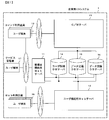
図1は、本実施例に係る企業間EDIシステム1の全体構成例を示す図である。企業間EDIシステム1は、サービス管理者のユーザ端末17及びユーザ管理者のユーザ端末18、19と、ユーザ端末17、18、19がインターネット経由で接続する管理者機能用Webサーバ11と、Web画面利用のユーザ端末18がインターネット経由で接続するユーザ機能用Webサーバ12と、コマンド利用のユーザ端末19がインターネット経由で接続するGateway(以下、G/Wと記す)サーバ13と、管理者機能用Webサーバ11とユーザ機能用Webサーバ12とG/Wサーバ13とネットワークで接続されたユーザ情報データベース(以下、「DB」と記す)サーバ14とデータ定義DBサーバ15とデータ交換DBサーバ16から構成される。
図2は、管理者機能用Webサーバ11のハードウェア構成例を示す図である。管理者機能用Webサーバ11は、制御部200と、記憶部201と、入力部202と、表示部203と、ネットワークインタフェース部204を具備する。各部は、バス(BUS)によって接続されている。記憶部201には、認証機能211とサービス管理者向け企業別データ種類定義登録機能212とユーザ管理者向けデータ利用定義登録機能213からなるプログラム210が格納されている。記憶部201は、制御部200により図示していないメモリにロードされ実行される。
図3は、ユーザ機能用Webサーバ12のハードウェア構成例を示す図である。ユーザ機能用Webサーバ12は、制御部300と、記憶部301と、入力部302と、表示部303と、ネットワークインタフェース部304を具備する。各部は、BUSによって接続されている。記憶部301には、認証機能311と送信情報登録機能312と送信情報検索機能313と送信情報一覧表示機能314と受信情報検索機能315と受信情報一覧表示機能316からなるプログラム310が格納されている。記憶部301は、制御部300により図示していないメモリにロードされ実行される。
図4は、G/Wサーバ13のハードウェア構成例を示す図である。G/Wサーバ13は、制御部400と、記憶部401と、入力部402と、表示部403と、ネットワークインタフェース部404を具備する。各部は、BUSによって接続されている。記憶部401には、認証機能411と送信情報アップロードファイル登録機能412と受信情報ダウンロードファイル取得機能413からなるプログラム410が格納されている。記憶部401は、制御部400により図示していないメモリにロードされ実行される。
図11は、ユーザ情報DBサーバ14が具備するユーザ管理情報DB141と取引関係情報DB142のデータ構成例を示す図である。ユーザ管理情報DB141は、企業情報交換システム1を利用するユーザの認証情報、所属企業情報及び利用者権限情報を格納するDBである。図11に示すように、ユーザ管理情報DB141は、ユーザID1201と、パスワード1202と、会員ID1203と、利用者権限1204とをそれぞれ対応付けて記憶する。ユーザID1201とパスワード1202はユーザを認証するために必要な認証情報である。会員ID1203は会員企業を一意に識別するための情報である。利用者権限1204は、ユーザID毎に当該ユーザが企業間EDIシステム1を利用可能な権限の種類を表し、利用者権限の種類により、利用可能なメニュー及び参照可能であるデータ項目が異なる。例えば、図11に示す例では、会員ID1203=「Send0000A」で、ユーザID1201=「Send0000A0」、「Send0000A1」、「Send0000A2」のユーザは、それぞれ利用者権限1204=「ユーザ管理者権限」、「ユーザ権限:全項目参照可能」、「ユーザ権限:特定項目参照不可」が設定されている。「ユーザ管理者権限」を有するユーザは、ユーザ管理者向け利用データ登録機能213を利用することが可能である。また、ユーザ権限は「ユーザ権限:全項目参照可能」と「ユーザ権限:特定項目参照不可」の2つがあり、価格情報など、特定ユーザへの参照抑止を可能とする。参照抑止する項目は、ユーザ管理者向け利用データ登録機能213にて定義する。
取引関係情報DB142は、企業間EDIシステム1を利用するユーザ企業間の取引関係を示す情報を格納するDBである。図11に示すように、取引関係情報DB142は、送信会員ID1205と、受信会員ID1206とをそれぞれ対応付けて記憶する。マルチテナント型のビジネス形態においては、ユーザ企業は、取引関係情報DB142に設定されている範囲で取引先企業へのデータの登録を行うことが出来る。例えば、図11に示す例では、会員ID=「Send0000A」のユーザが、自社送信情報を登録する場合、取引関係情報に基づき会員ID=「Recv0000X」、「Recv0000Y」へのデータの登録を行うことが出来る。
図12は、データ定義DBサーバ15が具備する企業別データ種類マスタDB151と利用データマスタDB152のデータ構成例を示す図である。企業別データ種類マスタDB151は、サービス管理者の定める企業別の利用可能なデータ種類を格納するDBである。図12に示すように、企業別データ種類定義マスタDB151は、会員ID1301と、データ種類ID1302と、データ種類名称1303と、送受信タイプ1304とをそれぞれ対応付けて記憶する。会員ID1301はユーザ管理情報DB141に記憶されている会員IDと同じである。データ種類ID1302はデータの種類を一意に識別するための情報である。このデータ種類ID1302は、当該データ種類ID1302と対応付けて企業別種類マスタDB151に記憶されている会員IDが利用可能なデータ種類を表すとともに、詳細な利用定義が可能なデータ種類を表す。データ種類名称1303はデータ種類IDに対応したデータ種類の名称を示す情報である。送受信タイプ1304は対応するデータ種類IDが会員ID1301の企業にとって送信情報であるか受信情報であるかを表す情報である。例えば、図12に示す例では、会員ID=「Send0000A」はデータ種類ID=「TYPEA-1」、「TYPEA-2」を送信情報として利用可能であり、その取引先企業は受信情報として利用可能となる。さらに会員企業ID=「Send0000A」のユーザ管理者はデータ種類ID=「TYPEA-1」、「TYPEA-2」についての詳細な利用定義が可能となる。
利用データマスタDB152は、ユーザ管理者の定める会員ID及びデータ種類ID別の詳細な利用定義を格納するDBである。図12に示すように、利用データマスタDB152は、会員ID1305と、データ種類ID1306と、項目ID1307と、これらの組み合わせに対応する項目名称1308と、業務キー1309と必須/任意1310と、属性1311、バイト数1312と、画面表示順1313と、検索条件1314と、参照権限1315とをそれぞれ記憶する。会員ID1305はユーザ管理情報DB141に記憶されている会員IDと同じである。データ種類ID1306は企業別データ種類マスタ151に記憶されているデータ種類IDと同じである。項目ID1307はユーザが定義可能なフリーデータ項目を一意に識別するための情報である。項目名称1308は項目IDに対応した項目の名称情報である。業務キー1309は対応するデータ種類IDについての業務キーが、どの項目IDのデータ項目であるかを表す情報である。必須/任意1310は対応する項目IDが、必須項目であるか、任意項目であるかを表す情報である。属性1311は対応する項目IDが、半角属性項目であるか、全角属性項目であるか、数値属性項目であるか、日付属性項目であるかを表す情報である。バイト数1312は対応する項目IDの利用可能バイト数を表す情報である。画面表示順1313は対応する項目IDの画面表示時の表示順を表す情報である。検索条件1314は対応する項目IDが検索条件であるか、検索条件でないかを表す情報である。参照権限1315は対応する項目IDが特定権限のユーザに参照可能であるか、参照不可であるかを表す情報である。例えば、図12に示す例では、会員ID=「Send000A」の定義するデータ種類ID=「TYPEA-1」の項目ID=「00001の項目に関して、項目名称を伝票番号として定義し、項目属性は半角文字、利用可能バイト長は20、画面表示順は1と定義している。さらに項目ID=「00001」の項目に関して、業務キー、検索条件として使用する項目であること、登録時の必須項目であること、利用者権限によらず参照可能な項目であることを示している。定義内容は、Web画面による登録、検索、一覧表示、コマンドによるアップロードファイル登録、ダウンロードファイル取得時に適用される。
図13は、データ交換DBサーバ16が具備する共通トランザクションDB161のデータ構成例を示す図である。図13に示すように、共通トランザクションDB161は、送信会員ID1401と、受信会員ID1402と、データ種類ID1403と、訂正コード1404と、複数のフリー項目(1405~1408)とをそれぞれ対応付けて記憶する。
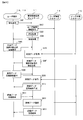
図5は、サービス管理者が、ユーザ端末17を用いて企業別利用可能データ種類をデータ定義DBサーバ15の企業別データ種類マスタDB151に登録する処理シーケンス図である。先ず、サービス管理者のユーザ端末17は、管理者機能用Webサーバ11に認証要求を送信する(S501)。
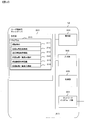
認証要求を受信した管理者機能用Webサーバ11は、認証要求よりユーザIDを抽出し、抽出したユーザIDをキーにユーザ情報DBサーバ14のユーザ管理情報DB141(図11)を検索し、該当ユーザID1201に対応したパスワード1202、会員ID1203、利用者権限1204を取得する(S502)。管理者機能用Webサーバ11は、認証要求から抽出したパスワードとユーザ管理情報DB141より取得したパスワードが一致するどうかのチェック(認証処理)を行い(S503)、一致する場合は、ユーザ管理情報DB141より取得した利用者権限(ここではサービス管理者)に対応したログイン完了画面をユーザ端末17に送信する(S504)。ログイン完了画面例を図18に示す。ログイン完了画面には、図18に示すように、会員ID、ユーザID、メニュー一覧を示す情報等が表示される。
サービス管理者がログイン完了画面より企業別データ種類登録メニューを押下する操作を行うことで、ユーザ端末17は管理者機能用Webサーバ11に企業別データ種類登録画面要求を送信する(S505)。
企業別データ種類登録画面要求を受信した管理者機能用Webサーバ11は、データ定義DBサーバ15の企業別データ種類マスタDB151(図12)から登録済みの全データを取得する(S506)。管理者機能用Webサーバ11は、取得したデータを用いて企業別データ種類登録画面を生成し、ユーザ端末17へ送信する(S507)。企業別データ種類登録画面例を図19に示す。企業別データ種類登録画面には、図19に示すように、登録済みの企業別データ種類マスタDB151の内容と操作(変更登録または新規登録)ボタンが表示される。
サービス管理者が企業別データ種類登録画面より会員ID、データ種類ID、データ種類名称、送受信タイプをそれぞれ選択入力し、変更登録ボタンまたは新規登録ボタンを押下する操作を行うことで、ユーザ端末17は、管理者機能用Webサーバ11に入力データを含む企業別データ種類登録要求を送信する(S508)。
企業別データ種類登録要求を受信した管理者機能用Webサーバ11は、企業別データ種類マスタDB151への入力データ登録処理を実行する(S509)。ここで、「変更登録」の場合、管理者機能用Webサーバ11は、企業別データ種類登録要求から抽出した会員ID、データ種類IDをキーにデータ定義DBサーバ15の企業別データ種類マスタDB151を検索し、該当データ種類名称1303と送受信タイプ1304を、それぞれS508で受信したデータ種類名称と送受信タイプに変更登録する。一方、「新規登録」の場合、管理者機能用Webサーバ11は、企業別データ種類登録要求から抽出した会員ID、データ種類ID、データ種類名称、送受信タイプをそれぞれ対応付けてデータ定義DBサーバ15の企業別データ種類マスタDB151に新規登録する。登録が完了すると、管理者機能用Webサーバ11は、ユーザ端末17に登録結果を送信する(S510)。
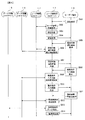
図6は、ユーザ管理者が、ユーザ端末18を用いて利用可能データ種類をデータ定義DBサーバ15の利用データマスタDB152に登録する処理シーケンス図である。先ず、ユーザ端末18は管理者機能用Webサーバ11に認証要求を送信する(S601)。
認証要求を受信したWebサーバ11は、認証要求よりユーザIDを抽出し、抽出したユーザIDをキーにユーザ情報DBサーバ14のユーザ管理情報DB141(図11)を検索し、ユーザIDに対応したパスワード、会員ID、利用者権限を取得する(S602)。管理者機能用Webサーバ11は、認証要求から抽出したパスワードとユーザ管理情報DB141から取得したパスワードが一致するかどうかのチェックを行い(S603)、一致する場合、ユーザ管理情報DB141から取得した利用者権限に対応したログイン完了画面をユーザ端末18に送信する(S604)。ログイン完了画面は、図18と同様である。
ユーザ管理者がログイン完了画面より利用データ登録メニューを押下する操作を行うことで、ユーザ端末18は、管理者機能用Webサーバ11に利用データ登録対象選択画面要求を送信する(S605)。
利用データ登録対象選択画面要求を受信した管理者機能用Webサーバ11は、利用データ登録対象選択画面要求より抽出したログインユーザの会員IDをキーにデータ定義DBサーバ15の企業別データ種類マスタDB151(図12)を検索し、該当データ種類1302、データ書類名称1303、送受信タイプ1304を取得する(S606)。管理者機能用Webサーバ11は、取得したデータを用いて登録対象利用データ選択画面を生成し、ユーザ端末18へ送信する(S607)。
登録対象利用データ選択画面例を図20に示す。登録対象利用データ選択画面には、企業別データ種類マスタDB151の登録データのうち、ログインユーザが詳細定義可能なデータの一覧と操作(詳細)ボタンが表示される。ユーザ管理者が登録対象利用データ選択画面より詳細な定義を行いたいデータついて詳細ボタンを押下する操作を行うことで、ユーザ端末18は、会員ID、データ種類ID、データ種類名称、送受信タイプを含む詳細データ登録画面要求を管理者機能用Webサーバ11に送信する(S608)。
詳細データ登録画面要求を受信した管理者機能用Webサーバ11は、詳細データ登録画面要求より抽出した会員ID、データ種類IDをキーにデータ定義DBサーバ15の利用データマスタDB152を検索し、該当レコードのデータを取得する(S609)。管理者機能用Webサーバ11は、取得したデータを用いて詳細データ登録画面を生成し、ユーザ端末18へ送信する(S610)。詳細データ登録画面例を図21に示す。詳細データ登録画面には、利用データマスタDB152の登録データと登録ボタンが表示される。
ユーザ管理者が詳細データ登録画面より項目名称、業務キー、必須/任意、属性、バイト数、表示順、検索条件、参照権限の各データを選択入力し、登録ボタンを押下する操作を行うことで、ユーザ端末18、19は、会員ID、データ種類IDと上記入力データを含む詳細データ登録要求を管理者機能用Webサーバ11に送信する(S611)。
詳細データ登録要求を受信した管理者機能用Webサーバ11は、詳細データ登録要求より抽出した会員ID、データ種類ID、項目IDをキーに、上記入力データをそれぞれ対応付けてデータ定義DBサーバ15の利用データマスタDB152に登録する(S612)。登録完了すると、管理者機能用Webサーバ11は、ユーザ端末18、19に登録結果を送信する(S613)。
図7は、Web画面利用企業のユーザが、ユーザ端末18を用いて自社送信情報をデータ交換DB16に登録する処理シーケンス図である。先ず、ユーザ端末18はユーザ機能用Webサーバ12に認証要求を送信する(S701)。
認証要求を受信したユーザ機能用Webサーバ12は、認証要求からユーザIDを抽出し、抽出したユーザIDをキーにユーザ情報DBサーバ14のユーザ管理情報DB141を検索し、ユーザIDに対応したパスワード、会員ID及び利用者権限(ユーザ管理情報)を取得する(S702)。ユーザ機能用Webサーバ12は、認証要求から抽出したパスワードとユーザ管理情報DB141から取得したパスワードが一致するかどうかのチェックを行い(S703)、一致する場合は、ユーザ管理情報DB141から取得した利用者権限に対応したログイン完了画面をユーザ端末18に送信する(S704)。ログイン完了画面例を図22に示す。ログイン完了画面には、図22に示すように、会員ID、ユーザID、メニュー一覧を示す情報等が表示される。
ユーザがログイン完了画面より送信情報登録メニューを押下する操作を行うことで、ユーザ端末18はWebサーバ12に登録対象の送信情報として選択可能なデータ種類と取引先企業を含む登録対象選択画面要求を送信する(S705)。
登録対象選択画面要求を受信したユーザ機能用Webサーバ12は、登録対象選択画面表示構成取得処理(S706)を実行し、その実行結果に基づき生成した登録対象選択画面をユーザ端末18に送信する(S707)。S705~S707の詳細処理は、図14を用いて後述する。登録対象選択画面例を図23に示す。登録対象選択画面には、ユーザが登録対象の送信情報として選択可能なデータ種類と取引先企業を選択するためのプルダウンと選択ボタンが表示される。ここで、データ種類プルダウンにて自社定義のデータ種類を選択した場合は、取引先企業プルダウンは、自社と取引のある取引先企業が選択可能となり、一方、データ種類プルダウンにて取引先定義のデータ種類を選択した場合は、取引先企業が選択可能となる。
ユーザが登録対象選択画面より登録対象のデータ種類と取引先企業を選択入力し、選択ボタンを押下する操作を行うことで、ユーザ端末18はユーザ機能用Webサーバ12に送信情報の登録画面要求を送信する(S708)。
登録画面要求を受信したユーザ機能用Webサーバ12は、登録画面表示構成取得処理(S709)を実行し、その実行結果に基づき生成した登録画面をユーザ端末18に送信する(S710)。S708~S710の詳細処理は、図15を用いて後述する。登録画面例を図24に示す。尚、図23に示す登録対象選択画面において、自社定義のデータ種類を選択した場合の画面例を図24の上段に、取引先定義のデータ種類を選択した場合の画面例を図24の下段に示す。図24に示すように、登録画面には、利用データマスタDB152の定義データに基づく画面項目と登録ボタンが表示される。
ユーザが登録画面よりデータを入力し、登録ボタンを押下する操作を行うことで、ユーザ端末18はユーザ機能用Webサーバ12に入力データを含むデータ登録要求を送信する(S711)。
データ登録要求を受信したユーザ機能用Webサーバ12は、データ登録要求より抽出した会員ID、データ種類IDをキーにデータ定義DBサーバ15の利用データマスタDB152を検索して該当データを取得し(S712)、取得したデータに基づき入力データの内容チェック処理(S713)を実行する。データ内容に不正がない場合、次にユーザ機能用Webサーバ12は利用データマスタDB152の業務キー1309に基づいて、データ交換DBサーバ16を検索して登録済データを取得し(S714)、データ順序性チェック(S715)を実行する。データ順序性に不正がない場合、ユーザ機能用Webサーバ12はデータ交換DBサーバ16への登録を行う(S716)。登録完了するとユーザ機能用Webサーバ12は、ユーザ端末18に登録結果を送信する(S717)。S711~S717の詳細処理は、図16を用いて後述する。
図8は、Web画面利用企業のユーザが、ユーザ端末18を用いて自社送信情報を画面に一覧表示させる処理シーケンス図である。先ず、Web画面利用のユーザ端末18は、ユーザ機能用Webサーバ12に認証要求を送信する(S801)。
認証要求を受信したユーザ機能用Webサーバ12は、認証要求からユーザIDを抽出し、抽出したユーザIDをキーにユーザ情報DBサーバ14のユーザ管理情報DB141を検索し、ユーザIDに対応したパスワード、会員ID、利用者権限を取得する(S802)。ユーザ機能用Webサーバ12は、認証要求から抽出したパスワードとユーザ管理情報DB141から取得したパスワードが一致するかどうかのチェックを行い(S803)、一致する場合は、ユーザ管理情報DB141より取得した利用者権限に対応したログイン完了画面(図22)をユーザ端末18に送信する(S804)。
ユーザが、ログイン完了画面より送信情報検索メニューを押下する操作を行うことで、ユーザ端末18はユーザ機能用Webサーバ12に検索対象(自社送信情報)選択画面要求を送信する(S805)。
検索対象選択画面要求を受信したユーザ機能用Webサーバ12は、検索対象選択画面表示構成取得処理を実行し(S806)、その実行結果に基づき生成した検索対象選択画面をユーザ端末18に送信する(S807)。S805~S807の詳細処理は図14と同様である。ここでは、生成画面が登録対象(自社送信情報)選択画面ではなく、検索対象(送信情報)選択画面となる。
ユーザが検索対象選択画面よりデータ種類、取引先企業を選択入力し、選択ボタンを押下する操作を行うことで、ユーザ端末18はユーザ機能用Webサーバ12に検索条件入力画面要求を送信する(S808)。
検索条件入力画面要求を受信したユーザ機能用Webサーバ12は、検索条件入力画面表示構成取得処理を実行し(S809)、その実行結果に基づき生成した検索条件入力画面をユーザ端末18に送信する(S810)。S808~S810の詳細処理は、図15と同様である。ここでは、生成画面が送信情報の登録画面ではなく、送信情報の検索条件入力画面となる。検索条件入力画面例を図25に示す。尚、図25に示す検索条件入力画面において、自社定義のデータ種類を選択した場合の画面例を図25の上段に、取引先定義のデータ種類を選択した場合の画面例を図25の下段に示す。図25に示すように、検索条件入力画面には、利用データマスタDB152に基づく、検索条件として入力可能な項目と検索ボタンが表示される。
ユーザが検索条件入力画面より検索条件を入力し、検索ボタンを押下する操作を行うことで、ユーザ端末18はユーザ機能用Webサーバ12に検索結果一覧画面要求を送信する(S811)。
検索結果一覧画面要求を受信したユーザ機能用Webサーバ12は、一覧画面表示構成取得処理(S812)及び一覧画面表示データ取得処理(S813)を実行し、その実行結果に基づき生成した検索結果一覧画面をユーザ端末18に送信する(S814)。S811~S814の詳細処理は、図17を用いて後述する。検索結果一覧画面例を図26に示す。尚、Web画面利用企業のユーザが、ユーザ端末18を用いて自社受信情報を画面に一覧表示させる処理も図8に示す処理と同様である。
図9は、コマンド利用企業のユーザが、ユーザ端末19を用いて自社送信情報をデータ交換DBサーバ16に登録する処理シーケンス図である。先ず、コマンド利用のユーザ端末19は、G/Wサーバ13に認証要求を送信する(S1001)。
認証要求を受信したG/Wサーバ13は、認証要求よりユーザIDを抽出し、抽出したユーザIDよりユーザ情報DBサーバ14のユーザ管理情報DB141(図11)を検索し、ユーザIDに対応したパスワード、会員IDを取得する(S1002)。G/Wサーバ13は、認証要求から抽出したパスワードとユーザ管理情報DB141から取得したパスワードが一致するかどうかのチェックを行い(S1003)、一致する場合は、認証成功を示す認証結果をユーザ端末19に送信する(S1004)。
認証結果を受信したユーザ端末19はG/Wサーバ13にデータ登録要求を送信し(S1005)、データ(送信情報アップロードファイル)をG/Wサーバ13に送信する(S1006)。
送信情報アップロードファイルを受信した(S1007)G/Wサーバ13は、取引関係情報取得処理を実行し(S1008)、データ登録要求より抽出した会員IDを送信会員IDとしてユーザ情報DBサーバ14の取引関係情報DB142(図11)を検索し、送信会員IDに対応した受信会員IDを取得する。次にG/Wサーバ13は、送信情報アップロードファイルから抽出した受信会員IDと取引関係情報DB142から取得した受信会員IDが一致するかどうかのチェックを行い(S1009)、一致する場合は、データ登録要求より抽出した会員ID及び送信情報アップロードファイルから抽出したデータ種類IDをキーにデータ定義DBサーバ15の利用データマスタDB152を検索して該当データ項目を取得し(S1010)、取得したデータ項目に基づき送信情報アップロードファイルのデータ内容のチェック処理を実行する(S1011)。データ内容に不正がない場合、次にG/Wサーバ13は、利用データマスタDB152の業務キー1309に基づきデータ交換DBサーバ16を検索して登録済データを取得し(S1012)、データ順序性チェック(S1013)を実行する。データ順序性に不正がない場合、G/Wサーバ13は、送信情報アップロードファイルのデータをデータ交換DBサーバ16へ登録する(S1014)。登録完了するとG/Wサーバ13は、ユーザ端末19に登録結果を送信する(S1015)。
図10は、コマンド利用企業のユーザが、ユーザ端末19を用いて自社受信情報を取得する処理シーケンス図である。先ず、コマンド利用のユーザ端末19は、G/Wサーバ13に認証要求を送信する(S1101)。
認証要求を受信したG/Wサーバ13は、認証要求よりユーザIDを抽出し、抽出したユーザIDをキーにユーザ情報DBサーバ14のユーザ管理情報DB141(図11)を検索し、該当パスワード、会員IDを取得する(S1102)。G/Wサーバ13は、認証要求から抽出したパスワードとユーザ管理情報DB141から取得したパスワードが一致するかどうかのチェックを行い(S1103)、一致する場合は、認証成功を示す認証結果をユーザ端末19に送信する(S1104)。
認証結果を受信したユーザ端末19は、G/Wサーバ13にデータ(受信情報ダウンロードファイル)取得要求を送信する(S1105)。
データ取得要求を受信したG/Wサーバ13は、データ取得要求より抽出した会員ID、データ種類IDをキーにデータ定義DBサーバ15の利用データマスタDB152(図12)及びデータ交換DBサーバ16の共通トランザクションテーブル161(図13)を検索し、該当データ項目及びトランザクションデータを取得する(S1106、S1107)。次にG/Wサーバ13は、取得したデータ項目及びトランザクションデータからユーザ受信用データ(受信情報ダウンロードファイル)を生成し(S1108)、生成データをユーザ端末19に送信する(S1109)。
図14は、登録対象選択画面を生成する詳細処理(図7のS705~S707)を示すフローチャートである。Webサーバ12の送信情報登録機能312は、ユーザ端末18から登録対象選択画面の要求を受信する(S1501)。次に送信情報登録機能312は、登録対象選択画面の要求から抽出したログインユーザの会員IDを送信会員IDとしてユーザ情報DBサーバ14の取引関係情報DB142(図11)を検索する(S1502)。検索の結果、該当取引先会員ID(受信会員ID1206)が存在した場合(S1503でYES)、送信情報登録機能312Webは、ログインユーザの会員IDIDをキーとしてデータ定義DBサーバ15の企業別データ種類マスタDB151(図12)を検索しS1504)、送受信タイプ1304が送信情報として利用可能なデータ種類ID1302が存在するか否かをチェックする(S1506)。送受信タイプ1304が送信情報として利用可能なデータ種類IDが存在する場合、送信情報登録機能312は、ログインユーザが送信情報として利用可能な自社定義のデータ種類が存在すると判断し(S1506でYES)、登録対象選択画面(図23)を生成し、ユーザ端末18に送信する(S1509)。尚、図23に示す登録対象選択画面において、データ種類プルダウンにて自社定義のデータ種類を選択した場合は、取引先企業プルダウンは、S1502で検索した、自社と取引のある取引先企業が選択可能となる。S1506のチェックの結果、送受信タイプ1304が送信情報として利用可能なデータ種類IDが存在しない場合、送信情報登録機能312は、取引先会員IDをキーとしてデータ定義DBサーバ15の企業別データ種類マスタDB151(図12)を検索し(S1507)、取引先が受信情報(送受信タイプ1304=受信情報)として利用可能なデータ種類IDが存在するか否かをチェックする(S1508)。取引先が受信情報として利用可能なデータ種類IDが存在する場合(S1508でYES)、送信情報登録機能312は、ログインユーザが送信情報として利用可能な取引先定義のデータ種類が存在すると判断し、登録対象選択画面(図23)を生成し、ユーザ端末18に送信する(S1509)。尚、図23に示す登録対象選択画面において、データ種類プルダウンにて、取引先定義のデータ種類を選択した場合は、S1507で検索した取引先企業が選択可能となる。ステップS1508のチェックの結果、取引先が受信情報として利用可能なデータ種類IDが存在しない場合、送信情報登録機能312は、利用可能なデータ種類が存在しなことを示すメッセージをユーザ端末18に送信する(S1510)。
図15は、登録画面を生成する詳細処理(図7のS708~S710)を示すフローチャートである。Webサーバ12の送信情報登録機能312は、送信情報の登録画面の要求を受信する(S1601)。次に送信情報登録機能312は、登録画面の要求から登録対象のデータ種類ID、ログインユーザの会員ID、取引先会員IDを抽出し(S1602)、データ定義DBサーバ15の企業別データ種類マスタDB151を参照して、対象データ種類IDがログインユーザ企業が定義したものであるかをチェックする(S1603)。登録対象のデータ種類IDをログインユーザ企業が定義している場合(S1603の判定でYESの場合)、送信情報登録機能312は、ログインユーザの会員ID、登録対象のデータ種類IDをキーにデータ定義DBサーバ15の利用データマスタDB152を検索する(S1604)。該当データ項目が存在する場合(S1605でYES)、送信情報登録機能312はそのデータ項目に基づく登録画面(図24の上段図)を生成し、ユーザ端末18に送信する(S1606)。登録対象のデータ種類IDをログインユーザ企業が定義していない場合(S1603でNO)、送信情報登録機能312は、データ定義DBサーバ15の企業別データ種類マスタDB151を参照して、取引先会員IDが存在するか否かをチェックする(S1607)。取引先会員IDが存在する場合、送信情報登録機能312は、取引先会員ID、登録対象のデータ種類IDをキーにデータ定義DBサーバ15の利用データマスタDB152を検索する(S1608)。該当データ項目が存在する場合(S1605でYES)、送信情報登録機能312は、そのデータ項目に基づく登録画面(図24の下段図)を生成し、ユーザ端末18に送信する(S1606)。S1607のチェックの結果、取引先会員IDが存在しない場合、送信情報登録機能312は、取引先会員IDの指定が必要であることを示すメッセージをユーザ端末18に送信する。また、利用データが存在しない場合(S1605でNO)、送信情報登録機能312は、利用データが存在しないことを示すメッセージをユーザ端末18に送信する。
図16は、登録データのチェック及び登録データをデータ交換DBサーバ16の共通トランザクションテーブル161に登録する詳細処理(図7のS711~S717)を示すフローチャートである。WebWebサーバ12の送信情報登録機能312は、データ登録要求を受信する(S1701)。次に送信情報登録機能312は、データ登録要求から抽出した登録対象データのデータ種類ID、ログインユーザの会員IDIDをキーにデータ定義DBサーバ15の利用データマスタDB152を検索する(S1702)。該当データ項目が存在する場合(S1703でYES)、送信情報登録機能312は、データ登録要求より登録データを抽出し(S1704)、データ項目に基づきデータ内容のチェック(属性、バイト数、必須)を行う(S1706)。データ内容に不正がない場合、送信情報登録機能312は、データ項目の業務キーをキーにデータ交換DBサーバ16の共通トランザクションテーブル161を検索して該当登録データを取得し(S1707)、取得した登録データとS1704で抽出した登録データとを比較してデータの順序性のチェックを行う(S1709)。データの順序性に不正がない場合(S1709でYES)、送信情報登録機能312は、S1704で抽出した登録データをデータ交換DBサーバ16の共通トランザクションテーブル161に登録し、登録結果をユーザ端末に送信する(S1710)。また、S1703の処理で、対象のデータ項目が存在しない場合、送信情報登録機能312は、該当データ項目が存在しないことを示すメッセージをユーザ端末18に送信する(S1705)。また、S1706の処理で、データ内容に不正がある場合、送信情報登録機能312は、データ内容が不正であることを示すエラーメッセージをユーザ端末18に送信する(S1708)。また、S1709の処理で、データの順序性に不正がある場合、送信情報登録機能312は、データ内容が不正であることを示すエラメッセージをユーザ端末18に送信する(S1711)。
図17は、検索結果一覧画面を生成する詳細処理(S811~S814)を示すフローチャートである。先ず、Webサーバ12の送信情報一覧表示機能314は、検索結果一覧画面の要求を受信する(S2001)。次に送信情報一覧表示機能314は検索結果一覧画面の要求から抽出したデータ種類ID、ログインユーザの会員IDをキーにデータ定義DBサーバ15の利用データマスタDB152を検索する(S2002)。検索対象のデータ項目が存在する場合(S2003でYES)、送信情報一覧表示機能314は、検索結果一覧画面の要求より検索条件を抽出し、データ交換DBサーバ16の共通トランザクションDB161を検索する(S2004)。検索結果が存在する場合(S2006でYES)、送信情報一覧表示機能314は、検索結果に基づき検索結果一覧画面(図26)を生成し、ユーザ端末18に送信する(S2007)。S2003の処理で、検索対象のデータ項目が存在しない場合、送信情報一覧表示機能314は、検索対象のデータ項目が存在しないことを示すメッセージをユーザ端末18に送信する(S2005)。また、S2006の処理で、検索結果が存在しない場合、送信情報一覧表示機能314は、検索条件に合致するデータが存在しないことを示すメッセージをユーザ端末18に送信する(S2008)。
以上、本発明の一実施例について説明した。上記実施例によれば、企業間EDIシステムにおいて、新規プログラムを開発することなく、ユーザの個別業務に応じてデータの種類の追加と追加したデータの種類に応じた画面カスタマイズを柔軟に行うことができる。
以上本発明の実施例を説明したが、本発明はこれに限定されるものではなく、その要旨を逸脱しない範囲で種々変更可能である。
11…管理者機能用Webサーバ、12…ユーザ機能用Webサーバ、13…G/Wサーバ、14…ユーザ情報DBサーバ、15…データ定義DBサーバ、16…データ交換DBサーバ、17…サービス管理者ユーザ端末、18…Web利用企業ユーザ端末、18…コマンド利用企業ユーザ端末、200、300、400…制御部、201、301、401…記憶部、202、302、402…入力部、203、303、403…表示部、204、304、404…ネットワークインタフェース部。
Claims (6)
- 企業間EDIシステムにおける画面カスタマイズ支援方法であって、
前記企業間EDIシステムは、
取引関係情報を記憶する第1の記憶部と、
会員情報別に定義されたデータ種類情報を記憶する第2の記憶部と、を有し、
ログインユーザの第1の会員情報を含む、登録対象又は検索対象の選択画面の要求を受信する処理と、
前記第1の会員情報と前記第1の記憶部に基づき取引先となる第2の会員情報の有無を判定する第1の判定処理と、
前記第1の判定処理の結果、前記第2の会員情報が有る場合、前記第1の会員情報と前記第2の記憶部に基づき第1の会員定義のデータ種類情報の有無を判定する第2の判定処理と、
前記第2の判定処理の結果、前記第1の会員定義のデータ種類情報がある場合、前記第1の会員定義のデータ種類と第1の会員の取引先を選択するための登録対象又は検索対象の第1の選択画面を生成し前記選択画面の要求元へ送信する処理とを実施する、
ことを特徴とする画面カスタマイズ支援方法。 - 前記第2の判定処理の結果、前記第1の会員定義のデータ種類情報がない場合、前記第2の会員情報と前記第2の記憶部に基づき第2の会員定義のデータ種類情報の有無を判定する第3の判定処理と、
前記第3の判定処理の結果、前記第2の会員定義のデータ種類情報がある場合、前記第2の会員定義のデータ種類と前記第1の会員の取引先を選択するための登録対象又は検索対象の第2の選択画面を生成し前記選択画面の要求元へ送信する処理とを実施する、
ことを特徴とする請求項1に記載の画面カスタマイズ支援方法。 - 前記企業間EDIシステムは、更に、
前記会員情報及び前記データ種類情報別に定義されたデータ項目関連情報を記憶する第3の記憶部を有し、
前記第1の選択画面又は前記第2の選択画面により選択入力されたデータ及び該データ関連情報の登録画面又は検索画面の要求を受信する処理と、
前記登録画面又は検索画面の要求から抽出した前記第1の会員情報又は前記第2の会員情報とデータ種類情報、及び前記第3の記憶部に基づいて前記登録画面又は前記検索画面を生成し前記登録画面又は選択画面の要求元へ送信する処理とを実施する、
ことを特徴とする請求項2に記載の画面カスタマイズ支援方法。 - 取引関係情報を記憶する第1の記憶部と、
会員情報別に定義されたデータ種類情報を記憶する第2の記憶部と、
制御部とを具備し、
前記制御部は、
ログインユーザの第1の会員情報を含む、登録対象又は検索対象の選択画面の要求を受信し、
前記第1の会員情報と前記第1の記憶部に基づき取引先となる第2の会員情報の有無を判定し、
該判定の結果、前記第2の会員情報が有る場合、前記第1の会員情報と前記第2の記憶部に基づき第1の会員定義のデータ種類情報の有無を判定し、
該判定の結果、前記第1の会員定義のデータ種類情報がある場合、前記第1の会員定義のデータ種類と第1の会員の取引先を選択するための登録対象又は検索対象の第1の選択画面を生成し前記選択画面の要求元へ送信する、
ことを特徴とする企業間EDIシステム。 - 前記制御部は、
前記第1の会員定義のデータ種類情報の有無判定の結果、前記第1の会員定義のデータ種類情報がない場合、前記第2の会員情報と前記第2の記憶部に基づき第2の会員定義のデータ種類情報の有無を判定し、
該判定の結果、前記第2の会員定義のデータ種類情報がある場合、前記第2の会員定義のデータ種類と前記第1の会員の取引先を選択するための登録対象又は検索対象の第2の選択画面を生成し前記選択画面の要求元へ送信する、
ことを特徴とする請求項4に記載の企業間EDIシステム。 - 前記企業間EDIシステムは、更に、
前記会員情報及び前記データ種類情報別に定義されたデータ項目関連情報を記憶する第3の記憶部を有し、
前記制御部は、
前記第1の選択画面又は前記第2の選択画面により選択入力されたデータ及び該データ関連情報の登録画面又は検索画面の要求を受信し、
前記登録画面又は検索画面の要求から抽出した前記第1の会員情報又は前記第2の会員情報とデータ種類情報、及び前記第3の記憶部に基づいて前記登録画面又は前記検索画面を生成し前記登録画面又は選択画面の要求元へ送信する、
ことを特徴とする請求項5に記載の企業間EDIシステム。
Priority Applications (1)
| Application Number | Priority Date | Filing Date | Title |
|---|---|---|---|
| PCT/JP2013/051521 WO2014115291A1 (ja) | 2013-01-25 | 2013-01-25 | 画面カスタマイズ支援方法及び企業間ediシステム |
Applications Claiming Priority (1)
| Application Number | Priority Date | Filing Date | Title |
|---|---|---|---|
| PCT/JP2013/051521 WO2014115291A1 (ja) | 2013-01-25 | 2013-01-25 | 画面カスタマイズ支援方法及び企業間ediシステム |
Publications (1)
| Publication Number | Publication Date |
|---|---|
| WO2014115291A1 true WO2014115291A1 (ja) | 2014-07-31 |
Family
ID=51227106
Family Applications (1)
| Application Number | Title | Priority Date | Filing Date |
|---|---|---|---|
| PCT/JP2013/051521 Ceased WO2014115291A1 (ja) | 2013-01-25 | 2013-01-25 | 画面カスタマイズ支援方法及び企業間ediシステム |
Country Status (1)
| Country | Link |
|---|---|
| WO (1) | WO2014115291A1 (ja) |
Cited By (2)
| Publication number | Priority date | Publication date | Assignee | Title |
|---|---|---|---|---|
| JP2017142562A (ja) * | 2016-02-08 | 2017-08-17 | 株式会社日立製作所 | 電子商取引支援システム、電子商取引支援方法、および電子商取引支援プログラム |
| JP2025523442A (ja) * | 2022-06-22 | 2025-07-23 | 楽天モバイル株式会社 | 異なるアプリケーションからの情報を統合された方式で提示するためのシステム及び方法 |
Citations (2)
| Publication number | Priority date | Publication date | Assignee | Title |
|---|---|---|---|---|
| JP2004287972A (ja) * | 2003-03-24 | 2004-10-14 | Japan Research Institute Ltd | Ediシステム、ediメッセージのフォーマット定義ならびびに生成プログラム |
| JP2011243046A (ja) * | 2010-05-19 | 2011-12-01 | Hitachi Ltd | 画面カスタマイズ支援システム、画面カスタマイズ支援方法、および画面カスタマイズ支援プログラム |
-
2013
- 2013-01-25 WO PCT/JP2013/051521 patent/WO2014115291A1/ja not_active Ceased
Patent Citations (2)
| Publication number | Priority date | Publication date | Assignee | Title |
|---|---|---|---|---|
| JP2004287972A (ja) * | 2003-03-24 | 2004-10-14 | Japan Research Institute Ltd | Ediシステム、ediメッセージのフォーマット定義ならびびに生成プログラム |
| JP2011243046A (ja) * | 2010-05-19 | 2011-12-01 | Hitachi Ltd | 画面カスタマイズ支援システム、画面カスタマイズ支援方法、および画面カスタマイズ支援プログラム |
Non-Patent Citations (1)
| Title |
|---|
| SATORU OZEKI: "Business SaaS with TWX-21", HITACHI HYORON, vol. 91, no. 7, 1 July 2009 (2009-07-01), pages 20 - 25 * |
Cited By (3)
| Publication number | Priority date | Publication date | Assignee | Title |
|---|---|---|---|---|
| JP2017142562A (ja) * | 2016-02-08 | 2017-08-17 | 株式会社日立製作所 | 電子商取引支援システム、電子商取引支援方法、および電子商取引支援プログラム |
| JP2025523442A (ja) * | 2022-06-22 | 2025-07-23 | 楽天モバイル株式会社 | 異なるアプリケーションからの情報を統合された方式で提示するためのシステム及び方法 |
| JP7785979B2 (ja) | 2022-06-22 | 2025-12-15 | 楽天モバイル株式会社 | 異なるアプリケーションからの情報を統合された方式で提示するためのシステム及び方法 |
Similar Documents
| Publication | Publication Date | Title |
|---|---|---|
| JP5161267B2 (ja) | 画面カスタマイズ支援システム、画面カスタマイズ支援方法、および画面カスタマイズ支援プログラム | |
| US10999063B2 (en) | Methods and apparatus for verifying a user transaction | |
| US20230120160A1 (en) | Authentication aggregator | |
| JP5160860B2 (ja) | 購買業務システム、購買業務処理方法、および購買業務処理プログラム | |
| JP7171504B2 (ja) | 個人情報管理サーバ、個人情報管理方法及び個人情報管理システム | |
| JP6562100B2 (ja) | ワークフローサーバ、ワークフローシステムと、その処理方法及びプログラム | |
| US10200455B2 (en) | Information processing system and method | |
| JP5471632B2 (ja) | 情報入力支援装置及びプログラム | |
| JP2015109015A (ja) | 接続先解決システムおよび接続先解決方法 | |
| JP5445692B2 (ja) | 情報処理装置およびプログラム | |
| US8375057B2 (en) | Database system, server device, terminal device, and data presentation method | |
| JP2018120384A (ja) | 文書閲覧システム及びプログラム | |
| CN113810340B (zh) | 数据上报方法、装置、设备及计算机可读存储介质 | |
| WO2014115291A1 (ja) | 画面カスタマイズ支援方法及び企業間ediシステム | |
| JP2016146123A (ja) | 管理装置とその制御方法、情報処理装置とその制御方法、個人番号管理システム、及びプログラム | |
| JP5027050B2 (ja) | 電子申告データ送付受付システム及びその方法 | |
| JP2011159189A (ja) | 通信システム、ポータルサーバ、認証サーバ、サービスサーバ、通信方法及びプログラム | |
| JP7045969B2 (ja) | 情報管理システム | |
| JP7172176B2 (ja) | 画像出力システム、サーバ装置及びプログラム | |
| JP4265537B2 (ja) | 組織横断的ネットワーク構築支援システム、処理装置、組織横断的ネットワーク構築支援方法及びプログラム | |
| JP2011118488A (ja) | 情報処理装置、情報処理方法及びプログラム | |
| JP5436623B2 (ja) | 電子申告データ送付受付システム及びその方法 | |
| US11775660B2 (en) | Transmission of data usable by others based on an appropriate timing and a transmission condition | |
| JP2013250661A (ja) | 情報処理装置、情報処理方法、およびプログラム | |
| JP2024116379A (ja) | 情報処理システム及びサーバ |
Legal Events
| Date | Code | Title | Description |
|---|---|---|---|
| 121 | Ep: the epo has been informed by wipo that ep was designated in this application |
Ref document number: 13872874 Country of ref document: EP Kind code of ref document: A1 |
|
| NENP | Non-entry into the national phase |
Ref country code: DE |
|
| 122 | Ep: pct application non-entry in european phase |
Ref document number: 13872874 Country of ref document: EP Kind code of ref document: A1 |
|
| NENP | Non-entry into the national phase |
Ref country code: JP |