WO2014013949A1 - 文字列選択装置、文字列選択方法、制御プログラム、および、記録媒体 - Google Patents
文字列選択装置、文字列選択方法、制御プログラム、および、記録媒体 Download PDFInfo
- Publication number
- WO2014013949A1 WO2014013949A1 PCT/JP2013/069146 JP2013069146W WO2014013949A1 WO 2014013949 A1 WO2014013949 A1 WO 2014013949A1 JP 2013069146 W JP2013069146 W JP 2013069146W WO 2014013949 A1 WO2014013949 A1 WO 2014013949A1
- Authority
- WO
- WIPO (PCT)
- Prior art keywords
- character string
- selection range
- string selection
- adjustment
- area
- Prior art date
- Legal status (The legal status is an assumption and is not a legal conclusion. Google has not performed a legal analysis and makes no representation as to the accuracy of the status listed.)
- Ceased
Links
Images







Classifications
-
- G—PHYSICS
- G06—COMPUTING OR CALCULATING; COUNTING
- G06F—ELECTRIC DIGITAL DATA PROCESSING
- G06F3/00—Input arrangements for transferring data to be processed into a form capable of being handled by the computer; Output arrangements for transferring data from processing unit to output unit, e.g. interface arrangements
- G06F3/01—Input arrangements or combined input and output arrangements for interaction between user and computer
- G06F3/048—Interaction techniques based on graphical user interfaces [GUI]
- G06F3/0487—Interaction techniques based on graphical user interfaces [GUI] using specific features provided by the input device, e.g. functions controlled by the rotation of a mouse with dual sensing arrangements, or of the nature of the input device, e.g. tap gestures based on pressure sensed by a digitiser
- G06F3/0488—Interaction techniques based on graphical user interfaces [GUI] using specific features provided by the input device, e.g. functions controlled by the rotation of a mouse with dual sensing arrangements, or of the nature of the input device, e.g. tap gestures based on pressure sensed by a digitiser using a touch-screen or digitiser, e.g. input of commands through traced gestures
-
- G—PHYSICS
- G06—COMPUTING OR CALCULATING; COUNTING
- G06F—ELECTRIC DIGITAL DATA PROCESSING
- G06F3/00—Input arrangements for transferring data to be processed into a form capable of being handled by the computer; Output arrangements for transferring data from processing unit to output unit, e.g. interface arrangements
- G06F3/01—Input arrangements or combined input and output arrangements for interaction between user and computer
- G06F3/048—Interaction techniques based on graphical user interfaces [GUI]
- G06F3/0484—Interaction techniques based on graphical user interfaces [GUI] for the control of specific functions or operations, e.g. selecting or manipulating an object, an image or a displayed text element, setting a parameter value or selecting a range
- G06F3/04842—Selection of displayed objects or displayed text elements
Definitions
- the present invention relates to a character string selection device, a character string selection method, a control program, and a recording medium for selecting a displayed character string.
- Patent Document 1 discloses a technique that can easily switch the minimum unit of movement when a character string selection range is increased or decreased in a document processing apparatus including a keyboard.
- a technique for selecting a displayed character string by touch operation has become widespread.
- a method of selecting a character string by a touch operation for example, a method of dragging a range of a character string to be selected can be cited.
- the start point at which the drag operation is started and the end point at which the drag operation is ended are automatically determined as the start and end of the selection range, respectively, and a character string sandwiched between the start and end is selected. .
- Patent Document 2 when a character string to be range-selected is spread over a plurality of lines by a drag operation with a pointing device, immediately after the end of the line to which a part of the character string to be range-selected belongs, A technique for displaying a character string of a predetermined length from the beginning of the line as selected prediction text is disclosed.
- Patent Document 3 discloses a system and method for displaying handles at the start and end of a selected character string range and adjusting the character string selection range in response to a touch operation on the handle. Yes.
- the above conventional technique has a problem that the selection range of the character string cannot be easily adjusted. Specifically, in the conventional character string selection method, the touch operation for adjusting the selection range of the character string may be complicated and burdensome for the user.
- the drag operation may be erroneously determined as a tap operation, and as a result, there is a problem that a process not desired by the user is executed, such as canceling the character string selection process itself.
- a handle 90 for adjusting the start end (Ps) and a handle 91 for adjusting the end point (Pe) (Patent Document 3, etc.).
- Patent Document 3 Patent Document 3
- the movement distance of the drag operation remains extremely short, and there is a problem that the drag operation is erroneously determined as a tap operation. Still not resolved.
- the above-described problem is particularly serious in a device having a small touch panel such as a smartphone because the character display size tends to be extremely small with respect to the indicator.
- the present invention has been made in view of the above problems, and its purpose is to select a character string selection device, a character string selection range adjustment method, a control program, and the like, which can easily and reliably select a character string intended by a user. It is to realize a recording medium.
- the character string selection device receives an adjustment instruction for a character string selection range representing a range in which the character string displayed on the touch panel is selected.
- Display control means for displaying the UI parts on the touch panel, part discrimination means for discriminating UI parts operated by a user's touch operation on the touch panel among UI parts displayed by the display control means,
- the operation determination means for determining the type of the touch operation, the UI component determined by the component determination means, and the adjustment content determined in association with the type of the touch operation determined by the operation determination means, Selection range adjusting means for executing on the column selection range.
- the character string selection device provides an instruction to adjust a character string selection range that represents a range in which the character string displayed on the touch panel is selected.
- a UI area for accepting is defined on the touch panel, and among the defined UI areas, an area discriminating means for discriminating a UI area operated by a user touch operation on the touch panel, and a type of the touch operation are discriminated.
- Selection range adjusting means to be executed.
- the character string selection method provides an instruction to adjust a character string selection range that represents a range in which the character string displayed on the touch panel is selected.
- a display control step for displaying a UI component to be received on the touch panel, and a component determination step for determining a UI component operated by a user's touch operation on the touch panel among the UI components displayed in the display control step.
- an operation determination step for determining the type of touch operation, a UI component determined in the component determination step, and an adjustment determined in association with the type of touch operation determined in the operation determination step
- a selection range adjustment step for executing the content on the character string selection range.
- the character string selection method provides an instruction to adjust a character string selection range that represents a range in which the character string displayed on the touch panel is selected.
- FIG. 1 It is a block diagram which shows the principal part structure of the smart phone in embodiment of this invention.
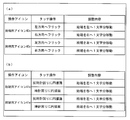
- (A) is a figure which shows the data structure and specific example of the adjustment content determination table memorize
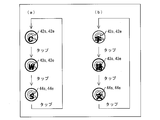
- (b) is a figure which shows the other example of an adjustment content determination table. It is a figure which shows one specific example of the screen displayed on the display part of a smart phone. It is a flowchart which shows the flow of the process which a smart phone performs. It is a figure which shows the other specific example of the screen displayed on the display part of a smart phone. It is a figure which shows the specific example of the range adjustment icon displayed on the display part of a smart phone which can change the minimum movement unit.
- (A) is a figure which shows the example of another display mode of the range adjustment icon shown in FIG. 6,
- (b) is the range adjustment which can change the movement minimum unit shown to (a) of FIG. 6 and FIG. It is a figure which shows the other specific example of an icon. It is a figure which shows the data structure of the speed table memorize
- Embodiment 1 An embodiment of the present invention will be described below with reference to FIGS.
- a character string selection device a smartphone equipped with a touch panel
- the character string selection device is not limited to the smartphone described above, and any information processing device can be used as long as the device can display a character string and accept a touch operation on the touch panel to select the character string. It can be applied to a device.
- members having the same functions as those shown in each embodiment are given the same reference numerals, and the explanation thereof is omitted as appropriate.
- dimensional relationships such as length, size, and width, and shapes in the drawings are appropriately changed for clarity and simplification of the drawings, and do not represent actual dimensions and shapes.
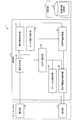
- FIG. 1 is a block diagram illustrating a main configuration of a smartphone 1 according to an embodiment of the present invention.
- the smartphone 1 includes at least an operation unit 10, a control unit 11, a storage unit 12, and a display unit 13. Furthermore, although not illustrated, the smartphone 1 may include various components that are normally included in the smartphone, such as a communication unit, an audio input unit, an audio output unit, a broadcast image receiving unit, and a GPS.
- the operation unit 10 is an input device through which a user inputs an instruction signal to the smartphone 1.
- the operation unit 10 is configured as a touch panel together with the display unit 13.
- the operation unit 10 includes a touch surface that receives contact (including approach) of an indicator (such as a finger or a pen), a contact between the indicator and the touch surface, and a touch sensor for detecting an input position thereby. It consists of and.
- the touch sensor may be realized by any sensor as long as it can detect contact / non-contact between the indicator and the touch surface.
- the touch sensor is realized by, for example, a pressure sensor, a capacitance sensor, an optical sensor, or the like.
- the operation unit 10 supplies a signal generated by the user's touch operation to the operation reception unit 20 described later.
- the display unit 13 is a display device that displays information processed by the smartphone 1.
- the display unit 13 displays information processed by an icon display control unit 21 and a selection range display control unit 26 described later.
- the display unit 13 is configured by a display device such as an LCD (liquid crystal display).
- LCD liquid crystal display
- the storage unit 12 is (1) a control program executed by the control unit 11 of the smartphone 1, (2) an OS program executed by the control unit 11, and (3) the control unit 11 executes various functions of the character string selection device. And (4) various data to be read when executing the application program are stored non-temporarily.
- the above data (1) to (4) include ROM (read only memory), flash memory, EPROM (Erasable Programmable ROM), EEPROM (registered trademark) (Electrically EPROM), HDD (Hard Disc Drive), etc. Stored in a storage device.
- the smartphone 1 may include a temporary storage unit (not shown).
- the temporary storage unit is a so-called working memory that temporarily stores data used for calculation, calculation results, and the like in the course of various processes executed by the smartphone 1, and includes a storage device such as a RAM (Random Access Memory).
- RAM Random Access Memory
- the control unit 11 performs overall control of each unit included in the smartphone 1.
- the operation reception unit 20 the icon display control unit 21, the character string selection unit 22, the operation icon determination unit 23, the touch operation determination unit 24, A selection range adjustment unit 25 and a selection range display control unit 26 are included.
- Each functional block of the control unit 11 described above is stored in a storage device (storage unit 12) in which, for example, a CPU (central processing unit) is realized by ROM (read only memory), NVRAM (non-Volatile random access memory), or the like. This can be realized by reading a stored program into a RAM (random access memory) (not shown) and executing it.
- a CPU central processing unit
- ROM read only memory
- NVRAM non-Volatile random access memory
- the operation receiving unit 20 supplies the presence / absence of the detected touch operation and the coordinate information of the touch position to each unit of the control unit 11 based on the signal related to the user's touch operation detected by the operation unit 10.
- the operation reception unit 20 can hold the coordinate information of the touch position in time series. Then, the operation reception unit 20 may supply the coordinate information of the locus of the touch operation (drag operation, flick operation, pinch-in / pinch-out operation, long press operation) continuously input over a certain period to each unit. .
- the locus, speed, and acceleration of the touch operation can be obtained by a set of inputs (coordinates and time) related to the touch operation received by the operation receiving unit 20 for a certain period.
- the character string selection device (smart phone 1) of the present invention is configured to accept at least a touch operation having a direction element as a touch operation for adjusting the character string selection range.
- the operation receiving unit 20 of the smartphone 1 is configured to receive a touch operation having at least one of speed, acceleration, and a set of input points (trajectory) in addition to the direction element. That is, the character string selection device of the present invention does not depend on the distance element of the touch operation, but based on the direction element and the element of the set (trajectory) of speed, acceleration, or input points, the character string selection range.
- the feature is that the behavior related to the adjustment can be determined. As a result, there is an advantage that the user is freed from difficult operations such as strictly specifying the moving distance of the end of the character string selection range.
- the character string selection unit 22 determines and selects the range of the character string designated by the user's touch operation. In the present embodiment, when a drag operation is performed on the character string displayed on the display unit 13, the character string selection unit 22 determines that the drag operation is an operation for instructing the selection of the character string.
- the character string selection unit 22 can determine the character string selection range by specifying the start position of the drag operation as the start end of the character string selection range and the end position of the drag operation as the end of the character string selection range.
- the character string selection unit 22 may determine the character string selection range according to another touch operation. The character string selection unit 22 notifies the determined character string selection range to the icon display control unit 21 and the selection range display control unit 26.
- the selection range display control unit 26 controls the display mode of the character strings included in the character string selection range determined by the character string selection unit 22. Specifically, the selection range display control unit 26 changes the display mode of the selected character string to a mode different from the non-selected character string so that the selected character string is recognized by the user. For example, the selection range display control unit 26 may express the selected character string by shading the character string selection range with a predetermined color as shown in FIG.
- the display method of the character string selection range is not limited to this, and any display method that allows the user to recognize the range of the selected character string may be used.
- the icon display control unit 21 controls the display of UI (user interface) parts for adjusting the character string selection range determined by the character string selection unit 22.
- a UI component for adjusting the character string selection range is referred to as a range adjustment icon.
- the range adjustment icon is displayed on the display unit 13 so that the user can perform a touch operation via the operation unit 10.
- the icon display control unit 21 controls the position where the range adjustment icon is displayed. For example, the icon display control unit 21 displays a range adjustment icon for adjusting the position of the start end near the start end of the character string selection range. Further, the icon display control unit 21 displays a range adjustment icon for adjusting the position of the end of the character string selection range near the end.
- the user can easily recognize the correspondence between the icon to be operated for adjusting the character string selection range and the adjusted end (starting or ending).
- the method of displaying the above-described icon is an example, and is not limited to this.
- the icon display control unit 21 displays the range adjustment icon with a sufficient size on the indicator (user's finger or pen) so as not to overlap the selected character string.
- the user can easily select the range adjustment icon and perform a touch operation for instructing the adjustment of the character string selection range. For this reason, the user can adjust the character string selection range with a large and clear touch operation. As a result, the character string selection range can be adjusted easily and reliably.
- the icon display control part 21 employ
- the icon display control unit 21 employs, for example, each icon for which a left and right arrow symbol is designed. Accordingly, the user can easily associate with what icon the next touch operation should be performed, and as a result, the user's operability can be improved.
- the icon display control part 21 is preferable to display the icon semi-transparently when displaying it superimposed on other character strings to prevent the visibility of the character strings from being lowered.
- the operation icon discriminating unit 23 discriminates the range adjustment icon to be operated by the touch operation when the touch operation is performed on the range adjustment icon displayed on the display unit 13. As described above, for example, two range adjustment icons are displayed near the start of the character string selection range and near the end of the character string selection range.
- the operation icon determination unit 23 determines whether the icon displayed at the position overlapping the touch position supplied from the operation reception unit 20 is the start icon or the end icon. Then, the operation icon determination unit 23 notifies the selection range adjustment unit 25 of a determination result indicating which icon is touched.
- the touch operation determination unit 24 determines the type of touch operation performed on the range adjustment icon displayed on the display unit 13. When a touch operation is performed on the range adjustment icon, the touch operation determination unit 24 determines what touch operation has been performed on the range adjustment icon, and selects the determination result as a selection range adjustment. Notify unit 25.
- the touch operation determination unit 24 acquires the user's touch operation locus from the operation reception unit 20 in time series. Therefore, for example, the touch operation determination unit 24 performs a flick operation, a drag operation, a tap operation, a double tap operation, a long press operation, a pinch-in operation in an arbitrary direction performed with a predetermined area around the range adjustment icon as a start position. / Pinch-out operation etc. can be discriminated.
- the touch operation determination unit 24 receives a flick operation in a predetermined direction as an operation for adjusting the character string selection range. Then, the touch operation determination unit 24 determines in which direction the flick operation is performed.
- the selection range adjustment unit 25 adjusts the character string selection range according to the determination results supplied from the operation icon determination unit 23 and the touch operation determination unit 24, respectively.
- the selection range adjustment unit 25 reads the adjustment content corresponding to the determination result from the adjustment content determination table stored in the adjustment content storage unit 30 described later, and adjusts the selection range based on the read adjustment content. Further, the selection range adjustment unit 25 supplies the selection range display control unit 26 with the adjustment result, that is, the character string selection range after the above adjustment.
- FIG. 2A is a diagram illustrating a data structure and a specific example of the adjustment content determination table stored in the adjustment content storage unit 30.
- FIG. 2B is a diagram illustrating another example of the adjustment content determination table.
- the association information between the determination result and the adjustment content is shown as a table format data structure, and the data structure of the association information is represented in the table format. There is no intention to limit to.
- the icon display control unit 21 relates the range adjustment icon for adjusting the start end of the character string selection range and the range adjustment icon for adjusting the end point to the character string selection range. To display. Therefore, in the adjustment content determination table, the former is defined as the start end icon 40s, the latter is defined as the end icon 40e, and identification information for identifying each is stored in the “operation icon” column. Yes.
- the “touch operation” column stores information defining the type of touch operation that is assumed to be performed for range adjustment for each icon.
- the first type is “flick left”. This means a touch operation in which a flick operation is performed leftward from a predetermined area around the icon.
- the second type is “flick right”. This means a touch operation in which a predetermined area information around the icon is used as a starting point and a flick operation is performed from there to the right.
- adjustment content information defining the content of the range adjustment to be executed by the selection range adjustment unit 25 is stored.
- starting icon 40s and “flicking leftward” are associated with the adjustment content “moving the starting edge to the left by one character”.
- “Move the start end to the left by one character” means an operation of moving the start end Ps of the character string selection range determined by the character string selection unit 22 to the left by one character. As a result of this operation, the characters included in the character string selection range are increased by one character.
- the selection range adjustment unit 25 moves the position of the starting end Ps from the position of the character Tn to the position of the character Tn-1 at the upper right. That is, “move the start edge to the left by one character” does not mean that the start edge Ps is moved from the position of the original character to the position one character to the left, but the character one character before the original character. Obviously, it means moving to the position.
- start icon 40 s is associated with “move the start edge to the right by one character” which defines that the start edge is moved to the opposite right side (the character in the character string selection range is reduced by one character). Yes.
- the end icon 40e is associated with the adjustment contents when the flick operation is performed in the left direction and the adjustment contents when the flick operation is performed in the right direction.
- the selection range adjustment unit 25 corresponds to the operation icon determined by the operation icon determination unit 23 and the type of touch operation determined by the touch operation determination unit 24. It becomes possible to determine the adjustment contents to be executed by itself.
- the adjustment content determination table may include information defining the vertical flick operation on the icon and the corresponding adjustment content, assuming that the character string is displayed vertically. For example, with respect to the records of “starting end icon 40s” and “flick upward”, the adjustment content “move the starting end upward by one character” may be stored in association with each other.
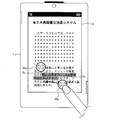
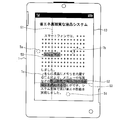
- FIG. 3 is a diagram illustrating a specific example of a screen displayed on the display unit 13 of the smartphone 1.
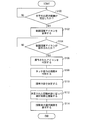
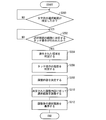
- FIG. 4 is a flowchart showing a flow of processing executed by the smartphone 1.
- FIG. 3 shows the state of the screen after the character string is selected according to the user's drag operation, the character string selection range is clearly shown, and the start end icon 40s and the end icon 40e are displayed.
- the character string selection unit 22 that has received the drag operation via the operation reception unit 20 specifies the position immediately before the character “Shi” as the start point Ps as shown in FIG. 3, and immediately after the character “ko”. Is determined as the terminal Pe, and these characters and a character string sandwiched between these characters are determined as a character string selection range. Then, as shown in FIG. 3, the selection range display control unit 26 shades and displays the characters “static” to “ko”.
- icon display control unit 21 displays range adjustment icons on display unit 13 (see FIG. 4). S102). Specifically, as shown in FIG. 3, the icon display control unit 21 displays the start icon 40s at a predetermined position from the start end Ps, and displays the end icon 40e at a predetermined position in a predetermined direction from the end Pe. .
- the user desires to adjust the displayed character string selection range to “still image... Stop”.
- the user touches the terminal icon 40e for adjusting the position of the terminal Pe among the two range adjustment icons displayed on the touch panel, and moves the terminal Pe leftward so as to return the terminal Pe one character to the left. Perform a flick operation.
- the operation receiving unit 20 receives a touch operation on the range adjustment icon via the operation unit 10 (YES in S104), information related to the touch operation from the operation receiving unit 20, that is, Time-series position coordinates (trajectory) and the like are supplied to the operation icon determination unit 23 and the touch operation determination unit 24.
- the operation icon determination unit 23 determines which icon has been operated (S106). For example, as shown in FIG. 3, when the start position of the flick operation is on a predetermined area around the terminal icon 40e, the operation icon determination unit 23 determines that the operated icon is “terminal icon 40e”. It is determined that
- the touch operation determination unit 24 determines the type of touch operation (S108). For example, when the user performs a flick operation to the left with respect to the terminal icon 40e (solid arrow in FIG. 3), the touch operation determination unit 24 indicates that the type of the touch operation performed is “to the left. Flick ".
- the selection range adjustment unit 25 determines the adjustment content (S110). Specifically, the selection range adjustment unit 25 acquires the determination results from the operation icon determination unit 23 and the touch operation determination unit 24, that is, the determined operation icon and the determined touch operation type. . Then, the selection range adjustment unit 25 reads the adjustment content corresponding to the determination result from the adjustment content determination table ((a) of FIG. 2) stored in the adjustment content storage unit 30. For example, according to the adjustment content determination table shown in FIG. 2A, the “end icon 40e” and “flick left” record is associated with the adjustment content “move end one character to the left”. It has been. Therefore, the selection range adjustment unit 25 determines that the operation to be executed by itself according to the user's touch operation in S104 is “move the end one character to the left”.
- the selection range adjustment unit 25 adjusts the selection range according to the determined adjustment content (S112).
- the selection range adjustment unit 25 moves the end Pe in FIG. 3 to the left adjacent character according to the adjustment content “moving the end one character to the left” determined with reference to the adjustment content determination table. Move to position. That is, the selection range adjustment unit 25 moves the end Pe immediately after the character “ko” to immediately after the character “ru”. Thereby, the character string selection range is adjusted to “still image... Stop”.
- the selection range adjustment unit 25 supplies the adjusted character string selection range to the selection range display control unit 26.
- the selection range display control unit 26 displays the adjusted character string selection range on the display unit 13 (S114).
- the selection range display control unit 26 shades and displays the character strings included in the character string selection range according to the adjusted character string selection range supplied from the selection range adjustment unit 25.
- the character string included in the character string selection range is a character string from the character “still” of “still image” to the character “ru” of “stop” in FIG. 3.
- the icon display control unit 21 rearranges the start end icon or the end icon based on the changed start end or end position, and performs redrawing. .
- the selection range adjustment unit 25 selects the selection range adjustment unit 25 in FIG. With reference to the adjustment content determination table, the adjustment content is determined as “move the end one character to the right”. In this case, the selection range adjustment unit 25 moves the end Pe in FIG. 3 from the position immediately after the character “KO” to the right to the position immediately after the character “TO” on the right. Alternatively, when a flick operation is performed to the left with respect to the start end icon 40s in S104, the selection range adjustment unit 25 sets the adjustment content to “move the start end to the left by one character” according to the adjustment content determination table. decide.
- the selection range adjustment unit 25 moves the starting end Ps of FIG. 3 from the position immediately before the character “still” of “such as still image” to the position immediately before the character “no” on the left.
- the selection range adjustment unit 25 changes the adjustment content to “move the start end to the right by one character” according to the adjustment content determination table. decide.
- the selection range adjustment unit 25 moves the starting end Ps of FIG. 3 from the position immediately before the character “Still” of “Still Image” to the position immediately before the character “Stop” on the right.
- the direction assumed for the flick operation is the left-right direction, and is not limited to this example.
- the end of one character may be moved to the left by performing a flick operation upward, and the end of one character may be moved to the right by performing a flick operation downward.
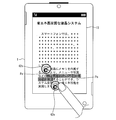
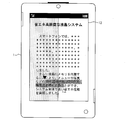
- FIG. 5 is a diagram illustrating another specific example of a screen displayed on the display unit 13 of the smartphone 1.
- the smartphone 1 as the character string selection device is configured to accept a touch operation for adjusting the selection range by a circle drawing operation instead of a flick operation.
- the circle drawing operation refers to a touch operation for drawing a circle on the touch surface of the operation unit 10 using an indicator (finger or pen) or the like.
- the icon display control unit 21 is configured to display the start end icon 41 s and the end end icon 41 e shown in FIG. 5 as design icons reminiscent of the circle drawing operation. Since each of the icons is provided with a circular bidirectional arrow symbol, it is easy for the user to perform a circle drawing operation clockwise or counterclockwise with respect to these range adjustment icons. Can be recalled.
- the smartphone 1 has a configuration in which the adjustment content storage unit 30 holds a table illustrated in FIG. 2B as an adjustment content determination table.
- case (i) is associated with the adjustment content “move the start edge to the left by one character”.
- Each adjustment content is the same as the adjustment content determination table shown in FIG.
- the character string selection range displayed on the display unit 13 is a character string “still image ... stop”.
- the user desires to correct the character string selection range to “still image... Stop”.
- the user wants to move the terminal Pe one position to the left.
- the user may perform a circle drawing operation counterclockwise on the terminal icon 41e displayed on the display unit 13 by the icon display control unit 21 (solid line arrow in FIG. 5).
- the operation icon determination unit 23 that has received the touch operation via the operation reception unit 20 determines that the operated icon is the “termination icon 41e”.
- the touch operation determination unit 24 determines that the type of the touch operation that has been performed is “circle drawing counterclockwise”.
- the selection range adjustment unit 25 refers to the adjustment content determination table shown in FIG. 2B, determines the adjustment content as “move the end one character to the left”, and executes this adjustment. That is, the selection range adjustment unit 25 adjusts the character string selection range from “still image... To stop” to “still image... Stop”.
- the selection range adjustment unit 25 refers to the adjustment content determination table and determines the adjustment content as “move the end to the right by one character”. Then, the selection range adjustment unit 25 moves the position of the terminal Pe in FIG. 5 from the position immediately after the character “ko” to the position immediately after the character “to” on the right side to change the character string selection range to “still image / Adjust to “Stop”.
- the selection range adjustment unit 25 determines the adjustment content as “moving the start end to the left by one character”. Then, the selection range adjustment unit 25 moves the position of the starting end Ps in FIG. 5 from the position immediately before the character “Ze” to the position immediately before the character “no” on the left side to change the character string selection range to “still image of“ Adjust to “Stop”.
- the selection range adjustment unit 25 determines the adjustment content as “move the start end to the right by one character”. Then, the selection range adjustment unit 25 moves the position of the starting end Ps in FIG. 5 from the position immediately before the character “Static” to the position immediately before the character “Stop” on the right side to change the character string selection range to “Stop / Adjust to “Stop”.
- the user can adjust the character string selection range by an easy touch operation having a direction element such as a circle drawing operation.
- the smartphone 1 can accept an instruction to adjust the character string selection range based on the circle drawing operation regardless of the size of the circle in the circle drawing operation. Therefore, just because the user wants to move one character, it is not necessary to draw a small and small circle corresponding to the size of one character. That is, the user can perform a circle drawing operation with an arbitrary size that can be easily operated by the user.
- the unit (the minimum movement unit) that can move the end of the character string selection range by one touch operation (flick operation or circle drawing operation) is fixed to one character.
- the character string selection device of the present invention may have a configuration that can change the minimum movement unit.
- the icon display control unit 21 employs a different design icon for each different movement minimum unit and displays the icon on the display unit 13.
- FIG. 6 is a diagram illustrating a specific example of the range adjustment icon displayed on the display unit 13 of the smartphone 1 and capable of changing the minimum movement unit.
- (A) of FIG. 7 is a figure which shows the example of another display mode of the range adjustment icon shown in FIG.
- FIG. 7B is a diagram showing another specific example of the range adjustment icon that can change the minimum movement unit.
- units based on the grammatical structure of the language in which the character string is written such as “character”, “word”, “phrase”, “section”, “sentence”, etc.
- characters are adopted as the different movement minimum units. May be.
- units based on the layout of the document such as “character”, “line”, “paragraph”, “chapter”, “page”, and the like may be adopted.
- the smartphone 1 will be described as a configuration that can switch between three types of 1 “character” unit, 1 “word” unit, and 1 “sentence” unit.
- icon display control unit 21 starts each end of the shaded character string selection range.
- a range adjustment icon is displayed near the area.
- the icon display control unit 21 adopts and displays an icon to which a design that clearly indicates the currently set minimum movement unit is added in addition to a design reminiscent of an operable touch operation.
- the “C” mark added to the start icon 42s and the end icon 42e in FIG. 6 indicates to the user that the character string selection range can be adjusted in units of characters.
- the smartphone 1 When a touch operation (flick operation or circle drawing operation) for range adjustment is performed on the start end icon 42s or the end icon 42e in the state of this screen, as described above, the smartphone 1 is 1 For each touch operation, adjustment of the position of the end (starting end or end) is executed in units of one character.
- the operation reception unit 20 is configured to receive a touch operation (for example, a tap operation) for changing the minimum movement unit for each range adjustment icon in the state of this screen.
- a tap operation for example, a tap operation
- the icon display control unit 21 switches to an icon corresponding to a different minimum movement unit according to the tap operation.
- the icon display control unit 21 adjusts the selection range in which the minimum movement unit corresponds to a word (Word) as shown in FIG.
- the icon 43 is displayed on the display unit 13 instead of the range adjustment icon 42 corresponding to the character.
- the icon display control unit 21 switches to the range adjustment icon 44 whose minimum movement unit corresponds to a sentence.
- the operation icon determination unit 23 is further configured to be able to determine which unit of movement corresponds to the icon for which the touch operation has been performed.
- the operation icon determination unit 23 determines that the operated icon is the terminal icon 43e corresponding to the word. Determine. Then, the touch operation determination unit 24 determines that the type of the touch operation is “clockwise circle drawing”.
- the “end icon 43e” and “clockwise circle drawing” records are associated with the adjustment content “move the end to the right by one word”.
- the selection range adjustment unit 25 executes the above adjustment content. That is, the selection range adjustment unit 25 moves the position of the terminal Pe immediately after the break of the word that exists next to the current position of the terminal Pe (the last character of the word). In the example illustrated in FIG. 6, the selection range adjustment unit 25 adjusts the character string selection range to “still image... Stop”.
- the “end icon 44e” and “clockwise circle drawing” records are associated with the adjustment content “move the end to the right by one sentence”. Therefore, the selection range adjustment unit 25 moves the position of the terminal Pe immediately after the sentence break (character at the end of the sentence) that exists next to the current position of the terminal Pe. In the example illustrated in FIG. 6, the selection range adjustment unit 25 adjusts the character string selection range to “Still image ...”.
- the character string selection range in units of one character or more by a single touch operation.
- the minimum movement unit can be easily switched by a tap operation.
- the user can quickly adjust the desired range with a small number of operations.
- switching by tap operation is not limited to the minimum unit of movement.
- the smartphone 1 may be configured to be able to switch the number of characters to be moved at a time (character movement amount).
- the icon display control unit 21 can switch a range adjustment icon to which numbers “1”, “2”, and “3” are added by a tap operation.
- the selection range adjustment unit 25 performs adjustment by moving the end of the character string selection range in units of two characters. It is possible.
- a touch operation other than the tap operation may be assigned to the touch operation for changing the minimum movement unit.
- a touch operation having a direction element such as a drag operation, a flick operation, or a circle drawing operation is preferably employed for a touch operation for range adjustment. Therefore, it is preferable to employ a touch operation having no direction element, such as a tap operation, a double tap operation, and a long press operation, for the touch operation for changing the minimum movement unit. Accordingly, the user can easily use the touch operation for adjusting the range and the touch operation for changing the movement minimum unit, and the smartphone 1 can touch the movement for changing the movement minimum unit. The risk of misrecognizing an operation and a touch operation for range adjustment can be reduced.
- UI parts for changing the minimum unit of movement are not always realized only by tapping the icon and the icon.
- the icon display control unit 21 may display a selection list of minimum movement units by long pressing the range adjustment icon so that the user can select a desired minimum movement unit.
- the icon display control unit 21 is not limited to the design shown in FIG. 7A, but adopts the design shown in FIG. 7B, and each of the character unit, the word unit, and the sentence unit. A range adjustment icon corresponding to may be displayed.
- the character string selection apparatus of this invention may be equipped with the structure which can change a movement minimum unit according to the speed of the implemented touch operation.
- the smartphone 1 as the character string selection device has a configuration in which a speed determination unit 28 is essential as a functional block as shown in FIG.
- the adjustment content storage unit 30 is further configured to hold a speed table.
- the user can adjust the character string selection range in units of one character or more simply by changing the speed of one touch operation.
- the user can quickly adjust the desired range with a small number of operations.
- the icon switching operation is not necessary, the user can adjust the character string selection range more quickly.
- the speed discriminating unit 28 discriminates the speed of the touch operation performed by the user. Since the speed determination unit 28 acquires the coordinates of the locus of the touch operation of the user together with the time information from the operation reception unit 20 in time series, the speed determination unit 28 is based on the number of seconds per stroke of the user's touch operation and a predetermined reference. Thus, it is possible to determine the speed of the touch operation. This predetermined standard is defined in the speed table, for example.
- FIG. 8 is a diagram illustrating a data structure and a specific example of the speed table stored in the adjustment content storage unit 30.
- the speed table classifies the speed of the touch operation according to a predetermined standard, and assigns a different minimum movement unit for each level of the classified speed.
- the touch operation for range adjustment is a circle drawing operation
- the speed table shown in FIG. 8 as an example, when the circle drawing operation is H seconds (for example, 0.3 seconds) or less, the speed level is defined as “high speed”. When the circle drawing operation is longer than H seconds and shorter than M seconds (for example, 0.5 seconds), the speed level is defined as “normal”. If the circle drawing operation is longer than M seconds, the speed level is defined as “low speed”.
- the speed determination unit 28 refers to the speed table to determine which speed level the touch operation speed received by the operation reception unit 20 corresponds to.
- the selection range adjustment unit 25 refers to the speed table and determines the minimum movement unit for the range adjustment to be performed by itself. Specifically, the selection range adjustment unit 25 reads the minimum movement unit assigned to the speed level of the touch operation determined by the speed determination unit 28 from the speed table.
- the selection range adjustment unit 25 determines the position of the end of the character string selection range in character units for each touch operation. adjust. If it is determined that the speed level is “normal”, the selection range adjustment unit 25 adjusts the position of the end of the character string selection range in units of words for each touch operation. When it is determined that the speed level is “high speed”, the selection range adjustment unit 25 adjusts the position of the end of the character string selection range in units of sentences per touch operation.
- the character string selection apparatus of this invention may be equipped with the structure which can change the quantity (number of characters) to which an edge part is moved by one touch operation according to the speed of the performed touch operation.
- the smartphone 1 as the character string selection device is configured to include the speed determination unit 28 as shown in FIG.
- the adjustment content storage unit 30 is further configured to hold a speed table.
- the adjustment content storage unit 30 holds the speed table shown in FIG. 9 instead of the speed table shown in FIG.
- FIG. 9 is a diagram illustrating another example of the speed table stored in the adjustment content storage unit 30.
- the character movement amount is stored in association with each speed level.
- the character movement amount represents the amount by which the end of the character string selection range is moved in response to a single touch operation by the user, that is, the number of characters.
- the character movement amount “one character” means that the position of the end portion is adjusted in units of one character as described above.
- the character movement amount “2 characters” means that the position of the end portion is adjusted in units of two characters, that is, by skipping one character at a time.
- the character movement amount “1 character” is associated with the speed level “low speed” of the touch operation in the speed table. Further, the character movement amount “2 characters” is associated with the speed level “normal”. Furthermore, the character movement amount “3 characters” is associated with the speed level “high speed”.
- the selection range adjustment unit 25 refers to the speed table and determines the amount of character movement in the range adjustment to be performed by itself. Specifically, the selection range adjustment unit 25 reads the character movement amount corresponding to the speed level of the touch operation determined by the speed determination unit 28 from the speed table.
- the selection range adjustment unit 25 adjusts the position of the end of the character string selection range in units of one character for each touch operation.
- the selection range adjustment unit 25 adjusts the position of the end of the character string selection range in units of two characters per touch operation.
- the selection range adjustment unit 25 adjusts the position of the end of the character string selection range in units of three characters per touch operation.
- the contents defined by the speed table are not limited to the examples shown in FIGS.
- the speed level is divided into three stages, but may be further finely divided. Further, according to each speed level, a minimum movement unit other than the illustrated example or a character movement amount may be associated.
- Embodiment 2 Another embodiment relating to the character string selection device of the present invention will be described below with reference to FIGS.
- members having the same functions as those in the drawings described in the first embodiment are given the same reference numerals, and descriptions thereof are omitted.
- the smartphone 1 is configured to accept a touch operation for adjusting the position of the start or end of the character string selection range in a predetermined area on the screen of the touch panel. is there.
- the user does not have to perform touch operations for adjusting the character string selection range on the icon, and the character string selection range can be performed with a larger and clearer touch operation on a predetermined area of the touch panel. Can be instructed to adjust.
- the user can avoid the inconvenience that it is difficult to see a character string outside the character string selection range due to the icon display. Therefore, there is an effect that the character string selection range can be easily and reliably adjusted.
- FIG. 10 is a block diagram illustrating a main configuration of the smartphone 1 according to the present embodiment.
- the difference from the configuration of the smartphone 1 according to the first embodiment is that the control unit 11 includes an operation region determination unit 27 instead of the operation icon determination unit 23.
- the control unit 11 since the display of the range adjustment icon is not required, the control unit 11 does not necessarily include the icon display control unit 21.
- the operation area discriminating unit 27 discriminates an area on the touch panel where a touch operation for adjusting the character string selection range has been performed.
- the area on the touch panel is defined by being divided into several areas. Specifically, the area on the touch panel includes a start end adjustment area (start end UI area) that accepts a touch operation for adjusting the start end, and an end adjustment area (end end use) that accepts a touch operation for adjusting the end. (UI area).
- the operation area determination unit 27 indicates in which area on the touch panel the touch operation for adjusting the character string selection range is performed based on the position coordinates of the touch operation by the user supplied from the operation reception unit 20. Determine.
- the operation area determination unit 27 notifies the selection range adjustment unit 25 of the determination result, that is, the area where the touch operation is performed.
- the selection range adjustment unit 25 refers to the adjustment content determination table of the adjustment content storage unit 30, and based on the region determined by the operation region determination unit 27 and the type of touch operation determined by the touch operation determination unit 24, Determines what adjustments should be made.
- the smartphone 1 includes the speed determination unit 28 as in the first embodiment so that the amount of movement of the end can be dynamically determined according to the speed of the touch operation. It is possible to configure.
- the adjustment content storage unit 30 is configured to hold the adjustment content determination table shown in FIG.
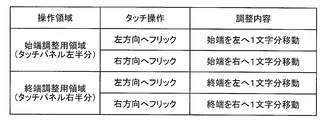
- FIG. 11 is a diagram illustrating a data structure and a specific example of the adjustment content determination table stored in the adjustment content storage unit 30 of the present embodiment.
- the difference from the adjustment content determination table of the first embodiment is that the adjustment content determination table has a column of “operation area” instead of a column of “operation icon”.
- operation area information on each area on the touch panel defined in advance is stored.
- a start end adjustment area for receiving a touch operation for adjusting the start end and an end adjustment area for receiving a touch operation for adjusting the end are defined.
- Identification information for identifying each area is stored in the “operation area” column. Note that how the start end adjustment region and the end adjustment region are defined on the touch panel is not particularly limited, but some examples will be described in detail later with reference to the drawings.
- the selection range adjustment unit 25 can determine the adjustment content to be executed according to the operated region and the type of touch operation with reference to the adjustment content determination table shown in FIG.
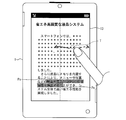
- FIG. 12 is a diagram illustrating another specific example of the screen displayed on the display unit 13 of the smartphone 1.
- the selection range display control unit 26 shades and displays the character string “still image... Stop” of the character string selection range determined by the character string selection unit 22.
- the operation area determination unit 27 defines the left half area of the touch panel including the left half of the character string selection range as the start end adjustment area, and adjusts the right half area of the touch panel as the end adjustment. It is assumed that it is defined in advance as a use area. As a result, when the area left of the broken line on the display unit 13 shown in FIG. 12 is touched, the operation area determination unit 27 determines that the start end adjustment area has been operated, and the area to the right of the broken line. When the touch operation is performed, it can be determined that the end adjustment area has been operated.
- the operation area determination unit 27 fixedly defines the left half area of the touch panel as the start end adjustment area and the right half area of the touch panel as the end adjustment regardless of the position of the character string selection range. It may be defined as a region. Alternatively, the operation area determination unit 27 dynamically sets the positions of the start end adjustment area and the end adjustment area based on the position of the character string selection range (shaded area) specified by the selection range display control unit 26. You may define
- the control unit 11 may preferably include a guide display control unit 29.
- the guide display control unit 29 displays a guide for allowing the user to visually recognize the start end adjustment region and the end adjustment region defined by the operation region determination unit 27 on the display unit 13. For example, as shown in FIG. 12, the guide display control unit 29 may display a broken line indicating the boundary between the start end adjustment region and the end adjustment region.
- the user desires to adjust the character string selection range “still image... Stop” displayed on display unit 13 to “still image... Stop”, for example.
- the user starts a touch operation for adjusting the range from any position in the termination adjustment area for adjusting the termination Pe.
- the user flicks leftward from the start point T in FIG. 12 (solid arrow in FIG. 12).
- the operation region determination unit 27 that has received the touch operation via the operation reception unit 20 determines that the operated region is the “end adjustment region” because the start point T of the flick operation is in the right half of the touch panel. To do.
- the touch operation determination unit 24 determines that the type of the touch operation that has been performed is “flick left”.
- the selection range adjustment unit 25 refers to the adjustment content determination table shown in FIG. 11 and determines the adjustment content “move the end one character to the left” corresponding to the determination result as the adjustment content to be executed by itself. . That is, the selection range adjustment unit 25 adjusts the character string selection range from “still image... To stop” to “still image... Stop”.
- the selection range adjustment unit 25 refers to the adjustment content determination table in FIG. Is determined as “move the end one character to the right”. Therefore, the selection range adjustment unit 25 adjusts the character string selection range to “still image... Stop”.
- the selection range adjustment unit 25 refers to the adjustment content determination table and determines the adjustment content as “move the start end to the left by one character”. Then, the selection range adjustment unit 25 adjusts the character string selection range to “still image ... stop”.
- the selection range adjustment unit 25 determines the adjustment content as “move the start end to the right by one character”. Then, the character string selection range is adjusted to “stop image ... stop”.
- FIG. 12 is a flowchart showing a flow of processing executed by the smartphone 1.
- a character string is selected according to the user's drag operation, the character string selection range is clearly shown, and the left half of the touch panel is defined as the start end adjustment area and the right half is defined as the end adjustment area. Shows the state of the screen.
- the selection range display control unit 26 may display a guide (broken line) for visualizing the two regions in a display mode that does not hinder the visibility of the character string.
- the selection range display control unit 26 shades the character string selection range as shown in FIG. indicate.
- the start-end adjustment region and the end-adjustment region are fixed to the left half and the right half of the touch panel in advance, respectively.
- the present invention is not limited to this, and the operation region determination unit 27 dynamically defines the start end adjustment region and the end adjustment region based on the display position of the character string selection range specified by the selection range display control unit 26. May be.
- the guide display control unit 29 may display a guide for visualizing the two areas. In this way, the smartphone 1 shifts to a state where a touch operation for adjusting the character string selection range can be accepted.
- the operation receiving unit 20 detects a touch operation (for example, a flick operation) for adjusting the range (YES in S202), information related to the touch operation from the operation receiving unit 20, that is, time-series position coordinates (trajectory) ) And the like are supplied to the operation area determination unit 27 and the touch operation determination unit 24.
- a touch operation for example, a flick operation
- information related to the touch operation from the operation receiving unit 20 that is, time-series position coordinates (trajectory)
- the operation area determination unit 27 determines which area has been operated (S204). Specifically, the operation area determination unit 27 is configured to equally divide the touch panel (display unit 13) illustrated in FIG. 12 into two vertically and horizontally based on the coordinates of the locus of the touch operation supplied from the operation reception unit 20. Determine which region was operated. For example, as illustrated in FIG. 12, the operation region determination unit 27 determines that the operated region is the “termination adjustment region” when the start point T of the touch operation is in the right half.
- the touch operation determination unit 24 determines the type of touch operation (S206). For example, when the user performs a flick operation leftward from the start point T (solid arrow in FIG. 12), the touch operation determination unit 24 indicates that the type of touch operation performed is “flick leftward”. Determine that there is.
- the selection range adjustment unit 25 determines the adjustment content (S208). Specifically, the selection range adjustment unit 25 acquires the determination results from the operation region determination unit 27 and the touch operation determination unit 24. Then, the selection range adjustment unit 25 reads the adjustment content corresponding to the determination result from the adjustment content determination table (FIG. 11) stored in the adjustment content storage unit 30.
- the determination result is the operated area “terminal adjustment area” and the type of touch operation “flick left”. Therefore, the selection range adjustment unit 25 determines the adjustment content “move the end one character to the left” associated with these determination results as an operation to be executed by itself.
- the selection range adjustment unit 25 adjusts the selection range according to the determined adjustment content (S210).
- the selection range adjustment unit 25 moves the end Pe of FIG. 12 to the left adjacent character according to the adjustment content “moving the end one character to the left” determined with reference to the adjustment content determination table. Move to position. Thereby, the character string selection range is adjusted to “still image... Stop”. Then, the selection range adjustment unit 25 supplies the adjusted character string selection range to the selection range display control unit 26.
- the selection range display control unit 26 displays the adjusted character string selection range on the display unit 13 (S212).
- the selection range display control unit 26 shades and displays the character strings included in the character string selection range according to the adjusted character string selection range supplied from the selection range adjustment unit 25.
- the smartphone 1 of the present invention can accept an operation for adjusting the character string selection range over a wide area on the touch panel. Moreover, the smart phone 1 can determine the direction which moves an edge part according to the element of the direction which touch operation has. For this reason, the user does not have to be required to strictly specify the position or the distance to be moved for the touch operation. As a result, the user can easily move the indicator (such as a finger or a pen) within a range in which the user can easily move, and easily input an instruction for range adjustment to the smartphone 1.
- the indicator such as a finger or a pen
- the operation region determination unit 27 is configured to dynamically determine the start end adjustment region and the end adjustment region based on the position of the character string selection range specified by the selection range display control unit 26 at that time. It is preferable. In this case, the selection range display control unit 26 supplies information on the position of the shaded character string selection range to the operation region determination unit 27.
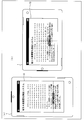
- FIG. 14 is a diagram for explaining an example of assignment of each region that accepts a touch operation for adjustment.
- the operation area determination unit 27 divides the touch panel area using a straight line passing through the center in the horizontal direction of the character string selection range as a boundary line. May be.
- the operation region determination unit 27 provides a boundary line 51 between two regions at the center in the left-right direction of the character string selection range 50 (vertical broken line).
- determination part 27 can define the area
- the guide display control unit 29 may display the boundary line 51 on the display unit 13 as a guide.
- the start end of the character string selection range 50 is the left end adjustment area, and the end is the right end. Included in the adjustment area. Therefore, there is an advantage that the end portion corresponds to the region, and the user can easily understand intuitively which region the touch operation should be performed in order to adjust which end portion.
- the operation area determination unit 27 can define two areas by providing a boundary line passing through the center in the vertical direction of the character string selection range.
- the operation area determination unit 27 may provide a boundary line 53 that passes through the center in the vertical direction for a horizontally written character string selection range 52 that extends over a plurality of lines (horizontal broken line). And the operation area
- the guide display control unit 29 may display the boundary line 53 on the display unit 13 as a guide.
- the start end of the character string selection range 52 is included in the upper end adjustment area and the end is included in the lower end adjustment area. become. Therefore, there is an advantage that the end portion corresponds to the region, and the user can easily understand intuitively which region the touch operation should be performed in order to adjust which end portion.
- the operation area discriminating unit 27 may define a straight line passing through the center in the left-right direction of the character string selection range as a boundary line when the character string extends vertically and extends over a plurality of lines.
- the operation area discriminating unit 27 determines the character string selection range according to whether the character string selection range is horizontal writing 1 line or less, horizontal writing multiple lines, vertical writing 1 line or less, or vertical writing multiple lines. It may be dynamically determined whether a straight line passing through the center in the horizontal direction or the vertical direction is defined as the boundary line. Thus, regardless of whether the character string is written horizontally or vertically, or the character string selection range is one line or multiple lines, the start and end of the character string selection range, As a result, the user can easily and intuitively perform a touch operation for range adjustment.
- the operation area determination unit 27 determines the operated area as the “start end adjustment area”. . In addition, when a touch operation is performed from the start point Tb that is to the right of the boundary line 51, the operation area determination unit 27 determines the operated area as a “termination adjustment area”.
- the operation area determination unit 27 determines the operated area as the “starting end adjustment area”. . In addition, when a touch operation is performed from the start point Td below the boundary line 53, the operation area determination unit 27 determines the operated area as the “end adjustment area”.
- Recent touch panels are generally capable of switching between a vertical screen display and a horizontal screen display. Therefore, the operation area determination unit 27 may be configured to take into account whether the touch panel is in the vertically long display or the horizontally long display when the area is dynamically determined based on the character string selection range.
- the operation area discriminating unit 27 divides the screen in the vertical direction when the touch panel (display unit 13) is performing a portrait display, so These two regions may be defined.
- the operation area discriminating unit 27 divides the screen in the vertical direction with the vertical center of the character string selection range as the boundary, and the start end adjustment area and the end adjustment area Define an area.
- the operation area determination unit 27 may define two areas by dividing the screen in the left-right direction when the display unit 13 performs a landscape display. .
- the operation area discriminating unit 27 divides the screen in the left-right direction with the center in the left-right direction of the character string selection range as a boundary, and the start-end adjustment area and the end-adjustment area Define an area.
- the operation area determination unit 27 may be configured to take into account the position deviation of the character string selection range when dynamically determining the area based on the position of the character string selection range.
- the character string selection range 54 is specified on the display unit 13 as shown in FIG.
- the character string selection range 54 is biased toward the edge of the screen of the display unit 13
- the screen is divided into two with the center of the character string selection range 54 as a boundary
- the width of one of the regions or (Height) becomes extremely narrow.
- the operation area determination unit 27 divides the screen along a direction with little deviation in consideration of the vertical and horizontal deviations of the position of the character string selection range.
- the operation area determination unit 27 first obtains the center of the character string selection range 54. Then, the operation area determination unit 27 obtains a vertical boundary line that divides the screen in the left-right direction through the center and a horizontal boundary line that divides the screen in the vertical direction through the center. Subsequently, the operation area determination unit 27 obtains the width q of the left area and the width r of the right area when the screen is divided into left and right based on the vertical boundary line. In addition, the operation area determination unit 27 obtains the height s of the upper area and the height t of the lower area when the screen is divided into two vertically based on the horizontal boundary line.
- the operation area determination unit 27 obtains the intensity of bias (HB) in the left-right direction as follows.
- HB min (q, r) ⁇ max (q, r)
- the smaller the HB value the stronger the left-right bias.
- the operation area discriminating unit 27 obtains the intensity of the vertical bias (VB) as follows.
- VB min (s, t) / max (s, t)
- the operation area determination unit 27 compares the horizontal deviation HB with the vertical deviation VB.
- the operation area determination unit 27 selects a division method that divides into two in the horizontal direction. That is, the operation area determination unit 27 defines a vertical boundary line passing through the center in the left-right direction of the character string selection range 54, and defines the left and right areas as a start end adjustment area and an end adjustment area, respectively. .
- the operation area determination unit 27 selects a division method that divides into two in the vertical direction. That is, the operation area determination unit 27 defines a horizontal boundary line passing through the center in the vertical direction of the character string selection range 54, and defines the upper and lower areas as a start end adjustment area and an end adjustment area, respectively. .
- the operation area determination unit 27 divides the screen according to whether the touch panel (display unit 13) is portrait display or landscape display as described above. That is, in the case of the vertically long display, it is divided in the vertical direction.
- the operation area discriminating unit 27 can provide each area for end point adjustment by a method with as little deviation as possible. Therefore, it is possible to eliminate the inconvenience that the touch operation for adjusting the character string selection range is difficult.
- the guide display control unit 29 preferably displays a guide for each region of the touch panel defined by the operation region determination unit 27.
- the guide indicates to the user whether the two areas defined on the touch panel are areas for accepting the adjustment of the start end or the end of the character string selection range. By looking at the guide displayed on the display unit 13, the user can easily determine which of the two divided areas corresponds to the start or end.
- the display mode of the guide is not particularly limited, an example thereof will be described below with reference to the drawings.
- FIG. 17A and 17B are diagrams showing a specific example of the guide displayed by the guide display control unit 29.
- FIG. 17A and 17B are diagrams showing a specific example of the guide displayed by the guide display control unit 29.
- FIG. 17A and 17B are diagrams showing a specific example of the guide displayed by the guide display control unit 29.
- the operation area discriminating unit 27 defines the boundary line 51 with reference to the character string selection range shown in FIG.
- the operation area determination unit 27 defines the boundary line 53 with reference to the character string selection range shown in FIG.
- the guide display control unit 29 displays a broken line that visualizes the boundary line 51 (or the boundary line 53) as a guide. Furthermore, in this example, the guide display control unit 29 has a mark (or shape) of the same color (or shape) in the vicinity of the start end of the character string selection range and any location on the start end adjustment area corresponding to the start end. A black triangle) is displayed as a guide. Further, the guide display control unit 29 uses a mark (for example, a white triangle) of the same color (or shape) as a guide near the end of the character string selection range and at any location on the end adjustment area. indicate.
- the user can more easily determine which region can be adjusted by operating which region.
- the shape, color, and size of the guide display mode displayed by the guide display control unit 29 are not particularly limited as long as the correspondence between the divided area and the end of the character string selection range can be determined.
- the guide display control unit 29 devise a display mode of the guide so that the visibility of the displayed character string is not impaired.
- the guide display control unit 29 displays the mark in a translucent manner so that the lower-layer character string can be seen.
- the guide display control unit 29 may set the background color of the start end adjustment area and the background color of the end adjustment area to different colors instead of displaying the broken line of the boundary line.
- the guide display control unit 29 may color the start end (or end) adjustment region by making the same color as the guide displayed near the start end (or end) semi-transparent.
- the smartphone 1 according to the second embodiment has a structure that accepts a touch operation for adjusting a character string selection range by a flick operation.
- the smartphone 1 according to the second embodiment is configured to receive an instruction to adjust the character string selection range by a circle drawing operation if the above description is viewed.
- the smartphone 1 according to the second embodiment may be able to change the minimum movement unit or the character movement amount according to a predetermined touch operation or a speed level of the touch operation.
- the smartphone 1 described in the first and second embodiments may be able to switch among a plurality of types of adjustment modes including the adjustment mode of the character string selection range of the present invention described above. Thereby, since the user can select the adjustment method of a character string selection range, it can adjust a character string selection range by a method more preferable for a user.
- the smartphone 1 adjusts the character string selection range by a mode (hereinafter, adjustment mode F) in which the character string selection range is adjusted by a flick operation on the icon shown in FIG. 3 and a drag operation on the icon shown in FIG.
- the character string selection range may be adjusted by switching to one of the modes (hereinafter, adjustment mode D).
- adjustment mode switching methods are not particularly limited, but an easy and clear touch operation different from the touch operation for adjusting the range is preferably assigned to the adjustment mode switching instruction.
- the operation reception unit 20 may switch the adjustment mode by receiving a long press operation on an icon for flick operation or an icon for drag operation.
- the adjustment mode that can be switched to the adjustment mode D is not limited to the adjustment mode F.
- the operation reception unit 20 adjusts the character string selection range by a circle drawing operation shown in FIG. 5 (hereinafter, adjustment mode C), or the character string selection range by a touch operation on an area shown in FIG.
- the mode may be switched between the adjustment mode (hereinafter referred to as adjustment mode A) and the adjustment mode D.
- the smartphone 1 has a function of executing a plurality of adjustment modes for all or some of the adjustment modes D, F, C, and A, and a user's touch operation (such as a long press operation) ), Each adjustment mode may be sequentially switched.
- the information processing device (character string selection device) or the information processing system described here is a function module that realizes a specific function or a logical collection of a plurality of devices. It does not matter whether each functional module or each device is in a single housing.
- each block of the smartphone (character string selection device) 1, in particular, an icon display control unit 21, a character string selection unit 22, an operation icon determination unit 23, a touch operation determination unit 24, a selection range adjustment unit 25, and a selection range display.
- the control unit 26, the operation region determination unit 27, the speed determination unit 28, and the guide display control unit 29 may be realized in hardware by a logic circuit formed on an integrated circuit (IC chip), or a CPU (Central Processing Unit) may be used for software implementation.
- the smartphone 1 includes a CPU that executes instructions of programs that realize each function, a ROM (Read Only Memory) that stores the programs, a RAM (Random Access Memory) that expands the programs, the programs, and various data.
- a storage device such as a memory for storing the.
- An object of the present invention is to provide a recording medium in which a program code (execution format program, intermediate code program, source program) of a control program of the smartphone 1 which is software that realizes the above-described functions is recorded so as to be readable by a computer. This can also be achieved by supplying the smartphone 1 and reading and executing the program code recorded on the recording medium by the computer (or CPU or MPU).
- Examples of the recording medium include non-transitory tangible media, such as magnetic tapes and cassette tapes, magnetic disks such as floppy (registered trademark) disks / hard disks, and CD-ROM / MO.
- Discs including optical disks such as / MD / DVD / CD-R, cards such as IC cards (including memory cards) / optical cards, and semiconductor memories such as mask ROM / EPROM / EEPROM (registered trademark) / flash ROM
- logic circuits such as PLD (Programmable logic device) and FPGA (Field Programmable Gate array) can be used.
- the smartphone 1 may be configured to be connectable to a communication network, and the program code may be supplied via the communication network.
- the communication network is not particularly limited as long as it can transmit the program code.
- the Internet intranet, extranet, LAN, ISDN, VAN, CATV communication network, virtual private network (Virtual Private Network), telephone line network, mobile communication network, satellite communication network, etc. can be used.
- the transmission medium constituting the communication network may be any medium that can transmit the program code, and is not limited to a specific configuration or type.
- wired lines such as IEEE1394, USB, power line carrier, cable TV line, telephone line, ADSL (Asymmetric Digital Subscriber Line) line, infrared rays such as IrDA and remote control, Bluetooth (registered trademark), IEEE 802.11 wireless, HDR ( It can also be used wirelessly such as High Data Rate, NFC (Near Field Communication), DLNA (Digital Living Network Alliance) (registered trademark), a mobile phone network, a satellite line, and a terrestrial digital network.
- the present invention can also be realized in the form of a computer data signal embedded in a carrier wave in which the program code is embodied by electronic transmission.
- the character string selection device receives an adjustment instruction for a character string selection range that represents a range in which the character string displayed on the touch panel is selected.
- Display control means for displaying a UI component on the touch panel, component discrimination means for discriminating a UI part operated by a user's touch operation on the touch panel, among the UI parts displayed by the display control means, and the touch
- the adjustment contents determined in association with the operation discriminating means for discriminating the type of operation, the UI parts discriminated by the part discriminating means, and the type of touch operation discriminated by the operation discriminating means, It is characterized by comprising selection range adjusting means for executing the selection range.
- the UI component is displayed by the display control means.
- Information indicating how to adjust the character string selection range that is, a plurality of UI parts are prepared for each adjustment content, and the display control means displays a plurality of UI parts for each adjustment content. .
- These UI parts are displayed on the touch panel so as to be touch-operable as UI parts for the user to input an instruction to adjust the character string selection range.
- the part determination unit specifies the operated UI part from the displayed UI parts. Further, the operation determining means determines the type of the touch operation. Conventionally, there are several types of touch operations. Therefore, the operation determination unit only needs to be able to determine at least the type of touch operation assigned to the instruction for adjusting the character string selection range.
- the selection range adjustment unit determines the adjustment content for the adjustment to be executed in accordance with the touch operation of the user.
- the adjustment content is determined in advance in association with the UI component and the type of touch operation. For example, the correspondence between UI components and touch operations and adjustment contents may be stored in the storage unit.
- the selection range adjustment unit determines that the adjustment content corresponding to the determined UI component and the type of touch operation should be executed according to the correspondence relationship.
- the selection range adjustment means executes the determined adjustment content for the character string selection range. Thereby, the character string selection range is changed as instructed by the touch operation performed by the user.
- the user may perform a predetermined touch operation on the UI component corresponding to the intended adjustment content in order to adjust the character string selection range as intended.
- a difficult operation such as strictly specifying the position between characters or specifying the moving distance is not required.
- troublesome operations such as a drag operation for exactly one character, or re-execution over and over.
- the character string selection device of the present invention makes it possible to easily and reliably select the character string intended by the user.
- the touch panel accepts a touch operation having a direction element as a touch operation for instructing the adjustment of the character string selection range.
- the direction of the touch operation on the component is determined, and the selection range adjustment unit moves the end of the character string selection range in a direction corresponding to the direction of the touch operation determined by the operation determination unit. It is preferable to carry out the adjustment.
- the touch panel accepts a touch operation having a direction element as a touch operation for instructing the adjustment of the character string selection range.
- the operation discriminating unit discriminates the direction of the touch operation with respect to the UI component, and the selection range adjusting unit sets the character string selection range in the same direction as the touch operation direction discriminated by the operation discriminating unit. It is preferable to perform the adjustment by moving the end.
- the selection range adjustment means adjusts the range by moving the end of the character string selection range in a direction corresponding to the direction indicated by the touch operation by the user.
- the user may perform a touch operation for designating the direction corresponding to the direction in which the end of the character string selection range is to be moved on the UI component. For example, it may be possible to associate a touch operation for designating the downward direction with the adjustment content of moving the end (such as the start end) to the right in order to reduce the character string selection range.
- the selection range adjusting unit moves the end of the character string selection range in the same direction as the direction of the touch operation.
- the user may perform a touch operation on the UI component in the direction in which the end of the character string selection range is desired to be moved.
- the touch operation in the direction corresponding to the moving direction of the end is an operation that can be performed naturally and intuitively for the user.
- the user can easily select the character string by moving the end of the character string selection range in the intended direction by an intuitive operation. Has the effect of becoming.
- the part determining means is configured to move the start end UI part for moving the start end of the character string selection range and the end end. It is determined which of the terminal UI parts has been operated by the touch operation, and the selection range adjustment unit performs the adjustment by moving the end corresponding to the UI part determined by the part determination unit. It is preferable to carry out.
- the selection range adjustment unit adjusts the range by moving the end of the character string selection range corresponding to the UI component selected by the user through a touch operation.
- the UI component for the start end for moving the position of the start end
- a terminal UI component for moving the position is displayed on the touch panel.
- the component determining means determines which one of the starting UI component and the terminating UI component has been operated by the touch operation.
- the selection range adjusting means moves the start end of the character string selection range when the start end UI component is touch-operated, performs the range adjustment, and when the end UI component is touch operated. The end of the character string selection range is moved, and the range is adjusted.
- the user may select a corresponding UI component and perform a touch operation depending on whether the user wants to move the start or end of the character string selection range.
- the user selects a UI component corresponding to the start end or the end, and performs a touch operation including a direction element on the UI component only once. It is possible to both specify the direction in which it is desired to move.
- the user can easily move the end of the character string selection range in an intended direction and select a character string by an intuitive operation. There is an effect of becoming.
- a character string selection device for accepting an adjustment instruction for a character string selection range representing a range in which a character string displayed on a touch panel is selected.
- the UI area is defined on the touch panel, and among the defined UI areas, an area determination means for determining a UI area operated by a user's touch operation on the touch panel, and an operation determination for determining the type of the touch operation Selection to execute adjustment contents determined in association with the means, the UI area determined by the area determination means, and the type of touch operation determined by the operation determination means for the character string selection range And a range adjusting means.
- the UI area is defined by the area discriminating means.
- a plurality of UI areas are defined for each adjustment content of the character string selection range.
- the defined UI area is an area for receiving a touch operation for the user to input an instruction to adjust the character string selection range.
- the area discriminating unit specifies the operated UI area from the defined UI areas.
- the operation determining means determines the type of the touch operation. Conventionally, there are several types of touch operations. Therefore, the operation determination unit only needs to be able to determine at least the type of touch operation assigned to the instruction for adjusting the character string selection range.
- the selection range adjustment unit determines the adjustment content for the adjustment to be executed in accordance with the touch operation of the user.
- the adjustment content is determined in advance in association with the UI area and the type of touch operation. For example, the correspondence relationship between the UI area and the touch operation and the adjustment content may be stored in the storage unit.
- the selection range adjustment means determines that the adjustment content corresponding to the determined UI area and the type of touch operation should be executed in accordance with the correspondence relationship. Then, the selection range adjustment means executes the determined adjustment content for the character string selection range. Thereby, the character string selection range is changed as instructed by the touch operation performed by the user.
- the user may perform a touch operation on a relatively wide UI area corresponding to the intended adjustment content.
- a difficult operation for precisely specifying the position between characters it is not required to perform a difficult operation for precisely specifying the position between characters.
- the character string selection device of the present invention makes it possible to easily and reliably select the character string intended by the user.
- the touch panel receives a touch operation having a direction element as a touch operation for instructing the adjustment of the character string selection range.
- the operation determination unit determines a direction of the touch operation with respect to the UI area, and the selection range adjustment unit ends the end of the character string selection range in a direction corresponding to the direction of the touch operation determined by the operation determination unit. It is preferable to execute the adjustment by moving the part.
- the touch panel accepts a touch operation having a direction element as a touch operation for instructing adjustment of the character string selection range.
- the operation determination means determines the direction of the touch operation with respect to the UI area, and the selection range adjustment means selects the character string in the same direction as the touch operation direction determined by the operation determination means.
- the adjustment is preferably performed by moving the end of the range.
- the selection range adjustment means adjusts the range by moving the end of the character string selection range in a direction corresponding to the direction indicated by the touch operation by the user.
- the user may perform a touch operation for designating the direction corresponding to the direction in which the end of the character string selection range is to be moved on the UI area. For example, it may be possible to associate a touch operation for designating the downward direction with the adjustment content of moving the end (such as the start end) to the right in order to reduce the character string selection range.
- the character string selection device is such that, in aspect 6, the selection range adjustment means moves the end of the character string selection range in the same direction as the direction of the touch operation. The following merits are obtained.
- the user may perform a touch operation on the UI area toward the direction in which the end of the character string selection range is to be moved.
- the touch operation in the direction corresponding to the moving direction of the end is an operation that can be performed naturally and intuitively for the user.
- the user can easily select the character string by moving the end of the character string selection range in the intended direction by an intuitive operation. Has the effect of becoming.
- the area discriminating unit is configured to move the start end UI area for moving the start end of the character string selection range and the end position.
- a termination UI area is defined on each of the touch panels, and it is determined which one of the start UI area and the termination UI area is operated by the touch operation. The adjustment is preferably performed by moving an end corresponding to the UI area determined by the means.
- the selection range adjusting means moves the end of the character string selection range corresponding to the UI area to which the user performs a touch operation, and executes the range adjustment.
- a start end UI area that receives an operation for moving the position of the start end A termination UI area that accepts an operation for moving the termination position is defined on the touch panel.
- the part determination unit determines whether the touch operation has been performed on any of the start-end UI area and the end-use UI area.
- the selection range adjusting unit moves the start end of the character string selection range to adjust the range, and the touch operation is performed in the end-UI area. If it is, the end of the character string selection range is moved to adjust the range.
- the user may perform a touch operation on the corresponding UI area depending on whether the start or end of the character string selection range is to be moved.
- the user wants to move an end portion to be moved and move it only by performing a touch operation including a direction element once on the UI area corresponding to the start end or the end. Both direction and direction can be specified.
- the user can easily move the end of the character string selection range in an intended direction and select a character string by an intuitive operation. There is an effect of becoming.
- a character string selection device further includes a speed determination unit that determines the speed of the touch operation performed by the user in the modes 1 to 8, and the selection range adjustment unit includes the speed determination unit.
- the adjustment is performed by moving the end of the character string selection range by the amount of movement corresponding to the speed of the touch operation determined by the above, and the amount of movement is the language in which the character string is written. It may be defined by the unit in the grammatical structure or the number of characters.
- the speed determining means determines the speed of the touch operation performed by the user.
- the selection range adjusting means moves the end of the character string selection range by the amount of movement corresponding to the determined speed. That is, it is possible to realize a character string selection range adjustment method in which the end portion moves more as the user's touch operation (movement) is faster.
- the movement amount is assumed to be defined by a unit in the grammatical structure of the language in which the character string is written.
- the movement amount based on a small grammatical unit for example, a character
- the edge movement amount when the user's touch operation is slow can be reduced.
- the movement amount based on a large grammatical unit for example, a word, a sentence, etc.
- the movement amount of the end when the user's touch operation is fast may be increased. it can.
- the speed of the touch operation performed by the user corresponds to the speed of movement of the end of the character string selection range as described above. If the speed of the touch operation is made to correspond to the moving speed of the end portion, this touch operation becomes an operation that can be performed naturally and intuitively for the user.
- the movement amount may be defined by the number of characters.
- the speed of the touch operation performed by the user and the speed of movement of the end of the character string selection range can be made to correspond as described above.
- the component discriminating means is prepared in association with a plurality of stages of movement amounts for moving the end of the character string selection range.
- the UI part is operated by the touch operation, and the selection range adjusting means moves the end of the character string selection range by the amount of movement corresponding to the UI part determined by the part discrimination means.
- the adjustment may be performed by moving, and the amount of movement may be defined by a unit in a grammatical structure of a language in which the character string is written, or by the number of characters.
- the touch panel displays at least one of a plurality of UI parts prepared in association with a plurality of stages of movement amounts for moving the end of the character string selection range. Is done.
- the movement amount is defined by the unit in the grammatical structure of the language in which the character string is written or the number of characters.
- the UI component corresponding to the movement amount at which stage is displayed may be configured to display at least one UI part corresponding to the stage of the movement amount desired by the user, for example.
- the component determination unit determines the UI component selected by the user by the touch operation.
- the UI component corresponds to the movement amount of any one of a plurality of defined stages.
- the selection range adjustment means moves the end of the character string selection range by the amount of movement corresponding to the determined UI component. That is, the user only needs to select the UI component corresponding to the desired movement amount and perform the touch operation described above.
- the user can move the end of the character string selection range reliably and easily at the intended speed and quickly select a desired character string. There is an effect of becoming.
- the area determination unit divides the area of the touch panel into two according to the position of the character string selection range on the touch panel, The start UI area and the end UI area may be defined.
- the area determination unit is configured to select the character string selection range when the character string is written horizontally and the character string selection range is one line or less.
- a straight line passing through the center in the left-right direction is defined as a boundary line between the starting UI area and the terminating UI area, and the character string is written horizontally and the character string selection range is a plurality of lines.
- a straight line passing through the center in the vertical direction of the column selection range may be defined as a boundary line between the start end UI area and the end UI area.
- the area discriminating means can divide the touch panel into two and allocate two relatively wide areas to the start-end UI area and the end-use UI area, respectively.
- the region discriminating means can dynamically determine the boundary between the two regions based on the position of the character string selection range.
- the display position of the character string selection range on the touch panel varies from scene to scene. If the start end UI area and the end UI area are fixed, depending on the position of the character string selection range, the situation where the start end of the character string selection range is included in the end UI area, and vice versa. The situation is possible. If the touched position does not match the end adjusted by the touch operation, it is difficult for the user to perform the operation intuitively.
- the boundary between the two regions is defined so that the UI region to be defined always corresponds to the end of the character string selection range regardless of the character string selection range. For this reason, the user can always intuitively perform a touch operation for adjusting the character string selection range.
- the area determination unit divides the area of the touch panel into two in the left-right direction, and a vertical boundary line passing through the center of the character string selection range. And specifying a horizontal boundary line passing through the center that divides the touch panel area into two in the vertical direction, and the area determination means is configured to detect the above when the deviation in the vertical direction of the center position is large.
- the operation area determination unit can divide the area of the touch panel into two by selecting a division method with as little bias as possible.
- Each of the two divided areas is an area that accepts a touch operation for adjusting an end point, and it is possible to avoid a bias that one of these areas becomes extremely narrow.
- a character string selection method for accepting an adjustment instruction for a character string selection range that represents a range in which a character string displayed on a touch panel is selected.
- a display control step for displaying a UI component on the touch panel; a component determination step for determining a UI component operated by a user's touch operation on the touch panel among the UI components displayed in the display control step; Adjustment contents determined in association with the operation determination step for determining the type of touch operation, the UI component determined in the component determination step, and the type of touch operation determined in the operation determination step, A selection range adjustment step to be performed on the character string selection range.
- a character string selection method for accepting an adjustment instruction for a character string selection range representing a range in which a character string displayed on a touch panel is selected.
- a definition step for defining a UI area on the touch panel; an area determination step for determining a UI area operated by a user's touch operation on the touch panel among the UI areas defined in the definition step; and the touch
- the adjustment content determined in association with the operation determination step for determining the type of operation, the UI region determined in the region determination step, and the type of touch operation determined in the operation determination step, A selection range adjustment step to be performed on the character string selection range.
- the character string selection device may be realized by a computer.
- a control program for the character string selection device that causes the character string selection device to be realized by the computer by causing the computer to operate as each means.
- a computer-readable recording medium on which it is recorded also fall within the scope of the present invention.
- the present invention is useful when a character string displayed on the touch panel is selected by a touch operation. That is, the character string selection device of the present invention can be applied to any information processing device having a function of displaying a character string on a touch panel and receiving a touch operation from a user.
- the present invention can be used particularly suitably for relatively small information processing apparatuses such as smartphones, tablet PCs, PDAs (Personal Digital Assistants), and electronic book readers.
- the character string selection apparatus of the present invention can be applied to a relatively large information processing apparatus such as an electronic blackboard.
Landscapes
- Engineering & Computer Science (AREA)
- General Engineering & Computer Science (AREA)
- Theoretical Computer Science (AREA)
- Human Computer Interaction (AREA)
- Physics & Mathematics (AREA)
- General Physics & Mathematics (AREA)
- User Interface Of Digital Computer (AREA)
- Position Input By Displaying (AREA)
Abstract
本発明の文字列選択装置は、タッチパネルに表示されている文字列選択範囲について、調整の指示を受け付けるためのUI部品を、タッチパネルに表示するアイコン表示制御部(21)と、ユーザのタッチ操作によって操作されたUI部品を判別する操作アイコン判別部(23)と、タッチ操作の種類を判別するタッチ操作判別部(24)と、判別されたUI部品とタッチ操作の種類とに対応付けて定められた調整内容を、文字列選択範囲に対して実行する選択範囲調整部(25)とを備えている。
Description
本発明は、表示された文字列を選択するための文字列選択装置、文字列選択方法、制御プログラム、および、記録媒体に関するものである。
従来、表示された文字列を選択するためのユーザインターフェースが普及している。例えば、特許文献1には、キーボードを備える文書処理装置において、文字列の選択範囲を増大、あるいは減少させるときの移動最少単位の切り替えを、容易に行うことができる技術が開示されている。
そして、特に、近年、タッチパネルを備える機器が普及し、タッチ操作が可能な機器において、表示された文字列をタッチ操作で選択するための技術が広く普及するようになってきた。タッチ操作で文字列を選択する方法としては、例えば、文字列の選択したい範囲をドラッグ操作する方法が挙げられる。上記ドラッグ操作が開始された開始点と、ドラッグ操作が終了した終了点とが、それぞれ、選択範囲の始端、終端として自動判定され、その始端と終端とにはさまれた文字列が選択される。
さらに、特許文献2には、ポインティングデバイスによるドラッグ操作によって、範囲選択すべき文字列が複数行にまたがっている場合に、上記範囲選択すべき文字列の一部が属する行の行末直後に、次の行の行頭から所定長の文字列を選択予測テキストとして表示させる技術が開示されている。
なお、タッチ操作で文字列を選択する別の方法としては、選択したい文字列の範囲の始端と終端とをそれぞれタップ操作によって指定する方法が挙げられる。こうして、2度のタップ操作で指定された始端および終端に挟まれた文字列が選択されることになる。
さらに、特許文献3には、選択された文字列の範囲の始端と終端とにハンドルを表示し、該ハンドルに対するタッチ操作に応じて、文字列の選択範囲を調節するシステムおよび方法が開示されている。
しかしながら、上記の従来技術では、文字列の選択範囲を、容易に調整することができないという問題がある。具体的には、従来の文字列選択方法では、文字列の選択範囲を調整するためのタッチ操作が、ユーザにとって煩雑で負担となる場合があった。
従来の操作の煩雑さについて、図19を参照しながら説明する。従来の構成では、ドラッグ操作であっても、タップ操作であっても、意図する文字列を選択するためには、ユーザがタッチ操作で、選択したい範囲の始端(Ps)と、終端(Pe’)とを正確に指定する必要がある。しかし、指示体(指、または、ペンなど)の大きさが、文字の大きさに対して大きい場合には、ユーザは、所望の始端(Ps)と、終端(Pe’)とを正確に指定することは困難であった。そのため、ユーザの意図通りの範囲で文字列が選択されないという不都合が生じる。続いて、選択範囲を意図する範囲に修正するために始端または終端の位置を調整する場合にも、同様に操作が困難であるという問題がある。例えば、意図しない終端(Pe)を、意図する終端の位置(Pe’)に修正するために、従来、終端(Pe)を終端の位置(Pe’)までドラッグ操作する方法が考えられる。しかし、図19に示すとおり、文字の大きさが指示体に対して小さい場合、または、1文字分増減させたい場合などには、ドラッグ操作における移動距離が極端に短くなる。そのため、上記ドラッグ操作はタップ操作として誤判断がされるおそれがあり、その結果、文字列選択処理自体がキャンセルされるなど、ユーザの望まない処理が実行されるという問題があった。なお、図19に示すように、始端(Ps)を調節するためのハンドル90、および、終端(Pe)を調節するためのハンドル91をそれぞれ表示することが考えられる(特許文献3など)。しかしながら、この場合でも、選択範囲を1文字分増減させたい場合などに、ドラッグ操作の移動距離が極端に短くなることに変わりはなく、上記ドラッグ操作はタップ操作として誤判断がされるという問題は依然解消されない。
また、タップ操作によって文字列の範囲を選択する方法でも、同様の理由で、ユーザが、望みの端部(Ps、Peなど)をタップ操作によって選択することは容易ではなく、望みの端部が正しく選択されるまで、何度も繰り返しタップ操作し直さなければならないという問題があった。
上述のような問題は、スマートフォンなどのように、小型のタッチパネルを有した機器においては、文字の表示サイズが指示体に対して極端に小さくなる傾向があるため、特に深刻なものである。
本発明は、上記の課題に鑑みてなされたものであって、その目的は、ユーザが意図する文字列を容易かつ確実に選択できる文字列選択装置、文字列選択範囲調整方法、制御プログラム、および、記録媒体を実現することにある。
上記の課題を解決するために、本発明の一態様に係る文字列選択装置は、タッチパネルに表示されている文字列が選択されている範囲を表す文字列選択範囲について、調整の指示を受け付けるためのUI部品を、上記タッチパネルに表示する表示制御手段と、上記表示制御手段によって表示されたUI部品のうち、上記タッチパネルに対するユーザのタッチ操作によって操作されたUI部品を判別する部品判別手段と、上記タッチ操作の種類を判別する操作判別手段と、上記部品判別手段によって判別されたUI部品と、上記操作判別手段によって判別されたタッチ操作の種類とに対応付けて定められた調整内容を、上記文字列選択範囲に対して実行する選択範囲調整手段とを備えている。
また、上記の課題を解決するために、本発明の一態様に係る文字列選択装置は、タッチパネルに表示されている文字列が選択されている範囲を表す文字列選択範囲について、調整の指示を受け付けるためのUI領域を、上記タッチパネル上に定義するとともに、定義したUI領域のうち、上記タッチパネルに対するユーザのタッチ操作によって操作されたUI領域を判別する領域判別手段と、上記タッチ操作の種類を判別する操作判別手段と、上記領域判別手段によって判別されたUI領域と、上記操作判別手段によって判別されたタッチ操作の種類とに対応付けて定められた調整内容を、上記文字列選択範囲に対して実行する選択範囲調整手段とを備えている。
また、上記の課題を解決するために、本発明の一態様に係る文字列選択方法は、タッチパネルに表示されている文字列が選択されている範囲を表す文字列選択範囲について、調整の指示を受け付けるためのUI部品を、上記タッチパネルに表示する表示制御ステップと、上記表示制御ステップにて表示されたUI部品のうち、上記タッチパネルに対するユーザのタッチ操作によって操作されたUI部品を判別する部品判別ステップと、上記タッチ操作の種類を判別する操作判別ステップと、上記部品判別ステップにて判別されたUI部品と、上記操作判別ステップにて判別されたタッチ操作の種類とに対応付けて定められた調整内容を、上記文字列選択範囲に対して実行する選択範囲調整ステップとを含む。
また、上記の課題を解決するために、本発明の一態様に係る文字列選択方法は、タッチパネルに表示されている文字列が選択されている範囲を表す文字列選択範囲について、調整の指示を受け付けるためのUI領域を、上記タッチパネル上に定義する定義ステップと、上記定義ステップにて定義されたUI領域のうち、上記タッチパネルに対するユーザのタッチ操作によって操作されたUI領域を判別する領域判別ステップと、上記タッチ操作の種類を判別する操作判別ステップと、上記領域判別ステップにて判別されたUI領域と、上記操作判別ステップにて判別されたタッチ操作の種類とに対応付けて定められた調整内容を、上記文字列選択範囲に対して実行する選択範囲調整ステップとを含む。
本発明の一態様によれば、ユーザが意図する文字列を容易かつ確実に選択できる文字列選択装置を実現できるという効果を奏する。
≪実施形態1≫
本発明の実施の一形態について図1~図9に基づいて説明すれば以下の通りである。なお、本発明における文字列選択装置として、ここでは、タッチパネルを搭載したスマートフォンについて説明する。しかしながら、本発明の文字列選択装置は、上記スマートフォンに限られるものではなく、タッチパネルにおいて、文字列を表示し、タッチ操作を受け付けて文字列を選択することができる装置であれば、あらゆる情報処理装置に適用することが可能である。また、説明の便宜上、各実施形態に示した部材と同一の機能を有する部材については、同一の符号を付し、適宜その説明を省略する。また、図面における長さ、大きさおよび幅などの寸法関係ならびに形状は、図面の明瞭化と簡略化のために適宜に変更されており、実際の寸法および形状を表してはいない。
本発明の実施の一形態について図1~図9に基づいて説明すれば以下の通りである。なお、本発明における文字列選択装置として、ここでは、タッチパネルを搭載したスマートフォンについて説明する。しかしながら、本発明の文字列選択装置は、上記スマートフォンに限られるものではなく、タッチパネルにおいて、文字列を表示し、タッチ操作を受け付けて文字列を選択することができる装置であれば、あらゆる情報処理装置に適用することが可能である。また、説明の便宜上、各実施形態に示した部材と同一の機能を有する部材については、同一の符号を付し、適宜その説明を省略する。また、図面における長さ、大きさおよび幅などの寸法関係ならびに形状は、図面の明瞭化と簡略化のために適宜に変更されており、実際の寸法および形状を表してはいない。
〔スマートフォンの構成〕
図1は、本発明の実施形態におけるスマートフォン1の要部構成を示すブロック図である。
図1は、本発明の実施形態におけるスマートフォン1の要部構成を示すブロック図である。
図1に示すように、本実施形態に係るスマートフォン1は、少なくとも、操作部10、制御部11、記憶部12、および、表示部13を備えている構成である。さらに、スマートフォン1は、図示しないが、通信部、音声入力部、音声出力部、放送受像部、GPSなど、スマートフォンが標準的に備えている各種部品を備えていてもよい。
操作部10は、ユーザがスマートフォン1に指示信号を入力する入力デバイスである。なお、本実施形態では、操作部10は、表示部13とともにタッチパネルとして構成されている。操作部10は、指示体(指またはペンなど)の接触(接近も含む)を受け付けるタッチ面と、指示体とタッチ面との間の接触、および、それによる入力位置を検知するためのタッチセンサとで構成されている。タッチセンサは、指示体とタッチ面との接触/非接触を検知できればどのようなセンサで実現されていてもかまわない。タッチセンサは、例えば、圧力センサ、静電容量センサ、光センサなどで実現される。具体的には、操作部10は、ユーザのタッチ操作によって生じた信号を、後述の操作受付部20に供給する。
表示部13は、スマートフォン1が処理する情報を表示する表示デバイスである。例えば、表示部13には、後述するアイコン表示制御部21、および、選択範囲表示制御部26などによって処理された情報が表示される。表示部13は、例えば、LCD(液晶ディスプレイ)などの表示装置で構成される。なお、本実施形態では、操作部10および表示部13は、タッチパネルとして構成されているため、これらは一体となっている。
記憶部12は、(1)スマートフォン1の制御部11が実行する制御プログラム、(2)制御部11が実行するOSプログラム、(3)制御部11が、文字列選択装置が有する各種機能を実行するためのアプリケーションプログラム、および、(4)該アプリケーションプログラムを実行するときに読み出す各種データを非一時的に記憶するものである。例えば、上記の(1)~(4)のデータは、ROM(read only memory)、フラッシュメモリ、EPROM(Erasable Programmable ROM)、EEPROM(登録商標)(Electrically EPROM)、HDD(Hard Disc Drive)などの記憶装置に記憶される。
スマートフォン1は、図示しない一時記憶部を備えていてもよい。一時記憶部は、スマートフォン1が実行する各種処理の過程で、演算に使用するデータおよび演算結果等を一時的に記憶するいわゆるワーキングメモリであり、RAM(Random Access Memory)などの記憶装置で構成される。
どのデータをどの記憶装置に記憶するのかについては、スマートフォン1の使用目的、利便性、コスト、物理的な制約などから適宜決定される。
制御部11は、スマートフォン1が備える各部を統括制御するものである。制御部11は、本発明の文字列選択装置としてスマートフォン1を機能させるために、操作受付部20、アイコン表示制御部21、文字列選択部22、操作アイコン判別部23、タッチ操作判別部24、選択範囲調整部25、および、選択範囲表示制御部26を含む。
上述した制御部11の各機能ブロックは、例えば、CPU(central processing unit)が、ROM(read only memory)、NVRAM(non-Volatile random access memory)等で実現された記憶装置(記憶部12)に記憶されているプログラムを不図示のRAM(random access memory)等に読み出して実行することで実現できる。
操作受付部20は、操作部10が検出したユーザのタッチ操作に係る信号に基づいて、判明したタッチ操作の有無、および、タッチ位置の座標情報を、制御部11の各部に供給する。操作受付部20は、タッチ位置の座標情報を時系列で保持することができる。そして、操作受付部20は、一定期間に亘って連続で入力されたタッチ操作(ドラッグ操作、フリック操作、ピンチイン/ピンチアウト操作、長押し操作)の軌跡の座標情報を各部に供給してもよい。操作受付部20が一定期間受け付けたタッチ操作に係る入力(座標および時刻)の集合によって、タッチ操作の軌跡、速度、および、加速度を得ることができる。
すなわち、本発明の文字列選択装置(スマートフォン1)は、文字列選択範囲を調節するためのタッチ操作として、少なくとも、方向の要素を有するタッチ操作を受け付ける構成である。
さらに、スマートフォン1の操作受付部20は、方向の要素に加えて、速度、加速度および入力点の集合(軌跡)の要素の少なくともいずれか1つを有するタッチ操作を受け付ける構成であることが好ましい。すなわち、本発明の文字列選択装置は、タッチ操作の距離の要素に頼らずに、方向の要素と、速度、加速度または入力点の集合(軌跡)の要素とに基づいて、文字列選択範囲の調整に係る挙動を決定できる点が特徴である。これにより、ユーザは、文字列選択範囲の端部の移動距離を厳密に指定したりするような困難な操作から解放されるというメリットがある。
文字列選択部22は、ユーザのタッチ操作によって指定された文字列の範囲を決定し、選択するものである。本実施形態では、文字列選択部22は、表示部13に表示された文字列上でドラッグ操作が行われた場合に、当該ドラッグ操作が文字列の選択を指示する操作であると判断する。文字列選択部22は、ドラッグ操作の開始位置を文字列選択範囲の始端、ドラッグ操作の終了位置を文字列選択範囲の終端として特定することにより、文字列選択範囲を決定することができる。なお、上記に限定されず、文字列選択部22は、他のタッチ操作に応じて文字列選択範囲を決定しても構わない。文字列選択部22は、決定した文字列選択範囲を、アイコン表示制御部21および選択範囲表示制御部26に通知する。
選択範囲表示制御部26は、文字列選択部22によって決定された文字列選択範囲に含まれる文字列の表示様態を制御するものである。具体的には、選択範囲表示制御部26は、選択された文字列がユーザに認知されるように、選択文字列の表示様態を、非選択文字列とは異なる様態に変化させる。例えば、選択範囲表示制御部26は、図3などに示すとおり、文字列選択範囲に対して、所定の色で網掛けを施して、選択された文字列を表現してもよい。文字列選択範囲の表示方法は、これに限定されず、ユーザが選択された文字列の範囲を認知できるような表示方法であれば何でもよい。
アイコン表示制御部21は、文字列選択部22によって決定された文字列選択範囲を調整するためのUI(ユーザインターフェース)部品の表示を制御するものである。以下では、文字列選択範囲を調整するためのUI部品を、範囲調整アイコンと称する。範囲調整アイコンは、操作部10を介してユーザがタッチ操作できるように表示部13に表示される。本実施形態では、アイコン表示制御部21は、範囲調整アイコンを表示する位置を制御する。例えば、アイコン表示制御部21は、文字列選択範囲の始端付近に、当該始端の位置を調整するための範囲調整アイコンを表示させる。また、アイコン表示制御部21は、文字列選択範囲の終端付近に、当該終端の位置を調整するための範囲調整アイコンを表示させる。これにより、ユーザは、文字列選択範囲の調整のために操作すべきアイコンと、調整される端部(始端または終端)との対応を簡単に認識することができる。しかし、上述のアイコンの表示のさせ方は、一例であって、これに限られるものではない。本実施形態では、アイコン表示制御部21は、この範囲調整アイコンを、選択文字列に重ならないように、指示体(ユーザの指またはペン)に対して十分な大きさで表示することが好ましい。これにより、ユーザは、容易に範囲調整アイコンを選択し、文字列選択範囲の調整を指示するためのタッチ操作を行うことができる。このため、ユーザは、大きく明確なタッチ操作で文字列選択範囲の調整を行うことができる。結果として、文字列選択範囲の調整を、容易かつ確実に行うことができる。また、アイコン表示制御部21は、次のタッチ操作を連想させるデザインを有した各アイコンを採用することが好ましい。例えば、各範囲調整アイコンにおいて、範囲の調整を指示するための操作として、左右方向のフリック操作を受け付ける場合が考えられる。この場合には、アイコン表示制御部21は、例えば、左右方向の矢印の記号がデザインされた各アイコンを採用する。これにより、ユーザは、各アイコンに対してどのようなタッチ操作を次に行えばよいのかを容易に連想することができ、結果としてユーザの操作性を向上させることが可能となる。また、アイコン表示制御部21は、その他の文字列に重ねて表示する場合には、アイコンを半透明にして表示し、文字列の視認性の低下を防ぐことが好ましい。
表示部13に表示された範囲調整アイコンがタッチ操作されると、このタッチ操作の位置座標などの情報が、操作受付部20を介して、操作アイコン判別部23およびタッチ操作判別部24に供給される。
操作アイコン判別部23は、表示部13に表示された範囲調整アイコンに対して、タッチ操作が行われた場合に、タッチ操作が行われた操作対象の範囲調整アイコンを判別するものである。上述のとおり、範囲調整アイコンは、例えば、文字列選択範囲の始端付近と、文字列選択範囲の終端付近とに2つ表示される。操作アイコン判別部23は、操作受付部20から供給されたタッチ位置と重なる位置に表示されているアイコンが始端のアイコンと、終端のアイコンとのいずれであるのかを判別する。そして、操作アイコン判別部23は、いずれのアイコンがタッチ操作されたかを示す判別結果を選択範囲調整部25に通知する。
タッチ操作判別部24は、表示部13に表示された範囲調整アイコンに対して、なされたタッチ操作の種類を判別するものである。タッチ操作判別部24は、範囲調整アイコンに対して、タッチ操作が行われた場合に、当該範囲調整アイコンに対して、どのようなタッチ操作がなされたのかを判別し、判別結果を選択範囲調整部25に通知する。
タッチ操作判別部24は、操作受付部20から、ユーザのタッチ操作の軌跡を時系列で取得する。したがって、タッチ操作判別部24は、例えば、範囲調整アイコン周辺の所定領域を開始位置として行われた、任意の方向へフリック操作、ドラッグ操作、ならびに、タップ操作、ダブルタップ操作、長押し操作、ピンチイン/ピンチアウト操作などを判別することが可能である。本実施形態では、タッチ操作判別部24は、文字列選択範囲の調整を行うための操作として、所定方向のフリック操作を受け付ける。そして、タッチ操作判別部24は、どの方向へのフリック操作であるのかを判別する。
選択範囲調整部25は、操作アイコン判別部23およびタッチ操作判別部24のそれぞれから供給された判別結果にしたがって、文字列選択範囲の調整を行うものである。選択範囲調整部25は、後述する調整内容記憶部30に記憶されている調整内容決定テーブルから、上記判別結果に対応する調整内容を読み出し、読みだした調整内容に基づいて選択範囲を調整する。さらに、選択範囲調整部25は、選択範囲表示制御部26に、調整結果、すなわち、上記の調整を行った後の文字列選択範囲を供給する。
〔調整内容決定テーブル〕
図2の(a)は、調整内容記憶部30に記憶されている調整内容決定テーブルのデータ構造および具体例を示す図である。図2の(b)は、調整内容決定テーブルの他の例を示す図である。図2の(a)および(b)において、判別結果と調整内容との対応付け情報をテーブル形式のデータ構造にて示したことは一例であって、当該対応付け情報のデータ構造を、テーブル形式に限定する意図はない。以降、データ構造を説明するためのその他の図においても同様である。
図2の(a)は、調整内容記憶部30に記憶されている調整内容決定テーブルのデータ構造および具体例を示す図である。図2の(b)は、調整内容決定テーブルの他の例を示す図である。図2の(a)および(b)において、判別結果と調整内容との対応付け情報をテーブル形式のデータ構造にて示したことは一例であって、当該対応付け情報のデータ構造を、テーブル形式に限定する意図はない。以降、データ構造を説明するためのその他の図においても同様である。
「操作アイコン」のカラムには、文字列選択範囲に関連して表示される各アイコンを定義する情報が格納される。上述したとおり、本実施形態では、アイコン表示制御部21は、文字列選択範囲の始端を調整するための範囲調整アイコンと、終端を調整するための範囲調整アイコンとを文字列選択範囲に関連して表示する。そこで、調整内容決定テーブルにおいては、前者を、始端用アイコン40sと定義し、後者を、終端用アイコン40eと定義して、それぞれを識別する識別情報が、「操作アイコン」のカラムに格納されている。
「タッチ操作」のカラムには、各アイコンに対して、範囲調整のために実施されることが想定されている、タッチ操作の種類を定義する情報が格納される。図2の(a)に示す例では、各アイコンに対して、2種類のタッチ操作が割り当てられている。第1の種類は、「左方向へフリック」である。これは、アイコン周辺の所定領域上を始点として、そこから左方向へフリック操作するというタッチ操作を意味している。第2の種類は、「右方向へフリック」である。これは、アイコン周辺の所定領域情報を始点として、そこから右方向へフリック操作するというタッチ操作を意味している。
「調整内容」のカラムには、選択範囲調整部25が実行するべき範囲調整の内容を定義する情報が格納される。例えば、「始端用アイコン40s」および「左方向へフリック」には、調整内容「始端を左へ1文字分移動」が対応付けられている。
「始端を左へ1文字分移動」とは、文字列選択部22によって決定された文字列選択範囲の始端Psを、1文字分左隣に移動させる動作を意味する。この動作が行われた結果、文字列選択範囲に含まれる文字が1文字増加することになる。
なお、始端Psが行頭の文字Tnの位置にある場合、当該文字Tnの左隣の文字とは、一つ上の行の行末にある文字Tn-1である。この場合、選択範囲調整部25は、始端Psの位置を、文字Tnの位置から、右上にある文字Tn-1の位置に移動させる。つまり、「始端を左へ1文字分移動」とは、始端Psを元の文字の位置から相対的に1文字分左の位置へ移動させるという意味ではなく、元の文字の1つ前の文字の位置に移動させるという意味であることは明らかである。
さらに、始端用アイコン40sに対して、反対の右隣に始端を移動させる(文字列選択範囲の文字を1文字減らす)ことを定義した「始端を右へ1文字分移動」が対応付けられている。
終端用アイコン40eについても、始端用アイコン40sと同様に、左方向へフリック操作された場合の調整内容と、右方向へフリック操作された場合の調整内容とが対応付けられている。
上記のデータ構造を有する調整内容決定テーブルを参照すれば、選択範囲調整部25は、操作アイコン判別部23が判別した操作アイコンと、タッチ操作判別部24が判別したタッチ操作の種類とに応じて、自身が実行すべき調整内容を決定することが可能となる。
なお、図2の(a)に示す例は、文字列が横書き表示される場合を想定している。調整内容決定テーブルは、図示しないが、文字列が縦書き表示される場合を想定して、アイコンに対する上下方向のフリック操作、および、それぞれに対応する調整内容を定義する情報を含んでもよい。例えば、「始端用アイコン40s」および「上方向へフリック」のレコードについて、調整内容「始端を上へ1文字分移動」が対応付けて記憶されてもよい。
〔文字列選択処理の流れ〕
続いて、本発明のスマートフォン1が実行する文字列選択処理の流れについて、図3および図4を参照して説明する。図3は、スマートフォン1の表示部13に表示される画面の一具体例を示す図である。図4は、スマートフォン1が実行する処理の流れを示すフローチャートである。なお、図3は、ユーザのドラッグ操作に従って文字列が選択され、文字列選択範囲が明示されるとともに、始端用アイコン40sおよび終端用アイコン40eが表示された後の画面の状態を示す。
続いて、本発明のスマートフォン1が実行する文字列選択処理の流れについて、図3および図4を参照して説明する。図3は、スマートフォン1の表示部13に表示される画面の一具体例を示す図である。図4は、スマートフォン1が実行する処理の流れを示すフローチャートである。なお、図3は、ユーザのドラッグ操作に従って文字列が選択され、文字列選択範囲が明示されるとともに、始端用アイコン40sおよび終端用アイコン40eが表示された後の画面の状態を示す。
図3を参照して、ユーザは、表示部13に表示されている文字列「静止画・・・停止する」を選択したいと所望し、始端Psから終端Peまでドラッグ操作を行ったとする。ここで、操作受付部20を介して上記ドラッグ操作を受け付けた文字列選択部22は、図3に示すとおり、文字「静」の直前の位置を始端Psと特定し、文字「こ」の直後の位置を終端Peと特定して、これらの文字とこれらの文字に挟まれる文字列とを文字列選択範囲として決定したとする。そして、図3に示すとおり、選択範囲表示制御部26は、文字「静」から文字「こ」までを網掛け表示する。
図4を参照して、文字列選択部22が、例えば、上述のとおり文字列選択範囲を決定すると(S100においてYES)、アイコン表示制御部21は、範囲調整アイコンを表示部13に表示する(S102)。具体的には、図3に示すとおり、アイコン表示制御部21は、始端用アイコン40sを、始端Psから所定位置に表示し、終端用アイコン40eを、終端Peから所定方向の所定位置に表示する。
ここで、ユーザは、例えば、表示された文字列選択範囲を「静止画・・・停止する」に調整したいと望んだとする。この場合、ユーザは、タッチパネル上に表示された2つの範囲調整アイコンのうち、終端Peの位置を調整するための終端用アイコン40eをタッチし、終端Peを1文字左へ戻すように、左方向へフリック操作を行う。
上述のように、操作受付部20が、操作部10を介して、範囲調整アイコンがタッチ操作されたことを受け付けると(S104においてYES)、操作受付部20から、上記タッチ操作にかかる情報、すなわち時系列の位置座標(軌跡)などが操作アイコン判別部23およびタッチ操作判別部24に供給される。
操作アイコン判別部23は、どのアイコンが操作されたのかを判別する(S106)。例えば、図3に示すとおり、フリック操作の開始位置が、終端用アイコン40eの周囲の所定領域上であった場合には、操作アイコン判別部23は、操作されたアイコンが「終端用アイコン40e」であると判別する。
一方、タッチ操作判別部24は、タッチ操作の種類を判別する(S108)。例えば、ユーザが、終端用アイコン40eに対して左方向へフリック操作を行った場合には(図3の実線矢印)、タッチ操作判別部24は、行われたタッチ操作の種類が「左方向へフリック」であると判別する。
続いて、選択範囲調整部25は、調整内容を決定する(S110)。具体的には、選択範囲調整部25は、操作アイコン判別部23、および、タッチ操作判別部24からの判別結果、すなわち、判別された操作アイコン、および、判別されたタッチ操作の種類を取得する。そして、選択範囲調整部25は、上記判別結果に対応する調整内容を調整内容記憶部30に記憶されている調整内容決定テーブル(図2の(a))から読み出す。例えば、図2の(a)に示す調整内容決定テーブルによると、「終端用アイコン40e」かつ「左方向へフリック」のレコードには、「終端を左へ1文字分移動」の調整内容が関連付けられている。したがって、選択範囲調整部25は、S104におけるユーザのタッチ操作に応じて、自身が実行すべき動作を、「終端を左へ1文字分移動」と決定する。
さらに、選択範囲調整部25は、決定された調整内容に従って、選択範囲を調整する(S112)。上述の例では、選択範囲調整部25は、調整内容決定テーブルを参照して決定した調整内容「終端を左へ1文字分移動」に従って、図3の終端Peを1文字分左隣の文字の位置に移動させる。すなわち、選択範囲調整部25は、終端Peを、文字「こ」の直後から、文字「る」の直後に移動させる。これにより、文字列選択範囲は、「静止画・・・停止する」へと調整される。選択範囲調整部25は、調整後の文字列選択範囲を選択範囲表示制御部26に供給する。
最後に、選択範囲表示制御部26が、調整後の文字列選択範囲を表示部13に表示する(S114)。上述の例では、選択範囲表示制御部26は、選択範囲調整部25から供給された、調整後の文字列選択範囲に応じて、当該文字列選択範囲に含まれる文字列を網掛け表示する。ここで、上記文字列選択範囲に含まれる文字列とは、図3における、「静止画」の文字「静」から、「停止する」の文字「る」までの文字列である。一方、ここで、アイコン表示制御部21は、文字列選択範囲が変更された場合に、変化した始端または終端の位置に基づいて、始端用アイコンまたは終端用アイコンを再配置し、再描画を行う。
なお、図2の(a)を参照して説明すると、S104において、終端用アイコン40eに対して右方向へのフリック操作が行われた場合、選択範囲調整部25は、図2の(a)の調整内容決定テーブルを参照して、調整内容を「終端を右へ1文字分移動」と決定する。この場合、選択範囲調整部25は、図3の終端Peを、「停止すること」の文字「こ」の直後から右隣の文字「と」直後の位置に移動させる。あるいは、S104において、始端用アイコン40sに対して左方向へフリック操作が行われた場合、選択範囲調整部25は、調整内容決定テーブルに従って、調整内容を「始端を左へ1文字分移動」と決定する。この場合、選択範囲調整部25は、図3の始端Psを、「などの静止画」の文字「静」の直前から、左隣の文字「の」の直前の位置に移動させる。あるいは、S104において、始端用アイコン40sに対して右方向へフリック操作が行われた場合、選択範囲調整部25は、調整内容決定テーブルに従って、調整内容を「始端を右へ1文字分移動」と決定する。この場合、選択範囲調整部25は、図3の始端Psを、「などの静止画」の文字「静」の直前から、右隣の文字「止」の直前の位置に移動させる。
なお、フリック操作について想定した方向が左右方向であることは一例で、これに限定されるものではない。例えば、上方向にフリック操作を行うと左に1文字分、下方向にフリック操作を行うと右に1文字分端部が移動することにしてもよい。
〔変形例1〕
以下に、本実施形態1の他の例について、図2の(b)、および、図5を参照して説明する。図5は、スマートフォン1の表示部13に表示される画面の他の具体例を示す図である。
以下に、本実施形態1の他の例について、図2の(b)、および、図5を参照して説明する。図5は、スマートフォン1の表示部13に表示される画面の他の具体例を示す図である。
本例では、文字列選択装置としてのスマートフォン1は、選択範囲調整のためのタッチ操作をフリック操作ではなく、円描画操作によって受け付ける構成である。ここで、円描画操作とは、指示体(指またはペン)などを用いて、操作部10のタッチ面に対して円を描くタッチ操作のことをいう。
本例では、アイコン表示制御部21は、上記円描画操作を連想させるデザインのアイコンとして、図5に示す、始端用アイコン41sおよび終端用アイコン41eを表示する構成である。上記各アイコンには、円形の双方向の矢印の記号が施されているので、ユーザは、これらの範囲調整アイコンに対して、時計回りまたは反時計回りに円描画操作を行うことができると容易に想起することができる。
また、スマートフォン1は、本例では、調整内容記憶部30は、調整内容決定テーブルとして、図2の(b)に示すテーブルを保持する構成である。
図2の(b)に示すとおり、調整内容決定テーブルにおいて、(i)始端用アイコン41sに対して反時計回りに円描画操作がなされたケース、(ii)始端用アイコン41sに対して時計回りに円描画操作がなされたケース、(iii)終端用アイコン41eに対して反時計回りに円描画操作がなされたケース、(iv)終端用アイコン41eに対して時計回りに円描画操作がなされたケース、のそれぞれについて、調整内容が対応付けて記憶されている。
例えば、ケース(i)には、調整内容「始端を左へ1文字分移動」が対応づけられている。調整内容のそれぞれは、図2の(a)に示す調整内容決定テーブルと同様の内容である。
図5を参照して、表示部13に表示されている文字列選択範囲は、「静止画・・・停止するこ」の文字列である。例えば、ユーザは、上記文字列選択範囲を「静止画・・・停止する」に修正したいと望んでいるとする。つまり、ユーザは、終端Peを一つ左に動かしたいと望んでいるとする。この場合、ユーザは、アイコン表示制御部21によって表示部13に表示された、終端用アイコン41eに対して、反時計回りに円描画操作を行えばよい(図5の実線矢印)。
上記タッチ操作を、操作受付部20を介して受け付けた操作アイコン判別部23は、操作されたアイコンを「終端用アイコン41e」と判別する。タッチ操作判別部24は、実行されたタッチ操作の種類を「反時計回りに円描画」と判別する。
選択範囲調整部25は、図2(b)に示す調整内容決定テーブルを参照して、調整内容を「終端を左へ1文字分移動」と決定し、この調整を実行する。つまり、選択範囲調整部25は、文字列選択範囲を「静止画・・・停止するこ」から「静止画・・・停止する」へと調整する。
あるいは、ユーザが、終端用アイコン41eに対して、時計回りに円描画操作を実行したとする。この場合、選択範囲調整部25は、上記調整内容決定テーブルを参照して、調整内容を「終端を右へ1文字分移動」と決定する。そして、選択範囲調整部25は、図5の終端Peの位置を、文字「こ」の直後から右隣の文字「と」の直後の位置に移動させて、文字列選択範囲を「静止画・・・停止すること」に調整する。
あるいは、ユーザが、始端用アイコン41sに対して、反時計回りに円描画操作を実行したとする。この場合、選択範囲調整部25は、調整内容を「始端を左へ1文字分移動」と決定する。そして、選択範囲調整部25は、図5の始端Psの位置を、文字「静」の直前から左隣の文字「の」の直前の位置に移動させて、文字列選択範囲を「の静止画・・・停止するこ」に調整する。
あるいは、ユーザが、始端用アイコン41sに対して、時計回りに円描画操作を実行したとする。この場合、選択範囲調整部25は、調整内容を「始端を右へ1文字分移動」と決定する。そして、選択範囲調整部25は、図5の始端Psの位置を、文字「静」の直前から右隣の文字「止」の直前の位置に移動させて、文字列選択範囲を「止画・・・停止するこ」に調整する。
上記の例によれば、円描画操作という、方向の要素を有する容易なタッチ操作によって、ユーザは、文字列選択範囲を調整することが可能となる。本例では、スマートフォン1は、円描画操作における円の大きさとは無関係に、文字列選択範囲を調整する旨の指示を、円描画操作に基づいて受け付けることができる。そのため、ユーザは、1文字分動かしたいからといって、1文字の大きさに相当する細かくて小さい円を描く必要はない。つまり、ユーザは、自身が操作しやすい任意の大きさで円描画操作を行える。
結果として、本発明によれば、ユーザが、簡単かつ確実に、意図どおりに文字列選択範囲を調整することが可能な文字列選択装置を実現できるという効果を奏する。
〔変形例2〕
上述の本実施形態では、1回のタッチ操作(フリック操作または円描画操作)で文字列選択範囲の端部を移動させることができる単位(移動最小単位)は、1文字で固定であった。しかし、本発明の文字列選択装置は、移動最小単位を変更できる構成を備えていてもよい。
上述の本実施形態では、1回のタッチ操作(フリック操作または円描画操作)で文字列選択範囲の端部を移動させることができる単位(移動最小単位)は、1文字で固定であった。しかし、本発明の文字列選択装置は、移動最小単位を変更できる構成を備えていてもよい。
本例では、アイコン表示制御部21は、異なる移動最小単位ごとにデザインの異なるアイコンを採用し、表示部13に表示する構成である。
図6は、スマートフォン1の表示部13に表示される、移動最小単位を変更可能な範囲調整アイコンの具体例を示す図である。図7の(a)は、図6に示す範囲調整アイコンの別の表示様態の例を示す図である。図7の(b)は、移動最小単位を変更可能な範囲調整アイコンの他の具体例を示す図である。
なお、異なる移動最小単位として、「文字」、「単語」、「句」、「節」、「文」などのように、文字列が書かれている言語の文法構造に基づいた単位が採用されてもよい。あるいは、「文字」、「行」、「段落」、「章」、「ページ」などのように、文書のレイアウトに基づいた単位が採用されてもよい。以下では、一例として、スマートフォン1は、1「文字」単位、1「単語」単位、1「文」単位の3種類を切り替えることができる構成であるとして説明する。
図6を参照して、文字列選択範囲(例えば、「静止画・・・停止」)が決定されると、まず、アイコン表示制御部21は、網掛けされた文字列選択範囲の各端部付近に、範囲調整アイコンを表示する。本実施形態では、アイコン表示制御部21は、実施可能なタッチ操作を連想させるデザインに加えて、現在設定されている移動最小単位を明示するデザインが付加されたアイコンを採用し表示する。図6の始端用アイコン42sおよび終端用アイコン42eに付加された「C」のマークは、文字(Character)単位で、文字列選択範囲の調整が行えることをユーザに対して示している。
この画面の状態で、始端用アイコン42sまたは終端用アイコン42eに対して、範囲調整のためのタッチ操作(フリック操作または円描画操作)が実施されると、既述のとおり、スマートフォン1は、1回のタッチ操作につき、1文字単位で端部(始端または終端)の位置の調整を実行する。
本実施形態では、操作受付部20は、この画面の状態で、各範囲調整アイコンについて、移動最小単位を変更するためのタッチ操作(例えば、タップ操作)を受け付ける構成である。ユーザが、範囲調整アイコン42(始端用アイコン42sまたは終端用アイコン42e)をタップ操作すると、アイコン表示制御部21は、上記タップ操作に応じて、異なる移動最小単位に対応するアイコンに切り替えて表示する。例えば、図6の範囲調整アイコン42が1度タップ操作されると、アイコン表示制御部21は、図7の(a)に示すように、移動最小単位が単語(Word)に対応する選択範囲調整アイコン43を、文字に対応する範囲調整アイコン42に代えて表示部13に表示する。さらにもう1度、範囲調整アイコンがタップ操作されると、アイコン表示制御部21は、移動最小単位が文(sentence)に対応する範囲調整アイコン44に切り替える。
なお、本例では、操作アイコン判別部23は、さらに、タッチ操作がなされたアイコンが、どの移動最小単位に対応するアイコンであるのかを判別することができる構成である。
例えば、単語に対応する終端用アイコン43eに対して、時計回りに円描画操作が実施されると、操作アイコン判別部23は、操作されたアイコンが、単語に対応する終端用アイコン43eであると判別する。そして、タッチ操作判別部24は、タッチ操作の種類を「時計回りに円描画」と判別する。ここでは、図示しないが、調整内容決定テーブルにおいて、「終端用アイコン43e」および「時計回りに円描画」のレコードには、「終端を右へ1単語分移動」という調整内容が関連付けられている。選択範囲調整部25は、上記調整内容を実行する。つまり、選択範囲調整部25は、現在の終端Peの位置の次に存在する単語の区切り(単語の最後の文字)直後に、終端Peの位置を移動させる。図6に示す例では、選択範囲調整部25は、文字列選択範囲を、「静止画・・・停止する」に調整する。
また、調整内容決定テーブルにおいて、「終端用アイコン44e」および「時計回りに円描画」のレコードには、「終端を右へ1文分移動」という調整内容が関連付けられている。したがって、選択範囲調整部25は、現在の終端Peの位置の次に存在する文の区切り(文末の文字)直後に、終端Peの位置を移動させる。図6に示す例では、選択範囲調整部25は、文字列選択範囲を、「静止画・・・しました。」に調整する。
上記構成によれば、1回のタッチ操作で、1文字以上の単位でまとめて文字列選択範囲を調整することが可能となる。なお、移動最小単位は、タップ操作によって容易に切り替えることが可能である。結果として、ユーザは、少ない操作回数で、所望の範囲調整を迅速に行うことができる。
なお、タップ操作によって切り替えるのは、移動最小単位には限らない。例えば、スマートフォン1は、1度に移動させる文字数(文字移動量)を、切り替えることができる構成であってもよい。例えば、アイコン表示制御部21は、数字の「1」、「2」、「3」のデザインがそれぞれ付加された範囲調整アイコンを、タップ操作によって切り替えることを可能にする。例えば、数字の「2」のアイコンが、フリック操作(または円描画操作)された場合に、選択範囲調整部25は、2文字単位で、文字列選択範囲の端部を移動させて調整を行うことが可能である。
なお、移動最小単位の変更のためのタッチ操作に、タップ操作以外のタッチ操作を割り当ててもよい。しかし、ドラッグ操作、フリック操作、円描画操作など、方向の要素を有するタッチ操作は、範囲調整のためのタッチ操作に採用することが好ましい。したがって、移動最小単位の変更のためのタッチ操作には、タップ操作、ダブルタップ操作、長押し操作など、方向要素を有しないタッチ操作を採用することが好ましい。これにより、ユーザは、範囲調整のためのタッチ操作と、移動最小単位の変更のためのタッチ操作とを容易に使い分けることが可能となり、また、スマートフォン1が、移動最小単位の変更のためのタッチ操作と、範囲調整のためのタッチ操作とを誤認識するリスクを低減できる。
また、移動最小単位の変更のためのUI部品は、アイコンとアイコンに対するタップ操作のみで実現されるとはかぎらない。例えば、範囲調整アイコンを長押し操作することで、アイコン表示制御部21が、移動最小単位の選択肢リストを表示し、ユーザが所望の移動最小単位を選択できる構成であってもよい。
なお、アイコン表示制御部21は、図7の(a)に示したデザインに限定されず、図7の(b)に示したデザインを採用して、文字単位、単語単位、文単位、のそれぞれに対応する範囲調整アイコンを表示してもよい。
〔変形例3〕
あるいは、本発明の文字列選択装置は、実施されたタッチ操作の速度に応じて、移動最小単位を変更できる構成を備えていてもよい。
あるいは、本発明の文字列選択装置は、実施されたタッチ操作の速度に応じて、移動最小単位を変更できる構成を備えていてもよい。
本例では、文字列選択装置としてのスマートフォン1は、図1に示すとおり、機能ブロックとして、さらに、速度判別部28を必須で備えている構成である。そして、調整内容記憶部30は、さらに、速度テーブルを保持している構成である。
上記構成によれば、ユーザは、1回のタッチ操作の速さを変えるだけで、1文字以上の単位でまとめて文字列選択範囲を調整することが可能となる。結果として、ユーザは、少ない操作回数で、所望の範囲調整を迅速に行うことができる。またアイコンの切り替え操作が不要となるため、ユーザは、文字列選択範囲の調整を、より迅速に行うことができる。
速度判別部28は、ユーザが実施したタッチ操作の速度を判別するものである。速度判別部28は、操作受付部20から、ユーザのタッチ操作の軌跡の座標を時系列で時間情報とともに取得するので、ユーザのタッチ操作の1ストロークあたりの秒数と、所定の基準とに基づいて、当該タッチ操作の速さを判別することが可能である。この所定の基準は、例えば、速度テーブルにおいて規定されている。
図8は、調整内容記憶部30に記憶されている速度テーブルのデータ構造および具体例を示す図である。図8に示す例では、速度テーブルは、タッチ操作の速度を所定の基準にしたがって区分し、区分した速度のレベルごとに、異なる移動最小単位を割り当てている。例えば、範囲調整のためのタッチ操作が円描画操作である場合について説明する。図8に示す速度テーブルにおいて、一例として、円描画操作が、H秒(例えば、0.3秒)以下である場合には、速度レベルを「高速」と定義する。また、円描画操作が、H秒より長く、M秒(例えば、0.5秒)以下である場合には、速度レベルを「普通」と定義する。また、円描画操作が、M秒よりも長い場合には、速度レベルを「低速」と定義する。
速度判別部28は、上記速度テーブルを参照して、操作受付部20によって受け付けられたタッチ操作の速さが、上述のいずれの速度レベルに該当するのかを判別する。
選択範囲調整部25は、上記速度テーブルを参照して、自身が実行すべき範囲調整における移動最小単位を決定する。具体的には、選択範囲調整部25は、速度判別部28によって判別されたタッチ操作の速度レベルに割り当てられた移動最小単位を、上記速度テーブルから読み出す。
例えば、選択範囲調整部25は、速度判別部28がタッチ操作の速度レベルを「低速」と判別した場合には、1回のタッチ操作につき文字単位で、文字列選択範囲の端部の位置を調整する。上記速度レベルが「普通」と判別された場合には、選択範囲調整部25は、1回のタッチ操作につき単語単位で、文字列選択範囲の端部の位置を調整する。上記速度レベルが「高速」と判別された場合には、選択範囲調整部25は、1回のタッチ操作につき文単位で、文字列選択範囲の端部の位置を調整する。
〔変形例4〕
あるいは、本発明の文字列選択装置は、実施されたタッチ操作の速度に応じて、1回のタッチ操作で端部を移動させる量(文字数)を変更できる構成を備えていてもよい。
あるいは、本発明の文字列選択装置は、実施されたタッチ操作の速度に応じて、1回のタッチ操作で端部を移動させる量(文字数)を変更できる構成を備えていてもよい。
本例では、変形例3と同様に、文字列選択装置としてのスマートフォン1は、図1に示すとおり、速度判別部28を必須で備えている構成である。そして、調整内容記憶部30は、さらに、速度テーブルを保持している構成である。
本例では、調整内容記憶部30は、図8に示す速度テーブルの代わりに、図9に示す速度テーブルを保持している。図9は、調整内容記憶部30に記憶されている速度テーブルの他の例を示す図である。
本例では、図9に示すとおり、速度テーブルにおいて、速度レベルごとに、文字移動量が対応付けて記憶されている。文字移動量とは、ユーザの1回のタッチ操作に応じて、文字列選択範囲の端部を移動させる量、すなわち、文字数を表している。文字移動量が「1文字」とは、これまで述べてきたとおり、1文字単位で端部の位置を調整することを意味する。文字移動量が「2文字」とは、2文字単位で、すなわち、1文字ずつ飛ばして、端部の位置を調整することを意味する。
図9に示す例では、速度テーブルにおいて、タッチ操作の速度レベル「低速」に対して、文字移動量「1文字」が対応付けられている。また、速度レベル「普通」に対して、文字移動量「2文字」が対応付けられている。さらに、速度レベル「高速」に対して、文字移動量「3文字」が対応付けられている。
選択範囲調整部25は、上記速度テーブルを参照して、自身が実行すべき範囲調整における文字移動量を決定する。具体的には、選択範囲調整部25は、速度判別部28によって判別されたタッチ操作の速度レベルに対応する文字移動量を、上記速度テーブルから読み出す。
例えば、選択範囲調整部25は、速度レベルが「低速」と判別された場合には、1回のタッチ操作につき、1文字単位で、文字列選択範囲の端部の位置を調整する。上記速度レベルが「普通」と判別された場合には、選択範囲調整部25は、1回のタッチ操作につき、2文字単位で、文字列選択範囲の端部の位置を調整する。上記速度レベルが「高速」と判別された場合には、選択範囲調整部25は、1回のタッチ操作につき、3文字単位で、文字列選択範囲の端部の位置を調整する。
なお、速度テーブルが定義する内容は、図8および図9に示す例に限定されない。例えば、図8および図9において、速度レベルは3段階に区分されたが、さらに細かく区分されてもよい。また、各速度レベルに応じて、図示した例以外の移動最小単位、または、文字移動量が、対応付けられてもよい。
≪実施形態2≫
本発明の文字列選択装置に関する他の実施形態について、図10~図18に基づいて説明すれば、以下のとおりである。なお、説明の便宜上、上述の実施形態1にて説明した図面と同じ機能を有する部材については、同じ符号を付記し、その説明を省略する。
本発明の文字列選択装置に関する他の実施形態について、図10~図18に基づいて説明すれば、以下のとおりである。なお、説明の便宜上、上述の実施形態1にて説明した図面と同じ機能を有する部材については、同じ符号を付記し、その説明を省略する。
本実施形態では、スマートフォン1は、範囲調整アイコンを表示することに代えて、タッチパネルの画面上の所定領域において、文字列選択範囲の始端または終端の位置を調節するためのタッチ操作を受け付ける構成である。
上記構成によれば、ユーザは、文字列選択範囲の調整のためのタッチ操作を、アイコンに対して実施しなくて済み、タッチパネルの所定領域上で、より大きく明確なタッチ操作で文字列選択範囲の調整を指示することができる。また、ユーザは、アイコン表示によって文字列選択範囲以外の文字列が見にくくなるという不都合を回避できる。よって、文字列選択範囲の調整を、容易かつ確実に行うことが可能となるという効果がある。
図10は、本実施形態におけるスマートフォン1の要部構成を示すブロック図である。
本実施形態におけるスマートフォン1において、実施形態1のスマートフォン1の構成と異なる点は、制御部11が、操作アイコン判別部23の代わりに、操作領域判別部27を備えている点である。また、本実施形態では、範囲調整アイコンの表示を必要としないので、制御部11は、アイコン表示制御部21を必ずしも備えない。
操作領域判別部27は、タッチパネル上の領域のうち、文字列選択範囲を調節するためのタッチ操作が行われた領域を判別するものである。本実施形態では、タッチパネル上の領域が、いくつかの領域に分割して定義される。具体的には、タッチパネル上の領域は、始端を調節するためのタッチ操作を受け付ける始端調整用領域(始端用UI領域)と、終端を調節するためのタッチ操作を受け付ける終端調整用領域(終端用UI領域)とに分けて定義される。
操作領域判別部27は、操作受付部20から供給されたユーザによるタッチ操作の位置座標に基づいて、文字列選択範囲を調整するためのタッチ操作が、タッチパネル上のどの領域で行われたのかを判別する。操作領域判別部27は、判別結果、すなわち、タッチ操作が行われた領域を選択範囲調整部25に通知する。
選択範囲調整部25は、調整内容記憶部30の調整内容決定テーブルを参照し、操作領域判別部27が判別した領域と、タッチ操作判別部24が判別したタッチ操作の種類とに基づいて、自身が実行すべき調整内容を決定する。
なお、図10に図示しないが、本実施形態におけるスマートフォン1が、実施形態1と同様に速度判別部28を備え、タッチ操作の速度に応じて端部の移動の量を動的に決定できるように構成することが可能である。
本実施形態では、調整内容記憶部30は、図11に示す調整内容決定テーブルを保持する構成である。図11は、本実施形態の調整内容記憶部30に記憶されている調整内容決定テーブルのデータ構造および具体例を示す図である。
実施形態1の調整内容決定テーブルと異なる点は、調整内容決定テーブルが、「操作アイコン」のカラムに代えて、「操作領域」のカラムを有している点である。
「操作領域」のカラムには、あらかじめ定義されるタッチパネル上の各領域に関する情報が格納される。上述したとおり、タッチパネル上には、始端を調整するためのタッチ操作を受け付ける始端調整用領域と、終端を調整するためのタッチ操作を受け付ける終端調整用領域とが定義される。そして、それぞれの領域を識別する識別情報が、「操作領域」のカラムに格納されている。なお、始端調整用領域および終端調整用領域が、タッチパネル上にどのようにして定義されるのかについて、特に限定されないが、いくつかの例を、図を参照して後に詳述する。
選択範囲調整部25は、図11に示す調整内容決定テーブルを参照して、操作された領域およびタッチ操作の種類に応じて、実行すべき調整内容を決定することができる。
図12は、スマートフォン1の表示部13に表示される画面の他の具体例を示す図である。
図12に示す例では、選択範囲表示制御部26は、文字列選択部22によって決定された文字列選択範囲の文字列「静止画・・・停止するこ」に網掛けを施して表示する。図12に示す例では、操作領域判別部27は、上記文字列選択範囲の左半分が含まれる、タッチパネルの左半分の領域を始端調整用領域として定義し、タッチパネルの右半分の領域を終端調整用領域としてあらかじめ定義しておくものとする。これにより、操作領域判別部27は、図12に示す表示部13上の破線より左の領域がタッチ操作された場合には、始端調整用領域が操作されたと判断し、上記破線より右の領域がタッチ操作された場合には、終端調整用領域が操作されたと判断することができる。このように、操作領域判別部27は、文字列選択範囲の位置に関わらず、固定的に、タッチパネルの左半分の領域を始端調整用領域として定義し、タッチパネルの右半分の領域を終端調整用領域として定義してもよい。あるいは、操作領域判別部27は、選択範囲表示制御部26によって特定された文字列選択範囲の位置(網掛けの領域)を基準にして、始端調整用領域および終端調整用領域の位置を動的に定義してもよい。
なお、制御部11は、好ましくは、ガイド表示制御部29を備えていてもよい。ガイド表示制御部29は、操作領域判別部27が定義した始端調整用領域および終端調整用領域を、ユーザが視認するためのガイドを表示部13に表示するものである。例えば、図12に示すとおり、ガイド表示制御部29は、始端調整用領域と終端調整用領域との境界を表す破線を表示してもよい。
図12を参照して、ユーザは、表示部13に表示されている文字列選択範囲「静止画・・・停止するこ」を、例えば、「静止画・・・停止する」に調整したいと望んでいるとする。そして、ユーザは、終端Peを調整するための終端調整用領域のいずれかの位置から、範囲を調整するためのタッチ操作を開始する。一例として、ユーザは、図12の開始点Tから開始して、左方向へフリック操作を行ったとする(図12の実線矢印)。
上記タッチ操作を、操作受付部20を介して受け付けた操作領域判別部27は、フリック操作の開始点Tが、タッチパネルの右半分にあるため、操作された領域を「終端調整用領域」と判別する。タッチ操作判別部24は、実行されたタッチ操作の種類を「左方向へフリック」と判別する。
選択範囲調整部25は、図11に示す調整内容決定テーブルを参照して、上記判別結果に対応する調整内容「終端を左へ1文字分移動」を、自身が実行すべき調整内容として決定する。つまり、選択範囲調整部25は、文字列選択範囲を「静止画・・・停止するこ」から「静止画・・・停止する」へと調整する。
なお、タッチパネルの右半分の領域上で、右方向へフリック操作が行われた場合(図12の破線矢印)、選択範囲調整部25は、図11の調整内容決定テーブルを参照して、調整内容を「終端を右へ1文字分移動」と決定する。したがって、選択範囲調整部25は、文字列選択範囲を「静止画・・・停止すること」に調整する。あるいは、ユーザによって実施されたフリック操作の開始点Tが、タッチパネルの左半分の領域上にあり、当該フリック操作が左方向へのフリック操作であるとする。この場合、選択範囲調整部25は、上記調整内容決定テーブルを参照して、調整内容を「始端を左へ1文字分移動」と決定する。そして、選択範囲調整部25は、文字列選択範囲を「の静止画・・・停止するこ」に調整する。あるいは、開始点Tが、タッチパネルの左半分の領域上にあり、ユーザのフリック操作が右方向へのフリック操作であるとする。この場合、選択範囲調整部25は、調整内容を「始端を右へ1文字分移動」と決定する。そして、文字列選択範囲を「止画・・・停止するこ」に調整する。
〔文字列選択処理の流れ〕
続いて、本発明のスマートフォン1が実行する文字列選択処理の流れについて、図12および図13を参照して説明する。図13は、スマートフォン1が実行する処理の流れを示すフローチャートである。なお、図12は、ユーザのドラッグ操作に従って文字列が選択され、文字列選択範囲が明示されるとともに、タッチパネルの左半分が始端調整用領域として、右半分が終端調整用領域として定義された後の画面の状態を示す。なお、選択範囲表示制御部26は、上記2つの領域を可視化するためのガイド(破線)を、文字列の視認性の妨げとならない表示様態にて表示させてもよい。
続いて、本発明のスマートフォン1が実行する文字列選択処理の流れについて、図12および図13を参照して説明する。図13は、スマートフォン1が実行する処理の流れを示すフローチャートである。なお、図12は、ユーザのドラッグ操作に従って文字列が選択され、文字列選択範囲が明示されるとともに、タッチパネルの左半分が始端調整用領域として、右半分が終端調整用領域として定義された後の画面の状態を示す。なお、選択範囲表示制御部26は、上記2つの領域を可視化するためのガイド(破線)を、文字列の視認性の妨げとならない表示様態にて表示させてもよい。
まず、文字列選択部22が、ユーザのドラッグ操作に応じて文字列選択範囲を決定すると(S200においてYES)、選択範囲表示制御部26が、図12に示すように文字列選択範囲を網掛け表示する。ここでは、始端調整用領域および終端調整用領域は、予め、それぞれタッチパネルの左半分、右半分と固定で決まっているものとする。しかし、これに限定されず、操作領域判別部27は、選択範囲表示制御部26が特定した文字列選択範囲の表示位置を基準にして、始端調整用領域および終端調整用領域を動的に定義してもよい。また、図示しないが、ここで、ガイド表示制御部29は、上記2つの領域を可視化するためのガイドを表示してもよい。こうして、スマートフォン1は、文字列選択範囲を調整するためのタッチ操作を受付可能な状態に移行する。
操作受付部20が、範囲を調整するためのタッチ操作(例えば、フリック操作)を検出すると(S202においてYES)、操作受付部20から、上記タッチ操作にかかる情報、すなわち時系列の位置座標(軌跡)などが操作領域判別部27およびタッチ操作判別部24に供給される。
操作領域判別部27は、どの領域が操作されたのかを判別する(S204)。具体的には、操作領域判別部27は、操作受付部20から供給されたタッチ操作の軌跡の座標に基づいて、図12に示すタッチパネル(表示部13)を縦に均等に2分割した、左右どちらの領域が操作されたのかを判別する。例えば、操作領域判別部27は、図12に示すとおり、タッチ操作の開始点Tが右半分にある場合に、操作された領域が「終端調整用領域」であると判別する。
一方、タッチ操作判別部24は、タッチ操作の種類を判別する(S206)。例えば、ユーザが、開始点Tから左方向へフリック操作を行った場合には(図12の実線矢印)、タッチ操作判別部24は、行われたタッチ操作の種類が「左方向へフリック」であると判別する。
続いて、選択範囲調整部25は、調整内容を決定する(S208)。具体的には、選択範囲調整部25は、操作領域判別部27、および、タッチ操作判別部24からの判別結果を取得する。そして、選択範囲調整部25は、上記判別結果に対応する調整内容を、調整内容記憶部30に記憶されている調整内容決定テーブル(図11)から読み出す。上記判別結果とは、上述の例では、操作された領域「終端調整用領域」、および、タッチ操作の種類「左方向へフリック」である。したがって、選択範囲調整部25は、これらの判別結果に対応付けられた調整内容「終端を左へ1文字分移動」を、自身が実行すべき動作として決定する。
さらに、選択範囲調整部25は、決定された調整内容に従って、選択範囲を調整する(S210)。上述の例では、選択範囲調整部25は、調整内容決定テーブルを参照して決定した調整内容「終端を左へ1文字分移動」に従って、図12の終端Peを1文字分左隣の文字の位置に移動させる。これにより、文字列選択範囲は、「静止画・・・停止する」に調整される。そして、選択範囲調整部25は、調整後の文字列選択範囲を選択範囲表示制御部26に供給する。
最後に、選択範囲表示制御部26が、調整後の文字列選択範囲を表示部13に表示する(S212)。上述の例では、選択範囲表示制御部26は、選択範囲調整部25から供給された、調整後の文字列選択範囲に応じて、当該文字列選択範囲に含まれる文字列を網掛け表示する。
このようにして、本発明のスマートフォン1は、タッチパネル上の広い領域上にて文字列選択範囲を調整するための操作を受け付けることができる。また、スマートフォン1は、タッチ操作が有する方向の要素にしたがって、端部を移動させる方向を決定することができる。このため、ユーザは、タッチ操作について、厳密に位置を指定したり、移動させる距離を厳密に指定したりすることを要求されないで済む。結果として、ユーザは、指示体(指またはペンなど)を動かしやすい範囲で大きく動かして、範囲調整のための指示をスマートフォン1に対して容易に入力することができる。
〔変形例5〕
上述の例では、始端調整用領域および終端調整用領域は、タッチパネルの領域を均等に2分割することによって、予め固定的に定義されていた。
上述の例では、始端調整用領域および終端調整用領域は、タッチパネルの領域を均等に2分割することによって、予め固定的に定義されていた。
しかし、操作領域判別部27は、選択範囲表示制御部26によって特定されたそのときの文字列選択範囲の位置を基準として、始端調整用領域および終端調整用領域を動的に決定する構成であることが好ましい。この場合、選択範囲表示制御部26は、網掛けした文字列選択範囲の位置の情報を、操作領域判別部27に供給する。
図14は、調整のためのタッチ操作を受け付ける各領域の割り当ての例を説明する図である。
操作領域判別部27は、タッチパネル上に、始端調整用領域および終端調整用領域の2つの領域を定義するとき、文字列選択範囲の左右方向の中央を通る直線を境界線としてタッチパネルの領域を分割してもよい。例えば、図14の文字列選択範囲50が特定されている場合、操作領域判別部27は、文字列選択範囲50の左右方向の中央に、2つの領域の境界線51を設ける(垂直の破線)。そして、操作領域判別部27は、上記境界線51の左側の領域を、始端調整用領域として定義し、右側の領域を終端調整用領域として定義することができる。ガイド表示制御部29は、上記境界線51をガイドとして表示部13に表示してもよい。
上記構成によれば、文字列が横書きで複数行にまたがらない(1行以下の)場合には、文字列選択範囲50の始端は、左側の始端調整用領域に、終端は、右側の終端調整用領域に含まれる。したがって、端部と領域とが対応し、ユーザは、どちらの端部を調整するためにどちらの領域でタッチ操作を行えばよいのかを直感的に理解しやすいという利点がある。
なお、文字列が縦書き(1行以下)の場合には、操作領域判別部27は、文字列選択範囲の上下方向中央を通る境界線を設けて、2つの領域を定義することができる。
さらに、操作領域判別部27は、複数行にまたがる横書きの文字列選択範囲52について、上下方向の中央を通る境界線53を設けてもよい(水平の破線)。そして、操作領域判別部27は、上記境界線53の上側の領域を、始端調整用領域として定義し、下側の領域を終端調整用領域として定義することができる。なお、ガイド表示制御部29は、当該境界線53をガイドとして表示部13に表示してもよい。
上記構成によれば、文字列が横書きで複数行にまたがる場合には、文字列選択範囲52の始端は、上側の始端調整用領域に、終端は、下側の終端調整用領域に含まれることになる。したがって、端部と領域とが対応し、ユーザは、どちらの端部を調整するためにどちらの領域でタッチ操作を行えばよいのかを直感的に理解しやすいという利点がある。
さらに、操作領域判別部27は、文字列が縦書きで複数行にまたがる場合には、文字列選択範囲の左右方向の中央を通る直線を境界線として定義すればよい。
操作領域判別部27は、文字列選択範囲が、横書き1行以下なのか、横書き複数行なのか、縦書き1行以下なのか、縦書き複数行なのか、に応じて、文字列選択範囲の左右方向および上下方向のどちらの中央を通る直線を境界線として定義するのかを動的に決定してもよい。これにより、文字列が横書きであっても縦書きであっても、あるいは、文字列選択範囲が1行であっても複数行であっても、その文字列選択範囲の始端および終端と、それが含まれる領域とが常に対応している状態にすることが可能となり、結果として、ユーザは、直感的に容易に範囲調整のためのタッチ操作を行うことが可能となる。
操作領域判別部27は、境界線51を定義した場合、境界線51より左にある開始点Taからタッチ操作が行われた場合には、操作された領域を「始端調整用領域」と判別する。また、操作領域判別部27は、境界線51より右になる開始点Tbからタッチ操作が行われた場合には、操作された領域を「終端調整用領域」と判別する。
操作領域判別部27は、境界線53を定義した場合、境界線53より上にある開始点Tcからタッチ操作が行われた場合には、操作された領域を「始端調整用領域」と判別する。また、操作領域判別部27は、境界線53より下にある開始点Tdからタッチ操作が行われた場合には、操作された領域を「終端調整用領域」と判別する。
近年のタッチパネルは、縦長画面での表示と、横長画面での表示とを切り替えることができるものが一般的である。そこで、操作領域判別部27は、文字列選択範囲に基づいて動的に領域を決定する場合に、タッチパネルが縦長表示であるのか、横長表示であるのかを考慮する構成であってもよい。
操作領域判別部27は、図15の(a)に示すとおり、タッチパネル(表示部13)が、縦長表示を行っている場合には、画面を上下方向に分割することによって、始端用と終端用の2つの領域を定義してもよい。図15の(a)に示す例では、操作領域判別部27は、文字列選択範囲の上下方向の中央を境にして、画面を上下方向に分割して、始端調整用領域と、終端調整用領域とを定義する。
操作領域判別部27は、図15の(b)に示すとおり、表示部13が横長表示を行っている場合には、画面を左右方向に分割することによって、2つの領域を定義してもよい。図15の(b)に示す例では、操作領域判別部27は、文字列選択範囲の左右方向の中央を境にして、画面を左右方向に分割して、始端調整用領域と、終端調整用領域とを定義する。
あるいは、操作領域判別部27は、文字列選択範囲の位置に基づいて動的に領域を決定する場合に、文字列選択範囲の位置の偏りを考慮する構成であってもよい。
図16に示すとおり、文字列選択範囲54が表示部13上で特定されているとする。ここで、文字列選択範囲54が、表示部13の画面の端に偏っている場合に、文字列選択範囲54の中央を境界にして画面を2分すると、いずれか一方の領域の幅(または高さ)が極端に狭くなる。そのため、文字列選択範囲の調整を行うためのタッチ操作がし難いという不都合が生じる。この不都合を解消するため、操作領域判別部27は、文字列選択範囲の位置の上下方向および左右方向の偏りを考慮し、偏りが少ない方向に沿って画面を分割する。
図16を参照してより具体的に説明すると、操作領域判別部27は、文字列選択範囲54が決定されると、まず、文字列選択範囲54の中心を求める。そして、操作領域判別部27は、該中心を通って左右方向に画面を分割する縦の境界線と、該中心を通って上下方向に画面を分割する横の境界線とを求める。続いて、操作領域判別部27は、縦の境界線に基づいて画面が左右に2分割された場合の左側の領域の幅qと、右側の領域の幅rとを求める。また、操作領域判別部27は、横の境界線に基づいて画面が上下に2分割された場合の上側の領域の高さsと、下側の領域の高さtとを求める。
続いて、操作領域判別部27は、左右方向の偏りの強さ(HB)を、以下のようにして求める。
HB=min(q,r)÷max(q,r)
ここで、HBの値が小さいほど、左右方向の偏りが強いことを示す。
HB=min(q,r)÷max(q,r)
ここで、HBの値が小さいほど、左右方向の偏りが強いことを示す。
一方、操作領域判別部27は、上下方向の偏りの強さ(VB)を、以下のようにして求める。
VB=min(s,t)÷max(s,t)
ここで、VBの値が小さいほど、上下方向の偏りが強いことを示す。
VB=min(s,t)÷max(s,t)
ここで、VBの値が小さいほど、上下方向の偏りが強いことを示す。
次に、操作領域判別部27は、左右方向の偏りHBと、上下方向の偏りVBとを比較する。
ここで、上下方向の偏りが強い場合には(HB>VB)、操作領域判別部27は、左右方向に2分割する分割方法を選択する。すなわち、操作領域判別部27は、文字列選択範囲54の左右方向の中央を通る縦の境界線を定義し、左右の領域を、それぞれ、始端調整用領域、および、終端調整用領域として定義する。
一方、左右方向の偏りが強い場合には(HB<VB)、操作領域判別部27は、上下方向に2分割する分割方法を選択する。すなわち、操作領域判別部27は、文字列選択範囲54の上下方向の中央を通る横の境界線を定義し、上下の領域を、それぞれ、始端調整用領域、および、終端調整用領域として定義する。
なお、偏りが同じである場合には(HB=VB)、操作領域判別部27は、上述したとおり、タッチパネル(表示部13)が、縦長表示か横長表示かに応じて画面を分割する。つまり、縦長表示の場合には、上下方向に分割し、横長表示の場合には、左右方向に分割する。
上記構成によれば、操作領域判別部27は、可能な限り偏りが少ない方法で端点調整用の各領域を設けることができる。そのため、文字列選択範囲の調整を行うためのタッチ操作がし難いという不都合を解消することが可能となる。
〔変形例6〕
ガイド表示制御部29は、操作領域判別部27によって定義されたタッチパネルの各領域についてガイドを表示することが好ましい。上記ガイドは、タッチパネル上に定義された2つの領域が、それぞれ、文字列選択範囲の始端と終端のどちらの調整を受け付ける領域であるのかを、ユーザに対して示すものである。表示部13に表示されたガイドを見れば、ユーザは、分割された2つの領域のどちらが始端または終端に対応しているのかを、容易に判断することができる。ガイドの表示様態は特に限定されないが、以下に、その一例を図を参照しながら説明する。
ガイド表示制御部29は、操作領域判別部27によって定義されたタッチパネルの各領域についてガイドを表示することが好ましい。上記ガイドは、タッチパネル上に定義された2つの領域が、それぞれ、文字列選択範囲の始端と終端のどちらの調整を受け付ける領域であるのかを、ユーザに対して示すものである。表示部13に表示されたガイドを見れば、ユーザは、分割された2つの領域のどちらが始端または終端に対応しているのかを、容易に判断することができる。ガイドの表示様態は特に限定されないが、以下に、その一例を図を参照しながら説明する。
図17の(a)および(b)は、ガイド表示制御部29によって表示されたガイドの一具体例を示す図である。
操作領域判別部27が、図17の(a)に示す文字列選択範囲を基準にして、境界線51を定義したとする。あるいは、操作領域判別部27が、図17の(b)に示す文字列選択範囲を基準にして、境界線53を定義したとする。
この場合、ガイド表示制御部29は、境界線51(または境界線53)を可視化した破線をガイドとして表示する。さらに、本例では、ガイド表示制御部29は、文字列選択範囲の始端付近と、始端に対応する始端調整用領域上のいずれかの場所とに、同じ色(または形)の目印(例えば、黒塗りの三角)をガイドとして表示する。さらに、ガイド表示制御部29は、文字列選択範囲の終端付近と、終端調整用領域上のいずれかの場所とに、同じ色(または形)の目印(例えば、白抜きの三角)をガイドとして表示する。
ガイド表示制御部29によって表示されたガイドを見て、ユーザは、どちらの領域を操作すれば、どちらの端部を調整できるのかを、より一層容易に判断できる。
ガイド表示制御部29が表示するガイドの表示様態について、分割された領域と、文字列選択範囲の端部との対応が判別できるものであれば、形状、色および大きさは、特に限定されない。ただし、ガイド表示制御部29は、表示されている文字列の視認性が損なわれないようにガイドの表示様態を工夫することが好ましい。例えば、ガイド表示制御部29は、上記目印を半透明で表示して下層の文字列が見えるようにすることが好ましい。あるいは、ガイド表示制御部29は、境界線の破線を表示する代わりに、始端調整用領域の背景色と、終端調整用領域の背景色とを異なる色に設定してもよい。また、ガイド表示制御部29は、図18に示すとおり、始端(または終端)付近に表示したガイドと同じ色を半透明にして始端(または終端)調整用領域を彩色してもよい。
なお、本実施形態2のスマートフォン1は、文字列選択範囲の調整のためのタッチ操作をフリック操作にて受け付ける構造であった。しかし、本実施形態2に係るスマートフォン1を、円描画操作によって文字列選択範囲の調整の指示を受け付ける構成とすることは、上述の説明を見れば実現することが可能である。また、本実施形態2のスマートフォン1は、実施形態1と同様に、予め定められたタッチ操作またはタッチ操作の速度レベルによって、移動最小単位または文字移動量などを変更できてもよい。
〔変形例7〕
実施形態1および2に記載のスマートフォン1は、上述した本願発明の文字列選択範囲の調整モードを含む、複数種類の調整モードを切り替えることができてもよい。これにより、ユーザは文字列選択範囲の調整方法を選択することができるので、ユーザにとってより好ましい方法で文字列選択範囲の調整を行うことができる。
実施形態1および2に記載のスマートフォン1は、上述した本願発明の文字列選択範囲の調整モードを含む、複数種類の調整モードを切り替えることができてもよい。これにより、ユーザは文字列選択範囲の調整方法を選択することができるので、ユーザにとってより好ましい方法で文字列選択範囲の調整を行うことができる。
例えば、スマートフォン1は、図3に示す、アイコンに対するフリック操作によって文字列選択範囲を調整するモード(以下、調整モードF)と、図19に示す、アイコンに対するドラッグ操作によって文字列選択範囲を調整するモード(以下、調整モードD)とのいずれかに切り替えて、文字列選択範囲の調整を行ってもよい。
これらの調整モードの切り替え方法は、特に限定されないが、調整モードの切り替え指示に対しては、範囲を調整するためのタッチ操作とは異なる、容易かつ明瞭なタッチ操作が割り当てられることが好ましい。例えば、操作受付部20は、フリック操作用のアイコン、あるいは、ドラッグ操作用のアイコンに対する長押し操作を受け付けて、調整モードを切り替えてもよい。
上記調整モードDとの切り替えが可能な調整モードが、上記調整モードFに限定されないことは言うまでもない。例えば、操作受付部20は、図5に示す、円描画操作によって文字列選択範囲を調整するモード(以下、調整モードC)、または、図12に示す、領域へのタッチ操作によって文字列選択範囲を調整するモード(以下、調整モードA)と、上記調整モードDとの切り替えを行ってもよい。
あるいは、スマートフォン1は、調整モードD、F、C、および、Aのすべて、または、一部の調整モードについて、複数の調整モードを実行する機能を有し、ユーザのタッチ操作(長押し操作など)にしたがって、各調整モードを順次切り替える構成であってもよい。
以上、ここに記載した、情報処理の装置(文字列選択装置)、または、情報処理のシステムとは、特定の機能を実現する機能モジュール、または、複数の装置が論理的に集合した物のことを言い、各機能モジュールまたは各装置が単一の筐体内にあるか否かは特に問わない。
本発明は上述した各実施形態に限定されるものではなく、請求項に示した範囲で種々の変更が可能であり、異なる実施形態にそれぞれ開示された技術的手段を適宜組み合わせて得られる実施形態についても本発明の技術的範囲に含まれる。
〔ソフトウェアによる実現例〕
最後に、スマートフォン(文字列選択装置)1の各ブロック、特に、アイコン表示制御部21、文字列選択部22、操作アイコン判別部23、タッチ操作判別部24、選択範囲調整部25、選択範囲表示制御部26、操作領域判別部27、速度判別部28、および、ガイド表示制御部29は、集積回路(ICチップ)上に形成された論理回路によってハードウェア的に実現してもよいし、CPU(Central Processing Unit)を用いてソフトウェア的に実現してもよい。
最後に、スマートフォン(文字列選択装置)1の各ブロック、特に、アイコン表示制御部21、文字列選択部22、操作アイコン判別部23、タッチ操作判別部24、選択範囲調整部25、選択範囲表示制御部26、操作領域判別部27、速度判別部28、および、ガイド表示制御部29は、集積回路(ICチップ)上に形成された論理回路によってハードウェア的に実現してもよいし、CPU(Central Processing Unit)を用いてソフトウェア的に実現してもよい。
後者の場合、スマートフォン1は、各機能を実現するプログラムの命令を実行するCPU、上記プログラムを格納したROM(Read Only Memory)、上記プログラムを展開するRAM(Random Access Memory)、上記プログラムおよび各種データを格納するメモリ等の記憶装置(記録媒体)などを備えている。そして、本発明の目的は、上述した機能を実現するソフトウェアであるスマートフォン1の制御プログラムのプログラムコード(実行形式プログラム、中間コードプログラム、ソースプログラム)をコンピュータで読み取り可能に記録した記録媒体を、上記スマートフォン1に供給し、そのコンピュータ(またはCPUやMPU)が記録媒体に記録されているプログラムコードを読み出し実行することによっても、達成可能である。
上記記録媒体としては、一時的でない有形の媒体(non-transitory tangible medium)、例えば、磁気テープやカセットテープ等のテープ類、フロッピー(登録商標)ディスク/ハードディスク等の磁気ディスクやCD-ROM/MO/MD/DVD/CD-R等の光ディスクを含むディスク類、ICカード(メモリカードを含む)/光カード等のカード類、マスクROM/EPROM/EEPROM(登録商標)/フラッシュROM等の半導体メモリ類、あるいはPLD(Programmable logic device)やFPGA(Field Programmable Gate Array)等の論理回路類などを用いることができる。
また、スマートフォン1を通信ネットワークと接続可能に構成し、上記プログラムコードを通信ネットワークを介して供給してもよい。この通信ネットワークは、プログラムコードを伝送可能であればよく、特に限定されない。例えば、インターネット、イントラネット、エキストラネット、LAN、ISDN、VAN、CATV通信網、仮想専用網(Virtual Private Network)、電話回線網、移動体通信網、衛星通信網等が利用可能である。また、この通信ネットワークを構成する伝送媒体も、プログラムコードを伝送可能な媒体であればよく、特定の構成または種類のものに限定されない。例えば、IEEE1394、USB、電力線搬送、ケーブルTV回線、電話線、ADSL(Asymmetric Digital Subscriber Line)回線等の有線でも、IrDAやリモコンのような赤外線、Bluetooth(登録商標)、IEEE802.11無線、HDR(High Data Rate)、NFC(Near Field Communication)、DLNA(Digital Living Network Alliance)(登録商標)、携帯電話網、衛星回線、地上波デジタル網等の無線でも利用可能である。なお、本発明は、上記プログラムコードが電子的な伝送で具現化された、搬送波に埋め込まれたコンピュータデータ信号の形態でも実現され得る。
本発明の様態1に係る文字列選択装置は、上記課題を解決するために、タッチパネルに表示されている文字列が選択されている範囲を表す文字列選択範囲について、調整の指示を受け付けるためのUI部品を、上記タッチパネルに表示する表示制御手段と、上記表示制御手段によって表示されたUI部品のうち、上記タッチパネルに対するユーザのタッチ操作によって操作されたUI部品を判別する部品判別手段と、上記タッチ操作の種類を判別する操作判別手段と、上記部品判別手段によって判別されたUI部品と、上記操作判別手段によって判別されたタッチ操作の種類とに対応付けて定められた調整内容を、上記文字列選択範囲に対して実行する選択範囲調整手段とを備えていることを特徴としている。
上記構成によれば、まず、表示制御手段によって、UI部品が表示される。このUI部品は、文字列選択範囲をどのように調整するのかを示す情報、すなわち、上記調整内容ごとに複数用意されており、上記表示制御手段は、調整内容ごとに複数のUI部品を表示する。これらのUI部品は、上記文字列選択範囲を調整するという指示をユーザが入力するためのUI部品として、タッチ操作可能なように上記タッチパネルに表示される。
ここで、上記UI部品のうちの1つに対してユーザのタッチ操作が行われたとする。この場合、部品判別手段は、その操作されたUI部品を、表示されたUI部品の中から特定する。さらに、操作判別手段は、上記タッチ操作の種類を判別する。タッチ操作には従来幾つもの種類があるので、上記操作判別手段は、少なくとも上記文字列選択範囲を調整する指示に割り当てられた種類のタッチ操作を判別できればよい。
続いて、選択範囲調整手段は、ユーザの上記タッチ操作に応じて実行すべき調整について、調整内容を決定する。調整内容は、UI部品およびタッチ操作の種類に対応付けて予め定められている。例えば、UI部品およびタッチ操作と調整内容との対応関係が記憶部に保存されているなどすればよい。選択範囲調整手段は、上記対応関係にしたがって、判別されたUI部品およびタッチ操作の種類に対応する調整内容を実行すべきものとして決定する。そして、選択範囲調整手段は、文字列選択範囲に対して、決定された調整内容を実行する。これにより、文字列選択範囲は、ユーザが行ったタッチ操作による指示のとおりに変更される。
上述のとおり、ユーザは、文字列選択範囲を意図どおりに調整するために、意図する調整内容に対応するUI部品に対して所定のタッチ操作を行えばよい。従来のように、文字列選択範囲の始端および終端について、文字と文字との間を厳密に位置指定したり、移動距離を厳密に指定したりするような困難な操作は要求されない。例えば、1文字分だけ端点を移動させたい場合に、厳密に1文字分だけドラッグ操作する、あるいは、それができずに何度もやり直しする、などといった煩わしい操作から解放される。
以上のことから、本発明の文字列選択装置により、ユーザが意図する文字列を容易かつ確実に選択できるようになるという効果を奏する。
本発明の文字列選択装置において、上記タッチパネルは、上記文字列選択範囲の調整を指示するためのタッチ操作として、方向の要素を有するタッチ操作を受け付けるものであり、上記操作判別手段は、上記UI部品に対する上記タッチ操作の方向を判別し、上記選択範囲調整手段は、上記操作判別手段によって判別されたタッチ操作の方向と対応する方向に上記文字列選択範囲の端部を移動させることにより、上記調整を実行することが好ましい。
さらに、本発明の様態2に係る文字列選択装置では、様態1において、上記タッチパネルは、上記文字列選択範囲の調整を指示するためのタッチ操作として、方向の要素を有するタッチ操作を受け付けるものであり、上記操作判別手段は、上記UI部品に対する上記タッチ操作の方向を判別し、上記選択範囲調整手段は、上記操作判別手段によって判別されたタッチ操作の方向と同じ方向に上記文字列選択範囲の端部を移動させることにより、上記調整を実行することが好ましい。
上記構成によれば、上記選択範囲調整手段は、ユーザがタッチ操作によって示した方向と対応する方向に、文字列選択範囲の端部を移動させて、範囲の調整を実行する。
ユーザは、文字列選択範囲の端部を動かしたい方向と対応する方向を指定するタッチ操作を、UI部品に対して行えばよい。例えば、文字列選択範囲を減らすために端部(始端など)を右方向に移動させるという調整内容に対して、下方向を指定するタッチ操作を対応付けることなどが考えられる。
さらに、本発明の様態3に係る文字列選択装置は、様態2において、上記選択範囲調整手段が、タッチ操作の方向と同じ方向に文字列選択範囲の端部を移動させる構成とすれば、以下のメリットが得られる。
ユーザは、文字列選択範囲の端部を動かしたい方向に向かって、UI部品に対してタッチ操作を行えばよい。端部の移動方向に対応する方向のタッチ操作は、ユーザにとって自然で直感的に実施できる操作である。
以上のことから、本発明の文字列選択装置によれば、ユーザは、直感的な操作によって、文字列選択範囲の端部を、意図する方向に容易に移動させて、文字列を選択できるようになるという効果を奏する。
本発明の様態4に係る文字列選択装置では、様態1~3において、上記部品判別手段は、上記文字列選択範囲の始端を移動させるための始端用UI部品、および、終端を移動させるための終端用UI部品のいずれが上記タッチ操作によって操作されたのかを判別し、上記選択範囲調整手段は、上記部品判別手段によって判別されたUI部品に対応する端部を移動させることにより、上記調整を実行することが好ましい。
上記構成によれば、上記選択範囲調整手段は、ユーザがタッチ操作によって選んだUI部品が対応する方の文字列選択範囲の端部を移動させて、範囲の調整を実行する。
具体的には、文字列選択範囲の端部には、範囲の始まりを示す始端と、範囲の終わりを示す終端とがあるので、始端の位置を移動させるための始端用UI部品と、終端の位置を移動させるための終端用UI部品とがタッチパネルに表示される。
そこで、部品判別手段は、始端用UI部品、および、終端用UI部品のいずれが上記タッチ操作によって操作されたのかを判別する。
上記選択範囲調整手段は、始端用UI部品がタッチ操作された場合には、文字列選択範囲の始端を移動させて、範囲の調整を実行し、終端用UI部品がタッチ操作された場合には、文字列選択範囲の終端を移動させて、範囲の調整を実行する。
ユーザは、文字列選択範囲の始端または終端のどちらを動かしたいのかによって、対応するUI部品を選んでタッチ操作を行えばよい。
なお、上記構成によれば、ユーザは、始端または終端に対応するUI部品を選んで、それに対して、方向の要素を含むタッチ操作を1度行うだけで、移動させたい端部の指定と、それを移動させたい方向の指定との両方を行うことが可能となる。
以上のことから、本発明の文字列選択装置によれば、ユーザは、直感的な操作によって、文字列選択範囲の端部を、意図する方向に、容易に移動させて、文字列を選択できるようになるという効果を奏する。
本発明の様態5に係る文字列選択装置は、上記課題を解決するために、タッチパネルに表示されている文字列が選択されている範囲を表す文字列選択範囲について、調整の指示を受け付けるためのUI領域を、上記タッチパネル上に定義するとともに、定義したUI領域のうち、上記タッチパネルに対するユーザのタッチ操作によって操作されたUI領域を判別する領域判別手段と、上記タッチ操作の種類を判別する操作判別手段と、上記領域判別手段によって判別されたUI領域と、上記操作判別手段によって判別されたタッチ操作の種類とに対応付けて定められた調整内容を、上記文字列選択範囲に対して実行する選択範囲調整手段とを備えていることを特徴としている。
上記構成によれば、まず、領域判別手段によって、UI領域が定義される。このUI領域は、文字列選択範囲の調整内容ごとに複数定義される。定義されたUI領域は、上記文字列選択範囲を調整するという指示をユーザが入力するためのタッチ操作を受け付ける領域である。
ここで、ある1つのUI領域上でユーザのタッチ操作が行われたとする。この場合、領域判別手段は、操作されたUI領域を、定義したUI領域の中から特定する。さらに、操作判別手段は、上記タッチ操作の種類を判別する。タッチ操作には従来幾つもの種類があるので、上記操作判別手段は、少なくとも上記文字列選択範囲を調整する指示に割り当てられた種類のタッチ操作を判別できればよい。
続いて、選択範囲調整手段は、ユーザの上記タッチ操作に応じて実行すべき調整について、調整内容を決定する。調整内容は、UI領域およびタッチ操作の種類に対応付けて予め定められている。例えば、UI領域およびタッチ操作と調整内容との対応関係が記憶部に保存されているなどすればよい。選択範囲調整手段は、上記対応関係にしたがって、判別されたUI領域およびタッチ操作の種類に対応する調整内容を実行すべきものとして決定する。そして、選択範囲調整手段は、文字列選択範囲に対して、決定された調整内容を実行する。これにより、文字列選択範囲は、ユーザが行ったタッチ操作による指示のとおりに変更される。
上述のとおり、ユーザは、文字列選択範囲を意図どおりに調整するために、意図する調整内容に対応する比較的広いUI領域に対してタッチ操作を行えばよい。従来のように、文字列選択範囲の始端および終端について、文字と文字との間を厳密に位置指定するような困難な操作は要求されない。
以上のことから、本発明の文字列選択装置により、ユーザが意図する文字列を容易かつ確実に選択できるようになるという効果を奏する。
本発明の様態6に係る文字列選択装置では、様態5において、上記タッチパネルは、上記文字列選択範囲の調整を指示するためのタッチ操作として、方向の要素を有するタッチ操作を受け付けるものであり、上記操作判別手段は、上記UI領域に対する上記タッチ操作の方向を判別し、上記選択範囲調整手段は、上記操作判別手段によって判別されたタッチ操作の方向と対応する方向に上記文字列選択範囲の端部を移動させることにより、上記調整を実行することが好ましい。
さらに、本発明の様態7-1に係る文字列選択装置では、様態6において、上記タッチパネルは、上記文字列選択範囲の調整を指示するためのタッチ操作として、方向の要素を有するタッチ操作を受け付けるものであり、上記操作判別手段は、上記UI領域に対する上記タッチ操作の方向を判別し、上記選択範囲調整手段は、上記操作判別手段によって判別されたタッチ操作の方向と同じ方向に上記文字列選択範囲の端部を移動させることにより、上記調整を実行することが好ましい。
上記構成によれば、上記選択範囲調整手段は、ユーザがタッチ操作によって示した方向と対応する方向に、文字列選択範囲の端部を移動させて、範囲の調整を実行する。
ユーザは、文字列選択範囲の端部を動かしたい方向と対応する方向を指定するタッチ操作を、UI領域に対して行えばよい。例えば、文字列選択範囲を減らすために端部(始端など)を右方向に移動させるという調整内容に対して、下方向を指定するタッチ操作を対応付けることなどが考えられる。
さらに、本発明の様態7-2に係る文字列選択装置は、様態6において、上記選択範囲調整手段が、タッチ操作の方向と同じ方向に文字列選択範囲の端部を移動させる構成とすれば、以下のメリットが得られる。
ユーザは、UI領域上で、文字列選択範囲の端部を動かしたい方向に向かってタッチ操作を行えばよい。端部の移動方向に対応する方向のタッチ操作は、ユーザにとって自然で直感的に実施できる操作である。
以上のことから、本発明の文字列選択装置によれば、ユーザは、直感的な操作によって、文字列選択範囲の端部を、意図する方向に容易に移動させて、文字列を選択できるようになるという効果を奏する。
本発明の様態8に係る文字列選択装置では、様態5~7において、上記領域判別手段は、上記文字列選択範囲の始端を移動させるための始端用UI領域、および、終端を移動させるための終端用UI領域を、上記タッチパネル上にそれぞれ定義し、上記始端用UI領域および上記終端用UI領域のいずれが上記タッチ操作によって操作されたのかを判別し、上記選択範囲調整手段は、上記領域判別手段によって判別されたUI領域に対応する端部を移動させることにより、上記調整を実行することが好ましい。
上記構成によれば、上記選択範囲調整手段は、ユーザがタッチ操作を行ったUI領域が対応する方の文字列選択範囲の端部を移動させて、範囲の調整を実行する。
具体的には、文字列選択範囲の端部には、範囲の始まりを示す始端と、範囲の終わりを示す終端とがあるので、始端の位置を移動させるための操作を受け付ける始端用UI領域と、終端の位置を移動させるための操作を受け付ける終端用UI領域とがタッチパネル上に定義される。
そこで、部品判別手段は、始端用UI領域、および、終端用UI領域のいずれの領域上で上記タッチ操作が実施されたのかを判別する。
上記選択範囲調整手段は、始端用UI領域でタッチ操作が実施された場合には、文字列選択範囲の始端を移動させて、範囲の調整を実行し、終端用UI領域でタッチ操作が実施された場合には、文字列選択範囲の終端を移動させて、範囲の調整を実行する。
ユーザは、文字列選択範囲の始端または終端のどちらを動かしたいのかによって、対応するUI領域上でタッチ操作を行えばよい。
なお、上記構成によれば、ユーザは、始端または終端に対応するUI領域上で、方向の要素を含むタッチ操作を1度行うだけで、移動させたい端部の指定と、それを移動させたい方向の指定との両方を行うことが可能となる。
以上のことから、本発明の文字列選択装置によれば、ユーザは、直感的な操作によって、文字列選択範囲の端部を、意図する方向に、容易に移動させて、文字列を選択できるようになるという効果を奏する。
本発明の様態9に係る文字列選択装置は、様態1~8において、さらに、ユーザが行った上記タッチ操作の速度を判別する速度判別手段を備え、上記選択範囲調整手段は、上記速度判別手段によって判別された上記タッチ操作の速度に対応する移動量の分だけ上記文字列選択範囲の端部を移動させることにより、上記調整を実行し、上記移動量は、上記文字列が書かれた言語の文法構造上の単位、または、文字数によって定義されていてもよい。
上記構成によれば、速度判別手段が、ユーザが実施したタッチ操作の速度を判別する。選択範囲調整手段は、判別された速度に対応する移動量の分だけ、文字列選択範囲の端部を移動させる。つまり、ユーザのタッチ操作(動き)が速ければ速いほど、端部が多く移動するような、文字列選択範囲の調整方法を実現することが可能となる。
例えば、移動量は、上記文字列が書かれた言語の文法構造上の単位によって定義されることが想定される。この場合、遅い速度に対応付けて、文法上の小さい単位(例えば文字)に基づく移動量を定義すれば、ユーザのタッチ操作が遅い場合の端部の移動量を少なくすることができる。反対に、速い速度に対応付けて、文法上の大きい単位(例えば、単語、文章など)に基づく移動量を定義すれば、ユーザのタッチ操作が速い場合の端部の移動量を多くすることができる。
ユーザが行うタッチ操作の速さと、文字列選択範囲の端部の移動の速さとを、上述のように対応させることは好ましい。端部の移動速度にタッチ操作の速度を対応させると、このタッチ操作は、ユーザにとって自然で直感的に実施できる操作となる。
あるいは、移動量は、文字数によって定義されてもよい。この場合も同様に、ユーザが行うタッチ操作の速さと、文字列選択範囲の端部の移動の速さとを、上述のように対応させることができる。
本発明の様態10に係る文字列選択装置では、様態1~4において、上記部品判別手段は、上記文字列選択範囲の端部を移動させる移動量の複数段階に対応付けて用意されているいずれのUI部品が上記タッチ操作によって操作されたのかを判別し、上記選択範囲調整手段は、上記部品判別手段によって判別されたUI部品に対応する移動量の分だけ上記文字列選択範囲の端部を移動させることにより、上記調整を実行し、上記移動量は、上記文字列が書かれた言語の文法構造上の単位、または、文字数によって定義されていてもよい。
UI部品を表示する文字列選択装置において、タッチパネルには、上記文字列選択範囲の端部を移動させる移動量の複数段階に対応付けて用意されている複数のUI部品の少なくともいずれか1つが表示される。移動量は、上述のとおり、上記文字列が書かれた言語の文法構造上の単位、または、文字数によって定義される。なお、いずれの段階の移動量に対応するUI部品を表示させるのかについて、例えば、ユーザが所望する移動量の段階に対応するUI部品が少なくとも1つ表示される構成であればよい。
上記構成によれば、部品判別手段は、ユーザがタッチ操作で選んだUI部品を判別する。UI部品は、定義された複数段階のいずれかの段階の移動量と対応している。選択範囲調整手段は、判別されたUI部品に対応する移動量の分だけ、文字列選択範囲の端部を移動させる。つまり、ユーザは、所望の移動量に対応するUI部品を選んで上述のタッチ操作を行うだけでよい。
以上のことから、本発明の文字列選択装置によれば、ユーザは、文字列選択範囲の端部を、意図する速さで、確実かつ容易に移動させて、すばやく所望の文字列を選択できるようになるという効果を奏する。
さらに、本発明の様態11に係る文字列選択装置では、様態8において、上記領域判別手段は、上記タッチパネル上の上記文字列選択範囲の位置に応じて、上記タッチパネルの領域を2分割して、上記始端用UI領域および上記終端用UI領域を定義してもよい。
さらに、本発明の様態12に係る文字列選択装置では、様態11において、上記領域判別手段は、文字列が横書きであって、文字列選択範囲が1行以下の場合に、上記文字列選択範囲の左右方向の中央を通る直線を、上記始端用UI領域と上記終端用UI領域との境界線と定義し、文字列が横書きであって、文字列選択範囲が複数行の場合に、上記文字列選択範囲の上下方向の中央を通る直線を、上記始端用UI領域と上記終端用UI領域との境界線と定義してもよい。
上記構成によれば、上記領域判別手段は、タッチパネルを2分割して、比較的広い2つの領域を、始端用UI領域および終端用UI領域に、それぞれ割り当てることができる。
そして、上記領域判別手段は、2つの領域の境界を、上記文字列選択範囲の位置に基づいて動的に決定することが可能である。
文字列選択範囲のタッチパネル上の表示位置は、シーンごとにばらばらである。始端用UI領域および終端用UI領域が、固定的に定まっていると、文字列選択範囲の位置によっては、文字列選択範囲の始端が、終端用UI領域に含まれる状況、および、その反対の状況が考えられる。タッチ操作した位置と、それによって調整される端部とが一致しなければ、ユーザが、直感的に操作を行うことは難しい。
しかし、上記構成によれば、文字列選択範囲がどこにあっても、定義されるUI領域と、文字列選択範囲の端部とが、常に対応するように、両領域の境界が定義される。このため、ユーザは、文字列選択範囲を調整するためのタッチ操作を、常に、直感的に行うことが可能になる。
あるいは、本発明の様態13に係る文字列選択装置では、様態11において、上記領域判別手段は、上記タッチパネルの領域を左右方向に2分割する、上記文字列選択範囲の中心を通る縦の境界線を特定するとともに、上記タッチパネルの領域を上下方向に2分割する、上記中心を通る横の境界線を特定し、上記領域判別手段は、上記中心の位置の上下方向の偏りが大きい場合に、上記縦の境界線に基づいて左右方向に領域を分割し、上記中心の位置の左右方向の偏りが大きい場合に、上記横の境界線に基づいて上下方向に領域を分割し、上記中心の位置の偏りが上下方向と左右方向とで同じ場合、上記タッチパネルが縦長の場合には上記横の境界線に基づいて上下方向に領域を分割し、上記タッチパネルが横長の場合には上記縦の境界線に基づいて左右方向に領域を分割してもよい。
上記構成によれば、操作領域判別手段は、可能な限り偏りが少ない分割方法を選択して、タッチパネルの領域を2分割することができる。分割された2つの領域は、それぞれ、端点調整用のタッチ操作を受け付ける領域であり、これらの領域のどちらか一方が極端に狭くなるという偏りを回避することができる。
そのため、文字列選択範囲の調整を行うためのタッチ操作がし難いという不都合を解消することが可能となる。
本発明の様態14に係る文字列選択方法は、上記課題を解決するために、タッチパネルに表示されている文字列が選択されている範囲を表す文字列選択範囲について、調整の指示を受け付けるためのUI部品を、上記タッチパネルに表示する表示制御ステップと、上記表示制御ステップにて表示されたUI部品のうち、上記タッチパネルに対するユーザのタッチ操作によって操作されたUI部品を判別する部品判別ステップと、上記タッチ操作の種類を判別する操作判別ステップと、上記部品判別ステップにて判別されたUI部品と、上記操作判別ステップにて判別されたタッチ操作の種類とに対応付けて定められた調整内容を、上記文字列選択範囲に対して実行する選択範囲調整ステップとを含むことを特徴としている。
本発明の様態15に係る文字列選択方法は、上記課題を解決するために、タッチパネルに表示されている文字列が選択されている範囲を表す文字列選択範囲について、調整の指示を受け付けるためのUI領域を、上記タッチパネル上に定義する定義ステップと、上記定義ステップにて定義されたUI領域のうち、上記タッチパネルに対するユーザのタッチ操作によって操作されたUI領域を判別する領域判別ステップと、上記タッチ操作の種類を判別する操作判別ステップと、上記領域判別ステップにて判別されたUI領域と、上記操作判別ステップにて判別されたタッチ操作の種類とに対応付けて定められた調整内容を、上記文字列選択範囲に対して実行する選択範囲調整ステップとを含むことを特徴としている。
なお、上記文字列選択装置は、コンピュータによって実現してもよく、この場合には、コンピュータを上記各手段として動作させることにより上記文字列選択装置をコンピュータにて実現させる文字列選択装置の制御プログラム、およびそれを記録したコンピュータ読み取り可能な記録媒体も、本発明の範疇に入る。
本発明は、タッチパネルに表示された文字列をタッチ操作で選択する場合に、有用である。つまり、タッチパネルに文字列を表示して、ユーザからのタッチ操作を受け付ける機能を有するあらゆる情報処理装置に本発明の文字列選択装置を適用することができる。例えば、これに限定されないが、スマートフォン、タブレットPC、PDA(Personal Digital Assistant)、電子書籍リーダ、などの比較的小型の情報処理装置に特に好適に用いることができる。なお、電子黒板など、比較的大型の情報処理装置に本発明の文字列選択装置を適用できることは言うまでもない。
1 スマートフォン(文字列選択装置)
10 操作部
11 制御部
12 記憶部
13 表示部
20 操作受付部
21 アイコン表示制御部(表示制御手段)
22 文字列選択部
23 操作アイコン判別部(部品判別手段)
24 タッチ操作判別部(操作判別手段)
25 選択範囲調整部(選択範囲調整手段)
26 選択範囲表示制御部
27 操作領域判別部(領域判別手段)
28 速度判別部(速度判別手段)
29 ガイド表示制御部(ガイド表示制御手段)
30 調整内容記憶部(記憶部)
40e 終端用アイコン(UI部品/終端用UI部品)
40s 始端用アイコン(UI部品/始端用UI部品)
41e 終端用アイコン(UI部品/終端用UI部品)
41s 始端用アイコン(UI部品/始端用UI部品)
42 範囲調整アイコン(UI部品)
42e 終端用アイコン(UI部品/終端用UI部品)
42s 始端用アイコン(UI部品/始端用UI部品)
43 選択範囲調整アイコン(UI部品)
43e 終端用アイコン(UI部品/終端用UI部品)
44 範囲調整アイコン(UI部品)
44e 終端用アイコン(UI部品/終端用UI部品)
50 文字列選択範囲
51 境界線
52 文字列選択範囲
53 境界線
10 操作部
11 制御部
12 記憶部
13 表示部
20 操作受付部
21 アイコン表示制御部(表示制御手段)
22 文字列選択部
23 操作アイコン判別部(部品判別手段)
24 タッチ操作判別部(操作判別手段)
25 選択範囲調整部(選択範囲調整手段)
26 選択範囲表示制御部
27 操作領域判別部(領域判別手段)
28 速度判別部(速度判別手段)
29 ガイド表示制御部(ガイド表示制御手段)
30 調整内容記憶部(記憶部)
40e 終端用アイコン(UI部品/終端用UI部品)
40s 始端用アイコン(UI部品/始端用UI部品)
41e 終端用アイコン(UI部品/終端用UI部品)
41s 始端用アイコン(UI部品/始端用UI部品)
42 範囲調整アイコン(UI部品)
42e 終端用アイコン(UI部品/終端用UI部品)
42s 始端用アイコン(UI部品/始端用UI部品)
43 選択範囲調整アイコン(UI部品)
43e 終端用アイコン(UI部品/終端用UI部品)
44 範囲調整アイコン(UI部品)
44e 終端用アイコン(UI部品/終端用UI部品)
50 文字列選択範囲
51 境界線
52 文字列選択範囲
53 境界線
Claims (17)
- タッチパネルに表示されている文字列が選択されている範囲を表す文字列選択範囲について、調整の指示を受け付けるためのUI部品を、上記タッチパネルに表示する表示制御手段と、
上記表示制御手段によって表示されたUI部品のうち、上記タッチパネルに対するユーザのタッチ操作によって操作されたUI部品を判別する部品判別手段と、
上記タッチ操作の種類を判別する操作判別手段と、
上記部品判別手段によって判別されたUI部品と、上記操作判別手段によって判別されたタッチ操作の種類とに対応付けて定められた調整内容を、上記文字列選択範囲に対して実行する選択範囲調整手段とを備えていることを特徴とする文字列選択装置。 - 上記タッチパネルは、上記文字列選択範囲の調整を指示するためのタッチ操作として、方向の要素を有するタッチ操作を受け付けるものであり、
上記操作判別手段は、上記UI部品に対する上記タッチ操作の方向を判別し、
上記選択範囲調整手段は、上記操作判別手段によって判別されたタッチ操作の方向と対応する方向に上記文字列選択範囲の端部を移動させることにより、上記調整を実行することを特徴とする請求項1に記載の文字列選択装置。 - 上記選択範囲調整手段は、上記操作判別手段によって判別されたタッチ操作の方向と同じ方向に上記文字列選択範囲の端部を移動させることにより、上記調整を実行することを特徴とする請求項2に記載の文字列選択装置。
- 上記部品判別手段は、上記文字列選択範囲の始端を移動させるための始端用UI部品、および、終端を移動させるための終端用UI部品のいずれが上記タッチ操作によって操作されたのかを判別し、
上記選択範囲調整手段は、上記部品判別手段によって判別されたUI部品に対応する端部を移動させることにより、上記調整を実行することを特徴とする請求項1から3までのいずれか1項に記載の文字列選択装置。 - タッチパネルに表示されている文字列が選択されている範囲を表す文字列選択範囲について、調整の指示を受け付けるためのUI領域を、上記タッチパネル上に定義するとともに、定義したUI領域のうち、上記タッチパネルに対するユーザのタッチ操作によって操作されたUI領域を判別する領域判別手段と、
上記タッチ操作の種類を判別する操作判別手段と、
上記領域判別手段によって判別されたUI領域と、上記操作判別手段によって判別されたタッチ操作の種類とに対応付けて定められた調整内容を、上記文字列選択範囲に対して実行する選択範囲調整手段とを備えていることを特徴とする文字列選択装置。 - 上記タッチパネルは、上記文字列選択範囲の調整を指示するためのタッチ操作として、方向の要素を有するタッチ操作を受け付けるものであり、
上記操作判別手段は、上記UI領域に対する上記タッチ操作の方向を判別し、
上記選択範囲調整手段は、上記操作判別手段によって判別されたタッチ操作の方向と対応する方向に上記文字列選択範囲の端部を移動させることにより、上記調整を実行することを特徴とする請求項5に記載の文字列選択装置。 - 上記選択範囲調整手段は、上記操作判別手段によって判別されたタッチ操作の方向と同じ方向に上記文字列選択範囲の端部を移動させることにより、上記調整を実行することを特徴とする請求項6に記載の文字列選択装置。
- 上記領域判別手段は、
上記文字列選択範囲の始端を移動させるための始端用UI領域、および、終端を移動させるための終端用UI領域を、上記タッチパネル上にそれぞれ定義し、
上記始端用UI領域および上記終端用UI領域のいずれが上記タッチ操作によって操作されたのかを判別し、
上記選択範囲調整手段は、上記領域判別手段によって判別されたUI領域に対応する端部を移動させることにより、上記調整を実行することを特徴とする請求項5から7までのいずれか1項に記載の文字列選択装置。 - ユーザが行った上記タッチ操作の速度を判別する速度判別手段を備え、
上記選択範囲調整手段は、
上記速度判別手段によって判別された上記タッチ操作の速度に対応する移動量の分だけ上記文字列選択範囲の端部を移動させることにより、上記調整を実行し、
上記移動量は、上記文字列が書かれた言語の文法構造上の単位、または、文字数によって定義されていることを特徴とする請求項1から8までのいずれか1項に記載の文字列選択装置。 - 上記部品判別手段は、上記文字列選択範囲の端部を移動させる移動量の複数段階に対応付けて用意されているいずれのUI部品が上記タッチ操作によって操作されたのかを判別し、
上記選択範囲調整手段は、
上記部品判別手段によって判別されたUI部品に対応する移動量の分だけ上記文字列選択範囲の端部を移動させることにより、上記調整を実行し、
上記移動量は、上記文字列が書かれた言語の文法構造上の単位、または、文字数によって定義されていることを特徴とする請求項1から4までのいずれか1項に記載の文字列選択装置。 - 上記領域判別手段は、
上記タッチパネル上の上記文字列選択範囲の位置に応じて、上記タッチパネルの領域を2分割して、上記始端用UI領域および上記終端用UI領域を定義することを特徴とする請求項8に記載の文字列選択装置。 - 上記領域判別手段は、
文字列が横書きであって、文字列選択範囲が1行以下の場合に、上記文字列選択範囲の左右方向の中央を通る直線を、上記始端用UI領域と上記終端用UI領域との境界線と定義し、
文字列が横書きであって、文字列選択範囲が複数行の場合に、上記文字列選択範囲の上下方向の中央を通る直線を、上記始端用UI領域と上記終端用UI領域との境界線と定義することを特徴とする請求項11に記載の文字列選択装置。 - 上記領域判別手段は、
上記タッチパネルの領域を左右方向に2分割する、上記文字列選択範囲の中心を通る縦の境界線を特定するとともに、上記タッチパネルの領域を上下方向に2分割する、上記中心を通る横の境界線を特定し、
上記領域判別手段は、
上記中心の位置の上下方向の偏りが大きい場合に、上記縦の境界線に基づいて左右方向に領域を分割し、
上記中心の位置の左右方向の偏りが大きい場合に、上記横の境界線に基づいて上下方向に領域を分割し、
上記中心の位置の偏りが上下方向と左右方向とで同じ場合、上記タッチパネルが縦長の場合には上記横の境界線に基づいて上下方向に領域を分割し、上記タッチパネルが横長の場合には上記縦の境界線に基づいて左右方向に領域を分割することを特徴とする請求項11に記載の文字列選択装置。 - タッチパネルに表示されている文字列が選択されている範囲を表す文字列選択範囲について、調整の指示を受け付けるためのUI部品を、上記タッチパネルに表示する表示制御ステップと、
上記表示制御ステップにて表示されたUI部品のうち、上記タッチパネルに対するユーザのタッチ操作によって操作されたUI部品を判別する部品判別ステップと、
上記タッチ操作の種類を判別する操作判別ステップと、
上記部品判別ステップにて判別されたUI部品と、上記操作判別ステップにて判別されたタッチ操作の種類とに対応付けて定められた調整内容を、上記文字列選択範囲に対して実行する選択範囲調整ステップとを含むことを特徴とする文字列選択方法。 - タッチパネルに表示されている文字列が選択されている範囲を表す文字列選択範囲について、調整の指示を受け付けるためのUI領域を、上記タッチパネル上に定義する定義ステップと、
上記定義ステップにて定義されたUI領域のうち、上記タッチパネルに対するユーザのタッチ操作によって操作されたUI領域を判別する領域判別ステップと、
上記タッチ操作の種類を判別する操作判別ステップと、
上記領域判別ステップにて判別されたUI領域と、上記操作判別ステップにて判別されたタッチ操作の種類とに対応付けて定められた調整内容を、上記文字列選択範囲に対して実行する選択範囲調整ステップとを含むことを特徴とする文字列選択方法。 - コンピュータを、請求項1から13までのいずれか1項に記載の文字列選択装置の各手段として機能させるための制御プログラム。
- 請求項16に記載の制御プログラムを記録したコンピュータ読み取り可能な記録媒体。
Applications Claiming Priority (2)
| Application Number | Priority Date | Filing Date | Title |
|---|---|---|---|
| JP2012-160983 | 2012-07-19 | ||
| JP2012160983A JP2014021787A (ja) | 2012-07-19 | 2012-07-19 | 文字列選択装置、文字列選択方法、制御プログラム、および、記録媒体 |
Publications (1)
| Publication Number | Publication Date |
|---|---|
| WO2014013949A1 true WO2014013949A1 (ja) | 2014-01-23 |
Family
ID=49948778
Family Applications (1)
| Application Number | Title | Priority Date | Filing Date |
|---|---|---|---|
| PCT/JP2013/069146 Ceased WO2014013949A1 (ja) | 2012-07-19 | 2013-07-12 | 文字列選択装置、文字列選択方法、制御プログラム、および、記録媒体 |
Country Status (2)
| Country | Link |
|---|---|
| JP (1) | JP2014021787A (ja) |
| WO (1) | WO2014013949A1 (ja) |
Cited By (3)
| Publication number | Priority date | Publication date | Assignee | Title |
|---|---|---|---|---|
| WO2015141093A1 (ja) * | 2014-03-20 | 2015-09-24 | 日本電気株式会社 | 情報処理装置、情報処理方法および情報処理プログラム |
| US9785240B2 (en) | 2013-03-18 | 2017-10-10 | Fuji Xerox Co., Ltd. | Systems and methods for content-aware selection |
| CN111078077A (zh) * | 2018-10-02 | 2020-04-28 | 卡西欧计算机株式会社 | 电子设备、文本处理方法以及记录有程序的记录介质 |
Families Citing this family (6)
| Publication number | Priority date | Publication date | Assignee | Title |
|---|---|---|---|---|
| US20170083207A1 (en) * | 2014-03-20 | 2017-03-23 | Nec Corporation | Information processing apparatus, information processing method, and information processing program |
| JP2015197900A (ja) * | 2014-04-03 | 2015-11-09 | シャープ株式会社 | 部分文字列選択装置、部分文字列選択方法及び部分文字列選択用プログラム |
| JP6463209B2 (ja) * | 2015-04-15 | 2019-01-30 | キヤノン株式会社 | 表示装置及び表示方法 |
| JP6566767B2 (ja) | 2015-07-29 | 2019-08-28 | キヤノン株式会社 | 情報処理装置、情報処理装置の制御方法、コンピュータプログラム、及び記憶媒体 |
| CN106909296A (zh) * | 2016-06-07 | 2017-06-30 | 阿里巴巴集团控股有限公司 | 数据的提取方法、装置及终端设备 |
| JP2021039555A (ja) * | 2019-09-03 | 2021-03-11 | 株式会社Jvcケンウッド | チャット端末装置、チャットシステム、チャット入力方法及びチャット入力プログラム |
Citations (3)
| Publication number | Priority date | Publication date | Assignee | Title |
|---|---|---|---|---|
| JP2010039768A (ja) * | 2008-08-05 | 2010-02-18 | Canon Inc | 情報入力装置及び情報入力方法 |
| JP2012088804A (ja) * | 2010-10-15 | 2012-05-10 | Sharp Corp | 情報処理装置、情報処理装置の制御方法、制御プログラム、および記録媒体 |
| JP2013092821A (ja) * | 2011-10-24 | 2013-05-16 | Kyocera Corp | 電子機器、制御プログラム及び処理実行方法 |
-
2012
- 2012-07-19 JP JP2012160983A patent/JP2014021787A/ja active Pending
-
2013
- 2013-07-12 WO PCT/JP2013/069146 patent/WO2014013949A1/ja not_active Ceased
Patent Citations (3)
| Publication number | Priority date | Publication date | Assignee | Title |
|---|---|---|---|---|
| JP2010039768A (ja) * | 2008-08-05 | 2010-02-18 | Canon Inc | 情報入力装置及び情報入力方法 |
| JP2012088804A (ja) * | 2010-10-15 | 2012-05-10 | Sharp Corp | 情報処理装置、情報処理装置の制御方法、制御プログラム、および記録媒体 |
| JP2013092821A (ja) * | 2011-10-24 | 2013-05-16 | Kyocera Corp | 電子機器、制御プログラム及び処理実行方法 |
Cited By (4)
| Publication number | Priority date | Publication date | Assignee | Title |
|---|---|---|---|---|
| US9785240B2 (en) | 2013-03-18 | 2017-10-10 | Fuji Xerox Co., Ltd. | Systems and methods for content-aware selection |
| WO2015141093A1 (ja) * | 2014-03-20 | 2015-09-24 | 日本電気株式会社 | 情報処理装置、情報処理方法および情報処理プログラム |
| CN111078077A (zh) * | 2018-10-02 | 2020-04-28 | 卡西欧计算机株式会社 | 电子设备、文本处理方法以及记录有程序的记录介质 |
| CN111078077B (zh) * | 2018-10-02 | 2024-02-02 | 卡西欧计算机株式会社 | 电子设备、文本处理方法以及记录有程序的记录介质 |
Also Published As
| Publication number | Publication date |
|---|---|
| JP2014021787A (ja) | 2014-02-03 |
Similar Documents
| Publication | Publication Date | Title |
|---|---|---|
| WO2014013949A1 (ja) | 文字列選択装置、文字列選択方法、制御プログラム、および、記録媒体 | |
| KR102339674B1 (ko) | 디스플레이 장치 및 방법 | |
| KR101705872B1 (ko) | 모바일 디바이스의 화면상의 영역 선택 방법 및 장치 | |
| CN104035671B (zh) | 页操作方法及其电子装置 | |
| CN108121457B (zh) | 提供字符输入界面的方法和设备 | |
| US10318146B2 (en) | Control area for a touch screen | |
| US9400567B2 (en) | Explicit touch selection and cursor placement | |
| US9335899B2 (en) | Method and apparatus for executing function executing command through gesture input | |
| KR102203885B1 (ko) | 사용자 단말 장치 및 그 제어 방법 | |
| CN105094592B (zh) | 内容显示装置、内容显示方法及程序 | |
| KR101998941B1 (ko) | 사용자 인터페이스 및 타일의 의미 스케일을 조정하기 위한 방법 | |
| EP2669786A2 (en) | Method for displaying item in terminal and terminal using the same | |
| US20140109016A1 (en) | Gesture-based cursor control | |
| KR102302233B1 (ko) | 사용자 인터페이스 제공 장치 및 방법 | |
| CN106104450B (zh) | 选择图形用户界面某一部分的方法 | |
| KR101893928B1 (ko) | 단말기의 페이지 표시 방법 및 장치 | |
| KR20150095540A (ko) | 사용자 단말 장치 및 이의 디스플레이 방법 | |
| JP6590726B2 (ja) | プログラマブル表示器及びこれを備えるプログラマブルシステム、プログラマブル表示器の設計装置、プログラマブル表示器の設計方法、プログラマブル表示器の操作方法、プログラマブル表示器の設計プログラム及びコンピュータで読み取り可能な記録媒体並びに記憶した機器 | |
| KR20120102262A (ko) | 휴대용 단말기가 열람하는 텍스트에서 원하는 내용을 선택하는 방법 및 장치 | |
| KR20150134674A (ko) | 사용자 단말 및 이의 제어 방법, 그리고 멀티미디어 시스템 | |
| US9785333B2 (en) | Display device, image processing apparatus, non-transitory computer readable medium, and display control method | |
| KR20180006725A (ko) | 전자 장치 및 그 제어 방법 | |
| KR101641063B1 (ko) | 단말 제어 장치 및 방법 | |
| US9804777B1 (en) | Gesture-based text selection | |
| JP6003566B2 (ja) | オブジェクト操作装置及びオブジェクト操作制御プログラム |
Legal Events
| Date | Code | Title | Description |
|---|---|---|---|
| 121 | Ep: the epo has been informed by wipo that ep was designated in this application |
Ref document number: 13819964 Country of ref document: EP Kind code of ref document: A1 |
|
| NENP | Non-entry into the national phase |
Ref country code: DE |
|
| 122 | Ep: pct application non-entry in european phase |
Ref document number: 13819964 Country of ref document: EP Kind code of ref document: A1 |