WO2013180263A1 - 情報端末装置、及び装置操作方法 - Google Patents
情報端末装置、及び装置操作方法 Download PDFInfo
- Publication number
- WO2013180263A1 WO2013180263A1 PCT/JP2013/065177 JP2013065177W WO2013180263A1 WO 2013180263 A1 WO2013180263 A1 WO 2013180263A1 JP 2013065177 W JP2013065177 W JP 2013065177W WO 2013180263 A1 WO2013180263 A1 WO 2013180263A1
- Authority
- WO
- WIPO (PCT)
- Prior art keywords
- display
- predetermined
- terminal device
- information terminal
- unit
- Prior art date
- Legal status (The legal status is an assumption and is not a legal conclusion. Google has not performed a legal analysis and makes no representation as to the accuracy of the status listed.)
- Ceased
Links
Images

Classifications
-
- G—PHYSICS
- G06—COMPUTING OR CALCULATING; COUNTING
- G06F—ELECTRIC DIGITAL DATA PROCESSING
- G06F3/00—Input arrangements for transferring data to be processed into a form capable of being handled by the computer; Output arrangements for transferring data from processing unit to output unit, e.g. interface arrangements
- G06F3/01—Input arrangements or combined input and output arrangements for interaction between user and computer
- G06F3/017—Gesture based interaction, e.g. based on a set of recognized hand gestures
-
- G—PHYSICS
- G06—COMPUTING OR CALCULATING; COUNTING
- G06F—ELECTRIC DIGITAL DATA PROCESSING
- G06F3/00—Input arrangements for transferring data to be processed into a form capable of being handled by the computer; Output arrangements for transferring data from processing unit to output unit, e.g. interface arrangements
- G06F3/01—Input arrangements or combined input and output arrangements for interaction between user and computer
- G06F3/03—Arrangements for converting the position or the displacement of a member into a coded form
- G06F3/033—Pointing devices displaced or positioned by the user, e.g. mice, trackballs, pens or joysticks; Accessories therefor
- G06F3/0346—Pointing devices displaced or positioned by the user, e.g. mice, trackballs, pens or joysticks; Accessories therefor with detection of the device orientation or free movement in a three-dimensional [3D] space, e.g. 3D mice, 6-DOF [six degrees of freedom] pointers using gyroscopes, accelerometers or tilt-sensors
-
- G—PHYSICS
- G06—COMPUTING OR CALCULATING; COUNTING
- G06F—ELECTRIC DIGITAL DATA PROCESSING
- G06F3/00—Input arrangements for transferring data to be processed into a form capable of being handled by the computer; Output arrangements for transferring data from processing unit to output unit, e.g. interface arrangements
- G06F3/01—Input arrangements or combined input and output arrangements for interaction between user and computer
- G06F3/048—Interaction techniques based on graphical user interfaces [GUI]
- G06F3/0481—Interaction techniques based on graphical user interfaces [GUI] based on specific properties of the displayed interaction object or a metaphor-based environment, e.g. interaction with desktop elements like windows or icons, or assisted by a cursor's changing behaviour or appearance
- G06F3/0482—Interaction with lists of selectable items, e.g. menus
-
- G—PHYSICS
- G06—COMPUTING OR CALCULATING; COUNTING
- G06F—ELECTRIC DIGITAL DATA PROCESSING
- G06F2200/00—Indexing scheme relating to G06F1/04 - G06F1/32
- G06F2200/16—Indexing scheme relating to G06F1/16 - G06F1/18
- G06F2200/163—Indexing scheme relating to constructional details of the computer
- G06F2200/1637—Sensing arrangement for detection of housing movement or orientation, e.g. for controlling scrolling or cursor movement on the display of an handheld computer
Definitions
- the present invention relates to an information terminal device and a device operation method.
- an information terminal device includes an input unit that receives user input.
- This input unit is realized by, for example, a touch panel, a pointing device, and a keyboard.
- a portable information terminal device or the like has a function of accepting an input according to a result of detecting a motion applied to the device main body by a user.
- Patent Document 1 processing contents corresponding to each motion such as vibration and tilting motion applied to the apparatus main body are preset. Accordingly, when a motion such as vibration and tilting motion is detected while the touch panel of the terminal device is touched, the terminal device selects processing contents such as screen display and call origination according to the detected motion. Also, in Patent Document 2, the amount of change in inclination and the direction of change are calculated based on the amount of inclination of the terminal body detected every predetermined time. Corresponding input signals are set in advance for combinations of the change amount and the change direction of the inclination. Therefore, an input signal corresponding to the inclination of the apparatus body is received by the apparatus.
- the conventional information terminal device in order to input desired processing content, the user needs to add a plurality of movements to the device body.
- the number of preset processing contents corresponding to the movement applied to the apparatus main body is selected according to the number, size, and duration. Therefore, in order to select a plurality of processing contents, it is necessary to add a plurality of movements to the apparatus main body.
- one input signal is generated according to the amount of change in the tilt of the apparatus body and its direction. Therefore, the user needs to add a plurality of movements to the apparatus body.
- the conventional information terminal device has a problem that the user input is very troublesome because many procedures are required.
- An object of the present invention is to provide an information terminal device and a device operation method that can reduce the number of user input operations and allow a user to quickly select a desired process.
- an information terminal device includes a display unit, an operation detection unit that detects a movement of the apparatus body, and an operation determination that determines whether or not a predetermined movement is detected.
- a display control unit that displays a plurality of display objects in a state of being overlapped while being shifted in a predetermined direction when it is determined that the predetermined movement is detected, and a desired display from the plurality of display objects And an input unit for receiving user input for selecting an object.
- the motion detection unit detects a predetermined movement of the apparatus body
- a plurality of display objects are displayed on the display unit in a state where they are shifted in a predetermined direction and overlapped.
- the input unit accepts user input for selecting a desired display object from a plurality of display objects. Therefore, a desired process corresponding to the desired display object is executed. Therefore, the number of user input operations can be reduced, and the user can quickly select a desired process.
- the display device further includes a timing unit that counts an elapsed time from when the motion detection unit detects the predetermined movement, and the display control unit is configured to display the lowest display object from the highest level to a predetermined level.
- the shift amount of each display object in the predetermined direction and the predetermined order may be increased according to the elapsed time.
- the display unit displays a display frame for displaying the plurality of display objects
- the display control unit displays the plurality of display objects in the display frame.
- a display object whose display width in the predetermined direction is equal to or less than a threshold value may be displayed in the predetermined direction with the same display width as the threshold value without being shifted according to the elapsed time.
- the display control unit may display each display object from the highest order to a predetermined order, or each display object from a predetermined order to the lowest order with the same display width in the predetermined direction. .
- the display control unit may display each display object from the highest level to the lowest level with the same display width.
- the predetermined movement may be any one of an inclination operation of the apparatus main body, an operation of shaking the apparatus main body, and a vibration of the apparatus main body.
- a touch panel configured to include the display unit and the input unit may be further provided.
- an apparatus operating method includes a step of detecting a movement of an apparatus main body of an information terminal device, and a step of determining whether or not a predetermined movement is detected.
- a step of displaying a plurality of display objects on the display unit in a state of being shifted and superimposed, and a user input for selecting a desired display object from the plurality of display objects And a step of accepting.
- a predetermined movement of the apparatus main body when a predetermined movement of the apparatus main body is detected, a plurality of display objects are displayed on the display unit in a state where they are shifted and overlapped in a predetermined direction. Then, user input for selecting a desired display object from a plurality of display objects is accepted. Therefore, a desired process corresponding to the desired display object is executed. Therefore, the number of user input operations can be reduced, and the user can quickly select a desired process.
- an information terminal device and a device operation method capable of reducing the number of user input operations and allowing the user to quickly select a desired process.
- FIG. 1 shows the configuration of the information terminal device according to the present embodiment.
- the information terminal device 1 includes a communication processing unit 10, an antenna 11, a touch panel 20, a memory 30, a tilt detection sensor 40, and a microcomputer 50.
- the information terminal device 1 may further include other input devices such as input keys.
- a communication function is not essential. Therefore, the information terminal device 1 may be configured not to include the communication processing unit 10 and the antenna 11.
- the communication processing unit 10 performs wireless communication via the antenna 11.
- this wireless communication for example, Bluetooth (registered trademark), FM communication, wireless LAN, mobile communication, or the like can be used.
- a telephone (call) function, a mail function, an Internet function, and the like are not essential for the information terminal device 1, but these functions may be realized by wireless communication performed by the communication processing unit 10.
- the touch panel 20 includes a liquid crystal display 21 and an input unit 22.
- the type of the touch panel 20 is not particularly limited. Examples of the type of the touch panel 20 include a capacitance type, a resistance film type, a surface acoustic wave type, an electromagnetic induction type, and a matrix switch type. Instead of the touch panel 20, a liquid crystal display 21 and an input device that is an input unit 22 that receives a user input may be provided as separate components.
- the liquid crystal display 21 is a display unit on which a plurality of display objects 212 are displayed.
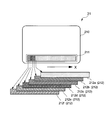
- FIG. 2 is a diagram illustrating a display example of the display screen of the liquid crystal display.
- a display frame 211 is displayed in a partial area below the display screen 210 of the liquid crystal display 21.
- Each display object 212 is displayed only within the display frame 211. For this reason, in each display object 212, the portion that protrudes from the display frame 211 is not displayed on the display screen 210.
- Each display object 212 corresponds to various processes executed by the information terminal device 1. In each process, at least one of various functions of the information terminal device 1 is executed. When a desired display object 212 is selected by user input, processing corresponding to the selected display object 212 is executed as described later.
- each display object 212 be displayed in a different color and that the user can set a favorite color. This makes it easier for the user to distinguish and visually recognize each display object 212.
- each display object 212 is desirably displayed in a color different from that of the casing (not shown) of the information terminal device 1. For example, if the color of the housing is white, each display object 212 is displayed in a color other than white. This makes it easier for the user to visually recognize each display object 212 separately from the casing of the information terminal device 1.
- the number L of display objects 212 displayed in the display frame 211 is set to 6, but the number L of display objects 212 is not limited to the example of this embodiment.
- the number L may be plural.
- the six display objects 212 displayed in an overlapping manner will be referred to as the display objects 212a to 212f ranked 1 to 6 in order from the display object 212a displayed on the uppermost (topmost) level.
- the display object 212a of rank 1 is called the highest display object.
- the input unit 22 receives a user input for selecting a desired display object 212 from the L display objects 212 by a user's touch operation. For example, when a user's finger or a touch pen touches the surface of the touch panel 20, the input unit 22 receives a user input indicated by the touch operation. By this user input, the display object 212 displayed immediately below the touched region R (see, for example, FIGS. 3, 5, and 6) is selected.
- the memory 30 is a non-volatile recording medium.
- the memory 30 stores programs and control information used by the microcomputer 50, information on the display object 212, and the like.
- the program and control information include a program and control information for the microcomputer 50 to perform an operation of selecting and executing a display object 212 to be described later, a program for the microcomputer 50 to realize various functions of the information terminal device 1, and Control information, a program for the microcomputer 50 to execute processing corresponding to each display object 212, control information, and the like are included.
- the display position, display color, display size, and corresponding processing of each display object 212 are set.
- the tilt detection sensor 40 is an operation detection unit that detects the movement of the main body of the information terminal device 1.
- a triaxial acceleration sensor etc. can be mentioned, for example.
- the tilt detection sensor 40 detects, for example, the presence / absence of tilt (tilt operation) of the apparatus main body, the tilt direction, and the tilt amount for each tilt direction.
- the tilt direction is represented, for example, on the side tilted vertically downward of the apparatus body (upper side, lower side, right side, left side, etc. of the apparatus body).
- the amount of inclination is represented by, for example, an inclination angle from a horizontal plane perpendicular to the vertical direction to a vertically downward direction.
- the tilt detection sensor 40 may detect, for example, the presence / absence of an operation in which the apparatus main body is shaken in one direction, the direction of the shake operation, and the number of movements in the shake direction.
- the vibration direction, the amplitude of the vibration direction, the number of vibrations, and the like may be detected.
- the direction in which the apparatus main body is shaken and the vibration direction are represented by, for example, a direction vertically below and a predetermined side of the apparatus main body.
- the direction of the operation of swinging the apparatus main body indicates, for example, a direction of approximately 90 ° with respect to the vertical direction and the right side of the apparatus main body.
- the vibration direction indicates, for example, approximately 90 ° with respect to the vertical direction and the left-right direction of the apparatus main body.
- the amount of movement in the direction of vibration and the amplitude of vibration indicate the amount of movement of the apparatus body in the predetermined direction of vibration and the predetermined vibration direction, respectively.
- the microcomputer 50 is a control unit that controls each component included in the information terminal device 1 using a program and control information stored in the memory 30.
- the microcomputer 50 includes a communication control unit 51, an operation analysis unit 52, an operation determination unit 53, a timer 54, and a display control unit 55.
- the communication control unit 51 controls the communication processing unit 10.
- the motion analysis unit 52 obtains, for example, the tilt direction of the apparatus main body, the tilt amount for each tilt direction, the tilt change amount, and the number of tilts based on the detection result of the tilt detection sensor 40.
- the amount of change in inclination is expressed, for example, by time differentiation of the amount of inclination.
- the motion analysis unit 52 includes a direction of an operation in which the apparatus main body is shaken in one direction, a movement amount and a change amount of the movement amount for each shake direction, the number of movements, a vibration direction of the apparatus main body, and each vibration direction. You may obtain
- the change amount of the movement amount is expressed by, for example, time differentiation of the movement amount.
- the amount of change in amplitude is expressed by, for example, time differentiation of amplitude.
- the operation determination unit 53 determines whether or not the tilt detection sensor 40 has detected a predetermined movement.
- This predetermined movement is, for example, a tilting operation that is greater than or equal to a predetermined angle threshold value in a predetermined tilting direction.
- the predetermined movement may be an operation in which the apparatus main body is shaken by a predetermined movement amount in a predetermined direction, or a vibration operation in a predetermined direction by a predetermined amplitude threshold or more.
- Timer 54 is a timer.
- the timer 54 measures an elapsed time t from when the tilt detection sensor 40 detects a predetermined movement.
- the display control unit 55 controls the touch panel 20.
- the display control unit 55 causes the liquid crystal display 21 to display a plurality of display objects 212 that are shifted and overlapped in a predetermined direction within the display frame 211.
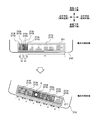
- the six display objects 212a to 212f are shifted in the horizontal direction X of the display screen 210 as shown in FIG.
- the display control unit 55 executes processing corresponding to the selected display object 212.
- the display control unit 55 displays an execution screen of an application (for example, a call function, a mail function, an Internet connection function, dictionary software, translation software, a game, a chat, a social networking service) corresponding to the selected display object 212.
- the information is displayed on the display screen 210 of the liquid crystal display 21. Therefore, the number of user input operations can be reduced, and the user can quickly select a desired process.
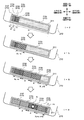
- FIG. 3 is a diagram illustrating a display example of the display object according to the first embodiment.
- X1 to X6 indicate the display widths in the horizontal direction X of the display objects 212a to 212f from the top to the bottom in the display frame 211, respectively.
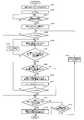
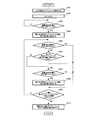
- FIG. 4 is a flowchart for explaining an operation of selecting and executing a display object in the first embodiment.
- the tilt detection sensor 40 is set to ON (step S102).
- the operation determination unit 53 determines whether or not the right side of the apparatus main body is inclined downward by a predetermined inclination amount (for example, 30 °) or more (step S103).
- step S104 the display control unit 55 sets the variables m and n to 1 (step S104).
- the variables m and n are both positive integers of 1 or more.
- the display control unit 55 determines whether or not the variable m is less than L (step S105). If the variable m is not less than L (NO in step S105), the process of step S113 described later is executed.
- the display control unit 55 applies a predetermined displacement displacement amount ⁇ X to the display position of the display object 212m of the rank m (m is a positive integer of 1 or more). Add (step S106). Therefore, in the display frame 211, the display object 212m of the rank m is displayed at a position shifted in the horizontal direction X by the shift displacement amount ⁇ X. Next, the display control unit 55 determines whether or not the display width X (m + 1) in the horizontal direction X of the display object 212 (m + 1) of the rank (m + 1) is greater than or equal to a predetermined first threshold value a (for example, 60 pixels). (Step S107).
- step S107 If the display width X (m + 1) is not equal to or greater than the first threshold value a (NO in step S107), the display control unit 55 adds 1 to the variable m (step S108). Then, the display control unit 55 returns the process to step S106 in order to shift the display object 212 of the next order. By the processing in steps S106 to S108, the amount of shift of each display object 212 from the ranking n to ranking (m + 1) with respect to the lowest display object 212f is increased.
- the variable n will be described later.
- step S107 it is determined whether or not X2 of the display object 212b with the rank 2 is greater than or equal to the first threshold value a.
- m is incremented in step S108.
- the processing returns to step S106 in order to shift the display object 212c of rank 3. Therefore, the amount of deviation of the display objects 212a and 212b from the rank 1 (highest) to the rank 2 with respect to the lowest display object 212f increases.
- step S107 it is determined whether or not the display width X4 of the display object 212d with rank 4 is equal to or greater than the first threshold value a.
- the display control unit 55 determines that the rank n (n is equal to or greater than 1). It is determined whether or not the display width Xn of the display object 212n having a positive integer is equal to or smaller than a second threshold value b (for example, 20 pixels) smaller than the first threshold value a (step S109). When the display width Xn is not equal to or smaller than the second threshold value b (NO in step S109), the display object 212n with the rank n has not reached the display limit position in the display frame 211.
- the display control unit 55 sets the display width Xn of the display object 212n with the rank n to the second threshold value b in order to display the display object 212n with the rank n with the same display width as the second threshold value b (step S110). ). Then, the display control unit 55 adds 1 to the variable n (step S111). Thereafter, the display control unit 55 determines whether or not the variable n is less than the variable m (step S112).
- step S112 the display control unit 55 returns the process to step S109 in order to determine whether or not the next rank display object 212 has reached the display limit position. .
- steps S109 to S112 among the display objects 212n to 212m with rank n to rank m, the display object 212 arriving at the display limit position in the display frame 211 is displayed with the same display width as the second threshold value b. can do.
- the display width X1 of the uppermost display object 212a is larger than the second threshold value b. Therefore, the process of step 113 described later is executed without setting the display width X1 to the second threshold value b.
- the display widths X1 and X2 of the display objects 212a and 212b of the highest rank and the ranking 2 are the same as the second threshold value b, but the display width of the display object 212c of the ranking 3 X3 is larger than the second threshold value b. Therefore, the display widths X1 and X2 are set to the second threshold value b, but the display width X3 is not set to the second threshold value b.
- the display control unit 55 determines whether any of the L display objects 212 is selected by a user input (step S113). When it is determined that none is selected (NO in step S113), the operation determination unit 53 determines whether or not the right side of the apparatus body is inclined vertically downward by a predetermined inclination amount (for example, 30 °) or more. (Step S114). If it is determined that the tilt is not greater than the predetermined tilt amount (NO in step S114), the flowchart of FIG. 4 ends. When it is determined that the vehicle is tilted by a predetermined tilt amount or more (YES in step S114), the display control unit 55 sets the variable m to the variable n (step S115). Then, the process returns to step S105.
- a predetermined inclination amount for example, 30 °
- steps S105 to S115 in the above-described flowchart may be executed at predetermined time intervals ⁇ t. In this way, the speed at which each display object 212 is shifted can be arbitrarily set according to the specifications of the information terminal device 1.
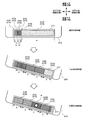
- FIG. 5 is a diagram illustrating a display example of the display object according to the second embodiment.
- FIG. 6 is a diagram illustrating another display example of the display object according to the second embodiment.
- X1 to X6 indicate the display widths in the horizontal direction X of the display objects 212a to 212f from the top to the bottom in the display frame 211, respectively.
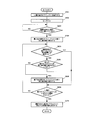
- FIG. 7 is a flowchart for explaining an operation of selecting and executing a display object in the second embodiment.
- the tilt detection sensor 40 is set to ON (step S202).
- the operation determination unit 53 determines whether or not the right side of the apparatus main body is inclined downward by a predetermined inclination amount (for example, 30 °) or more (step S203).
- the display control unit 55 displays the display objects 212 from the top to the predetermined rank in the display frame 211 with the same display width c.
- the display objects 212 are shifted to the right side of the display frame 211 so as to be displayed (step S204). For example, as in the state after the first detection in FIG. 5, the display control unit 55 displays the display objects 212a to 212d from the top to the rank 4 with the same display width c.
- all the display objects 212 may be displayed with the same display width c as in the state after the movement is detected in FIG. To what order the display objects 212 are displayed with the display width c (that is, which order is the predetermined order) is determined by the set value of the display width c.
- step S205 determines whether or not the inclination of the apparatus main body has been returned to the horizontal. If it is determined that the inclination of the apparatus main body has not been returned to the horizontal position (NO in step S205), the process of step S209 described later is executed.
- step S205 the display control unit 55 determines whether all display objects 212 in the display frame 211 are displayed with the display width c. Is determined (step S206). That is, in this process, it is determined whether or not all the display objects 212a to 212f are displayed as in the state after the movement is detected in FIG. 6, for example.
- step S206 a process of step S209 described later is executed.
- step S206 When it is determined that all the display objects 212 are not displayed with the display width c (NO in step S206), the operation determination unit 53 determines that the right side of the apparatus main body is vertically below a predetermined inclination amount (for example, 30 °) or more. It is determined again whether or not it is tilted (step S207). When it is determined that the tilt is not greater than the predetermined tilt amount (NO in step S207), a process in step S209 described later is executed.
- a predetermined inclination amount for example, 30 °
- the display control unit 55 displays the display objects 212 having the same display width c from the lowest order to the predetermined rank in the display frame 211.
- the display objects 212 are shifted to the right side of the display frame 211 so as to be displayed (step S208).
- the display control unit 55 displays the display objects 212c to 212f with the same display width c from the rank 3 to the lowest. Note that the display object 212 from which order to the lowest order is displayed with the display width c (that is, which order is the predetermined order) is determined by the set value of the display width c.
- step S209 the display control unit 55 determines whether any of the L display objects 212 has been selected by a user input. If it is determined that none has been selected (NO in step S209), the process returns to step S205.
- step S210 when it is determined that any one is selected (YES in step S209), the microcomputer 50 and the display control unit 55 execute processing corresponding to the selected display object 212 (step S210). For example, when the user touches the touch panel 20 as in the state after the second detection in FIG. 5 or the state after the movement is detected in FIG. 6, the region R immediately above the display object 212 d of rank 4 is displayed. When the touch input is made, the display object 212d of the order 4 is selected by the input unit 22. Then, the process corresponding to the selected display object 212d is executed, and the flowchart of FIG. 7 ends.
- steps S205 to S209 of the above-described flowchart may be executed at predetermined time intervals ⁇ t. In this way, the speed at which each display object 212 is shifted can be arbitrarily set according to the specifications of the information terminal device 1.
- FIG. 8 is a flowchart for explaining an operation in which a display object is selected and executed in a modification of the second embodiment. In this modification, the same reference numerals are given to the same components as those in the second embodiment. Further, the description thereof is omitted.
- step 225 is executed after step S204. Further, in this modification, the processes in steps S205 and S207 are omitted.
- step 225 the timer 54 determines whether or not a predetermined time T has elapsed since the apparatus main body was tilted to the right.
- the process of step S209 is executed.
- the process of step S206 is executed. If NO in step S206, the process in step S208 is executed.
- the present invention can be used, for example, in an information terminal device including an operation detection unit that detects the movement of the device body, such as a smartphone, a mobile phone, a tablet computer, a PDA (Personal Digital Assistants), and a slave device of these devices. it can.
- an operation detection unit that detects the movement of the device body
- a smartphone such as a smartphone, a mobile phone, a tablet computer, a PDA (Personal Digital Assistants), and a slave device of these devices. it can.
Landscapes
- Engineering & Computer Science (AREA)
- General Engineering & Computer Science (AREA)
- Theoretical Computer Science (AREA)
- Human Computer Interaction (AREA)
- Physics & Mathematics (AREA)
- General Physics & Mathematics (AREA)
- User Interface Of Digital Computer (AREA)
- Telephone Function (AREA)
Abstract
情報端末装置(1)が、表示部(21)、動作検知部(40)、動作判定部(53)、表示制御部(55)、及び入力部(22)を備える。動作検知部(40)は装置本体の動きを検知する。動作判定部(53)は、所定の動きが検知されたか否かを判定する。表示制御部(55)は、所定の動きが検知されたと判定されるとき、複数の表示オブジェクト(212)を所定方向にずらして重ねた状態で表示部(21)に表示させる。入力部(22)は、複数の表示オブジェクト(212)から所望の表示オブジェクトを選択するためのユーザ入力を受け付ける。
Description
本発明は、情報端末装置、及び装置操作方法に関する。
一般に、情報端末装置では、ユーザの入力を受け付ける入力部を備えている。この入力部は、たとえばタッチパネル、ポインティングデバイス、及びキーボードなどにより実現される。一方、携帯型の情報端末装置などでは、ユーザにより装置本体に加えられる動きを検出した結果に応じた入力を受け付ける機能を有することが知られている。
たとえば、特許文献1では、装置本体に加えられる振動及び傾斜動作などの各動きに、対応する処理内容が予め設定されている。従って、端末装置のタッチパネルがタッチされた状態で振動及び傾斜動作などの動きを検出すると、端末装置は検出された動きに応じて、画面表示及び電話の発信などの処理内容を選択する。また、特許文献2では、所定時間毎に検出される端末本体の傾き量に基づいて、傾きの変化量とその変化方向とが算出される。傾きの変化量及びその変化方向の組み合わせには、対応する入力信号が予め設定されている。従って、装置本体の傾きに応じた入力信号が装置に受け付けられる。
しかしながら、従来の情報端末装置では、所望の処理内容を入力するためには、ユーザは装置本体に複数の動きを加える必要がある。たとえば、特許文献1では、装置本体に加える動きに対応する予め設定された処理内容が、その回数、大きさ、継続時間に応じた数だけ選択される。従って、複数の処理内容を選択するためには、複数の動きを装置本体に加える必要がある。また、特許文献2では、装置本体の傾きの変化量とその方向に応じて1つの入力信号が生成される。従って、ユーザは複数の動きを装置本体に加える必要がある。このように、従来の情報端末装置では、多くの手順を要するためにユーザ入力が非常に面倒であるという問題があった。
本発明は、ユーザの入力操作の数を減らし、ユーザが所望の処理を素早く選択することができる情報端末装置、及び装置操作方法を提供することを目的とする。
上記目的を達成するために、本発明の一の態様における情報端末装置は、表示部と、装置本体の動きを検知する動作検知部と、所定の動きが検知されたか否かを判定する動作判定部と、前記所定の動きが検知されたと判定されるとき、複数の表示オブジェクトを所定方向にずらして重ねた状態で前記表示部に表示させる表示制御部と、前記複数の表示オブジェクトから所望の表示オブジェクトを選択するためのユーザ入力を受け付ける入力部と、を備えることを特徴とする。
この構成によると、動作検知部が装置本体の所定の動きを検知すると、複数の表示オブジェクトが所定方向にずらして重ねた状態で表示部に表示される。入力部には、複数の表示オブジェクトから所望の表示オブジェクトを選択するためのユーザ入力が受け付けられる。そのため、所望の表示オブジェクトに対応する所望の処理が実行される。従って、ユーザの入力操作の数を減らし、ユーザが所望の処理を素早く選択することができる。
上記構成において、前記動作検知部が前記所定の動きを検知したときからの経過時間を計時する計時部をさらに備え、前記表示制御部は、最下位の表示オブジェクトに対する最上位から所定の順位までの各表示オブジェクトの前記所定方向のずれ量、及び前記所定の順位を、前記経過時間に応じて大きくしてもよい。
また、上記構成において、前記表示部は、前記複数の表示オブジェクトを表示するための表示枠を表示し、前記表示制御部は、前記表示枠内に前記複数の表示オブジェクトを表示させ、前記表示枠内での前記所定方向の表示幅が閾値以下となる表示オブジェクトを、前記経過時間に応じてずらすことなく、前記所定方向に前記閾値と同じ表示幅で表示させてもよい。
また、上記構成において、前記表示制御部は、最上位から所定の順位までの各表示オブジェクト、又は所定の順位から最下位までの各表示オブジェクトを前記所定方向に同じ表示幅で表示させてもよい。
また、上記構成において、前記表示制御部は、前記最上位から前記最下位までの各表示オブジェクトを同じ表示幅で表示させてもよい。
また、上記構成において、前記所定の動きが、前記装置本体の傾斜動作、前記装置本体が振られる動作、及び前記装置本体の振動のうちのいずれか1つであってもよい。
また、上記構成において、前記表示部及び前記入力部を含んで構成されるタッチパネルをさらに備えてもよい。
また、上記目的を達成するために、本発明の一の態様における装置操作方法は、情報端末装置の装置本体の動きを検知するステップと、所定の動きが検知されたか否かを判定するステップと、前記所定の動きが検知されたと判定されるとき、複数の表示オブジェクトをずらして重ねた状態で表示部に表示させるステップと、前記複数の表示オブジェクトから所望の表示オブジェクトを選択するためのユーザ入力を受け付けるステップと、を備えることを特徴とする。
上記構成によれば、装置本体の所定の動きが検知されると、複数の表示オブジェクトが所定方向にずらして重ねた状態で表示部に表示される。そして、複数の表示オブジェクトから所望の表示オブジェクトを選択するためのユーザ入力が受け付けられる。そのため、所望の表示オブジェクトに対応する所望の処理が実行される。従って、ユーザの入力操作の数を減らし、ユーザが所望の処理を素早く選択することができる。
本発明によると、ユーザの入力操作の数を減らし、ユーザが所望の処理を素早く選択することができる情報端末装置、及び装置操作方法を提供することができる。
以下に、本発明の実施形態について、図面を参照して説明する。
図1は、本実施形態に係る情報端末装置の構成である。情報端末装置1は、通信処理部10と、アンテナ11と、タッチパネル20と、メモリ30と、傾き検知センサ40と、マイコン50と、を備えている。このほか、情報端末装置1は、さらに、入力キーなどの他の入力装置を備えていてもよい。なお、情報端末装置1では通信機能が必須ではない。そのため、情報端末装置1は通信処理部10及びアンテナ11を備えない構成であってもよい。
通信処理部10はアンテナ11を介して無線通信を行う。この無線通信としては、たとえば、bluetooth(登録商標)、FM通信、無線LAN、移動体通信などを用いることができる。なお、電話(通話)機能、メール機能、インターネット機能などは情報端末装置1に必須ではないが、通信処理部10が行う無線通信によりこれらの機能が実現されてもよい。
タッチパネル20は、液晶ディスプレイ21と、入力部22と、を含んで構成されている。このタッチパネル20の種類は特に限定されない。タッチパネル20の種類としては、たとえば、静電容量式、抵抗膜方式、表面弾性波方式、電磁誘導方式、マトリクス・スイッチ方式などを挙げることができる。なお、このタッチパネル20に代えて、液晶ディスプレイ21と、ユーザ入力を受け付ける入力部22である入力装置とが個別の構成部として設けられてもよい。
液晶ディスプレイ21は、複数の表示オブジェクト212が表示される表示部である。図2は、液晶ディスプレイの表示画面の表示例を示す図である。液晶ディスプレイ21の表示画面210の下側の一部領域には、表示枠211が表示される。表示枠211内には、L(=6)個の表示オブジェクト212a~212fが、表示画面210の水平方向Xにずれて重ねられた状態で表示される。なお、各表示オブジェクト212は表示枠211内においてのみ表示される。そのため、各表示オブジェクト212において、表示枠211からはみ出した部分は表示画面210には表示されない。
各表示オブジェクト212は、情報端末装置1が実行する様々な処理に対応している。各処理では、情報端末装置1が有する様々な機能のうちの少なくとも1つが実行される。ユーザ入力により所望の表示オブジェクト212が選択されると、後述するように、選択された表示オブジェクト212に対応する処理が実行される。
各表示オブジェクト212は、それぞれ異なる色で表示されること、及びユーザが好みの色を設定できることが望ましい。こうすれば、ユーザが各表示オブジェクト212を区別して視認し易くなる。
また、各表示オブジェクト212は、情報端末装置1の筐体(不図示)と異なる色で表示されることが望ましい。たとえば、筐体の色が白色であれば、各表示オブジェクト212は白以外の色で表示させる。こうすれば、ユーザが各表示オブジェクト212を情報端末装置1の筐体と区別して視認し易くなる。
なお、本実施形態では図2のように、表示枠211内に表示される表示オブジェクト212の個数L=6としているが、表示オブジェクト212の個数Lは本実施形態の例に限定されない。個数Lは複数であればよい。
また、以下では、重ねて表示される6個の表示オブジェクト212をそれぞれ、最も上側(最上位)に表示される表示オブジェクト212aから順に、順位1~順位6の表示オブジェクト212a~212fと呼ぶ。特に、順位1の表示オブジェクト212aは最上位の表示オブジェクトと呼ぶ。また、順位L(=6)の表示オブジェクト212fは、最も下側に表示されるため、最下位の表示オブジェクトと呼ぶ。
入力部22は、ユーザのタッチ操作により、L個の表示オブジェクト212から所望の表示オブジェクト212を選択するためのユーザ入力を受け付ける。たとえばユーザの指又はタッチペンなどがタッチパネル20の表面に触れると、入力部22は、そのタッチ操作が示すユーザ入力を受け付ける。このユーザ入力により、触れられた領域R(たとえば図3、図5、図6参照)の直下に表示される表示オブジェクト212が選択される。
メモリ30は不揮発性の記録媒体である。メモリ30は、マイコン50が利用するプログラム及び制御情報、表示オブジェクト212に関する情報などを格納している。このプログラム及び制御情報は、後述する表示オブジェクト212が選択及び実行される動作をマイコン50が行うためのプログラム及び制御情報、情報端末装置1が有する様々な機能をマイコン50が実現するためのプログラム及び制御情報、各表示オブジェクト212に対応する処理をマイコン50が実行するためのプログラム及び制御情報などを含んでいる。表示オブジェクト212に関する情報には、たとえば、各表示オブジェクト212の表示位置、表示色、表示サイズ、及び対応する処理などが設定されている。
傾き検知センサ40は、情報端末装置1の装置本体の動きを検知する動作検知部である。傾き検知センサ40の例としては、たとえば3軸加速度センサなどを挙げることができる。傾き検知センサ40は、たとえば、装置本体の傾き(傾斜動作)の有無、その傾き方向、及び各傾き方向毎の傾き量などを検知する。傾き方向は、たとえば、装置本体の鉛直下方に傾けられた側(装置本体の上側、下側、右側、左側など)で表される。また、傾き量は、たとえば鉛直方向とは垂直な水平面上のから鉛直下方への傾角で表される。
さらに、傾き検知センサ40は、たとえば、装置本体が一方向に振られる動作の有無、振られる動作の方向、及び振られる方向への移動量の回数などを検知してもよいし、振動の有無、その振動方向、振動方向の振幅、及び振動回数などを検知してもよい。装置本体が振られる動作の方向、及び振動方向は、たとえば鉛直下方及び装置本体の所定の側を基準とした方向で表される。具体的に例示すると、装置本体が振られる動作の方向は、たとえば、鉛直方向に対して略90°且つ装置本体の右側の方向などを示す。振動方向は、たとえば、鉛直方向に対して略90°且つ装置本体の左右方向などを示す。振られる方向への移動量及び振動の振幅は、それぞれ、所定の振られる方向及び所定の振動方向の装置本体の移動量を示す。
マイコン50は、メモリ30に格納されるプログラム及び制御情報を利用して、情報端末装置1が有する各構成部を制御する制御部である。マイコン50は、通信制御部51と、動作解析部52と、動作判定部53と、タイマ54と、表示制御部55と、を備えている。
通信制御部51は、通信処理部10を制御する。
動作解析部52は、傾き検知センサ40の検知結果に基づいて、たとえば、装置本体の傾き方向、各傾き方向毎の傾き量及び傾き変化量並び傾き回数を求める。傾き変化量は、たとえば傾き量の時間微分で表される。さらに、動作解析部52は、装置本体が一方向に振られる動作の方向、各振られる方向毎の移動量及び移動量の変化量並びに振られる動作の回数、装置本体の振動方向、各振動方向毎の振幅及び振幅の変化量並びに振幅の回数などを求めてもよい。移動量の変化量は、たとえば移動量の時間微分で表される。振幅の変化量は、たとえば振幅の時間微分で表される。
動作判定部53は、傾き検知センサ40が所定の動きを検知したか否かを判定する。この所定の動きは、たとえば、所定の傾き方向への所定の角度閾値以上の傾斜動作である。或いは、所定の動きは、装置本体が所定方向に所定の移動量以上振られる動作、又は、所定方向への所定の振幅閾値以上の振動動作であってもよい。
タイマ54は計時部である。タイマ54は、たとえば、傾き検知センサ40が所定の動きを検知したときからの経過時間tを計時する。
表示制御部55はタッチパネル20を制御している。表示制御部55は、動作判定部53により所定の動きが検知されたと判定されるとき、表示枠211内において複数の表示オブジェクト212を所定方向にずらして重ねた状態で液晶ディスプレイ21に表示させる。本実施形態では、図2のように、6個の表示オブジェクト212a~212fを表示画面210の水平方向Xにずらしている。また、表示制御部55は、入力部22が受け付けたユーザ入力により表示オブジェクト212が選択されると、選択された表示オブジェクト212に対応する処理を実行する。たとえば、表示制御部55は、選択された表示オブジェクト212に対応するアプリケーション(たとえば、通話機能、メール機能、インターネット接続機能、辞書ソフトウェア、翻訳ソフトウェア、ゲーム、チャット、ソーシャルネットワーキングサービスなど)の実行画面を液晶ディスプレイ21の表示画面210に表示する。従って、ユーザの入力操作の数を減らし、ユーザが所望の処理を素早く選択することができる。
次に、情報端末装置1における表示オブジェクト212の選択及び実行について説明する。
<第1実施形態>
<第1実施形態>
第1実施形態では、情報端末装置1の装置本体の右側が鉛直下方に所定の角度閾値以上傾けられると、表示枠211内にL個の表示オブジェクト212が表示される。また、最下位の表示オブジェクト212fに対する最上位から所定の順位までの各表示オブジェクト212の水平方向Xのずれ量、及び所定の順位が経過時間tに応じて大きくなる。図3は、第1実施形態に係る表示オブジェクトの表示例を示す図である。なお、図3において、X1~X6は、それぞれ、表示枠211内での最上位から最下位までの各表示オブジェクト212a~212fの水平方向Xの表示幅を示している。また、図4は、第1実施形態にて表示オブジェクトが選択及び実行される動作を説明するためのフローチャートである。
まず、図3でのt=0の状態のように、液晶ディスプレイ21の表示画面210の表示枠211内に、L(=6)個の表示オブジェクト212a~212fがずれて重ねられた状態で表示される(ステップS101)。次に、傾き検知センサ40がONに設定される(ステップS102)。そして、動作判定部53は、装置本体の右側が鉛直下方に所定の傾き量(たとえば30°)以上傾いているか否かを判定する(ステップS103)。
所定の傾き量以上傾いていると判定される場合(ステップS103でYES)、表示制御部55は変数m及びnを1に設定する(ステップS104)。なお、変数m及びnはともに1以上の正の整数である。次に、表示制御部55は、変数mがL未満であるか否かを判定する(ステップS105)。変数mがL未満でない場合(ステップS105でNO)、後述するステップS113の処理が実行される。
一方、変数mがL未満である場合(ステップS105でYES)、表示制御部55は、順位m(mは1以上の正の整数)の表示オブジェクト212mの表示位置に所定のずれ変位量ΔXを加える(ステップS106)。そのため、表示枠211内において、順位mの表示オブジェクト212mは水平方向Xにずれ変位量ΔXずれた位置に表示される。次に、表示制御部55は、順位(m+1)の表示オブジェクト212(m+1)の水平方向Xの表示幅X(m+1)が所定の第1閾値a(たとえば60pixel)以上であるか否かを判定する(ステップS107)。表示幅X(m+1)が第1閾値a以上でない場合(ステップS107でNO)、表示制御部55は変数mに1を加える(ステップS108)。そして、表示制御部55は、次の順位の表示オブジェクト212をずらすために、処理をステップS106に戻す。これらステップS106~S108の処理により、順位n~順位(m+1)までの各表示オブジェクト212の最下位の表示オブジェクト212fに対するずれ量が大きくなる。なお、変数nに関しては後述する。
たとえば、ステップ106においてm=1且つn=1であるとき、最上位の表示オブジェクト212aの表示位置にずれ変位量ΔXが加えられる。ステップS107では、順位2の表示オブジェクト212bのX2が第1閾値a以上であるか否かが判定される。図3でのt=t1の状態のようにその表示幅X2が第1閾値a以上である場合には、ステップS108にてmがインクリメントされる。その後、順位3の表示オブジェクト212cをずらすために、処理はステップS106に戻される。よって、順位1(最上位)~順位2までの表示オブジェクト212a及び212bの最下位の表示オブジェクト212fに対するずれ量が大きくなる。
或いは、ステップ106においてm=3且つn=1であるとき、順位3の表示オブジェクト212cの表示位置にずれ変位量ΔXが加えられる。ステップS107では、順位4の表示オブジェクト212dの表示幅X4が第1閾値a以上であるか否かが判定される。図3でのt=t2の状態のようにその表示幅X4が第1閾値a以上である場合には、ステップS108にてmがインクリメントされる。その後、順位4の表示オブジェクト212dをずらすために、処理はステップS106に戻される。よって、順位1~順位4までの表示オブジェクト212a~212dの最下位の表示オブジェクト212fに対するずれ量が大きくなる。
一方、順位(m+1)の表示オブジェクト212(m+1)の表示幅X(m+1)が第1閾値a以上である場合(ステップS107でYES)、表示制御部55は、順位n(nは1以上の正の整数)の表示オブジェクト212nの表示幅Xnが第1閾値aよりも小さい第2閾値b(たとえば20pixel)以下であるか否かを判定する(ステップS109)。表示幅Xnが第2閾値b以下でない場合(ステップS109でNO)、順位nの表示オブジェクト212nは表示枠211内の表示限界位置に行き着いていない。そのため、後述するステップS113の処理が実行される。なお、この表示限界位置は、順位nの表示オブジェクト212nを少なくとも表示幅bで表示する位置を示す。たとえば、図3でのt=t2の状態のように、変数n=1であり、最上位の表示オブジェクト212aの表示幅X1が第2閾値b以下でない場合、ステップS113の処理が実行される。
一方、表示幅Xnが第2閾値b以下である場合(ステップS109でYES)、順位nの表示オブジェクト212nは表示枠211内の表示限界位置に行き着いている。そのため、表示制御部55は、順位nの表示オブジェクト212nを第2閾値bと同じ表示幅で表示させるために、順位nの表示オブジェクト212nの表示幅Xnを第2閾値bに設定する(ステップS110)。そして、表示制御部55は変数nに1を加える(ステップS111)。その後、表示制御部55は、変数nが変数m未満であるか否かを判定する(ステップS112)。変数nが変数m未満でない場合(ステップS112でNO)、表示制御部55は、次の順位の表示オブジェクト212が表示限界位置に行き着いているか否かを判定するために、処理をステップS109に戻す。これらステップS109~S112の処理により、順位n~順位mまでの表示オブジェクト212n~212mのうち、表示枠211内の表示限界位置に行き着いている表示オブジェクト212を第2閾値bと同じ表示幅で表示することができる。
たとえば、図3でのt=t2の状態では、最上位の表示オブジェクト212aの表示幅X1は第2閾値bよりも大きい。そのため、表示幅X1が第2閾値bに設定されることなく、後述するステップ113の処理が実行される。一方、図3でのt=t3の状態では、最上位及び順位2の表示オブジェクト212a及び212bの表示幅X1及びX2は第2閾値bと同じであるが、順位3の表示オブジェクト212cの表示幅X3は第2閾値bより大きい。そのため、表示幅X1及びX2は第2閾値bに設定されるが、表示幅X3は第2閾値bに設定されない。
変数nが変数m未満である場合(ステップS112でYES)、表示制御部55は、L個の表示オブジェクト212のうちのいずれかがユーザ入力により選択されたか否かを判定する(ステップS113)。いずれも選択されていないと判定される場合(ステップS113でNO)、動作判定部53は、装置本体の右側が鉛直下方に所定の傾き量(たとえば30°)以上傾いているか否かを判定する(ステップS114)。所定の傾き量以上傾いていないと判定される場合(ステップS114でNO)、図4のフローチャートが終了する。所定の傾き量以上傾いていると判定される場合(ステップS114でYES)、表示制御部55は、変数mを変数nに設定する(ステップS115)。そして、処理はステップS105に戻される。
一方、いずれかが選択されていると判定される場合(ステップS113でYES)、マイコン50及び表示制御部55は、選択された表示オブジェクト212に対応する処理を実行する(ステップS116)。たとえば、図3でのt=t3の状態のように、ユーザがタッチパネル20に触れることにより、順位4の表示オブジェクト212dの直上の領域Rがタッチ入力されると、入力部22により順位4の表示オブジェクト212dが選択される。そして、選択された表示オブジェクト212dに対応する処理が実行され、図4のフローチャートが終了する。
なお、上述のフローチャートのステップS105~S115は、所定の時間間隔Δt毎に実行されてもよい。こうすれば、情報端末装置1の仕様に応じて、各表示オブジェクト212がずれる速度を任意に設定することができる。
<第2実施形態>
<第2実施形態>
第2実施形態では、情報端末装置1の装置本体の右側が鉛直下方に所定の角度閾値以上傾けられると、表示枠211内にL個の表示オブジェクト212が表示される。また、最上位から所定の順位までの各表示オブジェクト212、又は所定の順位から最下位までの各表示オブジェクト212、或いは、全ての表示オブジェクト212は水平方向Xに同じ表示幅で表示される。図5は、第2実施形態に係る表示オブジェクトの表示例を示す図である。図6は、第2実施形態に係る表示オブジェクトの他の表示例を示す図である。なお、図5及び図6において、X1~X6は、それぞれ、表示枠211内での最上位から最下位までの各表示オブジェクト212a~212fの水平方向Xの表示幅を示している。また、図7は、第2実施形態にて表示オブジェクトが選択及び実行される動作を説明するためのフローチャートである。
まず、図5又は図6での動きの検知前の状態のように、液晶ディスプレイ21の表示画面210の表示枠211内に、L(=6)個の表示オブジェクト212a~212fがずらして重ねられた状態で表示される(ステップS201)。次に、傾き検知センサ40がONに設定される(ステップS202)。そして、動作判定部53は、装置本体の右側が鉛直下方に所定の傾き量(たとえば30°)以上傾いているか否かを判定する(ステップS203)。
所定の傾き量以上傾いていると判定される場合(ステップS203でYES)、表示制御部55は、表示枠211内において最上位から順に所定の順位までの各表示オブジェクト212が同じ表示幅cで表示されるように、それらの表示オブジェクト212を表示枠211の右側にずらして表示する(ステップS204)。たとえば、図5での1回目の検知後の状態のように、表示制御部55は、最上位から順位4までの表示オブジェクト212a~212dを同じ表示幅cで表示させる。なお、表示幅cの設定値次第では、図6での動きの検知後の状態のように、全ての表示オブジェクト212が同じ表示幅cで表示される場合もある。どの順位までの表示オブジェクト212を表示幅cで表示させるか(すなわち、どの順位が所定の順位となるか)は、表示幅cの設定値により決まる。
次に、動作判定部53は、装置本体の傾きが水平に戻されたか否かを判定する(ステップS205)。装置本体の傾きが水平に戻されていないと判定される場合(ステップS205でNO)、後述するステップS209の処理が実行される。
装置本体の傾きが水平に戻されていると判定される場合(ステップS205でYES)、表示制御部55は、表示枠211内の全ての表示オブジェクト212が表示幅cで表示されているか否かを判定する(ステップS206)。すなわち、この処理は、全ての表示オブジェクト212a~212fが、たとえば図6での動きの検知後の状態のように表示されているか否かを判定している。全ての表示オブジェクト212が表示幅cで表示されていると判定される場合(ステップS206でYES)、後述するステップS209の処理が実行される。
全ての表示オブジェクト212が表示幅cで表示されていないと判定される場合(ステップS206でNO)、動作判定部53は、装置本体の右側が鉛直下方に所定の傾き量(たとえば30°)以上傾いているか否かを再び判定する(ステップS207)。所定の傾き量以上傾いていないと判定される場合(ステップS207でNO)、後述するステップS209の処理が実行される。
所定の傾き量以上傾いていると判定される場合(ステップS207でYES)、表示制御部55は、表示枠211内において最下位から順に所定の順位までの各表示オブジェクト212が同じ表示幅cで表示されるように、それらの表示オブジェクト212を表示枠211の右側にずらして表示する(ステップS208)。たとえば、図5での2回目の検知後の状態のように、表示制御部55は、順位3から最下位までの表示オブジェクト212c~212fを同じ表示幅cで表示させる。なお、どの順位から最下位までの表示オブジェクト212を表示幅cで表示させるか(すなわち、どの順位が所定の順位となるか)は、表示幅cの設定値により決まる。
次に、表示制御部55は、L個の表示オブジェクト212のうちのいずれかがユーザ入力により選択されたか否かを判定する(ステップS209)。いずれも選択されていないと判定される場合(ステップS209でNO)、処理はステップS205に戻される。
一方、いずれかが選択されていると判定される場合(ステップS209でYES)、マイコン50及び表示制御部55は、選択された表示オブジェクト212に対応する処理を実行する(ステップS210)。たとえば、図5での2回目の検知後の状態、又は図6での動きの検知後の状態のように、ユーザがタッチパネル20に触れることにより、順位4の表示オブジェクト212dの直上の領域Rがタッチ入力されると、入力部22により順位4の表示オブジェクト212dが選択される。そして、選択された表示オブジェクト212dに対応する処理が実行され、図7のフローチャートが終了する。
なお、上述のフローチャートのステップS205~S209は、所定の時間間隔Δt毎に実行されてもよい。こうすれば、情報端末装置1の仕様に応じて、各表示オブジェクト212がずれる速度を任意に設定することができる。
<第2実施形態の変形例>
<第2実施形態の変形例>
図7のフローチャートにおいて、ステップS205及びS207を省略する代わりに、ステップS203でYESとなってから所定時間Tが経過したとき、最下位から順に所定の順位までの各表示オブジェクト212を同じ表示幅cで表示してもよい。図8は、第2実施形態の変形例にて表示オブジェクトが選択及び実行される動作を説明するためのフローチャートである。なお、この変形例では、第2実施形態と同様の構成には、同じ符号を付す。また、その説明は省略する。
第2実施形態の変形例では、ステップS204の後にステップ225の処理が実行される。また、この変形例では、ステップS205及びS207の処理は省略される。
ステップ225では、タイマ54により、装置本体が右側に傾けられてから所定時間Tが過ぎたか否かが判定される。所定時間Tが過ぎていないと判断される場合(ステップS225でNO)、ステップS209の処理が実行される。一方、所定時間Tが過ぎていると判断される場合(ステップS225でYES)、ステップS206の処理が実行される。また、ステップS206でNOの場合、ステップS208の処理が実行される。
以上、本発明について実施形態をもとに説明した。この実施形態は例示であり、その各構成要素及び各処理の組み合わせに色々な変形例が可能であり、本発明の範囲にあることは当業者に理解されるところである。
本発明は、たとえば、スマートフォン、携帯電話機、タブレット型コンピュータ、PDA(Personal Digital Assistants)、及びこれら装置の子機など、装置本体の動きを検知する動作検知部を備える情報端末装置に利用することができる。
1 情報端末装置
10 通信処理部
11 アンテナ
20 タッチパネル
21 液晶ディスプレイ
210 表示画面
211 表示枠
212 表示オブジェクト
22 入力部
30 メモリ
40 傾き検知センサ
50 マイコン
51 通信制御部
52 動作解析部
53 動作判定部
54 タイマ
55 表示制御部
10 通信処理部
11 アンテナ
20 タッチパネル
21 液晶ディスプレイ
210 表示画面
211 表示枠
212 表示オブジェクト
22 入力部
30 メモリ
40 傾き検知センサ
50 マイコン
51 通信制御部
52 動作解析部
53 動作判定部
54 タイマ
55 表示制御部
Claims (8)
- 表示部と、
装置本体の動きを検知する動作検知部と、
所定の動きが検知されたか否かを判定する動作判定部と、
前記所定の動きが検知されたと判定されるとき、複数の表示オブジェクトを所定方向にずらして重ねた状態で前記表示部に表示させる表示制御部と、
前記複数の表示オブジェクトから所望の表示オブジェクトを選択するためのユーザ入力を受け付ける入力部と、
を備えることを特徴とする情報端末装置。 - 前記動作検知部が前記所定の動きを検知したときからの経過時間を計時する計時部をさらに備え、
前記表示制御部は、最下位の表示オブジェクトに対する最上位から所定の順位までの各表示オブジェクトの前記所定方向のずれ量、及び前記所定の順位を、前記経過時間に応じて大きくすることを特徴とする請求項1に記載の情報端末装置。 - 前記表示部は、前記複数の表示オブジェクトを表示するための表示枠を表示し、
前記表示制御部は、
前記表示枠内に前記複数の表示オブジェクトを表示させ、
前記表示枠内での前記所定方向の表示幅が閾値以下となる表示オブジェクトを、前記経過時間に応じてずらすことなく、前記所定方向に前記閾値と同じ表示幅で表示させることを特徴とする請求項2に記載の情報端末装置。 - 前記表示制御部は、最上位から所定の順位までの各表示オブジェクト、又は所定の順位から最下位までの各表示オブジェクトを前記所定方向に同じ表示幅で表示させることを特徴とする請求項1に記載の情報端末装置。
- 前記表示制御部は、前記最上位から前記最下位までの各表示オブジェクトを同じ表示幅で表示させることを特徴とする請求項4に記載の情報端末装置。
- 前記所定の動きが、前記装置本体の傾斜動作、前記装置本体が振られる動作、及び前記装置本体の振動のうちのいずれか1つであることを特徴とする請求項1~請求項5のいずれかに記載の情報端末装置。
- 前記表示部及び前記入力部を含んで構成されるタッチパネルをさらに備えることを特徴とする請求項1~請求項6のいずれかに記載の情報端末装置。
- 情報端末装置の装置本体の動きを検知するステップと、
所定の動きが検知されたか否かを判定するステップと、
前記所定の動きが検知されたと判定されるとき、複数の表示オブジェクトをずらして重ねた状態で表示部に表示させるステップと、
前記複数の表示オブジェクトから所望の表示オブジェクトを選択するためのユーザ入力を受け付けるステップと、
を備えることを特徴とする装置操作方法。
Applications Claiming Priority (2)
| Application Number | Priority Date | Filing Date | Title |
|---|---|---|---|
| JP2012125911A JP2013250850A (ja) | 2012-06-01 | 2012-06-01 | 情報端末装置、及び装置操作方法 |
| JP2012-125911 | 2012-06-01 |
Publications (1)
| Publication Number | Publication Date |
|---|---|
| WO2013180263A1 true WO2013180263A1 (ja) | 2013-12-05 |
Family
ID=49673446
Family Applications (1)
| Application Number | Title | Priority Date | Filing Date |
|---|---|---|---|
| PCT/JP2013/065177 Ceased WO2013180263A1 (ja) | 2012-06-01 | 2013-05-31 | 情報端末装置、及び装置操作方法 |
Country Status (2)
| Country | Link |
|---|---|
| JP (1) | JP2013250850A (ja) |
| WO (1) | WO2013180263A1 (ja) |
Families Citing this family (1)
| Publication number | Priority date | Publication date | Assignee | Title |
|---|---|---|---|---|
| JP6264198B2 (ja) * | 2014-05-30 | 2018-01-24 | 京セラドキュメントソリューションズ株式会社 | 携帯端末、選択処理方法 |
Citations (3)
| Publication number | Priority date | Publication date | Assignee | Title |
|---|---|---|---|---|
| JP2006053605A (ja) * | 2004-08-09 | 2006-02-23 | Sharp Corp | 情報表示装置及び電子書籍装置 |
| JP2010231653A (ja) * | 2009-03-27 | 2010-10-14 | Softbank Mobile Corp | 表示装置、表示方法、およびプログラム |
| JP2012243012A (ja) * | 2011-05-18 | 2012-12-10 | Sony Corp | 表示制御装置、表示制御方法、プログラム、および記録媒体 |
-
2012
- 2012-06-01 JP JP2012125911A patent/JP2013250850A/ja active Pending
-
2013
- 2013-05-31 WO PCT/JP2013/065177 patent/WO2013180263A1/ja not_active Ceased
Patent Citations (3)
| Publication number | Priority date | Publication date | Assignee | Title |
|---|---|---|---|---|
| JP2006053605A (ja) * | 2004-08-09 | 2006-02-23 | Sharp Corp | 情報表示装置及び電子書籍装置 |
| JP2010231653A (ja) * | 2009-03-27 | 2010-10-14 | Softbank Mobile Corp | 表示装置、表示方法、およびプログラム |
| JP2012243012A (ja) * | 2011-05-18 | 2012-12-10 | Sony Corp | 表示制御装置、表示制御方法、プログラム、および記録媒体 |
Also Published As
| Publication number | Publication date |
|---|---|
| JP2013250850A (ja) | 2013-12-12 |
Similar Documents
| Publication | Publication Date | Title |
|---|---|---|
| EP2502137B1 (en) | Methods, devices, and computer program products for providing multi-region touch scrolling | |
| JP5304577B2 (ja) | 携帯情報端末および表示制御方法 | |
| CN100578435C (zh) | 触摸面板显示装置以及便携设备 | |
| TWI529599B (zh) | 行動式通信終端機,以及選單與項目之選擇方法 | |
| TWI571790B (zh) | 依感測信號更改圖示座標值的方法與電子裝置 | |
| US20150084885A1 (en) | Portable electronic device with display modes for one-handed operation | |
| US20090002326A1 (en) | Method, apparatus and computer program product for facilitating data entry via a touchscreen | |
| JP5855996B2 (ja) | 端末装置 | |
| WO2009131089A1 (ja) | 携帯情報端末、コンピュータ読取可能なプログラムおよび記録媒体 | |
| HK1222731A1 (zh) | 平移和選擇姿勢檢測 | |
| US11048401B2 (en) | Device, computer program and method for gesture based scrolling | |
| JP2009536385A (ja) | スクロール付き多機能キー | |
| JP6019736B2 (ja) | 表示装置及びプログラム | |
| US20110209090A1 (en) | Display device | |
| US20140310653A1 (en) | Displaying history information for application | |
| US20100321316A1 (en) | Information processing apparatus, method for controlling display, and computer-readable recording medium | |
| JP6455489B2 (ja) | 表示装置及び表示制御プログラム | |
| WO2015035571A1 (en) | Apparatus for enabling displaced effective input and associated methods | |
| US9092198B2 (en) | Electronic device, operation control method, and storage medium storing operation control program | |
| JP2013246614A (ja) | タッチ検出機能を有する電子機器、プログラムおよびタッチ検出機能を有する電子機器の制御方法 | |
| KR20140141305A (ko) | 화면분할이 가능한 이동통신단말기 및 그 제어방법 | |
| JP5972692B2 (ja) | ユーザインタフェース装置、ユーザインタフェース方法及びプログラム | |
| WO2013180263A1 (ja) | 情報端末装置、及び装置操作方法 | |
| WO2014132882A1 (ja) | 端末装置、情報表示方法及び記録媒体 | |
| EP2681646B1 (en) | Electronic apparatus, display method, and program |
Legal Events
| Date | Code | Title | Description |
|---|---|---|---|
| 121 | Ep: the epo has been informed by wipo that ep was designated in this application |
Ref document number: 13797611 Country of ref document: EP Kind code of ref document: A1 |
|
| NENP | Non-entry into the national phase |
Ref country code: DE |
|
| 122 | Ep: pct application non-entry in european phase |
Ref document number: 13797611 Country of ref document: EP Kind code of ref document: A1 |