WO2013011895A1 - 再生装置、再生方法、並びにプログラム - Google Patents
再生装置、再生方法、並びにプログラム Download PDFInfo
- Publication number
- WO2013011895A1 WO2013011895A1 PCT/JP2012/067714 JP2012067714W WO2013011895A1 WO 2013011895 A1 WO2013011895 A1 WO 2013011895A1 JP 2012067714 W JP2012067714 W JP 2012067714W WO 2013011895 A1 WO2013011895 A1 WO 2013011895A1
- Authority
- WO
- WIPO (PCT)
- Prior art keywords
- browsing unit
- playback
- unit
- browsing
- stream
- Prior art date
- Legal status (The legal status is an assumption and is not a legal conclusion. Google has not performed a legal analysis and makes no representation as to the accuracy of the status listed.)
- Ceased
Links
Images



Classifications
-
- H—ELECTRICITY
- H04—ELECTRIC COMMUNICATION TECHNIQUE
- H04N—PICTORIAL COMMUNICATION, e.g. TELEVISION
- H04N5/00—Details of television systems
- H04N5/76—Television signal recording
- H04N5/91—Television signal processing therefor
-
- H—ELECTRICITY
- H04—ELECTRIC COMMUNICATION TECHNIQUE
- H04N—PICTORIAL COMMUNICATION, e.g. TELEVISION
- H04N5/00—Details of television systems
- H04N5/76—Television signal recording
- H04N5/78—Television signal recording using magnetic recording
- H04N5/782—Television signal recording using magnetic recording on tape
- H04N5/783—Adaptations for reproducing at a rate different from the recording rate
-
- G—PHYSICS
- G11—INFORMATION STORAGE
- G11B—INFORMATION STORAGE BASED ON RELATIVE MOVEMENT BETWEEN RECORD CARRIER AND TRANSDUCER
- G11B27/00—Editing; Indexing; Addressing; Timing or synchronising; Monitoring; Measuring tape travel
- G11B27/005—Reproducing at a different information rate from the information rate of recording
- G11B27/007—Reproducing at a different information rate from the information rate of recording reproducing continuously a part of the information, i.e. repeating
-
- G—PHYSICS
- G11—INFORMATION STORAGE
- G11B—INFORMATION STORAGE BASED ON RELATIVE MOVEMENT BETWEEN RECORD CARRIER AND TRANSDUCER
- G11B27/00—Editing; Indexing; Addressing; Timing or synchronising; Monitoring; Measuring tape travel
- G11B27/10—Indexing; Addressing; Timing or synchronising; Measuring tape travel
-
- G—PHYSICS
- G11—INFORMATION STORAGE
- G11B—INFORMATION STORAGE BASED ON RELATIVE MOVEMENT BETWEEN RECORD CARRIER AND TRANSDUCER
- G11B27/00—Editing; Indexing; Addressing; Timing or synchronising; Monitoring; Measuring tape travel
- G11B27/10—Indexing; Addressing; Timing or synchronising; Measuring tape travel
- G11B27/19—Indexing; Addressing; Timing or synchronising; Measuring tape travel by using information detectable on the record carrier
- G11B27/28—Indexing; Addressing; Timing or synchronising; Measuring tape travel by using information detectable on the record carrier by using information signals recorded by the same method as the main recording
- G11B27/32—Indexing; Addressing; Timing or synchronising; Measuring tape travel by using information detectable on the record carrier by using information signals recorded by the same method as the main recording on separate auxiliary tracks of the same or an auxiliary record carrier
- G11B27/327—Table of contents
- G11B27/329—Table of contents on a disc [VTOC]
-
- G—PHYSICS
- G11—INFORMATION STORAGE
- G11B—INFORMATION STORAGE BASED ON RELATIVE MOVEMENT BETWEEN RECORD CARRIER AND TRANSDUCER
- G11B27/00—Editing; Indexing; Addressing; Timing or synchronising; Monitoring; Measuring tape travel
- G11B27/10—Indexing; Addressing; Timing or synchronising; Measuring tape travel
- G11B27/34—Indicating arrangements
-
- H—ELECTRICITY
- H04—ELECTRIC COMMUNICATION TECHNIQUE
- H04N—PICTORIAL COMMUNICATION, e.g. TELEVISION
- H04N5/00—Details of television systems
- H04N5/76—Television signal recording
-
- H—ELECTRICITY
- H04—ELECTRIC COMMUNICATION TECHNIQUE
- H04N—PICTORIAL COMMUNICATION, e.g. TELEVISION
- H04N9/00—Details of colour television systems
- H04N9/79—Processing of colour television signals in connection with recording
- H04N9/80—Transformation of the television signal for recording, e.g. modulation, frequency changing; Inverse transformation for playback
- H04N9/804—Transformation of the television signal for recording, e.g. modulation, frequency changing; Inverse transformation for playback involving pulse code modulation of the colour picture signal components
- H04N9/8042—Transformation of the television signal for recording, e.g. modulation, frequency changing; Inverse transformation for playback involving pulse code modulation of the colour picture signal components involving data reduction
-
- G—PHYSICS
- G11—INFORMATION STORAGE
- G11B—INFORMATION STORAGE BASED ON RELATIVE MOVEMENT BETWEEN RECORD CARRIER AND TRANSDUCER
- G11B2220/00—Record carriers by type
- G11B2220/20—Disc-shaped record carriers
- G11B2220/25—Disc-shaped record carriers characterised in that the disc is based on a specific recording technology
- G11B2220/2537—Optical discs
- G11B2220/2541—Blu-ray discs; Blue laser DVR discs
-
- H—ELECTRICITY
- H04—ELECTRIC COMMUNICATION TECHNIQUE
- H04N—PICTORIAL COMMUNICATION, e.g. TELEVISION
- H04N5/00—Details of television systems
- H04N5/76—Television signal recording
- H04N5/84—Television signal recording using optical recording
- H04N5/85—Television signal recording using optical recording on discs or drums
-
- H—ELECTRICITY
- H04—ELECTRIC COMMUNICATION TECHNIQUE
- H04N—PICTORIAL COMMUNICATION, e.g. TELEVISION
- H04N9/00—Details of colour television systems
- H04N9/79—Processing of colour television signals in connection with recording
- H04N9/80—Transformation of the television signal for recording, e.g. modulation, frequency changing; Inverse transformation for playback
- H04N9/82—Transformation of the television signal for recording, e.g. modulation, frequency changing; Inverse transformation for playback the individual colour picture signal components being recorded simultaneously only
- H04N9/8205—Transformation of the television signal for recording, e.g. modulation, frequency changing; Inverse transformation for playback the individual colour picture signal components being recorded simultaneously only involving the multiplexing of an additional signal and the colour video signal
Definitions
- This technology relates to a playback device, a playback method, and a program.
- the present invention relates to a playback device, a playback method, and a program for continuously playing back a predetermined video.
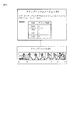
- reproduction as shown in FIG. 1 may be performed.
- playback may be performed such as jumping from video A to video B, jumping from video B to video C, jumping from video C to video D, and jumping from video D to video E.
- a movie recorded on a DVD or the like has a plurality of chapters (Chapter), and a jump may be performed from a predetermined chapter to another chapter.
- video A has a corresponding audio A
- video B has a corresponding audio B
- video C has a corresponding audio C
- video D has a corresponding audio D
- the video E has a corresponding audio E.
- a slide show that plays back continuously by sequentially switching recorded still images.
- this slide show is executed, there is also a function of reproducing with a sound.
- the sound is used as BGM (Background music).
- BGM Background music
- Such a slide show can be applied to video.
- a Blu-ray (trademark) (hereinafter referred to as Blu-ray) disc standard is a browsable slide show.
- This browsable slide show is a standard that allows audio and video to be played independently and the video to be switched while sound is played, as in the continuous playback of still images described above. According to this browsable slide show, it is possible to view video with BGM.
- the playback shown in FIG. 2 jumps from video A to video B, jumps from video B to video C, jumps from video C to video D, and jumps from video D to video as in FIG. This is the case.
- the video and the audio are reproduced independently, and as shown in FIG. 2, the audio A that is not related to the video A to E is reproduced as the audio.
- the video can be switched by the user's operation. For example, when switching from the video A to the video B is instructed, the playback position of the audio A continues to be played without jumping. Therefore, the sound A is reproduced without interruption. (For example, see Patent Document 1)
- a moving image can be reproduced in a loop. For example, when video A is repeatedly played, when video A ends, the start time of video A is specified, jumping to the start time, and playback of video A is started again. Loop playback is performed. Such loop reproduction is used, for example, on a menu screen of a movie when a movie is recorded on a DVD.
- the browsing unit is a unit for switching images.
- one photograph may constitute one browsing unit.
- the Blu-ray standard stipulates that when playback is completed to the end of the browsing unit, it is possible to set whether to pause the video or advance to the next browsing unit, but it is possible to loop within one browsing unit. There is no provision for playback. In other words, there is no provision for returning to the beginning of the same browsing unit and starting playback again when the playback is completed to the end of the browsing unit.
- the present technology has been made in view of such a situation, and allows an image and sound to be reproduced independently and an image to be reproduced in a loop.
- a playback device includes a playback unit that plays back a first stream and a second stream asynchronously, and the first stream includes a first browsing unit and a second browsing unit.
- the second browsing unit is a browsing unit including a part of the first browsing unit, and the playback unit plays back the second browsing unit after the first browsing unit, and the second browsing unit. After the playback of the first browsing unit, transition is made to playback from the beginning of the first browsing unit.
- the first stream may be video and the second stream may be sound.
- the first browsing unit may be a browsing unit that is a target of loop playback
- the second browsing unit may be a browsing unit for loop playback.
- the play item still mode for playing back the first browsing unit is set to a mode for instructing the transition to the next play item, and the playback unit receives the second from the first browsing unit.
- the reproduction can be changed to the first browsing unit.
- the play item still mode for playing back the first browsing unit is set to a mode for instructing pause, and the playback unit is in a paused state after the playback of the first browsing unit is finished.
- the playback transitions to the second browsing unit, and when it has been detected that the playback has transitioned to the second browsing unit, the playback transitions to the first browsing unit. can do.
- the first browsing unit is one browsing unit in a plurality of browsing units to be subjected to loop playback
- the second browsing unit is used for loop playback commonly used for the plurality of browsing units. It can be a browsing unit.
- a playback method is a playback method of a playback device including a playback unit that plays back a predetermined stream, wherein the first stream includes a first browsing unit and a second browsing unit,
- the second browsing unit is a browsing unit including a part of the first browsing unit, and the reproduction unit asynchronously reproduces the first stream and the second stream, and after the first browsing unit, Playing back the second browsing unit, and after playing back the second browsing unit, transitioning to playback from the beginning of the first browsing unit.
- a program according to an aspect of the present technology is provided in a computer that controls a playback device including a playback unit that plays back a predetermined stream.
- the first stream includes a first browsing unit and a second browsing unit.
- the second browsing unit is a browsing unit including a part of the first browsing unit, and the reproduction unit asynchronously reproduces the first stream and the second stream, and after the first browsing unit,
- the first stream includes a first browsing unit and a second browsing unit
- the second browsing unit is the first browsing unit.
- images and sound can be reproduced independently and images can be reproduced in a loop.
- FIG. 3 is a diagram illustrating a configuration of an embodiment of a playback device to which the present technology is applied.
- the playback device 10 shown in FIG. 3 can be applied to a Blu-ray disc player or a Blu-ray disc recorder.
- the description will be continued assuming that the playback apparatus 10 plays back a Blu-ray disc.
- 3 includes an operation unit 21, a control unit 22, a memory 23, a ROM 24, a video stream buffer 25, a video decoder 26, an audio stream buffer 27, an audio decoder 28, a medium driving unit 29, and image output.
- the unit 30 is configured.
- the operation unit 21 is a part that receives instructions from the user, and includes a plurality of buttons, a reception unit (not shown) that receives a signal from a remote controller, and the like.
- the control unit 22 controls each unit in the playback device 10.
- the memory 23 stores stream structure information read from a predetermined recording medium (for example, a Blu-ray disc) driven by the medium driving unit 29, a control program, and the like.
- the ROM 24 stores a program for the control unit 22 to perform control.
- the video stream buffer 25 temporarily stores the video stream read from the recording medium driven by the medium driving unit 29 and supplies the video stream to the video decoder 26.
- the video decoder 26 decodes the video stream supplied from the video stream buffer 25 by a predetermined method and supplies the decoded video stream to the image output unit 30.
- the audio stream is read from the recording medium driven by the medium driving unit 20, temporarily stored in the audio stream buffer 27, decoded by the audio decoder 28, and supplied to the image output unit 30.
- the image output unit 30 supplies video and audio to an external device (not shown) such as a television receiver.
- the medium driving unit 29 drives a predetermined recording medium and reads a video stream, an audio stream, stream structure information, a control program, and the like from the recording medium.
- sounds other than voices, such as a person, and sounds, such as a music are also contained.
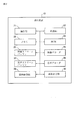
- the playlist # 0 includes play item # 0, play item # 1, play item # 2, play item # 3, sub-pass # 0, and sub-pass # 1.
- the playlist # 0 is a collection of set sections that the user desires to reproduce in the clip.
- a clip file is a moving image or audio stream, for example, an MPEG2 or AVC moving image, or linear PCM or Dolby Digital (trademark) audio multiplexed in the MPEG2-TS format.
- Clip information is information about clip files such as format.
- Clip information # 0 contains information about clip file # 0
- clip information # 1 contains information about clip file # 1
- clip information # 2 contains information about clip file # 2. Information is written.
- clip files are divided for video and audio as described above.
- a video clip is referenced from the play item of the playlist.
- the video is switched by selecting a play item to be played back, and an audio clip is referred to from the sub play item in the sub path of the playlist. ing.
- the audio is switched by selecting an audio stream to be reproduced.
- the structure is such that three images of a still image, a loop moving image, and a still image can be switched, and the sound can be switched in the last still image.
- the structure of such playlist # 0 is shown in FIG.
- each play item of play items # 0 to # 3 information such as start time, end time, reference clip, still mode, sound stream, and sub path is described.
- the start time indicates the reproduction start time of the clip in the play item
- the end time indicates the reproduction end time of the clip in the play item.
- the reference clip represents information on a clip that is referenced by the play item.
- the still mode represents whether the playback is transitioned to the next play item or paused when the playback of the play item is finished. When the still mode is “still”, the pause is performed. When “none” is selected, the playback is shifted to the next play item.
- the start time of play item # 0 is “AAA”, the end time is “BBB”, and the reference clip is “0”. Therefore, the clip information # 0 is referred to and the reproduction of the clip file # 0 is performed from the time “AAA” to the time “BBB”. Since the still mode is “still”, playback is temporarily stopped at time “BBB”. Since the sound stream of play item # 0 is sound stream # 0 and the sub path is “0”, sub path # 0 is referred to and the sound stream is reproduced.
- the start time of play item # 1 is “BBB”
- the end time is “CCC”
- the reference clip is “0”. Therefore, the clip information # 0 is referred to, and the reproduction of the clip file # 0 is performed from the time “BBB” to the time “CCC”. Since the still mode is “none”, the playback is transitioned to the next play item # 2 at the time “CCC”. Since the sound stream of play item # 0 is sound stream # 0 and the sub path is “0”, sub path # 0 is referred to and the sound stream is reproduced.
- the start time of play item # 2 is “CCC”
- the end time is “DDD”
- the reference clip is “0”. Therefore, the clip information # 0 is referred to and the reproduction of the clip file # 0 is performed from the time “CCC” to the time “DDD”. Since the still mode is “still”, reproduction is temporarily stopped at the time “DDD”. Since the sound stream of play item # 0 is sound stream # 0 and the sub path is “0”, sub path # 0 is referred to and the sound stream is reproduced. *
- the start time of play item # 3 is “DDD”, the end time is “EEE”, and the reference clip is “0”. Therefore, the clip information # 0 is referred to and the reproduction of the clip file # 0 is performed from the time “DDD” to the time “EEE”. Since the still mode is “still”, playback is temporarily stopped at the time “EEE”. Also, since the sound stream of play item # 0 is sound stream # 0 and the sub path is “0”, sub path # 0 is referred to and the sound stream is reproduced or is sound stream # 1, and the sub path is Since it is “1”, the sub-path # 1 is referred to and the sound stream is reproduced. Play item # 3 is an item from which sound stream # 0 or sound stream # 1 can be selected.
- the play item # 2 is a play item provided for loop reproduction of the play item # 1.
- the still mode is set to “none”, and therefore the transition is made to the reproduction of the play item # 2.
- the play item # 1 is returned to play. In this way, play item # 1 is repeatedly reproduced.
- the sub path # 0 included in the playlist # 0 describes that the sub play item is “sub play item # 0”. Further, it is described that the start time of the clip referred to in the sub path # 0 is “FFF” and the end time is “III”. Further, it is described that the reference clip referred to in the sub path # 0 is “1”.
- the sub play item is “sub play item # 1”. Further, it is described that the start time of the clip referred to in the sub-path # 1 is “JJJ” and the end time is “MMM”. Further, it is described that the reference clip referred to in the sub path # 1 is “2”.
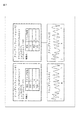
- Fig. 6 shows the structure of clip information # 0.
- information of “main path of browserable slide show” is described as an application type (application type).
- information “XXX” is described as a video format.
- Information such as MPEG and AVC is described in the information “XXX”.
- Clip information # 0 also includes feature point information.
- the clip file # 0 shows an image when playback based on the feature points described in the clip information # 0 is performed.
- the clip file # 0 includes four browsing units corresponding to play items # 0 to # 3.
- Clip positions “a” to “b” are browsing units corresponding to play item # 0
- clip positions “b” to “c” are browsing units corresponding to play item # 1
- clip position “c” "D” is a browsing unit corresponding to play item # 2
- clip positions "d” to “e” are browsing units corresponding to play item # 3.
- the reproduction of these browsing units will be described later with reference to FIG. 8, and clip information # 1 and clip information # 2 will be described first.
- FIG. 7 is a diagram showing the configuration of clip information # 1 and clip information # 2.
- Clip information # 1 and clip information # 2 basically have the same configuration as clip file # 0.
- information “sub-path of browsable slide show” is described as an application type (application type).
- Information “YYY” is described as the audio format. In the information “YYY”, for example, information such as linear PCM is described.
- Clip information # 1 also includes feature point information.
- clip file # 1 the sound when reproduction based on the feature points described in clip information # 1 is performed is illustrated as a pseudo waveform.
- information “sub-path of browsable slide show” is described as the application type (application type).
- information “YYY” as an audio format and feature point information are also described.
- clip file # 2 the sound when reproduction based on the feature points described in clip information # 2 is performed is illustrated as a pseudo waveform.
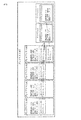
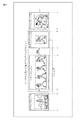
- the configuration of the video stream will be described with reference to FIG.
- the video stream shown in FIG. 8 is the clip file # 0 of FIG.
- the browsing unit # 0 is a browsing unit managed by the play item # 0 (FIG. 5), and is reproduced in the section ab.
- the browsing unit # 1 is a browsing unit managed by the play item # 1 (FIG. 5), and is reproduced in the section bc.
- Browsing unit # 2 is a browsing unit managed by play item # 2 (FIG. 5), and is reproduced in section cd.
- the browsing unit # 3 is a browsing unit managed by the play item # 3 (FIG. 5), and is reproduced in the section de.
- the still mode of play item # 1 is set to “none”. Therefore, when playback of browsing unit # 1 ends at time point c, playback is transitioned to browsing unit # 2.
- the browsing unit # 2 is reproduced from the time point c to the time point d.
- the processing described later is executed, so that the playback is transitioned to the head (the time point b) of the browsing unit # 1, and the browsing unit # 1 is played back again.
- the loop playback of the browsing unit # 1 and the browsing unit # 2 is realized by repeating the playback of the browsing unit # 1 and the browsing unit # 2.
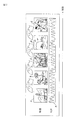
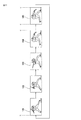
- Browsing unit # 2 is a copy of the last frame of browsing unit # 1. It may be a copy of multiple frames.
- browsing unit # 2 is played after browsing unit # 1, the last frame is displayed twice, but when viewed from the user side, it is played as one moving image.
- a plurality of frames located at the end of browsing unit # 1 may be cut out, and the plurality of cut out frames may be used as browsing unit # 2.
- the browsing unit # 1 to the browsing unit # 2 are continuously played back, they are played back as one moving image.
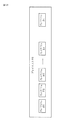
- browsing unit # 1 When viewed from the user side, it looks as if one moving image composed of frames 101 to 105 is repeatedly played. However, actually, it is composed of two browsing units, browsing unit # 1 and browsing unit # 2.
- the browsing unit # 2 including the last one frame copy of the browsing unit # 1 is provided, and the play item # for managing the browsing unit # 2 is provided. By providing 2, it is possible to perform loop playback of browsing unit # 1.
- a video stream is composed of browsing unit # 1 and browsing unit # 2.
- the browsing unit # 2 is a browsing unit including a part of the browsing unit # 1 (for example, the last frame). Also, browsing unit # 2 is played after playback of browsing unit # 1, and loop playback of browsing unit # 1 is performed by transitioning to playback from the top of browsing unit # 1 after playback of browsing unit # 2. Is realized.
- the stream related to the video composed of the browsing unit # 1 and the browsing unit # 2 is reproduced asynchronously with the sound stream. Therefore, even if the stream related to the video is switched, the sound stream can be continuously reproduced without being switched, and the video can be switched without the sound being interrupted.
- browsing unit # 1 is a browsing unit to be subjected to loop playback
- a browsing unit for loop playback for loop playback of browsing unit # 1 As a result, browsing unit # 2 is prepared.
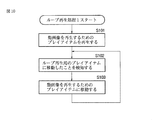
- FIG. 10 For the processing that is executed when there is such a play item # 1, play item # 2, browsing unit # 1, and browsing unit # 2 and when loop playback of the browsing unit # 1 is executed.
- the processing of the flowchart shown in FIG. 10 is described as a program of BD-J (Blu-ray Disc (Java (registered trademark)) and is driven by a medium drive unit 29 (FIG. 3), for example, a Blu-ray disc To be recorded. Then, the disk is driven by the medium drive unit 29, the program is read out and stored in the memory 23, and the control unit 22 starts by executing processing based on the stored program.
- BD-J Blu-ray Disc
- FIG. 3 medium drive unit 29
- the control unit 22 starts by executing processing based on the stored program.
- step S101 a play item for reproducing a moving image is reproduced.
- playback of play item # 1 (FIG. 5) is started, playback from the top of browsing unit # 1 is started.
- the start time of play item # 1 is “BBB”, and the clip position at time “BBB” is read as “b” from the feature point information of clip information # 0. And then. Playback starts from the clip position “b” of clip file # 0.
- sub-path # 0 is referred to for the sound stream. Since the reference clip described in the sub path # 0 is “1”, the clip information # 1 is referred to and the clip file # 1 is reproduced. In this way, video and audio are provided to the user by playing separate clip files independently.
- step S102 the standby state is maintained until moving to a play item for loop playback. That is, in this case, the reproduction of play item # 1 is continued until it moves to play item # 2.
- the still mode of play item # 1 is set to “none”, the end time is “CCC”, and the clip position at that time “CCC” is “c”.
- the reproduction is performed up to the position “c” of the clip file # 0, it is moved to the play item # 2.
- the process proceeds to step S103.
- the BD-J program is configured so that such detection can be performed.
- step S103 it is moved to a play item for reproducing a moving image.
- the play item for reproducing the moving image is play item # 1
- the play item is moved from play item # 2 to play item # 1.
- reproduction is started from the clip position “b” of the clip file # 0. That is, playback is started again from the beginning of play item # 1.
- step S102 While playback based on play item # 1 is being performed, the process of step S102 is performed, and when the movement to play item # 2 is detected, the process of step S103 is performed.
- step S102 and step S103 By repeating the processing of step S102 and step S103, the reproduction of play item # 1 is repeated, and the reproduction of the moving image reproduced based on play item # 1 is repeated.
- the browsing unit # 1 to the browsing unit # 2 are set.
- the playback transition to the browsing unit # 1 realizes the loop playback of the browsing unit # 1.
- FIG. 11 shows play item # 1 and play item # 2. The contents similar to those of the play item # 1 shown in FIG. 5 are described except that the still mode of the play item # 1 is described as “still”. Further, the play item # 2 shown in FIG. 11 has the same contents as the play item # 2 shown in FIG.
- FIG. 12 a process based on the process of the flowchart shown in FIG. 12 is the same as the processing of the flowchart shown in FIG. 10, and is described as a BD-J program and is driven by the medium driving unit 29 (FIG. 3), for example, a Blu-ray disc To be recorded.
- step S131 a play item for reproducing a moving image is reproduced.
- play item # 1 shown in FIG. 11 is reproduced.
- the processing in step S131 is performed in the same manner as the processing in step S101 of the flowchart shown in FIG.
- step S132 the process waits until playback of the play item for playing back the moving image is completed.
- the reproduction process of play item # 1 is maintained until the reproduction of play item # 1 is completed.
- the still mode of play item # 1 is set to “still”, the end time is “CCC”, and the clip position at that time “CCC” is “c”. It is.
- step S133 the play item is moved to a play item for loop reproduction. In this case, since the play item for loop reproduction is play item # 2, it is moved to play item # 2.
- step S134 When it is detected that the play item has been moved to loop playback, the process proceeds to step S134.
- the BD-J program is configured so that such detection can be performed.
- step S134 it is moved to a play item for reproducing a moving image.
- the play item for reproducing the moving image is play item # 1
- the play item is moved from play item # 2 to play item # 1.
- reproduction is started from the clip position “b” of the clip file # 0. That is, playback is started again from the beginning of play item # 1.
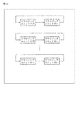
- FIG. 13 is a diagram showing a configuration in a playlist when there are a plurality of play items to be subjected to loop reproduction and there is one play item for loop reproduction.
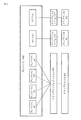
- Play item # 0 shown in FIG. 13 includes play item # 11, play item # 12, play item # 13,..., Play item #m, and play item #n.
- Play items # 11 to #m are play items of moving images that are targets of loop reproduction.
- the play item #n is a play item for loop reproduction, for example, a play item for reproducing a black still image.
- browsing unit # 11 is a browsing unit managed by play item # 11
- browsing unit # 12 is a browsing unit managed by play item # 12
- Browsing unit #m Is a browsing unit managed by play item #m.
- browsing unit # 11 when browsing unit # 11 is a target of loop playback, a moving image in browsing unit # 11 is played back, and when the playback ends, transition is made to playback of browsing unit #n. Since the browsing unit #n is a black still image, a black screen is temporarily provided to the user. Since the browsing unit #n is reproduced and the reproduction is returned to the head of the browsing unit # 11, the moving image of the browsing unit # 11 is provided to the user again.
- browsing unit # 12 is the target of loop playback
- a moving image in browsing unit # 12 is played back, and when the playback ends, transition is made to playback of browsing unit #n.
- the browsing unit #n is a black still image
- a black screen is temporarily provided to the user. Since the browsing unit #n is reproduced and the reproduction is returned to the head of the browsing unit # 12, the moving image of the browsing unit # 12 is provided to the user again.
- the browsing unit #m is a target of loop playback
- a moving image in the browsing unit #m is played back, and when the playback ends, the transition is made to playback of the browsing unit #n.
- the browsing unit #n is a black still image
- a black screen is temporarily provided to the user. Since the browsing unit #n is reproduced and the reproduction is returned to the head of the browsing unit #m, the moving image of the browsing unit #m is provided to the user again.
- the browsing units # 11 to #m are a plurality of browsing units to be subjected to loop playback, and when one of the browsing units is a target for loop playback, the browsing units #n are a plurality of browsing units #n to #m.
- the browsing unit for loop reproduction is used in common with other browsing units.
- playback is performed such that playback transitions from a browsing unit that is loop playback to browsing unit #n, and jumps from browsing unit #n to the beginning of the original browsing unit.
- one browsing unit for loop reproduction can be shared by a plurality of browsing units. Such sharing is effective when the number of play items that can be included in the playlist # 0 (FIG. 13) is limited, for example.
- the number of play items increases, which exceeds the limit value of the number of play items. It may happen that it cannot be included in one playlist # 0. However, since the number of play items for loop reproduction can be reduced by sharing the play items for loop reproduction, more play items for moving images to be subjected to loop reproduction are included in the playlist # 0. It becomes possible.
- the moving image and the sound are reproduced independently, the moving image can be reproduced repeatedly and the sound can be continuously reproduced without interruption.
- a movie is recorded on a recording medium
- BGM audio
- BGM audio
- a moving image of a product can be repeatedly reproduced while sounding BGM, and the moving image of the product can be switched according to a user operation. Moreover, since the BGM continues to flow as it is, it is possible to prevent the user from losing interest in the product due to the interruption of the BGM.
- the series of processes described above can be executed by hardware or can be executed by software.
- a program constituting the software is installed in the computer.
- the computer includes, for example, a general-purpose personal computer capable of executing various functions by installing various programs by installing a computer incorporated in dedicated hardware.
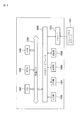
- FIG. 15 is a block diagram showing an example of the hardware configuration of a computer that executes the above-described series of processing by a program.
- a CPU Central Processing Unit
- ROM Read Only Memory
- RAM Random Access Memory
- An input / output interface 1005 is further connected to the bus 1004.
- An input unit 1006, an output unit 1007, a storage unit 1008, a communication unit 1009, and a drive 1010 are connected to the input / output interface 1005.
- the input unit 1006 includes a keyboard, a mouse, a microphone, and the like.
- the output unit 1007 includes a display, a speaker, and the like.
- the storage unit 1008 includes a hard disk, a nonvolatile memory, and the like.
- the communication unit 1009 includes a network interface.
- the drive 1010 drives a removable medium 1011 such as a magnetic disk, an optical disk, a magneto-optical disk, or a semiconductor memory.
- the CPU 1001 loads the program stored in the storage unit 1008 into the RAM 1003 via the input / output interface 1005 and the bus 1004 and executes the program, for example. Is performed.
- the program executed by the computer (CPU 1001) can be provided by being recorded on the removable medium 1011 as a package medium, for example.
- the program can be provided via a wired or wireless transmission medium such as a local area network, the Internet, or digital satellite broadcasting.
- the program can be installed in the storage unit 1008 via the input / output interface 1005 by attaching the removable medium 1011 to the drive 1010. Further, the program can be received by the communication unit 1009 via a wired or wireless transmission medium and installed in the storage unit 1008. In addition, the program can be installed in advance in the ROM 1002 or the storage unit 1008.
- the program executed by the computer may be a program that is processed in time series in the order described in this specification, or in parallel or at a necessary timing such as when a call is made. It may be a program for processing.
- system represents the entire apparatus composed of a plurality of apparatuses.
- this technology can also take the following structures.
- a playback unit for asynchronously playing back the first stream and the second stream includes a first browsing unit and a second browsing unit, The second browsing unit is a browsing unit including a part of the first browsing unit;
- the playback unit A playback device that plays back the second browsing unit after the first browsing unit, and transitions to playback from the beginning of the first browsing unit after playback of the second browsing unit.
- the first browsing unit is a browsing unit that is a target of loop playback, The playback device according to (1) or (2), wherein the second browsing unit is a browsing unit for loop playback.
- the still mode of the play item for playing the first browsing unit is set to a mode for instructing transition to the next play item, The playback unit transitions to playback to the first browsing unit when detecting that playback has transitioned from the first browsing unit to the second browsing unit.
- Any of (1) to (3) A reproducing apparatus according to claim 1.
- the still mode of the play item for playing the first browsing unit is set to a mode for instructing a pause, When the reproduction unit detects that the reproduction of the first browsing unit has been completed and is in a paused state, the reproduction unit transitions the reproduction to the second browsing unit and reproduces the reproduction to the second browsing unit.
- the playback device according to any one of (1) to (3), wherein when the transition is detected, the playback transitions to the first browsing unit.
- the first browsing unit is one browsing unit among a plurality of browsing units to be subjected to loop reproduction
- the playback apparatus according to any one of (1) to (5), wherein the second browsing unit is a browsing unit for loop playback that is used in common by the plurality of browsing units.
- a playback method of a playback device including a playback unit for playing back a predetermined stream
- the first stream is composed of a first browsing unit and a second browsing unit
- the second browsing unit is a browsing unit including a part of the first browsing unit
- the playback unit Playing the first stream and the second stream asynchronously;
- a playback method comprising the steps of: playing back the second browsing unit after the first browsing unit; and transitioning to playback from the beginning of the first browsing unit after playing the second browsing unit.
- a computer that controls a playback device including a playback unit that plays back a predetermined stream;
- the first stream is composed of a first browsing unit and a second browsing unit,
- the second browsing unit is a browsing unit including a part of the first browsing unit;
- the playback unit Playing the first stream and the second stream asynchronously;
Landscapes
- Engineering & Computer Science (AREA)
- Multimedia (AREA)
- Signal Processing (AREA)
- Television Signal Processing For Recording (AREA)
- Signal Processing For Digital Recording And Reproducing (AREA)
Priority Applications (4)
| Application Number | Priority Date | Filing Date | Title |
|---|---|---|---|
| CN201280034317.6A CN103650048A (zh) | 2011-07-19 | 2012-07-11 | 回放装置、回放方法及程序 |
| US14/232,019 US20140161419A1 (en) | 2011-07-19 | 2012-07-11 | Playback apparatus, playback method, and program |
| BR112014000659A BR112014000659A2 (pt) | 2011-07-19 | 2012-07-11 | aparelho de reprodução, método de reprodução de um aparelho de reprodução e, programa legível por computador |
| RU2014100876/07A RU2014100876A (ru) | 2011-07-19 | 2012-07-11 | Устройство воспроизведения, способ воспроизведения и программа |
Applications Claiming Priority (2)
| Application Number | Priority Date | Filing Date | Title |
|---|---|---|---|
| JP2011-157851 | 2011-07-19 | ||
| JP2011157851A JP2013025834A (ja) | 2011-07-19 | 2011-07-19 | 再生装置、再生方法、並びにプログラム |
Publications (1)
| Publication Number | Publication Date |
|---|---|
| WO2013011895A1 true WO2013011895A1 (ja) | 2013-01-24 |
Family
ID=47558073
Family Applications (1)
| Application Number | Title | Priority Date | Filing Date |
|---|---|---|---|
| PCT/JP2012/067714 Ceased WO2013011895A1 (ja) | 2011-07-19 | 2012-07-11 | 再生装置、再生方法、並びにプログラム |
Country Status (6)
| Country | Link |
|---|---|
| US (1) | US20140161419A1 (enExample) |
| JP (1) | JP2013025834A (enExample) |
| CN (1) | CN103650048A (enExample) |
| BR (1) | BR112014000659A2 (enExample) |
| RU (1) | RU2014100876A (enExample) |
| WO (1) | WO2013011895A1 (enExample) |
Cited By (1)
| Publication number | Priority date | Publication date | Assignee | Title |
|---|---|---|---|---|
| WO2015124269A1 (en) * | 2014-02-24 | 2015-08-27 | Ctrlmovie Ag | Device and method for playing an interactive audiovisual movie |
Citations (4)
| Publication number | Priority date | Publication date | Assignee | Title |
|---|---|---|---|---|
| JP2004336566A (ja) * | 2002-12-18 | 2004-11-25 | Sony Corp | 情報処理装置、情報処理方法及びプログラム、並びに記録媒体 |
| WO2004114657A1 (ja) * | 2003-06-17 | 2004-12-29 | Pioneer Corporation | 情報記録媒体、情報記録装置及び方法、情報再生装置及び方法、情報記録再生装置及び方法、情報記録プログラム、情報再生プログラム、情報記録再生プログラム、並びに制御信号を含むデータ構造 |
| JP2005317172A (ja) * | 2004-03-29 | 2005-11-10 | Sony Corp | データ処理方法、データ処理装置、および情報記録媒体、並びにコンピュータ・プログラム |
| WO2006004122A1 (ja) * | 2004-07-06 | 2006-01-12 | Matsushita Electric Industrial Co., Ltd. | 光ディスク、再生装置、プログラム、再生方法 |
Family Cites Families (5)
| Publication number | Priority date | Publication date | Assignee | Title |
|---|---|---|---|---|
| US20030014496A1 (en) * | 2001-06-27 | 2003-01-16 | Spencer Donald J. | Closed-loop delivery system |
| US20100110867A1 (en) * | 2007-06-11 | 2010-05-06 | Yoshitaka Nakamura | Disc playback apparatus |
| KR20100055533A (ko) * | 2007-11-09 | 2010-05-26 | 미쓰비시덴키 가부시키가이샤 | 영상 정보 기록 방법 및 영상 정보 재생 장치 |
| JP5216865B2 (ja) * | 2008-10-24 | 2013-06-19 | パナソニック株式会社 | Bd再生システム、bd再生装置、表示装置及びコンピュータプログラム |
| JP4679649B2 (ja) * | 2009-05-29 | 2011-04-27 | 株式会社東芝 | コンテンツ再生装置及びコンテンツ再生方法 |
-
2011
- 2011-07-19 JP JP2011157851A patent/JP2013025834A/ja active Pending
-
2012
- 2012-07-11 RU RU2014100876/07A patent/RU2014100876A/ru not_active Application Discontinuation
- 2012-07-11 BR BR112014000659A patent/BR112014000659A2/pt not_active IP Right Cessation
- 2012-07-11 CN CN201280034317.6A patent/CN103650048A/zh active Pending
- 2012-07-11 US US14/232,019 patent/US20140161419A1/en not_active Abandoned
- 2012-07-11 WO PCT/JP2012/067714 patent/WO2013011895A1/ja not_active Ceased
Patent Citations (4)
| Publication number | Priority date | Publication date | Assignee | Title |
|---|---|---|---|---|
| JP2004336566A (ja) * | 2002-12-18 | 2004-11-25 | Sony Corp | 情報処理装置、情報処理方法及びプログラム、並びに記録媒体 |
| WO2004114657A1 (ja) * | 2003-06-17 | 2004-12-29 | Pioneer Corporation | 情報記録媒体、情報記録装置及び方法、情報再生装置及び方法、情報記録再生装置及び方法、情報記録プログラム、情報再生プログラム、情報記録再生プログラム、並びに制御信号を含むデータ構造 |
| JP2005317172A (ja) * | 2004-03-29 | 2005-11-10 | Sony Corp | データ処理方法、データ処理装置、および情報記録媒体、並びにコンピュータ・プログラム |
| WO2006004122A1 (ja) * | 2004-07-06 | 2006-01-12 | Matsushita Electric Industrial Co., Ltd. | 光ディスク、再生装置、プログラム、再生方法 |
Cited By (3)
| Publication number | Priority date | Publication date | Assignee | Title |
|---|---|---|---|---|
| WO2015124269A1 (en) * | 2014-02-24 | 2015-08-27 | Ctrlmovie Ag | Device and method for playing an interactive audiovisual movie |
| US9852772B2 (en) | 2014-02-24 | 2017-12-26 | Ctrlmovie Ag | Device and method for playing an interactive audiovisual movie |
| US10319411B2 (en) | 2014-02-24 | 2019-06-11 | Ctrlmovie Ag | Device and method for playing an interactive audiovisual movie |
Also Published As
| Publication number | Publication date |
|---|---|
| JP2013025834A (ja) | 2013-02-04 |
| US20140161419A1 (en) | 2014-06-12 |
| RU2014100876A (ru) | 2015-07-20 |
| BR112014000659A2 (pt) | 2017-02-14 |
| CN103650048A (zh) | 2014-03-19 |
Similar Documents
| Publication | Publication Date | Title |
|---|---|---|
| TW407433B (en) | Data storage medium, and apparatus and method for reproducing the data from the same | |
| JP3717585B2 (ja) | 情報記録媒体及びその情報記録装置 | |
| JP2004215281A5 (enExample) | ||
| WO2013011895A1 (ja) | 再生装置、再生方法、並びにプログラム | |
| JP4235780B2 (ja) | 信号再生方法および信号再生装置 | |
| JP2006049988A (ja) | デジタルデータ記録再生装置 | |
| CN103310815B (zh) | 再现装置和再现装置的控制方法 | |
| JP2005303920A (ja) | 映像記録再生装置及びその方法 | |
| JP3499857B2 (ja) | 情報記録装置及び情報記録方法 | |
| JP2005108339A (ja) | 情報記録再生装置、情報記録再生方法及び情報記録再生用プログラム並びに情報記録媒体 | |
| KR100724008B1 (ko) | 오디오 고속 재생 장치 및 오디오 고속 재생 방법 | |
| JP2008300999A (ja) | 映像再生装置、映像再生方法 | |
| JP2010086641A (ja) | コンテンツ制御プログラムおよび可搬型記録媒体 | |
| JP4280679B2 (ja) | 再生装置及びその制御方法 | |
| JP2006012300A (ja) | ディスク再生装置 | |
| JP2005516489A5 (enExample) | ||
| JP4333653B2 (ja) | 再生方法及び再生装置 | |
| JP4696722B2 (ja) | 再生装置 | |
| JP2011029837A (ja) | 記録再生装置、記録再生制御方法及び編集システム | |
| JP2005050521A (ja) | 情報記録媒体及びその情報記録装置 | |
| JP2006004567A (ja) | Dvdオーディオ再生装置及びオーディオ再生装置 | |
| JP2003101959A (ja) | 映像再生装置 | |
| JP2011514610A (ja) | 再生方法及び装置 | |
| JP2010141544A (ja) | 記録再生装置、記録再生方法、およびプログラム | |
| JP2004334964A (ja) | 記録媒体、再生方法、再生装置、記録方法および記録装置 |
Legal Events
| Date | Code | Title | Description |
|---|---|---|---|
| 121 | Ep: the epo has been informed by wipo that ep was designated in this application |
Ref document number: 12814814 Country of ref document: EP Kind code of ref document: A1 |
|
| ENP | Entry into the national phase |
Ref document number: 2014100876 Country of ref document: RU Kind code of ref document: A |
|
| WWE | Wipo information: entry into national phase |
Ref document number: 14232019 Country of ref document: US |
|
| NENP | Non-entry into the national phase |
Ref country code: DE |
|
| REG | Reference to national code |
Ref country code: BR Ref legal event code: B01A Ref document number: 112014000659 Country of ref document: BR |
|
| 122 | Ep: pct application non-entry in european phase |
Ref document number: 12814814 Country of ref document: EP Kind code of ref document: A1 |
|
| ENP | Entry into the national phase |
Ref document number: 112014000659 Country of ref document: BR Kind code of ref document: A2 Effective date: 20140110 |