WO2012153374A1 - 情報処理装置,表示装置,キーサイズ変更プログラム,及びキーサイズ変更方法 - Google Patents
情報処理装置,表示装置,キーサイズ変更プログラム,及びキーサイズ変更方法 Download PDFInfo
- Publication number
- WO2012153374A1 WO2012153374A1 PCT/JP2011/060576 JP2011060576W WO2012153374A1 WO 2012153374 A1 WO2012153374 A1 WO 2012153374A1 JP 2011060576 W JP2011060576 W JP 2011060576W WO 2012153374 A1 WO2012153374 A1 WO 2012153374A1
- Authority
- WO
- WIPO (PCT)
- Prior art keywords
- key
- input
- size
- correction
- input key
- Prior art date
- Legal status (The legal status is an assumption and is not a legal conclusion. Google has not performed a legal analysis and makes no representation as to the accuracy of the status listed.)
- Ceased
Links
Images





Classifications
-
- G—PHYSICS
- G06—COMPUTING OR CALCULATING; COUNTING
- G06F—ELECTRIC DIGITAL DATA PROCESSING
- G06F3/00—Input arrangements for transferring data to be processed into a form capable of being handled by the computer; Output arrangements for transferring data from processing unit to output unit, e.g. interface arrangements
- G06F3/01—Input arrangements or combined input and output arrangements for interaction between user and computer
- G06F3/048—Interaction techniques based on graphical user interfaces [GUI]
- G06F3/0487—Interaction techniques based on graphical user interfaces [GUI] using specific features provided by the input device, e.g. functions controlled by the rotation of a mouse with dual sensing arrangements, or of the nature of the input device, e.g. tap gestures based on pressure sensed by a digitiser
- G06F3/0488—Interaction techniques based on graphical user interfaces [GUI] using specific features provided by the input device, e.g. functions controlled by the rotation of a mouse with dual sensing arrangements, or of the nature of the input device, e.g. tap gestures based on pressure sensed by a digitiser using a touch-screen or digitiser, e.g. input of commands through traced gestures
- G06F3/04886—Interaction techniques based on graphical user interfaces [GUI] using specific features provided by the input device, e.g. functions controlled by the rotation of a mouse with dual sensing arrangements, or of the nature of the input device, e.g. tap gestures based on pressure sensed by a digitiser using a touch-screen or digitiser, e.g. input of commands through traced gestures by partitioning the display area of the touch-screen or the surface of the digitising tablet into independently controllable areas, e.g. virtual keyboards or menus
Definitions
- This case relates to an information processing device, a display device, a key size change program, and a key size change method.
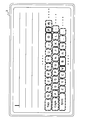
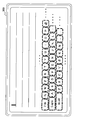
- FIG. 20 is a diagram illustrating a software keyboard displayed on the touch panel display device 300.
- an image (software keyboard) simulating a keyboard is displayed on a display device 300 that functions as a touch panel.
- the user touches and selects a key such as a character displayed on the display device 300, and inputs a desired character or the like to the mobile terminal or the information processing apparatus.
- the area for identifying the touch key is changed based on the preceding touch input, and the identification regarding the subsequent touch input is performed by the changed identification area.
- the touch panel of the display device has no irregularities, making it difficult to recognize the home position, and having no keystroke feeling when entering keys. That is, there is a high frequency of erroneous input of characters different from the characters intended by the user.
- one of the purposes of the present case is to reduce the occurrence of erroneous input in the software keyboard.
- the present invention is not limited to the above-described object, and other effects of the present invention can be achieved by the functions and effects derived from the respective configurations shown in the embodiments for carrying out the invention which will be described later. It can be positioned as one of
- the information processing apparatus of the present case includes a display unit that displays a plurality of keys, a recognition unit that recognizes a key selected from the plurality of keys displayed by the display unit as an input key, and an input by the recognition unit Based on the recognition result of the key, a correction detection unit that detects an erroneously input key that is erroneously input, and a correction input key that is input by correcting the erroneously input key, and the correction input key and the erroneous input key, A change processing unit that changes the key size on the display unit.
- the display device of the present case includes a display unit that displays a plurality of keys, a recognition unit that recognizes a key selected from the plurality of keys displayed by the display unit as an input key, and the recognition unit Based on the recognition result of the input key, a correction detection unit that detects an erroneously input key that is erroneously input and a correction input key that is input by correcting the erroneously input key, and the correction input key and the erroneous input key And a change processing unit for changing the key size on the display unit.
- the key size change program of the present case uses, as an input key, a key selected from the plurality of keys displayed by the display unit on a computer as an information processing apparatus including a display unit that displays a plurality of keys. Recognizing and detecting an erroneously input key erroneously input and a correction input key input by correcting the erroneous input key based on the recognition result of the input key, and detecting the detected corrected input key and the erroneous input A process of changing the key size of each key on the display unit is executed.
- the key size changing method of the present case recognizes a key selected from a plurality of keys displayed by the display unit as an input key, and based on the recognition result of the input key, an erroneously input key that is erroneously input And a correction input key input by correcting the erroneous input key, and the key sizes of the detected correction input key and the erroneous input key on the display unit are respectively changed.
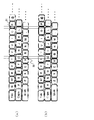
- (A) And (b) is a figure which shows an example of the software keyboard displayed on a display / input part by the key size change process by the information processing apparatus of 1st Embodiment. It is a flowchart explaining an example of the key size change process by the information processing apparatus of 1st Embodiment. It is a figure which shows an example of the software keyboard displayed on the display / input part of 1st Embodiment. It is a figure which shows the function structural example of the information processing apparatus which concerns on 2nd-4th embodiment. It is a figure which shows the example of a fluctuation range of the key size of the key displayed on the display / input part of 2nd Embodiment.
- (A) And (b) is a figure which shows the example of a setting of the change suppression frequency used by the key size change part of the modification of 3rd Embodiment.
- (A)-(c) is a figure which shows an example of the software keyboard displayed on a display / input part by the key size change process at the time of applying the information processing apparatus of 4th Embodiment to 1st Embodiment.
- (A)-(c) is a figure which shows an example of the software keyboard displayed on a display / input part by the key size change process at the time of applying the information processing apparatus of 4th Embodiment to 2nd Embodiment. .
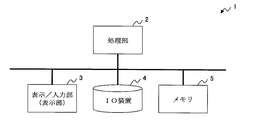
- FIG. 1 is a diagram illustrating a hardware configuration example of an information processing device 1 as a first embodiment.
- the information processing apparatus 1 is a PC (Personal Computer), a portable terminal, or the like that employs a touch panel type input method. As illustrated in FIG. 1, the information processing apparatus 1 according to the first embodiment includes a processing unit 2, a display / input unit 3, an IO (Input Output) device 4, and a memory 5 as a hardware configuration.
- the processing unit 2 is a processing device that performs various controls and operations, and implements various functions by executing programs stored in an IO device 4 or a ROM (Read Only Memory) (not shown). Examples of the processing unit 2 include processors such as a CPU (Central Processing Unit) and an MPU (Micro Processing Unit).
- the display / input unit (display unit) 3 displays a plurality of keys constituting the software keyboard, input characters, and the like on the screen under the control of the processing unit 2.
- Examples of the display / input unit (display unit) 3 include an LCD (Liquid Crystal Display) including a touch panel. That is, the display / input unit 3 functions as a display unit that displays a plurality of keys on the screen, and processes a key selected by the user from among the plurality of keys displayed on the screen as an input key. It functions as an input unit (input interface) that notifies the unit 2. In the processing unit 2, the operation of the program is controlled based on the information input from the display / input unit 3.
- the display / input unit 3 may perform display processing on the screen by control from a not-shown GPU (Graphics Processing Unit) or the like.
- the IO device 4 is various storage devices such as a magnetic disk device such as an HDD (Hard Disk Drive) and a semiconductor drive device such as an SSD (Solid State Drive), and is hardware that stores various data, programs, and the like. .
- the IO device 4 is connected to the processing unit 2 and outputs stored data, programs, and the like under the control of the processing unit 2.
- the memory 5 is a storage area for temporarily storing various data and programs, and the data and programs are temporarily stored and expanded when the processing unit 2 executes the programs.
- a volatile memory such as a RAM (Random Access Memory) can be cited.
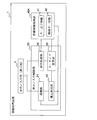
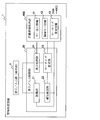
- FIG. 2 is a diagram illustrating a functional configuration example of the information processing apparatus 1 according to the first embodiment
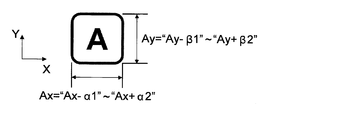
- FIG. 3 is a definition example of key sizes of keys displayed on the display / input unit 3 according to the first embodiment.
- FIGS. 4 and 5 are diagrams showing examples of the key display information 41 and the adjacent key information 42 used by the information processing apparatus 1 of the first embodiment, respectively.
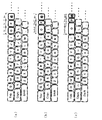
- FIGS. 6 (a) and 6 (b) are diagrams showing information processing. 6 is a diagram illustrating an example of a software keyboard displayed on the display / input unit 3 by a key size change process by the device 1.
- FIG. 2 the information processing apparatus 1 according to the first embodiment includes a display / input control unit 20 and a definition information holding unit 40A.
- the display / input control unit 20 displays a plurality of keys constituting the software keyboard on the display / input unit 3, recognizes the key selected in the display / input unit 3, and determines a predetermined key based on the recognition result.
- the key size on the display / input unit 3 is changed.
- the definition information holding unit 40A holds various definition information used by the display / input control unit 20, and includes key display information 41 and adjacent key information 42 as shown in FIG.
- the key display information 41 is definition information relating to a plurality of keys used when the display / input control unit 20 displays a plurality of keys on the display / input unit 3.
- the key display information 41 includes key size information 41a indicating the key size of each of the plurality of keys, key coordinate information (position information) 41b indicating the display coordinates (display position) in the display / input unit 3 of each of the plurality of keys, At least one of the above.
- the key size information 41 a indicates the key size determined by the sizes in the directions of the X axis and the Y axis on the display / input unit 3. These are set for each of a plurality of keys constituting the software keyboard.
- the key coordinate information 41b indicates display coordinates at which a key is displayed on the display / input unit 3 by values in the X-axis direction and the Y-axis direction. It is set for each key.
- the display coordinates in the key coordinate information 41b may be those in which the center coordinates of each key are set, or the coordinates serving as the origin are defined on the screen of the display / input unit 3, and the origin is used as a reference.
- the relative coordinates may be set for each key. For example, when the center coordinates of each key are set in the key coordinate information 41b, the display / input control unit 20 collectively selects a plurality of keys constituting the software keyboard based on the key size information 41a and the key coordinate information 41b. Can be displayed.
- the display coordinates may be set at two diagonal coordinates of each key.
- the display / input control unit 20 displays / inputs a plurality of keys based only on the key coordinate information 41b. It can be displayed on part 3.
- the display / input control unit 20 performs display control of a plurality of keys on the display / input unit 3 using both the key size information 41a and the key coordinate information 41b.
- the display control of the plurality of keys on the display / input unit 3 by the display / input control unit 20 can be realized by various known methods based on the key display information 41, and thus detailed description thereof is omitted.
- the unit of the key size and display coordinates may be a size (length) actually displayed on the display / input unit 3 such as millimeter (mm) / inch (inch), for example, and may be a number of pixels (dots). There may be. In the following description, the unit of the key size and display coordinates is the number of pixels.
- the adjacent key information 42 will be described later.
- a change in key size by the display / input control unit 20 according to the first embodiment will be described with reference to FIGS. 6 (a) and 6 (b).
- the display / input control unit 20 according to the first embodiment detects an erroneous input key erroneously input by the user and a correction input key input by correcting the erroneous input, and these correction input key and erroneous input are detected.
- the key size on the key display / input unit 3 is changed.
- the display / input control unit 20 detects a correction input key and an erroneous input key, so that the tendency of erroneous input that occurs when a user types a key (touch touch selection), that is, when the user selects a key. Can be detected. Then, the display / input control unit 20 changes the key sizes of the correction input key and the erroneous input key, respectively, so that, for example, an erroneous input is likely to occur following the erroneous input that occurs when the user selects the key. By changing the key size of the key, the occurrence frequency of erroneous input can be reduced.
- the display / input control unit 20 has a plurality of keys displayed on the display / input unit 3 as shown in FIG.
- the above trends (i) and (ii) Upon detection of Rukoto, as shown in FIG. 6 (b), changing the key size of the keys displayed on the display / input unit 3.
- the display / input control unit 20 prevents the keys “P” and “V” from being selected when the user selects the keys “O” and “B”, respectively.
- the key sizes (widths) of the keys “O” and “B” are increased, and the key sizes (widths) of the keys “P” and “V” are decreased.
- the display / input control unit 20 can improve the certainty of key input of the keys “O” and “B”, and can improve the accuracy of key selection by the user.
- the display / input control unit 20 includes a recognition unit 21, a correction detection unit 22, a key size change unit 23, and a display processing unit 24.
- the display processing unit 24 displays a plurality of keys on the display / input unit 3 based on the key display information 41 described above.
- the recognition unit 21 recognizes a key selected from a plurality of keys displayed by the display / input unit 3 as an input key. Specifically, the recognition unit 21 acquires the coordinates on the display / input unit 3 touch-selected by the user, and corresponds to the touched coordinates based on the key size 41a and / or the key coordinate information 41b. A key, that is, a key whose touched coordinates are included in its own area is recognized as an input key.
- the recognizing unit 21 may notify the recognized input key to an application such as an OS (Operating System) executed by the processing unit 2, for example, and the application notified of the input key is the notified input key. May be displayed on the display / input unit 3 as an input result.
- the correction detection unit 22 Based on the recognition result of the input key by the recognition unit 21, the correction detection unit 22 detects an erroneous input key that has been input incorrectly and a correction input key that has been input by correcting the erroneous input key.
- the correction detection unit 22 is based on the recognition result of the input key by the recognition unit 21 and the adjacent key information 42 in which each of the plurality of keys and the adjacent key adjacent to the key are associated with each other. A correction input key and an erroneous input key are detected.
- the adjacent key information 42 includes a plurality of pieces of information indicating a pair (pair) of two keys adjacent to each other on the display / input unit 3, and is information held in the definition information holding unit 40A. .
- the adjacent key information 42 includes a set of keys adjacent in the X-axis direction (X-axis direction adjacent key information 42 a) and the Y-axis direction on the display / input unit 3.
- a set of adjacent keys (Y-axis direction adjacent key information 42b) is set.
- the keys “I” and “O” and the keys “O” and “P” are included in the X-axis direction adjacent key information 42a adjacent in the X-axis direction, respectively.
- the keys “O” and “K” and the keys “O” and “L” are adjacent keys included in the Y-axis direction adjacent key information 42b adjacent in the Y-axis direction.
- the adjacent key is defined as a set of keys having sides facing each other among a plurality of keys displayed on the display / input unit 3. That is, when the sides orthogonal to the Y-axis direction are slightly opposite each other like the keys “P” and “L” shown in FIG. 6A, these keys “P” and “L” It becomes the direction adjacent key information 42b.
- the adjacent key information 42 is determined by the correction detection unit 22 as to whether or not the keys that are candidates for the correction input key and the erroneous input key are adjacent keys. And the adjacent key of the Y-axis direction adjacent key information 42b, that is, it is used to determine in which direction of the X-axis direction and the Y-axis direction the user simultaneously pressed.
- the correction detection unit 22 monitors the recognition result of the input key by the recognition unit 21 and detects that the character has been deleted by operating the character string corresponding to the plurality of input keys. For example, the correction detection unit 22 selects the keys “BackSpace” and “Delete” (both not shown in FIG. 6A) as input keys, or by dragging or the like by inputting another key. It detects that the input character has been deleted by a character string operation such as that the selected key has been overwritten.
- the correction detection unit 22 determines whether the input key is adjacent to the input key within a predetermined period before and after the input key corresponding to the deleted character is input. Determine whether a key has been entered. If it is determined that the adjacent key of the input key has been input, the correction detection unit 22 detects the input key corresponding to the deleted character as an erroneous input key and also detects the adjacent key of the erroneous input key as a corrected input key. .
- an erroneous input key is a key that has been input once but has been deleted by a character string operation and corrected by a correction input key.
- the correction input key is within a predetermined period before and after the erroneous input key is input. The key that was entered.
- the correction detection unit 22 detects a key that the user is trying to select as a correction input key, and detects a key erroneously input by the user as an erroneous input key.
- the predetermined period before and after is a period for detecting that the correction input key is input before and after the erroneous input key is input. For example, to detect that two keys are selected simultaneously. The period is about several milliseconds. Alternatively, in order to detect that two keys are selected at the same time and to detect that a correction input key is selected before or after the erroneous input key is deleted, the predetermined period before and after may be set to about several seconds. In the first embodiment, description will be made assuming that the predetermined period before and after is a period of about several seconds.
- the correction detection unit 22 determines that the key “O” that is the adjacent key of the deleted key “P” is within a predetermined period before the key “P” is input in the selection s1 (in this example, the selection s1 When the input is detected, the key “O” is detected as a correction input key and the key “P” is detected as an erroneous input key.
- the correction detection unit 22 selects the key “O”, which is an adjacent key of the deleted key “P”, within a predetermined period after the key “P” is input in the selection s3 (in this example, the selection s5 When the input is detected, the key “O” is detected as a correction input key, and the key “P” is detected as an erroneous input key.
- the correction detection unit 22 determines that the key “O” that is the adjacent key of the deleted key “P” is within a predetermined period after the key “P” is input in the selection s6 (in this example, the selection s8 When it is detected that the key is re-input, the key “O” is detected as a correction input key and the key “P” is detected as an erroneous input key.
- the correction detection unit 22 deletes the key “O” in the selection s7, and the deleted key within a predetermined period before the deleted key “O” is input. It is also detected that the key “P”, which is an adjacent key of “O”, has been input in the selection s6. In this case, the correction detection unit 22 detects the key “P” selected in the selection s6 that is actually an erroneous input key as the correction input key and the key “O” selected in the selection s6 as the erroneous input key. It will end up.
- the correction detection unit 22 in order to prevent a key that is actually an erroneous input key from being detected as a correction input key, the correction detection unit 22, for example, within a second predetermined period after the deleted key is input (for example, when the deleted key is re-input in a few seconds), it is desirable not to detect the deleted key, that is, the re-input key as an erroneous input key.
- the detection method of the correction input key and the erroneous input key by the correction detection unit 22 is not limited to the above-described one, but the input rule of the software keyboard, that is, for example, when simultaneous selection is not permitted or deletion of input characters It can be arbitrarily determined according to various situations, such as when there are other procedures.
- the key size changing unit (change processing unit) 23 changes the key size on the display / input unit 3 of the correction input key and the erroneous input key detected by the correction detection unit 22, respectively. A process of updating the key display information 41 according to the key size is performed. Specifically, the key size changing unit 23 increases the key size of the correction input key toward the erroneous input key by a predetermined size, and increases the key size of the erroneous input key to a predetermined size according to the increase in the correction input key. The key size of the correction input key and the erroneous input key is respectively changed by reducing the key size by a small amount.
- the display processing unit 24 uses a plurality of keys on the display / input unit 3 based on the updated key display information 41. Update the display.
- the predetermined size may be a size such as mm / inch actually displayed on the display / input unit 3 or the number of pixels such as dots.
- the predetermined size is a predetermined size. Is assumed to be 1 dot.
- the correction detection unit 22 detects the key “O” as a correction input key and the key “P” as an erroneous input key.
- the key size changing unit 23 increases the key size of the key “O” by 1 dot to the key “P” side in the X-axis direction, which is the adjacent direction of the keys “O” and “P”, and the key “O”.
- the key size of “P” is decreased by one dot in accordance with the increase of the key “O”.
- the key size changing unit 23 changes the boundary between the correction input key and the erroneous input key by a predetermined size (1 dot) toward the erroneous input key.
- the key size changing unit 23 updates the key size information 41a and / or key coordinate information 41b of the key display information 41 according to the changed key size. Specifically, the key size changing unit 23 updates the key sizes of the correction input key and the erroneous input key in the key size information 41a to the changed key size. Further, the key size changing unit 23 updates the display coordinates for each of a plurality of keys whose display coordinates are changed in accordance with the change of the key sizes of the correction input key and the erroneous input key in the key coordinate information 41b. For example, when the center coordinates of each key are set in the key coordinate information 41b, the key size changing unit 23 in FIG. 6A selects the right key after the key “O”, that is, the key “O”, Each display coordinate such as “P”, “@”... Is updated.
- the key size changing unit 23 functions to update the adjacent key information 42 when an adjacent key related to at least one of the plurality of keys is changed by updating the key display information 41. May be.
- the keys “P” and “L” shown in FIG. 6A are set in the adjacent key information 42 as adjacent keys adjacent to each other in the Y-axis direction.
- the keys “P” and “L” are not adjacent to each other in the Y-axis direction.
- the key size changing unit 23 detects, for example, that the keys “P” and “L” are not adjacent to each other in the Y-axis direction as the key display information 41 is updated, the adjacent key in the Y-axis direction of the adjacent key information 42 is detected. In the information 42b, the setting of the adjacent keys “P” and “L” is canceled. Similarly, when the key size changing unit 23 newly detects keys adjacent to each other as the key display information 41 is updated, the key size changing unit 23 sets the keys adjacent to each other as adjacent keys in the adjacent key information 42.
- the function as the display / input control unit 20 (the recognition unit 21, the correction detection unit 22, the key size change unit 23, and the display processing unit 24) described above is, for example, the processing unit 2 stored in the IO device 4. This is realized by reading the program into the memory 5 and executing it. Further, the key display information 41 and the adjacent key information 42 described above are held in, for example, a predetermined area of the IO device 4, read to the memory 5 by the processing unit 2, and processed by the display / input control unit 20. Used. That is, the function as the definition information holding unit 40 ⁇ / b> A is realized by the IO device 4 and the memory 5.
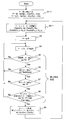
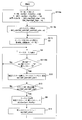
- FIG. 7 is a flowchart illustrating an example of a key size change process performed by the information processing apparatus 1 according to the first embodiment.
- FIG. 8 is a diagram illustrating an example of a software keyboard displayed on the display / input unit 3.
- a key size is assigned to all keys displayed on the display / input unit 3 by the processing unit 2, that is, an application that executes the operation of the software keyboard (step S1-1). For example, “100 (dot)” is assigned to “Ax” and “Ay” of the key “A”, and the key size is similarly assigned to the other keys.
- the key size and display coordinates of each key are set in the key display information 41 according to the assigned key size by the display / input control unit 20 (for example, the key size changing unit 23) (step S2-1).
- the setting of the key display information 41 in step S2-1 may be performed, for example, by reading the key display information 41 stored in advance in the IO device 4 or the like by the processing unit 2, and in this case, in step S1- The process 1 can be omitted. Then, the display processing unit 24 displays a plurality of keys constituting the software keyboard on the display / input unit 3 based on the key display information 41 (step S3).
- step S3 the display / input control unit 20 determines the key selected from the plurality of keys displayed on the display / input unit 3 by the recognition unit 21 based on the key display information 41. Recognized and confirmed as an input key (step S4). It is assumed that the confirmed input key is output to a predetermined application that receives input from the software keyboard by the recognition unit 21 and sequentially displayed on the display / input unit 3 or the like.
- the correction detection unit 22 determines whether or not two keys are input almost simultaneously for the input key recognized by the recognition unit 21 (step S5).
- the correction detection unit 22 recognizes the input key recognized by the recognition unit 21. For example, it is determined whether or not a correction key such as the key “BackSpace” or “Delete” has been input (step S6).
- the correction detection unit 22 re-rides the key corresponding to the character deleted by the correction key for the input key recognized by the recognition unit 21. It is determined whether or not an input has been made (step S7).
- a re-input key for example, key “O”
- the correction detection unit 22 refers to the adjacent key information 42, and the re-input key “O” It is determined whether the key is adjacent to the key corresponding to the deleted (other) character (step S8).
- the correction detection unit 22 When it is determined that the re-input key “O” is an adjacent key of the key corresponding to the deleted character (for example, the key “P”) (Yes route in step S8), the correction detection unit 22 performs the re-input key. “O” is detected as a correction input key, and the key “P” corresponding to the deleted character is detected as an erroneous input key. In the Yes route of step S8, the correction detection unit 22 determines whether the correction input key and the erroneous input key are adjacent in the X-axis direction or the Y-axis direction based on the adjacent key information 42. .
- the key size changing unit 23 changes the key sizes of the correction input key “O” and the erroneous input key “P” along the axial direction (for example, the X-axis direction) determined by the correction detection unit 22 ( In step S9), the key display information 41 is updated (step S2-1). For example, in FIG. 7, “1” is added to the key size of the correction input key “O”, and “1” is subtracted from the key size of the erroneous input key “P”.
- step S3 the display processing unit 24 displays the updated key on the display / input unit 3 based on the key display information 41 (step S3), and the process proceeds to the above-described step S4.
- step S4 the process of step S4 described above is performed. Transition.
- steps S5 to S8 the correction detection process by the correction detection unit 22 in the case of (III) in the description of the correction detection unit 22 described above has been described. That is, when the user tries to select the key “O” and the keys “P” and “O” are selected almost simultaneously in the order of the keys “P” and “O”, the Yes route of step S5 Then, the correction detection unit 22 detects that the keys “P” and “O” are selected almost simultaneously. In the Yes route of step S6, the correction detection unit 22 detects that the user has selected the key “BackSpace (not shown)” and deleted the keys “O” and “P”. Furthermore, in the Yes route of step S7, the correction detection unit 22 detects that the user has reselected the key “O”.
- the correction detection processing in steps S5 to S8 by the correction detection unit 22 is not limited to the case of (III).
- steps S5 to S8 assuming the case of (I) or (II) in the description of the correction detection unit 22 described above, the conditions for correction detection by the correction detection unit 22 may be changed as appropriate. Correction detection processing according to the situation may be performed.
- the determination of simultaneous pressing of two keys in step S5 may be omitted.
- the correction detection unit 22 detects an erroneous input key erroneously input based on the recognition result of the input key by the recognition unit 21, The correction input key input by the correction to the input key is detected, and the change processing unit 23 changes the key sizes on the display input unit 3 of the correction input key and the erroneous input key, respectively.
- the correction detection unit 22 performs a series of operations until the erroneous input is repaired, that is, in the example in the flowchart of FIG.
- Information on the input key, correction key, and re-input key is detected in the set.
- the key detected by the correction detecting unit 22, that is, the key deleted by the correction key and the re-input key are collated with the adjacent key information 42, and the correction input key and the erroneous input key are checked. Is detected.
- the key size changing unit 23 changes the key size of each of the correction input key and the erroneous input key, and the display processing unit 24 redisplays the software keyboard with the changed key size.
- the key size of the correction input key and the erroneous input key is finely adjusted. That is, the key size of the plurality of keys displayed on the display / input unit 3 is tuned by the display / input control unit 20 so as to be a software keyboard with few input errors for the user as shown in FIG. Will be.
- the key size changing process by the display / input control unit 20 can increase the accuracy of key selection by the user, and the information processing apparatus 1 can reduce the occurrence of erroneous input on the software keyboard.
- the adjacent key information 42 in which each of the plurality of keys and the adjacent key adjacent to the key are associated is held, and the correction detection unit 22 Based on the recognition result of the input key by the recognition unit 21 and the adjacent key information 42, the correction input key and the erroneous input key are detected.
- the correction detection unit 22 can detect the correction input key and the erroneous input key based on the preset adjacent key information 42, the correction input key and the erroneous input key can be easily detected. it can. Further, a series of operations until the erroneous input is repaired by the correction detection unit 22, that is, within a predetermined period before and after the input key corresponding to the deleted character is input, the adjacent key of the input key is changed. When the input is detected, a correction input key and an erroneous input key are detected.
- the correction detection unit 22 easily detects the correction input key and the erroneous input key by detecting the operation of the character string that matches these patterns using at least one series of predefined operation patterns. can do.
- an erroneous input is generated by the correction detection unit 22 as a key size variation pattern.
- FIG. 9 is a diagram illustrating a functional configuration example of the information processing apparatus 1 according to the second embodiment to the fourth embodiment to be described later.
- FIG. 10 is a diagram illustrating an example of a key size variation range of keys displayed on the display / input unit 3 according to the second embodiment, and
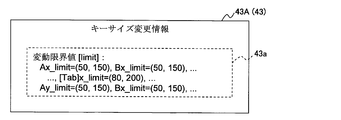
- FIG. 11 illustrates keys used by the key size changing unit 23 according to the second embodiment. It is a figure showing an example of size change information 43A.
- the information processing apparatus 1 includes a definition information holding unit 40B instead of the definition information holding unit 40A in the first embodiment.
- the definition information holding unit 40B holds the key display information 41 and the adjacent key information 42 as well as the key size change information 43 (43A) as in the first embodiment.
- the key size change information 43 is information in which a condition for changing the key size is set.
- the key size change unit 23 detects the correction input key detected by the correction detection unit 22 based on the key size change information 43. Change the key size of each of the keys including.
- the key size change information 43A in the second embodiment includes a variation limit value 43a indicating a key size change range of each of a plurality of keys.
- the variation limit value 43 a indicates, for example, the variation range of the key size in the direction of the X axis and the Y axis on the display / input unit 3. Set for each key. For example, for the key “A” shown in FIG.
- the key size changing unit 23 determines whether or not the key sizes of the correction input key and the erroneous input key detected by the correction detection unit 22 exceed the corresponding variation limit value 43a.
- the key size changing unit 23 determines that the key sizes of the correction input key and the erroneous input key do not exceed the corresponding variation limit value 43a
- the key size changing unit 23 changes the key size.
- the key size changing unit 23 determines that at least one of the key sizes of the correction input key and the erroneous input key exceeds the corresponding variation limit value 43a, the key size changing unit 23 suppresses the key size change.
- FIG. 12 is a flowchart illustrating an example of a key size change process performed by the information processing apparatus 1 according to the second embodiment.
- the key size of each key is assigned and the variation limit value 43a is assigned by the processing unit 2, that is, the application that executes the operation of the software keyboard (step S1-2).
- the processing unit 2 that is, the application that executes the operation of the software keyboard
- the variation limit value 43a “50 (dot)” is set as the minimum value of “Ax” and “Ay” of the key “A”, and “150 (dot)” is set as the maximum value.
- the variation limit value 43a is similarly assigned to the other keys.
- the key size and display coordinates of each key are set in the key display information 41 according to the assigned key size by the display / input control unit 20 (for example, the key size changing unit 23).
- the display / input control unit 20 (for example, the key size changing unit 23) sets the variation limit value 43a in the key size change information 43A (step S2-2).
- the display processing unit 24 displays a plurality of keys constituting the software keyboard on the display / input unit 3 (step S3).
- the setting of the key display information 41 and the key size change information 43 in step S2-2 is performed by, for example, reading out the key display information 41 and the key size change information 43 stored in advance in the IO device 4 or the like by the processing unit 2.
- the process of step S1-2 can be omitted.
- the process of steps S4 to S8 is performed as in the first embodiment.
- the correction detection unit 22 detects a correction for an erroneous input in steps S5 to S8 (step S5). Yes route from S5 to S8), a correction input key (for example, key “O”) and an erroneous input key (for example, key “P”) are detected.
- the key size changing unit 23 corresponds to the variation limit values corresponding to the key sizes of the correction input key “O” and the erroneous input key “P” in the axial direction (X-axis direction) determined by the correction detection unit 22, respectively. It is determined whether or not 43a is exceeded (step S11). For example, in step S11, in order to increase the key size of the correction input key “O” by the key size changing unit 23, “150” which is the maximum value in the X-axis direction of the corresponding fluctuation limit value 43a and the key “O”. Is compared with the current size in the X-axis direction (for example, “100”).
- step S11 When it is determined that the key size after the change of the correction input key and the incorrect input key does not exceed the corresponding fluctuation limit value 43a (Yes route in step S11), the key size changing unit 23 makes the correction input key “O "And the key size of the erroneous input key” P "are respectively changed (steps S9, S2-2). In step S11, if it is determined that at least one of the changed key sizes of the correction input key and the incorrect input key exceeds the corresponding fluctuation limit value 43a (No route in step S11), the key size changing unit. 23, the change of the key size is suppressed, and the process proceeds to step S4 described above.
- the display / input control unit 20 according to the second embodiment can achieve the same effects as those of the first embodiment.
- the variation limit value 43a of each key is given by an application or the like as an initial setting related to execution of the software keyboard.
- the key size changing unit 23 compares the corresponding variation limit value 43a with the current key size in the axial direction determined by the correction detecting unit 22 before changing the key sizes of the correction input key and the erroneous input key. Is done.
- the key size changing unit 23 determines that the key sizes of the correction input key and the erroneous input key do not exceed the corresponding variation limit value 43a, the key sizes of the correction input key and the erroneous input key are respectively Be changed. That is, according to the display / input control unit 20 according to the second embodiment, the variation limit value 43a is set for each key, and the key size change unit 23 causes the variation in the key size of each key to be within the range of the variation limit value 43a. Is done within.
- the information processing device 1 according to the third embodiment includes: As the key size variation pattern, the number of times the key size variation is suppressed is set for each key.
- FIGS. 9, 13, and 14 are diagrams for explaining an example of the key size change information 43B used by the key size changing unit 23 of the third embodiment.
- a configuration example of the information processing apparatus 1 according to the second embodiment will be described with reference to FIGS. 9, 13, and 14.
- the same reference numerals as those in the information processing apparatus 1 shown in FIG. 2 or 9 are the same as those in the information processing apparatus 1 according to the first or second embodiment shown in FIG. Since the same part or substantially the same part is shown, a duplicate description is omitted.
- the definition information holding unit 40B according to the third embodiment is similar to the definition information holding unit 40B according to the second embodiment, in which key display information 41, adjacent key information 42, and key size change information 43 are displayed. (43B) is held.
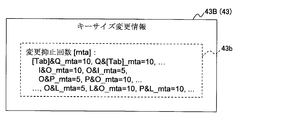
- the key size change information 43B in the third embodiment includes an erroneous input allowable number 43b that allows an erroneous input of each of a plurality of sets that can be a correction input key and an erroneous input key in the plurality of keys.
- the erroneous input allowable number of times 43b is the change suppression number of times 43b that suppresses the key size changing unit 23 from changing the key size of each of a plurality of sets that can be the correction input key and the erroneous input key in the plurality of keys. I can say that.
- the change inhibition count 43 b indicates the number of times that the change of the key size for the combination of the correction input key and the erroneous input key is inhibited.
- the change inhibition count 43b is set for each of a plurality of sets that can be correction input keys and erroneous input keys in the directions of the X axis and the Y axis in the plurality of keys.
- “5 (times)” is set in the change inhibition count 43b “O & P_mta” of the correction input key “O” and the erroneous input key “P”, and the correction input key “P” and the erroneous input are set.
- “10 (times)” is set in the change inhibition count 43b “P & O_mta” of the set of the key “O”.
- the change suppression count 43b shown in FIG. 13 for example, the key “O” on the left side of “&” in the change suppression count 43b “O & P_mta” indicates the correction input key, and the key “P” on the right side of “&” is incorrect. It is shown as indicating the input key.
- the change inhibition count 43 b depends on which of the keys “O” and “P” is the correction input key. Different times are set like “O & P_mta” or “P & O_mta”.
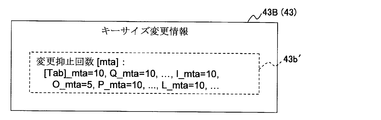
- the key size change information 43 ⁇ / b> B includes a key and an erroneous input key when each key is detected as a correction input key, instead of the change inhibition count (number of erroneous input allowances) 43 b.
- the change inhibition count 43b ′ for inhibiting the change in the key size may be set.
- the key size changing unit 23 determines whether or not the number of times the change of the key size of the correction input key and the erroneous input key detected by the correction detection unit 22 exceeds the corresponding change suppression number 43b. When it is determined that the number of performed times exceeds the corresponding change suppression number 43b, the key size is changed.
- the key size changing unit 23 includes an erroneous input counter (not shown).
- the erroneous input counter is provided for each of a plurality of sets that can be a correction input key and an erroneous input key in a plurality of keys.
- the key size changing unit 23 includes “O & P_cnt” as an erroneous input counter for the set of the correction input key “O” and the erroneous input key “P”, and the set of the correction input key “P” and the erroneous input key “O”.
- P &O_cnt is provided as an erroneous input counter.
- the key size changing unit 23 changes, for example, increments the counter value of the corresponding erroneous input counter every time the change of the key size of the correction input key and the erroneous input key is suppressed. That is, the key size changing unit 23 counts the counter value of the erroneous input counter corresponding to the correction input key and the erroneous input key detected by the correction detection unit 22, and the number of change inhibitions 43b corresponding to the correction input key and the erroneous input key. And compare.
- the key size changing unit 23 determines that the counter value exceeds the corresponding change suppression count 43b, the key size changing unit 23 changes the key sizes of the correction input key and the erroneous input key, respectively, and initializes the counter value to the initial value. Reset to a value (eg “0”). On the other hand, if the key size changing unit 23 determines that the counter value does not exceed the value of the corresponding change inhibition count 43b, the key size changing unit 23 inhibits the change of the key size and increments the counter value, for example.
- FIG. 15 is a flowchart illustrating an example of a key size change process performed by the information processing apparatus 1 according to the third embodiment.
- the key size of each key is assigned by the processing unit 2, that is, the application that executes the operation of the software keyboard, and the change suppression count 43b is assigned (step S1-3a).
- the application assigns “10 (times)” to the change inhibition count 43b “P & O_mta” and “5 (times)” to the change inhibition count 43b “O & P_mta”, and assigns other keys.
- the change inhibition count 43b is also assigned to the set.
- each erroneous input counter is set to an initial value (for example, “0”) by the application (step S1-3b).
- the display / input control unit 20 (for example, the key size changing unit 23) sets the key size and display coordinates of each key in the key display information 41 according to the assigned key size. Further, the display / input control unit 20 (for example, the key size changing unit 23) sets the change suppression count 43b in the key size change information 43B (step S2-3). Then, the display processing unit 24 displays a plurality of keys constituting the software keyboard on the display / input unit 3 (step S3).
- step S2-3 The setting of the key display information 41 and the key size change information 43 in step S2-3 is performed by, for example, reading out the key display information 41 and the key size change information 43 stored in advance in the IO device 4 or the like by the processing unit 2. In this case, step S1-3a can be omitted.
- step S3 the processes of steps S4 to S8 are performed as in the first or second embodiment.
- steps S5 to S8 the correction detector 22 detects a correction for an erroneous input. (Yes route of steps S5 to S8), a correction input key (for example, key “O”) and an erroneous input key (for example, key “P”) are detected.
- the key size changing unit 23 increments the counter value of the erroneous input counter “O & P_cnt” corresponding to the correction input key “O” and the erroneous input key “P” (step S12). Further, the key size changing unit 23 determines whether or not the incremented counter value has exceeded the change inhibition count 43b corresponding to the correction input key “O” and the erroneous input key “P” (step S13).
- the key size changing unit 23 performs correction input.
- the key sizes of the key “O” and the erroneous input key “P” are changed (steps S9 and S2-3).
- the key size changing unit 23 resets the counter value of the erroneous input counter corresponding to the correction input key and the erroneous input key to the initial value “0” (step S14).
- step S13 If it is determined in step S13 that the counter value of the erroneous input counter corresponding to the correction input key and the erroneous input key does not exceed the value of the corresponding change inhibition count 43b (No route in step S13), the key The change of the key size is suppressed by the size changing unit 23, and the process proceeds to the above-described step S4.
- the display / input control unit 20 according to the third embodiment can obtain the same effects as those of the first embodiment.
- the change suppression count 43b is given by an application or the like in the initial setting related to execution of the software keyboard.
- the key size changing unit 23 includes an erroneous input counter indicating information on the number of times the key size change is suppressed for each set that can be a correction input key and an erroneous input key. Further, each time the key detection unit 22 detects an erroneous input related to the correction input key and the erroneous input key by the key size changing unit 23, the counter value of the corresponding erroneous input counter is incremented and corresponds to the counter value. Comparison with the change inhibition count 43b is performed.
- the key size changing unit 23 determines that the counter value has exceeded the corresponding change inhibition count 43b, the key sizes of the correction input key and the erroneous input key are changed. That is, according to the display / input control unit 20 according to the third embodiment, the key size changing unit 23 causes the change in the key size of the correction input key and the erroneous input key to be the corresponding change inhibition count 43b, that is, the correction input key. And it is performed every set number of times for each erroneous input key.
- the frequency with which the key size is changed by the key size changing unit 23 can be adjusted, and the user can compare the key size of the correction input key and the erroneous input key each time the erroneous input correction is detected. Can be reduced.
- the number of change inhibitions 43b according to the user's intention, such as setting the number of change inhibitions 43b to be small, the correction input key and the erroneous input key Since the frequency of changing the key size for each set can be flexibly weighted, the occurrence of erroneous input on the software keyboard can be reduced.
- the change suppression count 43b is an initial setting related to execution of the software keyboard, and the change suppression count 43b is given by an application or the like. Although described, the present invention is not limited to this.
- the change suppression count 43b may be set according to the input rate of the corresponding correction input key with respect to a plurality of keys.
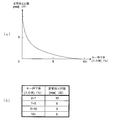
- FIGS. 16A and 16B are diagrams illustrating a setting example of the change inhibition count 43b used by the key size changing unit 23 according to the modification of the third embodiment.
- the display / input control unit 20 (for example, the key size update unit 23) of the information processing apparatus 1 according to this modification includes an input number counter (not shown) for each of a plurality of keys.
- the display / input control unit 20 changes, for example, increments the counter value of the corresponding input number counter every time a key is selected as an input key by an application executing a software keyboard, for example.
- the display / input control unit 20 is a ratio (ratio) at which each key is input to all keys every time the counter value is incremented or at a predetermined timing (hereinafter referred to as a key pressing rate or an input rate). ) Is calculated for each of a plurality of keys. Further, the display / input control unit 20 preliminarily shows the relationship between the key press rate and the change inhibition count 43b, for example, as shown in a graph as shown in FIG. 16A or a table as shown in FIG. Stored as the value of an expression.
- the display / input control unit 20 uses the graphs and tables shown in FIGS. 16A and 16B to depress the change suppression count 43b corresponding to the key that can be detected as the correction input key by pressing the key of the key.
- the number of change inhibitions 43b according to the rate is determined. For example, when the key pressing rate of the key “O” is “5 (%)”, the display / input control unit 20 refers to the table shown in FIG.
- the change inhibition count 43b used when it is detected as an input key is determined to be “3 (times)” corresponding to the key press rate “3 to 10 (%)”. That is, in the example shown in FIG.
- the display / input control unit 20 performs the number of change suppressions used when the key “O” such as “O & I_mta”, “O & P_mta”, “O & L_mta”, etc. is detected as the correction input key. “3 (times)” is set to all the values of 43b.
- the display / input control unit 20 may set “3 (times)” as the value of “O_mta”.
- the display / input control unit 20 may set the change suppression count 43b based on the key press rate every time the count value of the input count counter is incremented or at a predetermined timing even during execution of the software keyboard. .
- the display / input control unit 20 stores the counter value of the input number counter in the IO device 4 or the memory 5 when the software keyboard is terminated, and stores the counter when the software keyboard is executed. By reading the value, the number of times each key is input may be accumulated and counted. In this case, the display / input control unit 20 can perform the initial setting of each change suppression count 43b by reading the stored counter value in the initial setting related to the execution of the software keyboard.
- the change inhibition count 43b decreases as the key press rate increases. That is, since the key press rate is considered to be an important key that is frequently input, the display / input control unit 20 detects an important key having a high key press rate as a correction input key by the correction detection unit 22. If it has been done, in order to increase the frequency of increasing the key size of the correction input key, the corresponding change inhibition count 43b is set to a small value.
- the information processing apparatus 1 can achieve the same effects as those of the third embodiment.
- the display / input control unit 20 according to the modification of the third embodiment, even during the operation of the software keyboard, the change inhibition count 43b according to the input rate of the corresponding correction input key to a plurality of keys. The value set in is updated.
- the key size changing unit 23 uses the correction input key as the key size variation pattern. Although an example in which the key size of the erroneous input key is changed has been described, the present invention is not limited to this.
- the information processing apparatus 1 considers the relationship between the correction input key and the erroneous input key and another adjacent key adjacent to the erroneous input key as the key size variation pattern, The key size of a plurality of keys including it is changed. For example, when the key “O” is detected as the correction input key and the key “P” is detected as the erroneous input key, the key size changing unit 23 selects the key “P” in addition to the keys “O” and “P”. In contrast, the information of the key “@”, which is an adjacent key adjacent to the key “O” in the opposite direction, is considered.
- the key size changing unit 23 in addition to the keys “P” and “O”, Information on the key “I”, which is an adjacent key adjacent to the key “O” in the direction opposite to the key “P”, is considered.
- the key size changing unit 23 uses the correction input key detected by the correction detecting unit 22.
- the key size is increased by a predetermined size to the erroneous input key side.
- the key size changing unit 23 is adjacent to the erroneous input key in the direction opposite to the correction input key and the size in the adjacent direction detected by the correction detection unit 22 of the erroneous input key detected by the correction detection unit 22.
- the size in the adjacent direction detected by the adjacent key correction detection unit 22 is compared.
- the key size changing unit 23 reduces the key size of the large key in the adjacent direction detected by the correction detection unit 22 by a predetermined size according to the increase of the correction input key based on the size comparison result.
- FIGS. 17A to 17C show an example of a software keyboard displayed on the display / input unit 3 by the key size changing process when the information processing apparatus 1 of the fourth embodiment is applied to the first embodiment.
- FIG. 17A shows an example of a software keyboard displayed on the display / input unit 3 by the key size changing process when the information processing apparatus 1 of the fourth embodiment is applied to the first embodiment.
- the plurality of keys displayed on the display / input unit 3 are in the states shown in FIGS. 17A to 17C, and correction input is performed by the correction detection unit 22 in each of FIGS. 17A and 17B.
- a case where the key “O” and the erroneous input key “P” are detected will be described. It is assumed that the key sizes “Px” and “@x” of the keys “P” and “@” shown in FIG.
- the key size changing unit 23 determines the size “Px” of the erroneous input key “P” in the X-axis direction and the size “@x” of the key “@” in the X-axis direction. When the comparison shows that these sizes are equal, the key sizes of the correction input key “O” and the erroneous input key “P” are changed, and the plurality of keys are in the state shown in FIG.
- the key size changing unit 23 calculates the size “Px-1” of the erroneous input key “P” in the X-axis direction and the size “@x” of the key “@” in the X-axis direction.
- the size “@x” of the key “@” is determined to be large, the key sizes of the correction input key “O” and the key “@” are changed, and a plurality of keys are shown in FIG. It will be in the state shown.
- the key size changing unit 23 determines that the comparison result between the size of the erroneous input key and the size of the adjacent key adjacent to the erroneous input key in the direction opposite to the correction input key is larger than a predetermined threshold value.
- the key size of the large key may be reduced by a predetermined size.
- the key size changing unit 23 detects the erroneous input key detected by the correction detection unit 22. Is determined to exceed the corresponding variation limit value 43a, the key size of the correction input key and the key size of the adjacent key adjacent to the erroneous input key in the direction opposite to the correction input key are determined. Change each one.
- the key size changing unit 23 increases the key size of the correction input key detected by the correction detection unit 22 to the erroneous input key side by a predetermined size.
- the key size changing unit 23 determines that the key size of the erroneous input key detected by the correction detection unit 22 exceeds the corresponding fluctuation limit value 43a, the key size changing unit 23 is opposite to the corrected input key with respect to the erroneous input key.
- the key size of the adjacent key adjacent in the direction is decreased by a predetermined size according to the increase of the correction input key.
- the key size changing unit 23 determines that the key size of the erroneous input key does not exceed the corresponding fluctuation limit value 43a, the key size changing unit 23 sets the key size of the erroneous input key to a predetermined value according to the increase of the correction input key. Reduce by size.
- the key size changing unit 23 determines whether the key size of the erroneous input key detected by the correction detection unit 22 exceeds the corresponding variation limit value 43a according to the increase of the correction input key.
- the key for decreasing the key size by the size is selected from an erroneous input key and an adjacent key adjacent to the erroneous input key in the direction opposite to the correction input key.
- 18A to 18C show examples of a software keyboard displayed on the display / input unit 3 by the key size changing process when the information processing apparatus 1 of the fourth embodiment is applied to the second embodiment. FIG.
- the plurality of keys displayed on the display / input unit 3 are in the states shown in FIGS. 18A to 18C, and correction input is performed by the correction detection unit 22 in each of FIGS. 18A and 18B.
- a case where the key “O” and the erroneous input key “P” are detected will be described. It is assumed that the key size of each key shown in FIG. 18A is an initial value, and the minimum value of the fluctuation limit value 43a of each key is half the initial value.
- the key size changing unit 23 determines whether or not the size “Px” of the erroneous input key “P” detected by the correction detecting unit 22 exceeds the corresponding variation limit value 43a. If it is determined that it does not exceed, the key sizes of the correction input key “O” and the erroneous input key “P” are changed. In the display / input control unit 20, the correction detection unit 22 detects the correction input key “O” and the erroneous input key “P” a plurality of times, and the key size changing unit 23 changes the key size each time. Assume that a plurality of keys are in the state shown in FIG.
- the key size changing unit 23 determines that the size “Px / 2” of the erroneous input key “P” detected by the correction detecting unit 22 corresponds to the variation limit value 43a (minimum value “Px”). / 2 ”), and if the size“ Px / 2 ”of the erroneous input key“ P ”is further reduced, it is determined that the minimum value“ Px / 2 ”is exceeded. In this case, the key size changing unit 23 changes the key size of the correction input key “O” and the key size of the adjacent key “@” adjacent to the erroneous input key in the opposite direction to the correction input key. .
- the correction input key “O” and the erroneous input key “P” are detected a plurality of times by the correction detection unit 22, and the correction input key “O” is detected by the key size changing unit 23 each time.
- the key size of the key “@” is changed, the plurality of keys are in the state shown in FIG.
- the key size changing unit 23 uses the correction input key detected by the correction detecting unit 22. And the key size of the key with the larger change suppression count 43b corresponding to the erroneous input key and the adjacent key adjacent to the erroneous input key in the direction opposite to the correction input key, respectively. change.
- the key size changing unit 23 determines whether or not the number of times the key size change related to the correction input key and the erroneous input key detected by the correction detection unit 22 is suppressed exceeds the corresponding change suppression number 43b. If it is determined that it has exceeded, the key size of the correction input key is increased by a predetermined size toward the erroneous input key.
- the key size changing unit 23 also includes the change inhibition count 43b when the key that is the erroneous input key is the correction input key, and the adjacent key adjacent to the erroneous input key in the opposite direction to the correction input key. Is compared with the number of change inhibition times 43b.
- the key size changing unit 23 decreases the key size of the key having the larger change suppression count 43b by a predetermined size in accordance with the increase of the correction input key. That is, the key size changing unit 23 selects a key that decreases the key size by a predetermined size in accordance with an increase in the correction input key when the number of times the key size change is suppressed exceeds the corresponding change suppression count 43b.
- the key is selected from an erroneous input key and an adjacent key adjacent to the erroneous input key in the direction opposite to the correction input key.
- the change suppression count 43b is set to a small value for important keys that are frequently input. That is, the key size changing unit 23 is relatively important in that the change inhibition count 43b is set to a large value among the erroneous input key and the adjacent key adjacent to the erroneous input key in the direction opposite to the correction input key.
- Non-keys can be selected as keys that reduce the key size.
- the key size changing unit 23 of this example differs from the case where the information processing apparatus 1 according to the fourth embodiment is applied to the third embodiment, in response to the input rate of the erroneous input key and the erroneous input key.
- the input rate of the adjacent key adjacent in the direction opposite to the correction input key is compared, and the key size of the key having the smaller input rate is decreased by a predetermined size according to the increase of the correction input key. That is, the key size changing unit 23 selects a key that decreases the key size by a predetermined size in accordance with an increase in the correction input key when the number of times the key size change is suppressed exceeds the corresponding change suppression count 43b.
- the key is selected from an erroneous input key and an adjacent key adjacent to the erroneous input key in the direction opposite to the correction input key.
- the key is input more frequently as the key pressing rate is higher.
- the change suppression count 43b is set to a smaller value. It is preferably set.
- the key size changing unit 23 corrects input of a relatively unimportant key with a small input rate among the erroneous input key and the adjacent key adjacent to the erroneous input key in the direction opposite to the corrected input key.
- the key can be selected to decrease the key size by a predetermined size in accordance with the increase in the key.
- the display / input control unit 20 according to the fourth embodiment can also obtain the same effects as those of the embodiment or modification to be combined. Further, according to the display / input control unit 20 according to the fourth embodiment, the key size changing unit 23 detects a set of adjacent keys detected as the correction input key and the erroneous input key, and the respective keys of the adjacent keys. Therefore, three adjacent keys of two adjacent keys adjacent in the opposite direction are considered.
- the display / input control unit 20 uses a plurality of keys displayed on the display / input unit 3 so as to be a software keyboard with few input errors for the user, as shown in FIGS.
- the key size is tuned by fine adjustment more flexible than that shown in FIG.
- the key size changing process by the display / input control unit 20 according to the fourth embodiment can improve the accuracy of the key selection by the user, compared with the key size changing process according to the first to third embodiments.
- the key size changing unit 23 may further consider a plurality of adjacent keys when changing the key size.
- the key size changing unit 23 changes the key sizes of these keys.
- the correction input key “O” is adjacent to the key “K” in the Y-axis direction.
- the correction detection unit 22 detects that there is another adjacent key adjacent to the erroneous input key “L” from the corrected input key “O” based on the adjacent key information 42 along with the detection of the erroneous input key “L”. Then, the information of the other adjacent key is notified to the key size changing unit 23 together with the information of the detected correction input key and erroneous input key.
- the key size changing unit 23 reduces the key size of the key “K” as well as the key size of the key “K” by the predetermined size in accordance with the increase of the correction input key.
- the key size changing process when the display / input control unit 20 according to the first embodiment detects that the correction input key and the erroneous input key are adjacent in the Y-axis direction has been described.
- the fourth embodiment it is possible to perform a key size changing process in consideration of other adjacent keys adjacent to the erroneous input key side from the correction input key.
- the key size changing unit 23 when the correction detection unit 22 detects the correction input key and the erroneous input key for all the keys displayed on the display / input unit 3, the key size changing unit
- a key different from a character key hereinafter referred to as a special key
- a key “Space”, a key “Delete”, a key “BackSpace”, and a key “Enter” has a key size changed by the key size changing unit 23 (particularly, (Decrease) greatly affects the use of the software keyboard by the user. Therefore, the special key may be excluded from the key size change target. That is, when the correction detection unit 22 detects a special key as a correction input key or an erroneous input key, the key size changing unit 23 does not change the key size for the detected correction input key and erroneous input key. May be.
- the key display information 41 and the key size change information 43 have been described as being set by an application that executes the operation of the software keyboard.
- the present invention is not limited to this. Absent.
- at least a part of the key display information 41 and the key size change information 43 can be obtained by collecting all the keys (regardless of the same value or different values) on the application that executes the operation of the software keyboard by the user. Alternatively, it may be set individually for each key.
- FIG. 19 shows an example of key size change information 43C used by the key size changing unit 23 of the information processing apparatus 1 when the second embodiment and the third embodiment or the modification of the third embodiment are applied simultaneously.
- FIG. 19 shows an example of key size change information 43C used by the key size changing unit 23 of the information processing apparatus 1 when the second embodiment and the third embodiment or the modification of the third embodiment are applied simultaneously.
- the key size change information 43C is not limited to the example illustrated in FIG. 19, and may include the change suppression count 43b ′ illustrated in FIG. 14 instead of the change suppression count 43b.
- the procedure for changing the key size in the information processing apparatus 1 of this example is realized by combining the flowchart shown in FIG. 15 according to the third embodiment with the flowchart shown in FIG. 12 according to the second embodiment as follows. Is possible.
- the processes of steps S12 and S13 shown in FIG. 15 are added after the Yes route of step S11 shown in FIG. 12, and the processes of step S14 shown in FIG. 15 are added after the step S9 shown in FIG.
- the information processing apparatus 1 when the second embodiment and the third embodiment or the modification of the third embodiment are applied simultaneously also includes the second embodiment, the third embodiment, or the third embodiment. The same effect as the modification of the embodiment can be obtained.
- the display / input control unit 20 repeatedly performs the key size changing process, so that the layout of a plurality of keys is finally stabilized (that is, the frequency of erroneous input by the user is reduced).
- the key display information 41 in which the key size variation is almost eliminated may be stored in the IO device 4 or the memory 5 or the like. Then, the display / input control unit 20 displays a plurality of keys based on the stored key display information 41 by default on the display / input unit 3 when the application that executes the operation of the software keyboard is restarted. You may make it.
- the display / input control unit 20 uses the stored key display information 41 as personal information of a user who forms a key layout indicated by the key display information 41 by using a software keyboard, for management of security and the like. You may do it. That is, when a different person from the user uses the software keyboard displayed on the display / input unit 3 based on the key display information 41, the key size that should have been stable frequently fluctuates. Therefore, the display / input control unit 20 uses, as personal information, the key display information 41 whose key size has hardly changed due to use by a specific user, and determines impersonation use of the information processing apparatus 1 by another person. be able to.
- key display information 41 may be provided for each user. Further, different key display information 41 is provided for each application executed by the information processing apparatus 1 (processing unit 2), and the display / input control unit 20 is based on the corresponding key display information 41 for each activated application. A plurality of keys may be displayed on the display / input unit 3.
- the information processing apparatus 1 has been described as a PC, a portable terminal, or the like that employs a touch panel input method. However, for example, a part or the entire configuration of the information processing apparatus 1 However, it may be used as a display device capable of displaying a software keyboard, such as a console or a keyboard that employs a touch panel type input method.
- the information processing device 1 is used as a display device, another information processing device in which the input key selected by the user on the display device and recognized by the recognition unit 21 is connected to the display device by wire or wirelessly. Is preferably configured to be notified.
- a program for realizing the functions as the display / input control unit 20, the recognition unit 21, the correction detection unit 22, the key size changing unit (change processing unit) 23, and the display processing unit 24.
- the computer reads the program from the recording medium, transfers it to the internal storage device or the external storage device, and uses it.
- the program may be recorded in a storage device (recording medium) such as a magnetic disk, an optical disk, or a magneto-optical disk, and provided from the storage device to a computer via a communication line.
- the internal storage devices When realizing the functions as the display / input control unit 20, the recognition unit 21, the correction detection unit 22, the key size change unit (change processing unit) 23, and the display processing unit 24, the internal storage devices (first to second)
- the program stored in the memory 5) is executed by the microprocessor of the computer (the processing unit 2 in the first to fourth embodiments). At this time, the computer may read and execute the program recorded on the recording medium.
- the computer is a concept including hardware and an operating system, and means hardware that operates under the control of the operating system. Further, when an operating system is unnecessary and hardware is operated by an application program alone, the hardware itself corresponds to a computer.
- the hardware includes at least a microprocessor such as a CPU and means for reading a computer program recorded on a recording medium.
- the information processing apparatus 1 is a computer. It has a function.
- Information processing device (display device) 2 Processing Unit 20 Display / Input Control Unit 21 Recognition Unit 22 Correction Detection Unit 23 Key Size Changing Unit (Change Processing Unit) 24 Display processing section 3 Display / input section (display section) 300 Display device 4 IO device 40A, 40B Definition information holding unit 41 Key display information 41a Key size information 41b Key coordinate information 42 Adjacent key information 42a X-axis direction adjacent key information 42b Y-axis direction adjacent key information 43, 43A to 43C Key sizes Change information 43a Fluctuation limit value 43b, 43b 'Number of change inhibitions, allowable number of erroneous inputs 5 Memory
Landscapes
- Engineering & Computer Science (AREA)
- General Engineering & Computer Science (AREA)
- Theoretical Computer Science (AREA)
- Human Computer Interaction (AREA)
- Physics & Mathematics (AREA)
- General Physics & Mathematics (AREA)
- User Interface Of Digital Computer (AREA)
Abstract
複数のキーを表示する表示部(3)と、前記表示部(3)によって表示された前記複数のキーの中から選択されたキーを入力キーとして認識する認識部(21)と、前記認識部(21)による入力キーの認識結果に基づいて、誤入力された誤入力キーと、前記誤入力キーに対する補正により入力された補正入力キーとを検出する補正検出部(22)と、前記補正入力キー及び前記誤入力キーの、前記表示部(3)上でのキーサイズをそれぞれ変更する変更処理部(23)と、を備える。
Description
本件は、情報処理装置,表示装置,キーサイズ変更プログラム,及びキーサイズ変更方法に関する。
近年、iPad(登録商標)のようなタッチパネル式の入力方式を採用する携帯端末等が普及している。また、情報処理装置においても、タッチパネル式の入力方式を採用する入力装置が用いられるものがある。
図20は、タッチパネル式の表示装置300に表示されるソフトウェアキーボードを示す図である。
図20は、タッチパネル式の表示装置300に表示されるソフトウェアキーボードを示す図である。
図20に示すように、タッチパネル式の入力方式では、タッチパネルとして機能する表示装置300上にキーボードを模した画像(ソフトウェアキーボード)が表示される。使用者は、表示装置300に表示された文字等のキーをタッチ選択して、携帯端末や情報処理装置等に所望の文字等を入力する。
なお、関連する技術として、先行するタッチ入力に基づいて、タッチキーの同定のための領域を変動させ、後続するタッチ入力に関する同定を、変動した同定領域によって行なうことで、隣接するキーの誤入力を防止しまたは抑制することのできる技術がある。
なお、関連する技術として、先行するタッチ入力に基づいて、タッチキーの同定のための領域を変動させ、後続するタッチ入力に関する同定を、変動した同定領域によって行なうことで、隣接するキーの誤入力を防止しまたは抑制することのできる技術がある。
ソフトウェアキーボードでは、表示装置のタッチパネルに凹凸が無く、ホームポジションの認識がし難いことや、キーの入力時に打鍵感が無いこと等により、機械式のキーボードに比べ、キー入力のミス(タイプミス)、つまり使用者が意図した文字と異なる文字が誤入力される頻度が高い。
上述の点に鑑み、本件の目的の1つは、ソフトウェアキーボードにおける誤入力の発生を低減することである。
上述の点に鑑み、本件の目的の1つは、ソフトウェアキーボードにおける誤入力の発生を低減することである。
なお、前記目的に限らず、後述する発明を実施するための形態に示す各構成により導かれる作用効果であって、従来の技術によっては得られない作用効果を奏することも本発明の他の目的の1つとして位置付けることができる。
本件の情報処理装置は、複数のキーを表示する表示部と、前記表示部によって表示された前記複数のキーの中から選択されたキーを入力キーとして認識する認識部と、前記認識部による入力キーの認識結果に基づいて、誤入力された誤入力キーと、前記誤入力キーに対する補正により入力された補正入力キーとを検出する補正検出部と、前記補正入力キー及び前記誤入力キーの、前記表示部上でのキーサイズをそれぞれ変更する変更処理部と、を備えるものである。
また、本件の表示装置は、複数のキーを表示する表示部と、前記表示部によって表示された前記複数のキーの中から選択されたキーを入力キーとして認識する認識部と、前記認識部による入力キーの認識結果に基づいて、誤入力された誤入力キーと、前記誤入力キーに対する補正により入力された補正入力キーとを検出する補正検出部と、前記補正入力キー及び前記誤入力キーの、前記表示部上でのキーサイズをそれぞれ変更する変更処理部と、を備えるものである。
さらに、本件のキーサイズ変更プログラムは、複数のキーを表示する表示部を備える情報処理装置としてのコンピュータに、前記表示部によって表示された前記複数のキーの中から選択されたキーを入力キーとして認識し、前記入力キーの認識結果に基づいて、誤入力された誤入力キーと、前記誤入力キーに対する補正により入力された補正入力キーとを検出し、前記検出した補正入力キー及び前記誤入力キーの、前記表示部上でのキーサイズをそれぞれ変更する、処理を実行させるものである。
また、本件のキーサイズ変更方法は、表示部によって表示された複数のキーの中から選択されたキーを入力キーとして認識し、前記入力キーの認識結果に基づいて、誤入力された誤入力キーと、前記誤入力キーに対する補正により入力された補正入力キーとを検出して、前記検出した補正入力キー及び前記誤入力キーの、前記表示部上でのキーサイズをそれぞれ変更するものである。
開示の技術によれば、ソフトウェアキーボードにおける誤入力の発生を低減することができる。
以下、図面を参照して実施の形態を説明する。
〔1〕第1実施形態
〔1-1〕情報処理装置の構成例
図1は、第1実施形態としての情報処理装置1のハードウェアの構成例を示す図である。
〔1〕第1実施形態
〔1-1〕情報処理装置の構成例
図1は、第1実施形態としての情報処理装置1のハードウェアの構成例を示す図である。
情報処理装置1は、タッチパネル式の入力方式を採用するPC(Personal Computer)や携帯端末等である。
図1に例示するように、第1実施形態に係る情報処理装置1は、ハードウェア構成として、処理部2、表示/入力部3、IO(Input Output)装置4、及びメモリ5を備える。
処理部2は、種々の制御や演算を行なう処理装置であり、IO装置4や図示しないROM(Read Only Memory)等に格納されたプログラムを実行することにより、種々の機能を実現する。処理部2としては、例えば、CPU(Central Processing Unit)やMPU(Micro Processing Unit)等のプロセッサが挙げられる。
図1に例示するように、第1実施形態に係る情報処理装置1は、ハードウェア構成として、処理部2、表示/入力部3、IO(Input Output)装置4、及びメモリ5を備える。
処理部2は、種々の制御や演算を行なう処理装置であり、IO装置4や図示しないROM(Read Only Memory)等に格納されたプログラムを実行することにより、種々の機能を実現する。処理部2としては、例えば、CPU(Central Processing Unit)やMPU(Micro Processing Unit)等のプロセッサが挙げられる。
表示/入力部(表示部)3は、処理部2による制御を通じて、ソフトウェアキーボードを構成する複数のキーや入力された文字等を、画面上に表示するものである。表示/入力部(表示部)3としては、例えば、タッチパネルを備えるLCD(Liquid Crystal Display)等が挙げられる。
つまり、表示/入力部3は、画面上に複数のキーを表示する表示部として機能するとともに、画面上に表示した複数のキーの中から使用者によりタッチ選択されたキーを、入力キーとして処理部2に通知する入力部(入力インタフェース)として機能する。処理部2では、表示/入力部3から入力された情報に基づいて、プログラムの動作等の制御が行なわれる。
つまり、表示/入力部3は、画面上に複数のキーを表示する表示部として機能するとともに、画面上に表示した複数のキーの中から使用者によりタッチ選択されたキーを、入力キーとして処理部2に通知する入力部(入力インタフェース)として機能する。処理部2では、表示/入力部3から入力された情報に基づいて、プログラムの動作等の制御が行なわれる。
なお、表示/入力部3では、図示しないGPU(Graphics Processing Unit)等からの制御により、画面上の表示処理が行なわれても良い。
IO装置4は、例えばHDD(Hard Disk Drive)等の磁気ディスク装置やSSD(Solid State Drive)等の半導体ドライブ装置等の各種記憶装置であり、種々のデータやプログラム等を格納するハードウェアである。IO装置4は、処理部2に接続され、処理部2による制御を受けて、格納しているデータやプログラム等を出力する。
IO装置4は、例えばHDD(Hard Disk Drive)等の磁気ディスク装置やSSD(Solid State Drive)等の半導体ドライブ装置等の各種記憶装置であり、種々のデータやプログラム等を格納するハードウェアである。IO装置4は、処理部2に接続され、処理部2による制御を受けて、格納しているデータやプログラム等を出力する。
メモリ5は、種々のデータやプログラムを一時的に格納する記憶領域であって、処理部2がプログラムを実行する際に、データやプログラムを一時的に格納・展開して用いる。なお、メモリ5としては、例えばRAM(Random Access Memory)等の揮発性メモリが挙げられる。
図2は、第1実施形態に係る情報処理装置1の機能構成例を示す図であり、図3は、第1実施形態の表示/入力部3に表示されるキーのキーサイズの定義例を示す図である。
図2は、第1実施形態に係る情報処理装置1の機能構成例を示す図であり、図3は、第1実施形態の表示/入力部3に表示されるキーのキーサイズの定義例を示す図である。
図4及び図5は、それぞれ第1実施形態の情報処理装置1により用いられるキー表示情報41及び隣接キー情報42の一例を示す図であり、図6(a)及び(b)は、情報処理装置1によるキーサイズ変更処理によって、表示/入力部3に表示されるソフトウェアキーボードの一例を示す図である。
図2に例示するように、第1実施形態に係る情報処理装置1は、表示/入力制御部20及び定義情報保持部40Aを備える。
図2に例示するように、第1実施形態に係る情報処理装置1は、表示/入力制御部20及び定義情報保持部40Aを備える。
表示/入力制御部20は、ソフトウェアキーボードを構成する複数のキーを表示/入力部3に表示させるとともに、表示/入力部3において選択されたキーを認識し、認識結果に基づいて、所定のキーの表示/入力部3上でのキーサイズを変更するものである。
表示/入力制御部20の具体的な構成例については、後述する。
定義情報保持部40Aは、表示/入力制御部20によって用いられる種々の定義情報を保持するものであり、図2に示すように、キー表示情報41及び隣接キー情報42を備える。
表示/入力制御部20の具体的な構成例については、後述する。
定義情報保持部40Aは、表示/入力制御部20によって用いられる種々の定義情報を保持するものであり、図2に示すように、キー表示情報41及び隣接キー情報42を備える。
キー表示情報41は、表示/入力制御部20が、表示/入力部3に複数のキーを表示させる際に用いられる、複数のキーに関する定義情報である。
キー表示情報41は、複数のキーそれぞれのキーサイズを示すキーサイズ情報41aと、複数のキーそれぞれの表示/入力部3における表示座標(表示位置)を示すキー座標情報(位置情報)41bと、の少なくとも一方を含む。
キー表示情報41は、複数のキーそれぞれのキーサイズを示すキーサイズ情報41aと、複数のキーそれぞれの表示/入力部3における表示座標(表示位置)を示すキー座標情報(位置情報)41bと、の少なくとも一方を含む。
キーサイズ情報41aは、図3及び図4に例示するように、表示/入力部3上でのX軸及びY軸それぞれの方向のサイズにより決定されるキーサイズを示すものであり、キーサイズは、ソフトウェアキーボードを構成する複数のキーそれぞれについて設定される。図3及び図4に示す例における、キー“A”のキーサイズ“Asize”は、幅、つまりX軸方向(紙面に向かって左右(横)方向)の長さが“Ax”、高さ、つまりY軸方向(紙面に向かって上下(縦)方向)の長さが“Ay”として、“Asize=(Ax, Ay)”と設定される。
キー座標情報41bは、図4に例示するように、表示/入力部3上でキーが表示される表示座標をX軸方向及びY軸方向の値により示すものであり、表示座標は、ソフトウェアキーボードの各キーについてそれぞれ設定される。図4に示す例における、キー“A”の表示座標“Acoord”は、X軸方向の座標が“Ax_c”、Y軸方向の座標が“Ay_c”として、“Acoord=(Ax_c, Ay_c)”と設定される。
ここで、キー座標情報41bにおける表示座標は、各キーの中心座標が設定されたものであっても良いし、表示/入力部3の画面上に原点となる座標が定義され、原点を基準とした相対的な座標が各キーに設定されても良い。例えば、キー座標情報41bに各キーの中心座標が設定される場合、表示/入力制御部20は、キーサイズ情報41a及びキー座標情報41bに基づいて、ソフトウェアキーボードを構成する複数のキーを一括で表示することができる。
また、表示座標は、各キーにおける対角の2点の座標が設定されても良く、この場合、表示/入力制御部20は、キー座標情報41bのみに基づいて、複数のキーを表示/入力部3上に表示することができる。
以下の説明において、表示/入力制御部20は、キーサイズ情報41a及びキー座標情報41bの双方を用いて表示/入力部3への複数のキーの表示制御を行なうものとする。
以下の説明において、表示/入力制御部20は、キーサイズ情報41a及びキー座標情報41bの双方を用いて表示/入力部3への複数のキーの表示制御を行なうものとする。
表示/入力制御部20による表示/入力部3への複数のキーの表示制御は、キー表示情報41に基づいて、既知の種々の手法により実現することができるため、その詳細な説明は省略する。
なお、キーサイズ及び表示座標の単位は、例えばミリメートル(mm)/インチ(inch)等の、表示/入力部3上で実際に表示されるサイズ(長さ)でも良く、画素(ドット)数であっても良い。以下、キーサイズ及び表示座標の単位は、画素数であるものとして説明する。
なお、キーサイズ及び表示座標の単位は、例えばミリメートル(mm)/インチ(inch)等の、表示/入力部3上で実際に表示されるサイズ(長さ)でも良く、画素(ドット)数であっても良い。以下、キーサイズ及び表示座標の単位は、画素数であるものとして説明する。
隣接キー情報42については、後述する。
〔1-2〕表示/入力制御部の説明
ここで、図6(a)及び(b)を参照しながら、第1実施形態に係る表示/入力制御部20による、キーサイズの変更について説明する。
第1実施形態に係る表示/入力制御部20は、使用者により誤入力された誤入力キーと、誤入力に対する補正により入力された補正入力キーとを検出して、これら補正入力キー及び誤入力キーの表示/入力部3上でのキーサイズを変更するものである。
〔1-2〕表示/入力制御部の説明
ここで、図6(a)及び(b)を参照しながら、第1実施形態に係る表示/入力制御部20による、キーサイズの変更について説明する。
第1実施形態に係る表示/入力制御部20は、使用者により誤入力された誤入力キーと、誤入力に対する補正により入力された補正入力キーとを検出して、これら補正入力キー及び誤入力キーの表示/入力部3上でのキーサイズを変更するものである。
すなわち、表示/入力制御部20は、補正入力キー及び誤入力キーを検出することで、使用者のタイピング(キーのタッチ選択)の癖、つまり使用者によるキーの選択において発生する誤入力の傾向を検出することができる。そして、表示/入力制御部20は、補正入力キー及び誤入力キーのキーサイズをそれぞれ変更することで、使用者によるキーの選択において発生する誤入力に追従して、例えば誤入力が発生し易いキーのキーサイズを変動させ、誤入力の発生頻度を減少させることができる。
例えば、図6(a)に示す、表示/入力部3に表示されたソフトウェアキーボードにおいて、或る使用者がキーの選択を行なう際に以下の傾向があるものと仮定して説明する。
(i)使用者がキー“O”を選択しようとして、誤ってキー“P”を選択してしまう、又はキー“O”とともにキー“P”も同時に選択してしまう傾向がある、つまり、例えば、図6(a)中、使用者がキー“O”を選択しようとして、符号31が示す範囲近傍をタッチ選択してしまう傾向がある
(ii)使用者がキー“B”を選択しようとして、誤ってキー“V”を選択してしまう、又はキー“B”とともにキー“V”も同時に選択してしまう傾向がある、つまり、例えば、図6(a)中、使用者がキー“B”を選択しようとして、符号32が示す範囲近傍をタッチ選択してしまう傾向がある
第1実施形態に係る表示/入力制御部20は、表示/入力部3に表示される複数のキーが図6(a)に示す状態の場合、上記(i)や(ii)の傾向があることを検出すると、図6(b)に示すように、表示/入力部3に表示されるキーのキーサイズを変更する。
(i)使用者がキー“O”を選択しようとして、誤ってキー“P”を選択してしまう、又はキー“O”とともにキー“P”も同時に選択してしまう傾向がある、つまり、例えば、図6(a)中、使用者がキー“O”を選択しようとして、符号31が示す範囲近傍をタッチ選択してしまう傾向がある
(ii)使用者がキー“B”を選択しようとして、誤ってキー“V”を選択してしまう、又はキー“B”とともにキー“V”も同時に選択してしまう傾向がある、つまり、例えば、図6(a)中、使用者がキー“B”を選択しようとして、符号32が示す範囲近傍をタッチ選択してしまう傾向がある
第1実施形態に係る表示/入力制御部20は、表示/入力部3に表示される複数のキーが図6(a)に示す状態の場合、上記(i)や(ii)の傾向があることを検出すると、図6(b)に示すように、表示/入力部3に表示されるキーのキーサイズを変更する。
つまり、表示/入力制御部20は、図6(b)に示すように、使用者によるキー“O”や“B”の選択の際にそれぞれキー“P”や“V”が選択されないように、キー“O”及び“B”のキーサイズ(幅)を増加させるとともに、キー“P”及び“V”のキーサイズ(幅)を減少させる。これにより、表示/入力制御部20は、キー“O”や“B”のキー入力の確実性を向上させることができ、使用者によるキーの選択の正確性を高めることができる。
〔1-3〕表示/入力制御部の構成例
次に、上述の如き表示/入力制御部20の構成例について説明する。
図2に示すように、表示/入力制御部20は、認識部21、補正検出部22、キーサイズ変更部23、及び表示処理部24を備える。
表示処理部24は、上述したキー表示情報41に基づいて、表示/入力部3に複数のキーを表示させるものである。
次に、上述の如き表示/入力制御部20の構成例について説明する。
図2に示すように、表示/入力制御部20は、認識部21、補正検出部22、キーサイズ変更部23、及び表示処理部24を備える。
表示処理部24は、上述したキー表示情報41に基づいて、表示/入力部3に複数のキーを表示させるものである。
認識部21は、表示/入力部3によって表示された複数のキーの中から選択されたキーを入力キーとして認識するものである。
具体的には、認識部21は、使用者によりタッチ選択された表示/入力部3上の座標を取得し、キーサイズ41a及び/又はキー座標情報41bに基づいて、タッチされた座標に対応するキー、つまりタッチされた座標が自身の領域内に含まれるキーを、入力キーとして認識する。
具体的には、認識部21は、使用者によりタッチ選択された表示/入力部3上の座標を取得し、キーサイズ41a及び/又はキー座標情報41bに基づいて、タッチされた座標に対応するキー、つまりタッチされた座標が自身の領域内に含まれるキーを、入力キーとして認識する。
なお、認識部21は、認識した入力キーを、例えば処理部2により実行されるOS(Operating System)等のアプリケーションに通知しても良く、入力キーが通知されたアプリケーションは、通知された入力キーを入力結果として表示/入力部3に表示させても良い。
補正検出部22は、認識部21による入力キーの認識結果に基づいて、誤入力された誤入力キーと、誤入力キーに対する補正により入力された補正入力キーとを検出する。
補正検出部22は、認識部21による入力キーの認識結果に基づいて、誤入力された誤入力キーと、誤入力キーに対する補正により入力された補正入力キーとを検出する。
具体的には、補正検出部22は、認識部21による入力キーの認識結果と、複数のキーそれぞれと当該キーに隣接する隣接キーとが対応付けられた隣接キー情報42と、に基づいて、補正入力キー及び誤入力キーを検出する。
ここで、隣接キー情報42とは、表示/入力部3上で互いに隣接する2つのキーの組(ペア)を示す情報を複数含むものであり、定義情報保持部40Aに保持される情報である。
ここで、隣接キー情報42とは、表示/入力部3上で互いに隣接する2つのキーの組(ペア)を示す情報を複数含むものであり、定義情報保持部40Aに保持される情報である。
第1実施形態に係る隣接キー情報42は、図5に例示するように、表示/入力部3上でX軸方向に隣接するキーの組(X軸方向隣接キー情報42a)及びY軸方向に隣接するキーの組(Y軸方向隣接キー情報42b)がそれぞれ設定される。例えば、図5及び図6(a)に示すように、キー“I”及び“O”や、キー“O”及び“P”はそれぞれX軸方向に隣接するX軸方向隣接キー情報42aに含まれる隣接キーであり、キー“O”及び“K”や、キー“O”及び“L”はそれぞれY軸方向に隣接するY軸方向隣接キー情報42bに含まれる隣接キーである。
以下、表示/入力部3上で互いに隣接するキーの組を隣接キーといい、一のキーに隣接するキーを、一のキーの隣接キーという。
なお、第1実施形態において、隣接キーを、表示/入力部3に表示される複数のキーにおける、互いに向かい合う辺を持つキーの組として定義する。すなわち、図6(a)に示すキー“P”及び“L”のように、Y軸方向に直交する辺が僅かでも互いに向かい合う場合には、これらのキー“P”及び“L”はY軸方向隣接キー情報42bとなる。
なお、第1実施形態において、隣接キーを、表示/入力部3に表示される複数のキーにおける、互いに向かい合う辺を持つキーの組として定義する。すなわち、図6(a)に示すキー“P”及び“L”のように、Y軸方向に直交する辺が僅かでも互いに向かい合う場合には、これらのキー“P”及び“L”はY軸方向隣接キー情報42bとなる。
隣接キー情報42は、補正検出部22により、補正入力キー及び誤入力キーの候補となるキー同士が隣接キーであるか否か、及び隣接キーである場合には、X軸方向隣接キー情報42a及びY軸方向隣接キー情報42bのいずれの隣接キーであるのか、つまり、使用者によりX軸方向及びY軸方向のいずれの方向で同時押しが行なわれたのかを判定するのに用いられる。
ここで、より具体的な補正検出部22の処理を説明する。
補正検出部22は、認識部21による入力キーの認識結果を監視し、複数の入力キーに応じた文字列の操作により文字が削除されたことを検出する。例えば、補正検出部22は、キー“BackSpace”や“Delete”(いずれも図6(a)中、図示省略)が入力キーとして選択されたこと、又は、他のキーの入力により、ドラッグ等によって選択中であったキーが上書きされたこと、等、文字列操作により、入力された文字が削除されたことを検出する。
補正検出部22は、認識部21による入力キーの認識結果を監視し、複数の入力キーに応じた文字列の操作により文字が削除されたことを検出する。例えば、補正検出部22は、キー“BackSpace”や“Delete”(いずれも図6(a)中、図示省略)が入力キーとして選択されたこと、又は、他のキーの入力により、ドラッグ等によって選択中であったキーが上書きされたこと、等、文字列操作により、入力された文字が削除されたことを検出する。
そして、補正検出部22は、文字の削除を検出すると、隣接キー情報42に基づいて、削除された文字に対応する入力キーが入力されたときから前後所定の期間内において、当該入力キーの隣接キーが入力されたか否かを判断する。
当該入力キーの隣接キーが入力されたと判断すると、補正検出部22は、削除された文字に対応する入力キーを誤入力キーとして検出するとともに、誤入力キーの隣接キーを補正入力キーとして検出する。
当該入力キーの隣接キーが入力されたと判断すると、補正検出部22は、削除された文字に対応する入力キーを誤入力キーとして検出するとともに、誤入力キーの隣接キーを補正入力キーとして検出する。
また、補正検出部22は、補正入力キー及び誤入力キーを検出すると、これらのキーの隣接方向がX軸方向及びY軸方向のいずれの方向であるのかを判定する。
ここで、誤入力キーは、一度入力されたが、文字列操作により削除され、補正入力キーにより補正されたキーであり、補正入力キーは、誤入力キーが入力された前後所定の期間内に入力されたキーである。
ここで、誤入力キーは、一度入力されたが、文字列操作により削除され、補正入力キーにより補正されたキーであり、補正入力キーは、誤入力キーが入力された前後所定の期間内に入力されたキーである。
つまり、補正検出部22は、使用者が選択しようとしていたキーを補正入力キーとして検出し、使用者が誤入力したキーを誤入力キーとして検出する。
なお、前後所定の期間とは、誤入力キーが入力される前後に、補正入力キーが入力されることを検出するための期間であり、例えば2つのキーが同時に選択されることを検出するため、数ミリ秒程度の期間である。または、2つのキーが同時に選択されることを検出するとともに、誤入力キーが削除される前或いは後に補正入力キーが選択されることを検出するため、前後所定の期間を数秒程度としても良い。第1実施形態においては、前後所定の期間が数秒程度の期間であるものとして説明する。
なお、前後所定の期間とは、誤入力キーが入力される前後に、補正入力キーが入力されることを検出するための期間であり、例えば2つのキーが同時に選択されることを検出するため、数ミリ秒程度の期間である。または、2つのキーが同時に選択されることを検出するとともに、誤入力キーが削除される前或いは後に補正入力キーが選択されることを検出するため、前後所定の期間を数秒程度としても良い。第1実施形態においては、前後所定の期間が数秒程度の期間であるものとして説明する。
図6(a)に示す例を用いて、いくつかの例を説明する。
(I)使用者が、キー“O”を選択しようとして、キー“O”及び“P”の順でキー“O”及び“P”がほぼ同時に選択されてしまい(選択s1)、キー“BackSpace(図示省略)”を選択してキー“P”を削除し(選択s2)、選択s1で選択されたキー“O”を残した場合
補正検出部22は、選択s2でキー“BackSpace(図示省略)”が入力され、選択s1で選択されたキー“P”が削除されたことを検出する。そして、補正検出部22は、削除されたキー“P”の隣接キーであるキー“O”が、キー“P”が選択s1で入力される前の所定の期間内に(本例では選択s1で)入力されていたことを検出すると、キー“O”を補正入力キーとし、キー“P”を誤入力キーとして検出する。
(I)使用者が、キー“O”を選択しようとして、キー“O”及び“P”の順でキー“O”及び“P”がほぼ同時に選択されてしまい(選択s1)、キー“BackSpace(図示省略)”を選択してキー“P”を削除し(選択s2)、選択s1で選択されたキー“O”を残した場合
補正検出部22は、選択s2でキー“BackSpace(図示省略)”が入力され、選択s1で選択されたキー“P”が削除されたことを検出する。そして、補正検出部22は、削除されたキー“P”の隣接キーであるキー“O”が、キー“P”が選択s1で入力される前の所定の期間内に(本例では選択s1で)入力されていたことを検出すると、キー“O”を補正入力キーとし、キー“P”を誤入力キーとして検出する。
(II)使用者が、キー“O”を選択しようとして、キー“P”が選択されてしまい(選択s3)、キー“BackSpace(図示省略)”を選択してキー“P”を削除し(選択s4)、キー“O”を選択(入力)した(選択s5)場合
補正検出部22は、選択s4でキー“BackSpace(図示省略)”が入力され、選択s3で選択されたキー“P”が削除されたことを検出する。そして、補正検出部22は、削除されたキー“P”の隣接キーであるキー“O”が、キー“P”が選択s3で入力された後の所定の期間内に(本例では選択s5で)入力されたことを検出すると、キー“O”を補正入力キーとし、キー“P”を誤入力キーとして検出する。
補正検出部22は、選択s4でキー“BackSpace(図示省略)”が入力され、選択s3で選択されたキー“P”が削除されたことを検出する。そして、補正検出部22は、削除されたキー“P”の隣接キーであるキー“O”が、キー“P”が選択s3で入力された後の所定の期間内に(本例では選択s5で)入力されたことを検出すると、キー“O”を補正入力キーとし、キー“P”を誤入力キーとして検出する。
(III)使用者が、キー“O”を選択しようとして、キー“P”及び“O”の順でキー“P”及び“O”がほぼ同時に選択されてしまい(選択s6)、キー“BackSpace(図示省略)”を選択してキー“O”及び“P”を削除して(選択s7)、キー“O”を再選択(再入力)した(選択s8)場合
補正検出部22は、選択s7でキー“BackSpace(図示省略)”が入力され、キー“O”及び“P”が削除されたことを検出する。そして、補正検出部22は、削除されたキー“P”の隣接キーであるキー“O”が、キー“P”が選択s6で入力された後の所定の期間内に(本例では選択s8で)再入力されたことを検出すると、キー“O”を補正入力キーとし、キー“P”を誤入力キーとして検出する。
補正検出部22は、選択s7でキー“BackSpace(図示省略)”が入力され、キー“O”及び“P”が削除されたことを検出する。そして、補正検出部22は、削除されたキー“P”の隣接キーであるキー“O”が、キー“P”が選択s6で入力された後の所定の期間内に(本例では選択s8で)再入力されたことを検出すると、キー“O”を補正入力キーとし、キー“P”を誤入力キーとして検出する。
なお、(III)の場合、補正検出部22は、選択s7でキー“O”が削除され、且つ、削除されたキー“O”が入力される前の所定の期間内に、削除されたキー“O”の隣接キーであるキー“P”が選択s6で入力されていたことも検出する。この場合、補正検出部22は、実際には誤入力キーである選択s6で選択されたキー“P”を補正入力キーとし、選択s6で選択されたキー“O”を誤入力キーとして検出してしまうことになる。
そこで、実際には誤入力キーであるキーが補正入力キーとして検出されることを防ぐため、補正検出部22は、例えば、削除されたキーが入力された後の第2の所定の期間内(例えば数秒程度)に当該削除されたキーが再入力された場合には、当該削除されたキー、つまり再入力キーを誤入力キーとして検出しないようにすることが望ましい。
補正検出部22による、補正入力キー及び誤入力キーの検出手法は、上述したものに限定されず、ソフトウェアキーボードの入力規則、つまり、例えば同時選択が許容されていない場合や入力された文字の削除の仕方に他の手順がある場合等の様々な状況に応じて、任意に決定することができる。
補正検出部22による、補正入力キー及び誤入力キーの検出手法は、上述したものに限定されず、ソフトウェアキーボードの入力規則、つまり、例えば同時選択が許容されていない場合や入力された文字の削除の仕方に他の手順がある場合等の様々な状況に応じて、任意に決定することができる。
キーサイズ変更部(変更処理部)23は、補正検出部22により検出された補正入力キー及び誤入力キーの、表示/入力部3上でのキーサイズをそれぞれ変更するものであり、変更後のキーサイズに応じてキー表示情報41を更新する処理を行なう。
具体的には、キーサイズ変更部23は、補正入力キーのキーサイズを誤入力キー側に所定のサイズだけ増加させるとともに、誤入力キーのキーサイズを補正入力キーの増加に応じて所定のサイズだけ減少させることにより、補正入力キー及び誤入力キーのキーサイズをそれぞれ変更する。
具体的には、キーサイズ変更部23は、補正入力キーのキーサイズを誤入力キー側に所定のサイズだけ増加させるとともに、誤入力キーのキーサイズを補正入力キーの増加に応じて所定のサイズだけ減少させることにより、補正入力キー及び誤入力キーのキーサイズをそれぞれ変更する。
なお、表示処理部24は、キーサイズ変更部23からキーサイズの変更があった旨を通知されると、更新されたキー表示情報41に基づいて、表示/入力部3上の複数のキーの表示を更新する。
ここで、所定のサイズとは、表示/入力部3上で実際に表示されるmm/inch等のサイズや、ドット等の画素数であっても良く、第1実施形態においては、所定のサイズが1ドットであるものとして説明する。
ここで、所定のサイズとは、表示/入力部3上で実際に表示されるmm/inch等のサイズや、ドット等の画素数であっても良く、第1実施形態においては、所定のサイズが1ドットであるものとして説明する。
例えば、図6(a)に示す状態において、補正検出部22により、キー“O”が補正入力キー、キー“P”が誤入力キーとして検出された場合について説明する。
この場合、キーサイズ変更部23は、キー“O”及び“P”の隣接方向であるX軸方向について、キー“O”のキーサイズをキー“P”側に1ドット増加させるとともに、キー“P”のキーサイズをキー“O”の増加に応じて1ドット減少させる。換言すれば、キーサイズ変更部23は、補正入力キー及び誤入力キーの境界を、誤入力キー側に所定のサイズ(1ドット)だけ変動させるものである。
この場合、キーサイズ変更部23は、キー“O”及び“P”の隣接方向であるX軸方向について、キー“O”のキーサイズをキー“P”側に1ドット増加させるとともに、キー“P”のキーサイズをキー“O”の増加に応じて1ドット減少させる。換言すれば、キーサイズ変更部23は、補正入力キー及び誤入力キーの境界を、誤入力キー側に所定のサイズ(1ドット)だけ変動させるものである。
そして、キーサイズ変更部23は、変更後のキーサイズに応じて、キー表示情報41のキーサイズ情報41a及び/又はキー座標情報41bを更新する。
具体的には、キーサイズ変更部23は、キーサイズ情報41aにおける補正入力キー及び誤入力キーのキーサイズを、変更後のキーサイズに更新する。
また、キーサイズ変更部23は、キー座標情報41bにおける、補正入力キー及び誤入力キーのキーサイズの変更に伴って表示座標が変更される複数のキーそれぞれについて、表示座標を更新する。例えば、キー座標情報41bに各キーの中心座標が設定される場合には、キーサイズ変更部23は、図6(a)において、キー“O”以降右側のキー、つまり,キー“O”,“P”,“@”…等のそれぞれの表示座標を更新する。
具体的には、キーサイズ変更部23は、キーサイズ情報41aにおける補正入力キー及び誤入力キーのキーサイズを、変更後のキーサイズに更新する。
また、キーサイズ変更部23は、キー座標情報41bにおける、補正入力キー及び誤入力キーのキーサイズの変更に伴って表示座標が変更される複数のキーそれぞれについて、表示座標を更新する。例えば、キー座標情報41bに各キーの中心座標が設定される場合には、キーサイズ変更部23は、図6(a)において、キー“O”以降右側のキー、つまり,キー“O”,“P”,“@”…等のそれぞれの表示座標を更新する。
なお、キーサイズ変更部23は、キー表示情報41の更新により、複数のキーのうちの少なくとも1つのキーに係る隣接キーが変更される場合には、隣接キー情報42を更新するように機能しても良い。
例えば、図6(a)に示すキー“P”及び“L”は、Y軸方向に互いに隣接する隣接キーとして隣接キー情報42に設定されているが、補正入力キーであるキー“O”及び誤入力キーであるキー“P”のキーサイズが変更された場合、図6(b)に示すように、キー“P”及び“L”がY軸方向に互いに隣接しなくなる。
例えば、図6(a)に示すキー“P”及び“L”は、Y軸方向に互いに隣接する隣接キーとして隣接キー情報42に設定されているが、補正入力キーであるキー“O”及び誤入力キーであるキー“P”のキーサイズが変更された場合、図6(b)に示すように、キー“P”及び“L”がY軸方向に互いに隣接しなくなる。
キーサイズ変更部23は、キー表示情報41の更新に伴って、例えばキー“P”及び“L”がY軸方向に互いに隣接しなくなることを検出すると、隣接キー情報42のY軸方向隣接キー情報42bにおいて、隣接キー“P”及び“L”の設定を解除する。同様に、キーサイズ変更部23は、キー表示情報41の更新に伴って、新たに互いに隣接するキーを検出すると、隣接キー情報42において、新たに互いに隣接するキーを隣接キーとして設定する。
なお、上述した表示/入力制御部20(認識部21、補正検出部22、キーサイズ変更部23、及び表示処理部24)としての機能は、例えば、処理部2がIO装置4に格納されたプログラムをメモリ5に読み込んで実行することで実現される。
また、上述したキー表示情報41及び隣接キー情報42は、例えば、IO装置4の所定の領域に保持されており、処理部2によってメモリ5に読み出され、表示/入力制御部20の処理に用いられる。つまり、定義情報保持部40Aとしての機能は、IO装置4やメモリ5により実現される。
また、上述したキー表示情報41及び隣接キー情報42は、例えば、IO装置4の所定の領域に保持されており、処理部2によってメモリ5に読み出され、表示/入力制御部20の処理に用いられる。つまり、定義情報保持部40Aとしての機能は、IO装置4やメモリ5により実現される。
〔1-4〕情報処理装置におけるキーサイズの変更手順
次に、上述の如く構成された第1実施形態における情報処理装置1によるキーサイズの変更処理の一例を説明する。
図7は、第1実施形態の情報処理装置1によるキーサイズ変更処理の一例を説明するフローチャートであり、図8は、表示/入力部3に表示されるソフトウェアキーボードの一例を示す図である。
次に、上述の如く構成された第1実施形態における情報処理装置1によるキーサイズの変更処理の一例を説明する。
図7は、第1実施形態の情報処理装置1によるキーサイズ変更処理の一例を説明するフローチャートであり、図8は、表示/入力部3に表示されるソフトウェアキーボードの一例を示す図である。
はじめに、処理部2、つまりソフトウェアキーボードの動作を実行するアプリケーションにより、表示/入力部3に表示される全てのキーに対してキーサイズが割り当てられる(ステップS1-1)。例えば、キー“A”の“Ax”及び“Ay”に“100(ドット)”が割り当てられ、他のキーにも同様に、キーサイズが割り当てられる。
次に、表示/入力制御部20(例えばキーサイズ変更部23)により、割り当てられたキーサイズに従って、各キーのキーサイズや表示座標がキー表示情報41に設定される(ステップS2-1)。
次に、表示/入力制御部20(例えばキーサイズ変更部23)により、割り当てられたキーサイズに従って、各キーのキーサイズや表示座標がキー表示情報41に設定される(ステップS2-1)。
なお、ステップS2-1におけるキー表示情報41の設定は、例えば処理部2により、IO装置4等に予め格納されたキー表示情報41を読み出すことにより行なわれても良く、この場合、ステップS1-1の処理は省略することができる。
そして、表示処理部24によって、キー表示情報41に基づいて、表示/入力部3にソフトウェアキーボードを構成する複数のキーが表示される(ステップS3)。
そして、表示処理部24によって、キー表示情報41に基づいて、表示/入力部3にソフトウェアキーボードを構成する複数のキーが表示される(ステップS3)。
ステップS3の処理が行なわれると、表示/入力制御部20では、認識部21により、表示/入力部3に表示された複数のキーの中から選択されたキーが、キー表示情報41に基づいて入力キーとして認識・確定される(ステップS4)。なお、確定された入力キーは、認識部21によりソフトウェアキーボードからの入力を受け付ける所定のアプリケーションに出力され、順次表示/入力部3等に表示されるものとする。
次いで、補正検出部22により、認識部21により認識された入力キーについて、2つのキーがほぼ同時に入力されたか否かが判断される(ステップS5)。
2つのキー(例えばキー“P”及び“O”)がほぼ同時に入力されたことが検出されると(ステップS5のYesルート)、補正検出部22により、認識部21により認識された入力キーについて、例えばキー“BackSpace”や“Delete”等の修正キーが入力されたか否かが判断される(ステップS6)。
2つのキー(例えばキー“P”及び“O”)がほぼ同時に入力されたことが検出されると(ステップS5のYesルート)、補正検出部22により、認識部21により認識された入力キーについて、例えばキー“BackSpace”や“Delete”等の修正キーが入力されたか否かが判断される(ステップS6)。
修正キーが入力されたことが検出されると(ステップS6のYesルート)、補正検出部22により、認識部21により認識された入力キーについて、修正キーにより削除された文字に対応するキーが再入力されたか否かが判断される(ステップS7)。
再入力キー(例えばキー“O”)が入力されたことが検出されると(ステップS7のYesルート)、補正検出部22により、隣接キー情報42が参照され、再入力キー“O”が、削除された(他の)文字に対応するキーの隣接キーであるか否かが判断される(ステップS8)。
再入力キー(例えばキー“O”)が入力されたことが検出されると(ステップS7のYesルート)、補正検出部22により、隣接キー情報42が参照され、再入力キー“O”が、削除された(他の)文字に対応するキーの隣接キーであるか否かが判断される(ステップS8)。
再入力キー“O”が、削除された文字に対応するキー(例えばキー“P”)の隣接キーであると判断されると(ステップS8のYesルート)、補正検出部22により、再入力キー“O”が補正入力キーとして検出されるとともに、削除された文字に対応するキー“P”が誤入力キーとして検出される。また、ステップS8のYesルートにおいて、補正検出部22により、隣接キー情報42に基づいて、補正入力キー及び誤入力キーがX軸方向及びY軸方向のいずれの方向に隣接するのかが判定される。
そして、キーサイズ変更部23により、補正入力キー“O”及び誤入力キー“P”のキーサイズが、それぞれ補正検出部22により判定された軸方向(例えばX軸方向)に沿って変更され(ステップS9)、キー表示情報41が更新される(ステップS2-1)。例えば、図7においては、補正入力キー“O”のキーサイズに“1”が加算され、誤入力キー“P”のキーサイズから“1”が減算される。
また、表示処理部24により、キー表示情報41に基づいて更新後のキーが表示/入力部3に表示され(ステップS3)、上述したステップS4の処理に移行する。
一方、ステップS5~S8において、補正検出部22により、各ステップS5~S8での判断において否定の判断がされた場合にも(ステップS5~S8それぞれのNoルート)、上述したステップS4の処理に移行する。
一方、ステップS5~S8において、補正検出部22により、各ステップS5~S8での判断において否定の判断がされた場合にも(ステップS5~S8それぞれのNoルート)、上述したステップS4の処理に移行する。
なお、ステップS5~S8では、上述した補正検出部22の説明における(III)の場合における、補正検出部22による補正検出処理を説明した。
つまり、使用者が、キー“O”を選択しようとして、キー“P”及び“O”の順でキー“P”及び“O”がほぼ同時に選択されてしまった場合において、ステップS5のYesルートでは、補正検出部22により、キー“P”及び“O”がほぼ同時に選択されたことが検出される。また、ステップS6のYesルートでは、補正検出部22により、使用者がキー“BackSpace(図示省略)”を選択してキー“O”及び“P”を削除したことが検出される。さらに、ステップS7のYesルートでは、補正検出部22により、使用者がキー“O”を再選択したことが検出される。
つまり、使用者が、キー“O”を選択しようとして、キー“P”及び“O”の順でキー“P”及び“O”がほぼ同時に選択されてしまった場合において、ステップS5のYesルートでは、補正検出部22により、キー“P”及び“O”がほぼ同時に選択されたことが検出される。また、ステップS6のYesルートでは、補正検出部22により、使用者がキー“BackSpace(図示省略)”を選択してキー“O”及び“P”を削除したことが検出される。さらに、ステップS7のYesルートでは、補正検出部22により、使用者がキー“O”を再選択したことが検出される。
しかし、補正検出部22による、上述したステップS5~S8の補正検出処理は、上記(III)の場合に限定されるものではない。
例えば、ステップS5~S8において、上述した補正検出部22の説明における(I)又は(II)の場合を想定して、補正検出部22による補正検出の条件が適宜変更されても良く、その他の状況に応じた補正検出処理が行なわれても良い。
例えば、ステップS5~S8において、上述した補正検出部22の説明における(I)又は(II)の場合を想定して、補正検出部22による補正検出の条件が適宜変更されても良く、その他の状況に応じた補正検出処理が行なわれても良い。
また、ステップS5における2つのキーの同時押しの判断は、省略されても良い。
上述のように、第1実施形態に係る表示/入力制御部20によれば、補正検出部22により、認識部21による入力キーの認識結果に基づいて、誤入力された誤入力キーと、誤入力キーに対する補正により入力された補正入力キーとが検出され、変更処理部23により、補正入力キー及び誤入力キーの表示入力部3上でのキーサイズがそれぞれ変更される。
上述のように、第1実施形態に係る表示/入力制御部20によれば、補正検出部22により、認識部21による入力キーの認識結果に基づいて、誤入力された誤入力キーと、誤入力キーに対する補正により入力された補正入力キーとが検出され、変更処理部23により、補正入力キー及び誤入力キーの表示入力部3上でのキーサイズがそれぞれ変更される。
具体的には、使用者により誤ってキーが選択された場合、補正検出部22により、誤入力が修復されるまでの一連の操作に伴うキー、即ち、図7のフローチャートにおける例では、ほぼ同時に入力されたキー、修正キー、及び再入力されたキーの情報がセットで検出される。
そして、入力制御部20では、補正検出部22により、検出されたキー、つまり修正キーにより削除されたキー及び再入力されたキーが、隣接キー情報42と照合され、補正入力キー及び誤入力キーが検出される。また、キーサイズ変更部23により、補正入力キー及び誤入力キーそれぞれのキーサイズが変更され、表示処理部24により変更後のキーサイズでソフトウェアキーボードの再表示が行なわれる。
そして、入力制御部20では、補正検出部22により、検出されたキー、つまり修正キーにより削除されたキー及び再入力されたキーが、隣接キー情報42と照合され、補正入力キー及び誤入力キーが検出される。また、キーサイズ変更部23により、補正入力キー及び誤入力キーそれぞれのキーサイズが変更され、表示処理部24により変更後のキーサイズでソフトウェアキーボードの再表示が行なわれる。
すなわち、表示/入力制御部20により、誤入力が発生したことが検出されるたびに補正入力キー及び誤入力キーのキーサイズの微調整が行なわれる。
つまり、表示/入力制御部20により、例えば図8に示すように、使用者にとって最も入力ミスの少ないソフトウェアキーボードとなるように、表示/入力部3に表示される複数のキーのキーサイズがチューニングされることになる。
つまり、表示/入力制御部20により、例えば図8に示すように、使用者にとって最も入力ミスの少ないソフトウェアキーボードとなるように、表示/入力部3に表示される複数のキーのキーサイズがチューニングされることになる。
従って、表示/入力制御部20によるキーサイズ変更処理によって、使用者によるキーの選択の正確性を高めることができ、情報処理装置1において、ソフトウェアキーボードにおける誤入力の発生を低減することができる。
また、第1実施形態に係る表示/入力制御部20によれば、複数のキーそれぞれと当該キーに隣接する隣接キーとが対応付けられた隣接キー情報42が保持され、補正検出部22により、認識部21による入力キーの認識結果と隣接キー情報42とに基づいて、補正入力キー及び誤入力キーが検出される。
また、第1実施形態に係る表示/入力制御部20によれば、複数のキーそれぞれと当該キーに隣接する隣接キーとが対応付けられた隣接キー情報42が保持され、補正検出部22により、認識部21による入力キーの認識結果と隣接キー情報42とに基づいて、補正入力キー及び誤入力キーが検出される。
従って、補正検出部22は、予め設定された隣接キー情報42に基づいて、補正入力キー及び誤入力キーを検出することができるため、補正入力キー及び誤入力キーの検出を容易に行なうことができる。
さらに、補正検出部22により、誤入力が修復されるまでの一連の操作、つまり削除された文字に対応する入力キーが入力されたときから前後所定の期間内において、当該入力キーの隣接キーが入力されたこと等が検出されることで、補正入力キー及び誤入力キーが検出される。
さらに、補正検出部22により、誤入力が修復されるまでの一連の操作、つまり削除された文字に対応する入力キーが入力されたときから前後所定の期間内において、当該入力キーの隣接キーが入力されたこと等が検出されることで、補正入力キー及び誤入力キーが検出される。
従って、補正検出部22は、予め定義された少なくとも1つの一連の操作パターンを用いて、これらのパターンに合致した文字列の操作を検出することで、補正入力キー及び誤入力キーを容易に検出することができる。
〔2〕第2実施形態
〔2-1〕情報処理装置の構成例
上述した第1実施形態に係る情報処理装置1では、キーサイズの変動パターンとして、補正検出部22により誤入力が発生したことが検出されるたびに、キーサイズ変更部23により補正入力キー及び誤入力キーのキーサイズが変動される例について説明したが、これに限定されるものではない。
〔2〕第2実施形態
〔2-1〕情報処理装置の構成例
上述した第1実施形態に係る情報処理装置1では、キーサイズの変動パターンとして、補正検出部22により誤入力が発生したことが検出されるたびに、キーサイズ変更部23により補正入力キー及び誤入力キーのキーサイズが変動される例について説明したが、これに限定されるものではない。
第2実施形態に係る情報処理装置1は、キーサイズの変動パターンとして、キーサイズの変動エリアの限界が設定されるものである。
図9は、第2実施形態~後述する第4実施形態に係る情報処理装置1の機能構成例を示す図である。
図10は、第2実施形態の表示/入力部3に表示されるキーのキーサイズの変動範囲例を示す図であり、図11は、第2実施形態のキーサイズ変更部23により用いられるキーサイズ変更情報43Aの一例を示す図である。
図9は、第2実施形態~後述する第4実施形態に係る情報処理装置1の機能構成例を示す図である。
図10は、第2実施形態の表示/入力部3に表示されるキーのキーサイズの変動範囲例を示す図であり、図11は、第2実施形態のキーサイズ変更部23により用いられるキーサイズ変更情報43Aの一例を示す図である。
以下、図9~図11を用いて、第2実施形態に係る情報処理装置1の構成例について説明する。
なお、図9に示す情報処理装置1において既述の符号と同一の符号は、図2に示す第1実施形態に係る情報処理装置1と同一の部分若しくは略同一の部分を示しているため、重複した説明は省略する。
なお、図9に示す情報処理装置1において既述の符号と同一の符号は、図2に示す第1実施形態に係る情報処理装置1と同一の部分若しくは略同一の部分を示しているため、重複した説明は省略する。
図9に示すように、第2実施形態に係る情報処理装置1は、第1実施形態における定義情報保持部40Aに代えて定義情報保持部40Bを備える。
定義情報保持部40Bは、第1実施形態と同様にキー表示情報41及び隣接キー情報42を保持するとともに、キーサイズ変更情報43(43A)を保持する。
キーサイズ変更情報43は、キーサイズを変更するための条件が設定される情報であり、キーサイズ変更部23は、キーサイズ変更情報43に基づいて、補正検出部22により検出された補正入力キーを含む複数のキーのキーサイズをそれぞれ変更する。
定義情報保持部40Bは、第1実施形態と同様にキー表示情報41及び隣接キー情報42を保持するとともに、キーサイズ変更情報43(43A)を保持する。
キーサイズ変更情報43は、キーサイズを変更するための条件が設定される情報であり、キーサイズ変更部23は、キーサイズ変更情報43に基づいて、補正検出部22により検出された補正入力キーを含む複数のキーのキーサイズをそれぞれ変更する。
第2実施形態におけるキーサイズ変更情報43Aは、複数のキーそれぞれのキーサイズの変更範囲を示す変動限界値43aを含む。
変動限界値43aは、図10及び図11に示すように、例えば表示/入力部3上でのX軸及びY軸それぞれの方向のキーのサイズの変動範囲を示すものであり、ソフトウェアキーボードの各キーについてそれぞれ設定される。例えば、図10に示すキー“A”について、X軸方向に変動し得るサイズが“Ax-α1”~“Ax+α2”であり、Y軸方向に変動し得るサイズが“Ay-β1”~“Ay+β2”である場合、キー“A”に係る変動限界値43aは、X軸方向について“Ax_limit=(Ax-α1, Ax+α2)”となり、Y軸方向について“Ay_limit=(Ay-β1, Ay+β2)”となる。
変動限界値43aは、図10及び図11に示すように、例えば表示/入力部3上でのX軸及びY軸それぞれの方向のキーのサイズの変動範囲を示すものであり、ソフトウェアキーボードの各キーについてそれぞれ設定される。例えば、図10に示すキー“A”について、X軸方向に変動し得るサイズが“Ax-α1”~“Ax+α2”であり、Y軸方向に変動し得るサイズが“Ay-β1”~“Ay+β2”である場合、キー“A”に係る変動限界値43aは、X軸方向について“Ax_limit=(Ax-α1, Ax+α2)”となり、Y軸方向について“Ay_limit=(Ay-β1, Ay+β2)”となる。
具体的には、図11に示す、例えばキー“A”の変動限界値43aは、X軸方向の変動範囲が“50≦Ax≦150”である場合、“Ax_limit=(50, 150)”が設定され、Y軸方向の変動範囲が“50≦Ay≦150”である場合、“Ay_limit=(50, 150)”が設定される。
キーサイズ変更部23は、補正検出部22により検出された補正入力キー及び誤入力キーのキーサイズが、それぞれ対応する変動限界値43aを超えるか否かを判断する。
キーサイズ変更部23は、補正検出部22により検出された補正入力キー及び誤入力キーのキーサイズが、それぞれ対応する変動限界値43aを超えるか否かを判断する。
そして、キーサイズ変更部23は、補正入力キー及び誤入力キーのキーサイズがいずれも対応する変動限界値43aを超えないと判断した場合に、当該キーサイズをそれぞれ変更する。一方、キーサイズ変更部23は、補正入力キー及び誤入力キーのキーサイズのうちの少なくとも一方が対応する変動限界値43aを超えると判断した場合には、当該キーサイズの変更を抑止する。
〔2-2〕情報処理装置におけるキーサイズの変更手順
次に、上述の如く構成された第2実施形態における情報処理装置1によるキーサイズの変更処理の一例を、図12を参照しながら説明する。
図12は、第2実施形態の情報処理装置1によるキーサイズ変更処理の一例を説明するフローチャートである。
次に、上述の如く構成された第2実施形態における情報処理装置1によるキーサイズの変更処理の一例を、図12を参照しながら説明する。
図12は、第2実施形態の情報処理装置1によるキーサイズ変更処理の一例を説明するフローチャートである。
以下、上述した図7に示す符号と同一の符号が付された処理は、第1実施形態における処理と同一又は略同一の処理を示すため、その詳細な説明を省略する。
はじめに、処理部2、つまりソフトウェアキーボードの動作を実行するアプリケーションにより、各キーのキーサイズが割り当てられるとともに、変動限界値43aが割り当てられる(ステップS1-2)。例えば、ステップS1-2において、アプリケーションにより、変動限界値43aとして、キー“A”の“Ax”及び“Ay”の最小値に“50(ドット)”が、最大値に“150(ドット)”がそれぞれ割り当てられ、他のキーにも同様に、変動限界値43aが割り当てられる。
はじめに、処理部2、つまりソフトウェアキーボードの動作を実行するアプリケーションにより、各キーのキーサイズが割り当てられるとともに、変動限界値43aが割り当てられる(ステップS1-2)。例えば、ステップS1-2において、アプリケーションにより、変動限界値43aとして、キー“A”の“Ax”及び“Ay”の最小値に“50(ドット)”が、最大値に“150(ドット)”がそれぞれ割り当てられ、他のキーにも同様に、変動限界値43aが割り当てられる。
次に、表示/入力制御部20(例えばキーサイズ変更部23)により、割り当てられたキーサイズに従って、各キーのキーサイズや表示座標がキー表示情報41に設定される。また、表示/入力制御部20(例えばキーサイズ変更部23)により、変動限界値43aがキーサイズ変更情報43Aに設定される(ステップS2-2)。そして、表示処理部24によって、表示/入力部3にソフトウェアキーボードを構成する複数のキーが表示される(ステップS3)。
なお、ステップS2-2におけるキー表示情報41及びキーサイズ変更情報43の設定は、例えば処理部2により、IO装置4等に予め格納されたキー表示情報41及びキーサイズ変更情報43を読み出すことにより行なわれても良く、この場合、ステップS1-2の処理は省略することができる。
ステップS3の処理が行なわれると、第1実施形態と同様に、ステップS4~S8の処理が行なわれ、ステップS5~S8において、補正検出部22により、誤入力に対する補正が検出されると(ステップS5~S8のYesルート)、補正入力キー(例えばキー“O”)及び誤入力キー(例えばキー“P”)が検出される。
ステップS3の処理が行なわれると、第1実施形態と同様に、ステップS4~S8の処理が行なわれ、ステップS5~S8において、補正検出部22により、誤入力に対する補正が検出されると(ステップS5~S8のYesルート)、補正入力キー(例えばキー“O”)及び誤入力キー(例えばキー“P”)が検出される。
そして、キーサイズ変更部23により、補正入力キー“O”及び誤入力キー“P”のキーサイズが、補正検出部22により判定された軸方向(X軸方向)において、それぞれ対応する変動限界値43aを超えるか否かが判断される(ステップS11)。
例えば、ステップS11において、キーサイズ変更部23により、補正入力キー“O”のキーサイズを拡大するため、対応する変動限界値43aのX軸方向の最大値である“150”と、キー“O”の現在のX軸方向のサイズ(例えば“100”)とが比較される。また、キーサイズ変更部23により、誤入力キー“P”のキーサイズを縮小するため、対応する変動限界値43aの最小値である“50”と、キー“P”の現在のサイズ(例えば“100”)とが比較される。
例えば、ステップS11において、キーサイズ変更部23により、補正入力キー“O”のキーサイズを拡大するため、対応する変動限界値43aのX軸方向の最大値である“150”と、キー“O”の現在のX軸方向のサイズ(例えば“100”)とが比較される。また、キーサイズ変更部23により、誤入力キー“P”のキーサイズを縮小するため、対応する変動限界値43aの最小値である“50”と、キー“P”の現在のサイズ(例えば“100”)とが比較される。
補正入力キー及び誤入力キーの変更後のキーサイズがいずれも対応する変動限界値43aを超えないと判断された場合(ステップS11のYesルート)、キーサイズ変更部23により、補正入力キー“O”及び誤入力キー“P”のキーサイズがそれぞれ変更される(ステップS9,S2-2)。
また、ステップS11において、補正入力キー及び誤入力キーの変更後のキーサイズのうちの少なくとも一方が対応する変動限界値43aを超えると判断された場合(ステップS11のNoルート)、キーサイズ変更部23により、当該キーサイズの変更が抑止され、上述したステップS4の処理に移行する。
また、ステップS11において、補正入力キー及び誤入力キーの変更後のキーサイズのうちの少なくとも一方が対応する変動限界値43aを超えると判断された場合(ステップS11のNoルート)、キーサイズ変更部23により、当該キーサイズの変更が抑止され、上述したステップS4の処理に移行する。
上述のように、第2実施形態に係る表示/入力制御部20によっても、第1実施形態と同様の効果が得られる。
また、第2実施形態に係る表示/入力制御部20によれば、ソフトウェアキーボードの実行に係る初期設定で、アプリケーション等により各キーの変動限界値43aが付与される。また、キーサイズ変更部23により、補正入力キー及び誤入力キーのキーサイズの変更前に、補正検出部22により判定された軸方向において、対応する変動限界値43aと現在のキーサイズとの比較が行なわれる。
また、第2実施形態に係る表示/入力制御部20によれば、ソフトウェアキーボードの実行に係る初期設定で、アプリケーション等により各キーの変動限界値43aが付与される。また、キーサイズ変更部23により、補正入力キー及び誤入力キーのキーサイズの変更前に、補正検出部22により判定された軸方向において、対応する変動限界値43aと現在のキーサイズとの比較が行なわれる。
そして、キーサイズ変更部23により、補正入力キー及び誤入力キーのキーサイズがいずれも対応する変動限界値43aを超えないと判断された場合に、補正入力キー及び誤入力キーのキーサイズがそれぞれ変更される。すなわち、第2実施形態に係る表示/入力制御部20によれば、各キーに変動限界値43aが設定され、キーサイズ変更部23により、各キーのキーサイズの変動が変動限界値43aの範囲内で行なわれる。
従って、使用者による誤入力の補正によって、例えば頻繁に誤入力されるキーのキーサイズが著しく小さくなることを抑止でき、小さくなったキーの使用者による選択が困難になることを防止することができる。また、補正入力キー及び誤入力キーのキーサイズの変更により、ソフトウェアキーボードのレイアウトが乱れるのを防止することができる。さらに、例えば頻繁に使用するキー等、使用者の意図に沿ってキーごとに異なる変動限界値43aを柔軟に設定することができるため、ソフトウェアキーボードにおける誤入力の発生を低減することができる。
〔3〕第3実施形態
〔3-1〕情報処理装置の構成例
第3実施形態に係る情報処理装置1は、上述した第1実施形態又は第2実施形態におけるキーサイズ変更処理に加えて、キーサイズの変動パターンとして、キーごとに、キーサイズの変動を抑止する回数が設定されるものである。
〔3-1〕情報処理装置の構成例
第3実施形態に係る情報処理装置1は、上述した第1実施形態又は第2実施形態におけるキーサイズ変更処理に加えて、キーサイズの変動パターンとして、キーごとに、キーサイズの変動を抑止する回数が設定されるものである。
図13及び図14は、第3実施形態のキーサイズ変更部23により用いられるキーサイズ変更情報43Bの一例を説明する図である。
以下、図9、図13及び図14を用いて、第2実施形態に係る情報処理装置1の構成例について説明する。
なお、以下の説明における、図2又は図9に示す情報処理装置1において既述の符号と同一の符号は、図2又は図9に示す第1又は第2実施形態に係る情報処理装置1と同一の部分若しくは略同一の部分を示しているため、重複した説明は省略する。
以下、図9、図13及び図14を用いて、第2実施形態に係る情報処理装置1の構成例について説明する。
なお、以下の説明における、図2又は図9に示す情報処理装置1において既述の符号と同一の符号は、図2又は図9に示す第1又は第2実施形態に係る情報処理装置1と同一の部分若しくは略同一の部分を示しているため、重複した説明は省略する。
図13に示すように、第3実施形態に係る定義情報保持部40Bは、第2実施形態に係る定義情報保持部40Bと同様に、キー表示情報41、隣接キー情報42及びキーサイズ変更情報43(43B)を保持する。
第3実施形態におけるキーサイズ変更情報43Bは、複数のキーにおいて補正入力キー及び誤入力キーとなり得る複数の組それぞれの誤入力を許容する誤入力許容回数43bを含む。換言すれば、誤入力許容回数43bは、複数のキーにおいて補正入力キー及び誤入力キーとなり得る複数の組それぞれの、キーサイズ変更部23によるキーサイズの変更を抑止する変更抑止回数43bであるといえる。
第3実施形態におけるキーサイズ変更情報43Bは、複数のキーにおいて補正入力キー及び誤入力キーとなり得る複数の組それぞれの誤入力を許容する誤入力許容回数43bを含む。換言すれば、誤入力許容回数43bは、複数のキーにおいて補正入力キー及び誤入力キーとなり得る複数の組それぞれの、キーサイズ変更部23によるキーサイズの変更を抑止する変更抑止回数43bであるといえる。
変更抑止回数43bは、図13に例示するように、補正入力キー及び誤入力キーの組についてのキーサイズの変更が抑止される回数を示すものである。変更抑止回数43bは、複数のキーにおいてX軸及びY軸それぞれの方向における補正入力キー及び誤入力キーとなり得る複数の組それぞれについて設定される。
例えば、図13において、補正入力キー“O”及び誤入力キー“P”の組の変更抑止回数43b“O&P_mta”には“5(回)”が設定され、補正入力キー“P”及び誤入力キー“O”の組の変更抑止回数43b“P&O_mta”には“10(回)”が設定される。
例えば、図13において、補正入力キー“O”及び誤入力キー“P”の組の変更抑止回数43b“O&P_mta”には“5(回)”が設定され、補正入力キー“P”及び誤入力キー“O”の組の変更抑止回数43b“P&O_mta”には“10(回)”が設定される。
なお、図13に示す変更抑止回数43bでは、例えば変更抑止回数43b“O&P_mta”における“&”の左側のキー“O”が補正入力キーを示し、“&”の右側のキー“P”が誤入力キーを示すものとして表記している。図13に示すように、例えば隣接キー“O”及び“P”について、キー“O”及び“P”のうちのいずれのキーが補正入力キーになるかに応じて、変更抑止回数43bには“O&P_mta”又は“P&O_mta”のように異なる回数が設定される。
なお、例えば図14に示すように、キーサイズ変更情報43Bには、変更抑止回数(誤入力許容回数)43bの代わりに、各キーが補正入力キーとして検出された場合に当該キー及び誤入力キーのキーサイズの変更を抑止する変更抑止回数43b′が設定されても良い。
キーサイズ変更部23は、補正検出部22により検出された補正入力キー及び誤入力キーのキーサイズの変更が抑止された回数が、対応する変更抑止回数43bを超えるか否かを判断し、抑止された回数が対応する変更抑止回数43bを超えると判断した場合に、当該キーサイズをそれぞれ変更する。
キーサイズ変更部23は、補正検出部22により検出された補正入力キー及び誤入力キーのキーサイズの変更が抑止された回数が、対応する変更抑止回数43bを超えるか否かを判断し、抑止された回数が対応する変更抑止回数43bを超えると判断した場合に、当該キーサイズをそれぞれ変更する。
また、キーサイズ変更部23は、図示しない誤入力カウンタを備える。
誤入力カウンタは、複数のキーにおいて補正入力キー及び誤入力キーとなり得る複数の組ごとに備えられる。例えば、キーサイズ変更部23は、補正入力キー“O”及び誤入力キー“P”の組の誤入力カウンタとして“O&P_cnt”を備え、補正入力キー“P”及び誤入力キー“O”の組の誤入力カウンタとして“P&O_cnt”を備える。
誤入力カウンタは、複数のキーにおいて補正入力キー及び誤入力キーとなり得る複数の組ごとに備えられる。例えば、キーサイズ変更部23は、補正入力キー“O”及び誤入力キー“P”の組の誤入力カウンタとして“O&P_cnt”を備え、補正入力キー“P”及び誤入力キー“O”の組の誤入力カウンタとして“P&O_cnt”を備える。
キーサイズ変更部23は、補正入力キー及び誤入力キーのキーサイズの変更を抑止するごとに、対応する誤入力カウンタのカウンタ値を変化、例えばインクリメントさせる。
つまり、キーサイズ変更部23は、補正検出部22により検出された補正入力キー及び誤入力キーに対応する誤入力カウンタのカウンタ値と、当該補正入力キー及び誤入力キーに対応する変更抑止回数43bとを比較する。
つまり、キーサイズ変更部23は、補正検出部22により検出された補正入力キー及び誤入力キーに対応する誤入力カウンタのカウンタ値と、当該補正入力キー及び誤入力キーに対応する変更抑止回数43bとを比較する。
そして、キーサイズ変更部23は、カウンタ値が対応する変更抑止回数43bの値を超えていると判断した場合に、補正入力キー及び誤入力キーのキーサイズをそれぞれ変更するとともに、カウンタ値を初期値(例えば“0”)にリセットする。一方、キーサイズ変更部23は、カウンタ値が対応する変更抑止回数43bの値を超えていないと判断した場合には、当該キーサイズの変更を抑止するとともに、カウンタ値を例えばインクリメントする。
〔3-2〕情報処理装置におけるキーサイズの変更手順
次に、上述の如く構成された第3実施形態における情報処理装置1によるキーサイズの変更処理の一例を、図15を参照しながら説明する。
図15は、第3実施形態の情報処理装置1によるキーサイズ変更処理の一例を説明するフローチャートである。
次に、上述の如く構成された第3実施形態における情報処理装置1によるキーサイズの変更処理の一例を、図15を参照しながら説明する。
図15は、第3実施形態の情報処理装置1によるキーサイズ変更処理の一例を説明するフローチャートである。
以下、上述した図7又は図12に示す符号と同一の符号が付された処理は、第1又は第2実施形態における処理と同一又は略同一の処理を示すため、その詳細な説明を省略する。
はじめに、処理部2、つまりソフトウェアキーボードの動作を実行するアプリケーションにより、各キーのキーサイズが割り当てられるとともに、変更抑止回数43bが割り当てられる(ステップS1-3a)。例えば、ステップS1-3aにおいて、アプリケーションにより、変更抑止回数43b“P&O_mta”に“10(回)”が、変更抑止回数43b“O&P_mta”に“5(回)”がそれぞれ割り当てられ、他のキーの組にも同様に、変更抑止回数43bが割り当てられる。
はじめに、処理部2、つまりソフトウェアキーボードの動作を実行するアプリケーションにより、各キーのキーサイズが割り当てられるとともに、変更抑止回数43bが割り当てられる(ステップS1-3a)。例えば、ステップS1-3aにおいて、アプリケーションにより、変更抑止回数43b“P&O_mta”に“10(回)”が、変更抑止回数43b“O&P_mta”に“5(回)”がそれぞれ割り当てられ、他のキーの組にも同様に、変更抑止回数43bが割り当てられる。
また、アプリケーションにより、各誤入力カウンタが初期値(例えば“0”)に設定される(ステップS1-3b)。
そして、表示/入力制御部20(例えばキーサイズ変更部23)により、割り当てられたキーサイズに従って、各キーのキーサイズや表示座標がキー表示情報41に設定される。また、表示/入力制御部20(例えばキーサイズ変更部23)により、変更抑止回数43bがキーサイズ変更情報43Bに設定される(ステップS2-3)。そして、表示処理部24によって、表示/入力部3にソフトウェアキーボードを構成する複数のキーが表示される(ステップS3)。
そして、表示/入力制御部20(例えばキーサイズ変更部23)により、割り当てられたキーサイズに従って、各キーのキーサイズや表示座標がキー表示情報41に設定される。また、表示/入力制御部20(例えばキーサイズ変更部23)により、変更抑止回数43bがキーサイズ変更情報43Bに設定される(ステップS2-3)。そして、表示処理部24によって、表示/入力部3にソフトウェアキーボードを構成する複数のキーが表示される(ステップS3)。
なお、ステップS2-3におけるキー表示情報41及びキーサイズ変更情報43の設定は、例えば処理部2により、IO装置4等に予め格納されたキー表示情報41及びキーサイズ変更情報43を読み出すことにより行なわれても良く、この場合、ステップS1-3aの処理は省略することができる。
ステップS3の処理が行なわれると、第1又は第2実施形態と同様に、ステップS4~S8の処理が行なわれ、ステップS5~S8において、補正検出部22により、誤入力に対する補正が検出されると(ステップS5~S8のYesルート)、補正入力キー(例えばキー“O”)及び誤入力キー(例えばキー“P”)が検出される。
ステップS3の処理が行なわれると、第1又は第2実施形態と同様に、ステップS4~S8の処理が行なわれ、ステップS5~S8において、補正検出部22により、誤入力に対する補正が検出されると(ステップS5~S8のYesルート)、補正入力キー(例えばキー“O”)及び誤入力キー(例えばキー“P”)が検出される。
そして、キーサイズ変更部23により、補正入力キー“O”及び誤入力キー“P”に対応する誤入力カウンタ“O&P_cnt”のカウンタ値がインクリメントされる(ステップS12)。
さらに、キーサイズ変更部23により、インクリメントしたカウンタ値が補正入力キー“O”及び誤入力キー“P”に対応する変更抑止回数43bを超えたか否かが判断される(ステップS13)。
さらに、キーサイズ変更部23により、インクリメントしたカウンタ値が補正入力キー“O”及び誤入力キー“P”に対応する変更抑止回数43bを超えたか否かが判断される(ステップS13)。
例えば、ステップS13において、キーサイズ変更部23により、誤入力カウンタ“O&P_cnt”のカウンタ値(例えば“6”)と、補正入力キー“O”及び誤入力キー“P”に対応する変更抑止回数43b“O&P_mta=5”とが比較される。
補正入力キー及び誤入力キーに対応する誤入力カウンタのカウンタ値が、対応する変更抑止回数43bの値を超えたと判断された場合(ステップS13のYesルート)、キーサイズ変更部23により、補正入力キー“O”及び誤入力キー“P”のキーサイズがそれぞれ変更される(ステップS9,S2-3)。なお、キーサイズ変更部23により、補正入力キー及び誤入力キーに対応する誤入力カウンタのカウンタ値が、初期値“0”にリセットされる(ステップS14)。
補正入力キー及び誤入力キーに対応する誤入力カウンタのカウンタ値が、対応する変更抑止回数43bの値を超えたと判断された場合(ステップS13のYesルート)、キーサイズ変更部23により、補正入力キー“O”及び誤入力キー“P”のキーサイズがそれぞれ変更される(ステップS9,S2-3)。なお、キーサイズ変更部23により、補正入力キー及び誤入力キーに対応する誤入力カウンタのカウンタ値が、初期値“0”にリセットされる(ステップS14)。
また、ステップS13において、補正入力キー及び誤入力キーに対応する誤入力カウンタのカウンタ値が、対応する変更抑止回数43bの値を超えていないと判断された場合(ステップS13のNoルート)、キーサイズ変更部23により、当該キーサイズの変更が抑止され、上述したステップS4の処理に移行する。
上述のように、第3実施形態に係る表示/入力制御部20によっても、第1実施形態と同様の効果が得られる。
上述のように、第3実施形態に係る表示/入力制御部20によっても、第1実施形態と同様の効果が得られる。
また、第3実施形態に係る表示/入力制御部20によれば、ソフトウェアキーボードの実行に係る初期設定で、アプリケーション等により変更抑止回数43bが付与される。また、キーサイズ変更部23により、補正入力キー及び誤入力キーとなり得る組ごとにキーサイズの変更が抑止された回数の情報を示す誤入力カウンタが備えられる。
さらに、キーサイズ変更部23によって、補正検出部22により補正入力キー及び誤入力キーに係る誤入力が検出されるたびに、対応する誤入力カウンタのカウンタ値がインクリメントされ、当該カウンタ値と対応する変更抑止回数43bとの比較が行なわれる。
さらに、キーサイズ変更部23によって、補正検出部22により補正入力キー及び誤入力キーに係る誤入力が検出されるたびに、対応する誤入力カウンタのカウンタ値がインクリメントされ、当該カウンタ値と対応する変更抑止回数43bとの比較が行なわれる。
そして、キーサイズ変更部23により、カウンタ値が、対応する変更抑止回数43bを超えたと判断された場合に、補正入力キー及び誤入力キーのキーサイズがそれぞれ変更される。
すなわち、第3実施形態に係る表示/入力制御部20によれば、キーサイズ変更部23により、補正入力キー及び誤入力キーのキーサイズの変動が、対応する変更抑止回数43b、つまり補正入力キー及び誤入力キーごとに設定された回数おきに行なわれる。
すなわち、第3実施形態に係る表示/入力制御部20によれば、キーサイズ変更部23により、補正入力キー及び誤入力キーのキーサイズの変動が、対応する変更抑止回数43b、つまり補正入力キー及び誤入力キーごとに設定された回数おきに行なわれる。
従って、キーサイズ変更部23によりキーサイズが変更される頻度を調整でき、誤入力の補正が検出されるたびに補正入力キー及び誤入力キーのキーサイズが毎回変更される場合と比べ、使用者が感じる煩わしさを低減させることができる。
また、入力される頻度が高い重要なキーについては、変更抑止回数43bを少なく設定するといった、使用者の意図に沿った変更抑止回数43bが設定されることで、補正入力キー及び誤入力キーの組ごとにキーサイズの変更を行なう頻度に柔軟に重み付けを施すことができるため、ソフトウェアキーボードにおける誤入力の発生を低減することができる。
また、入力される頻度が高い重要なキーについては、変更抑止回数43bを少なく設定するといった、使用者の意図に沿った変更抑止回数43bが設定されることで、補正入力キー及び誤入力キーの組ごとにキーサイズの変更を行なう頻度に柔軟に重み付けを施すことができるため、ソフトウェアキーボードにおける誤入力の発生を低減することができる。
〔3-3〕変形例
上述した第3実施形態に係る情報処理装置1では、変更抑止回数43bは、ソフトウェアキーボードの実行に係る初期設定で、アプリケーション等により変更抑止回数43bが付与されるものとして説明したが、これに限定されるものではない。
例えば、変更抑止回数43bは、対応する補正入力キーの、複数のキーに対する入力率に応じて設定されても良い。
上述した第3実施形態に係る情報処理装置1では、変更抑止回数43bは、ソフトウェアキーボードの実行に係る初期設定で、アプリケーション等により変更抑止回数43bが付与されるものとして説明したが、これに限定されるものではない。
例えば、変更抑止回数43bは、対応する補正入力キーの、複数のキーに対する入力率に応じて設定されても良い。
つまり、第3実施形態の変形例に係る情報処理装置1は、キーサイズの変動パターンとして、複数のキーそれぞれの過去の入力情報(入力状況)を元に、例えば多用されるキーの誤入力に柔軟に対応するものである。
図16(a)及び(b)は、第3実施形態の変形例のキーサイズ変更部23により用いられる変更抑止回数43bの設定例を示す図である。
図16(a)及び(b)は、第3実施形態の変形例のキーサイズ変更部23により用いられる変更抑止回数43bの設定例を示す図である。
本変形例に係る情報処理装置1の表示/入力制御部20(例えばキーサイズ更新部23)は、複数のキーごとに図示しない入力回数カウンタを備える。
表示/入力制御部20は、例えばソフトウェアキーボードを実行するアプリケーションにより、キーが入力キーとして選択されるたびに、対応する入力回数カウンタのカウンタ値を変化、例えばインクリメントさせる。
表示/入力制御部20は、例えばソフトウェアキーボードを実行するアプリケーションにより、キーが入力キーとして選択されるたびに、対応する入力回数カウンタのカウンタ値を変化、例えばインクリメントさせる。
また、表示/入力制御部20は、カウンタ値をインクリメントするたび、又は所定のタイミングで、全てのキーに対して各々のキーが入力される割合(比率)(以下、キー押下率又は入力率という)を、複数のキーごとに算出する。
さらに、表示/入力制御部20は、予め、キー押下率と変更抑止回数43bとの関係を、例えば図16(a)に示すようなグラフや、図16(b)に示すテーブルのような段階式の値等として保持する。
さらに、表示/入力制御部20は、予め、キー押下率と変更抑止回数43bとの関係を、例えば図16(a)に示すようなグラフや、図16(b)に示すテーブルのような段階式の値等として保持する。
そして、表示/入力制御部20は、図16(a)及び(b)に示すグラフやテーブルを用いて、補正入力キーとして検出され得るキーに対応する変更抑止回数43bを、当該キーのキー押下率に応じた変更抑止回数43bに決定する。
例えば、キー“O”のキー押下率が“5(%)”であった場合、表示/入力制御部20は、例えば図16(b)に示すテーブルを参照して、キー“O”が補正入力キーとして検出された場合に用いられる変更抑止回数43bを、キー押下率“3~10(%)”に対応する“3(回)”に決定する。つまり、表示/入力制御部20は、図13に示す例において、“O&I_mta”、“O&P_mta”、“O&L_mta”等の、キー“O”が補正入力キーとして検出された場合に用いられる変更抑止回数43bの全ての値に、“3(回)”を設定する。なお、キーサイズ変更情報43Bが図14に示す変更抑止回数43b′を含む場合には、表示/入力制御部20は、“O_mta”の値に“3(回)”を設定すれば良い。
例えば、キー“O”のキー押下率が“5(%)”であった場合、表示/入力制御部20は、例えば図16(b)に示すテーブルを参照して、キー“O”が補正入力キーとして検出された場合に用いられる変更抑止回数43bを、キー押下率“3~10(%)”に対応する“3(回)”に決定する。つまり、表示/入力制御部20は、図13に示す例において、“O&I_mta”、“O&P_mta”、“O&L_mta”等の、キー“O”が補正入力キーとして検出された場合に用いられる変更抑止回数43bの全ての値に、“3(回)”を設定する。なお、キーサイズ変更情報43Bが図14に示す変更抑止回数43b′を含む場合には、表示/入力制御部20は、“O_mta”の値に“3(回)”を設定すれば良い。
なお、表示/入力制御部20は、キー押下率に基づく変更抑止回数43bの設定を、ソフトウェアキーボードの実行中にも、入力回数カウンタのカウンタ値をインクリメントするたび又は所定のタイミングで行なっても良い。
また、表示/入力制御部20は、ソフトウェアキーボードが終了する場合に、入力回数カウンタのカウンタ値をIO装置4やメモリ5等に格納しておき、ソフトウェアキーボードが実行される場合に、格納したカウンタ値を読み出すことで、各キーの入力回数を累積してカウントしても良い。この場合、表示/入力制御部20は、ソフトウェアキーボードの実行に係る初期設定において、格納したカウンタ値を読み出すことにより、各変更抑止回数43bの初期設定を行なうことができる。
また、表示/入力制御部20は、ソフトウェアキーボードが終了する場合に、入力回数カウンタのカウンタ値をIO装置4やメモリ5等に格納しておき、ソフトウェアキーボードが実行される場合に、格納したカウンタ値を読み出すことで、各キーの入力回数を累積してカウントしても良い。この場合、表示/入力制御部20は、ソフトウェアキーボードの実行に係る初期設定において、格納したカウンタ値を読み出すことにより、各変更抑止回数43bの初期設定を行なうことができる。
なお、図16(a)及び(b)に示す例においては、いずれも、キー押下率が増加すると変更抑止回数43bが減少する関係となっている。つまり、キー押下率が高いほど頻繁に入力される重要なキーであると考えられるため、表示/入力制御部20は、キー押下率が高い重要なキーが補正検出部22により補正入力キーとして検出された場合には、当該補正入力キーのキーサイズを増加させる頻度を高くするために、対応する変更抑止回数43bを小さい値に設定する。
上述のように、第3実施形態の変形例に係る情報処理装置1によっても、第3実施形態と同様の効果が得られる。
また、第3実施形態の変形例に係る表示/入力制御部20によれば、ソフトウェアキーボードの運用中においても、対応する補正入力キーの、複数のキーに対する入力率に応じて、変更抑止回数43bに設定された値が更新される。
また、第3実施形態の変形例に係る表示/入力制御部20によれば、ソフトウェアキーボードの運用中においても、対応する補正入力キーの、複数のキーに対する入力率に応じて、変更抑止回数43bに設定された値が更新される。
従って、複数のキーそれぞれの過去の入力情報(入力状況)を元に、多用されるキーが補正入力キーとして検出された場合、多用されないキーが補正入力キーとして検出される場合と比べて、頻繁にキーサイズの変更が行なわれるため、誤入力に柔軟に対応することができる。すなわち、補正入力キー及び誤入力キーの組ごとにキーサイズの変更を行なう頻度について、動的且つ柔軟に重み付けを施すことができるため、ソフトウェアキーボードにおける誤入力の発生を低減することができる。
〔4〕第4実施形態
〔4-1〕第4実施形態について
上述した第1~第3実施形態に係る情報処理装置1では、キーサイズの変動パターンとして、キーサイズ変更部23により補正入力キー及び誤入力キーのキーサイズが変動される例について説明したが、これに限定されるものではない。
〔4-1〕第4実施形態について
上述した第1~第3実施形態に係る情報処理装置1では、キーサイズの変動パターンとして、キーサイズ変更部23により補正入力キー及び誤入力キーのキーサイズが変動される例について説明したが、これに限定されるものではない。
第4実施形態に係る情報処理装置1は、キーサイズの変動パターンとして、補正入力キー及び誤入力キーと、誤入力キーに隣接する他の隣接キーとの関係を考慮して、補正入力キーを含む複数のキーのキーサイズを変動させるものである。
例えば、キー“O”が補正入力キーとして検出され、キー“P”が誤入力キーとして検出された場合、キーサイズ変更部23は、キー“O”及び“P”の他に、キー“P”に対しキー“O”とは反対の方向に隣接する隣接キーであるキー“@”の情報を考慮する。同様に、例えば、キー“P”が補正入力キーとして検出され、キー“O”が誤入力キーとして検出された場合、キーサイズ変更部23は、キー“P”及び“O”の他に、キー“O”に対しキー“P”とは反対の方向に隣接する隣接キーであるキー“I”の情報を考慮するものである。
例えば、キー“O”が補正入力キーとして検出され、キー“P”が誤入力キーとして検出された場合、キーサイズ変更部23は、キー“O”及び“P”の他に、キー“P”に対しキー“O”とは反対の方向に隣接する隣接キーであるキー“@”の情報を考慮する。同様に、例えば、キー“P”が補正入力キーとして検出され、キー“O”が誤入力キーとして検出された場合、キーサイズ変更部23は、キー“P”及び“O”の他に、キー“O”に対しキー“P”とは反対の方向に隣接する隣接キーであるキー“I”の情報を考慮するものである。
第4実施形態に係るキーサイズ変更部23による上述した変動パターンは、第1~第3実施形態との組み合わせにより複合的に実現することができる。
以下、第1~第3実施形態に係る情報処理装置1に対する、第4実施形態の適用例について説明する。
〔4-2〕第1実施形態との組み合わせ
第4実施形態に係る情報処理装置1を第1実施形態に適用した場合、キーサイズ変更部23は、補正検出部22により検出された補正入力キーのキーサイズを誤入力キー側に所定のサイズだけ増加させる。
以下、第1~第3実施形態に係る情報処理装置1に対する、第4実施形態の適用例について説明する。
〔4-2〕第1実施形態との組み合わせ
第4実施形態に係る情報処理装置1を第1実施形態に適用した場合、キーサイズ変更部23は、補正検出部22により検出された補正入力キーのキーサイズを誤入力キー側に所定のサイズだけ増加させる。
また、キーサイズ変更部23は、補正検出部22により検出された誤入力キーの補正検出部22により検出された隣接方向のサイズと、誤入力キーに対し補正入力キーとは反対方向に隣接する隣接キーの補正検出部22により検出された隣接方向のサイズと、を比較する。そして、キーサイズ変更部23は、サイズの比較結果に基づいて、補正検出部22により検出された隣接方向のサイズが大きいキーのキーサイズを、補正入力キーの増加に応じて所定のサイズだけ減少させる。
つまり、キーサイズ変更部23は、補正入力キーの増加に応じて所定のサイズだけキーサイズを減少させるキーを、誤入力キー、及び、誤入力キーに対し補正入力キーとは反対方向に隣接する隣接キーのいずれかから選択する。
図17(a)~(c)は、第4実施形態の情報処理装置1を第1実施形態に適用した場合の、キーサイズ変更処理によって表示/入力部3に表示されるソフトウェアキーボードの一例を示す図である。
図17(a)~(c)は、第4実施形態の情報処理装置1を第1実施形態に適用した場合の、キーサイズ変更処理によって表示/入力部3に表示されるソフトウェアキーボードの一例を示す図である。
以下、表示/入力部3に表示される複数のキーが図17(a)~(c)に示す状態であり、図17(a)及び(b)それぞれの状態において補正検出部22により補正入力キー“O”及び誤入力キー“P”が検出された場合について説明する。なお、図17(a)に示すキー“P”及び“@”のキーサイズ“Px”及び“@x”は等しいものとして説明する。
図17(a)に示す場合、キーサイズ変更部23は、誤入力キー“P”のX軸方向のサイズ“Px”と、キー“@”のX軸方向のサイズ“@x”と、を比較し、これらのサイズが等しいと判断すると、補正入力キー“O”及び誤入力キー“P”のキーサイズをそれぞれ変更し、複数のキーは図17(b)に示す状態となる。
図17(a)に示す場合、キーサイズ変更部23は、誤入力キー“P”のX軸方向のサイズ“Px”と、キー“@”のX軸方向のサイズ“@x”と、を比較し、これらのサイズが等しいと判断すると、補正入力キー“O”及び誤入力キー“P”のキーサイズをそれぞれ変更し、複数のキーは図17(b)に示す状態となる。
図17(b)に示す場合、キーサイズ変更部23は、誤入力キー“P”のX軸方向のサイズ“Px-1”と、キー“@”のX軸方向のサイズ“@x”と、を比較し、キー“@”のサイズ“@x”が大きいと判断すると、補正入力キー“O”及びキー“@”のキーサイズをそれぞれ変更し、複数のキーは図17(c)に示す状態となる。
なお、キーサイズ変更部23は、誤入力キーのサイズと、誤入力キーに対し補正入力キーとは反対方向に隣接する隣接キーのサイズと、の比較結果が、所定の閾値よりも大きい場合に、当該大きいキーのキーサイズを所定のサイズだけ減少させるようにしても良い。
なお、キーサイズ変更部23は、誤入力キーのサイズと、誤入力キーに対し補正入力キーとは反対方向に隣接する隣接キーのサイズと、の比較結果が、所定の閾値よりも大きい場合に、当該大きいキーのキーサイズを所定のサイズだけ減少させるようにしても良い。
〔4-3〕第2実施形態との組み合わせ
第4実施形態に係る情報処理装置1を第2実施形態に適用した場合、キーサイズ変更部23は、補正検出部22により検出された誤入力キーのキーサイズが、対応する変動限界値43aを超えると判断した場合に、補正入力キーのキーサイズと、誤入力キーに対し補正入力キーとは反対の方向に隣接する隣接キーのキーサイズとをそれぞれ変更する。
第4実施形態に係る情報処理装置1を第2実施形態に適用した場合、キーサイズ変更部23は、補正検出部22により検出された誤入力キーのキーサイズが、対応する変動限界値43aを超えると判断した場合に、補正入力キーのキーサイズと、誤入力キーに対し補正入力キーとは反対の方向に隣接する隣接キーのキーサイズとをそれぞれ変更する。
具体的には、キーサイズ変更部23は、補正検出部22により検出された補正入力キーのキーサイズを誤入力キー側に所定のサイズだけ増加させる。
また、キーサイズ変更部23は、補正検出部22により検出された誤入力キーのキーサイズが、対応する変動限界値43aを超えると判断した場合に、誤入力キーに対し補正入力キーとは反対方向に隣接する隣接キーのキーサイズを補正入力キーの増加に応じて所定のサイズだけ減少させる。一方、キーサイズ変更部23は、誤入力キーのキーサイズが、対応する変動限界値43aを超えないと判断した場合には、誤入力キーのキーサイズを補正入力キーの増加に応じて所定のサイズだけ減少させる。
また、キーサイズ変更部23は、補正検出部22により検出された誤入力キーのキーサイズが、対応する変動限界値43aを超えると判断した場合に、誤入力キーに対し補正入力キーとは反対方向に隣接する隣接キーのキーサイズを補正入力キーの増加に応じて所定のサイズだけ減少させる。一方、キーサイズ変更部23は、誤入力キーのキーサイズが、対応する変動限界値43aを超えないと判断した場合には、誤入力キーのキーサイズを補正入力キーの増加に応じて所定のサイズだけ減少させる。
つまり、キーサイズ変更部23は、補正検出部22により検出された誤入力キーのキーサイズが、対応する変動限界値43aを超えるか否かに基づいて、補正入力キーの増加に応じて所定のサイズだけキーサイズを減少させるキーを、誤入力キー、及び、誤入力キーに対し補正入力キーとは反対方向に隣接する隣接キーのいずれかから選択する。
図18(a)~(c)は、第4実施形態の情報処理装置1を第2実施形態に適用した場合の、キーサイズ変更処理によって表示/入力部3に表示されるソフトウェアキーボードの一例を示す図である。
図18(a)~(c)は、第4実施形態の情報処理装置1を第2実施形態に適用した場合の、キーサイズ変更処理によって表示/入力部3に表示されるソフトウェアキーボードの一例を示す図である。
以下、表示/入力部3に表示される複数のキーが図18(a)~(c)に示す状態であり、図18(a)及び(b)それぞれの状態において補正検出部22により補正入力キー“O”及び誤入力キー“P”が検出された場合について説明する。なお、図18(a)に示す各キーのキーサイズが初期値であり、各キーの変動限界値43aの最小値は、初期値の半分の値であるものとして説明する。
図18(a)に示す場合、キーサイズ変更部23は、補正検出部22により検出された誤入力キー“P”のサイズ“Px”が、対応する変動限界値43aを超えるか否かを判断し、超えないと判断すると、補正入力キー“O”及び誤入力キー“P”のキーサイズをそれぞれ変更する。
また、表示/入力制御部20において、複数回、補正検出部22により補正入力キー“O”及び誤入力キー“P”が検出され、その都度キーサイズ変更部23によりそれぞれのキーサイズが変更されて、複数のキーが図18(b)に示す状態になったとする。
また、表示/入力制御部20において、複数回、補正検出部22により補正入力キー“O”及び誤入力キー“P”が検出され、その都度キーサイズ変更部23によりそれぞれのキーサイズが変更されて、複数のキーが図18(b)に示す状態になったとする。
図18(b)に示す場合、キーサイズ変更部23は、補正検出部22により検出された誤入力キー“P”のサイズ“Px/2”が、対応する変動限界値43a(最小値“Px/2”)を超えるか否かを判断し、誤入力キー“P”のサイズ“Px/2”をさらに減少させた場合に、最小値“Px/2”を超えると判断する。この場合、キーサイズ変更部23は、補正入力キー“O”のキーサイズと、誤入力キーに対し補正入力キーとは反対方向に隣接する隣接キー“@”のキーサイズと、をそれぞれ変更する。
さらに、表示/入力制御部20において、複数回、補正検出部22により補正入力キー“O”及び誤入力キー“P”が検出され、その都度キーサイズ変更部23により、補正入力キー“O”及びキー“@”のキーサイズが変更されると、複数のキーが図18(c)に示す状態になる。
なお、第2実施形態と第4実施形態とを組み合わせる場合、各キーの変動限界値43aの最大値は、第2実施形態に係る図11に示す最大値よりも大きい値に設定することが好ましい。
なお、第2実施形態と第4実施形態とを組み合わせる場合、各キーの変動限界値43aの最大値は、第2実施形態に係る図11に示す最大値よりも大きい値に設定することが好ましい。
〔4-4〕第3実施形態との組み合わせ
第4実施形態に係る情報処理装置1を第3実施形態に適用した場合、キーサイズ変更部23は、補正検出部22により検出された補正入力キーのキーサイズと、誤入力キー、及び、誤入力キーに対し補正入力キーとは反対の方向に隣接する隣接キー、のうちの対応する変更抑止回数43bが大きい方のキーのキーサイズとをそれぞれ変更する。
第4実施形態に係る情報処理装置1を第3実施形態に適用した場合、キーサイズ変更部23は、補正検出部22により検出された補正入力キーのキーサイズと、誤入力キー、及び、誤入力キーに対し補正入力キーとは反対の方向に隣接する隣接キー、のうちの対応する変更抑止回数43bが大きい方のキーのキーサイズとをそれぞれ変更する。
具体的には、キーサイズ変更部23は、補正検出部22により検出された補正入力キー及び誤入力キーに係るキーサイズの変更が抑止された回数が、対応する変更抑止回数43bを超えるか否かを判断し、超えたと判断した場合に、補正入力キーのキーサイズを誤入力キー側に所定のサイズだけ増加させる。
また、キーサイズ変更部23は、誤入力キーであるキーが補正入力キーである場合の変更抑止回数43bと、誤入力キーに対し補正入力キーとは反対方向に隣接する隣接キーが補正入力キーである場合の変更抑止回数43bと、を比較する。
また、キーサイズ変更部23は、誤入力キーであるキーが補正入力キーである場合の変更抑止回数43bと、誤入力キーに対し補正入力キーとは反対方向に隣接する隣接キーが補正入力キーである場合の変更抑止回数43bと、を比較する。
そして、キーサイズ変更部23は、変更抑止回数43bが大きい方のキーのキーサイズを補正入力キーの増加に応じて所定のサイズだけ減少させる。
つまり、キーサイズ変更部23は、キーサイズの変更が抑止された回数が対応する変更抑止回数43bを超えた場合に、補正入力キーの増加に応じて所定のサイズだけキーサイズを減少させるキーを、誤入力キー、及び、誤入力キーに対し補正入力キーとは反対方向に隣接する隣接キーのいずれかから選択するものである。
つまり、キーサイズ変更部23は、キーサイズの変更が抑止された回数が対応する変更抑止回数43bを超えた場合に、補正入力キーの増加に応じて所定のサイズだけキーサイズを減少させるキーを、誤入力キー、及び、誤入力キーに対し補正入力キーとは反対方向に隣接する隣接キーのいずれかから選択するものである。
第3実施形態においては、入力される頻度が高い重要なキーについて、変更抑止回数43bが小さい値に設定されることが好ましい。すなわち、キーサイズ変更部23は、誤入力キー、及び、誤入力キーに対し補正入力キーとは反対方向に隣接する隣接キーのうちの、変更抑止回数43bが大きい値に設定された比較的重要ではないキーを、キーサイズを減少させるキーとして選択することができる。
〔4-5〕第3実施形態の変形例との組み合わせ
第4実施形態に係る情報処理装置1を第3実施形態の変形例に適用した場合、補正検出部22により検出された補正入力キーのキーサイズと、誤入力キー、及び、誤入力キーに対し補正入力キーとは反対の方向に隣接する隣接キー、のうちの対応する入力率が少ない方のキーのキーサイズとをそれぞれ変更する。
第4実施形態に係る情報処理装置1を第3実施形態の変形例に適用した場合、補正検出部22により検出された補正入力キーのキーサイズと、誤入力キー、及び、誤入力キーに対し補正入力キーとは反対の方向に隣接する隣接キー、のうちの対応する入力率が少ない方のキーのキーサイズとをそれぞれ変更する。
具体的には、本例のキーサイズ変更部23は、第4実施形態に係る情報処理装置1を第3実施形態に適用した場合と異なり、誤入力キーの入力率と、誤入力キーに対し補正入力キーとは反対方向に隣接する隣接キーの入力率と、を比較し、入力率が少ない方のキーのキーサイズを補正入力キーの増加に応じて所定のサイズだけ減少させる。
つまり、キーサイズ変更部23は、キーサイズの変更が抑止された回数が対応する変更抑止回数43bを超えた場合に、補正入力キーの増加に応じて所定のサイズだけキーサイズを減少させるキーを、誤入力キー、及び、誤入力キーに対し補正入力キーとは反対方向に隣接する隣接キーのいずれかから選択するものである。
つまり、キーサイズ変更部23は、キーサイズの変更が抑止された回数が対応する変更抑止回数43bを超えた場合に、補正入力キーの増加に応じて所定のサイズだけキーサイズを減少させるキーを、誤入力キー、及び、誤入力キーに対し補正入力キーとは反対方向に隣接する隣接キーのいずれかから選択するものである。
第3実施形態の変形例においては、キー押下率が高いほど頻繁に入力される重要なキーであると考えられ、入力される頻度が高い重要なキーについては、変更抑止回数43bが小さい値に設定されることが好ましい。すなわち、キーサイズ変更部23は、誤入力キー、及び、誤入力キーに対し補正入力キーとは反対方向に隣接する隣接キーのうちの、入力率が少ない比較的重要ではないキーを、補正入力キーの増加に応じて所定のサイズだけキーサイズを減少させるキーとして選択することができる。
上述のように、第4実施形態に係る表示/入力制御部20によっても、それぞれ、組み合わせる対象の実施形態又は変形例と同様の効果が得られる。
また、第4実施形態に係る表示/入力制御部20によれば、キーサイズ変更部23により、補正入力キー及び誤入力キーとして検出された1組の隣接キー、及び当該隣接キーのそれぞれのキーから反対方向に隣接する2組の隣接キーの3組の隣接キーを考慮することになる。
また、第4実施形態に係る表示/入力制御部20によれば、キーサイズ変更部23により、補正入力キー及び誤入力キーとして検出された1組の隣接キー、及び当該隣接キーのそれぞれのキーから反対方向に隣接する2組の隣接キーの3組の隣接キーを考慮することになる。
従って、第4実施形態に係る情報処理装置1によれば、上述した第1~第3実施形態に係る情報処理装置1と比べ、さらにインテリジェントなキーサイズの変更を行なうことが可能となる。
つまり、表示/入力制御部20により、例えば図17や図18等に示すように、使用者にとって最も入力ミスの少ないソフトウェアキーボードとなるように、表示/入力部3に表示される複数のキーのキーサイズが図8に示すものよりも柔軟な微調整によりチューニングされることになる。
つまり、表示/入力制御部20により、例えば図17や図18等に示すように、使用者にとって最も入力ミスの少ないソフトウェアキーボードとなるように、表示/入力部3に表示される複数のキーのキーサイズが図8に示すものよりも柔軟な微調整によりチューニングされることになる。
従って、第4実施形態に係る表示/入力制御部20によるキーサイズ変更処理によって、第1~第3実施形態に係るキーサイズ変更処理よりも、使用者によるキーの選択の正確性を高めることができ、情報処理装置1において、ソフトウェアキーボードにおける誤入力の発生を低減することができる。
なお、第4実施形態において、キーサイズ変更部23により、キーサイズの変更に際して、さらに複数の隣接キーが考慮されても良い。
なお、第4実施形態において、キーサイズ変更部23により、キーサイズの変更に際して、さらに複数の隣接キーが考慮されても良い。
〔5〕その他
以上、本発明の好ましい実施形態について詳述したが、本発明は、かかる特定の実施形態に限定されるものではなく、本発明の趣旨を逸脱しない範囲内において、種々の変形、変更して実施することができる。
例えば、上述した第1~第4実施形態に係る表示/入力制御部20によるキーサイズ変更処理は、補正入力キー及び誤入力キーがX軸方向に隣接する場合を例に挙げて説明したが、Y軸方向に隣接する場合も同様である。
以上、本発明の好ましい実施形態について詳述したが、本発明は、かかる特定の実施形態に限定されるものではなく、本発明の趣旨を逸脱しない範囲内において、種々の変形、変更して実施することができる。
例えば、上述した第1~第4実施形態に係る表示/入力制御部20によるキーサイズ変更処理は、補正入力キー及び誤入力キーがX軸方向に隣接する場合を例に挙げて説明したが、Y軸方向に隣接する場合も同様である。
補正入力キー及び誤入力キーがY軸方向に隣接する場合、例えば表示/入力部3に表示される複数のキーが図6(a)に示す状態であり、補正検出部22により、補正入力キー“O”及び誤入力キー“L”が検出された場合も、キーサイズ変更部23は、これらのキーのキーサイズを変更する。
なお、図6(a)に示す状態において、補正入力キー“O”は、Y軸方向にキー“K”とも隣接する。この場合、補正検出部22は、誤入力キー“L”の検出とともに、補正入力キー“O”から誤入力キー“L”側に隣接する他の隣接キーがあることを隣接キー情報42に基づいて検出すると、当該他の隣接キーの情報を、検出した補正入力キー及び誤入力キーの情報とともにキーサイズ変更部23に通知する。
なお、図6(a)に示す状態において、補正入力キー“O”は、Y軸方向にキー“K”とも隣接する。この場合、補正検出部22は、誤入力キー“L”の検出とともに、補正入力キー“O”から誤入力キー“L”側に隣接する他の隣接キーがあることを隣接キー情報42に基づいて検出すると、当該他の隣接キーの情報を、検出した補正入力キー及び誤入力キーの情報とともにキーサイズ変更部23に通知する。
そして、キーサイズ変更部23は、誤入力キーであるキー“L”のキーサイズとともに、キー“K”のキーサイズについても、補正入力キーの増加に応じて所定のサイズだけ減少させる。
ここまで、第1実施形態に係る表示/入力制御部20により、補正入力キー及び誤入力キーがY軸方向に隣接することが検出された場合のキーサイズ変更処理について説明したが、第2~第4実施形態においても同様に、補正入力キーから誤入力キー側に隣接する他の隣接キーを考慮したキーサイズ変更処理を行なうことができる。
ここまで、第1実施形態に係る表示/入力制御部20により、補正入力キー及び誤入力キーがY軸方向に隣接することが検出された場合のキーサイズ変更処理について説明したが、第2~第4実施形態においても同様に、補正入力キーから誤入力キー側に隣接する他の隣接キーを考慮したキーサイズ変更処理を行なうことができる。
また、上述した第1~第4実施形態において、表示/入力部3に表示される全てのキーについて、補正検出部22により補正入力キー及び誤入力キーの検出が行なわれると、キーサイズ変更部23によりキーサイズが変更される例について説明したが、これに限定されるものではない。
例えば、キー“Space”、キー“Delete”、キー“BackSpace”、キー“Enter”等、文字キーとは異なるキー(以下、特殊キーという)は、キーサイズ変更部23によりキーサイズが変動(特に減少)すると、使用者によるソフトウェアキーボードの使用に与える影響が大きい。そこで、特殊キーをキーサイズ変更の対象外としても良い。つまり、補正検出部22により特殊キーが補正入力キー又は誤入力キーとして検出された場合、検出された補正入力キー及び誤入力キーについて、キーサイズ変更部23がキーサイズの変更を行なわないようにしても良い。
例えば、キー“Space”、キー“Delete”、キー“BackSpace”、キー“Enter”等、文字キーとは異なるキー(以下、特殊キーという)は、キーサイズ変更部23によりキーサイズが変動(特に減少)すると、使用者によるソフトウェアキーボードの使用に与える影響が大きい。そこで、特殊キーをキーサイズ変更の対象外としても良い。つまり、補正検出部22により特殊キーが補正入力キー又は誤入力キーとして検出された場合、検出された補正入力キー及び誤入力キーについて、キーサイズ変更部23がキーサイズの変更を行なわないようにしても良い。
さらに、上述した第1~第4実施形態において、キー表示情報41及びキーサイズ変更情報43は、ソフトウェアキーボードの動作を実行するアプリケーションにより設定されるものとして説明したが、これに限定されるものではない。
例えば、これらのキー表示情報41及びキーサイズ変更情報43の少なくとも一部は、使用者により、ソフトウェアキーボードの動作を実行するアプリケーション上で、全てのキーを(同じ値又は異なる値に関わらず)一括で、又はキーごとに個別に設定されるようにしても良い。
例えば、これらのキー表示情報41及びキーサイズ変更情報43の少なくとも一部は、使用者により、ソフトウェアキーボードの動作を実行するアプリケーション上で、全てのキーを(同じ値又は異なる値に関わらず)一括で、又はキーごとに個別に設定されるようにしても良い。
また、上述の如き第2実施形態と、第3実施形態又は第3実施形態の変形例とは、同時に適用しても良い。
図19は、第2実施形態と第3実施形態又は第3実施形態の変形例とを同時に適用した場合の情報処理装置1のキーサイズ変更部23により用いられるキーサイズ変更情報43Cの一例を示す図である。
図19は、第2実施形態と第3実施形態又は第3実施形態の変形例とを同時に適用した場合の情報処理装置1のキーサイズ変更部23により用いられるキーサイズ変更情報43Cの一例を示す図である。
なお、図19に例示するものに限定されず、キーサイズ変更情報43Cは、変更抑止回数43bの代わりに図14に例示する変更抑止回数43b′を含んでも良い。
本例の情報処理装置1におけるキーサイズの変更手順は、第2実施形態に係る図12に示すフローチャートに対して、以下のように第3実施形態に係る図15に示すフローチャートを組み合わせることで実現可能である。
本例の情報処理装置1におけるキーサイズの変更手順は、第2実施形態に係る図12に示すフローチャートに対して、以下のように第3実施形態に係る図15に示すフローチャートを組み合わせることで実現可能である。
つまり、図12に示すステップS11のYesルートの後段に図15に示すステップS12及びS13の処理を追加するとともに、図12に示すステップS9の後段に図15に示すステップS14の処理を追加することにより、本例の情報処理装置1におけるキーサイズの変更を行なうことができる。
上述のように、第2実施形態と第3実施形態又は第3実施形態の変形例とを同時に適用した場合の情報処理装置1によっても、第2実施形態、並びに、第3実施形態又は第3実施形態の変形例と同様の効果が得られる。
上述のように、第2実施形態と第3実施形態又は第3実施形態の変形例とを同時に適用した場合の情報処理装置1によっても、第2実施形態、並びに、第3実施形態又は第3実施形態の変形例と同様の効果が得られる。
また、上述した第1~第4実施形態において、表示/入力制御部20は、キーサイズ変更処理を繰り返し行ない、最終的に複数のキーのレイアウトが安定し(つまり使用者による誤入力の頻度が減少し)、キーサイズの変動がほぼなくなったキー表示情報41を、IO装置4やメモリ5等に格納しても良い。
そして、表示/入力制御部20は、ソフトウェアキーボードの動作を実行するアプリケーションが再起動した際に、格納されたキー表示情報41に基づいた複数のキーを、表示/入力部3にデフォルトで表示されるようにしても良い。
そして、表示/入力制御部20は、ソフトウェアキーボードの動作を実行するアプリケーションが再起動した際に、格納されたキー表示情報41に基づいた複数のキーを、表示/入力部3にデフォルトで表示されるようにしても良い。
また、表示/入力制御部20は、格納されたキー表示情報41を、ソフトウェアキーボードの使用により当該キー表示情報41が示すキーのレイアウトを形成した使用者の個人情報として、セキュリティ等の管理に利用しても良い。つまり、使用者と異なる他人が、当該キー表示情報41に基づいて表示/入力部3に表示されたソフトウェアキーボードを使用すると、安定していたはずのキーサイズが頻繁に変動することになる。そこで、表示/入力制御部20は、特定の使用者による使用により、キーサイズの変動がほぼなくなったキー表示情報41を、個人情報として用いて、他人による情報処理装置1のなりすまし使用を判別することができる。
なお、複数の使用者が情報処理装置1を共用する場合には、使用者ごとにキー表示情報41を備えても良い。
さらに、情報処理装置1(処理部2)により実行されるアプリケーションごとに、異なるキー表示情報41を備え、表示/入力制御部20は、起動したアプリケーションごとに、それぞれ対応するキー表示情報41に基づいて、表示/入力部3に複数のキーを表示しても良い。
さらに、情報処理装置1(処理部2)により実行されるアプリケーションごとに、異なるキー表示情報41を備え、表示/入力制御部20は、起動したアプリケーションごとに、それぞれ対応するキー表示情報41に基づいて、表示/入力部3に複数のキーを表示しても良い。
また、第1~第4実施形態において、情報処理装置1は、タッチパネル式の入力方式を採用するPCや携帯端末等であるものとして説明したが、例えば情報処理装置1の一部又は全体の構成が、タッチパネル式の入力方式を採用するコンソールやキーボード等、ソフトウェアキーボードを表示可能な表示装置として用いられても良い。情報処理装置1が表示装置として用いられる場合には、表示装置上でユーザによりタッチ選択され、認識部21で認識された入力キーが、表示装置と有線又は無線によって接続された他の情報処理装置に通知されるように構成されることが好ましい。
なお、これらの表示/入力制御部20、認識部21、補正検出部22、キーサイズ変更部(変更処理部)23、及び表示処理部24としての機能を実現するためのプログラム(キーサイズ変更プログラム)は、例えばフレキシブルディスク,CD(CD-ROM,CD-R,CD-RW等),DVD(DVD-ROM,DVD-RAM,DVD-R,DVD+R,DVD-RW,DVD+RW,HD DVD等),ブルーレイディスク,磁気ディスク,光ディスク,光磁気ディスク等の、コンピュータ読取可能な記録媒体に記録された形態で提供される。そして、コンピュータはその記録媒体からプログラムを読み取って内部記憶装置または外部記憶装置に転送し格納して用いる。また、そのプログラムを、例えば磁気ディスク,光ディスク,光磁気ディスク等の記憶装置(記録媒体)に記録しておき、その記憶装置から通信回線を介してコンピュータに提供するようにしても良い。
表示/入力制御部20、認識部21、補正検出部22、キーサイズ変更部(変更処理部)23、及び表示処理部24としての機能を実現する際には、内部記憶装置(第1~第4実施形態ではメモリ5)に格納されたプログラムがコンピュータのマイクロプロセッサ(第1~第4実施形態では処理部2)によって実行される。このとき、記録媒体に記録されたプログラムをコンピュータが読み取って実行するようにしても良い。
なお、第1~第4実施形態において、コンピュータとは、ハードウェアとオペレーティングシステムとを含む概念であり、オペレーティングシステムの制御の下で動作するハードウェアを意味している。また、オペレーティングシステムが不要でアプリケーションプログラム単独でハードウェアを動作させるような場合には、そのハードウェア自体がコンピュータに相当する。ハードウェアは、少なくとも、CPU等のマイクロプロセッサと、記録媒体に記録されたコンピュータプログラムを読み取るための手段とをそなえており、第1~第4実施形態においては、情報処理装置1がコンピュータとしての機能を有しているのである。
1 情報処理装置(表示装置)
2 処理部
20 表示/入力制御部
21 認識部
22 補正検出部
23 キーサイズ変更部(変更処理部)
24 表示処理部
3 表示/入力部(表示部)
300 表示装置
4 IO装置
40A,40B 定義情報保持部
41 キー表示情報
41a キーサイズ情報
41b キー座標情報
42 隣接キー情報
42a X軸方向隣接キー情報
42b Y軸方向隣接キー情報
43,43A~43C キーサイズ変更情報
43a 変動限界値
43b,43b′ 変更抑止回数,誤入力許容回数
5 メモリ
2 処理部
20 表示/入力制御部
21 認識部
22 補正検出部
23 キーサイズ変更部(変更処理部)
24 表示処理部
3 表示/入力部(表示部)
300 表示装置
4 IO装置
40A,40B 定義情報保持部
41 キー表示情報
41a キーサイズ情報
41b キー座標情報
42 隣接キー情報
42a X軸方向隣接キー情報
42b Y軸方向隣接キー情報
43,43A~43C キーサイズ変更情報
43a 変動限界値
43b,43b′ 変更抑止回数,誤入力許容回数
5 メモリ
Claims (20)
- 複数のキーを表示する表示部と、
前記表示部によって表示された前記複数のキーの中から選択されたキーを入力キーとして認識する認識部と、
前記認識部による入力キーの認識結果に基づいて、誤入力された誤入力キーと、前記誤入力キーに対する補正により入力された補正入力キーとを検出する補正検出部と、
前記補正入力キー及び前記誤入力キーの、前記表示部上でのキーサイズをそれぞれ変更する変更処理部と、を備えることを特徴とする、情報処理装置。 - 前記補正検出部は、前記認識部による入力キーの認識結果と、前記複数のキーそれぞれと当該キーに隣接する隣接キーとが対応付けられた隣接キー情報と、に基づいて、前記補正入力キー及び前記誤入力キーを検出することを特徴とする、請求項1記載の情報処理装置。
- 前記補正検出部は、複数の入力キーに応じた文字列の操作により文字が削除された場合であって、且つ、削除された文字に対応する入力キーが入力されたときから前後所定の期間内において、当該入力キーの隣接キーが入力された場合に、削除された文字に対応する前記入力キーを誤入力キーとして検出するとともに、前記隣接キーを補正入力キーとして検出することを特徴とする、請求項2記載の情報処理装置。
- 前記変更処理部は、前記補正入力キーのキーサイズを前記誤入力キー側に所定のサイズだけ増加させるとともに、前記誤入力キーのキーサイズを前記補正入力キーの増加に応じて前記所定のサイズだけ減少させることにより、前記補正入力キー及び前記誤入力キーのキーサイズをそれぞれ変更することを特徴とする、請求項2又は請求項3記載の情報処理装置。
- 前記複数のキーそれぞれのキーサイズを示すキーサイズ情報と、前記複数のキーそれぞれの前記表示部における表示位置を示す位置情報と、の少なくとも一方を含むキー表示情報に基づいて、前記表示部に前記複数のキーを表示させる表示処理部を備え、
前記変更処理部は、
前記補正検出部により検出された前記補正入力キー及び前記誤入力キーのキーサイズをそれぞれ変更し、変更後のキーサイズに応じて前記キー表示情報を更新することを特徴とする、請求項2~4のいずれか1項記載の情報処理装置。 - 前記変更処理部は、前記キーサイズを変更するための条件が設定されたキーサイズ変更情報に基づいて、前記補正入力キーを含む複数のキーのキーサイズをそれぞれ変更することを特徴とする、請求項2~5のいずれか1項記載の情報処理装置。
- 前記キーサイズ変更情報は、前記複数のキーそれぞれのキーサイズの変更範囲を示す変動限界値を含み、
前記変更処理部は、前記補正検出部により検出された前記補正入力キー及び前記誤入力キーのキーサイズが、それぞれ対応する変動限界値を超えるか否かを判断し、当該キーサイズがいずれも対応する変動限界値を超えないと判断した場合に、当該キーサイズをそれぞれ変更することを特徴とする、請求項6記載の情報処理装置。 - 前記変更処理部は、前記補正検出部により検出された前記誤入力キーのキーサイズが、対応する変動限界値を超えると判断した場合に、前記補正入力キーのキーサイズと、前記誤入力キーに対し前記補正入力キーとは反対の方向に隣接する隣接キーのキーサイズとをそれぞれ変更することを特徴とする、請求項7記載の情報処理装置。
- 前記キーサイズ変更情報は、前記複数のキーにおいて前記補正入力キー及び前記誤入力キーとなり得る複数の組それぞれのキーサイズの変更を抑止する変更抑止回数を含み、
前記変更処理部は、前記補正検出部により検出された前記補正入力キー及び前記誤入力キーのキーサイズの変更が抑止された回数が、対応する変更抑止回数を超えるか否かを判断し、前記抑止された回数が対応する変更抑止回数を超えると判断した場合に、当該キーサイズをそれぞれ変更することを特徴とする、請求項6~8のいずれか1項記載の情報処理装置。 - 前記変更抑止回数は、対応する補正入力キーの、前記複数のキーに対する入力率に応じて設定されることを特徴とする、請求項9記載の情報処理装置。
- 前記変更処理部は、前記補正検出部により検出された前記補正入力キーのキーサイズと、前記誤入力キー、及び、前記誤入力キーに対し前記補正入力キーとは反対の方向に隣接する隣接キー、のうちの対応する入力率が少ない方のキーのキーサイズとをそれぞれ変更することを特徴とする、請求項9又は請求項10記載の情報処理装置。
- 前記表示部が、タッチパネルであり、
前記認識部は、前記表示部によって表示された前記複数のキーの中からタッチ選択されたキーを前記入力キーとして認識することを特徴とする、請求項1~11のいずれか1項記載の情報処理装置。 - 複数のキーを表示する表示部と、
前記表示部によって表示された前記複数のキーの中から選択されたキーを入力キーとして認識する認識部と、
前記認識部による入力キーの認識結果に基づいて、誤入力された誤入力キーと、前記誤入力キーに対する補正により入力された補正入力キーとを検出する補正検出部と、
前記補正入力キー及び前記誤入力キーの、前記表示部上でのキーサイズをそれぞれ変更する変更処理部と、を備えることを特徴とする、表示装置。 - 複数のキーを表示する表示部を備える情報処理装置としてのコンピュータに、
前記表示部によって表示された前記複数のキーの中から選択されたキーを入力キーとして認識し、
前記入力キーの認識結果に基づいて、誤入力された誤入力キーと、前記誤入力キーに対する補正により入力された補正入力キーとを検出し、
前記検出した補正入力キー及び前記誤入力キーの、前記表示部上でのキーサイズをそれぞれ変更する、
処理を実行させる、キーサイズ変更プログラム。 - 前記補正入力キー及び前記誤入力キーを検出する処理は、前記入力キーの認識結果と、前記複数のキーそれぞれと当該キーに隣接する隣接キーとが対応付けられた隣接キー情報と、に基づいて行なわれることを特徴とする、請求項14記載のキーサイズ変更プログラム。
- 前記補正入力キー及び前記誤入力キーを検出する処理は、複数の入力キーに応じた文字列の操作により文字が削除された場合であって、且つ、削除された文字に対応する入力キーが入力されたときから前後所定の期間内において、当該入力キーの隣接キーが入力された場合に、削除された文字に対応する前記入力キーを誤入力キーとして検出するとともに、前記隣接キーを補正入力キーとして検出することにより行なわれることを特徴とする、請求項15記載のキーサイズ変更プログラム。
- 前記キーサイズをそれぞれ変更する処理は、前記補正入力キーのキーサイズを前記誤入力キー側に所定のサイズだけ増加させるとともに、前記誤入力キーのキーサイズを前記補正入力キーの増加に応じて前記所定のサイズだけ減少させることにより行なわれることを特徴とする、請求項15又は請求項16記載のキーサイズ変更プログラム。
- 前記コンピュータに、
前記複数のキーそれぞれのキーサイズを示すキーサイズ情報と、前記複数のキーそれぞれの前記表示部における表示位置を示す位置情報と、の少なくとも一方を含むキー表示情報に基づいて、前記表示部に前記複数のキーを表示させる、
処理を実行させるとともに、
前記キーサイズをそれぞれ変更する処理は、検出された前記補正入力キー及び前記誤入力キーのキーサイズをそれぞれ変更し、変更後のキーサイズに応じて前記キー表示情報を更新することにより行なわれることを特徴とする、請求項15~17のいずれか1項記載のキーサイズ変更プログラム。 - 前記キーサイズをそれぞれ変更する処理は、前記キーサイズを変更するための条件が設定されたキーサイズ変更情報に基づいて、前記補正入力キー及び前記誤入力キーを含む複数のキーのキーサイズをそれぞれ変更することにより行なわれることを特徴とする、請求項15~18のいずれか1項記載のキーサイズ変更プログラム。
- 表示部によって表示された複数のキーの中から選択されたキーを入力キーとして認識し、
前記入力キーの認識結果に基づいて、誤入力された誤入力キーと、前記誤入力キーに対する補正により入力された補正入力キーとを検出して、
前記検出した補正入力キー及び前記誤入力キーの、前記表示部上でのキーサイズをそれぞれ変更する、ことを特徴とする、キーサイズ変更方法。
Priority Applications (1)
| Application Number | Priority Date | Filing Date | Title |
|---|---|---|---|
| PCT/JP2011/060576 WO2012153374A1 (ja) | 2011-05-06 | 2011-05-06 | 情報処理装置,表示装置,キーサイズ変更プログラム,及びキーサイズ変更方法 |
Applications Claiming Priority (1)
| Application Number | Priority Date | Filing Date | Title |
|---|---|---|---|
| PCT/JP2011/060576 WO2012153374A1 (ja) | 2011-05-06 | 2011-05-06 | 情報処理装置,表示装置,キーサイズ変更プログラム,及びキーサイズ変更方法 |
Publications (1)
| Publication Number | Publication Date |
|---|---|
| WO2012153374A1 true WO2012153374A1 (ja) | 2012-11-15 |
Family
ID=47138877
Family Applications (1)
| Application Number | Title | Priority Date | Filing Date |
|---|---|---|---|
| PCT/JP2011/060576 Ceased WO2012153374A1 (ja) | 2011-05-06 | 2011-05-06 | 情報処理装置,表示装置,キーサイズ変更プログラム,及びキーサイズ変更方法 |
Country Status (1)
| Country | Link |
|---|---|
| WO (1) | WO2012153374A1 (ja) |
Cited By (1)
| Publication number | Priority date | Publication date | Assignee | Title |
|---|---|---|---|---|
| JP2018181346A (ja) * | 2017-04-13 | 2018-11-15 | エヌエイチエヌ エンターテインメント コーポレーションNHN Entertainment Corporation | タッチエラー校正方法およびそのシステム |
Citations (3)
| Publication number | Priority date | Publication date | Assignee | Title |
|---|---|---|---|---|
| JP2000066817A (ja) * | 1998-08-20 | 2000-03-03 | Nec Corp | キーボード装置 |
| JP2005267424A (ja) * | 2004-03-19 | 2005-09-29 | Fujitsu Ltd | データ入力装置、情報処理装置、データ入力方法、データ入力プログラム |
| WO2009157560A1 (ja) * | 2008-06-27 | 2009-12-30 | 京セラ株式会社 | ユーザインタフェース生成装置 |
-
2011
- 2011-05-06 WO PCT/JP2011/060576 patent/WO2012153374A1/ja not_active Ceased
Patent Citations (3)
| Publication number | Priority date | Publication date | Assignee | Title |
|---|---|---|---|---|
| JP2000066817A (ja) * | 1998-08-20 | 2000-03-03 | Nec Corp | キーボード装置 |
| JP2005267424A (ja) * | 2004-03-19 | 2005-09-29 | Fujitsu Ltd | データ入力装置、情報処理装置、データ入力方法、データ入力プログラム |
| WO2009157560A1 (ja) * | 2008-06-27 | 2009-12-30 | 京セラ株式会社 | ユーザインタフェース生成装置 |
Cited By (1)
| Publication number | Priority date | Publication date | Assignee | Title |
|---|---|---|---|---|
| JP2018181346A (ja) * | 2017-04-13 | 2018-11-15 | エヌエイチエヌ エンターテインメント コーポレーションNHN Entertainment Corporation | タッチエラー校正方法およびそのシステム |
Similar Documents
| Publication | Publication Date | Title |
|---|---|---|
| JP6188288B2 (ja) | 情報処理装置及びその制御方法 | |
| JP4865063B2 (ja) | 情報処理装置、情報処理方法およびプログラム | |
| AU2017203910B2 (en) | Glove touch detection | |
| US20120169613A1 (en) | Adaptive touch-sensitive displays and methods | |
| JP5910345B2 (ja) | 文字入力プログラム、情報処理装置および文字入力方法 | |
| US20140278173A1 (en) | Baseline management for sensing device | |
| US8640026B2 (en) | Word correction in a multi-touch environment | |
| US9405393B2 (en) | Information processing device, information processing method and computer program | |
| US20170160924A1 (en) | Information processing method and electronic device | |
| CN106951173B (zh) | 一种智能终端设备的输入方法及智能终端设备 | |
| US20180307359A1 (en) | Touch determining device and method, and display device | |
| US20150355819A1 (en) | Information processing apparatus, input method, and recording medium | |
| JP6593565B1 (ja) | 情報処理装置、タッチパネル装置、及びプログラム | |
| JPWO2011152224A1 (ja) | 端末、処理選択方法、制御プログラムおよび記録媒体 | |
| JP2011065510A (ja) | タッチパネル装置及びタッチパネル装置の入力方法 | |
| WO2012153374A1 (ja) | 情報処理装置,表示装置,キーサイズ変更プログラム,及びキーサイズ変更方法 | |
| JP5172889B2 (ja) | 手書き入力装置、手書き入力方法、及び手書き入力プログラム | |
| JP2014067289A (ja) | 情報処理装置および表示制御方法 | |
| JP5345609B2 (ja) | タッチパネル式端末、語削除方法及びプログラム | |
| JP2016115042A (ja) | 電子機器 | |
| KR101149541B1 (ko) | 컴퓨팅 장치에서의 사용자 입력을 이용한 문제상황 해결 방법 및 그 방법을 실행하는 프로그램 기록매체 | |
| JP2014235722A (ja) | 情報端末装置、キー補正方法及びキー補正プログラム | |
| JP6093635B2 (ja) | 情報処理装置 | |
| US8896568B2 (en) | Touch sensing method and apparatus using the same | |
| CN107193406B (zh) | 一种信息处理方法和电子设备 |
Legal Events
| Date | Code | Title | Description |
|---|---|---|---|
| 121 | Ep: the epo has been informed by wipo that ep was designated in this application |
Ref document number: 11865102 Country of ref document: EP Kind code of ref document: A1 |
|
| NENP | Non-entry into the national phase |
Ref country code: DE |
|
| 122 | Ep: pct application non-entry in european phase |
Ref document number: 11865102 Country of ref document: EP Kind code of ref document: A1 |
|
| NENP | Non-entry into the national phase |
Ref country code: JP |