WO2012140972A1 - 携帯型装置、その制御方法、プログラム及び当該プログラムを記録した記録媒体 - Google Patents
携帯型装置、その制御方法、プログラム及び当該プログラムを記録した記録媒体 Download PDFInfo
- Publication number
- WO2012140972A1 WO2012140972A1 PCT/JP2012/055375 JP2012055375W WO2012140972A1 WO 2012140972 A1 WO2012140972 A1 WO 2012140972A1 JP 2012055375 W JP2012055375 W JP 2012055375W WO 2012140972 A1 WO2012140972 A1 WO 2012140972A1
- Authority
- WO
- WIPO (PCT)
- Prior art keywords
- input
- contact
- determination
- state
- unit
- Prior art date
- Legal status (The legal status is an assumption and is not a legal conclusion. Google has not performed a legal analysis and makes no representation as to the accuracy of the status listed.)
- Ceased
Links
Images
















Classifications
-
- G—PHYSICS
- G06—COMPUTING OR CALCULATING; COUNTING
- G06F—ELECTRIC DIGITAL DATA PROCESSING
- G06F3/00—Input arrangements for transferring data to be processed into a form capable of being handled by the computer; Output arrangements for transferring data from processing unit to output unit, e.g. interface arrangements
- G06F3/01—Input arrangements or combined input and output arrangements for interaction between user and computer
- G06F3/03—Arrangements for converting the position or the displacement of a member into a coded form
- G06F3/041—Digitisers, e.g. for touch screens or touch pads, characterised by the transducing means
-
- G—PHYSICS
- G06—COMPUTING OR CALCULATING; COUNTING
- G06F—ELECTRIC DIGITAL DATA PROCESSING
- G06F1/00—Details not covered by groups G06F3/00 - G06F13/00 and G06F21/00
- G06F1/16—Constructional details or arrangements
- G06F1/1613—Constructional details or arrangements for portable computers
- G06F1/1633—Constructional details or arrangements of portable computers not specific to the type of enclosures covered by groups G06F1/1615 - G06F1/1626
- G06F1/1684—Constructional details or arrangements related to integrated I/O peripherals not covered by groups G06F1/1635 - G06F1/1675
- G06F1/169—Constructional details or arrangements related to integrated I/O peripherals not covered by groups G06F1/1635 - G06F1/1675 the I/O peripheral being an integrated pointing device, e.g. trackball in the palm rest area, mini-joystick integrated between keyboard keys, touch pads or touch stripes
-
- G—PHYSICS
- G06—COMPUTING OR CALCULATING; COUNTING
- G06F—ELECTRIC DIGITAL DATA PROCESSING
- G06F3/00—Input arrangements for transferring data to be processed into a form capable of being handled by the computer; Output arrangements for transferring data from processing unit to output unit, e.g. interface arrangements
- G06F3/01—Input arrangements or combined input and output arrangements for interaction between user and computer
- G06F3/048—Interaction techniques based on graphical user interfaces [GUI]
- G06F3/0484—Interaction techniques based on graphical user interfaces [GUI] for the control of specific functions or operations, e.g. selecting or manipulating an object, an image or a displayed text element, setting a parameter value or selecting a range
-
- G—PHYSICS
- G06—COMPUTING OR CALCULATING; COUNTING
- G06F—ELECTRIC DIGITAL DATA PROCESSING
- G06F3/00—Input arrangements for transferring data to be processed into a form capable of being handled by the computer; Output arrangements for transferring data from processing unit to output unit, e.g. interface arrangements
- G06F3/01—Input arrangements or combined input and output arrangements for interaction between user and computer
- G06F3/048—Interaction techniques based on graphical user interfaces [GUI]
- G06F3/0484—Interaction techniques based on graphical user interfaces [GUI] for the control of specific functions or operations, e.g. selecting or manipulating an object, an image or a displayed text element, setting a parameter value or selecting a range
- G06F3/04845—Interaction techniques based on graphical user interfaces [GUI] for the control of specific functions or operations, e.g. selecting or manipulating an object, an image or a displayed text element, setting a parameter value or selecting a range for image manipulation, e.g. dragging, rotation, expansion or change of colour
-
- G—PHYSICS
- G06—COMPUTING OR CALCULATING; COUNTING
- G06F—ELECTRIC DIGITAL DATA PROCESSING
- G06F3/00—Input arrangements for transferring data to be processed into a form capable of being handled by the computer; Output arrangements for transferring data from processing unit to output unit, e.g. interface arrangements
- G06F3/01—Input arrangements or combined input and output arrangements for interaction between user and computer
- G06F3/048—Interaction techniques based on graphical user interfaces [GUI]
- G06F3/0487—Interaction techniques based on graphical user interfaces [GUI] using specific features provided by the input device, e.g. functions controlled by the rotation of a mouse with dual sensing arrangements, or of the nature of the input device, e.g. tap gestures based on pressure sensed by a digitiser
-
- G—PHYSICS
- G06—COMPUTING OR CALCULATING; COUNTING
- G06F—ELECTRIC DIGITAL DATA PROCESSING
- G06F3/00—Input arrangements for transferring data to be processed into a form capable of being handled by the computer; Output arrangements for transferring data from processing unit to output unit, e.g. interface arrangements
- G06F3/01—Input arrangements or combined input and output arrangements for interaction between user and computer
- G06F3/048—Interaction techniques based on graphical user interfaces [GUI]
- G06F3/0487—Interaction techniques based on graphical user interfaces [GUI] using specific features provided by the input device, e.g. functions controlled by the rotation of a mouse with dual sensing arrangements, or of the nature of the input device, e.g. tap gestures based on pressure sensed by a digitiser
- G06F3/0488—Interaction techniques based on graphical user interfaces [GUI] using specific features provided by the input device, e.g. functions controlled by the rotation of a mouse with dual sensing arrangements, or of the nature of the input device, e.g. tap gestures based on pressure sensed by a digitiser using a touch-screen or digitiser, e.g. input of commands through traced gestures
-
- G—PHYSICS
- G06—COMPUTING OR CALCULATING; COUNTING
- G06F—ELECTRIC DIGITAL DATA PROCESSING
- G06F3/00—Input arrangements for transferring data to be processed into a form capable of being handled by the computer; Output arrangements for transferring data from processing unit to output unit, e.g. interface arrangements
- G06F3/01—Input arrangements or combined input and output arrangements for interaction between user and computer
- G06F3/048—Interaction techniques based on graphical user interfaces [GUI]
- G06F3/0487—Interaction techniques based on graphical user interfaces [GUI] using specific features provided by the input device, e.g. functions controlled by the rotation of a mouse with dual sensing arrangements, or of the nature of the input device, e.g. tap gestures based on pressure sensed by a digitiser
- G06F3/0488—Interaction techniques based on graphical user interfaces [GUI] using specific features provided by the input device, e.g. functions controlled by the rotation of a mouse with dual sensing arrangements, or of the nature of the input device, e.g. tap gestures based on pressure sensed by a digitiser using a touch-screen or digitiser, e.g. input of commands through traced gestures
- G06F3/04883—Interaction techniques based on graphical user interfaces [GUI] using specific features provided by the input device, e.g. functions controlled by the rotation of a mouse with dual sensing arrangements, or of the nature of the input device, e.g. tap gestures based on pressure sensed by a digitiser using a touch-screen or digitiser, e.g. input of commands through traced gestures for inputting data by handwriting, e.g. gesture or text
-
- G—PHYSICS
- G06—COMPUTING OR CALCULATING; COUNTING
- G06F—ELECTRIC DIGITAL DATA PROCESSING
- G06F3/00—Input arrangements for transferring data to be processed into a form capable of being handled by the computer; Output arrangements for transferring data from processing unit to output unit, e.g. interface arrangements
- G06F3/01—Input arrangements or combined input and output arrangements for interaction between user and computer
- G06F3/048—Interaction techniques based on graphical user interfaces [GUI]
- G06F3/0487—Interaction techniques based on graphical user interfaces [GUI] using specific features provided by the input device, e.g. functions controlled by the rotation of a mouse with dual sensing arrangements, or of the nature of the input device, e.g. tap gestures based on pressure sensed by a digitiser
- G06F3/0488—Interaction techniques based on graphical user interfaces [GUI] using specific features provided by the input device, e.g. functions controlled by the rotation of a mouse with dual sensing arrangements, or of the nature of the input device, e.g. tap gestures based on pressure sensed by a digitiser using a touch-screen or digitiser, e.g. input of commands through traced gestures
- G06F3/04886—Interaction techniques based on graphical user interfaces [GUI] using specific features provided by the input device, e.g. functions controlled by the rotation of a mouse with dual sensing arrangements, or of the nature of the input device, e.g. tap gestures based on pressure sensed by a digitiser using a touch-screen or digitiser, e.g. input of commands through traced gestures by partitioning the display area of the touch-screen or the surface of the digitising tablet into independently controllable areas, e.g. virtual keyboards or menus
-
- A—HUMAN NECESSITIES
- A63—SPORTS; GAMES; AMUSEMENTS
- A63F—CARD, BOARD, OR ROULETTE GAMES; INDOOR GAMES USING SMALL MOVING PLAYING BODIES; VIDEO GAMES; GAMES NOT OTHERWISE PROVIDED FOR
- A63F2300/00—Features of games using an electronically generated display having two or more dimensions, e.g. on a television screen, showing representations related to the game
- A63F2300/10—Features of games using an electronically generated display having two or more dimensions, e.g. on a television screen, showing representations related to the game characterized by input arrangements for converting player-generated signals into game device control signals
- A63F2300/1068—Features of games using an electronically generated display having two or more dimensions, e.g. on a television screen, showing representations related to the game characterized by input arrangements for converting player-generated signals into game device control signals being specially adapted to detect the point of contact of the player on a surface, e.g. floor mat, touch pad
- A63F2300/1075—Features of games using an electronically generated display having two or more dimensions, e.g. on a television screen, showing representations related to the game characterized by input arrangements for converting player-generated signals into game device control signals being specially adapted to detect the point of contact of the player on a surface, e.g. floor mat, touch pad using a touch screen
-
- A—HUMAN NECESSITIES
- A63—SPORTS; GAMES; AMUSEMENTS
- A63F—CARD, BOARD, OR ROULETTE GAMES; INDOOR GAMES USING SMALL MOVING PLAYING BODIES; VIDEO GAMES; GAMES NOT OTHERWISE PROVIDED FOR
- A63F2300/00—Features of games using an electronically generated display having two or more dimensions, e.g. on a television screen, showing representations related to the game
- A63F2300/10—Features of games using an electronically generated display having two or more dimensions, e.g. on a television screen, showing representations related to the game characterized by input arrangements for converting player-generated signals into game device control signals
- A63F2300/1087—Features of games using an electronically generated display having two or more dimensions, e.g. on a television screen, showing representations related to the game characterized by input arrangements for converting player-generated signals into game device control signals comprising photodetecting means, e.g. a camera
- A63F2300/1093—Features of games using an electronically generated display having two or more dimensions, e.g. on a television screen, showing representations related to the game characterized by input arrangements for converting player-generated signals into game device control signals comprising photodetecting means, e.g. a camera using visible light
-
- G—PHYSICS
- G06—COMPUTING OR CALCULATING; COUNTING
- G06F—ELECTRIC DIGITAL DATA PROCESSING
- G06F2203/00—Indexing scheme relating to G06F3/00 - G06F3/048
- G06F2203/048—Indexing scheme relating to G06F3/048
- G06F2203/04803—Split screen, i.e. subdividing the display area or the window area into separate subareas
Definitions
- the present invention relates to a portable device having an input unit on the back of the device, a control method thereof, a program, and a recording medium on which the program is recorded.
- a back input type device in which a touch panel for operation is provided on the back side of the device and the user can perform input operations with a finger turned to the back side (See Patent Documents 1 to 3).
- a back surface input method part of the display screen is not hidden by the finger being operated, and the visibility of the display screen can be improved.
- the conventional back-input type portable device has a problem in operability because it is operated by turning a finger to the back of the device. In other words, it is difficult for the user to accurately touch the desired position (coordinates) on the back of the apparatus and to perform an accurate input operation.
- the back input portion of the device is made of a transparent material, and the user's finger turned to the back of the device can be seen by the user through the device, Using a sensor other than a touch panel such as a camera to capture the user's finger and display it on the screen, or by adding a protrusion on the back of the device, and searching for the input position with the finger's sense of the protrusion It is also conceivable to use a configuration such as However, such a configuration requires a technology other than a normal touch panel, which complicates the device and has restrictions on device design such as device transparency and sensor installation. Therefore, the technology can be used and the production cost is increased.
- the portable device since the back operation is performed while the device is held by hand, an erroneous operation in which another button is erroneously pressed due to camera shake or the like is likely to occur.
- the portable device may be used in a car or while walking.
- the device should be made transparent as described above. Even if this is the case, it is difficult to perform accurate back surface input.
- JP 2000-278391 A Japanese Patent No. 4569411 Japanese Patent No. 4387616
- the present invention has been made in view of the above problems, and its purpose is to avoid an erroneous operation due to camera shake and the like, and to realize an accurate back surface input operation, a control method thereof, a program, and the like It is to provide a recording medium on which a program is recorded.
- a portable device includes a display unit and a contact input-type rear input unit provided on a surface opposite to the installation surface of the display unit.
- a portable device comprising: detecting a state in which a contact object has been in contact with the back surface input unit for a predetermined time or more, or detecting that the contact object has been in contact with the back surface input unit; A state determination unit that determines that the position designation state has been reached, and an indicator corresponding to the position of the contact object that contacts or moves in contact with the back surface input unit during the position designation state on the display unit.
- An indicator display means for displaying, a temporary determination position storage means for storing, in the storage device, a position of the indicator as the temporary determination position when the contact object leaves the back surface input unit during the position designation state; For the entire input area on the back And, based on a predetermined present determination operation by the contact of the touch object, and a, and an input determination means for the determination of the input at the temporarily determined position stored in the provisionally determined position storage means.
- a portable device control method comprising: a display unit; and a contact input type rear input unit provided on a surface opposite to the installation surface of the display unit.
- An indicator display step for displaying an indicator corresponding to the position of the contact object on the display unit; and a position of the indicator when the computer leaves the back surface input unit during the position designation state.
- a temporary determination position storage step for storing the temporary determination position in the storage device, and the computer determines the temporary determination position based on a predetermined main determination operation by contact of the contact object for the entire surface of the back surface input unit.
- An input determining step for determining the input at the temporarily determined position stored in the storing step. According to the present invention, it is possible to avoid an erroneous operation due to camera shake or the like and to realize an accurate back surface input operation.
- the portable device of the present invention may be realized by a computer.
- a program for realizing the game device on a computer by causing the computer to operate as each of the above means and a computer recording the same falls within the scope of the present invention.
- a portable device has a display unit on the surface side of the device, and a back input unit of a contact input type on a surface opposite to the installation surface of the display unit.
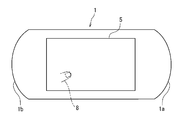
- An example of the portable device is a portable game device 1 as shown in FIGS.
- FIG. 1 is a plan view showing an example of the appearance on the front side of the game apparatus 1
- FIG. 2 is a rear view showing an example of the appearance on the back side of the game apparatus 1.
- the game apparatus 1 includes a display unit 2 such as an organic EL (Electro-Luminescence) or a liquid crystal display on the surface side thereof.
- the game apparatus 1 includes a rear touch panel (contact input type rear input unit) 5 having substantially the same surface area as the display unit 2 on the rear side.
- the display coordinates of the display unit 2 and the input coordinates of the rear touch panel 5 correspond one-to-one, and when a contact object such as a finger 8 of a player (user) touches the rear touch panel 5, An indicator such as the cursor 30 is displayed at the position of the display unit 2 corresponding to the contact coordinates. That is, the position of the finger 8 in contact with the back touch panel 5 is reflected in the position of the cursor 30 displayed on the display unit 2 on the front surface side, and the player can touch the back touch panel 5 with the cursor 30. Can be recognized.
- the game apparatus 1 is referred to as a position designation operation and a main determination operation for provisional determination shown in FIGS. 6A to 6C, in addition to the back input with one touch shown in FIGS. 5A to 5C.
- the back side input by a two-step operation is also possible, and an accurate back side input operation is realized even in an environment in which camera shake is likely to occur.
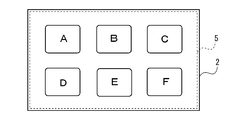
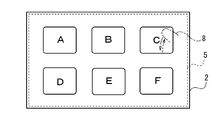
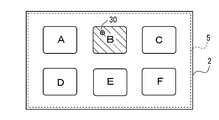
- buttons (objects) that can be selected from “A” to “F” are displayed on the display unit 2, it is considered that the player does not perform an erroneous button operation.
- FIG. 5B if the finger 8 is brought into contact with the area of the rear touch panel 5 corresponding to the button to be selected and then immediately released, the button (this In the example, “C” button) can be input with one touch.
- the timing at which the screen is touched is not used as a processing trigger as in the case of a one-touch input operation on a conventional touch panel.
- the provisional determination is performed at the timing of releasing the finger, erroneous input can be suppressed to an extremely low level.
- the reason is as follows. That is, in the case of a conventional touch panel input operation, of course, a finger is brought closer to a desired button from a position away from the screen, but there is a distance between the button and the finger. By the time the finger finally comes into contact with the screen, the contact position may deviate from the desired button and may touch another button.
- the portable device may be operated while in a car or walking, and in such a case, the possibility of displacement is increased due to vibration, camera shake, and the like.
- the operation of making contact with a desired button becomes even more difficult.
- a finger is first brought into contact with a desired button, and the button is confirmed (provisionally determined) when the finger is released. Therefore, there is no influence of vibration or camera shake. The risk of pressing different buttons is avoided.
- the player After the provisional determination described above, the player performs a final determination operation by bringing a finger into contact with an arbitrary position in the rear touch panel 5. Thereby, as shown in FIG. 6C, the provisionally determined button becomes the final determination, and the button can be accurately input.
- the game apparatus 1 has a left end 1a and a right end 1b formed in an arc shape, and the player (user) grips the left and right ends 1a and 1b with left and right hands. Thus, it can be operated while looking at the screen of the display unit 2. That is, a directional key 3 and a determination button 4 which are physical operation buttons that can be operated by the player with the left and right thumbs are provided on the left and right sides of the display unit 2 in the center.
- the game apparatus 1 when the game apparatus 1 is gripped by the left and right hands, the middle finger or the like of the player's hand is present on the back of the apparatus, so the player touches the back touch panel 5 while viewing the screen of the display unit 2 and inputs the back Can be operated.
- the display unit 2 may be configured as a so-called touch screen by mounting a touch interface on the screen of the display unit 2, and to adopt a contact input method on both the front side and the back side of the apparatus.
- the game apparatus 1 may be provided with physical buttons (not shown) such as operation buttons that can be operated with the left and right index fingers, an analog pad, and a volume adjustment button.
- the rear touch panel 5 of the present embodiment is configured as a projection-type capacitive multi-touch panel, and can detect multiple points simultaneously.
- other types of touch panels such as a resistive film type, a surface acoustic wave type, an infrared type, an electromagnetic induction type, or a surface type capacitive type can be adopted.
- the area of the display area (screen) of the display unit 2 and the area of the rear touch panel 5 are made substantially equal, and the rear input by the rear touch panel 5 is enabled for the entire display area (in FIG. 5A and the like).
- the rear touch panel 5 shown by a broken line is shown slightly smaller than the display unit 2 shown by a solid line, but the rear touch panel 5 and the display unit 2 are substantially equal in size).
- the present invention is not limited to this, and the area of the rear touch panel 5 is formed smaller than the area of the display area of the display unit 2, and the rear input by the rear touch panel 5 is performed on a part of the entire display area. It may be possible.
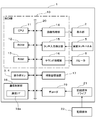
- FIG. 3 is a block diagram showing a main hardware configuration of the game apparatus 1.
- the game apparatus 1 includes a control unit 10, an auxiliary storage device 17, a communication control unit 18, a decoder 19, a recording medium drive 21, and the like.
- the control unit 10 includes a CPU (Central Processing Unit) 11, a ROM (Read Only Memory) 12 and a RAM (Random Access Memory) 13 as a main storage device, an image processing unit 14, a touch input detection unit 15, and a sound. And a processing unit 16, which are connected to each other via a bus line 20 including an address bus, a data bus, a control bus, and the like. An interface circuit is interposed between the bus line 20 and each component as necessary, but the interface circuit is not shown here.
- a CPU Central Processing Unit
- ROM Read Only Memory
- RAM Random Access Memory
- the CPU 11 interprets and executes the instructions of the game program and controls the entire game device 1.
- the ROM 12 stores programs and the like necessary for basic operation control of the game apparatus 1.
- the RAM 13 stores various programs and data, and secures a work area for the CPU 11.
- the image processing unit 14 drives the display unit 2 based on an image display command from the CPU 11 to display an image on the screen of the display unit 2. Further, when a finger or the like touches the input surface of the rear touch panel 5, the touch input detection unit 15 detects a contact position coordinate on the input surface and supplies a coordinate signal to the CPU 11. Thereby, the CPU 11 recognizes the contact position on the input surface of the rear touch panel 5.
- the sound processing unit 16 generates an analog audio signal based on a sound generation instruction from the CPU 11 and outputs it to the speaker 6.
- the auxiliary storage device 17 has a nonvolatile storage area for storing various game parameters and the like in order to maintain the game state at the time of interruption when the game is interrupted, for example.
- the auxiliary storage device 17 can store game programs and various data.
- a hard disk drive, a flash memory drive, a removable media drive such as a memory card, or the like can be used as the auxiliary storage device 17, for example.
- the communication control unit 18 includes a communication interface 18a, and has a communication control function for data communication during game execution.
- the communication control function for data communication includes, for example, a wireless LAN (Local Area Network) connection function, an Internet connection function via a wireless LAN or a mobile phone network, a predetermined frequency band (for example, a frequency of 2.4 GHz) A short-range wireless communication function using a band is included.
- the communication control unit 18 transmits a connection signal for connecting the game apparatus 1 to a wireless LAN, the Internet, or the like based on a command from the CPU 11, and receives information transmitted from the communication partner and supplies it to the CPU 11. To do.
- the decoder 19 is connected to the recording medium drive 21.
- the recording medium drive 21 for example, a DVD-ROM drive, CD-ROM drive, hard disk drive, optical disk drive, flexible disk drive, silicon disk drive, cassette medium reader or the like is used.
- a DVD-ROM, a CD-ROM, a hard disk, an optical disk, a flexible disk, a semiconductor memory, a cartridge type memory, or the like is used as the recording medium 22 .
- the recording medium drive 21 reads image data, audio data, and program data from the recording medium 22 and supplies the read data to the decoder 19.
- the decoder 19 performs error correction processing using ECC (Error Correction Code) on the data read by the recording medium drive 21 and supplies the processed data to the RAM 13.
- ECC Error Correction Code
- the game apparatus 1 also includes an imaging device (camera) such as a CCD (Charge Coupled Device) image sensor, a GPS (Global Positioning System) signal receiving circuit, and a motion sensor (3-axis acceleration sensor or 3-axis gyroscope). Etc. may be provided.
- an imaging device such as a CCD (Charge Coupled Device) image sensor, a GPS (Global Positioning System) signal receiving circuit, and a motion sensor (3-axis acceleration sensor or 3-axis gyroscope). Etc. may be provided.
- a game program stored in the storage medium 22 or the auxiliary storage device 17 is loaded into the RAM 13, and the loaded game program is executed by the CPU 11, so that various games can be executed. is there.
- the player's operation with respect to the game apparatus 1 can be performed by a rear surface input by the rear touch panel 5 or the like.
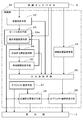
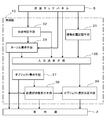
- FIG. 4 is a main functional block diagram of the game apparatus 1 shown in FIGS.
- the game apparatus 1 functionally includes a contact position storage unit 31, a state determination unit 32, a cursor display unit 33 (index display unit), a provisionally determined position storage unit 34, and an effective period setting unit 35. , Input determination means 36, object display means 37, provisional selection state display means 38, and object selection determination means 39, each of which is realized by the control unit 10 executing a program.
- the contact position storage means 31 stores the contact position (contact coordinates) when the finger (contact object) contacts the rear touch panel 5 in the storage device (RAM 13 or the like). That is, the contact position storage means 31 stores the coordinates of the contact start position when the finger first contacts from the state where nothing is in contact with the rear touch panel 5.
- the contact position storage means 31 is arranged at a predetermined time (sampling time) interval in a state where the finger is continuously in contact with the rear touch panel 5 (that is, during a position designation operation for provisional determination).
- the coordinates of the contact position of the finger touching the touch panel 5 are stored.
- the coordinates of the contact position stored in the contact position storage means 31 only the coordinates of the latest contact position may be stored while being sequentially overwritten, or the coordinates of the contact position acquired at every sampling time may be stored in time series. All may be stored.
- the state determination means 32 has a function of determining that a position designation state for provisional determination has been reached when detecting a state in which a contact object such as a finger has been in contact with the rear touch panel 5 for a predetermined time or longer.
- the position designation operation for provisional determination in the game apparatus 1 is not a time when the player touches the back touch panel 5 immediately, but a time to reach a target position while keeping the finger touching the back touch panel 5. It is an operation to move by applying. Therefore, by detecting a state in which a finger has been in contact with the rear surface touch panel 5 continuously for a predetermined time or longer, the state determination unit 32 has started that the player has started a position designation operation for provisional determination (that is, provisional determination The position designation state for this is determined).
- the state determination means 32 may determine that the position designation state has been reached when detecting that the rear touch panel 5 has been moved while a contact object such as a finger is in contact therewith.
- the cursor display means 33 causes the display unit 2 to display the cursor 30 corresponding to the position of the finger that touches the rear touch panel 5 or moves in contact with the rear touch panel 5 during the position designation state for provisional determination. It has a function. Thus, in the position designation state for provisional determination, the cursor 30 reflecting the position of the finger touching the rear touch panel 5 is displayed on the screen of the display unit 2, so that the player moves the finger. It is possible to perform the back operation while visually recognizing the cursor 30 interlocked with the. Thereby, it is possible to specify the position by an accurate back operation without accompanying the complication of the device such as the combined use of sensors other than the touch panel such as a camera, the device being transparent, and the protrusion being provided on the back surface.
- the provisionally determined position storage means 34 has a function of storing, in the storage device, the position of the cursor 30 when the finger leaves the rear touch panel 5 as a provisionally determined position during the position designation state for provisional determination. That is, in the position designation state, when the player releases the finger touching the rear touch panel 5 while visually recognizing the cursor 30 at the target position, the position of the cursor 30 at this time is the provisionally determined position storage means 34. Is remembered.
- the valid period setting means 35 sets a valid period from when the provisionally determined position is stored by the provisionally determined position storage means 34 until the provisionally determined position is finally determined. Only when a predetermined main determination operation is performed on the rear touch panel 5 within the effective period, the input at the provisional determination position is the main determination. On the other hand, when this determination operation is not performed within the effective period, the cursor display means 33 is configured to erase the cursor 30 displayed on the display unit 2. That is, when the effective period elapses, the cursor 30 automatically disappears from the display unit 2 and the provisional decision is canceled. As a result, if the final decision is not made at the temporary decision position after the provisional decision is made, the temporary decision can be canceled without waiting for the expiration of the validity period, and no special cancellation operation is required. Can be improved.
- the cursor display unit 33 includes a display state changing unit 33a (an index display state changing unit) that changes so that the visibility of the display state of the cursor 30 decreases as the remaining time of the effective period with respect to the temporarily determined position becomes shorter.
- a display state changing unit 33a an index display state changing unit
- Yes. 7A to 7C show how the area of the cursor 30 decreases as the remaining time of the effective period decreases, and the cursor 30 is erased as the effective period elapses.
- the display state changing unit 33a reduces the area of the cursor 30 as the remaining time of the effective period decreases.
- the display state changing unit 33a may increase the transparency of the cursor 30 as the remaining effective period decreases.
- the visibility of the cursor 30 is gradually reduced.
- the display state changing unit 33a reduces the remaining time of the effective period for the player by reducing the area of the cursor 30 or increasing the transparency as the remaining time of the effective period decreases.
- An easy-to-understand information Since the player performs the provisional determination operation and the subsequent main determination operation while visually recognizing the cursor 30 of the display unit 2, the remaining time of the effective period can be effectively reduced by changing the display state of the cursor 30. The player can be made to recognize.
- a method of increasing the blinking speed of the cursor 30 as the remaining time of the effective period decreases can be considered.
- a method of changing the color of the cursor 30 according to the remaining time of the effective period (for example, changing the color of the cursor 30 from blue to yellow to red as the remaining time decreases) can be considered.
- a method of counting down a number indicating the remaining effective period in the vicinity of the cursor 30 or superimposed on the cursor 30 is also conceivable.
- the visibility of the display state of the cursor 30 decreases as the remaining time of the effective period decreases, and the cursor 30 is deleted from the display unit 2 as the effective period elapses. . Accordingly, it is possible to notify the player that the remaining time of the effective period has decreased more easily, and the cursor 30 can be erased naturally.
- the valid period for the provisionally determined position can be set to about several seconds (for example, about 1 to 2 seconds).
- the effective period may be set so that the player can arbitrarily change the setting (for example, specify an arbitrary number of seconds within 1 to 5 seconds) on an option setting screen (not shown).
- the present determination operation can be received indefinitely after provisional determination without providing the effective period.
- a predetermined cancellation operation is performed.
- the canceling operation for example, an operation of moving the finger up and down or left and right continuously a plurality of times while keeping a finger in contact with an arbitrary position on the back touch panel 5 (moving operation that rubs the eraser) is cancelled. It is desirable to make the operation intuitively easy to understand.
- the input determination means 36 finally determines the input at the temporary determination position stored in the temporary determination position storage means 34 based on the final determination operation performed after the temporary determination.
- the main determination operation is a predetermined operation by touching a contact object such as a finger on the entire surface of the rear touch panel 5.
- a one-touch operation is performed in which the finger is brought into contact with the rear touch panel 5 and then released before the predetermined time is reached to release the contact state.
- click operation an example in which this operation is referred to as “click operation”.
- the back input with one touch shown in FIGS. 5A to 5C is the same click operation as the determination operation. Even if the click operation is the same, the click operation performed before the transition to the position designation state for provisional determination is a one-touch input operation in which the coordinates of the click position are directly input coordinates, while the position designation state The click operation performed after the transition to tentative determination is made is this determination operation.
- the above-described position designation operation for provisional determination is an operation of moving a finger to a target position while keeping the finger in contact with the rear touch panel 5, and this operation is an operation referred to as a so-called “drag”.
- this operation is referred to as “drag operation”.
- the input touch means 36 When the input determining means 36 detects that a contact object such as a finger has moved away from the rear touch panel 5 without transitioning to a position designation state for temporary determination, the input touch means 36 is stored in the touch position storage means 31 and is stored in the touch position storage means 31.
- the coordinates of the contact position when the finger (contact object) contacts 5 is determined as the input position.
- that the finger has left the rear touch panel 5 without transitioning to the position designation state means that “the finger has touched the rear touch panel 5 for a predetermined time or longer” or “the finger has moved in a state of being in contact with the rear touch panel 5”. This means that the finger has moved away from the rear touch panel 5, that is, the player has performed a one-touch input click operation.
- the input determining means 36 determines the coordinates of the contact position when the finger touches the back touch panel 5 as the input position.
- the input determining means 36 has a function of determining the input at the provisionally determined position only when the click operation as the main determining operation is performed within the effective period set by the effective period setting means 35.
- the input determination unit 36 detects that the finger has left the rear touch panel 5 without transitioning to the position designation state. The coordinates of the contact position when the finger touches the rear touch panel 5 is determined as the input position.
- the object display unit 37 causes the display unit 2 to display objects that can be selected by a rear surface input operation.
- the selectable object means a selection target such as a button displayed on the screen of the display unit 2 as shown in FIG. 5A.
- a menu button in an initial screen displayed on the display unit 2 when the game apparatus 1 is activated corresponds to the object.
- various icons and characters displayed on the display unit 2 that can be selected by a back surface input operation also correspond to the object.
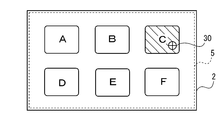
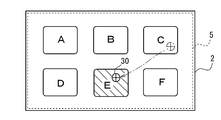
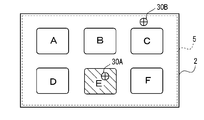
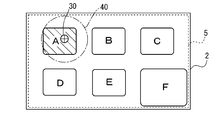
- the temporary selection state display means 38 is a temporary selection state that is different from the display state when the selection is determined, when the cursor 30 overlaps the selectable object displayed on the display unit 2. It has a function to display with. For example, as shown in FIGS. 6A and 6B, in the position designation state for provisional determination, the cursor 30 reflecting the position of the finger touching the back touch panel 5 overlaps the C button or the E button. In this case, the color, brightness, or pattern of the C / E button is displayed in a temporarily selected state different from the color, brightness, or pattern when the selection of the E button shown in FIG. 6C is determined. Yes.
- the provisional selection state display means 38 acquires the current position coordinates of the cursor 30 in the position designation state for provisional determination, and when the acquired cursor coordinates exist within the display area of the selectable object, the object Is temporarily selected.
- the position designation state not only the cursor 30 reflecting the position of the finger is displayed on the screen of the display unit 2, but also the provisional selection state of the object is displayed to the player in an easily understandable manner. Further improvement in operability can be achieved.
- the object selection determining unit 39 performs the main determination operation by the player when the object is displayed in the temporarily selected state, and when the input at the temporary determination position is finally determined by the input determining unit 36, the object selection determining unit 39 This choice is finalized. For example, as shown in FIG. 6B, when the cursor 30 is present in the display area of the E button (when the E button is displayed in the temporary selection state), the player temporarily removes his / her finger from the rear touch panel 5 and makes a temporary decision. Then, if the player clicks the back touch panel 5 within the effective period, the input at the cursor position is finally determined, and the selection of the E button in the temporarily selected state is finally determined by the object selection determining means 39.
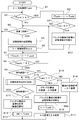
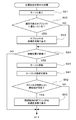
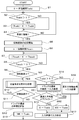
- the valid period Tvalid is initialized (S1). Next, it is determined whether or not the effective period Tvalid is greater than 0 (S2). If YES in S2, the effective period Tvalid is decremented (S3), and the process proceeds to S4. It should be noted that YES in S2 is only from the time when a provisional decision to be described later is made until this decision is made. Therefore, before the provisional decision operation is performed after the apparatus is activated, However, after this determination is made or after a valid period once set has elapsed, the valid period Tvalid is 0 (NO in S2), and the process proceeds to S4 without passing through S3. In S4, it is determined whether or not a contact object such as a finger has come into contact with the rear touch panel 5, and a loop process of repeating S2 to S4 is performed until contact is detected.
- the contact position storage means 31 When contact with the rear touch panel 5 is detected (YES in S4), the contact position storage means 31 starts recording contact coordinates (S5). That is, the contact position storage unit 31 stores the coordinates of the first contact position (contact start position) when the finger (contact object) contacts the rear touch panel 5 in the storage device (RAM 13 or the like), and thereafter performs predetermined sampling. Current contact coordinates are acquired and stored every time.
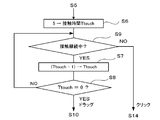
- Steps S6 to S8 are elapsed time processing (wait processing) that serves as a reference for determining whether the operation is a click operation or a drag operation.
- the predetermined time is determined by the set value of the contact time Ttouch and the frequency of the operation clock of the CPU 11, and for example, a time of about 100 ms can be set.
- the cursor display means 33 causes the display unit 2 to display the cursor 30 corresponding to the position of the finger touching the back touch panel 5 (S21). Then, it is determined whether or not the cursor 30 overlaps the selectable object displayed on the screen of the display unit 2 (S22). For example, as shown in FIG. 6A, when the cursor 30 overlaps the display area of the C button which is a selectable object, the temporary selection state display means 38 displays the C button in the temporary selection state (S23). ).
- the contact with the rear touch panel 5 is released (NO in S11), and the last coordinate of the drag operation (that is, the cursor 30 when the finger leaves the rear touch panel 5).
- the temporary determination position storage means 34 S12
- the position of the cursor 30 at this time becomes the provisional determination position.
- the E button is displayed in a temporarily selected state, and is temporarily determined as an input candidate.
- the effective period setting means 35 sets a predetermined value (100 in the example of FIG. 8) as the effective period Tvalid for the temporary determination position (S13).
- the number of seconds of the actual effective period is determined by the value of the effective period Tvalid set here and the frequency of the operation clock of the CPU 11.
- the process proceeds to S2, and the effective period Tvalid is decremented until the finger touches the rear touch panel 5 by the loop processing of S2 to S4 (YES loop in S2, NO loop in S3, and S4) processing).
- the valid period Tvalid is initialized (S16). Thereafter, an input process using input coordinates is executed (S17). For example, as shown in FIG. 6C, when the input of the E button is determined, a command corresponding to the E button is executed (for example, if the E button is a game start button, the game is started). Become). Note that the cursor 30 does not move to the click position even if the above-described click operation for final determination is performed. In addition, the cursor displayed over the E button in FIG. 6C is erased when the valid period Tvalid is initialized in S16.
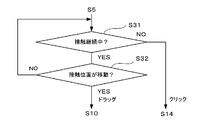
- flowcharts S6 to S9 indicate a position designation state for provisional determination by a drag operation when a state in which a contact object such as a finger continuously contacts the rear touch panel 5 for a predetermined time or more is detected. It is the process which determines with having become. Instead, as shown in the flowchart of FIG. 11, when it is detected that the contact position on the rear touch panel 5 has moved while the contact with the rear touch panel 5 continues (YES in S31) ( If YES in S32), it may be determined that the position designation state for provisional determination by the drag operation has been entered, and the process may proceed to S10. Further, in the flowchart of FIG. 11, when the contact position on the rear touch panel 5 does not move (NO in S32) and the contact with the rear touch panel 5 is released (NO in S31), it is determined that a click operation has been performed. And it transfers to S14.
- a predetermined value for example, 100 is set to the valid period Tvalid (S13). If the valid period Tvalid is not 0 (YES in S2), the valid period Tvalid is decremented by 1 ( S3). Then, the cursor display means 33 reduces the area of the cursor 30 according to the valid period Tvalid as the value of the valid period Tvalid decreases (S41). This area reduction process is repeated until the effective period Tvalid reaches 0 (NO in S2) or until the finger touches the rear touch panel 5 (YES in S4). As a result, the cursor 30 displayed in the size shown in FIG. 7A immediately after the provisional determination is displayed smaller as shown in FIG. 7B due to the decrease in the valid period Tvalid.
- a predetermined value for example, 100
- the cursor 30 is displayed (YES in S42), the cursor 30 is erased (S43), and if the object is in the temporarily selected state. If this is the case (YES in S44), the temporary selection state is also released (S45). In this way, the temporarily determined state once set is automatically released as the valid period Tvalid elapses, and the screen of the display unit 2 is in contact with the rear touch panel 5 as shown in FIG. 7C. Return to the original display state.
- the provisional decision is automatically canceled as the valid period Tvalid elapses, but the current provisional decision is canceled and a new position coordinate is designated as the provisional decision position without waiting for the validity period Tvalid to elapse.
- the player may perform the drag operation for temporary determination again without performing the click operation for final determination. That is, in the flowchart of FIG. 8, when a new drag operation is performed when the valid period Tvalid for the current tentative decision remains, the coordinate information of the tentative decision stored at the time of the previous drag operation is stored in S12. The last coordinate of the new drag operation is rewritten and stored, and the provisional decision can be redone. After redoing the provisional decision, the valid period Tvalid is also set to a predetermined value (100) (S13), and the period starts from the beginning.
- the drag is further performed within the validity period of the temporary decision.
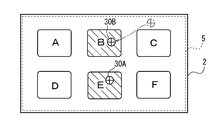
- a cursor 30B different from the cursor 30A is displayed on the display unit 2.
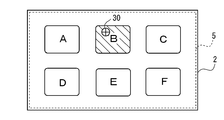
- the player makes a second provisional decision by releasing the finger at a position where the cursor 30B exists on the B button by a drag operation.
- two provisional decisions are made at the same time, and the B button and the C button are displayed in a provisionally selected state at the same time.
- the player performs a click operation for the main determination within the effective period set in the last temporary determination (here, the second temporary determination), as shown in FIG.
- simultaneous selection input of the B and C buttons can be realized.
- a temporary determination position set at the same time can be further added by additionally performing a drag operation for temporary determination by the player within the effective period set in the final temporary determination.
- the plurality of temporarily determined positions can be collectively determined by a single click operation for final determination. This is because the temporary determination position storage unit 34 stores one or more temporary determination positions in the storage device, and the input determination unit 36 uses one or more temporary determination positions stored in the temporary determination position storage unit 34. This can be realized by a configuration in which this input is determined collectively.
- the predetermined time for example, several If the finger touches the back touch panel 5 again within about 10 ms
- the finger can be disengaged from the rear touch panel 5 even during a drag operation. This is for avoiding this because a distant position is stored as a provisionally determined position.
- the storage information of one or a plurality of provisionally determined positions (the last coordinates of the drag) stored in the provisionally determined position storage means 34 in S12 ′ is when the valid period Tvalid set in the last provisional determination becomes 0 ( It is initialized (YES in S51) (S52), and is also initialized after this determination (S15) is performed (S53).
- buttons A and D in this example
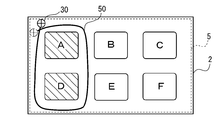
- the player can select one or a plurality of buttons (A and D in this example) according to the locus 50 of the cursor 30 that moves with the movement of the finger that is in contact with the back touch panel 5.
- the A and B buttons existing in the area surrounded by the locus 50 of the cursor 30 are displayed together in a temporarily selected state.
- the A and D buttons can be temporarily selected in a lump.
- simultaneous selection input of the A and D buttons can be realized as shown in FIG. 15C.
- the provisional selection state display means 38 is surrounded by the locus 50 of the cursor 30 during the position designation state for provisional decision.
- One or a plurality of objects selection targets such as buttons, icons, characters, etc.
- the object selection determining unit 39 determines the selection of the one or more objects at a time. The configuration.
- the batch provisional selection and the batch final determination can be realized by making the processing (S10) in the position designation state in the basic flowchart of FIG. 8 a routine shown in the flowchart of FIG. Note that steps S21 to S25 in FIG. 16 are the same as those in the flowchart of FIG.
- the cursor display means 33 displays not only the cursor 30 but also the locus 50 on the display unit 2 (S61). Although displaying the trajectory 50 is not an essential configuration, displaying the trajectory 50 in this way makes the area surrounded by the trajectory 50 clear on the screen, thereby improving operability.
- the formation of the closed region means that a region closed by the locus 50 is formed when a part of the locus 50 intersects as shown in FIG. 15B.
- the temporary selection state display unit 38 displays the objects such as buttons existing in the closed region in the temporary selection state (S63). After S63 or if NO in S62, the process proceeds to S11 in the flowchart of FIG.
- the operability at the time of selecting a plurality of objects is greatly improved by enabling the operations of provisional selection and batch final determination of a plurality of objects shown in FIGS. 14A to 14C or 15A to 15C described above.
- selecting a plurality of objects in addition to selecting a plurality of buttons as described above, there are a case of selecting a plurality of characters and items in a screen during a game. For example, in a baseball game screen, a plurality of fielder characters that are defending are selected together, and the field positions are adjusted by moving the selected fielder characters (for example, three outfielder characters are selected together)
- the provisional multiple selection and batch final determination operations are effective.
- multiple temporary selections and batch books can be used to change the formation by selecting multiple player characters at once on the soccer game screen, or when selecting multiple items at once on the shopping game screen. The decision operation is effective.
- the input coordinate position designation is performed by a drag operation
- the subsequent click operation confirms the intention of input determination at the temporary determination position.
- the game apparatus 1 is in contact after a finger is brought into contact with an arbitrary position on the rear touch panel 5. Move the finger while maintaining the state, carefully reach the target position (position of an object such as a button) while visually recognizing the cursor 30 on the display unit 2, and release the finger at that position. Is temporarily determined, so that it is possible to avoid an erroneous operation such as pressing another button or the like by mistake and to realize an accurate back side input.
- the game apparatus 1 uses the normal rear touch panel 5 without using a sensor other than the touch panel such as a camera together, making the apparatus transparent, or attaching a protrusion on the back.
- a sensor other than the touch panel such as a camera together
- provisional determination and main determination operations not only the provisional determination and main determination operations but also normal one-touch input operations are possible, and the player can use these two rear input operations appropriately according to the usage status and usage environment of the game apparatus 1.
- multiple small buttons are displayed on the screen of the display unit 2 or when it is necessary to operate in an environment where the above-described device vibration or camera shake is likely to occur, careful and accurate input is required. What is necessary is just to perform operation of provisional determination and this determination which can be operated.
- FIG. 1 Another configuration example of the game apparatus 1 will be described with reference to a functional block diagram of FIG. Note that components similar to those shown in the above-described drawings (FIGS. 1 to 16) are given the same member numbers or step numbers, and description thereof will be omitted as appropriate.
- the control unit 10 of the game apparatus 1 further includes an effective area setting unit 41, a continuously inputable object display unit 42, and an effective period resetting unit 43 in addition to the units 31 to 39 shown in FIG.
- Each of these means 41 to 43 is realized by the control unit 10 executing a program.
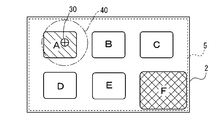
- the effective area setting unit 41 sets a predetermined effective area on the rear touch panel 5 including the position of the contact object when the contact object such as a finger leaves the rear touch panel 5 during the position designation state for provisional determination. It has the function to do. For example, as shown in FIG. 18A, when the player makes a temporary determination by releasing the dragging finger from the rear touch panel 5 at the position where the cursor 30 is present on the A button, the effective area setting unit 41 releases the finger.
- a circular effective area 40 centered on the position at the time is set on the rear touch panel 5.
- the effective area 40 may be an area including the position when the finger is released, and may not necessarily be an area centered on the position when the finger is released, and the area shape is also circular. It is not limited and may be a square or the like.
- the input determining means 36 is limited to the case where the main determining operation (the operation of clicking the rear touch panel 5) is performed within the effective area.
- the input at the provisional decision position is finally decided.
- the click operation as the final determination operation is performed after the provisional determination, the click is usually performed in the vicinity of the position where the finger is released from the rear touch panel 5, and the effective region is based on the position where the finger is released from the rear touch panel 5. If 40 is provided, this determination operation is not substantially hindered.
- the operation on the rear touch panel 5 performed outside the effective area 40 is not the final determination operation, it is possible to accept any operation outside the effective area 40 even after the provisional determination is made.
- the click operation is a click operation after provisional determination.
- this determination operation is not performed, and it is regarded as a back input click operation with one touch. Therefore, in this case, as shown in FIG. 18C, selection input of the F button is made.
- the F button is a cancel button having a larger area than the other buttons so that it is easy to input the back with one touch
- the provisional decision once set can be made by clicking the F button. , You can cancel at any time without waiting for the expiration of the validity period.
- the operation of the game apparatus 1 that accepts the determination operation only within the effective area includes the step S71 for setting the effective area in the basic flowchart of FIG. 8 as shown in the flowchart of FIG. Can be realized by adding a determination step S72 for branching the process.
- the click operation is regarded as the final determination operation, and the last coordinate of the drag (that is, the coordinate of the temporary determination position) is the input coordinate. Is determined as (S15).
- the click operation is regarded as a one-touch input click operation instead of the main determination operation, and the first contact coordinates stored in S5 ( That is, the coordinates of the click position when touching the back touch panel 5 are determined as input coordinates (S18).
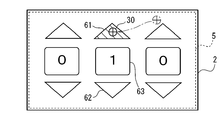
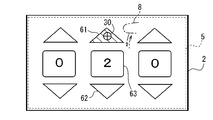
- the continuously inputable object display means 42 shown in FIG. 17 causes the display unit 2 to display a continuously inputable object that permits continuous input for the same temporarily determined position.
- a ⁇ button 61 count up button
- a ⁇ button 62 count down for changing a changeable numerical value (parameter) up and down Button.
- the ⁇ button 61 is a button that increases the numerical value in the numerical value display unit 63 by 1 each time it is pressed
- the ⁇ button 62 is a button that decreases the numerical value in the numerical value display unit 63 by 1 each time it is pressed. It is.
- the ⁇ button 61 enters a temporary selection state.
- the input of the ⁇ button 61 is decided as shown in FIG.
- the numerical value in the numerical value display part 63 is changed from “1” to “2” by executing the command when is pressed.
- the valid period for the temporary determination is reset, and the temporary selection state of the ⁇ button 61 is maintained.
- the valid period resetting unit 43 performs the click operation of the final determination during the valid period in a state where the provisionally determined position exists in the display area of the continuously inputable object.
- the effective period for the provisionally determined position is reset after the final determination, and the effective period is started from the beginning.
- the input determination unit 36 determines the input at the temporary determination position again when the click operation for the final determination is performed during the effective period reset by the effective period resetting unit 43.
- the operation of the game apparatus 1 that allows continuous input for the same provisional determination position is shown in the basic flowchart of FIG. This can be realized by adding a determination step S81 for branching the process depending on whether or not and a step S82 for resetting the valid period.
- the final determination click operation is performed on the rear touch panel 5 (YES in S14), and the last coordinate of the drag (that is, the coordinate of the temporary determination position).
- the input coordinates S15
- the temporary determination is canceled by the final determination after the temporary determination, and the subsequent click operation is processed as a one-click input operation.
- the subsequent main determination can be continuously performed by one temporary determination, and the operability can be improved.
- FIG. 22 diagrams showing screen transitions of FIGS. 23A to 23C, a flowchart of FIG. Note that the same components as those shown in the drawings (FIGS. 1 to 21) are denoted by the same member numbers or step numbers, and description thereof will be omitted as appropriate.
- the rear touch panel 5 of the game apparatus 1 is configured as, for example, a capacitive multi-touch screen, and can simultaneously detect a plurality of points.
- the back input unit can recognize a plurality of points at the same time, it is possible to perform a predetermined operation (such as clicking) on the back touch panel 5 with the other finger without separating one finger from the back touch panel 5.
- the game apparatus 1 realizes an accurate back surface input operation by effectively using the multiple point simultaneous detection function.
- FIG. 23A when the player starts the drag operation by bringing the finger 8 of one hand (in this example, the right hand) into contact with the rear touch panel 5, the cursor 30 reflecting the position of the finger is displayed on the display unit 2. Is displayed and the position is specified. Thereafter, as shown in FIG. 23B, the finger 8 is moved to the target position (in this example, the position corresponding to the E button) while dragging the finger 8 of the right hand in contact with the rear touch panel 5. Then, after dragging to the target position, the right touch finger 8 is not released from the back touch panel 5 and the other hand (left hand) finger 8 ′ is clicked on the back touch panel 5. As a result, as shown in FIG.
- the position of the cursor 30 being dragged at the time of the click operation with the finger 8 'of the left hand is determined as the input position, and the E button is selected and input.
- the rear touch panel 5 is being dragged with the finger of one hand, the rear touch panel 5 is clicked with the finger of the other hand, thereby realizing rear input while performing accurate position designation.
- the game apparatus 1 that realizes the above-described back surface input operation includes a contact position storage unit 31, a state determination unit 32, a cursor display unit 33 (index display unit), an input determination unit 136, and an object display unit 37.
- the temporary selection state display means 38 and the object selection determination means 39 are provided, and each of these means is realized by the control unit 10 executing a program.
- the input determination unit 136 of the game apparatus 1 performs a predetermined operation (this book) by contact of a contact object on the entire surface of the rear touch panel 5 while the finger is in contact with the rear touch panel 5 in a position designation state by a drag operation.
- a predetermined operation this book
- the position of the cursor 30 at the time of the operation is determined as an input position.
- the input determining unit 136 detects that a contact object such as a finger has left the rear touch panel 5 without transitioning to the position designation state, the rear touch panel 5 stored in the contact position storage unit 31 described above.
- the coordinates of the contact position when the finger (contact object) touches is determined as the input position. That is, when a click operation is performed as a back surface input operation with one touch, the input determination unit 136 determines the coordinates of the contact position when the finger touches the back touch panel 5 as the input position.
- the provisionally determined position storage means 34 and the valid period setting means 35 required in the game apparatus shown in FIG. Can be omitted.
- the configuration (units 31 to 33 and 37 to 39) other than the input determining unit 136 of the game apparatus 1 is basically the same as the configuration of the game apparatus shown in FIG.
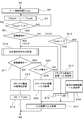
- the contact time Ttouch becomes 0 after S5 to S7 after the finger is brought into contact with the rear touch panel 5 (YES in S4).
- the finger being dragged is in contact with the rear touch panel 5 (YES in S9), so it is determined that the position designation state has been reached, and the process proceeds to the process in the position designation state (S10). become.
- a click operation is performed at an arbitrary position on the rear touch panel 5 (YES in S91) while the finger is continuously touching the rear touch panel 5 (YES in S11), the drag at the time of the click operation is performed.
- the position coordinates of the cursor 30 inside are determined as input coordinates (S92). Thereafter, an input process using input coordinates is executed (S17).
- the position of the input coordinates is specified by a drag operation, and the click operation is an operation for confirming the intention of input determination.
- the click operation is an operation for confirming the intention of input determination.
- the game apparatus 1 includes the display unit 2 and the rear touch panel 5 (contact input type rear input unit) provided on the surface opposite to the installation surface of the display unit 2.
- a contact object such as a finger is continuously in contact with the back touch panel 5 for a predetermined time or more, or detecting the contact object on the back touch panel 5
- the state determining means 32 for determining that the position designation state has been reached when it is detected that the movement has been made while in contact, and (2) touching or touching the back touch panel 5 during the position designation state.
- Cursor display means 33 (index display means) for displaying the cursor 30 (index) corresponding to the position of the moving contact object on the display unit 2, and (3) during the position designation state, the contact object is back When a predetermined operation (click operation or the like) is performed by touching the contact object with the entire touch panel 5 in contact with the touch panel 5, the position of the cursor 30 at the time of the operation is input position And input determining means 136 for determining as follows.
- the game device 1 touches an arbitrary position on the rear touch panel 5 even when the device is used in an environment in which vibration or camera shake of the device is likely to occur, such as in a car or while walking. Then, the finger is dragged while maintaining the contact state, and the finger is carefully reached at the target position (position of an object such as a button) while visually recognizing the cursor 30 of the display unit 2, and the rear touch panel at that position. Since the input at the position is determined simply by performing a predetermined operation (click operation or the like) on 5, an erroneous operation of pressing another button or the like by mistake is avoided, and an accurate back surface input is realized.
- the game apparatus 1 includes a contact position storage unit 31 that stores a contact position when a contact object touches the back touch panel 5 in a storage device (such as the RAM 13).
- the input determination unit 136 includes When it is detected that the contact object has left the rear touch panel 5 without changing to the position designation state, the contact position stored in the contact position storage unit 31 is determined as the input position.
- the game apparatus 1 can be properly used according to the usage situation and usage environment of the game apparatus 1.
- the flowchart of FIG. 25 is obtained by partially changing the processes after S6 in the basic flowchart of FIG. 8.
- the description of steps S1 to S5 of FIG. 8 is omitted for the sake of convenience, but these steps S1 to S5 are also included. It is out.
- the process of any of S92, S15, or S18 is performed to determine the input coordinates, and the input process with the determined input coordinates is executed (S17). ).
- the process proceeds to S2 (see FIG. 8) again, and the above-described processing is repeated while the game apparatus 1 accepts the back input.
- the contact position (absolute position) of the finger that is in contact with the rear touch panel 5 and the display position (absolute position) of the cursor 30 on the display unit 2 correspond one-to-one ( That is, the example in which the position of the finger on the back and the position of the cursor 30 on the front surface are matched has been described. In contrast, as illustrated in FIGS.
- the rear touch panel 5 If the finger 8 is moved (dragged) at an arbitrary position, the cursor 30 moves according to the moving direction and the moving amount of the finger 8 while maintaining the relative positional relationship between the finger 8 and the cursor 30. It can also be configured. Details of the operations of FIGS. 26A to 26C will be described below.
- FIG. 26A shows the cursor 30 when the finger 8 that has been performing a drag operation for provisional determination is released from the rear touch panel 5.
- a temporary decision is made at this cursor position.
- the position designation state is continued. Therefore, if the finger 8 is brought into contact with an arbitrary position on the rear touch panel 5 and the drag operation is started again as shown in FIG. 26B within the temporary determination valid period, the relative relationship between the finger 8 and the cursor 30 is increased.
- the cursor 30 can be moved in accordance with the moving direction and moving amount of the finger 8 while the positional relationship is maintained.
- the cursor display means 33 of the game apparatus 1 moves the moving direction and moving amount of a contact object such as a finger that moves while touching the back touch panel 5 during the position designation state for provisional determination. Accordingly, the cursor 30 is displayed on the display unit 2 so that the cursor 30 moves while maintaining the relative positional relationship between the contact object and the cursor 30.
- the cursor 30 displayed on the display unit 2 can be moved to the entire screen.
- the provisionally determined position designation cursor It is also possible to always indicate 30 on the display unit 2 so that the cursor 30 is not erased even if the valid period has elapsed.
- the cursor 30 for position designation is always displayed on the display unit 2, it is difficult to determine whether or not the current state of the apparatus is in the position designation state. Therefore, it is desirable that the cursor 30 is displayed only during the position designation state and during the provisional determination effective period.
- the final determination operation is not limited to this, and the contact for the entire surface of the rear touch panel 5 is performed. Any operation by contact with an object may be used. For example, a double-click that quickly performs a click operation on the rear touch panel 5 twice, a swipe that sweeps the rear touch panel 5 with a finger, or an operation that clicks on the rear touch panel 5 with two fingers (or more) is determined. It can also be an operation.
- the click operation which is the simplest operation
- the final determination operation is a click operation
- the same operation as the one-touch back surface input click operation is performed.
- the final determination operation and the one-touch back surface input operation are different operations, it is possible to distinguish between the two operations without making a determination based on the validity period for the temporary determination.
- the provisional determination is made at the position where the finger is released from the rear touch panel 5 during the position designation state, but it is also possible to adopt a configuration in which the input is confirmed at the position where the finger is released.
- the finger is brought into contact with an arbitrary position on the rear touch panel 5, the finger is moved while maintaining the contact state, and the target position (the object such as a button is carefully viewed while viewing the cursor 30 on the display unit 2. Since the input at that position is confirmed simply by bringing the finger to (position) and releasing the finger at that position, this determination operation can be omitted.
- the input at that position can be canceled without being finalized.
- the configuration described in the above embodiment in which the temporary determination is performed once and then the final determination operation is performed is more preferable.
- the present invention can be preferably used.
- the player specifies the position (coordinates) on the screen by the back operation. If the present invention is applied to the input, it is possible to specify an accurate pitching course that is not affected by camera shake or the like.
- the game device adopting the back surface input method is exemplified and described as the portable device, but the present invention is not limited to this example. That is, the present invention can be applied to all portable devices such as portable terminals such as smartphones, cellular phones, PHSs, and tablet computers adopting the rear input method.
- the portable device may be used in a train or while walking. Even if the portable device is used in an environment in which such a camera shake or the like is likely to occur, an accurate back surface input can be performed by applying the present invention. Can be operated.
- the present invention can also be applied to an input device or game controller that employs a rear input method and is used by connecting to a personal computer or a stationary game device by wire or wireless.
- the computer-readable program according to the present embodiment is a computer-readable program such as a hard disk, an optical disk (CD-ROM, DVD-ROM, etc.), a flexible disk, a semiconductor memory, a ROM cassette, or a cartridge for a video game device. Recorded on various recording media, read from the recording media, and executed by the control unit 10 of the game apparatus 1. Alternatively, a program is stored in advance in the ROM 12 and is read from the ROM 12 and executed by the control unit 10. Further, the means for providing the program to the game apparatus 1 is not limited to the recording medium described above, and can be performed via a communication network such as the Internet. For example, if the program can be downloaded via the Internet from a homepage provided by a company that manages the network game, the program may be downloaded directly from the homepage to the game device 1 and executed.
- a portable device is a portable device including a display unit and a contact input-type rear input unit provided on a surface opposite to the installation surface of the display unit.
- the position designation state is established.
- State determining means for determining that the display has been performed; and indicator display means for displaying on the display unit an indicator corresponding to the position of the contact object that contacts or moves in contact with the back surface input unit during the position designation state.
- temporarily determined position storage means for storing the position of the index when the contact object is separated from the back surface input unit as a temporarily determined position in the storage device, and the entire surface of the back surface input unit Targeted contact with the contact object That predetermined based on the determining operation, and a, and an input determination means for the determination of the input at the temporarily determined position stored in the provisionally determined position storage means.
- a portable device for example, a portable game device or a portable terminal
- a contact input-type rear input unit for example, a touch panel
- a position specifying operation for specifying a temporarily determined position
- a final determining operation for determining the input at the temporarily determined position are performed in two steps. Input is possible.
- the position designation operation in (A) above is not a contact object such as a finger brought into contact with the rear input unit immediately from the rear input unit, but a contact first, as in a one-touch input operation on a conventional touch panel.
- the state determining means determines that the position specifying state has been entered. This position designation state is determined by (a) detecting a state in which the contact object continues to contact the back surface input unit for a predetermined time or more, or (b) the contact object has contacted the back surface input unit.
- the indicator display means displays an indicator (for example, a cursor) corresponding to the position of the contact object that touches or moves in contact with the back surface input unit on the display unit. Yes.
- the index reflecting the position of the contact object such as a finger that is in contact with the rear input unit is displayed on the screen of the display unit, the user can move the contact object.
- the back operation can be performed while visually recognizing the index linked to the. This makes it possible to specify the position accurately by operating the back without using a sensor other than a touch panel such as a camera, making the device transparent, or attaching protrusions on the back. There will be no rise.
- the position of the index when the contact object is separated from the back surface input unit is a temporarily determined position storage unit. Is stored, thereby making a tentative decision. That is, as in the case of a one-touch input operation on a conventional touch panel, the timing of touching the screen is not used as a trigger for processing, but the timing at which the touch state is released is used as a trigger. However, at this stage, as described above, it is a tentative decision. As described above, since the provisional determination is set at the timing of releasing the contact object, erroneous input can be suppressed to an extremely low level. The reason is as follows.
- the contact object (finger or pen) is brought close to the desired button from a position away from the screen. Since there is a distance between the two, there is a possibility that the contact position will deviate from the desired button and contact another button until the contact object finally touches the screen.
- the portable device may be operated while in a car or walking, and in such a case, the possibility of displacement is increased due to vibration, camera shake, and the like.
- the operation of making contact with a desired button becomes even more difficult.
- a finger is first brought into contact with a desired button, and the button is confirmed (provisionally determined) when the finger is released. Therefore, the effects of vibration and camera shake may occur. Instead, the risk of pressing different buttons is avoided.
- the final determination operation of (B) performed after the provisional determination is a predetermined operation by the contact of the contact object for the entire surface of the rear input unit.
- an arbitrary operation of the rear input unit is performed.
- the so-called click or tap operation for quickly releasing the contact state by bringing a contact object into contact with the position can be set as the main determination operation.
- the input determination unit finally determines the input at the temporary determination position stored in the temporary determination position storage unit.
- a contact object such as a finger is brought into contact with an arbitrary position of the back surface input unit, and then the contact object is moved while the contact state is maintained, and an indicator on the display unit is visually recognized. Carefully let the contact object reach the target position (the position where the button etc. is displayed), and the position is temporarily determined just by moving the contact object away from the rear input part at that position. It is possible to avoid an erroneous operation such as pressing, and to realize accurate back side input.
- the portable device further includes a contact position storage unit that stores a contact position when a contact object comes into contact with the back surface input unit in a storage device. And when the said input determination means detects that the said contact object left
- the rear input by one touch (one click) operation on the rear input unit is possible.
- the input by this one touch (one click) operation is basically the same as the one touch operation input on the conventional touch panel, but this operation input is also possible based on the usage status of the player or portable device. This is to allow arbitrary operation input according to (environment) and to ensure a degree of freedom in operability.
- the configuration (1) is a very useful configuration when the portable device is operated, for example, in a car or while walking, but depending on the player, there is confidence in the input operation even with the back input.
- the two-step input operation is troublesome because it is used. Or, when playing on a desk, the possibility of erroneous input may be reduced.
- an input operation method that can be arbitrarily selected according to the player and the situation is prepared, so that excellent operability can be realized.
- the contact position storage means stores the contact position when the contact object comes into contact with the back surface input unit, and the contact object does not change to the position designation state.
- the input determination unit determines the contact position stored in the contact position storage unit as the input position.
- the contact object has moved away from the back input unit without transitioning to the position designation state, which means that the contact object has moved in a state of being in contact with the back input unit for a predetermined time or more.
- the contact position stored in the means is determined as the input position.
- the portable device sets an effective period setting for setting an effective period from when the provisionally determined position is stored by the provisionally determined position storage means until the provisionally determined position is finally determined. Means are further included.
- the input determination means determines the input at the temporary determination position only when the main determination operation is performed within the effective period set by the effective period setting means, and the indicator display means It is preferable that the indicator on the display unit is deleted when the main determination operation is not performed within the effective period.
- the effective period is set for the temporary determination. Only when the final determination operation is performed within the effective period, the temporary determination position becomes the final determination. On the other hand, when the determination operation is not performed within the effective period, the index is deleted from the display unit. As a result, the indicator is automatically deleted from the display unit as the validity period elapses, and the provisional decision is canceled, so if you want to cancel the provisional decision position after the provisional decision operation, There is no need to perform a special cancel operation just waiting for the progress.
- the index display unit includes an index display state changing unit that changes the visibility of the display state of the index to decrease as the remaining time of the effective period decreases.
- the visibility of the indicator is changed so that the visibility of the indicator is reduced (for example, the indicator display area is reduced or its transparency is reduced).
- the remaining time of the effective period has decreased, and it is possible to naturally delete the index when the effective period has elapsed.
- the user since the user performs the provisional determination operation and the subsequent main determination operation while visually recognizing the indicator on the display unit, the user can effectively change the display state of the indicator as described above. The remaining time of the valid period can be recognized by the user.
- the indicator display means may input a predetermined effective area including a position of the contact object when the contact object is separated from the back surface input unit during the position designation state. It further includes effective area setting means for setting in the section.
- the input determining means preferably determines the input at the provisionally determined position only when the main determining operation is performed within the effective area set by the effective area setting means.
- a temporary determination operation by moving a contact object such as a finger away from the back surface input unit during the position designation state
- a predetermined effective area including the position where the contact object is released is input to the back surface. Will be set. Only when the final determination operation is performed on the rear surface input unit within the effective area, the temporary determination position becomes the final determination. Therefore, since the operation on the rear input unit performed outside the effective area is not the main determination operation, any operation other than the main determination operation can be accepted outside the effective area even after the provisional determination is made. It becomes possible.
- An example of an operation outside the effective area after the provisional decision is an operation of canceling the provisional decision after the provisional decision is made. For example, if a cancel button having a size that allows easy input on the back side with one touch is displayed on the display unit, once the cancel button outside the effective area is temporarily input with one touch after temporary determination, The set provisional decision can be immediately canceled at any time without waiting for the expiration of the valid period. Accordingly, it is possible to provide a configuration capable of performing a rapid processing operation.
- the indicator display means includes an object display means for displaying a selectable object on the display unit, and the object when the indicator overlaps the object displayed on the display unit
- the display state of the temporary selection state display means for displaying the display state in a temporary selection state different from the display state when the selection is determined, and when the object is displayed in the temporary selection state, the input is determined by the input determination means. It is preferable to further include object selection determining means for determining the selection of the object when the main determination is made.
- a selectable object for example, a selection target such as a button, an icon, or a character
- the object is The display state is different from the display state when the selection is determined (for example, the color, brightness, pattern, and the like are different), and the temporary selection state is displayed. Then, the object displayed in the temporary selection state can be selected and determined by this determination operation.
- the position designation state not only the index reflecting the contact position of the rear input unit is displayed on the screen of the display unit, but also the object overlapping the index is in the temporary selection state. Can be displayed to the user in an easily understandable manner, thereby further improving the operability.
- the indicator display unit includes an object display unit that displays a selectable object on the display unit, and the contact object that is in contact with the back surface input unit during the position designation state.
- Temporary selection state in which the display state of one or a plurality of the objects existing in the area surrounded by the trajectory of the indicator that moves with movement is displayed in a temporary selection state that is different from the display state when selection is determined
- Display means and object selection determining means for determining selection of the one or more objects when the input is determined by the input determining means when the one or more objects are displayed in a temporarily selected state.
- one or a plurality of objects existing in the region surrounded by the trajectory of the index that moves with the movement of the finger or the like that is in contact with the back surface input unit are collectively collected.
- a temporary selection state can be set (see FIG. 15B). The objects temporarily selected in this way can be selected and determined collectively by this determination operation.
- the index display means includes a continuously inputable object display means for causing the display section to display a continuously inputable object that permits continuous input for the same temporary determination position.
- the apparatus further includes an effective period resetting unit that resets the effective period and starts the effective period from the beginning.
- the input determining means may determine the input at the temporary determination position again when the main determination operation is performed during the effective period reset by the effective period resetting means. preferable.
- the effective period resetting unit resets the effective period for the temporary determination position, and the effective period is started from the beginning. It is like that. Then, when the main determination operation is performed again during the reset effective period, the input determination unit again determines the input at the temporary determination position. After this final decision, the valid period is reset again. Therefore, unless the valid period reset every time this final decision is passed, the same temporary decision position that has been set once will be consecutive. This decision can be input.
- the temporary determination and the main determination are not repeated many times, and the final determination can be input continuously by making a temporary determination only once, so that the operability can be improved.
- the indicator display means may be configured so that the contact object and the index are in accordance with a moving direction and a moving amount of the contact object that moves while being in contact with the back surface input unit during the position designation state. It is preferable to display the index on the display unit so that the index moves while maintaining a relative positional relationship with the display.
- the contact object such as a finger that contacts the back surface input unit and the index displayed on the display unit are separated (the contact coordinates of the contact object and the display coordinates of the index are different).
- the index is set according to the moving direction and the movement amount of the contact object while maintaining the relative positional relationship between the contact object and the index. It can be moved (see FIGS. 26A to 26C). This makes it possible to move the indicator displayed on the display unit to the entire screen even when a contact object such as a finger does not reach the entire rear input unit because the display unit and the rear input unit are large. Become.
- a method for controlling a portable device includes a display unit and a contact input-type rear input unit provided on a surface opposite to the installation surface of the display unit.
- a method for controlling a portable device in which a computer controls a portable device wherein the computer detects a state in which a contact object continues to contact the back input unit for a predetermined time or more, or the contact object is in the back input unit.
- An index display step for displaying an index corresponding to the position of the contact object on the display unit, and the index of the index when the computer leaves the back surface input unit during the position designation state.
- a temporary determination position storage step for storing the position as a temporary determination position in the storage device, and the computer based on a predetermined final determination operation by contact of the contact object for the entire surface of the rear input unit.
- An input determining step for determining the input at the temporary determined position stored in the determined position storing step.
- the computer includes a CPU 11, a ROM 12, a RAM 13 and the like in the portable device.
- a program according to yet another aspect of the present invention is a program for causing a computer to operate as the portable device, and causes the computer to function as each unit included in the portable device. belongs to.
- a recording medium according to still another aspect of the present invention is a computer-readable recording medium recording the program described in (11) above.
- the present invention is applied to a portable device having a contact input type input unit on the back of the device, its control method, a program, and a recording medium on which the program is recorded, and avoids an erroneous operation such as accidentally pressing another button or the like. Since accurate back side input can be realized, it can be used industrially.
Landscapes
- Engineering & Computer Science (AREA)
- Theoretical Computer Science (AREA)
- General Engineering & Computer Science (AREA)
- Human Computer Interaction (AREA)
- Physics & Mathematics (AREA)
- General Physics & Mathematics (AREA)
- Computer Hardware Design (AREA)
- Position Input By Displaying (AREA)
- User Interface Of Digital Computer (AREA)
- Telephone Function (AREA)
Abstract
表示部(2)の設置面とは反対側の面に設けられた背面タッチパネル(5)を備えた携帯型装置は、背面タッチパネル(5)に指が所定時間以上継続して接触した状態を検出したとき位置指定状態になったと判定する状態判定手段(32)と、位置指定状態中に背面タッチパネル(5)に接触して移動する指の位置を反映させたカーソルを表示部(2)に表示させるカーソル表示手段(33)と、位置指定状態中に指が背面タッチパネル(5)から離れたときのカーソルの位置を仮決定位置として記憶する仮決定位置記憶手段(34)と、背面タッチパネル(5)に対するクリック操作に基づいて仮決定位置記憶手段(34)が記憶する仮決定位置での入力を本決定する入力決定手段(36)とを備えている。
Description
本出願は、2011月4月14日提出の日本国特許出願特願2011-090359を基礎として優先権を主張するものであり、その記載内容の全てを、ここに援用する。
本発明は、装置背面に入力部を有する携帯型装置、その制御方法、プログラム及び当該プログラムを記録した記録媒体に関するものである。
携帯型ゲーム装置や携帯端末などの携帯型装置においては、装置の背面側に操作用のタッチパネルを設け、使用者が背面に回した指で入力操作できる背面入力方式のものも提案されている(特許文献1~3参照)。このような背面入力方式を採用すれば、表示画面の一部が操作中の指で隠れることはなく、表示画面の視認性の向上が図れる。
しかしながら、従来の背面入力方式の携帯型装置では、指を装置の背面に回して操作することから操作性に問題がある。すなわち、使用者が装置背面の所望の位置(座標)に的確に指を接触させ、正確な入力操作をすることに困難性がある。
そこで、背面入力の操作性を高めるために、例えば、装置の背面入力部分を透明な材料で構成し、装置背面に回した使用者の指が装置を透過して使用者に見えるようにしたり、カメラなどのタッチパネル以外のセンサを併用し、使用者の指を撮像して画面に表示したり、装置背面に突起物を付加し、当該突起物に対する指の触覚で入力位置を探して操作できるようにしたりする構成も考えられる。しかしながら、このような構成は、通常のタッチパネル以外の技術を必要とするので装置が複雑化するとともに、装置の透明化やセンサの設置等のような装置設計上の制約があり、ハード毎に異なった技術で実現されるため技術の流用性もなく、製造コストの上昇をも招来する。
また、携帯型装置では、装置を手で把持した状態での背面操作となるため、手ぶれ等によって誤って別のボタンを押してしまうという誤操作が生じ易い。特に、携帯型装置は車中や歩行中でも使用されることがあり、このような手ぶれ等が生じ易い環境下で携帯型装置が使用された場合、たとえ上記のように装置の透明化等を図ったとしても、正確な背面入力の操作は困難となる。
本発明は、上記の問題に鑑みてなされたものであり、その目的は、手ぶれ等による誤操作を回避し、正確な背面入力操作を実現することができる携帯型装置、その制御方法、プログラム及び当該プログラムを記録した記録媒体を提供することである。
本発明の一局面に係る携帯型装置は、上記の目的を達成するために、表示部と、前記表示部の設置面とは反対側の面に設けられた接触入力式の背面入力部とを備えた携帯型装置であって、前記背面入力部に接触物が所定時間以上継続して接触した状態を検出または前記背面入力部に前記接触物が接触した状態のまま移動したことを検出したとき、位置指定状態になったと判定する状態判定手段と、前記位置指定状態中に、前記背面入力部へ接触する、または接触して移動する前記接触物の位置に対応する指標を、前記表示部に表示させる指標表示手段と、前記位置指定状態中に、前記接触物が前記背面入力部から離れたときの前記指標の位置を、仮決定位置として記憶装置に記憶する仮決定位置記憶手段と、前記背面入力部の全面を対象とした、前記接触物の接触による所定の本決定操作に基づいて、前記仮決定位置記憶手段に記憶された仮決定位置での入力を本決定する入力決定手段と、を備えている。
本発明の他の局面に係るに係る携帯型装置の制御方法は、表示部と、前記表示部の設置面とは反対側の面に設けられた接触入力式の背面入力部とを備えた携帯型装置をコンピュータが制御する携帯型装置の制御方法であって、コンピュータが、前記背面入力部に接触物が所定時間以上継続して接触した状態を検出または前記背面入力部に前記接触物が接触した状態のまま移動したことを検出したとき、位置指定状態になったと判定する状態判定ステップと、コンピュータが、前記位置指定状態中に、前記背面入力部へ接触する、または接触して移動する前記接触物の位置に対応する指標を、前記表示部に表示させる指標表示ステップと、コンピュータが、前記位置指定状態中に、前記接触物が前記背面入力部から離れたときの前記指標の位置を、仮決定位置として記憶装置に記憶する仮決定位置記憶ステップと、コンピュータが、前記背面入力部の全面を対象とした、前記接触物の接触による所定の本決定操作に基づいて、前記仮決定位置記憶ステップで記憶された仮決定位置での入力を本決定する入力決定ステップと、を備えている。
本発明によれば、手ぶれ等による誤操作を回避し、正確な背面入力操作を実現することができる。
本発明によれば、手ぶれ等による誤操作を回避し、正確な背面入力操作を実現することができる。
なお、本発明の携帯型装置は、コンピュータによって実現してもよく、この場合には、コンピュータを上記各手段として動作させることにより、上記ゲーム装置をコンピュータにて実現させるプログラム及びそれを記録したコンピュータ読み取り可能な記録媒体も本発明の範疇に入る。
本発明の目的、特徴及び利点は、以下の詳細な説明と添付図面とによって、より明白となる。
本発明の目的、特徴及び利点は、以下の詳細な説明と添付図面とによって、より明白となる。
以下、本発明の一実施の形態に係る携帯型装置、その制御方法、プログラム及び当該プログラムを記録した記録媒体について、図面を参照しながら説明する。
〔携帯型装置の概要〕
本発明の実施の形態に係る携帯型装置は、装置表面側に表示部を有するとともに、表示部の設置面とは反対側の面に接触入力式の背面入力部を具備している。本携帯型装置の一例としては、図1及び図2に示すような携帯型のゲーム装置1を挙げることができる。図1は、ゲーム装置1における表面側の外観の一例を示す平面図であり、図2は、当該ゲーム装置1における背面側の外観の一例を示す背面図である。
本発明の実施の形態に係る携帯型装置は、装置表面側に表示部を有するとともに、表示部の設置面とは反対側の面に接触入力式の背面入力部を具備している。本携帯型装置の一例としては、図1及び図2に示すような携帯型のゲーム装置1を挙げることができる。図1は、ゲーム装置1における表面側の外観の一例を示す平面図であり、図2は、当該ゲーム装置1における背面側の外観の一例を示す背面図である。
図1に示すように、ゲーム装置1は、その表面側に有機EL(Electro-Luminescence)や液晶ディスプレイ等の表示部2を備えている。また、図2に示すように、ゲーム装置1は、その背面側に表示部2と略同じ表面積を有する背面タッチパネル(接触入力式の背面入力部)5を備えている。基本的に、表示部2の表示座標と背面タッチパネル5の入力座標とは、1対1で対応しており、プレイヤ(使用者)の指8などの接触物が背面タッチパネル5に接触した場合、当該接触座標に対応する表示部2の位置に、カーソル30等の指標が表示されるようになっている。すなわち、背面タッチパネル5に接触している指8の位置は、表面側の表示部2に表示されるカーソル30の位置に反映されており、プレイヤは、当該カーソル30によって背面タッチパネル5への接触位置を認識できるようになっている。
前述のように、携帯型装置では、装置を手で把持した状態での背面操作となるため、手ぶれ等によって誤操作が生じ易く、正確な背面入力の操作は困難となるが、本実施の形態に係るゲーム装置1は、以下に説明するように、図5A~図5Cに示す1タッチでの背面入力の他に、図6A~図6Cに示す仮決定のための位置指定操作と本決定操作という二段階の操作による背面入力をも可能とし、手ぶれ等が生じ易い環境下でも正確な背面入力の操作を実現する。
すなわち、例えば図5Aに示すように、表示部2に「A」~「F」の選択可能なボタン(オブジェクト)が表示されている場合に、プレイヤが誤ったボタン操作をすることはないと考える(自信がある)場合には、図5Bに示すように、選択したいボタンに対応する背面タッチパネル5の領域に指8を接触させてすぐに離せば、図5Cに示すように、当該ボタン(この例では「C」ボタン)を1タッチで入力することができる。
また、手ぶれ等が生じ易い環境下であって背面入力の操作が困難な場合には、次の(1)及び(2)の二段階の操作を行う。
(1)背面タッチパネル5に接触させた指を直ぐに離すのではなく、指を背面タッチパネル5に接触させたままで目的のボタン位置まで移動させ、当該位置で、一旦、指を離す位置指定操作を行う。この操作によって、当該ボタンの選択が仮決定される。この操作においては、図6Aに示すように、背面タッチパネル5に接触させた指の位置が反映されたカーソル30が表示部2に表示される。そして、図6Bに示すように、プレイヤは、指の移動に伴って動くカーソル30を確認しながら、目的のボタン(この例では「E」ボタン)の位置まで慎重に指を移動させた後、その位置で指を離すことで仮決定することができる。すなわち、本操作においては、従来のタッチパネルにおける1タッチの入力操作のように、画面へ接触したタイミングを処理のトリガーとするのではなく、接触状態が解除されたタイミングをトリガーとする。このように、仮決定を、指を離すタイミングとしているので、誤入力を極めて低く抑えることができる。この理由は以下の通りである。即ち、従来のタッチパネルの入力操作の場合には、当然ながら、画面から離れた位置から所望のボタン等を狙って指を近づけていくことになるが、ボタンと指との間に距離があるので、最終的に指が画面に接するまでに、接触位置が所望のボタンからずれ、別のボタンに接触してしまう可能性がある。特に携帯型装置は、車中や歩行中に操作されることもあり、このような場合、振動や手ぶれ等によって位置ずれの可能性が高まる。加えて、背面入力であり操作性の難易度が高いことから、所望のボタンに接触させにいく操作はより一層、困難なものとなる。これに対して、本操作では、まず所望のボタンに指を接触させておき、その指を離したタイミングで、そのボタンを確定(仮決定)とするので、振動や手ぶれの影響は生じ得ず、異なるボタンを押してしまうリスクは回避される。
(2)上記の仮決定の後に、プレイヤは、背面タッチパネル5の中の任意の位置に指を接触させて本決定操作を行う。これにより、図6Cに示すように、仮決定したボタンが本決定となり、当該ボタンを正確に入力することができる。
以下に、上記のように背面入力の操作性を改善した、本実施の形態に係るゲーム装置1の構成の詳細を説明する。
〔ゲーム装置の構成〕
図1及び図2に示すように、ゲーム装置1は、その左端1a及び右端1bが円弧状に形成されており、当該左右端1a、1bをプレイヤ(使用者)が左右の手で把持した状態で、表示部2の画面を見ながら操作することができるように構成されている。すなわち、表示部2を中央に挟んでその左右には、プレイヤが左右の親指で操作可能な物理的な操作ボタンである方向キー3及び決定ボタン4が設けられている。また、ゲーム装置1を左右の手で把持した場合、プレイヤの手の中指等は装置背面に存在するので、プレイヤは、表示部2の画面を見ながら背面タッチパネル5に指を接触させて背面入力操作ができるようになっている。
図1及び図2に示すように、ゲーム装置1は、その左端1a及び右端1bが円弧状に形成されており、当該左右端1a、1bをプレイヤ(使用者)が左右の手で把持した状態で、表示部2の画面を見ながら操作することができるように構成されている。すなわち、表示部2を中央に挟んでその左右には、プレイヤが左右の親指で操作可能な物理的な操作ボタンである方向キー3及び決定ボタン4が設けられている。また、ゲーム装置1を左右の手で把持した場合、プレイヤの手の中指等は装置背面に存在するので、プレイヤは、表示部2の画面を見ながら背面タッチパネル5に指を接触させて背面入力操作ができるようになっている。
なお、表示部2の画面にもタッチインタフェースを搭載することによって表示部2をいわゆるタッチスクリーンとして構成し、装置の表面側と背面側の両方で接触入力方式を採用することもできる。また、ゲーム装置1には、左右の人差し指で操作することができる操作ボタン、アナログパッド、ボリューム調整ボタン等の図示しない物理的なボタン等を設けてもよい。
本実施の形態の背面タッチパネル5は、投影型の静電容量方式のマルチタッチパネルとして構成されており、多点同時検出が可能となっている。なお、背面タッチパネル5としては、抵抗膜方式、表面弾性波方式、赤外線方式、電磁誘導方式または表面型の静電容量方式などのその他の方式のタッチパネルを採用することもできる。
本実施の形態では、表示部2の表示領域(画面)の面積と背面タッチパネル5の面積とを略等しくし、表示領域全体に対して背面タッチパネル5による背面入力を可能としている(図5A等では、便宜上、破線で示した背面タッチパネル5を、実線で示した表示部2よりも若干小さく記載しているが、背面タッチパネル5と表示部2とは略等しい大きさである)。但し、これに限定されるものではなく、表示部2の表示領域の面積と比較して背面タッチパネル5の面積を小さく形成し、表示領域全体の中の一部について、背面タッチパネル5による背面入力を可能としてもよい。
図3は、ゲーム装置1の主なハード構成を示すブロック図である。同図に示すように、ゲーム装置1は、制御部10、補助記憶装置17、通信制御部18、デコーダ19、記録媒体ドライブ21などを備えている。
制御部10は、CPU(Central Processing Unit)11と、主記憶装置としてのROM(Read Only Memory)12及びRAM(Random Access Memory)13と、画像処理部14と、タッチ入力検出部15と、サウンド処理部16とを備えており、これらはアドレスバス、データバス及びコントロールバス等を含むバスライン20を介して相互に接続されている。なお、バスライン20と各構成要素との間には必要に応じてインターフェイス回路が介在しているが、ここではインターフェイス回路の図示を省略している。
CPU11は、ゲームプログラムの命令を解釈して実行し、ゲーム装置1全体の制御を行う。ROM12は、ゲーム装置1の基本的な動作制御に必要なプログラム等を記憶している。RAM13は、各種プログラム及びデータを記憶し、CPU11に対する作業領域を確保する。
画像処理部14は、CPU11からの画像表示命令に基づいて表示部2を駆動し、当該表示部2の画面に画像を表示させる。また、タッチ入力検出部15は、指などが背面タッチパネル5の入力面に接触したとき、当該入力面上の接触位置座標を検出して座標信号をCPU11へと供給する。これによって、背面タッチパネル5の入力面上の接触位置がCPU11に認識されるようになっている。
サウンド処理部16は、CPU11からの発音指示に基づいて、アナログ音声信号を生成してスピーカ6に出力する。
補助記憶装置17は、例えばゲームが中断された場合において、中断時点でのゲーム状態を保持するために各種ゲームパラメータ等を記憶する不揮発性の記憶領域を有する。また、補助記憶装置17は、ゲームプログラムや各種データを記憶することができる。補助記憶装置17としては、例えばハードディスクドライブ、フラッシュメモリドライブ、メモリカード等のリムーバブルメディアのドライブ等を用いることができる。
通信制御部18は、通信インターフェイス18aを備え、ゲーム実行時にデータ通信するための通信制御機能を有している。ここで、データ通信用の通信制御機能には、例えば、無線LAN(Local Area Network)接続機能、無線LANや携帯電話回線網を介したインターネット接続機能、所定の周波数帯(例えば2.4GHzの周波数帯)を用いた近距離無線通信機能などが含まれる。通信制御部18は、CPU11からの命令に基づいてゲーム装置1を無線LANやインターネット等に接続するための接続信号を発信するとともに、通信相手側から送信されてきた情報を受信してCPU11へ供給する。
デコーダ19は、記録媒体ドライブ21に接続されている。記録媒体ドライブ21としては、例えば、DVD-ROMドライブ、CD-ROMドライブ、ハードディスクドライブ、光ディスクドライブ、フレキシブルディスクドライブ、シリコンディスクドライブ、カセット媒体読み取り機等が用いられる。この場合、記録媒体22としては、DVD-ROM、CD-ROM、ハードディスク、光ディスク、フレキシブルディスク、半導体メモリ、カートリッジ型メモリ等が用いられる。記録媒体ドライブ21は、記録媒体22から画像データ、音声データ及びプログラムデータを読み出し、読み出したデータをデコーダ19に供給する。デコーダ19は、記録媒体ドライブ21で読み出されたデータに対してECC(Error Correction Code)によるエラー訂正処理を施し、当該処理後のデータをRAM13に供給する。
なお、ゲーム装置1には、その他にもCCD(Charge Coupled Device)イメージセンサ等の撮像装置(カメラ)、GPS(Global Positioning System)信号受信回路、モーションセンサ(3軸加速度センサや3軸ジャイロスコープ)などが備えられていてもよい。
上記構成のゲーム装置1において、記憶媒体22又は補助記憶装置17に記憶されているゲームプログラムがRAM13へロードされ、ロードされたゲームプログラムがCPU11で実行されることにより、様々なゲームが実行可能である。ゲーム装置1に対するプレイヤの操作は、背面タッチパネル5による背面入力などにより行うことができる。
〔ゲーム装置の機能的構成〕
次に、上記のように構成されたゲーム装置1の主要な機能について説明する。図4は、図1ないし図3に示すゲーム装置1の主要機能ブロック図である。
次に、上記のように構成されたゲーム装置1の主要な機能について説明する。図4は、図1ないし図3に示すゲーム装置1の主要機能ブロック図である。
図4に示すように、ゲーム装置1は、機能的には、接触位置記憶手段31、状態判定手段32、カーソル表示手段33(指標表示手段)、仮決定位置記憶手段34、有効期間設定手段35、入力決定手段36、オブジェクト表示手段37、仮選択状態表示手段38、オブジェクト選択決定手段39を備えており、これらの各手段は制御部10がプログラムを実行することにより実現されるものである。
接触位置記憶手段31は、背面タッチパネル5に指(接触物)が接触したときの接触位置(接触座標)を記憶装置(RAM13等)に記憶する。すなわち、接触位置記憶手段31は、背面タッチパネル5に何も接触していない状態から指が最初に接触したときの接触開始位置の座標を記憶する。
さらに、接触位置記憶手段31は、背面タッチパネル5に指が継続的に接触している状態(すなわち、仮決定のための位置指定操作中)においては、所定の時間(サンプリング時間)間隔で、背面タッチパネル5に接触している指の接触位置の座標を記憶する。接触位置記憶手段31が記憶する接触位置の座標としては、最新の接触位置の座標のみを順次上書きしながら記憶してもよいし、サンプリング時間毎に取得した接触位置の座標を、時系列的に全て記憶してもよい。
状態判定手段32は、背面タッチパネル5に指などの接触物が所定時間以上継続して接触した状態を検出したとき、仮決定のための位置指定状態になったと判定する機能を有する。本ゲーム装置1における仮決定のための位置指定の操作とは、プレイヤが背面タッチパネル5に接触させた指を直ぐに離すのではなく、指を背面タッチパネル5に接触させたままで目的位置まである程度の時間をかけて移動させる操作である。よって、背面タッチパネル5に指が所定時間以上継続して接触した状態を検知することにより、状態判定手段32は、プレイヤが仮決定のための位置指定の操作を開始したこと(すなわち、仮決定のための位置指定状態になったこと)を判定できるのである。
仮決定のための位置指定状態になったと判定する他の方法としては、背面タッチパネル5に指が接触した状態のままで接触位置座標が変化することを検知する方法がある。よって、状態判定手段32は、背面タッチパネル5に指などの接触物が接触した状態のまま移動したことを検出したとき、位置指定状態になったと判定してもよい。
カーソル表示手段33は、仮決定のための位置指定状態中に、背面タッチパネル5へ接触する、または背面タッチパネル5へ接触して移動する指の位置に対応するカーソル30を、表示部2に表示させる機能を有する。このように、仮決定のための位置指定状態中においては、背面タッチパネル5に接触している指の位置が反映されたカーソル30が表示部2の画面に表示されるので、プレイヤは指の動きと連動するカーソル30を視認しながら背面操作ができる。これにより、カメラなどのタッチパネル以外のセンサの併用、装置を透明化、背面に突起物を設ける等の装置の複雑化を伴うことなく、正確な背面操作による位置指定が可能となる。
仮決定位置記憶手段34は、仮決定のための位置指定状態中に、指が背面タッチパネル5から離れたときのカーソル30の位置を、仮決定位置として記憶装置に記憶する機能を有する。すなわち、位置指定状態中において、プレイヤがカーソル30を視認しながら背面タッチパネル5に接触させた指を目的位置で離したとき、このときのカーソル30の位置が仮決定位置として仮決定位置記憶手段34に記憶される。
有効期間設定手段35は、仮決定位置記憶手段34により仮決定位置が記憶されてから、当該仮決定位置が本決定されるまでの有効期間を設定する。この有効期間内に、背面タッチパネル5に対する所定の本決定操作が行われた場合に限り、仮決定位置での入力が本決定となる。一方、有効期間内に本決定操作が行われなかったとき、カーソル表示手段33は、表示部2に表示されているカーソル30を消去させるようになっている。すなわち、有効期間が経過すると、自動的に表示部2からカーソル30が消えて仮決定が取り消された状態になる。これにより、仮決定の操作をした後にその仮決定位置では本決定をしない場合には、有効期間の経過を待つだけで特別な取り消し操作を要することなく仮決定を取り消すことができるため、操作性の向上を図ることができる。
また、カーソル表示手段33は、仮決定位置に対する有効期間の残り時間が短くなるほど、カーソル30の表示状態の視認性が低下するよう変化させる表示状態変更手段33a(指標表示状態変更手段)を備えている。図7A~図7Cは、有効期間の残り時間が短くなるにつれてカーソル30の面積が減少し、有効期間の経過によりカーソル30が消去される様子を示している。このように、表示状態変更手段33aは、有効期間の残り時間が少なくなるほど、カーソル30の面積を削減する。あるいは、表示状態変更手段33aは、有効期間の残り時間が少なくなるほど、カーソル30の透過度を高めてもよい。その他、カーソル30の視認性が徐々に低下する形態であれば、上記例に限らない。
このように、表示状態変更手段33aは、有効期間の残り時間が少なくなるほど、カーソル30の面積を削減したり、透過度を高めたりすることにより、プレイヤに有効期間の残り時間が減少していることをわかり易く報知する。プレイヤは、仮決定の操作およびその後の本決定の操作を、表示部2のカーソル30を視認しながら行うので、当該カーソル30の表示状態を変化させることにより、効果的に有効期間の残り時間をプレイヤに認識させることができる。
有効期間の残り時間のその他の報知方法としては、例えば、有効期間の残り時間が少なくなるほどカーソル30の点滅速度を速める方法も考えられる。または、有効期間の残り時間に応じてカーソル30の色を変化させる(例えば、残り時間が少なくなるに従ってカーソル30の色を青色→黄色→赤色に変化させる)方法も考えられる。あるいは、カーソル30に重畳させて又はカーソル30の付近に有効期間の残り時間を示す数字をカウントダウン表示する方法も考えられる。但し、本実施の形態のように、有効期間の残り時間が短くなるほど、カーソル30の表示状態の視認性を低下させ、有効期間の経過により当該カーソル30が表示部2から消去される構成が好ましい。これにより、プレイヤに有効期間の残り時間が減少していることをより分り易く報知できるとともに、カーソル30の消去を自然に行うことができる。
仮決定位置に対する有効期間としては、数秒程度(例えば1秒~2秒程度)に設定することができる。また、この有効期間は、図示しないオプション設定画面において、プレイヤが任意に設定変更(例えば、1秒~5秒の中で任意の秒数を指定)できるようにしてもよい。
なお、本実施の形態では、仮決定位置に対して有効期間を設ける例について説明するが、当該有効期間を設けることなく、仮決定後はいつまでも本決定操作を受け付ける構成にすることもできる。この場合、仮決定後にそれを取り消す場合には、所定の取り消し操作を行うことになる。取り消し操作としては、例えば、背面タッチパネル5の任意の位置に指を接触させたまま上下や左右に連続して複数回移動させる操作(消しゴムを擦るような動きの操作)など、取り消しをしていることが直感的に分り易い操作にすることが望ましい。
入力決定手段36は、仮決定後に行われる本決定操作に基づいて、仮決定位置記憶手段34に記憶された仮決定位置での入力を本決定する。ここで、本決定操作とは、背面タッチパネル5の全面を対象とした、指などの接触物の接触による所定の操作である。本実施の形態では、指を背面タッチパネル5に接触させた後、所定時間に達する前に指を離して接触状態を解除する1タッチの操作(いわゆる「クリック」又は「タップ」と称される操作であって、以下、この操作を「クリック操作」と称する。)を本決定操作とする例について説明する。
本実施の形態では、図5A~図5Cに示す1タッチでの背面入力も、本決定操作と同じクリック操作である。同じクリック操作であっても、仮決定のための位置指定状態に遷移する前に行われたクリック操作については、クリック位置の座標がそのまま入力座標となる1タッチ入力操作となる一方、位置指定状態に遷移して仮決定がなされた後に行われるクリック操作については、本決定操作となる。
また、前述の仮決定のための位置指定の操作とは、指を背面タッチパネル5に接触させたままで目的位置まで移動させる操作であるが、この操作はいわゆる「ドラッグ」と称される操作であって、以下、この操作を「ドラッグ操作」と称する。
入力決定手段36は、仮決定のための位置指定状態に遷移することなく指などの接触物が背面タッチパネル5から離れたことを検出したとき、接触位置記憶手段31に記憶されている、背面タッチパネル5に指(接触物)が接触したときの接触位置の座標を、入力位置として決定する。ここで、位置指定状態に遷移することなく指が背面タッチパネル5から離れたということは、「指が所定時間以上背面タッチパネル5に接触」又は「指が背面タッチパネル5に接触した状態のまま移動」することなく、指が背面タッチパネル5から離れたこと、すなわち、プレイヤによって1タッチ入力のクリック操作が行われたことを意味する。よって、位置指定状態に遷移することなく指などの接触物が背面タッチパネル5から離れたことを検出することによって、1タッチでの背面入力がなされたことを検出することができる。よって、これを検出したとき、入力決定手段36は、背面タッチパネル5に指が接触したときの接触位置の座標を、入力位置として決定するのである。
また、入力決定手段36は、有効期間設定手段35により設定された有効期間内に本決定操作としてのクリック操作が行われたときに限り、仮決定位置での入力を本決定する機能を有する。仮決定後に有効期間が経過した場合は、表示部2からカーソル30が消去されて仮決定が取り消されるので、位置指定状態に遷移する前の通常状態に戻ることになる。よって、有効期間が経過した後に背面タッチパネル5へのクリック操作がなされた場合、入力決定手段36は、位置指定状態に遷移することなく指が背面タッチパネル5から離れたことを検出することになり、背面タッチパネル5に指が接触したときの接触位置の座標を入力位置として決定することになる。
オブジェクト表示手段37は、表示部2に、背面入力操作によって選択可能なオブジェクトを表示させる。ここで、選択可能なオブジェクトとは、図5Aに示すような表示部2の画面に表示されるボタンなどの選択対象を意味する。例えば、ゲーム装置1が起動されたときに表示部2に表示される初期画面中のメニューボタンが当該オブジェクトに該当する。その他、表示部2に表示されている各種アイコンやキャラクタなどであって、背面入力操作によって選択可能なものについても、当該オブジェクトに該当する。
仮選択状態表示手段38は、カーソル30が表示部2に表示されている選択可能なオブジェクトと重なった場合における当該オブジェクトの表示状態を、選択が決定されたときの表示状態とは異なる仮選択状態で表示させる機能を有する。例えば、図6A及び図6Bに示すように、仮決定のための位置指定状態中において、背面タッチパネル5に接触している指の位置が反映されたカーソル30が、CボタンやEボタンと重なった場合、当該C・Eボタンの色、輝度または模様などが、図6Cに示すEボタンの選択が決定されたときの色、輝度または模様などとは異なる仮選択状態で表示されるようになっている。仮選択状態表示手段38は、仮決定のための位置指定状態中において、カーソル30の現在位置座標を取得し、取得したカーソル座標が選択可能なオブジェクトの表示領域内に存在する場合に、当該オブジェクトを仮選択状態とする。このように、位置指定状態中においては、表示部2の画面上に指の位置を反映したカーソル30を表示するだけでなく、オブジェクトの仮選択状態をプレイヤに視覚的に分りやすく表示することによって、さらなる操作性の向上が図れる。
オブジェクト選択決定手段39は、オブジェクトが仮選択状態で表示されている場合にプレイヤによって本決定操作がなされ、これによって仮決定位置での入力が入力決定手段36により本決定されたときに、当該オブジェクトの選択を本決定する。例えば、図6Bに示すように、Eボタンの表示領域内にカーソル30が存在するとき(Eボタンが仮選択状態で表示されているとき)にプレイヤが背面タッチパネル5から指を離して仮決定を行い、その後、有効期間内にプレイヤが背面タッチパネル5をクリックすれば、当該カーソル位置での入力が本決定となり、仮選択状態のEボタンの選択がオブジェクト選択決定手段39により本決定される。
〔ゲーム装置の動作〕
上記の構成において、本発明の実施の形態に係るゲーム装置1の基本的な動作例を、図8及び図9のフローチャートを参照しながら以下に説明する。
上記の構成において、本発明の実施の形態に係るゲーム装置1の基本的な動作例を、図8及び図9のフローチャートを参照しながら以下に説明する。
ゲーム装置1が起動されると、先ず、有効期間Tvalidが初期化される(S1)。次に有効期間Tvalidが0よりも大きいか否かが判断され(S2)、当該S2でYESの場合には有効期間Tvalidがデクリメントされた上で(S3)、S4に移行する。なお、S2でYESとなるのは、後述する仮決定がなされてから本決定がなされるまでの間のみであり、よって、装置起動後に仮決定の操作がなされる以前、仮決定後であっても本決定がなされた以降、または一度設定された有効期間を経過した以降には、有効期間Tvalidが0となっており(S2でNO)、S3を経ずにS4に移行する。S4では、背面タッチパネル5に指などの接触物が接触したか否かが判断され、接触が検知されるまでS2~S4を繰り返すループ処理がなされる。
背面タッチパネル5への接触が検知された場合(S4でYES)、接触位置記憶手段31が接触座標の記録を開始する(S5)。すなわち、接触位置記憶手段31は、背面タッチパネル5に指(接触物)が接触したときの最初の接触位置(接触開始位置)の座標を記憶装置(RAM13等)に記憶し、その後も所定のサンプリング時間毎に現在の接触座標を取得して記憶することになる。
その後、接触時間Ttouchとして所定値(図8の例では5)が設定され(S6)、当該接触時間Ttouchが0になるまでデクリメントされる(S7及びS8)。このS6~S8は、クリック操作なのかドラッグ操作なのかを判断するための基準となる所定時間の経過処理(ウェイト処理)である。この所定時間は、接触時間Ttouchの設定値とCPU11の動作クロックの周波数によって定まるものであり、例えば、100ms程度の時間を設定することができる。
そして、接触時間Ttouchが0になったとき(S8でYES)、背面タッチパネル5に対する接触物の接触が継続しているか否かが判断される(S9)。ここで、背面タッチパネル5に指などの接触物が所定時間以上継続して接触した状態が検出されたとき、すなわち、ドラッグ操作が検出されたとき(S9でYES)、状態判定手段32は、仮決定のための位置指定状態になったと判定し、位置指定状態中の処理(S10)に移行する。一方、所定時間に達するまでに背面タッチパネル5から接触物が離れた状態が検出されたとき、すなわち、クリック操作が検出されたとき(S9でNO)、S14に移行して、クリック操作時のルーチンに入ることになる。なお、クリック操作時のルーチンについては後述する。
ここで、位置指定状態中の処理(S10)を、図9のフローチャートを参照しながら以下に説明する。
ここで、位置指定状態中の処理(S10)を、図9のフローチャートを参照しながら以下に説明する。
上記のように位置指定状態になったと判定された場合、カーソル表示手段33は、背面タッチパネル5へ接触する指の位置に対応するカーソル30を、表示部2に表示させる(S21)。そして、表示部2の画面に表示されている選択可能なオブジェクトに、カーソル30が重なっているか否かが判断される(S22)。例えは、図6Aに示すように、カーソル30が選択可能なオブジェクトであるCボタンの表示領域に重なっている場合、仮選択状態表示手段38は、当該Cボタンを仮選択状態で表示する(S23)。
S23の後、又はS22でNOの場合、背面タッチパネル5に対する指の接触位置が移動したか否か(すなわち、ドラッグ操作によって指が動いたか否か)が判断され(S24)、指の接触位置が移動した場合(S24でYES)、カーソル表示手段33は、当該指の動きに連動させて表示部2のカーソル30も移動させる(S25)。そして、S25の後、又はS24でNOの場合、図8のS11に移行する。
S11では、背面タッチパネル5に対する接触物の接触が継続しているか否か(すなわち、ドラッグ操作が継続しているか否か)が判断される。そして、位置指定状態中のドラッグ操作が継続している間は(S11でYES)、図9のフローチャートに示した位置指定状態中の処理(S10)が繰り返されることになる。
ドラッグ中の指をプレイヤが背面タッチパネル5から離した場合、背面タッチパネル5に対する接触が解除され(S11でNO)、ドラッグ操作の最後の座標(すなわち、指が背面タッチパネル5から離れたときのカーソル30の位置座標)が、仮決定位置として仮決定位置記憶手段34によって記憶される(S12)。例えば、図6Bに示すように、Eボタンの表示領域内にカーソル30が存在するときにドラッグ中の指をプレイヤが背面タッチパネル5から離した場合、このときのカーソル30位置が仮決定位置となり、Eボタンが仮選択状態で表示されて入力候補として仮決定される。
上記の仮決定後、有効期間設定手段35が、仮決定位置に対する有効期間Tvalidとして所定値(図8の例では100)を設定する(S13)。ここで設定された有効期間Tvalidの値とCPU11の動作クロックの周波数とによって、実際の有効期間の秒数が定まる。有効期間Tvalidの設定後は、前記S2に移行し、S2~S4のループ処理によって背面タッチパネル5に指が接触するまで有効期間Tvalidがデクリメントされる(S2でYES、S3、及びS4でNOのループ処理)。
ここで、有効期間Tvalidが0になるまでに、プレイヤが背面タッチパネル5の任意の位置で本決定のクリック操作を行った場合について考える。この場合、背面タッチパネル5に指を接触させた後(S4でYES)、S5~S7を経て、接触時間Ttouchが0になったときには(S8でYES)、背面タッチパネル5から指が離れているので(S9でNO)、S14に移行することになる。S14では、有効期間Tvalidが0以上であるかが判断されるが、有効期間Tvalidが0になるまでに本決定のクリック操作が行われているので(S14でYES)、S15に移行し、S12において記憶されたドラッグの最後の座標(すなわち、仮決定位置の座標)が入力座標として本決定される。
上記の本決定により発展的に仮決定が解除されることになるので、有効期間Tvalidが初期化される(S16)。その後、入力座標での入力処理が実行される(S17)。例えば、図6Cに示すように、Eボタンの入力が決定された場合、当該Eボタンに応じたコマンドが実行される(例えばEボタンがゲーム開始ボタンであった場合、ゲームが開始されることになる)。なお、上記の本決定のクリック操作が行われても、カーソル30はクリック位置に移動することはない。また、図6CにおいてEボタンに重ねて表示されているカーソルは、S16で有効期間Tvalidが初期化されたときに消去されるようになっている。
次に、仮決定を経ることなく、1タッチで背面入力を行うクリック操作が行われた場合について考える。この場合、有効期間Tvalidが0の状態で行われるクリック操作となるので、S14においてはNOと判断されてS18に移行する。このS18では、前記S5において記憶された最初の接触座標(すなわち、背面タッチパネル5に接触したときのクリック位置の座標)が入力座標として決定される(S18)。その後、入力座標での入力処理が実行される(S17)。
S17の後は、再度S2に移行し、ゲーム装置1が背面入力を受け付けている間は、上述のS2~S18の処理が繰り返される。
ところで、図8のフローチャートでは、クリック操作かドラッグ操作かを判断するためのS6~S9のルーチンに関し、常に接触時間Ttouchが0になるまで待機してから(S6~S8)、背面タッチパネル5への接触が継続しているか否かを判断する(S9)という処理例について説明した。これに代えて、図10のフローチャートに示すように、接触が継続しているか否かを判断するS9の処理を、接触時間Ttouchが0になったか否かを判断するS8よりも以前に実行し、接触時間Ttouchが0になる前であっても背面タッチパネル5への接触が解除された場合(S9でNO)、クリック操作がなされたと判定してS14に移行するようにしてもよい。また、この図10のフローチャートでは、背面タッチパネル5への接触が継続している状態で(S9でYES)、接触時間Ttouchが0になった場合(S8でYES)、ドラッグ操作がなされたと判定してS10に移行する。
また、図8及び図10のフローチャートのS6~S9は、背面タッチパネル5に指などの接触物が所定時間以上継続して接触した状態を検出したとき、ドラッグ操作による仮決定のための位置指定状態になったと判定する処理である。これに代えて、図11のフローチャートに示すように、背面タッチパネル5への接触が継続している状態で(S31でYES)、背面タッチパネル5への接触位置が移動したことを検知した場合に(S32でYES)、ドラッグ操作による仮決定のための位置指定状態になったと判定してS10に移行するようにしてもよい。また、この図11のフローチャートでは、背面タッチパネル5への接触位置が移動することなく(S32でNO)、背面タッチパネル5への接触が解除された場合(S31でNO)、クリック操作がなされたと判定してS14に移行する。
上述のように、S6~S9の処理は、図10又は図11のフローチャートに記載の処理に置換することができ、このことはS6~S9の処理を含む全てのフローチャートにおいて共通であるため、これ以降のフローチャートを用いた説明では、その旨の説明を省略するものとする。
次に、仮決定後のカーソル表示処理として、有効期間Tvalidの残り時間が少なくなるほどカーソル30の面積を削減する例について、図12のフローチャートを参照しながら以下に説明する。
前述のように、仮決定後には有効期間Tvalidに所定値(例えば100)が設定され(S13)、有効期間Tvalidが0でなければ(S2でYES)、有効期間Tvalidが1ずつデクリメントされる(S3)。そして、カーソル表示手段33は、有効期間Tvalidの値が減少するに従って、当該有効期間Tvalidに応じてカーソル30の面積を削減する(S41)。この面積削減処理は、有効期間Tvalidが0に達するか(S2でNO)、または背面タッチパネル5に指が接触する(S4でYES)まで繰り返される。これにより、仮決定の直後に図7Aに示す大きさで表示されていたカーソル30は、有効期間Tvalidが減少したことによって、図7Bに示すように小さく表示される。
また、有効期間Tvalidが0に達した場合(S2でNO)、カーソル30が表示されているならば(S42でYES)カーソル30が消去され(S43)、また、オブジェクトが仮選択状態であるならば(S44でYES)、当該仮選択状態も解除される(S45)。このように、一旦設定された仮決定の状態が、有効期間Tvalidの経過に伴って自動的に解除され、図7Cに示すように、表示部2の画面は背面タッチパネル5に何も接触していない元の表示状態に戻る。
このように有効期間Tvalidの経過に伴って自動的に仮決定が解除されるが、有効期間Tvalidの経過を待たずに現在の仮決定を取り消して新たな位置座標を仮決定位置として指定する場合、プレイヤは、本決定のクリック操作をすることなく、再度、仮決定のためのドラッグ操作を行えばよい。すなわち、図8のフローチャートにおいて、現在の仮決定に対する有効期間Tvalidが残っている場合に新たなドラッグ操作がなされた場合、S12において、その前のドラッグ操作時に記憶されていた仮決定の座標情報が、新たなドラッグ操作の最後の座標に書き換えられて記憶され、仮決定のやり直しができるのである。そして、仮決定のやり直し後は、有効期間Tvalidも所定値(100)に設定され(S13)、当該期間が最初から始まる。
上記のように、図8のフローチャートのS12において記憶するドラッグ操作の最後の座標(仮決定位置)を最新の座標1つだけとした場合、仮決定位置を1つだけ設定することができる。これに対して、図13のフローチャートのS12’に示すように、仮決定位置記憶手段34が記憶するドラッグ操作の最後の座標を複数記憶できるようにした場合、仮決定位置を同時に2つ以上設定することも可能である。
例えば、図14Aに示すように、プレイヤがドラッグ操作によってEボタン上にカーソル30Aが存在する位置で指を離して1番目の仮決定を行った後、当該仮決定の有効期間内において、さらなるドラッグ操作を開始すれば、表示部2にはカーソル30Aとは別のカーソル30Bが表示される。そして、図14Bに示すように、プレイヤがドラッグ操作によってBボタン上にカーソル30Bが存在する位置で指を離して2番目の仮決定を行う。これにより、同時に2つの仮決定が成立し、BボタンおよびCボタンが同時に仮選択状態で表示される。その後、最後の仮決定(ここでは2番目の仮決定)で設定された有効期間内に、プレイヤが本決定のクリック操作を行えば、図14Cに示すように、2つの仮決定が同時に本決定の入力となり、B及びCボタンの同時選択入力が実現できる。
同様にして、最後の仮決定で設定された有効期間内に、プレイヤが仮決定のためのドラッグ操作を追加的に行うことによって、同時に設定する仮決定位置をさらに追加することができる。そして、これら複数の仮決定位置は、1回の本決定のクリック操作によって、一括して本決定にできるのである。これは、仮決定位置記憶手段34が、1または複数の仮決定位置を記憶装置に記憶するとともに、入力決定手段36が、仮決定位置記憶手段34に記憶された1または複数の仮決定位置での入力を一括して本決定するという構成により実現できる。
ところで、仮決定のドラッグ操作中にプレイヤが激しい振動を受けて(例えば、バス等の車内が激しく揺れて)、一瞬、背面タッチパネル5から指が離れた場合であっても、所定時間(例えば数十ms程度)内に背面タッチパネル5に指が再度接触してドラッグが継続したら、ドラッグ継続中と判断する構成としてもよい。これは、上記のように仮決定位置記憶手段34が複数の仮決定位置を記憶することによって仮決定位置を複数設定できる構成とした場合、ドラッグ操作中に一瞬でも指が背面タッチパネル5から離れると、離れた位置が仮決定位置として記憶されてしまうので、これを回避するためである。
また、仮決定位置を同時に2つ以上設定可能とする場合の基本動作は、図13のフローチャートに示すとおりである。S12’において仮決定位置記憶手段34が記憶した1または複数の仮決定位置(ドラッグの最後の座標)の記憶情報は、最後の仮決定で設定された有効期間Tvalidが0になった場合に(S51でYES)初期化されるとともに(S52)、本決定(S15)が行われた後にも初期化されることになる(S53)。複数の仮決定位置を記憶できる構成において、既に有効期間が徒過した仮決定位置の情報や、既に本決定がなされてしまった仮決定位置の情報を何時までも記憶し続けていた場合には、本決定操作によってこれらの仮決定位置までもが本決定されてしまうことになるので、この不都合を回避するために、上記のS51~S53の処理が必要となる。
すなわち、図8の基本フローチャートのS12を図13のS12’に変更するとともに、図8の基本フローチャートに図13のS51~S53を追加するだけで、仮決定位置を同時に2つ以上設定可能となる。
次に、図14A~図14Cに示した操作とは別の操作によって、複数のボタン等のオブジェクトを同時選択入力できる操作方法について、図15A~図15Cを参照しながら以下に説明する。
図15Aに示すように、プレイヤが背面タッチパネル5に指を接触させてドラッグ操作を開始すれば、表示部2には指の位置が反映されたカーソル30が表示される。そして、図15Bに示すように、プレイヤは、背面タッチパネル5に接触させている指の移動に伴って移動するカーソル30の軌跡50によって、選択したい1又は複数のボタン(この例では、A及びDボタン)を囲む。これによって、カーソル30の軌跡50によって囲まれた領域内に存在するA及びBボタンが、一括して仮選択状態で表示される。この状態で、プレイヤがドラッグしている指を背面タッチパネル5から離せば、A及びDボタンを一括して仮選択することが可能である。その後、有効期間内にプレイヤが本決定のクリック操作を行えば、図15Cに示すように、A及びDボタンの同時選択入力が実現できる。
このようなカーソル30の軌跡50を利用した一括仮選択および一括本決定を実現するには、仮選択状態表示手段38が、仮決定のための位置指定状態中に、カーソル30の軌跡50によって囲まれた領域内に存在する1又は複数のオブジェクト(ボタン、アイコン、キャラクタ等の選択対象)を仮選択状態で表示させる構成とする。さらに、1又は複数のオブジェクトが仮選択状態で表示されている場合に入力決定手段36によって入力が本決定されたとき、オブジェクト選択決定手段39が、当該1又は複数のオブジェクトの選択を一括決定する構成とする。
次に、上記の一括仮選択および一括本決定を実現するゲーム装置1の動作について説明する。上記の一括仮選択および一括本決定は、図8の基本フローチャートにおける位置指定状態中の処理(S10)を、図16のフローチャートに示すルーチンとすることによって実現できる。なお、図16中のS21~S25については図9のフローチャートと同様の処理のため、その説明を省略する。
ドラッグ操作に伴ってカーソル30が移動したとき(S25)、カーソル表示手段33は、カーソル30だけではなく、その軌跡50も表示部2に表示する(S61)。なお、軌跡50を表示するのは必須の構成ではないが、このように軌跡50を表示することによって、軌跡50で囲まれる領域が画面上で明確になるので、操作性が向上する。
そして、カーソル30の軌跡50により閉領域が形成されているか否かが判断される(S62)。ここで、閉領域の形成とは、図15Bに示すように、軌跡50の一部が交差することによって、当該軌跡50により閉じられた領域が形成されることである。閉領域が形成された場合(S62でYES)、仮選択状態表示手段38は、閉領域内に存在するボタン等のオブジェクトを仮選択状態で表示する(S63)。S63の後、またはS62でNOの場合、図8のフローチャートのS11に移行する。
上述の図14A~図14Cまたは図15A~図15Cに示した複数のオブジェクトの仮選択および一括本決定の操作を可能とすることによって、複数オブジェクトの選択時の操作性が大幅に向上する。複数のオブジェクトを選択する例としては、上記のように複数のボタンを選択する場合の他に、ゲーム中の画面内で複数のキャラクタやアイテムを選択する場合などがある。例えば、野球ゲームの画面において、守備についている複数の野手キャラクタをまとめて選択して、選択した複数の野手キャラクタを移動させて守備位置を調整する(例えば、3人の外野手キャラクタをまとめて選択して前進守備につかせる)場合に、複数仮選択および一括本決定の操作が有効である。また、サッカーゲームの画面において、複数の選手キャラクタをまとめて選択してフォーメーションを変更する場合や、買い物ゲームの画面において、複数のアイテムをまとめて選択する場合などにも、複数仮選択および一括本決定の操作が効果的である。
以上のように、本実施の形態のゲーム装置1では、入力座標の位置指定(仮決定)はドラッグ操作で行い、その後のクリック操作(本決定操作)は仮決定位置での入力決定の意思確認のための操作としており、このように2つの操作の役割を分離することにより、通常の1タッチ入力操作としてのクリック操作時の正確な座標指定を不要にしている(クリック時の接触座標で入力を決定するという概念を外したものである)。
本ゲーム装置1は、車中や歩行中のような装置の振動や手ぶれ等が生じ易い環境下で使用される場合であっても、背面タッチパネル5の任意の位置に指を接触させてから接触状態を保持したままその指を移動させ、表示部2のカーソル30を視認しながら慎重に目的の位置(ボタン等のオブジェクトの位置)に指を到達させ、その位置で指を離すだけで当該位置が仮決定されるので、誤って別のボタン等を押してしまうといった誤操作を回避し、正確な背面入力を実現する。
また、本実施の形態のゲーム装置1は、カメラなどのタッチパネル以外のセンサを併用したり装置を透明化したり背面に突起物を付けたりすることもなく、通常の背面タッチパネル5を利用して正確な背面入力を実現することができるので、装置の複雑化に伴う製造コストの上昇を招くこともない。
また、仮決定および本決定の操作だけではなく、通常の1タッチ入力操作も可能であり、これら2つの背面入力操作を、プレイヤがゲーム装置1の使用状況や使用環境に応じて、適宜使い分けることができるようになっている。例えば、表示部2の画面上に比較的大きなボタンが表示されており、当該ボタンをプレイヤが屋内で座って操作する場合には、仮決定の操作をすることなく通常の1タッチ入力操作としてのクリック操作を行えばよい。一方、表示部2の画面上に小さなボタンが複数表示されている場合や、上述のような装置の振動や手ぶれ等が生じ易い環境下で操作する必要がある場合には、慎重に正確な入力操作ができる仮決定および本決定の操作を行えばよい。
〔ゲーム装置の他の構成例〕
次に、ゲーム装置1の他の構成例を、図17の機能ブロック図等を参照しながら説明する。なお、既出の図面(図1~図16)において示した構成と同様の構成については同一の部材番号またはステップ番号を付し、適宜その説明を省略する。
次に、ゲーム装置1の他の構成例を、図17の機能ブロック図等を参照しながら説明する。なお、既出の図面(図1~図16)において示した構成と同様の構成については同一の部材番号またはステップ番号を付し、適宜その説明を省略する。
ゲーム装置1の制御部10は、図4に示した各手段31~39の他に、有効領域設定手段41、連続入力可能オブジェクト表示手段42および有効期間再設定手段43をさらに備えている。これらの各手段41~43は、制御部10がプログラムを実行することにより実現されるものである。
有効領域設定手段41は、仮決定のための位置指定状態中に、指などの接触物が背面タッチパネル5から離れたときの当該接触物の位置を含む所定の有効領域を、背面タッチパネル5に設定する機能を有する。例えば、図18Aに示すように、プレイヤがAボタン上にカーソル30が存在する位置で背面タッチパネル5からドラッグ中の指を離して仮決定を行った場合、有効領域設定手段41は、指が離れたときの位置を中心とした円形の有効領域40を、背面タッチパネル5に設定する。なお、この有効領域40は、指が離れたときの位置を含む領域であればよく、必ずしも指が離れたときの位置を中心とした領域でなくてもよく、また、その領域形状も円形に限定されるものではなく、方形等であってもよい。
このようにして有効領域設定手段41により有効領域40が設定された場合、入力決定手段36は、当該有効領域内において本決定操作(背面タッチパネル5をクリックする操作)が行われた場合に限り、仮決定位置での入力を本決定する。仮決定後に本決定操作としてのクリック操作を行う場合、指を背面タッチパネル5から離した位置の付近でクリックがなされるのが通常であり、指を背面タッチパネル5から離した位置を基準として有効領域40を設ければ、実質的に本決定操作に支障がでることはない。
また、有効領域40外で行われる背面タッチパネル5に対する操作は本決定操作とはならないため、仮決定がなされた後であっても、有効領域40外では、任意の操作を受け付けることが可能となる。例えば、図18Bに示すように、背面タッチパネル5における有効領域40外の位置(この例では、Fボタンに対応する位置)でクリック操作がなされた場合、当該クリック操作は、仮決定後のクリック操作であっても本決定操作とはならず、1タッチでの背面入力のクリック操作とみなされる。よって、この場合、図18Cに示すように、Fボタンの選択入力がなされることになる。
例えば、上記のFボタンを、1タッチでの背面入力がし易いように他のボタンよりも大きな面積を有する取り消しボタンとした場合、当該Fボタンをクリックすることにより、一旦設定された仮決定を、有効期間の経過を待つことなく何時でも取り消すことができるようになる。
上記のように有効領域内でのみ本決定操作を受け付けるゲーム装置1の動作は、図19のフローチャートに示すように、図8の基本フローチャートに有効領域を設定するステップS71と、有効領域か否かで処理を分岐するための判断ステップS72とを付加することによって実現できる。
すなわち、図19に示すように、ドラッグの最後の座標を仮決定位置として記憶して仮決定がなされたとき(S12)、ドラッグしていた指が背面タッチパネル5から離れた位置を中心として、有効領域が設定される(S71)。また、仮決定位置に対する有効期間Tvalidとして所定値(100)が設定される(S13)。その後、有効期間Tvalidが0になる前に、背面タッチパネル5に対するクリック操作がなされた場合(S14でYES)、当該クリックの接触座標が有効領域内に存在するか否かが判断される(S72)。ここで、クリックの接触座標が有効領域内に存在するならば(S72でYES)、当該クリック操作は本決定操作とみなされ、ドラッグの最後の座標(すなわち、仮決定位置の座標)が入力座標として本決定される(S15)。一方、クリックの接触座標が有効領域内に存在しないならば(S72でNO)、当該クリック操作は本決定操作ではなく1タッチ入力のクリック操作とみなされ、S5において記憶された最初の接触座標(すなわち、背面タッチパネル5に接触したときのクリック位置の座標)が入力座標として決定される(S18)。
また、図17に示す連続入力可能オブジェクト表示手段42は、同一の仮決定位置に対して連続して本決定の入力を許可する連続入力可能オブジェクトを表示部2に表示させる。ここで、連続入力可能オブジェクトの例としては、図20A~図20Cに示すように、変更可能な数値(パラメータ)を上下に変更するための△ボタン61(カウントアップボタン)及び▽ボタン62(カウントダウンボタン)等が挙げられる。この△ボタン61は、1回押す毎に数値表示部63内の数値が1ずつ大きくなるボタンであり、▽ボタン62は、1回押す毎に数値表示部63内の数値が1ずつ小さくなるボタンである。このような△▽ボタン61、62を使用して任意の数値を設定する場合、同じボタンが連続して何度も押されることが多い。そこで、同じボタンに対する仮決定と本決定とを何度も繰り返すのではなく、一度仮決定したボタンに対しては、連続して本決定の入力を許可することによって、操作性の向上が図れる。
例えば、図20Aに示すように、プレイヤがドラッグ操作によって中央の△ボタン61上にカーソル30が存在する位置で指を離して仮決定を行った場合、当該△ボタン61が仮選択状態となる。その後、仮決定に対する有効期間内に背面タッチパネル5の任意の位置を指8でクリックして本決定を行えば、図20Bに示すように、△ボタン61の入力が本決定され、当該△ボタン61を押したときのコマンドが実行されることによって数値表示部63内の数値は、「1」から「2」へと変更される。このとき、同一の仮決定位置に対して連続して本決定を許可するため、仮決定に対する有効期間が再設定され、△ボタン61の仮選択状態は保持される。この状態で、再設定された有効期間内に、再度、背面タッチパネル5の任意の位置を指8でクリックして本決定を行えば、図20Cに示すように、△ボタン61の入力が再度本決定され、数値表示部63内の数値は、「2」から「3」へと変更される。この本決定後にも、仮決定に対する有効期間が再設定され、△ボタン61の仮選択状態はやはり保持される。以降も同様に、再設定された有効期間内に背面タッチパネル5をクリックして本決定を行えば、最初に1度だけ仮決定した△ボタン61に対する正確な連続入力が可能となる。なお、仮決定に対する有効期間が経過すれば、カーソル30が消去されるとともに、△ボタン61の仮選択状態も解除されることになる。
上記の連続入力操作を実現するために、有効期間再設定手段43は、仮決定位置が前記連続入力可能オブジェクトの表示領域内に存在する状態で、有効期間中に本決定のクリック操作が行われたとき、本決定後に仮決定位置に対する有効期間を再設定し、当該有効期間を最初から開始させる。そして、入力決定手段36は、有効期間再設定手段43によって再設定された有効期間中に本決定のクリック操作が行われたとき、仮決定位置での入力を、再度、本決定する。
上記のように同一の仮決定位置に対して連続して本決定の入力を可能とするゲーム装置1の動作は、図21のフローチャートに示すように、図8の基本フローチャートに連続入力可能オブジェクトか否かで処理を分岐するための判断ステップS81と、有効期間を再設定するステップS82とを付加することによって実現できる。
すなわち、図21に示すように、有効期間Tvalidが0になる前に、背面タッチパネル5に対する本決定のクリック操作がなされ(S14でYES)、ドラッグの最後の座標(すなわち、仮決定位置の座標)が入力座標として本決定された後(S15)、仮決定位置の座標が連続入力可能オブジェクトの表示領域内に存在するか否かが判断される(S81)。ここで、仮決定位置の座標が連続入力可能オブジェクトの表示領域内に存在するならば(S81でYES)、有効期間Tvalidが所定値(100)に再設定される(S82)。一方、仮決定位置の座標が連続入力可能オブジェクトの表示領域内に存在しない場合は(S81でNO)、有効期間Tvalidが初期化される(S16)。
これにより、連続入力可能オブジェクトではない通常の選択可能オブジェクトに対する背面入力については、仮決定後の本決定によって仮決定が解除され、その後に行われるクリック操作は1クリック入力の操作として処理される。一方、連続入力可能オブジェクトに対する背面入力については、1回の仮決定によってその後の本決定を連続で行うことが可能となり、操作性の向上が図れる。
〔ゲーム装置のさらに他の構成例〕
次に、ゲーム装置1のさらに他の構成例を、図22の機能ブロック図、図23A~図23Cの画面遷移を示す図、図24のフローチャート等を参照しながら説明する。なお、既出の図面(図1~図21)において示した構成と同様の構成については同一の部材番号またはステップ番号を付し、適宜その説明を省略する。
次に、ゲーム装置1のさらに他の構成例を、図22の機能ブロック図、図23A~図23Cの画面遷移を示す図、図24のフローチャート等を参照しながら説明する。なお、既出の図面(図1~図21)において示した構成と同様の構成については同一の部材番号またはステップ番号を付し、適宜その説明を省略する。
本実施の形態のゲーム装置1の背面タッチパネル5は、例えば、静電容量方式のマルチタッチスクリーンとして構成されており、複数点の同時検出が可能となっている。背面入力部が複数点同時認識可能な場合、一方の指を背面タッチパネル5から離さなくとも、他方の指で背面タッチパネル5に対する所定の操作(クリック等)を行うことも可能である。本ゲーム装置1は、この複数点同時検出機能を有効に利用して、正確な背面入力操作を実現するものである。先ず、図23A~図23Cを参照して、本実施の形態の背面入力操作の概要について説明する。
図23Aに示すように、プレイヤが背面タッチパネル5に一方の手(この例では右手)の指8を接触させてドラッグ操作を開始すれば、表示部2には指の位置が反映されたカーソル30が表示され、位置指定状態となる。その後、図23Bに示すように、右手の指8を背面タッチパネル5に接触させてドラッグしながら目的位置(この例では、Eボタンに対応する位置)まで指8を移動させる。そして、目的位置までドラッグしたら右手の指8を背面タッチパネル5から離すことなく、他方の手(左手)の指8’で背面タッチパネル5に対するクリック操作を行う。これにより、図23Cに示すように、左手の指8’でのクリック操作時におけるドラッグ中のカーソル30の位置が、入力位置として決定され、Eボタンが選択入力される。このように、背面タッチパネル5を一方の手の指でドラッグしている最中に、他方の手の指で背面タッチパネル5をクリックすることによって、正確な位置指定を行いながらの背面入力を実現する。
上記の背面入力操作を実現するゲーム装置1は、図22に示すように、接触位置記憶手段31、状態判定手段32、カーソル表示手段33(指標表示手段)、入力決定手段136、オブジェクト表示手段37、仮選択状態表示手段38およびオブジェクト選択決定手段39を備えており、これらの各手段は、制御部10がプログラムを実行することにより実現されるものである。
本ゲーム装置1の入力決定手段136は、ドラッグ操作による位置指定状態中において指が背面タッチパネル5に接触した状態で、当該背面タッチパネル5の全面を対象とした接触物の接触による所定の操作(本実施の形態ではクリック操作)が行われたとき、当該操作時のカーソル30の位置を入力位置として決定する機能を有する。
また、入力決定手段136は、位置指定状態に遷移することなく指などの接触物が背面タッチパネル5から離れたことを検出したとき、前述の接触位置記憶手段31に記憶されている、背面タッチパネル5に指(接触物)が接触したときの接触位置の座標を、入力位置として決定する。すなわち、1タッチでの背面入力操作としてのクリック操作がなされたとき、入力決定手段136は、背面タッチパネル5に指が接触したときの接触位置の座標を、入力位置として決定するのである。
本ゲーム装置1では、ドラッグしている指を背面タッチパネル5から離すことなく入力決定が可能であるため、図4に示すゲーム装置で必要であった仮決定位置記憶手段34および有効期間設定手段35を省略できる。また、本ゲーム装置1の入力決定手段136以外の構成(手段31~33及び37~39)については、基本的に図4に示すゲーム装置の構成と同様である。
次に、本発明の実施の形態に係るゲーム装置1の動作例を、図24のフローチャートを参照しながら以下に説明する。
本ゲーム装置1では、位置指定(ドラッグ操作)と入力決定(クリック操作)とが同時に行われるので、前述した仮決定に対する有効期限を設定する必要がない。よって、図8のフローチャートにおけるS1~S3等の処理を省略できる。また、S4~S11については、基本的には図8のフローチャートで説明した処理と同様の処理である。
ここで、プレイヤが位置指定のためのドラッグ操作を行った場合について考えると、背面タッチパネル5に指を接触させた後(S4でYES)、S5~S7を経て、接触時間Ttouchが0になったとき(S8でYES)、ドラッグ中の指は背面タッチパネル5に接触しているので(S9でYES)、位置指定状態になったと判定されて位置指定状態中の処理(S10)へと移行することになる。そして、背面タッチパネル5への指の接触を継続しているドラッグ中に(S11でYES)、背面タッチパネル5の任意の位置でクリック操作がなされた場合(S91でYES)、当該クリック操作時におけるドラッグ中のカーソル30の位置座標が、入力座標として決定される(S92)。その後、入力座標での入力処理が実行される(S17)。
また、位置指定のためのドラッグ操作中に、クリック操作をすることなくプレイヤが背面タッチパネル5から指を離して位置指定を中止した場合について考える。この場合、背面タッチパネル5から指を離して接触が解除されたとき(S11でNO)、カーソル表示手段33が表示部2からカーソル30を消去し(S93)、これによって位置指定状態が解除される。
また、ドラッグ操作が行われることなく、1タッチで背面入力を行うクリック操作が行われた場合について考える。この場合、背面タッチパネル5に指を接触させた後(S4でYES)、S5~S7を経て、接触時間Ttouchが0になったとき(S8でYES)、指は背面タッチパネル5から離れているので(S9でNO)、S18に移行する。このS18では、前記S5において記憶された最初の接触座標(すなわち、背面タッチパネル5に接触したときのクリック位置の座標)が入力座標として決定される(S18)。その後、入力座標での入力処理が実行される(S17)。
S17またはS93の後は、再度S4に移行し、ゲーム装置1が背面入力を受け付けている間は、上述の処理が繰り返される。
本ゲーム装置1でも、入力座標の位置指定はドラッグ操作で行い、クリック操作は入力決定の意思確認のための操作としており、このように2つの操作の役割を分離することにより、通常の1タッチ入力操作としてのクリック操作時の正確な座標指定を不要にしている。
以上のように、本実施の形態に係るゲーム装置1は、表示部2と、前記表示部2の設置面とは反対側の面に設けられた背面タッチパネル5(接触入力式の背面入力部)とを備えたゲーム装置1(携帯型装置)であって、(1)前記背面タッチパネル5に指などの接触物が所定時間以上継続して接触した状態を検出または前記背面タッチパネル5に前記接触物が接触した状態のまま移動したことを検出したとき、位置指定状態になったと判定する状態判定手段32と、(2)前記位置指定状態中に、前記背面タッチパネル5へ接触する、または接触して移動する前記接触物の位置に対応するカーソル30(指標)を、前記表示部2に表示させるカーソル表示手段33(指標表示手段)と、(3)前記位置指定状態中に、前記接触物が前記背面タッチパネル5に接触した状態で、前記背面タッチパネル5の全面を対象とした、前記接触物の接触による所定の操作(クリック操作など)が行われたとき、当該操作時のカーソル30の位置を入力位置として決定する入力決定手段136とを備えている。
この構成により、本ゲーム装置1は、車中や歩行中のような装置の振動や手ぶれ等が生じ易い環境下で使用される場合であっても、背面タッチパネル5の任意の位置に指を接触させてから接触状態を保持したままその指をドラッグ移動させ、表示部2のカーソル30を視認しながら慎重に目的の位置(ボタン等のオブジェクトの位置)に指を到達させ、その位置で背面タッチパネル5に対する所定の操作(クリック操作等)を行うだけで当該位置での入力が決定されるので、誤って別のボタン等を押してしまうといった誤操作を回避し、正確な背面入力を実現する。
また、本ゲーム装置1は、前記背面タッチパネル5に接触物が接触したときの接触位置を記憶装置(RAM13等)に記憶する接触位置記憶手段31を備えており、前記入力決定手段136は、前記位置指定状態に遷移することなく前記接触物が背面タッチパネル5から離れたことを検出したとき、前記接触位置記憶手段31に記憶されている接触位置を入力位置として決定する構成である。
この構成により、ドラッグ操作によって慎重に位置指定を行った上でドラッグ中のクリックによって入力決定する操作だけではなく、通常の1タッチ入力操作も可能であり、これら2つの背面入力操作を、プレイヤがゲーム装置1の使用状況や使用環境に応じて、適宜使い分けることができる。
ところで、(1)ドラッグ中のクリックによって入力決定する操作、および(2)通常の1タッチ入力操作だけではなく、(3)ドラッグした指を背面タッチパネル5から一旦離して仮決定した上でクリックにより本決定する前述の操作をも併せて実現し、これら3つの背面入力操作を、プレイヤが適宜使い分けることができる構成とすることも可能である。この構成は、基本的には図4又は図17に示した制御部10の機能構成を適用し、当該制御部10の入力決定手段36に、図22の入力決定手段136の機能を併せて持たせることによって実現できる。この構成における動作例を、図25のフローチャートに示している。
図25のフローチャートは、図8の基本フローチャートにおけるS6以降の処理を一部変更したものであり、図8のステップS1~S5の記載を便宜上省略しているが、これらのステップS1~S5も含んでいる。
図25において、プレイヤが背面タッチパネル5に対するドラッグ操作を行った場合(S9でYES)、位置指定状態になったと判定されて位置指定状態中の処理(S10)へと移行する。ここで、ドラッグ操作を継続中(S11でYES)に、プレイヤが背面タッチパネル5に対するクリック操作を行った場合(S91でYES)、当該クリック操作時におけるドラッグ中のカーソル30の位置座標が、入力座標として決定される(S92)。一方、プレイヤがドラッグ中の指を背面タッチパネル5から離して仮決定の操作を行った場合(S11でNO)、ドラッグの最後の座標が仮決定位置として記憶され(S12)、仮決定位置に対する有効期間Tvalidとして所定値(100)が設定される(S13)。
また、プレイヤが背面タッチパネル5に対するクリック操作を行った場合(S9でNO)、その操作が、有効期間Tvalidが0になるまでのクリック操作であれば(S14でYES)、仮決定位置として記憶されているドラッグの最後の座標が入力座標として本決定され(S15)、有効期間Tvalidが初期化される(S16)。一方、有効期間Tvalidが0のときのクリック操作であれば(S14でNO)、クリックの最初の接触座標が入力座標として決定される(S18)。
このように、プレイヤが行う操作の違いに応じてS92、S15またはS18の何れかの処理がなされて入力座標が決定され、決定された入力座標での入力処理が実行されることになる(S17)。また、S17またはS13の後は、再度、S2(図8参照)に移行し、ゲーム装置1が背面入力を受け付けている間は、上述の処理が繰り返される。
〔他の実施の形態〕
上述の各実施の形態では、背面タッチパネル5に接触している指の接触位置(絶対位置)と、表示部2におけるカーソル30の表示位置(絶対位置)とが1対1で対応している(すなわち、背面の指の位置と表面のカーソル30の位置が合致している)例について説明した。これに対し、図26A~図26Cに例示するように、指8とカーソル30とが離れている状態(指8の座標とカーソル30の座標とが異なる状態)であっても、背面タッチパネル5の任意の位置で指8を移動(ドラッグ)すれば、当該指8とカーソル30との相対的な位置関係が保持された状態で、指8の移動方向および移動量に応じてカーソル30が移動する構成とすることもできる。図26A~図26Cの操作の詳細を以下に説明する。
上述の各実施の形態では、背面タッチパネル5に接触している指の接触位置(絶対位置)と、表示部2におけるカーソル30の表示位置(絶対位置)とが1対1で対応している(すなわち、背面の指の位置と表面のカーソル30の位置が合致している)例について説明した。これに対し、図26A~図26Cに例示するように、指8とカーソル30とが離れている状態(指8の座標とカーソル30の座標とが異なる状態)であっても、背面タッチパネル5の任意の位置で指8を移動(ドラッグ)すれば、当該指8とカーソル30との相対的な位置関係が保持された状態で、指8の移動方向および移動量に応じてカーソル30が移動する構成とすることもできる。図26A~図26Cの操作の詳細を以下に説明する。
図26Aは、仮決定のためのドラッグ操作をしていた指8が背面タッチパネル5から離されたときのカーソル30を示している。指8が背面タッチパネル5から離されたことによって、このカーソル位置で、一旦、仮決定がなされるが、この仮決定の有効期間内であれば、位置指定状態は継続されている。そこで、仮決定の有効期間内に、図26Bに示すように背面タッチパネル5の任意の位置に指8を接触させて、再度、ドラッグ操作を開始すれば、指8とカーソル30との相対的な位置関係が保持された状態で、指8の移動方向および移動量に応じてカーソル30を移動させることができる。
例えば、図26Bにおけるドラッグの開始座標(ドラッグ開始点における指8の接触座標)を(XF0,YF0)=(50,100)とし、ドラッグ開始時のカーソル30の座標を(XC0,YC0)=(200,100)とする。そして、ドラッグの終了座標(ドラッグしている指を背面タッチパネル5から離したときの座標)を(XF1,YF1)=(200,200)とすると、ドラッグ終了時のカーソル30の座標は、(XC1,YC1)=(XC0+XF1-XF0,YC0+YF1-YF0)=(350,200)となり、ドラッグ操作の開始時と終了時とで、指8とカーソル30との相対的な位置関係が保持される。この指8とカーソル30との相対的な位置関係は、ドラッグ操作の途中でも同様である。
図26Bのカーソル30の位置でドラッグ中の指8が背面タッチパネル5から離された場合、このカーソル位置で、再度、仮決定がなされる。さらに、この仮決定の有効期間内に、図26Cに示すように背面タッチパネル5の任意の位置に指8を接触させて、再度、ドラッグ操作を開始すれば、指8とカーソル30との相対的な位置関係が保持された状態で、指8の移動方向および移動量に応じてカーソル30をさらに移動させることができる。その後も同様にして、指8とカーソル30とが離れている状態であっても、カーソル30を相対移動させることによって、仮決定位置を調整することができる。なお、上述のように仮決定の有効期間が経過すれば、カーソル30は消去される。
上記の操作を実現するために、ゲーム装置1のカーソル表示手段33は、仮決定のための位置指定状態中に、背面タッチパネル5に接触したまま移動する指などの接触物の移動方向および移動量に応じて、接触物とカーソル30との相対的な位置関係を保持したままカーソル30が移動するように、表示部2に対してカーソル30を表示させる。
これにより、表示部2および背面タッチパネル5が大きいために指が背面タッチパネル5の全体に届かない場合であっても、表示部2に表示されるカーソル30を画面全体に移動させることが可能である。
なお、上記のように指8とカーソル30とが離れていても両者間の相対的な位置関係に基づいてカーソル30を相対移動させることができる構成とする場合、仮決定の位置指定用のカーソル30を常に表示部2に表記しておき、有効期間が経過してもカーソル30が消去されないようにすることも可能である。但し、位置指定用のカーソル30が常に表示部2に表示されていると、現在の装置の状態が位置指定状態中であるのか否かが分かり難くなる。よって、位置指定状態中及び仮決定の有効期間中にのみカーソル30が表示されるようにすることが望ましい。
また、上述の実施の形態では、仮決定後の本決定操作をクリック操作とした例について説明したが、本決定操作はこれに限定されるものではなく、背面タッチパネル5の全面を対象とした接触物の接触による操作であればよい。例えば、背面タッチパネル5に対するクリック操作を素早く2回行うダブルクリックや、背面タッチパネル5を指で掃くようにするスワイプや、背面タッチパネル5に対して2本指(以上)でクリックする操作などを本決定操作とすることもできる。
但し、最も単純な操作であるクリック操作を、本決定操作とすることが操作性の面からはより好ましい。本決定操作をクリック操作とした場合は、1タッチ背面入力のクリック操作と同じ操作になるが、上述のように、仮決定に対する有効期間が残っているか否かの判断(図8のS14参照)によって、両者のクリック操作を容易に区別することが可能である。なお、本決定操作と1タッチ背面入力の操作とを異なる操作とした場合には、仮決定に対する有効期間を基準とした判断をすることなく、両者の操作を区別することが可能である。
上述の実施の形態では、位置指定状態中に背面タッチパネル5から指を離した位置で仮決定がなされるが、指を離した位置で入力を確定させてしまう構成も可能である。この場合、背面タッチパネル5の任意の位置に指を接触させてから接触状態を保持したままその指を移動させ、表示部2のカーソル30を視認しながら慎重に目的の位置(ボタン等のオブジェクトの位置)に指を到達させ、その位置で指を離すだけで当該位置での入力が確定するので、本決定の操作を省略できる。但し、位置指定状態中に目的位置とは異なる位置で指を背面タッチパネル5から離してしまった場合に、その位置での入力を確定させることなく取り消すことができるように、指を離した位置で一旦仮決定し、その後本決定の操作を行う上述の実施の形態で説明した構成の方がより好ましい。
また、上述の実施の形態では、主に、表示部2に表示されたボタン等を選択入力するときの背面入力操作について説明したが、画面上の位置(座標)そのものを指定して入力する操作にも、本発明を好適に用いることができる。例えば、野球ゲームの画面において、投手キャラクタが打者キャラクタに対してボールオブジェクトを投げるときの投球コース(ボールオブジェクトの軌道)を指定するために、プレイヤが画面上の位置(座標)を背面操作で指定して入力する場合に、本発明を適用すれば、手ぶれ等の影響を受けない正確な投球コースの指定が可能となる。
また、上述の実施の形態では、携帯型装置として背面入力方式を採用したゲーム装置を例示して説明したが、本発明はこの例に限定されるものではない。すなわち、本発明は、背面入力方式を採用したスマートフォン・携帯電話・PHS等の携帯端末やタブレット型コンピュータのような携帯型装置全般に適用できる。携帯型装置は、電車の中や歩行中にも使用されることがあり、このような手ぶれ等が生じ易い環境下で携帯型装置を使用しても、本発明の適用により、正確な背面入力の操作が可能となる。
さらに、本発明は、パーソナルコンピュータや据え置き型のゲーム装置などに有線または無線で接続して使用される、背面入力方式を採用した入力装置やゲームコントローラにも適用できる。
また、本実施の形態に係るコンピュータ読み取り可能なプログラムは、ハードディスク、光ディスク(CD-ROM、DVD-ROMなど)、フレキシブルディスク、半導体メモリ、ROMカセット、あるいはビデオゲーム装置用のカートリッジ等のコンピュータ読み取り可能な各種記録媒体に記録され、当該記録媒体から読み出されてゲーム装置1の制御部10により実行される。または、プログラムが予めROM12に記憶されており、当該ROM12から読み出されて制御部10により実行される。また、プログラムをゲーム装置1に提供する手段は、前述した記録媒体に限定されるものではなく、インターネット等の通信ネットワークを介して行うこともできる。例えば、ネットワークゲームを管理している会社が提供するホームページ等からインターネットを介してダウンロード可能な場合は、プログラムを当該ホームページから、直接、ゲーム装置1にダウンロードして実行できるようにしてもよい。
〔実施の形態の概要〕
(1)本発明の一局面に係る携帯型装置は、表示部と、前記表示部の設置面とは反対側の面に設けられた接触入力式の背面入力部とを備えた携帯型装置であって、前記背面入力部に接触物が所定時間以上継続して接触した状態を検出または前記背面入力部に前記接触物が接触した状態のまま移動したことを検出したとき、位置指定状態になったと判定する状態判定手段と、前記位置指定状態中に、前記背面入力部へ接触する、または接触して移動する前記接触物の位置に対応する指標を、前記表示部に表示させる指標表示手段と、前記位置指定状態中に、前記接触物が前記背面入力部から離れたときの前記指標の位置を、仮決定位置として記憶装置に記憶する仮決定位置記憶手段と、前記背面入力部の全面を対象とした、前記接触物の接触による所定の本決定操作に基づいて、前記仮決定位置記憶手段に記憶された仮決定位置での入力を本決定する入力決定手段と、を備えている。
(1)本発明の一局面に係る携帯型装置は、表示部と、前記表示部の設置面とは反対側の面に設けられた接触入力式の背面入力部とを備えた携帯型装置であって、前記背面入力部に接触物が所定時間以上継続して接触した状態を検出または前記背面入力部に前記接触物が接触した状態のまま移動したことを検出したとき、位置指定状態になったと判定する状態判定手段と、前記位置指定状態中に、前記背面入力部へ接触する、または接触して移動する前記接触物の位置に対応する指標を、前記表示部に表示させる指標表示手段と、前記位置指定状態中に、前記接触物が前記背面入力部から離れたときの前記指標の位置を、仮決定位置として記憶装置に記憶する仮決定位置記憶手段と、前記背面入力部の全面を対象とした、前記接触物の接触による所定の本決定操作に基づいて、前記仮決定位置記憶手段に記憶された仮決定位置での入力を本決定する入力決定手段と、を備えている。
この構成によれば、携帯型装置(例えば、携帯型ゲーム装置や携帯端末など)は、表示部の設置面とは反対側の面に設けられた接触入力式の背面入力部(例えば、タッチパネル)に、使用者の指などの接触物を接触させて、背面入力操作を行うことができる。この背面入力操作に関し、本構成では、(A)仮決定位置を指定するための位置指定操作と、(B)仮決定位置での入力を本決定するための本決定操作という二段階の操作による入力が可能となっている。
上記(A)の位置指定操作とは、従来のタッチパネルに対する1タッチの入力操作のように、背面入力部に接触させた指などの接触物を、直ぐに背面入力部から離すのではなく、まずは接触物を背面入力部のどこかに接触させ、その接触させた状態のままで目的位置(ボタン等が表示されている位置)まで移動させ、目的位置で当該接触物を背面入力部から離す操作である。この位置指定操作が使用者によって開始された場合、状態判定手段が位置指定状態になったと判定する。この位置指定状態になったことの判定は、(a)背面入力部に接触物が所定時間以上継続して接触した状態を検出するか、又は(b)背面入力部に前記接触物が接触した状態のまま移動したことを検出することによって行われる。すなわち、位置指定操作は、背面入力部への接触を保持した状態で、ある程度の時間をかけて慎重に接触物を目的位置まで移動させる操作であることから、上記(a)又は(b)の何れかの状態を検出することによって、位置指定操作が開始されたこと(すなわち、位置指定状態になったこと)を判定できるのである。
そして、位置指定状態中は、指標表示手段が、背面入力部へ接触する、または接触して移動する接触物の位置に対応する指標(例えば、カーソル)を、表示部に表示させるようになっている。このように、位置指定状態中においては、背面入力部に接触している指などの接触物の位置が反映された指標が表示部の画面に表示されるので、使用者は、接触物の動きと連動する指標を視認しながら背面操作を行うことができる。これにより、カメラなどのタッチパネル以外のセンサを併用したり装置を透明化したり背面に突起物を付けたりすることなく、正確な背面操作による位置指定が可能となり、装置の複雑化等による製造コストの上昇を招くこともない。
そして、この位置指定状態中に、使用者が背面入力部から指などの接触物を離せば、当該接触物が背面入力部から離れたときの指標の位置が仮決定位置として仮決定位置記憶手段により記憶され、これによって仮決定がなされる。つまり、従来のタッチパネルにおける1タッチの入力操作のように、画面へ接触したタイミングを処理のトリガーとするのではなく、接触状態が解除されたタイミングをトリガーとするのである。但し、この段階では上記の通り、あくまで仮決定である。このように、仮決定を、接触物を離すタイミングに設定しているので、誤入力を極めて低く抑えることができる。この理由は以下の通りである。即ち、従来のタッチパネルの入力操作の場合には、当然ながら、画面から離れた位置から所望のボタン等を狙って接触物(指やペン)を近づけていくことになるが、ボタンと接触物との間に距離があるので、最終的に接触物が画面に接するまでに、接触位置が所望のボタンからずれ、別のボタンに接触してしまう可能性がある。特に携帯型装置は、車中や歩行中に操作されることもあり、このような場合、振動や手ぶれ等によって位置ずれの可能性が高まる。加えて、背面入力であり操作性の難易度が高いことから、所望のボタンに接触させにいく操作はより一層、困難なものとなる。これに対して、本構成では、まず所望のボタンに例えば指を接触させておき、その指を離したタイミングで、そのボタンを確定(仮決定)とするので、振動や手ぶれの影響は生じ得ず、異なるボタンを押してしまうリスクは回避される。
次に、仮決定後に行われる上記(B)の本決定操作とは、背面入力部の全面を対象とした、接触物の接触による所定の操作であり、一例としては、背面入力部の任意の位置に接触物を接触させて素早く接触状態を解除する、いわゆるクリックまたはタップと称される操作を本決定操作とすることができる。使用者によってこの本決定操作が行われた場合、入力決定手段が、仮決定位置記憶手段に記憶された仮決定位置での入力を本決定する。
以上のように、本構成によれば、背面入力部の任意の位置に指などの接触物を接触させてから接触状態を保持したままその接触物を移動させ、表示部の指標を視認しながら慎重に目的位置(ボタン等が表示されている位置)に接触物を到達させ、その位置で接触物を背面入力部から離すだけで当該位置が仮決定されるので、誤って別のボタン等を押してしまうといった誤操作を回避し、正確な背面入力を実現することができる。
(2)上記の構成において、前記携帯型装置は、前記背面入力部に接触物が接触したときの接触位置を記憶装置に記憶する接触位置記憶手段をさらに備える。そして、前記入力決定手段は、前記位置指定状態に遷移することなく前記接触物が背面入力部から離れたことを検出したとき、前記接触位置記憶手段に記憶されている接触位置を入力位置として決定することが好ましい。
この構成によれば、上述した仮決定のための位置指定操作と本決定操作という二段階の操作だけではなく、背面入力部に対する1タッチ(1クリック)操作での背面入力も可能となる。この1タッチ(1クリック)操作による入力とは、要するに、従来のタッチパネルにおける1タッチの操作入力と同様のものであるが、この操作入力も可能としているのは、プレイヤまたは携帯型装置の使用状況(環境)に応じた任意の操作入力を可能とし、操作性の自由度を確保するためである。上記(1)の構成は、携帯型装置を例えば車中や歩行中に操作する際には非常に有用な構成であるが、プレイヤによっては背面入力であっても、入力操作に自信がある、あるいは慣れているといった理由で、2段階の入力操作は煩わしいと感じる場合が考えられる。あるいは、机上で遊技するような場合、誤入力の可能性が少なくなることも考えられる。このように、本構成によれば、同一装置でありながら、プレイヤや状況に応じて、任意に選択可能な入力操作方法を準備しているので、優れた操作性を実現できる。
以下、具体的構成を含め、説明する。この1タッチ操作での背面入力は、接触位置記憶手段が、背面入力部に接触物が接触したときの接触位置を記憶しておくとともに、位置指定状態に遷移することなく接触物が背面入力部から離れたことが検出されたとき、接触位置記憶手段に記憶されている接触位置を入力決定手段が入力位置として決定することにより実現される。
すなわち、位置指定状態に遷移することなく接触物が背面入力部から離れたということは、接触物が、「所定時間以上、背面入力部に接触」又は「背面入力部に接触した状態のまま移動」することなく背面入力部から離れたこと、すなわち、使用者によって背面入力部への1タッチ操作が行われたことを意味する。よって、位置指定状態に遷移することなく接触物が背面入力部から離れたことが検出された場合に、前記の二段階の操作とは異なる操作として1タッチ操作がなされたと判断し、接触位置記憶手段に記憶されている接触位置を入力位置として決定するのである。
本構成により、仮決定と本決定の二段階の操作だけではなく、通常の1タッチ入力操作も可能となるので、例えば手ぶれ等が生じ易い環境下や表示部に比較的小さいボタンが表示されているときは前記の二段階の操作を行い、表示部に比較的大きなボタンが表示されているときは通常の1タッチ入力操作を行うといったように、これら2つの背面入力操作を、使用者が装置の使用状況や使用環境に応じて、適宜使い分けることができるようになる。
(3)上記の構成において、前記携帯型装置は、前記仮決定位置記憶手段により前記仮決定位置が記憶されてから、当該仮決定位置が本決定されるまでの有効期間を設定する有効期間設定手段をさらに含む。そして、前記入力決定手段は、前記有効期間設定手段により設定された有効期間内に前記本決定操作が行われたときに限り、前記仮決定位置での入力を本決定し、前記指標表示手段は、前記有効期間内に前記本決定操作が行われなかったとき、前記表示部の前記指標を消去させることが好ましい。
この構成によれば、仮決定位置記憶手段により仮決定位置が記憶されて仮決定がなされた場合、当該仮決定に対して有効期間が設定される。そして、有効期間内に本決定操作が行われたときに限り仮決定位置が本決定となる。一方、有効期間内に本決定操作が行われなかった場合は、表示部から指標が消去される。これにより、有効期間の経過とともに自動的に表示部から指標が消去されて仮決定が取り消されることになるので、仮決定の操作をした後にその仮決定位置を取り消したい場合には、有効期間の経過を待つだけで特別な取り消し操作をする必要はない。あるいは、仮決定を間違ったと気づき、入力し直したいときにも、指標が消去されたタイミングで新たに入力操作を行えばよいので、再入力のタイミングの判断が容易であり、操作性の向上が図れる。
(4)上記の構成において、前記指標表示手段は、前記有効期間の残り時間が短くなるほど、前記指標の表示状態の視認性が低下するよう変化させる指標表示状態変更手段を備えていることが好ましい。
このように、仮決定に対して設定された有効期間の残り時間が短くなるほど、指標の表示状態の視認性が低下するように変化させる(例えば、指標の表示面積を削減したり、その透過度を高めたりする)ことにより、使用者に有効期間の残り時間が減少していることを分り易く報知できるとともに、有効期間を経過した場合の指標の消去を自然に行うことができる。特に、使用者は、仮決定の操作およびその後の本決定の操作を、表示部の指標を視認しながら行っているので、当該指標の表示状態を上述のように変化させることにより、効果的に有効期間の残り時間を使用者に認識させることができる。
(5)上記の構成において、前記指標表示手段は、前記位置指定状態中に、前記接触物が前記背面入力部から離れたときの当該接触物の位置を含む所定の有効領域を、前記背面入力部に設定する有効領域設定手段をさらに含む。そして、前記入力決定手段は、前記有効領域設定手段により設定された有効領域内において前記本決定操作が行われたときに限り、前記仮決定位置での入力を本決定することが好ましい。
この構成によれば、位置指定状態中に使用者が指などの接触物を背面入力部から離して仮決定の操作を行った場合、接触物を離した位置を含む所定の有効領域が背面入力部に設定されることになる。そして、この有効領域内で背面入力部に対する本決定操作が行われたときに限り、仮決定位が本決定となる。よって、有効領域外で行われる背面入力部に対する操作は本決定操作とはならないため、仮決定がなされた後であっても、有効領域外では、本決定操作以外の任意の操作を受け付けることが可能となる。
仮決定後の有効領域外での操作の例としては、仮決定がなされた後に当該仮決定を取り消す操作が挙げられる。例えば、1タッチでの背面入力がし易いような大きさの取り消しボタンを表示部に表示しておけば、仮決定後に有効領域外にある当該取り消しボタンを1タッチで背面入力することにより、一旦設定された仮決定を、有効期間の経過を待つことなく何時でも直ちに取り消すことができるようになる。従って、迅速な処理操作を行える構成を提供できる。
(6)上記の構成において、前記指標表示手段は、前記表示部に選択可能なオブジェクトを表示させるオブジェクト表示手段と、前記指標が前記表示部に表示されている前記オブジェクトと重なった場合における当該オブジェクトの表示状態を、選択が決定されたときの表示状態とは異なる仮選択状態で表示させる仮選択状態表示手段と、前記オブジェクトが仮選択状態で表示されている場合に前記入力決定手段によって入力が本決定されたときに当該オブジェクトの選択を決定するオブジェクト選択決定手段と、をさらに備えていることが好ましい。
この構成によれば、仮決定のための位置指定時に、表示部に表示されている選択可能なオブジェクト(例えば、ボタン、アイコン、キャラクタなどの選択対象)と指標とが重なった場合、当該オブジェクトが、選択決定されたときの表示状態とは異なる(例えば、色、輝度、模様などが異なる)仮選択状態で表示される。そして、仮選択状態で表示されているオブジェクトは、本決定操作によって選択決定できる。
このように、位置指定状態中においては、表示部の画面上に背面入力部の接触位置を反映させた指標を表示するだけでなく、当該指標と重なったオブジェクトが仮選択状態となっていることを使用者に視覚的に分りやすく表示することによって、さらなる操作性の向上が図れる。
(7)上記の構成において、前記指標表示手段は、前記表示部に選択可能なオブジェクトを表示させるオブジェクト表示手段と、前記位置指定状態中に、前記背面入力部に接触している前記接触物の移動に伴って移動する前記指標の軌跡によって囲まれた領域に存在する1又は複数の前記オブジェクトの表示状態を、選択が決定されたときの表示状態とは異なる仮選択状態で表示させる仮選択状態表示手段と、前記1又は複数のオブジェクトが仮選択状態で表示されている場合に前記入力決定手段によって入力が本決定されたとき、当該1又は複数のオブジェクトの選択を決定するオブジェクト選択決定手段と、をさらに備えていることが好ましい。
この構成によれば、位置指定状態中において、背面入力部に接触させている指などの移動に伴って移動する指標の軌跡によって囲まれた領域に存在する1又は複数のオブジェクトを、一括して仮選択状態とすることが可能となる(図15B参照)。このようにして一括して仮選択されたオブジェクトは、本決定操作によって一括して選択決定できる。このような指標の軌跡を利用した一括仮選択および一括本決定の操作を可能とすることによって、複数オブジェクトの選択時の操作性が大幅に向上する。
例えば、野球ゲームの画面において、守備についている3人の外野手キャラクタをまとめて選択して守備位置を移動させる(通常の守備位置から前進守備の守備位置に変更する)場合などの操作時に、本構成の一括仮選択および一括本決定の操作を好適に用いることができる。
(8)上記の構成において、前記指標表示手段は、同一の仮決定位置に対して連続して本決定の入力を許可する連続入力可能オブジェクトを前記表示部に表示させる連続入力可能オブジェクト表示手段と、前記仮決定位置が前記連続入力可能オブジェクトの表示領域内に存在する状態で、前記有効期間中に前記本決定操作が行われたとき、前記入力決定手段による本決定後に、当該仮決定位置に対する前記有効期間を再設定し、当該有効期間を最初から開始させる有効期間再設定手段とをさらに備えている。そして、前記入力決定手段は、前記有効期間再設定手段によって再設定された前記有効期間中に前記本決定操作が行われたとき、前記仮決定位置での入力を、再度、本決定することが好ましい。
ここで、連続入力可能オブジェクトの一例としては、変更可能な数値(パラメータ)を1ずつ上下に変更するためのカウントアップ/ダウンボタン等が挙げられる(図20A~図20Cの△▽ボタン参照)。カウントアップ/ダウンボタン等を使用して任意の数値を設定する場合、同じボタンが連続して何度も入力されることになる。そこで、本構成では、連続入力可能オブジェクトの表示領域内で仮決定が行われた場合は、一度設定した同一の仮決定位置に対して連続して本決定の入力ができるようにしている。
これを実現するために、本構成では、仮決定位置に対する本決定操作が行われた後に、当該仮決定位置に対する有効期間を有効期間再設定手段が再設定し、当該有効期間を最初から開始させるようになっている。そして、再設定された有効期間中に、再度、本決定操作が行われたとき、入力決定手段が再度、当該仮決定位置での入力を、本決定する。この本決定後にも、再度、有効期間が再設定されるので、本決定の度に再設定される有効期間を徒過しない限りは、一度設定した同一の仮決定位置に対して、連続して本決定の入力が可能となるのである。
このように、連続入力可能オブジェクトに対しては、仮決定と本決定とを何度も繰り返すことなく、一度仮決定しただけで連続して本決定の入力ができるので、操作性の向上が図れる。
(9)上記の構成において、前記指標表示手段は、前記位置指定状態中に、前記背面入力部に接触したまま移動する前記接触物の移動方向および移動量に応じて、前記接触物と前記指標との相対的な位置関係を保持したまま前記指標が移動するように、前記表示部に前記指標を表示させることが好ましい。
この構成によれば、背面入力部に接触する指などの接触物と、表示部に表示される指標とが離れている状態(接触物の接触座標と指標の表示座標とが異なる状態)であっても、背面入力部の任意の位置で接触物を移動させれば、接触物と指標との相対的な位置関係が保持された状態で、接触物の移動方向および移動量に応じて指標を移動させることができる(図26A~図26C参照)。これにより、表示部および背面入力部が大きいために指などの接触物が背面入力部の全体に届かない場合であっても、表示部に表示される指標を画面全体に移動させることが可能となる。
(10)本発明の他の局面に係る携帯型装置の制御方法は、表示部と、前記表示部の設置面とは反対側の面に設けられた接触入力式の背面入力部とを備えた携帯型装置をコンピュータが制御する携帯型装置の制御方法であって、コンピュータが、前記背面入力部に接触物が所定時間以上継続して接触した状態を検出または前記背面入力部に前記接触物が接触した状態のまま移動したことを検出したとき、位置指定状態になったと判定する状態判定ステップと、コンピュータが、前記位置指定状態中に、前記背面入力部へ接触する、または接触して移動する前記接触物の位置に対応する指標を、前記表示部に表示させる指標表示ステップと、コンピュータが、前記位置指定状態中に、前記接触物が前記背面入力部から離れたときの前記指標の位置を、仮決定位置として記憶装置に記憶する仮決定位置記憶ステップと、コンピュータが、前記背面入力部の全面を対象とした、前記接触物の接触による所定の本決定操作に基づいて、前記仮決定位置記憶ステップで記憶された仮決定位置での入力を本決定する入力決定ステップと、を備えている。ここで、コンピュータは、携帯型装置内のCPU11、ROM12、RAM13等から構成される。
(11)本発明のさらに別の一局面によるプログラムは、コンピュータを前記携帯型装置として動作させるためのプログラムであって、当該コンピュータを、前記携帯型装置が備えている前記各手段として機能させるためのものである。
(12)本発明の更に他の局面による記録媒体は、上記の(11)に記載のプログラムを記録したコンピュータ読み取り可能な記録媒体である。
なお、発明を実施するための形態においてなされた具体的な実施態様または実施例は、あくまでも、本発明の技術内容を明らかにするものであって、そのような具体例にのみ限定して狭義に解釈されるべきものではなく、本発明の技術思想と特許請求事項との範囲内で、種々変更して実施することができるものである。
本発明は、装置背面に接触入力式の入力部を有する携帯型装置、その制御方法、プログラム及び当該プログラムを記録した記録媒体に適用され、誤って別のボタン等を押してしまうといった誤操作を回避し、正確な背面入力を実現することができるので、産業上利用可能である。
Claims (12)
- 表示部と、前記表示部の設置面とは反対側の面に設けられた接触入力式の背面入力部とを備えた携帯型装置であって、
前記背面入力部に接触物が所定時間以上継続して接触した状態を検出または前記背面入力部に前記接触物が接触した状態のまま移動したことを検出したとき、位置指定状態になったと判定する状態判定手段と、
前記位置指定状態中に、前記背面入力部へ接触する、または接触して移動する前記接触物の位置に対応する指標を、前記表示部に表示させる指標表示手段と、
前記位置指定状態中に、前記接触物が前記背面入力部から離れたときの前記指標の位置を、仮決定位置として記憶装置に記憶する仮決定位置記憶手段と、
前記背面入力部の全面を対象とした、前記接触物の接触による所定の本決定操作に基づいて、前記仮決定位置記憶手段に記憶された仮決定位置での入力を本決定する入力決定手段と、を備えている携帯型装置。 - 前記背面入力部に接触物が接触したときの接触位置を記憶装置に記憶する接触位置記憶手段をさらに備え、
前記入力決定手段は、前記位置指定状態に遷移することなく前記接触物が背面入力部から離れたことを検出したとき、前記接触位置記憶手段に記憶されている接触位置を入力位置として決定する請求項1に記載の携帯型装置。 - 前記仮決定位置記憶手段により前記仮決定位置が記憶されてから、当該仮決定位置が本決定されるまでの有効期間を設定する有効期間設定手段をさらに含み、
前記入力決定手段は、前記有効期間設定手段により設定された有効期間内に前記本決定操作が行われたときに限り、前記仮決定位置での入力を本決定し、
前記指標表示手段は、前記有効期間内に前記本決定操作が行われなかったとき、前記表示部の前記指標を消去させる請求項1または2に記載の携帯型装置。 - 前記指標表示手段は、前記有効期間の残り時間が短くなるほど、前記指標の表示状態の視認性が低下するよう変化させる指標表示状態変更手段を備えている請求項3に記載の携帯型装置。
- 前記位置指定状態中に、前記接触物が前記背面入力部から離れたときの当該接触物の位置を含む所定の有効領域を、前記背面入力部に設定する有効領域設定手段をさらに含み、
前記入力決定手段は、前記有効領域設定手段により設定された有効領域内において前記本決定操作が行われたときに限り、前記仮決定位置での入力を本決定する請求項1ないし4の何れか1項に記載の携帯型装置。 - 前記表示部に選択可能なオブジェクトを表示させるオブジェクト表示手段と、
前記指標が前記表示部に表示されている前記オブジェクトと重なった場合における当該オブジェクトの表示状態を、選択が決定されたときの表示状態とは異なる仮選択状態で表示させる仮選択状態表示手段と、
前記オブジェクトが仮選択状態で表示されている場合に前記入力決定手段によって入力が本決定されたときに当該オブジェクトの選択を決定するオブジェクト選択決定手段と、をさらに備えている請求項1ないし5の何れか1項に記載の携帯型装置。 - 前記表示部に選択可能なオブジェクトを表示させるオブジェクト表示手段と、
前記位置指定状態中に、前記背面入力部に接触している前記接触物の移動に伴って移動する前記指標の軌跡によって囲まれた領域に存在する1又は複数の前記オブジェクトの表示状態を、選択が決定されたときの表示状態とは異なる仮選択状態で表示させる仮選択状態表示手段と、
前記1又は複数のオブジェクトが仮選択状態で表示されている場合に前記入力決定手段によって入力が本決定されたとき、当該1又は複数のオブジェクトの選択を決定するオブジェクト選択決定手段と、をさらに備えている請求項1ないし5の何れか1項に記載の携帯型装置。 - 同一の仮決定位置に対して連続して本決定の入力を許可する連続入力可能オブジェクトを前記表示部に表示させる連続入力可能オブジェクト表示手段と、
前記仮決定位置が前記連続入力可能オブジェクトの表示領域内に存在する状態で、前記有効期間中に前記本決定操作が行われたとき、前記入力決定手段による本決定後に、当該仮決定位置に対する前記有効期間を再設定し、当該有効期間を最初から開始させる有効期間再設定手段と、をさらに備え、
前記入力決定手段は、前記有効期間再設定手段によって再設定された前記有効期間中に前記本決定操作が行われたとき、前記仮決定位置での入力を、再度、本決定する請求項3に記載の携帯型装置。 - 前記指標表示手段は、前記位置指定状態中に、前記背面入力部に接触したまま移動する前記接触物の移動方向および移動量に応じて、前記接触物と前記指標との相対的な位置関係を保持したまま前記指標が移動するように、前記表示部に前記指標を表示させる請求項1ないし8の何れか1項に記載の携帯型装置。
- 表示部と、前記表示部の設置面とは反対側の面に設けられた接触入力式の背面入力部とを備えた携帯型装置をコンピュータが制御する携帯型装置の制御方法であって、
コンピュータが、前記背面入力部に接触物が所定時間以上継続して接触した状態を検出または前記背面入力部に前記接触物が接触した状態のまま移動したことを検出したとき、位置指定状態になったと判定する状態判定ステップと、
コンピュータが、前記位置指定状態中に、前記背面入力部へ接触する、または接触して移動する前記接触物の位置に対応する指標を、前記表示部に表示させる指標表示ステップと、
コンピュータが、前記位置指定状態中に、前記接触物が前記背面入力部から離れたときの前記指標の位置を、仮決定位置として記憶装置に記憶する仮決定位置記憶ステップと、
コンピュータが、前記背面入力部の全面を対象とした、前記接触物の接触による所定の本決定操作に基づいて、前記仮決定位置記憶ステップで記憶された仮決定位置での入力を本決定する入力決定ステップと、を備えている携帯型装置の制御方法。 - コンピュータを請求項1ないし9の何れか1項に記載の携帯型装置として動作させるためのプログラムであって、前記コンピュータを前記携帯型装置が備えている各手段として機能させるためのプログラム。
- 請求項11に記載のプログラムを記録したコンピュータ読み取り可能な記録媒体。
Priority Applications (1)
| Application Number | Priority Date | Filing Date | Title |
|---|---|---|---|
| US14/052,219 US9268425B2 (en) | 2011-04-14 | 2013-10-11 | Portable device, control method thereof, and recording medium whereon program is recorded |
Applications Claiming Priority (2)
| Application Number | Priority Date | Filing Date | Title |
|---|---|---|---|
| JP2011090359A JP5204264B2 (ja) | 2011-04-14 | 2011-04-14 | 携帯型装置、その制御方法及びプログラム |
| JP2011-090359 | 2011-04-14 |
Related Child Applications (1)
| Application Number | Title | Priority Date | Filing Date |
|---|---|---|---|
| US14/052,219 Continuation US9268425B2 (en) | 2011-04-14 | 2013-10-11 | Portable device, control method thereof, and recording medium whereon program is recorded |
Publications (1)
| Publication Number | Publication Date |
|---|---|
| WO2012140972A1 true WO2012140972A1 (ja) | 2012-10-18 |
Family
ID=47009154
Family Applications (1)
| Application Number | Title | Priority Date | Filing Date |
|---|---|---|---|
| PCT/JP2012/055375 Ceased WO2012140972A1 (ja) | 2011-04-14 | 2012-03-02 | 携帯型装置、その制御方法、プログラム及び当該プログラムを記録した記録媒体 |
Country Status (3)
| Country | Link |
|---|---|
| US (1) | US9268425B2 (ja) |
| JP (1) | JP5204264B2 (ja) |
| WO (1) | WO2012140972A1 (ja) |
Cited By (3)
| Publication number | Priority date | Publication date | Assignee | Title |
|---|---|---|---|---|
| CN103279219A (zh) * | 2013-05-15 | 2013-09-04 | 北京小米科技有限责任公司 | 一种触摸屏设备的光标移动方法及系统 |
| CN105320451A (zh) * | 2014-06-23 | 2016-02-10 | 富士胶片株式会社 | 电子设备以及电子设备的工作方法 |
| JP2020061085A (ja) * | 2018-10-12 | 2020-04-16 | レノボ・シンガポール・プライベート・リミテッド | 情報処理装置、制御方法、及びプログラム |
Families Citing this family (17)
| Publication number | Priority date | Publication date | Assignee | Title |
|---|---|---|---|---|
| JP5450569B2 (ja) | 2011-11-16 | 2014-03-26 | 株式会社バンダイナムコゲームス | プログラム、電子機器およびコンピュータシステム |
| JP6068136B2 (ja) * | 2012-12-28 | 2017-01-25 | パイオニア株式会社 | 画像表示装置、画像表示方法及び画像表示用プログラム |
| KR101445062B1 (ko) * | 2013-01-15 | 2014-09-29 | 구대희 | 후면 입력 기능과 시선 감지 센서를 구비한 단말 표시 제어 장치 및 방법 |
| KR101398141B1 (ko) * | 2013-02-08 | 2014-05-20 | 엘지전자 주식회사 | 이동 단말기 |
| WO2015035595A1 (en) * | 2013-09-13 | 2015-03-19 | Intel Corporation | Multi-touch virtual mouse |
| JP6202444B2 (ja) * | 2014-06-13 | 2017-09-27 | 株式会社コナミデジタルエンタテインメント | ゲーム制御装置、ゲームシステム及びプログラム |
| JP2016130976A (ja) * | 2015-01-14 | 2016-07-21 | シャープ株式会社 | 情報処理装置、情報処理装置の制御方法、および制御プログラム |
| JP6078684B1 (ja) * | 2016-09-30 | 2017-02-08 | グリー株式会社 | プログラム、制御方法、および情報処理装置 |
| CN107037956A (zh) * | 2016-11-01 | 2017-08-11 | 华为机器有限公司 | 一种终端及其切换应用的方法 |
| JP6397462B2 (ja) * | 2016-11-11 | 2018-09-26 | 株式会社カプコン | ゲームプログラム及びゲームシステム |
| US10970605B2 (en) | 2017-01-03 | 2021-04-06 | Samsung Electronics Co., Ltd. | Electronic apparatus and method of operating the same |
| US20180232116A1 (en) * | 2017-02-10 | 2018-08-16 | Grad Dna Ltd. | User interface method and system for a mobile device |
| CN107357465B (zh) * | 2017-07-26 | 2020-12-22 | 深圳天珑无线科技有限公司 | 信息处理方法、装置及非易失性计算机存储介质 |
| CN109843399B (zh) * | 2017-08-03 | 2020-07-21 | 腾讯科技(深圳)有限公司 | 用于提供游戏控制的设备、方法和图形用户界面 |
| JP6841209B2 (ja) * | 2017-10-25 | 2021-03-10 | トヨタ自動車株式会社 | 入力システム |
| JP7094175B2 (ja) * | 2018-08-09 | 2022-07-01 | パナソニックホールディングス株式会社 | 入力装置 |
| CN109675308A (zh) * | 2019-01-10 | 2019-04-26 | 网易(杭州)网络有限公司 | 游戏中的显示控制方法、装置、存储介质、处理器及终端 |
Citations (5)
| Publication number | Priority date | Publication date | Assignee | Title |
|---|---|---|---|---|
| JPS63282524A (ja) * | 1987-05-14 | 1988-11-18 | Nec Home Electronics Ltd | 情報処理装置のカ−ソル表示装置 |
| JP2008204275A (ja) * | 2007-02-21 | 2008-09-04 | Konica Minolta Business Technologies Inc | 入力操作装置および入力操作方法 |
| JP2009193423A (ja) * | 2008-02-15 | 2009-08-27 | Panasonic Corp | 電子機器の入力装置 |
| JP2010008790A (ja) * | 2008-06-27 | 2010-01-14 | Nikon Corp | デジタルフォトフレーム |
| JP2011053928A (ja) * | 2009-09-02 | 2011-03-17 | Fuji Xerox Co Ltd | 表示制御装置、選択支援装置、及びプログラム |
Family Cites Families (4)
| Publication number | Priority date | Publication date | Assignee | Title |
|---|---|---|---|---|
| JP2000278391A (ja) | 1999-03-26 | 2000-10-06 | Nec Saitama Ltd | 背面手書き入力機能を有する携帯電話機 |
| JP4587616B2 (ja) | 2001-08-21 | 2010-11-24 | シャープ株式会社 | 携帯端末 |
| US9727082B2 (en) * | 2005-04-26 | 2017-08-08 | Apple Inc. | Back-side interface for hand-held devices |
| JP4569411B2 (ja) | 2005-08-03 | 2010-10-27 | 日本電気株式会社 | 携帯端末 |
-
2011
- 2011-04-14 JP JP2011090359A patent/JP5204264B2/ja active Active
-
2012
- 2012-03-02 WO PCT/JP2012/055375 patent/WO2012140972A1/ja not_active Ceased
-
2013
- 2013-10-11 US US14/052,219 patent/US9268425B2/en active Active
Patent Citations (5)
| Publication number | Priority date | Publication date | Assignee | Title |
|---|---|---|---|---|
| JPS63282524A (ja) * | 1987-05-14 | 1988-11-18 | Nec Home Electronics Ltd | 情報処理装置のカ−ソル表示装置 |
| JP2008204275A (ja) * | 2007-02-21 | 2008-09-04 | Konica Minolta Business Technologies Inc | 入力操作装置および入力操作方法 |
| JP2009193423A (ja) * | 2008-02-15 | 2009-08-27 | Panasonic Corp | 電子機器の入力装置 |
| JP2010008790A (ja) * | 2008-06-27 | 2010-01-14 | Nikon Corp | デジタルフォトフレーム |
| JP2011053928A (ja) * | 2009-09-02 | 2011-03-17 | Fuji Xerox Co Ltd | 表示制御装置、選択支援装置、及びプログラム |
Cited By (4)
| Publication number | Priority date | Publication date | Assignee | Title |
|---|---|---|---|---|
| CN103279219A (zh) * | 2013-05-15 | 2013-09-04 | 北京小米科技有限责任公司 | 一种触摸屏设备的光标移动方法及系统 |
| CN103279219B (zh) * | 2013-05-15 | 2015-12-23 | 小米科技有限责任公司 | 一种触摸屏设备的光标移动方法及系统 |
| CN105320451A (zh) * | 2014-06-23 | 2016-02-10 | 富士胶片株式会社 | 电子设备以及电子设备的工作方法 |
| JP2020061085A (ja) * | 2018-10-12 | 2020-04-16 | レノボ・シンガポール・プライベート・リミテッド | 情報処理装置、制御方法、及びプログラム |
Also Published As
| Publication number | Publication date |
|---|---|
| JP5204264B2 (ja) | 2013-06-05 |
| US20140098050A1 (en) | 2014-04-10 |
| US9268425B2 (en) | 2016-02-23 |
| JP2012221478A (ja) | 2012-11-12 |
Similar Documents
| Publication | Publication Date | Title |
|---|---|---|
| JP5204264B2 (ja) | 携帯型装置、その制御方法及びプログラム | |
| US9448714B2 (en) | Touch and non touch based interaction of a user with a device | |
| EP2508972B1 (en) | Portable electronic device and method of controlling same | |
| CN102880405B (zh) | 信息处理装置以及信息处理方法 | |
| US20140055385A1 (en) | Scaling of gesture based input | |
| CN108121457B (zh) | 提供字符输入界面的方法和设备 | |
| CN102141877B (zh) | 使用全息图的用户界面和用于该用户界面的方法 | |
| US9411509B2 (en) | Virtual controller for touch display | |
| JP5102412B1 (ja) | 情報端末、情報端末の制御方法、及び、プログラム | |
| US20170293351A1 (en) | Head mounted display linked to a touch sensitive input device | |
| US20140313130A1 (en) | Display control device, display control method, and computer program | |
| US20100328209A1 (en) | Input device for electronic apparatus | |
| JP2008146243A (ja) | 情報処理装置、情報処理方法、及びプログラム | |
| CN107102789B (zh) | 用于在移动终端中提供图形用户界面的方法和装置 | |
| KR20070113025A (ko) | 터치스크린 장치 및 이의 작동방법 | |
| KR20110037761A (ko) | 복수의 터치 센서를 이용한 ui 제공방법 및 이를 이용한 휴대 단말기 | |
| CN103123574B (zh) | 在触摸设备中输入字符的方法和装置 | |
| TWI463352B (zh) | Shaking and unlocking touch - type portable electronic device and its rocking and unlocking method | |
| WO2014050147A1 (ja) | 表示制御装置、表示制御方法及びプログラム | |
| CN105408852B (zh) | 处理输入的方法及其电子设备 | |
| JPWO2014147668A1 (ja) | ビデオゲーム処理装置、ビデオゲーム処理方法、及びビデオゲーム処理プログラム | |
| JP6102474B2 (ja) | 表示装置、入力制御方法、及び入力制御プログラム | |
| US20130321322A1 (en) | Mobile terminal and method of controlling the same | |
| US9671881B2 (en) | Electronic device, operation control method and recording medium | |
| WO2018218392A1 (zh) | 触摸操作的处理方法和触摸键盘 |
Legal Events
| Date | Code | Title | Description |
|---|---|---|---|
| 121 | Ep: the epo has been informed by wipo that ep was designated in this application |
Ref document number: 12770741 Country of ref document: EP Kind code of ref document: A1 |
|
| NENP | Non-entry into the national phase |
Ref country code: DE |
|
| 122 | Ep: pct application non-entry in european phase |
Ref document number: 12770741 Country of ref document: EP Kind code of ref document: A1 |