WO2012137698A1 - 表示装置、情報処理システム及びプログラム - Google Patents
表示装置、情報処理システム及びプログラム Download PDFInfo
- Publication number
- WO2012137698A1 WO2012137698A1 PCT/JP2012/058816 JP2012058816W WO2012137698A1 WO 2012137698 A1 WO2012137698 A1 WO 2012137698A1 JP 2012058816 W JP2012058816 W JP 2012058816W WO 2012137698 A1 WO2012137698 A1 WO 2012137698A1
- Authority
- WO
- WIPO (PCT)
- Prior art keywords
- unit
- cpu
- coordinate value
- pointer
- display
- Prior art date
- Legal status (The legal status is an assumption and is not a legal conclusion. Google has not performed a legal analysis and makes no representation as to the accuracy of the status listed.)
- Ceased
Links
Images


















Classifications
-
- H—ELECTRICITY
- H04—ELECTRIC COMMUNICATION TECHNIQUE
- H04N—PICTORIAL COMMUNICATION, e.g. TELEVISION
- H04N21/00—Selective content distribution, e.g. interactive television or video on demand [VOD]
- H04N21/40—Client devices specifically adapted for the reception of or interaction with content, e.g. set-top-box [STB]; Operations thereof
- H04N21/41—Structure of client; Structure of client peripherals
- H04N21/422—Input-only peripherals, i.e. input devices connected to specially adapted client devices, e.g. global positioning system [GPS]
- H04N21/42204—User interfaces specially adapted for controlling a client device through a remote control device; Remote control devices therefor
- H04N21/42206—User interfaces specially adapted for controlling a client device through a remote control device; Remote control devices therefor characterized by hardware details
- H04N21/42224—Touch pad or touch panel provided on the remote control
-
- G—PHYSICS
- G06—COMPUTING OR CALCULATING; COUNTING
- G06F—ELECTRIC DIGITAL DATA PROCESSING
- G06F3/00—Input arrangements for transferring data to be processed into a form capable of being handled by the computer; Output arrangements for transferring data from processing unit to output unit, e.g. interface arrangements
- G06F3/01—Input arrangements or combined input and output arrangements for interaction between user and computer
- G06F3/048—Interaction techniques based on graphical user interfaces [GUI]
- G06F3/0487—Interaction techniques based on graphical user interfaces [GUI] using specific features provided by the input device, e.g. functions controlled by the rotation of a mouse with dual sensing arrangements, or of the nature of the input device, e.g. tap gestures based on pressure sensed by a digitiser
- G06F3/0488—Interaction techniques based on graphical user interfaces [GUI] using specific features provided by the input device, e.g. functions controlled by the rotation of a mouse with dual sensing arrangements, or of the nature of the input device, e.g. tap gestures based on pressure sensed by a digitiser using a touch-screen or digitiser, e.g. input of commands through traced gestures
-
- G—PHYSICS
- G06—COMPUTING OR CALCULATING; COUNTING
- G06F—ELECTRIC DIGITAL DATA PROCESSING
- G06F3/00—Input arrangements for transferring data to be processed into a form capable of being handled by the computer; Output arrangements for transferring data from processing unit to output unit, e.g. interface arrangements
- G06F3/01—Input arrangements or combined input and output arrangements for interaction between user and computer
- G06F3/03—Arrangements for converting the position or the displacement of a member into a coded form
- G06F3/033—Pointing devices displaced or positioned by the user, e.g. mice, trackballs, pens or joysticks; Accessories therefor
- G06F3/0354—Pointing devices displaced or positioned by the user, e.g. mice, trackballs, pens or joysticks; Accessories therefor with detection of two-dimensional [2D] relative movements between the device, or an operating part thereof, and a plane or surface, e.g. 2D mice, trackballs, pens or pucks
- G06F3/03547—Touch pads, in which fingers can move on a surface
-
- G—PHYSICS
- G08—SIGNALLING
- G08C—TRANSMISSION SYSTEMS FOR MEASURED VALUES, CONTROL OR SIMILAR SIGNALS
- G08C17/00—Arrangements for transmitting signals characterised by the use of a wireless electrical link
- G08C17/02—Arrangements for transmitting signals characterised by the use of a wireless electrical link using a radio link
-
- G—PHYSICS
- G08—SIGNALLING
- G08C—TRANSMISSION SYSTEMS FOR MEASURED VALUES, CONTROL OR SIMILAR SIGNALS
- G08C23/00—Non-electrical signal transmission systems, e.g. optical systems
- G08C23/04—Non-electrical signal transmission systems, e.g. optical systems using light waves, e.g. infrared
Definitions
- the present invention relates to a display device for displaying information, an information processing system, and a program.
- Display devices such as televisions and personal computers are operated using a remote controller.
- the coordinate input device described in Patent Document 1 discloses a technique for adjusting the center coordinates of the contact area of the touchpad.
- techniques relating to touch pad and touch panel control processing are known (see, for example, Patent Documents 2 to 5).
- the input technology disclosed in the prior art has a problem that it is impossible to provide the user with an operating environment for a display device that tends to increase the amount of information displayed.
- An object of the present invention is to provide a display device or the like that can perform input processing on the display device with higher accuracy.
- the display device disclosed in the present application is a display device that displays information, and a reception unit that wirelessly receives coordinate values associated with continuous contact input in an input device having a touchpad or a touch panel, and a coordinate value received by the reception unit Received by the receiving unit when the distance between the display processing unit that displays the pointer that moves based on the display unit and the object displayed on the display unit and the pointer displayed on the display unit is within a predetermined distance
- a lowering portion that reduces the amount of movement of the pointer based on the coordinate value, and an object displayed on the display portion with the final coordinate value of the pointer displayed on the display portion when the continuous contact input is completed
- an output unit that outputs reception information indicating that the input to is received.
- the output unit when the output unit receives the end information indicating that the continuous contact input is ended from the input device, the output unit uses the final coordinate value of the pointer displayed on the display unit. The reception information is output.
- the output unit when the output unit stops receiving the coordinate value associated with the continuous contact input at the reception unit, the output unit accepts the final coordinate value of the pointer displayed on the display unit. Output information.
- the display device disclosed in the present application includes a changing unit that changes the display of the pointer when the pointer displayed on the display unit exists within a predetermined range for a predetermined time.
- the output unit changes the display of the pointer by the changing unit, and the last of the pointers displayed on the display unit when the continuous contact input is completed after the change is made.
- the reception information is output with the coordinate value.
- the display device disclosed in the present application is a display device that displays information, and a reception unit that wirelessly receives coordinate values associated with continuous contact input in an input device having a touchpad or a touch panel, and a coordinate value received by the reception unit
- a display processing unit that displays a pointer that moves based on the display unit, and a pointer that is based on the coordinate value received by the receiving unit when the pointer displayed on the display unit is within the first predetermined range for a certain period of time.
- An input to the object displayed on the display unit is accepted at the final coordinate value of the pointer displayed on the display unit when the reduction unit that reduces the moving amount and the continuous contact input are completed.
- an output unit that outputs reception information indicating.
- the output unit when the output unit receives end information indicating that the continuous contact input is ended from the input device, the output unit displays the final coordinate value of the pointer displayed on the display unit. To output the reception information.
- the output unit when the output unit stops receiving the coordinate value associated with the continuous contact input at the reception unit, the output unit accepts the final coordinate value of the pointer displayed on the display unit. Output information.
- the display device disclosed in the present application is a change unit that changes the display of the pointer when the pointer displayed on the display unit is within the second predetermined range for a certain period of time after the movement amount is reduced by the reduction unit. Is provided.
- the output unit changes the display of the pointer by the changing unit, and the last of the pointer displayed on the display unit when the continuous contact input is finished after the change.
- the reception information is output with the coordinate value.
- An information processing system disclosed in the present application is an information processing system using an input device having a touch pad or a touch panel and a display device for displaying information.
- the input device is accompanied by continuous contact input to the touch pad or the touch panel.
- a wireless output unit that wirelessly outputs coordinate values to the display device, and a coordinate value associated with continuous touch input to the touch pad or touch panel is present within a first predetermined range for a certain period of time, the amount of movement of the coordinate values is reduced.
- the wireless output unit wirelessly outputs the coordinate value reduced by the reduction unit to the display device when the movement amount of the coordinate value is reduced by the reduction unit.
- An apparatus includes: a receiving unit that wirelessly receives coordinate values associated with the continuous contact input output by the wireless output unit; and the receiving unit
- a display processing unit that displays a pointer that moves based on the received coordinate value on the display unit, and when the continuous contact input is completed, the display unit displays the final coordinate value of the pointer displayed on the display unit.
- An output unit that outputs reception information indicating that an input to the object has been received.
- the information processing system disclosed in the present application includes an end output unit that wirelessly outputs end information indicating that the input device has ended when the continuous contact input to the touch pad or the touch panel is ended.
- the output unit outputs the reception information with the final coordinate value of the pointer displayed on the display unit when the end output unit receives the end information wirelessly.
- the output unit when the output unit does not receive the coordinate value accompanying the continuous contact input output by the wireless output unit, the final pointer of the pointer displayed on the display unit is not received.
- the reception information is output as coordinate values.
- the program disclosed in the present application is a program for displaying information on a computer having a control unit and a display unit, and the computer displays the coordinate value associated with continuous contact input in an input device having a touchpad or a touch panel that is output wirelessly.
- a reduction step of reducing the movement amount of the pointer based on the coordinate value acquired in the acquisition step by the control unit, and when the continuous contact input is completed , Input the final coordinate value of the pointer displayed by the display unit.
- the reception information indicating that only attached has to execute an output step of outputting by the control unit.
- the program disclosed in the present application is a program for displaying information on a computer having a control unit and a display unit, and the computer displays the coordinate value associated with continuous contact input in an input device having a touchpad or a touch panel that is output wirelessly.
- An acquisition step acquired by the control unit a display processing step for displaying a pointer that moves based on the coordinate value acquired in the acquisition step on the display unit by the control unit, and a pointer displayed on the display unit for a predetermined time period.
- a reduction step for reducing the movement amount of the pointer based on the coordinate value acquired in the acquisition step by the control unit, and a display on the display unit when the continuous contact input ends.
- the object displayed on the display unit at the final coordinate value of the pointer The reception information indicating receipt of the input to be executed and an output step of outputting by the control unit.
- the reception unit wirelessly receives coordinate values associated with continuous contact input in an input device having a touch pad or a touch panel.
- the display processing unit displays a pointer that moves based on the coordinate value received by the receiving unit on the display unit.
- the reduction unit reduces the amount of movement of the pointer based on the coordinate value received by the reception unit when the distance between the object displayed on the display unit and the pointer displayed on the display unit is within a predetermined distance.
- the output unit outputs reception information indicating that the input is received at the final coordinate value of the pointer displayed by the display unit when the continuous contact input is completed.
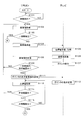
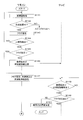
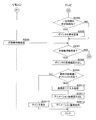
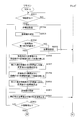
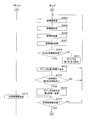
- 10 is a flowchart illustrating a procedure of display processing according to Embodiment 3.
- 10 is a flowchart illustrating a procedure of display processing according to Embodiment 3.
- 10 is a flowchart illustrating a procedure of display processing according to Embodiment 3.
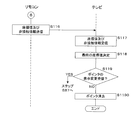
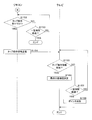
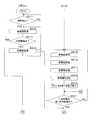
- 14 is a flowchart illustrating a procedure of input processing according to the fourth embodiment.
- 14 is a flowchart illustrating a procedure of input processing according to the fourth embodiment.
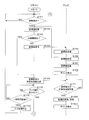
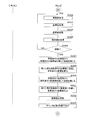
- 10 is a flowchart illustrating a procedure of input processing according to the fifth embodiment.
- 10 is a flowchart illustrating a procedure of input processing according to the fifth embodiment.
- FIG. 20 is an explanatory diagram showing a display image according to the seventh embodiment.
- FIG. 20 is an explanatory diagram showing a display image according to the seventh embodiment. It is a flowchart which shows the procedure of the display process of a 2nd display area. It is a flowchart which shows the procedure of a movement amount fall process. It is a flowchart which shows the procedure of a movement amount fall process. It is a flowchart which shows the procedure of a movement amount fall process. It is explanatory drawing which shows the movement image of a pointer. It is explanatory drawing which shows the movement image of a pointer. 20 is a flowchart illustrating a procedure of a movement amount reduction process according to the ninth embodiment.
- 20 is a flowchart illustrating a procedure of a movement amount reduction process according to the ninth embodiment.
- 20 is a flowchart illustrating a procedure of a movement amount reduction process according to the ninth embodiment.
- It is explanatory drawing which shows the change of a pointer.
- It is explanatory drawing which shows the change of a pointer.
- It is explanatory drawing which shows the change of a pointer.
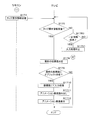
- 29 is a flowchart showing a procedure of movement amount reduction processing according to the tenth embodiment.
- 29 is a flowchart showing a procedure of movement amount reduction processing according to the tenth embodiment.
- 29 is a flowchart showing a procedure of movement amount reduction processing according to the tenth embodiment.
- It is a functional block diagram which shows operation
- FIG. 38 is a block diagram illustrating a hardware group of a television according to the eleventh embodiment.
- FIG. 1 is a schematic diagram showing an outline of an information processing system.
- the information processing system includes a display device 1, an input device 2, and the like.
- the display device 1 is, for example, a television, a television with a built-in recording device, a personal computer, or a control computer such as a medical device, a semiconductor manufacturing device, or a machine tool.
- the input device 2 is a device having a touch pad or a touch panel, and functions as a remote operation device (hereinafter referred to as a remote controller) of the television 1.
- the input device 2 for example, a PDA (Personal Digital Assistant) having a touch panel, a portable game machine, a mobile phone, or a book reader is used in addition to a remote controller having a touch pad formed on the surface of the casing.
- a PDA Personal Digital Assistant
- the remote controller 2 having a touch pad is used as the input device 2 in addition to an example in which the remote controller 2 having a touch pad is used as the input device 2 will be described.
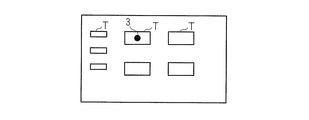
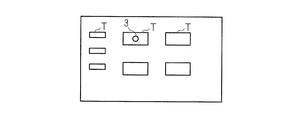
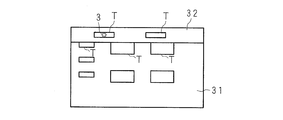
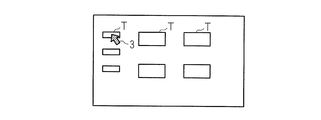
- a plurality of objects T shown in a rectangular shape are displayed on the display unit 14 of the television 1.
- the object T is an icon, an image, a hyperlink, a moving image, or the like.
- the user selects the object T using the touch pad 23 of the remote controller 2.
- the coordinates on the touch pad 23 of the remote controller 2 and the coordinates on the display unit 14 of the television 1 are in an absolute coordinate relationship.
- an example using absolute coordinates will be described.
- a relative coordinate relationship may be used.
- the origin of the coordinate axes of the touch pad 23 and the display unit 14 is the upper left end of the front view.
- the direction from left to right is the X-axis positive direction
- the direction from top to bottom is the Y-axis positive direction.
- the user performs touch input by continuing the touchpad from point A to point B. That is, it is assumed that the point B is reached without releasing the finger from the point A.
- the pointer 3 is displayed on the display unit 14, and the pointer 3 moves onto the object T in response to the continuous contact input.
- the finger is released from the touch pad 23 at the point B, and the continuous contact input is ended.
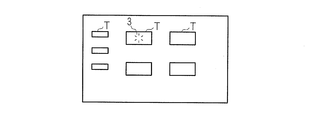
- the reception information indicating that the input to the object T has been received at the coordinate value corresponding to the point B is output to the display unit 14.
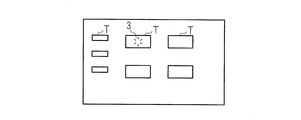
- the reception information may be output, for example, by changing the shape, pattern, color, or combination thereof of the pointer 3 and displaying the animation.
- the reception information may be output by voice.
- an example in which the pointer 3 is changed by animation display will be described. Details will be described below.
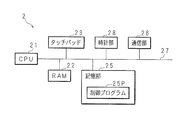
- FIG. 2 is a block diagram showing a hardware group of the remote controller 2.
- the remote controller 2 includes a CPU (Central Processing Unit) 21, a RAM (Random Access Memory) 22, a touch pad 23, a storage unit 25, a clock unit 28, a communication unit 26, and the like as control units.
- the CPU 21 is connected to each part of the hardware via the bus 27.
- CPU21 controls each part of hardware according to control program 25P memorized by storage part 25.
- the RAM 22 is, for example, SRAM (Static RAM), DRAM (Dynamic RAM), flash memory, or the like.
- the RAM 22 also functions as a storage unit, and temporarily stores various data generated when the CPU 21 executes various programs.
- the touch pad 23 uses a capacitance method, a resistance film method, or the like, and outputs received operation information to the CPU 21.
- an operation button (not shown) may be provided.
- the clock unit 28 outputs date / time information to the CPU 21.
- the communication unit 26 serving as a wireless output unit wirelessly transmits information such as coordinate values to the television 1, and for example, a wireless LAN (Local Area Network) module, an infrared communication module, or a Bluetooth (registered trademark) module is used. In the present embodiment, an example will be described in which a wireless LAN module is used to transmit / receive information to / from the television 1 via Wi-Fi (Wireless Fidelity: registered trademark).
- the storage unit 25 is, for example, a large-capacity flash memory or a hard disk, and stores the control program 25P.
- FIG. 3 is a block diagram showing a hardware group of the television 1.
- the television 1 includes a CPU 11 as a control unit, a RAM 12, an input unit 13, a display unit 14, a storage unit 15, a clock unit 18, a tuner unit 19, a video processing unit 191, a communication unit 16, and the like.
- the CPU 11 is connected to each part of the hardware via the bus 17.
- the CPU 11 controls each part of the hardware according to the control program 15P stored in the storage unit 15.
- the RAM 12 is, for example, SRAM, DRAM, flash memory or the like.
- the RAM 12 also functions as a storage unit, and temporarily stores various data generated when the CPU 11 executes various programs.
- the input unit 13 is an input device such as an operation button, and outputs received operation information to the CPU 11.
- the display unit 14 is a liquid crystal display, a plasma display, an organic EL (electroluminescence) display, or the like, and displays various information according to instructions from the CPU 11.
- the clock unit 18 outputs date information to the CPU 11.
- the communication unit 16 that functions as a reception unit is a wireless LAN module, and transmits and receives information to and from the remote controller 2. As with the remote controller 2, an infrared communication module or a Bluetooth (registered trademark) module may be used as the communication unit 16.
- the storage unit 15 is, for example, a hard disk or a large-capacity flash memory, and stores the control program 15P.
- the tuner unit 19 outputs the received video signal related to the broadcast wave such as the terrestrial digital wave and the BS digital wave to the video processing unit 191.
- the video processing unit 191 performs video processing and outputs the video after video processing to the display unit 14.
- the communication unit 16 exchanges information with another server computer (not shown) via HTTP (HyperText Transfer Protocol) via a communication network N such as the Internet.
- the communication unit 16 outputs contents such as a web page and a moving image file received from the server computer to the CPU 11.
- the CPU 11 displays a web page on the display unit 14. In the example of FIG. 1, a menu web page is downloaded, and an object T in the web page is displayed.
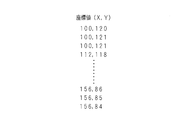
- FIG. 4 is an explanatory diagram showing the coordinate values to be transmitted.
- the CPU 21 of the remote controller 2 transmits the coordinate value associated with the continuous contact input to the television 1 in packets.
- the CPU 21 acquires coordinate values related to the position touched by the touch pad 23.
- the CPU 21 continues to transmit the coordinate value to the television 1 via the communication unit 26 until the CPU 21 becomes non-contact thereafter.
- the coordinate value (100, 120) is detected as the contact start point.
- a series of coordinate values are transmitted, and contact is not made at the coordinate values of (156, 84).
- the communication unit 16 of the television 1 receives coordinate values continuously transmitted from the remote controller 2.
- CPU11 acquires the coordinate value transmitted continuously from the communication part 16 as a coordinate value accompanying the continuous contact input.
- the CPU 11 converts the acquired coordinate value into a coordinate value in the coordinate system of the display unit 14 based on the conversion formula stored in the storage unit 15.
- the CPU 11 displays the pointer 3 at a position corresponding to the converted coordinate value.
- CPU11 reads the animation image memorize
- the CPU 11 displays the pointer 3 related to the animation image on the display unit 14 at the final display position of the pointer 3 instead of the white circle pointer 3.
- the communication unit 26 displays information indicating non-contact (hereinafter referred to as non-contact information) and the coordinate value detected at the time of non-contact. It may be transmitted to the television 1 via. In the example of FIG. 4, the last coordinates (156, 84) and non-contact information are transmitted.
- non-contact information information indicating non-contact
- the last coordinates (156, 84) and non-contact information are transmitted.
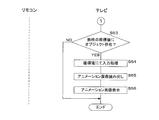
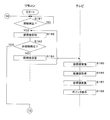
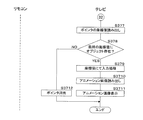
- the CPU 21 of the remote controller 2 determines whether contact has been detected through the touch pad 23 (step S51).
- CPU21 waits until a contact is detected, when a contact is not detected (it is NO at step S51).
- the CPU 21 detects contact (YES in step S51)
- the CPU 21 acquires the coordinate value at the contact position (step S52).
- CPU21 judges whether the non-contact was detected after detecting a contact (step S53). Specifically, the CPU 21 detects whether or not the finger is removed from the touch pad 23.
- step S53 If the CPU 21 determines that no contact has been detected (NO in step S53), it transmits the acquired coordinate value to the television 1 via the communication unit 26 (step S54).
- step S54 CPU21 transfers to step S52 and repeats the above process. Note that the processes of the remote controller 2 and the television 1 operate in parallel.
- the CPU 11 of the television 1 receives the coordinate value transmitted via wireless via the communication unit 16 (step S55).
- CPU11 acquires the coordinate value output from the communication part 16 (step S56).
- the CPU 11 converts the acquired coordinate value based on the conversion formula stored in the storage unit 15 or described in the control program 15P (step S57).
- the conversion formula is defined according to the number of pixels of the display unit 14 of the television 1 and is stored in the storage unit 15 at the time of factory shipment.
- the CPU 11 multiplies the acquired X coordinate value.
- the CPU 11 multiplies the acquired Y coordinate value.
- the correspondence between the coordinate value of the touch pad 23 and the coordinate value of the display unit 14 may be converted using a table stored in the storage unit 15. In this case, the CPU 11 reads the coordinate value on the display unit 14 corresponding to the acquired coordinate value with reference to the table.
- CPU 11 sequentially stores the coordinate values after conversion in time series.
- the CPU 11 reads the image of the pointer 3 from the storage unit 15.
- the CPU 11 displays the pointer 3 on the display unit 14 at the position of the converted coordinate value stored in the RAM 12 (step S58). By repeating the above processing, the pointer 3 moves on the display unit 14 with continuous contact input. If the CPU 21 determines that non-contact has been detected (YES in step S53), the process proceeds to step S59.
- CPU21 transmits the coordinate value and non-contact information acquired by step S52 to the television 1 via the communication part 26 (step S59).
- the CPU 11 of the television 1 determines whether or not the coordinate value and the non-contact information are received (step S61). If the coordinate value and the non-contact information are not received (NO in step S61), the CPU 11 waits until the non-contact information is received. If the CPU 11 determines that the coordinate value and the non-contact information have been received (YES in step S61), the process proceeds to step S62.
- the CPU 11 converts the coordinate value received in step S61, determines it as the final coordinate value of the pointer 3, and displays the pointer 3 at the determined coordinate value (step S62). The CPU 11 may read out the coordinate value last stored in the RAM 12 in time series and determine it as the final coordinate value.
- the CPU 11 may determine non-contact when the coordinate value is not received within a predetermined time (for example, 0.1 ms) after receiving the previous coordinate value. In this case, the CPU 11 sets the last coordinate value in the time series stored in the RAM 12 as the final coordinate value.
- a predetermined time for example, 0.1 ms
- the CPU 11 determines whether or not the object T exists on the final coordinate value (step S63). Specifically, the CPU 11 reads a coordinate area previously assigned to the object T from the storage unit 15. The CPU 11 determines that the object T exists when the final coordinate value is within the coordinate area of the read object T. When the CPU 11 determines that the object T exists (YES in step S63), the CPU 11 performs input processing on the object T with the final coordinate value (step S64).
- CPU11 reads an animation image from the memory
- the CPU 11 displays an animation image on the display unit 14 that changes the form of the pointer 3 as reception information indicating that the input (selection) to the object T has been received at the final coordinate value of the pointer 3.
- the display of the reception information is merely an example, and if the display form of the pointer 3 is different between the movement of the pointer 3 associated with the contact input and the input operation performed on the object T associated with the non-contact operation, This is not a limitation. For example, a white arrow may be used when the pointer 3 is moved, and a black arrow may be used when an input operation is performed on the object T associated with non-contact.
- the pointer 3 may be continuously set as a white arrow, and a sound may be output as input information from a speaker (not shown) at the time of input operation on the object T accompanying non-contact.
- the CPU 11 determines that the object T does not exist in the final coordinate value (NO in step S63)
- the process of steps S64 to S66 is skipped.
- the image of the pointer 3 may be deleted or left as it is.
- the object T can be selected intuitively while watching the television 1 without looking at the touchpad 23 at hand.
- Embodiment 2 The second embodiment relates to a mode in which the display of the pointer 3 is changed.
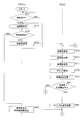
- 7 and 8 are flowcharts showing the procedure of the change process.
- the CPU 21 of the remote controller 2 determines whether contact is detected through the touch pad 23 (step S71).
- CPU21 waits until a contact is detected, when a contact is not detected (it is NO at step S71).
- the CPU 21 detects contact (YES in step S71)
- the CPU 21 acquires coordinate values at the contact position (step S72).
- CPU21 judges whether the non-contact was detected after detecting a contact (step S73).
- the acquired coordinate value is transmitted to the television 1 via the communication unit 26 (step S74).
- CPU21 transfers to step S72 and repeats the above process.
- the CPU 11 of the television 1 receives the coordinate value transmitted via wireless via the communication unit 16 (step S75).
- CPU11 acquires the coordinate value output from the communication part 16 (step S76).
- the CPU 11 converts the acquired coordinate value based on the conversion formula stored in the storage unit 15 or described in the control program 15P (step S77).
- the image of the pointer 3 is read from the storage unit 15.
- the CPU 11 displays the pointer 3 on the display unit 14 at the position of the coordinate value after conversion (step S78).
- the pointer 3 may have a shape such as a circle, a triangle, an arrow, or a bill. In the present embodiment, the description will be made assuming that it is a white circle.
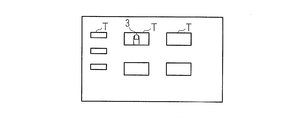
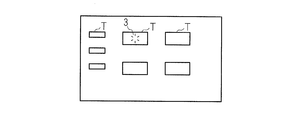
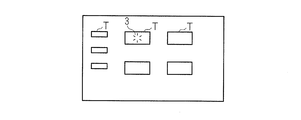
- FIG. 9A to 9C are explanatory diagrams showing display images.
- a pointer 3 indicated by a white circle is displayed on the object T.
- the CPU 11 stores the coordinate values converted in step S77 in the RAM 12 in time series (step S79).
- the coordinate value before conversion may be stored.
- the CPU 11 determines whether or not the pointer 3 within a predetermined time is within a predetermined range (step S81). For example, the CPU 11 reads a coordinate value group for a predetermined number of seconds (for example, 1 second) stored in the RAM 12. Note that the number of coordinate values per second differs depending on the sampling frequency of the touch pad 23.
- the CPU 11 obtains the variance of the coordinate values for each of the X axis and the Y axis, and when the obtained variance is less than or equal to the X axis threshold stored in the storage unit 15 and less than or equal to the Y axis threshold, a predetermined range within a predetermined time. What is necessary is just to judge that it exists in.
- the CPU 11 reads out the coordinate values for a predetermined number of seconds in time series, and calculates the sum of the distances between the read out coordinate values. That is, the distance that the pointer 3 has moved within a predetermined number of seconds is calculated.
- the CPU 11 may determine that the sum is within a predetermined range when the sum is equal to or less than the threshold stored in the storage unit 15.
- the CPU 11 obtains an average value of coordinate values for a predetermined number of seconds.
- the CPU 11 reads the threshold radius from the storage unit 15.
- the CPU 11 determines whether or not each coordinate value for a predetermined number of seconds belongs within a threshold radius centered on the coordinate value related to the average value.
- the CPU 11 may determine that the coordinates belong to a predetermined range within a predetermined time when all coordinate values are within the threshold radius. If the CPU 11 determines that the predetermined time does not exist within the predetermined range (NO in step S81), the process proceeds to step S8100. If the CPU 11 determines that it is within the predetermined range within a certain period of time (YES in step S81), the process proceeds to step S82.
- the CPU 11 changes the display of the pointer 3 (step S82). In FIG. 9B, it can be understood that the display form is changed from the white circle pointer 3 to the black circle pointer 3.
- the display of the pointer 3 is not limited to this form as long as it can visually recognize before and after the change. For example, the color or pattern of the pointer 3 may be changed.
- the CPU 11 may output sound from a speaker (not shown).
- step S73 If the CPU 21 of the remote controller 2 determines that non-contact has been detected (YES in step S73), the process proceeds to step S83.
- CPU21 transmits the coordinate value and non-contact information acquired by step S72 to the television 1 via the communication part 26 (step S83).
- the CPU 11 of the television 1 determines whether or not a coordinate value and non-contact information have been received (step S84). If the CPU 11 has not received non-contact information (NO in step S84), the process proceeds to step S85.
- the CPU 11 converts and monitors the coordinate value transmitted from the communication unit 26 of the remote controller 2, and whether or not the converted coordinate value has moved out of the predetermined range from the coordinate value at the position where the display was changed in step S82. Is determined (step S85). Specifically, the CPU 11 obtains the distance between the converted coordinate value and the coordinate value of the pointer 3 after the last change stored in the RAM 12, and if the distance exceeds the threshold value stored in the storage unit 15, it is out of the predetermined range. What is necessary is just to judge that it moved. Note that the predetermined range in step S85 may be larger than that in step S81.
- step S85 When it is determined that the CPU 11 has moved out of the predetermined range (YES in step S85), the process returns to step S75 in order to return the pointer 3 to the form before the change. If the CPU 11 determines that it has not moved outside the predetermined range (NO in step S85), the process returns to step S84. If the CPU 11 determines that the coordinate value and the non-contact information have been received (YES in step S84), the process proceeds to step S86. Note that the CPU 11 may shift the process to step S86 when the coordinate value is not received after receiving the coordinate value in step S75. The CPU 11 reads the last coordinate value in the time series stored in the RAM 12 in step S79 as the coordinate value of the pointer 3 via the communication unit 16. The CPU 11 determines the read coordinate value as the final coordinate value (step S86). Note that the CPU 11 may convert the coordinate value received in step S84 and use the converted coordinate value as the final coordinate value.
- the CPU 11 determines whether or not the object T exists on the final coordinate value (step S87). If the CPU 11 determines that the object T exists (YES in step S87), the CPU 11 performs input processing on the object T with the final coordinate value (step S88).
- CPU11 reads an animation image from the memory
- the CPU 11 displays an animation image on the display unit 14 as the image of the pointer 3 (step S810).
- FIG. 9C shows an example in which the pointer 3 is displayed as an animation image.
- 9A to 9C show animation images of the pointer 3 showing a state in which a plurality of line segments are diffused stepwise toward the outer periphery from the black circle pointer 3 subjected to the display change process.
- the example of the animation image is an example and is not limited to this.
- step S87 the CPU 3 deletes the pointer 3 from the display unit 14 (step S811). As a result, the user can confirm the input position with the pointer 3, determine the approximate position, and perform a non-contact operation. If the CPU 11 determines in step S81 that it is not within the predetermined range for a predetermined time (NO in step S81), it determines whether or not the coordinate value and the non-contact information are received (step S8100). If the CPU 11 has not received the coordinate value and the non-contact information (NO in step S8100), the process returns to step S75.
- step S8100 If the CPU 11 receives the coordinate value and the non-contact information (YES in step S8100), the process proceeds to step S811. Thereby, when it becomes non-contact before the display of the pointer 3 is changed, the animation display of the pointer 3 is not performed and the display of the reception information is stopped.
- step S101 determines whether contact is detected through the touch pad 23 (step S101). If the contact is not detected (NO in step S101), the CPU 21 stands by until a contact is detected. When the CPU 21 detects contact (YES in step S101), the CPU 21 acquires coordinate values at the contact position (step S102). The CPU 21 determines whether or not non-contact is detected after detecting contact (step S103).
- the CPU 21 determines that no contact has been detected (NO in step S103)
- the CPU 21 transmits the acquired coordinate value to the television 1 via the communication unit 26 (step S104).
- the CPU 11 of the television 1 receives and acquires coordinate values transmitted via wireless via the communication unit 16 (step S105).
- the CPU 11 converts the acquired coordinate value based on the conversion formula (step S106).
- the CPU 11 reads the image of the pointer 3 from the storage unit 15.
- the CPU 11 displays the pointer 3 on the display unit 14 at the position of the coordinate value after conversion (step S107).
- the CPU 11 stores the converted coordinate values in the RAM 12 in time series.
- the CPU 21 of the remote controller 2 stores the coordinate values transmitted in step S104 in the RAM 22 in time series (step S108).
- the CPU 21 determines whether or not the pointer 3 within a predetermined time is within a predetermined range (step S109). Specifically, as described above, the determination may be made based on the dispersion or movement distance of the coordinate values stored in the RAM 22. If the CPU 21 determines that the predetermined time does not exist within the predetermined range (NO in step S109), the process returns to step S102. If the CPU 21 determines that it is within the predetermined range within a certain period of time (YES in step S109), the process proceeds to step S111.
- CPU21 transmits the display change instruction
- the CPU 21 of the remote controller 2 continues to acquire coordinate values (step S113).
- the CPU 21 determines whether or not the acquired coordinate value is outside a predetermined range (step S114). Specifically, the CPU 21 obtains the distance between the acquired coordinate value and the coordinate value when the display change of the pointer 3 is instructed in step S111. The CPU 21 may determine that the distance is out of the predetermined range when the obtained distance is equal to or greater than the threshold value stored in the storage unit 25. If the CPU 21 determines that it is outside the predetermined range (YES in step S114), the process returns to step S102. When the pointer 3 moves out of the predetermined range after the color change as described above, the pointer 3 returns from the black circle after the change to the white circle before the change again by the process of step S107. In addition, what is necessary is just to make the predetermined range in step S114 larger than the predetermined range in step S109.
- step S115 The CPU 21 determines whether or not non-contact is detected (step S115). When CPU 21 has not detected non-contact (NO in step S115), the process returns to step S113.
- CPU21 makes a process transfer to step S116, when non-contact is detected by step S103 (it is YES at step S103). Similarly, when CPU 21 detects non-contact in step S115 (YES in step S115), the process proceeds to step S116.
- the CPU21 transmits the coordinate value detected at the time of non-contact, and noncontact information to television 1 (Step S116).
- the CPU 11 of the television 1 receives the coordinate value and the non-contact information (Step S117).
- the CPU 11 reads the last coordinate value in time series from the RAM 12 as the coordinate value of the pointer 3, and determines it as the final coordinate value (step S118).
- the CPU 11 may convert the coordinate value received in step S117 and determine the coordinate value after conversion as the final coordinate value.
- the CPU 11 determines whether or not the display change of the pointer 3 in step S112 has been received (step S119).
- step S119 If the CPU 11 determines that it has not been received (NO in step S119), the display of the pointer 3 is erased from the display unit 14 in order to stop displaying the received information (step S1190). If the CPU 11 determines that the display change of the pointer 3 has been received (YES in step S119), the process proceeds to step S87. Since the subsequent processing is the same as that in step S87, detailed description thereof is omitted.
- the second embodiment is as described above, and the other parts are the same as those of the first embodiment. Therefore, the corresponding parts are denoted by the same reference numerals, and detailed description thereof is omitted.
- Embodiment 3 relates to a mode in which tap input is performed after the change processing of the pointer 3. After changing the pointer 3, the input process may be performed by a tap operation.
- 12 and 13 are flowcharts showing the procedure of the display process according to the third embodiment. Since the processing from step S71 to step S84 is the same, detailed description thereof is omitted. If the CPU 11 determines that the coordinate value and the non-contact information have not been received (NO in step S84), the process proceeds to step S121.
- CPU11 acquires the coordinate value transmitted from the remote control 2 (step S121). The CPU 11 determines whether or not the acquired coordinate value is outside a predetermined range (step S122).
- step S81 it is determined whether or not the difference between the coordinate value of the pointer 3 changed in step S82 and the coordinate value acquired in step S121 exceeds a threshold value stored in the storage unit 15. Note that the predetermined range in step S81 is smaller than the predetermined range in step S122.
- step S122 If the CPU 11 determines that it is outside the predetermined range (YES in step S122), the process returns to step S74. Thereby, the change process of the pointer 3 is cancelled
- step S124 determines whether or not a flag is set (step S124). If the CPU 11 determines that the flag is not set (NO in step S124), the process proceeds to step S125.
- the CPU 11 reads the last coordinate value in the time series stored in the RAM 12 in step S79 as the last coordinate value of the pointer 3.
- the CPU 11 determines the read coordinate value as the final coordinate value (step S125). Since the subsequent processing is the same as step S87, detailed description thereof is omitted.
- the user can perform input processing by performing a tap operation on the touch pad 23 even when the finger 3 is slightly moved while the pointer 3 is being discolored. If the CPU 11 determines that the flag is set (YES in step S124), the process proceeds to step S129.
- the CPU 21 of the remote controller 2 determines whether a tap operation has been accepted (step S126). Specifically, the CPU 21 determines that a tap operation has been performed when both contact and non-contact are detected within a predetermined area within a predetermined time (for example, within 0.1 seconds).
- Step S126 the CPU 21 determines whether or not a certain time (for example, 3 seconds) stored in the storage unit 15 has elapsed since the non-contact information was transmitted in step S83. (Step S127). If the CPU 21 determines that the predetermined time has not elapsed (NO in step S127), the process returns to step S126. If the CPU 21 determines that a certain time has elapsed (YES in step S127), the process returns to step S71.
- a certain time for example, 3 seconds
- step S126 When the CPU 21 determines that the tap operation has been accepted (YES in step S126), the CPU 21 transmits tap operation information indicating that the tap operation has been executed to the television 1 (step S128).
- the CPU 11 of the television 1 determines whether tap operation information has been received (step S129). If the CPU 11 has not received tap operation information (NO in step S129), the process proceeds to step S132.
- the CPU 11 refers to the output of the clock unit 18 and determines whether or not a certain time has elapsed after receiving the non-contact information for a certain time in step S84 (step S132). If the CPU 11 determines that the predetermined time has not elapsed (NO in step S132), the process returns to step S129.
- step S132 determines that the predetermined time has passed (YES in step S132). If the CPU 11 determines that the predetermined time has passed (YES in step S132), the display of the pointer 3 is deleted from the display unit 14 (step S133). When the CPU 11 receives the tap operation information (YES in step S129), the CPU 11 proceeds to step S131. The CPU 11 reads the last coordinate value in the time series stored in the RAM 12 in step S79 as the last coordinate value of the pointer 3. The CPU 11 determines the read coordinate value as the final coordinate value (step S131). Since the subsequent processing is the same as that in step S87, detailed description thereof is omitted.
- step S141 The processing from step S101 to S112 in FIG. CPU21 acquires a coordinate value from the touchpad 23 (step S141).
- CPU21 judges whether the acquired coordinate value is outside the predetermined range memorize
- the CPU 21 calculates the distance between the coordinate value when the pointer 3 change instruction is transmitted in step S111 and the coordinate value acquired in step S141.
- the CPU 21 determines whether or not the calculated distance exceeds a predetermined distance stored in the storage unit 25.
- the predetermined range in step S142 may be larger than the predetermined range in step S109.
- step S142 When the CPU 21 determines that it is not outside the predetermined range (NO in step S142), the process returns to step S102.
- CPU21 transmits the information which cancels the display change instruction
- FIG. The CPU 11 returns the display of the pointer 3 to the pointer 3 before the change.
- step S143 if the CPU 21 determines that it is outside the predetermined range (YES in step S142), it sets a flag (step S143).
- CPU21 judges whether non-contact was detected from touchpad 23 (Step S144). If the CPU 21 determines that no contact has been detected (NO in step S144), the process returns to step S141.
- step S145 The CPU 21 determines whether or not a flag is set (step S145). When the CPU 21 determines that the flag is not set (NO in step S145), the CPU 21 transmits the final coordinate value and non-contact information when the pointer 3 display change instruction is transmitted in step S111 to the television 1 (step S146). ). If the CPU 21 determines that the flag is set (YES in step S145), the information regarding the flag setting, the final coordinate value and the non-contact information when the display change instruction for the pointer 3 is transmitted in step S111 are transmitted to the television 1. Transmit (step S147).
- the CPU 11 of the television 1 determines whether or not a coordinate value and non-contact information have been received (step S148). If the CPU 11 determines that the coordinate value and the non-contact information have not been received (NO in step S148), the CPU 11 waits until it is received. When the CPU 11 determines that the coordinate value and the non-contact information have been received (YES in step S148), it determines whether there is a flag setting (step S149). Specifically, the CPU 21 determines whether or not information related to flag setting has been received from the remote controller 2.
- step S149 If the CPU 11 determines that the flag is not set (NO in step S149), the process proceeds to step S151.
- the CPU 11 reads the last coordinate value in the time series stored in the RAM 12 in step S79 as the last coordinate value of the pointer 3.
- the CPU 11 determines the read coordinate value as the final coordinate value (step S151). Since the subsequent processing is the same as that in step S87, detailed description thereof is omitted.
- step S149 determines whether the flag is set (YES in step S149). If the CPU 11 determines that the flag is set (YES in step S149), the process proceeds to step S155.
- the CPU 21 of the remote controller 2 determines whether a tap operation has been accepted (step S152). If the CPU 21 has not accepted the tap operation (NO in step S152), the CPU 21 determines whether or not a fixed time (for example, 3 seconds) stored in the storage unit 15 has elapsed since the non-contact information was transmitted in step S147. (Step S153). If the CPU 21 determines that the predetermined time has not elapsed (NO in step S153), the process returns to step S152. If the CPU 21 determines that a certain time has elapsed (YES in step S153), the process returns to step S101.
- a fixed time for example, 3 seconds
- step S152 When the CPU 21 determines that the tap operation has been accepted (YES in step S152), the CPU 21 transmits tap operation information indicating that the tap operation has been performed to the television 1 (step S154).
- the CPU 11 of the television 1 determines whether tap operation information has been received (step S155). If the CPU 11 has not received tap operation information (NO in step S155), the process proceeds to step S157.
- the CPU 11 determines whether or not a predetermined time has elapsed since the non-contact information was received in step S148 (step S157). If the CPU 11 determines that the predetermined time has not elapsed (NO in step S157), the process returns to step S155.
- step S157 the pointer 3 is deleted from the display unit 14 (step S158).
- step S155 the CPU 11 receives the tap operation information (YES in step S155)
- step S156 The CPU 11 reads the last coordinate value in the time series stored in the RAM 12 in step S79 as the last coordinate value of the pointer 3.
- step S156 The CPU 11 determines the read coordinate value as the final coordinate value (step S156). Since the subsequent processing is the same as that in step S87, detailed description thereof is omitted. As a result, even if the input is reconsidered after the pointer 3 is moved and changed to non-contact after the pointer 3 is changed, the input can be performed by a tap operation.
- the third embodiment is as described above, and the other parts are the same as in the first and second embodiments. Therefore, the corresponding parts are denoted by the same reference numerals, and detailed description thereof is omitted.
- Embodiment 4 relates to a mode of inputting by a tap operation.
- 16 and 17 are flowcharts showing the procedure of input processing according to the fourth embodiment.
- the CPU 21 of the remote controller 2 determines whether or not contact is detected through the touch pad 23 (step S161).
- CPU21 waits until a contact is detected, when a contact is not detected (it is NO at step S161).
- the CPU 21 detects contact (YES in step S161)
- the CPU 21 acquires a coordinate value at the contact position (step S162).
- the CPU 21 determines whether or not non-contact is detected after detecting contact (step S163). Specifically, the CPU 21 detects whether or not the finger is removed from the touch pad 23.
- the CPU 21 determines that no contact has been detected (NO in step S163), the CPU 21 transmits the acquired coordinate value to the television 1 via the communication unit 26 (step S164).
- the CPU 11 of the television 1 receives the coordinate value transmitted via wireless via the communication unit 16 (step S165).
- CPU11 acquires the coordinate value output from the communication part 16 (step S166).
- the CPU 11 converts the acquired coordinate value based on the conversion formula stored in the storage unit 15 or described in the control program 15P (step S167).
- step S168 Read the image of the pointer 3 from the storage unit 15.
- the CPU 11 displays the pointer 3 on the display unit 14 at the position of the coordinate value after conversion (step S168).
- the CPU 11 stores the coordinate value of the pointer 3 in the RAM 12 in time series. Thereafter, the process returns to step S162. By repeating the above processing, the pointer 3 moves on the display unit 14 with continuous contact input. If the CPU 21 determines that non-contact has been detected (YES in step S163), the process proceeds to step S169.
- CPU21 transmits the coordinate value and non-contact information which were acquired by step S162 to the television 1 via the communication part 26 (step S169).
- the CPU 11 of the television 1 determines whether a coordinate value and non-contact information have been received (step S171). If the coordinate value and the non-contact information are not received (NO in step S171), the CPU 11 waits until the non-contact information is received. If the CPU 11 determines that the coordinate value and the non-contact information have been received (YES in step S171), the process proceeds to step S1600. The CPU 11 converts the received coordinate value and stores the converted coordinate value in the RAM 12 as the final coordinate value (step S1600). The CPU 11 displays the pointer 3 on the display unit 14 at the final coordinate value (step S1601). The CPU 11 then shifts the process to step S175.
- the CPU 21 of the remote controller 2 determines whether a tap operation has been accepted (step S172). If the CPU 21 has not accepted the tap operation (NO in step S172), the CPU 21 determines whether or not a certain time (eg, 3 seconds) stored in the storage unit 15 has elapsed since the non-contact information was transmitted in step S169. (Step S173). If the CPU 21 determines that the predetermined time has not elapsed (NO in step S173), the process returns to step S172. If the CPU 21 determines that a certain time has elapsed (YES in step S173), the CPU 21 stops the input process (step S1730). The CPU 11 shifts the process to step S161.
- a certain time eg, 3 seconds
- step S172 When the CPU 21 determines that the tap operation has been accepted (YES in step S172), the CPU 21 transmits tap operation information indicating that the tap operation has been performed to the television 1 (step S174).
- the CPU 11 of the television 1 determines whether tap operation information has been received (step S175). If the CPU 11 has not received tap operation information (NO in step S175), the process proceeds to step S1750.
- the CPU 11 refers to the output of the clock unit 18 and determines whether or not a predetermined time (for example, 5 seconds) has elapsed since the non-contact information in step S171 was received (step S1750). If the predetermined time has not elapsed (NO in step S1750), CPU 11 returns the process to step S175.
- a predetermined time for example, 5 seconds
- step S1750 If the CPU 11 determines that a certain time has elapsed (YES in step S1750), the CPU 11 stops the input process (step S1751). Specifically, the CPU 11 does not execute input processing for the object T described in step S1710. Thereafter, the CPU 11 returns the process to step S161. When the CPU 11 receives the tap operation information (YES in step S175), the CPU 11 proceeds to step S178.
- the CPU 11 reads the coordinate value stored in the RAM 12 in step S1600 and determines it as the final coordinate value of the pointer 3 (step S178). The CPU 11 determines whether or not the object T exists on the final coordinate value (step S179). If the CPU 11 determines that the object T exists (YES in step S179), the CPU 11 performs an input process on the object T with the final coordinate value (step S1710).
- CPU11 reads an animation image from the memory
- the CPU 11 determines that the object T does not exist in the final coordinate value (NO in step S179)
- the CPU 11 skips the processes in steps S1710 to S1712 and ends the process. Thereby, after moving the pointer 3 to the target position, input can be performed by a tap operation.
- Embodiment 5 relates to a mode in which the display of the pointer 3 is changed to perform a tap.
- 18 to 20 are flowcharts showing the procedure of the input processing according to the fifth embodiment.
- the CPU 21 of the remote controller 2 determines whether contact has been detected through the touch pad 23 (step S181).
- CPU21 waits until a contact is detected, when a contact is not detected (it is NO at step S181).
- the CPU 21 detects contact (YES in step S181)
- the CPU 21 acquires coordinate values at the contact position (step S182).
- CPU21 judges whether the non-contact was detected after detecting a contact (step S183).
- step S183 If the CPU 21 determines that no contact has been detected (NO in step S183), the CPU 21 transmits the acquired coordinate value to the television 1 via the communication unit 26 (step S184).
- step S184 CPU21 transfers to step S182 and repeats the above process.
- the CPU 11 of the television 1 receives the coordinate value transmitted via wireless via the communication unit 16 (step S185).
- CPU11 acquires the coordinate value output from the communication part 16 (step S186).
- the CPU 11 converts the acquired coordinate value based on the conversion formula stored in the storage unit 15 or described in the control program 15P (step S187).
- step S188 Read the image of the pointer 3 from the storage unit 15.
- the CPU 11 displays the pointer 3 on the display unit 14 at the position of the coordinate value after conversion (step S188).
- step S188 By repeating the above processing, the pointer 3 moves on the display unit 14 with continuous contact input.
- 21A to 21C are explanatory diagrams showing movement images of the pointer 3.
- FIG. FIG. 21A shows a state in which the pointer 3 indicated by a white circle moves and exists on the object T. If the CPU 21 determines that non-contact has been detected (YES in step S183), the process proceeds to step S189.
- CPU21 transmits the coordinate value and non-contact information which were acquired by step S182 to the television 1 via the communication part 26 (step S189).
- the CPU 11 of the television 1 determines whether or not a coordinate value and non-contact information have been received (step S191). If the coordinate value and the non-contact information are not received (NO in step S191), the CPU 11 waits until the non-contact information is received. If the CPU 11 determines that the coordinate value and the non-contact information have been received (YES in step S191), the process proceeds to step S1800.
- the CPU 11 converts the coordinate value received in step S191 and stores the converted coordinate value in the RAM 12 as the coordinate value of the pointer 3 (step S1800).
- the CPU 11 reads the change pointer 3 from the storage unit 15. The CPU 11 displays the changed pointer 3 on the coordinate value stored in step S1800 (step S192).
- the changed pointer 3 in the shape of a finger is displayed.
- the CPU 21 of the remote controller 2 determines whether a tap operation has been accepted (step S193). If the CPU 21 has not accepted the tap operation (NO in step S193), the CPU 21 determines whether or not a predetermined time (for example, 2 seconds) stored in the storage unit 15 has elapsed after transmitting the non-contact information in step S189. (Step S194). In the case where the non-contact information is not transmitted, the CPU 21 may measure whether or not a predetermined time has elapsed since the time when the coordinate value was transmitted last after the coordinate value was continuously transmitted.
- a predetermined time for example, 2 seconds
- step S194 If the CPU 21 determines that the predetermined time has not elapsed (NO in step S194), the process returns to step S193. If the CPU 21 determines that the predetermined time has elapsed (YES in step S194), the CPU 21 stops the input process (step S195). Thereby, the process returns to step S181 without executing the input process for the object T described in step S204. Note that the CPU 11 of the television 1 again displays the pointer 3 before change instead of the pointer 3 after change by the process of S188.
- step S193 When the CPU 21 determines that the tap operation has been received (YES in step S193), the CPU 21 transmits tap operation information indicating that the tap operation has been executed to the television 1 (step S196).
- the CPU 11 of the television 1 determines whether or not tap operation information has been received (step S197). If the CPU 11 has not received tap operation information (NO in step S197), the process proceeds to step S198.
- the CPU 11 refers to the output of the clock unit 18 and determines whether or not a predetermined time (for example, 2 seconds) has elapsed since the non-contact information was received in step S191 (step S198).
- the CPU 11 may determine whether or not a predetermined time has elapsed from the time when the coordinate value is received at the end after continuously receiving the coordinate value. If the predetermined time has not elapsed (NO in step S198), the CPU 11 returns the process to step S197. If the CPU 11 determines that the predetermined time has elapsed (YES in step S198), the CPU 11 stops the input process (step S199).
- step S201 the CPU 11 returns the pointer 3 after the change to the pointer 3 with the white circle before the change. Thereafter, the CPU 11 returns the process to step S181.
- step S197 the CPU 11 receives the tap operation information (YES in step S197)
- step S202 the CPU 11 proceeds to step S202.
- the CPU 11 reads the coordinate value stored in step S1800 and determines it as the final coordinate value of the pointer 3 (step S202). The CPU 11 determines whether or not the object T exists on the final coordinate value (step S203). When the CPU 11 determines that the object T exists (YES in step S203), the CPU 11 performs an input process on the object T with the final coordinate value (step S204). CPU11 reads an animation image from the memory
- the CPU 11 displays the pointer 3 which is an animation image on the display unit 14 instead of the still image pointer 3 (step S206).
- the shape of the pointer 3 is changed by animation. If the CPU 11 determines that the object T does not exist in the final coordinate value (NO in step S203), the CPU 3 returns the pointer 3 after the change to the white circle before the change (step S207). Thereafter, the process returns to step S181. Thereby, it becomes possible to promote a tap operation to the user.
- the fifth embodiment is as described above, and the other parts are the same as those of the first to fourth embodiments. Accordingly, the corresponding parts are denoted by the same reference numerals, and detailed description thereof is omitted.
- Embodiment 6 relates to a form of continuous input.
- reception information indicating that the input has been received is output again at the final coordinate value.
- 22 and 23 are flowcharts showing the procedure of the continuous input process.
- the CPU 11 displays an animation image of the pointer 3 in step S66, S810, S1712, or S206 (step S221).
- 24A to 24C are explanatory diagrams showing changes of the pointer 3.
- FIG. FIG. 24A shows an image when the animation display of the pointer 3 is performed in step S221.
- the CPU 11 displays the initial white circle pointer 3 before the animation display on the display unit 14 at the final coordinate value (step S222).
- the final coordinate value described in the present embodiment is the final coordinate value determined when the pointer 3 is displayed in animation for output of reception information in step S66, S810, S1712, or S206.
- the CPU 21 of the remote controller 2 determines whether a tap operation has been accepted (step S223). If the CPU 21 has not received a tap operation (NO in step S223), the CPU 21 waits until a tap operation is received. If the CPU 11 receives a tap operation (YES in step S223), the process proceeds to step S224.
- the CPU 21 of the remote controller 2 transmits the tap operation information and the coordinate value when the tap operation is received to the television 1 (step S224).
- the CPU 11 of the television 1 determines whether tap operation information and coordinate values have been received (step S225). If the CPU 11 has not received tap operation information (NO in step S225), the process proceeds to step S226.
- the CPU 11 refers to the output of the clock unit 18 and determines whether or not a predetermined time (for example, 2 seconds) has elapsed after the processing of step S221 or S222 (step S226). If the predetermined time has not elapsed (NO in step S226), CPU 11 returns the process to step S225.
- a predetermined time for example, 2 seconds
- step S226 If the CPU 11 determines that the predetermined time has elapsed (YES in step S226), the CPU 11 stops the input process (step S227). Specifically, the CPU 11 does not execute the input process for the object T described in step S232. Thereafter, the process returns to step S51, S71, S101, S161 or S181 according to the above-described embodiments.
- step S225 When the CPU 11 determines that the tap operation information and the coordinate value have been received (YES in step S225), the process proceeds to step S228.
- the CPU 11 acquires and converts the coordinate value transmitted with the tap operation (step S228).
- the CPU 11 determines whether the converted coordinate value is within a predetermined range with respect to the final coordinate value (step S229). Specifically, the CPU 11 obtains the distance between the final coordinate value of the pointer 3 displayed in step S222 and the coordinate value after conversion.
- the CPU 11 determines that the distance is within the predetermined range.
- the threshold distance may be 300 pixels.
- step S231 If the CPU 11 determines that it is not within the predetermined range (NO in step S229), it stops the input process (step S231). Specifically, the CPU 11 does not execute input processing for the object T. Thereafter, the process returns to step S51, S71, S101, S161 or S181. Thereby, when the tap position is too far from the previously input object T, the tap operation can be canceled.
- the CPU 11 determines that it is within the predetermined range (YES in step S229), the CPU 11 performs input processing with the final coordinate value (step S232).
- the object T input in the above embodiment is input again.
- CPU11 reads an animation image from the memory
- the CPU 11 displays an animation image as the pointer 3 on the display unit 14 (step S234).
- FIG. 24C an animation image indicating that the object T is input again on the object T is displayed. Thereafter, the CPU 11 returns the process to step S222.
- the pointer 3 indicated by the original white circle is displayed again. Thereby, for example, even when the object T is a back space, a return key, or a key that needs to be continuously hit, it is possible to realize continuous input in a short time.
- the sixth embodiment is as described above, and the other parts are the same as those of the first to fifth embodiments. Therefore, the corresponding parts are denoted by the same reference numerals, and detailed description thereof is omitted.
- Embodiment 7 relates to a form in which another display area is displayed in a predetermined area.
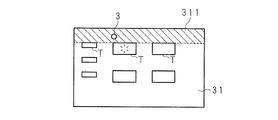
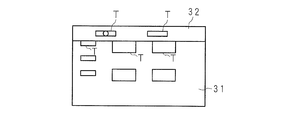
- 25A to 25C are explanatory diagrams showing display images according to the seventh embodiment.
- a plurality of objects T are displayed in the first display area 31 on the display unit 14.
- the pointer 3 moves to a predetermined area 311 indicated by hatching
- the second display area 32 is superimposed on the first display area 31 and displayed as shown in FIG. 25B.
- the predetermined area 311 is an area stored in the storage unit 15 in advance.
- all regions having Y-axis coordinates 0 to 100 corresponding to the upper fifth of the first display region 31 are defined as the predetermined region 311.
- the object T is also displayed on the second display area 32.
- the input process and the animation display are executed by the process described in the above embodiment.
- FIG. 25C shows an example of input on the object T in the second display area 32.
- the display of the second display area 32 is erased, and only the first display area 31 is displayed on the display unit 14.
- the shape of the predetermined region 311 is an example, and other shapes such as a circle and a polygon may be used.
- the shape of the second display area 32 may also be a circle or a triangle.
- the second display area 32 is displayed on the upper side, it may be displayed at an appropriate position such as the lower side, the right side, or the left side.
- FIG. 26 is a flowchart showing the procedure of display processing in the second display area 32.
- the CPU 11 displays the object T on the first display area 31 (step S261).
- the CPU 11 reads the predetermined area 311 stored in advance in the storage unit 15 (step S262).
- the CPU 11 determines whether or not the pointer 3 is within the predetermined area 311 (step S263). If the CPU 11 determines that it is not within the predetermined area 311 (NO in step S263), it waits until it is within the predetermined area 311. If the CPU 11 determines that it is within the predetermined area 311 (YES in step S263), the process proceeds to step S264.
- the CPU 11 reads the image of the second display area 32 and the object T displayed on the second display area 32.
- the CPU 11 superimposes and displays the second display area 32 on the first display area 31 (step S264).
- the CPU 11 displays the object T on the second display area 32 (step S265).
- the CPU 11 determines whether or not the pointer 3 is outside the predetermined area 311 (step S266). If the CPU 11 determines that the pointer 3 is outside the predetermined area 311 (NO in step S266), the CPU 11 waits until the pointer 3 is outside the predetermined area 311. When the CPU 11 determines that the pointer 3 is outside the predetermined area 311 (YES in step S266), the CPU 11 erases the displayed second display area 32 (step S267). Thereby, it is possible to give a degree of freedom to the display area in the display unit 14.
- the seventh embodiment is as described above, and the other parts are the same as those of the first to sixth embodiments. Therefore, the corresponding parts are denoted by the same reference numerals, and detailed description thereof is omitted.
- Embodiment 8 The eighth embodiment relates to a mode in which the amount of movement is reduced when the pointer 3 is present near the object T.
- 27 to 29 are flowcharts showing the procedure of the movement amount lowering process.
- the CPU 21 of the remote controller 2 determines whether or not contact is detected through the touch pad 23 (step S271). If the CPU 21 does not detect contact (NO in step S271), the CPU 21 waits until contact is detected. When the CPU 21 detects contact (YES in step S271), the CPU 21 acquires a coordinate value at the contact position (step S272). CPU21 judges whether the non-contact was detected after detecting a contact (step S273).
- step S273 the CPU 21 transmits the acquired coordinate value to the television 1 via the communication unit 26 (step S274).
- CPU21 transfers to step S272 and repeats the above process.
- the CPU 11 of the television 1 receives the coordinate value transmitted via wireless via the communication unit 16 (step S275).
- CPU11 acquires the coordinate value output from the communication part 16 (step S276).
- the CPU 11 converts the acquired coordinate value based on the conversion formula stored in the storage unit 15 or described in the control program 15P (step S277).
- the conversion process from the coordinate value on the touch pad 23 to the coordinate value on the display unit 14 is as described in the first embodiment.
- the CPU 11 sequentially stores the coordinate values in the RAM 12 in time series (step S278).
- the CPU 11 reads the image of the pointer 3 from the storage unit 15.
- the CPU 11 displays the pointer 3 on the display unit 14 at the position of the coordinate value after conversion (step S279).
- the CPU 11 determines whether or not the distance between the pointer 3 and the object T is within a predetermined distance (step S281). Specifically, the CPU 11 reads the display area coordinates on the display unit 14 set for each object T.
- the CPU 11 reads the coordinate value of the pointer 3 stored last in the time series of the RAM 12.
- the CPU 11 calculates a distance based on the coordinate value of the pointer 3 and the coordinate value of the display area of the object T, and extracts the shortest distance.
- the shortest distance is the threshold distance (for example, 20 pixels) stored in the storage unit 15, the CPU 11 determines that the distance is within a predetermined distance.
- step S281 determines that the distance is not within the predetermined distance (NO in step S281), the process returns to step S275. If the CPU 11 determines that the distance is within the predetermined distance (YES in step S281), the process proceeds to step S282 to execute the movement amount reduction process.
- the CPU 11 again receives the coordinate value transmitted via wireless in step S274 (step S282).
- CPU11 acquires the coordinate value output from the communication part 16 (step S283).
- the CPU 11 converts the acquired coordinate value based on the conversion formula stored in the storage unit 15 or described in the control program 15P (step S284).
- the CPU 11 sequentially stores the coordinate values in the RAM 12 in time series (step S285).
- the CPU 11 refers to the coordinate values stored in the RAM 12 in time series, and determines whether or not the pointer 3 has been moved (step S286). If there is no movement (NO in step S286), the CPU 11 returns the process to step S282. If the CPU 11 determines that there has been a movement (YES in step S286), the process proceeds to step S287.
- the CPU 11 reads a new coordinate value from the RAM 12 in time series as the coordinate value of the movement destination.
- the CPU 11 reads from the RAM 12 the old coordinate value in the time series of the coordinate value of the movement destination as the coordinate value of the movement source.
- the CPU 11 reads the coefficient from the storage unit 15. This coefficient is, for example, a number greater than 0 and less than 1. The user can set an appropriate value from the input unit 13.
- the CPU 11 stores the input coefficient in the storage unit 15.
- the X coordinate value before movement is subtracted from the X coordinate value of the movement destination, which is described as 0.5, and the reduced value is multiplied by a coefficient (step S287). This reduces the amount of movement in the X-axis direction to half.
- the CPU 11 adds the multiplied value to the X coordinate value before the movement, and calculates the changed X coordinate value (step S288).
- the CPU 11 subtracts the Y coordinate value before the movement from the Y coordinate value of the movement destination, and multiplies the reduced value by a coefficient (step S289). This reduces the amount of movement in the Y-axis direction by half.
- the CPU 11 adds the multiplied value to the Y coordinate value before the movement, and calculates the changed Y coordinate value (step S291).
- the CPU 11 updates the new coordinate values in the time series of the RAM 12 to the coordinate values after change calculated in steps S288 and S291, respectively (step S292).
- the CPU 11 refers to the changed coordinate value and displays the pointer 3 on the display unit 14 (step S293).
- the movement amount of the pointer 3 when the distance between the object T and the pointer 3 is within the predetermined distance is lower than the movement amount of the pointer 3 when the distance between the object T and the pointer 3 is outside the predetermined distance.
- the display method with the pointer 3 displayed in step S279 may be changed.
- 30A and 30B are explanatory diagrams showing a moving image of the pointer 3. In FIG. 30A, since the pointer 3 is away from the object T, the moving speed is fast. When the pointer 3 approaches the vicinity of the object T as shown in FIG. 30B, the amount of movement decreases.
- the CPU 11 determines whether or not the pointer 3 exists within a predetermined range within a predetermined time (step S294). Specifically, the CPU 11 reads the coordinate values stored in the RAM 12 for a certain period of time in chronological order. The CPU 11 may obtain a variance of the read coordinate values, and may determine that the obtained variance is within a predetermined range for a predetermined time when the obtained variance is equal to or less than a threshold value stored in the storage unit 15. Further, the CPU 11 may obtain a total of movement distances between coordinate values in time series order, and may determine that the total is within a predetermined range for a certain time when the total is equal to or less than a threshold stored in the storage unit 15.
- the CPU 11 extracts a coordinate value closest to the origin coordinate, and extracts a coordinate value farthest from the origin coordinate.
- the CPU 11 may determine that the extracted two distances are within a predetermined range for a certain period of time when the extracted distance is equal to or less than the threshold stored in the storage unit 15.
- the CPU 11 obtains an average value of coordinate values for a predetermined number of seconds.
- the CPU 11 reads the threshold radius from the storage unit 15.
- the CPU 11 determines whether or not each coordinate value for a predetermined number of seconds belongs within a threshold radius centered on the coordinate value related to the average value.
- the CPU 11 may determine that the coordinates belong to a predetermined range within a predetermined time when all coordinate values are within the threshold radius.
- step S294 When the CPU 11 determines that it is within the predetermined range within a certain time (YES in step S294), the process proceeds to step S295.
- the CPU 11 reads the changed image of the pointer 3 from the storage unit 15.
- the CPU 11 changes the display of the pointer 3 and displays it on the display unit 14 (step S295). If the CPU 11 determines that it does not exist within the predetermined range within a certain time (NO in step S294), the process of step S295 is skipped. Thereafter, the process proceeds to step S297.
- step S273 If the CPU 21 of the remote controller 2 determines that a non-contact has been detected (YES in step S273), the process proceeds to step S296.
- CPU21 transmits non-contact information to the television 1 via the communication part 26 (step S296).
- the CPU 11 of the television 1 determines whether or not non-contact information has been received (step S297). If the CPU 11 has not received non-contact information (NO in step S297), the process proceeds to step S281.
- step S297 If the CPU 11 determines that the non-contact information has been received (YES in step S297), the process proceeds to step S298. Note that the CPU 11 may shift to step S298 when transmission of coordinate values from the remote controller 2 received by the communication unit 16 by radio is interrupted.
- the CPU 11 reads the coordinate value of the pointer 3 (step S298). Specifically, the CPU 11 reads the final coordinate value stored in the RAM 12 in step S292.
- the CPU 11 determines whether or not the object T exists on the final coordinate value (step S299). If the CPU 11 determines that the object T exists (YES in step S299), the CPU 11 performs input processing on the object T with the final coordinate value (step S2910).
- CPU11 reads an animation image from the memory
- the CPU 11 displays an animation image on the display unit 14 as the image of the pointer 3 (step S2912). If the CPU 11 determines that the object T does not exist at the final coordinate value (NO in step S299), the CPU 3 deletes the pointer 3 from the display unit 14 and ends the process (step S2913). As a result, even when the object T is small like a keyboard icon, the object T can be intuitively selected with higher accuracy by reducing the movement amount.
- the eighth embodiment is as described above, and the other parts are the same as those of the first to seventh embodiments. Accordingly, the corresponding parts are denoted by the same reference numerals, and detailed description thereof is omitted.
- Embodiment 9 The ninth embodiment relates to a mode for reducing the movement amount when it is difficult to select.
- FIG. 31 to FIG. 33 are flowcharts showing the procedure of the movement amount lowering process according to the ninth embodiment.
- the CPU 21 of the remote controller 2 determines whether or not contact is detected through the touch pad 23 (step S311).
- CPU21 waits until a contact is detected, when a contact is not detected (it is NO at step S311). If the CPU 21 detects contact (YES in step S311), the CPU 21 acquires a coordinate value at the contact position (step S312).
- CPU21 judges whether non-contact was detected after detecting contact (Step S313).
- step S313 If the CPU 21 determines that no contact has been detected (NO in step S313), the CPU 21 transmits the acquired coordinate value to the television 1 via the communication unit 26 (step S314).
- step S314 transfers to step S312 and repeats the above process.
- the CPU 11 of the television 1 receives the coordinate value transmitted via wireless via the communication unit 16 (step S315).
- CPU11 acquires the coordinate value output from the communication part 16 (step S316).
- the CPU 11 converts the acquired coordinate value based on the conversion formula stored in the storage unit 15 or described in the control program 15P (step S317).
- the CPU 11 sequentially stores the coordinate values in the RAM 12 in time series (step S318).
- the CPU 11 reads the image of the pointer 3 from the storage unit 15.
- the image of the pointer 3 read out is a white circle which is the first form.
- the CPU 11 displays the pointer 3 at the position of the coordinate value after conversion on the display unit 14 in the first form (step S319).
- 34A to 34C are explanatory diagrams showing changes in the pointer 3.
- FIG. FIG. 3A shows a state in which the pointer 3 with the white circle as the first form is moving.
- the CPU 11 reads out a predetermined time and a first predetermined range stored in the storage unit 15 in advance.
- the CPU 11 determines whether or not the pointer 3 exists within the first predetermined range within a certain time (step S321). Specifically, the following processing is performed to detect that the user is performing a delicate operation for selecting the object T.
- the CPU 11 reads out the coordinate values stored in the RAM 12 in time series for a predetermined time (for example, 1 second).
- the CPU 11 obtains the variance of the read coordinate values, and determines that it is within the predetermined range for a certain time when the obtained variance is equal to or less than the threshold value that is the first predetermined range stored in the storage unit 15.
- the CPU 11 may obtain the total of the movement distances between the coordinate values in time series order, and may determine that the total distance is within the predetermined range for a certain time when the total is equal to or less than the threshold that is the first predetermined range stored in the storage unit 15. . Further, the CPU 11 extracts the coordinate value closest to the origin coordinate from the coordinate values for a certain time, and further extracts the coordinate value farthest from the origin coordinate. The CPU 11 may determine that the extracted two distances are within a predetermined range for a certain period of time when the extracted distance is equal to or less than the threshold stored in the storage unit 15. In addition, the CPU 11 obtains an average value of coordinate values for a predetermined number of seconds. The CPU 11 reads the threshold radius from the storage unit 15.
- the CPU 11 determines whether or not each coordinate value for a predetermined number of seconds belongs within a threshold radius centered on the coordinate value related to the average value.
- the CPU 11 may determine that the coordinates belong to a predetermined range within a predetermined time when all coordinate values are within the threshold radius.
- step S321 When the CPU 11 determines that it does not exist within the first predetermined range within a certain time (NO in step S321), the process returns to step S315. Note that the process also proceeds to step S312 when the coordinate value data for a predetermined time is not stored in the RAM 12. If the CPU 11 determines that it is within the first predetermined range within a predetermined time (YES in step S321), the process proceeds to step S322. The CPU 11 again receives the coordinate value transmitted via wireless in step S314 (step S322). CPU11 acquires the coordinate value output from the communication part 16 (step S323). The CPU 11 converts the acquired coordinate value based on the conversion formula stored in the storage unit 15 or described in the control program 15P (step S324).
- the CPU 11 sequentially stores the coordinate values in the RAM 12 in time series (step S325).
- the CPU 11 refers to the coordinate values stored in the RAM 12 in time series, and determines whether or not the pointer 3 has been moved (step S326). If there is no movement (NO in step S326), CPU 11 returns the process to step S322. If the CPU 11 determines that there has been a movement (YES in step S326), the process proceeds to step S327.
- the CPU 11 reads a new coordinate value from the RAM 12 in time series as the coordinate value of the movement destination.
- the CPU 11 reads from the RAM 12 the old coordinate value in the time series of the coordinate value of the movement destination as the coordinate value of the movement source.
- the CPU 11 reads the coefficient from the storage unit 15. This coefficient is, for example, a number greater than 0 and less than 1. The user can set an appropriate value from the input unit 13. The CPU 11 stores the input coefficient in the storage unit 15. In the present embodiment, the description will be made assuming that 0.5.
- the X coordinate value before movement is subtracted from the X coordinate value of the movement destination, and the reduced value is multiplied by a coefficient (step S327). This reduces the amount of movement in the X-axis direction to half.
- the CPU 11 adds the multiplied value to the X coordinate value before the movement, and calculates the changed X coordinate value (step S328).
- the CPU 11 subtracts the Y coordinate value before the movement from the Y coordinate value of the movement destination, and multiplies the reduced value by a coefficient (step S329). This reduces the amount of movement in the Y-axis direction by half.
- the CPU 11 adds the multiplied value to the Y coordinate value before the movement, and calculates the changed Y coordinate value (step S331).
- the CPU 11 updates the new coordinate values in the time series of the RAM 12 to the coordinate values after change calculated in steps S328 and S331, respectively (step S332).
- the CPU 11 reads the image of the pointer 3 in the second form from the storage unit 15.
- the CPU 11 refers to the changed coordinate value and displays the pointer 3 on the display unit 14 in the second form (step S333).
- the pointer 3 is changed to a white arrow which is the second form, and the movement amount decreases.
- the 2nd form was set as the white arrow, you may employ
- the CPU 11 determines whether or not the pointer 3 exists within the second predetermined range within a certain time (step S334). Specifically, the CPU 11 reads the coordinate values stored in the RAM 12 for a certain time (for example, 0.5 seconds) in time series order. This fixed time may be the same as or different from the time in step S321. The CPU 11 may obtain a variance of the read coordinate values, and may determine that the obtained variance is within the second predetermined range for a certain time when the obtained variance is equal to or less than the threshold value stored in the storage unit 15. The size of the second predetermined range may be the same as or different from the first predetermined range.
- the CPU 11 may obtain the total of the movement distances between the coordinate values in time series order, and may determine that the total is within the second predetermined range for a certain time when the total is equal to or less than the threshold stored in the storage unit 15. Further, the CPU 11 extracts a coordinate value closest to the origin coordinate, and extracts a coordinate value farthest from the origin coordinate. The CPU 11 may determine that the extracted two distances are within the second predetermined range for a certain period of time when the extracted distance is equal to or less than the threshold stored in the storage unit 15.
- step S334 If the CPU 11 determines that it is within the second predetermined range within a certain time (YES in step S334), the process proceeds to step S335.
- CPU11 reads the image of the pointer 3 which concerns on the 3rd form after a change from the memory
- FIG. CPU11 changes the display of the pointer 3 to a 3rd form, and displays it on the display part 14 (step S335).
- FIG. 34C the display of the pointer 3 according to the second embodiment is changed to an arrow indicated by hatching. If the CPU 11 determines that it does not exist within the second predetermined range within a certain time (NO in step S334), the process returns to step S321.
- step S336 CPU21 transmits non-contact information to the television 1 via the communication part 26 (step S336).
- the CPU 11 of the television 1 determines whether or not non-contact information has been received (step S337). If the CPU 11 has not received non-contact information (NO in step S337), the CPU 11 determines whether or not the pointer 3 has been changed to the third form (step S3370). If the CPU 11 determines that the third form has not been changed (NO in step S3370), the process proceeds to step S3313. If the CPU 11 determines that the pointer 3 has been changed to the third form (YES in step S3370), the process returns to step S334.
- step S337 If the CPU 11 determines that the non-contact information has been received (YES in step S337), the process proceeds to step S338. Note that the CPU 11 may proceed to step S338 when the transmission of coordinate values from the remote controller 2 received by the communication unit 16 by radio is interrupted.
- the CPU 11 reads the coordinate value of the pointer 3 (step S338). Specifically, the CPU 11 reads the final coordinate value stored in the RAM 12 in step S332.
- the CPU 11 determines whether or not the object T exists on the final coordinate value (step S339).
- the CPU 11 determines that the object T exists (YES in step S339), the CPU 11 performs input processing on the object T with the final coordinate value (step S3310).
- CPU11 reads an animation image from the memory
- CPU11 displays the animation image which concerns on a 4th form on the display part 14 as an image of the pointer 3 (step S3312). If the CPU 11 determines that the object T does not exist in the final coordinate value (NO in step S339), the CPU 11 proceeds to step S3313.
- step S339 the CPU 11 deletes the pointer 3 from the display unit 14 and ends the process (step S3313).
- the object T is small and difficult to select, such as a keyboard icon, it is possible to intuitively select the object T with higher accuracy by reducing the movement amount.
- the ninth embodiment is as described above, and the other parts are the same as those of the first to eighth embodiments. Therefore, the corresponding parts are denoted by the same reference numerals, and detailed description thereof is omitted.
- Embodiment 10 The tenth embodiment relates to a mode in which determination processing is performed on the remote controller 2 side.
- 35 to 37 are flowcharts showing the procedure of the movement amount lowering process according to the tenth embodiment.
- the CPU 21 of the remote controller 2 determines whether or not contact is detected through the touch pad 23 (step S351).
- CPU21 waits until a contact is detected, when a contact is not detected (it is NO at step S351).
- the CPU 21 detects contact (YES in step S351)
- the CPU 21 acquires a coordinate value at the contact position (step S352).
- the CPU 21 sequentially stores the acquired coordinate values in the RAM 22 in time series (step S353).
- CPU21 judges whether the acquired coordinate value exists in the 1st predetermined range within a fixed time (step S354).
- CPU21 reads the coordinate value memorize
- the CPU 21 obtains the variance of the read coordinate values, and determines that it is within the predetermined range for a certain time when the obtained variance is equal to or less than the threshold value that is the first predetermined range stored in the storage unit 25. Further, the CPU 21 obtains the sum of the movement distances between the coordinate values in time series order, and determines that the sum is within the first predetermined range for a certain time when the sum is equal to or less than the threshold value which is the first predetermined range stored in the storage unit 25. Also good.
- the CPU 21 extracts the coordinate value closest to the origin coordinate from the coordinate values for a certain time, and further extracts the coordinate value farthest from the origin coordinate.
- the CPU 21 may determine that it is within the second predetermined range for a certain period of time when the extracted distance of two distances is equal to or less than the threshold value stored in the storage unit 25.
- the CPU 21 obtains an average value of coordinate values for a predetermined number of seconds.
- the CPU 21 reads the threshold radius from the storage unit 25.
- the CPU 21 determines whether or not each coordinate value for a predetermined number of seconds belongs within a threshold radius centered on the coordinate value related to the average value.
- the CPU 21 may determine that the coordinates belong to a predetermined range within a certain time when all coordinate values are within the threshold radius.
- step S354 When the CPU 21 determines that the coordinate value accompanying the continuous contact input acquired from the touch pad 23 does not exist within the first predetermined range within a certain time (NO in step S354), the CPU 21 communicates the final coordinate value to the television 1 It transmits via the part 26 (step S355). Specifically, the CPU 21 transmits the coordinate value stored last in time series to the RAM 22 in step S353. If the CPU 21 determines that it is within the first predetermined range within a predetermined time (YES in step S354), the process proceeds to step S356, and a movement amount lowering process is performed.
- the CPU 21 reads the new coordinate values from the RAM 22 in time series as the coordinate values of the movement destination.
- the CPU 21 reads from the RAM 22 the old coordinate value in the time series of the coordinate value of the movement destination as the coordinate value of the movement source.
- the CPU 21 reads the coefficient from the storage unit 25. This coefficient is, for example, a number greater than 0 and less than 1.
- the user can set an appropriate value from the touch pad 23.
- the CPU 21 stores the input coefficient in the storage unit 25.
- a coefficient may be set through the input unit 13.
- the CPU 11 of the television 1 transmits the accepted coefficient to the remote controller 2 via the communication unit 16.
- the CPU 21 of the remote controller 2 stores the coefficient received via the communication unit 26 in the storage unit 25. In the present embodiment, the description will be made assuming that 0.5.
- the CPU 21 subtracts the X coordinate value before the movement from the X coordinate value of the movement destination, and multiplies the reduced value by a coefficient (step S356). This reduces the amount of movement in the X-axis direction to half.
- the CPU 21 adds the multiplied value to the X coordinate value before the movement and calculates the changed X coordinate value (step S357).
- the CPU 21 subtracts the Y coordinate value before the movement from the Y coordinate value of the movement destination, and multiplies the reduced value by a coefficient (step S358). This reduces the amount of movement in the Y-axis direction by half.
- the CPU 21 adds the multiplied value to the Y coordinate value before the movement, and calculates the changed Y coordinate value (step S359).
- the CPU 21 updates the new coordinate values in the time series of the RAM 22 to the changed coordinate values calculated in steps S357 and S359, respectively (step S361).
- CPU11 transmits the 2nd form information which shows having reduced the coordinate value and movement amount after an update (step S362).
- the updated coordinate value is the last coordinate value in time series stored in the RAM 22 in step S361.
- the CPU 21 determines whether or not non-contact is detected based on the output from the touch pad 23 (step S363).
- step S363 If the CPU 21 determines that no contact has been detected (NO in step S363), the process returns to step S352.
- the CPU 11 of the television 1 receives the coordinate value transmitted in step S355 or the coordinate value and second form information transmitted in step S362 via the communication unit 16 (step S364).
- CPU11 acquires the coordinate value output from the communication part 16 (step S365).
- the CPU 11 converts the acquired coordinate value based on the conversion formula stored in the storage unit 15 or described in the control program 15P (step S366).
- the CPU 11 sequentially stores coordinate values in the RAM 12 in time series (step S367).
- the CPU 11 determines whether or not the second form information is received together with the coordinate value in step S364 (step S368). If the CPU 11 determines that the second form information has not been received (NO in step S368), the process proceeds to step S371.
- the CPU 11 reads the image of the pointer 3 according to the first form from the storage unit 15. Here, it is assumed that the image of the pointer 3 read out is a white circle which is the first form.
- the CPU 11 displays the pointer 3 at the position of the coordinate value after conversion on the display unit 14 in the first form (step S371). Thereafter, the CPU 11 returns the process to step S364 and repeats the above process.
- step S368 If the CPU 11 determines that the second form information has been received (YES in step S368), the process proceeds to step S372.
- the CPU 11 reads the image of the pointer 3 according to the second form from the storage unit 15. Here, it is assumed that the image of the pointer 3 to be read is a white arrow which is the second form.
- the CPU 11 displays the pointer 3 at the position of the coordinate value after conversion on the display unit 14 in the second form (step S372). Thereby, the user can recognize that the movement amount has decreased.
- the CPU 11 determines whether or not the pointer 3 exists within the second predetermined range within a predetermined time (step S373). Specifically, the CPU 11 reads the coordinate values stored in the RAM 12 for a certain time (for example, 0.5 seconds) in time series order. This fixed time may be the same as or different from the time in step S321. The CPU 11 may obtain a variance of the read coordinate values, and may determine that the obtained variance is within the second predetermined range for a certain time when the obtained variance is equal to or less than the threshold value stored in the storage unit 15. The size of the second predetermined range may be the same as or different from the first predetermined range.
- the CPU 11 may obtain a total sum of movement distances between coordinate values in time series order, and may determine that the sum is within the second predetermined range for a certain period of time when the sum is equal to or less than a threshold value stored in the storage unit 15. Further, the CPU 11 extracts a coordinate value closest to the origin coordinate, and extracts a coordinate value farthest from the origin coordinate. The CPU 11 may determine that the extracted two distances are within the second predetermined range for a certain period of time when the extracted distance is equal to or less than the threshold stored in the storage unit 15.
- step S373 If the CPU 11 determines that it is within the second predetermined range within a certain time (YES in step S373), the process proceeds to step S374.
- CPU11 reads the image of the pointer 3 which concerns on the 3rd form after a change from the memory
- FIG. CPU11 changes the display of the pointer 3 to a 3rd form, and displays it on the display part 14 (step S374). Thereafter, the process proceeds to step S376. If the CPU 11 determines that it does not exist within the second predetermined range within a certain time (NO in step S373), the process returns to step S364.
- step S363 determines whether the CPU 21 of the remote controller 2 determines that non-contact has been detected (YES in step S363). If the CPU 21 of the remote controller 2 determines that non-contact has been detected (YES in step S363), the process proceeds to step S375.
- CPU21 transmits non-contact information to television 1 via communications department 26 (Step S375).
- the CPU 11 of the television 1 determines whether or not non-contact information has been received (step S376). If the CPU 11 has not received non-contact information (NO in step S376), the process proceeds to step S364.
- step S376 determines that the non-contact information has been received (YES in step S376), the process proceeds to step S377. Note that the CPU 11 may shift to step S377 when the transmission of the coordinate value from the remote controller 2 received by the communication unit 16 wirelessly is interrupted due to non-contact.
- the CPU 11 reads the coordinate value of the pointer 3 (step S377). Specifically, the CPU 11 reads the final coordinate value stored in the RAM 12 in step S367.
- the CPU 11 determines whether or not the object T exists on the final coordinate value (step S378). If the CPU 11 determines that the object T exists (YES in step S378), the CPU 11 performs input processing on the object T with the final coordinate value (step S379).
- CPU11 reads an animation image from the memory
- CPU11 displays the animation image which concerns on a 4th form on the display part 14 as an image of the pointer 3 (step S3711). If the CPU 11 determines that the object T does not exist at the final coordinate value (NO in step S378), the CPU 3 deletes the pointer 3 from the display unit 14 and ends the process (step S3712). As a result, even when the object T is small and difficult to select, such as a keyboard icon, it is possible to intuitively select the object T with higher accuracy by reducing the movement amount.
- the tenth embodiment is as described above, and the other parts are the same as those of the first to ninth embodiments. Therefore, the corresponding parts are denoted by the same reference numerals and the detailed description thereof is omitted.
- FIG. 38 is a functional block diagram showing operations of the television 1 and the remote controller 2 of the above-described form.
- the television 1 operates as follows.
- the television 1 includes a receiving unit 101, a display processing unit 102, an output unit 103, a changing unit 104, a re-output unit 105, a canceling unit 106, a reception information output unit 107, a second display processing unit 108, a lowering unit 109, and the like.
- the receiving unit 101 wirelessly receives coordinate values associated with continuous contact input in the remote control 2 having the touch pad 23 or the touch panel.
- the display processing unit 102 displays the pointer 3 that moves based on the coordinate value received by the receiving unit 101 on the display unit 14.
- the output unit 103 outputs reception information indicating that the input has been received at the final coordinate value displayed by the display processing unit 102.
- the change unit 104 changes the display of the pointer 3 when the pointer 3 displayed on the display unit 14 exists within a predetermined range for a predetermined time.
- the re-output unit 105 re-outputs the reception information with the final coordinate value when a tap operation is received via the remote controller 2 within a predetermined time when the reception information is output by the output unit 103.
- the canceling unit 106 stops displaying the reception information by the output unit 103.
- the reception information output unit 107 sets the final coordinate value of the pointer 3 displayed on the display unit 14 when a tap operation via the remote controller 2 is received within a predetermined time after the display unit 3 changes the display of the pointer 3.
- the second display processing unit 108 is superimposed on the first display region 31 when the pointer 3 moving in the first display region 31 of the display unit 14 belongs to the predetermined region 311.
- the second display area 32 is displayed.
- the lowering unit 109 determines the amount of movement of the pointer 3 based on the coordinate value received by the receiving unit 101. Reduce.
- the remote controller 2 includes a wireless output unit 201, an end output unit 202, and a lowering unit 203.
- the wireless output unit 201 wirelessly outputs coordinate values associated with continuous contact input to the touch pad 23 or the touch panel to the television 1.
- the end output unit 202 wirelessly outputs end information indicating the end to the television 1 when the continuous contact input to the touch pad 23 or the touch panel is ended.
- the reduction unit 203 reduces the movement amount of the coordinate value when the coordinate value accompanying the continuous contact input to the touch pad 23 or the touch panel exists within the first predetermined range for a certain period of time.
- FIG. 39 is a block diagram showing a hardware group of the television 1 according to the eleventh embodiment.
- a program for operating the television 1 is stored in the storage unit 15 by causing the reading unit 10A such as a disk drive to read a portable recording medium 1A such as a CD-ROM, a DVD (Digital Versatile Disc) disk, or a USB memory. Also good.
- a semiconductor memory 1B such as a flash memory storing the program may be mounted in the television 1.
- the program can be downloaded from another server computer (not shown) connected via a communication network N such as the Internet. The contents will be described below.
- the television 1 shown in FIG. 39 reads a program for executing the above-described various software processes from the portable recording medium 1A or the semiconductor memory 1B or downloads it from another server computer (not shown) via the communication network N. To do.
- the program is installed as the control program 15P, loaded into the RAM 12, and executed. Thereby, it functions as the television 1 described above.
- the eleventh embodiment is as described above, and the other parts are the same as those of the first to tenth embodiments. Therefore, the corresponding parts are denoted by the same reference numerals and the detailed description thereof is omitted.
Landscapes
- Engineering & Computer Science (AREA)
- General Engineering & Computer Science (AREA)
- Physics & Mathematics (AREA)
- General Physics & Mathematics (AREA)
- Theoretical Computer Science (AREA)
- Human Computer Interaction (AREA)
- Computer Networks & Wireless Communication (AREA)
- Multimedia (AREA)
- Signal Processing (AREA)
- User Interface Of Digital Computer (AREA)
- Position Input By Displaying (AREA)
- Selective Calling Equipment (AREA)
Abstract
Description
以下実施の形態を、図面を参照して説明する。図1は情報処理システムの概要を示す模式図である。情報処理システムは表示装置1及び入力装置2等を含む。表示装置1は例えば、テレビ、録画装置を内蔵するテレビ、パーソナルコンピュータ、または、医療機器、半導体製造装置若しくは工作機械等の制御用コンピュータ等である。本実施形態では表示装置1としてテレビ1を用いる例を挙げて説明する。入力装置2はタッチパッドまたはタッチパネルを有する装置であり、テレビ1の遠隔操作装置(以下、リモコンという)として機能する。入力装置2は例えば、筐体表面にタッチパッドが形成されたリモコンの他、タッチパネルを有するPDA(Personal Digital Assistant)、携帯型ゲーム機、携帯電話機、またはブックリーダ等が用いられる。以下では、入力装置2として、タッチパッドを有するリモコン2を用いる例を挙げて説明する。
実施の形態2はポインタ3の表示を変更する形態に関する。図7及び図8は変更処理の手順を示すフローチャートである。リモコン2のCPU21はタッチパッド23を通じて接触を検出したか否かを判断する(ステップS71)。CPU21は接触を検出しない場合(ステップS71でNO)、接触を検出するまで待機する。CPU21は接触を検出した場合(ステップS71でYES)、接触位置における座標値を取得する(ステップS72)。CPU21は接触を検出した後に非接触を検出したか否かを判断する(ステップS73)。
実施の形態3はポインタ3の変更処理後にタップ入力する形態に関する。ポインタ3の変更後、タップ操作により入力処理を行っても良い。図12及び図13は実施の形態3に係る表示処理の手順を示すフローチャートである。ステップS71からステップS84までの処理は同様であるので詳細な説明は省略する。CPU11は座標値及び非接触情報を受信していないと判断した場合(ステップS84でNO)、処理をステップS121へ移行させる。CPU11はリモコン2から送信される座標値を取得する(ステップS121)。CPU11は取得した座標値が所定範囲外であるか否かを判断する(ステップS122)。具体的には、ステップS82で変更したポインタ3の座標値とステップS121で取得した座標値との差が記憶部15に記憶した閾値を超えるか否かを判断する。なお、ステップS81における所定範囲はステップS122における所定範囲よりも小さいものとする。
実施の形態4はタップ操作により入力する形態に関する。図16及び図17は実施の形態4に係る入力処理の手順を示すフローチャートである。リモコン2のCPU21はタッチパッド23を通じて接触を検出したか否かを判断する(ステップS161)。CPU21は接触を検出しない場合(ステップS161でNO)、接触を検出するまで待機する。CPU21は接触を検出した場合(ステップS161でYES)、接触位置における座標値を取得する(ステップS162)。CPU21は接触を検出した後に非接触を検出したか否かを判断する(ステップS163)。具体的には、CPU21はタッチパッド23から指が離れたか否かを検出する。
実施の形態5はタップを行わせるべくポインタ3の表示を変更する形態に関する。図18乃至図20は実施の形態5に係る入力処理の手順を示すフローチャートである。リモコン2のCPU21はタッチパッド23を通じて接触を検出したか否かを判断する(ステップS181)。CPU21は接触を検出しない場合(ステップS181でNO)、接触を検出するまで待機する。CPU21は接触を検出した場合(ステップS181でYES)、接触位置における座標値を取得する(ステップS182)。CPU21は接触を検出した後に非接触を検出したか否かを判断する(ステップS183)。
実施の形態6は連続して入力する形態に関する。ステップS66、S810、S1712またはS206によるアニメーション表示の後、再度タップ操作を受け付けた場合に、最終の座標値にて再度、入力を受け付けたことを示す受け付け情報を出力する。図22及び図23は連続入力処理の手順を示すフローチャートである。CPU11はステップS66、S810、S1712またはS206によるポインタ3のアニメーション画像表示を行う(ステップS221)。図24A~Cはポインタ3の変化を示す説明図である。図24AはステップS221によりポインタ3のアニメーション表示が行われた際のイメージを示す。
実施の形態7は所定領域で他の表示領域を表示する形態に関する。図25A~Cは実施の形態7に係る表示イメージを示す説明図である。図25Aに示すように表示部14上の第1表示領域31には複数のオブジェクトTが表示されている。ポインタ3がハッチングで示す所定領域311に移動した場合、図25Bに示す如く第2表示領域32を第1表示領域31上に重畳して表示する。所定領域311は予め記憶部15に記憶された領域である。本実施形態では、一例として、第1表示領域31の上側5分の1に相当するY軸座標が0から100を有する全ての領域を所定領域311とする。
実施の形態8はポインタ3がオブジェクトT近傍に存在する場合に、移動量を低下させる形態に関する。図27乃至図29は移動量低下処理の手順を示すフローチャートである。リモコン2のCPU21はタッチパッド23を通じて接触を検出したか否かを判断する(ステップS271)。CPU21は接触を検出しない場合(ステップS271でNO)、接触を検出するまで待機する。CPU21は接触を検出した場合(ステップS271でYES)、接触位置における座標値を取得する(ステップS272)。CPU21は接触を検出した後に非接触を検出したか否かを判断する(ステップS273)。
実施の形態9は選択することが困難な場合に移動量を低下させる形態に関する。図31乃至図33は実施の形態9に係る移動量低下処理の手順を示すフローチャートである。リモコン2のCPU21はタッチパッド23を通じて接触を検出したか否かを判断する(ステップS311)。CPU21は接触を検出しない場合(ステップS311でNO)、接触を検出するまで待機する。CPU21は接触を検出した場合(ステップS311でYES)、接触位置における座標値を取得する(ステップS312)。CPU21は接触を検出した後に非接触を検出したか否かを判断する(ステップS313)。
実施の形態10はリモコン2側で判断処理する形態に関する。図35乃至図37は実施の形態10に係る移動量低下処理の手順を示すフローチャートである。リモコン2のCPU21はタッチパッド23を通じて接触を検出したか否かを判断する(ステップS351)。CPU21は接触を検出しない場合(ステップS351でNO)、接触を検出するまで待機する。CPU21は接触を検出した場合(ステップS351でYES)、接触位置における座標値を取得する(ステップS352)。CPU21はRAM22に取得した座標値を時系列で逐次記憶する(ステップS353)。CPU21は取得した座標値が一定時間内第1所定範囲内に存在するか否かを判断する(ステップS354)。
図38は上述した形態のテレビ1及びリモコン2の動作を示す機能ブロック図である。CPU11が制御プログラム15P等を実行することにより、テレビ1は以下のように動作する。テレビ1は受信部101、表示処理部102、出力部103、変更部104、再出力部105、中止部106、受付情報出力部107、第2表示処理部108及び低下部109等を含む。受信部101はタッチパッド23またはタッチパネルを有するリモコン2における継続した接触入力に伴う座標値を無線で受信する。
1A 可搬型記録媒体
1B 半導体メモリ
2 リモコン
3 ポインタ
10A 読み取り部
11 CPU
12 RAM
13 入力部
14 表示部
15 記憶部
15P 制御プログラム
16 通信部
18 時計部
19 チューナ部
21 CPU
22 RAM
23 タッチパッド
25 記憶部
25P 制御プログラム
26 通信部
31 第1表示領域
32 第2表示領域
101 受信部
102 表示処理部
103 出力部
104 変更部
105 再出力部
106 中止部
107 受付情報出力部
108 第2表示処理部
109、203 低下部
191 映像処理部
201 無線出力部
202 終了出力部
311 所定領域
T オブジェクト
N 通信網
Claims (15)
- 情報を表示する表示装置において、
タッチパッドまたはタッチパネルを有する入力装置における継続した接触入力に伴う座標値を無線で受信する受信部と、
該受信部で受信した座標値に基づき移動するポインタを表示部に表示する表示処理部と、
前記表示部に表示されたオブジェクトと前記表示部に表示されたポインタとの距離が所定距離以内の場合に、前記受信部で受信した座標値に基づくポインタの移動量を低下させる低下部と、
前記継続した接触入力が終了した場合に、前記表示部により表示された前記ポインタの最終の座標値にて前記表示部に表示されたオブジェクトに対する入力を受け付けたことを示す受付情報を出力する出力部と
を備える表示装置。 - 前記出力部は、
前記入力装置から前記継続した接触入力が終了したことを示す終了情報を受信した場合に、前記表示部に表示したポインタの最終の座標値にて受付情報を出力する
請求項1に記載の表示装置。 - 前記出力部は、
前記継続した接触入力に伴う座標値を前記受信部で受信しなくなった場合に、前記表示部に表示されたポインタの最終の座標値にて受付情報を出力する
請求項1に記載の表示装置。 - 前記表示部に表示したポインタが一定時間所定範囲内に存在する場合に、該ポインタの表示を変更する変更部
を備える請求項1から3のいずれか一つに記載の表示装置。 - 前記出力部は、
前記変更部により前記ポインタの表示を変更し、かつ、変更後に前記継続した接触入力が終了した場合に、前記表示部に表示されたポインタの最終の座標値にて受付情報を出力する
請求項4に記載の表示装置。 - 情報を表示する表示装置において、
タッチパッドまたはタッチパネルを有する入力装置における継続した接触入力に伴う座標値を無線で受信する受信部と、
該受信部で受信した座標値に基づき移動するポインタを表示部に表示する表示処理部と、
前記表示部に表示されたポインタが一定時間第1所定範囲内に存在する場合に、前記受信部で受信した座標値に基づくポインタの移動量を低下させる低下部と、
前記継続した接触入力が終了した場合に、前記表示部に表示された前記ポインタの最終の座標値にて前記表示部に表示されたオブジェクトに対する入力を受け付けたことを示す受付情報を出力する出力部と
を備える表示装置。 - 前記出力部は、
前記入力装置から前記継続した接触入力が終了したことを示す終了情報を受信した場合に、前記表示部に表示されたポインタの最終の座標値にて受付情報を出力する
請求項6に記載の表示装置。 - 前記出力部は、
前記継続した接触入力に伴う座標値を前記受信部で受信しなくなった場合に、前記表示部に表示されたポインタの最終の座標値にて受付情報を出力する
請求項6に記載の表示装置。 - 前記低下部により移動量を低下させた後に、前記表示部に表示したポインタが一定時間第2所定範囲内に存在する場合に、該ポインタの表示を変更する変更部
を備える請求項6から8のいずれか一つに記載の表示装置。 - 前記出力部は、
前記変更部により前記ポインタの表示を変更し、かつ、変更後に前記継続した接触入力が終了した場合に、前記表示部に表示した前記ポインタの最終の座標値にて受付情報を出力する
請求項9に記載の表示装置。 - タッチパッドまたはタッチパネルを有する入力装置、及び、情報を表示する表示装置を用いた情報処理システムにおいて、
前記入力装置は、
タッチパッドまたはタッチパネルに対する継続した接触入力に伴う座標値を無線で前記表示装置へ出力する無線出力部と、
タッチパッドまたはタッチパネルに対する継続した接触入力に伴う座標値が一定時間第1所定範囲内に存在する場合に、座標値の移動量を低下させる低下部とを備え、
前記無線出力部は、
前記低下部により座標値の移動量を低下させた場合に、該低下部により低下させた座標値を無線で前記表示装置へ出力し、
前記表示装置は、
前記無線出力部により出力された前記継続した接触入力に伴う座標値を無線にて受信する受信部と、
該受信部で受信した座標値に基づき移動するポインタを表示部に表示する表示処理部と、
前記継続した接触入力が終了した場合に、前記表示部に表示したポインタの最終の座標値にて前記表示部に表示されたオブジェクトに対する入力を受け付けたことを示す受付情報を出力する出力部と
を備える情報処理システム。 - 前記入力装置は、
前記タッチパッドまたはタッチパネルに対する継続した接触入力が終了した場合に、終了したことを示す終了情報を無線で前記表示装置へ出力する終了出力部を備え、
前記出力部は、
前記終了出力部により、無線で終了情報を受信した場合に、前記表示部に表示されたポインタの最終の座標値にて受付情報を出力する
請求項11に記載の情報処理システム。 - 前記出力部は、
前記無線出力部により出力される前記継続した接触入力に伴う座標値を受信しなくなった場合に、前記表示部に表示されたポインタの最終の座標値にて受付情報を出力する
請求項11に記載の情報処理システム。 - 情報を制御部及び表示部を有するコンピュータに表示させるプログラムにおいて、
コンピュータに、
無線で出力されたタッチパッドまたはタッチパネルを有する入力装置における継続した接触入力に伴う座標値を前記制御部により取得する取得ステップと、
該取得ステップで取得した座標値に基づき移動するポインタを前記制御部により表示部に表示する表示処理ステップと、
前記表示部に表示されたオブジェクトと前記表示部に表示されたポインタとの距離が所定距離以内の場合に、前記取得ステップで取得した座標値に基づくポインタの移動量を前記制御部により低下させる低下ステップと、
前記継続した接触入力が終了した場合に、前記表示部により表示された前記ポインタの最終の座標値にて入力を受け付けたことを示す受付情報を前記制御部により出力する出力ステップと
を実行させるプログラム。 - 情報を制御部及び表示部を有するコンピュータに表示させるプログラムにおいて、
コンピュータに、
無線で出力されたタッチパッドまたはタッチパネルを有する入力装置における継続した接触入力に伴う座標値を前記制御部により取得する取得ステップと、
該取得ステップで取得した座標値に基づき移動するポインタを前記制御部により表示部に表示する表示処理ステップと、
前記表示部に表示されたポインタが一定時間第1所定範囲内に存在する場合に、前記取得ステップで取得した座標値に基づくポインタの移動量を前記制御部により低下させる低下ステップと、
前記継続した接触入力が終了した場合に、前記表示部に表示された前記ポインタの最終の座標値にて前記表示部に表示されたオブジェクトに対する入力を受け付けたことを示す受付情報を前記制御部により出力する出力ステップと
を実行させるプログラム。
Priority Applications (2)
| Application Number | Priority Date | Filing Date | Title |
|---|---|---|---|
| CN201280016758.3A CN103460163B (zh) | 2011-04-04 | 2012-04-02 | 显示装置、信息处理系统以及程序 |
| US14/009,742 US20140043535A1 (en) | 2011-04-04 | 2012-04-02 | Display apparatus, information processing system and recording medium |
Applications Claiming Priority (2)
| Application Number | Priority Date | Filing Date | Title |
|---|---|---|---|
| JP2011-083147 | 2011-04-04 | ||
| JP2011083147A JP5235032B2 (ja) | 2011-04-04 | 2011-04-04 | 表示装置、情報処理システム及びプログラム |
Publications (1)
| Publication Number | Publication Date |
|---|---|
| WO2012137698A1 true WO2012137698A1 (ja) | 2012-10-11 |
Family
ID=46969098
Family Applications (1)
| Application Number | Title | Priority Date | Filing Date |
|---|---|---|---|
| PCT/JP2012/058816 Ceased WO2012137698A1 (ja) | 2011-04-04 | 2012-04-02 | 表示装置、情報処理システム及びプログラム |
Country Status (4)
| Country | Link |
|---|---|
| US (1) | US20140043535A1 (ja) |
| JP (1) | JP5235032B2 (ja) |
| CN (1) | CN103460163B (ja) |
| WO (1) | WO2012137698A1 (ja) |
Families Citing this family (13)
| Publication number | Priority date | Publication date | Assignee | Title |
|---|---|---|---|---|
| US9655232B2 (en) | 2013-11-05 | 2017-05-16 | Cisco Technology, Inc. | Spanning tree protocol (STP) optimization techniques |
| US10778584B2 (en) | 2013-11-05 | 2020-09-15 | Cisco Technology, Inc. | System and method for multi-path load balancing in network fabrics |
| US9397946B1 (en) | 2013-11-05 | 2016-07-19 | Cisco Technology, Inc. | Forwarding to clusters of service nodes |
| US9374294B1 (en) | 2013-11-05 | 2016-06-21 | Cisco Technology, Inc. | On-demand learning in overlay networks |
| US9674086B2 (en) | 2013-11-05 | 2017-06-06 | Cisco Technology, Inc. | Work conserving schedular based on ranking |
| US9769078B2 (en) | 2013-11-05 | 2017-09-19 | Cisco Technology, Inc. | Dynamic flowlet prioritization |
| US9502111B2 (en) | 2013-11-05 | 2016-11-22 | Cisco Technology, Inc. | Weighted equal cost multipath routing |
| US9876711B2 (en) | 2013-11-05 | 2018-01-23 | Cisco Technology, Inc. | Source address translation in overlay networks |
| US10951522B2 (en) | 2013-11-05 | 2021-03-16 | Cisco Technology, Inc. | IP-based forwarding of bridged and routed IP packets and unicast ARP |
| US9825857B2 (en) | 2013-11-05 | 2017-11-21 | Cisco Technology, Inc. | Method for increasing Layer-3 longest prefix match scale |
| US20170371515A1 (en) | 2014-11-19 | 2017-12-28 | Honda Motor Co., Ltd. | System and method for providing absolute and zone coordinate mapping with graphic animations |
| US9727231B2 (en) | 2014-11-19 | 2017-08-08 | Honda Motor Co., Ltd. | System and method for providing absolute coordinate and zone mapping between a touchpad and a display screen |
| JP6701502B2 (ja) * | 2015-05-21 | 2020-05-27 | ニプロ株式会社 | 治療装置 |
Citations (3)
| Publication number | Priority date | Publication date | Assignee | Title |
|---|---|---|---|---|
| JPH0667787A (ja) * | 1992-08-18 | 1994-03-11 | Fuji Xerox Co Ltd | 位置入力装置 |
| JPH0962446A (ja) * | 1995-08-22 | 1997-03-07 | Matsushita Electric Works Ltd | タッチパネル入力方法及びその装置 |
| JP2001306215A (ja) * | 2000-04-19 | 2001-11-02 | Hitachi Ltd | カーソル制御方法 |
Family Cites Families (31)
| Publication number | Priority date | Publication date | Assignee | Title |
|---|---|---|---|---|
| US5327161A (en) * | 1989-08-09 | 1994-07-05 | Microtouch Systems, Inc. | System and method for emulating a mouse input device with a touchpad input device |
| US5326940A (en) * | 1992-06-23 | 1994-07-05 | Calcomp Inc. | Dynamically-adjustable scanning rate in digitizers |
| SG44879A1 (en) * | 1993-06-14 | 1997-12-19 | Philips Electronics Nv | Speed adaptive positioning of cursor in cd-i |
| US5362842A (en) * | 1993-09-10 | 1994-11-08 | Georgia Pacific Resins, Inc. | Urea-formaldehyde resin composition and method of manufacture thereof |
| JPH08307954A (ja) * | 1995-05-12 | 1996-11-22 | Sony Corp | 座標入力装置および方法、並びに情報処理装置 |
| US5956626A (en) * | 1996-06-03 | 1999-09-21 | Motorola, Inc. | Wireless communication device having an electromagnetic wave proximity sensor |
| US5870079A (en) * | 1996-11-12 | 1999-02-09 | Legaltech, Inc. | Computer input device and controller therefor |
| US5786805A (en) * | 1996-12-27 | 1998-07-28 | Barry; Edwin Franklin | Method and apparatus for improving object selection on a computer display by providing cursor control with a sticky property |
| US5920304A (en) * | 1997-02-18 | 1999-07-06 | International Business Machines Corporation | Random bounce cursor mode after cessation of user input |
| JP3511462B2 (ja) * | 1998-01-29 | 2004-03-29 | インターナショナル・ビジネス・マシーンズ・コーポレーション | 操作画像表示装置およびその方法 |
| US6100871A (en) * | 1998-04-29 | 2000-08-08 | Multitude, Inc. | Dynamic pointer having time-dependent informational content |
| JP2000039966A (ja) * | 1998-07-23 | 2000-02-08 | Alps Electric Co Ltd | ポインティングカーソルの移動方法 |
| CN1265485A (zh) * | 1999-03-02 | 2000-09-06 | 叶富国 | 游标控制方法与装置 |
| US6424338B1 (en) * | 1999-09-30 | 2002-07-23 | Gateway, Inc. | Speed zone touchpad |
| KR100474724B1 (ko) * | 2001-08-04 | 2005-03-08 | 삼성전자주식회사 | 터치스크린을 가지는 장치 및 그 장치에 외부디스플레이기기를 연결하여 사용하는 방법 |
| US20050041014A1 (en) * | 2003-08-22 | 2005-02-24 | Benjamin Slotznick | Using cursor immobility to suppress selection errors |
| JP2005215749A (ja) * | 2004-01-27 | 2005-08-11 | Nec Corp | 操作要素の選択方式とその選択方法 |
| US7224262B2 (en) * | 2004-09-21 | 2007-05-29 | Bayerische Motoren Werke Aktiengesellschaft | Wireless vehicle control system and method |
| KR100897806B1 (ko) * | 2006-05-23 | 2009-05-15 | 엘지전자 주식회사 | 아이템 선택 방법 및 이를 위한 단말기 |
| CN100553307C (zh) * | 2006-07-13 | 2009-10-21 | 义隆电子股份有限公司 | 使用触控板遥控器的控制方法及其使用的触控板遥控器 |
| US20080273015A1 (en) * | 2007-05-02 | 2008-11-06 | GIGA BYTE Communications, Inc. | Dual function touch screen module for portable device and opeating method therefor |
| US8482521B2 (en) * | 2007-10-05 | 2013-07-09 | Gvbb Holdings S.A.R.L. | Pointer controlling apparatus |
| US8531399B2 (en) * | 2007-12-07 | 2013-09-10 | Sony Corporation | Control apparatus, input apparatus, control system, control method, and handheld apparatus |
| WO2009072471A1 (ja) * | 2007-12-07 | 2009-06-11 | Sony Corporation | 入力装置、制御装置、制御システム、制御方法及びハンドヘルド装置 |
| US20100231525A1 (en) * | 2008-03-10 | 2010-09-16 | Stephen Chen | Icon/text interface control method |
| TW201039209A (en) * | 2009-04-27 | 2010-11-01 | Compal Electronics Inc | Method for operating electronic device using touch pad |
| JP2010282408A (ja) * | 2009-06-04 | 2010-12-16 | Sony Corp | 制御装置、入力装置、制御システム、ハンドヘルド装置及び制御方法 |
| KR20110067559A (ko) * | 2009-12-14 | 2011-06-22 | 삼성전자주식회사 | 디스플레이장치 및 그 제어방법, 디스플레이시스템 및 그 제어방법 |
| JP5750875B2 (ja) * | 2010-12-01 | 2015-07-22 | ソニー株式会社 | 情報処理装置、情報処理方法及びプログラム |
| US9727232B2 (en) * | 2011-09-30 | 2017-08-08 | Nokia Technologies Oy | Methods, apparatuses, and computer program products for improving device behavior based on user interaction |
| KR101872272B1 (ko) * | 2012-02-10 | 2018-06-28 | 삼성전자주식회사 | 제어 기기를 이용한 전자기기의 제어 방법 및 장치 |
-
2011
- 2011-04-04 JP JP2011083147A patent/JP5235032B2/ja not_active Expired - Fee Related
-
2012
- 2012-04-02 US US14/009,742 patent/US20140043535A1/en not_active Abandoned
- 2012-04-02 WO PCT/JP2012/058816 patent/WO2012137698A1/ja not_active Ceased
- 2012-04-02 CN CN201280016758.3A patent/CN103460163B/zh not_active Expired - Fee Related
Patent Citations (3)
| Publication number | Priority date | Publication date | Assignee | Title |
|---|---|---|---|---|
| JPH0667787A (ja) * | 1992-08-18 | 1994-03-11 | Fuji Xerox Co Ltd | 位置入力装置 |
| JPH0962446A (ja) * | 1995-08-22 | 1997-03-07 | Matsushita Electric Works Ltd | タッチパネル入力方法及びその装置 |
| JP2001306215A (ja) * | 2000-04-19 | 2001-11-02 | Hitachi Ltd | カーソル制御方法 |
Also Published As
| Publication number | Publication date |
|---|---|
| US20140043535A1 (en) | 2014-02-13 |
| CN103460163A (zh) | 2013-12-18 |
| JP5235032B2 (ja) | 2013-07-10 |
| JP2012221008A (ja) | 2012-11-12 |
| CN103460163B (zh) | 2016-03-30 |
Similar Documents
| Publication | Publication Date | Title |
|---|---|---|
| JP5235032B2 (ja) | 表示装置、情報処理システム及びプログラム | |
| JP5095021B2 (ja) | 表示装置、情報処理システム、プログラム及びテレビジョン受信機 | |
| US12072201B2 (en) | Method and apparatus for displaying surrounding information using augmented reality | |
| US10754546B2 (en) | Electronic device and method for executing function using input interface displayed via at least portion of content | |
| JP5254501B2 (ja) | 表示装置、及びプログラム | |
| US20130241854A1 (en) | Image sharing system and user terminal for the system | |
| CN109068055B (zh) | 一种构图方法、终端和存储介质 | |
| JP6978141B6 (ja) | ブロックオブジェクトの設計図を生成する方法 | |
| EP2960866A2 (en) | Method and apparatus for creating curved surface model | |
| CN108257208B (zh) | 一种三维图形绘制方法、移动终端 | |
| US11334230B2 (en) | Electronic device and system for generating 3D object based on 3D related information | |
| CN117556001A (zh) | 信息展示方法、装置、设备及存储介质 | |
| CN108924911A (zh) | 一种启动wifi热点共享网络的方法及装置 | |
| CN112486567A (zh) | 代码的合并请求发送方法、装置、电子设备及存储介质 | |
| US20130244730A1 (en) | User terminal capable of sharing image and method for controlling the same | |
| CN107948278A (zh) | 一种信息传输方法、终端设备及系统 | |
| JP2023169831A (ja) | プログラム及び通信方法 | |
| CN111190528B (zh) | 笔刷显示方法、电子设备及存储介质 | |
| KR101967320B1 (ko) | 온라인 계정들을 연관시키기 위한 방법 및 장치 | |
| CN112818733A (zh) | 信息处理方法、装置、存储介质及终端 | |
| JP2011028498A (ja) | プログラム、情報処理装置及び情報処理方法 | |
| KR101161544B1 (ko) | 사용자 인증 리모컨 및 그 리모컨에서의 저전력 모드 구현 방법 | |
| KR20220023212A (ko) | 단말의 모델을 갱신하는 서버 및 그 동작 방법 | |
| KR102658092B1 (ko) | 외부 디스플레이 장치와 콘텐츠를 공유하는 디스플레이 장치 및 콘텐츠 공유 방법 | |
| US11593453B2 (en) | Device, medium, and method for retrieving object |
Legal Events
| Date | Code | Title | Description |
|---|---|---|---|
| WWE | Wipo information: entry into national phase |
Ref document number: 201280016758.3 Country of ref document: CN |
|
| 121 | Ep: the epo has been informed by wipo that ep was designated in this application |
Ref document number: 12767724 Country of ref document: EP Kind code of ref document: A1 |
|
| WWE | Wipo information: entry into national phase |
Ref document number: 14009742 Country of ref document: US |
|
| NENP | Non-entry into the national phase |
Ref country code: DE |
|
| 122 | Ep: pct application non-entry in european phase |
Ref document number: 12767724 Country of ref document: EP Kind code of ref document: A1 |