WO2012136126A1 - 根据通话模式控制背光及触摸屏误操作的通讯终端及方法 - Google Patents
根据通话模式控制背光及触摸屏误操作的通讯终端及方法 Download PDFInfo
- Publication number
- WO2012136126A1 WO2012136126A1 PCT/CN2012/073448 CN2012073448W WO2012136126A1 WO 2012136126 A1 WO2012136126 A1 WO 2012136126A1 CN 2012073448 W CN2012073448 W CN 2012073448W WO 2012136126 A1 WO2012136126 A1 WO 2012136126A1
- Authority
- WO
- WIPO (PCT)
- Prior art keywords
- backlight
- touch screen
- call
- management module
- mode
- Prior art date
- Legal status (The legal status is an assumption and is not a legal conclusion. Google has not performed a legal analysis and makes no representation as to the accuracy of the status listed.)
- Ceased
Links
Images

Classifications
-
- G—PHYSICS
- G06—COMPUTING OR CALCULATING; COUNTING
- G06F—ELECTRIC DIGITAL DATA PROCESSING
- G06F1/00—Details not covered by groups G06F3/00 - G06F13/00 and G06F21/00
- G06F1/26—Power supply means, e.g. regulation thereof
- G06F1/32—Means for saving power
- G06F1/3203—Power management, i.e. event-based initiation of a power-saving mode
- G06F1/3234—Power saving characterised by the action undertaken
- G06F1/325—Power saving in peripheral device
- G06F1/3265—Power saving in display device
-
- G—PHYSICS
- G06—COMPUTING OR CALCULATING; COUNTING
- G06F—ELECTRIC DIGITAL DATA PROCESSING
- G06F1/00—Details not covered by groups G06F3/00 - G06F13/00 and G06F21/00
- G06F1/26—Power supply means, e.g. regulation thereof
- G06F1/32—Means for saving power
- G06F1/3203—Power management, i.e. event-based initiation of a power-saving mode
- G06F1/3234—Power saving characterised by the action undertaken
- G06F1/325—Power saving in peripheral device
- G06F1/3262—Power saving in digitizer or tablet
-
- H—ELECTRICITY
- H04—ELECTRIC COMMUNICATION TECHNIQUE
- H04W—WIRELESS COMMUNICATION NETWORKS
- H04W52/00—Power management, e.g. Transmission Power Control [TPC] or power classes
- H04W52/02—Power saving arrangements
- H04W52/0209—Power saving arrangements in terminal devices
- H04W52/0261—Power saving arrangements in terminal devices managing power supply demand, e.g. depending on battery level
- H04W52/0267—Power saving arrangements in terminal devices managing power supply demand, e.g. depending on battery level by controlling user interface components
- H04W52/027—Power saving arrangements in terminal devices managing power supply demand, e.g. depending on battery level by controlling user interface components by controlling a display operation or backlight unit
-
- Y—GENERAL TAGGING OF NEW TECHNOLOGICAL DEVELOPMENTS; GENERAL TAGGING OF CROSS-SECTIONAL TECHNOLOGIES SPANNING OVER SEVERAL SECTIONS OF THE IPC; TECHNICAL SUBJECTS COVERED BY FORMER USPC CROSS-REFERENCE ART COLLECTIONS [XRACs] AND DIGESTS
- Y02—TECHNOLOGIES OR APPLICATIONS FOR MITIGATION OR ADAPTATION AGAINST CLIMATE CHANGE
- Y02D—CLIMATE CHANGE MITIGATION TECHNOLOGIES IN INFORMATION AND COMMUNICATION TECHNOLOGIES [ICT], I.E. INFORMATION AND COMMUNICATION TECHNOLOGIES AIMING AT THE REDUCTION OF THEIR OWN ENERGY USE
- Y02D10/00—Energy efficient computing, e.g. low power processors, power management or thermal management
-
- Y—GENERAL TAGGING OF NEW TECHNOLOGICAL DEVELOPMENTS; GENERAL TAGGING OF CROSS-SECTIONAL TECHNOLOGIES SPANNING OVER SEVERAL SECTIONS OF THE IPC; TECHNICAL SUBJECTS COVERED BY FORMER USPC CROSS-REFERENCE ART COLLECTIONS [XRACs] AND DIGESTS
- Y02—TECHNOLOGIES OR APPLICATIONS FOR MITIGATION OR ADAPTATION AGAINST CLIMATE CHANGE
- Y02D—CLIMATE CHANGE MITIGATION TECHNOLOGIES IN INFORMATION AND COMMUNICATION TECHNOLOGIES [ICT], I.E. INFORMATION AND COMMUNICATION TECHNOLOGIES AIMING AT THE REDUCTION OF THEIR OWN ENERGY USE
- Y02D30/00—Reducing energy consumption in communication networks
- Y02D30/70—Reducing energy consumption in communication networks in wireless communication networks
Definitions
- the present invention relates to call control of a communication terminal, and more particularly to a communication terminal and method for controlling backlight and touch screen misoperation according to a call mode.
- an object of the present invention is to provide a communication terminal and method for controlling backlight and touch screen malfunction according to a call mode, and turning off the backlight and the touch screen when the user answers the call by using the ear close to answer mode. This saves the power consumption of the correspondent terminal and prevents the touch screen from being mishandled.
- a communication terminal for controlling backlight and touch screen misoperation according to a call mode comprising: a call module for connecting or disconnecting a call; a contact sensing module for acquiring a call mode in real time; and being used for acquiring according to the contact sensing module a call mode, a backlight management module for controlling a backlight to be turned on and off; a touch screen management module for controlling a touch screen to be opened and closed according to a call mode acquired by the touch sensing module; a backlight for providing a backlight; and a touch screen for inputting control information;
- the call module is respectively connected to the backlight management module and the touch screen management module through the touch sensing module; the backlight management module is connected to the backlight, and the touch screen management module is connected to the touch screen.
- the communication terminal for controlling the backlight and the touch screen by the touch mode according to the call mode, wherein the touch sensing module comprises a contact sensing switch and a touch sensing chip, and the contact sensing switch is connected to the touch sensing chip.
- the communication terminal that controls the backlight and the touch screen to operate incorrectly according to the call mode, wherein the touch sensing switch is located above the touch screen.
- the communication terminal that controls the backlight and the touch screen to operate incorrectly according to the call mode, wherein the contact sensing switch is a capacitive touch switch.
- the communication terminal that controls the backlight and the touch screen to operate incorrectly according to the call mode, wherein the backlight comprises a display backlight and a keyboard backlight.
- the communication terminal that controls the backlight and the touch screen to operate incorrectly according to the call mode, wherein the call mode includes an ear close to answer mode and a non-ear close proximity mode.
- a method for controlling backlight and touch screen misoperation according to a call mode wherein:
- the call is connected by the call module;
- step B obtaining the call mode of the communication terminal in real time through the contact sensing module, and determining whether the call mode is the ear close to the answer mode; if yes, executing step C; otherwise, performing step D;
- the backlight is turned off by the backlight management module, and the touch screen management module turns off the touch screen;
- step E the backlight is turned on by the backlight management module, and then step E is performed;
- the touch screen is opened by the touch screen management module.
- step B specifically includes:
- step B1 through the contact sensor switch to sense whether there is a human body close; if yes, proceed to step B2; otherwise, perform step B3;
- the touch sensing chip determines that the call mode is the ear close to the listening mode, and then performs step C;
- the touch sensing chip determines that the call mode is a non-ear close proximity listening mode, and then performs step D.
- the method for controlling the backlight and the touch screen by the call mode according to the call mode wherein when the ear close to the listening mode is changed to the non-ear close to answer mode, the method further includes:
- the touch screen is turned on by the touch screen management module.
- the method for controlling backlight and touch screen misoperation according to a call mode wherein the backlight comprises a display backlight and a keyboard backlight.
- the invention provides a communication terminal and a method for controlling backlight and touch screen misoperation according to a call mode, and when the communication terminal is talking, the contact mode of the communication terminal is obtained in real time through the contact sensing module, and it is determined whether the call mode is an ear close to the answer mode.
- the control backlight and the touch screen are turned off.
- the backlight and the touch screen are controlled to be turned on, thereby saving power consumption of the communication terminal and preventing the touch screen from being mistaken. Operation, bringing a new experience to the user.
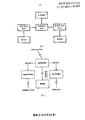
- FIG. 1 is a structural block diagram of a preferred embodiment of a communication terminal for controlling backlight and touch screen malfunction according to a call mode according to the present invention.
- FIG. 2 is a schematic diagram showing the operation of a preferred embodiment of a communication terminal for controlling backlight and touch screen malfunction according to a call mode.
- FIG. 3 is a flow chart of an application embodiment of a method for controlling backlight and touch screen malfunction according to a call mode according to the present invention.
- the present invention provides a communication terminal and method for controlling backlight and touch screen misoperation according to a call mode.
- a communication terminal for controlling backlight and touch screen misoperation according to a call mode includes a call module, a contact sensing module, a backlight management module, a touch screen management module, a backlight, and a touch screen.
- the call module is respectively connected to the backlight management module and the touch screen management module through a contact sensing module, the backlight management module is connected to the backlight, and the touch screen management module is connected to the touch screen.
- the communication terminal is preferably a touch screen mobile phone, and the call module is used to connect or hang up the phone, and determine the current call state.
- the backlight is used to provide backlight, and the touch screen is used to input control information, which is a prior art and will not be described here.
- the contact sensing module is used to obtain the call mode in real time, that is, the way the current user answers the call.
- the contact sensing module includes a contact sensing switch and a touch sensing chip, and the contact sensing switch is connected to the touch sensing chip.
- the touch sensor switch is located above the touch screen, and the touch sensor switch is preferably mounted around the earpiece.
- the call mode includes an ear close-up listening mode and a non-ear close-to-ear listening mode. Therefore, before the backlight management module and the touch screen management module are started, the contact mode of the communication terminal needs to be pre-determined by the contact sensing module.
- the touch sensing module obtains whether the current user's head is in contact with the surface of the communication terminal through the touch sensor chip. When a part of the user's body (such as an ear or a face) is in contact with the user, the user is considered to be close to the ear of the communication terminal. Answer the call with the "ear close to answer mode". If the user's body is not in contact with the touch sensor switch, the user is considered to be in the "non-ear close proximity mode" to answer the call, such as the user can answer the call through hands-free, headset or Bluetooth when the call is received.
- the contact sensing module also needs to obtain the current call state through the call module, and only informs the backlight management module and the touch screen management module to perform corresponding switching management work when the communication terminal is in the call state.
- the backlight management module is configured to control the opening and closing of the backlight according to the call mode acquired by the contact sensing module
- the touch screen management module is configured to control the opening and closing of the touch screen according to the call mode acquired by the contact sensing module.
- the backlight is used to provide a backlight
- the touch screen is used to input control information.
- the backlight management module is mainly responsible for powering or powering off the backlight.
- the backlight includes a display backlight and a keyboard backlight.
- the backlight management module turns off the backlight of the display and the backlight of the keyboard.
- the backlight management module backlights the display again.
- the keyboard backlight is turned on, which is convenient for the user to view the screen and the keyboard. In this way, the backlight management module can switch the state of the backlight according to the state of the user's answering the call, and the backlight is well controlled.
- the touch screen management module is configured to control the opening and closing of the touch screen according to the call mode acquired by the touch sensing module.
- the touch screen management module mainly manages the working state of the touch screen.
- the touch screen management module stops the work of the touch screen, and the touch screen enters a sleep state, so that the touch screen cannot accept the user's input and prevent the user from misoperation.
- the touch screen management module turns on the touch screen to wake up the touch screen, thereby facilitating the user to operate the touch screen.
- the working modes of the contact sensing module, the backlight management module, and the touch screen management module are described in detail below.
- the contact sensing module determines whether the contact sensor is in proximity to the human body through the touch sensor chip in the communication terminal. After the phone is connected, the touch sensing module first turns on the touch sensor chip, and the touch sensor switch starts to detect whether a human body (such as an ear or a face) is in contact with the surface of the touch sensor switch.
- the contact sensing switch is a capacitive touch switch
- the capacitive touch switch has a pair of adjacent electrodes (ie, sensing portions of the switch), and has a fixed capacitance between the electrodes.
- a conductor is close to the two electrodes, a new coupling capacitor is generated between the electrode and the conductor.
- the capacitive switch is in the form of a capacitor grounded on one side, and the presence of the conductor increases the capacitance between the switch and the ground.
- the human body is a conductor (under the skin, the body tissue is filled with conductive electrolyte), these two electrodes detect whether there is a certain part of the human body close to the touch switch (ie, detect whether there is a button press), according to the change of capacitance Judge.
- the relaxation oscillator that continuously charges and discharges in the capacitive touch switch. If the human body does not touch the switch, the relaxation oscillator has a fixed charge and discharge cycle, and the frequency can be measured. If a part of the human body touches the switch, the dielectric constant of the capacitor is increased, the cycle of charging and discharging becomes longer, and the frequency is reduced accordingly. Therefore, the change in the detection period can detect the state of the touch. After the contact sensor detects the frequency change, the software is notified by means of a hardware interrupt (that is, the change of the analog signal due to the change of the capacitance is converted into the change of the digital signal), and the "press" and "open” are repeated in the software. These two interrupts are processed.
- a hardware interrupt that is, the change of the analog signal due to the change of the capacitance is converted into the change of the digital signal
- the contact sensor detects whether the human body is in contact with the switch in real time, and notifies the touch sensor chip by interrupting when the switch state changes, and the touch sensor chip has a variable (int Current_touch_button_status) records the current state of the button as: “press” or "open".
- Interrupt handler function [void Touch_button_close(void)], through the interrupt handler function as follows:
- the contact sensing switch when a part of the user's body is separated from the contact sensing switch surface portion by contact, the contact sensing switch generates an interrupt notification touch sensing chip, and the touch sensing chip calls the interrupt processing function that the button is opened (void Touch_button_open(void)), the interrupt handler functions as follows:
- the touch sensing module starts detecting after the phone is turned on, stops detecting after the call ends, and notifies the backlight management module and the touch screen management module of the result of the user answering mode, and the backlight management module and the touch screen management module are Different ways of answering are handled differently.
- the backlight management module adjusts the state of the backlight in real time according to the change of the user's answering mode, and only changes the backlight state when the user's answering mode is changed, so that the user can make a call during the call.
- the backlight is only illuminated when a screen backlight is required, and is turned off when no backlight is needed.
- the backlight management module has a global variable to save the current backlight when the "ear close to answer mode" is changed to "non-ear close to answer mode” or when the "non-ear close to answer mode” is changed to "ear close to answer mode”. State, this variable is assigned the corresponding value after the backlight state has changed.
- the contact sensing module starts working after the call is connected, and starts the touch sensing chip to detect whether the communication terminal is in contact with the human body; when the current user's head or ear is found to be in contact with the contact sensor switch on the surface of the communication terminal, the current backlight state is saved.
- the global variable value is "on”; when the current user is found to be separated from the contact sensor switch on the surface of the communication terminal, the global variable value of the current backlight state is "off", indicating that the user's answer mode has changed.
- the contact sensing module obtains the current user's answering mode (ie, determines whether the user closes the communication terminal to the ear), and notifies the touch screen management module, and the touch screen management module performs touch screen management according to the current answering mode.
- the touch screen management module stops the operation of the touch screen to enter the sleep state; when the user's answering mode is not to close the communication terminal to the ear, the touch screen management module causes the touch screen to start working and wake up the touch screen. Make it start receiving user input.
- the touch screen management module adjusts the working state of the touch screen in real time according to the change of the user's answering mode, and only changes the working state of the touch screen when the user receiving mode changes, so that the user can make the call in the process of receiving the call.
- the screen is only awake when the touch screen is required to work, and is turned off when no input is required, thereby avoiding the occurrence of misoperation, and at the same time, letting the touch screen sleep when it does not need to work, and saving the battery power.
- the touch screen management module When the "ear close to answer mode” changes to “non-ear close to answer mode”, or when “non-ear close to answer mode” is changed to “ear close to answer mode”, there is a global variable in the touch screen management module to save the current touch screen.
- the working state the variable is assigned a corresponding value after the touch screen working state is changed.
- the contact sensing module starts working after the call is connected, starts the touch sensing chip to detect whether the earpiece of the communication terminal is in contact with the user, and saves the working state of the current touch screen when the user's head or ear is found to be in contact with the contact sensor switch on the surface of the communication terminal.
- the value of the global variable is "work"; or when the current user is found to be separated from the contact sensor on the surface of the communication terminal, the value of the global variable that saves the current backlight state is "stop working", indicating that the user's answer mode has changed.
- the embodiment of the invention further provides a method for controlling the backlight and the touch screen by the call mode according to the call mode, as shown in FIG. 3 .
- step S110 the call is connected by the call module.
- the call module After the communication terminal calls or initiates a call, the call module first determines the status of the current communication terminal. If the communication terminal enters the "call state", the call is turned on, and the call module notifies the touch sensing module to start monitoring the manner in which the user answers the call. The contact sensor module is not notified if the phone is not connected.
- Step S120 Acquire a call mode of the communication terminal in real time through the contact sensing module, and determine whether the call mode is an ear close to answer mode; if yes, execute step S130; otherwise, execute step S140.
- the contact sensing module detects whether a certain part of the user's head is in contact with the surface of the communication terminal through the contact sensor in real time, and analyzes the current user's answering mode, and finally notifies the result.
- Backlight management module and touch screen management module when the phone is turned on, the contact sensing module detects whether a certain part of the user's head is in contact with the surface of the communication terminal through the contact sensor in real time, and analyzes the current user's answering mode, and finally notifies the result.
- Step S130 the backlight is turned off by the backlight management module, and the touch screen is closed by the touch screen management module.
- Step S140 the backlight is turned on by the backlight management module, and then step S150 is performed.
- Step S150 The touch screen is opened by the touch screen management module.
- the step S120 specifically includes: sensing whether the human body is close by the contact sensor; if yes, determining, by the touch sensor chip, the call mode is the ear close to the answer mode, and then performing step S130; if not, determining the call by the touch sensor chip The mode is the non-ear close proximity mode, and then step S140 is performed.
- the method further includes: turning on the backlight by the backlight management module, and then the touch screen management module turns on the touch screen.
- the backlight comprises a display backlight and a keyboard backlight.
- the backlight management module switches the switching state of the backlight in real time: when the user closes the communication terminal to the ear to answer the phone, the backlight is turned off (including the keyboard backlight and the screen backlight); when the user takes the communication terminal away from the ear or Turn on the backlight when using other answering methods.
- the touch screen management module can switch the working state of the touch screen in real time to prevent the user from misoperation during the answering process: when the user closes the communication terminal to the ear to answer the call, the touch screen is turned off, and the user is in the sleep state, and stops.
- the touch screen is opened, the touch screen is woken up, and the external input is received. Therefore, when the user needs, the backlight and the touch screen are opened to facilitate the user's operation; when the user does not need to, the backlight and the touch screen are turned off, the power consumption during the call is greatly saved, and the misoperation during the call is also prevented.
- the invention does not need to manually switch the state of the backlight and the touch screen by the user, which facilitates the operation of the user and brings a new experience to the user's call.
Landscapes
- Engineering & Computer Science (AREA)
- Theoretical Computer Science (AREA)
- Physics & Mathematics (AREA)
- General Engineering & Computer Science (AREA)
- General Physics & Mathematics (AREA)
- Human Computer Interaction (AREA)
- Computer Networks & Wireless Communication (AREA)
- Signal Processing (AREA)
- Telephone Function (AREA)
Abstract
本发明公开了根据通话模式控制背光及触摸屏误操作的通讯终端及方法,其通讯终端包括通话模块,用于实时获取通话模式的接触感应模块;用于,控制背光灯的启闭的背光管理模块;用于,控制触摸屏的启闭的触摸屏管理模块;用于提供背光的背光灯;用于输入控制信息的触摸屏;所述通话模块通过接触感应模块分别与背光管理模块和触摸屏管理模块连接;所述背光管理模块与背光灯连接,触摸屏管理模块与触摸屏连接。本发明在通讯终端处于耳朵贴近接听模式时,控制背光灯和触摸屏关闭,当通话模式为非耳朵贴近接听模式时,控制背光灯和触摸屏开启,从而节省了通讯终端的耗电量,同时还防止了触摸屏误操作。
Description
技术领域
本发明涉及通讯终端的通话控制,特别涉及一种根据通话模式控制背光及触摸屏误操作的通讯终端及方法。
背景技术
目前,大屏幕触摸屏手机,越来越受消费者的青睐,通话是手机最基本的功能,也是手机使用最频繁的功能之一。一般情况下,人们采用将手机贴近耳朵的方式接听电话。这种情况下,用户只需要通过听筒听对方的语音,以及通过麦克风向对方传递语音。
然而,现有的手机在接听电话时,无法对手机屏幕以及背光进行很好的控制。譬如,在用户用耳朵贴近手机接听电话的过程中,背光灯保持亮着,这样浪费了手机的电量,而且在接听过程中,其触摸屏仍然处于工作状态,这样很可能由于用户的脸部碰到触摸屏而产生误操作(如挂断电话),给用户通话过程带来不便。
因而现有技术还有待改进和提高。
发明内容
鉴于上述现有技术的不足之处,本发明的目的在于提供一种根据通话模式控制背光及触摸屏误操作的通讯终端及方法,在用户采用耳朵贴近接听模式接听电话时,关闭背光灯和触摸屏,从而节省通讯员终端的耗电量,同时还能防止触摸屏误操作。
为了达到上述目的,本发明采取了以下技术方案:
一种根据通话模式控制背光及触摸屏误操作的通讯终端,其中,包括:用于接通或者挂断电话的通话模块;用于实时获取通话模式的接触感应模块;用于根据接触感应模块获取的通话模式,控制背光灯启闭的背光管理模块;用于根据接触感应模块获取的通话模式,控制触摸屏启闭的触摸屏管理模块;用于提供背光的背光灯;用于输入控制信息的触摸屏;所述通话模块通过接触感应模块分别与背光管理模块和触摸屏管理模块连接;所述背光管理模块与背光灯连接,触摸屏管理模块与触摸屏连接。
所述的根据通话模式控制背光及触摸屏误操作的通讯终端,其中,所述接触感应模块包括接触感应开关和触摸感应芯片,所述接触感应开关与触摸感应芯片连接。
所述的根据通话模式控制背光及触摸屏误操作的通讯终端,其中,接触感应开关位于触摸屏的上方。
所述的根据通话模式控制背光及触摸屏误操作的通讯终端,其中,接触感应开关为电容式触摸开关。
所述的根据通话模式控制背光及触摸屏误操作的通讯终端,其中,背光灯包括显示屏背光灯和键盘背光灯。
所述的根据通话模式控制背光及触摸屏误操作的通讯终端,其中,通话模式包括耳朵贴近接听模式和非耳朵贴近接听模式。
一种根据通话模式控制背光及触摸屏误操作的方法,其中,包括:
A、由通话模块接通电话;
B、通过接触感应模块实时获取通讯终端的通话模式,并判断该通话模式是否为耳朵贴近接听模式;如果是,执行步骤C;否则,执行步骤D;
C、由背光管理模块关闭背光灯,同时由触摸屏管理模块关闭触摸屏;
D、由背光管理模块开启背光灯,然后执行步骤E;
E、由触摸屏管理模块开启触摸屏。
所述的根据通话模式控制背光及触摸屏误操作的方法,其中,所述步骤B具体包括:
B1、通过接触感应开关感应是否有人体贴近;如果是,则执行步骤B2;否则,执行步骤B3;
B2、由触摸感应芯片判断通话模式为耳朵贴近接听模式,然后执行步骤C;
B3、由触摸感应芯片判断通话模式为非耳朵贴近接听模式,然后执行步骤D。
所述的根据通话模式控制背光及触摸屏误操作的方法,其中,当耳朵贴近接听模式改为非耳朵贴近接听模式时,所述的方法进一步包括:
由背光管理模块开启背光灯;
由触摸屏管理模块开启触摸屏。
所述的根据通话模式控制背光及触摸屏误操作的方法,其中,背光灯包括显示屏背光灯和键盘背光灯。
本发明提供的根据通话模式控制背光及触摸屏误操作的通讯终端及方法,在通讯终端通话时,通过接触感应模块实时获取通讯终端的通话模式,并判断该通话模式是否为耳朵贴近接听模式,当通话模式为耳朵贴近接听模式时,控制背光灯和触摸屏关闭,当通话模式为非耳朵贴近接听模式时,控制背光灯和触摸屏开启,从而节省了通讯终端的耗电量,同时还防止了触摸屏误操作,给用户带来了新的体验。
附图说明
图1为本发明根据通话模式控制背光及触摸屏误操作的通讯终端较佳实施例的结构框图。
图2为本发明根据通话模式控制背光及触摸屏误操作的通讯终端较佳实施例的工作原理图。
图3为本发明根据通话模式控制背光及触摸屏误操作的方法一应用实施例的流程图。
具体实施方式
本发明提供一种根据通话模式控制背光及触摸屏误操作的通讯终端及方法,为使本发明的目的、技术方案及效果更加清楚、明确,以下参照附图并举实例对本发明进一步详细说明。应当理解,此处所描述的具体实施例仅用以解释本发明,并不用于限定本发明。
请参阅图1和图2,本发明实施例提供的根据通话模式控制背光及触摸屏误操作的通讯终端包括通话模块、接触感应模块、背光管理模块、触摸屏管理模块、背光灯和触摸屏。所述通话模块通过接触感应模块分别与背光管理模块和触摸屏管理模块连接,所述背光管理模块与背光灯连接,触摸屏管理模块与触摸屏连接。
所述通讯终端优选为触摸屏手机,通话模块用于接通或者挂断电话,并判断当前的通话状态。背光灯用于提供背光,触摸屏用于输入控制信息,其为现有技术,此处不再赘述。
接触感应模块用于实时获取通话模式,即获得当前用户接听电话的方式。该接触感应模块包括接触感应开关和触摸感应芯片,所述接触感应开关与触摸感应芯片连接。接触感应开关位于触摸屏的上方,且该接触感应开关最好安装在听筒的周围。
所述通话模式包括耳朵贴近接听模式和非耳朵贴近接听模式,因此在背光管理模块和触摸屏管理模块启动之前,需要通过接触感应模块预先判断通讯终端的通话模式。
所述接触感应模块通过触摸感应芯片获取当前用户头部与通讯终端表面是否接触,当用户的身体某个部分(如耳朵、脸部)与之接触时,则认为用户是将通讯终端贴近耳朵,采用“耳朵贴近接听模式”接听电话。如果用户的身体没有与接触感应开关接触,则认为用户是采用“非耳朵贴近接听模式”接听电话,如用户在接在电话时可通过免提、耳机或者蓝牙接听电话。该接触感应模块还需通过通话模块获取当前的通话状态,只有在通讯终端处于通话状态中才通知背光管理模块和触摸屏管理模块进行相应的切换管理工作。
背光管理模块用于根据接触感应模块获取的通话模式,控制背光灯的启闭,触摸屏管理模块用于根据接触感应模块获取的通话模式,控制触摸屏的启闭。其中,所述背光灯用于提供背光,触摸屏用于输入控制信息。
在具体实施时,背光管理模块主要负责给背光灯供电或者断电。其中,背光灯包括显示屏背光灯和键盘背光灯。当用户将通讯终端贴近耳朵接听电话时,背光管理模块关闭显示屏背光灯和键盘背光灯,当用户在接听的过程中,又将通讯终端拿离耳朵时,背光管理模块再将显示屏背光灯和键盘背光灯打开,从而方便用户查看屏幕以及键盘。这样,背光管理模块就能够根据用户接听电话的状态切换背光的状态,很好地控制背光。
触摸屏管理模块用于根据接触感应模块获取的通话模式,控制触摸屏的启闭。该触摸屏管理模块主要管理触摸屏的工作状态,当用户将通讯终端贴近耳朵接听电话时,触摸屏管理模块停止触摸屏的工作,使触摸屏进入睡眠状态,这样触摸屏不能接受用户的输入,防止用户误操作。当用户在接听的过程中,又将通讯终端拿离耳朵,触摸屏管理模块再将触摸屏开启,唤醒触摸屏,从而方便用户操作触摸屏。
以下分别对接触感应模块、背光管理模块和触摸屏管理模块的工作方式进行详细描述。
1、接触感应模块通过通讯终端中的触摸感应芯片判断接触感应开关是否有人体接近。电话接通后,接触感应模块首先打开触摸感应芯片,接触感应开关开始检测是否有人体(如耳朵、脸部)与接触感应开关表面接触。
本实施例中,所述接触感应开关为电容式触摸开关,电容式触摸开关内有一对相邻电极(即开关的感应部分),在电极之间有固定的电容。当有导体接近两个电极时,在电极与导体之间会产生一个新的耦合电容,通常电容开关的形式是一边接地的电容,导体的存在增加了开关到地之间的电容。而人体就是一个导体(在皮肤下面,人体组织中充满了传导电解质),这两个电极检测是否有人体某个部位靠近触摸开关时(即检测是否有按键按下),可根据电容的变化来判断。
在电容式触摸开关内有一个不断地充电和放电的张弛振荡器,如果人体不接触开关,张弛振荡器有一个固定充放电周期,频率是可以测量的。如果有人体某个部分接触开关,就会增加电容器的介电常数,充放电的周期就会变长,频率就会相应减少。所以,检测周期的变化就可以检测触摸的状态。接触感应开关检测到频率变化后,通过硬件中断的方式通知软件(即将由于电容改变而带来的模拟信号的改变转化为了数字信号的变化),在软件中再对“按下”以及“打开”这两种中断进行处理。
接触感应开关实时地检测人体与开关是否接触,在开关状态发生改变的情况下通过中断的方式通知触摸感应芯片,触摸感应芯片中有一变量(int
current_touch_button_status)记录当前的按键的状态为:“按下”或“打开”。
其中,当用户的身体的某个部位(如耳朵、脸部)与接触感应开关表面(即通讯终端外壳的听筒处)接触后,接触感应开关产生一个中断通知触摸感应芯片,触摸感应芯片调用按键被按下的中断处理函数[void
touch_button_close(void)],通过该中断处理函数作如下处理:
首先,查看记录当前按键状态的变量(int
current_touch_button_status)值,如果当前的状态也是处于“按下”状态,则无需处理此次按键动作;如果当前的状态是“打开”状态,先将该变量更新为“关闭”状态;接着判断当前是否在通话状态中,如果在通话状态中,则将当前的用户通话方式置为“耳朵贴近接听模式”;如果不在通话状态中,则不对该接触行为做任何处理。
同样地,当用户的身体的某个部分与接触感应开关表面部分由接触变为分离时,接触感应开关产生一个中断通知触摸感应芯片,触摸感应芯片调用该按键被打开的中断处理函数(void
touch_button_open(void)),中断处理函数作如下处理:
首先,查看记录当前按键状态的变量(int
current_touch_button_status)值,如果当前的状态也是处于“打开”状态,则无需处理此次按键动作;如果当前的状态是“关闭”状态,再将该变量更新为“打开”状态;接着判断通讯终端是否处于通话状态中,如果是,则将当前的用户通话方式置为“非耳朵贴近通讯终端”方式;如果否,则不对该分离行为做任何处理。
在具体实施时,接触感应模块会在电话接通后开始检测,在通话结束后停止检测;并将用户接听方式的结果通知背光管理模块以及触摸屏管理模块,而背光管理模块以及触摸屏管理模块会根据不同的接听方式作出不同的处理。
2、背光管理模块会根据用户接听方式的变化实时调整换背光的状态,并且只有在用户接听方式发生改变的情况下,才进行背光状态的改变,这样就能够使得用户在接听电话的过程中,只有在需要屏幕背光时才点亮背光,在不需要背光时将其关闭。
在“耳朵贴近接听模式”变为“非耳朵贴近接听模式”时,或者是由“非耳朵贴近接听模式”变为“耳朵贴近接听模式”时,背光管理模块中有一个全局变量保存当前的背光状态,该变量在背光状态发生改变后被赋予对应的值。接触感应模块在通话接通后开始工作,启动触摸感应芯片检测通讯终端听筒处是否与人体接触;当发现当前的用户头部或耳朵与通讯终端表面的接触感应开关接触时,保存当前背光状态的全局变量值为“开启”;当发现当前的用户与通讯终端表面的接触感应开关分离时,保存当前背光状态的全局变量值为“关闭”,则说明用户的接听方式发生了改变。
3、当电话接通后,接触感应模块获得了当前用户的接听方式(即判断是否用户将通讯终端贴近耳朵),并通知触摸屏管理模块,触摸屏管理模块根据当前接听方式进行触摸屏的管理。
当用户的接听方式为将通讯终端贴近耳朵时,触摸屏管理模块停止触摸屏的工作使其进入休眠状态;当用户的接听方式不是将通讯终端贴近耳朵时,触摸屏管理模块使得触摸屏开始工作,唤醒触摸屏,使其开始接收用户的输入。
因此,触摸屏管理模块会根据用户接听方式的变化实时调整触摸屏的工作状态,并且只有在用户接听方式发生改变的情况下,才进行触摸屏工作状态的改变,这样就能够使得用户在接听电话的过程中,只有需要触摸屏工作时才唤醒屏幕,在不需要输入时将其关闭,从而避免了误操作的产生,同时,在触摸屏不需要工作时让其休眠,也节省了电池的电量。
在“耳朵贴近接听模式”变为“非耳朵贴近接听模式”时,或者是由“非耳朵贴近接听模式”变为“耳朵贴近接听模式”时,触摸屏管理模块中有一个全局变量保存当前的触摸屏的工作状态,该变量在触摸屏工作状态发生改变后被赋予对应的值。接触感应模块在通话接通后开始工作,启动触摸感应芯片检测通讯终端的听筒处是否与用户接触;当发现用户头部或耳朵与通讯终端表面的接触感应开关接触时,保存当前触摸屏的工作状态的全局变量值为“工作”;或者当发现当前的用户与通讯终端表面的接触感应开关分离时,保存当前背光状态的全局变量值为“停止工作”,则说明用户的接听方式发生了改变。
本发明实施例还提供根据通话模式控制背光及触摸屏误操作的方法,如图3所示。
步骤S110、由通话模块接通电话。在通讯终端来电或者发起呼叫后,通话模块首先判断当前通讯终端的状态,如果通讯终端进入“通话状态”中,即说明电话接通,通话模块通知触摸感应模块开始监测用户接听电话的方式,如果电话没有接通,则不通知接触感应模块。
步骤S120、通过接触感应模块实时获取通讯终端的通话模式,并判断该通话模式是否为耳朵贴近接听模式;如果是,执行步骤S130;否则,执行步骤S140。
本实施例中,当电话接通后,接触感应模块实时地通过接触感应开关检测用户头部的某个部位是否与通讯终端的表面接触,并分析得出当前用户的接听方式,最后将结果通知背光管理模块和触摸屏管理模块。
步骤S130、由背光管理模块关闭背光灯,同时由触摸屏管理模块关闭触摸屏。
步骤S140、由背光管理模块开启背光灯,然后执行步骤S150。
步骤S150、由触摸屏管理模块开启触摸屏。
其中,所述步骤S120具体包括:通过接触感应开关感应是否有人体贴近;如果是,则由触摸感应芯片判断通话模式为耳朵贴近接听模式,然后执行步骤S130;如果否,由触摸感应芯片判断通话模式为非耳朵贴近接听模式,然后执行步骤S140。
用户接听电话,由耳朵贴近接听模式改为非耳朵贴近接听模式时,所述的方法进一步包括:由背光管理模块开启背光灯,之后由触摸屏管理模块开启触摸屏。其中,所述背光灯包括显示屏背光灯和键盘背光灯。
本发明根据用户的接听方式,通过背光管理模块实时切换背光的开关状态:当用户将通讯终端贴近耳朵接听电话时,关闭背光(包括键盘背光与屏幕背光);当用户将通讯终端拿离耳朵或者是采用其他的接听方式时,打开背光。并且还根据用户的接听方式,通过触摸屏管理模块实时切换触摸屏工作的状态,防止用户在接听过程中的误操作:当用户将通讯终端贴近耳朵接听电话时,关闭触摸屏,使其处于休眠状态,停止接收外界的输入;当用户将通讯终端拿离耳朵或者是采用其他的接听方式时,打开触摸屏,唤醒触摸屏,接收外界的输入。从而在用户需要时,打开背光与触摸屏,方便用户操作;在用户不需要时,关闭背光与触摸屏,大大节约了通话过程中的电量消耗,也防止了通话过程中的误操作。本发明无需通过用户手动切换背光与触摸屏的状态,方便了用户的操作,给用户的通话带来了新的体验。
可以理解的是,对本领域普通技术人员来说,可以根据本发明的技术方案及其发明构思加以等同替换或改变,而所有这些改变或替换都应属于本发明所附的权利要求的保护范围。
Claims (10)
- 一种根据通话模式控制背光及触摸屏误操作的通讯终端,其特征在于,包括:用于接通或者挂断电话的通话模块;用于实时获取通话模式的接触感应模块;用于根据接触感应模块获取的通话模式,控制背光灯启闭的背光管理模块;用于根据接触感应模块获取的通话模式,控制触摸屏启闭的触摸屏管理模块;用于提供背光的背光灯;用于输入控制信息的触摸屏;所述通话模块通过接触感应模块分别与背光管理模块和触摸屏管理模块连接;所述背光管理模块与背光灯连接,触摸屏管理模块与触摸屏连接。
- 根据权利要求1所述的根据通话模式控制背光及触摸屏误操作的通讯终端,其特征在于,所述接触感应模块包括接触感应开关和触摸感应芯片,所述接触感应开关与触摸感应芯片连接。
- 根据权利要求2所述的根据通话模式控制背光及触摸屏误操作的通讯终端,其特征在于,接触感应开关位于触摸屏的上方。
- 根据权利要求2或3所述的根据通话模式控制背光及触摸屏误操作的通讯终端,其特征在于,接触感应开关为电容式触摸开关。
- 根据权利要求1至3任意一项所述的根据通话模式控制背光及触摸屏误操作的通讯终端,其特征在于,背光灯包括显示屏背光灯和键盘背光灯。
- 根据权利要求1至3任意一项所述的根据通话模式控制背光及触摸屏误操作的通讯终端,其特征在于,通话模式包括耳朵贴近接听模式和非耳朵贴近接听模式。
- 一种根据通话模式控制背光及触摸屏误操作的方法,其特征在于,包括:A、由通话模块接通电话;B、通过接触感应模块实时获取通讯终端的通话模式,并判断该通话模式是否为耳朵贴近接听模式;如果是,执行步骤C;否则,执行步骤D;C、由背光管理模块关闭背光灯,同时由触摸屏管理模块关闭触摸屏;D、由背光管理模块开启背光灯,然后执行步骤E;E、由触摸屏管理模块开启触摸屏。
- 根据权利要求7所述的根据通话模式控制背光及触摸屏误操作的方法,其特征在于,所述步骤B具体包括:B1、通过接触感应开关感应是否有人体贴近;如果是,则执行步骤B2;否则,执行步骤B3;B2、由触摸感应芯片判断通话模式为耳朵贴近接听模式,然后执行步骤C;B3、由触摸感应芯片判断通话模式为非耳朵贴近接听模式,然后执行步骤D。
- 根据权利要求7所述的根据通话模式控制背光及触摸屏误操作的方法,其特征在于,当耳朵贴近接听模式改为非耳朵贴近接听模式时,所述的方法进一步包括:由背光管理模块开启背光灯;由触摸屏管理模块开启触摸屏。
- 根据权利要求7或9所述的根据通话模式控制背光及触摸屏误操作的方法,其特征在于,背光灯包括显示屏背光灯和键盘背光灯。
Applications Claiming Priority (2)
| Application Number | Priority Date | Filing Date | Title |
|---|---|---|---|
| CN201110088025.8 | 2011-04-08 | ||
| CN2011100880258A CN102185967A (zh) | 2011-04-08 | 2011-04-08 | 根据通话模式控制背光及触摸屏误操作的通讯终端及方法 |
Publications (1)
| Publication Number | Publication Date |
|---|---|
| WO2012136126A1 true WO2012136126A1 (zh) | 2012-10-11 |
Family
ID=44572035
Family Applications (1)
| Application Number | Title | Priority Date | Filing Date |
|---|---|---|---|
| PCT/CN2012/073448 Ceased WO2012136126A1 (zh) | 2011-04-08 | 2012-04-01 | 根据通话模式控制背光及触摸屏误操作的通讯终端及方法 |
Country Status (2)
| Country | Link |
|---|---|
| CN (1) | CN102185967A (zh) |
| WO (1) | WO2012136126A1 (zh) |
Cited By (2)
| Publication number | Priority date | Publication date | Assignee | Title |
|---|---|---|---|---|
| CN105072281A (zh) * | 2015-08-27 | 2015-11-18 | 上海理工大学 | 防止通话时触摸屏被误触的智能通信终端及方法 |
| CN113778264A (zh) * | 2021-09-24 | 2021-12-10 | 北京德为智慧科技有限公司 | 触摸屏控制装置及触摸屏控制方法 |
Families Citing this family (16)
| Publication number | Priority date | Publication date | Assignee | Title |
|---|---|---|---|---|
| CN102185967A (zh) * | 2011-04-08 | 2011-09-14 | 惠州Tcl移动通信有限公司 | 根据通话模式控制背光及触摸屏误操作的通讯终端及方法 |
| CN102387252A (zh) * | 2011-10-11 | 2012-03-21 | 惠州Tcl移动通信有限公司 | 手持设备及其通话过程中防止触摸屏误触发的方法 |
| CN102629183B (zh) * | 2012-02-29 | 2014-12-03 | 华为终端有限公司 | 一种终端屏幕控制方法及装置 |
| CN102664995B (zh) * | 2012-04-11 | 2015-01-28 | 深迪半导体(上海)有限公司 | 一种防止触摸屏手机通话中误操作的方法 |
| CN103529972A (zh) * | 2012-07-02 | 2014-01-22 | 升达科技股份有限公司 | 触控键盘系统 |
| CN102830923B (zh) * | 2012-08-06 | 2017-02-22 | 广东欧珀移动通信有限公司 | 一种电容感应方法及移动终端 |
| CN102883073A (zh) * | 2012-09-03 | 2013-01-16 | 东莞宇龙通信科技有限公司 | 省电方法及终端 |
| CN103853309B (zh) * | 2012-12-06 | 2016-10-05 | 联想(北京)有限公司 | 一种控制电子设备的方法及电子设备 |
| CN103561158B (zh) * | 2013-10-09 | 2015-10-07 | 广东明创软件科技有限公司 | 防止通话过程中误操作的方法及其移动终端 |
| CN104717348A (zh) * | 2013-12-13 | 2015-06-17 | 中兴通讯股份有限公司 | 管理液晶显示屏背光灯的方法、装置及终端 |
| CN103838496B (zh) * | 2014-02-20 | 2020-01-31 | 联想(北京)有限公司 | 一种控制电子设备的方法及电子设备 |
| CN106097981B (zh) * | 2016-06-07 | 2020-08-25 | 联想(北京)有限公司 | 一种背光控制方法及电子设备 |
| CN108027697A (zh) * | 2016-08-24 | 2018-05-11 | 北京小米移动软件有限公司 | 控制显示界面的方法及装置 |
| CN108076210A (zh) * | 2016-11-11 | 2018-05-25 | 中兴通讯股份有限公司 | 智能设备的屏幕背光控制系统与方法 |
| CN107147812A (zh) * | 2017-07-03 | 2017-09-08 | 奇酷互联网络科技(深圳)有限公司 | 移动终端 |
| CN109373887A (zh) * | 2018-09-28 | 2019-02-22 | 北京小米移动软件有限公司 | 人体距离检测模组及电子设备 |
Citations (4)
| Publication number | Priority date | Publication date | Assignee | Title |
|---|---|---|---|---|
| CN2672701Y (zh) * | 2003-12-19 | 2005-01-19 | 联想(北京)有限公司 | 自动开关装置 |
| CN101610600A (zh) * | 2008-06-19 | 2009-12-23 | 鸿富锦精密工业(深圳)有限公司 | 具防触摸屏误操作功能的电子设备及其防误操作方法 |
| CN101820466A (zh) * | 2009-02-27 | 2010-09-01 | 希姆通信息技术(上海)有限公司 | 一种包含接近传感器的移动通讯终端 |
| CN102185967A (zh) * | 2011-04-08 | 2011-09-14 | 惠州Tcl移动通信有限公司 | 根据通话模式控制背光及触摸屏误操作的通讯终端及方法 |
Family Cites Families (4)
| Publication number | Priority date | Publication date | Assignee | Title |
|---|---|---|---|---|
| JP2001352395A (ja) * | 2000-06-07 | 2001-12-21 | Sony Corp | 携帯端末装置 |
| CN101529875A (zh) * | 2006-10-17 | 2009-09-09 | 马维尔国际贸易有限公司 | 蜂窝电话的显示控制 |
| CN101488987A (zh) * | 2008-01-14 | 2009-07-22 | 宏达国际电子股份有限公司 | 手持电子装置及其屏幕锁定方法 |
| CN101626425A (zh) * | 2009-08-04 | 2010-01-13 | 中兴通讯股份有限公司 | 一种手持终端的省电方法及装置 |
-
2011
- 2011-04-08 CN CN2011100880258A patent/CN102185967A/zh active Pending
-
2012
- 2012-04-01 WO PCT/CN2012/073448 patent/WO2012136126A1/zh not_active Ceased
Patent Citations (4)
| Publication number | Priority date | Publication date | Assignee | Title |
|---|---|---|---|---|
| CN2672701Y (zh) * | 2003-12-19 | 2005-01-19 | 联想(北京)有限公司 | 自动开关装置 |
| CN101610600A (zh) * | 2008-06-19 | 2009-12-23 | 鸿富锦精密工业(深圳)有限公司 | 具防触摸屏误操作功能的电子设备及其防误操作方法 |
| CN101820466A (zh) * | 2009-02-27 | 2010-09-01 | 希姆通信息技术(上海)有限公司 | 一种包含接近传感器的移动通讯终端 |
| CN102185967A (zh) * | 2011-04-08 | 2011-09-14 | 惠州Tcl移动通信有限公司 | 根据通话模式控制背光及触摸屏误操作的通讯终端及方法 |
Cited By (2)
| Publication number | Priority date | Publication date | Assignee | Title |
|---|---|---|---|---|
| CN105072281A (zh) * | 2015-08-27 | 2015-11-18 | 上海理工大学 | 防止通话时触摸屏被误触的智能通信终端及方法 |
| CN113778264A (zh) * | 2021-09-24 | 2021-12-10 | 北京德为智慧科技有限公司 | 触摸屏控制装置及触摸屏控制方法 |
Also Published As
| Publication number | Publication date |
|---|---|
| CN102185967A (zh) | 2011-09-14 |
Similar Documents
| Publication | Publication Date | Title |
|---|---|---|
| CN102185967A (zh) | 根据通话模式控制背光及触摸屏误操作的通讯终端及方法 | |
| EP3591988A1 (en) | Method for controlling earphone switching, earphone, and earphone system | |
| EP3820014A1 (en) | Multi-battery charging and discharging apparatus and mobile terminal | |
| US10630826B2 (en) | Information processing device | |
| CN102158609A (zh) | 一种无线通讯设备及其控制背光、触摸屏以及键盘的方法 | |
| CN102769810B (zh) | 一种防止通话误操作的移动终端 | |
| CN106973170A (zh) | 移动终端及其听筒控制方法 | |
| CN101626425A (zh) | 一种手持终端的省电方法及装置 | |
| JP2006211655A (ja) | 携帯電話及び携帯電話の構成要素を照明する方法 | |
| CN1961488A (zh) | 传感器屏幕节电器 | |
| WO2013177882A1 (zh) | 一种手机来电的处理方法 | |
| CN107710115A (zh) | 触控响应模组、键盘、触控装置、具反馈功能的触控设备 | |
| WO2016090771A1 (zh) | 移动终端及其关机状态下的信息处理方法 | |
| WO2014044063A1 (zh) | 一种触摸按键控制方法及装置 | |
| WO2018153272A1 (zh) | 一种基于移动终端的控制volte功能的方法及移动终端 | |
| CN109710150A (zh) | 按键控制方法及终端 | |
| CN101742372A (zh) | 一种蓝牙耳机 | |
| EP2599231A2 (en) | Apparatus and method for operation according to squeezing in portable terminal | |
| WO2015135255A1 (zh) | 移动终端及其防止误拨的方法 | |
| CN111464929B (zh) | 一种耳机及耳机触摸检测方法 | |
| CN211744694U (zh) | 一种tws耳机装置 | |
| CN106019926A (zh) | 智能手表及节省电量的方法 | |
| CN209299479U (zh) | 触摸式无线蓝牙耳机 | |
| CN201523407U (zh) | 一种移动终端 | |
| WO2016095362A1 (zh) | 显示终端及其屏幕的显示方法 |
Legal Events
| Date | Code | Title | Description |
|---|---|---|---|
| 121 | Ep: the epo has been informed by wipo that ep was designated in this application |
Ref document number: 12767735 Country of ref document: EP Kind code of ref document: A1 |
|
| NENP | Non-entry into the national phase |
Ref country code: DE |
|
| 122 | Ep: pct application non-entry in european phase |
Ref document number: 12767735 Country of ref document: EP Kind code of ref document: A1 |