WO2012128163A1 - 印刷装置および端末装置 - Google Patents
印刷装置および端末装置 Download PDFInfo
- Publication number
- WO2012128163A1 WO2012128163A1 PCT/JP2012/056637 JP2012056637W WO2012128163A1 WO 2012128163 A1 WO2012128163 A1 WO 2012128163A1 JP 2012056637 W JP2012056637 W JP 2012056637W WO 2012128163 A1 WO2012128163 A1 WO 2012128163A1
- Authority
- WO
- WIPO (PCT)
- Prior art keywords
- printing
- data
- error
- state
- occurred
- Prior art date
- Legal status (The legal status is an assumption and is not a legal conclusion. Google has not performed a legal analysis and makes no representation as to the accuracy of the status listed.)
- Ceased
Links
Images





Classifications
-
- G—PHYSICS
- G06—COMPUTING OR CALCULATING; COUNTING
- G06F—ELECTRIC DIGITAL DATA PROCESSING
- G06F3/00—Input arrangements for transferring data to be processed into a form capable of being handled by the computer; Output arrangements for transferring data from processing unit to output unit, e.g. interface arrangements
- G06F3/12—Digital output to print unit, e.g. line printer, chain printer
- G06F3/1201—Dedicated interfaces to print systems
- G06F3/1202—Dedicated interfaces to print systems specifically adapted to achieve a particular effect
- G06F3/121—Facilitating exception or error detection and recovery, e.g. fault, media or consumables depleted
-
- G—PHYSICS
- G06—COMPUTING OR CALCULATING; COUNTING
- G06F—ELECTRIC DIGITAL DATA PROCESSING
- G06F3/00—Input arrangements for transferring data to be processed into a form capable of being handled by the computer; Output arrangements for transferring data from processing unit to output unit, e.g. interface arrangements
- G06F3/12—Digital output to print unit, e.g. line printer, chain printer
- G06F3/1201—Dedicated interfaces to print systems
- G06F3/1223—Dedicated interfaces to print systems specifically adapted to use a particular technique
- G06F3/1229—Printer resources management or printer maintenance, e.g. device status, power levels
- G06F3/1234—Errors handling and recovery, e.g. reprinting
-
- G—PHYSICS
- G06—COMPUTING OR CALCULATING; COUNTING
- G06F—ELECTRIC DIGITAL DATA PROCESSING
- G06F3/00—Input arrangements for transferring data to be processed into a form capable of being handled by the computer; Output arrangements for transferring data from processing unit to output unit, e.g. interface arrangements
- G06F3/12—Digital output to print unit, e.g. line printer, chain printer
- G06F3/1201—Dedicated interfaces to print systems
- G06F3/1278—Dedicated interfaces to print systems specifically adapted to adopt a particular infrastructure
- G06F3/1285—Remote printer device, e.g. being remote from client or server
Definitions
- the present invention relates to a printing apparatus that performs printing based on printing data transmitted from an external device, and a terminal apparatus that is connected to the printing apparatus and instructs the printing apparatus to perform printing.
- Printing apparatuses that can be connected to a plurality of external devices such as personal computers via a network or the like and perform printing in accordance with a print job instructed from these external devices have become widespread. Under such circumstances, an error may occur in the printing apparatus for some reason during the processing of a certain print job, and printing may become impossible. In this case, as long as the error is not canceled, not only the print job but also another print job to be printed after that continues. Therefore, a printer system is known that transmits error information to a print data transmission source host or the like that has been processed when an error occurs in a printing apparatus (for example, Patent Document 1).
- the host is notified about the occurrence of an error. Regardless of the cause of the error, printing is not performed until the error is cleared. However, if the error is not due to the printing apparatus itself but due to other causes, the printing apparatus itself can print. That is, when an error occurs due to a certain print job, even if other print jobs can be processed, printing is uniformly waited.
- One object of the present invention is to provide a printing apparatus capable of preventing a print target to be printed from being delayed when an error not caused by the printing apparatus itself occurs.
- Another object of the present invention is to provide a terminal device capable of preventing an error not caused by the printing apparatus itself when instructing printing to the printing apparatus.
- a printing apparatus is a printing apparatus that can be connected to a plurality of external devices, and includes a printing unit, a first data acquisition unit, a first device information acquisition unit, and a first device determination unit. And a first conformity determining means, a first printing control means, and a first data processing means.
- the printing unit performs printing on a print medium.
- the first data acquisition unit acquires data for printing a print target transmitted from an external device.
- the first apparatus information acquisition unit acquires apparatus information that is information indicating a state of the printing apparatus itself.
- the first apparatus determination unit determines whether an error caused by the printing apparatus itself has occurred based on the apparatus information.
- the first conformity determination unit determines whether or not a condition for printing the print target conforms to the state based on the data and the device information.
- the first print control means determines that the data has been determined when the first apparatus determination means determines that the error has not occurred, and the first conformity determination means determines that the condition conforms to the state. Based on the above, the printing object is printed on the printing means.
- the first data processing means determines that the error has not occurred by the first device determination means, and the first conformity determination means determines that the condition does not conform to the state, the first data processing means
- the data is stored in the first storage means in order to delete the data or to lower the printing order of the print target.
- the printing apparatus when an error not caused by the printing apparatus itself occurs, that is, when the data transmitted from the external device does not match the state of the printing apparatus, the printing apparatus itself is in a printable state. Despite being, it is possible to prevent the printing of other printable print targets from being delayed.
- the first apparatus information acquisition unit determines that the error has not occurred by the first apparatus determination unit, and determines that the condition does not match the state by the first compatibility determination unit. If the device information has been received, the device information may be newly acquired. The first device determination unit and the first suitability determination unit may make a new determination based on the device information newly acquired by the first device information acquisition unit.
- the first data processing means determines that the error has not occurred by the first device judging means even after a predetermined time has passed, and the condition does not match the state by the first suitability judging means. If it is determined that the data is deleted, the data may be deleted. In this case, the data is deleted when the condition does not match the state even after a predetermined time has elapsed. Therefore, the user can take some measures so that the condition and the state are matched within a predetermined time.
- the printing apparatus may further include a second apparatus information acquisition unit, a second apparatus determination unit, a second conformity determination unit, and a second print control unit.
- the second apparatus information acquisition means newly updates the apparatus information when the print order of the print target is first again after the data is stored in the first storage means by the first data processing means. You may get it.
- the second device determination unit may determine whether an error caused by the printing device itself has occurred based on the device information newly acquired by the second device information acquisition unit.
- the second conformity determination means may determine whether or not the condition conforms to the state based on the data and the device information newly acquired by the second device information acquisition means.
- the second print control means determines that the error has not been generated by the second apparatus determination means, and the data is included in the data when the second suitability determination means determines that the condition is suitable for the state. Based on this, the printing object may be printed by the printing means. In this case, after the printing order to be printed is lowered, the printing is performed if the condition and the state are matched when the printing order becomes the first again. Therefore, the user can take some measures so that the condition and the state are matched while the printing order is deferred.
- the printing apparatus notifies the external device that is the transmission source of the data that the error has occurred when the first apparatus determination unit determines that the error has occurred, If it is determined by the first device determining means that the error has not occurred, and if the first suitability determining means determines that the condition does not match the state, the condition does not match the state. You may further provide the 1st notification means to notify that. In this case, when the print target cannot be printed, the reason is notified to the external device that is the transmission source of the data. Therefore, the user of the external device can take measures to cancel the error depending on the reason.
- the first apparatus information acquisition unit acquires, as the apparatus information, information including at least information indicating whether there is a defect in the printing apparatus itself and a type of a print medium set in the printing apparatus. May be.
- the first device determination unit may determine that the error has occurred when the device information includes information indicating the presence of the defect.
- the first conformity determination unit determines that the condition does not conform to the state when the type of the print medium specified by the condition does not match the type of the print medium set in the printing apparatus. May be. In this case, although the printing apparatus itself has no problem, the print medium type does not match, so that it is possible to prevent other printable print targets from being delayed.
- the printing apparatus notifies the external device that is the transmission source of the data that the error has occurred when the second apparatus determination unit determines that the error has occurred, If it is determined by the second device determining means that the error has not occurred, and if the second suitability determining means determines that the condition does not match the state, the condition does not match the state. You may further provide the 2nd notification means to notify that. In this case, when the print target cannot be printed, the reason is notified to the external device that is the transmission source of the data. Therefore, the user of the external device can take measures to cancel the error depending on the reason.
- the second apparatus information acquisition unit acquires, as the apparatus information, information including at least information indicating whether or not the printing apparatus itself has a defect and a type of a printing medium set in the printing apparatus. May be.
- the second device determination unit may determine that the error has occurred when the device information includes information indicating the presence of the defect.
- the second conformity determination unit determines that the condition does not conform to the state when the type of the print medium specified by the condition does not match the type of the print medium set in the printing apparatus. May be. In this case, although the printing apparatus itself has no problem, the print medium type does not match, so that it is possible to prevent other printable print targets from being delayed.
- the terminal device is a terminal device connectable to other terminal devices and printing devices, and includes second data acquisition means, third device information acquisition means, and third device determination means. , Third conformity determining means, first data transmitting means, and second data processing means.
- the second data acquisition unit acquires data for printing a print target.
- the third device information acquisition unit acquires device information that is information indicating a state of the printing device itself from the printing device.
- the third apparatus determination unit determines whether an error caused by the printing apparatus itself has occurred based on the apparatus information.
- the third conformity determination means determines whether or not a condition for printing the print target conforms to the state based on the data and the device information.
- the first data transmitting means determines that the data has been determined when the third device determining means determines that the error has not occurred and the third conformity determining means determines that the condition is suitable for the state. Is transmitted to the printing apparatus.
- the second data processing means when it is determined that the error has not occurred by the third device determining means, and when the condition is determined not to match the state by the third conformity determining means, The data is stored in the second storage means in order to delete the data or to lower the printing order of the print target.
- the terminal device even though the printing apparatus itself is in a printable state, by transmitting data that does not conform to the state of the printing apparatus to the printing apparatus, It is possible to prevent the printing from being delayed. That is, when the terminal device instructs the printing apparatus to print, it is possible to prevent an error not caused by the printing apparatus itself.
- the third device information acquisition unit determines that the error has not occurred by the third device determination unit, and determines that the condition does not match the state by the third compatibility determination unit. If it is, the device information may be newly acquired from the printing device. The third device determination unit and the third compatibility determination unit may make a new determination based on the device information newly acquired by the third device information acquisition unit.
- the second data processing means determines that the error has not occurred by the third device determining means even after a predetermined time has elapsed, and the condition does not match the state by the third conformity determining means. If it is determined that the data is deleted, the data may be deleted. In this case, the data is deleted when the condition does not match the state even after a predetermined time has elapsed. Therefore, the user can take some measures so that the condition and the state are matched within a predetermined period.
- the terminal device may further include fourth device information acquisition means, fourth device determination means, fourth conformity determination means, and second data transmission means.
- a fourth device information obtaining unit configured to obtain the device information from the printing device when the print order of the print target is first after the data is stored in the second storage unit by the second data processing unit; May be newly acquired.
- the fourth device determination unit may determine whether an error caused by the printing device itself has occurred based on the device information newly acquired by the fourth device information acquisition unit.
- the fourth conformity determination means may determine whether or not the condition conforms to the state based on the data and the device information newly acquired by the fourth device information acquisition means.
- the second data transmission means determines that the error has not occurred by the fourth device determination means, and the data is transferred when the fourth condition determination means determines that the condition is suitable for the state.
- the data is transmitted if the condition and the state match when the print order becomes the first again. Therefore, the user can take some measures so that the condition and the state are matched while the printing order is deferred.
- the terminal device determines the third device with respect to the other terminal device that is the transmission source of the data. If it is determined by the means that the error has occurred, the fact that the error has occurred is notified, the third device determining means determines that the error has not occurred, and the third conformity determination If it is determined by the means that the condition does not conform to the state, a third notification means for notifying that the condition does not conform to the state may be further provided. In this case, when the print target cannot be printed, the reason is notified to the other terminal device that is the transmission source of the data. Therefore, the user of the other terminal device can take measures to cancel the error depending on the reason.
- the third device information acquisition unit includes, as the device information, information including at least information indicating whether the printing device itself has a defect and a type of a print medium set in the printing device. You may acquire from an apparatus.
- the third device determination unit may determine that the error has occurred when the device information includes information indicating the presence of the defect.
- the third conformity determining means determines that the condition does not conform to the state when the type of the print medium specified by the condition does not match the type of the print medium set in the printing apparatus. May be. In this case, the terminal device transmits data that does not match the type of the print medium to the printing device even though there is no problem with the printing device itself, so that another printable print target can be printed. It is possible to prevent stagnation.
- the terminal device determines the fourth device determination with respect to the other terminal device that is the transmission source of the data. If it is determined by the means that the error has occurred, the fact that the error has occurred is notified, the fourth device determination means determines that the error has not occurred, and the fourth conformity determination If it is determined by the means that the condition does not match the state, a fourth notification means for notifying that the condition does not match the state may be further provided. In this case, when the print target cannot be printed, the reason is notified to the other terminal device that is the transmission source of the data. Therefore, the user of the other terminal device can take measures to cancel the error depending on the reason.
- the fourth device information acquisition unit includes, as the device information, information including at least information indicating whether the printing device itself has a defect and a type of a printing medium set in the printing device. You may acquire from an apparatus.
- the fourth device determination means may determine that the error has occurred when the device information includes information indicating the presence of the defect.
- the fourth conformity determination unit determines that the condition does not conform to the state when the type of the print medium specified by the condition does not match the type of the print medium set in the printing apparatus. May be. In this case, the terminal device transmits data that does not match the type of the print medium to the printing device even though there is no problem with the printing device itself, so that another printable print target can be printed. It is possible to prevent stagnation.
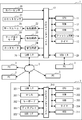
- FIG. 1 is an external view of a printing apparatus 1 and a tape cassette 30.
- FIG. 2 is a block diagram showing an electrical configuration of a printing apparatus 1 and a personal computer 3.
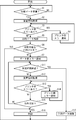
- FIG. 3 is a flowchart of main processing of the printing apparatus 1 in the first embodiment. It is a flowchart of the main process of the printing apparatus 1 in 2nd embodiment.
- FIG. 6 is a flowchart of main processing of the printing apparatus 1 in the second embodiment, and is a continuation of FIG. It is a flowchart of the printing data transmission process of the personal computer 3 in 3rd embodiment. It is a flowchart of the main process of the printing apparatus 1 in 3rd embodiment. It is a flowchart of the print data transmission process of the personal computer 3 in 4th embodiment.
- FIG. 10 is a flowchart of print data transmission processing of the personal computer 3 in the fourth embodiment, which is a continuation of FIG. 8. It is a flowchart of the main process of the printing apparatus 1 in 4th embodiment.
- the printing apparatus 1 is configured such that the tape cassette 30 is detachable.
- the printing apparatus 1 is a label printer that can print on a long tape 31 housed in a case of a tape cassette 30 to create a label that can be attached.
- the printing apparatus 1 is configured to be connectable to an external device.
- the printing apparatus 1 performs printing on the tape 31 based on a print command transmitted from an external device.
- a cassette mounting portion 52 is provided inside the main body 51 of the printing apparatus 1.
- the cassette mounting portion 52 is an area where the tape cassette 30 is attached and detached.
- a cover 53 for opening and closing the cassette mounting portion 52 is provided on the upper surface of the main body portion 51.
- the cassette mounting unit 52 is provided with a cover sensor 20 (see FIG. 2). The cover sensor 20 detects whether or not the cover 53 is properly closed.
- the cassette holder 52 is provided with a head holder 61.
- the head holder 61 carries the thermal head 25 (see FIG. 2).
- an arm-shaped platen holder 64 is pivotally supported.
- the platen holder 64 is provided with a platen roller 65 and a cassette sensor 21 (see FIG. 2).
- the cassette sensor 21 includes a plurality of detection switches. The plurality of detection switches protrude in the direction of the head holder 61.
- the tape cassette 30 has an index portion on the front surface of the case facing the platen holder 64 when mounted on the cassette mounting portion 52.
- the indicator portion includes a switch hole formed in a pattern determined according to the type of the tape cassette 30.
- the cassette sensor 21 outputs an ON / OFF signal for each switch facing the index section. In the present embodiment, the tape width is detected as the type of the tape cassette 30.
- the cover sensor 20 detects this and outputs an ON signal.
- the platen holder 64 rotates toward the head holder 61.
- the platen roller 65 presses the tape 31 and the ink ribbon against the thermal head 25 to make it ready for printing.
- an ON / OFF signal is output by the cassette sensor 21 in accordance with the switch hole formation pattern in the indicator portion.
- the printing apparatus 1 based on the combination of the ON / OFF signals, whether or not the tape cassette 30 is properly attached to the cassette attachment unit 52 and the type of the tape cassette 30 are specified. Thereafter, when printing is instructed, printing is executed.
- the printing apparatus 1 includes a CPU 11, a ROM 12, a RAM 13, a flash ROM 14, and a timer 15, which are connected to each other via a bus.
- the CPU 11 controls the entire printing apparatus 1.
- the ROM 12 stores various programs necessary for controlling the printing apparatus 1, such as a main processing program described later, and control data necessary for these programs.
- the CPU 11 performs various calculations and control processes in accordance with programs stored in the ROM 12.
- the ROM 12 stores font data that defines the outline of the character for each of a large number of characters (letters, numbers, symbols, etc.).
- Font data is classified for each typeface and stored in association with code data for a plurality of typefaces (Gothic typeface, Mincho typeface, etc.).
- the RAM 13 temporarily stores various calculation results by the CPU 11. For example, data transmitted from an external device is stored in the RAM 13.
- the flash ROM 14 is a non-volatile memory and stores various information.
- the CPU 11 is connected with an input / output interface 17.
- a cover sensor 20 Connected to the input / output interface 17 are a cover sensor 20, a cassette sensor 21, drive circuits 22 to 24, a LAN interface (I / F) 28, and a USB interface (I / F) 29.
- the cover sensor 20 When the cover 53 (see FIG. 1) is properly closed, the cover sensor 20 outputs an ON signal. If the cover 53 is not properly closed, the cover sensor 20 outputs an OFF signal.
- the cassette sensor 21 outputs a combination of ON / OFF signals indicating whether or not each of the plurality of detection switches has been pressed.
- a thermal head 25 (see FIG. 1), a tape feed motor 26, and a cutter motor 27 are connected to the drive circuits 22 to 24, respectively. The thermal head 25 is used for printing on the tape 31.
- the tape feed motor 26 rotationally drives a tape drive shaft and a ribbon take-up shaft (not shown).
- the tape drive shaft and the ribbon take-up shaft are used to transport the tape 31 and the ink ribbon, respectively.
- the cutter motor 27 drives a movable blade (not shown) for cutting the printed tape 31 up and down.
- the LAN I / F 28 is connected to a LAN connector (not shown) for LAN (Local Area Network) connection.
- the printing apparatus 1 can be connected to the LAN 2 via a LAN I / F 28, a LAN connector, and a cable, and can be connected to an external device such as a personal computer (hereinafter referred to as a PC) 3 via the LAN 2.
- the PC 3 connected to the LAN can transmit a print command to the printing apparatus 1.
- the other PC 3 that is the client terminal transmits a print command to the PC 3 that is the host terminal.
- the PC 3 serving as the host terminal transmits a print command to the printing apparatus 1.
- the PC 3 that is the client terminal is referred to as a client PC 3.
- PC3 which is a host terminal is called host PC3.
- a USB connector (not shown) for connecting a USB (Universal Serial Bus) is connected to the USB I / F 29.
- the printing apparatus 1 can be connected to an external device such as the PC 3 via a USB I / F 29, a USB connector, and a cable. Therefore, the PC 3 connected via USB can transmit a print command to the printing apparatus 1.
- an external device such as a barcode reader can be connected to the printing apparatus 1. The processing of the following embodiment will be described by taking as an example a case where the PC 3 is connected to the printing apparatus 1.
- the electrical configuration of the PC 3 connected to the printing apparatus 1 will be described with reference to FIG.
- the host PC 3 and the client PC 3 have the same configuration.
- the PC 3 is a general-purpose terminal device.
- the PC 3 includes a CPU 301, a ROM 302, a RAM 303, and a timer 304, which are connected to each other via a bus.
- An input / output interface 310 is connected to the CPU 301.
- a hard disk device (HDD) 311, LAN I / F 321, USB I / F 322, mouse 331, keyboard 332, and display 333 are connected to the input / output interface 301.
- HDD hard disk device
- the CPU 301 controls the entire PC 3.
- the ROM 302 stores various programs necessary for controlling the PC 3, control data necessary for these programs, and the like.
- the CPU 301 performs various calculations and control processes in accordance with programs stored in the ROM 302 or the HDD 311.
- the RAM 303 temporarily stores various calculation results by the CPU 301.
- data transmitted from an external device such as the client PC 3 is stored.
- the HDD 311 serving as a storage device stores various programs executed by the PC 3 and various information.
- the PC 3 can be connected to the LAN 2 via the LAN I / F 321 as with the printing apparatus 1.
- the PC 3 can be an external device such as the printing apparatus 1 or another PC 3 via the LAN 2.
- the PC 3 can be connected to an external device such as the printing apparatus 1 via the USB I / F 322.
- the mouse 331 and the keyboard 332 are input devices. The user can input various instructions and information to the PC 3 using the mouse 331 and the keyboard 332.
- the display 333 is a display device that displays various types of information.
- the main process executed by the printing apparatus 1 of the present embodiment will be described.
- the main process is started by starting a program stored in the ROM 12 when the printing apparatus 1 is powered on.
- the main process is continuously executed by the CPU 11 until the power is turned off.
- the CPU 11 determines whether print data is received together with a print command from any PC 3 connected via LAN or USB (S1).
- the print data is data for printing the print target.
- the print data is, for example, dot pattern data in a format that is generated by the printer driver in the PC 3 and can be received by the printing apparatus 1 and printed by the thermal head 25. While the print data is not received (S1: NO), the CPU 11 stands by.
- the CPU 11 stores the received print data in a predetermined storage area of the RAM 13 together with the identification information of the transmission source PC 3.
- the CPU 11 acquires information indicating the state of the printing apparatus 1 (hereinafter referred to as apparatus information) (S2).
- apparatus information information indicating the state of the printing apparatus 1
- output signals from the cover sensor 20 and the cassette sensor 21 are acquired as device information.
- the output signal from the cover sensor 20 is information indicating whether or not the cover 53 is properly closed.
- the output signal from the cassette sensor 21 is information indicating the mounting state of the tape cassette 30 and the type (tape width) of the tape cassette 30 mounted.
- the CPU 11 determines whether an error caused by the printing apparatus 1 itself has occurred based on the acquired apparatus information (S3).
- an error caused by the printing apparatus 1 itself is referred to as a printer-side error.
- the printer-side error includes, for example, a state where the cover 53 (see FIG.
- the printer-side error includes, for example, a state where the tape cassette 30 is not properly mounted on the cassette mounting unit 52 (see FIG. 1) (including a state where it is not mounted at all). Therefore, when there is an error on the printer side, the printing apparatus 1 is in a state where printing cannot be performed.
- the CPU 11 transmits an error notification to the PC 3 that is the transmission source of the print data (S4).
- the error notification transmitted in step S4 indicates that printing cannot be executed due to a printer-side error. Thereafter, the CPU 11 returns to the process of step S3.
- the user of the PC 3 that has received the error notification can know that the printing apparatus 1 has some problem. Therefore, the user can check the state of the printing apparatus 1 and take measures to cancel the printer-side error.
- the CPU 11 analyzes the print data received in step S1 (S5). More specifically, by analyzing the print data, a condition (print condition) for printing the print target indicated by the print data is specified. In the present embodiment, the tape width is specified as the printing condition indicated by the print data.
- the printing condition indicated by the print data is compatible with the current state of the printing apparatus 1 (S6). That is, it is determined whether the print data is print data that can be printed in the current state of the printing apparatus 1.
- the state of the printing apparatus 1 can be specified from the apparatus information acquired in step S2.
- the type (tape width) of the tape cassette 30 attached to the printing apparatus 1 is specified as the state of the printing apparatus 1.
- the CPU 11 controls the drive circuits 22 and 23 according to the print data. Thereby, the CPU 11 controls the operation of the thermal head 25 and the tape feed motor 26 and performs printing on the tape 31 while transporting the tape 31 and the ink ribbon. Further, the CPU 11 controls the drive circuit 24. Thus, the CPU 11 controls the operation of the cutter motor 27 and cuts the tape 31 after printing at a predetermined position. When printing is completed, the process returns to step S1.
- the printing apparatus 1 when it is determined that the print data is not printable data (S6: NO), the CPU 11 determines the print data transmission source PC 3 based on the identification information stored together with the print data in the RAM 13. An error notification is transmitted (S7).
- the error notification transmitted in step S7 indicates that printing cannot be executed due to a data-side error. Further, the CPU 11 uses the timer 15 (see FIG. 2) to start measuring the elapsed time from the error notification transmission.
- the CPU 11 acquires device information in the same manner as the processing in step S2 (S12) while the predetermined time has not elapsed since the error notification transmission (S11: NO). Then, the CPU 11 determines whether or not a printer side error has occurred (S13), as in the processing in step S3. If there is an error on the printer side (S13: YES), an error notification is transmitted (S14). If there is no error on the printer side (S13: NO), it is determined whether the printing apparatus 1 is ready to print the print data (S15). That is, it is determined whether or not the printing apparatus 1 is in a state that matches the printing conditions indicated by the print data. If the printing apparatus 1 is not ready to print the print data (S15: NO), the process returns to step S11.
- the data side error is notified to the transmission source PC 3. Therefore, the user of the PC 3 can know that the tape width of the tape cassette 30 attached to the printing apparatus 1 is not appropriate. Therefore, the user can remove the tape cassette 30 attached to the printing apparatus 1 and replace it with a tape cassette 30 having a desired tape width. In this case, it is recognized from the device information acquired in step S12 that the tape width has changed to an appropriate one. Therefore, it is determined that the printing apparatus 1 can print the print data (S15: YES). Therefore, printing is executed (S16). When printing is completed, the process returns to step S1.
- the CPU 11 deletes the print data stored in the RAM 13 (S17). Thereafter, the CPU 11 returns to the process of step S1 and waits for reception of print data.
- print data is received from the PC 3 that is an external device and stored in the RAM 13. Then, output signals from the cover sensor 20 and the cassette sensor 21 are acquired as device information. If it is determined from the apparatus information that no error has occurred on the printer side, and if it is determined from the print data and the apparatus information that the print data is print data that can be printed in the current state of the printing apparatus 1, Printing is performed using the head 25. On the other hand, if no printer-side error has occurred, but it is determined that the printing condition indicated by the print data does not match the current state of the printing apparatus 1, the print data is deleted from the RAM 13.
- the error is resolved by deleting the print data. Therefore, although the printing apparatus 1 itself is in a printable state, it is possible to prevent the printing of other printable print targets from being delayed due to print data that does not match the printing conditions. Further, if the data-side error is not resolved even after a predetermined time has elapsed, the print data is deleted. Therefore, the user can take measures such as replacing the tape cassette 30 mounted on the printing apparatus 1 with an appropriate one so that the printing conditions and the state of the printing apparatus 1 are matched within a predetermined time. .
- a notification indicating the error content is transmitted to the PC 3 that is the transmission source of the print data. Therefore, the user can take measures to cancel the error according to the reason of the error.
- the most typical example of the data-side error is incompatibility with the type of print medium (tape width in this embodiment) as described above. Accordingly, by acquiring the type of the print medium set in the printing apparatus 1 as the apparatus information, and determining whether or not the type matches the type of the print medium indicated by the print condition, processing is performed as described above. Data side errors can be resolved.
- the thermal head 25 of the printing apparatus 1 corresponds to the “printing means” of the present invention.
- the CPU 11 that performs the process of receiving the print data in step S1 in FIG. 3 corresponds to the “first data acquisition unit”.
- the CPU 11 that acquires device information in steps S2 and S12 corresponds to a “first device information acquisition unit”.
- the CPU 11 that determines the printer-side error in steps S3 and S13 corresponds to the “first device determination unit”.
- the CPU 11 that determines whether or not the printing condition is compatible with the state of the apparatus in steps S6 and S15 corresponds to the “first conformity determination unit”.
- the CPU 11 that performs the process of executing the printing in step S16 corresponds to the “first print control unit”.
- the CPU 11 that deletes the print data in step S17 corresponds to “first data processing means”.
- the CPU 11 that transmits the error notification in steps S4, S7, and S14 corresponds to the “first notification unit”.
- the save memory (hereinafter simply referred to as “memory”) is a storage area for temporarily storing print data in order to lower the print order of print data that does not conform to the state of the printing apparatus 1.
- the number of print data saved in the memory is three. However, less than three or four or more print data may be saved in the memory.
- the CPU 11 stores the print data received in step S1 and stored in the RAM 13 and the identification information of the transmission source PC 3 in the memory (S23). Further, the time at that time is also stored as the save time. If there is no free space in the memory (S21: NO), the CPU 11 deletes the oldest print data from the print data stored in the memory based on the save time to create a free space in the memory (S22). Thereafter, the print data received in step S1, the identification information of the transmission source PC 3, and the save time are stored (S23).
- step S24 it is determined whether print data is stored in the memory. If there is print data saved in the memory (S24: YES), the CPU 11 acquires the oldest print data among them as a processing target. Further, the CPU 11 newly acquires device information (S25). Then, the CPU 11 determines whether or not a printer-side error has occurred based on the acquired device information (S26). If there is an error on the printer side (S26: YES), the CPU 11 transmits an error notification (S27). If there is no error on the printer side (S26: NO), the CPU 11 determines whether the acquired print data is print data that can be printed in the current state of the printing apparatus 1 (S28).
- the printing apparatus 1 determines whether or not the state of the printing apparatus 1 meets the printing conditions indicated by the print data. If the acquired print data is printable print data (S28: YES), printing is executed based on the print data (S33). The print data that has been printed at this time is deleted from the memory.
- step S34 it is determined whether there is print data still stored in the memory (S34). That is, it is determined whether or not there is a transmission source PC 3 waiting for printing by depressing the printing order in the process of step S23 described above. If there is no transmission source PC 3 waiting for printing (S34: NO), the process directly returns to step S24. If there is a transmission source PC 3 waiting for printing (S34: YES), based on the identification information stored in the memory, a notification indicating the current printing status is transmitted to the PC 3 (S35). In this notification, for example, information indicating that other print data is currently being printed, the number of print data waiting to be printed, and the print order (for example, second) of the print data transmitted by the PC 3 is notified. Is done.
- the user of the PC 3 that is the transmission source of the print data that has been moved down in the print order and saved in the memory can know the appropriate timing for taking measures for canceling the data-side error caused by the user's own print data.
- the process returns to step S24.
- step S24 if there is still print data stored in the memory (S24: YES), similarly, device information is acquired and an error is determined (S25 to S28). If the print data to be processed is not printable (S28: NO), a data-side error notification is transmitted to the transmission source PC 3 as in step S7 (see FIG. 4) (S29). Then, new device information is acquired (S30). From the acquired apparatus information, it is determined whether or not the state of the printing apparatus 1 has changed from the time (S25) when the apparatus information was acquired immediately before (S31). The change in the state of the printing apparatus 1 occurs, for example, when the tape cassette 30 is replaced with another type of tape cassette 30.
- step S31 If it is determined that the state of the printing apparatus 1 has changed (S31: YES), the process returns to step S28. Then, it is determined again whether or not the print data can be printed in the current state of the printing apparatus 1. Then, if the print data can be printed (S28: YES), the above-described processing of steps S33 to S35 is performed. If the print data is still not printable (S28: NO), the processes of steps S29 to S31 are performed.
- the CPU 11 determines whether any other print data has been received from any of the connected PCs 3 (S32). If no other print data has been received (S32: NO), the CPU 11 returns to step S31. Then, the CPU 11 determines whether or not the state of the printing apparatus 1 has changed. When the CPU 11 receives other print data (S32: YES), the process returns to step S3 shown in FIG. Then, the CPU 11 determines whether there is a printer-side error. Subsequent processing is as described above. With the above processing, all the print data saved in the memory can be printed, and printing is executed sequentially. In this way, there is no print data stored in the memory (S24: NO). In this case, the process returns to step S1 shown in FIG. 4, and the CPU 11 waits for reception of new print data.
- the printing apparatus 1 receives print data from the PC 3 that is an external device.
- the received print data is stored in the RAM 13.
- output signals from the cover sensor 20 and the cassette sensor 21 are acquired as device information. If it is determined from the apparatus information that no printer-side error has occurred, and it is determined from the print data and the apparatus information that the print data can be printed in the current state of the printing apparatus 1, the thermal head 25 is used. Printing is performed. On the other hand, if no printer-side error has occurred, but it is determined that the printing conditions indicated by the print data do not match the current state of the printing apparatus 1, the print data is stored in the save memory of the flash ROM 14 and printed. The order is lowered.
- the printing apparatus 1 itself is in a printable state, printing of other printable print targets is delayed due to print data that does not match the printing conditions. Can be prevented. Further, when the print order of the saved print data is first, apparatus information is newly acquired. Then, it is determined again whether the print data can be printed. Therefore, when the printing order is lowered and then the printing order becomes the first time again, if the printing conditions and the state of the printing apparatus match, printing is performed. Therefore, the user can take some measures so that the two are matched while the printing order is lowered.
- the CPU 11 that performs the process of step S1 in FIG. 4 corresponds to a “first data acquisition unit”.
- the CPU 11 that acquires device information in step S2 of FIG. 4 corresponds to a “first device information acquisition unit”.
- the CPU 11 that determines the printer-side error in step S3 in FIG. 4 corresponds to the “first device determination unit”.
- the CPU 11 that determines whether or not the printing conditions are compatible with the state of the apparatus in step S6 in FIG. 4 corresponds to “first conformity determination means”.
- the CPU 11 that performs the process of executing printing in step S16 in FIG. 4 corresponds to the “first print control unit”.
- Step S25 of FIG. 5 that corresponds to “first data processing means”. It corresponds to “second device information acquisition means”.
- the CPU 11 that determines the printer-side error in S26 of FIG. 5 corresponds to the “second device determination unit”.
- the CPU 11 that determines whether or not the printing condition is compatible with the state of the apparatus in S28 of FIG. 5 corresponds to the “second compatibility determination unit”.
- the CPU 11 that performs the process of executing printing in step S33 in FIG. 5 corresponds to the “second print control unit”.
- the CPU 11 that transmits the error notification in steps S4 and S7 in FIG. 4 corresponds to the “first notification unit”.
- the CPU 11 that transmits the error notification in steps S27 and S29 in FIG. 5 corresponds to the “second notification unit”.
- ⁇ Third embodiment> The third embodiment will be described below with reference to FIGS. 6 and 7.
- the host PC 3 connected to the printing apparatus 1 performs the same processing as in the first embodiment. Since the configurations of the printing apparatus 1 and the host PC 3 according to the third embodiment are as described with reference to FIG. 2, description thereof is omitted here. Moreover, below, the process of 3rd embodiment is demonstrated, simplifying description of the process same as 1st embodiment.
- the print data transmission process is started when the host PC 3 starts a program stored in the HDD 311 (see FIG. 2).
- the print data transmission process is continuously executed by the CPU 301 until a program end instruction is input.
- the CPU 301 of the host PC 3 waits until print data is acquired (S101: NO, S101).
- the host PC 3 can instruct the printing apparatus 1 to print the print data created in the host PC 3.
- the host PC 3 can also instruct the printing apparatus 1 to print the print data transmitted from any of the client PCs 3 connected via the LAN 2. Therefore, when a print instruction for print data created in the host PC 3 is input, or when print data is received from another client PC 3, the print data is acquired (S101: YES).
- the acquired print data is stored in a predetermined storage area of the RAM 302 (S101: YES). If the print data is transmitted from another client PC 3, the sender identification information is also stored.
- the CPU 301 requests the printing apparatus 1 to transmit apparatus information (S102).
- the CPU 301 receives the transmitted device information (S103).
- the CPU 301 stores the received device information in the RAM 302.
- the CPU 301 determines whether a printer-side error has occurred in the printing apparatus 1 based on the apparatus information (S104). If a printer-side error has occurred (S104: YES), the CPU 301 displays a message indicating that printing cannot be executed due to the printer-side error on the display 333 if the print data has been created in the host PC 3. (S105). If the print data is transmitted from another client PC 3, the CPU 301 transmits a notification indicating that printing cannot be executed due to a printer-side error to the client PC 3 (S105).
- the CPU 301 analyzes the print data (S106). Based on the analysis of the print data, the CPU 301 determines whether or not the acquired print data is printable print data that satisfies the print conditions in the current state of the printing apparatus 1 (S107). If the acquired print data can be printed (S107: YES), the CPU 301 transmits the print data together with the print command to the printing apparatus 1 (S117). Then, the CPU 301 returns to the process of step S101. If the acquired print data is not printable (S107: NO), the CPU 301 displays a message on the display 333 indicating that printing cannot be executed due to a data-side error if the print data is created in the host PC 3. Is displayed (S108).
- a notification indicating that printing cannot be executed due to a data-side error is transmitted to the client PC 3 (S108). Further, the measurement of elapsed time is started using the timer 304 (see FIG. 2).
- the CPU 301 requests the printing apparatus 1 to transmit apparatus information again (S112). Then, the CPU 301 acquires device information transmitted from the printing device 1 (S113). Then, the CPU 301 determines whether or not a printer-side error has occurred based on the acquired device information (S114). If there is an error on the printer side (S114: YES), the CPU 301 displays an error message or transmits an error notification (S115). If there is no error on the printer side (S114: NO), it is determined whether the print data is ready for printing (S116). If the print data is not ready for printing (S116: NO), the process returns to step S111.
- step S116 If the print data can be printed (S116: YES), the print data is transmitted to the printing apparatus 1 (S117), and the process returns to step S101. If the predetermined time has passed without the print data being ready for printing (S111: YES), the print data stored in the RAM 302 is deleted (S118). Then, the process returns to step S101.
- the main process performed in the printing apparatus 1 in 3rd embodiment is demonstrated.
- the main process is started by starting a program stored in the ROM 12 when the printing apparatus 1 is powered on.
- the main process is continuously executed by the CPU 11 until the power is turned off.
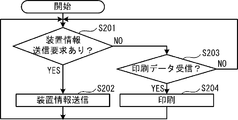
- the CPU 11 receives a transmission request for apparatus information from any PC 3 connected to the printing apparatus 1 (S201: YES)
- the CPU 11 acquires the apparatus information and transmits the acquired apparatus information to the requesting PC 3 ( S202). If the CPU 11 has not received a transmission request for apparatus information (S201: NO), the CPU 11 determines whether print data has been received from any PC 3 connected to the printing apparatus 1 (S203).
- the CPU 11 executes printing based on the print data (S204), and returns to the process of step S201. If the CPU 11 has not received the print data (S203: NO), the CPU 11 directly returns to the process of step S201.
- print data created by the host PC 3 or transmitted from another client PC 3 is acquired and stored in the RAM 302.
- device information transmitted from the printing device 1 is acquired in response to a request from the host PC 3. If it is determined from the apparatus information that no error has occurred on the printer side, and if it is determined from the print data and the apparatus information that the print data can be printed in the current state of the printing apparatus 1, then printing is performed. Print data is transmitted to the apparatus 1 together with a print command. On the other hand, if no error on the printer side has occurred, but it is determined that the printing conditions indicated by the print data do not match the current state of the printing apparatus 1, the print data is not transmitted to the printing apparatus 1 from the RAM 302. Deleted.
- the host PC 3 transmits data that does not match the state of the printing apparatus 1 to the printing apparatus 1 even though the printing apparatus 1 itself is in a printable state. It is possible to prevent the printing from being delayed. That is, when the printing apparatus 1 is instructed to print, it is possible to prevent an error not caused by the printing apparatus 1 itself. In addition, the print data is deleted when the error on the data side is not resolved even after the predetermined time has elapsed. Therefore, the user of the host PC 3 takes measures such as replacing the tape cassette 30 mounted on the printing apparatus 1 with an appropriate one so that the printing conditions and the state of the printing apparatus 1 are matched within a predetermined period. be able to.
- a notification indicating the error content is also transmitted to the client PC 3 that is the transmission source of the print data. Therefore, the user of the client PC 3 can take measures to cancel the error depending on the reason.
- the host PC 3 corresponds to the “terminal device” of the present invention
- the client PC 3 corresponds to “another terminal device”.
- the CPU 301 that performs the process of acquiring print data in step S101 in FIG. 6 corresponds to a “second data acquisition unit”.
- the CPU 301 that acquires apparatus information from the printing apparatus 1 in steps S103 and S113 corresponds to a “third apparatus information acquisition unit”.
- the CPU 301 that determines the printer-side error in steps S104 and S114 corresponds to a “third device determination unit”.
- the CPU 301 that determines whether or not the printing conditions are compatible with the state of the apparatus in steps S107 and S116 corresponds to the “third conformity determination unit”.
- the CPU 301 that performs the process of transmitting the print data to the printing apparatus 1 in step S117 corresponds to the “first data transmission unit”.
- the CPU 301 that deletes the print data in S118 corresponds to “second data processing means”.
- the CPU 301 that performs error notification in steps S105, S108, and S115 corresponds to a “third notification unit”.
- the fourth embodiment will be described below with reference to FIGS.
- the host PC 3 connected to the printing apparatus 1 performs the same processing as in the second embodiment. Since the configurations of the printing apparatus 1 and the host PC 3 according to the fourth embodiment are as described with reference to FIG. 2, description thereof is omitted here.
- the process of the fourth embodiment is partially the same as the process of the third embodiment. Therefore, hereinafter, the process of the fourth embodiment will be described while simplifying the description of the same process as that of the second and third embodiments. 8 to 10, the same step numbers are assigned to the steps in which the same processes as those of the third embodiment shown in FIGS. 6 and 7 are performed.
- the print data transmission process is started when the host PC 3 starts a program stored in the HDD 311 (see FIG. 2).
- the print data transmission process is continuously executed by the CPU 301 until a program end instruction is input.
- FIG. 8 since the processing of steps S101 to S108 and S117 from the start of processing until print data is acquired and error determination is performed is the same as that in the third embodiment, description thereof is omitted.
- S108 after an error display or notification of a data-side error (S108), it is determined whether or not the save memory in the HDD 311 (see FIG. 2) is free (S121).
- step S121 If there is no space in the save memory (S121: NO), the oldest print data is deleted from the memory (S122). Thereafter, the acquired print data is stored in the memory, and the transmission order of the print data, that is, the print order is lowered (S123). If there is free space in the save memory (S121: YES), the process proceeds to step S123.
- the CPU 301 requests the printing apparatus 1 to transmit apparatus information (S125), and receives the apparatus information transmitted from the printing apparatus 1 (S126). If it is determined that there is a printer-side error based on the acquired device information (S127: YES), the CPU 301 displays the printer-side error on the display 333 (see FIG. 2) or displays the printer-side error on the client PC 3 that is the transmission source An error is notified (S128). If there is no printer-side error (S127: NO), the CPU 301 determines whether or not print data can be printed in the current printing apparatus 1 based on the apparatus information and the print data (S129). If the print data can be printed (S129: YES), the print data to be processed is transmitted to the printing apparatus 1 (S135).
- print waiting data print waiting data
- the process returns to step S124 as it is.
- print waiting data print waiting data
- the CPU 301 requests the printing apparatus 1 to transmit information indicating the current printing status (S137).
- the information indicating the printing status includes, for example, print data currently in a print waiting state in the printing apparatus 1, and the number and order thereof.
- the CPU 301 receives the information indicating the printing status and stores it in the RAM 302 (S138).
- the CPU 301 displays information indicating the print status on the display 333 (see FIG. 2) (S139). If the print data is transmitted from another client PC 3, the CPU 301 transmits information indicating the print status to the client PC 3 to notify it (S139). As a result, the user of the PC 3 that has created the print data saved in the memory in the print order can know the appropriate timing for taking measures for canceling the data-side error caused by his print data. After displaying or notifying the printing status (S139), the process returns to step S124.
- step S129 If the print data to be processed is not printable (S129: NO), a data side error is displayed or notified (S130). Then, device information is acquired from the printing device 1 (S131 to S132). If it is determined that the state of the printing apparatus 1 has changed based on the acquired apparatus information (S133: YES), the process returns to step S129. If the print data to be processed can be printed (S129: YES), the processes of steps S135 to S139 described above are performed. If the print data to be processed is still not printable (S129: NO), the processes of steps S130 to S133 are performed.
- the CPU 301 determines whether other print data has been acquired from the host PC 3 or another client PC 3 (S134). If the CPU 11 has not acquired other print data (S134: NO), the process returns to step S133. Then, the CPU 11 determines whether or not the state of the printing apparatus 1 has changed. If the CPU 11 receives other print data (S134: YES), the process returns to step S104 shown in FIG. Subsequent processing is as described above. With the above processing, when all the print data saved in the memory can be printed and printing is executed sequentially, the print data stored in the memory disappears (S124: YES). In this case, the process returns to step S101 shown in FIG. Then, the CPU 11 waits for reception of new print data.
- the printing apparatus 1 in order to transmit the information indicating the printing status to the PC 3 in step S206, prints the print data received in step S203 in the flash ROM 14 (see FIG. 2). It is stored in the memory for waiting data.
- the printing result is stored in a history list (not shown) of the flash ROM 14 (see FIG. 2).
- print data created by the host PC 3 or transmitted from another client PC 3 is acquired and stored in the RAM 302.
- device information transmitted from the printing device 1 is acquired in response to a request from the host PC 3. If it is determined from the apparatus information that no error has occurred on the printer side, and if it is determined from the print data and the apparatus information that the print data can be printed in the current state of the printing apparatus 1, then printing is performed. The print data is transmitted to the apparatus 1 together with the print command. On the other hand, if no error on the printer side has occurred, but it is determined that the printing condition indicated by the print data does not match the current state of the printing apparatus 1, the print data is not transmitted to the printing apparatus 1 and is stored in the HDD 311. The data is stored in the save memory and the printing order is lowered.
- the host PC 3 transmits data that does not conform to the state of the printing apparatus to the printing apparatus 1 even though the printing apparatus 1 itself is in a printable state. It is possible to prevent a print target to be printed from being delayed. That is, when the printing apparatus 1 is instructed to print, it is possible to prevent an error not caused by the printing apparatus 1 itself. Further, when the printing order (transmission order) of the saved print data is first, apparatus information is newly acquired from the printing apparatus 1 and it is determined again whether printing is possible. Therefore, after the printing order of the printing target is lowered, the printing data is transmitted if the printing conditions and the state of the printing apparatus match when the printing order becomes the first again. Therefore, the user can take some measures so that the two are matched while the printing order is lowered.
- the CPU 301 that performs the process of step S101 in FIG. 8 corresponds to a “second data acquisition unit”.
- the CPU 301 that acquires device information in step S103 of FIG. 8 corresponds to “third device information acquisition means”.
- the CPU 301 that determines the printer-side error in step S104 in FIG. 8 corresponds to the “third device determination unit”.
- the CPU 301 that determines whether or not the printing condition matches the state of the apparatus in step S107 in FIG.
- the CPU 301 that transmits the print data in step S117 in FIG. 8 corresponds to the “first data transmission unit”.
- the CPU 301 that stores the print data in the HDD 311 corresponding to the “second storage unit” in S123 of FIG. 8 corresponds to the “second data processing unit”.
- the CPU 301 that acquires device information in step S126 of FIG. 9 corresponds to a “fourth device information acquisition unit”.
- the CPU 301 that determines the printer-side error in S127 of FIG. 9 corresponds to a “fourth device determination unit”.
- the CPU 301 that determines whether or not the printing condition matches the state of the apparatus in S129 of FIG. 9 corresponds to the “fourth matching determination unit”.
- the CPU 301 that transmits the print data in step S135 of FIG. 9 corresponds to “second data transmission unit”.
- the CPU 301 that displays or notifies an error in steps S105 and S108 in FIG. 8 corresponds to a “third notification unit”.
- the CPU 301 that performs error notification in steps S128 and S130 of FIG. 9 corresponds to a “fourth notification unit”.
- the present invention is not limited to the above embodiment, and various modifications are possible.
- a label printer that performs printing on the tape 31 using the tape cassette 30 is illustrated.
- the apparatus information an output signal of the cover sensor 20 indicating whether the cover 53 is properly closed and an output signal of the cassette sensor 21 indicating the mounting state of the tape cassette 30 and the type of the tape cassette 30 are used.
- the printing apparatus 1 is not limited to a label printer.
- the printing apparatus 1 may be another printing apparatus that performs printing in response to a print command from an external device. Therefore, the processing of the embodiment may be applied to a printer that performs printing on cut paper, an inkjet printer, a laser printer, or the like.
- the device information information indicating a paper out, a paper jam, a set cut paper size (A4, B5, etc.), and the like may be used.
- out of paper or paper jam is a printer-side error.
- An example of the data-side error is a case where a paper having a different size from the paper on which the printing conditions are set is designated.
- An example of a data-side error is when data is created in a format that cannot be processed by a printer.
- the example in which the dot pattern data (print data) that can be printed as it is in the printing apparatus 1 is used as the data for printing the print target.
- the data for printing the print target is not limited to this.
- the data for printing the print target includes, for example, code data of characters (characters, (letters, numbers, symbols, etc.) constituting the document created on the application, format data of the document, and data for printing an image. It may be image data or the like.
- the tape width is used as the type of the tape cassette 30 in the printing apparatus 1 which is a label printer.
- one or more of tape width, tape color, and ink color may be used.
- the ink color of the tape cassette 30 set in the printing apparatus 1 may not match the ink color indicated by the printing condition to be printed. In such a case, it is only necessary to delete data for printing the print target or to lower the print order.
- the print result history may be stored in the flash ROM 14, and the print result may be confirmed by accessing the flash ROM 14 from the PC 3.
- the print data is deleted after a predetermined time has elapsed after error notification or display.
- a process of deleting data may be performed without waiting for a predetermined time to elapse.
- the printing order of the print target is lowered. Then, when the printing order comes first, device information is newly acquired, and it is determined whether there is a printer-side error and a data-side error. However, these determinations may be omitted, and print execution or print data transmission processing may be performed as it is.
Landscapes
- Engineering & Computer Science (AREA)
- Theoretical Computer Science (AREA)
- Human Computer Interaction (AREA)
- Physics & Mathematics (AREA)
- General Engineering & Computer Science (AREA)
- General Physics & Mathematics (AREA)
- Accessory Devices And Overall Control Thereof (AREA)
Abstract
印刷装置では、外部機器から印刷データが受信され(S1:YES)、RAMに記憶される。印刷装置の状態を示す装置情報が取得される(S2)。装置情報に基づき、印刷装置自体に起因するプリンタ側エラーが生じているか否かが判断される(S3)。プリンタ側エラーがなければ(S3:NO)、印刷データと装置情報に基づき、印刷データが示す印刷条件が現在の印刷装置の状態に適合するか否か、つまり、印刷データが現在の印刷装置の状態で印刷可能なデータか否かが判断される(S6)。印刷データが印刷可能なデータでなければ(S6:NO)、印刷データの送信元にエラー通知が送信される(S7)。そして、所定時間内に印刷可能な状態にならなければ(S15:NO、S11:YES)、印刷データが削除される(S17)。
Description
本発明は、外部機器から送信された印刷のためのデータに基づいて印刷を行う印刷装置、および印刷装置に接続して印刷装置に印刷を指示する端末装置に関する。
ネットワーク等を介して複数のパーソナルコンピュータ等の外部機器に接続可能であって、これらの外部機器から指示された印刷ジョブに従って印刷を行う印刷装置が普及している。かかる状況下で、ある印刷ジョブの処理中に何らかの原因で印刷装置にエラーが発生し、印刷が不可能な状態になることがある。この場合、エラーが解除されない限り、その印刷ジョブのみならず、その後に印刷したい他の印刷ジョブまで待たされる状態が継続してしまう。そこで、印刷装置にエラーが発生した場合、エラー発生時に処理していたプリントデータの送信元のホスト等に対してエラー情報を送信するプリンタシステムが知られている(例えば、特許文献1)。
前述のプリントシステムでは、エラーの発生についてホストに対する通知は行われる。エラーの原因にかかわらず、エラーが解除されるまで、印刷は行われない。しかしながら、そのエラーが、印刷装置自体に起因するエラーではなく、他の原因に起因する場合、印刷装置自体は印刷可能である。つまり、ある印刷ジョブが原因でエラーが発生している場合、他の印刷ジョブは処理可能な場合でも、一律で印刷を待たされることになる。
本発明の1つの目的は、印刷装置自体に起因しないエラーの発生時に、印刷可能な印刷対象の印刷が滞ることを防止することが可能な印刷装置を提供することである。また、本発明の別の目的は、印刷装置に印刷を指示する場合に、印刷装置自体に起因しないエラーを防止することが可能な端末装置を提供することである。
本発明の第一態様に係る印刷装置は、複数の外部機器に接続可能な印刷装置であって、印刷手段と、第一データ取得手段と、第一装置情報取得手段と、第一装置判断手段と、第一適合判断手段と、第一印刷制御手段と、第一データ処理手段とを備えている。前記印刷手段は、印刷媒体に印刷を行う。前記第一データ取得手段は、外部機器から送信された、印刷対象を印刷するためのデータを取得する。前記第一装置情報取得手段は、前記印刷装置自体の状態を示す情報である装置情報を取得する。前記第一装置判断手段は、前記装置情報に基づき、前記印刷装置自体に起因するエラーが生じているか否かを判断する。前記第一適合判断手段は、前記データおよび前記装置情報に基づき、前記印刷対象を印刷するための条件が前記状態に適合するか否かを判断する。前記第一印刷制御手段は、前記第一装置判断手段によって前記エラーが生じていないと判断され、且つ、前記第一適合判断手段によって前記条件が前記状態に適合すると判断された場合に、前記データに基づき前記印刷対象を前記印刷手段に印刷させる。前記第一データ処理手段は、前記第一装置判断手段によって前記エラーが生じていないと判断され、且つ、前記第一適合判断手段によって前記条件が前記状態に適合しないと判断された場合に、前記データを削除する、または、前記印刷対象の印刷順を繰り下げるために前記データを第一記憶手段に記憶する。
第一態様に係る印刷装置によれば、印刷装置自体に起因しないエラーの発生時、すなわち外部機器から送信されたデータが印刷装置の状態に適合しない場合に、印刷装置自体は印刷可能な状態であるにもかかわらず、他の印刷可能な印刷対象の印刷が滞ってしまうことを防止できる。
前記印刷装置において、前記第一装置情報取得手段は、前記第一装置判断手段によって前記エラーが生じていないと判断され、且つ、前記第一適合判断手段によって前記条件が前記状態に適合しないと判断された場合、前記装置情報を新たに取得してもよい。前記第一装置判断手段および前記第一適合判断手段は、前記第一装置情報取得手段によって新たに取得された前記装置情報に基づき、新たに判断を行ってもよい。前記第一データ処理手段は、所定時間を経過しても、前記第一装置判断手段によって前記エラーが生じていないと判断され、且つ、前記第一適合判断手段によって前記条件が前記状態に適合しないと判断された場合に、前記データを削除してもよい。この場合、所定時間が経過しても前記条件が前記状態に適合しない場合に、前記データが削除される。従って、ユーザは、所定時間内に、前記条件と前記状態が適合するように、何らかの措置を取ることができる。
前記印刷装置は、第二装置情報取得手段と、第二装置判断手段と、第二適合判断手段と、第二印刷制御手段を更に備えてもよい。第二装置情報取得手段は、前記第一データ処理手段によって前記データが前記第一記憶手段に記憶された後、前記印刷対象の前記印刷順が再び最初となった場合、前記装置情報を新たに取得してもよい。第二装置判断手段は、前記第二装置情報取得手段によって新たに取得された前記装置情報に基づき、前記印刷装置自体に起因するエラーが生じているか否かを判断してもよい。第二適合判断手段は、前記データおよび前記第二装置情報取得手段によって新たに取得された前記装置情報に基づき、前記条件が前記状態に適合するか否かを判断してもよい。第二印刷制御手段は、前記第二装置判断手段によって前記エラーが生じていないと判断され、且つ、前記第二適合判断手段によって前記条件が前記状態に適合すると判断された場合に、前記データに基づき前記印刷対象を前記印刷手段に印刷させてもよい。この場合、印刷対象の印刷順が繰り下げられた後、印刷順が再び最初になった時点で、前記条件と前記状態が適合していれば、印刷が行われることになる。従って、ユーザは、印刷順が繰り下げられている間に前記条件と前記状態が適合するように何らかの措置を取ることができる。
前記印刷装置は、前記データの送信元である前記外部機器に対して、前記第一装置判断手段によって前記エラーが生じていると判断された場合には前記エラーが生じていることを通知し、前記第一装置判断手段によって前記エラーが生じていないと判断され、且つ、前記第一適合判断手段によって前記条件が前記状態に適合しないと判断された場合には、前記条件が前記状態に適合しないことを通知する第一通知手段を更に備えていてもよい。この場合、印刷対象を印刷できない場合、前記データの送信元である外部機器にその理由が通知される。従って、外部機器のユーザは、その理由に応じてエラーを解除する措置を講じることができる。
前記印刷装置において、前記第一装置情報取得手段は、前記印刷装置自体の不具合の有無と、前記印刷装置にセットされた印刷媒体の種別を示す情報を少なくとも含む情報を、前記装置情報として取得してもよい。前記第一装置判断手段は、前記装置情報が前記不具合の存在を示す情報を含む場合、前記エラーが生じていると判断してもよい。前記第一適合判断手段は、前記条件によって特定される印刷媒体の種別と、前記印刷装置にセットされた前記印刷媒体の前記種別とが合致しない場合、前記条件が前記状態に適合しないと判断してもよい。この場合、印刷装置自体には不具合がないにもかかわらず、印刷媒体の種別が合致しないために、他の印刷可能な印刷対象の印刷が滞ってしまうことを防止できる。
前記印刷装置は、前記データの送信元である前記外部機器に対して、前記第二装置判断手段によって前記エラーが生じていると判断された場合には前記エラーが生じていることを通知し、前記第二装置判断手段によって前記エラーが生じていないと判断され、且つ、前記第二適合判断手段によって前記条件が前記状態に適合しないと判断された場合には、前記条件が前記状態に適合しないことを通知する第二通知手段を更に備えてもよい。この場合、印刷対象を印刷できない場合、前記データの送信元である外部機器にその理由が通知される。従って、外部機器のユーザは、その理由に応じてエラーを解除する措置を講じることができる。
前記印刷装置において、前記第二装置情報取得手段は、前記印刷装置自体の不具合の有無と、前記印刷装置にセットされた印刷媒体の種別を示す情報を少なくとも含む情報を、前記装置情報として取得してもよい。前記第二装置判断手段は、前記装置情報が前記不具合の存在を示す情報を含む場合、前記エラーが生じていると判断してもよい。前記第二適合判断手段は、前記条件によって特定される印刷媒体の種別と、前記印刷装置にセットされた前記印刷媒体の前記種別とが合致しない場合、前記条件が前記状態に適合しないと判断してもよい。この場合、印刷装置自体には不具合がないにもかかわらず、印刷媒体の種別が合致しないために、他の印刷可能な印刷対象の印刷が滞ってしまうことを防止できる。
本発明の第二態様に係る端末装置は、他の端末装置および印刷装置に接続可能な端末装置であって、第二データ取得手段と、第三装置情報取得手段と、第三装置判断手段と、第三適合判断手段と、第一データ送信手段と、第二データ処理手段とを備えている。前記第二データ取得手段は、印刷対象を印刷するためのデータを取得する。前記第三装置情報取得手段は、前記印刷装置から、前記印刷装置自体の状態を示す情報である装置情報を取得する。前記第三装置判断手段は、前記装置情報に基づき、前記印刷装置自体に起因するエラーが生じているか否かを判断する。前記第三適合判断手段は、前記データおよび前記装置情報に基づき、前記印刷対象を印刷するための条件が前記状態に適合するか否かを判断する。前記第一データ送信手段は、前記第三装置判断手段によって前記エラーが生じていないと判断され、且つ、前記第三適合判断手段によって前記条件が前記状態に適合すると判断された場合に、前記データを前記印刷装置に送信する。前記第二データ処理手段は、前記第三装置判断手段によって前記エラーが生じていないと判断され、且つ、前記第三適合判断手段によって前記条件が前記状態に適合しないと判断された場合に、前記データを削除する、または、前記印刷対象の印刷順を繰り下げるために前記データを第二記憶手段に記憶する。
第二態様に係る端末装置によれば、印刷装置自体は印刷可能な状態であるにもかかわらず、印刷装置の状態に適合しないデータを印刷装置に送信してしまうことで、他の印刷対象の印刷が滞ってしまうことを防止できる。つまり、端末装置が印刷装置に印刷を指示する場合に、印刷装置自体に起因しないエラーを防止することが可能である。
前記端末装置において、前記第三装置情報取得手段は、前記第三装置判断手段によって前記エラーが生じていないと判断され、且つ、前記第三適合判断手段によって前記条件が前記状態に適合しないと判断された場合、前記印刷装置から前記装置情報を新たに取得してもよい。前記第三装置判断手段および前記第三適合判断手段は、前記第三装置情報取得手段によって新たに取得された前記装置情報に基づき、新たに判断を行ってもよい。前記第二データ処理手段は、所定時間を経過しても、前記第三装置判断手段によって前記エラーが生じていないと判断され、且つ、前記第三適合判断手段によって前記条件が前記状態に適合しないと判断された場合に、前記データを削除してもよい。この場合、所定時間が経過しても前記条件が前記状態に適合しない場合に、前記データが削除される。従って、ユーザは、所定期間内に、前記条件と前記状態が適合するように、何らかの措置を取ることができる。
前記端末装置は、第四装置情報取得手段と、第四装置判断手段と、第四適合判断手段と、第二データ送信手段を更に備えてもよい。第四装置情報取得手段は、前記第二データ処理手段によって前記データが前記第二記憶手段に記憶された後、前記印刷対象の前記印刷順が最初となった場合、前記印刷装置から前記装置情報を新たに取得してもよい。第四装置判断手段は、前記第四装置情報取得手段によって新たに取得された前記装置情報に基づき、前記印刷装置自体に起因するエラーが生じているか否かを判断してもよい。第四適合判断手段は、前記データおよび前記第四装置情報取得手段によって新たに取得された前記装置情報に基づき、前記条件が前記状態に適合するか否かを判断してもよい。第二データ送信手段は、前記第四装置判断手段によって前記エラーが生じていないと判断され、且つ、前記第四適合判断手段によって前記条件が前記状態に適合すると判断された場合に、前記データを前記印刷装置に送信してもよい。この場合、印刷対象の印刷順が繰り下げられた後、印刷順が再び最初になった時点で、前記条件と前記状態が適合していれば、前記データが送信されることになる。従って、ユーザは、印刷順が繰り下げられている間に前記条件と前記状態が適合するように何らかの措置を取ることができる。
前記端末装置は、前記第二データ取得手段によって、他の端末装置から送信された前記データが取得された場合、前記データの送信元である前記他の端末装置に対して、前記第三装置判断手段によって前記エラーが生じていると判断された場合には前記エラーが生じていることを通知し、前記第三装置判断手段によって前記エラーが生じていないと判断され、且つ、前記第三適合判断手段によって前記条件が前記状態に適合しないと判断された場合には、前記条件が前記状態に適合しないことを通知する第三通知手段を更に備えていてもよい。この場合、印刷対象を印刷できない場合、前記データの送信元である前記他の端末装置にその理由が通知される。従って、前記他の端末装置のユーザは、その理由に応じてエラーを解除する措置を講じることができる。
前記端末装置において、前記第三装置情報取得手段は、前記印刷装置自体の不具合の有無と、前記印刷装置にセットされた印刷媒体の種別を示す情報を少なくとも含む情報を、前記装置情報として前記印刷装置から取得してもよい。前記第三装置判断手段は、前記装置情報が前記不具合の存在を示す情報を含む場合、前記エラーが生じていると判断してもよい。前記第三適合判断手段は、前記条件によって特定される印刷媒体の種別と、前記印刷装置にセットされた前記印刷媒体の前記種別とが合致しない場合、前記条件が前記状態に適合しないと判断してもよい。この場合、前記端末装置は、印刷装置自体には不具合がないにもかかわらず、印刷媒体の種別が合致しないデータを印刷装置に送信してしまうことで、他の印刷可能な印刷対象の印刷が滞ってしまうことを防止できる。
前記端末装置は、前記第二データ取得手段によって、他の端末装置から送信された前記データが取得された場合、前記データの送信元である前記他の端末装置に対して、前記第四装置判断手段によって前記エラーが生じていると判断された場合には前記エラーが生じていることを通知し、前記第四装置判断手段によって前記エラーが生じていないと判断され、且つ、前記第四適合判断手段によって前記条件が前記状態に適合しないと判断された場合には、前記条件が前記状態に適合しないことを通知する第四通知手段を更に備えてもよい。この場合、印刷対象を印刷できない場合、前記データの送信元である前記他の端末装置にその理由が通知される。従って、前記他の端末装置のユーザは、その理由に応じてエラーを解除する措置を講じることができる。
前記端末装置において、前記第四装置情報取得手段は、前記印刷装置自体の不具合の有無と、前記印刷装置にセットされた印刷媒体の種別を示す情報を少なくとも含む情報を、前記装置情報として前記印刷装置から取得してもよい。前記第四装置判断手段は、前記装置情報が前記不具合の存在を示す情報を含む場合、前記エラーが生じていると判断してもよい。前記第四適合判断手段は、前記条件によって特定される印刷媒体の種別と、前記印刷装置にセットされた前記印刷媒体の前記種別とが合致しない場合、前記条件が前記状態に適合しないと判断してもよい。この場合、前記端末装置は、印刷装置自体には不具合がないにもかかわらず、印刷媒体の種別が合致しないデータを印刷装置に送信してしまうことで、他の印刷可能な印刷対象の印刷が滞ってしまうことを防止できる。
以下に、本発明を具体化した実施形態について、図面を参照して説明する。
<第一実施形態>
以下に、図1~図3を参照して、第1実施形態について説明する。まず、図1および図2を参照して、本実施形態に係る印刷装置1の構成について説明する。印刷装置1は、テープカセット30が着脱可能に構成されている。印刷装置1は、テープカセット30のケース内に収納された長尺状のテープ31に印刷を行い、貼付可能なラベルを作成することが可能なラベルプリンタである。また、印刷装置1は、外部機器と接続可能に構成されている。印刷装置1は、外部機器から送信された印刷指令に基づき、テープ31に印刷を行う。
<第一実施形態>
以下に、図1~図3を参照して、第1実施形態について説明する。まず、図1および図2を参照して、本実施形態に係る印刷装置1の構成について説明する。印刷装置1は、テープカセット30が着脱可能に構成されている。印刷装置1は、テープカセット30のケース内に収納された長尺状のテープ31に印刷を行い、貼付可能なラベルを作成することが可能なラベルプリンタである。また、印刷装置1は、外部機器と接続可能に構成されている。印刷装置1は、外部機器から送信された印刷指令に基づき、テープ31に印刷を行う。
図1を参照して、印刷装置1の概略構成について説明する。図1に示すように、印刷装置1の本体部51内部には、カセット装着部52が設けられている。カセット装着部52は、テープカセット30が着脱される領域である。本体部51の上面には、カセット装着部52を開閉するためのカバー53が設けられている。カセット装着部52には、カバーセンサ20(図2参照)が設けられている。カバーセンサ20は、カバー53が適切に閉じられたか否かを検出する。
カセット装着部52には、ヘッドホルダ61が設けられている。ヘッドホルダ61は、サーマルヘッド25(図2参照)を搭載している。ヘッドホルダ61に対向して、アーム状のプラテンホルダ64が回動可能に軸支されている。プラテンホルダ64には、プラテンローラ65と、カセットセンサ21(図2参照)が設けられている。詳細は図示しないが、カセットセンサ21は、複数の検出スイッチを含む。複数の検出スイッチは、ヘッドホルダ61の方向へ突出している。一方、テープカセット30は、カセット装着部52に装着された場合にプラテンホルダ64に対向するケースの前面に、指標部を有する。指標部は、テープカセット30の種類に応じて定められたパターンで形成されたスイッチ孔を含む。カセットセンサ21は、指標部に対向した各スイッチのON/OFF信号を出力する。なお、本実施形態では、テープカセット30の種類としてテープ幅が検出されるものとする。
テープカセット30がカセット装着部52に装着され、カバー53が適切に閉じられると、カバーセンサ20がこれを検出してON信号を出力する。カバー53の動きと連動して、プラテンホルダ64がヘッドホルダ61に向けて回動する。これにより、プラテンローラ65は、テープ31およびインクリボンをサーマルヘッド25に対して押圧し、印刷可能な状態とする。また、カセットセンサ21によって、指標部におけるスイッチ孔の形成パターンに応じて、ON/OFF信号が出力される。印刷装置1では、このON/OFF信号の組合せに基づいて、テープカセット30がカセット装着部52に適切に装着されているか否か、および、テープカセット30の種類が特定される。その後、印刷が指示されると、印刷が実行される。
図2を参照して、印刷装置1の電気的構成について説明する。図2に示すように、印刷装置1は、CPU11、ROM12、RAM13、フラッシュROM14、およびタイマ15を備えており、これらは相互にバスで接続されている。CPU11は、印刷装置1全体の制御を司る。ROM12には、後述するメイン処理用のプログラム等、印刷装置1の制御に必要な各種のプログラムと、これらのプログラムに必要な制御データ等が記憶されている。CPU11は、ROM12に記憶されたプログラムに従って、各種の演算、制御処理を行う。また、ROM12には、多数のキャラクタ(文字、数字、記号等)の各々について、キャラクタの輪郭線を規定するフォントデータが記憶されている。フォントデータは、複数の書体(ゴシック系書体、明朝系書体等)について、書体毎に分類され、コードデータに対応付けて記憶されている。RAM13には、CPU11による各種の演算結果等が一時的に記憶される。RAM13には、例えば、外部機器から送信されたデータが記憶される。フラッシュROM14は、不揮発性メモリであり、各種の情報が記憶される。
CPU11には入出力インタフェイス17が接続されている。入出力インタフェイス17には、カバーセンサ20、カセットセンサ21、駆動回路22~24、LANインタフェイス(I/F)28、およびUSBインタフェイス(I/F)29が接続されている。カバー53(図1参照)が適切に閉じられている場合には、カバーセンサ20はON信号を出力する。カバー53が適切に閉じられていない場合には、カバーセンサ20はOFF信号を出力する。カセットセンサ21は、複数の検出スイッチが夫々押されたか否かを示すON/OFF信号の組合せを出力する。駆動回路22~24には、夫々、サーマルヘッド25(図1参照)、テープ送りモータ26、およびカッタモータ27が接続されている。サーマルヘッド25は、テープ31への印刷を行うのに用いられる。テープ送りモータ26は、テープ駆動軸およびリボン巻取軸(図示略)を回転駆動する。テープ駆動軸およびリボン巻取軸は、夫々、テープ31およびインクリボンを搬送するのに用いられる。カッタモータ27は、印刷済みのテープ31を切断する可動刃(図示略)を上下駆動する。
LANI/F28には、LAN(Local Area Network)接続のためのLANコネクタ(図示略)が接続されている。印刷装置1は、LANI/F28、LANコネクタ、ケーブルを介してLAN2に接続し、LAN2を介してパーソナルコンピュータ(以下、PCという)3等の外部機器に接続することができる。LAN接続されたPC3は、印刷装置1に対して印刷指令を送信することができる。なお、LAN2に接続しているPC3が複数ある場合、そのうちの一台をサーバとして使用することができる。この場合は、クライアント端末であるその他のPC3は、ホスト端末であるPC3に対して印刷指令を送信する。そして、ホスト端末であるPC3が印刷装置1に対して印刷指令を送信する。以下、クライアント端末であるPC3を、クライアントPC3という。以下、ホスト端末であるPC3を、ホストPC3という。
USBI/F29には、USB(Universal Serial Bus)接続のためのUSBコネクタ(図示略)が接続されている。印刷装置1は、USBI/F29、USBコネクタ、ケーブルを介して、PC3等の外部機器に接続することができる。よって、USB接続されたPC3は、印刷装置1に対して印刷指令を送信することができる。なお、印刷装置1にはPC3以外にバーコードリーダ等の外部機器も接続可能である。以下の実施形態の処理については、印刷装置1にPC3が接続される場合を例として説明する。
図2を参照して、印刷装置1に接続されるPC3の電気的構成について説明する。なお、ホストPC3もクライアントPC3も、構成は同一である。図2に示すように、PC3は、汎用型の端末装置である。PC3は、CPU301、ROM302、RAM303、およびタイマ304を備えており、これらは相互にバスで接続されている。CPU301には入出力インタフェイス310が接続されている。入出力インタフェイス301には、ハードディスク装置(HDD)311、LANI/F321、USBI/F322、マウス331、キーボード332、ディスプレイ333が接続されている。
CPU301は、PC3全体の制御を司る。ROM302には、PC3の制御に必要な各種のプログラムと、これらのプログラムに必要な制御データ等が記憶されている。CPU301は、ROM302またはHDD311に記憶されたプログラムに従って、各種の演算、制御処理を行う。RAM303には、CPU301による各種の演算結果等が一時的に記憶される。RAM303には、例えば、クライアントPC3等の外部機器から送信されたデータが記憶される。記憶装置であるHDD311には、PC3で実行される各種のプログラムや各種の情報が記憶される。
PC3は、印刷装置1と同様、LANI/F321を介してLAN2に接続可能である。よって、PC3は、LAN2を介して印刷装置1や他のPC3等の外部機器に可能である。また、PC3は、USBI/F322を介して印刷装置1等の外部機器に接続可能である。マウス331およびキーボード332は入力機器である。ユーザは、マウス331およびキーボード332を用いて様々な指示や情報をPC3に入力できる。ディスプレイ333は各種情報を表示する表示機器である。
図3を参照して、本実施形態の印刷装置1で実行されるメイン処理について説明する。メイン処理は、印刷装置1の電源がONにされるとROM12に記憶されたプログラムが起動されることで開始される。メイン処理は、電源がOFFにされるまで、CPU11によって継続して実行される。CPU11は、LAN接続またはUSB接続されているいずれかのPC3から、印刷指令とともに印刷データを受信したか否かを判断する(S1)。印刷データは、印刷対象を印刷するためのデータである。印刷データは、例えば、PC3でプリンタドライバにより作成された、印刷装置1が受信してサーマルヘッド25で印刷を行うことができる形式のドットパターンデータである。印刷データが受信されない間は(S1:NO)、CPU11は待機する。印刷データが受信されると(S1:YES)、CPU11は、受信された印刷データを、送信元のPC3の識別情報と共にRAM13の所定の記憶エリアに記憶させる。
続いて、CPU11は、印刷装置1の状態を示す情報(以下、装置情報という)を取得する(S2)。本実施形態では、装置情報として、カバーセンサ20やカセットセンサ21からの出力信号が取得される。カバーセンサ20からの出力信号は、カバー53が適切に閉じられているか否かを示す情報である。カセットセンサ21からの出力信号は、テープカセット30の装着状態や、装着されているテープカセット30の種類(テープ幅)を示す情報である。CPU11は、取得された装置情報に基づいて、印刷装置1自体に起因するエラーが生じているか否かを判断する(S3)。以下、印刷装置1自体に起因するエラーをプリンタ側エラーという。プリンタ側エラーには、例えば、カバー53(図1参照)が開いている状態がある。また、プリンタ側エラーには、例えば、カセット装着部52(図1参照)にテープカセット30が適切に装着されていない状態(全く装着されていない状態を含む)がある。よって、プリンタ側エラーがある場合、印刷装置1は印刷を実行できない状態にある。
プリンタ側エラーが生じている場合(S3:YES)、CPU11は、印刷データの送信元のPC3に対して、エラー通知を送信する(S4)。ステップS4で送信されるエラー通知は、プリンタ側エラーにより印刷実行が不可能であることを示す。その後、CPU11は、ステップS3の処理に戻る。エラー通知を受けたPC3のユーザは、印刷装置1に何らかの不具合があることを知ることができる。よって、ユーザは、印刷装置1の状態を調べ、プリンタ側エラーを解除する措置を講じることができる。プリンタ側エラーが解消された場合、または、元々プリンタ側エラーは生じていない場合(S3:NO)、CPU11は、ステップS1で受信した印刷データを解析する(S5)。より具体的には、印刷データの解析により、その印刷データが示す、印刷対象を印刷するための条件(印刷条件)が特定される。本実施形態では、印刷データが示す印刷条件として、テープ幅が特定されるものとする。
続いて、印刷データが示す印刷条件が、現在の印刷装置1の状態に適合しているかが判断される(S6)。つまり、印刷データが、現在の印刷装置1の状態で印刷可能な印刷データか否かが判断される。印刷装置1の状態は、ステップS2で取得された装置情報から特定することができる。本実施形態では、印刷装置1の状態として、印刷装置1に装着されているテープカセット30の種類(テープ幅)が特定される。そして、印刷データが示すテープ幅が、印刷装置1に装着されているテープカセット30のテープ幅と一致するか否かが判断される。両者が一致すれば、その印刷データに基づく印刷が可能である(S6:YES)。従って、印刷が実行される(S16)。具体的には、CPU11は、印刷データに従い、駆動回路22および23を制御する。これにより、CPU11は、サーマルヘッド25およびテープ送りモータ26の動作を制御し、テープ31やインクリボンを搬送しながらテープ31への印刷を行う。また、CPU11は、駆動回路24を制御する。これにより、CPU11は、カッタモータ27の動作を制御し、印刷後のテープ31を所定位置で切断する。印刷が完了すると、処理はステップS1に戻る。
一方、印刷データが示すテープ幅が、印刷装置1に装着されているテープカセット30のテープ幅と一致しない場合、印刷装置1自体は印刷可能な状態にあるが、印刷データに起因するエラーが生じている状態である。以下、印刷データに起因するエラーをデータ側エラーという。このように、印刷データが印刷可能なデータでないと判断された場合(S6:NO)、CPU11は、RAM13に印刷データと共に記憶されている識別情報に基づき、印刷データの送信元のPC3に対して、エラー通知を送信する(S7)。ステップS7で送信されるエラー通知は、データ側エラーにより印刷実行が不可能であることを示す。また、CPU11は、タイマ15(図2参照)を用いて、エラー通知送信からの経過時間の計測を開始する。
CPU11は、エラー通知送信から所定時間が経過していない間は(S11:NO)、ステップS2での処理と同様に装置情報を取得する(S12)。そして、CPU11は、ステップS3での処理と同様、プリンタ側エラーが生じているか否かを判断する(S13)。プリンタ側エラーがあれば(S13:YES)、エラー通知を送信する(S14)。プリンタ側エラーがなければ(S13:NO)、印刷装置1が印刷データを印刷可能な状態になったか否かを判断する(S15)。つまり、印刷装置1が、印刷データが示す印刷条件に適合する状態になったか否かが判断される。印刷装置1が印刷データを印刷可能な状態になっていなければ(S15:NO)、処理はステップS11に戻る。
前述したように、データ側エラーは送信元のPC3に通知される。従って、そのPC3のユーザは、印刷装置1に装着されているテープカセット30のテープ幅が適切でないことを知ることができる。よって、ユーザは、印刷装置1に装着されていたテープカセット30を取り外し、所望のテープ幅のテープカセット30に入れ替えることができる。この場合は、ステップS12で取得される装置情報から、テープ幅が適切なものに変化したことが認識される。従って、印刷装置1が印刷データを印刷可能となったと判断される(S15:YES)。よって、印刷が実行される(S16)。印刷が完了すると、処理はステップS1に戻る。
一方、テープカセット30が交換されないまま所定時間が経過すると(S11:YES)、CPU11は、RAM13に記憶されていた印刷データを削除する(S17)。その後、CPU11は、ステップS1の処理に戻り、印刷データの受信を待つ。
以上に説明したように、第一実施形態の印刷装置1では、外部機器であるPC3から印刷データが受信され、RAM13に記憶される。そして、カバーセンサ20およびカセットセンサ21からの出力信号が、装置情報として取得される。装置情報から、プリンタ側エラーは生じていないと判断され、更に、印刷データと装置情報から、印刷データは現在の印刷装置1の状態で印刷可能な印刷データであると判断された場合は、サーマルヘッド25を用いて印刷が実行される。一方、プリンタ側エラーは生じていないが、印刷データが示す印刷条件が現在の印刷装置1の状態に適合しないと判断された場合は、その印刷データはRAM13から削除される。
つまり、データ側エラーが生じている場合、印刷データが削除されることで、エラーが解消される。従って、印刷装置1自体は印刷可能な状態であるにもかかわらず、印刷条件が適合しない印刷データのせいで、他の印刷可能な印刷対象の印刷が滞ってしまうことを防止できる。また、所定時間が経過してもデータ側エラーが解消されない場合に、印刷データが削除される。従って、ユーザは、所定時間内に、印刷条件と印刷装置1の状態が適合するように、印刷装置1に装着されているテープカセット30を適切なものに交換する等の措置を取ることができる。また、プリンタ側エラーが生じている場合、データ側エラーが生じている場合のいずれについても、印刷データの送信元のPC3にエラー内容を示す通知が送信される。従って、ユーザは、エラーの理由に応じてエラーを解除する措置を講じることができる。
データ側エラーの最も代表的な例は、前述したような印刷媒体の種類(本実施形態ではテープ幅)の不適合である。従って、装置情報として、印刷装置1にセットされている印刷媒体の種類を取得し、印刷条件が示す印刷媒体の種類と合致するか否かを判断して処理することで、このような代表的なデータ側エラーを解消することができる。
第一実施形態では、印刷装置1のサーマルヘッド25が、本発明の「印刷手段」に相当する。図3のステップS1で印刷データを受信する処理を行うCPU11が、「第一データ取得手段」に相当する。ステップS2、S12で装置情報を取得するCPU11が、「第一装置情報取得手段」に相当する。ステップS3、S13でプリンタ側エラーの判断を行うCPU11が、「第一装置判断手段」に相当する。ステップS6、S15で印刷条件が装置の状態と適合するか否か判断するCPU11が、「第一適合判断手段」に相当する。ステップS16で印刷を実行する処理を行うCPU11が、「第一印刷制御手段」に相当する。ステップS17で印刷データを削除するCPU11が、「第一データ処理手段」に相当する。ステップS4、S7、S14でエラー通知を送信するCPU11が、「第一通知手段」に相当する。
<第二実施形態>
以下に、図4および図5を参照して、第二実施形態について説明する。第二実施形態の印刷装置1の構成は第一実施形態と同一であるため、説明は省略する。第二実施形態におけるメイン処理は、第一実施形態と一部が同一で、一部が異なっている。よって、以下では、第一実施形態と同一の処理の説明は省略し、異なる処理について説明する。第二実施形態では、印刷条件が印刷装置1の状態に適合しない場合に、印刷データが削除される代わりに、印刷データの印刷順を繰り下げる処理が行われる。なお、図4および図5では、図3に示す第一実施形態の処理と同一の処理が行われるステップには、同一のステップ番号が付されている。
以下に、図4および図5を参照して、第二実施形態について説明する。第二実施形態の印刷装置1の構成は第一実施形態と同一であるため、説明は省略する。第二実施形態におけるメイン処理は、第一実施形態と一部が同一で、一部が異なっている。よって、以下では、第一実施形態と同一の処理の説明は省略し、異なる処理について説明する。第二実施形態では、印刷条件が印刷装置1の状態に適合しない場合に、印刷データが削除される代わりに、印刷データの印刷順を繰り下げる処理が行われる。なお、図4および図5では、図3に示す第一実施形態の処理と同一の処理が行われるステップには、同一のステップ番号が付されている。
図4に示すように、第二実施形態のメイン処理でも、第一実施形態と同様、印刷データが受信されると、装置情報が取得される(S1,S2)。そして、プリンタ側エラーの有無に応じた処理が行われる(S3~S5)。印刷データの解析の結果、印刷データは現在の印刷装置1の状態で印刷可能な印刷データであると判断された場合には(S6:YES)、印刷データに基づく印刷処理が実行される(S16)。その後、処理は後述するステップS24(図5参照)に移行する。また、印刷データは印刷可能なデータでないと判断された場合には(S6:NO)、送信元のPC3にデータ側エラーが通知される(S7)。その後、フラッシュROM14(図2参照)に確保された退避用メモリに空きがあるか否かが判断される(S21)。退避用メモリ(以下、単にメモリという)は、印刷装置1の状態に適合しない印刷データの印刷順を繰り下げるために、印刷データを一時的に記憶する記憶エリアである。なお、本実施形態では、メモリに退避される印刷データの数は三つであるものとする。しかしながら、三未満または四以上の印刷データがメモリに退避可能であってもよい。
メモリに空きがあれば(S21:YES)、CPU11は、ステップS1で受信され、RAM13に記憶されていた印刷データとその送信元のPC3の識別情報をメモリに記憶させる(S23)。また、退避時刻として、その時点の時刻もあわせて記憶される。メモリに空きがない場合は(S21:NO)、CPU11は、退避時刻に基づき、メモリに記憶されている印刷データのうち、最も古い印刷データを削除してメモリに空きを作る(S22)。その後、ステップS1で受信した印刷データ、その送信元のPC3の識別情報、および退避時刻を記憶させる(S23)。
図5に示すように、ステップS24では、メモリに印刷データが記憶されているか否かが判断される。メモリに退避されている印刷データがあれば(S24:YES)、CPU11は、そのうちで最も古い印刷データを処理対象として取得する。また、CPU11は、新たに装置情報を取得する(S25)。そして、CPU11は、取得された装置情報に基づき、プリンタ側エラーが生じているか否かを判断する(S26)。プリンタ側エラーがあれば(S26:YES)、CPU11は、エラー通知を送信する(S27)。プリンタ側エラーがなければ(S26:NO)、CPU11は、取得された印刷データが現在の印刷装置1の状態で印刷可能な印刷データか否かを判断する(S28)。つまり、印刷装置1の状態が、印刷データが示す印刷条件に適合するか否かが判断される。取得された印刷データが印刷可能な印刷データであれば(S28:YES)、その印刷データに基づいて印刷が実行される(S33)。このとき印刷が実行された印刷データは、メモリから削除される。
その後、まだメモリに記憶されている印刷データがあるか否かが判断される(S34)。つまり、前述のステップS23の処理で印刷順が繰り下げられ、印刷を待っている送信元のPC3があるか否かが判断される。印刷を待っている送信元のPC3がない場合は(S34:NO)、処理はそのままステップS24に戻る。印刷を待っている送信元のPC3があれば(S34:YES)、メモリに記憶された識別情報に基づき、そのPC3に現在の印刷状況を示す通知を送信する(S35)。この通知では、例えば、現在、他の印刷データを印刷中であること、印刷待ちの印刷データの数、および、そのPC3の送信した印刷データの印刷順(例えば、二番目)を示す情報が通知される。これにより、印刷順が繰り下げられ、メモリに退避されている印刷データの送信元のPC3のユーザは、自分の印刷データに起因するデータ側エラーの解除措置を講じる適切なタイミングを知ることができる。印刷状況の通知後(S35)、処理はステップS24に戻る。
ステップS24では、まだメモリ内に記憶されている印刷データがあれば(S24:YES)、同様に、装置情報が取得され、エラーの判断が行われる(S25~S28)。処理対象の印刷データが印刷可能でなければ(S28:NO)、ステップS7(図4参照)と同様、送信元のPC3に対してデータ側エラーの通知が送信される(S29)。そして、新たに装置情報が取得される(S30)。取得された装置情報から、直前に装置情報が取得された時点(S25)から、印刷装置1の状態に変化があったか否かが判断される(S31)。印刷装置1の状態に変化が生じるのは、例えば、テープカセット30が別の種類のテープカセット30に交換された場合である。印刷装置1の状態に変化があったと判断された場合(S31:YES)、処理はステップS28に戻る。そして、再び、その印刷データは現在の印刷装置1の状態で印刷可能か否かが判断される。そして、印刷データが印刷可能になっていれば(S28:YES)、前述のステップS33~S35の処理が行われる。印刷データが依然として印刷可能でなければ(S28:NO)、ステップS29~S31の処理が行われる。
印刷装置1の状態に変化がなければ(S31:NO)、CPU11は、接続中のいずれかのPC3から、他の印刷データを受信したか否かを判断する(S32)。他の印刷データを受信していなければ(S32:NO)、CPU11は、ステップS31に戻る。そして、CPU11は、印刷装置1の状態に変化があったか否かを判断する。CPU11が他の印刷データを受信した場合(S32:YES)、処理は図4に示すステップS3に戻る。そして、CPU11は、プリンタ側エラーの有無を判断する。その後の処理は、前述した通りである。以上の処理で、メモリに退避されていた印刷データが全て印刷可能となって順次印刷が実行される。このようにして、メモリに記憶された印刷データはなくなる(S24:NO)。この場合、処理は図4に示すステップS1に戻り、CPU11は、新たな印刷データの受信を待つ。
以上に説明したように、第二実施形態の印刷装置1では、外部機器であるPC3から印刷データが受信される。受信された印刷データは、RAM13に記憶される。そして、カバーセンサ20およびカセットセンサ21からの出力信号が、装置情報として取得される。装置情報から、プリンタ側エラーは生じていないと判断され、更に、印刷データと装置情報から、現在の印刷装置1の状態で印刷可能な印刷データであると判断された場合は、サーマルヘッド25を用いて印刷が実行される。一方、プリンタ側エラーは生じていないが、印刷データが示す印刷条件が現在の印刷装置1の状態に適合しないと判断された場合は、その印刷データはフラッシュROM14の退避用メモリに記憶され、印刷順が繰り下げられる。
従って、第二実施形態でも、印刷装置1自体は印刷可能な状態であるにもかかわらず、印刷条件が適合しない印刷データのせいで、他の印刷可能な印刷対象の印刷が滞ってしまうことを防止できる。また、退避されていた印刷データの印刷順が最初となった場合、装置情報が新たに取得される。そして、印刷データを印刷可能か否かの判断が再度行われる。従って、印刷対象の印刷順が繰り下げられた後、印刷順が再び最初になった時点で、印刷条件と印刷装置の状態が適合していれば、印刷が行われることになる。従って、ユーザは、印刷順が繰り下げられている間に両者が適合するように何らかの措置を取ることができる。
第二実施形態では、図4のステップS1の処理を行うCPU11が、「第一データ取得手段」に相当する。図4のステップS2で装置情報を取得するCPU11が、「第一装置情報取得手段」に相当する。図4のステップS3でプリンタ側エラーの判断を行うCPU11が、「第一装置判断手段」に相当する。図4のステップS6で印刷条件が装置の状態と適合するか否か判断するCPU11が、「第一適合判断手段」に相当する。図4のステップS16で印刷を実行する処理を行うCPU11が、「第一印刷制御手段」に相当する。図4のS23で印刷データを「第一記憶手段」に相当するフラッシュROM14に記憶させるCPU11が、「第一データ処理手段」に相当する図5のステップS25で装置情報を取得するCPU11が、「第二装置情報取得手段」に相当する。図5のS26でプリンタ側エラーの判断を行うCPU11が、「第二装置判断手段」に相当する。図5のS28で印刷条件が装置の状態と適合するか否か判断するCPU11が、「第二適合判断手段」に相当する。図5のステップS33で印刷を実行する処理を行うCPU11が、「第二印刷制御手段」に相当する。図4のステップS4、S7でエラー通知を送信するCPU11が、「第一通知手段」に相当する。図5のステップS27、S29でエラー通知を送信するCPU11が、「第二通知手段」に相当する。
<第三実施形態>
以下に、図6および図7を参照して、第三実施形態について説明する。第三実施形態では、印刷装置1に接続されたホストPC3において、第一実施形態と同様の処理が行われる。第三実施形態の印刷装置1およびホストPC3の構成は図2を参照して説明した通りであるため、ここでの説明は省略する。また、以下では、第一実施形態と同一の処理の説明は簡略化しながら、第三実施形態の処理について説明する。
以下に、図6および図7を参照して、第三実施形態について説明する。第三実施形態では、印刷装置1に接続されたホストPC3において、第一実施形態と同様の処理が行われる。第三実施形態の印刷装置1およびホストPC3の構成は図2を参照して説明した通りであるため、ここでの説明は省略する。また、以下では、第一実施形態と同一の処理の説明は簡略化しながら、第三実施形態の処理について説明する。
まず、図6を参照して、第三実施形態においてホストPC3で行われる印刷データ送信処理について説明する。印刷データ送信処理は、ホストPC3でHDD311(図2参照)に記憶されたプログラムが起動されることで開始される。プログラムの終了指示が入力されるまで、印刷データ送信処理は、CPU301によって継続して実行される。
ホストPC3のCPU301は、印刷データを取得するまで待機する(S101:NO、S101)。ホストPC3は、ホストPC3内で作成された印刷データについて、印刷装置1に印刷を指示することができる。また、ホストPC3は、LAN2を介して接続されたいずれかのクライアントPC3から送信された印刷データについても、印刷装置1に印刷を指示することができる。よって、ホストPC3内で作成された印刷データの印刷指示が入力された場合、または、他のクライアントPC3から印刷データが受信された場合に、印刷データが取得される(S101:YES)。取得された印刷データは、RAM302の所定の記憶エリアに記憶される(S101:YES)。なお、印刷データが他のクライアントPC3から送信されたものであれば、送信元の識別情報が合わせて記憶される。
CPU301は、印刷装置1に対して、装置情報の送信を要求する(S102)。要求に応じて、印刷装置1から装置情報が送信されると、CPU301は送信された装置情報を受信する(S103)。CPU301は、受信された装置情報をRAM302に記憶させる。CPU301は、装置情報に基づき、印刷装置1にプリンタ側エラーが生じているか否かを判断する(S104)。プリンタ側エラーが生じている場合(S104:YES)、CPU301は、印刷データがホストPC3内で作成されたものであれば、ディスプレイ333に、プリンタ側エラーにより印刷が実行できないことを示すメッセージを表示させる(S105)。また、印刷データが他のクライアントPC3から送信されたものであれば、CPU301は、そのクライアントPC3に、プリンタ側エラーにより印刷が実行できないことを示す通知を送信する(S105)。
プリンタ側エラーが生じていなければ(S104:NO)、CPU301は印刷データを解析する(S106)。CPU301は、印刷データの解析により、取得された印刷データが、現在の印刷装置1の状態に印刷条件が適合する、印刷可能な印刷データか否かを判断する(S107)。取得された印刷データを印刷可能であれば(S107:YES)、CPU301は印刷装置1に印刷指令と共に印刷データを送信する(S117)。そして、CPU301はステップS101の処理に戻る。取得された印刷データを印刷可能でない場合(S107:NO)、CPU301は、印刷データがホストPC3内で作成されたものであれば、ディスプレイ333に、データ側エラーにより印刷が実行できないことを示すメッセージを表示させる(S108)。また、印刷データが他のクライアントPC3から送信されたものであれば、そのクライアントPC3に、データ側エラーにより印刷が実行できないことを示す通知を送信する(S108)。また、タイマ304(図2参照)を用いて、経過時間の計測を開始する。
所定時間が経過していなければ(S111:NO)、CPU301は、印刷装置1に再び装置情報の送信を要求する(S112)。そして、CPU301は、印刷装置1から送信された装置情報を取得する(S113)。そして、CPU301は、取得された装置情報に基づき、プリンタ側エラーが生じているか否かを判断する(S114)。プリンタ側エラーがあれば(S114:YES)、CPU301は、エラーメッセージを表示する、またはエラー通知を送信する(S115)。プリンタ側エラーがなければ(S114:NO)、印刷データを印刷可能な状態になったか否かを判断する(S116)。印刷データを印刷可能な状態になっていなければ(S116:NO)、処理はステップS111に戻る。印刷データを印刷可能となった場合は(S116:YES)、印刷装置1に印刷データを送信し(S117)、処理はステップS101に戻る。印刷データを印刷可能な状態にならないまま、所定時間が経過した場合は(S111:YES)、RAM302に記憶されていた印刷データは削除される(S118)。そして、処理はステップS101に戻る。
図7を参照して、第三実施形態において印刷装置1で行われるメイン処理について説明する。メイン処理は、印刷装置1の電源がONにされるとROM12に記憶されたプログラムが起動されることで開始される。電源がOFFにされるまで、メイン処理は、CPU11によって継続して実行される。CPU11は、印刷装置1に接続されたいずれかのPC3から、装置情報の送信要求を受信した場合(S201:YES)、装置情報を取得し、取得した装置情報を要求元のPC3に送信する(S202)。CPU11は、装置情報の送信要求を受信していない場合(S201:NO)、印刷装置1に接続されたいずれかのPC3から、印刷データを受信したか否かを判断する(S203)。CPU11は、印刷データを受信した場合(S203:YES)、印刷データに基づいて印刷を実行し(S204)、ステップS201の処理に戻る。CPU11は、印刷データを受信していなければ(S203:NO)、そのままステップS201の処理に戻る。
以上に説明したように、第三実施形態のホストPC3では、ホストPC3で作成された、または他のクライアントPC3から送信された印刷データが取得され、RAM302に記憶される。また、ホストPC3の要求に応じて印刷装置1から送信された装置情報が取得される。そして、装置情報から、プリンタ側エラーは生じていないと判断され、更に、印刷データと装置情報から、現在の印刷装置1の状態で印刷可能な印刷データであると判断された場合には、印刷装置1に印刷指令と共に印刷データが送信される。一方、プリンタ側エラーは生じていないが、印刷データが示す印刷条件が現在の印刷装置1の状態に適合しないと判断された場合は、その印刷データは印刷装置1に送信されることなくRAM302から削除される。
従って、ホストPC3は、印刷装置1自体は印刷可能な状態であるにもかかわらず、印刷装置の状態に適合しないデータを印刷装置1に送信してしまうことで、他の印刷可能な印刷対象の印刷が滞ってしまうことを防止できる。つまり、印刷装置1に印刷を指示する場合に、印刷装置1自体に起因しないエラーを防止することが可能である。また、所定時間が経過してもデータ側エラーが解消されない場合に印刷データが削除される。従って、ホストPC3のユーザは、所定期間内に、印刷条件と印刷装置1の状態が適合するように、印刷装置1に装着されているテープカセット30を適切なものに交換する等の措置を取ることができる。また、プリンタ側エラーが生じている場合、データ側エラーが生じている場合のいずれについても、印刷データの送信元のクライアントPC3にもエラー内容を示す通知が送信される。従って、クライアントPC3のユーザは、その理由に応じてエラーを解除する措置を講じることができる。
第三実施形態では、ホストPC3が、本発明の「端末装置」に相当し、クライアントPC3が、「他の端末装置」に相当する。図6のステップS101で印刷データを取得する処理を行うCPU301が、「第二データ取得手段」に相当する。ステップS103、S113で印刷装置1から装置情報を取得するCPU301が、「第三装置情報取得手段」に相当する。ステップS104、S114でプリンタ側エラーの判断を行うCPU301が、「第三装置判断手段」に相当する。ステップS107、S116で印刷条件が装置の状態と適合するか否か判断するCPU301が、「第三適合判断手段」に相当する。ステップS117で印刷装置1に印刷データを送信する処理を行うCPU301が、「第一データ送信手段」に相当する。S118で印刷データを削除するCPU301が、「第二データ処理手段」に相当する。ステップS105、S108、S115でエラー通知を行うCPU301が、「第三通知手段」に相当する。
<第四実施形態>
以下に、図8~図10を参照して、第四実施形態について説明する。第四実施形態では、印刷装置1に接続されたホストPC3において、第二実施形態と同様の処理が行われる。第四実施形態の印刷装置1およびホストPC3の構成は図2を参照して説明した通りであるため、ここでの説明は省略する。また、第四実施形態の処理は、第三実施形態の処理と一部は同一である。よって、以下では、第二、第三実施形態と同一の処理の説明は簡略化しながら、第四実施形態の処理について説明する。なお、図8~図10では、図6および図7に示す第三実施形態の処理と同一の処理が行われるステップには、同一のステップ番号が付されている。
以下に、図8~図10を参照して、第四実施形態について説明する。第四実施形態では、印刷装置1に接続されたホストPC3において、第二実施形態と同様の処理が行われる。第四実施形態の印刷装置1およびホストPC3の構成は図2を参照して説明した通りであるため、ここでの説明は省略する。また、第四実施形態の処理は、第三実施形態の処理と一部は同一である。よって、以下では、第二、第三実施形態と同一の処理の説明は簡略化しながら、第四実施形態の処理について説明する。なお、図8~図10では、図6および図7に示す第三実施形態の処理と同一の処理が行われるステップには、同一のステップ番号が付されている。
まず、図8および図9を参照して、第四実施形態においてホストPC3で行われる印刷データ送信処理について説明する。印刷データ送信処理は、ホストPC3でHDD311(図2参照)に記憶されたプログラムが起動されることで開始される。プログラムの終了指示が入力されるまで、印刷データ送信処理は、CPU301によって継続して実行される。図8に示すように、処理開始後の、印刷データが取得され、エラー判断が行われるまでのステップS101~S108、S117の処理は第三実施形態と同一であるため、説明は省略する。第四実施形態では、データ側エラーのエラー表示または通知後(S108)、HDD311(図2参照)の退避用メモリに空きがあるか否かが判断される(S121)。退避用メモリに空きがなければ(S121:NO)、最も古い印刷データがメモリから削除される(S122)。その後、取得された印刷データがメモリに記憶され、印刷データの送信順、つまり、印刷順が繰り下げられる(S123)。退避用メモリに空きがあればそのまま(S121:YES)、処理はステップS123に移行する。
図9に示すように、メモリに印刷データが記憶されている場合には(S124:YES)、最も古いデータが処理対象として取得される。CPU301は、印刷装置1に対して装置情報の送信を要求し(S125)、印刷装置1から送信された装置情報を受信する(S126)。取得した装置情報に基づき、プリンタ側エラーがあると判断された場合(S127:YES)、CPU301は、プリンタ側エラーをディスプレイ333(図2参照)に表示し、または送信元のクライアントPC3にプリンタ側エラーを通知する(S128)。プリンタ側エラーがなければ(S127:NO)、CPU301は、装置情報と印刷データに基づき、現在の印刷装置1の状態で印刷データの印刷が可能か否かを判断する(S129)。印刷データを印刷可能であれば(S129:YES)、印刷装置1に対して処理対象の印刷データが送信される(S135)。
その後、まだメモリに記憶されている印刷データ(印刷待ちデータ)があるか否かが判断される(S136)。印刷待ちデータがない場合は(S136:NO)、処理はそのままステップS124に戻る。印刷待ちデータがあれば(S136:YES)、CPU301は、印刷装置1に対して、現在の印刷状況を示す情報の送信を要求する(S137)。印刷状況を示す情報は、例えば、現在、印刷装置1で印刷待ち状態にある印刷データとその数および順番を含む。印刷装置1から、要求に応じて印刷状況を示す情報が送信されると、CPU301は印刷状況を示す情報を受信してRAM302に記憶させる(S138)。
メモリに記憶されている印刷データがホストPC3で作成されたものであれば、CPU301は、ディスプレイ333(図2参照)に印刷状況を示す情報を表示させる(S139)。また、印刷データが他のクライアントPC3から送信されたものであれば、CPU301は、そのクライアントPC3に、印刷状況を示す情報を送信して通知する(S139)。これにより、印刷順が繰り下げられ、メモリに退避されている印刷データの作成元のPC3のユーザは、自分の印刷データに起因するデータ側エラーの解除措置を講じる適切なタイミングを知ることができる。印刷状況の表示または通知後(S139)、処理はステップS124に戻る。
処理対象の印刷データが印刷可能でなければ(S129:NO)、データ側エラーの表示または通知が行われる(S130)。そして、印刷装置1から装置情報が取得される(S131~S132)。取得された装置情報に基づき、印刷装置1の状態に変化があったと判断された場合(S133:YES)、処理はステップS129に戻る。処理対象の印刷データが印刷可能であれば(S129:YES)、前述のステップS135~S139の処理が行われる。依然として処理対象の印刷データが印刷可能でなければ(S129:NO)、ステップS130~S133の処理が行われる。
印刷装置1の状態に変化がなければ(S133:NO)、CPU301は、ホストPC3または他のクライアントPC3から、他の印刷データを取得したか否かを判断する(S134)。CPU11が他の印刷データを取得していなければ(S134:NO)、処理はステップS133に戻る。そして、CPU11は、印刷装置1の状態に変化があったか否かを判断する。CPU11が他の印刷データを受信した場合(S134:YES)、処理は図8に示すステップS104に戻る。その後の処理は、前述した通りである。以上の処理で、メモリに退避されていた印刷データが全て印刷可能となって順次印刷が実行されると、メモリに記憶された印刷データはなくなる(S124:YES)。この場合、処理は図8に示すステップS101に戻る。そして、CPU11は、新たな印刷データの受信を待つ。
図10を参照して、第四実施形態において印刷装置1で行われるメイン処理について説明する。第四実施形態の処理は、図7に示す第三実施形態の処理に加え、印刷データが受信されない場合(S203:NO)、いずれかのPC3から印刷状況の送信要求があったか否かが判断される(S205)。印刷状況の送信要求があった場合(S205:YES)、CPU11は、要求元のPC3に現在の印刷状況を示す情報を送信し(S206)、ステップS201の処理に戻る。印刷状況の送信要求がなければ(S205:NO)、処理はそのままステップS201に戻る。なお、本実施形態では、ステップS206で印刷状況を示す情報をPC3に送信するために、印刷装置1では、ステップS203で受け付けられた印刷データが、フラッシュROM14(図2参照)に確保された印刷待ちデータ用のメモリに記憶される。そして、ステップS204で印刷が実行されると、その印刷結果がフラッシュROM14(図2参照)の履歴リスト(図示略)に記憶される。
以上に説明したように、第四実施形態のホストPC3では、ホストPC3で作成された、または他のクライアントPC3から送信された印刷データが取得され、RAM302に記憶される。また、ホストPC3の要求に応じて印刷装置1から送信された装置情報が取得される。そして、装置情報から、プリンタ側エラーは生じていないと判断され、更に、印刷データと装置情報から、現在の印刷装置1の状態で印刷可能な印刷データであると判断された場合には、印刷装置1に印刷指令と共に印刷データが送信される。一方、プリンタ側エラーは生じていないが、印刷データが示す印刷条件が現在の印刷装置1の状態に適合しないと判断された場合は、その印刷データは印刷装置1に送信されることなくHDD311の退避用メモリに記憶され、印刷順が繰り下げられる。
従って、第四実施形態でも、ホストPC3は、印刷装置1自体は印刷可能な状態であるにもかかわらず、印刷装置の状態に適合しないデータを印刷装置1に送信してしまうことで、他の印刷可能な印刷対象の印刷が滞ってしまうことを防止できる。つまり、印刷装置1に印刷を指示する場合に、印刷装置1自体に起因しないエラーを防止することが可能である。また、退避されていた印刷データの印刷順(送信順)が最初となった場合、印刷装置1から装置情報が新たに取得され、印刷可能か否かの判断が再度行われる。よって、印刷対象の印刷順が繰り下げられた後、印刷順が再び最初になった時点で、印刷条件と印刷装置の状態が適合していれば、印刷データが送信されることになる。従って、ユーザは、印刷順が繰り下げられている間に両者が適合するように何らかの措置を取ることができる。
第四実施形態では、図8のステップS101の処理を行うCPU301が、「第二データ取得手段」に相当する。図8のステップS103で装置情報を取得するCPU301が、「第三装置情報取得手段」に相当する。図8のステップS104でプリンタ側エラーの判断を行うCPU301が、「第三装置判断手段」に相当する。図8のステップS107で印刷条件が装置の状態と適合するか否か判断するCPU301が、「第三適合判断手段」に相当する。図8のステップS117で印刷データを送信するCPU301が、「第一データ送信手段」に相当する。図8のS123で印刷データを「第二記憶手段」に相当するHDD311に記憶させるCPU301が、「第二データ処理手段」に相当する。図9のステップS126で装置情報を取得するCPU301が、「第四装置情報取得手段」に相当する。図9のS127でプリンタ側エラーの判断を行うCPU301が、「第四装置判断手段」に相当する。図9のS129で印刷条件が装置の状態と適合するか否か判断するCPU301が、「第四適合判断手段」に相当する。図9のステップS135で印刷データを送信するCPU301が、「第二データ送信手段」に相当する。図8のステップS105、S108でエラーの表示または通知を行うCPU301が、「第三通知手段」に相当する。図9のステップS128、S130でエラーの通知を行うCPU301が、「第四通知手段」に相当する。
本発明は上記実施形態に限定されるものではなく、種々の変更が可能である。例えば、上記実施形態では、テープカセット30を用いてテープ31に印刷を行うラベルプリンタを例示している。そして、装置情報として、カバー53が適切に閉じられているかを示すカバーセンサ20の出力信号と、テープカセット30の装着状態およびテープカセット30の種類を示すカセットセンサ21の出力信号を利用する例を説明した。しかしながら、印刷装置1は、ラベルプリンタに限られない。印刷装置1は、外部機器からの印刷指令を受けて印刷を行うその他の印刷装置であってもよい。よって、実施形態の処理は、カットされた用紙に印刷を行うプリンタや、インクジェットプリンタ、レーザープリンタ等に適用されてもよい。また、装置情報として、用紙切れ、紙詰まり、セットされているカット用紙のサイズ(A4、B5等)等を示す情報が利用されてもよい。この場合、用紙切れや紙詰まりが、プリンタ側エラーである。データ側エラーとしては、印刷条件がセットされている用紙と異なるサイズの用紙を指定している場合が挙げられる。また、データ側エラーとしては、データがプリンタで処理不能のフォーマットで作成されている場合等が挙げられる。
上記実施形態では、印刷対象を印刷するためのデータとして、印刷装置1でそのまま印刷が可能なドットパターンデータ(印刷データ)を使用する例を説明した。しかしながら、印刷対象を印刷するためのデータは、これに限られない。印刷対象を印刷するためのデータは、例えば、アプリケーション上で作成された文書を構成するキャラクタ(文字、(文字、数字、記号等)のコードデータと文書のフォーマットデータや、画像を印刷するための画像データ等であってもよい。
上記実施形態では、ラベルプリンタである印刷装置1において、テープカセット30の種類として、テープ幅が使用される例を説明している。ラベルプリンタの場合、テープ幅、テープ色、およびインク色のうち一つまたは複数が使用されてもよい。例えば、インク色を使用する場合、印刷装置1にセットされているテープカセット30のインク色と、印刷対象の印刷条件が示すインク色が一致しない場合がある。このような場合に、印刷対象を印刷するためのデータを削除する、または、印刷順を繰り下げる処理が行われればよい。
上記実施形態で行われるエラーの通知や表示の処理は必ずしも行う必要はない。例えば、印刷装置1において、印刷結果の履歴をフラッシュROM14に記憶しておき、PC3からフラッシュROM14にアクセスすることで印刷結果を確認可能としてもよい。また、第一、第三実施形態では、エラー通知や表示の後、所定時間が経過した後で印刷データが削除される例を説明している。データ側エラーが生じている場合、所定時間経過するのを待つことなく、データを削除する処理が行われてもよい。また、第二、第四実施形態では、データ側エラーが生じている場合、印刷対象の印刷順が繰り下げられる。そして、再度、印刷順が最初になった場合に、装置情報が新たに取得され、プリンタ側エラーとデータ側エラーの有無が判断される。しかしながら、これらの判断は省略し、そのまま印刷実行または印刷データの送信処理が行われてもよい。
Claims (14)
- 複数の外部機器に接続可能な印刷装置であって、
印刷媒体に印刷を行う印刷手段と、
外部機器から送信された、印刷対象を印刷するためのデータを取得する第一データ取得手段と、
前記印刷装置自体の状態を示す情報である装置情報を取得する第一装置情報取得手段と、
前記装置情報に基づき、前記印刷装置自体に起因するエラーが生じているか否かを判断する第一装置判断手段と、
前記データおよび前記装置情報に基づき、前記印刷対象を印刷するための条件が前記状態に適合するか否かを判断する第一適合判断手段と、
前記第一装置判断手段によって前記エラーが生じていないと判断され、且つ、前記第一適合判断手段によって前記条件が前記状態に適合すると判断された場合に、前記データに基づき前記印刷対象を前記印刷手段に印刷させる第一印刷制御手段と、
前記第一装置判断手段によって前記エラーが生じていないと判断され、且つ、前記第一適合判断手段によって前記条件が前記状態に適合しないと判断された場合に、前記データを削除する、または、前記印刷対象の印刷順を繰り下げるために前記データを第一記憶手段に記憶する第一データ処理手段と、
を備えた印刷装置。 - 前記第一装置情報取得手段は、前記第一装置判断手段によって前記エラーが生じていないと判断され、且つ、前記第一適合判断手段によって前記条件が前記状態に適合しないと判断された場合、前記装置情報を新たに取得し、
前記第一装置判断手段および前記第一適合判断手段は、前記第一装置情報取得手段によって新たに取得された前記装置情報に基づき、新たに判断を行い、
前記第一データ処理手段は、所定時間を経過しても、前記第一装置判断手段によって前記エラーが生じていないと判断され、且つ、前記第一適合判断手段によって前記条件が前記状態に適合しないと判断された場合に、前記データを削除することを特徴とする請求項1に記載の印刷装置。 - 前記第一データ処理手段によって前記データが前記第一記憶手段に記憶された後、前記印刷対象の前記印刷順が再び最初となった場合、前記装置情報を新たに取得する第二装置情報取得手段と、
前記第二装置情報取得手段によって新たに取得された前記装置情報に基づき、前記印刷装置自体に起因するエラーが生じているか否かを判断する第二装置判断手段と、
前記データおよび前記第二装置情報取得手段によって新たに取得された前記装置情報に基づき、前記条件が前記状態に適合するか否かを判断する第二適合判断手段と、
前記第二装置判断手段によって前記エラーが生じていないと判断され、且つ、前記第二適合判断手段によって前記条件が前記状態に適合すると判断された場合に、前記データに基づき前記印刷対象を前記印刷手段に印刷させる第二印刷制御手段を更に備えたことを特徴とする請求項1に記載の印刷装置。 - 前記データの送信元である前記外部機器に対して、前記第一装置判断手段によって前記エラーが生じていると判断された場合には前記エラーが生じていることを通知し、前記第一装置判断手段によって前記エラーが生じていないと判断され、且つ、前記第一適合判断手段によって前記条件が前記状態に適合しないと判断された場合には、前記条件が前記状態に適合しないことを通知する第一通知手段を更に備えたことを特徴とする請求項1~3のいずれかに記載の印刷装置。
- 前記第一装置情報取得手段は、前記印刷装置自体の不具合の有無と、前記印刷装置にセットされた印刷媒体の種別を示す情報を少なくとも含む情報を、前記装置情報として取得し、
前記第一装置判断手段は、前記装置情報が前記不具合の存在を示す情報を含む場合、前記エラーが生じていると判断し、
前記第一適合判断手段は、前記条件によって特定される印刷媒体の種別と、前記印刷装置にセットされた前記印刷媒体の前記種別とが合致しない場合、前記条件が前記状態に適合しないと判断することを特徴とする請求項1~4のいずれかに記載の印刷装置。 - 前記データの送信元である前記外部機器に対して、前記第二装置判断手段によって前記エラーが生じていると判断された場合には前記エラーが生じていることを通知し、前記第二装置判断手段によって前記エラーが生じていないと判断され、且つ、前記第二適合判断手段によって前記条件が前記状態に適合しないと判断された場合には、前記条件が前記状態に適合しないことを通知する第二通知手段を更に備えたことを特徴とする請求項1または3に記載の印刷装置。
- 前記第二装置情報取得手段は、前記印刷装置自体の不具合の有無と、前記印刷装置にセットされた印刷媒体の種別を示す情報を少なくとも含む情報を、前記装置情報として取得し、
前記第二装置判断手段は、前記装置情報が前記不具合の存在を示す情報を含む場合、前記エラーが生じていると判断し、
前記第二適合判断手段は、前記条件によって特定される印刷媒体の種別と、前記印刷装置にセットされた前記印刷媒体の前記種別とが合致しない場合、前記条件が前記状態に適合しないと判断することを特徴とする請求項1、3、および6のいずれかに記載の印刷装置。 - 他の端末装置および印刷装置に接続可能な端末装置であって、
印刷対象を印刷するためのデータを取得する第二データ取得手段と、
前記印刷装置から、前記印刷装置自体の状態を示す情報である装置情報を取得する第三装置情報取得手段と、
前記装置情報に基づき、前記印刷装置自体に起因するエラーが生じているか否かを判断する第三装置判断手段と、
前記データおよび前記装置情報に基づき、前記印刷対象を印刷するための条件が前記状態に適合するか否かを判断する第三適合判断手段と、
前記第三装置判断手段によって前記エラーが生じていないと判断され、且つ、前記第三適合判断手段によって前記条件が前記状態に適合すると判断された場合に、前記データを前記印刷装置に送信する第一データ送信手段と、
前記第三装置判断手段によって前記エラーが生じていないと判断され、且つ、前記第三適合判断手段によって前記条件が前記状態に適合しないと判断された場合に、前記データを削除する、または、前記印刷対象の印刷順を繰り下げるために前記データを第二記憶手段に記憶する第二データ処理手段と、
を備えた端末装置。 - 前記第三装置情報取得手段は、前記第三装置判断手段によって前記エラーが生じていないと判断され、且つ、前記第三適合判断手段によって前記条件が前記状態に適合しないと判断された場合、前記印刷装置から前記装置情報を新たに取得し、
前記第三装置判断手段および前記第三適合判断手段は、前記第三装置情報取得手段によって新たに取得された前記装置情報に基づき、新たに判断を行い、
前記第二データ処理手段は、所定時間を経過しても、前記第三装置判断手段によって前記エラーが生じていないと判断され、且つ、前記第三適合判断手段によって前記条件が前記状態に適合しないと判断された場合に、前記データを削除することを特徴とする請求項8に記載の端末装置。 - 前記第二データ処理手段によって前記データが前記第二記憶手段に記憶された後、前記印刷対象の前記印刷順が最初となった場合、前記印刷装置から前記装置情報を新たに取得する第四装置情報取得手段と、
前記第四装置情報取得手段によって新たに取得された前記装置情報に基づき、前記印刷装置自体に起因するエラーが生じているか否かを判断する第四装置判断手段と、
前記データおよび前記第四装置情報取得手段によって新たに取得された前記装置情報に基づき、前記条件が前記状態に適合するか否かを判断する第四適合判断手段と、
前記第四装置判断手段によって前記エラーが生じていないと判断され、且つ、前記第四適合判断手段によって前記条件が前記状態に適合すると判断された場合に、前記データを前記印刷装置に送信する第二データ送信手段を更に備えたことを特徴とする請求項8に記載の端末装置。 - 前記第二データ取得手段によって、他の端末装置から送信された前記データが取得された場合、前記データの送信元である前記他の端末装置に対して、前記第三装置判断手段によって前記エラーが生じていると判断された場合には前記エラーが生じていることを通知し、前記第三装置判断手段によって前記エラーが生じていないと判断され、且つ、前記第三適合判断手段によって前記条件が前記状態に適合しないと判断された場合には、前記条件が前記状態に適合しないことを通知する第三通知手段を更に備えたことを特徴とする請求項8~10のいずれかに記載の端末装置。
- 前記第三装置情報取得手段は、前記印刷装置自体の不具合の有無と、前記印刷装置にセットされた印刷媒体の種別を示す情報を少なくとも含む情報を、前記装置情報として前記印刷装置から取得し、
前記第三装置判断手段は、前記装置情報が前記不具合の存在を示す情報を含む場合、前記エラーが生じていると判断し、
前記第三適合判断手段は、前記条件によって特定される印刷媒体の種別と、前記印刷装置にセットされた前記印刷媒体の前記種別とが合致しない場合、前記条件が前記状態に適合しないと判断することを特徴とする請求項8~11のいずれかに記載の端末装置。 - 前記第二データ取得手段によって、他の端末装置から送信された前記データが取得された場合、前記データの送信元である前記他の端末装置に対して、前記第四装置判断手段によって前記エラーが生じていると判断された場合には前記エラーが生じていることを通知し、前記第四装置判断手段によって前記エラーが生じていないと判断され、且つ、前記第四適合判断手段によって前記条件が前記状態に適合しないと判断された場合には、前記条件が前記状態に適合しないことを通知する第四通知手段を更に備えたことを特徴とする請求項8または10に記載の端末装置。
- 前記第四装置情報取得手段は、前記印刷装置自体の不具合の有無と、前記印刷装置にセットされた印刷媒体の種別を示す情報を少なくとも含む情報を、前記装置情報として前記印刷装置から取得し、
前記第四装置判断手段は、前記装置情報が前記不具合の存在を示す情報を含む場合、前記エラーが生じていると判断し、
前記第四適合判断手段は、前記条件によって特定される印刷媒体の種別と、前記印刷装置にセットされた前記印刷媒体の前記種別とが合致しない場合、前記条件が前記状態に適合しないと判断することを特徴とする請求項8、10、および13のいずれかに記載の端末装置。
Applications Claiming Priority (2)
| Application Number | Priority Date | Filing Date | Title |
|---|---|---|---|
| JP2011-060384 | 2011-03-18 | ||
| JP2011060384A JP5630346B2 (ja) | 2011-03-18 | 2011-03-18 | 印刷装置および端末装置 |
Publications (1)
| Publication Number | Publication Date |
|---|---|
| WO2012128163A1 true WO2012128163A1 (ja) | 2012-09-27 |
Family
ID=46879314
Family Applications (1)
| Application Number | Title | Priority Date | Filing Date |
|---|---|---|---|
| PCT/JP2012/056637 Ceased WO2012128163A1 (ja) | 2011-03-18 | 2012-03-15 | 印刷装置および端末装置 |
Country Status (2)
| Country | Link |
|---|---|
| JP (1) | JP5630346B2 (ja) |
| WO (1) | WO2012128163A1 (ja) |
Cited By (1)
| Publication number | Priority date | Publication date | Assignee | Title |
|---|---|---|---|---|
| JP2016182792A (ja) * | 2015-03-26 | 2016-10-20 | ブラザー工業株式会社 | 印刷装置 |
Citations (9)
| Publication number | Priority date | Publication date | Assignee | Title |
|---|---|---|---|---|
| JPH0816331A (ja) * | 1994-06-30 | 1996-01-19 | Canon Inc | 印刷装置および印刷装置のジョブ制御方法 |
| JPH09305334A (ja) * | 1996-05-13 | 1997-11-28 | Canon Inc | プリンタシステム及びプリンタ監視方法 |
| JP2001191618A (ja) * | 2000-01-06 | 2001-07-17 | Fujitsu Ltd | 印刷装置 |
| JP2004066466A (ja) * | 2002-08-01 | 2004-03-04 | Canon Inc | 印刷システム |
| JP2004094874A (ja) * | 2002-09-04 | 2004-03-25 | Casio Comput Co Ltd | 証券発行装置 |
| JP2005067115A (ja) * | 2003-08-27 | 2005-03-17 | Oki Data Corp | 画像形成装置及び媒体種類設定方法 |
| JP2006185165A (ja) * | 2004-12-27 | 2006-07-13 | Sharp Corp | 出力装置、送信装置、データ出力制御方法、データ出力制御プログラム、および、記録媒体 |
| JP2006205402A (ja) * | 2005-01-25 | 2006-08-10 | Fuji Xerox Co Ltd | 画像形成システム、画像処理装置及び画像形成装置 |
| JP2009238122A (ja) * | 2008-03-28 | 2009-10-15 | Ricoh Co Ltd | 印刷システム |
-
2011
- 2011-03-18 JP JP2011060384A patent/JP5630346B2/ja active Active
-
2012
- 2012-03-15 WO PCT/JP2012/056637 patent/WO2012128163A1/ja not_active Ceased
Patent Citations (9)
| Publication number | Priority date | Publication date | Assignee | Title |
|---|---|---|---|---|
| JPH0816331A (ja) * | 1994-06-30 | 1996-01-19 | Canon Inc | 印刷装置および印刷装置のジョブ制御方法 |
| JPH09305334A (ja) * | 1996-05-13 | 1997-11-28 | Canon Inc | プリンタシステム及びプリンタ監視方法 |
| JP2001191618A (ja) * | 2000-01-06 | 2001-07-17 | Fujitsu Ltd | 印刷装置 |
| JP2004066466A (ja) * | 2002-08-01 | 2004-03-04 | Canon Inc | 印刷システム |
| JP2004094874A (ja) * | 2002-09-04 | 2004-03-25 | Casio Comput Co Ltd | 証券発行装置 |
| JP2005067115A (ja) * | 2003-08-27 | 2005-03-17 | Oki Data Corp | 画像形成装置及び媒体種類設定方法 |
| JP2006185165A (ja) * | 2004-12-27 | 2006-07-13 | Sharp Corp | 出力装置、送信装置、データ出力制御方法、データ出力制御プログラム、および、記録媒体 |
| JP2006205402A (ja) * | 2005-01-25 | 2006-08-10 | Fuji Xerox Co Ltd | 画像形成システム、画像処理装置及び画像形成装置 |
| JP2009238122A (ja) * | 2008-03-28 | 2009-10-15 | Ricoh Co Ltd | 印刷システム |
Cited By (1)
| Publication number | Priority date | Publication date | Assignee | Title |
|---|---|---|---|---|
| JP2016182792A (ja) * | 2015-03-26 | 2016-10-20 | ブラザー工業株式会社 | 印刷装置 |
Also Published As
| Publication number | Publication date |
|---|---|
| JP2012192719A (ja) | 2012-10-11 |
| JP5630346B2 (ja) | 2014-11-26 |
Similar Documents
| Publication | Publication Date | Title |
|---|---|---|
| JP6365376B2 (ja) | サーバ装置、および制御プログラム | |
| JP5252022B2 (ja) | 画像形成システム,画像形成装置および情報処理装置 | |
| JP2010117843A (ja) | プリンタの設定値の設定方法および設定プログラム | |
| US6752548B2 (en) | Printer and print system | |
| JP2014191552A (ja) | 印刷システムおよび情報処理装置 | |
| US10963193B2 (en) | Information processing apparatus executing setting process for printing | |
| US20190095157A1 (en) | Apparatus transmitting activation instruction for printer | |
| JP4501557B2 (ja) | 印刷装置、及び、印刷制御装置 | |
| JP6351282B2 (ja) | 印刷制御装置、印刷制御方法およびプログラム | |
| JP7196494B2 (ja) | プログラム、および通信システム | |
| JP5630346B2 (ja) | 印刷装置および端末装置 | |
| US11144256B2 (en) | Information processing apparatus switching setting mode of setting process for printing | |
| KR20080041474A (ko) | 화상형성장치 및 그 인쇄오류 방지방법 | |
| JP2020119065A (ja) | プログラムおよび情報処理装置 | |
| JP6509518B2 (ja) | プリンタシステム | |
| JP4631669B2 (ja) | 印刷システム及び印刷制御プログラム | |
| JP2006127500A (ja) | 印刷装置、印刷システム及び印刷装置のドライバプログラム | |
| US20180101341A1 (en) | Image forming device, image forming method, and non-transitory recording medium | |
| JP2019177584A (ja) | 印刷装置および印刷装置の制御方法 | |
| US10162587B2 (en) | Non-transitory computer-readable recording medium for information processing terminal | |
| US11216227B2 (en) | Printer for determining appropriate printing medium | |
| JP2002283670A (ja) | 印刷システム及びプリンタ制御プログラム | |
| JP5504598B2 (ja) | 印字制御装置、印字システム、印字制御プログラムおよび印字制御方法 | |
| JP4507608B2 (ja) | 印刷システム及びプリンタドライバ | |
| JP2024016506A (ja) | プログラム |
Legal Events
| Date | Code | Title | Description |
|---|---|---|---|
| 121 | Ep: the epo has been informed by wipo that ep was designated in this application |
Ref document number: 12761317 Country of ref document: EP Kind code of ref document: A1 |
|
| NENP | Non-entry into the national phase |
Ref country code: DE |
|
| 122 | Ep: pct application non-entry in european phase |
Ref document number: 12761317 Country of ref document: EP Kind code of ref document: A1 |