WO2012108213A1 - 入力装置 - Google Patents
入力装置 Download PDFInfo
- Publication number
- WO2012108213A1 WO2012108213A1 PCT/JP2012/000909 JP2012000909W WO2012108213A1 WO 2012108213 A1 WO2012108213 A1 WO 2012108213A1 JP 2012000909 W JP2012000909 W JP 2012000909W WO 2012108213 A1 WO2012108213 A1 WO 2012108213A1
- Authority
- WO
- WIPO (PCT)
- Prior art keywords
- instruction information
- touch sensor
- input device
- display unit
- threshold value
- Prior art date
- Legal status (The legal status is an assumption and is not a legal conclusion. Google has not performed a legal analysis and makes no representation as to the accuracy of the status listed.)
- Ceased
Links
Images

Classifications
-
- G—PHYSICS
- G06—COMPUTING OR CALCULATING; COUNTING
- G06F—ELECTRIC DIGITAL DATA PROCESSING
- G06F3/00—Input arrangements for transferring data to be processed into a form capable of being handled by the computer; Output arrangements for transferring data from processing unit to output unit, e.g. interface arrangements
- G06F3/01—Input arrangements or combined input and output arrangements for interaction between user and computer
- G06F3/048—Interaction techniques based on graphical user interfaces [GUI]
- G06F3/0487—Interaction techniques based on graphical user interfaces [GUI] using specific features provided by the input device, e.g. functions controlled by the rotation of a mouse with dual sensing arrangements, or of the nature of the input device, e.g. tap gestures based on pressure sensed by a digitiser
- G06F3/0488—Interaction techniques based on graphical user interfaces [GUI] using specific features provided by the input device, e.g. functions controlled by the rotation of a mouse with dual sensing arrangements, or of the nature of the input device, e.g. tap gestures based on pressure sensed by a digitiser using a touch-screen or digitiser, e.g. input of commands through traced gestures
-
- G—PHYSICS
- G06—COMPUTING OR CALCULATING; COUNTING
- G06F—ELECTRIC DIGITAL DATA PROCESSING
- G06F3/00—Input arrangements for transferring data to be processed into a form capable of being handled by the computer; Output arrangements for transferring data from processing unit to output unit, e.g. interface arrangements
- G06F3/01—Input arrangements or combined input and output arrangements for interaction between user and computer
- G06F3/016—Input arrangements with force or tactile feedback as computer generated output to the user
-
- H—ELECTRICITY
- H04—ELECTRIC COMMUNICATION TECHNIQUE
- H04M—TELEPHONIC COMMUNICATION
- H04M1/00—Substation equipment, e.g. for use by subscribers
- H04M1/72—Mobile telephones; Cordless telephones, i.e. devices for establishing wireless links to base stations without route selection
- H04M1/724—User interfaces specially adapted for cordless or mobile telephones
-
- H—ELECTRICITY
- H04—ELECTRIC COMMUNICATION TECHNIQUE
- H04M—TELEPHONIC COMMUNICATION
- H04M2250/00—Details of telephonic subscriber devices
- H04M2250/22—Details of telephonic subscriber devices including a touch pad, a touch sensor or a touch detector
-
- H—ELECTRICITY
- H04—ELECTRIC COMMUNICATION TECHNIQUE
- H04M—TELEPHONIC COMMUNICATION
- H04M2250/00—Details of telephonic subscriber devices
- H04M2250/60—Details of telephonic subscriber devices logging of communication history, e.g. outgoing or incoming calls, missed calls, messages or URLs
Definitions
- the present invention relates to an input device, and more particularly to an input device that displays instruction information indicating the presence of notification information.
- the instruction information is information for notifying the user of missed calls, reception of e-mails, elapse of a scheduled time of a registered schedule, elapse of a set alarm time, and the like.
- the instruction information is automatically displayed on the standby screen when there is an item to be communicated to the user (when there is a missed call in the above example), and when the instruction information is selected, Notification information is displayed. For this reason, a user who tries to use an application that is not related to the communication item, rather than confirming the communication item, feels poor operability.
- an object of the present invention which has been made in view of the above-described problems of the prior art, is to provide an input device that displays instruction information in accordance with a user's desire.
- the input device is A touch sensor for detecting contact; A display unit; A pressure detection unit for detecting pressure on the touch sensor; A storage unit for storing instruction information indicating the presence of broadcast information; And a control unit that causes the display unit to display the instruction information stored in the storage unit when data based on a pressure applied to the touch sensor is equal to or greater than a threshold value.
- the input device further includes a tactile sensation providing unit that presents a tactile sensation with respect to the contact object that is in contact with the touch sensor, and the control unit is configured such that data based on a pressure on the touch sensor is equal to or greater than a threshold value.
- control unit displays the instruction information on the display unit when the position with respect to the touch sensor is a predetermined position.
- the control unit displays the notification information corresponding to the instruction information when the touch sensor detects contact with a position corresponding to the instruction information. It is desirable to display on the part.
- control unit sets a plurality of threshold values corresponding to the types of the instruction information, and data based on a pressure on the touch sensor is greater than or equal to any of the plurality of threshold values. In this case, it is desirable to display the instruction information corresponding to the threshold value that is at least one of those on the display unit.
- the plurality of types of instruction information include first instruction information and second instruction information
- the control unit uses the second instruction information as a first threshold corresponding to the first instruction information.
- a value smaller than the corresponding second threshold value is set and the first instruction information is displayed on the display unit, when the data based on the pressure on the touch sensor is equal to or higher than the second threshold value, It is desirable to display the second instruction information together with the first instruction information.
- the plurality of types of instruction information include first instruction information and second instruction information
- the control unit uses the second instruction information as a first threshold corresponding to the first instruction information.
- a value smaller than the corresponding second threshold value is set and the first instruction information is displayed on the display unit, when the data based on the pressure on the touch sensor is equal to or higher than the second threshold value, It is desirable to display the second instruction information on the display unit instead of the first instruction information.
- control unit when the instruction information is displayed on the display unit and the contact with the touch sensor satisfies a predetermined trajectory condition, the control unit does not display the instruction information displayed on the display unit. It is desirable to control the display unit so that
- control unit sets a deletion threshold value that is larger than the threshold value, and contact with the touch sensor satisfies a predetermined trajectory condition when data based on a pressure on the touch sensor is equal to or greater than the deletion threshold value. In this case, it is desirable to control the display unit so that the instruction information is not displayed.
- control unit sets a deletion maximum threshold value that is larger than any of the threshold values, and when the data based on the pressure on the touch sensor is equal to or greater than the deletion maximum threshold value, contact with the touch sensor is the predetermined threshold value.
- the locus condition it is desirable to control the display unit so as to hide the instruction information displayed on the display unit.
- the control unit displays a menu screen instead of the standby screen. It is desirable to display on the part.
- the instruction information is displayed on the display unit when the data based on the pressure on the touch sensor is equal to or greater than the threshold value. Therefore, the user can display and confirm the instruction information as desired by adjusting the data based on the pressure.
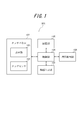
- FIG. 1 is a functional block diagram showing a schematic configuration of an input device according to an embodiment of the present invention.
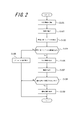
- FIG. 2 is a flowchart showing processing performed by the input device of FIG.
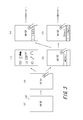
- FIG. 3 is an explanatory diagram schematically showing processing of the input device of FIG.
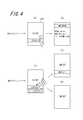
- FIG. 4 is an explanatory diagram schematically showing processing of the input device of FIG.
- FIG. 5 is an explanatory diagram schematically showing processing of a conventional input device.
- FIG. 1 is a functional block diagram showing a schematic configuration of an input device according to an embodiment of the present invention.
- the input device 101 of the present invention include a mobile phone terminal, a PDA (Personal Digital Assistant), a portable music player, a portable TV, a portable game machine, a bank ATM (Automated Teller Machine), and a station ticket machine.
- the input device 101 includes a touch panel 102 including a display unit 103 and a touch sensor 104, a storage unit 105, a press detection unit 106, a tactile sensation providing unit 107, and a control unit 108.
- the display unit 103 displays a display corresponding to an application included in the input device 101, instruction information, and notification information, and is configured using, for example, a liquid crystal display panel or an organic EL display panel.
- the instruction information is information indicating that there is broadcast information that is a matter to be communicated to the user. For example, missed calls, reception of mail, elapse of a scheduled time of a registered schedule, alarm registered by a wake-up application Time lapse, recording application reservation results, email reservation transmission results, BCMCS (Broadcast / Multicast Services) delivery information reception, notes to be displayed on the standby screen (pre-registered schedules, emails, bookmarks, etc.) Information indicating the presence of a shortcut icon). For example, the display unit 103 displays “incoming call”, “mail received”, etc. as instruction information.
- Notification information is information indicating the specific content of the instruction information.
- the display unit 103 displays, for example, “time: 14:38 caller: Mr. A call time: 25 seconds” as the notification information of the instruction information “There is an incoming call”. Further, the display unit 103 displays, for example, “time: 18:30, transmission destination: Mr. A, content: are you planning tomorrow?” As the notification information of the instruction information “mail received”.
- the display unit 103 can also display keys or buttons for inputting characters.
- the input device 101 may not include a mechanical key or button for inputting characters.
- the touch sensor 104 detects contact with a user's finger, stylus pen or the like (contact object), and is configured by a known method such as a resistance film method, a capacitance method, or an optical method.
- the touch sensor 104 detects a contact
- the touch sensor 104 sends contact position information regarding the position of the contact to the control unit 108.
- the touch sensor 104 is an optical type, the touch sensor 104 detects a position where infrared light on the touch sensor 104 is blocked by a finger, a stylus pen, or the like. It is unnecessary.
- the storage unit 105 stores various information related to contact (for example, contact position information), pressing conditions, position conditions on the touch panel 102, predetermined trajectory conditions, and the like, and also functions as a work memory.
- the pressing condition is a reference for the control unit 108 to display the instruction information on the display unit 103 or a reference for deleting the instruction information displayed on the display unit 103.
- data based on the pressure applied to the touch sensor 104 is included. It is that it is more than the threshold value regarding a press.
- the position condition can be a reference for the control unit 108 to display the instruction information on the display unit 103.
- the contact position with respect to the touch sensor 104 is a predetermined position.
- contact with a predetermined position is not strictly limited to contact with only that position.
- contact when a predetermined position is passed by a sliding operation (drag operation) of a contact object. It should be noted that this is also included.
- the sliding operation refers to an operation of moving the contact position while the contact is maintained.
- the predetermined trajectory condition is a reference for the controller 108 to delete the instruction information displayed on the display unit 103.
- the contact trajectory of the sliding operation by the contact object is the predetermined trajectory. That is, the end of the trajectory is a predetermined position.
- the trajectory includes not only a trajectory by one finger but also a trajectory by pinch-in that is an operation of pinching with two fingers and a trajectory by pinch-out that is an operation of pushing with two fingers. Shall.
- the coincidence between the contact locus and the predetermined locus is not limited to exact complete coincidence.
- the contact trajectory can be regarded as matching a predetermined trajectory.
- the threshold, the predetermined position, and the predetermined trajectory relating to pressing are items that can be arbitrarily set by the control unit 108. For this reason, the control unit 108 can also set a plurality of threshold values and predetermined trajectories related to pressing according to a plurality of types of instruction information. For example, the control unit 108 can set a threshold related to pressing of instruction information related to a call to be smaller (or larger) than a threshold related to pressing of instruction information related to mail. In addition, the control unit 108 can set a predetermined locus corresponding to deletion of instruction information related to a call as a triangle, and can set a predetermined locus corresponding to deletion of instruction information related to a mail as a rectangle.
- the pressure detection unit 106 detects pressure on the touch sensor 104.
- an element such as a strain gauge sensor or a piezoelectric element whose physical or electrical characteristics (strain, resistance, voltage, etc.) change according to the pressure. Etc. are used.
- the piezoelectric element of the pressure detection unit 106 has a magnitude (or load (force) of a load (force) related to the pressure on the touch sensor 104.
- the voltage magnitude (voltage value) which is an electrical characteristic, changes according to the speed (acceleration) at which the magnitude changes.
- the pressure detection unit 106 notifies the control unit 108 of the magnitude of the voltage (voltage value (hereinafter simply referred to as data)).
- the control unit 108 acquires the data when the press detection unit 106 notifies the control unit 108 of the data, or when the control unit 108 detects data related to the piezoelectric element of the press detection unit 106. That is, the control unit 108 acquires data based on the pressure on the touch sensor 104. That is, the control unit 108 acquires data based on the pressure from the pressure detection unit 106.
- the tactile sensation providing unit 107 vibrates the touch sensor 104 and presents a tactile sensation to a user's finger or stylus pen (contact object) that is in contact with the touch sensor 104.
- the tactile sensation providing unit 107 uses a vibration element such as a piezoelectric element. Configured.
- the tactile sensation to be presented may be any vibration, and the control unit 108 can appropriately set the frequency, period (wavelength), amplitude, and waveform according to the tactile sensation to be presented.
- the control unit 108 can set a different tactile sensation for each type of instruction information.
- the control part 108 can also set suitably the frequency
- the control unit 108 can match the number of tactile sensations presented on the contact with the number of instruction information.
- the tactile sensation providing unit 107 can present not only vibrations but also a hard and hard tactile sensation (real click feeling) that can be felt when a mechanical key is pressed.
- a hard and hard tactile sensation real click feeling
- the tactile sensation providing unit 107 can vibrate the touch sensor 104 to stimulate the user's haptic sense. In this way, by stimulating the user's pressure and tactile sensation, it is possible to present the user with a hard and hard feel.
- the touch sensor 104 itself is not physically displaced like a mechanical key even when pressed, but by presenting the tactile sensation as described above to a touch target (contact object), the user can press the mechanical key.
- a realistic click feeling similar to that in the case of operation can be obtained.
- the user can perform an operation on the touch sensor 104, which originally does not have feedback by contact, without a sense of incongruity.
- a click-like hard tactile sensation can be realized by, for example, presenting one cycle of a sine wave of 140 Hz to 500 Hz or one cycle of a rectangular wave.
- the pressure detection part 106 and the tactile sensation presentation part 107 can be comprised sharing a piezoelectric element. This is because the piezoelectric element generates a voltage when pressure is applied and deforms when a voltage is applied.
- the tactile sensation providing unit 107 may be configured to indirectly vibrate the touch sensor 104 by vibrating the input device 101 based on a vibration motor (eccentric motor) or the like. You may comprise so that the touch sensor 104 may be vibrated directly by arrange
- the control unit 108 controls and manages the entire input device 101 including each functional block of the input device 101.
- the control unit 108 is configured as software executed on an arbitrary suitable processor such as a CPU (Central Processing Unit), or a dedicated processor specialized for each process (for example, DSP (Digital Signal Processor)). Can be configured.
- a CPU Central Processing Unit
- DSP Digital Signal Processor
- FIG. 2 is a flowchart showing processing performed by the input device of FIG. 3 and 4 are explanatory diagrams schematically showing the processing of the input device of FIG.
- the control unit 108 also includes a first threshold value relating to pressing, which is a display criterion for the first instruction information relating to a call, and a second threshold value relating to pressing, which is a display criterion for the second instruction information relating to mail (related to pressing). It is assumed that the second threshold> the first threshold for pressing) is set.
- control unit 108 includes all the third threshold values related to pressing (deleting threshold values related to pressing) (third threshold value related to pressing> second threshold values related to pressing), which are deletion criteria for the second instruction information. It is assumed that a deletion maximum threshold value related to pressing, which is a deletion criterion for instruction information, is set. Note that the maximum threshold value for deletion related to pressing is a threshold value that is larger than any threshold value related to pressing.
- the control unit 108 causes the storage unit 105 to store instruction information related to the matter to be communicated (step S101).
- instruction information related to the matter to be communicated it is assumed that a missed call and a mail are received. Therefore, the control unit 108 causes the storage unit 105 to store the information “with incoming call” as the first instruction information and the information “with mail received” as the second instruction information.
- the touch sensor 104 detects this contact (step S102).
- the control part 108 can change the display of the display part 103 in the aspect which can recognize the contacted position (FIG.3 (b)).
- the control unit 108 can display keys and buttons on the display unit 103 corresponding to the touched position.
- the control unit 108 causes the display unit 103 to display keys and buttons at predetermined positions, and only when there is further contact at the predetermined position, Instruction information display processing can also be performed.
- the control unit 108 starts to acquire data based on the pressure on the touch surface of the touch sensor 104 from the press detection unit 106 when the touch object such as the user's finger or stylus pen comes into contact with the touch sensor 104 (step S103). .
- the control unit 108 can compare the data based on the pressure acquired from the pressure detection unit 106 with the threshold value relating to the pressure stored in the storage unit 105 (step S104). When the data based on the pressure is less than the threshold value regarding the pressure (No in Step S104), the control unit 108 can display the menu screen on the display unit 103 instead of the standby screen (Step S105 and FIG. 3C). ). Note that the menu screen is a screen on which a list of applications that can be used by the input device 101 is displayed, and the user can select and start an application from the menu screen.
- the control unit 108 displays the first instruction information corresponding to the first threshold value regarding the pressing, that is, the information “There is an incoming call”. It is displayed on the part 103 (step S106 and FIG.3 (d)). Note that the control unit 108 can display the instruction information on the display unit 103 when the contact position detected by the touch sensor 104 is a predetermined position as well as the pressing condition. In the present embodiment, after the instruction information is displayed, the control unit 108 continues to display the instruction information on the display unit 103 even when the data based on the pressure is less than the threshold value regarding the pressure.
- the control unit 108 When the data based on the pressure further exceeds the second threshold value regarding the pressing (Yes in step S104), the control unit 108 indicates that the second instruction information corresponding to the second threshold value regarding the pressing, that is, “mail received”. Information can be displayed on the display unit 103 instead of the first instruction information (step S106 and FIG. 3E). The control unit 108 can also display the second instruction information on the display unit 103 together with the first instruction information as shown in FIG.
- the control unit 108 can control the tactile sensation providing unit 107 so as to present a tactile sensation to the contact object in contact with the touch sensor 104 (step S107). Further, the control unit 108 can present different tactile sensations corresponding to the display of different instruction information. For example, the control unit 108 presents the first tactile sensation (for example, bull) to the tactile sensation presenting unit 107 corresponding to the first threshold value for pressing, and the second tactile sensation (for example, bull) corresponding to the second threshold value for pressing. Can be made. That is, the user can recognize that there was an incoming call from the presentation of the first tactile sensation. Further, the user can recognize that the mail has been received from the presentation of the second tactile sensation.
- first tactile sensation for example, bull
- the second tactile sensation for example, bull
- control unit 108 can control the tactile sensation providing unit 107 so that the number of tactile sensations is changed according to the number of incoming calls and the number of received mails. For example, when there are two incoming calls, the control unit 108 can control the tactile sensation providing unit 107 to present the first tactile sensation twice (bull, bull).
- the control unit 108 determines whether or not contact has been made with a position corresponding to the instruction information displayed on the display unit 103 (step S108). Note that the contact with the position corresponding to the instruction information corresponds not only to a new contact different from the contact for displaying the instruction information in step S102 but also to instruction information by a sliding operation following the contact in step S102. Including contact with the position (FIG. 4G).
- step S108 When the touch sensor 104 detects contact with the position corresponding to the instruction information (Yes in step S108), the control unit 108 notifies information corresponding to the contacted instruction information, that is, “time: 14:38 sender: A "Call time: 25 seconds" can be displayed on the display unit 103 (step S109 and FIG. 4 (h)).
- the contact regarding the data based on the press more than the 3rd threshold value regarding a press in the state where the said instruction information is displayed is predetermined. It is assumed that the trajectory condition (for example, the contact trajectory is a trajectory by a pinch-out operation) is satisfied (FIG. 4 (i)). Then, the control unit 108 can control the display unit 103 so as not to display the second instruction information displayed on the display unit 103 (FIG. 4 (j)). At this time, the control unit 108 can also delete the second instruction information stored in the storage unit 105.
- the trajectory condition for example, the contact trajectory is a trajectory by a pinch-out operation
- the control unit 108 when the 4th threshold value regarding the press which is the deletion reference
- a predetermined trajectory condition for example, the contact trajectory is a triangle
- the display unit 103 can be controlled to hide the instruction information corresponding to the predetermined trajectory condition.
- the control unit 108 hides the instruction information displayed on the display unit 103 when contact is made that satisfies a predetermined trajectory condition. Become.
- step S106 in the state where the instruction information is displayed on the display unit 103, a contact regarding data based on a pressure that is equal to or greater than the maximum deletion threshold is determined.
- the locus condition (the contact locus is a locus caused by a pinch-out operation) is satisfied (FIG. 4 (i)).
- the control unit 108 can control the display unit 103 so as to hide all the instruction information displayed on the display unit 103 (FIG. 4 (k)).
- the control unit 108 can also delete all instruction information stored in the storage unit 105.
- the control unit 108 of the input device 101 displays the instruction information stored in the storage unit 105 on the display unit 103 when the data based on the pressure on the touch sensor 104 is equal to or greater than the threshold value related to the press. Display. That is, the input device 101 of this embodiment does not automatically display the instruction information, but displays it based on the user's press. Therefore, the user can display the instruction information on the input device 101 only when the user wants to confirm the instruction information by adjusting the pressure.
- control unit 108 has a tactile sensation so as to present a tactile sensation to the contact object that is in contact with the touch sensor 104 when the data based on the pressure on the touch sensor 104 is equal to or greater than a threshold value regarding the press.
- the presenting unit 107 can be controlled. The user can recognize the presence / absence of the instruction information by presenting the tactile sensation without confirming the display on the display unit 103.
- control unit 108 can display the instruction information on the display unit 103 when the contact position detected by the touch sensor 104 is a predetermined position. That is, both the position condition and the pressing condition are satisfied, and the instruction information is displayed on the display unit 103.
- a third party who does not grasp the predetermined position cannot confirm the instruction information. Therefore, unauthorized use by a third party can be prevented.
- the control unit 108 sets a first threshold value related to pressing and a second threshold value related to pressing (second threshold value related to pressing> first threshold value related to pressing) corresponding to the type of instruction information, and is based on the pressing on the touch sensor 104.
- first threshold value related to pressing and a second threshold value related to pressing (second threshold value related to pressing> first threshold value related to pressing) corresponding to the type of instruction information, and is based on the pressing on the touch sensor 104.
- the instruction information corresponding to the threshold value related to pressing can be displayed on the display unit 103. Thereby, the user can display and check the instruction information on the display unit 103 for each type.
- the control unit 108 selects the second value when the data based on the pressure on the touch sensor 104 is equal to or greater than the second threshold value regarding the pressure.
- the instruction information can be displayed together with the first instruction information. Thereby, the user can display and confirm a plurality of instruction information on the display unit 103 step by step.
- the control unit 108 selects the second value when the data based on the pressure on the touch sensor 104 is equal to or greater than the second threshold value regarding the pressure.
- the instruction information can be displayed on the display unit 103 instead of the first instruction information. Thereby, the user can display and check the instruction information on the display unit 103 step by step and one by one.
- control unit 108 displays the first or second instruction information on the display unit 103 when the touch on the touch sensor 104 satisfies a predetermined trajectory condition.
- the display unit 103 can be controlled to hide the instruction information displayed on the screen. Accordingly, the user can hide the instruction information for each type by adjusting the contact locus.
- the control unit 108 sets a third or fourth threshold value (deletion threshold value for pressing) related to pressing that is greater than the first or second threshold value regarding pressing, and data based on pressing to the touch sensor 104 is stored.
- a third or fourth threshold value discharge threshold value for pressing
- the first or second instruction information displayed on the display unit 103 is not displayed.
- the display unit 103 can be controlled and the first or second instruction information stored in the storage unit 105 can be deleted.
- the user can delete the instruction information from the storage unit 105 and hide the instruction information for each type by adjusting the pressure and the contact trajectory.
- the control unit 108 sets a maximum threshold value for deletion related to pressing larger than the threshold value related to any pressing, and the data based on the pressing to the touch sensor 104 is equal to or larger than the maximum threshold value for deletion regarding pressing.
- the display unit 103 can be controlled to hide the instruction information displayed on the display unit 103. Thereby, the user can hide all the instruction information at once by adjusting the pressing and the contact locus.
- the control unit 108 can also delete all the instruction information stored in the storage unit 105. Thus, the instruction information is completely deleted from the input device 101.
- the control unit 108 waits for the menu screen if the data based on the pressure on the touch sensor 104 is less than the first threshold value regarding the pressure. It can be displayed on the display unit 103 instead of the receiving screen. Accordingly, a user who desires to start an application that is not related to the instruction information rather than confirming the instruction information can prevent the instruction information from being displayed by adjusting the pressure. Therefore, the user can start a desired application without performing an unnecessary operation of deleting the displayed instruction information.
- each member each means, each step, etc.
- the functions included in each member, each means, each step, etc. can be rearranged so as not to be logically contradictory, and a plurality of means, steps, etc. can be combined into one or divided. Is possible.
- the display of the instruction information on the standby screen has been described.
- the display screen of the instruction information is not limited to the standby screen.
- the present invention can also be applied to display of instruction information on a screen displayed during mail creation or a game.
- the instruction information is hidden when the pressing condition and the trajectory condition are satisfied.
- the instruction information non-display condition is the pressing condition and the trajectory condition. It is not limited to.
- the control unit can hide the instruction information when the contact object leaves the touch sensor and a new contact is made at a predetermined position of the touch sensor.
- the instruction information is displayed when the pressing condition is satisfied.
- a password for displaying the instruction information is set in advance.
- the control unit can display the password input screen on the display unit when the pressing condition is satisfied.
- the meaning of the technical idea of expression such as the threshold value “more than” relating to pressing or “less than” threshold relating to pressing is not necessarily a strict meaning.
- the meanings when the reference value is included or not included are included.
- a threshold value “more than or equal to” relating to pressing may imply not only the case where the data based on pressing reaches the threshold value relating to pressing but also the case where the threshold value relating to pressing is exceeded.
- the threshold value “less than” relating to pressing may imply not only when the data based on pressing falls below the threshold value regarding pressing, but also when the threshold value regarding pressing is reached, that is, when the threshold value regarding pressing is below the threshold value regarding pressing.
- the “display unit” and “touch sensor” in the description of the embodiment of the present invention described above are configured by an integrated device, for example, by providing both functions of the display unit and the touch sensor on a common substrate. May be.
- a plurality of photoelectric conversion elements such as photodiodes are regularly arranged in a matrix electrode array of pixel electrodes included in the liquid crystal panel. Some are mixed.
- This device displays an image with a liquid crystal panel structure, while reflecting the light of a backlight for liquid crystal display at the tip of a pen that touches and inputs a desired position on the surface of the panel. The reflected light is reflected by peripheral photoelectric conversion elements. By receiving the light, the touch position can be detected.
Landscapes
- Engineering & Computer Science (AREA)
- General Engineering & Computer Science (AREA)
- Theoretical Computer Science (AREA)
- Human Computer Interaction (AREA)
- Physics & Mathematics (AREA)
- General Physics & Mathematics (AREA)
- Computer Networks & Wireless Communication (AREA)
- Signal Processing (AREA)
- User Interface Of Digital Computer (AREA)
- Position Input By Displaying (AREA)
- Telephone Function (AREA)
Abstract
Description
接触を検出するタッチセンサと、
表示部と、
前記タッチセンサに対する押圧を検出する押圧検出部と、
報知情報の存在を示す指示情報を記憶する記憶部と、
前記タッチセンサに対する押圧に基づくデータが閾値以上になる場合に、前記記憶部に記憶されている前記指示情報を前記表示部に表示させる制御部と
を備える入力装置である。
102 タッチパネル
103 表示部
104 タッチセンサ
105 記憶部
106 押圧検出部
107 触感呈示部
108 制御部
Claims (12)
- 接触を検出するタッチセンサと、
表示部と、
前記タッチセンサに対する押圧を検出する押圧検出部と、
報知情報の存在を示す指示情報を記憶する記憶部と、
前記タッチセンサに対する押圧に基づくデータが閾値以上になる場合に、前記記憶部に記憶されている前記指示情報を前記表示部に表示させる制御部と
を備える入力装置。 - 請求項1に記載の入力装置において、
当該入力装置は更に、前記タッチセンサに接触している接触物に対して触感を呈示する触感呈示部を備え、
前記制御部は、前記タッチセンサに対する押圧に基づくデータが閾値以上になる場合に、前記タッチセンサに接触している接触物に対して触感を呈示するように前記触感呈示部を制御する
ことを特徴とする入力装置。 - 請求項1に記載の入力装置において、前記制御部は、前記タッチセンサに対する位置が所定の位置である場合に、前記指示情報を前記表示部に表示させることを特徴とする入力装置。
- 請求項1に記載の入力装置において、
前記制御部は、前記表示部が前記指示情報を表示している場合、前記タッチセンサが前記指示情報に対応する位置への接触を検出すると、当該指示情報に対応する報知情報を前記表示部に表示させる
ことを特徴とする入力装置。 - 請求項1に記載の入力装置において、
前記制御部は、複数種類の指示情報が存在する場合、前記指示情報の種類に対応する複数の閾値を設定し、
前記タッチセンサに対する押圧に基づくデータが前記複数の閾値のいずれか以上になる場合、当該いずれか以上となった閾値に対応する指示情報を前記表示部に表示させる
ことを特徴とする入力装置。 - 請求項5に記載の入力装置において、
前記複数種類の指示情報は、第1の指示情報及び第2の指示情報を含み、
前記制御部は、
‐ 前記第1の指示情報に対応する第1閾値として、前記第2の指示情報に対応する第2閾値よりも小さい値を設定し、
‐ 前記第1の指示情報が前記表示部に表示されている場合に、前記タッチセンサに対する押圧に基づくデータが前記第2閾値以上になる場合、前記第2の指示情報を前記第1の指示情報と共に表示させる
ことを特徴とする入力装置。 - 請求項5に記載の入力装置において、
前記複数種類の指示情報は、第1の指示情報及び第2の指示情報を含み、
前記制御部は、
‐ 前記第1の指示情報に対応する第1閾値として、前記第2の指示情報に対応する第2閾値よりも小さい値を設定し、
‐ 前記第1の指示情報が前記表示部に表示されている場合に、前記タッチセンサに対する押圧に基づくデータが前記第2閾値以上になる場合、前記第2の指示情報を前記第1の指示情報の代わりに前記表示部に表示させる
ことを特徴とする入力装置。 - 請求項1に記載の入力装置において、
前記制御部は、前記表示部に前記指示情報が表示されている状態で、前記タッチセンサへの接触が所定の軌跡条件を満たす場合、前記表示部に表示されている指示情報を非表示にするように前記表示部を制御する
ことを特徴とする入力装置。 - 請求項8に記載の入力装置において、
前記制御部は、前記閾値よりも大きい削除用閾値を設定し、前記タッチセンサに対する押圧に基づくデータが前記削除用閾値以上の状態で、当該タッチセンサへの接触が所定の軌跡条件を満たす場合、前記指示情報を非表示にするように前記表示部を制御することを特徴とする入力装置。 - 請求項5に記載の入力装置において、
前記制御部は、前記表示部に前記指示情報が表示されている状態で、前記タッチセンサへの接触が前記所定の軌跡条件を満たす場合、前記表示部に表示されている指示情報を非表示にするように前記表示部を制御する
ことを特徴とする入力装置。 - 請求項10に記載の入力装置において、
前記制御部は、いずれの前記閾値よりも大きい削除用最大閾値を設定し、前記タッチセンサに対する押圧に基づくデータが前記削除用最大閾値以上の状態で、当該タッチセンサへの接触が前記所定の軌跡条件を満たす場合、前記表示部に表示されている指示情報を非表示にするように前記表示部を制御することを特徴とする入力装置。 - 請求項1に記載の入力装置において、
前記制御部は、前記表示部が待受画面を表示している際に、前記タッチセンサに対する押圧に基づくデータが前記閾値未満になる場合、メニュー画面を前記待受画面の代わりに前記表示部に表示させる
ことを特徴とする入力装置。
Priority Applications (2)
| Application Number | Priority Date | Filing Date | Title |
|---|---|---|---|
| JP2012556804A JP5452738B2 (ja) | 2011-02-10 | 2012-02-10 | 入力装置 |
| US13/984,197 US10133388B2 (en) | 2011-02-10 | 2012-02-10 | Input device |
Applications Claiming Priority (2)
| Application Number | Priority Date | Filing Date | Title |
|---|---|---|---|
| JP2011-027424 | 2011-02-10 | ||
| JP2011027424 | 2011-02-10 |
Publications (1)
| Publication Number | Publication Date |
|---|---|
| WO2012108213A1 true WO2012108213A1 (ja) | 2012-08-16 |
Family
ID=46638433
Family Applications (1)
| Application Number | Title | Priority Date | Filing Date |
|---|---|---|---|
| PCT/JP2012/000909 Ceased WO2012108213A1 (ja) | 2011-02-10 | 2012-02-10 | 入力装置 |
Country Status (3)
| Country | Link |
|---|---|
| US (1) | US10133388B2 (ja) |
| JP (1) | JP5452738B2 (ja) |
| WO (1) | WO2012108213A1 (ja) |
Cited By (43)
| Publication number | Priority date | Publication date | Assignee | Title |
|---|---|---|---|---|
| WO2014070373A1 (en) * | 2012-10-30 | 2014-05-08 | Motorola Mobility Llc | Electronic device with enhanced method of displaying notifications |
| JP2015070303A (ja) * | 2013-09-26 | 2015-04-13 | 京セラ株式会社 | 表示装置 |
| US9063564B2 (en) | 2012-10-30 | 2015-06-23 | Google Technology Holdings LLC | Method and apparatus for action indication selection |
| US9153166B2 (en) | 2013-08-09 | 2015-10-06 | Google Holdings Technology LLC | Method and apparatus for user interaction data storage |
| US9182903B2 (en) | 2012-10-30 | 2015-11-10 | Google Technology Holdings LLC | Method and apparatus for keyword graphic selection |
| JP2017162490A (ja) * | 2012-12-29 | 2017-09-14 | アップル インコーポレイテッド | ユーザインタフェース階層をナビゲートするためのデバイス、方法、及びグラフィカルユーザインタフェース |
| JP2018502486A (ja) * | 2014-11-25 | 2018-01-25 | モダ−イノチップス シーオー エルティディー | 端末の制御装置及びこれを用いた端末の制御方法 |
| US9965074B2 (en) | 2012-12-29 | 2018-05-08 | Apple Inc. | Device, method, and graphical user interface for transitioning between touch input to display output relationships |
| US9971499B2 (en) | 2012-05-09 | 2018-05-15 | Apple Inc. | Device, method, and graphical user interface for displaying content associated with a corresponding affordance |
| US9990121B2 (en) | 2012-05-09 | 2018-06-05 | Apple Inc. | Device, method, and graphical user interface for moving a user interface object based on an intensity of a press input |
| US9990107B2 (en) | 2015-03-08 | 2018-06-05 | Apple Inc. | Devices, methods, and graphical user interfaces for displaying and using menus |
| US9996231B2 (en) | 2012-05-09 | 2018-06-12 | Apple Inc. | Device, method, and graphical user interface for manipulating framed graphical objects |
| US10037138B2 (en) | 2012-12-29 | 2018-07-31 | Apple Inc. | Device, method, and graphical user interface for switching between user interfaces |
| US10042542B2 (en) | 2012-05-09 | 2018-08-07 | Apple Inc. | Device, method, and graphical user interface for moving and dropping a user interface object |
| US10048757B2 (en) | 2015-03-08 | 2018-08-14 | Apple Inc. | Devices and methods for controlling media presentation |
| US10067653B2 (en) | 2015-04-01 | 2018-09-04 | Apple Inc. | Devices and methods for processing touch inputs based on their intensities |
| US10067645B2 (en) | 2015-03-08 | 2018-09-04 | Apple Inc. | Devices, methods, and graphical user interfaces for manipulating user interface objects with visual and/or haptic feedback |
| US10073615B2 (en) | 2012-05-09 | 2018-09-11 | Apple Inc. | Device, method, and graphical user interface for displaying user interface objects corresponding to an application |
| US10078442B2 (en) | 2012-12-29 | 2018-09-18 | Apple Inc. | Device, method, and graphical user interface for determining whether to scroll or select content based on an intensity theshold |
| US10095396B2 (en) | 2015-03-08 | 2018-10-09 | Apple Inc. | Devices, methods, and graphical user interfaces for interacting with a control object while dragging another object |
| US10126930B2 (en) | 2012-05-09 | 2018-11-13 | Apple Inc. | Device, method, and graphical user interface for scrolling nested regions |
| US10162452B2 (en) | 2015-08-10 | 2018-12-25 | Apple Inc. | Devices and methods for processing touch inputs based on their intensities |
| US10168826B2 (en) | 2012-05-09 | 2019-01-01 | Apple Inc. | Device, method, and graphical user interface for transitioning between display states in response to a gesture |
| US10175864B2 (en) | 2012-05-09 | 2019-01-08 | Apple Inc. | Device, method, and graphical user interface for selecting object within a group of objects in accordance with contact intensity |
| US10175757B2 (en) | 2012-05-09 | 2019-01-08 | Apple Inc. | Device, method, and graphical user interface for providing tactile feedback for touch-based operations performed and reversed in a user interface |
| US10200598B2 (en) | 2015-06-07 | 2019-02-05 | Apple Inc. | Devices and methods for capturing and interacting with enhanced digital images |
| US10203868B2 (en) | 2015-08-10 | 2019-02-12 | Apple Inc. | Devices, methods, and graphical user interfaces for manipulating user interface objects with visual and/or haptic feedback |
| US10222980B2 (en) | 2015-03-19 | 2019-03-05 | Apple Inc. | Touch input cursor manipulation |
| US10235035B2 (en) | 2015-08-10 | 2019-03-19 | Apple Inc. | Devices, methods, and graphical user interfaces for content navigation and manipulation |
| US10248308B2 (en) | 2015-08-10 | 2019-04-02 | Apple Inc. | Devices, methods, and graphical user interfaces for manipulating user interfaces with physical gestures |
| US10275087B1 (en) | 2011-08-05 | 2019-04-30 | P4tents1, LLC | Devices, methods, and graphical user interfaces for manipulating user interface objects with visual and/or haptic feedback |
| US10303354B2 (en) | 2015-06-07 | 2019-05-28 | Apple Inc. | Devices and methods for navigating between user interfaces |
| US10346030B2 (en) | 2015-06-07 | 2019-07-09 | Apple Inc. | Devices and methods for navigating between user interfaces |
| US10387029B2 (en) | 2015-03-08 | 2019-08-20 | Apple Inc. | Devices, methods, and graphical user interfaces for displaying and using menus |
| US10416800B2 (en) | 2015-08-10 | 2019-09-17 | Apple Inc. | Devices, methods, and graphical user interfaces for adjusting user interface objects |
| US10437333B2 (en) | 2012-12-29 | 2019-10-08 | Apple Inc. | Device, method, and graphical user interface for forgoing generation of tactile output for a multi-contact gesture |
| US10496260B2 (en) | 2012-05-09 | 2019-12-03 | Apple Inc. | Device, method, and graphical user interface for pressure-based alteration of controls in a user interface |
| US10620781B2 (en) | 2012-12-29 | 2020-04-14 | Apple Inc. | Device, method, and graphical user interface for moving a cursor according to a change in an appearance of a control icon with simulated three-dimensional characteristics |
| US10782871B2 (en) | 2012-05-09 | 2020-09-22 | Apple Inc. | Device, method, and graphical user interface for providing feedback for changing activation states of a user interface object |
| US10908808B2 (en) | 2012-05-09 | 2021-02-02 | Apple Inc. | Device, method, and graphical user interface for displaying additional information in response to a user contact |
| US10969945B2 (en) | 2012-05-09 | 2021-04-06 | Apple Inc. | Device, method, and graphical user interface for selecting user interface objects |
| US11231831B2 (en) | 2015-06-07 | 2022-01-25 | Apple Inc. | Devices and methods for content preview based on touch input intensity |
| US11240424B2 (en) | 2015-06-07 | 2022-02-01 | Apple Inc. | Devices and methods for capturing and interacting with enhanced digital images |
Families Citing this family (24)
| Publication number | Priority date | Publication date | Assignee | Title |
|---|---|---|---|---|
| US10715380B2 (en) | 2011-05-23 | 2020-07-14 | Apple Inc. | Setting a reminder that is triggered by a target user device |
| US8971924B2 (en) | 2011-05-23 | 2015-03-03 | Apple Inc. | Identifying and locating users on a mobile network |
| US9063731B2 (en) | 2012-08-27 | 2015-06-23 | Samsung Electronics Co., Ltd. | Ultra low power apparatus and method to wake up a main processor |
| JP5794399B2 (ja) * | 2012-12-12 | 2015-10-14 | 株式会社村田製作所 | タッチ式入力装置 |
| US8989773B2 (en) | 2013-01-29 | 2015-03-24 | Apple Inc. | Sharing location information among devices |
| KR102191968B1 (ko) * | 2014-01-28 | 2020-12-16 | 삼성전자주식회사 | 형용사를 이용한 진동 생성 방법 및 디바이스 |
| EP3120223A1 (en) * | 2014-03-21 | 2017-01-25 | Immersion Corporation | System, method and computer-readable medium for force-based object manipulation and haptic sensations |
| US20150350146A1 (en) | 2014-05-29 | 2015-12-03 | Apple Inc. | Coordination of message alert presentations across devices based on device modes |
| US10382378B2 (en) | 2014-05-31 | 2019-08-13 | Apple Inc. | Live location sharing |
| US20150350141A1 (en) | 2014-05-31 | 2015-12-03 | Apple Inc. | Message user interfaces for capture and transmittal of media and location content |
| DE212015000194U1 (de) | 2014-08-06 | 2017-05-31 | Apple Inc. | Verkleinerte Benutzeroberflächen für Batteriemanagement |
| EP4668726A3 (en) | 2014-09-02 | 2026-03-25 | Apple Inc. | Phone user interface |
| KR102016160B1 (ko) * | 2014-09-02 | 2019-08-29 | 애플 인크. | 경고를 관리하기 위한 축소된 크기의 인터페이스 |
| US20160224973A1 (en) | 2015-02-01 | 2016-08-04 | Apple Inc. | User interface for payments |
| JP6038202B2 (ja) * | 2015-02-06 | 2016-12-07 | 京セラドキュメントソリューションズ株式会社 | 入力装置および電子機器 |
| EP3337142A4 (en) * | 2015-08-11 | 2019-03-13 | LG Electronics Inc. | MOBILE DEVICE AND CONTROL PROCESS THEREFOR |
| US10080950B2 (en) * | 2015-09-05 | 2018-09-25 | Aspire Sports Inc. | System of communication in a wearable device |
| KR102583711B1 (ko) * | 2016-07-28 | 2023-10-04 | 삼성전자주식회사 | 전자 장치 및 그의 동작 방법 |
| CN108897479A (zh) * | 2018-06-29 | 2018-11-27 | 上海爱优威软件开发有限公司 | 一种终端触控方法及系统 |
| KR102700032B1 (ko) * | 2019-01-21 | 2024-08-29 | 삼성전자주식회사 | 디스플레이의 손상을 방지하기 위한 전자 장치 및 방법 |
| US11481094B2 (en) | 2019-06-01 | 2022-10-25 | Apple Inc. | User interfaces for location-related communications |
| US11477609B2 (en) | 2019-06-01 | 2022-10-18 | Apple Inc. | User interfaces for location-related communications |
| US11152100B2 (en) | 2019-06-01 | 2021-10-19 | Apple Inc. | Health application user interfaces |
| CN111857431B (zh) * | 2020-07-24 | 2023-10-27 | 青岛海信商用显示股份有限公司 | 信息显示方法、触控设备及存储介质 |
Citations (5)
| Publication number | Priority date | Publication date | Assignee | Title |
|---|---|---|---|---|
| JPH1153165A (ja) * | 1997-08-06 | 1999-02-26 | Minolta Co Ltd | マンマシンインタフェース装置 |
| JPH11355617A (ja) * | 1998-06-05 | 1999-12-24 | Fuji Photo Film Co Ltd | 画像表示器付きカメラ |
| JP2004159206A (ja) * | 2002-11-08 | 2004-06-03 | Sharp Corp | 折り畳み式携帯電話装置 |
| JP2007312405A (ja) * | 2007-06-15 | 2007-11-29 | Sharp Corp | 携帯端末装置 |
| JP2009134473A (ja) * | 2007-11-29 | 2009-06-18 | Sony Corp | 押圧検知センサ、入力装置及び電子機器 |
Family Cites Families (29)
| Publication number | Priority date | Publication date | Assignee | Title |
|---|---|---|---|---|
| JP2001265481A (ja) * | 2000-03-21 | 2001-09-28 | Nec Corp | ページ情報表示方法及び装置並びにページ情報表示用プログラムを記憶した記憶媒体 |
| JP2002244789A (ja) * | 2001-02-15 | 2002-08-30 | Sony Corp | 電子機器 |
| JP2004177993A (ja) * | 2002-11-22 | 2004-06-24 | Panasonic Mobile Communications Co Ltd | 圧力センサ付き携帯端末及び圧力センサ付き携帯端末により実行可能なプログラム |
| JP2005072945A (ja) | 2003-08-25 | 2005-03-17 | Casio Comput Co Ltd | 通信端末装置および通信情報処理のプログラム |
| US8448083B1 (en) * | 2004-04-16 | 2013-05-21 | Apple Inc. | Gesture control of multimedia editing applications |
| US7619616B2 (en) * | 2004-12-21 | 2009-11-17 | Microsoft Corporation | Pressure sensitive controls |
| JP2006345209A (ja) * | 2005-06-08 | 2006-12-21 | Sony Corp | 入力装置、情報処理装置、情報処理方法、及びプログラム |
| US20070188473A1 (en) * | 2006-02-14 | 2007-08-16 | Picsel Research Limited | System and methods for document navigation |
| JP2008305174A (ja) * | 2007-06-07 | 2008-12-18 | Sony Corp | 情報処理装置、情報処理方法、プログラム |
| KR101467513B1 (ko) * | 2008-02-11 | 2014-12-01 | 삼성전자 주식회사 | 모바일 단말 제어장치 및 그 방법 |
| US20090271731A1 (en) * | 2008-04-27 | 2009-10-29 | Htc Corporation | Electronic device and user interface display method thereof |
| KR101495559B1 (ko) * | 2008-07-21 | 2015-02-27 | 삼성전자주식회사 | 사용자 명령 입력 방법 및 그 장치 |
| KR20100010860A (ko) * | 2008-07-23 | 2010-02-02 | 엘지전자 주식회사 | 이동 단말기 및 그의 이벤트 제어방법 |
| US8780054B2 (en) * | 2008-09-26 | 2014-07-15 | Lg Electronics Inc. | Mobile terminal and control method thereof |
| US8385885B2 (en) * | 2008-10-17 | 2013-02-26 | Sony Ericsson Mobile Communications Ab | Method of unlocking a mobile electronic device |
| JP5077210B2 (ja) * | 2008-12-04 | 2012-11-21 | 富士通モバイルコミュニケーションズ株式会社 | 携帯型情報処理装置 |
| US8331992B2 (en) * | 2008-12-19 | 2012-12-11 | Verizon Patent And Licensing Inc. | Interactive locked state mobile communication device |
| KR101565768B1 (ko) * | 2008-12-23 | 2015-11-06 | 삼성전자주식회사 | 휴대단말의 잠금 모드 해제 방법 및 장치 |
| US8238876B2 (en) * | 2009-03-30 | 2012-08-07 | Microsoft Corporation | Notifications |
| US8355698B2 (en) * | 2009-03-30 | 2013-01-15 | Microsoft Corporation | Unlock screen |
| KR101537706B1 (ko) * | 2009-04-16 | 2015-07-20 | 엘지전자 주식회사 | 이동 단말기 및 그 제어 방법 |
| US8780055B2 (en) * | 2009-10-02 | 2014-07-15 | Blackberry Limited | Low power wakeup detection circuit and a portable electronic device having a low power wakeup detection circuit |
| US8924893B2 (en) * | 2009-10-14 | 2014-12-30 | At&T Mobility Ii Llc | Locking and unlocking of an electronic device using a sloped lock track |
| KR101768540B1 (ko) * | 2009-10-30 | 2017-08-18 | 삼성전자주식회사 | 모바일 기기 및 이에 적용되는 ui 제공방법 |
| JP2011175440A (ja) * | 2010-02-24 | 2011-09-08 | Sony Corp | 情報処理装置、情報処理方法およびコンピュータ読み取り可能な記録媒体 |
| US20110248929A1 (en) * | 2010-04-08 | 2011-10-13 | Research In Motion Limited | Electronic device and method of controlling same |
| US20110248839A1 (en) * | 2010-04-08 | 2011-10-13 | Research In Motion Limited | Portable electronic device and method of controlling same |
| US8854318B2 (en) * | 2010-09-01 | 2014-10-07 | Nokia Corporation | Mode switching |
| US9262002B2 (en) * | 2010-11-03 | 2016-02-16 | Qualcomm Incorporated | Force sensing touch screen |
-
2012
- 2012-02-10 JP JP2012556804A patent/JP5452738B2/ja active Active
- 2012-02-10 US US13/984,197 patent/US10133388B2/en active Active
- 2012-02-10 WO PCT/JP2012/000909 patent/WO2012108213A1/ja not_active Ceased
Patent Citations (5)
| Publication number | Priority date | Publication date | Assignee | Title |
|---|---|---|---|---|
| JPH1153165A (ja) * | 1997-08-06 | 1999-02-26 | Minolta Co Ltd | マンマシンインタフェース装置 |
| JPH11355617A (ja) * | 1998-06-05 | 1999-12-24 | Fuji Photo Film Co Ltd | 画像表示器付きカメラ |
| JP2004159206A (ja) * | 2002-11-08 | 2004-06-03 | Sharp Corp | 折り畳み式携帯電話装置 |
| JP2007312405A (ja) * | 2007-06-15 | 2007-11-29 | Sharp Corp | 携帯端末装置 |
| JP2009134473A (ja) * | 2007-11-29 | 2009-06-18 | Sony Corp | 押圧検知センサ、入力装置及び電子機器 |
Cited By (118)
| Publication number | Priority date | Publication date | Assignee | Title |
|---|---|---|---|---|
| US10275087B1 (en) | 2011-08-05 | 2019-04-30 | P4tents1, LLC | Devices, methods, and graphical user interfaces for manipulating user interface objects with visual and/or haptic feedback |
| US10664097B1 (en) | 2011-08-05 | 2020-05-26 | P4tents1, LLC | Devices, methods, and graphical user interfaces for manipulating user interface objects with visual and/or haptic feedback |
| US10656752B1 (en) | 2011-08-05 | 2020-05-19 | P4tents1, LLC | Gesture-equipped touch screen system, method, and computer program product |
| US10649571B1 (en) | 2011-08-05 | 2020-05-12 | P4tents1, LLC | Devices, methods, and graphical user interfaces for manipulating user interface objects with visual and/or haptic feedback |
| US10540039B1 (en) | 2011-08-05 | 2020-01-21 | P4tents1, LLC | Devices and methods for navigating between user interface |
| US10386960B1 (en) | 2011-08-05 | 2019-08-20 | P4tents1, LLC | Devices, methods, and graphical user interfaces for manipulating user interface objects with visual and/or haptic feedback |
| US10365758B1 (en) | 2011-08-05 | 2019-07-30 | P4tents1, LLC | Devices, methods, and graphical user interfaces for manipulating user interface objects with visual and/or haptic feedback |
| US10345961B1 (en) | 2011-08-05 | 2019-07-09 | P4tents1, LLC | Devices and methods for navigating between user interfaces |
| US10338736B1 (en) | 2011-08-05 | 2019-07-02 | P4tents1, LLC | Devices, methods, and graphical user interfaces for manipulating user interface objects with visual and/or haptic feedback |
| US10942570B2 (en) | 2012-05-09 | 2021-03-09 | Apple Inc. | Device, method, and graphical user interface for providing tactile feedback for operations performed in a user interface |
| US10191627B2 (en) | 2012-05-09 | 2019-01-29 | Apple Inc. | Device, method, and graphical user interface for manipulating framed graphical objects |
| US12340075B2 (en) | 2012-05-09 | 2025-06-24 | Apple Inc. | Device, method, and graphical user interface for selecting user interface objects |
| US12067229B2 (en) | 2012-05-09 | 2024-08-20 | Apple Inc. | Device, method, and graphical user interface for providing feedback for changing activation states of a user interface object |
| US12045451B2 (en) | 2012-05-09 | 2024-07-23 | Apple Inc. | Device, method, and graphical user interface for moving a user interface object based on an intensity of a press input |
| US11947724B2 (en) | 2012-05-09 | 2024-04-02 | Apple Inc. | Device, method, and graphical user interface for providing tactile feedback for operations performed in a user interface |
| US11354033B2 (en) | 2012-05-09 | 2022-06-07 | Apple Inc. | Device, method, and graphical user interface for managing icons in a user interface region |
| US11314407B2 (en) | 2012-05-09 | 2022-04-26 | Apple Inc. | Device, method, and graphical user interface for providing feedback for changing activation states of a user interface object |
| US11221675B2 (en) | 2012-05-09 | 2022-01-11 | Apple Inc. | Device, method, and graphical user interface for providing tactile feedback for operations performed in a user interface |
| US11068153B2 (en) | 2012-05-09 | 2021-07-20 | Apple Inc. | Device, method, and graphical user interface for displaying user interface objects corresponding to an application |
| US9971499B2 (en) | 2012-05-09 | 2018-05-15 | Apple Inc. | Device, method, and graphical user interface for displaying content associated with a corresponding affordance |
| US9990121B2 (en) | 2012-05-09 | 2018-06-05 | Apple Inc. | Device, method, and graphical user interface for moving a user interface object based on an intensity of a press input |
| US11023116B2 (en) | 2012-05-09 | 2021-06-01 | Apple Inc. | Device, method, and graphical user interface for moving a user interface object based on an intensity of a press input |
| US11010027B2 (en) | 2012-05-09 | 2021-05-18 | Apple Inc. | Device, method, and graphical user interface for manipulating framed graphical objects |
| US10996788B2 (en) | 2012-05-09 | 2021-05-04 | Apple Inc. | Device, method, and graphical user interface for transitioning between display states in response to a gesture |
| US10969945B2 (en) | 2012-05-09 | 2021-04-06 | Apple Inc. | Device, method, and graphical user interface for selecting user interface objects |
| US10042542B2 (en) | 2012-05-09 | 2018-08-07 | Apple Inc. | Device, method, and graphical user interface for moving and dropping a user interface object |
| US10908808B2 (en) | 2012-05-09 | 2021-02-02 | Apple Inc. | Device, method, and graphical user interface for displaying additional information in response to a user contact |
| US10884591B2 (en) | 2012-05-09 | 2021-01-05 | Apple Inc. | Device, method, and graphical user interface for selecting object within a group of objects |
| US10782871B2 (en) | 2012-05-09 | 2020-09-22 | Apple Inc. | Device, method, and graphical user interface for providing feedback for changing activation states of a user interface object |
| US10073615B2 (en) | 2012-05-09 | 2018-09-11 | Apple Inc. | Device, method, and graphical user interface for displaying user interface objects corresponding to an application |
| US10775994B2 (en) | 2012-05-09 | 2020-09-15 | Apple Inc. | Device, method, and graphical user interface for moving and dropping a user interface object |
| US10775999B2 (en) | 2012-05-09 | 2020-09-15 | Apple Inc. | Device, method, and graphical user interface for displaying user interface objects corresponding to an application |
| US10592041B2 (en) | 2012-05-09 | 2020-03-17 | Apple Inc. | Device, method, and graphical user interface for transitioning between display states in response to a gesture |
| US10114546B2 (en) | 2012-05-09 | 2018-10-30 | Apple Inc. | Device, method, and graphical user interface for displaying user interface objects corresponding to an application |
| US10126930B2 (en) | 2012-05-09 | 2018-11-13 | Apple Inc. | Device, method, and graphical user interface for scrolling nested regions |
| US10496260B2 (en) | 2012-05-09 | 2019-12-03 | Apple Inc. | Device, method, and graphical user interface for pressure-based alteration of controls in a user interface |
| US10481690B2 (en) | 2012-05-09 | 2019-11-19 | Apple Inc. | Device, method, and graphical user interface for providing tactile feedback for media adjustment operations performed in a user interface |
| US10168826B2 (en) | 2012-05-09 | 2019-01-01 | Apple Inc. | Device, method, and graphical user interface for transitioning between display states in response to a gesture |
| US9996231B2 (en) | 2012-05-09 | 2018-06-12 | Apple Inc. | Device, method, and graphical user interface for manipulating framed graphical objects |
| US10175864B2 (en) | 2012-05-09 | 2019-01-08 | Apple Inc. | Device, method, and graphical user interface for selecting object within a group of objects in accordance with contact intensity |
| US10175757B2 (en) | 2012-05-09 | 2019-01-08 | Apple Inc. | Device, method, and graphical user interface for providing tactile feedback for touch-based operations performed and reversed in a user interface |
| US9310874B2 (en) | 2012-10-30 | 2016-04-12 | Google Technology Holdings LLC | Electronic device with enhanced method of displaying notifications |
| WO2014070373A1 (en) * | 2012-10-30 | 2014-05-08 | Motorola Mobility Llc | Electronic device with enhanced method of displaying notifications |
| US9063564B2 (en) | 2012-10-30 | 2015-06-23 | Google Technology Holdings LLC | Method and apparatus for action indication selection |
| US9152211B2 (en) | 2012-10-30 | 2015-10-06 | Google Technology Holdings LLC | Electronic device with enhanced notifications |
| US9401130B2 (en) | 2012-10-30 | 2016-07-26 | Google Technology Holdings LLC | Electronic device with enhanced method of displaying notifications |
| WO2014070350A1 (en) * | 2012-10-30 | 2014-05-08 | Motorola Mobility Llc | Electronic device with enhanced method of displaying notifications |
| CN104981763B (zh) * | 2012-10-30 | 2017-08-22 | 谷歌技术控股有限责任公司 | 能够显示通知的电子设备及在其上显示通知消息的方法 |
| US9152212B2 (en) | 2012-10-30 | 2015-10-06 | Google Technology Holdings LLC | Electronic device with enhanced method of displaying notifications |
| US9158372B2 (en) | 2012-10-30 | 2015-10-13 | Google Technology Holdings LLC | Method and apparatus for user interaction data storage |
| EP3242198A1 (en) * | 2012-10-30 | 2017-11-08 | Google Technology Holdings LLC | Electronic device with enhanced method of displaying notifications |
| CN104981763A (zh) * | 2012-10-30 | 2015-10-14 | 谷歌技术控股有限责任公司 | 具有增强显示通知方法的电子设备 |
| US9182903B2 (en) | 2012-10-30 | 2015-11-10 | Google Technology Holdings LLC | Method and apparatus for keyword graphic selection |
| US10175879B2 (en) | 2012-12-29 | 2019-01-08 | Apple Inc. | Device, method, and graphical user interface for zooming a user interface while performing a drag operation |
| US10620781B2 (en) | 2012-12-29 | 2020-04-14 | Apple Inc. | Device, method, and graphical user interface for moving a cursor according to a change in an appearance of a control icon with simulated three-dimensional characteristics |
| US9965074B2 (en) | 2012-12-29 | 2018-05-08 | Apple Inc. | Device, method, and graphical user interface for transitioning between touch input to display output relationships |
| US10037138B2 (en) | 2012-12-29 | 2018-07-31 | Apple Inc. | Device, method, and graphical user interface for switching between user interfaces |
| US10101887B2 (en) | 2012-12-29 | 2018-10-16 | Apple Inc. | Device, method, and graphical user interface for navigating user interface hierarchies |
| US9996233B2 (en) | 2012-12-29 | 2018-06-12 | Apple Inc. | Device, method, and graphical user interface for navigating user interface hierarchies |
| JP2017162490A (ja) * | 2012-12-29 | 2017-09-14 | アップル インコーポレイテッド | ユーザインタフェース階層をナビゲートするためのデバイス、方法、及びグラフィカルユーザインタフェース |
| US12135871B2 (en) | 2012-12-29 | 2024-11-05 | Apple Inc. | Device, method, and graphical user interface for switching between user interfaces |
| US9959025B2 (en) | 2012-12-29 | 2018-05-01 | Apple Inc. | Device, method, and graphical user interface for navigating user interface hierarchies |
| US10185491B2 (en) | 2012-12-29 | 2019-01-22 | Apple Inc. | Device, method, and graphical user interface for determining whether to scroll or enlarge content |
| US12050761B2 (en) | 2012-12-29 | 2024-07-30 | Apple Inc. | Device, method, and graphical user interface for transitioning from low power mode |
| US10915243B2 (en) | 2012-12-29 | 2021-02-09 | Apple Inc. | Device, method, and graphical user interface for adjusting content selection |
| US10437333B2 (en) | 2012-12-29 | 2019-10-08 | Apple Inc. | Device, method, and graphical user interface for forgoing generation of tactile output for a multi-contact gesture |
| US10078442B2 (en) | 2012-12-29 | 2018-09-18 | Apple Inc. | Device, method, and graphical user interface for determining whether to scroll or select content based on an intensity theshold |
| US9153166B2 (en) | 2013-08-09 | 2015-10-06 | Google Holdings Technology LLC | Method and apparatus for user interaction data storage |
| AU2014306056B2 (en) * | 2013-08-09 | 2016-04-21 | Google Technology Holdings LLC | Method and apparatus for user interaction data storage |
| JP2015070303A (ja) * | 2013-09-26 | 2015-04-13 | 京セラ株式会社 | 表示装置 |
| JP2018502486A (ja) * | 2014-11-25 | 2018-01-25 | モダ−イノチップス シーオー エルティディー | 端末の制御装置及びこれを用いた端末の制御方法 |
| US10250736B2 (en) | 2014-11-25 | 2019-04-02 | Moda-Innochips Co., Ltd. | Terminal controlling device and controlling method using same |
| US10387029B2 (en) | 2015-03-08 | 2019-08-20 | Apple Inc. | Devices, methods, and graphical user interfaces for displaying and using menus |
| US10402073B2 (en) | 2015-03-08 | 2019-09-03 | Apple Inc. | Devices, methods, and graphical user interfaces for interacting with a control object while dragging another object |
| US10268342B2 (en) | 2015-03-08 | 2019-04-23 | Apple Inc. | Devices, methods, and graphical user interfaces for manipulating user interface objects with visual and/or haptic feedback |
| US10268341B2 (en) | 2015-03-08 | 2019-04-23 | Apple Inc. | Devices, methods, and graphical user interfaces for manipulating user interface objects with visual and/or haptic feedback |
| US12436662B2 (en) | 2015-03-08 | 2025-10-07 | Apple Inc. | Devices, methods, and graphical user interfaces for manipulating user interface objects with visual and/or haptic feedback |
| US11977726B2 (en) | 2015-03-08 | 2024-05-07 | Apple Inc. | Devices, methods, and graphical user interfaces for interacting with a control object while dragging another object |
| US11112957B2 (en) | 2015-03-08 | 2021-09-07 | Apple Inc. | Devices, methods, and graphical user interfaces for interacting with a control object while dragging another object |
| US10095396B2 (en) | 2015-03-08 | 2018-10-09 | Apple Inc. | Devices, methods, and graphical user interfaces for interacting with a control object while dragging another object |
| US10180772B2 (en) | 2015-03-08 | 2019-01-15 | Apple Inc. | Devices, methods, and graphical user interfaces for manipulating user interface objects with visual and/or haptic feedback |
| US10067645B2 (en) | 2015-03-08 | 2018-09-04 | Apple Inc. | Devices, methods, and graphical user interfaces for manipulating user interface objects with visual and/or haptic feedback |
| US10338772B2 (en) | 2015-03-08 | 2019-07-02 | Apple Inc. | Devices, methods, and graphical user interfaces for manipulating user interface objects with visual and/or haptic feedback |
| US10860177B2 (en) | 2015-03-08 | 2020-12-08 | Apple Inc. | Devices, methods, and graphical user interfaces for manipulating user interface objects with visual and/or haptic feedback |
| US10613634B2 (en) | 2015-03-08 | 2020-04-07 | Apple Inc. | Devices and methods for controlling media presentation |
| US9990107B2 (en) | 2015-03-08 | 2018-06-05 | Apple Inc. | Devices, methods, and graphical user interfaces for displaying and using menus |
| US10048757B2 (en) | 2015-03-08 | 2018-08-14 | Apple Inc. | Devices and methods for controlling media presentation |
| US11054990B2 (en) | 2015-03-19 | 2021-07-06 | Apple Inc. | Touch input cursor manipulation |
| US10222980B2 (en) | 2015-03-19 | 2019-03-05 | Apple Inc. | Touch input cursor manipulation |
| US10599331B2 (en) | 2015-03-19 | 2020-03-24 | Apple Inc. | Touch input cursor manipulation |
| US11550471B2 (en) | 2015-03-19 | 2023-01-10 | Apple Inc. | Touch input cursor manipulation |
| US10067653B2 (en) | 2015-04-01 | 2018-09-04 | Apple Inc. | Devices and methods for processing touch inputs based on their intensities |
| US10152208B2 (en) | 2015-04-01 | 2018-12-11 | Apple Inc. | Devices and methods for processing touch inputs based on their intensities |
| US10455146B2 (en) | 2015-06-07 | 2019-10-22 | Apple Inc. | Devices and methods for capturing and interacting with enhanced digital images |
| US10200598B2 (en) | 2015-06-07 | 2019-02-05 | Apple Inc. | Devices and methods for capturing and interacting with enhanced digital images |
| US10841484B2 (en) | 2015-06-07 | 2020-11-17 | Apple Inc. | Devices and methods for capturing and interacting with enhanced digital images |
| US12346550B2 (en) | 2015-06-07 | 2025-07-01 | Apple Inc. | Devices and methods for capturing and interacting with enhanced digital images |
| US10705718B2 (en) | 2015-06-07 | 2020-07-07 | Apple Inc. | Devices and methods for navigating between user interfaces |
| US10303354B2 (en) | 2015-06-07 | 2019-05-28 | Apple Inc. | Devices and methods for navigating between user interfaces |
| US11231831B2 (en) | 2015-06-07 | 2022-01-25 | Apple Inc. | Devices and methods for content preview based on touch input intensity |
| US10346030B2 (en) | 2015-06-07 | 2019-07-09 | Apple Inc. | Devices and methods for navigating between user interfaces |
| US11240424B2 (en) | 2015-06-07 | 2022-02-01 | Apple Inc. | Devices and methods for capturing and interacting with enhanced digital images |
| US11835985B2 (en) | 2015-06-07 | 2023-12-05 | Apple Inc. | Devices and methods for capturing and interacting with enhanced digital images |
| US11681429B2 (en) | 2015-06-07 | 2023-06-20 | Apple Inc. | Devices and methods for capturing and interacting with enhanced digital images |
| US10884608B2 (en) | 2015-08-10 | 2021-01-05 | Apple Inc. | Devices, methods, and graphical user interfaces for content navigation and manipulation |
| US10248308B2 (en) | 2015-08-10 | 2019-04-02 | Apple Inc. | Devices, methods, and graphical user interfaces for manipulating user interfaces with physical gestures |
| US11740785B2 (en) | 2015-08-10 | 2023-08-29 | Apple Inc. | Devices, methods, and graphical user interfaces for manipulating user interface objects with visual and/or haptic feedback |
| US11327648B2 (en) | 2015-08-10 | 2022-05-10 | Apple Inc. | Devices, methods, and graphical user interfaces for manipulating user interface objects with visual and/or haptic feedback |
| US10235035B2 (en) | 2015-08-10 | 2019-03-19 | Apple Inc. | Devices, methods, and graphical user interfaces for content navigation and manipulation |
| US11182017B2 (en) | 2015-08-10 | 2021-11-23 | Apple Inc. | Devices and methods for processing touch inputs based on their intensities |
| US10963158B2 (en) | 2015-08-10 | 2021-03-30 | Apple Inc. | Devices, methods, and graphical user interfaces for manipulating user interface objects with visual and/or haptic feedback |
| US10209884B2 (en) | 2015-08-10 | 2019-02-19 | Apple Inc. | Devices, Methods, and Graphical User Interfaces for Manipulating User Interface Objects with Visual and/or Haptic Feedback |
| US10203868B2 (en) | 2015-08-10 | 2019-02-12 | Apple Inc. | Devices, methods, and graphical user interfaces for manipulating user interface objects with visual and/or haptic feedback |
| US10416800B2 (en) | 2015-08-10 | 2019-09-17 | Apple Inc. | Devices, methods, and graphical user interfaces for adjusting user interface objects |
| US10162452B2 (en) | 2015-08-10 | 2018-12-25 | Apple Inc. | Devices and methods for processing touch inputs based on their intensities |
| US10754542B2 (en) | 2015-08-10 | 2020-08-25 | Apple Inc. | Devices, methods, and graphical user interfaces for manipulating user interface objects with visual and/or haptic feedback |
| US12386501B2 (en) | 2015-08-10 | 2025-08-12 | Apple Inc. | Devices, methods, and graphical user interfaces for manipulating user interface objects with visual and/or haptic feedback |
| US10698598B2 (en) | 2015-08-10 | 2020-06-30 | Apple Inc. | Devices, methods, and graphical user interfaces for manipulating user interface objects with visual and/or haptic feedback |
Also Published As
| Publication number | Publication date |
|---|---|
| JPWO2012108213A1 (ja) | 2014-07-03 |
| JP5452738B2 (ja) | 2014-03-26 |
| US10133388B2 (en) | 2018-11-20 |
| US20130307809A1 (en) | 2013-11-21 |
Similar Documents
| Publication | Publication Date | Title |
|---|---|---|
| JP5452738B2 (ja) | 入力装置 | |
| JP5452739B2 (ja) | 入力装置 | |
| CA2667911C (en) | Portable electronic device including a touch-sensitive display and method of controlling same | |
| JP5705243B2 (ja) | 電子機器及び電子機器の制御方法 | |
| US8451255B2 (en) | Method of providing tactile feedback and electronic device | |
| US8863020B2 (en) | Portable electronic device and method of controlling same | |
| EP2386935A1 (en) | Method of providing tactile feedback and electronic device | |
| JPWO2012114760A1 (ja) | タッチセンサを備えた電子機器 | |
| WO2012118827A2 (en) | Electronic device and method of displaying information in response to input | |
| US8531461B2 (en) | Portable electronic device and method of controlling same | |
| EP2392995A1 (en) | Portable electronic device and method of controlling same | |
| US20110012850A1 (en) | Selection of a selection item on a touch-sensitive display | |
| US20120139845A1 (en) | Soft key with main function and logically related sub-functions for touch screen device | |
| US20110302491A1 (en) | Portable electronic device and method of controlling same | |
| EP2375308A1 (en) | Handheld device with localized tactile feedback | |
| US8887086B2 (en) | Portable electronic device and method of controlling same | |
| EP2837995A2 (en) | Electronic device and method of identifying frequency for detecting touches | |
| EP2386934B1 (en) | Method of providing tactile feedback and electronic device | |
| JP5784288B2 (ja) | 通信機器 | |
| CA2715956C (en) | Portable electronic device and method of controlling same | |
| CA2735040C (en) | Portable electronic device and method of controlling same | |
| CA2756315C (en) | Portable electronic device and method of controlling same | |
| CA2789744A1 (en) | Electronic device and method of character selection |
Legal Events
| Date | Code | Title | Description |
|---|---|---|---|
| 121 | Ep: the epo has been informed by wipo that ep was designated in this application |
Ref document number: 12744991 Country of ref document: EP Kind code of ref document: A1 |
|
| ENP | Entry into the national phase |
Ref document number: 2012556804 Country of ref document: JP Kind code of ref document: A |
|
| WWE | Wipo information: entry into national phase |
Ref document number: 13984197 Country of ref document: US |
|
| NENP | Non-entry into the national phase |
Ref country code: DE |
|
| 122 | Ep: pct application non-entry in european phase |
Ref document number: 12744991 Country of ref document: EP Kind code of ref document: A1 |