WO2012056974A1 - 文書画像表示装置ならびにその動作制御方法およびその動作プログラム - Google Patents
文書画像表示装置ならびにその動作制御方法およびその動作プログラム Download PDFInfo
- Publication number
- WO2012056974A1 WO2012056974A1 PCT/JP2011/074089 JP2011074089W WO2012056974A1 WO 2012056974 A1 WO2012056974 A1 WO 2012056974A1 JP 2011074089 W JP2011074089 W JP 2011074089W WO 2012056974 A1 WO2012056974 A1 WO 2012056974A1
- Authority
- WO
- WIPO (PCT)
- Prior art keywords
- display area
- document image
- reference position
- touch panel
- document
- Prior art date
- Legal status (The legal status is an assumption and is not a legal conclusion. Google has not performed a legal analysis and makes no representation as to the accuracy of the status listed.)
- Ceased
Links
Images





Classifications
-
- G—PHYSICS
- G06—COMPUTING OR CALCULATING; COUNTING
- G06F—ELECTRIC DIGITAL DATA PROCESSING
- G06F3/00—Input arrangements for transferring data to be processed into a form capable of being handled by the computer; Output arrangements for transferring data from processing unit to output unit, e.g. interface arrangements
- G06F3/01—Input arrangements or combined input and output arrangements for interaction between user and computer
- G06F3/048—Interaction techniques based on graphical user interfaces [GUI]
- G06F3/0484—Interaction techniques based on graphical user interfaces [GUI] for the control of specific functions or operations, e.g. selecting or manipulating an object, an image or a displayed text element, setting a parameter value or selecting a range
- G06F3/0485—Scrolling or panning
-
- G—PHYSICS
- G06—COMPUTING OR CALCULATING; COUNTING
- G06F—ELECTRIC DIGITAL DATA PROCESSING
- G06F3/00—Input arrangements for transferring data to be processed into a form capable of being handled by the computer; Output arrangements for transferring data from processing unit to output unit, e.g. interface arrangements
- G06F3/01—Input arrangements or combined input and output arrangements for interaction between user and computer
- G06F3/048—Interaction techniques based on graphical user interfaces [GUI]
- G06F3/0487—Interaction techniques based on graphical user interfaces [GUI] using specific features provided by the input device, e.g. functions controlled by the rotation of a mouse with dual sensing arrangements, or of the nature of the input device, e.g. tap gestures based on pressure sensed by a digitiser
- G06F3/0488—Interaction techniques based on graphical user interfaces [GUI] using specific features provided by the input device, e.g. functions controlled by the rotation of a mouse with dual sensing arrangements, or of the nature of the input device, e.g. tap gestures based on pressure sensed by a digitiser using a touch-screen or digitiser, e.g. input of commands through traced gestures
-
- H—ELECTRICITY
- H04—ELECTRIC COMMUNICATION TECHNIQUE
- H04M—TELEPHONIC COMMUNICATION
- H04M2250/00—Details of telephonic subscriber devices
- H04M2250/22—Details of telephonic subscriber devices including a touch pad, a touch sensor or a touch detector
Definitions
- the present invention relates to a document image display device, its operation control method, and its operation program.
- a scroll command is given to the mobile phone by moving the touch panel with a finger or the like.
- three types of tap, bounce, and drag are set in advance and commands are selected according to an operation state pattern (Japanese Patent Laid-Open No. 10-269021) ).
- improvement of the scroll operation is not considered.
- a document image display device includes a display device for displaying a portion in a display area of an imaged document on a display screen, and a scroll command in a character arrangement direction corresponding to the character arrangement order of the imaged document.
- a first display area moving means for moving the display area in the character arrangement direction and a reference position movement command
- the display area is set to a reference position.
- a second display area moving means (second display area moving device) that moves is provided.
- the present invention also provides an operation control method suitable for the document image display apparatus.
- the display device displays the portion in the display area of the imaged document on the display screen, and the first display area moving means corresponds to the character arrangement order of the imaged document. While the scroll command in the character arrangement direction is given, the display area is moved in the character arrangement direction, and the second display area moving means sets the display area to the reference position in response to the reference position movement command. It is something that moves.
- the present invention also provides a computer-readable program for implementing the operation control method of the document image display device. A recording medium storing such a program may also be provided. According to the present invention, the portion of the imaged document within the display area is displayed on the display screen.
- Character alignment direction corresponding to the character order (horizontal or vertical writing) of the imaged document (for example, left to right if the character order is horizontal, or top if the character order is vertical)
- the display area is moved in the character arrangement direction while the scroll command is given.
- the reference position movement command is given, the display area is moved to the reference position.
- the display area is moved in the character arrangement direction, so that the scroll according to the scroll command is performed.
- the reference position movement command is given, the display area is moved to the reference position, so that the reference portion of the imaged document is displayed. It becomes possible to display the reference portion of the imaged document on the display screen. Scrolling operation is improved.
- a touch panel formed on the display screen, and a scroll command generating means (scroll command generating means for giving a scroll command to the document image display device by moving the touch panel on the touch panel in a character alignment direction with a finger or a touch pen. Device), and when the finger or touch pen moves away from the touch panel after the finger or touch pen moves on the touch panel, or when the finger or touch pen moves away from the touch panel
- the reference position movement command is generated in response to the finger or touch pen moving in the opposite direction, or when the finger or touch pen touches the touch panel again within a certain period of time after leaving the touch panel.
- Reference position movement command generation means may be further provided.
- the second display area moving means for example, that the reference position movement command is generated when the order of characters in the portion where the display area is located in the imaged document is horizontal writing. Accordingly, the left side of the display area is located at the left end of the text display area excluding the margin in the imaged document, the left end of the imaged document, the upper left end of the text display area, or the display area.
- the display area moves the display area so that it is at the left edge of the text display area, or if the display order of characters in the part where the display area is located in the imaged document is vertical writing,
- the upper side of the display area is located at the upper end of the text display area, the upper end of the imaged document, the left upper part of the text display area, or the display area. In the text display area So that the end is for moving the display area.
- FIG. 1 is an outline of a document image communication system.
- FIG. 2 is a block diagram showing the electrical configuration of the mobile phone.
- FIG. 3 is a block diagram showing the electrical configuration of the document image server.
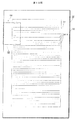
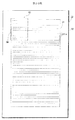
- FIG. 4 is an example of a document image.
- FIG. 5 is an example of layout information.
- FIG. 6 is an example of a document image.
- FIG. 7 is an example of layout information.
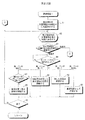
- 8 to 10 are flowcharts showing a part of the processing procedure of the mobile phone.
- 11 to 21 are examples of document images.
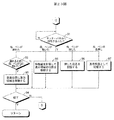
- 22 and 23 are flowcharts showing a part of the processing procedure of the mobile phone.
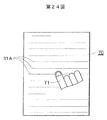
- FIG. 24 is an example of a display screen.
- FIG. 25 is an example of a document image.
- FIG. 1 shows an embodiment of the present invention and shows an outline of a document image communication system (an imaged document will be referred to as a document image).
- the document image communication system includes a mobile phone 1 and a document image server 20 that can communicate with each other via the Internet (not limited to the Internet but may be an in-house LAN: a local area network).
- the Internet not limited to the Internet but may be an in-house LAN: a local area network.
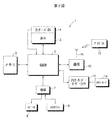
- FIG. 2 is a block diagram showing an electrical configuration of a mobile phone called a so-called smartphone. The overall operation of the mobile phone 1 is controlled by the control device 2.
- the mobile phone 1 is provided with a communication device 10 and an antenna 11 for communication with other mobile phones, access to the Internet, and the like.
- a program 12 that performs an operation described later is downloaded to the mobile phone 1 via the antenna 11.
- the mobile phone 1 is also provided with a memory card reader / writer 13.
- the program stored in the memory card 14 may be read using the memory card reader / writer 13 and the read program may be installed in the mobile phone 1.
- the mobile phone 1 is provided with a display device 3 for displaying a document, an image or the like on a display screen.
- a touch panel 4 is formed on the display screen of the display device 3.
- the mobile phone 1 By touching the touch panel 4 formed on the display screen, the user can give various commands to the mobile phone 1.
- the mobile phone 1 also includes a memory 5 in which programs and predetermined data are stored.
- the cellular phone 1 includes a speaker 8 and a microphone 9.
- the audio signal is amplified by the amplifier circuit 7 and given to the speaker 8.
- sound is output from the speaker 8.
- a sound signal representing sound input from the microphone 9 is amplified by the amplifier circuit 7 and input to the control device 2.
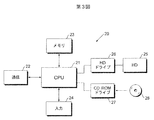
- FIG. 3 is a block diagram showing an electrical configuration of the document image server 20.
- the overall operation of the document image server 20 is controlled by the CPU 21.
- the document image server 21 includes a communication device 22 for accessing the Internet, a memory 23 for storing predetermined data, an input device 24 such as a keyboard, a hard disk 25, a hard disk drive 26 for accessing the hard disk 25, and a CD.
- a ROM (compact disk-read only memory) drive 27 is included.
- a CD-ROM 28 in which a program for controlling operations to be described later is stored is loaded in the CD-ROM drive 27, and the program is read.
- the read program is installed in the document image server 20. However, the program may be received via the Internet without being stored in a recording medium such as the CD-ROM 28.
- a text file representing the document is stored in the hard disk 25.
- a text file is read from the hard disk 25 and converted by the CPU 21 into a document image file representing a document image.
- the converted document image file is also stored in the hard disk 25.
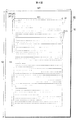
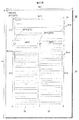
- FIG. 4 is an example of the document image 30.
- a text display area 31 in which an imaged text 31A is displayed is formed.
- the arrangement order (vertical writing or horizontal writing) of the sentences displayed in the sentence display area 31 is horizontal writing.
- a margin 32 is formed around the text display area 31.
- the sentence 31A is represented by a straight line. Also, since the sentence 31A shown in FIG.
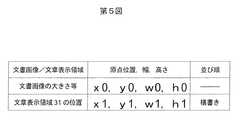
- FIG. 4 shows layout information on the document image 30 shown in FIG. Layout information is generated for each document image.
- the layout information includes the origin position, width, and height of the document image 30 and the text display area 31 and the order of text in the text display area 31.
- the layout information can be generated using a text file before the document image 30 is imaged.
- the layout information is stored in the header of the document image file representing the document image 30, but may be a separate file. In the case of a separate file, a file name partially shared with the file name of the document image file is given to the file representing the layout information so that it can be understood that the layout information corresponds to the document image 30. It will be stored in a common folder.
- FIG. 6 is an example of the document image 33.
- the coordinates, width, and height of the origin of the document image 33 are (x0, y0), w0, and h0, similarly to the coordinates of the origin of the document image 30 shown in FIG.
- the coordinates, width or height of the origin are not necessarily the same.
- a first sentence display area 34, a second sentence display area 35, and a third sentence display area 36 are formed.
- the first sentence display area 34, the second sentence display area 35, and the third sentence display area 36 also include the imaged sentences 34A, 35A, and 36A. These sentences 34A, 35A and 36A are also written horizontally and are represented by straight lines in the horizontal direction.
- the coordinates, width and height of the origin of the first text display area 34 are (x11, y11), w11 and h11.
- the coordinates, width and height of the origin of the second text display area 35 are (x12, y12), w12 and h12.
- the coordinates, width, and height of the origin of the third sentence display area 36 are (x13, y13), w13, and h13.
- the arrangement order of the sentences 34A, 35A and 36A included in the first, second and third sentence display areas 34, 35 and 36 is all horizontal as described above.
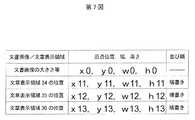
- FIG. 7 shows the layout information of the document image 33. Similar to the layout information shown in FIG.
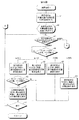
- 8 and 9 are flowcharts showing the processing procedure of the mobile phone 1. 4 is requested from the cellular phone 1 to the document image server 20, and the cellular phone 1 receives a document image file representing the document image 30 and having layout information stored in the header. Shall.
- the display area (the part of the document image 30 in the display area is displayed on the display screen of the cellular phone 1) is positioned at the initial position of the document image 30 (step). 41).
- the initial position of the document image 30 is the upper left of the sentence display area 31 because the order of the sentences included in one sentence display area 31 included in the document image 30 is horizontal writing.
- FIG. 10 shows the document image 30. It is assumed that the display area 60 is at a position indicated by reference numeral 61. The document image 30 in the display area 60 is displayed on the display screen of the mobile phone 1.
- FIG. 11 is an example of the display screen 70 of the mobile phone 1. As shown in FIG. 10, when the display area 60 is at the position indicated by reference numeral 61, the document image 30 in the display area 60 at the position indicated by reference numeral 61 is displayed as shown in FIG. become. Also in FIG.
- the sentence 31A is represented by a horizontal straight line.
- the display area 60 also moves in the right direction, left direction, up direction or in proportion to the amount of movement. Move downward. As shown in FIG. 11, it is assumed that the finger 71 moves rightward on the touch panel 4 (scroll command in the character arrangement direction corresponding to the character arrangement order). Then, in the document image 30 shown in FIG. 10, the display area 60 moves rightward from the position indicated by reference numeral 61 (movement in the character arrangement direction) and moves to the position indicated by reference numeral 62. Then, the document image 30 in the display area 60 moved to the position indicated by the reference numeral 62 is displayed on the display screen 70 as shown in FIG.
- the display area 60 further moves to the right, and moves to a position indicated by reference numeral 63 in the document image 30 shown in FIG.
- the document image 30 in the display area 60 moved to the position indicated by reference numeral 63 is displayed.
- FIG. 14 when the finger 71 is released from the touch panel 4 (YES in step 46 in FIG. 8), a reference position movement command is generated, and the left side of the display area 60 matches the left end of the text display area 31.
- the display area 60 moves to the left so as to (reference position) (step 47 in FIG. 8).
- display area 60 that was at the position indicated by reference numeral 63 is returned to the position indicated by reference numeral 61.
- the document image 30 in the display area 60 at the position indicated by the reference numeral 61 is displayed on the display screen 70.
- the processing of the mobile phone 1 ends (step 51 in FIG. 8).
- the order of sentences in the sentence display area 31 is vertical writing (step 43 in FIG. 8).
- the arrangement order is horizontal writing, it is determined whether or not the finger or pen has moved on the touch panel 4 (step 52 in FIG. 9).
- the display area 60 moves in the direction in which the finger and pen move on the touch panel 4, and the document image in the display area 60 is displayed on the display screen 70 (steps 53, 57, 58, 59 in FIG. 9). ).
- the text order is vertical writing, when the touch pen, finger, etc. move downward (scroll command in the text order direction), if the touch pen, finger, etc. move away from the touch panel 4 (Step 9 in FIG. 9)
- a reference position movement command is generated, and the display area 60 is moved so that the upper side of the display area 60 coincides with the upper end of the text display area (reference position) (Step 55 in FIG. 9). . If the end command is not given (NO in step 56 in FIG. 9), the process from step 43 in FIG.
- the initial position of the display area 60 is the upper right of the sentence display area 31, the upper right vertex of the display area 60 and the upper right of the sentence display area 31.
- the display area 60 is positioned so that the vertices coincide.
- the display area 60 is moved to the reference position, but the display area 60 is moved to the reference position except when the finger (or touch pen) is separated from the touch panel 4. Also good.
- FIG. 16 is an example of the display screen 70.
- FIG. 16 shows a state where the finger 71 flicks the touch panel 4. In this way, when the finger 71 (or touch pen) is used to flick leftward (upward if the text displayed on the display screen 70 is vertical writing), the display area 60 is moved to the reference position. You may be made to do.
- FIG. 17 is also an example of a display screen. FIG. 17 shows a state where the lower left of the display screen 70 is tapped. As described above, when the corner of the touch panel 4 formed on the display screen 70 is tapped with the finger 71 (or touch pen), the display area 60 may be moved to the reference position. .
- FIG. 18 shows the document image 30.
- the display area 60 is moved to the left end of the text display area 31, which is the reference position, by moving the finger 71 away from the touch panel 4 (x of the upper left vertex of the display area 60)
- the reference position is not limited to the left end of the text display area 31, but may be another position.
- FIG. 19 shows a document image 30. In FIG. 19, the reference position is not the left end of the text display area 31 but the left end of the document image 30.
- the left side of the display area 60 may coincide with the left end of the document image 30 by, for example, releasing the finger 71 from the touch panel 4.
- the x coordinate of the upper left vertex of the display area 60 only needs to be equal to the x coordinate of the origin of the document image 30.
- the upper side of the display area 60 may coincide with the upper end of the document image 30.
- the layout information includes not only the origin of the document image and the text display area, but also the width and height of the document image and the text display area, respectively, the display area is defined using the width and height. Alternatively, positioning may be performed at the four corners of the text display area or so as to be in contact with the four sides.
- FIG. 20 also shows the document image 30. In FIG.
- the reference position is the initial position.
- the upper left vertex of the display area 60 may coincide with the upper left origin of the text display area 31 by, for example, releasing the finger 71 from the touch panel 4.
- the upper right vertex of the display area 60 will coincide with the upper right origin of the text display area 31.
- FIG. 21 shows a document image 33.
- the document image 33 includes the first, second, and third sentence display areas 34, 35, and 36. It is assumed that the display area 60 is located at the right end of the third sentence display area 34 as indicated by reference numeral 67.
- the left side of the display area 60 coincides with the left end of the third sentence display area 36 where the display area 60 is located.
- the display area 60 is moved.
- the reference position may be determined so that the left side (right side) of 60 coincides, and the display area 60 may be positioned at the reference position.
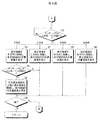
- FIG. 22 and FIG. 23 show another embodiment and are flowcharts showing the processing procedure of the mobile phone 1. This processing procedure is when the finger, touch pen, etc. are separated from the touch panel 4 and the finger, touch pen, etc.
- the display area 60 is positioned at the initial position of the document image 30 (for example, the upper left position of the text display area 31) (step 81), and the document image 30 in the display area 60 is displayed on the mobile phone 1. It is displayed on the screen 70 (step 82).
- step 83 It is determined whether the order of sentences in the display area 60 is horizontal writing or vertical writing (step 83). Since the sentences in the sentence display area 31 where the display area 60 is located are written horizontally, the arrangement order of the sentences in the display area 60 is determined to be written horizontally.
- the operation is an operation in which the finger, the touch pen, etc. are separated from the touch panel 4, or an operation in which the finger, the touch pen moves on the touch panel 4. It is determined whether the touch panel 4 is touched with a finger or a touch pen, or the touch panel 4 is pressed for a certain time or longer.
- a scroll operation is performed using a finger, a touch pen, etc., first, the finger, the touch pen, etc. touch the touch panel 4.
- the contact position is stored (step 89). Subsequently, when the finger and the touch pen are moved in contact with the touch panel 4 for scrolling, the amount of movement is calculated, and the position of the display area 60 is moved in accordance with the calculated amount of movement ( Step 88).
- the display area 60 may be moved by the movement amount of the finger and touch pen, or a movement amount that is several times the movement amount of the finger and touch pen may be used as the movement amount of the display area 60.
- the document image 30 in the moving display area 60 and the moved display area 60 is displayed on the display screen 70.
- FIG. 24 shows an example of the display screen 70
- FIG. 25 shows the document image 30.
- the display screen 70 touch panel 4
- coordinates (xc, yc) indicating the long-pressed position are stored as the reference position.
- the display area is moved so as to be the center of the screen 70 (step 86 in FIG. 22).
- the user's desired location can be designated as the reference position.
- the touched position is stored (step 96 in FIG. 23).
- the movement amount of the display area 60 is calculated from the movement amount, and the display area moves by the calculated movement amount (step 95 in FIG. 23). ). Scrolling will be performed.
- the coordinates of the long pressed position are stored as the coordinates of the reference position (step 97 in FIG. 23).
- the display area 60 is moved to the reference position (step in FIG. 23). 93). If the coordinates of the reference position are stored by the long press of the finger or the touch pen, the display area 60 is moved to the reference position. If the long press of the finger or the touch pen is not performed, it is determined in advance. The display area 60 is moved to the reference position (when the document image is vertically written, such as the upper right). If the end command is not given (FIG. 23, step 94), the above-described processing is repeated.
Landscapes
- Engineering & Computer Science (AREA)
- General Engineering & Computer Science (AREA)
- Theoretical Computer Science (AREA)
- Human Computer Interaction (AREA)
- Physics & Mathematics (AREA)
- General Physics & Mathematics (AREA)
- User Interface Of Digital Computer (AREA)
- Telephone Function (AREA)
- Controls And Circuits For Display Device (AREA)
Abstract
スクロール操作を簡単にする。このために,画像化された文書画像うち,表示領域内の部分が携帯電話の表示画面に表示される。表示画面上に形成されているタッチ・パネル上を指が上,下,左または右方向に動くと,表示領域もそれらの方向に動き,スクロールされる。指がタッチ・パネルから離れると,文書画像に含まれる文章表示領域の左端(基準位置)に表示領域が移動させられる。表示領域が基準位置に移動するので,スクロール操作が簡単となる。
Description
この発明は,文書画像表示装置ならびにその動作制御方法およびその動作プログラムに関する。
画像化された文書がスマートフォンなどのような携帯電話の表示画面に表示される場合には,その文書を読むためにスクロールすることがある。表示画面にタッチ・パネルが形成されている携帯電話では,タッチ・パネル上を指などで動かすことによりスクロール指令が携帯電話に与えられる。タッチ・パネルで多くの命令を実行できるようにするためにあらかじめ,タップ,はねる,ドラッグの3種類を設定し,動作状態パターンにしたがって命令の選択を行うものがある(特開平10−269021号公報)。
しかしながら,スクロール操作の向上については考えられていない。
しかしながら,スクロール操作の向上については考えられていない。
この発明は,スクロール操作を向上させることを目的とする。
この発明による文書画像表示装置は,画像化された文書のうち表示領域内の部分を表示画面に表示する表示装置,画像化された文書の文字の並び順に対応した文字並び方向へのスクロール指令が与えられている間,上記表示領域を上記文字並び方向に移動する第1の表示領域移動手段(第1の表示領域移動デバイス),および基準位置移動指令に応じて,上記表示領域を基準位置に移動する第2の表示領域移動手段(第2の表示領域移動デバイス)を備えていることを特徴とする。
この発明は,上記文書画像表示装置に適した動作制御方法も提供している。すなわち,この方法は,表示装置が,画像化された文書のうち表示領域内の部分を表示画面に表示し,第1の表示領域移動手段が,画像化された文書の文字の並び順に対応した文字並び方向へのスクロール指令が与えられている間,上記表示領域を上記文字並び方向に移動し,第2の表示領域移動手段が,基準位置移動指令に応じて,上記表示領域を基準位置に移動するものである。
この発明は,上記文書画像表示装置の動作制御方法を実施するためのコンピュータが読み取り可能なプログラムも提供している。そのようなプログラムを格納した記録媒体も提供するようにしてもよい。
この発明によると,画像化された文書のうち表示領域内の部分が表示画面に表示される。画像化された文書の文字の並び順(横書きまたは縦書き)に対応した文字並び方向(たとえば,文字の並び順が横書きであれば左から右方向,文字の並び順が縦書きであれば上から下方向)へのスクロール指令が与えられると,そのスクロール指令が与えられている間,表示領域が文字並び方向に移動させられる。基準位置移動指令が与えられると,表示領域は基準位置に移動させられる。スクロール指令が与えられている間は,表示領域が文字並び方向に移動させられるので,スクロール指令に応じたスクロールが行われる。基準位置移動指令が与えられると,表示領域は基準位置に移動させられるので,画像化された文書の基準となる部分が表示されることとなる。表示画面に,画像化された文書の基準となる部分を表示させることができるようになる。スクロール操作が向上する。
上記表示画面上に形成されているタッチ・パネル,上記タッチ・パネル上を指またはタッチ・ペンで文字並び方向に動かすことにより上記文書画像表示装置にスクロール指令を与えるスクロール指令発生手段(スクロール指令発生デバイス),および指またはタッチ・ペンが上記タッチ・パネル上を動いた後に指またはタッチ・ペンが上記タッチ・パネルから離れる,指またはタッチ・ペンが上記タッチ・パネルから離れる場合に文字並び方向と逆方向に指またはタッチ・ペンが動く,あるいは指またはタッチ・ペンが上記タッチ・パネルから離れた後に一定時間内に再び上記タッチ・パネルに接したことに応じて,上記基準位置移動指令を発生する基準位置移動指令発生手段(基準位置移動指令発生デバイス)をさらに備えてもよい。
上記第2の表示領域移動手段は,たとえば,画像化された文書のうち,上記表示領域が位置している部分の文字の並び順が横書きの場合には,基準位置移動指令が発生したことに応じて,上記表示領域の左辺が,画像化された文書のうち余白を除く文章表示領域の左端,画像化された文書の左端,上記文章表示領域の左端の上部または上記表示領域が位置している上記文章表示領域の左端となるように上記表示領域を移動させる,あるいは画像化された文書のうち,上記表示領域が位置している部分の文字の並び順が縦書きの場合には,基準位置移動指令が発生したことに応じて上記表示領域の上辺が,上記文章表示領域の上端,画像化された文書の上端上記文章表示領域の上端の左部または上記表示領域が位置している上記文章表示領域の上端となるように上記表示領域を移動させるものである。
この発明による文書画像表示装置は,画像化された文書のうち表示領域内の部分を表示画面に表示する表示装置,画像化された文書の文字の並び順に対応した文字並び方向へのスクロール指令が与えられている間,上記表示領域を上記文字並び方向に移動する第1の表示領域移動手段(第1の表示領域移動デバイス),および基準位置移動指令に応じて,上記表示領域を基準位置に移動する第2の表示領域移動手段(第2の表示領域移動デバイス)を備えていることを特徴とする。
この発明は,上記文書画像表示装置に適した動作制御方法も提供している。すなわち,この方法は,表示装置が,画像化された文書のうち表示領域内の部分を表示画面に表示し,第1の表示領域移動手段が,画像化された文書の文字の並び順に対応した文字並び方向へのスクロール指令が与えられている間,上記表示領域を上記文字並び方向に移動し,第2の表示領域移動手段が,基準位置移動指令に応じて,上記表示領域を基準位置に移動するものである。
この発明は,上記文書画像表示装置の動作制御方法を実施するためのコンピュータが読み取り可能なプログラムも提供している。そのようなプログラムを格納した記録媒体も提供するようにしてもよい。
この発明によると,画像化された文書のうち表示領域内の部分が表示画面に表示される。画像化された文書の文字の並び順(横書きまたは縦書き)に対応した文字並び方向(たとえば,文字の並び順が横書きであれば左から右方向,文字の並び順が縦書きであれば上から下方向)へのスクロール指令が与えられると,そのスクロール指令が与えられている間,表示領域が文字並び方向に移動させられる。基準位置移動指令が与えられると,表示領域は基準位置に移動させられる。スクロール指令が与えられている間は,表示領域が文字並び方向に移動させられるので,スクロール指令に応じたスクロールが行われる。基準位置移動指令が与えられると,表示領域は基準位置に移動させられるので,画像化された文書の基準となる部分が表示されることとなる。表示画面に,画像化された文書の基準となる部分を表示させることができるようになる。スクロール操作が向上する。
上記表示画面上に形成されているタッチ・パネル,上記タッチ・パネル上を指またはタッチ・ペンで文字並び方向に動かすことにより上記文書画像表示装置にスクロール指令を与えるスクロール指令発生手段(スクロール指令発生デバイス),および指またはタッチ・ペンが上記タッチ・パネル上を動いた後に指またはタッチ・ペンが上記タッチ・パネルから離れる,指またはタッチ・ペンが上記タッチ・パネルから離れる場合に文字並び方向と逆方向に指またはタッチ・ペンが動く,あるいは指またはタッチ・ペンが上記タッチ・パネルから離れた後に一定時間内に再び上記タッチ・パネルに接したことに応じて,上記基準位置移動指令を発生する基準位置移動指令発生手段(基準位置移動指令発生デバイス)をさらに備えてもよい。
上記第2の表示領域移動手段は,たとえば,画像化された文書のうち,上記表示領域が位置している部分の文字の並び順が横書きの場合には,基準位置移動指令が発生したことに応じて,上記表示領域の左辺が,画像化された文書のうち余白を除く文章表示領域の左端,画像化された文書の左端,上記文章表示領域の左端の上部または上記表示領域が位置している上記文章表示領域の左端となるように上記表示領域を移動させる,あるいは画像化された文書のうち,上記表示領域が位置している部分の文字の並び順が縦書きの場合には,基準位置移動指令が発生したことに応じて上記表示領域の上辺が,上記文章表示領域の上端,画像化された文書の上端上記文章表示領域の上端の左部または上記表示領域が位置している上記文章表示領域の上端となるように上記表示領域を移動させるものである。
第1図は,文書画像通信システムの概要である。
第2図は,携帯電話の電気的構成を示すブロック図である。
第3図は,文書画像サーバの電気的構成を示すブロック図である。
第4図は,文書画像の一例である。
第5図は,レイアウト情報の一例である。
第6図は,文書画像の一例である。
第7図は,レイアウト情報の一例である。
第8図から第10図は,携帯電話の処理手順の一部を示すフローチャートである。
第11図から第21図は,文書画像の一例である。
第22図および第23図は,携帯電話の処理手順の一部を示すフローチャートである。
第24図は,表示画面の一例である。
第25図は,文書画像の一例である。
第2図は,携帯電話の電気的構成を示すブロック図である。
第3図は,文書画像サーバの電気的構成を示すブロック図である。
第4図は,文書画像の一例である。
第5図は,レイアウト情報の一例である。
第6図は,文書画像の一例である。
第7図は,レイアウト情報の一例である。
第8図から第10図は,携帯電話の処理手順の一部を示すフローチャートである。
第11図から第21図は,文書画像の一例である。
第22図および第23図は,携帯電話の処理手順の一部を示すフローチャートである。
第24図は,表示画面の一例である。
第25図は,文書画像の一例である。
第1図は,この発明の実施例を示すもので,文書画像(画像化された文書を文書画像ということにする)通信システムの概要を示している。
この実施例による文書画像通信システムには,インターネット(インターネットに限らず社内LAN:ローカル・エリア・ネットワークなどでもよい)を介して互いに通信可能な携帯電話1および文書画像サーバ20が含まれている。携帯電話1からの要求に応じて,文書画像サーバ20から携帯電話1に文書画像を表わすファイルが送信される。
第2図は,いわゆるスマートフォンと呼ばれる携帯電話の電気的構成を示すブロック図である。
携帯電話1の全体の動作は,制御装置2によって統括される。
携帯電話1には,他の携帯電話との通信,インターネットへのアクセス等のための通信装置10およびアンテナ11が設けられている。アンテナ11を介して後述する動作を行うプログラム12が携帯電話1にダウンロードされる。ダウンロードされたプログラム12が携帯電話1にインストールされることにより,携帯電話1は後述する動作を行う。携帯電話1にメモリ・カード・リーダ・ライタ13も設けられている。メモリ・カード14に格納されたプログラムが,メモリ・カード・リーダ・ライタ13を用いて読み取られ,読み取られたプログラムが携帯電話1にインストールされるようにしてもよい。
さらに,携帯電話1には,表示画面に文書,画像などを表示するための表示装置3が設けられている。表示装置3の表示画面には,タッチ・パネル4が形成されている。表示画面上に形成されているタッチ・パネル4をタッチすることにより,ユーザは,携帯電話1に様々な指令を与えることができる。
携帯電話1には,プログラム,所定のデータが格納されるメモリ5も含まれている。さらに,携帯電話1には,スピーカ8およびマイクロフォン9も含まれている。音声信号は,増幅回路7によって増幅されてスピーカ8に与えられる。これよりスピーカ8から音声が出力される。また,マイクロフォン9から入力した音声を表わす音声信号は,増幅回路7によって増幅されて制御装置2に入力する。
小さな表示画面に文書画像を表示する場合には,その表示画面に文書画像のすべてを表示してしまうと文書画像の文字が小さくなってしまい,文字が読めなくなる。このために,表示画面には文書画像の一部を表示し,表示画面に表示されない文書画像の部分を表示画面に表示させるためにスクロールが行われる。
第3図は,文書画像サーバ20の電気的構成を示すブロック図である。
文書画像サーバ20の全体の動作は,CPU21によって統括される。
文書画像サーバ21には,インターネットにアクセスするための通信装置22,所定のデータ等を記憶するメモリ23,キーボードなどの入力装置24,ハードディスク25,ハードディスク25にアクセスするためのハードディスク・ドライブ26およびCD−ROM(コンパクトディスク−リードオンリ・メモリ)ドライブ27が含まれている。後述する動作を制御するプログラムが格納されたCD−ROM28がCD−ROMドライブ27に装填され,そのプログラムが読み取られる。読み取られたプログラムが文書画像サーバ20にインストールされる。もっともプログラムは,CD−ROM28のような記録媒体に格納されていずに,インターネットを介して受信してもよい。
文書を表わすテキスト・ファイルはハードディスク25に格納されている。ハードディスク25からテキスト・ファイルが読み取られ,CPU21によって文書画像を表わす文書画像ファイルに変換される。変換された文書画像ファイルもハードディスク25に格納される。
第4図は,文書画像30の一例である。
文書画像30には,画像化された文章31Aが表示されている文章表示領域31が形成されている。文章表示領域31に表示されている文章の並び順(縦書き,または横書き)は横書きである。文章表示領域31に周りには余白32が形成されている。文章31Aは直線で表わされている。また,第4図において表わされている文章31Aは横書きであるので,横書きであることを示すために横方向の直線で表わされている。
文書画像30の原点を,文書画像30の左上の頂点とすると,その原点の座標は(x0,y0)で表わされる。文書画像30の幅はw0,高さはh0である。文章表示領域31の原点を,文章表示領域31の左上の頂点とすると,その原点の座標は(x1,y1)で表わされる。文章表示領域31の幅はw1,高さはh1である。
第5図は,第4図に示す文書画像30についてのレイアウト情報を示している。
レイアウト情報は,文書画像ごとに生成される。レイアウト情報には,文書画像30および文章表示領域31のそれぞれの原点位置,幅,および高さならびに文章表示領域31の文章の並び順が含まれている。
レイアウト情報は,文書画像30が画像化される前のテキスト・ファイルを利用して生成することができる。レイアウト情報は,文書画像30を表わす文書画像ファイルのヘッダに格納されるが,別ファイルとしてもよい。別ファイルとした場合には,文書画像30に対応するレイアウト情報であることが分るように,文書画像ファイルのファイル名と一部共通のファイル名がレイアウト情報を表わすファイルに付与される,あるいは共通のフォルダに格納されるようになろう。
第6図は,文書画像33の一例である。
文書画像33の原点の座標,幅および高さは,第4図に示した文書画像30の原点の座標と同様に,(x0,y0),w0およびh0である。原点の座標,幅または高さは必ずしも同じでなくともよい。
文書画像33には,第1の文章表示領域34,第2の文章表示領域35および第3の文章表示領域36が形成されている。第1の文章表示領域34,第2の文章表示領域35および第3の文章表示領域36のそれぞれにも画像化された文章34A,35Aおよび36Aが含まれている。これらの文章34A,35Aおよび36Aも横書きであり,横方向の直線で表わされている。第1の文章表示領域34の原点の座標,幅および高さは,(x11,y11),w11およびh11である。第2の文章表示領域35の原点の座標,幅および高さは,(x12,y12),w12およびh12である。第3の文章表示領域36の原点の座標,幅および高さは,(x13,y13),w13およびh13である。第1,第2および第3の文章表示領域34,35および36に含まれる文章34A,35Aおよび36Aの並び順は,上述のようにすべて横書きである。
第7図は,文書画像33のレイアウト情報を示している。
第5図に示したレイアウト情報と同様に,文書画像33,第1の文章表示領域34,第2の文章表示領域35および第3の文章表示領域35のそれぞれについて,原点位置,幅および高さが格納されている。また,第1,第2および第3の文章表示領域33,34および35のそれぞれについて並び順が格納されている。
第6図に示す第1,第2および第3の文章表示領域33,34および35に含まれている文章33A,34Aおよび35Aの並び順はすべて横書きであるが,領域に応じて並び順が縦書きに変わってもよい。
上述した文書画像30,33などを作成するための文書の画像化,レイアウト情報の生成は,文書画像サーバ20においてあらかじめ行われている。もっとも,文書の画像化,レイアウト情報の生成を文書画像サーバ20において行われなくとも,携帯電話1において行われるようにしてもよい。
第8図および第9図は,携帯電話1の処理手順を示すフローチャートである。
携帯電話1から文書画像サーバ20に,第4図に示す文書画像30がリクエストされ,その文書画像30を表わし,かつレイアウト情報がヘッダに格納されている文書画像ファイルが携帯電話1において受信されたものとする。
携帯電話1に文書画像ファイルが受信されると,表示領域(表示領域内の文書画像30の部分が携帯電話1の表示画面に表示される)が文書画像30の初期位置に位置決めされる(ステップ41)。文書画像30の初期位置は,文書画像30に含まれる一つの文章表示領域31に含まれる文章の並び順が横書きであるから,その文章表示領域31の左上となる。文書画像30のレイアウト情報を利用して,表示領域の左上の頂点が文章表示領域31の原点と一致するように表示領域が位置決めされる。表示領域内の文書画像が携帯電話1の表示画面に表示される(ステップ42)。
第10図は,文書画像30を示している。
表示領域60が符号61で示す位置にあるものとする。携帯電話1の表示画面には,表示領域60内の文書画像30が表示される。
第11図は,携帯電話1の表示画面70の一例である。
第10図に示すように,表示領域60が符号61で示す位置にある場合には,第11図に示すように符号61で示す位置にある表示領域60内の文書画像30が表示されるようになる。第11図においても文章31Aが横方向の直線で表わされている。
第8図に戻って,表示領域60内の文章の並び順が横書きか縦書きかが判定される(ステップ43)。
文章表示領域31の文章の並び順は横書きであるから,つづいて,タッチ・パネル4上を指,タッチ・ペンなどが動いたかどうかが判定される(ステップ44)。指,タッチ・ペンなどが動いた方向に表示領域60が動き,表示領域60内の文書画像30が表示画面70上に表示される(ステップ45,48,49,50)。指,タッチ・ペンなどがタッチ・パネル4上に右方向,左方向,上方向または下方向に動いたとすると,その動いた量に比例して表示領域60も右方向,左方向,上方向または下方向に動く。
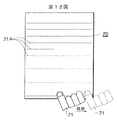
第11図に示すように,指71がタッチ・パネル4上を右方向に移動したものとする(文字の並び順に対応した文字並び方向へのスクロール指令)。すると,第10図に示す文書画像30において,表示領域60が符号61で示す位置から右方向に移動し(文字並び方向への移動),符号62で示す位置に移動する。すると,表示画面70には,第12図に示すように,符号62で示す位置に移動した表示領域60内の文書画像30が表示されることとなる。
タッチ・パネル4上から指が離れずに(第8図ステップ46),第12図で示すように,タッチ・パネル4上を指71が右方向に動くと(第8図ステップ44,45),表示領域60はさらに右方向に移動し,第10図に示す文書画像30において符号63で示す位置に移動する。表示画面70には,第13図で示すように,符号63で示す位置に移動した表示領域60内の文書画像30が表示されることとなる。
第14図で示すように,タッチ・パネル4から指71が離れると(第8図ステップ46でYES),基準位置移動指令が発生し,表示領域60の左辺が文章表示領域31の左端と一致(基準位置)するように表示領域60が左方向に移動する(第8図ステップ47)。第10図を参照して,符号63で示す位置にあった表示領域60は,符号61で示す位置に戻される。これにより,表示画面70には,第15図に示すように,符号61で示す位置にある表示領域60内の文書画像30が表示されるようになる。
携帯電話1に終了指令が与えられると,携帯電話1の処理は終了する(第8図ステップ51)。
文章表示領域31の文章の並び順が縦書きだったとする(第8図ステップ43)。すると,その並び順が横書きだった場合と同様に,タッチ・パネル4上を指,ペンが動いたかどうかが判定される(第9図ステップ52)。タッチ・パネル4上を指,ペンが動いた方向に表示領域60が動き,表示領域60内の文書画像が表示画面70に表示されるようになる(第9図ステップ53,57,58,59)。
文章の並び順が縦書きの場合には,タッチ・ペン,指などが下方向に移動(文字並び方向へのスクロール指令)した場合において,タッチ・ペン,指などがタッチ・パネル4から離れると(第9図ステップ54),基準位置移動指令が発生し,表示領域60の上辺が文章表示領域の上端と一致(基準位置)するように表示領域60が移動させられる(第9図ステップ55)。終了指令が与えられなければ(第9図ステップ56でNO),第8図ステップ43の処理から繰り返される。
文章表示領域31に含まれる文章の並び順が縦書きの場合には,表示領域60の初期位置は,文章表示領域31の右上となり,表示領域60の右上の頂点と文章表示領域31の右上の頂点とが一致するように表示領域60が位置決めされる。
上述の実施例では,指(またはタッチ・ペン)が右方向または下方向に動いた後に指(またはタッチ・ペン)がタッチ・パネル4上から離れると(第8図ステップ46でYES,第9図ステップ54でYES),表示領域60が基準位置に移動させられるが,指(またはタッチ・ペン)がタッチ・パネル4上から離れる場合以外に表示領域60が基準位置に移動させられるようにしてもよい。
第16図は,表示画面70の一例である。
第16図は,指71でタッチ・パネル4上をフリックしている様子を示している。このように指71(またはタッチ・ペン)で左方向(表示画面70に表示されている文章が縦書きの場合には上方向)にフリックされた場合に,表示領域60が基準位置に移動させられるようにしてもよい。
第17図も表示画面の一例である。
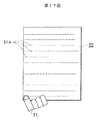
第17図は,表示画面70の左下をタップしている様子を示している。このように,指71(またはタッチ・ペン)で表示画面70上に形成されているタッチ・パネル4の隅をタップされた場合に,表示領域60が基準位置に移動させられるようにしてもよい。
さらに,一定時間(たとえば1秒)以内に複数回,表示画面70上に形成されているタッチ・パネル4をタップした場合に,表示領域60が基準位置に移動させられるようにしてもよい。
第18図は,文書画像30を示している。
上述した実施例では,タッチ・パネル4から指71が離されるなどにより,表示領域60は基準位置である,文章表示領域31の左端に移動させられている(表示領域60の左上の頂点のx座標が文章表示領域31の原点のx座標と等しくなればよい)が,基準位置は文章表示領域31の左端に限らず,他の位置でもよい。
第19図は,文書画像30を示している。
第19図では,基準位置は文章表示領域31の左端ではなく,文書画像30の左端となっている。上述のように,タッチ・パネル4から指71が離されるなどにより,表示領域60の左辺が文書画像30の左端と一致するようにしてもよい。表示領域60の左上の頂点のx座標が文書画像30の原点のx座標と等しくなればよい。並び順が縦書きの場合には,表示領域60の上辺が文書画像30の上端と一致するようにしてもよい。さらにレイアウト情報には,文書画像および文章表示領域の原点だけでなく,文書画像および文章表示領域の幅および高さもそれぞれ含まれているので,これらの幅および高さを用いて表示領域を文書画像または文章表示領域の四隅に位置決めまたは四辺に接するように位置決めすることもできる。
第20図も,文書画像30を示している。
第20図では,基準位置は初期位置とされている。上述のように,タッチ・パネル4から指71が離されるなどにより,表示領域60の左上の頂点が文章表示領域31の左上の原点と一致するようにしてもよい。並び順が縦書きの場合には,表示領域60の右上の頂点が文章表示領域31の右上の原点と一致するようになろう。
第21図は,文書画像33を示している。
上述したように,文書画像33には,第1,第2および第3の文章表示領域34,35および36が含まれている。表示領域60は符号67で示すように,第3の文章表示領域34の右端に位置しているものとする。そのような状態で,上述のようにタッチ・パネル4から指71が離されると,表示領域60の左辺が,その表示領域60が位置している第3の文章表示領域36の左端と一致するように,表示領域60が移動させられる。
文書画像33に含まれる第1,第2および第3の表示領域34,35および36のうち,もっとも左側(縦書きの場合右側)の位置する表示領域34または35の左端(右端)と表示領域60の左辺(右辺)とが一致するように基準位置を決定し,表示領域60をその基準位置に位置決めするようにしてもよい。さらに,文書画像33に含まれる第1,第2および第3の表示領域34,35および36のうち,もっとも上にある第1の表示領域34の左上(縦書きの場合右上)の原点と表示領域60の左上(右上)の頂点とが一致するように基準位置を決定し,表示領域60をその基準位置に位置決めするようにしてもよい。さらに,複数の文章表示領域34,35および36があった場合であっても,基準位置を文書画像33の左端,右端,左上の原点または右上の原点にしてもよい。
第22図および第23図は,他の実施例を示すもので,携帯電話1の処理手順を示すフローチャートである。この処理手順は,指,タッチ・ペンなどがタッチ・パネル4から離れる場合であって,指,タッチ・ペンなどが左方向(文章表示領域の文章が横書きの場合であり,文章表示領域の文章が縦書きの場合には上方向)に動いたときに,表示領域が基準位置に移動するものである。
携帯電話1からの要求に応じて,第4図に示す文書画像30を表わす文書画像ファイルが携帯電話1に送信されているものとする。第5図に示すレイアウト情報は,文書画像ファイルのヘッダに記録されているのはいうまでもない。
上述したのと同様に表示領域60が文書画像30の初期位置(例えば,文章表示領域31の左上の位置)に位置決めされ(ステップ81),表示領域60内の文書画像30が携帯電話1の表示画面70に表示される(ステップ82)。
表示領域60内の文章の並び順が横書きか縦書きかが判定される(ステップ83)。
表示領域60が位置している文章表示領域31の文章は横書きであるから,表示領域60内の文章の並び順は横書きと判断される。
タッチ・パネル4に操作があると(ステップ84),その操作が,タッチ・パネル4から指,タッチ・ペンなどが離れた操作か,タッチ・パネル4上を指,タッチ・ペンが動いた操作か,タッチ・パネル4に指,タッチ・ペンが接した操作か,タッチ・パネル4に指,タッチ・ペンが一定時間以上長押しされた操作かが判定される。
指,タッチ・ペンなどを用いてスクロール操作を行う場合には,まず,タッチ・パネル4上に指,タッチ・ペンなどが接する。すると,その接した位置が記憶される(ステップ89)。つづいて,スクロールのために指,タッチ・ペンがタッチ・パネル4に接したまま動かされると,その移動量が計算され,計算された移動量に応じて表示領域60の位置が移動される(ステップ88)。指,タッチ・ペンの移動量だけ表示領域60を移動してもよいし,指,タッチ・ペンの移動量の何倍かの移動量を表示領域60の移動量としてもよい。移動中の表示領域60および移動後の表示領域60内の文書画像30が表示画面70に表示される。
スクロールを終了させるために,指,タッチ・ペンがタッチ・パネル4から離れると,タッチ・パネル4から離れる時に指,タッチ・ペンが左方向に動いたかどうかが確認される(ステップ85)。表示画面70に表示されている文章が横書きであり,右方向にスクロールしている場合に,上述のように表示領域60を基準位置に移動させようとするときには,ユーザは,タッチ・パネル4から離れる時に指,タッチ・ペンを左方向に動くことが多いと考えられる。このために,タッチ・パネル4から離れる時に指,タッチ・ペンが左方向に動いた場合に(ステップ85でYES),表示領域60が基準位置に移動させられる(ステップ86)。これに対して,指,タッチ・ペンがタッチ・パネル4から離れた場合であっても,タッチ・パネル4から離れる時に指,タッチ・ペンが左方向に動いていなければ(ステップ85でNO),ユーザが表示領域60を基準位置に移動させたいとは考えていないと思われるので,表示領域60を基準位置に移動させる処理はスキップされる。
指,タッチ・ペンの長押し(一定時間以上のタッチ動作)があると,その長押しされた位置が基準位置として記憶される(ステップ90)。
第24図は,表示画面70の一例であり,第25図は,文書画像30を示している。
第24図に示すように,指71によって,表示画面70(タッチ・パネル4)が長押しされているものとする。すると,第25図に示すように,長押しされた位置を示す座標(xc,yc)が基準位置として記憶される。
基準位置を示す座標が記憶されていると,上述したようにタッチ・パネル4から指,タッチ・ペンが離れるときに左に動くと(第22図ステップ86),その記憶されている座標が表示画面70の中心となるように表示領域が移動させられる(第22図ステップ86)。ユーザの所望の場所を基準位置と指定できるようになる。
表示領域60内の文章が縦書きの場合であっても(第22図ステップ83),同様に,タッチ・パネル4に操作があったかどうかが判断される(第23図ステップ91)。
タッチ・パネル4に指,タッチ・ペンが接した場合には,その接した位置が記憶される(第23図ステップ96)。指,タッチ・ペンがタッチ・パネル4に接した状態で動くと,その移動量から表示領域60の移動量が計算され,計算された移動量の分だけ表示領域が動く(第23図ステップ95)。スクロールが行われることとなる。指,タッチ・ペンの長押しが行われると,その長押しされた位置の座標が基準位置の座標として記憶される(第23図ステップ97)。指,タッチ・ペンがタッチ・パネル4から離れる時に,指,タッチ・ペンが上方向に動くと(第23図ステップ92でYES),表示領域60が基準位置に移動させられる(第23図ステップ93)。指,タッチ・ペンの長押しにより基準位置の座標が記憶されていれば,その基準位置に表示領域60が移動させられ,指,タッチ・ペンの長押しが行われていなければ,あらかじめ定められている基準位置(文書画像が縦書きのときには,その右上など)に表示領域60が移動させられる。
終了指令が与えられなければ(第23図ステップ94),上述の処理が繰り返される。
この実施例による文書画像通信システムには,インターネット(インターネットに限らず社内LAN:ローカル・エリア・ネットワークなどでもよい)を介して互いに通信可能な携帯電話1および文書画像サーバ20が含まれている。携帯電話1からの要求に応じて,文書画像サーバ20から携帯電話1に文書画像を表わすファイルが送信される。
第2図は,いわゆるスマートフォンと呼ばれる携帯電話の電気的構成を示すブロック図である。
携帯電話1の全体の動作は,制御装置2によって統括される。
携帯電話1には,他の携帯電話との通信,インターネットへのアクセス等のための通信装置10およびアンテナ11が設けられている。アンテナ11を介して後述する動作を行うプログラム12が携帯電話1にダウンロードされる。ダウンロードされたプログラム12が携帯電話1にインストールされることにより,携帯電話1は後述する動作を行う。携帯電話1にメモリ・カード・リーダ・ライタ13も設けられている。メモリ・カード14に格納されたプログラムが,メモリ・カード・リーダ・ライタ13を用いて読み取られ,読み取られたプログラムが携帯電話1にインストールされるようにしてもよい。
さらに,携帯電話1には,表示画面に文書,画像などを表示するための表示装置3が設けられている。表示装置3の表示画面には,タッチ・パネル4が形成されている。表示画面上に形成されているタッチ・パネル4をタッチすることにより,ユーザは,携帯電話1に様々な指令を与えることができる。
携帯電話1には,プログラム,所定のデータが格納されるメモリ5も含まれている。さらに,携帯電話1には,スピーカ8およびマイクロフォン9も含まれている。音声信号は,増幅回路7によって増幅されてスピーカ8に与えられる。これよりスピーカ8から音声が出力される。また,マイクロフォン9から入力した音声を表わす音声信号は,増幅回路7によって増幅されて制御装置2に入力する。
小さな表示画面に文書画像を表示する場合には,その表示画面に文書画像のすべてを表示してしまうと文書画像の文字が小さくなってしまい,文字が読めなくなる。このために,表示画面には文書画像の一部を表示し,表示画面に表示されない文書画像の部分を表示画面に表示させるためにスクロールが行われる。
第3図は,文書画像サーバ20の電気的構成を示すブロック図である。
文書画像サーバ20の全体の動作は,CPU21によって統括される。
文書画像サーバ21には,インターネットにアクセスするための通信装置22,所定のデータ等を記憶するメモリ23,キーボードなどの入力装置24,ハードディスク25,ハードディスク25にアクセスするためのハードディスク・ドライブ26およびCD−ROM(コンパクトディスク−リードオンリ・メモリ)ドライブ27が含まれている。後述する動作を制御するプログラムが格納されたCD−ROM28がCD−ROMドライブ27に装填され,そのプログラムが読み取られる。読み取られたプログラムが文書画像サーバ20にインストールされる。もっともプログラムは,CD−ROM28のような記録媒体に格納されていずに,インターネットを介して受信してもよい。
文書を表わすテキスト・ファイルはハードディスク25に格納されている。ハードディスク25からテキスト・ファイルが読み取られ,CPU21によって文書画像を表わす文書画像ファイルに変換される。変換された文書画像ファイルもハードディスク25に格納される。
第4図は,文書画像30の一例である。
文書画像30には,画像化された文章31Aが表示されている文章表示領域31が形成されている。文章表示領域31に表示されている文章の並び順(縦書き,または横書き)は横書きである。文章表示領域31に周りには余白32が形成されている。文章31Aは直線で表わされている。また,第4図において表わされている文章31Aは横書きであるので,横書きであることを示すために横方向の直線で表わされている。
文書画像30の原点を,文書画像30の左上の頂点とすると,その原点の座標は(x0,y0)で表わされる。文書画像30の幅はw0,高さはh0である。文章表示領域31の原点を,文章表示領域31の左上の頂点とすると,その原点の座標は(x1,y1)で表わされる。文章表示領域31の幅はw1,高さはh1である。
第5図は,第4図に示す文書画像30についてのレイアウト情報を示している。
レイアウト情報は,文書画像ごとに生成される。レイアウト情報には,文書画像30および文章表示領域31のそれぞれの原点位置,幅,および高さならびに文章表示領域31の文章の並び順が含まれている。
レイアウト情報は,文書画像30が画像化される前のテキスト・ファイルを利用して生成することができる。レイアウト情報は,文書画像30を表わす文書画像ファイルのヘッダに格納されるが,別ファイルとしてもよい。別ファイルとした場合には,文書画像30に対応するレイアウト情報であることが分るように,文書画像ファイルのファイル名と一部共通のファイル名がレイアウト情報を表わすファイルに付与される,あるいは共通のフォルダに格納されるようになろう。
第6図は,文書画像33の一例である。
文書画像33の原点の座標,幅および高さは,第4図に示した文書画像30の原点の座標と同様に,(x0,y0),w0およびh0である。原点の座標,幅または高さは必ずしも同じでなくともよい。
文書画像33には,第1の文章表示領域34,第2の文章表示領域35および第3の文章表示領域36が形成されている。第1の文章表示領域34,第2の文章表示領域35および第3の文章表示領域36のそれぞれにも画像化された文章34A,35Aおよび36Aが含まれている。これらの文章34A,35Aおよび36Aも横書きであり,横方向の直線で表わされている。第1の文章表示領域34の原点の座標,幅および高さは,(x11,y11),w11およびh11である。第2の文章表示領域35の原点の座標,幅および高さは,(x12,y12),w12およびh12である。第3の文章表示領域36の原点の座標,幅および高さは,(x13,y13),w13およびh13である。第1,第2および第3の文章表示領域34,35および36に含まれる文章34A,35Aおよび36Aの並び順は,上述のようにすべて横書きである。
第7図は,文書画像33のレイアウト情報を示している。
第5図に示したレイアウト情報と同様に,文書画像33,第1の文章表示領域34,第2の文章表示領域35および第3の文章表示領域35のそれぞれについて,原点位置,幅および高さが格納されている。また,第1,第2および第3の文章表示領域33,34および35のそれぞれについて並び順が格納されている。
第6図に示す第1,第2および第3の文章表示領域33,34および35に含まれている文章33A,34Aおよび35Aの並び順はすべて横書きであるが,領域に応じて並び順が縦書きに変わってもよい。
上述した文書画像30,33などを作成するための文書の画像化,レイアウト情報の生成は,文書画像サーバ20においてあらかじめ行われている。もっとも,文書の画像化,レイアウト情報の生成を文書画像サーバ20において行われなくとも,携帯電話1において行われるようにしてもよい。
第8図および第9図は,携帯電話1の処理手順を示すフローチャートである。
携帯電話1から文書画像サーバ20に,第4図に示す文書画像30がリクエストされ,その文書画像30を表わし,かつレイアウト情報がヘッダに格納されている文書画像ファイルが携帯電話1において受信されたものとする。
携帯電話1に文書画像ファイルが受信されると,表示領域(表示領域内の文書画像30の部分が携帯電話1の表示画面に表示される)が文書画像30の初期位置に位置決めされる(ステップ41)。文書画像30の初期位置は,文書画像30に含まれる一つの文章表示領域31に含まれる文章の並び順が横書きであるから,その文章表示領域31の左上となる。文書画像30のレイアウト情報を利用して,表示領域の左上の頂点が文章表示領域31の原点と一致するように表示領域が位置決めされる。表示領域内の文書画像が携帯電話1の表示画面に表示される(ステップ42)。
第10図は,文書画像30を示している。
表示領域60が符号61で示す位置にあるものとする。携帯電話1の表示画面には,表示領域60内の文書画像30が表示される。
第11図は,携帯電話1の表示画面70の一例である。
第10図に示すように,表示領域60が符号61で示す位置にある場合には,第11図に示すように符号61で示す位置にある表示領域60内の文書画像30が表示されるようになる。第11図においても文章31Aが横方向の直線で表わされている。
第8図に戻って,表示領域60内の文章の並び順が横書きか縦書きかが判定される(ステップ43)。
文章表示領域31の文章の並び順は横書きであるから,つづいて,タッチ・パネル4上を指,タッチ・ペンなどが動いたかどうかが判定される(ステップ44)。指,タッチ・ペンなどが動いた方向に表示領域60が動き,表示領域60内の文書画像30が表示画面70上に表示される(ステップ45,48,49,50)。指,タッチ・ペンなどがタッチ・パネル4上に右方向,左方向,上方向または下方向に動いたとすると,その動いた量に比例して表示領域60も右方向,左方向,上方向または下方向に動く。
第11図に示すように,指71がタッチ・パネル4上を右方向に移動したものとする(文字の並び順に対応した文字並び方向へのスクロール指令)。すると,第10図に示す文書画像30において,表示領域60が符号61で示す位置から右方向に移動し(文字並び方向への移動),符号62で示す位置に移動する。すると,表示画面70には,第12図に示すように,符号62で示す位置に移動した表示領域60内の文書画像30が表示されることとなる。
タッチ・パネル4上から指が離れずに(第8図ステップ46),第12図で示すように,タッチ・パネル4上を指71が右方向に動くと(第8図ステップ44,45),表示領域60はさらに右方向に移動し,第10図に示す文書画像30において符号63で示す位置に移動する。表示画面70には,第13図で示すように,符号63で示す位置に移動した表示領域60内の文書画像30が表示されることとなる。
第14図で示すように,タッチ・パネル4から指71が離れると(第8図ステップ46でYES),基準位置移動指令が発生し,表示領域60の左辺が文章表示領域31の左端と一致(基準位置)するように表示領域60が左方向に移動する(第8図ステップ47)。第10図を参照して,符号63で示す位置にあった表示領域60は,符号61で示す位置に戻される。これにより,表示画面70には,第15図に示すように,符号61で示す位置にある表示領域60内の文書画像30が表示されるようになる。
携帯電話1に終了指令が与えられると,携帯電話1の処理は終了する(第8図ステップ51)。
文章表示領域31の文章の並び順が縦書きだったとする(第8図ステップ43)。すると,その並び順が横書きだった場合と同様に,タッチ・パネル4上を指,ペンが動いたかどうかが判定される(第9図ステップ52)。タッチ・パネル4上を指,ペンが動いた方向に表示領域60が動き,表示領域60内の文書画像が表示画面70に表示されるようになる(第9図ステップ53,57,58,59)。
文章の並び順が縦書きの場合には,タッチ・ペン,指などが下方向に移動(文字並び方向へのスクロール指令)した場合において,タッチ・ペン,指などがタッチ・パネル4から離れると(第9図ステップ54),基準位置移動指令が発生し,表示領域60の上辺が文章表示領域の上端と一致(基準位置)するように表示領域60が移動させられる(第9図ステップ55)。終了指令が与えられなければ(第9図ステップ56でNO),第8図ステップ43の処理から繰り返される。
文章表示領域31に含まれる文章の並び順が縦書きの場合には,表示領域60の初期位置は,文章表示領域31の右上となり,表示領域60の右上の頂点と文章表示領域31の右上の頂点とが一致するように表示領域60が位置決めされる。
上述の実施例では,指(またはタッチ・ペン)が右方向または下方向に動いた後に指(またはタッチ・ペン)がタッチ・パネル4上から離れると(第8図ステップ46でYES,第9図ステップ54でYES),表示領域60が基準位置に移動させられるが,指(またはタッチ・ペン)がタッチ・パネル4上から離れる場合以外に表示領域60が基準位置に移動させられるようにしてもよい。
第16図は,表示画面70の一例である。
第16図は,指71でタッチ・パネル4上をフリックしている様子を示している。このように指71(またはタッチ・ペン)で左方向(表示画面70に表示されている文章が縦書きの場合には上方向)にフリックされた場合に,表示領域60が基準位置に移動させられるようにしてもよい。
第17図も表示画面の一例である。
第17図は,表示画面70の左下をタップしている様子を示している。このように,指71(またはタッチ・ペン)で表示画面70上に形成されているタッチ・パネル4の隅をタップされた場合に,表示領域60が基準位置に移動させられるようにしてもよい。
さらに,一定時間(たとえば1秒)以内に複数回,表示画面70上に形成されているタッチ・パネル4をタップした場合に,表示領域60が基準位置に移動させられるようにしてもよい。
第18図は,文書画像30を示している。
上述した実施例では,タッチ・パネル4から指71が離されるなどにより,表示領域60は基準位置である,文章表示領域31の左端に移動させられている(表示領域60の左上の頂点のx座標が文章表示領域31の原点のx座標と等しくなればよい)が,基準位置は文章表示領域31の左端に限らず,他の位置でもよい。
第19図は,文書画像30を示している。
第19図では,基準位置は文章表示領域31の左端ではなく,文書画像30の左端となっている。上述のように,タッチ・パネル4から指71が離されるなどにより,表示領域60の左辺が文書画像30の左端と一致するようにしてもよい。表示領域60の左上の頂点のx座標が文書画像30の原点のx座標と等しくなればよい。並び順が縦書きの場合には,表示領域60の上辺が文書画像30の上端と一致するようにしてもよい。さらにレイアウト情報には,文書画像および文章表示領域の原点だけでなく,文書画像および文章表示領域の幅および高さもそれぞれ含まれているので,これらの幅および高さを用いて表示領域を文書画像または文章表示領域の四隅に位置決めまたは四辺に接するように位置決めすることもできる。
第20図も,文書画像30を示している。
第20図では,基準位置は初期位置とされている。上述のように,タッチ・パネル4から指71が離されるなどにより,表示領域60の左上の頂点が文章表示領域31の左上の原点と一致するようにしてもよい。並び順が縦書きの場合には,表示領域60の右上の頂点が文章表示領域31の右上の原点と一致するようになろう。
第21図は,文書画像33を示している。
上述したように,文書画像33には,第1,第2および第3の文章表示領域34,35および36が含まれている。表示領域60は符号67で示すように,第3の文章表示領域34の右端に位置しているものとする。そのような状態で,上述のようにタッチ・パネル4から指71が離されると,表示領域60の左辺が,その表示領域60が位置している第3の文章表示領域36の左端と一致するように,表示領域60が移動させられる。
文書画像33に含まれる第1,第2および第3の表示領域34,35および36のうち,もっとも左側(縦書きの場合右側)の位置する表示領域34または35の左端(右端)と表示領域60の左辺(右辺)とが一致するように基準位置を決定し,表示領域60をその基準位置に位置決めするようにしてもよい。さらに,文書画像33に含まれる第1,第2および第3の表示領域34,35および36のうち,もっとも上にある第1の表示領域34の左上(縦書きの場合右上)の原点と表示領域60の左上(右上)の頂点とが一致するように基準位置を決定し,表示領域60をその基準位置に位置決めするようにしてもよい。さらに,複数の文章表示領域34,35および36があった場合であっても,基準位置を文書画像33の左端,右端,左上の原点または右上の原点にしてもよい。
第22図および第23図は,他の実施例を示すもので,携帯電話1の処理手順を示すフローチャートである。この処理手順は,指,タッチ・ペンなどがタッチ・パネル4から離れる場合であって,指,タッチ・ペンなどが左方向(文章表示領域の文章が横書きの場合であり,文章表示領域の文章が縦書きの場合には上方向)に動いたときに,表示領域が基準位置に移動するものである。
携帯電話1からの要求に応じて,第4図に示す文書画像30を表わす文書画像ファイルが携帯電話1に送信されているものとする。第5図に示すレイアウト情報は,文書画像ファイルのヘッダに記録されているのはいうまでもない。
上述したのと同様に表示領域60が文書画像30の初期位置(例えば,文章表示領域31の左上の位置)に位置決めされ(ステップ81),表示領域60内の文書画像30が携帯電話1の表示画面70に表示される(ステップ82)。
表示領域60内の文章の並び順が横書きか縦書きかが判定される(ステップ83)。
表示領域60が位置している文章表示領域31の文章は横書きであるから,表示領域60内の文章の並び順は横書きと判断される。
タッチ・パネル4に操作があると(ステップ84),その操作が,タッチ・パネル4から指,タッチ・ペンなどが離れた操作か,タッチ・パネル4上を指,タッチ・ペンが動いた操作か,タッチ・パネル4に指,タッチ・ペンが接した操作か,タッチ・パネル4に指,タッチ・ペンが一定時間以上長押しされた操作かが判定される。
指,タッチ・ペンなどを用いてスクロール操作を行う場合には,まず,タッチ・パネル4上に指,タッチ・ペンなどが接する。すると,その接した位置が記憶される(ステップ89)。つづいて,スクロールのために指,タッチ・ペンがタッチ・パネル4に接したまま動かされると,その移動量が計算され,計算された移動量に応じて表示領域60の位置が移動される(ステップ88)。指,タッチ・ペンの移動量だけ表示領域60を移動してもよいし,指,タッチ・ペンの移動量の何倍かの移動量を表示領域60の移動量としてもよい。移動中の表示領域60および移動後の表示領域60内の文書画像30が表示画面70に表示される。
スクロールを終了させるために,指,タッチ・ペンがタッチ・パネル4から離れると,タッチ・パネル4から離れる時に指,タッチ・ペンが左方向に動いたかどうかが確認される(ステップ85)。表示画面70に表示されている文章が横書きであり,右方向にスクロールしている場合に,上述のように表示領域60を基準位置に移動させようとするときには,ユーザは,タッチ・パネル4から離れる時に指,タッチ・ペンを左方向に動くことが多いと考えられる。このために,タッチ・パネル4から離れる時に指,タッチ・ペンが左方向に動いた場合に(ステップ85でYES),表示領域60が基準位置に移動させられる(ステップ86)。これに対して,指,タッチ・ペンがタッチ・パネル4から離れた場合であっても,タッチ・パネル4から離れる時に指,タッチ・ペンが左方向に動いていなければ(ステップ85でNO),ユーザが表示領域60を基準位置に移動させたいとは考えていないと思われるので,表示領域60を基準位置に移動させる処理はスキップされる。
指,タッチ・ペンの長押し(一定時間以上のタッチ動作)があると,その長押しされた位置が基準位置として記憶される(ステップ90)。
第24図は,表示画面70の一例であり,第25図は,文書画像30を示している。
第24図に示すように,指71によって,表示画面70(タッチ・パネル4)が長押しされているものとする。すると,第25図に示すように,長押しされた位置を示す座標(xc,yc)が基準位置として記憶される。
基準位置を示す座標が記憶されていると,上述したようにタッチ・パネル4から指,タッチ・ペンが離れるときに左に動くと(第22図ステップ86),その記憶されている座標が表示画面70の中心となるように表示領域が移動させられる(第22図ステップ86)。ユーザの所望の場所を基準位置と指定できるようになる。
表示領域60内の文章が縦書きの場合であっても(第22図ステップ83),同様に,タッチ・パネル4に操作があったかどうかが判断される(第23図ステップ91)。
タッチ・パネル4に指,タッチ・ペンが接した場合には,その接した位置が記憶される(第23図ステップ96)。指,タッチ・ペンがタッチ・パネル4に接した状態で動くと,その移動量から表示領域60の移動量が計算され,計算された移動量の分だけ表示領域が動く(第23図ステップ95)。スクロールが行われることとなる。指,タッチ・ペンの長押しが行われると,その長押しされた位置の座標が基準位置の座標として記憶される(第23図ステップ97)。指,タッチ・ペンがタッチ・パネル4から離れる時に,指,タッチ・ペンが上方向に動くと(第23図ステップ92でYES),表示領域60が基準位置に移動させられる(第23図ステップ93)。指,タッチ・ペンの長押しにより基準位置の座標が記憶されていれば,その基準位置に表示領域60が移動させられ,指,タッチ・ペンの長押しが行われていなければ,あらかじめ定められている基準位置(文書画像が縦書きのときには,その右上など)に表示領域60が移動させられる。
終了指令が与えられなければ(第23図ステップ94),上述の処理が繰り返される。
Claims (5)
- 画像化された文書のうち表示領域内の部分を表示画面に表示する表示装置,
画像化された文書の文字の並び順に対応した文字並び方向へのスクロール指令が与えられている間,上記表示領域を上記文字並び方向に移動する第1の表示領域移動手段,および
基準位置移動指令に応じて,上記表示領域を基準位置に移動する第2の表示領域移動手段,
を備えた文書画像表示装置。 - 上記表示画面上に形成されているタッチ・パネル,
上記タッチ・パネル上を指またはタッチ・ペンで文字並び方向に動かすことにより上記文書画像表示装置にスクロール指令を与えるスクロール指令発生手段,および
指またはタッチ・ペンが上記タッチ・パネル上を動いた後に指またはタッチ・ペンが上記タッチ・パネルから離れる,指またはタッチ・ペンが上記タッチ・パネルから離れる場合に文字並び方向と逆方向に指またはタッチ・ペンが動く,あるいは指またはタッチ・ペンが上記タッチ・パネルから離れた後に一定時間内に再び上記タッチ・パネルに接したことに応じて,上記基準位置移動指令を発生する基準位置移動指令発生手段,
をさらに備えた請求の範囲第1項に記載の文書画像表示装置。 - 上記第2の表示領域移動手段は,
画像化された文書のうち,上記表示領域が位置している部分の文字の並び順が横書きの場合には,基準位置移動指令が発生したことに応じて,上記表示領域の左辺が,画像化された文書のうち余白を除く文章表示領域の左端,画像化された文書の左端,上記文章表示領域の左端の上部または上記表示領域が位置している上記文章表示領域の左端となるように上記表示領域を移動させる,あるいは画像化された文書のうち,上記表示領域が位置している部分の文字の並び順が縦書きの場合には,基準位置移動指令が発生したことに応じて上記表示領域の上辺が,上記文章表示領域の上端,画像化された文書の上端上記文章表示領域の上端の左部または上記表示領域が位置している上記文章表示領域の上端となるように上記表示領域を移動させるものである,
請求の範囲第2項に記載の文書画像表示装置。 - 表示装置が,画像化された文書のうち表示領域内の部分を表示画面に表示し,
第1の表示領域移動手段が,画像化された文書の文字の並び順に対応した文字並び方向へのスクロール指令が与えられている間,上記表示領域を上記文字並び方向に移動し,
第2の表示領域移動手段が,基準位置移動指令に応じて,上記表示領域を基準位置に移動する,
文書画像表示装置の動作制御方法。 - 文書画像表示装置のコンピュータを制御するコンピュータが読み取り可能なプログラムであって,
画像化された文書のうち表示領域内の部分を表示画面に表示させ,
画像化された文書の文字の並び順に対応した文字並び方向へのスクロール指令が与えられている間,上記表示領域を上記文字並び方向に移動させ,
基準位置移動指令に応じて,上記表示領域を基準位置に移動させるように文書画像表示装置のコンピュータを制御するコンピュータが読み取り可能なプログラム。
Applications Claiming Priority (2)
| Application Number | Priority Date | Filing Date | Title |
|---|---|---|---|
| JP2010-239595 | 2010-10-26 | ||
| JP2010239595A JP2012093888A (ja) | 2010-10-26 | 2010-10-26 | 文書画像表示装置ならびにその動作制御方法およびその動作プログラム |
Publications (1)
| Publication Number | Publication Date |
|---|---|
| WO2012056974A1 true WO2012056974A1 (ja) | 2012-05-03 |
Family
ID=45993687
Family Applications (1)
| Application Number | Title | Priority Date | Filing Date |
|---|---|---|---|
| PCT/JP2011/074089 Ceased WO2012056974A1 (ja) | 2010-10-26 | 2011-10-13 | 文書画像表示装置ならびにその動作制御方法およびその動作プログラム |
Country Status (2)
| Country | Link |
|---|---|
| JP (1) | JP2012093888A (ja) |
| WO (1) | WO2012056974A1 (ja) |
Cited By (1)
| Publication number | Priority date | Publication date | Assignee | Title |
|---|---|---|---|---|
| WO2014029101A1 (en) * | 2012-08-24 | 2014-02-27 | Intel Corporation | Method, apparatus and system for displaying file |
Families Citing this family (1)
| Publication number | Priority date | Publication date | Assignee | Title |
|---|---|---|---|---|
| JP6004746B2 (ja) * | 2012-05-30 | 2016-10-12 | シャープ株式会社 | 情報表示装置、情報表示方法、情報表示プログラム、および、プログラム記録媒体 |
Citations (2)
| Publication number | Priority date | Publication date | Assignee | Title |
|---|---|---|---|---|
| JP2003099176A (ja) * | 2001-09-20 | 2003-04-04 | Sharp Corp | 画面自動復帰方法及び画面自動復帰装置 |
| WO2009044770A1 (ja) * | 2007-10-02 | 2009-04-09 | Access Co., Ltd. | 端末装置、リンク選択方法および表示プログラム |
-
2010
- 2010-10-26 JP JP2010239595A patent/JP2012093888A/ja not_active Abandoned
-
2011
- 2011-10-13 WO PCT/JP2011/074089 patent/WO2012056974A1/ja not_active Ceased
Patent Citations (2)
| Publication number | Priority date | Publication date | Assignee | Title |
|---|---|---|---|---|
| JP2003099176A (ja) * | 2001-09-20 | 2003-04-04 | Sharp Corp | 画面自動復帰方法及び画面自動復帰装置 |
| WO2009044770A1 (ja) * | 2007-10-02 | 2009-04-09 | Access Co., Ltd. | 端末装置、リンク選択方法および表示プログラム |
Cited By (2)
| Publication number | Priority date | Publication date | Assignee | Title |
|---|---|---|---|---|
| WO2014029101A1 (en) * | 2012-08-24 | 2014-02-27 | Intel Corporation | Method, apparatus and system for displaying file |
| US9535566B2 (en) | 2012-08-24 | 2017-01-03 | Intel Corporation | Method, apparatus and system of displaying a file |
Also Published As
| Publication number | Publication date |
|---|---|
| JP2012093888A (ja) | 2012-05-17 |
Similar Documents
| Publication | Publication Date | Title |
|---|---|---|
| CN103718149B (zh) | 一种文本的处理方法及触屏设备 | |
| US20190065030A1 (en) | Display apparatus and control method thereof | |
| JP2011242821A (ja) | 情報処理装置および方法、並びにプログラム | |
| CN110427601B (zh) | 表格处理方法、装置、智能交互平板及存储介质 | |
| WO2014134939A1 (en) | Method, apparatus and computer readable storage medium for displaying sidebar information | |
| JP2015049604A (ja) | 電子文書を表示するための電子機器および方法 | |
| JP5654851B2 (ja) | 文書画像表示装置ならびにその動作制御方法およびその制御プログラム | |
| KR20190063853A (ko) | 입력 필드의 이동 방법 및 장치 | |
| KR20140099588A (ko) | 콘텐츠 편집 방법 및 이를 구현하는 전자기기 | |
| US20150095817A1 (en) | Adaptive determination of information display | |
| JPWO2015145571A1 (ja) | 端末装置、表示制御方法及びプログラム | |
| WO2012056974A1 (ja) | 文書画像表示装置ならびにその動作制御方法およびその動作プログラム | |
| AU2017264163B2 (en) | System and method for processing screenshot-type note of streaming document | |
| JP2013020558A (ja) | コンテンツデータ表示装置、コンテンツデータ表示方法及びプログラム | |
| JP5444187B2 (ja) | 携帯型表示装置ならびにその動作制御方法およびそのプログラム | |
| JP4854797B2 (ja) | プログラムおよび電子機器 | |
| US20140250407A1 (en) | Method, apparatus and computer readable storage medium for displaying sidebar information | |
| JP5676199B2 (ja) | 文書画像表示制御装置ならびにその動作制御方法およびその動作制御プログラム | |
| WO2014050562A1 (ja) | 段落領域の順序補正装置ならびにその動作制御方法およびその動作制御プログラム | |
| JP2012079141A (ja) | 携帯型表示装置ならびにその動作制御方法およびその動作プログラム | |
| KR101730381B1 (ko) | 문맥 정보에 기초하여 스크롤을 제어하기 위한 방법, 시스템 및 비일시성의 컴퓨터 판독 가능한 기록 매체 | |
| WO2015045090A1 (ja) | 電子機器および方法 | |
| JP6146222B2 (ja) | 手書き入力装置およびプログラム | |
| JP6032982B2 (ja) | 入力支援装置、入力支援方法、入力支援プログラム及び記録媒体 | |
| JP2012123497A (ja) | 画像表示制御装置ならびにその動作制御方法およびそのプログラム |
Legal Events
| Date | Code | Title | Description |
|---|---|---|---|
| 121 | Ep: the epo has been informed by wipo that ep was designated in this application |
Ref document number: 11836110 Country of ref document: EP Kind code of ref document: A1 |
|
| NENP | Non-entry into the national phase |
Ref country code: DE |
|
| 122 | Ep: pct application non-entry in european phase |
Ref document number: 11836110 Country of ref document: EP Kind code of ref document: A1 |