WO2012056973A1 - 携帯型表示装置ならびにその動作制御方法およびそのプログラム - Google Patents
携帯型表示装置ならびにその動作制御方法およびそのプログラム Download PDFInfo
- Publication number
- WO2012056973A1 WO2012056973A1 PCT/JP2011/074085 JP2011074085W WO2012056973A1 WO 2012056973 A1 WO2012056973 A1 WO 2012056973A1 JP 2011074085 W JP2011074085 W JP 2011074085W WO 2012056973 A1 WO2012056973 A1 WO 2012056973A1
- Authority
- WO
- WIPO (PCT)
- Prior art keywords
- sentence
- target
- paragraph
- document image
- display mode
- Prior art date
- Legal status (The legal status is an assumption and is not a legal conclusion. Google has not performed a legal analysis and makes no representation as to the accuracy of the status listed.)
- Ceased
Links
Images




Classifications
-
- G—PHYSICS
- G09—EDUCATION; CRYPTOGRAPHY; DISPLAY; ADVERTISING; SEALS
- G09G—ARRANGEMENTS OR CIRCUITS FOR CONTROL OF INDICATING DEVICES USING STATIC MEANS TO PRESENT VARIABLE INFORMATION
- G09G5/00—Control arrangements or circuits for visual indicators common to cathode-ray tube indicators and other visual indicators
- G09G5/34—Control arrangements or circuits for visual indicators common to cathode-ray tube indicators and other visual indicators for rolling or scrolling
-
- G—PHYSICS
- G06—COMPUTING OR CALCULATING; COUNTING
- G06F—ELECTRIC DIGITAL DATA PROCESSING
- G06F3/00—Input arrangements for transferring data to be processed into a form capable of being handled by the computer; Output arrangements for transferring data from processing unit to output unit, e.g. interface arrangements
- G06F3/01—Input arrangements or combined input and output arrangements for interaction between user and computer
- G06F3/048—Interaction techniques based on graphical user interfaces [GUI]
- G06F3/0484—Interaction techniques based on graphical user interfaces [GUI] for the control of specific functions or operations, e.g. selecting or manipulating an object, an image or a displayed text element, setting a parameter value or selecting a range
- G06F3/0485—Scrolling or panning
Definitions
- the present invention relates to a portable display device, its operation control method, and its program.
- An object of the present invention is to make it possible to know which part is being read when an imaged document is displayed on a display screen.
- the portable display device includes a target portion determination means for determining a target sentence or target paragraph for changing a display mode from another sentence or another paragraph from a document image representing an imaged document, and the target portion determination Display mode changing means for changing the display mode of the target sentence or target paragraph determined by the means from the display mode of other sentences or other paragraphs, and the target sentence or target paragraph whose display mode has been changed by the display mode changing means.
- a display device for displaying a part of the document image including at least a part on the display screen, scroll means for scrolling a part of the document image displayed on the display screen in response to a partial scroll command of interest, and scrolling by the scroll means In response, the notice text or the notice whose display form has been changed by the display form changing means.
- the first determination means for determining whether or not the drop has been displayed on the display screen to the end in accordance with the arrangement order of the characters, and the text of interest whose display mode has been changed by the display mode change unit by the first determination unit Alternatively, in response to the determination that the target paragraph has been displayed on the display screen to the end in accordance with the character arrangement order, the target sentence or the next sentence or paragraph after the target paragraph whose display mode has been changed by the display mode changing unit is selected. , And a determination control unit that controls the target part determination unit so as to determine the target sentence or the target paragraph.
- the present invention also provides an operation control method suitable for the portable display device.
- the target portion determination unit determines a target sentence or target paragraph for changing the display mode from another text or another paragraph from the document image representing the imaged document
- the display mode change unit The display mode of the target sentence or target paragraph determined by the target portion determination unit is changed to the display mode of other sentences or other paragraphs, and the display device changes the display mode by the display mode change unit.
- a part of the document image including at least a part of a sentence or a target paragraph is displayed on a display screen, and scroll means scrolls a part of the document image displayed on the display screen in response to a target part scroll command.
- the text of interest whose display mode is changed by the display mode changing unit in response to the determination unit being scrolled by the scroll unit Alternatively, it is determined whether the target paragraph has been displayed on the display screen to the end in accordance with the character arrangement order, and the determination control means has changed the display mode by the display mode change unit by the first determination unit. In response to the determination that the target sentence or target paragraph has been displayed on the display screen to the end in accordance with the character arrangement order, the next sentence of the target sentence or target paragraph whose display mode has been changed by the display mode changing unit
- the focused portion determining means is controlled so as to determine a paragraph as a focused sentence or a focused paragraph.
- the present invention also provides a computer-readable program for carrying out the operation control method of the portable display device.
- a recording medium storing such a program may be provided.
- the target sentence or target paragraph for changing the display mode from another sentence or another paragraph is determined from the document image representing the imaged document.
- the display mode of the determined target sentence or target paragraph is changed from the display mode of other sentences or other paragraphs.
- a part of the document image including at least a part of the target sentence or the target paragraph whose display mode is changed is displayed on the display screen of the display device.
- the target partial scroll command is given, a part of the document image displayed on the display screen is scrolled. Then, in accordance with the scrolling, it is determined whether the target sentence or the target paragraph has been displayed on the display screen to the end according to the character arrangement order.
- the next sentence or paragraph after the target sentence or target paragraph whose display mode has been changed is determined as the new target sentence or target paragraph.
- the display mode of the new target sentence or target paragraph determined as described above is displayed on the display screen while the display mode of other sentences or other paragraphs is changed.
- the target sentence or target paragraph is a sentence or paragraph read by the user. Since the display mode of such a target sentence or target paragraph is displayed differently from the display mode of other sentences or other paragraphs, the user can easily understand the sentence or paragraph being read.
- a storage device that stores a position of a target sentence or target paragraph included in a part of the document image displayed last on the display screen, and whether or not a position of the target sentence or target paragraph is stored in the storage device You may further provide the 2nd determination means to determine.
- the focused portion determination means for example, the focused text stored in the storage device when the second determination means determines that the position of the focused text or the focused paragraph is stored.
- the sentence or paragraph next to the position of the target paragraph is determined as the target sentence or the target paragraph, and the first of the document image is determined according to the fact that the second determination means determines that the target sentence or the target paragraph is not stored.
- the first sentence or the first paragraph will be determined as the target sentence or the target paragraph.
- Display control means for controlling the display device to display a part of the document image on the display screen, and a part of the document image displayed on the display screen under the control of the display control means
- the target portion determination unit will determine the desired sentence or the desired paragraph designated by the designation unit as the target sentence or the target paragraph.
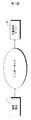
- FIG. 1 is an outline of a document image communication system.
- FIG. 2 is a block diagram showing the electrical configuration of the mobile phone.
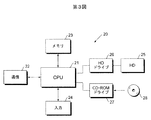
- 3 and 4 are block diagrams showing the electrical configuration of the document image server.
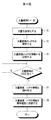
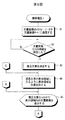
- 5 and 6 are flowcharts showing the processing procedure of the mobile phone.
- FIG. 7 is an example of a document image.
- FIG. 8 shows an example of layout information.
- FIG. 9 is an example of a document image.
- 10 to 12 are examples of document images displayed on the display screen of the mobile phone.
- FIG. 13 is an example of a document image.
- FIG. 14 is an example of a document image displayed on the display screen of the mobile phone.
- FIG. 15 and FIG. 16 are flowcharts showing the focus sentence determination processing procedure.
- FIG. 1 shows an embodiment of the present invention.
- Document image (which is represented not by a document represented by a text file but by an image file, and an imaged document is referred to as a document image) 1 shows an overview of a communication system.
- the document image communication system includes a mobile phone 1 and a document image server 20 that can communicate with each other via the Internet (not limited to the Internet but may be an in-house LAN: a local area network).
- the Internet not limited to the Internet but may be an in-house LAN: a local area network.
- FIG. 2 is a block diagram showing an electrical configuration of the mobile phone 1 called a so-called smartphone.
- the overall operation of the mobile phone 1 is controlled by the control device 2.
- the mobile phone 1 is provided with a communication device 10 and an antenna 11 for communication with other mobile phones, access to the Internet, and the like.
- a program 12 that performs an operation described later is downloaded to the mobile phone 1 via the antenna 11.
- the mobile phone 1 is also provided with a memory card reader / writer 13.
- the program stored in the memory card 14 may be read using the memory card reader / writer 14 and the read program may be installed in the mobile phone 1.
- the mobile phone 1 is provided with a display device 3 for displaying a document, an image or the like on a display screen.
- a touch panel 4 is formed on the display screen of the display device 3.
- the mobile phone 1 By touching the touch panel 4 formed on the display screen, the user can give various commands to the mobile phone 1.
- the mobile phone 1 also includes a memory 5 in which programs and predetermined data are stored.
- the cellular phone 1 includes a speaker 8 and a microphone 9.
- the audio signal is amplified by the amplifier circuit 7 and given to the speaker 8, so that the audio is output from the speaker 8.
- a sound signal representing sound input from the microphone 9 is amplified by the amplifier circuit 7 and input to the control device 2.
- the document image can be displayed on the display screen of the display device 3 as described above. Since the display screen of the mobile phone 1 is relatively small, if the size of the characters is increased to make the characters easier to read, it is not possible to display all of one sentence on the display screen.
- FIG. 3 is a block diagram showing an electrical configuration of the document image server 20. The overall operation of the document image server 20 is controlled by the CPU 21.
- the document image server 21 includes a communication device 22 for accessing the Internet, a memory 23 for storing predetermined data, an input device 24 such as a keyboard, a hard disk 25, a hard disk drive 26 for accessing the hard disk 25, and a CD.
- a ROM (compact disk-read only memory) drive 27 is included.
- a CD-ROM 28 in which a program for controlling operations to be described later is stored is loaded in the CD-ROM drive 27, and the program is read.
- the read program is installed in the document image server 20.
- the program may be received via the Internet without being stored in a recording medium such as the CD-ROM 28.
- a text file representing the document is stored in the hard disk 25.
- a text file is read from the hard disk 25 and converted by the CPU 21 into a document image file representing a document image.
- FIG. 4 is a flowchart showing the processing procedure of the document image server 20, and FIGS. 5 and 6 are flowcharts showing the processing procedure of the mobile phone 1.
- a document represented by a text file is imaged in advance and converted into a document image represented by an image file (document image file) (step 31 in FIG. 4).
- the layout of the converted document image is analyzed (step 32 in FIG. 4). In layout analysis, the arrangement order of characters (horizontal writing, vertical writing) of a document converted into a document image, the position of each sentence constituting the document, and the like are detected.
- FIG. 7 is an example of the document image 60.
- the document image 60 is horizontally written and includes a large number of sentences. Of the sentences included in the document image 60, the sentence of the first sentence is represented by a wavy line 61A. The sentence of the second sentence is represented by a continuous circle 63A, and the sentence of the third sentence is represented by a broken line 65A. Other sentences are represented by a straight line 60A. Since the text included in the document image 60 is written horizontally, it is represented by a horizontal straight line 60A. Whether the character order is horizontal writing or vertical writing can be determined by detecting whether the blank portion generated after the last sentence in the paragraph continues in the horizontal direction or in the vertical direction. When the blank portion continues in the horizontal direction, it is determined as horizontal writing, and when it continues in the vertical direction, it is determined as vertical writing.
- the document image 60 shown in FIG. 7 is determined as horizontal writing because such a blank portion continues in the horizontal direction.
- a process for detecting a punctuation point is performed, and the detected punctuation point is determined as the end of the sentence.
- the character next to the detected punctuation is determined as the beginning of the sentence. If it is determined that the writing is horizontal, the positions of the beginning and end of the sentence are detected. When the position of the beginning of the sentence is horizontal writing, the upper left position of the first character of the sentence is detected by coordinates. In the case of vertical writing, the position at the top right of the first character of the sentence is detected by coordinates as the position of the beginning of the sentence.
- the position of the ending point of the sentence is detected by coordinates. If the text spans more than one line, the character position at the beginning of each line (the horizontal position is the upper left position of the character, and the vertical position is the upper right position of the character) and the character at the end of each line. Is also detected (the lower right position for horizontal writing and the lower left position for vertical writing).
- the first sentence 61 A of the document image 60 shown in FIG. 7 is surrounded by frames 61 and 62.
- the start position of the sentence 61A is the coordinates (x11, y11)
- the end position of the sentence 61A is the coordinates (x14, y14).
- the sentence 61A of the first sentence extends over two lines, the position of the last character on the first line is the coordinates (x12, y12), and the position of the first character on the second line is the coordinates (x13, y13). ) Therefore, the position of the sentence 61A of the first sentence is indicated by (x11, y11), (x12, y12) + (x13, y13), (x14, y14).
- the second sentence sentence 63 ⁇ / b> A is surrounded by frames 63 and 64.
- the position of the sentence 63A of the second sentence is indicated by (x21, y21), (x22, y22) + (x23, y23), (x24, y24) similarly to the sentence 61A of the first sentence.
- the third sentence 65 ⁇ / b> A is surrounded by a frame 65.
- the position of the sentence 65A of the third sentence is indicated by (x31, y31), (x32, y32).
- the position of each sentence 60A is detected for the other sentences 60A.
- the “+” symbol indicates that the sentence is spread over multiple lines. The number obtained by adding 1 to the number of “+” symbols represents the number of lines in the sentence.
- FIG. 8 shows an example of layout information.
- the layout information includes the position of each sentence constituting the document image in addition to the data indicating the character arrangement order (vertical writing or horizontal writing). These positions are detected for each sentence as described above.
- One layout information is generated corresponding to one document image.
- the layout information may be recorded in the header of an image file representing a document image, or may be stored in a layout information file that stores layout information.
- layout information is stored in a different layout information file from the image file, it is necessary to share some of the file names stored in the same folder so that the layout information file corresponding to the image file can be identified. It will be.
- the layout analysis described above is performed after the document is imaged, but may be performed before the document is imaged. Considering the ease of layout analysis, it will be done before the document is imaged. However, even when layout analysis is performed after the document is imaged, the header information stored in the header of the text file representing the document before being imaged, and the text file itself are used. Layout analysis may be performed. Returning to FIG. 4, when the layout analysis is completed, the document image and the layout information are stored in the hard disk 25 (step 33).
- the separate files are stored in the hard disk 25. If the layout information is stored in the header of the image file representing the document image, such an image file is stored in the hard disk 25.
- request data for the document image is transmitted from the mobile phone 1 to the document image server 20 (step 41 in FIG. 5).
- the document image request data transmitted from the cellular phone 1 is received by the document image server 20 (YES in step 34 in FIG. 4)
- the document image and layout information specified by the request data (a file representing the document image and layout information) ) Is read from the hard disk 25 (step 35 in FIG. 4).
- the read document image and layout information are transmitted from the document image server 20 to the mobile phone 1 (step 36 in FIG. 5).
- the document image and layout information (a file representing) transmitted from the document image server 20 are received by the mobile phone 1 (YES in step 42 in FIG. 5)
- the text of interest is determined (step 43 in FIG. 5).
- the focus sentence is a sentence that the user of the mobile phone 1 is supposed to read or a sentence that is supposed to be read. For example, if the document image is displayed for the first time on the display screen of the mobile phone 1, the first sentence of the document image is determined as the target sentence. As will be described later, when it is considered that the user of the mobile phone 1 has finished reading the first sentence, the second sentence next to the first sentence becomes the target sentence.
- FIG. 9 shows a document image 60.
- the first sentence 61 ⁇ / b> A of the document image 60 is determined as the target sentence.
- the first sentence 61 A extends from the first line to the second line and is surrounded by frames 81 and 82.
- the display area 70 is set so that the first sentence 61A is determined as the target sentence as described above, and the left side of the first character of the target sentence is the left side. Positioned.
- the display area 70 is positioned so that the left side of the one character of the blank is the left side.
- Whether or not there is a space for one character before the first character of the text of interest is determined from the position included in the layout information as shown in FIG.
- the x coordinate of the first character of the sentence 61A of the first sentence is x11
- the x coordinate of the first character of the sentence 61A of the first sentence is x13 (the first x of the “+” symbol).
- FIG. 10 is an example of the display screen 90 of the mobile phone 1. A portion of the document image 60 in the display area 70 is displayed on the display screen 90. Further, the display screen 90 displays a part of the first sentence 61 ⁇ / b> A that is the target sentence determined as described above.
- a part of the sentence 61A of the first sentence is highlighted as surrounded by the frame 91 and the frame 92 (the highlighted state is shown by hatching). Since the text of interest is highlighted, the user of the mobile phone 1 knows which text should be read among the many texts displayed on the display screen 90. Referring to FIG. 6, a command from the user to mobile phone 1 is accepted (step 46). If it is an enlargement command, the display area 70 is reduced, and if it is a reduction instruction, the display area 70 is enlarged (step 47).
- the display area 70 is reduced in the case of the enlargement command, so that a part of the enlarged document image 60 is displayed on the display screen of the mobile phone 1, and the reduction command In this case, since the display area 70 is enlarged, a part of the reduced document image 60 is displayed on the display screen of the mobile phone 1 (step 45 in FIG. 5). In the case of enlargement, it goes without saying that the display area 70 is reduced so that the text of interest is included in the enlarged display portion. If it is a vertical scroll command (trace the touch panel 4 up or down with a finger, touch pen, etc.), the display area 70 moves up or down according to the scroll amount (step 49).
- the portion of the document image 60 included in the display area 70 after movement is displayed on the display screen 90 (step 45 in FIG. 5).
- the part of the text included in the moved display area 70 may be determined as a new focused text. preferable. For example, a part of a sentence that is a new target sentence among sentences (parts) displayed on the display screen 90 is designated by the user. However, even if the focused text is no longer included in the display area 70 after movement due to vertical scrolling, the focused text need not be changed.
- Step 50 If the command is horizontal scrolling (trace on the touch panel 4 with a finger, a touch pen, etc., left or right), it is determined whether or not all the text of interest has been displayed according to the sequence of characters (FIG. 6). Step 50). If not all are displayed (NO in step 50 of FIG. 6), the display area 70 is moved in the scroll direction by the width of the display area 70 (step 51 of FIG. 6). For example, when the touch panel 4 is traced to the right with a finger, a touch pen, etc., the display area 70 is moved to the right (or left), and the finger, touch pen, etc. on the touch panel 4 is moved. When the screen is traced leftward, the display area is moved leftward (or rightward).
- FIG. 11 is an example of the document image 60 displayed on the display screen 90.
- the display screen 90 As shown in FIG. 9, the document image 60 in the display area 70 when the display area 70 is moved to the position indicated by reference numeral 72 is displayed.
- the text of interest is surrounded by a frame 93 as in FIG. The text of interest is highlighted as shown by hatching.
- step 50 further horizontal scrolling is performed, and if not all the sentences of interest are displayed in the order of arrangement (step 50), the display area 70 is moved (step 51). As shown in FIG. 9, when the display area 70 is at the position indicated by reference numeral 72 and moved to the right by the width of the display area 70, the position of the display area 70 becomes the position indicated by reference numeral 73A. Since the document image 60 is not included on the right side in the display area 70, the document image 60 is not displayed on the right side portion of the display screen of the mobile phone 1.
- the moving range of the display area 70 may be limited to the document image 60. If there is a display area 70 at the position indicated by reference numeral 72 and a horizontal scroll command to the right is given, the right side of the display area 70 matches the right side of the document image 60 in the display area 70 as indicated by reference numeral 73B. Such a position is the limit of movement of the display area 70.
- a scroll command to the right is given to the display area 90, and all the texts of interest are not displayed on the display screen 90 in order (in step 50). NO), the display screen 70 is moved so that the left side of the display area 70 matches the left side of the document image 60 (step 51).
- FIG. 12 shows an example of the document image 60 displayed on the display screen 90.
- the document image 60 in the display area 70 at the position of reference numeral 74 shown in FIG. 9 is displayed.
- the target sentence is highlighted.
- FIG. 12 shows an example of the document image 60 displayed on the display screen 90.
- the display area 70 moves as indicated by reference numerals 71, 72, 73A or 73B and 74, so that all the sentences 61A of the first sentence set as the target sentence are displayed according to the character arrangement order. become. Since the first sentence 61 ⁇ / b> A that is the focus sentence is highlighted, the user can understand the sentence that the user is reading even if the document image 60 is scrolled. Whether or not all the texts of interest are all displayed according to the character arrangement order can be determined using the position information included in the layout information shown in FIG. In other words, since the position information included in the layout information follows the order of the text, the characters specified by the position coordinates are displayed in the order of the position information, so that the target text is displayed according to the order of the letters. Can be determined.
- the first character of the position coordinates ((x11, y11) in the first sentence sentence 61A) is displayed first, then the target sentence is displayed according to the position coordinate order, and finally the last coordinate of the position coordinates ( In the first sentence 61A, the character (x14, y14)) is displayed last, so that it can be determined that all the sentences of interest are displayed according to the character arrangement order.
- the text following the text that was the text of interest is determined as the text of interest (step 52 in FIG. 6). If the end command is not given (NO in step 53 in FIG.
- the display area 70 is positioned so that the determined text of interest enters the display area 70 (step 44 in FIG. 6).
- the second sentence 63A is determined as the target sentence.
- FIG. 13 is an example of the document image 60.
- the determined sentence 63 A of the second sentence is surrounded by frames 83 and 84.
- the position of the display area 70 is determined so that a part of the determined sentence 63A of the second sentence is included.
- the second sentence 63A is included.
- the position of the display area 70 (the position indicated by reference numeral 74 shown in FIG.
- FIG. 14 is an example of the display screen 90.
- the content of the document image 60 displayed on the display screen 90 shown in FIG. 14 is the same as the content of the document image 60 displayed on the display screen 90 shown in FIG. The same.
- the target sentence in FIG. 12 is the first sentence 61A
- the first sentence 61A is highlighted as indicated by a frame 94
- the second sentence 63 ⁇ / b> A is obtained, the second sentence 63 ⁇ / b> A is highlighted as indicated by a frame 95 and a frame 96.
- the second sentence 63A is highlighted so that the user can read the sentence even if scrolled, as described above.
- the display area 70 moves in the horizontal direction by the width of the display area 70, but only by an amount corresponding to the scroll amount (the length traced on the touch panel 4). The display area 70 may be moved.
- the enlargement / reduction command, the vertical scroll command, and the horizontal scroll command are respectively an enlarge button, a reduce button, a vertical scroll button (up arrow button, down arrow button), and a horizontal scroll button (left arrow button, It is also possible to provide a right arrow button) on the mobile phone 1 and operate it in response to a command from those buttons.
- the scroll amount is determined without performing the determination process (the process of step 50 in FIG. 6) of whether or not all of the target sentence has been displayed.
- FIG. 15 is a flowchart showing the focused sentence determination processing procedure (the processing procedure of step 43 in FIG. 5). The processing procedure shown in FIG. 15 is such that when the display of the document image 60 is stopped halfway, the above-described highlight display can be continued from the stopped portion.
- the position of the target sentence in the document image 60 may be stored. If the position is memorized, the number of the target sentence is determined from the layout information. If the position is determined, the position of the sentence is also determined. Information indicating such a position or the number may be added to the layout information described above in an updatable manner.
- the target sentence specified by the stored position or the data indicating the number is the next Is determined as the target sentence (step 103).
- FIG. 16 is a flowchart showing another example of the focused sentence determination processing procedure (the processing procedure of step 43 in FIG. 5).
- Part or all of the document image 60 is displayed on the display screen of the mobile phone 1 (step 104).
- a desired sentence is designated by touching it with a finger, a touch pen, etc. from the sentences displayed on the display screen (step 105).
- the designated sentence is determined as the notice sentence (step 106).
- Scroll processing is performed as necessary so that a desired sentence is displayed on the display screen.
- the unit to be highlighted is a sentence, but it may be highlighted for each paragraph. When highlighted for each paragraph, the layout information will be stored for each paragraph. Further, the unit to be highlighted may be the reading unit.
- the target sentence is highlighted.
- the present invention is not limited to highlight display, and it is only necessary to distinguish the target sentence (target paragraph) from other sentences (paragraphs).
- the font of the target sentence may be changed from that of other sentences, or italicized.
- character recognition processing is performed from the document image as necessary, and the document is represented by a text file, and the font is changed or italicized in the text file. Then, it may be imaged again.
Landscapes
- Engineering & Computer Science (AREA)
- Theoretical Computer Science (AREA)
- General Engineering & Computer Science (AREA)
- Physics & Mathematics (AREA)
- General Physics & Mathematics (AREA)
- Human Computer Interaction (AREA)
- Computer Hardware Design (AREA)
- User Interface Of Digital Computer (AREA)
- Controls And Circuits For Display Device (AREA)
Abstract
読んでいる文章が分るようにする。このために,画像化された文書である文書画像のうち,ユーザが読む着目文章が決定される。決定された着目文章が含まれるように文書画像において表示領域の位置が決められる。表示領域に含まれる文書画像が表示画面に表示される。決定された着目文章については,他の文章と区別できるようにハイライト表示される。ハイライト表示されている様子が枠で囲まれ,かつハッチングで示されている。スクロールされた場合でも着目文章がハイライト表示される。ユーザは,自分が読んでいる文章がどこか分りやすくなる。
Description
この発明は,携帯型表示装置ならびにその動作制御方法およびそのプログラムに関する。
表示画面に文書が表示される場合に,その文書を読みやすくするようにユーザが指定した文字を拡大するものがある(特開2008−250948号公報)。また,ユーザの読む速度に応じて自動的にスクロールされるものもある(特開2001−282414号号公報)。しかしながら,携帯電話に設けられている表示画面のように大きさが小さい表示画面に画像化された文書が表示された場合には,どこの部分を読んでいるか分からなくなってしまうことがある。
この発明は,表示画面に画像化された文書が表示された場合に,どこの部分を読んでいるかが分るようにすることを目的とする。
この発明による携帯型表示装置は,画像化された文書を表わす文書画像の中から他の文章または他の段落と表示態様を変える着目文章または着目段落を決定する着目部分決定手段,上記着目部分決定手段によって決定された着目文章または着目段落の表示態様を,他の文章または他の段落の表示態様と変える表示態様変更手段,上記表示態様変更手段によって表示態様が変えられた着目文章または着目段落の少なくとも一部を含む上記文書画像の一部分を表示画面に表示する表示装置,着目部分スクロール指令に応じて,上記表示画面に表示される上記文書画像の一部分をスクロールするスクロール手段,上記スクロール手段によってスクロールされたことに応じて,上記表示態様変更手段によって表示態様が変えられた着目文章または着目段落が,文字の並び順にしたがって最後まで上記表示画面に表示されたかどうかを判定する第1の判定手段,および上記第1の判定手段によって,上記表示態様変更手段によって表示態様が変更された着目文章または着目段落が文字の並び順にしたがって最後まで上記表示画面に表示されたと判定されたことに応じて,上記表示態様変更手段によって表示態様が変更された着目文章または着目段落の次の文章または段落を,着目文章または着目段落と決定するように上記着目部分決定手段を制御する決定制御手段を備えていることを特徴とする。
この発明は,上記携帯型表示装置に適した動作制御方法も提供している。すなわち,この方法は,着目部分決定手段が,画像化された文書を表わす文書画像の中から他の文章または他の段落と表示態様を変える着目文章または着目段落を決定し,表示態様変更手段が,上記着目部分決定手段によって決定された着目文章または着目段落の表示態様を,他の文章または他の段落の表示態様と変え,表示装置が,上記表示態様変更手段によって表示態様が変えられた着目文章または着目段落の少なくとも一部を含む上記文書画像の一部分を表示画面に表示し,スクロール手段が,着目部分スクロール指令に応じて,上記表示画面に表示される上記文書画像の一部分をスクロールし,判定手段が,上記スクロール手段によってスクロールされたことに応じて,上記表示態様変更手段によって表示態様が変えられた着目文章または着目段落が,文字の並び順にしたがって最後まで上記表示画面に表示されたかどうかを判定し,決定制御手段が,上記第1の判定手段によって,上記表示態様変更手段によって表示態様が変えられた着目文章または着目段落が文字の並び順にしたがって最後まで上記表示画面に表示されたと判定されたことに応じて,上記表示態様変更手段によって表示態様が変更された着目文章または着目段落の次の文章または段落を,着目文章または着目段落と決定するように上記着目部分決定手段を制御するものである。
この発明は,上記携帯型表示装置の動作制御方法を実施するためのコンピュータが読み取り可能なプログラムも提供している。そのようなプログラムを格納した記録媒体を提供するようにしてもよい。
この発明によると,画像化された文書を表わす文書画像の中から他の文章または他の段落と表示態様を変える着目文章または着目段落が決定される。決定された着目文章または着目段落の表示態様が他の文章または他の段落の表示態様と変えられる。表示態様が変えられた着目文章または着目段落の少なくとも一部を含む文書画像の一部分が表示装置の表示画面に表示される。着目部分スクロール指令が与えられると,表示画面に表示される文書画像の一部分がスクロールされる。すると,そのスクロールに応じて,着目文章または着目段落が文字の並び順にしたがって最後まで表示画面に表示されたかどうかが判定される。着目文章または着目段落が文字の並び順にしたがって最後まで表示画面に表示されると,表示態様が変更された着目文章または着目段落の次の文章または段落が新たな着目文章または着目段落と決定される。そのようにして決定された新たな着目文章または着目段落の表示態様が他の文章または他の段落の表示態様が変えられて表示画面に表示される。
着目文章または着目段落は,ユーザが読んでいる文章または段落である。そのような着目文章または着目段落の表示態様が他の文章または他の段落の表示態様と異なるように表示されるので,ユーザは読んでいる文章または段落が分りやすくなる。
上記表示画面に最後に表示された上記文書画像の一部分に含まれている着目文章または着目段落の位置を記憶する記憶装置,および上記記憶装置に着目文章または着目段落の位置が記憶されているかどうかを判定する第2の判定手段をさらに備えてもよい。この場合,上記着目部分決定手段は,たとえば,上記第2の判定手段によって着目文章または着目段落の位置が記憶されていると判定されたことに応じて上記記憶装置に記憶されている着目文章または着目段落の位置の次の文章または段落を着目文章または着目段落と決定し,上記第2の判定手段によって着目文章または着目段落が記憶されていないと判定されたことに応じて上記文書画像の最初の文章または最初の段落を着目文章または着目段落と決定するものとなろう。
上記表示画面に上記文書画像の一部分を表示するように表示装置を制御する表示制御手段,および上記表示制御手段の制御のもとに上記表示画面に表示されている上記文書画像の一部分の中から所望の文章または所望の段落を指定する指定手段をさらに備えてもよい。この場合,上記着目部分決定手段は,たとえば,上記指定手段によって指定された所望の文章または所望の段落を,着目文章または着目段落と決定するものとなろう。
この発明による携帯型表示装置は,画像化された文書を表わす文書画像の中から他の文章または他の段落と表示態様を変える着目文章または着目段落を決定する着目部分決定手段,上記着目部分決定手段によって決定された着目文章または着目段落の表示態様を,他の文章または他の段落の表示態様と変える表示態様変更手段,上記表示態様変更手段によって表示態様が変えられた着目文章または着目段落の少なくとも一部を含む上記文書画像の一部分を表示画面に表示する表示装置,着目部分スクロール指令に応じて,上記表示画面に表示される上記文書画像の一部分をスクロールするスクロール手段,上記スクロール手段によってスクロールされたことに応じて,上記表示態様変更手段によって表示態様が変えられた着目文章または着目段落が,文字の並び順にしたがって最後まで上記表示画面に表示されたかどうかを判定する第1の判定手段,および上記第1の判定手段によって,上記表示態様変更手段によって表示態様が変更された着目文章または着目段落が文字の並び順にしたがって最後まで上記表示画面に表示されたと判定されたことに応じて,上記表示態様変更手段によって表示態様が変更された着目文章または着目段落の次の文章または段落を,着目文章または着目段落と決定するように上記着目部分決定手段を制御する決定制御手段を備えていることを特徴とする。
この発明は,上記携帯型表示装置に適した動作制御方法も提供している。すなわち,この方法は,着目部分決定手段が,画像化された文書を表わす文書画像の中から他の文章または他の段落と表示態様を変える着目文章または着目段落を決定し,表示態様変更手段が,上記着目部分決定手段によって決定された着目文章または着目段落の表示態様を,他の文章または他の段落の表示態様と変え,表示装置が,上記表示態様変更手段によって表示態様が変えられた着目文章または着目段落の少なくとも一部を含む上記文書画像の一部分を表示画面に表示し,スクロール手段が,着目部分スクロール指令に応じて,上記表示画面に表示される上記文書画像の一部分をスクロールし,判定手段が,上記スクロール手段によってスクロールされたことに応じて,上記表示態様変更手段によって表示態様が変えられた着目文章または着目段落が,文字の並び順にしたがって最後まで上記表示画面に表示されたかどうかを判定し,決定制御手段が,上記第1の判定手段によって,上記表示態様変更手段によって表示態様が変えられた着目文章または着目段落が文字の並び順にしたがって最後まで上記表示画面に表示されたと判定されたことに応じて,上記表示態様変更手段によって表示態様が変更された着目文章または着目段落の次の文章または段落を,着目文章または着目段落と決定するように上記着目部分決定手段を制御するものである。
この発明は,上記携帯型表示装置の動作制御方法を実施するためのコンピュータが読み取り可能なプログラムも提供している。そのようなプログラムを格納した記録媒体を提供するようにしてもよい。
この発明によると,画像化された文書を表わす文書画像の中から他の文章または他の段落と表示態様を変える着目文章または着目段落が決定される。決定された着目文章または着目段落の表示態様が他の文章または他の段落の表示態様と変えられる。表示態様が変えられた着目文章または着目段落の少なくとも一部を含む文書画像の一部分が表示装置の表示画面に表示される。着目部分スクロール指令が与えられると,表示画面に表示される文書画像の一部分がスクロールされる。すると,そのスクロールに応じて,着目文章または着目段落が文字の並び順にしたがって最後まで表示画面に表示されたかどうかが判定される。着目文章または着目段落が文字の並び順にしたがって最後まで表示画面に表示されると,表示態様が変更された着目文章または着目段落の次の文章または段落が新たな着目文章または着目段落と決定される。そのようにして決定された新たな着目文章または着目段落の表示態様が他の文章または他の段落の表示態様が変えられて表示画面に表示される。
着目文章または着目段落は,ユーザが読んでいる文章または段落である。そのような着目文章または着目段落の表示態様が他の文章または他の段落の表示態様と異なるように表示されるので,ユーザは読んでいる文章または段落が分りやすくなる。
上記表示画面に最後に表示された上記文書画像の一部分に含まれている着目文章または着目段落の位置を記憶する記憶装置,および上記記憶装置に着目文章または着目段落の位置が記憶されているかどうかを判定する第2の判定手段をさらに備えてもよい。この場合,上記着目部分決定手段は,たとえば,上記第2の判定手段によって着目文章または着目段落の位置が記憶されていると判定されたことに応じて上記記憶装置に記憶されている着目文章または着目段落の位置の次の文章または段落を着目文章または着目段落と決定し,上記第2の判定手段によって着目文章または着目段落が記憶されていないと判定されたことに応じて上記文書画像の最初の文章または最初の段落を着目文章または着目段落と決定するものとなろう。
上記表示画面に上記文書画像の一部分を表示するように表示装置を制御する表示制御手段,および上記表示制御手段の制御のもとに上記表示画面に表示されている上記文書画像の一部分の中から所望の文章または所望の段落を指定する指定手段をさらに備えてもよい。この場合,上記着目部分決定手段は,たとえば,上記指定手段によって指定された所望の文章または所望の段落を,着目文章または着目段落と決定するものとなろう。
第1図は,文書画像通信システムの概要である。
第2図は,携帯電話の電気的構成を示すブロック図である。
第3図および第4図は,文書画像サーバの電気的構成を示すブロック図である。
第5図および第6図は,携帯電話の処理手順を示すフローチャートである。
第7図は,文書画像の一例である。
第8図は,レイアウト情報の一例である。
第9図は,文書画像の一例である。
第10図から第12図は,携帯電話の表示画面に表示される文書画像の一例である。
第13図は,文書画像の一例である。
第14図は,携帯電話の表示画面に表示される文書画像の一例である。
第15図および第16図は,着目文章決定処理手順を示すフローチャートである。
第2図は,携帯電話の電気的構成を示すブロック図である。
第3図および第4図は,文書画像サーバの電気的構成を示すブロック図である。
第5図および第6図は,携帯電話の処理手順を示すフローチャートである。
第7図は,文書画像の一例である。
第8図は,レイアウト情報の一例である。
第9図は,文書画像の一例である。
第10図から第12図は,携帯電話の表示画面に表示される文書画像の一例である。
第13図は,文書画像の一例である。
第14図は,携帯電話の表示画面に表示される文書画像の一例である。
第15図および第16図は,着目文章決定処理手順を示すフローチャートである。
第1図は,この発明の実施例を示すもので,文書画像(テキスト・ファイルによって表される文書ではなく画像ファイルによって表されるもので,画像化された文書を文書画像ということにする)通信システムの概要を示している。
この実施例による文書画像通信システムには,インターネット(インターネットに限らず社内LAN:ローカル・エリア・ネットワークなどでもよい)を介して互いに通信可能な携帯電話1および文書画像サーバ20が含まれている。携帯電話1からの要求に応じて,文書画像サーバ20から携帯電話1に文書画像を表わすファイルが送信される。
第2図は,いわゆるスマートフォンと呼ばれる携帯電話1の電気的構成を示すブロック図である。
携帯電話1の全体の動作は,制御装置2によって統括される。
携帯電話1には,他の携帯電話との通信,インターネットへのアクセス等のための通信装置10およびアンテナ11が設けられている。アンテナ11を介して後述する動作を行うプログラム12が携帯電話1にダウンロードされる。ダウンロードされたプログラム12が携帯電話1にインストールされることにより,携帯電話1は後述する動作を行う。携帯電話1にはメモリ・カード・リーダ・ライタ13も設けられている。メモリ・カード14に格納されたプログラムが,メモリ・カード・リーダ・ライタ14を用いて読み取られ,読み取られたプログラムが携帯電話1にインストールされるようにしてもよい。
さらに,携帯電話1には,表示画面に文書,画像などを表示するための表示装置3が設けられている。表示装置3の表示画面には,タッチ・パネル4が形成されている。表示画面上に形成されているタッチ・パネル4をタッチすることにより,ユーザは,携帯電話1に様々な指令を与えることができる。
携帯電話1には,プログラム,所定のデータが格納されるメモリ5も含まれている。さらに,携帯電話1には,スピーカ8およびマイクロフォン9も含まれている。音声信号は,増幅回路7によって増幅されてスピーカ8に与えられることによりスピーカ8から音声が出力される。また,マイクロフォン9から入力した音声を表わす音声信号は,増幅回路7によって増幅されて制御装置2に入力する。
この実施例による携帯電話1では,上述のように文書画像を表示装置3の表示画面に表示できる。携帯電話1の表示画面は比較的小さいので文字を読みやすくするために文字の大きさを大きくすると,一つの文章のすべてを表示画面に表示できない。テキスト・ファイルによって表わされる文書であれば表示画面に合わせて文字の配列を直せばよいが,文書画像の文書では,表示画面に併せて文字の配列を直すことは難しいのでスクロールする必要がある。ところが,スクロールすると,文書(段落)のうちのどの文章(段落)を読んでいるかが分らなくなることがある。この実施例では,どの文章(段落)を読んでいるかを分りやすくするものである。
第3図は,文書画像サーバ20の電気的構成を示すブロック図である。
文書画像サーバ20の全体の動作は,CPU21によって統括される。
文書画像サーバ21には,インターネットにアクセスするための通信装置22,所定のデータ等を記憶するメモリ23,キーボードなどの入力装置24,ハードディスク25,ハードディスク25にアクセスするためのハードディスク・ドライブ26およびCD−ROM(コンパクト・ディスク−リード・オンリ・メモリ)ドライブ27が含まれている。後述する動作を制御するプログラムが格納されたCD−ROM28がCD−ROMドライブ27に装填され,そのプログラムが読み取られる。読み取られたプログラムが文書画像サーバ20にインストールされる。プログラムは,CD−ROM28のような記録媒体に格納されずに,インターネットを介して受信してもよい。
文書を表わすテキスト・ファイルはハードディスク25に格納されている。ハードディスク25からテキスト・ファイルが読み取られ,CPU21によって文書画像を表わす文書画像ファイルに変換される。変換された文書画像ファイルもハードディスク25に格納される。
第4図は,文書画像サーバ20の処理手順を示すフローチャート,第5図および第6図は,携帯電話1の処理手順を示すフローチャートである。
文書画像サーバ20において,テキスト・ファイルによって表わされる文書があらかじめ画像化されて画像ファイル(文書画像ファイル)によって表わされる文書画像に変換される(第4図ステップ31)。すると,変換された文書画像のレイアウトが解析される(第4図ステップ32)。レイアウト解析では,文書画像に変換された文書の文字の並び順(横書き,縦書き),文書を構成する各文章の位置などが検出される。
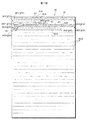
第7図は,文書画像60の一例である。
文書画像60は,横書きであり,多数の文章が含まれている。文書画像60に含まれている文章のうち,第一文の文章が波線61Aによって表わされている。また,第二文の文章は連続した丸印63Aによって表わされ,第三文の文章は破線65Aによって表わされている。その他の文章は直線60Aによって表わされている。文書画像60に含まれている文章は横書きなので,横方向の直線60Aによって表わされている。文字の並び順が横書きか縦書きかは,段落の最後の文章のあとに生じる空白部分が横方向に続くか縦方向に続くかを検出することにより判定できる。その空白部分が横方向に続く場合には横書きと判定され,縦方向に続く場合には縦書きと判定される。第7図に示す文書画像60は,そのような空白部分が横方向に続くので横書きと判定される。また,句点の検出処理が行われ,検出された句点が文章の終わりと判定される。検出された句点の次の文字が文章の始まりと判定される。
横書きと判定されると,文章の始まりと文章の終わりのそれぞれの位置が検出される。文章の始まりの位置は横書きの場合,文章の始めの文字の左上の位置が座標で検出される。縦書きの場合には,文章の始まりの位置は文章の始めの文字の右上の位置が座標で検出される。文章の終わりの位置は横書きであっても縦書きであっても,文章の終わりの句点の位置が座標で検出される。文章が2行以上に渡っている場合には,各行の始めの文字の位置(横書きであれば文字の左上の位置であり,縦書きであれば文字の右上の位置)と各行の終わりの文字の位置(横書きであれば右下の位置であり,縦書きであれば左下の位置)も検出される。
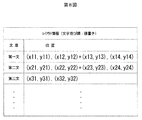
第7図に示される文書画像60の第一文の文章61Aは,枠61および62で囲まれている。第一文の位置は,文章61Aの始まりの位置が座標(x11,y11)となり,文章61Aの終わりの位置が座標(x14,y14)となる。第一文の文章61Aは2行以上に渡っており,第1行目の最後の文字の位置は座標(x12,y12)となり,第2行目の最初の文字の位置は座標(x13,y13)となる。したがって,第一文の文章61Aの位置は,(x11,y11),(x12,y12)+(x13,y13),(x14,y14)で示される。第二文の文章63Aは,枠63および64で囲まれている。第二文の文章63Aの位置は,第一文の文章61Aと同様に,(x21,y21),(x22,y22)+(x23,y23),(x24,y24)で示される。第三文の文章65Aは,枠65で囲まれている。第三文の文章65Aの位置は,(x31,y31),(x32,y32)で示される。同様に他の文章60Aについても各文章60Aの位置が検出される。「+」の記号により,文章が複数の行に渡っていることが分る。「+」の記号の数に1を加えた数が文章の行数を表わす。「+」の記号が0であれば,その文章は複数の行に渡らずに文書画像60の一行内で収まり,「+」の記号が1であれば,その文章は文書画像60において2行に渡っており,「+」の記号が2であれば,その文章は文書画像60において3行に渡っている。
第8図は,レイアウト情報の一例である。
レイアウト情報には,上述したように,文字並び順(縦書きか,横書きか)を示すデータのほかに,文書画像を構成する各文章の位置が含まれる。これらの位置は,上述のように文章ごとに検出される。レイアウト情報は,一つの文書画像に対応して一つ生成される。レイアウト情報は,文書画像を表わす画像ファイルのヘッダに記録されるようにしてもよいし,レイアウト情報を格納するレイアウト情報ファイルに格納するようにしてもよい。レイアウト情報が画像ファイルと別のレイアウト情報ファイルに格納される場合には,画像ファイルに対応するレイアウト情報ファイルが分るように,同じフォルダに格納される,ファイル名の一部共通化などが必要となろう。
上述したレイアウト解析は,文書が画像化された後に行われているが,文書が画像化される前に行われるようにしてもよい。レイアウト解析の容易さから考えれば,文書が画像化される前に行われることとなろう。もっとも,文書が画像化された後にレイアウト解析が行われる場合であっても,画像化される前の文書を表わすテキスト・ファイルのヘッダに記憶されているヘッダ情報,テキスト・ファイル自体を利用してレイアウト解析が行われるようにしてもよい。
第4図に戻って,レイアウト解析が終わると,文書画像とレイアウト情報とはハードディスク25に記憶される(ステップ33)。文書画像とレイアウト情報とが別ファイルであれば,別々のファイルがハードディスク25に記憶され,レイアウト情報が文書画像を表わす画像ファイルのヘッダに格納されていれば,そのような画像ファイルがハードディスク25に記憶される。
携帯電話1に文書画像を表示する場合には,携帯電話1から文書画像サーバ20に文書画像のリクエスト・データが送信される(第5図ステップ41)。
携帯電話1から送信された文書画像のリクエスト・データが文書画像サーバ20において受信されると(第4図ステップ34でYES),そのリクエスト・データによって特定される文書画像およびレイアウト情報(を表わすファイル)がハードディスク25から読み取られる(第4図ステップ35)。読み取られた文書画像およびレイアウト情報(を表わすファイル)が文書画像サーバ20から携帯電話1に送信される(第5図ステップ36)。
文書画像サーバ20から送信された文書画像およびレイアウト情報(を表わすファイル)が携帯電話1において受信されると(第5図ステップ42でYES),着目文章が決定される(第5図ステップ43)。着目文章とは,携帯電話1のユーザがこれから読むと思われる文章または読んでいると思われる文章である。たとえば,携帯電話1の表示画面に始めて表示される文書画像であれば,その文書画像の第一文が着目文章と決定される。後述のように携帯電話1のユーザが第一文を読み終わったと考えられると,第一文の次の第二文が着目文章となる。この着目文章決定処理について詳しくは後述する。
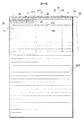
着目文章が決定されると,その決定された着目文章が表示領域に入るように表示領域が位置決めされる(第5図ステップ44)。表示領域内の文書画像が携帯電話1の表示画面に表示される。
第9図は,文書画像60を示している。
上述したように,文書画像60のうち,第一文の文章61Aが着目文章と決定されたものとする。第一文の文章61Aは,第一行から第二行に渡っており,枠81および82で囲まれている。
文書画像60が一度も表示されていない場合には,上述のように第一文の文章61Aが着目文章と決定され,かつ着目文章の始まりの文字の左側が左辺となるように表示領域70が位置決めされる。着目文章の始まりの文字が,段落が変わるなどにより一文字分,空白の場合には,その空白の一文字分の左側が左辺となるように表示領域70が位置決めされる。着目文章の始まりの文字の前に一文字分の空白があるかどうかは,第8図に示すようにレイアウト情報に含まれる位置から分る。たとえば,第一文の文章61Aの一文字目のx座標はx11であり,その第一文の文章61Aの二行目の一文字目のx座標はx13であるから(「+」記号の最初のx座標),これらのx座標x11とx13とを比較することにより,第一文の文章61Aの一文字目の前に空白があるかどうかがわかる。たとえば,x11>x13であれば,空白があり,x11=x13であれば空白が無い。このように,文書画像60が一度も表示されていない場合には,表示領域70が文書画像60の左上の位置71に位置決めされる。
表示領域が位置決めされると,着目文章が他の文章よりもハイライトとなるように,その表示領域70内の文書画像60が携帯電話1の表示画面に表示される(第5図ステップ45)。
第10図は,携帯電話1の表示画面90の一例である。
表示画面90には,文書画像60のうち,表示領域70内の部分が表示されている。さらに,表示画面90には,上述のようにして決定された着目文章である第一文の文章61Aの一部が表示されている。枠91および枠92で囲まれているように第一文の文章61Aの一部は,ハイライト表示されている(ハイライト表示されている様子がハッチングで示されている)。着目文章がハイライト表示されているので,携帯電話1のユーザは,表示画面90に表示される多数の文章のうち,どの文章を読めばよいかが分る。
第6図を参照して,ユーザから携帯電話1への指令が受け付けられる(ステップ46)。
拡大指令であれば表示領域70が縮小され,縮小指令であれば表示領域70が拡大される(ステップ47)。終了指令が与えられなければ(ステップ48でNO),拡大指令の場合には表示領域70が縮小するので携帯電話1の表示画面には拡大された文書画像60の一部が表示され,縮小指令の場合には表示領域70が拡大するので携帯電話1の表示画面には縮小された文書画像60の一部が表示される(第5図ステップ45)。拡大の場合には,拡大後の表示部分に着目文章が含まれるように表示領域70が縮小されるのはいうまでもない。
垂直スクロール指令(タッチ・パネル4上を指,タッチ・ペンなどで上または下になぞる)であれば,そのスクロール量に応じて表示領域70が上または下に移動する(ステップ49)。終了指令が与えられなければ(ステップ48でNO),文書画像60のうち移動後の表示領域70に含まれている部分が表示画面90に表示される(第5図ステップ45)。垂直スクロールにより,移動後の表示領域70に着目文章が含まれなくなってしまった場合には,その移動後の表示領域70に含まれている部分の文章が新たな着目文章と決定されることが好ましい。たとえば,表示画面90に表示されている文章(の部分)のうち,新たな着目文章とする文章の部分がユーザによって指定される。もっとも,垂直スクロールにより,移動後の表示領域70に着目文章が含まれなくなった場合でも,着目文章を変えなくともよい。
水平スクロール(タッチ・パネル4上を指,タッチ・ペンなどで左または右になぞる)指令であれば,着目文章のすべてが文字の並び順にしたがってすべて表示されたかどうかが判定される(第6図ステップ50)。
すべては表示されていなければ(第6図ステップ50でNO),表示領域70の幅分だけ表示領域70がスクロール方向に移動させられる(第6図ステップ51)。たとえば,タッチ・パネル4上を指,タッチ・ペンなどで右方向になぞられたら表示領域70は右方向(左方向でもよい)に移動させられ,タッチ・パネル4上を指,タッチ・ペンなどで左方向になぞられたら表示領域は左方向(右方向でもよい)に移動させられる。これにより,表示領域70は,第9図に示す符号72で示す位置に移動する。終了指令が与えられなければ(ステップ48でNO),文書画像60のうち符号72に示す位置にある表示領域70内の部分が表示画面90に表示される(第5図ステップ45)。
第11図は,表示画面90に表示された文書画像60の一例である。
表示画面90には,第9図に示すように表示領域70が符号72で示す位置に移動した場合の表示領域70内の文書画像60が表示されている。表示画面90には,第10図と同様に着目文章が枠93で囲まれている。着目文章はハッチングで示すようにハイライト表示されている。このように着目文章がハイライト表示されるので,小さな表示画面に多数の文章が表示されていても,ユーザは,自分が読んでいる文章が分るようになる。
第6図に戻って,さらに水平スクロールが行われ,着目文章のすべてが並び順にしたがって表示されていなければ(ステップ50),表示領域70が移動させられる(ステップ51)。
第9図に示すように,表示領域70が符号72に示す位置にある場合に,表示領域70の幅分,右側に移動すると,表示領域70の位置は符号73Aで示す位置となる。表示領域70内の右側には文書画像60が含まれなくなるので,携帯電話1の表示画面の右側部分には文書画像60が表示されなくなる。このために,表示領域70の移動範囲は文書画像60内に限定するようにしてもよい。符号72で示す位置に表示領域70があった場合に,右側への水平スクロール指令があると,表示領域70は符号73Bで示すように,表示領域70の右辺と文書画像60の右辺とが一致するような位置が表示領域70の移動の限界とされる。
表示領域70が第9図に示す符号73Aまたは73Bにあったときに,さらに右側へのスクロール指令が与えられ,かつ着目文章のすべてが並び順に表示画面90に表示されていなければ(ステップ50でNO),表示領域70の左辺が文書画像60の左辺と一致するように表示画面70が移動させられる(ステップ51)。また,一行分下に表示領域70が移動させられる。これにより,表示領域70は,符号74に示す位置となる。もっとも,移動後の表示領域70に着目文章が含まれていれば,表示領域70は必ずしも一行分下に移動されなくともよい。
第12図は,表示画面90に表示される文書画像60の一例である。
表示画面90には,第9図に示す符号74の位置にある表示領域70内の文書画像60が表示されている。枠94で囲まれてハッチングで示されているように,着目文章がハイライト表示される。
第9図において,符号71,72,73Aまたは73Bおよび74と示すように表示領域70が移動することにより,着目文章とされた第一文の文章61Aが文字の並び順にしたがってすべて表示されるようになる。着目文章とされた第一文の文章61Aは,ハイライト表示されているので,文書画像60がスクロールされても,ユーザは自分が読んでいる文章が分る。
着目文章のすべてが文字の並び順にしたがってすべて表示されたかどうかは,第8図に示すレイアウト情報に含まれる位置情報を用いて判定できる。すなわち,レイアウト情報に含まれる位置情報は,文章の並び順にしたがっているので,その位置座標で特定される文字が位置情報の順序で表示されたことにより,文字の並び順にしたがって着目文章が表示されていると判定できる。位置座標の最初の座標(第一文の文章61Aでは(x11,y11))の文字が最初に表示され,その後,位置座標順序にしたがって着目文章が表示され,最後に位置座標の最後の座標(第一文の文章61Aでは(x14,y14))の文字が最後に表示されることにより,着目文章のすべてが文字の並び順にしたがってすべて表示されたと判定できる。
着目文章のすべてが文字の並び順にしたがってすべて表示されると(第6図ステップ50でYES),着目文章であった文章の次の文章が着目文章と決定される(第6図ステップ52)。終了指令が与えられなければ(第6図ステップ53でNO),決定された着目文章が表示領域70に入るように表示領域70が位置決めされる(第6図ステップ44)。
上述したように,第一文の文章61Aの表示が終了すると,第二文の文章63Aが着目文章として決定される。
第13図は,文書画像60の一例である。
決定された第二文の文章63Aが枠83および84で囲まれている。決定された第二文の文章63Aの一部が含まれるように表示領域70の位置が決定される。第12図に示したように,第一文の文章61Aの表示が終了したときに表示画面90に表示されている文書画像60には第二文の文章63Aが含まれているから,第一文の文章61Aの表示が終了したときの表示領域70の位置(第9図に示す符号74で示す位置)がそのまま表示領域70の位置と決定される。
第14図は,表示画面90の一例である。
第12図と比べると分るように,第14図に示す表示画面90に表示されている文書画像60の内容は,第12図に示す表示画面90に表示されている文書画像60の内容と同じである。しかしながら,第12図では着目文章が第一文の文章61Aであったので,第一文の文章61Aが枠94で示すようにハイライト表示されているのに対し,第14図では着目文章が第二文の文章63Aとなったので,第二文の文章63Aが枠95および枠96で示すようにハイライト表示されている。
第一文の文章61Aと同様に第二文の文章63Aについても上述したように,スクロールされてもユーザが読んでいる文章がわかるようにハイライト表示される。
上述の実施例においては,水平スクロール指令においては,表示領域70の幅だけ表示領域70が水平方向に移動するが,スクロール量(タッチ・パネル4上においてなぞっている長さ)に応じた量だけ表示領域70が移動するようにしてもよい。
上述の実施例において,拡大/縮小指令,垂直スクロール指令,水平スクロール指令は,それぞれ拡大ボタン,縮小ボタン,垂直スクロール・ボタン(上矢印ボタン,下矢印ボタン),水平スクロール・ボタン(左矢印ボタン,右矢印ボタン)を携帯電話1に設け,それらのボタンからの指令に応じて動作させることもできる。
上述の実施例では,文書画像が横書きであるから,垂直スクロール指令が与えられると,着目文章のすべてが表示されたかどうかの判定処理(第6図ステップ50の処理)を行うことなく,スクロール量に応じて表示領域70が移動され,かつ水平スクロール指令が与えられると,着目文章のすべてが表示されたかどうかの判定が行われているが,文書画像が縦書きの場合には,垂直スクロール指令が与えられたことにより着目文章のすべてが表示されたかどうかの判定処理が行われ,かつ水平スクロール指令が与えられたときには着目文章のすべてが表示されたかどうかの判定は行われないこととなろう。
第15図は,着目文章決定処理手順(第5図ステップ43の処理手順)を示すフローチャートである。
第15図に示す処理手順は,文書画像60の表示を途中で止めた場合に,その止めた部分から上述したハイライト表示を続けることができるようにするものである。そのために,文書画像60の表示を途中で止める場合には,表示を止める前に最後に表示された着目文章が第何番目の文章かが記憶される。着目文章が第何番目の文章かを記憶する代わりに,その着目文章の文書画像60における位置を記憶してもよい。位置が記憶されれば,レイアウト情報から着目文章が第何番目の文章か分るし,第何番目の文章か分ればその文章の位置も分る。このような位置または第何番目かを示す情報は,上述したレイアウト情報に更新可能に付加すればよい。
着目文章の位置または着目文章が第何番目かを示すデータが記憶されていると(ステップ101でYES),記憶されている位置または第何番目かを示すデータによって特定される着目文章またはその次の文章が着目文章と決定される(ステップ103)。記憶されている位置または第何番目かを示すデータによって特定される着目文章がすべて表示されていれば,その着目文章はユーザが読み終わったと考えられるので,最後に表示された着目文章の次の文章が着目文章と決定される。記憶されている位置または第何番目かを示すデータによって特定される着目文章がすべて表示されていなければ,その着目文章をユーザが読み終わっていないと考えられるので,最後に表示された着目文章が再び着目文章と決定される。
これに対して,着目文章の位置または着目文章が何番目かを示すデータが記憶されていないと(ステップ101でNO),文書画像の最初の文章が着目文章と決定される(ステップ102)。
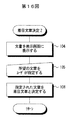
第16図は,着目文章決定処理手順(第5図ステップ43の処理手順)の他の例を示すフローチャートである。
文書画像60の一部または全部が携帯電話1の表示画面に表示される(ステップ104)。表示画面に表示された文章の中から所望の文章が,指,タッチ・ペンなどを用いてタッチされることにより,指定される(ステップ105)。指定された文章が着目文章と決定される(ステップ106)。所望の文章が表示画面に表示されるように必要に応じてスクロール処理が行われるのはいうまでもない。
上述の実施例では,ハイライト表示される単位は文章であるが段落ごとにハイライト表示されるようにしてもよい。段落ごとにハイライト表示される場合には,レイアウト情報も段落ごとに位置情報が記憶されるものとなろう。また,ハイライト表示される単位を読点単位としてもよい。
また,上述の実施例では,着目文章がハイライト表示されているが,ハイライト表示に限らず,着目文章(着目段落)とそれ以外の文章(段落)とを区別できればよい。たとえば,着目文章のフォントを他の文章のフォントと変えるようにしたり,斜体字にしたりしてもよい。フォントを変えたり斜体字にしたりする場合には,必要に応じて文書画像から文字認識処理が行われ,テキスト・ファイルによって表わされる文書に戻し,テキスト・ファイルにおいてフォントを変えたり,斜体字にしたりして,再び画像化すればよい。
この実施例による文書画像通信システムには,インターネット(インターネットに限らず社内LAN:ローカル・エリア・ネットワークなどでもよい)を介して互いに通信可能な携帯電話1および文書画像サーバ20が含まれている。携帯電話1からの要求に応じて,文書画像サーバ20から携帯電話1に文書画像を表わすファイルが送信される。
第2図は,いわゆるスマートフォンと呼ばれる携帯電話1の電気的構成を示すブロック図である。
携帯電話1の全体の動作は,制御装置2によって統括される。
携帯電話1には,他の携帯電話との通信,インターネットへのアクセス等のための通信装置10およびアンテナ11が設けられている。アンテナ11を介して後述する動作を行うプログラム12が携帯電話1にダウンロードされる。ダウンロードされたプログラム12が携帯電話1にインストールされることにより,携帯電話1は後述する動作を行う。携帯電話1にはメモリ・カード・リーダ・ライタ13も設けられている。メモリ・カード14に格納されたプログラムが,メモリ・カード・リーダ・ライタ14を用いて読み取られ,読み取られたプログラムが携帯電話1にインストールされるようにしてもよい。
さらに,携帯電話1には,表示画面に文書,画像などを表示するための表示装置3が設けられている。表示装置3の表示画面には,タッチ・パネル4が形成されている。表示画面上に形成されているタッチ・パネル4をタッチすることにより,ユーザは,携帯電話1に様々な指令を与えることができる。
携帯電話1には,プログラム,所定のデータが格納されるメモリ5も含まれている。さらに,携帯電話1には,スピーカ8およびマイクロフォン9も含まれている。音声信号は,増幅回路7によって増幅されてスピーカ8に与えられることによりスピーカ8から音声が出力される。また,マイクロフォン9から入力した音声を表わす音声信号は,増幅回路7によって増幅されて制御装置2に入力する。
この実施例による携帯電話1では,上述のように文書画像を表示装置3の表示画面に表示できる。携帯電話1の表示画面は比較的小さいので文字を読みやすくするために文字の大きさを大きくすると,一つの文章のすべてを表示画面に表示できない。テキスト・ファイルによって表わされる文書であれば表示画面に合わせて文字の配列を直せばよいが,文書画像の文書では,表示画面に併せて文字の配列を直すことは難しいのでスクロールする必要がある。ところが,スクロールすると,文書(段落)のうちのどの文章(段落)を読んでいるかが分らなくなることがある。この実施例では,どの文章(段落)を読んでいるかを分りやすくするものである。
第3図は,文書画像サーバ20の電気的構成を示すブロック図である。
文書画像サーバ20の全体の動作は,CPU21によって統括される。
文書画像サーバ21には,インターネットにアクセスするための通信装置22,所定のデータ等を記憶するメモリ23,キーボードなどの入力装置24,ハードディスク25,ハードディスク25にアクセスするためのハードディスク・ドライブ26およびCD−ROM(コンパクト・ディスク−リード・オンリ・メモリ)ドライブ27が含まれている。後述する動作を制御するプログラムが格納されたCD−ROM28がCD−ROMドライブ27に装填され,そのプログラムが読み取られる。読み取られたプログラムが文書画像サーバ20にインストールされる。プログラムは,CD−ROM28のような記録媒体に格納されずに,インターネットを介して受信してもよい。
文書を表わすテキスト・ファイルはハードディスク25に格納されている。ハードディスク25からテキスト・ファイルが読み取られ,CPU21によって文書画像を表わす文書画像ファイルに変換される。変換された文書画像ファイルもハードディスク25に格納される。
第4図は,文書画像サーバ20の処理手順を示すフローチャート,第5図および第6図は,携帯電話1の処理手順を示すフローチャートである。
文書画像サーバ20において,テキスト・ファイルによって表わされる文書があらかじめ画像化されて画像ファイル(文書画像ファイル)によって表わされる文書画像に変換される(第4図ステップ31)。すると,変換された文書画像のレイアウトが解析される(第4図ステップ32)。レイアウト解析では,文書画像に変換された文書の文字の並び順(横書き,縦書き),文書を構成する各文章の位置などが検出される。
第7図は,文書画像60の一例である。
文書画像60は,横書きであり,多数の文章が含まれている。文書画像60に含まれている文章のうち,第一文の文章が波線61Aによって表わされている。また,第二文の文章は連続した丸印63Aによって表わされ,第三文の文章は破線65Aによって表わされている。その他の文章は直線60Aによって表わされている。文書画像60に含まれている文章は横書きなので,横方向の直線60Aによって表わされている。文字の並び順が横書きか縦書きかは,段落の最後の文章のあとに生じる空白部分が横方向に続くか縦方向に続くかを検出することにより判定できる。その空白部分が横方向に続く場合には横書きと判定され,縦方向に続く場合には縦書きと判定される。第7図に示す文書画像60は,そのような空白部分が横方向に続くので横書きと判定される。また,句点の検出処理が行われ,検出された句点が文章の終わりと判定される。検出された句点の次の文字が文章の始まりと判定される。
横書きと判定されると,文章の始まりと文章の終わりのそれぞれの位置が検出される。文章の始まりの位置は横書きの場合,文章の始めの文字の左上の位置が座標で検出される。縦書きの場合には,文章の始まりの位置は文章の始めの文字の右上の位置が座標で検出される。文章の終わりの位置は横書きであっても縦書きであっても,文章の終わりの句点の位置が座標で検出される。文章が2行以上に渡っている場合には,各行の始めの文字の位置(横書きであれば文字の左上の位置であり,縦書きであれば文字の右上の位置)と各行の終わりの文字の位置(横書きであれば右下の位置であり,縦書きであれば左下の位置)も検出される。
第7図に示される文書画像60の第一文の文章61Aは,枠61および62で囲まれている。第一文の位置は,文章61Aの始まりの位置が座標(x11,y11)となり,文章61Aの終わりの位置が座標(x14,y14)となる。第一文の文章61Aは2行以上に渡っており,第1行目の最後の文字の位置は座標(x12,y12)となり,第2行目の最初の文字の位置は座標(x13,y13)となる。したがって,第一文の文章61Aの位置は,(x11,y11),(x12,y12)+(x13,y13),(x14,y14)で示される。第二文の文章63Aは,枠63および64で囲まれている。第二文の文章63Aの位置は,第一文の文章61Aと同様に,(x21,y21),(x22,y22)+(x23,y23),(x24,y24)で示される。第三文の文章65Aは,枠65で囲まれている。第三文の文章65Aの位置は,(x31,y31),(x32,y32)で示される。同様に他の文章60Aについても各文章60Aの位置が検出される。「+」の記号により,文章が複数の行に渡っていることが分る。「+」の記号の数に1を加えた数が文章の行数を表わす。「+」の記号が0であれば,その文章は複数の行に渡らずに文書画像60の一行内で収まり,「+」の記号が1であれば,その文章は文書画像60において2行に渡っており,「+」の記号が2であれば,その文章は文書画像60において3行に渡っている。
第8図は,レイアウト情報の一例である。
レイアウト情報には,上述したように,文字並び順(縦書きか,横書きか)を示すデータのほかに,文書画像を構成する各文章の位置が含まれる。これらの位置は,上述のように文章ごとに検出される。レイアウト情報は,一つの文書画像に対応して一つ生成される。レイアウト情報は,文書画像を表わす画像ファイルのヘッダに記録されるようにしてもよいし,レイアウト情報を格納するレイアウト情報ファイルに格納するようにしてもよい。レイアウト情報が画像ファイルと別のレイアウト情報ファイルに格納される場合には,画像ファイルに対応するレイアウト情報ファイルが分るように,同じフォルダに格納される,ファイル名の一部共通化などが必要となろう。
上述したレイアウト解析は,文書が画像化された後に行われているが,文書が画像化される前に行われるようにしてもよい。レイアウト解析の容易さから考えれば,文書が画像化される前に行われることとなろう。もっとも,文書が画像化された後にレイアウト解析が行われる場合であっても,画像化される前の文書を表わすテキスト・ファイルのヘッダに記憶されているヘッダ情報,テキスト・ファイル自体を利用してレイアウト解析が行われるようにしてもよい。
第4図に戻って,レイアウト解析が終わると,文書画像とレイアウト情報とはハードディスク25に記憶される(ステップ33)。文書画像とレイアウト情報とが別ファイルであれば,別々のファイルがハードディスク25に記憶され,レイアウト情報が文書画像を表わす画像ファイルのヘッダに格納されていれば,そのような画像ファイルがハードディスク25に記憶される。
携帯電話1に文書画像を表示する場合には,携帯電話1から文書画像サーバ20に文書画像のリクエスト・データが送信される(第5図ステップ41)。
携帯電話1から送信された文書画像のリクエスト・データが文書画像サーバ20において受信されると(第4図ステップ34でYES),そのリクエスト・データによって特定される文書画像およびレイアウト情報(を表わすファイル)がハードディスク25から読み取られる(第4図ステップ35)。読み取られた文書画像およびレイアウト情報(を表わすファイル)が文書画像サーバ20から携帯電話1に送信される(第5図ステップ36)。
文書画像サーバ20から送信された文書画像およびレイアウト情報(を表わすファイル)が携帯電話1において受信されると(第5図ステップ42でYES),着目文章が決定される(第5図ステップ43)。着目文章とは,携帯電話1のユーザがこれから読むと思われる文章または読んでいると思われる文章である。たとえば,携帯電話1の表示画面に始めて表示される文書画像であれば,その文書画像の第一文が着目文章と決定される。後述のように携帯電話1のユーザが第一文を読み終わったと考えられると,第一文の次の第二文が着目文章となる。この着目文章決定処理について詳しくは後述する。
着目文章が決定されると,その決定された着目文章が表示領域に入るように表示領域が位置決めされる(第5図ステップ44)。表示領域内の文書画像が携帯電話1の表示画面に表示される。
第9図は,文書画像60を示している。
上述したように,文書画像60のうち,第一文の文章61Aが着目文章と決定されたものとする。第一文の文章61Aは,第一行から第二行に渡っており,枠81および82で囲まれている。
文書画像60が一度も表示されていない場合には,上述のように第一文の文章61Aが着目文章と決定され,かつ着目文章の始まりの文字の左側が左辺となるように表示領域70が位置決めされる。着目文章の始まりの文字が,段落が変わるなどにより一文字分,空白の場合には,その空白の一文字分の左側が左辺となるように表示領域70が位置決めされる。着目文章の始まりの文字の前に一文字分の空白があるかどうかは,第8図に示すようにレイアウト情報に含まれる位置から分る。たとえば,第一文の文章61Aの一文字目のx座標はx11であり,その第一文の文章61Aの二行目の一文字目のx座標はx13であるから(「+」記号の最初のx座標),これらのx座標x11とx13とを比較することにより,第一文の文章61Aの一文字目の前に空白があるかどうかがわかる。たとえば,x11>x13であれば,空白があり,x11=x13であれば空白が無い。このように,文書画像60が一度も表示されていない場合には,表示領域70が文書画像60の左上の位置71に位置決めされる。
表示領域が位置決めされると,着目文章が他の文章よりもハイライトとなるように,その表示領域70内の文書画像60が携帯電話1の表示画面に表示される(第5図ステップ45)。
第10図は,携帯電話1の表示画面90の一例である。
表示画面90には,文書画像60のうち,表示領域70内の部分が表示されている。さらに,表示画面90には,上述のようにして決定された着目文章である第一文の文章61Aの一部が表示されている。枠91および枠92で囲まれているように第一文の文章61Aの一部は,ハイライト表示されている(ハイライト表示されている様子がハッチングで示されている)。着目文章がハイライト表示されているので,携帯電話1のユーザは,表示画面90に表示される多数の文章のうち,どの文章を読めばよいかが分る。
第6図を参照して,ユーザから携帯電話1への指令が受け付けられる(ステップ46)。
拡大指令であれば表示領域70が縮小され,縮小指令であれば表示領域70が拡大される(ステップ47)。終了指令が与えられなければ(ステップ48でNO),拡大指令の場合には表示領域70が縮小するので携帯電話1の表示画面には拡大された文書画像60の一部が表示され,縮小指令の場合には表示領域70が拡大するので携帯電話1の表示画面には縮小された文書画像60の一部が表示される(第5図ステップ45)。拡大の場合には,拡大後の表示部分に着目文章が含まれるように表示領域70が縮小されるのはいうまでもない。
垂直スクロール指令(タッチ・パネル4上を指,タッチ・ペンなどで上または下になぞる)であれば,そのスクロール量に応じて表示領域70が上または下に移動する(ステップ49)。終了指令が与えられなければ(ステップ48でNO),文書画像60のうち移動後の表示領域70に含まれている部分が表示画面90に表示される(第5図ステップ45)。垂直スクロールにより,移動後の表示領域70に着目文章が含まれなくなってしまった場合には,その移動後の表示領域70に含まれている部分の文章が新たな着目文章と決定されることが好ましい。たとえば,表示画面90に表示されている文章(の部分)のうち,新たな着目文章とする文章の部分がユーザによって指定される。もっとも,垂直スクロールにより,移動後の表示領域70に着目文章が含まれなくなった場合でも,着目文章を変えなくともよい。
水平スクロール(タッチ・パネル4上を指,タッチ・ペンなどで左または右になぞる)指令であれば,着目文章のすべてが文字の並び順にしたがってすべて表示されたかどうかが判定される(第6図ステップ50)。
すべては表示されていなければ(第6図ステップ50でNO),表示領域70の幅分だけ表示領域70がスクロール方向に移動させられる(第6図ステップ51)。たとえば,タッチ・パネル4上を指,タッチ・ペンなどで右方向になぞられたら表示領域70は右方向(左方向でもよい)に移動させられ,タッチ・パネル4上を指,タッチ・ペンなどで左方向になぞられたら表示領域は左方向(右方向でもよい)に移動させられる。これにより,表示領域70は,第9図に示す符号72で示す位置に移動する。終了指令が与えられなければ(ステップ48でNO),文書画像60のうち符号72に示す位置にある表示領域70内の部分が表示画面90に表示される(第5図ステップ45)。
第11図は,表示画面90に表示された文書画像60の一例である。
表示画面90には,第9図に示すように表示領域70が符号72で示す位置に移動した場合の表示領域70内の文書画像60が表示されている。表示画面90には,第10図と同様に着目文章が枠93で囲まれている。着目文章はハッチングで示すようにハイライト表示されている。このように着目文章がハイライト表示されるので,小さな表示画面に多数の文章が表示されていても,ユーザは,自分が読んでいる文章が分るようになる。
第6図に戻って,さらに水平スクロールが行われ,着目文章のすべてが並び順にしたがって表示されていなければ(ステップ50),表示領域70が移動させられる(ステップ51)。
第9図に示すように,表示領域70が符号72に示す位置にある場合に,表示領域70の幅分,右側に移動すると,表示領域70の位置は符号73Aで示す位置となる。表示領域70内の右側には文書画像60が含まれなくなるので,携帯電話1の表示画面の右側部分には文書画像60が表示されなくなる。このために,表示領域70の移動範囲は文書画像60内に限定するようにしてもよい。符号72で示す位置に表示領域70があった場合に,右側への水平スクロール指令があると,表示領域70は符号73Bで示すように,表示領域70の右辺と文書画像60の右辺とが一致するような位置が表示領域70の移動の限界とされる。
表示領域70が第9図に示す符号73Aまたは73Bにあったときに,さらに右側へのスクロール指令が与えられ,かつ着目文章のすべてが並び順に表示画面90に表示されていなければ(ステップ50でNO),表示領域70の左辺が文書画像60の左辺と一致するように表示画面70が移動させられる(ステップ51)。また,一行分下に表示領域70が移動させられる。これにより,表示領域70は,符号74に示す位置となる。もっとも,移動後の表示領域70に着目文章が含まれていれば,表示領域70は必ずしも一行分下に移動されなくともよい。
第12図は,表示画面90に表示される文書画像60の一例である。
表示画面90には,第9図に示す符号74の位置にある表示領域70内の文書画像60が表示されている。枠94で囲まれてハッチングで示されているように,着目文章がハイライト表示される。
第9図において,符号71,72,73Aまたは73Bおよび74と示すように表示領域70が移動することにより,着目文章とされた第一文の文章61Aが文字の並び順にしたがってすべて表示されるようになる。着目文章とされた第一文の文章61Aは,ハイライト表示されているので,文書画像60がスクロールされても,ユーザは自分が読んでいる文章が分る。
着目文章のすべてが文字の並び順にしたがってすべて表示されたかどうかは,第8図に示すレイアウト情報に含まれる位置情報を用いて判定できる。すなわち,レイアウト情報に含まれる位置情報は,文章の並び順にしたがっているので,その位置座標で特定される文字が位置情報の順序で表示されたことにより,文字の並び順にしたがって着目文章が表示されていると判定できる。位置座標の最初の座標(第一文の文章61Aでは(x11,y11))の文字が最初に表示され,その後,位置座標順序にしたがって着目文章が表示され,最後に位置座標の最後の座標(第一文の文章61Aでは(x14,y14))の文字が最後に表示されることにより,着目文章のすべてが文字の並び順にしたがってすべて表示されたと判定できる。
着目文章のすべてが文字の並び順にしたがってすべて表示されると(第6図ステップ50でYES),着目文章であった文章の次の文章が着目文章と決定される(第6図ステップ52)。終了指令が与えられなければ(第6図ステップ53でNO),決定された着目文章が表示領域70に入るように表示領域70が位置決めされる(第6図ステップ44)。
上述したように,第一文の文章61Aの表示が終了すると,第二文の文章63Aが着目文章として決定される。
第13図は,文書画像60の一例である。
決定された第二文の文章63Aが枠83および84で囲まれている。決定された第二文の文章63Aの一部が含まれるように表示領域70の位置が決定される。第12図に示したように,第一文の文章61Aの表示が終了したときに表示画面90に表示されている文書画像60には第二文の文章63Aが含まれているから,第一文の文章61Aの表示が終了したときの表示領域70の位置(第9図に示す符号74で示す位置)がそのまま表示領域70の位置と決定される。
第14図は,表示画面90の一例である。
第12図と比べると分るように,第14図に示す表示画面90に表示されている文書画像60の内容は,第12図に示す表示画面90に表示されている文書画像60の内容と同じである。しかしながら,第12図では着目文章が第一文の文章61Aであったので,第一文の文章61Aが枠94で示すようにハイライト表示されているのに対し,第14図では着目文章が第二文の文章63Aとなったので,第二文の文章63Aが枠95および枠96で示すようにハイライト表示されている。
第一文の文章61Aと同様に第二文の文章63Aについても上述したように,スクロールされてもユーザが読んでいる文章がわかるようにハイライト表示される。
上述の実施例においては,水平スクロール指令においては,表示領域70の幅だけ表示領域70が水平方向に移動するが,スクロール量(タッチ・パネル4上においてなぞっている長さ)に応じた量だけ表示領域70が移動するようにしてもよい。
上述の実施例において,拡大/縮小指令,垂直スクロール指令,水平スクロール指令は,それぞれ拡大ボタン,縮小ボタン,垂直スクロール・ボタン(上矢印ボタン,下矢印ボタン),水平スクロール・ボタン(左矢印ボタン,右矢印ボタン)を携帯電話1に設け,それらのボタンからの指令に応じて動作させることもできる。
上述の実施例では,文書画像が横書きであるから,垂直スクロール指令が与えられると,着目文章のすべてが表示されたかどうかの判定処理(第6図ステップ50の処理)を行うことなく,スクロール量に応じて表示領域70が移動され,かつ水平スクロール指令が与えられると,着目文章のすべてが表示されたかどうかの判定が行われているが,文書画像が縦書きの場合には,垂直スクロール指令が与えられたことにより着目文章のすべてが表示されたかどうかの判定処理が行われ,かつ水平スクロール指令が与えられたときには着目文章のすべてが表示されたかどうかの判定は行われないこととなろう。
第15図は,着目文章決定処理手順(第5図ステップ43の処理手順)を示すフローチャートである。
第15図に示す処理手順は,文書画像60の表示を途中で止めた場合に,その止めた部分から上述したハイライト表示を続けることができるようにするものである。そのために,文書画像60の表示を途中で止める場合には,表示を止める前に最後に表示された着目文章が第何番目の文章かが記憶される。着目文章が第何番目の文章かを記憶する代わりに,その着目文章の文書画像60における位置を記憶してもよい。位置が記憶されれば,レイアウト情報から着目文章が第何番目の文章か分るし,第何番目の文章か分ればその文章の位置も分る。このような位置または第何番目かを示す情報は,上述したレイアウト情報に更新可能に付加すればよい。
着目文章の位置または着目文章が第何番目かを示すデータが記憶されていると(ステップ101でYES),記憶されている位置または第何番目かを示すデータによって特定される着目文章またはその次の文章が着目文章と決定される(ステップ103)。記憶されている位置または第何番目かを示すデータによって特定される着目文章がすべて表示されていれば,その着目文章はユーザが読み終わったと考えられるので,最後に表示された着目文章の次の文章が着目文章と決定される。記憶されている位置または第何番目かを示すデータによって特定される着目文章がすべて表示されていなければ,その着目文章をユーザが読み終わっていないと考えられるので,最後に表示された着目文章が再び着目文章と決定される。
これに対して,着目文章の位置または着目文章が何番目かを示すデータが記憶されていないと(ステップ101でNO),文書画像の最初の文章が着目文章と決定される(ステップ102)。
第16図は,着目文章決定処理手順(第5図ステップ43の処理手順)の他の例を示すフローチャートである。
文書画像60の一部または全部が携帯電話1の表示画面に表示される(ステップ104)。表示画面に表示された文章の中から所望の文章が,指,タッチ・ペンなどを用いてタッチされることにより,指定される(ステップ105)。指定された文章が着目文章と決定される(ステップ106)。所望の文章が表示画面に表示されるように必要に応じてスクロール処理が行われるのはいうまでもない。
上述の実施例では,ハイライト表示される単位は文章であるが段落ごとにハイライト表示されるようにしてもよい。段落ごとにハイライト表示される場合には,レイアウト情報も段落ごとに位置情報が記憶されるものとなろう。また,ハイライト表示される単位を読点単位としてもよい。
また,上述の実施例では,着目文章がハイライト表示されているが,ハイライト表示に限らず,着目文章(着目段落)とそれ以外の文章(段落)とを区別できればよい。たとえば,着目文章のフォントを他の文章のフォントと変えるようにしたり,斜体字にしたりしてもよい。フォントを変えたり斜体字にしたりする場合には,必要に応じて文書画像から文字認識処理が行われ,テキスト・ファイルによって表わされる文書に戻し,テキスト・ファイルにおいてフォントを変えたり,斜体字にしたりして,再び画像化すればよい。
Claims (5)
- 画像化された文書を表わす文書画像の中から他の文章または他の段落と表示態様を変える着目文章または着目段落を決定する着目部分決定手段,
上記着目部分決定手段によって決定された着目文章または着目段落の表示態様を,他の文章または他の段落の表示態様と変える表示態様変更手段,
上記表示態様変更手段によって表示態様が変えられた着目文章または着目段落の少なくとも一部を含む上記文書画像の一部分を表示画面に表示する表示装置,
着目部分スクロール指令に応じて,上記表示画面に表示される上記文書画像の一部分をスクロールするスクロール手段,
上記スクロール手段によってスクロールされたことに応じて,上記表示態様変更手段によって表示態様が変えられた着目文章または着目段落が,文字の並び順にしたがって最後まで上記表示画面に表示されたかどうかを判定する第1の判定手段,および
上記第1の判定手段によって,上記表示態様変更手段によって表示態様が変更された着目文章または着目段落が文字の並び順にしたがって最後まで上記表示画面に表示されたと判定されたことに応じて,上記表示態様変更手段によって表示態様が変更された着目文章または着目段落の次の文章または段落を,着目文章または着目段落と決定するように上記着目部分決定手段を制御する決定制御手段,
を備えた携帯型表示装置。 - 上記表示画面に最後に表示された上記文書画像の一部分に含まれている着目文章または着目段落の位置を記憶する記憶装置,および
上記記憶装置に着目文章または着目段落の位置が記憶されているかどうかを判定する第2の判定手段をさらに備え,
上記着目部分決定手段は,
上記第2の判定手段によって着目文章または着目段落の位置が記憶されていると判定されたことに応じて上記記憶装置に記憶されている着目文章または着目段落の位置の次の文章または段落を着目文章または着目段落と決定し,上記第2の判定手段によって着目文章または着目段落が記憶されていないと判定されたことに応じて上記文書画像の最初の文章または最初の段落を着目文章または着目段落と決定するものである,
請求の範囲第1項に記載の携帯型表示装置。 - 上記表示画面に上記文書画像の一部分を表示するように表示装置を制御する表示制御手段,および
上記表示制御手段の制御のもとに上記表示画面に表示されている上記文書画像の一部分の中から所望の文章または所望の段落を指定する指定手段をさらに備え,
上記着目部分決定手段は,
上記指定手段によって指定された所望の文章または所望の段落を,着目文章または着目段落と決定するものである,
請求の範囲第2項に記載の携帯型表示装置。 - 着目部分決定手段が,画像化された文書を表わす文書画像の中から他の文章または他の段落と表示態様を変える着目文章または着目段落を決定し,
表示態様変更手段が,上記着目部分決定手段によって決定された着目文章または着目段落の表示態様を,他の文章または他の段落の表示態様と変え,
表示装置が,上記表示態様変更手段によって表示態様が変えられた着目文章または着目段落の少なくとも一部を含む上記文書画像の一部分を表示画面に表示し,
スクロール手段が,着目部分スクロール指令に応じて,上記表示画面に表示される上記文書画像の一部分をスクロールし,
判定手段が,上記スクロール手段によってスクロールされたことに応じて,上記表示態様変更手段によって表示態様が変えられた着目文章または着目段落が,文字の並び順にしたがって最後まで上記表示画面に表示されたかどうかを判定し,
決定制御手段が,上記第1の判定手段によって,上記表示態様変更手段によって表示態様が変えられた着目文章または着目段落が文字の並び順にしたがって最後まで上記表示画面に表示されたと判定されたことに応じて,上記表示態様変更手段によって表示態様が変更された着目文章または着目段落の次の文章または段落を,着目文章または着目段落と決定するように上記着目部分決定手段を制御する,
携帯型表示装置の動作制御方法。 - 携帯型表示装置のコンピュータを制御するコンピュータが読み取り可能なプログラムであって,
画像化された文書を表わす文書画像の中から他の文章または他の段落と表示態様を変える着目文章または着目段落を決定させ,
決定された着目文章または着目段落の表示態様を,他の文章または他の段落の表示態様と変えさせ,
表示態様が変えられた着目文章または着目段落の少なくとも一部を含む上記文書画像の一部分を表示画面に表示させ,
着目部分スクロール指令に応じて,上記表示画面に表示される上記文書画像の一部分をスクロールさせ,
スクロールされたことに応じて,表示態様が変えられた着目文章または着目段落が,文字の並び順にしたがって最後まで上記表示画面に表示されたかどうかを判定させ,
表示態様が変えられた着信文章または着信段落が文字の並び順にしたがって最後まで上記表示画面に表示されたと判定されたことに応じて,表示態様が変更された着目文章または着目段落の次の文章または段落を,着目文章または着目段落と決定させるように携帯型表示装置のコンピュータを制御するプログラム。
Priority Applications (2)
| Application Number | Priority Date | Filing Date | Title |
|---|---|---|---|
| CN2011800515981A CN103180806A (zh) | 2010-10-26 | 2011-10-13 | 便携式显示设备和控制其操作的方法及其程序 |
| US13/865,861 US20130229441A1 (en) | 2010-10-26 | 2013-04-18 | Portable display device, and method for controlling operation of same |
Applications Claiming Priority (2)
| Application Number | Priority Date | Filing Date | Title |
|---|---|---|---|
| JP2010-239596 | 2010-10-26 | ||
| JP2010239596A JP5444187B2 (ja) | 2010-10-26 | 2010-10-26 | 携帯型表示装置ならびにその動作制御方法およびそのプログラム |
Related Child Applications (1)
| Application Number | Title | Priority Date | Filing Date |
|---|---|---|---|
| US13/865,861 Continuation-In-Part US20130229441A1 (en) | 2010-10-26 | 2013-04-18 | Portable display device, and method for controlling operation of same |
Publications (1)
| Publication Number | Publication Date |
|---|---|
| WO2012056973A1 true WO2012056973A1 (ja) | 2012-05-03 |
Family
ID=45993686
Family Applications (1)
| Application Number | Title | Priority Date | Filing Date |
|---|---|---|---|
| PCT/JP2011/074085 Ceased WO2012056973A1 (ja) | 2010-10-26 | 2011-10-13 | 携帯型表示装置ならびにその動作制御方法およびそのプログラム |
Country Status (4)
| Country | Link |
|---|---|
| US (1) | US20130229441A1 (ja) |
| JP (1) | JP5444187B2 (ja) |
| CN (1) | CN103180806A (ja) |
| WO (1) | WO2012056973A1 (ja) |
Families Citing this family (3)
| Publication number | Priority date | Publication date | Assignee | Title |
|---|---|---|---|---|
| US9721031B1 (en) * | 2015-02-25 | 2017-08-01 | Amazon Technologies, Inc. | Anchoring bookmarks to individual words for precise positioning within electronic documents |
| US10552514B1 (en) | 2015-02-25 | 2020-02-04 | Amazon Technologies, Inc. | Process for contextualizing position |
| CN106095270B (zh) * | 2016-06-06 | 2020-05-01 | 北京京东尚科信息技术有限公司 | 展示重点语句及确定标记范围的方法和终端装置及服务器 |
Citations (3)
| Publication number | Priority date | Publication date | Assignee | Title |
|---|---|---|---|---|
| JPH04260969A (ja) * | 1990-08-29 | 1992-09-16 | Ricoh Co Ltd | 文章作成装置 |
| JPH07219507A (ja) * | 1994-02-02 | 1995-08-18 | Zuken:Kk | 文字列表示システム |
| JP2001027926A (ja) * | 1999-07-14 | 2001-01-30 | Hitachi Ltd | 文書表示方法及びその実施装置並びにその処理プログラムを記録した記録媒体 |
Family Cites Families (3)
| Publication number | Priority date | Publication date | Assignee | Title |
|---|---|---|---|---|
| JP2001282414A (ja) * | 2000-03-31 | 2001-10-12 | Seiko Epson Corp | 自動スクロール機能付き表示装置 |
| JP2008250948A (ja) * | 2007-03-30 | 2008-10-16 | Sharp Corp | 情報処理装置、情報処理方法、情報処理プログラム、情報処理プログラムを記録した記憶媒体、並びに情報表示装置 |
| US8443278B2 (en) * | 2009-01-02 | 2013-05-14 | Apple Inc. | Identification of tables in an unstructured document |
-
2010
- 2010-10-26 JP JP2010239596A patent/JP5444187B2/ja not_active Expired - Fee Related
-
2011
- 2011-10-13 CN CN2011800515981A patent/CN103180806A/zh active Pending
- 2011-10-13 WO PCT/JP2011/074085 patent/WO2012056973A1/ja not_active Ceased
-
2013
- 2013-04-18 US US13/865,861 patent/US20130229441A1/en not_active Abandoned
Patent Citations (3)
| Publication number | Priority date | Publication date | Assignee | Title |
|---|---|---|---|---|
| JPH04260969A (ja) * | 1990-08-29 | 1992-09-16 | Ricoh Co Ltd | 文章作成装置 |
| JPH07219507A (ja) * | 1994-02-02 | 1995-08-18 | Zuken:Kk | 文字列表示システム |
| JP2001027926A (ja) * | 1999-07-14 | 2001-01-30 | Hitachi Ltd | 文書表示方法及びその実施装置並びにその処理プログラムを記録した記録媒体 |
Also Published As
| Publication number | Publication date |
|---|---|
| JP5444187B2 (ja) | 2014-03-19 |
| JP2012093889A (ja) | 2012-05-17 |
| US20130229441A1 (en) | 2013-09-05 |
| CN103180806A (zh) | 2013-06-26 |
Similar Documents
| Publication | Publication Date | Title |
|---|---|---|
| US9275028B2 (en) | Creating and viewing digital note cards | |
| CN103718149B (zh) | 一种文本的处理方法及触屏设备 | |
| US20120084634A1 (en) | Method and apparatus for annotating text | |
| US20110283228A1 (en) | Information processing apparatus and method, and program | |
| JP5318924B2 (ja) | 画像表示装置、画像表示方法、画像表示プログラム、及びそのプログラムを記録するコンピュータ読み取り可能な記録媒体 | |
| TWI714513B (zh) | 書籍顯示程式產品及書籍顯示裝置 | |
| KR101272867B1 (ko) | 모바일 단말기의 그리드 출력 장치 및 그 방법 | |
| US8897594B2 (en) | Image reader, mobile terminal apparatus, and non-transitory computer readable medium | |
| US9851802B2 (en) | Method and apparatus for controlling content playback | |
| JP5654851B2 (ja) | 文書画像表示装置ならびにその動作制御方法およびその制御プログラム | |
| CN103529933A (zh) | 眼动操控方法及系统 | |
| US11379099B2 (en) | Method and device for selecting text in electronic terminal | |
| JP5444187B2 (ja) | 携帯型表示装置ならびにその動作制御方法およびそのプログラム | |
| JP5376685B2 (ja) | コンテンツデータ表示装置、コンテンツデータ表示方法及びプログラム | |
| KR102283360B1 (ko) | 텍스트 편집 위치를 가이드 하는 방법, 장치 및 기록매체 | |
| US7925142B2 (en) | Apparatus for presenting information and method thereof | |
| JP2015022382A (ja) | ウェブページ表示装置および方法 | |
| WO2014042051A1 (ja) | コンテンツ作成装置、方法およびプログラム | |
| JP5676199B2 (ja) | 文書画像表示制御装置ならびにその動作制御方法およびその動作制御プログラム | |
| US20140250407A1 (en) | Method, apparatus and computer readable storage medium for displaying sidebar information | |
| WO2014050562A1 (ja) | 段落領域の順序補正装置ならびにその動作制御方法およびその動作制御プログラム | |
| CN1777885B (zh) | 数据处理装置和数据处理方法 | |
| JP5528410B2 (ja) | ビューワ装置、サーバ装置、表示制御方法、電子コミック編集方法及びプログラム | |
| WO2012056974A1 (ja) | 文書画像表示装置ならびにその動作制御方法およびその動作プログラム | |
| JP2012079141A (ja) | 携帯型表示装置ならびにその動作制御方法およびその動作プログラム |
Legal Events
| Date | Code | Title | Description |
|---|---|---|---|
| 121 | Ep: the epo has been informed by wipo that ep was designated in this application |
Ref document number: 11836109 Country of ref document: EP Kind code of ref document: A1 |
|
| NENP | Non-entry into the national phase |
Ref country code: DE |
|
| 122 | Ep: pct application non-entry in european phase |
Ref document number: 11836109 Country of ref document: EP Kind code of ref document: A1 |