WO2010061445A1 - 記録装置、記録方法及び記録処理プログラム - Google Patents
記録装置、記録方法及び記録処理プログラム Download PDFInfo
- Publication number
- WO2010061445A1 WO2010061445A1 PCT/JP2008/071513 JP2008071513W WO2010061445A1 WO 2010061445 A1 WO2010061445 A1 WO 2010061445A1 JP 2008071513 W JP2008071513 W JP 2008071513W WO 2010061445 A1 WO2010061445 A1 WO 2010061445A1
- Authority
- WO
- WIPO (PCT)
- Prior art keywords
- recording
- recorded
- program
- content information
- title
- Prior art date
- Legal status (The legal status is an assumption and is not a legal conclusion. Google has not performed a legal analysis and makes no representation as to the accuracy of the status listed.)
- Ceased
Links
Images




Classifications
-
- H—ELECTRICITY
- H04—ELECTRIC COMMUNICATION TECHNIQUE
- H04N—PICTORIAL COMMUNICATION, e.g. TELEVISION
- H04N5/00—Details of television systems
- H04N5/76—Television signal recording
- H04N5/78—Television signal recording using magnetic recording
- H04N5/781—Television signal recording using magnetic recording on disks or drums
-
- G—PHYSICS
- G11—INFORMATION STORAGE
- G11B—INFORMATION STORAGE BASED ON RELATIVE MOVEMENT BETWEEN RECORD CARRIER AND TRANSDUCER
- G11B27/00—Editing; Indexing; Addressing; Timing or synchronising; Monitoring; Measuring tape travel
- G11B27/02—Editing, e.g. varying the order of information signals recorded on, or reproduced from, record carriers
- G11B27/031—Electronic editing of digitised analogue information signals, e.g. audio or video signals
- G11B27/036—Insert-editing
-
- H—ELECTRICITY
- H04—ELECTRIC COMMUNICATION TECHNIQUE
- H04N—PICTORIAL COMMUNICATION, e.g. TELEVISION
- H04N21/00—Selective content distribution, e.g. interactive television or video on demand [VOD]
- H04N21/40—Client devices specifically adapted for the reception of or interaction with content, e.g. set-top-box [STB]; Operations thereof
- H04N21/41—Structure of client; Structure of client peripherals
- H04N21/426—Internal components of the client ; Characteristics thereof
- H04N21/42661—Internal components of the client ; Characteristics thereof for reading from or writing on a magnetic storage medium, e.g. hard disk drive
-
- H—ELECTRICITY
- H04—ELECTRIC COMMUNICATION TECHNIQUE
- H04N—PICTORIAL COMMUNICATION, e.g. TELEVISION
- H04N21/00—Selective content distribution, e.g. interactive television or video on demand [VOD]
- H04N21/40—Client devices specifically adapted for the reception of or interaction with content, e.g. set-top-box [STB]; Operations thereof
- H04N21/43—Processing of content or additional data, e.g. demultiplexing additional data from a digital video stream; Elementary client operations, e.g. monitoring of home network or synchronising decoder's clock; Client middleware
- H04N21/433—Content storage operation, e.g. storage operation in response to a pause request, caching operations
- H04N21/4334—Recording operations
-
- H—ELECTRICITY
- H04—ELECTRIC COMMUNICATION TECHNIQUE
- H04N—PICTORIAL COMMUNICATION, e.g. TELEVISION
- H04N21/00—Selective content distribution, e.g. interactive television or video on demand [VOD]
- H04N21/40—Client devices specifically adapted for the reception of or interaction with content, e.g. set-top-box [STB]; Operations thereof
- H04N21/47—End-user applications
- H04N21/482—End-user interface for programme selection
Definitions
- the present application relates to the technical field of a recording apparatus, a recording method, and a recording processing program for recording at least one of video and sound of a broadcast program.
- the present application has been made in view of the above points, and an example of the subject is a unit of recorded content information when video and sound of a broadcast program are recorded as content information in units of titles and the like.
- an example of the subject is a unit of recorded content information when video and sound of a broadcast program are recorded as content information in units of titles and the like.
- At least one of video and sound of a broadcast program is divided into at least one partial content that can be played back at one time per recording.
- the recording means for recording the content information as one unit on the recording medium and the number of units of the recorded content information stored in the recording medium are such that the recording medium can store the content information.
- At least one of video and sound of a broadcast program is recorded as one unit of content information that is divided into at least one partial content that can be cued and reproduced per recording.
- the recording method for recording on a recording medium does the number of recorded content information units stored in the recording medium reach an upper limit of the number of units in which the recording medium can store the content information?
- a determination step for determining whether or not, and when the number of units of the recorded content information has reached the upper limit, at least one of video and sound to be recorded as the content information is recorded by the recording unit.
- the computer divides at least one of the video and sound of the broadcast program into at least one partial content that can be played back at one time per recording.
- Recording means for recording the content information in the recording medium, and the number of units of the recorded content information stored in the recording medium is the upper limit of the number of units in which the recording medium can store the content information
- Determining means for determining whether or not, and when the number of units of the recorded content information has reached the upper limit, at least the video or sound to be recorded as the content information by the recording means; Either one is added and recorded as the new partial content in one unit of the recorded content information. Characterized thereby that the control unit functions as a.
- (A) is a display example of a program recording reservation setting screen when the user sets recording reservation contents from scratch
- (b) is a program recording reservation setting screen when selecting a program to be recorded from the program guide.
- (A) is a figure which shows the example of a display of a title selection screen
- (b) is a figure which shows the example of a display of an edit screen
- (c) is a figure which shows the other example of a title selection screen. is there.
- Video Recorder 11 Control Unit 12 Memory 13 HDD DESCRIPTION OF SYMBOLS 14 Optical disk drive 15 Operation part 16 Tuner 17 Demodulation / decoding part 18 Separation part 19 Recording processing part 20 Playback processing part 21 AV output part 22 Bus
- FIG. 1 is a diagram showing an example of a schematic configuration of the video recorder 1 according to the present embodiment.
- the video recorder 1 includes a control unit 11 as an example of a determination unit, a control unit, and an integration unit, a memory 12, an HDD 13, an optical disk drive 14, and an operation unit 15 as an example of an input unit.
- a tuner 16, a demodulator / decoder 17, a separator 18, a recording processor 19 as an example of a recording unit, a playback processor 20, and an AV output unit 21. are connected to each other via a bus 22.
- the control unit 11 includes a CPU (Central Processing Unit), a RAM (Random Access Memory), a ROM (Read Only Memory), and the like, and a control program (an example of a recording control program) stored in the ROM, the memory 12, and the like.
- a control program an example of a recording control program stored in the ROM, the memory 12, and the like.
- the control program or the like may be supplied from the optical disc via the optical disc drive 14.
- the memory 12 includes a nonvolatile memory such as a flash memory, and stores various data and programs. Examples of data stored in the memory 12 include EPG (Electronic Program Guide) data, program recording reservation information, and the like.
- the program recording reservation information is information indicating the contents of the set reservation recording, which is generated by the control unit 11 when the reservation recording is set. For example, the program recording reservation information Title, channel, recording start time, recording end time, program genre, program description, etc. are set, and these information are mainly acquired from EPG data.
- the HDD 13 has a built-in hard disk as an example of a recording medium, and records data on the hard disk while reading data recorded on the hard disk.
- the optical disc drive 14 records data on an optical disc such as a DVD (Digital Versatile Disc) or a Blu-ray disc, while reading data recorded on the optical disc.
- an optical disc such as a DVD (Digital Versatile Disc) or a Blu-ray disc
- the operation unit 15 includes a light receiving unit that receives an infrared signal from a remote controller (not shown) (hereinafter referred to as “remote control”), and outputs an instruction from the user to the control unit as an instruction signal.
- remote control a remote controller
- the tuner 16 tunes to the broadcast signal of the channel designated by the control of the control unit 11 among the broadcast signals of the digital television broadcast received by the antenna AT, and performs band limitation, amplification, and frequency conversion on the broadcast signal. Etc. to output an IF (Intermediate Frequency) signal.
- IF Intermediate Frequency
- the demodulation / decoding unit 17 demodulates and decodes the IF signal output from the tuner 16 and outputs a transport stream.
- the separation unit 18 separates the transport stream output from the demodulation / decoding unit 17 into video data, audio data, EPG data, and the like. Then, the separation unit 18 outputs the video data and audio data to the recording processing unit 19. Further, the separation unit 18 outputs the EPG data to the control unit 11, and the control unit 11 stores this in the memory 12.
- the recording processing unit 19 multiplexes the video data and audio data output from the separation unit 18 when the recording of the program is instructed from the control unit 11, and multiplexes the data (hereinafter referred to as “audio / video data”). ) Is recorded in the HDD 13 or the optical disk drive 14.
- the playback processing unit 20 separates the audio / video data read by the HDD 13 or the optical disk drive 14 into video data and audio data when the control unit 11 instructs the playback of the recorded program.
- the AV output unit 21 transmits the video data and audio data reproduced by the reproduction processing unit 20 to a television receiver via a video / audio cable such as an HDMI (High-Definition Multimedia Interface) cable.
- a video / audio cable such as an HDMI (High-Definition Multimedia Interface) cable.
- audio / video data is recorded for each title on the hard disk or the optical disk built in the HDD 13, and recording is performed once from the recording start to the recording end.
- One title (for example, one file) is assigned to each.
- One title is composed of at least one chapter (an example of partial content), and audio / video data can be cued and reproduced for each chapter.
- Title information including management information of subordinate chapters, management information of subordinate chapters, and the like are recorded in association with the same recording medium as the audio / video data.
- chapter information including a chapter number, a chapter start position and an end position, a chapter name, a playback position of a thumbnail image of the chapter, and the like are also recorded for each chapter. Since title and chapter management itself is well-known, detailed description is omitted.
- the upper limit of the number of titles (hereinafter referred to as “recorded titles”) recorded and stored in the hard disk built in the HDD 13 is determined in advance for audio / video data management (or file management). 999 titles are the upper limit. Therefore, when recording is performed as one title per recording by the recording processing unit 19, the number of recorded titles reaches the upper limit, and a situation in which recording cannot be performed further occurs. Therefore, the control unit 11 performs control so that new recording can be performed even in such a case.
- the control unit 11 uses the audio / video data of the program to be recorded as a new chapter for any one of the recorded titles.
- the data is recorded by the recording processing unit 19 and integrated (combined) into one title.
- the control unit 11 is the title of the integration destination, the title of the program to be recorded, the title of the same program, the title of the same genre (an example of a related program), or at least one of the performers
- the title of a program with the same person is selected.
- the determination of whether the program is the same, the genre is the same, or the performer is the same is made based on the program recording reservation information (or EPG data) and the title information of the recorded title.
- the control unit 11 receives input of conditions (program, genre, performer) as to which titles are integrated from the user, and integrates a plurality of titles that match the conditions. Each original title at this time is integrated as a chapter included in one title.
- control unit 11 determines whether or not the number of recorded titles has reached the upper limit for the program selected by the user to integrate the scheduled recording program into the recorded title at the time of recording reservation setting.
- the audio / video data is added and recorded as a new chapter of the recorded title.
- the title of the integration destination at this time can be selected by the user.
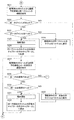
- FIGS. 2 to 4 are flowcharts showing a processing example of the control unit 11 of the video recorder 1 according to the present embodiment.
- step S1 the control unit 11 determines whether or not there is a scheduled recording program scheduled to start recording within a predetermined time (for example, within 10 minutes) from the current time (step S1). At this time, if there is no scheduled recording program (step S1: NO), the control unit 11 ends this process.
- a predetermined time for example, within 10 minutes
- step S1 if there is a recording reservation program (step S1: YES), the control unit 11 refers to the program recording reservation information to confirm the contents of the recording reservation program (step S2) and sets the number of recorded titles. Confirm (step S3).
- step S4 determines whether or not the number of recorded titles is the number of titles that can be newly recorded, that is, whether or not the number of recorded titles has reached the upper limit (step S4). At this time, if the number of recorded titles has not reached the upper limit (step S4: YES), the control unit 11 will record the audio / video data of the scheduled recording program as a new title at the recording start time (step S5). Is started by the recording processor 19 (step S6).
- the control unit 11 determines whether or not a recording cancellation operation has been performed by the user based on an output signal from the operation unit 15 (step S7). At this time, when the cancel operation is performed (step S7: YES), the control unit 11 ends the recording operation by the recording processing unit 19 and ends the present process. When the cancel operation is not performed ( Step S7: NO), it is determined whether or not the recording end time has passed (step S8). At this time, if the recording end time has not elapsed (step S8: NO), the control unit 11 proceeds to step S7, and if the recording end time has elapsed (step S8: YES), the recording process is performed. The recording operation by the unit 19 is terminated and the present process is terminated.
- step S4 when the number of recorded titles has reached the upper limit (step S4: NO), the control unit 11 searches the recorded titles for the same program as the scheduled recording program (step S9), and records. It is determined whether there is a title of the same program as the reserved program (step S10).
- step S10 if there is a title of the same program as the scheduled recording program (step S10: YES), the control unit 11 indicates the current last chapter of the title of the same program at the recording start time (step S11). As a new chapter following, recording of audio / video data of the scheduled recording program is started by the recording processing unit 19 (step S12). At this time, for example, the control unit 11 acquires information indicating how many times the scheduled recording program is broadcast from the scheduled program recording information, and sets the acquired information as a chapter name of a new chapter. In addition, when the number of chapters included in the title of the same program is one, that is, when the title is a title that has not been integrated so far, the control unit 11 can determine the number of broadcasts. Information indicating whether or not there is is acquired from the title information, and the acquired information is set as the chapter name of the recorded first chapter. When starting the recording, the controller 11 proceeds to step S13.
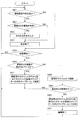
- step S10 when the title of the same program as the scheduled recording program does not exist (step S10: NO), the control unit 11 selects a title of the same genre as the scheduled recording program from the recorded titles as shown in FIG. A search is made (step S21), and it is determined whether or not there is a title of the same genre as the scheduled recording program (step S22). At this time, if there is a title of the same genre as the scheduled recording program (step S22: YES), the control unit 11 determines whether there is only one title of the same genre as the scheduled recording program (step S22: YES). Step S23).
- the control unit 11 integrates the plurality of recorded titles of the same genre into one title (step S24). Specifically, the control unit 11 selects, for example, one title having the oldest recording start date and time among the plurality of recorded titles. Next, the control unit 11 acquires the title name from the title information of the selected title, and sets it as the chapter name of the first chapter of the title. Next, the control unit 11 adds other unselected titles as chapters to the selected titles. At this time, the control unit 11 assigns chapter numbers in order from the oldest recording start date and time, for example. Moreover, the control part 11 sets the title name of each original title to the chapter name of the chapter added to the selected title.
- control part 11 deletes the title information of the other title which was not selected. After completing the title integration, the control unit 11 proceeds to step S25. On the other hand, when there is only one title of the same genre as the scheduled recording program (step S23: YES), the control unit 11 proceeds to step S25.
- step S25 When the recording start time comes, the control unit 11 that has shifted to step S25 records the recording of the audio / video data of the scheduled recording program as a new chapter following the current last chapter of the same genre title as the scheduled recording program. 19 (step S26). At this time, the control unit 11 acquires the program name of the recording reservation program from the program recording reservation information, and sets the acquired program name as the chapter name of the new chapter. In addition, when there is one chapter included in the title of the same genre, the control unit 11 acquires the title name from the title information, and sets the acquired title name as the chapter name of the recorded first chapter. . When starting the recording, the controller 11 proceeds to step S13.
- step S22 when there is no title of the same genre as the scheduled recording program in step S22 (step S22: NO), the control unit 11 has at least one of the scheduled recording program and the performer among the recorded titles. A title is searched (step S27), and it is determined whether or not a recording reserved program and at least one performer have the same title (step S28). At this time, if there is a title with the same performer as the scheduled recording program (step S28: YES), the control unit 11 determines whether there is only one title with the same performer as the scheduled recording program. Is determined (step S29).
- step S29: NO if there are a plurality of titles with the same performer as the scheduled recording program (step S29: NO), the control unit 11 sets a plurality of recorded titles with the same performer as in step S24. The title is integrated into one title (step S30), and the process proceeds to step S31. On the other hand, when there is only one title with the same performer (step S29: YES), the control unit 11 proceeds to step S31. .
- step S31 When the recording start time comes, the control unit 11 that has shifted to step S31 records the audio / video data of the scheduled recording program as a new chapter following the current last chapter with the same title as the scheduled recording program and performers. The process is started in the same manner as S26 (step S32), and the process proceeds to step S13.
- step S27 when there is no title with the same performer as the scheduled recording program and performer in step S27 (step S27: NO), the control unit 11 collectively edits the recorded titles as shown in FIG.
- the user is prompted to input conditions (step S41). Specifically, for example, the control unit 11 displays a message such as “Recording title is XXX title and cannot be recorded. Please enter the conditions for collecting the recording titles” on the screen of the television receiver, and input the conditions. Transition to waiting. As conditions, designation of programs, genres, performers, etc. can be input.
- control part 11 determines whether conditions were input by the user based on the output signal from the operation part 15 (step S42). At this time, if the condition is not input (step S42: NO), the control unit 11 determines whether or not a predetermined time (for example, 5 minutes) has elapsed since the user is prompted to input the condition. Is determined (step S43). At this time, if the predetermined time has elapsed (step S43: YES), the control unit 11 considers that the user has abandoned the recording and ends the present process. If the predetermined time has not elapsed ( Step S43: NO), the process proceeds to Step S42.
- a predetermined time for example, 5 minutes
- step S42 when the condition is input (step S42: YES), the control unit 11 searches for a recorded title under the input condition, and determines whether there are a plurality of titles that meet the condition (step S42). S44). That is, when a program is input as a condition, the control unit 11 determines whether or not there are a plurality of titles of the program among recorded titles, and a certain genre is input as a condition. In such a case, it is determined whether or not there are a plurality of titles of the genre in the recorded title, and if a certain performer is input as a condition, the performer appears in the recorded title. It is determined whether a plurality of program titles exist.
- step S44 the control unit 11 displays a message that the input conditions cannot be collectively edited on the screen of the television receiver.
- Step S45 and based on the output signal from the operation unit 15, it is determined whether or not the user has selected the end of editing (step S46).
- step S46: YES the control unit 11 regards that the user has abandoned the recording and terminates the process, and the editing end is not selected.
- Step S46: NO the process proceeds to step S41.
- step S44 when there are a plurality of titles that meet the conditions (step S44: YES), the control unit 11 integrates the plurality of titles into one title (step S47), and proceeds to step S4. To do. At this time, since the number of titles is sufficient, the scheduled recording program is recorded as a new title.
- Step S13 determines whether or not a recording cancel operation has been performed by the user based on an output signal from the operation unit 15 ( Step S13). At this time, when the cancel operation is performed (step S13: YES), the control unit 11 ends the recording operation by the recording processing unit 19 and proceeds to step S15.
- Step S13: NO it is determined whether or not the recording end time has passed (step S14). At this time, if the recording end time has not elapsed (step S14: NO), the control unit 11 proceeds to step S13, and if the recording end time has elapsed (step S13: YES), the recording process is performed. The recording operation by the unit 19 is terminated, and the process proceeds to step S15.
- the control unit 11 displays a message to the effect that recording has been performed on the next chapter of the last chapter of the recorded title on the screen of the television receiver (step S15).
- the control unit 11 displays the title name of the recorded title of the integration destination, the program name of the recorded program, the chapter number of the added chapter, and the like on the screen of the television receiver. . Note that these displays may be performed immediately after the end of recording, or may be performed at the timing when the user turns on the power after shifting to the standby state once.
- the control part 11 will complete
- FIG. 5A is a screen display example of the folder title list
- FIG. 5B is a screen display example of the chapter list of the folder title.
- the control unit 11 performs the processing shown in FIG. ) Display a title list as shown on the TV receiver screen.
- the integrated title is referred to as “folder title” for convenience.
- the title name of the folder title is displayed together with its title number.
- the control unit 11 displays a chapter list as shown in FIG. 5B on the screen of the television receiver.
- the chapter list the title name of the selected folder title is displayed, and the chapter names of the chapters included in the selected folder title are displayed together with the chapter number.
- FIG. 5B shows a display example when, for example, the same program is integrated into one title, the program name is displayed as the title name, and the number of episodes is broadcast as each chapter name. Is displayed.
- the playback processing unit 20 plays back the audio / video data from the beginning of the selected chapter, that is, from the beginning of the recorded program, based on the control of the control unit 11. To start. At this time, when the user selects chapter jump, the playback processing unit 20 starts playback of the chapter (program) immediately before or after the chapter (program) currently played back. Note that the reproduction processing unit 20 may end the reproduction after reproducing the selected chapter to the end, or may reproduce the next chapter.
- FIG. 6 is a flowchart showing another processing example of the control unit 11 of the video recorder 1 according to the present embodiment.
- FIG. 6 shows an example of processing in the case where recording control is performed depending on whether or not a program summarizing function (function for integrating recorded programs into recorded titles) at the time of recording reservation setting is selected.
- a program summarizing function function for integrating recorded programs into recorded titles
- control unit 11 determines whether or not the program recording reservation setting has been selected by the user based on the output signal from the operation unit 15 (step S51). At this time, when the program recording reservation setting is not selected (step S51: NO), the control unit 11 proceeds to step S55, and when the program recording reservation setting is selected (step S51: YES), the program recording reservation setting screen is displayed on the screen of the television receiver.
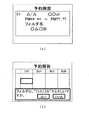
- FIG. 7A shows a display example of the program recording reservation setting screen when the user sets the recording reservation contents from scratch.
- a recording date, a channel, a recording start time, a recording end time, a recorded title of the integration destination (displayed as a folder name in FIG. 7A), and the like are set.
- An input field and a pull-down menu are displayed.
- FIG. 7B is a display example of a program recording reservation setting screen when a program to be recorded is selected from the program guide.
- program titles and the like are separated by a channel and a time zone, and are displayed so as to be selectable by the user.
- the control unit 11 determines whether or not the program summarizing function has been selected by the user based on the output signal from the operation unit 15 (step S52). At this time, when the program summarizing function is not selected (step S52: NO), the control unit 11 proceeds to step S54, and when the program summarizing function is selected (step S52: YES), the use is made.
- the input of the title of the integration destination from the person is accepted (step S53).
- the user selects an integration destination title from the recorded titles.
- the control unit 11 searches the recorded titles for the scheduled recording program, the title of the same program, the title of the same genre, the title of the same program by at least one performer, This may be presented to the user as a candidate for the title of the integration destination.
- FIG. 7 (b) shows an example in which the title of the same program as the program selected as the scheduled recording program (“ ⁇ ⁇ ⁇ *”) is displayed as a candidate. Here, the user selects “Yes”. Then, the displayed candidate is selected as the integration destination
- control unit 11 stores the program recording reservation information including the set content in the memory 12 (step S54), and proceeds to step S55.
- step S55 determines whether or not any scheduled recording start time has arrived, based on the scheduled recording information stored in the memory 12. At this time, if the reserved recording start time has not arrived (step S55: NO), the control unit 11 proceeds to step S51.
- step S55 when the scheduled recording start time has arrived (step S55: YES), the control unit 11 determines whether or not the program summarizing function is set for the program to be recorded (step S56). At this time, when the program summarizing function is set (step S56: YES), the control unit 11 sets a new chapter following the current last chapter of the recorded title selected as the integration destination title. Recording of the audio / video data of the scheduled recording program is started by the recording processing unit 19 (step S57). Then, when the recording ends, the control unit 11 proceeds to step S51.
- step S56 NO
- the control unit 11 causes the recording processing unit 19 to start recording the audio / video data of the scheduled recording program as a new title (step S58).
- step S58 it is assumed that the number of recorded titles has not reached the upper limit.
- step S59 determines whether or not program summary editing has been selected by the user based on the output signal from the operation unit 15 (step S59). At this time, when the program summary editing is not selected (step S59: NO), the control unit 11 proceeds to step S51, and when the program summary editing is selected (step S59: YES), the title Display the selection screen on the screen of the television receiver.
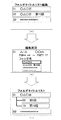
- FIG. 8A shows a display example of the title selection screen.
- a list of recorded titles is displayed on the title selection screen.
- the first title whose title name is “ ⁇ ⁇ ⁇ ⁇ ” and the second title whose title name is “ ⁇ ⁇ ⁇ ⁇ Episode 10” are displayed.
- the title “ ⁇ ⁇ ⁇ *” is a title (folder title) in which recorded audio and video data from the first episode to the ninth episode of the program “ ⁇ ⁇ ⁇ *” are integrated.
- the title “ ⁇ ⁇ ⁇ ⁇ Episode 10” is a normal title including only the audio / video data of the 10th episode of the program “ ⁇ ⁇ ⁇ *”.
- the editing screen shown in FIG. 8B is displayed.
- the contents of the selected title (title name, recording date, channel, recording start time, recording end time) and the like are displayed, and a pull-down menu for selecting the title of the integration destination is displayed. .
- the title selection screen is displayed as shown in FIG.
- the title “ ⁇ ⁇ ⁇ *” has been added as “10th chapter” with the chapter name “Episode 10” as “# ⁇ ⁇ Episode 10”.
- control unit 11 adds the integration source title as a new chapter following the current last chapter of the integration destination title, and integrates the titles (step S60). ). And the control part 11 will transfer to step S51, if editing is complete
- the recording processing unit 19 records the video and sound of the television broadcast program on the hard disk of the HDD 13 as one title of audio / video data for each recording,
- the control unit 11 determines whether or not the number of recorded titles has reached the upper limit, and if the number of recorded titles has reached the upper limit, the audio / video data of the newly recorded program is recorded as the recorded title. Since the recording processing unit 19 is controlled so as to add and record as a new chapter in any one of the titles, even if the number of recorded titles reaches the upper limit, new recording is performed without deleting the number of recorded titles. It can be performed. Further, when the chapter of the title thus recorded is selected by the user, the audio / video data is reproduced from the head of the selected chapter, so that the user can view the recorded program from the beginning. it can.
- control unit 11 selects the same program, the same program as the program, the same genre, or at least one performer as the integration destination of the audio / video data of the newly recorded program. Therefore, even if the recorded program is integrated into the recorded title, the user can easily find the target recorded program. Furthermore, when audio / video data of the same program, the same genre program, or the program of the same performer is collectively dubbed to the optical disc, it is only necessary to select one title to be dubbed. There is no need. And programs that do not need to be dubbed need only be deleted from the chapter list.
- the integration destination of the audio / video data of the program to be newly recorded when there is no title that meets the conditions as the integration destination of the audio / video data of the program to be newly recorded, at least one of the same program, the same genre program, or the performer is the same. Since the audio and video data of the programs are integrated into one title as chapters, the number of recorded titles can be reduced.
- the control unit 11 sets the audio / video data of the newly recorded program regardless of whether or not the number of recorded titles has reached the upper limit. Since the recording processing unit 19 is controlled to add and record as a new chapter in any one of the recorded titles, it is possible to prevent the number of recorded titles from reaching the upper limit in advance.
- the present application can also be applied to the case where audio / video data is recorded on an optical disk. Since the upper limit of the number of recorded titles is determined by the standard etc. of the optical disc, the present application is also effective for the optical disc.
- a conventional chapter is applied as a partial content separator.
- a chapter can be divided or combined by editing by a user, For example, you may use the concept different from a chapter for the division
- the present application is applied to television broadcasting.
- the present application may be applied to video-only broadcasting and audio-only broadcasting.
- the present application is not limited to the above embodiment.
- the above-described embodiment is an exemplification, and has substantially the same configuration as the technical idea described in the claims of the present application, and any device that exhibits the same function and effect is the present invention. Included in the technical scope.
Landscapes
- Engineering & Computer Science (AREA)
- Multimedia (AREA)
- Signal Processing (AREA)
- Human Computer Interaction (AREA)
- Television Signal Processing For Recording (AREA)
- Management Or Editing Of Information On Record Carriers (AREA)
Abstract
放送番組の映像や音をタイトル等を単位とするコンテンツ情報として記録するときに、記録済みのコンテンツ情報の単位数が上限に達していても、記録済みのコンテンツ情報を削除することなく新たに記録を行うことを可能とする記録装置、記録方法及び記録処理プログラムを提供する。 記録処理部19が、テレビジョン放送の番組の映像及び音を、1回の録画につき1タイトルのオーディオ・ビデオデータとしてHDD13のハードディスクに記録させ、制御部11が、記録済みタイトル数が上限に達しているか否かを判定し、記録済みタイトル数が上限に達している場合には、新たに録画する番組のオーディオ・ビデオデータを、記録済みタイトルの何れか1タイトル中の新しいチャプターとして追加して記録するように記録処理部19を制御する。
Description
本願は、放送番組の映像または音の少なくとも何れか一方を記録する記録装置、記録方法及び記録処理プログラムの技術分野に関する。
従来、テレビジョン放送を受信して放送番組の映像及び音をハードディスク等の記録媒体に記録する記録装置においては、データ管理の都合上等により、記録媒体に記録保存させておいておけるタイトル数の上限が予め決められている(例えば、特許文献1(段落番号0055))。
特開2006-270244号公報
このように、従来の記録装置では、タイトル数の上限が決められているので、記録済みのタイトル数がこの上限に達していると、これ以上の記録を行うことができないという不都合があった。
本願は、以上の点に鑑みてなされたものであり、その課題の一例は、放送番組の映像や音を、タイトル等を単位とするコンテンツ情報として記録するときに、記録済みのコンテンツ情報の単位数が上限に達していても、記録済みのコンテンツ情報を削除することなく新たに記録を行うことを可能とする記録装置、記録方法及び記録処理プログラムを提供することにある。
上記課題を解決するために、本願の一つの観点では、放送されてきた番組の映像または音の少なくとも何れか一方を、1回の記録につき、少なくとも1つの頭出し再生が可能な部分コンテンツに区切られる、1単位のコンテンツ情報として記録媒体に記録する記録手段と、前記記録媒体に保存されている記録済みの前記コンテンツ情報の単位数が、当該記録媒体が前記コンテンツ情報を保存可能とされている単位数の上限に達しているか否かを判定する判定手段と、前記記録済みのコンテンツ情報の単位数が前記上限に達している場合には、前記記録手段によって、前記コンテンツ情報として記録すべき映像または音の少なくとも何れか一方を、当該記録済みのコンテンツ情報の何れか1単位中の新しい前記部分コンテンツとして追加して記録させる制御手段と、を備えることを特徴とする。
本願の他の観点では、放送されてきた番組の映像または音の少なくとも何れか一方を、1回の記録につき、少なくとも1つの頭出し再生が可能な部分コンテンツに区切られる、1単位のコンテンツ情報として記録媒体に記録する記録方法において、前記記録媒体に保存されている記録済みの前記コンテンツ情報の単位数が、当該記録媒体が前記コンテンツ情報を保存可能とされている単位数の上限に達しているか否かを判定する判定工程と、前記記録済みのコンテンツ情報の単位数が前記上限に達している場合には、前記記録手段によって、前記コンテンツ情報として記録すべき映像または音の少なくとも何れか一方を、当該記録済みのコンテンツ情報の何れか1単位中の新しい前記部分コンテンツとして追加して記録する記録工程と、を含むことを特徴とする。
本願の更に他の観点では、コンピュータを、放送されてきた番組の映像または音の少なくとも何れか一方を、1回の記録につき、少なくとも1つの頭出し再生が可能な部分コンテンツに区切られる、1単位のコンテンツ情報として記録媒体に記録する記録手段、前記記録媒体に保存されている記録済みの前記コンテンツ情報の単位数が、当該記録媒体が前記コンテンツ情報を保存可能とされている単位数の上限に達しているか否かを判定する判定手段、及び、前記記録済みのコンテンツ情報の単位数が前記上限に達している場合には、前記記録手段によって、前記コンテンツ情報として記録すべき映像または音の少なくとも何れか一方を、当該記録済みのコンテンツ情報の何れか1単位中の新しい前記部分コンテンツとして追加して記録させる制御手段、として機能させることを特徴とする。
1 ビデオレコーダー
11 制御部
12 メモリ
13 HDD
14 光ディスクドライブ
15 操作部
16 チューナ
17 復調・復号部
18 分離部
19 記録処理部
20 再生処理部
21 AV出力部
22 バス
11 制御部
12 メモリ
13 HDD
14 光ディスクドライブ
15 操作部
16 チューナ
17 復調・復号部
18 分離部
19 記録処理部
20 再生処理部
21 AV出力部
22 バス
以下、図面を参照して本願の最良の実施形態について詳細に説明する。なお、以下に説明する実施の形態は、ビデオレコーダーに対して本願を適用した場合の実施形態である。
[1.ビデオレコーダーの構成及び機能]
先ず、第1実施形態に係るビデオレコーダー1の構成及び機能について、図1を用いて説明する。ここで、図1は、本実施形態に係るビデオレコーダー1の概要構成の一例を示す図である。
先ず、第1実施形態に係るビデオレコーダー1の構成及び機能について、図1を用いて説明する。ここで、図1は、本実施形態に係るビデオレコーダー1の概要構成の一例を示す図である。
図1に示すように、ビデオレコーダー1は、判定手段、制御手段及び統合手段の一例としての制御部11と、メモリ12と、HDD13と、光ディスクドライブ14と、入力手段の一例としての操作部15と、チューナ16と、復調・復号部17と、分離部18と、記録手段の一例としての記録処理部19と、再生処理部20と、AV出力部21と、を備え、制御部11と各部とは、バス22を介して相互に接続されている。
制御部11は、CPU(Central Processing Unit)、RAM(Random Access Memory)、ROM(Read Only Memory)等により構成され、ROM、メモリ12等に記憶された制御プログラム(記録制御プログラムの一例)等を読み出し実行することにより、ビデオレコーダー1全体を統括制御するとともに、判定手段、制御手段及び統合手段として機能する。なお、制御プログラム等は、光ディスクドライブ14を介して光ディスクから供給されるようにしても良い。
メモリ12は、フラッシュメモリ等の不揮発性のメモリ等により構成され、各種データ及びプログラム等を記憶する。メモリ12に記憶されているデータとしては、例えば、EPG(Electronic Program Guide)データ、番組録画予約情報等が存在する。番組録画予約情報は、予約録画の設定が行われたときに制御部11により生成される、設定された予約録画の内容を示す情報であり、当該情報には、例えば、録画が予約された番組のタイトル、チャネル、録画開始時刻、録画終了時刻、番組のジャンル、番組説明等が設定され、これらの情報は、主としてEPGデータから取得される。
HDD13は、記録媒体の一例としてのハードディスクを内蔵し、当該ハードディスクに対してデータを記録する一方、当該ハードディスクに記録されたデータを読み出すようになっている。
光ディスクドライブ14は、DVD(Digital Versatile Disc)、Blu-rayディスク等の光ディスクに対してデータを記録する一方、光ディスクに記録されたデータを読み出すようになっている。
操作部15は、図示しないリモートコントローラー(以下、「リモコン」という)からの赤外線信号を受信する受光部等により構成され、利用者からの指示を指示信号として制御部に出力する。
チューナ16は、アンテナATにより受信されたデジタルテレビジョン放送の放送信号のうち、制御部11の制御により指定されたチャネルの放送信号に同調し、この放送信号に対して帯域制限、増幅、周波数変換等を施してIF(Intermediate Frequency)信号を出力する。
復調・復号部17は、チューナ16から出力されたIF信号に対して復調及び復号処理を施し、トランスポートストリームを出力する。
分離部18は、復調・復号部17から出力されたトランスポートストリームを、ビデオデータ、オーディオデータ、EPGデータ等に分離する。そして、分離部18は、ビデオデータ及びオーディオデータを記録処理部19に出力する。また、分離部18は、EPGデータを制御部11に出力し、制御部11は、これをメモリ12に記憶させる。
記録処理部19は、制御部11から番組の録画が指示されたとき、分離部18から出力されたビデオデータ及びオーディオデータを多重化して、多重化したデータ(以下、「オーディオ・ビデオデータ」という)をHDD13または光ディスクドライブ14に記録させる。
再生処理部20は、制御部11から録画番組の再生が指示されたとき、HDD13または光ディスクドライブ14により読み出されたオーディオ・ビデオデータをビデオデータ及びオーディオデータに分離する。
AV出力部21は、再生処理部20により再生されたビデオデータ及びオーディオデータを、例えばHDMI(High-Definition Multimedia Interface)ケーブル等のビデオ・オーディオケーブルを介してテレビ受像機に送信する。
このような構成のビデオレコーダー1において、HDD13に内蔵されているハードディスクや光ディスクには、オーディオ・ビデオデータがタイトル毎の記録されるようになっており、録画開始から録画終了までの1回の録画に対して1タイトル(例えば、1ファイル)が割り当てられるようになっている。また、1つのタイトルは少なくとも1つのチャプター(部分コンテンツの一例)によって構成されており、それぞれのチャプターについてオーディオ・ビデオデータの頭出し再生が可能になっている。そして、タイトル毎に、例えば、タイトル番号、録画された番組のタイトル名、チャネル、ジャンル、番組説明(番組出演者を含む)、そのタイトルのサムネイル画像の再生位置、タイトルに含まれるオーディオ・ビデオデータの管理情報、配下のチャプターの管理情報等を含むタイトル情報が、オーディオ・ビデオデータと同じ記録媒体に対応付けて記録される。また、例えば、チャプター毎に、チャプター番号、チャプターの開始位置及び終了位置、チャプター名、そのチャプターのサムネイル画像の再生位置等を含むチャプター情報も記録される。なお、タイトル及びチャプターの管理自体は公知であるため、詳細な説明は省略する。
ところで、HDD13に内蔵されているハードディスクに記録保存されるタイトル(以下、「録画済みタイトル」という)の個数の上限は、オーディオ・ビデオデータの管理上(またはファイル管理上)予め決まっており、例えば999タイトルが上限となっている。それゆえ、記録処理部19により、1回の録画につき1タイトルとして記録を重ねていくと、録画済みタイトル数が上限に達し、これ以上記録することができない事態が生じる。そこで、制御部11は、このような場合でも新しく記録を行うことができるように制御するようになっている。
具体的に、制御部11は、録画済みタイトル数が上限に達している場合には、これから録画する番組のオーディオ・ビデオデータを、録画済みタイトルのうち何れかのタイトルの新しいチャプターとして、そのタイトルに追加して記録処理部19により記録させ、1タイトルに統合する(まとめる)ようになっている。例えば、統合先のタイトルに3チャプターが含まれていた場合には、新しいチャプターとして第4チャプターが追加される。このとき、制御部11は、統合先のタイトルとして、これから録画する番組と、同一番組のタイトルか、ジャンルが同一の番組(関連のある番組の一例)のタイトルか、または、出演者の少なくとも1人が同一である番組(関連のある番組の他の一例)のタイトルを選択するようになっている。ここで、同一番組であるか、ジャンルが同一であるか、出演者が同一であるかの判断は、番組録画予約情報(またはEPGデータ)と録画済みタイトルのタイトル情報とに基づいて行われる。
また、制御部11は、これから録画する番組と、同一番組のタイトル、ジャンルが同一の番組のタイトル、及び、出演者の少なくとも1人が同一である番組のタイトルの何れも存在しない場合には、録画済みタイトルを統合することによって録画済みタイトル数を減らすようになっている。具体的に、制御部11は、利用者からどのタイトルを統合するかの条件(番組、ジャンル、出演者)の入力を受け付け、当該条件に合致する複数のタイトルを統合するようになっている。このときの元の各タイトルはそれぞれ1タイトル中に含るチャプターとして統合される。
また、制御部11は、録画予約設定時において、録画予約番組を録画済みタイトルに統合することが利用者によって選択された番組については、録画済みタイトル数が上限に達しているか否かにかかわらず、そのオーディオ・ビデオデータを、録画済みタイトルの新しいチャプターとして追加して記録させるようになっている。このときの統合先のタイトルは利用者が選択可能である。
[2.ビデオレコーダーの動作]
次に、ビデオレコーダー1の動作について、図2乃至8を用いて説明する。ここで、図2乃至図4は、本実施形態に係るビデオレコーダー1の制御部11の処理例を示すフローチャートである。
次に、ビデオレコーダー1の動作について、図2乃至8を用いて説明する。ここで、図2乃至図4は、本実施形態に係るビデオレコーダー1の制御部11の処理例を示すフローチャートである。
図2乃至図4に示す処理は、例えば定期的に実行される。図2に示すように、制御部11は、現時点から所定時間以内(例えば、10分以内)に録画を開始する予定の録画予約番組が存在するか否かを判定する(ステップS1)。このとき、制御部11は、録画予約番組が存在しない場合には(ステップS1:NO)、本処理を終了させる。
一方、制御部11は、録画予約番組が存在する場合には(ステップS1:YES)、番組録画予約情報を参照して録画予約番組の内容を確認するとともに(ステップS2)、録画済みタイトル数を確認する(ステップS3)。次いで、制御部11は、録画済みタイトル数が、新しく録画をすることができるタイトル数であるか、すなわち、録画済みタイトル数が上限に達しているか否かを判定する(ステップS4)。このとき、制御部11は、録画済みタイトル数が上限に達していない場合には(ステップS4:YES)、録画開始時刻になると(ステップS5)、新規のタイトルとして録画予約番組のオーディオ・ビデオデータの記録を記録処理部19によって開始させる(ステップS6)。
次いで、制御部11は、操作部15のからの出力信号に基づき利用者によって録画のキャンセル操作がされたか否かを判定する(ステップS7)。このとき、制御部11は、キャンセル操作がされた場合には(ステップS7:YES)、記録処理部19による記録動作を終了させて本処理を終了させ、キャンセル操作がされていない場合には(ステップS7:NO)、録画終了時刻が経過したか否かを判定する(ステップS8)。このとき、制御部11は、録画終了時刻が経過していない場合には(ステップS8:NO)、ステップS7に移行し、録画終了時刻が経過した場合には(ステップS8:YES)、記録処理部19による記録動作を終了させて本処理を終了させる。
一方、制御部11は、録画済みタイトル数が上限に達している場合には(ステップS4:NO)、録画済みタイトルの中から録画予約番組と同一番組のタイトルを検索し(ステップS9)、録画予約番組と同一番組のタイトルが存在するか否かを判定する(ステップS10)。
このとき、制御部11は、録画予約番組と同一番組のタイトルが存在する場合には(ステップS10:YES)、録画開始時刻になると(ステップS11)、その同一番組のタイトルの現在の最後のチャプターに続く新しいチャプターとして、録画予約番組のオーディオ・ビデオデータの記録を記録処理部19によって開始させる(ステップS12)。このとき、制御部11は、例えば録画予約番組が何回目の放送であるかを示す情報を番組録画予約情報から取得し、取得した情報を新しいチャプターのチャプター名として設定する。また、制御部11は、同一番組のタイトルに含まれていたチャプターが1個である場合、つまり、当該タイトルがこれまで統合が行われていなかったタイトルである場合には、何回目の放送であるかを示す情報をタイトル情報から取得し、取得した情報を記録済みの第1チャプターのチャプター名として設定する。制御部11は、記録を開始させると、ステップS13に移行する。
一方、制御部11は、録画予約番組と同一番組のタイトルが存在しない場合には(ステップS10:NO)、図3に示すように、録画済みタイトルの中から録画予約番組と同一ジャンルのタイトルを検索し(ステップS21)、録画予約番組と同一ジャンルのタイトルが存在するか否かを判定する(ステップS22)。このとき、制御部11は、録画予約番組と同一ジャンルのタイトルが存在する場合には(ステップS22:YES)、録画予約番組と同一ジャンルのタイトルが1個のみ存在するか否かを判定する(ステップS23)。
このとき、制御部11は、録画予約番組と同一ジャンルのタイトルが複数存在する場合には(ステップS23:NO)、この同一ジャンルの複数の記録済みタイトルを1タイトルに統合する(ステップS24)。具体的に、制御部11は、この複数の記録済みタイトルのうち、例えば録画開始日時が最も古い1タイトルを選択する。次いで、制御部11は、選択したタイトルのタイトル情報からタイトル名を取得し、当該タイトルの第1チャプターのチャプター名として設定する。次いで、制御部11は、選択されなかった他のタイトルをそれぞれチャプターとして、選択されたタイトルに追加する。このとき、制御部11は、例えば録画開始日時が古いものから順にチャプター番号を割り当てる。また、制御部11は、選択されたタイトルに追加されるチャプターのチャプター名に、それぞれの元のタイトルのタイトル名を設定する。そして、制御部11は、選択されなかった他のタイトルのタイトル情報を削除する。制御部11は、タイトルの統合を終えると、ステップS25に移行する。一方、制御部11は、録画予約番組と同一ジャンルのタイトルが1個のみ存在する場合には(ステップS23:YES)、ステップS25に移行する。
ステップS25に移行した制御部11は、録画開始時刻になると、録画予約番組と同一ジャンルのタイトルの現在の最後のチャプターに続く新しいチャプターとして、録画予約番組のオーディオ・ビデオデータの記録を記録処理部19によって開始させる(ステップS26)。このとき、制御部11は、録画予約番組の番組名を番組録画予約情報から取得し、取得した番組名を新しいチャプターのチャプター名として設定する。また、制御部11は、同一ジャンルのタイトルに含まれていたチャプターが1個である場合、タイトル名をタイトル情報から取得し、取得したタイトル名を記録済みの第1チャプターのチャプター名として設定する。制御部11は、記録を開始させると、ステップS13に移行する。
一方、制御部11は、ステップS22において録画予約番組と同一ジャンルのタイトルが存在しない場合には(ステップS22:NO)、録画済みタイトルの中から録画予約番組と出演者の少なくとも1人が同一のタイトルを検索し(ステップS27)、録画予約番組と出演者の少なくとも1人が同一のタイトルが存在するか否かを判定する(ステップS28)。このとき、制御部11は、録画予約番組と出演者が同一のタイトルが存在する場合には(ステップS28:YES)、録画予約番組と出演者が同一のタイトルが1個のみ存在するか否かを判定する(ステップS29)。
このとき、制御部11は、録画予約番組と出演者が同一のタイトルが複数存在する場合には(ステップS29:NO)、この出演者が同一の複数の記録済みタイトルをステップS24と同様にして1タイトルに統合し(ステップS30)、ステップS31に移行する、一方、制御部11は、出演者が同一のタイトルが1個のみ存在する場合には(ステップS29:YES)、ステップS31に移行する。
ステップS31に移行した制御部11は、録画開始時刻になると、録画予約番組と出演者が同一のタイトルの現在の最後のチャプターに続く新しいチャプターとして、録画予約番組のオーディオ・ビデオデータの記録をステップS26と同様にして開始させ(ステップS32)、ステップS13に移行する。
一方、制御部11は、ステップS27において録画予約番組と出演者が同一のタイトルが存在しない場合には(ステップS27:NO)、図4に示すように、録画済みタイトルを統合するためのまとめ編集条件の入力を利用者に対して促す(ステップS41)。具体的に制御部11は、例えば、「録画タイトルがXXXタイトルあり、録画できません。録画タイトルをまとめるための条件を入力して下さい。」等のメッセージをテレビ受信機の画面に表示させ、条件入力待ちに移行する。条件としては、番組、ジャンル、出演者等の指定を入力することができる。
そして、制御部11は、操作部15からの出力信号に基づき利用者によって条件が入力されたか否かを判定する(ステップS42)。このとき、制御部11は、条件が入力されていない場合には(ステップS42:NO)、条件の入力を利用者に対して促してから所定時間(例えば、5分等)経過したか否かを判定する(ステップS43)。このとき、制御部11は、所定時間が経過した場合には(ステップS43:YES)、利用者が録画を断念したとみなして本処理を終了させ、所定時間が経過していない場合には(ステップS43:NO)、ステップS42に移行する。
一方、制御部11は、条件が入力された場合には(ステップS42:YES)、入力された条件で録画済みタイトルを検索し、条件に合うタイトルが複数存在するか否かを判定する(ステップS44)。つまり、制御部11は、条件として或る番組が入力された場合には、録画済みタイトルの中に当該番組のタイトルが複数存在するか否かを判定し、条件として或るジャンルが入力された場合には、録画済みタイトルの中に当該ジャンルのタイトルが複数存在するか否かを判定し、条件として或る出演者が入力された場合には、録画済みタイトルの中に当該出演者が出演する番組のタイトルが複数存在するか否かを判定する。
このとき、制御部11は、条件に合うタイトルが1つもない、または、1つしかない場合には(ステップS44:NO)、入力された条件ではまとめ編集できない旨のメッセージをテレビ受信機の画面に表示させ(ステップS45)、操作部15からの出力信号に基づき利用者によって編集終了の選択がなされたか否かを判定する(ステップS46)。このとき、制御部11は、編集終了の選択がなされた場合には(ステップS46:YES)、利用者が録画を断念したとみなして本処理を終了させ、編集終了の選択がなされなかった場合には(ステップS46:NO)、ステップS41に移行する。
一方、制御部11は、条件に合うタイトルが複数存在する場合には(ステップS44:YES)、この複数のタイトルをステップS24と同様にして1タイトルに統合し(ステップS47)、ステップS4に移行する。このときは、タイトル数に余裕ができたため、録画予約番組は新規のタイトルとして録画されることになる。
図2に戻って、制御部11は、録画を開始せると(S12、S26またはS32)、操作部15のからの出力信号に基づき利用者によって録画のキャンセル操作がされたか否かを判定する(ステップS13)。このとき、制御部11は、キャンセル操作がされた場合には(ステップS13:YES)、記録処理部19による記録動作を終了させてステップS15に移行し、キャンセル操作がされていない場合には(ステップS13:NO)、録画終了時刻が経過したか否かを判定する(ステップS14)。このとき、制御部11は、録画終了時刻が経過していない場合には(ステップS14:NO)、ステップS13に移行し、録画終了時刻が経過した場合には(ステップS13:YES)、記録処理部19による記録動作を終了させてステップS15に移行する。
制御部11は、録画が終了すると、録画済みタイトルの最後のチャプターの次のチャプターに録画した旨のメッセージをテレビ受信機の画面に表示させる(ステップS15)。このとき、制御部11は、当該メッセージに加え、例えば、統合先の録画済みタイトルのタイトル名、録画された番組の番組名、追加されたチャプターのチャプター番号等をテレビ受信機の画面に表示させる。なおこれらの表示は、録画終了直後に行っても良いし、一度スタンバイ状態に移行した後、利用者によって電源ON操作がされたタイミングに行っても良い。制御部11は、メッセージを表示すると、本処理を終了させる。
図5(a)は、フォルダタイトルリストの画面表示例であり、図5(b)は、フォルダタイトルのチャプターリストの画面表示例である。
上述したように、録画済みタイトルの新しいチャプターとして録画が行われることによって1つに統合されたタイトルや、録画済みタイトルが1つに統合されたタイトルについては、制御部11は、図5(a)に示すようなタイトルリストをテレビ受信機の画面に表示する。なお、統合されたタイトルを便宜上、「フォルダタイトル」という。このタイトルリストにおいては、フォルダタイトルのタイトル名が、そのタイトル番号とともに表示される。
ここで、利用者が何れかのフォルダタイトルを選択すると、制御部11は、図5(b)に示すようなチャプターリストをテレビ受信機の画面に表示する。このチャプターリストにおいては、選択されたフォルダタイトルのタイトル名が表示されるとともに、選択されたフォルダタイトルに含るチャプターのチャプター名が、そのチャプター番号とともに表示される。図5(b)では、例えば、同一番組を1つのタイトルに統合した場合の表示例であり、タイトル名としてその番組名が表示され、各チャプター名として、それぞれ、何話目の放送であるかが表示されている。
ここで、利用者が何れかのチャプターを選択すると、再生処理部20は、制御部11の制御に基づき、選択されたチャプターの始め、つまり、録画された番組の始めからオーディオ・ビデオデータの再生を開始させる。このときに、利用者がチャプタージャンプを選択すると、再生処理部20は、現在再生していたチャプター(番組)の1つ前または1つ後のチャプター(番組)の再生を開始させる。なお、再生処理部20は、選択されたチャプターを最後まで再生した後は、そこで再生を終了させても良いし、次のチャプターを再生させても良い。
図6は、本実施形態に係るビデオレコーダー1の制御部11の他の処理例を示すフローチャートである。なお、図6は、録画予約設定時における番組まとめ機能(録画番組を録画済みタイトルに統合する機能)の選択の有無によって、録画の制御を行う場合の処理例を示している。
先ず、制御部11は、操作部15からの出力信号に基づき、利用者によって番組録画予約の設定が選択されたか否かを判定する(ステップS51)。このとき、制御部11は、番組録画予約の設定が選択されなかった場合には(ステップS51:NO)、ステップS55に移行し、番組録画予約の設定が選択された場合には(ステップS51:YES)、番組録画予約設定画面をテレビ受像機の画面に表示させる。
図7(a)は、利用者が一から録画予約内容を設定する場合における番組録画予約設定画面の表示例である。図7(a)に示す番組録画予約設定画面においては、録画日、チャネル、録画開始時刻、録画終了時刻、統合先の録画済みタイトル(図7(a)ではフォルダ名で表示)等を設定するための入力欄やプルダウンメニューが表示される。図7(b)は、番組表から録画する番組を選択する場合における番組録画予約設定画面の表示例である。図7(b)に示す番組録画予約設定画面においては、番組のタイトル等が、チャネル及び時間帯によって区切られて、それぞれ利用者によって選択可能に表示される。
制御部11は、操作部15からの出力信号に基づき、利用者によって番組まとめ機能が選択されたか否かを判定する(ステップS52)。このとき、制御部11は、番組まとめ機能が選択されなかった場合には(ステップS52:NO)、ステップS54に移行し、番組まとめ機能が選択された場合には(ステップS52:YES)、利用者からの統合先のタイトルの入力を受け付ける(ステップS53)。ここで、利用者は、録画済みタイトルの中から、統合先のタイトルを選択する。なお、制御部11は、録画済みタイトルの中から、録画予約番組と、同一の番組のタイトル、ジャンルが同一の番組のタイトル、出演者の少なくとも1人が同一の番組のタイトル等を検索し、これを統合先のタイトルの候補として利用者に提示しても良い。図7(b)は、録画予約番組として選択された番組と同一番組のタイトル(「○△□※」)を候補として表示した場合の例であり、ここで、利用者が「はい」を選択すると、表示された候補が統合先のタイトルとして選択される。
次いで、制御部11は、録画予約内容の設定が終了すると、設定された内容を含む番組録画予約情報をメモリ12に記憶させ(ステップS54)、ステップS55に移行する。
ステップS55に移行した制御部11は、メモリ12に記憶されている録画予約情報に基づいて、何れかの予約録画開始時刻が到来したか否かを判定する。このとき、制御部11は、予約録画開始時刻が到来していない場合には(ステップS55:NO)、ステップS51に移行する。
一方、制御部11は、予約録画開始時刻が到来した場合には(ステップS55:YES)これから録画開始させる番組について、番組まとめ機能が設定されているか否かを判定する(ステップS56)。このとき、制御部11は、番組まとめ機能が設定されている場合には(ステップS56:YES)、統合先のタイトルとして選択されている録画済みタイトルの現在の最後のチャプターに続く新しいチャプターとして、録画予約番組のオーディオ・ビデオデータの記録を記録処理部19によって開始させる(ステップS57)。そして、制御部11は、録画が終了すると、ステップS51に移行する。
一方、制御部11は、番組まとめ機能が設定されていない場合には(ステップS56:NO)、新規のタイトルとして録画予約番組のオーディオ・ビデオデータの記録を記録処理部19によって開始させる(ステップS58)。なおこのとき、録画済みタイトル数は上限に達していないものとする。
そして、制御部11は、録画終了後、操作部15からの出力信号に基づき、利用者によって番組まとめ編集が選択されたか否かを判定する(ステップS59)。このとき、制御部11は、番組まとめ編集が選択されなかった場合には(ステップS59:NO)、ステップS51に移行し、番組まとめ編集が選択された場合には(ステップS59:YES)、タイトル選択画面をテレビ受像機の画面に表示させる。
図8(a)は、タイトル選択画面の表示例を示す図である。タイトル選択画面には、録画済みタイトルのリストが表示される。図8(a)に示す例では、タイトル名が「○△□※」である第1のタイトルと、タイトル名が「○△□※ 第10話」である第2タイトルと、が表示されている。ここで、タイトル「○△□※」は、番組「○△□※」の第1話から第9話までそれぞれ録画されたオーディオ・ビデオデータが統合されているタイトル(フォルダタイトル)である。また、タイトル「○△□※ 第10話」は、番組「○△□※」の第10話目のオーディオ・ビデオデータのみを含む通常のタイトルである。
ここで、利用者が、例えばタイトル「○△□※ 第10話」を選択すると、図8(b)に示す編集画面が表示される。編集画面においては、選択されたタイトルの内容(タイトル名、録画日、チャネル、録画開始時刻、録画終了時刻)等が表示されるとともに、統合先のタイトルを選択するためのプルダウンメニューが表示される。
ここで、利用者が、例えばタイトル「○△□※」を選択すると、タイトル選択画面が、図8(c)に示すように表示される。ここでは、タイトル「○△□※」の配下に、「○△□※ 第10話」が、チャプター名が「第10話」の第10チャプターとして追加されたことが示される。
制御部11は、このようにして、統合させるタイトルが選択されると、統合元のタイトルを、統合先のタイトルの現在の最後のチャプターに続く新しいチャプターとして追加し、タイトルを統合する(ステップS60)。そして、制御部11は、編集が終了すると(ステップS61)、ステップS51に移行する。
以上説明したように、本実施形態によれば、記録処理部19が、テレビジョン放送の番組の映像及び音を、1回の録画につき1タイトルのオーディオ・ビデオデータとしてHDD13のハードディスクに記録させ、制御部11が、記録済みタイトル数が上限に達しているか否かを判定し、記録済みタイトル数が上限に達している場合には、新たに録画する番組のオーディオ・ビデオデータを、記録済みタイトルの何れか1タイトル中の新しいチャプターとして追加して記録するように記録処理部19を制御するので、記録済みタイトル数が上限に達していても、記録済みタイトル数を削除することなく新たに録画を行うことができる。更に、こうして録画されたタイトルのチャプターが利用者によって選択されると、選択されたチャプターの先頭からオーディオ・ビデオデータの再生が行われるので、利用者は、録画した番組を始まりから視聴することができる。
また、制御部11が、新たに録画する番組のオーディオ・ビデオデータの統合先として、当該番組と同一の番組、ジャンルが同一の番組または出演者の少なくとも1人が同一の番組のタイトルを選択するので、録画番組が録画済みタイトルに統合されても、利用者は、目当ての録画番組を容易に探すことができる。更に、同一番組、同一ジャンルの番組または同一出演者の番組のオーディオ・ビデオデータをまとめて光ディスクにダビングする際には、ダビングさせるタイトルを1つ選択するだけで良く、いちいち番組を探して選択する必要がない。そして、ダビングする必要のない番組は、チャプターの一覧から削除するだけで良い。
また、制御部11が、新たに録画する番組のオーディオ・ビデオデータの統合先として、条件に合うタイトルがなかった場合には、同一番組、同一ジャンルの番組または出演者の少なくとも1人が同一の番組のオーディオ・ビデオデータ同士を、それぞれチャプターとして1タイトルに統合するので、録画済みタイトル数を減らすことができる。
また、制御部11が、録画予約設定時に番組まとめ機能が選択された番組に関しては、記録済みタイトル数が上限に達しているか否かにかかわらず、新たに録画する番組のオーディオ・ビデオデータを、記録済みタイトルの何れか1タイトル中の新しいチャプターとして追加して記録するように記録処理部19を制御するので、記録済みタイトル数が上限に達してしまうことを事前に防止することができる。
なお、上記実施形態においては、ハードディスクに対してオーディオ・ビデオデータを記録する場合を例として説明したが、光ディスクに対してオーディオ・ビデオデータを記録する場合にも本願を適用することができる。光ディスクは、その規格等によって、記録済みタイトル数の上限が決められているので、光ディスクに対しても本願は効果的である。
また、上記実施形態においては、予約録画に対して本願を適用した場合について説明したが、例えば、利用者が録画開始操作を行うことによって録画が開始される手動録画に本願を適用しても良い。
また、上記実施形態においては、部分コンテンツの区切りとして従来からあるチャプターを適用していたが、例えば、利用者の編集によってチャプターの分割や結合を可能とする場合には、これらを区別するために、例えば、部分コンテンツの区切りにチャプターとは異なる概念を用いても良い。
また、上記実施形態においては、テレビジョン放送に対して本願を適用したが、映像のみの放送や音声のみの放送に対して本願を適用しても良い。
また、本願は、上記実施形態に限定されるものではない。上記実施形態は、例示であり、本願の請求の範囲に記載された技術的思想と実質的に同一な構成を有し、同様な作用効果を奏するものは、如何なるものであっても本発明の技術的範囲に包含される。
Claims (6)
- 放送されてきた番組の映像または音の少なくとも何れか一方を、1回の記録につき、少なくとも1つの頭出し再生が可能な部分コンテンツに区切られる、1単位のコンテンツ情報として記録媒体に記録する記録手段と、
前記記録媒体に保存されている記録済みの前記コンテンツ情報の単位数が、当該記録媒体が前記コンテンツ情報を保存可能とされている単位数の上限に達しているか否かを判定する判定手段と、
前記記録済みのコンテンツ情報の単位数が前記上限に達している場合には、前記記録手段によって、前記コンテンツ情報として記録すべき映像または音の少なくとも何れか一方を、当該記録済みのコンテンツ情報の何れか1単位中の新しい前記部分コンテンツとして追加して記録させる制御手段と、
を備えることを特徴とする記録装置。 - 請求項1に記載の記録装置において、
前記制御手段は、前記記録済みのコンテンツ情報のうち、前記記録すべき対象の番組と同一であるかまたは関連のある番組のコンテンツ情報の1単位中に記録させることを特徴とする記録装置。 - 請求項2に記載の記録装置において、
前記記録すべき対象の番組と同一である番組の前記コンテンツ情報及び関連のある番組の前記コンテンツ情報の何れも記録されていない場合には、前記記録済みのコンテンツ情報のうち、番組が同一であるかまたは関連のある番組のコンテンツ情報同士を、それぞれ前記部分コンテンツとして1単位の前記コンテンツ情報に統合する統合手段を更に備えることを特徴とする記録装置。 - 請求項1乃至3の何れか1項に記載の記録装置において、
番組の記録の予約を設定するために用いられるとともに、当該番組の前記コンテンツ情報を前記記録済みのコンテンツ情報に統合するか否かを選択するために用いられる入力手段を更に備え、
前記制御手段は、記録の予約が設定された番組のうち前記統合すると選択された番組に関しては、前記記録済みのコンテンツ情報の単位数が前記上限に達しているか否かにかかわらず、当該記録済みのコンテンツ情報の何れか1単位中の新しい前記部分コンテンツとして追加して記録させることを特徴とする記録装置。 - 放送されてきた番組の映像または音の少なくとも何れか一方を、1回の記録につき、少なくとも1つの頭出し再生が可能な部分コンテンツに区切られる、1単位のコンテンツ情報として記録媒体に記録する記録方法において、
前記記録媒体に保存されている記録済みの前記コンテンツ情報の単位数が、当該記録媒体が前記コンテンツ情報を保存可能とされている単位数の上限に達しているか否かを判定する判定工程と、
前記記録済みのコンテンツ情報の単位数が前記上限に達している場合には、前記記録手段によって、前記コンテンツ情報として記録すべき映像または音の少なくとも何れか一方を、当該記録済みのコンテンツ情報の何れか1単位中の新しい前記部分コンテンツとして追加して記録する記録工程と、
を含むことを特徴とする記録方法。 - コンピュータを、
放送されてきた番組の映像または音の少なくとも何れか一方を、1回の記録につき、少なくとも1つの頭出し再生が可能な部分コンテンツに区切られる、1単位のコンテンツ情報として記録媒体に記録する記録手段、
前記記録媒体に保存されている記録済みの前記コンテンツ情報の単位数が、当該記録媒体が前記コンテンツ情報を保存可能とされている単位数の上限に達しているか否かを判定する判定手段、及び、
前記記録済みのコンテンツ情報の単位数が前記上限に達している場合には、前記記録手段によって、前記コンテンツ情報として記録すべき映像または音の少なくとも何れか一方を、当該記録済みのコンテンツ情報の何れか1単位中の新しい前記部分コンテンツとして追加して記録させる制御手段、
として機能させることを特徴とする記録処理プログラム。
Priority Applications (1)
| Application Number | Priority Date | Filing Date | Title |
|---|---|---|---|
| PCT/JP2008/071513 WO2010061445A1 (ja) | 2008-11-27 | 2008-11-27 | 記録装置、記録方法及び記録処理プログラム |
Applications Claiming Priority (1)
| Application Number | Priority Date | Filing Date | Title |
|---|---|---|---|
| PCT/JP2008/071513 WO2010061445A1 (ja) | 2008-11-27 | 2008-11-27 | 記録装置、記録方法及び記録処理プログラム |
Publications (1)
| Publication Number | Publication Date |
|---|---|
| WO2010061445A1 true WO2010061445A1 (ja) | 2010-06-03 |
Family
ID=42225338
Family Applications (1)
| Application Number | Title | Priority Date | Filing Date |
|---|---|---|---|
| PCT/JP2008/071513 Ceased WO2010061445A1 (ja) | 2008-11-27 | 2008-11-27 | 記録装置、記録方法及び記録処理プログラム |
Country Status (1)
| Country | Link |
|---|---|
| WO (1) | WO2010061445A1 (ja) |
Citations (3)
| Publication number | Priority date | Publication date | Assignee | Title |
|---|---|---|---|---|
| JP2001028722A (ja) * | 1999-07-13 | 2001-01-30 | Matsushita Electric Ind Co Ltd | 動画像管理装置及び動画像管理システム |
| JP2005341399A (ja) * | 2004-05-28 | 2005-12-08 | Toshiba Corp | 記録再生装置と記録再生方法 |
| JP2006270633A (ja) * | 2005-03-24 | 2006-10-05 | Sanyo Electric Co Ltd | 画像記録装置 |
-
2008
- 2008-11-27 WO PCT/JP2008/071513 patent/WO2010061445A1/ja not_active Ceased
Patent Citations (3)
| Publication number | Priority date | Publication date | Assignee | Title |
|---|---|---|---|---|
| JP2001028722A (ja) * | 1999-07-13 | 2001-01-30 | Matsushita Electric Ind Co Ltd | 動画像管理装置及び動画像管理システム |
| JP2005341399A (ja) * | 2004-05-28 | 2005-12-08 | Toshiba Corp | 記録再生装置と記録再生方法 |
| JP2006270633A (ja) * | 2005-03-24 | 2006-10-05 | Sanyo Electric Co Ltd | 画像記録装置 |
Similar Documents
| Publication | Publication Date | Title |
|---|---|---|
| JP4734992B2 (ja) | 番組記録装置、および番組記録方法 | |
| JP2008193585A (ja) | 放送番組記録再生装置および放送番組記録再生方法 | |
| JP2007208631A (ja) | 再生制御装置、再生制御方法、およびプログラム | |
| KR20060043257A (ko) | 기록 재생 장치 | |
| JP4996281B2 (ja) | 放送記録装置及び放送記録方法 | |
| JP4751231B2 (ja) | 放送記録装置及び放送記録方法 | |
| WO2010061445A1 (ja) | 記録装置、記録方法及び記録処理プログラム | |
| JP4501807B2 (ja) | 録画再生装置 | |
| JP2008098960A (ja) | 情報記録再生装置 | |
| JP2004303368A (ja) | 記録再生装置、記録再生装置の制御方法、記録再生装置制御プログラム、および記録再生装置制御プログラムを記録した記録媒体 | |
| CN100484217C (zh) | 用于记录广播节目的未记录部分的方法和装置 | |
| JP2006140913A (ja) | 情報再生装置及び方法、情報記録装置及び方法、情報記録再生装置及び方法、並びにコンピュータプログラム | |
| US20060245722A1 (en) | Recording/reproducing apparatus | |
| JP2008182539A (ja) | 放送受信記録再生装置および放送受信記録再生方法 | |
| JP2007288686A (ja) | 放送記録装置及び放送記録方法 | |
| JP5259099B2 (ja) | 番組推薦装置及び番組推薦方法 | |
| JP4987664B2 (ja) | 情報処理装置及び操作支援画面表示方法 | |
| JP4599263B2 (ja) | 録画予約装置及び録画予約方法 | |
| JP2008085662A (ja) | 記録再生装置及び記録再生方法 | |
| JP4093996B2 (ja) | 映像再生装置 | |
| JP4654999B2 (ja) | 情報記録再生装置 | |
| JP4401318B2 (ja) | 記録再生装置、記録再生方法、プログラム、及び記録媒体 | |
| JP5559238B2 (ja) | 電子機器および方法 | |
| JP2007221705A (ja) | 放送記録装置及び放送記録方法 | |
| JP2009152974A (ja) | 録画再生装置及び録画再生方法 |
Legal Events
| Date | Code | Title | Description |
|---|---|---|---|
| 121 | Ep: the epo has been informed by wipo that ep was designated in this application |
Ref document number: 08878402 Country of ref document: EP Kind code of ref document: A1 |
|
| NENP | Non-entry into the national phase |
Ref country code: DE |
|
| NENP | Non-entry into the national phase |
Ref country code: JP |
|
| 122 | Ep: pct application non-entry in european phase |
Ref document number: 08878402 Country of ref document: EP Kind code of ref document: A1 |