US8638482B2 - Image processing apparatus for extracting information added to an original image and data processing method therefor - Google Patents
Image processing apparatus for extracting information added to an original image and data processing method therefor Download PDFInfo
- Publication number
- US8638482B2 US8638482B2 US12/718,876 US71887610A US8638482B2 US 8638482 B2 US8638482 B2 US 8638482B2 US 71887610 A US71887610 A US 71887610A US 8638482 B2 US8638482 B2 US 8638482B2
- Authority
- US
- United States
- Prior art keywords
- document
- color component
- additional information
- unit
- original document
- Prior art date
- Legal status (The legal status is an assumption and is not a legal conclusion. Google has not performed a legal analysis and makes no representation as to the accuracy of the status listed.)
- Expired - Fee Related, expires
Links
Images




Classifications
-
- H—ELECTRICITY
- H04—ELECTRIC COMMUNICATION TECHNIQUE
- H04N—PICTORIAL COMMUNICATION, e.g. TELEVISION
- H04N1/00—Scanning, transmission or reproduction of documents or the like, e.g. facsimile transmission; Details thereof
- H04N1/41—Bandwidth or redundancy reduction
- H04N1/411—Bandwidth or redundancy reduction for the transmission or storage or reproduction of two-tone pictures, e.g. black and white pictures
- H04N1/413—Systems or arrangements allowing the picture to be reproduced without loss or modification of picture-information
- H04N1/417—Systems or arrangements allowing the picture to be reproduced without loss or modification of picture-information using predictive or differential encoding
- H04N1/4177—Systems or arrangements allowing the picture to be reproduced without loss or modification of picture-information using predictive or differential encoding encoding document change data, e.g. form drop out data
-
- G—PHYSICS
- G06—COMPUTING OR CALCULATING; COUNTING
- G06V—IMAGE OR VIDEO RECOGNITION OR UNDERSTANDING
- G06V30/00—Character recognition; Recognising digital ink; Document-oriented image-based pattern recognition
- G06V30/10—Character recognition
- G06V30/14—Image acquisition
- G06V30/1444—Selective acquisition, locating or processing of specific regions, e.g. highlighted text, fiducial marks or predetermined fields
- G06V30/1448—Selective acquisition, locating or processing of specific regions, e.g. highlighted text, fiducial marks or predetermined fields based on markings or identifiers characterising the document or the area
-
- H—ELECTRICITY
- H04—ELECTRIC COMMUNICATION TECHNIQUE
- H04N—PICTORIAL COMMUNICATION, e.g. TELEVISION
- H04N1/00—Scanning, transmission or reproduction of documents or the like, e.g. facsimile transmission; Details thereof
- H04N1/46—Colour picture communication systems
- H04N1/56—Processing of colour picture signals
- H04N1/60—Colour correction or control
- H04N1/62—Retouching, i.e. modification of isolated colours only or in isolated picture areas only
- H04N1/626—Detection of non-electronic marks, e.g. fluorescent markers
-
- G—PHYSICS
- G06—COMPUTING OR CALCULATING; COUNTING
- G06V—IMAGE OR VIDEO RECOGNITION OR UNDERSTANDING
- G06V30/00—Character recognition; Recognising digital ink; Document-oriented image-based pattern recognition
- G06V30/10—Character recognition
Definitions
- the present invention relates to an image processing apparatus capable of extracting additional information added to an original and performing processing according to the extracted information.
- Japanese Patent Application Laid-Open No. 2008-145611 discusses a technology in which a user hand-writes processing instruction information indicating a processing object area and a processing content in an original document (processing object), and when the scanner reads this information, the processing object area and the content of processing are determined.
- the present invention is directed to an image processing apparatus, a control method, and a program capable of reducing recognition errors of additional information when the additional information added to an original document is extracted and processing is performed according to an extraction result.
- an image processing apparatus configured to extract additional information added to an original document and perform a processing according to a result of extraction.
- the image processing apparatus includes an input unit configured to input document image data obtained by causing a reading unit to read an image of a unit original document and, a conversion unit configured to convert color components of document image data input from the input unit into color components different from color components of the additional information, and a control unit configured to cause a printing unit to print the image data with its color components converted by the conversion unit as a document which a user uses to add additional information.
- FIG. 1 is a block diagram illustrating a configuration of an image processing apparatus according to an exemplary embodiment of the present invention.
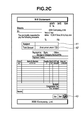
- FIGS. 2A , 2 B, and 2 C illustrate examples of an original document as a processing object according to an exemplary embodiment of the present invention.
- FIG. 3 is a flowchart illustrating a flow of a process of generating a scan ticket according to an exemplary embodiment of the present invention.
- FIG. 4 is a flowchart illustrating a flow of a process for checking an original document according to an exemplary embodiment of the present invention.
- FIG. 1 is a block diagram illustrating an example configuration of an image processing apparatus according to an exemplary embodiment of the present invention.
- An image forming apparatus 100 according to the present exemplary embodiment is a multifunction peripheral having various functions, such as a copy function and a scanner function. But, those functions may be implemented by using a plurality of machines.
- a CPU 11 controls the operation of the entire image processing apparatus 100 by loading a program stored in a ROM 19 into a RAM 18 .
- the CPU 11 communicates with other units in the image forming apparatus 100 via a bus 12 .
- An operation unit 16 includes a plurality of keys that a user uses to issue instructions, and a display unit to display various items of information to be provided for the user.
- a scanner 15 as a reading unit reads a color image of a document set on a document positioning plate by the user, and obtained electronic data (image data) is stored in an HDD 13 or RAM 18 .
- the HDD 13 is a hard disk drive including a hard disk, and stores various input items of information.
- the scanner 15 includes a document feeding unit, and can read a document by sequentially feeding a plurality of documents from the document feeding unit to the document positioning plate.
- a printer 14 prints an image on a recording sheet based on input image data.
- a network I/F 17 connects the image processing apparatus 100 to a network 20 , and controls exchange of data with external devices on the network.
- all or a part of programs used in the present exemplary embodiment can be provided to the PC via the network, and also can be stored in a recording medium, such as a CD-ROM, and supplied to the PC.
- a recording medium such as a CD-ROM
- FIG. 2A illustrates an example of a form as a document used in the present exemplary embodiment.
- This document is a bill statement in a blank state, i.e., a user has not written anything (before processing instruction information to be described later is added) .
- This bill statement includes areas for an addressee company name, a person in charge at the addressee, a subject, a total amount, product names, quantities, unit, unit prices, amounts, information about the bank to transfer to, subtotals, taxes, such as consumption tax, remarks, and an issuer's seal.
- the areas to which the user enters information when the bill statement is issued officially include a subject, product names, quantities, unit, unit prices, amounts, and an issuer's seal.
- the specified areas are checked to see if information has been added in the areas designated by the user, and the other areas are checked to see if they are left vacant designated by the user.
- FIG. 2B illustrates a case where out of the items in a document illustrated in FIG. 2A , those optional areas, which are to be checked by the user, are additionally marked by a color pen. In this manner, a document in FIG. 2B is made to be a processing instruction sheet.
- a processing instruction sheet is generated when a user, who checks a filled-out bill statement, writes processing instruction information, which is described later, in a sheet of the same format as a checking-object bill statement.
- a bill statement illustrated in FIG. 2A becomes a processing instruction sheet when the processing instruction information is added to the bill statement.
- the user marks off a rectangular area with a color pen, for example.
- an area 31 is an area enclosed by a line drawn with a blue pen
- an area 32 is an area enclosed by a line drawn with a green pen
- an area 33 is an area enclosed by a line drawn with a red pen.
- Colors other than those colors described above, may be used, and the number of colors is not limited to the three colors, but may be increased or decreased according to checking contents. Though color pens are used here, any tools that can paint in colors may be used.
- the user previously registers colors and processing contents associated with each other on a one-to-one correspondence basis in the RAM 18 from the operation unit 16 . More specifically, the processing instruction information is registered in the RAM 18 , in which the blue color specifies an area to be checked to see if the area is blank, the green color specifies an area to be checked to see if information is written, and the red color specifies an area to be checked to see if a seal or a signature is affixed.
- the CPU 11 determines color components (e.g., hue) of each of registered colors, and stores the contents of color registration in the RAM 18 . Instead of registration by using the operation unit 16 , colors maybe registered by causing the scanner 15 to read a form in which color data is written.
- color components e.g., hue
- colors maybe previously registered in the image processing apparatus 100 .
- the user adds processing instruction information to a form of a document according to the registered colors and the processing contents.
- the user has registered color components to be used and corresponding processing instruction information in advance, and then generates a processing instruction sheet according to the registered data.
- the image processing apparatus 100 extracts the processing instruction information, recognizes processing contents according to the extracted information, and thereby checks a checking object document to confirm if information exists in specific areas, if a specified area is blank, or if a seal (or a signature) is affixed to a specified area.
- FIG. 2C illustrates an example of a checking object document used in the present exemplary embodiment.
- the checking object document is assumed to have the same format as the documents in FIGS. 2A and 2B .
- the image processing apparatus 100 extracts added processing instruction information, and determines based on extracted data that the checking object document is correct by checking whether there is no entry, namely, blank in the area 41 , information is entered in the area 42 , and a seal is affixed to the area 43 .
- FIG. 2C illustrates a case where all conditions for determining that the document is correct are satisfied, and the check result is “correct”. If there is at least one area where the condition for determining that the document is “correct” is not satisfied, the check result is “NG”.
- the contents of checks and the areas are not limited to those described above, but may be other kinds of checks and may be other areas.
- a process for generating a scan ticket, by which a check of written contents of a document is performed according to the processing instruction sheet that is illustrated in FIG. 2B is described below.
- a scan ticket indicates instruction contents in FIG. 2B and indicates a method of checking a checking object document illustrated in FIG. 2C in a format (e.g., Quick Response (QR)) recognizable by the image processing apparatus 100 .
- a scan ticket includes instruction contents recognized from a document in FIG. 2B and position information about areas to which the instruction contents are applied.
- the scanner 15 reads a scan ticket, and the CPU 11 recognizes the processing instruction from a read image, and the CPU 11 checks the checking object document according to the processing contents.
- FIG. 3 is a flowchart illustrating the flow of a process for generating a scan ticket according to the present exemplary embodiment. This flowchart illustrates the flow of a process that is executed by the CPU 11 by loading a program from the ROM 19 into the RAM 18 and executing the program.
- step S 501 the CPU 11 controls the operation unit to display a combination of a color and a corresponding processing content in the processing instruction information stored in the RAM 18 (hereafter referred to simply as an instruction color).
- notices are displayed as follows: “This is “OK” if a seal or a signature is affixed in the area surrounded by red.”, “This is “OK” if the area surrounded by blue is blank.”, or “This is “OK” if information is written in the area surrounded by green.”
- step S 502 the CPU 11 further causes the operation unit 16 to display inquiry of whether the instruction color and the processing content displayed in step S 501 are all right with the user.
- step S 502 In response to inquiry received in step S 502 , if it is determined that a negative answer has been returned from the user via the operation unit 16 (NO in step S 502 ), the CPU 11 controls the operation unit 16 to display that the combination of the instruction color and the processing content will be changed in step S 505 .
- inquiry about which color is changed may be displayed, and the image processing apparatus 110 may propose a new candidate color to replace the instruction color to be changed, or the user may specify an arbitrary new color via the operation unit 16 .
- the combinations may be changed between the color and the processing content.
- the CPU 11 controls so that the colors and processing contents are associated on a one-to-one correspondence basis.
- step S 505 When, in step S 505 , either an instruction color or a processing content is changed, or both an instruction color and a processing content are changed, the CPU 11 controls the operation unit 16 to display combinations of the instruction colors and the processing contents in step S 501 .
- the display is performed so that the user can confirm changes made in step S 505 .
- step S 502 In response to inquiry in step S 502 , if it is determined that a positive answer has been returned from the user via the operation unit 16 (YES in step S 502 ), the CPU 11 determines the instruction colors and the corresponding processing contents to be used as processing instruction information, and registers the processing instruction information in the RAM 18 .
- step S 502 is made to prevent extraction errors of the processing instruction information.
- the user is made to visually confirm the contents of a document (the colors included in the document), and if the color components of the instruction colors are similar to the color components of the document, the user is urged to change them.
- step S 502 if it is determined that the color components of the instruction colors are similar to the color components of the document, a monochrome copy of the original is made as described below.
- CPU 11 causes the operation unit 16 to display a notice to prompt setting of the original.
- monochrome copying is performed.
- step S 502 If, in step S 502 , it is determined that the instruction colors and the processing contents are OK with the user (YES in step S 502 ), the CPU 11 identifies and stores in the RAM 18 the color components to be used as processing instruction information.
- step S 503 the CPU 11 controls the operation unit 16 to display inquiry of whether only a checking object document (illustrated in FIG. 2C , for example) exists in the user's hand. This inquiry is made to confirm whether there is a template (as illustrated in FIG. 2A , for example) for use in writing a processing instruction sheet or a processing instruction sheet (as illustrated in FIG. 2B , for example).
- a template is not a formal checking object document, but is a checking object document to which the user can fill the processing instruction information.
- step S 503 when receiving a reply via the operation unit 16 that the user has only a checking object document in his hand (no document that can be used as a template) (YES in step S 503 ) , the CPU 11 causes the operation unit 16 to display a notice prompting that the user should set a checking object document on the scanner 15 .
- the operation unit 16 displays a notice “Please set a sheet of the checking object document on the scanner. After the document is set, please press the OK button.”. The OK button is displayed to be used for confirming that the document is set.
- a photo interrupter provided at a lower portion of the document positioning plate or a document sensor of the document feeding unit may be used to automatically recognize the presence of a document on the scanner 15 .
- the CPU 11 controls the scanner 15 to read an image of the document as the checking object in step S 506 . Subsequently, the CPU 11 converts image data input by the scanner 15 into monochrome image data, and outputs the monochrome image data to the printer 14 to be printed on a recording sheet as a monochrome copy in step S 506 .
- step S 506 the document is converted into monochrome image and printed by the printer 14 , but the printing process is not limited to this method.
- the colors of a captured image of a document may be converted into other colors not including the instruction colors, and printed on a sheet by the printer 14 .
- red letters in a read document may be converted into blue letters, and output on a sheet.
- the colors that should be changed in color may be registered in the RAM 18 , and when there exists the same color as a registered color in a document, the color may be converted.
- step S 507 the CPU 11 controls the operation unit 16 to display a notice prompting the user to write processing instruction information in a recording sheet output by the printer 14 in step S 506 .
- step S 503 If, in step S 503 , a reply has been returned from the user that there exists a template or a processing instruction sheet, the CPU 11 displays a notice inquiring the user if processing instruction information has already been written in the template (or if there is a processing instruction sheet) in step S 508 .
- the CPU 11 causes the operation unit 16 to display a notice urging the user to set the template on the scanner 15 in step S 509 .
- a notice saying “Please set a template on the scanner. After the template is set, please press the OK button”, and an “OK” button are displayed.
- the OK button is pressed, the CPU 11 recognizes that the template has been set in the present exemplary embodiment.
- the photo interrupter provided at a lower portion of the document positioning plate or the document sensor of the document feeding unit may be used to automatically recognize the presence of a document on the scanner 15 .
- the CPU 11 After determining the presence of a document in step S 509 , the CPU 11 causes the scanner 15 to read an image of the document serving as a template in step S 510 . Regarding image data obtained as described, in step S 511 , the CPU performs an analyzing and recognizing process to determine whether the image data includes color components that are the same as the instruction colors.
- the CPU 11 extracts hues of red for analysis and recognition.
- hues of red for analysis and recognition.
- a well-known method can be adopted for analysis and recognition of color components.
- Another parameter other than hue may be used, or hue and another parameter may be used in combination.
- step S 512 the CPU 11 determines whether a color that is the same as an instruction color registered in the RAM 18 is included in the colors analyzed and recognized in step S 511 .
- the two colors need not be perfectly matched, but may be determined to be the same if they fall within an allowable range.
- RGB values are expressed in 256 stages
- a color of an RGB value is compared with an RGB value of an instruction color and a difference is within ⁇ 20
- the two colors maybe determined to be the same.
- Another method by which two colors are determined to be the same may be adopted.
- step S 512 If it is determined in step S 512 that the same color as an instruction color registered in the RAM 19 is included in the image data in the template (YES in step S 512 ), the CPU 11 causes the operation unit 16 to display a notice prompting the user to set a template on the scanner 15 in step S 513 .
- the OK button is pressed, the CPU 11 recognizes that the template is set.
- the photo interrupter provided at a lower position of the document positioning plate or the document sensor of the document feeding unit may be used to automatically recognize the presence of a template on the scanner 15 .
- the CPU 11 After determining the presence of a template in step S 513 , the CPU 11 causes the scanner 15 to read an image of the document serving as a checking object in step S 514 .
- the CPU 11 converts the image data input from the scanner 15 into monochrome image data, and outputs the monochrome image data to the printer and the monochrome image data is printed on a recording sheet as a monochrome copy.
- step S 514 the document is converted into monochrome image, and printed by the printer 14 , but the printing process is not limited to this.
- various methods may be adopted as described above in step S 506 .
- step S 515 the CPU 11 causes the operation unit 16 to display a notice for prompting the user to write processing instruction information as illustrated in FIG. 2B on a recording sheet output by the printer 14 in step S 514 .
- step S 512 If it is determined, in step S 512 , that the same color as the instruction color registered in the RAM 19 is not included in the image of the template (NO in step S 512 ), the CPU 11 causes the operation unit 16 to display a notice for prompting the user to write processing instruction information as illustrated in FIG. 2B in the document of the template in step S 516 .
- step S 508 the CPU 11 causes the operation unit 16 to display a notice for confirming whether processing instruction information has been written in the template.
- the CPU 11 causes the scanner 15 to read an image of the template on which the processing instruction sheet has been written in step S 517 .
- the CPU 11 causes the operation unit 16 to display a notice for prompting the user to set the template on the scanner 15 , and in response to this, when the user sets a document (a processing instruction sheet) on the scanner 15 and presses the OK button, the PCU 11 causes the scanner 15 to read the document.
- a document a processing instruction sheet
- the CPU 11 does not converts the image data read by the scanner 15 into monochrome image data.
- the obtained image data is stored in the RAM 18 .
- step S 518 the CPU 11 performs an analyzing and recognizing process of processing instruction information from image data input from the scanner 15 in step S 518 .
- the CPU 11 first analyzes where in the document one or more instruction colors determined in step S 502 exist, and then recognizes the areas where the instruction colors exist and what colors the areas are, and thereby specifies the positions of the areas for each color.
- the specified positions include information indicating the positions and size of the processing object areas.
- the positions are specified in coordinates, for example.
- the specified positions and processing contents determined in step S 502 are associated with each other and stored in the RAM 18 .
- step S 519 the CPU 11 causes the operation unit 16 to display the analysis and recognition results executed in step S 518 .
- the coordinates of the areas corresponding to the specified items of processing instruction information are displayed.
- Thumbnail images of read document may be displayed for illustrating in which positions the specified items of processing instruction information exist associated with those images and in such a manner that the corresponding processing contents can be known.
- step S 520 the CPU 11 causes the operation unit 16 to display a notice for prompting the user to confirm whether the contents displayed in step S 519 are correct. If a negative reply in response to the above confirmation is returned by the user via the operation unit 16 (NO in step S 520 ), the CPU 11 causes the operation unit 16 to display a screen for confirming whether the image of the document read by the scanner 15 in step S 517 is printed out in a monochrome copy by the printer 14 in step S 523 .
- the CPU 11 converts image data of the document read by the scanner 15 in step 517 , and causes the printer 14 to output a monochrome copy in step S 524 .
- the printer 14 produces a monochrome copy of a processing instruction sheet to which the processing instruction information is added, and processing instruction information is added to this monochrome copy.
- step S 524 the document is converted into monochrome image data and the printer 14 prints it out, but it is not limited to this.
- Various methods, such as the one described in step S 506 may be adopted.
- step S 525 the CPU 11 controls the operation unit 16 to display a notice for prompting the user to write the processing instruction information on a recording sheet output by the printer 14 in step S 524 .
- the CPU 11 controls the operation unit 16 to display a notice for prompting the user to confirm whether to generate a processing instruction sheet anew in step S 526 .
- the CPU 11 controls the operation unit 16 to display a notice for prompting the user to set a newly generated processing instruction sheet on the scanner 15 in step S 527 .
- step S 526 when an instruction not to generate the processing instruction sheet anew is received via the operation unit 16 (NO in step S 526 ), this process is finished.
- step S 517 In succession to the display in step S 525 or S 527 , when the user sets a document and the “OK” button is pressed via the operation unit 16 , that is, an instruction to read the document is issued, the process in step S 517 described above is carried out again.
- step S 520 When a reply indicating that an analysis result in step S 520 is right is received via the operation unit 16 (YES in step S 520 ), the CPU 11 stores the content of the analysis as an extraction result of the processing instruction information in the RAM 18 . Then, the CPU 11 codes the content of analysis in step S 521 .
- Coding of a content of analysis is to code a result of analysis displayed in step S 519 by using a two-dimensional code (QR code), for example.
- a coded content includes an area as a processing object and a processing content to be carried out on the area.
- Coding is performed by using a two-dimensional code as an example in the present exemplary embodiment, but the coding method is not limited to a two-dimensional code and coding may be performed by using some other method so long as the code is readable to the image processing apparatus 100 for the analyzing and recognizing process.
- the CPU 11 the printer 14 to print out the content of analysis coded in step S 521 , on a recording sheet in step S 522 serving as a scan ticket.
- a checking object document By using a printed scan ticket, a checking object document can be checked. However, when it is determined that the analysis result is correct (YES in step S 520 ), since this means that the processing instruction sheet read by the scanner 15 in step S 517 is recognized correctly, this processing instruction sheet may be used as a scan ticket without performing processing in steps S 521 and S 522 . In this case, the processing contents are to be recognized from the processing instruction sheet when the document is checked.
- processing instruction information added to a processing instruction sheet can be recognized correctly. In other words, errors in recognizing processing instruction information can be reduced.
- FIG. 4 is a flowchart illustrating a flow of processing steps to check a checking object document by using a scan ticket. This flowchart illustrates steps that the CPU 11 executes by reading a program from the ROM 19 and loading the program into the RAM 18 .
- the flowchart starts to proceed when the user issues via the operation unit 16 an instruction to check a checking object document
- step S 601 the CPU 11 controls the operation unit 16 to display a notice for prompting the user to superpose a checking object document on a first scan ticket printed in step S 522 , and set the scan ticket and the checking object document together on the document feeding unit.
- the CPU 11 controls the scanner 15 to start reading documents by feeding the sheets set in the document feeding unit in step S 602 . At this point, out of the documents in the document feeding unit, a scan ticket as the first document is fed and read by the scanner 15 .
- the checking object documents stacked on the scan ticket are read successively.
- a plurality of checking object documents can be stacked when they are set.
- a plurality of sheets can be set in the document feeding unit in a state in which the plurality of documents are separated in a plurality of bunches of sheets.
- step S 603 the CPU 11 performs the analyzing and recognizing process of image of the first document read in step 602 , that is, the scan ticket.
- the CPU 11 analyzes a two-dimensional code in a read scan ticket, recognizes an area (position) as an object of a processing instruction and a content of the processing, and stores a recognition result in the RAM 18 .
- step S 604 the CPU 11 performs an analyzing and recognizing process of checking object documents of the second sheet and the subsequent sheets by using the recognition result stored in the RAM 18 .
- the CPU 11 recognizes that the area 41 is normal when it is blank, the area 42 is normal when something is written, and the area 43 is normal when a seal or a signature is affixed to this area
- the above recognition is performed by comparing the image of the area 41 with a predetermined threshold value. More specifically, if the number of white pixels (no image) of the area occupies more than 80 percent of the area, the area is recognized as blank. Image of the area 42 is subjected to a digitizing process by comparing with another predetermined threshold value, and if the number of black pixels (i.e., image is present) occupies more than 20 percent of the area, the area is recognized as having data written therein.
- Red or hues close to red are extracted from the image of the area 43 and the extracted reddish hues are subjected to a digitizing process, and if the proportion of the presence of the red hue pixels is more than 20 percent in the area 43 , then the area 43 is recognized as having a seal or a signature affixed thereto.
- the numeric values representing percentages are just examples, and other values may be used, and some other method of recognition may be adopted.
- the CPU 11 sequentially accumulates page numbers of the checking object documents and corresponding recognition results in the RAM 18 . If all recognition results for a sheet of checking object document are normal, the document is determined to be OK. If at least one recognition result is abnormal, the document is determined to be NG.
- the CPU 11 aggregates results for all documents accumulated in the RAM 18 .
- the aggregation of results indicates, for example, counting a total number of checking object documents that are checked, counting a number of areas determined to be NG, and counting page numbers of documents including NG-determined areas, for example.
- the page numbers are counted in the order that the scanner 15 read the documents (in the order that the documents are sent out from the document feeding unit) starting with the first sheet as the first page, except for the scan ticket.
- step S 605 the CPU 11 controls the operation unit 16 to display results of aggregation performed in step S 604 . For example, a total number of documents checked, the areas determined as NG if there are documents determined as NG, and the page numbers of documents determined as NG are displayed.
- the CPU 11 can cause the operation unit 16 to display a button to be used by the user to issue an instruction to print, and can also cause the printer 14 to output a report on aggregation results on a recording sheet.
- step S 606 If it is determined in step S 606 that the button to issue an instruction to print a report is pressed (YES in step S 606 ), the CPU 11 generates a report indicating the above aggregation results (in step S 607 ).
- step S 605 Since printing on a recording sheet by the printer 14 can make use of a wider area than in the display on the operation unit 16 , more information can be included in a report than in the display in step S 605 .
- reduced image of the template of the checking object document maybe printed together.
- the CPU 11 causes the printer 14 to print a generated report in the form of image on a recording sheet instep S 608 . It is useful to print a report with information added indicating that the page has been determined to be NG.
- the colors of instruction information are analyzed and recognized, but in addition to this process, another decision as to whether the color area has a rectangular area may be added to enhance the determination accuracy.
- the blue area is recognized, whether the blue area is rectangular in shape (closed area) is analyzed.
- a profile line of image, containing a blue color is traced, and the pixel that forms an apex (or apex angle) is detected, and thereby the shape of the blue area is determined to be a rectangle.
- whether the area is an area of an object of a processing instruction may be determined by whether the size of the rectangular area is larger or smaller than a predetermined size.
- the rectangular area can be determined as an area of an object of a processing instruction. Any other methods for determining a rectangular area can be adopted so long as the method can determine a rectangular area as an object of a processing instruction by the size. Therefore, even when there are letters of the same color in the template as an instruction color, instruction information can be determined without outputting a monochrome copy.
- whether a chromatic color is included can be determined by causing the scanner 15 to read the document or according to a reply received in response to an inquiry about the content of a document displayed on the operation unit 16 . In this manner, a comparison process between an instruction color and a color of a document can be omitted, so that the load on the CPU can be reduced.
- a document by designating indication on a document (template) by handwriting with a color pen, the user can indicate the check contents for a desired document. As a result, usability is enhanced.
- a document to be used as a template (to allow the user to add processing instruction information) can be provided to the user in an appropriate manner.
- aspects of the present invention can also be realized by a computer of a system or apparatus (or devices such as a CPU or MPU) that reads out and executes a program recorded on a memory device to perform the functions of the above-described embodiments, and by a method, the steps of which are performed by a computer of a system or apparatus by, for example, reading out and executing a program recorded on a memory device to perform the functions of the above-described embodiments.
- the program is provided to the computer for example via a network or from a recording medium of various types serving as the memory device (e.g., computer-readable medium).
- the system or apparatus, and the recording medium where the program is stored are included as being within the scope of the present invention.
Landscapes
- Engineering & Computer Science (AREA)
- Multimedia (AREA)
- Signal Processing (AREA)
- Computer Vision & Pattern Recognition (AREA)
- Physics & Mathematics (AREA)
- General Physics & Mathematics (AREA)
- Theoretical Computer Science (AREA)
- Facsimiles In General (AREA)
- Editing Of Facsimile Originals (AREA)
Applications Claiming Priority (2)
| Application Number | Priority Date | Filing Date | Title |
|---|---|---|---|
| JP2009056315A JP4799632B2 (ja) | 2009-03-10 | 2009-03-10 | 画像処理装置及びその制御方法並びにプログラム |
| JP2009-056315 | 2009-03-10 |
Publications (2)
| Publication Number | Publication Date |
|---|---|
| US20100231996A1 US20100231996A1 (en) | 2010-09-16 |
| US8638482B2 true US8638482B2 (en) | 2014-01-28 |
Family
ID=42730490
Family Applications (1)
| Application Number | Title | Priority Date | Filing Date |
|---|---|---|---|
| US12/718,876 Expired - Fee Related US8638482B2 (en) | 2009-03-10 | 2010-03-05 | Image processing apparatus for extracting information added to an original image and data processing method therefor |
Country Status (2)
| Country | Link |
|---|---|
| US (1) | US8638482B2 (https=) |
| JP (1) | JP4799632B2 (https=) |
Families Citing this family (2)
| Publication number | Priority date | Publication date | Assignee | Title |
|---|---|---|---|---|
| JP5968103B2 (ja) | 2012-06-18 | 2016-08-10 | キヤノン株式会社 | 画像処理コントローラ及びその制御方法 |
| JP2016165077A (ja) * | 2015-03-06 | 2016-09-08 | キヤノン株式会社 | 画像形成装置 |
Citations (8)
| Publication number | Priority date | Publication date | Assignee | Title |
|---|---|---|---|---|
| US5010580A (en) * | 1989-08-25 | 1991-04-23 | Hewlett-Packard Company | Method and apparatus for extracting information from forms |
| US6381030B1 (en) * | 1991-03-29 | 2002-04-30 | Canon Kabushiki Kaisha | Image processing, copying, and printing apparatus having a part of a processing unit and a part of another unit formed as one inseparable unit |
| JP2006080856A (ja) * | 2004-09-09 | 2006-03-23 | Fuji Xerox Co Ltd | 画像校正システム及び校正原稿の作成方法 |
| US20060215219A1 (en) * | 2005-03-23 | 2006-09-28 | Fuji Xerox Co., Ltd. | Printing system, image reading apparatus and control method therefor |
| US20070280709A1 (en) * | 2006-04-26 | 2007-12-06 | Konica Minolta Business Technologies, Inc. | Image forming system, image forming device and information processing device |
| JP2008145611A (ja) | 2006-12-07 | 2008-06-26 | Fuji Xerox Co Ltd | 情報処理装置、プログラム |
| JP2008219210A (ja) | 2007-02-28 | 2008-09-18 | Brother Ind Ltd | 画像処理装置および画像処理プログラム |
| US20080273746A1 (en) * | 2007-05-01 | 2008-11-06 | Murata Machinery, Ltd. | Image Processing Apparatus |
Family Cites Families (1)
| Publication number | Priority date | Publication date | Assignee | Title |
|---|---|---|---|---|
| JPH0416059A (ja) * | 1990-05-10 | 1992-01-21 | Canon Inc | 画像処理装置 |
-
2009
- 2009-03-10 JP JP2009056315A patent/JP4799632B2/ja not_active Expired - Fee Related
-
2010
- 2010-03-05 US US12/718,876 patent/US8638482B2/en not_active Expired - Fee Related
Patent Citations (8)
| Publication number | Priority date | Publication date | Assignee | Title |
|---|---|---|---|---|
| US5010580A (en) * | 1989-08-25 | 1991-04-23 | Hewlett-Packard Company | Method and apparatus for extracting information from forms |
| US6381030B1 (en) * | 1991-03-29 | 2002-04-30 | Canon Kabushiki Kaisha | Image processing, copying, and printing apparatus having a part of a processing unit and a part of another unit formed as one inseparable unit |
| JP2006080856A (ja) * | 2004-09-09 | 2006-03-23 | Fuji Xerox Co Ltd | 画像校正システム及び校正原稿の作成方法 |
| US20060215219A1 (en) * | 2005-03-23 | 2006-09-28 | Fuji Xerox Co., Ltd. | Printing system, image reading apparatus and control method therefor |
| US20070280709A1 (en) * | 2006-04-26 | 2007-12-06 | Konica Minolta Business Technologies, Inc. | Image forming system, image forming device and information processing device |
| JP2008145611A (ja) | 2006-12-07 | 2008-06-26 | Fuji Xerox Co Ltd | 情報処理装置、プログラム |
| JP2008219210A (ja) | 2007-02-28 | 2008-09-18 | Brother Ind Ltd | 画像処理装置および画像処理プログラム |
| US20080273746A1 (en) * | 2007-05-01 | 2008-11-06 | Murata Machinery, Ltd. | Image Processing Apparatus |
Also Published As
| Publication number | Publication date |
|---|---|
| JP2010212956A (ja) | 2010-09-24 |
| US20100231996A1 (en) | 2010-09-16 |
| JP4799632B2 (ja) | 2011-10-26 |
Similar Documents
| Publication | Publication Date | Title |
|---|---|---|
| US8737744B2 (en) | Image processing apparatus, image processing method, and program for displaying a preview of a document region and a recognized content processing | |
| US8610929B2 (en) | Image processing apparatus, control method therefor, and program | |
| US8463028B2 (en) | Image processing apparatus, image processing method, and program | |
| US8320027B2 (en) | Image processing apparatus, data processing method executed by image processing apparatus, and computer-readable storage medium storing program for causing computer to execute data processing method | |
| JP2012063993A (ja) | 画像処理装置及びその制御方法ならびにプログラム | |
| US8638482B2 (en) | Image processing apparatus for extracting information added to an original image and data processing method therefor | |
| US20110188745A1 (en) | Image processing apparatus and processing method of the image processing apparatus | |
| US20120320388A1 (en) | Relevance based print integrity verification | |
| JP5479082B2 (ja) | 情報処理装置及びその制御方法並びにプログラム | |
| US20110134494A1 (en) | Image scanning apparatus, control method for image scanning apparatus, and storage medium | |
| JP4205554B2 (ja) | 帳票処理装置 | |
| JP5460278B2 (ja) | 画像処理装置及びその制御方法ならびにプログラム | |
| JP7059734B2 (ja) | 文書読取装置及びプログラム | |
| US20110157658A1 (en) | Imaging processing apparatus, method for controlling the same, and program | |
| US20110135162A1 (en) | Image processing apparatus, image processing method and recording medium | |
| JP2011120174A (ja) | 画像処理装置及び画像処理方法並びにプログラム | |
| US8736913B2 (en) | Image processing apparatus, control method therefor and program for dividing instructions of a scan job into separate changeable and unchangeable scan job tickets | |
| JP2011119895A (ja) | 情報処理装置、その制御方法およびプログラム | |
| JP2011193262A (ja) | 画像処理装置及びその制御方法並びにプログラム |
Legal Events
| Date | Code | Title | Description |
|---|---|---|---|
| AS | Assignment |
Owner name: CANON KABUSHIKI KAISHA, JAPAN Free format text: ASSIGNMENT OF ASSIGNORS INTEREST;ASSIGNORS:ITO, NAOKI;KASHIBUCHI, YOICHI;SIGNING DATES FROM 20100226 TO 20100301;REEL/FRAME:024729/0518 |
|
| STCF | Information on status: patent grant |
Free format text: PATENTED CASE |
|
| FEPP | Fee payment procedure |
Free format text: PAYOR NUMBER ASSIGNED (ORIGINAL EVENT CODE: ASPN); ENTITY STATUS OF PATENT OWNER: LARGE ENTITY |
|
| FPAY | Fee payment |
Year of fee payment: 4 |
|
| FEPP | Fee payment procedure |
Free format text: MAINTENANCE FEE REMINDER MAILED (ORIGINAL EVENT CODE: REM.); ENTITY STATUS OF PATENT OWNER: LARGE ENTITY |
|
| LAPS | Lapse for failure to pay maintenance fees |
Free format text: PATENT EXPIRED FOR FAILURE TO PAY MAINTENANCE FEES (ORIGINAL EVENT CODE: EXP.); ENTITY STATUS OF PATENT OWNER: LARGE ENTITY |
|
| STCH | Information on status: patent discontinuation |
Free format text: PATENT EXPIRED DUE TO NONPAYMENT OF MAINTENANCE FEES UNDER 37 CFR 1.362 |
|
| FP | Lapsed due to failure to pay maintenance fee |
Effective date: 20220128 |