JP6443327B2 - 画像処理装置および画像処理装置におけるgui構成指示方法 - Google Patents
画像処理装置および画像処理装置におけるgui構成指示方法 Download PDFInfo
- Publication number
- JP6443327B2 JP6443327B2 JP2015505534A JP2015505534A JP6443327B2 JP 6443327 B2 JP6443327 B2 JP 6443327B2 JP 2015505534 A JP2015505534 A JP 2015505534A JP 2015505534 A JP2015505534 A JP 2015505534A JP 6443327 B2 JP6443327 B2 JP 6443327B2
- Authority
- JP
- Japan
- Prior art keywords
- display
- gui
- image
- configuration
- displayed
- Prior art date
- Legal status (The legal status is an assumption and is not a legal conclusion. Google has not performed a legal analysis and makes no representation as to the accuracy of the status listed.)
- Expired - Fee Related
Links
Images




Classifications
-
- G—PHYSICS
- G06—COMPUTING OR CALCULATING; COUNTING
- G06T—IMAGE DATA PROCESSING OR GENERATION, IN GENERAL
- G06T5/00—Image enhancement or restoration
- G06T5/50—Image enhancement or restoration using two or more images, e.g. averaging or subtraction
-
- G—PHYSICS
- G06—COMPUTING OR CALCULATING; COUNTING
- G06F—ELECTRIC DIGITAL DATA PROCESSING
- G06F1/00—Details not covered by groups G06F3/00 - G06F13/00 and G06F21/00
- G06F1/16—Constructional details or arrangements
- G06F1/1613—Constructional details or arrangements for portable computers
- G06F1/1615—Constructional details or arrangements for portable computers with several enclosures having relative motions, each enclosure supporting at least one I/O or computing function
- G06F1/1624—Constructional details or arrangements for portable computers with several enclosures having relative motions, each enclosure supporting at least one I/O or computing function with sliding enclosures, e.g. sliding keyboard or display
-
- G—PHYSICS
- G06—COMPUTING OR CALCULATING; COUNTING
- G06F—ELECTRIC DIGITAL DATA PROCESSING
- G06F1/00—Details not covered by groups G06F3/00 - G06F13/00 and G06F21/00
- G06F1/16—Constructional details or arrangements
- G06F1/1613—Constructional details or arrangements for portable computers
- G06F1/1615—Constructional details or arrangements for portable computers with several enclosures having relative motions, each enclosure supporting at least one I/O or computing function
- G06F1/1616—Constructional details or arrangements for portable computers with several enclosures having relative motions, each enclosure supporting at least one I/O or computing function with folding flat displays, e.g. laptop computers or notebooks having a clamshell configuration, with body parts pivoting to an open position around an axis parallel to the plane they define in closed position
-
- G—PHYSICS
- G06—COMPUTING OR CALCULATING; COUNTING
- G06F—ELECTRIC DIGITAL DATA PROCESSING
- G06F1/00—Details not covered by groups G06F3/00 - G06F13/00 and G06F21/00
- G06F1/16—Constructional details or arrangements
- G06F1/1613—Constructional details or arrangements for portable computers
- G06F1/1633—Constructional details or arrangements of portable computers not specific to the type of enclosures covered by groups G06F1/1615 - G06F1/1626
- G06F1/1637—Details related to the display arrangement, including those related to the mounting of the display in the housing
- G06F1/1643—Details related to the display arrangement, including those related to the mounting of the display in the housing the display being associated to a digitizer, e.g. laptops that can be used as penpads
-
- G—PHYSICS
- G06—COMPUTING OR CALCULATING; COUNTING
- G06F—ELECTRIC DIGITAL DATA PROCESSING
- G06F1/00—Details not covered by groups G06F3/00 - G06F13/00 and G06F21/00
- G06F1/16—Constructional details or arrangements
- G06F1/1613—Constructional details or arrangements for portable computers
- G06F1/1633—Constructional details or arrangements of portable computers not specific to the type of enclosures covered by groups G06F1/1615 - G06F1/1626
- G06F1/1675—Miscellaneous details related to the relative movement between the different enclosures or enclosure parts
- G06F1/1681—Details related solely to hinges
-
- G—PHYSICS
- G06—COMPUTING OR CALCULATING; COUNTING
- G06F—ELECTRIC DIGITAL DATA PROCESSING
- G06F1/00—Details not covered by groups G06F3/00 - G06F13/00 and G06F21/00
- G06F1/16—Constructional details or arrangements
- G06F1/1613—Constructional details or arrangements for portable computers
- G06F1/1633—Constructional details or arrangements of portable computers not specific to the type of enclosures covered by groups G06F1/1615 - G06F1/1626
- G06F1/1684—Constructional details or arrangements related to integrated I/O peripherals not covered by groups G06F1/1635 - G06F1/1675
- G06F1/169—Constructional details or arrangements related to integrated I/O peripherals not covered by groups G06F1/1635 - G06F1/1675 the I/O peripheral being an integrated pointing device, e.g. trackball in the palm rest area, mini-joystick integrated between keyboard keys, touch pads or touch stripes
- G06F1/1692—Constructional details or arrangements related to integrated I/O peripherals not covered by groups G06F1/1635 - G06F1/1675 the I/O peripheral being an integrated pointing device, e.g. trackball in the palm rest area, mini-joystick integrated between keyboard keys, touch pads or touch stripes the I/O peripheral being a secondary touch screen used as control interface, e.g. virtual buttons or sliders
-
- G—PHYSICS
- G06—COMPUTING OR CALCULATING; COUNTING
- G06F—ELECTRIC DIGITAL DATA PROCESSING
- G06F3/00—Input arrangements for transferring data to be processed into a form capable of being handled by the computer; Output arrangements for transferring data from processing unit to output unit, e.g. interface arrangements
- G06F3/01—Input arrangements or combined input and output arrangements for interaction between user and computer
- G06F3/048—Interaction techniques based on graphical user interfaces [GUI]
- G06F3/0484—Interaction techniques based on graphical user interfaces [GUI] for the control of specific functions or operations, e.g. selecting or manipulating an object, an image or a displayed text element, setting a parameter value or selecting a range
-
- G—PHYSICS
- G06—COMPUTING OR CALCULATING; COUNTING
- G06F—ELECTRIC DIGITAL DATA PROCESSING
- G06F3/00—Input arrangements for transferring data to be processed into a form capable of being handled by the computer; Output arrangements for transferring data from processing unit to output unit, e.g. interface arrangements
- G06F3/01—Input arrangements or combined input and output arrangements for interaction between user and computer
- G06F3/048—Interaction techniques based on graphical user interfaces [GUI]
- G06F3/0484—Interaction techniques based on graphical user interfaces [GUI] for the control of specific functions or operations, e.g. selecting or manipulating an object, an image or a displayed text element, setting a parameter value or selecting a range
- G06F3/04847—Interaction techniques to control parameter settings, e.g. interaction with sliders or dials
-
- G—PHYSICS
- G06—COMPUTING OR CALCULATING; COUNTING
- G06F—ELECTRIC DIGITAL DATA PROCESSING
- G06F3/00—Input arrangements for transferring data to be processed into a form capable of being handled by the computer; Output arrangements for transferring data from processing unit to output unit, e.g. interface arrangements
- G06F3/01—Input arrangements or combined input and output arrangements for interaction between user and computer
- G06F3/048—Interaction techniques based on graphical user interfaces [GUI]
- G06F3/0487—Interaction techniques based on graphical user interfaces [GUI] using specific features provided by the input device, e.g. functions controlled by the rotation of a mouse with dual sensing arrangements, or of the nature of the input device, e.g. tap gestures based on pressure sensed by a digitiser
- G06F3/0488—Interaction techniques based on graphical user interfaces [GUI] using specific features provided by the input device, e.g. functions controlled by the rotation of a mouse with dual sensing arrangements, or of the nature of the input device, e.g. tap gestures based on pressure sensed by a digitiser using a touch-screen or digitiser, e.g. input of commands through traced gestures
-
- H—ELECTRICITY
- H04—ELECTRIC COMMUNICATION TECHNIQUE
- H04N—PICTORIAL COMMUNICATION, e.g. TELEVISION
- H04N23/00—Cameras or camera modules comprising electronic image sensors; Control thereof
- H04N23/60—Control of cameras or camera modules
- H04N23/62—Control of parameters via user interfaces
-
- H—ELECTRICITY
- H04—ELECTRIC COMMUNICATION TECHNIQUE
- H04N—PICTORIAL COMMUNICATION, e.g. TELEVISION
- H04N23/00—Cameras or camera modules comprising electronic image sensors; Control thereof
- H04N23/60—Control of cameras or camera modules
- H04N23/63—Control of cameras or camera modules by using electronic viewfinders
- H04N23/631—Graphical user interfaces [GUI] specially adapted for controlling image capture or setting capture parameters
- H04N23/632—Graphical user interfaces [GUI] specially adapted for controlling image capture or setting capture parameters for displaying or modifying preview images prior to image capturing, e.g. variety of image resolutions or capturing parameters
-
- H—ELECTRICITY
- H04—ELECTRIC COMMUNICATION TECHNIQUE
- H04N—PICTORIAL COMMUNICATION, e.g. TELEVISION
- H04N23/00—Cameras or camera modules comprising electronic image sensors; Control thereof
- H04N23/60—Control of cameras or camera modules
- H04N23/66—Remote control of cameras or camera parts, e.g. by remote control devices
- H04N23/661—Transmitting camera control signals through networks, e.g. control via the Internet
-
- H—ELECTRICITY
- H04—ELECTRIC COMMUNICATION TECHNIQUE
- H04N—PICTORIAL COMMUNICATION, e.g. TELEVISION
- H04N23/00—Cameras or camera modules comprising electronic image sensors; Control thereof
- H04N23/60—Control of cameras or camera modules
- H04N23/69—Control of means for changing angle of the field of view, e.g. optical zoom objectives or electronic zooming
-
- G—PHYSICS
- G06—COMPUTING OR CALCULATING; COUNTING
- G06T—IMAGE DATA PROCESSING OR GENERATION, IN GENERAL
- G06T2207/00—Indexing scheme for image analysis or image enhancement
- G06T2207/10—Image acquisition modality
- G06T2207/10004—Still image; Photographic image
-
- G—PHYSICS
- G06—COMPUTING OR CALCULATING; COUNTING
- G06T—IMAGE DATA PROCESSING OR GENERATION, IN GENERAL
- G06T2207/00—Indexing scheme for image analysis or image enhancement
- G06T2207/10—Image acquisition modality
- G06T2207/10016—Video; Image sequence
Landscapes
- Engineering & Computer Science (AREA)
- Theoretical Computer Science (AREA)
- General Engineering & Computer Science (AREA)
- Physics & Mathematics (AREA)
- Human Computer Interaction (AREA)
- Computer Hardware Design (AREA)
- General Physics & Mathematics (AREA)
- Multimedia (AREA)
- Signal Processing (AREA)
- Mathematical Physics (AREA)
- Controls And Circuits For Display Device (AREA)
- Studio Circuits (AREA)
- Studio Devices (AREA)
Description
第1の筐体と、
上記第1の筐体と接続された第2の筐体と、
上記第1の筐体の第1の面に取り付けられたタッチ入力可能な第1の表示器と、
上記第2の筐体に取り付けられたタッチ入力可能な第2の表示器と、
上記第1の筐体の第2の面に取り付けられたビデオ入力端子と、
上記第1の筐体の上記第2の面に取り付けられたビデオ出力端子と、
静止画を保持する記憶部と、
上記ビデオ入力端子からのビデオ画像および上記記憶部中の静止画を入力とし、ビデオ画像の重畳および合成を行うビデオ合成部と、
上記ビデオ合成部で生成され、上記ビデオ出力端子に出力すべき出力画像の構成状態を制御する構成制御部と、
上記第1の表示器にGUI機能を持たせる第1のGUI制御部と、
上記第2の表示器にGUI機能を持たせる第2のGUI制御部を備え、
上記第2の筐体は、上記第1の筐体の上記第1の面に重ねられ、上記第1の表示器を覆う第1の位置と、該第1の位置から起き上がり、かつ上記第1の表示器を覆わない第2の位置とを取ることが可能で、上記第1の位置と上記第2の位置との間を遷移するように移動可能であり、
上記第2の表示器の表示面に、上記構成制御部に上記出力画像の構成状態の指示を与える複数の構成指示GUIウィジェットがタッチ入力可能に表示配置され、
上記第1のGUI制御部が上記第1の表示器に表示可能なGUIの構成を指示する情報を、上記構成指示GUIウィジェットの種類に対応付けるテーブルを設け、
上記第1のGUI制御部は、上記構成指示GUIウィジェットにGUI操作入力が与えられた際に、上記テーブルを参照して、上記第1の表示器にGUIの構成を指示する
画像処理装置にある。
1.実施の形態
2.変形例
[画像処理装置の構成]
図1(a),(b)は、実施の形態としての画像処理装置100の外観を示している。この画像処理装置100は、第1の筐体101と第2の筐体102とを備えている。第1の筐体101の上面には、タッチ入力可能な第1の表示器103が取り付けられている。また、この第1の筐体101の背面には、ビデオ入力端子104およびビデオ出力端子105が取り付けられている。また、図示しないが、この第1の筐体101の背面には、オーディオ入力端子およびオーディオ出力端子が取り付けられている。第2の筐体102には、タッチ入力可能な第2の表示器106が取り付けられている。
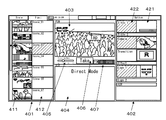
第2の筐体102に取り付けられた第2の表示器106には、素材のモニタ(Monitor)や切り替え操作等を行うためのメイン(Main)画面が表示される。また、第1の筐体101に取り付けられた第1の表示器103には、オーディオミキサ(Audio Mixer)操作の他に、各種補助的操作を行うためのサブ(Sub)画面が表示される。以下、これらの画面について説明する。
タイトル1(Title 1)、カメラ(Camera)、トランジション(Transition)、ロゴ1(Logo 1)の各オプションで素材の選択が行われている状態を示している。
上述したように、第2の表示器106に表示されるメイン画面にはシーン/インプット表示部401が設けられており、シーン(Scene)のタブがタップ操作されることで、シーンリストが表示される(図7(a)参照)。
画像に重畳表示されるタイトルやロゴについてさらに説明する。オプション表示部402にトップメニュー(Top Menu)が表示されている状態で(図7(a)参照)、タイトルの選択ボタンのテキスト表示部422がタップ操作されることで、オプション表示部402には選択可能なタイトルのリストが表示される(図7(b)参照)。なお、詳細説明は省略するが、タイトルとして選択できる候補は、セットアップによって、あらかじめ各リスト要素に割り付けられている。
次に、タイトルの調整について説明する。上述したように、メイン画面のオプション表示部402に表示されているタイトル(Title)の選択ボタンがタップ操作され、このオプション表示部402にタイトルのリストが表示されるとき、サブ画面に、タイトルのタブが表示される。そして、このタイトルのタブがタップ操作されることで、サブ画面として、タイトルの設定画面が表示される。図13は、タイトルの設定画面の一例を示している。
次に、ロゴの調整について説明する。上述したように、メイン画面のオプション表示部402に表示されているロゴ(Logo)の選択ボタンがタップ操作され、このオプション表示部402にロゴのリストが表示されるとき、サブ画面に、ロゴ(Logo)のタブが表示される。そして、このロゴのタブがタップ操作されることで、サブ画面として、ロゴの設定画面が表示される。図14は、ロゴの設定画面の一例を示している。
次に、トランジション(Transition)について説明する。上述したように、トップメニューにおいて、トランジションの選択ボタンがタップ操作されることで、トランジションタイプ(Transition Type)のリストがオプション表示部402に表示される。これにより、ユーザは、テーク(Take)操作により実行されるトランジション効果のタイプの選択を行うことが可能となる。なお、テーク中であることは、テークボタン406の色が変わることで示される。
次に、画像処理装置100におけるカメラ操作について説明する。カメラ操作の概要は、(1)複数のカメラ画像から一つを選択してネクストビューワ404やプログラムビューワ403に表示する、(2)カメラを手動で調整する、(3)調整した結果をカメラのプリセットに保存し、再利用する、などである。
なお、上述の実施の形態においては、第2の筐体102が第1の筐体101にヒンジ機構200を介して接続された構成とされ、第2の筐体102が、第1の位置(閉位置)と第2の位置(開位置)との間を遷移する構成とされている。しかし、本技術は、第1の筐体101に対して第2の筐体102が第2の位置に固定されるものにも、同様に適用できることは勿論である。
101・・・第1の筐体
102・・・第2の筐体
103・・・第1の表示器
104・・・ビデオ入力端子
105・・・ビデオ出力端子
106・・・第2の表示器
107・・・画像遷移指示ボタン(テークボタン)
200・・・ヒンジ機構
210・・・底固定部
220・・・筐体当接部
230・・・支持部
240・・・第1の補助部
250・・・第2の補助部
260・・・円弧状の案内開口
301・・・第1のコンピュータ
302,303・・・ディスプレイ
304,305・・・タッチ入力部
306・・・ネットワークインタフェース
307・・・入力メモリ部
308・・・コントロールメモリ部
309・・・中間メモリ部
310・・・第2のコンピュータ
311・・・画像入力部
312・・・画像切換部
313・・・画像合成部
314・・・画像出力部
315・・・音声入力部
316・・・音声合成部
317・・・音声出力部
401・・・シーン/インプット表示部
402・・・オブジェクト表示部
403・・・プログラムビューワ
404・・・ネクストビューワ
405・・・トランジションレート
406・・・テークボタン
411,421,431・・・サムネイル表示部
412,422,433・・・テキスト表示部
501・・・パン/チルト調整部
502・・・パン/チルトのリセットボタン
503・・・バックライト(逆光)補正機能の有効無効選択部
504・・・ズーム調整部
504a,505a,506a・・・オート設定ボタン
505・・・フォーカス調整部
506・・・アイリス調整部
507・・・オートホワイトバランス調整ボタン
508・・・カメラセッティングボタン
Claims (12)
- 第1の筐体と、
上記第1の筐体と接続された第2の筐体と、
上記第1の筐体の第1の面に取り付けられたタッチ入力可能な第1の表示器と、
上記第2の筐体に取り付けられたタッチ入力可能な第2の表示器と、
上記第1の筐体の第2の面に取り付けられたビデオ入力端子と、
上記第1の筐体の上記第2の面に取り付けられたビデオ出力端子と、
静止画を保持する記憶部と、
上記ビデオ入力端子からのビデオ画像および上記記憶部中の静止画を入力とし、ビデオ画像の重畳および合成を行うビデオ合成部と、
上記ビデオ合成部で生成され、上記ビデオ出力端子に出力すべき出力画像の構成状態を制御する構成制御部と、
上記第1の表示器にGUI機能を持たせる第1のGUI制御部と、
上記第2の表示器にGUI機能を持たせる第2のGUI制御部を備え、
上記第2の筐体は、上記第1の筐体の上記第1の面に重ねられ、上記第1の表示器を覆う第1の位置と、該第1の位置から起き上がり、かつ上記第1の表示器を覆わない第2の位置とを取ることが可能で、上記第1の位置と上記第2の位置との間を遷移するように移動可能であり、
上記第2の表示器の表示面に、上記構成制御部に上記出力画像の構成状態の指示を与える複数の構成指示GUIウィジェットがタッチ入力可能に表示配置され、
上記第1のGUI制御部が上記第1の表示器に表示可能なGUIの構成を指示する情報を、上記構成指示GUIウィジェットの種類に対応付けるテーブルを設け、
上記第1のGUI制御部は、上記構成指示GUIウィジェットにGUI操作入力が与えられた際に、上記テーブルを参照して、上記第1の表示器にGUIの構成を指示する
画像処理装置。 - 上記第2の表示器の表示面に、上記ビデオ出力端子から出力している画像であるプログラム画像が表示されると共に、上記プログラム画像に適用可能な画像の構成状態を上記プログラム画像に影響を与えずに作成したプレビュー画像が表示され、
上記第1の筐体の上記第1の面に取り付けられた画像遷移指示ボタンと、
上記画像遷移指示ボタンの押し下げにより、上記プログラム画像を、現在の構成状態から上記プレビュー画像と同じ構成状態に遷移させる遷移制御部とをさらに備える
請求項1に記載の画像処理装置。 - 上記複数の構成指示GUIウィジェットは、上記構成制御部に上記プレビュー画像の構成状態の指示を与えるものである
請求項2に記載の画像処理装置。 - 上記第2の表示器の表示面に、上記画像遷移指示ボタンと同じ機能の画像遷移指示GUIウィジェットが表示配置される
請求項2または3に記載の画像処理装置。 - 上記複数の構成指示GUIウィジェットは、上記第2の表示器の表示面の水平方向の端部に、垂直方向に並べて表示配置される
請求項1から4のいずれかに記載の画像処理装置。 - 上記複数の構成指示GUIウィジェットのうちの少なくとも一つは、該構成指示GUIウィジェットに予め関連付けられた画像を重畳するように、上記出力画像の構成状態の指示を与える機能を有する
請求項1から5のいずれかに記載の画像処理装置。 - 上記第2の表示器の表示面に、上記画像遷移指示ボタンの押し下げによる上記プログラム画像の遷移機能の内容を実行前に設定する複数の画像遷移種類指示GUIウィジェットが表示配置される
請求項2に記載の画像処理装置。 - 上記第2の表示器の表示面に、上記構成指示GUIウィジェットの少なくとも一つと、上記画像遷移種類指示GUIウィジェットの一つとについて、同時にGUI操作入力が与えられたと同じように作用するシーンメモリGUIウィジェットが表示配置される
請求項7に記載の画像処理装置。 - 上記第1の表示器に表示可能なGUI構成の一つは、画像重畳のゲイン値を設定するGUIを含む
請求項1から8のいずれかに記載の画像処理装置。 - 上記第1の表示器に表示可能なGUI構成の一つは、画像重畳の位置を設定するGUIを含む
請求項1から9のいずれかに記載の画像処理装置。 - 第1の筐体と、
上記第1の筐体と接続された第2の筐体と、
上記第1の筐体の第1の面に取り付けられたタッチ入力可能な第1の表示器と、
上記第2の筐体に取り付けられたタッチ入力可能な第2の表示器と、
上記第1の筐体の第2の面に取り付けられたビデオ入力端子と、
上記第1の筐体の上記第2の面に取り付けられたビデオ出力端子と、
静止画データを保持する記憶部と、
上記ビデオ入力端子からのビデオ画像および上記記憶部中の静止画を入力とし、ビデオ画像の重畳および合成を行うビデオ合成部と、
上記ビデオ合成部で生成され、上記ビデオ出力端子に出力すべき出力画像の構成状態を制御する構成制御部と、
上記第1の表示器にGUI機能を持たせる第1のGUI制御部と、
上記第2の表示器にGUI機能を持たせる第2のGUI制御部を備える画像処理装置におけるGUI構成指示方法であって、
上記第2の表示器の表面に表示配置されている、上記構成制御部に上記出力画像の構成情報の指示を与える複数の構成指示GUIウィジェットにGUI操作入力が与えられるとき、
上記第1の表示器に表示可能なGUIの構成を指示する情報を上記構成指示GUIウィジェットの種類に対応付けるテーブルを参照して、上記第1の表示器のGUI構成を指示する
画像処理装置におけるGUI構成指示方法。 - 第1の筐体と、
上記第1の筐体と接続された第2の筐体と、
上記第1の筐体の第1の面に取り付けられたタッチ入力可能な第1の表示器と、
上記第2の筐体に取り付けられたタッチ入力可能な第2の表示器と、
上記第1の筐体の第2の面に取り付けられたビデオ入力端子と、
上記第1の筐体の上記第2の面に取り付けられたビデオ出力端子と、
静止画を保持する記憶部と、
上記ビデオ入力端子からのビデオ画像および上記記憶部中の静止画を入力とし、ビデオ画像の重畳および合成を行うビデオ合成部と、
上記ビデオ合成部で生成され、上記ビデオ出力端子に出力すべき出力画像の構成状態を制御する構成制御部と、
上記第1の表示器にGUI機能を持たせる第1のGUI制御部と、
上記第2の表示器にGUI機能を持たせる第2のGUI制御部を備え、
上記第2の表示器の表示面に、上記構成制御部に上記出力画像の構成状態の指示を与える複数の構成指示GUIウィジェットがタッチ入力可能に表示配置され、
上記第1のGUI制御部が上記第1の表示器に表示可能なGUIの構成を指示する情報を、上記構成指示GUIウィジェットの種類に対応付けるテーブルを設け、
上記第1のGUI制御部は、上記構成指示GUIウィジェットにGUI操作入力が与えられた際に、上記テーブルを参照して、上記第1の表示器にGUIの構成を指示する
画像処理装置。
Applications Claiming Priority (3)
| Application Number | Priority Date | Filing Date | Title |
|---|---|---|---|
| JP2013053909 | 2013-03-15 | ||
| JP2013053909 | 2013-03-15 | ||
| PCT/JP2014/056582 WO2014142209A1 (ja) | 2013-03-15 | 2014-03-12 | 画像処理装置および画像処理装置におけるgui構成指示方法 |
Publications (2)
| Publication Number | Publication Date |
|---|---|
| JPWO2014142209A1 JPWO2014142209A1 (ja) | 2017-02-16 |
| JP6443327B2 true JP6443327B2 (ja) | 2018-12-26 |
Family
ID=51536860
Family Applications (1)
| Application Number | Title | Priority Date | Filing Date |
|---|---|---|---|
| JP2015505534A Expired - Fee Related JP6443327B2 (ja) | 2013-03-15 | 2014-03-12 | 画像処理装置および画像処理装置におけるgui構成指示方法 |
Country Status (4)
| Country | Link |
|---|---|
| US (1) | US10007975B2 (ja) |
| EP (1) | EP2942942A4 (ja) |
| JP (1) | JP6443327B2 (ja) |
| WO (1) | WO2014142209A1 (ja) |
Families Citing this family (12)
| Publication number | Priority date | Publication date | Assignee | Title |
|---|---|---|---|---|
| KR102056193B1 (ko) * | 2014-01-22 | 2019-12-16 | 엘지전자 주식회사 | 이동 단말기 및 그 제어 방법 |
| USD798309S1 (en) | 2014-07-16 | 2017-09-26 | Life Technologies Corporation | Cell counter display screen with graphical user interface |
| US20170214674A1 (en) * | 2016-01-25 | 2017-07-27 | Google Inc. | Reducing latency |
| GB201610755D0 (en) * | 2016-06-20 | 2016-08-03 | Flavourworks Ltd | Method for delivering an interactive video |
| US10353438B2 (en) * | 2017-05-15 | 2019-07-16 | Microsoft Technology Licensing, Llc | Volume adjustment on hinged multi-screen device |
| JP7146444B2 (ja) * | 2018-05-11 | 2022-10-04 | キヤノン株式会社 | 制御装置、制御方法及びプログラム |
| JP7313869B2 (ja) * | 2018-05-11 | 2023-07-25 | キヤノン株式会社 | 撮像装置、制御装置、制御方法及びプログラム |
| USD983813S1 (en) | 2020-11-12 | 2023-04-18 | Life Technologies Corporation | Cell counter display screen with graphical user interface |
| JP1726184S (ja) * | 2021-02-17 | 2022-09-30 | メディアのエンコード及び配信状況監視画像 | |
| JP2023008828A (ja) * | 2021-07-02 | 2023-01-19 | キヤノン株式会社 | 撮像装置、撮像装置の制御方法、プログラム、及び情報処理装置 |
| CN115899063A (zh) * | 2021-09-30 | 2023-04-04 | 华为技术有限公司 | 支撑组件、保护机构、电机组件及电子设备 |
| JPWO2024116864A1 (ja) * | 2022-12-02 | 2024-06-06 |
Family Cites Families (13)
| Publication number | Priority date | Publication date | Assignee | Title |
|---|---|---|---|---|
| JP3222764B2 (ja) | 1996-05-17 | 2001-10-29 | シャープ株式会社 | 情報処理装置 |
| US7006154B2 (en) | 2001-02-21 | 2006-02-28 | Edmond Louis Dudkowski | Portable system for live television signal editing |
| GB2374266A (en) * | 2001-04-04 | 2002-10-09 | Matsushita Comm Ind Uk Ltd | Virtual user interface device |
| JP2006053629A (ja) * | 2004-08-10 | 2006-02-23 | Toshiba Corp | 電子機器、制御方法及び制御プログラム |
| JP4747792B2 (ja) | 2005-11-10 | 2011-08-17 | ソニー株式会社 | 情報処理装置及びその設定項目の初期化方法 |
| JP5194374B2 (ja) * | 2006-03-29 | 2013-05-08 | ヤマハ株式会社 | パラメータ編集装置及び信号処理装置 |
| JP2008257432A (ja) | 2007-04-04 | 2008-10-23 | Matsushita Electric Ind Co Ltd | ノート型パーソナルコンピュータの入力装置 |
| JP5263920B2 (ja) * | 2007-10-10 | 2013-08-14 | Necカシオモバイルコミュニケーションズ株式会社 | 端末装置、及びプログラム |
| US8890802B2 (en) | 2008-06-10 | 2014-11-18 | Intel Corporation | Device with display position input |
| JP5239744B2 (ja) | 2008-10-27 | 2013-07-17 | ソニー株式会社 | 番組送出装置、スイッチャ制御方法およびコンピュータプログラム |
| JP2011205532A (ja) * | 2010-03-26 | 2011-10-13 | Kyocera Corp | 携帯端末及び表示制御プログラム |
| US8547414B2 (en) | 2011-01-31 | 2013-10-01 | New Vad, Llc | Touch screen video switching system |
| KR101801359B1 (ko) | 2011-07-28 | 2017-11-24 | 엘지전자 주식회사 | 이동 단말기 |
-
2014
- 2014-03-12 EP EP14762662.6A patent/EP2942942A4/en not_active Ceased
- 2014-03-12 WO PCT/JP2014/056582 patent/WO2014142209A1/ja not_active Ceased
- 2014-03-12 US US14/759,333 patent/US10007975B2/en active Active
- 2014-03-12 JP JP2015505534A patent/JP6443327B2/ja not_active Expired - Fee Related
Also Published As
| Publication number | Publication date |
|---|---|
| EP2942942A1 (en) | 2015-11-11 |
| US20150356715A1 (en) | 2015-12-10 |
| EP2942942A4 (en) | 2016-08-31 |
| US10007975B2 (en) | 2018-06-26 |
| JPWO2014142209A1 (ja) | 2017-02-16 |
| WO2014142209A1 (ja) | 2014-09-18 |
Similar Documents
| Publication | Publication Date | Title |
|---|---|---|
| JP6443327B2 (ja) | 画像処理装置および画像処理装置におけるgui構成指示方法 | |
| US10462350B2 (en) | Camera control apparatus and camera control method | |
| KR100678915B1 (ko) | 아이콘의 표시 방법 및 이를 이용한 디지털 장치 | |
| KR100716686B1 (ko) | 전자 카메라 장치 및 작동 안내 방법 | |
| US8866966B2 (en) | Image editing apparatus, image editing method, and storage medium storing image editing program | |
| US20090080930A1 (en) | Imaging device and its control method | |
| JP2009077214A (ja) | 撮像装置とその制御方法 | |
| US20090083667A1 (en) | Imaging apparatus and method for controlling the same | |
| WO2015030126A1 (ja) | 画像処理装置、および画像処理プログラム | |
| WO2020189058A1 (ja) | 画像処理装置、画像処理方法、プログラム | |
| US20240406542A1 (en) | Action camera, selfie control method and apparatus, movable platform, and storage medium | |
| JP2009077226A (ja) | 撮像装置とその制御方法及びプログラム及びプログラムを記憶した記憶媒体 | |
| US8508669B2 (en) | Video signal processing apparatus and video signal processing method | |
| JP2008146429A (ja) | 操作デバイス及びその制御方法、並びに撮像装置 | |
| JP2016151996A (ja) | 表示制御装置 | |
| CN101742094A (zh) | 视频信号处理装置 | |
| JP4345727B2 (ja) | 信号加工装置及びその操作手段の機能の実行方法 | |
| JP5003038B2 (ja) | 画像切り替え装置及びその制御方法 | |
| JP2017135606A (ja) | 撮像装置 | |
| JP2013219578A (ja) | 電子機器およびその表示方法 | |
| US20060152613A1 (en) | Method and apparatus for displaying digital images | |
| JP2011176415A (ja) | 映像処理装置と映像処理方法、映像処理システムおよびプログラム | |
| JP2020043604A (ja) | 撮像装置 | |
| JP2007221503A (ja) | 記録制御装置、記録制御方法、およびプログラム | |
| JP2013090008A (ja) | 画像編集装置、カメラ及びプログラム |
Legal Events
| Date | Code | Title | Description |
|---|---|---|---|
| A521 | Request for written amendment filed |
Free format text: JAPANESE INTERMEDIATE CODE: A523 Effective date: 20170117 |
|
| A621 | Written request for application examination |
Free format text: JAPANESE INTERMEDIATE CODE: A621 Effective date: 20170117 |
|
| A131 | Notification of reasons for refusal |
Free format text: JAPANESE INTERMEDIATE CODE: A131 Effective date: 20180327 |
|
| A521 | Request for written amendment filed |
Free format text: JAPANESE INTERMEDIATE CODE: A523 Effective date: 20180521 |
|
| A131 | Notification of reasons for refusal |
Free format text: JAPANESE INTERMEDIATE CODE: A131 Effective date: 20181009 |
|
| A521 | Request for written amendment filed |
Free format text: JAPANESE INTERMEDIATE CODE: A523 Effective date: 20181012 |
|
| TRDD | Decision of grant or rejection written | ||
| A01 | Written decision to grant a patent or to grant a registration (utility model) |
Free format text: JAPANESE INTERMEDIATE CODE: A01 Effective date: 20181030 |
|
| A61 | First payment of annual fees (during grant procedure) |
Free format text: JAPANESE INTERMEDIATE CODE: A61 Effective date: 20181112 |
|
| R151 | Written notification of patent or utility model registration |
Ref document number: 6443327 Country of ref document: JP Free format text: JAPANESE INTERMEDIATE CODE: R151 |
|
| LAPS | Cancellation because of no payment of annual fees |