JP2012123718A - Printing system, printing device, program and recording medium - Google Patents
Printing system, printing device, program and recording medium Download PDFInfo
- Publication number
- JP2012123718A JP2012123718A JP2010275712A JP2010275712A JP2012123718A JP 2012123718 A JP2012123718 A JP 2012123718A JP 2010275712 A JP2010275712 A JP 2010275712A JP 2010275712 A JP2010275712 A JP 2010275712A JP 2012123718 A JP2012123718 A JP 2012123718A
- Authority
- JP
- Japan
- Prior art keywords
- printing
- print setting
- reply
- Prior art date
- Legal status (The legal status is an assumption and is not a legal conclusion. Google has not performed a legal analysis and makes no representation as to the accuracy of the status listed.)
- Pending
Links
Images



Classifications
-
- G—PHYSICS
- G06—COMPUTING OR CALCULATING; COUNTING
- G06K—GRAPHICAL DATA READING; PRESENTATION OF DATA; RECORD CARRIERS; HANDLING RECORD CARRIERS
- G06K15/00—Arrangements for producing a permanent visual presentation of the output data, e.g. computer output printers
- G06K15/02—Arrangements for producing a permanent visual presentation of the output data, e.g. computer output printers using printers
- G06K15/18—Conditioning data for presenting it to the physical printing elements
- G06K15/1801—Input data handling means
- G06K15/181—Receiving print data characterized by its formatting, e.g. particular page description languages
-
- G—PHYSICS
- G06—COMPUTING OR CALCULATING; COUNTING
- G06F—ELECTRIC DIGITAL DATA PROCESSING
- G06F3/00—Input arrangements for transferring data to be processed into a form capable of being handled by the computer; Output arrangements for transferring data from processing unit to output unit, e.g. interface arrangements
- G06F3/12—Digital output to print unit, e.g. line printer, chain printer
- G06F3/1201—Dedicated interfaces to print systems
- G06F3/1202—Dedicated interfaces to print systems specifically adapted to achieve a particular effect
- G06F3/1203—Improving or facilitating administration, e.g. print management
- G06F3/1205—Improving or facilitating administration, e.g. print management resulting in increased flexibility in print job configuration, e.g. job settings, print requirements, job tickets
-
- G—PHYSICS
- G06—COMPUTING OR CALCULATING; COUNTING
- G06F—ELECTRIC DIGITAL DATA PROCESSING
- G06F3/00—Input arrangements for transferring data to be processed into a form capable of being handled by the computer; Output arrangements for transferring data from processing unit to output unit, e.g. interface arrangements
- G06F3/12—Digital output to print unit, e.g. line printer, chain printer
- G06F3/1201—Dedicated interfaces to print systems
- G06F3/1223—Dedicated interfaces to print systems specifically adapted to use a particular technique
- G06F3/1224—Client or server resources management
- G06F3/1228—Printing driverless or using generic drivers
-
- G—PHYSICS
- G06—COMPUTING OR CALCULATING; COUNTING
- G06F—ELECTRIC DIGITAL DATA PROCESSING
- G06F3/00—Input arrangements for transferring data to be processed into a form capable of being handled by the computer; Output arrangements for transferring data from processing unit to output unit, e.g. interface arrangements
- G06F3/12—Digital output to print unit, e.g. line printer, chain printer
- G06F3/1201—Dedicated interfaces to print systems
- G06F3/1223—Dedicated interfaces to print systems specifically adapted to use a particular technique
- G06F3/1229—Printer resources management or printer maintenance, e.g. device status, power levels
- G06F3/1232—Transmitting printer device capabilities, e.g. upon request or periodically
-
- G—PHYSICS
- G06—COMPUTING OR CALCULATING; COUNTING
- G06F—ELECTRIC DIGITAL DATA PROCESSING
- G06F3/00—Input arrangements for transferring data to be processed into a form capable of being handled by the computer; Output arrangements for transferring data from processing unit to output unit, e.g. interface arrangements
- G06F3/12—Digital output to print unit, e.g. line printer, chain printer
- G06F3/1201—Dedicated interfaces to print systems
- G06F3/1278—Dedicated interfaces to print systems specifically adapted to adopt a particular infrastructure
- G06F3/1292—Mobile client, e.g. wireless printing
-
- G—PHYSICS
- G06—COMPUTING OR CALCULATING; COUNTING
- G06K—GRAPHICAL DATA READING; PRESENTATION OF DATA; RECORD CARRIERS; HANDLING RECORD CARRIERS
- G06K15/00—Arrangements for producing a permanent visual presentation of the output data, e.g. computer output printers
- G06K15/02—Arrangements for producing a permanent visual presentation of the output data, e.g. computer output printers using printers
- G06K15/18—Conditioning data for presenting it to the physical printing elements
- G06K15/1801—Input data handling means
-
- G—PHYSICS
- G06—COMPUTING OR CALCULATING; COUNTING
- G06K—GRAPHICAL DATA READING; PRESENTATION OF DATA; RECORD CARRIERS; HANDLING RECORD CARRIERS
- G06K15/00—Arrangements for producing a permanent visual presentation of the output data, e.g. computer output printers
- G06K15/40—Details not directly involved in printing, e.g. machine management, management of the arrangement as a whole or of its constitutive parts
- G06K15/4005—Sharing resources or data with other data processing systems; Preparing such data
Landscapes
- Engineering & Computer Science (AREA)
- Theoretical Computer Science (AREA)
- General Engineering & Computer Science (AREA)
- Physics & Mathematics (AREA)
- General Physics & Mathematics (AREA)
- Human Computer Interaction (AREA)
- Computational Linguistics (AREA)
- Computer Networks & Wireless Communication (AREA)
- Accessory Devices And Overall Control Thereof (AREA)
Abstract
Description
本発明は、印刷システム、印刷装置、プログラム及び記録媒体に関する。 The present invention relates to a printing system, a printing apparatus, a program, and a recording medium.
昨今のオフィスや個人においては、Windows(登録商標)やUnix(登録商標)のような汎用のオペレーティングシステム等に用意された印刷システムに対して、各印刷装置や印刷エミュレーション向けに準備されたプリンタドライバ等を導入することにより印刷を可能とする印刷システムが主流となっている。 In recent offices and individuals, printer drivers prepared for each printing device and print emulation for printing systems prepared for general-purpose operating systems such as Windows (registered trademark) and Unix (registered trademark) Printing systems that enable printing by introducing the above have become mainstream.
一方、各社各機種固有のオペレーティングソフトウェアを搭載する携帯電話機などの携帯端末装置が増えており、携帯端末装置の高機能化につれて、このような携帯端末装置からの印刷ニーズが高まってきている。これらの個々の携帯端末装置に合わせて印刷システムやプリンタドライバを提供するのは困難な状況にある中、比較的共通なインフラである電子メールシステムを介して印刷サービスを提供する方法も広まりつつある。 On the other hand, the number of mobile terminal devices such as mobile phones equipped with operating software specific to each company's model is increasing, and printing needs from such mobile terminal devices are increasing as the functionality of the mobile terminal devices increases. While it is difficult to provide a printing system and a printer driver according to these individual mobile terminal devices, a method for providing a printing service via an e-mail system, which is a relatively common infrastructure, is also spreading. .
電子メールシステムを介する印刷サービスにおいては、使用する印刷装置がどのような印刷設定を有し、如何にしてその印刷設定を携帯端末装置から指定するかが課題となる。そして、この課題に対応した印刷システムとして、印刷装置に複数のメールアドレスを割り当てるとともに、各メールアドレスに異なる印刷設定を対応させておき、利用者は携帯端末装置から所望の印刷設定に対応するメールアドレス宛に印刷データ(印刷したいデータ)を添付した電子メールを送信することによって、利用者が所望する印刷設定での印刷を可能とする印刷システムがある(特許文献1)。 In a print service via an electronic mail system, what kind of print settings the printing apparatus to use has and how to specify the print settings from the portable terminal device become a problem. As a printing system corresponding to this problem, a plurality of e-mail addresses are assigned to the printing apparatus, and different e-mail addresses are associated with each e-mail address, so that the user can send e-mails corresponding to desired printing settings from the mobile terminal apparatus. There is a printing system that enables printing with print settings desired by a user by transmitting an e-mail with print data (data to be printed) attached to an address (Patent Document 1).
しかしながら、この印刷システムでは、印刷設定の種類や選択肢が多くなると、必要なメールアドレスが膨大に膨れ上がる。即ち、例えば、原稿方向2種類、カラー白黒3種類、印刷方法3種類、印刷用紙サイズ8種類、集約3種類、両面製本5種類、ステープル3種類、パンチ3種類、ソート2種類の印刷設定を組み合わせて選べるとすると、2×3×3×8×3×5×3×3×2=38880種類のメールアドレスが必要になる。 However, in this printing system, as the types of print settings and options increase, the necessary e-mail addresses expand enormously. That is, for example, two types of document orientation, three types of color black and white, three types of printing methods, eight types of printing paper sizes, three types of aggregation, five types of double-sided binding, three types of staples, three types of punches, and two types of sorting are combined. 2 × 3 × 3 × 8 × 3 × 5 × 3 × 3 × 2 = 38880 types of mail addresses are required.
毎日使用する印刷装置であれば、頻繁に使用する印刷設定の組み合わせ用のメールアドレスだけ準備しておいたり、覚えておいたりすることも可能であるが、携帯端末装置からの印刷ニーズは、ビジネスユースでは出先のオフィスや社外で、個人ユースではコンビニエンスストアの印刷装置など、普段は殆ど使うことがない印刷装置への印刷ニーズも高くなる。 If it is a printing device used every day, it is possible to prepare or remember only the email address for the combination of frequently used print settings, but the printing needs from mobile terminal devices are business There is also a growing need for printing on printing devices that are rarely used, such as offices and offices outside the office for use, and printing devices at convenience stores for personal use.
つまり、この印刷システムでは、予め使用する印刷装置がどんな印刷設定を有するかを利用者が知っていなければならない。また使用する印刷設定の組み合わせに対応するメールアドレスを予め準備したり知っていたりする必要が有るか、もしくはこの膨大な印刷設定の組み合わせと対応メールアドレスの一覧から選択しなければならない、というとても煩わしい作業を実施しなければならないという問題がある。 That is, in this printing system, the user needs to know in advance what print settings the printing apparatus to use has. Also, it is very annoying that you need to prepare or know the e-mail address corresponding to the combination of print settings to be used, or you have to select from this huge list of print setting combinations and compatible e-mail addresses. There is a problem that work must be carried out.
本発明は、このような問題を解決するためになされたものであり、その目的は、電子メールシステムを利用した印刷システムにおいて、印刷設定の組み合わせに対応するメールアドレスの準備、或いはメールアドレスの選択操作を不要にするとともに、印刷設定の指定を容易に実行できるようにすることである。 The present invention has been made to solve such a problem, and an object of the present invention is to prepare a mail address corresponding to a combination of print settings or to select a mail address in a printing system using an electronic mail system. It is to make it unnecessary to perform an operation and to easily specify print settings.
本発明の印刷システムは、端末装置から印刷データ及び印刷設定情報を電子メールにより印刷装置へ送信し、当該印刷装置にて前記印刷設定情報に基づいて前記印刷データの印刷処理を行う印刷システムであって、前記印刷装置は、前記端末装置から送信された印刷要求の電子メールを受信する手段と、前記端末装置に対して、指定可能な印刷設定を示す情報である印刷設定可能情報を含む返信電子メールを送信する手段と、前記端末装置から送信された、前記印刷設定可能情報から指定された印刷設定情報を含む再返信電子メールを受信する手段とを有する印刷システムである。
本発明の印刷装置は、端末装置から電子メールにより送信された印刷データ及び印刷設定情報を受信し、当該印刷設定情報に基づいて当該印刷データの印刷処理を行う印刷装置であって、前記端末装置から送信された印刷要求の電子メールを受信する手段と、前記端末装置に対して、指定可能な印刷設定を示す情報である印刷設定可能情報を含む返信電子メールを送信する手段と、前記端末装置から送信された、前記印刷設定可能情報から指定された印刷設定情報を含む再返信電子メールを受信する手段とを有する印刷装置である。
本発明のプログラムは、コンピュータを本発明の印刷装置の各手段として機能させるためのプログラムである。
本発明の記録媒体は、本発明のプログラムを記録したコンピュータ読み取り可能な記録媒体である。
The printing system of the present invention is a printing system in which print data and print setting information are transmitted from a terminal device to a printing device by electronic mail, and the printing device performs a printing process of the print data based on the print setting information. The printing apparatus receives a print request e-mail transmitted from the terminal apparatus, and returns electronic information including print setting enable information that is information indicating print settings that can be specified to the terminal apparatus. A printing system comprising: a mail sending means; and a means for receiving a reply e-mail containing print setting information designated from the print setting available information sent from the terminal device.
A printing apparatus according to the present invention is a printing apparatus that receives print data and print setting information transmitted from a terminal device by e-mail, and performs print processing of the print data based on the print setting information. Means for receiving an e-mail of a print request transmitted from the terminal, means for transmitting a reply e-mail including print setting enable information, which is information indicating print settings that can be specified, to the terminal device, and the terminal device And a means for receiving a reply e-mail including print setting information designated from the print setting available information transmitted from the printing apparatus.
The program of the present invention is a program for causing a computer to function as each unit of the printing apparatus of the present invention.
The recording medium of the present invention is a computer-readable recording medium that records the program of the present invention.
[作用]
本発明によれば、印刷装置は、端末装置から電子メールにより送信された印刷データ及び印刷設定情報を受信し、当該印刷設定情報に基づいて当該印刷データの印刷処理を行う際、印刷要求の電子メールの返信として、印刷設定可能情報を含む返信電子メールを端末装置宛に送信し、端末装置のユーザにより印刷設定可能情報から指定された印刷設定情報を含む再返信電子メールを受信する。
[Action]
According to the present invention, when the printing apparatus receives the print data and the print setting information transmitted from the terminal device by e-mail, and performs the print processing of the print data based on the print setting information, the print request electronic As a reply to the mail, a reply e-mail including the print setting information is transmitted to the terminal device, and a re-response e-mail including the print setting information designated from the print setting information by the user of the terminal device is received.
本発明によれば、端末装置から印刷データ及び印刷設定情報を電子メールにより印刷装置へ送信し、当該印刷装置にて前記印刷設定情報に基づいて前記印刷データの印刷処理を行う印刷システムにおいて、印刷設定の組み合わせに対応するメールアドレスの準備、或いはメールアドレスの選択操作が不要になり、端末装置からの印刷設定の指定が容易になる。 According to the present invention, in a printing system in which print data and print setting information are transmitted from a terminal device to a printing device by e-mail and the print data is printed based on the print setting information in the printing device. It is not necessary to prepare a mail address corresponding to a combination of settings or to select a mail address, and it is easy to specify print settings from the terminal device.
以下、本発明の実施形態について図面を参照して説明する。
〈印刷システムの構成〉
図1は、本発明の実施形態の印刷システムの利用環境を示す図である。この印刷システムは、PC(パーソナルコンピュータ)などのコンピュータ装置により構成された第1の印刷クライアント1と、携帯端末機能を有する第2の印刷クライアント10とが、ネットワークを介して接続された印刷装置4を用いて印刷を行うことができるように構成されている。
Embodiments of the present invention will be described below with reference to the drawings.
<Configuration of printing system>
FIG. 1 is a diagram showing a use environment of a printing system according to an embodiment of the present invention. This printing system includes a
第1の印刷クライアント1及び第1のサーバ2が第1のLAN(Local Area Network)3に接続されており、第1のLAN3は第1のルータ7を介してインターネット8に接続されている。また、印刷装置4及び第2のサーバ5が第2のLAN6に接続されており、第2のLAN6は第2のルータ9を介してインターネット8に接続されている。さらに、第2の印刷クライアント10がWAN(Wide Area Network:広域ネットワーク)11を介してインターネット8に接続されている。第2のLAN6は第1のルータ7及び第2のルータ9により第1のLAN3と分離されている。
A
第1のルータ7及び第2のルータ9は、セグメントの異なるLAN同士を接続し、データパケットの中継やフィルタリングなどを行う。第1のサーバ2及び第2のサーバ5は、DNS(Domain Name System)サービス、SMTP(Simple Mail Transfer Protocol)サービス、POP(Post Office Protocol)サービス等を提供する。
The first router 7 and the
各LAN3,6上には、この他にも、印刷クライアントとなり得る複数のコンピュータ装置、プリンタ装置、複写機、複合機等の画像形成装置、サーバコンピュータ装置、リピータやHUBなどのネットワークを構成するための中継装置、などが接続されていることが考えられるが、ここではそれらの図示を省略している。
In addition to this, on each of the
〈印刷装置のブロック図〉
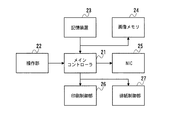
図2は、図1における印刷装置4の制御系の構成を示すブロック図である。印刷装置4の制御系は、メインコントローラ21と、それぞれがメインコントローラ21に接続された操作部22、記憶装置23、画像メモリ24、NIC(Network Interface Card)25、印刷制御部26、及び排紙制御部27からなる。
<Block diagram of printing device>
FIG. 2 is a block diagram showing the configuration of the control system of the
メインコントローラ21は印刷装置4全体の制御を司る。操作部22はオペレータが印刷装置4を操作するためのユーザインタフェースである。記憶装置23はHDD(Hard Disk Drive)などからなり、印刷データやプログラムの記憶、データのキャッシュエリアなどとして利用される。また、後述するフローチャートに対応する制御プログラム(プログラムコード)、及び電子メール作成ソフトも記憶されている。これらのプログラムは、NIC25を介してネットワークからダウンロードしたり、図示しないCD−ROMなどの記録媒体から読み込んだりすることで、記憶装置23に記憶される。
The
画像メモリ24は印刷データ画像を展開したり、加工したりするために用いられる。NIC25は第2のLAN6上を流れる通信パケットを監視し、印刷装置4に関係のある情報のみを内部に取込むと共に、印刷装置4で作成されたパケットを第2のLAN6へ送るための制御を行う。印刷制御部26は印刷用紙に画像を印刷するための印刷部(プリンタエンジン)の制御を行う。排紙制御部27は、印刷部によって画像形成された印刷用紙を印刷装置4の外部に排出するための排紙部の制御を行う。
The
〈印刷システムの動作〉
第1の印刷クライアント1及び第2の印刷クライアント10は電子メール作成ソフト(以下、メールソフト)を搭載しており、印刷データとしての画像データを電子メールの添付ファイルにして印刷装置4に送信することができる。また、画像データの他に、印刷を所望するテキストデータ、文書データ、表データなどを電子メールに添付することもできる。
<Operation of printing system>
The
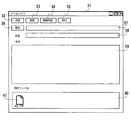
図3はメールソフトのGUI画面の一例を示している。メールソフトのウィンドウ画面31には、電子メールを送信するための送信ボタン32、電子メールを受信するための受信ボタン33、電子メールを新規に作成するための新規作成ボタン34、画像データ等を収納したファイルを電子メールに添付するための添付ボタン35、電子メールの宛先が記憶されたアドレス帳を参照するための宛先ボタン36、電子メールの宛先を入力するための宛先編集ボックス37、電子メールの件名を入力するための件名編集ボックス38、電子メールの本文を入力するためのテキストボックス39、添付ファイルをグラフィカルに表示するためのウィンドウ40が配置されている。ここでは、ウィンドウ40内に電子メールに添付されているファイルを示すアイコン41とファイル名が表示されている。なお、メールソフトのGUI画面は、メールソフトにより異なり、また携帯端末装置は独自のメールソフトインタフェースを備えている。
FIG. 3 shows an example of a GUI screen of mail software. The
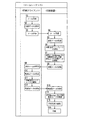
図4は本発明の印刷システムにおいて、第1の印刷クライアント1又は第2の印刷クライアント10による印刷要求メールの作成から印刷装置4による印刷までの全体のフローチャートを示す図である。この図において、印刷クライアントの処理は、印刷クライアントに搭載されているメールソフトにより実行され、印刷装置4の処理は、印刷装置4内の記憶装置23内に記憶されている印刷制御プログラムが動作することで実行される。
FIG. 4 is a diagram showing an overall flowchart from creation of a print request mail by the
ステップS1で、印刷を所望するユーザは、第1の印刷クライアント1もしくは第2の印刷クライアント10のメールソフトを用いて、印刷要求メールの作成を行う。次いで、ステップS2で、予め用意しておいた印刷ファイル(印刷データを収納したファイル)をメールソフトに添付する。次に、ステップS3では、印刷装置4のメールアドレスを宛先に入力して、送信ボタンを押して、印刷ファイルを添付したメールを印刷装置4に送信する。
In step S1, a user who desires printing creates a print request mail using the mail software of the
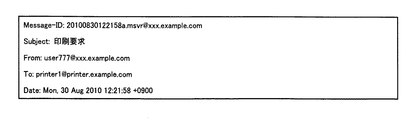
図5は、ステップS3で印刷装置4に送信されるメール(以下、送信メール)のメールヘッダの一例を示す図である。図示のように、メールヘッダには、最初の行から順に、このメールを特定することができるIDである「Message-ID」、メールの件名(タイトル)である「Subject」、メールの送信者のメールアドレスである「From」、メールの宛先のメールアドレスである「To」、メールの送信日時である「Date」が含まれている。
FIG. 5 is a diagram illustrating an example of a mail header of a mail (hereinafter referred to as a transmission mail) transmitted to the
ここで、「Subject」、「To」には、それぞれ「印刷要求」、「printer1@printer.example.com」(印刷装置4のメールアドレス)がユーザにより設定されている。同一ユーザが多数の印刷要求メールを送信する場合は、「Subject」にそれぞれを識別可能な名称を設定することが好適である。なお、メール本文は空欄(空メール)でもよい。 Here, in “Subject” and “To”, “print request” and “printer1@printer.example.com” (mail address of the printing apparatus 4) are set by the user, respectively. When the same user transmits a large number of print request mails, it is preferable to set “Subject” with a identifiable name. The mail text may be blank (blank mail).
図4の説明に戻る。ステップS4では、ステップS3で送信された印刷要求メールを印刷装置4が受信する。ステップS5では、ステップS4の印刷要求メールを受けて、印刷装置4はそれに対する返信メールを作成する。ステップS6では、印刷装置4は、ステップS5で作成したメールの本文に印刷設定テンプレートを追加する。この印刷設定テンプレートは、本発明の印刷システムにおける印刷設定可能情報に対応するものであり、印刷装置4がどのような印刷設定を具備し、またそれぞれの印刷設定がどのような選択肢を有するかを示す情報である(詳細については後述する)。
Returning to the description of FIG. In step S4, the
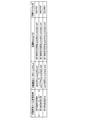
ステップS7では、ステップS4で受信した印刷要求メールの送信者のメールアドレス(印刷要求ユーザ)及びメール送信日時(印刷要求日時)、ステップS5で作成した返信メールの「Message-ID」、並びにステップS4で受信した印刷ファイルを関連付けて保存する。保存された情報の例を図6に示す。ステップS8では返信メールを送信する。 In step S7, the mail address (print request user) and mail transmission date / time (print request date / time) of the sender of the print request mail received in step S4, the “Message-ID” of the reply mail created in step S5, and step S4 Associate and save the print file received in. An example of the stored information is shown in FIG. In step S8, a reply mail is transmitted.
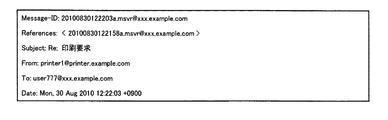
図7は、ステップS8で印刷装置4から印刷クライアントに送信される返信メールのメールヘッダの一例を示す図である。図示のように、返信メールのメールヘッダは、図5に示す印刷要求メールのメールヘッダと同様である。2行目の「References」タグは、返信の元となったメールの「Message-ID」が列挙される。ここでは、図5に示した印刷要求メールのメールヘッダに含まれている「Message-ID」が入っている。
FIG. 7 is a diagram illustrating an example of a mail header of a reply mail transmitted from the
図8は、返信メールのメール本文の一例を示す図である。印刷設定を記述する領域の開始を示す「#!Start」と終了を示す「#!End」との間に、印刷設定テンプレートが記述されている。印刷設定テンプレートは、印刷装置4で印刷可能な印刷設定の一覧を示す情報である。「xxx:」の書式で、該当印刷項目に対して指定可能な印刷設定の種類が記述される。それに続いて、スラッシュ「/」文字で区切って、その印刷設定に対して指定可能な選択肢が列挙される。
FIG. 8 is a diagram illustrating an example of a mail text of a reply mail. A print setting template is described between “#! Start” indicating the start of an area for describing print settings and “#! End” indicating the end. The print setting template is information indicating a list of print settings that can be printed by the
ここでは、印刷設定の一覧として、印刷部数(デフォルトで1に設定済)、原稿方向(タテ、ヨコ)の選択肢、カラー白黒(自動、カラー、白黒)の選択肢、印刷方法(通常、機密、蓄積)の選択肢、印刷用紙サイズ(原稿と同じ、A3、A4、A5、A6、B4、B5、B6)の選択肢、集約(しない、2in1、4in1)の選択肢、両面製本(しない、左開き、右開き、上開き、製本)の選択肢、ステープル(しない、左上、右上)の選択肢、パンチ(しない、左、右、上)の選択肢、及びソート(しない、する)の選択肢が設定されている。ここで、各機能の選択肢における左端の設定がデフォルトの設定である。 Here, as a list of print settings, the number of copies (set to 1 by default), options for document orientation (vertical, horizontal), color monochrome (automatic, color, black and white) options, and printing method (normal, confidential, storage) ) Option, printing paper size (same as original, A3, A4, A5, A6, B4, B5, B6) option, consolidation (not 2in1, 4in1) option, double-sided binding (not, left open, right open) , Top open, bookbinding) options, staple (no, upper left, upper right) options, punch (no, left, right, upper) options, and sort (no, yes) options. Here, the setting at the left end of each function option is the default setting.
この印刷設定テンプレートは、記憶装置23に保存されている印刷設定キーワードテーブルに基づいて作成される。図9に印刷設定キーワードテーブルの一例を示す。この印刷設定キーワードテーブルに内容については印刷装置4の管理者が変更することができる。ここで、部数に対応するテーブルに記載されている「〈numeric〉」は、任意の自然数を設定可能であることを意味しており、デフォルトで1が設定されている。
This print setting template is created based on the print setting keyword table stored in the
図4の説明に戻る。ステップS9では、印刷クライアントが印刷装置4から送信された返信メールを受信する。ステップS10では、ステップS9で受信した返信メールに対して、印刷要求ユーザは更に再返信メールを作成する。メールソフトの多くは、返信メールを作成する際に、元のメールの本文を引用した状態で返信メールを作成する機能を有する。ここでも、この機能を用いて再返信メールを作成する。ステップS11では、ステップS10で作成した再返信メール本文に引用された、返信メール本文中の印刷設定テンプレートを、ユーザが所望する印刷設定に編集する。ステップS12では、ステップS11で編集した印刷設定テンプレート、即ち印刷設定指示の内容を書いた再返信メールを印刷装置4に送信する。
Returning to the description of FIG. In step S <b> 9, the print client receives a reply mail transmitted from the
図10は、ステップS12で印刷クライアントから印刷装置4に送信される再返信メールのメールヘッダの一例を示す図である。再返信メールのメールヘッダは、図7に示す返信メールのメールヘッダと同様である。
FIG. 10 is a diagram illustrating an example of a mail header of the re-reply mail transmitted from the print client to the
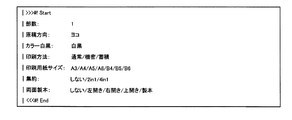
図11は、再返信メールのメール本文の一例を示す図である。メールソフトによっては、元メールの内容を引用して返信メールを作成する場合には、引用内容の行頭に「>」や「|」などの引用符を付与するものが有る。「>>>#! Start」、「<<<#! End」などのタグを利用して、印刷設定の記述領域を特定したり、各行で印刷設定キーワードを検出したりすることにより、その行の後ろに印刷設定が指定されていることを検出することが出来る。 FIG. 11 is a diagram illustrating an example of the mail text of the re-reply mail. Depending on the mail software, when a reply mail is created by quoting the contents of the original mail, quotes such as “>” and “|” are added at the beginning of the quoted content. Use tags such as “>>> #! Start” and “<<< #! End” to identify the print setting description area and detect the print setting keyword in each line. It can be detected that the print setting is specified after the.
空白文字に続いて、原稿方向やカラー白黒印刷設定のように、ユーザは指定の印刷設定を示す文字列以外を削除することで、所望の印刷設定を示すことが出来る。また、印刷方法や印刷用紙サイズのように、ユーザは所望の印刷設定が先頭(左端)の選択肢となるように、それ以外の選択肢を削除することにより、所望の印刷設定を示すことが出来る。この場合には、後続の選択肢をわざわざ削除する手間を省くことが出来る。また、この方法により、印刷装置4が返信するテンプレートの各印刷設定の先頭の選択肢は、その印刷設定のデフォルトとして機能する。つまり、印刷装置4が返信してきた印刷設定テンプレートの先頭の選択肢で印刷する場合には、その行はまったく編集せずに印刷装置に再返信すれば良いだけである。また、ステープル、パンチ、ソートの印刷設定のように、ユーザはデフォルト(先頭の選択肢)の印刷設定で印刷することを所望する場合には、それらの印刷設定を指定する行を行ごと削除することでも、同様に機能する。
Following the blank character, the user can indicate a desired print setting by deleting a character string other than the character string indicating the designated print setting, such as the document orientation and color monochrome print setting. Further, like the printing method and the printing paper size, the user can indicate the desired print setting by deleting other options so that the desired print setting becomes the first (left end) option. In this case, the trouble of deleting the subsequent choices can be saved. Also, with this method, the top option of each print setting of the template returned by the
つまり、返信メール本文中の印刷設定テンプレートにおける各機能の選択肢の左端の印刷設定と、再返信メール本文中の印刷設定情報における対応する機能の選択肢の印刷設定が異なる場合は、ユーザがデフォルト以外の印刷設定を指定したことになり、両者が同じ場合、即ちユーザが印刷設定テンプレートを編集しなかった場合は、ユーザがデフォルトの印刷設定を指定したことになる。また、ユーザが機能名及び選択肢全体を削除した場合もデフォルトの印刷設定を指定したことになる。なお、部数については、ユーザが任意の自然数を設定することができる。 In other words, if the print setting at the left end of each function option in the print setting template in the reply mail body and the print setting of the corresponding function option in the print setting information in the reply mail body differ, If the print settings are specified, and both are the same, that is, if the user has not edited the print setting template, the user has specified the default print settings. Also, when the user deletes the function name and the entire option, the default print setting is designated. Note that the user can set an arbitrary natural number for the number of copies.
従って、図11の場合は、部数の数値、印刷方法、集約、及び両面製本の選択肢の左端の設定は、図8に示す返信メール本文中の印刷設定テンプレートと同じであるから、ユーザはデフォルトの設定を選択したことになる。また、ステープル、パンチ、及びソートについては、ユーザが削除していることから、それらについてもデフォルトの設定(いずれも「しない」)を選択したことになる。これに対して、原稿方向、カラー白黒、印刷用紙サイズについては、デフォルトの印刷設定ではなく、それぞれ「ヨコ」、「白黒」、「A3」を選択したことになる。 Therefore, in the case of FIG. 11, the settings at the left end of the number of copies, printing method, aggregation, and double-sided binding options are the same as the print setting template in the reply mail body shown in FIG. You have selected a setting. Further, since the user has deleted the staple, punch, and sort, the default setting (all are “None”) is selected for them. On the other hand, for the document orientation, color black and white, and printing paper size, “horizontal”, “black and white”, and “A3” are selected instead of the default print settings.
図4の説明に戻る。ステップS13では、ステップS12で送信された再返信メールを印刷装置4が受信する。ステップS14では、ステップS13で受信した再返信メールのメールヘッダのReferencesタグに、ステップS7で保存したMessage-IDが含まれるかどうかをチェックすることで認証を行う。合致するMessage-IDが存在する場合には、ステップS7で一緒に保存されている送信者アドレスと、ステップS13で受信したメールの送信者アドレスとが一致しているかどうかをチェックする。両方が一致していることを確認することにより、印刷装置4は、ステップS13で受信したメールがステップS4以降の一連の印刷要求に対する印刷設定指定メールであると判断する。
Returning to the description of FIG. In step S13, the
ステップS15では、ステップS13で受信した再返信メールの本文に記載されている印刷設定を読み出して、印刷設定指示内容を解析する。ステップS16では、印刷装置4においては、ステップS7で保存した印刷ファイルを、ステップS15で解析した印刷設定に従って、印刷制御部26の制御により印刷部が印刷を実施する。こうして印刷要求ユーザは、印刷クライアントを操作して、所望の印刷設定で印刷結果を得ることが出来る。
In step S15, the print setting described in the text of the reply mail received in step S13 is read, and the print setting instruction content is analyzed. In step S16, in the
以上詳細に説明したように、本発明の実施形態の印刷システムによれば、印刷装置4は、印刷クライアントから電子メールに添付された印刷データを受け取ると、その電子メールの送信者である印刷クライアントに設定可能な印刷設定の一覧と、各印刷設定で選択可能な選択肢からなる印刷設定テンプレートを返信電子メールとして送信する。印刷クライアントのユーザはその印刷設定テンプレートを基に、所望の印刷設定を指定した再返信電子メールを印刷装置4に送信することで、所望の組み合わせを有する印刷設定の指定が出来る。
As described above in detail, according to the printing system of the embodiment of the present invention, when the
従って、従来システムで必要な印刷設定の組み合わせに対応するメールアドレスの準備、或いはメールアドレスの選択操作が不要になるとともに、印刷設定の指定を容易に実行することができる。 Accordingly, it is not necessary to prepare a mail address corresponding to a combination of print settings required in the conventional system or to select a mail address, and it is possible to easily specify print settings.
なお、本発明は上記実施形態に限定されるものではなく、例えば下記(1)〜(3)のような変形が可能である。
(1)印刷データを添付するメールを印刷要求メール(図4のステップS3で送信)から再返信メール(図4のステップS12で送信)に変更する。このように構成すると、印刷クライアントのユーザは、返信メール(図4のステップS9で受信)本文中の印刷設定テンプレートを見ることで、希望する印刷設定の有無を確認した後に印刷データを送信することが出来る。
In addition, this invention is not limited to the said embodiment, For example, a deformation | transformation like the following (1)-(3) is possible.
(1) The mail to which the print data is attached is changed from the print request mail (sent in step S3 in FIG. 4) to the reply mail (sent in step S12 in FIG. 4). With this configuration, the user of the print client transmits the print data after confirming the presence or absence of the desired print setting by looking at the print setting template in the body of the reply mail (received in step S9 in FIG. 4). I can do it.
(2)過去の一定期間内の印刷設定情報と印刷要求ユーザのメールアドレスとの対応関係を印刷装置4に保存しておき、その期間内に当該ユーザから、印刷データの添付された印刷要求メールを受信した場合、保存しておいた印刷設定を用いて印刷する。
(2) The correspondence between the print setting information in the past fixed period and the mail address of the print requesting user is stored in the
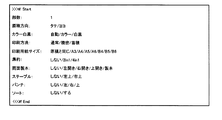
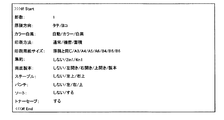
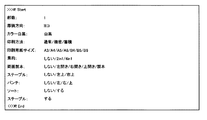
(3)印刷設定テンプレートに選択肢の無い印刷設定を設けるとともに、その印刷設定の機能を使用しない印刷設定を行う場合は、その印刷設定を印刷設定テンプレートから削除するように構成する。即ち例えば図12に示すように、返信メール本文中の印刷設定テンプレートに選択肢の無い機能(ここではトナーセーブ)が存在する場合、図13に示すように、トナーセーブに関する記載を削除することで、「トナーセーブ:しない」の設定とする。 (3) When a print setting having no options is provided in the print setting template and a print setting that does not use the print setting function is performed, the print setting is deleted from the print setting template. That is, for example, as shown in FIG. 12, when there is a function with no option (here, toner save) in the print setting template in the reply mail body, the description about toner save is deleted as shown in FIG. Set “Toner Save: Disable”.
1,10…印刷クライアント、2,5…サーバ、3,6…LAN、4…印刷装置、7,9…ルータ、8…インターネット、21…メインコントローラ、23…記憶装置、25…NIC、26…印刷制御部。
DESCRIPTION OF
Claims (18)
前記印刷装置は、前記端末装置から送信された印刷要求の電子メールを受信する手段と、前記端末装置に対して、指定可能な印刷設定を示す情報である印刷設定可能情報を含む返信電子メールを送信する手段と、前記端末装置から送信された、前記印刷設定可能情報から指定された印刷設定情報を含む再返信電子メールを受信する手段とを有する印刷システム。 A printing system that transmits print data and print setting information from a terminal device to a printing device by e-mail, and performs printing processing of the print data based on the print setting information in the printing device,
The printing device receives a print request email transmitted from the terminal device, and returns a reply email containing print setting enable information, which is information indicating print settings that can be specified, to the terminal device. A printing system comprising: means for transmitting; and means for receiving a reply e-mail including print setting information specified from the print setting enable information transmitted from the terminal device.
前記印刷装置は、前記印刷要求の電子メールに印刷データが添付されている場合、当該印刷データを記憶装置に保存する手段と、前記再返信電子メールに含まれている印刷設定情報に基づいて、前記保存されている印刷データの印刷処理を行う印刷制御手段とを有する印刷システム。 The printing system according to claim 1,
When printing data is attached to the print request email, the printing device saves the print data in a storage device, and based on the print setting information included in the reply email, A printing system comprising: a printing control unit that performs printing processing of the stored print data.
前記印刷装置は、前記再返信電子メールに印刷データが添付されている場合、前記再返信電子メールに含まれている印刷設定情報に基づいて、前記再返信電子メールに添付されている印刷データの印刷処理を行う印刷制御手段を有する印刷システム。 The printing system according to claim 1,
When printing data is attached to the re-reply email, the printing apparatus determines whether the print data attached to the re-reply email is based on the print setting information included in the re-reply email. A printing system having printing control means for performing printing processing.
前記再返信電子メールに含まれている印刷設定情報が前記返信電子メールに含まれている印刷設定可能情報と同じ場合は、前記印刷制御手段はデフォルトの印刷設定で印刷処理を行う印刷システム。 The printing system according to any one of claims 1 to 3,
When the print setting information included in the reply e-mail is the same as the print setting enable information included in the reply e-mail, the print control unit performs a printing process with a default print setting.
前記返信電子メールに含まれている印刷設定可能情報は当該返信電子メールの本文中の文字として前記端末装置に表示される構造を有する印刷システム。 The printing system according to any one of claims 1 to 4, wherein
The printing system having a structure in which the print setting possible information included in the reply e-mail is displayed on the terminal device as characters in the text of the reply e-mail.
前記再返信電子メールに含まれている印刷設定情報は前記返信電子メールの本文中に表示された文字から所望の印刷設定を示す文字を残した文字である印刷システム。 The printing system according to claim 5, wherein
The printing system, wherein the print setting information included in the reply email is a character obtained by leaving a character indicating a desired print setting from characters displayed in the body of the reply email.
前記印刷設定可能情報を示す文字は、機能毎に所定の方向に並べて表示されるとともに、デフォルトの印刷設定が前記所定の方向の並びの端に配置される印刷システム。 The printing system according to claim 5 or 6,
The characters indicating the print setting enable information are displayed side by side in a predetermined direction for each function, and a default print setting is arranged at the end of the predetermined direction.
前記印刷設定可能情報を示す文字は、機能毎に所定の方向に並べて表示され、前記再返信電子メールに含まれている印刷設定情報において、印刷設定可能情報から削除された機能の並びがある場合、前記印刷制御手段は、当該機能についてデフォルトの印刷設定で印刷処理を行う印刷システム。 The printing system according to claim 5 or 6,
The characters indicating the print setting enable information are displayed side by side in a predetermined direction for each function, and the print setting information included in the reply email includes a list of functions deleted from the print setting enable information The printing control means is a printing system that performs a printing process with default print settings for the function.
前記端末装置から送信された印刷要求の電子メールを受信する手段と、前記端末装置に対して、指定可能な印刷設定を示す情報である印刷設定可能情報を含む返信電子メールを送信する手段と、前記端末装置から送信された、前記印刷設定可能情報から指定された印刷設定情報を含む再返信電子メールを受信する手段とを有する印刷装置。 A printing apparatus that receives print data and print setting information transmitted by e-mail from a terminal device, and performs print processing of the print data based on the print setting information,
Means for receiving an e-mail of a print request transmitted from the terminal device; means for transmitting a reply e-mail including print setting enablement information which is information indicating print setting that can be specified to the terminal device; And a means for receiving a reply e-mail including print setting information designated from the print setting enable information transmitted from the terminal device.
前記印刷要求の電子メールに印刷データが添付されている場合、当該印刷データを記憶装置に保存する手段と、前記再返信電子メールに含まれている印刷設定情報に基づいて、前記保存されている印刷データの印刷処理を行う印刷制御手段を有する印刷装置。 The printing apparatus according to claim 9, wherein
When print data is attached to the print request e-mail, the print data is stored based on means for saving the print data in a storage device and print setting information included in the re-reply e-mail. A printing apparatus having print control means for performing print processing of print data.
前記再返信電子メールに印刷データが添付されている場合、前記再返信電子メールに含まれている印刷設定情報に基づいて、前記再返信電子メールに添付されている印刷データの印刷処理を行う印刷制御手段を有する印刷装置。 The printing apparatus according to claim 9, wherein
When print data is attached to the re-reply e-mail, printing that prints the print data attached to the re-reply e-mail based on print setting information included in the re-reply e-mail A printing apparatus having a control means.
前記再返信電子メールに含まれている印刷設定情報が前記返信電子メールに含まれている印刷設定可能情報と同じ場合は、前記印刷制御手段はデフォルトの印刷設定で印刷処理を行う印刷装置。 The printing apparatus according to any one of claims 9 to 11,
When the print setting information included in the re-reply e-mail is the same as the print setting enable information included in the reply e-mail, the print control unit performs a printing process with a default print setting.
前記返信電子メールに含まれている印刷設定可能情報は当該返信電子メールの本文中の文字として前記端末装置に表示される構造を有する印刷装置。 The printing apparatus according to any one of claims 9 to 12,
A printing apparatus having a structure in which the print setting possible information included in the reply e-mail is displayed on the terminal device as characters in the text of the reply e-mail.
前記再返信電子メールに含まれている印刷設定情報は前記返信電子メールの本文中に表示された文字から所望の印刷設定を示す文字を残した文字である印刷装置。 The printing apparatus according to claim 13, wherein
The printing apparatus, wherein the print setting information included in the reply email is a character obtained by leaving a character indicating a desired print setting from characters displayed in a body of the reply email.
前記印刷設定可能情報を示す文字は、機能毎に所定の方向に並べて表示されるとともに、デフォルトの印刷設定が前記所定の方向の並びの端に配置される構造を有する印刷装置。 The printing apparatus according to claim 13 or 14,
The printing apparatus has a structure in which characters indicating the print setting enable information are displayed side by side in a predetermined direction for each function, and a default print setting is arranged at an end of the predetermined direction.
前記印刷設定可能情報を示す文字は、機能毎に所定の方向に並べて表示され、前記再返信電子メールに含まれている印刷設定情報において、印刷設定可能情報から削除された機能の並びがある場合、前記印刷制御手段は、当該機能についてデフォルトの印刷設定で印刷処理を行う印刷装置。 The printing apparatus according to claim 13 or 14,
The characters indicating the print setting enable information are displayed side by side in a predetermined direction for each function, and the print setting information included in the reply email includes a list of functions deleted from the print setting enable information The printing control means is a printing apparatus that performs a printing process with default print settings for the function.
A computer-readable recording medium on which the program according to claim 17 is recorded.
Priority Applications (2)
| Application Number | Priority Date | Filing Date | Title |
|---|---|---|---|
| JP2010275712A JP2012123718A (en) | 2010-12-10 | 2010-12-10 | Printing system, printing device, program and recording medium |
| US13/311,930 US8665477B2 (en) | 2010-12-10 | 2011-12-06 | Print system, printing apparatus, and computer program product |
Applications Claiming Priority (1)
| Application Number | Priority Date | Filing Date | Title |
|---|---|---|---|
| JP2010275712A JP2012123718A (en) | 2010-12-10 | 2010-12-10 | Printing system, printing device, program and recording medium |
Publications (1)
| Publication Number | Publication Date |
|---|---|
| JP2012123718A true JP2012123718A (en) | 2012-06-28 |
Family
ID=46199115
Family Applications (1)
| Application Number | Title | Priority Date | Filing Date |
|---|---|---|---|
| JP2010275712A Pending JP2012123718A (en) | 2010-12-10 | 2010-12-10 | Printing system, printing device, program and recording medium |
Country Status (2)
| Country | Link |
|---|---|
| US (1) | US8665477B2 (en) |
| JP (1) | JP2012123718A (en) |
Cited By (1)
| Publication number | Priority date | Publication date | Assignee | Title |
|---|---|---|---|---|
| JP2021149782A (en) * | 2020-03-23 | 2021-09-27 | キヤノン株式会社 | Information processing device, printing system, image formation apparatus, information processing method and program |
Families Citing this family (7)
| Publication number | Priority date | Publication date | Assignee | Title |
|---|---|---|---|---|
| JP5393719B2 (en) * | 2011-03-24 | 2014-01-22 | 京セラドキュメントソリューションズ株式会社 | Image forming apparatus |
| JP5793010B2 (en) * | 2011-06-28 | 2015-10-14 | キヤノン株式会社 | Apparatus and method for determining processing identification information from mail address |
| JP2013145536A (en) * | 2012-01-16 | 2013-07-25 | Canon Inc | Information processing apparatus, control method of the same, and program |
| WO2013111257A1 (en) * | 2012-01-23 | 2013-08-01 | キヤノン株式会社 | Server, server control method, and program |
| JP6011043B2 (en) * | 2012-06-11 | 2016-10-19 | セイコーエプソン株式会社 | E-mail processing system and e-mail processing method |
| JP5696693B2 (en) * | 2012-07-20 | 2015-04-08 | コニカミノルタ株式会社 | Print control apparatus, e-mail transmission apparatus, print control method, and program |
| JP5776656B2 (en) * | 2012-09-18 | 2015-09-09 | コニカミノルタ株式会社 | PRINT CONTROL DEVICE, PROGRAM, AND PRINT SYSTEM |
Citations (4)
| Publication number | Priority date | Publication date | Assignee | Title |
|---|---|---|---|---|
| JP2005115559A (en) * | 2003-10-06 | 2005-04-28 | Canon Inc | PRINT PROCESSING SYSTEM, ITS CONTROL METHOD, CONTROL PROGRAM, AND STORAGE MEDIUM |
| JP2006065642A (en) * | 2004-08-27 | 2006-03-09 | Canon Inc | Output processing apparatus, output processing method and program thereof |
| JP2006062107A (en) * | 2004-08-25 | 2006-03-09 | Kyocera Mita Corp | Printer and its control program |
| JP2008277939A (en) * | 2007-04-26 | 2008-11-13 | Fuji Xerox Co Ltd | Information processing system, image output system, information processing program, and image output program |
Family Cites Families (3)
| Publication number | Priority date | Publication date | Assignee | Title |
|---|---|---|---|---|
| US5230628A (en) | 1990-06-11 | 1993-07-27 | Ricoh Company, Ltd. | Apparatus for producing operational manual |
| US8014006B2 (en) * | 2003-06-03 | 2011-09-06 | Sharp Laboratories Of America, Inc. | System and method for delivering native structure document printing instructions |
| JP2005267002A (en) | 2004-03-17 | 2005-09-29 | Ricoh Co Ltd | Print service system, multifunction device, program and storage medium |
-
2010
- 2010-12-10 JP JP2010275712A patent/JP2012123718A/en active Pending
-
2011
- 2011-12-06 US US13/311,930 patent/US8665477B2/en not_active Expired - Fee Related
Patent Citations (4)
| Publication number | Priority date | Publication date | Assignee | Title |
|---|---|---|---|---|
| JP2005115559A (en) * | 2003-10-06 | 2005-04-28 | Canon Inc | PRINT PROCESSING SYSTEM, ITS CONTROL METHOD, CONTROL PROGRAM, AND STORAGE MEDIUM |
| JP2006062107A (en) * | 2004-08-25 | 2006-03-09 | Kyocera Mita Corp | Printer and its control program |
| JP2006065642A (en) * | 2004-08-27 | 2006-03-09 | Canon Inc | Output processing apparatus, output processing method and program thereof |
| JP2008277939A (en) * | 2007-04-26 | 2008-11-13 | Fuji Xerox Co Ltd | Information processing system, image output system, information processing program, and image output program |
Cited By (2)
| Publication number | Priority date | Publication date | Assignee | Title |
|---|---|---|---|---|
| JP2021149782A (en) * | 2020-03-23 | 2021-09-27 | キヤノン株式会社 | Information processing device, printing system, image formation apparatus, information processing method and program |
| JP7555715B2 (en) | 2020-03-23 | 2024-09-25 | キヤノン株式会社 | Information processing device, printing system, information processing method and program |
Also Published As
| Publication number | Publication date |
|---|---|
| US8665477B2 (en) | 2014-03-04 |
| US20120147421A1 (en) | 2012-06-14 |
Similar Documents
| Publication | Publication Date | Title |
|---|---|---|
| US7167264B2 (en) | E-mail responsive printing apparatus | |
| US8665477B2 (en) | Print system, printing apparatus, and computer program product | |
| CN104050024B (en) | Process flow definition creating system, process flow definition creating device, and a method of creating process flow definition | |
| US9069504B2 (en) | Printing apparatus and method for increasing storage area | |
| JP2002182866A (en) | Print control method, print server, client, and recording medium in network environment | |
| JP4928821B2 (en) | Handling digital documents in network systems | |
| JP2012085176A (en) | Image forming apparatus, information apparatus and computer program | |
| US20110222112A1 (en) | Information processing system, apparatus, and method | |
| JP2010221699A (en) | Job processing apparatus, method, and program | |
| JP2010113620A (en) | Image forming system | |
| JP2014167679A (en) | Job execution control system, job execution system, job execution control method and program | |
| JP2017167660A (en) | Image data providing system, image processing device, server, image data providing method, and computer program | |
| US9952810B2 (en) | Information processing system, information processing apparatus, and information processing method | |
| US8407300B2 (en) | Recording medium with electronic mail management program recorded, communication terminal, and electronic mail management method | |
| JP2005267002A (en) | Print service system, multifunction device, program and storage medium | |
| JP5739724B2 (en) | Image processing system | |
| JP5776656B2 (en) | PRINT CONTROL DEVICE, PROGRAM, AND PRINT SYSTEM | |
| JP5063527B2 (en) | Image processing apparatus, image processing apparatus control method, and program | |
| JP2004206621A (en) | Printing system, layout display method and layout display program | |
| JP4938317B2 (en) | Printed document registration program and recording medium | |
| JP2012108759A (en) | Information processor, information processing system, information processing method and information processing program | |
| JP2009193547A (en) | Image forming apparatus and image forming control method thereof | |
| JP2003036233A (en) | E-mail creation device and e-mail communication system | |
| JP2018097714A (en) | Print relay server, print instruction method, and computer program | |
| JP2006338096A (en) | Information processing apparatus and information processing method |
Legal Events
| Date | Code | Title | Description |
|---|---|---|---|
| A621 | Written request for application examination |
Free format text: JAPANESE INTERMEDIATE CODE: A621 Effective date: 20131111 |
|
| A977 | Report on retrieval |
Free format text: JAPANESE INTERMEDIATE CODE: A971007 Effective date: 20140723 |
|
| A131 | Notification of reasons for refusal |
Free format text: JAPANESE INTERMEDIATE CODE: A131 Effective date: 20140930 |
|
| A521 | Request for written amendment filed |
Free format text: JAPANESE INTERMEDIATE CODE: A523 Effective date: 20141201 |
|
| A131 | Notification of reasons for refusal |
Free format text: JAPANESE INTERMEDIATE CODE: A131 Effective date: 20150120 |
|
| A521 | Request for written amendment filed |
Free format text: JAPANESE INTERMEDIATE CODE: A523 Effective date: 20150318 |
|
| A131 | Notification of reasons for refusal |
Free format text: JAPANESE INTERMEDIATE CODE: A131 Effective date: 20150609 |
|
| A02 | Decision of refusal |
Free format text: JAPANESE INTERMEDIATE CODE: A02 Effective date: 20151104 |