EP4404049A1 - Anzeigevorrichtung und betriebsverfahren dafür - Google Patents
Anzeigevorrichtung und betriebsverfahren dafür Download PDFInfo
- Publication number
- EP4404049A1 EP4404049A1 EP21957618.8A EP21957618A EP4404049A1 EP 4404049 A1 EP4404049 A1 EP 4404049A1 EP 21957618 A EP21957618 A EP 21957618A EP 4404049 A1 EP4404049 A1 EP 4404049A1
- Authority
- EP
- European Patent Office
- Prior art keywords
- portable device
- image
- screen sharing
- display
- display device
- Prior art date
- Legal status (The legal status is an assumption and is not a legal conclusion. Google has not performed a legal analysis and makes no representation as to the accuracy of the status listed.)
- Pending
Links
Images






Classifications
-
- G—PHYSICS
- G06—COMPUTING OR CALCULATING; COUNTING
- G06F—ELECTRIC DIGITAL DATA PROCESSING
- G06F3/00—Input arrangements for transferring data to be processed into a form capable of being handled by the computer; Output arrangements for transferring data from processing unit to output unit, e.g. interface arrangements
- G06F3/14—Digital output to display device ; Cooperation and interconnection of the display device with other functional units
-
- G—PHYSICS
- G06—COMPUTING OR CALCULATING; COUNTING
- G06F—ELECTRIC DIGITAL DATA PROCESSING
- G06F3/00—Input arrangements for transferring data to be processed into a form capable of being handled by the computer; Output arrangements for transferring data from processing unit to output unit, e.g. interface arrangements
- G06F3/14—Digital output to display device ; Cooperation and interconnection of the display device with other functional units
- G06F3/1454—Digital output to display device ; Cooperation and interconnection of the display device with other functional units involving copying of the display data of a local workstation or window to a remote workstation or window so that an actual copy of the data is displayed simultaneously on two or more displays, e.g. teledisplay
-
- G—PHYSICS
- G06—COMPUTING OR CALCULATING; COUNTING
- G06F—ELECTRIC DIGITAL DATA PROCESSING
- G06F3/00—Input arrangements for transferring data to be processed into a form capable of being handled by the computer; Output arrangements for transferring data from processing unit to output unit, e.g. interface arrangements
- G06F3/14—Digital output to display device ; Cooperation and interconnection of the display device with other functional units
- G06F3/1423—Digital output to display device ; Cooperation and interconnection of the display device with other functional units controlling a plurality of local displays, e.g. CRT and flat panel display
-
- H—ELECTRICITY
- H04—ELECTRIC COMMUNICATION TECHNIQUE
- H04W—WIRELESS COMMUNICATION NETWORKS
- H04W84/00—Network topologies
- H04W84/02—Hierarchically pre-organised networks, e.g. paging networks, cellular networks, WLAN [Wireless Local Area Network] or WLL [Wireless Local Loop]
- H04W84/10—Small scale networks; Flat hierarchical networks
- H04W84/12—WLAN [Wireless Local Area Networks]
-
- G—PHYSICS
- G09—EDUCATION; CRYPTOGRAPHY; DISPLAY; ADVERTISING; SEALS
- G09G—ARRANGEMENTS OR CIRCUITS FOR CONTROL OF INDICATING DEVICES USING STATIC MEANS TO PRESENT VARIABLE INFORMATION
- G09G2358/00—Arrangements for display data security
-
- G—PHYSICS
- G09—EDUCATION; CRYPTOGRAPHY; DISPLAY; ADVERTISING; SEALS
- G09G—ARRANGEMENTS OR CIRCUITS FOR CONTROL OF INDICATING DEVICES USING STATIC MEANS TO PRESENT VARIABLE INFORMATION
- G09G2370/00—Aspects of data communication
- G09G2370/20—Details of the management of multiple sources of image data
Definitions
- the present disclosure relates to a display device and a method for operating the same.
- An individual may want to share the screen with a large display device to view a larger screen, or may want to share the screen of a personal laptop in a public space such as a conference room so that multiple people can view the same screen.
- PCs provide the ability to share the screen using Miracast as standard. Since the Miracast screen sharing method is a technology which transmits the screen using the PC's WIFI-Direct, it can only be used when the PC is connected to the display device's WIFI.
- An object of the present disclosure is to provide a method which shares a PC screen in a wireless environment without using a wired cable, does not place restrictions on the use of PC Wi-Fi, and conveniently installs a screen sharing program.
- An object of the present disclosure is to facilitate sequential or simultaneous sharing of multiple PC screens.
- a display device may include a display part; a wireless communication part configured to perform wireless communication with a first portable device connected to a first terminal displaying a first image or a second portable device connected to a second terminal displaying a second image; and a controller configured to: when a screen sharing request is received from the first portable device, determine whether a management mode for managing screen sharing of the second portable device connected to the second terminal is activated, when the management mode of the second portable device is activated, determine whether screen sharing permission has been received from the second portable device, when the screen sharing permission is received, receive the first image data corresponding to the first image from the portable device, and based on the received first image data, display first mirroring image on the display part.
- the screen of a terminal may be shared with a display device having a large screen in a wireless environment without a separate wired cable.
- image data for screen sharing is transmitted to the display device through a portable device, there are no restrictions on using the terminal's Wi-Fi standard.
- the portable device itself transmits the image/audio data of the terminal to the display device, there is no need for a separate module for data transmission, which may reduce costs and simplify the configuration of the device.
- the display device is, for example, an intelligent display device that adds a computer support function to the broadcast reception function, and is faithful to the broadcast reception function while adding an Internet function and the like, and thus can be equipped with a more convenient interface such as a handwriting input device, a touch screen, or a spatial remote control.
- a more convenient interface such as a handwriting input device, a touch screen, or a spatial remote control.
- by supporting wired or wireless Internet functions it is possible to connect to the Internet and a computer and perform functions such as email, web browsing, banking, or gaming.
- a standardized general-purpose operating system (OS) can be used for these various functions.
- the display device for example, various applications can be freely added or deleted on a general-purpose OS kernel, so various user-friendly functions can be performed.
- the display device may be, for example, a network TV, HBBTV, smart TV, LED TV, OLED TV, or the like, and in some cases, may also be applied to a smartphone.
- FIG. 1 is a diagram illustrating the configuration of a screen sharing system according to an embodiment of the present disclosure.
- the screen sharing system 1 may include a terminal 100, a portable device 200, and a display device 300.
- the terminal 100 may be a computer such as a PC or laptop, but this is only an example.
- the terminal 100 and the portable device 200 may be connected wirelessly or wired.
- the terminal 100 and the portable device 200 can be connected to each other through the USB standard.
- the portable device 200 and the terminal 100 may each be composed of a plurality of devices.
- the portable device 200 is a dongle type and can be connected to the terminal 100 through the Universal Serial Bus (USB) standard.
- USB Universal Serial Bus
- the display device 300 may be a TV.
- the portable device 200 and the display device 300 can communicate through the Wi-Fi standard.
- FIG. 2 is a block diagram illustrating the configuration of a terminal according to an embodiment of the present disclosure.
- the terminal 100 may include a communication interface 110, an external input interface 120, a display 130, a memory 140, and a processor 190.
- the communication interface 110 can communicate with external devices wired or wirelessly.
- the communication interface 110 may include Wi-Fi and Bluetooth modules.
- the external input interface 120 can receive data and information from external devices.
- the external input interface 120 may receive data necessary for installing the screen sharing program from the input/output interface 220 of the portable device 200.
- the external input interface 120 may provide a connection path between the terminal 100 and an external device.
- the external input interface 120 may include a plurality of external input terminals.
- the plurality of external input terminals may include an RGB terminal, one or more High Definition Multimedia Interface (HDMI) terminals, and a component terminal.
- HDMI High Definition Multimedia Interface
- the display 130 can display images.
- the memory 140 may store programs for processing and controlling each signal in the processor 190 and store signal-processed image, voice, or data signals.
- the processor 190 may control the overall operation of the terminal 100.
- FIG. 3 is a block diagram illustrating the configuration of a portable device according to an embodiment of the present disclosure.
- the portable device 200 may include a wireless communication interface 210, an input/output interface 220, a user input interface 230, a memory 240, an LED 250, and a microcomputer 290.
- the wireless communication interface 210 may perform wireless communication with the display device 300.
- the wireless communication interface 210 may perform wireless communication with the display device 300 through the Wi-Fi standard.
- the wireless communication interface 210 may include a Wi-Fi module.
- the input/output interface 220 may provide a connection path with the terminal 100 through the USB standard.
- User input interface 230 may include one or more physical buttons. The button may be used to switch between screen sharing status, multi-screen sharing mode, and single screen sharing mode.
- the memory 240 may store a screen sharing program and data necessary for installing a screen sharing program.
- the LED 250 may output a specific color to indicate the screen sharing status with the display device 300.
- the LED 250 When the portable device 200 is in a connection waiting state (screen sharing state) with the display device 300, the LED 250 outputs a light green color, and when the portable device 200 is in a connection state (screen sharing state), the LED 250 outputs a green color, and if the connection is in an unstable state, the LED 250 may output a red color.
- the microcomputer 290 may control the overall operation of the portable device 200.
- FIG. 4 is a block diagram illustrating the configuration of a display device according to an embodiment of the present disclosure.
- the display device 300 may include a wireless communication part 310, a memory 320, a display part 330, an audio output part 340, and a controller 390.
- the wireless communication part 310 may perform wireless communication with the portable device 200.
- the wireless communication part 310 may communicate with the portable device 200 through Wi-Fi or Wi-Fi Direct standards.
- the memory 320 may store a screen sharing control program.
- the screen sharing control program may be a program that decodes image data received from the portable device 200 and controls output of the mirroring image based on the decoded data.
- the display part 330 can display image signals, data signals, and OSD signals processed by the controller 190.
- FIG. 5 is a ladder diagram for illustrating the method for operating the screen sharing system according to an embodiment of the present disclosure.
- the terminal 100 determines whether a screen sharing program is installed (S503).
- the terminal 100 is connected to the input/output interface 220 of the portable device 200 through the external input interface 120 and may exchange data.
- the terminal 100 and the portable device 200 can be connected to each other through the USB standard.
- the user can plug the portable device 200 into the USB terminal provided on the external input interface 120 of the terminal 100.
- the screen sharing program may be a program for sharing the screen by transmitting the screen being displayed on the display 130 of the terminal 100 to the display device 300 through the portable device 200.
- a screen sharing program is installed in the memory 240 of the portable device 200.
- the memory 240 of the portable device 200 may store program data necessary for installing a screen sharing program.
- the processor 190 of the terminal 100 may determine whether the screen sharing program installed on the portable device 200 is also installed upon the connection of the portable device 200.
- the portable device 200 may inquire with the terminal 100 whether a screen sharing program is installed.
- the terminal 100 transmits a pre-installation response indicating that the program has been installed to the portable device 200 (S505).
- the terminal 100 can automatically run the screen sharing program upon connection to the portable device 200. In other words, the terminal 100 may enter a waiting state for screen sharing with the display device 300.
- the processor 190 of the terminal 100 may transmit a pre-installation response to the input/output interface 220 of the portable device 200 through the external input interface 120.
- the terminal 100 determines that the screen sharing program is not installed, the terminal transmits a non-installation response indicating that the program is not installed to the portable device 200 (S507).
- the processor 190 of the terminal 100 may display a pop-up window inquiring about installing the screen sharing program through the display 130.
- FIG. 6 is a diagram illustrating a pop-up window that induces installation of a screen sharing program according to an embodiment of the present disclosure.
- a pop-up window 600 prompting installation of the screen sharing program may be displayed on the display 130.
- the user can select the ⁇ YES> item included in the pop-up window 600 to have the screen sharing program installed on the terminal 100.
- the portable device 200 transmits program data to the terminal 100 to install the screen sharing program based on the non-installation response (S509).
- the microcomputer 290 of the portable device 200 may transmit program data to the external input interface 120 of the terminal 100 based on the non-installation response.
- Program data may include installation files for screen sharing programs.
- the terminal 100 installs a screen sharing program using the program data received from the portable device 200 (S511).
- the processor 190 of the terminal 100 may install the screen sharing program in the memory 140 using program data.
- the terminal 100 transmits image data corresponding to the image being displayed through the display 130 to the portable device 200 (S513).
- the processor 190 of the terminal 100 may receive a screen sharing request from the portable device 200 and may transmit image data to the portable device 200 in response to the received screen sharing request.
- the microcomputer 290 of the portable device 200 may receive a screen sharing request through the user input interface 230.
- the user input interface 230 may include physical buttons.
- the portable device 200 may determine that a screen sharing request has been received.
- the portable device 200 in a state where the portable device 200 is in a ready state for connection with the display device 300, when a physical button is selected, the portable device may be determined that a screen sharing request has been received.
- the portable device 200 transmits the image data received from the terminal 100 to the display device 300 (S515).
- the microcomputer 290 of the portable device 200 may transmit image data corresponding to the image being displayed by the terminal 100 to the wireless communication part 310 of the display device 300 through the wireless communication interface 210.
- the portable device 200 may transmit audio data corresponding to audio output by the terminal 100 to the display device 300.
- Each of the wireless communication interface 210 and the wireless communication part 310 may include a Wi-Fi module.
- the portable device 200 may transmit image data to the display device 300 through the Wi-Fi standard.
- the display device 300 displays a mirroring image based on the image data received from the portable device 200 (S517).
- the display device 300 may be installed with a display control program capable of displaying image data received from the portable device 200, and may display a mirroring image based on the image data using the display control program.
- the display control program may be a program for decoding image data or audio data received from the portable device 200 and controlling display of the decoded image data.
- the terminal 100 and the display device 300 can share the same screen.
- FIG. 7 is a ladder diagram explaining the method of operating a screen sharing system according to another embodiment of the present disclosure.
- FIG. 7 is a diagram of a scenario in which one screen is shared through one portable device 200.
- Steps S700 to S709 of FIG. 7 may be steps executed between steps S511 and S513 of FIG. 5 .
- the portable device 200 is in a screen sharing waiting state (S700).
- the LED 230 may output the first color.
- the first color may be light green, but this is only an example.
- the screen sharing waiting state may be a state where the terminal 100 is waiting to share the image being displayed.
- the portable device 200 receives a screen sharing request in a screen sharing waiting state (S701).
- a screen sharing request may be received through the user input interface 230 provided in the portable device 200.
- the microcomputer 290 of the portable device 200 may determine that a screen sharing request has been received.
- the portable device 200 transmits the received screen sharing request to the display device 300 (S703).
- the microcomputer 290 of the portable device 200 may transmit a screen sharing request to the wireless communication part 310 of the display device 300 through the wireless communication interface 210.
- the screen sharing request may include one or more of identification information identifying the portable device 200 and identification information of the terminal 100 connected to the portable device 200 through the USB standard.
- the screen sharing request may be a request to share the screen of the terminal 100 connected to the portable device 200.
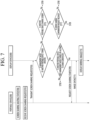
- the display device 300 determines whether the management mode of the other portable device is turned on according to the screen sharing request (S705).
- the management mode is a mode that can manage screen sharing authority, and when there are a plurality of portable devices connected to the display device 300, only one portable device may be set to the management mode.
- Only one portable device may be turned on in the management mode.
- the display device 300 can check which of the plurality of portable devices connected to the display device 300 is set to the management mode.
- the display device 300 may identify the portable device of the plurality of portable devices which is first transmitted a request to activate the management mode, and determine that only the identified portable device has activated the management mode.
- the display device 300 may identify the device of the first portable device and the second portable device which is first received a request for the management mode as the management device with screen sharing authority.
- the display device 300 determines whether screen sharing permission from the portable device has been received (S707).
- the controller 390 of the display device 300 may determine whether screen sharing permission has been received from the other portable device. This is because management mode is set to on in other portable devices.
- the display device 300 requests the portable device 200 to start screen sharing (S709).
- the controller 390 of the display device 300 may request the portable device 200 to start screen sharing.
- the portable device 200 transmits the image data received from the terminal 100 to the display device 300 (S711), and the display device 300 displays a mirroring image based on the received image data (S713).
- the display device 300 determines whether the other portable device is sharing the screen (S715).
- the screen of the terminal connected to the other portable device may be shared by transmitting image data to the display device 300.
- the controller 390 of the display device 300 may determine whether image data for screen sharing is being received from another portable device.
- the display device 300 When no other portable device is sharing the screen, the display device 300 performs S709.
- the controller 390 of the display device 300 may request the portable device 200 to start screen sharing.
- the display device 300 determines whether the other portable device receives a screen sharing confirmation request to share the screen through the portable device 200 even though the other portable device is sharing the screen (S717).
- the controller 390 of the display device 300 When the controller 390 of the display device 300 receives a screen sharing request from the portable device 200 while sharing the screen through another portable device, the controller may display a pop-up window notifying this on the display part 330.
- the display device 300 may receive a screen sharing confirmation request through a pop-up window.
- the controller 390 of the display device 300 may receive a screen sharing confirmation request from another portable device.
- the display device 300 When the display device 300 receives screen sharing confirmation, it performs S709.
- the display device 300 does not receive screen sharing confirmation, it performs S700.
- FIG. 7 is explained through an actual scenario.
- FIGS. 8 to 10 are diagrams illustrating an example of providing a screen sharing service through one of two portable devices.
- the first terminal 100-1 is connected to the first portable device 200-1
- the second terminal 100-2 is connected to the second portable device 200-2.
- the first terminal 100-1 is displaying the first image 810
- the second terminal 100-2 is displaying the second image 830
- the display device 300 is displaying a mirroring image 850 based on the second image 830.
- the display device 300 displays the second mirroring image 850 on the display part 330 based on the image data received from the second portable device 200-2.
- the display device 300 may receive a screen sharing request from the first portable device 200-1.
- the display device 300 may display a notification 900 indicating that a screen sharing request has been received from the first portable device 200-1 on the display part 330, as illustrated in FIG. 9 .
- the display device 300 may receive a screen sharing permission message allowing screen sharing of the first portable device 200-1 from the second portable device 200-2.
- the display device 300 may determine that permission to share the screen will be received from the second portable device 200-2.
- the display device 300 may convert the second mirroring image 850 into the first mirroring image 1000 based on the first image 810, as illustrated in FIG. 10 .
- the display device 300 receives image data corresponding to the first image 810 from the first portable device 200-1 and may output the first mirroring image 1000 on the display part 330 using a display control program.
- the display device 300 may provide a screen sharing service through the first portable device 200-1.
- the screen of the terminal may be shared with a display device having a large screen in a wireless environment without a separate wired cable.
- image data for screen sharing is transmitted to the display device through a portable device, there are no restrictions on using the terminal's Wi-Fi standard.
- FIG. 11 is a flowchart illustrating a process of changing the operation mode of a portable device from a single screen sharing mode to a multi-screen sharing mode, according to an embodiment of the present disclosure.
- the microcomputer 290 of the portable device 200 operates in single screen sharing mode (S1101).
- the single screen sharing mode may be a mode in which the display device 300 shares the screen with one portable device 200.
- the microcomputer 290 of the portable device 200 determines whether a button provided on the user input interface 230 has been selected for 3 seconds or more (S1103).
- the microcomputer 290 of the portable device 200 changes the operation mode from the single screen sharing mode to the multi-screen operation mode (S1105).
- the multi-screen sharing mode may be a mode for sharing a plurality of screens through a plurality of portable devices connected to each of a plurality of terminals.
- the microcomputer 290 of the portable device 200 changes the operation mode from the multi-screen sharing mode to the single screen sharing mode when the button is selected for 3 seconds or more (S1107) under the multi-screen sharing mode.
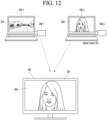
- FIGS. 12 to 14 are diagrams of a scenario in which a plurality of screens are shared through a plurality of portable devices.
- the first terminal 100-1 is connected to the first portable device 200-1
- the second terminal 100-2 is connected to the second portable device 200-2.
- the first terminal 100-1 is displaying the first image 810
- the second terminal 100-2 is displaying the second image 830
- the display device 300 is displaying a mirroring image 850 based on the second image 830.
- the display device 300 displays the second mirroring image 850 on the display part 330 based on the image data received from the second portable device 200-2.
- a management mode with screen sharing management authority is set in the second portable device 200-2, and each of the first portable device 200-1 and the second portable device 200-2 is operated in a multi-screen sharing mode.
- the first portable device 200-1 may receive a button selection input while in a screen sharing waiting state.
- the first portable device 200-1 may transmit a screen sharing request to the display device 300 according to a button selection input.
- the display device 300 may display a notification 1300 indicating that a multi-screen sharing request has been received from the first portable device 200-1 on the display part 330, as illustrated in FIG. 13 .
- the display device 300 may receive a multi-screen sharing permission message allowing screen sharing of the first portable device 200-1 from the second portable device 200-2.
- the display device 300 may determine that permission to share the screen will be received from the second portable device 200-2.
- the display device 300 may display the second mirroring image 850 and the first mirroring image 1000 based on the first image 810 into split screens, as illustrated in FIG. 14 .
- the display device 300 may receive image data corresponding to the first image 810 from the first portable device 200-1 and may output the first mirroring image 1000 together with the second the mirroring image 850 on the display part 330, using a display control program.
- the display device 300 may provide a multi-screen sharing service through the first and second portable devices 200-1 and 2000-2.
- the screens of a plurality of terminals may be shared on a display device having a large screen in a wireless environment without a separate wired cable.
- the display device 300 may adjust the arrangement and order of screens, and may cancel the screen of a portable device that is not in the management mode.
- the above-described method can be implemented as processor-readable code on a program-recorded medium.
- media that the processor can read include ROM, RAM, CD-ROM, magnetic tape, floppy disk, and optical data storage devices.
- the display device described above is not limited to the configuration and method of the above-described embodiments, and the embodiments may be configured by selectively combining all or part of each embodiment so that various modifications can be made.
Landscapes
- Engineering & Computer Science (AREA)
- Theoretical Computer Science (AREA)
- Physics & Mathematics (AREA)
- General Engineering & Computer Science (AREA)
- General Physics & Mathematics (AREA)
- Human Computer Interaction (AREA)
- Computer Networks & Wireless Communication (AREA)
- Signal Processing (AREA)
- Information Transfer Between Computers (AREA)
- Telephone Function (AREA)
- Quality & Reliability (AREA)
Applications Claiming Priority (2)
| Application Number | Priority Date | Filing Date | Title |
|---|---|---|---|
| KR1020210123410A KR102463351B1 (ko) | 2021-09-15 | 2021-09-15 | 디스플레이 장치 및 그의 동작 방법 |
| PCT/KR2021/013226 WO2023042950A1 (ko) | 2021-09-15 | 2021-09-28 | 디스플레이 장치 및 그의 동작 방법 |
Publications (2)
| Publication Number | Publication Date |
|---|---|
| EP4404049A1 true EP4404049A1 (de) | 2024-07-24 |
| EP4404049A4 EP4404049A4 (de) | 2025-05-21 |
Family
ID=84101576
Family Applications (1)
| Application Number | Title | Priority Date | Filing Date |
|---|---|---|---|
| EP21957618.8A Pending EP4404049A4 (de) | 2021-09-15 | 2021-09-28 | Anzeigevorrichtung und betriebsverfahren dafür |
Country Status (4)
| Country | Link |
|---|---|
| US (1) | US12423048B2 (de) |
| EP (1) | EP4404049A4 (de) |
| KR (1) | KR102463351B1 (de) |
| WO (1) | WO2023042950A1 (de) |
Cited By (1)
| Publication number | Priority date | Publication date | Assignee | Title |
|---|---|---|---|---|
| EP4582925A4 (de) * | 2022-12-05 | 2025-09-03 | Samsung Electronics Co Ltd | Endgerätevorrichtung und damit durchgeführtes spiegelungsverfahren |
Families Citing this family (1)
| Publication number | Priority date | Publication date | Assignee | Title |
|---|---|---|---|---|
| CN116185326B (zh) * | 2023-04-27 | 2023-07-07 | 深圳市微克科技有限公司 | 一种基于智能设备分屏交互的控制方法及系统 |
Family Cites Families (13)
| Publication number | Priority date | Publication date | Assignee | Title |
|---|---|---|---|---|
| KR20140140957A (ko) * | 2013-05-30 | 2014-12-10 | 삼성전자주식회사 | 화면 데이터의 미러링 방법, 저장 매체 및 전자 장치 |
| KR102078867B1 (ko) * | 2013-09-17 | 2020-02-18 | 삼성전자주식회사 | 제어권 관리 방법, 그에 따른 클라이언트 기기 및 그에 따른 마스터 기기 |
| KR102143222B1 (ko) | 2013-12-27 | 2020-08-11 | 엘지디스플레이 주식회사 | 무선 디스플레이 싱크 장치 |
| KR102243220B1 (ko) | 2014-11-07 | 2021-04-22 | 현대모비스 주식회사 | 우선순위를 이용한 차량용 미러링 제어 장치 및 방법 |
| KR102389038B1 (ko) | 2015-09-02 | 2022-04-21 | 엘지전자 주식회사 | 전자 기기 및 전자 기기의 제어 방법 |
| KR20180041961A (ko) * | 2016-10-17 | 2018-04-25 | 엘지전자 주식회사 | 디스플레이 디바이스 및 그 데이터 처리 방법 |
| KR102381068B1 (ko) * | 2017-09-26 | 2022-03-31 | 엘지전자 주식회사 | 무선 디바이스 및 그의 동작 방법 |
| KR102490540B1 (ko) | 2018-02-23 | 2023-01-19 | 삼성전자주식회사 | 화면 데이터를 공유하는 전자 장치 및 그 방법 |
| KR20200021735A (ko) * | 2018-08-21 | 2020-03-02 | (주)현대에이아이티 | 다수의 디바이스를 하나의 스크린에 노출하는 미러링 서비스의 제어 관리 방법 |
| JP2020197687A (ja) | 2019-06-05 | 2020-12-10 | パナソニックIpマネジメント株式会社 | 画像表示システム、表示制御装置及び表示制御方法 |
| KR20210009027A (ko) * | 2019-07-16 | 2021-01-26 | 유니온시티 주식회사 | 스크린 스튜디오 다중스크린 제어 방법 및 장치 |
| KR102880629B1 (ko) | 2019-11-19 | 2025-11-04 | 삼성전자주식회사 | 디스플레이 기기, 모바일 기기, 디스플레이 기기의 화면 미러링 방법 및 모바일 기기의 화면 미러링 방법 |
| US11579832B2 (en) * | 2021-03-16 | 2023-02-14 | Ricoh Company, Ltd. | Screen sharing system, screen sharing method, and display apparatus |
-
2021
- 2021-09-15 KR KR1020210123410A patent/KR102463351B1/ko active Active
- 2021-09-28 WO PCT/KR2021/013226 patent/WO2023042950A1/ko not_active Ceased
- 2021-09-28 EP EP21957618.8A patent/EP4404049A4/de active Pending
- 2021-09-28 US US18/692,263 patent/US12423048B2/en active Active
Cited By (1)
| Publication number | Priority date | Publication date | Assignee | Title |
|---|---|---|---|---|
| EP4582925A4 (de) * | 2022-12-05 | 2025-09-03 | Samsung Electronics Co Ltd | Endgerätevorrichtung und damit durchgeführtes spiegelungsverfahren |
Also Published As
| Publication number | Publication date |
|---|---|
| US12423048B2 (en) | 2025-09-23 |
| US20240256209A1 (en) | 2024-08-01 |
| WO2023042950A1 (ko) | 2023-03-23 |
| KR102463351B1 (ko) | 2022-11-04 |
| EP4404049A4 (de) | 2025-05-21 |
Similar Documents
| Publication | Publication Date | Title |
|---|---|---|
| US20250024259A1 (en) | Communication system, communication device and communication terminal device | |
| KR102304365B1 (ko) | 디스플레이 장치 및 그의 명령 전송 방법 | |
| US12170804B2 (en) | Video display device and cooperative control method in video display device | |
| US11197053B2 (en) | Set-top box with enhanced content and system and method for use of same | |
| EP4404049A1 (de) | Anzeigevorrichtung und betriebsverfahren dafür | |
| US11689390B2 (en) | Gateway device and system and method for use of same | |
| US10944840B2 (en) | Mobile apparatus, display apparatus, and multimedia output method using the same | |
| US12373157B2 (en) | Terminal device and mirroring method performed thereby | |
| US20240396797A1 (en) | Docking station and display device | |
| EP3905025B1 (de) | Verfahren zur kopplung von drahtloser kommunikation und system zur kopplung von drahtloser kommunikation | |
| CN204884164U (zh) | 通信系统 | |
| CN117675429A (zh) | 供与日程安排相关联地使用的系统、方法、装置和介质 | |
| US11265593B2 (en) | Display device, hardware dongle capable of coupling to the display device, and method for controlling the display device | |
| KR102330109B1 (ko) | 모바일 장치, 디스플레이 장치, 및 이를 이용하는 멀티미디어 출력방법 | |
| CN115278322B (zh) | 显示设备、控制设备及显示设备的控制方法 | |
| EP4560987A1 (de) | Elektronische vorrichtung zur steuerung einer externen vorrichtung und steuerungsverfahren dafür | |
| TWI712926B (zh) | 顯示裝置、連結於顯示裝置的硬體插件及顯示裝置控制方法 | |
| CN101635800B (zh) | 带遥控器通讯接口装置的电视机及遥控器通讯接口装置 | |
| JP2016086224A (ja) | コンテンツ表示システム、コンテンツ表示方法、コンテンツ出力装置、コンテンツ出力方法、及びコンピュータプログラム | |
| JP2016100856A (ja) | コンテンツ表示システム、コンテンツ表示方法、コンテンツ出力装置、コンテンツ出力方法、及びコンピュータプログラム | |
| JPH11281777A (ja) | 電気機器ネットワークシステム |
Legal Events
| Date | Code | Title | Description |
|---|---|---|---|
| STAA | Information on the status of an ep patent application or granted ep patent |
Free format text: STATUS: THE INTERNATIONAL PUBLICATION HAS BEEN MADE |
|
| PUAI | Public reference made under article 153(3) epc to a published international application that has entered the european phase |
Free format text: ORIGINAL CODE: 0009012 |
|
| STAA | Information on the status of an ep patent application or granted ep patent |
Free format text: STATUS: REQUEST FOR EXAMINATION WAS MADE |
|
| 17P | Request for examination filed |
Effective date: 20240403 |
|
| AK | Designated contracting states |
Kind code of ref document: A1 Designated state(s): AL AT BE BG CH CY CZ DE DK EE ES FI FR GB GR HR HU IE IS IT LI LT LU LV MC MK MT NL NO PL PT RO RS SE SI SK SM TR |
|
| DAV | Request for validation of the european patent (deleted) | ||
| DAX | Request for extension of the european patent (deleted) | ||
| A4 | Supplementary search report drawn up and despatched |
Effective date: 20250422 |
|
| RIC1 | Information provided on ipc code assigned before grant |
Ipc: H04W 84/12 20090101ALI20250414BHEP Ipc: G06F 11/32 20060101ALI20250414BHEP Ipc: G06F 3/14 20060101AFI20250414BHEP |