EP4283497A1 - Verfahren und vorrichtung zur verarbeitung elektronischer dokumente, endgerät und speichermedium - Google Patents
Verfahren und vorrichtung zur verarbeitung elektronischer dokumente, endgerät und speichermedium Download PDFInfo
- Publication number
- EP4283497A1 EP4283497A1 EP22762529.0A EP22762529A EP4283497A1 EP 4283497 A1 EP4283497 A1 EP 4283497A1 EP 22762529 A EP22762529 A EP 22762529A EP 4283497 A1 EP4283497 A1 EP 4283497A1
- Authority
- EP
- European Patent Office
- Prior art keywords
- document
- content
- target
- sharing
- response
- Prior art date
- Legal status (The legal status is an assumption and is not a legal conclusion. Google has not performed a legal analysis and makes no representation as to the accuracy of the status listed.)
- Pending
Links
Images

Classifications
-
- G—PHYSICS
- G06—COMPUTING OR CALCULATING; COUNTING
- G06F—ELECTRIC DIGITAL DATA PROCESSING
- G06F40/00—Handling natural language data
- G06F40/30—Semantic analysis
-
- G—PHYSICS
- G06—COMPUTING OR CALCULATING; COUNTING
- G06F—ELECTRIC DIGITAL DATA PROCESSING
- G06F3/00—Input arrangements for transferring data to be processed into a form capable of being handled by the computer; Output arrangements for transferring data from processing unit to output unit, e.g. interface arrangements
- G06F3/01—Input arrangements or combined input and output arrangements for interaction between user and computer
- G06F3/048—Interaction techniques based on graphical user interfaces [GUI]
- G06F3/0481—Interaction techniques based on graphical user interfaces [GUI] based on specific properties of the displayed interaction object or a metaphor-based environment, e.g. interaction with desktop elements like windows or icons, or assisted by a cursor's changing behaviour or appearance
-
- G—PHYSICS
- G06—COMPUTING OR CALCULATING; COUNTING
- G06F—ELECTRIC DIGITAL DATA PROCESSING
- G06F3/00—Input arrangements for transferring data to be processed into a form capable of being handled by the computer; Output arrangements for transferring data from processing unit to output unit, e.g. interface arrangements
- G06F3/01—Input arrangements or combined input and output arrangements for interaction between user and computer
- G06F3/048—Interaction techniques based on graphical user interfaces [GUI]
- G06F3/0481—Interaction techniques based on graphical user interfaces [GUI] based on specific properties of the displayed interaction object or a metaphor-based environment, e.g. interaction with desktop elements like windows or icons, or assisted by a cursor's changing behaviour or appearance
- G06F3/0482—Interaction with lists of selectable items, e.g. menus
-
- G—PHYSICS
- G06—COMPUTING OR CALCULATING; COUNTING
- G06F—ELECTRIC DIGITAL DATA PROCESSING
- G06F3/00—Input arrangements for transferring data to be processed into a form capable of being handled by the computer; Output arrangements for transferring data from processing unit to output unit, e.g. interface arrangements
- G06F3/01—Input arrangements or combined input and output arrangements for interaction between user and computer
- G06F3/048—Interaction techniques based on graphical user interfaces [GUI]
- G06F3/0484—Interaction techniques based on graphical user interfaces [GUI] for the control of specific functions or operations, e.g. selecting or manipulating an object, an image or a displayed text element, setting a parameter value or selecting a range
- G06F3/04842—Selection of displayed objects or displayed text elements
-
- G—PHYSICS
- G06—COMPUTING OR CALCULATING; COUNTING
- G06F—ELECTRIC DIGITAL DATA PROCESSING
- G06F3/00—Input arrangements for transferring data to be processed into a form capable of being handled by the computer; Output arrangements for transferring data from processing unit to output unit, e.g. interface arrangements
- G06F3/01—Input arrangements or combined input and output arrangements for interaction between user and computer
- G06F3/048—Interaction techniques based on graphical user interfaces [GUI]
- G06F3/0487—Interaction techniques based on graphical user interfaces [GUI] using specific features provided by the input device, e.g. functions controlled by the rotation of a mouse with dual sensing arrangements, or of the nature of the input device, e.g. tap gestures based on pressure sensed by a digitiser
-
- G—PHYSICS
- G06—COMPUTING OR CALCULATING; COUNTING
- G06F—ELECTRIC DIGITAL DATA PROCESSING
- G06F3/00—Input arrangements for transferring data to be processed into a form capable of being handled by the computer; Output arrangements for transferring data from processing unit to output unit, e.g. interface arrangements
- G06F3/01—Input arrangements or combined input and output arrangements for interaction between user and computer
- G06F3/048—Interaction techniques based on graphical user interfaces [GUI]
- G06F3/0487—Interaction techniques based on graphical user interfaces [GUI] using specific features provided by the input device, e.g. functions controlled by the rotation of a mouse with dual sensing arrangements, or of the nature of the input device, e.g. tap gestures based on pressure sensed by a digitiser
- G06F3/0488—Interaction techniques based on graphical user interfaces [GUI] using specific features provided by the input device, e.g. functions controlled by the rotation of a mouse with dual sensing arrangements, or of the nature of the input device, e.g. tap gestures based on pressure sensed by a digitiser using a touch-screen or digitiser, e.g. input of commands through traced gestures
- G06F3/04883—Interaction techniques based on graphical user interfaces [GUI] using specific features provided by the input device, e.g. functions controlled by the rotation of a mouse with dual sensing arrangements, or of the nature of the input device, e.g. tap gestures based on pressure sensed by a digitiser using a touch-screen or digitiser, e.g. input of commands through traced gestures for inputting data by handwriting, e.g. gesture or text
-
- G—PHYSICS
- G06—COMPUTING OR CALCULATING; COUNTING
- G06F—ELECTRIC DIGITAL DATA PROCESSING
- G06F3/00—Input arrangements for transferring data to be processed into a form capable of being handled by the computer; Output arrangements for transferring data from processing unit to output unit, e.g. interface arrangements
- G06F3/16—Sound input; Sound output
- G06F3/167—Audio in a user interface, e.g. using voice commands for navigating, audio feedback
-
- G—PHYSICS
- G06—COMPUTING OR CALCULATING; COUNTING
- G06F—ELECTRIC DIGITAL DATA PROCESSING
- G06F40/00—Handling natural language data
- G06F40/10—Text processing
- G06F40/103—Formatting, i.e. changing of presentation of documents
- G06F40/106—Display of layout of documents; Previewing
-
- G—PHYSICS
- G06—COMPUTING OR CALCULATING; COUNTING
- G06F—ELECTRIC DIGITAL DATA PROCESSING
- G06F40/00—Handling natural language data
- G06F40/10—Text processing
- G06F40/166—Editing, e.g. inserting or deleting
Definitions
- the present disclosure relates to the field of computer technology, in particular to an electronic document processing method and apparatus, a terminal, and a storage medium.
- Electronic documents are widely used. Electronic documents are usually stored in servers or local clients, and authorized users can access and edit the electronic documents.
- Embodiments of the disclosure provide an electronic document processing method and apparatus, a terminal, and a storage medium.
- the present disclosure provides an electronic document processing method, comprising: determining, in a current display interface, target content from document content of a first document in response to a document content determination operation; and creating, in response to a document creation operation in the current display interface, a second document associated with the first document, wherein the second document is associated with the first document based on the target content.
- the present disclosure provides an electronic document processing method, comprising: determining, in response to receiving a first document, permission information of a current user about a second document embedded in the first document; and displaying relevant information of the second document and a permission application identifier in a preset style if the current user has no preset permission for the second document.
- the present disclosure provides an electronic document processing method, comprising: selecting, in a current display interface, target document content from document content of a first document in response to a selection operation, the target document content being some document content of the first document; and determining a target sharing object in response to a sharing operation and sharing the target document content to the target sharing object.
- the present disclosure provides an electronic document processing apparatus, comprising: a determination unit, configured to determine, in a current display interface, target content from document content of a first document in response to a document content determination operation; and a creation unit, configured to create, in response to a document creation operation in the current display interface, a second document associated with the first document; wherein the second document is associated with the first document based on the target content.
- the present disclosure provides an electronic document processing apparatus, comprising: a determination module, configured to determine, in response to receiving a first document, permission information of a current user about a second document embedded in the first document; and a display module, configured to display relevant information of the second document and a permission application identifier in a preset style if the current user has no preset permission for the second document.
- the present disclosure provides an electronic document processing apparatus, comprising: a selection module, configured to select, in a current display interface, target document content from document content of a first document in response to a selection operation, the target document content being some document content of the first document; and a sharing module, configured to determine a target sharing object in response to a sharing operation and share the target document content to the target sharing object.
- the present disclosure provides a terminal, comprising: at least one memory and at least one processor, wherein the at least one memory is configured to store program code, and the at least one processor is configured to call the program code stored in the at least one memory to perform the method above.
- the present disclosure provides a storage medium, the storage medium storing program code, and the program code being used for performing the method above.
- target content is determined, in a current display interface, from document content of a first document in response to a document content determination operation; and in response to a document creation operation in the current display interface, a second document associated with the first document is created, where the second document is associated with the first document based on the target content.
- the method provided in the embodiments of the present disclosure can quickly generate the second document associated with the content in the first document, and does not require user's repeated copy, paste, and association operations, thereby greatly improving user experience.
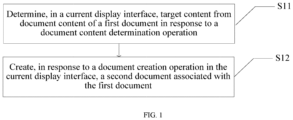
- FIG. 1 is a flowchart of an electronic document processing method according to an embodiment of the present disclosure.
- the electronic document processing method includes the following steps.
- S11 Determine, in a current display interface, target content from document content of a first document in response to a document content determination operation.
- the first document is an electronic document
- the current display interface may be a display interface for the document content of the first document.
- the first document has a display area
- the current display interface may refer to the display area of the first document or may not the interface for the first document.
- the document content of the first document may include a variety forms, such as text or images.
- the document content determination operation may be an operation on the document content of the first document.
- the document content determination operation may be a content input operation or a selection operation on existing content in the first document.
- the document content determination operation may be performed on a control or by inputting a specific instruction.
- the document content determination operation has associated target content, and the target content may be some content in the first document or generated based on the content in the first document. In some embodiments, because the target content is determined after the document content determination operation is performed, the target content may alternatively be content input to the first document in the document content determination operation.
- S12 Create, in response to a document creation operation in the current display interface, a second document associated with the first document.
- the document content determination operation and a sharing operation are performed in a same display interface, for example, in the display interface of the first document.
- the second document is associated with the first document based on the target content. Because the association relationship between the second document and the first document is built when the second document is created, an additional operation of associating the second document and the first document is not required, and the efficiency is higher.
- the document creation operation may be in various forms such as a voice operation, a gesture operation, or an instruction input operation, or a combination thereof, and is not limited.
- the second document has an association relationship with the first document, and the content in the second document and the content in the first document are associated based on the target content, where the association may be in various manners.
- both the first document and the second document display the target content, or the second document has an association identifier for viewing the target content.
- the target content in the first document may be used as a main body or title of the second document, or the second document references the target document.
- a display style of the referenced target content in the second document may differ from that of other unreferenced content.
- the target content in the associated first document changes, the changed portion will be displayed on the second document, or that the target content in the first document has changed will be prompted.
- the target content is determined through the document content determination operation, the second document associated with the first document is created, and the first document and the second document are associated based on the target content, thereby achieving rapid creation of the second document associated with the first document without copy, paste, and association operations, and greatly improving user experience.
- the creating, in response to a document creation operation in the current display interface, a second document associated with the first document includes: displaying a document creation control in response to the document content determination operation, and creating the second document associated with the first document in response to an operation on the document creation control.
- the document creation control may be a control in the first document that is displayed in response to the document creation operation. After the document creation control is operated, the second document is created, and the association relationship between the second document and the first document is built.
- the operation on the document creation control may include one or more operations. The second document is created by displaying the document creation control to avoid incorrect operations.
- the creating, in response to a document creation operation in the current display interface, a second document associated with the first document includes: determining, in response to the document content determination operation, whether a document creation gesture or voice command is received, and creating the second document associated with the first document in response to receiving the document creation gesture or voice command.
- the document creation operation may be a gesture operation or voice operation. In this case, a control is not required, so a software size may be reduced. This case is suitable for quickly creating the second document in scenarios where it is not convenient to connect a mouse, such as a mobile terminal or the like, and where the functions of left and right mouse buttons are occupied.
- the determining, in a current display interface, target content from document content of a first document in response to a document content determination operation includes: in response to a selection operation on some content in the first document, determining the target content based on the some content.
- the first document displays document content
- the some content is some document content.
- the document content determination operation is a selection operation to select some content in the first document
- the target content is determined based on the selected content.
- the selected content may be directly set as the target content.
- the target content may be a paragraph(s) where the some content is located, for example, selecting some content in a paragraph is considered as selecting the entire paragraph, or selecting a title of a paragraph is considered as selecting the paragraph.
- the selection operation may be done either through a mouse or through a selection box.
- the determining, in a current display interface, target content from document content of a first document in response to a document content determination operation includes: in response to an input operation on a preset symbol and content information, determining the target content based on the content information.
- the preset symbol may be a symbol used less frequently, such as "@" and "[[”. The preset symbol is input to indicate that the second document is to be created, and cooperates with the content information input by a user to determine the target content, thereby accurately indicating the content that the user desires to associate.
- the content information may be one or a combination of text or image information.
- a paragraph(s) where the content information is located may be searched in the first document as the target content. This method can achieve customized quick association of multiple paragraphs of content.
- determining the target content based on the some content includes: determining the target content to be the some content, content obtained by analyzing the some content, a combination of the some content and other content, a combination of other content and the content obtained by analyzing the some content, a paragraph(s) where the some content is located, a paragraph(s) identified by the some content, or content converted from the some content.
- the selected content may be directly used as the target content, so that the second document may be directly associated with the selected content.
- the selected content is used for analysis to determine the target content, for example, a paragraph(s) where the some content is located is determined, and the target content is set to be the paragraph paragraph(s) where the some content is located.
- the some content may identify a paragraph(s), for example, the some content is a title of a paragraph, and the target content is the paragraph identified by the title of the paragraph. In this case, the title of the paragraph is selected to select the entire paragraph, thereby reducing operations.
- the target content may alternatively be the content converted from the some content, for example, the some content is converted in language to obtain the target content.
- the some content is combined with other content after analysis or without analysis.
- the other content includes relevant information about the first document, such as name, author, and creation time.
- the other content may alternatively be user-defined content. The combination with the other content makes the target content clearer and more detailed.
- the some content is at least one content block, and each content block is a unit used for carrying the content of the first document.
- the content of the first document includes at least one content block, and the target content may be a content block(s) corresponding to some content.
- the first document is a structured document including a plurality of content blocks, and the content blocks may be in various forms such as text or images.
- a content block may be a line of content, a paragraph of content, or multiple paragraphs of content.
- a new content block may alternatively be generated based on some content selected from one content block of the first document, and the new content block is associated to the created second document. This improves the flexibility of associating the first document and the second document.
- the displaying a document creation control in response to the document content determination operation includes: displaying the document creation control in response to a trigger operation on a first control associated with some content in the first document; or displaying a second control including the document creation control in response to a selection operation on some content in the first document.
- the document content determination operation may include, for example, a click operation on the first control or a cursor focus operation, and the document content corresponding to the first control or the cursor focus operation is denoted as the selected target content.
- the document content determination operation may alternatively be a selection operation on an option in the first control
- the first control may be a resident control, that is, a continuously displayed control, or a control displayed after satisfying some conditions, such as a control only displayed after some content of the first document is selected.
- the document creation control may be displayed only after the first control is triggered.
- the document creation control is directly displayed in a second control. For example, after some content of the first document is selected, a menu bar is displayed, and a new menu in the menu bar is triggered to display the document creation control.
- the document creation control may alternatively be directly displayed in the menu bar.
- the method includes: displaying the document creation control and determining the target content in response to the input operation on the preset symbol and the content information; and creating the second document in response to the operation on the document creation control and using the target content as a title of the second document.
- the preset symbol, or the preset symbol and the content information after the symbol is/are input to evoke the document creation control.
- the input content information is used for determining the target content.
- the target content may be the input content information (the input content information may be text or another type of content) or associated information determined according to the input content information, for example, the associated information may be information used for indicating features of the first document.
- the input content information is "current document title + author", the title and author of the first document may be directly obtained as the target content, and the target content may be used as the title of the second document when the second document is created.
- the preset symbol is "@”, “@ AAA” is input in the first document, the document creation control is displayed, "AAA” is obtained as the target content, and "AAA” is used as the title and/or main body of the second document after the second document is determined to be created.
- the title and/or some main body content of the document may be specified before the second document is created, thereby reducing operation steps, making content creation more continuous, and avoiding interruption of ideas.
- the association between the content in the second document and the content in the first document based on the target content includes one or more of the following: both the first document and the second document have the target content, where the target content is determined as the main body content, title content, content with a reference relationship, or content with a connection relationship in the second document.
- the target content is the content in the first document
- the second document has the target content of the first document, which may serve as the main body or title of the second document.
- the target content in the second document has a reference relationship or connection relationship with the target content in the first document, where the reference relationship includes: when a first content block of the first document is referenced by the second document, both the first document and the second document display the first content block and may achieve one-way or two-way synchronization, for example, amendment to the first content block in the first document may be synchronized to the second document, and/or amendment to the first content block in the second document may be synchronized to the first document.
- the connection relationship includes: when a second content block of the first document is connected to the second document, a connection identifier of the second content block may be displayed in the second document, and in response to triggering the connection identifier, content of the second content block may be obtained and displayed in the second document.
- a document identifier of the second document is displayed in the first document.
- the content in the first document is associated with the second document.
- the second document is created based on selected content of the first document, so the document identifier of the second document is displayed to represent the association relationship.
- the associated second document can be noticed.
- the content in the second document and the content in the first document have a reference relationship and can be synchronized, incorrect amendment to the second document due to negligence on the second document is avoided.
- some embodiments of the present disclosure further include: displaying a sharing identifier at an associated position of the document identifier of the second document, and sharing the second document to a target sharing object in response to a sharing operation.
- the target sharing object is a receiver, for example, the second document may be shared by clicking any user's avatar. Of course, the receiver is not limited to one user and may share the second document to a group. In this case, the target sharing object may be a group.
- a target object may be notified by sending a notification message. If the target sharing object is a single user, a notification message is sent. If the target sharing object is a group, a group message is sent. After the target object receives the second document, a notification message may be displayed to indicate that the second document has been received by the target sharing object.
- the sharing the second document to a target sharing object in response to a sharing operation includes: displaying a sharing information edit control in response to a trigger operation on the sharing identifier, the sharing information edit control being used for determining sharing information; and sharing the second document to the target sharing object based on the determined sharing information.
- the second document may be first created, then the sharing identifier of the second document is displayed, and the second document is shared through the sharing identifier. The first creation and then sharing of the second document facilitate direct sharing of the second document to other objects, and reduce repeated creation of the second document.
- the creating a second document associated with the first document in response to a document creation operation includes: displaying a sharing information edit control in response to an operation of creating and sharing a document, the sharing information edit control being used for determining sharing information; and creating the second document associated with the first document in response to a sharing information confirmation operation, and sharing the second document to the target sharing object based on the determined sharing information.
- two actions of creating the second document and sharing the second document may be performed through one operation, for example, a "create and share a document" control may be displayed, and the control is triggered to directly create and share the second document, thereby reducing user operation and simplifying processes.
- the process of determining sharing information may be the process of confirming sharing information in any embodiment of the present disclosure.
- the determining sharing information includes one or more of the following content: determining title information of the second document, determining the target sharing object of the second document and determining a permission of the target sharing object.
- the sharing information may be input by selecting or inputting in the sharing information edit control, and the sharing information may include the target sharing object. For example, a contact list is displayed in the sharing information edit control, and the user clicks one or more contacts in the contact list to share the second document to the clicked contact(s).
- the shared second document may specify the permission of the shared person, for example, whether the shared person can read or can both read and edit.
- the determining title information of the second document includes: determining a title of the second document according to content input in a title edit area in response to an input operation in the title edit area of the sharing information edit control; or displaying, in the title edit area of the sharing information edit control, default title information determined based on the target content, and determining the default title information as the title of the second document in response to the sharing information confirmation operation.
- the determining a title of the second document according to content input in a title edit area in response to an input operation in the title edit area of the sharing information edit control includes: displaying, in the title edit area, the default title information determined based on the target content, and determining the title of the second document in response to an amendment operation on the default title information.
- the title of the shared second document may be amended.
- the title of the shared second document displayed on a receiver (such as the target sharing object) is the same or different from the title of the second document displayed on a sender.
- the user may manually input the title in the title edit area, or use the default title information, or edit the default title information, for example, display the title of the second document before being shared as the default title information in the title edit area, and then the user may edit or use the default title information. Therefore, the title of the second document displayed on the receiver after sharing may be different from the title displayed on the sender when the second document is not shared, thereby hiding some information according to user's needs.
- the default title information includes corresponding title information of the target content in the first document, or the default title information includes the target content, or the default title information includes content obtained by analyzing the target content.
- the target content may be directly used as the default title information or the default title information may be determined based on the target content.
- a preset word count may be set, and the target content is used as a default title when the word count of the target content is less than the preset word count, or the default title information is generated according to the target content when the word count of the target content is greater than the preset word count, for example, the target content may be summarized, and the summary information is used as the default title information. Because the default title information reflects the target content, the user of the target sharing object can roughly determine the content.
- the corresponding title information of the target content in the first document includes: title information of the content block where the target content is located in the first document, or combined information of the title information of the content block where the target content is located and the title information of the first document.
- the content block has a corresponding title. For example, when a user writes a document, subtitles are usually set for different parts. The subtitle set by the user of the first document can reflect the content of the target content, and can reflect the information of the target content more comprehensively after being combined with the title information of the first document.
- the method further includes: adjusting a display style of the target content in the first document to a target display style after generating the second document.
- the target content may be selected content in the first document, or may be content information input together with a preset symbol.
- the adjusting to the target display style includes one or more of the following content: adding a box or icon for an area where the target content is located, or changing a text style or layout style of the target content.
- the area of the target style may be surrounded by a box, or the font of the target content may be changed to a different font from other parts.
- the first document is originally in song typeface, and the font of the target content may be in regular script.
- the layout of the target content may also be changed, for example, changed to italic layout.
- a display style of the document identifier of the second document is changed to a second style in response to a delete event about the second document, the second style being different from a first style of the identifier of the second document in the first document before the second document is deleted.
- the display style of the identifier of the second document will be changed after the second document is deleted, so that the status of the second document may be directly determined from the display style without opening the second document.
- the second style includes a prompt message that the second document is deleted, so that the user can intuitively determine that the second document has been deleted.
- the sharing the second document to a target object includes: sending a link to the second document to the target sharing object; or sending the second document to the target sharing object.
- the second document may be directly sent to the target sharing object, so that networking is not required when the second document is viewed and edited, and the difference between the second document and the target content may be compared during networking and adjusted accordingly.
- the link to the second document is sent to the target sharing object, so that the second document may be stored in a server or directly stored in the first document, that is, only one document is stored to reduce requirements for a storage space.
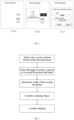
- FIG. 2(a) "AAABBBCCC" in a first document is first document content
- the first document is a structured document including a plurality of content blocks
- a user with edit permission selects one or more content blocks in the first document
- the selected content block is target content.
- the selected “AAA” is the target content. After the target content is selected, as shown in FIG.
- a pop-up box pops up, as shown in FIG. 2(c) .
- a title box in the pop-up box displays default title information, and a sharing object is selected in a sharing object box, where the default title information is a title of a paragraph where the target content is located, which is "AAA" in this embodiment.
- a document identifier of the second document will be displayed in the first document, and when the second document is deleted, the document identifier will display a prompt message and display an icon and title of the deleted second document.
- the sharing object will receive the prompt message. If the sharing object is a person, a notification will be received. If the sharing object is a group, a group message will be received.
- a sharing identifier is displayed at an associated position of the second document in the first document, such as the periphery of the second document, and then the user may share the second document to other sharing objects through a sharing operation.
- the title of the second document defaults to "AAA", and users may independently edit or directly use the title.
- the electronic document When an electronic document is cooperated, the electronic document will be shared. However, in some cases, some users who have restricted permissions may only be desired to edit or read some content in the electronic document. If the some content in the first document is copied and pasted to form a new electronic document, the new electronic document is shared to the users with restricted permissions, and then amended content is pasted to the first document after the new electronic document is amended, the work efficiency is low, the change in the content of the first document or new electronic document cannot be known in a timely manner, and the user experience is poor due to user's repeated operations of copying, pasting, and creating a new electronic document.
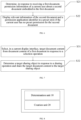
- S22 Display relevant information of the second document and a permission application identifier in a preset style if the current user has no preset permission for the second document.
- the permission application identifier is provided in the absence of the preset permission, so that the user can quickly apply for permission, a path of permission application is shortened, and operational efficiency is improved, where the permission application identifier may be a link, for example.
- the permission application identifier may be a link, for example.
- when the first document is opened relevant information of the first document and the permission application identifier are displayed in a preset style.
- the relevant information of the first document and the permission application identifier are displayed in the preset style.
- another electronic document processing method is provided, as shown in FIG. 7 , including: S31: Select, in a current display interface, target document content from document content of a first document in response to a selection operation.
- the first document is an electronic document
- the target document content is some content in the first document.
- the target document content may be one or more content blocks.
- the selection operation may be a selection operation on the document content of the first document, and selected document content is directly used as the target document content.
- the selection operation may be a selection operation on a control associated with the document content, and corresponding document content is determined as the target document content according to the control.
- S32 Determine a target sharing object in response to a sharing operation and share the target document content to the target sharing object.
- the sharing may be performed through a sharing identifier displayed in the target document content.
- the target sharing object may be a single user or a group, a notification message is sent when the target sharing object is a single user, and a group notification message is sent when the target sharing object is a group.
- some document content of the first document not the entire document, may be shared, which facilitates permission management. Only the portion required to be shared is shared when other users are not desired to view the full text of the first document, that is, a view permission for the target document content is opened only for the target sharing object, the target sharing object can view only the shared target document content, and other content of the first document is not displayed.
- determining a target sharing object in response to a sharing operation and sharing the target document content to the target sharing object includes: creating a second document in response to the sharing operation, and sharing the second document to the target sharing object, where document content of the second document includes the target document content.
- the second document including the target document content may be generated and shared to the target sharing object.
- the second document is sent to the target sharing object, or a link to the second document is shared to the target sharing object.
- the shared second document and the first document may have an association relationship through the target document content. For example, after the target document content in the first document is amended, the target document content in the second document is correspondingly amended. After the target document content in the second document is amended, the target document content in the first document is correspondingly amended. Therefore, user's cooperation is facilitated.
- the determining a target sharing object in response to a sharing operation and sharing the target document content to the target sharing object includes: obtaining a first link to the first document in response to the sharing operation, generating a second link according to the first link and a scope of the target document content in the first document, and sharing the second link to the target sharing object, the second link being used for indicating that a receiving end of the second link displays the target document content and hides some other content or all other content in the first document except the target document content.
- the second link is created based on the link to the first document.
- the first link is a link that displays the first document after being triggered.
- Information indicating the scope of the target document content in the first document is added to the first link to the first document to generate the second link.
- the first document is found from the server based on the second link after the second link is triggered, then the position of the target document content is found based on the scope information, and only the target document content is displayed. In this case, a receiver is prevented from viewing undesired content.
- the creation unit 20 creating, in response to a document creation operation in the current display interface, a second document associated with the first document includes: displaying a document creation control in response to the document content determination operation, and creating the second document associated with the first document in response to an operation on the document creation control; or determining, in response to the document content determination operation, whether a document creation gesture or voice command is received, and creating the second document associated with the first document in response to receiving the document creation gesture or voice command.
- the determination unit 10 determining, in a current display interface, target content associated with document content of the first document in response to a document content determination operation includes: in response to a selection operation on some content in the first document, determining the target content based on the some content; or in response to an input operation on a preset symbol and content information, determining the target content based on the content information.
- the determining the target content based on the some content includes: determining the target content to be the some content, content obtained by analyzing the some content, a combination of the some content and other content, a combination of other content and the content obtained by analyzing the some content, a paragraph(s) where the some content is located, a paragraph(s) identified by the some content, or content converted from the some content.
- the other content includes relevant information of the first document.
- the some content is at least one content block, and each content block is a unit used to carry the content of the first document.
- the sharing the second document to a target sharing object in response to a sharing operation includes: displaying a sharing information edit control in response to a trigger operation on the sharing identifier, the sharing information edit control being used for determining sharing information; and sharing the second document to the target sharing object based on the determined sharing information.
- the creation unit creating a second document associated with the first document in response to a document creation operation includes: displaying a sharing information edit control in response to an operation of creating and sharing a document, the sharing information edit control being used for determining sharing information; and creating the second document associated with the first document in response to a sharing information confirmation operation, and sharing the second document to the target sharing object based on the determined sharing information.
- the determining a title of the second document according to content input in a title edit area in response to an input operation in the title edit area of the sharing information edit control includes: displaying, in the title edit area, the default title information determined based on the target content, and determining the title of the second document in response to an amendment operation on the default title information.
- the apparatus further includes: a control unit, configured to change a display style of the document identifier of the second document to a second style in response to a delete event about the second document, the second style being different from a first style of the document identifier of the second document in the first document before the second document is deleted.
- a control unit configured to change a display style of the document identifier of the second document to a second style in response to a delete event about the second document, the second style being different from a first style of the document identifier of the second document in the first document before the second document is deleted.
- the association between the second document and the first document based on the target content includes: both the first document and the second document display the target content, or the second document references the target content.
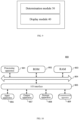
- Some embodiments of the present disclosure provide an electronic document processing apparatus, as shown in FIG. 9 , including:
- the permission application identifier includes owner information of the second document and/or a permission application entry, the permission application entry being used for outputting a permission application interface after being triggered.
- relevant information of the first document and the permission application identifier are displayed in a preset style.
- the relevant information of the first document and the permission application identifier are displayed in the preset style.
- the embodiment of the apparatus substantially corresponds to the embodiment of the method, so relevant parts may refer to the parts of the embodiment of the method.
- the embodiments of the apparatuses described above are merely illustrative, where the modules illustrated as separate modules may or may not be separate. Some or all of the modules may be selected according to actual needs to achieve the objectives of the solutions of the embodiments. Those of ordinary skill in the art may understand and implement without any creative effort.
- the present disclosure further provides a terminal and a storage medium, which are described below.
- I/O interface 805 input apparatus 806 including, for example, touch screens, touch pads, keyboards, mice, cameras, microphones, accelerometers, gyroscopes, etc.; output apparatus 807 including, for example, liquid crystal displays (LCDs), speakers, vibrators, etc.; storage apparatus 808 including, for example, magnetic tapes, hard drives, etc.; and communication apparatus 809.
- communication apparatus 809 may allow the electronic device 800 to communicate wirelessly or wired with other devices to exchange data.
- the process described above with reference to the flowchart may be implemented as a computer software program.
- embodiments of the present disclosure include a computer program product comprising a computer program carried on a computer readable medium, the computer program comprising program code for performing the method shown in the flowchart.
- the computer program may be downloaded and installed from a network via a communication device 809, or from a storage apparatus 808, or from a ROM 802.
- this computer program is executed by the processing apparatus 801, the above-described functions as defined in the method of this disclosed embodiment are performed.
- Computer-readable storage media may include, but are not limited to: electrically connected with one or more wires, portable computer disks, hard disks, random access memory (RAM), read-only memory (ROM), erasable programmable read-only memory (EPROM or flash memory), optical fiber, portable compact disk read-only memory (CD-ROM), optical storage devices, or any of the above, magnetic memory devices, or any suitable combination of the foregoing.
- a computer-readable storage medium may be any tangible medium that contains or stores a program that may be used by or in combination with an instruction execution system, device, or device.
- a computer-readable signal medium may include a data signal propagated in the baseband or as part of a carrier wave that carries computer-readable program code.
- Computer-readable signal medium can also be any computer-readable medium other than computer-readable storage media, the computer-readable signal medium can send, propagate or transmit the program for use by or in combination with the instruction execution system, device or device.
- the program code contained on the computer-readable medium may be transmitted using any suitable medium, including but not limited to: wire, fiber optic cable, RF (radio frequency), etc., or any suitable combination of the above.
- the client, server may communicate using any currently known or future developed network protocol such as HTTP (HyperText Transfer Protocol), and may interconnect with any form or medium of digital data communication (e.g., a communication network).
- HTTP HyperText Transfer Protocol
- Examples of communication networks include local area networks ("LANs”), wide area networks ("WANs”), inter-networks (e.g., the Internet), and end-to-end networks (e.g., ad hoc end-to-end networks), as well as any currently known or future developed networks.
- the above computer readable medium may be contained in the above electronic device; or it may be present separately and not assembled into the electronic device.
- the above computer readable medium carries one or more programs which, when executed by the electronic device, cause the electronic device to perform the methods of the present disclosure as described above.
- Computer program code for performing the operations of the present disclosure may be written in one or more programming languages or combinations thereof, said programming languages including object-oriented programming languages - such as Java, Smalltalk, C++, including conventional procedural programming languages - such as "C" language or similar programming languages.
- the program code may be executed entirely on the user's computer, partially on the user's computer, as a stand-alone package, partially on the user's computer and partially on a remote computer, or entirely on a remote computer or server.
- the units described in the embodiments of the present disclosure may be implemented by means of software, or by means of hardware. Wherein, the name of the unit does not in some cases constitute a limitation on the unit itself.
- exemplary types of hardware logic components include: field-programmable gate arrays (FPGAs), application-specific integrated circuits (ASICs), application-specific standard products (ASSPs), systems-on-chip (SOCs), complex programmable logic devices (CPLDs), and the like.
- FPGAs field-programmable gate arrays
- ASICs application-specific integrated circuits
- ASSPs application-specific standard products
- SOCs systems-on-chip
- CPLDs complex programmable logic devices
- the present disclosure provides an electronic document processing method, comprising: determining, in a current display interface, target content from document content of a first document in response to a document content determination operation; and creating, in response to a document creation operation in a current display interface, a second document associated with the first document, wherein the second document is associated with the first document based on the target content.
- the present disclosure provides an electronic document processing method, the creating, in response to a document creation operation in a current display interface, a second document associated with the first document, comprises: displaying a document creation control in response to the document content determination operation, and creating the second document associated with the first document in response to an operation on the document creation control; or determining, in response to the document content determination operation, whether a document creation gesture or voice command is received, and creating the second document associated with the first document in response to receiving the document creation gesture or voice command.
- the present disclosure provides an electronic document processing method, the determining the target content based on the some content comprises: determining the target content to be the some content, content obtained by analyzing the some content, a combination of the some content and other content, a combination of other content and the content obtained by analyzing the some content, a paragraph(s) where the some content is located, a paragraph(s) identified by the some content, or content converted from the some content.
- the present disclosure provides an electronic document processing method, the some content comprises at least one content block, and each content block is a unit used for carrying the content of the first document.
- the present disclosure provides an electronic document processing method, comprising: displaying a sharing identifier at an associated position of the document identifier of the second document, and sharing the second document to a target sharing object in response to a sharing operation.
- the present disclosure provides an electronic document processing method, the sharing the second document to a target sharing object in response to a sharing operation comprises: displaying a sharing information edit control in response to a trigger operation on the sharing identifier, the sharing information edit control being used for determining sharing information; and sharing the second document to the target sharing object based on the determined sharing information.
- the present disclosure provides an electronic document processing method, the creating a second document associated with the first document in response to a document creation operation comprises: displaying a sharing information edit control in response to an operation of creating and sharing a document, the sharing information edit control being used for determining sharing information; and creating the second document associated with the first document in response to a sharing information confirmation operation, and sharing the second document to a target sharing object based on the determined sharing information.
- the present disclosure provides an electronic document processing method, the determining a title of the second document according to content input in a title edit area in response to an input operation in the title edit area of the sharing information edit control comprises: displaying, in the title edit area, the default title information determined based on the target content, and determining the title of the second document in response to an amendment operation on the default title information.
- the present disclosure provides an electronic document processing method, the default title information comprises corresponding title information of the target content in the first document, or the default title information comprises the target content, or the default title information comprises content obtained by analyzing the target content.
- the present disclosure provides an electronic document processing method, the corresponding title information of the target content in the first document comprises: title information of the content block where the target content is located in the first document, or combined information of the title information of the content block where the target content is located and the title information of the first document.
- the present disclosure provides an electronic document processing method, the method further comprises: adjusting a display style of the target content in the first document to a target display style after generating the second document.
- the present disclosure provides an electronic document processing method, the adjusting to the target display style comprises one or more of the following content: adding a box or icon for an area where the target content is located, or changing a text style or layout style of the target content.
- the present disclosure provides an electronic document processing method
- the permission application identifier comprises owner information of the second document and/or a permission application entry, the permission application entry being used for outputting a permission application interface after being triggered.
- the present disclosure provides an electronic document processing method, the determining a target sharing object in response to a sharing operation and sharing the target document content to the target sharing object comprises: creating a second document in response to the sharing operation, and sharing the second document to the target sharing object, wherein document content of the second document comprises the target document content.
- the present disclosure provides an electronic document processing apparatus, comprising: a determination unit, configured to determine, in a current display interface, target content from document content of a first document in response to a document content determination operation; and a creation unit, configured to create, in response to a document creation operation in the current display interface, a second document associated with the first document, wherein the second document is associated with the first document based on the target content.
- the present disclosure provides an electronic document processing apparatus, comprising: a determination module, configured to determine, in response to receiving a first document, permission information of a current user about a second document embedded in the first document; and a display module, configured to display relevant information of the second document and a permission application identifier in a preset style if the current user has no preset permission for the second document.
- the present disclosure provides an electronic document processing apparatus, comprising: a selection module, configured to select, in a current display interface, target document content from document content of a first document in response to a selection operation, the target document content being some document content of the first document; and a sharing module, configured to determine a target sharing object in response to a sharing operation and share the target document content to the target sharing object.
- the present disclosure provides a storage medium, the storage medium storing program code, and the program code being used for performing the method according to any one of above.
Landscapes
- Engineering & Computer Science (AREA)
- Theoretical Computer Science (AREA)
- General Engineering & Computer Science (AREA)
- Physics & Mathematics (AREA)
- General Physics & Mathematics (AREA)
- General Health & Medical Sciences (AREA)
- Audiology, Speech & Language Pathology (AREA)
- Health & Medical Sciences (AREA)
- Human Computer Interaction (AREA)
- Artificial Intelligence (AREA)
- Computational Linguistics (AREA)
- Multimedia (AREA)
- Document Processing Apparatus (AREA)
Applications Claiming Priority (2)
| Application Number | Priority Date | Filing Date | Title |
|---|---|---|---|
| CN202110226953.XA CN114995689A (zh) | 2021-03-01 | 2021-03-01 | 电子文档的处理方法、装置、终端和存储介质 |
| PCT/CN2022/078667 WO2022184065A1 (zh) | 2021-03-01 | 2022-03-01 | 电子文档的处理方法、装置、终端和存储介质 |
Publications (2)
| Publication Number | Publication Date |
|---|---|
| EP4283497A1 true EP4283497A1 (de) | 2023-11-29 |
| EP4283497A4 EP4283497A4 (de) | 2024-07-03 |
Family
ID=83018414
Family Applications (1)
| Application Number | Title | Priority Date | Filing Date |
|---|---|---|---|
| EP22762529.0A Pending EP4283497A4 (de) | 2021-03-01 | 2022-03-01 | Verfahren und vorrichtung zur verarbeitung elektronischer dokumente, endgerät und speichermedium |
Country Status (5)
| Country | Link |
|---|---|
| US (1) | US12093639B2 (de) |
| EP (1) | EP4283497A4 (de) |
| JP (1) | JP7782866B2 (de) |
| CN (1) | CN114995689A (de) |
| WO (1) | WO2022184065A1 (de) |
Families Citing this family (3)
| Publication number | Priority date | Publication date | Assignee | Title |
|---|---|---|---|---|
| CN115658655A (zh) * | 2022-10-31 | 2023-01-31 | 北京字跳网络技术有限公司 | 信息处理方法、装置、电子设备和存储介质 |
| CN115544982A (zh) * | 2022-10-31 | 2022-12-30 | 北京字跳网络技术有限公司 | 一种文档的访问方法、装置、设备、介质及程序产品 |
| CN116628182A (zh) * | 2023-05-26 | 2023-08-22 | 中国银行股份有限公司 | 一种知识库维护方法、装置、服务器及存储介质 |
Family Cites Families (33)
| Publication number | Priority date | Publication date | Assignee | Title |
|---|---|---|---|---|
| JP3696896B2 (ja) * | 1993-07-20 | 2005-09-21 | キヤノン株式会社 | 文書処理装置及びその方法 |
| JP3980079B2 (ja) * | 1995-02-24 | 2007-09-19 | カシオ計算機株式会社 | 帳票処理装置 |
| US20030229858A1 (en) * | 2002-06-06 | 2003-12-11 | International Business Machines Corporation | Method and apparatus for providing source information from an object originating from a first document and inserted into a second document |
| US20040015539A1 (en) * | 2002-07-16 | 2004-01-22 | Andrew Alegria | Content exporting from one application to another |
| CN101278283B (zh) * | 2005-10-07 | 2011-03-16 | 国际商业机器公司 | 将源链接到复制文本的方法和系统 |
| US8732614B2 (en) * | 2005-12-30 | 2014-05-20 | Google Inc. | Toolbar document content sharing |
| US20110161792A1 (en) * | 2009-12-31 | 2011-06-30 | Edward Florence | Producing interactive documents |
| US20120290926A1 (en) * | 2011-05-12 | 2012-11-15 | Infinote Corporation | Efficient document management and search |
| US8825697B2 (en) * | 2011-09-13 | 2014-09-02 | Stefano Foresti | Method and system to capture, share and find information and relationships |
| US9348802B2 (en) * | 2012-03-19 | 2016-05-24 | Litéra Corporation | System and method for synchronizing bi-directional document management |
| US10095672B2 (en) * | 2012-06-18 | 2018-10-09 | Novaworks, LLC | Method and apparatus for synchronizing financial reporting data |
| US20140089308A1 (en) * | 2012-09-26 | 2014-03-27 | International Business Machines Corporation | Tracking Documents in Computing Devices |
| CN103207892B (zh) * | 2013-03-12 | 2017-04-12 | 百度在线网络技术(北京)有限公司 | 一种用于经由网络分享文档的方法和装置 |
| US9747267B2 (en) * | 2013-08-12 | 2017-08-29 | Adobe Systems Incorporated | Document editing synchronization |
| US20150347365A1 (en) * | 2014-06-03 | 2015-12-03 | Clault Pte. Ltd. | System and method for distributing censored and encrypted versions of a document |
| US10909080B2 (en) * | 2015-05-04 | 2021-02-02 | Microsoft Technology Licensing, Llc | System and method for implementing shared document edits in real-time |
| US10154078B2 (en) * | 2015-06-30 | 2018-12-11 | Microsoft Technology Licensing, Llc | Graphical user interface facilitating uploading of electronic documents to shared storage |
| US9965475B2 (en) * | 2016-03-31 | 2018-05-08 | Microsoft Technology Licensing, Llc | User interface for navigating comments associated with collaboratively edited electronic documents |
| US10230731B2 (en) * | 2016-06-02 | 2019-03-12 | Microsoft Technology Licensing, Llc. | Automatically sharing a document with user access permissions |
| US10552517B2 (en) * | 2016-12-30 | 2020-02-04 | Dropbox, Inc. | Aggregating content from one or more documents |
| US11687703B2 (en) * | 2016-12-30 | 2023-06-27 | Dropbox, Inc. | Shortcut to move a selection into a new document |
| US10936648B2 (en) * | 2017-12-12 | 2021-03-02 | Google Llc | Generating slide presentations using a collaborative multi-content application |
| CN109446503A (zh) * | 2018-10-17 | 2019-03-08 | 天津字节跳动科技有限公司 | 文档内容导出方法和装置 |
| CN111949184B (zh) * | 2019-05-16 | 2023-10-31 | 珠海金山办公软件有限公司 | 一种新建文档的方法及装置 |
| CN112000257A (zh) * | 2019-05-27 | 2020-11-27 | 珠海金山办公软件有限公司 | 一种文档重点内容的导出方法及装置 |
| CN112241865B (zh) * | 2019-07-16 | 2025-06-03 | 腾讯科技(深圳)有限公司 | 一种文档协同处理的方法以及相关装置 |
| CN112307716B (zh) * | 2019-07-25 | 2024-08-27 | 珠海金山办公软件有限公司 | 文档内容导出方法、导出装置、电子设备及存储介质 |
| CN111078655B (zh) * | 2019-12-23 | 2023-12-26 | 腾讯科技(深圳)有限公司 | 文档内容分享方法、装置、终端及存储介质 |
| CN111339557A (zh) * | 2020-02-20 | 2020-06-26 | 北京字节跳动网络技术有限公司 | 在线文档显示方法、装置、设备及介质 |
| CN111310421B (zh) * | 2020-03-12 | 2023-08-01 | 掌阅科技股份有限公司 | 一种文本批量标记方法、终端及计算机存储介质 |
| US11520480B2 (en) * | 2020-04-15 | 2022-12-06 | Tekion Corp | Physical lock electronic interface tool |
| CN111817946B (zh) * | 2020-06-28 | 2022-03-15 | 北京字节跳动网络技术有限公司 | 文档共享的处理方法、装置、设备、介质和系统 |
| US12050705B2 (en) * | 2021-12-29 | 2024-07-30 | Microsoft Technology Licensing, Llc | Enhanced security features for controlling access to shared content and private content of a shared document |
-
2021
- 2021-03-01 CN CN202110226953.XA patent/CN114995689A/zh active Pending
-
2022
- 2022-03-01 WO PCT/CN2022/078667 patent/WO2022184065A1/zh not_active Ceased
- 2022-03-01 JP JP2023551725A patent/JP7782866B2/ja active Active
- 2022-03-01 EP EP22762529.0A patent/EP4283497A4/de active Pending
-
2023
- 2023-08-29 US US18/239,710 patent/US12093639B2/en active Active
Also Published As
| Publication number | Publication date |
|---|---|
| US20230409809A1 (en) | 2023-12-21 |
| EP4283497A4 (de) | 2024-07-03 |
| JP7782866B2 (ja) | 2025-12-09 |
| WO2022184065A1 (zh) | 2022-09-09 |
| CN114995689A (zh) | 2022-09-02 |
| JP2024507932A (ja) | 2024-02-21 |
| US12093639B2 (en) | 2024-09-17 |
Similar Documents
| Publication | Publication Date | Title |
|---|---|---|
| US11997322B2 (en) | Information display method and apparatus, and device and storage medium | |
| US12093639B2 (en) | Fast creation of a second document associated with a first document | |
| US11888807B2 (en) | Mail information display method and apparatus, electronic device, and storage medium | |
| US12056440B2 (en) | Document update method and apparatus, device, and medium | |
| CN110752984A (zh) | 一种显示在线文档的方法、装置、电子设备及存储介质 | |
| US12339912B2 (en) | Document sharing processing method, apparatus, device, medium, and system | |
| US20230409814A1 (en) | Document editing method and apparatus, device, and storage medium | |
| JP7493615B2 (ja) | メール処理方法、装置、電子機器及び記憶媒体 | |
| CN114363686B (zh) | 多媒体内容的发布方法、装置、设备和介质 | |
| JP2025501948A (ja) | メディアコンテンツの公開方法、装置、機器、記憶媒体、及びプログラム製品 | |
| CN113128182A (zh) | 电子文档的处理方法、装置、终端和存储介质 | |
| US20240411985A1 (en) | Information processing method and apparatus, and terminal and storage medium | |
| JP7802946B2 (ja) | コンテンツ提示方法、装置、電子機器及記憶媒体 | |
| WO2022184012A1 (zh) | 一种文档创建方法、装置、设备及存储介质 | |
| WO2025168063A1 (zh) | 信息分享方法、信息显示方法、装置及电子设备 | |
| CN114997115B (zh) | 文档处理方法、装置、设备和介质 | |
| JP2024504304A (ja) | 情報処理方法、装置、電子機器及び記憶媒体 | |
| CN115174509B (zh) | 一种信息处理方法、装置、设备及介质 | |
| US12572731B2 (en) | Information processing method and apparatus, terminal, and storage medium | |
| CN115113787B (zh) | 一种消息处理方法、装置、设备及介质 | |
| WO2023226848A1 (zh) | 视频数据生成方法、装置、电子设备及存储介质 | |
| CN115314456A (zh) | 交互方法、装置和电子设备 | |
| US12621256B2 (en) | Methods, apparatuses, devices, medium and product for information display and information sending | |
| CN115190096B (zh) | 信息处理方法、装置、电子设备和存储介质 | |
| US20240402897A1 (en) | Method, apparatus, electronic device and storage medium for displaying information |
Legal Events
| Date | Code | Title | Description |
|---|---|---|---|
| STAA | Information on the status of an ep patent application or granted ep patent |
Free format text: STATUS: THE INTERNATIONAL PUBLICATION HAS BEEN MADE |
|
| PUAI | Public reference made under article 153(3) epc to a published international application that has entered the european phase |
Free format text: ORIGINAL CODE: 0009012 |
|
| STAA | Information on the status of an ep patent application or granted ep patent |
Free format text: STATUS: REQUEST FOR EXAMINATION WAS MADE |
|
| 17P | Request for examination filed |
Effective date: 20230822 |
|
| AK | Designated contracting states |
Kind code of ref document: A1 Designated state(s): AL AT BE BG CH CY CZ DE DK EE ES FI FR GB GR HR HU IE IS IT LI LT LU LV MC MK MT NL NO PL PT RO RS SE SI SK SM TR |
|
| DAV | Request for validation of the european patent (deleted) | ||
| DAX | Request for extension of the european patent (deleted) | ||
| A4 | Supplementary search report drawn up and despatched |
Effective date: 20240605 |
|
| RIC1 | Information provided on ipc code assigned before grant |
Ipc: G06F 40/166 20200101ALI20240529BHEP Ipc: G06F 40/106 20200101ALI20240529BHEP Ipc: G06F 3/048 20130101ALI20240529BHEP Ipc: G06F 40/30 20200101ALI20240529BHEP Ipc: G06F 17/00 20190101AFI20240529BHEP |
|
| STAA | Information on the status of an ep patent application or granted ep patent |
Free format text: STATUS: EXAMINATION IS IN PROGRESS |
|
| 17Q | First examination report despatched |
Effective date: 20250303 |