EP4024828B1 - Verfahren zum schnellen eingeben von anwendungen und elektronisches faltschirmgerät - Google Patents
Verfahren zum schnellen eingeben von anwendungen und elektronisches faltschirmgerät Download PDFInfo
- Publication number
- EP4024828B1 EP4024828B1 EP20866801.2A EP20866801A EP4024828B1 EP 4024828 B1 EP4024828 B1 EP 4024828B1 EP 20866801 A EP20866801 A EP 20866801A EP 4024828 B1 EP4024828 B1 EP 4024828B1
- Authority
- EP
- European Patent Office
- Prior art keywords
- region
- electronic device
- preset
- application
- preset angle
- Prior art date
- Legal status (The legal status is an assumption and is not a legal conclusion. Google has not performed a legal analysis and makes no representation as to the accuracy of the status listed.)
- Active
Links
Images












Classifications
-
- H—ELECTRICITY
- H04—ELECTRIC COMMUNICATION TECHNIQUE
- H04M—TELEPHONIC COMMUNICATION
- H04M1/00—Substation equipment, e.g. for use by subscribers
- H04M1/02—Constructional features of telephone sets
- H04M1/0202—Portable telephone sets, e.g. cordless phones, mobile phones or bar type handsets
- H04M1/0206—Portable telephones comprising a plurality of mechanically joined movable body parts, e.g. hinged housings
- H04M1/0241—Portable telephones comprising a plurality of mechanically joined movable body parts, e.g. hinged housings using relative motion of the body parts to change the operational status of the telephone set, e.g. switching on/off, answering incoming call
-
- G—PHYSICS
- G06—COMPUTING OR CALCULATING; COUNTING
- G06F—ELECTRIC DIGITAL DATA PROCESSING
- G06F3/00—Input arrangements for transferring data to be processed into a form capable of being handled by the computer; Output arrangements for transferring data from processing unit to output unit, e.g. interface arrangements
- G06F3/01—Input arrangements or combined input and output arrangements for interaction between user and computer
- G06F3/048—Interaction techniques based on graphical user interfaces [GUI]
- G06F3/0487—Interaction techniques based on graphical user interfaces [GUI] using specific features provided by the input device, e.g. functions controlled by the rotation of a mouse with dual sensing arrangements, or of the nature of the input device, e.g. tap gestures based on pressure sensed by a digitiser
- G06F3/0488—Interaction techniques based on graphical user interfaces [GUI] using specific features provided by the input device, e.g. functions controlled by the rotation of a mouse with dual sensing arrangements, or of the nature of the input device, e.g. tap gestures based on pressure sensed by a digitiser using a touch-screen or digitiser, e.g. input of commands through traced gestures
- G06F3/04886—Interaction techniques based on graphical user interfaces [GUI] using specific features provided by the input device, e.g. functions controlled by the rotation of a mouse with dual sensing arrangements, or of the nature of the input device, e.g. tap gestures based on pressure sensed by a digitiser using a touch-screen or digitiser, e.g. input of commands through traced gestures by partitioning the display area of the touch-screen or the surface of the digitising tablet into independently controllable areas, e.g. virtual keyboards or menus
-
- G—PHYSICS
- G06—COMPUTING OR CALCULATING; COUNTING
- G06F—ELECTRIC DIGITAL DATA PROCESSING
- G06F1/00—Details not covered by groups G06F3/00 - G06F13/00 and G06F21/00
- G06F1/16—Constructional details or arrangements
- G06F1/1613—Constructional details or arrangements for portable computers
- G06F1/1633—Constructional details or arrangements of portable computers not specific to the type of enclosures covered by groups G06F1/1615 - G06F1/1626
- G06F1/1637—Details related to the display arrangement, including those related to the mounting of the display in the housing
- G06F1/1641—Details related to the display arrangement, including those related to the mounting of the display in the housing the display being formed by a plurality of foldable display components
-
- G—PHYSICS
- G06—COMPUTING OR CALCULATING; COUNTING
- G06F—ELECTRIC DIGITAL DATA PROCESSING
- G06F1/00—Details not covered by groups G06F3/00 - G06F13/00 and G06F21/00
- G06F1/16—Constructional details or arrangements
- G06F1/1613—Constructional details or arrangements for portable computers
- G06F1/1633—Constructional details or arrangements of portable computers not specific to the type of enclosures covered by groups G06F1/1615 - G06F1/1626
- G06F1/1637—Details related to the display arrangement, including those related to the mounting of the display in the housing
- G06F1/1652—Details related to the display arrangement, including those related to the mounting of the display in the housing the display being flexible, e.g. mimicking a sheet of paper, or rollable
-
- G—PHYSICS
- G06—COMPUTING OR CALCULATING; COUNTING
- G06F—ELECTRIC DIGITAL DATA PROCESSING
- G06F1/00—Details not covered by groups G06F3/00 - G06F13/00 and G06F21/00
- G06F1/16—Constructional details or arrangements
- G06F1/1613—Constructional details or arrangements for portable computers
- G06F1/1633—Constructional details or arrangements of portable computers not specific to the type of enclosures covered by groups G06F1/1615 - G06F1/1626
- G06F1/1675—Miscellaneous details related to the relative movement between the different enclosures or enclosure parts
- G06F1/1677—Miscellaneous details related to the relative movement between the different enclosures or enclosure parts for detecting open or closed state or particular intermediate positions assumed by movable parts of the enclosure, e.g. detection of display lid position with respect to main body in a laptop, detection of opening of the cover of battery compartment
-
- G—PHYSICS
- G06—COMPUTING OR CALCULATING; COUNTING
- G06F—ELECTRIC DIGITAL DATA PROCESSING
- G06F1/00—Details not covered by groups G06F3/00 - G06F13/00 and G06F21/00
- G06F1/16—Constructional details or arrangements
- G06F1/1613—Constructional details or arrangements for portable computers
- G06F1/1633—Constructional details or arrangements of portable computers not specific to the type of enclosures covered by groups G06F1/1615 - G06F1/1626
- G06F1/1684—Constructional details or arrangements related to integrated I/O peripherals not covered by groups G06F1/1635 - G06F1/1675
- G06F1/1686—Constructional details or arrangements related to integrated I/O peripherals not covered by groups G06F1/1635 - G06F1/1675 the I/O peripheral being an integrated camera
-
- G—PHYSICS
- G06—COMPUTING OR CALCULATING; COUNTING
- G06F—ELECTRIC DIGITAL DATA PROCESSING
- G06F3/00—Input arrangements for transferring data to be processed into a form capable of being handled by the computer; Output arrangements for transferring data from processing unit to output unit, e.g. interface arrangements
- G06F3/01—Input arrangements or combined input and output arrangements for interaction between user and computer
- G06F3/011—Arrangements for interaction with the human body, e.g. for user immersion in virtual reality
-
- G—PHYSICS
- G06—COMPUTING OR CALCULATING; COUNTING
- G06F—ELECTRIC DIGITAL DATA PROCESSING
- G06F3/00—Input arrangements for transferring data to be processed into a form capable of being handled by the computer; Output arrangements for transferring data from processing unit to output unit, e.g. interface arrangements
- G06F3/01—Input arrangements or combined input and output arrangements for interaction between user and computer
- G06F3/048—Interaction techniques based on graphical user interfaces [GUI]
- G06F3/0487—Interaction techniques based on graphical user interfaces [GUI] using specific features provided by the input device, e.g. functions controlled by the rotation of a mouse with dual sensing arrangements, or of the nature of the input device, e.g. tap gestures based on pressure sensed by a digitiser
- G06F3/0488—Interaction techniques based on graphical user interfaces [GUI] using specific features provided by the input device, e.g. functions controlled by the rotation of a mouse with dual sensing arrangements, or of the nature of the input device, e.g. tap gestures based on pressure sensed by a digitiser using a touch-screen or digitiser, e.g. input of commands through traced gestures
-
- G—PHYSICS
- G06—COMPUTING OR CALCULATING; COUNTING
- G06F—ELECTRIC DIGITAL DATA PROCESSING
- G06F9/00—Arrangements for program control, e.g. control units
- G06F9/06—Arrangements for program control, e.g. control units using stored programs, i.e. using an internal store of processing equipment to receive or retain programs
- G06F9/44—Arrangements for executing specific programs
- G06F9/445—Program loading or initiating
-
- G—PHYSICS
- G06—COMPUTING OR CALCULATING; COUNTING
- G06F—ELECTRIC DIGITAL DATA PROCESSING
- G06F9/00—Arrangements for program control, e.g. control units
- G06F9/06—Arrangements for program control, e.g. control units using stored programs, i.e. using an internal store of processing equipment to receive or retain programs
- G06F9/44—Arrangements for executing specific programs
- G06F9/445—Program loading or initiating
- G06F9/44505—Configuring for program initiating, e.g. using registry, configuration files
-
- G—PHYSICS
- G06—COMPUTING OR CALCULATING; COUNTING
- G06F—ELECTRIC DIGITAL DATA PROCESSING
- G06F9/00—Arrangements for program control, e.g. control units
- G06F9/06—Arrangements for program control, e.g. control units using stored programs, i.e. using an internal store of processing equipment to receive or retain programs
- G06F9/44—Arrangements for executing specific programs
- G06F9/451—Execution arrangements for user interfaces
-
- H—ELECTRICITY
- H04—ELECTRIC COMMUNICATION TECHNIQUE
- H04M—TELEPHONIC COMMUNICATION
- H04M1/00—Substation equipment, e.g. for use by subscribers
- H04M1/02—Constructional features of telephone sets
- H04M1/0202—Portable telephone sets, e.g. cordless phones, mobile phones or bar type handsets
- H04M1/0206—Portable telephones comprising a plurality of mechanically joined movable body parts, e.g. hinged housings
- H04M1/0208—Portable telephones comprising a plurality of mechanically joined movable body parts, e.g. hinged housings characterized by the relative motions of the body parts
- H04M1/0214—Foldable telephones, i.e. with body parts pivoting to an open position around an axis parallel to the plane they define in closed position
-
- H—ELECTRICITY
- H04—ELECTRIC COMMUNICATION TECHNIQUE
- H04M—TELEPHONIC COMMUNICATION
- H04M1/00—Substation equipment, e.g. for use by subscribers
- H04M1/72—Mobile telephones; Cordless telephones, i.e. devices for establishing wireless links to base stations without route selection
- H04M1/724—User interfaces specially adapted for cordless or mobile telephones
- H04M1/72448—User interfaces specially adapted for cordless or mobile telephones with means for adapting the functionality of the device according to specific conditions
- H04M1/72454—User interfaces specially adapted for cordless or mobile telephones with means for adapting the functionality of the device according to specific conditions according to context-related or environment-related conditions
-
- H—ELECTRICITY
- H04—ELECTRIC COMMUNICATION TECHNIQUE
- H04M—TELEPHONIC COMMUNICATION
- H04M1/00—Substation equipment, e.g. for use by subscribers
- H04M1/72—Mobile telephones; Cordless telephones, i.e. devices for establishing wireless links to base stations without route selection
- H04M1/724—User interfaces specially adapted for cordless or mobile telephones
- H04M1/72469—User interfaces specially adapted for cordless or mobile telephones for operating the device by selecting functions from two or more displayed items, e.g. menus or icons
-
- G—PHYSICS
- G06—COMPUTING OR CALCULATING; COUNTING
- G06F—ELECTRIC DIGITAL DATA PROCESSING
- G06F2203/00—Indexing scheme relating to G06F3/00 - G06F3/048
- G06F2203/048—Indexing scheme relating to G06F3/048
- G06F2203/04803—Split screen, i.e. subdividing the display area or the window area into separate subareas
-
- H—ELECTRICITY
- H04—ELECTRIC COMMUNICATION TECHNIQUE
- H04M—TELEPHONIC COMMUNICATION
- H04M1/00—Substation equipment, e.g. for use by subscribers
- H04M1/02—Constructional features of telephone sets
- H04M1/0202—Portable telephone sets, e.g. cordless phones, mobile phones or bar type handsets
- H04M1/0206—Portable telephones comprising a plurality of mechanically joined movable body parts, e.g. hinged housings
- H04M1/0241—Portable telephones comprising a plurality of mechanically joined movable body parts, e.g. hinged housings using relative motion of the body parts to change the operational status of the telephone set, e.g. switching on/off, answering incoming call
- H04M1/0243—Portable telephones comprising a plurality of mechanically joined movable body parts, e.g. hinged housings using relative motion of the body parts to change the operational status of the telephone set, e.g. switching on/off, answering incoming call using the relative angle between housings
-
- H—ELECTRICITY
- H04—ELECTRIC COMMUNICATION TECHNIQUE
- H04M—TELEPHONIC COMMUNICATION
- H04M1/00—Substation equipment, e.g. for use by subscribers
- H04M1/02—Constructional features of telephone sets
- H04M1/0202—Portable telephone sets, e.g. cordless phones, mobile phones or bar type handsets
- H04M1/026—Details of the structure or mounting of specific components
- H04M1/0266—Details of the structure or mounting of specific components for a display module assembly
- H04M1/0268—Details of the structure or mounting of specific components for a display module assembly including a flexible display panel
-
- H—ELECTRICITY
- H04—ELECTRIC COMMUNICATION TECHNIQUE
- H04M—TELEPHONIC COMMUNICATION
- H04M2250/00—Details of telephonic subscriber devices
- H04M2250/12—Details of telephonic subscriber devices including a sensor for measuring a physical value, e.g. temperature or motion
-
- H—ELECTRICITY
- H04—ELECTRIC COMMUNICATION TECHNIQUE
- H04M—TELEPHONIC COMMUNICATION
- H04M2250/00—Details of telephonic subscriber devices
- H04M2250/22—Details of telephonic subscriber devices including a touch pad, a touch sensor or a touch detector
-
- H—ELECTRICITY
- H04—ELECTRIC COMMUNICATION TECHNIQUE
- H04M—TELEPHONIC COMMUNICATION
- H04M2250/00—Details of telephonic subscriber devices
- H04M2250/52—Details of telephonic subscriber devices including functional features of a camera
Definitions
- This application relates to the field of terminal technologies, and in particular, to a method and computer program product for quickly entering an application and an electronic device having a foldable screen.
- a foldable phone having a stretchable screen becomes a mobile phone development trend.
- the screen is a large screen when the screen is in an unfolded form, and the large screen can provide a user with better visual experience.
- the screen is in a folded form, it is convenient for the user to carry the phone.
- the user may unfold the foldable phone from the folded form to the unfolded form.
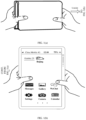
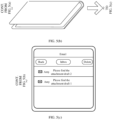
- FIG. 1(a) an electronic device is in a folded form. After the electronic device is unfolded, a home screen is displayed, as shown in FIG. 1(b) .
- the user needs to select an icon of a to-be-opened application from a plurality of application icons, and then tap the icon to enter the application.
- the operations are relatively complex.
- KR 2019 0001389 A discloses an electronic device for maintaining stable folded and unfolded states.
- the electronic device comprises: first and second body units; a third body unit connecting the first and second body units so that the first and second body units may be switched to unfolded and folded states; a display unit disposed on one side of each of the first and second body units and formed with a partial region to be folded in the unfolded or folded state; an extension unit extending in the unfolded state; a support unit made of first and second support regions for supporting the display unit; and an elastic force providing unit providing elastic force in different directions to maintain the unfolded state and folded state.
- CN 107 765 971 A discloses a user interface display method and equipment, and belongs to the field of human-computer interaction.
- the method comprises the following steps that: monitoring the working state of a folded display screen; when the working state is switched into an outward folding state from an opening state, determining a visible screen area and an off screen area in two screen areas; controlling the visible screen area to be under a display state; and controlling the off screen area to be under an off state.
- CN 107 809 504 A discloses an information display method and apparatus, a terminal and a storage medium, and belongs to the field of information display.
- the method comprises the following steps: when the terminal is in a folded state, displaying a user interface in a first display area, wherein the folded state is a state in which a first shell and a second shell are not located inthe same plane; obtaining target information; when a folded display screen is changed from the folded state into an unfolded state, displaying the target information in display areas excluding the first display area in the folded display screen, wherein the unfolded state is a state in which the first shell and the second shell are located on the same plane.
- the terminal displays the target information without hiding the conditions of the user interface in the first display area, thereby avoiding the situation that the operation of the user in the user interface is interrupted or the viewing of the contents in the user interface by the user is affected, and improving the display effect.
- CN 107 103 840 A discloses an electronic device that includes: a hinge for folding the electronic device; a flexible display including a first area and a second area, a part of the first area being not covered with the second area when the electronic device is folded such that the first area is opposite to the second area; a sensor for detecting whether the electronic device is folded or not; and a controller configured to control the electronic device in order to provide a UI element just for a part of the first area of the flexible display when the electronic device is folded, and provide an execution screen of an application corresponding to the UI element for the first area and the second area in response to a touch of the UI element and the unfold of the electronic device.
- CN 110 225 154 A discloses a display control method and device and an intelligent terminal.
- the display control method in the scheme is applied to the intelligent terminal with the folding screen, the folding screen comprises at least two foldable sub-screens, and the method comprises the steps of detecting the state of the folding screen; when it is detected that the folding screen is unfolded, judging whether display split screens need to be started on the folding screen or not; if the display split screen needs to be started on the folding screen, determining a plurality of to-be-displayed application programs in the installed application programs; and displaying the determined interfaces of the plurality of to-be-displayed application programs on different sub-screens. Therefore, the state of the folding screen can be detected. When it is detected that the folding screen is unfolded, whether the display split screen needs to be opened on the folding screen or not is actively judged.
- split-screen display is conducted on the folding screen, and therefore intelligent split-screen display during folding screen display is achieved, use is convenient and fast, and the experience effect of a user is enriched.
- This application provides a method for quickly entering an application and an electronic device having a foldable screen.
- a preset application may be quickly entered. An operation is simple, thereby helping improve user experience.
- an embodiment of this application provides a method for quickly entering an application.
- the method may be applied to an electronic device having a foldable screen for implementation, or implemented by a chip.
- the foldable screen includes a first region, a second region, and a third region.
- an included angle between the first region and the second region is less than a first preset angle, and the first region and the second region are respectively on two sides of the third region.
- the method includes: The electronic device detects a first operation, where the first operation is used to change the electronic device from the folded form to an unfolded form, and when the electronic device is in the unfolded form, the included angle between the first region and the second region is greater than a second preset angle, and the second preset angle is greater than the first preset angle; and the electronic device displays display interfaces of one or more preset applications in the first region, and/or the second region, and/or the third region in response to detecting the first operation.
- the preset application when the electronic device having a foldable screen changes from the folded form to the unfolded form, the preset application may be quickly entered.
- the operation is simple, thereby helping improve user experience.
- this application can implement that, when the electronic device having a foldable screen changes from the folded form to the unfolded form, the preset application may be quickly entered. The operation is simple, thereby helping improve user experience.
- that the electronic device detects a first operation includes: The electronic device detects a first unfolding operation, where the first unfolding operation is used to change the electronic device from a landscape-folded form to a landscape-unfolded form.
- the preset application when the electronic device having a foldable screen changes from the landscape-folded form to the landscape-unfolded form, the preset application may be quickly entered.
- the operation is simple, thereby helping improve user experience.
- the electronic device If the electronic device detects a second unfolding operation, where the second unfolding operation is used to change the electronic device from a portrait-folded form to a portrait-unfolded form, the electronic device displays a home screen in the first region, and/or the second region, and/or the third region in response to the second unfolding operation.
- the preset application when the electronic device having a foldable screen changes from the landscape-folded form to the landscape-unfolded form, the preset application may be quickly entered, and when the electronic device changes from the portrait-folded form to the portrait-unfolded form, the home screen may be displayed.
- the design is flexible and the operation is simple, thereby helping improve user experience.
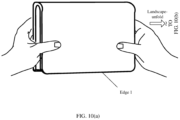
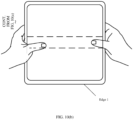
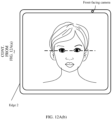
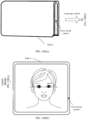
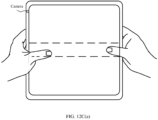
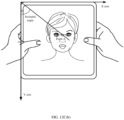
- that the electronic device displays display interfaces of one or more preset applications in the first region, and/or the second region, and/or the third region in response to detecting the first operation includes: The electronic device captures an image by using a front-facing camera on the electronic device in response to detecting the first operation; if the image includes a face, determines a line between a point on the face and an edge point on the electronic device, and determines an included angle between the line and a first edge, where the first edge is an edge on which the edge point is located; and if the included angle is greater than a third preset angle, displays the display interfaces of the one or more preset applications in the first region, and/or the second region, and/or the third region.
- the preset application when the electronic device having a foldable screen changes from the folded form to the unfolded form, if a specific condition is met (the included angle between the line between the point on the face captured by the camera and the edge point on the electronic device and the first edge meets the condition), the preset application may be quickly entered.
- the operation is simple, thereby helping improve user experience.
- the home screen is displayed.
- the third preset angle is greater than the fourth preset angle.
- the preset application may be quickly entered.
- the home screen is entered.
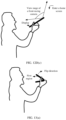
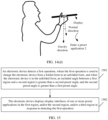
- that the electronic device displays display interfaces of one or more preset applications in the first region, and/or the second region, and/or the third region in response to detecting the first operation includes: In response to detecting the first operation and determining that an included angle between a normal direction and a gravity direction of the foldable screen is less than a third preset angle, the electronic device displays the display interfaces of the one or more preset applications in the first region, and/or the second region, and/or the third region.
- the preset application when the electronic device having a foldable screen changes from the folded form to the unfolded form, if a specific condition is met (the included angle between the normal direction and the gravity direction of the foldable screen is less than the third preset angle), the preset application may be quickly entered.
- the operation is simple, thereby helping improve user experience.
- the electronic device determines that the included angle between the normal direction and the gravity direction of the foldable screen is greater than a fourth preset angle, the home screen is displayed.
- the third preset angle is less than the fourth preset angle.
- the one or more preset applications are one or more applications specified by a user, or one or more applications that are most frequently used within preset duration, or one or more applications that are last run or displayed before the electronic device is folded into the folded form, or one or more applications corresponding to a new message received when the electronic device is in the folded form.
- the preset application when the electronic device having a foldable screen changes from the folded form to the unfolded form, if the specific condition is met (the included angle between the normal direction and the gravity direction of the foldable screen is less than the third preset angle), the preset application may be quickly entered. Alternatively, if the included angle is greater than the fourth preset angle, a second preset application or the home screen is displayed.
- the design is flexible and the operation is simple, thereby helping improve user experience.
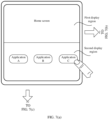
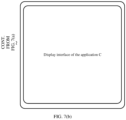
- that the electronic device displays display interfaces of one or more preset applications in the first region, and/or the second region, and/or the third region in response to detecting the first operation includes: The electronic device displays the display interfaces of the one or more preset applications in full screen in the first region, and/or the second region, and/or the third region in response to the first operation; or the electronic device enters a split-screen mode in response to the first operation, where in the split-screen mode, the home screen is displayed in a first display region on the foldable screen, and the display interfaces of the one or more preset applications are displayed in a second display region.
- the preset application when the electronic device having a foldable screen changes from the folded form to the unfolded form, the preset application may be entered in full screen, or the preset application and the home screen may be displayed on split screens, to facilitate a user operation.
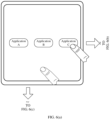
- that the electronic device displays display interfaces of one or more preset applications in the first region, and/or the second region, and/or the third region in response to detecting the first operation includes: The electronic device displays icons of the one or more preset applications in the first region, and/or the second region, and/or the third region in response to the first operation; and the electronic device displays a display interface of a preset application corresponding to a first icon in full screen in response to detecting a second operation performed on the first icon.
- the icons of the one or more preset applications may be displayed, and the user may tap an icon of a preset application to open a display interface of the preset application. This facilitates the user operation.
- an embodiment of this application provides an electronic device having a foldable screen and a function of quickly entering an application.
- the foldable screen includes a first region, a second region, and a third region.
- an included angle between the first region and the second region is less than a first preset angle, and the first region and the second region are respectively on two sides of the third region.
- the electronic device includes one or more processors, a memory, a plurality of applications, and one or more computer programs.
- the one or more computer programs are stored in the memory, the one or more computer programs includes instructions, and when the instructions are executed by the electronic device, the electronic device is enabled to perform the following steps:
- the electronic device when the instructions are executed by the electronic device, the electronic device is enabled to specifically perform the following step: detecting a first unfolding operation, where the first unfolding operation is used to change the electronic device from a landscape-folded form to a landscape-unfolded form.
- the electronic device When the instructions are executed by the electronic device, the electronic device is enabled to further perform the following step: if a second unfolding operation is detected, where the second unfolding operation is used to change the electronic device from a portrait-folded form to a portrait-unfolded form, displaying a home screen in the first region, and/or the second region, and/or the third region in response to the second unfolding operation.
- the electronic device when the instructions are executed by the electronic device, the electronic device is enabled to specifically perform the following steps: capturing an image by using a front-facing camera on the electronic device in response to detecting the first operation; if the image includes a face, determining a line between a point on the face and an edge point on the electronic device, and determining an included angle between the line and a first edge, where the first edge is an edge on which the edge point is located; and if the included angle is greater than a third preset angle, displaying the display interfaces of the one or more preset applications in the first region, and/or the second region, and/or the third region.
- the electronic device When the instructions are executed by the electronic device, the electronic device is enabled to further perform the following step: if the included angle is less than a fourth preset angle, displaying the home screen, where the third preset angle is greater than the fourth preset angle.
- the electronic device when the instructions are executed by the electronic device, the electronic device is enabled to specifically perform the following step: in response to detecting the first operation and determining that an included angle between a normal direction and a gravity direction of the foldable screen is less than a third preset angle, displaying the display interfaces of the one or more preset applications in the first region, and/or the second region, and/or the third region.
- the electronic device When the instructions are executed by the electronic device, the electronic device is enabled to further perform the following step: if the electronic device determines that the included angle between the normal direction and the gravity direction of the foldable screen is greater than a fourth preset angle, displaying a second preset application or the home screen, where the second preset application is different from the preset application, and the third preset angle is less than the fourth preset angle.
- the one or more preset applications are one or more applications specified by a user, or one or more applications that are most frequently used within preset duration, or one or more applications that are last run or displayed before the electronic device is folded into the folded form, or one or more applications corresponding to a new message received when the electronic device is in the folded form.
- the electronic device when the instructions are executed by the electronic device, the electronic device is enabled to specifically perform the following step: displaying the display interfaces of the one or more preset applications in full screen in the first region, and/or the second region, and/or the third region in response to the first operation; or entering a split-screen mode in response to the first operation, where in the split-screen mode, the home screen is displayed in a first display region on the foldable screen, and the display interfaces of the one or more preset applications are displayed in a second display region.
- the electronic device when the instructions are executed by the electronic device, the electronic device is enabled to specifically perform the following steps: displaying icons of the one or more preset applications in the first region, and/or the second region, and/or the third region in response to the first operation; and displaying a display interface of a preset application corresponding to a first icon in full screen in response to detecting a second operation performed on the first icon.
- an embodiment of this application provides a chip.
- the chip is coupled to a memory in an electronic device, and is configured to invoke a computer program stored in the memory and execute a technical solution according to the first aspect and any possible design of the first aspect in embodiments of this application.
- "coupling" means a direct combination or an indirect combination of two components.
- the chip may detect a first operation, where the first operation is used to change the electronic device from a folded form to an unfolded form. When the electronic device is in the unfolded form, an included angle between a first region and a second region is greater than a second preset angle, and the second preset angle is greater than a first preset angle.
- the chip may further indicate, in response to detecting the first operation, a display to display display interfaces of one or more preset applications in the first region, and/or the second region, and/or a third region.
- the one or more preset applications are one or more applications specified by a user, or one or more applications that are most frequently used within preset duration, or one or more applications that are last run or displayed before the electronic device is folded into the folded form, or one or more applications corresponding to a new message received when the electronic device is in the folded form.
- that the chip detects the first operation includes: detecting a first unfolding operation, where the first unfolding operation is used to change the electronic device from a landscape-folded form to a landscape-unfolded form.
- the chip may further detect a second unfolding operation, where the second unfolding operation is used to change the electronic device from a portrait-folded form to a portrait-unfolded form.
- the chip indicates, in response to the second unfolding operation, the display to display a home screen in the first region, and/or the second region, and/or the third region.
- the chip in response to the first operation, displays the display interfaces of the one or more preset applications in the first region, and/or the second region, and/or the third region includes: The chip captures an image by using a front-facing camera on the electronic device in response to detecting the first operation; if the image includes a face, determines a line between a point on the face and an edge point on the electronic device, and determines an included angle between the line and a first edge, where the first edge is an edge on which the edge point is located; and if the included angle is greater than a third preset angle, indicates the display to display the display interfaces of the one or more preset applications in the first region, and/or the second region, and/or the third region.
- the chip determines that the included angle is less than a fourth preset angle, the chip indicates the display to display the home screen.
- the third preset angle is greater than the fourth preset angle.
- the chip displays the display interfaces of the one or more preset applications in the first region, and/or the second region, and/or the third region includes: in response to detecting the first operation and determining that an included angle between a normal direction and a gravity direction of the foldable screen is less than a third preset angle, indicating the display to display the display interfaces of the one or more preset applications in the first region, and/or the second region, and/or the third region.
- the chip determines that the included angle between the normal direction and the gravity direction of the foldable screen is greater than a fourth preset angle, the chip indicates the display to display the home screen.
- the third preset angle is less than the fourth preset angle.
- the chip displays the display interfaces of the one or more preset applications in the first region, and/or the second region, and/or the third region includes: indicating, in response to the first operation, the display to display the display interfaces of the one or more preset applications in full screen in the first region, and/or the second region, and/or the third region; or indicating, in response to the first operation, the display to enter a split-screen mode, where in the split-screen mode, the home screen is displayed in a first display region on the foldable screen, and the display interfaces of the one or more preset applications are displayed in a second display region.
- the chip displays the display interfaces of the one or more preset applications in the first region, and/or the second region, and/or the third region includes: indicating, in response to the first operation, the display to display icons of the one or more preset applications in the first region, and/or the second region, and/or the third region; and indicating, in response to detecting a second operation performed on a first icon, the display to display a display interface of a preset application corresponding to the first icon in full screen.
- an embodiment of this application further provides a circuit system.
- the circuit system may be one or more chips, for example, a system-on-a-chip (system-on-a-chip, SoC).
- the circuit system includes at least one processing circuit.
- the at least one processing circuit is configured to detect a first operation, where the first operation is used to change an electronic device from a folded form to an unfolded form.
- an included angle between a first region and a second region is greater than a second preset angle
- the second preset angle is greater than a first preset angle.
- the electronic device displays display interfaces of one or more preset applications in the first region, and/or the second region, and/or a third region in response to detecting the first operation.
- an embodiment of this application further provides an electronic device having a foldable screen and a function of quickly entering an application.
- the foldable screen includes a first region, a second region, and a third region.
- an included angle between the first region and the second region is less than a first preset angle, and the first region and the second region are respectively on two sides of the third region.
- the electronic device includes modules/units that perform the method according to any one of the first aspect or the possible designs of the first aspect. These modules/units may be implemented by hardware, or may be implemented by hardware executing corresponding software.
- an embodiment of this application further provides a computer-readable storage medium.
- the computer-readable storage medium includes a computer program.
- the computer program When the computer program is run on an electronic device, the electronic device is enabled to perform the technical solution in any one of the first aspect of embodiments of this application or the possible designs of the first aspect.
- an embodiment of this application provides a program product, including instructions.
- the program product runs on an electronic device, the electronic device is enabled to perform the technical solution in any one of the first aspect of embodiments of this application or the possible designs of the first aspect.
- An application (application, app) in embodiments of this application is a software program that can implement one or more specific functions.
- a plurality of applications may be installed on an electronic device, for example, an instant messaging application, a video application, an audio application, an image shooting application.
- the instant messaging application may include, for example, Messages, WeChat (WeChat), WhatsApp Messenger, Line (Line), Instagram (Instagram), Kakao Talk, and DingTalk.
- the image shooting application may include, for example, a camera application (a system camera or a third-party camera application).
- the video application may include, for example, YouTube, Twitter, TikTok, iQIYI, and Tencent Video.
- the audio application may include, for example, KuGou, Xiami, and QQ Music.
- An application mentioned in the following embodiments may be an application installed before delivery of the electronic device, or may be an application downloaded from a network or obtained from another electronic device by a user in a process of using the electronic device.
- An embodiment of this application provides a method for quickly entering an application.
- the method is applicable to any foldable electronic device, for example, an electronic device having a foldable screen, such as a mobile phone having a foldable screen (foldable phone for short), or a tablet computer or a notebook computer having a foldable screen.
- the method is also applicable to a wearable device, a vehicle-mounted device, a smart home, an augmented reality (augmented reality, AR)/virtual reality (virtual reality, VR) device, a notebook computer, an ultra-mobile personal computer (ultra-mobile personal computer, UMPC), a netbook, a personal digital assistant (personal digital assistant, PDA), and the like.
- the foldable phone is used as an example.
- a preset application may be directly opened, and a display interface of the application is displayed. A user does not need to select the application from a plurality of applications. This facilitates an operation.
- the foldable phone is mainly used as an example for description.
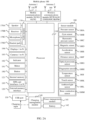
- FIG. 2A is a schematic diagram of a structure of a foldable electronic device, for example, a foldable phone.
- the electronic device may include a processor 110, an external memory interface 120, an internal memory 121, a universal serial bus (universal serial bus, USB) port 130, a charging management module 140, a power management module 141, a battery 142, an antenna 1, an antenna 2, a mobile communications module 150, a wireless communications module 160, an audio module 170, a speaker 170A, a receiver 170B, a microphone 170C, a headset jack 170D, a sensor module 180, a button 190, a motor 191, an indicator 192, a camera 193, a display 194, a subscriber identification module (subscriber identification module, SIM) card interface 195, and the like.
- a processor 110 an external memory interface 120, an internal memory 121, a universal serial bus (universal serial bus, USB) port 130, a charging management module 140, a power management module 141, a battery 142, an antenna 1, an antenna 2, a mobile communications module 150, a wireless communications module 160, an audio module 170, a
- the processor 110 may include one or more processing units.
- the processor 110 may include an application processor (application processor, AP), a modem processor, a graphics processing unit (graphics processing unit, GPU), an image signal processor (image signal processor, ISP), a controller, a memory, a video codec, a digital signal processor (digital signal processor, DSP), a baseband processor, and/or a neural-network processing unit (neural-network processing unit, NPU).
- Different processing units may be independent devices, or may be integrated into one or more processors.
- the controller may be a nerve center and a command center of the electronic device. The controller may generate an operation control signal based on instruction operation code and a time sequence signal, to complete control of instruction reading and instruction execution.
- a memory may further be disposed in the processor 110, and is configured to store instructions and data.
- the memory in the processor 110 is a cache.
- the memory may store instructions or data just used or cyclically used by the processor 110. If the processor 110 needs to use the instructions or the data again, the processor 110 may directly invoke the instructions or the data from the memory. This avoids repeated access and reduces waiting time of the processor 110. Therefore, system efficiency is improved.
- the USB port 130 is an interface that conforms to a USB standard specification, and may be specifically a mini USB port, a micro USB port, a USB Type-C port, or the like.
- the USB port 130 may be configured to connect to a charger to charge the electronic device, or may be configured to transmit data between the electronic device and a peripheral device.
- the charging management module 140 is configured to receive a charging input from the charger.
- the power management module 141 is configured to connect the battery 142, the charging management module 140, and the processor 110.
- the power management module 141 receives an input of the battery 142 and/or the charging management module 140, and supplies power to the processor 110, the internal memory 121, an external memory, the display 194, the camera 193, the wireless communications module 160, and the like.
- a wireless communication function of the electronic device may be implemented through the antenna 1, the antenna 2, the mobile communications module 150, the wireless communications module 160, the modem processor, the baseband processor, and the like.
- the antenna 1 and the antenna 2 are configured to transmit and receive electromagnetic wave signals.
- Each antenna in the electronic device may be configured to cover one or more communication frequency bands. Different antennas may further be multiplexed to improve antenna utilization.
- the antenna 1 may be multiplexed as a diversity antenna in a wireless local area network.
- an antenna may be used in combination with a tuning switch.
- the mobile communications module 150 may provide a solution that is for wireless communication including 2G/3G/4G/5G and the like and that is used in the electronic device.
- the mobile communications module 150 may include at least one filter, a switch, a power amplifier, a low noise amplifier (low noise amplifier, LNA), and the like.
- the mobile communications module 150 may receive an electromagnetic wave through the antenna 1, perform processing such as filtering or amplification on the received electromagnetic wave, and transmit a processed electromagnetic wave to the modem processor for demodulation.
- the mobile communications module 150 may further amplify a signal modulated by the modem processor, and convert an amplified signal into an electromagnetic wave for radiation through the antenna 1.
- at least some function modules of the mobile communications module 150 may be disposed in the processor 110.
- at least some function modules of the mobile communications module 150 and at least some modules of the processor 110 may be disposed in a same device.
- the wireless communications module 160 may provide wireless communication solutions applied to the electronic device, including a wireless local area network (wireless local area network, WLAN) (for example, a wireless fidelity (wireless fidelity, Wi-Fi) network), Bluetooth (Bluetooth, BT), a global navigation satellite system (global navigation satellite system, GNSS), frequency modulation (frequency modulation, FM), a near field communication (near field communication, NFC) technology, an infrared (infrared, IR) technology, and the like.
- the wireless communications module 160 may be one or more components integrating at least one communications processing module.
- the wireless communications module 160 receives an electromagnetic wave through the antenna 2, performs frequency modulation and filtering processing on the electromagnetic wave signal, and sends a processed signal to the processor 110.
- the wireless communications module 160 may further receive a to-be-sent signal from the processor 110, perform frequency modulation and amplification on the signal, and convert a processed signal into an electromagnetic wave for radiation through the antenna 2.
- the antenna 1 of the electronic device is coupled to the mobile communications module 150, and the antenna 2 is coupled to the wireless communications module 160, so that the electronic device can communicate with a network and another device by using a wireless communications technology.
- the wireless communications technology may include a global system for mobile communications (global system for mobile communications, GSM), a general packet radio service (general packet radio service, GPRS), code division multiple access (code division multiple access, CDMA), wideband code division multiple access (wideband code division multiple access, WCDMA), time-division code division multiple access (time-division code division multiple access, TD-SCDMA), long term evolution (long term evolution, LTE), BT, a GNSS, a WLAN, NFC, FM, an IR technology, and/or the like.
- GSM global system for mobile communications
- GPRS general packet radio service
- code division multiple access code division multiple access
- CDMA wideband code division multiple access
- WCDMA wideband code division multiple access
- time-division code division multiple access time-d
- the GNSS may include a global positioning system (global positioning system, GPS), a global navigation satellite system (global navigation satellite system, GLONASS), a BeiDou navigation satellite system (BeiDou navigation satellite system, BDS), a quasi-zenith satellite system (quasi-zenith satellite system, QZSS), and/or a satellite based augmentation system (satellite based augmentation system, SBAS).
- GPS global positioning system
- GLONASS global navigation satellite system
- BeiDou navigation satellite system BeiDou navigation satellite system
- BDS BeiDou navigation satellite system
- QZSS quasi-zenith satellite system
- SBAS satellite based augmentation system
- the display 194 is configured to display a display interface of an application and the like.
- the display 194 includes a display panel.
- a liquid crystal display liquid crystal display, LCD
- an organic light-emitting diode organic light-emitting diode, OLED
- an active-matrix organic light emitting diode active-matrix organic light emitting diode, AMOLED
- a flexible light-emitting diode flexible light-emitting diode
- FLED flexible light-emitting diode
- mini-LED a micro-LED, a micro-OLED
- quantum dot light emitting diodes quantum dot light emitting diodes, QLED
- the electronic device may include one or N displays 194, where N is a positive integer greater than 1.
- the camera 193 is configured to capture a static image or a video.
- the camera 193 may include at least one camera, for example, one front-facing camera and one rear-facing camera.
- the internal memory 121 may be configured to store computer-executable program code, and the executable program code includes instructions.
- the processor 110 runs the instructions stored in the internal memory 121, to implement various functional applications of the electronic device and process data.
- the internal memory 121 may include a program storage region and a data storage region.
- the program storage region may store an operating system, software code of at least one application (such as iQIYI or WeChat), and the like.
- the data storage region may store data (for example, an image and a video) created in a use process of the electronic device.
- the internal memory 121 may include a high-speed random access memory, and may further include a non-volatile memory, for example, at least one magnetic disk storage device, a flash storage device, or a universal flash storage (universal flash storage, UFS).
- a non-volatile memory for example, at least one magnetic disk storage device, a flash storage device, or a universal flash storage (universal flash storage, UFS).
- the external memory interface 120 may be configured to connect to an external storage card, for example, a micro SD card, to extend a storage capability of the electronic device.
- the external storage card communicates with the processor 110 through the external memory interface 120, to implement a data storage function. For example, files such as an image and a video are stored in the external memory card.
- the electronic device may implement audio functions such as music playing or recording by using the audio module 170, the speaker 170A, the receiver 170B, the microphone 170C, the headset jack 170D, the application processor, and the like.
- the sensor module 180 may include a pressure sensor 180A, a gyro sensor 180B, a barometric pressure sensor 180C, a magnetic sensor 180D, an acceleration sensor 180E, a distance sensor 180F, an optical proximity sensor 180G, a fingerprint sensor 180H, a temperature sensor 180J, a touch sensor 180K, an ambient light sensor 180L, a bone conduction sensor 180M, and the like.
- the pressure sensor 180A is configured to sense a pressure signal, and may convert the pressure signal into an electrical signal.
- the pressure sensor 180A may be disposed on the display 194.
- the gyro sensor 180B may be configured to determine a motion posture of the electronic device.
- an angular velocity of the electronic device around three axes namely, axes x, y, and z
- the gyro sensor 180B may be configured to implement image stabilization during shooting.
- the barometric pressure sensor 180C is configured to measure barometric pressure.
- the electronic device calculates an altitude by using the barometric pressure measured by the barometric pressure sensor 180C, to assist in positioning and navigation.
- the magnetic sensor 180D includes a Hall effect sensor.
- the electronic device may detect opening and closing of a flip cover by using the magnetic sensor 180D.
- the electronic device when the electronic device is a flip phone, the electronic device may detect opening and closing of a flip cover based on the magnetic sensor 180D. Further, a feature such as automatic unlocking upon opening of the flip cover is set based on a detected opening or closing state of the flip cover.
- the acceleration sensor 180E may detect accelerations in various directions (usually on three axes) of the electronic device, and may detect magnitude and a direction of gravity when the electronic device is stationary.
- the acceleration sensor 180E may further be configured to identify a posture of the electronic device, and is applied to an application such as switching between landscape mode and portrait mode or a pedometer.
- the distance sensor 180F is configured to measure a distance.
- the electronic device may measure the distance through infrared or laser. In some embodiments, in a shooting scenario, the electronic device may measure the distance by using the distance sensor 180F, to implement quick focusing.
- the optical proximity sensor 180G may include, for example, a light-emitting diode (LED) and an optical detector, for example, a photodiode.
- the light-emitting diode may be an infrared light-emitting diode.
- the electronic device emits infrared light by using the light-emitting diode.
- the electronic device detects infrared reflected light from a nearby object by using the photodiode.
- the electronic device may determine that there is an object near the electronic device. When detecting insufficient reflected light, the electronic device may determine that there is no object near the electronic device.
- the electronic device may detect, by using the optical proximity sensor 180G, that the user holds the electronic device close to an ear for a call, to automatically turn off a screen for power saving.
- the optical proximity sensor 180G may also be used in a leather case mode or a pocket mode to automatically unlock or lock the screen.
- the ambient light sensor 180L is configured to sense ambient light brightness.
- the electronic device may adaptively adjust brightness of the display 194 based on the sensed brightness of the ambient light.
- the ambient light sensor 180L may also be configured to automatically adjust a white balance during shooting.
- the ambient light sensor 180L may further cooperate with the optical proximity sensor 180G to detect whether the electronic device is in a pocket, so as to avoid an unintentional touch.
- the fingerprint sensor 180H is configured to collect a fingerprint.
- the electronic device may use a feature of the collected fingerprint to implement fingerprint-based unlocking, application lock access, fingerprint-based photographing, fingerprint-based call answering, and the like.
- the temperature sensor 180J is configured to detect a temperature.
- the electronic device executes a temperature processing policy by using the temperature detected by the temperature sensor 180J. For example, when the temperature reported by the temperature sensor 180J exceeds a threshold, the electronic device reduces performance of a processor near the temperature sensor 180J, to reduce power consumption and implement heat protection. In some other embodiments, when the temperature is lower than another threshold, the electronic device heats the battery 142, to avoid an abnormal shutdown of the electronic device caused by a low temperature. In some other embodiments, when the temperature is lower than still another threshold, the electronic device boosts an output voltage of the battery 142, to avoid an abnormal shutdown caused by a low temperature.
- the touch sensor 180K may also be referred to as a "touch panel”.
- the touch sensor 180K may be disposed on the display 194, and the touch sensor 180K and the display 194 constitute a touchscreen, which is also referred to as a "touch screen”.
- the touch sensor 180K is configured to detect a touch operation performed on or near the touch sensor.
- the touch sensor may transfer the detected touch operation to the application processor to determine a type of a touch event.
- a visual output related to the touch operation may be provided on the display 194.
- the touch sensor 180K may alternatively be disposed on a surface of the electronic device, and is located at a location different from that of the display 194.
- the button 190 includes a power button, a volume button, and the like.
- the button 190 may be a mechanical button or a touch button.
- the electronic device may receive a button input, and generate a button signal input related to user setting and function control of the electronic device.
- the motor 191 may generate a vibration prompt.
- the motor 191 may be used for an incoming call vibration prompt, or may be used for a touch vibration feedback.
- touch operations performed on different applications (for example, shooting and audio playing) may correspond to different vibration feedback effects.
- the indicator 192 may be an indicator light, and may be configured to indicate a charging status and a power change, or may be configured to indicate a message, a missed call, a notification, and the like.
- the SIM card interface 195 is configured to connect to a SIM card. The SIM card may be inserted into the SIM card interface 195 or removed from the SIM card interface 195, to implement contact with or be separated from the electronic device.
- FIG. 2A do not constitute a specific limitation on the electronic device.
- the electronic device may further include more or fewer components than those shown in the figure, or combine some components, or split some components, or have different component arrangements.
- the electronic device shown in FIG. 2A is used as an example for description.
- the application layer may include a series of application packages. As shown in FIG. 2B , the application layer may include Camera, Settings, a skin module, a user interface (user interface, UI), a third-party application, and the like.
- the third-party application may include WeChat, QQ, Gallery, Calendar, Phone, Maps, Navigation, WLAN, Bluetooth, Music, Videos, Messages, and the like.
- the application framework layer provides an application programming interface (application programming interface, API) and a programming framework for an application at the application layer.
- the application framework layer may include some predefined functions. As shown in FIG. 2B , the application framework layer may include a window manager, a content provider, a view system, a phone manager, a resource manager, a notification manager, and the like.
- the window manager is configured to manage a window program.
- the window manager may obtain a size of a display, determine whether there is a status bar, lock a screen, take a screenshot, and the like.
- the content provider is configured to: store and obtain data, and enable the data to be accessed by an application.
- the data may include a video, an image, audio, calls that are made and received, a browsing history and bookmarks, an address book, and the like.
- the notification manager enables the application to display notification information in the status bar, and may be configured to convey a notification message.
- the notification manager may automatically disappear after a short pause without a user interaction.
- the notification manager is configured to notify download completion, give a message notification, and the like.
- the notification manager may alternatively be a notification that appears in a top status bar of the system in a form of a graph or a scroll bar text, for example, a notification of an application program running on a background or a notification that appears on the interface in a form of a dialog window. For example, text information is prompted in the status bar, a prompt tone is produced, the electronic device vibrates, or the indicator light blinks.
- the Android runtime includes a kernel library and a virtual machine.
- the Android runtime is responsible for scheduling and management of the Android system.
- the kernel library includes two parts: a function that needs to be invoked in Java language and a kernel library of Android.
- the application layer and the application framework layer run on the virtual machine.
- the virtual machine executes Java files of the application layer and the application framework layer as binary files.
- the virtual machine is configured to perform functions such as object lifecycle management, stack management, thread management, security and exception management, and garbage collection.
- the system library may include a plurality of function modules, for example, a surface manager (surface manager), a media library (media library), a three-dimensional graphics processing library (for example, OpenGL ES), and a 2D graphics engine (for example, SGL).
- a surface manager surface manager
- media library media library
- three-dimensional graphics processing library for example, OpenGL ES
- 2D graphics engine for example, SGL
- the surface manager is configured to: manage a display subsystem, and provide fusion of 2D and 3D layers for a plurality of applications.
- the media library supports playback and recording in a plurality of commonly used audio and video formats, static image files, and the like.
- the media library may support a plurality of audio and video coding formats such as MPEG-4, H.264, MP3, AAC, AMR, JPG, and PNG.
- the three-dimensional graphics processing library is configured to implement three-dimensional graphics drawing, image rendering, composition, layer processing, and the like.
- the 2D graphics engine is a drawing engine for 2D drawing.
- the system library may further include a form detection module (not shown in the figure), configured to identify a physical form of the electronic device.
- the form detection module may be configured to determine the physical form of the electronic device based on sensor data uploaded by various types of sensors at a hardware layer.
- the physical form may include a folded form, an unfolded form, a semi-folded/semi-unfolded form with a specific angle, and the like.
- the kernel layer is a layer between hardware and software.
- the kernel layer includes at least a display driver, a camera driver, an audio driver, and a sensor driver.
- the hardware layer may include various types of sensors, for example, an acceleration sensor, a gyro sensor, and a touch sensor in embodiments of this application.
- the sensor for example, the acceleration sensor or the gyro sensor
- the sensor data may be sent to the system library through the kernel layer.
- the form detection module in the system library determines a current physical form of the electronic device based on the sensor data. If the system library determines that the physical form of the electronic device changes from the folded form to the unfolded form, a display interface of a preset application may be displayed by using a display at the hardware layer. In this way, when unfolding the electronic device, a user directly enters the preset application, and the user does not need to select the application from a plurality of applications. This facilitates an operation.
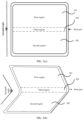
- FIG. 3(a) to FIG. 3(d) are schematic diagrams of a plurality of physical forms of a foldable electronic device according to an embodiment of this application.
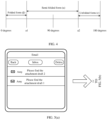
- FIG. 4 is a schematic diagram of unfolded angles of a foldable electronic device in different physical forms according to an embodiment of this application. The following embodiments describe the foldable electronic device with reference to FIG. 3(a) to FIG. 3(d) and FIG. 4 .
- a display region on a foldable screen of the electronic device may include three regions: a first region 301, a second region 302, and a third region 303, and the third region 303 may be a foldable/bendable region.
- first region on the foldable screen may be used as a primary screen, and the second region may be used as a secondary screen; or the first region may be used as a secondary screen, and the second region may be used as a primary screen.
- Functions of the primary screen and the secondary screen may be the same or different.
- a region used as the primary screen and a region used as the secondary screen may be specified by a user, or may be set by default before delivery of the electronic device. This is not limited in this embodiment of this application.
- the electronic device in the unfolded form may be shown in FIG. 3(a) or FIG. 3(b) .
- an included angle between the first region 301 and the second region 302 is a first angle ⁇ .
- a2 may be 150 degrees or 180 degrees.
- the electronic device in the semi-folded/semi-unfolded form may be shown in FIG. 3(c) .
- an included angle between the first region 301 and the second region 302 is a second angle ⁇ .
- a1 ⁇ ⁇ ⁇ a2 where a1 is greater than 0 degrees and less than or equal to 90 degrees, and a2 is greater than or equal to 90 degrees and less than 180 degrees.
- a1 may be 90 degrees
- a2 may be 150 degrees.
- the electronic device in the folded form may be shown in FIG. 3(d) .
- an included angle between the first region 301 and the second region 302 is a third included angle ⁇ .
- ⁇ As shown in FIG. 4 , 0 ⁇ ⁇ ⁇ a1, where a1 is greater than or equal to 0 degrees and less than or equal to 90 degrees.
- a1 may be 0 degrees or 5 degrees. It should be noted that a specific value range in this application is merely an example rather than a limitation.
- the preset application may be an application specified by the user.
- the electronic device may provide, by using a settings application, the user with an opportunity to set the preset application.
- the electronic device may provide, by using a shortcut, an entry for setting the preset application.
- the shortcut may be a drop-up menu, a control interface corresponding to a floating dock, or the like. This is not limited in this embodiment of this application. Therefore, the user may set, based on a requirement of the user, an application that is directly entered when the electronic device is unfolded, to facilitate a user operation.
- the preset application may be an application that is last run/displayed before the electronic device is folded into the folded form last time. "Folded into the folded form last time” may mean that the electronic device is folded into the folded form for a last time before being unfolded.
- FIG. 5(a) is used as an example.
- the electronic device is in the unfolded form, and the user processes a transaction by using an email application on the electronic device.
- the electronic device displays a display interface of an inbox of the email application.
- the electronic device is folded into the folded form, as shown in FIG. 5(b) .
- the email application is the application that is last displayed before the electronic device is folded.
- FIG. 5(c) when the electronic device is unfolded again, the email application is entered.
- a subpage of the email application may be displayed.
- the subpage may be a subpage that is of the email application and that is last displayed before the electronic device is unfolded, or any subpage of the email application, for example, a home page.
- the display interface of the inbox is displayed before the electronic device is folded.
- the display interface of the inbox is displayed.
- a display interface of iQIYI is displayed, and the display interface includes a playing interface for a movie that is being played. Then, the electronic device is folded into the folded form. When the electronic device is unfolded again, the playing interface may be displayed, and the movie continues to be played. Therefore, in this example, if the electronic device is folded into the folded form when displaying a first interface of an application, when the electronic device is unfolded again, the first interface of the application may be directly displayed, thereby facilitating the user operation.
- FIG. 5(a) is still used as an example.
- the electronic device is in the unfolded form, and displays the display interface of the email application. Then, the electronic device detects an operation used to return to a home screen, and the electronic device displays the home screen in response to the operation. Then, the electronic device is folded into the folded form. In this case, when the electronic device is folded, the email application is switched to the background, and the foreground displays the home screen. Therefore, the application that is last run/displayed by the electronic device before the electronic device is folded is also the email application. When the electronic device is unfolded again, the email application may still be entered.
- FIG. 5(a) is still used as an example.
- the electronic device is in the unfolded form, and displays the display interface of the email application. Then, the electronic device detects a screen-off operation, and turns off the screen in response to the operation. Then, the electronic device is folded into the folded form. In this case, when the electronic device is folded, the screen is turned off, and the application that is last run/displayed by the electronic device before the electronic device is folded is also the email application. When the electronic device is unfolded again, the email application may still be entered.
- the preset application may be an application corresponding to a message received when the electronic device is in the folded form.
- a new message for example, a new message of WeChat/Messages
- a display interface of WeChat/Messages may be directly entered, and the display interface includes the received new message.
- the preset application may be an application that is on the electronic device and that is most frequently used or has the longest usage duration within preset duration.
- the preset duration is duration between the first moment and the second moment. It is assumed that the email application is most frequently used on the electronic device within the duration. When the electronic device is unfolded again, the email application is entered. In this example, the electronic device determines an application that is most frequently used in a process from being unfolded to being folded last time, and when the electronic device is unfolded again, the electronic device enters the application.
- the preset duration may alternatively be 3 hours, 5 hours, 12 hours, or the like starting from a fixed moment, for example, 00:00 every day. This is not limited in this embodiment of this application.
- Case 1 There is one preset application.
- the electronic device may display a display interface of the preset application in full screen.
- the electronic device displays the display interface of the preset application in full screen. If the electronic device detects a preset operation, the electronic device may exit the display interface of the preset application, and display the home screen (home screen).
- the preset operation may be an operation of tapping a home key, an operation of tapping the home screen in a floating dock, or the like.
- the electronic device After being unfolded, the electronic device enters a split-screen mode.
- a display interface of the preset application is displayed in a first display region
- the home screen is displayed in a second display region.
- display areas of the first display region and the second display region may be the same or different. This is not limited in this embodiment of this application.
- the first display region mainly includes a primary screen
- the second display region mainly includes a secondary screen.
- the second display region mainly includes a primary screen
- the first display region mainly includes a secondary screen, or the like.
- the second preset operation may be an operation of tapping (tapping or double-tapping) a blank region in the first display region, an operation of touching and holding a blank region in the first display region and dragging the blank region in a dragging direction toward the second display region, an operation of touching and holding a demarcation line between the first display region and the second display region and dragging the demarcation line in a dragging direction toward the second display region, or the like.
- the electronic device After being unfolded, the electronic device enters a split-screen mode.
- the home screen In the split-screen mode, the home screen is displayed in a first display region, and an icon of the preset application is displayed in a second display region.
- the electronic device detects an operation performed on the icon of the preset application, a display interface of the preset application is displayed in the second display region, or the display interface of the application is displayed in full screen.
- the electronic device displays the home screen in full screen.
- the home screen includes prompt information, and the prompt information is used to prompt the user whether to enter the preset application.
- the electronic device displays a display interface of the preset application in full screen, or enters a split-screen mode and simultaneously displays the home screen and the display interface of the preset application in the split-screen mode.
- the electronic device cancels displaying the prompt information, and displays the home screen in full screen.
- Case 2 There is a plurality of preset applications.
- the electronic device may display an icon of each of the plurality of preset applications.
- the electronic device opens a display interface of a preset application corresponding to the icon.
- the electronic device simultaneously displays display interfaces of the plurality of preset applications.
- Example 1 As shown in FIG. 6(a) , when the electronic device is unfolded from the folded form to the unfolded form, icons corresponding to preset applications (including an application A, an application B, and an application C) are displayed. When detecting an operation performed on the icon of the application C, the electronic device displays a display interface of the application C in full screen, as shown in FIG. 6(b) . When detecting an operation of tapping (for example, a tapping/double-tapping operation) another region (for example, a region in which an icon of an application other than the application A to the application C is located), the electronic device displays the home screen, as shown in FIG. 6(c) .
- tapping for example, a tapping/double-tapping operation
- another region for example, a region in which an icon of an application other than the application A to the application C is located
- the electronic device when being unfolded, displays icons of a plurality of applications to the user for selection by the user.
- the user may alternatively choose to display the home screen. An operation is convenient.
- the electronic device when being unfolded, the electronic device enters a split-screen mode.
- the home screen is displayed in a first display region, and icons corresponding to an application A, an application B, and an application C are displayed in a second display region.
- the electronic device displays a display interface of the application C on a secondary screen, or displays a display interface of the application C in full screen, as shown in FIG. 7(b) .
- the electronic device may exit the split-screen mode, and display the home screen in full screen, as shown in FIG. 7(c) .
- the preset operation may be an operation of dragging a demarcation line and moving down a split interface, or a sliding-down operation at any position in the first display region (for example, a region in which an icon of an application other than the application A to the application C is located).
- the preset operation may be a tapping/double-tapping operation or the like performed on a blank region in the first display region.
- the electronic device when being unfolded, the electronic device simultaneously displays the home screen and icons of the plurality of preset applications for selection by the user. This facilitates a user operation.
- the electronic device may determine one preset application from the plurality of preset applications according to a preset policy. When being unfolded, the electronic device displays a display interface of the determined preset application in full screen.
- the electronic device determines the preset application from the plurality of preset applications according to the preset policy. For example, the electronic device determines a preset application that is last used from the plurality of preset applications. Alternatively, the electronic device determines a preset application that is most frequently used from the plurality of preset applications. Alternatively, the electronic device determines a preset application with the longest usage duration from the plurality of preset applications.
- the electronic device determines a preset application that is most likely to be used in a current geographical location from the plurality of preset applications based on the current geographical location.
- the preset applications include an iQIYI application and an email application.
- the electronic device determines that the electronic device is currently in an office. When the electronic device is unfolded, a display interface of the email application is displayed, and a display interface of the iQIYI application is not displayed.
- the electronic device determines a preset application that is most likely to be used at current time from the plurality of preset applications based on the current time.
- the preset applications include an iQIYI application and an email application
- the electronic device collects statistics that iQIYI is most frequently used in a time period from 20:00 to 24:00 at night. In this case, when the electronic device is unfolded, if the electronic device detects that the current time is 21:00, a display interface of the iQIYI application is displayed, and a display interface of the email application is not displayed.
- the electronic device determines a preset application from the plurality of preset applications based on a Wi-Fi identifier of currently accessed Wi-Fi.
- the electronic device detects that an iQIYI application is most frequently used when Wi-Fi 1 is accessed. In this case, when the electronic device is unfolded, if the electronic device detects that the Wi-Fi 1 is currently accessed, a display interface of the iQIYI application is displayed, and a display interface of an email application is not displayed.
- the electronic device when being unfolded, the electronic device simultaneously displays a display interface of each of the plurality of preset applications.
- the preset applications include an application A, an application B, and an application C.
- display interfaces of the application A, the application B, and the application C are simultaneously displayed.
- the electronic device may determine a display order, display areas, and/or the like of the display interfaces of the plurality of preset applications according to a specific policy. For example, the electronic device determines whether a preset application currently runs in the background. If there is a preset application currently running in the background, one or more applications running in the background are displayed at the top or have the largest display area.
- FIG. 8 is used as an example. The application A runs in the background, and the application B and the application C do not run. Therefore, the application A is displayed in an uppermost region and has the largest display area.
- the electronic device may sort the display interfaces of the plurality of preset applications based on a usage frequency/usage duration of each preset application. For example, a preset application that is most frequently used/has a relatively long usage duration may be displayed at the top or has the largest display area. FIG. 8 is used as an example. The application A is most frequently used. Therefore, the application A is displayed in the uppermost region and has the largest display area.
- the electronic device may determine a preset application with the highest usage probability in a current time period. Then, the preset application is displayed at the top and/or has the largest display area.
- the electronic device may collect statistics on usage statuses of each application in different time periods. For example, the current time period is 8:00 to 10:00 at night, and an iQIYI application is most frequently used. In this case, after the electronic device is unfolded, the electronic device may display a display interface of the iQIYI application.
- the electronic device may alternatively determine, based on a current geographical location, a preset application with the highest usage probability at the current geographical location. Then, the preset application is displayed at the top and/or occupies the largest display area.
- the preset applications include an email application. If the electronic device determines that the electronic device is currently in an office, after the electronic device is unfolded, the email application may be displayed at the top, or an area of a display interface of the email application is the largest.
- the electronic device may alternatively determine, based on a currently accessed Wi-Fi hotspot, a preset application with the highest usage probability when the Wi-Fi hotspot is accessed, and then display the preset application at the top. For example, the electronic device detects that Wi-Fi 1 is currently accessed, and learn from a historical record that an iQIYI application is most frequently used after the Wi-Fi 1 is accessed. Therefore, the iQIYI application is displayed at the top and/or occupies the largest display area.
- the electronic device may enter different interfaces when being landscape-unfolded and portrait-unfolded.
- the following first defines a landscape-folded form and a portrait-folded form.
- aspect ratios of the electronic device in the landscape-folded form and the portrait-folded form are different.
- the aspect ratio of the electronic device is a ratio of a height to a width of the electronic device.
- the height of the electronic device is 1/2 of a length of a bent edge
- the width of the electronic device is a length of an unfolded edge.
- the height of the electronic device is a length of an unfolded edge
- the width of the electronic device is 1/2 of a length of a bent edge.
- the electronic device is in the landscape-folded form.
- the width of the electronic device is X
- A is a length of an edge 1 (the bent edge).
- the aspect ratio of the electronic device is Y/X, where Y/X ⁇ 1.
- the angle ⁇ is not greater than a first preset threshold, for example, 20°, 15°, or 5°
- the electronic device is still considered to be in the landscape-folded form.
- the electronic device is in the portrait-folded form, the edge 1 is in a vertical state, and the edge 1 is not bent.
- FIG. 11(b) after the electronic device is portrait-unfolded, the edge 1 is still in the vertical state or approaches the vertical state. Therefore, the process is a portrait unfolding process.
- a possible manner of determining whether the electronic device is landscape-unfolded or portrait-unfolded is as follows: As shown in FIG. 12A(a) , a front-facing camera is disposed on the electronic device, and the electronic device starts the front-facing camera in response to changing from the folded form to the unfolded form.
- the front-facing camera captures an image, and the image includes a face, as shown in FIG. 12A(b) .
- the electronic device determines that a two-eye connection line on the face is perpendicular to an edge 2 or an included angle between the two-eye connection line and the edge 2 falls within a preset range, where the preset range is, for example, (60, 120), the electronic device determines that the electronic device is portrait-unfolded.
- the edge 2 is an unbent edge of the electronic device. It should be understood that a specific value of the preset range is not limited in this embodiment of this application.
- the front-facing camera is disposed on the electronic device, and the electronic device starts the front-facing camera in response to changing from the folded form to the unfolded form.
- the front-facing camera captures an image, and the image includes a face, as shown in FIG. 12B(b) .
- the electronic device determines that the electronic device is landscape-unfolded.
- the preset application when the electronic device is landscape-unfolded, the preset application may be directly entered.
- the foregoing has described the preset application.
- the preset application is one or more solutions, and is applicable to a case of landscape unfolding. Details are not described herein again.
- the home screen when the electronic device is portrait-unfolded, the home screen may be entered. For example, the home screen is displayed in full screen.
- the electronic device when the electronic device is landscape-unfolded, the electronic device enters the preset application again when determining that the electronic device meets a preset trigger condition.
- the electronic device after being landscape-unfolded, the electronic device starts a camera (for example, the front-facing camera) to capture an image, where the image includes a face.
- the electronic device may establish a coordinate system by using an edge on which the camera is located as a Y axis, for example, an X-Y coordinate system shown in FIG. 12C(b) .
- the electronic device may determine an included angle between a midpoint (for example, a point A) of a left-right-eye connection line in the image and the Y axis. If the included angle is within a preset range (which may be the same as or different from the foregoing preset range), the preset application is entered. If the included angle is not within the preset range, the home screen is displayed.
- the user holds the electronic device in the folded form in landscape mode.
- the front-facing camera on the electronic device captures an image.
- an area occupied by a face in the image captured by the front-facing camera is relatively large, and the face in the image is relatively centered (the face of the user relatively directly faces the display). If an angle between a midpoint of an eye connection line in the image and the Y axis is greater than a preset angle, the specific application is entered.
- FIG. 12D(c) after the electronic device is horizontally unfolded, the front-facing camera on the electronic device captures an image.
- the home screen is displayed. If the included angle between the normal direction and the gravity direction of the display is less than a second preset angle (for example, 90 degrees or 60 degrees), a first preset application is entered.
- a display interface of a first preset application is displayed.
- the included angle between the normal direction and the gravity direction of the display is less than a second preset angle (for example, 90 degrees or 60 degrees), and the front-facing camera captures a face image (for example, the user operates the electronic device while lying down with the face facing the display), the home screen is entered.
- a second preset angle for example, 90 degrees or 60 degrees
- a preset application 1 may be entered. If the included angle between the normal direction and the gravity direction of the display is less than the first preset angle, a preset application 2 is entered.
- the second region on the foldable screen of the electronic device is flipped over (for example, by using the bent part as a center, the second region is flipped along a flip direction indicated by the dashed line in the figure).
- the included angle between the normal direction and the gravity direction of the display is less than 90 degrees, and no face image is captured.
- a display interface for example, a collection and payment QR code, of the preset application 2 such as the Huawei Pay application, the Alipay application, or the WeChat application is entered, as shown in FIG. 14(d) .
- an embodiment of this application provides a method for quickly entering an application.
- the method may be implemented by an electronic device having a foldable screen (for example, a mobile phone having a foldable screen, or a tablet computer having a foldable screen).
- a structure of the electronic device may be shown in FIG. 2A and FIG. 3(a) to FIG. 3(d) .
- FIG. 3(a) to FIG. 3(d) are used as an example.
- the foldable screen includes a first region, a second region, and a third region.
- the term "when” used in the foregoing embodiments may be interpreted as a meaning of "if", “after”, “in response to determining", or “in response to detecting”.
- the phrase “when it is determined that" or “if (a stated condition or event) is detected” may be interpreted as a meaning of "if it is determined that", “in response to determining", “when (a stated condition or event) is detected”, or “in response to detecting (a stated condition or event)”.
Landscapes
- Engineering & Computer Science (AREA)
- Theoretical Computer Science (AREA)
- General Engineering & Computer Science (AREA)
- Human Computer Interaction (AREA)
- Physics & Mathematics (AREA)
- General Physics & Mathematics (AREA)
- Computer Hardware Design (AREA)
- Software Systems (AREA)
- Signal Processing (AREA)
- Computer Networks & Wireless Communication (AREA)
- Environmental & Geological Engineering (AREA)
- User Interface Of Digital Computer (AREA)
- Telephone Function (AREA)
Claims (9)
- Verfahren zum schnellen Eingeben einer Anwendung, das auf ein elektronisches Gerät angewandt wird, das einen faltbaren Schirm aufweist, wobei der faltbare Schirm einen ersten Bereich (301), einen zweiten Bereich (302) und einen dritten Bereich (303) umfasst; wenn sich das elektronische Gerät in einer gefalteten Form befindet, ein eingeschlossener Winkel zwischen dem ersten Bereich (301) und dem zweiten Bereich (302) kleiner als ein erster voreingestellter Winkel ist und der erste Bereich (301) und der zweite Bereich (302) jeweils auf zwei Seiten des dritten Bereichs (303) liegen; und das Verfahren Folgendes umfasst:Detektieren, durch das elektronische Gerät, eines ersten Vorgangs, wobei der erste Vorgang dazu verwendet wird, das elektronische Gerät von der gefalteten Form in eine entfaltete Form zu ändern, und, wenn sich das elektronische Gerät in der entfalteten Form befindet, der eingeschlossene Winkel zwischen dem ersten Bereich (301) und dem zweiten Bereich (302) größer als ein zweiter voreingestellter Winkel ist und der zweite voreingestellte Winkel größer als der erste voreingestellte Winkel ist;Anzeigen, durch das elektronische Gerät, von Anzeigeschnittstellen einer oder mehrerer voreingestellter Anwendungen in dem ersten Bereich (301) und/oder dem zweiten Bereich (302) und/oder dem dritten Bereich (303) als Reaktion auf das Detektieren des ersten Vorgangs;wobei das Detektieren, durch das elektronische Gerät, eines ersten Vorgangs Folgendes umfasst:Detektieren, durch das elektronische Gerät, eines ersten Entfaltungsvorgangs, wobei der erste Entfaltungsvorgang dazu verwendet wird, das elektronische Gerät von einer querformatig gefalteten Form in eine querformatig entfaltete Form zu ändern;und das Verfahren ferner Folgendes umfasst:
wenn das elektronische Gerät einen zweiten Entfaltungsvorgang detektiert, wobei der zweite Entfaltungsvorgang dazu verwendet wird, das elektronische Gerät von einer hochformatig gefalteten Form in eine hochformatig entfaltete Form zu ändern, Anzeigen, durch das elektronische Gerät, eines Startschirms in dem ersten Bereich (301) und/oder dem zweiten Bereich (302) und/oder dem dritten Bereich (303) als Reaktion auf das Detektieren des zweiten Entfaltungsvorgangs. - Verfahren zum schnellen Eingeben einer Anwendung, das auf ein elektronisches Gerät angewandt wird, das einen faltbaren Schirm aufweist, wobei der faltbare Schirm einen ersten Bereich (301), einen zweiten Bereich (302) und einen dritten Bereich (303) umfasst; wenn sich das elektronische Gerät in einer gefalteten Form befindet, ein eingeschlossener Winkel zwischen dem ersten Bereich (301) und dem zweiten Bereich (302) kleiner als ein erster voreingestellter Winkel ist und der erste Bereich (301) und der zweite Bereich (302) jeweils auf zwei Seiten des dritten Bereichs (303) liegen; und das Verfahren Folgendes umfasst:Detektieren, durch das elektronische Gerät, eines ersten Vorgangs, wobei der erste Vorgang dazu verwendet wird, das elektronische Gerät von der gefalteten Form in eine entfaltete Form zu ändern, und, wenn sich das elektronische Gerät in der entfalteten Form befindet, der eingeschlossene Winkel zwischen dem ersten Bereich (301) und dem zweiten Bereich (302) größer als ein zweiter voreingestellter Winkel ist und der zweite voreingestellte Winkel größer als der erste voreingestellte Winkel ist;wobei das Verfahren ferner Folgendes umfasst:Aufnehmen, durch das elektronische Gerät, eines Bildes unter Verwendung einer nach vorne gewandten Kamera auf dem elektronischen Gerät als Reaktion auf das Detektieren des ersten Vorgangs;wenn das Bild ein Gesicht umfasst, Bestimmen einer Linie zwischen einem Punkt auf dem Gesicht und einem Randpunkt auf dem elektronischen Gerät und Bestimmen eines eingeschlossenen Winkels zwischen der Linie und einem ersten Rand, wobei der erste Rand ein Rand ist, auf dem sich der Randpunkt befindet; undwenn der eingeschlossene Winkel größer als ein dritter voreingestellter Winkel ist, Anzeigen, durch das elektronische Gerät, von Anzeigeschnittstellen einer oder mehrerer voreingestellter Anwendungen in dem ersten Bereich (301) und/oder dem zweiten Bereich (302) und/oder dem dritten Bereich (303) undwenn der eingeschlossene Winkel kleiner als ein vierter voreingestellter Winkel ist, Anzeigen eines Startschirms in dem ersten Bereich (301) und/oder dem zweiten Bereich (302) und/oder dem dritten Bereich (303), wobei der dritte voreingestellte Winkel größer als der vierte voreingestellte Winkel ist.
- Verfahren zum schnellen Eingeben einer Anwendung, das auf ein elektronisches Gerät angewandt wird, das einen faltbaren Schirm aufweist, wobei der faltbare Schirm einen ersten Bereich (301), einen zweiten Bereich (302) und einen dritten Bereich (303) umfasst; wenn sich das elektronische Gerät in einer gefalteten Form befindet, ein eingeschlossener Winkel zwischen dem ersten Bereich (301) und dem zweiten Bereich (302) kleiner als ein erster voreingestellter Winkel ist und der erste Bereich (301) und der zweite Bereich (302) jeweils auf zwei Seiten des dritten Bereichs (303) liegen; und das Verfahren Folgendes umfasst:Detektieren, durch das elektronische Gerät, eines ersten Vorgangs, wobei der erste Vorgang dazu verwendet wird, das elektronische Gerät von der gefalteten Form in eine entfaltete Form zu ändern, und, wenn sich das elektronische Gerät in der entfalteten Form befindet, der eingeschlossene Winkel zwischen dem ersten Bereich (301) und dem zweiten Bereich (302) größer als ein zweiter voreingestellter Winkel ist und der zweite voreingestellte Winkel größer als der erste voreingestellte Winkel ist;als Reaktion auf das Detektieren des ersten Vorgangs und Bestimmen, dass ein eingeschlossener Winkel zwischen einer normalen Richtung und einer Schwerkraftrichtung des faltbaren Schirmes kleiner als ein dritter voreingestellter Winkel ist, Anzeigen, durch das elektronische Gerät, von Anzeigeschnittstellen einer oder mehrerer voreingestellter Anwendungen in dem ersten Bereich (301) und/oder dem zweiten Bereich (302) und/oder dem dritten Bereich (303) undals Reaktion auf das Detektieren des ersten Vorgangs und Bestimmen, dass ein eingeschlossener Winkel zwischen einer normalen Richtung und einer Schwerkraftrichtung des faltbaren Schirmes größer als ein vierter voreingestellter Winkel ist, Anzeigen, durch das elektronische Gerät, eines Startschirms in dem ersten Bereich (301) und/oder dem zweiten Bereich (302) und/oder dem dritten Bereich (303), wobei der dritte voreingestellte Winkel kleiner als der vierte voreingestellte Winkel ist.
- Verfahren nach einem der Ansprüche 1 bis 3, wobei die eine oder die mehreren voreingestellten Anwendungen eine oder mehrere Anwendungen, die durch einen Benutzer angegeben werden, oder eine oder mehrere Anwendungen, die innerhalb einer voreingestellten Dauer am häufigsten verwendet werden, oder eine oder mehrere Anwendungen, die zuletzt ausgeführt oder angezeigt werden, bevor das elektronische Gerät in die gefaltete Form gefaltet wird, oder eine oder mehrere Anwendungen, die einer neuen Nachricht entsprechen, die empfangen wird, wenn sich das elektronische Gerät in der gefalteten Form befindet, sind.
- Elektronisches Gerät, das einen faltbaren Schirm und eine Funktion zum schnellen Eingeben einer Anwendung aufweist, wobei der faltbare Schirm einen ersten Bereich (301), einen zweiten Bereich (302) und einen dritten Bereich (303) umfasst; wenn sich das elektronische Gerät in einer gefalteten Form befindet, ein eingeschlossener Winkel zwischen dem ersten Bereich (301) und dem zweiten Bereich (302) kleiner als ein erster voreingestellter Winkel ist und der erste Bereich (301) und der zweite Bereich (302) jeweils auf zwei Seiten des dritten Bereichs (303) liegen; und das elektronische Gerät Folgendes umfasst:einen oder mehrere Prozessoren (110);einen Speicher (121);eine Vielzahl von Anwendungen; undein oder mehrere Computerprogramme, wobei das eine oder die mehreren Computerprogramme in dem Speicher (121) gespeichert sind, das eine oder die mehreren Computerprogramme Anweisungen umfassen und, wenn die Anweisungen durch das elektronische Gerät ausgeführt werden, es dem elektronischen Gerät ermöglicht wird, die folgenden Schritte durchzuführen:Detektieren eines ersten Vorgangs, wobei der erste Vorgang dazu verwendet wird, das elektronische Gerät von der gefalteten Form in eine entfaltete Form zu ändern, und, wenn sich das elektronische Gerät in der entfalteten Form befindet, der eingeschlossene Winkel zwischen dem ersten Bereich (301) und dem zweiten Bereich (302) größer als ein zweiter voreingestellter Winkel ist und der zweite voreingestellte Winkel größer als der erste voreingestellte Winkel ist; und Anzeigen von Anzeigeschnittstellen einer oder mehrerer voreingestellter Anwendungen in dem ersten Bereich (301) und/oder dem zweiten Bereich (302) und/oder dem dritten Bereich (303) als Reaktion auf das Detektieren des ersten Vorgangs;wobei das Detektieren, durch das elektronische Gerät, eines ersten Vorgangs Folgendes umfasst:Detektieren, durch das elektronische Gerät, eines ersten Entfaltungsvorgangs, wobei der erste Entfaltungsvorgang dazu verwendet wird, das elektronische Gerät von einer querformatig gefalteten Form in eine querformatig entfaltete Form zu ändern; undes dem elektronischen Gerät ferner ermöglicht wird, den folgenden Schritt durchzuführen:wenn ein zweiter Entfaltungsvorgang erkannt wird, wobei der zweite Entfaltungsvorgang dazu verwendet wird, das elektronische Gerät von einer hochformatig gefalteten Form in eine hochformatig entfaltete Form zu ändern,Anzeigen eines Startschirms in dem ersten Bereich und/oder dem zweiten Bereich und/oder dem dritten Bereich als Reaktion auf den zweiten Entfaltungsvorgang.
- Elektronisches Gerät, das einen faltbaren Schirm und eine Funktion zum schnellen Eingeben einer Anwendung aufweist, wobei der faltbare Schirm einen ersten Bereich (301), einen zweiten Bereich (302) und einen dritten Bereich (303) umfasst; wenn sich das elektronische Gerät in einer gefalteten Form befindet, ein eingeschlossener Winkel zwischen dem ersten Bereich (301) und dem zweiten Bereich (302) kleiner als ein erster voreingestellter Winkel ist und der erste Bereich (301) und der zweite Bereich (302) jeweils auf zwei Seiten des dritten Bereichs (303) liegen; und das elektronische Gerät Folgendes umfasst:einen oder mehrere Prozessoren (110);einen Speicher (121);eine Vielzahl von Anwendungen; undein oder mehrere Computerprogramme, wobei das eine oder die mehreren Computerprogramme in dem Speicher (121) gespeichert sind, das eine oder die mehreren Computerprogramme Anweisungen umfassen und, wenn die Anweisungen durch das elektronische Gerät ausgeführt werden, es dem elektronischen Gerät ermöglicht wird, die folgenden Schritte durchzuführen:Detektieren eines ersten Vorgangs, wobei der erste Vorgang dazu verwendet wird, das elektronische Gerät von der gefalteten Form in eine entfaltete Form zu ändern, und, wenn sich das elektronische Gerät in der entfalteten Form befindet, der eingeschlossene Winkel zwischen dem ersten Bereich (301) und dem zweiten Bereich (302) größer als ein zweiter voreingestellter Winkel ist und der zweite voreingestellte Winkel größer als der erste voreingestellte Winkel ist; undwobei es dem elektronischen Gerät ermöglicht wird, speziell die folgenden Schritte durchzuführen:Aufnehmen, durch das elektronische Gerät, eines Bildes unter Verwendung einer nach vorne gewandten Kamera auf dem elektronischen Gerät als Reaktion auf das Detektieren des ersten Vorgangs;wenn das Bild ein Gesicht umfasst, Bestimmen einer Linie zwischen einem Punkt auf dem Gesicht und einem Randpunkt auf dem elektronischen Gerät und Bestimmen eines eingeschlossenen Winkels zwischen der Linie und einem ersten Rand, wobei der erste Rand ein Rand ist, auf dem sich der Randpunkt befindet; undwenn der eingeschlossene Winkel größer als ein dritter voreingestellter Winkel ist, Anzeigen, durch das elektronische Gerät, von Anzeigeschnittstellen einer oder mehrerer voreingestellter Anwendungen in dem ersten Bereich (301) und/oder dem zweiten Bereich (302) und/oder dem dritten Bereich (303) undwenn der eingeschlossene Winkel kleiner als ein vierter voreingestellter Winkel ist, Anzeigen eines Startschirms in dem ersten Bereich (301) und/oder dem zweiten Bereich (302) und/oder dem dritten Bereich (303), wobei der dritte voreingestellte Winkel größer als der vierte voreingestellte Winkel ist.
- Elektronisches Gerät, das einen faltbaren Schirm und eine Funktion zum schnellen Eingeben einer Anwendung aufweist, wobei der faltbare Schirm einen ersten Bereich (301), einen zweiten Bereich (302) und einen dritten Bereich (303) umfasst; wenn sich das elektronische Gerät in einer gefalteten Form befindet, ein eingeschlossener Winkel zwischen dem ersten Bereich (301) und dem zweiten Bereich (302) kleiner als ein erster voreingestellter Winkel ist und der erste Bereich (301) und der zweite Bereich (302) jeweils auf zwei Seiten des dritten Bereichs (303) liegen; und das elektronische Gerät Folgendes umfasst:einen oder mehrere Prozessoren (110);einen Speicher (121);eine Vielzahl von Anwendungen; undein oder mehrere Computerprogramme, wobei das eine oder die mehreren Computerprogramme in dem Speicher (121) gespeichert sind, das eine oder die mehreren Computerprogramme Anweisungen umfassen und, wenn die Anweisungen durch das elektronische Gerät ausgeführt werden, es dem elektronischen Gerät ermöglicht wird, die folgenden Schritte durchzuführen:Detektieren eines ersten Vorgangs, wobei der erste Vorgang dazu verwendet wird, das elektronische Gerät von der gefalteten Form in eine entfaltete Form zu ändern, und, wenn sich das elektronische Gerät in der entfalteten Form befindet, der eingeschlossene Winkel zwischen dem ersten Bereich (301) und dem zweiten Bereich (302) größer als ein zweiter voreingestellter Winkel ist und der zweite voreingestellte Winkel größer als der erste voreingestellte Winkel ist; undwobei es dem elektronischen Gerät ermöglicht wird, speziell die folgenden Schritte durchzuführen:als Reaktion auf das Detektieren des ersten Vorgangs und Bestimmen, dass ein eingeschlossener Winkel zwischen einer normalen Richtung und einer Schwerkraftrichtung des faltbaren Schirmes kleiner als ein dritter voreingestellter Winkel ist, Anzeigen, durch das elektronische Gerät, von Anzeigeschnittstellen einer oder mehrerer voreingestellter Anwendungen in dem ersten Bereich (301) und/oder dem zweiten Bereich (302) und/oder dem dritten Bereich undals Reaktion auf das Detektieren des ersten Vorgangs und Bestimmen, dass ein eingeschlossener Winkel zwischen einer normalen Richtung und einer Schwerkraftrichtung des faltbaren Schirmes größer als ein vierter voreingestellter Winkel ist, Anzeigen, durch das elektronische Gerät, eines Startschirms in dem ersten Bereich (301) und/oder dem zweiten Bereich (302) und/oder dem dritten Bereich (303), wobei der dritte voreingestellte Winkel kleiner als der vierte voreingestellte Winkel ist.
- Elektronisches Gerät, das einen faltbaren Schirm aufweist, nach einem der Ansprüche 5 bis 7, wobei die eine oder die mehreren voreingestellten Anwendungen eine oder mehrere Anwendungen, die durch einen Benutzer angegeben werden, oder eine oder mehrere Anwendungen, die innerhalb einer voreingestellten Dauer am häufigsten verwendet werden, oder eine oder mehrere Anwendungen, die zuletzt ausgeführt oder angezeigt werden, bevor das elektronische Gerät in die gefaltete Form gefaltet wird, oder eine oder mehrere Anwendungen, die einer neuen Nachricht entsprechen, die empfangen wird, wenn sich das elektronische Gerät in der gefalteten Form befindet, sind.
- Computerprogrammprodukt, umfassend Anweisungen, wobei, wenn das Computerprogrammprodukt auf einem elektronischen Gerät läuft, es dem elektronischen Gerät ermöglicht wird, das Verfahren nach einem der Ansprüche 1 bis 4 durchzuführen.
Applications Claiming Priority (2)
| Application Number | Priority Date | Filing Date | Title |
|---|---|---|---|
| CN201910882966.5A CN112615947B (zh) | 2019-09-18 | 2019-09-18 | 快速进入应用的方法与折叠屏电子设备 |
| PCT/CN2020/114090 WO2021052223A1 (zh) | 2019-09-18 | 2020-09-08 | 快速进入应用的方法与折叠屏电子设备 |
Publications (3)
| Publication Number | Publication Date |
|---|---|
| EP4024828A1 EP4024828A1 (de) | 2022-07-06 |
| EP4024828A4 EP4024828A4 (de) | 2022-11-09 |
| EP4024828B1 true EP4024828B1 (de) | 2025-06-25 |
Family
ID=74883905
Family Applications (1)
| Application Number | Title | Priority Date | Filing Date |
|---|---|---|---|
| EP20866801.2A Active EP4024828B1 (de) | 2019-09-18 | 2020-09-08 | Verfahren zum schnellen eingeben von anwendungen und elektronisches faltschirmgerät |
Country Status (4)
| Country | Link |
|---|---|
| US (1) | US12019865B2 (de) |
| EP (1) | EP4024828B1 (de) |
| CN (1) | CN112615947B (de) |
| WO (1) | WO2021052223A1 (de) |
Families Citing this family (9)
| Publication number | Priority date | Publication date | Assignee | Title |
|---|---|---|---|---|
| CN110839096B (zh) * | 2019-08-30 | 2022-06-28 | 华为技术有限公司 | 一种具有折叠屏的设备的触控方法与折叠屏设备 |
| CN115442457B (zh) * | 2021-06-02 | 2025-09-12 | 华为技术有限公司 | 一种显示目标符号的方法及电子设备 |
| CN116225287B (zh) * | 2021-12-03 | 2025-02-18 | 荣耀终端有限公司 | 应用界面的显示方法及电子设备 |
| US11971743B2 (en) * | 2021-12-08 | 2024-04-30 | Motorola Mobility Llc | Deformable electronic device with deformation estimation system and corresponding methods |
| CN116450011A (zh) | 2022-01-06 | 2023-07-18 | 荣耀终端有限公司 | 一种显示方法及电子设备 |
| CN116055599B (zh) * | 2022-08-19 | 2023-11-24 | 荣耀终端有限公司 | 折叠屏屏幕夹角获取方法及电子设备 |
| CN116302229A (zh) * | 2022-09-09 | 2023-06-23 | 维沃移动通信有限公司 | 图标显示方法、装置和可折叠电子设备 |
| CN121387763A (zh) * | 2022-09-30 | 2026-01-23 | 荣耀终端股份有限公司 | 一种内存垃圾的回收方法及电子设备 |
| CN120631221A (zh) * | 2024-03-11 | 2025-09-12 | 华为技术有限公司 | 一种启动写绘应用的方法、装置及系统 |
Family Cites Families (27)
| Publication number | Priority date | Publication date | Assignee | Title |
|---|---|---|---|---|
| KR101560718B1 (ko) | 2009-05-29 | 2015-10-15 | 엘지전자 주식회사 | 이동 단말기 및 이동 단말기에서의 정보 표시 방법 |
| CN102937863B (zh) | 2012-09-19 | 2017-04-05 | 小米科技有限责任公司 | 基于移动终端的应用程序控制方法、装置和一种移动终端 |
| CN103701983A (zh) | 2013-11-27 | 2014-04-02 | 英华达(南京)科技有限公司 | 快速操控手机应用的方法及系统 |
| KR20150135038A (ko) | 2014-05-23 | 2015-12-02 | 삼성전자주식회사 | 폴더블 전자 장치 및 그 제어 방법 |
| KR102358750B1 (ko) * | 2014-12-29 | 2022-02-07 | 엘지전자 주식회사 | 포터블 디바이스 및 그 제어 방법 |
| US10263982B2 (en) * | 2015-03-31 | 2019-04-16 | Samsung Electronics Co., Ltd. | Foldable device and method of controlling the same |
| KR102516590B1 (ko) * | 2016-01-29 | 2023-04-03 | 삼성전자주식회사 | 전자 장치 및 전자 장치에서 디스플레이의 변형에 따라 기능을 실행하기 위한 방법 |
| TWI610531B (zh) * | 2016-08-02 | 2018-01-01 | 緯創資通股份有限公司 | 可自動執行角度翻轉的樞軸機構、電子裝置及其方法 |
| US10346117B2 (en) * | 2016-11-09 | 2019-07-09 | Microsoft Technology Licensing, Llc | Device having a screen region on a hinge coupled between other screen regions |
| EP3614238B1 (de) | 2017-04-20 | 2023-12-06 | Huawei Technologies Co., Ltd. | Anzeigesteuerungsverfahren und vorrichtung |
| KR102468134B1 (ko) * | 2017-06-27 | 2022-11-18 | 엘지전자 주식회사 | 전자장치 |
| CN107678724A (zh) * | 2017-10-19 | 2018-02-09 | 广东欧珀移动通信有限公司 | 一种信息显示方法、装置、移动终端及存储介质 |
| CN107807760A (zh) | 2017-10-24 | 2018-03-16 | 广东欧珀移动通信有限公司 | 屏幕显示方法及装置 |
| CN107765971A (zh) * | 2017-10-24 | 2018-03-06 | 广东欧珀移动通信有限公司 | 用户界面显示方法及设备 |
| CN107728901B (zh) * | 2017-10-24 | 2020-07-24 | Oppo广东移动通信有限公司 | 界面显示方法、装置及终端 |
| CN107741786A (zh) | 2017-10-25 | 2018-02-27 | 深圳市金立通信设备有限公司 | 一种启动相机的方法、终端及计算机可读存储介质 |
| CN107809504B (zh) * | 2017-11-07 | 2019-08-16 | Oppo广东移动通信有限公司 | 显示信息的方法、装置、终端及存储介质 |
| CN107870716B (zh) | 2017-11-07 | 2020-12-29 | Oppo广东移动通信有限公司 | 调用后台应用程序的方法和装置 |
| CN107888769B (zh) | 2017-11-07 | 2020-11-27 | Oppo广东移动通信有限公司 | 场景模式启动方法、装置及终端 |
| CN108196922B (zh) | 2017-12-27 | 2020-09-01 | 努比亚技术有限公司 | 一种打开应用的方法、终端及计算机可读存储介质 |
| CN108153422B (zh) | 2018-01-08 | 2023-02-17 | 维沃移动通信有限公司 | 一种显示对象控制方法和移动终端 |
| CN109743437A (zh) | 2018-04-09 | 2019-05-10 | 北京字节跳动网络技术有限公司 | 一种相机应用启动方法及装置、电子设备 |
| CN109656439B (zh) * | 2018-12-17 | 2025-05-23 | 北京小米移动软件有限公司 | 快捷操作面板的显示方法、装置及存储介质 |
| CN109947508B (zh) * | 2019-03-07 | 2023-02-17 | Oppo广东移动通信有限公司 | 分屏显示方法、装置、电子设备及计算机可读取存储介质 |
| CN109918165B (zh) * | 2019-03-12 | 2022-07-01 | 北京小米移动软件有限公司 | 界面显示方法、装置和存储介质 |
| CN110119295B (zh) | 2019-04-16 | 2022-05-17 | 华为技术有限公司 | 一种显示控制方法及相关装置 |
| CN110225154A (zh) * | 2019-05-28 | 2019-09-10 | 珠海格力电器股份有限公司 | 显示控制方法、装置和智能终端 |
-
2019
- 2019-09-18 CN CN201910882966.5A patent/CN112615947B/zh active Active
-
2020
- 2020-09-08 WO PCT/CN2020/114090 patent/WO2021052223A1/zh not_active Ceased
- 2020-09-08 US US17/761,860 patent/US12019865B2/en active Active
- 2020-09-08 EP EP20866801.2A patent/EP4024828B1/de active Active
Also Published As
| Publication number | Publication date |
|---|---|
| WO2021052223A1 (zh) | 2021-03-25 |
| US20220365675A1 (en) | 2022-11-17 |
| US12019865B2 (en) | 2024-06-25 |
| EP4024828A4 (de) | 2022-11-09 |
| CN112615947B (zh) | 2022-03-25 |
| CN112615947A (zh) | 2021-04-06 |
| EP4024828A1 (de) | 2022-07-06 |
Similar Documents
| Publication | Publication Date | Title |
|---|---|---|
| EP4024828B1 (de) | Verfahren zum schnellen eingeben von anwendungen und elektronisches faltschirmgerät | |
| EP4027231B1 (de) | Schnittstellenumschaltverfahren und elektronische vorrichtung | |
| EP4016972B1 (de) | Berührungssteuerungsverfahren für eine vorrichtung mit faltschirm und faltschirmvorrichtung | |
| EP4027226B1 (de) | Anzeigeverfahren und elektronische vorrichtung | |
| EP3989525B1 (de) | Nachrichtenanzeigeverfahren und elektronische vorrichtung | |
| EP4131911B1 (de) | Interaktionsverfahren für eine anwendungsschnittstelle, elektronische vorrichtung und computerlesbares speichermedium | |
| EP4283454A1 (de) | Anzeigeverfahren für kartenwidget, grafische benutzeroberfläche und zugehörige vorrichtung | |
| EP3674866B1 (de) | Verfahren zur verarbeitung von mitteilungen und elektronische vorrichtung | |
| US12210741B2 (en) | Touch method for electronic device with a foldable display | |
| EP3964933A1 (de) | Anzeigeverfahren und elektronische vorrichtung | |
| EP3848786A1 (de) | Anzeigesteuerungsverfahren für systemnavigationsleiste, grafische benutzeroberfläche und elektronische vorrichtung | |
| AU2018430381A1 (en) | Flexible screen display method and terminal | |
| EP3958106B1 (de) | Schnittstellenanzeigeverfahren und elektronische vorrichtung | |
| US20230384919A1 (en) | File Dragging Method and Electronic Device | |
| CN110647731A (zh) | 一种显示方法及电子设备 | |
| EP4024964B1 (de) | Anzeigesteuerungsverfahren und elektronische vorrichtung | |
| EP4180918A1 (de) | Verfahren zur bewegungssteuerung und elektronische vorrichtung | |
| EP4394567A1 (de) | Anzeigeverfahren und elektronische vorrichtung |
Legal Events
| Date | Code | Title | Description |
|---|---|---|---|
| STAA | Information on the status of an ep patent application or granted ep patent |
Free format text: STATUS: THE INTERNATIONAL PUBLICATION HAS BEEN MADE |
|
| PUAI | Public reference made under article 153(3) epc to a published international application that has entered the european phase |
Free format text: ORIGINAL CODE: 0009012 |
|
| STAA | Information on the status of an ep patent application or granted ep patent |
Free format text: STATUS: REQUEST FOR EXAMINATION WAS MADE |
|
| 17P | Request for examination filed |
Effective date: 20220330 |
|
| AK | Designated contracting states |
Kind code of ref document: A1 Designated state(s): AL AT BE BG CH CY CZ DE DK EE ES FI FR GB GR HR HU IE IS IT LI LT LU LV MC MK MT NL NO PL PT RO RS SE SI SK SM TR |
|
| A4 | Supplementary search report drawn up and despatched |
Effective date: 20221010 |
|
| RIC1 | Information provided on ipc code assigned before grant |
Ipc: G06F 1/16 20060101ALI20221004BHEP Ipc: G06F 3/01 20060101ALI20221004BHEP Ipc: G06F 3/0488 20220101ALI20221004BHEP Ipc: G06F 9/445 20180101ALI20221004BHEP Ipc: G06F 9/451 20180101ALI20221004BHEP Ipc: H04M 1/72454 20210101ALI20221004BHEP Ipc: H04M 1/02 20060101AFI20221004BHEP |
|
| DAV | Request for validation of the european patent (deleted) | ||
| DAX | Request for extension of the european patent (deleted) | ||
| GRAP | Despatch of communication of intention to grant a patent |
Free format text: ORIGINAL CODE: EPIDOSNIGR1 |
|
| STAA | Information on the status of an ep patent application or granted ep patent |
Free format text: STATUS: GRANT OF PATENT IS INTENDED |
|
| INTG | Intention to grant announced |
Effective date: 20250218 |
|
| GRAS | Grant fee paid |
Free format text: ORIGINAL CODE: EPIDOSNIGR3 |
|
| GRAA | (expected) grant |
Free format text: ORIGINAL CODE: 0009210 |
|
| STAA | Information on the status of an ep patent application or granted ep patent |
Free format text: STATUS: THE PATENT HAS BEEN GRANTED |
|
| AK | Designated contracting states |
Kind code of ref document: B1 Designated state(s): AL AT BE BG CH CY CZ DE DK EE ES FI FR GB GR HR HU IE IS IT LI LT LU LV MC MK MT NL NO PL PT RO RS SE SI SK SM TR |
|
| REG | Reference to a national code |
Ref country code: GB Ref legal event code: FG4D |
|
| REG | Reference to a national code |
Ref country code: CH Ref legal event code: EP |
|
| REG | Reference to a national code |
Ref country code: CH Ref legal event code: EP |
|
| REG | Reference to a national code |
Ref country code: IE Ref legal event code: FG4D |
|
| REG | Reference to a national code |
Ref country code: DE Ref legal event code: R096 Ref document number: 602020053494 Country of ref document: DE |
|
| REG | Reference to a national code |
Ref country code: NL Ref legal event code: FP |
|
| PGFP | Annual fee paid to national office [announced via postgrant information from national office to epo] |
Ref country code: NL Payment date: 20250814 Year of fee payment: 6 |
|
| PG25 | Lapsed in a contracting state [announced via postgrant information from national office to epo] |
Ref country code: FI Free format text: LAPSE BECAUSE OF FAILURE TO SUBMIT A TRANSLATION OF THE DESCRIPTION OR TO PAY THE FEE WITHIN THE PRESCRIBED TIME-LIMIT Effective date: 20250625 |
|
| PGFP | Annual fee paid to national office [announced via postgrant information from national office to epo] |
Ref country code: DE Payment date: 20250730 Year of fee payment: 6 |
|
| REG | Reference to a national code |
Ref country code: LT Ref legal event code: MG9D |
|
| PG25 | Lapsed in a contracting state [announced via postgrant information from national office to epo] |
Ref country code: NO Free format text: LAPSE BECAUSE OF FAILURE TO SUBMIT A TRANSLATION OF THE DESCRIPTION OR TO PAY THE FEE WITHIN THE PRESCRIBED TIME-LIMIT Effective date: 20250925 Ref country code: GR Free format text: LAPSE BECAUSE OF FAILURE TO SUBMIT A TRANSLATION OF THE DESCRIPTION OR TO PAY THE FEE WITHIN THE PRESCRIBED TIME-LIMIT Effective date: 20250926 |
|
| PG25 | Lapsed in a contracting state [announced via postgrant information from national office to epo] |
Ref country code: BG Free format text: LAPSE BECAUSE OF FAILURE TO SUBMIT A TRANSLATION OF THE DESCRIPTION OR TO PAY THE FEE WITHIN THE PRESCRIBED TIME-LIMIT Effective date: 20250625 |
|
| PGFP | Annual fee paid to national office [announced via postgrant information from national office to epo] |
Ref country code: GB Payment date: 20250731 Year of fee payment: 6 |
|
| PG25 | Lapsed in a contracting state [announced via postgrant information from national office to epo] |
Ref country code: HR Free format text: LAPSE BECAUSE OF FAILURE TO SUBMIT A TRANSLATION OF THE DESCRIPTION OR TO PAY THE FEE WITHIN THE PRESCRIBED TIME-LIMIT Effective date: 20250625 |
|
| PG25 | Lapsed in a contracting state [announced via postgrant information from national office to epo] |
Ref country code: RS Free format text: LAPSE BECAUSE OF FAILURE TO SUBMIT A TRANSLATION OF THE DESCRIPTION OR TO PAY THE FEE WITHIN THE PRESCRIBED TIME-LIMIT Effective date: 20250925 |
|
| PG25 | Lapsed in a contracting state [announced via postgrant information from national office to epo] |
Ref country code: LV Free format text: LAPSE BECAUSE OF FAILURE TO SUBMIT A TRANSLATION OF THE DESCRIPTION OR TO PAY THE FEE WITHIN THE PRESCRIBED TIME-LIMIT Effective date: 20250625 |
|
| PG25 | Lapsed in a contracting state [announced via postgrant information from national office to epo] |
Ref country code: PT Free format text: LAPSE BECAUSE OF FAILURE TO SUBMIT A TRANSLATION OF THE DESCRIPTION OR TO PAY THE FEE WITHIN THE PRESCRIBED TIME-LIMIT Effective date: 20251027 |
|
| REG | Reference to a national code |
Ref country code: AT Ref legal event code: MK05 Ref document number: 1807833 Country of ref document: AT Kind code of ref document: T Effective date: 20250625 |
|
| PG25 | Lapsed in a contracting state [announced via postgrant information from national office to epo] |
Ref country code: IS Free format text: LAPSE BECAUSE OF FAILURE TO SUBMIT A TRANSLATION OF THE DESCRIPTION OR TO PAY THE FEE WITHIN THE PRESCRIBED TIME-LIMIT Effective date: 20251025 |
|
| PG25 | Lapsed in a contracting state [announced via postgrant information from national office to epo] |
Ref country code: AT Free format text: LAPSE BECAUSE OF FAILURE TO SUBMIT A TRANSLATION OF THE DESCRIPTION OR TO PAY THE FEE WITHIN THE PRESCRIBED TIME-LIMIT Effective date: 20250625 Ref country code: SM Free format text: LAPSE BECAUSE OF FAILURE TO SUBMIT A TRANSLATION OF THE DESCRIPTION OR TO PAY THE FEE WITHIN THE PRESCRIBED TIME-LIMIT Effective date: 20250625 |
|
| PG25 | Lapsed in a contracting state [announced via postgrant information from national office to epo] |
Ref country code: CZ Free format text: LAPSE BECAUSE OF FAILURE TO SUBMIT A TRANSLATION OF THE DESCRIPTION OR TO PAY THE FEE WITHIN THE PRESCRIBED TIME-LIMIT Effective date: 20250625 |
|
| PG25 | Lapsed in a contracting state [announced via postgrant information from national office to epo] |
Ref country code: PL Free format text: LAPSE BECAUSE OF FAILURE TO SUBMIT A TRANSLATION OF THE DESCRIPTION OR TO PAY THE FEE WITHIN THE PRESCRIBED TIME-LIMIT Effective date: 20250625 |
|
| PG25 | Lapsed in a contracting state [announced via postgrant information from national office to epo] |
Ref country code: EE Free format text: LAPSE BECAUSE OF FAILURE TO SUBMIT A TRANSLATION OF THE DESCRIPTION OR TO PAY THE FEE WITHIN THE PRESCRIBED TIME-LIMIT Effective date: 20250625 |
|
| PG25 | Lapsed in a contracting state [announced via postgrant information from national office to epo] |
Ref country code: SK Free format text: LAPSE BECAUSE OF FAILURE TO SUBMIT A TRANSLATION OF THE DESCRIPTION OR TO PAY THE FEE WITHIN THE PRESCRIBED TIME-LIMIT Effective date: 20250625 |
|
| PG25 | Lapsed in a contracting state [announced via postgrant information from national office to epo] |
Ref country code: ES Free format text: LAPSE BECAUSE OF FAILURE TO SUBMIT A TRANSLATION OF THE DESCRIPTION OR TO PAY THE FEE WITHIN THE PRESCRIBED TIME-LIMIT Effective date: 20250625 |
|
| PG25 | Lapsed in a contracting state [announced via postgrant information from national office to epo] |
Ref country code: RO Free format text: LAPSE BECAUSE OF FAILURE TO SUBMIT A TRANSLATION OF THE DESCRIPTION OR TO PAY THE FEE WITHIN THE PRESCRIBED TIME-LIMIT Effective date: 20250625 |