EP3779635B1 - Interaktives intelligentes tablet und datenverarbeitungsverfahren sowie vorrichtung dafür - Google Patents
Interaktives intelligentes tablet und datenverarbeitungsverfahren sowie vorrichtung dafür Download PDFInfo
- Publication number
- EP3779635B1 EP3779635B1 EP18914398.5A EP18914398A EP3779635B1 EP 3779635 B1 EP3779635 B1 EP 3779635B1 EP 18914398 A EP18914398 A EP 18914398A EP 3779635 B1 EP3779635 B1 EP 3779635B1
- Authority
- EP
- European Patent Office
- Prior art keywords
- touch
- touch data
- display channel
- data
- identifier
- Prior art date
- Legal status (The legal status is an assumption and is not a legal conclusion. Google has not performed a legal analysis and makes no representation as to the accuracy of the status listed.)
- Active
Links
Images



Classifications
-
- G—PHYSICS
- G06—COMPUTING OR CALCULATING; COUNTING
- G06F—ELECTRIC DIGITAL DATA PROCESSING
- G06F1/00—Details not covered by groups G06F3/00 - G06F13/00 and G06F21/00
- G06F1/16—Constructional details or arrangements
- G06F1/1613—Constructional details or arrangements for portable computers
- G06F1/1626—Constructional details or arrangements for portable computers with a single-body enclosure integrating a flat display, e.g. Personal Digital Assistants [PDAs]
-
- G—PHYSICS
- G06—COMPUTING OR CALCULATING; COUNTING
- G06F—ELECTRIC DIGITAL DATA PROCESSING
- G06F3/00—Input arrangements for transferring data to be processed into a form capable of being handled by the computer; Output arrangements for transferring data from processing unit to output unit, e.g. interface arrangements
- G06F3/01—Input arrangements or combined input and output arrangements for interaction between user and computer
- G06F3/03—Arrangements for converting the position or the displacement of a member into a coded form
- G06F3/041—Digitisers, e.g. for touch screens or touch pads, characterised by the transducing means
- G06F3/0416—Control or interface arrangements specially adapted for digitisers
- G06F3/0418—Control or interface arrangements specially adapted for digitisers for error correction or compensation, e.g. based on parallax, calibration or alignment
- G06F3/04186—Touch location disambiguation
-
- G—PHYSICS
- G06—COMPUTING OR CALCULATING; COUNTING
- G06F—ELECTRIC DIGITAL DATA PROCESSING
- G06F3/00—Input arrangements for transferring data to be processed into a form capable of being handled by the computer; Output arrangements for transferring data from processing unit to output unit, e.g. interface arrangements
- G06F3/01—Input arrangements or combined input and output arrangements for interaction between user and computer
- G06F3/03—Arrangements for converting the position or the displacement of a member into a coded form
- G06F3/041—Digitisers, e.g. for touch screens or touch pads, characterised by the transducing means
- G06F3/0412—Digitisers structurally integrated in a display
-
- G—PHYSICS
- G06—COMPUTING OR CALCULATING; COUNTING
- G06F—ELECTRIC DIGITAL DATA PROCESSING
- G06F3/00—Input arrangements for transferring data to be processed into a form capable of being handled by the computer; Output arrangements for transferring data from processing unit to output unit, e.g. interface arrangements
- G06F3/01—Input arrangements or combined input and output arrangements for interaction between user and computer
- G06F3/03—Arrangements for converting the position or the displacement of a member into a coded form
- G06F3/041—Digitisers, e.g. for touch screens or touch pads, characterised by the transducing means
- G06F3/0416—Control or interface arrangements specially adapted for digitisers
-
- G—PHYSICS
- G06—COMPUTING OR CALCULATING; COUNTING
- G06F—ELECTRIC DIGITAL DATA PROCESSING
- G06F3/00—Input arrangements for transferring data to be processed into a form capable of being handled by the computer; Output arrangements for transferring data from processing unit to output unit, e.g. interface arrangements
- G06F3/14—Digital output to display device ; Cooperation and interconnection of the display device with other functional units
- G06F3/147—Digital output to display device ; Cooperation and interconnection of the display device with other functional units using display panels
-
- G—PHYSICS
- G09—EDUCATION; CRYPTOGRAPHY; DISPLAY; ADVERTISING; SEALS
- G09G—ARRANGEMENTS OR CIRCUITS FOR CONTROL OF INDICATING DEVICES USING STATIC MEANS TO PRESENT VARIABLE INFORMATION
- G09G3/00—Control arrangements or circuits, of interest only in connection with visual indicators other than cathode-ray tubes
- G09G3/20—Control arrangements or circuits, of interest only in connection with visual indicators other than cathode-ray tubes for presentation of an assembly of a number of characters, e.g. a page, by composing the assembly by combination of individual elements arranged in a matrix no fixed position being assigned to or needed to be assigned to the individual characters or partial characters
-
- G—PHYSICS
- G09—EDUCATION; CRYPTOGRAPHY; DISPLAY; ADVERTISING; SEALS
- G09G—ARRANGEMENTS OR CIRCUITS FOR CONTROL OF INDICATING DEVICES USING STATIC MEANS TO PRESENT VARIABLE INFORMATION
- G09G2330/00—Aspects of power supply; Aspects of display protection and defect management
- G09G2330/02—Details of power systems and of start or stop of display operation
- G09G2330/021—Power management, e.g. power saving
Definitions
- the present application relates to the field of interactive white boards and, in particular, to an interactive white board, and a data processing method and device for same.
- An interactive white board usually has multiple channel modules, such as an Android module and a PC module. Therefore, when using different channel modules, it is necessary to send touch data to a corresponding module.
- FIG. 1 is a schematic diagram of a system for distributing touch data in the prior art.
- distribution channels for touch data in this example include a PC module channel, an Android module channel, and external channels HD, MI/DP/VGA, etc.
- the touch device is configured to generate the touch data, and the Android master chip controls on-off between the USB-Switch and each channel.
- the Android master chip uses an MCU to control the USB-Switch to disconnect and reconnect D+/D- data lines of a USB bus.
- the interactive white board needs to re-enumerate hardware USB plugging and unplugging, which usually takes 2 to 5 seconds. During this time period, the interactive white board does not recognize the touch device, and the touch device cannot be operated.
- CN106412655A discloses a touch TV and controlling method and device thereof to
- WO2017/148412Al provides a data processing method and apparatus, reducing abnormal control caused by packet loss.
- US2016/0041689Al discloses a touch panel system, compensating touch information between certain touch position and next position.
- At least some embodiments of the present application provide a data processing method, device and system for an interactive white board, and an interactive white board, so as to at least solve the technical problem in the prior art that there is excessive time consumption due to the necessity of re-enumerating a touch device when a touch display channel is switched through a switch.
- an interactive white board including all the features of appended claim 1.
- the interactive white board further includes: a second control unit connected in series with the first control unit, where the second control unit is also connected to multiple second channel modules through corresponding display channels; where the first control unit is further configured to send the second touch data to the second control unit when the display channel corresponding to the second touch data is a display channel of any second channel module, so as to enable the second control unit to send the touch data to the corresponding display channel.
- enumerating the touch device selecting data generated by the touch device out of the received data according to a device identifier of the touch device; and selecting, according to characteristic information of touch data, the touch data out of the data generated by the touch device as the first one touch data.
- a display channel has a corresponding identifier, determining, according to the current display channel of the interactive white board, an identifier for marking the first touch data; and marking the first touch data according to the identifier to generate the second touch data.
- detecting whether the display channel changes where the display channel changes when the interactive white board switches a channel module; in case the display channel changes, detecting whether a last set of touch data before the display channel changes is in its integrity; if the last set of touch data before the display channel changes is not in its integrity, using supplement points to supplement an end point of the last set of touch data before the display channel changes and a start point of a first set of touch data after the display channel changes, where the supplement points are first touch points after the display channel changes.
- a data processing method for an interactive white board which includes: receiving second touch data sent by a device processor, where the second touch data includes an identifier corresponding to a current display channel of the interactive white board; reading the identifier and determining the current display channel; and distributing the second touch data to a channel module corresponding to the current display channel.
- a data processing device for an interactive white board including: a first receiving module, configured to receive first touch data generated by a touch device; an adding module, configured to mark the first touch data according to a current display channel of the interactive white board to obtain second touch data, where the second touch data includes an identifier corresponding to the current display channel; and a sending module, configured to send the second touch data to a control unit, where the control unit is also configured to distribute the second touch data to the corresponding channel module according to the identifier.
- a data processing device for an interactive white board including: a second receiving module, configured to receive second touch data sent by a device processor, where the second touch data includes an identifier corresponding to a current display channel of the interactive white board; a reading module, configured to read the identifier and determine the current display channel; and a distributing module, configured to distribute the second touch data to a channel module corresponding to the current display channel.
- a storage medium is also provided.
- the storage medium includes all the features of appended claim 6.
- a processor is also provided, comprising all the features of appended claim 7.
- touch data is marked to enable a control unit to distribute the touch data to a corresponding channel module, and thus a connection relationship between the channel module and the control unit can be maintained, without the requirement of disconnection and reconnection through a switch. Therefore, after the interactive white board is turned on again, there is no need to re-enumerate the USB device, thereby solving the problem in the prior art that there is excessive time consumption due to the necessity of re-enumerating a touch device when a touch display channel is switched through a switch. Moreover, the touch device can be used immediately after the display channel is switched, which improves user comfort.
- FIG. 2 is a schematic diagram of an interactive white board according to an embodiment of the present application. As shown in FIG. 2 , the system includes:
- a touch box 10 configured to generate first touch data.
- the touch device may have functions such as electromagnetic touch, infrared touch, and capacitive touch.
- the touch device When a user operates the touch device, the touch device generates first touch data.
- a device processor 12 connected to the touch device, and configured to mark the first touch data according to a current display channel to obtain second touch data, where the second touch data includes an identifier corresponding to the current display channel.
- the above device processor is a master processor of the system, which can be a processing chip, such as an Android master chip.
- the channel module can be a PC module, an Android module, an external module, etc.
- the current display channel can be one or multiple in number.
- the interactive white board usually displays two systems at the same time, that is, the current display channel is two in number.
- the sidebar can display the content output by the display channel of the device processor (that is, the master chip of the interactive white board, running an Android system), and the master interface can display the content output by the external display channel.
- the channel module has a corresponding identifier
- the device processor may add the identifier of the channel module to the received first touch data for the first control unit to recognize, and the marked touch data is the second touch data.
- a first control unit 14 connected to the device processor, and is configured to distribute the second touch data to the display channel corresponding to the identifier in the second touch data.
- the first control unit reads the identifier therein and determines, according to the identifier, the channel module to which the second touch data needs to be distributed.
- control unit distributes the touch data to the corresponding channel module according to the identifier.
- first channel modules 16 connected to the first control unit through corresponding data display channels, and are configured to receive the second touch data.
- the distribution of the touch data is controlled by the first control unit, and the first channel modules directly maintain connection relationships with the first control unit and only need to wait for the touch data.
- touch data is marked to enable a control unit to distribute the touch data to a corresponding channel module, and thus a connection relationship between the channel module and the control unit can be maintained, without the requirement of disconnection and reconnection through a switch. Therefore, after the interactive white board is turned on again, there is no need to re-enumerate the USB device, thereby solving the problem in the prior art that there is excessive time consumption due to the necessity of re-enumerating a touch device when a touch display channel is switched through a switch. Moreover, the touch device can be used immediately after the display channel is switched, which improves user comfort.
- the above system also includes:
- FIG. 3 is a schematic diagram of an optional interactive white board according to an embodiment of the present application.
- the touch device is connected to the master chip, and the Android master chip (master processor) is connected to MCU1 (first control unit), MCU1 is connected to module A and module B (multiple first channel modules).
- MCU1 is also connected in series with MCU2 (second control unit), and MCU2 is connected with module C and module D (multiple second channel modules).
- MCU1 distributes the touch data to module A or module B.
- MCU1 distributes the touch data to MCU2, and MCU2 distributes it to module C or module D.
- an embodiment of a data processing method for an interactive white board is provided. It should be noted that the steps shown in the flowchart of the accompanying drawings can be executed in a computer system with a set of computer executable instructions, for example. Moreover, although a logical sequence is shown in the flowchart, in some cases, the steps shown or described may be performed in an order different from that here.
- FIG. 4 is a flowchart of a data processing method for an interactive white board according to an embodiment of the present application.
- the data processing method for the interactive white board provided in this embodiment can be applied to the interactive white board in Embodiment 1.
- the method includes the following steps: Step S402: Receiving first touch data generated by a touch device.
- the steps in this embodiment may be executed by the device processor.
- the aforementioned touch device may have functions such as electromagnetic touch, infrared touch, and capacitive touch.
- the touch device When the user operates the touch device, the touch device generates first touch data.
- Step S404 Marking the first touch data according to a current display channel of the interactive white board to obtain second touch data, where the second touch data includes an identifier corresponding to the current display channel.
- the channel module can be a PC module, an Android module, an external module, etc.
- the marking the first touch data may be adding an identifier corresponding to the current display channel to the first touch data, where the adding position may be an identification bit in the data header of the first touch data, and the identification bit is configured to hold the identifier.
- Step S406 Sending the second touch data to a control unit, where the control unit is further configured to distribute the second touch data to the corresponding display channel according to the identifier.
- the device processor distributes the constructed second touch data to the control unit, and the control unit distributes the second touch data according to the identifier.
- control unit after receiving the second touch data, the control unit reads the identification bit of the second touch data, and distributes the second touch data to a corresponding channel module according to the corresponding relationship between the identifier and the channel module.
- first touch data generated by a touch device is received, and the first touch data is marked according to a current display channel of a channel module currently running on the interactive white board to obtain second touch data, where the second touch data includes an identifier corresponding to the current display channel, and the second touch data is sent to a control unit, where the control unit is further configured to distribute the second touch data to the corresponding channel module according to the identifier.
- the interactive white board first enumerates the touch device when it is turned on, there is no need to re-enumerate the USB device, thereby solving the technical problem in the prior art that there is excessive time consumption due to the necessity of re-enumerating a touch device when a touch display channel is switched through a switch.
- the touch device can be used immediately after the display channel is switched, which improves user comfort.
- the receiving the first touch data generated by the touch device includes: Step S4021: Enumerating the touch device.
- part of an HID-CORE file can be driven by an HID (Human Interface Device) to enumerate the touch device.
- HID Human Interface Device
- Step S4023 Selecting data generated by the touch device out of the received data according to a device identifier of the touch device.
- the above-mentioned device identifier may include a PID/VID (vendor ID/product ID, manufacturer ID/product ID), where different USB devices have different PIDs/VIDs, therefore, the device processor can identify the data from the touch device according to the PID/VID.
- PID/VID vendor ID/product ID, manufacturer ID/product ID
- Step S4025 Selecting, according to characteristic information of touch data, the touch data out of the data generated by the touch device as the first touch data.
- the above-mentioned characteristic information includes a report ID and a data length.
- the report ID is configured to indicate the type of data. Therefore, the device processor can select out the touch data according to the type of data as the first touch data.
- the channel module has a corresponding identifier
- the marking the first touch data according to the current display channel of the interactive white board to obtain the second touch data includes: Step S4041: Determining, according to the current display channel of the interactive white board, an identifier for marking the first touch data.
- the device processor is pre-stored with a corresponding relationship between the display channel and the identifier, and the device processor can determine its identifier after determining the current display channel of the interactive white board.
- Step S4043 Marking the first touch data according to the identifier to generate the second touch data.
- the identifier of the first touch data may be carried in the header of the data packet of the first touch data.
- the method before determining the identifier for marking the first touch data according to the current display channel, the method further includes: Step S4045: Detecting whether the display channel changes, where the display channel changes when the interactive white board switches a channel module.
- the display channel of the interactive white board changes.
- the smart interactive white board has multiple types of channel modules, such as an Android module and a PC module, so as to provide multiple types of systems.
- the user can perform system switching.
- the device processor detects that the display channel changes.
- Step S4047 In case the display channel changes, detecting whether a last set of touch data before the display channel changes is in its integrity.
- the last set of data before the display channel changes is data about the last touch event before the display channel changes.
- a set of touch events has a flow of down-move-move...-move-up.
- the data about the set of touch events is in its integrity, it includes a start point data packet (down point data packet), a control point data packet (multiple move point data packets), and an end point data packet (up point data packet); and in case the touch events lack the start point data packet or the end point data packet, the touch data is not in its integrity.
- the smart interactive white board is still taken as an example.
- the smart interactive white board is currently running on the Android system, and the user is operating the touch screen. When the user has not lifted his finger, the smart interactive white board switches to the Windows system according to an instruction. In this case, the last set of touch events in the Android system does not have the up point data packet, and the Windows system does not have the down point data packet in the first set of touch events, and thus the two sets of touch events are not in their integrity.
- Step S4049 If the last set of touch data before the display channel changes is not in its integrity, using supplementary points to supplement an end point of the last set of touch data before the display channel changes and a start point of the first set of touch event after the display channel changes, where the supplementary points are first touch points after the display channel changes.
- the touch device can still receive the touch data, so the touch data of the first touch point received after the touch device is switched is used as both the up point data packet of the last set of touch events before the display channel changes and the down point data packet of the first set of touch events after the display channel is switched, so as to complement the two sets of touch events which are not in their integrity.
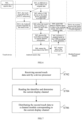
- FIG. 5 is a flowchart of processing first touch data by a device processor according to an embodiment of the present application. The above solution will be described below with reference to FIG. 5 .
- Step S51 Receiving the touch data.
- Step S52 Detecting whether the display channel changes. In case that the display channel changes, proceed with step S53, otherwise proceed with step S55.
- Step S53 Supplementing a data packet according to status of touch points.
- the data packet may be supplemented in a manner as described in step S4049, so that the touch events before and after the display channel changes are completely supplemented.
- Step S54 Updating the identifier according to the updated display channel.
- the display channel since the channel module is switched, the display channel needs to be updated.
- Each channel module corresponds to a different identifier. Therefore, the identifier of the updated channel module and the first touch data are used together to construct the second touch data.
- Step S55 Constructing the second touch data according to the identifier of the unchanged display channel.
- Step S56 Outputting the second touch data having the identifier.
- the second touch data is output to the control unit, and is distributed by the control unit to the corresponding channel module according to the identifier.
- the determining, according to the current display channel of the interactive white board, the identifier for marking the first touch data includes: Step S40411: Acquiring a target bit corresponding to the current display channel of the interactive white board, where the identifier includes multiple bits, and each bit corresponds to a channel module.
- the identifier may be one byte, which includes eight bits, and the data of each bit may indicate the corresponding channel module.
- the target bit is a currently running channel module, i.e., a channel module that needs to receive the touch data.
- the identifier can be set to two bytes usable by 16 channel modules.
- step S40413 Setting a value of the target bit in the identifier to be opposite to a value of a remaining bit to obtain the identifier for marking the first touch data.
- step S40413 if the value of the remaining bit is 0, the value of the target bit may be 1, and if the value of the remaining bit is 1, the data of the target bit may be 0. After each bit in the identifier is set to a corresponding value, the identifier of the first touch data is obtained.
- the identifier is of 1 byte (8 bits), each bit represents the output of one module, the 0-th bit represents a USB bypass of module A; the 1-st bit represents a USB bypass of module B, and so on.
- modules A, B, C, and D all need touch data, set the identifier to 0x0F (hexadecimal number, the corresponding binary is 00001111), and the MCU judges whether to output USB touch data according to the identification bit.
- the identifier is set to 0x01 (hexadecimal number, the corresponding binary is 00000001), and the MCU determines whether to output USB touch data according to the identification bit.
- the method further includes: Step S4010: Using the first touch data to drive an input subsystem.
- the above input subsystem may be an INPUT subsystem in a system processor, which is configured to manage a touch event received by the interactive white board.
- Step S4012 Responding to the first touch data.
- the first touch data reads the touch event from the system processor and executes it.
- FIG. 6 is a data interaction diagram of an optional touch event according to an embodiment of the present application. The data flow of the touch event will be described below with reference to FIG. 6 .
- Touch data circulates in the touch device, Android master chip (device processor), MCU (control unit), and module/external channel (channel module).
- Step S61 The touch device reports data.
- the touch data is generated.
- Step S62 An HID (Human interface device) drives part of HID-CORE original data.
- step S62 is used to enumerate the touch device.
- Step S63 Select a USB device as the touch device according to a PID/VID.
- the device processor can be connected to a variety of USB devices, and each USB device has a corresponding PID (Product, product ID) and VID (Product, manufacturer ID), so the touch device can be identified by the PID/VID.
- PID Product, product ID
- VID Product, manufacturer ID
- Step S64 Select out the touch data according to a report ID and a data length.
- the report ID and the data length are the characteristic information of the touch data
- the Android master chip selects the touch data out of various data according to the data characteristic of the touch data.
- Step S65 Process the touch data according to current channel information.
- step S65 may be determining the identifier of the current channel, and adding the identifier of the current channel as a data header to the touch data.
- the specific processing flow can be shown in FIG. 5 .
- Step S66 Output the touch data to the MCU.
- the Android master chip sends the touch data added with the identifier to the MCU, and the MCU performs distribution to the channel module.
- Step S67 Receive data of the touch device.
- step S67 the MCU receives the touch device data transmitted by the Android master chip.
- Step S68 Distribute a sending queue to the USB according to the identifier.
- each channel module has a corresponding sending queue.
- the MCU extracts an identifier from the touch data, determines, according to the identifier, a channel module to which the identifier needs to be sent, and then sends the touch data to the sending queue of the channel module so that each channel module that needs touch data can receive the touch data, while a channel module that does not need touch data will not receive the touch data.
- the display channel of each channel module has a corresponding sending queue for storing the received touch events, and the touch events in the sending queue are sent to the channel module in sequence according to the received order.
- Step S610 The module receives the touch data and performs a touch response.
- Step S611 The touch event drives the INPUT subsystem.
- the aforementioned INPUT subsystem is configured to manage a touch event received by the Android master chip.
- Step S612 The Android system responds to the touch event.
- an embodiment of a data processing method for an interactive white board is provided. It should be noted that the steps shown in the flowchart of the accompanying drawings can be executed in a computer system with a set of computer executable instructions, for example. Moreover, although a logical sequence is shown in the flowchart, in some cases, the steps shown or described may be performed in an order different from that.
- FIG. 7 is a flowchart of a data processing method for an interactive white board according to an embodiment of the present application.
- the data processing method for the interactive white board provided in this embodiment can be applied to the interactive white board in Embodiment 1.
- the method includes the following steps: Step S702: Receiving second touch data sent by a device processor, where the second touch data includes an identifier corresponding to a current display channel of the interactive white board.
- the steps in this embodiment may be executed by the first control unit in Embodiment 1.
- the second touch data is generated by the device processor according to the identifier of the currently running channel module and the first touch data.
- Step S704 Reading the identifier and determining the current display channel.
- control unit may determine the channel module corresponding to the touch data according to the identifier.
- Step S706 Distributing the second touch data to a channel module corresponding to the current display channel.
- the channel module can respond to the second touch data.
- second touch data sent by a device processor is received, where the second touch data includes an identifier corresponding to a current display channel; the identifier is read and the current display channel is determined; and the second touch data is distributed to a channel module corresponding to the current display channel.
- touch data is marked to enable a control unit to distribute the touch data to a corresponding channel module, and thus a connection relationship between the channel module and the control unit can be maintained without the requirement of disconnection and reconnection through a switch.
- the interactive white board first enumerates the touch device when it is turned on, there is no need to re-enumerate the USB device, thereby solving the technical problem in the prior art that there is excessive time consumption due to the necessity of re-enumerating a touch device when a touch display channel is switched through a switch.
- the touch device can be used immediately after the display channel is switched, which improves user comfort.
- the distributing the second touch data to the channel module corresponding to the current display channel includes: Step S7061: Sending the second touch data to a data queue of the channel module.
- Step S7063 Sequentially distributing the second touch data in the data queue to the channel module.
- FIG. 8 is a schematic diagram of a data processing device for an interactive white board according to an embodiment of the present application. As shown in FIG. 8 , the device includes:
- FIG. 9 is a schematic diagram of a data processing device for an interactive white board according to an embodiment of the present application. As shown in FIG. 9 , the device includes:
- a storage medium includes a stored program, where when the program is running, an interactive white board in which the storage medium is located is controlled to perform the following steps: receiving first touch data generated by a touch device; marking the first touch data according to a current display channel of the interactive white board to obtain second touch data, where the second touch data includes an identifier corresponding to the current display channel; and sending the second touch data to a control unit, where the control unit is further configured to distribute the second touch data to the corresponding display channel according to the identifier.
- a processor configured to run a program, where the program executes the following steps when the program is running: receiving first touch data generated by a touch device; and marking the first touch according to a current display channel of an interactive white board to obtain second touch data, where the second touch data includes an identifier corresponding to the current display channel; and sending the second touch data to a control unit, where the control unit is further configured to distribute the second touch data to the corresponding display channel according to the identifier.
- the disclosed technical content can be implemented in other ways.
- the device embodiments described above are merely illustrative.
- the division of the units can be a logical function division, and there can be other divisions in actual implementation, for example, multiple units or components can be combined or integrated into another system, or some features can be ignored or not implemented.
- the displayed or discussed mutual coupling or direct coupling or communication connection may be indirect coupling or communication connection through some interfaces, units or modules, and may be in electrical or other form.
- the units described as separate components may or may not be physically separated, and the components displayed as units may or may not be physical units, that is, they may be located in one place, or they may be distributed on multiple units. Some or all of the units may be selected according to actual needs to achieve the objectives of the solutions of the embodiments.
- each unit in each embodiment of the present application may be integrated into one processing unit, or each unit may exist alone physically, or two or more units may be integrated into one unit.
- the above-mentioned integrated unit can be implemented in the form of hardware or software functional unit.
- the integrated unit is implemented in the form of a software functional unit and sold or used as an independent product, it can be stored in a computer readable storage medium.
- the technical solutions of the present application essentially or the part that contributes to the prior art or all or part of the technical solutions can be embodied in the form of a software product, and the computer software product is stored in a storage medium which includes several instructions enabling a computer device (which can be a personal computer, a server, or a network device, etc.) to execute all or part of the steps of the method described in each embodiment of the present application.
- the aforementioned storage media includes: a U disk, a read-only memory (ROM, Read-Only Memory), a random access memory (RAM, Random Access Memory), a mobile hard disk, a magnetic disk or an optical disk and other media on which program codes can be stored.
- the data processing method, device, system for interactive white board and the interactive white board provided in at least some of the embodiments of the present application have the following beneficial effects: touch data is marked to enable a control unit to distribute the touch data to a corresponding channel module, and thus a connection relationship between the channel module and the control unit can be maintained without the requirement of disconnection and reconnection through a switch. Therefore, after the interactive white board is turned on again, there is no need to re-enumerate the USB device, thereby solving the technical problem in the prior art that there is excessive time consumption due to the necessity of re-enumerating a touch device when a touch display channel is switched through a switch. Moreover, the touch device can be used immediately after the display channel is switched, which improves user comfort.
Landscapes
- Engineering & Computer Science (AREA)
- Theoretical Computer Science (AREA)
- General Engineering & Computer Science (AREA)
- Physics & Mathematics (AREA)
- General Physics & Mathematics (AREA)
- Human Computer Interaction (AREA)
- Computer Hardware Design (AREA)
- User Interface Of Digital Computer (AREA)
Claims (14)
- Interaktives Whiteboard, umfassend: eine Berührungsvorrichtung (10), ein Vorrichtungsprozessor (12), eine erste Steuereinheit (14) und mehrere erste Kanalmodule (16), wobei die Berührungsvorrichtung (10) mit dem Vorrichtungsprozessor (12) verbunden ist, der Vorrichtungsprozessor (12) mit der Berührungsvorrichtung (10) und der ersten Steuereinheit (14) verbunden ist, und die erste Steuereinheit (14) mit dem Vorrichtungsprozessor (12) und den mehreren ersten Kanalmodulen (16) verbunden ist, wobei:die Berührungsvorrichtung (10) ist so konfiguriert, dass sie die ersten Berührungsdaten erzeugt und die ersten Berührungsdaten an den Vorrichtungsprozessor (12) sendet;der Vorrichtungsprozessor (12) so konfiguriert ist, dass er die ersten Berührungsdaten entsprechend einem aktuellen Anzeigekanal markiert, um zweite Berührungsdaten zu erzeugen und die zweiten Berührungsdaten an die erste Steuereinheit (14) zu senden, wobei die zweiten Berührungsdaten einen Identifikator umfassen, der dem aktuellen Anzeigekanal entspricht;die erste Steuereinheit (14) so konfiguriert ist, dass sie die zweiten Berührungsdaten an ein entsprechendes der mehreren ersten Kanalmodule (16) entsprechend dem Identifikator, der dem aktuellen Anzeigekanal entspricht, verteilt; unddas erste Kanalmodul (16), so konfiguriert ist, dass es die zweiten Berührungsdaten empfängt und eine Berührungsantwort gibt,dadurch gekennzeichnet, dass der Vorrichtungsprozessor (12) ferner so konfiguriert ist, vor der Bestimmung des Identifikators zur Markierung der ersten Berührungsdaten entsprechend dem aktuellen Anzeigekanal des interaktiven Whiteboards die folgenden Schritte auszuführen:Erkennen, ob sich der Anzeigekanal ändert, wobei sich der Anzeigekanal ändert, wenn das interaktive Whiteboard ein Kanalmodul wechselt;wenn sich der Anzeigekanal ändert, erkennen, ob ein letzter Satz von Berührungsdaten vor dem Wechsel des Anzeigekanals in seiner Integrität ist, undwenn der letzte Satz von Berührungsdaten vor dem Wechsel des Anzeigekanals nicht in seiner Integrität ist, zusätzliche Punkte verwenden, um einen Endpunkt des letzten Satzes von Berührungsdaten vor dem Wechsel des Anzeigekanals und einen Startpunkt eines ersten Satzes von Berührungsdaten nach dem Wechsel des Anzeigekanals zu ergänzen, wobei die zusätzlichen Punkte erste Berührungspunkte nach dem Wechsel des Anzeigekanals sind.
- Interaktives Whiteboard nach Anspruch 1, ferner umfassend:mindestens eine zweite Steuereinheit, wobei die zweite Steuereinheit in Reihe mit dem ersten Steuereinheit verbunden ist, wobei die zweite Steuereinheit ist über entsprechende Anzeigekanäle mit mehreren zweiten Kanalmodulen verbunden;wobei die erste Steuereinheit ferner so konfiguriert ist, dass sie die zweiten Berührungsdaten an die zweite Steuereinheit sendet, wenn der den zweiten Berührungsdaten entsprechende Anzeigekanal ein Anzeigekanal eines beliebigen zweiten Kanalmoduls ist, und die zweite Steuereinheit so konfiguriert ist, dass sie die empfangenen zweiten Berührungsdaten an ein entsprechendes der mehreren zweiten Kanalmodulen sendet.
- Interaktives Whiteboard nach Anspruch 1 oder Anspruch 2, wobei der Identifikator umfasst mindestens ein Byte, und ein Bit des Bytes entspricht einem der ersten Kanalmodule.
- Interaktives Whiteboard nach Anspruch 1 oder Anspruch 2, wobei die Berührungsvorrichtung (10) eine elektromagnetische Berührungsvorrichtung, eine Infrarot-Berührungsvorrichtung oder eine kapazitive Berührungsvorrichtung ist und der erste Kanal ein PC-Modul, ein Android-Modul oder ein Ausgangsmodul ist.
- Datenverarbeitungsverfahren für ein Interaktives Whiteboard, umfassend:Empfang erster Berührungsdaten, die von einer Berührungsvorrichtung (10) erzeugt werden;Markierung der ersten Berührungsdaten entsprechend einem aktuellen Anzeigekanal des interaktiven Whiteboards, um zweite Berührungsdaten zu erzeugen, wobei die zweiten Berührungsdaten einen dem aktuellen Anzeigekanal entsprechenden Identifikator umfassen; undSendung der zweiten Berührungsdaten an eine Kanalsteuereinheit, wobei die Steuereinheit so konfiguriert ist, dass sie die zweiten Berührungsdaten entsprechend dem Identifikator an den entsprechenden Anzeigekanal verteilt;Empfang der zweiten Berührungsdaten und Durchführung einer Berührungsantwort durch das Kanalmodul;dadurch gekennzeichnet, dass das Datenverarbeitungsverfahren vor der Bestimmung des Identifikators für die Markierung der ersten Berührungsdaten entsprechend dem aktuellen Anzeigekanal des interaktiven Whiteboards ferner die folgenden Schritte umfasst:Erkennen, ob sich der Anzeigekanal ändert, wobei sich der Anzeigekanal ändert, wenn das interaktive Whiteboard ein Kanalmodul wechselt;wenn sich der Anzeigekanal ändert, Erkennen, ob ein letzter Satz von Berührungsdaten vor dem Wechsel des Anzeigekanals in seiner Integrität ist; undwenn der letzte Satz von Berührungsdaten vor dem Wechsel des Anzeigekanals nicht in seiner Integrität ist, zusätzlicher Punkte verwenden, um einen Endpunkt des letzten Satzes von Berührungsdaten vor dem Wechsel des Anzeigekanals und einen Startpunkt eines ersten Satzes von Berührungsdaten nach dem Wechsel des Anzeigekanals zu ergänzen, wobei die zusätzlichen Punkte erste Berührungspunkte nach dem Wechsel des Anzeigekanals sind.
- Verfahren nach Anspruch 5, wobei das Empfangen der ersten von der Berührungsvorrichtung erzeugten Berührungsdaten Folgendes umfasst:die Aufzählung der Berührungsvorrichtung;Auswahl von Daten, die von der Berührungsvorrichtung erzeugt wurden, aus den empfangenen Daten entsprechend einem Vorrichtungsidentifikator der Berührungsvorrichtung; undAuswahl der Berührungsdaten aus den von der Berührungsvorrichtung erzeugten Daten als erste Berührungsdaten entsprechend den charakteristischen Informationen der Berührungsdaten.
- Verfahren nach Anspruch 5 oder Anspruch 6, wobei die Markierung der ersten Berührungsdaten entsprechend dem aktuellen Anzeigekanal des interaktiven Whiteboards zum Erzeugen der zweiten Berührungsdaten ferner umfasst:Bestimmen eines Identifikators zur Markierung der ersten Berührungsdaten entsprechend dem aktuellen Anzeigekanal des interaktiven Whiteboards; undEinfügen des Identifikators in ein Datenpaket der ersten Berührungsdaten und Markieren der ersten Berührungsdaten entsprechend dem Identifikator, um die zweiten Berührungsdaten zu erzeugen.
- Verfahren nach Anspruch 7, wobei ein Anzeigekanal einen entsprechenden Identifikator hat.
- Verfahren nach einem der Ansprüche 5 bis 8, wobei die Bestimmung des Identifikators für die Markierung der ersten Berührungsdaten entsprechend dem aktuellen Anzeigekanal des interaktiven Whiteboards umfasst:Erfassen eines Zielbits, das dem aktuellen Anzeigekanal des interaktiven Whiteboards entspricht, wobei der Identifikator mehrere Bits umfasst und jedes Bit einem Anzeigekanal entspricht; undSetzen eines Wertes des Zielbits im Identifikator, so dass er einem Wert eines verbleibenden Bits entgegengesetzt ist, um den Identifikator zur Markierung der ersten Berührungsdaten zu erzeugen.
- Verfahren nach Anspruch 6, wobei das Verfahren nach dem Aufzählen des Berührungsvorrichtungs ferner umfasst:Verwendung der ersten Berührungsdaten zur Ansteuerung eines Eingabe-Subsystems; undReagieren auf die ersten Berührungsdaten.
- Verfahren nach einem der Ansprüche 5 bis 10, wobei das Senden der zweiten Berührungsdaten an das entsprechende Kanalmodul entsprechend dem dem aktuellen Anzeigekanal entsprechenden Identifikator umfasst:Sendung der zweiten Berührungsdaten an eine Datenwarteschlange des Kanalmoduls; undsequentielle Verteilung der zweiten Berührungsdaten in der Datenwarteschlange an das Kanalmodul.
- Verfahren nach einem der Ansprüche 5 bis 11, wobei die Berührungsvorrichtung eine elektromagnetische Berührungsvorrichtung, eine Infrarot-Berührungsvorrichtung oder eine kapazitive Berührungsvorrichtung ist und der erste Kanal ein PC-Modul, ein Android-Modul oder ein Ausgangsmodul ist.
- Speichermedium, das ein gespeichertes Programm umfasst, wobei, wenn das Programm läuft, ein Interaktives Whiteboard, in der sich das Speichermedium befindet, gesteuert wird, um die folgenden Schritte auszuführen: Empfangen erster Berührungsdaten, die durch eine Berührungsvorrichtung erzeugt werden; Markieren der ersten Berührungsdaten entsprechend einem aktuellen Anzeigekanal des interaktiven Whiteboards, um zweite Berührungsdaten zu erzeugen, wobei die zweiten Berührungsdaten einen Identifikator umfassen, der dem aktuellen Anzeigekanal entspricht; Senden der zweiten Berührungsdaten an eine Steuereinheit, wobei die Steuereinheit ferner so konfiguriert ist, dass sie die zweiten Berührungsdaten entsprechend dem Identifikator an den entsprechenden Anzeigekanal verteilt;
dadurch gekennzeichnet, dass das Interaktives Whiteboard ferner so gesteuert wird, um vor der Bestimmung des Identifikators für die Markierung der ersten Berührungsdaten entsprechend dem aktuellen Anzeigekanal des interaktiven Whiteboards die folgenden Schritte auszuführen:Erkennen, ob sich der Anzeigekanal ändert, wobei sich der Anzeigekanal ändert, wenn das interaktive Whiteboard ein Kanalmodul wechselt;wenn sich der Anzeigekanal ändert, Erkennen, ob ein letzter Satz von Berührungsdaten vor dem Wechsel des Anzeigekanals in seiner Integrität ist, undwenn der letzte Satz von Berührungsdaten vor dem Wechsel des Anzeigekanals nicht in seinem Integrität ist, zusätzliche Punkte verwenden, um einen Endpunkt des letzten Satzes von Berührungsdaten vor dem Wechsel des Anzeigekanals und einen Startpunkt eines ersten Satzes von Berührungsdaten nach dem Wechsel des Anzeigekanals zu ergänzen, wobei die zusätzlichen Punkte erste Berührungspunkte nach dem Wechsel des Anzeigekanals sind. - Ein Prozessor, der so konfiguriert ist, dass er ein Programm ausführt, wobei das Programm die folgende Schritte ausführt, wenn das Programm läuft: Empfangen von ersten Berührungsdaten, die von einer Berührungsvorrichtung erzeugt werden; Markieren der ersten Berührungsdaten entsprechend einem aktuellen Anzeigekanal eines interaktiven Whiteboards, um zweite Berührungsdaten zu erzeugen, wobei die zweiten Berührungsdaten einen Identifikator umfassen, der dem aktuellen Anzeigekanal entspricht; Senden der zweiten Berührungsdaten an eine Steuereinheit, wobei die Steuereinheit ferner so konfiguriert ist, dass sie die zweiten Berührungsdaten entsprechend dem Identifikator an den entsprechenden Anzeigekanal verteilt;
dadurch gekennzeichnet, dass das Programm vor der Bestimmung des Identifikators für die Markierung der ersten Berührungsdaten entsprechend dem aktuellen Anzeigekanal des interaktiven Whiteboards die folgenden Schritte ausführt:Erkennen, ob sich der Anzeigekanal ändert, wobei sich der Anzeigekanal ändert, wenn das interaktive Whiteboard ein Kanalmodul wechselt;wenn sich der Anzeigekanal ändert, Erkennen, ob ein letzter Satz von Berührungsdaten vor dem Wechsel des Anzeigekanals in seiner Integrität ist; undwenn der letzte Satz von Berührungsdaten vor dem Wechsel des Anzeigekanals nicht in seiner Integrität ist, zusätzliche Punkte verwenden, um einen Endpunkt des letzten Satzes von Berührungsdaten vor dem Wechsel des Anzeigekanals und einen Startpunkt eines ersten Satzes von Berührungsdaten nach dem Wechsel des Anzeigekanals zu ergänzen, wobei die zusätzlichen Punkte erste Berührungspunkte nach dem Wechsel des Anzeigekanals sind.
Applications Claiming Priority (2)
| Application Number | Priority Date | Filing Date | Title |
|---|---|---|---|
| CN201810311724.6A CN108845613B (zh) | 2018-04-09 | 2018-04-09 | 交互智能平板及其数据处理方和装置 |
| PCT/CN2018/118240 WO2019196426A1 (zh) | 2018-04-09 | 2018-11-29 | 交互智能平板及其数据处理方和装置 |
Publications (4)
| Publication Number | Publication Date |
|---|---|
| EP3779635A1 EP3779635A1 (de) | 2021-02-17 |
| EP3779635A4 EP3779635A4 (de) | 2021-10-13 |
| EP3779635C0 EP3779635C0 (de) | 2025-06-04 |
| EP3779635B1 true EP3779635B1 (de) | 2025-06-04 |
Family
ID=64211912
Family Applications (1)
| Application Number | Title | Priority Date | Filing Date |
|---|---|---|---|
| EP18914398.5A Active EP3779635B1 (de) | 2018-04-09 | 2018-11-29 | Interaktives intelligentes tablet und datenverarbeitungsverfahren sowie vorrichtung dafür |
Country Status (4)
| Country | Link |
|---|---|
| EP (1) | EP3779635B1 (de) |
| CN (1) | CN108845613B (de) |
| ES (1) | ES3039827T3 (de) |
| WO (1) | WO2019196426A1 (de) |
Families Citing this family (2)
| Publication number | Priority date | Publication date | Assignee | Title |
|---|---|---|---|---|
| CN108845613B (zh) * | 2018-04-09 | 2021-07-09 | 广州视源电子科技股份有限公司 | 交互智能平板及其数据处理方和装置 |
| US11573657B2 (en) | 2018-04-09 | 2023-02-07 | Guangzhou Shiyuan Electronics Co., Ltd. | Interactive white board and data processing method and device for same |
Family Cites Families (15)
| Publication number | Priority date | Publication date | Assignee | Title |
|---|---|---|---|---|
| US8535133B2 (en) * | 2009-11-16 | 2013-09-17 | Broadcom Corporation | Video game with controller sensing player inappropriate activity |
| CN102338638B (zh) * | 2010-07-26 | 2014-08-13 | 北京旅行者科技有限公司 | 一种导航设备及其地图数据更新方法 |
| KR20130084002A (ko) * | 2012-01-16 | 2013-07-24 | 허홍 | 터치위치와 방향에 따라 제공하는 메뉴를 달리하도록 터치스크린이 구비된 텔레비전 리모콘 및 이를 이용한 사용자 인터페이스 제공 방법 |
| US8884906B2 (en) * | 2012-12-21 | 2014-11-11 | Intel Corporation | Offloading touch processing to a graphics processor |
| JP6177876B2 (ja) * | 2013-03-15 | 2017-08-09 | シャープ株式会社 | タッチパネルシステム |
| CN103186323B (zh) * | 2013-04-07 | 2017-12-26 | 广州视睿电子科技有限公司 | 一体机及其触摸菜单的调出方法 |
| CN103345365B (zh) * | 2013-07-12 | 2016-04-13 | 北京蒙恬科技有限公司 | 连续手写输入的显示方法及采用该方法的手写输入装置 |
| CN103780938B (zh) * | 2014-01-24 | 2017-01-04 | 青岛海信电器股份有限公司 | 一种触摸电视及其控制方法及控制装置 |
| CN105607859B (zh) * | 2016-03-02 | 2018-12-11 | 腾讯科技(深圳)有限公司 | 一种数据处理方法和装置 |
| CN206557752U (zh) * | 2016-12-31 | 2017-10-13 | 北京仁光科技有限公司 | 识别电子设备的智能交互系统 |
| CN106990908B (zh) * | 2017-04-06 | 2020-06-16 | 广州视源电子科技股份有限公司 | 一种局部触摸屏蔽方法、装置、系统、设备及存储介质 |
| CN107102772B (zh) * | 2017-04-25 | 2020-06-19 | 北京小米移动软件有限公司 | 触控方法及装置 |
| CN107340967A (zh) * | 2017-07-10 | 2017-11-10 | 广州视源电子科技股份有限公司 | 一种智能设备及其操作方法和装置及计算机存储介质 |
| CN111444130B (zh) * | 2017-07-12 | 2021-10-26 | 广州视源电子科技股份有限公司 | 一种一体机 |
| CN108845613B (zh) * | 2018-04-09 | 2021-07-09 | 广州视源电子科技股份有限公司 | 交互智能平板及其数据处理方和装置 |
-
2018
- 2018-04-09 CN CN201810311724.6A patent/CN108845613B/zh active Active
- 2018-11-29 EP EP18914398.5A patent/EP3779635B1/de active Active
- 2018-11-29 ES ES18914398T patent/ES3039827T3/es active Active
- 2018-11-29 WO PCT/CN2018/118240 patent/WO2019196426A1/zh not_active Ceased
Also Published As
| Publication number | Publication date |
|---|---|
| WO2019196426A1 (zh) | 2019-10-17 |
| EP3779635A1 (de) | 2021-02-17 |
| CN108845613B (zh) | 2021-07-09 |
| EP3779635C0 (de) | 2025-06-04 |
| ES3039827T3 (en) | 2025-10-24 |
| EP3779635A4 (de) | 2021-10-13 |
| CN108845613A (zh) | 2018-11-20 |
Similar Documents
| Publication | Publication Date | Title |
|---|---|---|
| US7895386B2 (en) | USB interface provided with host/device function and its control method | |
| US10269325B2 (en) | Display system for an array of video displays | |
| US10585832B2 (en) | Apparatus and methods for dynamic role switching among USB hosts and devices | |
| CN102063320B (zh) | 工作模式切换方法、usb设备和主机设备 | |
| US20120272088A1 (en) | Dynamic bus clock rate adjusting method and device | |
| CN106557446B (zh) | 总线系统 | |
| US20020011516A1 (en) | Smart card virtual hub | |
| US9201833B2 (en) | Backplane controller capable of transferring and receiving data through USB interface | |
| CN118672367A (zh) | 一种计算机系统、带宽配置方法、产品、服务器以及介质 | |
| WO2024103829A1 (zh) | 一种端口配置方法、组件及硬盘扩展装置 | |
| US20170116146A1 (en) | Control method and control device for a mobile terminal | |
| EP3779635A1 (de) | Interaktives intelligentes tablet und datenverarbeitungsverfahren sowie vorrichtung dafür | |
| CN115237234B (zh) | 一种支持不同型号智能网卡的方法、装置、设备及介质 | |
| CN113259603B (zh) | 一种视频多功能一体化控制方法、装置、设备及存储介质 | |
| CN112463691B (zh) | 一种基于i2c的线路切换电路和通信系统 | |
| CN108108314B (zh) | 交换器系统 | |
| US11573657B2 (en) | Interactive white board and data processing method and device for same | |
| US20070204070A1 (en) | USB device, USB system and recording medium storing USB control program | |
| CN106095123A (zh) | 一种kvm一体机虚拟多路usb键鼠设备的方法 | |
| CN111221583B (zh) | 多智能卡启动管理装置及系统 | |
| CN117008968A (zh) | 一种控制方法、装置、通信设备、电子设备及介质 | |
| CN114415875A (zh) | 智慧交互平板及其功能设置方法、外接pc设备 | |
| EP1669880B1 (de) | Vorrichtung zur Identifikation eines Trägers | |
| CN122044501A (zh) | 一种显示输出方法、计算机设备及存储介质 | |
| CN112817885A (zh) | 一种数据访问控制方法、可编程逻辑器件及电子设备 |
Legal Events
| Date | Code | Title | Description |
|---|---|---|---|
| STAA | Information on the status of an ep patent application or granted ep patent |
Free format text: STATUS: THE INTERNATIONAL PUBLICATION HAS BEEN MADE |
|
| PUAI | Public reference made under article 153(3) epc to a published international application that has entered the european phase |
Free format text: ORIGINAL CODE: 0009012 |
|
| STAA | Information on the status of an ep patent application or granted ep patent |
Free format text: STATUS: REQUEST FOR EXAMINATION WAS MADE |
|
| 17P | Request for examination filed |
Effective date: 20201030 |
|
| AK | Designated contracting states |
Kind code of ref document: A1 Designated state(s): AL AT BE BG CH CY CZ DE DK EE ES FI FR GB GR HR HU IE IS IT LI LT LU LV MC MK MT NL NO PL PT RO RS SE SI SK SM TR |
|
| AX | Request for extension of the european patent |
Extension state: BA ME |
|
| RIC1 | Information provided on ipc code assigned before grant |
Ipc: G06F 1/16 20060101AFI20210421BHEP Ipc: G06F 3/041 20060101ALI20210421BHEP |
|
| DAV | Request for validation of the european patent (deleted) | ||
| DAX | Request for extension of the european patent (deleted) | ||
| A4 | Supplementary search report drawn up and despatched |
Effective date: 20210909 |
|
| RIC1 | Information provided on ipc code assigned before grant |
Ipc: G09G 3/20 20060101ALI20210903BHEP Ipc: G06F 3/041 20060101ALI20210903BHEP Ipc: G06F 1/16 20060101AFI20210903BHEP |
|
| RAP3 | Party data changed (applicant data changed or rights of an application transferred) |
Owner name: GUANGZHOU SHIZHEN INFORMATION TECHNOLOGY CO., LTD. Owner name: GUANGZHOU SHIYUAN ELECTRONIC TECHNOLOGY COMPANY LIMITED |
|
| GRAP | Despatch of communication of intention to grant a patent |
Free format text: ORIGINAL CODE: EPIDOSNIGR1 |
|
| STAA | Information on the status of an ep patent application or granted ep patent |
Free format text: STATUS: GRANT OF PATENT IS INTENDED |
|
| INTG | Intention to grant announced |
Effective date: 20250120 |
|
| GRAS | Grant fee paid |
Free format text: ORIGINAL CODE: EPIDOSNIGR3 |
|
| GRAA | (expected) grant |
Free format text: ORIGINAL CODE: 0009210 |
|
| STAA | Information on the status of an ep patent application or granted ep patent |
Free format text: STATUS: THE PATENT HAS BEEN GRANTED |
|
| AK | Designated contracting states |
Kind code of ref document: B1 Designated state(s): AL AT BE BG CH CY CZ DE DK EE ES FI FR GB GR HR HU IE IS IT LI LT LU LV MC MK MT NL NO PL PT RO RS SE SI SK SM TR |
|
| REG | Reference to a national code |
Ref country code: GB Ref legal event code: FG4D |
|
| REG | Reference to a national code |
Ref country code: CH Ref legal event code: EP |
|
| REG | Reference to a national code |
Ref country code: DE Ref legal event code: R096 Ref document number: 602018082486 Country of ref document: DE |
|
| REG | Reference to a national code |
Ref country code: IE Ref legal event code: FG4D |
|
| U01 | Request for unitary effect filed |
Effective date: 20250624 |
|
| U07 | Unitary effect registered |
Designated state(s): AT BE BG DE DK EE FI FR IT LT LU LV MT NL PT RO SE SI Effective date: 20250701 |
|
| PG25 | Lapsed in a contracting state [announced via postgrant information from national office to epo] |
Ref country code: GR Free format text: LAPSE BECAUSE OF FAILURE TO SUBMIT A TRANSLATION OF THE DESCRIPTION OR TO PAY THE FEE WITHIN THE PRESCRIBED TIME-LIMIT Effective date: 20250905 Ref country code: NO Free format text: LAPSE BECAUSE OF FAILURE TO SUBMIT A TRANSLATION OF THE DESCRIPTION OR TO PAY THE FEE WITHIN THE PRESCRIBED TIME-LIMIT Effective date: 20250904 |
|
| PG25 | Lapsed in a contracting state [announced via postgrant information from national office to epo] |
Ref country code: PL Free format text: LAPSE BECAUSE OF FAILURE TO SUBMIT A TRANSLATION OF THE DESCRIPTION OR TO PAY THE FEE WITHIN THE PRESCRIBED TIME-LIMIT Effective date: 20250604 |
|
| PG25 | Lapsed in a contracting state [announced via postgrant information from national office to epo] |
Ref country code: HR Free format text: LAPSE BECAUSE OF FAILURE TO SUBMIT A TRANSLATION OF THE DESCRIPTION OR TO PAY THE FEE WITHIN THE PRESCRIBED TIME-LIMIT Effective date: 20250604 |
|
| PG25 | Lapsed in a contracting state [announced via postgrant information from national office to epo] |
Ref country code: RS Free format text: LAPSE BECAUSE OF FAILURE TO SUBMIT A TRANSLATION OF THE DESCRIPTION OR TO PAY THE FEE WITHIN THE PRESCRIBED TIME-LIMIT Effective date: 20250904 |
|
| REG | Reference to a national code |
Ref country code: ES Ref legal event code: FG2A Ref document number: 3039827 Country of ref document: ES Kind code of ref document: T3 Effective date: 20251024 |
|
| PG25 | Lapsed in a contracting state [announced via postgrant information from national office to epo] |
Ref country code: IS Free format text: LAPSE BECAUSE OF FAILURE TO SUBMIT A TRANSLATION OF THE DESCRIPTION OR TO PAY THE FEE WITHIN THE PRESCRIBED TIME-LIMIT Effective date: 20251004 |
|
| PGFP | Annual fee paid to national office [announced via postgrant information from national office to epo] |
Ref country code: GB Payment date: 20251121 Year of fee payment: 8 |
|
| PG25 | Lapsed in a contracting state [announced via postgrant information from national office to epo] |
Ref country code: SM Free format text: LAPSE BECAUSE OF FAILURE TO SUBMIT A TRANSLATION OF THE DESCRIPTION OR TO PAY THE FEE WITHIN THE PRESCRIBED TIME-LIMIT Effective date: 20250604 |
|
| PG25 | Lapsed in a contracting state [announced via postgrant information from national office to epo] |
Ref country code: CZ Free format text: LAPSE BECAUSE OF FAILURE TO SUBMIT A TRANSLATION OF THE DESCRIPTION OR TO PAY THE FEE WITHIN THE PRESCRIBED TIME-LIMIT Effective date: 20250604 |
|
| PG25 | Lapsed in a contracting state [announced via postgrant information from national office to epo] |
Ref country code: SK Free format text: LAPSE BECAUSE OF FAILURE TO SUBMIT A TRANSLATION OF THE DESCRIPTION OR TO PAY THE FEE WITHIN THE PRESCRIBED TIME-LIMIT Effective date: 20250604 |
|
| PGFP | Annual fee paid to national office [announced via postgrant information from national office to epo] |
Ref country code: ES Payment date: 20251229 Year of fee payment: 8 |
|
| PLBE | No opposition filed within time limit |
Free format text: ORIGINAL CODE: 0009261 |
|
| STAA | Information on the status of an ep patent application or granted ep patent |
Free format text: STATUS: NO OPPOSITION FILED WITHIN TIME LIMIT |
|
| REG | Reference to a national code |
Ref country code: CH Ref legal event code: L10 Free format text: ST27 STATUS EVENT CODE: U-0-0-L10-L00 (AS PROVIDED BY THE NATIONAL OFFICE) Effective date: 20260416 |
|
| 26N | No opposition filed |
Effective date: 20260305 |