EP3373123A1 - Verfahren und vorrichtung zur darstellung von empfohlenen bedienhandlungen eines vorschlagssystems und interaktion mit dem vorschlagssystem - Google Patents
Verfahren und vorrichtung zur darstellung von empfohlenen bedienhandlungen eines vorschlagssystems und interaktion mit dem vorschlagssystem Download PDFInfo
- Publication number
- EP3373123A1 EP3373123A1 EP18156986.4A EP18156986A EP3373123A1 EP 3373123 A1 EP3373123 A1 EP 3373123A1 EP 18156986 A EP18156986 A EP 18156986A EP 3373123 A1 EP3373123 A1 EP 3373123A1
- Authority
- EP
- European Patent Office
- Prior art keywords
- display
- recommended
- software application
- displayed
- control element
- Prior art date
- Legal status (The legal status is an assumption and is not a legal conclusion. Google has not performed a legal analysis and makes no representation as to the accuracy of the status listed.)
- Granted
Links
Images



Classifications
-
- G—PHYSICS
- G06—COMPUTING OR CALCULATING; COUNTING
- G06F—ELECTRIC DIGITAL DATA PROCESSING
- G06F3/00—Input arrangements for transferring data to be processed into a form capable of being handled by the computer; Output arrangements for transferring data from processing unit to output unit, e.g. interface arrangements
- G06F3/01—Input arrangements or combined input and output arrangements for interaction between user and computer
- G06F3/048—Interaction techniques based on graphical user interfaces [GUI]
- G06F3/0481—Interaction techniques based on graphical user interfaces [GUI] based on specific properties of the displayed interaction object or a metaphor-based environment, e.g. interaction with desktop elements like windows or icons, or assisted by a cursor's changing behaviour or appearance
-
- G—PHYSICS
- G06—COMPUTING OR CALCULATING; COUNTING
- G06N—COMPUTING ARRANGEMENTS BASED ON SPECIFIC COMPUTATIONAL MODELS
- G06N5/00—Computing arrangements using knowledge-based models
- G06N5/02—Knowledge representation; Symbolic representation
-
- G—PHYSICS
- G06—COMPUTING OR CALCULATING; COUNTING
- G06F—ELECTRIC DIGITAL DATA PROCESSING
- G06F3/00—Input arrangements for transferring data to be processed into a form capable of being handled by the computer; Output arrangements for transferring data from processing unit to output unit, e.g. interface arrangements
- G06F3/01—Input arrangements or combined input and output arrangements for interaction between user and computer
- G06F3/048—Interaction techniques based on graphical user interfaces [GUI]
- G06F3/0487—Interaction techniques based on graphical user interfaces [GUI] using specific features provided by the input device, e.g. functions controlled by the rotation of a mouse with dual sensing arrangements, or of the nature of the input device, e.g. tap gestures based on pressure sensed by a digitiser
- G06F3/0488—Interaction techniques based on graphical user interfaces [GUI] using specific features provided by the input device, e.g. functions controlled by the rotation of a mouse with dual sensing arrangements, or of the nature of the input device, e.g. tap gestures based on pressure sensed by a digitiser using a touch-screen or digitiser, e.g. input of commands through traced gestures
- G06F3/04883—Interaction techniques based on graphical user interfaces [GUI] using specific features provided by the input device, e.g. functions controlled by the rotation of a mouse with dual sensing arrangements, or of the nature of the input device, e.g. tap gestures based on pressure sensed by a digitiser using a touch-screen or digitiser, e.g. input of commands through traced gestures for inputting data by handwriting, e.g. gesture or text
-
- G—PHYSICS
- G06—COMPUTING OR CALCULATING; COUNTING
- G06F—ELECTRIC DIGITAL DATA PROCESSING
- G06F9/00—Arrangements for program control, e.g. control units
- G06F9/06—Arrangements for program control, e.g. control units using stored programs, i.e. using an internal store of processing equipment to receive or retain programs
- G06F9/44—Arrangements for executing specific programs
- G06F9/451—Execution arrangements for user interfaces
-
- B—PERFORMING OPERATIONS; TRANSPORTING
- B60—VEHICLES IN GENERAL
- B60K—ARRANGEMENT OR MOUNTING OF PROPULSION UNITS OR OF TRANSMISSIONS IN VEHICLES; ARRANGEMENT OR MOUNTING OF PLURAL DIVERSE PRIME-MOVERS IN VEHICLES; AUXILIARY DRIVES FOR VEHICLES; INSTRUMENTATION OR DASHBOARDS FOR VEHICLES; ARRANGEMENTS IN CONNECTION WITH COOLING, AIR INTAKE, GAS EXHAUST OR FUEL SUPPLY OF PROPULSION UNITS IN VEHICLES
- B60K35/00—Instruments specially adapted for vehicles; Arrangement of instruments in or on vehicles
- B60K35/10—Input arrangements, i.e. from user to vehicle, associated with vehicle functions or specially adapted therefor
-
- B—PERFORMING OPERATIONS; TRANSPORTING
- B60—VEHICLES IN GENERAL
- B60K—ARRANGEMENT OR MOUNTING OF PROPULSION UNITS OR OF TRANSMISSIONS IN VEHICLES; ARRANGEMENT OR MOUNTING OF PLURAL DIVERSE PRIME-MOVERS IN VEHICLES; AUXILIARY DRIVES FOR VEHICLES; INSTRUMENTATION OR DASHBOARDS FOR VEHICLES; ARRANGEMENTS IN CONNECTION WITH COOLING, AIR INTAKE, GAS EXHAUST OR FUEL SUPPLY OF PROPULSION UNITS IN VEHICLES
- B60K35/00—Instruments specially adapted for vehicles; Arrangement of instruments in or on vehicles
- B60K35/60—Instruments characterised by their location or relative disposition in or on vehicles
-
- B—PERFORMING OPERATIONS; TRANSPORTING
- B60—VEHICLES IN GENERAL
- B60K—ARRANGEMENT OR MOUNTING OF PROPULSION UNITS OR OF TRANSMISSIONS IN VEHICLES; ARRANGEMENT OR MOUNTING OF PLURAL DIVERSE PRIME-MOVERS IN VEHICLES; AUXILIARY DRIVES FOR VEHICLES; INSTRUMENTATION OR DASHBOARDS FOR VEHICLES; ARRANGEMENTS IN CONNECTION WITH COOLING, AIR INTAKE, GAS EXHAUST OR FUEL SUPPLY OF PROPULSION UNITS IN VEHICLES
- B60K35/00—Instruments specially adapted for vehicles; Arrangement of instruments in or on vehicles
- B60K35/80—Arrangements for controlling instruments
- B60K35/81—Arrangements for controlling instruments for controlling displays
-
- B—PERFORMING OPERATIONS; TRANSPORTING
- B60—VEHICLES IN GENERAL
- B60R—VEHICLES, VEHICLE FITTINGS, OR VEHICLE PARTS, NOT OTHERWISE PROVIDED FOR
- B60R11/00—Arrangements for holding or mounting articles, not otherwise provided for
- B60R11/02—Arrangements for holding or mounting articles, not otherwise provided for for radio sets, television sets, telephones, or the like; Arrangement of controls thereof
- B60R11/0252—Arrangements for holding or mounting articles, not otherwise provided for for radio sets, television sets, telephones, or the like; Arrangement of controls thereof for personal computers, e.g. laptops, notebooks
-
- G—PHYSICS
- G06—COMPUTING OR CALCULATING; COUNTING
- G06F—ELECTRIC DIGITAL DATA PROCESSING
- G06F3/00—Input arrangements for transferring data to be processed into a form capable of being handled by the computer; Output arrangements for transferring data from processing unit to output unit, e.g. interface arrangements
- G06F3/01—Input arrangements or combined input and output arrangements for interaction between user and computer
- G06F3/048—Interaction techniques based on graphical user interfaces [GUI]
- G06F3/0487—Interaction techniques based on graphical user interfaces [GUI] using specific features provided by the input device, e.g. functions controlled by the rotation of a mouse with dual sensing arrangements, or of the nature of the input device, e.g. tap gestures based on pressure sensed by a digitiser
- G06F3/0488—Interaction techniques based on graphical user interfaces [GUI] using specific features provided by the input device, e.g. functions controlled by the rotation of a mouse with dual sensing arrangements, or of the nature of the input device, e.g. tap gestures based on pressure sensed by a digitiser using a touch-screen or digitiser, e.g. input of commands through traced gestures
-
- G—PHYSICS
- G06—COMPUTING OR CALCULATING; COUNTING
- G06N—COMPUTING ARRANGEMENTS BASED ON SPECIFIC COMPUTATIONAL MODELS
- G06N7/00—Computing arrangements based on specific mathematical models
- G06N7/01—Probabilistic graphical models, e.g. probabilistic networks
-
- H—ELECTRICITY
- H04—ELECTRIC COMMUNICATION TECHNIQUE
- H04M—TELEPHONIC COMMUNICATION
- H04M1/00—Substation equipment, e.g. for use by subscribers
- H04M1/72—Mobile telephones; Cordless telephones, i.e. devices for establishing wireless links to base stations without route selection
- H04M1/724—User interfaces specially adapted for cordless or mobile telephones
- H04M1/72403—User interfaces specially adapted for cordless or mobile telephones with means for local support of applications that increase the functionality
-
- H—ELECTRICITY
- H04—ELECTRIC COMMUNICATION TECHNIQUE
- H04M—TELEPHONIC COMMUNICATION
- H04M1/00—Substation equipment, e.g. for use by subscribers
- H04M1/72—Mobile telephones; Cordless telephones, i.e. devices for establishing wireless links to base stations without route selection
- H04M1/724—User interfaces specially adapted for cordless or mobile telephones
- H04M1/72469—User interfaces specially adapted for cordless or mobile telephones for operating the device by selecting functions from two or more displayed items, e.g. menus or icons
- H04M1/72472—User interfaces specially adapted for cordless or mobile telephones for operating the device by selecting functions from two or more displayed items, e.g. menus or icons wherein the items are sorted according to specific criteria, e.g. frequency of use
-
- B—PERFORMING OPERATIONS; TRANSPORTING
- B60—VEHICLES IN GENERAL
- B60K—ARRANGEMENT OR MOUNTING OF PROPULSION UNITS OR OF TRANSMISSIONS IN VEHICLES; ARRANGEMENT OR MOUNTING OF PLURAL DIVERSE PRIME-MOVERS IN VEHICLES; AUXILIARY DRIVES FOR VEHICLES; INSTRUMENTATION OR DASHBOARDS FOR VEHICLES; ARRANGEMENTS IN CONNECTION WITH COOLING, AIR INTAKE, GAS EXHAUST OR FUEL SUPPLY OF PROPULSION UNITS IN VEHICLES
- B60K2360/00—Indexing scheme associated with groups B60K35/00 or B60K37/00 relating to details of instruments or dashboards
- B60K2360/16—Type of output information
- B60K2360/161—Explanation of functions, e.g. instructions
-
- B—PERFORMING OPERATIONS; TRANSPORTING
- B60—VEHICLES IN GENERAL
- B60K—ARRANGEMENT OR MOUNTING OF PROPULSION UNITS OR OF TRANSMISSIONS IN VEHICLES; ARRANGEMENT OR MOUNTING OF PLURAL DIVERSE PRIME-MOVERS IN VEHICLES; AUXILIARY DRIVES FOR VEHICLES; INSTRUMENTATION OR DASHBOARDS FOR VEHICLES; ARRANGEMENTS IN CONNECTION WITH COOLING, AIR INTAKE, GAS EXHAUST OR FUEL SUPPLY OF PROPULSION UNITS IN VEHICLES
- B60K35/00—Instruments specially adapted for vehicles; Arrangement of instruments in or on vehicles
- B60K35/20—Output arrangements, i.e. from vehicle to user, associated with vehicle functions or specially adapted therefor
- B60K35/28—Output arrangements, i.e. from vehicle to user, associated with vehicle functions or specially adapted therefor characterised by the type of the output information, e.g. video entertainment or vehicle dynamics information; characterised by the purpose of the output information, e.g. for attracting the attention of the driver
-
- H—ELECTRICITY
- H04—ELECTRIC COMMUNICATION TECHNIQUE
- H04M—TELEPHONIC COMMUNICATION
- H04M2250/00—Details of telephonic subscriber devices
- H04M2250/22—Details of telephonic subscriber devices including a touch pad, a touch sensor or a touch detector
Definitions
- the present invention relates to a method for representing recommended operator actions of a suggestion system and interaction with the suggestion system, which can be used in particular in a graphical user interface in a vehicle.
- the present invention further relates to an apparatus for carrying out the method and to a vehicle that is configured to carry out such a method or has such a device.
- HMI graphical user interfaces
- GUI graphical user interfaces
- An operation can be done by a variety of different input devices, for example by touching a touch-sensitive display surface, a so-called touch screen.
- GUIs are often used to display control elements in the form of image symbols, so-called icons.
- One of these controls can be selected or selected by the user and is then in focus for the next input. This can be made visible to the user, in which the on or selected control element is highlighted graphically, which is particularly advantageous when multiple on or selectable controls are displayed.
- Larger icons with a higher degree of detail are often referred to as tiles, which are usually designed rectangular and can be arranged on a work surface or a so-called home screen several tiles on a tile surface.
- Icons and tiles are usually associated with software applications or software applications, in short applications or "apps", which can be started and operated by selecting an icon or a tile.
- the ease of use can be increased by capturing the user behavior and the usage situation in order to adapt or automate the operation based on the situation or to make recommendations for the user on the user. In the driver of a vehicle, this can also reduce the distraction or interference.
- a method and apparatus for giving recommendations to multiple vehicle occupants is disclosed in US DE 10 2013 223 684 A1 disclosed.
- the occupants of the vehicle are identified and a preference information is retrieved for the identified occupants.
- the preference information is based here on a previous observation of the occupants and allows to give recommendations that are displayed, for example, or acoustically presented in order to then be accepted or rejected by the inmates. It can also be provided that a selection of different options is offered as a recommendation, under which the occupants can select an option or reject all options.
- the US 2016/0068169 A1 describe a system and method for proposing and automating actions in a vehicle, with recommendations be given if an improvable behavior is present.
- the US 2015/0160019 A1 an in-vehicle computer system that automatically performs actions to ensure that the cognitive load is not too high for the driver. For example, an incoming telephone call can be automatically rejected and the driver information about this can be displayed.
- the common display of the display and control elements for the two or more software applications on a global display level and the common display of the display and control elements for the multiple recommended operations for the opened software application on a global display level subordinate application display level By the distinction of the display location on a global level on the one hand and On the other hand, application display level can be presented to a user a variety of proposals, the clarity of the proposal system is guaranteed.
- a display and control element for a recommendation of a software application in addition to a recommendation for opening the software application is also a recommended operation for this software application.
- recommendations for operator actions of the two or more software applications are advantageously generated, probability values for the execution of the recommended operator actions are determined and in each case one display and control element, which represents the recommended operator action with the currently highest probability value for the respective software application, for the two or more software applications displayed at the global display level.
- the display and operating elements displayed for the opened software application are preferably displayed sorted according to the probability values for the execution of the recommended operator actions on the application display level.
- the probability value for the execution of the recommended operator action is determined from the previous user behavior and / or external parameters, wherein the external parameters for determining the probability value may include the current time and / or the current position of the user.
- the recommended software application upon detection of an actuation of a display and control element on the global display level, is opened in a first operator action and the recommended operator action for this software application is automatically executed, in a second operator action different from the first operator action Software application rejected, and in a third of the first two operator actions, the recommended software application opened and presented for this software application a recommendation for one or more operations.
- the display and controls are displayed on a touch-sensitive display and the first operation a tapping a displayed display and control element, the second operator action a stroking upward and the third operator action a stroking down on one of the displayed and controls corresponds.
- the device according to the invention can be provided in a vehicle, wherein the proposal system recommends operator actions for an infotainment system of the vehicle.
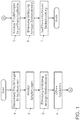
- FIG. 1 shows a flow chart for the inventive method.
- recommendations for operating various functions implemented by software applications are generated.
- the respective recommendation can be determined in particular based on the previous user behavior in correlation with external parameters such as the current time and the current location of the user.
- a probability value for the situational relevance of the recommended operator action is determined. This probability value indicates whether the proposal is suitable for the user at this time or whether based on the learned previous user behavior an operator action by the user is likely.
- step 2 recommendations for various functions or software applications are displayed simultaneously on a global display level.
- display and control elements can be displayed, which merely refer to various currently recommended applications. But it can also be given by means of the display and controls in addition also a recommendation for a specific operation of the recommended application that is considered most likely at the present time.
- step 3 If one of the displayed and operating elements is actuated by the user, this is detected in the subsequent step 3. Subsequently, the software application associated with the display and operating element is opened in step 4. For these, a multiplicity of recommendations are then presented to the user in step 5 on an application level, for each of which display and operating elements are displayed. An actuation of one of the displayed display and control elements is detected in step 6 and then leads in step 7 to execute the operator action recommended for the opened software application. If the display and operating elements displayed in step 2 already provide a recommendation for a specific operator action of the respective applications, steps 5 and 6 can also be skipped and the recommended operator action executed automatically after opening the application.
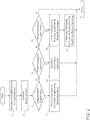
- FIG. 2 shows a flow chart for a possible embodiment of a proposal system according to the invention in conjunction with a touch-sensitive display.
- the process steps 1 and 2 correspond to those of FIG. 1 where the display and controls displayed simultaneously at the global display level provide both recommendations for applications and operator action for the recommended applications.
- the illustrated display and control elements can be actuated by the user in this embodiment by the touches with one or more fingers, the surface of the touch-sensitive display. Likewise, an actuation of the display and control elements can also be detected by a gesture recognition by means of suitable sensors in the region of the display, so that then no contact of the display is required.
- step 8 If an actuation of the illustrated display and control elements, so this is detected and evaluated the nature of this operation. If this evaluation results in step 8 that the user has tapped the display and operating element shown (also known as "tap"), then in step 11 both the recommendation for the application and for the operating action for these applications is assumed. The recommended application is opened and the recommended operation is carried out automatically. If, on the other hand, the evaluation in step 9 shows that the user has performed a swipe up on the display and control element, then the recommended application is rejected in step 12. If the evaluation in step 10 shows that a swipe down was performed, then the recommended application is opened in step 13 and several recommendations are linked with corresponding display and control elements for this application. If one of these display and control elements is now operated, for example, again by a tap, so this is detected in step 14 and the recommended operation is carried out for this application.
- FIG. 3 shows a graphical user interface for the inventive proposal system.
- the proposal system provides recommendations for operating actions of an infotainment system integrated in the vehicle, but can also be used, for example, for a driver assistance system of the vehicle.
- the display of the graphical user interface for example, on a arranged in the area of the center console display, which is equipped as a touch screen display done.
- the display shows several recommendations at the global display level.
- each display and controls are displayed, which may be configured in the form of an icon or a tile.
- icons possibly combined with a text hint, each of the thematic relationship is given to the recommended application and proposed for the respective application control action.
- the icons or tiles can be arranged side by side in a recommendation bar.
- the recommendations may, for example, relate to a destination for navigation, a title for music playback or a telephone contact, and are represented by respective display and control elements 15, 16, 17. Furthermore, a display and control element 18 may be provided, by means of which an automatically executed operating action, such as an automatic change of the blower function, can be reversed. Finally, an icon 19 in the form of a cloud of spheres may indicate that the suggestion system is active and provides recommendations and may be executed as appropriate. In the example shown, the suggestion system recommends calling the contact "Peter", for example, since the user has always done so at the current time of day on the present day of the week.
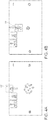
- FIG. 3B shows the graphical user interface after tapping the recommended telephone contact display and control element to accept this recommendation. This is symbolized by an icon 20, for example a hook, on the corresponding display and control element. Additionally or alternatively, the display and control element in the display or color can be changed. As a consequence of the selection by the user, the telephone application becomes active and opens in a pane, such as a so-called widget, at the bottom of the screen, with the recommended call contact automatically dialed.
- a pane such as a so-called widget
- the user wishes to reject any of the recommendations displayed at the global display level, he may hide them by a swipe carried out on the associated display and control element 17, as in FIG FIG. 4A shown. In this way, the clarity of the ad is increased, since only for the user interesting recommendations continue to be presented. Likewise, it allows the proposal system to present a different recommendation instead of the rejected recommendation, without any likelihood of an increase in recommendations.
- the suggestion system now displays several suggestions on the application display level, as in FIG. 5 shown.
- the display and control 17 for the suggestion to call the contact "Peter” will continue to be displayed. Although this recommendation is currently not followed, it remains the top of the recommendations.
- suggestions for further contacts which the proposal system considers to be less appropriate - but nevertheless have a situational relevance to the user - also listed and displayed and operated by appropriate display and controls 22, 23, 24.
- the order of the displayed display and control elements is determined by the probability of situational relevance.
- display and control elements 25 for other functions of the telephone application and a list 26 of all telephone contacts, for example, sorted alphabetically can be displayed.
- the in-vehicle suggestion system can support the user based on various types of information as needed.
- user interests or previous user actions of the user can be used as well as the current behavior of the user that by a user observation by means of suitable Sensors in the vehicle can be detected.
- Sensors in the vehicle can be detected.
- a distinction of the users takes place in order to learn the user behavior of the different users separately and to consider them in future in order to be able to provide recommendations adapted to the respective user.
- the current driving situation for example based on vehicle parameters such as the current speed, or the current environment of the vehicle can be taken into account by sensors mounted on the outside of the vehicle.
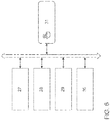
- FIG. 6 shows a schematic representation of a device according to the invention.
- a recommendation unit 27 generates recommendations for two or more software applications and also determines probability values for the recommended operator actions.
- the recommendation unit 27 can be supplied with various parameters, such as, for example, the current time or the current location of the vehicle, the current driving situation or the currently recorded user behavior.
- the recommendation unit can access information about the already learned user behavior, which can be stored, for example, in a database in an in-vehicle or vehicle-external memory.
- An image generation unit 28 controls a touchscreen display 31 in such a way that display and operating elements for the recommendations of the software applications or the recommended operations for the opened software application are displayed.
- the touch of the surface of the touchscreen display 31 in the region of a displayed display and control element is detected by a detection unit 30, which provides information about this to the computer unit 29, which optionally opens and executes the corresponding software application and drives the image generation unit 28 to the display adjust accordingly.
- the invention can be advantageously used in the field of vehicle technology, but is by no means limited thereto. Rather, the invention may be used in any computer-based systems in which an interaction with a suggestion system for operator actions occurs in combination with a graphical user interface.
Landscapes
- Engineering & Computer Science (AREA)
- Theoretical Computer Science (AREA)
- General Engineering & Computer Science (AREA)
- Human Computer Interaction (AREA)
- Physics & Mathematics (AREA)
- Mechanical Engineering (AREA)
- Chemical & Material Sciences (AREA)
- Combustion & Propulsion (AREA)
- General Physics & Mathematics (AREA)
- Transportation (AREA)
- Software Systems (AREA)
- Computer Networks & Wireless Communication (AREA)
- Signal Processing (AREA)
- Computing Systems (AREA)
- Mathematical Physics (AREA)
- Evolutionary Computation (AREA)
- Data Mining & Analysis (AREA)
- Artificial Intelligence (AREA)
- Computational Linguistics (AREA)
- Pure & Applied Mathematics (AREA)
- Mathematical Optimization (AREA)
- Mathematical Analysis (AREA)
- Computational Mathematics (AREA)
- Algebra (AREA)
- Probability & Statistics with Applications (AREA)
- User Interface Of Digital Computer (AREA)
Abstract
Description
- Die vorliegende Erfindung betrifft ein Verfahren zur Darstellung von empfohlenen Bedienhandlungen eines Vorschlagssystems und Interaktion mit dem Vorschlagssystem, das insbesondere bei einer grafischen Benutzerschnittstelle in einem Fahrzeug eingesetzt werden kann. Die vorliegende Erfindung betrifft weiterhin eine Vorrichtung zur Durchführung des Verfahrens und ein Fahrzeug, das eingerichtet ist, ein solches Verfahren auszuführen oder eine solche Vorrichtung aufweist.
- In vielen Bereichen der Technik werden für eine Interaktion mit Maschinen und Geräten Benutzerschnittstellen (abgekürzt HMI von englisch "Human Machine Interface") eingesetzten, wobei grafische Benutzeroberflächen bzw. Benutzerschnittstellen (abgekürzt GUI von englisch "Graphical User Interface") mittlerweile weit verbreitet sind. Mit grafischen Benutzerschnittstellen lassen sich grafische Elemente und komplexe Bedienabläufe auf einer Bildschirmoberfläche darstellen. Eine Bedienung kann durch eine Vielzahl verschiedener Eingabegeräte erfolgen, beispielsweise durch Berührung einer berührungsempfindlichen Displayoberfläche, einem sogenannten Touchscreen.
- Für die Interaktion werden auf GUls häufig Bedienelemente in Form von Bildsymbolen, sogenannten Icons, dargestellt. Eines dieser Bedienelemente kann durch den Nutzer an- bzw. ausgewählt werden und steht dann für die nächste Eingabe im Fokus. Dieses kann für den Nutzer sichtbar gemacht werden, in dem das an- bzw. ausgewählte Bedienelement grafisch hervorgehoben wird, was insbesondere von Vorteil ist wenn mehrere an- bzw. auswählbare Bedienelemente angezeigt werden. Größere Bildsymbole mit höherem Detailgrad werden häufig auch als Kacheln bezeichnet, wobei diese üblicherweise rechteckig ausgestaltet sind und auf einer Arbeitsoberfläche oder einem sogenannten Home Screen mehrere Kacheln auf einer Kacheloberfläche angeordnet werden können. Icons und Kacheln sind üblicherweise mit Softwareapplikationen bzw. Softwareanwendungen, kurz auch Applikationen oder "Apps", verknüpft, die durch Anwählen eines Icons bzw. einer Kachel gestartet und bedient werden können.
- Bei einem GUI mit umfangreichem Funktionsumfang bzw. einer Vielzahl von Funktionalitäten kann eine Vielzahl von Bedienelementen erforderlich sein, was dazu führen kann, dass nicht alle Bedienelemente gleichzeitig in sinnvoller Weise angezeigt werden können oder die Übersichtlichkeit und Bedienbarkeit des GUls leidet.
- Dieses ist beispielsweise bei einer Verwendung von GUls im Automobilbereich aufgrund der zunehmenden Funktionalität und Einstellmöglichkeiten im Infotainment-, Kommunikations-, Sicherheits- und Komfortbereich der Fall. Insbesondere bei einer Darstellung von Informationen bzw. einer Bedienung die sich an den Fahrer eines Fahrzeugs während der Fahrt richtet, sollte diese so einfach und intuitiv wie möglich sein um eine Ablenkung von der Fahraufgabe zu minimieren und so die Fahrsicherheit zu gewährleisten.
- Um die Übersichtlichkeit zu verbessern ist es bekannt hierarchische Menüs mit einer Vielzahl von Unterebenen vorzusehen. Dieses kann aber für den Nutzer, beispielsweise für den Fahrer eines Fahrzeugs, die Navigation in dem Menü und das Auffinden von seltener benutzten Funktionen schwierig gestalten. Kontextabhängige Menüs können hier bedingt Abhilfe schaffen, erfordern aber eine Selektion der vom Nutzer gewünschten Anzeige bzw. Bedienung. Schließlich ist auch ein An- und Abschalten von Funktionen, beispielsweise in einem Konfigurationsmenü, für den Nutzer nicht unbedingt einfach und erfordert ein manuelles Eingreifen.
- Der Bedienkomfort kann erhöht werden, indem das Nutzerverhalten und die Nutzungssituation erfasst werden um basierend hierauf die Bedienung je nach Situation anzupassen bzw. zu automatisieren oder dem Nutzer Empfehlungen für die Bedienung zu unterbreiten. Bei dem Fahrer eines Fahrzeugs kann dieses außerdem die Ablenkung bzw. Störung verringern.
- Ein Verfahren und eine Vorrichtung zum Geben von Empfehlungen für mehrere Fahrzeuginsassen wird in der
DE 10 2013 223 684 A1 offenbart. Hierbei werden die Insassen des Fahrzeugs identifiziert und eine Präferenzeninformation für die identifizierten Insassen abgerufen. Die Präferenzeninformation basiert hierbei auf einer vorherigen Beobachtung der Insassen und ermöglicht Empfehlungen zu geben, die beispielsweise angezeigt oder akustisch dargeboten werden, um daraufhin von den Insassen akzeptiert oder abgelehnt zu werden. Es kann auch vorgesehen sein, dass als Empfehlung eine Auswahl verschiedener Optionen angeboten wird, unter denen die Insassen eine Option anwählen, oder alle Optionen ablehnen können. - Weiterhin wird in der
US 2016/0068169 A1 ein System und ein Verfahren zum Vorschlagen und Automatisieren von Aktionen in einem Fahrzeug beschrieben, wobei Empfehlungen gegeben werden wenn ein verbesserbares Verhalten vorliegt. Ähnlich offenbart dieUS 2015/0160019 A1 ein fahrzeuginternes Computersystem, das automatisch Aktionen ausführt um sicherzustellen dass die kognitive Belastung für den Fahrer nicht zu hoch wird. So kann beispielsweise ein eingehender Telefonanruf automatisch abgewiesen werden und dem Fahrer eine Information hierüber angezeigt werden. - Es ist eine Aufgabe der Erfindung, ein Verfahren und eine Vorrichtung zur Darstellung von empfohlenen Bedienhandlung eines Vorschlagssystems und Interaktion mit dem Vorschlagssystem zur Verfügung zu stellen, dass einem Nutzer die generierten Vorschläge strukturiert und übersichtlich präsentiert und insbesondere in einem Fahrzeug eingesetzt werden kann.
- Diese Aufgabe wird durch ein Verfahren mit den Merkmalen des Anspruchs 1, sowie durch eine entsprechende Vorrichtung gemäß Anspruch 10 gelöst. Bevorzugte Ausgestaltungen der Erfindung sind Gegenstand der abhängigen Ansprüche.
- Das erfindungsgemäße Verfahren zur Darstellung von empfohlenen Bedienhandlung eines Vorschlagssystems und Interaktion mit dem Vorschlagssystem umfasst die folgenden Schritte:
- Generieren von Empfehlungen für zwei oder mehrere Softwareapplikationen;
- Gemeinsames anzeigen jeweils eines Anzeige- und Bedienelements für die Empfehlungen der zwei oder mehreren Softwareapplikationen;
- Erfassen einer Betätigung eines der gemeinsam angezeigten Anzeige- und Bedienelemente;
- Öffnen der Softwareapplikation, welche dem betätigten Anzeige- und Bedienelement zugeordnet ist;
- Gemeinsames anzeigen mehrerer Anzeige- und Bedienelemente, welche jeweils eine von mehreren empfohlenen Bedienhandlungen für die geöffnete Softwareapplikation repräsentieren.
- Gemäß einer Ausführungsform der Erfindung erfolgt die gemeinsame Anzeige der Anzeige-und Bedienelemente für die zwei oder mehreren Softwareapplikationen auf einer globalen Anzeigenebene und die gemeinsame Anzeige der Anzeige- und Bedienelemente für die mehreren empfohlenen Bedienhandlungen für die geöffnete Softwareapplikation auf einer der globalen Anzeigeebene untergeordneten Applikationsanzeigeebene. Durch die Unterscheidung des Anzeigeortes auf globaler Ebene einerseits und Applikationsanzeigeebene andererseits können einem Nutzer eine Vielzahl von Vorschlägen präsentiert werden, wobei die Übersichtlichkeit des Vorschlagssystems gewährleistet ist.
- Vorteilhafterweise stellt ein Anzeige- und Bedienelement für eine Empfehlung einer Softwareapplikation neben einer Empfehlung zum Öffnen der Softwareapplikation auch eine empfohlene Bedienhandlung für diese Softwareapplikation dar.
- Weiterhin werden vorteilhafterweise Empfehlungen für Bedienhandlungen der zwei oder mehreren Softwareapplikationen generiert, Wahrscheinlichkeitswerte für die Ausführung der empfohlenen Bedienhandlungen ermittelt und jeweils ein Anzeige- und Bedienelement, welches die empfohlene Bedienhandlung mit dem gegenwärtig höchsten Wahrscheinlichkeitswert für die jeweilige Softwareapplikation repräsentiert, für die zwei oder mehreren Softwareapplikationen auf der globalen Anzeigeebene angezeigt.
- Hierbei werden die für die geöffnete Softwareapplikation angezeigten Anzeige- und Bedienelemente vorzugsweise geordnet nach den Wahrscheinlichkeitswerten für die Ausführung der empfohlenen Bedienhandlungen auf der Applikationsanzeigeebene angezeigt.
- Vorteilhafterweise wird der Wahrscheinlichkeitswert für die Ausführung der empfohlenen Bedienhandlung aus dem bisherigen Nutzerverhalten und/oder äußeren Parametern ermittelt, wobei die äußeren Parameter zur Ermittlung des Wahrscheinlichkeitswerts die aktuelle Zeit und/oder die aktuelle Position des Nutzers umfassen können.
- Gemäß einer vorteilhaften Ausführungsform des erfindungsgemäßen Verfahrens wird bei Erfassen einer Betätigung eines Anzeige- und Bedienelementes auf der globalen Anzeigenebene bei einer ersten Bedienhandlung die empfohlene Softwareapplikation geöffnet und die empfohlene Bedienhandlung für diese Softwareapplikation automatisch ausgeführt, bei einer von der ersten Bedienhandlung verschiedenen zweiten Bedienhandlung die empfohlene Softwareapplikation abgelehnt, und bei einer von den ersten beiden Bedienhandlungen verschiedenen dritten Bedienhandlung die empfohlene Softwareapplikation geöffnet und für diese Softwareapplikation eine Empfehlung für eine oder mehrere Bedienhandlungen dargestellt.
- Hierbei ist es von Vorteil, wenn die Anzeige- und Bedienelemente auf einem berührungsempfindlichen Display dargestellt werden und die erste Bedienhandlung einem Antippen eines dargestellten Anzeige- und Bedienelements, die zweite Bedienhandlung einer Streichbewegung nach oben und die dritte Bedienhandlung einer Streichbewegung nach unten auf einem der dargestellten Anzeige- und Bedienelemente entspricht.
- Entsprechend umfasst eine erfindungsgemäße Vorrichtung zur Darstellung von empfohlenen Bedienhandlung eines Vorschlagssystems und Interaktion mit dem Vorschlagssystem eine Empfehlungseinheit, eine Bilderzeugungseinheit, ein Display, eine Computereinheit und eine Erfassungseinheit, wobei
- die Empfehlungseinheit Empfehlungen für zwei oder mehrere Softwareapplikationen generiert;
- die Bilderzeugungseinheit das Display so ansteuert, dass jeweils ein Anzeige-und Bedienelement für die Empfehlungen der zwei oder mehreren Softwareapplikationen gemeinsam anzeigt wird;
- die Erfassungseinheit eine Betätigung eines der angezeigten Anzeige- und Bedienelemente erfasst;
- auf der Computereinheit die Softwareapplikation, welche dem betätigten Anzeige-und Bedienelement zugeordnet ist, geöffnet wird; und
- die Bilderzeugungseinheit das Display daraufhin so ansteuert, dass mehrere Anzeige- und Bedienelemente, welche jeweils eine von mehreren empfohlenen Bedienhandlungen für die geöffnete Softwareapplikation repräsentieren, gemeinsam anzeigt werden.
- Besonders vorteilhaft kann die erfindungsgemäße Vorrichtung in einem Fahrzeug vorgesehen sein, wobei das Vorschlagssystem Bedienhandlungen für ein Infotainmentsystem des Fahrzeugs empfiehlt.
- Weitere Merkmale der vorliegenden Erfindung werden aus der nachfolgenden Beschreibung und den Ansprüchen in Verbindung mit den Figuren ersichtlich.
- Fig. 1
- zeigt ein Flussdiagramm für das erfindungsgemäße Verfahren zur Darstellung von empfohlenen Bedienhandlungen eines Vorschlagssystems und Interaktion mit dem Vorschlagssystem;
- Fig. 2
- zeigt ein Flussdiagramm für eine Ausführungsform des Verfahrens in Verbindung mit einem berührungsempfindlichen Display;
- Fig. 3
- zeigt eine grafische Benutzerschnittstelle für ein Vorschlagssystem in einem Fahrzeug, bei der mehrere Empfehlungen auf globaler Anzeigeebene dargestellt werden (A) und eine der Empfehlungen ausgeführt wird (B);
- Fig. 4
- zeigt die grafische Benutzerschnittstelle, wobei eine Empfehlung abgelehnt wird (A) oder eine Applikation der Empfehlung geöffnet wird (B);
- Fig. 5
- zeigt die grafische Benutzerschnittstelle, wobei für eine geöffnete Applikation mehrere Empfehlungen angezeigt werden; und
- Fig. 6
- zeigt schematisch ein Blockschaltbild einer erfindungsgemäßen Vorrichtung.
- Zum besseren Verständnis der Prinzipien der vorliegenden Erfindung werden nachfolgend Ausführungsformen der Erfindung anhand der Figuren detaillierter erläutert. Es versteht sich, dass sich die Erfindung nicht auf diese Ausführungsformen beschränkt und dass die beschriebenen Merkmale auch kombiniert oder modifiziert werden können, ohne den Schutzbereich der Erfindung, wie er in den Ansprüchen definiert ist, zu verlassen.
-
Figur 1 zeigt ein Flussdiagramm für das erfindungsgemäße Verfahren. In einem ersten Schritt 1 werden Empfehlungen zur Bedienung verschiedener Funktionen, die durch Softwareapplikationen implementiert sind, generiert. Die jeweilige Empfehlung kann hierbei insbesondere basierend auf dem bisherigen Nutzerverhalten in Korrelation mit äußeren Parametern wie der aktuellen Zeit und dem aktuellen Ort des Nutzers ermittelt werden. Weiterhin wird ein Wahrscheinlichkeitswert für die situative Relevanz der empfohlenen Bedienhandlung ermittelt. Dieser Wahrscheinlichkeitswert gibt an, ob der Vorschlag für den Nutzer zu diesem Zeitpunkt passend ist bzw. ob basierend auf dem gelernten bisherigen Nutzerverhalten eine Bedienhandlung durch den Nutzer wahrscheinlich ist. - In dem darauf folgenden Schritt 2 werden Empfehlungen für verschiedenen Funktionen bzw. Softwareapplikationen auf einer globalen Anzeigeebene gleichzeitig angezeigt. Hierbei können Anzeige- und Bedienelemente angezeigt werden, die lediglich auf verschiedene zum gegenwärtigen Zeitpunkt empfohlene Applikationen verweisen. Es kann aber ebenso mittels der Anzeige- und Bedienelemente zusätzlich auch eine Empfehlung für eine konkrete Bedienhandlung der empfohlenen Applikation gegeben werden, die zum gegenwärtigen Zeitpunkt als am wahrscheinlichsten angesehen wird.
- Wird eine der dargestellten Anzeige- und Bedienelemente durch den Nutzer betätigt, so wird dieses im darauffolgenden Schritt 3 erfasst. Daraufhin wird in Schritt 4 die dem Anzeige- und Bedienelement zugeordnete Softwareapplikation geöffnet. Für diese werden dann in Schritt 5 auf einer Applikationsebene dem Nutzer eine Vielzahl von Empfehlungen präsentiert, für die jeweils Anzeige- und Bedienelemente angezeigt werden. Eine Betätigung von einem der angezeigten Anzeige- und Bedienelemente wird in Schritt 6 erfasst und führt dann in Schritt 7 zum Ausführen der für die geöffnete Softwareapplikation empfohlenen Bedienhandlung. Falls die in Schritt 2 angezeigten Anzeige- und Bedienelemente bereits eine Empfehlung für eine konkrete Bedienhandlung der jeweiligen Applikationen geben, so können die Schritte 5 und 6 auch übersprungen werden und die empfohlene Bedienhandlung nach Öffnen der Applikation automatisch ausgeführt werden.
-
Figur 2 zeigt ein Flussdiagramm für eine mögliche Ausführungsform eines erfindungsgemäßen Vorschlagssystems in Verbindung mit einem berührungsempfindlichen Display. Die Verfahrensschritte 1 und 2 entsprechen hierbei denen ausFigur 1 , wobei die auf der globalen Anzeigeebene gleichzeitig angezeigten Anzeige- und Bedienelemente sowohl Empfehlungen für Applikationen als auch Bedienhandlung für die empfohlenen Applikationen geben. Die dargestellten Anzeige- und Bedienelemente können in dieser Ausführungsform durch den Nutzer betätigt werden, indem dieser mit einem oder mehreren Fingern die Oberfläche des berührungsempfindlichen Displays berührt. Ebenso kann eine Betätigung der Anzeige- und Bedienelemente auch durch eine Gestenerkennung mittels geeigneter Sensoren im Bereich des Displays erfasst werden, sodass dann keine Berührung des Displays erforderlich ist. - Erfolgt eine Betätigung der dargestellten Anzeige- und Bedienelemente, so wird diese erfasst und die Art dieser Betätigung ausgewertet. Ergibt diese Auswertung in Schritt 8, dass der Nutzer das dargestellte Anzeige- und Bedienelement angetippt hat (auch als "Tap" bekannt), so wird hierdurch in Schritt 11 sowohl die Empfehlung für die Applikation als auch für die Bedienhandlung für diese Applikationen angenommen. Die empfohlene Applikation wird geöffnet und die empfohlene Bedienhandlung automatisch ausgeführt. Ergibt die Auswertung dagegen in Schritt 9, dass der Nutzer eine Streichbewegung nach oben ("Swipe up") auf dem Anzeige- und Bedienelement ausgeführt hat, so wird die empfohlene Applikation in Schritt 12 abgelehnt. Sollte die Auswertung in Schritt 10 ergeben, dass eine Streichbewegung nach unten ("Swipe down") ausgeführt wurde, so wird die empfohlene Applikation in Schritt 13 geöffnet und es werden für diese Applikation mehrere Empfehlungen verknüpft mit entsprechenden Anzeige- und Bedienelementen angezeigt. Wird eines dieser Anzeige- und Bedienelemente nun betätigt, beispielsweise wiederum durch ein Antippen, so wird dieses in Schritt 14 erfasst und die empfohlene Bedienhandlung für diese Applikation ausgeführt.
-
Figur 3 zeigt eine grafische Benutzerschnittstelle für das erfindungsgemäße Vorschlagssystem. Beispielhaft wird auf eine Verwendung für ein Infotainment-System eines Fahrzeugs Bezug genommen. Das Vorschlagssystem liefert hierbei Empfehlungen für Bedienhandlungen eines im Fahrzeug integrierten Infotainmentsystems, kann aber beispielsweise ebenso für ein Fahrerassistenzsystem des Fahrzeugs eingesetzt werden. Die Anzeige der grafischen Benutzerschnittstelle kann beispielsweise auf einem im Bereich der Mittelkonsole angeordnete Display, das als Touchscreen-Display ausgestattet ist, erfolgen. - In
Figur 3A werden auf dem Display mehrere Empfehlungen auf globaler Anzeigeebene wiedergegeben. Hierfür werden jeweils Anzeige- und Bedienelemente dargestellt, die in Form eines Icons oder einer Kachel ausgestaltet sein können. Durch geeignete Bildsymbole, gegebenenfalls kombiniert mit einem Texthinweis, wird jeweils der thematische Zusammenhang zu der empfohlenen Applikation und der für die jeweilige Applikation vorgeschlagenen Bedienhandlung gegeben. Die Icons bzw. Kacheln können hierbei in einer Empfehlungsleiste nebeneinander angeordnet werden. - Die Empfehlungen können beispielsweise einen Zielort für die Navigation, einen Titel für die Musikwiedergabe oder einen Telefonkontakt betreffen und werden durch jeweilige Anzeige-und Bedienelemente 15,16, 17 dargestellt. Weiterhin kann auch ein Anzeige- und Bedienelement 18 vorgesehen sein, mittels dem eine automatisch ausgeführte Bedienhandlung, beispielsweise eine automatische Veränderung der Gebläsefunktion, rückgängig gemacht werden kann. Schließlich kann ein Bildsymbol 19 in Form einer Wolke aus Kugeln darauf hinweisen, dass das Vorschlagssystem aktiv ist und Empfehlungen gegeben werden und gegebenenfalls ausgeführt werden können. In dem dargestellten Beispiel empfiehlt das Vorschlagssystem den Kontakt "Peter" anzurufen, beispielsweise da der Nutzer dieses bisher immer an dem vorliegenden Wochentag zur gegenwärtigen Uhrzeit getan hat.
-
Figur 3B zeigt die grafische Benutzerschnittstelle, nachdem durch Antippen des Anzeige-und Bedienelementes für den empfohlenen Telefonkontakt diese Empfehlung angenommen wurde. Dieses wird durch ein Bildsymbol 20, beispielsweise einen Haken, auf dem entsprechenden Anzeige- und Bedienelement, symbolisiert. Zusätzlich oder stattdessen kann das Anzeige- und Bedienelement in der Darstellung oder Farbe verändert werden. Als Folge der Anwahl durch den Nutzer wird die Telefon-Applikation aktiv und öffnet sich in einem Teilfenster, beispielsweise einem sogenannten Widget, im unteren Bereich der Anzeige, wobei der empfohlene Anrufkontakt automatisch angewählt wird. - Wenn der Nutzer eine der auf der globalen Anzeigeebene dargestellten Empfehlungen ablehnen möchte, so kann er diese durch eine auf dem zugehörigen Anzeige- und Bedienelement 17 ausgeführten Streichbewegung nach oben ausblenden, wie in
Figur 4A dargestellt. Auf diese Weise wird die Übersichtlichkeit der Anzeige erhöht, da nur für den Nutzer interessante Empfehlungen weiterhin dargestellt werden. Ebenso erlaubt dieses dem Vorschlagssystem anstelle der abgelehnten Empfehlung eine andere Empfehlung darzustellen ohne dass hierbei die Übersichtlichkeit durch eine Zunahme der Empfehlungen leiden würde. - Möchte der Nutzer zwar eine der empfohlenen Applikationen nutzen, nicht jedoch die für diese Applikation empfohlene Benutzungshandlung vornehmen, so kann er durch eine auf dem zugehörigen Anzeige- und Bedienelement 17 ausgeführten Streichbewegung nach unten die entsprechende Applikation öffnen, wie in
Figur 4B dargestellt. Im obigen Beispiel bedeutet dieses, dass der Vorschlag, ein Telefonat zu führen vom Nutzer als passend empfunden wird, er allerdings nicht den Kontakt "Peter sondern einen anderen Kontakt anrufen möchte. - Für die geöffnete Telefon-Applikation zeigt das Vorschlagssystem nun auf der Applikationsanzeigeebene mehrere Vorschläge an, wie in
Figur 5 dargestellt. Das Anzeige-und Bedienelement 17 für den Vorschlag, den Kontakt "Peter" anzurufen, wird weiterhin dargestellt. Obwohl dieser Empfehlung gegenwärtig nicht gefolgt wird, befindet sich diese weiterhin an erster Stelle der Empfehlungen. Zusätzlich sind Vorschläge für weitere Kontakte, die das Vorschlagssystem als weniger passend erachtet - aber trotzdem eine situative Relevanz für den Nutzer haben - ebenfalls aufgelistet und durch entsprechende Anzeige- und Bedienelemente 22, 23, 24 dargestellt und bedienbar. Die Reihenfolge der dargestellten Anzeige- und Bedienelemente wird hierbei durch die Wahrscheinlichkeit der situativen Relevanz bestimmt. Zusätzlich können Anzeige- und Bedienelemente 25 für weitere Funktionen der Telefon-Applikation sowie eine Liste 26 aller Telefonkontakte, beispielsweise alphabetisch sortiert, angezeigt werden. - Das im Fahrzeug integrierte Vorschlagssystem kann den Nutzer basierend auf verschiedenartigen Informationen bedarfsgerecht unterstützen. So können Interessen des Nutzers oder frühere Benutzungshandlung des Nutzers ebenso herangezogen werden wie das aktuelle Verhalten des Nutzers, dass durch eine Nutzerbeobachtung mittels geeigneter Sensoren im Fahrzeug erfasst werden kann. Ebenso kann vorgesehen sein, dass bei der Nutzung des Fahrzeugs durch mehrere Nutzer eine Unterscheidung der Nutzer erfolgt um das Nutzerverhalten der verschiedenen Nutzer separat zu erlernen und zukünftig zu berücksichtigen um an den jeweiligen Nutzer angepasste Empfehlungen bereitstellen zu können. Weiterhin kann die aktuelle Fahrsituation, beispielsweise basierend auf Fahrzeugparametern wie der aktuellen Geschwindigkeit, oder das aktuelle Umfeld des Fahrzeugs durch außen am Fahrzeug angebrachte Sensoren berücksichtigt werden.
-
Figur 6 zeigt eine schematische Darstellung einer erfindungsgemäßen Vorrichtung. Eine Empfehlungseinheit 27 generiert Empfehlungen für zwei oder mehrere Softwareapplikationen und ermittelt hierbei auch Wahrscheinlichkeitswerte für die empfohlenen Bedienhandlungen. Der Empfehlungseinheit 27 können hierfür verschiedene Parameter, wie beispielsweise die aktuelle Zeit oder der aktuelle Ort des Fahrzeugs, die aktuelle Fahrsituation oder das aktuell erfasste Nutzerverhalten zugeführt werden. Ebenso kann die Empfehlungseinheit auf Informationen zum bereits erlernten Nutzerverhalten zugreifen, die beispielsweise in einer Datenbank in einem fahrzeuginternen oder fahrzeugexternen Speicher abgelegt sein können. Eine Bilderzeugungseinheit 28 steuert ein Touchscreen-Display 31 so an, dass Anzeige- und Bedienelemente für die Empfehlungen der Softwareapplikationen bzw. die empfohlenen Bedienhandlungen für die geöffnete Softwareapplikation angezeigt werden. Die Berührung der Oberfläche des Touchscreen-Displays 31 im Bereich eines dargestellten Anzeige- und Bedienelements wird durch eine Erfassungseinheit 30 erkannt, die eine Information hierüber der Computereinheit 29 zuführt, welche die entsprechende Softwareapplikation gegebenenfalls öffnet und ausführt und die Bilderzeugungseinheit 28 ansteuert, um die Anzeige entsprechend anzupassen. - Die Erfindung kann vorteilhaft im Bereich der Fahrzeugtechnik eingesetzt werden, ist aber keineswegs darauf beschränkt. Vielmehr kann die Erfindung in beliebigen computerbasierten Systemen verwendet werden, bei denen eine Interaktion mit einem Vorschlagssystem für Bedienhandlungen in Kombination mit einer grafischen Benutzerschnittstelle erfolgt.
-
- 1
- Verfahrensschritt mit Generierung von Empfehlungen für mehrere Softwareapplikation
- 2
- Verfahrensschritt mit Anzeige der generierten Empfehlungen
- 3
- Verfahrensschritt mit Erfassung der Betätigung eines Anzeige- und Bedienelements einer empfohlenen Software-Applikation
- 4
- Verfahrensschritt mit Öffnen einer Software-Applikation
- 5
- Verfahrensschritt mit Anzeige von Empfehlungen für die geöffnete Software-Applikation
- 6
- Verfahrensschritt mit Erfassung der Betätigung eines Anzeige- und Bedienelements einer empfohlenen Bedienhandlung
- 7
- Verfahrensschritt mit Ausführen einer empfohlenen Bedienhandlung
- 8
- Verfahrensschritt mit Ermittlung des Antippen einer Empfehlung
- 9
- Verfahrensschritt mit Ermittlung einer Streichbewegung nach oben
- 10
- Verfahrensschritt mit Ermittlung einer Streichbewegung nach unten
- 11
- Verfahrensschritt mit Öffnen einer Software-Applikation und Ausführung der empfohlenen Bedienhandlung
- 12
- Verfahrensschritt mit Ablehnen einer empfohlenen Software-Applikation
- 13
- Verfahrensschritt mit Öffnen einer Software-Applikation und Anzeige empfohlener Bedienhandlungen
- 14
- Verfahrensschritt mit Erfassung der Betätigung eines einer empfohlenen Bedienhandlung zugeordneten Anzeige- und Bedienelements und Ausführen der ausgewählten Bedienhandlung
- 15, 16,17, 22, 23, 24
- Anzeige- und Bedienelemente für Empfehlungen
- 18
- Anzeige- und Bedienelement zum Rückgängigmachen einer automatisch ausgeführten Bedienhandlung
- 19
- Symbol für aktives Vorschlagssystem
- 20
- Symbol für ausgewählte Empfehlung
- 21
- Widget für Telefon-Applikation
- 25
- Anzeige- und Bedienelemente für Telefon-Applikation
- 26
- Liste der Telefonkontakte
- 27
- Empfehlungseinheit
- 28
- Bilderzeugungseinheit
- 29
- Computereinheit
- 30
- Erfassungseinheit
- 31
- Touchscreen-Display
Claims (10)
- Verfahren zur Darstellung von empfohlenen Bedienhandlungen eines Vorschlagssystems und Interaktion mit dem Vorschlagssystem, wobei das Verfahren die folgenden Schritte umfasst:- Generieren (1) von Empfehlungen für zwei oder mehrere Softwareapplikationen;- Gemeinsames Anzeigen (2) jeweils eines Anzeige- und Bedienelements (15, 16,17) für die Empfehlungen der zwei oder mehreren Softwareapplikationen auf einer globalen Anzeigenebene;- Erfassen (3) einer Betätigung eines der gemeinsam angezeigten Anzeige- und Bedienelemente;- Öffnen (4) der Softwareapplikation, welche dem betätigten Anzeige- und Bedienelement zugeordnet ist;dadurch gekennzeichnet, dass
mindestens eines der Anzeige- und Bedienelemente (15, 16,17) auf der globalen Anzeigenebene neben einer Empfehlung zum Öffnen der Softwareapplikation auch eine empfohlene Bedienhandlung für diese Softwareapplikation darstellt und
bei Erfassen der Betätigung dieses Anzeige- und Bedienelementes die empfohlene Softwareapplikation geöffnet und die empfohlene Bedienhandlung für diese Softwareapplikation automatisch ausgeführt wird (8, 11). - Verfahren nach Anspruch 1, wobei Empfehlungen für Bedienhandlungen der zwei oder mehreren Softwareapplikationen generiert werden, Wahrscheinlichkeitswerte für die Ausführung der empfohlenen Bedienhandlungen ermittelt werden und jeweils ein Anzeige- und Bedienelement (15, 16,17), welches die empfohlene Bedienhandlung mit dem gegenwärtig höchsten Wahrscheinlichkeitswert für die jeweilige Softwareapplikation repräsentiert, für die zwei oder mehreren Softwareapplikationen auf der globalen Anzeigeebene angezeigt wird.
- Verfahren nach Anspruch 1 oder 2, wobei bei Erfassen einer Betätigung eines Anzeige- und Bedienelementes auf der globalen Anzeigenebene- bei einer ersten Bedienhandlung (8) die empfohlene Softwareapplikation geöffnet und die empfohlene Bedienhandlung für diese Softwareapplikation automatisch ausgeführt wird (11);- bei einer von der ersten Bedienhandlung verschiedenen zweiten Bedienhandlung (9) die empfohlene Softwareapplikation abgelehnt wird (12); und- bei einer von den ersten beiden Bedienhandlungen verschiedenen dritten Bedienhandlung (10) die empfohlene Softwareapplikation geöffnet und für diese Softwareapplikation mehrere Anzeige- und Bedienelemente (17, 22, 23, 24), welche jeweils eine von mehreren empfohlenen Bedienhandlungen für die geöffnete Softwareapplikation repräsentieren, auf einer der globalen Anzeigeebene untergeordneten Applikationsanzeigeebene gemeinsam angezeigt werden(13).
- Verfahren nach Anspruch 3, wobei die für die geöffnete Softwareapplikation angezeigten Anzeige- und Bedienelemente (17, 22, 23, 24) geordnet nach den Wahrscheinlichkeitswerten für die Ausführung der empfohlenen Bedienhandlungen auf der Applikationsanzeigeebene angezeigt werden.
- Verfahren nach Anspruch 3 oder 4, wobei der Wahrscheinlichkeitswert für die Ausführung der empfohlenen Bedienhandlung aus dem bisherigen Nutzerverhalten und/oder äußeren Parametern ermittelt wird.
- Verfahren nach Anspruch 5, wobei die äußeren Parameter zur Ermittlung des Wahrscheinlichkeitswerts die aktuelle Zeit und/oder die aktuelle Position des Nutzers umfassen.
- Verfahren nach einem der Ansprüche 3 bis 6, wobei die Anzeige- und Bedienelemente auf einem berührungsempfindlichen Display dargestellt werden und die erste Bedienhandlung einem Antippen (8) eines dargestellten Anzeige- und Bedienelements, die zweite Bedienhandlung einer Streichbewegung nach oben (9) und die dritte Bedienhandlung einer Streichbewegung nach unten (10) auf einem dargestellten Anzeige- und Bedienelement entspricht.
- Vorrichtung zur Darstellung von empfohlenen Bedienhandlungen eines Vorschlagssystems und Interaktion mit dem Vorschlagssystem, mit- einer Empfehlungseinheit (27), die Empfehlungen für zwei oder mehrere Softwareapplikationen generiert;- einem Display (31);- einer Bilderzeugungseinheit (28), die das Display (31) so ansteuert, dass jeweils ein Anzeige- und Bedienelement für die Empfehlungen der zwei oder mehreren Softwareapplikationen auf einer globalen Anzeigenebene gemeinsam anzeigt wird;- einer Erfassungseinheit (30), die eine Betätigung eines der angezeigten Anzeige-und Bedienelemente (15, 16, 17, 22, 23, 24), erfasst;- einer der Computereinheit (29), auf der die Softwareapplikation, welche dem betätigten Anzeige- und Bedienelement zugeordnet ist, geöffnet wird;dadurch gekennzeichnet, dass
mindestens eines der Anzeige- und Bedienelemente (15, 16,17) auf der globalen Anzeigenebene neben einer Empfehlung zum Öffnen der Softwareapplikation auch eine empfohlene Bedienhandlung für diese Softwareapplikation darstellt und
bei Erfassen der Betätigung dieses Anzeige- und Bedienelementes die empfohlene Softwareapplikation geöffnet und die empfohlene Bedienhandlung für diese Softwareapplikation automatisch ausgeführt wird (8, 11). - Vorrichtung nach Anspruch 8, wobei diese in einem Fahrzeug vorgesehen ist und das Vorschlagssystem Bedienhandlungen für ein Infotainmentsystem des Fahrzeugs empfiehlt.
- Kraftfahrzeug dadurch gekennzeichnet, dass es eine Vorrichtung gemäß 8 oder 9 aufweist oder eingerichtet ist, ein Verfahren gemäß einem der Ansprüche 1 bis 7 auszuführen.
Applications Claiming Priority (1)
| Application Number | Priority Date | Filing Date | Title |
|---|---|---|---|
| DE102017203570.6A DE102017203570A1 (de) | 2017-03-06 | 2017-03-06 | Verfahren und vorrichtung zur darstellung von empfohlenen bedienhandlungen eines vorschlagssystems und interaktion mit dem vorschlagssystem |
Publications (2)
| Publication Number | Publication Date |
|---|---|
| EP3373123A1 true EP3373123A1 (de) | 2018-09-12 |
| EP3373123B1 EP3373123B1 (de) | 2021-04-07 |
Family
ID=61226496
Family Applications (1)
| Application Number | Title | Priority Date | Filing Date |
|---|---|---|---|
| EP18156986.4A Active EP3373123B1 (de) | 2017-03-06 | 2018-02-15 | Verfahren und vorrichtung zur darstellung von empfohlenen bedienhandlungen eines vorschlagssystems und interaktion mit dem vorschlagssystem |
Country Status (5)
| Country | Link |
|---|---|
| US (1) | US11232362B2 (de) |
| EP (1) | EP3373123B1 (de) |
| KR (2) | KR102176305B1 (de) |
| CN (1) | CN108536347B (de) |
| DE (1) | DE102017203570A1 (de) |
Families Citing this family (82)
| Publication number | Priority date | Publication date | Assignee | Title |
|---|---|---|---|---|
| US8677377B2 (en) | 2005-09-08 | 2014-03-18 | Apple Inc. | Method and apparatus for building an intelligent automated assistant |
| US9318108B2 (en) | 2010-01-18 | 2016-04-19 | Apple Inc. | Intelligent automated assistant |
| US8977255B2 (en) | 2007-04-03 | 2015-03-10 | Apple Inc. | Method and system for operating a multi-function portable electronic device using voice-activation |
| US8676904B2 (en) | 2008-10-02 | 2014-03-18 | Apple Inc. | Electronic devices with voice command and contextual data processing capabilities |
| US10255566B2 (en) | 2011-06-03 | 2019-04-09 | Apple Inc. | Generating and processing task items that represent tasks to perform |
| US10276170B2 (en) | 2010-01-18 | 2019-04-30 | Apple Inc. | Intelligent automated assistant |
| US10057736B2 (en) | 2011-06-03 | 2018-08-21 | Apple Inc. | Active transport based notifications |
| US10417037B2 (en) | 2012-05-15 | 2019-09-17 | Apple Inc. | Systems and methods for integrating third party services with a digital assistant |
| DE112014000709B4 (de) | 2013-02-07 | 2021-12-30 | Apple Inc. | Verfahren und vorrichtung zum betrieb eines sprachtriggers für einen digitalen assistenten |
| US10652394B2 (en) | 2013-03-14 | 2020-05-12 | Apple Inc. | System and method for processing voicemail |
| US10748529B1 (en) | 2013-03-15 | 2020-08-18 | Apple Inc. | Voice activated device for use with a voice-based digital assistant |
| KR101959188B1 (ko) | 2013-06-09 | 2019-07-02 | 애플 인크. | 디지털 어시스턴트의 둘 이상의 인스턴스들에 걸친 대화 지속성을 가능하게 하기 위한 디바이스, 방법 및 그래픽 사용자 인터페이스 |
| US10176167B2 (en) | 2013-06-09 | 2019-01-08 | Apple Inc. | System and method for inferring user intent from speech inputs |
| KR101749009B1 (ko) | 2013-08-06 | 2017-06-19 | 애플 인크. | 원격 디바이스로부터의 활동에 기초한 스마트 응답의 자동 활성화 |
| US9715875B2 (en) | 2014-05-30 | 2017-07-25 | Apple Inc. | Reducing the need for manual start/end-pointing and trigger phrases |
| US10170123B2 (en) | 2014-05-30 | 2019-01-01 | Apple Inc. | Intelligent assistant for home automation |
| WO2015184186A1 (en) | 2014-05-30 | 2015-12-03 | Apple Inc. | Multi-command single utterance input method |
| US9338493B2 (en) | 2014-06-30 | 2016-05-10 | Apple Inc. | Intelligent automated assistant for TV user interactions |
| US9886953B2 (en) | 2015-03-08 | 2018-02-06 | Apple Inc. | Virtual assistant activation |
| US9721566B2 (en) | 2015-03-08 | 2017-08-01 | Apple Inc. | Competing devices responding to voice triggers |
| US10460227B2 (en) | 2015-05-15 | 2019-10-29 | Apple Inc. | Virtual assistant in a communication session |
| US10200824B2 (en) | 2015-05-27 | 2019-02-05 | Apple Inc. | Systems and methods for proactively identifying and surfacing relevant content on a touch-sensitive device |
| US20160378747A1 (en) | 2015-06-29 | 2016-12-29 | Apple Inc. | Virtual assistant for media playback |
| US10331312B2 (en) | 2015-09-08 | 2019-06-25 | Apple Inc. | Intelligent automated assistant in a media environment |
| US10740384B2 (en) | 2015-09-08 | 2020-08-11 | Apple Inc. | Intelligent automated assistant for media search and playback |
| US10671428B2 (en) | 2015-09-08 | 2020-06-02 | Apple Inc. | Distributed personal assistant |
| US10747498B2 (en) | 2015-09-08 | 2020-08-18 | Apple Inc. | Zero latency digital assistant |
| US11587559B2 (en) | 2015-09-30 | 2023-02-21 | Apple Inc. | Intelligent device identification |
| US10691473B2 (en) | 2015-11-06 | 2020-06-23 | Apple Inc. | Intelligent automated assistant in a messaging environment |
| US10956666B2 (en) | 2015-11-09 | 2021-03-23 | Apple Inc. | Unconventional virtual assistant interactions |
| US10223066B2 (en) | 2015-12-23 | 2019-03-05 | Apple Inc. | Proactive assistance based on dialog communication between devices |
| US12223282B2 (en) | 2016-06-09 | 2025-02-11 | Apple Inc. | Intelligent automated assistant in a home environment |
| US10586535B2 (en) | 2016-06-10 | 2020-03-10 | Apple Inc. | Intelligent digital assistant in a multi-tasking environment |
| DK201670540A1 (en) | 2016-06-11 | 2018-01-08 | Apple Inc | Application integration with a digital assistant |
| US12197817B2 (en) | 2016-06-11 | 2025-01-14 | Apple Inc. | Intelligent device arbitration and control |
| DK179415B1 (en) | 2016-06-11 | 2018-06-14 | Apple Inc | Intelligent device arbitration and control |
| US11204787B2 (en) | 2017-01-09 | 2021-12-21 | Apple Inc. | Application integration with a digital assistant |
| DK201770383A1 (en) | 2017-05-09 | 2018-12-14 | Apple Inc. | USER INTERFACE FOR CORRECTING RECOGNITION ERRORS |
| US10726832B2 (en) | 2017-05-11 | 2020-07-28 | Apple Inc. | Maintaining privacy of personal information |
| DK180048B1 (en) | 2017-05-11 | 2020-02-04 | Apple Inc. | MAINTAINING THE DATA PROTECTION OF PERSONAL INFORMATION |
| DK179745B1 (en) | 2017-05-12 | 2019-05-01 | Apple Inc. | SYNCHRONIZATION AND TASK DELEGATION OF A DIGITAL ASSISTANT |
| DK179496B1 (en) | 2017-05-12 | 2019-01-15 | Apple Inc. | USER-SPECIFIC Acoustic Models |
| DK201770428A1 (en) | 2017-05-12 | 2019-02-18 | Apple Inc. | LOW-LATENCY INTELLIGENT AUTOMATED ASSISTANT |
| DK201770411A1 (en) | 2017-05-15 | 2018-12-20 | Apple Inc. | Multi-modal interfaces |
| DK179560B1 (en) | 2017-05-16 | 2019-02-18 | Apple Inc. | FAR-FIELD EXTENSION FOR DIGITAL ASSISTANT SERVICES |
| US10303715B2 (en) | 2017-05-16 | 2019-05-28 | Apple Inc. | Intelligent automated assistant for media exploration |
| US20180336892A1 (en) | 2017-05-16 | 2018-11-22 | Apple Inc. | Detecting a trigger of a digital assistant |
| US10818288B2 (en) | 2018-03-26 | 2020-10-27 | Apple Inc. | Natural assistant interaction |
| US11145294B2 (en) | 2018-05-07 | 2021-10-12 | Apple Inc. | Intelligent automated assistant for delivering content from user experiences |
| US10928918B2 (en) | 2018-05-07 | 2021-02-23 | Apple Inc. | Raise to speak |
| DK179822B1 (da) | 2018-06-01 | 2019-07-12 | Apple Inc. | Voice interaction at a primary device to access call functionality of a companion device |
| DK180639B1 (en) | 2018-06-01 | 2021-11-04 | Apple Inc | DISABILITY OF ATTENTION-ATTENTIVE VIRTUAL ASSISTANT |
| US10892996B2 (en) | 2018-06-01 | 2021-01-12 | Apple Inc. | Variable latency device coordination |
| DK201870355A1 (en) | 2018-06-01 | 2019-12-16 | Apple Inc. | VIRTUAL ASSISTANT OPERATION IN MULTI-DEVICE ENVIRONMENTS |
| US10504518B1 (en) | 2018-06-03 | 2019-12-10 | Apple Inc. | Accelerated task performance |
| US11462215B2 (en) | 2018-09-28 | 2022-10-04 | Apple Inc. | Multi-modal inputs for voice commands |
| US11475898B2 (en) | 2018-10-26 | 2022-10-18 | Apple Inc. | Low-latency multi-speaker speech recognition |
| US11638059B2 (en) | 2019-01-04 | 2023-04-25 | Apple Inc. | Content playback on multiple devices |
| WO2019147110A2 (ko) * | 2019-02-20 | 2019-08-01 | 엘지전자 주식회사 | 자주 사용하는 앱 도출 방법 및 이를 이용한 도출 장치 |
| US11348573B2 (en) | 2019-03-18 | 2022-05-31 | Apple Inc. | Multimodality in digital assistant systems |
| US11423908B2 (en) | 2019-05-06 | 2022-08-23 | Apple Inc. | Interpreting spoken requests |
| US11475884B2 (en) | 2019-05-06 | 2022-10-18 | Apple Inc. | Reducing digital assistant latency when a language is incorrectly determined |
| US11307752B2 (en) | 2019-05-06 | 2022-04-19 | Apple Inc. | User configurable task triggers |
| DK201970509A1 (en) | 2019-05-06 | 2021-01-15 | Apple Inc | Spoken notifications |
| US11140099B2 (en) | 2019-05-21 | 2021-10-05 | Apple Inc. | Providing message response suggestions |
| US11496600B2 (en) | 2019-05-31 | 2022-11-08 | Apple Inc. | Remote execution of machine-learned models |
| DK180129B1 (en) | 2019-05-31 | 2020-06-02 | Apple Inc. | User activity shortcut suggestions |
| US11289073B2 (en) | 2019-05-31 | 2022-03-29 | Apple Inc. | Device text to speech |
| DK201970510A1 (en) | 2019-05-31 | 2021-02-11 | Apple Inc | Voice identification in digital assistant systems |
| US11360641B2 (en) | 2019-06-01 | 2022-06-14 | Apple Inc. | Increasing the relevance of new available information |
| US11227599B2 (en) | 2019-06-01 | 2022-01-18 | Apple Inc. | Methods and user interfaces for voice-based control of electronic devices |
| US11488406B2 (en) | 2019-09-25 | 2022-11-01 | Apple Inc. | Text detection using global geometry estimators |
| US11183193B1 (en) | 2020-05-11 | 2021-11-23 | Apple Inc. | Digital assistant hardware abstraction |
| US12301635B2 (en) | 2020-05-11 | 2025-05-13 | Apple Inc. | Digital assistant hardware abstraction |
| US11061543B1 (en) | 2020-05-11 | 2021-07-13 | Apple Inc. | Providing relevant data items based on context |
| US11755276B2 (en) | 2020-05-12 | 2023-09-12 | Apple Inc. | Reducing description length based on confidence |
| DK202070658A1 (en) | 2020-06-01 | 2022-01-13 | Apple Inc | Suggesting executable actions in response to detecting events |
| CN114003759A (zh) * | 2020-07-14 | 2022-02-01 | 佛吉亚歌乐电子(厦门)有限公司 | 推荐装置及方法 |
| US11490204B2 (en) | 2020-07-20 | 2022-11-01 | Apple Inc. | Multi-device audio adjustment coordination |
| US11438683B2 (en) | 2020-07-21 | 2022-09-06 | Apple Inc. | User identification using headphones |
| DE102022205463A1 (de) | 2022-05-31 | 2023-11-30 | Robert Bosch Gesellschaft mit beschränkter Haftung | Verfahren und Vorrichtung zum Konfigurieren einer Bedienschnittstelle zum Bedienen eines Steuergeräts für ein Fahrzeug und Infotainmentsystem |
| US12250481B2 (en) * | 2023-02-07 | 2025-03-11 | Fairchild Imaging, Inc. | Image sensor with stacked CCD and CMOS architecture |
Citations (5)
| Publication number | Priority date | Publication date | Assignee | Title |
|---|---|---|---|---|
| US20130014040A1 (en) * | 2011-07-07 | 2013-01-10 | Qualcomm Incorporated | Application relevance determination based on social context |
| DE102013223684A1 (de) | 2013-11-20 | 2015-05-21 | Bayerische Motoren Werke Aktiengesellschaft | Verfahren und Vorrichtung zum Geben von Empfehlungen für mehrere Fahrzeuginsassen |
| US20150160019A1 (en) | 2013-12-06 | 2015-06-11 | Harman International Industries, Incorporated | Controlling in-vehicle computing system based on contextual data |
| US20160068169A1 (en) | 2014-09-04 | 2016-03-10 | GM Global Technology Operations LLC | Systems and methods for suggesting and automating actions within a vehicle |
| US20160360382A1 (en) * | 2015-05-27 | 2016-12-08 | Apple Inc. | Systems and Methods for Proactively Identifying and Surfacing Relevant Content on a Touch-Sensitive Device |
Family Cites Families (29)
| Publication number | Priority date | Publication date | Assignee | Title |
|---|---|---|---|---|
| US20080163112A1 (en) * | 2006-12-29 | 2008-07-03 | Research In Motion Limited | Designation of menu actions for applications on a handheld electronic device |
| US8321802B2 (en) * | 2008-11-13 | 2012-11-27 | Qualcomm Incorporated | Method and system for context dependent pop-up menus |
| US8458609B2 (en) * | 2009-09-24 | 2013-06-04 | Microsoft Corporation | Multi-context service |
| CN101984657B (zh) * | 2010-11-08 | 2012-12-05 | 深圳市龙视传媒有限公司 | 数字电视终端及其应用界面生成关联菜单的方法及装置 |
| US9536197B1 (en) * | 2011-04-22 | 2017-01-03 | Angel A. Penilla | Methods and systems for processing data streams from data producing objects of vehicle and home entities and generating recommendations and settings |
| KR101882554B1 (ko) * | 2011-09-12 | 2018-07-26 | 폭스바겐 악티엔 게젤샤프트 | 정보를 표시하고 전자 기기를 조작하기 위한 방법 및 장치 |
| DE102012005858A1 (de) | 2012-03-22 | 2013-09-26 | Audi Ag | Verfahren zur Wiedergabe von Informationen in einem Kraftfahrzeug |
| CN103699547B (zh) * | 2012-09-28 | 2019-03-22 | 北京三星通信技术研究有限公司 | 一种应用程序推荐方法及终端 |
| KR102045841B1 (ko) * | 2012-10-09 | 2019-11-18 | 삼성전자주식회사 | 전자 장치에서 태스크 추천 아이콘을 생성하는 방법 및 장치 |
| CN104379414B (zh) | 2013-04-15 | 2018-05-29 | 自动连接控股有限责任公司 | 用户接口和基于用户简档的虚拟个性呈现 |
| US9098180B1 (en) | 2013-08-29 | 2015-08-04 | Panasonic Automotive Systems Company Of America, Division Of Panasonic Corporation Of North America | User interface and method for personalized radio station creation |
| CN103646090A (zh) * | 2013-12-16 | 2014-03-19 | 百度在线网络技术(北京)有限公司 | 应用程序推荐方法、程序启动速度的优化方法和装置 |
| US9841879B1 (en) * | 2013-12-20 | 2017-12-12 | Amazon Technologies, Inc. | Adjusting graphical characteristics for indicating time progression |
| JP6507169B2 (ja) | 2014-01-06 | 2019-04-24 | ジョンソン コントロールズ テクノロジー カンパニーJohnson Controls Technology Company | 複数のユーザインターフェース動作ドメインを有する車両 |
| US9381813B2 (en) | 2014-03-24 | 2016-07-05 | Harman International Industries, Incorporated | Selective message presentation by in-vehicle computing system |
| CN104965630B (zh) * | 2014-04-21 | 2021-03-16 | 腾讯科技(深圳)有限公司 | 桌面应用程序图标布局的方法和系统 |
| ES2727955T3 (es) | 2014-04-25 | 2019-10-21 | Volkswagen Ag | Interfaz de usuario para un sistema de infoentretenimiento de un medio de transporte |
| US10067666B2 (en) * | 2015-01-08 | 2018-09-04 | Samsung Electronics Co., Ltd. | User terminal device and method for controlling the same |
| KR102364620B1 (ko) * | 2015-01-26 | 2022-02-17 | 엘지전자 주식회사 | 영상표시장치, 및 그 동작방법 |
| US10156978B2 (en) | 2015-03-31 | 2018-12-18 | Lg Electronics Inc. | Terminal and operating method thereof |
| CN106055190B (zh) * | 2015-04-16 | 2021-03-09 | 三星电子株式会社 | 用于经由显示器的部分提供信息的设备和方法 |
| CN105320777A (zh) * | 2015-11-13 | 2016-02-10 | 北京金山安全软件有限公司 | 一种应用程序推荐方法及装置 |
| KR20170071347A (ko) * | 2015-12-15 | 2017-06-23 | 엘지전자 주식회사 | 이동단말기 및 그 제어방법 |
| US10747554B2 (en) * | 2016-03-24 | 2020-08-18 | Google Llc | Contextual task shortcuts |
| JP6508177B2 (ja) * | 2016-04-27 | 2019-05-08 | 株式会社デンソー | 支援システム、携帯端末、及び車載装置 |
| CN106250014A (zh) * | 2016-07-22 | 2016-12-21 | 广东欧珀移动通信有限公司 | 应用程序的推荐方法及装置 |
| CN106201553B (zh) * | 2016-07-22 | 2019-06-04 | 北京安云世纪科技有限公司 | 在桌面推送应用程序的控制方法、装置及终端设备 |
| US11049147B2 (en) * | 2016-09-09 | 2021-06-29 | Sony Corporation | System and method for providing recommendation on an electronic device based on emotional state detection |
| US10531227B2 (en) * | 2016-10-19 | 2020-01-07 | Google Llc | Time-delimited action suggestion system |
-
2017
- 2017-03-06 DE DE102017203570.6A patent/DE102017203570A1/de not_active Ceased
-
2018
- 2018-02-15 EP EP18156986.4A patent/EP3373123B1/de active Active
- 2018-03-05 KR KR1020180025865A patent/KR102176305B1/ko active Active
- 2018-03-05 US US15/911,234 patent/US11232362B2/en active Active
- 2018-03-06 CN CN201810181908.5A patent/CN108536347B/zh active Active
-
2019
- 2019-10-23 KR KR1020190132422A patent/KR20190122629A/ko not_active Withdrawn
Patent Citations (5)
| Publication number | Priority date | Publication date | Assignee | Title |
|---|---|---|---|---|
| US20130014040A1 (en) * | 2011-07-07 | 2013-01-10 | Qualcomm Incorporated | Application relevance determination based on social context |
| DE102013223684A1 (de) | 2013-11-20 | 2015-05-21 | Bayerische Motoren Werke Aktiengesellschaft | Verfahren und Vorrichtung zum Geben von Empfehlungen für mehrere Fahrzeuginsassen |
| US20150160019A1 (en) | 2013-12-06 | 2015-06-11 | Harman International Industries, Incorporated | Controlling in-vehicle computing system based on contextual data |
| US20160068169A1 (en) | 2014-09-04 | 2016-03-10 | GM Global Technology Operations LLC | Systems and methods for suggesting and automating actions within a vehicle |
| US20160360382A1 (en) * | 2015-05-27 | 2016-12-08 | Apple Inc. | Systems and Methods for Proactively Identifying and Surfacing Relevant Content on a Touch-Sensitive Device |
Also Published As
| Publication number | Publication date |
|---|---|
| DE102017203570A1 (de) | 2018-09-06 |
| CN108536347B (zh) | 2021-11-26 |
| US11232362B2 (en) | 2022-01-25 |
| KR20190122629A (ko) | 2019-10-30 |
| EP3373123B1 (de) | 2021-04-07 |
| CN108536347A (zh) | 2018-09-14 |
| KR20180102018A (ko) | 2018-09-14 |
| KR102176305B1 (ko) | 2020-11-09 |
| US20180253652A1 (en) | 2018-09-06 |
Similar Documents
| Publication | Publication Date | Title |
|---|---|---|
| EP3373123B1 (de) | Verfahren und vorrichtung zur darstellung von empfohlenen bedienhandlungen eines vorschlagssystems und interaktion mit dem vorschlagssystem | |
| EP4062279B1 (de) | Verfahren zum betreiben eines bediensystems in einem fahrzeug und bediensystem für ein fahrzeug | |
| EP3571105B1 (de) | Verfahren und anordnung zur interaktion mit einem vorschlagssystem mit automatisierten bedienhandlungen | |
| DE112007001143T5 (de) | Anzeigesystem und Verfahren zum Beschränken dessen Bedienung | |
| DE102010048745A1 (de) | Benutzerschnittstelle und Verfahren zum Bedienen einer Benutzerschnittstelle | |
| DE102019217730A1 (de) | Verfahren zum Betreiben eines Bediensystems in einem Fahrzeug und Bediensystem für ein Fahrzeug | |
| DE102012216808A1 (de) | Vorrichtung und Verfahren zum Ausführen eines in einem Fahrzeug vorgesehenen Menüs | |
| EP3282352B1 (de) | Verfahren und bedienvorrichtung zum bedienen einer einrichtung | |
| EP3040808B1 (de) | Fortbewegungsmittel, Anwenderschnittstelle und Verfahren zur Definition einer Kachel auf einer Anzeigeeinrichtung | |
| DE112017005699T5 (de) | Eingabevorrichtung für ein Fahrzeug und Eingabeverfahren | |
| EP2930603B1 (de) | Verfahren und Vorrichtung zum Bereitstellen einer graphischen Benutzerschnittstelle in einem Fahrzeug | |
| DE102018206653A1 (de) | Verfahren zum dynamischen Anpassen einer Bedienvorrichtung in einem Kraftfahrzeug sowie Bedienvorrichtung und Kraftfahrzeug | |
| EP2930051A1 (de) | Vorrichtung und Verfahren zum Bereitstellen einer graphischen Benutzerschnittstelle in einem Fahrzeug | |
| DE102017219332A1 (de) | Mensch-fahrzeug-interaktion | |
| EP3532332B1 (de) | Verfahren und vorrichtung zur blickwinkelabhängigen darstellung einer grafischen benutzerschnittstelle | |
| EP3523714B1 (de) | Verfahren zur anpassung der darstellung und bedienung einer grafischen benutzerschnittstelle | |
| DE102010034541B4 (de) | Verfahren und Vorrichtung zum Bereitstellen einer Benutzerschnittstelle | |
| DE102016220834A1 (de) | Verfahren und Anordnung zur displayübergreifenden Anzeige und/oder Bedienung in einem Fahrzeug | |
| WO2024046612A1 (de) | Steuern einer funktion an bord eines kraftfahrzeugs | |
| WO2014072177A1 (de) | Verfahren zum anzeigen von informationen in einem fahrzeug und vorrichtung zum steuern der anzeige | |
| DE102022205060A1 (de) | Konfiguration einer graphischen Oberfläche eines Fahrzeugdisplays | |
| DE102013214326A1 (de) | Verfahren zum Betreiben einer Eingabevorrichtung, Eingabevorrichtung | |
| DE102009036368A1 (de) | Verfahren und Vorrichtung zum Bereitstellen einer Benutzerschnittstelle in einem Fahrzeug | |
| WO2015185171A1 (de) | Verfahren zum betreiben einer bedienanordnung f?r ein kraftfahrzeug | |
| DE102023206686A1 (de) | Fortbewegungsmittel, Anwenderschnittstelle und Verfahren zur Bedienung einer Anwenderschnittstelle eines Fortbewegungsmittels |
Legal Events
| Date | Code | Title | Description |
|---|---|---|---|
| PUAI | Public reference made under article 153(3) epc to a published international application that has entered the european phase |
Free format text: ORIGINAL CODE: 0009012 |
|
| STAA | Information on the status of an ep patent application or granted ep patent |
Free format text: STATUS: THE APPLICATION HAS BEEN PUBLISHED |
|
| AK | Designated contracting states |
Kind code of ref document: A1 Designated state(s): AL AT BE BG CH CY CZ DE DK EE ES FI FR GB GR HR HU IE IS IT LI LT LU LV MC MK MT NL NO PL PT RO RS SE SI SK SM TR |
|
| AX | Request for extension of the european patent |
Extension state: BA ME |
|
| STAA | Information on the status of an ep patent application or granted ep patent |
Free format text: STATUS: REQUEST FOR EXAMINATION WAS MADE |
|
| 17P | Request for examination filed |
Effective date: 20190312 |
|
| RBV | Designated contracting states (corrected) |
Designated state(s): AL AT BE BG CH CY CZ DE DK EE ES FI FR GB GR HR HU IE IS IT LI LT LU LV MC MK MT NL NO PL PT RO RS SE SI SK SM TR |
|
| STAA | Information on the status of an ep patent application or granted ep patent |
Free format text: STATUS: EXAMINATION IS IN PROGRESS |
|
| 17Q | First examination report despatched |
Effective date: 20190531 |
|
| GRAP | Despatch of communication of intention to grant a patent |
Free format text: ORIGINAL CODE: EPIDOSNIGR1 |
|
| STAA | Information on the status of an ep patent application or granted ep patent |
Free format text: STATUS: GRANT OF PATENT IS INTENDED |
|
| INTG | Intention to grant announced |
Effective date: 20201216 |
|
| GRAS | Grant fee paid |
Free format text: ORIGINAL CODE: EPIDOSNIGR3 |
|
| GRAA | (expected) grant |
Free format text: ORIGINAL CODE: 0009210 |
|
| STAA | Information on the status of an ep patent application or granted ep patent |
Free format text: STATUS: THE PATENT HAS BEEN GRANTED |
|
| AK | Designated contracting states |
Kind code of ref document: B1 Designated state(s): AL AT BE BG CH CY CZ DE DK EE ES FI FR GB GR HR HU IE IS IT LI LT LU LV MC MK MT NL NO PL PT RO RS SE SI SK SM TR |
|
| REG | Reference to a national code |
Ref country code: GB Ref legal event code: FG4D Free format text: NOT ENGLISH |
|
| REG | Reference to a national code |
Ref country code: AT Ref legal event code: REF Ref document number: 1380567 Country of ref document: AT Kind code of ref document: T Effective date: 20210415 Ref country code: CH Ref legal event code: EP |
|
| REG | Reference to a national code |
Ref country code: DE Ref legal event code: R096 Ref document number: 502018004600 Country of ref document: DE |
|
| REG | Reference to a national code |
Ref country code: IE Ref legal event code: FG4D Free format text: LANGUAGE OF EP DOCUMENT: GERMAN |
|
| REG | Reference to a national code |
Ref country code: LT Ref legal event code: MG9D |
|
| REG | Reference to a national code |
Ref country code: NL Ref legal event code: MP Effective date: 20210407 |
|
| PG25 | Lapsed in a contracting state [announced via postgrant information from national office to epo] |
Ref country code: FI Free format text: LAPSE BECAUSE OF FAILURE TO SUBMIT A TRANSLATION OF THE DESCRIPTION OR TO PAY THE FEE WITHIN THE PRESCRIBED TIME-LIMIT Effective date: 20210407 Ref country code: LT Free format text: LAPSE BECAUSE OF FAILURE TO SUBMIT A TRANSLATION OF THE DESCRIPTION OR TO PAY THE FEE WITHIN THE PRESCRIBED TIME-LIMIT Effective date: 20210407 Ref country code: NL Free format text: LAPSE BECAUSE OF FAILURE TO SUBMIT A TRANSLATION OF THE DESCRIPTION OR TO PAY THE FEE WITHIN THE PRESCRIBED TIME-LIMIT Effective date: 20210407 Ref country code: HR Free format text: LAPSE BECAUSE OF FAILURE TO SUBMIT A TRANSLATION OF THE DESCRIPTION OR TO PAY THE FEE WITHIN THE PRESCRIBED TIME-LIMIT Effective date: 20210407 Ref country code: BG Free format text: LAPSE BECAUSE OF FAILURE TO SUBMIT A TRANSLATION OF THE DESCRIPTION OR TO PAY THE FEE WITHIN THE PRESCRIBED TIME-LIMIT Effective date: 20210707 |
|
| PG25 | Lapsed in a contracting state [announced via postgrant information from national office to epo] |
Ref country code: GR Free format text: LAPSE BECAUSE OF FAILURE TO SUBMIT A TRANSLATION OF THE DESCRIPTION OR TO PAY THE FEE WITHIN THE PRESCRIBED TIME-LIMIT Effective date: 20210708 Ref country code: IS Free format text: LAPSE BECAUSE OF FAILURE TO SUBMIT A TRANSLATION OF THE DESCRIPTION OR TO PAY THE FEE WITHIN THE PRESCRIBED TIME-LIMIT Effective date: 20210807 Ref country code: PT Free format text: LAPSE BECAUSE OF FAILURE TO SUBMIT A TRANSLATION OF THE DESCRIPTION OR TO PAY THE FEE WITHIN THE PRESCRIBED TIME-LIMIT Effective date: 20210809 Ref country code: LV Free format text: LAPSE BECAUSE OF FAILURE TO SUBMIT A TRANSLATION OF THE DESCRIPTION OR TO PAY THE FEE WITHIN THE PRESCRIBED TIME-LIMIT Effective date: 20210407 Ref country code: NO Free format text: LAPSE BECAUSE OF FAILURE TO SUBMIT A TRANSLATION OF THE DESCRIPTION OR TO PAY THE FEE WITHIN THE PRESCRIBED TIME-LIMIT Effective date: 20210707 Ref country code: PL Free format text: LAPSE BECAUSE OF FAILURE TO SUBMIT A TRANSLATION OF THE DESCRIPTION OR TO PAY THE FEE WITHIN THE PRESCRIBED TIME-LIMIT Effective date: 20210407 Ref country code: SE Free format text: LAPSE BECAUSE OF FAILURE TO SUBMIT A TRANSLATION OF THE DESCRIPTION OR TO PAY THE FEE WITHIN THE PRESCRIBED TIME-LIMIT Effective date: 20210407 Ref country code: RS Free format text: LAPSE BECAUSE OF FAILURE TO SUBMIT A TRANSLATION OF THE DESCRIPTION OR TO PAY THE FEE WITHIN THE PRESCRIBED TIME-LIMIT Effective date: 20210407 |
|
| REG | Reference to a national code |
Ref country code: DE Ref legal event code: R097 Ref document number: 502018004600 Country of ref document: DE |
|
| PG25 | Lapsed in a contracting state [announced via postgrant information from national office to epo] |
Ref country code: SM Free format text: LAPSE BECAUSE OF FAILURE TO SUBMIT A TRANSLATION OF THE DESCRIPTION OR TO PAY THE FEE WITHIN THE PRESCRIBED TIME-LIMIT Effective date: 20210407 Ref country code: SK Free format text: LAPSE BECAUSE OF FAILURE TO SUBMIT A TRANSLATION OF THE DESCRIPTION OR TO PAY THE FEE WITHIN THE PRESCRIBED TIME-LIMIT Effective date: 20210407 Ref country code: EE Free format text: LAPSE BECAUSE OF FAILURE TO SUBMIT A TRANSLATION OF THE DESCRIPTION OR TO PAY THE FEE WITHIN THE PRESCRIBED TIME-LIMIT Effective date: 20210407 Ref country code: ES Free format text: LAPSE BECAUSE OF FAILURE TO SUBMIT A TRANSLATION OF THE DESCRIPTION OR TO PAY THE FEE WITHIN THE PRESCRIBED TIME-LIMIT Effective date: 20210407 Ref country code: RO Free format text: LAPSE BECAUSE OF FAILURE TO SUBMIT A TRANSLATION OF THE DESCRIPTION OR TO PAY THE FEE WITHIN THE PRESCRIBED TIME-LIMIT Effective date: 20210407 Ref country code: DK Free format text: LAPSE BECAUSE OF FAILURE TO SUBMIT A TRANSLATION OF THE DESCRIPTION OR TO PAY THE FEE WITHIN THE PRESCRIBED TIME-LIMIT Effective date: 20210407 Ref country code: CZ Free format text: LAPSE BECAUSE OF FAILURE TO SUBMIT A TRANSLATION OF THE DESCRIPTION OR TO PAY THE FEE WITHIN THE PRESCRIBED TIME-LIMIT Effective date: 20210407 |
|
| PLBE | No opposition filed within time limit |
Free format text: ORIGINAL CODE: 0009261 |
|
| STAA | Information on the status of an ep patent application or granted ep patent |
Free format text: STATUS: NO OPPOSITION FILED WITHIN TIME LIMIT |
|
| 26N | No opposition filed |
Effective date: 20220110 |
|
| PG25 | Lapsed in a contracting state [announced via postgrant information from national office to epo] |
Ref country code: IS Free format text: LAPSE BECAUSE OF FAILURE TO SUBMIT A TRANSLATION OF THE DESCRIPTION OR TO PAY THE FEE WITHIN THE PRESCRIBED TIME-LIMIT Effective date: 20210807 Ref country code: AL Free format text: LAPSE BECAUSE OF FAILURE TO SUBMIT A TRANSLATION OF THE DESCRIPTION OR TO PAY THE FEE WITHIN THE PRESCRIBED TIME-LIMIT Effective date: 20210407 |
|
| PG25 | Lapsed in a contracting state [announced via postgrant information from national office to epo] |
Ref country code: IT Free format text: LAPSE BECAUSE OF FAILURE TO SUBMIT A TRANSLATION OF THE DESCRIPTION OR TO PAY THE FEE WITHIN THE PRESCRIBED TIME-LIMIT Effective date: 20210407 |
|
| PG25 | Lapsed in a contracting state [announced via postgrant information from national office to epo] |
Ref country code: MC Free format text: LAPSE BECAUSE OF FAILURE TO SUBMIT A TRANSLATION OF THE DESCRIPTION OR TO PAY THE FEE WITHIN THE PRESCRIBED TIME-LIMIT Effective date: 20210407 |
|
| REG | Reference to a national code |
Ref country code: CH Ref legal event code: PL |
|
| REG | Reference to a national code |
Ref country code: BE Ref legal event code: MM Effective date: 20220228 |
|
| GBPC | Gb: european patent ceased through non-payment of renewal fee |
Effective date: 20220215 |
|
| PG25 | Lapsed in a contracting state [announced via postgrant information from national office to epo] |
Ref country code: LU Free format text: LAPSE BECAUSE OF NON-PAYMENT OF DUE FEES Effective date: 20220215 |
|
| PG25 | Lapsed in a contracting state [announced via postgrant information from national office to epo] |
Ref country code: FR Free format text: LAPSE BECAUSE OF NON-PAYMENT OF DUE FEES Effective date: 20220228 |
|
| PG25 | Lapsed in a contracting state [announced via postgrant information from national office to epo] |
Ref country code: LI Free format text: LAPSE BECAUSE OF NON-PAYMENT OF DUE FEES Effective date: 20220228 Ref country code: IE Free format text: LAPSE BECAUSE OF NON-PAYMENT OF DUE FEES Effective date: 20220215 Ref country code: GB Free format text: LAPSE BECAUSE OF NON-PAYMENT OF DUE FEES Effective date: 20220215 Ref country code: CH Free format text: LAPSE BECAUSE OF NON-PAYMENT OF DUE FEES Effective date: 20220228 |
|
| PG25 | Lapsed in a contracting state [announced via postgrant information from national office to epo] |
Ref country code: BE Free format text: LAPSE BECAUSE OF NON-PAYMENT OF DUE FEES Effective date: 20220228 |
|
| P01 | Opt-out of the competence of the unified patent court (upc) registered |
Effective date: 20230523 |
|
| PG25 | Lapsed in a contracting state [announced via postgrant information from national office to epo] |
Ref country code: HU Free format text: LAPSE BECAUSE OF FAILURE TO SUBMIT A TRANSLATION OF THE DESCRIPTION OR TO PAY THE FEE WITHIN THE PRESCRIBED TIME-LIMIT; INVALID AB INITIO Effective date: 20180215 |
|
| REG | Reference to a national code |
Ref country code: AT Ref legal event code: MM01 Ref document number: 1380567 Country of ref document: AT Kind code of ref document: T Effective date: 20230215 |
|
| PG25 | Lapsed in a contracting state [announced via postgrant information from national office to epo] |
Ref country code: AT Free format text: LAPSE BECAUSE OF NON-PAYMENT OF DUE FEES Effective date: 20230215 |
|
| PG25 | Lapsed in a contracting state [announced via postgrant information from national office to epo] |
Ref country code: MK Free format text: LAPSE BECAUSE OF FAILURE TO SUBMIT A TRANSLATION OF THE DESCRIPTION OR TO PAY THE FEE WITHIN THE PRESCRIBED TIME-LIMIT Effective date: 20210407 Ref country code: CY Free format text: LAPSE BECAUSE OF FAILURE TO SUBMIT A TRANSLATION OF THE DESCRIPTION OR TO PAY THE FEE WITHIN THE PRESCRIBED TIME-LIMIT Effective date: 20210407 Ref country code: AT Free format text: LAPSE BECAUSE OF NON-PAYMENT OF DUE FEES Effective date: 20230215 |
|
| PG25 | Lapsed in a contracting state [announced via postgrant information from national office to epo] |
Ref country code: MT Free format text: LAPSE BECAUSE OF FAILURE TO SUBMIT A TRANSLATION OF THE DESCRIPTION OR TO PAY THE FEE WITHIN THE PRESCRIBED TIME-LIMIT Effective date: 20210407 |
|
| PG25 | Lapsed in a contracting state [announced via postgrant information from national office to epo] |
Ref country code: TR Free format text: LAPSE BECAUSE OF FAILURE TO SUBMIT A TRANSLATION OF THE DESCRIPTION OR TO PAY THE FEE WITHIN THE PRESCRIBED TIME-LIMIT Effective date: 20210407 |
|
| PGFP | Annual fee paid to national office [announced via postgrant information from national office to epo] |
Ref country code: DE Payment date: 20260228 Year of fee payment: 9 |
|
| PGFP | Annual fee paid to national office [announced via postgrant information from national office to epo] |
Ref country code: AT Payment date: 20260410 Year of fee payment: 5 |