EP3047402B1 - Method and system for defining an offlinable model graph - Google Patents
Method and system for defining an offlinable model graph Download PDFInfo
- Publication number
- EP3047402B1 EP3047402B1 EP14787313.7A EP14787313A EP3047402B1 EP 3047402 B1 EP3047402 B1 EP 3047402B1 EP 14787313 A EP14787313 A EP 14787313A EP 3047402 B1 EP3047402 B1 EP 3047402B1
- Authority
- EP
- European Patent Office
- Prior art keywords
- view
- mobile device
- definition
- uri
- uris
- Prior art date
- Legal status (The legal status is an assumption and is not a legal conclusion. Google has not performed a legal analysis and makes no representation as to the accuracy of the status listed.)
- Active
Links
Images








Classifications
-
- H—ELECTRICITY
- H04—ELECTRIC COMMUNICATION TECHNIQUE
- H04M—TELEPHONIC COMMUNICATION
- H04M1/00—Substation equipment, e.g. for use by subscribers
- H04M1/72—Mobile telephones; Cordless telephones, i.e. devices for establishing wireless links to base stations without route selection
- H04M1/724—User interfaces specially adapted for cordless or mobile telephones
- H04M1/72469—User interfaces specially adapted for cordless or mobile telephones for operating the device by selecting functions from two or more displayed items, e.g. menus or icons
- H04M1/72472—User interfaces specially adapted for cordless or mobile telephones for operating the device by selecting functions from two or more displayed items, e.g. menus or icons wherein the items are sorted according to specific criteria, e.g. frequency of use
-
- G—PHYSICS
- G06—COMPUTING OR CALCULATING; COUNTING
- G06F—ELECTRIC DIGITAL DATA PROCESSING
- G06F16/00—Information retrieval; Database structures therefor; File system structures therefor
- G06F16/90—Details of database functions independent of the retrieved data types
- G06F16/95—Retrieval from the web
- G06F16/957—Browsing optimisation, e.g. caching or content distillation
- G06F16/9574—Browsing optimisation, e.g. caching or content distillation of access to content, e.g. by caching
-
- H—ELECTRICITY
- H04—ELECTRIC COMMUNICATION TECHNIQUE
- H04W—WIRELESS COMMUNICATION NETWORKS
- H04W4/00—Services specially adapted for wireless communication networks; Facilities therefor
- H04W4/18—Information format or content conversion, e.g. adaptation by the network of the transmitted or received information for the purpose of wireless delivery to users or terminals
-
- H—ELECTRICITY
- H04—ELECTRIC COMMUNICATION TECHNIQUE
- H04W—WIRELESS COMMUNICATION NETWORKS
- H04W4/00—Services specially adapted for wireless communication networks; Facilities therefor
- H04W4/50—Service provisioning or reconfiguring
-
- H—ELECTRICITY
- H04—ELECTRIC COMMUNICATION TECHNIQUE
- H04W—WIRELESS COMMUNICATION NETWORKS
- H04W8/00—Network data management
- H04W8/18—Processing of user or subscriber data, e.g. subscribed services, user preferences or user profiles; Transfer of user or subscriber data
Definitions
- CRM customer relationship management
- human resource management etc.
- the present invention will be described with reference to an example CRM that provides sales and marketing services, it being understood that the present invention should not be limited thereto.
- CRM is a widely implemented strategy for managing a company's interaction with customers.
- CRM services can be accessed through mobile devices (e.g., smart phones or tablet computers).
- mobile devices e.g., smart phones or tablet computers.
- the present invention will be described with reference to providing CRM services to users via their mobile devices, it being understood the present invention should not be limited thereto.
- US 2010/0257230 describes a computing system operating a web application with offline capabilities.
- the web application needs to perform an operation on a data item the application issues a database request to determine if the data item is in the local database. Only if the data item is not in the local database does the web application issue a data request to retrieve the item from a server system.
- the invention relates to a method and a memory storing instructions, wherein a mobile device implements the method in response to executing the instructions, as set forth in the claims.
- a request is generated by a mobile device.
- the mobile device receives a response to the request.
- the mobile device updates a plurality of tables stored in memory of the mobile device, wherein the updating comprises adding a component of the response to a first table of the plurality of tables.
- FIG. 1 illustrates in block diagram form, relevant components of an example system 100 that provides mobile CRM.
- System 100 includes a mobile device (e.g., smart phone) 104 in wireless data communication with a CRM executing on server 106. Services provided by the CRM can be accessed through views displayed by mobile device 104.
- a mobile device e.g., smart phone
- Services provided by the CRM can be accessed through views displayed by mobile device 104.
- the CRM implements a model-view-controller architecture.
- the CRM includes a state driven application that contains multiple page definitions, which form the basis of views that can be displayed by mobile device 104.
- the CRM merges or binds components (e.g., account names, contact names, etc.) from a logical data model with a selected page definition, the result of which is sent to the mobile device 104 as a view definition in a reply after additional processing (e.g., universal resource indicator (URI) insertion, archiving, rendering and/or serialization).
- URI universal resource indicator
- Mobile device 104 receives and renders the view definition for display.
- any view definition received by a mobile device contains merged components (e.g., account names, contact names, etc.) in condition for rendering and subsequent display.
- Mobile device may perform preprocessing (e.g., deserialization, data reconciliation, local storage update, etc.) before the view definition is rendered for subsequent display.
- FIG. 2 illustrates an example of server 106 with relevant components shown in block diagram form.
- Memory 202 stores an application definition for the CRM.
- the application definition includes page definitions, some of which are represented in memory 202.
- the "Springboard” page definition can be used to render a springboard view for display on a mobile device, which enables user access to mini-applications or high level business objects within the logical data model.
- the "Accounts,” “Opportunities,” and “Contacts” page definitions can be used to render views for display on mobile devices that present names of accounts, opportunities, and contacts, respectively, in a list format.
- the "Account,” “Opportunity,” and “Contact” page definitions can be used to render views for displays that provide detailed information for an account, opportunity, and contact, respectively, in a form format.
- the "Account Form,” “Opportunity Form,” and “Contact Form” page definitions can be used to render views for display that provide information for an account, opportunity, and contact, respectively, in a user editable form.
- Other page definitions in memory 202 are contemplated.
- page definitions can be used to render logical data model 204 into a form more suitable for interaction by a user of a mobile device via views displayed thereon.
- logical data model 204 provides access to business objects including accounts, contacts, opportunities, etc., some of which are shown in Figure 2 .
- the application definition in memory 202 can be implemented as a state driven application that is built using Java Server Faces (JSF) technology, it being understood the present invention should not be limited thereto.
- JSF provides standard, reusable components for creating pages for views.
- JSF provides useful, special tags to enhance view definitions.
- the present invention can extend JSF (or a similar technology for building a state driven application) with a new feature that enables insertion of a new type of tag (e.g. URIs) into view definitions before the view definitions are sent to mobile devices.
- URIs new type of tag
- These new tags enable multiple features. For example, the tags allow mobile devices to extract model data from view, and the tags enable mobile devices to display views when the mobile devices are "offline" or lack data communication with the CRM.
- Control logic 206 which may take form in instructions executing on a processor, is in data communication with the application definition. Control logic 206 can receive a view request from mobile device 104 via interface 208. In response to receiving the view request, control logic 206 may access the application definition in memory 202 or a view navigation stack (not shown) to select an appropriate page definition for creating the reply. The page definition can be selected based on information contained in the view request in addition to other information.
- the page definition contains metadata that can be used to select components (e.g., account names, contact names, etc.) from logical data model 204 that are needed to create the reply.
- Control logic 206 can make calls to logical data model 204 to retrieve the needed view components.
- Control logic 206 can then bind or merge the selected page definition with the retrieved components, the result of which is transmitted to the requesting mobile device as a view definition in a reply after some additional processing.
- the reply may also contain an archive that is more fully described below.
- Figures 3-5 illustrate example views that are displayed by mobile device 104 in response to receiving corresponding view definitions in replies from the CRM.
- Figure 3 illustrates an example view 302 that is displayed on a touch sensitive screen 300 of mobile device 104 in response to a user's initial invocation of a mobile session with the CRM. More particularly, when the user first invokes the mobile session, mobile device 104 generates and sends a request for a springboard view. In response to receiving the request, control logic 206 selects the springboard page definition in memory 202. After some processing, control logic 206 sends the springboard view definition to the mobile device in a reply. Mobile device 104 receives and subsequently displays view 302 with actionable springboard view components 306 - 310 after receiving the reply.
- springboard view 302 When springboard view 302 is displayed by mobile device 104, the user can request additional views for display on mobile device 104 via activation of springboard view components 306 - 310.
- the user can activate "Contacts" in order to retrieve a list of the contacts for review.
- mobile device 104 In response to activation of Contacts, mobile device 104 generates and sends a request for the contacts list view to the CRM.
- View requests may include a session identification or other information that uniquely identifies the session between the CRM and mobile device 104.
- the CRM and/or control logic 206 can use session identifications to manage view navigation stacks for respective mobile devices, which in turn can be used to select the proper page definition and components needed to form the reply.
- control logic 206 receives the contacts list view request from mobile device 104, and in response selects the contacts list page definition from memory 202.
- Control logic 206 selects and merges components (e.g., contact names) from model 204 that are needed for the reply. The component selection may be based on information in the selected page definition and/or other information. In the current example, control logic 206 selects contact names that are identified directly or indirectly by the contacts page definition. Components selected and retrieved are merged by control logic 206 with the contacts page definition to create a view definition.
- Control logic 206 may also selectively and logically inserts URIs based on the page definition, the components selected for merger with the page definition, etc., before the view definition is sent to the mobile device in a reply.
- Control logic 206 sends mobile device 104 a reply that contains the contacts view definition after some additional processing.
- the additional processing may include adding an archive to the reply.
- An archive may contain one or more additional preexisting view definitions or view definitions created by the control logic 206.
- the reply sent by control logic 206 may also include an archive containing a contacts dynamic client view (DCV).
- DCV includes executable instructions or statements (e.g., EL statements) that when executed on a mobile device, enables the mobile device to create and display dynamic views while the mobile device is offline or lacks data communication with the CRM.
- DCVs can enable mobile devices to: sort (e.g., alphabetically) and display components such as contacts, accounts, opportunities, etc., that are locally stored; search locally stored components and display the results thereof; etc., while the mobile devices are in the offline mode.
- sort e.g., alphabetically
- display components such as contacts, accounts, opportunities, etc.
- DCVs can be identified as a view definition, DCVs are not rendered and displayed on a mobile device. Rather, DCVs can be executed to generate views for subsequent rendering and display while the mobile device is in the offline state.
- Figure 4 shows an example contacts list view 402 displayed by mobile device 104 after it receives the illustrated reply from CRM.
- Many components displayed in a view are actionable.
- the "Labron James" component can be user activated (e.g., "clicked") to request a corresponding view that provides contact details for Labron James.
- mobile device 104 generates and sends a request for the Labron James detail view to the CRM.
- Control logic 206 receives this request, and selects the Contact page definition based on information in the request.
- Control logic 206 selects components (e.g., the account name associated with the contact) identified directly or indirectly by the Contact page definition.
- the selected components are merged with the Contact page definition, URIs are added, and the result is transmitted to mobile device 104 in a reply after some additional processing.
- a relevant portion of an example contact view definition for Labron James received by mobile device 104 is provided below.
- Figure 5 shows an example of the Labron James contact view 502 displayed by mobile device 104 after it receives and renders the reply from the CRM.
- View 502 illustrates detail contact components displayed in a form format.
- View 502 has a look and feel of other views displayed by mobile device 104 such as the view 402 shown in Figure 4 .
- both views 402 and 502 include a "Back" button that can be used to backward navigate to a prior view. If the Back button of view 502 is activated, mobile device 104 will generate and send a back request to the CRM.
- the same generic back request is sent by mobile device 104 whenever any back button in any view is activated.
- control logic 206 can pop the last item off the view navigation stack, which item includes information related to view 502. Then, control logic 206 can recreate the reply that resulted in view 402, using the page definition (e.g., Contacts page definition) in the most recently added stack item, and components from the model. The reply is recreated for subsequent transmission to the mobile device 104.
- the redisplay of the view should be the same except for any component from the logical data model that has changed in the interim.
- the Labron James contact view definition example includes URIs such as view URIs, target view URIs, and model URIs.
- mobile devices like mobile device 104, can store view definitions and DCVs from the CRM, like the contacts DCV, contacts list view definition, and the LaBron James contact view definition examples above, in local memory to enable offline rendering and display of views.
- the view and target view URIs can provide a view graph that defines a relationship between views that enables a user to navigate between views on his mobile device while the user's mobile device is offline.
- Target view URIs are linked to actionable components within view definitions. For example, the "Acme Bike Corp" component above is linked to the "view:/accounts/201#detail" target view URI.
- a view definition linked to a target view URI can be retrieved from local memory and subsequently rendered for display.
- the model URIs enable a model graph in memory of mobile device 104.
- the model graph may take form in database tables that are accessible by SQL statements.
- the model graph enables mobile device to create composite view definitions, search for components and display of results, sort components and display results, reconciliation of components, etc., while mobile device 104 is offline.
- mobile devices such as mobile device 104 shown in Figure 1 are in data communication with the CRM such as the CRM executing on server 106. While “online” or in data communication, mobile device can receive view definitions from the CRM for subsequent rendering and display. However, data communication between the CRM and a mobile device may be interrupted either voluntarily or involuntarily. For example, mobile device 104 may have a feature (e.g., "airplane mode") that allows the user to voluntarily disable wireless communication, or the mobile device may be too far away from a communication tower to exchange radio signal communications.
- airplane mode e.g., airplane mode
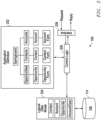
- Figure 6 illustrates relevant components of mobile device 104 that enables offline access to CRM data and/or services according to one embodiment of the present invention. More particularly, Figure 6 shows, in block diagram form, a view request handler 604 in data communication with a view controller 602 and a mobile CRM client 606. In one embodiment, components 602 - 606 may take form in instructions executing on one or more processors of mobile device 104. Additionally, Figure 6 shows memory 610 that is configured to store a file system 612 and a data store 614. In one embodiment, the file system 612 is accessible by the view controller 602 and is configured to store view definitions in respective files identified by respective URLs or addresses. Data store 614 may take form in a database that stores one or more tables such as a views table more fully described below. The data base tables are accessible by the view controller 602 and configured to store the model graph mentioned above.
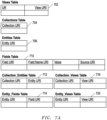
- Figure 7A illustrates example tables, including tables 702 - 720, stored in data store 614 in their initial or empty state. Additional or fewer tables are contemplated in other embodiments.
- the views table 702 maps view URIs to URLs for files in file system 612 that store view definitions corresponding to the view URIs.
- Table 704 - 720 store model URIs. Some of these tables such as the collections tables 704 and the entities table 706 contain entries with only one model URI.
- the remaining tables 706 - 720 contain entries that map model URIs to other model URIs, values (e.g., view components), and/or view URIs.
- the fields table 706 maps field URIs to field name URIs, component values, and source URIs.
- the collection_entities table 712, entity_fields table 714, collection_views table 716, and entity_views tables 720 are one-to-many intersection tables that map model URIs or view URIs. These tables map URIs as designated by their titles. In other words, the collection_entities table 712 maps collections URIs to entity URIs, and the entity_views table 720 maps entity URIs to view URIs
- Mobile CRM client 606 generates requests for views, such as the request for the contacts list view mentioned above, in response to user activation of displayed, actionable view components.
- Request handler 604 receives the requests and is configured to forward the requests to the CRM if the mobile device 104 is online or in data communication with the server 106. Otherwise, request handler 604 forwards the view requests to view controller 602 as will be more fully described below.
- Figure 8 illustrates an example process employed by the view controller 602 and request handler 604 to enable offline access to CRM data and/or services.
- the process begins when a user mobile device 104 activates (e.g., clicks) a displayed, actionable view component of a rendered view definition.
- the activated view component is presumed to be linked to a separate view definition via a target view URI.
- the mobile CRM 606 In response to user activation, the mobile CRM 606 generates a view request corresponding to the activated view component.
- the view URI linked to the activated component may be included in the request received by the request handler 604.
- Request handler 604 can determine if mobile device 104 operates in the online or the offline mode when the view request is received. If the mobile device 104 operates in the online mode, the process proceeds to step 806 where the request handler 604 sends the view request to server 106, and eventually, the view controller 602 will receive a reply, which includes a view definition for the requested view. Additionally, the reply may contain an archive that contains additional view definitions, including a DCV such as the example contacts DCV noted above. Initially, view definitions contained within the archive are not displayed. However, they are used to update the data store 614 and/or file system 612 when received.
- view controller 602 updates file system 612 and data store 614 with the contents of the reply view definition.
- An example procedure for updating file system 612 and data store 614 with the contents of a view definition will be more fully described with reference to Figures 11 and 12 .
- the process shown in Figure 8 proceeds with view controller 602 determining whether the reply contains an archive. If an archive is contained in the reply, then the view controller 602 updates file system 612 and data store 614 with each view definition in the archive using the process shown in Figures 11 and 12 . If the reply lacks an archive, then the view definition of the reply is presented to mobile CRM client 606 for rendering and subsequent display as shown in 816, and the process ends.
- the request handler 604 forwards the request to view controller 602, which in turn accesses the views table 702 to read a URL mapped to the view URI of the view request.
- the view definition contained in the file identified by the URL is read from file system 612 and provided to the view controller 602.
- View controller 602 determines whether the view definition is a DCV as shown in step 822. If not, then view controller 602 forwards the view definition to the mobile CRM client for rendering and display.
- view controller 602 can reconcile components in the view definition with components in the data store 614 using a reconciliation process such as the example reconciliation the process shown in Figure 14 as will be more fully described below.
- the view controller may include an engine (e.g., an EL engine) that executes instructions of the DCV.
- the view controller 602 may include a database management system that generates queries (e.g., SQL queries) that are used to access tables within data store 614. Some of these queries can be generated by the EL engine in accordance with instructions executed by the EL engine. View controller 602, while executing a DCV, can generate a results view definition which in turn is provided to mobile CRM 606 for subsequent rendering and display.
- queries e.g., SQL queries
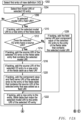
- Figures 11 and 12 illustrate example processes for updating file system 612 and data store 614 at steps 810 or 814 of Figure 8 .
- the process in Figure 11 is used to update views table 702 and file system 612.
- the process in Figure 12 is used to update tables in data store 614.
- the process shown in Figure 11 begins with view controller 602 accessing the views table 702 to determine whether it contains an entry for each of the target view URIs of the view definition.
- the view controller creates a new entry in views table 702 for each new target view URI contained within the view definition.
- view controller 602 creates a new entry in the views table into which the new target view URI is added.
- the process proceeds to step 1106 where the view controller 602 determines whether the views table contains a view URI for the view definition.
- view controller creates a new entry in the views table into which the view URI is added.
- the view controller 602 stores a copy of the view definition of interest in file system 612.
- the view controller 602 then maps the view URI to the URL for the file into which the view definition copy was stored. Thereafter, the process proceeds to Figure 12 , which is more fully described below.
- step 1106 determines whether the views table 702 does contain the view URI for the view definition. If it is determined in step 1106 that the views table 702 does contain the view URI for the view definition, the process proceeds to step 1120 where view controller 602 accesses the views table to see if a URL is mapped to the URI for the view definition. If there is a URL mapped to this URI, the process proceeds to 1126 where the contents identified by the URL, are overwritten with the view definition. It is noted that in this step, a DCV such as the example contacts DCV above, may overwrite a view definition such as the contacts list view definition example above when both definitions are contained in the same reply from server 106.
- a DCV such as the example contacts DCV above
- view controller 604 stores the view definition in a file identified by a URL, and view controller 604 maps the URL to the view URI in the views table.
- view controller 602 processes the model URIs of the view definition in accordance with the process shown in Figure 12 more fully described below.
- Figure 12 illustrates an example process for updating the model URI tables with the contents of a view definition.
- the model tables enable many features of offline mobile CRM processing including offline searching, offline sorting, offline component reconciliation, offline creation of dynamic views, etc.
- the process of Figure 12 begins when view controller 602 selects the first entry (e.g., the entry that contains component "Labron James") of the view definition. It is noted that in one embodiment, each entry of the view definition contains a single view definition component such as "Labron James.”
- view controller 602 selects the first model URI of the selected component. This can be a field URI, a field name URI, a source URI, an entity URI, or a collections URI. Other model URIs are contemplated. View controller 602 can determine the selected model URI type. If the selected model URI is a field URI, the process proceeds to step 1210 where view controller 602 adds the selected model URI as a field URI to the fields table 706, unless the table already contains an entry with the selected model URI. In step 1212, the view controller determines whether the selected entry contains a source field URI in step 1212. If not, view controller 602 adds and maps the component value and the field name URI of the selected view definition entry to the field URI.
- step 1214 view controller 602 maps the source field URI to the field URI in the fields table if need be. It is noted the field URI may be mapped to the source URI within the table prior to step 1214 due to a prior implementation of the process shown within Figure 12 .
- step 1216 view controller 602 adds the source field URI of the selected entry to the fields table as a field URI, unless the source field URI exists in the views table as a field URI prior to step 1216.
- step 1220 the component of the selected view definition entry and its field name URI are added to the views table entry that contains the source field URI in the field URI column.
- an existing component value in the fields table is updated with the component value of the selected entry if these component values differ.
- view controller 602 adds a new entry to the entity_fields table 720 that maps the selected model URI to the entity URI of the selected view definition entry, unless the entry was previously contained in the table.
- step 1206 determines whether the selected model URI is a field URI. If it is, then the view controller implements steps 1228 - 1232. If not, then the process proceeds to step 1234 where the view controller 602 determines whether the selected URI is an entity URI. Presuming that this condition is met, steps 1236 - 1242 are implemented. If not, or in response to implementing step 1242, the view controller 602 determines in step 1244 whether additional model URIs are contained within the selected view definition entry. If there is another model URI, it is selected in step 1250, and steps 1206 - 1244 are repeated with the newly selected model URI. If there is no more model URIs in the selected view definition entry, the view controller 602 determines whether the view definition contains additional entries. If so, the next entry is selected in step 1252 and steps 1204 - 1246 are repeated with the newly selected view definition entry.
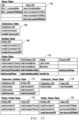
- Figure 7B shows the data store in Figure 7A after view controller 602 processes the example contacts list view definition example above in accordance with Figures 8 , 11 and 12 .
- the reply of the illustrated example that contains the contacts list view definition example also contains an archive having the example DCV above.
- Figure 7C shows the data store in Figure 7B after view controller 602 processes the example Labron James contact view definition above in accordance with Figures 8 , 11 , and 12 .
- file system 612 of mobile device 104 stores a view definition for the springboard view shown in Figure 3 .
- This view definition can be rendered and displayed on mobile device 104 while mobile device 104 is in the offline mode, and this displayed springboard view should be similar to that shown in Figure 3 .
- View controller 602, file system 612, and data store 614 enable offline CRM services including offline display of views on mobile device 104.
- the mobile CRM client 606 generates a request for the contacts view definition.
- This request will include the view URI (i.e., views://contacts#list) that is linked to the Contacts view component of the rendered springboard view definition. Since mobile device 104 is offline, request handler 604 will forward the request from the mobile CRM client to the view controller 602 in accordance with the process shown in Figure 8 . In response, view controller 602 accesses views table 702 shown in Figure 7C to read the URL (i.e., file: ⁇ ...contacts#list) that is mapped to the view URI (i.e., views://contacts#list) of the request. View controller 602 retrieves the contacts list view definition stored at the mapped URL. This view definition, however, is a DCV (i.e., the example contacts DCV above). The view controller can implement this DCV in accordance with the process shown in Figure 13 , which will be more fully described below. Ultimately the view controller will generate a results view definition, which is eventually forwarded to mobile CRM client 606 for rendering and display.
- the view controller will generate a results view definition,
- Figure 9 illustrates an example contacts list view that is displayed by mobile device 104.
- view controller 602 can access the views table 702 to identify target view URIs in the view definition that are mapped to URLs.
- the displayed view definition will include visual indication identifying those view components that are actionable, i.e., components mapped to target view URIs that were previously identified by view controller 602 as mapped to URLs in the views table 702.
- displayed view components that are actionable are bolded by the mobile device 104.
- the LaBron James contact view component is bolded, thus indicating that this component is actionable.
- the mobile CRM 606 acting in accordance with the process shown in Figure 8 In response to a user activating an actionable component such as the LaBron James component displayed in Figure 9 , the mobile CRM 606 acting in accordance with the process shown in Figure 8 generates a view request for the LaBron James contact definition view.
- This request will include the view URI (i.e., view//contacts/101#detail), which is linked to the "LaBron James" component within the rendered and displayed contacts list view definition. Since mobile device 104 is offline, this request is provided to view controller 602, which in turn reads the LaBron James contact view definition from the file system definition at the mapped URL (i.e., file://...contacts/101#detail).
- This contact view definition is forwarded to the mobile CRM client 606 for subsequent rendering and display.
- Figure 10 illustrates the LaBron James contact view displayed by mobile device 104 while mobile device 104 is in the offline mode.
- a DCV can be executed by view controller 602 to generate a view definition for subsequent rendering and display while mobile device operates in the offline mode.
- the view definition may depend on input provided by a user via mobile device 104; different inputs to a DCV executing on view controller 602 may result in different view definitions.
- view controller 602 can select components from the value column of the fields table 710 according to some selection criteria (select all contacts or all contacts beginning with "L"), optionally sort the selected components according to another criteria (e.g., sort alphabetically), and create a results view definition with entries that contain the selected components, respectively. Once created, the results view definition can be rendered for display on mobile device 104.
- Figure 9 illustrates an example view that was displayed in response to view controller 602 implementing the example DCV above.
- Figure 13 illustrates an example process performed by view controller 602 in response to implementing a DCV such as the example DCV above .
- view controller 602 accesses the collection_entities table and collects all entity URIs mapped to the collection URI specified in the DCV as shown in step 1302.
- the specified collection URI in the example DCV above is "contacts.”
- the view controller 602 accesses the entity_fields table and collects the field URIs mapped to the entity URIs, respectively, that were collected in step 1302. This collection of field URIs can be used to identify one or more components that may placed into a results view definition.
- a search field is available into which the user can enter a search term.
- the search term is provided to the view controller 602 for use in the process shown in Figure 13 .
- view controller 602 accesses fields table 710 and collects components from the value column that are: identified by the field URIs form step 1304, and; meet a search term entered by the user of mobile device 104. If no search term has been entered by the user, a null is presumed, and view controller in step 1306 collects all values mapped to the field URIs, respectively, that were collected in step 1304.
- the view controller 602 may sort the components collected in step 1306. In one embodiment, the components are sorted alphabetically.
- the view controller For each value collected in step 1306, the view controller creates an entry in a results view definition and adds a respective component collected in step 1306.
- view controller 602 accesses the fields table 710 and collects the entity URIs mapped to the components , respectively, collected in step1306.
- view controller 602 accesses the entity_views table 720 and collects the view URIs mapped to the entity URIs, respectively, collected in step 1312.
- the views table 702 is accessed to collect the URLs if any, mapped to the view URIs, respectively, collected in step 1314, and these URLs are added to the appropriate entries of the results of view definition as action items.
- primacy components and command components are also added to the entries of the results view definition.
- the results view definition is provided by view controller 602 to the mobile CRM client for rendering and display.
- FIG 14 illustrates an example process implemented by view controller 602 for reconciling components when rendering and displaying views. This process can be implemented by the view controller before the view controller forwards a requested view definition to mobile CRM client 606 for rendering and display in steps 816 or 830 of Figure 8 .
- view controller 602 for reconciling components when rendering and displaying views. This process can be implemented by the view controller before the view controller forwards a requested view definition to mobile CRM client 606 for rendering and display in steps 816 or 830 of Figure 8 .
- presume mobile device 104 receives the following example account view definition from server 102 after receiving the example contacts list view definition and the example Labron James contact view definition above.
- the Acme Corp view definition is processed by the view controller 602 in accordance with the processes shown in Figures 8 , 11 , and 12 .
- Figure 7D illustrates data store 614 in Figure 7C after view controller 602 processes the example Acme Corp contact view definition above in accordance with the process shown in Figure 12 .
- view controller 602 updates fields table 710 by overwriting "Acme Bike Corp” with "Acme Corp” as shown in Figure 7D .
- Figure 15 illustrates the view corresponding to the example Acme Corp view definition. This view shows that Labron James is the contact for "Acme Corp.," not "Acme Bike Corp” as shown in Figure 10 .
- Mobile device 104 then goes offline, the user activates the "Contacts” component of the springboard view, and then activates the "Labron James” component of the contacts list view that is displayed in response to activating Contacts.
- Mobile device 104 can implement the process shown in Figure 8 and render the view definition read from file system 612 as shown in step 830.
- view controller 602 performs the reconciliation process of Figure 14 .
- Figure 16 illustrates the view after implementing the process shown in Figure 14 . As shown, the account name has been updated to be "Acme Corp" not "Acme Bike Corp" as shown in Figure 10 .
- Mobile device 104 may have a feature, called "export data" that allows a user to download and locally store several related view definitions. For example, a user may seek to download most or all view definitions for views (contacts, opportunities, calendar events, etc.,) associated with a particular account. These view definitions, or components thereof, can be rendered and displayed by mobile device 104 while in the offline mode. Thus, when the user activates this feature, the mobile device can generate a view request for, eg,. an account, and all associated view definitions. Server 102 will send a reply to the mobile device that contains the account view definition, and an archive that contains view definitions for respective contacts, opportunities, etc., associated with the account. View controller 602 can update file system 612 and data store 614 with the contents of the view definitions of the archive in accordance with the processes shown in Figures 11 and 12 .
- export data that allows a user to download and locally store several related view definitions. For example, a user may seek to download most or all view definitions for views (contacts
Landscapes
- Engineering & Computer Science (AREA)
- Computer Networks & Wireless Communication (AREA)
- Signal Processing (AREA)
- Databases & Information Systems (AREA)
- Theoretical Computer Science (AREA)
- Physics & Mathematics (AREA)
- Data Mining & Analysis (AREA)
- General Engineering & Computer Science (AREA)
- General Physics & Mathematics (AREA)
- Human Computer Interaction (AREA)
- Information Transfer Between Computers (AREA)
- Telephonic Communication Services (AREA)
- Information Retrieval, Db Structures And Fs Structures Therefor (AREA)
Applications Claiming Priority (3)
| Application Number | Priority Date | Filing Date | Title |
|---|---|---|---|
| US201361880901P | 2013-09-21 | 2013-09-21 | |
| US14/068,790 US9456335B2 (en) | 2013-09-21 | 2013-10-31 | Method and system for defining an offlinable model graph |
| PCT/US2014/056740 WO2015042512A1 (en) | 2013-09-21 | 2014-09-22 | Method and system for defining an offlinable model graph |
Publications (2)
| Publication Number | Publication Date |
|---|---|
| EP3047402A1 EP3047402A1 (en) | 2016-07-27 |
| EP3047402B1 true EP3047402B1 (en) | 2024-06-26 |
Family
ID=51790842
Family Applications (1)
| Application Number | Title | Priority Date | Filing Date |
|---|---|---|---|
| EP14787313.7A Active EP3047402B1 (en) | 2013-09-21 | 2014-09-22 | Method and system for defining an offlinable model graph |
Country Status (5)
| Country | Link |
|---|---|
| US (2) | US9456335B2 (enExample) |
| EP (1) | EP3047402B1 (enExample) |
| JP (1) | JP6434964B2 (enExample) |
| CN (1) | CN105706082B (enExample) |
| WO (1) | WO2015042512A1 (enExample) |
Families Citing this family (2)
| Publication number | Priority date | Publication date | Assignee | Title |
|---|---|---|---|---|
| US9760897B2 (en) * | 2013-09-21 | 2017-09-12 | Oracle International Corporation | Method and system for defining an offlinable view/controller graph |
| US9917923B2 (en) | 2014-09-26 | 2018-03-13 | Oracle International Corporation | Building message relationships for offline operation of an enterprise application |
Family Cites Families (29)
| Publication number | Priority date | Publication date | Assignee | Title |
|---|---|---|---|---|
| US5815811A (en) * | 1989-06-29 | 1998-09-29 | Symbol Technologies, Inc. | Preemptive roaming in a cellular local area wireless network |
| US5319766A (en) * | 1992-04-24 | 1994-06-07 | Digital Equipment Corporation | Duplicate tag store for a processor having primary and backup cache memories in a multiprocessor computer system |
| US6473609B1 (en) * | 1995-12-11 | 2002-10-29 | Openwave Systems Inc. | Method and architecture for interactive two-way communication devices to interact with a network |
| US6108769A (en) * | 1996-05-17 | 2000-08-22 | Advanced Micro Devices, Inc. | Dependency table for reducing dependency checking hardware |
| JP3175692B2 (ja) * | 1998-04-28 | 2001-06-11 | 日本電気株式会社 | コンピュータと携帯端末間のデータ連携システム及びそのデータ連携方法 |
| JPH11345240A (ja) * | 1998-06-02 | 1999-12-14 | Nippon Telegr & Teleph Corp <Ntt> | Push技術によるコンテンツ配信および配信先でのデータベース生成・更新方式およびそのプログラムを記録した記録媒体 |
| JP2000267971A (ja) * | 1999-03-17 | 2000-09-29 | Sharp Corp | オフライン表示機能付通信装置及び方法並びに記録媒体 |
| US7162427B1 (en) * | 1999-08-20 | 2007-01-09 | Electronic Data Systems Corporation | Structure and method of modeling integrated business and information technology frameworks and architecture in support of a business |
| US20020124011A1 (en) * | 2001-03-01 | 2002-09-05 | Baxter Robert W. | Methods, systems, and computer program products for communicating with a controller using a database interface |
| US6879806B2 (en) * | 2001-06-01 | 2005-04-12 | Zensys A/S | System and a method for building routing tables and for routing signals in an automation system |
| JP4382326B2 (ja) * | 2002-05-24 | 2009-12-09 | ケープレックス・インク | ウェブ・ドキュメントを再編集して再配布する方法及び装置 |
| US7143241B2 (en) * | 2002-08-06 | 2006-11-28 | Hewlett-Packard Development Company, L.P. | Cache management in a mobile device |
| JP2004280203A (ja) * | 2003-03-12 | 2004-10-07 | Sony Corp | Web対応電子機器装置、ページ閲覧表示方法およびプログラム |
| US20070011130A1 (en) | 2003-06-03 | 2007-01-11 | Shinji Yamabuchi | Method for browsing contents using page storing file |
| US8504704B2 (en) * | 2004-06-16 | 2013-08-06 | Dormarke Assets Limited Liability Company | Distributed contact information management |
| US7467389B2 (en) | 2004-11-23 | 2008-12-16 | Sybase, Inc. | System and methodology providing service invocation for occasionally connected computing devices |
| US8224951B2 (en) * | 2005-02-22 | 2012-07-17 | Nextair Corporation | Determining operational status of a mobile device capable of executing server-side applications |
| US7370050B2 (en) | 2005-02-28 | 2008-05-06 | Microsoft Corporation | Discoverability and enumeration mechanisms in a hierarchically secure storage system |
| EP2160677B1 (en) * | 2007-06-26 | 2019-10-02 | Endeca Technologies, INC. | System and method for measuring the quality of document sets |
| US8935249B2 (en) * | 2007-06-26 | 2015-01-13 | Oracle Otc Subsidiary Llc | Visualization of concepts within a collection of information |
| CN101106779B (zh) * | 2007-07-25 | 2010-04-14 | 中兴通讯股份有限公司 | 一种数字通讯方法 |
| JP2010102453A (ja) * | 2008-10-22 | 2010-05-06 | Ntt Docomo Inc | Webページ閲覧方法、情報処理装置およびWebページ閲覧プログラム |
| JP2010244249A (ja) * | 2009-04-03 | 2010-10-28 | Visionere Corp | メニュー表示装置、メニュー表示システム、サーバ、メニュー表示方法、及びコンピュータプログラム |
| US8725793B2 (en) | 2009-04-03 | 2014-05-13 | Google Inc. | Architectural pattern for persistent web application design |
| JP2011164749A (ja) * | 2010-02-05 | 2011-08-25 | Kddi Corp | Webアプリケーション高可用化装置及びWebアプリケーション高可用化方法 |
| JP5627964B2 (ja) * | 2010-09-10 | 2014-11-19 | シャープ株式会社 | 端末装置、端末装置の制御方法、端末装置制御プログラム、および該プログラムを記録したコンピュータ読み取り可能な記録媒体 |
| US9378071B2 (en) * | 2012-06-23 | 2016-06-28 | Pmda Services Pty Ltd | Computing device for state transitions of recursive state machines and a computer-implemented method for the definition, design and deployment of domain recursive state machines for computing devices of that type |
| AU2012101581A4 (en) * | 2012-10-30 | 2012-11-29 | The App Shed Pty Ltd | The Toolshed Mobile Application |
| US20140310302A1 (en) * | 2013-04-12 | 2014-10-16 | Oracle International Corporation | Storing and querying graph data in a key-value store |
-
2013
- 2013-10-31 US US14/068,790 patent/US9456335B2/en active Active
-
2014
- 2014-09-22 EP EP14787313.7A patent/EP3047402B1/en active Active
- 2014-09-22 CN CN201480058964.XA patent/CN105706082B/zh active Active
- 2014-09-22 JP JP2016515513A patent/JP6434964B2/ja active Active
- 2014-09-22 WO PCT/US2014/056740 patent/WO2015042512A1/en not_active Ceased
-
2016
- 2016-08-24 US US15/246,410 patent/US10911592B2/en active Active
Also Published As
| Publication number | Publication date |
|---|---|
| WO2015042512A1 (en) | 2015-03-26 |
| US20150087276A1 (en) | 2015-03-26 |
| JP6434964B2 (ja) | 2018-12-05 |
| JP2016537697A (ja) | 2016-12-01 |
| US9456335B2 (en) | 2016-09-27 |
| EP3047402A1 (en) | 2016-07-27 |
| US10911592B2 (en) | 2021-02-02 |
| CN105706082B (zh) | 2020-09-22 |
| US20170055102A1 (en) | 2017-02-23 |
| CN105706082A (zh) | 2016-06-22 |
Similar Documents
| Publication | Publication Date | Title |
|---|---|---|
| US7953722B2 (en) | Query response service for business objects | |
| US9122767B2 (en) | Method and apparatus for pre-rendering expected system response | |
| AU2008216396B2 (en) | Web data usage platform | |
| US9569508B2 (en) | Business process visualization | |
| IL224919A (en) | Dynamic trees of choice are scattered | |
| CN113127574B (zh) | 基于知识图谱的业务数据展示方法、系统、设备及介质 | |
| EP2215568A2 (en) | Presenting and navigating content having varying properties | |
| US20090049031A1 (en) | Method And System For Database Searching | |
| US9275165B2 (en) | Method and apparatus for defining an application to allow polymorphic serialization | |
| US20110252049A1 (en) | Function execution using sql | |
| US9922100B2 (en) | Systems and methods for facilitating the development of an application that accesses data | |
| US7788259B2 (en) | Locating, viewing and interacting with information sources | |
| US9741060B2 (en) | Recursive navigation in mobile CRM | |
| US10911592B2 (en) | Method and system for defining an offlinable model graph | |
| CN102142025A (zh) | 构成带有链接的自动创建的视图 | |
| US7293021B1 (en) | Method and system for providing dynamic capability discovery and use | |
| US9760897B2 (en) | Method and system for defining an offlinable view/controller graph | |
| US20090327238A1 (en) | Extensible binding of data within graphical rich applications | |
| US20080082535A1 (en) | Method and system for automatically generating a communication interface | |
| US7516127B2 (en) | Reporting module definition language system and method | |
| US7499928B2 (en) | Obtaining and displaying information related to a selection within a hierarchical data structure | |
| CA2597210A1 (en) | Method and system for database searching | |
| CN119829037A (zh) | web应用前端数据存储与处理方法、设备和可读存储介质 | |
| US9348846B2 (en) | User-navigable resource representations |
Legal Events
| Date | Code | Title | Description |
|---|---|---|---|
| PUAI | Public reference made under article 153(3) epc to a published international application that has entered the european phase |
Free format text: ORIGINAL CODE: 0009012 |
|
| 17P | Request for examination filed |
Effective date: 20160420 |
|
| AK | Designated contracting states |
Kind code of ref document: A1 Designated state(s): AL AT BE BG CH CY CZ DE DK EE ES FI FR GB GR HR HU IE IS IT LI LT LU LV MC MK MT NL NO PL PT RO RS SE SI SK SM TR |
|
| AX | Request for extension of the european patent |
Extension state: BA ME |
|
| DAX | Request for extension of the european patent (deleted) | ||
| STAA | Information on the status of an ep patent application or granted ep patent |
Free format text: STATUS: EXAMINATION IS IN PROGRESS |
|
| 17Q | First examination report despatched |
Effective date: 20210302 |
|
| P01 | Opt-out of the competence of the unified patent court (upc) registered |
Effective date: 20230523 |
|
| REG | Reference to a national code |
Ref country code: DE Ref legal event code: R079 Free format text: PREVIOUS MAIN CLASS: G06F0017300000 Ipc: G06F0016957000 Ref document number: 602014090406 Country of ref document: DE |
|
| GRAP | Despatch of communication of intention to grant a patent |
Free format text: ORIGINAL CODE: EPIDOSNIGR1 |
|
| STAA | Information on the status of an ep patent application or granted ep patent |
Free format text: STATUS: GRANT OF PATENT IS INTENDED |
|
| RIC1 | Information provided on ipc code assigned before grant |
Ipc: H04W 4/50 20180101ALI20240111BHEP Ipc: H04W 4/18 20090101ALI20240111BHEP Ipc: G06F 16/957 20190101AFI20240111BHEP |
|
| INTG | Intention to grant announced |
Effective date: 20240124 |
|
| GRAS | Grant fee paid |
Free format text: ORIGINAL CODE: EPIDOSNIGR3 |
|
| GRAA | (expected) grant |
Free format text: ORIGINAL CODE: 0009210 |
|
| STAA | Information on the status of an ep patent application or granted ep patent |
Free format text: STATUS: THE PATENT HAS BEEN GRANTED |
|
| AK | Designated contracting states |
Kind code of ref document: B1 Designated state(s): AL AT BE BG CH CY CZ DE DK EE ES FI FR GB GR HR HU IE IS IT LI LT LU LV MC MK MT NL NO PL PT RO RS SE SI SK SM TR |
|
| REG | Reference to a national code |
Ref country code: GB Ref legal event code: FG4D |
|
| REG | Reference to a national code |
Ref country code: CH Ref legal event code: EP |
|
| REG | Reference to a national code |
Ref country code: DE Ref legal event code: R096 Ref document number: 602014090406 Country of ref document: DE |
|
| PG25 | Lapsed in a contracting state [announced via postgrant information from national office to epo] |
Ref country code: BG Free format text: LAPSE BECAUSE OF FAILURE TO SUBMIT A TRANSLATION OF THE DESCRIPTION OR TO PAY THE FEE WITHIN THE PRESCRIBED TIME-LIMIT Effective date: 20240626 |
|
| PG25 | Lapsed in a contracting state [announced via postgrant information from national office to epo] |
Ref country code: HR Free format text: LAPSE BECAUSE OF FAILURE TO SUBMIT A TRANSLATION OF THE DESCRIPTION OR TO PAY THE FEE WITHIN THE PRESCRIBED TIME-LIMIT Effective date: 20240626 Ref country code: FI Free format text: LAPSE BECAUSE OF FAILURE TO SUBMIT A TRANSLATION OF THE DESCRIPTION OR TO PAY THE FEE WITHIN THE PRESCRIBED TIME-LIMIT Effective date: 20240626 |
|
| REG | Reference to a national code |
Ref country code: LT Ref legal event code: MG9D |
|
| PG25 | Lapsed in a contracting state [announced via postgrant information from national office to epo] |
Ref country code: GR Free format text: LAPSE BECAUSE OF FAILURE TO SUBMIT A TRANSLATION OF THE DESCRIPTION OR TO PAY THE FEE WITHIN THE PRESCRIBED TIME-LIMIT Effective date: 20240927 |
|
| PG25 | Lapsed in a contracting state [announced via postgrant information from national office to epo] |
Ref country code: LV Free format text: LAPSE BECAUSE OF FAILURE TO SUBMIT A TRANSLATION OF THE DESCRIPTION OR TO PAY THE FEE WITHIN THE PRESCRIBED TIME-LIMIT Effective date: 20240626 |
|
| REG | Reference to a national code |
Ref country code: NL Ref legal event code: MP Effective date: 20240626 |
|
| PG25 | Lapsed in a contracting state [announced via postgrant information from national office to epo] |
Ref country code: NO Free format text: LAPSE BECAUSE OF FAILURE TO SUBMIT A TRANSLATION OF THE DESCRIPTION OR TO PAY THE FEE WITHIN THE PRESCRIBED TIME-LIMIT Effective date: 20240926 Ref country code: LV Free format text: LAPSE BECAUSE OF FAILURE TO SUBMIT A TRANSLATION OF THE DESCRIPTION OR TO PAY THE FEE WITHIN THE PRESCRIBED TIME-LIMIT Effective date: 20240626 Ref country code: HR Free format text: LAPSE BECAUSE OF FAILURE TO SUBMIT A TRANSLATION OF THE DESCRIPTION OR TO PAY THE FEE WITHIN THE PRESCRIBED TIME-LIMIT Effective date: 20240626 Ref country code: GR Free format text: LAPSE BECAUSE OF FAILURE TO SUBMIT A TRANSLATION OF THE DESCRIPTION OR TO PAY THE FEE WITHIN THE PRESCRIBED TIME-LIMIT Effective date: 20240927 Ref country code: FI Free format text: LAPSE BECAUSE OF FAILURE TO SUBMIT A TRANSLATION OF THE DESCRIPTION OR TO PAY THE FEE WITHIN THE PRESCRIBED TIME-LIMIT Effective date: 20240626 Ref country code: BG Free format text: LAPSE BECAUSE OF FAILURE TO SUBMIT A TRANSLATION OF THE DESCRIPTION OR TO PAY THE FEE WITHIN THE PRESCRIBED TIME-LIMIT Effective date: 20240626 Ref country code: RS Free format text: LAPSE BECAUSE OF FAILURE TO SUBMIT A TRANSLATION OF THE DESCRIPTION OR TO PAY THE FEE WITHIN THE PRESCRIBED TIME-LIMIT Effective date: 20240926 |
|
| PG25 | Lapsed in a contracting state [announced via postgrant information from national office to epo] |
Ref country code: NL Free format text: LAPSE BECAUSE OF FAILURE TO SUBMIT A TRANSLATION OF THE DESCRIPTION OR TO PAY THE FEE WITHIN THE PRESCRIBED TIME-LIMIT Effective date: 20240626 |
|
| REG | Reference to a national code |
Ref country code: AT Ref legal event code: MK05 Ref document number: 1698301 Country of ref document: AT Kind code of ref document: T Effective date: 20240626 |
|
| PG25 | Lapsed in a contracting state [announced via postgrant information from national office to epo] |
Ref country code: NL Free format text: LAPSE BECAUSE OF FAILURE TO SUBMIT A TRANSLATION OF THE DESCRIPTION OR TO PAY THE FEE WITHIN THE PRESCRIBED TIME-LIMIT Effective date: 20240626 |
|
| PG25 | Lapsed in a contracting state [announced via postgrant information from national office to epo] |
Ref country code: PT Free format text: LAPSE BECAUSE OF FAILURE TO SUBMIT A TRANSLATION OF THE DESCRIPTION OR TO PAY THE FEE WITHIN THE PRESCRIBED TIME-LIMIT Effective date: 20241028 |
|
| PG25 | Lapsed in a contracting state [announced via postgrant information from national office to epo] |
Ref country code: PT Free format text: LAPSE BECAUSE OF FAILURE TO SUBMIT A TRANSLATION OF THE DESCRIPTION OR TO PAY THE FEE WITHIN THE PRESCRIBED TIME-LIMIT Effective date: 20241028 |
|
| PG25 | Lapsed in a contracting state [announced via postgrant information from national office to epo] |
Ref country code: PL Free format text: LAPSE BECAUSE OF FAILURE TO SUBMIT A TRANSLATION OF THE DESCRIPTION OR TO PAY THE FEE WITHIN THE PRESCRIBED TIME-LIMIT Effective date: 20240626 |
|
| PG25 | Lapsed in a contracting state [announced via postgrant information from national office to epo] |
Ref country code: EE Free format text: LAPSE BECAUSE OF FAILURE TO SUBMIT A TRANSLATION OF THE DESCRIPTION OR TO PAY THE FEE WITHIN THE PRESCRIBED TIME-LIMIT Effective date: 20240626 |
|
| PG25 | Lapsed in a contracting state [announced via postgrant information from national office to epo] |
Ref country code: IS Free format text: LAPSE BECAUSE OF FAILURE TO SUBMIT A TRANSLATION OF THE DESCRIPTION OR TO PAY THE FEE WITHIN THE PRESCRIBED TIME-LIMIT Effective date: 20241026 Ref country code: AT Free format text: LAPSE BECAUSE OF FAILURE TO SUBMIT A TRANSLATION OF THE DESCRIPTION OR TO PAY THE FEE WITHIN THE PRESCRIBED TIME-LIMIT Effective date: 20240626 |
|
| PG25 | Lapsed in a contracting state [announced via postgrant information from national office to epo] |
Ref country code: CZ Free format text: LAPSE BECAUSE OF FAILURE TO SUBMIT A TRANSLATION OF THE DESCRIPTION OR TO PAY THE FEE WITHIN THE PRESCRIBED TIME-LIMIT Effective date: 20240626 |
|
| PG25 | Lapsed in a contracting state [announced via postgrant information from national office to epo] |
Ref country code: SK Free format text: LAPSE BECAUSE OF FAILURE TO SUBMIT A TRANSLATION OF THE DESCRIPTION OR TO PAY THE FEE WITHIN THE PRESCRIBED TIME-LIMIT Effective date: 20240626 Ref country code: RO Free format text: LAPSE BECAUSE OF FAILURE TO SUBMIT A TRANSLATION OF THE DESCRIPTION OR TO PAY THE FEE WITHIN THE PRESCRIBED TIME-LIMIT Effective date: 20240626 |
|
| PG25 | Lapsed in a contracting state [announced via postgrant information from national office to epo] |
Ref country code: ES Free format text: LAPSE BECAUSE OF FAILURE TO SUBMIT A TRANSLATION OF THE DESCRIPTION OR TO PAY THE FEE WITHIN THE PRESCRIBED TIME-LIMIT Effective date: 20240626 Ref country code: SM Free format text: LAPSE BECAUSE OF FAILURE TO SUBMIT A TRANSLATION OF THE DESCRIPTION OR TO PAY THE FEE WITHIN THE PRESCRIBED TIME-LIMIT Effective date: 20240626 |
|
| PG25 | Lapsed in a contracting state [announced via postgrant information from national office to epo] |
Ref country code: SM Free format text: LAPSE BECAUSE OF FAILURE TO SUBMIT A TRANSLATION OF THE DESCRIPTION OR TO PAY THE FEE WITHIN THE PRESCRIBED TIME-LIMIT Effective date: 20240626 Ref country code: SK Free format text: LAPSE BECAUSE OF FAILURE TO SUBMIT A TRANSLATION OF THE DESCRIPTION OR TO PAY THE FEE WITHIN THE PRESCRIBED TIME-LIMIT Effective date: 20240626 Ref country code: RO Free format text: LAPSE BECAUSE OF FAILURE TO SUBMIT A TRANSLATION OF THE DESCRIPTION OR TO PAY THE FEE WITHIN THE PRESCRIBED TIME-LIMIT Effective date: 20240626 Ref country code: PL Free format text: LAPSE BECAUSE OF FAILURE TO SUBMIT A TRANSLATION OF THE DESCRIPTION OR TO PAY THE FEE WITHIN THE PRESCRIBED TIME-LIMIT Effective date: 20240626 Ref country code: IS Free format text: LAPSE BECAUSE OF FAILURE TO SUBMIT A TRANSLATION OF THE DESCRIPTION OR TO PAY THE FEE WITHIN THE PRESCRIBED TIME-LIMIT Effective date: 20241026 Ref country code: ES Free format text: LAPSE BECAUSE OF FAILURE TO SUBMIT A TRANSLATION OF THE DESCRIPTION OR TO PAY THE FEE WITHIN THE PRESCRIBED TIME-LIMIT Effective date: 20240626 Ref country code: EE Free format text: LAPSE BECAUSE OF FAILURE TO SUBMIT A TRANSLATION OF THE DESCRIPTION OR TO PAY THE FEE WITHIN THE PRESCRIBED TIME-LIMIT Effective date: 20240626 Ref country code: CZ Free format text: LAPSE BECAUSE OF FAILURE TO SUBMIT A TRANSLATION OF THE DESCRIPTION OR TO PAY THE FEE WITHIN THE PRESCRIBED TIME-LIMIT Effective date: 20240626 Ref country code: AT Free format text: LAPSE BECAUSE OF FAILURE TO SUBMIT A TRANSLATION OF THE DESCRIPTION OR TO PAY THE FEE WITHIN THE PRESCRIBED TIME-LIMIT Effective date: 20240626 |
|
| PG25 | Lapsed in a contracting state [announced via postgrant information from national office to epo] |
Ref country code: IT Free format text: LAPSE BECAUSE OF FAILURE TO SUBMIT A TRANSLATION OF THE DESCRIPTION OR TO PAY THE FEE WITHIN THE PRESCRIBED TIME-LIMIT Effective date: 20240626 |
|
| REG | Reference to a national code |
Ref country code: DE Ref legal event code: R097 Ref document number: 602014090406 Country of ref document: DE |
|
| PG25 | Lapsed in a contracting state [announced via postgrant information from national office to epo] |
Ref country code: DK Free format text: LAPSE BECAUSE OF FAILURE TO SUBMIT A TRANSLATION OF THE DESCRIPTION OR TO PAY THE FEE WITHIN THE PRESCRIBED TIME-LIMIT Effective date: 20240626 |
|
| PG25 | Lapsed in a contracting state [announced via postgrant information from national office to epo] |
Ref country code: MC Free format text: LAPSE BECAUSE OF FAILURE TO SUBMIT A TRANSLATION OF THE DESCRIPTION OR TO PAY THE FEE WITHIN THE PRESCRIBED TIME-LIMIT Effective date: 20240626 |
|
| REG | Reference to a national code |
Ref country code: CH Ref legal event code: PL |
|
| PLBE | No opposition filed within time limit |
Free format text: ORIGINAL CODE: 0009261 |
|
| STAA | Information on the status of an ep patent application or granted ep patent |
Free format text: STATUS: NO OPPOSITION FILED WITHIN TIME LIMIT |
|
| PG25 | Lapsed in a contracting state [announced via postgrant information from national office to epo] |
Ref country code: LU Free format text: LAPSE BECAUSE OF NON-PAYMENT OF DUE FEES Effective date: 20240922 |
|
| 26N | No opposition filed |
Effective date: 20250327 |
|
| REG | Reference to a national code |
Ref country code: BE Ref legal event code: MM Effective date: 20240930 |
|
| PG25 | Lapsed in a contracting state [announced via postgrant information from national office to epo] |
Ref country code: BE Free format text: LAPSE BECAUSE OF NON-PAYMENT OF DUE FEES Effective date: 20240930 |
|
| PG25 | Lapsed in a contracting state [announced via postgrant information from national office to epo] |
Ref country code: FR Free format text: LAPSE BECAUSE OF NON-PAYMENT OF DUE FEES Effective date: 20240930 |
|
| PG25 | Lapsed in a contracting state [announced via postgrant information from national office to epo] |
Ref country code: CH Free format text: LAPSE BECAUSE OF NON-PAYMENT OF DUE FEES Effective date: 20240930 |
|
| PG25 | Lapsed in a contracting state [announced via postgrant information from national office to epo] |
Ref country code: IE Free format text: LAPSE BECAUSE OF NON-PAYMENT OF DUE FEES Effective date: 20240922 |
|
| PG25 | Lapsed in a contracting state [announced via postgrant information from national office to epo] |
Ref country code: SE Free format text: LAPSE BECAUSE OF FAILURE TO SUBMIT A TRANSLATION OF THE DESCRIPTION OR TO PAY THE FEE WITHIN THE PRESCRIBED TIME-LIMIT Effective date: 20240626 |
|
| PGFP | Annual fee paid to national office [announced via postgrant information from national office to epo] |
Ref country code: DE Payment date: 20250730 Year of fee payment: 12 |
|
| PGFP | Annual fee paid to national office [announced via postgrant information from national office to epo] |
Ref country code: GB Payment date: 20250731 Year of fee payment: 12 |
|
| PG25 | Lapsed in a contracting state [announced via postgrant information from national office to epo] |
Ref country code: CY Free format text: LAPSE BECAUSE OF FAILURE TO SUBMIT A TRANSLATION OF THE DESCRIPTION OR TO PAY THE FEE WITHIN THE PRESCRIBED TIME-LIMIT; INVALID AB INITIO Effective date: 20140922 |
|
| PG25 | Lapsed in a contracting state [announced via postgrant information from national office to epo] |
Ref country code: HU Free format text: LAPSE BECAUSE OF FAILURE TO SUBMIT A TRANSLATION OF THE DESCRIPTION OR TO PAY THE FEE WITHIN THE PRESCRIBED TIME-LIMIT; INVALID AB INITIO Effective date: 20140922 |
|
| PG25 | Lapsed in a contracting state [announced via postgrant information from national office to epo] |
Ref country code: TR Free format text: LAPSE BECAUSE OF FAILURE TO SUBMIT A TRANSLATION OF THE DESCRIPTION OR TO PAY THE FEE WITHIN THE PRESCRIBED TIME-LIMIT Effective date: 20240626 |
|
| PG25 | Lapsed in a contracting state [announced via postgrant information from national office to epo] |
Ref country code: SI Free format text: LAPSE BECAUSE OF FAILURE TO SUBMIT A TRANSLATION OF THE DESCRIPTION OR TO PAY THE FEE WITHIN THE PRESCRIBED TIME-LIMIT Effective date: 20240626 |
|
| PG25 | Lapsed in a contracting state [announced via postgrant information from national office to epo] |
Ref country code: LT Free format text: LAPSE BECAUSE OF FAILURE TO SUBMIT A TRANSLATION OF THE DESCRIPTION OR TO PAY THE FEE WITHIN THE PRESCRIBED TIME-LIMIT Effective date: 20240626 |