EP2993557B1 - Electronic device and method for processing handwriting - Google Patents
Electronic device and method for processing handwriting Download PDFInfo
- Publication number
- EP2993557B1 EP2993557B1 EP15157624.6A EP15157624A EP2993557B1 EP 2993557 B1 EP2993557 B1 EP 2993557B1 EP 15157624 A EP15157624 A EP 15157624A EP 2993557 B1 EP2993557 B1 EP 2993557B1
- Authority
- EP
- European Patent Office
- Prior art keywords
- stroke
- display
- handwriting
- page
- area
- Prior art date
- Legal status (The legal status is an assumption and is not a legal conclusion. Google has not performed a legal analysis and makes no representation as to the accuracy of the status listed.)
- Active
Links
Images





Classifications
-
- G—PHYSICS
- G06—COMPUTING OR CALCULATING; COUNTING
- G06F—ELECTRIC DIGITAL DATA PROCESSING
- G06F3/00—Input arrangements for transferring data to be processed into a form capable of being handled by the computer; Output arrangements for transferring data from processing unit to output unit, e.g. interface arrangements
- G06F3/01—Input arrangements or combined input and output arrangements for interaction between user and computer
- G06F3/048—Interaction techniques based on graphical user interfaces [GUI]
- G06F3/0487—Interaction techniques based on graphical user interfaces [GUI] using specific features provided by the input device, e.g. functions controlled by the rotation of a mouse with dual sensing arrangements, or of the nature of the input device, e.g. tap gestures based on pressure sensed by a digitiser
- G06F3/0488—Interaction techniques based on graphical user interfaces [GUI] using specific features provided by the input device, e.g. functions controlled by the rotation of a mouse with dual sensing arrangements, or of the nature of the input device, e.g. tap gestures based on pressure sensed by a digitiser using a touch-screen or digitiser, e.g. input of commands through traced gestures
- G06F3/04883—Interaction techniques based on graphical user interfaces [GUI] using specific features provided by the input device, e.g. functions controlled by the rotation of a mouse with dual sensing arrangements, or of the nature of the input device, e.g. tap gestures based on pressure sensed by a digitiser using a touch-screen or digitiser, e.g. input of commands through traced gestures for inputting data by handwriting, e.g. gesture or text
-
- G—PHYSICS
- G06—COMPUTING OR CALCULATING; COUNTING
- G06F—ELECTRIC DIGITAL DATA PROCESSING
- G06F3/00—Input arrangements for transferring data to be processed into a form capable of being handled by the computer; Output arrangements for transferring data from processing unit to output unit, e.g. interface arrangements
- G06F3/01—Input arrangements or combined input and output arrangements for interaction between user and computer
- G06F3/017—Gesture based interaction, e.g. based on a set of recognized hand gestures
-
- G—PHYSICS
- G06—COMPUTING OR CALCULATING; COUNTING
- G06F—ELECTRIC DIGITAL DATA PROCESSING
- G06F3/00—Input arrangements for transferring data to be processed into a form capable of being handled by the computer; Output arrangements for transferring data from processing unit to output unit, e.g. interface arrangements
- G06F3/01—Input arrangements or combined input and output arrangements for interaction between user and computer
- G06F3/02—Input arrangements using manually operated switches, e.g. using keyboards or dials
- G06F3/023—Arrangements for converting discrete items of information into a coded form, e.g. arrangements for interpreting keyboard generated codes as alphanumeric codes, operand codes or instruction codes
- G06F3/0233—Character input methods
- G06F3/0236—Character input methods using selection techniques to select from displayed items
-
- G—PHYSICS
- G06—COMPUTING OR CALCULATING; COUNTING
- G06F—ELECTRIC DIGITAL DATA PROCESSING
- G06F3/00—Input arrangements for transferring data to be processed into a form capable of being handled by the computer; Output arrangements for transferring data from processing unit to output unit, e.g. interface arrangements
- G06F3/01—Input arrangements or combined input and output arrangements for interaction between user and computer
- G06F3/02—Input arrangements using manually operated switches, e.g. using keyboards or dials
- G06F3/023—Arrangements for converting discrete items of information into a coded form, e.g. arrangements for interpreting keyboard generated codes as alphanumeric codes, operand codes or instruction codes
- G06F3/0233—Character input methods
- G06F3/0237—Character input methods using prediction or retrieval techniques
-
- G—PHYSICS
- G06—COMPUTING OR CALCULATING; COUNTING
- G06F—ELECTRIC DIGITAL DATA PROCESSING
- G06F40/00—Handling natural language data
- G06F40/10—Text processing
- G06F40/166—Editing, e.g. inserting or deleting
- G06F40/171—Editing, e.g. inserting or deleting by use of digital ink
-
- G—PHYSICS
- G06—COMPUTING OR CALCULATING; COUNTING
- G06F—ELECTRIC DIGITAL DATA PROCESSING
- G06F40/00—Handling natural language data
- G06F40/20—Natural language analysis
- G06F40/274—Converting codes to words; Guess-ahead of partial word inputs
-
- G—PHYSICS
- G06—COMPUTING OR CALCULATING; COUNTING
- G06T—IMAGE DATA PROCESSING OR GENERATION, IN GENERAL
- G06T11/00—Two-dimensional [2D] image generation
- G06T11/60—Creating or editing images; Combining images with text
-
- G—PHYSICS
- G06—COMPUTING OR CALCULATING; COUNTING
- G06T—IMAGE DATA PROCESSING OR GENERATION, IN GENERAL
- G06T3/00—Geometric image transformations in the plane of the image
- G06T3/60—Rotation of whole images or parts thereof
-
- G—PHYSICS
- G06—COMPUTING OR CALCULATING; COUNTING
- G06V—IMAGE OR VIDEO RECOGNITION OR UNDERSTANDING
- G06V30/00—Character recognition; Recognising digital ink; Document-oriented image-based pattern recognition
- G06V30/10—Character recognition
- G06V30/32—Digital ink
-
- G—PHYSICS
- G06—COMPUTING OR CALCULATING; COUNTING
- G06F—ELECTRIC DIGITAL DATA PROCESSING
- G06F2200/00—Indexing scheme relating to G06F1/04 - G06F1/32
- G06F2200/16—Indexing scheme relating to G06F1/16 - G06F1/18
- G06F2200/163—Indexing scheme relating to constructional details of the computer
- G06F2200/1637—Sensing arrangement for detection of housing movement or orientation, e.g. for controlling scrolling or cursor movement on the display of an handheld computer
Definitions
- Embodiments described herein relate generally to a technique for processing handwritten document data.
- WO 2014/051134 A1 discloses a handwriting input support apparatus including a stroke input unit, a stroke storage unit, a stroke prediction unit, a prediction result display unit, and a settled result display unit.
- the stroke input unit inputs first strokes, one stroke set of which corresponds to one character or one symbol.
- the stroke storage unit stores second strokes, the one stroke set of which corresponds to the one character or one symbol.
- the stroke prediction unit predicts third strokes, the one stroke set of which corresponds to the one character or one symbol, by searching for the second strokes using the first strokes.
- the prediction result display unit displays the third strokes.
- the settled result display unit settles fourth strokes by an instruction given to the stroke set of the third stroke, and displays the fourth strokes together with the first strokes.
- EP 1 376 390 A2 discloses a writing guide for a free form document editor.
- US 2006/146028 A1 discloses a candidate list enhancement for predictive text input in electronic devices.
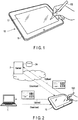
- FIG. 1 is a perspective view showing an outer appearance of an electronic device according to an embodiment.
- the electronic device is, for example, a stylus-based portable electronic device which enables handwriting input by a stylus or a finger.
- the electronic device can be realized as a tablet computer, a notebook computer, a smartphone or a PDA, etc. This specification assumes that the electronic device is realized as a tablet computer 10.
- the tablet computer 10 is a portable electronic device which is also called a tablet or a slate computer.
- the tablet computer 10 comprises, as shown in FIG. 1 , a main body 11 and a touchscreen display 17.
- the main body 11 comprises a housing having a thin-box shape.
- the touchscreen display 17 is attached such that the touchscreen display 17 overlaps with the upper surface of the main body 11.
- a flat-panel display and a sensor are incorporated into the touchscreen display 17.
- the sensor is configured to detect the contact position on the screen of the flat-panel display with a stylus or a finger.
- the flat-panel display may be, for example, a liquid crystal display (LCD).
- LCD liquid crystal display
- As the sensor for example, a capacitive touchpanel or an electromagnetic induction digitizer can be used.
- this specification assumes that a touchpanel is incorporated into the touchscreen display 17 although the sensor is not limited to this example.
- the touchpanel is provided on the screen of the flat-panel display.
- the touchscreen display 17 is configured to detect a touch operation using a stylus 100 relative to the screen in addition to a touch operation using a finger relative to the screen.
- the stylus 100 may be an active stylus or a passive stylus.
- this specification assumes that an active stylus is employed as the stylus 100 although the stylus 100 is not limited to this example.
- the user can perform a handwriting input operation on the touchscreen display 17 by using an external object (the stylus 100 or a finger).
- an external object the stylus 100 or a finger
- the locus of the move of the external object (the stylus 100 or a finger) on the screen is drawn in real time.
- the handwriting is drawn in real time.
- the locus of the move of the external object in a period in which the external object contacts with the screen is equivalent to one stroke.
- a set of many strokes corresponding to handwritten characters or handwritten figures constitutes a handwritten document.
- the handwritten document is stored in a storage medium as time-series data indicating the coordinate series of loci of strokes and the order relationship of the strokes.
- the handwritten document is not stored as image data.
- the detail of the time-series data is explained later with reference to FIG. 4 .
- the time-series data includes a plurality of stroke data items corresponding to a plurality of strokes respectively.
- Each stroke data item corresponds to one stroke and includes a series of coordinate data items (time-series coordinates) each corresponding to a point on the stroke.
- the order of the stroke data items is equivalent to the order in which the strokes are made, or in short, the writing order.
- the tablet computer 10 is configured to read arbitrary existing time-series data (handwritten document data) from the storage medium, and display the handwriting (a plurality of strokes) indicated by the handwritten document data on the screen.
- the tablet computer 10 has an editing function.
- the editing function is configured to delete or move an arbitrary stroke or an arbitrary handwritten character, etc., in the displayed handwritten document by using an eraser tool, a range selection tool and other various tools.
- the editing function is further configured to undo the histories of some handwriting operations.
- the tablet computer 10 also has an auto-complete (stroke suggestion) function.
- the auto-complete function is a function for assisting the handwriting input operation of the user such that many character strings can be easily input in handwriting.
- FIG. 2 shows an example of coordinated behaviors of the tablet computer 10 and an external device.
- the tablet computer 10 is configured to coordinate with a personal computer 1 and a cloud.
- the tablet computer 10 comprises a wireless communication device such as a wireless LAN, and is configured to wirelessly communicate with the personal computer 1.
- the tablet computer 10 is further configured to communicate with a server 2 on the Internet.
- the server 2 may be a server which performs an online storage service or other various types of cloud computing services.
- the personal computer 1 comprises a storage device such as a hard disk drive (HDD).
- the tablet computer 10 is configured to transmit time-series data (a handwritten document) to the personal computer 1 over a network, and store (upload) the time-series data in the HDD of the personal computer 1.
- the tablet computer 10 can deal with many time-series data items (handwritten documents) or large volumes of time-series data (handwritten documents) even when the storage capacity in the tablet computer 10 is small.
- the tablet computer 10 is further configured to read (download) one or more arbitrary handwritten documents stored in the HDD of the personal computer 1.
- the tablet computer 10 is configured to display the strokes indicated by the read handwritten documents on the screen of the touchscreen display 17 of the tablet computer 10.
- the other party with which the tablet computer 10 communicates is not limited to the personal computer 1, and may be, as stated above, the server 2 on a cloud which offers a storage service, etc.
- the tablet computer 10 is configured to transmit a handwritten document to the server 2 over a network, and store (upload) the handwritten document in a storage device 2A of the server 2.
- the tablet computer 10 is further configured to read (download) an arbitrary handwritten document stored in the storage device 2A of the server 2.
- the tablet computer 10 is configured to display the strokes indicated by the read handwritten document on the screen of the touchscreen display 17 of the tablet computer 10.
- the storage medium in which a handwritten document is stored may be any of the storage device of the tablet computer 10, the storage device of the personal computer 1 and the storage device of the server 2.
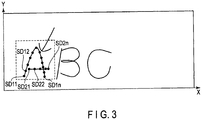
- FIG. 3 shows an example of a handwritten character string which is input on the touchscreen display 17 by using the stylus 100, etc.
- FIG. 3 assumes the following case.
- a character string "ABC” is written by hand in the order of "A", "B” and "C”. Subsequently, an arrow is written by hand in vicinity to the handwritten character "A”.
- the handwritten character "A” is shown by two strokes (the locus of " ⁇ "-shape and the locus of "-"-shape) which are written by using the stylus 100, etc.
- the locus of " ⁇ "-shape which is firstly written by using the stylus 100 is sampled in real time at equal time intervals.
- time-series coordinates SD11, SD12, ... , SD1n of the stroke having the " ⁇ "-shape are obtained.
- the locus of "-"-shape which is written next by using the stylus 100 is sampled in real time at equal time intervals.
- time-series coordinates SD21, SD22, ... , SD2n of the stroke having the "-"-shape are obtained.
- the handwritten character “B” is shown by two strokes which are written by using the stylus 100, etc. In short, the handwritten character “B” is shown by two loci.
- the handwritten character “C” is shown by one stroke which is written by using the stylus 100, etc. In short, the handwritten character “C” is shown by one locus.
- the handwritten arrow is shown by two strokes which are written by using the stylus 100, etc. In short, the handwritten arrow is shown by two loci.
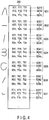
- FIG. 4 shows time-series data 200 corresponding to the handwritten character string of FIG. 3 .
- the time-series data 200 includes a plurality of stroke data items SD1, SD2, ... , SD7.
- stroke data items SD1, SD2, ... , SD7 are arranged in the writing order, or in other words, in chronological order in which the plurality of strokes are written by hand.
- the initial two stroke data items SD1 and SD2 show the two strokes of the handwritten character "A”.
- the third and fourth stroke data items SD3 and SD4 show the two strokes constituting the handwritten character "B”.
- the fifth stroke data item SD5 shows the stroke constituting the handwritten character "C”.
- the sixth and seventh stroke data items SD6 and SD7 show the two strokes constituting the handwritten arrow.
- Each stroke data item includes a plurality of coordinates corresponding to a plurality of points on the locus of one stroke, respectively.
- a plurality of coordinates are arranged in chorological order in which the stroke is written.
- stroke data item SD1 includes a series of coordinate data items (time-series coordinates) corresponding to points on the locus of the stroke having the " ⁇ "-shape of the handwritten character "A”, respectively.
- stroke data item SD1 includes n coordinate data items SD11, SD12, ... , SD1n.
- Stroke data item SD2 includes a series of coordinate data items corresponding to points on the locus of the stroke having the "-"-shape of the handwritten character "A", respectively.
- stroke data item SD2 includes n coordinate data items SD21, SD22, ... , SD2n. The number of coordinate data items may differ depending on the stroke data item.
- Each coordinate data item indicates the X coordinate and the Y coordinate which correspond to one point on the corresponding locus.
- coordinate data item SD11 indicates the X coordinate (X11) and the Y coordinate (Y11) of the starting point of the stroke having the "A"-shape.
- SD1n indicates the X coordinate (X1n) and the Y coordinate (Y1n) of the end point of the stroke having the "A"-shape.
- Each coordinate data item may include timestamp data T corresponding to the time point at which the point corresponding to the coordinate is written by hand.
- the handwritten time point may be either an absolute time (for example, year/month/day/hour/minute/second) or a relative time based on a time point.
- the absolute time for example, year/month/day/hour/minute/second
- the relative time indicating the difference from the absolute time may be added as timestamp data T to each coordinate data item of the stroke data item.
- data Z indicating the writing pressure may be added to each coordinate data item.
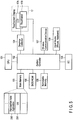
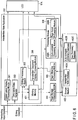
- FIG. 5 shows a system configuration of the tablet computer 10.
- the tablet computer 10 comprises, as shown in FIG. 5 , a CPU 101, a system controller 102, a main memory 103, a graphics controller 104, a BIOS-ROM 105, a nonvolatile memory 106, a wireless communication device 107, an embedded controller (EC) 108 and the like.
- the CPU 101 is a processor configured to control the operations of various modules in the tablet computer 10.
- the processor includes a processing circuitry.
- the CPU 101 executes various computer programs loaded to the main memory 103 from the nonvolatile memory 106 which is a storage device. These programs include an operating system (OS) 201 and various application programs.
- the application programs include a handwritten note application program 202.
- the handwritten note application program 202 is a digital notebook application by which a note can be taken down.
- the handwritten note application program 202 has a function for creating and displaying the above-described handwritten document, a function for editing the handwritten document, an auto-complete function and the like.
- the CPU 101 executes a basic input/output system (BIOS) stored in the BIOS-ROM 105.
- BIOS is a program for hardware control.
- the system controller 102 is a device configured to connect a local bus of the CPU 101 and various components.
- the system controller 102 comprises a built-in memory controller configured to control the access to the main memory 103.
- the system controller 102 has a function for performing communication with the graphics controller 104 through a serial bus having a PCI EXPRESS standard.
- the graphics controller 104 is a display controller configured to control an LCD 17A used as a display monitor of the tablet computer 10.
- the display controller includes a display control circuitry.
- the touchscreen display 17 (the touchscreen display 17/the screen of the LCD 17A) including the LCD 17A has a rectangular shape including long sides and short sides.
- a display signal produced by the graphics controller 104 is transmitted to the LCD 17A.
- the LCD 17A displays a screen image based on the display signal.
- a touchpanel 17B is provided on the LCD 17A.
- the wireless communication device 107 is a device configured to perform wireless communication by using a wireless LAN or 3G mobile communication, etc.
- the EC 108 is a one-chip microcomputer including an embedded controller for power management.
- the EC 108 has a function for turning the tablet computer 10 on or off in accordance with the operation of the power button by the user.
- the tablet computer 10 may comprise a peripheral interface for communication with an input device 109 (for example, a mouse or a keyboard).
- an input device 109 for example, a mouse or a keyboard.
- the handwritten note application program 202 automatically saves the page the user is editing on a periodic basis.
- the handwritten note application program 202 When the handwritten note application program 202 is suspended or exited, the handwritten note application program 202 automatically saves the page the user is editing.
- the handwritten note application program 202 supports a plurality of languages.
- the handwritten note application program 202 uses the language which is set in the OS setting.
- the handwritten note application program 202 includes a character recognition engine.
- the character recognition engine supports the Japanese language, the English language, the Korean language, the Russian language, the Chinese language and other various languages.
- the handwritten note application program 202 has a screen rotation function.
- the handwritten note application program 202 supports two types of pages (stroke input pages) which are a landscape page and a portrait page.
- a page is an area in which a handwritten stroke can be input.
- a landscape page is a laterally-oriented page, and includes a border which is horizontally long.
- a landscape page is a rectangular area which is laterally long. The rectangular area is a range in which a handwritten stroke can be input.
- a portrait page is a longitudinally-oriented page, and includes a border which is perpendicularly long.
- a portrait page is a rectangular area which is longitudinally long. The rectangular area is a range in which a handwritten stroke can be input.
- the handwritten note application program 202 supports a multiuser environment.
- a user management function relies on the OS.
- the handwritten note application program 202 may not have its own user management function.
- page data (notebook data) is placed in the user local data area prepared by the OS. This means that the notebook data of one user is independent from the other users.
- the handwritten note application program 202 supports a multiple window layout.
- the window of the handwritten note application program 202 is displayed on the half (for example, the left side) of the screen.
- the window of another application program is displayed on the remaining half (for example, the right side) of the screen.
- the handwritten note application program 202 has a function for printing the current page (the page the user is editing). When this printing function is invoked from an application bar or a charm, the current page is printed on one page.
- the handwritten note application program 202 can be manipulated by a keyboard.
- the handwritten note application program 202 supports the following basic shortcut keys conducted on the edit view which enables page viewing or editing.
- the handwritten note application program 202 can be manipulated by a mouse.
- the handwritten note application program 202 can be manipulated by a touch or a stylus.
- touch refers to a finger gesture.
- the handwritten note application program 202 requires at least one of the following devices to operate: a stylus device (for example, an active stylus); a touchpanel (or a digitizer); a mouse; and a keyboard.
- a stylus device for example, an active stylus
- a touchpanel or a digitizer
- a mouse or a keyboard
- Input hardware environment type 1 This input hardware environment is compatible with a product in which a stylus device and a touchpanel are present.
- the handwritten note application program 202 is configured to draw a stroke by a stylus.
- the handwritten note application program 202 is configured to draw a stroke by a touch or a mouse in a touch input mode.
- the touch input mode is a mode for drawing a stroke by a finger or a mouse.
- the touch input mode is turned off in the default setting.
- Input hardware environment type 2 This input hardware environment is compatible with a product in which a stylus device is not present and a touchpanel is present.
- the handwritten note application program 202 is configured to draw a stroke by a touch or a mouse in a touch input mode.
- the touch input mode is turned on in the default setting.
- the touch input mode cannot be set to be turned off.
- Input hardware environment type 3 This input hardware environment is compatible with a product in which neither a stylus device nor a touchpanel is present.
- the handwritten note application program 202 is configured to draw a stroke by a mouse in a touch input mode.
- the touch input mode is turned on in the default setting.
- the touch input mode cannot be set to be turned off.
- the handwritten note application program 202 is configured to draw a stroke by a stylus.
- the handwritten note application program 202 is configured to draw a stroke by a touch or a mouse in a touch input mode.
- the touch input mode is a mode for drawing a stroke by a finger or a mouse.
- the touch input mode is turned off in the default setting.
- a standard stylus (for example, an active stylus) comprises an eraser button and a side button.
- Button actions are defined by the OS system.
- the handwritten note application program 202 allocates button behaviors as follows.
- a stylus may comprise two side buttons.
- the handwritten note application program 202 is configured to allocate button behaviors as follows.
- the handwritten note application program 202 is configured to set a stylus button (a side button or an eraser button) to be turned on or off.
- the handwritten note application program 202 is configured to save some UI states, and carry on the UI states to the next lunch.
- the UI states to be saved are: a pen setting (color, width, etc.); an eraser setting (large or small); a selection tool setting (a rectangular frame or a free frame); and a full-screen mode/normal mode.
- the handwritten note application program 202 supports the following pens: fountain pen; pencil; ballpoint pen; marker; and fiber-tip (felt) pen.
- the transparency of a line to be drawn can be set.
- the width of a line to be drawn changes in accordance with the writing pressure.
- the transparency of a line to be drawn changes in accordance with the writing pressure.
- the fountain pen is sensitive to the writing pressure.
- the width of a line changes in accordance with the writing pressure.
- the transparency of a line also changes in accordance with the writing pressure.
- the pencil slowly reacts to the writing pressure.
- the width of a line slowly changes in accordance with the writing pressure.
- the transparency of a line also slowly changes in accordance with the writing pressure.
- the ballpoint pen does not react to the writing pressure.
- the marker pen slowly reacts to the writing pressure with regard to the transparency only.
- the felt pen slowly reacts to the writing pressure with regard to the width only.
- the handwritten note application program 202 is configured to input a stroke in handwriting by an active pen.
- the handwritten note application program 202 is configured to erase strokes per stroke unit.
- the eraser size can be selected from large and small sizes. The default of the eraser size may be large.
- the handwritten note application program 202 is configured to select an object (a stroke or an image) on a page by a selection (range selection) tool.
- the handwritten note application program 202 supports a copy/cut/paste function.
- the copy/cut/paste function uses a clipboard function of the OS.
- the handwritten note application program 202 is configured to execute four types of copies described below.
- the handwritten note application program 202 copies (stores) the selected object as stroke data in the clipboard.
- the stroke data includes the coordinates of a plurality of points corresponding to each stroke.
- the application in which the stroke data should be pasted is the handwritten note application program 202.
- the handwritten note application program 202 copies (stores) the selected object as an image (image data) in the clipboard.
- the image is, for example, a bit map.
- the handwritten note application program 202 converts the selected object into image data, and copies (stores) the image data in the clipboard.
- the application in which the image data should be pasted is an application dealing with images.
- the handwritten note application program 202 copies (stores) the selected object as a formatted object in the clipboard.
- the formatted object is an object having a data format which can be used by other application programs.
- the handwritten note application program 202 converts the selected object into a formatted object, and copies (stores) the formatted object in the clipboard.
- the application in which the object should be pasted is a presentation application or a word processing application.
- the process for converting the selected object into a formatted object is performed by using character recognition, figure (shape) recognition and table recognition.
- character recognition strokes corresponding to a handwritten character string are converted into recognized text.
- strokes corresponding to a handwritten figure are converted into a formatted figure (shape) object.
- strokes corresponding to a handwritten table are converted into a formatted table object.
- the handwritten note application program 202 copies (stores) the selected object as recognized text in the clipboard.
- the recognized text is obtained by recognizing strokes corresponding to a handwritten character string as characters.
- the handwritten note application program 202 converts the selected object into text by character recognition, and copies (stores) the text in the clipboard.
- the application in which the text should be pasted is a text editor application.
- the handwritten note application program 202 has an auto-complete function.
- the auto-complete function displays, on the display, one or more handwriting (one or more handwriting candidates) which are input candidates determined from stroke (temporary stroke) input by the user. When one of the handwriting candidates is selected by the user, the auto-complete function determines to enter the selected handwriting candidate in place of the temporary stroke.
- a handwriting candidate is extracted from handwriting data which is input by the user in the past. This means that the handwriting data which is input by the user in the past can be reused.
- the set of handwriting (handwriting candidates) collected from the handwriting data which is input by the user in the past may be stored in an auto-complete dictionary database.
- the handwritten note application program 202 is configured to automatically collect a set of handwriting from the handwriting notebook of the user, and store the set of handwriting in the auto-complete dictionary database.
- the handwritten note application program 202 is configured to obtain one or more handwriting candidates which are determined from temporary strokes from the auto-complete dictionary database.
- the user can also invalidate an arbitrary handwriting candidate in the auto-complete dictionary database. The invalidated handwriting candidate is not used for the auto-complete process.
- the handwritten note application program 202 may maintain the brightness of the writable area on the page and darken the other area on the page (in other words, the other area may be grayed out). For example, the handwritten note application program 202 may change the color of the background of the other area to a dark color. Thus, the display style of the writable area is differentiated from the display style of the other area. In this manner, the user can easily understand which area on the page is a writable area.
- the writable area on the page is an elongate area which includes the display area of the temporary stroke and has a long-band shape extending in an input direction of characters corresponding to the temporary stroke. For example, when characters corresponding to temporary stroke are laterally written, an area which laterally extends is a writable area.
- the writable area is used as an area in which the selected handwriting candidate is entered in place of the temporary stroke. By displaying the writable area in a display style different from the other area, it is possible to show the position in which the selected handwriting candidate should be entered to the user in advance.
- the other area (dark area) on the page functions as a wide button area which enables an instruction for entering (inputting) the temporary stroke on the page without selection of a handwriting candidate.
- the handwritten note application program 202 determines to enter the temporary stroke.
- the temporary stroke is the confirmed (entered) stroke.
- the handwriting candidate menu for example, three handwriting candidates (three handwriting suggestions) may be displayed.
- the handwriting candidate menu includes three button areas.
- the three handwriting candidates are displayed in the three button areas, respectively.
- Each button area is an operation area (selection area) for selecting the corresponding handwriting candidate.
- the handwriting candidate menu may further display a confirmation button and a show-more button.
- the handwritten note application program 202 enters (inputs) temporary strokes on the page.
- the handwritten note application program 202 enlarges the size of the handwriting candidate menu, and displays more than three handwriting candidates in the handwriting candidate menu.
- the display position of handwriting candidates is, or in other words, the display position of the handwriting candidate menu is preferably set such that the user can easily manipulate the menu while inputting temporary strokes in handwriting. In this layout, the user can easily select the desired handwriting candidate by slightly moving the stylus or a finger.
- the handwritten note application program 202 is configured to accept the setting for a left-handed user or a right-handed user. The user can select a left-handed mode or a right-handed mode by a setting tool provided by the handwritten note application program 202.
- the setting tool of the OS 201 may set the left-handed mode or the right-handed mode in accordance with the operation by the user.
- the handwritten note application program 202 displays one or more handwriting candidates which are determined from temporary strokes, or in other words, a handwriting candidate menu, on the left side relative to the position of the temporary strokes.
- the handwriting candidate menu may be displayed on the left side relative to the final end or the right end of the temporary stroke which is made last.
- the handwriting candidate menu may be displayed such that the right end of the menu is placed along the final end or the right end of the temporary stroke which is made last.
- the handwriting candidate menu only has to be displayed above or under the above-described writable area.
- the handwritten note application program 202 displays one or more handwriting candidates which are determined from temporary strokes, or in other words, a handwriting candidate menu, on the right side relative to the position of the temporary strokes.
- the handwriting candidate menu may be displayed on the right side relative to the final end or the left end of the temporary stroke which is made last.
- the handwriting candidate menu may be displayed such that the left end of the menu is placed along the final end or the left end of the temporary stroke which is made last.
- the handwriting candidate menu only has to be displayed above or under the above-described writable area.
- the handwritten note application program 202 displays, on the display, one or more handwriting candidates which are determined from the first temporary stroke and the second temporary stroke.
- the handwriting candidates include a handwriting candidate identical to one or more handwriting candidates (already-displayed candidates) determined from the first temporary stroke
- the handwritten note application program 202 may enlarge the operation area of the already-displayed candidates in accordance with the display position of the second temporary stroke without changing the display position of the already-displayed candidates. In this manner, there is no need to draw the already-displayed candidates again. In addition, the operation area is enlarged. Therefore, the operability is not impaired with regard to the selection of a handwriting candidate.
- the handwritten note application program 202 laterally extends the already-displayed handwriting candidate menu.
- the handwriting candidate menu may be laterally extended such that the right end of the handwriting candidate menu is placed along the final end of the temporary stroke which is made last, or in other words, along the final end of the stroke which is made last.
- the handwriting candidate menu may be laterally extended such that the right end of the handwriting candidate menu is positioned on the left side by only some pixels relative to the final end of the stroke which is made last. In this manner, it is possible to laterally extend the size of each button area in the handwriting candidate menu without causing the temporal removal of the handwriting candidate menu from the screen and the reappearance of the handwriting candidate menu on the screen. For example, when the user writes strokes from left to right, the right end of the handwriting candidate menu extends to the right. Thus, the user can select the desired handwriting candidate by slightly moving the stylus or a finger.
- the handwritten note application program 202 is configured to search for the desired page containing the desired stroke (handwritten character, handwritten figure, handwritten table and the like) by a handwriting (stroke) search or a text search. This function is based on a recognition technique.
- the handwritten note application program 202 automatically changes the algorithm to be used between the two methods based on the input handwriting (one or more strokes). For example, when the character string likelihood of the input handwriting (one or more strokes) is high, or in other words, when the possibility that the input handwriting is a character string is high, the character matching method is used. On the other hand, when the character string likelihood of the input handwriting (one or more strokes) is low, or in other words, when the possibility that the input handwriting is a figure, a table or a mark is high, the pattern matching method of stroke features is used.
- handwriting having a feature similar to the handwriting input as the search key is searched for.
- handwriting having a shape similar to the shape of the handwriting input as the search key is searched for.
- the handwriting input as the search key is converted into text (a character string) by character recognition.
- the page containing the character string which is the same as the text (character string) is searched for.
- the handwritten note application program 202 comprises a stylus locus display processing module 301, a time-series data generator 302, an editing processing module 303, a page storage processing module 304, a page obtaining processing module 305, a handwritten document display processing module 306, a processing module 308 and the like.
- the handwritten note application program 202 creates, displays and edits a handwritten document (handwritten data) by using stroke data input by using the touchscreen display 17.
- the touchscreen display 17 is configured to detect the generation of events such as "touch”, “move (slide)” and “release”.
- the event “touch” indicates that an external object contacts with the screen.
- the event “move (slide)” indicates that the contact position is moved while an external object contacts with the screen.
- the event “release” indicates that an external object is separated from the screen.
- the stylus locus display processing module 301 and the time-series data generator 302 detect a handwriting input operation by receiving the event “touch” or “move (slide)" generated by the touchscreen display 17.
- the event “touch” includes the coordinate of the contact position.
- the event “move (slide)” includes the coordinate of the contact position of the destination of the move.
- the stylus locus display processing module 301 and the time-series data generator 302 are configured to receive a series of coordinates corresponding to the locus of the move of the contact position from the touchscreen display 17.
- the stylus locus display processing module 301 functions as a display processor configured to display one or more strokes which are input in handwriting on the screen of the touchscreen display 17.
- the stylus locus display processing module 301 receives the coordinate series from the touchscreen display 17. Based on the coordinate series, the stylus locus display processing module 301 displays a plurality of strokes which are input by a handwriting input operation by using the stylus 100, etc., on the screen of the LCD 17A of the touchscreen display 17.
- the stylus locus display processing module 301 is configured to perform various display control operations related to the display of the UI under the control of the processing module 308.
- the time-series data generator 302 receives the above-described coordinate series which is output from the touchscreen display 17. Based on the coordinate series, the time-series data generator 302 generates a plurality of stroke data items (time-series data) corresponding to the above-mentioned plurality of strokes. These stroke data items may be, or specifically, the coordinate corresponding to each point of each stroke and the timestamp data of each stroke may be temporarily stored in a working memory 401.
- the page storage processing module 304 stores handwritten document data including stroke data items corresponding to strokes in a handwritten note database 402A of a storage medium 402.
- the storage medium 402 may be, as described above, any one of the storage device of the tablet computer 10, the storage device of the personal computer 1, and the storage device of the server 2.
- the page obtaining processing module 305 reads arbitrary handwritten document data from the storage medium 402.
- the read handwritten document data is transmitted to the handwritten document display processing module 306.
- the handwritten document display processing module 306 analyzes the handwritten document data. Based on the analysis result, the handwritten document display processing module 306 displays, as a page (handwritten page), a plurality of strokes shown by stroke data items in the handwritten document data on the screen.
- the editing processing module 303 performs a process for editing the page which is currently displayed.
- the editing processing module 303 performs an editing process for deleting or moving one or more strokes of a plurality of strokes which are displayed in accordance with the editing operation conducted by the user on the touchscreen display 17. Further, to reflect the result of the editing process on the handwritten document which is displayed, the editing processing module 303 updates the handwritten document.
- the user can delete an arbitrary stroke from a plurality of strokes which are displayed, by using the eraser tool, etc.
- the user can select an arbitrary portion on the handwritten page which is displayed, by using the range selection tool for surrounding an arbitrary portion on the screen by a rectangular or free frame.
- the processing module 308 is configured to perform various processes such as the above-described auto-complete, search, copy, import and export processes.
- the processing module 308 includes, for example, an auto-complete processing module 308A and a page scroll processing module 308B.
- the auto-complete processing module 308A is a processing module configured to perform the above-described auto-complete function. In the auto-complete mode, the auto-complete processing module 308A predicts handwriting or a stroke string (handwritten character string) which will be handwritten by the user, based on temporary stroke which is input on the display and handwritten document data. The auto-complete processing module 308A displays one or more handwriting candidates which are determined by the temporary stroke, and presents the handwriting candidates to the user.
- a handwriting candidate such as a handwritten word “add” or “access” may be presented to the user. If the user selects the handwritten word “access”, the temporary stroke "a” is completed by the handwritten word “access”. The handwritten word “access” is entered on the page in place of the temporary stroke "a”. In this manner, the user can easily input the strokes of the handwritten word "access”.
- the auto-complete processing module 308A displays one or more handwriting candidates which are determined by two temporary strokes "ab" on the display, and presents the handwriting candidates to the user.
- the language of handwritten character strings stored in handwritten document data may be any language.
- the available languages include the English language, the Japanese language and various other languages.
- handwriting (handwritten character strings) may be stroke stings corresponding to character strings in block type, or may be stroke strings corresponding to character strings in script type.
- the word handwritten in script type may consist of one stroke. Therefore, each handwriting candidate (stroke string) which is obtained from handwritten document data in the auto-complete process does not necessarily include a plurality of strokes, and may consist of one stroke.
- the auto-complete processing module 308A may automatically collect handwriting such as handwritten character strings from the set of strokes (handwritten document data) stored in the handwritten note database 402A, and store the automatically-collected handwritten character strings in an auto-complete dictionary database 402B.
- handwriting a stroke string
- a word character recognition result
- a reading corresponding to the word may be stored.
- an alias of the word may be stored in the auto-complete dictionary database 402B instead of the reading of the word.
- the auto-complete processing module 308A may first apply a character recognition process to a temporary stroke input by the user. Then, the auto-complete processing module 308A discovers a word which is matched with the character recognition result (character string) of the temporary stroke by a forward matching search, referring to the auto-complete dictionary database 402B. The auto-complete processing module 308A obtains, from the auto-complete dictionary database 402B, handwriting (a stroke string) corresponding to the discovered word as a handwriting candidate which is determined from the temporary stroke.
- the auto-complete dictionary database 402B for example, handwriting (a stroke string), and a feature amount corresponding to the handwriting may be stored per word.
- the feature amount of handwriting an arbitrary feature which can show the handwriting feature of the handwriting may be used.
- the feature amount it is possible to use feature amount data indicating the shape, the direction, the inclination of stroke.
- the auto-complete processing module 308A may obtain, from the auto-complete dictionary database 402B, a handwriting candidate having a feature amount similar to the feature amount of temporary stroke.
- the auto-complete processing module 308A may use a user dictionary database 402C.
- the user dictionary database 402C many handwriting candidates prepared in advance are stored. These handwriting candidates are handwritten character strings corresponding to many words, respectively.
- the user can register a new handwritten character string in the user dictionary database 402C.
- the user can also delete an arbitrary handwritten character string from the user dictionary database 402C.
- the page scroll processing module 308B performs a process for restricting a method for scrolling a page in accordance with the type of the page (landscape page/portrait page).
- the display direction of the touchscreen display 17 (the orientation of the screen image) is automatically changed to at least a first direction and a second direction which are different from each other by 90 degrees in accordance with the direction (orientation) of the tablet computer 10.
- One of the first direction and the second direction corresponds to the landscape orientation, and the other one corresponds to the portrait orientation.
- the page scroll processing module 308B When a first area (page), in which a handwritten stroke can be input, has a rectangular shape which is laterally long, or in other words, when the displayed page is a landscape page, the page scroll processing module 308B is configured to scroll the first area only in the lateral direction, whether the display direction of the touchscreen display 17 is the first direction or the second direction.
- the first area, in which a handwritten stroke can be input has a rectangular shape which is longitudinally long, or in other words, when the displayed page is a portrait page
- the page scroll processing module 308B is configured to scroll the first area only in the longitudinal direction, whether the display direction of the touchscreen display 17 is the first direction or the second direction.
- the processing module 308 of the handwritten note application program 202 supports a landscape mode and a portrait mode. These modes are automatically selected in accordance with the orientation of the tablet computer 10 and the OS setting. This behavior is managed by a UI module in the processing module 308.
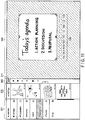
- FIG. 7 shows a landscape UI (edit view).
- the processing module 308 displays the landscape UI (edit view) shown in FIG. 7 .
- the landscape UI includes four areas which are a notebook list 501, a page list 502, an edit toolbar 503 and an edit view area 504.
- the areas 501 to 504 are arranged from the left end to the right end of the screen of the tablet computer 10.
- the notebook list 501 shows a list of notebooks managed by the handwritten note application program 202.
- the two icons (“Add Note” and “All Pages") near the upper end of the notebook list 501 are command icons.
- the processing module 308 performs a process for adding a new notebook.
- the processing module 308 executes a process for displaying a thumbnail list corresponding to all of the pages of all of the notebooks.
- the icon "Unclassified Pages” is a notebook icon showing a notebook containing a page group which does not belong to any of the notebooks of the user.
- the icon “Research” is a notebook icon showing the user's notebook titled “Research”.
- the icon “Ideas” is a notebook icon showing the user's notebook titled “Ideas”.
- the icon “Presentation” is a notebook icon showing the user's notebook titled “Presentation”.
- the icon “Minutes” is a notebook icon showing the user's notebook titled “Minutes”.
- the icon “To Do” is a notebook icon showing the user's notebook titled "To Do”.
- These notebook icons can be rearranged by a dragging and dropping operation.
- a panning indicator PI is displayed at, for example, the right end of the notebook list 501.
- the panning indicator PI shows the position of the content which is currently displayed in the notebook list 501 relative to the whole content which can be displayed in the notebook list 501.
- the notebook list 501 is longitudinally scrolled.
- a scroll bar is displayed at, for example, the right end of the notebook list 501. The user can longitudinally scroll the notebook list 501 by a mouse.
- the page list 502 shows a thumbnail list corresponding to the pages contained in the notebook corresponding to the notebook icon which is currently selected.
- the icon “Add Page” at the top of the page list 502 is a command icon.
- the processing module 308 executes a process for adding a new page to the page which is currently edited.
- a plurality of page icons indicating thumbnails corresponding to a plurality of pages, respectively, are allocated.
- the strokes contained in the page corresponding to the selected page icon are displayed in the edit view area 504.
- the user can display an arbitrary page in the edit view area 504 by selecting an arbitrary page icon in the page list 502.
- These page icons can be rearranged by a dragging and dropping operation.
- the user can change (customize) the page order by dragging and dropping the page icons.
- a panning indicator PI is displayed at, for example, the right end of the page list 502.
- the panning indicator PI shows the position of the content which is currently displayed in the page list 502 relative to the whole content which can be displayed in the page list 502.
- the page list 502 is longitudinally scrolled.
- a scroll bar is displayed at, for example, the right end of the page list 502. The user can longitudinally scroll the page list 502 by a mouse.
- the edit toolbar 503 includes some buttons for editing a page.
- a selection pen button 511 is used as a range selection tool. The user can select one or more objects in the edit view area 504 by the selection pen. When the selection pen button 511 is tapped by the user, the processing module 308 displays on the edit view area 504 a menu for changing the selection type (rectangle/free frame/select all).
- An eraser pen button 512 is used as an eraser tool. The user can delete one or more strokes in the edit view area 504 by the eraser pen. When the eraser pen button 512 is tapped by the user, the processing module 308 displays on the edit view area 504 a menu for changing the eraser size (large/small/whole page).
- a stroke input pen button 513 is used for drawing strokes.
- the user can draw strokes in the edit view area 504 by the stroke input pen.
- the processing module 308 displays a menu showing some preset pens.
- Each of the preset pens defines, for example, a combination of pen type (fountain pen/pencil/ballpoint pen/marker/felt pen), width, color and transparency. The user can select a pen from the menu.
- An undo button 514 is used for undoing an editing operation.
- a redo button 515 is used for redoing an editing operation.
- An auto-complete (suggestion input) button 516 is a button for turning the auto-complete mode on or off.
- a camera button 517 is used for taking a picture and importing the picture into the edit view area 504.
- the user can take a picture by the camera button.
- the processing module 308 launches a capture application program.
- the capture application program captures an image (picture) by a camera (Webcam) provided in the tablet computer 10.
- the processing module 308 imports the captured image.
- a search button 518 is a button for searching for pages containing the desired handwriting.
- a touch input mode button 519 is a button for turning on or off a touch input mode which realizes drawing by a finger or a mouse.
- a help button 520 is a button for displaying "help”.
- a tab button 521 is a button for switching a normal mode/full-screen mode. The UI shown in FIG. 7 corresponds to the normal mode.
- the edit view area 504 is a handwriting input area which realizes handwriting input.
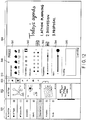
- FIG. 8 shows a portrait UI (edit view).
- the processing module 308 displays the portrait UI (edit view) shown in FIG. 8 .
- the portrait UI from the upper end to the lower end of the screen, the notebook list 501, the page list 502, the edit toolbar 503 and the edit view are 504 are arranged.
- FIG. 8 corresponds to a portrait UI in the normal mode.
- FIG. 9 shows a landscape UI in the full-screen mode.
- the notebook list 501 and the page list 502 are hidden from the screen.
- the edit toolbar 503 is displayed at the left end of the screen.
- the edit view area 504 is enlarged to full screen.
- a page-up button 522 and a page-down button 523 are allocated.
- the user can switch the page which is displayed in the edit view area 504 to another page by operating the page-up button 522 or the page-down button 523.
- the full-screen mode state is saved, and is carried on to the next launch.
- FIG. 10 shows a portrait UI in the full-screen mode.
- the notebook list 501 and the page list 502 are hidden from the screen.
- the edit toolbar 503 is displayed at the upper end of the screen.
- the edit view area 504 is enlarged to full screen.
- FIG. 11 is shown for explaining a range selection process.
- FIG. 11 assumes that an object (handwritten character string) in the edit view area 504 is selected by the selection pen.
- the selected area and the other area are displayed in different display styles.
- the other area may be, or in other words, the area outside the selected area may be displayed in a dark color.
- the area outside the selected area may be drawn in gray.
- scaling control icons are displayed in the selected area.
- the scaling control icons are placed at each corner and side of the selected area.
- the scaling control icons function as tools for enlarging or shrinking the object (handwritten character strings) in the selected area.
- action buttons 530 are displayed under the selected area.
- the action buttons 530 are applicable to the object in the selected area.
- the user can apply processes such as “copy”, “copy as a specific data format”, “save as a specific data format”, “search”, “export to mail soft”, “cut”, “delete” and “rotate” to the object in the selected area by tapping one of the action buttons 530.
- FIG. 12 is shown for explaining a pen setting process.
- a pen setting panel 540 is displayed in the edit view area 504.
- Area 541 in the pen setting panel 540 is used for changing the pen (a ballpoint pen, a pencil, a marker, a felt pen and a fountain pen).
- Area 542 in the pen setting panel 540 is used for selecting a pen color from a color pallet.
- Area 543 in the pen setting panel 540 is used for changing the transparency.
- Area 544 in the pen panel 540 is used for changing the width (line width).
- Area 545 in the pen setting panel 540 is a handwriting input area used for trying the current pen setting.
- FIG. 13 shows auto-complete on the search screen.
- a search key input view 500 is displayed on the screen.
- a stroke temporary stroke
- some handwriting candidates are displayed in a handwriting candidate area 552 by the auto-complete function.
- One of the handwriting candidates is selected by the user, the selected handwriting candidate is displayed in the search key input area 551.
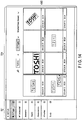
- FIG. 14 shows an example of a search result view 560.
- a search is performed in the view in which a list of all pages (a list of thumbnails of all pages) is displayed, the search result view 560 is displayed.
- This figure assumes that a handwritten character string "TOSHI” is used as the search key.
- the handwritten character string "TOSHI” which is a hit word is highlighted.
- FIG. 15 shows a landscape UI (edit view) for a left-handed user.
- the order in which the notebook list 501, the page list 502 and the edit toolbar 503 are arranged is opposite to the landscape UI for a right-handed user ( FIG. 7 ).
- the notebook list 501, the page list 502 and the edit toolbar 503 are displayed on the right side of the screen.
- the notebook list 501, the page list 502, the edit toolbar 503 and the edit view area 504 are arranged from the right end to the left end of the screen.
- a panning indicator PI (or a scroll bar) is displayed at the right end of the notebook list 501 in a manner similar to the landscape UI for a right-handed user.
- a panning indicator PI (or a scroll bar) is displayed at the right end of the page list 502 in a manner similar to the landscape UI for a right-handed user.
- the handwritten note application program 202 When the handwritten note application program 202 is launched, the handwritten note application program 202 checks the setting status of the left-handed mode/right-handed mode, and sets the notebook list 501, the page list 502 and the edit toolbar 503 on the left side or the right side of the screen.
- the handwritten note application program 202 has an auto-complete function.
- the user interface (UI) shown in FIG. 16 is displayed.
- the landscape UI (edit view) shown in FIG. 16 includes the notebook list 501, the page list 502, the edit toolbar 503 and the edit view area 504 in a manner similar to the edit view shown in FIG. 15 .
- these areas 501 to 504 are arranged from the left end to the right end of the screen of the tablet computer 10.
- the layout direction of the areas 501 to 504 is changed depending on the dominant hand of the user.
- FIG. 16 to FIG. 19 show examples for a right-handed user.
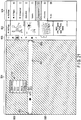
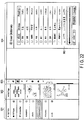
- FIG. 21 shows an example for a left-handed user.
- a plurality of page icons indicating thumbnails corresponding to a plurality of pages, respectively, are arranged.
- the strokes contained in the page corresponding to the selected page icon are displayed in the edit view area 504.
- the user can display an arbitrary page in the edit view area 504 by selecting an arbitrary page icon in the page list 502.
- the selected page icon is different from the other page icons in terms of display styles.
- the figure shows that the page (content) at the top is selected.
- the content is displayed in the edit view area 504.
- the display of the content is omitted.
- new content can be prepared instead of the already-prepared content.
- the auto-complete (suggestion input) button 516 in the edit toolbar 503 is changed to a display state indicating an on-state for the purpose of showing that the auto-complete mode is turned on.
- the user inputs stroke (temporary stroke) by hand Writing in the desired portion in the edit view area 504.
- the input temporary stroke is displayed in the edit view area.
- a writable area 801 having a horizontal-band shape for indication of input is displayed in the edit view area 504.
- the writable area 801 is displayed in a style different from the other area 805.
- the other area 805 outside the writable area 801 may be darkened while the brightness of the writable area 801 is maintained.
- the writable area 801 is an elongate area having a band shape which extends perpendicularly.
- a handwriting candidate menu 701 is displayed near the display position of the temporary stroke.
- the handwriting candidate menu 701 includes, for example, three entries (button areas) which can display handwriting candidates.
- the handwriting candidate menu 701 in which the three entries are blank may be displayed near the display position of the temporary stroke.
- a mark indicating the start/end position is displayed.
- a pair of brackets 802 and 803 is provided.
- the writable area 801 may extend over the whole row, or may extend in a part of the row.
- the pair of brackets 802 and 803 indicates the end portions of the writable area 801 in the right-and-left direction (row direction), and also indicates the end portions in the top-and-bottom direction (height direction).
- the default value of the height of the writable area 801 is determined. However, for example, by dragging a lower bracket downward, the height of the row can be increased. When the height of the row is increased, it is possible to increase the character size (character height) when a handwriting candidate is automatically entered (input) on a page as described later.
- the handwritten note application program 202 determines one or more handwriting candidates and prepares a list of handwriting candidates (a handwriting candidate menu).
- a temporary stroke string corresponding to the character string "Wo” is displayed in the writable area 801
- a deletion button 804 is displayed on the left side relative to the temporary stroke string such that the deletion button 804 is spaced from the temporary stroke string.
- the deletion button 804 is selected, the temporary stroke which is input last is deleted. Since the deletion button 804 is close to the handwritten temporary strokes, there is no need to separate the hand from the display to operate the deletion button 804. Thus, the operability of input cancellation is improved.
- the handwriting candidate menu 701 is displayed above a position corresponding to the right end of the temporary stroke string.
- the handwriting candidate menu 701 including three handwriting candidates corresponding to three character strings "World", “Work” and “Word” including the handwritten character string "Wo” is displayed.
- the handwriting candidates are obtained by searching the auto-complete dictionary 402B for strokes similar to the temporary strokes.
- Each handwriting candidate is a stroke string including one or more strokes.
- Each handwriting candidate may be handwriting whose front portion includes strokes similar to the temporary strokes.
- the handwriting candidate menu 701 includes three entries (button areas). Three handwriting candidates are displayed in the three button areas respectively.
- the handwriting candidate corresponding to the tapped button area is entered (input) on the page.
- the temporary stroke or temporary strokes input by the user are completed by using the selected handwriting candidate.
- the handwriting candidate is the confirmed (entered) handwriting. In this manner, the user can easily input handwritten strokes corresponding to the desired word or phrase without inputting all strokes corresponding to the desired word or phrase by hand.
- the size of the handwriting candidate which is entered on the page is automatically adjusted in accordance with the height of the writable area 801.
- the size (height and width) of the handwriting candidate menu 701 is set such that three handwriting candidates can be displayed.
- the display position of the handwriting candidate menu 701 is set in the following manner: the right end is along the position of temporary stroke 612 corresponding to the character "o" which is input last; and the lower end is close to the writable area 801.
- the left end of the handwriting candidate menu 701 may be determined in accordance with the length of each handwriting candidate (for example, the number of characters of each handwritten word).
- the handwriting candidate menu 701 is displayed such that the handwriting candidate menu 701 is adjacent to the upper side of the writable area 801. Therefore, when the user taps one of the button areas to enter a handwriting candidate, the user only has to slightly shift the stylus tip in the upper direction, and does not need to separate the hand from the display. Thus, the operability to enter a handwriting candidate is improved.
- the right end of the handwriting candidate menu 701 is along the position of temporary stroke 612 corresponding to the character "o" which is made last. Therefore, by slightly shifting the stylus tip in the upper direction, the user can tap the right end of the button areas. The user does not need to separate the hand from the display. In this manner, the operability to enter a handwriting candidate is improved.
- the handwriting candidates are obtained with priorities based on the similarity to the temporary strokes.
- the priorities of the handwriting candidates displayed in the button areas are higher toward the writable area 801.
- “World” has the highest priority
- the priorities are decreased in the order of "Work" and "Word”.
- the handwriting candidate which has the highest priority and is likely to be selected is the closest to the current stylus position (the temporary stroke corresponding to "o"). Therefore, the user does not need to separate the hand from the display to tap it. In this manner, the operability to enter a handwriting candidate is improved.
- the right end of the handwriting candidate menu 701 is along the position of temporary stroke 612 corresponding to the character "o" which is input last. This layout also contributes to the enhancement of operability to tap and enter a handwriting candidate.
- the temporary strokes are confirmed by tapping the area 805 which is the area other than the writable area 801 in the edit view area 504. To tap the area other than the writable area 801, the user only has to slightly move the stylus tip up and down. Thus, the user can easily confirm the temporary strokes.
- the display style of the writable area 801 is different from that of the other area 805, the user does not mistake the area to be tapped. In this manner, the user can surely confirm the temporary strokes.
- the confirmation of the temporary strokes can be also executed by tapping a confirmation button 702 in the handwriting candidate menu 701.
- the handwriting candidate menu 701 may further display a show-more button 703.
- the handwritten note application program 202 enlarges the size of the handwriting candidate menu 701, and displays more than three handwriting candidates in the handwriting candidate menu 701 (refer to FIG. 18 ).
- the handwriting candidate menu 701 When the desired handwriting (desired handwritten character string) is not included in the handwriting candidate menu 701, the user continues to input temporary strokes by hand in the writable area 801. In the handwriting candidate menu 701, the handwriting candidates are updated. When the handwriting candidates are updated, the handwriting candidate menu 701 is also renewed.
- FIG. 17 shows that the user further inputs temporary stroke 613 corresponding to the character "r", temporary stroke 614 corresponding to the character “1", temporary stroke 615 corresponding to the character “d” and temporary stroke 616 corresponding to the character "s” from the state of FIG. 16 .
- the handwriting candidate menu 701 may be renewed such that handwritten character strings including "Worlds" are displayed in the handwriting candidate menu 701.
- the display position (button area) of the handwriting candidate may be the same as the position before update regardless of the priority.
- the handwriting candidate which is the same as the handwriting candidate included in the menu before update may be displayed in a color different from a new handwriting candidate which is not included in the menu before update. For example, the same handwriting candidate may be displayed in black, and a different handwriting candidate may be displayed in red.
- the right end of the handwriting candidate menu 701 (the right end of each button area) is extended rightward in connection with the input of temporary strokes.
- the user does not need to separate the hand from the display to tap one of the button areas.
- the right end of the handwriting candidate menu 701 is extended to a position before the position of temporary stroke 616 corresponding to the character "s" which is the first character from the right only by a predetermined length L1. This operation is continued until a handwriting candidate is entered or temporary strokes are entered.
- the right end of the handwriting candidate menu 701 may not always be extended in the lateral direction. Conditions for performing the extending process may be set. For example, when at least one handwriting candidate is common to the handwriting candidates included in the handwriting candidate menu 701 which is previously displayed and the handwriting candidates included in the handwriting candidate menu which is updated by addition of handwriting input, the right end of the menu 701 may be extended without changing the display position of the common handwriting candidate (for example, without changing the position of the handwriting candidate menu 701 which is previously displayed). When there is no common handwriting candidate at all, the right end of the menu 701 may not be extended.
- FIG. 18 shows a display style of the handwriting candidate menu 701 when the user taps the show-more button 703 in the handwriting candidate menu 701 during handwriting input.
- nine handwriting candidates are displayed in nine (three multiplied by three) button areas which are further laterally extended compared to the example of FIG. 17 .
- the three same handwriting candidates are displayed in three columns.
- different nine handwriting candidates may be displayed.
- the priorities of nine button areas are set such that the priorities are the first (the highest), second, third from bottom to top of the leftmost column, fourth, fifth, sixth from bottom to top of the central column, seventh, eighth and ninth from bottom to top of the rightmost column.
- the display of the handwriting candidate menu 701 may go back to the display shown in FIG. 17 in which the handwriting candidate menu 701 shows three handwriting candidates.
- FIG. 19 shows a modification example related to the display position of the handwriting candidate menu 701.
- the handwriting candidate menu 701 is displayed above the writable area 801.
- the display space cannot be assured above the writable area 801.
- a handwriting candidate menu 701' is displayed under the writable area 801 instead of the handwriting candidate menu 701 shown in FIG. 16 .
- the top button (the button which is the closest to the writable area 810) is the show-more button 703, and the bottommost button is the confirmation button 702.
- the priorities of handwriting candidates are set as the first, second and third from the bottom.
- the handwriting candidate which has the highest priority is displayed immediately under the show-more button 703 such that the handwriting candidate which has the highest priority and is likely to be selected is the closest to the current stylus position.
- the priorities of handwriting candidates are the first, second and third from the top.
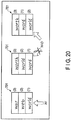
- the handwriting candidate menu 701 is updated, referring to FIG. 20 .
- the handwriting candidate menu 701 including three handwriting candidates “World”, “Web” and “War” is displayed.
- the priorities of the handwriting candidates "World”, “Web” and “War” are the first, second and third, respectively. Therefore, the handwriting candidate "World” is displayed in the bottommost position.
- the display position of the handwriting candidate "World” which is common to the previous time and this time is not changed in the handwriting candidate menu 701.
- the handwriting candidate "World” is displayed in the same position as the previous time in the handwriting candidate menu 701.
- the handwriting candidate "World” is displayed in the bottommost position.
- the other handwriting candidates "Word” and “Worth” are arranged in accordance with the relationship of their priorities.
- the handwriting candidate "Word” is displayed in the second position from the bottom.
- the handwriting candidate "Worth” is displayed at the top.
- the handwriting candidate "World” since the previous priority of the handwriting candidate "World” which is common to the previous time and this time is the first, the handwriting candidate "World” is displayed in the bottommost position in the same manner as the previous time. However, if the previous priority of the handwriting candidate "World” is the third, the handwriting candidate "World” is displayed at the top in the same manner as the previous time.
- the right end of the handwriting candidate menu 701 (the right end of each button area) may be laterally enlarged in accordance with the position of the temporary stroke corresponding to the character "o" without changing the display position of the handwriting candidate menu 701 in the same manner as FIG. 17 .
- the right end of the operation area for selecting the handwriting candidate "World” (the right end of the entry corresponding to the handwriting candidate "World) only has to be extended to a position which is close to the position of the temporary stroke corresponding to the character "o" without changing the display position of the handwriting candidate "World” which is common to the previous time and this time.
- FIG. 21 shows the control of the display position of the handwriting candidate menu 701 in the left-handed mode.
- the handwritten note application program 202 displays one or more handwriting candidates determined from temporary strokes which are input, or in short, the handwriting candidate menu 701, on the right side relative to the position of the temporary strokes as shown in FIG. 21 .
- the user can tap a button area by slightly shifting the stylus tip upward. The user does not need to separate the hand from the display. Thus, the operability to enter a handwriting candidate is enhanced.
- FIG. 22 shows a UI for editing the user dictionary database 402C.
- a user dictionary edit view 900 strokes (a stroke string) and a reading (or an alias) are displayed for each word.
- the user can select a word which is not used and delete the data corresponding to the word from the user dictionary database 402C.
- the user can also register a handwriting candidate corresponding to an arbitrary word in the user dictionary database 402C.
- FIG. 23 shows the relationship between a landscape UI and a landscape page or a portrait page.
- the upper left screen is an example in which a landscape page P10 is displayed in the landscape UI in the normal mode.
- the lower left screen is an example in which a portrait page P20 is displayed in the landscape UI in the normal mode.
- the upper right screen is an example in which the landscape page p10 is displayed in the landscape UI in the full-screen mode.
- the lower right screen is an example in which the portrait page p20 is displayed in the landscape UI in the full-screen mode.
- the notebook list 501, the page list 502, the edit toolbar 503 and the edit view area 504 are displayed from the left end to the right end of the screen of the tablet computer 10.
- the notebook list 501 and the page list 502 are hidden from the screen. Only the edit toolbar 503 is displayed at the left end of the screen.
- the edit view area 504 is enlarged to full screen.
- the notebook list 501 and the page list 502 are displayed on the screen.
- the size of the edit view area 504 is limited compared to the full-screen mode.
- the processing module 308 displays a part of the landscape page P10 in the edit view area 504, and sets the landscape page P10 displayed in the edit view area 504 such that the landscape page P10 can be scrolled only in the lateral direction.
- the processing module 308 displays a part of the portrait page P20 in the edit view area 504, and sets the portrait page P20 displayed in the edit view area 504 such that the portrait page P20 can be scrolled only in the vertical direction.
- the processing module 308 displays the whole landscape page P10 in the edit view area 504.
- the processing module 308 displays a part of the portrait page P20 in the central portion of the edit view area 504, and sets the portrait page P20 displayed in the edit view area 504 such that the portrait page P20 can be scrolled only in the vertical direction.
- FIG. 24 shows the relationship between a portrait UI and the landscape page or the portrait page.
- the upper left screen is an example in which the landscape page P10 is displayed in the portrait UI in the normal mode.
- the lower left screen is an example in which the portrait page P20 is displayed in the portrait UI in the normal mode.
- the upper right screen is an example in which the landscape page P10 is displayed in the portrait UI in the full-screen mode.
- the lower right screen is an example in which the portrait page P20 is displayed in the portrait UI in the full-screen mode.
- the notebook list 501, the page list 502, the edit toolbar 503 and the edit view area 504 are displayed from the upper end to the lower end of the screen of the tablet computer 10.
- the notebook list 501 and the page list 502 are hidden from the screen. Only the edit toolbar 503 is displayed at the upper end of the screen.
- the edit view area 504 is enlarged to full-screen.
- the notebook list 501 and the page list 502 are displayed on the screen.
- the size of the edit view area 504 is limited compared to the full-screen mode.
- the processing module 308 displays a part of the landscape page P10 in the edit view area 504, and sets the landscape page P10 displayed in the edit view area 504 such that the landscape page P10 can be scrolled only in the lateral direction.
- the processing module 308 displays a part of the portrait page P20 in the edit view area 504, and sets the portrait page P20 displayed in the edit view area 504 such that the portrait page P20 can be scrolled only in the vertical direction.
- the processing module 308 displays a part of the landscape page P10 in the central portion of the edit view area 504, and sets the portrait page P10 displayed in the edit view area 504 such that the portrait page P10 can be scrolled only in the lateral direction.
- the processing module 308 displays the whole portrait page P20 in the edit view area 504.
- FIG. 25 is an exemplary flow chart showing the steps of the auto-complete process which is executed by the tablet 10 when the handwritten note application program 202 is executed by the CPU 101.
- the processing module 308 of the handwritten note application program 202 detects the input position and the writing direction of the temporary stroke (block B12). For example, the processing module 308 darkens the area other than the writable area 801 while maintaining the brightness of the writable area 801 having a band shape which is long in the input direction of the character corresponding to the temporary stroke (block B13). The processing module 308 displays the temporary stroke in the writable area 801 (block B14). The step of block B13 may be performed after the temporary stroke is displayed.
- the processing module 308 performs a handwriting candidate menu display process (block B15). The detail steps of this process are shown in FIG. 27 .
- the processing module 308 displays a handwriting candidate menu containing some handwriting candidates determined from temporary strokes on the left side relative to the position of the final end (or right end) of the temporary stroke which is input last.
- the processing module 308 checks whether or not a temporary stroke is further made (block B16). When a temporary stroke is further made (YES in block B16), the steps of block B14 to block B15 are performed again.
- the processing module 308 may extend the handwriting candidate menu in the lateral direction without changing the display position of handwriting candidates.
- the processing module 308 may determine whether or not the same handwriting candidate is included in the handwriting candidate group determined from the first temporal stroke and the handwriting candidate group determined from the first temporary stroke and the second temporary stroke. On the condition that the same handwriting candidate is included in the groups, the processing module 308 may execute a process for laterally extending (enlarging) the handwriting candidate menu without changing the display position of the same handwriting candidate.
- the processing module 308 checks whether or not a handwriting candidate is selected from the handwriting candidates in the handwriting candidate menu (block B17). When a handwriting candidate is selected (YES in block B17), the processing module 308 adjusts the size of the selected handwriting candidate (block B18), completes the temporary strokes by using the selected handwriting candidate, and determines that the selected handwriting candidate should be entered (block B19). In block B19, in place of the temporary strokes, the selected handwriting candidate is entered (input) on the page.
- the processing module 308 checks whether or not the area other than the writable area is tapped (block B20) and whether or not the conformation button is tapped (block B21). When one of the tap in the area other than the writable area and the tap of the confirmation button is executed (YES in block B20 or YES in block B21), the processing module 308 determines that the temporary strokes should be entered (block B22). When neither the tap in the area other than the writable area nor the tap of the confirmation button is performed (NO in block B20 and NO in block N21), the processing module 308 returns to block B16 and checks whether or not a temporary stroke is further made.
- FIG. 26 is an exemplary flowchart showing the steps of the handwriting candidate menu display process which is executed by the tablet 10 when the handwritten note application program 202 is executed by the CPU 101.
- the processing module 308 of the handwritten note application program 202 determines some handwriting candidates based on the input temporary stroke (block B31), and prepares a handwriting candidate menu in which the handwriting candidates are arranged in the priority order (block B32).
- the processing module 308 sets the color of the handwriting candidates as black (block B33), and displays the handwriting candidate menu (block B34).
- the processing module 308 checks whether or not a temporary stroke is further made (block B35). When a temporary stroke is further made (YES in block B35), the processing module 308 determines some new handwriting candidates based on the temporary strokes which are initially input and the temporary stroke which is additionally input (block B36), and checks whether or not the same handwriting candidate as the previous time is included in the new handwriting candidates (block B37).
- the processing module 308 prepares the handwriting candidate menu such that the same handwriting candidate as the previous time is displayed in the same display position (the same button area) in the handwriting candidate menu (block B38).
- the processing module 308 sets the color of the same handwriting candidate as the previous time as black (block B39), sets the color of a handwriting candidate different from the previous time as red (block B40), and displays the handwriting candidate menu (block B41) .
- the processing module 308 prepares the handwriting candidate menu in which the handwriting candidates are arranged in the priority order (block B42).
- the processing module 308 sets the color of the handwriting candidates as black (block B43), and displays the handwriting candidate menu (block B44).
- FIG. 27 and FIG. 28 are exemplary flowcharts showing the steps of the page display process which is executed by the tablet 10 when the handwritten note application program 202 is executed by the CPU 101.
- the processing module 308 of the handwritten note application program 202 firstly checks whether the orientation of the screen is the landscape orientation or the portrait orientation (block B51).
- FIG. 27 shows steps when the orientation of the screen is the landscape orientation.
- FIG. 28 shows steps when the orientation of the screen is the portrait orientation.
- the processing module 308 checks whether the UI (edit view) is in the normal mode or in the full-screen mode (block B52). In the normal mode, the processing module 308 checks whether the type of the page to be displayed is the landscape page type or the portrait page type (block B53).
- the processing module 308 displays the landscape normal UI (block B54) and displays a part of the landscape page in the edit view area (block B55).
- a lateral scrolling gesture is performed (YES in block B56)
- the processing module 308 laterally scrolls the landscape page (block B57).
- the processing module 308 displays the landscape normal UI (block B58) and displays a part of the portrait page in the edit view area (block B59).
- a vertical scrolling gesture is performed (YES in block B60)
- the processing module 308 vertically scrolls the portrait page (block B57).
- the processing module 308 checks whether the page type is the landscape page type or the portrait page type (block B62).
- the processing module 308 displays the landscape full-screen UI (block B63) and displays the whole landscape page in the edit view area (block B64).
- the processing module 308 displays the landscape full-screen UI (block B65) and displays a part of the portrait page in the central portion of the edit view area (block B66).
- a vertical scrolling gesture is performed (YES in block B67)
- the portrait page is vertically scrolled (block B68) .
- the processing module 308 checks whether the mode is set as the normal mode or the full-screen mode (block B70). In the normal mode, the processing module 308 checks whether the page type is the landscape page type or the portrait page type (block B71) .
- the processing module 308 displays the portrait normal UI (block B72) and displays a part of the landscape page in the edit view area (block B73).
- a lateral scrolling gesture is performed (YES in block B74)
- the landscape page is laterally scrolled (block B75).
- the processing module 308 displays the portrait normal UI (block B76) and displays a part of the portrait page in the edit view area (block B77).
- a vertical scrolling gesture is performed (YES in block B78)
- the portrait page is vertically scrolled (block B79).
- the processing module 308 checks whether the page type is the landscape page type or the portrait page type (block B80).
- the processing module 308 displays the portrait full-screen UI (block B81) and displays a part of the landscape page in the central portion of the edit view area (block B82).
- a lateral scrolling gesture is performed (YES in block B83)
- the landscape page is laterally scrolled (block B68).
- the processing module 308 displays the portrait full-screen UI (block B88) and displays the whole portrait page in the edit view area (block B86).
- the scrollable direction is always restricted to the lateral direction.
- the scrollable direction is always restricted to the vertical direction. In this manner, it is possible to prevent unintended scrolling of the page during a handwriting input operation.
- the writable area including the display area of temporary strokes is displayed in a display style different from the other area.
- the other area is used as an operation area for determining that the temporary strokes should be entered.
- the operation to determine the temporary strokes as the entered strokes becomes easy. It is possible to realize smooth handwriting input.
- the processing circuitry includes a programmed processor such as a central processing unit (CPU).
- the processor executes each of the described functions by executing a computer program (a group of instructions) stored in the memory.
- the processor may be a microprocessor including an electric circuitry.
- the processing circuitry further includes a digital signal processor (DSP), an application-specific integrated circuit (ASIC), a microcontroller, a controller and other electronic circuitry components.
- DSP digital signal processor
- ASIC application-specific integrated circuit
- microcontroller a microcontroller
- controller a controller and other electronic circuitry components.
- Each process described in the present embodiment can be realized by a computer program. Therefore, an effect similar to the present embodiment can be easily realized by merely installing the computer program into a computer through a computer-readable storage medium in which the computer program is stored, and executing the computer program.
- the CPU in the computer into which the computer program is installed can function as a processor configured to execute the above-described handwriting complete process.
- the GPU in the computer can function as a display processor configured to display each stroke on the screen.
- a tablet computer is used as an example.
- the handwritten document processing function of the present embodiment can be applied to a normal desktop personal computer.
- a tablet which is an input device for handwriting input may be connected to a desktop personal computer.
Landscapes
- Engineering & Computer Science (AREA)
- Theoretical Computer Science (AREA)
- General Engineering & Computer Science (AREA)
- Physics & Mathematics (AREA)
- General Physics & Mathematics (AREA)
- Human Computer Interaction (AREA)
- Audiology, Speech & Language Pathology (AREA)
- Artificial Intelligence (AREA)
- Health & Medical Sciences (AREA)
- Computational Linguistics (AREA)
- General Health & Medical Sciences (AREA)
- Computer Vision & Pattern Recognition (AREA)
- Multimedia (AREA)
- User Interface Of Digital Computer (AREA)
- Machine Translation (AREA)
- Document Processing Apparatus (AREA)
- Character Discrimination (AREA)
Applications Claiming Priority (1)
| Application Number | Priority Date | Filing Date | Title |
|---|---|---|---|
| JP2014179032A JP6392036B2 (ja) | 2014-09-03 | 2014-09-03 | 電子機器および方法 |
Publications (2)
| Publication Number | Publication Date |
|---|---|
| EP2993557A1 EP2993557A1 (en) | 2016-03-09 |
| EP2993557B1 true EP2993557B1 (en) | 2019-01-16 |
Family
ID=52598644
Family Applications (1)
| Application Number | Title | Priority Date | Filing Date |
|---|---|---|---|
| EP15157624.6A Active EP2993557B1 (en) | 2014-09-03 | 2015-03-04 | Electronic device and method for processing handwriting |
Country Status (3)
| Country | Link |
|---|---|
| US (1) | US20160062634A1 (enExample) |
| EP (1) | EP2993557B1 (enExample) |
| JP (1) | JP6392036B2 (enExample) |
Families Citing this family (21)
| Publication number | Priority date | Publication date | Assignee | Title |
|---|---|---|---|---|
| US10489051B2 (en) * | 2014-11-28 | 2019-11-26 | Samsung Electronics Co., Ltd. | Handwriting input apparatus and control method thereof |
| US9916300B2 (en) * | 2015-11-16 | 2018-03-13 | Lenovo (Singapore) Pte. Ltd. | Updating hint list based on number of strokes |
| EP3206142B1 (en) * | 2016-02-15 | 2021-12-15 | Ricoh Company, Ltd. | Information processing system and information processing method |
| CN105760019B (zh) * | 2016-02-22 | 2019-04-09 | 广州视睿电子科技有限公司 | 基于交互式电子白板的触摸操作方法及其系统 |
| JP6696868B2 (ja) * | 2016-09-12 | 2020-05-20 | 株式会社Nttドコモ | 情報処理装置 |
| US9934422B1 (en) | 2016-09-22 | 2018-04-03 | Gracious Eloise, Inc. | Digitized handwriting sample ingestion systems and methods |
| US10514844B2 (en) * | 2016-11-16 | 2019-12-24 | Dell Products L.P. | Automatically modifying an input area based on a proximity to one or more edges |
| US11017258B2 (en) * | 2018-06-05 | 2021-05-25 | Microsoft Technology Licensing, Llc | Alignment of user input on a screen |
| KR102145824B1 (ko) * | 2018-08-14 | 2020-08-19 | 강태호 | 스마트 터치패드 인터페이스 방법 및 그 장치 |
| CN111046638B (zh) * | 2018-10-12 | 2022-06-28 | 北京金山办公软件股份有限公司 | 一种墨迹清除的方法、装置、电子设备及存储介质 |
| JP6688410B1 (ja) * | 2019-02-14 | 2020-04-28 | 株式会社ぐるなび | 情報検索システム、情報検索方法、及び情報検索プログラム |
| KR102759947B1 (ko) * | 2019-02-22 | 2025-02-03 | 삼성전자주식회사 | 수기에 기반한 입력을 디스플레이하기 위한 방법 및 장치 |
| CN111352599A (zh) * | 2019-05-07 | 2020-06-30 | 鸿合科技股份有限公司 | 一种远程白板的数据处理方法及装置、电子设备 |
| CN111782083B (zh) * | 2020-06-30 | 2025-01-21 | 北京小米移动软件有限公司 | 内容输入方法、装置、触控输入设备及存储介质 |
| JP7683253B2 (ja) * | 2021-03-12 | 2025-05-27 | 株式会社リコー | 表示装置、プログラム、変換方法、表示システム |
| CN113434064B (zh) * | 2021-07-01 | 2022-03-29 | 掌阅科技股份有限公司 | 手写阅读器笔锋切换方法、电子设备和存储介质 |
| CN114237482A (zh) * | 2021-12-20 | 2022-03-25 | 锐捷网络股份有限公司 | 书写笔迹显示处理方法、装置、系统、设备和存储介质 |
| CN115002084B (zh) * | 2022-08-01 | 2023-01-17 | 广州迈聆信息科技有限公司 | 书写笔迹处理方法、装置、电子设备和存储介质 |
| EP4693012A4 (en) * | 2023-05-12 | 2026-07-29 | Samsung Electronics Co Ltd | ELECTRONIC DEVICE FOR ADJUSTING A HANDWRITTEN INPUT RATIO, ITS OPERATING METHOD AND RECORDING MEDIUM |
| CN118020054A (zh) * | 2023-08-29 | 2024-05-10 | 广州视臻信息科技有限公司 | 用于交互平板的信息编辑方法、装置、设备与存储介质 |
| JP7836006B1 (ja) * | 2025-01-08 | 2026-03-26 | 富士通クライアントコンピューティング株式会社 | 電子機器、表示制御方法、及びプログラム |
Family Cites Families (11)
| Publication number | Priority date | Publication date | Assignee | Title |
|---|---|---|---|---|
| JP2944439B2 (ja) * | 1994-12-27 | 1999-09-06 | シャープ株式会社 | 手書き文字入力装置および方法 |
| US7096432B2 (en) * | 2002-05-14 | 2006-08-22 | Microsoft Corporation | Write anywhere tool |
| US7062090B2 (en) * | 2002-06-28 | 2006-06-13 | Microsoft Corporation | Writing guide for a free-form document editor |
| US7058902B2 (en) * | 2002-07-30 | 2006-06-06 | Microsoft Corporation | Enhanced on-object context menus |
| US7466859B2 (en) * | 2004-12-30 | 2008-12-16 | Motorola, Inc. | Candidate list enhancement for predictive text input in electronic devices |
| JP4648045B2 (ja) * | 2005-03-17 | 2011-03-09 | 株式会社リコー | 文字入力装置、プログラムおよび文字入力方法 |
| US8694530B2 (en) * | 2006-01-03 | 2014-04-08 | Textdigger, Inc. | Search system with query refinement and search method |
| JP2007265171A (ja) * | 2006-03-29 | 2007-10-11 | Toshiba Corp | 入力装置およびその方法 |
| US8116569B2 (en) * | 2007-12-21 | 2012-02-14 | Microsoft Corporation | Inline handwriting recognition and correction |
| JP5832980B2 (ja) * | 2012-09-25 | 2015-12-16 | 株式会社東芝 | 手書き入力支援装置、方法およびプログラム |
| JP2014071538A (ja) * | 2012-09-27 | 2014-04-21 | Sharp Corp | 表示装置 |
-
2014
- 2014-09-03 JP JP2014179032A patent/JP6392036B2/ja active Active
-
2015
- 2015-03-04 EP EP15157624.6A patent/EP2993557B1/en active Active
- 2015-03-20 US US14/664,645 patent/US20160062634A1/en not_active Abandoned
Non-Patent Citations (1)
| Title |
|---|
| None * |
Also Published As
| Publication number | Publication date |
|---|---|
| JP2016053799A (ja) | 2016-04-14 |
| JP6392036B2 (ja) | 2018-09-19 |
| US20160062634A1 (en) | 2016-03-03 |
| EP2993557A1 (en) | 2016-03-09 |
Similar Documents
| Publication | Publication Date | Title |
|---|---|---|
| EP2993557A1 (en) | Electronic device and method for processing handwriting | |
| JP6180888B2 (ja) | 電子機器、方法およびプログラム | |
| US9117125B2 (en) | Electronic device and handwritten document processing method | |
| US20140189593A1 (en) | Electronic device and input method | |
| US20150347001A1 (en) | Electronic device, method and storage medium | |
| JP6092418B2 (ja) | 電子機器、方法及びプログラム | |
| US20150154444A1 (en) | Electronic device and method | |
| US9274704B2 (en) | Electronic apparatus, method and storage medium | |
| JP5728592B1 (ja) | 電子機器および手書き入力方法 | |
| US20160147436A1 (en) | Electronic apparatus and method | |
| JP6426417B2 (ja) | 電子機器、方法及びプログラム | |
| US20150146986A1 (en) | Electronic apparatus, method and storage medium | |
| JP6092462B2 (ja) | 電子機器、方法及びプログラム | |
| US10416868B2 (en) | Method and system for character insertion in a character string | |
| JP2015114976A (ja) | 電子機器及び方法 | |
| US20150098653A1 (en) | Method, electronic device and storage medium | |
| US20160139802A1 (en) | Electronic device and method for processing handwritten document data | |
| JP6430198B2 (ja) | 電子機器、方法及びプログラム | |
| US20160048324A1 (en) | Electronic device and method | |
| US20160147437A1 (en) | Electronic device and method for handwriting | |
| US9298366B2 (en) | Electronic device, method and computer readable medium | |
| JP6202997B2 (ja) | 電子機器、方法及びプログラム | |
| JP6499198B2 (ja) | 手書きのための電子機器および方法 | |
| JP6251408B2 (ja) | 電子機器、方法及びプログラム | |
| JP6315996B2 (ja) | 電子機器、方法及びプログラム |
Legal Events
| Date | Code | Title | Description |
|---|---|---|---|
| PUAI | Public reference made under article 153(3) epc to a published international application that has entered the european phase |
Free format text: ORIGINAL CODE: 0009012 |
|
| 17P | Request for examination filed |
Effective date: 20150304 |
|
| AK | Designated contracting states |
Kind code of ref document: A1 Designated state(s): AL AT BE BG CH CY CZ DE DK EE ES FI FR GB GR HR HU IE IS IT LI LT LU LV MC MK MT NL NO PL PT RO RS SE SI SK SM TR |
|
| AX | Request for extension of the european patent |
Extension state: BA ME |
|
| GRAP | Despatch of communication of intention to grant a patent |
Free format text: ORIGINAL CODE: EPIDOSNIGR1 |
|
| STAA | Information on the status of an ep patent application or granted ep patent |
Free format text: STATUS: GRANT OF PATENT IS INTENDED |
|
| INTG | Intention to grant announced |
Effective date: 20180725 |
|
| RAP1 | Party data changed (applicant data changed or rights of an application transferred) |
Owner name: KABUSHIKI KAISHA TOSHIBA |
|
| RIN1 | Information on inventor provided before grant (corrected) |
Inventor name: KURITA, YUKIHIRO Inventor name: OGAWA, TAKEHIRO Inventor name: KAKEMURA, ATSUSHI Inventor name: AKASHI, AIKO |
|
| GRAS | Grant fee paid |
Free format text: ORIGINAL CODE: EPIDOSNIGR3 |
|
| GRAA | (expected) grant |
Free format text: ORIGINAL CODE: 0009210 |
|
| STAA | Information on the status of an ep patent application or granted ep patent |
Free format text: STATUS: THE PATENT HAS BEEN GRANTED |
|
| AK | Designated contracting states |
Kind code of ref document: B1 Designated state(s): AL AT BE BG CH CY CZ DE DK EE ES FI FR GB GR HR HU IE IS IT LI LT LU LV MC MK MT NL NO PL PT RO RS SE SI SK SM TR |
|
| REG | Reference to a national code |
Ref country code: GB Ref legal event code: FG4D |
|
| REG | Reference to a national code |
Ref country code: CH Ref legal event code: EP |
|
| REG | Reference to a national code |
Ref country code: IE Ref legal event code: FG4D |
|
| REG | Reference to a national code |
Ref country code: DE Ref legal event code: R096 Ref document number: 602015023465 Country of ref document: DE |
|
| REG | Reference to a national code |
Ref country code: AT Ref legal event code: REF Ref document number: 1090190 Country of ref document: AT Kind code of ref document: T Effective date: 20190215 |
|
| REG | Reference to a national code |
Ref country code: DE Ref legal event code: R082 Ref document number: 602015023465 Country of ref document: DE Representative=s name: PATENTANWAELTE HENKEL, BREUER & PARTNER MBB, DE Ref country code: DE Ref legal event code: R081 Ref document number: 602015023465 Country of ref document: DE Owner name: TOSHIBA CLIENT SOLUTIONS CO., LTD., JP Free format text: FORMER OWNER: KABUSHIKI KAISHA TOSHIBA, TOKYO, JP Ref country code: DE Ref legal event code: R082 Ref document number: 602015023465 Country of ref document: DE Representative=s name: HENKEL & PARTNER MBB PATENTANWALTSKANZLEI, REC, DE |
|
| RAP2 | Party data changed (patent owner data changed or rights of a patent transferred) |
Owner name: TOSHIBA CLIENT SOLUTIONS CO., LTD. |
|
| REG | Reference to a national code |
Ref country code: GB Ref legal event code: 732E Free format text: REGISTERED BETWEEN 20190314 AND 20190320 |
|
| REG | Reference to a national code |
Ref country code: NL Ref legal event code: MP Effective date: 20190116 |
|
| REG | Reference to a national code |
Ref country code: LT Ref legal event code: MG4D |
|
| PG25 | Lapsed in a contracting state [announced via postgrant information from national office to epo] |
Ref country code: NL Free format text: LAPSE BECAUSE OF FAILURE TO SUBMIT A TRANSLATION OF THE DESCRIPTION OR TO PAY THE FEE WITHIN THE PRESCRIBED TIME-LIMIT Effective date: 20190116 |
|
| REG | Reference to a national code |
Ref country code: AT Ref legal event code: MK05 Ref document number: 1090190 Country of ref document: AT Kind code of ref document: T Effective date: 20190116 |
|
| PG25 | Lapsed in a contracting state [announced via postgrant information from national office to epo] |
Ref country code: PT Free format text: LAPSE BECAUSE OF FAILURE TO SUBMIT A TRANSLATION OF THE DESCRIPTION OR TO PAY THE FEE WITHIN THE PRESCRIBED TIME-LIMIT Effective date: 20190516 Ref country code: ES Free format text: LAPSE BECAUSE OF FAILURE TO SUBMIT A TRANSLATION OF THE DESCRIPTION OR TO PAY THE FEE WITHIN THE PRESCRIBED TIME-LIMIT Effective date: 20190116 Ref country code: PL Free format text: LAPSE BECAUSE OF FAILURE TO SUBMIT A TRANSLATION OF THE DESCRIPTION OR TO PAY THE FEE WITHIN THE PRESCRIBED TIME-LIMIT Effective date: 20190116 Ref country code: LT Free format text: LAPSE BECAUSE OF FAILURE TO SUBMIT A TRANSLATION OF THE DESCRIPTION OR TO PAY THE FEE WITHIN THE PRESCRIBED TIME-LIMIT Effective date: 20190116 Ref country code: FI Free format text: LAPSE BECAUSE OF FAILURE TO SUBMIT A TRANSLATION OF THE DESCRIPTION OR TO PAY THE FEE WITHIN THE PRESCRIBED TIME-LIMIT Effective date: 20190116 Ref country code: NO Free format text: LAPSE BECAUSE OF FAILURE TO SUBMIT A TRANSLATION OF THE DESCRIPTION OR TO PAY THE FEE WITHIN THE PRESCRIBED TIME-LIMIT Effective date: 20190416 Ref country code: SE Free format text: LAPSE BECAUSE OF FAILURE TO SUBMIT A TRANSLATION OF THE DESCRIPTION OR TO PAY THE FEE WITHIN THE PRESCRIBED TIME-LIMIT Effective date: 20190116 |
|
| PG25 | Lapsed in a contracting state [announced via postgrant information from national office to epo] |
Ref country code: IS Free format text: LAPSE BECAUSE OF FAILURE TO SUBMIT A TRANSLATION OF THE DESCRIPTION OR TO PAY THE FEE WITHIN THE PRESCRIBED TIME-LIMIT Effective date: 20190516 Ref country code: BG Free format text: LAPSE BECAUSE OF FAILURE TO SUBMIT A TRANSLATION OF THE DESCRIPTION OR TO PAY THE FEE WITHIN THE PRESCRIBED TIME-LIMIT Effective date: 20190416 Ref country code: GR Free format text: LAPSE BECAUSE OF FAILURE TO SUBMIT A TRANSLATION OF THE DESCRIPTION OR TO PAY THE FEE WITHIN THE PRESCRIBED TIME-LIMIT Effective date: 20190417 Ref country code: RS Free format text: LAPSE BECAUSE OF FAILURE TO SUBMIT A TRANSLATION OF THE DESCRIPTION OR TO PAY THE FEE WITHIN THE PRESCRIBED TIME-LIMIT Effective date: 20190116 Ref country code: LV Free format text: LAPSE BECAUSE OF FAILURE TO SUBMIT A TRANSLATION OF THE DESCRIPTION OR TO PAY THE FEE WITHIN THE PRESCRIBED TIME-LIMIT Effective date: 20190116 Ref country code: HR Free format text: LAPSE BECAUSE OF FAILURE TO SUBMIT A TRANSLATION OF THE DESCRIPTION OR TO PAY THE FEE WITHIN THE PRESCRIBED TIME-LIMIT Effective date: 20190116 |
|
| REG | Reference to a national code |
Ref country code: DE Ref legal event code: R097 Ref document number: 602015023465 Country of ref document: DE |
|
| PG25 | Lapsed in a contracting state [announced via postgrant information from national office to epo] |
Ref country code: SK Free format text: LAPSE BECAUSE OF FAILURE TO SUBMIT A TRANSLATION OF THE DESCRIPTION OR TO PAY THE FEE WITHIN THE PRESCRIBED TIME-LIMIT Effective date: 20190116 Ref country code: RO Free format text: LAPSE BECAUSE OF FAILURE TO SUBMIT A TRANSLATION OF THE DESCRIPTION OR TO PAY THE FEE WITHIN THE PRESCRIBED TIME-LIMIT Effective date: 20190116 Ref country code: CZ Free format text: LAPSE BECAUSE OF FAILURE TO SUBMIT A TRANSLATION OF THE DESCRIPTION OR TO PAY THE FEE WITHIN THE PRESCRIBED TIME-LIMIT Effective date: 20190116 Ref country code: AL Free format text: LAPSE BECAUSE OF FAILURE TO SUBMIT A TRANSLATION OF THE DESCRIPTION OR TO PAY THE FEE WITHIN THE PRESCRIBED TIME-LIMIT Effective date: 20190116 Ref country code: MC Free format text: LAPSE BECAUSE OF FAILURE TO SUBMIT A TRANSLATION OF THE DESCRIPTION OR TO PAY THE FEE WITHIN THE PRESCRIBED TIME-LIMIT Effective date: 20190116 Ref country code: DK Free format text: LAPSE BECAUSE OF FAILURE TO SUBMIT A TRANSLATION OF THE DESCRIPTION OR TO PAY THE FEE WITHIN THE PRESCRIBED TIME-LIMIT Effective date: 20190116 Ref country code: EE Free format text: LAPSE BECAUSE OF FAILURE TO SUBMIT A TRANSLATION OF THE DESCRIPTION OR TO PAY THE FEE WITHIN THE PRESCRIBED TIME-LIMIT Effective date: 20190116 Ref country code: IT Free format text: LAPSE BECAUSE OF FAILURE TO SUBMIT A TRANSLATION OF THE DESCRIPTION OR TO PAY THE FEE WITHIN THE PRESCRIBED TIME-LIMIT Effective date: 20190116 Ref country code: AT Free format text: LAPSE BECAUSE OF FAILURE TO SUBMIT A TRANSLATION OF THE DESCRIPTION OR TO PAY THE FEE WITHIN THE PRESCRIBED TIME-LIMIT Effective date: 20190116 |
|
| REG | Reference to a national code |
Ref country code: CH Ref legal event code: PL |
|
| PLBE | No opposition filed within time limit |
Free format text: ORIGINAL CODE: 0009261 |
|
| STAA | Information on the status of an ep patent application or granted ep patent |
Free format text: STATUS: NO OPPOSITION FILED WITHIN TIME LIMIT |
|
| PG25 | Lapsed in a contracting state [announced via postgrant information from national office to epo] |
Ref country code: LU Free format text: LAPSE BECAUSE OF NON-PAYMENT OF DUE FEES Effective date: 20190304 Ref country code: SM Free format text: LAPSE BECAUSE OF FAILURE TO SUBMIT A TRANSLATION OF THE DESCRIPTION OR TO PAY THE FEE WITHIN THE PRESCRIBED TIME-LIMIT Effective date: 20190116 |
|
| REG | Reference to a national code |
Ref country code: BE Ref legal event code: MM Effective date: 20190331 |
|
| 26N | No opposition filed |
Effective date: 20191017 |
|
| PG25 | Lapsed in a contracting state [announced via postgrant information from national office to epo] |
Ref country code: LI Free format text: LAPSE BECAUSE OF NON-PAYMENT OF DUE FEES Effective date: 20190331 Ref country code: CH Free format text: LAPSE BECAUSE OF NON-PAYMENT OF DUE FEES Effective date: 20190331 Ref country code: IE Free format text: LAPSE BECAUSE OF NON-PAYMENT OF DUE FEES Effective date: 20190304 |
|
| PG25 | Lapsed in a contracting state [announced via postgrant information from national office to epo] |
Ref country code: SI Free format text: LAPSE BECAUSE OF FAILURE TO SUBMIT A TRANSLATION OF THE DESCRIPTION OR TO PAY THE FEE WITHIN THE PRESCRIBED TIME-LIMIT Effective date: 20190116 Ref country code: BE Free format text: LAPSE BECAUSE OF NON-PAYMENT OF DUE FEES Effective date: 20190331 |
|
| PG25 | Lapsed in a contracting state [announced via postgrant information from national office to epo] |
Ref country code: TR Free format text: LAPSE BECAUSE OF FAILURE TO SUBMIT A TRANSLATION OF THE DESCRIPTION OR TO PAY THE FEE WITHIN THE PRESCRIBED TIME-LIMIT Effective date: 20190116 |
|
| PG25 | Lapsed in a contracting state [announced via postgrant information from national office to epo] |
Ref country code: MT Free format text: LAPSE BECAUSE OF NON-PAYMENT OF DUE FEES Effective date: 20190304 |
|
| PG25 | Lapsed in a contracting state [announced via postgrant information from national office to epo] |
Ref country code: CY Free format text: LAPSE BECAUSE OF FAILURE TO SUBMIT A TRANSLATION OF THE DESCRIPTION OR TO PAY THE FEE WITHIN THE PRESCRIBED TIME-LIMIT Effective date: 20190116 |
|
| PG25 | Lapsed in a contracting state [announced via postgrant information from national office to epo] |
Ref country code: HU Free format text: LAPSE BECAUSE OF FAILURE TO SUBMIT A TRANSLATION OF THE DESCRIPTION OR TO PAY THE FEE WITHIN THE PRESCRIBED TIME-LIMIT; INVALID AB INITIO Effective date: 20150304 |
|
| PG25 | Lapsed in a contracting state [announced via postgrant information from national office to epo] |
Ref country code: MK Free format text: LAPSE BECAUSE OF FAILURE TO SUBMIT A TRANSLATION OF THE DESCRIPTION OR TO PAY THE FEE WITHIN THE PRESCRIBED TIME-LIMIT Effective date: 20190116 |
|
| PGFP | Annual fee paid to national office [announced via postgrant information from national office to epo] |
Ref country code: GB Payment date: 20260324 Year of fee payment: 12 |
|
| PGFP | Annual fee paid to national office [announced via postgrant information from national office to epo] |
Ref country code: DE Payment date: 20260319 Year of fee payment: 12 |
|
| PGFP | Annual fee paid to national office [announced via postgrant information from national office to epo] |
Ref country code: FR Payment date: 20260320 Year of fee payment: 12 |