EP2951668B1 - Intelligent window sizing and control - Google Patents
Intelligent window sizing and control Download PDFInfo
- Publication number
- EP2951668B1 EP2951668B1 EP14746379.8A EP14746379A EP2951668B1 EP 2951668 B1 EP2951668 B1 EP 2951668B1 EP 14746379 A EP14746379 A EP 14746379A EP 2951668 B1 EP2951668 B1 EP 2951668B1
- Authority
- EP
- European Patent Office
- Prior art keywords
- window
- size
- adjusting
- selectable options
- input
- Prior art date
- Legal status (The legal status is an assumption and is not a legal conclusion. Google has not performed a legal analysis and makes no representation as to the accuracy of the status listed.)
- Not-in-force
Links
Images


Classifications
-
- G—PHYSICS
- G06—COMPUTING OR CALCULATING; COUNTING
- G06F—ELECTRIC DIGITAL DATA PROCESSING
- G06F3/00—Input arrangements for transferring data to be processed into a form capable of being handled by the computer; Output arrangements for transferring data from processing unit to output unit, e.g. interface arrangements
- G06F3/01—Input arrangements or combined input and output arrangements for interaction between user and computer
- G06F3/048—Interaction techniques based on graphical user interfaces [GUI]
- G06F3/0484—Interaction techniques based on graphical user interfaces [GUI] for the control of specific functions or operations, e.g. selecting or manipulating an object, an image or a displayed text element, setting a parameter value or selecting a range
- G06F3/04847—Interaction techniques to control parameter settings, e.g. interaction with sliders or dials
-
- G—PHYSICS
- G06—COMPUTING OR CALCULATING; COUNTING
- G06F—ELECTRIC DIGITAL DATA PROCESSING
- G06F3/00—Input arrangements for transferring data to be processed into a form capable of being handled by the computer; Output arrangements for transferring data from processing unit to output unit, e.g. interface arrangements
- G06F3/01—Input arrangements or combined input and output arrangements for interaction between user and computer
- G06F3/048—Interaction techniques based on graphical user interfaces [GUI]
- G06F3/0481—Interaction techniques based on graphical user interfaces [GUI] based on specific properties of the displayed interaction object or a metaphor-based environment, e.g. interaction with desktop elements like windows or icons, or assisted by a cursor's changing behaviour or appearance
-
- G—PHYSICS
- G06—COMPUTING OR CALCULATING; COUNTING
- G06F—ELECTRIC DIGITAL DATA PROCESSING
- G06F3/00—Input arrangements for transferring data to be processed into a form capable of being handled by the computer; Output arrangements for transferring data from processing unit to output unit, e.g. interface arrangements
- G06F3/01—Input arrangements or combined input and output arrangements for interaction between user and computer
- G06F3/048—Interaction techniques based on graphical user interfaces [GUI]
- G06F3/0481—Interaction techniques based on graphical user interfaces [GUI] based on specific properties of the displayed interaction object or a metaphor-based environment, e.g. interaction with desktop elements like windows or icons, or assisted by a cursor's changing behaviour or appearance
- G06F3/04817—Interaction techniques based on graphical user interfaces [GUI] based on specific properties of the displayed interaction object or a metaphor-based environment, e.g. interaction with desktop elements like windows or icons, or assisted by a cursor's changing behaviour or appearance using icons
-
- G—PHYSICS
- G06—COMPUTING OR CALCULATING; COUNTING
- G06F—ELECTRIC DIGITAL DATA PROCESSING
- G06F3/00—Input arrangements for transferring data to be processed into a form capable of being handled by the computer; Output arrangements for transferring data from processing unit to output unit, e.g. interface arrangements
- G06F3/01—Input arrangements or combined input and output arrangements for interaction between user and computer
- G06F3/048—Interaction techniques based on graphical user interfaces [GUI]
- G06F3/0484—Interaction techniques based on graphical user interfaces [GUI] for the control of specific functions or operations, e.g. selecting or manipulating an object, an image or a displayed text element, setting a parameter value or selecting a range
- G06F3/04845—Interaction techniques based on graphical user interfaces [GUI] for the control of specific functions or operations, e.g. selecting or manipulating an object, an image or a displayed text element, setting a parameter value or selecting a range for image manipulation, e.g. dragging, rotation, expansion or change of colour
-
- G—PHYSICS
- G06—COMPUTING OR CALCULATING; COUNTING
- G06F—ELECTRIC DIGITAL DATA PROCESSING
- G06F9/00—Arrangements for program control, e.g. control units
- G06F9/06—Arrangements for program control, e.g. control units using stored programs, i.e. using an internal store of processing equipment to receive or retain programs
- G06F9/44—Arrangements for executing specific programs
- G06F9/451—Execution arrangements for user interfaces
-
- G—PHYSICS
- G06—COMPUTING OR CALCULATING; COUNTING
- G06F—ELECTRIC DIGITAL DATA PROCESSING
- G06F2203/00—Indexing scheme relating to G06F3/00 - G06F3/048
- G06F2203/048—Indexing scheme relating to G06F3/048
- G06F2203/04806—Zoom, i.e. interaction techniques or interactors for controlling the zooming operation
Definitions
- the subject technology relates to a user interface and method for managing windows, and particularly, to a window manager for running and managing the display of one or more windows. [[ Please insert paragraphs of page 1a here.]]
- the disclosed subject matter relates to a method for managing display of a window, according to independent claim 1.
- the subject technology relates to a system for managing display of a window, according to independent claim 8.
- US 20110191713 A1 presents an information processing apparatus, wherein the apparatus includes: a display on which a window is displayed; a touch screen on the display; a display controller configured to display an operation screen on the display such that the operation screen is superposed on the window, wherein the operation screen generates an operation command for operating the window, based on an input operation through the touch screen; and an operation execution module configured to execute the operation command for operating the window.
- US 20110302528 A1 presents a device that displays a drop down detection area, wherein a computing device detects the presence of a cursor hovering over the drop down detection area, the computing device displays a tiling navigator on the display, which includes multiple window resizing options for a user to select in order to resize a window to particular display locations on the display.
- aspects of the subject disclosure provide methods and systems for presenting and controlling the appearance of one or more windows in a graphical user interface.
- methods of the subject disclosure can be used to affect the sizing and placement of one or more windows, for example, within a display area in a graphical user interface (GUI).
- GUI graphical user interface
- the subject technology provides a window manager that can be configured to display a "window control" icon, for example, in one or more windows displayed in a display area of a GUI.
- the window control icon can be positioned anywhere on (or within) the display area, in some implementations it will be located next to a "close window” icon displayed within a window presented in the display area. Selection of the window control icon (e.g., by a user) will cause the presentation of selectable options that can be used to resize the corresponding window.
- the selectable options are displayed as icons, for example, arrow icons pointing in different directions of the display (e.g., an up-arrow, a down-arrow, a left-arrow and a right-arrow). By selecting one of the selectable options, the user can adjust sizing of the associated window.
- User selection of the selectable options can vary with implementation. For example, selection can be performed using a cursor or touch based input.
- a user gesture e.g., a gesture made with a cursor or a pointing device
- the window manager can interpret the cursor for use in selecting one of the selectable options.
- a user may move the cursor in an upward direction indicating selection of a corresponding selectable option. As a result, the display of the associated window can be maximized.
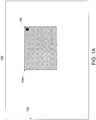
- FIG. 1A illustrates an example of a GUI, comprising a window control icon (hereinafter "control icon").
- GUI 100 includes display area 102, window 104A and control icon 106.
- window 104A can be sized/resized based on input received, for example, with respect to control icon 106.
- selection of control icon 106 will cause a plurality if selectable options to be presented to the user.
- the selectable options may be visibly displayed to the user (e.g., on a display device).
- the selectable options may be available to the user (e.g., via a gesture), without being visibly displayed.
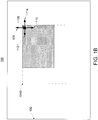
- FIG. 1B illustrates display area 102 having window 104B, control icon 106 and a plurality of selectable options (e.g., 108, 110, 112 and 114).
- the selectable options e.g., 108, 110, 112 and 114 are presented in response to selection of control icon 106.
- the selectable options e.g., 108, 110, 112 and 114 are illustrated as icons associated with a particular direction.
- the selectable options e.g., 108, 110, 112 and 114 may not be visibly displayed to the user, but rather selectable via a particular gesture or input sequence, as will be described in further detail below.
- window 104B can be resized, minimized or maximized.
- window 104B has been increased in size from that of window 104A.
- selection of selectable option 112 could cause window 104A to be resized in the direction associated with selectable option 112 (e.g., along a left border as indicated by the dotted line).
- window 104B could have been increased in size via user selection of selectable option 114, for example, in a right direction with respect to display area 102.
- selection of the selectable options can cause the window 104B to be either maximized or minimized in the display area 102.
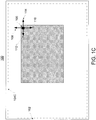
- selectable option 108 is used to maximize the size of window 104B is illustrated in FIG. 1C .
- FIG. 1C illustrates display area 102 used to display window 104C (e.g., the expanded version of window 104B, as shown in FIG. 1B ).
- window 104C is maximized, as indicated by the dotted line illustrating the new boundary of window 104C.
- selection of selectable options can cause a window to be minimized.
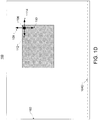
- selection of selectable option 110 can cause window 104C to be minimized, as shown in the example of FIG. 1D .
- FIG. 1D illustrates display area 102 in which window 104D has been minimized (e.g., window 104D represents the minimized version of window 104C, discussed above).
- FIG. 2 illustrates steps of an example method 200 for adjusting the size of one or more windows.
- the method 200 begins with step 202 in which a window is presented in a display area and wherein the window comprises a control icon.
- the control icon e.g., control icon 106
- the window e.g., window 104A
- the control icon may be placed in a location of the display area (e.g., display area 102) that is separate from the window.
- a first input is received that indicates selection of the control icon.
- the first input could be received from a user via a selection means such as a pointer or a touch-based display; however, the reception of user input can be accomplished using a variety of means, including, but not limited to, gestures and/or voice commands, etc.
- step 206 a plurality of selectable options associated with the control icon are presented.
- the selectable options can be visibly presented in the display area (e.g., using a graphical indication such as icons), or the selectable options can simply be made accessible via a gesture or other input received from a user.
- step 208 a second input is received indicating a selection of a first one of the plurality of selectable options.
- method 200 proceeds to step 210 in which a size of the window in the display area is adjusted based on a direction associated with the first one of the plurality of selectable options.
- the window can be increased in size by expanding the area of the window in a left direction, as shown in FIG. 1B .
- the window can be increased by expanding the area of the window in a right direction.
- resizing of a window e.g., expansion or contraction of a display area of the window
- the window may be expanded in a leftward direction (relative to the window placement in the display area) by increasing a length of two or more edges of the window (e.g., a top edge and a bottom edge), without regard to the window's original aspect ratio.
- resizing of a window may be performed such that the window's original aspect ratio is maintained, or such that an optimal aspect ratio is achieved after the resizing has been performed.
- all edges of a window may be resized to increase the window's display area along a specific direction (e.g., corresponding with a direction associated with the second input), while adjusting the aspect ratio based on content being displayed within the window.
- the window can be either maximized or minimized, as illustrated above with respect to FIGS. 1C and ID, respectively. For example, if the second input indicates that the user has selected a selectable option associated with the downward direct, the window can be minimized. Alternatively, if the second input indicates that the user has selected a selectable option associated with the upward direction, the window can be maximized.
- sizing (or resizing) of a window will occur based on the placement of a grid (not shown) within the display area.
- the grid can be used for facilitating adjustments to one or more displayed windows e.g., window size, placement and/or behavior.
- Windows that are moved or resized by the user can be matched up with discrete contours of the grid.
- the edges of a resized window can be aligned with grid contours that may (or may not) be visible to the user.
- a user may have a greater number, or a fewer number, of resizing options.
- the edges of the window are snapped to the closest corresponding grid location.
- a window can be snapped to an optimal grid position.
- a determination that the window should be snapped to a particular location on the grid can take into consideration several factors. For example, optimal window size/location may be determined based on total screen size, a number of windows that are displayed, window dimensions, window launch order, etc.
- resistance can be provided to a window at certain grid locations (e.g., the window may "stick" to the grid at certain locations), depending on various conditions.
- a window may stick to the grid at a location corresponding to the edge of the screen, for example, to prevent the content area of the window from being placed off-screen.
- a window may stick to a grid location determined to be in a correct or optimal location, such as a grid location aligning with the edge of one or more other windows (e.g., to prevent overlap among windows), or a grid location located in an empty space (e.g., to guide the moving window into an open area away from other windows).
- movement of one or more edges of a window (e.g., the window 104A) over certain areas of a grid may require varying amounts of resistance.
- a user may be required to provide additional (stronger) indications that he/she wishes to move the edges of the window across predetermined locations on the grid.
- FIG. 3 illustrates an example of an electronic system that can be used for executing the steps of the subject disclosure.
- the electronic system 300 can be a single computing device such as a server.
- the electronic system 300 can be operated alone or together with one or more other electronic systems e.g., as part of a cluster or a network of computers.
- electronic system 300 includes storage device 302, system memory 304, output device interface 306, bus 308, ROM 310, one or more processor(s) 312, input device interface 314 and network interface 316.
- bus 308 collectively represents all system, peripheral, and chipset buses that communicatively connect the numerous internal devices of electronic system 300. For instance, bus 308 communicatively connects the processor(s) 312 with ROM 310, system memory 304, output device interface 306 and storage device 302.
- processor(s) 312 retrieve instructions to execute (and data to process) in order to execute the steps of the subject technology.
- Processor(s) 312 can be a single processor or a multi-core processor in different implementations. Additionally, processor(s) 312 can include one or more graphics processing units (GPUs) and/or one or more decoders, depending on implementation.
- GPUs graphics processing units
- ROM 310 stores static data and instructions that are needed by processor(s) 312 and other modules of electronic system 300.
- processor(s) 312 can include one or more memory locations such as a CPU cache or processor in memory (PIM), etc.
- Storage device 302 is a read-and-write memory device.
- storage device 302 can be a non-volatile memory unit that stores instructions and data even when electronic system 300 is without power.
- Some implementations of the subject disclosure can use a mass-storage device (such as solid state, magnetic or optical storage devices) e.g., storage device 302.
- system memory 304 is a volatile read-and-write memory, such as a random access memory.
- System memory 304 can store some of the instructions and data that the processor needs at runtime.
- the processes of the subject disclosure are stored in system memory 304, storage device 302, ROM 310 and/or one or more memory locations embedded with processor(s) 312. From these various memory units, processor(s) 312 retrieve instructions to execute and data to process in order to execute the processes/methods of some implementations of the instant disclosure.
- bus 308 also connects to input device interface 314 and output device interface 306.
- Input device interface 314 can enables a user to communicate information and select commands to electronic system 300.
- Input devices used with input device interface 314 may include for example, alphanumeric keyboards and pointing devices (also called “cursor control devices") and/or wireless devices such as wireless keyboards, wireless pointing devices, etc.
- bus 308 also communicatively couples electronic system 300 to a network (not shown) through network interface 316.
- network interface 316 can be either wired, optical or wireless and may comprise one or more antennas and transceivers.
- electronic system 300 can be a part of a network of computers, such as a local area network ("LAN”), a wide area network (“WAN”), or a network of networks, such as the Internet.
- the methods of the subject technology can be carried out by electronic system 300.
- instructions for performing one or more of the method steps of the present disclosure are stored on one or more memory devices such as storage device 302 and/or system memory 304.
- electronic system 300 may be used to store and/or execute instructions to provide a graphical user interface (GUI) to a user of electronic system 300.
- GUI graphical user interface
- behavior of the GUI will be controlled by software comprising a window manager, wherein the window manager is configured to present a window in a display area, and wherein the window comprises a control icon.
- the window manager can be further configured to receive a first input indicating a user's selection of the control icon and to present, in response to the first input, a plurality of selectable options associated with the control icon.
- the window manager can be further configured to receive a second input indicating a selection of a first one of the plurality of selectable options and to adjust a size of the window in the display area based on a direction associated with the first one of the plurality of selectable options.
- a computer program (also known as a program, software, software application, script, or code) can be written in any form of programming language, including compiled or interpreted languages, declarative or procedural languages, and it can be deployed in any form, including as a stand alone program or as a module, component, subroutine, object, or other unit suitable for use in a computing environment.
- a computer program may, but need not, correspond to a file in a file system.
- a program can be stored in a portion of a file that holds other programs or data (e.g., one or more scripts stored in a markup language document), in a single file dedicated to the program in question, or in multiple coordinated files (e.g., files that store one or more modules, sub programs, or portions of code).
- a computer program can be deployed to be executed on one computer or on multiple computers that are located at one site or distributed across multiple sites and interconnected by a communication network.
- the terms "computer”, “server”, “processor”, and “memory” all refer to electronic or other technological devices. These terms exclude people or groups of people.
- display or displaying means displaying on an electronic device.
- computer readable medium and “computer readable media” are entirely restricted to tangible, physical objects that store information in a form that is readable by a computer. These terms exclude any wireless signals, wired download signals, and any other ephemeral signals.
- Embodiments of the subject matter described in this specification can be implemented in a computing system that includes a back end component, e.g., as a data server, or that includes a middleware component, e.g., an application server, or that includes a front end component, e.g., a client computer having a graphical user interface or a Web browser through which a user can interact with an implementation of the subject matter described in this specification, or any combination of one or more such back end, middleware, or front end components.
- the components of the system can be interconnected by any form or medium of digital data communication, e.g., a communication network.
- Examples of communication networks include a local area network (“LAN”) and a wide area network (“WAN”), an inter-network (e.g., the Internet), and peer-to-peer networks (e.g., ad hoc peer-to-peer networks).
- LAN local area network
- WAN wide area network
- inter-network e.g., the Internet
- peer-to-peer networks e.g., ad hoc peer-to-peer networks.
- the computing system can include clients and servers.
- a client and server are generally remote from each other and typically interact through a communication network. The relationship of client and server arises by virtue of computer programs running on the respective computers and having a client-server relationship to each other.
- a server transmits data (e.g., an HTML page) to a client device (e.g., for purposes of displaying data to and receiving user input from a user interacting with the client device).
- client device e.g., for purposes of displaying data to and receiving user input from a user interacting with the client device.
- Data generated at the client device e.g., a result of the user interaction
- any specific order or hierarchy of steps in the processes disclosed is an illustration of example approaches. Based upon design preferences, it is understood that the specific order or hierarchy of steps in the processes may be rearranged, or that all illustrated steps be performed. Some of the steps may be performed simultaneously. For example, in certain circumstances, multitasking and parallel processing may be advantageous. Moreover, the separation of various system components in the embodiments described above should not be understood as requiring such separation in all embodiments, and it should be understood that the described program components and systems can generally be integrated together in a single software product or packaged into multiple software products.
- a phrase such as an "aspect” does not imply that such aspect is essential to the subject technology or that such aspect applies to all configurations of the subject technology.
- a disclosure relating to an aspect may apply to all configurations, or one or more configurations.
- a phrase such as an aspect may refer to one or more aspects and vice versa.
- a phrase such as a “configuration” does not imply that such configuration is essential to the subject technology or that such configuration applies to all configurations of the subject technology.
- a disclosure relating to a configuration may apply to all configurations, or one or more configurations.
- a phrase such as a configuration may refer to one or more configurations and vice versa.
Landscapes
- Engineering & Computer Science (AREA)
- Theoretical Computer Science (AREA)
- General Engineering & Computer Science (AREA)
- Human Computer Interaction (AREA)
- Physics & Mathematics (AREA)
- General Physics & Mathematics (AREA)
- Software Systems (AREA)
- User Interface Of Digital Computer (AREA)
Applications Claiming Priority (2)
| Application Number | Priority Date | Filing Date | Title |
|---|---|---|---|
| US13/753,316 US9195382B2 (en) | 2013-01-29 | 2013-01-29 | Intelligent window sizing and control |
| PCT/US2014/011926 WO2014120470A1 (en) | 2013-01-29 | 2014-01-16 | Intelligent window sizing and control |
Publications (3)
| Publication Number | Publication Date |
|---|---|
| EP2951668A1 EP2951668A1 (en) | 2015-12-09 |
| EP2951668A4 EP2951668A4 (en) | 2016-06-29 |
| EP2951668B1 true EP2951668B1 (en) | 2021-03-10 |
Family
ID=51224463
Family Applications (1)
| Application Number | Title | Priority Date | Filing Date |
|---|---|---|---|
| EP14746379.8A Not-in-force EP2951668B1 (en) | 2013-01-29 | 2014-01-16 | Intelligent window sizing and control |
Country Status (5)
| Country | Link |
|---|---|
| US (2) | US9195382B2 (cg-RX-API-DMAC7.html) |
| EP (1) | EP2951668B1 (cg-RX-API-DMAC7.html) |
| JP (1) | JP6302938B2 (cg-RX-API-DMAC7.html) |
| CN (1) | CN105009060B (cg-RX-API-DMAC7.html) |
| WO (1) | WO2014120470A1 (cg-RX-API-DMAC7.html) |
Families Citing this family (16)
| Publication number | Priority date | Publication date | Assignee | Title |
|---|---|---|---|---|
| KR20150051637A (ko) * | 2013-11-05 | 2015-05-13 | (주)휴맥스 | 디스플레이 창 크기 또는 위치 조정 방법, 장치 및 시스템 |
| KR102255830B1 (ko) * | 2014-02-05 | 2021-05-25 | 삼성전자주식회사 | 복수 개의 윈도우를 디스플레이하는 방법 및 장치 |
| JP6525753B2 (ja) * | 2015-06-12 | 2019-06-05 | キヤノン株式会社 | 表示制御装置、その制御方法、およびプログラム |
| CN105549880A (zh) * | 2015-12-08 | 2016-05-04 | 联想(北京)有限公司 | 一种窗口控制方法及电子设备 |
| JP6540603B2 (ja) * | 2016-05-27 | 2019-07-10 | 京セラドキュメントソリューションズ株式会社 | 表示装置及び表示方法 |
| WO2018025339A1 (ja) * | 2016-08-03 | 2018-02-08 | マクセル株式会社 | 表示装置及び表示方法 |
| KR102070571B1 (ko) * | 2016-09-09 | 2020-01-29 | 주식회사 엘지화학 | 투과도 가변 소자 |
| CN108205405B (zh) * | 2016-12-20 | 2021-06-01 | 夏普株式会社 | 显示装置、显示装置的显示方法及存储介质 |
| CN107390988B (zh) * | 2017-07-12 | 2021-03-09 | 广州视源电子科技股份有限公司 | 电子白板的擦除方法及装置 |
| EP3435250A1 (en) * | 2017-07-27 | 2019-01-30 | Vestel Elektronik Sanayi ve Ticaret A.S. | Method, apparatus and computer program for overlaying a web page on a 3d object |
| CN107765957B (zh) * | 2017-09-04 | 2019-12-31 | 武汉票据交易中心有限公司 | 一种下拉菜单及其箭头的显示控制方法及系统 |
| CN109725970B (zh) * | 2018-12-25 | 2020-07-24 | 北京微播视界科技有限公司 | 应用客户端窗口展示的方法、装置及电子设备 |
| CN111008326A (zh) * | 2019-08-27 | 2020-04-14 | 嘉兴太美医疗科技有限公司 | 临床研究受试者检索方法、装置和计算机可读介质 |
| CN111258691B (zh) * | 2020-01-10 | 2023-06-20 | 北京搜狗科技发展有限公司 | 一种输入法界面的处理方法、装置和介质 |
| CN116737022B (zh) * | 2022-09-14 | 2025-08-15 | 荣耀终端股份有限公司 | 一种显示方法及电子设备 |
| CN119148912A (zh) * | 2023-06-15 | 2024-12-17 | 华为技术有限公司 | 窗口控制方法及电子设备 |
Citations (2)
| Publication number | Priority date | Publication date | Assignee | Title |
|---|---|---|---|---|
| US20100083190A1 (en) * | 2008-09-30 | 2010-04-01 | Verizon Data Services, Llc | Touch gesture interface apparatuses, systems, and methods |
| WO2012039288A1 (ja) * | 2010-09-22 | 2012-03-29 | Necカシオモバイルコミュニケーションズ株式会社 | 情報端末装置及びタッチパネルの表示方法 |
Family Cites Families (31)
| Publication number | Priority date | Publication date | Assignee | Title |
|---|---|---|---|---|
| US4868549A (en) * | 1987-05-18 | 1989-09-19 | International Business Machines Corporation | Feedback mouse |
| US5838317A (en) * | 1995-06-30 | 1998-11-17 | Microsoft Corporation | Method and apparatus for arranging displayed graphical representations on a computer interface |
| US6300936B1 (en) * | 1997-11-14 | 2001-10-09 | Immersion Corporation | Force feedback system including multi-tasking graphical host environment and interface device |
| US5883625A (en) * | 1996-04-22 | 1999-03-16 | Ast Research, Inc. | Arrangement system for object placement on windows |
| JPH1083272A (ja) * | 1996-09-10 | 1998-03-31 | Mitsubishi Electric Corp | マルチウィンドウ表示装置およびマルチウィンドウ表示方法 |
| US5943053A (en) * | 1997-04-01 | 1999-08-24 | Sun Microsystems, Inc. | Method and apparatus for expanding and contracting a window panel |
| US6396487B1 (en) * | 1998-03-23 | 2002-05-28 | International Business Machines Corporation | User interface enhancement for windows-based operating systems |
| JPH11327733A (ja) * | 1998-05-13 | 1999-11-30 | Nec Software Kobe Ltd | ウィンドウサイズ変更装置および方法 |
| US6272493B1 (en) * | 1999-01-21 | 2001-08-07 | Wired Solutions, Llc | System and method for facilitating a windows based content manifestation environment within a WWW browser |
| US6587128B2 (en) | 1999-07-15 | 2003-07-01 | International Business Machines Corporation | Method for displaying hidden objects by varying the transparency of overlapping objects |
| US20050068290A1 (en) * | 2003-09-28 | 2005-03-31 | Denny Jaeger | Method for creating and using user-friendly grids |
| US7743348B2 (en) * | 2004-06-30 | 2010-06-22 | Microsoft Corporation | Using physical objects to adjust attributes of an interactive display application |
| US7489306B2 (en) * | 2004-12-22 | 2009-02-10 | Microsoft Corporation | Touch screen accuracy |
| JP4238222B2 (ja) * | 2005-01-04 | 2009-03-18 | インターナショナル・ビジネス・マシーンズ・コーポレーション | オブジェクト編集システム、オブジェクト編集方法及びオブジェクト編集プログラム |
| US20070016875A1 (en) * | 2005-07-12 | 2007-01-18 | International Business Machines Corporation | Method and system for partial sizing adjacency constraint in a multi-pane window frame |
| US7836410B2 (en) | 2006-01-06 | 2010-11-16 | Sap Ag | Window positioner/sizer |
| KR100787977B1 (ko) | 2006-03-30 | 2007-12-24 | 삼성전자주식회사 | 이동 단말기에서 사용자 데이터 크기 조절 장치 및 방법 |
| KR100686165B1 (ko) | 2006-04-18 | 2007-02-26 | 엘지전자 주식회사 | 오에스디 기능 아이콘을 갖는 휴대용 단말기 및 이를이용한 오에스디 기능 아이콘의 디스플레이 방법 |
| US8443298B2 (en) * | 2006-06-30 | 2013-05-14 | International Business Machines Corporation | Method and apparatus for repositioning a horizontally or vertically maximized display window |
| JP2008027196A (ja) * | 2006-07-21 | 2008-02-07 | Hitachi Ltd | 映像表示システム及び映像表示システムの表示設定方法 |
| TW200830166A (en) * | 2007-01-15 | 2008-07-16 | Asustek Comp Inc | Method and computer system capable of presenting program graphics interface on title bar of window |
| US8423903B2 (en) * | 2007-04-11 | 2013-04-16 | Gvbb Holdings S.A.R.L. | Aspect ratio hinting for resizable video windows |
| JP4605478B2 (ja) * | 2007-12-19 | 2011-01-05 | ソニー株式会社 | 情報処理装置、表示制御方法及び表示制御プログラム |
| US8151188B2 (en) * | 2008-07-23 | 2012-04-03 | General Electric Company | Intelligent user interface using on-screen force feedback and method of use |
| JP5971946B2 (ja) * | 2008-09-29 | 2016-08-17 | コーニンクレッカ フィリップス エヌ ヴェKoninklijke Philips N.V. | ウインドウのサイズ変更のためのシステム及び方法 |
| KR101993848B1 (ko) * | 2009-07-22 | 2019-06-28 | 임머숀 코퍼레이션 | 플랫폼에 걸쳐 햅틱 피드백을 갖는 상호작용 터치 스크린 게임 메타포 |
| US8208964B2 (en) | 2009-10-30 | 2012-06-26 | Cellco Partnership | Flexible home page layout for mobile devices |
| JP4892068B2 (ja) * | 2010-01-29 | 2012-03-07 | 株式会社東芝 | 情報処理装置及び画像表示方法 |
| US20110285666A1 (en) * | 2010-05-21 | 2011-11-24 | Ivan Poupyrev | Electrovibration for touch surfaces |
| US8479117B2 (en) * | 2010-06-04 | 2013-07-02 | Lenovo (Singapore) Pte. Ltd. | Intelligent window sizing for graphical user interfaces |
| JP5198548B2 (ja) * | 2010-12-14 | 2013-05-15 | 株式会社東芝 | 電子機器、表示制御方法及びプログラム |
-
2013
- 2013-01-29 US US13/753,316 patent/US9195382B2/en active Active
-
2014
- 2014-01-16 JP JP2015555194A patent/JP6302938B2/ja not_active Expired - Fee Related
- 2014-01-16 EP EP14746379.8A patent/EP2951668B1/en not_active Not-in-force
- 2014-01-16 WO PCT/US2014/011926 patent/WO2014120470A1/en not_active Ceased
- 2014-01-16 CN CN201480011276.8A patent/CN105009060B/zh not_active Expired - Fee Related
-
2015
- 2015-10-16 US US14/885,880 patent/US10048847B2/en not_active Expired - Fee Related
Patent Citations (2)
| Publication number | Priority date | Publication date | Assignee | Title |
|---|---|---|---|---|
| US20100083190A1 (en) * | 2008-09-30 | 2010-04-01 | Verizon Data Services, Llc | Touch gesture interface apparatuses, systems, and methods |
| WO2012039288A1 (ja) * | 2010-09-22 | 2012-03-29 | Necカシオモバイルコミュニケーションズ株式会社 | 情報端末装置及びタッチパネルの表示方法 |
Also Published As
| Publication number | Publication date |
|---|---|
| JP2016509724A (ja) | 2016-03-31 |
| CN105009060B (zh) | 2020-01-31 |
| US20140215387A1 (en) | 2014-07-31 |
| US20160041744A1 (en) | 2016-02-11 |
| US10048847B2 (en) | 2018-08-14 |
| EP2951668A4 (en) | 2016-06-29 |
| JP6302938B2 (ja) | 2018-03-28 |
| US9195382B2 (en) | 2015-11-24 |
| WO2014120470A1 (en) | 2014-08-07 |
| CN105009060A (zh) | 2015-10-28 |
| EP2951668A1 (en) | 2015-12-09 |
Similar Documents
| Publication | Publication Date | Title |
|---|---|---|
| EP2951668B1 (en) | Intelligent window sizing and control | |
| US9612713B2 (en) | Intelligent window management | |
| US20150199092A1 (en) | Intelligent window placement | |
| US8875047B2 (en) | Smart docking for windowing systems | |
| EP3693844B1 (en) | Window switching interface | |
| US9069434B1 (en) | Adjusting sizes of attached windows | |
| AU2014349834B2 (en) | Navigable layering of viewable areas for hierarchical content | |
| US8930847B2 (en) | Method for displaying windows | |
| US9164670B2 (en) | Flexible touch-based scrolling | |
| CN107256159B (zh) | 一种移动浏览器上下文切换的方法和系统 | |
| US9189134B2 (en) | Display window with multi-layer, parallel tab display | |
| US9268457B2 (en) | Touch-based fluid window management | |
| US20160179798A1 (en) | Method and system for navigating through a datacenter hierarchy in a mobile computer device | |
| US10891423B2 (en) | Portlet display on portable computing devices | |
| US20120054667A1 (en) | Separate and simultaneous control of windows in windowing systems | |
| KR20170067863A (ko) | 이종 애플리케이션 탭들 | |
| WO2013085594A1 (en) | Mechanism for switching between document viewing windows | |
| EP2812771B1 (en) | System and method for providing a circular computer desktop environment |
Legal Events
| Date | Code | Title | Description |
|---|---|---|---|
| PUAI | Public reference made under article 153(3) epc to a published international application that has entered the european phase |
Free format text: ORIGINAL CODE: 0009012 |
|
| 17P | Request for examination filed |
Effective date: 20150827 |
|
| AK | Designated contracting states |
Kind code of ref document: A1 Designated state(s): AL AT BE BG CH CY CZ DE DK EE ES FI FR GB GR HR HU IE IS IT LI LT LU LV MC MK MT NL NO PL PT RO RS SE SI SK SM TR |
|
| AX | Request for extension of the european patent |
Extension state: BA ME |
|
| DAX | Request for extension of the european patent (deleted) | ||
| REG | Reference to a national code |
Ref country code: DE Ref legal event code: R079 Ref document number: 602014075565 Country of ref document: DE Free format text: PREVIOUS MAIN CLASS: G06F0003048000 Ipc: G06F0003048100 |
|
| A4 | Supplementary search report drawn up and despatched |
Effective date: 20160530 |
|
| RIC1 | Information provided on ipc code assigned before grant |
Ipc: G06F 3/0481 20130101AFI20160523BHEP |
|
| RAP1 | Party data changed (applicant data changed or rights of an application transferred) |
Owner name: GOOGLE LLC |
|
| STAA | Information on the status of an ep patent application or granted ep patent |
Free format text: STATUS: EXAMINATION IS IN PROGRESS |
|
| 17Q | First examination report despatched |
Effective date: 20180925 |
|
| GRAP | Despatch of communication of intention to grant a patent |
Free format text: ORIGINAL CODE: EPIDOSNIGR1 |
|
| STAA | Information on the status of an ep patent application or granted ep patent |
Free format text: STATUS: GRANT OF PATENT IS INTENDED |
|
| INTG | Intention to grant announced |
Effective date: 20201005 |
|
| GRAS | Grant fee paid |
Free format text: ORIGINAL CODE: EPIDOSNIGR3 |
|
| GRAA | (expected) grant |
Free format text: ORIGINAL CODE: 0009210 |
|
| STAA | Information on the status of an ep patent application or granted ep patent |
Free format text: STATUS: THE PATENT HAS BEEN GRANTED |
|
| AK | Designated contracting states |
Kind code of ref document: B1 Designated state(s): AL AT BE BG CH CY CZ DE DK EE ES FI FR GB GR HR HU IE IS IT LI LT LU LV MC MK MT NL NO PL PT RO RS SE SI SK SM TR |
|
| REG | Reference to a national code |
Ref country code: GB Ref legal event code: FG4D |
|
| REG | Reference to a national code |
Ref country code: AT Ref legal event code: REF Ref document number: 1370574 Country of ref document: AT Kind code of ref document: T Effective date: 20210315 Ref country code: CH Ref legal event code: EP |
|
| REG | Reference to a national code |
Ref country code: IE Ref legal event code: FG4D |
|
| REG | Reference to a national code |
Ref country code: DE Ref legal event code: R096 Ref document number: 602014075565 Country of ref document: DE |
|
| REG | Reference to a national code |
Ref country code: LT Ref legal event code: MG9D |
|
| PG25 | Lapsed in a contracting state [announced via postgrant information from national office to epo] |
Ref country code: LT Free format text: LAPSE BECAUSE OF FAILURE TO SUBMIT A TRANSLATION OF THE DESCRIPTION OR TO PAY THE FEE WITHIN THE PRESCRIBED TIME-LIMIT Effective date: 20210310 Ref country code: GR Free format text: LAPSE BECAUSE OF FAILURE TO SUBMIT A TRANSLATION OF THE DESCRIPTION OR TO PAY THE FEE WITHIN THE PRESCRIBED TIME-LIMIT Effective date: 20210611 Ref country code: FI Free format text: LAPSE BECAUSE OF FAILURE TO SUBMIT A TRANSLATION OF THE DESCRIPTION OR TO PAY THE FEE WITHIN THE PRESCRIBED TIME-LIMIT Effective date: 20210310 Ref country code: HR Free format text: LAPSE BECAUSE OF FAILURE TO SUBMIT A TRANSLATION OF THE DESCRIPTION OR TO PAY THE FEE WITHIN THE PRESCRIBED TIME-LIMIT Effective date: 20210310 Ref country code: BG Free format text: LAPSE BECAUSE OF FAILURE TO SUBMIT A TRANSLATION OF THE DESCRIPTION OR TO PAY THE FEE WITHIN THE PRESCRIBED TIME-LIMIT Effective date: 20210610 Ref country code: NO Free format text: LAPSE BECAUSE OF FAILURE TO SUBMIT A TRANSLATION OF THE DESCRIPTION OR TO PAY THE FEE WITHIN THE PRESCRIBED TIME-LIMIT Effective date: 20210610 |
|
| REG | Reference to a national code |
Ref country code: AT Ref legal event code: MK05 Ref document number: 1370574 Country of ref document: AT Kind code of ref document: T Effective date: 20210310 |
|
| REG | Reference to a national code |
Ref country code: NL Ref legal event code: MP Effective date: 20210310 |
|
| PG25 | Lapsed in a contracting state [announced via postgrant information from national office to epo] |
Ref country code: LV Free format text: LAPSE BECAUSE OF FAILURE TO SUBMIT A TRANSLATION OF THE DESCRIPTION OR TO PAY THE FEE WITHIN THE PRESCRIBED TIME-LIMIT Effective date: 20210310 Ref country code: RS Free format text: LAPSE BECAUSE OF FAILURE TO SUBMIT A TRANSLATION OF THE DESCRIPTION OR TO PAY THE FEE WITHIN THE PRESCRIBED TIME-LIMIT Effective date: 20210310 Ref country code: SE Free format text: LAPSE BECAUSE OF FAILURE TO SUBMIT A TRANSLATION OF THE DESCRIPTION OR TO PAY THE FEE WITHIN THE PRESCRIBED TIME-LIMIT Effective date: 20210310 |
|
| PG25 | Lapsed in a contracting state [announced via postgrant information from national office to epo] |
Ref country code: NL Free format text: LAPSE BECAUSE OF FAILURE TO SUBMIT A TRANSLATION OF THE DESCRIPTION OR TO PAY THE FEE WITHIN THE PRESCRIBED TIME-LIMIT Effective date: 20210310 |
|
| PG25 | Lapsed in a contracting state [announced via postgrant information from national office to epo] |
Ref country code: SM Free format text: LAPSE BECAUSE OF FAILURE TO SUBMIT A TRANSLATION OF THE DESCRIPTION OR TO PAY THE FEE WITHIN THE PRESCRIBED TIME-LIMIT Effective date: 20210310 Ref country code: AT Free format text: LAPSE BECAUSE OF FAILURE TO SUBMIT A TRANSLATION OF THE DESCRIPTION OR TO PAY THE FEE WITHIN THE PRESCRIBED TIME-LIMIT Effective date: 20210310 Ref country code: CZ Free format text: LAPSE BECAUSE OF FAILURE TO SUBMIT A TRANSLATION OF THE DESCRIPTION OR TO PAY THE FEE WITHIN THE PRESCRIBED TIME-LIMIT Effective date: 20210310 Ref country code: EE Free format text: LAPSE BECAUSE OF FAILURE TO SUBMIT A TRANSLATION OF THE DESCRIPTION OR TO PAY THE FEE WITHIN THE PRESCRIBED TIME-LIMIT Effective date: 20210310 |
|
| PG25 | Lapsed in a contracting state [announced via postgrant information from national office to epo] |
Ref country code: IS Free format text: LAPSE BECAUSE OF FAILURE TO SUBMIT A TRANSLATION OF THE DESCRIPTION OR TO PAY THE FEE WITHIN THE PRESCRIBED TIME-LIMIT Effective date: 20210710 Ref country code: SK Free format text: LAPSE BECAUSE OF FAILURE TO SUBMIT A TRANSLATION OF THE DESCRIPTION OR TO PAY THE FEE WITHIN THE PRESCRIBED TIME-LIMIT Effective date: 20210310 Ref country code: RO Free format text: LAPSE BECAUSE OF FAILURE TO SUBMIT A TRANSLATION OF THE DESCRIPTION OR TO PAY THE FEE WITHIN THE PRESCRIBED TIME-LIMIT Effective date: 20210310 Ref country code: PT Free format text: LAPSE BECAUSE OF FAILURE TO SUBMIT A TRANSLATION OF THE DESCRIPTION OR TO PAY THE FEE WITHIN THE PRESCRIBED TIME-LIMIT Effective date: 20210712 Ref country code: PL Free format text: LAPSE BECAUSE OF FAILURE TO SUBMIT A TRANSLATION OF THE DESCRIPTION OR TO PAY THE FEE WITHIN THE PRESCRIBED TIME-LIMIT Effective date: 20210310 Ref country code: ES Free format text: LAPSE BECAUSE OF FAILURE TO SUBMIT A TRANSLATION OF THE DESCRIPTION OR TO PAY THE FEE WITHIN THE PRESCRIBED TIME-LIMIT Effective date: 20210310 |
|
| REG | Reference to a national code |
Ref country code: DE Ref legal event code: R097 Ref document number: 602014075565 Country of ref document: DE |
|
| PLBE | No opposition filed within time limit |
Free format text: ORIGINAL CODE: 0009261 |
|
| STAA | Information on the status of an ep patent application or granted ep patent |
Free format text: STATUS: NO OPPOSITION FILED WITHIN TIME LIMIT |
|
| PG25 | Lapsed in a contracting state [announced via postgrant information from national office to epo] |
Ref country code: AL Free format text: LAPSE BECAUSE OF FAILURE TO SUBMIT A TRANSLATION OF THE DESCRIPTION OR TO PAY THE FEE WITHIN THE PRESCRIBED TIME-LIMIT Effective date: 20210310 Ref country code: DK Free format text: LAPSE BECAUSE OF FAILURE TO SUBMIT A TRANSLATION OF THE DESCRIPTION OR TO PAY THE FEE WITHIN THE PRESCRIBED TIME-LIMIT Effective date: 20210310 |
|
| 26N | No opposition filed |
Effective date: 20211213 |
|
| PG25 | Lapsed in a contracting state [announced via postgrant information from national office to epo] |
Ref country code: SI Free format text: LAPSE BECAUSE OF FAILURE TO SUBMIT A TRANSLATION OF THE DESCRIPTION OR TO PAY THE FEE WITHIN THE PRESCRIBED TIME-LIMIT Effective date: 20210310 |
|
| PG25 | Lapsed in a contracting state [announced via postgrant information from national office to epo] |
Ref country code: IT Free format text: LAPSE BECAUSE OF FAILURE TO SUBMIT A TRANSLATION OF THE DESCRIPTION OR TO PAY THE FEE WITHIN THE PRESCRIBED TIME-LIMIT Effective date: 20210310 |
|
| PG25 | Lapsed in a contracting state [announced via postgrant information from national office to epo] |
Ref country code: IS Free format text: LAPSE BECAUSE OF FAILURE TO SUBMIT A TRANSLATION OF THE DESCRIPTION OR TO PAY THE FEE WITHIN THE PRESCRIBED TIME-LIMIT Effective date: 20210710 |
|
| PG25 | Lapsed in a contracting state [announced via postgrant information from national office to epo] |
Ref country code: MC Free format text: LAPSE BECAUSE OF FAILURE TO SUBMIT A TRANSLATION OF THE DESCRIPTION OR TO PAY THE FEE WITHIN THE PRESCRIBED TIME-LIMIT Effective date: 20210310 |
|
| REG | Reference to a national code |
Ref country code: CH Ref legal event code: PL |
|
| REG | Reference to a national code |
Ref country code: BE Ref legal event code: MM Effective date: 20220131 |
|
| PG25 | Lapsed in a contracting state [announced via postgrant information from national office to epo] |
Ref country code: LU Free format text: LAPSE BECAUSE OF NON-PAYMENT OF DUE FEES Effective date: 20220116 |
|
| PG25 | Lapsed in a contracting state [announced via postgrant information from national office to epo] |
Ref country code: FR Free format text: LAPSE BECAUSE OF NON-PAYMENT OF DUE FEES Effective date: 20220131 Ref country code: BE Free format text: LAPSE BECAUSE OF NON-PAYMENT OF DUE FEES Effective date: 20220131 |
|
| PG25 | Lapsed in a contracting state [announced via postgrant information from national office to epo] |
Ref country code: LI Free format text: LAPSE BECAUSE OF NON-PAYMENT OF DUE FEES Effective date: 20220131 Ref country code: CH Free format text: LAPSE BECAUSE OF NON-PAYMENT OF DUE FEES Effective date: 20220131 |
|
| PG25 | Lapsed in a contracting state [announced via postgrant information from national office to epo] |
Ref country code: IE Free format text: LAPSE BECAUSE OF NON-PAYMENT OF DUE FEES Effective date: 20220116 |
|
| P01 | Opt-out of the competence of the unified patent court (upc) registered |
Effective date: 20230508 |
|
| PG25 | Lapsed in a contracting state [announced via postgrant information from national office to epo] |
Ref country code: HU Free format text: LAPSE BECAUSE OF FAILURE TO SUBMIT A TRANSLATION OF THE DESCRIPTION OR TO PAY THE FEE WITHIN THE PRESCRIBED TIME-LIMIT; INVALID AB INITIO Effective date: 20140116 |
|
| PG25 | Lapsed in a contracting state [announced via postgrant information from national office to epo] |
Ref country code: MK Free format text: LAPSE BECAUSE OF FAILURE TO SUBMIT A TRANSLATION OF THE DESCRIPTION OR TO PAY THE FEE WITHIN THE PRESCRIBED TIME-LIMIT Effective date: 20210310 Ref country code: CY Free format text: LAPSE BECAUSE OF FAILURE TO SUBMIT A TRANSLATION OF THE DESCRIPTION OR TO PAY THE FEE WITHIN THE PRESCRIBED TIME-LIMIT Effective date: 20210310 |
|
| PGFP | Annual fee paid to national office [announced via postgrant information from national office to epo] |
Ref country code: DE Payment date: 20240129 Year of fee payment: 11 Ref country code: GB Payment date: 20240129 Year of fee payment: 11 |
|
| PG25 | Lapsed in a contracting state [announced via postgrant information from national office to epo] |
Ref country code: MT Free format text: LAPSE BECAUSE OF FAILURE TO SUBMIT A TRANSLATION OF THE DESCRIPTION OR TO PAY THE FEE WITHIN THE PRESCRIBED TIME-LIMIT Effective date: 20210310 |
|
| REG | Reference to a national code |
Ref country code: DE Ref legal event code: R119 Ref document number: 602014075565 Country of ref document: DE |
|
| GBPC | Gb: european patent ceased through non-payment of renewal fee |
Effective date: 20250116 |
|
| PG25 | Lapsed in a contracting state [announced via postgrant information from national office to epo] |
Ref country code: DE Free format text: LAPSE BECAUSE OF NON-PAYMENT OF DUE FEES Effective date: 20250801 |
|
| PG25 | Lapsed in a contracting state [announced via postgrant information from national office to epo] |
Ref country code: GB Free format text: LAPSE BECAUSE OF NON-PAYMENT OF DUE FEES Effective date: 20250116 |
|
| PG25 | Lapsed in a contracting state [announced via postgrant information from national office to epo] |
Ref country code: TR Free format text: LAPSE BECAUSE OF FAILURE TO SUBMIT A TRANSLATION OF THE DESCRIPTION OR TO PAY THE FEE WITHIN THE PRESCRIBED TIME-LIMIT Effective date: 20210310 |