EP2925552B1 - Procédé de commande et système de commande dans un véhicule automobile - Google Patents
Procédé de commande et système de commande dans un véhicule automobile Download PDFInfo
- Publication number
- EP2925552B1 EP2925552B1 EP13799242.6A EP13799242A EP2925552B1 EP 2925552 B1 EP2925552 B1 EP 2925552B1 EP 13799242 A EP13799242 A EP 13799242A EP 2925552 B1 EP2925552 B1 EP 2925552B1
- Authority
- EP
- European Patent Office
- Prior art keywords
- display area
- displayed
- vehicle
- window
- display
- Prior art date
- Legal status (The legal status is an assumption and is not a legal conclusion. Google has not performed a legal analysis and makes no representation as to the accuracy of the status listed.)
- Active
Links
Images


Classifications
-
- B—PERFORMING OPERATIONS; TRANSPORTING
- B60—VEHICLES IN GENERAL
- B60K—ARRANGEMENT OR MOUNTING OF PROPULSION UNITS OR OF TRANSMISSIONS IN VEHICLES; ARRANGEMENT OR MOUNTING OF PLURAL DIVERSE PRIME-MOVERS IN VEHICLES; AUXILIARY DRIVES FOR VEHICLES; INSTRUMENTATION OR DASHBOARDS FOR VEHICLES; ARRANGEMENTS IN CONNECTION WITH COOLING, AIR INTAKE, GAS EXHAUST OR FUEL SUPPLY OF PROPULSION UNITS IN VEHICLES
- B60K35/00—Instruments specially adapted for vehicles; Arrangement of instruments in or on vehicles
- B60K35/10—Input arrangements, i.e. from user to vehicle, associated with vehicle functions or specially adapted therefor
-
- B—PERFORMING OPERATIONS; TRANSPORTING
- B60—VEHICLES IN GENERAL
- B60K—ARRANGEMENT OR MOUNTING OF PROPULSION UNITS OR OF TRANSMISSIONS IN VEHICLES; ARRANGEMENT OR MOUNTING OF PLURAL DIVERSE PRIME-MOVERS IN VEHICLES; AUXILIARY DRIVES FOR VEHICLES; INSTRUMENTATION OR DASHBOARDS FOR VEHICLES; ARRANGEMENTS IN CONNECTION WITH COOLING, AIR INTAKE, GAS EXHAUST OR FUEL SUPPLY OF PROPULSION UNITS IN VEHICLES
- B60K35/00—Instruments specially adapted for vehicles; Arrangement of instruments in or on vehicles
- B60K35/20—Output arrangements, i.e. from vehicle to user, associated with vehicle functions or specially adapted therefor
- B60K35/21—Output arrangements, i.e. from vehicle to user, associated with vehicle functions or specially adapted therefor using visual output, e.g. blinking lights or matrix displays
- B60K35/22—Display screens
-
- B—PERFORMING OPERATIONS; TRANSPORTING
- B60—VEHICLES IN GENERAL
- B60K—ARRANGEMENT OR MOUNTING OF PROPULSION UNITS OR OF TRANSMISSIONS IN VEHICLES; ARRANGEMENT OR MOUNTING OF PLURAL DIVERSE PRIME-MOVERS IN VEHICLES; AUXILIARY DRIVES FOR VEHICLES; INSTRUMENTATION OR DASHBOARDS FOR VEHICLES; ARRANGEMENTS IN CONNECTION WITH COOLING, AIR INTAKE, GAS EXHAUST OR FUEL SUPPLY OF PROPULSION UNITS IN VEHICLES
- B60K35/00—Instruments specially adapted for vehicles; Arrangement of instruments in or on vehicles
- B60K35/20—Output arrangements, i.e. from vehicle to user, associated with vehicle functions or specially adapted therefor
- B60K35/28—Output arrangements, i.e. from vehicle to user, associated with vehicle functions or specially adapted therefor characterised by the type of the output information, e.g. video entertainment or vehicle dynamics information; characterised by the purpose of the output information, e.g. for attracting the attention of the driver
-
- B—PERFORMING OPERATIONS; TRANSPORTING
- B60—VEHICLES IN GENERAL
- B60K—ARRANGEMENT OR MOUNTING OF PROPULSION UNITS OR OF TRANSMISSIONS IN VEHICLES; ARRANGEMENT OR MOUNTING OF PLURAL DIVERSE PRIME-MOVERS IN VEHICLES; AUXILIARY DRIVES FOR VEHICLES; INSTRUMENTATION OR DASHBOARDS FOR VEHICLES; ARRANGEMENTS IN CONNECTION WITH COOLING, AIR INTAKE, GAS EXHAUST OR FUEL SUPPLY OF PROPULSION UNITS IN VEHICLES
- B60K35/00—Instruments specially adapted for vehicles; Arrangement of instruments in or on vehicles
- B60K35/20—Output arrangements, i.e. from vehicle to user, associated with vehicle functions or specially adapted therefor
- B60K35/29—Instruments characterised by the way in which information is handled, e.g. showing information on plural displays or prioritising information according to driving conditions
-
- B—PERFORMING OPERATIONS; TRANSPORTING
- B60—VEHICLES IN GENERAL
- B60K—ARRANGEMENT OR MOUNTING OF PROPULSION UNITS OR OF TRANSMISSIONS IN VEHICLES; ARRANGEMENT OR MOUNTING OF PLURAL DIVERSE PRIME-MOVERS IN VEHICLES; AUXILIARY DRIVES FOR VEHICLES; INSTRUMENTATION OR DASHBOARDS FOR VEHICLES; ARRANGEMENTS IN CONNECTION WITH COOLING, AIR INTAKE, GAS EXHAUST OR FUEL SUPPLY OF PROPULSION UNITS IN VEHICLES
- B60K35/00—Instruments specially adapted for vehicles; Arrangement of instruments in or on vehicles
- B60K35/60—Instruments characterised by their location or relative disposition in or on vehicles
-
- G—PHYSICS
- G01—MEASURING; TESTING
- G01C—MEASURING DISTANCES, LEVELS OR BEARINGS; SURVEYING; NAVIGATION; GYROSCOPIC INSTRUMENTS; PHOTOGRAMMETRY OR VIDEOGRAMMETRY
- G01C21/00—Navigation; Navigational instruments not provided for in groups G01C1/00 - G01C19/00
- G01C21/26—Navigation; Navigational instruments not provided for in groups G01C1/00 - G01C19/00 specially adapted for navigation in a road network
- G01C21/34—Route searching; Route guidance
- G01C21/36—Input/output arrangements for on-board computers
- G01C21/3664—Details of the user input interface, e.g. buttons, knobs or sliders, including those provided on a touch screen; remote controllers; input using gestures
-
- G—PHYSICS
- G01—MEASURING; TESTING
- G01C—MEASURING DISTANCES, LEVELS OR BEARINGS; SURVEYING; NAVIGATION; GYROSCOPIC INSTRUMENTS; PHOTOGRAMMETRY OR VIDEOGRAMMETRY
- G01C21/00—Navigation; Navigational instruments not provided for in groups G01C1/00 - G01C19/00
- G01C21/26—Navigation; Navigational instruments not provided for in groups G01C1/00 - G01C19/00 specially adapted for navigation in a road network
- G01C21/34—Route searching; Route guidance
- G01C21/36—Input/output arrangements for on-board computers
- G01C21/3688—Systems comprising multiple parts or multiple output devices (not client-server), e.g. detachable faceplates, key fobs or multiple output screens
-
- G—PHYSICS
- G06—COMPUTING OR CALCULATING; COUNTING
- G06F—ELECTRIC DIGITAL DATA PROCESSING
- G06F3/00—Input arrangements for transferring data to be processed into a form capable of being handled by the computer; Output arrangements for transferring data from processing unit to output unit, e.g. interface arrangements
- G06F3/01—Input arrangements or combined input and output arrangements for interaction between user and computer
- G06F3/048—Interaction techniques based on graphical user interfaces [GUI]
- G06F3/0481—Interaction techniques based on graphical user interfaces [GUI] based on specific properties of the displayed interaction object or a metaphor-based environment, e.g. interaction with desktop elements like windows or icons, or assisted by a cursor's changing behaviour or appearance
- G06F3/0482—Interaction with lists of selectable items, e.g. menus
-
- G—PHYSICS
- G06—COMPUTING OR CALCULATING; COUNTING
- G06F—ELECTRIC DIGITAL DATA PROCESSING
- G06F3/00—Input arrangements for transferring data to be processed into a form capable of being handled by the computer; Output arrangements for transferring data from processing unit to output unit, e.g. interface arrangements
- G06F3/01—Input arrangements or combined input and output arrangements for interaction between user and computer
- G06F3/048—Interaction techniques based on graphical user interfaces [GUI]
- G06F3/0487—Interaction techniques based on graphical user interfaces [GUI] using specific features provided by the input device, e.g. functions controlled by the rotation of a mouse with dual sensing arrangements, or of the nature of the input device, e.g. tap gestures based on pressure sensed by a digitiser
- G06F3/0488—Interaction techniques based on graphical user interfaces [GUI] using specific features provided by the input device, e.g. functions controlled by the rotation of a mouse with dual sensing arrangements, or of the nature of the input device, e.g. tap gestures based on pressure sensed by a digitiser using a touch-screen or digitiser, e.g. input of commands through traced gestures
-
- B—PERFORMING OPERATIONS; TRANSPORTING
- B60—VEHICLES IN GENERAL
- B60K—ARRANGEMENT OR MOUNTING OF PROPULSION UNITS OR OF TRANSMISSIONS IN VEHICLES; ARRANGEMENT OR MOUNTING OF PLURAL DIVERSE PRIME-MOVERS IN VEHICLES; AUXILIARY DRIVES FOR VEHICLES; INSTRUMENTATION OR DASHBOARDS FOR VEHICLES; ARRANGEMENTS IN CONNECTION WITH COOLING, AIR INTAKE, GAS EXHAUST OR FUEL SUPPLY OF PROPULSION UNITS IN VEHICLES
- B60K2360/00—Indexing scheme associated with groups B60K35/00 or B60K37/00 relating to details of instruments or dashboards
- B60K2360/11—Instrument graphical user interfaces or menu aspects
-
- B—PERFORMING OPERATIONS; TRANSPORTING
- B60—VEHICLES IN GENERAL
- B60K—ARRANGEMENT OR MOUNTING OF PROPULSION UNITS OR OF TRANSMISSIONS IN VEHICLES; ARRANGEMENT OR MOUNTING OF PLURAL DIVERSE PRIME-MOVERS IN VEHICLES; AUXILIARY DRIVES FOR VEHICLES; INSTRUMENTATION OR DASHBOARDS FOR VEHICLES; ARRANGEMENTS IN CONNECTION WITH COOLING, AIR INTAKE, GAS EXHAUST OR FUEL SUPPLY OF PROPULSION UNITS IN VEHICLES
- B60K2360/00—Indexing scheme associated with groups B60K35/00 or B60K37/00 relating to details of instruments or dashboards
- B60K2360/143—Touch sensitive instrument input devices
- B60K2360/1438—Touch screens
-
- B—PERFORMING OPERATIONS; TRANSPORTING
- B60—VEHICLES IN GENERAL
- B60K—ARRANGEMENT OR MOUNTING OF PROPULSION UNITS OR OF TRANSMISSIONS IN VEHICLES; ARRANGEMENT OR MOUNTING OF PLURAL DIVERSE PRIME-MOVERS IN VEHICLES; AUXILIARY DRIVES FOR VEHICLES; INSTRUMENTATION OR DASHBOARDS FOR VEHICLES; ARRANGEMENTS IN CONNECTION WITH COOLING, AIR INTAKE, GAS EXHAUST OR FUEL SUPPLY OF PROPULSION UNITS IN VEHICLES
- B60K2360/00—Indexing scheme associated with groups B60K35/00 or B60K37/00 relating to details of instruments or dashboards
- B60K2360/16—Type of output information
- B60K2360/166—Navigation
-
- B—PERFORMING OPERATIONS; TRANSPORTING
- B60—VEHICLES IN GENERAL
- B60K—ARRANGEMENT OR MOUNTING OF PROPULSION UNITS OR OF TRANSMISSIONS IN VEHICLES; ARRANGEMENT OR MOUNTING OF PLURAL DIVERSE PRIME-MOVERS IN VEHICLES; AUXILIARY DRIVES FOR VEHICLES; INSTRUMENTATION OR DASHBOARDS FOR VEHICLES; ARRANGEMENTS IN CONNECTION WITH COOLING, AIR INTAKE, GAS EXHAUST OR FUEL SUPPLY OF PROPULSION UNITS IN VEHICLES
- B60K2360/00—Indexing scheme associated with groups B60K35/00 or B60K37/00 relating to details of instruments or dashboards
- B60K2360/18—Information management
- B60K2360/182—Distributing information between displays
-
- B—PERFORMING OPERATIONS; TRANSPORTING
- B60—VEHICLES IN GENERAL
- B60K—ARRANGEMENT OR MOUNTING OF PROPULSION UNITS OR OF TRANSMISSIONS IN VEHICLES; ARRANGEMENT OR MOUNTING OF PLURAL DIVERSE PRIME-MOVERS IN VEHICLES; AUXILIARY DRIVES FOR VEHICLES; INSTRUMENTATION OR DASHBOARDS FOR VEHICLES; ARRANGEMENTS IN CONNECTION WITH COOLING, AIR INTAKE, GAS EXHAUST OR FUEL SUPPLY OF PROPULSION UNITS IN VEHICLES
- B60K2360/00—Indexing scheme associated with groups B60K35/00 or B60K37/00 relating to details of instruments or dashboards
- B60K2360/77—Instrument locations other than the dashboard
- B60K2360/791—Instrument locations other than the dashboard on or in the transmission tunnel or parking brake lever
Definitions
- the present invention relates to an operating method and an operating system in a road vehicle.
- first graphic data are displayed on a first display surface, which is arranged in the interior of the vehicle in the field of view of a person sitting in a driver's seat of the vehicle.
- Second graphic data is displayed on a second display area, which is arranged separately from the first display area within the reach of the person sitting in the driver's seat of the vehicle.
- inputs are recorded via a touch-sensitive surface which is formed on the second display area, and the first and / or second graphic data are changed as a function of these inputs.
- the operating system according to the invention has such a first and second display area.
- the operating system has a control device, which is coupled to the first and the second display area, by means of which graphic data for the displays on the display areas can be generated and by means of which inputs can be recorded via the touch-sensitive surface.
- the operation of the various devices of the vehicle and the recording of the information displayed, which are provided by these devices should as little as possible attract the attention of the driver of the road vehicle. It is therefore desirable to display the information in the road vehicle in such a way that it can be picked up quickly and intuitively by the driver, so that the detection of the displayed information does not lead to a distraction of the driver while driving. Furthermore, the operation should be so intuitive, simple and fast that the driver can also use the devices of the vehicle, the information of which is displayed by the display device can operate while driving. The type of operation and the information display associated with the operation in a road vehicle thus contributes to safety when driving this vehicle.
- the control panels and the display of a device in the vehicle are projected onto a projection surface in front of a passenger of the vehicle and the user inputs are recorded.
- the device comprises a projection device and at least one projection surface, which is equipped with optical or pressure-sensitive sensors for recording user inputs, which are transmitted to a device in the vehicle.
- a motor vehicle and a display for displaying changeable information and a control panel arranged spatially separate from the display with at least two control elements for operating at least one function of the motor vehicle are known.
- the motor vehicle comprises a display controller for displaying an image of the control panel, which is oriented as a function of the orientation of an operator's hand to the control panel, in a display area depicted by means of the display.
- a touchscreen which has a sensitive control surface for setting certain functions.
- at least one mechanical control element is arranged above the sensitive control surface, which has a trigger which acts on the sensitive control surface to set the function when the control element is moved.
- a method for displaying data in a vehicle in which information relating to devices of the vehicle is displayed in a first display area of a display device, and processes which run in devices of the vehicle are visualized in a second display area of the or a further display device.
- the first display area is arranged in the primary field of vision of the driver of the vehicle.
- the second display area is arranged outside the driver's primary viewing area. It is located within easy reach of the driver.
- the display device which provides this display area is designed in particular as a touchscreen, ie a touch-sensitive surface is provided.
- a separate mechanical control element is provided within the driver's reach, such as. B. a rotary push switch.
- the operating method according to the invention is characterized in that a first window with buttons for inputs is displayed on the second display area during an input process and at least a second window is displayed with a cut, in which graphic objects are assigned which are assigned to the inputs, and by a Operation, the cropped window is brought to full display and the first window is brought to a cropped display.
- operation is thus carried out via the touch-sensitive surface of the second display area.
- Graphic data that support operation can be displayed on this second display area.
- buttons can be displayed.
- the first display area only serves to display information in the operating method according to the invention.
- an input process can be supported by a split display on the two display areas, the second display area supporting the user in the execution of the individual input steps and the first display area displaying a preview, which results depending on the individual individual input steps.
- a so-called live preview is displayed on the first display area for inputs that are carried out on the touch-sensitive surface of the second display area.
- a button is understood to mean a control element of a graphical user interface.
- a button differs from elements and areas for pure information display, so-called display elements or display areas, in that they can be selected.
- a function assigned to it is carried out. The function can only change the information display.
- the buttons can also be used to control devices whose operation is supported by the information display. The buttons can thus replace conventional mechanical switches.
- the buttons can be created for a freely programmable display area and displayed by it.
- a button can be marked. In this case the assigned function is not yet executed. However, the marked button is highlighted compared to other buttons. The function assigned to it is only executed when the button is selected.
- the arrangement of the first display area in the driver's field of vision and the separate second display area within range of the driver means that buttons for frequently used functions can be displayed on the second display area.
- display elements can be displayed on the first display area, which the driver of the road vehicle in particular must keep an eye on.
- the first display area is arranged in particular in the primary field of vision of the driver of the road vehicle.
- This “primary field of vision” is usually defined in such a way that the driver's line of sight deviates from the horizontal that intersects the driver's eyes by an angle range in a vertical plane arranged in the longitudinal direction of the vehicle by a certain angle ⁇ downwards or upwards.
- the driver's primary field of vision is defined so that the angle ⁇ is less than 30 °, in particular less than 20 °. In order to view the first display area, the driver must therefore look down less than 30 ° or 20 ° from the horizontal. One assumes an average size of the driver.
- the second display area is arranged within the reach of a vehicle occupant who is in a seating position of the road vehicle. This range includes the area that the vehicle occupant, in particular the driver, who has an average size, easily, i. H. with little or no change in position, in a position that he normally occupies in the vehicle. In order to touch the touch-sensitive surface of the second display surface, the vehicle occupant does not have to bend at all or only slightly.
- the display on the first display surface supports the user in the operation of the touch-sensitive surface, for example by B. graphics are shown, which are influenced by the actuation process on the touch-sensitive surface.
- the driver of the road vehicle therefore only has to briefly look at the first display area, which is arranged in his field of vision, in order to check the actuation process.
- he can carry out the actuation process on the touch-sensitive surface of the second display surface, which are arranged within his reach. It is therefore possible to select an optimal positioning in the road vehicle for the first display area, which is in the driver's field of vision, without having to take into account that this display area in Range of the driver is.
- the second display surface can be positioned in the road vehicle so that it can be optimally reached by the driver with his hand.
- the size of the driver's averted gaze towards the second display area is of minor importance in this case, since the actuation process is visualized in particular by means of the first display area. Nevertheless, it is possible to support the user in the operation by means of a display on the second display surface. In this way, safety when driving a motor vehicle can be increased, since only a slight turning of the line of sight from the driving situation has to take place during the actuation.
- the buttons that are manually operated by the driver are very easy to reach for the driver, so that he does not have to change his seat position during the actuation process, or does so only slightly.
- the input process relates to a search within a set of data records.
- the number of hits changes with each individual entry step.
- the preview assigned to the input process visualizes the number of hits after the last individual input step.
- the user thus immediately recognizes the effects of an individual input step on the first display surface, although the input process has not yet been carried out completely.
- the number of hits visualized on the first display area decreases with each individual entry step.
- This display of the number of hits is shown on a display area that is separate from the display area that has the touch-sensitive surface and by means of which the operating process is supported, for example, by the display of input buttons, such as a keyboard.
- a geographic map is displayed on the first display area.
- buttons for entering a navigation system are displayed on the second display area.
- objects of the navigation system are determined which result from the previous individual entry steps of the entry process.
- the geographic positions of the determined objects of the navigation system are then displayed in the geographic map on the first display area.
- possible destinations can be displayed on the geographic map that match the previous individual entry steps.
- the number of destinations will then decrease with each individual entry step. This is visualized for the user on the first display area on the geographic map.
- the display of the geographic map in the user's field of vision is not disturbed by the displayed buttons for entering the destination.
- a list with list entries is displayed in the second window, which has been determined as a function of the previous individual input steps. These list entries also change depending on the further individual entry steps.
- the user can bring the window that has been cut to a complete display and the first window to have a display that has been cut.
- the user slides the previously displayed window over the first window, of which only a part is then visible.
- the buttons displayed in the first window can still be operated.
- the second display area it is possible for the second display area to display a plurality of cut windows. In this case, the buttons in a window that has been cut can be operated.
- the operating system according to the invention is characterized in that, in the case of an input process which comprises a plurality of individual input steps, graphic data for a preview associated with the input process can be generated and displayed by means of the control device during or after an individual input step for the first display area.
- the operating system according to the invention is designed in particular to carry out the operating method described above. It therefore offers the same advantages as the operating method according to the invention.
- the first display surface is arranged in particular in the interior of the vehicle in such a way that the viewing direction of the person sitting in a driver's seat of the vehicle is an angular range in a vertical plane arranged in the longitudinal direction of the vehicle by an angle ⁇ downwards from a horizontal which cuts the driver's eyes, which is less than 30 °.
- the invention relates to a road vehicle with such an operating system.
- the operating system is particularly provided in a motor vehicle.
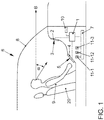
- the operating system comprises a central control device 1. This is coupled to a first display device 2, which has a display area 3.
- the control device 1 generates first graphic data that can be displayed on the display surface 3.
- the display surface 3 can be provided by any type of display, in particular a liquid crystal display or a plasma display.
- the display area 3 can be provided by a display with organic light-emitting diodes.
- the display surface 3 can be either flat or curved.
- the first display surface 3 is as high as possible, for. B. arranged immediately below the start of the windshield 8 of the vehicle 6.
- the display area 3 is thus in the primary field of vision of the driver 9.
- This “primary field of vision” is usually defined in such a way that the viewing direction B of the driver 9, who is sitting on the driver's seat 20, extends from an angular region in a vertical plane arranged in the longitudinal direction of the vehicle by one certain angle ⁇ downwards or upwards from the horizontal, which intersects the eyes of the driver 9.
- the primary field of vision of the driver 9 is defined so that the angle ⁇ is less than 30 °, in particular less than 20 °. In order to view the display area 3, the driver 9 must therefore look down from the horizontal by less than 30 ° or 20 °.
- control device 1 is connected to a second display device 4, which provides a second display surface 5.
- the second display area 5 is arranged separately from the first display area 3.
- the control device 1 generates second graphic data for the information display for the second display area 5.
- the second display device 4 comprises a touch-sensitive surface on the display surface 5, so that a so-called touchscreen is provided, in particular a capacitive or a resistive one Touchscreen.
- the second display area 5 shows, in particular, buttons that are used for operation.
- the second display surface 5 with the touch-sensitive surface is arranged within the driver's reach 9.
- the range includes the area that the driver 9 sitting on the driver's seat 20, who has an average size, easily, i. H. with little or no change in position, in a position that he normally occupies while driving. In order to touch the touch-sensitive second display surface 5, the driver 9 therefore does not have to bend at all or only slightly.
- the second display surface 5 can also be provided by a display, in particular a liquid crystal display or a plasma display, of any type. However, it is provided in particular by a display with organic light-emitting diodes. In this case, it is possible for the second display surface 5 to be flexible or flexible.
- the control device 1 is also coupled to a data bus 7 of the vehicle 6.
- the devices 11-1, 11-2, 11-3 of the vehicle 6, which are to be operated by means of the display devices 2 and 4, are also coupled to this data bus 7.
- a navigation system 11-1, a multimedia system 11-2 and a telecommunication device 11-3 can be provided.
- vehicle devices 11-1, 11-2, 11-3 can be coupled directly to the control device 1.
- data are optionally transmitted to the control device 1 via the data bus 7.
- the data is processed there.
- Graphic data are also generated, which are graphically reproduced by the display areas 3 and 5 of the display devices 2 and 4.
- Information is displayed on the display surface 5, which is directly connected to the operation via the touch-sensitive surface of this display surface 5 or via further operating elements. Information that visualizes the actuations is displayed on the display area 3, among other things.
- control device 1 is connected to a memory 10, from which data can be read out.
- a variety of data required for processing the data received by the control device 1 can be stored in the memory 10.
- the operating method according to the invention is described below with reference to FIGS Figures 2 to 11 explained.
- the operating procedure can be carried out by the operating system described above.
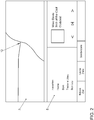
- FIG 2 A display of the display areas 3 and 5 is shown, in which a geographical map 12 is displayed on the first display area 3 and a display is assigned to the devices 11-1, 11-2, 11-3 on the second display area 5.
- This display includes buttons for controlling music playback, buttons for selecting contacts and buttons of the navigation system 11-1. The buttons can be controlled via the touch-sensitive surface on the second display surface 5.
- FIG 3 the representation on the display areas 3 and 5 is shown, which is only assigned to the navigation system 11-1.
- the starting point is in Figure 3 a display is reproduced in which the navigation system 11-1 has stored a specific destination address. This destination address is indicated on the second display area 5 in a right column 15.
- the user touches the button "Street" with his fingertip 13, for example.
- a button keyboard 17 is displayed by the second display surface 5.
- the button keyboard 17 is located in a middle window 16-1 of the display on the second display area 5.
- another window 16-2 is shown cut, that is, the window and the content of the window are only partially closed detect.
- another window 16-3 is displayed on the left next to window 16-1. In this window 16-3, entries that have already been made regarding the destination address are displayed, as well as the information still to be entered.
- the control device 1 determines the objects of the navigation system 11-1 which result from the Press the letter S on the button keyboard 17.
- the actuation of the letter S is a single input step of an input process with which a new destination address is entered for the navigation system 11-1.
- the objects of the navigation system 11-1 which are assigned to this individual input step are all street names of the city of Berlin which has already been selected and which begin with an S. These street names appear as a list in the window 16-2 displayed. Since the window 16-2 is shown cut, only the beginnings of the respective street names are visible.
- control device 1 generates, for this individual input step, that is to say the input of the letter S, graphic data for a preview for the display on the first display area 3.
- the geographical positions of the street names that begin with S are determined. These geographical positions are shown on the first display surface 3 on the basis of graphic objects 19-1 to 19-6 within the geographical map 12. An immediate preview of entries on the touch-sensitive surface of the second display surface 5 is thus visualized on the first display surface 3.
- the number of hits changes to the previous individual entry steps.
- the list in the window 16-2 changes accordingly and at the same time the representation of the graphic objects 19-1 to 19-6 on the first display area 3 as a preview for the input process. In the present case, fewer and fewer graphic objects 19-1 to 19-6 are displayed within the geographic map 12.
- the display with the preview on the first display surface 3 is essentially simultaneous with the inputs on the touch-sensitive surface change the second display area 5.
- the first display area 3 thus offers a live preview of the entries made.
- the user can change the completely displayed window of the second display area 5. For this he can, for example, as in Figure 5 shown, touch the touch-sensitive surface of the second display surface 5 with the fingertip in the region of the window 16-2 and then pull the fingertip 13 to the left in a swiping gesture.
- window 16-2 fully opened and the window 16-1 is shown cut.
- window 16-2 is slid over window 16-1.
- all of the displayed buttons can still be operated.
- the user can now select a specific street for the new destination address.
- window 16-1 as shown in Figure 7 is shown, returning to the view in which window 16-1 is fully shown, as shown in FIG Figure 8 is shown.
- keystrokes he can now complete the street entry for the new destination address.
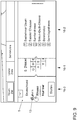
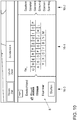
- the user can also press a specific button in window 16-3, as shown in Figure 9 is shown. If, for example, the user does not want to change the street of the destination address but the city of the destination address, he actuates the "Berlin" button with his fingertip 13. The name of the city for the destination address of the navigation system 11-1 can then be changed in the window 16-1, as shown in Figure 10 is shown.
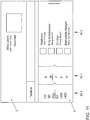
- FIG 11 Another example of displays on the display areas 3 and 5 is shown, which are assigned to the multimedia system 11-2. Again, the second display surface 5 shows a representation with three windows 16-1 to 16-3, two windows 16-1 and 16-3 being shown cut. An immediate preview of an input process is reproduced on the first display surface 3, in which a specific piece of music is selected via individual input steps.
- the inventive method generates an intuitive representation of the operating path and an intuitive preview for the individual input steps. It is also possible to jump back and forth between different display hierarchies by direct operation. Finally, various operating hierarchies are clearly displayed.
Landscapes
- Engineering & Computer Science (AREA)
- Chemical & Material Sciences (AREA)
- Mechanical Engineering (AREA)
- Transportation (AREA)
- Combustion & Propulsion (AREA)
- Remote Sensing (AREA)
- Radar, Positioning & Navigation (AREA)
- General Physics & Mathematics (AREA)
- General Engineering & Computer Science (AREA)
- Theoretical Computer Science (AREA)
- Physics & Mathematics (AREA)
- Human Computer Interaction (AREA)
- Automation & Control Theory (AREA)
- Navigation (AREA)
- Position Input By Displaying (AREA)
Claims (8)
- Procédé de commande dans un véhicule routier (6), dans lequel- dans une première zone d'affichage (3), qui est agencée à l'intérieur du véhicule (6) dans le champ de vision d'une personne (9), qui est assise sur un siège conducteur (20) du véhicule (6), des premières données graphiques sont affichées,- dans une deuxième zone d'affichage (5), qui est agencée, séparément de la première zone d'affichage (3), à portée de la personne (9), qui est assise sur le siège conducteur (20) du véhicule (6), des deuxièmes données graphiques sont affichées, et- des saisies sur une surface tactile, qui est configurée dans la deuxième zone d'affichage (5), sont détectées et les premières et/ou deuxièmes données graphiques sont modifiées en fonction de ces saisies, dans lequel- pendant une opération de saisie, qui comprend plusieurs étapes de saisie individuelle, après une étape de saisie individuelle, des premières données graphiques, qui sont attribuées à l'opération de saisie, sont générées pour une prévisualisation, et- les premières données graphiques pour la prévisualisation sont affichées dans la première zone d'affichage (3),
caractérisé en ce que- dans la deuxième zone d'affichage (5), pendant une opération de saisie, une première fenêtre (16-1) avec des touches (17) pour effectuer des saisies est affichée et au moins une deuxième fenêtre (16-2) est affichée sous forme tronquée, dans laquelle des objets graphiques, qui sont attribués aux saisies, sont contenus, et- à travers une opération de commande, la fenêtre affichée sous forme tronquée (16-2) est entièrement affichée et la première fenêtre (16-1) est affichée sous forme tronquée. - Procédé de commande selon la revendication 1,
caractérisé en ce que
l'opération de saisie concerne une recherche au sein d'une quantité de données, en ce que le nombre de réponses pertinentes change avec chaque étape de saisie individuelle et en ce que la prévisualisation attribuée à l'opération de saisie visualise le nombre de réponses pertinentes après la dernière étape de saisie individuelle. - Procédé de commande selon la revendication 2,
caractérisé en ce que- dans la première zone d'affichage (3), une carte géographique (12) est affichée et dans la deuxième zone d'affichage (5), des touches (17) sont affichées pour une saisie d'un système de navigation (11-1),- après chaque étape de saisie individuelle, des objets du système de navigation (11-1), qui résultent des étapes de saisie individuelle précédentes de l'opération de saisie, sont déterminés, et- les positions géographiques des objets déterminés du système de navigation (11-1) sont affichées sur la carte géographique (12) dans la première zone d'affichage (3). - Procédé de commande selon l'une des revendications précédentes,
caractérisé en ce que,
dans la fenêtre affichée sous forme tronquée (16-2), une liste, qui a été déterminée en fonction des étapes de saisie individuelle précédentes, est affichée avec des éléments de liste. - Procédé de commande selon l'une des revendications précédentes,
caractérisé en ce que,
dans la deuxième zone d'affichage (5), plusieurs fenêtres tronquées (16-2, 16-3) sont représentées. - Procédé de commande selon l'une des revendications précédentes,
caractérisé en ce que
des touches (17) peuvent être commandées dans une fenêtre affichée sous forme tronquée (16-2, 16-3). - Système de commande dans un véhicule routier (6) avec- une première zone d'affichage (3), qui est agencée à l'intérieur du véhicule (6) dans le champ de vision d'une personne (9), qui est assise sur un siège conducteur (20) du véhicule (6),- une deuxième zone d'affichage (5), qui est agencée, séparément de la première zone d'affichage (3) à l'intérieur du véhicule (6) à portée de la personne (9), qui est assise sur le siège conducteur (20) du véhicule (6), et sur laquelle une surface tactile est configurée pour les saisies d'un utilisateur, et- un dispositif de contrôle (1), qui est couplé avec la première et la deuxième zone d'affichage (3, 5), au moyen duquel des données graphiques peuvent être générées pour les affichages dans les zones d'affichage (3, 5) et au moyen duquel des saisies peuvent être détectées sur la surface tactile, dans lequel- pendant une opération de saisie, qui comprend plusieurs étapes de saisie individuelle, au moyen du dispositif de contrôle (1), pendant ou après une étape de saisie individuelle pour la première zone d'affichage (3), des données graphiques peuvent être générées et affichées pour une prévisualisation attribuée à l'opération de saisie,
caractérisé en ce que- dans la deuxième zone d'affichage (5), pendant une opération de saisie, une première fenêtre (16-1) avec des touches (17) peut être affichée pour des saisies et au moins une deuxième fenêtre (16-2) peut être affichée sous forme tronquée, dans laquelle des objets graphiques, qui sont attribués aux saisies, sont contenus, et- à travers une opération de commande, la fenêtre affichée sous forme tronquée (16-2) peut être affichée entièrement et la première fenêtre (16-1) peut être affichée sous forme tronquée. - Système de commande selon la revendication 7,
caractérisé en ce que
la première zone d'affichage (3) est agencée à l'intérieur du véhicule (6), de sorte que la direction du regard de la personne (9), qui est assise sur un siège conducteur (20) du véhicule (6), diffère d'une plage angulaire dans un plan vertical, agencé dans la direction de la longueur du véhicule, d'un angle α, qui est inférieur à 30°, vers le bas à partir d'une ligne horizontale, qui coupe les yeux du conducteur.
Applications Claiming Priority (2)
| Application Number | Priority Date | Filing Date | Title |
|---|---|---|---|
| DE102012023484.8A DE102012023484A1 (de) | 2012-11-30 | 2012-11-30 | Bedienverfahren und Bediensystem in einem Straßenfahrzeug |
| PCT/EP2013/074462 WO2014082926A2 (fr) | 2012-11-30 | 2013-11-22 | Procédé de commande et système de commande dans un véhicule routier |
Publications (2)
| Publication Number | Publication Date |
|---|---|
| EP2925552A2 EP2925552A2 (fr) | 2015-10-07 |
| EP2925552B1 true EP2925552B1 (fr) | 2020-01-08 |
Family
ID=49709637
Family Applications (1)
| Application Number | Title | Priority Date | Filing Date |
|---|---|---|---|
| EP13799242.6A Active EP2925552B1 (fr) | 2012-11-30 | 2013-11-22 | Procédé de commande et système de commande dans un véhicule automobile |
Country Status (3)
| Country | Link |
|---|---|
| EP (1) | EP2925552B1 (fr) |
| DE (1) | DE102012023484A1 (fr) |
| WO (1) | WO2014082926A2 (fr) |
Cited By (1)
| Publication number | Priority date | Publication date | Assignee | Title |
|---|---|---|---|---|
| FR3169793A1 (fr) * | 2024-12-16 | 2026-06-19 | Stellantis Auto Sas | Procédé et système de pilotage d’équipements de véhicule et véhicule comprenant un tel système |
Families Citing this family (4)
| Publication number | Priority date | Publication date | Assignee | Title |
|---|---|---|---|---|
| DE102014213821A1 (de) * | 2014-05-13 | 2015-11-19 | Volkswagen Aktiengesellschaft | Bedienverfahren und Bediensystem in einem Fahrzeug |
| DE102015208363A1 (de) * | 2015-05-06 | 2016-11-24 | Volkswagen Aktiengesellschaft | Fortbewegungsmittel, Arbeitsmaschine, Anwenderschnittstelle und Verfahren zur Anzeige eines Inhaltes einer ersten Anzeigeeinrichtung auf einer zweiten Anzeigeeinrichtung |
| DE102015011651B4 (de) * | 2015-09-11 | 2017-04-27 | Audi Ag | Kraftfahrzeug mit zwei Touchscreens |
| DE102016002043A1 (de) * | 2016-02-20 | 2017-08-24 | Audi Ag | Bedienvorrichtung für ein Kraftfahrzeug mit Ausgabefeld für einen einstellbaren Betriebsparameter |
Family Cites Families (7)
| Publication number | Priority date | Publication date | Assignee | Title |
|---|---|---|---|---|
| DE102006043208A1 (de) | 2006-09-11 | 2008-03-27 | Siemens Ag | Touchpad oder -screen und Stellelement für Touchpad oder -screen |
| FR2915017B1 (fr) * | 2007-04-16 | 2009-07-03 | Peugeot Citroen Automobiles Sa | Dispositif de commande a pave tactile pour l'affichage de donnees sur un ecran de visualisation pour vehicule automobile. |
| DE102007029602B4 (de) | 2007-06-27 | 2021-10-28 | Volkswagen Ag | Verfahren und Vorrichtung zum Bedienen einer in einem Fahrzeug befindlichen Einheit |
| DE102007052343B4 (de) | 2007-11-02 | 2022-02-10 | Volkswagen Ag | Verfahren und Einrichtung zum Anzeigen von Daten in einem Fahrzeug |
| DE102008019288A1 (de) * | 2008-04-16 | 2009-10-29 | Continental Automotive Gmbh | Bediensystem |
| DE102008023405B4 (de) | 2008-05-13 | 2020-10-01 | Volkswagen Ag | Kraftfahrzeug mit einem Display sowie Verfahren zum Betrieb eines Kraftfahrzeuges mit einem Display |
| JP5177120B2 (ja) * | 2009-11-10 | 2013-04-03 | 株式会社デンソー | 遠隔操作デバイス用表示制御装置 |
-
2012
- 2012-11-30 DE DE102012023484.8A patent/DE102012023484A1/de not_active Withdrawn
-
2013
- 2013-11-22 WO PCT/EP2013/074462 patent/WO2014082926A2/fr not_active Ceased
- 2013-11-22 EP EP13799242.6A patent/EP2925552B1/fr active Active
Non-Patent Citations (1)
| Title |
|---|
| None * |
Cited By (1)
| Publication number | Priority date | Publication date | Assignee | Title |
|---|---|---|---|---|
| FR3169793A1 (fr) * | 2024-12-16 | 2026-06-19 | Stellantis Auto Sas | Procédé et système de pilotage d’équipements de véhicule et véhicule comprenant un tel système |
Also Published As
| Publication number | Publication date |
|---|---|
| WO2014082926A2 (fr) | 2014-06-05 |
| WO2014082926A3 (fr) | 2015-07-23 |
| EP2925552A2 (fr) | 2015-10-07 |
| DE102012023484A1 (de) | 2014-06-05 |
Similar Documents
| Publication | Publication Date | Title |
|---|---|---|
| EP2328783B1 (fr) | Élément de commande pour dispositif d'affichage dans un moyen de transport | |
| DE102009036371A1 (de) | Verfahren und Vorrichtung zum Bereitstellen einer Benutzerschnittstelle | |
| EP3040849B1 (fr) | Moyen de transport, interface utilisateur et procédé destiné à faire chevaucher un contenu d'affichage sur deux dispositifs d'affichage | |
| EP2794354B1 (fr) | Procédé d'affichage d'une information à l'intérieur d'un véhicule | |
| DE102008049122A1 (de) | Bedienelement für displaygestützte technische Systeme | |
| EP2941685B1 (fr) | Procédé de commande et système de commande pour véhicule | |
| DE102010018637B4 (de) | Bedienvorrichtung in einem Straßenfahrzeug | |
| DE102014011118B4 (de) | Verfahren zum Bedienen einer Lichtfunktion von Kraftfahrzeugscheinwerfern und Kraftfahrzeug mit einer Anzeigeeinrichtung und einem Bedienelement für eine Bedienung der Lichtfunktion der Kraftfahrzeugscheinwerfer | |
| EP2925552A2 (fr) | Procédé de commande et système de commande dans un véhicule routier | |
| EP2972100A1 (fr) | Système associé à un véhicule comprenant un dispositif de saisie alphanumérique avec suggestion de saisie | |
| EP3976411B1 (fr) | Procédé de configuration graphique d'un instrument d'affichage dans un véhicule à moteur, et véhicule à moteur pour la mise en oeuvre du procédé | |
| DE102007052342B4 (de) | Verfahren zum Bedienen von Einrichtungen eines Fahrzeugs | |
| EP3364283B1 (fr) | Système d'exploitation, procédé de fonctionnement d'un système d'exploitation et véhicule doté d'un système d'exploitation | |
| WO2023174595A1 (fr) | Moyen de transport, et dispositif et procédé pour délivrer des informations à un utilisateur d'un moyen de transport | |
| EP2972101B1 (fr) | Dispositif périphérique d'entrée pour véhicule avec champ d'effaçage et/ou champ de sélection | |
| DE102012022803A1 (de) | Bedienverfahren und Bediensystem in einem Straßenfahrzeug | |
| EP3143483B1 (fr) | Procédé de commande et système de commande dans un véhicule | |
| EP2972099B1 (fr) | Dispositif de véhicule avec marquage pour autocomplétion | |
| DE102016002043A1 (de) | Bedienvorrichtung für ein Kraftfahrzeug mit Ausgabefeld für einen einstellbaren Betriebsparameter | |
| EP2927043B1 (fr) | Procédé et système de commande dans un véhicule | |
| EP4380811B1 (fr) | Système d'affichage pour un véhicule et procédé permettant de mettre en évidence optiquement différents états de fonctionnement dans le véhicule | |
| DE102018216068A1 (de) | Verfahren zum Einstellen einer von einer Primärfunktion verschiedenen Sekundärfunktion einer Fahrerassistenzfunktion, Bedienvorrichtung für ein Kraftfahrzeug und Kraftfahrzeug | |
| EP3404525A1 (fr) | Procédé et dispositif d'utilisation d'un système de divertissement éducatif et véhicule automobile et programme d'ordinateur | |
| WO2016015805A1 (fr) | Système de commande pour dispositif côté véhicule | |
| DE102013001881A1 (de) | Systeminitiierte Hilfefunktion für die Bedienung von einer, einem Fahrzeug zugeordneten Vorrichtung - Löschen von Eingaben |
Legal Events
| Date | Code | Title | Description |
|---|---|---|---|
| PUAI | Public reference made under article 153(3) epc to a published international application that has entered the european phase |
Free format text: ORIGINAL CODE: 0009012 |
|
| AK | Designated contracting states |
Kind code of ref document: A2 Designated state(s): AL AT BE BG CH CY CZ DE DK EE ES FI FR GB GR HR HU IE IS IT LI LT LU LV MC MK MT NL NO PL PT RO RS SE SI SK SM TR |
|
| AX | Request for extension of the european patent |
Extension state: BA ME |
|
| RIN1 | Information on inventor provided before grant (corrected) |
Inventor name: PETERSEN, SOENKE Inventor name: BUDZYNSKI, TOBIAS Inventor name: JUN, MI-RAN Inventor name: MICHAELIS, JAN |
|
| RIN1 | Information on inventor provided before grant (corrected) |
Inventor name: JUN, MI-RAN Inventor name: PETERSEN, SOENKE Inventor name: MICHAELIS, JAN Inventor name: BUDZYNSI, TOBIAS |
|
| 17P | Request for examination filed |
Effective date: 20160125 |
|
| RBV | Designated contracting states (corrected) |
Designated state(s): AL AT BE BG CH CY CZ DE DK EE ES FI FR GB GR HR HU IE IS IT LI LT LU LV MC MK MT NL NO PL PT RO RS SE SI SK SM TR |
|
| DAX | Request for extension of the european patent (deleted) | ||
| GRAP | Despatch of communication of intention to grant a patent |
Free format text: ORIGINAL CODE: EPIDOSNIGR1 |
|
| STAA | Information on the status of an ep patent application or granted ep patent |
Free format text: STATUS: GRANT OF PATENT IS INTENDED |
|
| INTG | Intention to grant announced |
Effective date: 20191018 |
|
| GRAS | Grant fee paid |
Free format text: ORIGINAL CODE: EPIDOSNIGR3 |
|
| GRAA | (expected) grant |
Free format text: ORIGINAL CODE: 0009210 |
|
| STAA | Information on the status of an ep patent application or granted ep patent |
Free format text: STATUS: THE PATENT HAS BEEN GRANTED |
|
| AK | Designated contracting states |
Kind code of ref document: B1 Designated state(s): AL AT BE BG CH CY CZ DE DK EE ES FI FR GB GR HR HU IE IS IT LI LT LU LV MC MK MT NL NO PL PT RO RS SE SI SK SM TR |
|
| REG | Reference to a national code |
Ref country code: GB Ref legal event code: FG4D Free format text: NOT ENGLISH |
|
| REG | Reference to a national code |
Ref country code: CH Ref legal event code: EP |
|
| REG | Reference to a national code |
Ref country code: DE Ref legal event code: R096 Ref document number: 502013014183 Country of ref document: DE |
|
| REG | Reference to a national code |
Ref country code: IE Ref legal event code: FG4D Free format text: LANGUAGE OF EP DOCUMENT: GERMAN |
|
| REG | Reference to a national code |
Ref country code: AT Ref legal event code: REF Ref document number: 1222258 Country of ref document: AT Kind code of ref document: T Effective date: 20200215 |
|
| REG | Reference to a national code |
Ref country code: NL Ref legal event code: MP Effective date: 20200108 |
|
| REG | Reference to a national code |
Ref country code: LT Ref legal event code: MG4D |
|
| PG25 | Lapsed in a contracting state [announced via postgrant information from national office to epo] |
Ref country code: RS Free format text: LAPSE BECAUSE OF FAILURE TO SUBMIT A TRANSLATION OF THE DESCRIPTION OR TO PAY THE FEE WITHIN THE PRESCRIBED TIME-LIMIT Effective date: 20200108 Ref country code: PT Free format text: LAPSE BECAUSE OF FAILURE TO SUBMIT A TRANSLATION OF THE DESCRIPTION OR TO PAY THE FEE WITHIN THE PRESCRIBED TIME-LIMIT Effective date: 20200531 Ref country code: FI Free format text: LAPSE BECAUSE OF FAILURE TO SUBMIT A TRANSLATION OF THE DESCRIPTION OR TO PAY THE FEE WITHIN THE PRESCRIBED TIME-LIMIT Effective date: 20200108 Ref country code: NO Free format text: LAPSE BECAUSE OF FAILURE TO SUBMIT A TRANSLATION OF THE DESCRIPTION OR TO PAY THE FEE WITHIN THE PRESCRIBED TIME-LIMIT Effective date: 20200408 Ref country code: NL Free format text: LAPSE BECAUSE OF FAILURE TO SUBMIT A TRANSLATION OF THE DESCRIPTION OR TO PAY THE FEE WITHIN THE PRESCRIBED TIME-LIMIT Effective date: 20200108 Ref country code: LT Free format text: LAPSE BECAUSE OF FAILURE TO SUBMIT A TRANSLATION OF THE DESCRIPTION OR TO PAY THE FEE WITHIN THE PRESCRIBED TIME-LIMIT Effective date: 20200108 |
|
| PG25 | Lapsed in a contracting state [announced via postgrant information from national office to epo] |
Ref country code: GR Free format text: LAPSE BECAUSE OF FAILURE TO SUBMIT A TRANSLATION OF THE DESCRIPTION OR TO PAY THE FEE WITHIN THE PRESCRIBED TIME-LIMIT Effective date: 20200409 Ref country code: IS Free format text: LAPSE BECAUSE OF FAILURE TO SUBMIT A TRANSLATION OF THE DESCRIPTION OR TO PAY THE FEE WITHIN THE PRESCRIBED TIME-LIMIT Effective date: 20200508 Ref country code: BG Free format text: LAPSE BECAUSE OF FAILURE TO SUBMIT A TRANSLATION OF THE DESCRIPTION OR TO PAY THE FEE WITHIN THE PRESCRIBED TIME-LIMIT Effective date: 20200408 Ref country code: LV Free format text: LAPSE BECAUSE OF FAILURE TO SUBMIT A TRANSLATION OF THE DESCRIPTION OR TO PAY THE FEE WITHIN THE PRESCRIBED TIME-LIMIT Effective date: 20200108 Ref country code: SE Free format text: LAPSE BECAUSE OF FAILURE TO SUBMIT A TRANSLATION OF THE DESCRIPTION OR TO PAY THE FEE WITHIN THE PRESCRIBED TIME-LIMIT Effective date: 20200108 Ref country code: HR Free format text: LAPSE BECAUSE OF FAILURE TO SUBMIT A TRANSLATION OF THE DESCRIPTION OR TO PAY THE FEE WITHIN THE PRESCRIBED TIME-LIMIT Effective date: 20200108 |
|
| REG | Reference to a national code |
Ref country code: DE Ref legal event code: R097 Ref document number: 502013014183 Country of ref document: DE |
|
| PG25 | Lapsed in a contracting state [announced via postgrant information from national office to epo] |
Ref country code: CZ Free format text: LAPSE BECAUSE OF FAILURE TO SUBMIT A TRANSLATION OF THE DESCRIPTION OR TO PAY THE FEE WITHIN THE PRESCRIBED TIME-LIMIT Effective date: 20200108 Ref country code: EE Free format text: LAPSE BECAUSE OF FAILURE TO SUBMIT A TRANSLATION OF THE DESCRIPTION OR TO PAY THE FEE WITHIN THE PRESCRIBED TIME-LIMIT Effective date: 20200108 Ref country code: SM Free format text: LAPSE BECAUSE OF FAILURE TO SUBMIT A TRANSLATION OF THE DESCRIPTION OR TO PAY THE FEE WITHIN THE PRESCRIBED TIME-LIMIT Effective date: 20200108 Ref country code: DK Free format text: LAPSE BECAUSE OF FAILURE TO SUBMIT A TRANSLATION OF THE DESCRIPTION OR TO PAY THE FEE WITHIN THE PRESCRIBED TIME-LIMIT Effective date: 20200108 Ref country code: ES Free format text: LAPSE BECAUSE OF FAILURE TO SUBMIT A TRANSLATION OF THE DESCRIPTION OR TO PAY THE FEE WITHIN THE PRESCRIBED TIME-LIMIT Effective date: 20200108 Ref country code: SK Free format text: LAPSE BECAUSE OF FAILURE TO SUBMIT A TRANSLATION OF THE DESCRIPTION OR TO PAY THE FEE WITHIN THE PRESCRIBED TIME-LIMIT Effective date: 20200108 Ref country code: RO Free format text: LAPSE BECAUSE OF FAILURE TO SUBMIT A TRANSLATION OF THE DESCRIPTION OR TO PAY THE FEE WITHIN THE PRESCRIBED TIME-LIMIT Effective date: 20200108 |
|
| PLBE | No opposition filed within time limit |
Free format text: ORIGINAL CODE: 0009261 |
|
| STAA | Information on the status of an ep patent application or granted ep patent |
Free format text: STATUS: NO OPPOSITION FILED WITHIN TIME LIMIT |
|
| 26N | No opposition filed |
Effective date: 20201009 |
|
| PG25 | Lapsed in a contracting state [announced via postgrant information from national office to epo] |
Ref country code: IT Free format text: LAPSE BECAUSE OF FAILURE TO SUBMIT A TRANSLATION OF THE DESCRIPTION OR TO PAY THE FEE WITHIN THE PRESCRIBED TIME-LIMIT Effective date: 20200108 |
|
| PG25 | Lapsed in a contracting state [announced via postgrant information from national office to epo] |
Ref country code: SI Free format text: LAPSE BECAUSE OF FAILURE TO SUBMIT A TRANSLATION OF THE DESCRIPTION OR TO PAY THE FEE WITHIN THE PRESCRIBED TIME-LIMIT Effective date: 20200108 Ref country code: PL Free format text: LAPSE BECAUSE OF FAILURE TO SUBMIT A TRANSLATION OF THE DESCRIPTION OR TO PAY THE FEE WITHIN THE PRESCRIBED TIME-LIMIT Effective date: 20200108 |
|
| PG25 | Lapsed in a contracting state [announced via postgrant information from national office to epo] |
Ref country code: MC Free format text: LAPSE BECAUSE OF FAILURE TO SUBMIT A TRANSLATION OF THE DESCRIPTION OR TO PAY THE FEE WITHIN THE PRESCRIBED TIME-LIMIT Effective date: 20200108 |
|
| REG | Reference to a national code |
Ref country code: CH Ref legal event code: PL |
|
| GBPC | Gb: european patent ceased through non-payment of renewal fee |
Effective date: 20201122 |
|
| PG25 | Lapsed in a contracting state [announced via postgrant information from national office to epo] |
Ref country code: LU Free format text: LAPSE BECAUSE OF NON-PAYMENT OF DUE FEES Effective date: 20201122 |
|
| REG | Reference to a national code |
Ref country code: BE Ref legal event code: MM Effective date: 20201130 |
|
| PG25 | Lapsed in a contracting state [announced via postgrant information from national office to epo] |
Ref country code: LI Free format text: LAPSE BECAUSE OF NON-PAYMENT OF DUE FEES Effective date: 20201130 Ref country code: CH Free format text: LAPSE BECAUSE OF NON-PAYMENT OF DUE FEES Effective date: 20201130 |
|
| PG25 | Lapsed in a contracting state [announced via postgrant information from national office to epo] |
Ref country code: FR Free format text: LAPSE BECAUSE OF NON-PAYMENT OF DUE FEES Effective date: 20201130 Ref country code: IE Free format text: LAPSE BECAUSE OF NON-PAYMENT OF DUE FEES Effective date: 20201122 |
|
| PG25 | Lapsed in a contracting state [announced via postgrant information from national office to epo] |
Ref country code: GB Free format text: LAPSE BECAUSE OF NON-PAYMENT OF DUE FEES Effective date: 20201122 |
|
| REG | Reference to a national code |
Ref country code: AT Ref legal event code: MM01 Ref document number: 1222258 Country of ref document: AT Kind code of ref document: T Effective date: 20201122 |
|
| PG25 | Lapsed in a contracting state [announced via postgrant information from national office to epo] |
Ref country code: AT Free format text: LAPSE BECAUSE OF NON-PAYMENT OF DUE FEES Effective date: 20201122 |
|
| PG25 | Lapsed in a contracting state [announced via postgrant information from national office to epo] |
Ref country code: TR Free format text: LAPSE BECAUSE OF FAILURE TO SUBMIT A TRANSLATION OF THE DESCRIPTION OR TO PAY THE FEE WITHIN THE PRESCRIBED TIME-LIMIT Effective date: 20200108 Ref country code: MT Free format text: LAPSE BECAUSE OF FAILURE TO SUBMIT A TRANSLATION OF THE DESCRIPTION OR TO PAY THE FEE WITHIN THE PRESCRIBED TIME-LIMIT Effective date: 20200108 Ref country code: CY Free format text: LAPSE BECAUSE OF FAILURE TO SUBMIT A TRANSLATION OF THE DESCRIPTION OR TO PAY THE FEE WITHIN THE PRESCRIBED TIME-LIMIT Effective date: 20200108 |
|
| PG25 | Lapsed in a contracting state [announced via postgrant information from national office to epo] |
Ref country code: MK Free format text: LAPSE BECAUSE OF FAILURE TO SUBMIT A TRANSLATION OF THE DESCRIPTION OR TO PAY THE FEE WITHIN THE PRESCRIBED TIME-LIMIT Effective date: 20200108 Ref country code: AL Free format text: LAPSE BECAUSE OF FAILURE TO SUBMIT A TRANSLATION OF THE DESCRIPTION OR TO PAY THE FEE WITHIN THE PRESCRIBED TIME-LIMIT Effective date: 20200108 |
|
| PG25 | Lapsed in a contracting state [announced via postgrant information from national office to epo] |
Ref country code: BE Free format text: LAPSE BECAUSE OF NON-PAYMENT OF DUE FEES Effective date: 20201130 |
|
| P01 | Opt-out of the competence of the unified patent court (upc) registered |
Effective date: 20230523 |
|
| REG | Reference to a national code |
Ref country code: DE Ref legal event code: R079 Ref document number: 502013014183 Country of ref document: DE Free format text: PREVIOUS MAIN CLASS: B60K0037060000 Ipc: B60K0035100000 |
|
| PGFP | Annual fee paid to national office [announced via postgrant information from national office to epo] |
Ref country code: DE Payment date: 20241130 Year of fee payment: 12 |
|
| REG | Reference to a national code |
Ref country code: DE Ref legal event code: R119 Ref document number: 502013014183 Country of ref document: DE |