EP2590084A1 - Verfahren zur datenübertragung und datenübertragungssystem - Google Patents
Verfahren zur datenübertragung und datenübertragungssystem Download PDFInfo
- Publication number
- EP2590084A1 EP2590084A1 EP11800800.2A EP11800800A EP2590084A1 EP 2590084 A1 EP2590084 A1 EP 2590084A1 EP 11800800 A EP11800800 A EP 11800800A EP 2590084 A1 EP2590084 A1 EP 2590084A1
- Authority
- EP
- European Patent Office
- Prior art keywords
- data
- host
- hid
- lock key
- status
- Prior art date
- Legal status (The legal status is an assumption and is not a legal conclusion. Google has not performed a legal analysis and makes no representation as to the accuracy of the status listed.)
- Withdrawn
Links
Images


Classifications
-
- G—PHYSICS
- G06—COMPUTING OR CALCULATING; COUNTING
- G06F—ELECTRIC DIGITAL DATA PROCESSING
- G06F13/00—Interconnection of, or transfer of information or other signals between, memories, input/output devices or central processing units
- G06F13/38—Information transfer, e.g. on bus
- G06F13/42—Bus transfer protocol, e.g. handshake; Synchronisation
- G06F13/4247—Bus transfer protocol, e.g. handshake; Synchronisation on a daisy chain bus
- G06F13/426—Bus transfer protocol, e.g. handshake; Synchronisation on a daisy chain bus using an embedded synchronisation, e.g. Firewire bus, Fibre Channel bus, SSA bus
Definitions
- the present invention relates to a data-sending method and a data-sending system in which a host and an input device are connected to each other through a USB-HID interface and status information indicating a status of the host is sent from the host to the input device.
- a menu for performing various kinds of setting on the code scanner has been generally prepared. On this menu, for example, setting for reading only special code, setting for checking operation of the code scanner and the like have been described.
- menu codes are previously prepared by code scanner makers by only number of the settings (for example, approximately several hundreds kinds thereof) of the code scanners.
- PC personal computer
- the other way is a way for sending a menu command to the code scanner from PC through an interface.
- the menu command is referred to as a character string which has been previously prescribed to perform the setting described in the menu.
- a command such as [ESC]JG as the menu command and when pushing down keys, [ESC], J and G of the keyboard in order, this character string (menu code) is sent to the code scanner, so that setting, "read only JAN code" is fixed in the code scanner.
- the interface through which any data communication is performed between PC and an input device such as a keyboard or a mouse when the PC is connected to the input device there are generally an interface of a two-way communication type such as RS232C and Universal Serial Bus-Communication (USB-COM), an interface of a one-way communication type such as Keyboard wedge and Universal Serial Bus-Human Interface Device (USB-HID) and the like (see, for example, Patent Document 1).
- the code scanner is also capable of using, similar to the above-mentioned input device, the interfaces such as RS232C, USB-COM, Keyboard wedge, USB-HID and the like (see, for example, Patent Document 2).
- USB-HIDS are particularly used as the interfaces, so that various kinds of communication methods therefor are conceived (see, for example, Patent Document 3).
- USB-HID has been used as many interfaces in recent years so that it is hoped that any data is sent from the PC to the code scanner through an interface of USB-HID.
- the present invention has an object to provide a data-sending method and a data-sending system in which any data (for example, menu command or the like) can be sent from the PC to the code scanner using the interface of USB-HID of one-way interface and the code scanner can be set based on the sent data.
- any data for example, menu command or the like
- a data-sending method is a data-sending method in which status information indicating a status of a host is sent from the host to an input device, characterized in that the host creates send data based on plural pieces of the status information and sends to the input device the created send data.
- the status information indicating a status of the host is sent from the host to the input device.
- the status information is referred to as information containing ON or OFF status of Caps Lock, Num Lock and Scroll Lock.
- the host and the input device are connected to each other through an interface of USB-HID.
- the host creates the send data based on plural pieces of status information and sends the created send data to the input device. This enables the input device to receive various kinds of setting by the send data which is sent from the host even if the interface is USB-HID.
- a data-sending system is a data-sending system in which status information indicating a status of a host is sent from the host to an input device, characterized in that the host creates send data based on plural pieces of the status information and sends to the input device the created send data.
- any menu codes for setting a code scanner become unnecessary when the code scanner is used as the input device. As a result thereof, any complicated works to set the code scanner by reading the menu codes may be cut.
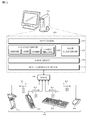
- USB-HID host 20 In a personal computer (hereinafter, referred to as "PC 10"), USB-HID host (hereinafter, referred to as "HID host 20”) is loaded, and it is connected to each of the USB devices 30 which are input devices through HUB 26 and they configure a data-sending system of this invention.
- PC 10 personal computer
- USB-HID host hereinafter, referred to as "HID host 20”
- the HID host 20 is composed of layers such as an application 21, HID class driver 22 and HUB class driver 23, which are class drivers, USB driver 24 and host controller driver 25.
- the application 21 is an application software layer utilizing the USB devices 30.
- the application software is software directly having a function on which a user of PC 10 performs an operation to be carried out on the PC 10.
- the HID class driver 22 and the HUB class driver 23 are driver layers for administrating end points and/or processing a communication protocol, which correspond to a class of each of the USB devices 30 connected to the PC 10.
- the USB driver 24 is a driver layer which performs any fundamental operations as USB and is in charge of USB theory communication control process that is apart from a controller or a class.
- the USB driver 24 is also provided with administration function on connection and/or transfer of the USB devices 30. Specifically, the USB driver 24 administrates USB address of each of the USB devices 30 and monitors a status of an end point of each of the USB devices 30.
- the USB driver 24 also presents any kinds of necessary processing under this monitoring in a case where a connection status of the USB devices 30 alters.
- the host controller driver 25 is a driver layer for a host controller realized by hardware (chip) and abstracting the hardware from the higher USB driver 24. For example, the host controller driver 25 performs I/O processing and interrupt processing to the controller and scheduling processing that is dependent on the controller.
- the USB devices 30 are composed of, for example, a code scanner 31, a handy terminal 32, a keyboard 33, a mouse 34 or the like. They all have a USB-HID interface.
- the code scanner 31 is a device for optically reading a code symbol such as a barcode, two-dimensional code or the like. When reading the code symbol, the code scanner 31 performs photoelectric conversion on the read code symbol to send it to the HID host 20 through the HUB 26 as input data D1.
- the handy terminal 32 may communicate a desired server and is a terminal device which a user can carry to be used for, for example, any stock management or the like.
- the handy terminal 32 sends the input data D1 the user inputs to the HID host 20 through the HUB 26.
- the keyboard 33 has a plurality of keys (for example, alphabet keys, ESC key, ENTER key, Caps Lock key, Num Lock key and Scroll Lock key) and inputs a desired character by pushing down any of these keys.
- keys for example, alphabet keys, ESC key, ENTER key, Caps Lock key, Num Lock key and Scroll Lock key
- the keyboard 33 sends the input data D1 containing character information which corresponds to the pushed-down character to the HID host 20 through the HUB 26.
- the mouse 34 is a pointing device for detecting, when the user moves it horizontally, the movement thereof by a sensor utilizing a ball, LED or laser and the like and for inputting two-dimensional moved distance to the computer.
- the mouse 34 sends information containing the moved distance as the input data D1 to the HID host 20 through the HUB 26.
- the HID class driver 22 or the HUB class driver 23 sets the interrupt transfer in the USB driver 24 and the host controller driver 25.
- the USB driver 24 and the host controller driver 25 sets so that Interrupt In Token (a request for interrupt transfer) is thrown to the HUB 26 periodically.
- Interrupt In Token a request for interrupt transfer
- the HUB 26 is always monitored by the HID host 20 until any USB devices are separated from the connection thereof. Each time the HUB 26 receives the Interrupt In Token, it sends back NAK as an end point unless the HUB 26 alters.
- the interval between the first Interrupt In Token and the next Interrupt In Token is referred to as "interrupt transfer interval".
- the HUB 26 sends back Hub and Port Status Change Bitmap to the USB driver 24 and the host controller driver 25 as an end point in place of NAK when the status of any of USB devices 30 alters, for example, when it is detected that any of USB devices 30 is detached from the HUB 26.
- the USB driver 24 and the host controller driver 25 also perform callback to the HID class driver 22 or the HUB class driver 23 to extract the Hub and Port Status Change Bitmap.
- the HID class driver 22 or the HUB class driver 23 outputs the extracted Hub and Port Status Change Bitmap to the application 21 where various kinds of processing are carried out.
- the data is requested from the HID class driver 22 or the HUB class driver 23 to the USB driver 24 and the host controller driver 25 and then, the input data D1 is sent from any of the USB devices 30 to the HUB class driver 23 through the HUB 26, the host controller driver 25 and the USB driver 24. In this moment, ACK is sent back from the USB driver 24 and the host controller driver 25 to the HUB 26.
- the input data D1 is sent from any of USB devices 30 to the HID host 20 (the PC 10).
- the HID host 20 the PC 10
- the following will describe a data-sending method according to the invention in which based on status information D2 output from the HID class driver 22, the data is sent from the HID host 20 to any of the USB devices 30.
- the status information D2 is information including ON or OFF status of Caps Lock, Num Lock and Scroll Lock and is configured to have a Caps Lock bit D21, a Num Lock bit D22, a Scroll Lock bit D23 and nul bits D24.
- the Caps Lock bit D21, the Num Lock bit D22 and the Scroll Lock bit D23 are respectively composed of one bit and the nul bits D24 are composed of 5 bits.
- the Caps Lock bit D21 is configured so that each time the Caps Lock key of the keyboard 33 is pushed down, it is changed to [1] or [0]. Namely, ON or OFF status (available/unavailable state) of Caps Lock is switched.
- the Caps Lock is generally a function for allowing an alphabet input by the keyboard 33 to be changed from its small letter to its large letter under the ON status thereof.
- the Num Lock bit D22 is configured so that each time the Num Lock key of the keyboard 33 is pushed down, it is changed to [1] or [0] and ON or OFF status of Num Lock is switched.
- the Num Lock is generally a function for allowing a numeral input by a numeric keypad the keyboard 33 has under the ON status thereof or a cursor input (arrows, Home, End and the like) by the numeric key pad under the OFF status thereof.
- the Scroll Lock bit D23 is configured so that each time the Scroll Lock key of the keyboard 33 is pushed down, it is changed to [1] or [0] and ON or OFF status of Scroll Lock is switched.
- the Scroll Lock is generally a function for allowing any scroll in a screen to be locked under the ON status thereof.
- the nul bits D24 are always zero.
- Such status information D2 is created by the HID class driver 22 and is output to the USB devices 30 by a token of SETUP, not shown, through the HUB 26.
- the USB devices 30 receive the status information D2 output from the HID class driver 22 so that they can understand a status of any other USB devices through the HID host 20.
- the status information D2 is output from the HID class driver 22 to the USB devices 30 when turning the PC 10 on or pushing down any of the Caps Lock key, the Num Lock key and the Scroll Lock key.
- This invention has been found out by focusing on the status information D2 which can be sent from the HID Host 20 to any of the USB Devices 30. The following will describe a specific data-sending method.
- the HID host 20 creates the send data D3 based on plural pieces of the status information D2 and sends the created send data D3 to any of the USB devices 30 through the HUB 26, as shown in FIG. 1 .
- the send data D3 is composed of a set of Bit7 through Bit0, for example. Every bit of the send data D3 contains the status information D2.
- the set of Bit7 through Bit0 information of 8 bits (1 byte) to be input to any of the USB devices 30 is contained.
- the set of Bit7 through Bit0 is configured so that the Num Lock bit D22 or the Scroll Lock bit D23 is one. For example, if value [0] is entered into any of the set of Bit7 through Bit0, the Num Lock bit D22 is set to one. In other words, the Num Lock key of the keyboard 33 is pushed down. Alternatively, if value [1] is entered into any of the set of Bit7 through Bit0, the Scroll Lock bit D23 is set to one. In other words, the Scroll Lock key of the keyboard 33 is pushed down.
- the send data D3 is created by a combination of ON or OFF status of Caps Lock, Num Lock and Scroll Lock. Specifically, it is created by pushing down the Caps Lock key, the Num Lock key and the Scroll Lock key in the keyboard 33 at a predetermined interval and in predetermined order as a telegram created by the Morse code.
- the predetermined interval and the predetermined order are not limited to this embodiment and can be suitably changed.
- the Caps Lock key of the keyboard 33 is first pushed down one time, which triggers a start of any sending operations of the send data D3.
- the Num Lock key or the Scroll Lock key is pushed down to create the send data D3.
- Value [0] or [1] is then input in Check1 bit.
- Check1 bit even parity is used.
- value [0] is input thereinto or when they are an even number, value [0] is input thereinto. A specific example thereof will be described later.
- value [0] is always input into Check0 bit.
- a timing chart TC1 shown in FIG. 4 is a diagram for sending the send data D3 including information of a set of [10110101].
- the Caps Lock key of the keyboard 33 is first pushed down to input value [1] into a START bit.
- the HID host 20 then prepares to create the send data D3.
- the Scroll Lock key of the keyboard 33 is pushed down.
- the Num Lock key of the keyboard 33 is pushed down.
- the Scroll Lock key of the keyboard 33 is pushed down.
- the Num Lock key of the keyboard 33 is pushed down.
- the Scroll Lock key of the keyboard 33 is pushed down.
- the Num Lock key of the keyboard 33 is pushed down.
- the Scroll Lock key of the keyboard 33 is pushed down.
- the Num Lock key of the keyboard 33 is pushed down.
- the Scroll Lock key of the keyboard 33 is pushed down.
- the Num Lock key of the keyboard 33 is pushed down.
- the Scroll Lock key of the keyboard 33 is pushed down.
- value [1] is input into the Check1 bit.
- the Scroll Lock key of the keyboard 33 is pushed down.
- the Num Lock key of the keyboard 33 is then pushed down.
- the HID host 20 When inputting them into the Check1 bit and Check0 bit, the Caps Lock key of the keyboard 33 is finally pushed down to input value [1] into STOP bit.
- the HID host 20 creates the send data D3 including information of [10110101] and sends the created send data D3 to any of the USB devices 30.
- a period of time (delayed time) when pushing down any of the Caps Lock key, the Num Lock key and the Scroll Lock key of the keyboard 33 is set to be, for example, five seconds. If the period of time when pushing down any of the keys is longer than five seconds, it is estimated to be a timeout. Accordingly, the lowest sending speed of the send data D3 is 0.2 bps. Further, when sending plural items of the send data D3 to any of the USB devices 30, an interval between the items of the send data D3 is not specifically limited.
- a timing chart TC2 shown in FIG. 4 is a diagram for sending the send data D3 including information of [01001011].
- the send data D3 is sent from the HID host 20 to any of the USB devices 30, the Caps Lock key of the keyboard 33 is first pushed down to input value [1] into a START bit. The HID host 20 then prepares to create the send data D3.
- the Num Lock key of the keyboard 33 is pushed down.
- the Scroll Lock key of the keyboard 33 is pushed down.
- the Num Lock key of the keyboard 33 is pushed down.
- the Num Lock key of the keyboard 33 is pushed down.
- the Scroll Lock key of the keyboard 33 is pushed down.
- the Scroll Lock key of the keyboard 33 is pushed down.
- the Scroll Lock key of the keyboard 33 is pushed down.
- the Scroll Lock key of the keyboard 33 is pushed down.
- the Scroll Lock key of the keyboard 33 is pushed down.
- the Scroll Lock key of the keyboard 33 is pushed down.
- value [0] is input into the Check1 bit.
- the Num Lock key of the keyboard 33 is pushed down.
- the Num Lock key of the keyboard 33 is pushed down.
- the HID host 20 When inputting them into the Check1 bit and Check0 bit, the Caps Lock key of the keyboard 33 is finally pushed down to input value [1] into STOP bit.
- the HID host 20 creates the send data D3 in which information of [01001011] is included and sends the created send data D3 to any of the USB devices 30.
- the status information D2 indicating a status of the HID host 20 is sent from the HID host 20 to any of the USB devices 30.
- the status information D2 is information including ON or OFF status of Caps Lock, Num Lock and Scroll Lock.
- the HID host 20 and any of the USB devices 30 are connected to each other through an interface of USB-HID.
- the HID host 20 creates the send data D3 based on plural items of the status information D2 and sends the created send data D3 to any of the USB devices 30. This enables the USB devices 30 to receive various kinds of settings by the send data D3 sent from the HID host 20 even if the interface is USB-HID.
- USB device 30 when the USB device 30 is the code scanner 31, any menu code for setting the code scanner 31 becomes unnecessary. As the result thereof, it is possible to delete any complicated works such that a menu code is read and the code scanner 31 is set. Further, since the two-way data sending is performed between the HID host 20 and each of the USB devices 30 using USB-HID, a data transfer speed is improved as compared with a data-sending method and a data-sending system using a conventional interface such as RS232S or the like so that it is possible to perform a large quantity of data transfer.
- the send packet D4 which will be described in this embodiment is a collection of items of the send data D3 and the send packet D4 contains a menu command for setting the code scanner 31.
- the menu command is a command for carrying out any setting described in a menu previously created by a code scanner maker and is composed of a predetermined string.
- the menu command is sent from the keyboard 33 toward the HID host 20 when an [ESC] key of the keyboard 33 becomes a trigger of inputting a character and a desired character is pushed down or desired characters are pushed down after this [ESC] key has been pushed down.
- the HID host 20 then creates the send packet D4 in which the menu command is included and sends the created send packet D4 to the code scanner 31.
- the menu command of [ESC]B is a command for checking an operation of the code scanner 31.
- the menu command of [ESC]JG is a command for allowing the code scanner 31 to read only JAN code.
- the menu command of [ESC]U2 is a command for changing an interface of the code scanner 31 to RS232C.
- the menu command of [ESC]Z is a command for allowing the code scanner 31 to read a code.
- the code scanner 31 starts a code-reading operation just after this menu command has been input.
- the menu command of [ESC] Z1 is a command for outputting a version number stored on a storage portion composed of RAM and ROM, not shown, and the like in the PC 10 or the code scanner 31.
- This version number may be a version number of a main body of the code scanner 31 or may be a version number of software installed in the code scanner 31.
- the menu command of [ESC] Z2 is a command for storing a present setting of the code scanner 31 on the storing portion.
- the code scanner 31 stores setting of reading only JAN code on the storage portion.
- the menu command of [ESC] Z3 is a command for outputting the present setting of the code scanner 31.
- the setting stored on the storage portion of the code scanner 31 by inputting the menu command of [ESC] Z2 is output to the PC 10 through, for example, the HUB 26.
- the send packet D4 is composed of Length, [ESC], Character 1, Character 2,..., Character n and [Enter]. These Length, [ESC], Character 1, Character 2,..., Character n and [Enter] respectively have an amount of data of one byte.
- the Length indicates data length (a size of data) of the send packet D4. For example, if the size of data of the send packet D4 is 8 bytes, value [8] is input on the keyboard 33. For example, the size of data up to 127 bytes at most may be input.
- the [ESC] indicates a start of sending the send packet D4.
- the [ESC] is a start character of [0x1B] of Escape key code.
- a menu command main body is input.
- the menu command of [ESC]JG it is input by pushing down [J] key and [G] key of the keyboard 33.
- the [ENTER] indicates a finish of sending the send packet D4.
- the [ENTER] is an end character of [0x0D] of ENTER key code.
- FIG. 6B is a configuration example of the send packet D4 of the menu command of [ESC]U2.
- value [5] is input into the Length. This is because the data length of the send packet D4 is 5 bytes.
- the [ESC] is then input and [U] and [2] are input corresponding to the Character 1 and the Character 2.
- the [ENTER] is finally input and the send packet D4 is sent from the HID host 20 to the code scanner 31.
- the code scanner 31 receives the menu command of [ESC]U2 and the setting of changing the interface of the code scanner 31 to RS232C is performed.
- FIG. 6C is a sending example of another menu command and is a configuration example of the send packet D4 of the menu command of [ESC]Z.
- value [4] is input into the Length. This is because the data length of the send packet D4 is 4 bytes.
- the [ESC] is then input and [Z] is input corresponding to the Character 1.
- the [ENTER] is finally input and the send packet D4 is sent from the HID host 20 to the code scanner 31.
- the code scanner 31 then operates to read the code.
- the send packet D4 including the menu command of the code scanner 31, which is a collection of items of send data D3, is created in place of the send data D3, and the created send packet D4 is sent from the HID host 20 to the code scanner 31.
- This enables the send packet D4 sent from the HID host 20 to set a desired menu command in the code scanner 31 even if the interface is USB-HID.
- the send data D3 and the send packet D4 may be created by any programs. This enables a data-sending speed from the HID host 20 to the USB devices to be improved (In fact, it was improved from the above-mentioned 0.2 bps up to 100 bps). Further, it is capable of performing a start-stop on the data sending from the HID host 20 to any of the USB devices 30, which allows an optimal speed thereof to be calculated.
- USB-HID It is applicable to an interface (for example, keyboard wedge or the like) which is a one-way data communication type that sends the data from any of the input devices to PC and can send only the status information from PC to the input devices.
Landscapes
- Engineering & Computer Science (AREA)
- Theoretical Computer Science (AREA)
- Physics & Mathematics (AREA)
- General Engineering & Computer Science (AREA)
- General Physics & Mathematics (AREA)
- Information Transfer Systems (AREA)
- Input From Keyboards Or The Like (AREA)
Applications Claiming Priority (2)
| Application Number | Priority Date | Filing Date | Title |
|---|---|---|---|
| JP2010150228A JP2012014426A (ja) | 2010-06-30 | 2010-06-30 | データ送信方法及びデータ送信システム |
| PCT/JP2011/064712 WO2012002336A1 (ja) | 2010-06-30 | 2011-06-27 | データ送信方法及びデータ送信システム |
Publications (2)
| Publication Number | Publication Date |
|---|---|
| EP2590084A1 true EP2590084A1 (de) | 2013-05-08 |
| EP2590084A4 EP2590084A4 (de) | 2014-07-30 |
Family
ID=45402044
Family Applications (1)
| Application Number | Title | Priority Date | Filing Date |
|---|---|---|---|
| EP11800800.2A Withdrawn EP2590084A4 (de) | 2010-06-30 | 2011-06-27 | Verfahren zur datenübertragung und datenübertragungssystem |
Country Status (3)
| Country | Link |
|---|---|
| EP (1) | EP2590084A4 (de) |
| JP (1) | JP2012014426A (de) |
| WO (1) | WO2012002336A1 (de) |
Cited By (2)
| Publication number | Priority date | Publication date | Assignee | Title |
|---|---|---|---|---|
| US9342264B2 (en) | 2012-03-05 | 2016-05-17 | Seiko Epson Corporation | Control system, control method of a control system, and recording device |
| US10255426B2 (en) | 2015-09-15 | 2019-04-09 | Electronics And Telecommunications Research Institute | Keyboard device and data communication method using the same |
Family Cites Families (8)
| Publication number | Priority date | Publication date | Assignee | Title |
|---|---|---|---|---|
| US6311228B1 (en) | 1997-08-06 | 2001-10-30 | Microsoft Corporation | Method and architecture for simplified communications with HID devices |
| JP2000276286A (ja) * | 1999-03-24 | 2000-10-06 | Nec Shizuoka Ltd | Usb小型キーボード |
| US7979612B2 (en) * | 2003-04-28 | 2011-07-12 | Keyghost Limited | Communication method and apparatus |
| JP2005078496A (ja) * | 2003-09-02 | 2005-03-24 | Fujitsu Ltd | 出力切替装置、出力切替プログラム、出力切替プログラム記録媒体及び出力切替方法 |
| JP4326383B2 (ja) | 2004-03-25 | 2009-09-02 | 富士通コンポーネント株式会社 | キーボード |
| JP2008040955A (ja) | 2006-08-09 | 2008-02-21 | Matsushita Electric Ind Co Ltd | 光学的情報読取装置および光学的情報読取方法 |
| GB0624582D0 (en) * | 2006-12-08 | 2007-01-17 | Visible Computing Ltd | USB autorun devices |
| US8214888B2 (en) * | 2008-01-30 | 2012-07-03 | Vasco Data Security, Inc. | Two-factor USB authentication token |
-
2010
- 2010-06-30 JP JP2010150228A patent/JP2012014426A/ja active Pending
-
2011
- 2011-06-27 WO PCT/JP2011/064712 patent/WO2012002336A1/ja not_active Ceased
- 2011-06-27 EP EP11800800.2A patent/EP2590084A4/de not_active Withdrawn
Cited By (2)
| Publication number | Priority date | Publication date | Assignee | Title |
|---|---|---|---|---|
| US9342264B2 (en) | 2012-03-05 | 2016-05-17 | Seiko Epson Corporation | Control system, control method of a control system, and recording device |
| US10255426B2 (en) | 2015-09-15 | 2019-04-09 | Electronics And Telecommunications Research Institute | Keyboard device and data communication method using the same |
Also Published As
| Publication number | Publication date |
|---|---|
| EP2590084A4 (de) | 2014-07-30 |
| JP2012014426A (ja) | 2012-01-19 |
| WO2012002336A1 (ja) | 2012-01-05 |
Similar Documents
| Publication | Publication Date | Title |
|---|---|---|
| CN1123812C (zh) | 单向通讯的初始化方法及使用该方法的装置 | |
| US7299309B2 (en) | Method and apparatus for protocol and code converter | |
| CN1241127C (zh) | 信息处理设备及方法 | |
| US8140716B2 (en) | Method and system for implementing automatic installation of key device | |
| US5854940A (en) | Output control system for interpreting input data according to a specific control language based upon outputs from a plurality of control language determining devices | |
| US9794429B2 (en) | Server apparatus storing print data, printing apparatus, and printing system for checking processing status on a print data list | |
| US10649947B2 (en) | Stack timing adjustment for serial communications | |
| US10255426B2 (en) | Keyboard device and data communication method using the same | |
| US7831837B1 (en) | Encoding token commands/data within data streams for standard interfaces | |
| CN111045529B (zh) | 一种数据输入方法、系统及相关设备 | |
| JP2012014426A (ja) | データ送信方法及びデータ送信システム | |
| WO2007090269A1 (en) | Method and protocol for transmitting extended commands to usb devices | |
| CN1648850A (zh) | 通过预检打印驱动程序来预测打印错误的打印系统及方法 | |
| US7185119B2 (en) | Method and apparatus for checking and analyzing the state of peripherals wherein state information is converted into a pattern of identification information | |
| US6768428B1 (en) | Computer keyboard lock | |
| CN1232200A (zh) | 具有卡处理功能的键盘及其控制方法 | |
| US7949003B2 (en) | Image formation device, management device, network system, control program for image formation device, and control program for management device | |
| CN102662716A (zh) | 计算机系统中利用网口实现引导启动控制的方法 | |
| JP5181700B2 (ja) | 筆跡情報生成装置、プログラムおよび筆跡情報管理システム | |
| US20040130748A1 (en) | Data output apparatus and host apparatus | |
| CN100493018C (zh) | 一种通过网络中的总线接口进行通信的方法和系统 | |
| JP6839389B2 (ja) | 画像処理及びエラー対処システム並びにリニアライズド及び非リニアライズド・ポータブル・ドキュメント・フォーマット(Pdf)ファイルの印刷方法 | |
| CN1318988C (zh) | 以一转换器侦测并转换非通用串行总线装置的方法及系统 | |
| CN103513751B (zh) | 操作数据输出装置和操作数据输出方法 | |
| CN102270499A (zh) | 一种存储装置 |
Legal Events
| Date | Code | Title | Description |
|---|---|---|---|
| PUAI | Public reference made under article 153(3) epc to a published international application that has entered the european phase |
Free format text: ORIGINAL CODE: 0009012 |
|
| 17P | Request for examination filed |
Effective date: 20121218 |
|
| AK | Designated contracting states |
Kind code of ref document: A1 Designated state(s): AL AT BE BG CH CY CZ DE DK EE ES FI FR GB GR HR HU IE IS IT LI LT LU LV MC MK MT NL NO PL PT RO RS SE SI SK SM TR |
|
| DAX | Request for extension of the european patent (deleted) | ||
| A4 | Supplementary search report drawn up and despatched |
Effective date: 20140630 |
|
| RIC1 | Information provided on ipc code assigned before grant |
Ipc: G06F 13/10 20060101AFI20140624BHEP Ipc: G06F 13/42 20060101ALI20140624BHEP |
|
| STAA | Information on the status of an ep patent application or granted ep patent |
Free format text: STATUS: THE APPLICATION HAS BEEN WITHDRAWN |
|
| 18W | Application withdrawn |
Effective date: 20161003 |