EP2482467A2 - Verfahren und endgerät zur bereitstellung verschiedener bildinformationen entsprechend dem winkel eines endgerätes und computerlesbares aufzeichnungsmedium - Google Patents
Verfahren und endgerät zur bereitstellung verschiedener bildinformationen entsprechend dem winkel eines endgerätes und computerlesbares aufzeichnungsmedium Download PDFInfo
- Publication number
- EP2482467A2 EP2482467A2 EP10817376A EP10817376A EP2482467A2 EP 2482467 A2 EP2482467 A2 EP 2482467A2 EP 10817376 A EP10817376 A EP 10817376A EP 10817376 A EP10817376 A EP 10817376A EP 2482467 A2 EP2482467 A2 EP 2482467A2
- Authority
- EP
- European Patent Office
- Prior art keywords
- terminal
- information
- angle
- image
- horizontal plane
- Prior art date
- Legal status (The legal status is an assumption and is not a legal conclusion. Google has not performed a legal analysis and makes no representation as to the accuracy of the status listed.)
- Withdrawn
Links
Images




Classifications
-
- H—ELECTRICITY
- H04—ELECTRIC COMMUNICATION TECHNIQUE
- H04B—TRANSMISSION
- H04B1/00—Details of transmission systems, not covered by a single one of groups H04B3/00 - H04B13/00; Details of transmission systems not characterised by the medium used for transmission
- H04B1/38—Transceivers, i.e. devices in which transmitter and receiver form a structural unit and in which at least one part is used for functions of transmitting and receiving
- H04B1/40—Circuits
-
- G—PHYSICS
- G06—COMPUTING OR CALCULATING; COUNTING
- G06F—ELECTRIC DIGITAL DATA PROCESSING
- G06F1/00—Details not covered by groups G06F3/00 - G06F13/00 and G06F21/00
- G06F1/16—Constructional details or arrangements
- G06F1/1613—Constructional details or arrangements for portable computers
- G06F1/1633—Constructional details or arrangements of portable computers not specific to the type of enclosures covered by groups G06F1/1615 - G06F1/1626
- G06F1/1684—Constructional details or arrangements related to integrated I/O peripherals not covered by groups G06F1/1635 - G06F1/1675
- G06F1/1694—Constructional details or arrangements related to integrated I/O peripherals not covered by groups G06F1/1635 - G06F1/1675 the I/O peripheral being a single or a set of motion sensors for pointer control or gesture input obtained by sensing movements of the portable computer
-
- G—PHYSICS
- G06—COMPUTING OR CALCULATING; COUNTING
- G06F—ELECTRIC DIGITAL DATA PROCESSING
- G06F3/00—Input arrangements for transferring data to be processed into a form capable of being handled by the computer; Output arrangements for transferring data from processing unit to output unit, e.g. interface arrangements
- G06F3/01—Input arrangements or combined input and output arrangements for interaction between user and computer
- G06F3/048—Interaction techniques based on graphical user interfaces [GUI]
- G06F3/0481—Interaction techniques based on graphical user interfaces [GUI] based on specific properties of the displayed interaction object or a metaphor-based environment, e.g. interaction with desktop elements like windows or icons, or assisted by a cursor's changing behaviour or appearance
-
- G—PHYSICS
- G06—COMPUTING OR CALCULATING; COUNTING
- G06F—ELECTRIC DIGITAL DATA PROCESSING
- G06F2200/00—Indexing scheme relating to G06F1/04 - G06F1/32
- G06F2200/16—Indexing scheme relating to G06F1/16 - G06F1/18
- G06F2200/163—Indexing scheme relating to constructional details of the computer
- G06F2200/1637—Sensing arrangement for detection of housing movement or orientation, e.g. for controlling scrolling or cursor movement on the display of an handheld computer
Definitions
- the present invention relates a method, a terminal and a computer-readable recording medium for providing different image information by angles of the terminal; and more particularly, to the method, the terminal and the computer-readable recording medium for providing different images, respectively, when a user looks down at the terminal, when the user looks forward thereat and when the user looks up from the down thereat and providing user interfaces to allow the user to control operations of the terminal in several forms if information on each image is provided.
- mobile phones offer only one content to users during a waiting time when the users do not make phone calls or send SMS messages.
- users have to stop displaying the pre-provided content and perform an operation to get different content.
- a prefixed motion e.g., shaking or turning of the terminal
- a method for providing different images by referring to angles of a terminal including the steps of: (a) on assumption that if an angle of the terminal leaning to a horizontal plane or a certain reference plane is 0 degree, a screen of the terminal is deemed to face toward the ground, (i) if the angle of the terminal leaning to the horizontal plane or the certain reference plane falls under an angular range which includes 0 degree with respect to the horizontal plane or the certain reference plane, setting a content provided through the terminal to be relevant to map information, (ii) if the angle thereof leaning to the horizontal plane or the certain reference plane falls under an angular range which includes 90 degrees with respect to the horizontal plane or the certain reference plane, setting a content provided through the terminal to be relevant to preview image, and (iii) if the angle thereof leaning to the horizontal plane or the certain reference plane falls under an angular range which includes 180 degrees with respect to the horizontal plane or the certain reference plane, setting a content provided through the
- a terminal for providing information on different images by referring to angles thereof including: a sensor for acquiring information on an angle thereof with respect to a horizontal plane or a certain reference plane; a control part for creating information on an image based on the set content corresponding to the information on the angle thereof if the information on the angle thereof is acquired through the sensor, in a state of a content provided therethrough (i) being set to be relevant to map information if an angle thereof leaning to the horizontal plane or a certain reference plane falls under an angular range which includes 0 degree with respect to the horizontal plane or the certain reference plane, (ii) being set to be relevant to a preview image if the angle thereof leaning to the horizontal plane or the certain reference plane falls under an angular range which includes 90 degrees with respect to the horizontal plane or the certain reference plane, and (iii) being set to be relevant to weather if the angle thereof leaning to the horizontal plane or the certain reference plane falls under an angular range which includes 180 degrees with
- changes in angles of a terminal 100 in the present invention may be a concept including not only changes in angular positions thereof around an axis but also those around unfixed axis.
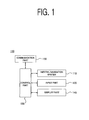
- Fig. 1 illustrates a brief configuration of a terminal to provide information on different images depending on different angles of the terminal to which a user looks in accordance with one example embodiment of the present invention.
- a terminal 100 in the present invention may include an inertial navigation system 110 for sensing information on a movement such as changes in angles of the terminal 100, an input part 120 for receiving the user's input, a control part 130 for generating information on images based on the information sensed by the inertial navigation system 110 and the information received by the input part 120, a display part 140 for providing the user with the information on images generated by the control part 130 and a communication part 150.
- an inertial navigation system 110 for sensing information on a movement such as changes in angles of the terminal 100
- an input part 120 for receiving the user's input
- a control part 130 for generating information on images based on the information sensed by the inertial navigation system 110 and the information received by the input part 120
- a display part 140 for providing the user with the information on images generated by the control part 130 and a communication part 150.
- the inertial navigation system 110, the input part 120, the control part 130, the display part 140 and the communication part 150 may be program modules communicating with the terminal 100.
- Such program modules may be included in the terminal 100 in a form of an operating system, an application program module and other program modules, or they may be physically stored in various storage devices well known to those skilled in the art or in a remote storage device capable of communicating with the terminal 100.
- the program modules may include but not be subject to a routine, a subroutine, a program, an object, a component, and a data structure for executing a specific operation or a type of specific abstract data that will be described in accordance with the present invention.
- the configuration and functions of the inertial navigation system 110 in accordance with one example embodiment of the present invention are described in detail below.
- the present invention mentions, as one example, the inertial navigation system 110 to acquire information on an angle of the terminal 100, but it is not limited only to this and if it is possible to acquire information on the angle thereof by using a sensor, this will be able to be included in the scope of the present invention.
- the inertial navigation system 110 in the present invention may include one or more acceleration sensors 111, one or more gyroscopes 112 and a compensation and transformation part 113.
- the inertial navigation system 110 may perform a function of getting information on linear movement, rotating movement, shaking, etc. of the terminal 100 based on acceleration measured by using a variety of sensors therein.
- the acceleration sensor(s) 111 is a sensor which senses a movement of the terminal 100, measures acceleration thereof, and detects information on shaking velocity, shaking intensity, and shaking direction thereof.
- the gyroscope(s) 112 may perform a function of measuring degree of the movement of the terminal 100 by sensing rotation thereof.
- the acceleration sensor(s) 111 may express the values of sensed acceleration as a vector in three axes (the X, Y and Z axes) and the gyroscope (s) 112 may express the values of sensed rotation as another vector in three axes (i.e., roll, pitch and yaw).
- the inertial navigation system 110 may calculate velocity and position of the terminal and changes in the velocity and the position.
- the inertial navigation system 110 may be a normal inertial navigation system (INS) and the gyroscope(s) 112 may include optic gyroscope(s), mechanical one(s), piezoelectric one(s), etc.
- INS normal inertial navigation system
- the compensation and transformation part 113 may perform a function of converting analog signal outputted from the acceleration sensor(s) 111 and the gyroscope(s) 112 to analog and/or digital signal. Moreover, it may conduct a function of converting to information on movements, angles, and shaking by integrating the converted signal and tracing its path.
- the information on the movements, angles, and shaking of the terminal 100 outputted from the inertial navigation system 110 may be updated for a certain period of time or in real time and be transferred to the control part 130.
- the input part 120 may conduct a function of receiving an input signal inputted by the user, processing it and then transferring it to the control part 130.
- the input part 120 in accordance with one example embodiment of the present invention may be implemented in a general form of touch screen.
- the input part 120 which is implemented in a form of touch screen.
- the user may perform an input gesture by touching a specific location of the user interface by using a tool (e.g., a stylus pen, the user' s fingertip, etc.).
- the touch may cause a certain tactile sensor embedded in the input part 120 to sense the above-mentioned touch and create electric signal related thereto.
- the input part 120 may receive the input signal from the user, generate information related thereto and transfer the information to the control part 130.
- control part 130 which processes the information on the output from the inertial navigation system 110 and creates information on images to be displayed through the display part 140 is explained below.
- control part 130 may include an angle information processing part 131, a shaking information processing part 132, a user interface driving part 133, and an image information creating part 134.
- the angle information processing part 131 may perform a function of processing information on an angle of the terminal 100 acquired by the inertial navigation system 110 to thereby create information on an image (s) related thereto. More specifically, the angle information processing part 131 may conduct a function of measuring a current angle of the terminal based on the information provided by the inertial navigation system 110.
- the terminal 100 in the present invention may provide the user with different images through a screen thereof according to three different ranges of angle.
- the angle information processing part 131 may carry out a function of measuring the angle of the terminal 100.
- the information on the angle of the terminal 100 may be information on an angle of the terminal 100 leaning to an absolute reference plane.
- the angle information processing part 131 may measure the current angle of the terminal 100 leaning to the absolute reference plane based on the information from the inertial navigation system 110.
- the information on an angle of the terminal 100 may be information on a relative tilt.
- the angle information processing part 131 may set an initial state of a motion (e.g., an initial state of which the terminal 100' s power is on) as a relative reference plane and measure the current angle of the terminal 100 leaning thereto.
- the information on an angle of the terminal 100 measured by the angle information processing part 131 may have a range of, e.g., - 180° to + 180° or 0° to 360°.
- the information on the angle of the terminal 100 may be expressed as a specific range of angle among n ranges of angle.
- the range of the angle of the terminal 100 leaning to the horizontal plane is between - 45° and + 45° may be expressed as Section A; that of the angle thereof is between + 135° and + 225° as Section B; and the other range excluding Sections A and B as Section C.
- the angle information processing part 131 in accordance with one example embodiment of the present invention may express the range of the angle of the terminal 100 leaning to the reference plane in three sections because three different types of images may be provided depending on the tilts of the terminal 100 to the horizontal plane.
- the shaking information processing part 132 in accordance with one example embodiment of the present invention may perform a function of identifying the user's gesture inputted through vibration based on the information on the shaking of the terminal 100 (information on shaking velocity, intensity, direction, etc.) sensed by the acceleration sensor.
- the user may input a command to control an operation of the terminal 100 not only through the input part 120 but also by shaking the terminal 100.
- the shaking information processing part 132 may identify shaking, shaking intensity, shaking direction, etc. of the terminal 100.
- the user interface driving part 133 may carry out a function of providing the user with a user interface through the display part 140 and controlling the user interface.
- the user may make an input to control an operation of the terminal 100 through the user interface provided by the user interface driving part 133 and manipulate the terminal 100 to perform an operation the user wants or provide information the user wants according to the user's input.
- the user interface provided by the user interface driving part 133 and its operations will be made clear in detail.
- the image information creating part 134 may perform a function of creating an image to be provided to the user through the display part 140 based on the information acquired by the angle information processing part 131 and the shaking information processing part 132.
- the user interface provided by the user interface driving part 133 may be also included on the image.
- An image created by the image created by the image information creating part 134 may be an image acquired from the information pre-stored on a separate database (not illustrated) or an image acquired from information received in real time.
- a database may include information on tilts of the terminal 100 and information on the corresponding content types related thereto (e.g., if a tilt of the terminal 100 is included in Section A, a content with a type A is provided, if the tilt thereof is included in Section B, a content with a type B is provided and if the tilt thereof is included in Section C, a content with a type C is provided).
- the image information creating part 134 may create information on an image by combining a content with a specific type corresponding to a tilt of the terminal 100 with other contents.
- it may also create information on an image by combining a specific image, e.g., a preview image, provided through the terminal 100 according to an angle of the terminal leaning to a reference plane with additional information relevant to the specific image by using a technology of augmented reality (AR).
- a specific image e.g., a preview image
- AR augmented reality
- each content with a different type will be allowed to correspond to each of n sections and if the angle of the terminal 100 is included in a particular section among the n sections and a content with a specific type corresponds to the particular section, the terminal 100 will be able to create information on an appropriate image based on the specific type.
- the display part 140 may perform a function of processing the image created by the image information creating part 134 in the control part 130 to thereby provide it visually for the user.
- the display part 140 may include a liquid crystal display (LCD), an organic light emitting diode (OLED) or other flat panel display.
- the communication part 150 may conduct a function of receiving and transmitting different types of information and content from a server (not illustrated). Namely, the communication part 150 may perform a function of receiving and transmitting data from or/and to the terminal 100 as a whole.
- the terminal 100 in accordance with one example embodiment of the present invention may be allowed to provide information on different images (including a user interface) depending on various angles of the terminal 100 leaning to a reference plane.
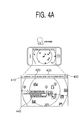
- Figs. 4A to 4C illustrate examples of different images displayed through a screen of a terminal 100 depending on tilts of the terminal 100 in accordance with the present invention.
- Fig. 4A shows an image provided if the terminal 100 has no tilt or a very small tilt to a reference plane.
- Fig. 4A shows an image provided in case the user looks down at the display part 140 of the terminal 100 (i.e., a so-called downview).
- the image of Fig. 4A i.e., the image provided when the user looks down at the terminal 100, is called "a downview image".
- No tilt to the reference plane herein means not only a case in which an angle of the terminal leaning to the reference plane is 0 degree but also a case in which an angle thereof leaning to the reference plane is not exceeding a pre-set value. For an instance, if the terminal 100 has a tilt between - 45° and + 45° with respect to the reference plane, a downview image as shown in Fig. 4A will be provided.
- an image relating to geographic information as a downview image may be offered.
- information on a geographic location where the terminal 100 is now located may be provided.
- the image may be a map.
- the user may enlarge or shrink the size of the map by a gesture inputted through the input part 120 or move a portion of the map which is displayed through a screen of the terminal 100.
- the gesture for enlarging or shrinking the map may be inputted through the user interface on the display part 140.
- the user may touch two specified parts of the map and input the gesture to enlarge or shrink some parts thereof.
- Fig. 4A is a downview image which illustrates an image relating to geographic information but it is not limited only to this and it, in fact, will be able to get and provide a preview image inputted through the screen of the terminal 100 and also will be able to provide the image by overlaying the map on the preview image in a form of augmented reality.
- the user interface provided on the display part 140 of the terminal 100 may include an icon such as a toggle button 410, which may perform a function of locking. That is, if the user clicks the toggle button 410 while the downview image is provided, the downview image will be provided continuously even though the angle of the terminal 100 becomes changed.
- the toggle button 410 may be included even in the user interfaces illustrated in Figs. 4B and 4C but the explanation thereabout will be omitted below.
- the image provided on the display part 140 may be an image relating to geographic information on an area around a metro station, information of interest near the metro station, etc.
- a window displaying the user's present location 420 may be included on the image.
- a button for displaying subway lines 430 may be included. If the user clicks the button 430, all subway lines existing on the city where the user is located will be able to be displayed. If multiple subway lines are displayed, the user will be able to select one line and then information on a route of the selected line will be displayed in detail. If the user selects a subway station, the user may selectively receive information around the subway station through an additionally provided selection window 440.
- another user interface may be additionally provided. For instance, suppose the user selected "Recommended Restaurants" among 4 menus, i.e., "Recommended Restaurants", “Information on Train Service”, “Movies Available Now” and “Real Time Traffic Information”, a user interface as shown in Fig. 5 will be additionally provided. Using the user interface, information on good restaurants around the subway station pre-retrieved by users may be offered in detail. The information on good restaurants may include recommendation hits or comments of users by respective restaurants.
- the user may recommend a new good restaurant by clicking a "Recommend Restaurant" button and may express whether the user agrees or disagrees on a comment entered by another user or whether the user recommends a restaurant which was recommended by another user. If a comment exceeds n recommendations, restaurants with the comment will be able to come together as a group(s) and the comment will be able to be posted by restaurant (e.g., it will be possible to provide the user with a user interface on which the user may post a comment by restaurant after one or more good restaurants with n or more recommendation hits are grouped). If the recommendation hits exceed n, [restaurant tag] + restaurant information (introduction, menu and location) may be registered in a database and accordingly [restaurant tag] will become clickable by collective intelligence. For reference, the aforementioned case is an example of grouping restaurants based on recommendation hits thereabout, but an example of grouping famous sites in the area based on users' recommendation hits will be also included.
- a shooting mode selection button 450 may be included in the image provided through the terminal 100. By clicking the button 450, the user may stop a mode of receiving an image to convert to a shooting mode and additionally use the shooting mode while continuously receiving the current image.
- Fig. 4B represents an image provided if the terminal 100 has a tilt of 90 degrees to the reference plane.
- Fig. 4B shows an image provided in case the user looks forward at the display part 140 of the terminal 100 (i.e., a so-called preview).
- the image of Fig. 4B i.e., the image provided when the user looks forward at the terminal 100, is called "a preview image".
- a tilt of 90 degrees to the reference plane herein means not only a case in which an angle of the terminal leaning to the reference plane is 90 degrees but also a case in which an angle thereof leaning to a certain plain perpendicular to the reference plane is not exceeding a pre-set value. For an instance, if the terminal 100 has a tilt between + 45° and + 135° or between + 225° and + 315° with respect to the reference plane, a preview image as shown in Fig. 4B will be provided.
- the preview image may be a different type of information from the downview image.
- the preview image as illustrated in Fig. 4B , may be a landscape shown through the screen of the terminal 100 before a photo or video is shot. Certain icons or contents will be able to be provided by being overlaid on the landscape in a form of augmented reality.
- the user may control the operations of the terminal 100 in several forms. For instance, the user may control the provided preview image by a gesture of shaking the terminal 100.
- thumbnails relating to the current location may be displayed in a line in the order closer to the current location; if the user conducts a gesture of shaking twice, multiple thumbnails may be sorted and displayed in the popularity order as shown in the lower image of Fig. 4B ; and if the user conducts a gesture of shaking three times, the thumbnails may disappear from the current screen.
- the sort order, pattern or the like of the thumbnails falling under information of interest relating to the current location may be variable according to shaking patterns of the terminal 100.
- Such shaking gestures may be sensed by the acceleration sensor 111 of the inertial navigation system 110 and the sensed information may be processed by a shaking gesture processing part 132 of the control part 130.
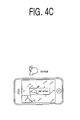
- Fig. 4C represents an image provided if the terminal 100 has a tilt of 180 degrees to the reference plane. That is, Fig. 4C shows an image provided in case the user looks up at the display part 140 of the terminal 100 (i.e., a so-called topview).
- the image of Fig. 4C i.e., the image provided when the user looks up at the terminal 100, is called "a topview image”.
- a tilt of 180 degrees to the reference plane herein means not only a case in which an angle of the terminal leaning to the reference plane is 180 degrees but also a case in which an angle thereof leaning to a certain plain parallel to but the direction thereof is opposite to the reference plane is not exceeding a pre-set value. For an instance, if the terminal 100 has a tilt between + 135° and + 225° or between - 45° and + 45° with respect to the reference plane, a topview image as shown in Fig. 4C will be provided.
- the topview image may be a different type of image from the downview image and the preview image.
- the topview image may be an image relating to weather information, which may be an image bringing a visual effect by being implemented with motion graphics technology.
- content information including messages inputted by other users, may be further provided.
- the user may share messages inputted by other users by providing the messages floating on the screen of the terminal 100 in a form of augmented reality.
- a specific user inputs a message through a user interface
- the inputted message will be transmitted through the communication part 150 to a server (not illustrated), which may deliver the message to respective terminals 100 of respective users who belong to a group selected by the specific user or any other groups but it is not limited only to this.
- useful information such as news and shopping as well as the message inputted by the specific user will be able to be further included. Such information may be displayed in a form of flowing stream in a particular direction on the display part 140 but it is not limited only to this.
- the downview image, a preview image and the topview image are displaying different types of information and user interfaces included therein are also different. More specifically, as the user takes a stance looking down to the ground, map information, etc. which is relevant to the ground will be provided as the downview image; as the user takes the stance looking forward, a landscape will be provided as the preview image; and since the user takes the stance looking upward, weather information, etc. which is relevant to the sky will be provided as the topview image. By dynamically providing appropriate images depending on a direction to which the screen of the terminal is at a right place at a right time, this will be able to draw the interest and awareness of users.
- tilting the terminal 100 upwards and downwards were mainly explained above but they are not only limited to this.
- the downview image mode, the preview image mode and the topview image mode it will be possible to provide different types of information depending on vertical or horizontal screens in case the terminal 100 is turned vertically or horizontally.
- the terminal 100 is turned horizontally at the preview image mode, a normal street landscape will be inputted and provided and if the terminal 100 is turned vertically, image matching for the image inputted through the terminal 100 will be performed and the information on the recognized image will be provided, wherein the concepts of "vertically” and “horizontally” are not necessary to be determined based on the absolute horizontal plane but may be determined based on a relative plane.
- information on different images may be provided depending on view directions of a terminal to which a user looks, i.e., when the user looks down at the terminal, when the user looks forward thereat and when the user looks up from the down thereat and therefore the user may obtain various information without any separate inputted motions by changing the directions of the terminal to which the user looks.
- the user may feel easiness to use and interest in controlling information on images because the user can do so only by producing a motion of shaking the terminal or other similar motions.
- the user may actively express an opinion and engage in social intercourse with other users through the terminal because the user may check other users' opinions and so on in real time and enter the user's own opinion through a variety of user interfaces included in the information on images.
- the embodiments of the present invention can be implemented in a form of executable program command through a variety of computer means recordable to computer readable media.
- the computer readable media may include solely or in combination, program commands, data files and data structures.
- the program commands recorded to the media may be components specially designed for the present invention or may be usable to a skilled person in a field of computer software.
- Computer readable record media include magnetic media such as hard disk, floppy disk, magnetic tape, optical media such as CD-ROM and DVD, magneto-optical media such as floptical disk and hardware devices such as ROM, RAM and flash memory specially designed to store and carry out programs.
- Program commands include not only a machine language code made by a complier but also a high level code that can be used by an interpreter etc., which is executed by a computer.
- the aforementioned hardware device can work as more than a software module to perform the action of the present invention and they can do the same in the opposite case.
Landscapes
- Engineering & Computer Science (AREA)
- Computer Hardware Design (AREA)
- Theoretical Computer Science (AREA)
- General Engineering & Computer Science (AREA)
- Human Computer Interaction (AREA)
- Physics & Mathematics (AREA)
- General Physics & Mathematics (AREA)
- Computer Networks & Wireless Communication (AREA)
- Signal Processing (AREA)
- User Interface Of Digital Computer (AREA)
- Telephone Function (AREA)
- Television Signal Processing For Recording (AREA)
Applications Claiming Priority (2)
| Application Number | Priority Date | Filing Date | Title |
|---|---|---|---|
| KR1020090089287A KR100982768B1 (ko) | 2009-09-21 | 2009-09-21 | 단말기의 각도에 따라 서로 다른 영상 정보를 제공하기 위한 방법, 단말기 및 컴퓨터 판독 가능한 기록 매체 |
| PCT/KR2010/006050 WO2011034307A2 (ko) | 2009-09-21 | 2010-09-06 | 단말기의 각도에 따라 서로 다른 영상 정보를 제공하기 위한 방법, 단말기 및 컴퓨터 판독 가능한 기록 매체 |
Publications (2)
| Publication Number | Publication Date |
|---|---|
| EP2482467A2 true EP2482467A2 (de) | 2012-08-01 |
| EP2482467A4 EP2482467A4 (de) | 2015-07-22 |
Family
ID=43010242
Family Applications (1)
| Application Number | Title | Priority Date | Filing Date |
|---|---|---|---|
| EP10817376.6A Withdrawn EP2482467A4 (de) | 2009-09-21 | 2010-09-06 | Verfahren und endgerät zur bereitstellung verschiedener bildinformationen entsprechend dem winkel eines endgerätes und computerlesbares aufzeichnungsmedium |
Country Status (5)
| Country | Link |
|---|---|
| US (1) | US8884986B2 (de) |
| EP (1) | EP2482467A4 (de) |
| JP (1) | JP5205557B2 (de) |
| KR (1) | KR100982768B1 (de) |
| WO (1) | WO2011034307A2 (de) |
Families Citing this family (20)
| Publication number | Priority date | Publication date | Assignee | Title |
|---|---|---|---|---|
| US8427508B2 (en) * | 2009-06-25 | 2013-04-23 | Nokia Corporation | Method and apparatus for an augmented reality user interface |
| JP5652097B2 (ja) * | 2010-10-01 | 2015-01-14 | ソニー株式会社 | 画像処理装置、プログラム及び画像処理方法 |
| US9041733B2 (en) * | 2011-05-04 | 2015-05-26 | Blackberry Limited | Methods for adjusting a presentation of graphical data displayed on a graphical user interface |
| KR101397873B1 (ko) * | 2011-11-04 | 2014-07-01 | 인하대학교 산학협력단 | 증강 현실 표시 장치 및 방법 |
| JP5978610B2 (ja) * | 2011-12-09 | 2016-08-24 | ソニー株式会社 | 情報処理装置、情報処理方法及びプログラム |
| JP5970810B2 (ja) * | 2011-12-28 | 2016-08-17 | キヤノンマーケティングジャパン株式会社 | 携帯端末、表示方法、及びプログラム |
| US8988578B2 (en) | 2012-02-03 | 2015-03-24 | Honeywell International Inc. | Mobile computing device with improved image preview functionality |
| US9189062B2 (en) * | 2012-03-07 | 2015-11-17 | Google Technology Holdings LLC | Portable electronic device and method for controlling operation thereof based on user motion |
| US20130305286A1 (en) * | 2012-05-08 | 2013-11-14 | Tomas Wässingbo | Electronic device with multimedia content function |
| US9354721B2 (en) * | 2012-09-28 | 2016-05-31 | Apple Inc. | Movement based image transformation |
| US10489501B2 (en) * | 2013-04-11 | 2019-11-26 | Google Llc | Systems and methods for displaying annotated video content by mobile computing devices |
| US9613270B2 (en) | 2014-08-12 | 2017-04-04 | Xiaomi Inc. | Weather displaying method and device |
| CN104183004A (zh) * | 2014-08-12 | 2014-12-03 | 小米科技有限责任公司 | 天气显示方法及装置 |
| WO2016190679A1 (ko) * | 2015-05-27 | 2016-12-01 | 한국과학기술정보연구원 | 재난안전정보를 표시하는 방법 및 포터블 디바이스 |
| JP6755728B2 (ja) * | 2016-06-23 | 2020-09-16 | 本田技研工業株式会社 | コンテンツ出力システム及び方法 |
| US11238526B1 (en) | 2016-12-23 | 2022-02-01 | Wells Fargo Bank, N.A. | Product display visualization in augmented reality platforms |
| EP3594906B1 (de) * | 2017-03-06 | 2022-10-19 | LINE Corporation | Verfahren und vorrichtung zur bereitstellung einer erweiterten realität und computerprogramm |
| US11475884B2 (en) | 2019-05-06 | 2022-10-18 | Apple Inc. | Reducing digital assistant latency when a language is incorrectly determined |
| JP7266566B2 (ja) * | 2020-10-29 | 2023-04-28 | 株式会社三菱Ufj銀行 | プログラム |
| WO2024117648A1 (ko) * | 2022-11-28 | 2024-06-06 | 삼성전자주식회사 | 웨어러블 장치의 방향에 기반하여 날씨에 대응하는 가상 객체를 표시하기 위한 웨어러블 장치, 방법, 및 비-일시적 컴퓨터 판독 가능 저장 매체 |
Family Cites Families (21)
| Publication number | Priority date | Publication date | Assignee | Title |
|---|---|---|---|---|
| BR0110482A (pt) * | 2000-05-01 | 2003-04-08 | Netoncourse Inc | Métodos de suportar o acontecimento de um evento de interação de massa, de pelo menos otimizar grupos de discussão, de tratar com questões em um evento sìncrono em progresso, de gerenciar um evento interativo em progresso, de prover retroalimentação de uma grande audiência de participantes a um apresentador, durante um evento, de prover uma apresentação equilibrada, e de gerenciamento de questão em um sistema tendo uma grande pluralidade de participantes, e, aparelho para executá-los |
| KR100485059B1 (ko) * | 2001-10-19 | 2005-04-22 | 후지쓰 텐 가부시키가이샤 | 화상표시장치 |
| US11275405B2 (en) * | 2005-03-04 | 2022-03-15 | Apple Inc. | Multi-functional hand-held device |
| US20050222802A1 (en) * | 2002-08-27 | 2005-10-06 | Yasuhiro Tamura | Mobile terminal apparatus |
| JP2004102941A (ja) * | 2002-09-12 | 2004-04-02 | Sony Corp | 携帯電子機器 |
| KR20060027180A (ko) * | 2004-09-22 | 2006-03-27 | 주식회사 엔씨소프트 | 휴대 단말기의 3차원 공간에서의 움직임을 영상 정보에반영하는 방법 및 휴대 단말기 |
| US20060174203A1 (en) * | 2005-01-31 | 2006-08-03 | Searete Llc, A Limited Liability Corporation Of The State Of Delaware | Viewfinder for shared image device |
| EP1889007B1 (de) * | 2005-06-06 | 2009-08-26 | TomTom International B.V. | Navigationseinrichtung mit kamera-info |
| US20070004451A1 (en) * | 2005-06-30 | 2007-01-04 | C Anderson Eric | Controlling functions of a handheld multifunction device |
| JP2007206108A (ja) * | 2006-01-31 | 2007-08-16 | Sharp Corp | 携帯型電子機器 |
| US8775452B2 (en) * | 2006-09-17 | 2014-07-08 | Nokia Corporation | Method, apparatus and computer program product for providing standard real world to virtual world links |
| US7609172B2 (en) * | 2006-10-12 | 2009-10-27 | Garmin Ltd. | System and method for providing real-time traffic information |
| US20090262074A1 (en) * | 2007-01-05 | 2009-10-22 | Invensense Inc. | Controlling and accessing content using motion processing on mobile devices |
| JP5607286B2 (ja) * | 2007-03-27 | 2014-10-15 | 日本電気株式会社 | 情報処理端末、情報処理端末の制御方法、およびプログラム |
| KR100876754B1 (ko) * | 2007-04-18 | 2009-01-09 | 삼성전자주식회사 | 작동모드를 전환하기 위한 휴대용 전자기기 |
| KR101404751B1 (ko) * | 2007-12-26 | 2014-06-12 | 엘지전자 주식회사 | 이동 단말기 및 그의 사용자 인터페이스 메뉴 제어 방법 |
| US20090225026A1 (en) * | 2008-03-06 | 2009-09-10 | Yaron Sheba | Electronic device for selecting an application based on sensed orientation and methods for use therewith |
| US8711176B2 (en) * | 2008-05-22 | 2014-04-29 | Yahoo! Inc. | Virtual billboards |
| US8295879B2 (en) * | 2008-05-30 | 2012-10-23 | Motorola Mobility Llc | Devices and methods for initiating functions based on movement characteristics relative to a reference |
| US20100077341A1 (en) * | 2008-09-22 | 2010-03-25 | Yahoo! Inc. | Smart content presentation |
| JP4715925B2 (ja) * | 2009-01-06 | 2011-07-06 | ソニー株式会社 | 表示制御装置、表示制御方法およびプログラム |
-
2009
- 2009-09-21 KR KR1020090089287A patent/KR100982768B1/ko not_active Expired - Fee Related
-
2010
- 2010-09-06 EP EP10817376.6A patent/EP2482467A4/de not_active Withdrawn
- 2010-09-06 WO PCT/KR2010/006050 patent/WO2011034307A2/ko not_active Ceased
- 2010-09-06 JP JP2012529661A patent/JP5205557B2/ja not_active Expired - Fee Related
- 2010-09-06 US US13/375,073 patent/US8884986B2/en active Active
Non-Patent Citations (1)
| Title |
|---|
| See references of WO2011034307A2 * |
Also Published As
| Publication number | Publication date |
|---|---|
| KR100982768B1 (ko) | 2010-09-20 |
| US20120069052A1 (en) | 2012-03-22 |
| WO2011034307A2 (ko) | 2011-03-24 |
| WO2011034307A3 (ko) | 2011-09-01 |
| US8884986B2 (en) | 2014-11-11 |
| JP2013512480A (ja) | 2013-04-11 |
| JP5205557B2 (ja) | 2013-06-05 |
| EP2482467A4 (de) | 2015-07-22 |
Similar Documents
| Publication | Publication Date | Title |
|---|---|---|
| US8884986B2 (en) | Method and terminal for providing different image information in accordance with the angle of a terminal, and computer-readable recording medium | |
| US10921969B2 (en) | Interface for navigating imagery | |
| CN202976122U (zh) | 图像处理设备 | |
| US8897498B2 (en) | Mobile imaging device as navigator | |
| US9069440B2 (en) | Method, system and apparatus for providing a three-dimensional transition animation for a map view change | |
| US10817243B2 (en) | Controlling a user interface based on change in output destination of an application | |
| US9043150B2 (en) | Routing applications for navigation | |
| US20190098256A1 (en) | Information processing apparatus, information processing method, program, and server | |
| US20170199631A1 (en) | Devices, Methods, and Graphical User Interfaces for Enabling Display Management of Participant Devices | |
| CN110379019A (zh) | 在真实环境的视图中表示兴趣点的方法以及移动设备 | |
| WO2013184546A1 (en) | Method, system and apparatus for providing visual feedback of a map view change | |
| US20120075345A1 (en) | Method, terminal and computer-readable recording medium for performing visual search based on movement or position of terminal | |
| CN106445431A (zh) | 终端的操作方法及装置 | |
| Looije et al. | Usability engineering for mobile maps | |
| US12578200B2 (en) | Navigational user interfaces | |
| KR20230010759A (ko) | 전자 디바이스의 현재 위치를 보고 리파인하기 위한 사용자 인터페이스들 | |
| CN115115812A (zh) | 虚拟场景的显示方法、装置及存储介质 | |
| CN113672749B (zh) | 相册展示方法和相册展示装置 | |
| US20260110542A1 (en) | User interfaces for creating and navigating predefined routes | |
| De Lucia et al. | SmartBuilding: a people-to-people-to-geographical-places mobile system based on augmented reality | |
| KR20150088537A (ko) | 디지털 지도의 공간감을 향상시키는 방법 및 프로그램된 기록매체 | |
| CN114816205A (zh) | 用于使用移动装置与桌面模型交互的系统和方法 | |
| Harun et al. | A generic framework for developing map-based mobile application | |
| Van Tonder | Enhanced Sensor-based Interaction Techniques for Mobile Map-based Applications |
Legal Events
| Date | Code | Title | Description |
|---|---|---|---|
| PUAI | Public reference made under article 153(3) epc to a published international application that has entered the european phase |
Free format text: ORIGINAL CODE: 0009012 |
|
| 17P | Request for examination filed |
Effective date: 20120321 |
|
| AK | Designated contracting states |
Kind code of ref document: A2 Designated state(s): AL AT BE BG CH CY CZ DE DK EE ES FI FR GB GR HR HU IE IS IT LI LT LU LV MC MK MT NL NO PL PT RO SE SI SK SM TR |
|
| R17D | Deferred search report published (corrected) |
Effective date: 20110901 |
|
| RAP1 | Party data changed (applicant data changed or rights of an application transferred) |
Owner name: INTEL CORPORATION |
|
| DAX | Request for extension of the european patent (deleted) | ||
| A4 | Supplementary search report drawn up and despatched |
Effective date: 20150618 |
|
| RIC1 | Information provided on ipc code assigned before grant |
Ipc: H04B 1/40 20150101AFI20150612BHEP Ipc: G06F 3/048 20130101ALI20150612BHEP Ipc: G06F 1/16 20060101ALI20150612BHEP |
|
| STAA | Information on the status of an ep patent application or granted ep patent |
Free format text: STATUS: EXAMINATION IS IN PROGRESS |
|
| 17Q | First examination report despatched |
Effective date: 20171019 |
|
| STAA | Information on the status of an ep patent application or granted ep patent |
Free format text: STATUS: THE APPLICATION IS DEEMED TO BE WITHDRAWN |
|
| 18D | Application deemed to be withdrawn |
Effective date: 20190405 |