EP2284759A2 - Kaskadierte Kombinationsstruktur von Flashplatten zur Schaffung einer Sicherheitsfunktion - Google Patents
Kaskadierte Kombinationsstruktur von Flashplatten zur Schaffung einer Sicherheitsfunktion Download PDFInfo
- Publication number
- EP2284759A2 EP2284759A2 EP10163616A EP10163616A EP2284759A2 EP 2284759 A2 EP2284759 A2 EP 2284759A2 EP 10163616 A EP10163616 A EP 10163616A EP 10163616 A EP10163616 A EP 10163616A EP 2284759 A2 EP2284759 A2 EP 2284759A2
- Authority
- EP
- European Patent Office
- Prior art keywords
- data
- disk
- disks
- public
- zone
- Prior art date
- Legal status (The legal status is an assumption and is not a legal conclusion. Google has not performed a legal analysis and makes no representation as to the accuracy of the status listed.)
- Withdrawn
Links
Images






Classifications
-
- G—PHYSICS
- G06—COMPUTING OR CALCULATING; COUNTING
- G06F—ELECTRIC DIGITAL DATA PROCESSING
- G06F21/00—Security arrangements for protecting computers, components thereof, programs or data against unauthorised activity
- G06F21/70—Protecting specific internal or peripheral components, in which the protection of a component leads to protection of the entire computer
- G06F21/78—Protecting specific internal or peripheral components, in which the protection of a component leads to protection of the entire computer to assure secure storage of data
- G06F21/79—Protecting specific internal or peripheral components, in which the protection of a component leads to protection of the entire computer to assure secure storage of data in semiconductor storage media, e.g. directly-addressable memories
-
- G—PHYSICS
- G06—COMPUTING OR CALCULATING; COUNTING
- G06F—ELECTRIC DIGITAL DATA PROCESSING
- G06F2221/00—Indexing scheme relating to security arrangements for protecting computers, components thereof, programs or data against unauthorised activity
- G06F2221/21—Indexing scheme relating to G06F21/00 and subgroups addressing additional information or applications relating to security arrangements for protecting computers, components thereof, programs or data against unauthorised activity
- G06F2221/2153—Using hardware token as a secondary aspect
-
- H10W72/884—
-
- H10W90/734—
-
- H10W90/754—
Definitions
- the present invention relates to a static storage device and specifically to a cascaded combination structure of flash disks to create security function.
- a conventional flash disk with small and extremely external design usually causes a problem of internal data easily embezzled instead despite its convenience provided to a user. It is conceivable that internal data in a conventional flash disk which is captured by one illegal user occasionally is totally taken in spite of a write protector mechanism rather than a function to conceal data saved inside. In addition, notwithstanding an extra multi-port connector installed on one USB port, which is plugged by one flash disk originally, to embody data in multiple flash disks accessed by one single USB port simultaneously, a situation that data saved in a conventional USD flash disk is illegally copied or reproduced is still inevitable.
- a principal object of the present invention is to provide a cascaded combination structure of flash disks to create security function for data protected but not stolen by any illegal user to develop a function assuring safety of data in a flash disk in two cascaded modes at least.
- An additional object of the present invention is to provide a cascaded combination structure of flash disks to create security function which is conveniently employed in both an easily-understood display manner and a simple operating method.
- the present invention comprising a plurality of data disks and a key disk has one of the data disks at least partitioned into both a public zone and a private zone matched with the key disk in which a public program is installed to allow the private zone displayed and accessed when the key disk is series-connected to the data disks.
- the key disk is characteristic of an external form practically identical to those of the data disks.
- each data disk is equipped with a USB adapter port for series connection between data disks or between the data disk and the key disk.
- the memory sizes of the public zone and the private zone are allowed to be repartitioned with the public program.
- the public program is graphically displayed in one window at repartition.
- the public zone accommodates a standard memory size.
- the present invention for a cascaded combination structure of flash disks to create security function possesses the following advantages and effects:
- FIG. 1 a perspective view
- FIG 2 a block diagram, which illustrate an embodiment of the present invention for a cascaded combination structure of flash disks to create security function
- a plurality of data disks 110 a key disk 120 wherein one of the data disks 110 at least is partitioned to a public zone 111 and a private zone 112 matched with the key disk 120.
- each data disk 110 has a function identical to that of a general flash disk.
- the key disk 120 is series-connected to the data disks 110, the private zone 112 is displayed and accessed due to a public program 121 installed in the key disk 120.
- a USB adapter port 113 and a USB connector 122 designed in each of the data disks 110 and the key disk 120 respectively are taken as interfaces for series connection between the data disks 110 or between the key disk 120 and the data disks 110 wherein the key disk 120 is identical to the data disks 110 in their externals practically.
- the externals of both the key disk 120 and the data disks 110 are rectangular solids.
- both the key disk 120 and the data disks 110 have cylindrical or cubic externals, or even other different original shapes.
- the cascaded combination structure of flash disks 100 has the memory sizes of the public zone 111 and the private zone 112 repartitioned by the public program 121 which is graphically displayed in one window at repartition and favorable to both important data governed and concealed by one user himself (or herself) and a user's easy operations through a graphic window interface (shown as follows).
- the public zone 111 is configured with standard memory sizes, for instance, 512M, 1G, 2G, 4G, or 8G.
- the memory size of the public zone 111 can be adjusted to a user's preferred specification.
- the public zone 111 only rather than the private zone 112 in a lost or stolen data disk 110 is read or browsed by one illegal user, who does not have the key disk 120, and the lost data disk 110 is mistakenly decided as a general cascaded flash disk by other users.
- the present invention protecting data concealed by one user from an easy disclosure is applicable to data access and secrecy of confidential business data.
- each data disk 110 also specifically comprises a case 115, a USB connector 114, a substrate 116, a memory chip 117 at least, and a package 118.
- the case 115 manufactured in a plastic material had rectangular externals similar to a small building block easily grasped by one user or series-eonnected in use.
- the memory chip 117 arranged on an inner surface 116A of the substrate 116 and a controller chip are encapsulated by the package 118 which is also formed on the inner surface 116A of the substrate 116, and both the memory chip 117 and the package 118 are within the case 115.
- the USB contact fingers 114A are identical to the USB adapter fingers 113A.
- the memory chip 117 is a flash memory without data lost at power disconnected.
- the data disks 110 of the present invention embody an effect for cascaded and extended memories, and the corresponding key disk 120 protects data saved in the private zones 112 of the data disks 110.
- FIG. 4 to FIG. 6 which illustrate software added in the present invention for the cascaded combination structure of flash disks to create security function 100 on the Windows OS, that is, the present invention's public program 121 installed in the key disk 120 and automatically executed to develop a hardware-based data protection function in the cascaded combination structure of flash disks 100.
- two regions, public zone 111 and private zone 112, in a data disk 110 corresponding to the key disk 120 are planned by one user employing the public program 121 which is installed in the key disk 120 for both plug-and-play as well as direct management of the cascaded data disks 110.
- one of the data disks 110 is series-connected to the corresponding key disk 120 for displaying files saved in the private zone 112.
- files in the public zone 111 only are checked and accessed by one user, but files saved in the private zone 112 and kept as a hidden status are not displayed in the Windows OS.
- the cascaded combination structure of flash disks 100 comprises two data disks 110 and a corresponding key disk 120, but comprises a key disk 120 series-connected to multiple (two or more) data disks 110 in different embodiments.
- the public program 121 has been installed in the key disk 120 prior to delivery; a method to partition a public zone and a private zone is shown as follows.
- the public program 121 will be activated and executed automatically.
- one front-exposed USB connector of a data disk 110 is coupled with one computer's USB port.
- a message of "Loading USB information" represents information correlated with the data disks 110 are been capturing by the system.
- a private zone and a public zone cannot be repartitioned from the second data disk (H) by the system and a message, "Not docked USB drive", is shown on the display because the private zone existing in the second data disk (H) already is not partitioned by the current series-connected key disk. Accordingly, a private zone in a data disk is not allowed to be displayed in any unmatched key disk but in a correctly matched key disk series-connected according to the present invention.
- the message of "Not docked USB drive” displayed implies the data disk and the key disk categorized to different groups and files in a private zone of a data disk failing to be managed by the key disk which belongs to a different group.
- FIG. 9 for a page of initialization, there is one more small icon added in the system tray of the operating system and implying the public program 121 activated.
- the public program will be concealed forthwith but not directly disabled when a [Close] button in the window for initialization is pressed by one user.
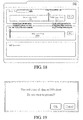
- the window for initialization (as shown in FIG. 10 ) is displayed again by double clicking on the small icon mentioned in FIG. 9 , or in another way shown in FIG. 11 with a cursor moved to the small icon and a mouse right clicked to press the [Show] option from a displayed list.
- the [Exit] option in the list can be pressed if a user intends to disable the public program 121.
- the public program will be disabled and terminated forthwith with the key disk directly unplugged by one user.
- FIG. 12 there are two non-partitioned data disks (G and H) with an identical capacity of 955 Mbytes used to illustrate a process of partition.
- G and H non-partitioned data disks
- FIG. 12 the page for the public program activated is shown in FIG. 12 and the public zones of the data disks are displayed due to no private zone partitioned.
- FIG 13 the data disks in "My Computer” correspond to removable disks G and H separately and different icons given to these two disks by the public program are observed.
- FIG. 14 which illustrates two disks with an identical capacity of 955 Mbytes and taken as public zones is ensured in the Windows Explorer Properties.
- the page for partition switched by the public program displays two methods: (1) Click on the [Setup] button in the page for initialization, as shown in FIG. 15 ; (2) Move a cursor to a small icon for the public program 121 on the system tray and right click on the mouse to click on the [Setup] in the list, as shown in FIG. 16 .
- both the first data disk (Drive G:) and the second data disk (Drive H:) include 100% complete public zones (955M) and have separate separator bars on the left hand side of tables representing public zones of data disks.
- FIG. 18 to partition 700Mbytes as the private zone and 255Mbytes as the public zone of the first data disk (Drive G:)
- a user can adjust a corresponding separator bar to the right hand side by holding a mouse and then press the [Dock] button beside the public zone to activate partition with a desired ratio for partition reached.
- FIG. 18 to partition 700Mbytes as the private zone and 255Mbytes as the public zone of the first data disk (Drive G:)
- a user can adjust a corresponding separator bar to the right hand side by holding a mouse and then press the [Dock] button beside the public zone to activate partition with a desired ratio for partition reached.
- a dialog box will be displayed by the system to allow a user to reconfirm an action to delete current files in a data disk during partition.
- the partition applied to the data disk 110 can be canceled and activated by pressing the [Cancel] button and the [OK] button, respectively.
- the data disk 110 is partitioned by the system (Initializing in progress) when the [OK] button is pressed to confirm partition by one user.
- FIG. 21 a message of "USB drive docked completely" and the [OK] button are displayed with partition completed, and the message window will be closed with the [OK] button pressed.
- other data disks can be also partitioned by dragging a corresponding separator bar and clicking on the [Dock] button. For instance, 400Mbytes and 555Mbytes among the memory area are partitioned to the private zone and the public zone in the second data disk 110 (Drive H:). Furthermore, a password is allowed to be configured in "Add Password”. The window for initialization will be returned with the button on the top left corner pressed depicting a "X" in a box.
- the data disks 110 and the key disk 120 are series-connected and linked to the operating system.
- FIG 23 there are two data disks (G and H) with individual capacities, 70Mbytes and 400Mbytes, for partitioned private zones.
- FIG. 24 which illustrates the contents of two removable disks inspected in the Windows Explorer properties by one user who can observe and operate private zones of the removable disks, 669MB and 399MB displayed in the Windows Explorer properties, because of the key disk cascaded and the public program enabled.
- an object to be operated in the data disk is transferred to the public zone in case of the key disk removed or the public program disabled.
- FIG. 24 which illustrates the contents of two removable disks inspected in the Windows Explorer properties by one user who can observe and operate private zones of the removable disks, 669MB and 399MB displayed in the Windows Explorer properties, because of the key disk cascaded and the public program enabled.
- 25 , 255MB and 555MB displayed in the Windows Explorer properties are public zones of removable disks when the key disk is removed.
- a confidential file and a general file can be saved in the private zone and the public zone by one user, respectively.
- one data disk (removable disk) needs to be series-connected to a corresponding key disk, or general files only can be accessed when a single data disk (removable disk) is plugged in one computer.
- any illegal user intending to embezzle files saved in the private zone without the key disk still fails to access/browse confidential data or even has no idea for the private zones hidden in the data disks (removable disk).
- a message of "Not docked USB drive” is displayed when any key disk rather than the currently cascaded key disk is used to partition sectors of the first data disk (Drive G:) which comprises the private zone and the public zone.
- sector sizes cannot be partitioned in the public program, and a gray icon marked on the data disk (Drive G:) by the system implies no partition allowed.
- a gray icon marked on the data disk (Drive G:) by the system implies no partition allowed.
- FIG. 27 In the case of a requirement to assign the said first data disk (Drive G:) controlled by another key disk, an exclusive method is to find the initial corresponding key disk which is employed to reduce the data disk (Drive G:) to own a 100% public zone without a private zone. Then, the data disk (Drive G:) is allowed to match any key disk.
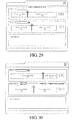
- FIG. 28 displays one page for a partitioned system: A public zone (255M) and a private zone (700M) have been partitioned in the first data disk (Drive G:); a public zone (555M) and a private zone (400M) in the second data disk (Drive H:). As shown in FIG.
- an initial status of the Drive G (prior to a separator bar dragged) will be automatically resumed by the system when another data disk (Drive H:) is directly clicked on with the separator bar for the first data disk (Drive G:) having been dragged (to the left hand side for its public zone of 655M created) but the [Dock] button not pressed.
- the public zone of the first data disk (Drive G:) with its size automatically adjusted to 255M avoids a problem of some private zones lost by one user who carelessly moves the separator bar.
- a corresponding [Dock] button pressed by one operator with a separator bar having been dragged is indispensable to execution of a data disk partitioned. In other words, there is only one data disk partitioned by the program each time.
- a login window will be in place of a window for initialization as the public program 121 is activated.
- a correct password keyed in by one user on a login window will allow this user enter the system, or both execution of various functions of the public program 121 and employment of the private zone 112 of each data disk 110 will be disabled.
- the [Modify] button should be pressed to save all data.
- a warning message of "New password not confirmed” which implies two different passwords keyed in by one user will be noticed to a user by the system, and a new password should be inputted again to confirm its correctness.
- a login window including "Password” and "Password Hint” will be displayed with the public program activated.
- the files in the public zone only can be observed when "My Computer" is opened by one user who intends to access the data disks (Removable Disk(G:) and Removable Disk(H:)), as shown in FIG. 35 .
- the Windows Explorer properties can be used to inspect the data disks (Removable Disk(G:) and Removable Disk(H:)) wherein the capacities of the data disk G (Removable Disk(G:) and the data disk H Removable Disk(H:), 255MB and 555MB respectively, are capacities of public zones of the data disks (Drive G and Drive H) exactly compared to FIG. 32 .
- a hint string configured by one user could be displayed below the checkbox "Password Hint” checked by the user as the user's reference to recall a previously-setup password which is further inputted in the "Password” field to complete a login by clicking on the [Login] button.
- a message of "Incorrect password” displayed on a screen will be hinted to a user by the system, as shown in FIG. 38 .
- the [Back] button should be clicked on to return a login window for input of a correct password.
- the public program will be disabled automatically in case of wrong passwords continuously keyed in three times.
- a window for partition is available to changing a password to a user's desired new one.
- a user Before clicking on the [Modify] button to save a new changed password, a user should key in a currently-used password in the field "Original Password" on the lowest block of the window, a new one in both the field "New Password” and the field “Confirm New Password” confirmed by the system, and an optionally new hint string in the field "Password Hint" according to his (her) preference.
- the operation for update of a new password is unavailable and a message of "Incorrect original password” is displayed to hint one user a password in "Original Password” not matching the previous setup.
- an identification of a data disk 110 in the Windows Explorer can be easily identified due to a unique disk label designated to and marked on each data disk 110 by the public program 121.
- a disk label can be designated to the data disk 110 in the public program 121 whether the data disk 110 and the cascaded key disk 120 are categorized to one group or not.
- FIG. 42 which illustrates a label "Data disk 1" has been designated on the first data disk (G) and a label “Removable disk” on the second data disk (H) due to no label assigned to the second one in "My Computer".
- a label "Data disk 1” is marked on the right hand side of the data disk (G) and no string (blank) on the right hand side of the data disk (H).
- a label "Data disk 1” is marked on the right hand side of the data disk (Drive G) and no string (blank) on the right hand side of the data disk (Drive H). Accordingly, as shown in FIG.
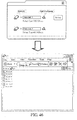
- a desired title for one label (11 letters of the English alphabet (max.)) can be filled in the label input field on the top to add or change a label for each of the data disks (G and H) with "Enter” on a keyboard pressed by one user who intends to update a label. Then, the labels, "Data disk 1" on the first data disk (G) and “Data disk 2" on the second data disk (H), are marked in "My Computer”. Finally, as shown in FIG. 46 , there is one button "Open File Explorer” displayed as a magnifier icon on the right hand side of each label input field.
- the data disk (G) When the button on the right hand side of the data disk (G) is pressed by one user, the data disk (G) will be opened as the Windows Explorer with one window "G: ⁇ " on the screen to display all data in the data disk (G), for instance, "deploy.rtf”, “deploy.txt”, “license.rtf”, etc.
Landscapes
- Engineering & Computer Science (AREA)
- Computer Security & Cryptography (AREA)
- Computer Hardware Design (AREA)
- Theoretical Computer Science (AREA)
- Software Systems (AREA)
- Physics & Mathematics (AREA)
- General Engineering & Computer Science (AREA)
- General Physics & Mathematics (AREA)
- Storage Device Security (AREA)
- Signal Processing For Digital Recording And Reproducing (AREA)
Applications Claiming Priority (1)
| Application Number | Priority Date | Filing Date | Title |
|---|---|---|---|
| TW098125741A TWI382316B (zh) | 2009-07-30 | 2009-07-30 | 具保全功能之隨身碟串接組合結構 |
Publications (2)
| Publication Number | Publication Date |
|---|---|
| EP2284759A2 true EP2284759A2 (de) | 2011-02-16 |
| EP2284759A3 EP2284759A3 (de) | 2012-01-25 |
Family
ID=42989617
Family Applications (1)
| Application Number | Title | Priority Date | Filing Date |
|---|---|---|---|
| EP10163616A Withdrawn EP2284759A3 (de) | 2009-07-30 | 2010-05-21 | Kaskadierte Kombinationsstruktur von Flashplatten zur Schaffung einer Sicherheitsfunktion |
Country Status (5)
| Country | Link |
|---|---|
| US (1) | US20110029721A1 (de) |
| EP (1) | EP2284759A3 (de) |
| JP (1) | JP5009399B2 (de) |
| KR (1) | KR20110013207A (de) |
| TW (1) | TWI382316B (de) |
Cited By (2)
| Publication number | Priority date | Publication date | Assignee | Title |
|---|---|---|---|---|
| EP2801902A4 (de) * | 2012-08-22 | 2015-02-25 | Huawei Tech Co Ltd | Partitionsanzeigeverfahren und vorrichtung für eine speichervorrichtung |
| CN104810044A (zh) * | 2015-05-07 | 2015-07-29 | 东北大学 | 一种可扩展的usb闪存盘 |
Families Citing this family (11)
| Publication number | Priority date | Publication date | Assignee | Title |
|---|---|---|---|---|
| JP5546955B2 (ja) * | 2010-06-02 | 2014-07-09 | 中国電力株式会社 | Usbアダプタ |
| US8301824B2 (en) * | 2010-07-22 | 2012-10-30 | Sandisk Il Ltd. | Using an add-on storage device for extending the storage capacity of a storage device |
| US8296495B2 (en) * | 2010-07-22 | 2012-10-23 | Sandisk Il Ltd. | Using an add-on storage device for extending the storage capacity of a storage device in a host device |
| CN202677849U (zh) * | 2012-06-04 | 2013-01-16 | 旭丽电子(广州)有限公司 | 携带式储存装置 |
| CN102841982A (zh) * | 2012-07-16 | 2012-12-26 | 中兴通讯股份有限公司 | 一种基于Ufi类数据卡产品彩蛋功能的实现方法和系统 |
| US9436830B2 (en) * | 2012-10-17 | 2016-09-06 | Sandisk Technologies Llc | Securing access of removable media devices |
| JP6112235B2 (ja) * | 2014-02-07 | 2017-04-12 | 株式会社村田製作所 | 電力伝送システム |
| CN105320580B (zh) * | 2014-07-11 | 2018-01-30 | 宇瞻科技股份有限公司 | 具有信息安全防护的数据储存系统 |
| CN107851485A (zh) * | 2015-07-23 | 2018-03-27 | 富士胶片株式会社 | 层叠体 |
| TWI644204B (zh) * | 2017-08-01 | 2018-12-11 | 英業達股份有限公司 | 非揮發性記憶體磁區規劃方法 |
| FR3087911B1 (fr) * | 2018-10-24 | 2021-11-12 | Amadeus Sas | Authentification par pointage et cliquage |
Family Cites Families (10)
| Publication number | Priority date | Publication date | Assignee | Title |
|---|---|---|---|---|
| JP2002041247A (ja) * | 2000-07-28 | 2002-02-08 | Nec Corp | コンピュータシステムおよびusbメモリ装置 |
| TWM251198U (en) * | 2003-12-24 | 2004-11-21 | Paysecure Technology Co Ltd | Embedded-insertion type data protection device |
| US7557941B2 (en) * | 2004-05-27 | 2009-07-07 | Silverbrook Research Pty Ltd | Use of variant and base keys with three or more entities |
| TW200620304A (en) * | 2004-12-08 | 2006-06-16 | Mitac Technology Corp | Multi-functional USB portable disk device |
| SG123627A1 (en) * | 2004-12-20 | 2006-07-26 | Trek 2000 Int Ltd | Method for overcoming system administration blockage |
| US20060149895A1 (en) * | 2005-01-04 | 2006-07-06 | Pocrass Alan L | Flash memory with integrated male and female connectors and wireless capability |
| US8000502B2 (en) * | 2005-03-09 | 2011-08-16 | Sandisk Technologies Inc. | Portable memory storage device with biometric identification security |
| JP2008129744A (ja) * | 2006-11-20 | 2008-06-05 | Hitachi Ltd | 外部記憶装置 |
| JP2009021739A (ja) * | 2007-07-11 | 2009-01-29 | Bellwood International Inc | 暗号化ユニットおよび可搬型装置 |
| US20090125645A1 (en) * | 2007-11-12 | 2009-05-14 | Gemalto Inc | System and method for supporting multiple tokens having a smart card to control parameters of a flash memory device |
-
2009
- 2009-07-30 TW TW098125741A patent/TWI382316B/zh not_active IP Right Cessation
-
2010
- 2010-05-17 US US12/801,008 patent/US20110029721A1/en not_active Abandoned
- 2010-05-21 EP EP10163616A patent/EP2284759A3/de not_active Withdrawn
- 2010-05-28 KR KR1020100050108A patent/KR20110013207A/ko not_active Ceased
- 2010-06-24 JP JP2010144319A patent/JP5009399B2/ja not_active Expired - Fee Related
Non-Patent Citations (1)
| Title |
|---|
| None |
Cited By (3)
| Publication number | Priority date | Publication date | Assignee | Title |
|---|---|---|---|---|
| EP2801902A4 (de) * | 2012-08-22 | 2015-02-25 | Huawei Tech Co Ltd | Partitionsanzeigeverfahren und vorrichtung für eine speichervorrichtung |
| CN104810044A (zh) * | 2015-05-07 | 2015-07-29 | 东北大学 | 一种可扩展的usb闪存盘 |
| CN104810044B (zh) * | 2015-05-07 | 2017-06-13 | 东北大学 | 一种可扩展的usb闪存盘 |
Also Published As
| Publication number | Publication date |
|---|---|
| TWI382316B (zh) | 2013-01-11 |
| EP2284759A3 (de) | 2012-01-25 |
| KR20110013207A (ko) | 2011-02-09 |
| US20110029721A1 (en) | 2011-02-03 |
| TW201104445A (en) | 2011-02-01 |
| JP5009399B2 (ja) | 2012-08-22 |
| JP2011034557A (ja) | 2011-02-17 |
Similar Documents
| Publication | Publication Date | Title |
|---|---|---|
| EP2284759A2 (de) | Kaskadierte Kombinationsstruktur von Flashplatten zur Schaffung einer Sicherheitsfunktion | |
| US20100180227A1 (en) | Method, system and apparatus for a graphical user interface with horizontal workspace | |
| US5664128A (en) | Object storage apparatus for use with data sets in computer applications | |
| KR102318716B1 (ko) | 스마트폰과의 무선 통신에 의하여 데이터 보호 기능을 갖는 데이터 저장 수단 제어 장치 및 방법 | |
| US20070242421A1 (en) | Folding computer | |
| WO2004086363A3 (en) | Data storage device with full access by all users | |
| KR102166430B1 (ko) | 데이터 보호 기능을 갖는 ssd 기반의 저장미디어 | |
| CN101553790B (zh) | 保护移动存储介质上的保密信息的方法和系统 | |
| CN109074398A (zh) | 具有统一媒体中心用户界面的移动设备 | |
| CN101430700B (zh) | 文件系统管理装置和方法以及存储装置 | |
| US20150111612A1 (en) | Portable processing unit add on for mobile devices | |
| US8490204B2 (en) | Selective protection of files on portable memory devices | |
| JP4793949B2 (ja) | コンピュータ情報処理装置および情報管理プログラム | |
| TW201017521A (en) | Portable dual display reader and operating system thereof | |
| TWI387883B (zh) | 克服系統管理封鎖之方法、媒體及裝置 | |
| US20060080540A1 (en) | Removable/detachable operating system | |
| US20070233727A1 (en) | Multiple Virtual Devices | |
| US20140372653A1 (en) | Storage Device with Multiple Interfaces and Multiple Levels of Data Protection and Related Method Thereof | |
| KR20200118780A (ko) | 스마트폰과의 무선 통신에 의하여 데이터 보호 기능을 갖는 데이터 저장수단 제어 장치 및 방법 | |
| JP2005044012A (ja) | 携帯式情報記憶装置及びそれを自動的に作動させる方法 | |
| Johnson | Microsoft Windows 7 On Demand, Portable Documents | |
| TW200935221A (en) | System for securing an access to flash memory device and method for the same | |
| CN100407322C (zh) | 具独立储存区间的储存装置及其密码保护方法 | |
| US20120042113A1 (en) | Mobile computing appliance for hosting a portable, bootable medium | |
| US20080244163A1 (en) | Portable data access device |
Legal Events
| Date | Code | Title | Description |
|---|---|---|---|
| PUAI | Public reference made under article 153(3) epc to a published international application that has entered the european phase |
Free format text: ORIGINAL CODE: 0009012 |
|
| 17P | Request for examination filed |
Effective date: 20100521 |
|
| AK | Designated contracting states |
Kind code of ref document: A2 Designated state(s): AL AT BE BG CH CY CZ DE DK EE ES FI FR GB GR HR HU IE IS IT LI LT LU LV MC MK MT NL NO PL PT RO SE SI SK SM TR |
|
| AX | Request for extension of the european patent |
Extension state: BA ME RS |
|
| PUAL | Search report despatched |
Free format text: ORIGINAL CODE: 0009013 |
|
| AK | Designated contracting states |
Kind code of ref document: A3 Designated state(s): AL AT BE BG CH CY CZ DE DK EE ES FI FR GB GR HR HU IE IS IT LI LT LU LV MC MK MT NL NO PL PT RO SE SI SK SM TR |
|
| AX | Request for extension of the european patent |
Extension state: BA ME RS |
|
| RIC1 | Information provided on ipc code assigned before grant |
Ipc: G06F 21/02 20060101AFI20111216BHEP |
|
| STAA | Information on the status of an ep patent application or granted ep patent |
Free format text: STATUS: THE APPLICATION IS DEEMED TO BE WITHDRAWN |
|
| 18D | Application deemed to be withdrawn |
Effective date: 20120726 |