EP2267412A2 - Standortsuchvorrichtung, Standortsuchverfahren und computerlesbares Speichermedium, das ein Standortsuchprogramm speichert - Google Patents
Standortsuchvorrichtung, Standortsuchverfahren und computerlesbares Speichermedium, das ein Standortsuchprogramm speichert Download PDFInfo
- Publication number
- EP2267412A2 EP2267412A2 EP10165468A EP10165468A EP2267412A2 EP 2267412 A2 EP2267412 A2 EP 2267412A2 EP 10165468 A EP10165468 A EP 10165468A EP 10165468 A EP10165468 A EP 10165468A EP 2267412 A2 EP2267412 A2 EP 2267412A2
- Authority
- EP
- European Patent Office
- Prior art keywords
- input
- character
- character string
- button
- pressed
- Prior art date
- Legal status (The legal status is an assumption and is not a legal conclusion. Google has not performed a legal analysis and makes no representation as to the accuracy of the status listed.)
- Withdrawn
Links
- 238000000034 method Methods 0.000 title claims description 12
- 238000003825 pressing Methods 0.000 claims abstract description 40
- 150000001875 compounds Chemical class 0.000 claims abstract description 14
- 125000004122 cyclic group Chemical group 0.000 claims abstract description 8
- 230000008569 process Effects 0.000 claims description 2
- 238000012545 processing Methods 0.000 description 57
- 239000004973 liquid crystal related substance Substances 0.000 description 11
- 238000004891 communication Methods 0.000 description 8
- 235000013529 tequila Nutrition 0.000 description 8
- 230000008859 change Effects 0.000 description 5
- 238000013500 data storage Methods 0.000 description 3
- 238000001514 detection method Methods 0.000 description 3
- 238000010586 diagram Methods 0.000 description 3
- 235000016496 Panda oleosa Nutrition 0.000 description 2
- 240000000220 Panda oleosa Species 0.000 description 2
- 238000006243 chemical reaction Methods 0.000 description 2
- 230000001351 cycling effect Effects 0.000 description 2
- 230000006870 function Effects 0.000 description 2
- 230000015654 memory Effects 0.000 description 2
- 230000005540 biological transmission Effects 0.000 description 1
- 238000005516 engineering process Methods 0.000 description 1
- 239000000284 extract Substances 0.000 description 1
- 238000010348 incorporation Methods 0.000 description 1
- 238000005259 measurement Methods 0.000 description 1
- 238000012986 modification Methods 0.000 description 1
- 230000004048 modification Effects 0.000 description 1
- 230000002093 peripheral effect Effects 0.000 description 1
- 230000003936 working memory Effects 0.000 description 1
Images




Classifications
-
- G—PHYSICS
- G01—MEASURING; TESTING
- G01C—MEASURING DISTANCES, LEVELS OR BEARINGS; SURVEYING; NAVIGATION; GYROSCOPIC INSTRUMENTS; PHOTOGRAMMETRY OR VIDEOGRAMMETRY
- G01C21/00—Navigation; Navigational instruments not provided for in groups G01C1/00 - G01C19/00
- G01C21/26—Navigation; Navigational instruments not provided for in groups G01C1/00 - G01C19/00 specially adapted for navigation in a road network
- G01C21/34—Route searching; Route guidance
- G01C21/36—Input/output arrangements for on-board computers
- G01C21/3605—Destination input or retrieval
- G01C21/3611—Destination input or retrieval using character input or menus, e.g. menus of POIs
Definitions
- the present invention relates to a location search device, a location search method, and a computer-readable storage medium that stores a location search program that have a limited number of buttons for inputting characters.
- JP-A-2007-206978 twelve keys are arranged in four rows of three keys each in a key portion 4 of a mobile telephone terminal.
- a text input area 32 and a candidate list area 33 are displayed on a screen of the mobile telephone terminal, with a text of an e-mail message being displayed in the text input area 32 and a list of predicted candidates being displayed in the candidate list area 33 in an arrangement that corresponds to the key arrangement (four rows of three keys each) in the key portion 4.
- the mobile telephone terminal displays, as input characters in the text input area 32, characters that are assigned to the pressed key.
- the mobile telephone terminal displays, in the text input area 32, the predicted candidate that, of the predicted candidates that are displayed in the candidate list area 33, is in a display position that corresponds to the position of the key in the key portion 4 that is pressed for a long time.
- the mobile telephone terminal that is described in No. JP-A-2007-206978 is provided with a function that displays the list of the predicted candidates, but the function displays only the predicted candidates that begin with a character string that matches the characters that have been input through the key portion 4 up to this point. Therefore, in a case where the last character that was input is the kana "ko", for example, that is, a character that begins with the consonant "k", a user, in using a ten-key pad to input the kana character, must press a key for the characters that begin with the consonant "k” five times, each time for a short time, in order to display the predicted candidates that match the input up to the character "ko". The usability is thus poor.
- the present invention provides a location search device, a location search method, and a computer-readable storage medium that stores a location search program that are capable of simultaneously displaying candidate location names that begin with a character string that matches a character string that is configured from other characters that can be input from the button that is pressed.
- a first aspect of the invention relates to a location search device that includes: a character string storage portion that stores a plurality of search object character strings; a character input portion that includes a plurality of buttons; an input character display portion in which a character input through the character input portion is displayed, wherein when one of the plurality of buttons is repeatedly pressed or pressed continuously for a given time or longer, a plurality of characters assigned in advance to the one button is displayed in the input character display portion in a predetermined cyclic sequence; when one of the plurality of buttons is pressed, and then, another of the plurality of buttons is pressed, the character displayed in the input character display portion immediately prior to pressing of the other button is set as an input set character whose input has been set; and when the character is input through the character input portion following the input set character, a character string is input; an input candidate character string acquisition portion that acquires the search object character string that partially matches the character string input through the character input portion, as an input candidate character string, from the character string storage portion; and an input candidate character string
- the input candidate character string acquisition portion creates a plurality of compound character strings by combining the input set character string whose input has been set through the character input portion with the plurality of characters assigned in advance to the button that is pressed next, and the input candidate character string acquisition portion acquires the search object character strings that partially match the respective compound character strings, as the input candidate character strings, from the character string storage portion.
- a second aspect of the invention relates to a location search method that includes the steps of: performing a character input process, wherein when one of a plurality of buttons in a character input portion is repeatedly pressed or pressed continuously for a given time or longer, a plurality of characters assigned in advance to the one button is displayed in an input character display portion in a predetermined cyclic sequence; when one of the plurality of buttons is pressed, and then, another of the plurality of buttons is pressed, the character displayed in the input character display portion immediately prior to pressing of the other button is set as an input set character whose input has been set; and when the character is input through the character input portion following the input set character, a character string is input; acquiring a search object character string that partially matches the input character string, as an input candidate character string, from a character string storage portion that stores a plurality of search object character strings; and assigning the input candidate character string to a character string button through which the input candidate character string is input, and displaying the input candidate character string assigned to the character string button; and
- a third aspect of the invention relates to a computer-readable medium that stores a computer-executable location search program that causes a computer to perform the location search method according to the third aspect of the invention.
- the user can perform input by pressing one of the input candidate character strings whose first portions match the character string that is configured from another character that can be displayed by pressing the same button a specified number of times, without cyclically displaying the characters by pressing the same button an unspecified number of times.
- a fourth aspect of the invention relates to a location search device that includes: a character string storage portion that stores a plurality of search object character strings; a character input portion that includes a plurality of buttons; an input character display portion in which a character input through the character input portion is displayed, wherein when one of the plurality of buttons is repeatedly pressed or pressed continuously for a given time or longer, a plurality of characters assigned in advance to the one button is displayed in the input character display portion in a predetermined cyclic sequence; when one of the plurality of buttons is pressed, and then, another of the plurality of buttons is pressed, the character displayed in the input character display portion immediately prior to pressing of the other button is set as an input set character whose input has been set; and when the character is input through the character input portion following the input set character, a character string is input; a time measurement portion that measures a pressed time during which the button in the character input portion is pressed; a character determination portion that determines whether at least one of the search object character strings stored in the character string
- the user can efficiently input a character for which a search object character string exists. Furthermore, even if the button is one of pressed for a long time and pressed continuously, by looking at the characters that are cyclically displayed, the user can easily confirm whether or not a search object character string exists that partially matches the character string that includes the currently displayed character.
- a navigation device 1 is configured from a current position detection processing portion 11, a data storage portion 12, a navigation control portion 13, an operation portion 14, a liquid crystal display 15, a speaker 16, a communication device 17, and a touch panel 18.
- the current position detection processing portion 11 detects a current position of a vehicle.
- the data storage portion 12 stores various types of data.
- the navigation control portion 13 performs various types of computational processing based on information that is input.
- the operation portion 14 accepts operations from an operator.
- the liquid crystal display 15 displays information such as a map and the like to the operator.
- the speaker 16 outputs voice guidance that pertains to route guidance and the like.
- the communication device 17 communicates, through a mobile telephone network or the like, with a road traffic information center, a map information distribution center, and the like, which are not shown in the drawings.
- the touch panel 18 is mounted on the surface of the liquid crystal display 15.
- a vehicle speed sensor 21 that detects the speed of the vehicle is connected to the navigation control portion 13.
- the current position detection processing portion 11 is provided with a GPS 31, a heading sensor 32, a distance sensor 33, and the like, and it is capable of detecting the current position of the vehicle (hereinafter called the vehicle position), the vehicle direction, which indicate the direction the vehicle is facing, the distance the vehicle has traveled, and the like.
- the data storage portion 12 is provided with a hard disk (not shown in the drawings) that serves as an external storage device and a storage medium, as well as with a read-write head (not shown in the drawings) for reading a map information database (a map information DB) 25 that is stored on the hard disk, a character string database (a character string DB) 27, a specified program, and the like and for writing specified data to the hard disk.
- a map information database a map information DB
- a character string database a character string DB
- navigation map information 26 that is used by the navigation device 1 for driving guidance and route searching is stored in the map information DB 25.
- the navigation map information 26 is configured from various types of information that are necessary for route guidance and map displaying.
- the navigation map information 26 may be configured from newly built road information for specifying various newly built roads, map display data for displaying maps, intersection data that pertain to various intersections, node data that pertain to node points, link data that pertain to roads (links) that are a type of facility, search data for searching for a route, POI data that pertain to points of interest (POIs) such as shops and the like, which are a type of facility, data for searching for a location, and the like.
- the POI data include names, addresses, telephone numbers, and the like for POIs such as hotels, hospitals, gasoline stations, parking spaces, train stations, airports, ferry terminals, and the like in various regions, and they are stored together with IDs that specify the POIs.
- the contents of the map information DB 25 are updated by downloading, through the communication device 17, update information that is distributed from the map information distribution center that is not shown in the drawings.
- the character string DB 27 contains a candidate character string file 51 (refer to FIG. 2 ) and a button data file 52 (refer to FIG. 3 ).
- the candidate character string file 51 stores, as candidate character strings, a plurality of character strings that indicate destinations and that will be described later.
- the button data file 52 stores button numbers of input keys 62 (refer to FIG. 6 ) to which alphabetic characters are assigned and also stores the numbers of times that each button is pressed to display a specific character. The input keys 62 will be described later.
- the navigation control portion 13 that is a configuring element of the navigation device 1 is provided with a CPU 41, a RAM 42, a ROM 43, an internal storage device such as a flash memory 44 or the like, a timer 45, and the like.
- the CPU 41 serves as a computing device and a control device, and it performs control of the entire navigation device 1.
- the RAM 42 is used as a working memory when the CPU 41 performs various types of computational processing, and it also stores route data and the like when a search for a route is conducted.
- a control program is stored in the ROM 43.
- the internal storage device such as the flash memory 44 or the like stores a program that is read from the ROM 43.
- the timer 45 measures time.
- the ROM 43 stores programs for various types of processing, including candidate character string display processing (refer to FIG. 4 ) that will be described later and that selects and displays a candidate character string in accordance with an input set character string whose input has been set and with the number of times that one of the input keys 62 has been pressed.
- the ROM 43 also stores a program for display state change processing (refer to FIG. 8 ) that changes a display state of an input character display portion 66 according to whether a button of the input keys 62 that will be described later is pressed for a short time or a long time, the short time being less than a specified time, and the long time being not less than the specified time.
- various peripheral devices such as the operation portion 14, the liquid crystal display 15, the speaker 16, the communication device 17, and the touch panel 18 are electrically connected to the navigation control portion 13.
- the operation portion 14 is operated when the current position is corrected when travel begins, when a departure point is input as a guidance starting point, when a destination is input as a guidance ending point, and when a search is conducted for information that pertains to a facility.
- the operation portion 14 is configured from various types of keys and a plurality of operation switches.
- the navigation control portion 13 also performs control of various types of operations that are performed based on switch signals that are output by the pressing and the like of the various switches, to which the various types of operations correspond.
- the liquid crystal display 15 displays map information for the area where the vehicle is currently traveling, a search term input screen 61 (refer to FIG. 6 ), operation guidance, an operation menu, key guidance, a recommended route from the current position to the destination, guidance information along the recommended route, traffic information, news, weather forecasts, the time, e-mail, television programs, and the like.
- the speaker 16 Based on commands from the navigation control portion 13, the speaker 16 outputs, among other things, voice guidance that provides guidance to driving along the recommended route.
- voice guidance may be, for example, "Turn right at the XX intersection 200 meters ahead.”
- the communication device 17 performs communication with the map information distribution center using a mobile telephone network or the like.
- the communication device 17 performs transmission and receiving of the newest versions of map update information and the like to and from the map information distribution center.
- the communication device 17 receives traffic information that includes various types of information that are transmitted from the road traffic information center and the like, such as congestion information, the degree of crowding at a service area, and the like.
- the touch panel 18 is a collection of touch switches that is mounted on the surface of the liquid crystal display 15, and it is configured such that various types of commands can be input by pressing one of a button and a map that are displayed on the screen of the liquid crystal display 15. Note that the touch panel 18 may also be configured in the form of liquid crystal light sensors or the like such that the screen of the liquid crystal display 15 is pressed directly.
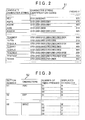
- FIG. 2 is a figure that shows an example of the candidate character string data file 51 that is stored in the character string DB 27.
- the candidate character string file 51 includes candidate character strings, character string identification codes, and priority values.
- the candidate character strings indicate location names, genres, facility names, abbreviated facility names, keywords that indicate facilities, and the like, and they are stored in alphabetical order.
- Each of the character string identification codes includes an identification code for each of the characters in the corresponding candidate character string.
- Each of the character identification codes is made up of a two-digit button number and a two-digit number of times pressed.
- the two-digit button number corresponds to a button (a key) among the input keys 62 and is stored in the button data file 52, which will be described later.
- the two-digit number of times pressed corresponds to the number of times that the key in question is pressed to input the character.
- Each of the priority values is stored in correspondence to one of the candidate character strings, and a higher numerical value indicates a higher priority.
- the identification codes for the individual characters in the candidate character string "AEJ" that is, the identification code "0101” for the character “A”, which is composed of the button number “01” and the number of times pressed “01”; the identification code “0202” for the character “E”, which is composed of the button number "02” and the number of times pressed “02”, the identification code "0401” for the character “J”, which is composed of the button number "04” and the number of times pressed "01", are stored in the character string identification codes in the order in which the individual characters are input.
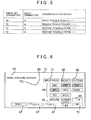
- FIG. 3 is a diagram that shows an example of the button data file 52 that is stored in the character string DB 27.
- the button data file 52 includes the button numbers, the characters that are assigned to each of the buttons, the numbers of times each of the buttons is pressed, and the characters that are displayed when each of the buttons is pressed the specified numbers of times.
- the button numbers are two-digit button numbers that identify the individual buttons in the input keys 62.
- the two-digit button numbers "01” to “08” are respectively assigned to the buttons "ABC”, “DEF”, “GHI”, “JKL”, “MNO”, “PQRS”, “TUV”, and "WXYZ”.
- the characters that are assigned to the buttons are stored in the form of alphabetic characters.
- the numbers of times that the buttons are pressed are stored in the form of two-digit numbers from "01" to "04" that indicate the numbers of times that the buttons are pressed in order to select the alphabetic characters that are assigned to the buttons.
- the displayed characters are the characters that are displayed in the input character display portion 66 of the search term input screen 61 (refer to FIG. 6 ) when the respective buttons are pressed the specified numbers of times.
- the identification code that corresponds to the character “A” in the candidate character strings in the candidate character string file 51 is "0101”.
- the identification code that corresponds to the character "B” in the candidate character strings is "0102”.
- FIG. 4 is a flowchart that shows the candidate character string display processing that is the processing that the CPU 41 performs and that displays the candidate character strings in accordance with the input set character string and with the number of times that one of the input keys 62 has been pressed.
- the program that is shown by the flowchart in FIG. 4 is executed by the CPU 41 at specified intervals (for example, every ten milliseconds) in a case where a destination setting button in the operation portion 14 that is not shown in the drawings is pressed. Furthermore, in a case where the destination setting button in the operation portion 14 that is not shown in the drawings is pressed, the CPU 41 displays, on the screen of the liquid crystal display 15, the search term input screen 61 (refer to FIG. 6 ) on which a search term is input as location information for searching for a name or the like that pertains to a facility.
- step (hereinafter abbreviated as S) 11 the CPU 41 performs determination processing that determines whether or not one of the input keys 62 that are displayed on the search term input screen 61 and to which the alphabetic characters are assigned has been pressed. In a case where none of the buttons in the input keys 62 has been pressed (NO at S11), the CPU 41 terminates the processing.
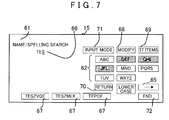
- the input keys 62, a lowercase conversion button 63, an input set button 65, the input character display portion 66, three candidate character string display portions 67, a modify button 68, a number of items display portion 69, a return button 70, an input mode display portion 71, and an end button 72 are displayed on the search term input screen 61.
- the input keys 62 include eight buttons, to each of which a plurality of characters are assigned and each of which displays the characters that are assigned to it. For example, “ABC” is displayed on the button to which the characters “A”, “B”, and “C” are assigned. Alternatively, the button to which the characters “A”, “B”, and “C” are assigned may also display only the character “A”. Furthermore, every time that one of the buttons in the input keys 62 is pressed, the characters that are assigned to the button are repeatedly displayed in the input character display portion 66, in order from the first character to the last character.
- the other button or the input set button 65 When one of the buttons is pressed, and then, the other button or the input set button 65 is pressed, the character displayed immediately prior to pressing of the other button or the input set button 65 is displayed as the input set character whose input has been set. Thereafter, every time that the other button is pressed, the characters that are assigned to the other button can be displayed in order and can be input.
- pressing the lowercase conversion button 63 causes the character that is being input and that is displayed in the input character display portion 66 to be converted into a lowercase character. Then pressing the input set button 65 or the other button among the input keys 62 causes the lowercase character to become the input set character whose input has been set.
- the character that is being input and that is displayed in the input character display portion 66 can be set by pressing the input set button 65. Therefore, any one of the characters that are assigned to the same button, such as "A", "B", or the like, for example, can be input next by pressing the input set button 65.
- the last input character in the character string that is displayed in the input character display portion 66 can be deleted, one character at a time, by pressing the modify button 68. Furthermore, the state that existed prior to the most recent operation can be restored by pressing the return button 70. The number of the candidate locations that were found in accordance with the character string that is displayed in the input character display portion 66 are displayed in the number of items display portion 69.
- a current input mode such as alphabetic characters or the like, is displayed in the input mode display portion 71. Further, pressing the end button 72 causes a search to be conducted, using the character string that is displayed in the input character display portion 66 as the search term, for a name or the like that pertains to a facility and serves as location information, with a list of the search results being displayed.
- the CPU 41 advances to the processing at S12.
- the CPU 41 makes a determination as to whether or not checks have been performed for all of the candidate character strings that are stored in the candidate character string file 51, that is, whether or not it is impossible to read the next candidate character string from among the candidate character strings that are stored in the candidate character string file 51.
- the CPU 41 reads the candidate character strings that are stored in the candidate character string file 51 in order, starting with the first candidate character string.
- the CPU 41 reads the next candidate character string from among the candidate character strings that are stored in the candidate character string file 51, stores the candidate character string in the RAM 42, and advances to the processing at S13.
- the CPU 41 reads the next candidate character string from the RAM 42 and performs determination processing that determines whether or not the first portion of the candidate character string matches all but the last character of the input character string that is displayed in the input character display portion 66, that is, whether or not the first portion of the candidate character string matches the input set character string. In a case where it is determined that the first portion of the candidate character string that is read from the RAM 42 does not match the input set character string whose input has been set (NO at S13), the CPU 41 once again performs the processing that begins at S12.
- the CPU 41 advances to the processing at S14.
- the CPU 41 performs determination processing that determines whether or not the next character in the candidate character string that is read from the RAM 42 is a character that can be input using the button among the input keys 62 that was used to input the last input character that is displayed in the input character display portion 66, that is, whether or not the next character in the candidate character string is assigned to the same button as the last input character.
- the CPU 41 reads from the candidate character string file 51 the character string identification code that corresponds to the candidate character string that was read from the RAM 42, extracts the identification code for the next character in the first portion of the candidate character string, and stores the identification code in the RAM 42.
- the CPU 41 also reads from the button data file 52 the button number that corresponds to last input character that is displayed in the input character display portion 66.
- the CPU 41 then performs determination processing that determines whether or not the first two digits in the identification code for the next character in the first portion of the candidate character string match the button number that corresponds to last input character, that is, whether or not the button number is the same.
- the CPU 41 In a case where it is determined that the next character in the candidate character string, after the first portion that matches the input set character string, is not a character that can be input using the button among the input keys 62 that was used to input the last input character that is displayed in the input character display portion 66 (NO at S14), the CPU 41 once again performs the processing that begins at S12. Specifically, in a case where it is determined that the first two digits in the identification code for the next character after the matching first portion of the candidate character string do not match the button number that corresponds to last input character and that was read from the button data file 52 (NO at S14), the CPU 41 once again performs the processing that begins at S12.
- the CPU 41 advances to the processing at S15. Specifically, in a case where it is determined that the first two digits in the identification code for the next character after the matching first portion of the candidate character string do match the button number that corresponds to the last input character and that was read from the button data file 52 (YES at S14), the CPU 41 advances to the processing at S15.
- the CPU 41 reads from the button data file 52 the number of times pressed that corresponds to the last input character that is displayed in the input character display portion 66. Then, based on the number of times pressed that corresponds to the last input character and based on the last two digits of the identification code for the next character after the matching first portion of the candidate character string, that is, the number of times pressed for the next character, the CPU 41 obtains the number of times that the button among the input keys 62 is required to be pressed to display the next character after the last input character.
- the CPU 41 reads the priority value for the candidate character string from the candidate character string file 51 and obtains a display priority value for the candidate character string in such a manner that the display priority value increases with decrease in the number of times that the button among the input keys 62 is required to be pressed to display the next character after the last input character.
- the display priority value is obtained by adding "8000" to the priority value for the candidate character string.
- the display priority values are respectively obtained by adding "4000", "2000", and "zero" to the priority value for the candidate character string.
- the CPU 41 stores the candidate character string, which is treated as a candidate for output that will be displayed in one of the candidate character string display portions 67 on the search term input screen 61, in the RAM 42 in association with the display priority value. Then the CPU 41 once again performs the processing that begins at S12.
- the CPU 41 advances to the processing at S17.
- the CPU 41 reads from the RAM 42 the candidate character strings that were stored in the RAM 42 as the candidates for output, also reading the display priority values that are associated with the candidate character strings, then sorts the candidate character strings in descending order of priority, that is, starting with the candidate character string that has the highest display priority value.
- the CPU 41 selects a predetermined number N (for example, three) of the candidate character strings that have been sorted in descending display priority order, that is, in order starting with the highest display priority value, and displays the selected candidate character strings in the candidate character string display portions 67 on the search term input screen 61.
- N for example, three
- the display priority value for each of the candidate character strings is obtained by adding one of "8000”, “4000”, “2000”, and “zero” to the priority value for the candidate character string, according to whether the number of times that the "PQRS" button is required to be pressed to display the next character in the candidate character string, after the first portion that matches the input set character string and after the last input character, is zero times, one time, two times, or three times, respectively.
- the CPU 41 reads “TEPCE”, “TEQUILA”, “TEQVKY”, “TEQVLX”, “TESZMLK”, and “TESZVQF” in that order as the candidate character strings from the candidate character string file 51.
- the display priority values for those candidate character strings are "8219”, “4188”, “4160”, “4180”, “208”, and "253", respectively.
- the CPU 41 sorts the candidate character strings in descending order by the display priority values, that is, “TEPCE”, “TEQUILA”, “TEQVLX”, and so on, then stores them in the RAM 42 as the candidates for output.
- the CPU 41 displays "TEP” in the input character display portion 66 on the search term input screen 61 and also selects "TEPCE”, “TEQUILA”, and “TEQVLX", the three candidate character strings with the highest display priority values, and displays them in the candidate character string display portions 67.
- the CPU 41 reads "TEPCE”, “TEQUILA”, “TEQVKY”, “TEQVLX”, “TESZMLK”, and “TESZVQF” in that order as the candidate character strings from the candidate character string file 51.
- the display priority values for those candidate character strings are "4219”, “2188”, “2160”, “2180”, “8208”, and "8253", respectively.
- the CPU 41 sorts the candidate character strings in descending order by the display priority values, that is, “TESZVQF”, “TESZMLK”, “TEPCE”, and so on, then stores them in the RAM 42 as the candidates for output.
- the CPU 41 displays "TES" in the input character display portion 66 on the search term input screen 61 and also selects "TESZVQF”, “TESZMLK”, and "TEPCE", the three candidate character strings with the highest display priority values, and displays them in the candidate character string display portions 67.
- the CPU 41 displays the button in a state that is toned down from the ordinary display state, such as by displaying the button itself or the characters within the button in gray or the like, or by making the button or the characters more transparent.
- the next character after the matching first portion in each of the candidate character strings is a character that is not included in the "DEF” button, the "GHI” button, and the “JKL” button, the “DEF” button, the “GHI” button, and the “JKL” button are displayed in a state that is toned down from the ordinary display state, such as by displaying the buttons in gray or the like.
- input keys are used to input the syllables of the Japanese syllabary, so in a case where the last input character is the Japanese character "ko", for example, that is, where the character is in the set of characters in the Japanese syllabary that begin with the consonant "k", the input key for the characters that begin with "k” is required to be briefly pressed five times, which is cumbersome.
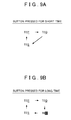
- buttons in the input keys 62 are pressed, as in the present example, in a case where one of the buttons is pressed for a long time (details of which will be described later), if the display of the button in the input keys 62, for example the display of the "PQRS” button, is switched from “P" to "Q” to "S” to "P” to “Q” and so on, such that "R” is skipped, or if the "R” is toned down, it will be hidden by the user's finger and cannot be confirmed. Accordingly, based on FIGS.
- buttons in the input keys 62 is one of pressed for a long time and pressed continuously, that is, the one of the buttons is pressed for not less than a specified time, makes it easy to know that a character cannot be input through that button because there is no matching candidate character string.
- FIG. 8 is a flowchart that shows the display state change processing that changes the state of the display in the input character display portion 66 according to whether one of the buttons in the input keys 62 is pressed for the short time or the long time.
- the program that is shown by the flowchart in FIG. 8 is executed by the CPU 41 at specified intervals (for example, every ten milliseconds) in a case where a destination setting button in the operation portion 14 that is not shown in the drawings is pressed. Furthermore, in a case where the destination setting button in the operation portion 14 that is not shown in the drawings is pressed, the CPU 41 displays, on the screen of the liquid crystal display 15, the search term input screen 61 (refer to FIG. 10 ) on which a search term is input as location information for searching for a name or the like that pertains to a facility.
- the CPU 41 performs determination processing that determines whether or not one of the input keys 62 that are displayed on the search term input screen 61 and to which the alphabetic characters are assigned has been pressed. In a case where none of the buttons in the input keys 62 has been pressed (NO at S111), the CPU 41 terminates the processing.
- the CPU 41 advances to the processing at S112.
- the CPU 41 using the timer 45, starts to measure the time that the button in the input keys 62 is pressed. Then the CPU 41 performs determination processing that determines whether the time that the button is pressed is the short time that is less than the specified time (for example, less than one second) or is the long time that is not less than the specified time (for example, less than one second), representing a continuous pressing of the button.
- the CPU 41 selects the next character from among the plurality of characters that are assigned to the button as the character to be displayed after the input set character string.
- the CPU 41 then advances to the processing at S113. Note that in the case where the button is pressed for the short time, every time that the button is pressed for the short time, the CPU 41 selects, as the character to be displayed after the input set character string, the next character among the characters that are assigned to the button, cycling through the characters in alphabetical order.
- the CPU 41 performs determination processing that determines whether or not the next character that has been selected as the character to be displayed after the input set character string is a character that can be input as the character after the input set character string. In other words, the CPU 41 performs determination processing that determines whether or not a candidate character string is stored in the candidate character string file 51 whose first portion matches a character string that is formed by appending the selected next character to the input set character string.
- the CPU 41 does not display the selected character after the input set character string, but instead selects the next character after the selected character as the character to be displayed after the input set character string. Then the CPU 41 once again performs the processing at S113.
- the CPU 41 advances to the processing at S114.
- the CPU 41 displays in ordinary form the character that has been selected as the character to be displayed after the input set character string. In other words, the CPU 41 displays the character as the last input character in the input character display portion 66 on the search term input screen 61, using the font and the color that are used for an ordinary display. The CPU 41 then terminates the processing.
- the CPU 41 selects the next character as the character to be displayed after the input set character string.
- the CPU 41 then advances to the processing at S115. Note that in the case where the button is pressed for the long time, for as long as the button is being pressed, the CPU 41 selects, as the character to be displayed after the input set character string, the next character among the characters that are assigned to the button, cycling through the characters in alphabetical order and switching the selected character at specified intervals (for example, intervals of approximately one second).
- the CPU 41 performs determination processing that determines whether or not the next character that has been selected as the character to be displayed after the input set character string is a character that can be input as the character after the input set character string. In other words, the CPU 41 performs determination processing that determines whether or not a candidate character string is stored in the candidate character string file 51 whose first portion matches a character string that is formed by appending the selected next character to the input set character string.
- the CPU 41 advances to the processing at S116.
- the CPU 41 displays in ordinary form the character that has been selected as the character to be displayed after the input set character string. In other words, the CPU 41 displays the character as the last input character in the input character display portion 66 on the search term input screen 61, using the font and the color that are used for an ordinary display. The CPU 41 then advances to the processing at S118.
- the CPU 41 advances to the processing at S117.
- the CPU 41 displays, in a form that is different from the ordinary form, the character that has been selected as the character to be displayed after the input set character string.
- the CPU 41 displays the character as the last input character in the input character display portion 66 on the search term input screen 61, using a font and a color that are different from those that are used for an ordinary display.
- the CPU 41 then advances to the processing at S118.
- the CPU 41 performs determination processing that determines whether or not the last input character has been set, that is, whether or not the user's finger has been removed from the button within a specified time after the last input character is displayed (for example, within one second). In a case where it is determined that the last input character has not been set, that is, in a case where it is determined that the button has been pressed continuously for longer than the specified time after the last input character is displayed (NO at S118), the CPU 41 selects the next character that is assigned to button, then once again performs the processing that begins at S115.
- the CPU 41 displays "R” as the last input character after the input set character string "TE", using a font and a color that are different from those that are used for the ordinary display.
- the CPU 41 displays "S” as the last input character after the input set character string "TE”, using the font and the color that are used for the ordinary display.
- the CPU 41 repeatedly cycles through the displaying of the characters "P", “Q”, "R", and "S" as the last input character.
- the CPU 41 displays the last input character that was being displayed when the user's finger was removed from the button. The CPU 41 then terminates the processing. However, in a case where the last input character that was being displayed when the user's finger was removed from the button is a character that cannot be input as the next character after the input set character string, the CPU 41 selects the next character after that and displays it as the last input character in the input character display portion 66. Then the CPU 41 terminates the processing.
- the CPU 41 may also select the preceding character and display it as the last input character in the input character display portion 66 before terminating the processing.
- the CPU 41 may also select the character that occurs most frequently in the candidate character strings and display it as the last input character in the input character display portion 66 before terminating the processing.
- the CPU 41 of the navigation device 1 sequentially reads from the candidate character string file 51 and stores in the RAM 42 the candidate character strings whose first portions match the character strings, each of which is created by appending a corresponding one of the characters that can be input through the pressed button to the input set character string whose input has been set, and which is displayed in the input character display portion 66. Furthermore, for each of the candidate character strings that it reads, the CPU 41 obtains the display priority value for the candidate character string in such a manner that the display priority value increases with decrease in the number of times that the button among the input keys 62 is required to be pressed to display the next character after the last input character. The CPU 41 then selects the predetermined number N (for example, three) of the candidate character strings in order starting with the highest display priority value and displays the candidate character strings in the candidate character string display portions 67 on the search term input screen 61.
- N for example, three
- the user does not have to switch the last input character by once again pressing the pressed button in the input keys 62. Instead, by pressing the candidate character string display portion 67, it is possible for the user to display in the input character display portion 66 the candidate character string whose first portion matches the character string that is created by appending, to the input set character string, the other character that can be displayed by pressing the pressed button a specified number of times.
- the display priority rankings of the candidate character strings are set in such a manner that the highest priority values are assigned to the candidate character strings whose first portions match the character string that includes the last input character that is displayed by the pressed button in the input keys 62. This makes it possible for the user to display in the input character display portion 66 one of the candidate character strings whose first portions match the character string that includes the last input character, simply by pressing the one of the candidate character string display portions 67 in which the desired candidate character string is displayed.
- the display priority rankings of the candidate character strings can be set in such a manner that priority is given to the candidate character strings in which the next character, after the last input character that is displayed by the pressed button in the input keys 62, can be input by pressing the pressed button the least number of times.
- This makes it possible for the user to display in the input character display portion 66 one of the candidate character strings whose first portions match the character string that includes the last input character that is displayed the next time that the pressed button in the input keys 62 is pressed, simply by pressing the one of the candidate character string display portions 67 in which the desired candidate character string is displayed.
- buttons in the input keys 62 are pressed for the short time, only the characters that can be input as the next character after the input set character string are displayed by the CPU 41 as the last input character in the input character display portion 66 of the search term input screen 61, using the font and the color that are used for the ordinary display. This makes it possible for the user, by pressing one of the buttons in the input keys 62 for the short time, to efficiently input a character that is included in at least one candidate character string whose first portion matches the character string that includes the last input character.
- a character that can be input as the next character after the input set character string is displayed by the CPU 41 as the last input character in the input character display portion 66 of the search term input screen 61, using the font and the color that are used for the ordinary display.
- a character that cannot be input as the next character after the input set character string is displayed by the CPU 41 as the last input character in the input character display portion 66 of the search term input screen 61, using a font and a color that are different from those that are used for the ordinary display.
- the CPU 41 may read from the candidate character string file 51 the priority values for all of the candidate character strings that were stored in the RAM 42 as the candidates for output, then identify the candidate character string that has the highest priority value.
- the CPU 41 may then read from the RAM 42 the display priority value for the candidate character string that has the highest priority value, set the display priority value such that it is the highest display priority value, and store it in the RAM 42.
- the CPU 41 may then sort the candidate character strings in descending order, starting with the candidate character string that has the highest display priority value.
- the display priority value for each of the candidate character strings is obtained by adding one of "8000”, “4000”, “2000”, and “zero” to the priority value for the candidate character string, according to whether the number of times that the "PQRS" button is required to be pressed to display the next character in the candidate character string, after the matching first portion and after the last input character, is zero times, one time, two times, or three times, respectively.
- the display priority value for the candidate character string with the highest priority value is obtained by adding "10000" to the priority value for the candidate character string.
- the CPU 41 reads "TEPCE”, “TEQUILA”, “TEQVKY”, “TEQVLX”, “TESZMLK”, and “TESZVQF” in that order as the candidate character strings from the candidate character string file 51.
- the display priority values for those candidate character strings are "8219”, “4188”, “4160”, “4180”, “208”, and "10253", respectively.
- the CPU 41 sorts the candidate character strings in descending order by the display priority values, that is, "TESZVQF”, “TEPCE”, “TEQUILA”, “TEQVLX”, and so on, then stores them in the RAM 42 as the candidates for output.
- the CPU 41 displays "TEP” in the input character display portion 66 on the search term input screen 61 and also selects "TESZVQF”, “TEPCE”, and "TEQUILA”, the three candidate character strings with the highest display priority values, and displays them in the candidate character string display portions 67.
- the CPU 41 reads "TEPCE”, “TEQUILA”, “TEQVKY”, “TEQVLX”, “TESZMLK”, and “TESZVQF” in that order as the candidate character strings from the candidate character string file 51.
- the display priority values for those candidate character strings are "4219”, “2188”, “2160”, “2180”, “8208”, and "10253", respectively.
- the CPU 41 sorts the candidate character strings in descending order by the display priority values, that is, "TESZVQF”, “TESZMLK”, “TEPCE”, and so on, then stores them in the RAM 42 as the candidates for output. Next, the CPU 41 displays "TES” in the input character display portion 66 on the search term input screen 61 and also selects "TESZVQF”, “TESZMLK”, and "TEPCE", the three candidate character strings with the highest display priority values, and displays them in the candidate character string display portions 67.
- the user does not have to switch the last input character by once again pressing the pressed button in the input keys 62. Instead, by pressing the candidate character string display portion 67 that is displaying the candidate character string with the highest priority value among the candidate character strings whose first portions match the character strings that are created by appending, to the input set character string, the other characters that can be displayed by pressing the pressed button specified numbers of times, it is possible for the user to display in the input character display portion 66 the candidate character string with the highest priority value.
- a location search device in which when one of buttons in a character input portion is repeatedly pressed, a plurality of characters assigned in advance to the one button is displayed in an input character display portion in a predetermined cyclic sequence; when one of the buttons is pressed, and then, another of the buttons is pressed, the character displayed in the display portion immediately prior to pressing of the other button is set as an input set character; and when the character is input through the character input portion following the input set character, a character string is input.
- a plurality of compound character strings are created by combining the input set character string with the plurality of characters that is pressed next, and search object character strings that partially match the respective compound character strings are acquired from a character string storage portion, as input candidate character strings.
Landscapes
- Engineering & Computer Science (AREA)
- Radar, Positioning & Navigation (AREA)
- Remote Sensing (AREA)
- Human Computer Interaction (AREA)
- Automation & Control Theory (AREA)
- Physics & Mathematics (AREA)
- General Physics & Mathematics (AREA)
- Input From Keyboards Or The Like (AREA)
- Information Retrieval, Db Structures And Fs Structures Therefor (AREA)
- Navigation (AREA)
- Machine Translation (AREA)
- Document Processing Apparatus (AREA)
Applications Claiming Priority (1)
| Application Number | Priority Date | Filing Date | Title |
|---|---|---|---|
| JP2009147161A JP2011002395A (ja) | 2009-06-22 | 2009-06-22 | 地点検索装置、地点検索方法及びプログラム |
Publications (1)
| Publication Number | Publication Date |
|---|---|
| EP2267412A2 true EP2267412A2 (de) | 2010-12-29 |
Family
ID=42751905
Family Applications (1)
| Application Number | Title | Priority Date | Filing Date |
|---|---|---|---|
| EP10165468A Withdrawn EP2267412A2 (de) | 2009-06-22 | 2010-06-10 | Standortsuchvorrichtung, Standortsuchverfahren und computerlesbares Speichermedium, das ein Standortsuchprogramm speichert |
Country Status (3)
| Country | Link |
|---|---|
| US (1) | US8166060B2 (de) |
| EP (1) | EP2267412A2 (de) |
| JP (1) | JP2011002395A (de) |
Families Citing this family (15)
| Publication number | Priority date | Publication date | Assignee | Title |
|---|---|---|---|---|
| US20150049121A1 (en) * | 2012-03-14 | 2015-02-19 | Nec Corporation | Information display device, information display method, and non-transitory storage medium |
| US9182243B2 (en) * | 2012-06-05 | 2015-11-10 | Apple Inc. | Navigation application |
| US9482296B2 (en) | 2012-06-05 | 2016-11-01 | Apple Inc. | Rendering road signs during navigation |
| US20130321400A1 (en) | 2012-06-05 | 2013-12-05 | Apple Inc. | 3D Map Views for 3D Maps |
| US10176633B2 (en) | 2012-06-05 | 2019-01-08 | Apple Inc. | Integrated mapping and navigation application |
| US10156455B2 (en) | 2012-06-05 | 2018-12-18 | Apple Inc. | Context-aware voice guidance |
| US8880336B2 (en) | 2012-06-05 | 2014-11-04 | Apple Inc. | 3D navigation |
| US8965696B2 (en) | 2012-06-05 | 2015-02-24 | Apple Inc. | Providing navigation instructions while operating navigation application in background |
| US9418672B2 (en) | 2012-06-05 | 2016-08-16 | Apple Inc. | Navigation application with adaptive instruction text |
| US9886794B2 (en) | 2012-06-05 | 2018-02-06 | Apple Inc. | Problem reporting in maps |
| US9997069B2 (en) | 2012-06-05 | 2018-06-12 | Apple Inc. | Context-aware voice guidance |
| US9367959B2 (en) | 2012-06-05 | 2016-06-14 | Apple Inc. | Mapping application with 3D presentation |
| JP5889845B2 (ja) * | 2013-07-31 | 2016-03-22 | 京セラドキュメントソリューションズ株式会社 | 検索インターフェイス装置及び電子機器 |
| JP2015061165A (ja) * | 2013-09-18 | 2015-03-30 | キヤノン株式会社 | 画像処理システム、画像処理装置、画像処理方法、及びプログラム |
| CN113448430B (zh) * | 2020-03-26 | 2023-02-28 | 中移(成都)信息通信科技有限公司 | 文本纠错的方法、装置、设备和计算机可读存储介质 |
Citations (2)
| Publication number | Priority date | Publication date | Assignee | Title |
|---|---|---|---|---|
| JP2007206978A (ja) | 2006-02-01 | 2007-08-16 | Sony Ericsson Mobilecommunications Japan Inc | 携帯端末、文字入力方法及び文字入力プログラム |
| JP2009147161A (ja) | 2007-12-14 | 2009-07-02 | Renesas Technology Corp | 半導体装置およびその製造方法 |
Family Cites Families (9)
| Publication number | Priority date | Publication date | Assignee | Title |
|---|---|---|---|---|
| JP4146069B2 (ja) * | 2000-08-11 | 2008-09-03 | 株式会社東芝 | 情報処理方法及び情報処理装置 |
| JP4780862B2 (ja) * | 2001-06-26 | 2011-09-28 | シャープ株式会社 | 文字列入力方法 |
| US7284191B2 (en) * | 2001-08-13 | 2007-10-16 | Xerox Corporation | Meta-document management system with document identifiers |
| US7809574B2 (en) * | 2001-09-05 | 2010-10-05 | Voice Signal Technologies Inc. | Word recognition using choice lists |
| JP2007086911A (ja) * | 2005-09-20 | 2007-04-05 | Nec Corp | 文章入力装置、文章入力方法及び文章入力用プログラム |
| JP4888071B2 (ja) * | 2006-11-15 | 2012-02-29 | 富士通株式会社 | プログラム、コピーアンドペースト処理方法、装置及び記録媒体 |
| JP2009054133A (ja) * | 2007-07-27 | 2009-03-12 | Aisin Aw Co Ltd | ナビゲーション装置及びナビゲーション用プログラム |
| JP4212633B2 (ja) * | 2007-08-10 | 2009-01-21 | 株式会社東芝 | 携帯端末 |
| KR101104551B1 (ko) * | 2008-10-30 | 2012-01-11 | 한국전력공사 | 전력설비 네비게이션 시스템 |
-
2009
- 2009-06-22 JP JP2009147161A patent/JP2011002395A/ja active Pending
-
2010
- 2010-06-02 US US12/792,126 patent/US8166060B2/en not_active Expired - Fee Related
- 2010-06-10 EP EP10165468A patent/EP2267412A2/de not_active Withdrawn
Patent Citations (2)
| Publication number | Priority date | Publication date | Assignee | Title |
|---|---|---|---|---|
| JP2007206978A (ja) | 2006-02-01 | 2007-08-16 | Sony Ericsson Mobilecommunications Japan Inc | 携帯端末、文字入力方法及び文字入力プログラム |
| JP2009147161A (ja) | 2007-12-14 | 2009-07-02 | Renesas Technology Corp | 半導体装置およびその製造方法 |
Also Published As
| Publication number | Publication date |
|---|---|
| JP2011002395A (ja) | 2011-01-06 |
| US8166060B2 (en) | 2012-04-24 |
| US20100325104A1 (en) | 2010-12-23 |
Similar Documents
| Publication | Publication Date | Title |
|---|---|---|
| US8166060B2 (en) | Location search device, location search method, and computer-readable storage medium storing location search program | |
| EP2273234A2 (de) | Standortsuchvorrichtung, Standortsuchverfahren und computerlesbares, das Standortsuchprogramm speichernde Speichermedium | |
| CA2176913C (en) | Method and apparatus for selecting a destination in a vehicle navigation system | |
| JP4450003B2 (ja) | ナビゲーション装置 | |
| EP2068256A1 (de) | Informationsausgabevorrichtung für ein Navigationsziel, Informationsausgabeverfahren für ein Navigationsziel und Informationsausgabeprogramm für ein Navigationsziel | |
| EP1816438A1 (de) | Verfahren und Vorrichtung zur Suche nach Punkten von Interesse nach Namen oder Telefonnummer | |
| US8249804B2 (en) | Systems and methods for smart city search | |
| EP1462766B1 (de) | Kartenanzeigevorrichtung und -programm | |
| JP2011191577A (ja) | 地図表示装置、地図表示方法及びプログラム | |
| US7991543B2 (en) | Navigation apparatus and method for street search | |
| EP2261822A1 (de) | Punktsuchvorrichtung, Punktsuchverfahren und Computerprogrammprodukt | |
| KR19980018817A (ko) | 차량용 네비게이션(Navigation)장치 및 기억매체 | |
| JP5349023B2 (ja) | ナビゲーション装置 | |
| JP3915646B2 (ja) | 地図表示装置 | |
| JP2019120601A (ja) | 経路探索システム及び経路探索装置 | |
| JP2010286870A (ja) | 地点検索装置、地点検索方法及びプログラム | |
| JP5272919B2 (ja) | 施設検索表示装置 | |
| JP4618544B2 (ja) | ナビゲーション装置及び記憶媒体 | |
| JP5577809B2 (ja) | 施設検索装置及びプログラム | |
| JP2006228149A (ja) | 地域検索装置、ナビゲーション装置、その制御方法及び制御プログラム | |
| JP2010071885A (ja) | ナビゲーション装置、並びに目的地検索方法及びプログラム | |
| JP2006091476A (ja) | 情報表示システム | |
| JP2010127676A (ja) | ナビゲーション装置 | |
| JP5299226B2 (ja) | 地点検索装置及びプログラム | |
| JP5082588B2 (ja) | ナビゲーション装置 |
Legal Events
| Date | Code | Title | Description |
|---|---|---|---|
| PUAI | Public reference made under article 153(3) epc to a published international application that has entered the european phase |
Free format text: ORIGINAL CODE: 0009012 |
|
| AK | Designated contracting states |
Kind code of ref document: A2 Designated state(s): AL AT BE BG CH CY CZ DE DK EE ES FI FR GB GR HR HU IE IS IT LI LT LU LV MC MK MT NL NO PL PT RO SE SI SK SM TR |
|
| AX | Request for extension of the european patent |
Extension state: BA ME RS |
|
| STAA | Information on the status of an ep patent application or granted ep patent |
Free format text: STATUS: THE APPLICATION HAS BEEN WITHDRAWN |
|
| 18W | Application withdrawn |
Effective date: 20130725 |