EP2003545B1 - Anzeigesystem und Verfahren zur Anzeige von Videosignalen - Google Patents
Anzeigesystem und Verfahren zur Anzeige von Videosignalen Download PDFInfo
- Publication number
- EP2003545B1 EP2003545B1 EP08102658.5A EP08102658A EP2003545B1 EP 2003545 B1 EP2003545 B1 EP 2003545B1 EP 08102658 A EP08102658 A EP 08102658A EP 2003545 B1 EP2003545 B1 EP 2003545B1
- Authority
- EP
- European Patent Office
- Prior art keywords
- resolution
- output
- display
- control means
- occupancy level
- Prior art date
- Legal status (The legal status is an assumption and is not a legal conclusion. Google has not performed a legal analysis and makes no representation as to the accuracy of the status listed.)
- Ceased
Links
Images

Classifications
-
- G—PHYSICS
- G06—COMPUTING OR CALCULATING; COUNTING
- G06F—ELECTRIC DIGITAL DATA PROCESSING
- G06F3/00—Input arrangements for transferring data to be processed into a form capable of being handled by the computer; Output arrangements for transferring data from processing unit to output unit, e.g. interface arrangements
- G06F3/14—Digital output to display device ; Cooperation and interconnection of the display device with other functional units
-
- G—PHYSICS
- G09—EDUCATION; CRYPTOGRAPHY; DISPLAY; ADVERTISING; SEALS
- G09G—ARRANGEMENTS OR CIRCUITS FOR CONTROL OF INDICATING DEVICES USING STATIC MEANS TO PRESENT VARIABLE INFORMATION
- G09G2320/00—Control of display operating conditions
- G09G2320/08—Arrangements within a display terminal for setting, manually or automatically, display parameters of the display terminal
-
- G—PHYSICS
- G09—EDUCATION; CRYPTOGRAPHY; DISPLAY; ADVERTISING; SEALS
- G09G—ARRANGEMENTS OR CIRCUITS FOR CONTROL OF INDICATING DEVICES USING STATIC MEANS TO PRESENT VARIABLE INFORMATION
- G09G2340/00—Aspects of display data processing
- G09G2340/04—Changes in size, position or resolution of an image
- G09G2340/0407—Resolution change, inclusive of the use of different resolutions for different screen areas
-
- G—PHYSICS
- G09—EDUCATION; CRYPTOGRAPHY; DISPLAY; ADVERTISING; SEALS
- G09G—ARRANGEMENTS OR CIRCUITS FOR CONTROL OF INDICATING DEVICES USING STATIC MEANS TO PRESENT VARIABLE INFORMATION
- G09G2370/00—Aspects of data communication
- G09G2370/04—Exchange of auxiliary data, i.e. other than image data, between monitor and graphics controller
-
- H—ELECTRICITY
- H04—ELECTRIC COMMUNICATION TECHNIQUE
- H04N—PICTORIAL COMMUNICATION, e.g. TELEVISION
- H04N21/00—Selective content distribution, e.g. interactive television or video on demand [VOD]
- H04N21/40—Client devices specifically adapted for the reception of or interaction with content, e.g. set-top-box [STB]; Operations thereof
- H04N21/47—End-user applications
- H04N21/485—End-user interface for client configuration
-
- Y—GENERAL TAGGING OF NEW TECHNOLOGICAL DEVELOPMENTS; GENERAL TAGGING OF CROSS-SECTIONAL TECHNOLOGIES SPANNING OVER SEVERAL SECTIONS OF THE IPC; TECHNICAL SUBJECTS COVERED BY FORMER USPC CROSS-REFERENCE ART COLLECTIONS [XRACs] AND DIGESTS
- Y10—TECHNICAL SUBJECTS COVERED BY FORMER USPC
- Y10S—TECHNICAL SUBJECTS COVERED BY FORMER USPC CROSS-REFERENCE ART COLLECTIONS [XRACs] AND DIGESTS
- Y10S345/00—Computer graphics processing and selective visual display systems
- Y10S345/902—Menu display
Definitions
- the present invention relates to a method of displaying a video signal according to the preamble of claim 1, and to a display system according to the preamble of claim 5.
- US 2005/0132264 discloses a home network comprising:
- US 2005/0091344 discloses a technique for serving data to a plurality of clients in a client-server environment.
- a plurality of versions of date are provided in which at least two versions have different overheads associated therewith.
- the video clients are assigned to one of a plurality of quality-of-service classes. Requests are satisfied so that a client belonging to a high quality-of-service class is given preferential access to data versions which require higher overheads to serve.
- Display systems can display video corresponding to video data input from external devices, and include personal computers (PCs), which display video on display means such as monitors.
- PCs personal computers
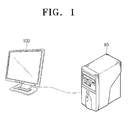
- FIG. 1 is a view showing a related art display system.
- a PC is shown as a display system which comprises a host device 10 and a monitor 100 as a display means.
- the host device 10 displays on the monitor 100 video corresponding to video data input via a network or video data recorded on a detachable recording medium.
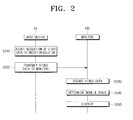
- FIG. 2 is a flowchart explaining a process for displaying video in the related art display system.
- the host device 10 adjusts the resolution of the video data to a preset resolution (S210).
- the host device 10 then transmits the video data having the adjusted resolution to the monitor 100 (S220).
- the monitor 100 decodes the video data transmitted from the host device 10 (S230).
- the monitor 100 determines a mode of the decoded video data, scales the video data according to the determined mode (S240), and then displays the scaled video data (S250).
- the image quality can vary according to an occupancy level of a central processing unit (CPU).
- the occupancy level of the CPU refers to the number of tasks currently performed by the CPU, which may be checked by the Windows task manager.
- the quality of the displayed image may be reduced.
- the amount of video data transmitted to the monitor gradually increases as the resolution of video becomes higher, it is difficult to transmit video data normally when the CPU is performing other tasks.
- Exemplary embodiments of the present invention overcome the above disadvantages and other disadvantages not described above. Also, the present invention is not required to overcome the disadvantages described above, and an exemplary embodiment of the present invention may not overcome any of the problems described above.
- the method of the invention has the features of claim 1.
- the host may comprise a computer, and the occupancy level of the control means may comprise the number of tasks performed by a central processing unit (CPU) of the computer.
- CPU central processing unit
- the resolution adjustment selection menu may provide one of the outputtable resolution and a preset recommended resolution, and may comprise a field to select resolution adjustment and a field to maintain the current resolution.
- the adjusting may further comprise adjusting the resolution of the video signal to be output to the outputtable resolution.
- the adjusting may further comprise transmitting a warning display command to the display means.
- the method may further comprise providing a setting menu through which a user can set an outputtable resolution according to the occupancy level of the control means.
- the setting menu may comprise a field to select the outputtable resolution according to the occupancy level of the control means.
- the display system of the invention has the features of claim 5.
- the host may comprise a computer, and the occupancy level of the control means may relates to the number of tasks performed by a central processing unit (CPU) of the computer.
- CPU central processing unit
- the resolution adjustment selection menu may provide one of the outputtable resolution and a preset recommended resolution, and may comprise a field to select resolution adjustment and a field to maintain the current resolution.
- control means may adjust the resolution of the video signal to be output to the outputtable resolution.
- control means may transmit a warning display command to the display means.
- the display means may comprise a display on which a warning message is displayed; an OSD generator which displays the warning message; and a scaler which controls the OSD generator to display the warning message if the warning display command is input.
- the scaler may determine whether a synchronizing signal is input in order to display the warning message, and may control the OSD generator in the free-run state if it is determined that the synchronizing signal is not input.
- the OSD generator may provide a setting menu through which a user can set the outputtable resolution according to the occupancy level of the control means.
- the setting menu may comprise a field to select the outputtable resolution according to the occupancy level of the control means.
- the host may communicate with the display means via one of a universal serial bus (USB), a unified display interface (UDI) and a display port.
- USB universal serial bus
- UMI unified display interface
- FIG. 1 is a view showing a related art display system
- FIG. 2 is a flowchart explaining a process for displaying video in the related art display system
- FIG. 3 is a block diagram of a display system according to an exemplary embodiment of the present invention.
- FIG. 4 is a view showing a setting menu according to an exemplary embodiment of the present invention.
- FIG. 5 is a flowchart explaining a process for displaying a video signal in a display system according to an exemplary embodiment of the present invention
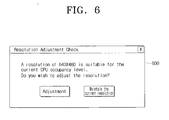
- FIG. 6 is a view showing a resolution adjustment selection menu according to an exemplary embodiment of the present invention.
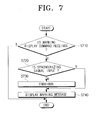
- FIG. 7 is a flowchart explaining a process for displaying a warning message in a display system, according to an exemplary embodiment of the present invention.
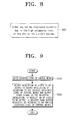
- FIG. 8 is a view showing a warning message according to an exemplary embodiment of the present invention.
- FIG. 9 is a flowchart comprehensively explaining a process for displaying a video signal in a display system according to an exemplary embodiment of the present invention.
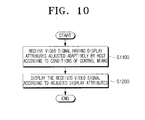
- FIG. 10 is another flowchart comprehensively explaining a process for displaying a video signal in a display system according to an exemplary embodiment of the present invention.
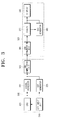
- FIG. 3 is a block diagram showing a configuration in which a personal computer (PC) is used as a display system according to an exemplary embodiment of the present invention.
- PC personal computer
- the PC is used as a display system which adjusts a resolution of video to be output to a display means according to an occupancy level of a control means.
- the PC provides a setting menu through which a user can set an output resolution of video according to the occupancy level of the control means.
- the PC comprises a host device 300 and a monitor 350.
- the host device 300 may communicate with the monitor 350 through one of a universal serial bus (USB), a unified display interface (UDI) and a display port.
- USB universal serial bus
- UMI unified display interface
- the UDI provides a universal connection method to connect display apparatuses, such as a PC, a notebook monitor, a high-definition television (HDTV) and a projector.
- the UDI also provides compatibility with a digital video interface (DVI), which is currently the standard connection method, while providing complete compatibility with a high-definition multimedia interface (HDMI), which is the standard connection for the HDTV. Accordingly, the UDI enables both the monitor and the HDTV to be connected via a single connector.
- DVI digital video interface
- HDMI high-definition multimedia interface
- the display port is a standard capable of combining low-voltage differential signaling (LVDS), which is the original internal interface standard, with the DVI, which is the external connection standard.
- the display port has a bandwidth of up to 10.8Gbps, which is at least twice that of the DVI (up to 4.95Gbps), and supports multi-stream transmission using the micro-packet architecture so that six streams having a resolution of 1080i (that is, three streams with a resolution of 1080p) can be simultaneously transmitted via a single connector.
- the host device 300 comprises a key input unit 310, a central processing unit (CPU) 320, a signal processor 330, an on-screen-display (OSD) generator 335 and a USB communication unit 340.
- the key input unit 310 comprises keys for setting the output resolution of video according to the occupancy level of the control means on a setting menu, and keys for selecting whether to adjust the resolution on a resolution adjustment selection menu.
- the CPU 320 is used as a control means to control the OSD generator 335 to provide the setting menu through which the output resolution of the video can be set according to the occupancy level of the control means, and adjusts the resolution of the video to the output resolution set according to the occupancy level.
- the occupancy level of the control means corresponds to the number of tasks performed by the CPU 320.
- the CPU 320 also controls the OSD generator 335 to provide a resolution adjustment selection menu through which a user can select whether to adjust the resolution of the video to be output to a resolution suitable for the occupancy level.
- the CPU 320 outputs a warning display command to the monitor 350 so that a warning message may be displayed when the occupancy level reaches a level at which it is impossible to output video.
- the signal processor 330 performs predetermined signal processing with respect to the video to be output, converts the processed video into a USB format, and outputs the adjusted video.
- the OSD generator 335 generates and outputs a setting menu through which an output resolution of video can be set according to the occupancy level of the control means, and a resolution adjustment selection menu through which a user can select whether to adjust the resolution of the video to be output to a resolution suitable for the occupancy level.
- the USB communication unit 340 provides a USB interface to perform communication with the monitor 350.
- the USB communication unit 340 outputs to the monitor 350 the warning display command output from the CPU 320, the video in the USB format output from the signal processor 330, and the setting menu and resolution adjustment selection menu output from the OSD generator 335.
- the monitor 350 is used as a display means, and comprises a USB communication unit 360, a scaler 370, an OSD generator 380 and a display 390.
- the USB communication unit 360 provides a USB interface to perform communication with the host device 300.
- the USB communication unit 360 receives the warning display command, the video in the USB format, the setting menu and the resolution adjustment selection menu, which are output from the host device 300.
- the scaler 370 displays the video and various menus received from the host device 300 through the USB communication unit 360 on the display 390.
- the scaler 370 may control the OSD generator 380 to display the warning message. Additionally, the scaler 370 may check whether a synchronizing signal is input or not in order to display the warning message, and if the synchronizing signal is not input, the scaler 370 may control the OSD generator 380 to display the warning message in the free-run state.
- the OSD generator 380 generates a warning message stating that it is impossible to display a normal screen due to the high occupancy level of the control means, and displays the generated message on the display 390.
- the host device 300 comprises the key input unit 310, CPU 320, signal processor 330, OSD generator 335 and USB communication unit 340, and the monitor 350 comprises the USB communication unit 360, scaler 370, OSD generator 380 and display 390 in the exemplary embodiment of the present invention, the present invention is not limited to the configuration described above.
- the exemplary embodiment of the present invention can be implemented with only the control means, namely, the CPU 320, which functions as a master of the host device 300 and the monitor 350, namely, the display means for displaying video.
- the CPU 320 may check the occupancy level, and if the resolution of the video to be output is greater than the outputtable resolution set according to the checked occupancy level, the CPU 320 may adjust the resolution of the video to be output to the outputtable resolution set according to the checked occupancy level and may then output the adjusted video to the display means.
- FIG. 4 is a view showing a setting menu according to an exemplary embodiment of the present invention.
- a setting menu 400 of FIG. 4 enables a user to set the outputtable resolution of the video according to the occupancy level of the control means.
- the setting menu 400 includes a CPU occupancy selection item to select an appropriate output resolution according to a range of the CPU occupancy level.
- the CPU occupancy level can be set for each outputtable resolution.
- a user may set the output resolution of the video to 640X480, and if the CPU occupancy level is between 60% and 80%, the user may set the output resolution of the video to 1024X768. If the CPU occupancy level is between 0% and 60%, the user may set the output resolution of the video to 1280x1024, and if the CPU occupancy level is over 90%, a warning message may be output. Accordingly, higher resolution video can be output as the CPU occupancy level decreases.
- the output resolution of the video may be 640X480, and if the CPU occupancy level is between 60% and 80%, the output resolution of the video may be 1024X768. If the CPU occupancy level is between 0% and 60%, the output resolution of the video may be 1280X1024, and if the CPU occupancy level is over 90%, video cannot be output, and so a warning message can be output.
- the output resolution of the setting menu 400 may be set to 640X480, 1024X768 and 1280X1024 only when the maximum resolution supportable by the monitor 350 is 1280X1024.
- the output resolution of the setting menu 400 may vary according to the maximum resolution supportable by the monitor 350. If the output resolution changes, the range of the CPU occupancy level may also be set at a level appropriate for the changed output resolution.
- the host device 300 is initially connected to the monitor 350 to communicate with the monitor 350 in order to determine the resolution supportable by the monitor 350. Accordingly a user can check the resolution supportable by the monitor 350 using display registration information.
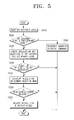
- FIG. 5 is a flowchart explaining a process for displaying a video signal in a display system according to an exemplary embodiment of the present invention.
- the CPU 320 checks the occupancy level of tasks currently performed by the CPU 320 (S510).
- the CPU 320 determines whether the checked occupancy level is greater than a predetermined value (S520).
- the predetermined value means an occupancy level at which it is impossible to output video.
- the CPU 320 may determine whether or not the occupancy level is 90% or more on the setting menu 400 of FIG. 4 .
- the CPU 320 may check the output resolution set according to the checked occupancy level (S530).
- Information regarding the output resolution set according to the CPU occupancy level through the setting menu 400 may be stored in a memory (not shown), and the CPU 320 may check the output resolution set according to the checked occupancy level using the above information stored in the memory.
- the CPU 320 also determines whether the resolution of the video to be output is greater than the output resolution set according to the checked occupancy level (S540).
- the output resolution set according to the CPU occupancy level may be a value set by a user through the setting menu 400, or may be a recommended default value preset when the display system is manufactured and unchanged by a user.
- the CPU 320 may control the OSD generator 335 to display the resolution adjustment selection menu through which a user can select whether the resolution of the video to be output is adjusted to the output resolution suitable for the checked occupancy level (S550).
- the resolution adjustment selection menu enables the user to select whether the resolution of the video to be output is adjusted to the output resolution set according to the checked occupancy level.
- the CPU 320 determines whether resolution adjustment is selected on the resolution adjustment selection menu (S560). If it is determined that resolution adjustment is selected, that is, if a command to adjust the resolution is input through the key input unit 310 on the resolution adjustment selection menu, the CPU 320 may adjust the resolution of the video to be output to the output resolution set according to the checked occupancy level, and may output the adjusted video to the monitor 350 (S570).
- the CPU 320 may transmit the warning display command to the monitor 350 (S580).
- FIG. 6 is a view showing a resolution adjustment selection menu according to an exemplary embodiment of the present invention.
- a resolution adjustment selection menu 600 of FIG. 6 may be shown through which a user can select whether the resolution of the video to be output is adjusted to the output resolution suitable for the occupancy level.
- the resolution adjustment selection menu 600 enables a user to decide whether the resolution of the video to be output is adjusted to the output resolution suitable for the current occupancy level of the CPU. For example, if the current occupancy level of the CPU is 80% or more, the output resolution may be set to 640X480 as shown in the setting menu 400 of FIG. 4 .
- the resolution adjustment selection menu 600 comprises a message stating "A resolution of 640X480 is suitable for the current CPU occupancy level. Do you wish to adjust the resolution?"
- the resolution adjustment selection menu 600 further comprises a field to select resolution adjustment and a field to maintain the current resolution.
- FIG. 7 is a flowchart explaining a process for displaying a warning message in a display system, according to an exemplary embodiment of the present invention.
- the scaler 370 of the monitor 350 determines whether a warning display command is received from the host device 300 (S710).
- the scaler 370 may determine whether a synchronizing signal is input from the host device 300 (S720).
- the scaler 370 may execute a free-run mode (S730).
- the free-run mode enables the warning message to be displayed without the input of the synchronizing signal.
- the scaler 370 controls the OSD generator 380 to display the warning message (S740).
- FIG. 8 is a view showing a warning message according to an exemplary embodiment of the present invention.
- a warning message 800 may be displayed notifying that an abnormal screen may be displayed, as shown in FIG. 8 .
- the CPU 320 may cease transmitting normal video to the monitor 350, and the warning display message may be transmitted to the monitor 350 and displayed. Accordingly, the scaler 370 may control the OSD generator 380 to display a warning message stating "Video may not be displayed normally due to the high occupancy level of the CPU".
- FIG. 9 is a flowchart comprehensively explaining a process for displaying a video signal in a display system according to an exemplary embodiment of the present invention.
- control means checks the occupancy level for tasks currently performed by the control means (S910).
- control means may adjust the resolution of the video to be output to the output resolution set according to the checked occupancy level of the control means, and may output the video at the adjusted resolution (S920).
- FIG. 10 is another flowchart comprehensively explaining a process for displaying a video signal in a display system according to an exemplary embodiment of the present invention.
- a display means receives a video signal having display attributes adjusted adaptively according to the conditions of a control means by a host (S 1100).
- the display means displays the video signal received from the host according to the display attributes (S1200).
- the host device checks the current occupancy level of the CPU and determines whether the resolution of the video to be output is at a level suitable for the current occupancy level of the CPU. If it is determined that the resolution of the video to be output is not at a level suitable for the current occupancy level of the CPU, the host device may determine that the image quality may be reduced. Accordingly, the host device may provide a user with the resolution set by the user according to the current occupancy level of the CPU or with the recommended resolution, and may allow the user to adjust the resolution of the video to be output to the resolution set by the user or to the recommended resolution.
- the host device may allow the warning message to be displayed, so that the user may know why the video is not being displayed normally.
- the host device may provide a user with video displayed at the resolution set by the user according to the current occupancy level of the CPU or with the recommended resolution, and may enable the user to adjust the resolution of the video to be output to the resolution set by the user or to the recommended resolution, as described above, the exemplary embodiments of the present invention are not limited thereto.
- the host device may provide a setting menu through which the CPU occupancy level can be selected for each outputtable resolution, may check the current occupancy level of the CPU and may determine whether the resolution of the video to be output is at a level suitable for the current occupancy level of the CPU. If it is determined that the resolution of the video to be output is not at a level suitable for the current occupancy level of the CPU, the host device may automatically adjust the resolution of the video to be output to the resolution set by the user according to the current occupancy level of the CPU or to the recommended resolution and may output the video at the adjusted resolution.
- the host device transmits the warning display command to the monitor so that the warning message is displayed when the current occupancy level of the CPU reaches the level at which it is impossible to output video.
- the exemplary embodiments of the present invention are not limited thereto, and accordingly the host device may generate and display the warning message by itself
- control conditions of the host device may comprise not only the CPU occupancy level but also the mode of the video signal. Additionally, the brightness, contrast and sharpness may be changed according to the control conditions, in addition to the resolution of the video signal.
- a user may adaptively adjust the display attributes of a video signal and output the video signal having the adjusted attributes through a video signal providing device, such as a PC, and thus if the user sets the display environment to minimum levels when using a display apparatus, the optimum display state can be maintained.
- a video signal providing device such as a PC
- a user can easily acquire display setting information of a video signal currently being displayed.
Landscapes
- Engineering & Computer Science (AREA)
- Theoretical Computer Science (AREA)
- Human Computer Interaction (AREA)
- Physics & Mathematics (AREA)
- General Engineering & Computer Science (AREA)
- General Physics & Mathematics (AREA)
- Controls And Circuits For Display Device (AREA)
- Testing, Inspecting, Measuring Of Stereoscopic Televisions And Televisions (AREA)
- Two-Way Televisions, Distribution Of Moving Picture Or The Like (AREA)
Claims (11)
- Verfahren zum Anzeigen eines Videosignals in einem Anzeigesystem, umfassend einen Host (300), umfassend ein Steuerungsmittel, eine Videosignal-Ausgabeeinheit zum Ausgeben eines Videosignals, und ein Anzeigemittel (350), wobei das Verfahren umfasst:Anpassen, durch den Host (300), einer Auflösung des auszugebenden Videosignals in Übereinstimmung mit einem Auslastungsgrad des Steuerungsmittels, und Ausgeben des Videosignals mit der angepassten Auflösung an das Anzeigemittel; Anzeigen, durch das Anzeigemittel, des durch den Host angepassten Videosignals; wobei das Anpassen die Schritte umfasst:(S510) Überprüfen des Auslastungsgrads des Steuerungsmittels (320) des Hosts (300);Feststellen (S520), ob der überprüfte Auslastungsgrad des Steuerungsmittels (320) einen Grad erreicht, bei dem es unmöglich ist, Video auszugeben;Feststellen, ob die Auflösung des auszugebenden Videosignals höher als eine vorher eingestellte Ausgabeauflösung ist, die auf dem überprüften Auslastungsgrad des Steuerungsmittels (320) beruht,falls festgestellt wird, dass der überprüfte Auslastungsgrad des Steuerungsmittels (320) den Grad nicht erreicht, bei dem es unmöglich ist, Video auszugeben;Bereitstellen (S550), für den Benutzer, eines Auflösungsanpassungs-Auswahlmenüs (600), das eine von der vorher eingestellten Auflösung, die dem aktuellen Auslastungsgrad des Steuerungsmittels (320) entspricht, oder einer vorher eingestellten empfohlenen Auflösung umfasst, damit der Benutzer auswählt, ob die Auflösung des Videosignals angepasst werden sollte, falls festgestellt worden ist, dass die Auflösung des auszugebenden Videosignals höher als die vorher eingestellte Ausgabeauflösung ist; und Anpassen (S570), falls ein Auflösungsanpassungsbefehl durch das Auflösungsanpassungs-Auswahlmenü (600) eingegeben wird, der Auflösung des Videosignals.
- Verfahren nach Anspruch 1, wobei der Host (300) einen Rechner umfasst, und der Auslastungsgrad des Steuerungsmittels (320) sich auf die Anzahl von Aufgaben bezieht, die von einer Zentraleinheit (CPU: Central Processing Unit) des Rechners durchgeführt werden.
- Verfahren nach Anspruch 1, wobei das Anpassen weiterhin das Übertragen (S580) eines Warnanzeigebefehls (800) an das Anzeigemittel (350) umfasst, falls festgestellt wird, dass der überprüfte Auslastungsgrad des Steuerungsmittels (320) den Grad erreicht, bei dem es unmöglich ist, Video auszugeben.
- Verfahren nach Anspruch 1, das weiterhin das Bereitstellen eines Einstellungsmenüs (400) umfasst, durch das ein Benutzer eine Ausgabeauflösung in Übereinstimmung mit dem Auslastungsgrad des Steuerungsmittels (320) einstellen kann, wobei das Einstellungsmenü (400) ein Feld zum Auswählen der Ausgabeauflösung in Übereinstimmung mit dem Auslastungsgrad des Steuerungsmittel (320) umfasst.
- Anzeigesystem, umfassend:einen Host (300) mit einem Steuerungsmittel (320) und einer Videosignal-Ausgabeeinheit, die ein Videosignal ausgibt,wobei der Host (300) dazu ausgelegt ist, eine Auflösung eines auszugebenden Videosignals in Übereinstimmung mit einem Auslastungsgrad des Steuerungsmittels anzupassen und das Videosignal mit der angepassten Auflösung auszugeben;und ein Anzeigemittel (100), das dazu ausgelegt ist, das aus dem Host (300) ausgegebene Videosignal anzuzeigen,dadurch gekennzeichnet, dass das Steuerungsmittel (320) dazu ausgelegt ist, einen Auslastungsgrad des Steuerungsmittels des Hosts zu überprüfen, um festzustellen, ob der überprüfte Auslastungsgrad einen Grad erreicht, bei dem es unmöglich ist, Video auszugeben, und um festzustellen, ob die Auflösung des auszugebenden Videosignals höher als eine vorher eingestellte Ausgabeauflösung, beruhend auf dem überprüften Auslastungsgrad des Steuerungsmittels, ist,falls es feststellt, dass der überprüfte Auslastungsgrad des Steuerungsmittels (320) nicht den Grad erreicht, bei dem es unmöglich ist, Video auszugeben;wobei der Host (300) weiterhin einen erstenBildschirmanzeigegenerator (335) umfasst, der dazu konfiguriert ist, ein Auflösungsanpassungs-Auswahlmenü (600) bereitzustellen, das eine von der vorher eingestellten Auflösung und einer vorher eingestellten empfohlenen Auflösung bereitstellt, wobei das Steuerungsmittel (320) dazu ausgelegt ist, den ersten Bildschirmanzeigegenerator (335) anzusteuern, damit er das Auflösungsanpassungs-Auswahlmenü (600) bereitstellt, durch das ein Benutzer auswählen kann, ob die Auflösung des auszugebenden Videosignals angepasst wird, falls festgestellt worden ist, dass die Auflösung des auszugebenden Videosignals höher als die vorher eingestellte Ausgabeauflösung ist.
- Anzeigesystem nach Anspruch 5, wobei der Host (300) einen Rechner umfasst, und der Auslastungsgrad des Steuerungsmittels sich auf die Anzahl von Aufgaben bezieht, die von einer Zentraleinheit (320) des Rechners durchgeführt werden.
- Anzeigesystem nach Anspruch 5, wobei das Steuerungsmittel (320) dazu ausgelegt ist, einen Warnanzeigebefehl an das Anzeigemittel (100) zu übertragen, falls festgestellt wird, dass der überprüfte Auslastungsgrad des Steuerungsmittels den Grad erreicht, bei dem es unmöglich ist, Video auszugeben.
- Anzeigesystem nach Anspruch 7, wobei das Anzeigemittel (350) umfasst: eine Anzeige (390), auf der eine Warnmitteilung angezeigt wird; einen zweiten Bildschirmanzeigegenerator (380), der dazu ausgelegt ist, die Warnmitteilung (800) anzuzeigen; und einen Skalierer (370), der dazu ausgelegt ist, den zweiten Bildschirmanzeigegenerator (380) anzusteuern, damit er die Warnmitteilung (800) anzeigt, falls der Warnanzeigebefehl eingegeben wird.
- Anzeigesystem nach Anspruch 8, wobei der Skalierer (370) dazu ausgelegt ist festzustellen, ob ein Synchronisationssignal eingegeben wird, um die Warnmitteilung (800) anzuzeigen, und dazu ausgelegt ist, den zweiten Bildschirmanzeigegenerator (380) in einem Freilaufzustand anzusteuern, falls festgestellt wird, dass das Synchronisationssignal nicht eingegeben wird.
- Anzeigesystem nach Anspruch 5, wobei der Bildschirmanzeigegenerator dazu ausgelegt ist, ein Einstellungsmenü (400) bereitzustellen, durch das ein Benutzer die Ausgabeauflösung in Übereinstimmung mit dem Auslastungsgrad des Steuerungsmittels einstellen kann, wobei das Einstellungsmenü (400) ein Feld zum Auswählen der Ausgabeauflösung in Übereinstimmung mit dem Auslastungsgrad des Steuerungsmittels umfasst.
- Anzeigesystem nach Anspruch 5, wobei der Host (300) dazu ausgelegt ist, mit dem Anzeigemittel (100) via einen (340) von einem universellen seriellen Bus (USB), einer Unified Display Interface (UDI) und einem Display-Port zu kommunizieren.
Applications Claiming Priority (1)
| Application Number | Priority Date | Filing Date | Title |
|---|---|---|---|
| KR1020070057867A KR101431003B1 (ko) | 2007-06-13 | 2007-06-13 | 영상신호의 디스플레이방법 및 이를 적용한 디스플레이시스템 |
Publications (3)
| Publication Number | Publication Date |
|---|---|
| EP2003545A2 EP2003545A2 (de) | 2008-12-17 |
| EP2003545A3 EP2003545A3 (de) | 2009-10-28 |
| EP2003545B1 true EP2003545B1 (de) | 2014-06-11 |
Family
ID=39735199
Family Applications (1)
| Application Number | Title | Priority Date | Filing Date |
|---|---|---|---|
| EP08102658.5A Ceased EP2003545B1 (de) | 2007-06-13 | 2008-03-17 | Anzeigesystem und Verfahren zur Anzeige von Videosignalen |
Country Status (4)
| Country | Link |
|---|---|
| US (1) | US8026924B2 (de) |
| EP (1) | EP2003545B1 (de) |
| KR (1) | KR101431003B1 (de) |
| CN (1) | CN101325054A (de) |
Families Citing this family (21)
| Publication number | Priority date | Publication date | Assignee | Title |
|---|---|---|---|---|
| US20120044254A1 (en) * | 2009-04-28 | 2012-02-23 | Keiko Watanuki | Display apparatus, display method and program for executing the same |
| DE102010051060B4 (de) * | 2010-11-11 | 2015-11-26 | Fissler Gmbh | Druckerfassungssystem für einen Schnellkochtopf |
| JP5170264B2 (ja) * | 2011-01-18 | 2013-03-27 | オンキヨー株式会社 | 映像処理装置及び映像処理プログラム |
| CN102567720A (zh) * | 2011-12-26 | 2012-07-11 | 广州市千钧网络科技有限公司 | Flash在线视频的人脸识别方法及人脸识别装置 |
| KR102007397B1 (ko) * | 2012-06-19 | 2019-08-05 | 휴렛-팩커드 디벨롭먼트 컴퍼니, 엘.피. | 과전류 및 과전압 보호 장치를 포함하는 인터페이스 유닛 |
| CN103974007B (zh) * | 2013-01-28 | 2017-10-03 | 杭州海康威视数字技术股份有限公司 | 屏幕菜单式调节方式信息的叠加方法及装置 |
| BR112016006293A2 (pt) * | 2013-09-27 | 2017-08-01 | Koninklijke Philips Nv | sistema para exibir simultaneamente em uma tela dados de vídeo de múltiplas fontes, estação de trabalho ou equipamento de imageamento, método para mostrar simultaneamente em uma tela dados de vídeo de múltiplas fontes, e produto de programa de computador |
| JP2015169754A (ja) * | 2014-03-06 | 2015-09-28 | セイコーエプソン株式会社 | プロジェクター、およびプロジェクターの制御方法 |
| EP2963929B1 (de) * | 2014-07-03 | 2016-12-21 | Axis AB | Verfahren zur Konfiguration eines Videostromausgangs aus einer digitalen Videokamera |
| CN105430429B (zh) * | 2014-09-18 | 2019-09-13 | 青岛海尔电子有限公司 | 一种媒体数据的优化方法和装置 |
| CN105898175A (zh) * | 2014-09-18 | 2016-08-24 | 青岛海尔电子有限公司 | 一种模板文件的制作方法和装置 |
| CN105592322B (zh) * | 2014-09-19 | 2019-06-28 | 青岛海尔电子有限公司 | 一种媒体数据的优化方法及装置 |
| CN104267800A (zh) * | 2014-09-19 | 2015-01-07 | 上海联彤网络通讯技术有限公司 | 操作系统中实现应用程序显示解析度自动调整的方法 |
| KR20160050689A (ko) * | 2014-10-30 | 2016-05-11 | 삼성전자주식회사 | 디스플레이 장치 및 이의 제어방법 |
| KR102313306B1 (ko) * | 2015-07-28 | 2021-10-14 | 엘지전자 주식회사 | 영상표시장치, 및 이동 단말기 |
| CN105204801B (zh) * | 2015-08-31 | 2018-08-10 | 联想(北京)有限公司 | 信息处理方法及电子设备 |
| CN105657321A (zh) * | 2015-11-09 | 2016-06-08 | 乐视致新电子科技(天津)有限公司 | 视频清晰度自适应调节方法、装置及终端 |
| CN109432774A (zh) * | 2018-09-12 | 2019-03-08 | 苏州蜗牛数字科技股份有限公司 | 一种游戏优化方法及装置 |
| CN111464771B (zh) * | 2020-04-14 | 2022-07-05 | 上海卓易科技股份有限公司 | 一种车载录像的多路输出方法及设备 |
| CN112700386A (zh) * | 2020-12-30 | 2021-04-23 | 江苏奥格视特信息科技有限公司 | 一种基于人工智能的模糊图像超高清变换方法及系统 |
| KR102779541B1 (ko) * | 2024-11-08 | 2025-03-10 | 비지온코퍼레이션 주식회사 | 지연 시간 설정 기능을 구비한 영상 표시 장치 및 방법 |
Citations (2)
| Publication number | Priority date | Publication date | Assignee | Title |
|---|---|---|---|---|
| US20050091344A1 (en) * | 2003-10-23 | 2005-04-28 | International Business Machines Corporation | Methods and sytems for dynamically reconfigurable load balancing |
| US20050132264A1 (en) * | 2003-12-15 | 2005-06-16 | Joshi Ajit P. | System and method for intelligent transcoding |
Family Cites Families (9)
| Publication number | Priority date | Publication date | Assignee | Title |
|---|---|---|---|---|
| US5907820A (en) * | 1996-03-22 | 1999-05-25 | Applied Materials, Inc. | System for acquiring and analyzing a two-dimensional array of data |
| US20020075301A1 (en) | 1997-07-15 | 2002-06-20 | Andrea Basso | Interaction modalities for multimedia delivery and presentation using nodes |
| JP3627791B2 (ja) | 1998-08-10 | 2005-03-09 | 富士通株式会社 | 他端末操作装置 |
| US6670964B1 (en) * | 1998-09-18 | 2003-12-30 | Hewlett-Packard Development Company, L.P. | Automatic scaler mode detection |
| KR100471070B1 (ko) * | 2002-07-29 | 2005-03-10 | 삼성전자주식회사 | 디스플레이장치 및 디스플레이장치의 조명장치제어방법 |
| US8495678B2 (en) * | 2002-12-10 | 2013-07-23 | Ol2, Inc. | System for reporting recorded video preceding system failures |
| US7460178B2 (en) * | 2004-05-14 | 2008-12-02 | Sony Corporation | Image processing apparatus and image processing method |
| JP4405419B2 (ja) | 2005-03-31 | 2010-01-27 | 株式会社東芝 | 画面送信装置 |
| KR100664955B1 (ko) * | 2005-10-20 | 2007-01-04 | 삼성전자주식회사 | 방송 수신 장치의 다운로드 속도를 제어하는 방법 및 이를위한 장치 |
-
2007
- 2007-06-13 KR KR1020070057867A patent/KR101431003B1/ko not_active Expired - Fee Related
-
2008
- 2008-01-31 US US12/023,150 patent/US8026924B2/en not_active Expired - Fee Related
- 2008-03-17 EP EP08102658.5A patent/EP2003545B1/de not_active Ceased
- 2008-04-03 CN CNA2008100905747A patent/CN101325054A/zh active Pending
Patent Citations (2)
| Publication number | Priority date | Publication date | Assignee | Title |
|---|---|---|---|---|
| US20050091344A1 (en) * | 2003-10-23 | 2005-04-28 | International Business Machines Corporation | Methods and sytems for dynamically reconfigurable load balancing |
| US20050132264A1 (en) * | 2003-12-15 | 2005-06-16 | Joshi Ajit P. | System and method for intelligent transcoding |
Also Published As
| Publication number | Publication date |
|---|---|
| EP2003545A3 (de) | 2009-10-28 |
| US8026924B2 (en) | 2011-09-27 |
| KR101431003B1 (ko) | 2014-08-20 |
| KR20080109482A (ko) | 2008-12-17 |
| EP2003545A2 (de) | 2008-12-17 |
| CN101325054A (zh) | 2008-12-17 |
| US20080309821A1 (en) | 2008-12-18 |
Similar Documents
| Publication | Publication Date | Title |
|---|---|---|
| EP2003545A2 (de) | Anzeigesystem und Verfahren zur Anzeige von Videosignalen | |
| US8793771B2 (en) | Image-display method, projector, image-display system, projector-control method, image-display program, and projector-control program | |
| US8648843B2 (en) | USB image transmission system and device | |
| US8570241B2 (en) | Image display apparatus for controlling an external data transmitting device using a USB connector and a method thereof | |
| US11330222B2 (en) | Display system and display apparatus | |
| CN102024445B (zh) | 显示来自多个输入源的视频信号的方法和装置 | |
| KR20090008045A (ko) | 디스플레이장치, 호스트 장치 및 그 제어방법 | |
| EP1668640B1 (de) | Dvd-player, der die optimale anzeigeumgebung setzt, und betriebsverfahren dafür | |
| US20170118443A1 (en) | Display apparatus and control method thereof | |
| US20030227490A1 (en) | Control apparatus and method of display device | |
| CN115334340A (zh) | 显示设备和扩展显示识别数据设置方法 | |
| US20090141197A1 (en) | Liquid crystal display apparatus and method thereof for preventing transient noise | |
| JP2005084881A (ja) | 画像表示制御方法、画像表示装置、画像処理装置および画像表示制御システム | |
| US8233001B2 (en) | Display apparatus, information processing apparatus capable of communicating with display apparatus, and methods of controlling same | |
| CN101006409A (zh) | 显示设备及使用该显示设备的显示系统 | |
| CN113050903A (zh) | 电子设备及数据处理方法 | |
| CN100472489C (zh) | 信息处理设备和系统控制方法 | |
| EP2244474A2 (de) | Verfahren zur Einstellung der Anzeigevorrichtung und Anzeigevorrichtung damit | |
| JP2002207472A (ja) | 画像表示装置 | |
| EP1961218B1 (de) | Display-vorrichtung und verfahren und informationsverarbeitungsvorrichtung und verfahren zum bereitstellen einer bild-im-bild-funktion | |
| US20070147679A1 (en) | Network display apparatus, computer, and method of controlling the computer | |
| EP1739544B1 (de) | Anzeigevorrichtung und Steuerverfahren dafür | |
| EP2173094A2 (de) | Wiedergabevorrichtung für bewegte Bilder, Wiedergabeverfahren für bewegte Bilder und Programm | |
| KR100247950B1 (ko) | 퍼스날컴퓨터신호의텔레비젼포맷변환방법 | |
| KR20230079993A (ko) | 디스플레이 장치 및 제어 방법 |
Legal Events
| Date | Code | Title | Description |
|---|---|---|---|
| PUAI | Public reference made under article 153(3) epc to a published international application that has entered the european phase |
Free format text: ORIGINAL CODE: 0009012 |
|
| AK | Designated contracting states |
Kind code of ref document: A2 Designated state(s): AT BE BG CH CY CZ DE DK EE ES FI FR GB GR HR HU IE IS IT LI LT LU LV MC MT NL NO PL PT RO SE SI SK TR |
|
| AX | Request for extension of the european patent |
Extension state: AL BA MK RS |
|
| PUAL | Search report despatched |
Free format text: ORIGINAL CODE: 0009013 |
|
| AK | Designated contracting states |
Kind code of ref document: A3 Designated state(s): AT BE BG CH CY CZ DE DK EE ES FI FR GB GR HR HU IE IS IT LI LT LU LV MC MT NL NO PL PT RO SE SI SK TR |
|
| AX | Request for extension of the european patent |
Extension state: AL BA MK RS |
|
| 17P | Request for examination filed |
Effective date: 20100312 |
|
| 17Q | First examination report despatched |
Effective date: 20100406 |
|
| AKX | Designation fees paid |
Designated state(s): DE GB NL |
|
| RAP1 | Party data changed (applicant data changed or rights of an application transferred) |
Owner name: SAMSUNG ELECTRONICS CO., LTD. |
|
| GRAP | Despatch of communication of intention to grant a patent |
Free format text: ORIGINAL CODE: EPIDOSNIGR1 |
|
| INTG | Intention to grant announced |
Effective date: 20140326 |
|
| GRAS | Grant fee paid |
Free format text: ORIGINAL CODE: EPIDOSNIGR3 |
|
| GRAA | (expected) grant |
Free format text: ORIGINAL CODE: 0009210 |
|
| AK | Designated contracting states |
Kind code of ref document: B1 Designated state(s): DE GB NL |
|
| REG | Reference to a national code |
Ref country code: GB Ref legal event code: FG4D |
|
| REG | Reference to a national code |
Ref country code: DE Ref legal event code: R096 Ref document number: 602008032661 Country of ref document: DE Effective date: 20140724 |
|
| REG | Reference to a national code |
Ref country code: NL Ref legal event code: T3 |
|
| REG | Reference to a national code |
Ref country code: DE Ref legal event code: R097 Ref document number: 602008032661 Country of ref document: DE |
|
| PLBE | No opposition filed within time limit |
Free format text: ORIGINAL CODE: 0009261 |
|
| STAA | Information on the status of an ep patent application or granted ep patent |
Free format text: STATUS: NO OPPOSITION FILED WITHIN TIME LIMIT |
|
| 26N | No opposition filed |
Effective date: 20150312 |
|
| REG | Reference to a national code |
Ref country code: DE Ref legal event code: R097 Ref document number: 602008032661 Country of ref document: DE Effective date: 20150312 |
|
| REG | Reference to a national code |
Ref country code: DE Ref legal event code: R119 Ref document number: 602008032661 Country of ref document: DE |
|
| GBPC | Gb: european patent ceased through non-payment of renewal fee |
Effective date: 20150317 |
|
| REG | Reference to a national code |
Ref country code: NL Ref legal event code: MM Effective date: 20150401 |
|
| PG25 | Lapsed in a contracting state [announced via postgrant information from national office to epo] |
Ref country code: DE Free format text: LAPSE BECAUSE OF NON-PAYMENT OF DUE FEES Effective date: 20151001 Ref country code: GB Free format text: LAPSE BECAUSE OF NON-PAYMENT OF DUE FEES Effective date: 20150317 |
|
| PG25 | Lapsed in a contracting state [announced via postgrant information from national office to epo] |
Ref country code: NL Free format text: LAPSE BECAUSE OF NON-PAYMENT OF DUE FEES Effective date: 20150401 |