EP1536351A2 - System und Verfahren für Anwendernavigation - Google Patents
System und Verfahren für Anwendernavigation Download PDFInfo
- Publication number
- EP1536351A2 EP1536351A2 EP05004271A EP05004271A EP1536351A2 EP 1536351 A2 EP1536351 A2 EP 1536351A2 EP 05004271 A EP05004271 A EP 05004271A EP 05004271 A EP05004271 A EP 05004271A EP 1536351 A2 EP1536351 A2 EP 1536351A2
- Authority
- EP
- European Patent Office
- Prior art keywords
- user
- profile
- information
- database
- data
- Prior art date
- Legal status (The legal status is an assumption and is not a legal conclusion. Google has not performed a legal analysis and makes no representation as to the accuracy of the status listed.)
- Ceased
Links
Images







Classifications
-
- G—PHYSICS
- G06—COMPUTING OR CALCULATING; COUNTING
- G06F—ELECTRIC DIGITAL DATA PROCESSING
- G06F16/00—Information retrieval; Database structures therefor; File system structures therefor
- G06F16/90—Details of database functions independent of the retrieved data types
- G06F16/95—Retrieval from the web
- G06F16/953—Querying, e.g. by the use of web search engines
- G06F16/9535—Search customisation based on user profiles and personalisation
-
- G—PHYSICS
- G06—COMPUTING OR CALCULATING; COUNTING
- G06F—ELECTRIC DIGITAL DATA PROCESSING
- G06F16/00—Information retrieval; Database structures therefor; File system structures therefor
- G06F16/90—Details of database functions independent of the retrieved data types
- G06F16/95—Retrieval from the web
- G06F16/953—Querying, e.g. by the use of web search engines
- G06F16/9537—Spatial or temporal dependent retrieval, e.g. spatiotemporal queries
Definitions
- This invention relates generally to navigation assistance devices, and more particularly to personalized computer-based electronic navigation devices.
- the consumer is assisted in visiting the physical location of a store by receiving instructions over the Web as to how to, for example, drive to the location.
- Mapping services available from the Web upon input of a desired destination and a current location, provide driving instructions as to how to get from a current destination to a desired location.
- the Web provides a convenient way to learn about physical locations, such as stores. and how to get to those locations.
- any one consumer may have a variety of interests. Such a consumer may not wish the intormation relevant to one aspect of the consumer's activities cluttering up requests for information regarding other aspects of the user's activities.
- Businesses desiring to place information regarding their business before certain types of consumers have no convenient way to do so. Businesses do not desire to place information before consumers who have no interest in their business, and that do wish to place information regarding their business before consumers who do or are likely to have an interest in the goods the business provides.
- consumers may be provided information on how to get to a business, while enroute the consumers receive no additional information about points of interest which they may be passing.
- consumers may realize, while in route, that they have a need to obtain other goods or services along the route. Such consumers may not have detailed information concerning their present location, and no convenient means to determine the availability of businesses stocking goods which they desire or need enroute, or how to reach such businesses.
- the present invention provides a real world navigation system.
- the invention comprises a method of populating a database, including determining a tag location, requesting information concerning the tag location and providing the information to a computer system.
- determining the tag location comprises evaluating the position of a GPS capable device, waiting a preselected time period, reevaluating the position of the GPS capable device, and determining if the position has changed.
- determining the tag location comprises presenting a map display using a computer to a user and receiving a selected position on the map display.
- the tag location comprises a plurality of locations, and in one embodiment these locations are selected area and in another embodiment the locations are a route to a destination.
- the invention comprises a method of accessing a database using a profile.
- the profile comprises information applicable to a user, and serves as a filter between the database of information and the display to the user.
- the profile is used in a push mode to push information desired by the user to the user, in other embodiments the profile serves as a filter in a pull mode pulling only information applicable to the user to the user.
- the invention comprises an entertainment distribution system.
- the entertainment distribution system comprises an entertainment server receiving entertainment related computer files in a variety of formats.
- the entertainment computer related files are sequenced and organized by a user, and may thereafter request from requesting nodes various files or sequences of files in a format applicable to their requesting node.
- FIG. 1 illustrates a block diagram of a system of the present invention.
- An Internet service provider (ISP) 11, including a server is linked to a user personal computer 13 via telephone lines 15.
- ISP Internet service provider
- one or more computer units may be interdisposed between the PC and the server. with the server being a node on the Internet.
- the server is also connected via communication link to a personal computer device 17.
- Circuitry to allow the PCD sometimes in conjunction with external elements or computers, to determine the position of the PCD.
- the PCD contains circuitry for receiving GPS signals and passing pertinent representations of the received signals to a base server for further processing.
- the base server calculates the position of the PCD and transmits the position information to the PCD.
- the PCD contains a GPS receiver and processing system, and the PCD determines its position using the GPS receiver and processing system.
- the server includes a database.
- the database includes information pertaining to a variety of topics. More specifically, in one embodiment the database includes information relating to locations. That is, the database includes information regarding specific locations, as well as information pertaining to transportation to and from these locations.
- the information in the database is provided by businesses, individuals, and users of PCDs.
- the database contains general information provided by businesses, stores, and other commercial entities who wish to make information concerning their business available to others.
- the database also contains personalized information regarding points of interest and other matters provided by users of PCDs. The database therefore provides a source of information to the users of PCDs.
- a first user 31 accesses a database 33 using a first profile 35.
- the profile includes information pertaining to the user.
- the profile may contain information rotating to restaurants the user prefers, businesses the user prefers to frequent, locations that the user desires to reach, or routes the user has marked an interest or other matters.
- the profile serves as a filter between the database and the user.
- the information retrieved from the database that the users request is provided to the user based on aspects the user has entered into the profile.
- the user may utilize more than one profile. This is illustrated by a second user 37.
- the second user accesses the database using a second profile 36 and a third profile 41.
- the second profile is similar to the first profile in that the second profile contains information pertaining to the specific user.
- the third profile differs in that the third profile is a standard profile. In other words, the third profile is a standardized profile made available for selection by users so that users may avoid the necessity of creating their own profile.
- a user may desire information of a first type relating to the users business activities. This may be due to the user working at a locale, with the result that the user desires information pertaining to the region of the locale while at work.
- the user may frequent certain types of businesses as part of work related activities, whereas the user may frequent different types of businesses during the user's leisure hours.
- profiles may be copied. Copying of profiles is beneficial as the copied profile may be thereafter edited or added to, or have other operations under the profile.
- a user having a copied profile is illustrated by a third user 41.
- the third user accesses the database using a fourth profile 47. a fifth profile 45 and a copied sixth profile 43.
- the fourth and fifth profiles are, like the profiles of the first and second users, profiles pertaining to the individual user.
- the copied sixth profile of the third user is a copied version of the fifth profile. When created, therefore, the sixth profile is merely a copy of the fifth profile. Over time, however, the user may adjust and adapt the copied profile to suit other needs. This allows the user to use the information contained in the original profile, but allows modification to meet specific needs of the user.
- FIG. 2B illustrates a data layout of one implementation of a database in accordance with the present invention.
- the database 21 includes plurality of memory elements.
- the plurality of memory elements includes subgroupings of memory elements.
- a three such subgrouping of memory elements are illustrated as a first subgrouping 23, a second subgrouping 25, and a third subgrouping 27.
- the first, second, and third subgroupings of memory correspond to areas of memory reserved for information for the first profile, second profile, and third profiles illustrated in FIG. 2A.
- data is stored separately for each profile.
- the profiles serve as a filter into a database, namely, information relevant to a users profile is placed into the database at the request of the user.
- a request by the user in one embodiment includes implied requests based on profile settings provided by the user. Thus, if the user, for example, has indicated a particular store as a favorite, information regarding the store may be placed in the user's profiles section of the database without an explicit command by the user.
- the database is more conventionally set up in which a record for each data element indicates whether the data item is applicable to a particular profile.
- data is sorted in real time based on user profile requests, and no explicit link between the profile and the data in the database is provided except upon a request.
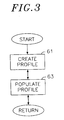
- FIG. 3 illustrates a flow diagram of a process of creating and populating a profile.
- the user creates a profile.
- the profile may be a user specific profile, a standard profile, or a copied profile.
- the user populates the profile.
- Populating the profile is analogous to populating a database linked to the profile. Indeed, in one embodiment of the invention populating the profile is population of a unique database linked to the profile. In other embodiments, however, populating the profile involves linking information in a database to the profile, as well as, in some embodiments, providing information to the database.
- FIG. 4 illustrates details of flow diagram of a process of creating a profile.
- the user selects a type of profile.
- the user may select a new profile, a preselected profile, a clone profile, or edit of an existing profile.
- the process displays a create new profile screen in Block 102.
- the create new profile screen is illustrated in FIG. 5.
- the create new profile screen includes data entry regions for personal data 51, data entry areas for enroute profiles 53, and data entry areas for favorites 55.
- the user enters personal data information requested by the create new profile screen.
- the personal data includes a profile name, the age of the user, the sex of the user, and the marital status of the user.
- the personal data additionally includes the occupation of the user, the city of the user, as well as the user's education, religion and children.
- the user enters enroute data.
- the enroute data includes information relating to music, entertainment, sports, services, restaurants, and shopping.
- the user enters information regarding the users favorites.
- the process displays a list of default profiles.
- the default profiles are profiles for which data has previously been provided.
- the data for the default profile is standardized based on age group and sender. For example, college age males have one default profile with standardized information, and male senior citizens have a different default profile with different standardized information.
- the user selects a default profile.
- the process displays a list of existing profiles.
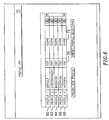
- FIG. 6 illustrates a screen showing existing profiles for a user. As illustrated, the user has five profiles.
- the profiles include a default profile 60, an entertainment profile 62, a business profile 64, a shopping profile 66, and a vacation profile 68.
- the user is provided a choice of editing the profile via an edit button or cloning the profile via a clone button.
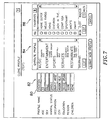
- FIG. 7 illustrates a clone profile screen.
- the clone profile screen allows for data entry of the profile name 80 and user information 82, as well as modification of the enroute profile 84 and favorites 86.
- a clone profile is a copy of a preexisting profile, which may be then edited.
- FIG. 8 illustrates the result of selecting the edit button of the screen of FIG. 6.
- the profile screen allows for edit of the profile information 90, the enroute profile 92, and favorites 94.
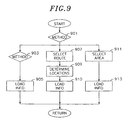
- FIG. 9 illustrates a flow chart of a process for populating a database.
- the process determines the method to be used in populating the database.
- the database may be populated either based on locations at which the PCD becomes relatively immobile, through selection of a route, or through selection of an area.
- Block 903 the process determines if the PCD has stopped. The PCD is determined to have stopped if the PCD has moved over 500 feet within the past two minutes, but has moved less than 50 feet in the past minute. If the PCD has stopped the process in Block 905 determines the position, in one embodiment the latitude and longitude, of the stop location and transmits the position to the server. The server in turn responds with an indication of the address of the stop location, as well as any identifying information regarding that address such as phone number, name of business, or other pertinent information. In addition, optionally the process provides an input screen to allow the user to enter additional information. An example input screen is illustrated in FIG. 13.
- the input screen includes a name field 1301, and add information button 1303, and a tag button 1365.
- Block 907 the process determines the selected route.
- the route is selected by the user through scrolling of an icon across a map display.
- the locations corresponding to the map locations form the route selected by the user.
- the PCD determines the route using the standard algorithms known in the art based on the starting point/ending point calculations.
- the PCD provides a server a starting point and an ending point, and the server determines the route. The server then provides route information to the PCD.
- Block 909 the process determines a series ot locations corresponding to locations along the selected route. Once the process has determined the locations corresponding to locations along a selected route the process proceeds to Block 910, in which the process, as previously described, retrieves and stores data into the database.
- Block 911 the process determines the selected area.
- the area is selected by the user through use of a click and drag box on a map display.
- the process also determines locations corresponding to those within the click and drag box.
- the process then proceeds to Block 913.
- Block 913 the process receives information regarding locations corresponding to the selected area, and stores the information in the database. The process then returns.
- FIG. 10 illustrates a display screen showing a navigation page of the present invention
- the display screen provides an indication of the selected profile 1011, which as illustrated is a San Diego(SD) vacation profile.
- the screen display also includes a map display 1013.
- the map display includes a current destination D1 and a final destination D2.
- the map display also includes an indication of items 1015a-c from the favorite menu within the map display.
- the display also includes selection boxes for determining a method of transportation 1017.
- the embodiment described eight methods of transportation are selectable.
- the eight methods of transportation are by foot (FED), by air, by water, by rail, by highway, by subway, by bike and by horse.
- the method of transportation effects both routes and time of travel. For example, subways have specific locations from which one may ingress and egress, and those locations must be taken into account when route selection occurs.
- the method of transportation also affects travel time. For example, traveling from one place to another by foot is likely, depending on traffic, to take longer than travel by car.
- route selection is also affected by the use of road blocks.
- Road blocks are locations, selected by the user, which are to be avoided in the selection of many routes.
- Road blocks may be selected by the user, for example, to avoid areas the user, through personal preference or knowledge, wishing to avoid. For example, a user may desire to avoid certain intersections known the user to present particular difficulties with travel.
- Road blocks may also be selected by the user to avoid areas which the user may believe to present danger to the user or the user's property. These areas may be areas of high crime, construction zones, or even areas which are known to the user to present dangerous road driving conditions.
- the user is provided the opportunity to place road blocks along the selected route.
- FIG. 11 illustrates a user road blocks display screen.
- the user road blocks display screen includes an automatically selected route to the first destination D1 and a final destination D2.
- the automatically selected route is indicated by a bold line 1111 in the map display.
- a selectable button 1113 is displayed. If the user selects the button the process implements a road block at the selected location and automatically reselects a route to avoid the road block location.
- the user is provided a selection box 1117 to allow selection of certain types of activities more likely to impact traffic.
- the selection include entertainment, sports, conventions and parades. Selection of any of these items causes the process to determine, based on information available from the Internet service provider, whether such locations should be avoided.
- FIG. 12 illustrates an enroute profile setting screen.
- the enroute profile setting screen provides two functions.
- a first function is to allow a user to set favorite settings for any particular profile.
- the screen includes a profile pop down menu 1211 allowing selection of a particular profile.
- the screen also includes button entries for categories corresponding to those which appear in the favorite profiles.
- button menus for music 1213, entertainment 1215, recreation 1217, restaurants 1219, miscellaneous 1221, shopping 1223, sports 1225, and services 1227 are provided.
- Each of the categories allow for selection of multiple items corresponding to the favorites of the user for the particular profile. For example, under the restaurants categories the groupings include those for fast food, Italian food, French food, American food, and Chinese food. The user may select one or more of these groupings.
- Each of the selected groupings are available for automatic database population. For example, if a database is populated either through simulation or through actual route travel, database population is limited to those corresponding to groupings selected via the enroute profile settings. In other words, users are provided information relating to items which are of interests to them along the route they expect to take. This allows both for increased targeting of information by businesses, which will make themselves known to individuals who may be interested in their product or service, as well as allowing those individuals to filter out information relating to businesses and services for which they have no interest.
- users may elect to turn off population of the database via a button menu 1231. This allows the user to avoid excessively populating the database in areas the user either will not return to or does not expect to stop.
- a pop down selection also is provided in the screen of FIG. 12 to allow the user to populate the database enroute or merely for the destination 1235.
- Population of the database enroute allows the user to locate items of interest or traveling for which the user may desire to stop. If the user knows that the user will not stop prior to reaching the destination, then the user may elect the destination button and thereby only be provided information regarding the users destination.
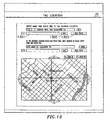
- FIG. 13 illustrates a screen used by the user to tag a location.
- the tag location screen allows the user to populate a database based on either current location or an address located on their map.
- the tag location screen is used when the user is either at a location or knows of a location for which the user desires the information entered into the database.
- the tag location screen is also provided when the user is populating the database via the stop method, and the user has additional information desired to be entered. This may occur for example, when a particular business is not provided information to the ISP, but the user wishes information provided by way of the user entry into the database.
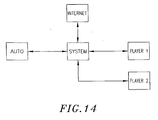
- FIG. 14 illustrates a block diagram of a central music system.
- a central music system 1411 is a computerized system including a processor and memory.
- the central music system additionally includes a modem for communication over a telephone network.
- the modem may be replaced by a network interface card (NIC) or a cable modem, or other similar devices depending on the communication transport system.
- NIC network interface card
- the memory stores information in digital form, including audio files.
- Audio files are files which, when decoded by a suitable player, form an audio output stream which may be the reading of a book or, for example, music.
- the audio files store music in a variety of formats. These formats include ,MP3 files, wav files, aud files, and the like.
- An MP3 file is a compressed audio file.
- the audio files are obtained by transferring the audio files from an external system to the central music system. This may be done via a CD-ROM or disk reader, or by using the communication modem or the like to download information representing the audio files from the Internet.
- the central music system is a central entertainment system.
- the central entertainment system is provided visual files and audio visual files in addition to sound files.
- the central music system makes the audio file available to remote nodes.
- the remote nodes include an automobile 1413, a first home system 1415, and a second home system 1417.
- the central music system transfers the music files to the requesting remote node on request.
- the first home system and the second home system are connected to the central music system via a physical link.
- the automobile is connected to the central music system via a cellular phone.
- the central music system transmits the audio file to the requesting node in the format requested by the requesting node.
- the first home system may require audio files of a first type and the second home system may require audio files of a second type.
- the automobile sound system may require audio files of yet a third type.
- the audio files stored on the central music system may be of yet a fourth type.
- the central music system includes a file translation program. The file translation program converts audio files from one file format to another.
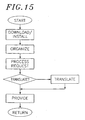
- FIG. 15 illustrates a process of using the central music system.
- the central music system downloads or installs an audio file. This occurs in the case of a download by downloading the audio file from another computer system, such is accomplished by downloading from the Internet. Audio files may also be installed onto the central music system through use of a disk or CD-ROM drive.
- a central music system organizes the audio files.
- the organization of audio files is accomplished at the direction of a user. For example. the user may link audio tiles such that a request for a first audio file will additionally inform the music system that a second audio file should follow the first audio file.
- the central music system processes a request for an audio file.
- the central music system determines which audio file has been requested, as well as any linked audio files additionally requested.
- the central music system determines if any of the audio files require translation to a different format. If translation of audio files from one format to another format is required the process proceeds to block 1519. In block 1519 the process translates the audio files. After performing any operations relating to translation, the process proceeds to block 1521 and provides the audio files, in the proper format, to the requesting node.
- the present invention provides a computer navigation and media control center.
Landscapes
- Engineering & Computer Science (AREA)
- Databases & Information Systems (AREA)
- Theoretical Computer Science (AREA)
- Data Mining & Analysis (AREA)
- Physics & Mathematics (AREA)
- General Engineering & Computer Science (AREA)
- General Physics & Mathematics (AREA)
- Information Retrieval, Db Structures And Fs Structures Therefor (AREA)
Applications Claiming Priority (3)
| Application Number | Priority Date | Filing Date | Title |
|---|---|---|---|
| US161860 | 1988-02-29 | ||
| US16186099P | 1999-10-27 | 1999-10-27 | |
| EP00972367A EP1224577A4 (de) | 1999-10-27 | 2000-10-27 | System und verfahren für anwendernavigation |
Related Parent Applications (1)
| Application Number | Title | Priority Date | Filing Date |
|---|---|---|---|
| EP00972367A Division EP1224577A4 (de) | 1999-10-27 | 2000-10-27 | System und verfahren für anwendernavigation |
Publications (2)
| Publication Number | Publication Date |
|---|---|
| EP1536351A2 true EP1536351A2 (de) | 2005-06-01 |
| EP1536351A3 EP1536351A3 (de) | 2005-08-17 |
Family
ID=34466168
Family Applications (1)
| Application Number | Title | Priority Date | Filing Date |
|---|---|---|---|
| EP05004271A Ceased EP1536351A3 (de) | 1999-10-27 | 2000-10-27 | System und Verfahren für Anwendernavigation |
Country Status (1)
| Country | Link |
|---|---|
| EP (1) | EP1536351A3 (de) |
Family Cites Families (2)
| Publication number | Priority date | Publication date | Assignee | Title |
|---|---|---|---|---|
| FI106990B (fi) * | 1996-12-31 | 2001-05-15 | Nokia Mobile Phones Ltd | Menetelmä informaation välittämiseksi käyttäjälle |
| EP1042933A1 (de) * | 1997-12-23 | 2000-10-11 | Software.com, Inc. | System und verfahren zur steuerung persönlicher informationen und informationszustellung zu und von einer telekommunikationseinrichtung |
-
2000
- 2000-10-27 EP EP05004271A patent/EP1536351A3/de not_active Ceased
Also Published As
| Publication number | Publication date |
|---|---|
| EP1536351A3 (de) | 2005-08-17 |
Similar Documents
| Publication | Publication Date | Title |
|---|---|---|
| US7475057B1 (en) | System and method for user navigation | |
| JP4179655B2 (ja) | 情報提供装置および方法、情報送信装置、ならびに、情報提供システム | |
| US5948040A (en) | Travel reservation information and planning system | |
| US9607092B2 (en) | Mapping method and system | |
| US6516268B2 (en) | Bundled map guide | |
| US6493630B2 (en) | Bundled map guide | |
| US9983015B2 (en) | Technique for effective navigation based on user preferences | |
| JP5420607B2 (ja) | ガイド情報選別システム | |
| US20130268306A1 (en) | Schedule arrangement system and method for trips matching, integration and output | |
| US20050027705A1 (en) | Mapping method and system | |
| WO1998035311A9 (en) | Travel reservation and information planning system | |
| US20010054087A1 (en) | Portable internet services | |
| US20060271277A1 (en) | Interactive map-based travel guide | |
| US8682727B2 (en) | Advertisement distribution system, advertisement distribution device, advertisment distribution method, advertisement distribution program, and computer readable record medium recorded with advertisement distribution program | |
| JP2003505780A (ja) | 協同位置サーバー/システム | |
| JP2003248683A (ja) | サーバ、情報提供方法およびプログラム | |
| JP5193436B2 (ja) | ナビゲーション装置、車両貸出システム及び車両貸出方法 | |
| JP2001195459A (ja) | 旅行計画システム及び方法 | |
| JP2019185612A (ja) | 情報提供装置及び情報提供方法 | |
| TW200301432A (en) | Information provider service system | |
| KR20150083673A (ko) | 여행 플랜 서비스 제공 방법 및 장치 | |
| JP2003203075A (ja) | オンライン不動産検索システム | |
| WO2007099815A1 (ja) | 映像処理装置、通信端末、地点情報検索装置、映像処理方法、地点情報報知方法、地点情報検索方法、映像処理プログラム、地点情報報知プログラム、地点情報検索プログラムおよびコンピュータに読み取り可能な記録媒体 | |
| EP1168214A1 (de) | Verfahren und Systeme zum Vorschlagen von Ideen | |
| EP1536351A2 (de) | System und Verfahren für Anwendernavigation |
Legal Events
| Date | Code | Title | Description |
|---|---|---|---|
| PUAI | Public reference made under article 153(3) epc to a published international application that has entered the european phase |
Free format text: ORIGINAL CODE: 0009012 |
|
| 17P | Request for examination filed |
Effective date: 20050228 |
|
| AC | Divisional application: reference to earlier application |
Ref document number: 1224577 Country of ref document: EP Kind code of ref document: P |
|
| AK | Designated contracting states |
Kind code of ref document: A2 Designated state(s): AT BE CH CY DE DK ES FI FR GB GR IE IT LI LU MC NL PT SE |
|
| PUAL | Search report despatched |
Free format text: ORIGINAL CODE: 0009013 |
|
| AK | Designated contracting states |
Kind code of ref document: A3 Designated state(s): AT BE CH CY DE DK ES FI FR GB GR IE IT LI LU MC NL PT SE |
|
| AKX | Designation fees paid |
Designated state(s): AT BE CH CY DE DK ES FI FR GB GR IE IT LI LU MC NL PT SE |
|
| STAA | Information on the status of an ep patent application or granted ep patent |
Free format text: STATUS: THE APPLICATION HAS BEEN REFUSED |
|
| 18R | Application refused |
Effective date: 20090126 |