EP1224801B1 - Verfahren und vorrichtung zum anzeigen von informationen zu ausgewählten bildelementen von bildern einer videosequenz - Google Patents
Verfahren und vorrichtung zum anzeigen von informationen zu ausgewählten bildelementen von bildern einer videosequenz Download PDFInfo
- Publication number
- EP1224801B1 EP1224801B1 EP00967902A EP00967902A EP1224801B1 EP 1224801 B1 EP1224801 B1 EP 1224801B1 EP 00967902 A EP00967902 A EP 00967902A EP 00967902 A EP00967902 A EP 00967902A EP 1224801 B1 EP1224801 B1 EP 1224801B1
- Authority
- EP
- European Patent Office
- Prior art keywords
- information
- video sequence
- image
- image element
- anyone
- Prior art date
- Legal status (The legal status is an assumption and is not a legal conclusion. Google has not performed a legal analysis and makes no representation as to the accuracy of the status listed.)
- Expired - Lifetime
Links
Images






Classifications
-
- H—ELECTRICITY
- H04—ELECTRIC COMMUNICATION TECHNIQUE
- H04N—PICTORIAL COMMUNICATION, e.g. TELEVISION
- H04N21/00—Selective content distribution, e.g. interactive television or video on demand [VOD]
- H04N21/80—Generation or processing of content or additional data by content creator independently of the distribution process; Content per se
- H04N21/85—Assembly of content; Generation of multimedia applications
- H04N21/858—Linking data to content, e.g. by linking an URL to a video object, by creating a hotspot
- H04N21/8583—Linking data to content, e.g. by linking an URL to a video object, by creating a hotspot by creating hot-spots
-
- H—ELECTRICITY
- H04—ELECTRIC COMMUNICATION TECHNIQUE
- H04N—PICTORIAL COMMUNICATION, e.g. TELEVISION
- H04N21/00—Selective content distribution, e.g. interactive television or video on demand [VOD]
- H04N21/20—Servers specifically adapted for the distribution of content, e.g. VOD servers; Operations thereof
- H04N21/23—Processing of content or additional data; Elementary server operations; Server middleware
- H04N21/234—Processing of video elementary streams, e.g. splicing of video streams or manipulating encoded video stream scene graphs
- H04N21/2343—Processing of video elementary streams, e.g. splicing of video streams or manipulating encoded video stream scene graphs involving reformatting operations of video signals for distribution or compliance with end-user requests or end-user device requirements
- H04N21/234318—Processing of video elementary streams, e.g. splicing of video streams or manipulating encoded video stream scene graphs involving reformatting operations of video signals for distribution or compliance with end-user requests or end-user device requirements by decomposing into objects, e.g. MPEG-4 objects
-
- H—ELECTRICITY
- H04—ELECTRIC COMMUNICATION TECHNIQUE
- H04N—PICTORIAL COMMUNICATION, e.g. TELEVISION
- H04N21/00—Selective content distribution, e.g. interactive television or video on demand [VOD]
- H04N21/20—Servers specifically adapted for the distribution of content, e.g. VOD servers; Operations thereof
- H04N21/23—Processing of content or additional data; Elementary server operations; Server middleware
- H04N21/235—Processing of additional data, e.g. scrambling of additional data or processing content descriptors
-
- H—ELECTRICITY
- H04—ELECTRIC COMMUNICATION TECHNIQUE
- H04N—PICTORIAL COMMUNICATION, e.g. TELEVISION
- H04N21/00—Selective content distribution, e.g. interactive television or video on demand [VOD]
- H04N21/40—Client devices specifically adapted for the reception of or interaction with content, e.g. set-top-box [STB]; Operations thereof
- H04N21/43—Processing of content or additional data, e.g. demultiplexing additional data from a digital video stream; Elementary client operations, e.g. monitoring of home network or synchronising decoder's clock; Client middleware
- H04N21/431—Generation of visual interfaces for content selection or interaction; Content or additional data rendering
- H04N21/4312—Generation of visual interfaces for content selection or interaction; Content or additional data rendering involving specific graphical features, e.g. screen layout, special fonts or colors, blinking icons, highlights or animations
-
- H—ELECTRICITY
- H04—ELECTRIC COMMUNICATION TECHNIQUE
- H04N—PICTORIAL COMMUNICATION, e.g. TELEVISION
- H04N21/00—Selective content distribution, e.g. interactive television or video on demand [VOD]
- H04N21/40—Client devices specifically adapted for the reception of or interaction with content, e.g. set-top-box [STB]; Operations thereof
- H04N21/43—Processing of content or additional data, e.g. demultiplexing additional data from a digital video stream; Elementary client operations, e.g. monitoring of home network or synchronising decoder's clock; Client middleware
- H04N21/431—Generation of visual interfaces for content selection or interaction; Content or additional data rendering
- H04N21/4312—Generation of visual interfaces for content selection or interaction; Content or additional data rendering involving specific graphical features, e.g. screen layout, special fonts or colors, blinking icons, highlights or animations
- H04N21/4314—Generation of visual interfaces for content selection or interaction; Content or additional data rendering involving specific graphical features, e.g. screen layout, special fonts or colors, blinking icons, highlights or animations for fitting data in a restricted space on the screen, e.g. EPG data in a rectangular grid
-
- H—ELECTRICITY
- H04—ELECTRIC COMMUNICATION TECHNIQUE
- H04N—PICTORIAL COMMUNICATION, e.g. TELEVISION
- H04N21/00—Selective content distribution, e.g. interactive television or video on demand [VOD]
- H04N21/40—Client devices specifically adapted for the reception of or interaction with content, e.g. set-top-box [STB]; Operations thereof
- H04N21/43—Processing of content or additional data, e.g. demultiplexing additional data from a digital video stream; Elementary client operations, e.g. monitoring of home network or synchronising decoder's clock; Client middleware
- H04N21/435—Processing of additional data, e.g. decrypting of additional data, reconstructing software from modules extracted from the transport stream
-
- H—ELECTRICITY
- H04—ELECTRIC COMMUNICATION TECHNIQUE
- H04N—PICTORIAL COMMUNICATION, e.g. TELEVISION
- H04N21/00—Selective content distribution, e.g. interactive television or video on demand [VOD]
- H04N21/40—Client devices specifically adapted for the reception of or interaction with content, e.g. set-top-box [STB]; Operations thereof
- H04N21/47—End-user applications
-
- H—ELECTRICITY
- H04—ELECTRIC COMMUNICATION TECHNIQUE
- H04N—PICTORIAL COMMUNICATION, e.g. TELEVISION
- H04N21/00—Selective content distribution, e.g. interactive television or video on demand [VOD]
- H04N21/40—Client devices specifically adapted for the reception of or interaction with content, e.g. set-top-box [STB]; Operations thereof
- H04N21/47—End-user applications
- H04N21/472—End-user interface for requesting content, additional data or services; End-user interface for interacting with content, e.g. for content reservation or setting reminders, for requesting event notification, for manipulating displayed content
- H04N21/4722—End-user interface for requesting content, additional data or services; End-user interface for interacting with content, e.g. for content reservation or setting reminders, for requesting event notification, for manipulating displayed content for requesting additional data associated with the content
-
- H—ELECTRICITY
- H04—ELECTRIC COMMUNICATION TECHNIQUE
- H04N—PICTORIAL COMMUNICATION, e.g. TELEVISION
- H04N21/00—Selective content distribution, e.g. interactive television or video on demand [VOD]
- H04N21/40—Client devices specifically adapted for the reception of or interaction with content, e.g. set-top-box [STB]; Operations thereof
- H04N21/47—End-user applications
- H04N21/472—End-user interface for requesting content, additional data or services; End-user interface for interacting with content, e.g. for content reservation or setting reminders, for requesting event notification, for manipulating displayed content
- H04N21/4722—End-user interface for requesting content, additional data or services; End-user interface for interacting with content, e.g. for content reservation or setting reminders, for requesting event notification, for manipulating displayed content for requesting additional data associated with the content
- H04N21/4725—End-user interface for requesting content, additional data or services; End-user interface for interacting with content, e.g. for content reservation or setting reminders, for requesting event notification, for manipulating displayed content for requesting additional data associated with the content using interactive regions of the image, e.g. hot spots
-
- H—ELECTRICITY
- H04—ELECTRIC COMMUNICATION TECHNIQUE
- H04N—PICTORIAL COMMUNICATION, e.g. TELEVISION
- H04N21/00—Selective content distribution, e.g. interactive television or video on demand [VOD]
- H04N21/40—Client devices specifically adapted for the reception of or interaction with content, e.g. set-top-box [STB]; Operations thereof
- H04N21/47—End-user applications
- H04N21/478—Supplemental services, e.g. displaying phone caller identification, shopping application
-
- H—ELECTRICITY
- H04—ELECTRIC COMMUNICATION TECHNIQUE
- H04N—PICTORIAL COMMUNICATION, e.g. TELEVISION
- H04N21/00—Selective content distribution, e.g. interactive television or video on demand [VOD]
- H04N21/80—Generation or processing of content or additional data by content creator independently of the distribution process; Content per se
- H04N21/81—Monomedia components thereof
- H04N21/812—Monomedia components thereof involving advertisement data
-
- H—ELECTRICITY
- H04—ELECTRIC COMMUNICATION TECHNIQUE
- H04N—PICTORIAL COMMUNICATION, e.g. TELEVISION
- H04N21/00—Selective content distribution, e.g. interactive television or video on demand [VOD]
- H04N21/80—Generation or processing of content or additional data by content creator independently of the distribution process; Content per se
- H04N21/85—Assembly of content; Generation of multimedia applications
- H04N21/858—Linking data to content, e.g. by linking an URL to a video object, by creating a hotspot
-
- H—ELECTRICITY
- H04—ELECTRIC COMMUNICATION TECHNIQUE
- H04N—PICTORIAL COMMUNICATION, e.g. TELEVISION
- H04N21/00—Selective content distribution, e.g. interactive television or video on demand [VOD]
- H04N21/80—Generation or processing of content or additional data by content creator independently of the distribution process; Content per se
- H04N21/85—Assembly of content; Generation of multimedia applications
- H04N21/858—Linking data to content, e.g. by linking an URL to a video object, by creating a hotspot
- H04N21/8586—Linking data to content, e.g. by linking an URL to a video object, by creating a hotspot by using a URL
-
- H—ELECTRICITY
- H04—ELECTRIC COMMUNICATION TECHNIQUE
- H04N—PICTORIAL COMMUNICATION, e.g. TELEVISION
- H04N7/00—Television systems
- H04N7/08—Systems for the simultaneous or sequential transmission of more than one television signal, e.g. additional information signals, the signals occupying wholly or partially the same frequency band, e.g. by time division
- H04N7/087—Systems for the simultaneous or sequential transmission of more than one television signal, e.g. additional information signals, the signals occupying wholly or partially the same frequency band, e.g. by time division with signal insertion during the vertical blanking interval only
- H04N7/088—Systems for the simultaneous or sequential transmission of more than one television signal, e.g. additional information signals, the signals occupying wholly or partially the same frequency band, e.g. by time division with signal insertion during the vertical blanking interval only the inserted signal being digital
-
- H—ELECTRICITY
- H04—ELECTRIC COMMUNICATION TECHNIQUE
- H04N—PICTORIAL COMMUNICATION, e.g. TELEVISION
- H04N21/00—Selective content distribution, e.g. interactive television or video on demand [VOD]
- H04N21/40—Client devices specifically adapted for the reception of or interaction with content, e.g. set-top-box [STB]; Operations thereof
- H04N21/45—Management operations performed by the client for facilitating the reception of or the interaction with the content or administrating data related to the end-user or to the client device itself, e.g. learning user preferences for recommending movies, resolving scheduling conflicts
- H04N21/462—Content or additional data management e.g. creating a master electronic programme guide from data received from the Internet and a Head-end or controlling the complexity of a video stream by scaling the resolution or bit-rate based on the client capabilities
- H04N21/4622—Retrieving content or additional data from different sources, e.g. from a broadcast channel and the Internet
Definitions
- the present invention relates to a method for displaying information about selected picture elements of pictures or a video sequence, a record carrier with a video sequence, with informational data and criteria data for executing the Method, an apparatus for processing video sequences according to the preamble of claim 31 and a display unit for execution of the procedure.
- This information can be, for example, accessibility or links to other Internet homepages.
- the coordinates of rectangular image areas of picture elements defined and linked to information or a link to other homepages If the picture element is displayed on the screen and the user with the Cursor moves to and selects the defined rectangular image area stored information or the Internet page linked to the image area loaded, d. H. the link will be executed.
- the method for displaying information to selected picture elements of a video sequence and the device for editing educate video sequences so that an improved advertising with television contributions is possible and the TV viewers interactively confronted with advertising elements become.
- a video sequence can be advantageously processed by a time track
- an image area is marked to be selected Pixel to define the picture element in the subsequent pictures z.
- B. with Help is sought from well-known pattern recognition methods and the image coordinates or the displacement vectors of the image areas of the picture element in the images of Video sequence, the corresponding time information of the time track and the picture elements associated information is stored.
- the Time track is an unambiguous assignment of the image coordinates to the corresponding images possible. It should be remembered that the usual of television channels used video sequences are often analog and in one of them independent Database stored image coordinates are no longer assigned to the individual images later if the video sequence is not marked accordingly.
- the amount of data to be transferred for the assignment of the information to the image coordinates to be selected pixels can be advantageously reduced by the Course of the image coordinates of a picture element as a mathematical approximation function which is transmitted as a criterion.
- the image coordinates can do this as a function of the space with the coordinates x and y over the time z. B. with the help of Spline functions are described. In this case, only the parameters have to be left be transmitted to the approximation function.
- the time information of the time track becomes synchronous to the video sequence and transmit the image coordinates and associated information asynchronously. Indeed it is necessary to regularly transmit the criteria associated with a video sequence, to avoid assignment errors caused by a station change. Often the user "zaps" in rapid succession through the individual stations, so that one incorrect or no mapping to picture elements is possible unless the criteria are met be updated regularly.
- the information is a window on the video sequence superimposed on the display unit.
- the information includes interactive elements, so that data is transferred from the display unit to a target computer after a picture element is selected from the pictures of the video sequence on the display unit has been.
- the data and / or the target computer depend on the information, which belongs to the selected picture element.
- the interactive information can be z. In the nature of an internet link.
- In the information window can advantageously Input elements may be provided, in which the user after fading in the information window on the display unit more data such.
- B. his address and order information for a product associated with the picture element.
- These Data is then transmitted to the destination computer and z. B. executed an order. In this way it is possible to use video sequences as an advertising medium and with Help the interaction perform an advertising success review and an ordering system ready injury.
- the data transmission to the destination computer may advantageously be via a broadband network, a power grid, a telephone network or via a radio and satellite network or the like respectively.
- the criteria for linking a selected picture element to the associated one Information is advantageously in the blanking interval of the signal of the video sequences transfer.
- a selected pixel additionally as a so-called additional pixel the ad unit, d. H.
- the ad unit is a selected picture element Twice available, it is advantageously achieved that the user visually it is conveyed which picture element is deposited with an information and he is displaying the information about the additional picture element can perform. To this In this way, the user can track the video sequence unchanged and only when needed if necessary, call the picture elements to be selected in the display unit, d. H. bring the extra pixel to the screen, signaling it which picture elements are stored with information.
- the additional picture elements or an additional picture element in the form of an icon bar at a predetermined position on the screen for Is made available. So that the user can follow his usual television habits If necessary, the additional picture element is only displayed if necessary.
- Video sequence selected pixels, which are deposited with information is it is advantageous if this possibility of insertion advantageously at the edge of Display unit or the screen by means of a separate pointer, which for example, a bar or a character specially configured for the user may be displayed on the display unit.
- the user may be independent
- via the additional picture elements can determine which picture elements in the video sequence to be displayed as selected picture elements.
- the user could specify that he is due to his technical interest only technical devices for which information is stored as an additional picture element set so that it can be recognized by the marker in the video sequence is stored, which of the technical equipment in the video sequence with information becomes.
- the signal element according to claim 21 with a symbol, For example, numeric number or a letter provided so the user For example, pressing the appropriate number will select the selected one Make a picture element to retrieve the display of the information.
- the hint mark with the signal element via a connecting line connected in this way the user is clearly identified in this way, that now the selected picture element connected to the signal element with information is deposited.
- this representation can only be for a specific Time, preferably one second, so that the expiration of the video sequence as such does not fundamentally disturb. This measure also achieves the user the opportunity to clarify that in the special video sequence with Information deposited selected pixels are present.
- the user With the possibility to activate the hint mark only if a selected one Picture element is present in the video sequence, the user is enabled can easily identify when he has information about a selected Query picture element.
- Another way to show the user while video sequences are running, when he can receive information for example, consists in a pulsating and / or looking pointer.
- a pulsating and / or flashing indicator mark the advantage that whenever more new ones are selected Pixels are added when displaying a video sequence that is already available for Existing selected picture element existing indicia begins to look or to pulsate.
- a first mode for displaying the signal element can be provided, with which of the normal presentation of the video sequence, d. H. Presentation of a movie, in the activation mode can be toggled if a selected picture element in the video sequence is available.
- a second mode may be provided which is for displaying a first information regarding the selected one Picture elements is used. In this way, the user can in the second Mode an overview of the stored information regarding a selected Make picture element.
- An apparatus for editing video sequences for enabling information to display selected picture elements of pictures of the video sequence advantageously has a reproducing unit for reproducing and displaying the video sequence, a detection unit for selecting and capturing picture elements of images of Video sequence, a recognition unit for recognizing the selected picture elements in subsequent images of the video sequence and for determining the respective image coordinates the picture elements and a recording unit for storing information to selected picture elements and criteria for the later linking of Image coordinates of selected image elements with information.
- the display unit preferably has a data processing unit for executing the inventive method.
- a data processing unit e.g. a set-top box be used, which advantageously allows Internet access.
- a raw video sequence of one Client is first digitized, if it is available as an analog video sequence. Subsequently a time track is written to the video sequence for later assignment and to allow selection of picture elements as a function of time. Subsequently an empty database is created and there are information points in the Database recorded. For this purpose, a frame is placed around pixels to be selected, the to be linked to specific information. The frame or picture element is followed in this embodiment by the scenes of the video sequence and the associated image coordinates are stored as a function of the time track. It is advantageous if only the changes of the image coordinates are stored. This can save storage space. Capturing information in the Database and determining the associated image coordinates is done in succession for every information point to be recorded.
- the video sequence becomes synchronous with the time track to a display unit, such as a TV set.
- Asynchronous e.g. transmitted in the blanking interval of the television signal, the data of the database.
- the Users prefer to select picture elements with a mouse-controlled cursor.
- the image coordinates of the selected picture element with the transmitted picture coordinates and the corresponding information is displayed when the image coordinates match those of a picture element for which information is deposited have been. This will open a window on the screen and the information superimposed on the displayed video sequence. In this way it is possible background information to transmit and display video sequences.
- you can Advertising messages and order options are interactively called by the user.
- the method according to the first embodiment will be described with reference to FIG. 2 Block diagram of a system for carrying out the method explained in more detail.
- the digital or analog video sequence 1 with the time track is transmitted to a display unit 2, which consists of a television 3 and a data processing unit 4.
- the time information is transmitted synchronously to the television signal in the invisible transmission range.
- information Ii to be selected pixels and the associated image coordinates Xi, Yi asynchronous to the television signal to the data processing unit 4 of the display unit and stored there.
- a Mouse an infrared or radio pointer 5, a keyboard 6 or the like, the user Select picture elements on the TV screen 3.
- the associated image coordinates are transmitted to the data processing unit 4 and there with the stored Image coordinates Xi, Yi of the pixels to be selected compared. If the image coordinates are located in the image area to select image elements, which is the linked information Ii displayed in a separate window on the screen. If this information Ii is connected to a link and started an interaction has been, is connected by the data processing unit 4 to a target computer 7 in a central office and to the information Ii associated data, for. to Advertising success control, order processing, etc. transferred to the central computer.
- the Internet is used for this purpose.
- the data processing unit 4 This can be a so-called set-top box or the like.
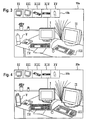
- an overall image 13a appearing to the user is, for example, the display unit 3 of FIG. 2, as it appear according to a second embodiment can.
- the overall picture 13a shows a video sequence with a plurality of picture elements, in this example, a total of five selected picture elements I, II, III, IV and V available.
- an icon bar 13b At an appropriate position on the display image 13a is an icon bar 13b, in which the selected picture elements I, II, III, IV and V as additional Pixels XI, XII, XIII, IX and XV are shown.
- the underlying principle in this second embodiment is that during the audio video transmission, an icon bar 13b with the additional Picture elements XI, XII, XIII, IX and XV as the picture elements available for selection is displayed.
- This icon bar can now be used with the aid of an input device, (for example, mouse, cursor, control pad, remote controls, Radio pointer, etc) the additional picture element will be selected and from the selection an action, such as ordering, requesting information, etc., depending, that is show corresponding information.
- an input device for example, mouse, cursor, control pad, remote controls, Radio pointer, etc
- the additional picture element will be selected and from the selection an action, such as ordering, requesting information, etc., depending, that is show corresponding information.
- an action such as ordering, requesting information, etc., depending, that is show corresponding information.
- a transmission for example, of the image coordinates of selected image elements in the pictures of the video sequence, which are related to the picture elements are the image transfer, is therefore not required, and there
- a third embodiment of the present invention is shown, which essentially the same rendering mechanics for the selected pixels as used in the second embodiment. Shown is a display image 23a, which also selected picture elements I, II, III, IV, V and an icon bar 23b with the additional Picture elements XI, XII, XIII; XIV, XV represents.
- the selected picture elements I to V are marked with a mark in Form a selection frame provided to allow the user in addition to the icon bar 23b in the display image can recognize which pixel is activated or with a Information is deposited.
- FIG. 5 shows a fourth embodiment of the present invention.
- a display image of the display unit 3 in which in turn selected picture elements I to V can be seen.
- a signal element 35 is provided for each selected picture element I to IV, wherein each signal element 35 with a pointer, for example, number or letter is provided, which can be selected directly, which then by pressing the corresponding number or letter the image element selected for this deposited information is displayed.
- a pointer for example, number or letter
- the image element selected for this deposited information is displayed.
- the coordinates the signal elements are transmitted, which, for example, in dependence from the image coordinates of the selected picture elements. Displaying the Information associated with the selected picture element is thus transmitted Activation of a separate input device made dependent and it will not again so-called "hot spot" used.
- the optical processing for the user of the currently selected signal element similar to the third embodiment by emphasis, d. H. possibly through different border of the border or color can be lifted.
- the inventive method and apparatus of the invention thus allows a product placement of contributions with active advertising success control.
- an information for a picture element can be linked with a link, so that after Selection of the picture element an order of the one shown in the picture of the video sequence Product is possible by means of data transmission online.
- the user likes a product that is displayed in the video sequence, e.g. a garment, this can select the product with the help of the mouse and receives information associated with the product, e.g. the name and address of the distributor, the price, the quality etc ..
- information associated with the product e.g. the name and address of the distributor, the price, the quality etc ..
- another information field is selectable, which it the Enables users to enter order information and send the product directly to the operator to order.
- the order information is transmitted via a return channel, e.g. about one Broadband, electricity, radio or satellite networks or using a telephone connection, to the distributor, who will arrange the shipping and billing for the Product causes.
- IPP mode can now also by pressing an action button or otherwise Action measure, in a second mode, which, for example, a shopping cart includes, be transferred.
- a second mode which, for example, a shopping cart includes, be transferred.
- a third mode which provides more detailed information to the selected picture element.
- a special action from the operating mode i. H. TV-Mode and / or the Starzone-Mode directly into the Shopping cart of the second mode to arrive. It has proven to be advantageous if from the cart of the second mode for the time being in a so-called order box on from which then either an order confirmation is received or a bug that the order could not be made.
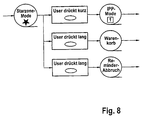
- Fig. 8 the possibilities are shown, from the so-called Starzone mode in the to change first and second modes by different action actions.
- the system is in the Starzone mode, for example, by briefly pressing a special key, for example a key green, from the Starzone mode in the IPP mode, d. H. first fashion, to be changed over. Press the user for example, the same key, d. H. Green button, longer, the system changes to the cart over, as shown in Fig. 8.
- IPP mode i. H. first fashion, are the selected picture elements are deposited with information, wherein a special signal element the respective selected picture element during the current operating mode or consecutive running video sequences. In tracking the signal elements with the selected picture element can be two different variants be used.
- the signal element sticks to the selected one Picture element and thus jumps in a scene change of different video sequences.
- the signal element is gentle in a scene change tightened. This means that the figure at the scene change by an animation is placed on the selected picture element or on the selected picture element preset position.
- the user now has the option of using appropriate Actuation of an action key associated with a signal element selects the one selected Picture element and corresponding information in a separate data memory save.
- the user wants detailed information to a selected picture element, he can by pressing one of the selected Picture element associated signal element associated action button directly in example the third mode, which includes a product box, change.
- the user Leave the IPP mode it can be assigned to one of the signal element Action key different action button to return to the Starzone mode. If, for example, he presses this action key longer, the entire system is aborted. Does he press a different action button to the action buttons mentioned above, so he can, for example, directly into the second mode, which includes the cart, switch.
- FIGS. 10 and 11 show schematically the different possibilities regarding the second mode, which includes the shopping cart, and the presentation of the first information regarding the selected picture elements.
- the picture elements selected in the IPP mode are selected preferably listed or displayed in tabular form.
- a number or a letter is assigned, which or which of Can be called in sequence.
- the selected pixels can be displayed differently depending on the status, where the following states are distinguished. First, those selected pixels, where no further information, such as ordering information such as Size, etc., and second, those selected pixels are included where further information such as order information has been entered. Latter For example, selected picture elements can be highlighted in color.
- Action button opens the product box of the third mode or else the selected picture element is deleted from the shopping cart.
- further action measures such as the product box opens.
- the user presses a different one of the action buttons just mentioned Action button opens the order box.
- the action button remains inactive until the selected picture element the corresponding information has been entered by the user. Press that For example, another user has an action button that is different from the action buttons above briefly, then the system changes back to the IPP mode. In contrast there is also the possibility that through other other action measures the system is canceled.
- another Provide an action button which must be pressed to select selected picture elements Clear.
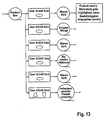
- FIG. 12 shows the product box associated with the third mode, wherein in FIG. 13 schematically the possible action inputs are displayed.
- FIG. 12 shows more detailed information about the selected one is selected in the third mode Picture element displayed. If the user presses a given action button, the corresponding one can Input field are highlighted in color, the user then the corresponding Information can be entered. If the user presses another action button, then, for example, again in the second mode, which includes the shopping cart, be jumped back and the order entries are accepted. presses the user has a different action button to the above action buttons, so For example, it can also be converted into the second mode, but become the further information not taken over. By pressing further action buttons For example, the third mode can be aborted or even the selected picture element be deleted from the shopping cart according to second mode.
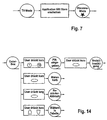
- Fig. 14 the operation of the order box is shown, with the addition of note is that the order box is operated with a security code to an unintentional Enable information, d. H. Avoid orders. Is an activation of Information or order is made, then by an order confirmation to the user signals that ultimately the interactivity is completed for the time being.
Landscapes
- Engineering & Computer Science (AREA)
- Multimedia (AREA)
- Signal Processing (AREA)
- Databases & Information Systems (AREA)
- Human Computer Interaction (AREA)
- Business, Economics & Management (AREA)
- Marketing (AREA)
- Two-Way Televisions, Distribution Of Moving Picture Or The Like (AREA)
- User Interface Of Digital Computer (AREA)
- Studio Circuits (AREA)
- Image Generation (AREA)
Description
- Fig. 1 -
- ein Ablaufdiagramm einer ersten Ausführungsform für das Aufbereiten von Videosequenzen zur Durchführung des Verfahrens;
- Fig. 2 -
- ein schematisches Blockdiagramm eines Systems zur Durchführung des Verfahrens.
- Fig. 3 -
- zeigt in einer zweiten Ausführungsform ein für den Benutzer erscheinendes Bild auf der Anzeigeeinheit;
- Fig. 4 -
- zeigt in einer dritten Ausführungsform ein für den Benutzer erscheinendes Bild auf der Anzeigeeinheit;
- Fig.5 -
- zeigt in einer vierten Ausführungsform ein für den Benutzer erscheinendes Bild auf der Anzeigeeinheit;
- Fig. 6 -
- zeigt ein schematisches Blockdiagramm einer Vorrichtung zur Durchführung des Verfahrens gemäß einer fünften Ausführungsform;
- Fig. 7 -
- zeigt schematisch den Übergang zwischen dem normalen Betriebsmodus und dem ersten Mode gemäß der fünften Ausführungsform;
- Fig. 8 -
- zeigt den Übergang zwischen dem ersten Mode und dem zweiten Mode gemäß der fünften Ausführungsform;
- Fig. 9 -
- zeigt schematisch die Betriebsweise des zweiten Modes;
- Fig. 10 -
- zeigt exemplarisch die mögliche Darstellungsform der ersten Informationen im zweiten Mode gemäß fünfter Ausführungsform;
- Fig. 11 -
- zeigt schematisch die Betriebsweise des dritten Modes;
- Fig. 12 -
- zeigt exemplarisch im dritten Mode zweite detailliertere Informationen;
- Fig. 13 -
- zeigt schematisch die Betriebsweise des dritten Modes.
Claims (43)
- Verfahren zum Anzeigen von Informationen (Ii) zu ausgewählten Bildelementen von Bildern einer Videosequenz (1) mit den Schritten:a) Empfangen der Videosequenz (1) durch eine Anzeigeeinheit (2), von definierten Informationen (Ii) zu Bildelementen und von Kriterien zur Verknüpfung eines ausgewählten Bildelementes mit den zugehörigen Informationen (Ii);b) Auswählen eines Bildelementes aus den Bildern der Videosequenz (1), die auf der Anzeigeeinheit (2) angezeigt werden;c) Anzeigen einer Information (Ii), wenn anhand der Kriterien festgestellt wurde, dass dem ausgewählten Bildelement eine Information (Ii) zugeordnet ist,
gekennzeichnet durchd) Bereitstellen eines zusätzlichen Signalelements zu dem ausgewählten Bildelement, wobei das zusätzliche Signalelement dem ausgewählten Bildelement zugeordnet ist und über das zusätzliche Signalelement die Information angezeigt wird. - Verfahren nach Anspruch 1, wobei die Bildkoordinaten (Xi, Yi) der ausgewählten Bildelemente als Kriterium zur Verknüpfung eines ausgewählten Bildelementes mit den zugehörigen Informationen (Ii) dienen, dadurch gekennzeichnet, dass eine Zuordnungstabelle zur Zuordnung von Informationen (Ii) zu Bildkoordinaten (Xi, Yi) ausgewählter Bildelemente in den Bildern der Videosequenz (1) erstellt wird und die Daten der Zuordnungstabelle als Kriterium übertragen werden.
- Verfahren nach Anspruch 2, gekennzeichnet durch die Schritte:Festlegen einer Zeitspur für die Videosequenz (1);Markieren eines Bildbereiches zum Definieren auszuwählender Bildelemente;Suchen des Bildelementes in den nachfolgenden Bildern;Abspeichern der Bildkoordinaten oder Verschiebungsvektoren der Bildbereiche des Bildelementes in den Bildern der Videosequenz (1), der entsprechenden Zeitinformationen der Zeitspur und der Informationen (Ii) für das Bildelement.
- Verfahren nach Anspruch 3, dadurch gekennzeichnet, dass eine mathematische Näherungsfunktion zur Beschreibung des Verlaufs der Bildkoordinaten (Xi, Yi) eines Bildelementes ermittelt und als Kriterium übertragen wird.
- Verfahren nach Anspruch 3 oder 4, dadurch gekennzeichnet, dass die Zeitinformation der Zeitspur synchron zur Videosequenz (1) und die Bildkoordinaten (Xi, Yi) und zugehörigen Informationen (Ii) asynchron zur Videosequenz (1) übertragen werden.
- Verfahren nach Anspruch 1, gekennzeichnet durch die Schritte:Markieren eines auszuwählenden Bildelementes;Abspeichern des markierten Bildelementes und einer zugehörigen Information (Ii) als Kriterium;Übertragen der Videosequenz (1), der abgespeicherten Bildelemente und der zugehörigen Informationen (Ii) an eine Anzeigeeinheit;Überprüfen, ob ein abgespeichertes Bildelement mit einem ausgewählten Bildelement übereinstimmt und Anzeigen der zugehörigen Informationen (Ii).
- Verfahren nach einem der Ansprüche 3 bis 6, dadurch gekennzeichnet, dass das Suchen oder Überprüfen der Bildelemente mit Mustererkennungsverfahren erfolgt.
- Verfahren nach einem der vorhergehenden Ansprüche, gekennzeichnet durch Überlagem eines Fensters über die Videosequenz (1) auf der Anzeigeeinheit (2) zum Anzeigen der Information (Ii).
- Verfahren nach einem der vorhergehenden Ansprüche, gekennzeichnet durch Übertragen von Daten von der Anzeigeeinheit (2) zu einem Zielcomputer (7), nachdem ein Bildelement aus den Bildern der Videosequenz (1) auf der Anzeigeeinheit (2) ausgewählt wurde, wobei die Daten und/oder der Zielcomputer (7) von der Information (Ii) abhängig ist, die zu dem ausgewählten Bildelement gehört.
- Verfahren nach Anspruch 9, dadurch gekennzeichnet, dass die Übertragung der Daten zu dem Zielcomputer (7) über ein Breitbandnetz, über ein Stromnetz oder über ein Telefonnetz oder über ein Funk- und/oder Satellitennetz erfolgt.
- Verfahren nach einem der vorhergehenden Ansprüche, dadurch gekennzeichnet, dass die Kriterien zur Verknüpfung eines ausgewählten Bildelementes mit den zugehörigen Informationen (Ii) in der Austastlücke des Signals der Videosequenz (1) übertragen wird.
- Verfahren nach einem der Ansprüche 1 bis 10, dadurch gekennzeichnet, dass die Kriterien zur Verknüpfung eines ausgewählten Bildelementes mit den zugehörigen Informationen (Ii) in einem definierten Bereich einer als digitaler Videodatenstrom vorliegenden Videosequenz (1) übertragen werden.
- Verfahren nach einem der Ansprüche 1 bis 12, dadurch gekennzeichnet, dass das ausgewählte Bildelement zusätzlich der Anzeigeneinheit übermittelt wird und das Anzeigen der Information über das zusätzliche Bildelement erfolgt.
- Verfahren nach Anspruch 13, dadurch gekennzeichnet, dass das zusätzliche Bildelement in Form einer Iconleiste mit dem das ausgewählte Bildelement enthaltende Bild dargestellt wird.
- Verfahren nach Anspruch 13 oder 14, dadurch gekennzeichnet, dass das zusätzliche Bildelement bei Bedarf in dem das ausgewählte Bildelement enthaltende Bild eingeblendet wird.
- Verfahren nach einem der Ansprüche 15, dadurch gekennzeichnet, dass die Möglichkeit der Einblendung mittels einer separaten Hinweismarkierung auf der Anzeigeeinheit dargestellt wird.
- Verfahren nach einem der Ansprüche 13 bis 16, dadurch gekennzeichnet, dass über das zusätzliche Bildelement festgelegt wird, welches ausgewählte Bildelement markiert werden soll.
- Verfahren nach einem der Ansprüche 13 bis 17, dadurch gekennzeichnet, dass die zusätzlichen Bildelemente der Reihe nach dargestellt werden und die Anzeige der Informationen über eine entsprechende Nummereingabe der aufgereihten zusätzlichen Bildelemente erfolgt.
- Verfahren nach einem der Ansprüche 1 bis 18, dadurch gekennzeichnet, dass das Signalelement jeweils an einem bestimmten Ort zum ausgewählten Bildelement auf der Anzeigeeinheit vorgesehen ist.
- Verfahren nach einem der Ansprüche 1 bis 19, dadurch gekennzeichnet, dass das Signalelement rechts oberhalb zum ausgewählten Bildelement auf der Anzeigeeinheit vorgesehen ist.
- Verfahren nach Anspruch 20, dadurch gekennzeichnet, dass das Signalelement mit einem Hinweiszeichen, vorzugsweise Nummer, versehen ist.
- Verfahren nach Anspruch 16 und 17 bis 21, wenn abhangig von 16, dadurch gekennzeichnet, dass die Hinweismarkierung mit dem Signalelement über eine Verbindungslinie für eine bestimmte Zeit, vorzugsweise 1 Sekunde, verbunden wird.
- Verfahren nach Anspruch 16 und 17 bis 22, wenn abhängig von 16 dadurch gekennzeichnet, dass die Hinweismarkierung nur aktiviert wird, wenn ein ausgewähltes Bildelement in der Videosequenz vorhanden ist.
- Verfahren nach Anspruch 23, dadurch gekennzeichnet, dass die Aktivierung der Hinweismarkierung über eine pulsierende und/oder blinkende Hinweismarkierung dargestellt wird.
- Verfahren nach einem der Ansprüche 19 bis 24, dadurch gekennzeichnet, dass ein erster Mode zum Anzeigen des Signalelements vorgesehen ist.
- Verfahren nach Anspruch 19 bis 25, dadurch gekennzeichnet, dass ein zweiter Mode zum Anzeigen einer ersten Information in Bezug auf die ausgewählten Bildelemente vorgesehen ist.
- Verfahren nach Anspruch 26, dadurch gekennzeichnet, dass im zweiten Mode alle ausgewählten Bildelemente einer zum Zeitpunkt der Aktivierung des zweiten Modes vorhandenen Videosequenz dargestellt werden, wobei die ausgewählten Bildelemente vorzugsweise tabellarisch aufgelistet werden.
- Verfahren nach Anspruch 27, dadurch gekennzeichnet, dass ein dritter Mode vorgesehen ist, mit dem detaillierte zweite Informationen zu dem ausgewählten Bildelement dargestellt werden.
- Verfahren nach einem der Ansprüche 22 bis 28, dadurch gekennzeichnet, dass die Aktivierung des ersten, zweiten und/oder dritten Mode durch zeitlich bedingtes und/oder unterschiedliches Betätigen von Aktionstasten, vorzugsweise einer Funksteuerung, ausgelöst werden.
- Aufzeichnungsträger mit Informationsdaten (Ii) zu ausgewählten Bildelementen von Bildern einer Videosequenz (1) und mit Kriteriendaten zur Verknüpfung eines ausgewählten Bildelementes mit den zugehörigen Informationen (II) zur Ausführung des Verfahrens nach Anspruch 1 bis 29.
- Vorrichtung zur Aufbereitung von Videosequenzen (1) zum Ermöglichen, Informationen (II) zu ausgewählten Bildelementen von Bildern der Videosequenzen (1) anzuzeigen,gekennzeichnet durcheine Wiedergabeeinheit zum Wiedergeben und Anzeigen der Videosequenz (1);eine Erfassungseinheit zum Auswählen und Erfassen von Bildelementen von Bildem der Videosequenz (1);eine Erkennungseinheit zum Erkennen der ausgewählten Bildelemente in nachfolgenden Bildern der Videosequenz (1) und zum Bestimmen der jeweiligen Bildkoordinaten (Xi, Yi) der Bildelemente;eine Aufzeichnungseinheit zum Abspeichern von Informationen (Ii) zu ausgewählten Bildelementen und von Kriterien für die spätere Verknüpfung von Bildkoordinaten (Xi, Yi) ausgewählter Bildelemente mit Informationen,ein Mittel zum Bereitstellen eines zusätzlichen Signalelements zu jedem ausgewählten Bildelement auf der Wiedergabeeinheit, wobei das zusätzliche Signalelement dem ausgewählten Bildelement zugeordnet ist und über das Signalelement die Information angezeigt wird.
- Vorrichtung nach Anspruch 31, dadurch gekennzeichnet, dass die Aufzeichnungseinheit zur Aufzeichnung der Kriterien als Bildkoordinaten (Xi, Yi) in Abhängigkeit von der Zeit ausgebildet ist.
- Vorrichtung nach Anspruch 32, dadurch gekennzeichnet, dass die Aufzeichnungseinheit zur Berechnung und Aufzeichnung von Bewegungsvektoren der erfassten Bildelemente in den Bildern der Videosequenz (1) als Kriterien ausgebildet ist.
- Vorrichtung nach einem der Ansprüche 31 bis 33, dadurch gekennzeichnet, dass das ausgewählte Bildelement zusätzlich der Wiedergabeeinheit übermittelt wird.
- Vorrichtung nach einem der Ansprüche 31 bis 34, dadurch gekennzeichnet, dass eine Iconleiste mit zumindest einem ausgewählten Bildelement vorgesehen ist.
- Vorrichtung nach einem der Ansprüche 31 bis 35, dadurch gekennzeichnet, dass eine Einblendeinrichtung für die Iconleitse und/oder das ausgewählte Bildelement vorgesehen ist.
- Vorrichtung nach einem der Ansprüche 31 bis 36, dadurch gekennzeichnet, dass für jedes Signalelement ein Hinweiszeichen vorgesehen ist.
- Vorrichtung nach einem der Ansprüche 31 bis 37, dadurch gekennzeichnet, dass jedes Signalelement in Form einer Nummer vorgesehen ist.
- Vorrichtung nach Anspruch 38, dadurch gekennzeichnet, dass die Aufzeichnungseinheit zur Berechnung und Aufzeichnung von Bewegungsvektoren der erfassten Bildelemente in den Bildern der Videosequenz (1) als Kriterien ausgebildet ist.
- Vorrichtung nach einem der Ansprüche 31 bis 39, dadurch gekennzeichnet, dass die Aufzeichnungseinheit zur Berechnung und Aufzeichnung einer Näherungsfunktion zur Beschreibung der Bildkoordinaten (Xi, Yi) in Abhängigkeit von der Zeit mit den Parameter der Näherungsfunktion als Kriterien ausgebildet ist.
- Vorrichtung der einem der Ansprüche 31 bis 40, dadurch gekennzeichnet, dass die Erfassungseinheit zum Ausführen von Mustererkennungsverfahren zur Verfolgung eins ausgewählten Bildelementes in den Bildern der Videosequenz (1) ausgebildet ist.
- Vorrichtung nach einem der Ansprüche 31 bis 39, gekennzeichnet durch einen Zielcomputer (7) zum Empfangen von Daten einer entfernten Anzeigeeinheit (2), wenn ein Bildelement an der entfernten Anzeigeeinheit (2) ausgewählt wurde und eine Information (Ii) mit dem Bildelement verknüpft ist.
- Anzeigeeinheit (2) zum Anzeigen von Informationen (Ii) zu ausgewählten Bildelementen von Bildern einer Videosequenz (1) mit einer Datenverarbeitungseinheit (4), dadurch gekennzeichnet, dass die Datenverarbeitungseinheit (4) zum Ausführen des Verfahrens nach einem der Ansprüche 1 bis 29 ausgebildet ist.
Applications Claiming Priority (5)
| Application Number | Priority Date | Filing Date | Title |
|---|---|---|---|
| DE19950939 | 1999-10-21 | ||
| DE19950939 | 1999-10-21 | ||
| DE10033134A DE10033134B4 (de) | 1999-10-21 | 2000-07-07 | Verfahren und Vorrichtung zum Anzeigen von Informationen zu ausgewählten Bildelementen von Bildern einer Videosequenz |
| DE10033134 | 2000-07-07 | ||
| PCT/EP2000/010388 WO2001030071A1 (de) | 1999-10-21 | 2000-10-20 | Verfahren und vorrichtung zum anzeigen von informationen zu ausgewählten bildelementen von bildern einer videosequenz |
Publications (2)
| Publication Number | Publication Date |
|---|---|
| EP1224801A1 EP1224801A1 (de) | 2002-07-24 |
| EP1224801B1 true EP1224801B1 (de) | 2005-12-28 |
Family
ID=26006315
Family Applications (1)
| Application Number | Title | Priority Date | Filing Date |
|---|---|---|---|
| EP00967902A Expired - Lifetime EP1224801B1 (de) | 1999-10-21 | 2000-10-20 | Verfahren und vorrichtung zum anzeigen von informationen zu ausgewählten bildelementen von bildern einer videosequenz |
Country Status (8)
| Country | Link |
|---|---|
| EP (1) | EP1224801B1 (de) |
| JP (1) | JP2003512780A (de) |
| CN (1) | CN1411658A (de) |
| AT (1) | ATE314788T1 (de) |
| AU (1) | AU783150B2 (de) |
| BR (1) | BR0015239A (de) |
| DE (2) | DE20012804U1 (de) |
| WO (1) | WO2001030071A1 (de) |
Families Citing this family (4)
| Publication number | Priority date | Publication date | Assignee | Title |
|---|---|---|---|---|
| DE10109617A1 (de) * | 2001-02-28 | 2002-09-12 | Thomas Sixt | Verfahren zur Darstellung von Filmszenen auf einem Bildschirm |
| US20090077459A1 (en) * | 2007-09-19 | 2009-03-19 | Morris Robert P | Method And System For Presenting A Hotspot In A Hypervideo Stream |
| CN106294388B (zh) * | 2015-05-20 | 2022-04-05 | 腾讯科技(深圳)有限公司 | 一种页面展示的方法及终端 |
| CN105759826A (zh) * | 2015-11-03 | 2016-07-13 | 天津艾思科尔科技有限公司 | 带有智能型消防探测装置的飞行器 |
Family Cites Families (5)
| Publication number | Priority date | Publication date | Assignee | Title |
|---|---|---|---|---|
| US6205231B1 (en) * | 1995-05-10 | 2001-03-20 | Identive Corporation | Object identification in a moving video image |
| US5929849A (en) * | 1996-05-02 | 1999-07-27 | Phoenix Technologies, Ltd. | Integration of dynamic universal resource locators with television presentations |
| US5929850A (en) * | 1996-07-01 | 1999-07-27 | Thomson Consumer Electronices, Inc. | Interactive television system and method having on-demand web-like navigational capabilities for displaying requested hyperlinked web-like still images associated with television content |
| US6256785B1 (en) * | 1996-12-23 | 2001-07-03 | Corporate Media Patners | Method and system for providing interactive look-and-feel in a digital broadcast via an X-Y protocol |
| US5946051A (en) * | 1997-06-02 | 1999-08-31 | Telecruz Technology, Inc. | Method and apparatus for enabling a user to access data network applications from a television system |
-
2000
- 2000-07-07 DE DE20012804U patent/DE20012804U1/de not_active Expired - Lifetime
- 2000-10-20 CN CN00817409A patent/CN1411658A/zh active Pending
- 2000-10-20 JP JP2001531302A patent/JP2003512780A/ja active Pending
- 2000-10-20 WO PCT/EP2000/010388 patent/WO2001030071A1/de not_active Ceased
- 2000-10-20 AT AT00967902T patent/ATE314788T1/de active
- 2000-10-20 BR BR0015239-0A patent/BR0015239A/pt not_active Application Discontinuation
- 2000-10-20 AU AU77899/00A patent/AU783150B2/en not_active Ceased
- 2000-10-20 EP EP00967902A patent/EP1224801B1/de not_active Expired - Lifetime
- 2000-10-20 DE DE50011988T patent/DE50011988D1/de not_active Expired - Lifetime
Also Published As
| Publication number | Publication date |
|---|---|
| AU7789900A (en) | 2001-04-30 |
| WO2001030071A1 (de) | 2001-04-26 |
| EP1224801A1 (de) | 2002-07-24 |
| AU783150B2 (en) | 2005-09-29 |
| BR0015239A (pt) | 2003-04-29 |
| ATE314788T1 (de) | 2006-01-15 |
| JP2003512780A (ja) | 2003-04-02 |
| DE20012804U1 (de) | 2000-11-30 |
| DE50011988D1 (de) | 2006-02-02 |
| CN1411658A (zh) | 2003-04-16 |
Similar Documents
| Publication | Publication Date | Title |
|---|---|---|
| DE69321575T2 (de) | Rundfunksignalempfänger | |
| DE69731549T2 (de) | Interaktivität mit audiovisueller programmierung | |
| DE60133374T2 (de) | Verfahren und vorrichtung zum empfangen von hyperlink-fernsehprogrammen | |
| DE69723962T2 (de) | Zugriffsvorrichtung und -verfahren für online-mediendienste | |
| DE10190946B3 (de) | Informationsserviceverfahren, Datenendgeräteinheit, Datenübertragungs- und empfangsvorrichtung und Datenübertragungsvorrichtung | |
| DE69708042T2 (de) | Rundkfunkempfänger, der wahlweise auf navigationsinformationen zugreift, die sich zeitversetzt auf einem datenstrom befinden, und aufzeichnungsmedium, auf dem das dazugehörige verfahren gespeichert ist | |
| DE60013628T2 (de) | Identifizierung von mit einem audio/videoprogramm verbundenen zusätzlichen informationen | |
| DE69128879T2 (de) | Übertragungssystem und empfänger dafür | |
| DE69127675T2 (de) | Text-Rundfunkempfänger | |
| DE69609077T2 (de) | Systeme zum auffinden und darstellen von information | |
| DE69607579T2 (de) | Video-auf-anfrage-system | |
| DE69630756T2 (de) | Fernsehempfänger mit Überlagerung Fernsehbilds mit Text und/oder graphischen Mustern | |
| DE69925881T2 (de) | Erinnerungsvorrichtung für Rundfunk- und Nicht-Rundfunkereignisse | |
| DE69822674T2 (de) | Interaktives System zur Auswahl von Fernsehprogrammen | |
| DE69831179T2 (de) | Tragbare vorrichtung zur simulation von bidirektionellen verbindungen für ein-direktionelle datenströme | |
| DE4115179C2 (de) | Einrichtung zum Speichern und Ausgeben von Daten in einem TV-System und Verfahren zu dessen Steuerung hierfür | |
| DE69829557T2 (de) | Verfahren und vorrichtung zur zeitverschiebung von video und text in einem fernsehprogramm mit textverbesserung | |
| DE68921943T2 (de) | Zweirichtungsrundfunksystem für mehrere Medien. | |
| DE69607528T2 (de) | Mischen eines videomosaiks mit teletext | |
| DE69830202T2 (de) | Hostgerät zur struktur einer zweiwegverbindung in einwegdatenströmen | |
| DE69734117T2 (de) | Integriertes System für interaktives Video und Internet | |
| DE69934030T2 (de) | Programmübersichtssystem mit Werbung | |
| DE3421445C2 (de) | ||
| DE3914541A1 (de) | Vorbereitungssystem | |
| DE19931046A1 (de) | Elektronische Programmzeitschrift |
Legal Events
| Date | Code | Title | Description |
|---|---|---|---|
| PUAI | Public reference made under article 153(3) epc to a published international application that has entered the european phase |
Free format text: ORIGINAL CODE: 0009012 |
|
| 17P | Request for examination filed |
Effective date: 20020516 |
|
| AK | Designated contracting states |
Kind code of ref document: A1 Designated state(s): AT BE CH CY DE DK ES FI FR GB GR IE IT LI LU MC NL PT SE |
|
| AX | Request for extension of the european patent |
Free format text: AL;LT;LV;MK;RO;SI |
|
| GRAP | Despatch of communication of intention to grant a patent |
Free format text: ORIGINAL CODE: EPIDOSNIGR1 |
|
| GRAS | Grant fee paid |
Free format text: ORIGINAL CODE: EPIDOSNIGR3 |
|
| RAP1 | Party data changed (applicant data changed or rights of an application transferred) |
Owner name: KNISCHEWSKI, FRANK |
|
| GRAA | (expected) grant |
Free format text: ORIGINAL CODE: 0009210 |
|
| REG | Reference to a national code |
Ref country code: DE Ref legal event code: R081 Ref document number: 50011988 Country of ref document: DE Owner name: GOOGLE LLC (N.D.GES.D. STAATES DELAWARE), MOUN, US Free format text: FORMER OWNER: STARZONE GMBH, 30521 HANNOVER, DE |
|
| AK | Designated contracting states |
Kind code of ref document: B1 Designated state(s): AT BE CH CY DE DK ES FI FR GB GR IE IT LI LU MC NL PT SE |
|
| PG25 | Lapsed in a contracting state [announced via postgrant information from national office to epo] |
Ref country code: IT Free format text: LAPSE BECAUSE OF FAILURE TO SUBMIT A TRANSLATION OF THE DESCRIPTION OR TO PAY THE FEE WITHIN THE PRE;WARNING: LAPSES OF ITALIAN PATENTS WITH EFFECTIVE DATE BEFORE 2007 MAY HAVE OCCURRED AT ANY TIME BEFORE 2007. THE CORRECT EFFECTIVE DATE MAY BE DIFFERENT FROM THE ONE RECORDED.SCRIBED TIME-LIMIT Effective date: 20051228 Ref country code: IE Free format text: LAPSE BECAUSE OF FAILURE TO SUBMIT A TRANSLATION OF THE DESCRIPTION OR TO PAY THE FEE WITHIN THE PRESCRIBED TIME-LIMIT Effective date: 20051228 Ref country code: NL Free format text: LAPSE BECAUSE OF FAILURE TO SUBMIT A TRANSLATION OF THE DESCRIPTION OR TO PAY THE FEE WITHIN THE PRESCRIBED TIME-LIMIT Effective date: 20051228 Ref country code: FI Free format text: LAPSE BECAUSE OF FAILURE TO SUBMIT A TRANSLATION OF THE DESCRIPTION OR TO PAY THE FEE WITHIN THE PRESCRIBED TIME-LIMIT Effective date: 20051228 |
|
| REG | Reference to a national code |
Ref country code: GB Ref legal event code: FG4D Free format text: NOT ENGLISH |
|
| REG | Reference to a national code |
Ref country code: CH Ref legal event code: EP |
|
| REG | Reference to a national code |
Ref country code: IE Ref legal event code: FG4D Free format text: LANGUAGE OF EP DOCUMENT: GERMAN |
|
| REF | Corresponds to: |
Ref document number: 50011988 Country of ref document: DE Date of ref document: 20060202 Kind code of ref document: P |
|
| REG | Reference to a national code |
Ref country code: DE Ref legal event code: R096 Ref document number: 50011988 Country of ref document: DE Effective date: 20060202 |
|
| PG25 | Lapsed in a contracting state [announced via postgrant information from national office to epo] |
Ref country code: SE Free format text: LAPSE BECAUSE OF FAILURE TO SUBMIT A TRANSLATION OF THE DESCRIPTION OR TO PAY THE FEE WITHIN THE PRESCRIBED TIME-LIMIT Effective date: 20060328 Ref country code: GR Free format text: LAPSE BECAUSE OF FAILURE TO SUBMIT A TRANSLATION OF THE DESCRIPTION OR TO PAY THE FEE WITHIN THE PRESCRIBED TIME-LIMIT Effective date: 20060328 Ref country code: DK Free format text: LAPSE BECAUSE OF FAILURE TO SUBMIT A TRANSLATION OF THE DESCRIPTION OR TO PAY THE FEE WITHIN THE PRESCRIBED TIME-LIMIT Effective date: 20060328 |
|
| PG25 | Lapsed in a contracting state [announced via postgrant information from national office to epo] |
Ref country code: ES Free format text: LAPSE BECAUSE OF FAILURE TO SUBMIT A TRANSLATION OF THE DESCRIPTION OR TO PAY THE FEE WITHIN THE PRESCRIBED TIME-LIMIT Effective date: 20060408 |
|
| GBT | Gb: translation of ep patent filed (gb section 77(6)(a)/1977) |
Effective date: 20060405 |
|
| REG | Reference to a national code |
Ref country code: CH Ref legal event code: NV Representative=s name: ISLER & PEDRAZZINI AG |
|
| PG25 | Lapsed in a contracting state [announced via postgrant information from national office to epo] |
Ref country code: PT Free format text: LAPSE BECAUSE OF FAILURE TO SUBMIT A TRANSLATION OF THE DESCRIPTION OR TO PAY THE FEE WITHIN THE PRESCRIBED TIME-LIMIT Effective date: 20060529 |
|
| NLV1 | Nl: lapsed or annulled due to failure to fulfill the requirements of art. 29p and 29m of the patents act | ||
| REG | Reference to a national code |
Ref country code: IE Ref legal event code: FD4D |
|
| ET | Fr: translation filed | ||
| PG25 | Lapsed in a contracting state [announced via postgrant information from national office to epo] |
Ref country code: MC Free format text: LAPSE BECAUSE OF NON-PAYMENT OF DUE FEES Effective date: 20061031 |
|
| PLBE | No opposition filed within time limit |
Free format text: ORIGINAL CODE: 0009261 |
|
| STAA | Information on the status of an ep patent application or granted ep patent |
Free format text: STATUS: NO OPPOSITION FILED WITHIN TIME LIMIT |
|
| 26N | No opposition filed |
Effective date: 20060929 |
|
| REG | Reference to a national code |
Ref country code: DE Ref legal event code: R097 Ref document number: 50011988 Country of ref document: DE Effective date: 20060929 |
|
| REG | Reference to a national code |
Ref country code: CH Ref legal event code: PCAR Free format text: ISLER & PEDRAZZINI AG;POSTFACH 1772;8027 ZUERICH (CH) |
|
| PG25 | Lapsed in a contracting state [announced via postgrant information from national office to epo] |
Ref country code: LU Free format text: LAPSE BECAUSE OF NON-PAYMENT OF DUE FEES Effective date: 20061020 |
|
| PG25 | Lapsed in a contracting state [announced via postgrant information from national office to epo] |
Ref country code: CY Free format text: LAPSE BECAUSE OF FAILURE TO SUBMIT A TRANSLATION OF THE DESCRIPTION OR TO PAY THE FEE WITHIN THE PRESCRIBED TIME-LIMIT Effective date: 20051228 |
|
| PGFP | Annual fee paid to national office [announced via postgrant information from national office to epo] |
Ref country code: CH Payment date: 20120410 Year of fee payment: 12 Ref country code: BE Payment date: 20120411 Year of fee payment: 12 |
|
| PGFP | Annual fee paid to national office [announced via postgrant information from national office to epo] |
Ref country code: AT Payment date: 20120411 Year of fee payment: 12 |
|
| BERE | Be: lapsed |
Owner name: *KNISCHEWSKI FRANK Effective date: 20121031 |
|
| REG | Reference to a national code |
Ref country code: CH Ref legal event code: PL |
|
| REG | Reference to a national code |
Ref country code: AT Ref legal event code: MM01 Ref document number: 314788 Country of ref document: AT Kind code of ref document: T Effective date: 20121020 |
|
| PG25 | Lapsed in a contracting state [announced via postgrant information from national office to epo] |
Ref country code: CH Free format text: LAPSE BECAUSE OF NON-PAYMENT OF DUE FEES Effective date: 20121031 Ref country code: AT Free format text: LAPSE BECAUSE OF NON-PAYMENT OF DUE FEES Effective date: 20121020 Ref country code: LI Free format text: LAPSE BECAUSE OF NON-PAYMENT OF DUE FEES Effective date: 20121031 Ref country code: BE Free format text: LAPSE BECAUSE OF NON-PAYMENT OF DUE FEES Effective date: 20121031 |
|
| REG | Reference to a national code |
Ref country code: DE Ref legal event code: R082 Ref document number: 50011988 Country of ref document: DE Representative=s name: KUNZ, HERBERT, DIPL.-PHYS. DR.RER.NAT., DE Ref country code: DE Ref document number: 50011988 Country of ref document: DE Ref legal event code: R082 Representative=s name: MARKS & CLERK (LUXEMBOURG) LLP, LU |
|
| REG | Reference to a national code |
Ref country code: DE Ref legal event code: R082 Ref document number: 50011988 Country of ref document: DE Representative=s name: KUNZ, HERBERT, DIPL.-PHYS. DR.RER.NAT., DE Ref country code: DE Ref legal event code: R082 Ref document number: 50011988 Country of ref document: DE Ref country code: DE Ref legal event code: R082 Ref document number: 50011988 Country of ref document: DE Representative=s name: MARKS & CLERK (LUXEMBOURG) LLP, LU |
|
| REG | Reference to a national code |
Ref country code: FR Ref legal event code: PLFP Year of fee payment: 16 |
|
| REG | Reference to a national code |
Ref country code: DE Ref legal event code: R082 Ref document number: 50011988 Country of ref document: DE Representative=s name: MARKS & CLERK (LUXEMBOURG) LLP, LU Ref country code: DE Ref legal event code: R082 Ref document number: 50011988 Country of ref document: DE |
|
| REG | Reference to a national code |
Ref country code: FR Ref legal event code: PLFP Year of fee payment: 17 |
|
| REG | Reference to a national code |
Ref country code: DE Ref legal event code: R081 Ref document number: 50011988 Country of ref document: DE Owner name: GOOGLE INC. (N.D.GES.D. STAATES DELAWARE), MOU, US Free format text: FORMER OWNER: KNISCHEWSKI, FRANK, 31039 RHEDEN, DE Ref country code: DE Ref legal event code: R082 Ref document number: 50011988 Country of ref document: DE Representative=s name: MARKS & CLERK (LUXEMBOURG) LLP, LU Ref country code: DE Ref legal event code: R081 Ref document number: 50011988 Country of ref document: DE Owner name: GOOGLE LLC (N.D.GES.D. STAATES DELAWARE), MOUN, US Free format text: FORMER OWNER: KNISCHEWSKI, FRANK, 31039 RHEDEN, DE |
|
| REG | Reference to a national code |
Ref country code: GB Ref legal event code: 732E Free format text: REGISTERED BETWEEN 20170810 AND 20170816 |
|
| REG | Reference to a national code |
Ref country code: FR Ref legal event code: PLFP Year of fee payment: 18 |
|
| REG | Reference to a national code |
Ref country code: DE Ref legal event code: R082 Ref document number: 50011988 Country of ref document: DE Representative=s name: MARKS & CLERK (LUXEMBOURG) LLP, LU Ref country code: DE Ref legal event code: R081 Ref document number: 50011988 Country of ref document: DE Owner name: GOOGLE LLC (N.D.GES.D. STAATES DELAWARE), MOUN, US Free format text: FORMER OWNER: GOOGLE INC. (N.D.GES.D. STAATES DELAWARE), MOUNTAIN VIEW, CALIF., US |
|
| REG | Reference to a national code |
Ref country code: FR Ref legal event code: TP Owner name: GOOGLE, INC., US Effective date: 20180423 |
|
| REG | Reference to a national code |
Ref country code: FR Ref legal event code: PLFP Year of fee payment: 19 |
|
| PGFP | Annual fee paid to national office [announced via postgrant information from national office to epo] |
Ref country code: DE Payment date: 20181029 Year of fee payment: 19 |
|
| PGFP | Annual fee paid to national office [announced via postgrant information from national office to epo] |
Ref country code: FR Payment date: 20181025 Year of fee payment: 19 Ref country code: GB Payment date: 20181029 Year of fee payment: 19 |
|
| REG | Reference to a national code |
Ref country code: DE Ref legal event code: R119 Ref document number: 50011988 Country of ref document: DE |
|
| PG25 | Lapsed in a contracting state [announced via postgrant information from national office to epo] |
Ref country code: DE Free format text: LAPSE BECAUSE OF NON-PAYMENT OF DUE FEES Effective date: 20200501 |
|
| GBPC | Gb: european patent ceased through non-payment of renewal fee |
Effective date: 20191020 |
|
| PG25 | Lapsed in a contracting state [announced via postgrant information from national office to epo] |
Ref country code: GB Free format text: LAPSE BECAUSE OF NON-PAYMENT OF DUE FEES Effective date: 20191020 Ref country code: FR Free format text: LAPSE BECAUSE OF NON-PAYMENT OF DUE FEES Effective date: 20191031 |
|
| P01 | Opt-out of the competence of the unified patent court (upc) registered |
Effective date: 20230516 |