EP1206736B1 - Keyboard layout and method for data entry - Google Patents
Keyboard layout and method for data entry Download PDFInfo
- Publication number
- EP1206736B1 EP1206736B1 EP00954128A EP00954128A EP1206736B1 EP 1206736 B1 EP1206736 B1 EP 1206736B1 EP 00954128 A EP00954128 A EP 00954128A EP 00954128 A EP00954128 A EP 00954128A EP 1206736 B1 EP1206736 B1 EP 1206736B1
- Authority
- EP
- European Patent Office
- Prior art keywords
- keys
- key
- data entry
- origin
- value
- Prior art date
- Legal status (The legal status is an assumption and is not a legal conclusion. Google has not performed a legal analysis and makes no representation as to the accuracy of the status listed.)
- Expired - Lifetime
Links
Images


Classifications
-
- G—PHYSICS
- G06—COMPUTING OR CALCULATING; COUNTING
- G06F—ELECTRIC DIGITAL DATA PROCESSING
- G06F3/00—Input arrangements for transferring data to be processed into a form capable of being handled by the computer; Output arrangements for transferring data from processing unit to output unit, e.g. interface arrangements
- G06F3/01—Input arrangements or combined input and output arrangements for interaction between user and computer
- G06F3/048—Interaction techniques based on graphical user interfaces [GUI]
- G06F3/0487—Interaction techniques based on graphical user interfaces [GUI] using specific features provided by the input device, e.g. functions controlled by the rotation of a mouse with dual sensing arrangements, or of the nature of the input device, e.g. tap gestures based on pressure sensed by a digitiser
- G06F3/0488—Interaction techniques based on graphical user interfaces [GUI] using specific features provided by the input device, e.g. functions controlled by the rotation of a mouse with dual sensing arrangements, or of the nature of the input device, e.g. tap gestures based on pressure sensed by a digitiser using a touch-screen or digitiser, e.g. input of commands through traced gestures
- G06F3/04886—Interaction techniques based on graphical user interfaces [GUI] using specific features provided by the input device, e.g. functions controlled by the rotation of a mouse with dual sensing arrangements, or of the nature of the input device, e.g. tap gestures based on pressure sensed by a digitiser using a touch-screen or digitiser, e.g. input of commands through traced gestures by partitioning the display area of the touch-screen or the surface of the digitising tablet into independently controllable areas, e.g. virtual keyboards or menus
-
- G—PHYSICS
- G06—COMPUTING OR CALCULATING; COUNTING
- G06F—ELECTRIC DIGITAL DATA PROCESSING
- G06F3/00—Input arrangements for transferring data to be processed into a form capable of being handled by the computer; Output arrangements for transferring data from processing unit to output unit, e.g. interface arrangements
- G06F3/01—Input arrangements or combined input and output arrangements for interaction between user and computer
- G06F3/02—Input arrangements using manually operated switches, e.g. using keyboards or dials
- G06F3/023—Arrangements for converting discrete items of information into a coded form, e.g. arrangements for interpreting keyboard generated codes as alphanumeric codes, operand codes or instruction codes
- G06F3/0233—Character input methods
- G06F3/0236—Character input methods using selection techniques to select from displayed items
Definitions
- the present invention relates to data entry and, more particularly, to a keyboard and an associated system and method of data entry.
- Such input is in the form of simple yes/no or on/off functions that may be accomplished via switches and/or buttons. In other instances, such input may be more complex requiring the use of an input device having various alpha-numeric characters and/or other symbols.
- a physical keyboard is typically utilized as the input device in order to allow the user the ability to input data in various forms.
- Keyboards, or a form thereof, are utilized for data entry in a myriad of devices, including computers, ATMs, kiosks, toys, and the like.
- a display may depict a data entry screen.
- the data entry screen may depict choices in a menu structure or may provide alpha-numeric keys. That is, the data entry screen may be a visual representation of a keyboard (i.e., a virtual keyboard).
- Data entry may be accomplished via a touch-screen in conjunction with the display or via a movable cursor or highlighter. Other means of data entry may be used as well.
- the data inputted is processed or used by the device in one manner or another.
- the input of data may allow for personalization of a consumer electronics product, such as through applications associated with the consumer electronic product.
- the ease and rapidity of data entry is of great importance.
- US 4444520 discloses a data entry device wherein the keys are arranged in a compact pattern.
- An x-y coordinate system can be applied in diagonal. However not all keys then have an integer coordinate.
- the international application WO 99/46563 which is prior art pursuant to Article 54(3) and 54(4) EPC, discloses a data entry device for a graphical user interface of a navigation system.
- the graphical user interface includes a display having several groups of keys with each group arranged in a unique predetermined direction relative to a start position.
- a user manipulatable directional input device permits a user to select any one of the groups with a single key stroke. Once a group has been selected, the directional input device permits a user to activate any one of the symbols within a group with a single stroke. Selection of a key then re-activates the start position.
- a method of data entry is also known from EP 0858023. There is no reference key at an origin of the x-y coordinate system.
- the present invention is a data entry device having a plurality of user selectable keys wherein the keys are arranged about a central point or key such that each key is at an integer minimum distance from the central point or key relative to each other key.
- Each key represents a character and/or symbol.
- the keys representing the characters of the alphabet may be arranged alphabetically.
- the present invention provides a method for data entry wherein an integer distance between input keys or choices of an input device is minimized by providing a central reference point wherein a selection medium returns to the reference point after each input/key selection.
- the electronic device 10 is typically used in conjunction with a display 12 that may be integral with the electronic device 10 or may be external to the electronic device 10 and in communication therewith.
- the electronic device 10 is representative of any type of electronic device and particularly a consumer electronic device, such as a television, a DVD unit, a VHS unit, and/or the like.
- the electronic device 10 includes processing circuitry/logic, generally designated 14, on-screen display (OSD) circuitry/logic, generally designated 16, and memory 18.
- a data entry device 20 is also provided that may or may not be integral with the electronic device 10.
- the data entry device 20 may include a portion external to the electronic device 10 such as a remote or keyboard with the electronic device 10 having an internal module or interface.
- the remote may have buttons or keys that allow for movement of a cursor, highlighter, or the like on the display 12 with signals generated by and emanating from the remote in response to the selection of keys by the user received by a complementary sensor or receiver in the electronic device 10.
- the electronic device 10 In the case of a keyboard as the data entry device 20, the electronic device 10 would have an interface for receiving a plug or connector for the keyboard and an appropriate interface for interpreting the signals generated by the keyboard in response to the selection of keys by the user.
- the data entry device controls selection of keys shown on the display 12. Other components and/or circuitry typically forming a part of the electronic device 10 and/or particular to the type of electronic device are not shown.
- the memory 17 is operable to store instructions that are executable by the processing circuitry/logic unit 14. The instructions allow the electronic device 10 to function appropriately in accordance with known functionality and/or the functionality discussed herein.
- the OSD unit 16 is operable to provide the display of text, graphics, and/or the like on the display 12 such as a display of a representation of a data entry keyboard.
- the data entry device 20 is operable to allow user input of data which is used by the electronic device 10.
- the data entry device 20 may be a keyboard having a plurality of keys or buttons each representing an alpha-numeric character and/or symbol or providing a function such as cursor control on a display, or a function in conjunction with the operation of the electronic device 10.
- the term character includes alpha-numeric characters, symbols, and the like.
- the data entry device 20 may include a graphic representation of keyboard that is displayed on the display 12.
- the graphic keyboard may include a plurality of selectable keys of characters.
- the graphic or displayed keys may be selectable via a touch-screen, a movable cursor controlled by a remote or other device, or a movable highlight area controlled by a remote or other device.
- keyboard includes physical or hardware keyboards, as both a stand-alone device or as integrated into an electronic device, and an on-screen display of a keyboard. Further, the term keyboard includes any data entry device having a plurality of keys, buttons and/or the like that may be selected or chosen through user interaction either physically (e.g. a touch-screen) or via an electronic medium (e.g. a controllable cursor or highlighter).
- a keyboard i.e. a data entry device
- the keyboard configuration (hereinafter "configuration") 30 may be termed a "Basic English Roman Alphabet" configuration.
- Each key is labeled with a corresponding character of the basic English Roman alphabet and functions to allow the entering or inputting of that particular character into the electronic device 10 when selected.
- the keys are also arranged in alphabetical order.
- One key or button, here arbitrarily labeled SPACE is centrally located amidst the remaining plurality of keys. It should be appreciated that any particular key may be the centrally located key. It is, however, appropriate to have a "neutral” key like the SPACE key be the central key.
- the plurality of keys are arranged with regard to the central key.
- the configuration 30 is arranged such that the central key is an origin of an X-Y axis or coordinate system. Particularly, the configuration 30 is arranged to have a major X (horizontal) axis 31 and a major Y (vertical) axis 32.
- the configuration 30 may thus be broken down into the X-Y coordinate system with each key thereof represented by an X-Y axis (x, y) coordinate.
- the x value of the (x, y) coordinate is the abscissa while the y value of the (x, y) coordinate is the ordinate.
- the first quadrant (I) has coordinate values of (-, +)
- the second quadrant (II) has coordinate values of (+,+)
- the third quadrant (III) has coordinate values of (-, + )
- the fourth quadrant (IV) has coordinate values of (-,-).
- the values of the coordinates or keys of the configuration 30 are correlated to distances from the origin or central key.
- x or the abscissa value or distance from the origin is negative while the y or ordinate value or distance from the origin is positive.
- x or the abscissa value or distance from the origin is positive while the y or ordinate value or distance from the origin is positive.
- x or the abscissa value or distance from the origin is positive while the y or ordinate value or distance from the origin is negative.
- x or the abscissa value or distance from the origin is negative, while the y or ordinate value or distance from the origin is negative.
- the major X axis 31 has the same number of keys on both sides of the central key.
- the major Y axis 32 also has the same number of keys on both sides of the central key.
- the configuration 30 is also such that the total number of keys of the major X axis 31 is the same as the total number of keys of the major Y axis 32.
- These keys are spaced along the positive portion of the X axis 31 to a maximum positive abscissa value or distance relative to the origin (here the "0" key with a maximum positive value or distance of 3, but which depends on the number of such keys from the central key or origin) with the ordinate value or distance relative to the origin always remaining zero.
- the keys along the positive portion of the Y axis 32 each have a positive, non-zero, ordinate value or distance relative to the origin but a zero abscissa value or distance relative to the origin, where "G” is (0,1), “C” is (0,2), and "A” is (0,3).
- These keys are spaced along the positive portion of the Y axis 32 to a maximum positive ordinate value or distance relative to the origin (here the "A” key with a maximum positive value or distance of 3, but which depends on the number of such keys from the central key or origin) with the abscissa value always remaining zero.
- These keys are spaced along the negative portion of the X axis 31 to a maximum negative abscissa value or distance relative to the origin (where the maximum negative abscissa value or distance relative to the origin is defined as the maximum absolute value or distance relative to the origin of the negative abscissa value or distance relative to the origin), (here the "J" key with a maximum negative value or distance of 3, but which depends on the number of such keys relative to the central key or origin) with the ordinate value or distance relative to the origin always remaining zero.
- the keys along the negative portion of the Y axis 32 here the "R”, “V”, and “Y” keys, each have a negative, non-zero, ordinate value or distance relative to the origin but a zero abscissa value or distance relative to the origin, where "R” is (0,-1), “V” is (0,-2), and “Y” is (0,-3).
- These keys are spaced along the negative portion of the Y axis 32 to a maximum negative ordinate value or distance relative to the origin (where the maximum negative ordinate value or distance relative to the origin is defined as the maximum absolute value or distance relative to the origin of the negative ordinate value or distance relative to the origin), (here the "Y" key with a maximum negative value or distance of 3, but which depends on the number of such keys relative to the central key or origin) with the abscissa value or distance relative to the origin always remaining zero.
- the keys of configuration 30 not on the X axis 31 or Y axis 32 each have an (x, y) or (abscissa, ordinate) coordinate value or distance relative to the origin both of which are non-zero in all cases.
- Each one of these keys is in one of the four quadrants (i.e. I, II, III, or IV).
- the "F” key has a coordinate value or distance relative to the origin of (-1,1)
- the "B” key has a coordinate value or distance relative to the origin of (-1,2)
- the "E” key has a coordinate value or distance relative to the origin of (-2, 1).
- no key has an abscissa value or distance relative to the origin that exceeds the maximum negative abscissa value or distance relative to the origin while at the same time no key has an ordinate value or distance relative to the origin that exceeds the maximum ordinate value or distance relative to the origin.
- the "H” key has a coordinate value or distance relative to the origin of (1,1)
- the "D” key has a coordinate value or distance relative to the origin of (1,2)
- the "I” key has a coordinate value or distance relative to the origin of (2,1).
- no key has an abscissa value or distance relative to the origin that exceed the maximum abscissa value or distance relative to the origin while at the same time no key has an ordinate value or distance relative to the origin that exceed the maximum ordinate value or distance relative to the origin.
- the "S" key has a coordinate value or distance relative to the origin of (1,-1)
- the "T” key has a coordinate value or distance relative to the origin of (2,-1 )
- the "W” key has a coordinate value or distance relative to the origin of (1,-2)
- the "Z” key has a coordinate value or distance relative to the origin of (1,-3).
- no key has an abscissa value or distance relative to the origin that exceeds the maximum abscissa value or distance relative to the origin while at the same time no key has an ordinate value or distance relative to the origin that exceeds the maximum negative ordinate value or distance relative to the origin.
- the "Q" key has a coordinate value or distance relative to the origin of (-1,-1)
- the "P” key has a coordinate value or distance relative to the origin of (-2,-1)
- the "U” key has a coordinate value or distance relative to the origin of (-1,-2)
- the "X” key has a coordinate value or distance relative to the origin of (-1,-3).
- no key has an (absolute) abscissa value or distance relative to the origin that exceeds the maximum negative abscissa value or distance relative to the origin while at the same time no key has an (absolute) ordinate value or distance relative to the origin that exceeds the maximum negative ordinate value or distance relative to the origin.
- the configuration 30 provides for a minimum distance for at least a majority of keys of the plurality of keys, relative to the central key particularly when the central key is referenced after selection of a particular key.
- the configuration 30 provides for a maximum distance of any key of the arrangement from the origin, or center key, to be no more than the distance from the origin of one of the maximum abscissa value, minimum abscissa value, maximum ordinate value, and minimum ordinate value for coordinates of keys included in the arrangement.
- Distance from the origin in this regard may be defined as the square root of the sum of the squares of the x and y coordinates for a particular key (i.e., (x 2 + y 2 ) 1/2 ).
- each subsequent selection of any key will involve moving the cursor no more than the above-described maximum distance from the origin.
- a second embodiment of a keyboard (i.e. a data entry device) configuration in accordance with the principles of the present invention generally designated 40.
- the keyboard configuration (hereinafter “configuration") 40 may be termed an "Advanced North American Roman Alphabet" configuration.
- Each key is labeled with a corresponding character of the North American Roman Alphabet with the addition of numbers and various symbols and functions to allow the entering or inputting of that particular character into the electronic device 10 when selected.
- the alphabet keys are also arranged in alphabetical order.
- One key or button, here arbitrarily labeled SPACE is centrally located amidst the remaining plurality of keys. It should be appreciated that any particular key may be the centrally located key. It is, however, appropriate to have a "neutral” key like the SPACE key be the central key.
- the same X-Y coordinate system as described above with reference to Fig. 2 is applicable to the configuration 40 of Fig. 3.
- the configuration 40 includes an X (horizontal) axis 41 and a Y (vertical) axis 42.
- the various keys also have coordinate values or distances relative to the origin in like manner to that described with reference to Fig. 2.
- the maximum positive abscissa value or distance relative to the origin is 4
- the maximum negative abscissa value or distance relative to the origin is 4
- the maximum positive ordinate value or distance relative to the origin is 4
- the maximum negative ordinate value or distance relative to the origin is 5.
- all coordinates or distances from the origin of all the quadrant keys are less than the various maximum values or distances relative to the origin (positive and negative, ordinate and abscissa).
- a third embodiment of a keyboard configuration generally designated 50 may be termed "Advanced European Roman Alphabet" configuration.
- Each key is labeled with a corresponding character of the European Roman Alphabet with the addition of numbers and various symbols and functions to allow the entering or inputting of that particular character into the electronic device 10 when selected.
- the alphabet keys are also arranged in alphabetical order.
- One key or button, here arbitrarily labeled SPACE is centrally located amidst the remaining plurality of keys. It should be appreciated that any particular key may be the centrally located key. It is, however, appropriate to have a "neutral" key like the SPACE key be the central key.
- the same X-Y coordinate system as described above with reference to Fig. 2 is applicable to the configuration 50 of Fig. 4.
- the configuration 50 includes an X (horizontal) axis 51 and a Y (vertical) axis 52.
- the various keys also have coordinate values or distances relative to the origin in like manner to that described with reference to Fig. 2.
- the maximum positive abscissa value or distance relative to the origin is 4
- the maximum negative abscissa value or distance relative to the origin is 4
- the maximum positive ordinate value or distance relative to the origin is 4
- the maximum negative ordinate value or distance relative to the origin is 6.
- all coordinates or distances from the origin of all the quadrant keys are equal to or less than (do not exceed) the various maximum values or distances from the origin (positive and negative, ordinate and abscissa).
- a fourth embodiment of a keyboard configuration generally designated 60.
- the keyboard configuration 60 may be termed "Advanced Central European Roman Alphabet" configuration.
- Each key is labeled with a corresponding character of the Central European Roman Alphabet with the addition of numbers and various symbols and functions to allow the entering or inputting of that particular character into the electronic device 10 when selected.
- the alphabet keys are also arranged in alphabetical order.
- One key or button, here arbitrarily labeled SPACE is centrally located amidst the remaining plurality of keys. It should be appreciated that any particular key may be the centrally located key. It is, however, appropriate to have a "neutral" key like the SPACE key be the central key.
- the same X-Y coordinate system as described above with reference to Fig. 2 is applicable to the configuration 60 of Fig. 5.
- the configuration 60 includes an X (horizontal) axis 61 and a Y (vertical) axis 62.
- the various keys also have coordinate values or distances relative to the origin in like manner to that described with reference to Fig. 2.
- the maximum positive abscissa value or distance relative to the origin is 4
- the maximum negative abscissa value or distance relative to the origin is 4
- the maximum positive ordinate value or distance relative to the origin is 4
- the maximum negative ordinate value or distance relative to the origin is 6.
- all coordinates or distances from the origin of all quadrant keys are equal to or less than (do not exceed) the various maximum values or distances relative to the origin (positive and negative, ordinate and abscissa).
- a fifth embodiment of a keyboard configuration generally designated 70.
- the keyboard configuration 70 may be termed "Advanced Greek Alphabet" configuration.
- Each key is labeled with a corresponding character of the Greek Alphabet with the addition of numbers and various symbols and functions to allow the entering or inputting of that particular character into the electronic device 10 when selected.
- the alphabet keys are also arranged in alphabetical order.
- One key or button, here arbitrarily labeled SPACE is centrally located amidst the remaining plurality of keys. It should be appreciated that any particular key may be the centrally located key. It is, however, appropriate to have a "neutral” key like the SPACE key be the central key.
- the same X-Y coordinate system as described above with reference to Fig. 2 is applicable to the configuration 70 of Fig. 6.
- the configuration 70 includes an X (horizontal) axis 71 and a Y (vertical) axis 72.
- the various keys also have coordinate values or distances relative to the origin in like manner to that described with reference to Fig. 2.
- the maximum positive abscissa value or distance relative to the origin is 4
- the maximum negative abscissa value or distance relative to the origin is 4
- the maximum positive ordinate value or distance relative to the origin is 4
- the maximum negative ordinate value or distance relative to the origin is 3.
- all coordinates or distances from the origin of all the quadrant keys are equal to or less than (do not exceed) the various maximum values or distances relative to the origin (positive and negative, ordinate and abscissa).
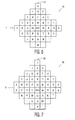
- a sixth embodiment of a keyboard configuration generally designated 80.
- the keyboard configuration 80 may be termed "Advanced Cyrillic Alphabet" configuration.
- Each key is labeled with a corresponding character of the Cyrillic Alphabet with the addition of numbers and symbols and functions to allow the entering or inputting of that particular character into the electronic device 10 when selected.
- the keys alphabet are also arranged in alphabetical order.
- One key or button, here arbitrarily labeled SPACE is centrally located amidst the remaining plurality of keys. It should be appreciated that any particular key may be the centrally located key. It is, however, appropriate to have a "neutral" key like the SPACE key be the central key.
- the same X-Y coordinate system as described above with reference to Fig. 2 is applicable to the configuration 80 of Fig. 7.
- the configuration 80 includes an X (horizontal) axis 81 and a Y (vertical) axis 82.
- the various keys also have coordinate values or distances relative to the origin in like manner to that described with reference to Fig. 2.
- the maximum positive abscissa value or distance relative to the origin is 4
- the maximum negative abscissa value or distance relative to the origin is 4
- the maximum positive ordinate value or distance relative to the origin is 5
- the maximum negative ordinate value or distance relative to the origin is 3.
- all coordinates or distances relative to the origin of all the quadrant keys are equal to or less than (do not exceed) the various maximum values or distances relative to the origin (positive and negative, ordinate and abscissa).
- the centrally located key (i.e. the SPACE key) is a reference key or starting point.
- the keyboard configuration is displayed on the display 12, data entry is accomplished by moving a cursor or highlighted area onto a desired key and making the selection.
- the electronic device 10 is operable to accept data entry from the data entry device. In the case of a physical keyboard, a user's finger presses or selects the appropriate key. In the case of a displayed keyboard, a remote may be used to position a cursor or highlighted area on the desired key prior to selection.
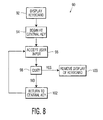
- a flowchart, generally designated 90, depicted in Fig. 8 is referenced to describe a method of data entry in accordance with the principles presented herein.
- the instructions for the present method are stored in the memory 18 of the electronic device 10 and executed by the processing circuitry/logic unit 14. It should be appreciated that the flowchart 90 and the method described herein in association with the flowchart 90 is only exemplary of a method to carry out the principles presented herein.
- the software routines may be implemented by any means as is known in the art, and in any programming language.
- Various programming approaches such as procedural, object oriented, or artificial intelligence techniques may be employed.
- the steps of the flowchart 90 may be implemented by one or more software routines, processes, subroutines, modules, etc. It should be appreciated that the flowchart 90 is illustrative of merely a broad logical flow of a method in accordance with the principles of the present invention and that steps may be added to, or taken away from, the flowchart 90 without departing from the scope of the present invention. Further, the order of execution of steps in the flowchart 90 may be changed without departing from the scope of the present invention. Additional considerations in implementing the method described by the flowchart 90 in software may dictate changes in the selection and order of steps. Some considerations are event handling by interrupt driven, polled, or other schemes. A multiprocessing or multitasking environment could allow steps to be executed essentially concurrently.
- a keyboard configuration such as one of the configurations shown and described herein is caused to be shown on the display 12, block 92.
- a cursor is automatically positioned at the central key, block 94.
- the central key is highlighted.
- the user then begins to enter data by moving the cursor or highlighted area (herein collectively "cursor") to a particular key, block 96.
- the electronic device 10 accepts the data input then, sees if the user quits, block 98. If the user selects Quit, display of the keyboard is stopped, block 100, else the cursor is returned to the central key, block 102, to wait for the input of another key, block 96.
- the cursor returns to the central key and the user may then navigate to the next key. Since the keys are configured in the manner shown and described herein, no key is substantially any further, requires more keystrokes (in the case of the use of "arrow" keys on a remote) or movement of a mouse or mouse-like structure, than any other key.
- the central key i.e. SPACE
- the user proceeds to choose the appropriate key by utilizing the navigation keys to navigate to the desired key (character/symbol). If a name such as "John" is being entered, the user will press the left arrow key three times to land the highlighted area on the "J" and press enter or select. The highlighted area jumps back to the central key (i.e. SPACE). Next, the user presses the right arrow key three times to land the highlight on the "O" key and selects enter.
- the user presses either an up and right arrow key sequence or a right and up arrow key sequence to place the highlight on the letter "H” and presses enter.
- the highlighted area then jumps back to the central key (i.e. SPACE).
- the user then presses the right arrow key twice and selects enter to choose the "N" key that has been highlighted.
- the highlighted area then jumps back to the central key.
- the user has made only ten keystrokes (not counting the enter or validation keystrokes).
Landscapes
- Engineering & Computer Science (AREA)
- General Engineering & Computer Science (AREA)
- Theoretical Computer Science (AREA)
- Human Computer Interaction (AREA)
- Physics & Mathematics (AREA)
- General Physics & Mathematics (AREA)
- Input From Keyboards Or The Like (AREA)
Applications Claiming Priority (3)
| Application Number | Priority Date | Filing Date | Title |
|---|---|---|---|
| US14955299P | 1999-08-18 | 1999-08-18 | |
| US149552P | 1999-08-18 | ||
| PCT/US2000/022655 WO2001013210A1 (en) | 1999-08-18 | 2000-08-18 | Keyboard layout and method for data entry |
Publications (2)
| Publication Number | Publication Date |
|---|---|
| EP1206736A1 EP1206736A1 (en) | 2002-05-22 |
| EP1206736B1 true EP1206736B1 (en) | 2005-01-12 |
Family
ID=22530807
Family Applications (1)
| Application Number | Title | Priority Date | Filing Date |
|---|---|---|---|
| EP00954128A Expired - Lifetime EP1206736B1 (en) | 1999-08-18 | 2000-08-18 | Keyboard layout and method for data entry |
Country Status (8)
| Country | Link |
|---|---|
| EP (1) | EP1206736B1 (enExample) |
| JP (1) | JP2003507786A (enExample) |
| KR (1) | KR100742666B1 (enExample) |
| CN (1) | CN100359440C (enExample) |
| AU (1) | AU6646300A (enExample) |
| DE (1) | DE60017416T2 (enExample) |
| MX (1) | MXPA02001646A (enExample) |
| WO (1) | WO2001013210A1 (enExample) |
Families Citing this family (6)
| Publication number | Priority date | Publication date | Assignee | Title |
|---|---|---|---|---|
| GB0305330D0 (en) * | 2003-03-10 | 2003-04-09 | Lingotran Ltd | Computer system |
| JP4071726B2 (ja) * | 2004-02-25 | 2008-04-02 | シャープ株式会社 | 携帯型情報機器、携帯型情報機器における文字の表示方法、およびその方法を実現するためのプログラム |
| CN101882005B (zh) * | 2008-11-21 | 2013-10-16 | 杭州惠道科技有限公司 | 一种小尺寸电子设备键盘 |
| GB0902065D0 (en) * | 2009-01-28 | 2009-03-11 | Williams Peter D | Calculator |
| CN108268143B (zh) | 2018-02-13 | 2021-03-26 | 清华大学 | 用于输入中文字符的键盘及其设置方法和输入方法 |
| CN108227947B (zh) * | 2018-04-12 | 2024-04-02 | 米环科技(长春)有限公司 | 正方形键盘及基于该正方形键盘的输入法 |
Family Cites Families (7)
| Publication number | Priority date | Publication date | Assignee | Title |
|---|---|---|---|---|
| DE345365C (de) * | 1919-09-18 | 1921-12-10 | Bernhard Stacke | Typenstangenschreibmaschine |
| FR924048A (fr) * | 1946-02-21 | 1947-07-24 | Clavier à combinaisons pour la commande, à la main ou automatique, à proximité ou à distance, instantanée ou différée, de toute espèce de dispositif | |
| US4444520A (en) * | 1974-02-22 | 1984-04-24 | Canon Kabushiki Kaisha | Information output device |
| JPH05158604A (ja) * | 1991-12-03 | 1993-06-25 | Matsushita Electric Ind Co Ltd | キー入力装置 |
| US5584588A (en) * | 1995-04-21 | 1996-12-17 | Harbaugh; Gary B. | Computer keyboard layout |
| US6144378A (en) * | 1997-02-11 | 2000-11-07 | Microsoft Corporation | Symbol entry system and methods |
| US6037942A (en) * | 1998-03-10 | 2000-03-14 | Magellan Dis, Inc. | Navigation system character input device |
-
2000
- 2000-08-18 CN CNB008114382A patent/CN100359440C/zh not_active Expired - Fee Related
- 2000-08-18 WO PCT/US2000/022655 patent/WO2001013210A1/en not_active Ceased
- 2000-08-18 JP JP2001517243A patent/JP2003507786A/ja active Pending
- 2000-08-18 KR KR1020027001915A patent/KR100742666B1/ko not_active Expired - Fee Related
- 2000-08-18 AU AU66463/00A patent/AU6646300A/en not_active Abandoned
- 2000-08-18 EP EP00954128A patent/EP1206736B1/en not_active Expired - Lifetime
- 2000-08-18 DE DE60017416T patent/DE60017416T2/de not_active Expired - Lifetime
- 2000-08-18 MX MXPA02001646A patent/MXPA02001646A/es active IP Right Grant
Also Published As
| Publication number | Publication date |
|---|---|
| KR20020020813A (ko) | 2002-03-15 |
| CN1369071A (zh) | 2002-09-11 |
| DE60017416D1 (de) | 2005-02-17 |
| JP2003507786A (ja) | 2003-02-25 |
| WO2001013210A1 (en) | 2001-02-22 |
| EP1206736A1 (en) | 2002-05-22 |
| AU6646300A (en) | 2001-03-13 |
| MXPA02001646A (es) | 2002-08-06 |
| KR100742666B1 (ko) | 2007-07-25 |
| DE60017416T2 (de) | 2005-12-22 |
| CN100359440C (zh) | 2008-01-02 |
Similar Documents
| Publication | Publication Date | Title |
|---|---|---|
| US6851877B1 (en) | Keyboard layout and method for data entry | |
| EP2034391B1 (en) | Method and apparatus using on-screen keyboard as input unit | |
| EP0980039B1 (en) | Method and apparatus for character entry with a virtual keyboard | |
| US6104317A (en) | Data entry device and method | |
| US8294667B2 (en) | Directional input system with automatic correction | |
| US5635958A (en) | Information inputting and processing apparatus | |
| US9189156B2 (en) | Keyboard comprising swipe-switches performing keyboard actions | |
| EP0839348B1 (en) | Data processing system provided with soft keyboard that shifts between direct and indirect characters keys | |
| EP0661619A1 (en) | A data input device with a display keyboard | |
| WO2004063833A9 (en) | Data input by first selecting one of four options then selecting one of eight directions to determine an input-character | |
| KR20050119112A (ko) | 터치 스크린용 명료 텍스트 입력 방법 및 감소된 키보드시스템 | |
| EP2616908A2 (en) | Methods of and systems for reducing keyboard data entry errors | |
| US10387032B2 (en) | User interface input method and system for handheld and mobile devices | |
| EP1206736B1 (en) | Keyboard layout and method for data entry | |
| CN101669085B (zh) | 字符输入设备 | |
| KR20150047413A (ko) | 버튼에 배정된 특정 그룹 문자 배정 변환 방법 | |
| US11244138B2 (en) | Hologram-based character recognition method and apparatus | |
| EP0810513A1 (en) | Data processing entry system provided with soft keyboard that has an ergonomic layout based on preferred positions of certain characters | |
| HK1024313B (en) | Method and apparatus for character entry with a virtual keyboard | |
| JPS62237514A (ja) | 入力装置 | |
| KR20020013215A (ko) | 제한된 수의 비주얼키수단을 이용한 컴퓨터의비주얼키보드시스템 | |
| KR20150047390A (ko) | 버튼에 배정된 특정 그룹 문자 배정 변환 방법 |
Legal Events
| Date | Code | Title | Description |
|---|---|---|---|
| PUAI | Public reference made under article 153(3) epc to a published international application that has entered the european phase |
Free format text: ORIGINAL CODE: 0009012 |
|
| 17P | Request for examination filed |
Effective date: 20020131 |
|
| AX | Request for extension of the european patent |
Free format text: AL;LT;LV;MK;RO;SI |
|
| 17Q | First examination report despatched |
Effective date: 20030224 |
|
| GRAP | Despatch of communication of intention to grant a patent |
Free format text: ORIGINAL CODE: EPIDOSNIGR1 |
|
| RBV | Designated contracting states (corrected) |
Designated state(s): AT BE CH CY DE FR GB IT LI |
|
| RBV | Designated contracting states (corrected) |
Designated state(s): DE FR GB IT |
|
| GRAS | Grant fee paid |
Free format text: ORIGINAL CODE: EPIDOSNIGR3 |
|
| GRAA | (expected) grant |
Free format text: ORIGINAL CODE: 0009210 |
|
| AK | Designated contracting states |
Kind code of ref document: B1 Designated state(s): DE FR GB IT |
|
| REG | Reference to a national code |
Ref country code: GB Ref legal event code: FG4D |
|
| REF | Corresponds to: |
Ref document number: 60017416 Country of ref document: DE Date of ref document: 20050217 Kind code of ref document: P |
|
| REG | Reference to a national code |
Ref country code: IE Ref legal event code: FG4D |
|
| REG | Reference to a national code |
Ref country code: GB Ref legal event code: 746 Effective date: 20050217 |
|
| RAP2 | Party data changed (patent owner data changed or rights of a patent transferred) |
Owner name: THOMSON LICENSING |
|
| PLBE | No opposition filed within time limit |
Free format text: ORIGINAL CODE: 0009261 |
|
| STAA | Information on the status of an ep patent application or granted ep patent |
Free format text: STATUS: NO OPPOSITION FILED WITHIN TIME LIMIT |
|
| ET | Fr: translation filed | ||
| 26N | No opposition filed |
Effective date: 20051013 |
|
| PGFP | Annual fee paid to national office [announced via postgrant information from national office to epo] |
Ref country code: GB Payment date: 20150901 Year of fee payment: 16 |
|
| PGFP | Annual fee paid to national office [announced via postgrant information from national office to epo] |
Ref country code: IT Payment date: 20150827 Year of fee payment: 16 |
|
| REG | Reference to a national code |
Ref country code: FR Ref legal event code: PLFP Year of fee payment: 17 |
|
| GBPC | Gb: european patent ceased through non-payment of renewal fee |
Effective date: 20160818 |
|
| PG25 | Lapsed in a contracting state [announced via postgrant information from national office to epo] |
Ref country code: GB Free format text: LAPSE BECAUSE OF NON-PAYMENT OF DUE FEES Effective date: 20160818 |
|
| REG | Reference to a national code |
Ref country code: DE Ref legal event code: R082 Ref document number: 60017416 Country of ref document: DE Representative=s name: HOFSTETTER, SCHURACK & PARTNER PATENT- UND REC, DE |
|
| REG | Reference to a national code |
Ref country code: FR Ref legal event code: PLFP Year of fee payment: 18 |
|
| PG25 | Lapsed in a contracting state [announced via postgrant information from national office to epo] |
Ref country code: IT Free format text: LAPSE BECAUSE OF NON-PAYMENT OF DUE FEES Effective date: 20160818 |
|
| REG | Reference to a national code |
Ref country code: FR Ref legal event code: PLFP Year of fee payment: 19 |
|
| PGFP | Annual fee paid to national office [announced via postgrant information from national office to epo] |
Ref country code: DE Payment date: 20190807 Year of fee payment: 20 Ref country code: FR Payment date: 20190830 Year of fee payment: 20 |
|
| REG | Reference to a national code |
Ref country code: DE Ref legal event code: R071 Ref document number: 60017416 Country of ref document: DE |
|
| P01 | Opt-out of the competence of the unified patent court (upc) registered |
Effective date: 20230527 |