EP0451963A2 - Interaktives Rechnersystem - Google Patents
Interaktives Rechnersystem Download PDFInfo
- Publication number
- EP0451963A2 EP0451963A2 EP91302183A EP91302183A EP0451963A2 EP 0451963 A2 EP0451963 A2 EP 0451963A2 EP 91302183 A EP91302183 A EP 91302183A EP 91302183 A EP91302183 A EP 91302183A EP 0451963 A2 EP0451963 A2 EP 0451963A2
- Authority
- EP
- European Patent Office
- Prior art keywords
- interaction
- application
- user interface
- streams
- graphical
- Prior art date
- Legal status (The legal status is an assumption and is not a legal conclusion. Google has not performed a legal analysis and makes no representation as to the accuracy of the status listed.)
- Withdrawn
Links
Images




Classifications
-
- G—PHYSICS
- G06—COMPUTING OR CALCULATING; COUNTING
- G06F—ELECTRIC DIGITAL DATA PROCESSING
- G06F9/00—Arrangements for program control, e.g. control units
- G06F9/06—Arrangements for program control, e.g. control units using stored programs, i.e. using an internal store of processing equipment to receive or retain programs
- G06F9/44—Arrangements for executing specific programs
- G06F9/455—Emulation; Interpretation; Software simulation, e.g. virtualisation or emulation of application or operating system execution engines
- G06F9/45504—Abstract machines for programme code execution, e.g. Java virtual machine [JVM], interpreters, emulators
- G06F9/45508—Runtime interpretation or emulation, e g. emulator loops, bytecode interpretation
- G06F9/45512—Command shells
-
- G—PHYSICS
- G06—COMPUTING OR CALCULATING; COUNTING
- G06F—ELECTRIC DIGITAL DATA PROCESSING
- G06F8/00—Arrangements for software engineering
- G06F8/30—Creation or generation of source code
- G06F8/38—Creation or generation of source code for implementing user interfaces
Definitions
- the present invention relates to an interactive computer system, and, more particularly, to such a system providing a programming environment for customizing one or more existing applications to create a single new application.
- an interactive computer system capable of running at least one application, the system comprising: means for monitoring a user's interaction to each application during its execution and recording one or more interaction streams; graphics editing means for supporting generation of a graphical user interface screen; means for associating graphical objects on said graphical user interface screen with one or more of the interaction streams; means responsive to the user's interaction with said graphical objects on said graphical user interface screen, for automatically providing the corresponding interaction streams to the corresponding application, thereby causing the operation of said application to proceed.
- the present invention therefore enables a programming environment to be provided that enables even ordinary users who lack experience in programming to customize applications with ease, and to enable those applications thus customized to be handled in a user-friendly manner.
- a user records their interactions (events) during the execution of an application, generates a new user interface appearance by use of a graphics editing function, and associates the objects on the user interface appearance with the events.
- the user has then only to manipulate those objects on the use interface appearance to reexecute their desired tasks. This obviates the need for the user to acquire any programming skills and gives the user great convenience.
- Figure 1 shows the overall configuration of an interactive computer system on which a programming environment system 100 is provided in order to implement the invention.
- the programming environment system 100 consists of an application logic enabler (ALE) 101, a customer programming facility (CPF) 102, and a user interface enabler (UIE) 103.
- the programming environment system 100 operates on an IBM PS/55 workstation 104 (IBM, PS/55 are trademarks of International Business Machines Corporation, U.S.A.), and is implemented in software on a system program 105 consisting of an operating system and a presentation manager for managing windows (hereinafter referred to as the presentation manager/operating system).
- IBM PS/55 workstation 104 IBM PS/55 workstation 104
- system program 105 consisting of an operating system and a presentation manager for managing windows (hereinafter referred to as the presentation manager/operating system).
- the ALE 101 provides existing application functions, and actually one or one set of applications on the presentation manager/operating system 105. It is desirable that the ALE 101 provide as many functions as possible, and it usually includes a package of general-purpose office applications, such as a spread sheet, a word processor, a data base manager, a calculator facility, and a business chart facility. And of course, special-purpose applications, such as the kernel of a knowledge-base system or an inference engine of a decision making environment system, may be employed if necessary. For example, two or more applications on the IBM presentation manager are commonly used as the ALE 101.
- general-purpose office applications such as a spread sheet, a word processor, a data base manager, a calculator facility, and a business chart facility.
- special-purpose applications such as the kernel of a knowledge-base system or an inference engine of a decision making environment system, may be employed if necessary. For example, two or more applications on the IBM presentation manager are commonly used as the ALE 101.
- Such applications include a package of general-propose office applications created by professional programmers, such as a spread sheet, a word processor, a data base manager, a calculator facility, and a business chart facility. Furthermore, the ALE 101 is so designed as to enable users to exchange data between these applications. The ALE 101 is thus ensured to provide various functions.
- a window system of the SMART Series (A trademark of IBM Corp.) is used instead of the presentation manager, applications for the SMART Series are available.
- the SMART Series is a window-based systems for supporting execution of applications.
- the UIE 103 is a graphics editor that edits user interface layouts (screens).
- the present invention is utilized for the management of graphical objects on a user interface layout newly generated by the UIE 103 and objects (event files and stories, which are described later) of procedure modules (logic modules) generated by the CPF 102 as described later.
- the CPF 102 is a part of the programming environment system of the embodiment with the support of which users can customize the applications of the ALE 101 to constitute a new application, and to associate the new application with a new interface layout.
- the CPF 102 appears to the ALE 101 as if it were non-existent, the CPF actually controls the exchange of information between the presentation manager/operating system 105 and the applications of the ALE 101.
- the programming environment system 100 of the embodiment has a program mode (in Figure 2) for customization and an execution mode (in Figure 3) for activating the customized environment.
- the program mode and the execution mode may be implemented to be switched using a menu or key.
- FIG 2 is a flowchart of a program mode.
- the program mode is a mode to define tasks to be executed on applications before the execution of the tasks in the execution mode.
- the user actually performs an operation on applications, which is then recorded (S11). Such an operation is called record.
- a series of operations is saved as data called an event file.
- One or more saved event files may be used to produce data in the form of stories by a story editor 107 (in Figure 4) capable of describing a control structure including loops and branches (S12). Both the event files and the stories are independently executable data.
- a user interface is defined to direct tasks to be executed (S13).
- the user interface is produced by combining graphical objects, and is finally associated with event files or stories by an operation called link (S14).
- FIG 3 is flowchart of an execution mode.
- the execution mode is a mode to reexecute the recorded operations using the user interface customized in the program mode. As shown in Figure 3, in this mode as the user clicks a graphical object on the screen (S21), an event file or story corresponding to the graphical object is activated (S22).
- FIG 4 shows the configuration of the CPF 102.
- the CPF 102 consists of an event recorder 106, a story editor 107, and a linker 108.
- the event recorder 106 records as an event file a sequence of events entered in the program mode by a user and reproduces them in the execution mode.
- the editor 107 supports the user in generating a set of event files, or a story, by combining those recorded event files.
- the linker 108 associates the event files or story with a graphical object on the user interface newly generated.
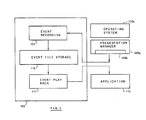
- Figure 5 shows details of the event recorder 106.
- the event recorder 106 consists of an event recording section 109, an event file storage 110, and an event play back section 111.
- the event recording section 109 has a function to monitor and control the application program interface which an application program 112 uses to monitor a user's behaviour.
- the event recording section monitors and controls information from the event queue 105b which is provided by the presentation manager 105a. That is, each time the application program 112 dequeues an event from the event queue 105b, the event recording section intercepts the event, and stores the sequence of events in the event file storage 110 as an event file. In this example, those events are intercepted by a function, called "input hook", provided by the presentation manager 105a.
- input hook For details on the input hook, refer to "IBM Operating System/2 Programmer's Toolkit Version 1.1 Programming Guide", pp. 11-16 and pp. 11-18; (the Operating System/2 is a trademark of IBM Corp.).
- the reference number 105c corresponds to the operating system.
- Figure 6 shows the structure (A) of an event to be recorded and examples (B), wherein direct events by a mouse or a keyboard, and events by the system such as initiation of a menu, a window or an application are manipulated.
- event information consists of a window ID (Window Handle) 113a, an event type (Message) 113b, and a time stamp (Timestamp) 113c, and other parameters (Parameters(7) 113d dependent in meaning on each message.
- an event play back section 111 which reproduces those events stored in the event storage 110 in the play back mode.
- the event play back section 111 transfers a corresponding event in the event file storage 110 to the application program 112 as if the event came from the event queue 105b.
- the event play back section 111 reproduces such events by use of a send function for sending a message (WinSendMsg) that is one of functions provided to achieve an inter-application communication function and the like.
- WinSendMsg For details on the function of WinSendMsg, refer to IBM Operating System/2 Programmer's Toolkit Version 1.1 Programming Guide, pp. 3-6 and pp. 3-8 (the Operating System/2 is a trademark of IBM Corp.).
- Figure 7 shows an example of a user interface screen of the story editor 107.
- the story editor 107 provides those fields of an event list 107a, a story board 107b, and commands 107c which enable events to be edited visually.
- the story editor 107 enables one or more event files to be handled in a lump.
- the registered event files can be referred to on the event list 107a.
- the event list 107a is generated on the story board 107b according to the commands 107c.
- One of the most important functions of the story editor 107 is to combine one or more event files into a larger executable record.
- the commands 107c the command field may be used to describe a control structure.
- the linker 108 shown in Figure 4 determines the mapping for prompting execution from a user interface.
- the mapping is implemented in a table as shown in Figure 8.
- the mapping table has attributes of layout objects and attributes of procedure modules (logic modules).
- the procedure module is an aggregate of event files and stories generated by the above-mentioned event recorder 106 and story editor 107, and is handled by event file ID or story ID.
- the layout objects are graphics elements such as boxes constituting the layout of a graphical user interface.
- the table enables the assignment of the graphical objects controlled by ID (called layout objects) as a user interface to activate procedure modules.
- the linker 108 is invoked to update the table.
- the user interface to invoke the linker 108 is generated and retained by the UIE 103, and will be explained in detail in respect to the UIE 103.
- the UIE 103 is a graphics editor that defines a user interface.
- the display section is quite the same as a graphics editor of an ordinary WYSIWYG (What you see is what you get) type, so that users are allowed to use graphical components as they like in displaying a user interface.
- the functional part of this graphics editor is the layout editor 114, by use of which a user may define the appearance of a new user interface at will for use in the future.
- Figure 10 is an example of a layout generated by the layout editor 114.
- 116 to 120 are graphical objects constituted by grouping character strings and rectangles.
- Each graphical object is called a layout object, which is associated with a procedure module.
- Figure 10 shows an example of a process of office work from writing to printing of a report created by the UIE 103.
- the arrow 121 here is not associated with any procedure module, but only serves as a guide for operational procedures. (Yet, the arrow 121 may be associated with some procedure module, if necessary.)
- Figure 11 is an example of linking
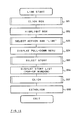
- Figure 12 shows its procedure.
- a particular graphical object 122 to be linked is first clicked (S31), and the object is highlighted (S32). Then, if the "LINK" is selected on the menu 123 of the UIE 103 (S33), another menu 124 will appear to select "STORY” or "EVENT” (S34). In this example, the STORY is selected (S35). Then, a story list dialog box 125 appears (S36). By selecting required procedure module from the list with click (S37), a link is established (S38).
- Linking may be attained in a similar operation in case where a link from the layout object is repasted to another procedure module.
- User interfaces generated in this way have an appearance like that in Figure 10.
- Such a user interface invokes a procedure module according to a table like that in Figure 8 in response to a user's operation, supplied events sequentially to an application, and automatically executes the user's desired tasks. This is the operation in the above-described execution mode detailed explanation of which is not repeated.
- a programming environment system which comprises: means for monitoring user's interaction to each application during the execution of said application and for recording one or more interaction streams; graphics editing means for supporting generation of a graphical user interface screen; means for associating each graphical object on the graphical user interface screen with one or more set of the interaction streams; means responsive to user's interaction to one of said graphical objects on said graphical user interface screen, for automatically providing the corresponding interaction streams to the corresponding application, thereby proceeding the operation of said application.
- an interactive computer system having a programming environment in which an end user of one or more existing applications, for example, integrated environment applications, can customize it or them with a unique user interface appearance.
- the environment consists of one application or a group of applications, a customization facility and a graphical editor.
- the customization facility records event stream from the user to the application(s) when it (they) runs, and enables him/her to compose a plurality of event streams into a story.
- the user generates a unique user interface appearance with graphical parts, for example, boxes, arrows, icons, etc., using the graphical editor. He/she then links appearance to event streams or stories, and completes a programming mode.
- the user can make the customized application run by interaction with the new user interface appearance, for example picking the graphical objects on the appearance.
- the above-mentioned programming environment obviates the need for a user to acquire any programming skills, thus giving the user great convenience and enabling further operations to be executed on the user interface screen in a user-friendly manner.
Landscapes
- Engineering & Computer Science (AREA)
- Software Systems (AREA)
- Theoretical Computer Science (AREA)
- General Engineering & Computer Science (AREA)
- Physics & Mathematics (AREA)
- General Physics & Mathematics (AREA)
- Human Computer Interaction (AREA)
- Stored Programmes (AREA)
- Digital Computer Display Output (AREA)
- Devices For Executing Special Programs (AREA)
Applications Claiming Priority (2)
| Application Number | Priority Date | Filing Date | Title |
|---|---|---|---|
| JP81473/90 | 1990-03-30 | ||
| JP2081473A JP2554381B2 (ja) | 1990-03-30 | 1990-03-30 | プログラミング支援装置 |
Publications (2)
| Publication Number | Publication Date |
|---|---|
| EP0451963A2 true EP0451963A2 (de) | 1991-10-16 |
| EP0451963A3 EP0451963A3 (en) | 1992-06-10 |
Family
ID=13747373
Family Applications (1)
| Application Number | Title | Priority Date | Filing Date |
|---|---|---|---|
| EP19910302183 Withdrawn EP0451963A3 (en) | 1990-03-30 | 1991-03-14 | Interactive computer system |
Country Status (4)
| Country | Link |
|---|---|
| US (2) | US5522024A (de) |
| EP (1) | EP0451963A3 (de) |
| JP (1) | JP2554381B2 (de) |
| CA (1) | CA2038265A1 (de) |
Cited By (6)
| Publication number | Priority date | Publication date | Assignee | Title |
|---|---|---|---|---|
| WO1994006074A1 (en) * | 1992-08-28 | 1994-03-17 | Hughes Aircraft Company | Procedural user interface |
| EP0657810A1 (de) * | 1993-12-06 | 1995-06-14 | Canon Kabushiki Kaisha | Benutzerdefinierbares interaktives System |
| WO1996028778A1 (en) * | 1995-03-13 | 1996-09-19 | Knights Technology, Inc. | Automation of tasks using graphical and multimedia macros |
| US5596702A (en) * | 1993-04-16 | 1997-01-21 | International Business Machines Corporation | Method and system for dynamically sharing user interface displays among a plurality of application program |
| WO1999040512A1 (en) * | 1998-02-09 | 1999-08-12 | Reuters, Ltd. | Method and system for user defined interactions between plurality of active software applications |
| WO2014200851A3 (en) * | 2013-06-15 | 2015-04-09 | Microsoft Corporation | Telling interactive, self-directed stories with spreadsheets |
Families Citing this family (51)
| Publication number | Priority date | Publication date | Assignee | Title |
|---|---|---|---|---|
| US6614451B1 (en) * | 1991-10-24 | 2003-09-02 | Grouputer Corporation Pty Ltd | Group based computer use system |
| JP2525546B2 (ja) * | 1992-09-08 | 1996-08-21 | インターナショナル・ビジネス・マシーンズ・コーポレイション | グラフィックリソ―ス・エディタ |
| US5664190A (en) * | 1994-01-21 | 1997-09-02 | International Business Machines Corp. | System and method for enabling an event driven interface to a procedural program |
| JP4058118B2 (ja) | 1994-11-15 | 2008-03-05 | 株式会社日立製作所 | プログラム生成システム及び方法 |
| US5862379A (en) * | 1995-03-07 | 1999-01-19 | International Business Machines Corporation | Visual programming tool for developing software applications |
| US20040019610A1 (en) * | 1996-02-27 | 2004-01-29 | Burns Kevin S. | Portal information delivery system for personal computers and SOHO computer systems |
| US6014137A (en) | 1996-02-27 | 2000-01-11 | Multimedia Adventures | Electronic kiosk authoring system |
| US5786815A (en) * | 1996-05-31 | 1998-07-28 | Sun Microsystems, Inc. | Configurable runtime graphical user interface widget management |
| JPH1083269A (ja) * | 1996-09-09 | 1998-03-31 | Nec Corp | ユーザインタフェース変換装置 |
| US6189047B1 (en) * | 1997-03-20 | 2001-02-13 | Sun Microsystems, Inc. | Apparatus and method for monitoring event queue operations with pluggable event queues |
| US8752010B1 (en) | 1997-12-31 | 2014-06-10 | Honeywell International Inc. | Dynamic interface synthesizer |
| US6246403B1 (en) * | 1998-10-08 | 2001-06-12 | Hewlett-Packard Company | Method and apparatus for generating a graphical user interface |
| US6637020B1 (en) * | 1998-12-03 | 2003-10-21 | International Business Machines Corporation | Creating applications within data processing systems by combining program components dynamically |
| WO2000034859A1 (en) * | 1998-12-09 | 2000-06-15 | Business Management Software Limited | Employee self service customization system and method |
| JP2000181906A (ja) * | 1998-12-15 | 2000-06-30 | Fujitsu Ltd | 修飾設定装置および記録媒体 |
| US7779015B2 (en) * | 1998-12-18 | 2010-08-17 | Microsoft Corporation | Logging and analyzing context attributes |
| US8181113B2 (en) * | 1998-12-18 | 2012-05-15 | Microsoft Corporation | Mediating conflicts in computer users context data |
| US7046263B1 (en) | 1998-12-18 | 2006-05-16 | Tangis Corporation | Requesting computer user's context data |
| US9183306B2 (en) * | 1998-12-18 | 2015-11-10 | Microsoft Technology Licensing, Llc | Automated selection of appropriate information based on a computer user's context |
| US6791580B1 (en) | 1998-12-18 | 2004-09-14 | Tangis Corporation | Supplying notifications related to supply and consumption of user context data |
| US6801223B1 (en) * | 1998-12-18 | 2004-10-05 | Tangis Corporation | Managing interactions between computer users' context models |
| US7225229B1 (en) * | 1998-12-18 | 2007-05-29 | Tangis Corporation | Automated pushing of computer user's context data to clients |
| US6513046B1 (en) | 1999-12-15 | 2003-01-28 | Tangis Corporation | Storing and recalling information to augment human memories |
| US7512899B1 (en) * | 1999-03-05 | 2009-03-31 | Microsoft Corporation | Method and apparatus for a unified user interface |
| US6469715B1 (en) | 1999-03-19 | 2002-10-22 | Corel Inc. | System and method for controlling the operation of a graphical object using a project |
| US6549199B1 (en) | 1999-03-19 | 2003-04-15 | Corel Inc. | System and method for adjusting a graphical object |
| US6469716B1 (en) | 1999-03-19 | 2002-10-22 | Corel Inc. | System and method for processing data for a graphical object |
| US6480203B1 (en) | 1999-03-19 | 2002-11-12 | Corel Inc. | System and method for processing an event of a graphical object |
| US6532023B1 (en) * | 1999-08-12 | 2003-03-11 | International Business Machines Corporation | Recording selected applet events of a user interaction sequence |
| US6549216B1 (en) * | 1999-08-12 | 2003-04-15 | International Business Machines Corporation | Preserving, emulating, and manipulating user interaction event timing |
| US7340716B1 (en) * | 1999-12-17 | 2008-03-04 | Adobe Systems Incorporated | User interface substitution |
| US7333967B1 (en) * | 1999-12-23 | 2008-02-19 | International Business Machines Corporation | Method and system for automatic computation creativity and specifically for story generation |
| US7464153B1 (en) | 2000-04-02 | 2008-12-09 | Microsoft Corporation | Generating and supplying user context data |
| WO2001095088A1 (en) * | 2000-06-05 | 2001-12-13 | Altoweb Systems, Inc. | Converting, and presenting the source document in a target format |
| WO2002033541A2 (en) * | 2000-10-16 | 2002-04-25 | Tangis Corporation | Dynamically determining appropriate computer interfaces |
| US7895530B2 (en) * | 2000-11-09 | 2011-02-22 | Change Tools, Inc. | User definable interface system, method, support tools, and computer program product |
| AU2002226886A1 (en) * | 2000-11-09 | 2002-05-21 | Change Tools, Inc. | A user definable interface system, method and computer program product |
| US20020085033A1 (en) * | 2000-12-27 | 2002-07-04 | G.E. Information Services, Inc. | Process for generating a user interface in a data processing system |
| US20020091639A1 (en) * | 2001-01-11 | 2002-07-11 | Linq System Svenska Ab | Enterprise information and communication management system and method |
| US20030081003A1 (en) * | 2001-02-23 | 2003-05-01 | Ali Kutay | System and method to facilitate analysis and removal of errors from an application |
| JP5215511B2 (ja) | 2001-05-02 | 2013-06-19 | ケープレックス・インク | オブジェクト指向技術を用いたユーザ操作履歴保存装置 |
| US20050125787A1 (en) * | 2003-12-05 | 2005-06-09 | Leonid Tertitski | Convertible runtime graphical user interface |
| CA2454290C (en) * | 2003-12-29 | 2013-05-21 | Ibm Canada Limited-Ibm Canada Limitee | Graphical user interface (gui) script generation and documentation |
| US8296654B2 (en) * | 2004-07-01 | 2012-10-23 | Spotfire Ab | Automatic guide for data analysis |
| US7793154B2 (en) | 2006-11-30 | 2010-09-07 | International Business Machines Corporation | Method and implementation for automating processes using data driven pre-recorded transactions |
| US8239752B1 (en) | 2008-01-24 | 2012-08-07 | Adobe Systems Incorporated | Method and system to facilitate workflow data submission |
| US9400661B2 (en) | 2008-02-29 | 2016-07-26 | Adobe Systems Incorporated | Embedded user interface |
| US8495566B2 (en) * | 2009-07-28 | 2013-07-23 | International Business Machines Corporation | Widget combos: a widget programming model |
| USD665401S1 (en) * | 2011-03-09 | 2012-08-14 | Microsoft Corporation | Display screen with graphical user interface |
| CN102520927B (zh) * | 2011-11-23 | 2014-09-10 | 中兴通讯股份有限公司 | 用于嵌入式终端的生成逻辑业务的方法、装置及终端 |
| JP5889131B2 (ja) * | 2012-07-02 | 2016-03-22 | 富士フイルム株式会社 | 情報処理装置および情報処理装置の機能設定方法並びにプログラム |
Family Cites Families (6)
| Publication number | Priority date | Publication date | Assignee | Title |
|---|---|---|---|---|
| US5197120A (en) * | 1986-10-30 | 1993-03-23 | Synthesis, Inc. | Methods and systems for generating parametric designs |
| US5121477A (en) * | 1988-04-08 | 1992-06-09 | International Business Machines Inc. | System for interactively creating action bar pull-down windows of a user interface for use at program run time |
| US5117496A (en) * | 1988-05-23 | 1992-05-26 | Hewlett-Packard Company | Method for recording and replaying mouse commands by recording the commands and the identities of elements affected by the commands |
| US5115501A (en) * | 1988-11-04 | 1992-05-19 | International Business Machines Corporation | Procedure for automatically customizing the user interface of application programs |
| JPH0778782B2 (ja) * | 1989-07-19 | 1995-08-23 | インターナショナル・ビジネス・マシーンズ・コーポレーシヨン | 対話型コンピュータ・システムならびにその使用環境適合化装置および方法 |
| US5179652A (en) * | 1989-12-13 | 1993-01-12 | Anthony I. Rozmanith | Method and apparatus for storing, transmitting and retrieving graphical and tabular data |
-
1990
- 1990-03-30 JP JP2081473A patent/JP2554381B2/ja not_active Expired - Lifetime
-
1991
- 1991-03-14 EP EP19910302183 patent/EP0451963A3/en not_active Withdrawn
- 1991-03-14 CA CA002038265A patent/CA2038265A1/en not_active Abandoned
-
1995
- 1995-07-18 US US08/503,676 patent/US5522024A/en not_active Expired - Fee Related
-
1996
- 1996-03-04 US US08/606,461 patent/US5600780A/en not_active Expired - Fee Related
Cited By (12)
| Publication number | Priority date | Publication date | Assignee | Title |
|---|---|---|---|---|
| WO1994006074A1 (en) * | 1992-08-28 | 1994-03-17 | Hughes Aircraft Company | Procedural user interface |
| US5442746A (en) * | 1992-08-28 | 1995-08-15 | Hughes Aircraft Company | Procedural user interface |
| AU666041B2 (en) * | 1992-08-28 | 1996-01-25 | Hughes Aircraft Company | Procedural user interface |
| US5596702A (en) * | 1993-04-16 | 1997-01-21 | International Business Machines Corporation | Method and system for dynamically sharing user interface displays among a plurality of application program |
| EP0657810A1 (de) * | 1993-12-06 | 1995-06-14 | Canon Kabushiki Kaisha | Benutzerdefinierbares interaktives System |
| US6259444B1 (en) | 1993-12-06 | 2001-07-10 | Canon Kabushiki Kaisha | User-definable interactive system |
| WO1996028778A1 (en) * | 1995-03-13 | 1996-09-19 | Knights Technology, Inc. | Automation of tasks using graphical and multimedia macros |
| WO1999040512A1 (en) * | 1998-02-09 | 1999-08-12 | Reuters, Ltd. | Method and system for user defined interactions between plurality of active software applications |
| WO2014200851A3 (en) * | 2013-06-15 | 2015-04-09 | Microsoft Corporation | Telling interactive, self-directed stories with spreadsheets |
| CN105531693A (zh) * | 2013-06-15 | 2016-04-27 | 微软技术许可有限责任公司 | 使用电子表格讲交互式、自引导故事 |
| CN105531693B (zh) * | 2013-06-15 | 2019-01-08 | 微软技术许可有限责任公司 | 使用电子表格讲交互式、自引导故事 |
| US10198420B2 (en) | 2013-06-15 | 2019-02-05 | Microsoft Technology Licensing, Llc | Telling interactive, self-directed stories with spreadsheets |
Also Published As
| Publication number | Publication date |
|---|---|
| EP0451963A3 (en) | 1992-06-10 |
| US5600780A (en) | 1997-02-04 |
| CA2038265A1 (en) | 1991-10-01 |
| JP2554381B2 (ja) | 1996-11-13 |
| US5522024A (en) | 1996-05-28 |
| JPH03282862A (ja) | 1991-12-13 |
Similar Documents
| Publication | Publication Date | Title |
|---|---|---|
| US5522024A (en) | Programming environment system for customizing a program application based upon user input | |
| US5509116A (en) | Graphical user interface management system | |
| US7343587B2 (en) | System for creating, managing and executing computer testing and task management applications | |
| US8296720B2 (en) | Framework to access a remote system from an integrated development environment | |
| US6339838B1 (en) | Control of commercial processes | |
| US6100885A (en) | Supporting modification of properties via a computer system's user interface | |
| US6097391A (en) | Method and apparatus for graphically manipulating objects | |
| US6233726B1 (en) | Development system with reference card and parameter wizard methodologies for facilitating creation of software programs | |
| EP0336560B1 (de) | Methode und System zur Darstellung einer Benutzeroberfläche auf einem Computerbildschirm | |
| US5748191A (en) | Method and system for creating voice commands using an automatically maintained log interactions performed by a user | |
| EP0614549B1 (de) | Prozedurorientierte benutzerschnittstelle | |
| JPH07168710A (ja) | プログラムを構成するためのシステム及び方法 | |
| JP2002521746A (ja) | 表示装置に表示したデータの解釈を視覚的に支援する方法とツール | |
| CA2466136A1 (en) | Object oriented explorer type environment | |
| US6438742B1 (en) | Object-oriented system and method for visually generating software applications | |
| GB2327836A (en) | User interface controls for a computer system | |
| US20070143702A1 (en) | Method, Computer Program, and System Improving the Graphical User Interface of a Desktop | |
| Frankel et al. | An on-line assistance system for the simulation model development environment | |
| Navarre et al. | An approach integrating two complementary model-based environments for the construction of multimodal interactive applications | |
| Foley | Future directions in user-computer interface software | |
| Pangalos | Designing the user interface | |
| Foley | User Interface Software Tools | |
| Carmichael | COBOL SoftBench: An Open Integrated CASE Environment | |
| JPH06242941A (ja) | 対話処理システム | |
| Hesketh | Perly—Unix with buttons |
Legal Events
| Date | Code | Title | Description |
|---|---|---|---|
| PUAI | Public reference made under article 153(3) epc to a published international application that has entered the european phase |
Free format text: ORIGINAL CODE: 0009012 |
|
| AK | Designated contracting states |
Kind code of ref document: A2 Designated state(s): DE FR GB IT |
|
| 17P | Request for examination filed |
Effective date: 19911219 |
|
| PUAL | Search report despatched |
Free format text: ORIGINAL CODE: 0009013 |
|
| AK | Designated contracting states |
Kind code of ref document: A3 Designated state(s): DE FR GB IT |
|
| STAA | Information on the status of an ep patent application or granted ep patent |
Free format text: STATUS: THE APPLICATION HAS BEEN WITHDRAWN |
|
| 18W | Application withdrawn |
Withdrawal date: 19960923 |