WO2024204127A1 - 触覚提示システム - Google Patents
触覚提示システム Download PDFInfo
- Publication number
- WO2024204127A1 WO2024204127A1 PCT/JP2024/011820 JP2024011820W WO2024204127A1 WO 2024204127 A1 WO2024204127 A1 WO 2024204127A1 JP 2024011820 W JP2024011820 W JP 2024011820W WO 2024204127 A1 WO2024204127 A1 WO 2024204127A1
- Authority
- WO
- WIPO (PCT)
- Prior art keywords
- tactile
- tactile presentation
- environment
- acquisition unit
- presentation device
- Prior art date
- Legal status (The legal status is an assumption and is not a legal conclusion. Google has not performed a legal analysis and makes no representation as to the accuracy of the status listed.)
- Ceased
Links
Images



Classifications
-
- A—HUMAN NECESSITIES
- A63—SPORTS; GAMES; AMUSEMENTS
- A63F—CARD, BOARD, OR ROULETTE GAMES; INDOOR GAMES USING SMALL MOVING PLAYING BODIES; VIDEO GAMES; GAMES NOT OTHERWISE PROVIDED FOR
- A63F13/00—Video games, i.e. games using an electronically generated display having two or more dimensions
- A63F13/25—Output arrangements for video game devices
- A63F13/28—Output arrangements for video game devices responding to control signals received from the game device for affecting ambient conditions, e.g. for vibrating players' seats, activating scent dispensers or affecting temperature or light
-
- G—PHYSICS
- G06—COMPUTING OR CALCULATING; COUNTING
- G06F—ELECTRIC DIGITAL DATA PROCESSING
- G06F3/00—Input arrangements for transferring data to be processed into a form capable of being handled by the computer; Output arrangements for transferring data from processing unit to output unit, e.g. interface arrangements
- G06F3/01—Input arrangements or combined input and output arrangements for interaction between user and computer
Definitions
- This disclosure relates to a tactile presentation system.
- Patent Documents 1 to 3 disclose devices that present tactile sensations using magnetorheological fluids (MRFs).
- MRFs magnetorheological fluids
- Patent Document 4 discloses a system that enables communication using tactile stimulation.
- This system can be applied at a venue where an artist such as an idol is performing live. The artist wears a first terminal device, and the audience wears a second terminal device.
- This system provides a distribution service that distributes distribution information generated based on sensor information detected by the first terminal device to the second terminal device.
- the distribution information is information that is generated based on sensor information related to a distribution source user and distributed to a distribution destination user.
- the distribution information includes tactile information.
- Tactile information is information that is sensed through the skin, such as pressure, temperature, vibration, texture, and pain. By distributing tactile information, it is possible to enhance the sense of solidarity between the distribution destination user and the distribution source user.
- the objective of this disclosure is to provide a tactile presentation system that presents tactile sensations that take into account the external environment.
- the tactile presentation system includes an environmental information acquisition unit that acquires information about the environment that actually exists around a person, and a tactile presentation device that presents a tactile sensation in accordance with the environmental information acquired by the environmental information acquisition unit.
- FIG. 1 is a schematic diagram showing the overall configuration of a tactile presentation system according to an embodiment of the present disclosure.
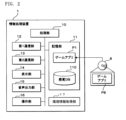
- FIG. 2 is a functional block diagram showing a configuration of the information processing device in FIG.
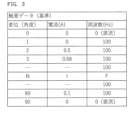
- FIG. 3 is a table showing tactile data stored in the sensation DB in FIG.
- FIG. 4 is a functional block diagram showing the configuration of the tactile presentation device in FIG.
- FIG. 5 is a functional block diagram showing the configuration of the server device in FIG.
- FIG. 6 is a flow diagram showing the procedure of information processing by the information processing device and the tactile presentation device shown in FIGS.
- FIG. 7 is a graph showing a noise level detected by the environmental information acquisition unit in FIG.
- FIG. 8 is a diagram showing an example of a screen displayed on the display unit in FIG.
- the tactile presentation system includes an environmental information acquisition unit that acquires information about the environment that actually exists around a person, and a tactile presentation device that presents a tactile sensation in accordance with the information about the environment acquired by the environmental information acquisition unit.
- the environment includes one or more selected from the group consisting of weather, sound, time of day, temperature, illuminance, and humidity.
- the environment includes sound.
- the environmental information acquisition unit includes a microphone that detects sound.
- the tactile presentation device presents a stronger tactile sensation the louder the sound detected by the microphone.
- the environment includes temperature.
- the environmental information acquisition unit includes a thermometer that measures temperature.
- the tactile presentation device presents a stronger tactile sensation the lower the temperature measured by the thermometer.
- the environment includes illuminance.
- the environmental information acquisition unit includes a luminometer that measures illuminance.
- the tactile presentation device presents a stronger tactile sensation the higher the illuminance measured by the luminometer.
- the environmental information acquisition unit acquires information about the current environment that actually exists around the person.
- the tactile presentation device presents a tactile sensation according to the current environment acquired by the environmental information acquisition unit.
- the environmental information acquisition unit acquires information about the future environment that actually exists around the person at a specified date and time.
- the tactile presentation device presents a tactile sensation according to the information about the future environment acquired by the environmental information acquisition unit at a specified date and time.
- the environment includes weather.
- the environmental information acquisition unit acquires information about the weather at a specified date and time from a weather forecast.
- the tactile presentation device presents a tactile sensation at the specified date and time in accordance with the weather-related information acquired by the environmental information acquisition unit.
- the tactile presentation device changes the tactile sensations presented while a person is interacting with the displayed content.
- the tactile presentation device changes the tactile sensation to be presented when a person ends the currently selected content and selects another content.
- FIG. 1 is a schematic diagram showing a game system 100 in this embodiment.
- the game system 100 includes an information processing device 1, a tactile presentation device 2, and a server device 3.
- the information processing device 1 and the tactile presentation device 2 are connected via short-range wireless communication and transmit and receive data between them.
- the information processing device 1 and the server device 3 transmit and receive data between them via a network N, which includes the so-called Internet.
- the network N includes the Internet N1, a carrier network N2, a base station BS, and an access point AP.
- the information processing device 1 is a smartphone.
- the information processing device 1 is not limited to a smartphone, and may be a tablet terminal.
- the information processing device 1 may be a laptop PC (Personal Computer).
- the information processing device 1 may be a dedicated gaming device.
- the information processing device 1 may be a dedicated gaming device integrated with the tactile presentation device 2, that is, a gaming machine that includes the tactile presentation device 2 in the controller portion.
- the tactile presentation device 2 is a device that allows an operator to operate the device by moving his/her finger while holding the finger along the displacement unit 202.
- the tactile presentation device 2 reads the position of the displacement unit 202, which is displaced by the operator's finger movement, and controls the built-in MRF (Magneto-Rheological Fluid) device 24 according to the position to generate a force sensation due to a reaction force (rotational resistance) against the operator's operation of the displacement unit 202, thereby presenting a tactile sensation.
- the form of the displacement unit 202 of the tactile presentation device 2 is not limited to that shown in FIG. 1, and may be a button, a stick, or a cushion-like object covered with a cover.
- the tactile presentation device 2 may employ a motor or a piezoelectric element instead of the MRF device 24, and may generate a force sensation due to a rotational force or vibration in response to the operator's operation, and may be combined with a device that presents vibration, a warm sensation, a cold sensation, or an electrical stimulation in addition to the displacement unit 202. It can also be installed on the ground or a wall and operated by the operator's palm, foot, etc.
- the information processing device 1 which has a game application program (hereinafter referred to as a game app) installed, communicates with the server device 3 according to a selection, and is able to execute a game.
- the information processing device 1 acquires game content, including data to be exchanged with the tactile presentation device 2, from the content database (DB: Data Base) 311 of the server device 3 via the network N as appropriate.
- the information processing device 1 presents an image (visual) from the built-in display unit 14, a sound (auditory) from the audio output unit 15, and a tactile sensation from the connected tactile presentation device 2. For example, as shown in FIG.
- the information processing device 1 displays a character C on the display unit 14, and when the operator presses the displacement unit 202 of the tactile presentation device 2 with a finger, the information processing device 1 changes the image of the displayed character while outputting a tactile sensation according to the type and level of the character C, and outputs a sound or sound effect according to the change from the audio output unit 15.
- the player can select the character C to be operated.
- the information processing device 1 changes the tactile sensation in the tactile presentation device 2 according to the character C, and changes and outputs images and sounds according to the displacement of the displacement unit 202.
- the information processing device 1 further progresses the game by adding predetermined game points and executing a lottery (so-called gacha) according to the displacement of the displacement unit 202 of the tactile presentation device 2.
- FIG. 2 is a block diagram showing the internal configuration of the information processing device 1.
- the information processing device 1 includes a processing unit 10, a storage unit 11, a first communication unit 12, a second communication unit 13, a display unit 14, an audio output unit 15, and an operation unit 16.
- the information processing device 1 further includes an environmental information acquisition unit 17.
- the processing unit 10 is a processor that uses a CPU (Central Processing Unit) and/or a GPU (Graphics Processing Unit).
- the processing unit 10 executes game-related processing based on the game application P1 stored in the memory unit 11.
- the storage unit 11 uses a non-volatile memory such as a flash memory or SSD.
- the storage unit 11 stores the game application P1, a sensory DB 110 described below, and other data referenced by the processing unit 10.
- the game application P1 may be a game application P8 stored in the storage medium 8 that has been read by the processing unit 10 and copied to the storage unit 11.
- the game application P1 is downloaded from the server device 3 or another program server device via the first communication unit 12 and stored in an executable manner.
- the storage unit 11 stores a sensory DB 110 that includes tactile data, visual (images, videos, text) data, and auditory (audio, sound effects) data corresponding to characters.
- the sensory DB 110 stores the tactile data, visual data, and auditory data to be output for each displacement data of the displacement unit 202 in the tactile presentation device 2, in association with a content ID that identifies a character or item.
- the sensory DB 110 may be sequentially obtained for each character from the content DB 311 of the server device 3, or may be stored in advance.
- the first communication unit 12 realizes communication with the server device 3 via a network N including the Internet or a carrier network.
- the first communication unit 12 may be a wireless communication device that connects to a carrier network, or may be a wireless communication device for WiFi.
- the processing unit 10 can transmit and receive data to and from the server device 3 via the first communication unit 12.
- the second communication unit 13 is a communication module for short-range wireless communication, for example Bluetooth (registered trademark).
- the processing unit 10 can transmit and receive data to and from the tactile presentation device 2 via the second communication unit 13.
- the display unit 14 is a display such as a liquid crystal display or an organic EL (Electro Luminescence) display.
- the display unit 14 is, for example, a display with a built-in touch panel.
- the processing unit 10 displays on the display unit 14 game content stored in the memory unit 11 or game content such as images and text provided by the server device 3 based on the game application P1.
- the audio output unit 15 includes a speaker, etc.
- the processing unit 10 outputs game content stored in the storage unit 11 or game content such as sound and music provided by the server device 3 from the audio output unit 15 based on the game application P1.
- the operation unit 16 is a user interface capable of inputting and outputting data to and from the processing unit 10, and is a touch panel built into the display unit 14.
- the operation unit 16 may be a physical button.
- the operation unit 16 may also serve as a voice input unit.
- the environmental information acquisition unit 17 acquires information about the environment that actually exists around the human operator (hereinafter referred to as "external environmental information").
- the environment can include sound (particularly noise), weather, temperature, humidity, illuminance, time of day, and combinations of these.
- the environmental information acquisition unit 17 includes a microphone that detects sound.
- the microphone is built into a general-purpose smartphone.
- the tactile presentation device 2 presents a stronger tactile sensation the louder the sound detected by the microphone. Conversely, the tactile presentation device 2 presents a weaker tactile sensation the quieter the sound detected by the microphone. This is because, in general, people's sense of touch becomes less sensitive in noisy places and more sensitive in quiet places.
- the environmental information acquisition unit 17 includes a temperature sensor that detects the temperature.
- a temperature sensor In most cases, general-purpose smartphones do not have built-in temperature sensors. If a temperature sensor is not built in, a general-purpose temperature sensor can be connected to the smartphone.
- the tactile presentation device 2 presents a stronger tactile sensation the lower the temperature detected by the temperature sensor. Conversely, the tactile presentation device 2 presents a weaker tactile sensation the higher the temperature detected by the temperature sensor. This is because, in general, people's sense of touch becomes less sensitive in cold places and more sensitive in warm places.
- the environmental information acquisition unit 17 includes a humidity sensor that detects humidity.
- a humidity sensor is not built into a general-purpose smartphone. If a humidity sensor is not built into the smartphone, a general-purpose humidity sensor can be connected to the smartphone.
- the tactile presentation device 2 presents a tactile sensation according to the humidity detected by the humidity sensor.
- a heat index can be calculated using a combination of humidity and temperature, and when the heat index exceeds a predetermined value (a number at which heat stroke may occur), a hard tactile sensation (a sensation that does not move when pressed) or no tactile sensation can be presented. If such a tactile sensation is presented to agricultural or factory workers in hot and humid environments to prevent them from operating machinery, it is possible to warn them of heat stroke. Heat stroke forecasts can also be referenced and the above-mentioned tactile sensations can be presented at times when heat stroke is likely to occur.
- the tactile presentation device 2 can also inform a user with weak eyesight of raincloud radar information (current or forecast information) at a specified position.
- the information processing device 1 advances or reverses the time.
- the tactile presentation device 2 presents a tactile sensation at the specified position at the specified time.
- the tactile presentation device 2 may present no tactile sensation when it is sunny, a soft tactile sensation when it is cloudy, a strong tactile sensation when it is raining, an even stronger tactile sensation when it is heavy rain, and a tactile sensation that includes not only the amount of rain but also the frequency when it is accompanied by thunder.
- the environmental information acquisition unit 17 includes an illuminance sensor that detects illuminance.
- an illuminance sensor is built into a general-purpose smartphone.
- a camera may be used instead of an illuminance sensor.
- a camera is built into a general-purpose smartphone.
- the tactile presentation device 2 presents a stronger tactile sensation the higher the illuminance detected by the illuminance sensor, camera, etc. Conversely, the tactile presentation device 2 presents a weaker tactile sensation the lower the illuminance detected by the illuminance sensor, camera, etc. This is because, in general, people's sense of touch becomes less sensitive in bright places and more sensitive in dark places.
- the environmental information acquisition unit 17 acquires information about the current environment that actually exists around the person who is currently the operator.
- the tactile presentation device 2 presents a tactile sensation according to the information about the current environment acquired by the environmental information acquisition unit 17. In this case, a tactile sensation according to the external environment is presented in real time.
- the environmental information acquisition unit 17 acquires information about the future environment that actually exists around the human operator at a specified date and time.
- the information about the future environment is, for example, weather forecast information.
- the tactile presentation device 2 presents a tactile sensation according to the information about the future environment acquired by the environmental information acquisition unit 17 at a specified date and time. In this case, the tactile sensation according to the external environment is presented with a delay.
- the environmental information acquisition unit 17 acquires information about the weather at a specified date and time from a weather forecast. More specifically, based on the current location acquired by GPS (Global Positioning System), information about the weather at a specified date and time at the current location is acquired from a server that provides weather information.
- the tactile presentation device 2 presents a tactile sensation at the specified date and time in accordance with the weather information acquired by the environmental information acquisition unit 17.
- the information processing device 1 includes a GPS sensor that receives radio waves from GPS satellites and uses the radio waves to calculate the position of the information processing device 1.
- the environmental information acquisition unit 17 acquires a weather forecast for, for example, one hour later at 6 p.m.
- the information processing device 1 creates haptic data to be used in accordance with the acquired weather forecast.
- the information processing device 1 transmits the haptic data to be used to the haptic presentation device 2, and the haptic presentation device 2 updates the haptic sensation according to the haptic data.
- the heatstroke forecast described above can also be achieved in a similar manner.
- the environmental information acquisition unit 17 includes a clock.
- the clock is built into a general-purpose smartphone.
- the tactile presentation device 2 presents a tactile sensation according to the current time obtained from the clock.
- the tactile presentation device 2 presents different tactile sensations depending on the time of day: morning (4:00AM-10:00AM), afternoon (10:00AM-6:00PM), night (6:00PM-12:00AM), and late night (12:00AM-4:00AM).
- the information processing device 1 pre-registers the user's preferred tactile sensations in association with time periods (morning, afternoon, night, late night), and identifies the time period that corresponds to the current time.
- the tactile presentation device 2 presents the tactile sensation that corresponds to the identified time period.
- the tactile presentation device 2 can also inform a hearing-visually impaired person of the current time.
- the information processing device 1 pre-registers 10 types of tactile sensations indicating "0" to "9," and identifies the current time when the user operates it.
- the tactile presentation device 2 informs the user of the identified current time through tactile sensations. For example, when the tactile presentation device 2 informs the user of 19:03, it presents a tactile sensation indicating "1" in response to the first operation, a tactile sensation indicating "9” in response to the second operation, a tactile sensation indicating "0" in response to the third operation, and a tactile sensation indicating "3" in response to the fourth operation.
- the tactile sensation indicating the start may be presented first
- the tactile sensation indicating the end may be presented last.
- FIG. 3 is an explanatory diagram showing an example of the contents of the sensory DB 110.
- the sensory DB 110 stores, as tactile data, the values of the current and frequency supplied to the MRF device 24 of the tactile presentation device 2 for each displacement amount (angle) of the displacement unit 202.
- the sensory DB 110 may also store visual data, auditory data, etc.
- FIG. 4 is a block diagram showing the configuration of the tactile presentation device 2.
- the tactile presentation device 2 is configured by providing a flat, bottomed, cylindrical gripper 200 with a belt-like flat plate-like displacement section 202 having a curved section that partially follows the circumferential direction.
- the displacement section 202 is made of a material that is itself flexible, but may be made of a highly rigid material and rotatably supported by the gripper 200 via a support shaft.
- a cloth tape-like binding device 203 is provided on the outer surface of the tip of the displacement section 202.
- a link mechanism 204 that connects to the rotating shaft of the rotor of the MRF device 24 housed inside the gripper 200 is provided on the inner surface of the tip of the displacement section 202.
- the displacement section 202 may be provided with a material that adds a variety of textures, such as silicone rubber or a material with fur on its surface.
- the operator holds the gripping body 200 with, for example, the thumb and middle finger, and inserts the index finger and other fingers into the fastener 203 along the displacement portion 202.
- the operator can move the displacement portion 202 by pushing the index finger in, and can also move the displacement portion 202 away from the gripping body 200 by extending the index finger.
- the displacement amount (angle) of the displacement unit 202 shown in FIG. 3 is 0 degrees.
- the displacement amount (angle) of the displacement unit 202 is 90 degrees.
- the movable range of the displacement unit 202 is 90 degrees from the upper limit to the lower limit, but is not limited to this.
- the tactile data is set in increments of 1 degree, but it is possible to set it more finely, for example, in increments of 0.1 degrees.
- the tactile presentation device 2 includes a gripping body 200 as shown in FIG. 1, a control unit 20, a memory unit 21, a communication unit 22, a power supply unit 23, an MRF device 24, and a sensor 25.
- the gripping body 200 has an internal MRF device 24.
- the control unit 20, the memory unit 21, the communication unit 22, and the power supply unit 23 may be provided integrally with the gripping body 200, or may be provided separately and connected to the gripping body 200 wirelessly or via a wire.
- the control unit 20 includes a processor such as a CPU and an MPU (Micro-Processing Unit), and memories such as a ROM (Read Only Memory) and a RAM (Random Access Memory).
- the control unit 20 is, for example, a microcontroller.
- the control unit 20 controls each component based on a control program P2 stored in the built-in ROM, and realizes tactile presentation.
- the storage unit 21 is an auxiliary memory for the control unit 20, and stores the control data (haptic data) of the MRF device 24 in a rewritable manner.
- the communication unit 22 is a communication module for short-range wireless communication, such as Bluetooth (registered trademark).
- the control unit 20 can transmit and receive data to and from the information processing device 1 via the communication unit 22.
- the control unit 20 is connected to the power supply unit 23, the MRF device 24, and the sensor 25 via I/O, and exchanges signals with each other.
- the power supply unit 23 includes a rechargeable battery. When the power supply unit 23 is turned on, it supplies power to each component and the MRF device 24.
- the MRF device 24 has a yoke that is arranged to sandwich a disk-shaped rotor with a gap between them, and generates a magnetic field by passing a control current through a coil attached to the yoke, and controls the viscosity (shear stress) of the magnetorheological fluid sealed in the gap to provide rotational resistance to the rotor.
- the control unit 20 adjusts the magnitude of the control current to the MRF device 24, the rotational resistance is immediately changed.
- the sensor 25 measures the position (angle) of the displacement unit 202 and outputs it to the control unit 20.
- the sensor 25 measures the displacement of the displacement unit 202 as an angle and outputs it.
- the sensor 25 may be composed of multiple sensors such as a gyro sensor and an acceleration sensor.
- the displacement unit 202 when the displacement unit 202 is operated by the operator, the displacement of the displacement unit 202 is transmitted in the rotational direction to the rotation shaft of the rotor of the MRF device 24 via the link mechanism 204.
- the MRF device 24 When the MRF device 24 is not operating, that is, while the control current is zero, the rotation shaft rotates freely, so the displacement unit 202 fluctuates without resistance.
- the viscosity (shear stress) of the magnetorheological fluid inside the MRF device 24 is changed according to the magnitude of the current flowing to the MRF device 24.
- the control unit 20 can change the force of resistance to the displacement unit 202 and the way in which it appears by continuously changing the magnitude of the current to the MRF device 24 or vibrating the current value at a predetermined frequency.
- the tactile presentation device 2 can present a slippery sensation by varying the resistance (current value) according to the amount of pressure applied to the displacement section 202, or a firm sensation by increasing the resistance as the pressure increases, or a crunchy sensation by repeatedly varying the resistance or by repeatedly switching on and off in a square wave pattern.
- FIG. 5 is a block diagram showing the internal configuration of the server device 3.
- the server device 3 is a game server capable of transmitting and receiving data to and from the information processing device 1.
- the server device 3 is described as a single game server, but it may also be a configuration in which multiple server computers are connected to each other via a network for communication and distributed processing.
- the server device 3 includes a processing unit 30, a storage unit 31, and a communication unit 32.
- the processing unit 30 is a processor that uses a CPU and/or a GPU.
- the processing unit 30 executes processing as a game server based on a server program P3 stored in the storage unit 31.
- the storage unit 31 uses non-volatile memory such as a hard disk, flash memory, or SSD (Solid State Drive).
- the storage unit 31 stores data referenced by the processing unit 30.
- the storage unit 31 stores a server program P3.
- the server program P3 may be a server program P9 stored in the storage medium 9 that is read by the processing unit 30 and copied to the storage unit 31.
- the server program P3 may be a program downloaded by the processing unit 30 from another program server device via the communication unit 32 and stored therein.
- the storage unit 31 stores game content used in the game.
- the game content stored in the storage unit 31 includes character data, item data, etc.
- the storage area of the storage unit 31 that stores the game content data may be an external storage medium connected for communication via a network.
- Character data is data about characters that appear in the game. Character data includes names (identification data), tactile data to be included in the sensory DB 110, visual data (images, videos, text, etc.), and auditory data (voice, sound effects).
- the communication unit 32 realizes communication with the information processing device 1 via the network N.
- the communication unit 32 is a network card.
- the communication unit 32 may be a wireless communication module that connects to the carrier network N2, or a wireless communication module for WiFi.
- the processing unit 30 can transmit and receive data between the information processing device 1 and the communication unit 32.
- FIG. 6 is a flowchart showing an example of the processing procedure based on the game application P1.
- the information processing procedure by the information processing device 1 shown in FIG. 6 is executed when the game application P1 is launched, or when the communication connection with the tactile presentation device 2 is cut off.
- the processing unit 10 establishes a communication connection with the tactile presentation device 2 via the second communication unit 13 (step S11).
- the environmental information acquisition unit 17 acquires external environmental information (step S12).
- the processing unit 10 reads tactile data from the sensory DB 110 (step S13), corrects the read tactile data (step S14), and transmits the corrected tactile data (hereinafter referred to as "used tactile data") to the tactile presentation device 2 (step S15).
- the tactile data read from the sensory DB 110 in step S13 is a table that stores the corresponding current and frequency values for each amount of displacement (angle), as shown in FIG. 3.
- the processing unit 10 calculates the noise level in real time within each interval Tn, Tn+1, Tn+2, ... as shown in FIG. 7.
- the noise level may be the average, maximum, or minimum value of each interval.
- the real-time noise level may be used as is, or may be sampled at a predetermined interval.
- the haptic data shown in FIG. 3 is corrected based on the noise level used here (step S14).
- the haptic data shown in FIG. 3 is the reference haptic data before it is corrected.
- the reference tactile data is adopted as the tactile data to be used.
- the reference tactile data is corrected to generate the tactile data to be used.
- the current value of the reference tactile data is increased by 0.1 A and the frequency is increased by +10 Hz.
- the value of the current or frequency is 0 (zero)
- the displacement does not present a tactile sensation, so no correction is made.
- the noise level is less than the predetermined range, the opposite correction is made.
- the reference is set to the midpoint of the noise level, but it is also possible to set it below or above the midpoint.
- correction may be made by multiplying by a predetermined ratio (for example, 1.1 for increasing, 0.9 for decreasing). Instead of correction, it is also possible to prepare tactile data to be used according to the noise level in advance.
- the MRF device 24 When the MRF device 24 is used, the current value to be supplied is made greater than the reference value, or the frequency is increased.
- the speed and torque are increased above the reference values.
- the higher the current value the greater the force required to press the displacement portion 202, and therefore the stronger the tactile sensation.
- the higher the frequency the finer the vibrations felt when pressing the displacement portion 202, and therefore the stronger the tactile sensation.
- the lower the current value the smaller the force required to press the displacement portion 202, and therefore the weaker the tactile sensation.
- the lower the frequency the coarser the vibrations felt when pressing the displacement portion 202, and therefore the weaker the tactile sensation.
- the tactile presentation device 2 executes the process shown on the right side of FIG. 6 based on the transmitted tactile data.
- the control unit 20 of the tactile presentation device 2 executes the following process.
- the tactile presentation device 2 When the tactile presentation device 2 receives the tactile data in use from the information processing device 1 during communication connection (step S21), the tactile presentation device 2 stores the data in the storage unit 21 (step S22).
- the tactile data in use received in step S21 is a list table of the current value and frequency for each displacement amount described above.
- the control unit 20 of the tactile presentation device 2 samples a signal corresponding to the displacement amount (angle) of the displacement unit 202 output from the sensor 25 (step S23).
- the control unit 20 transmits the displacement amount obtained by sampling to the information processing device 1 (step S24).
- the displacement amount (angle) may be a relative displacement from the upper end, or may be an absolute position detected by the sensor 25.
- the control unit 20 references the current value corresponding to the amount of displacement obtained by sampling from the tactile data used stored in the memory unit 21 (step S25), and outputs the referenced current to the MRF device 24 (step S26).
- the control unit 20 determines whether other new usage haptic data has been received (step S27), and if it determines that no new usage haptic data has been received (S27: NO), the process returns to step S23.
- control unit 20 determines that new tactile data has been received (S27: YES)
- the control unit 20 returns to step S22, stores the new tactile data in the storage unit 21 (updates the tactile data), and repeats steps S23 to S26.
- FIG. 8 shows an example of a game screen 425.
- an image of an egg is displayed, and an icon 421 indicating that the tactile presentation in the tactile presentation device 2 is active is displayed. While the image shown in FIG. 8 is displayed, the tactile presentation device 2 is receiving tactile data based on reference tactile data indicating the "feeling of cracking an egg" from the information processing device 1.
- the "feeling of cracking an egg” is based on tactile data in which the current value remains relatively large in a predetermined range (e.g., 10 to 30 degrees) in which the displacement amount (angle) of the displacement unit 202 is relatively small, and the current value is set to a small value when the predetermined range is exceeded.
- a predetermined range e.g. 10 to 30 degrees
- the initial stage of pushing the displacement unit 202 from the top end to the predetermined position is a hard, crunchy feeling, and from the middle stage onwards, a very small current value is set, and the reaction force becomes small.
- the image of the egg changes so that the cracks gradually become larger depending on the number of times the displacement unit 202 is pushed from the top end to the predetermined position by the tactile presentation device 2.
- the tactile sensation presented by the tactile presentation device 2 may also be reduced as the number of reaches increases by decreasing the current value to reduce the reaction force.
- FIG. 8 displays a message box 427 including text guiding the user to return the displacement unit 202 to the top end before pressing the displacement unit 202. Since the information processing device 1 executes a judgment based on the displacement speed of the displacement unit 202, the displacement speed cannot be calculated unless the displacement unit 202 is displaced a sufficient distance (angle range) from the top end. Therefore, by guiding the user to return to the top end, the tactile presentation device 2 can be effectively operated.
- step S24 the amount of displacement is transmitted from the tactile presentation device 2 to the information processing device 1.
- the processing unit 10 recognizes this amount of displacement and calculates the displacement speed and the number of times of arrival based on this amount of displacement.
- the information processing device 1 changes the image when the amount of displacement of the displacement unit 202 reaches a predetermined amount, and then changes the image further when the number of times the amount of displacement reaches a predetermined number, thereby realizing changes in the image or sound according to the pattern of the displacement of the displacement unit 202.
- the tactile data to be used is sent from the information processing device 1 to the tactile presentation device 2, i.e., there are three possible timings for updating the tactile sensation in response to changes in the external environment:
- the above-mentioned system includes a tactile presentation device and a smartphone connectable thereto, but may also be a tactile presentation system including a touch panel monitor that integrates the tactile presentation device and the smartphone.
- the tactile presentation device is not limited to one using an MRF, but may be another passive type device, or an active type device using a motor or the like. It may also be a device that combines passive and active types.
- non-transitory storage media that store programs for causing a computer to function as an information processing device, a tactile presentation device, or a tactile presentation system are also included in the embodiments of the present invention.
- Touch panel devices are available that use vibrations to guide users with weak eyesight on how to use them, and the present invention can also be applied to such devices.
- the haptic data to be used can also be determined by combining multiple external environments. For example, high noise levels and low temperatures are both conditions that strengthen the haptic sensation, so in such cases the haptic sensation may be further strengthened.
- Information processing device 2 Tactile presentation device 3: Server device 17: Environmental information acquisition unit 24: MRF device
Landscapes
- Engineering & Computer Science (AREA)
- Multimedia (AREA)
- General Engineering & Computer Science (AREA)
- Theoretical Computer Science (AREA)
- Human Computer Interaction (AREA)
- Physics & Mathematics (AREA)
- General Physics & Mathematics (AREA)
- User Interface Of Digital Computer (AREA)
Priority Applications (1)
| Application Number | Priority Date | Filing Date | Title |
|---|---|---|---|
| JP2025510890A JPWO2024204127A1 (https=) | 2023-03-27 | 2024-03-26 |
Applications Claiming Priority (2)
| Application Number | Priority Date | Filing Date | Title |
|---|---|---|---|
| JP2023049184 | 2023-03-27 | ||
| JP2023-049184 | 2023-03-27 |
Publications (1)
| Publication Number | Publication Date |
|---|---|
| WO2024204127A1 true WO2024204127A1 (ja) | 2024-10-03 |
Family
ID=92906557
Family Applications (1)
| Application Number | Title | Priority Date | Filing Date |
|---|---|---|---|
| PCT/JP2024/011820 Ceased WO2024204127A1 (ja) | 2023-03-27 | 2024-03-26 | 触覚提示システム |
Country Status (2)
| Country | Link |
|---|---|
| JP (1) | JPWO2024204127A1 (https=) |
| WO (1) | WO2024204127A1 (https=) |
Citations (5)
| Publication number | Priority date | Publication date | Assignee | Title |
|---|---|---|---|---|
| JP2012511781A (ja) * | 2008-12-10 | 2012-05-24 | イマージョン コーポレーション | ハプティック・テキスタイルからハプティック・フィードバックを提供する方法及び装置 |
| JP2013185792A (ja) * | 2012-03-09 | 2013-09-19 | Tokai Univ | 体感温度計測法、及び、体感温度制御コンテンツ制作法、及び、体感温度制御システム |
| JP2014229315A (ja) * | 2013-05-24 | 2014-12-08 | イマージョン コーポレーションImmersion Corporation | メディア・コンテンツ及び一又は複数の外部パラメータに基づいて触覚フィードバックを提供する方法及び装置 |
| WO2018042799A1 (ja) * | 2016-08-29 | 2018-03-08 | ソニー株式会社 | 情報処理装置、情報処理方法、及びプログラム |
| US20220100274A1 (en) * | 2020-09-30 | 2022-03-31 | International Business Machines Corporation | Multi-sensory notifications |
-
2024
- 2024-03-26 JP JP2025510890A patent/JPWO2024204127A1/ja active Pending
- 2024-03-26 WO PCT/JP2024/011820 patent/WO2024204127A1/ja not_active Ceased
Patent Citations (5)
| Publication number | Priority date | Publication date | Assignee | Title |
|---|---|---|---|---|
| JP2012511781A (ja) * | 2008-12-10 | 2012-05-24 | イマージョン コーポレーション | ハプティック・テキスタイルからハプティック・フィードバックを提供する方法及び装置 |
| JP2013185792A (ja) * | 2012-03-09 | 2013-09-19 | Tokai Univ | 体感温度計測法、及び、体感温度制御コンテンツ制作法、及び、体感温度制御システム |
| JP2014229315A (ja) * | 2013-05-24 | 2014-12-08 | イマージョン コーポレーションImmersion Corporation | メディア・コンテンツ及び一又は複数の外部パラメータに基づいて触覚フィードバックを提供する方法及び装置 |
| WO2018042799A1 (ja) * | 2016-08-29 | 2018-03-08 | ソニー株式会社 | 情報処理装置、情報処理方法、及びプログラム |
| US20220100274A1 (en) * | 2020-09-30 | 2022-03-31 | International Business Machines Corporation | Multi-sensory notifications |
Also Published As
| Publication number | Publication date |
|---|---|
| JPWO2024204127A1 (https=) | 2024-10-03 |
Similar Documents
| Publication | Publication Date | Title |
|---|---|---|
| US10248210B2 (en) | Systems and methods for haptically-enabled conformed and multifaceted displays | |
| EP3088064B1 (en) | Vibration signal generation program, vibration signal generation system, vibration signal generation apparatus, vibration signal generation method, and data output program | |
| US11150731B2 (en) | Multi-modal haptic feedback for an electronic device using a single haptic actuator | |
| CN104375633B (zh) | 用于触觉摆弄的系统和方法 | |
| US20190172328A1 (en) | System for generating haptic feedback based on environmental condition | |
| US10583359B2 (en) | Systems and methods for providing haptic effects related to touching and grasping a virtual object | |
| US9851805B2 (en) | Systems and methods for haptically-enabled holders | |
| US20140267076A1 (en) | Systems and Methods for Parameter Modification of Haptic Effects | |
| EP3021314A1 (en) | Peripheral device with haptic diminishment prevention component | |
| JP2020013549A (ja) | 動的システム識別に基づく適応触覚効果レンダリング | |
| US10261586B2 (en) | Systems and methods for providing electrostatic haptic effects via a wearable or handheld device | |
| US20180011538A1 (en) | Multimodal haptic effects | |
| WO2024204127A1 (ja) | 触覚提示システム | |
| JP2023148854A (ja) | 制御装置、制御方法、触覚提示システム及びコンピュータプログラム | |
| WO2023189422A1 (ja) | 制御装置、制御方法、触覚提示システム及びプログラム製品 | |
| JP2024135065A (ja) | 仮想オブジェクト触覚提示システム、視覚提示装置、触覚提示装置、仮想オブジェクト触覚提示方法、コンピュータプログラム及び制御プログラム | |
| JP2025152654A (ja) | 情報処理装置、触覚提示方法及びコンピュータプログラム | |
| JP2024137188A (ja) | 仮想オブジェクト触覚提示システム、視覚提示装置、仮想オブジェクト触覚提示方法、及びコンピュータプログラム | |
| JP2024140851A (ja) | 触覚提示システム、情報処理装置、情報処理方法、及びコンピュータプログラム | |
| JP2023148853A (ja) | 制御装置、制御方法、触覚提示システム及びコンピュータプログラム | |
| JP2025147757A (ja) | 触覚提示システム | |
| WO2024204530A1 (ja) | 情報処理システム、情報処理装置、情報処理方法及びコンピュータプログラム | |
| WO2024204546A1 (ja) | 触覚提示システム | |
| WO2023189425A1 (ja) | 制御装置、制御方法、触覚提示システム及びプログラム製品 | |
| JP2024137189A (ja) | 情報処理システム、情報処理装置、情報処理方法及びコンピュータプログラム |
Legal Events
| Date | Code | Title | Description |
|---|---|---|---|
| 121 | Ep: the epo has been informed by wipo that ep was designated in this application |
Ref document number: 24780241 Country of ref document: EP Kind code of ref document: A1 |
|
| WWE | Wipo information: entry into national phase |
Ref document number: 2025510890 Country of ref document: JP |
|
| NENP | Non-entry into the national phase |
Ref country code: DE |
|
| 122 | Ep: pct application non-entry in european phase |
Ref document number: 24780241 Country of ref document: EP Kind code of ref document: A1 |