WO2024166809A1 - サポートプログラム - Google Patents
サポートプログラム Download PDFInfo
- Publication number
- WO2024166809A1 WO2024166809A1 PCT/JP2024/003450 JP2024003450W WO2024166809A1 WO 2024166809 A1 WO2024166809 A1 WO 2024166809A1 JP 2024003450 W JP2024003450 W JP 2024003450W WO 2024166809 A1 WO2024166809 A1 WO 2024166809A1
- Authority
- WO
- WIPO (PCT)
- Prior art keywords
- program
- test
- printing
- printer
- Prior art date
- Legal status (The legal status is an assumption and is not a legal conclusion. Google has not performed a legal analysis and makes no representation as to the accuracy of the status listed.)
- Ceased
Links
Images



Classifications
-
- G—PHYSICS
- G06—COMPUTING OR CALCULATING; COUNTING
- G06F—ELECTRIC DIGITAL DATA PROCESSING
- G06F3/00—Input arrangements for transferring data to be processed into a form capable of being handled by the computer; Output arrangements for transferring data from processing unit to output unit, e.g. interface arrangements
- G06F3/12—Digital output to print unit, e.g. line printer, chain printer
- G06F3/1201—Dedicated interfaces to print systems
- G06F3/1223—Dedicated interfaces to print systems specifically adapted to use a particular technique
- G06F3/1237—Print job management
- G06F3/1253—Configuration of print job parameters, e.g. using UI at the client
- G06F3/1256—User feedback, e.g. print preview, test print, proofing, pre-flight checks
-
- B—PERFORMING OPERATIONS; TRANSPORTING
- B41—PRINTING; LINING MACHINES; TYPEWRITERS; STAMPS
- B41J—TYPEWRITERS; SELECTIVE PRINTING MECHANISMS, i.e. MECHANISMS PRINTING OTHERWISE THAN FROM A FORME; CORRECTION OF TYPOGRAPHICAL ERRORS
- B41J29/00—Details of, or accessories for, typewriters or selective printing mechanisms not otherwise provided for
- B41J29/38—Drives, motors, controls or automatic cut-off devices for the entire printing mechanism
-
- G—PHYSICS
- G03—PHOTOGRAPHY; CINEMATOGRAPHY; ANALOGOUS TECHNIQUES USING WAVES OTHER THAN OPTICAL WAVES; ELECTROGRAPHY; HOLOGRAPHY
- G03G—ELECTROGRAPHY; ELECTROPHOTOGRAPHY; MAGNETOGRAPHY
- G03G15/00—Apparatus for electrographic processes using a charge pattern
-
- G—PHYSICS
- G06—COMPUTING OR CALCULATING; COUNTING
- G06F—ELECTRIC DIGITAL DATA PROCESSING
- G06F3/00—Input arrangements for transferring data to be processed into a form capable of being handled by the computer; Output arrangements for transferring data from processing unit to output unit, e.g. interface arrangements
- G06F3/01—Input arrangements or combined input and output arrangements for interaction between user and computer
- G06F3/048—Interaction techniques based on graphical user interfaces [GUI]
- G06F3/0481—Interaction techniques based on graphical user interfaces [GUI] based on specific properties of the displayed interaction object or a metaphor-based environment, e.g. interaction with desktop elements like windows or icons, or assisted by a cursor's changing behaviour or appearance
- G06F3/0482—Interaction with lists of selectable items, e.g. menus
-
- G—PHYSICS
- G06—COMPUTING OR CALCULATING; COUNTING
- G06F—ELECTRIC DIGITAL DATA PROCESSING
- G06F3/00—Input arrangements for transferring data to be processed into a form capable of being handled by the computer; Output arrangements for transferring data from processing unit to output unit, e.g. interface arrangements
- G06F3/12—Digital output to print unit, e.g. line printer, chain printer
-
- G—PHYSICS
- G06—COMPUTING OR CALCULATING; COUNTING
- G06F—ELECTRIC DIGITAL DATA PROCESSING
- G06F3/00—Input arrangements for transferring data to be processed into a form capable of being handled by the computer; Output arrangements for transferring data from processing unit to output unit, e.g. interface arrangements
- G06F3/12—Digital output to print unit, e.g. line printer, chain printer
- G06F3/1201—Dedicated interfaces to print systems
- G06F3/1202—Dedicated interfaces to print systems specifically adapted to achieve a particular effect
- G06F3/1203—Improving or facilitating administration, e.g. print management
- G06F3/1208—Improving or facilitating administration, e.g. print management resulting in improved quality of the output result, e.g. print layout, colours, workflows, print preview
-
- G—PHYSICS
- G06—COMPUTING OR CALCULATING; COUNTING
- G06F—ELECTRIC DIGITAL DATA PROCESSING
- G06F3/00—Input arrangements for transferring data to be processed into a form capable of being handled by the computer; Output arrangements for transferring data from processing unit to output unit, e.g. interface arrangements
- G06F3/12—Digital output to print unit, e.g. line printer, chain printer
- G06F3/1201—Dedicated interfaces to print systems
- G06F3/1223—Dedicated interfaces to print systems specifically adapted to use a particular technique
- G06F3/1237—Print job management
- G06F3/1253—Configuration of print job parameters, e.g. using UI at the client
- G06F3/1258—Configuration of print job parameters, e.g. using UI at the client by updating job settings at the printer
-
- G—PHYSICS
- G06—COMPUTING OR CALCULATING; COUNTING
- G06F—ELECTRIC DIGITAL DATA PROCESSING
- G06F3/00—Input arrangements for transferring data to be processed into a form capable of being handled by the computer; Output arrangements for transferring data from processing unit to output unit, e.g. interface arrangements
- G06F3/12—Digital output to print unit, e.g. line printer, chain printer
- G06F3/1201—Dedicated interfaces to print systems
- G06F3/1278—Dedicated interfaces to print systems specifically adapted to adopt a particular infrastructure
- G06F3/1285—Remote printer device, e.g. being remote from client or server
-
- G—PHYSICS
- G06—COMPUTING OR CALCULATING; COUNTING
- G06F—ELECTRIC DIGITAL DATA PROCESSING
- G06F3/00—Input arrangements for transferring data to be processed into a form capable of being handled by the computer; Output arrangements for transferring data from processing unit to output unit, e.g. interface arrangements
- G06F3/12—Digital output to print unit, e.g. line printer, chain printer
- G06F3/1297—Printer code translation, conversion, emulation, compression; Configuration of printer parameters
Definitions
- the technical field disclosed in this specification relates to a support program that supports the control of a printer.
- Patent Document 1 discloses a configuration in which a printer driver provided by a printer vendor accepts print settings that distinguish between test printing and normal printing, and when a print command for a test print is received, reads the file data to be printed and generates a print job for the test print.
- the OS-standard general-purpose printing program mentioned above only has a fixed test print function, and does not have a test print function that accepts detailed print settings, as has been the case with printer drivers provided by printer vendors up until now. Therefore, to adjust color balance items such as brightness, contrast, and saturation among the print settings, for example, users must repeatedly open the settings screen, change the default print settings, and enter print instructions, which causes inconvenience to users.
- a support program made for the purpose of solving the above-mentioned problems is executable by a computer of an information processing device, and is a support program corresponding to a printer connected to the information processing device, and causes the computer to display a setting screen on a user interface of the information processing device, and executes a reception process for receiving print settings and an instruction to execute test printing via the setting screen, and further causes the computer to execute a first processing process for processing a test image, which is an image to be used for the test printing, in accordance with the specific parameters of the print settings accepted in the reception process when the instruction to execute the test printing is accepted in the reception process with specific parameters accepted for specific items of the print settings in the reception process, and a process for causing the printer to print the test image processed in the first processing process.
- the computer is further configured to execute a second processing process in which the image to be printed shown in the intermediate data is processed according to the specific parameter in the same manner as the first processing process when a print instruction is output from an application program incorporated in the information processing device, the print instruction being for causing the printer to print an image to a general-purpose print program included in the operating system of the information processing device, and intermediate data indicating the image to be printed according to the print instruction is input from the general-purpose print program to the support program, and the specific parameter is set in the specific item of the print setting for the print instruction, and a print process in which the printer prints the image to be printed that has been processed by the second processing process.
- the support program disclosed in this specification accepts print settings and instructions to execute test printing via a settings screen.
- the support program causes the printer to print a test image that has been processed based on the specific parameters. This makes it possible to execute test printing that reflects the print settings accepted on the settings screen, even in an information processing device that has a standard OS general-purpose print program built in and does not have a printer driver provided by a printer vendor built in. Therefore, test printing requires less effort than repeatedly changing the default print settings and printing.
- An information processing device incorporating the above-mentioned support program, a computer-readable storage medium storing the support program, a control method for implementing the functions of the support program, and a printing system including the support program and a printer are also novel and useful.
- the technology disclosed in this specification realizes a technology that allows test printing with easy adjustment of print settings to be performed on an information processing device that incorporates a general-purpose print program that is standard for the OS.
- FIG. 2 is a block diagram showing an outline of the electrical configuration of a PC.
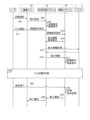
- FIG. 11 is a sequence diagram illustrating an example of a print setting procedure.
- FIG. 4 is an explanatory diagram showing an example of a print setting screen.
- FIG. 11 is an explanatory diagram showing an example of a custom setting screen.
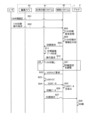
- FIG. 11 is a sequence diagram illustrating an example of a test printing procedure.
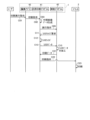
- FIG. 11 is a sequence diagram illustrating an example of a printing execution procedure.
- PC personal computer
- the PC 1 of this embodiment is equipped with a controller 10 including a CPU 11 and a memory 12.
- the PC 1 is an example of an information processing device.
- the CPU 11 is an example of a computer.
- the PC 1 also has a user interface (hereinafter referred to as "user IF") 13 and a communication interface (hereinafter referred to as "communication IF") 14, which are electrically connected to the controller 10.
- user IF user interface
- communication IF hereinafter referred to as "communication IF”
- the controller 10 in FIG. 1 is a general term for the hardware and software used to control the PC 1, and does not necessarily represent a single piece of hardware that actually exists in the PC 1.
- the CPU 11 of the PC 1 executes various processes according to the programs read from the memory 12 and based on the user's operations. Various programs and data are stored in the memory 12.
- the memory 12 is also used as a working area when various processes are executed.
- the buffer provided in the CPU 11 is also an example of a memory. Note that an example of the memory 12 is not limited to the ROM, RAM, HDD, etc. built into the PC 1, but may also be a storage medium that can be read and written by the CPU 11, such as a recording medium such as a CD-ROM or DVD-ROM.
- User IF 13 includes display 13a, which is hardware that displays a screen to notify the user of information, and hardware that accepts operations by the user.
- User IF 13 may be a combination of display 13a capable of displaying information and a mouse or keyboard or the like that has an input acceptance function, or it may be a touch panel that has the functions of display 13a and an input acceptance function.
- the communication IF 14 includes hardware for communicating with external devices such as the printer 2.
- the communication standards of the communication IF 14 include Ethernet (registered trademark), Wi-Fi (registered trademark), USB, etc.
- the PC 1 may be connectable to the Internet via the communication IF 14.
- the PC 1 may be equipped with multiple communication IFs 14 that support multiple communication standards.
- the memory 12 of the PC 1 stores various programs and data, including an operating system (hereinafter referred to as "OS") 21 including a general-purpose print program 41, an auxiliary program 42, and an editing application 43.
- OS operating system
- the auxiliary program 42 is an example of a support program.
- the editing application 43 is an example of an application program.
- OS21 is a multitasking OS that can process multiple tasks in parallel by managing and switching between multiple tasks.
- Examples of OS21 include Windows (registered trademark), MacOS (registered trademark), Linux (registered trademark), iOS (registered trademark), and Android (registered trademark).
- the OS 21 includes a generic print program 41.
- the generic print program 41 is a standard OS program that is prepared by the OS 21 vendor and provided as part of the OS 21.
- the generic print program 41 is not configured to use printer drivers specific to each printer.
- the generic printing program 41 is a program that has the functionality to cause multiple models of printers provided by multiple vendors to print based on user instructions.
- the generic printing program 41 supports generic functions that allow printing to be performed on many printers. Unlike printer drivers specific to each printer, the generic printing program 41 does not support functions specific to each printer or printer driver, particularly functions that require complex processing.
- the general-purpose printing program 41 is a program that includes a function that receives image data specified as the print target in print instructions output from various applications based on user instructions, and generates intermediate image data based on that image data.
- the intermediate image data is, for example, XPS data.
- the general-purpose printing program 41 further has a function that generates print data in a format that can be used for printing on various printers based on the intermediate image data.
- the print data is, for example, PWGRaster data or PDF data.
- the general-purpose printing program 41 also has a function that transmits the generated print data to the printer specified as the device to execute printing, via the communication function of the OS 21.
- the auxiliary program 42 is a program or group of programs that executes processing based on instructions from the OS 21 in conjunction with the processing of the general-purpose printing program 41, and is a program that supports the control of the target hardware.
- the auxiliary program 42 in this embodiment corresponds to the model of the printer 2 connected to the PC 1, and is provided, for example, by the vendor of the printer 2.
- the general-purpose printing program 41 starts the auxiliary program 42 corresponding to the printer 2 when the printer 2 is selected as the device to execute printing, when an instruction for detailed print settings is received with the printer 2 selected, when an instruction to execute printing on the printer 2 is received, etc.
- the auxiliary program 42 is, for example, called a print support app (abbreviated as PSA) or a hardware support app (abbreviated as HSA).
- auxiliary program 42 may be a combination of multiple programs that each accept execution commands, or it may be a single program that can execute different processes depending on the command.
- the auxiliary program may also be a program prepared by the printer vendor for each type of printer. For example, an auxiliary program for inkjet printers and an auxiliary program for laser printers may be prepared. There may also be auxiliary programs prepared not only for each type of printer, but also for each model of printer or each series of printer models.
- OS21 of PC1 can download an appropriate auxiliary program from a printer vendor's server or the like according to the type and model of the connected printer and install it in PC1.
- OS21 associates the identification information of the installed auxiliary program with the printer information of the newly connected printer and stores it in memory 12.
- the editing application 43 is, for example, a program for creating and editing image data and document data.
- the editing application 43 may be, for example, Microsoft's (registered trademark) Word (registered trademark) or PowerPoint (registered trademark), or may be a program provided by the vendor of the printer 2.
- the editing application 43 is capable of accepting, for example, a print execution instruction to cause the printer 2 to execute printing via the user IF 13.
- the editing application 43 is not limited to a program for creating and editing data, and may also be a program having a function for accepting display instructions and print instructions for various types of information, such as map information and web pages, in response to a user request.
- the PC 1 is connected to the printer 2 via the communication IF 14 as shown in FIG. 1.
- the printer 2 is a device having at least a printing function and a communication function. For example, when the printer 2 receives print data from the PC 1 or the like, it can execute printing based on the received print data. In this embodiment, the printer 2 is a device capable of color printing.
- each process in this embodiment basically indicates processing by the CPU 11 according to commands written in a program such as the auxiliary program 42. Processing by the CPU 11 also includes control of hardware using the API of the OS 21. In this specification, a detailed description of the OS 21 will be omitted and the operation of each program will be described. Also, "obtain" is used as a concept that does not necessarily require a request.
- Editing application 43 accepts creation and editing of text and images based on instructions from the user. Then, when the user wishes to print the text or image being displayed, the user selects print in editing application 43 (A01). The user can select print, for example, from a menu of operation items provided in editing application 43.
- the editing application 43 When the editing application 43 accepts the selection of printing, it requests the general-purpose printing program 41 of the OS 21 to display a screen for accepting instructions regarding printing (A02). In response to the request, the general-purpose printing program 41 causes the user IF 13 to display a print setting screen (A03).
- the print setting screen is a screen that accepts user instructions regarding various print settings that can be accepted by the general-purpose printing program 41. Note that the print setting screen may be displayed by the editing application 43.
- the print setting screen D2 in the example of FIG. 3 includes a printer selection field 51, an information display field 52, a basic print setting selection field 53, a detailed settings button 54, and a print button 55.
- the printer selection field 51 is a field that accepts the selection of the device to be printed.
- the information display field 52 is a field that displays information specified by an auxiliary program corresponding to the device selected in the printer selection field 51. For example, when the selection of printer 2 is accepted in the printer selection field 51, or when a print instruction is accepted with printer 2 set as the printer to be normally used in the OS 21, the general-purpose print program 41 can start the auxiliary program 42 and display an image prepared by the auxiliary program 42 in the information display field 52.
- the basic print settings selection field 53 is a field that accepts basic settings such as the number of copies to be printed and the document orientation.
- the detailed settings button 54 is a button that accepts an instruction to make detailed settings that are not included in the basic print settings selection field 53.
- the print button 55 is a button that accepts an instruction to execute printing with the selected print settings.
- the general-purpose print program 41 passes an instruction to the auxiliary program 42 corresponding to printer 2 to start accepting the detailed print settings (A12).
- the auxiliary program 42 When the auxiliary program 42 is started in response to the instruction of A12, it acquires the capabilities information of the printer 2. Specifically, the auxiliary program 42 requests the general-purpose printing program 41 to acquire the capabilities information (A13). The general-purpose printing program 41 sends a command requesting the capabilities information to the printer 2 and acquires the capabilities information from the printer 2 (A14). The general-purpose printing program 41 passes the acquired capabilities information to the auxiliary program 42 (A15). This allows the auxiliary program 42 to acquire the capabilities information of the printer 2.
- the general-purpose printing program 41 communicates with the printer 2 via the OS 21 in A14, for example, by communication according to IPP (short for Internet Printing Protocol).
- the auxiliary program 42 may obtain capability information directly from the printer 2, for example, by using MIB (short for Management Information Base), instead of making a request to the general-purpose printing program 41.
- the capability information acquired from the printer 2 includes information on parameters that can be set as print settings.
- the capability information may further include, for example, information on remaining amounts of consumables, information on selectable trays, paper information on the paper set in each tray, and information on compatible print resolutions.
- the printer 2 may also have a function for performing image processing based on the accepted print job and printing based on the data after image processing, such as a function for performing aggregate printing such as Nin1, composite printing such as watermarks, and economical printing that saves on coloring materials. If the printer 2 has an image processing function that can be executed by the printer 2, the printer 2 may pass capability information including information on that function. The printer 2 may also pass capability information including information indicating its own status.
- the auxiliary program 42 Based on the acquired capability information, the auxiliary program 42 causes the user IF 13 to display a detailed settings screen that accepts detailed print settings (A17).
- the detailed settings screen displayed by the auxiliary program 42 includes as options parameters within the range that can be executed by the printer 2.
- the auxiliary program 42 can accept user operations on the displayed detailed settings screen. Since there are many print setting items that can be accepted on the detailed settings screen, the auxiliary program 42 may be able to accept an instruction to switch the items to be selected, for example, by using multiple tabs.
- the auxiliary program 42 can accept, for example, instructions regarding test printing in response to user operations.
- the auxiliary program 42 can display, for example, a custom setting screen 60 as shown in FIG. 4 on the user IF 13 as a screen for accepting user instructions regarding test printing.
- the custom setting screen 60 is an example of a setting screen.
- the custom setting screen 60 shown in FIG. 4 includes a setting field 61 for each color balance item, a test image selection button 62, and a test print execution button 63.
- the setting field 61 is a field that accepts various settings related to the color balance items included in the print settings.
- the selectable color balance items include, for example, at least one of brightness, contrast, and saturation.
- Each item included in the setting field 61 is an example of a specific item.
- the setting value accepted in each item in the setting field 61 is an example of a specific parameter.
- the custom setting screen 60 shown in FIG. 4 is a screen that can accept settings for each item of brightness, contrast, and color intensity of each of the colors red, green, and blue in a setting field 61.
- the auxiliary program 42 accepts a setting value indicating the degree of deviation from the default setting for each item in the setting field 61 of the custom setting screen 60, for example, in the range from -20 to +20.
- the auxiliary program 42 may also be able to accept settings for saturation and black intensity.
- the test image selection button 62 is a button that accepts the selection of an image to be printed in the test print when performing test printing.
- the auxiliary program 42 accepts the selection of an image to be the subject of the test print from various images stored in the PC 1, for example.
- the auxiliary program 42 may also be able to download images, for example, via the Internet.
- the test print execution button 63 is a button that accepts an instruction to execute a test print.
- the instruction to execute a test print is an instruction to print a default test image or a test image selected using the test image selection button 62, using the print settings that are set in the setting field 61.
- the procedure for accepting an instruction for test printing while the custom setting screen 60 is displayed will be described with reference to the sequence diagram in FIG. 5.
- the user sets the setting values for each item in the setting field 61 on the custom setting screen 60 shown in FIG. 4 (B01), and in that state, can issue an instruction to execute a test print by operating the test print execution button 63 (B02).
- B01 and B02 are an example of the reception process.
- the auxiliary program 42 Based on receiving an operation on the test print execution button 63, the auxiliary program 42 stores information on the set print settings, including settings related to test printing (B03). Furthermore, the auxiliary program 42 adds information indicating test printing to the print instruction (B04) and passes it to the general-purpose printing program 41 (B05). B05 is an example of input processing. The print instruction input to the general-purpose printing program 41 in B05 is an example of a test print instruction. In B05, the auxiliary program 42 passes, for example, image data indicating a specified test image and the print settings to which information indicating test printing has been added to the general-purpose printing program 41. The information indicating test printing is an example of test information.
- the auxiliary program 42 inputs a print command to the print queue prepared by the general-purpose print program 41 as a print queue linked to the auxiliary program 42. Note that this print command is the same as the print command given by the editing application 43 to the general-purpose print program 41 in the print execution procedure described below.
- the general-purpose printing program 41 When the general-purpose printing program 41 receives an instruction to print in this print queue, it starts executing the procedure for making the printer 2 print.
- the general-purpose printing program 41 generates intermediate image data based on image data showing the image to be printed (B11), and starts the auxiliary program 42 (B12).
- the auxiliary program 42 can obtain the intermediate image data generated by the general-purpose printing program 41 by making a request to the general-purpose printing program 41. Note that in this procedure, the image to be printed is a test image passed from the auxiliary program 42.
- the general-purpose printing program 41 when a print instruction associated with information indicating test printing is input, the general-purpose printing program 41 generates intermediate image data indicating the test image, which is the image to be printed, and inputs the intermediate image data associated with the information indicating test printing to the auxiliary program 42.
- the general-purpose printing program 41 does not need to determine whether or not information indicating test printing is associated, and generates the intermediate image data and launches the auxiliary program 42 in the same way as in the normal printing execution procedure.
- the auxiliary program 42 In response to the execution instruction received from the general-purpose printing program 41, the auxiliary program 42 first determines whether the instruction is for a test print to which information indicating a test print has been added. In this procedure, the auxiliary program 42 adds information indicating a test print to the print instruction in B04. Therefore, in B12, the auxiliary program 42 receives a print instruction to which information indicating a test print has been added, and therefore can determine that the instruction is for a test print.
- the auxiliary program 42 adjusts the print settings (B21). For example, the auxiliary program 42 overwrites print setting items that are not related to test printing with default parameters. B21 is an example of the overwriting process.
- This test print is for checking the color balance, and if the print includes settings for items unrelated to color balance, the color balance may be difficult to understand in the printout. In addition, it is preferable to not set items unrelated to color balance that increase the user's workload or that may cause delays in the test print or waste consumables.
- the auxiliary program 42 overwrites items that involve the enlargement or reduction of an image with parameters that do not enlarge or reduce the image. For example, if the print settings include a scaling setting or an aggregate printing setting, the auxiliary program 42 sets the scaling ratio to 100% and sets the image to be printed without aggregation. Furthermore, the auxiliary program 42 overwrites items that combine specified data with parameters that do not combine the specified data. For example, if the print settings include a setting to add a watermark or a header or footer, the auxiliary program 42 sets the image to be printed without adding a watermark and without adding a header or footer.
- the auxiliary program 42 overwrites items that include operations other than printing on one side with parameters that do not perform those operations. For example, the auxiliary program 42 changes a double-sided printing setting to single-sided printing, and sets the number of copies greater than one to one copy. The auxiliary program 42 also overwrites settings that require user operation before printing with parameters that do not require operation. For example, the auxiliary program 42 sets the preview display after receiving an instruction to perform test printing and the accumulated printing not to be performed.
- the auxiliary program 42 overwrites some of the print setting items with default parameters for test printing, eliminating the influence of print settings that are not necessary for test printing, and allowing appropriate test printing to be performed.
- an execution instruction output from the general-purpose print program 41 based on a print instruction output from the editing application 43 is an execution instruction that does not include information indicating test printing.
- the auxiliary program 42 receives an execution instruction that does not include test printing information, it does not execute B21.
- the print execution procedure based on the print instruction output from the editing application 43 will be described later.
- the auxiliary program 42 passes the adjusted print settings and intermediate image data to the general-purpose printing program 41, and requests rasterization from the general-purpose printing program 41 (B22).
- the general-purpose printing program 41 rasterizes the intermediate image data and generates raster data, which is bitmap data (B23).
- the general-purpose printing program 41 passes the generated raster data to the auxiliary program 42 (B24).
- the auxiliary program 42 acquires the raster data.
- the raster data acquired by the auxiliary program 42 in A34 is raster data of a test image, and test printing information has been added.
- the auxiliary program 42 processes the acquired raster data based on the print settings of the test print (B25).
- B25 is an example of the first processing process.
- the raster data generated by the general-purpose print program 41 is, for example, bitmap data in which each dot is expressed by an RGB value.
- the auxiliary program 42 corrects, for example, the RGB value of each dot based on each setting accepted in the setting field 61 of the custom setting screen 60 (see FIG. 4). For example, if the brightness setting is "+20", the RGB values are increased overall, and if the red setting is "-20", the R value is decreased.
- the auxiliary program 42 stores information on the print settings of the test print in B03.
- the auxiliary program 42 may perform processing based on the print settings of the test print on intermediate image data, or on CMYK data in which the RGB values are converted to CMYK values.
- the auxiliary program 42 encodes the processed raster data into PDL data to generate print data. Furthermore, the auxiliary program 42 passes the generated print data to the general-purpose print program 41 and instructs it to send it to the printer 2 (B26).
- B26 is a process for causing the printer 2 to print a test image, and is an example of a test print process.
- the general-purpose printing program 41 sends print data to the printer 2 in response to instructions from the auxiliary program 42, and instructs the printer 2 to print (B27).
- the printer 2 executes printing based on the received print data (B28). This generates a printout in which a test image is printed using the test print settings.
- the auxiliary program 42 passes print data based on the raster data processed by B25 to the general-purpose printing program 41 and instructs it to print, so that a test image is printed with its color balance adjusted based on the user's settings.
- the auxiliary program 42 can execute test printing that includes settings for items that are not supported by the general-purpose printing program 41, allowing for a high degree of freedom in test printing.
- the auxiliary program 42 actively displays the custom setting screen 60 (see FIG. 4) described above, and can accept operations on the buttons in the custom setting screen 60. If necessary, the user can change the print settings for the test print and issue an instruction to execute a test print again.
- the user can issue an instruction to end the print settings, for example, by operating the OK button on the custom settings screen 60.
- the auxiliary program 42 receives an instruction to end the detailed settings input by the user (A22), it ends the display of the settings screen such as the custom settings screen 60, and stores the received print settings information (A23).
- the print setting information stored in A23 includes parameter information for each color balance item accepted in the setting field 61 of the custom setting screen 60. If the print settings for the test print are stored in B03 of FIG. 5, the auxiliary program 42 rewrites the stored print settings to the print settings that were set when the input of A22 was accepted.
- the auxiliary program 42 notifies the general-purpose printing program 41 that acceptance of the detailed print settings has been completed (A25). Based on the notification from the auxiliary program 42, the general-purpose printing program 41 notifies the editing application 43 that acceptance of the print settings has been completed (A26). The auxiliary program 42 may also notify the editing application 43 that acceptance of the print settings has been completed.
- the editing application 43 activates the print settings screen displayed in A03 (for example, the print settings screen D2 shown in FIG. 3), and becomes available to accept user instructions such as an instruction to execute printing or an instruction to cancel printing.
- the print setting screen D2 includes an information display field 52 capable of displaying an image prepared by the auxiliary program 42. Furthermore, when the general-purpose print program 41 receives an operation on the information display field 52, it passes information on that operation to the auxiliary program 42. The auxiliary program 42 can then display, in the information display field 52, an information screen capable of receiving an instruction to perform test printing, for example, and can receive an instruction to perform test printing through a user instruction in the information display field 52. The auxiliary program 42 can also perform test printing when received via the information display field 52, using the procedure shown in FIG. 5.
- the print execution procedure will be described with reference to the sequence diagram in FIG. 6.
- the user inputs an instruction to execute printing in the editing application 43 (C01).
- the editing application 43 receives an operation on the print button 55 on the print settings screen D2 shown in FIG. 3, it determines that it has received an execution instruction to the general-purpose printing program 41 to cause the printer 2 to print the selected image.
- the editing application 43 passes the received print instruction information to the general-purpose printing program 41 (C02).
- the general-purpose printing program 41 obtains, as the print instruction information, image data indicating the image to be printed and information indicating the print settings from the editing application 43.
- the general-purpose printing program 41 generates intermediate image data by converting the format of the image data of the image to be printed into the format of intermediate image data based on the information obtained from the editing application 43 (C03).
- the image data contained in the editing application 43 is of various types, and the general-purpose printing program 41 converts the image data to be printed into intermediate image data suitable for generating print data. Note that if the image data to be printed is suitable for generating print data, the generation of the intermediate image data may be omitted and the intermediate image data may be used as is.
- the general-purpose printing program 41 may start an auxiliary program 42 corresponding to the designated device, the printer 2, and notify the printer 2 that the print job processing has started.
- the auxiliary program 42 is started from the general-purpose printing program 41, it can pass information indicating various instructions used when generating the intermediate image data to the general-purpose printing program 41 as necessary.
- the general-purpose printing program 41 launches the auxiliary program 42 (C05).
- the auxiliary program 42 can obtain the intermediate image data generated by the general-purpose printing program 41 by making a request to the general-purpose printing program 41.
- the intermediate image data input from the general-purpose printing program 41 to the auxiliary program 42 in C05 is an example of intermediate data.
- the auxiliary program 42 can edit the intermediate image data and print setting information received from the general-purpose printing program 41 based on the accepted print settings.
- the auxiliary program 42 reads out the print setting information stored in A23 of FIG. 2, and edits the intermediate image data and print setting information.
- the general-purpose printing program 41 passes intermediate image data based on the print instruction received from the editing application 43 in C02 to the auxiliary program 42.
- This print instruction does not go through the procedure of B04 in FIG. 5, so no information indicating test printing is added. Therefore, the auxiliary program 42 does not adjust the print settings as shown in B21 in FIG. 5, but applies the print setting information stored in A23 in FIG. 2 as is. For example, even if the print settings include an item unrelated to color balance, the auxiliary program 42 does not change the parameters of that item.
- the auxiliary program 42 passes the intermediate image data to the general-purpose printing program 41 and requests rasterization from the general-purpose printing program 41 (C11).
- the general-purpose printing program 41 rasterizes the intermediate image data and generates raster data, which is bitmap data (C12).
- the general-purpose printing program 41 passes the generated raster data to the auxiliary program 42 (C13). As a result, the auxiliary program 42 obtains the raster data.
- the general-purpose printing program 41 generates the raster data
- the auxiliary program 42 may perform rasterization instead of the general-purpose printing program 41.
- the auxiliary program 42 performs rasterization based on the intermediate image data received in the print execution instruction, and generates raster data. Rasterization by the auxiliary program 42 allows greater freedom than rasterization by the general-purpose printing program 41, and is more likely to generate raster data suitable for printing on the printer 2.
- the auxiliary program 42 requires less processing, and the program size of the auxiliary program 42 can be reduced.
- the auxiliary program 42 processes the raster data acquired in C13 based on the print settings (C15).
- C15 is an example of a second processing step. If the print settings include settings for the color balance item accepted in the setting field 61 of the custom setting screen 60 (see FIG. 4) described above, the auxiliary program 42 corrects, for example, the RGB values of each dot in the bitmap data based on the accepted settings, as in the procedure of B25 in FIG. 5. Furthermore, the auxiliary program 42 encodes the processed raster data into PDL data to generate print data.
- auxiliary program 42 passes the generated print data to the general-purpose print program 41 and instructs it to send it to the printer 2 (C21).
- C21 is a process for causing the printer 2 to print, and is an example of a print process.
- the print data that the auxiliary program 42 passes to the general-purpose print program 41 in B26 of FIG. 5 or C21 of FIG. 6 may be data in a format that can be printed by the printer 2.
- the PDL data generated by the auxiliary program 42 may be data in a format that can be used for printing by printers other than the model of the printer 2.
- the general-purpose printing program 41 sends print data to the printer 2 and instructs it to print in response to instructions from the auxiliary program 42 (C22).
- the printer 2 executes printing based on the received print data (C23). As a result, a printed matter is generated to which the color balance set by the user is applied, based on the print instructions output from the editing application 43.
- the print data is passed to the general-purpose print program 41, which then sends it to the printer 2.
- the auxiliary program 42 may send the print data and a print command instructing the printer 2 to execute printing.
- the print settings include settings related to image processing that can be executed by the printer 2
- the auxiliary program 42 may generate a print command that also includes information about that processing.
- the auxiliary program 42 may notify the general-purpose print program 41 of the end information after completing the transmission of the print data.
- the auxiliary program 42 of this embodiment accepts print settings and instructions to execute test printing on the custom setting screen 60 (see FIG. 4), and when an instruction to execute test printing is given after settings for the color balance item have been accepted, it causes the printer to print a test image that has been processed based on those settings.
- test printing that reflects the print settings accepted on the custom setting screen 60 can be executed. Therefore, test printing requires less effort than repeatedly printing by changing the default print settings.
- the auxiliary program 42 causes the general-purpose printing program 41 to execute the same procedures as C11 to C23 of the print execution procedure shown in FIG. 6 at B22 to B28 of the test printing procedure shown in FIG. 5.
- the auxiliary program 42 can input a print instruction for test printing to the general-purpose printing program 41 to cause test printing to be performed in the same procedure as the print execution procedure. Therefore, there is no need for the auxiliary program 42 to prepare a procedure for test printing, and the load on the auxiliary program 42 is reduced.
- the device connected to PC1 is not limited to a printer, but may be any device with a printing function, such as a multifunction device, copier, or fax machine.
- the number of printers connected to PC1 is not limited to the example shown in the figure, and may be two or more.
- FIG. 4 shows a custom setting screen 60 including a setting field 61 and a test print execution button 63 on one screen, but these may be accepted on separate screens.
- FIG. 3 shows a print setting screen D2 including one information display field 52, but the arrangement, shape, size, number, etc. of the information display field 52 are not limited to the example shown in this figure. Furthermore, the information display field 52 may not be present.
- FIG. 4 shows a custom setting screen 60 including a test image selection button 62 that accepts the selection of a test image, but the selection of a test image need not be accepted.
- the auxiliary program 42 may use a specific test image that has been determined in advance, or may only accept a selection from a plurality of test images prepared in advance. On the other hand, if the selection of any image is accepted as the test image, the user has a wide range of choices and a high degree of freedom in test printing.
- the items for which settings can be accepted in test printing are not limited to color balance items. Any item that is applicable to printing may be accepted. Furthermore, parameters do not need to be overwritten for items other than color balance items. However, for a user who wants to perform test printing for the color balance item, it is easier to check the results of the test printing by setting the parameters of other items to default values.
- the auxiliary program 42 may also be able to accept a selection of whether or not to temporarily remove parameters for items other than color balance.
- the auxiliary program 42 may not accept settings for the color balance item. Furthermore, if the printer 2 is in a state in which color printing cannot be performed, the auxiliary program 42 may not accept an instruction to perform test printing.
- the timing at which the auxiliary program 42 acquires the capabilities information of the printer 2 is not limited to the example shown in FIG. 2.
- the auxiliary program 42 may request acquisition of the capabilities information of the printer 2.
- the auxiliary program 42 may acquire the capabilities information of the printer 2 again after receiving an instruction to execute printing.
- general-purpose printing program 41 may also start auxiliary program 42.
- auxiliary program 42 may also display, for example, an information screen in information display field 52 that can accept instructions regarding test printing.
- the auxiliary program 42 may also be started not only when printing is selected, but also when, for example, printer 2 is selected as a device setting. Even in this case, the auxiliary program 42 may display a setting screen that can accept settings related to color balance. When a color balance setting is accepted as a device setting, the auxiliary program 42 stores the accepted setting information as the default print setting.
- auxiliary program 42 only the printing operation is described in detail as the operation of the auxiliary program 42, but the auxiliary program 42 may have other roles as well.
- the program that executes the processing of this embodiment is not limited to the auxiliary program 42, but may be any program that receives instructions from the OS 21 or the general-purpose printing program 41 when printing using the general-purpose printing program 41.
- it may be a print workflow application (Print workflow) whose specifications have been published by Microsoft.
- the execution timing of the auxiliary program 42 is not limited to that of the embodiment.
- the auxiliary program 42 may be executed in response to a direct execution instruction from the OS 21, or the auxiliary program 42 may be resident. If the auxiliary program 42 is resident, it may receive an execution command and perform the above-mentioned operations.
- the processes disclosed in the embodiments may be executed by a single CPU, multiple CPUs, hardware such as an ASIC, or a combination of these.
- the processes disclosed in the embodiments may be realized in various ways, such as a recording medium on which a program for executing the processes is recorded, or a method.
Landscapes
- Engineering & Computer Science (AREA)
- Theoretical Computer Science (AREA)
- General Engineering & Computer Science (AREA)
- Physics & Mathematics (AREA)
- General Physics & Mathematics (AREA)
- Human Computer Interaction (AREA)
- Quality & Reliability (AREA)
- Accessory Devices And Overall Control Thereof (AREA)
- Control Or Security For Electrophotography (AREA)
Abstract
OS標準の汎用印刷プログラムが組み込まれた情報処理装置において、印刷設定を調整し易いテスト印刷を実行可能な技術を提供すること。 補助プログラム42は、プリンタ2に対応するプログラムであって、PC1のユーザIF13に表示させたカスタム設定画面を介して、印刷設定とテスト印刷の実行指示とを受け付ける。さらに、補助プログラム42は、カラーバランスの項目への設定を受け付けている状態で、テスト印刷の実行指示を受け付けた場合、その設定に従ってテスト画像を加工し、プリンタ2に印刷させるための処理を行う。さらに、編集アプリ43から出力された印刷指示であって、PC1のOS21が有する汎用印刷プログラム41に対して画像の印刷をプリンタ2に行わせる印刷指示があった場合に、補助プログラム42は、設定に従って印刷対象の画像を加工し、プリンタ2に印刷させるための処理を行う。
Description
本明細書に開示される技術分野は、プリンタの制御をサポートするサポートプログラムに関する。
パーソナルコンピュータ等の情報処理装置からプリンタを制御する技術として、例えば特許文献1に開示されているように、プリンタベンダから提供されるプリンタドライバによって、テスト印刷と通常の印刷を区別した印刷設定を受け付け、テスト印刷の印刷指示があった場合に、印刷対象のファイルデータを読み出してテスト印刷用の印刷ジョブを生成する構成が開示されている。
近年、前述したプリンタベンダから提供されるプリンタドライバを利用せず、オペレーティングシステム(OS)の一部を構成するOS標準の汎用印刷プログラムによってプリンタを制御する技術が実用化されている。この技術では、OSがプリンタを検知するとOS標準の汎用印刷プログラムとの関連付けを行い、以後、そのプリンタに対する印刷指示を受け付けた場合に、プリンタベンダから提供されるプリンタドライバを用いずに、OS標準の汎用印刷プログラムが印刷データを生成することで、OS標準の汎用印刷プログラムによる印刷が可能になる。
しかしながら、前記したOS標準の汎用印刷プログラムでは、固定のテストプリント機能を有するのみであり、これまでプリンタベンダから提供されるプリンタドライバが有していたような、詳細な印刷設定を受け付けるテスト印刷機能が設けられていない。そのため、例えば印刷設定のうち明度、コントラスト、彩度といったカラーバランスの項目を調整するには、設定画面を開いてデフォルトの印刷設定を変更して印刷指示を入力するといった操作を繰り返さなければならず、ユーザに不便を強いる。
上述した課題の解決を目的としてなされたサポートプログラムは、情報処理装置のコンピュータによって実行可能であり、前記情報処理装置と接続するプリンタに対応するサポートプログラムであって、前記コンピュータに、前記情報処理装置のユーザインタフェースに設定画面を表示させ、前記設定画面を介して、印刷設定と、テスト印刷の実行指示と、を受け付ける受付処理を実行させ、さらに前記コンピュータに、前記受付処理にて前記印刷設定の特定項目に特定パラメータが受け付けられた状態で、前記受付処理にて前記テスト印刷の前記実行指示が受け付けられた場合に、前記受付処理にて受け付けられた前記印刷設定の前記特定パラメータに従って、前記テスト印刷に用いる画像であるテスト画像を加工する第1加工処理と、前記第1加工処理にて加工された前記テスト画像を前記プリンタに印刷させるための処理を行うテスト印刷処理と、を実行させ、さらに前記コンピュータに、前記情報処理装置に組み込まれているアプリケーションプログラムから出力された印刷指示であって、前記情報処理装置のオペレーティングシステムが有する汎用印刷プログラムに対して画像の印刷を前記プリンタに行わせる前記印刷指示があり、前記汎用印刷プログラムから、前記印刷指示による印刷対象の画像を示す中間データが前記サポートプログラムに入力された場合に、前記印刷指示に対する前記印刷設定の前記特定項目に前記特定パラメータが設定されている場合、前記中間データに示される印刷対象の前記画像を、前記第1加工処理と同様に前記特定パラメータに従って加工する第2加工処理と、前記第2加工処理にて加工された印刷対象の前記画像を前記プリンタに印刷させるための処理を行う印刷処理と、を実行させる、ように構成されている。
本明細書に開示されるサポートプログラムは、設定画面を介して、印刷設定やテスト印刷の実行指示を受け付ける。サポートプログラムは、特定パラメータが受け付けられた状態でテスト印刷の実行指示があった場合に、その特定パラメータに基づいて加工したテスト画像をプリンタに印刷させる。これにより、OS標準の汎用印刷プログラムが組み込まれており、プリンタベンダによって提供されるプリンタドライバが組み込まれていない情報処理装置であっても、設定画面にて受け付けられた印刷設定を反映したテスト印刷を実行できる。従って、デフォルトの印刷設定を変更しての印刷を繰り返す場合と比較して、テスト印刷の手間が少ない。
上記サポートプログラムが組み込まれた情報処理装置、サポートプログラムを格納するコンピュータにて読取可能な記憶媒体、及びサポートプログラムの機能を実現するための制御方法、サポートプログラムとプリンタとを含む印刷システムも、新規で有用である。
本明細書に開示される技術によれば、OS標準の汎用印刷プログラムが組み込まれた情報処理装置において、印刷設定を調整し易いテスト印刷を実行可能な技術が実現される。
以下、本形態のサポートプログラムを利用するパーソナルコンピュータ(以下、「PC」とする)について、添付図面を参照しつつ詳細に説明する。本明細書は、PCにて実行されるサポートプログラムを開示する。
本形態のPC1は、図1に示すように、CPU11と、メモリ12と、を含むコントローラ10を備えている。PC1は、情報処理装置の一例である。CPU11は、コンピュータの一例である。また、PC1は、ユーザインタフェース(以下、「ユーザIF」とする)13と、通信インタフェース(以下、「通信IF」とする)14と、を備え、これらがコントローラ10に電気的に接続されている。なお、図1中のコントローラ10は、PC1の制御に利用されるハードウェアやソフトウェアを纏めた総称であって、実際にPC1に存在する単一のハードウェアを表すとは限らない。
PC1のCPU11は、メモリ12から読み出したプログラムに従って、また、ユーザの操作に基づいて、各種の処理を実行する。メモリ12には、各種のプログラムや各種のデータが記憶されている。メモリ12は、各種の処理が実行される際の作業領域としても利用される。CPU11が備えるバッファも、メモリの一例である。なお、メモリ12の一例は、PC1に内蔵されるROM、RAM、HDD等に限らず、CPU11が読み取り可能かつ書き込み可能なストレージ媒体、例えば、CD-ROM、DVD-ROM等の記録媒体であっても良い。
ユーザIF13は、ユーザに情報を報知するための画面を表示するハードウェアであるディスプレイ13aと、ユーザによる操作を受け付けるハードウェアと、を含む。なお、ユーザIF13は、情報を表示可能なディスプレイ13aと、入力受付機能を有するマウスやキーボード等と、の組であっても良いし、ディスプレイ13aの機能と入力受付機能とを備えるタッチパネルであっても良い。
通信IF14は、プリンタ2等の外部装置と通信を行うためのハードウェアを含む。通信IF14の通信規格は、イーサネット(登録商標)、Wi-Fi(登録商標)、USBなどである。PC1は、通信IF14を介して、インターネットに接続可能であっても良い。PC1は、複数の通信規格に対応する複数の通信IF14を備えていてもよい。
PC1のメモリ12には、図1に示すように、汎用印刷プログラム41を含むオペレーティングシステム(以下、「OS」とする)21と、補助プログラム42と、編集アプリ43と、を含む、各種のプログラムや各種のデータが記憶されている。補助プログラム42は、サポートプログラムの一例である。編集アプリ43は、アプリケーションプログラムの一例である。
OS21は複数のタスクを管理して切り換えることにより複数のタスクを並行して処理できるマルチタスクOSである。OS21は、例えば、Windows(登録商標)、macOS(登録商標)、Linux(登録商標)、iOS(登録商標)、Android(登録商標)である。
OS21には、汎用印刷プログラム41が含まれている。汎用印刷プログラム41は、OS21のベンダによって用意され、OS21の一部として提供されるOS標準のプログラムである。汎用印刷プログラム41は、各プリンタに固有のプリンタドライバを利用するようには構成されていない。
汎用印刷プログラム41は、ユーザの指示に基づいて、複数のベンダによってそれぞれ提供される複数種類のモデルのプリンタに印刷を実行させるための機能を有するプログラムである。汎用印刷プログラム41は、多くのプリンタにて印刷を実行可能な汎用的な機能をサポートしている。汎用印刷プログラム41は、各プリンタに固有のプリンタドライバとは異なり、各プリンタやプリンタドライバが固有に備える機能、特に複雑な処理を要する機能をサポートしていない。
汎用印刷プログラム41は、ユーザの指示に基づいて、各種のアプリから出力された印刷指示にて印刷対象として指定された画像データを受け取り、その画像データに基づく中間画像データを生成する機能を含むプログラムである。中間画像データは、例えば、XPSデータである。汎用印刷プログラム41は、さらに、中間画像データに基づいて、各種のプリンタにて印刷に利用できる形式の印刷データを生成する機能を有している。印刷データは、例えば、PWGRasterデータ、または、PDFデータである。また、汎用印刷プログラム41は、生成した印刷データを、OS21による通信機能を介して、印刷を実行させる装置として指定されたプリンタに送信する機能を有している。
補助プログラム42は、汎用印刷プログラム41の処理に付随してOS21からの指示に基づいて処理を実行するプログラムまたはプログラム群であり、対象のハードウェアの制御をサポートするプログラムである。本形態の補助プログラム42は、PC1に接続されているプリンタ2のモデルに対応するものであり、例えば、プリンタ2のベンダによって提供される。汎用印刷プログラム41は、印刷を実行させる装置としてプリンタ2が選択された場合、プリンタ2が選択されている状態で詳細な印刷設定の指示を受け付けた場合、プリンタ2に印刷を実行させる指示を受け付けた場合、等に、プリンタ2に対応する補助プログラム42を起動する。補助プログラム42は、例えば、印刷サポートアプリ(略称、PSA)、またはハードウェアサポートアプリ(略称、HSA)と呼ばれるものである。
なお、補助プログラム42は、それぞれが実行命令を受け付ける複数のプログラムの組み合わせであっても良いし、1つのプログラムであって命令に応じてそれぞれ異なる処理を実行できるプログラムであっても良い。また、補助プログラムは、プリンタのベンダによってプリンタのタイプごとに用意されるプログラムであっても良い。例えば、インクジェットプリンタ用の補助プログラムやレーザプリンタ用の補助プログラムが、それぞれ用意されても良い。プリンタのタイプごとに限らず、プリンタのモデルごとやプリンタのモデルのシリーズごとに用意される補助プログラムが有っても良い。
PC1のOS21は、例えば、新たなプリンタがPC1に接続された場合、接続されたプリンタのタイプやモデルに応じて、適切な補助プログラムをプリンタのベンダのサーバ等からダウンロードしてPC1に組み込むことができる。OS21は、組み込んだ補助プログラムの識別情報を新たに接続されたプリンタのプリンタ情報に対応付けて、メモリ12に記憶させる。
編集アプリ43は、例えば、画像データや文書データの作成や編集を行うためのプログラムである。編集アプリ43は、例えば、マイクロソフト(登録商標)製のワード(登録商標)やパワーポイント(登録商標)などであっても良いし、プリンタ2のベンダから提供されるプログラムであっても良い。編集アプリ43は、ユーザIF13を介して、例えば、プリンタ2に印刷を実行させる印刷実行指示を受け付け可能である。なお、編集アプリ43は、データの作成や編集を行うためのプログラムに限らず、ユーザの要求に応じて、地図情報やウェブページ等の各種の情報の表示指示や印刷指示を受け付ける機能を有するプログラムであっても良い。
本形態のPC1は、通信IF14を介して、図1に示すように、プリンタ2に接続されている。プリンタ2は、少なくとも印刷機能と通信機能とを有する装置である。プリンタ2は、例えば、PC1等から印刷データを受信した場合、受信した印刷データに基づく印刷を実行可能である。本形態では、プリンタ2は、カラー印刷可能な装置である。
次に、本形態のPC1において、印刷に関する動作の手順について、シーケンス図を参照して説明する。なお、本形態における各処理は、基本的に、補助プログラム42などのプログラムに記述された命令に従ったCPU11の処理を示す。CPU11による処理は、OS21のAPIを用いたハードウェアの制御も含む。本明細書では、OS21の詳細な記載を省略して各プログラムの動作を説明する。また、「取得」は要求を必須とはしない概念で用いる。
印刷に関する手順として、まず、印刷設定手順について、図2のシーケンス図を参照して説明する。編集アプリ43は、ユーザの指示に基づいて、文章や画像の作成や編集を受け付ける。そして、表示中の文章や画像を印刷させたい場合、ユーザは、編集アプリ43にて印刷を選択する(A01)。ユーザは、例えば編集アプリ43に設けられた操作項目のメニューから、印刷を選択できる。
編集アプリ43は、印刷の選択を受け付けると、OS21の汎用印刷プログラム41に印刷に関する指示を受け付ける画面の表示を要求する(A02)。汎用印刷プログラム41は、要求に応じて、印刷設定画面をユーザIF13に表示させる(A03)。印刷設定画面は、汎用印刷プログラム41にて受け付け可能な各種の印刷設定について、ユーザの指示を受け付ける画面である。なお、印刷設定画面の表示は、編集アプリ43が行っても良い。
印刷設定画面の例を図3に示す。図3の例の印刷設定画面D2は、プリンタ選択欄51、情報表示欄52、基本的な印刷設定の選択欄53、詳細設定ボタン54、印刷ボタン55、を含む。プリンタ選択欄51は、印刷を実行させるデバイスの選択を受け付ける欄である。情報表示欄52は、プリンタ選択欄51にて選択されたデバイスに対応する補助プログラムによって指定された情報を表示する欄である。例えば、プリンタ選択欄51にてプリンタ2の選択を受け付けた場合、または、OS21にて通常使用するプリンタとしてプリンタ2が設定されている状態で印刷の指示を受け付けた場合、汎用印刷プログラム41は、補助プログラム42を起動し、補助プログラム42によって用意される画像を情報表示欄52に表示することができる。
基本的な印刷設定の選択欄53は、印刷部数や原稿の向き等の基本的な設定を受け付ける欄である。詳細設定ボタン54は、基本的な印刷設定の選択欄53には含まれない詳細な設定を行う指示を受け付けるボタンである。印刷ボタン55は、選択中の印刷設定での印刷の実行指示を受け付けるボタンである。
例えば、プリンタ選択欄51にて、印刷を実行させるデバイスとしてプリンタ2が選択された状態で、詳細設定ボタン54への操作によって詳細な印刷設定の指示を受け付けた場合(A11)、汎用印刷プログラム41は、プリンタ2に対応する補助プログラム42に、詳細な印刷設定の受け付けを開始する指示を渡す(A12)。
補助プログラム42は、A12の指示に応じて起動されると、プリンタ2の能力情報を取得する。具体的には、補助プログラム42は、能力情報の取得を汎用印刷プログラム41に要求する(A13)。汎用印刷プログラム41は、能力情報を要求するコマンドをプリンタ2に送信し、プリンタ2から能力情報を取得する(A14)。汎用印刷プログラム41は、取得した能力情報を補助プログラム42に渡す(A15)。これにより、補助プログラム42は、プリンタ2の能力情報を取得できる。
なお、汎用印刷プログラム41は、A14において、OS21を介して、例えば、IPP(internet printing protocolの略)に応じた通信によって、プリンタ2との通信を行う。なお、補助プログラム42は、汎用印刷プログラム41に要求する代わりに、例えば、MIB(Management Information Baseの略)を使って、プリンタ2から直接、能力情報を取得しても良い。
プリンタ2から取得される能力情報には、印刷設定として設定可能なパラメータの情報が含まれる。能力情報には、さらに、例えば、消耗品の残量情報、選択可能なトレイの情報、各トレイに設定されている用紙の用紙情報、対応可能な印刷解像度の情報、が含まれていても良い。また、プリンタ2は、受け付けた印刷ジョブに基づいて画像処理を行って、画像処理後のデータに基づいて印刷する機能、例えば、Nin1等の集約印刷、ウォータマーク等の合成印刷、着色材を節約する節約印刷、を行う機能を有していても良い。プリンタ2にて実行可能な画像処理の機能を有している場合、プリンタ2は、その機能の情報を含む能力情報を渡しても良い。また、プリンタ2は、自身のステータスを示す情報を含む能力情報を渡しても良い。
補助プログラム42は、取得した能力情報に基づいて、詳細な印刷設定を受け付ける詳細設定画面をユーザIF13に表示させる(A17)。補助プログラム42によって表示される詳細設定画面には、プリンタ2にて実行可能な範囲のパラメータが選択肢として含まれる。補助プログラム42は、表示中の詳細設定画面へのユーザの操作を受け付け可能である。なお、詳細設定画面にて受け付け可能な印刷設定の項目は多いことから、補助プログラム42は、例えば、複数のタブによって、選択対象の項目の切り替え指示を受け付け可能であっても良い。
補助プログラム42は、ユーザの操作に応じて、例えば、テスト印刷に関する指示を受け付け可能である。補助プログラム42は、テスト印刷に関するユーザの指示を受け付ける画面として、例えば、図4に示すようなカスタム設定画面60をユーザIF13に表示させることができる。カスタム設定画面60は、設定画面の一例である。
図4に示すカスタム設定画面60には、カラーバランスの各項目についての設定欄61と、テスト画像選択ボタン62と、テスト印刷実行ボタン63と、が含まれる。設定欄61は、印刷設定に含まれるカラーバランスの項目に関する各種の設定を受け付ける欄である。選択可能なカラーバランスの項目には、例えば、明度、コントラスト、彩度の少なくとも1つが含まれる。設定欄61に含まれる各項目は、特定項目の一例である。設定欄61の各項目にて受け付ける設定値は、特定パラメータの一例である。
図4に示すカスタム設定画面60は、設定欄61にて、ブライトネス(明度)とコントラストと赤緑青の各色の色強度との各項目について、設定を受け付け可能な画面である。補助プログラム42は、カスタム設定画面60の設定欄61の各項目について、デフォルトの設定からの離間の程度を示す設定値を、例えば、-20から+20までの範囲で受け付ける。なお、補助プログラム42は、さらに、彩度や黒強度の設定を受け付け可能であっても良い。
テスト画像選択ボタン62は、テスト印刷を実行する場合に、テスト印刷での印刷対象とする画像の選択を受け付けるボタンである。テスト画像選択ボタン62への操作を受け付けると、補助プログラム42は、例えば、PC1に記憶されている各種の画像から、テスト印刷の対象となる画像の選択を受け付ける。補助プログラム42は、例えば、インターネットを介して、画像をダウンロードできても良い。
テスト印刷実行ボタン63は、テスト印刷の実行指示を受けつけるボタンである。テスト印刷の実行指示は、デフォルトのテスト画像、あるいは、テスト画像選択ボタン62にて選択を受け付けたテスト画像を、設定欄61にて設定されている印刷設定を用いて印刷する指示である。
カスタム設定画面60を表示させた状態で、テスト印刷に関する指示を受け付けた場合の手順について、図5のシーケンス図を参照して説明する。ユーザは、例えば、図4に示したカスタム設定画面60にて、設定欄61の各項目の設定値を設定し(B01)、その状態で、テスト印刷実行ボタン63への操作を行うことで、テスト印刷の実行指示を行うことができる(B02)。B01およびB02は、受付処理の一例である。
補助プログラム42は、テスト印刷実行ボタン63への操作を受け付けたことに基づいて、テスト印刷に関する設定を含め、設定されている印刷設定の情報を記憶する(B03)。さらに、補助プログラム42は、印刷指示に、テスト印刷を示す情報を付加して(B04)、汎用印刷プログラム41に渡す(B05)。B05は、入力処理の一例である。B05にて汎用印刷プログラム41に入力される印刷指示は、テスト印刷指示の一例である。B05では、補助プログラム42は、例えば、指定されているテスト画像を示す画像データと、テスト印刷を示す情報を付加した印刷設定と、を汎用印刷プログラム41に渡す。テスト印刷を示す情報は、テスト情報の一例である。
B05では、補助プログラム42は、印刷実行の指示を、補助プログラム42に紐づくプリントキューとして汎用印刷プログラム41によって用意されているプリントキューに入力する。なお、この印刷実行の指示は、後述する印刷実行手順において、編集アプリ43が汎用印刷プログラム41に対して行う印刷指示と、同様の指示である。
汎用印刷プログラム41は、このプリントキューにて印刷実行の指示を受け取った場合、プリンタ2に印刷させるための手順の実行を開始する。汎用印刷プログラム41は、印刷対象の画像を示す画像データに基づいて、中間画像データを生成して(B11)、補助プログラム42を起動する(B12)。補助プログラム42は、汎用印刷プログラム41に要求することで、汎用印刷プログラム41によって生成された中間画像データを取得できる。なお、この手順では、印刷対象の画像は、補助プログラム42から渡されたテスト画像である。
つまり、汎用印刷プログラム41は、テスト印刷を示す情報が関連付けられた印刷指示が入力された場合、印刷対象の画像であるテスト画像を示す中間画像データを生成し、テスト印刷を示す情報が関連付けられた中間画像データを、補助プログラム42に入力する。ただし、汎用印刷プログラム41は、テスト印刷を示す情報が関連付けられているか否かの判断を行う必要はなく、通常の印刷実行手順と同様に、中間画像データの生成や補助プログラム42の起動を行う。
補助プログラム42は、汎用印刷プログラム41から受け取った実行指示に応じて、まず、テスト印刷を示す情報が付加されたテスト印刷の指示であるか否かを判断する。なお、この手順では、B04にて補助プログラム42は、印刷指示にテスト印刷を示す情報を付加している。従って、B12では、補助プログラム42は、テスト印刷を示す情報が付加された印刷指示を受け取ることから、テスト印刷の指示であると判断できる。
テスト印刷の指示であると判断した場合(alt:[テスト印刷])、補助プログラム42は、印刷設定を調整する(B21)。補助プログラム42は、例えば、テスト印刷に関連しない印刷設定の項目について、既定のパラメータで上書きする。B21は、上書き処理の一例である。
このテスト印刷は、カラーバランスを確認するための印刷であり、カラーバランスに無関係の項目についての設定が含まれたままで印刷されると、その印刷物ではカラーバランスが分かりにくくなる可能性がある。また、カラーバランスに無関係の項目であって、ユーザの手間が増える項目、テスト印刷の遅延や消耗品の無駄が生じる可能性のある項目については、行わない設定とすることが好ましい。
具体的には、補助プログラム42は、画像の拡大または縮小を伴う項目については、拡大および縮小のいずれもしないパラメータで上書きする。例えば、印刷設定にスケーリングの設定や集約印刷の設定が含まれている場合、補助プログラム42は、スケーリングの倍率を100%とし、集約しない設定とする。また、補助プログラム42は、所定のデータを合成する項目については、所定のデータを合成しないパラメータで上書きする。例えば、ウォータマークの付加やヘッダまたはフッタの付加の設定が含まれている場合、補助プログラム42は、ウォータマークを付加しない設定とし、ヘッダおよびフッタを付加しない設定とする。
また、補助プログラム42は、1面への印刷以外の動作を含む項目については、その動作を行わないパラメータで上書きする。補助プログラム42は、例えば、両面印刷の設定を片面印刷とし、2部以上の部数を1部とする。また、補助プログラム42は、印刷前にユーザの操作を必要とする設定を操作を必要としないパラメータで上書きする。補助プログラム42は、例えば、テスト印刷の実行指示を受け付けた後のプレビュー表示や、蓄積印刷を行わない設定とする。
補助プログラム42は、印刷設定の一部の項目をテスト印刷用の既定のパラメータに上書きするので、テスト印刷に不要な印刷設定の影響が排除され、適切なテスト印刷を実行できる。なお、例えば、編集アプリ43から出力される印刷指示に基づいて、汎用印刷プログラム41から出力される実行指示は、テスト印刷を示す情報を含まない実行指示である。補助プログラム42は、テスト印刷の情報を含まない実行指示を受け取った場合、B21を実行しない。編集アプリ43から出力される印刷指示に基づく印刷実行手順については、後述する。
さらに、補助プログラム42は、調整済みの印刷設定と中間画像データとを汎用印刷プログラム41に渡し、汎用印刷プログラム41にラスタライズを要求する(B22)。汎用印刷プログラム41は、中間画像データをラスタライズし、ビットマップデータであるラスタデータを生成する(B23)。さらに、汎用印刷プログラム41は、生成したラスタデータを補助プログラム42に渡す(B24)。これにより、補助プログラム42は、ラスタデータを取得する。A34にて補助プログラム42が取得するラスタデータは、テスト画像のラスタデータであり、テスト印刷の情報が付加されている。
補助プログラム42は、取得したラスタデータを、テスト印刷の印刷設定に基づいて加工する(B25)。B25は、第1加工処理の一例である。汎用印刷プログラム41によって生成されるラスタデータは、例えば、各ドットがRGB値で表現されたビットマップデータである。補助プログラム42は、例えば、各ドットのRGB値をカスタム設定画面60(図4参照)の設定欄61にて受け付けた各設定に基づいて、補正する。例えば、ブライトネスの設定が「+20」であれば、RGB値を全体的に大きくし、レッドの設定が「-20」であれば、Rの値を小さくする。補助プログラム42は、テスト印刷の印刷設定の情報を、B03にて記憶している。なお、補助プログラム42は、テスト印刷の印刷設定に基づく加工を、中間画像データに対して施しても良いし、RGB値をCMYK値に変換したCMYKデータに対して施しても良い。
補助プログラム42は、加工済みのラスタデータをPDLデータにエンコードして、印刷データを生成する。さらに、補助プログラム42は、生成した印刷データを汎用印刷プログラム41に渡して、プリンタ2への送信を指示する(B26)。B26は、テスト画像をプリンタ2に印刷させるための処理であり、テスト印刷処理の一例である。
汎用印刷プログラム41は、補助プログラム42の指示に応じて、印刷データをプリンタ2に送信し、印刷を指示する(B27)。プリンタ2は、受信した印刷データに基づいて、印刷を実行する(B28)。これにより、テスト印刷の設定でテスト画像を印刷した印刷物が生成される。
補助プログラム42は、B25にて加工したラスタデータに基づく印刷データを汎用印刷プログラム41に渡して印刷を指示するので、ユーザの設定に基づいてカラーバランスが調整されたテスト画像が印刷される。つまり、補助プログラム42は、汎用印刷プログラム41では対応しない項目についての設定を含むテスト印刷を実行できるので、テスト印刷の自由度が高い。
なお、補助プログラム42は、B02にてテスト印刷実行の指示を受け付けた後も、前述したカスタム設定画面60(図4参照)をアクティブに表示しており、カスタム設定画面60中の各ボタンへの操作を受け付け可能である。ユーザは、必要に応じてテスト印刷の印刷設定を変更して、テスト印刷の実行指示を再度行うことができる。
図2の手順の説明に戻る。テスト印刷が終了したら、ユーザは、例えば、カスタム設定画面60にてOKボタンを操作することで、印刷設定を終了する指示を行うことができる。補助プログラム42は、ユーザによる詳細な設定を終了する指示の入力を受け付けた場合(A22)、カスタム設定画面60等の設定画面の表示を終了し、受け付けた印刷設定の情報を記憶する(A23)。
A23にて記憶される印刷設定の情報には、カスタム設定画面60の設定欄61にて受け付けたカラーバランスの各項目についてのパラメータの情報が含まれる。なお、補助プログラム42は、図5のB03にてテスト印刷の印刷設定を記憶している場合、記憶している印刷設定を、A22の入力を受け付けた際に設定されていた印刷設定に書き換える。
そして、補助プログラム42は、詳細な印刷設定の受け付け終了を汎用印刷プログラム41に通知する(A25)。汎用印刷プログラム41は、補助プログラム42の通知に基づいて、印刷設定の終了を編集アプリ43に通知する(A26)。補助プログラム42は、印刷設定の受け付け終了を編集アプリ43に通知しても良い。編集アプリ43は、A03にて表示させた印刷設定画面(例えば、図3に示した印刷設定画面D2)をアクティブにし、印刷実行の指示や印刷のキャンセルの指示等のユーザの指示を受け付け可能な状態となる。
なお、前述したように、印刷設定画面D2(図3参照)には、補助プログラム42によって用意される画像を表示可能な情報表示欄52が含まれる。また、汎用印刷プログラム41は、情報表示欄52への操作を受け付けた場合、補助プログラム42にその操作の情報を渡す。そこで、補助プログラム42は、情報表示欄52に、例えば、テスト印刷の実行指示を受け付け可能な情報画面を表示させ、情報表示欄52へのユーザの指示によって、テスト印刷の実行指示を受け付けることができる。補助プログラム42は、情報表示欄52を介して受け付けた場合にも、図5に示した手順によって、テスト印刷を実行可能である。
次に、印刷実行手順について、図6のシーケンス図を参照して説明する。ユーザは、印刷対象の画像とプリンタ2での印刷設定とを決定した後、編集アプリ43にて印刷実行の指示を入力する(C01)。編集アプリ43は、例えば、図3に示した印刷設定画面D2にて印刷ボタン55への操作を受け付けた場合、汎用印刷プログラム41に対して、選択中の画像の印刷をプリンタ2に行わせる実行指示を、受け付けたと判断する。
編集アプリ43は、受け付けた印刷指示の情報を汎用印刷プログラム41に渡す(C02)。汎用印刷プログラム41は、印刷指示の情報として、印刷対象の画像を示す画像データと印刷設定を示す情報と、を編集アプリ43から取得する。
汎用印刷プログラム41は、編集アプリ43から取得した情報に基づいて、印刷対象の画像の画像データの形式を中間画像データの形式に変換することで、中間画像データを生成する(C03)。編集アプリ43に含まれる画像データは種々のタイプのものであり、汎用印刷プログラム41は、印刷対象の画像データを、印刷データの生成に適した中間画像データに変換する。なお、印刷対象の画像データが印刷データの生成に適したデータであれば、中間画像データの生成を省略し、そのまま中間画像データとしても良い。
なお、汎用印刷プログラム41は、中間画像データの生成前に、指定されたデバイスであるプリンタ2に対応する補助プログラム42を起動して、印刷ジョブの処理を開始したことを通知しても良い。補助プログラム42は、汎用印刷プログラム41から起動された場合、中間画像データを生成する際に利用される各種の指示を示す情報を、必要に応じて、汎用印刷プログラム41に渡すことができる。
汎用印刷プログラム41は、中間画像データを生成した後、補助プログラム42を起動する(C05)。補助プログラム42は、汎用印刷プログラム41に要求することで、汎用印刷プログラム41によって生成された中間画像データを取得できる。C05にて、汎用印刷プログラム41から補助プログラム42に入力される中間画像データは、中間データの一例である。そして、補助プログラム42は、受け付け済みの印刷設定に基づいて、汎用印刷プログラム41から受け取った中間画像データや印刷設定の情報を編集することができる。補助プログラム42は、図2のA23にて記憶した印刷設定の情報を読み出して、中間画像データや印刷設定の情報を編集する。
なお、図6に示す印刷実行手順では、図5に示したテスト印刷の手順とは異なり、汎用印刷プログラム41は、C02にて編集アプリ43から受け取った印刷指示に基づく中間画像データを補助プログラム42に渡す。この印刷指示では、図5のB04の手順を介さないことから、テスト印刷を示す情報は付加されていない。従って、補助プログラム42は、図5のB21に示したような印刷設定の調整を行わず、図2のA23にて記憶した印刷設定の情報をそのまま適用する。例えば、印刷設定にカラーバランスに無関係の項目が含まれていても、補助プログラム42は、その項目のパラメータを変更しない。
補助プログラム42は、中間画像データを汎用印刷プログラム41に渡し、汎用印刷プログラム41にラスタライズを要求する(C11)。汎用印刷プログラム41は、中間画像データをラスタライズし、ビットマップデータであるラスタデータを生成する(C12)。さらに、汎用印刷プログラム41は、生成したラスタデータを補助プログラム42に渡す(C13)。これにより、補助プログラム42は、ラスタデータを取得する。
なお、図5のB22~B24や図6のC11~C13では、汎用印刷プログラム41がラスタデータを生成するとしたが、例えば、汎用印刷プログラム41に代えて補助プログラム42がラスタライズを行っても良い。その場合、補助プログラム42は、印刷の実行指示にて受け取った中間画像データに基づいてラスタライズを実行し、ラスタデータを生成する。補助プログラム42にてラスタライズすれば、汎用印刷プログラム41にてラスタライズする場合に比較して自由度が大きく、プリンタ2での印刷に適したラスタデータが生成される可能性が高い。一方、汎用印刷プログラム41によってラスタライズするとすれば、補助プログラム42の処理が少なく、補助プログラム42のプログラムサイズを小さくできる。
そして、補助プログラム42は、C13にて取得したラスタデータを、印刷設定に基づいて加工する(C15)。C15は、第2加工処理の一例である。印刷設定として、前述したカスタム設定画面60(図4参照)の設定欄61にて受け付けたカラーバランスの項目についての設定が含まれている場合、補助プログラム42は、図5のB25の手順と同様に、例えば、ビットマップデータの各ドットのRGB値を、受け付けた各設定に基づいて、補正する。さらに、補助プログラム42は、加工済みのラスタデータをPDLデータにエンコードして、印刷データを生成する。
さらに、補助プログラム42は、生成した印刷データを汎用印刷プログラム41に渡し、プリンタ2への送信を指示する(C21)。C21は、プリンタ2に印刷させるための処理であり、印刷処理の一例である。
図5のB26や図6のC21にて補助プログラム42が汎用印刷プログラム41に渡す印刷データは、プリンタ2にて印刷可能な形式のデータであればよい。なお、補助プログラム42によって生成されるPDLデータは、プリンタ2のモデル以外のプリンタでの印刷にも使用できる形式のデータであっても良い。
汎用印刷プログラム41は、補助プログラム42の指示に応じて、印刷データをプリンタ2に送信し、印刷を指示する(C22)。プリンタ2は、受信した印刷データに基づいて、印刷を実行する(C23)。これにより、編集アプリ43から出力された印刷指示に基づいて、ユーザの設定したカラーバランスが適用された印刷物が生成される。
なお、図5のB26や図6のC21では、印刷データを汎用印刷プログラム41に渡して、汎用印刷プログラム41からプリンタ2に送信させるとしたが、その代わりに、補助プログラム42が、印刷の実行を指示する印刷コマンドと印刷データとをプリンタ2に送信しても良い。補助プログラム42は、例えば、プリンタ2にて実行可能な画像処理に関する設定が印刷設定として含まれる場合、その処理の情報も含む印刷コマンドを生成しても良い。この場合、補助プログラム42は、印刷データの送信完了後に、終了の情報を汎用印刷プログラム41に通知すると良い。
以上、詳細に説明したように、本形態の補助プログラム42は、カスタム設定画面60(図4参照)にて印刷設定やテスト印刷の実行指示を受け付け、カラーバランスの項目への設定が受け付けられた状態でテスト印刷の実行指示があった場合に、その設定に基づいて加工したテスト画像をプリンタに印刷させる。これにより、OS21に汎用印刷プログラム41が組み込まれており、プリンタベンダによって提供されるプリンタドライバが組み込まれていないPC1であっても、カスタム設定画面60にて受け付けられた印刷設定を反映したテスト印刷を実行することができる。従って、デフォルトの印刷設定を変更しての印刷を繰り返す場合と比較して、テスト印刷の手間が少ない。
さらに、本形態の補助プログラム42は、図5に示したテスト印刷手順のB22~B28にて、図6に示した印刷実行手順のC11~C23と同様の手順を汎用印刷プログラム41に実行させる。つまり、補助プログラム42は、テスト印刷のための印刷指示を汎用印刷プログラム41に入力することで、印刷実行手順と同じ手順でテスト印刷を行わせることができる。従って、補助プログラム42にてテスト印刷用の手順を用意する必要が無く、補助プログラム42の負荷が軽減されている。
なお、本明細書に開示される実施の形態は単なる例示にすぎず、本発明を何ら限定するものではない。したがって本明細書に開示される技術は当然に、その要旨を逸脱しない範囲内で種々の改良、変形が可能である。例えば、PC1に接続される装置は、プリンタに限らず、複合機、複写機、FAX装置、等印刷機能を有する装置であればよい。また、PC1に接続されるプリンタの数は、図示の例に限らず、2台以上でも良い。
また、例えば、ユーザIF13に表示される画面の例は、いずれも一例であって、図示の例に限らない。また、図示の各画面中に表示される文言やオブジェクトの形状、背景等は、どのようなものでも良い。例えば、図4では、設定欄61とテスト印刷実行ボタン63とを1画面に含むカスタム設定画面60を示したが、これらは別々の画面にて受け付けるとしても良い。また、例えば、図3では1つの情報表示欄52を含む印刷設定画面D2を示したが、情報表示欄52の配置や形状、大きさ、個数等は、この図の例に限らない。また、情報表示欄52は、無くても良い。
また、例えば、図4では、テスト画像の選択を受け付けるテスト画像選択ボタン62を含むカスタム設定画面60を示したが、テスト画像の選択は受け付けなくても良い。補助プログラム42は、予め決められた特定のテスト画像を用いるとしても良いし、予め用意した複数のテスト画像からの選択のみを受け付けるとしても良い。一方、テスト画像として任意の画像の選択を受け付けるとすれば、ユーザの選択の幅が広く、テスト印刷の自由度が高い。
また、例えば、テスト印刷において設定を受け付ける項目は、カラーバランスの項目に限らない。印刷に適用可能な項目であれば、受け付け可能であっても良い。また、カラーバランスの項目以外の項目について、パラメータの上書きは、行わなくても良い。ただし、カラーバランスの項目についてのテスト印刷を行いたいユーザにとっては、他の項目のパラメータを規定値とすることで、テスト印刷の結果を確認し易い。補助プログラム42は、カラーバランス以外の項目のパラメータを、一時的に外すか否かの選択を受け付け可能であっても良い。
また、例えば、プリンタ2がカラー印刷を実行不可能な状態である場合、例えば、プリンタ2の操作パネルを介して、カラー印刷を行わない設定を受け付けている場合、補助プログラム42は、カラーバランスの項目への設定を受け付け不能としても良い。また、プリンタ2がカラー印刷を実行不可能な状態である場合、補助プログラム42は、テスト印刷の実行指示を受け付けないとしても良い。
また、補助プログラム42がプリンタ2の能力情報を取得するタイミングは、図2に示した例に限らない。補助プログラム42は、例えば、印刷設定画面D2(図3参照)の表示前に汎用印刷プログラム41から起動された場合には、プリンタ2の能力情報の取得を要求しても良い。また、補助プログラム42は、印刷実行の指示を受け付けた後に、プリンタ2の能力情報を、再度、取得しても良い。
また、汎用印刷プログラム41によって印刷設定画面D2が表示された後に、ユーザの操作によって、OS21を介して、通常使うプリンタが他のプリンタからプリンタ2に変更された場合にも、汎用印刷プログラム41は、補助プログラム42を起動しても良い。その場合も、補助プログラム42は、例えば、情報表示欄52にテスト印刷に関する指示を受け付け可能な情報画面を表示させても良い。
また、補助プログラム42は、印刷が選択された場合に限らず、例えば、デバイスの設定としてプリンタ2が選択された場合にも起動されても良い。その場合でも、補助プログラム42は、カラーバランスに関する設定を受け付け可能な設定画面を表示しても良い。デバイスの設定としてカラーバランスの設定を受け付けた場合、補助プログラム42は、受け付けた設定の情報を、デフォルトの印刷設定として記憶する。
また、実施の形態では、補助プログラム42の動作として、印刷動作のみを詳細に記載しているが、補助プログラム42は、さらに他の役割を有していても良い。また、本形態の処理を実行するプログラムは、補助プログラム42に限らず、汎用印刷プログラム41を用いた印刷を行う際に、OS21または汎用印刷プログラム41から指示を受け付けるプログラムであればよい。例えば、マイクロソフト社が仕様公開した印刷ワークフローアプリ(Print workflow)でも良い。
また、補助プログラム42の実行タイミングは、実施の形態の例に限らない。例えば、OS21から直接実行指示されて実行されても良く、または、常駐される補助プログラム42であっても良い。常駐される場合には、補助プログラム42は、実行命令を受けて前述した動作を行うとすれば良い。
また、実施の形態に開示されている任意のフローチャートにおいて、任意の複数のステップにおける複数の処理は、処理内容に矛盾が生じない範囲で、任意に実行順序を変更できる、または並列に実行できる。
また、実施の形態に開示されている処理は、単一のCPU、複数のCPU、ASICなどのハードウェア、またはそれらの組み合わせで実行されてもよい。また、実施の形態に開示されている処理は、その処理を実行するためのプログラムを記録した記録媒体、または方法等の種々の態様で実現することができる。
1 PC
2 プリンタ
11 CPU
13 ユーザIF
2 プリンタ
11 CPU
13 ユーザIF
Claims (9)
- 情報処理装置のコンピュータによって実行可能であり、前記情報処理装置と接続するプリンタに対応するサポートプログラムであって、
前記コンピュータに、
前記情報処理装置のユーザインタフェースに設定画面を表示させ、前記設定画面を介して、印刷設定と、テスト印刷の実行指示と、を受け付ける受付処理を実行させ、
さらに前記コンピュータに、
前記受付処理にて前記印刷設定の特定項目に特定パラメータが受け付けられた状態で、前記受付処理にて前記テスト印刷の前記実行指示が受け付けられた場合に、
前記受付処理にて受け付けられた前記印刷設定の前記特定パラメータに従って、前記テスト印刷に用いる画像であるテスト画像を加工する第1加工処理と、
前記第1加工処理にて加工された前記テスト画像を前記プリンタに印刷させるための処理を行うテスト印刷処理と、
を実行させ、
さらに前記コンピュータに、
前記情報処理装置に組み込まれているアプリケーションプログラムから出力された印刷指示であって、前記情報処理装置のオペレーティングシステムが有する汎用印刷プログラムに対して画像の印刷を前記プリンタに行わせる前記印刷指示があり、前記汎用印刷プログラムから、前記印刷指示による印刷対象の画像を示す中間データが前記サポートプログラムに入力された場合に、
前記印刷指示に対する前記印刷設定の前記特定項目に前記特定パラメータが設定されている場合、前記中間データに示される印刷対象の前記画像を、前記第1加工処理と同様に前記特定パラメータに従って加工する第2加工処理と、
前記第2加工処理にて加工された印刷対象の前記画像を前記プリンタに印刷させるための処理を行う印刷処理と、
を実行させる、
ように構成されるサポートプログラム。 - 請求項1に記載するサポートプログラムであって、
前記コンピュータに、
前記受付処理にて前記テスト印刷の前記実行指示が受け付けられた場合に、
前記汎用印刷プログラムに対して、前記テスト画像の印刷を前記プリンタに行わせるテスト印刷指示を入力する入力処理を実行させ、前記テスト画像の印刷を前記プリンタに行わせる前記テスト印刷指示が前記汎用印刷プログラムに入力されることで、前記汎用印刷プログラムが、前記テスト画像を示す前記中間データを前記サポートプログラムに入力し、
さらに前記コンピュータに、
前記汎用印刷プログラムから前記テスト画像を示す前記中間データが入力された場合に、前記第1加工処理および前記テスト印刷処理を実行させる、
ように構成されるサポートプログラム。 - 請求項2に記載するサポートプログラムであって、
前記入力処理では、
前記汎用印刷プログラムに対して、前記テスト画像の印刷を前記プリンタに行わせる前記印刷指示であって、前記テスト印刷であることを示すテスト情報が関連付けられた前記印刷指示を入力し、前記テスト情報が関連付けられた前記印刷指示が入力された前記汎用印刷プログラムは、前記テスト画像を示す前記中間データであって、前記テスト情報が関連付けられた前記中間データを前記サポートプログラムに入力し、
前記コンピュータに、
前記汎用印刷プログラムから前記テスト情報が関連付けられた前記中間データが入力された場合に、前記第1加工処理および前記テスト印刷処理を実行させ、
前記汎用印刷プログラムから前記テスト情報が関連付けられていない前記中間データが入力された場合に、前記第2加工処理および前記印刷処理を実行させる、
ように構成されるサポートプログラム。 - 請求項1に記載するサポートプログラムであって、
前記コンピュータに、
前記受付処理にて前記テスト印刷の前記実行指示が受け付けられた場合に、
前記印刷設定に含まれる複数の項目のうちの前記特定項目以外の一部を、前記テスト印刷に用いる既定のパラメータで上書きする上書き処理と、
前記受付処理にて受け付けられた前記印刷設定の前記特定パラメータおよび前記上書き処理にて上書きされた前記印刷設定の前記既定のパラメータに従って、前記テスト画像を加工する前記第1加工処理と、
前記第1加工処理にて加工された前記テスト画像を、前記上書き処理にて上書きされた前記印刷設定に従って、前記プリンタに印刷させるための処理を行う前記テスト印刷処理と、
を実行させる、
ように構成されるサポートプログラム。 - 請求項4に記載するサポートプログラムであって、
前記印刷設定の前記複数の項目には、前記特定項目として、カラーバランスに関する項目が含まれ、
さらに前記印刷設定の前記複数の項目には、前記上書き処理にて上書きの対象となる項目として、印刷対象の画像を拡大または縮小する項目が含まれ、
前記上書き処理では、
前記印刷設定の項目のうち印刷対象の画像を拡大または縮小する前記項目を、拡大および縮小のいずれもしないパラメータで上書きする、
ように構成されるサポートプログラム。 - 請求項4に記載するサポートプログラムであって、
前記印刷設定の前記複数の項目には、前記特定項目として、カラーバランスに関する項目が含まれ、
さらに前記印刷設定の前記複数の項目には、前記上書き処理にて上書きの対象となる項目として、印刷対象の画像に所定のデータを合成する項目が含まれ、
前記上書き処理では、
前記印刷設定の項目のうち印刷対象の画像に前記所定のデータを合成する前記項目を、前記所定のデータを合成しないパラメータで上書きする、
ように構成されるサポートプログラム。 - 請求項1から請求項6のいずれか1つに記載するサポートプログラムであって、
前記印刷設定の項目のうち、前記特定項目には、カラーバランスの項目である、明度、コントラスト、彩度、のうち少なくとも1つが含まれ、
前記第1加工処理では、
前記受付処理にて受け付けられた前記印刷設定のうち前記カラーバランスの前記特定パラメータに従って、前記テスト画像を補正する、
ように構成されるサポートプログラム。 - 請求項1から請求項6のいずれか1つに記載するサポートプログラムであって、
前記受付処理では、
前記情報処理装置の前記ユーザインタフェースに前記設定画面を表示させ、前記設定画面を介して、前記印刷設定と、前記テスト印刷の前記実行指示と、前記テスト画像の選択と、を受け付け、
前記第1加工処理では、
前記受付処理にて受け付けられた前記印刷設定の前記特定パラメータに従って、前記受付処理にて受け付けられた前記テスト画像を加工する、
ように構成されるサポートプログラム。 - 請求項1から請求項6のいずれか1つに記載するサポートプログラムであって、
前記印刷設定の前記特定項目は、前記汎用印刷プログラムでは対応しない項目である、
ように構成されるサポートプログラム。
Priority Applications (1)
| Application Number | Priority Date | Filing Date | Title |
|---|---|---|---|
| US19/290,976 US20250362849A1 (en) | 2023-02-08 | 2025-08-05 | Test printing using support program in association with universal printing program |
Applications Claiming Priority (2)
| Application Number | Priority Date | Filing Date | Title |
|---|---|---|---|
| JP2023017410A JP2024112425A (ja) | 2023-02-08 | 2023-02-08 | サポートプログラム |
| JP2023-017410 | 2023-02-08 |
Related Child Applications (1)
| Application Number | Title | Priority Date | Filing Date |
|---|---|---|---|
| US19/290,976 Continuation US20250362849A1 (en) | 2023-02-08 | 2025-08-05 | Test printing using support program in association with universal printing program |
Publications (1)
| Publication Number | Publication Date |
|---|---|
| WO2024166809A1 true WO2024166809A1 (ja) | 2024-08-15 |
Family
ID=92262539
Family Applications (1)
| Application Number | Title | Priority Date | Filing Date |
|---|---|---|---|
| PCT/JP2024/003450 Ceased WO2024166809A1 (ja) | 2023-02-08 | 2024-02-02 | サポートプログラム |
Country Status (3)
| Country | Link |
|---|---|
| US (1) | US20250362849A1 (ja) |
| JP (1) | JP2024112425A (ja) |
| WO (1) | WO2024166809A1 (ja) |
Citations (3)
| Publication number | Priority date | Publication date | Assignee | Title |
|---|---|---|---|---|
| JP2010244319A (ja) * | 2009-04-07 | 2010-10-28 | Seiko Epson Corp | 印刷設定補助プログラム、装置および方法 |
| JP2020166350A (ja) * | 2019-03-28 | 2020-10-08 | ブラザー工業株式会社 | サポートプログラム、情報処理装置、および印刷方法 |
| JP2022148853A (ja) * | 2021-03-24 | 2022-10-06 | 沖電気工業株式会社 | テスト印刷方法、およびプログラム |
-
2023
- 2023-02-08 JP JP2023017410A patent/JP2024112425A/ja active Pending
-
2024
- 2024-02-02 WO PCT/JP2024/003450 patent/WO2024166809A1/ja not_active Ceased
-
2025
- 2025-08-05 US US19/290,976 patent/US20250362849A1/en active Pending
Patent Citations (3)
| Publication number | Priority date | Publication date | Assignee | Title |
|---|---|---|---|---|
| JP2010244319A (ja) * | 2009-04-07 | 2010-10-28 | Seiko Epson Corp | 印刷設定補助プログラム、装置および方法 |
| JP2020166350A (ja) * | 2019-03-28 | 2020-10-08 | ブラザー工業株式会社 | サポートプログラム、情報処理装置、および印刷方法 |
| JP2022148853A (ja) * | 2021-03-24 | 2022-10-06 | 沖電気工業株式会社 | テスト印刷方法、およびプログラム |
Also Published As
| Publication number | Publication date |
|---|---|
| JP2024112425A (ja) | 2024-08-21 |
| US20250362849A1 (en) | 2025-11-27 |
Similar Documents
| Publication | Publication Date | Title |
|---|---|---|
| US12014094B2 (en) | Support program, information processing device, and printing method | |
| JP2026071302A (ja) | サポートプログラム | |
| WO2023145532A1 (ja) | サポートプログラム | |
| JP7711599B2 (ja) | サポートプログラム | |
| WO2024185577A1 (ja) | サポートプログラム | |
| JP2025111672A (ja) | サポートプログラム | |
| WO2024154657A1 (ja) | サポートプログラム | |
| WO2024185576A1 (ja) | サポートプログラム | |
| JP2026002870A (ja) | サポートプログラム | |
| JP2025105826A (ja) | サポートプログラム | |
| JP2025026469A (ja) | サポートプログラム | |
| WO2024154660A1 (ja) | サポートプログラム | |
| US12393375B2 (en) | Non-transitory computer-readable medium storing support program | |
| JP2024112425A (ja) | サポートプログラム | |
| US20250110672A1 (en) | Information processing device updating parameter related to color balance for use in printing according to support program | |
| JP2005004320A (ja) | 印刷制御装置および印刷制御プログラム | |
| WO2024154659A1 (ja) | サポートプログラム | |
| JP7826800B2 (ja) | サポートプログラム | |
| JP2024129683A (ja) | サポートプログラム | |
| WO2025239014A1 (ja) | サポートプログラムおよび印刷システム | |
| JP2026022250A (ja) | サポートプログラム | |
| JP2026006314A (ja) | サポートプログラム | |
| WO2025182263A1 (ja) | サポートプログラム | |
| JP2024129681A (ja) | サポートプログラム | |
| JP2024167503A (ja) | サポートプログラム |
Legal Events
| Date | Code | Title | Description |
|---|---|---|---|
| 121 | Ep: the epo has been informed by wipo that ep was designated in this application |
Ref document number: 24753252 Country of ref document: EP Kind code of ref document: A1 |
|
| NENP | Non-entry into the national phase |
Ref country code: DE |
|
| 122 | Ep: pct application non-entry in european phase |
Ref document number: 24753252 Country of ref document: EP Kind code of ref document: A1 |