WO2024023624A1 - 文書閲覧装置 - Google Patents
文書閲覧装置 Download PDFInfo
- Publication number
- WO2024023624A1 WO2024023624A1 PCT/IB2023/057209 IB2023057209W WO2024023624A1 WO 2024023624 A1 WO2024023624 A1 WO 2024023624A1 IB 2023057209 W IB2023057209 W IB 2023057209W WO 2024023624 A1 WO2024023624 A1 WO 2024023624A1
- Authority
- WO
- WIPO (PCT)
- Prior art keywords
- comment
- document
- display
- registered
- user
- Prior art date
- Legal status (The legal status is an assumption and is not a legal conclusion. Google has not performed a legal analysis and makes no representation as to the accuracy of the status listed.)
- Ceased
Links
Images







Classifications
-
- G—PHYSICS
- G06—COMPUTING OR CALCULATING; COUNTING
- G06F—ELECTRIC DIGITAL DATA PROCESSING
- G06F40/00—Handling natural language data
- G06F40/10—Text processing
- G06F40/166—Editing, e.g. inserting or deleting
- G06F40/169—Annotation, e.g. comment data or footnotes
-
- G—PHYSICS
- G06—COMPUTING OR CALCULATING; COUNTING
- G06F—ELECTRIC DIGITAL DATA PROCESSING
- G06F3/00—Input arrangements for transferring data to be processed into a form capable of being handled by the computer; Output arrangements for transferring data from processing unit to output unit, e.g. interface arrangements
- G06F3/01—Input arrangements or combined input and output arrangements for interaction between user and computer
- G06F3/048—Interaction techniques based on graphical user interfaces [GUI]
- G06F3/0481—Interaction techniques based on graphical user interfaces [GUI] based on specific properties of the displayed interaction object or a metaphor-based environment, e.g. interaction with desktop elements like windows or icons, or assisted by a cursor's changing behaviour or appearance
-
- G—PHYSICS
- G06—COMPUTING OR CALCULATING; COUNTING
- G06F—ELECTRIC DIGITAL DATA PROCESSING
- G06F3/00—Input arrangements for transferring data to be processed into a form capable of being handled by the computer; Output arrangements for transferring data from processing unit to output unit, e.g. interface arrangements
- G06F3/01—Input arrangements or combined input and output arrangements for interaction between user and computer
- G06F3/048—Interaction techniques based on graphical user interfaces [GUI]
- G06F3/0481—Interaction techniques based on graphical user interfaces [GUI] based on specific properties of the displayed interaction object or a metaphor-based environment, e.g. interaction with desktop elements like windows or icons, or assisted by a cursor's changing behaviour or appearance
- G06F3/0483—Interaction with page-structured environments, e.g. book metaphor
-
- G—PHYSICS
- G06—COMPUTING OR CALCULATING; COUNTING
- G06F—ELECTRIC DIGITAL DATA PROCESSING
- G06F3/00—Input arrangements for transferring data to be processed into a form capable of being handled by the computer; Output arrangements for transferring data from processing unit to output unit, e.g. interface arrangements
- G06F3/01—Input arrangements or combined input and output arrangements for interaction between user and computer
- G06F3/048—Interaction techniques based on graphical user interfaces [GUI]
- G06F3/0484—Interaction techniques based on graphical user interfaces [GUI] for the control of specific functions or operations, e.g. selecting or manipulating an object, an image or a displayed text element, setting a parameter value or selecting a range
-
- G—PHYSICS
- G06—COMPUTING OR CALCULATING; COUNTING
- G06F—ELECTRIC DIGITAL DATA PROCESSING
- G06F9/00—Arrangements for program control, e.g. control units
- G06F9/06—Arrangements for program control, e.g. control units using stored programs, i.e. using an internal store of processing equipment to receive or retain programs
- G06F9/44—Arrangements for executing specific programs
- G06F9/451—Execution arrangements for user interfaces
Definitions
- One aspect of the present invention relates to a document viewing device. Further, one aspect of the present invention relates to a document viewing method. Furthermore, one aspect of the present invention relates to a document viewing system.
- one embodiment of the present invention is not limited to the above technical field.
- Examples of the technical fields of one embodiment of the present invention include semiconductor devices, display devices, light-emitting devices, power storage devices, storage devices, electronic devices, lighting devices, driving methods thereof, and manufacturing methods thereof.
- Patent Document 1 discloses an information processing device that sends information to each examiner when a case related to a single intellectual property is examined by a plurality of people.
- An object of one aspect of the present invention is to provide a document viewing device that allows multiple people to share information.
- an object of one aspect of the present invention is to provide a document viewing device that contributes to smooth business execution.
- one of the objects of one aspect of the present invention is to provide a highly convenient document viewing device.
- one aspect of the present invention aims to provide a novel document viewing device.
- one object of one aspect of the present invention is to provide a document viewing method using the above document viewing device.
- an object of one aspect of the present invention is to provide a document viewing system including the document viewing device described above.
- One aspect of the present invention includes an input unit, a registration unit, a display control unit, and a display unit, the input unit has a function of accepting a document specified by a user, and the registration unit has a function of accepting a document specified by a user.
- the display control unit has a function of registering a comment in a part of the comment adding section, and the display control unit allows the user to identify whether the person who registered the comment is the user or another user different from the user.
- the registration unit has a function of registering a part of the document as a point of interest
- the display control unit is configured to register a part of the document as a point of interest
- the display control unit may register a part of the document as a point of interest
- the display control unit may register a part of the document as a point of interest. It may have a function of displaying the point of interest on the display unit so that it can be identified.
- the display control section may have a function of controlling whether or not to display comments on the display section based on attributes of other users.
- the display control unit has a function of controlling whether or not to display the comment on the display unit based on the attributes of other users who have registered the comment, and the display control unit has the function of controlling whether or not to display the comment on the display unit based on the attributes of other users who have registered the comment, and the display control unit has It may also have a function of controlling whether or not to display the point of interest on the display unit based on the attributes of other users.
- the document is hierarchically composed of headings and main text linked to the headings, and the display control unit displays the comment in the display unit when the comment section is included in the hierarchy specified by the user. It may also have a display function.
- the document is hierarchically composed of headings and main text linked to the headings
- the display control unit displays the comment in the display unit when the comment section is included in the hierarchy specified by the user.
- the display control section may have a function of displaying the point of interest on the display section when the point of interest is included in a hierarchy specified by the user.
- the display control section may have a function of controlling whether or not to display the comment on the display section based on the content of the comment.
- the display control unit has a function of comparing the comment with sentences included in a predetermined range of the document and controlling whether or not to display the comment on the display unit, and may include a comment section.
- the display control unit compares the first comment and the second comment, and compares the first comment and the second comment.
- the display unit may have a function of controlling whether both of the second comments are displayed on the display unit or only one of the first comment and the second comment is displayed on the display unit.
- the display control unit calculates a first similarity that is a similarity between the first comment and the second comment, and when the first similarity is greater than or equal to a predetermined value, It may have a function of displaying only one of the comment and the second comment on the display unit.
- the document viewing device has a storage unit, a plurality of registered documents are stored in the storage unit, and a registered document comment that is a part of the text included in the registered document is added to the registered document.
- a comment is added to the part, and the display control unit calculates a second degree of similarity between at least a part of the sentence included in the document and the sentence including the part to which the registered document comment is added, and If the degree of similarity is greater than or equal to a predetermined value, it may have a function of displaying the comment added to the registered document comment portion on the display unit.
- one aspect of the present invention includes an input unit, a registration unit, a storage unit, a display control unit, and a display unit, and the input unit has a function of accepting a document specified by a user
- the registration unit has a function of registering a first comment at a first comment addition location that is a part of the document
- the storage unit stores a plurality of registered documents
- the storage unit stores a first comment that is a part of the registered document.
- a second comment is registered in the second comment addition location
- the display control unit has a function of displaying the first comment on the display unit
- the display control unit has a function of displaying the first comment and the second comment.
- This document viewing device has a function of comparing comments and controlling whether or not to display a second comment portion on a display unit.
- the display control unit calculates a first similarity between the first comment and the second comment, and when the first similarity is greater than or equal to a predetermined value, the display control unit calculates a first similarity between the first comment and the second comment. It may also have a function of displaying the comment added portion on the display unit.
- the display control unit displays the first comment on the display unit so that the user can identify whether the person who registered the first comment is the user or another user different from the user. It may also have a display function.
- the display control unit may have a function of controlling whether or not to display the first comment on the display unit based on the relationship between the user's attributes and the other users' attributes. .
- the document and the registered document are each hierarchically composed of headings and main texts linked to the headings, and the display control unit determines whether the first comment addition location is included in the hierarchy specified by the user. If not, it may have a function of not displaying the first comment and the second comment on the display unit.
- the display control unit may have a function of controlling whether or not to display the first comment and the second comment on the display unit based on the content of the first comment.
- the display control unit compares the first comment and sentences included in a predetermined range of the document, and determines whether to display the first comment and the second comment on the display unit.
- the predetermined range may include the first comment addition location.
- the display control section compares the plurality of first comments and displays all the first comments on the display section, or It may also have a function to control whether only the first comment of the section is displayed on the display section.
- the display control unit calculates a second degree of similarity between the plurality of first comments, and selects one of the first comments for which the second degree of similarity is greater than or equal to a predetermined value. It may also have a function of displaying only the section on the display section.
- the registration unit has a function of registering a part of the document as a point of interest
- the display control unit is configured to register a part of the document as a point of interest
- the display control unit is configured to register a part of the document as a point of interest
- the display control unit allows the user to register a part of the document as a point of interest. It may have a function of displaying the point of interest on the display unit so that it can be identified.
- a document viewing device that allows multiple people to share information.
- a document viewing device that contributes to smooth business execution can be provided.
- a highly convenient document viewing device can be provided.
- a novel document viewing device can be provided.
- a document viewing method using the above document viewing device can be provided.
- a document viewing system including the above document viewing device can be provided.
- FIG. 1 is a block diagram showing an example of the configuration of a document viewing device.
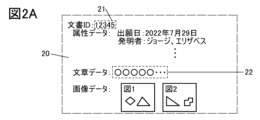
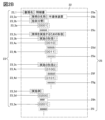
- 2A and 2B are schematic diagrams showing an example of document data.
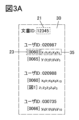
- FIG. 3A is a schematic diagram showing an example of comment data.
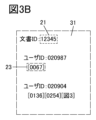
- FIG. 3B is a schematic diagram showing an example of attention data.
- FIG. 3C is a schematic diagram showing an example of user data.
- 4A and 4B are schematic diagrams showing examples of display screens.
- 5A and 5B are schematic diagrams showing examples of display screens.
- FIG. 6A is a schematic diagram showing an example of comment data.
- FIG. 6B is a schematic diagram showing an example of attention data.
- FIG. 6C is a schematic diagram showing an example of a display screen.
- FIG. 7A is a schematic diagram showing an example of comment data.
- FIG. 7B is a schematic diagram showing an example of a display screen.
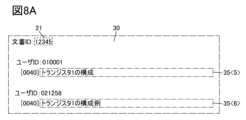
- FIG. 8A is a schematic diagram showing an example of comment data.
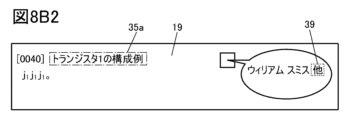
- FIG. 8B1 and FIG. 8B2 are schematic diagrams showing examples of display screens.
- FIG. 9 is a schematic diagram showing an example of data stored in the storage unit.
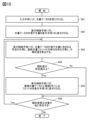
- FIG. 10 is a flowchart illustrating an example of a document viewing method.
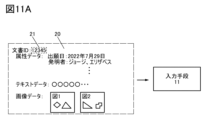
- FIG. 11A is a schematic diagram illustrating an example of a document viewing method.
- FIG. 11B is a schematic diagram showing an example of a display screen.
- FIG. 12 is a flowchart illustrating an example of a document viewing method.
- FIG. 13 is a schematic diagram showing an example of a display screen.
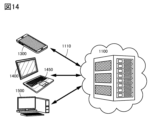
- FIG. 14 is a diagram showing an example of a document viewing system.
- One aspect of the present invention relates to a document viewing device that can view documents related to, for example, intellectual property.
- a document viewing device can be used by multiple people within an organization.
- comments added by a user to a portion of a document can be viewed by other users. This allows information expressed by comments to be shared by multiple people.
- sentences and drawings included in a document sentences and drawings that the user has checked as points of interest can be presented to other users. This allows multiple people to share, for example, highly important texts and drawings.
- business can be smoothly performed.
- FIG. 1 is a block diagram showing an example of the configuration of a document viewing device 10. As shown in FIG. The document viewing device 10 includes an input section 11 , a registration section 13 , a storage section 15 , a display control section 17 , and a display section 19 .
- FIG. 1 the exchange of data and the like between the constituent elements of the document viewing device 10 is indicated by arrows. Note that the exchange of data and the like shown in FIG. 1 is just an example, and for example, there are cases where data and the like can be exchanged between constituent elements that are not connected by arrows. Furthermore, even if components are connected by arrows, data may not be exchanged in some cases.
- the document viewing device 10 can be used by multiple people within an organization such as a company.
- the input unit 11 and display unit 19 are provided in an information processing device such as a personal computer (PC), and the registration unit 13, storage unit 15, and display control unit 17 are provided in a server. be able to.
- a part of the input section 11 and the display section 19 may be provided in the server.
- part of the registration unit 13, storage unit 15, and display control unit 17 may be provided in the client PC.
- a client PC and a server can exchange data and the like via a network, for example.
- the components are classified by function and shown as mutually independent blocks, but in reality it is difficult to completely separate the components by function, and one component may contain multiple components. It may also be related to the functions of Further, one function may be related to a plurality of components, and for example, a plurality of processes performed by the registration unit 13 or the display control unit 17 may be executed by mutually different servers. Further, among the plurality of processes performed by the registration unit 13 or the display control unit 17, some of the processes may be performed by the client PC, and the remaining processes may be performed by the server.
- Input section 11 Data is supplied to the input unit 11 from outside the document viewing device 10 .
- the data supplied to the input section 11 is supplied to the registration section 13, the storage section 15, or the display control section 17. Further, data stored in the storage section 15 can be supplied to the input section 11.
- document data can be input to the input section 11 .
- a document specified by the user of the document viewing device 10 can be input to the input unit 11 as document data.
- documents that can be input into the input unit 11 include documents related to intellectual property rights.
- Documents related to intellectual property rights include patent application documents, utility model registration application documents, international application documents, design registration application documents, trademark registration application documents, published patent gazette, patent gazette, utility model gazette, international publication gazette, and design gazette. , International Design Bulletin, Public Trademark Bulletin, Public International Trademark Bulletin, and Trademark Bulletin.
- the patent application documents can include the specification, drawings, claims, abstract, and application.
- the utility model registration application documents may include the specification, drawings, claims, abstract, and application.
- international application documents can include the specification, drawings, claims, abstract, and application.
- design registration application documents may include an application and drawings.
- trademark registration application documents may include an application form.
- the documents that can be input into the input unit 11 are not limited to documents related to intellectual property rights, and for example, technical documents such as papers, or legal documents may be input. Examples of legal documents include contracts, terms and conditions, and judicial precedents. Further, the input unit 11 may be configured to be able to input at least one of a book, a magazine, a newspaper, a product manual, a novel, or a white paper.
- a document when inputting a document stored in the storage unit 15 into the input unit 11, the user can input the document by specifying information that specifies the document.
- information that specifies a document is an identification number (ID) assigned to each document.
- ID an identification number assigned to each document.
- a document can be specified by one or more of, for example, a title given to the document, a date such as the publication date of the document, a document creator, a publisher, and sentences included in the document.
- an application management number for identifying the application (including an in-house unique number), an application family management number for identifying the application family, an application number,
- a document can be identified by specifying one or more of publication number, registration number, inventor, applicant, drawing, abstract, application date, priority date, publication date, status, patent classification, category, keyword, etc.
- the ID may include not only numbers but also characters. Furthermore, in this specification and the like, characters are assumed to include symbols.
- the document viewing device 10 can be made into a highly convenient document viewing device.
- the user be able to specify a document to be input into the input unit 11 by specifying part of the above information.
- the document to be input into the input unit 11 can be specified based on information registered in a device other than the document viewing device 10, the convenience of the document viewing device 10 can be further improved.
- the input unit 11 has a function of authenticating the user of the document viewing device 10.
- the document viewing device 10 can perform user authentication.
- the document viewing device 10 may have a function of performing authentication based on a graphic input by the user into the input unit 11, or may have a function of performing biometric authentication using a fingerprint, voice print, or the like.
- the document viewing device 10 may be provided with an authentication section, and the authentication section may perform user authentication.
- the registration unit 13 has a function of registering a comment in a document input to the input unit 11, for example.
- the registered comment is added to at least a part of the document. For example, if sentences included in a document are divided into paragraphs, comments can be added to the paragraphs. Additionally, comments can be added to one or more sentences included in a paragraph, for example. Furthermore, for example, a comment can be added to one character or a plurality of consecutive characters included in a sentence. Furthermore, if the document includes drawings, comments can be added to one or more drawings.
- the registration unit 13 has a function of registering a part of the document input to the input unit 11 as a point of interest.
- Points of interest can be registered, for example, for each paragraph of text, or for each drawing. Note that it may also be possible to register the points of interest for each sentence, for example. Furthermore, it may be possible to register a point of interest for, for example, one character or a plurality of consecutive characters included in a sentence.
- Registration of comments and points of interest can be performed by the user of the document viewing device 10, for example, by the user who inputs the document into the input unit 11.
- a comment can be registered by a user specifying a paragraph, a drawing, etc. in a document input by the user into the input unit 11, and inputting a comment.
- a user can register a point of interest by specifying a paragraph, a drawing, or the like to be registered as a point of interest in a document input by the user into the input unit 11 .
- the input unit 11 has a function of receiving comments and specifications of points of interest.
- the storage unit 15 has a function of storing data required when the document viewing device 10 performs processing.
- the storage unit 15 can store, for example, a document that can be input into the input unit 11 described above as document data.
- the storage unit 15 can store, for example, a document in which at least one of a comment and a point of interest is registered by the registration unit 13 as document data.
- a document is stored in the storage unit 15, it can be said that a database of documents is constructed in the storage unit 15.
- a document stored in the storage unit 15 is referred to as a registered document.
- a recording medium such as a hard disk drive (HDD) or a solid state drive (SSD) can be used, for example.
- the storage unit 15 also includes ReRAM (Resistive Random Access Memory, also referred to as resistance change memory), PRAM (Phase-change Random Access Memory), and FeRAM (Ferroelectric Memory). Random Access Memory), MRAM (Magnetoresistive Random Access Memory)
- ReRAM Resistive Random Access Memory
- PRAM Phase-change Random Access Memory
- FeRAM Feroelectric Memory
- MRAM Magnetic RAM
- a non-volatile memory such as a flash memory, a NOSRAM (registered trademark), or a DOSRAM (registered trademark) can be used.
- the storage unit 15 may be provided with volatile memories such as DRAM (Dynamic Random Access Memory) and SRAM (Static Random Access Memory).
- NOSRAM Nonvolatile Oxide Semiconductor Random Access Memory
- NOSRAM is a memory in which the memory cell is a two-transistor type (2T) or three-transistor type (3T) gain cell, and the transistor is a transistor using a metal oxide in the channel formation region (also called an OS transistor). say. The current flowing between the source and drain of the OS transistor in the off state, that is, the leakage current is extremely small. NOSRAM can be used as a non-volatile memory by using its characteristic of extremely low leakage current to hold charges corresponding to data in memory cells.
- NOSRAM can read data without destroying it (non-destructive reading), so it is suitable for arithmetic processing in which only data read operations are repeated in large quantities. Since NOSRAM can increase the data capacity by being stacked, it is possible to improve the performance of a semiconductor device by using it as a large-scale cache memory, main memory, or storage memory.
- DOSRAM (registered trademark) is an abbreviation for "Dynamic Oxide Semiconductor RAM” and refers to a RAM having 1T (transistor) and 1C (capacitance) type memory cells.
- DOSRAM is a DRAM formed using OS transistors, and DOSRAM is a memory that temporarily stores information sent from the outside.
- DOSRAM is a memory that takes advantage of the low off-state current of an OS transistor.
- metal oxide refers to a metal oxide in a broad sense. Metal oxides are classified into oxide insulators, oxide conductors (including transparent oxide conductors), oxide semiconductors (also referred to as oxide semiconductors or simply OS), and the like. For example, when a metal oxide is used in the active layer of a transistor, the metal oxide is sometimes referred to as an oxide semiconductor. That is, when it is described as an OS transistor, it can be translated as a transistor including a metal oxide or an oxide semiconductor.
- metal oxides applied to OS transistors include indium oxide, gallium oxide, and zinc oxide. Moreover, it is preferable that the metal oxide has two or three selected from indium, element M, and zinc.
- Element M is gallium, aluminum, silicon, boron, yttrium, tin, copper, vanadium, beryllium, titanium, iron, nickel, germanium, zirconium, molybdenum, lanthanum, cerium, neodymium, hafnium, tantalum, tungsten, and magnesium.
- the element M is preferably one or more selected from aluminum, gallium, yttrium, and tin.
- an oxide containing indium (In), gallium (Ga), and zinc (Zn) also referred to as IGZO
- an oxide also referred to as IAGZO
- IAGZO indium (In), aluminum (Al), gallium (Ga), and zinc (Zn).
- oxide also referred to as IGZTO
- IGZTO oxide containing indium (In), gallium (Ga), zinc (Zn), and tin (Sn).
- the display control unit 17 has a function of controlling information displayed on the display unit 19.
- the display control section 17 can display predetermined information on the display section 19 by, for example, generating a display signal and supplying it to the display section 19.
- the display control unit 17 has a function of extracting necessary information from the document input to the input unit 11 and the document (registered document) stored in the storage unit 15 and displaying it on the display unit 19.
- the display control unit 17 has a function of displaying a document input to the input unit 11 and comments registered in the document.
- the display control unit 17 also has a function of highlighting points of interest registered in the document.
- the display control unit 17 allows the registrant (the person who registered the comment and the attention point) to input the registered comments and the attention point to the user (the person who specified the data to be input into the input unit 11). , or another user different from the user, which is displayed on the display unit 19 so that the user can identify the user.
- the display control unit 17 can cause the display unit 19 to display the names of the person who registered the comment and the name of the person who registered the point of interest.
- the identification of whether the person who registered the comment and the point of interest is a user or another user is made by, for example, the user ID that the user inputs into the input section 11 for authentication, and the user ID of the person who registered the comment and the point of interest. This can be done by the display control unit 17 comparing. If the user ID input by the user into the input unit 11 for authentication is the same as the user ID of the person who registered the comment and the attention point, the display control unit 17 determines that the person who registered the comment and the attention point is the user. If they are different, it can be recognized that the person who registered the comment and the point of interest is another user.
- the display control unit 17 also has a function of performing predetermined processing based on, for example, data input to the input unit 11 and data stored in the storage unit 15, and displaying the processing results on the display unit 19. Good too.
- the display control unit 17 may have a function of analyzing the content of a comment and controlling whether or not to display the comment on the display unit 19 based on the analysis result.
- the display control unit 17 calculates the degree of similarity between the comments and controls whether or not to display the comments on the display unit 19 based on the degree of similarity. It may have a function.
- the display control unit 17 also has a function of comparing a comment with sentences included in a predetermined range of the document in which the comment is registered, and controlling whether or not to display the comment on the display unit 19. You may.
- the display control unit 17 may have a function of comparing a comment and a text to which the comment is attached, and controlling whether or not to display the comment on the display unit 19 based on the comparison result. .
- the display control unit 17 may have a function of displaying comments registered in the registered document on the display unit 19. For example, the degree of similarity between at least a part of the text included in the document input to the input unit 11 and the comment added part of the registered document (also referred to as the registered document comment added part) is calculated, and the similarity is registered based on the degree of similarity. It may have a function of controlling whether or not to display comments registered in a document on the display unit 19. Furthermore, the display control unit 17 may have a function of comparing comments registered in the document input to the input unit 11 and comments registered in the registered document. The display control unit 17 can control, for example, whether or not the registered document comment added portion is displayed on the display unit 19 based on the comparison result.
- the display control unit 17 can include, for example, a central processing unit (CPU).
- the display control unit 17 may include a microprocessor such as a DSP (Digital Signal Processor) and a GPU (Graphics Processing Unit).
- the microprocessor is a PLD (Programmable Logic Device) such as FPGA (Field Programmable Gate Array) and FPAA (Field Programmable Analog Array). ce) may be used.
- the display control unit 17 can perform various data processing and program control by using a processor to interpret and execute instructions from various programs.
- a program that can be executed by a processor is stored, for example, in a memory area of the processor.
- the registration unit 13 can also have a hardware configuration similar to that of the display control unit 17. Further, the registration section 13 and the display control section 17 are collectively referred to as a processing section.
- the display control unit 17 may have a main memory.
- the main memory includes at least one of volatile memory such as RAM and nonvolatile memory such as ROM (Read Only Memory).
- RAM for example, DRAM, SRAM, etc. are used, and a memory space is virtually allocated and used as a work space for the display control unit 17.
- the ROM can store a BIOS (Basic Input/Output System), firmware, etc. that do not require rewriting.
- BIOS Basic Input/Output System
- Examples of ROM include mask ROM, OTPROM (One Time Programmable Read Only Memory), and EPROM (Erasable Programmable Read Only Memory). can be mentioned.
- EPROMs include UV-EPROM (Ultra-Violet Erasable Programmable Read Only Memory), which allows erasing of stored data by ultraviolet irradiation, and EEPROM (Electrically Erasable). Programmable Read Only Memory), flash memory, and the like.
- the display unit 19 has a function of displaying information based on a display signal generated by the display control unit 17, for example.
- the display unit 19 allows the document viewing device 10 to present necessary information to the user.
- the display section 19 includes, for example, a light emitting element including an organic electroluminescence material, a light emitting element including a light emitting diode such as a micro LED, a liquid crystal element, or the like.
- the document viewing device 10 can register comments and points of interest in a document and display them on the display unit 19. Thereby, the user of the document viewing device 10 can easily check, for example, important parts of the document. Further, the user of the document viewing device 10 can read the document while leaving notes as comments, thereby deepening his/her understanding of the document. As described above, the document viewing device 10 can be a highly convenient document viewing device.
- the document viewing device 10 can be used by multiple people within an organization such as a company.
- other users can view comments and points of interest that the user has registered in a document.
- This allows multiple people to share information expressed by comments, as well as highly important texts, drawings, and the like.
- business can be carried out smoothly. For example, when a single patent application is examined by multiple people in charge, they can quickly understand the invention by sharing comments they have given on patent application documents such as specifications and drawings. can.
- sharing texts, drawings, etc. of high importance among multiple people it is possible to concentrate on matters of high importance.
- FIG. 2A is a schematic diagram showing an example of document data 20 representing a document input to the input unit 11.
- the document data 20 includes a document ID 21, attribute data, text data 22, and image data.
- An example in which the document data 20 is a patent application document will be described below.
- text data may be referred to as text data
- sentences may be referred to as text.
- the document ID 21 is a number for identifying the document data 20, and can be, for example, an application management number.
- the user of the document viewing device 10 specifies, for example, the document ID 21, the document to be input into the input unit 11 is specified.
- the attribute data is data representing attributes that are information regarding the document data 20.
- FIG. 2A shows a filing date and an inventor as an example of attributes, with the filing date being "July 29, 2022" and the inventors being "George” and "Elizabeth".
- the attribute data can include, for example, an application number, publication number, registration number, applicant, priority date, publication date, status, patent classification, and the like.
- the attributes included in the attribute data are not limited to the items described in the document represented by the document data 20. For example, categories and keywords uniquely assigned to the document data 20 by the user of the document viewing device 10 can also be included in the attribute data.
- the text data 22 is data representing information expressed by text.
- the information represented by the text data 22 includes, for example, an application, a specification, a claim, and an abstract.
- Image data is data representing information represented by an image.
- An example of the information represented by the image data is a drawing.
- FIG. 2B is a schematic diagram showing an example of the text data 22.
- a specification is shown as an example of the text data 22.
- the text data 22 includes a heading 23 and a body 25.
- the document represented by the text data 22 is hierarchically composed of a heading 23 and a body 25 linked to the heading 23.
- the hierarchical structure of the text data 22 is represented by indentation (also referred to as indentation), and the lower the hierarchical level, the greater the number of indentations.
- the hierarchical levels are indicated with symbols such as _1 and _2, and the larger the number, the lower the hierarchical level.
- the lower-level second heading 23 linked to the first heading 23 is referred to as the lower-level heading 23 of the first heading 23.
- the main text 25 that is linked to the second heading 23 at a lower level that is linked to the first heading 23 can be said to be linked to the first heading 23.
- the heading 23 at hierarchy level 1 that is, the heading 23 at the highest level, is set as heading 23_1, and the heading 23_1 is set as [Document Name].
- the main text 25 associated with the heading 23_1 is set as a main text 25a, and the main text 25a is set as a "specification”.
- the headings 23 at hierarchy level 2 are heading 23_2a, heading 23_2b, heading 23_2c, and heading 23_2d
- the heading 23_2a is [Name of invention]
- the heading 23_2b is [Technical field]
- the heading 23_2c is [Detailed Description of the Invention] and heading 23_2d are [Examples].
- the text 25 associated with the heading 23_2a is a text 25b, and the text 25b is "semiconductor device.”
- the heading 23_2b is linked with the heading 23_3a of hierarchy level 3, and the heading 23_3a is linked with the main text 25c.
- the heading 23_3a is [0001]
- the main text 25c is "aaaaa”.
- the heading 23_3a is a heading 23 at a lower level than the heading 23_2b, and the main text 25c is linked to the heading 23_3a. Therefore, the main text 25c is linked to the heading 23_2b.
- the heading 23_3b and the heading 23_3c at hierarchy level 3 are linked to the heading 23_2c.
- the heading 23_3b is (Embodiment 1)
- the heading 23_3c is (Embodiment 2).
- Heading 23_4a and heading 23_4b of hierarchy level 4 are linked to heading 23_3b. Further, a text 25d is linked to the heading 23_4a, and a text 25e is linked to the heading 23_4b.
- the heading 23_4a is [0010]
- the heading 23_4b is [0011]
- the text 25d is "bbbbb”
- the text 25e is "ccccc”.
- a text 25d is linked to the heading 23_4a
- a text 25e is linked to the heading 23_4b
- the heading 23_4a and the heading 23_4b are headings 23 at a lower level than the heading 23_3b. Therefore, the main text 25d and the main text 25e are linked to the heading 23_3b.
- Heading 23_4c and heading 23_4d of hierarchy level 4 are linked to heading 23_3c. Further, a text 25f is linked to the heading 23_4c, and a text 25g is linked to the heading 23_4d.
- the heading 23_4c is [0100]
- the heading 23_4d is [0101]
- the text 25f is "ddddddd”
- the text 25g is "eeeeee”.
- a text 25f is linked to the heading 23_4c
- a text 25g is linked to the heading 23_4d
- the heading 23_4c and the heading 23_4d are headings 23 at a lower level than the heading 23_3c. Therefore, the main text 25f and the main text 25g are linked to the heading 23_3c.
- heading 23_3b and the heading 23_3c are headings 23 at a lower level than the heading 23_2c.
- the main text 25d, the main text 25e, the main text 25f, and the main text 25g are linked to the heading 23_2c.
- the heading 23_2d is linked with the heading 23_3d and the heading 23_3e at hierarchy level 3. Furthermore, the heading 23_3d is linked with a text 25h, and the heading 23_3e is linked with a text 25i.
- the heading 23_3d is [0200]
- the heading 23_3e is [0201]
- the text 25h is "ffffff”
- the text 25i is "ggggg”.
- the heading 23_3d is associated with the main text 25h
- the heading 23_3e is associated with the main text 25i
- the heading 23_3d and the heading 23_3e are headings 23 at a lower level than the heading 23_2d. Therefore, the main text 25h and the main text 25i are linked to the heading 23_2d.
- the document represented by the text data 22 can have a hierarchical structure. Note that the headings 23_3a, 23_4a, 23_4b, 23_4c, 23_4d, 23_3d, and 23_3e are also referred to as paragraph numbers.
- the document viewing device 10 can register comments in the document data 20. Specifically, the document viewing device 10 can register comments in the document data 20 using the registration unit 13.
- FIG. 3A is a schematic diagram showing an example of comment data 30 representing comments registered in document data 20.
- the comment data 30 includes a document ID 21, a user ID, a heading 23, and a comment 35.
- the document ID 21 indicates the document data 20 in which the comment 35, which is the comment represented by the comment data 30, is registered.
- FIG. 3A shows an example of a comment registered in the document data 20 whose document ID 21 is "12345".
- the user ID is a number for identifying the user who registered the comment 35.
- the heading 23 represents a location to which a comment 35 has been added (comment added location), and for example, the comment 35 can be added to the main text 25 linked to the heading 23.
- the figure number linked to the image represented by the image data can also be used as the heading 23.
- FIG. 3A the user whose user ID is "020987” adds "x 1 x 2 x 3 x 4 x 5 " to paragraph [0060] as comment 35, and adds "y 1 " to paragraph [0065] as comment 35. y 2 y 3 y 4 y 5 ” is shown. Further, in FIG. 3A, the user whose user ID is “020988” adds "x 6 x 7 x 8 x 9 x 10" to paragraph [0060] as comment 35, and adds "x 6 x 7 x 8 x 9 x 10 " to "Figure 1" as comment 35. z 1 z 2 z 3 z 4 z 5 '' is shown. Furthermore, FIG.
- 3A shows an example in which a user whose user ID is "030735” adds "y 6 y 7 y 8 y 9 y 10 " as a comment 35 to paragraph [0066].
- one comment 35 is given to one heading 23, but one comment 35 may be given to a plurality of headings 23, for example.
- "x 1 x 2 x 3 x 4 x 5 " may be added to paragraph [0061] as well as paragraph [0060] as the comment 35.
- comments 35 do not have to be added in units delimited by the headings 23.
- comments can be added to one or more sentences.
- a comment can be added to one character or a plurality of consecutive characters included in a sentence.
- the comment data 30 includes sentences or characters to which comments 35 are added instead of headings 23 as information representing the places where comments 35 are added. can be included.
- FIG. 3B is a schematic diagram illustrating an example of attention data 31 representing attention points registered in document data 20.
- the attention data 31 differs from the comment data 30 in that it does not include comments 35.
- FIG. 3B shows an example of a point of interest registered in the document data 20 whose document ID 21 is "12345".
- FIG. 3B shows an example in which a user whose user ID is “020987” registers paragraph [0067] as a point of interest. Further, FIG. 3B shows an example in which a user whose user ID is "020904" registers paragraph [0136], paragraph [0254], and "FIG. 3" as points of interest.
- attention points may be registered for each sentence.
- a point of interest may be registered for one character or a plurality of consecutive characters included in a sentence.
- attention data 31 can include sentences or characters registered as attention points instead of headings 23 as information representing the attention points.
- comments and points of interest registered in the document data 20 can be managed for each user of the document viewing device 10. Thereby, even if multiple people use the document viewing device 10, it is possible to prevent other users from editing the comments and points of interest registered by the user, for example. Therefore, data integrity can be ensured.
- FIG. 3C is a schematic diagram showing an example of user data 33 representing information regarding the user of the document viewing device 10.
- the user data 33 includes a user ID, a name 34, and an attribute 36.
- Name 34 and attribute 36 are registered for each user ID.
- the name 34 represents the name of the user indicated by the user ID.
- the attribute 36 represents information other than the name regarding the user. Note that the name 34 may be included in the attribute 36.
- FIG. 3C the user's affiliation and position are shown as attributes 36.
- FIG. 3C shows an example in which the name 34 of the user whose user ID is "010001" is "William Smith,” the attribute 36 of which is the affiliation is "Research and Development Department,” and the position is “Director.” Further, FIG. 3C shows an example in which the name 34 of a user whose user ID is "020987” is “Mary Brown,” the attribute 36 is "Intellectual Property Department,” and the title is "general employee.”
- the attributes 36 may include, for example, at least one of personnel evaluation, participating project name, and other personnel-related information.
- the name 34 includes both the surname and the given name, but it may include only either the surname or the given name.
- the name includes both the surname and the given name, but it may include only either the surname or the given name.
- the user ID may include information regarding the attribute 36.
- FIG. 3C shows an example in which the first two digits of the user ID indicate the affiliation. Specifically, "01" is “Research and Development Department” and "02" is "Intellectual Property Department”. It shows.
- Comment data 30 shown in FIG. 3A, attention data 31 shown in FIG. 3B, and user data 33 shown in FIG. 3C can all be stored in the storage unit 15.
- FIG. 4A is a schematic diagram showing an example of the display screen of the display unit 19.
- FIG. 4A shows an example in which a heading 23 and a text 25 linked to the heading 23 are displayed on the display unit 19.
- a paragraph number is shown as a specific example of the heading 23.
- the display unit 19 can display the comments 35 registered in the document input to the input unit 11 so that the user can identify the location where the comment is added.
- the display section 19 has a display so that the user can identify whether the person who registered the comment 35 is the user (the person viewing the display section 19) or another user different from the user.
- comment 35 is displayed.
- information can be displayed on the display section 19 by the display control section 17 generating a display signal.
- the display control unit 17 has a function of displaying the comment 35 on the display unit 19 so that the user can identify whether the person who registered the comment 35 is the user or another user different from the user. has.
- the display control unit displays the user ID that the user inputs into the input unit 11 for authentication, and the user ID of the person who registered the comment 35. 17 can be done by comparing. The display control unit 17 determines that if the user ID input by the user into the input unit 11 for authentication is the same as the user ID of the person who registered the comment 35, the person who registered the comment 35 is the user, and there is no difference. For example, it can be recognized that the person who registered comment 35 is another user.
- a comment 35 registered by the user viewing the display unit 19 is a comment 35a
- a comment 35 registered by another user is a comment 35b.
- a comment 35a can be displayed next to the heading 23.
- a comment 35b can be displayed in the balloon.
- the balloon can be displayed.
- the registrant of the comment 35b can be displayed on the display section 19.
- the main text 25 of paragraph [0060] is "h 1 h 1 h 1.
- FIG. 4A shows an example in which another user "William Smith” has registered “corresponds to claim 1" as comment 35b, and another user "Mary Brown” has registered “important” as comment 35b. There is.
- the display section 19 can highlight points of interest registered in the document input to the input section 11.
- the display section 19 has a display so that the user can identify whether the person who has registered the point of interest is the user (the person viewing the display section 19) or another user different from the user. , you can highlight points of interest.
- information can be displayed on the display section 19 by the display control section 17 generating a display signal.
- the display control unit 17 has a function of displaying the point of interest on the display unit 19 so that the user can identify whether the person who registered the point of interest is the user or another user different from the user. has. Note that whether the person who has registered the point of interest is the user or another user can be determined in the same manner as the method used to identify whether the person who has registered the comment 35 is the user or another user.
- the points of interest are highlighted with hatching.
- a paragraph registered as a point of interest by the user viewing the display section 19 is emphasized by adding hatching to the paragraph number.
- paragraphs registered as noteworthy points by other users are highlighted by hatching in the main text 25.
- the name of the other user who registered the point of interest is shown in the balloon. For example, by moving a pointer such as a mouse pointer to a hatched area in the main text 25, or by moving the mouse pointer and clicking, the balloon can be displayed.
- the main text 25 of paragraph [0066] is "i 1 i 1 i 1 i 1.
- the display section 19 is viewed. This example shows that the user himself and other users "William Smith” and “Mary Brown” have registered the paragraph as a point of interest.
- the highlighting method is not limited to adding hatching, for example, changing the background color of the heading 23 or body 25, changing the font color, increasing the font size, changing the font, making it bold, and underlining. Examples include subtracting.
- the display section 19 can display the comments 35 and the points of interest. Thereby, the user of the document viewing device 10 can easily check, for example, important parts of the document. Further, the user of the document viewing device 10 can register comments 35 and points of interest while viewing the display section 19 as shown in FIG. 4A, for example. The registered comments 35 and points of interest can be immediately displayed on the display unit 19. As described above, the user of the document viewing device 10 can read the document while leaving notes as comments, thereby deepening his/her understanding of the document. As described above, the document viewing device 10 can be a highly convenient document viewing device.
- the display unit 19 can display comments registered by other users and points of interest. This allows multiple people to share information expressed by comments, as well as highly important texts, drawings, and the like. As described above, by using the document viewing device 10 as described above, business can be carried out smoothly. For example, when a single patent application is considered by multiple people in charge, the comments that the people in charge have given to patent application documents such as specifications and drawings can be shared among the people in charge, and the invention can be developed in a short time. It can be understood. In addition, by sharing texts, drawings, etc. of high importance among multiple people, it is possible to concentrate on matters of high importance.
- the font size of the comment 35b, the font size of the name of the person who registered the comment 35b, and the font size of the name of the person who registered the point of interest are made equal to the font size of the heading 23 and the main text 25, but One embodiment of the invention is not limited to this.
- the font size of the comment 35b, the font size of the name of the person who registered the comment 35b, and the font size of the name of the person who registered the point of interest may be made smaller than the font size of the heading 23 and the main text 25.
- FIG. 4A shows an example in which comments and points of interest registered for a text are displayed, comments and points of interest may be registered for an image, for example.
- FIG. 4A a broken line rectangle, a dotted line rectangle, and a dashed line rectangle are added for explanation, and are not displayed on the display unit 19 when one embodiment of the present invention is implemented. The same applies to the display section 19 shown in subsequent drawings.
- the display section 19 may display all the comments 35 and points of interest registered in the document input to the input section 11, or may not display some of the comments 35 and points of interest. .
- comments 35 and points of interest registered by a person having a predetermined attribute 36 may be displayed on the display unit 19.
- comments 35 and points of interest registered by a person belonging to the same organization as the user of the document viewing device 10 (the person viewing the display unit 19) may be displayed on the display unit 19.
- the display unit 19 may display comments 35 and points of interest registered by a person with the attribute 36 specified by the user. If the attribute 36 of the person who registers the comment 35 differs, the viewpoint of the comment 35 may differ.
- the user of the document viewing device 10 may be able to easily understand the comments 35 from a specific viewpoint. Further, if the attributes 36 are different, the tendency of the attention point may be different. Therefore, by displaying the points of interest registered by a person having the predetermined attribute 36 on the display unit 19, the user of the document viewing device 10 may be able to easily recognize, for example, points related to his or her work as points of interest. be.
- the display control section 17 has a function of controlling whether or not to display the comment 35 on the display unit 19 based on the attribute 36 of the person who registered the comment 35 in the document input to the input unit 11. Furthermore, the display control unit 17 has a function of controlling whether or not to display a point of interest on the display unit 19 based on the attribute 36 of the person who has registered the point of interest in the document input to the input unit 11 .
- FIG. 4B is a schematic diagram showing an example of the display screen of the display unit 19.
- the display unit 19 displays a window 37a and a window 37b. Specifically, a window 37a is displayed on the left side of the display section 19, and a window 37b is displayed on the right side of the display section 19.
- the total number of comments 35 and points of interest registered in each document is displayed for each user in the window 37a.
- FIG. 4B an example is shown in which "William Smith” has registered 35 comments and a total of 3 points of interest in a document whose document ID 21 is "20045", and "Mary Brown” has registered 35 comments or 1 point of interest. It shows. Further, FIG. 4B shows an example in which "William Smith” has registered a comment 35 and a total of two points of interest in a document whose document ID 21 is "21369.” The document ID 21, comments 35, and the total number of registered points of interest are displayed in a list format in the window 37a.
- the number of registered comments 35 and the number of registered points of interest may be displayed on the window 37a, respectively. Further, information regarding the document may be displayed in the window 37a. For example, if the document represented by document ID21 is a patent application document, the application number, publication number, registration number, inventor, applicant, application date, priority date, publication date, status, patent classification, category, keyword, etc. At least one of them may be displayed.
- the window 37b displays comments registered by a specific person in a specific document, comment locations, and noteworthy locations. Specifically, the window 37b displays comments registered by a person specified by the user of the document viewing device 10 (the person viewing the display unit 19) on the document specified by the user, comment addition locations, and attention points. You can display the location.
- the person who registered the comment and the point of interest can be specified, for example, by moving the mouse pointer over the name displayed in the window 37a and clicking. For example, by clicking on "William Smith: 3" displayed to the right of "20045", comments and points of interest registered by "William Smith" in the document with document ID "20045" can be displayed in the window 37b.
- the document ID 21 and the name of the person who registered the comment, comment location, and attention location are displayed in the window 37b, and below these, the comment, comment addition location, and attention location are displayed.
- the location is displayed.
- the window 37b displays a heading 23 indicating a comment-added part and a noteworthy part, a text 25 or a drawing linked to the heading 23, and a comment 35.
- FIG. 4B shows an example in which the comment 35 registered by "William Smith” to the document whose document ID 21 is "20045", the comment location, and the noteworthy location are displayed in the window 37b.
- the main text 25 of paragraph [0060] is “h 1 h 1 h 1 . h 2 h 2 h 2 h 2 h 2 h 2 h 2 .”, and the comment 35 is “Claim 1 Compatible.” has been registered.
- the main text 25 of paragraph [0068] is "i 5 i 5 i 5 i 5. i 6 i 6 i 6 i 6 i 6 i 6 i 6. " is registered as.
- "corresponds to claim 2" is registered as a comment 35 in "FIG. 2".
- the comment 35 is distinguished from, for example, the main text 25 by surrounding the comment 35 with a solid rectangle. Note that the comment 35 does not have to be surrounded by a solid rectangle. Furthermore, at least one of the background color, font size, and font of the comment 35 may be made different from that of the main text 25. Further, either the comment 35 or the main text 25 may be made bold, or one of the comment 35 or the main text 25 may be underlined. Further, in FIG. 4B, paragraph [0068], which is the point of interest, is not highlighted, but it may be highlighted. Highlighting can be performed, for example, by the method shown in the explanation of FIG. 4A. In the following description as well, highlighting can be performed, for example, by the method shown in the description of FIG. 4A.
- comments 35 are not added in units delimited by headings 23, or if attention points are not registered in units delimited by headings 23, even if all the text associated with the headings 23 is displayed on the display section 19, comments will not be added.
- the attached location and the attention location may be displayed so as to be distinguishable from other locations. For example, if the sentence “i 5 i 5 i 5 i 5 .” in paragraph [0068] is registered as a point of interest, “i 5 i 5 i 5 i 5 . i 6 i 6 i 6 i 6 i 6 i 6 i 6 .”, and only “i 5 i 5 i 5 i 5 .” may be highlighted.
- the user of the document viewing device 10 can easily check, for example, comments registered by the person designated by the user, comment locations, and attention points. Thereby, the user of the document viewing device 10 can understand, for example, the thoughts of the person designated by the user, and utilize the thoughts in carrying out work. As described above, by using the document viewing device 10, business operations can be carried out smoothly.
- FIG. 5A is a schematic diagram showing an example of the display screen of the display unit 19, and is a modification of the display screen shown in FIG. 4B.
- the number of registered comments is displayed in the window 37a, rather than the total number of registered comments and the number of registered points of interest.
- all comments registered for a specific document specifically, for example, a document specified by the user of the document viewing device 10, are displayed regardless of the registrant.
- Comments 35 registered in a specific document are displayed in the window 37b. Specifically, the comment 35 registered in the document specified by the user of the document viewing device 10 (the person viewing the display unit 19) can be displayed in the window 37b.
- the document can be specified, for example, by clicking on the document ID 21 displayed in the window 37a.
- a document ID 21 is displayed in the window 37b, and below the document ID 21, a heading 23 indicating a comment portion and a comment 35 are displayed. Further, the name of the person who registered the comment 35 is displayed for each comment 35 in the window 37b shown in FIG. 5A.
- the user of the document viewing device 10 can easily check the comments registered in the specified document. Thereby, the user of the document viewing device 10 can understand information expressed by comments registered not only by the user himself but also by other users, and can smoothly carry out his work.
- FIG. 5B is a schematic diagram showing an example of the display screen of the display unit 19, and is a modification of the display screen shown in FIG. 5A.
- FIG. 5B shows an example in which a heading 23 at a higher level than the paragraph number is displayed, and a comment 35 attached to a paragraph associated with the heading 23 is displayed.
- FIG. 5B shows an example in which paragraph numbers are not displayed, paragraph numbers may be displayed.
- the comment 35 added to the document (Embodiment 1) whose document ID 21 is "20045" is displayed.
- (Embodiment 1) "ABC is stated”, “Paragraph asserted by the examiner”, and “Be careful of XYZ” are added as comment 35 of "William Smith", and "Mary Brown” "ABC+D is described” is added as comment 35.
- the comment added portion can be displayed in the window 37a or window 37b. The designation can be made by clicking on the comment 35, for example.
- the user of the document viewing device 10 can easily check the comments 35 added to a desired range of the specified document. Thereby, the document viewing device 10 can be made into a highly convenient document viewing device 10. Further, the user of the document viewing device 10 can smoothly carry out his/her work.
- FIG. 6A is a schematic diagram showing an example of comment data 30.
- FIG. 6A shows the comment 35 registered in the document whose document ID 21 is "12345".
- the user whose user ID is “021137” adds “needs consideration” as comment 35 to paragraph [0040] of (Embodiment 1), and adds “needs consideration” to paragraph [0101] of (Embodiment 2).
- An example is shown in which "important" is assigned as comment 35.
- FIG. 6B is a schematic diagram showing an example of the attention data 31.
- FIG. 6B shows points of interest registered in a document whose document ID 21 is "12345.”
- the user whose user ID is “021137” registers paragraph [0065], paragraph [0073] of (Embodiment 1), and paragraph [0117] of (Embodiment 2) as points of interest. An example is shown.
- FIG. 6C is a schematic diagram showing an example of the display screen of the display unit 19, and shows a display screen based on the comment data 30 shown in FIG. 6A and the attention data 31 shown in FIG. 6B.
- the display unit 19 can display the comments 35 added to a specific hierarchy, and can display the comments 35, for example, when the hierarchy designated by the user of the document viewing device 10 includes a comment addition location. Further, the display unit 19 can display points of interest included in a specific hierarchy, for example, points of interest included in a layer specified by the user of the document viewing device 10. In FIG. 6C, among the comments 35 and attention points registered in the document whose document ID 21 is "12345", the comments 35 added to the paragraph included in (Embodiment 1) and (Embodiment 1 ) is displayed on the display unit 19.
- information can be displayed on the display section 19 by the display control section 17 generating a display signal.
- the display control unit 17 has a function of displaying the comment 35 on the display unit 19 when the comment addition location is included in the hierarchy specified by the user of the document viewing device 10. Further, the display control section 17 has a function of displaying the point of interest on the display section 19 when the point of interest is included in the hierarchy specified by the user of the document viewing device 10 .
- the user of the document viewing device 10 can easily see the comments 35 added to the desired range of the specified document and the points of interest included in the desired range. can be confirmed. Thereby, the document viewing device 10 can be made into a highly convenient document viewing device 10. Further, the user of the document viewing device 10 can smoothly carry out his/her work.
- the display control unit 17 has a function of displaying comments registered in the document input to the input unit 11 on the display unit 19.
- the display control section 17 may have a function of controlling whether or not to display the comment on the display section 19 based on the content of the comment.
- FIG. 7A is a schematic diagram showing an example of comment data 30.
- FIG. 7A shows the comment 35 registered in the document whose document ID 21 is "12345".
- the user whose user ID is "010001” adds the comment 35 to paragraph [0021], "Applicable to ⁇ . Attention.”, and the user whose user ID is “021641” adds paragraph [0021] to paragraph [0021].
- 0021] as comment 35
- the user ID is "021932”
- the user adds "abcdef” as comment 35 to paragraph [0021]
- the user ID is "022258”.
- An example is shown in which the user has added “Example of transistor configuration" as comment 35 to paragraph [0021].
- “Can be applied to ⁇ . Attention.” is set as comment 35 ⁇ 1>
- “I read this far” is set as comment 35 ⁇ 2>
- “abcdef” is set as comment 35 ⁇ 3>
- Configuration example of transistor.'' is set as comment 35
- FIG. 7B is a schematic diagram showing an example of a display screen of the display unit 19, and shows a display screen based on the comment data 30 shown in FIG. 7A.
- FIG. 7B shows a display example of the main text of paragraph [0021] and the comment 35 added to paragraph [0021].
- the main text of paragraph [0021] is "FIG. 1 shows an example of the configuration of a transistor.”
- Comment 35 ⁇ 1> indicates that important information is described in paragraph [0021], and can be said to be an important comment that is highly valuable to be shared by multiple people.
- comment 35 ⁇ 2> has personal content and can be said to be a comment with low value to be shared by multiple people. Therefore, if the comment 35 ⁇ 1> is displayed on the display section 19 and the comment 35 ⁇ 2> is not displayed, the user of the document viewing device 10 will feel less cluttered, and will be able to concentrate on matters with high importance. It can be considered in detail. Therefore, the document viewing device 10 can be made into a highly convenient document viewing device. Further, the user of the document viewing device 10 can smoothly carry out his/her work.
- a whitelist is prepared in which words indicating important comments are registered.
- the display control unit 17 performs morphological analysis on the comment 35 and divides it into words, and if at least one of the words is included in the white list, displays the comment 35 on the display unit 19, and displays the comment 35 in the white list. It has a function of not displaying the comment 35 on the display unit 19 if there is no word included in the comment 35.
- a blacklist is prepared in which words indicating that the comments are not important are registered.
- the display control unit 17 performs morphological analysis on the comment 35 and divides it into words. For example, if none of the words are included in the blacklist, the display control unit 17 displays the comment 35 on the display unit 19, and divides the comment 35 into words. If the comment 35 is included in the blacklist, the comment 35 has a function of not displaying the comment 35 on the display unit 19.
- both a blacklist and a whitelist may be prepared.
- the display control unit 17 performs morphological analysis on the comment 35 and divides it into words. For example, if the number of words included in the white list is greater than or equal to the number of words included in the black list, the display control unit 17 displays a comment in the display unit 19. If the number of words included in the white list is less than the number of words included in the black list, the comment 35 is not displayed on the display unit 19.
- the display control unit 17 performs morphological analysis on the comment 35 to detect whether or not only the word with the specific part of speech is registered in the whitelist and/or blacklist among the divided words. It has the function of Note that the white list and black list can be stored in the storage unit 15. Furthermore, the registration unit 13 can register words to the white list and black list.
- Comment 35 ⁇ 3> is a meaningless comment and can be said to be a comment with low value to be shared by multiple people. Therefore, like the comment 35 ⁇ 2>, it is preferable not to display it on the display unit 19. For example, prepare a dictionary.
- the display control unit 17 has a function of displaying comments 35 that include one or more words registered in the dictionary on the display unit 19, and not displaying comments 35 that do not include any words on the display unit 19. As a result, meaningless comments 35 are no longer displayed on the display section 19.
- only words with a specific part of speech can be registered in the dictionary.
- the dictionary can be a general-purpose dictionary. Furthermore, a dictionary specialized for documents in a specific field may be created. Furthermore, words that are likely to be used in documents in a specific field may be additionally registered in a general-purpose dictionary.
- the dictionary can be stored in the storage unit 15, and the registration unit 13 can register words in the dictionary.
- the display control unit 17 may have a function of controlling whether or not to display the comment 35 on the display unit 19 using a machine learning model.
- a machine learning model can be trained, for example, by supervised learning.
- a machine learning model can be trained by using comments to be displayed on the display unit 19 and comments not to be displayed as learning data.
- Machine learning models include, for example, neural networks, K-nearest neighbors, naive Bayes classifiers, decision trees, support vector machines, and random forests.
- the display control unit 17 can control with high precision whether or not to display the comment 35 on the display unit 19. Therefore, for example, it is possible to prevent comments 35 with a high degree of importance from being displayed on the display section 19 and comments 35 with a low degree of importance from being displayed on the display section 19.
- the display control unit 17 compares the comment 35 registered in the document input to the input unit 11 with sentences included in a predetermined range of the document, and determines whether or not to display the comment 35 on the display unit 19. It may also have a function to control.
- the predetermined range can include, for example, a comment addition location.
- the display control unit 17 has a function of determining, for example, whether or not the same wording as the comment 35 is included in the comment section, and if it is not included, displays the comment 35 on the display unit 19. , has a function of not displaying the comment 35 on the display unit 19 if the comment 35 is included.
- the display control unit 17 can perform the above determination after removing predetermined characters such as punctuation marks from the comment 35, for example.
- punctuation mark is used in a broad sense and is not limited to periods and commas.
- the term “punctuation” may include not only periods and commas, but also symbols such as exclamation marks, question marks, bullets, commas, and parentheses. Also, some of these symbols are sometimes referred to as “punctuation marks.”
- comment 35 ⁇ 4> is "Example of configuration of transistor.”, and “Example of configuration of transistor” without the period is included in paragraph [0021] where the comment is added. It will be done. Therefore, the comment 35 ⁇ 4> is a comment that is a copy of a part of the comment section, and is not a comment that discloses information other than the information disclosed at the comment section. Therefore, comment 35 ⁇ 4> can be said to be a comment with low value to be shared by multiple people. Therefore, like comments 35 ⁇ 2> and 35 ⁇ 3>, it is preferable not to display them on the display unit 19.
- comment 35 ⁇ 1> can be said to be an important comment that is highly valuable to be shared by multiple people. Therefore, it is preferable that the comment 35 ⁇ 1> be displayed on the display unit 19.
- the display control unit 17 may have a function of calculating the degree of similarity between the comment 35 and the comment added portion.
- the display control unit 17 may have a function of calculating the degree of similarity between the comment 35 and one or more sentences included in the comment section.
- the display control section 17 can have a function of displaying comments 35 whose degree of similarity is less than a predetermined value on the display section 19, and not displaying comments 35 whose degree of similarity is greater than or equal to the predetermined value on the display section 19.
- the degree of similarity can be calculated, for example, by performing morphological analysis on the comment 35 and the comment-added portion, dividing it into words, and then calculating the similarity based on the proportion of matching words.
- a synonym dictionary may be used.
- the similarity can be calculated by, for example, performing morphological analysis on comment 35 and the place where the comment is added, dividing it into words, converting the word into a vector, cosine similarity, covariance, unbiased covariance, Pearson's product moment. It can be calculated using a correlation coefficient, deviation pattern similarity, or the like.
- Vectorization of words can be performed using, for example, a neural network, and specifically, the open source algorithms Word2vec, BoW (Bag of Words), or BERT (Bidirectional Encoder Representations from Transform) are used. er) etc. be able to. Note that word vectorization can be rephrased as expressing the word in a distributed representation.
- the display control section 17 compares the plurality of comments 35 and displays all comments 35 on the display section 19 based on the comparison result.
- the display section 19 may have a function of controlling whether to display only some of the comments 35 on the display section 19. For example, if multiple comments 35 are registered in the same comment location, the multiple comments 35 are compared, and based on the comparison results, all comments 35 are displayed on the display section 19, or some comments 35 may be displayed on the display unit 19. For example, if a first comment 35 and a second comment 35 are registered in the document input to the input unit 11, the display control unit 17 registers the first comment 35 and the second comment.
- the display control unit 17 causes the display unit 19 to display both the first comment 35 and the second comment 35, or displays only one of the first comment 35 and the second comment 35. It may also have a function of controlling whether or not the screen is displayed on the section 19.
- FIG. 8A is a schematic diagram showing an example of comment data 30.
- FIG. 8A shows the comment 35 registered in the document whose document ID 21 is "12345".
- the user whose user ID is "010001” adds “configuration of transistor 1" as comment 35 to paragraph [0040], and the user whose user ID is "021258" comments to paragraph [0040].
- An example in which "Example of configuration of transistor 1" is given as 35 is shown.
- “configuration of transistor 1" is set as comment 35 ⁇ 5>
- “configuration example of transistor 1” is set as comment 35 ⁇ 6>.
- FIGS. 8B1 and 8B2 are schematic diagrams showing examples of display screens of the display unit 19, and show display screens based on the comment data 30 shown in FIG. 8A.
- FIGS. 8B1 and 8B2 show display examples of the main text of paragraph [0040] and the comment 35 added to paragraph [0040]. Note that in FIGS. 8B1 and 8B2, the main text of paragraph [0040] is "j 1 j 1 j 1 ".
- the display control unit 17 has a function of calculating the similarity of these comments 35. has. Further, the display control unit 17 has a function of treating comments 35 having a degree of similarity equal to or higher than a predetermined value as mutually similar comments 35, displaying, for example, one of the mutually similar comments 35 on the display unit 19, and not displaying the rest. has.
- the degree of similarity can be calculated, for example, by performing morphological analysis on the comment 35 and dividing it into words, and based on the proportion of matching words. At this time, a synonym dictionary may be used.
- the similarity can be calculated using, for example, morphological analysis of comment 35, dividing it into words, vectorizing the word, cosine similarity, covariance, unbiased covariance, Pearson's product moment correlation coefficient, or It can be calculated using deviation pattern similarity, etc. Note that the above-mentioned method can be used to vectorize words.
- the term “similar” also includes “exact match”.
- “the first comment and the second comment are similar” includes a case where the first comment and the second comment completely match.
- FIG. 8B when the person who registered comment 35 ⁇ 5> and the person who registered comment 35 ⁇ 6> are both different from the user of document viewing device 10 (the person viewing display unit 19), An example of a display screen is shown.
- comment 35 ⁇ 5> "Configuration of transistor 1” is displayed on display unit 19 as comment 35b, which is comment 35 registered by another user.
- the name "William Smith” of the person who registered comment 35 ⁇ 5> "Configuration of transistor 1" is displayed.
- a word 39 is added to indicate that there is a plurality of people who have registered similar comments 35b.
- a comment similar to comment 35b displayed on display unit 19 is registered.
- the name of the person can be displayed. For example, by moving a pointer such as a mouse pointer over "Other” or by moving the mouse pointer and clicking, the name of the person who registered the comment 35b similar to "Configuration of transistor 1" is displayed on the display section 19. can be displayed.
- the person who registered comment 35 ⁇ 6> is the user of document viewing device 10 (the person viewing display unit 19), and the person who registered comment 35 ⁇ 5> is another user.
- An example of a display screen is shown in FIG.
- comment 35 ⁇ 6> "Example of configuration of transistor 1" is displayed on display section 19 as comment 35a, which is comment 35 registered by the user viewing display section 19. .
- the names of other users who have registered comments similar to the comment 35a can be displayed on the display section 19.
- "William Smith” is displayed as the name of the other user.
- a word 39 indicating this can be displayed.
- "Others” is added as the word 39 in front of "William Smith”, and "William Smith et al.” is displayed.
- the user of the document viewing device 10 can recognize that there is a person other than himself and "William Smith” who has registered a comment similar to "Example of configuration of transistor 1" in paragraph [0040].
- the name of the user with the smallest user ID among the other users can be displayed on the display unit 19, for example. Further, among the other users, for example, the user whose comment has been registered the earliest or the latest can be displayed on the display unit 19.
- one of the comments 35 having completely the same comment addition location and mutually similar content is displayed on the display unit 19, and the remaining comments are not displayed.
- one embodiment of the present invention is not limited to this.
- one of the comments 35 that include the same comment location and have similar content may be displayed on the display unit 19, and the remaining comments may not be displayed.
- one of the 35 comments that do not include the same location as comment locations but that have comment locations that are close to each other and have similar content is displayed on the display section 19, and the remaining comments are not displayed. Good too.
- the display control unit 17 compares a part of the text included in the document input to the input unit 11 with a part of the text included in the registered document stored in the storage unit 15, and displays the text in the input unit 11. It may also have a function of controlling whether or not to display comments registered in the input document on the display unit 19.
- An example of a processing method using the document viewing device 10 and an example of a display screen when the display control unit 17 has such a function will be described below.
- FIG. 9 is a schematic diagram showing an example of data stored in the storage unit 15. As shown in FIG. 9, the storage unit 15 can store registered document data 41, comment data 51, and user data 33.
- FIG. 9 shows an example in which registered document data 41 ⁇ 1> to registered document data 41 ⁇ n> (n is an integer of 1 or more) are stored as the registered document data 41.
- the registered document data 41 can have the same configuration as the document data 20 shown in FIG. 2A, and includes, for example, a document ID 43, attribute data, document data, and image data.
- FIG. 9 shows the filing date and the inventor as an example of the attributes, and in the registered document data 41 ⁇ 1>, the filing date is "January 10, 1990" and the inventor is "Michael".
- the registered document data 41 ⁇ 1> to 41 ⁇ n> are collectively referred to as a registered document data group 40.
- FIG. 9 shows an example in which comment data 51 ⁇ 1> to comment data 51 ⁇ n> are stored as comment data 51, that is, comment data 51 is created and stored for each registered document data 41.
- the comment data 51 can have the same configuration as the comment data 30 shown in FIG. 3A, and includes, for example, a document ID 43, a heading 53, and a comment 55.
- a heading 53 represents a location where a registered document comment is added.
- FIG. 9 shows an example in which comment data 51 ⁇ 1> represents a comment registered in the registered document data 41 whose document ID 43 is "00001". Comment data 51 ⁇ 1> indicates that the user whose user ID is "010001" has added "x 11 x 12 x 13 x 14 x 15 " as comment 55 to paragraph [0013]. Note that the comment data 51 ⁇ 1> to comment data 51 ⁇ n> are collectively referred to as a comment data group 50.
- FIG. 9 an example is shown in which a person whose name 34 is "William Smith", whose affiliation included in the attribute 36 is “Research and Development Department”, and whose title included in the attribute 36 is “manager” is registered in the user data 33. It shows.
- a person whose name 34 is "Ann Taylor,” whose affiliation included in the attribute 36 is “Research and Development Department,” and whose title included in the attribute 36 is “section manager” is registered in the user data 33.
- An example is shown.
- the storage unit 15 stores a registered document data group 40, a comment data group 50, and user data 33.
- FIG. 10 is a flowchart illustrating an example of a processing method using the document viewing device 10, that is, a document viewing method.
- the input unit 11 receives document data 20.
- the input unit 11 receives the document data 20 when the user of the document viewing device 10 inputs the document data 20 into the input unit 11 .
- FIG. 11A is a schematic diagram showing how the document data 20 is input into the input unit 11.
- the display control section 17 causes the display section 19 to display the document represented by the document data 20.
- the display control unit 17 causes the display unit 19 to display a sentence included in the document represented by the document data 20.
- the display control unit 17 causes the display unit 19 to display sentences included in the document represented by the document data 20 paragraph by paragraph.
- the user of the document viewing device 10 can specify sentences included in the document represented by the document data 20.
- the display control unit 17 may display comments registered in the document data 20 on the display unit 19.
- the display control unit 17 displays at least a portion of the text included in the document represented by the document data 20 and a portion of the document represented by the registered document data 41 to which the comment 55 is added ( Calculate the degree of similarity between the text and the text containing the registered document comment section). For example, the display control unit 17 calculates the degree of similarity between a sentence specified by the user of the document viewing device 10 and a sentence including a registered document comment addition portion. For example, when the comment 55 is added to a paragraph of a document represented by the registered document data 41, the display control unit 17 displays the paragraph specified by the user of the document viewing device 10 among the paragraphs included in the document represented by the document data 20. and the location where the registered document comment is added.
- the display control unit 17 It is possible to calculate the degree of similarity between the paragraph specified by the user of the document viewing device 10 and the paragraph including the registered document comment addition section among the paragraphs included in the document viewing device 10 .
- the degree of similarity can be calculated, for example, by the display control unit 17 performing morphological analysis on the comment added portion and the registered document comment added portion, dividing the words into words, and based on the proportion of matching words.
- a synonym dictionary may be used.
- the similarity can be determined by, for example, the display control unit 17 performing morphological analysis on the comment addition location and the registered document comment addition location, dividing it into words, and converting the word into a vector, cosine similarity, covariance, It can be calculated using unbiased covariance, Pearson's product moment correlation coefficient, deviation pattern similarity, etc. Note that the above-mentioned method can be used to vectorize words.
- step S04 the display control unit 17 determines whether the degree of similarity is greater than or equal to a predetermined value. If the degree of similarity is greater than or equal to the predetermined value (Yes), the display control unit 17 causes the display unit 19 to display the comment 55 registered in the registered document data 41, as shown in step S05. Specifically, the display control unit 17 causes the display unit 19 to display, for example, the comment 55 added to the registered document comment addition location for which the degree of similarity was calculated in step S03. If the similarity is less than the predetermined value (No), step S05 is not performed. In other words, the comment 55 is not displayed on the display unit 19. Note that, in step S05, the display control unit 17 may cause the display unit 19 to display, for example, the registered document comment addition location for which the degree of similarity was calculated in step S03.
- step S06 the display control unit 17 determines whether there are any other similarity calculation targets. For example, when the similarity calculation target is the registered document comment addition part included in the registered document data 41 ⁇ 1> to registered document data 41 ⁇ n> shown in FIG. It is determined whether there is a registered document comment added portion in ⁇ n> for which the above-mentioned similarity has not been calculated. If the similarity exists (Yes), steps S03 to S06 are repeated until the similarity is calculated for all similarity calculation targets. If it does not exist (No), the document viewing device 10 ends the process.
- the similarity calculation target is the registered document comment addition part included in the registered document data 41 ⁇ 1> to registered document data 41 ⁇ n> shown in FIG. It is determined whether there is a registered document comment added portion in ⁇ n> for which the above-mentioned similarity has not been calculated. If the similarity exists (Yes), steps S03 to S06 are repeated until the similarity is calculated for all similarity calculation targets. If it does not exist (No), the document viewing device 10 ends the process.
- the similarity calculation target may be all of the registered document data 41 stored in the storage unit 15, or may be a part of the registered document data 41.
- registered document data 41 in a field that is the same as or similar to the field of document data 20 may be targeted for similarity calculation.
- the document data 20 represents a document related to MOS (Metal-Oxide-Semiconductor) transistors
- MOS Metal-Oxide-Semiconductor
- Registered document data 41 related to bipolar transistors may also be subject to similarity calculation.
- all registered document data 41 related to semiconductors may be targeted for similarity calculation.
- the fields of document data 20 and registered document data 41 can be registered in advance, for example. Further, for example, the registration unit 13 may determine the field of the document data 20 from the document represented by the document data 20, and determine the field of the registered document data 41 from the document represented by the registered document data 41. For example, when the document data 20 and the registered document data 41 are patent application documents, the registration unit 13 may determine the field based on the title of the invention. Further, for example, the registration unit 13 may determine the field of the document data 20 from the attributes of the document data 20, and determine the field of the registered document data 41 from the attributes of the registered document data 41. For example, the registration unit 13 may determine the above field based on patent classification.
- FIG. 11B is a schematic diagram showing an example of the display screen of the display unit 19 after the document viewing device 10 performs the processing shown in FIG. 10.
- the display unit 19 displays a window 37a and a window 37b. Specifically, a window 37a is displayed on the left side of the display section 19, and a window 37b is displayed on the right side of the display section 19.
- FIG. 11B shows an example in which a document represented by document data 20 whose document ID 21 is "12345" is displayed. Further, FIG. 11B shows an example in which [0011] indicating a paragraph number is shown as the heading 23, and the main text 25 of the paragraph [0011] is "ccccc". Note that, for example, if a comment is added to paragraph [0011], the comment is also displayed on the display unit 19, for example, in the window 37a.
- the window 37b displays a document ID 43 that specifies the registered document data 41, a heading 53 indicating a registered document comment portion whose similarity is determined to be greater than a predetermined value in the process shown in FIG. 10, and a comment 55. ing. Further, the name of the person who registered the comment 55 can be displayed.
- "William Smith” adds "Explanation starts here” as a comment 55 to paragraph [0009] of the document represented by the registered document data 41 whose document ID 43 is "01000”, and the document ID 43 is "01946".
- An example is shown in which "Ann Taylor” has added “Describe the structure” as a comment 55 to paragraph [0014] of the document represented by the registered document data 41.
- the main text can be displayed.
- the heading 53 or comment 55 can be specified by clicking on the heading 53 or comment 55, for example.
- the main text of paragraph [0009] can be displayed by clicking [0009] or "Explanation starts here. (William Smith)."
- the user of the document viewing device 10 can view comments registered in a document different from the document input into the input unit 11. Specifically, the user of the document viewing device 10 can view, for example, comments added to sentences that are similar to each other among comments registered in a document different from the document input into the input unit 11. Thereby, the user of the document viewing device 10 can effectively obtain the knowledge of other users, and can prevent, for example, overlooking important matters. Therefore, the user of the document viewing device 10 can smoothly carry out his/her work.
- the degree of similarity may be calculated for a text other than the text specified by the user of the document viewing device 10 with the text including the part where the registered document comment is added.
- the degree of similarity with the registered document comment addition portion may be calculated for each of all the paragraphs included in the document represented by the document data 20 input by the user into the input unit 11.
- the comment 55 added to a paragraph similar to the paragraph associated with the heading 23 will be displayed in the window 37b within a short time after specifying the heading 23.
- comments 55 added to a paragraph similar to the paragraph can be displayed in the window 37b within a short time after specifying the paragraph displayed in the window 37a.
- the display control unit 17 compares the comments registered in the document input to the input unit 11 with the comments registered in the registered document stored in the storage unit 15, and determines where the registered document comments are added. It may have a function of controlling whether or not to display it on the display unit 19.
- a processing method using the document viewing device 10 and an example of a display screen when the display control unit 17 has such a function will be described. The description will be given assuming that the storage unit 15 stores a registered document data group 40, a comment data group 50, and user data 33, as shown in FIG.
- FIG. 12 is a flowchart illustrating an example of a processing method using the document viewing device 10, that is, a document viewing method.
- the input unit 11 receives the document data 20.
- the user of the document viewing device 10 inputs the document data 20 into the input unit 11, and the input unit 11 receives the document data 20.
- the display control unit 17 causes the display unit 19 to display the comment 35 registered in the document data 20.
- the user of the document viewing device 10 can specify the comment 35 registered in the document data 20.
- the display control unit 17 may cause the display unit 19 to display a portion to which the comment 35 has been added, specifically, for example, a text or a drawing to which the comment 35 has been added.
- the display control unit 17 calculates the degree of similarity between the comment 35 and the comment 55 registered in the registered document data 41. For example, the display control unit 17 calculates the degree of similarity between the comment 35 specified by the user of the document viewing device 10 and the comment 55 registered in the registered document data 41.
- the display control unit 17 When calculating the degree of similarity, for example, the display control unit 17 first performs morphological analysis on the comments 35 and 55 and divides them into words. Next, the display control unit 17 extracts words of a specific category from the comments 35. For example, the display control unit 17 extracts proper nouns from the comments 35. Note that the display control unit 17 does not need to extract all proper nouns, and may extract only proper nouns in a specific category, for example. For example, the display control unit 17 may extract only a person's name, or may extract only a person's name and a company name. Further, the display control unit 17 may extract, for example, technical terms from the comments 35.
- the display control unit 17 does not need to extract all technical terms from the comments 35, and may extract only some technical terms.
- the display control unit 17 may extract technical terms related to the field of the document data 20 from the comments 35.
- the display control unit 17 may, for example, display a technical term with a high TF-IDF (Term Frequency-Inverse Document Frequency) in the document represented by the document data 20, specifically, a technical term with a TF-IDF of a predetermined value or more, as a comment 35. It may be extracted from.
- TF-IDF Term Frequency-Inverse Document Frequency
- the display control unit 17 extracts the same word as the word extracted from the comment 35 from the comment 55.
- the number of words extracted from the comment 55 can be used as the degree of similarity between the comment 35 and the comment 55.
- the display control unit 17 may extract words similar to the words extracted from the comments 35 from the comments 55 using, for example, a thesaurus.
- the degree of similarity between the comments 35 and 55 may be calculated based on the proportion of matching words, for example, by the display control unit 17 performing morphological analysis on the comments 35 and 55 and dividing them into words.
- a synonym dictionary may be used.
- the similarity can be determined by, for example, the display control unit 17 performing morphological analysis on the comments 35 and 55, dividing them into words, and converting the words into vectors, such as cosine similarity, covariance, unbiased covariance, It may be calculated using Pearson's product moment correlation coefficient, deviation pattern similarity, or the like. Note that the above-mentioned method can be used to vectorize words.
- step S14 the display control unit 17 determines whether the degree of similarity is greater than or equal to a predetermined value. If the similarity is greater than or equal to the predetermined value (Yes), the display control unit 17 causes the display unit 19 to display the registered document comment addition location, as shown in step S15. Specifically, the display control unit 17 causes the display unit 19 to display, for example, the sentence or drawing to which the comment 55 for which the degree of similarity was calculated in step S13 has been added. If the similarity is less than the predetermined value (No), step S15 is not performed. In other words, the registered document comment added portion is not displayed on the display unit 19. Note that in step S15, the display control unit 17 may cause the display unit 19 to display the comment 55 for which the degree of similarity was calculated in step S13, for example.
- step S16 the display control unit 17 determines whether there are any other similarity calculation targets. For example, when the comments 55 registered in the registered document data 41 ⁇ 1> to 41 ⁇ n> shown in FIG. 9 are to be subjected to similarity calculation, there are comments 55 for which the similarity has not been calculated. Determine whether or not. If the similarity exists (Yes), steps S13 to S16 are repeated until the similarity is calculated for all similarity calculation targets. If it does not exist (No), the document viewing device 10 ends the process. Note that, similar to step S06 shown in FIG. 10, the similarity calculation target may be all of the registered document data 41 stored in the storage unit 15, or may be a part of the registered document data 41.
- FIG. 13 is a schematic diagram showing an example of the display screen of the display unit 19 after the document viewing device 10 performs the processing shown in FIG. 12.
- the display unit 19 displays a window 37a and a window 37b. Specifically, a window 37a is displayed on the left side of the display section 19, and a window 37b is displayed on the right side of the display section 19.
- FIG. 13 shows an example in which a document represented by document data 20 whose document ID 21 is "12345" and a comment 35 registered in the document are displayed.
- the comments 35 displayed in the window 37a may be not only comments registered by the user of the document viewing device 10 (the person viewing the display unit 19), but also comments registered by other users.
- FIG. 13 shows an example in which [0011] indicating a paragraph number is shown as the heading 23, and the main text 25 of the paragraph [0011] is "ccccc". Further, FIG. 13 shows an example in which "related to Mr. A's paper" is added as comment 35 to paragraph [0011].
- the window 37b displays a document ID 43 that specifies the registered document data 41, a comment 55 whose degree of similarity is determined to be equal to or higher than a predetermined value in the process shown in FIG. Main text 45 is displayed. Further, the name of the person who registered the comment 55 can be displayed.
- "William Smith” adds "Related description to Mr. A's paper” as comment 55 to paragraph [0009] of the document represented by the registered document data 41 whose document ID 43 is "01135", and the main text of the paragraph 45 is "kkkkk".
- “Ann Taylor” adds "Mr.
- not only the paragraph to which the registered document comment is added, but also surrounding paragraphs may be displayed in the window 37b.
- a comment 55 is added to one or more sentences, one character, or a plurality of consecutive characters of the document represented by the registered document data 41
- only the part where the registered document comment is added is displayed as the main text 45.
- the entire paragraph including the part where the registered document comment is added may be displayed.
- the entire paragraph including the part where the registered document comment is added and the surrounding paragraphs may be displayed.
- the comment 35 whose similarity with the comment 55 is to be calculated can be specified by clicking on the comment 35, for example.
- the display control unit 17 can calculate the degree of similarity between "Related to Mr. A's paper” and the comment 55 in step S13.
- comments 55 whose degree of similarity is equal to or higher than a predetermined value can be displayed in the window 37b.
- comment 35 "related to Mr. A's paper” includes “Mr. A” as a proper noun. Therefore, in step S13 shown in FIG. 12, the display control unit 17 can extract "Mr. A", for example.
- A's paper has a related description" and "Mr. A's work is useful” include the word “Mr. A” extracted by the display control unit 17. Therefore, the degree of similarity between comment 35 "Related to Mr. A's paper” and comment 55 "There is a related description in Mr. A's paper” and “Mr. A's work is useful” are both 1. It can be done. Therefore, if the predetermined value of the degree of similarity in step S14 shown in FIG. The paragraph in which “Naru” is registered is displayed in the window 37b, for example.
- the user of the document viewing device 10 can view comments registered in a document different from the document input into the input unit 11. Specifically, the user of the document viewing device 10 can view, for example, sentences to which similar comments are added, among comments registered in a document different from the document input to the input unit 11. Thereby, the user of the document viewing device 10 can extract and view, for example, sentences or drawings that have dissimilar wording but are related in content from registered documents. Therefore, the user of the document viewing device 10 can notice, for example, the existence of a document that describes matters related to the document that the user is paying attention to. As described above, the user of the document viewing device 10 can smoothly perform his/her work.
- the degree of similarity with the comment 55 may be calculated for comments 35 other than the comment 35 specified by the user of the document viewing device 10.
- the degree of similarity with the comment 55 may be calculated for each of all the comments 35 registered in the document represented by the document data 20 input by the user into the input unit 11. In this case, for example, by specifying the comment 35 displayed in the window 37a, texts, drawings, etc. to which a comment 55 similar to the comment 35 is attached can be displayed in the window 37b in a short time after specifying the comment 35. .
- the document viewing device can be a document viewing device that contributes to smooth business execution. Further, a document viewing device according to one embodiment of the present invention can be a highly convenient document viewing device.
- the display screen shown in FIG. 4A can be displayed in the window 37a shown in FIG. 11B and the window 37a shown in FIG. 13.
- FIG. 14 is an image diagram showing the document viewing system of this embodiment.
- the document viewing system shown in FIG. 14 includes a server 1100 and a terminal (also referred to as an electronic device). Communication between server 1100 and each terminal can be performed via Internet line 1110.
- the functions of the document viewing device according to one embodiment of the present invention can be provided to the server 1100 and the terminal.
- the input unit 11, the registration unit 13, the storage unit 15, the display control unit 17, and the display unit 19 included in the document viewing device 10 shown in FIG. can be provided.
- the server 1100 can be provided with a registration section 13, a storage section 15, and a display control section 17, and the terminal can be provided with an input section 11 and a display section 19.
- the server 1100 can perform calculations using data input from the terminal via the Internet line 1110. Server 1100 can transmit the results of the calculation to the terminal via Internet line 1110. Thereby, the computational burden on the terminal can be reduced.
- a document viewing system refers to a collection of elements for realizing a function as a document viewing device.
- the function as a document viewing device can be realized by a server, a terminal, and an Internet line that transmits and receives data between these
- the document viewing system is configured by the server, terminal, and Internet line. It is said that it has been done.
- information terminal 1300, information terminal 1400, and information terminal 1500 are shown as terminals.
- Information terminal 1300 is an example of a mobile information terminal such as a smartphone.
- Information terminal 1400 is an example of a tablet terminal. Further, the information terminal 1400 can also be used as a notebook information terminal by connecting it to a casing 1450 having a keyboard.
- Information terminal 1500 is an example of a desktop information terminal.
- a user can access the server 1100 from the information terminal 1300, the information terminal 1400, the information terminal 1500, and the like.
- the user can receive services provided by the administrator of the server 1100 through communication via the Internet line 1110. Examples of such services include services using the document viewing device of one embodiment of the present invention.
- the server 1100 may utilize artificial intelligence.
Landscapes
- Engineering & Computer Science (AREA)
- Theoretical Computer Science (AREA)
- General Engineering & Computer Science (AREA)
- Physics & Mathematics (AREA)
- General Physics & Mathematics (AREA)
- Human Computer Interaction (AREA)
- Software Systems (AREA)
- Health & Medical Sciences (AREA)
- Audiology, Speech & Language Pathology (AREA)
- Computational Linguistics (AREA)
- General Health & Medical Sciences (AREA)
- Artificial Intelligence (AREA)
- Document Processing Apparatus (AREA)
Priority Applications (2)
| Application Number | Priority Date | Filing Date | Title |
|---|---|---|---|
| JP2024536544A JPWO2024023624A1 (https=) | 2022-07-28 | 2023-07-14 | |
| US18/994,503 US20260017447A1 (en) | 2022-07-28 | 2023-07-14 | Document Viewing Device |
Applications Claiming Priority (2)
| Application Number | Priority Date | Filing Date | Title |
|---|---|---|---|
| JP2022120356 | 2022-07-28 | ||
| JP2022-120356 | 2022-07-28 |
Publications (1)
| Publication Number | Publication Date |
|---|---|
| WO2024023624A1 true WO2024023624A1 (ja) | 2024-02-01 |
Family
ID=89705593
Family Applications (1)
| Application Number | Title | Priority Date | Filing Date |
|---|---|---|---|
| PCT/IB2023/057209 Ceased WO2024023624A1 (ja) | 2022-07-28 | 2023-07-14 | 文書閲覧装置 |
Country Status (3)
| Country | Link |
|---|---|
| US (1) | US20260017447A1 (https=) |
| JP (1) | JPWO2024023624A1 (https=) |
| WO (1) | WO2024023624A1 (https=) |
Citations (5)
| Publication number | Priority date | Publication date | Assignee | Title |
|---|---|---|---|---|
| JP2001092811A (ja) * | 1999-09-17 | 2001-04-06 | Hitachi Ltd | 文書レビュー支援装置 |
| JP2005293239A (ja) * | 2004-03-31 | 2005-10-20 | Fujitsu Ltd | 情報共有装置及び情報共有方法 |
| JP2009187401A (ja) * | 2008-02-07 | 2009-08-20 | Canon Inc | 文書管理システム、文書管理装置、文書管理方法及びプログラム |
| US20140310305A1 (en) * | 2005-09-02 | 2014-10-16 | Fourteen40. Inc. | Systems and methods for collaboratively annotating electronic documents |
| JP2018181149A (ja) * | 2017-04-19 | 2018-11-15 | 富士ゼロックス株式会社 | 情報処理装置及びプログラム |
-
2023
- 2023-07-14 JP JP2024536544A patent/JPWO2024023624A1/ja active Pending
- 2023-07-14 WO PCT/IB2023/057209 patent/WO2024023624A1/ja not_active Ceased
- 2023-07-14 US US18/994,503 patent/US20260017447A1/en active Pending
Patent Citations (5)
| Publication number | Priority date | Publication date | Assignee | Title |
|---|---|---|---|---|
| JP2001092811A (ja) * | 1999-09-17 | 2001-04-06 | Hitachi Ltd | 文書レビュー支援装置 |
| JP2005293239A (ja) * | 2004-03-31 | 2005-10-20 | Fujitsu Ltd | 情報共有装置及び情報共有方法 |
| US20140310305A1 (en) * | 2005-09-02 | 2014-10-16 | Fourteen40. Inc. | Systems and methods for collaboratively annotating electronic documents |
| JP2009187401A (ja) * | 2008-02-07 | 2009-08-20 | Canon Inc | 文書管理システム、文書管理装置、文書管理方法及びプログラム |
| JP2018181149A (ja) * | 2017-04-19 | 2018-11-15 | 富士ゼロックス株式会社 | 情報処理装置及びプログラム |
Also Published As
| Publication number | Publication date |
|---|---|
| JPWO2024023624A1 (https=) | 2024-02-01 |
| US20260017447A1 (en) | 2026-01-15 |
Similar Documents
| Publication | Publication Date | Title |
|---|---|---|
| Shelar et al. | Named entity recognition approaches and their comparison for custom ner model | |
| Koppel et al. | The “fundamental problem” of authorship attribution | |
| RU2583716C2 (ru) | Метод построения и обнаружения тематической структуры корпуса | |
| WO2005022413A1 (en) | Method and apparatus for automatic file clustering into a data-driven, user-specific taxonomy | |
| CN115210705A (zh) | 具有无效值或等效值的关系表的向量嵌入模型 | |
| US20190050399A1 (en) | Distinguish phrases in displayed content | |
| Dahlberg et al. | A distributional semantic online lexicon for linguistic explorations of societies | |
| Anandarajan et al. | Sentiment analysis of movie reviews using R | |
| WO2024023624A1 (ja) | 文書閲覧装置 | |
| US20250053746A1 (en) | Condensing a document for enhanced analysis and processing | |
| Zaghloul et al. | Developing an innovative entity extraction method for unstructured data | |
| Rieck | Similarity measures for sequential data | |
| US20240004936A1 (en) | Document search system and method for outputting document search result | |
| US20240071116A1 (en) | Proofreading system and proofreading method | |
| Maitra et al. | Comparative study on different approaches for understanding the privacy policies | |
| US12353820B2 (en) | Reading comprehension support system and reading comprehension support method | |
| Singh et al. | Sentiment score analysis for opinion mining | |
| US20250384091A1 (en) | Document search method and document search system | |
| US20250258656A1 (en) | Data processing system and data processing method | |
| US20230078094A1 (en) | Search system and search method | |
| JP7748961B2 (ja) | 情報検索システム | |
| Pinto et al. | Intelligent and fuzzy systems applied to language & knowledge engineering | |
| Ginter et al. | Ontology-based feature transformations: a data-driven approach | |
| US12314292B1 (en) | Method and system for creating an index | |
| WO2024134406A1 (ja) | 文書検索装置、及び文書検索方法 |
Legal Events
| Date | Code | Title | Description |
|---|---|---|---|
| 121 | Ep: the epo has been informed by wipo that ep was designated in this application |
Ref document number: 23845781 Country of ref document: EP Kind code of ref document: A1 |
|
| WWE | Wipo information: entry into national phase |
Ref document number: 18994503 Country of ref document: US |
|
| WWE | Wipo information: entry into national phase |
Ref document number: 2024536544 Country of ref document: JP |
|
| NENP | Non-entry into the national phase |
Ref country code: DE |
|
| 122 | Ep: pct application non-entry in european phase |
Ref document number: 23845781 Country of ref document: EP Kind code of ref document: A1 |
|
| WWP | Wipo information: published in national office |
Ref document number: 18994503 Country of ref document: US |