WO2024009477A1 - アンケート説明文生成装置、アンケート説明文生成方法及びプログラム - Google Patents
アンケート説明文生成装置、アンケート説明文生成方法及びプログラム Download PDFInfo
- Publication number
- WO2024009477A1 WO2024009477A1 PCT/JP2022/027026 JP2022027026W WO2024009477A1 WO 2024009477 A1 WO2024009477 A1 WO 2024009477A1 JP 2022027026 W JP2022027026 W JP 2022027026W WO 2024009477 A1 WO2024009477 A1 WO 2024009477A1
- Authority
- WO
- WIPO (PCT)
- Prior art keywords
- questionnaire
- question
- personal information
- information
- registration
- Prior art date
- Legal status (The legal status is an assumption and is not a legal conclusion. Google has not performed a legal analysis and makes no representation as to the accuracy of the status listed.)
- Ceased
Links
Images








Classifications
-
- G—PHYSICS
- G06—COMPUTING OR CALCULATING; COUNTING
- G06Q—INFORMATION AND COMMUNICATION TECHNOLOGY [ICT] SPECIALLY ADAPTED FOR ADMINISTRATIVE, COMMERCIAL, FINANCIAL, MANAGERIAL OR SUPERVISORY PURPOSES; SYSTEMS OR METHODS SPECIALLY ADAPTED FOR ADMINISTRATIVE, COMMERCIAL, FINANCIAL, MANAGERIAL OR SUPERVISORY PURPOSES, NOT OTHERWISE PROVIDED FOR
- G06Q10/00—Administration; Management
- G06Q10/10—Office automation; Time management
Definitions
- the present invention relates to a questionnaire explanatory text generation device, a questionnaire explanatory text generation method, and a program.
- Web survey systems that allow users to answer surveys by connecting to the Internet are becoming popular.
- a web survey system it is possible to easily collect responses to a survey using form elements such as radio buttons, check boxes, text boxes, etc. of web content technology.
- questionnaire responses are generally stored on a server. From the perspective of people who respond to questionnaires (hereinafter referred to as ⁇ questionnaire respondents''), it is difficult to understand how the data they have answered will be handled.
- the person conducting the questionnaire hereinafter referred to as the "questionnaire implementer”
- questions the person conducting the questionnaire
- survey respondents answer the questionnaire using an information device such as a PC, so it is difficult to ask questions in real time.
- the minimum necessary explanation should be included in the manual, but it is difficult to judge what kind of explanation is necessary and what kind of explanation is unnecessary, so it is difficult to write a manual that provides sufficient explanation.
- the problem was that it took a lot of time to make. Furthermore, even if it is possible to determine what kind of explanation is necessary and what kind of explanation is unnecessary, there is a possibility that the explanation that should be given may be omitted due to a careless mistake.
- the Personal Information Protection Act requires that the handling of personal information be fully explained.
- the questionnaire will be created by the survey implementer, but specialized knowledge is required to write the explanation in a way that takes personal information into consideration. Therefore, it is necessary to ask a personal information expert other than the person conducting the questionnaire to make corrections, which poses a problem in that it takes time and effort to write the instructions.
- the present invention has been made in view of the above points, and aims to reduce the burden of creating explanations regarding questionnaires.
- the questionnaire explanatory text generation device includes a registration section configured to accept registration of information related to one or more questions constituting the questionnaire, and a registration section configured to accept registration of information regarding the question for each of one or more questions constituting the questionnaire.
- a determination unit configured to determine whether or not the question deals with personal information based on the information that has been asked;
- a generation unit configured to generate an explanatory text for the questionnaire using the
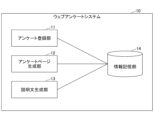
- FIG. 1 is a diagram showing an example of a system configuration according to a first embodiment; FIG. It is a diagram showing an example of the hardware configuration of the web questionnaire system 10 in the first embodiment.
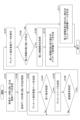
- FIG. 1 is a diagram showing an example of a functional configuration of a web questionnaire system 10 according to a first embodiment. It is a flowchart for explaining an example of a processing procedure executed by the web questionnaire system 10 in the first embodiment. It is a figure which shows an example of the acquired data handling method registration page.
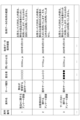
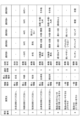
- FIG. 3 is a diagram illustrating a configuration example of acquired data handling method data.
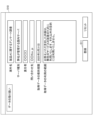
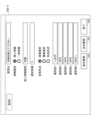
- FIG. 3 is a diagram showing an example of a questionnaire item registration page corresponding to question 1 in the first embodiment.
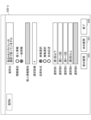
- FIG. 3 is a diagram showing an example of a questionnaire item registration page corresponding to question 2 in the first embodiment.
- FIG. 7 is a diagram showing an example of a questionnaire item registration page corresponding to question 6 in the first embodiment. It is a figure showing an example of a questionnaire page.
- FIG. 3 is a diagram illustrating a configuration example of questionnaire item data in the first embodiment. It is a figure which shows an example of the questionnaire instruction manual template for personal information.
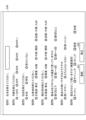
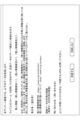
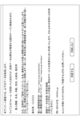
- FIG. 3 is a diagram showing an example of a questionnaire manual page when handling personal information in the first embodiment. It is a figure which shows an example of the questionnaire manual template for general information. It is a figure showing an example of a questionnaire manual page when personal information is not handled in a 1st embodiment.
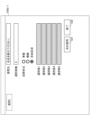
- FIG. 7 is a diagram showing an example of a questionnaire item registration page corresponding to question 1 in the second embodiment.
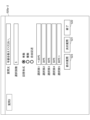
- FIG. 7 is a diagram showing an example of a questionnaire item registration page corresponding to question 2 in the second embodiment.
- FIG. 3 is a diagram showing an example of keywords for determining personal information.
- FIG. 7 is a diagram illustrating a configuration example of questionnaire item data in the second embodiment. It is a figure which shows an example of a questionnaire instruction manual page when handling personal information in 2nd Embodiment.
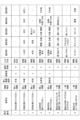
- FIG. 3 is a diagram illustrating an example of personal information judgment criteria.
- FIG. 7 is a diagram showing an example of a questionnaire item registration page corresponding to question 2 in the third embodiment.
- an explanatory text corresponding to the registered contents is generated. For example, if there is a questionnaire item asking for personal information, an explanatory text regarding the handling of personal information will be generated. As a result, it is possible to save time and effort in creating explanatory text to accompany the questionnaire.
- the questionnaire item is a concept that corresponds one-to-one to the questions forming the questionnaire.
- FIG. 1 is a diagram showing an example of the system configuration of the first embodiment.
- a participant terminal 20 and one or more respondent terminals 30 including a respondent terminal 30a, a respondent terminal 30e, etc. are connected to a web questionnaire system 10 via a network N1 such as a LAN (Local Area Network) or the Internet. Connect to.
- a network N1 such as a LAN (Local Area Network) or the Internet.
- the implementer terminal 20 is a terminal used by the survey implementer.
- the questionnaire implementer inputs questionnaire items and the like into the web questionnaire system 10 via the implementer terminal 20.
- the questionnaire implementer creates a questionnaire.
- the web survey system 10 uses the function as a web server to generate a web page for a survey (hereinafter referred to as a "questionnaire page") according to information input by a survey implementer. It's a computer. The web survey system 10 also collects responses to questions forming the survey via the survey page. The web questionnaire system 10 further generates explanatory text in the questionnaire manual based on the questionnaire items input from the implementer terminal 20.
- the respondent terminal 30a and the respondent terminal 30e are terminals used by respondents to the questionnaire.
- the respondent terminal 30a is used by respondent a
- the respondent terminal 30e is used by respondent e.
- FIG. 1 for convenience, there are two respondent terminals 30, but there may be one respondent terminal 30, or three or more respondent terminals 30.
- Each respondent terminal 30 displays a questionnaire page generated by the web questionnaire system 10, and receives input of answers to questions forming the questionnaire via the questionnaire page.
- a PC Personal Computer
- a tablet terminal a smartphone, or the like may be used as the implementer terminal 20 and the respondent terminal 30.
- FIG. 2 is a diagram showing an example of the hardware configuration of the web questionnaire system 10 in the first embodiment.
- the web survey system 10 in FIG. 2 includes a drive device 100, an auxiliary storage device 102, a memory device 103, a processor 104, an interface device 105, etc., which are interconnected via a bus B.
- a program that implements processing in the web questionnaire system 10 is provided by a recording medium 101 such as a CD-ROM.
- a recording medium 101 such as a CD-ROM.
- the program is installed from the recording medium 101 to the auxiliary storage device 102 via the drive device 100.
- the program does not necessarily need to be installed from the recording medium 101, and may be downloaded from another computer via a network.
- the auxiliary storage device 102 stores installed programs as well as necessary files, data, and the like.
- the memory device 103 reads and stores the program from the auxiliary storage device 102 when there is an instruction to start the program.
- the processor 104 is a CPU, a GPU (Graphics Processing Unit), or a CPU and a GPU, and executes functions related to the web questionnaire system 10 according to a program stored in the memory device 103.
- the interface device 105 is used as an interface for connecting to a network.
- FIG. 3 is a diagram showing an example of the functional configuration of the web questionnaire system 10 in the first embodiment.
- the web questionnaire system 10 includes a questionnaire registration section 11, a questionnaire page generation section 12, and an explanatory text generation section 13.
- the web survey system 10 also utilizes an information storage unit 14.
- the information storage unit 14 can be realized using, for example, the auxiliary storage device 102 or a storage device connectable to the web questionnaire system 10 via a network.
- FIG. 4 is a flowchart for explaining an example of a processing procedure executed by the web questionnaire system 10 in the first embodiment.
- the web survey system 10 includes information types (personal information) input by a survey implementer (hereinafter referred to as "user") when survey items are set when creating a survey. It determines whether or not the personal information will be handled based on the following information (whether or not the personal information will be handled), and generates an explanatory text according to the determination result.
- information types personal information
- user a survey implementer
- the questionnaire registration unit 11 registers a web site for registering how to handle acquired data, which is stored in the information storage unit 14.
- a page (hereinafter referred to as "obtained data handling method registration page") is transmitted to the implementer terminal 20 (S101).
- the implementer terminal 20 displays the acquired data handling method registration page.
- Obtained data refers to data obtained from survey respondents through a questionnaire.
- FIG. 5 is a diagram showing an example of an acquired data handling method registration page. As shown in FIG. 5, on the acquired data handling method registration page 510, it is possible to input data regarding items such as project name, server type, person in charge, contact information, acquired data retention period, and scope of use of acquired data. be.
- the project name is the name of the questionnaire.
- the server type is the type of server where acquired data is held.
- the person in charge is the person responsible for managing the acquired data.
- the inquiry destination is address information (for example, URL, etc.) of the inquiry destination regarding the questionnaire or the acquired data.
- the acquired data retention period is a period for which the acquired data is retained.
- the range of use of acquired data is the range in which the acquired data is used.
- the implementer terminal 20 transmits a registration request including the input data to the web survey system 10.
- the questionnaire registration unit 11 receives the registration request, it records data included in the registration request (hereinafter referred to as "obtained data handling method data") in the information storage unit 14 (S102).
- FIG. 6 is a diagram showing an example of the configuration of acquired data handling method data.
- One line in FIG. 6 is one acquired data handling method data. Therefore, although a plurality of acquired data handling method data are shown in FIG. 6, one acquired data handling method data is recorded by executing step S102 once.
- the acquired data handling method data includes items such as a case number, a case name, a server type, a person in charge, a contact point, an acquired data retention period, and a scope of use of acquired data.
- the case number is a number assigned to each questionnaire. For example, the case number may be assigned when the questionnaire registration unit 11 records the acquired data handling method data in the information storage unit 14. Other items are as explained in FIG.
- the questionnaire registration unit 11 transmits a questionnaire item registration page to the implementer terminal 20 in order to register the questionnaire items that constitute the target questionnaire (S103).
- step S103 is executed for the first time, a questionnaire item registration page corresponding to the first questionnaire item (that is, the first question (hereinafter referred to as "Question 1") is sent. Display the questionnaire item registration page.
- FIG. 7 is a diagram showing an example of a questionnaire item registration page corresponding to question 1 in the first embodiment. As shown in FIG. 7, on the questionnaire item registration page 520-1, it is possible to input the question text, information type, personal information type, number of options, answer format, and each option.
- the question text is a text that indicates the question of the target questionnaire item.
- the information type is an item indicating whether the information required as an answer to the questionnaire item is personal information (or general information).
- the personal information type is a character string (name, age, place of birth, current address, etc.) indicating the type of personal information when the information type is personal information.
- the number of options is the number of options for the answer.
- the answer format is an item indicating whether the format of the answer corresponding to the question text is single choice, multiple choice, or free description.
- Single choice refers to an answer format in which one option is selected.
- Multiple choice refers to an answer format in which multiple options are selected.
- Free description refers to an answer format that involves free description (input of character strings) rather than selection of options. In the case of free description, the number of options and the input area for the options are invalid. Options are answer choices. For example, if 0 is input as the number of options, options 1 to 5 are no longer necessary, so input of options may be disabled.
- the user determines whether or not Question 1 requests the provision of personal information, and selects the information type based on the determination result. If Question 1 requests provision of personal information, the user selects "personal information" as the information type. If the user selects "Personal Information", the user can input the personal information type, so the user inputs the personal information type. In the example of FIG. 7, the question asks for the name, and "name" is entered as the personal information type in order to prompt the questionnaire respondent to enter the name.
- the implementer terminal 20 When the input to the questionnaire item registration page 520-1 is completed and the user presses the "next question” button 521, the implementer terminal 20 includes the registration data input to the questionnaire item registration page 520-1. , then sends a request to the web survey system 10.
- the questionnaire registration unit 11 receives the next request (No in S104), it records the registration data included in the next request in the information storage unit 14.
- the questionnaire registration unit 11 creates a questionnaire item registration page regarding the next questionnaire item (next question) of the questionnaire item (hereinafter referred to as "target questionnaire item") corresponding to the questionnaire item registration page that was displayed immediately before. is transmitted to the implementer terminal 20 (S103).
- the implementer terminal 20 displays the questionnaire item registration page.
- a questionnaire item registration page 520-2 corresponding to question 2 is transmitted.
- a questionnaire item registration page 520-6 corresponding to question 6 is transmitted as shown in FIG.
- buttons having the same functions as those in FIG. 7 are given the same reference numerals.
- the questionnaire item registration page 520-1 corresponds to question 1, which is the first question, but there are no questions before question 1.
- question 2 and question 6 have a previous question (question 1 or question 5). Therefore, the questionnaire item registration page 520-2 (FIG. 8) and the questionnaire item registration page 520-3 (FIG. 9) include a "previous question” button 523 for returning to the previous question (questionnaire item).
- "general information” is selected as the information type on the questionnaire item registration page 520-6 (FIG. 9). As a result, the personal information type cannot be entered.
- 4 is entered as the number of options, so option 5 cannot be entered.
- questionnaire item registration pages 520-1, 510-2, and 510-6 and the questionnaire item registration pages corresponding to other questions are referred to as "questionnaire item registration pages 520.”
- the implementer terminal 20 When the user presses the "Exit" button 522 on any of the survey item registration pages 520 that are displayed in order during the process of registering survey items, the implementer terminal 20 inputs information into the currently displayed survey item registration page 520. A termination request including the registered data is sent to the web questionnaire system 10. When the questionnaire registration unit 11 receives the termination request (Yes in S104), the questionnaire registration unit 11 records the registration data included in the termination request in the information storage unit 14.
- the questionnaire page generation unit 12 generates a questionnaire page based on the registered data group recorded in the information storage unit 14.
- the questionnaire page can be generated using, for example, a form element. Since question 1 is a free description question, the questionnaire page generation unit 12 specifies text in the type attribute of the input element. Since Question 2 and Question 6 are single-selection questions, the questionnaire page generation unit 12 specifies radio in the type attribute of the input element in order to allow selection using radio buttons. In the case of a multiple-selection question, the questionnaire page generation unit 12 specifies checkbox in the type attribute of the input element in order to allow selection using checkboxes. Note that by using general CMS (Content Management System) technology, a questionnaire page can be generated by incorporating the registered data group into a web page template.
- CMS Content Management System
- the questionnaire page generation unit 12 transmits the generated questionnaire page to the implementer terminal 20 (S105).
- the implementer terminal 20 displays the questionnaire page.
- FIG. 10 is a diagram showing an example of a questionnaire page.
- the questionnaire page 530 is a web page for inputting answers to each registered questionnaire item (question).
- the user can confirm whether or not the desired questionnaire page will be generated.
- the implementer terminal 20 transmits a modification request to the web questionnaire system 10.
- the web questionnaire system 10 receives the modification request (No in S106), it repeats steps S103 and subsequent steps. Therefore, in this case, the user can modify some or all of the questionnaire items (questions).
- the implementer terminal 20 transmits a registration request to the web questionnaire system 10.
- the questionnaire registration unit 11 receives the registration request (Yes in S106)
- the questionnaire registration unit 11 stores questionnaire item data, which is a compilation of the registered data group, in the information storage unit 14 (S107).
- FIG. 11 is a diagram showing a configuration example of questionnaire item data in the first embodiment.
- the questionnaire item data includes an item number, question text, information type, personal information type, number of options, answer format, and options 1 to 5 for each questionnaire item (question).
- the items other than the item number are as explained in FIG. 7.
- the item number is the identification number of the questionnaire item (question).
- the questionnaire item data may be generated without using the questionnaire item registration page 520.
- the questionnaire item data shown in FIG. 11 may be directly input using an editor.
- the explanatory text generation unit 13 executes processing for generating a web page (hereinafter referred to as a "questionnaire manual page") as a manual for the target questionnaire.
- the explanatory text generation unit 13 determines whether personal information is handled for the target questionnaire (S108). Specifically, if there is even one questionnaire item whose information type value is "personal information" in the questionnaire item data (FIG. 11), the explanatory text generation unit 13 determines that the target questionnaire handles personal information. Otherwise, it is determined that personal information is not handled in the target questionnaire.
- the explanatory text generation unit 13 If the target questionnaire includes the handling of personal information (Yes in S108), the explanatory text generation unit 13 generates a list of values recorded as the personal information type of any questionnaire item from the questionnaire item data (FIG. 11). (S109).
- the list (hereinafter referred to as "personal information type list”) includes five elements: name, age, gender, place of birth, and current address.
- the explanatory text generation unit 13 obtains a template for a questionnaire manual page for handling personal information (hereinafter referred to as a “personal information questionnaire manual template”) from the information storage unit 14, and generates a questionnaire for personal information.
- a questionnaire instruction page (explanation text) is generated (S110).
- FIG. 12 is a diagram showing an example of a questionnaire manual template for personal information.
- the part surrounded by square brackets (hereinafter referred to as "[XXX]”) is data on how to handle the acquired data of the target questionnaire ( Figure 6) or questionnaire item data. This is a portion (location) to which a value (character string) is substituted (replaced) based on (FIG. 11).
- [XXX] is the name of the item that includes the value to be substituted (replaced) in the acquired data handling method data (FIG. 6) or questionnaire item data (FIG. 11). That is, [XXX] is replaced by the value of the item whose item name is "XXX” in the acquired data handling method data (FIG. 6) or questionnaire item data (FIG. 11).
- the explanatory text generation unit 13 replaces the "server type” part in FIG. Replaced with the string "Domestic Server”.
- the explanatory text generation unit 13 replaces the part [Personal Information Type (1)] in FIG. 12 with the first personal information type in the personal information type list. That is, (1) of [personal information type (1)] indicates the first personal information type in the personal information type list. In FIG. 11, there are five questionnaire items whose information type is personal information, item numbers 1 to 5. The order of arrangement in the personal information type list follows the order of the item numbers. Therefore, the personal information type (1) is "name”. Therefore, the explanatory text generation unit 13 replaces [personal information type (1)] with "name”.
- the explanatory text generation unit 13 generates information for each of [Personal information type (2)], [Personal information type (3)], [Personal information type (4)], and [Personal information type (5)] in FIG. is replaced by "age”, “gender”, "place of birth”, and "current address”.
- the explanatory text generation unit 13 sets the [obtained data retention period], [responsible person], [scope of use of obtained data], and [contact information] in Fig. 12 to the obtained data handling method data (Fig. 6).
- [Obtained data retention period] [Responsible person], [Scope of use of obtained data]
- [Contact information] are, in order, "March 31, 2025,” " ⁇ ,” and "Answer.” We will use the information you provide to improve our products. It will not be used for any other purpose.”, replaced by "XXX@xx.jp".
- the explanatory text generation unit 13 stores the generated questionnaire explanatory page in the information storage unit 14.
- a questionnaire instruction page (FIG. 13) is sent to the respondent terminal 30.
- the questionnaire respondent refers to the questionnaire manual page (FIG. 13) displayed on the respondent terminal 30. If the questionnaire respondent agrees with the contents of the questionnaire manual page (FIG. 13), he or she presses the "Agree" button. In that case, the questionnaire page shown in FIG. 10 is displayed on the respondent terminal 30. As a result, the questionnaire respondents can respond to the questionnaire.
- the explanatory text generation unit 13 generates a template of the questionnaire manual page when personal information is not handled (hereinafter referred to as "questionnaire manual template for general information"). ) is acquired from the information storage unit 14, and a questionnaire instruction page (an explanatory text) is generated based on the general information questionnaire instruction template (S111).
- FIG. 14 is a diagram showing an example of a general information questionnaire manual template.
- the meaning of the part surrounded by [] is the same as in FIG. 12.
- the explanatory text generation unit 13 converts the [server type], [scope of use of acquired data], and [inquiry information] in FIG. Replace with the values of ⁇ Scope of use of acquired data'' and ⁇ Contact information''.
- FIG. 15 shows an example of the questionnaire instruction page generated as a result.
- the explanatory text generation unit 13 stores the generated questionnaire explanatory page in the information storage unit 14.
- the web questionnaire system 10 when the user inputs the information type and personal information type for each questionnaire item, the web questionnaire system 10 automatically generates an explanatory text for the questionnaire. I'll give it to you. At this time, different templates are used depending on whether or not personal information is handled, so an appropriate explanatory text is generated depending on whether or not personal information is handled. Therefore, the burden of creating explanations regarding the questionnaire can be reduced.
- the web questionnaire system 10 automatically determines whether or not personal information is to be handled, without the user having to input whether or not personal information is to be handled.
- Steps S101 to S106 are the same as in the first embodiment.
- the configuration of the questionnaire item registration page 520 transmitted and displayed in step S102 is different from the first embodiment.
- question 1 a questionnaire item registration page 520a-1 shown in FIG. 16 is sent and displayed.
- question 2 a questionnaire item registration page 520a-2 shown in FIG. 17 is sent and displayed.
- questionsnaire item registration page 520a when the questionnaire item registration page 520a-1, the questionnaire item registration page 520a-2, and the questionnaire item registration pages corresponding to other questions in the second embodiment are not distinguished, they will be referred to as "questionnaire item registration page 520a.”
- the questionnaire item registration page 520a in FIGS. 16 and 17 does not have an area for inputting information type and personal information type. , Fig. 9).
- step S107 the questionnaire registration unit 11 updates each questionnaire item for each questionnaire item based on whether or not a predetermined keyword is included in the question text of each registered data inputted for each questionnaire item via the questionnaire item registration page 520a. Determine whether personal information is being handled.
- the predetermined keyword is a keyword for determining whether personal information is handled or not, and is registered in the information storage unit 14 in advance, for example.
- FIG. 18 is a diagram showing an example of keywords for determining personal information.
- FIG. 18 shows an example in which eight keywords are registered. Each keyword is associated with a degree of importance. Importance is the degree of importance of personal information. For example, the degree of importance may be determined depending on the probability that an individual can be identified.
- the question text for question 1 is "Please tell me your name.”
- "name" is a keyword. Therefore, the questionnaire registration unit 11 assigns, to the registered data corresponding to question 1, an information type indicating that the data is personal information and a degree of importance associated with the "name".
- the questionnaire registration unit 11 also adds "name” to the registered data as a personal information type. In other words, the keyword directly becomes the personal information type.
- the questionnaire registration unit 11 performs similar processing on each registered data, and then stores the questionnaire item data in the information storage unit 14. As a result, in the second embodiment, questionnaire item data as shown in FIG. 19 is saved in step S107.
- the questionnaire item data in the second embodiment differs from FIG. 11 in that it includes a column of importance.
- step S109 when acquiring the personal information type list, the explanatory text generation unit 13 arranges the personal information types in descending order of importance. For example, they are arranged in the order of name, age, gender, current address, and place of birth.
- step S110 the personal information type (N) (N is 1, 2, 3, etc.) of the questionnaire manual template (Fig. 12) is sorted in descending order of importance. Applicable. As a result, a questionnaire instruction page as shown in FIG. 20 is generated.
- the user can be relieved of the burden of inputting information types and personal information types.
- the web questionnaire system 10 determines whether personal information should be handled based on the number of options.
- the processing procedure executed by the web questionnaire system 10 in the third embodiment may be as shown in FIG. 4.
- the questionnaire item registration page 520-2 (FIG. 8) and the questionnaire item registration page 520a-2 (FIG. 17).
- asking about age asking respondents to enter their age in free text allows for an accurate understanding of the age of the survey respondent.
- you choose to answer by age, etc. it will not be possible to determine the detailed age, but it may not be information that can identify an individual. What constitutes personal information depends not only on the mindset of the person conducting the survey, but also on the laws in place at the time. Therefore, in this embodiment, the boundaries of whether or not the information is personal information are set in advance so that the web questionnaire system 10 can determine the boundaries. For example, personal information judgment criteria as shown in FIG. 21 are stored in advance in the information storage unit 14.
- each line corresponds to one personal information judgment criterion.
- Each personal information judgment criterion is information for determining whether or not to handle personal information (ie, information type) based on the number of options, depending on the set of information to be handled and answer format. The information handled is information obtained by asking questions.
- step S107 the explanatory text generation unit 13 determines whether or not personal information is handled for each questionnaire item based on the personal information judgment criteria (FIG. 21). For example, when asking for age using five options as in question 2 in FIG. 17, this corresponds to item number 2 in FIG. In this case, the explanatory text generation unit 13 determines that the questionnaire item related to Question 2 deals with personal information.
- the explanatory text generation unit 13 determines that the questionnaire item related to Question 2 deals with personal information.
- a questionnaire item in which two options are used when asking age corresponds to item number 3 in FIG.
- the explanatory text generation unit 13 determines that the questionnaire item deals with general information rather than personal information. In this way, it is possible to determine whether or not to handle personal information based on the number of options and the like.
- the explanatory text generation unit 13 assigns an information type indicating personal information to the registered data corresponding to the questionnaire item determined to handle personal information, and determines the personal information judgment criteria (Fig. 21) that match the questionnaire item. Assign the character string of the information to be handled as the personal information type. As a result, questionnaire item data as shown in FIG. 11 is stored in the information storage unit 14.
- the explanatory text generation unit 13 may further assign a degree of importance corresponding to the personal information type to the registered data using information as shown in FIG. 18.
- questionnaire item data as shown in FIG. 19 is stored in the information storage unit 14.
- step S108 may be the same as those in the first or second embodiment.
- the web questionnaire system 10 is an example of a questionnaire explanatory text generation device.
- the questionnaire registration section 11 is an example of a registration section.
- the questionnaire registration section 11 or the explanatory text generation section 13 is an example of a determination section.
- the explanatory text generation unit 13 is an example of a generation unit.
Landscapes
- Engineering & Computer Science (AREA)
- Business, Economics & Management (AREA)
- Strategic Management (AREA)
- Entrepreneurship & Innovation (AREA)
- Human Resources & Organizations (AREA)
- Operations Research (AREA)
- Economics (AREA)
- Marketing (AREA)
- Data Mining & Analysis (AREA)
- Quality & Reliability (AREA)
- Tourism & Hospitality (AREA)
- Physics & Mathematics (AREA)
- General Business, Economics & Management (AREA)
- General Physics & Mathematics (AREA)
- Theoretical Computer Science (AREA)
- Management, Administration, Business Operations System, And Electronic Commerce (AREA)
- Electrically Operated Instructional Devices (AREA)
Abstract
アンケート説明文生成装置は、アンケートを構成する1以上の質問ごとに、当該質問に関する情報の登録を受け付けるように構成されている登録部と、前記質問ごとに、登録された前記情報に基づいて個人情報を扱う質問であるか否かを判定するように構成されている判定部と、個人情報を扱う質問であるか否かに応じて異なるテンプレートに前記情報を当てはめて前記アンケートの説明文を生成するように構成されている生成部と、を有することで、アンケートに関する説明文の作成負荷を軽減する。
Description
本発明は、アンケート説明文生成装置、アンケート説明文生成方法及びプログラムに関する。
インターネットに接続してアンケートに回答できるウェブアンケートシステムが普及している。ウェブアンケートシステムでは、ウェブコンテンツ技術のラジオボタン、チェックボックス、テキストボックス等のフォーム要素を使って、アンケートに対する回答を容易に収集することが可能である。
従来の紙のアンケートであればアンケート用紙を紛失しない限り情報漏洩の心配は少ない。一方、ウェブアンケートでは、アンケート回答がサーバに蓄積されるのが一般的である。アンケートに回答する人(以下、「アンケート回答者」という。)からすると、自分が回答したデータがどのように扱われるのかが分かりづらくなっている。紙のアンケートであれば、アンケートを行う者(以下、「アンケート実施者」という。)はアンケート回答者の近くにいることが一般的であるため、質問があれば口頭で行うことができる。しかし、ウェブアンケートでは、アンケート回答者はPCなどの情報機器に向かってアンケートに回答していくため、リアルタイムで質問を行うことが難しい。
そのため、ウェブアンケートでは、アンケート回答データがどのサーバに蓄積され、どのように扱われるかなどをアンケート前に十分に説明することが重要になっている。アンケートに関する問い合わせ先も説明しておく必要がある。そこで、説明書としてのウェブページ(以下、「説明書ページ」という。)をアンケート前に表示して、アンケート回答者に説明文を読んでもらい、アンケート回答者が説明文の内容に同意した場合に、アンケート用のウェブページに遷移するといった手順がとられている。
ウェブアンケートシステムでは、アンケート前に表示する説明書ページにおいて、アンケート項目によって説明すべき事項が異なる。アンケート項目に関わらず、すべての可能性について説明する説明書を作ることもできるが、非常に膨大な書類となり、アンケート回答者が読んで理解することが難しくなる。
そのため、必要最低限の説明を説明書に入れるべきであるが、どのような説明が必要で、どのような説明が不要であるのかを判断するのが難しく、十分に説明するための説明書を作るのに手間がかかるという問題があった。さらに、どのような説明が必要であり、どのような説明は不要であるかを判断ができていても、ケアレスミスで説明すべき説明が省かれてしまう可能性があった。
また、個人情報を取得する場合には、個人情報保護法などにより、個人情報の取り扱いについて十分に説明することが求められている。説明書は、アンケート実施者が作成することになるが、個人情報に配慮した説明を書くためには専門の知識が必要になる。そのため、アンケート実施者以外の、個人情報の専門家に修正してもらったりする必要があり、説明書を書くのに手間がかかるという問題があった。
本発明は、上記の点に鑑みてなされたものであって、アンケートに関する説明文の作成負荷を軽減することを目的とする。
そこで上記課題を解決するため、アンケート説明文生成装置は、アンケートを構成する1以上の質問ごとに、当該質問に関する情報の登録を受け付けるように構成されている登録部と、前記質問ごとに、登録された前記情報に基づいて個人情報を扱う質問であるか否かを判定するように構成されている判定部と、個人情報を扱う質問であるか否かに応じて異なるテンプレートに前記情報を当てはめて前記アンケートの説明文を生成するように構成されている生成部と、を有する
アンケートに関する説明文の作成負荷を軽減することができる。
本実施の形態では、アンケートを構成するアンケート項目(質問の内容)が登録されると、登録内容に対応する説明文が生成される。例えば、個人情報を尋ねるアンケート項目が有れば、個人情報の扱いに関する説明文が生成される。その結果、アンケートに加冠する説明文の作成の手間を省くことができる。なお、アンケート項目とは、アンケートを構成する質問と1対1に対応する概念である。
以下、図面に基づいて本発明の実施の形態を説明する。図1は、第1の実施の形態のシステム構成例を示す図である。図1において、実施者端末20と、回答者端末30a及び回答者端末30e等を含む1以上の回答者端末30は、LAN(Local Area Network)又はインターネット等のネットワークN1を介してウェブアンケートシステム10に接続する。
実施者端末20は、アンケートの実施者が利用する端末である。アンケート実施者は、実施者端末20を介して、アンケート項目等をウェブアンケートシステム10に入力する。本実施の形態において、アンケート実施者は、アンケートの作成を行う。
ウェブアンケートシステム10は、ウェブサーバとしての機能を利用して、アンケート実施者によって入力された情報に応じたアンケート用のウェブページ(以下、「アンケートページ」という。)の生成等を行う1以上のコンピュータである。ウェブアンケートシステム10は、また、アンケートページを介してアンケートを構成する質問に対する回答を収集する。ウェブアンケートシステム10は、更に、実施者端末20から入力されたアンケート項目に基づいてアンケートの説明書における説明文を生成する。
回答者端末30a及び回答者端末30e(以下、それぞれを区別しない場合「回答者端末30」という。)は、アンケートの回答者が利用する端末である。回答者端末30aは回答者aによって利用され、回答者端末30eは回答者eによって利用される。図1では、便宜上、回答者端末30は2台であるが、回答者端末30は1台であってもよいし、3台以上であってもよい。各回答者端末30は、ウェブアンケートシステム10によって生成されるアンケートページを表示し、アンケートページを介してアンケートを構成する質問に対する回答の入力を受け付ける。
なお、PC(Personal Computer)、タブレット端末又はスマートフォン等が、実施者端末20及び回答者端末30として利用されてもよい。
図2は、第1の実施の形態におけるウェブアンケートシステム10のハードウェア構成例を示す図である。図2のウェブアンケートシステム10は、それぞれバスBで相互に接続されているドライブ装置100、補助記憶装置102、メモリ装置103、プロセッサ104、及びインタフェース装置105等を有する。
ウェブアンケートシステム10での処理を実現するプログラムは、CD-ROM等の記録媒体101によって提供される。プログラムを記憶した記録媒体101がドライブ装置100にセットされると、プログラムが記録媒体101からドライブ装置100を介して補助記憶装置102にインストールされる。但し、プログラムのインストールは必ずしも記録媒体101より行う必要はなく、ネットワークを介して他のコンピュータよりダウンロードするようにしてもよい。補助記憶装置102は、インストールされたプログラムを格納すると共に、必要なファイルやデータ等を格納する。
メモリ装置103は、プログラムの起動指示があった場合に、補助記憶装置102からプログラムを読み出して格納する。プロセッサ104は、CPU若しくはGPU(Graphics Processing Unit)、又はCPU及びGPUであり、メモリ装置103に格納されたプログラムに従ってウェブアンケートシステム10に係る機能を実行する。インタフェース装置105は、ネットワークに接続するためのインタフェースとして用いられる。
図3は、第1の実施の形態におけるウェブアンケートシステム10の機能構成例を示す図である。図3において、ウェブアンケートシステム10は、アンケート登録部11、アンケートページ生成部12及び説明文生成部13を有する。
これら各部は、ウェブアンケートシステム10にインストールされた1以上のプログラムが、プロセッサ104に実行させる処理により実現される。ウェブアンケートシステム10は、また、情報記憶部14を利用する。情報記憶部14は、例えば、補助記憶装置102、又はウェブアンケートシステム10にネットワークを介して接続可能な記憶装置等を用いて実現可能である。
以下、ウェブアンケートシステム10が実行する処理手順について説明する。図4は、第1の実施の形態においてウェブアンケートシステム10が実行する処理手順の一例を説明するためのフローチャートである。第1の実施の形態において、ウェブアンケートシステム10は、アンケートの作成時においてアンケート項目が設定される際に、アンケート実施者(以下、「ユーザ」という。)によって入力される情報種別(個人情報を扱うか否か)に基づいて個人情報の取り扱いの有無を判定して、判定結果に応じた説明文を生成する。
ユーザが実施者端末20を使ってネットワークN1を介してウェブアンケートシステム10のURLにアクセスすると、アンケート登録部11は、情報記憶部14に記憶されている、取得データの取り扱い方法の登録用のウェブページ(以下、「取得データ取り扱い方法登録ページ」という。)を実施者端末20へ送信する(S101)。実施者端末20は、当該取得データ取り扱い方法登録ページを表示する。取得データとは、アンケートによって、アンケート回答者から取得されるデータをいう。
図5は、取得データ取り扱い方法登録ページの一例を示す図である。図5に示されるように、取得データ取り扱い方法登録ページ510では、案件名、サーバ種別、責任者、問い合わせ先、取得データ保持期限、取得データの利用の範囲等の項目についてデータの入力が可能である。
案件名とは、アンケートの名称である。サーバ種別は、取得データが保持されるサーバの種別である。責任者は、取得データの管理について責任を有する者である。問い合わせ先は、アンケートや取得データに関する問い合わせ先のアドレス情報(例えば、URL等)である。取得データ保持期限は、取得データが保持される期限である。取得データの利用の範囲とは、取得データが利用される範囲である。
ユーザが、これらの項目に対するデータを入力し、「登録」ボタン511を押下すると、実施者端末20は入力されたデータを含む登録要求をウェブアンケートシステム10へ送信する。アンケート登録部11は、当該登録要求を受信すると、当該登録要求に含まれるデータ(以下、「取得データ取り扱い方法データ」という。)を情報記憶部14に記録する(S102)。
図6は、取得データ取り扱い方法データの構成例を示す図である。図6における1行が1つの取得データ取り扱い方法データである。したがって、図6には、複数の取得データ取り扱い方法データが示されているが1回のステップS102の実行によって1つの取得データ取り扱い方法データが記録される。図6に示されるように、取得データ取り扱い方法データは、案件番号、案件名、サーバ種別、責任者、問い合わせ先、取得データ保持期限、取得データの利用の範囲等の項目を含む。案件番号は、アンケートごとに割り当てられる番号である。例えば、案件番号は、アンケート登録部11が情報記憶部14に取得データ取り扱い方法データを記録する際に付与してもよい。その他の項目は、図5において説明した通りである。
ここでは、案件番号1の「製品Aに関するアンケート調査」に関するアンケート(以下、「対象アンケート」という。)の取得データの取り扱い方法データが記録された場合について説明する。
続いて、アンケート登録部11は、対象アンケートを構成するアンケート項目を登録させるべく、アンケート項目登録ページを実施者端末20へ送信する(S103)。ステップS103が初めて実行される場合、1番目のアンケート項目(すなわち、1番目の質問(以下、「質問1」という。)に対応するアンケート項目登録ページが送信される。実施者端末20は、当該アンケート項目登録ページを表示する。
図7は、第1の実施の形態において質問1に対応するアンケート項目登録ページの一例を示す図である。図7に示されるように、アンケート項目登録ページ520-1では、質問文、情報種別、個人情報種別、選択肢数、回答形式、及び各選択肢を入力可能である。
質問文は、対象とするアンケート項目の質問を示す文である。情報種別は、当該アンケート項目の回答として求められる情報が個人情報であるか否か(一般情報であるか)を示す項目である。個人情報種別は、情報種別が個人情報である場合に、当該個人情報の種別を示す文字列(氏名、年齢、出身地、現住所等)である。
選択肢数は、当該回答の選択肢の数である。回答形式は、質問文に対応する回答の形式が、単数選択、複数選択、自由記述のいずれであるのかを示す項目である。単数選択とは、1つの選択肢を選択する回答形式をいう。複数選択とは、複数の選択肢を選択する回答形式をいう。自由記述は、選択肢の選択ではなく、自由な記述(文字列の入力)による回答形式をいう。自由記述の場合、選択肢数及び選択肢の入力領域は無効である。選択肢は、回答の選択肢である。例えば、選択肢数に0が入力されると、選択肢1~5は必要なくなるので選択肢の入力不可とされてもよい。
ユーザは、質問1が個人情報の提供を求めているか否かを判断し、判断結果に基づいて、情報種別を選択する。質問1が個人情報の提供を求めている場合、ユーザは、情報種別において「個人情報」を選択する。ユーザが「個人情報」を選択した場合、個人情報種別の入力が可能となるため、ユーザは、個人情報種別を入力する。図7の例では、質問文が氏名を聞いており、アンケート回答者に氏名を入力させるため、個人情報種別に「氏名」が入力されている。
アンケート項目登録ページ520-1への入力が完了し、ユーザが「次の質問」ボタン521を押下すると、実施者端末20は、アンケート項目登録ページ520-1に対して入力された登録データを含む、次へ要求をウェブアンケートシステム10へ送信する。アンケート登録部11は、次へ要求を受信すると(S104でNo)、当該次へ要求に含まれている登録データを情報記憶部14に記録しておく。続いて、アンケート登録部11は、直前に表示されていたアンケート項目登録ページに対応するアンケート項目(以下、「対象アンケート項目」という。)の次のアンケート項目(次の質問)に関するアンケート項目登録ページを実施者端末20へ送信する(S103)。実施者端末20は、当該アンケート項目登録ページを表示する。
例えば、対象アンケート項目が質問1に対応するアンケート項目であった場合、ステップS103では、図8に示されるように、質問2に対応するアンケート項目登録ページ520-2が送信される。また、対象アンケート項目が質問5に対応するアンケート項目であった場合、ステップS103では、図9に示されるように、質問6に対応するアンケート項目登録ページ520-6が送信される。図8及び図9において、図7と同じ機能のボタンには同じ符号が付されている。
アンケート項目登録ページ520-1(図7)は、最初の質問である質問1に対応するところ、質問1より前の質問は存在しない。一方、質問2や質問6には前の質問(質問1又は質問5)が存在する。したがって、アンケート項目登録ページ520-2(図8)及びアンケート項目登録ページ520-3(図9)は、前の質問(アンケート項目)へ戻るための「前の質問」ボタン523を含む。なお、質問6では個人情報は求めていないため、アンケート項目登録ページ520-6(図9)の情報種別では「一般情報」が選択されている。その結果、個人情報種別は入力できないようになっている。また、アンケート項目登録ページ520-6(図9)において、選択肢数には4が入力されているため、選択肢5は入力できないようになっている。
なお、アンケート項目登録ページ520-1、510-2及び510-6や、他の質問に対応するアンケート項目登録ページを区別しない場合、「アンケート項目登録ページ520」という。
アンケート項目が登録される過程において順番に表示されるアンケート項目登録ページ520のいずれかにおいて、ユーザが「終了」ボタン522を押下すると、実施者端末20は、表示中のアンケート項目登録ページ520に入力された登録データを含む終了要求をウェブアンケートシステム10へ送信する。アンケート登録部11が、当該終了要求を受信すると(S104でYes)、アンケート登録部11は、当該終了要求に含まれる登録データを情報記憶部14に記録する。
続いて、アンケートページ生成部12は、情報記憶部14に記録された登録データ群に基づいてアンケートページを生成する。HTMLを利用する場合、アンケートページは、例えば、form要素を使って生成することができる。質問1は自由記述の質問なので、アンケートページ生成部12は、input要素のtype属性にtextを指定する。質問2及び質問6は単数選択の質問なので、ラジオボタンで選択させるために、アンケートページ生成部12は、input要素のtype属性にradioを指定する。複数選択の質問の場合、チェックボックスで選択させるために、アンケートページ生成部12は、input要素のtype属性にcheckboxを指定する。なお、一般のCMS(Content Management System)の技術を使うことで、登録データ群をウェブページのテンプレートに入れ込むことでアンケートページを生成することができる。
アンケートページ生成部12は、生成したアンケートページを実施者端末20へ送信する(S105)。実施者端末20は、当該アンケートページを表示する。
図10は、アンケートページの一例を示す図である。図10に示されるように、アンケートページ530は、登録された各アンケート項目(質問)に対する回答を入力させるためのウェブページである。ユーザは、アンケートページ530を参照することで、所望のアンケートページが生成されるか否かを確認することができる。
アンケートページ530を参照したユーザが「修正」ボタン532を押下すると、実施者端末20は、修正要求をウェブアンケートシステム10へ送信する。ウェブアンケートシステム10は、修正要求を受信すると(S106でNo)、ステップS103以降を繰り返す。したがって、この場合、ユーザは、一部又は全部のアンケート項目(質問)について修正することができる。
一方、アンケートページ530を参照したユーザが「登録」ボタン531を押下すると、実施者端末20は、登録要求をウェブアンケートシステム10へ送信する。アンケート登録部11は、登録要求を受信すると(S106でYes)、登録データ群をまとめたアンケート項目データを情報記憶部14に保存する(S107)。
図11は、第1の実施の形態におけるアンケート項目データの構成例を示す図である。図11に示されるように、アンケート項目データは、アンケート項目(質問)ごとに、項目番号、質問文、情報種別、個人情報種別、選択肢数、回答形式、及び選択肢1~5を含む。これらのうち、項目番号以外の項目については、図7において説明した通りである。項目番号は、アンケート項目(質問)の識別番号である。
なお、アンケート項目登録ページ520が利用されずにアンケート項目データが生成されてもよい。例えば、エディタを用いて図11のアンケート項目データが直接的に入力されてもよい。
続いて、説明文生成部13は、対象アンケートの説明書としてのウェブページ(以下、「アンケート説明書ページ」という。)を生成するための処理を実行する。
まず、説明文生成部13は、対象アンケートについて、個人情報の取り扱いが有るか否かを判定する(S108)。具体的には、説明文生成部13は、アンケート項目データ(図11)において情報種別の値が「個人情報」であるアンケート項目が一つでも有れば、対象アンケートに個人情報の取り扱いが有ると判定し、そうでなければ、対象アンケートに個人情報の取り扱いは無いと判定する。
対象アンケートに個人情報の取り扱いが有る場合(S108でYes)、説明文生成部13は、アンケート項目データ(図11)から、いずれかのアンケート項目の個人情報種別として記録されている値のリスト(重複の無いリスト)を取得する(S109)。図11の例において、当該リスト(以下、「個人情報種別リスト」という。)は、氏名、年齢、性別、出身地、現住所の5つの要素を含む。
続いて、説明文生成部13は、個人情報を取り扱う場合のアンケート説明書ページのテンプレート(以下、「個人情報用アンケート説明書テンプレート」という。)を情報記憶部14から取得し、個人情報用アンケート説明書テンプレートに取得データ取り扱い方法データ(図6)及びアンケート項目データ(図11)を当てはめることで、アンケート説明書ページを(の説明文)生成する(S110)。
図12は、個人情報用アンケート説明書テンプレートの一例を示す図である。図12の個人情報用アンケート説明書テンプレートにおいて、[]で囲まれた部分(以下、「[XXX]」と表記する。)は、対象アンケートの取得データ取り扱い方法データ(図6)又はアンケート項目データ(図11)に基づいて値(文字列)が代入される(置換される)部分(箇所)である。[XXX]において「XXX」は、取得データ取り扱い方法データ(図6)又はアンケート項目データ(図11)において、代入される(置換される)値を含む項目の名前である。すなわち、[XXX]は、取得データ取り扱い方法データ(図6)又はアンケート項目データ(図11)において項目名が「XXX」である項目の値によって置換される。
例えば、説明文生成部13は、図12において[サーバ種別]という部分を、取得データ取り扱い方法データ(図6)において対象アンケート(案件1)の「サーバ種別」の値である「弊社が管理する国内サーバ」という文字列によって置換する。
また、説明文生成部13は、図12において[個人情報種別(1)]という部分を、個人情報種別リストの1番目の個人情報種別によって置換する。すなわち、[個人情報種別(1)]のうちの(1)は、個人情報種別リストにおいて1番目の個人情報種別を示す。図11において、情報種別が個人情報であるアンケート項目は、項目番号1~5の5つである。個人情報種別リストにおける並び順は、この項目番号の順序に従う。したがって、個人情報種別(1)は、「氏名」である。よって、説明文生成部13は、[個人情報種別(1)]を「氏名」によって置換する。
同様に、説明文生成部13は、図12の[個人情報種別(2)]、[個人情報種別(3)]、[個人情報種別(4)]、[個人情報種別(5)]のそれぞれを、「年齢」、「性別」、「出身地」、「現住所」によって置換する。
また、説明文生成部13は、図12の[取得データ保持期限]、[責任者]、[取得データの利用の範囲]、[問い合わせ先]を、取得データ取り扱い方法データ(図6)において案件1の「取得データ保持期限」、「責任者」、「取得データの利用の範囲」、「問い合わせ先」の値によって置換する。すなわち、[取得データ保持期限]、[責任者]、[取得データの利用の範囲]、[問い合わせ先]は、順番に、「2025年3月31日」、「〇〇□□」、「お答えいただきました内容は、弊社の製品の改善のために利用いたします。それ以外の目的には利用いたしません。」、「XXX@xx.jp」によって置換される。
上記の結果として生成されるアンケート説明書ページの一例を図13に示す。説明文生成部13は、生成したアンケート説明書ページを情報記憶部14に保存しておく。
対象アンケートが実施される場合には、まず、アンケート説明書ページ(図13)が回答者端末30へ送信される。アンケート回答者は、回答者端末30が表示するアンケート説明書ページ(図13)を参照する。アンケート回答者は、アンケート説明書ページ(図13)の内容に同意する場合は「同意する」ボタンを押下する。その場合、図10に示したアンケートページが回答者端末30に表示される。その結果、アンケート回答者は、アンケートに回答することができる。
一方、対象アンケートに個人情報の取り扱いが無い場合(S108でNo)、説明文生成部13は、個人情報を取り扱わない場合のアンケート説明書ページのテンプレート(以下、「一般情報用アンケート説明書テンプレート」という。)を情報記憶部14から取得し、一般情報用アンケート説明書テンプレートに基づいて、アンケート説明書ページ(の説明文)を生成する(S111)。
図14は、一般情報用アンケート説明書テンプレートの一例を示す図である。図14において、[]で囲まれた部分の意味は、図12と同じである。
ここでは、図6の案件番号2のアンケート説明書ページを生成する場合について説明する。説明文生成部13は、図14における[サーバ種別]、[取得データの利用の範囲]、[問い合わせ先]を、取得データ取り扱い方法データ(図6)において案件番号2の「サーバ種別」、「取得データの利用の範囲」、「問い合わせ先」の値で置換する。その結果として生成されるアンケート説明書ページの一例を図15に示す。説明文生成部13は、生成したアンケート説明書ページを情報記憶部14に保存しておく。
上述したように、第1の実施の形態によれば、ユーザが各アンケート項目に対して情報種別及び個人情報種別を入力すれば、ウェブアンケートシステム10が、アンケートの説明文を自動的に生成してくれる。この際、個人情報の扱いの有無によって異なるテンプレートが利用されるため、個人情報の扱いの有無に応じて適切な説明文が生成される。したがって、アンケートに関する説明文の作成負荷を軽減することができる。
次に、第2の実施の形態について説明する。第2の実施の形態では第1の実施の形態と異なる点について説明する。第2の実施の形態において特に言及されない点については、第1の実施の形態と同様でもよい。
第2の実施の形態では、ユーザが個人情報の取り扱いの有無を入力しなくても、ウェブアンケートシステム10が個人情報の取り扱いの有無を自動的に判定する。
第2の実施の形態においてウェブアンケートシステム10が実行する処理手順は、便宜上、図4を用いて説明する。
ステップS101~S106は、第1の実施の形態と同様である。但し、ステップS102において送信及び表示されるアンケート項目登録ページ520の構成が第1の実施の形態と異なる。例えば、質問1に関しては、図16に示されるアンケート項目登録ページ520a-1が送信及び表示される。質問2に関しては、図17に示されるアンケート項目登録ページ520a-2が送信及び表示される。以下、アンケート項目登録ページ520a-1及びアンケート項目登録ページ520a-2や、第2の実施の形態においてその他の質問に対応するアンケート項目登録ページを区別しない場合、「アンケート項目登録ページ520a」という。
図16及び図17のアンケート項目登録ページ520aは、情報種別及び個人情報種別を入力するための領域を有さない点において、第1の実施の形態におけるアンケート項目登録ページ520(図7、図8、図9)と異なる。
ステップS107において、アンケート登録部11は、アンケート項目登録ページ520aを介してアンケート項目ごとに入力された各登録データの質問文に所定のキーワードが含まれているか否かに基づいて、アンケート項目ごとに個人情報の取り扱いの有無を判定する。所定のキーワードとは、個人情報の取り扱いの有無を判別するためのキーワードであり、例えば、予め情報記憶部14に登録されている。
図18は、個人情報判別用のキーワードの一例を示す図である。図18には8つのキーワードが登録されている例が示されている。各キーワードには、重要度が対応付けられている。重要度とは、個人情報としての重要の度合いである。例えば、個人を特定できる可能性の高さに応じて重要度が決められてもよい。
例えば、図16によれば、質問1の質問文は「氏名を教えてください。」である。当該質問文において、「氏名」は、キーワードである。したがって、アンケート登録部11は、質問1に対応する登録データに対して、個人情報であることを示す情報種別と、「氏名」に対応付いている重要度とを付与する。アンケート登録部11は、また、「氏名」を個人情報種別として当該登録データに付与する。すなわち、キーワードがそのまま個人情報種別となる。アンケート登録部11は、各登録データに対して同様の処理を行った上で、アンケート項目データを情報記憶部14に保存する。その結果、第2の実施の形態では、ステップS107において、図19に示されるようなアンケート項目データが保存される。
図19に示されるように、第2の実施の形態におけるアンケート項目データは、重要度の列を含む点において図11と異なる。
ステップS109において、説明文生成部13は、個人情報種別リストを取得する際に、重要度の降順に個人情報種別を並べる。例えば、氏名、年齢、性別、現住所、出身地の順に並べられる。
したがって、ステップS110では、重要度の高い個人情報種別から順に、アンケート説明書テンプレート(図12)の[個人情報種別(N)](Nは、1,2,3,・・・)に対して適用される。その結果、図20に示されるようなアンケート説明書ページが生成される。
上述したように、第2の実施の形態では、情報種別及び個人情報種別の入力負担からユーザを解放することができる。
次に、第3の実施の形態について説明する。第3の実施の形態では第1又は第2の実施の形態と異なる点について説明する。第3の実施の形態において特に言及されない点については、第1又は第2の実施の形態と同様でもよい。
第3の実施の形態において、ウェブアンケートシステム10は、選択肢数に基づいて個人情報の扱いの有無を判定する。第3の実施の形態においてウェブアンケートシステム10が実行する処理手順は、図4に示した通りでよい。
アンケート項目登録ページ520-2(図8)やアンケート項目登録ページ520a-2(図17)では、年齢について、5つの選択肢が用いられている。年齢について尋ねる場合、年齢を自由記述で入力させると、アンケート回答者の年齢を正確に把握できる。一方、選択肢により、年代などで回答させると、詳しい年齢が把握できなくなるが、個人を特定できる情報ではなくなる可能性がある。どこからが個人情報に該当するかは、アンケート実施者の考え方の他に、その時点の法律なども関連する。したがって、本実施の形態では、個人情報であるか否かの境界については、予め設定されることで、ウェブアンケートシステム10が判断できるようにしておく。例えば、図21に示されるような個人情報判断基準が情報記憶部14に予め記憶される。
図21において、各行は一つの個人情報判断基準に相当する。各個人情報判断基準は、扱う情報及び回答形式の組に応じて、選択肢数に基づいて個人情報を扱うか否か(すなわち、情報種別)を判断するための情報である。扱う情報は、質問によって取得する情報である。
ステップS107において、説明文生成部13は、個人情報判断基準(図21)に基づいて、各アンケート項目について個人情報を扱うか否かを判定する。例えば、図17の質問2のように5つの選択肢を用いて年齢を尋ねる場合は、図21の項目番号2に該当する。この場合、説明文生成部13は、質問2に係るアンケート項目は個人情報を扱うと判定する。
仮に、年齢を尋ねる質問2の回答形式が図22のように自由記述として設定されると、質問2に係るアンケート項目は、図21の項目番号1に該当する。したがって、この場合も、説明文生成部13は、質問2に係るアンケート項目は個人情報を扱うと判定する。
一方、年齢を尋ねる場合に成人か未成年かなど2つの選択肢が用いられるアンケート項目は、図21の項目番号3の場合に該当する。この場合、説明文生成部13は、当該アンケート項目は、個人情報ではなく一般情報を扱うと判定する。このように、選択肢数等に基づいて、個人情報を扱うか否かを判定することができる。
説明文生成部13は、個人情報を扱うと判定したアンケート項目に対応する登録データに対して、個人情報を示す情報種別を付与し、当該アンケート項目に合致した個人情報判断基準(図21)の扱う情報の文字列を個人情報種別として付与する。その結果、図11に示したようなアンケート項目データが情報記憶部14に保存される。
又は、説明文生成部13は、第2の実施の形態と同様に、図18のような情報を用いて、当該個人情報種別に対応する重要度を当該登録データに更に付与してもよい。この場合、図19に示したようなアンケート項目データが情報記憶部14に保存される。
ステップS108以降は、第1又は第2の実施の形態と同様でよい。
なお、上記各実施の形態において、ウェブアンケートシステム10は、アンケート説明文生成装置の一例である。アンケート登録部11は、登録部の一例である。アンケート登録部11又は説明文生成部13は、判定部の一例である。説明文生成部13は、生成部の一例である。
以上、本発明の実施の形態について詳述したが、本発明は斯かる特定の実施形態に限定されるものではなく、請求の範囲に記載された本発明の要旨の範囲内において、種々の変形・変更が可能である。
10 ウェブアンケートシステム
11 アンケート登録部
12 アンケートページ生成部
13 説明文生成部
14 情報記憶部
20 実施者端末
30a 回答者端末
30e 回答者端末
100 ドライブ装置
101 記録媒体
102 補助記憶装置
103 メモリ装置
104 プロセッサ
105 インタフェース装置
B バス
11 アンケート登録部
12 アンケートページ生成部
13 説明文生成部
14 情報記憶部
20 実施者端末
30a 回答者端末
30e 回答者端末
100 ドライブ装置
101 記録媒体
102 補助記憶装置
103 メモリ装置
104 プロセッサ
105 インタフェース装置
B バス
Claims (6)
- アンケートを構成する1以上の質問ごとに、当該質問に関する情報の登録を受け付けるように構成されている登録部と、
前記質問ごとに、登録された前記情報に基づいて個人情報を扱う質問であるか否かを判定するように構成されている判定部と、
個人情報を扱う質問であるか否かに応じて異なるテンプレートに前記情報を当てはめて前記アンケートの説明文を生成するように構成されている生成部と、
を有することを特徴とするアンケート説明文生成装置。 - 前記登録部は、前記質問ごとに、当該質問が個人情報を扱うか否かを示す情報の登録を受け付けるように構成されている、
ことを特徴とする請求項1記載のアンケート説明文生成装置。 - 前記判定部は、前記質問ごとに、当該質問に関して登録された前記情報に所定のキーワードが含まれているか否かに基づいて個人情報を扱う質問であるか否かを判定するように構成されている、
ことを特徴とする請求項1記載のアンケート説明文生成装置。 - 前記判定部は、前記質問ごとに、当該質問に関して登録された前記情報が含む選択肢の数に基づいて個人情報を扱う質問であるか否かを判定するように構成されている、
ことを特徴とする請求項1記載のアンケート説明文生成装置。 - アンケートを構成する1以上の質問ごとに、当該質問に関する情報の登録を受け付ける登録手順と、
前記質問ごとに、登録された前記情報に基づいて個人情報を扱う質問であるか否かを判定する判定手順と、
個人情報を扱う質問であるか否かに応じて異なるテンプレートに前記情報を当てはめて前記アンケートの説明文を生成する生成手順と、
をコンピュータが実行することを特徴とするアンケート説明文生成方法。 - アンケートを構成する1以上の質問ごとに、当該質問に関する情報の登録を受け付ける登録手順と、
前記質問ごとに、登録された前記情報に基づいて個人情報を扱う質問であるか否かを判定する判定手順と、
個人情報を扱う質問であるか否かに応じて異なるテンプレートに前記情報を当てはめて前記アンケートの説明文を生成する生成手順と、
をコンピュータに実行させることを特徴とするプログラム。
Priority Applications (1)
| Application Number | Priority Date | Filing Date | Title |
|---|---|---|---|
| PCT/JP2022/027026 WO2024009477A1 (ja) | 2022-07-07 | 2022-07-07 | アンケート説明文生成装置、アンケート説明文生成方法及びプログラム |
Applications Claiming Priority (1)
| Application Number | Priority Date | Filing Date | Title |
|---|---|---|---|
| PCT/JP2022/027026 WO2024009477A1 (ja) | 2022-07-07 | 2022-07-07 | アンケート説明文生成装置、アンケート説明文生成方法及びプログラム |
Publications (1)
| Publication Number | Publication Date |
|---|---|
| WO2024009477A1 true WO2024009477A1 (ja) | 2024-01-11 |
Family
ID=89453119
Family Applications (1)
| Application Number | Title | Priority Date | Filing Date |
|---|---|---|---|
| PCT/JP2022/027026 Ceased WO2024009477A1 (ja) | 2022-07-07 | 2022-07-07 | アンケート説明文生成装置、アンケート説明文生成方法及びプログラム |
Country Status (1)
| Country | Link |
|---|---|
| WO (1) | WO2024009477A1 (ja) |
Citations (4)
| Publication number | Priority date | Publication date | Assignee | Title |
|---|---|---|---|---|
| JP2001344528A (ja) * | 2000-06-02 | 2001-12-14 | Masu Kk | マニュアル管理システム及びその方法並びにそのためのプログラムを記録した記録媒体 |
| JP2002342552A (ja) * | 2001-05-21 | 2002-11-29 | Matsushita Electric Ind Co Ltd | アンケートシステム |
| WO2019234883A1 (ja) * | 2018-06-07 | 2019-12-12 | 株式会社ファーストアセント | 情報提供装置、情報提供システム及びコンピュータプログラム |
| JP2021125017A (ja) * | 2020-02-06 | 2021-08-30 | 株式会社フリーフォーマット | 調査用個別Webページ作成表示システム及び調査用個別Webページ作成表示方法及び調査用個別Webページ作成表示プログラム。 |
-
2022
- 2022-07-07 WO PCT/JP2022/027026 patent/WO2024009477A1/ja not_active Ceased
Patent Citations (4)
| Publication number | Priority date | Publication date | Assignee | Title |
|---|---|---|---|---|
| JP2001344528A (ja) * | 2000-06-02 | 2001-12-14 | Masu Kk | マニュアル管理システム及びその方法並びにそのためのプログラムを記録した記録媒体 |
| JP2002342552A (ja) * | 2001-05-21 | 2002-11-29 | Matsushita Electric Ind Co Ltd | アンケートシステム |
| WO2019234883A1 (ja) * | 2018-06-07 | 2019-12-12 | 株式会社ファーストアセント | 情報提供装置、情報提供システム及びコンピュータプログラム |
| JP2021125017A (ja) * | 2020-02-06 | 2021-08-30 | 株式会社フリーフォーマット | 調査用個別Webページ作成表示システム及び調査用個別Webページ作成表示方法及び調査用個別Webページ作成表示プログラム。 |
Similar Documents
| Publication | Publication Date | Title |
|---|---|---|
| US20070020602A1 (en) | Collecting User Responses over a Network | |
| JP7488617B1 (ja) | プログラム、方法、情報処理装置、システム | |
| JP2001297259A (ja) | 質問応答システム | |
| JP2004529445A (ja) | 複数の回答者からのフィードバックを生成および評価する方法、複数の回答者からのフィードバックを生成および評価する調査ツールを構成する方法、これらの方法を実現するコンピュータプログラム及びコンピュータプログラム製品 | |
| US20080307039A1 (en) | Method of facilitating medical consultations | |
| EP2769319A2 (en) | System and method facilitating patient registration across multiple practice groups | |
| US7246086B2 (en) | Product information management device | |
| JP7041639B2 (ja) | 選択装置、選択方法および選択プログラム | |
| JP7651099B1 (ja) | プログラム、方法、情報処理装置、システム | |
| TW201403530A (zh) | 服務確定裝置、服務確定方法、以及記錄服務確定程式之電腦可讀取之記錄媒體 | |
| WO2024009477A1 (ja) | アンケート説明文生成装置、アンケート説明文生成方法及びプログラム | |
| JP5098066B2 (ja) | 学習支援システム | |
| KR102415469B1 (ko) | 상품 정보 제공 방법 및 장치 | |
| JP7248418B2 (ja) | 相談処理装置および相談処理方法 | |
| JP7776137B2 (ja) | サーバ、処理方法、及びプログラム | |
| JP2002157397A (ja) | アンケートシステム | |
| TWI784791B (zh) | 提問管理系統、提問管理方法及程式產品 | |
| WO2024018595A1 (ja) | アンケート説明文チェック装置、アンケート説明文チェック方法及びプログラム | |
| Karreman | Use and effect of declarative information in user instructions | |
| JP2007080257A (ja) | 携帯型の営業活動支援装置 | |
| JP2002073887A (ja) | 質問回答取得システム及び方法 | |
| JP7808916B2 (ja) | プログラム、方法、情報処理装置、システム | |
| WO2024009480A1 (ja) | アンケート作成支援装置、アンケート作成支援方法及びプログラム | |
| JP2003076836A (ja) | 電子掲示板の提供装置及びウェブサイトへのアクセス監視装置 | |
| JP2023012565A (ja) | 最適化支援方法、最適化支援プログラム及び最適化支援システム |
Legal Events
| Date | Code | Title | Description |
|---|---|---|---|
| 121 | Ep: the epo has been informed by wipo that ep was designated in this application |
Ref document number: 22950271 Country of ref document: EP Kind code of ref document: A1 |
|
| NENP | Non-entry into the national phase |
Ref country code: DE |
|
| 122 | Ep: pct application non-entry in european phase |
Ref document number: 22950271 Country of ref document: EP Kind code of ref document: A1 |
|
| NENP | Non-entry into the national phase |
Ref country code: JP |