WO2023176529A1 - 情報検索サービスに適合された情報通信端末装置及び該装置における表示制御方法並びに該方法を実行するためのコンピュータプログラム - Google Patents
情報検索サービスに適合された情報通信端末装置及び該装置における表示制御方法並びに該方法を実行するためのコンピュータプログラム Download PDFInfo
- Publication number
- WO2023176529A1 WO2023176529A1 PCT/JP2023/008194 JP2023008194W WO2023176529A1 WO 2023176529 A1 WO2023176529 A1 WO 2023176529A1 JP 2023008194 W JP2023008194 W JP 2023008194W WO 2023176529 A1 WO2023176529 A1 WO 2023176529A1
- Authority
- WO
- WIPO (PCT)
- Prior art keywords
- search
- search result
- communication terminal
- terminal device
- information communication
- Prior art date
- Legal status (The legal status is an assumption and is not a legal conclusion. Google has not performed a legal analysis and makes no representation as to the accuracy of the status listed.)
- Ceased
Links
Images









Classifications
-
- G—PHYSICS
- G06—COMPUTING OR CALCULATING; COUNTING
- G06F—ELECTRIC DIGITAL DATA PROCESSING
- G06F16/00—Information retrieval; Database structures therefor; File system structures therefor
- G06F16/50—Information retrieval; Database structures therefor; File system structures therefor of still image data
- G06F16/53—Querying
- G06F16/538—Presentation of query results
-
- G—PHYSICS
- G06—COMPUTING OR CALCULATING; COUNTING
- G06F—ELECTRIC DIGITAL DATA PROCESSING
- G06F16/00—Information retrieval; Database structures therefor; File system structures therefor
- G06F16/50—Information retrieval; Database structures therefor; File system structures therefor of still image data
- G06F16/58—Retrieval characterised by using metadata, e.g. metadata not derived from the content or metadata generated manually
-
- G—PHYSICS
- G06—COMPUTING OR CALCULATING; COUNTING
- G06F—ELECTRIC DIGITAL DATA PROCESSING
- G06F3/00—Input arrangements for transferring data to be processed into a form capable of being handled by the computer; Output arrangements for transferring data from processing unit to output unit, e.g. interface arrangements
- G06F3/01—Input arrangements or combined input and output arrangements for interaction between user and computer
- G06F3/048—Interaction techniques based on graphical user interfaces [GUI]
- G06F3/0481—Interaction techniques based on graphical user interfaces [GUI] based on specific properties of the displayed interaction object or a metaphor-based environment, e.g. interaction with desktop elements like windows or icons, or assisted by a cursor's changing behaviour or appearance
-
- G—PHYSICS
- G06—COMPUTING OR CALCULATING; COUNTING
- G06F—ELECTRIC DIGITAL DATA PROCESSING
- G06F3/00—Input arrangements for transferring data to be processed into a form capable of being handled by the computer; Output arrangements for transferring data from processing unit to output unit, e.g. interface arrangements
- G06F3/01—Input arrangements or combined input and output arrangements for interaction between user and computer
- G06F3/048—Interaction techniques based on graphical user interfaces [GUI]
- G06F3/0484—Interaction techniques based on graphical user interfaces [GUI] for the control of specific functions or operations, e.g. selecting or manipulating an object, an image or a displayed text element, setting a parameter value or selecting a range
- G06F3/04845—Interaction techniques based on graphical user interfaces [GUI] for the control of specific functions or operations, e.g. selecting or manipulating an object, an image or a displayed text element, setting a parameter value or selecting a range for image manipulation, e.g. dragging, rotation, expansion or change of colour
-
- G—PHYSICS
- G06—COMPUTING OR CALCULATING; COUNTING
- G06F—ELECTRIC DIGITAL DATA PROCESSING
- G06F3/00—Input arrangements for transferring data to be processed into a form capable of being handled by the computer; Output arrangements for transferring data from processing unit to output unit, e.g. interface arrangements
- G06F3/01—Input arrangements or combined input and output arrangements for interaction between user and computer
- G06F3/048—Interaction techniques based on graphical user interfaces [GUI]
- G06F3/0487—Interaction techniques based on graphical user interfaces [GUI] using specific features provided by the input device, e.g. functions controlled by the rotation of a mouse with dual sensing arrangements, or of the nature of the input device, e.g. tap gestures based on pressure sensed by a digitiser
- G06F3/0488—Interaction techniques based on graphical user interfaces [GUI] using specific features provided by the input device, e.g. functions controlled by the rotation of a mouse with dual sensing arrangements, or of the nature of the input device, e.g. tap gestures based on pressure sensed by a digitiser using a touch-screen or digitiser, e.g. input of commands through traced gestures
-
- G—PHYSICS
- G06—COMPUTING OR CALCULATING; COUNTING
- G06F—ELECTRIC DIGITAL DATA PROCESSING
- G06F3/00—Input arrangements for transferring data to be processed into a form capable of being handled by the computer; Output arrangements for transferring data from processing unit to output unit, e.g. interface arrangements
- G06F3/01—Input arrangements or combined input and output arrangements for interaction between user and computer
- G06F3/048—Interaction techniques based on graphical user interfaces [GUI]
- G06F3/0487—Interaction techniques based on graphical user interfaces [GUI] using specific features provided by the input device, e.g. functions controlled by the rotation of a mouse with dual sensing arrangements, or of the nature of the input device, e.g. tap gestures based on pressure sensed by a digitiser
- G06F3/0488—Interaction techniques based on graphical user interfaces [GUI] using specific features provided by the input device, e.g. functions controlled by the rotation of a mouse with dual sensing arrangements, or of the nature of the input device, e.g. tap gestures based on pressure sensed by a digitiser using a touch-screen or digitiser, e.g. input of commands through traced gestures
- G06F3/04883—Interaction techniques based on graphical user interfaces [GUI] using specific features provided by the input device, e.g. functions controlled by the rotation of a mouse with dual sensing arrangements, or of the nature of the input device, e.g. tap gestures based on pressure sensed by a digitiser using a touch-screen or digitiser, e.g. input of commands through traced gestures for inputting data by handwriting, e.g. gesture or text
-
- G—PHYSICS
- G06—COMPUTING OR CALCULATING; COUNTING
- G06V—IMAGE OR VIDEO RECOGNITION OR UNDERSTANDING
- G06V30/00—Character recognition; Recognising digital ink; Document-oriented image-based pattern recognition
- G06V30/10—Character recognition
- G06V30/19—Recognition using electronic means
-
- G—PHYSICS
- G06—COMPUTING OR CALCULATING; COUNTING
- G06V—IMAGE OR VIDEO RECOGNITION OR UNDERSTANDING
- G06V30/00—Character recognition; Recognising digital ink; Document-oriented image-based pattern recognition
- G06V30/10—Character recognition
- G06V30/22—Character recognition characterised by the type of writing
Definitions
- the present invention relates to an information communication terminal device adapted to an information search service, a display control method in the device, and a computer program for executing the method.
- a so-called Internet search is an information search service on a website for searching a huge amount of information (resources) distributed on the Internet.
- a server program called a search engine on a service provider's website performs an index search based on a search query given by a user, and provides the user with the search results. do. For example, when a user accesses a search site via a web browser and enters characters or character strings related to the resource they want to search as a search query, the search engine analyzes the search query, searches the index, and extracts The searched resources are scored based on a predetermined ranking algorithm, sorted in order of score, and the list is provided to the user as a search result.
- Patent Document 1 discloses a technology that displays not only response results to a search query but also response results to related queries. Further, Patent Document 1 discloses that these results are arranged in order along a plurality of display axes, including at least one axis corresponding to the ordering of various search queries, and displayed in an arranged manner. Discloses technology for displaying images without displaying them. Additionally, US Pat. No. 5,090,301 discloses a technique that allows results to be translated along one or more of the display axes so that a user can browse various results.
- Patent Document 1 can display images for related queries in addition to images for a search query, aligned or unaligned. It was not intended to encourage
- an object of the present invention is to provide an information communication terminal device and a display control method using the same, which enable a user to seamlessly embody a thinking process and encourage thought arousal and activation. do.
- one of the objects of the present invention is to prevent interruptions in the thinking process by realizing a series of smooth user operations from inputting a search query to displaying search results in an information search service.
- An object of the present invention is to provide an information communication terminal device and a display control method using the same, which avoid this problem and make it possible to embody a seamless thinking process.
- Another object of the present invention is to provide an information and communication terminal device that can display search results for a search query in a manner that makes the user feel comfortable, thereby stimulating and activating thinking.
- An object of the present invention is to provide a display control method based on the above.
- the present invention for solving the above problems is constituted by including the following invention specific matters or technical features.
- the present invention is an information communication terminal device that is communicatively connected to a search server.
- the information communication terminal device includes a user interface unit including a touch panel, a search query acquisition unit that acquires a search query, and a search result including a plurality of search result images transmitted from the search server in response to the search query.
- the search result acquisition unit may include a search result acquisition unit that acquires the search results, and a display control unit that performs control to display each of the plurality of search result images included in the search results on a screen representing a virtual space on the touch panel.
- the display control unit may control each of the plurality of search result images to be displayed in animation in order with a visually recognizable time difference.
- the information communication terminal device may further include a recognition unit that performs a first recognition process based on line drawing data input by hand on the screen on the touch panel.
- the search query acquisition unit may acquire a text (keyword) recognized by the recognition unit as the search query.
- the recognition unit may start executing the first recognition process in response to a user's first operation action on the line drawing data on the screen on the touch panel.
- the first operation action may be drawing a line that surrounds at least a portion of an area indicated by the line drawing data on the screen on the touch panel.
- the recognition unit may be configured to perform a second recognition process on the image data to generate object information.
- the search query acquisition unit may acquire the search query based on the generated object information.
- the display control unit also controls the animation so that each of the plurality of search result images gradually appears from a first position determined for the search result image within the screen on the touch panel. Display can be controlled.
- the animation display includes a mode in which the search result image is visually completed gradually, a mode in which the search result image is visually expressed in perspective, and a mode in which the search result image is visually emphasized. It can be at least one of them.
- the display control unit also determines the first position within the screen for each of the plurality of search result images, and displays each of the search result images at the determined first position. It can be controlled so that
- the first positions for each of the search result images are not geometrically aligned with each other. That is, the display control unit may randomly determine the first position for each search result image.
- the display control unit may control the animation display so that the displayed search result image gradually disappears after a predetermined period of time has elapsed.
- the display control unit may also be configured to display the at least one search result in response to a user's second operation action on at least one search result image of interest among the plurality of search result images on the screen on the touch panel.
- the resulting image may be controlled to move to a second position on the screen.
- search query acquisition unit may be configured to select the at least one search result image in response to a user's second operation action for at least one search result image of interest among the plurality of search result images on the screen on the touch panel.
- New search queries may be obtained based on metadata associated with search result images.
- the display control unit may also be configured to display the at least one search result in response to a user's second operation action on at least one search result image of interest among the plurality of search result images on the screen on the touch panel.
- control may be performed to highlight the at least one search result image of interest.
- the search query acquisition unit may acquire a new search query based on metadata associated with the at least one search result image of interest.
- the display control unit may control the animation display to gradually increase the speed at which each of the plurality of search result images appears in response to the second operation action.
- the display control unit may be configured to display the at least one search result image in response to a third operation action of the user on at least one non-attention search result image among the plurality of search result images on the screen on the touch panel. Control may be performed to erase uninteresting search result images from the screen.
- the search query acquisition unit may be configured to associate search result images with some search result images other than the at least one non-attention search result image among the plurality of search result images.
- New search queries may be obtained based on the metadata.
- the present invention according to another aspect is a method for displaying search results by an information communication terminal device communicably connected to a search server.
- the method includes obtaining a search query from a user's input on a touch panel of the information communication terminal device, and obtaining search results including a plurality of search result images transmitted from the search server in response to the search query. and performing display control to display each of the plurality of search result images included in the search results on a screen representing a virtual space on a touch panel of the information communication terminal device.
- Performing the display control may include controlling each of the plurality of search result images to be displayed in an animated manner in order with a visually recognizable time difference.
- the present invention according to another aspect provides a computer program for realizing a method for displaying search results sent from a search server in response to a search query on an information communication terminal device, or non-temporarily recording the same. It may be a computer-readable recording medium.
- a "system” includes a logical collection of multiple devices (or functional modules that realize a specific function), and each device or functional module is physically treated as a single entity. It does not matter whether it is constituted or constituted as a separate object.
- an information search service it is possible to realize a series of smooth operations from inputting a search query to displaying search results. This allows the user to avoid interruptions in the thinking process and realize a seamless thinking process.
- search results for a search query can be displayed in a manner that makes the user feel comfortable. This prompts and activates the user's thinking, allowing him or her to engage in more creative activities.
- FIG. 1 is a diagram for explaining an example of a schematic configuration of a creation support system according to an embodiment of the present invention.
- FIG. 2 is a diagram showing an example of the hardware configuration of an information communication terminal device according to an embodiment of the present invention.
- FIG. 3 is a diagram showing an example of the contents of a memory module of an information communication terminal device according to an embodiment of the present invention.
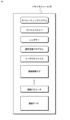
- FIG. 4 is a block diagram showing an example of a functional configuration model of an information communication terminal device according to an embodiment of the present invention.
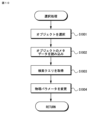
- FIG. 5 is a flowchart illustrating an example of processing by the information communication terminal device according to an embodiment of the present invention.
- FIG. 6 is a flowchart illustrating an example of handwritten input processing by the information communication terminal device according to an embodiment of the present invention.
- FIG. 1 is a diagram for explaining an example of a schematic configuration of a creation support system according to an embodiment of the present invention.
- FIG. 2 is a diagram showing an example of the hardware configuration of an information communication terminal device according
- FIG. 7 is a flowchart illustrating an example of a search process by the information communication terminal device according to an embodiment of the present invention.
- FIG. 8 is a flowchart illustrating an example of search result display processing by the information communication terminal device according to an embodiment of the present invention.
- FIG. 9 is a flowchart illustrating an example of animation display processing by the information communication terminal device according to an embodiment of the present invention.
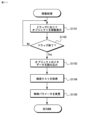
- FIG. 10 is a flowchart illustrating an example of object selection processing by the information communication terminal device according to an embodiment of the present invention.
- FIG. 11 is a flowchart illustrating an example of object movement processing by the information communication terminal device according to an embodiment of the present invention.
- FIG. 12 is a flowchart illustrating an example of object deletion processing by the information communication terminal device according to an embodiment of the present invention.
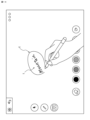
- FIG. 13 is a diagram showing an example of a screen on a touch panel of an information communication terminal device according to an embodiment of the present invention.
- FIG. 14 is a diagram showing an example of a screen on a touch panel of an information communication terminal device according to an embodiment of the present invention.
- FIG. 15 is a diagram showing an example of a screen on a touch panel of an information communication terminal device according to an embodiment of the present invention.
- FIG. 16 is a diagram showing an example of a screen on a touch panel of an information communication terminal device according to an embodiment of the present invention.
- FIG. 17 is a diagram showing an example of a screen on a touch panel of an information communication terminal device according to an embodiment of the present invention.
- FIG. 18 is a diagram showing an example of a screen on a touch panel of an information communication terminal device according to an embodiment of the present invention.
- FIG. 19 is a flowchart showing another example of object selection processing by the information communication terminal device according to an embodiment of the present invention.
- FIG. 20 is a diagram showing another example of the screen on the touch panel of the information communication terminal device according to an embodiment of the present invention.
- FIG. 1 is a diagram for explaining an example of a schematic configuration of a creation support system according to an embodiment of the present invention.
- the creation support system 1 of the present embodiment includes, for example, a search server 20 and an information communication terminal device 30 that are communicably connected to each other via a communication network 10.
- the search server 20 and the information communication terminal device 30 constitute a server/client model that implements an information search system.
- the creation support system 1 may include a creation support server 40.
- the communication network 10 may include, for example, an IP-based computer network (hereinafter referred to as "IP network").
- IP network IP-based computer network
- the communication network 10 is used in a broad concept including the Internet constructed by IP networks, but is not limited to IP networks, and is not intended to exclude networks using other protocols that enable communication between nodes. do not have.
- the communication network 10 may include a wireless network (eg, Wi-Fi (registered trademark), etc.) constructed by wireless base stations or wireless access points (not shown).
- the communication network 10 may include a mobile communication network compliant with mobile communication system standards.
- the search server 20 is a computing device that provides information search services to users.
- the search server 20 includes, for example, a search engine 22 and a database 24.
- the search server 20 may also include a crawler that functions as a robot agent. The crawler visits web pages on the Internet, collects and analyzes information on the visited web pages, and thereby creates an index for referring to and searching the database 24.
- the search server 20 Based on the search query received from the user's information communication terminal device 30, the search server 20 performs an index search using the search engine 22, extracts the corresponding resource from the database 24, and transmits it to the information communication terminal device 30.
- Search engine 22 may be configured to perform a search by performing machine inference based on a search query and/or search history, for example.
- the resource extracted for the search query is an image. Images may include still images and moving images.
- the website (search site) provided by the search server 20 may be any website that can be accessed by the user using the information communication terminal device 30, and may be a known search site on the Internet.
- the information communication terminal device 30 is a computing device operated by a user, and typically corresponds to a tablet computer, etc., but is not limited to this, and is configured to be able to realize the present invention. Any device is fine.
- the information communication terminal device 30 is assumed to be a tablet computer capable of interactive operation using a touch panel or a touch screen.
- the information communication terminal device 30 implements a creation support program that realizes a user interface environment that allows the user to effectively utilize his or her creative abilities.
- the creation support server 40 is, for example, a computing device that functions as a cloud server for the information communication terminal device 30, for example.
- the creation support server 40 manages, for example, accounts of users who operate the information communication terminal device 30. Further, the creation support server 40 can store predetermined operation actions performed by the user on the information communication terminal device 30 and a series of processes corresponding thereto as an operation history.
- FIG. 2 is a diagram showing an example of the hardware configuration of an information communication terminal device adapted to the creation support system according to an embodiment of the present invention. In the figure, among the various hardware resources constituting the information communication terminal device 30, those particularly relevant to the present invention are shown.
- the information communication terminal device 30 typically includes one or more processor modules 31, a chipset 32, a memory module 33, an I/O controller 34, and various types of It may be configured to include a peripheral interface 35 and various input/output devices 36 (touch panel 36a, etc.).
- the processor module 31 includes, but is not limited to, a processor (processor core), a microcontroller, a digital signal processor, and/or a combination thereof, for example.
- the chipset 32 is composed of a circuit that integrates a bridge for a bus connecting the processor module 31, memory module 33, I/O controller 34, etc., and other components necessary to configure the information communication terminal device 30. Chipset 32 is controlled by processor module 31, for example.
- the processor module 31 may be simply referred to as a "processor".
- the memory module 33 is a primary storage device made of volatile memory (for example, RAM), nonvolatile memory (for example, ROM, flash memory, etc.), and/or a combination thereof, which is used by the processor module 31.
- Memory module 33 may also include video memory (VRAM) for touch panel 36a.
- VRAM video memory
- the memory module 33 may be simply referred to as "memory”.
- the memory module 33 holds various software resources, such as device drivers, operating system (OS) programs, one or more application programs, and various data, as shown in FIG. 3, for example.
- the application program includes a creation support program that is executed on the OS of the information communication terminal device 30 under the control of the processor module 31. Under the control of the processor module 31, the creation support program causes the information and communication terminal device 30 to realize a user interface environment that allows the user to effectively utilize his or her creative abilities. Some processes in the creation support program may be executed as different threads or processes on the processor module 31.
- the various data include, for example, image data (still image data and moving image data). Various types of data are stored as image files in, for example, image folders that are logically configured on the memory module 33.
- the I/O controller 34 is a circuit that controls data transfer between various peripheral interfaces 35 (for example, the I/O interface 35a and the communication interface 35b).
- the I/O interface 35a controls the operation of the input/output devices 36 that constitute the user interface.
- the communication interface 35b is a circuit that enables computer communication via the IP network 12.
- the input/output device 36 includes, for example, a touch panel 36a, a speaker 36b, a camera 36c, and the like. Although not shown, the input/output device 36 may include a microphone for audio input.
- the touch panel 36a is a display for displaying multimedia data such as text data, image data (still image data and moving image data), graphic data, etc., and a transparent touch panel formed to approximately match the size of the display. It consists of a sensor.
- the touch panel 36a is an example of a device that implements a user interface environment.
- the input/output device 36 may be configured to include a display and a touch pad configured separately from the display, instead of the touch panel 36a.
- the touch panel 36a displays various screens on the display under the control of the processor module 31 and accepts interactive operations from the user. The user can provide various inputs to the touch panel 36a by operating actions using a pen (stylus) or finger, for example.
- the speaker 36b outputs audio or sound based on an audio signal generated by a sound driver (not shown). Under the control of the processor module 31, the speaker 36b reads out text data, outputs music, sound effects, etc., for example.
- the camera 36c generates image data using an image sensor under the control of the processor module 31.
- Image data generated by camera 36c is stored in memory module 33 as an image file.
- object information for example, name, etc.
- image recognition processing is generated from such an image file through image recognition processing, and is converted into a search query based on the object information.
- FIG. 4 is a block diagram showing an example of a functional configuration model of an information communication terminal device according to an embodiment of the present invention.
- the information communication terminal device 30 is shown as a functional configuration model including, for example, a control section 310, a storage section 320, a user interface section 330, and a communication interface section 340.
- a functional configuration model is realized by executing the creation support program under the control of the processor module 31 in cooperation with the various software resources and/or hardware resources described above.
- the control unit 310 centrally controls and executes various processes (tasks) in the information communication terminal device 30.
- the control unit 310 includes a search query acquisition unit 311, a recognition unit 312, a search request transmission unit 313, a search result acquisition unit 314, and a display control unit 315. Details of these functional configurations in the control unit 310 will be described later.
- the storage unit 320 may include, for example, a search result storage unit 321, a screen data storage unit 322, and an operation history storage unit 323.
- the search result storage unit 321 stores search results obtained from the search server 20 under the control of the control unit 310.
- search results include one or more images.
- the image is an image file according to a predetermined image format (for example, JPEG, PNG, WebP, etc.), and is associated with metadata.
- the image file may include metadata as part of it. Metadata is, for example, text data indicating the URL of an image or its name, but is not limited to these.
- an image as a search result may be referred to as a "search result image.”
- the search result storage unit 321 may include a storage area that stores search result images selected by the user.
- the search result storage unit 321 stores the search result image file selected by the user in an asset folder under the control of the control unit 310.
- the screen data storage section 322 stores data (hereinafter referred to as "screen data") for expressing the screen provided by the user interface section 330 as a virtual space under the control of the control section 310.
- the screen data may include objects, their coordinate information, and the like.
- an object may be a mark or an element displayed within a screen, and includes, for example, a search result image, an icon, a line drawing, and the like.
- the screen data stored in the screen data storage section 322 is rendered by the control section 310 (for example, a renderer) and delivered to the user interface section 330, whereby the screen data is displayed on the touch panel 36a as a screen including objects.
- the operation history storage unit 323 stores, as an operation history, a predetermined operation action received via the touch panel 36a and a series of processes and results of a series of processes performed by the control unit 310 in response thereto. Note that such operation history may be held on the creation support server 40 under the control of the control unit 310.
- the user interface unit 330 provides the user with an interactive operating environment via the touch panel 36a and the like. That is, the user interface unit 330 displays a screen representing a virtual space on the touch panel 36a under the control of the control unit 310, and receives various operation actions from the user on the screen. The user inputs an operation action using, for example, a pen.
- the user interface unit 330 accepts handwritten input from the user and provides a screen on which line drawings are displayed in response.
- the input information input by handwriting may be, for example, a line drawing indicating a character or a character string (text), a closed curve, or the like.
- the user interface unit 330 provides a screen on which objects are displayed as animations under the control of the control unit 310.
- the user interface unit 330 accepts a user's operation action on an object. Operation actions for objects include, but are not limited to, taps (single taps, double taps, etc.), drags, flicks, swipes, etc., for example.
- the communication interface unit 340 controls communication so that the information communication terminal device 30 can access the search server 20 via the communication network 10. For example, the communication interface unit 340 is controlled to transmit a search request based on a search query to the search server 20 under the control of the control unit 310 . Further, for example, the communication interface unit 340 receives search results sent from the search server 20 in response to the search query of the search request, and delivers them to the control unit 310.
- the search query acquisition unit 311 acquires search queries for the search server 20 from various channels.
- the search query acquisition unit 311 identifies a line drawing in the screen data according to a user's predetermined operation action on the touch panel 36a, and the result of character recognition by the recognition unit 312 based on data related to the line drawing (line drawing data). Get as a search query. More specifically, as a predetermined operation action, the user, while keeping the pen in contact with the touch panel 36a, encloses at least a part of the area showing the line drawing data on the screen displayed on the touch panel 36a.
- the search query acquisition unit 311 When the search query acquisition unit 311 moves, the search query acquisition unit 311 identifies the line drawing data surrounded by the locus of the movement and passes it to the recognition unit 312, and in response, acquires the text data output from the recognition unit 312. and set it in the search query.
- An operation action in which the user moves the line drawing so as to surround at least a portion of the area is one mode of the first operation action.
- the first operation action may be a series of operation actions in which the user moves the line drawing so as to surround at least a portion of the area and then makes an additional gesture (for example, a checking action).
- the first operation action may be an operation action in which the user taps (eg, double taps) or presses the line drawing in the vicinity of the screen displayed on the touch panel 36a.
- the search query acquisition unit 311 identifies an object in the screen data according to a user's predetermined operation action on the touch panel 36a, and acquires metadata associated with the object as a search query.
- an operation action in which the user taps the object of interest (search result image) on the screen displayed on the touch panel 36a is one mode of the second operation action.
- an operation action in which the user flicks or the like on a search result image that is desired to be excluded (not focused on) among the plurality of search result images on the screen displayed on the touch panel 36a is one aspect of the third operation action.
- the search query acquisition unit 311 In response to the third operation action, the search query acquisition unit 311 generates a new search query based on the metadata associated with the search result images excluding the excluded search result image among the plurality of search result images. get.
- the search query acquisition unit 311 selects an arbitrary object in the screen data at an arbitrary timing, and acquires metadata associated with the object as a search query.
- the recognition unit 312 performs predetermined recognition processing on various objects within the screen displayed on the touch panel 36a, generates and outputs text data.
- the recognition unit 312 includes a character recognition unit 3121 and an image recognition unit 3122. Further, the recognition unit 312 may include a voice recognition unit (not shown) that performs voice recognition processing to generate text data.
- the search query acquisition unit 311 can acquire a search query based on text data obtained by voice recognition processing.
- the character recognition unit 3121 analyzes the line drawing data using a predetermined character recognition algorithm, and generates and outputs text data that the line drawing data may indicate (first recognition process). Further, the character recognition unit 3121 may be configured to have a function of, for example, comparing generated text data with a dictionary database (not shown) and converting it into existing words. As a result, even if the data is a scribbled line drawing, what the user originally intended will be obtained as a result of character recognition.
- the image recognition unit 3122 analyzes image data such as a photograph using a predetermined image recognition algorithm, extracts or recognizes the object that it may represent, and converts the object information (name, etc.) into text data. (second recognition process). For example, if the image data is a landscape photograph of a bridge over which cars are passing, the image recognition unit 3122 recognizes "car” and "bridge” from there, and generates and outputs text data indicating the names thereof. For example, the image recognition unit 3122 can generate object information by performing image recognition processing on image data such as a photo read out from an image folder by the user.
- the recognition unit 312 is configured within the control unit 310, but the recognition unit 312 is not limited to this, and part or all of it may be configured on an external cloud server (for example, the creation support server 40). , the recognition result may be acquired via the communication interface section 340.
- the recognition unit 312 may output a plurality of recognition result candidates. The user can select a desired recognition result from among the plurality of recognition result candidates displayed on the screen of the touch panel 36a.
- the search request transmitter 313 generates and outputs a search request based on the search query acquired by the search query acquirer 311.
- the search request output from the search request transmitting section 313 is transmitted to the search server 20 via the communication interface section 340.
- the search result acquisition unit 314 receives and acquires the search results sent from the search server 20 in response to the search request via the communication interface unit 340. For example, the search result acquisition unit 314 divides the plurality of search result images searched and extracted by the search server 20 into a predetermined number of parts and acquires the divided images as search results. The search result acquisition unit 314 delivers the search results including the plurality of acquired search result images to the display control unit 315. The search result acquisition unit 314 also stores the search results in the search result storage unit 321.
- the display control unit 315 controls the display of a screen representing the virtual space on the touch panel 36a. For example, the display control unit 315 responds to a user's handwritten input on the screen displayed on the touch panel 36a and controls the trajectory to be displayed on the screen.
- the display control unit 315 performs control so that the plurality of search result images acquired by the search result acquisition unit 314 are displayed in animation on the screen on the touch panel 36a. More specifically, the display control unit 315 displays an animation so that each of the plurality of search result images appears in an arbitrary position on the screen in order with a visually recognizable time difference.
- the display control unit 315 randomly determines the appearance position (first position) in the screen for each search result image, for example. Therefore, the appearance positions of the plurality of search result images are not geometrically aligned with each other.
- an animation display in which a search result image appears on a screen, there is a mode in which the search result image is gradually completed from a visually blank or blurred state.
- Another example is a mode in which the search result image is expressed as if it were moving within a virtual space.
- the mode of expressing the image as if it were moving in a virtual space includes, for example, the mode of expressing the search result image so that it visually approaches the user in perspective.
- Yet another example is a mode in which search result images are visually emphasized.
- the display control unit 315 may include a physical calculation engine 3151.
- the physical calculation engine 3151 simulates the behavior of an object (for example, a search result image) in the virtual space by performing physical calculations according to predetermined physical parameters.
- the predetermined physical parameters include, for example, mass, velocity, external force, and fluid velocity.
- the physical calculation engine 3151 simulates the behavior of the search result image in the virtual space by comparing it to the behavior of sparks floating in the air from a bonfire.
- the physics engine 3151 simulates the behavior of the search result image in the virtual space by comparing it to the behavior of bubbles rising from water.
- the display control unit 315 enables an animation display in which the search result image on the screen appears to be floating in a virtual space, for example.
- an animation of the search result image the user feels comfortable, is stimulated and activated to think, and is able to engage in more creative activities.
- the physical calculation engine 3151 can simulate the fluctuation of the search result image floating in the virtual space to be 1/f fluctuation.
- the 1/f fluctuation is a fluctuation in which the power spectral density is inversely proportional to the frequency f (however, f>0).
- the display control unit 315 controls the animation display so that the search result image gradually disappears or naturally disappears (fade out). to delete the search result images from the screen.
- search result images do not overflow on the screen, and an appropriate number of search result images are displayed in animation, thereby preventing the user's thought process from being inhibited. Note that even if a search result image is deleted from the screen, it may remain stored without being deleted from the search result storage unit 321.
- FIG. 5 is a flowchart illustrating an example of processing by the information communication terminal device according to an embodiment of the present invention. Such processing is realized by the information communication terminal device 30 executing the creation support program under the control of the processor module 31 and cooperating with various software resources and/or hardware resources. Note that this figure explains the flow of processing according to the user's operation action on the information communication terminal device 30 that executes the creation support program.
- control unit 310 of the information communication terminal device 30 when the control unit 310 of the information communication terminal device 30 starts executing the creation support program, it displays a screen on the touch panel 36a as a user interface environment for support of creation to the user, and performs some actions by the user on the screen. It is monitored whether there is an input (operation action) (S501).
- control unit 310 determines whether there is an operation action by the user on the screen (Yes in S501)
- the control unit 310 determines whether there is a selectable object at the position on the screen corresponding to the operation action. (S502). That is, the control unit 310 determines whether or not the user is making an input to an empty area (an area where nothing is drawn) on the screen of the touch panel 36a.
- control unit 310 determines whether there is no selectable object at the position on the screen corresponding to the user's operation action (No in S502), the control unit 310 then determines whether the user's operation action is a handwritten input. It is determined whether or not (S503).
- Handwriting input is an operation consisting of a combination of one or more strokes in which the user moves the pen while keeping it in physical contact with the touch panel 36a.
- control unit 310 determines that the user's operation action is a handwritten input (Yes in S503), the control unit 310 performs handwritten input processing according to the input stroke (S504). Details of the handwriting input process will be explained with reference to FIG. 6. After the handwriting input process ends, the control unit 310 returns to the process of monitoring the user's operation action (S501).
- control unit 310 determines that the user's operation action is not a handwritten input (No in S503), in this example, the control unit 310 monitors the user's operation action as an invalid input. The process returns to step S501. For example, a very short single stroke may be considered an invalid input.
- Operation actions include, for example, “tap”, which is the action of lightly tapping an object on the screen with a pen; “drag”, which is the action of grabbing an object on the screen with a pen and dragging it; These include, but are not limited to, “flick”, which is a quick swiping action with a pen, and “slide” and “swipe”, which are actions in which an empty area on the screen is touched with a pen and moved in a predetermined direction.
- tap which is the action of lightly tapping an object on the screen with a pen
- drag which is the action of grabbing an object on the screen with a pen and dragging it
- These include, but are not limited to, “flick”, which is a quick swiping action with a pen, and “slide” and “swipe”, which are actions in which an empty area on the screen is touched with a pen and moved in a predetermined direction.
- the control unit 310 performs a process of selecting an object (S506). Further, when the user's operation action is a drag, the control unit 310 performs a process of moving the object according to the drag (S507). Further, when the user's operation action is a flick, the control unit 310 performs a process of flicking the object out of the screen and erasing it from the screen in response to the flick (S508). Details of these processes will be explained with reference to FIGS. 6 to 11, respectively. After each process ends, the control unit 310 returns to the process of monitoring the user's operation action (S501).
- FIG. 6 is a flowchart illustrating an example of handwritten input processing by the information communication terminal device according to an embodiment of the present invention. This figure shows details of the handwritten input process (S504) shown in FIG.
- control unit 310 causes a line to be drawn on the screen displayed on the touch panel 36a in accordance with an input signal output from the touch panel 36a in accordance with the locus of the stroke caused by the contact movement of the user's pen. control (S601). Subsequently, the control unit 310 determines whether the user's handwritten input has been completed (S602). For example, if the next stroke is not detected within a predetermined time after the pen leaves the touch panel 36a after a certain stroke, the control unit 310 determines that handwriting input has ended. When the control unit 310 determines that the user's handwritten input has not been completed (No in S602), the control unit 310 continues line drawing (S601).
- Line drawing data may be vector data of a set of multiple lines (regardless of whether they are straight or curved).
- the control unit 310 determines whether the defined line drawing data indicates a predetermined graphic shape (S604).
- the predetermined graphic shape is a closed graphic shape.
- a closed graphic shape is not limited to a graphic shape in which the lines are completely closed, but also includes a shape that can be considered to be substantially closed even if the lines are partially separated.
- the predetermined graphic shape may be limited to a closed graphic shape consisting of a simple curve such as a circle or an ellipse, for example.
- the control unit 310 may determine whether the line drawing data indicates a predetermined geometric line drawing (for example, an underline, a check mark, etc.) instead of a closed figure.
- the control unit 310 determines that the defined line drawing data does not indicate the predetermined graphic shape (No in S604), the control unit 310 temporarily stores the line drawing data in the screen data storage unit 322 (S605). . That is, the line drawing data temporarily stored in the screen data storage unit 322 can become the other line drawing data (object) mentioned above that is selected by a subsequent user operation action.
- control unit 310 determines that the defined line drawing data indicates a predetermined graphic shape (Yes in S604), then the control unit 310 determines that the defined line drawing data indicates a predetermined graphic shape (Yes in S604). It is determined whether other line drawing data (line drawing data to be selected) exists (S606). In other words, the control unit 310 determines whether the user intentionally selected other line drawing data existing within the screen.
- the other line drawing data here may be line drawing data previously input by hand by the user.
- the area surrounded by the predetermined graphic shape includes an area that can be considered to be substantially surrounded. Further, if at least a portion of other line drawing data is included in the area, the control unit 310 can determine that other line drawing data exists.
- the control unit 310 when the user draws a closed figure so as to surround at least a part of the area indicated by the line drawing data in order to select the line drawing data that was previously input by hand and is displayed on the screen, the control unit 310 , it can be determined that other line drawing data exists. In this way, the operation action of drawing line drawing data representing a predetermined graphic shape in order to select other line drawing data corresponds to the first operation action.
- control unit 310 determines that there is no line drawing data to be selected within the area surrounded by the predetermined graphic shape (No in S606), the control unit 310 determines that the defined line drawing data is selected by the user. It is assumed that the line drawing data is not input by hand, and the line drawing data is temporarily stored in the screen data storage unit 322 (S605). This allows, for example, to save line drawing data such as a memo written by the user on the touch panel 36a. Such line drawing data can be part of screen data.
- the character recognition unit 3121 causes the character recognition unit 3121 to recognize the character Recognition is performed (S607). That is, the character recognition unit 3121 performs character recognition processing on the line drawing data to generate text data.
- the search result acquisition unit 314 acquires the generated text data as a search query (S608).
- the search request transmitting unit 313 transmits a search request based on the acquired search query to the search server 20, and the search result acquiring unit 314 acquires the search result (search result image) from the search server 20. do.
- the display control unit 315 converts the generated text data into, for example, an icon indicating the text that has been character-recognized (S609).
- the display control unit 315 controls the converted icon to be displayed on the screen instead of the handwritten input line drawing data.
- the generated text data may be treated as text data without being converted into an icon.
- the information communication terminal device 30 determines whether the input is text input or selection of text that has already been input. to judge. Further, when the information communication terminal device 30 determines that the handwritten input is a text input, it temporarily stores line drawing data indicating this. Further, if the information communication terminal device 30 determines that the line drawing data indicating the already input text is selected, the information communication terminal device 30 performs character recognition processing on the line drawing data, converts it into text data, and converts it into text data. Get it as a search query.
- FIG. 7 is a flowchart illustrating an example of search processing by the information communication terminal device according to an embodiment of the present invention. Execution of this process is started when the search query acquisition unit 311 acquires the search query.
- the control unit 310 may execute search processing in response to acquisition of a search query in a separate thread or process. As a result, as will be described later, a new search query is acquired from the search results in response to the search request resulting from the acquisition of the first search query, and further search processing is performed in a chain or derivative manner.
- the control unit 310 monitors whether a search query has been acquired by the search query acquisition unit 311 (S701).
- the search request transmitting unit 313 generates a search request based on the search query and transmits it to the search server 20 (S702).
- the search server 20 receives a search request from the information communication terminal device 30, the search server 20 extracts the corresponding resource by searching the database 24 based on the search query included in the search request, and uses this as the search result. It is transmitted to the information communication terminal device 30 as a.
- the search results include one or more search result images.
- the search server 20 extracts the search results, it transmits them to the information communication terminal device 30 every predetermined number, for example, in response to a fetch request from the search result acquisition unit 314 of the information communication terminal device 30.
- the search result acquisition unit 314 receives the search results sent by the search server 20 in response to the search request (S703).
- the search result acquisition unit 314 transmits a fetch request to a plurality of search result images searched and extracted by the search server 20, divides the images into a predetermined number of images, and acquires the images as search results.
- the display control unit 315 performs processing to display the obtained search results (search result images) on the screen (S704). Details of the search result display process will be explained with reference to FIG. 8.
- the control unit 310 controls each of the plurality of search result images to be displayed as an animation at an arbitrary position on the screen in order with a visually recognizable time difference.
- Animation display can be used, for example, to show how a search result image is visually completed gradually, how a search result image visually expresses perspective on the screen, how a search result image is visually emphasized, etc. including but not limited to.
- the control unit 310 determines whether to end the search process (S705). For example, if the user selects to pause the search, the control unit 310 ends the search process. On the other hand, when the control unit 310 determines to continue the search process (No in S705), the search query acquisition unit 311 acquires a new search query based on the search result (S706). The search query acquisition unit 311 can acquire a search query based on, for example, metadata associated with a search result image. When a new search query is acquired by the search query acquisition unit 311, the control unit 310 returns to the process of S702 and continues the search process.
- the search request transmitter 313 transmits a search request based on the acquired new search query to the search server 20, acquires the search results in response, and displays them on the screen.
- a new search query is obtained from the search results in response to the search request obtained by obtaining the first search query, and further search processing is performed in a chain or derivative manner.
- FIG. 8 is a flowchart illustrating an example of search result display processing by the information communication terminal device according to an embodiment of the present invention. This figure shows details of the handwritten input process (S704) shown in FIG.
- the display control unit 315 selects one search result image from among them (S801). Subsequently, the display control unit 315 starts animation display processing of the selected search result image (S802).
- the display control unit 315 may, for example, execute animation display processing in a separate thread or the like.
- the selected search result images are displayed as objects in the virtual space in an animation in which they appear one after another with visually recognizable time differences. Details of the animation display process will be explained with reference to FIG. 9. At this time, the display control unit 315 may control to display at least part of the metadata associated with the search result image in association with the animated object.
- the display control unit 315 determines whether all of the acquired search result images have been selected (S803). When the display control unit 315 determines that all search result images have not been selected (No in S803), the process returns to S801. On the other hand, if the display control unit 315 determines that all search result images have been selected (Yes in S803), it ends the search result display process.
- FIG. 9 is a flowchart illustrating an example of animation display processing by the information communication terminal device according to an embodiment of the present invention. This process shows details of the animation display process (S802) shown in FIG.
- the display control unit 315 uses a physical calculation engine 3151 to adjust the behavior of each search result image in the virtual space to predetermined physical parameters (for example, mass, velocity, external force, airflow, etc.).
- a simulation is performed by performing physical calculations based on the above (S901).
- the display control unit 315 simulates each search result image as if it were floating in a virtual space.
- the display control unit 315 may perform physical calculation so that the fluctuation of the search result image floating in the virtual space becomes 1/f fluctuation.
- the display control unit 315 controls the search result image to be displayed as an animation on the screen representing the virtual space according to the result of such physical calculation (S902). That is, the display control unit 315 generates screen data according to the result of the physical calculation, and outputs this to the user interface unit 330.
- the search result image is displayed, for example, in a manner that makes it appear as if it is floating on a screen representing a virtual space.
- the display control unit 315 may control to display at least part of the metadata associated with the search result image in association with the animated object.
- the display control unit 315 determines whether the animation display of the search result image satisfies a predetermined termination condition (S903).
- the predetermined end condition is, for example, whether a predetermined time (for example, 10 seconds) has elapsed since the animation display of the search result image started, but is not limited thereto.
- the display control unit 315 determines that the animation display of the search result image does not satisfy the predetermined end condition (No in S903), the display control unit 315 continues displaying the animation based on the simulation described above. On the other hand, if the display control unit 315 determines that the animation display of the search result image satisfies the predetermined end condition (Yes in S903), the display control unit 315 displays the search result image as if it were to disappear naturally (fade out). The animation display is controlled to erase the search result image from the screen (S904).
- the information communication terminal device 30 obtains a search query based on handwritten input by the user, makes a search request to the search server 20, and obtains a search result (search result image) in response. Then, the search result image is controlled to be displayed as an animation on the screen representing the virtual space. Further, the information communication terminal device 30 obtains a new query based on the search results, and further obtains the search results from the search server 20.
- various search queries are developed starting from the initial handwritten input, so a search is performed that is not limited to a single viewpoint, and it is possible to stimulate and activate the user's thinking.
- FIG. 10 is a flowchart illustrating an example of object selection processing by the information communication terminal device according to an embodiment of the present invention. This figure shows details of the object selection process (S506) shown in FIG.
- the control unit 310 selects the object corresponding to the tapped position as the object of interest. (S1001).
- the object is a search result image or an icon.
- control unit 310 reads the metadata associated with the selected object of interest (S1002), and the search query acquisition unit 311 sets the read metadata to the search query (S1003).
- the information communication terminal device 30 can transmit a search request based on the set search query to the search server 20, and can acquire search results transmitted from the search server 20 in response.
- the display control unit 315 changes the value of a predetermined physical parameter for displaying the animation (S1003).
- the display control unit 315 changes the value of a predetermined physical parameter so that the moving speed of the object in the virtual space becomes faster.
- Changing the value of a given physical parameter may affect all objects within the virtual space. As a result, the movement of the object in the virtual space becomes faster than before selection, and it is possible to give the user the feeling that the entire screen is activated.
- the display control unit 315 may change the value of a predetermined physical parameter so that the moving speed of the object becomes faster, and then return it to the original value after a predetermined period of time has elapsed.
- control unit 310 controls the search result image to be saved in an asset folder so that it can be distinguished from other search result images. Also good.
- control unit 310 may control the search result image to be saved in the asset folder.
- the information communication terminal device 30 can obtain a new search query based on the selected object and obtain further search results. can. Furthermore, the information and communication terminal device 30 can change the state from a calm state to an active state by controlling the animation display so that the moving speed of objects on the screen becomes faster when the user's tap is used as a trigger. This makes it possible to stimulate and activate the user's thinking.
- the object selection process may include a processing step for confirmation by the user, as described later.
- FIG. 11 is a flowchart illustrating an example of object movement processing by the information communication terminal device according to an embodiment of the present invention. This figure shows details of the object movement process (S507) shown in FIG.
- the display control unit 315 selects the object corresponding to the drag start position as the object of interest. Then, animation display is controlled so that the object of interest moves in accordance with the drag movement (S1101). Further, the control unit 310 monitors whether the dragging is finished (S1102). That is, the user may move the object from the current position to the second position by dragging.
- the control unit 310 determines that the dragging has ended (Yes in S1102), as described above, the control unit 310 reads the metadata associated with the dragged object of interest (S1103), and the search query acquisition unit 311 sets the read metadata to a search query (S1104). Thereby, the information communication terminal device 30 transmits a search request based on the set search query to the search server 20, and obtains the search results transmitted from the search server 20 in response. Subsequently, the display control unit 315 changes the value of a predetermined physical parameter for displaying the animation (S1105). As a result, the movement of the object in the virtual space becomes faster than before selection, and it is possible to give the user the feeling that the entire screen is activated. Note that the display control unit 315 may change the value of a predetermined physical parameter so that the moving speed of the object becomes faster, and then return it to the original value after a predetermined period of time has elapsed.
- control unit 310 may control the search result image to be saved in the asset folder.
- the user can move the object of interest to any location on the screen by dragging it.
- the information communication terminal device 30 can acquire a search query based on the object for which the user has performed an operation action, and can acquire further search results.
- the information communication terminal device 30 can produce a state of activation from a calm state by using the user's drag as a trigger to speed up the movement of objects on the screen, thereby stimulating the user's thinking. ⁇ You will be able to promote activation.
- FIG. 12 is a flowchart illustrating an example of object deletion processing by the information communication terminal device according to an embodiment of the present invention. This figure shows details of the object deletion process (S508) shown in FIG.
- the control unit 310 selects the object corresponding to the flicked position as a non-target object (excluded object).
- the display control unit 315 controls animation display so that the non-attention object is pushed out of the screen (S1201).
- control unit 310 selects at least one of the remaining objects on the screen that has not been selected as a non-target object (S1202). For example, the control unit 310 randomly selects one object from among the objects on the screen. In this case, the control unit 310 may select one object from objects that have not been set as a search query in the past.
- the control unit 310 reads the metadata associated with the selected object (S1203), and the search query acquisition unit 311 sets the read metadata to the search query (S1204). Thereby, the information communication terminal device 30 transmits a search request based on the set search query to the search server 20, and obtains the search results transmitted from the search server 20 in response.
- the display control unit 315 changes the value of a predetermined physical parameter for displaying the animation (S1205). As a result, the movement of the object in the virtual space becomes faster than before selection, and it is possible to give the user the feeling that the entire screen is activated. Note that the display control unit 315 may change the value of a predetermined physical parameter so that the moving speed of the object becomes faster, and then return the value to the original value after a predetermined period of time has elapsed.
- the user can flick an object that is determined to be unnecessary to flick it off the screen and erase it.
- the information communication terminal device 30 can acquire a search query based on objects that have not been deleted by the user, and can acquire further search results.
- the information communication terminal device 30 can produce a state of activation from a calm state by increasing the movement speed of objects on the screen by dragging the user, thereby arousing and activating the user's thinking. You will be able to encourage
- the user inputs, for example, a keyword or text (word) T such as "mountain” by handwriting onto a screen 1300 displayed on the touch panel 36a, as shown in FIG. 13.
- a keyword or text (word) T such as "mountain”
- the information communication terminal device 30 internally handles the handwritten input "entity” as line drawing data (for example, vector data).
- line drawing data for example, vector data
- the information communication terminal device 30 performs character recognition processing on the line drawing data corresponding to "mountain” surrounded by a circle C, generates text data corresponding to "mountain", and searches this. Get it as a query.
- the information communication terminal device 30 converts the recognized text into an icon or a tile, as shown in screen 1500 shown in FIG. 15, for example, in order to notify the user that the character recognition for the line drawing data has been successful.
- the word whose character has been recognized may be displayed as text data (characters in a predetermined font).
- the information communication terminal device 30 generates a search request based on the acquired search query and transmits it to the search server 20.
- the search server 20 refers to the database 24, extracts one or more search result images, and transmits them to the information communication terminal device 30 as the search results.
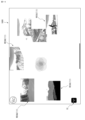
- the plurality of search result images RESULT(1) included in the search results are displayed in order on a screen 1600, for example, as shown in FIG.
- the object is controlled so that it gradually appears at an arbitrary position (for example, a random position) within the virtual space and is displayed as an animation so that it appears to float in the virtual space.
- FIG. 17 shows a state (screen 1700) a little while after the state in screen 1600 shown in FIG. 16.
- FIG. 17 shows that as a search result for "mountain", an image of a mountain in which "buffalo" is also included is also searched. This is because such images typically may include metadata such as "buffalo.”
- the unexpected keyword "buffalo" is evoked from the keyword "mountain” to the user.
- the user can perform operations such as selecting a search result image by tapping, moving it by dragging it, and flicking it out of the screen. can.
- the information communication terminal device 30 can obtain a new search query and continue the search process while displaying the search result image as an animation.
- the information communication terminal device 30 Upon receiving this, the information communication terminal device 30 refers to the metadata associated with the search result image and obtains this as a search query. In this example, it is assumed that "Buffalo" is associated with the metadata. Therefore, the information communication terminal device 30 generates a search request using "buffalo" as a search query, and transmits it to the search server 20. Thereby, the information communication terminal device 30 acquires the search result image for "Buffalo" transmitted from the search server 20, and displays the search result image RESULT (2) as shown in FIG. 18 in animation on the screen, for example. .
- the information communication terminal device 30 when the user inputs some text by hand on the screen on the touch panel 36a and draws a trajectory surrounding the text, the information communication terminal device 30 The line drawing data in the area is subjected to character recognition processing, converted to text data, and acquired as a search query, and the search results in response to the search request based on the acquired search query are acquired from the search server 20. , there is no need to switch from pen operation to keyboard or mouse operation for Internet searches, and a smooth sequence of operations can be achieved without interrupting the thought process. Therefore, the user is able to embody a seamless thinking process, and his or her thinking is stimulated and activated.
- the present embodiment instead of displaying a plurality of search result images included in search results in response to a search request in an arranged list, they are displayed in order with a visually recognizable time difference. Since the animation is displayed at any position on the screen, the user feels comfortable and is encouraged to think and activate, allowing for more creative activities.
- FIG. 19 is a flowchart showing another example of object selection processing by the information communication terminal device according to an embodiment of the present invention. This figure shows a modification of the object selection process shown in FIG. Specifically, the object selection process shown in FIG. 10 is different from the object selection process shown in FIG. It is different from
- control unit 310 selects the object corresponding to the tapped position as the object of interest (S1901).
- FIG. 20 shows an example of a screen in which the selected object is highlighted.
- a selected object 2001 ie, a "buffalo"
- a selected object 2001 ie, a "buffalo"
- the user may touch the object 2001 itself or the execution button 2002, or if the user wishes to cancel, the user may touch the search button 2002 on the screen 2000. touch an area other than the object 2001 or the cancel button 2003.
- the control unit 310 reads the metadata associated with the selected object of interest (S1904). Subsequently, the search query acquisition unit 311 sets the read metadata to the search query (S1905). Thereby, the information communication terminal device 30 can transmit a search request based on the set search query to the search server 20, and can acquire search results transmitted from the search server 20 in response.
- the display control unit 315 changes the value of a predetermined physical parameter for displaying the animation (S1903).
- the display control unit 315 changes the value of a predetermined physical parameter so that the moving speed of the object in the virtual space becomes faster.
- Changing the value of a given physical parameter may affect all objects within the virtual space. As a result, the movement of the object in the virtual space becomes faster than before selection, and it is possible to give the user the feeling that the entire screen is activated.
- the display control unit 315 may change the value of a predetermined physical parameter so that the moving speed of the object becomes faster, and then return it to the original value after a predetermined period of time has elapsed.
- control unit 310 ends the object selection process (S506 shown in FIG. 5).
- the information communication terminal device 30 enlarges the object and prompts the user to confirm whether or not to execute the search. , the screen display behavior can be brought closer to what the user expects, and usability is improved.
- steps, acts, or functions may be performed in parallel or in a different order unless the results are inconsistent.
- the steps, acts, and functions described are provided by way of example only, and some of the steps, acts, and functions may be omitted or combined with each other without departing from the spirit of the invention.
- other steps, operations, or functions may be added.
Landscapes
- Engineering & Computer Science (AREA)
- Theoretical Computer Science (AREA)
- General Engineering & Computer Science (AREA)
- Physics & Mathematics (AREA)
- General Physics & Mathematics (AREA)
- Human Computer Interaction (AREA)
- Computer Vision & Pattern Recognition (AREA)
- Multimedia (AREA)
- Data Mining & Analysis (AREA)
- Databases & Information Systems (AREA)
- Library & Information Science (AREA)
- User Interface Of Digital Computer (AREA)
Priority Applications (2)
| Application Number | Priority Date | Filing Date | Title |
|---|---|---|---|
| US18/848,049 US20250217410A1 (en) | 2022-03-18 | 2023-03-03 | Information communication terminal device suited to information search services, method for controlling display in said device, and computer program for executing said method |
| JP2024507749A JP7770064B2 (ja) | 2022-03-18 | 2023-03-03 | 情報検索サービスに適合された情報通信端末装置及び該装置における表示制御方法並びに該方法を実行するためのコンピュータプログラム |
Applications Claiming Priority (2)
| Application Number | Priority Date | Filing Date | Title |
|---|---|---|---|
| JP2022044379 | 2022-03-18 | ||
| JP2022-044379 | 2022-03-18 |
Publications (1)
| Publication Number | Publication Date |
|---|---|
| WO2023176529A1 true WO2023176529A1 (ja) | 2023-09-21 |
Family
ID=88023005
Family Applications (1)
| Application Number | Title | Priority Date | Filing Date |
|---|---|---|---|
| PCT/JP2023/008194 Ceased WO2023176529A1 (ja) | 2022-03-18 | 2023-03-03 | 情報検索サービスに適合された情報通信端末装置及び該装置における表示制御方法並びに該方法を実行するためのコンピュータプログラム |
Country Status (4)
| Country | Link |
|---|---|
| US (1) | US20250217410A1 (https=) |
| JP (1) | JP7770064B2 (https=) |
| TW (1) | TWI859768B (https=) |
| WO (1) | WO2023176529A1 (https=) |
Citations (2)
| Publication number | Priority date | Publication date | Assignee | Title |
|---|---|---|---|---|
| JP2013253961A (ja) * | 2012-05-07 | 2013-12-19 | Denso Corp | 画像表示システム |
| JP2018128850A (ja) * | 2017-02-08 | 2018-08-16 | 富士通株式会社 | 情報処理プログラム、情報処理方法および情報処理装置 |
Family Cites Families (11)
| Publication number | Priority date | Publication date | Assignee | Title |
|---|---|---|---|---|
| US8694494B2 (en) * | 2005-03-25 | 2014-04-08 | Vistaprint Schweiz Gmbh | Selecting images using associated keywords |
| US7970763B2 (en) * | 2006-02-21 | 2011-06-28 | Microsoft Corporation | Searching and indexing of photos based on ink annotations |
| US7576755B2 (en) * | 2007-02-13 | 2009-08-18 | Microsoft Corporation | Picture collage systems and methods |
| US9489403B2 (en) * | 2009-04-09 | 2016-11-08 | Nokia Technologies Oy | Method and apparatus for providing visual search engine results |
| US8631029B1 (en) * | 2010-03-26 | 2014-01-14 | A9.Com, Inc. | Evolutionary content determination and management |
| TWI544350B (zh) * | 2011-11-22 | 2016-08-01 | 財團法人資訊工業策進會 | Input method and system for searching by way of circle |
| KR102126292B1 (ko) * | 2012-11-19 | 2020-06-24 | 삼성전자주식회사 | 이동 단말에서 화면 표시 방법 및 이를 위한 이동 단말 |
| KR20160035911A (ko) * | 2014-09-24 | 2016-04-01 | 엘지전자 주식회사 | 이동단말기 및 그 제어방법 |
| US10503803B2 (en) * | 2016-11-23 | 2019-12-10 | Google Llc | Animated snippets for search results |
| US12154021B1 (en) * | 2020-03-20 | 2024-11-26 | Amazon Technologies, Inc. | Visual search and content display system |
| CN113392342A (zh) * | 2021-05-25 | 2021-09-14 | 腾讯科技(深圳)有限公司 | 搜索界面展示方法和装置、存储介质及电子设备 |
-
2023
- 2023-03-03 JP JP2024507749A patent/JP7770064B2/ja active Active
- 2023-03-03 WO PCT/JP2023/008194 patent/WO2023176529A1/ja not_active Ceased
- 2023-03-03 US US18/848,049 patent/US20250217410A1/en active Pending
- 2023-03-15 TW TW112109484A patent/TWI859768B/zh active
Patent Citations (2)
| Publication number | Priority date | Publication date | Assignee | Title |
|---|---|---|---|---|
| JP2013253961A (ja) * | 2012-05-07 | 2013-12-19 | Denso Corp | 画像表示システム |
| JP2018128850A (ja) * | 2017-02-08 | 2018-08-16 | 富士通株式会社 | 情報処理プログラム、情報処理方法および情報処理装置 |
Also Published As
| Publication number | Publication date |
|---|---|
| JPWO2023176529A1 (https=) | 2023-09-21 |
| TWI859768B (zh) | 2024-10-21 |
| US20250217410A1 (en) | 2025-07-03 |
| JP7770064B2 (ja) | 2025-11-14 |
| TW202345015A (zh) | 2023-11-16 |
Similar Documents
| Publication | Publication Date | Title |
|---|---|---|
| RU2632144C1 (ru) | Компьютерный способ создания интерфейса рекомендации контента | |
| KR101996578B1 (ko) | 언어 입력의 동적 구문 확장 | |
| KR102096513B1 (ko) | 터치 입력 커서 조작 | |
| CN1758205B (zh) | 轻击手势 | |
| KR102900880B1 (ko) | 다수의 아이템 복사 및 붙여넣기의 운영 체제 수준 관리 | |
| US10503255B2 (en) | Haptic feedback assisted text manipulation | |
| CN108958550B (zh) | 用于响应于用户接触来显示附加信息的设备、方法和图形用户界面 | |
| RU2633115C2 (ru) | Формирование поискового запроса на основе контекста | |
| US8949109B2 (en) | Device, method, and program to display, obtain, and control electronic data based on user input | |
| WO2021232930A1 (zh) | 应用分屏方法、装置、存储介质及电子设备 | |
| EP3155501B1 (en) | Accessibility detection of content properties through tactile interactions | |
| US20190258691A1 (en) | Method and system for controlling presentation of web resources in a browser window | |
| CN106095215A (zh) | 触摸输入光标操控 | |
| US9569420B2 (en) | Image processing device, information processing method, and information processing program | |
| CN105229631A (zh) | 阅读内容的收集、跟踪和呈现 | |
| WO2016025525A1 (en) | Smart scrubber in an ebook navigation interface | |
| CN103797481B (zh) | 基于手势的搜索 | |
| CN108681404A (zh) | 电子设备及其控制方法 | |
| WO2015183533A1 (en) | Device, method, and graphical user interface for navigating a content hierarchy | |
| WO2021049602A1 (ja) | デジタルインク処理システム、方法及びプログラム | |
| Park et al. | Intuitive multi-touch gestures for mobile web browsers | |
| CN103530041A (zh) | 一种拖拽处理方法、装置和终端设备 | |
| JP7770064B2 (ja) | 情報検索サービスに適合された情報通信端末装置及び該装置における表示制御方法並びに該方法を実行するためのコンピュータプログラム | |
| CN108292193B (zh) | 动画数字墨水 | |
| US20170091211A1 (en) | Method and system for generating search query suggestions |
Legal Events
| Date | Code | Title | Description |
|---|---|---|---|
| 121 | Ep: the epo has been informed by wipo that ep was designated in this application |
Ref document number: 23770486 Country of ref document: EP Kind code of ref document: A1 |
|
| DPE1 | Request for preliminary examination filed after expiration of 19th month from priority date (pct application filed from 20040101) | ||
| ENP | Entry into the national phase |
Ref document number: 2024507749 Country of ref document: JP Kind code of ref document: A |
|
| WWE | Wipo information: entry into national phase |
Ref document number: 18848049 Country of ref document: US |
|
| NENP | Non-entry into the national phase |
Ref country code: DE |
|
| 122 | Ep: pct application non-entry in european phase |
Ref document number: 23770486 Country of ref document: EP Kind code of ref document: A1 |
|
| WWP | Wipo information: published in national office |
Ref document number: 18848049 Country of ref document: US |