WO2023127366A1 - 画像ファイル変換方法、画像ファイル変換装置、及びプログラム - Google Patents
画像ファイル変換方法、画像ファイル変換装置、及びプログラム Download PDFInfo
- Publication number
- WO2023127366A1 WO2023127366A1 PCT/JP2022/043579 JP2022043579W WO2023127366A1 WO 2023127366 A1 WO2023127366 A1 WO 2023127366A1 JP 2022043579 W JP2022043579 W JP 2022043579W WO 2023127366 A1 WO2023127366 A1 WO 2023127366A1
- Authority
- WO
- WIPO (PCT)
- Prior art keywords
- image file
- information
- additional information
- added
- format
- Prior art date
- Legal status (The legal status is an assumption and is not a legal conclusion. Google has not performed a legal analysis and makes no representation as to the accuracy of the status listed.)
- Ceased
Links
Images








Classifications
-
- G—PHYSICS
- G06—COMPUTING OR CALCULATING; COUNTING
- G06F—ELECTRIC DIGITAL DATA PROCESSING
- G06F16/00—Information retrieval; Database structures therefor; File system structures therefor
- G06F16/10—File systems; File servers
- G06F16/11—File system administration, e.g. details of archiving or snapshots
- G06F16/116—Details of conversion of file system types or formats
-
- G—PHYSICS
- G06—COMPUTING OR CALCULATING; COUNTING
- G06F—ELECTRIC DIGITAL DATA PROCESSING
- G06F16/00—Information retrieval; Database structures therefor; File system structures therefor
- G06F16/10—File systems; File servers
- G06F16/14—Details of searching files based on file metadata
-
- G—PHYSICS
- G06—COMPUTING OR CALCULATING; COUNTING
- G06F—ELECTRIC DIGITAL DATA PROCESSING
- G06F16/00—Information retrieval; Database structures therefor; File system structures therefor
- G06F16/10—File systems; File servers
- G06F16/17—Details of further file system functions
-
- G—PHYSICS
- G06—COMPUTING OR CALCULATING; COUNTING
- G06F—ELECTRIC DIGITAL DATA PROCESSING
- G06F16/00—Information retrieval; Database structures therefor; File system structures therefor
- G06F16/50—Information retrieval; Database structures therefor; File system structures therefor of still image data
- G06F16/58—Retrieval characterised by using metadata, e.g. metadata not derived from the content or metadata generated manually
- G06F16/583—Retrieval characterised by using metadata, e.g. metadata not derived from the content or metadata generated manually using metadata automatically derived from the content
-
- G—PHYSICS
- G06—COMPUTING OR CALCULATING; COUNTING
- G06F—ELECTRIC DIGITAL DATA PROCESSING
- G06F16/00—Information retrieval; Database structures therefor; File system structures therefor
- G06F16/70—Information retrieval; Database structures therefor; File system structures therefor of video data
- G06F16/78—Retrieval characterised by using metadata, e.g. metadata not derived from the content or metadata generated manually
- G06F16/783—Retrieval characterised by using metadata, e.g. metadata not derived from the content or metadata generated manually using metadata automatically derived from the content
-
- G—PHYSICS
- G06—COMPUTING OR CALCULATING; COUNTING
- G06V—IMAGE OR VIDEO RECOGNITION OR UNDERSTANDING
- G06V20/00—Scenes; Scene-specific elements
- G06V20/70—Labelling scene content, e.g. deriving syntactic or semantic representations
Definitions
- the present invention relates to an image file conversion method, an image file conversion device, and a program.
- Image files containing image data are used for various purposes. For example, there are cases where training data is created from image files and machine learning is performed using the training data.
- An image file may record additional information related to image data, such as the date and time the image was taken, the location of the image taken, the conditions of the image taken, and information about the subject (for example, see Patent Document 1).
- additional information is referred to when the image file is used, and is used, for example, as an identification label (correct label) of the image data in creating teacher data.
- Whether or not additional information can be added to the image data and the contents of the additional information that can be added are determined according to the file format of the image file.
- information on the subject appearing in the image data of the image file and information on rights related to the image file such as file usage authority are important. Therefore, the presence or absence of additional information including such information may affect the subsequent use of the image file, and the image file to which the additional information is added can be used more effectively. Therefore, the file format of the image file to be used is required to be a format in which various types of additional information can be added.
- An object of the present invention is to provide an image file conversion method, an image file conversion device, and a program for this purpose.
- an image file conversion method includes an obtaining step of obtaining a first image file including image data in which a subject is recorded; determining whether or not a first format, which is a format, satisfies a condition that additional information including information on a subject or information on rights relating to a first image file can be added; and converting the first image file into a second image file whose file format is a second format to which additional information can be added, if the above conditions are not satisfied.
- the additional information about the subject may include information about the type of the subject and information about the attribute of the subject or the position of the subject in the angle of view of the image data.
- the additional information of the rights related to the first image file may include whether or not the first image file can be used or modified, or information of the right holder related to the first image file.
- the first format may have extension information.
- it may be determined whether or not the extension information in the first format is extension information that satisfies the condition. Then, if the extension information in the first format does not satisfy the conditions, the first image file may be converted into a second image file having extension information that satisfies the conditions in the converting step.
- the first format may have version information regarding the addition of additional information.
- the determination step it may be determined whether or not the version information in the first format is version information that satisfies the conditions. Then, if the version information in the first format is not version information that satisfies the conditions, the conversion step may convert the first image file into a second image file that has version information that satisfies the conditions.
- It may also include an output step of extracting frame images from the video data and outputting an image file containing the image data of the frame images. Then, when the image data of the first image file is moving image data and the first format does not satisfy the conditions, the output step may output the image file having the second format.
- the method may further include an adding step of adding additional information to the first image file, which is executed when the first format satisfies a condition. Also, the method may further include an adding step of adding additional information to the second image file.
- a determination step of determining items of additional information to be added to the image file in the addition step may be further provided. Furthermore, in the case where additional information can be added to a plurality of items, in the determination step, the mode of adding additional information to items specified by the user, the mode of adding additional information to predetermined items, and One mode may be selected from at least two modes in which additional information is added to all of a plurality of items. In this case, in the adding step, additional information may be added according to one selected mode.
- additional information about a new item set at a second time point after the first time point may be added to the image file to which the additional information was added at the first time point.
- history information relating to the addition of additional information may be added to the image file.
- the additional step for the information corresponding to the refusal information among the additional information may not be performed.
- the method may further include a setting step of setting the range of the subject to which the additional information is added in the adding step in the angle of view of the image data. Furthermore, in the setting step, the range may be set based on the in-focus position for image capturing.
- an image file conversion device is an image file conversion device comprising a processor, wherein the processor obtains a first image file including image data in which a subject is recorded. and determines whether or not the first format, which is the file format of the first image file, satisfies the condition that additional information including information on the subject or information on the rights related to the first image file can be added. and, if the first format does not satisfy the conditions, a conversion process of converting the first image file into a second image file whose file format is the second format to which additional information can be added. It is an image file conversion device configured as follows.
- a program according to one embodiment of the present invention is a computer program for causing a computer to execute each of the acquisition step, determination step, and conversion step included in the image file conversion method according to one embodiment of the present invention. It's a program.
- FIG. 4 is an explanatory diagram of an image file
- FIG. 3 is a diagram showing an example of a JPEG data structure
- FIG. 10 is an explanatory diagram of additional information about a subject
- FIG. 5 is an explanatory diagram of position information of a circular object region
- FIG. 4 is a diagram showing a hierarchical structure of additional information regarding a subject
- FIG. 10 is an explanatory diagram of additional information regarding image quality
- FIG. 5 is an explanatory diagram of history information
- 1 is a block diagram showing the configuration of an image file conversion device according to one embodiment of the present invention
- FIG. 1 is a diagram showing a schematic function of an image file conversion device according to one embodiment of the present invention
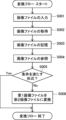
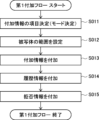
- FIG. 4 is an explanatory diagram of detailed functions of the image file conversion device according to one embodiment of the present invention. It is a figure which shows the flow of a conversion flow. It is a figure which shows the flow of a 1st addition flow. It is a figure which shows the flow of a 2nd addition flow. It is a figure which shows an example of a mode selection screen.
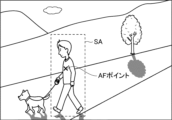
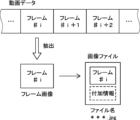
- FIG. 10 is an explanatory diagram of a setting range for an angle of view; It is explanatory drawing about an output process.
- the concept of "device” includes a single device that performs a specific function, as well as a single device that is distributed and exists independently of each other while cooperating (linked) to perform the specific function. Combinations of devices that exert
- Patent means a subject who performs a specific act, and the concept includes individuals, groups, corporations such as companies, and organizations. Intelligence) may also be included. Artificial intelligence is the realization of intellectual functions such as reasoning, prediction and judgment using hardware and software resources. Artificial intelligence algorithms are arbitrary, such as expert systems, case-based reasoning (CBR), Bayesian networks, or inclusion architectures.
- CBR case-based reasoning
- One embodiment of the present invention (hereinafter referred to as the first embodiment) relates to an image file conversion method, an image file conversion device, and a program for converting an image file.
- An image file is created by a known shooting device such as a digital camera. Specifically, a photographing device generates analog image data using a light signal received from a subject within an angle of view, and performs correction processing such as ⁇ correction on digital image data converted from the analog image data. Execute. After that, an image file is created by compressing the corrected data according to the compression standard adopted by the photographing device.
- the image file contains image data in which the subject is recorded, as shown in FIG.
- the subject of the image data is the object photographed by the photographing equipment, and exists within the angle of view in the image data.
- the subject is not limited to specific tangible objects, and includes non-tangible objects such as landscapes, scenes, patterns, and the like.
- image files created by shooting equipment the image data contained in the image files can be edited by a device in which image editing software is installed (hereinafter referred to as an editing device).
- an image file generated by a photographing device and an image file edited by an editing device are collectively referred to as an "image file”.
- Image files are used for various purposes, for example, they are sometimes used to create training data for machine learning. More specifically, the image files are annotated (selected) according to the learning purpose after being collected at a predetermined collection destination. Teacher data is created from the selected image files, and when enough teacher data for machine learning is collected, machine learning is performed using the teacher data.
- An image file has a file format according to its data structure.
- the file format has a file format corresponding to an image file creation standard (specifically, a compression standard) adopted by a photographing device or the like, and version information updated under the same format.
- an image file creation standard specifically, a compression standard
- File formats include, for example, JPEG (Joint Photographic Experts Group), Tiff (Tagged Image File Format), GIF (Graphics Interchange Format), BMP (Microsoft Windows Bitmap Image), PNG (Portable Network Graphics), and HEIF (High Efficiency Image File Format), etc.
- Formats corresponding to JPEG include JEIF (JPEG File Interchange Format), DCF (Design rule for camera file system), and the like.
- Standards for additional information such as JPEG and Tiff include Exif (Exchangeable image file format).
- the file format is reflected in the data at the beginning of the data structure.
- the JPEG format starts with the SOI (Start of Image) marker segment
- the BMP format starts with the header information BITMAP FILE HEADER.
- the file format has extension information and can be identified by the extension information.
- the extension information is character string information indicating file extensions such as “.jpg”, “.png” and “.tif”.
- the version information is information indicating the number of updates (number of updates) of the standard regarding the addition of additional information, which will be described later, and is represented by numerical values such as "ver1.0" and "ver2.2".
- the version information is written in the image file as file management information.
- Each format image file contains at least image data, as shown in FIG.
- Image data is compressed image data that indicates an image captured at the angle of view of the imaging device. More specifically, the resolution and gradation values of two colors, black and white, or three colors of RGB (Red, Green, Blue), etc., are specified for each pixel.
- the angle of view is a data processing range in which an image is displayed or drawn, and the range is defined in a two-dimensional coordinate space whose coordinate axes are two mutually orthogonal axes (see FIG. 3).
- the image data may be still image data, moving image data, or frame image data extracted from moving image data.
- the image file may include an image file in a format in which additional information can be added (written) to a predetermined area in the image file.
- FIG. 2 shows the data structure of a JPEG file conforming to the Exif standard.
- the image files of the present invention are not limited to JPEG files.
- JPEG XT Part 3 which is a kind of JPEG, marker segments "APP1" and "APP11” are provided as areas to which additional information can be added.
- “APP1” stores tag information relating to the shooting date and time, shooting location, shooting conditions, and the like of image data.
- APP11 includes a JUMBF (JPEG Universal Metadata box format) box, which is a metadata storage area, specifically, JUMBF1 and JUMBF2 boxes.
- the box of JUMBF1 has a Content Type box in which metadata is stored, and information can be written in this area in a JSON (JavaScript Object Notation) expression.
- the metadata description format is not limited to the JSON format, and may be the XML (Extensible Markup Language) format.
- JUMBF2 box information different from that in the JUMBF1 box can be described in the Content Type box. About 60,000 such JUMBF boxes can be created in a JPEG file.
- Exif ver3.0 compared to the old version Exif2.32, the area to which additional information can be added is expanded. ing.
- a plurality of hierarchies may be set in this box area, and in this case, additional information can be stored (written) by changing the information content or the degree of abstraction according to the order of the hierarchies. For example, the type of subject appearing in the image data may be written in a higher layer, and the state or attributes of the subject may be written in a lower layer.
- the box area provided in Exif 3.0 can also be applied to file formats other than JPEG, specifically Tiff and HEIF data structures, and strictly speaking, it is possible to secure an area equivalent to the above box area. is.
- the items and number of additional information that can be added to the image file change according to the file format, and additional information can be added to new items by updating the version information of the image file.
- the item of additional information means the point of view when adding additional information, or the type (category) of information in an easy-to-understand manner. The additional information will be explained later in detail.
- image files may include image files in a format to which additional information cannot be added (cannot be written), and image files in a format to which some additional information cannot be added.
- additional information can be added to new items by updating version information, etc., whereas in other file formats, there may be cases where additional information cannot be added to new items.
- an image file in a format to which various types of additional information cannot be added can be converted into an image file in a format to which additional information can be added.
- file conversion improves the utility value of the converted image file. Specifically, for example, by adding various types of additional information to an image file, it is possible to improve the accuracy of machine learning using teacher data created from the image file.
- Additional information can be added to image files in predetermined file formats such as JPEG, Tiff, and HEIF.
- the additional information will be described below with reference to FIGS.
- the additional information shown in FIGS. 1 to 8 is merely an example, and information not shown may be added as additional information, or some additional information (for example, rejection information, image quality information, etc.) may be omitted. may be
- the imaging device or editing device can create an image file in a file format to which additional information can be added
- the additional information may be automatically added to the image file by the function of the imaging device or editing device.
- the additional information may be added to the image file by the function of the image file conversion device 10, which will be described later.
- Additional information that can be added to the image file includes shooting information, right information, object information, image quality information, history information, refusal information, and the like, as shown in FIG.
- the shooting information is information related to shooting of the image data contained in the image file, and is, for example, tag information that can be described in a file format such as Exif.
- the photographing information includes information about the photographing date and time and the photographing location, and information about the photographing conditions.
- Information related to the shooting date and time and shooting location includes the season and weather at the time of shooting, the name of the shooting location, and the illuminance (amount of solar radiation) at the shooting location.
- the information on shooting conditions includes information on shooting equipment, information on exposure conditions, information on focus positions, and information on image processing.
- the information about the imaging equipment includes, for example, the manufacturer and model name of the imaging equipment, the type of light source of the imaging equipment, and the like.
- Information related to exposure conditions includes, for example, f-number, ISO sensitivity, shutter speed, and the like.
- the information about the focus position is information indicating the focus position (in-focus position) in the angle of view, and is information indicating the AF (Auto Focus) point when shooting is performed using the autofocus function.
- Information on image processing includes the name of image processing to be performed on image data, characteristics of the processing, the model of the device that performed the processing, and the area in which the processing was performed in the image data. .
- Rights information is additional information on rights related to image files, and as shown in FIG. , availability information). By adding the right holder information and the usability information to the image file as additional information, the image file can be appropriately and correctly used according to this information.
- the right holder information includes information on the copyright holder of the image data included in the image file, or information on the owner of the rights related to the subject in the image indicated by the image data (hereinafter also referred to as the subject of the image data for convenience). is included.
- the rights related to the subject of the image data include the portrait right when the subject is a person, the copyright of the subject, and the like.
- the right holder information when there is no right holder is information indicating the absence of the right holder, such as "no right holder”.
- the right holder information becomes information indicating that there is no restriction by rights, such as "rights free”.
- Usability information is, for example, whether the image file can be used to create teacher data for machine learning (more specifically, annotations for creating teacher data), or whether or not image data can be modified, including image editing. is possible or not.
- the subject information is additional information about the subject of the image data.
- the object information is added for the purpose of specifying or identifying the object of the image data. It is referred to when making a selection.
- At least one or more items are set for subject information.
- a plurality of items are set, and subject information can be added to the plurality of items.
- subject information can be added to the plurality of items.
- information about the type of subject, attributes of the subject, or the position of the subject in the angle of view of the image data can be added as subject information.
- subject information is added for each subject as shown in FIG.
- subject information may be added to all of the plurality of subjects.
- subject information is added only to subjects that are large in size among a plurality of subjects, or only to subjects that are located within a specified range (specifically, a set range described later) within the angle of view. good too.
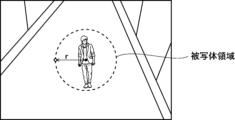
- the information about the position of the subject is, as shown in FIG. 3, coordinate information representing the position of the subject area in the two-dimensional coordinate space that defines the angle of view of the image data.
- the subject area is an area surrounding part or all of the subject, and is specified by the coordinates of a plurality of points present on the edge of the subject area.
- the shape of the subject area is not particularly limited, but may be, for example, a substantially circular shape or a rectangular shape.
- the subject area may be set by the user specifying a certain range within the angle of view, or may be automatically set using a known object detection technique or the like.
- the subject area is a rectangular area indicated by broken lines in FIG. 3, the subject is determined by the coordinates of two intersection points (points indicated by white circles and black circles in FIG. 3) located at both ends of a diagonal line at the edges of the subject area. A region is identified. In this case, the coordinates of the specified two points become the positional information of the subject area.
- the coordinates of the specified two points become the positional information of the subject area.
- the subject area may be an area specified by the coordinates of a base point within the subject area and the distance from the base point.
- the subject area is defined by the coordinates of the center (base point) of the subject area and the distance from the base point to the edge of the subject area (that is, the radius r). identified.
- the coordinates of the center, which is the base point, and the radius, which is the distance from the base point serve as the position information of the subject area.
- the position of a rectangular subject area may be represented by the coordinates of the center of the area and the distance from the center to the vertex in each coordinate axis direction.
- Information about the type of subject is information indicating the type (type) of the subject determined based on the feature amount of the subject in the image data, and corresponds to, for example, a common noun or a proper noun representing the subject.
- the information about the attribute of the subject is information indicating the properties, characteristics, state, characteristics, etc. of the subject specified based on the feature amount of the subject in the image data. Attributes include, for example, the gender, age, facial expression, appearance characteristics such as color and size of the subject (person), the presence or absence of scratches, etc., the degree of growth, the degree of damage or deterioration, and the movement or behavior of the subject. Content, as well as events in which the subject participates, etc. may be included.
- the information about the attributes of the subject may include information that cannot be identified (determined) only by the appearance (appearance) of the subject, for example, the presence or absence of an abnormality such as illness, or information regarding quality such as sugar content. .
- Such information can be determined from the feature amount of the subject in the image data. Specifically, the correspondence relationship between the feature amount of the subject and the above information is learned in advance, and the above information is estimated from the correspondence relationship. You may
- a plurality of pieces of additional information may be added to one subject by changing the degree of abstraction or expression of the information. That is, for a subject to which additional information has been added for at least one item of the subject information, related information related to the additional information may be added.
- more detailed type (subordinate concept) variety information such as “Amaou”
- Information representing the same type of subject in another language or another expression (for example, dialect), for example, "Strawberry” written in English may be added as related information.
- additional information relating to attributes of the subject information that is more specific to the additional information or information derived from the additional information may be added as related information. For example, as shown in FIG. 5, when the additional information “ripeness” indicating the degree of growth of strawberries is added, the related information (derivative information) "preferably ready to eat” may be added. Further, when the additional information "good” indicating the appearance of the strawberry is added, the related information (concrete information) "no disease” may be added.
- the image quality information is information about the image quality of the subject in the image data, and as shown in FIG. 6, is information about resolution, noise, brightness, etc. in the subject area.
- the information on the sense of resolution includes the presence or absence and degree of blurring or blurring, resolution, or grades or ranks corresponding to these.
- the noise-related information includes the S/N value, the presence or absence of white noise, and the grade or rank corresponding to these.
- Information on brightness corresponds to a luminance value, a score indicating brightness, or a grade or rank corresponding to these.
- the image quality information may be information indicating evaluation results (sensory evaluation results) when resolution, noise, brightness, and the like are evaluated based on human sensibility.
- image quality information is added for each subject as shown in FIG.
- image quality information may be added for all of the plurality of subjects.
- image quality information may be added to only some subjects (for example, subjects to which subject information is added) among a plurality of subjects.
- image quality information is reflected in the reliability (likelihood) of the subject in the image data, and the better the image quality, the higher the reliability of the image data. Therefore, image quality information can affect the accuracy of machine learning using teacher data created from image files.
- the history information is additional information indicating the date and time when the information was added and the file format of the image file (specifically, version information) at that time as a history of adding additional information (strictly speaking, additional information excluding history information).
- history information may also include information about devices or devices to which additional information has been added.
- the history information may be added individually to each piece of additional information that has been added to the image file. Thereby, it is possible to easily grasp when each piece of additional information was added.
- the case where history information is added to each piece of additional information is not limited, and a plurality of pieces of additional information added at the same point in time may be grouped together and a single piece of history information may be added to that group. . However, even in that case, it is preferable to clarify the correspondence between each piece of additional information and its addition history (that is, the date and time when information was added and the file format at that time).
- the history information may be written together with the information (subject information) about the specific type or attribute of the subject as shown in FIG.
- the refusal information is additional information for refusing to change the additional information.
- the refusal information is added for the purpose of preventing falsification of the image file, and as shown in FIG. 8, is associated with the information that is unchangeable among the additional information added to the image file.
- the refusal information is added to the image file, it is prohibited to change the information corresponding to the refusal information among the additional information (more precisely, the additional information excluding the refusal information) included in the image file.
- the modification of the additional information includes not only rewriting the additional information itself, but also deleting the additional information and replacing it with other additional information, and adding new additional information such as the above-mentioned related information. It also includes doing
- refusal information in association with additional information is not limited, and refusal information may be added to an image file as a target of change refusal. In that case, modification of the entire image file including modification of image data and additional information is restricted, and for example, conversion to an image file of a different file format is prohibited.
- the additional information described so far is an example of additional information when the image data included in the image file is still image data, for example.
- additional information related to audio in the moving image may be included. good.
- the additional information related to voice includes, for example, information related to the speaker, character information in which voice is verbalized, or information related to the type of voice (that is, the type of sound source).
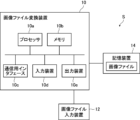
- the image file conversion device (hereinafter referred to as image file conversion device 10) according to the first embodiment constitutes an image file management system S together with the image file input device 12, as shown in FIG.
- image file management system S image files are created, the image files are converted as necessary, and the created or converted image files are accumulated as a database.
- the image files in the database are sent to a learning device (not shown), and the learning device selects the image files according to the learning purpose by annotation. After that, in the learning device, teacher data is created from the selected image files, and machine learning is performed using the created teacher data.
- the image file input device 12 is a device that inputs an image file to the image file conversion device 10, and is, for example, a photographing device or an editing device.
- the image file input device 12 includes a device owned by an individual user, specifically a digital camera, a communication terminal equipped with a camera, a PC (Personal Computer) having an image editing function, and the like.
- the image file input device 12 may also include a server computer or the like that accumulates a large number of image files, receives requests from client terminals, and provides image files in response to the requests.
- the image file conversion device 10 has a function of converting the image file input from the image file input device 12 as necessary, a function of adding additional information to the image file, and the like.
- the image file conversion device 10 is implemented by a processor and a program executable by the processor, and is configured by, for example, a general-purpose computer.
- the computer constituting the image file conversion device 10 may be a client terminal owned by an individual user, more specifically, a user who uses the image file input device 12 .
- the image file conversion device 10 is preferably connected to the image file input device 12 in a wired or wireless manner so as to be communicable.
- the image file conversion device 10 may be provided with an image data editing function, that is, image editing software may be installed.
- the computer constituting the image file conversion apparatus 10 may be, for example, a server computer for cloud services.
- the image file conversion device 10 is preferably connected to the image file input device 12 via an external communication network such as the Internet or a mobile communication network so as to be able to communicate therewith.
- the computer that constitutes the image file conversion device 10 includes a processor 10a, a memory 10b, a communication interface 10c, an input device 10d and an output device 10e, as shown in FIG.
- the processor 10a is configured by, for example, a CPU (Central Processing Unit), a GPU (Graphics Processing Unit), a DSP (Digital Signal Processor), or a TPU (Tensor Processing Unit).
- the memory 10b is composed of, for example, a semiconductor memory such as a ROM (Read Only Memory) and a RAM (Random Access Memory).
- the communication interface 10c is configured by, for example, a network interface card or a communication interface board.
- the input device 10d is configured by, for example, a keyboard, mouse, touch panel, or the like.
- the output device 10e is composed of, for example, a display and a speaker.
- a program (hereinafter referred to as a file conversion program) for executing a series of information processing related to image file conversion, addition of additional information, etc. is installed in the computer that constitutes the image file conversion device 10 .
- the file conversion program is a program for causing a computer to implement the image file conversion method of the present invention.
- the processor 10a reads out and executes the file conversion program, so that the computer including the processor 10a functions as the image file conversion device of the present invention.
- the file conversion program may be obtained by reading it from a computer-readable recording medium, or may be obtained by receiving (downloading) it through a communication network such as the Internet or an intranet.
- the image file conversion device 10 receives image files input from the image file input device 12 and stores them in the storage device 14 .
- a plurality of image files are stored in the storage device 14 as a database, and the image file conversion device 10 is configured to be able to read out the image files stored in the storage device 14 .
- Image files stored in the storage device 14 may include image files converted by the image file conversion device 10 .
- the storage device 14 is, for example, a known storage device, and may be installed in the image file conversion device 10, or may be stored in a third computer (for example, an external server) that can communicate with the image file conversion device 10. may be provided.
- the image file conversion device 10 determines whether the file format of the image file input from the image file input device 12 satisfies the conditions for determination.
- the image file to be determined is called "first image file f1”
- the file format of the first image file f1 is called "first format”.
- a condition for determination is that the first format is a file format to which additional information including subject information or right information can be added.
- File formats satisfying this condition include, for example, JPEG, Tiff, and HEIF corresponding to versions (specifically, Exif 3.0, etc.) to which subject information or rights information can be added.
- file formats that do not satisfy the file conversion conditions include PNG, GIF, BMP, and older versions of JPEG, Tiff, and HEIF that do not support versions capable of adding subject information or rights information. .
- additional information including subject information or rights information can be added means that at least one of subject information and rights information can be added, and both additional information may be added.
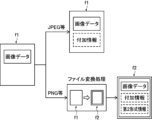
- the image file conversion device 10 can add additional information including subject information or right information to the first image file f1, as shown in FIG. .
- additional information including subject information or right information may already be added to the first image file f1.
- a device other than the image file conversion device 10, for example, the image file input device 12 may be a device that adds additional information to an image file having a file format that satisfies the conditions for determination.
- the image file conversion device 10 converts the first image file f1 into the second image file f2 as shown in FIG.
- the second image file f2 is an image file in a file format (hereinafter referred to as second format) to which additional information including subject information or rights information can be added. After the file conversion, the image file conversion device 10 adds additional information including subject information or right information to the second image file f2.
- the image file conversion device 10 adds the second format information to the converted second image file f2, as shown in FIG.
- the second format information is the file format of the second image file f2, that is, information about the second format. Specifically, a flag indicating that the file format is capable of adding additional information including subject information or rights information. Information.
- the functions of the image file conversion device 10 will be described in detail with reference to FIG.
- the image file conversion device 10 has an acquisition section 21 , a reference section 22 , a determination section 23 , a conversion section 24 , an addition section 25 , a determination section 26 , a setting section 27 and an output section 28 .
- These functional units are realized by the cooperation of computer hardware equipment constituting the image file conversion device 10 and software including the above-described file conversion program.
- the acquisition unit 21 executes acquisition processing, and in the acquisition processing, receives an image file input from the image file input device 12 and acquires the image file.
- An image file input from the image file input device 12 is subject to determination by the determination unit 23, and specifically corresponds to the above-described first image file f1.
- the image file (first image file f1) acquired by the acquisition unit 21 is stored in the storage device 14 and accumulated as a database.
- the reference unit 22 executes reference processing, and in the reference processing, refers to the image file accumulated in the storage device 14 as the first image file f1. At this time, the reference unit 22 determines whether the image file is the second image file f2 based on the presence or absence of the second format information, and excludes the second image file f2 from the reference target.
- the determination unit 23 executes determination processing, in which it is determined whether or not the first format, which is the file format of the first image file f1 referenced by the reference unit 22, satisfies the conditions for determination.
- the determination unit 23 may directly determine whether the first format is a file format to which additional information including subject information or rights information can be added. For example, when flag information indicating whether or not additional information can be added is set for the first format, the determination unit 23 may determine whether the conditions are met based on the flag information.
- the determination unit 23 may indirectly determine whether the first format is a file format to which various types of additional information can be added, based on the extension information or version information of the first format. That is, in the determination process, it is determined whether the extension information in the first format described in the header of each file or the like is the extension information that satisfies the conditions for determination, or whether the version information in the first format is It may be determined whether or not the version information (for example, Exif version information) satisfies the conditions for use. According to determination based on extension information or version information in this way, it is possible to more easily determine whether or not the first format is a file format to which various types of additional information can be added.
- the conversion unit 24 executes conversion processing when the first format does not satisfy the conditions for determination. 2 format into a second image file f2.
- the second format is a file format to which additional information including subject information or rights information can be added, and has extension information or version information to which the additional information can be added.
- the conversion unit 24 converts the first image file f1 to the second image file f2 having extension information that satisfies the conditions for determination. Convert to Alternatively, if the version information in the first format is not version information that satisfies the conditions for determination, the conversion unit 24 converts the first image file f1 into a second image file f2 having version information that satisfies the conditions for determination. .
- the conversion unit 24 adds the above-described second format information to the converted second image file f2. This makes it easy to determine that the image file to which the second format information is added is the second image file f2, that is, that the file format is the second format to which additional information including subject information or right information can be added. can be recognized.
- the addition unit 25 executes addition processing, and in the addition processing, adds additional information to the image file. More specifically, when the first format satisfies the conditions for determination, the addition unit 25 performs addition processing for adding additional information to the first image file f1. On the other hand, when the first image file f1 is converted into the second image file f2 because the first format does not satisfy the conditions for determination, the addition unit 25 adds additional information to the second image file f2. Execute the process. As a result, various types of additional information including object information or right information can be added to each of the image files stored in the storage device 14, thereby increasing the utility value of the image file.
- the additional information is automatically added by the function of the image file conversion apparatus 10 having the addition unit 25. Specifically, the feature amount of the subject is calculated from the image data, and the additional information corresponding to the calculated feature amount is added. added.
- the present invention is not limited to this, and the user of the image file conversion apparatus 10 may perform an input operation regarding the subject, and character information input by the operation may be added as the additional information.
- the adding unit 25 adds additional information to the image file to which the additional information was added at the first time, for the new item set at the second time after the first time.
- the first point in time is the point at which additional information is added to the image file, more precisely, the point at which additional information relating to items other than new items is added. applicable to the time of execution.
- the adding unit 25 adds the new item to the image file to which the additional information has already been added. Add additional information focusing on As a result, the amount of information added to the image file is increased, and the utility value of the image file can be further enhanced.
- the adding unit 25 when adding additional information to an image file, adds history information related to the addition to the image file as additional information.
- the addition unit 25 stores the time when the additional information was added and the version information at that time as history information. Append. This makes it possible to easily identify when each piece of additional information was added.
- the adding unit 25 adds refusal information for refusing modification of the additional information to the image file.
- the refusal information is added, the additional information for changing the added information or adding new information is not executed for the additional information corresponding to the refusal information.
- the additional information corresponding to the rejection information can be protected by avoiding falsification or the like.
- the determination unit 26 executes determination processing, in which items of additional information to be added to the image file by the addition unit 25 are determined.
- additional information can be added for a plurality of items.
- additional information can be added for items such as type, attribute, position, and related items.
- the determination unit 26 determines some or all of the plurality of items as items of additional information to be added to the image file.
- the first mode is a mode in which additional information is added to items specified by the user (hereinafter referred to as item specification mode).
- the second mode is a mode (hereinafter referred to as auto mode) in which the optimum item is automatically selected from predetermined items such as the items in the initial settings or recommended settings, and additional information is added.
- a third mode is a mode in which additional information is added to all of a plurality of items (hereinafter referred to as all designation mode).
- the determination unit 26 determines items of additional information to be added to the image file according to the selected mode.
- the user can set the information amount (additional information amount) of the image file based on the user's intention by determining the items of the additional information to be added to the image file. Further, in the first embodiment, by selecting one of the above three modes, the number and types of items to which additional information is added can be easily determined. Note that the selectable modes are not limited to the above three modes, and other modes may be added. Moreover, it is sufficient that at least two modes can be selected from the above three modes. Alternatively, there may be only one mode for determining the items of the additional information, and the items may be determined according to the mode.
- an additional mode can be selected in addition to the above three modes.
- the add mode is a mode for adding related information related to added additional information to an image file to which additional information has been added, and can be selected even when any one of the above three modes is selected.
- related information see FIG. 5
- learning accuracy improves as the amount of information in the image file increases.
- the setting unit 27 executes setting processing, and in the setting processing, sets the range of the subject to which the additional information is added by the addition unit 25 (hereinafter also referred to as the setting range) in the angle of view of the image data.
- the setting range the range of the subject to which the additional information is added by the addition unit 25
- additional information is added only to subjects existing within the set range within the angle of view.
- the method of setting the setting range is not particularly limited, but for example, the setting range may be set based on the user's specifying operation of the image file conversion device 10 . Further, the setting range may be set based on the focal position of image capturing, more specifically, the AF point, in the angle of view.
- the AF point may be specified from the shooting condition information included in the image file, or may be specified by analyzing the image data. Then, a range near a point specified by the user or a range near the AF point may be set as a setting range, and a subject located in the range may be set as a target to which additional information is added. Also, in the image data, the range near the AF point is in focus, so the image is clear. Therefore, by setting the vicinity of the AF point as the setting range, it is possible to improve the reliability (accuracy) of the additional information added to the subject within the setting range.
- the setting unit 27 may set a priority order for each subject.
- N is an integer equal to or greater than 1
- subjects in descending order of priority as objects to which additional information is added.
- the order of priority may be determined according to the type of subject, the display size (size) of the subject at the angle of view, the distance from the center of the setting range, or the like.
- the output unit 28 executes output processing, in which frame images are extracted from the moving image data, and an image file containing image data of the extracted frame images is output.
- the output process is executed, for example, when the image data of the first image file f1 is moving image data and the first format does not satisfy the conditions for determination.
- the output unit 28 extracts frame images from the moving image data included in the first image file f1, and outputs an image file in the second format as the image file of the frame images. do.
- various types of additional information can be added to image files containing frame image data extracted from moving image data. As a result, it is possible to increase the utility value of the image file containing the data of the frame image.
- the processing flow by the image file conversion device 10 includes the conversion flow shown in FIG. 12, the first addition flow shown in FIG. 13, and the second addition flow shown in FIG. 14, and these processes are executed in the above order. . Each processing flow will be described below.
- Each step (process) in the conversion flow is performed by the processor 10 a of the image file conversion device 10 . That is, the processor 10a reads out the file conversion program and executes a series of processes related to the conversion flow defined in this program.
- the conversion flow starts when an image file is input from the image file input device 12 to the image file conversion device 10 (S001).
- the processor 10a functions as the acquisition unit 21 to execute acquisition processing, and specifically, receives an image file input and acquires the image file (S002).
- This step S002 corresponds to the obtaining step, and the obtained image file corresponds to the first image file f1.
- the image data included in the acquired first image file f1 may be still image data or moving image data.
- image data included in the first image file f1 is assumed to be still image data unless otherwise specified.
- the acquired first image file f1 is stored in the storage device 14 and accumulated as a database (S003).
- the processor 10a functions as the reference unit 22 and refers to the first image file f1 stored in the storage device 14 (S004).
- This step S004 corresponds to a reference step, and in step S004 the processor 10a identifies the file format of the first image file f1 to be referred to, that is, the first format. More specifically, the processor 10a identifies, for example, extension information or version information of the first format.
- the processor 10a functions as the determination unit 23 and determines whether or not the identified first format satisfies the conditions for determination (S005).
- This step S005 corresponds to a determination step.
- the processor 10a indirectly determines whether the first format is a file format to which additional information including subject information or rights information can be added based on the extension information or version information of the first format. do.
- the processor 10a may directly determine whether the first format is a file format to which additional information including subject information or rights information can be added.
- the processor 10a functions as the conversion unit 24 and converts the first image file f1 into a second image file f2 whose file format is the second format ( S006).
- This step S006 corresponds to the conversion step, and the following first addition flow is performed on the converted second image file f2.
- the conversion step S006 is omitted. Further, the following first addition flow is performed for the first image file f1 that satisfies the conditions for determination.
- the processor 10a serves as the output unit 28 and executes output processing.
- a process in which the processor 10a executes the output process corresponds to an output process.
- the processor 10a extracts frame images from the moving image data and outputs an image file containing the image data of the frame images.
- the file format of the image file output at this time is the second format, that is, it has extension information or version information to which subject information or rights information can be added. Further, it is preferable to add additional information including subject information or right holder information to an image file to be output, and output the image file.
- the first addition flow is started after the conversion flow ends, or is started in response to a start request from the user using the image file conversion device 10 .
- Each step (process) of the first addition flow is performed by the processor 10 a of the image file conversion device 10 . That is, the processor 10a reads out the file conversion program and executes a series of processes related to the first additional flow defined in this program.
- the processor 10a determines items of additional information to be added to the image file in the subsequent step S013 (S011).
- This step S011 corresponds to a determination step.
- the processor 10a displays the mode selection screen shown in FIG. 15 on the display, which is the output device 10e.
- the user of the image file conversion device 10 selects one of the item designation mode, the default item mode, and the all designation mode through the screen of the display, and operates the input device 10d to input the mode selection result.
- the processor 10a accepts user input, specifies the mode selected by the user, and determines items corresponding to the specified mode as items of additional information.
- additional modes are displayed in a selectable manner on the mode selection screen.
- the user selects one mode from the above three modes, selects whether or not the additional mode is necessary, and inputs the selection result through the input device 10d.
- the processor 10a accepts the user's input and specifies the result of the user's selection as to whether or not the additional mode is necessary.
- the processor 10a functions as the setting unit 27, and sets the range of the subject to which the additional information is added, that is, the setting range, in the angle of view of the image data included in the image file (S012).
- This step S012 corresponds to a setting step.
- the processor 10a may set the vicinity of the specified location as the setting range based on the user's specifying operation.
- the processor 10a sets the range near the AF point (the range labeled SA in FIG. 16) as the set range based on the AF point (focus position) for image capturing.
- the processor 10a sets a priority order for each subject, and adds additional information to the top N subjects from the one with the highest priority. You may set it as a target.
- the setting step S012 may be an arbitrary step, for example, it is performed only when there is an instruction from the user, and if there is no instruction from the user, the setting step S012 is omitted.
- the processor 10a functions as the adding unit 25 and adds additional information to the image file (S013).
- This step S013 corresponds to an additional step.
- the image file to which the additional information is added in the adding step S013 is the first image file f1 that satisfies the conditions for determination or the second image file f2 converted from the first image file f1 in the conversion flow.
- step S013 additional information including subject information or right information is added to the image file.
- the processor 10a adds additional information about the item determined in step S011, that is, adds additional information about the item corresponding to the mode selected by the user. For example, when the item designation mode is selected, the processor 10a adds additional information regarding the item designated by the user. In addition, when the default item mode is selected, the processor 10a adds additional information regarding predetermined items. Also, when the all designation mode is selected, the processor 10a adds additional information regarding each item to all of the multiple items that can be added at this time.
- the additional information added in step S012 may include shooting information or image quality information. Further, when the image data of the image file to which the additional information is added is the image data of the frame image extracted from the moving image data, the additional information regarding the sound may be further added.
- the processor 10a selects a subject to which the additional information (subject information) is added at the angle of view of the image data included in the image file as a subject within the setting range. limited to
- Target items are items to which related information can be added. For example, if the target item is the type of subject, information on the subordinate concept of the type (specifically, breed, etc.), or information expressing the type in another language or expression is added as related information. be done. Further, when the target item is an attribute of a subject, derived information about the attribute or specific information about the attribute is added as related information.
- the processor 10a further adds the history information as one of the additional information to the image file to which the additional information (more precisely, the additional information excluding the history information) is added (S014).
- the history information indicates when the additional information was added (that is, when the adding step S013 was performed), and also indicates the version information of the image file at the time when the additional information was added.
- the processor 10a may add history information to each piece of additional information added to the image file. Alternatively, for a plurality of pieces of additional information added to the same image file at the same timing, the plurality of pieces of additional information may be grouped together, and a single piece of history information may be added to the group.
- the processor 10a further adds refusal information for the additional information whose change is restricted to the image file as one of the additional information (S015).
- the addition step S013 is not performed for the information corresponding to the refusal information. That is, the additional information corresponding to the rejection information is not modified or deleted after the information is added, and new additional information (for example, related information, etc.) is not added. Note that if there is no additional information that is prohibited from being changed, that is, if there is no additional information to which refusal information is added, step S015 is omitted.
- the series of steps S011 to S015 described above are performed on the image files stored in the storage device .
- the additional information is added in the current first addition flow to the image files stored (added) in the storage device 14 between the previous first addition flow and the current first addition flow. be.
- the second additional flow is performed after the first additional flow is performed (that is, the first time). More specifically, at a second point in time after the first point in time, when it becomes possible to add additional information to an item that was not included at the first point in time, the second addition flow is executed. be.
- Each step (process) of the second addition flow is performed by the processor 10a of the image file conversion device 10.
- the processor 10a reads out the file conversion program and executes a series of processes related to the second addition flow.
- the second additional flow is started when a new item is set as an additional information item (S021).
- the processor 10a functions as the addition unit 25 and executes addition processing for adding additional information on the new item to the image file (S022).
- the additional information is added (added) to the image file to which the additional information has already been added in the first addition flow, focusing on new items.
- the file format of the image file is updated (updated) to version information to which the additional information can be added. That is, in step S022, the processor 10a converts the image file stored in the storage device 14 into an image file in a file format to which additional information can be added for the new item.
- the processor 10a adds the history information of the additional information added in step S022 to the image file as additional information (S023). Further, when prohibiting the change of the additional information added in step S022, the processor 10a further adds refusal information to the image file in association with the additional information (S024).
- the series of steps S021 to S024 described above are performed on the image files stored in the storage device .
- the image file to which the rejection information has been added in the first addition flow if the information corresponding to the rejection information among the additional information added to the image file is related to the above new item, the Implementation is omitted.
- the addition process is executed. .
- additional information is automatically added to these image files.
- the present invention is not limited to this, and the user may specify whether or not to add additional information.
- a mode in which additional information is not added to the image file hereinafter referred to as non-addition mode
- the additional information not added to the image file may be written to another management file. In this case, the additional information may be stored in the management file in association with the image file to which the additional information should be originally added.
- the additional information about the new item cannot be added (added) to the above image file because the image file has refusal information added, the additional information can be written to another management file in the same way as above. good.
- the processors provided in the image file conversion device of the present invention include various processors.
- Various processors include, for example, a CPU, which is a general-purpose processor that executes software (programs) and functions as various processing units.
- the various processors include a PLD (Programmable Logic Device) which is a processor whose circuit configuration can be changed after manufacture, such as an FPGA (Field Programmable Gate Array).
- the various processors include a dedicated electric circuit, which is a processor having a circuit configuration specially designed to perform specific processing, such as ASIC (Application Specific Integrated Circuit).
- one functional unit of the image file conversion apparatus of the present invention may be configured by one of the various processors described above, or may be a combination of two or more processors of the same or different types. , or a combination of an FPGA and a CPU.
- the plurality of functional units included in the image file conversion apparatus of the present invention may be configured by one of various processors, or two or more of the plurality of functional units may be collectively configured by one processor.
- one or more CPUs and software may be combined to constitute one processor, and this processor may function as a plurality of functional units provided in the image file conversion device of the present invention. .
- a processor that realizes the functions of the entire system including multiple functional units in the image file conversion device of the present invention with one IC (Integrated Circuit) chip. It may be used in any form. Further, the hardware configuration of the various processors described above may be an electric circuit (circuitry) in which circuit elements such as semiconductor elements are combined.
Landscapes
- Engineering & Computer Science (AREA)
- Theoretical Computer Science (AREA)
- Physics & Mathematics (AREA)
- General Physics & Mathematics (AREA)
- Data Mining & Analysis (AREA)
- Databases & Information Systems (AREA)
- General Engineering & Computer Science (AREA)
- Library & Information Science (AREA)
- Multimedia (AREA)
- Computational Linguistics (AREA)
- Information Retrieval, Db Structures And Fs Structures Therefor (AREA)
- Television Signal Processing For Recording (AREA)
- Processing Or Creating Images (AREA)
Abstract
Description
一方、画像ファイルを利用する上では、画像ファイルの画像データに映る被写体についての情報、及び、ファイル利用権限等のような画像ファイルに関わる権利の情報が重要となる。したがって、これらの情報を含む付加情報の有無は、その後の画像ファイルの利用に影響を及ぼす可能性があり、上記の付加情報が付加された画像ファイルは、より有効に利用できることになる。そのため、利用対象とする画像ファイルのファイル形式は、種々の付加情報が付加可能な形式であることが求められる。
また、第1画像ファイルに関わる権利の付加情報は、第1画像ファイルの利用又は改変の可否、あるいは、第1画像ファイルに関する権利者の情報を含んでもよい。
また、付加情報を第2画像ファイルに付加する付加工程をさらに備えてもよい。
さらにまた、複数の項目について付加情報が付加可能である場合において、決定工程では、ユーザによって指定された項目について付加情報を付加するモード、予め決められた項目について付加情報を付加するモード、及び、複数の項目のすべてについて付加情報を付加するモードのうち、少なくとも2つのモードの中から1つのモードが選択されてもよい。この場合、付加工程では、選択された1つのモードに従って付加情報を付加するとよい。
さらに、設定工程では、画像撮影の合焦位置に基づいて範囲を設定してもよい。
本発明の一つの実施形態(以下、第1実施形態)は、画像ファイルを変換する画像ファイル変換方法、画像ファイル変換装置、及びプログラムに関する。
なお、Exif3.0に設けられたボックス領域は、JPEG以外のファイルフォーマット、具体的にはTiff及びHEIF等のデータ構造にも適用でき、厳密には、上記のボックス領域に相当する領域が確保可能である。
なお、付加情報については、後に詳しく説明する。
JPEG、Tiff及びHEIF等のような所定のファイル形式の画像ファイルには、付加情報を付加することが可能である。以下、付加情報について、図1~8を参照しながら説明する。なお、図1~8に示す付加情報は、一例に過ぎず、図示していない情報が付加情報として加わってもよく、あるいは、一部の付加情報(例えば、拒否情報又は画質情報等)が省略されてもよい。
画像ファイルに付加可能な付加情報には、図1に示すように、撮影情報、権利情報、被写体情報、画質情報、履歴情報及び拒否情報等が含まれる。
なお、矩形状である被写体領域の位置は、その領域の中心の座標、及び各座標軸方向における中心から頂点までの距離によって表されてもよい。
被写体の属性に関する情報は、画像データにおける被写体の特徴量に基づいて特定される被写体の性質、特徴、状態及び特性等を示す情報である。属性には、例えば、被写体(人)の性別、年齢、表情、色及びサイズ等の外観上の特徴、傷等の有無、成長度合い、損傷又は劣化度合い、被写体が実施している動作又は行動の内容、並びに、被写体が参加するイベント等が含まれ得る。
第1実施形態に係る画像ファイル変換装置(以下、画像ファイル変換装置10)は、図9に示すように、画像ファイル入力装置12とともに画像ファイル管理システムSを構成する。画像ファイル管理システムSでは、画像ファイルが作成され、必要に応じて画像ファイルが変換され、作成又は変換された画像ファイルがデータベースとして蓄積される。
また、画像ファイル変換装置10を構成するコンピュータは、例えば、クラウドサービス用のサーバコンピュータ等でもよい。この場合、画像ファイル変換装置10は、インターネット又はモバイル通信ネット等の外部通信ネットワークを介して画像ファイル入力装置12と通信可能に接続されるとよい。
メモリ10bは、例えば、ROM(Read Only Memory)及びRAM(Random Access Memory)等の半導体メモリ等によって構成される。
通信用インタフェース10cは、例えば、ネットワークインタフェースカード又は通信インタフェースボード等によって構成される。
入力装置10dは、例えば、キーボード、マウス又はタッチパネル等によって構成される。
出力装置10eは、例えば、ディスプレイ及びスピーカ等によって構成される。
なお、記憶装置14は、例えば、公知のストレージ装置からなり、画像ファイル変換装置10に搭載されてもよく、又は、画像ファイル変換装置10と通信可能な第三のコンピュータ(例えば、外部サーバ)に設けられてもよい。
画像ファイル変換装置10は、画像ファイル入力装置12から入力された画像ファイルのファイル形式が判定用の条件を満たすか否かを判定する。ここで、判定対象の画像ファイルを「第1画像ファイルf1」と呼ぶこととし、第1画像ファイルf1のファイル形式を「第1形式」と呼ぶこととする。
なお、「被写体情報又は権利情報を含む付加情報を付加可能」とは、被写体情報及び権利情報のうちの少なくとも一方が付加可能であればよく、両方の付加情報が付加可能であってもよい。
以上のように、バージョン情報の更新等により新たな項目について付加情報を付加することが可能となる場合、付加部25は、既に付加情報が付加された画像ファイルに対して、上記の新たな項目に絞って付加情報を付加する。これにより、画像ファイルに付加される情報量が増え、画像ファイルの利用価値を一層高めることができる。
なお、選択可能なモードは、上記3つのモードに限定されず、別のモードがさらに追加されてもよい。また、上記3つのモードのうち、少なくとも2つのモードが選択可能であればよい。あるいは、付加情報の項目を決めるモードが、一つのみであり、そのモードに則った方法で項目が決められてもよい。
また、画像データにおいて、AFポイント付近の範囲は、ピントが合っているので鮮明な画像となる。そのため、AFポイント付近を設定範囲に設定すれば、設定範囲内の被写体について付加される付加情報の信頼性(正確性)を向上させることができる。
以上のように、第1実施形態では、動画データから抽出されたフレーム画像のデータを含む画像ファイルについても、種々の付加情報を付加できる。これにより、フレーム画像のデータを含む画像ファイルの利用価値を高めることができる。
次に、本発明の第1実施形態に係る画像ファイル変換装置10を用いた処理フローについて説明する。以下に説明する処理フローでは、本発明の画像ファイル変換方法が用いられる。つまり、以下に説明する処理フロー中の各ステップは、本発明の画像ファイル変換方法の構成要素に相当する。
なお、以下に説明する処理の流れは、あくまでも一例であり、本発明の趣旨を逸脱しない範囲において不要なステップを削除したり、新たなステップを追加したり、ステップの実行順序を入れ替えてもよい。
変換フローにおける各ステップ(工程)は、画像ファイル変換装置10のプロセッサ10aにより実施される。つまり、プロセッサ10aは、ファイル変換プログラムを読み出し、このプログラムに規定された変換フローに係る一連の処理を実行する。
第1付加フローは、変換フローの終了後に開始され、あるいは、画像ファイル変換装置10を利用するユーザの開始要求に応じて開始される。第1付加フローの各ステップ(工程)は、画像ファイル変換装置10のプロセッサ10aにより実施される。つまり、プロセッサ10aは、ファイル変換プログラムを読み出し、このプログラムに規定された第1付加フローに係る一連の処理を実行する。
また、設定範囲内に複数の被写体が存在する場合、プロセッサ10aは、それぞれの被写体に対して優先順位を設定し、優先順位が高い方から上位N番目までの被写体を、付加情報が付加される対象として設定してもよい。
また、付加情報が付加される画像ファイルの画像データが、動画データから抽出されたフレーム画像の画像データである場合、音声に関する付加情報をさらに付加してもよい。
なお、プロセッサ10aは、画像ファイルに履歴情報を付加する際、画像ファイルに付加された個々の付加情報について、履歴情報を付加情報毎に付加してもよい。あるいは、同じタイミングで同一の画像ファイルに付加された複数の付加情報については、複数の付加情報を一グループとしてまとめ、そのグループに対して単一の履歴情報が付加されてもよい。
なお、変更が禁止される付加情報が存在しない場合、つまり、拒否情報が付加される付加情報がない場合には、工程S015の実施は省略される。
第2付加フローは、第1付加フローの実施時点(すなわち、第1時点)よりも後に実施される。より詳しく説明すると、第1時点よりも後の第2時点にて、第1時点では含まれていなかった項目について付加情報が新たに付加できるようになった場合に、第2付加フローが実施される。
以上までに説明してきた実施形態は、本発明の画像ファイル変換方法、画像ファイル変換装置、及びプログラムを分かり易く説明するための具体例であり、あくまでも一例に過ぎず、その他の実施形態も考えられ得る。
また、各種のプロセッサには、FPGA(Field Programmable Gate Array)等の製造後に回路構成を変更可能なプロセッサであるPLD(Programmable Logic Device)が含まれる。
さらに、各種のプロセッサには、ASIC(Application Specific Integrated Circuit)等の特定の処理をさせるために専用に設計された回路構成を有するプロセッサである専用電気回路等が含まれる。
また、本発明の画像ファイル変換装置が有する複数の機能部を、各種のプロセッサのうちの1つによって構成してもよいし、複数の機能部のうちの2以上をまとめて1つのプロセッサによって構成してもよい。
また、上述の実施形態のように、1つ以上のCPUとソフトウェアの組み合わせで1つのプロセッサを構成し、このプロセッサが、本発明の画像ファイル変換装置に備わる複数の機能部として機能する形態でもよい。
10a プロセッサ
10b メモリ
10c 通信用インタフェース
10d 入力装置
10e 出力装置
12 画像ファイル入力装置
14 記憶装置
21 取得部
22 参照部
23 判定部
24 変換部
25 付加部
26 決定部
27 設定部
28 出力部
f1 第1画像ファイル
f2 第2画像ファイル
S 画像ファイル管理システム
Claims (18)
- 被写体が記録された画像データを含む第1画像ファイルを取得する取得工程と、
前記第1画像ファイルのファイル形式である第1形式が、前記被写体に関する情報、又は前記第1画像ファイルに関わる権利の情報を含む付加情報を付加可能であるという条件を満たすか否かを判定する判定工程と、
前記第1形式が前記条件を満たさない場合には、前記第1画像ファイルを、ファイル形式が前記付加情報を付加可能な第2形式である第2画像ファイルに変換する変換工程と、
を備える画像ファイル変換方法。 - 前記被写体に関する前記付加情報は、前記被写体の種類に関する情報と、前記被写体の属性又は前記画像データの画角における前記被写体の位置に関する情報とを含む、請求項1に記載の画像ファイル変換方法。
- 前記第1画像ファイルに関わる権利の前記付加情報は、前記第1画像ファイルの利用又は改変の可否、あるいは、前記第1画像ファイルに関する権利者の情報を含む、請求項1に記載の画像ファイル変換方法。
- 前記第1形式は、拡張子情報を有し、
前記判定工程では、前記第1形式の前記拡張子情報が、前記条件を満たす前記拡張子情報であるか否かを判定し、
前記第1形式の前記拡張子情報が前記条件を満たす前記拡張子情報でない場合、前記変換工程において、前記第1画像ファイルを、前記条件を満たす前記拡張子情報を有する前記第2画像ファイルに変換する、請求項1に記載の画像ファイル変換方法。 - 前記第1形式は、前記付加情報の付加に関する規格のバージョン情報を有し、
前記判定工程では、前記第1形式の前記バージョン情報が、前記条件を満たす前記バージョン情報であるか否かを判定し、
前記第1形式の前記バージョン情報が前記条件を満たす前記バージョン情報でない場合、前記変換工程において、前記第1画像ファイルを、前記条件を満たす前記バージョン情報を有する前記第2画像ファイルに変換する、請求項1に記載の画像ファイル変換方法。 - 動画データの中からフレーム画像を抽出し、前記フレーム画像の前記画像データを含む画像ファイルを出力する出力工程を備え、
前記第1画像ファイルの前記画像データが前記動画データであり、且つ、前記第1形式が前記条件を満たさない場合に、前記出力工程では、ファイル形式が前記第2形式である画像ファイルを出力する、請求項1に記載の画像ファイル変換方法。 - 前記第1形式が前記条件を満たす場合に実行され、前記付加情報を前記第1画像ファイルに付加する付加工程をさらに備える、請求項1に記載の画像ファイル変換方法。
- 前記付加情報を前記第2画像ファイルに付加する付加工程をさらに備える、請求項1に記載の画像ファイル変換方法。
- 前記付加工程において画像ファイルに付加される前記付加情報の項目を決める決定工程をさらに備える、請求項7の画像ファイル変換方法。
- 複数の前記項目について前記付加情報が付加可能である場合において、
前記決定工程では、ユーザによって指定された前記項目について前記付加情報を付加するモード、予め決められた前記項目について前記付加情報を付加するモード、及び、複数の前記項目のすべてについて前記付加情報を付加するモードのうち、少なくとも2つのモードの中から1つのモードが選択され、
前記付加工程では、選択された前記1つのモードに従って前記付加情報を付加する、請求項9に記載の画像ファイル変換方法。 - 前記付加工程では、第1時点で前記付加情報が付加された画像ファイルに、前記第1時点より後の第2時点で設定された新たな項目についての前記付加情報を追加する、請求項10に記載の画像ファイル変換方法。
- 前記付加情報が付加された画像ファイルに、付加済みの前記付加情報に関する関連情報を追加する追加モードが選択可能であり、
前記追加モードが選択された場合、対象とする項目について付加された前記付加情報に関する前記関連情報を追加する、請求項7に記載の画像ファイル変換方法。 - 前記付加工程では、前記付加情報として、前記付加情報の付加に関する履歴情報を画像ファイルに付加する、請求項7に記載の画像ファイル変換方法。
- 前記付加情報が、前記付加情報の変更を拒否する拒否情報を含む場合、前記付加情報のうち、前記拒否情報と対応する情報についての前記付加工程は実施されない、請求項7に記載の画像ファイル変換方法。
- 前記画像データの画角において、前記付加工程にて前記付加情報が付加される前記被写体の範囲を設定する設定工程をさらに備える、請求項7に記載の画像ファイル変換方法。
- 前記設定工程では、画像撮影の合焦位置に基づいて前記範囲を設定する、請求項15に記載の画像ファイル変換方法。
- プロセッサを備えた画像ファイル変換装置であって、
前記プロセッサが、
被写体が記録された画像データを含む第1画像ファイルを取得する取得処理と、
前記第1画像ファイルのファイル形式である第1形式が、前記被写体に関する情報、又は前記第1画像ファイルに関わる権利の情報を含む付加情報を付加可能であるという条件を満たすか否かを判定する判定処理と、
前記第1形式が前記条件を満たさない場合には、前記第1画像ファイルを、ファイル形式が前記付加情報を付加可能な第2形式である第2画像ファイルに変換する変換処理と、
を実行するように構成された画像ファイル変換装置。 - 請求項1に記載された画像ファイル変換方法に含まれる前記取得工程、前記判定工程及び前記変換工程のそれぞれを、コンピュータに実施させるためのプログラム。
Priority Applications (3)
| Application Number | Priority Date | Filing Date | Title |
|---|---|---|---|
| JP2023570738A JPWO2023127366A1 (ja) | 2021-12-27 | 2022-11-25 | |
| CN202280081948.7A CN118382860A (zh) | 2021-12-27 | 2022-11-25 | 图像文件转换方法、图像文件转换装置及程序 |
| US18/746,328 US20240338344A1 (en) | 2021-12-27 | 2024-06-18 | Image file conversion method, image file conversion device, and program |
Applications Claiming Priority (2)
| Application Number | Priority Date | Filing Date | Title |
|---|---|---|---|
| JP2021-212064 | 2021-12-27 | ||
| JP2021212064 | 2021-12-27 |
Related Child Applications (1)
| Application Number | Title | Priority Date | Filing Date |
|---|---|---|---|
| US18/746,328 Continuation US20240338344A1 (en) | 2021-12-27 | 2024-06-18 | Image file conversion method, image file conversion device, and program |
Publications (1)
| Publication Number | Publication Date |
|---|---|
| WO2023127366A1 true WO2023127366A1 (ja) | 2023-07-06 |
Family
ID=86998855
Family Applications (1)
| Application Number | Title | Priority Date | Filing Date |
|---|---|---|---|
| PCT/JP2022/043579 Ceased WO2023127366A1 (ja) | 2021-12-27 | 2022-11-25 | 画像ファイル変換方法、画像ファイル変換装置、及びプログラム |
Country Status (4)
| Country | Link |
|---|---|
| US (1) | US20240338344A1 (ja) |
| JP (1) | JPWO2023127366A1 (ja) |
| CN (1) | CN118382860A (ja) |
| WO (1) | WO2023127366A1 (ja) |
Citations (6)
| Publication number | Priority date | Publication date | Assignee | Title |
|---|---|---|---|---|
| JP2004282595A (ja) * | 2003-03-18 | 2004-10-07 | Fuji Photo Film Co Ltd | 画像管理装置 |
| JP2005006195A (ja) * | 2003-06-13 | 2005-01-06 | Canon Inc | 撮像装置、撮像方法、その記録媒体およびプログラム |
| JP2005327446A (ja) * | 2004-04-15 | 2005-11-24 | Fuji Photo Film Co Ltd | メタデータ記録装置および方法並びにプログラム |
| JP2007157122A (ja) * | 2005-12-02 | 2007-06-21 | Samsung Electronics Co Ltd | モバイルコンテンツ管理装置 |
| JP2008257471A (ja) * | 2007-04-04 | 2008-10-23 | Canon Inc | 被写体メタデータ管理システム |
| JP2015002441A (ja) * | 2013-06-14 | 2015-01-05 | オリンパスイメージング株式会社 | 情報機器、サーバ、画像ファイル、画像ファイル生成方法、画像ファイル管理方法およびプログラム |
Family Cites Families (7)
| Publication number | Priority date | Publication date | Assignee | Title |
|---|---|---|---|---|
| JP2002344867A (ja) * | 2001-05-18 | 2002-11-29 | Fujitsu Ltd | 画像データ格納システム |
| JP4857992B2 (ja) * | 2006-07-31 | 2012-01-18 | 富士ゼロックス株式会社 | 電子ファイル変換プログラム、電子ファイル変換装置、及び電子ファイル変換システム。 |
| JP2009193356A (ja) * | 2008-02-14 | 2009-08-27 | Canon Inc | 画像処理装置、画像処理方法、プログラム、及び記憶媒体 |
| KR20110020694A (ko) * | 2009-08-24 | 2011-03-03 | 삼성전자주식회사 | 네트워크를 통한 기능 공유 방법 및 장치 |
| JP5697139B2 (ja) * | 2009-11-25 | 2015-04-08 | Kddi株式会社 | 2次コンテンツ提供システムおよび方法 |
| CN104252364B (zh) * | 2013-06-25 | 2017-09-12 | 腾讯科技(深圳)有限公司 | 增量更新的方法、设备及系统 |
| US20150106478A1 (en) * | 2013-10-15 | 2015-04-16 | Microsoft Corporation | File handlers supporting dynamic data streams |
-
2022
- 2022-11-25 WO PCT/JP2022/043579 patent/WO2023127366A1/ja not_active Ceased
- 2022-11-25 CN CN202280081948.7A patent/CN118382860A/zh active Pending
- 2022-11-25 JP JP2023570738A patent/JPWO2023127366A1/ja active Pending
-
2024
- 2024-06-18 US US18/746,328 patent/US20240338344A1/en active Pending
Patent Citations (6)
| Publication number | Priority date | Publication date | Assignee | Title |
|---|---|---|---|---|
| JP2004282595A (ja) * | 2003-03-18 | 2004-10-07 | Fuji Photo Film Co Ltd | 画像管理装置 |
| JP2005006195A (ja) * | 2003-06-13 | 2005-01-06 | Canon Inc | 撮像装置、撮像方法、その記録媒体およびプログラム |
| JP2005327446A (ja) * | 2004-04-15 | 2005-11-24 | Fuji Photo Film Co Ltd | メタデータ記録装置および方法並びにプログラム |
| JP2007157122A (ja) * | 2005-12-02 | 2007-06-21 | Samsung Electronics Co Ltd | モバイルコンテンツ管理装置 |
| JP2008257471A (ja) * | 2007-04-04 | 2008-10-23 | Canon Inc | 被写体メタデータ管理システム |
| JP2015002441A (ja) * | 2013-06-14 | 2015-01-05 | オリンパスイメージング株式会社 | 情報機器、サーバ、画像ファイル、画像ファイル生成方法、画像ファイル管理方法およびプログラム |
Also Published As
| Publication number | Publication date |
|---|---|
| JPWO2023127366A1 (ja) | 2023-07-06 |
| US20240338344A1 (en) | 2024-10-10 |
| CN118382860A (zh) | 2024-07-23 |
Similar Documents
| Publication | Publication Date | Title |
|---|---|---|
| KR100658998B1 (ko) | 화상 처리 장치, 화상 처리 방법, 및 그 프로그램을 기록한 컴퓨터로 읽을 수 있는 매체 | |
| JP4232774B2 (ja) | 情報処理装置および方法、並びにプログラム | |
| US20220083589A1 (en) | Information processing apparatus, information processing system, information processing method, metadata creation method, recording control method, and non-transitory computer-readable recording medium recording information processing program | |
| JP6071288B2 (ja) | 画像処理装置、画像処理方法、及びプログラム | |
| US9542594B2 (en) | Information processing apparatus, method for processing information, and program | |
| US9519842B2 (en) | Apparatus and method for managing an object extracted from image data | |
| JP5981789B2 (ja) | 画像処理装置、画像処理方法およびプログラム | |
| JP6016489B2 (ja) | 画像処理装置、画像処理装置の制御方法、プログラム | |
| JP2004534341A (ja) | イメージ処理手段の更新頻度を減らす方法およびシステム | |
| JP2014016817A (ja) | 画像処理装置、画像処理方法、およびプログラム | |
| JPWO2013031096A1 (ja) | 画像処理装置、画像処理方法、プログラム、集積回路 | |
| US8320609B2 (en) | Device and method for attaching additional information | |
| JP2015053542A (ja) | 画像処理装置、画像処理方法、及びプログラム | |
| JP2014016821A (ja) | 画像処理装置、画像処理方法およびプログラム | |
| CN114519689B (zh) | 图像篡改检测方法、装置、设备及计算机可读存储介质 | |
| JP2015053543A (ja) | 画像処理装置、画像処理方法およびプログラム | |
| US20250193355A1 (en) | Image file creation method and image file creation device | |
| WO2023127366A1 (ja) | 画像ファイル変換方法、画像ファイル変換装置、及びプログラム | |
| WO2019065582A1 (ja) | 画像データ判別システム、画像データ判別プログラム、画像データ判別方法、及び撮像システム | |
| JP2022080309A (ja) | 撮影装置、画像の生産方法、およびプログラム | |
| US20250166151A1 (en) | Image file creation method and image file creation device | |
| US20250321700A1 (en) | Image transfer apparatus, control method, and storage medium | |
| US20250139863A1 (en) | Image file creation method and image file creation device | |
| US20250148675A1 (en) | Image generation method, image file creation method, and image generation device | |
| CN112001341B (zh) | 植被识别方法、装置、设备及可读存储介质 |
Legal Events
| Date | Code | Title | Description |
|---|---|---|---|
| 121 | Ep: the epo has been informed by wipo that ep was designated in this application |
Ref document number: 22915597 Country of ref document: EP Kind code of ref document: A1 |
|
| WWE | Wipo information: entry into national phase |
Ref document number: 2023570738 Country of ref document: JP |
|
| WWE | Wipo information: entry into national phase |
Ref document number: 202280081948.7 Country of ref document: CN |
|
| NENP | Non-entry into the national phase |
Ref country code: DE |
|
| 122 | Ep: pct application non-entry in european phase |
Ref document number: 22915597 Country of ref document: EP Kind code of ref document: A1 |